
Crestron Quick Guide to Touchpanel Connections
|
|
|
- George McKenzie
- 9 years ago
- Views:
Transcription
1

2 Crestron Electronics, Inc. 15 Volvo Drive Rockleigh, NJ CRESTRON All brand names, product names and trademarks are the property of their respective owners. Windows and Windows XP are registered trademarks of Microsoft Corporation in the United States and other countries Crestron Electronics, Inc.

3 Contents INTRODUCTION... 1 TPMC 8L... 2 TPMC 8X... 4 TPMC 8X DSW... 5 TPMC 8T... 7 TPMC 12, TPS 15, AND TPS TPS 12G QM AND TPS 15G QM TPMC CH IMC TOUCHPANEL INTERFACE TPS 3000 AND TPS TPS IMPC TOUCHPANEL INTERFACE TPS 4L TPS 6L TPS 6X DS AND TPS 6X DSW TPS 6X IMCW V PANELS DIGITAL GRAPHICS ENGINES DGE 1 AND DGE TPMC 4SM CRESNET TOUCHPANEL POWER Q&A EXAMPLE HOOKUP AND APPLICATION DIAGRAMS APPENDIX A: QUICKMEDIA INSTALLATION NOTES FURTHER INQUIRIES Doc. 4903B

4

5 Introduction This document contains detailed hookup information for the current line of Crestron touchpanels. Additional information may be found in the specific operations manual for each product, refer to the Crestron website ( CAUTION: Do not apply excessive pressure to the touchscreen display during handling. Doing so can crack the screen and damage the touchpanel. NOTE: To prevent overheating, do not operate this product in an area that exceeds the environmental range: Temperature: 41 to 113 F (5 to 45 C), Humidity: 10% to 90% RH (non-condensing). Consideration must be given if installed in a closed or multi-unit rack assembly since the operating ambient temperature of the rack environment may be greater than the room ambient. NOTE: The maximum continuous current from equipment under any external load conditions shall not exceed a current limit that is suitable for the minimum wire gauge used in interconnecting cables. The ratings on the connecting unit's supply input should be considered to prevent overloading the wiring. Doc. 4903B 1

6 TPMC-8L Power One 2.5 mm barrel DC power jack; 12 Volt DC power input (power supply not included). 12V 3.5A One 2-pin 3.5 mm detachable terminal block 24 Volt DC power input; Wire size: 18 AWG maximum 24 VDC LAN One 8-wire RJ-45 with 2 LED indicators 10/100BaseT Ethernet port Green LED indicates link status Yellow LED indicates Ethernet activity PIN SIGNAL PIN SIGNAL 1 TX + 5 N/C 2 TX - 6 RC - 3 RC+ 7 N/C 4 N/C 8 N/C 2 Doc. 4903B

7 USB USB is a connectivity specification developed by the USB Implementers Forum that provides a single, simple, standardized way to connect up to 127 devices to a computer. USB shielded cables contain two wires for power +5 volts (red) and ground (brown) and a twisted pair of wires (yellow and blue) that carry data. The USB standard supports data transfer rates of 12 Mbps (megabits per second). USB devices can be connected or disconnected without restarting the computer. Two USB 2.0 Type A female USB 2.0 ports for keyboard, mouse and external storage devices. PIN DESCRIPTION 1 +5 VDC 2 Data - 3 Data + 4 Ground AUDIO OUT (1) 5-pin 3.5 mm detachable terminal block; Balanced/unbalanced stereo line level audio output. PIN L + L - G R + R - DESCRIPTION Left Positive Left Negative Ground Right Positive Right Negative Unbalanced Output G + - Balanced Output G Chan 2 AMP Chan 1 Shield + + Chan 2 AMP Chan 1 Doc. 4903B 3

8 TPMC-8X NOTE: When inserting a Compact Flash card, orient the card so that the small lip at the top of the card is facing away from the touchpanel. The TPMC-8X should be used in a well-ventilated area. To prevent overheating, do not operate this product in an area that exceeds the environmental temperature range listed in the table of specifications. When making connections to the TPMC-8X, consider the following: Use the included Crestron power supply for these devices. The power supply cable cannot be extended. HEADPHONES USB (1) 3.5 mm TRS mini phone jack; Output power: 12 mw per channel; Minimum impedance: 32 Ω One USB 2.0 Type A female USB 2.0 port for keyboard, mouse and external storage devices. PIN DESCRIPTION 1 +5 VDC 2 Data - 3 Data + 4 Ground POWER One DC power jack (power pack included); power pack can also be used to charge internal battery. DOCKING STATION CONNECTOR Mates with TPMC-8X-DS or TPMC-8X-DSW Docking Station/Charger (sold separately). 4 Doc. 4903B

9 TPMC-8X-DSW POWER One 2-pin 3.5 mm detachable terminal block 24 Volt DC power input Wire size: 18 AWG maximum 24 VDC NOTE: If the TPMC-8X-DSW is to be fed power from a Cresnet bus (the 24 and G lines), be sure that the Cresnet data lines (Y and Z) are not connected to the TPMC-8X-DSW, nor shorted together, to ground or to any metal surface. Be sure to isolate them properly and prevent them from shorting to anything. NOTE: The maximum continuous current from equipment under any external load conditions shall not exceed a current limit that is suitable for the minimum wire gauge used in interconnecting cables. The ratings on the connecting unit's supply input should be considered to prevent overloading the wiring. LAN One 8-wire RJ-45 with 2 LED indicators 10/100BaseT Ethernet port Green LED indicates link status Yellow LED indicates Ethernet activity. PIN SIGNAL PIN SIGNAL 1 TX + 5 N/C 2 TX - 6 RC - 3 RC+ 7 N/C 4 N/C 8 N/C Doc. 4903B 5

10 USB USB is a connectivity specification developed by the USB Implementers Forum that provides a single, simple, standardized way to connect up to 127 devices to a computer. USB shielded cables contain two wires for power +5 volts (red) and ground (brown) and a twisted pair of wires (yellow and blue) that carry data. The USB standard supports data transfer rates of 12 Mbps (megabits per second). USB devices can be connected or disconnected without restarting the computer. Two USB 2.0 Type A female USB 2.0 ports for keyboard, mouse and external storage devices. PIN DESCRIPTION 1 +5 VDC 2 Data - 3 Data + 4 Ground AUDIO OUT (1) 5-pin 3.5 mm detachable terminal block Balanced/unbalanced stereo line level audio output. PIN L + L - G R + R - DESCRIPTION Left Positive Left Negative Ground Right Positive Right Negative Unbalanced Output G + - Balanced Output G Chan 2 AMP Chan 1 Shield + + Chan 2 AMP Chan 1 6 Doc. 4903B

11 TPMC-8T * Crestron recommends using either the power jack on the base or on the side of the panel but not both at the same time. POWER 12V 3.5A Power jack (Power pack included) CAUTION: Use only Crestron power supplies for Crestron equipment. Failure to do so could cause equipment damage or void the Crestron warranty. Doc. 4903B 7

12 LAN One 8-wire RJ-45 with 2 LED indicators 10/100BaseT Ethernet port Green LED indicates link status Yellow LED indicates Ethernet activity. PIN SIGNAL PIN SIGNAL 1 TX + 5 N/C 2 TX - 6 RC - 3 RC+ 7 N/C 4 N/C 8 N/C USB USB is a connectivity specification developed by the USB Implementers Forum that provides a single, simple, standardized way to connect up to 127 devices to a computer. USB shielded cables contain two wires for power +5 volts (red) and ground (brown) and a twisted pair of wires (yellow and blue) that carry data. The USB standard supports data transfer rates of 12 Mbps (megabits per second). USB devices can be connected or disconnected without restarting the computer. Two USB 2.0 Type A female USB 2.0 ports for keyboard, mouse and external storage devices. PIN DESCRIPTION 1 +5 VDC 2 Data - 3 Data + 4 Ground 8 Doc. 4903B

13 TPMC-12, TPS-15, and TPS-17 TPS-15 and TPS-17 TPMC-12 Doc. 4903B 9
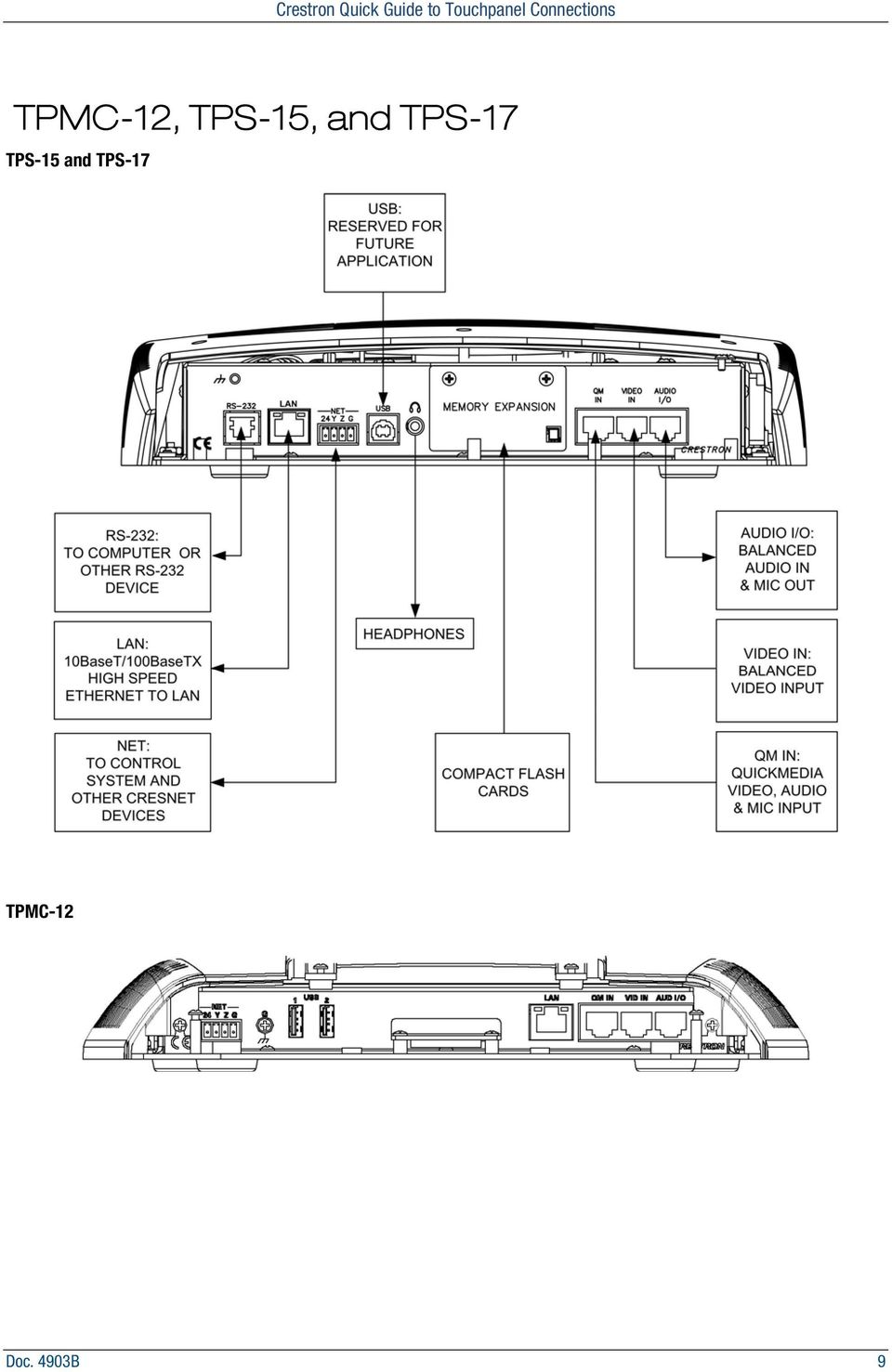
14 RS-232 This 6-pin RJ-11 connector mates with a 9-pin serial port of a PC. The connecting cable is not supplied. Use this port to establish a direct connection between the touchpanel and a PC without a control system or network connection. Once the direct connection is established, touchpanel files and firmware updates can be uploaded to the touchpanel. Additionally, the touchpanel diagnostic tools can be accessed over the direct connection. PIN DESCRIPTION 1 CTS 2 GND 3 RXD 4 TXD 5 RTS 6 N/C (Not connected) LAN One 8-wire RJ-45 connector with two LED indicators: The green LED indicates network speed The yellow LED indicates Ethernet activity This connector provides an Ethernet 10baseT/100baseTX, full duplex, IEEE 802.3U compliant network connection. PIN SIGNAL PIN SIGNAL 1 TX + 5 N/C 2 TX - 6 RC - 3 RC+ 7 N/C 4 N/C 8 N/C NET The four-pin 5 mm detachable terminal block provides communication with and power from a Cresnet control network. Pins 24 and G provide 24 VDC and ground. Pins Y and Z provide communications (data). Cresnet Power Usage Not including TPMC-CH-IMC (1.0W) TPMC-12 = 43 W ( V) TPS-15 = 65 W ( V) TPS-17 = 74 W ( V) Crestron recommends an independent power supply for these touchpanels. 10 Doc. 4903B

15 USB One Universal Serial Bus (USB) B connector provides a communications link. USB is a connectivity specification developed by the USB Implementers Forum that provides a single, simple, standardized way to connect devices to a computer. USB shielded cables contain two wires for power +5 volts (red) and ground (brown) and a twisted pair of wires (yellow and blue) that carry data. PIN DESCRIPTION PIN DESCRIPTION 1 +5 VDC 3 Data + 2 Data - 4 Ground NOTE: This connector is reserved for future applications. PHONE Connect this standard mini phone jack (12 mw, 32 ohm load) to the plug of a 3.5 mm external headphone set plug (not supplied). Plugging in the headphone cuts off the speakers. The headphone output is for WAV and Line audio only. It does not carry the microphone signal. MEMORY EXPANSION Use the AUDIO OUT on the TPMC-CH-IMC for the microphone signal. The onboard memory may be enhanced with the addition of a Type II compact flash memory (up to 160 MB). The flash memory slot is accessible on the rear panel of the unit. QM IN (QuickMedia Input) The eight-pin RJ-45 QuickMedia transport port accepts Crestron Certified Wiring carrying audio, video, and microphone signals. The QM input port conforms to the 568B wiring standard. Refer to the following table for connector pinouts. NOTE: The QM port is not connected through any IMC interface. NOTE: Only one video source may be displayed on the touchpanel at a time. NOTE: TPMC-12, TPS-15, and TPS-17 touchpanels do not support RGB. Doc. 4903B 11
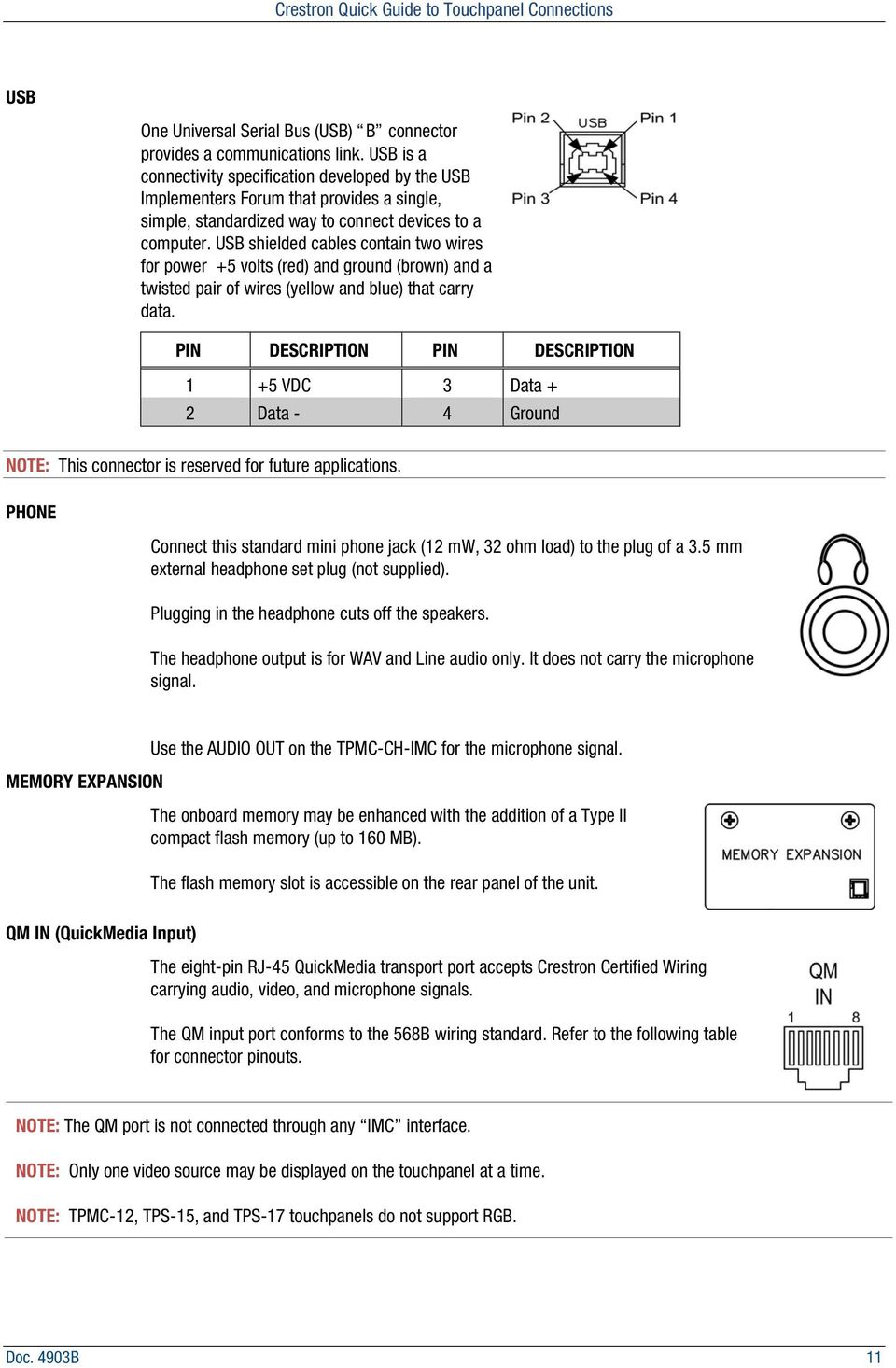
16 RJ-45 QuickMedia Connector Pin Assignments RJ-45 Pin Number Wire colors (EIA 568B) QM ASSIGNMENT COMPOSITE, S-VIDEO, COMPONENT and AUDIO 1 WHITE/ORANGE - CHROMINANCE (- P R ) 2 ORANGE + CHROMINANCE (+ P R ) 3 WHITE/GREEN - LUMINANCE (- Y) 4 BLUE + AUDIO 5 WHITE/BLUE - AUDIO 6 GREEN + LUMINANCE (+ Y) 7 WHITE/BROWN - COMPOSITE (- P B ) 8 BROWN + COMPOSITE (+ P B ) RJ-45 MALE CONNECTOR VIDEO IN This eight-pin RJ-45 connection provides connectivity to the CNX-PVID or the TPMC-CH- IMC interface module. This port provides component, composite or S-video balanced input to the touchpanel over Crestron Certified Wiring. Description of the pinouts is shown in the following table. A cable for this connection is provided with the touchpanel. CAUTION: Only use the TPMC-CH-IMC Interface Module when connecting this port. Use of other IMC products could damage the panel. Earlier IMC modules were equipped with a proprietary 10-pin RJ cable. If this is inadvertently connected to the 8-pin RJ-45 connector the panel will be damaged. NOTE: Only one video source may be displayed at a time. Video In Pin Assignments PIN WIRE COLORS (568B) COMPOSITE S-VIDEO COMPONENT 1 WHITE/ORANGE + Composite + Luminance + Y 2 ORANGE - Composite - Luminance - Y 3 WHITE/GREEN N/A + Chrominance + P B 4 BLUE N/A N/A + P R 5 WHITE/BLUE N/A N/A - P R 6 GREEN N/A - Chrominance - P B 7 WHITE/BROWN N/A N/A N/A 8 BROWN N/A N/A N/A 12 Doc. 4903B

17 AUDIO I/O This 8-pin RJ-45 connector provides connectivity to the CNX-BIPAD or with the TPMC-CH-IMC interface module. This port uses Crestron Certified Wiring and provides audio input to the touchpanel and microphone output from the touchpanel. A description of the pinouts is shown in the following table. CAUTION: Only use the TPMC-CH-IMC Interface Module when connecting this port. Use of other IMC products could damage the panel. Audio In/Out Pin Assignments PIN WIRE COLORS (568B) AUDIO I/O PIN WIRE COLORS (568B) AUDIO I/O 1 WHITE/ORANGE + Mic Left Out 5 WHITE/BLUE - Audio Left In 2 ORANGE - Mic Left Out 6 GREEN - Mic Right Out 3 WHITE/GREEN + Mic Right Out 7 WHITE/BROWN + Audio Right In 4 BLUE + Audio Left In 8 BROWN - Audio Right In Doc. 4903B 13

18 TPS-12G-QM and TPS-15G-QM RS-232 This 6-pin RJ-11 connector mates with a 9-pin serial port of a PC. The connecting cable is not supplied. Use this port to establish a direct connection between the touchpanel and a PC without a control system or network connection. Once the direct connection is established, touchpanel files and firmware updates can be uploaded to the touchpanel. Additionally, the touchpanel s diagnostic tools can be accessed over the direct connection. PIN DESCRIPTION 1 CTS 2 GND 3 RXD 4 TXD 5 RTS 6 N/C (Not connected) 14 Doc. 4903B

19 LAN One 8-wire RJ-45 connector with two LED indicators: The green LED indicates network speed The yellow LED indicates Ethernet activity This connector provides an Ethernet 10baseT/100baseTX, full duplex, IEEE 802.3U compliant network connection. PIN SIGNAL PIN SIGNAL 1 TX + 5 N/C 2 TX - 6 RC - 3 RC+ 7 N/C 4 N/C 8 N/C NET The four-pin 5 mm detachable terminal block provides communication with and power from a Cresnet control network. Pins 24 and G provide 24 VDC and ground. Pins Y and Z provide communications (data). Cresnet Power Usage Not including TPMC-CH-IMC (1.0W) TPS-12G-QM: 50 Watts ( Volts DC) TPS-15G-QM: 75 Watts ( Volts DC) TPS-12G-QM: PW-2420RU TPS-15G-QM: must use Cresnet power supply PC CARD Two Type II PCMCIA Card slots used for memory expansion up to 4GB or more, VT Pro-e project uploads, or installation of a wireless network card. A cover is secured over the slots to protect the electronics. Use a #1 Phillips screwdriver to remove the cover. The plate can be flipped and secured if only one slot needs to be accessed. CAUTION: PCMCIA cards are installed face down. Doc. 4903B 15

20 QM IN 1 and 2 (QuickMedia Inputs) Two 8-wire RJ-45 female, QuickMedia input ports; Signal types: Dynamically configurable under system control as: One RGB (VGA) input with stereo program audio and two mic channels or One auto-detecting component (YP b P r ), S-video (Y/C) or composite video input with stereo program audio and two mic channels RGB format: RGBHV; RGB input resolution, non-interlaced: 640 x 480 minimum to 1600 x 1200 maximum (60 Hz limit at 1600 x 1200); Video/HDTV formats: 480i (NTSC), 576i (PAL), 480p, 576p, 720p and 1080i; Horizontal frequency: khz; Vertical frequency: Hz; Delay skew compensation: 0-22 ns (QM IN 1 only, none on QM IN 2); Connects to QM output port of a QM-TX or other QuickMedia device (sold separately) via CresCAT-QM or CresCAT-IM cable; Maximum cable length: QM IN 1: 328 feet (aggregate distance from QM origination); QM IN 2: (Video/HDTV) 300 feet (aggregate distance from QM origination); 60 Hz) 216 feet for 640 x 480, 136 feet for 800 x 600, 84 feet for 1024 x 768, 50 feet for 1280 x 1024, 20 feet for 1600 x 1200 (using CresCAT-QM or CresCAT-IM cable) NOTE: The QM port is not connected through any IMC interface RJ-45 QuickMedia Connector Pin Assignments RJ-45 PIN NUMBER WIRE COLORS (EIA 568B) QM ASSIGNMENT COMPOSITE, S-VIDEO, COMPONENT AND AUDIO 1 WHITE/ORANGE - CHROMINANCE (- P R ) 2 ORANGE + CHROMINANCE (+ P R ) 3 WHITE/GREEN - LUMINANCE (- Y) 4 BLUE + AUDIO 5 WHITE/BLUE - AUDIO 6 GREEN + LUMINANCE (+ Y) 7 WHITE/BROWN - COMPOSITE (- P B ) 8 BROWN + COMPOSITE (+ P B ) RJ-45 MALE CONNECTOR QM OUT (QuickMedia Output One 8-wire RJ-45 female, QuickMedia output port containing RGB (same as touchscreen), WAV file audio and internal microphone signals; RGB format: RGBHV; RGB output resolution, non-interlaced (@ 60 Hz): TPS-12G-QM: 800 x 600 pixels TPS-15G-QM: 1024 x 768 pixels Connects to QM input port of any QuickMedia device via CresCAT-QM or CresCAT-IM cable. 16 Doc. 4903B

21 PHONE Connect this standard mini phone jack to the plug of an external headphone set, not supplied. 105 mw per channel, 8 ohm load PWR (Power) (1) 2.1 mm barrel DC power jack, 24 Volt DC power input; Passes through to NET port to power Cresnet devices. CAUTION: Use only Crestron power supplies for Crestron equipment. Failure to do so could cause equipment damage or void the Crestron warranty. USB Ports Two USB Type A female, USB 1.1 ports for mouse or other external pointing device PIN DESCRIPTION 1 +5 VDC 2 Data - 3 Data + 4 Ground Doc. 4903B 17
22 TPMC-CH-IMC Touchpanel Interface NET This 4-position mini-terminal block connector is used to connect to other Cresnet peripherals in a system. Another NET connector is located on the other side of the module. Data and power for the TPMC-CH-IMC are provided via either connection. Pins 24 and G provide 24 VDC and ground. Pins Y and Z provide communications (data). 18 Doc. 4903B
23 VIDEO The video input consists of three BNC connectors for unbalanced video signals. The component, composite or S-video input signal from an external video source is connected to these ports. AUDIO IN The 5-position mini-terminal block connector is wired to an external audio source and provides balanced and/or unbalanced audio input. AUDIO IN Pinouts PIN DESCRIPTION L + Left Positive L - Left Negative G Ground R + Right Positive R - Right Negative Balanced Input G + - Unbalanced Input G + - Shield Source 1 Source Source 1 Source 2 + Shield + Shield Jumpers Doc. 4903B 19
24 AUDIO OUT The 5-position mini-terminal block connector mates with the included connector and provides balanced and/or unbalanced microphone output. AUDIO OUT Pinouts PIN DESCRIPTION L + Left Positive L - Left Negative G Ground R + Right Positive R - Right Negative Unbalanced Output G + - Balanced Output G Chan 2 AMP Chan 1 Shield + + Chan 2 AMP Chan 1 VIDEO (To Panel) This RJ-45 connection mates with the TPMC-15-CH or TPMC-17-CH touchpanel. This port provides component, composite or S-video input to the touchpanel over CAT5 wiring. Video RJ-45 PIN WIRE COLORS (568B) WIRE COLORS (568A) COMPOSITE S-VIDEO COMPONENT 1 WHITE/ORANGE WHITE/GREEN + Composite + Luminance + Y 2 ORANGE GREEN - Composite - Luminance - Y 3 WHITE/GREEN WHITE/ORANGE N/A + Chrominance + PB 4 BLUE BLUE N/A N/A + PR 5 WHITE/BLUE WHITE/BLUE N/A N/A - PR 6 GREEN ORANGE N/A - Chrominance - PB 7 WHITE/BROWN WHITE/BROWN N/A N/A N/A 8 BROWN BROWN N/A N/A N/A 20 Doc. 4903B
25 AUDIO (To Panel) This 8-pin RJ-45 connector mates with the TPMC-15-CH or TPMC-17-CH touchpanel. This port uses CAT5 wiring and provides audio input to the touchpanel and microphone output from the touchpanel. Audio In/Out PIN WIRE COLORS (568B) WIRE COLORS (568A) AUDIO I/O 1 WHITE/ORANGE WHITE/GREEN + Mic Left Out 2 ORANGE GREEN - Mic Left Out 3 WHITE/GREEN WHITE/ORANGE + Mic Right Out 4 BLUE BLUE + Audio Left In 5 WHITE/BLUE WHITE/BLUE - Audio Left In 6 GREEN ORANGE - Mic Right Out 7 WHITE/BROWN WHITE/BROWN + Audio Right In 8 BROWN BROWN - Audio Right In The following chart shows the maximum recommended cable lengths for various signal formats. Recommended Maximum Cable Lengths for Audio/Video via CAT5 FORMAT MAXIMUM DISTANCE The maximum distance for CAT5 audio is limited to approximately 15 Composite 750 feet feet when connecting the AUDIO OUT port to a device with an unbalanced input. S-Video 750 feet If the AUDIO OUT port connects to a device with balanced inputs or no Component 500 feet device is connected, the maximum cable length for CAT5 audio is Audio 1000 feet (balanced) 1000 feet. Doc. 4903B 21
26 TPS-3000 and TPS-4000 NOTE: TPS-3000 and TPS-4000 include a TPS-IMPC Interface Module for system connection. Refer to page 24 for hookup details. NOTE: The audio connectors are color-coded blue. Hardware connections for the TPS-3000 and TPS-4000 (Back of the base is shown) HEADPHONES Connect this standard mini phone jack (12 mw, 32 ohms load) to the plug of an external headphone set, not supplied. The headphone output is for WAV and Line only. It does not send out the microphone signal. Use the MIC OUT on the TPS-IMPC for the microphone signal. NOTE: The headphone jack is unavailable after the HBK-3000 Hatchback option is installed. AUDIO This 8-position, RJ-45 connector (color coded blue) mates with the TPS-IMPC interface module and provides differential/single ended audio input and output. It also produces line level differential output. Pinout description is shown in the following table. PIN # DESIGNATION DESCRIPTION 1 L + Left Input (Positive) 2 L - Left Input (Negative) 3 GND Ground 4 R + Right Input (Positive) 5 R - Right Input (Negative) 6 S Shield 7 M + Mic Output (Positive) 8 M - Mic Output (Negative) 22 Doc. 4903B
27 RS-232 This 6-pin RJ-11 connector mates with a 9-pin serial port of a PC. The connecting cable is not supplied. Use this port to establish a direct connection between the touchpanel and a PC without a control system or network connection. Once the direct connection is established, touchpanel files and firmware updates can be uploaded to the touchpanel. Additionally, the touchpanel s diagnostic tools can be accessed over the direct connection. NET/VIDEO PIN DESCRIPTION 1 CTS 2 GND 3 RXD 4 TXD 5 RTS 6 N/C (Not connected) This 10-position RJ-45 port provides network connection from the touchpanel to the interface module and network power to the touchpanel. This port also contains the composite and S-video inputs. Refer to the pinout and descriptions in the following table. CAUTION: The 10-pin RJ-45 connector cable supplied by Crestron is a custom cable and is the only one that should be used. The end of the cable has a metal shield that is required to protect the equipment. Using non-crestron cables will result in damage to the product. PIN # DESIGNATION DESCRIPTION 1 +24V Power (Network) 2 GND Ground (Network) 3 C + Chrominance (Positive) 4 C - Chrominance (Negative) 5 Y Data (Network) 6 Z Data (Network) 7 Y + Luminance (Positive) Composite 8 Y - Luminance (Negative) Composite 9 GND Ground (Network) V Power (Network) Doc. 4903B 23
28 TPS-IMPC Touchpanel Interface The TPS-IMPC is designed specifically to serve as an interface module for the Crestron tilt touchpanel. It is supplied with every Isys -tilt touchpanel that includes audio capability. A network connector and video input connectors are located on one side of the unit. The opposite side offers audio input, microphone output (600 Ohms balanced and 300 Ohms unbalanced MIC OUT), and audio and network/video connections to the touchpanel. Cresnet Power Usage: <1 24 Volts DC not including touchpanel. If power is applied to the 24 VDC jack and the NET port simultaneously, power will be drawn from whichever is highest. NTSC/PAL VIDEO The NTSC/PAL video input consists of three connectors; two BNC connectors for unbalanced video signals and one 6-pin mini-connector for twisted pair wiring of balanced video signals. The video signal is connected to these ports and requires a TPS-3000 or installation of the TPS-VID-1 or TPS-VID-2 video card in a TPS-5000 or TPS-6000 touchpanel to display video. Consult the latest revision of the TPS-3000 Operations Guide (Doc. 6076) or TPS-VID-1/2 Operations & Installation Guide (Doc. 6059) for details. Use either the two BNC connectors or the six-pin connector for twisted pair wiring when connecting a video source. 24 Doc. 4903B
29 NOTE: The TPS-IMPC allows the use of either balanced or unbalanced signals for video input. To select the signal type to be used, the DIP switches located next to the MIC port must be set in the correct position. BAL/COAX DIP Switches These DIP switches are used to select which video connections (balanced or unbalanced) to use when receiving video signals. When used with a TPS-VID-2, each composite video signal can come in on either the twisted pair (balanced) or coaxial (unbalanced) connector. When used with a TPS-VID-1, the video signal (S-video or composite) can be received over the twisted pair (balanced) or coaxial (unbalanced) connectors. As long as a switch is in the appropriate position, a signal can be connected to either the BNC or twistedpair connector. To select the twisted pair connector for balanced video, the DIP switch for the respective video source must be in the UP position. To use the coaxial connector(s) for unbalanced video, the DIP switch must be in the DOWN position. NET This four-pin connector is used to connect to other Cresnet peripherals in a system and provide network power to the touchpanel if an external power pack is not used. Pins 24 and G provide 24 VDC and ground. Pins Y and Z provide communications (data). 24 VDC, 2.0A (Power Supply) This female connector is used to supply 24 VDC power to the TPS-IMPC and the touchpanel from an optional power pack (Crestron model PW-2420RU). When power is supplied to the TPS-IMPC through this connector, a Cresnet power connection on the NET connector is not required to display video on the touchpanel. CAUTION: Use only Crestron power supplies for Crestron equipment. Failure to do so could cause equipment damage or void the Crestron warranty. CAUTION: If power is provided to the TPS-IMPC from the +24VDC on a Cresnet connector or the PW-2420RU, power must not be applied to the power input on the touchpanel base. NOTE: When power is supplied through this connector, Crestron recommends disconnecting the +24 VDC on the Cresnet connector (if it is connected). NOTE: Use care in wiring installations to avoid applying 24 VDC power to Cresnet wiring from multiple sources. Doc. 4903B 25
30 NET/VIDEO (To Panel) This 10-pin RJ-45 connection mates with the TPS-3000, TPS-5000, or TPS-6000 touchpanel. Refer to the descriptions and pinout table that follow this paragraph. The 10-pin net/video cable assembly to connect the touchpanel to the TPS- IMPC is supplied. This port provides the Cresnet connection to the touchpanel. This port also provides composite or S-video input for the built-in video card (with the purchase of a TPS-3000 or installation of the TPS-VID-1/2 in a TPS-5000 or TPS-6000 touchpanel). CAUTION: It is possible to mistakenly insert the 8-pin audio cable into this port. NET/VIDEO Consult the latest revision of the TPS-3000 Operations Guide (Doc. 6076) or TPS-VID-1/2 Operations & Installation Guide (Doc. 6059) for details. PIN DESIGNATION DESCRIPTION 1 +24V Power (Network) 2 GND Ground (Network) 3 C + Chrominance (Positive) /Composite 2 4 C - Chrominance (Negative) /Composite 2 5 Y Data (Network) 6 Z Data (Network) 7 Y + Luminance (Positive) /Composite 1 8 Y - Luminance (Negative) /Composite 1 9 GND Ground (Network) V Power (Network) To determine the location of pin 1, hold the cable so that the end of the 10-pin RJ-45 connector is facing away from you, with the clip side down and the copper side up. The copper connector on the far left is pin 1. CAUTION: The 10-pin RJ-45 net/video connector cable supplied by Crestron is a custom cable and is the only one that should be used. The end of the cable has a metal shield that is required to protect the equipment. Using non-crestron cables will result in damage to the product. 26 Doc. 4903B
31 AUDIO (To Panel) This 8-pin RJ-45 mates with the TPS-3000, TPS-5000, or TPS-6000 touchpanel. The 8-pin audio cable assembly is supplied. Even though the 10-pin net/video cable may fit into the port, do not use it. This port provides audio input to the touchpanel and microphone output from the touchpanel. A description of the pinouts is shown in the following table. To determine the location of pin 1, hold the cable so that the end of the 8-pin RJ-45 connector is facing away from you, with the clip side down and the copper side up. The copper connector on the far left is pin 1. AUDIO (To Panel) AUDIO INPUT PIN DESIGNATION DESCRIPTION 1 L+ Left Input (Positive) 2 L - Left Input (Negative) 3 GND/Shield Audio Input Ground/Shield 4 R+ Right Input (Positive) 5 R - Right Input (Negative) 6 GND/Shield Mic Output Ground/Shield 7 M+ Mic Output (Positive) 8 M - Mic Output (Negative) The port mates with a six-pin connector (supplied) and provides balanced and/or unbalanced audio input. AUDIO INPUT PIN S R + R - L + L - S DESCRIPTION Shield Right Positive Right Negative Left Positive Left Negative Shield Balanced Input G + - Unbalanced Input G + - Shield Source 1 Source Source 1 Source 2 + Shield + Shield Jumpers Doc. 4903B 27
32 MIC OUT The port mates with a three-pin connector (supplied) and produces line level differential output. MIC OUT Pinouts PIN DESCRIPTION + Positive - Negative S Shield 28 Doc. 4903B
33 TPS-4L LAN (Ethernet) One 8-wire RJ-45 connector with two LED indicators (green LED indicates network speed, yellow LED indicates Ethernet activity). This connector provides an Ethernet 10baseT/100baseTX, full duplex, IEEE 802.3U compliant network connection. NOTE: This port does not support a wireless Ethernet connection. NET LAN Connector Pinouts PIN SIGNALS PIN SIGNALS 1 TX + 5 N/C 2 TX - 6 RC - 3 RC + 7 N/C 4 N/C 8 N/C This 4-position mini-terminal block connector provides Cresnet network connection from the touchpanel as well as power to the touchpanel. Pins 24 and G provide 24 VDC and ground. Pins Y and Z provide communications (data) Doc. 4903B 29
34 TPS-6L LAN (Ethernet) One 8-wire RJ-45 connector with two LED indicators (green LED indicates network speed, yellow LED indicates Ethernet activity). This connector provides an Ethernet 10baseT/100baseTX, full duplex, IEEE 802.3U compliant network connection. LAN Connector Pinouts PIN SIGNALS PIN SIGNALS 1 TX + 5 N/C 2 TX - 6 RC - 3 RC + 7 N/C 4 N/C 8 N/C 30 Doc. 4903B
35 NET This 4-position mini-terminal block connector provides Cresnet network connection from the touchpanel as well as power to the touchpanel. Pins 24 and G provide 24 VDC and ground. Pins Y and Z provide communications (data) NET 24 Y Z G MIC OUT This 3-position mini-terminal block connector provides balanced line level microphone output with AGC. AUDIO INPUT PIN # DESIGNATION DESCRIPTION 1 + Mic Output (Positive) 2 - Mic Output (Negative) 3 S Shield One 5-pin 3.5mm detachable terminal block Balanced/unbalanced stereo (summed to mono) line-level input (requires SPK-6L); Input Impedance: 10k ohms balanced, 5k ohms unbalanced; Maximum Input Level: 2 V rms balanced/unbalanced; Normally connects to a Crestron CAT5 balanced audio source via CresCAT cable; Maximum CAT5 Cable Length: 1000 feet. PIN # DESIGNATION DESCRIPTION 1 R+ Right Input (Positive) 2 R - Right Input (Negative) 3 S Shield 4 L+ Left Input (Positive) 5 L - Left Input (Negative) Balanced Input G + - Unbalanced Input G + - Shield Source 1 Source Source 1 Source 2 + Shield + Shield Jumpers Doc. 4903B 31
36 NTSC/PAL INPUT One 5-pin 3.5mm detachable terminal block Balanced (CAT5) or unbalanced (coaxial) composite video inputs Formats: NTSC 480i or PAL 576i Input Impedance: 100 ohms balanced, 75 ohms unbalanced Input Level: 1 Vp-p nominal Balanced input normally connects to a Crestron CAT5 balanced video source via CresCAT cable, using +, -, and S connections. Unbalanced video uses S (shield) and C connections. Maximum CAT5 Cable Length: 750 feet. Optional External Speaker One six-pin (2x3) rectangular connector for optional external speaker kit (SPK-6L, sold separately). 32 Doc. 4903B
37 TPS-6X-DS and TPS 6X-DSW TPS-6X-DS TPS-6X-DSW TYPE PIN Color SIGNAL Interface Module Connector (to TPS-6X-IMCW) 10-Position RJ-50 1 Gray Ground 2 Orange/White Ethernet TX+ 3 Orange Ethernet TX- 4 Green/White Ethernet RX+ 5 Blue Cresnet Y 6 Blue/White Cresnet Z 7 Green Ethernet RX- 8 Brown/White Diff Video + 9 Brown Diff Video - 10 Gray/White Power 12VDC/24VDC Doc. 4903B 33
38 NET This 4-position mini-terminal block connector provides Cresnet network connection from the touchpanel as well as power to the touchpanel. Pins 24 and G provide 24 VDC and ground. Pins Y and Z provide communications (data) NET 24 Y Z G VID IN (unbalanced) VID IN (balanced) Unbalanced composite video input Input impedance: 75 Ω nominal Input level: 1 V p-p nominal, 1.5 V p-p maximum Maximum DC offset: ±2 Volts Connects to any conventional coax video source (S=shield) Balanced composite video input Input impedance: 100 Ω nominal Input level: 1 V p-p nominal, 1.5 V p-p maximum Maximum DC offset: ±2 Volts Connects to any Crestron CH CAT5 Video Out port via CresCAT cable (S=shield) LAN (Ethernet) One 8-wire RJ-45 connector provides an Ethernet 10baseT/100baseTX, full duplex, IEEE 802.3U compliant network connection. LAN Connector PIN SIGNALS PIN SIGNALS 1 TX + 5 N/C 2 TX - 6 RC - 3 RC + 7 N/C 4 N/C 8 N/C 34 Doc. 4903B
39 TPS-6X-IMCW NET VID IN (unbalanced) VID IN (balanced) TYPE PIN Color SIGNAL Interface Module Connector (to TPS-6X-IMCW) 10-Position RJ-50 1 Gray Ground 2 Orange/White Ethernet TX+ 3 Orange Ethernet TX- 4 Green/White Ethernet RX+ 5 Blue Cresnet Y 6 Blue/White Cresnet Z 7 Green Ethernet RX- 8 Brown/White Diff Video + 9 Brown Diff Video - 10 Gray/White Power 12VDC/24VDC This 4-position mini-terminal block connector provides Cresnet network connection from the touchpanel as well as power to the touchpanel. Pins 24 and G provide 24 VDC and ground Pins Y and Z provide communications (data) Unbalanced composite video input Input impedance: 75 Ω nominal Input level: 1 V p-p nominal, 1.5 V p-p maximum Maximum DC offset: ±2 Volts Connects to any conventional coax video source (S=shield) Balanced composite video input Input impedance: 100 Ω nominal Input level: 1 V p-p nominal, 1.5 V p-p maximum Maximum DC offset: ±2 Volts Connects to any Crestron CH CAT5 Video Out port via CresCAT cable (S=shield) NET 24 Y Z G Power One on front panel and one on back panel. 2.5 mm barrel DC power jack, 12 Volt DC power input; (PW-1215 or PWI-1215 power supply sold separately); Passes through panel port to power TPS-6X. Doc. 4903B 35
40 V-Panels Available as 12" and widescreen 15" displays in black or white. V-Panel displays are ultra-thin and may be installed flush mount, on a standard VESA mount or a desktop tiltcase. The new sleek design is accomplished by separating the Digital Graphics Engine (DGE), which is rack mounted up to 200 feet away. Either the DGE-1 or DGE-2 may be combined with a V-Panel display and feature a Windows Embedded platform to deliver PC applications, Web browsing, streaming media, VoIP and onscreen annotation. DGE-1 provides one scalable analog video window display, and the DGE-2 delivers two scalable 1080p HD video window displays. DMNet Port Connections PIN Number Signal Wire Color VDC Red NOTE: DMNet uses the same physical connectors as Cresnet, but the two protocols are not compatible. Be sure you do not cross-wire DMNet and Cresnet. A Data Orange B Data Grey G Ground Black D and M Port Connections PIN Number Color PIN Number Color 1 White/Orange 5 White/Blue 2 Orange 6 Green 3 White/Green 7 White/Brown 4 Blue 8 Brown USB Type A female, USB 1.1 ports for mouse or touchscreen input PIN DESCRIPTION 1 +5 VDC 2 Data - 3 Data + 4 Ground 36 Doc. 4903B
41 Digital Graphics Engines DGE-1 and DGE-2 DGE-1 D and M Ports PIN WIRE COLOR 1 Orange/White 2 Orange 3 Green/White 4 Blue 5 Blue/White 6 Green 7 Brown/White 8 Brown 24 A B G Port PIN SIGNAL DESCRIPTION WIRE COLOR VDC DC Power Red A DM_NET+ DMNet Orange B DM_NET- DMNet Grey G GND DC Ground Black NOTE: DMNet uses the same physical connectors as Cresnet, but the two protocols are not compatible. Be sure that you do not cross-wire DMNet and Cresnet AUDIO IN/OUT NET PIN # DESIGNATION DESCRIPTION 1 R+ Right Input (Positive) 2 R - Right Input (Negative) 3 S Shield 4 L+ Left Input (Positive) 5 L - Left Input (Negative) Two 4-position mini-terminal block connectors provides Cresnet network connection. NET Pins 24 and G provide 24 VDC and ground. 24 Y Z G Pins Y and Z provide communications (data) Doc. 4903B 37
42 LAN (Ethernet) One 8-wire RJ-45 connector provides an Ethernet 10baseT/100baseTX, full duplex, IEEE 802.3U compliant network connection. PIN SIGNALS PIN SIGNALS 1 TX + 5 N/C 2 TX - 6 RC - 3 RC + 7 N/C 4 N/C 8 N/C Audio I/O PIN WIRE COLORS (568B) AUDIO I/O PIN WIRE COLORS (568B) AUDIO I/O 1 WHITE/ORANGE + Mic Left Out 5 WHITE/BLUE - Audio Left In 2 ORANGE - Mic Left Out 6 GREEN - Mic Right Out 3 WHITE/GREEN + Mic Right Out 7 WHITE/BROWN + Audio Right In 4 BLUE + Audio Left In 8 BROWN - Audio Right In DGE-2 38 Doc. 4903B
43 Basic V-Panel Hookup Example Doc. 4903B 39
44 TPMC-4SM LAN (Ethernet) One 8-wire RJ-45 connector provides an Ethernet 10baseT/100baseTX, full duplex, IEEE 802.3U compliant network connection. LAN Connector PIN SIGNALS PIN SIGNALS 1 TX + 5 N/C 2 TX - 6 RC - 3 RC + 7 N/C 4 N/C 8 N/C OCCUPANCY SENSOR INPUT (4) Captive screw terminals comprising (2) voltage sensing inputs (referenced to ground) with 24 Volt DC power output Input voltage range: 0-30 Volts DC Sensing threshold: 4.5 Volts DC active, 1 Volt DC inactive Maximum DC load: 4 24 Volts DC, provides operating power for up to (4) Crestron GLS Series occupancy sensors 40 Doc. 4903B
45 Cresnet Touchpanel Power Q&A Q. We prefer to place Cresnet power supplies in our Head End equipment rack for large residential systems. It has come to our attention that many of the newer touchpanels draw considerably more Cresnet power then their predecessors. (For instance, the TPS-15G-QM draws 75 watts of Cresnet power.) Considering power loss (due to resistance) in cable, and the 75 Watt maximum output of Crestron power supplies, it appears that the maximum distance between a power supply and a newer touchpanels will be much less than previous. A. 1. Why does the TPMC-15/17 (CH/QM) come with its own 12.5 Volt power supply, instead of using Cresnet power? 2. Is there any possibility of producing a larger power supply to deal with the incresed Cresnet power consumption? 3. Does Crestron have any recommendations or guidelines regarding power delivery over Cresnet (and other) cable? 1. The higher resolution, brightness, and added capabilities of the new Crestron touchpanels have come at a price. More power is needed to drive these devices. This is especially true for the wired TPMC panels. Their embedded computer capabilities draw a great deal of power. Their power draw makes it impractical to drive them with 24 Volt Cresnet power. A dedicated 12.5 Volt power supply was chosen as the best way to supply power. TPMC-15CH/QM-(L) and TPMC-17CH/QM-(L) panels are shipped with an interface module called a TPMC- L-IMC. This interface is used to convert the power from the panels power supply to two wires, allowing for extensions in distance between the power supply and the panel. The following chart illustrates cablelength limitations: Recommended wire lengths between TPMC-L-IMC and TPMC touchpanel. WIRE GAUGE SINGLE WIRE DOUBLE WIRE 14awg (2.5mm) 30ft 60ft 16awg (1.5mm) 20ft 40ft 2. The answer is no. The National Electrical Code prohibits running more than 75 Watts of Cresnet power through low-voltage wiring. Larger power supplies could present a fire hazard. 3. When sizing up an installation, pay attention to the touchpanel sizes and their distance from the main equipment rack. In many cases, it may be best to locate a power supply local to the touchpanel. In multi-story projects, utility closet locations should be noted as a possible site for Cresnet power supplies on that floor. In some cases, it may make sense to use larger gauge wiring for Cresnet power on long runs. Use the following formula to determine the maximum length of wire that you can use to send power from a dedicated 75 Watt power supply to a specific touchpanel. L < 40,000/(PF x R) Where: L = length in feet, PF = Crestron Power Factor, R = Cable Resistance Refer to the following table for maximum cable lengths. Doc. 4903B 41
46 Cresnet (18 awg R=6) Maximum Cable Lengths for TPS panels using 75 watts of Cresnet Power 16 awg (R=4) CAT5 (2-cond R=13) 12 awg (R=1.6) TPS-12 (L) TPS-15 (L) TPS-17 (L) TPS-12G-QM (L) TPS-15G-QM (L) Doc. 4903B
47 Example Hookup and Application Diagrams TPS-12G-QM and TPS-15G-QM Interface: QuickMedia Device Doc. 4903B 43
48 TPS-12G-QM and TPS-15G-QM Interface: Extended Application Dual Video/RGB Windows and Audience Presentation 44 Doc. 4903B
49 TPS-12G-QM and TPS-15G-QM Kitchen Control Application TPS-12G-QM or TPS-15G-QM Podium Application with QM-MD7X2 Switcher for Multiple AV Inputs Doc. 4903B 45
50 TPMC-CH-IMC Interface Connections for TPS-12, TPS-15, and TPS Doc. 4903B
51 QuickMedia Interface Connections for TPS-12, TPS-15, and TPS-17 Doc. 4903B 47
52 Balanced AV Distribution Connections for TPS-12, TPS-15, and TPS-17 (CNX-BIPAD8 and CNX-PVID8) 48 Doc. 4903B
53 Balanced CAT5 AV Distribution Connections for TPS-12, TPS-15, and TPS-17 (C2N-IADS30X24 and C2N-IVDS24X24) Doc. 4903B 49
54 TPS-12, TPS-15, or TPS-17 Family Room Application with Audio and Video Distribution 50 Doc. 4903B
55 TPS-12, TPS-15, or TPS-17 Application Podium Control with QM-MD4X2 Switcher for Dual AV Input Doc. 4903B 51
56 TPS-15 Application with CNX-BIPAD8 and CNX-PVID8X3 52 Doc. 4903B
57 TPS-17 Application with Intercom, Audio Distribution, Video Distribution, Security, and Phone System Doc. 4903B 53
58 Appendix A: QuickMedia Installation Notes The QuickMedia transport mechanism performs delay compensation on each video input to compensate for signal skew, and frequency/bandwidth compensation for cable length. Signal skew occurs when part of the signal is delayed with respect to other signal components. The amount of skew largely depends on the length and design of the wire. Because CAT5 consists of twisted pairs that are twisted together in the cable, unequal wire lengths are created. The maximum aggregate cable length from QM transmitter to QM receiver is limited by the loss of bandwidth over long distances and the amount of available skew compensation. A cable rated at 15 ns of skew per 100 meters (328 ft.) means that a cable will have no more than a 15 ns difference between the fastest and slowest RGB signals over 100 meters of cable. To determine the allowable maximum length of installed cable, the installer must first perform a calculation based on the skew rating of the cable. The use of low-resolution signals may allow increased cable length but must be tested with the sources to be used. To ensure sufficient bandwidth to support signal resolutions up to 1600 x 1200, the maximum aggregate cable length should not exceed 328 feet. Skew compensation is primarily relevant to RGB sources; however, any/all video or VGA signals may experience a loss of quality over very long lengths of cable. This phenomenon is due to the added resistance and capacitance of longer cable lengths, and is not particular to either Crestron and/or QuickMedia systems. The total accumulated skew from QM transmitter to QM receiver must not exceed 15 ns (nanoseconds). Crestron recommends a cable with a rating of less than or equal to 15 ns over its entire length. For example, if using a cable with a rating of 15 ns/100 meters (100 meters = 328 feet), connecting the QM- FTCC transmitter with 150 feet of cable to a QM-MD7x2 switcher, and then using another 150 feet to connect the QM-RMCRX-BA receiver, the accumulated skew over the entire 300 feet should not exceed 15 ns. Further Inquiries If you cannot locate specific information or have questions after reviewing this guide, please take advantage of Crestron's award winning customer service team by calling the Crestron corporate headquarters at CRESTRON [ ]. For assistance in your local time zone, refer to the Crestron website ( for a listing of Crestron worldwide offices. You can also log onto the online help section of the Crestron website to ask questions about Crestron products. First-time users will need to establish a user account to fully benefit from all available features. 54 Doc. 4903B
59
60 Crestron Electronics, Inc. Quick Guide to Touchpanel Connections 15 Volvo Drive Rockleigh, NJ Doc. 4903B Tel: 888.CRESTRON Fax: Specifications subject to change without notice.
Crestron CAT5 Wiring Reference Guide
 Crestron CAT5 Wiring Reference Guide This document was prepared and written by the Technical Documentation department at: Crestron Electronics, Inc. 15 Volvo Drive Rockleigh, NJ 07647 1-888-CRESTRON All
VE02AL / VE05AL / VE02ALR VGA & Stereo Audio CAT5 Extender with Chainable Output
 VE02AL / VE05AL / VE02ALR VGA & Stereo Audio CAT5 Extender with Chainable Output Introduction: VE02AL, VE05AL is designed for VGA +Stereo Audio signal over cost effective CAT5 cable to instead of VGA and
Smarthome SELECT Bluetooth Wireless Stereo Audio Receiver and Amplifier INTRODUCTION
 Smarthome SELECT Bluetooth Wireless Stereo Audio Receiver and Amplifier INTRODUCTION The Smarthome SELECT Bluetooth Wireless Stereo Audio Receiver and Amplifier is a multi-functional compact device. It
Modular Video Matrix Switchers and Signal Cards
 AVS800 AVS-4I-DVI AVS-4I-VGA AVS-4I-HDB AVS-4I-HDM AVS1600 AVS-4O-DVI AVS-4O-VGA AVS-4O-HDB AVS-4O-HDM AVS-4I-UNI Product Data Sheet Modular Video Matrix Switchers and Signal Cards AVS800, front view AVS800,
HARDWARE MANUAL. BrightSign HD120, HD220, HD1020. BrightSign, LLC. 16795 Lark Ave., Suite 200 Los Gatos, CA 95032 408-852-9263 www.brightsign.
 HARDWARE MANUAL BrightSign HD120, HD220, HD1020 BrightSign, LLC. 16795 Lark Ave., Suite 200 Los Gatos, CA 95032 408-852-9263 www.brightsign.biz TABLE OF CONTENTS OVERVIEW... 1 Block Diagram... 2 Ports...
HARDWARE MANUAL HD222, HD1022. BrightSign, LLC. 16780 Lark Ave., Suite B Los Gatos, CA 95032 408-852-9263 www.brightsign.biz
 HARDWARE MANUAL HD222, HD1022 BrightSign, LLC. 16780 Lark Ave., Suite B Los Gatos, CA 95032 408-852-9263 www.brightsign.biz 1 TABLE OF CONTENTS Overview... 1 Block Diagram... 2 HD222... 3 HD1022... 4 Hardware
Product Information S N O. Portable VIP protection CCTV & Alarm System 2
 Product Information S N O Portable VIP protection CCTV & Alarm System 2 G O V E R N M E N T A L S E C U R I T Y S O L U T I VIP KIT Rapid Deployment VIP Protection Kit The VIP KIT has been designed to
5-port / 8-port 10/100BaseTX Industrial Ethernet Switch User Manual
 5-port / 8-port 10/100BaseTX Industrial Ethernet Switch User Manual Content Overview... 1 Introduction... 1 Features... 3 Packing List... 4 Safety Precaution... 4 Hardware Description... 5 Front Panel...
A. All equipment and materials used shall be standard components that are regularly manufactured and used in the manufacturer s system.
 ENDURA - WS5050 PC WORKSTATION TECHNICAL SPECIFICATIONS SECURITY SYSTEM DIVISION 28 ELECTRONIC SAFETY AND SECURITY LEVEL 1 28 20 00 ELECTRONIC SURVEILLANCE LEVEL 2 28 23 00 VIDEO SURVEILLANCE LEVEL 3 28
3x cinch/s-video socket Order no.: 33 1532 xx. USB/3.5 mm audio socket Order no.: 33 1539 xx. VGA socket Order no.: 33 1540 xx
 3x cinch/s-video socket Order no.: 33 1532 xx USB/3.5 mm audio socket Order no.: 33 1539 xx VGA socket Order no.: 33 1540 xx VGA socket with screw-in lift terminals Order no.: 33 1541 xx High definition
www.vicon-security.com
 Data/Spec Sheet 16-Channel Hybrid Digital Video Recorder Configured with ViconNet Video Management Software (VMS) Scalable from one to hundreds of recorders Support for HD video and Megapixel cameras Real-time
Comtrol Cable User Guide
 Comtrol Cable User Guide Trademark Notices Comtrol and DeviceMaster are trademarks of Comtrol Corporation. PortVision is a registered trademark of Comtrol Corporation. Microsoft and Windows are registered
Office of Integrated Security Systems Longwood University Camera System Standards
 Office of Integrated Security Systems Longwood University Camera System Standards 1 GENERAL A. All equipment and materials used shall be standard components that are regularly manufactured and used in
LT-82 Stationary IR Transmitter
 LT-82 Stationary IR Transmitter Configuration LT-82-0 (North America) LT-82-02 (Asia, UK) LT-82-03 (Euro) The Listen LT-82 is the heart of a stationary IR listening system. It takes the desired audio signal
LevelOne IFE-0500 4-Port PoE + 1-Port TP Industrial Fast Ethernet Switch User Manual
 LevelOne IFE-0500 4-Port PoE + 1-Port TP Industrial Fast Ethernet Switch User Manual Ver. 1.0.0-0711 1 FCC Warning This Equipment has been tested and found to comply with the limits for a Class-A digital
HDMI/DVI to VGA/Component & Audio Break out Converter
 HDMI/DVI to VGA/Component & Audio Break out Converter User Manual (HCV VA) All information is subject to change without notice. All names & trademarks are property of their respective owners. Rev.1002
PCS0100en 02.2008. Persy Control Services B.V. Netherlands
 P-Bus Gateway PBGW2.128 Universal gateway between the P-bus protocol and open standard protocols. The variety of available electrical interfaces on the gateway offers a wide range of possibilities for
NV-EC1701. Ethernet over Coax Transceiver www.nvt.com (+1) 650.462.8100 (+44) (0) 208 977 6614. Model NV-EC1701
 EoC Ethernet over Coax Transceiver with PoE+ Data Sheet Application Example: IP Camera Cat5 100m ( 328ft) NV-EC1701 Ethernet over Coax Transceiver www.nvt.com (+1) 650.462.8100 (+44) (0) 208 977 6614 Coax
Installation Guide. AXIS 2191 Audio Module Sight, Speech and Sound over IP!
 Installation Guide AXIS 2191 Audio Module Sight, Speech and Sound over IP! AXIS 2191 Installation Guide Page 1 of 7 The AXIS 2191 Audio Module The AXIS 2191 Audio Module is an add-on device that provides
AV, Data, Power, and Control Connectivity for Wall Mount, Furniture Mount, and Floor Mount Applications
 AV, Data, Power, and Control Connectivity for Wall Mount, Furniture Mount, and Floor Mount Applications Description Extron Mini Architectural Adapter Plates are optional mounting plates designed to work
DTS/DRS-1000RV. Owner s Manual. DTS-1000RV: DVI/HDMI or VGA, Audio, RS-232C Transmitter Extender
 DTS/DRS-1000RV Owner s Manual DTS-1000RV: DVI/HDMI or VGA, Audio, RS-232C Transmitter Extender DRS-1000RV: DVI/VGA or VGA, Audio, RS-232C Receiver Extender Dtrovision LLC 9A Bergen Turnpike Little Ferry,
BrightSign Expander Hardware Guide
 Hardware Guide PCBA: Rev C Version: 0.1 Saratoga, CA, USA 1 Table of Contents OVERVIEW... 3 EXPANDER BLOCK DIAGRAM... 4 PORTS... 6 POWER CONNECTOR... 6 OPTICAL SPDIF CONNECTOR... 6 DB25 SWITCH/LED CONNECTOR...
KVM - DVI, USB 2.0, Cat 5 Extender
 KVM - DVI, USB 2.0, Cat 5 Extender 330 feet (100 meters) EL5100 User Guide Powered by Thank you for purchasing the KVM - DVI, USB 2.0, Cat 5 Extender 330 feet (100 meters) Please read this guide thoroughly.
Sympodium Interactive Pen Display
 Physical Specifications Sympodium Interactive Pen Display Specifications Model DT770 Size Display Area Weight Shipping Size Shipping Weight (Carton and Contents) 19" W 18" H 3 5/8" D (48.3 cm 45.7 cm 9.2
How To Use A Pump Station 16-R
 Pump Station 16-R Installation & User Guide V2.1 Cloud Electronics Limited 140 Staniforth Road, Sheffield, S9 3HF England Tel +44 (0) 114 244 7051 Fax +44 (0) 114 242 5462 E-mail [email protected] Web site
TDAS G5-DB Hardware User s Manual
 TDAS G5-DB Hardware User s Manual July 2003 Rev. 1A Table of Contents DTS Support... 3 Introducing the TDAS G5-DB... 4 Summary of TDAS G5-DB Features... 4 Basic Care and Handling... 4 Shock Rating...5
TCP/IP MODULE CA-ETHR-A INSTALLATION MANUAL
 TCP/IP MODULE CA-ETHR-A INSTALLATION MANUAL w w w. c d v g r o u p. c o m CA-ETHR-A: TCP/IP Module Installation Manual Page Table of Contents Introduction...5 Hardware Components... 6 Technical Specifications...
Provides one channel for Ethernet over existing
 LB304A LBPS301A LBPS304A Hardened Ethernet Extender Quick Start Guide Provides one channel for Ethernet over existing voice-grade copper twisted-pair wire. copper BLACK wire. BOX Customer Support Information
8-Port PoE Network Switch
 Page 1 of 12 8-Port PoE Network Switch User s Guide Document Number 91I00-1 Rev A August, 2009 FCC Warning: Page 2 of 12 This devices has been tested and found to comply with the regulations for Class
EVOline Multimedia Modules
 243 EVOline VGA cable EVOline DVI-A cable EVOline DVI-D cable EVOline HDMI cable Cable properties Flame retardant self extinguishing VW-1 Halogen free yes yes yes Colour Black Black Outer diameter 7,2
HARDWARE MANUAL. BrightSign XD230, XD1030, XD1230. BrightSign, LLC. 16780 Lark Ave., Suite B Los Gatos, CA 95032 408-852-9263 www.brightsign.
 HARDWARE MANUAL BrightSign XD230, XD1030, XD1230 BrightSign, LLC. 16780 Lark Ave., Suite B Los Gatos, CA 95032 408-852-9263 www.brightsign.biz 1 TABLE OF CONTENTS Overview... 1 Block Diagram... 2 XD230...
JNIOR. Overview. Get Connected. Get Results. JNIOR Model 310. JNIOR Model 312. JNIOR Model 314. JNIOR Model 410
 The INTEG is an Ethernet I/O (digital, analog) device that monitors and controls a small set of process signals. functions as both basic I/O for integration with another application or system AND as a
SMART Podium Interactive Pen Display
 SMART Podium Interactive Pen Display Specifications Model ID350 Physical Specifications Size With Tilt Stand (lowest position) With Tilt Stand (highest position) Display Area Weight (with stand) Shipping
VS-0202 VS-0204. User Manual
 User Manual VS-0202 VS-0204 Read this guide thoroughly and follow the installation and operation procedures carefully in order to prevent any damage to the units and/or any devices that connect to them.
FITNESS FACILITY WIRING SPECIFICATIONS. NETPULSE Inc. 2331 3rd Street San Francisco, CA 94107 Phone: 415.643.0223
 FITNESS FACILITY WIRING SPECIFICATIONS NETPULSE Inc. 2331 3rd Street San Francisco, CA 94107 Phone: 415.643.0223 CONTENTS: - Scope of work Summary - Equipment list - Technical specifications - Map of data
Overview. High Bright Networkable WXGA Projector
 High Bright Networkable WXGA Projector Overview The ViewSonic PJD7533w is a high brightness networkable WXGA DLP projector that offers bright widescreen images and advanced connectivity for large university
AV, Data, Power, and Control Connectivity for Wall Mount, Furniture Mount, and Floor Mount Applications
 AV, Data, Power, and Control Connectivity for Wall Mount, Furniture Mount, and Floor Mount Applications Description Extron Architectural Adapter Plates are optional mounting plates that fit into designated
Características. Starligh SA 9 de julio 1595 Córdoba Argentina - 0351-4809210 / 4119600
 Balun Activo - BALUN_ACT Características Single Channel Active Video Transmitter Full-motion color video signal up to 3900ft(1200m) via UTP cat5e/6 NTSC, PAL & SECAM video format compatible Real-time transmission
HDMI over IP Broadcasting System ITEM NO.: HE05BT, HE05BER HDMI Matrix over IP Broadcasting
 HDMI over IP Broadcasting System ITEM NO.: HE05BT, HE05BER HDMI Matrix over IP Broadcasting HE05B is a Multicast HDMI video over an IP network to up to 200 screens for faster, more efficient HD content
Crestron C2N-ANLZ Cresnet Analyzer Operations Guide
 Crestron C2N-ANLZ Cresnet Analyzer Operations Guide This document was prepared and written by the Technical Documentation department at: Crestron Electronics, Inc. 15 Volvo Drive Rockleigh, NJ 07647 1-888-CRESTRON
LwLVision-USB 2.0. Installation Guide
 LwLVision-USB 2.0 Installation Guide About this manual This manual has been carefully compiled and examined to the state-of-the-art. G&D neither explicitly nor implicitly takes guarantee or responsibility
Extender for HDMI Long Range. www.gefentv.com GTV-HDMI-CAT5LR. User Manual
 Extender for HDMI Long Range GTV-HDMI-CAT5LR User Manual www.gefentv.com Technical Support: Telephone (818) 772-9100 (800) 545-6900 Fax (818) 772-9120 Technical Support Hours: 8:00 AM to 5:00 PM Monday
16-Port RS232 to USB2.0 High Speed Multi Serial Adapter (w/ Metal Case) Installation Guide
 16-Port RS232 to USB2.0 High Speed Multi Serial Adapter (w/ Metal Case) Installation Guide 1. Introduction Thank you for purchasing this 16-Port RS232 to USB2.0 High Speed Multi Serial Adapter. It is an
PU-USBX. USB over Ethernet Extender OPERATION MANUAL
 PU-USBX USB over Ethernet Extender OPERATION MANUAL Safety Precautions Please read all instructions before attempting to unpack or install or operate this equipment, and before connecting the power supply.
Active Speaker System LX523 AUDAC PROFESSIONAL AUDIO EQUIPMENT. Active Speaker System with remote input LX523. User Manual & Installation Guide
 Active Speaker System LX523 AUDAC PROFESSIONAL AUDIO EQUIPMENT Active Speaker System with remote input LX523 User Manual & Installation Guide AUDAC PROFESSIONAL AUDIO EQUIPMENT User Manual & Installation
CATALOGUE 2012. Smart Home Engineering
 CATALOGUE 2012 Smart Home Engineering C. Expert in Video Signal Management Smart Home Engineering Corp.; Elpro Video Labs s.r.l. - Tel. +39 0117701583 C. PRODUCT CATALOGUE 2012 SHE 1 DVI CAT6 Extender
TrueAlarm Fire Alarm Systems
 TrueAlarm Fire Alarm Systems UL, ULC, CSFM Listed; FM Approved; MEA (NYC) Acceptance* Fire Alarm System Accessories, 4190 Series PC Annunciator with Multi-Client Capability Features Fire alarm control
Draper Low Voltage, Remote Control, Serial and Network Wiring Guide
 Draper Low Voltage, Remote Control, Serial and Network Wiring Guide Copyright 2007 Draper Inc. Form LV-RC-Serial-Network_Wiring07 Print ed in U.S.A. Draper Low Voltage, Remote Control, Serial and Network
Setup guide. point to point wall plate extenders
 SDS-1002/3 point to point wall plate extenders Setup guide For more information visit our website, or talk to one of our technical team tel: +44 (0) 1306 628264 www.smart-e.co.uk SDS-1002 & 1003 SETUP
Quick Installation Guide 24-port PoE switch with 2 copper Gigabit ports and 2 Gigabit SFP ports (af Version 15.4W)
 Quick Installation Guide 24-port PoE switch with 2 copper Gigabit ports and 2 Gigabit SFP ports (af Version 15.4W) Table of Contents Introduction.. Power Over Ethernet (PoE) & Features.... Unpacking and
HP4000EX Hardware Manual
 INFORMATION TO USER CAUTION RISK OF ELECTRIC SHOCK, DO NOT OPEN! CAUTION: TO REDUCE THE RISK OF ELECTRIC SHOCK, DO NOT REMOVE COVER (OR BACK). NO USER SERVICEABLE PARTS INSIDE. REFER SERVICING TO QUALIFIED
Connector and Cable Specifications
 APPENDIXB This chapter describes the connector and cable specifications. Connector Specifications, page B-1l Cable and Adapter Specifications, page B-5 Connector Specifications 10/100/1000 Ports, page
HP Advanced Wireless Docking Station. User Guide
 HP Advanced Wireless Docking Station User Guide Copyright 2014, 2015 Hewlett-Packard Development Company, L.P. Intel is a trademark of Intel Corporation in the U.S. and other countries. Windows and Windows
EV-1000 Series DVR. Quick Operation Guide. Version 1.0.0
 EV-1000 Series DVR Quick Operation Guide Version 1.0.0 Thank you for purchasing our product. If there is any question or request, please do not hesitate to contact dealer. This manual is applicable to
Zetron Desktop Microphone Manual 025-9589F
 Zetron Desktop Microphone Manual 025-9589F Software License The Zetron software described in this manual is subject to the terms and conditions of Zetron's Software License Agreement, a copy of which is
VIEW. SLX300 SpeakerLinX IP Zone. Amplifier Installation and Setup Guide. AVoIP
 VIEW SLX300 SpeakerLinX IP Zone Amplifier Installation and Setup Guide TM AVoIP ClearOne 5225 Wiley Post Way Suite 500 Salt Lake City, UT 84116 Telephone 1.800.283.5936 1.801.974.3760 Tech Sales 1.800.705.2103
TrueAlarm Fire Alarm Systems
 TrueAlarm Systems UL, ULC, CSFM Listed; FM Approved* Network Annunciators; es Features Provides a dedicated local area network (LAN) for connection of a TrueSite workstation server to remote clients: es
Cable Pinouts. SRP I/O Module
 Cable Pinouts C This appendix lists the cables and connector pinout assignments for the cables used with the ERX-700 series and ERX-1400 series. Topic Page SRP I/O Module C-1 CT1 and CE1 I/O Modules C-4
Crestron C2N-NPA8 Network Poll Accelerator Operations Guide
 Crestron C2N-NPA8 Network Poll Accelerator Operations Guide This document was prepared and written by the Technical Documentation department at: Crestron Electronics, Inc. 15 Volvo Drive Rockleigh, NJ
HT-150 Owner s Manual
 HT-150 Owner s Manual 1 x 5 HDMI to HDBaseT Distribution Amplifier PureLink TM 535 East Crescent Avenue Ramsey, NJ 07446 USA Tel: +1.201.488.3232 Fax: +1.201.621.6118 E-mail: [email protected] www.purelinkav.com
How To Use A Ves-0116 Video Splitter With Audio And Video From A Computer Or Tv Aten (Ves-116)
 User Manual VS-0116 Read this guide thoroughly and follow the installation and operation procedures carefully in order to prevent any damage to the units and/or any devices that connect to them. This package
FN2001-A1 Network module (SAFEDLINK) Mounting Installation
 FN00-A Network module (SAFEDLINK) Mounting Installation A6V050_f_en_-- 05-0-6 Building Technologies Division Legal notice Legal notice Technical specifications and availability subject to change without
RC2200DK Demonstration Kit User Manual
 Demonstration Kit User Manual Table of contents TABLE OF CONTENTS... 1 QUICK INTRODUCTION... 2 INTRODUCTION... 3 DEMONSTRATION BOARD... 4 POWER SUPPLY SECTION... 5 RS-232 INTERFACE... 6 CONNECTORS... 7
ASP-DTH. DVI & Audio to HDMI Converter. User Manual. Manual Number: 100901
 ASP-DTH DVI & Audio to HDMI Converter User Manual Manual Number: 100901 Safety and Notice The ASP-DTH DVI & Audio to HDMI Converter has been tested for conformity to safety regulations and requirements,
4UHD. SDX-8x8. Flexible and comprehensive professional Digital Modular Matrix (DMM) for Commercial, Education and Residential
 SDX-8x8 Flexible and comprehensive professional Digital Modular Matrix (DMM) for Commercial, Education and Residential K 4UHD The Smart-e SDX-8x8 features The SDX-8x8 is a professional flexible Digital
CW46S GPS Sensor P R O D U C T B R I E F. Description. Features. Applications. Block Diagram
 P R O D U C T B R I E F CW46S GPS Sensor Description The CW46S GPS sensor is a fully integrated module that includes a CW25 GPS receiver, DC/DC converter, RS232 or RS422 interface options and active GPS
Moxa TCC-100/100I User s Guide
 Moxa TCC-100/100I User s Guide Seventh Edition, June 2008 www.moxa.com/product 2008 Moxa Inc., all rights reserved. Reproduction without permission is prohibited. Moxa TCC-100/100I User s Guide The software
Programmable set for Ethernet Modbus/TCP in IP67 TI-BL67-PG-EN-2
 Type code Ident no. 1545065 Number of channels 2 Dimensions (W x L x H) 108 x 145 x 77.5 mm CoDeSys-programmable acc. to IEC 61131-3 Cable max. 50 m between interface and read/write head 10/100 Mbps Male
ABB Drives. User s Manual HTL Encoder Interface FEN-31
 ABB Drives User s Manual HTL Encoder Interface FEN-31 HTL Encoder Interface FEN-31 User s Manual 3AUA0000031044 Rev B EN EFFECTIVE: 2010-04-06 2010 ABB Oy. All Rights Reserved. 5 Safety instructions
User Manual PT-E-HIP
 User Manual PT-E-HIP PT-E-HIP User Manual Contents PT-E-HIP-TX Transmitter 1. Introduction 2. How It Connects 3. Features 4. Transmitter Unit Panel Layout PT-E-HIP-RX Receiver 5. Transmitter Unit Panel
LMR16TC Mini 10BASE-T Repeater. Installation Guide
 LMR16TC Mini 10BASE-T Repeater Installation Guide LMR16TC Ethernet Mini Hub/Repeater Installation Guide The Lantronix LMR16TC is a multi-port hub that provides multi-media wiring connections for up to
Installation and start-up guide NETA-21 remote monitoring tool
 Remote monitoring options for ABB drives, converters and inverters Installation and start-up guide NETA-21 remote monitoring tool 3AUA0000096881 REV C Effective: 2013-03-01 2013 ABB Oy. All rights reserved.
Home Theater PC Chassis
 Home Theater PC Chassis Model: HTPC 180 BA & SA Color: Black & Silver Quick Installation Guide (U.S. & Canada Only) Version 1.0 DISCLAIMER No warranty or representation, either expressed or implied, is
RC8061 Pan and Tilt Camera Installation Guide
 RC8061 Pan and Tilt Camera Installation Guide P/N: 956YM801GJ Document Version: 1.07 Copyright 2011 All Rights Reserved. All trademarks and trade names are the properties of their respective owners. i
USER MANUAL MODEL 2300M SERIES. OpticLink Ethernet Media Converters (2300M, 2310M, 2311M, & 2312M)
 USER MANUAL MODEL 2300M SERIES OpticLink Ethernet Media Converters (2300M, 2310M, 2311M, & 2312M) An ISO-9001 Certified Company Part# 07M2300M Doc# 077321U Rev. A Revised 4/14/03 SALES OFFICE (301) 975-1000
HMI display Installation Guide
 HMI display Installation Guide Product Description Specifications Important Information o Package Contents o Related Documents o Accessories Cautions and Warnings Mounting and Dimensions o BAC-DIS-ENC
USB/VGA Cat 5 UTP Console Extender
 USB/VGA Cat 5 UTP Console Extender SV565UTPU SV565UTPUGB SV565UTPUEU Instruction Manual FCC Compliance Statement This equipment has been tested and found to comply with the limits for a Class B digital
WxGoos-1 Climate Monitor Installation Instructions Page 1. Connections. Setting an IP Address
 Instructions Page 1 Connections The WxGoos-1 is a self-contained web server and requires 6vdc of power at 300ma. A center-positive 2.1 mm plug is used. There are five ports: 1. 10/100 Ethernet RJ-45 receptacle
Kit for TLM051 monitor
 1 (5) 1 GENERAL DESCRIPTION The is an operating monitor unit with or without loudspeaker. The 1W mono audio amplifier sent its output signal to the PCB ø 3,5 mm stereo jacket and one board connectors.there
USB 3.0 to HDMI External Multi Monitor Graphics Adapter with 3-Port USB Hub HDMI and USB 3.0 Mini Dock 1920x1200 / 1080p
 USB 3.0 to HDMI External Multi Monitor Graphics Adapter with 3-Port USB Hub HDMI and USB 3.0 Mini Dock 1920x1200 / 1080p StarTech ID: USB32HDEH3 The USB32HDEH3 USB 3.0 to HDMI Adapter turns a USB 3.0 port
HP UPS R1500 Generation 3
 HP UPS R1500 Generation 3 Installation Instructions Part Number 650952-001 NOTE: The rating label on the device provides the class (A or B) of the equipment. Class B devices have a Federal Communications
NC-12 Modbus Application
 NC-12 Modbus Application NC-12 1 Table of Contents 1 Table of Contents... 2 2 Glossary... 3 SCADA...3 3 NC-12 Modbus in general... 3 4 Entire system... 4 4.1 PFC to PC connection alternatives...4 4.1.1
MISE - STEREO ENCODER
 MISE - STEREO ENCODER 1. FRONT PANEL CONTROLS and INDICATORS AUDIO LEVEL F1 F2 F3 F4 OVER- MOD F5 F1:AUDIO LEVEL Control The setting of this screwdriver adjustment determines the audio input signal level.
2100 POS System. 2100 User Guide
 2100 POS System 2100 User Guide Thank you for selecting UTC RETAIL s innovative Model 2100 Point of Sale solution! This guide is designed to acquaint you with the features and functionality of the 2100
1 Technical Description Lokal-200PC
 1 Technical Description Lokal-200PC 1.1 Overview laptop with in-built accummulator USB connection correlator box internal power supply laptop (if the device has been supplied by F.A.S.T.) BNC aerial connection
SCREENLOGIC INTERFACE WIRELESS CONNECTION KIT
 SCREENLOGIC INTERFACE WIRELESS CONNECTION KIT FOR INTELLITOUCH AND EASYTOUCH CONTROL SYSTEMS INSTALLATION GUIDE IMPORTANT SAFETY INSTRUCTIONS READ AND FOLLOW ALL INSTRUCTIONS SAVE THESE INSTRUCTIONS Technical
VOICE RECORDING SYSTEM ISDN PRI / BRI
 Sense Box VOICE RECORDING SYSTEM ISDN PRI / BRI / Analog SUB-SYSTEM ISDN2, ISDN30 Sense Box USER MANUAL TABLE OF CONTENTS 1. STATUTORY INFORMATION... 3 1.1 SAFETY WARNING... 3 1.2 SAFETY EXTRA LOW VOLTAGE
Long Reach PoE over Coaxial Extender Kit
 Long Reach over Coaxial Extender Kit Power over Ethernet Eliminates power cabling with over coaxial Supports Power over Ethernet PSE ( Injector) Power and Ethernet data transmission of 1,000m over coaxial
VPL-DX15 VPL-DX11 VPL-DX10. Powerful Tabletop Projectors
 VPL-DX11 VPL-DX10 Powerful Tabletop Projectors Offering High-quality, Cost-effective Desktop Presentations the VPL-D Series of Data Projectors Packing high brightness and simple operation into a highly
Cisco Model DPC3010 DOCSIS 3.0 8x4 Cable Modem
 Cisco Model DPC3010 DOCSIS 3.0 8x4 Cable Modem The Cisco Model DPC3010 DOCSIS 3.0 8x4 Cable Modem (DPC3010) provides DOCSIS broadband service providers with a cost-effective solution for delivering high-speed
Mirror Mount Video Monitor/Recorder with Front and Rear View Night Cameras PLCMDVR5
 Mirror Mount Video Monitor/Recorder with Front and Rear View Night Cameras PLCMDVR5 www.pyleaudio.com Instruction Manual Installation and Connection: 1. Please disconnect your car battery. 2. In the contents
AXIS T81B22 DC 30W Midspan
 INSTALLATION GUIDE AXIS T81B22 DC 30W Midspan ENGLISH About this Document This document includes instructions for installing AXIS T81B22 on your network. Previous experience of networking will be beneficial
USB 3.0 to VGA External Multi Monitor Graphics Adapter with 3-Port USB Hub VGA and USB 3.0 Mini Dock 1920x1200 / 1080p
 USB 3.0 to VGA External Multi Monitor Graphics Adapter with 3-Port USB Hub VGA and USB 3.0 Mini Dock 1920x1200 / 1080p StarTech ID: USB32VGAEH3 The USB32VGAEH3 USB 3.0 to VGA Adapter turns a USB 3.0 port
CAT5 VGA + Digital Audio Extender
 CAT5 VGA + Digital Audio Extender AV-701X, AV-702X series Send video plus high quality stereo sound up to 300 meters (1,000 ft). Daisy chain for more monitors, more distance, all over economical CAT5 cable!
The Evolution of Copper Cabling Systems from Cat5 to Cat5e to Cat6 Copper Cabling Standards and Technical Aspects
 The Evolution of Copper Cabling Systems from Cat5 to Cat5e to Cat6 Copper Cabling Standards and Technical Aspects White Paper /7/0 Executive Summary Now that the TIA/EIA-568-B.- Category 6 Copper Cabling
Research RF Sputtering Packages
 Research RF Sputtering Packages Shown with 3" Polaris Adjustable Position Source with Tilt and Shutter 300 or 600 Watt Low Cost Packages for Those With Limited Budgets Desiring Full Capability 13.56 MHz
RC8021 Indoor Camera Installation Guide
 RC8021 Indoor Camera Installation Guide P/N: 957YL502GJ Document Version: 1.0 Copyright 2011. All Rights Reserved. All trademarks and trade names are the properties of their respective owners i Package
Lightning Protection Guide. PTP 400 and 600 SERIES
 Technical Note Lightning Protection Guide MOTOROLA POINT-TO-POINT BROADBAND WIRELESS SOLUTIONS MOTOROLA PTP 400 and 600 SERIES WIRELESS ETHERNET BRIDGES Table of Contents Introduction.... 3 Recommended
RS-232/422/485, Power over Ethernet
 IP-COM-M IP-COMi-M IP-COM-M PoE IP-COMi-M PoE RS-232 RS-232/422/485 RS-232, Power over Ethernet RS-232/422/485, Power over Ethernet Edition: September 2012 The computer programs provided with the hardware