
Virtual Appliance Setup Guide
|
|
|
- Myrtle Simon
- 9 years ago
- Views:
Transcription
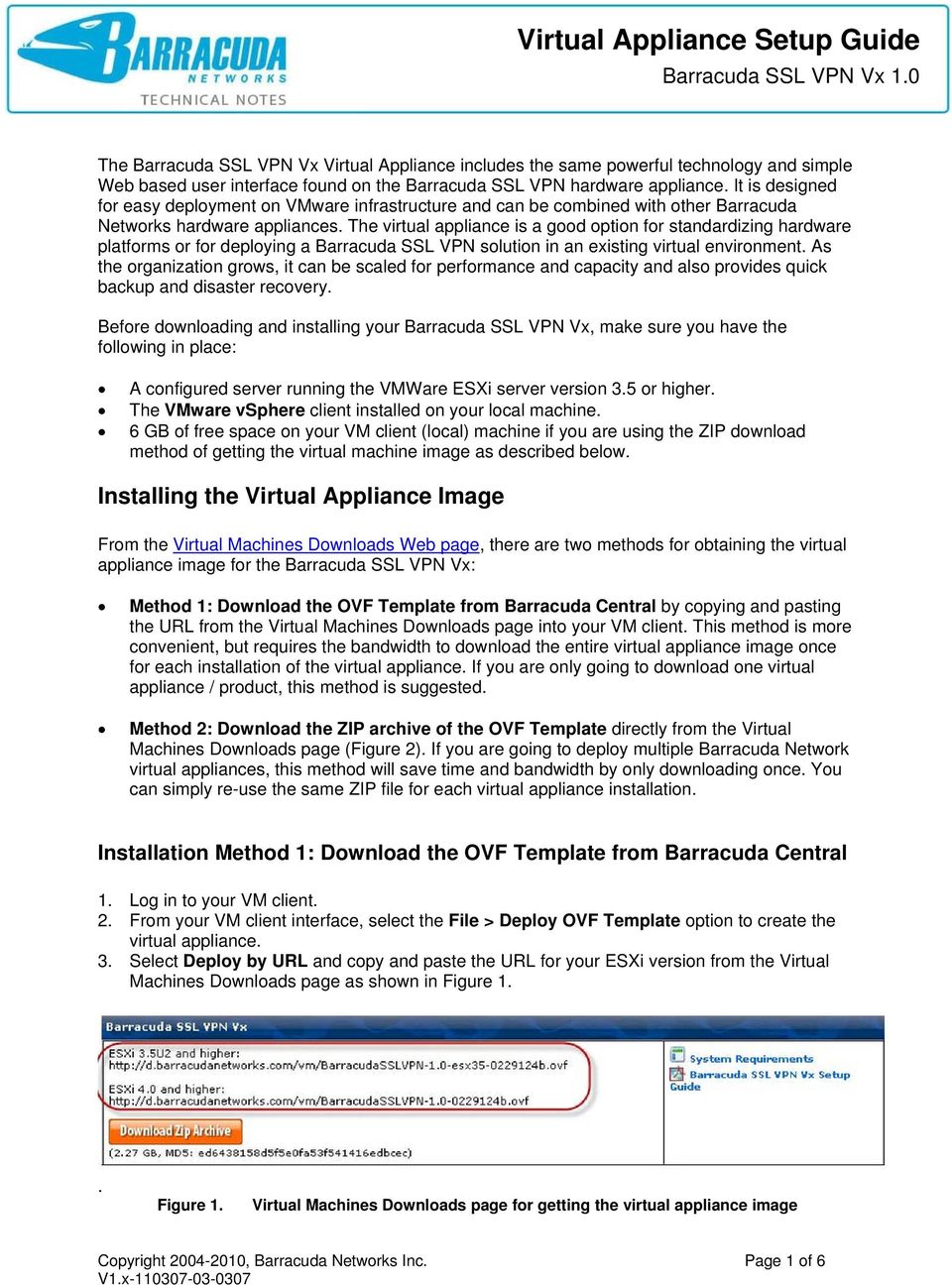
1 The Barracuda SSL VPN Vx Virtual Appliance includes the same powerful technology and simple Web based user interface found on the Barracuda SSL VPN hardware appliance. It is designed for easy deployment on VMware infrastructure and can be combined with other Barracuda Networks hardware appliances. The virtual appliance is a good option for standardizing hardware platforms or for deploying a Barracuda SSL VPN solution in an existing virtual environment. As the organization grows, it can be scaled for performance and capacity and also provides quick backup and disaster recovery. Before downloading and installing your Barracuda SSL VPN Vx, make sure you have the following in place: A configured server running the VMWare ESXi server version 3.5 or higher. The VMware vsphere client installed on your local machine. 6 GB of free space on your VM client (local) machine if you are using the ZIP download method of getting the virtual machine image as described below. Installing the Virtual Appliance Image From the Virtual Machines Downloads Web page, there are two methods for obtaining the virtual appliance image for the Barracuda SSL VPN Vx: Method 1: Download the OVF Template from Barracuda Central by copying and pasting the URL from the Virtual Machines Downloads page into your VM client. This method is more convenient, but requires the bandwidth to download the entire virtual appliance image once for each installation of the virtual appliance. If you are only going to download one virtual appliance / product, this method is suggested. Method 2: Download the ZIP archive of the OVF Template directly from the Virtual Machines Downloads page (Figure 2). If you are going to deploy multiple Barracuda Network virtual appliances, this method will save time and bandwidth by only downloading once. You can simply re-use the same ZIP file for each virtual appliance installation. Installation Method 1: Download the OVF Template from Barracuda Central 1. Log in to your VM client. 2. From your VM client interface, select the File > Deploy OVF Template option to create the virtual appliance. 3. Select Deploy by URL and copy and paste the URL for your ESXi version from the Virtual Machines Downloads page as shown in Figure 1.. Figure 1. Virtual Machines Downloads page for getting the virtual appliance image Copyright , Barracuda Networks Inc. Page 1 of 6
2 4. Read and accept the license agreement. 5. Give the virtual appliance a name, such as, for example, Library SSL VPN. 6. In your VM client, choose a data store to use for your Barracuda SSL VPN Vx virtual appliance. 7. Review the options you ve selected before clicking Finish to start the deployment task. The task could take awhile as the product image downloads. 8. When you see the Deployment Complete window, close it, and you should see your new virtual appliance listed by the name you gave it in the left sidebar of the VM client. 9. After installation, if desired, you can Edit Settings by right clicking on the virtual appliance to configure memory, number of virtual processors and other settings before starting it. Installation Method 2: Download the ZIP archive of the OVF Template 1. From the Virtual Machines Downloads page, click on the link for the zip file for the product image. Downloading the image could take a few minutes. Figure 2. Click on the ZIP file to download the product image 2. Unzip the ZIP archive, which contains the following three files, on your system: The OVF template, which is an.ovf file. THIS is the file you will import to your VM client in step 5 below. The product image, which is a.vmdk file A checksum file (.mf) 3. Log in to your VM client. 4. From your VM client interface, select the File > Deploy OVF Template option to create the virtual appliance. 5. Select Deploy from file and click the Browse button to locate the OVF template (the.ovf file) you unpacked from the ZIP archive on your local file system or network. 6. Read and accept the license agreement. 7. Give your virtual appliance a name that will easily identify it in your VM Client, for example: Library SSL VPN Firewall. 8. In your VM client, choose a data store to use for your Barracuda SSL VPN Vx virtual appliance. 9. Review the options you ve selected before clicking Finish to start the deployment task. 10. After installation, if desired, you can Edit Settings by right clicking your virtual appliance in the left pane of the VM client to configure memory, number of virtual processors and other settings before starting it. Copyright , Barracuda Networks Inc. Page 2 of 6

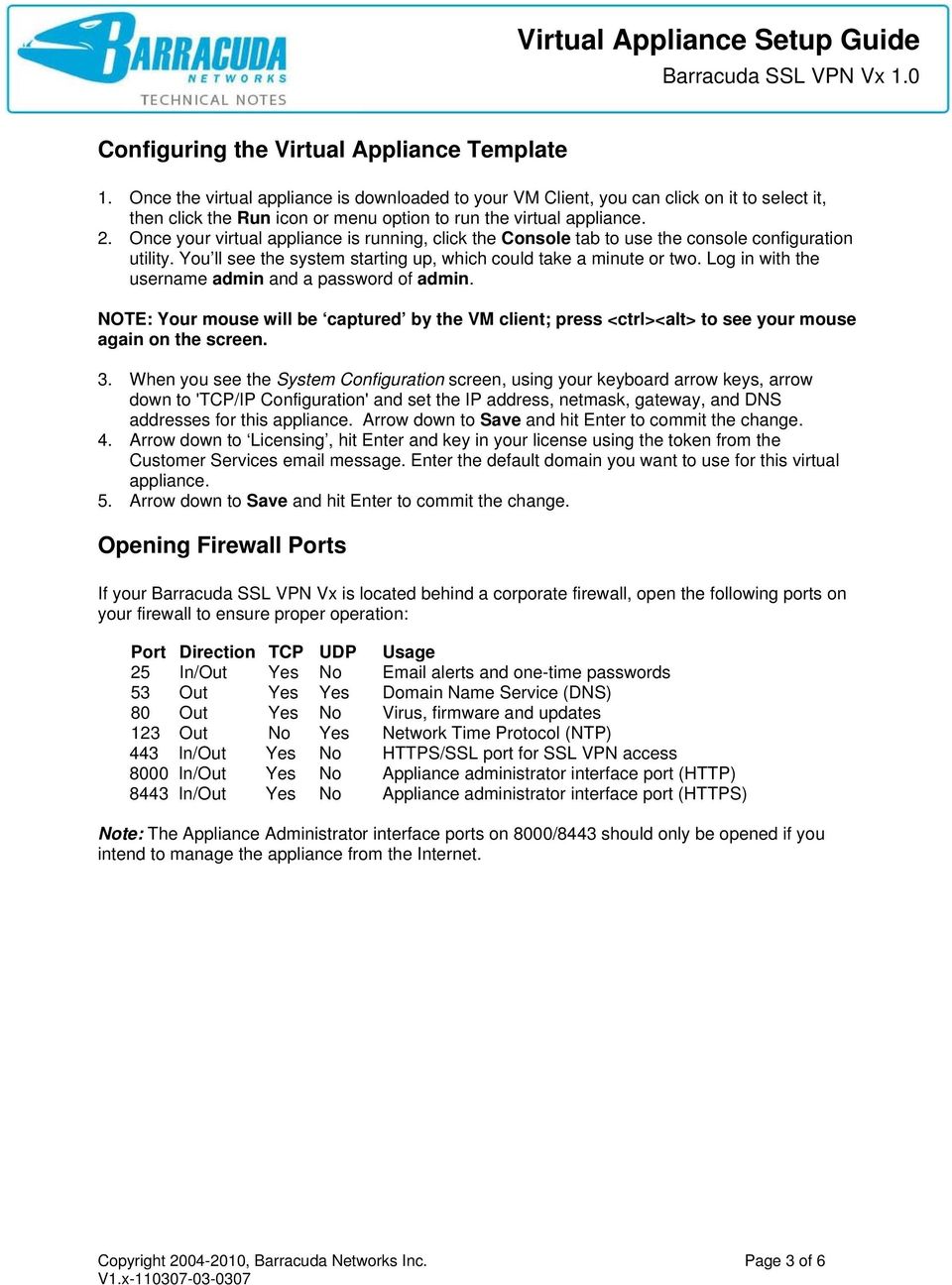
3 Configuring the Virtual Appliance Template 1. Once the virtual appliance is downloaded to your VM Client, you can click on it to select it, then click the Run icon or menu option to run the virtual appliance. 2. Once your virtual appliance is running, click the Console tab to use the console configuration utility. You ll see the system starting up, which could take a minute or two. Log in with the username admin and a password of admin. NOTE: Your mouse will be captured by the VM client; press <ctrl><alt> to see your mouse again on the screen. 3. When you see the System Configuration screen, using your keyboard arrow keys, arrow down to 'TCP/IP Configuration' and set the IP address, netmask, gateway, and DNS addresses for this appliance. Arrow down to Save and hit Enter to commit the change. 4. Arrow down to Licensing, hit Enter and key in your license using the token from the Customer Services message. Enter the default domain you want to use for this virtual appliance. 5. Arrow down to Save and hit Enter to commit the change. Opening Firewall Ports If your Barracuda SSL VPN Vx is located behind a corporate firewall, open the following ports on your firewall to ensure proper operation: Port Direction TCP UDP Usage 25 In/Out Yes No alerts and one-time passwords 53 Out Yes Yes Domain Name Service (DNS) 80 Out Yes No Virus, firmware and updates 123 Out No Yes Network Time Protocol (NTP) 443 In/Out Yes No HTTPS/SSL port for SSL VPN access 8000 In/Out Yes No Appliance administrator interface port (HTTP) 8443 In/Out Yes No Appliance administrator interface port (HTTPS) Note: The Appliance Administrator interface ports on 8000/8443 should only be opened if you intend to manage the appliance from the Internet. Copyright , Barracuda Networks Inc. Page 3 of 6
4 Logging into the Barracuda SSL VPN Vx Web interface Once the virtual appliance has been configured, visit the virtual appliance Web interface and use it like any other Barracuda Networks product. You can access the appliance by entering the following URL in your browser, replacing <MyVxIPaddress> with the IP address you entered in the console configuration utility above: Verify the configuration by following these steps: 1. Log into the Barracuda SSL VPN Vx Web interface as the administrator. Use Username: admin Password: admin 2. Go to the BasicIP Configuration page and perform the following: a. Verify that the IP Address, Subnet Mask, and Default Gateway are correct. b. Verify that the Primary and Secondary DNS Server are correct. c. Verify that the Proxy Server Configuration settings are correct, if you are using a proxy server on your network. 3. Click any one of the Save Changes buttons to save all of the information. Update the Firmware Click on the AdvancedFirmware Update page. If there is a new Latest General Release available, perform the following steps to update the system firmware: 1. Click on the Download Now button located next to the firmware version that you wish to install. To view download progress, click on the Refresh button. When the download is complete, the Refresh button will be replaced by an Apply Now button. 2. Click on the Apply Now button to install the firmware. This will take a few minutes to complete. 3. After the firmware has been applied, the Barracuda SSL VPN Vx will automatically reboot, displaying the login page when the system has come back up. 4. Log back into the Web interface again and read the Release Notes to learn about enhancements and new features. It is also good practice to verify settings you may have already entered, as new features may have been included with the firmware update. Change the Administrator Password To avoid unauthorized use, we recommend you change the default administrator password to a more secure password. You can only change the administrator password for the Web interface. Go to BasicAdministration and enter your old and new passwords, then click on Save Password. Route Incoming SSL Connections to the Barracuda SSL VPN To take advantage of the features of the Barracuda SSL VPN Vx, you must route HTTPS incoming connections on port 443 to the virtual appliance. This is typically achieved by configuring your corporate firewall to port forward SSL connections directly to the Barracuda SSL VPN Vx. Copyright , Barracuda Networks Inc. Page 4 of 6

5 Note: The Appliance Administrator Web interface ports on 8000/8443 will also need similar port forward configurations if you intend to manage the appliance from outside the corporate network. Verify Incoming Connections to the Barracuda SSL VPN Once you have configured your corporate firewall to route SSL through to the Barracuda SSL VPN, you should be able to accept incoming SSL connections. 1. To test the connection, use a Web browser from the Internet (not inside the LAN) to establish an SSL connection to the external IP address of your corporate firewall. For example, if your firewall s external IP address is , connect your browser to: 2. You should be prompted to accept an un-trusted SSL certificate, which will cause a warning message to appear in your browser. Accept the warning and proceed to load the page. 3. You should be prompted with the login page for the SSL VPN User Interface. Log in with the credentials for the VPN administrator: Login: ssladmin Password: ssladmin 4. You should now be successfully logged in as the VPN administrator, and taken directly to the SSL VPN Management Interface. From here you can set up accounts and other resources for users of the Barracuda SSL VPN. Best Practices for Configuring your VMware vsphere Client Barracuda Networks recommends the following for best configuration of your VM client running the Barracuda SSL VPN Vx: 1. Allocate 1 GB of RAM for the virtual appliance per CPU allocated. 2. You will need only a single virtual NIC on your virtual appliance. Most likely you will want to use the 'bridged' networking setup on VMWare. 3. If you re going to use the Barracuda SSL VPN Vx Network Connector, you should enable Promiscuous Mode in your VMware vsphere client: In the client, click on the Configuration tab. Click on the Networking link on the left navigation bar. Click on the Properties link to the right of the Virtual Switch pane. In the Virtual Switch properties window, click on VM Network on left navigation bar (your network name may differ). Click the Edit button at bottom, select the Security tab, click the box for Promiscuous Mode, select Accept from the drop-down and click the Okay button. Note: VMWare tools are not needed for Barracuda Networks virtual appliances (they mostly have to do with graphical interface characteristics for virtual desktop OSs). Copyright , Barracuda Networks Inc. Page 5 of 6

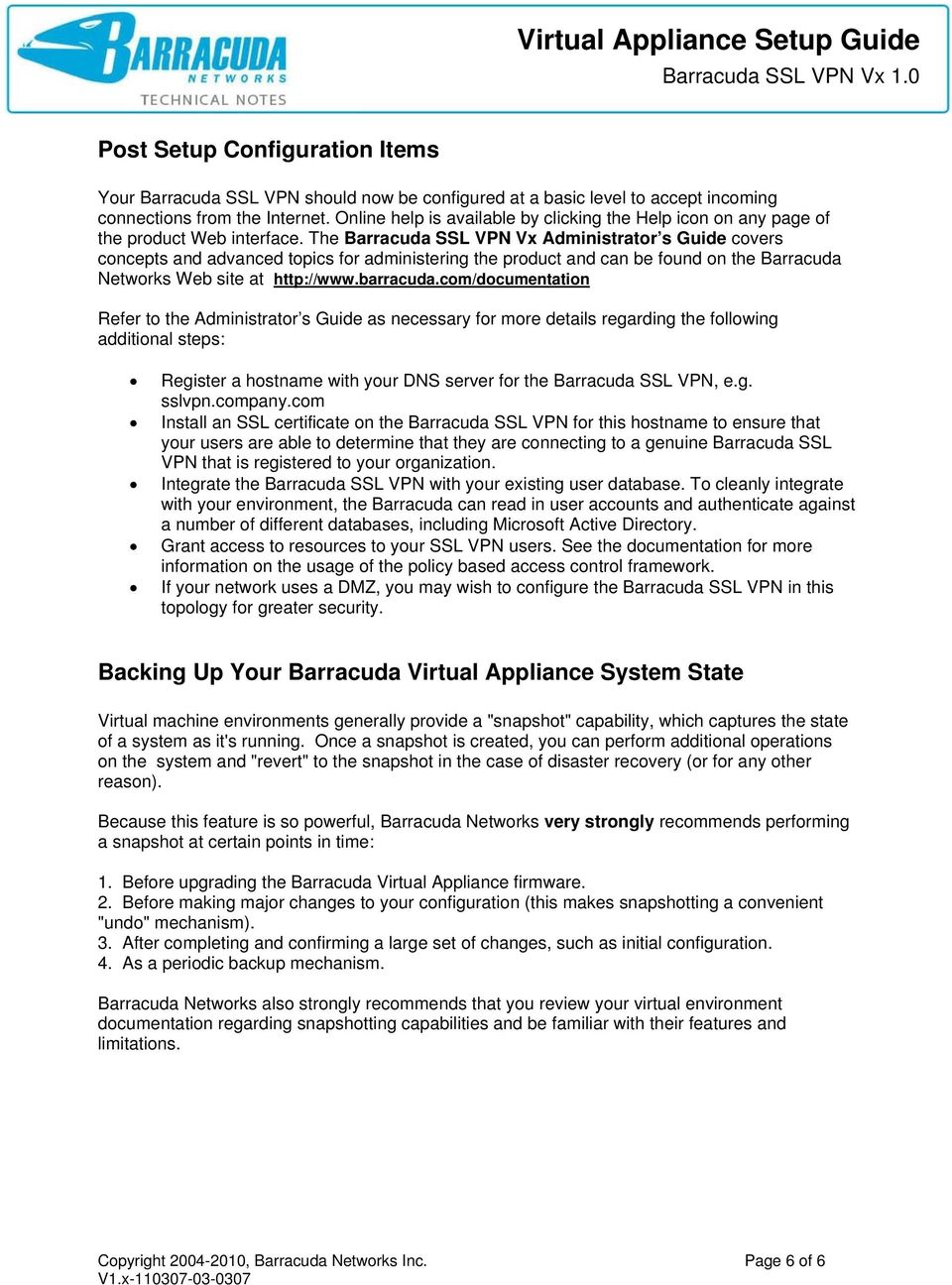
6 Post Setup Configuration Items Your Barracuda SSL VPN should now be configured at a basic level to accept incoming connections from the Internet. Online help is available by clicking the Help icon on any page of the product Web interface. The Barracuda SSL VPN Vx Administrator s Guide covers concepts and advanced topics for administering the product and can be found on the Barracuda Networks Web site at Refer to the Administrator s Guide as necessary for more details regarding the following additional steps: Register a hostname with your DNS server for the Barracuda SSL VPN, e.g. sslvpn.company.com Install an SSL certificate on the Barracuda SSL VPN for this hostname to ensure that your users are able to determine that they are connecting to a genuine Barracuda SSL VPN that is registered to your organization. Integrate the Barracuda SSL VPN with your existing user database. To cleanly integrate with your environment, the Barracuda can read in user accounts and authenticate against a number of different databases, including Microsoft Active Directory. Grant access to resources to your SSL VPN users. See the documentation for more information on the usage of the policy based access control framework. If your network uses a DMZ, you may wish to configure the Barracuda SSL VPN in this topology for greater security. Backing Up Your Barracuda Virtual Appliance System State Virtual machine environments generally provide a "snapshot" capability, which captures the state of a system as it's running. Once a snapshot is created, you can perform additional operations on the system and "revert" to the snapshot in the case of disaster recovery (or for any other reason). Because this feature is so powerful, Barracuda Networks very strongly recommends performing a snapshot at certain points in time: 1. Before upgrading the Barracuda Virtual Appliance firmware. 2. Before making major changes to your configuration (this makes snapshotting a convenient "undo" mechanism). 3. After completing and confirming a large set of changes, such as initial configuration. 4. As a periodic backup mechanism. Barracuda Networks also strongly recommends that you review your virtual environment documentation regarding snapshotting capabilities and be familiar with their features and limitations. Copyright , Barracuda Networks Inc. Page 6 of 6
Virtual Appliance Setup Guide
 The Virtual Appliance includes the same powerful technology and simple Web based user interface found on the Barracuda Web Application Firewall hardware appliance. It is designed for easy deployment on
BaseManager & BACnet Manager VM Server Configuration Guide
 BaseManager & BACnet Manager VM Server Configuration Guide For Self-Hosted BaseManager & BACnet Manager Servers Deployed as Virtual Machines August 27, 2015 Customer Service 1-866-294-5847 i Baseline Inc.
Installing and Configuring vcloud Connector
 Installing and Configuring vcloud Connector vcloud Connector 2.0.0 This document supports the version of each product listed and supports all subsequent versions until the document is replaced by a new
Barracuda Message Archiver Vx Deployment. Whitepaper
 Barracuda Message Archiver Vx Deployment Whitepaper Document Scope This document provides guidance on designing and deploying Barracuda Message Archiver Vx on VMware vsphere Document Scope, and Microsoft
Product Version 1.0 Document Version 1.0-B
 VidyoDashboard Installation Guide Product Version 1.0 Document Version 1.0-B Table of Contents 1. Overview... 3 About This Guide... 3 Prerequisites... 3 2. Installing VidyoDashboard... 5 Installing the
F-Secure Internet Gatekeeper Virtual Appliance
 F-Secure Internet Gatekeeper Virtual Appliance F-Secure Internet Gatekeeper Virtual Appliance TOC 2 Contents Chapter 1: Welcome to F-Secure Internet Gatekeeper Virtual Appliance.3 Chapter 2: Deployment...4
SonicWALL SRA Virtual Appliance Getting Started Guide
 COMPREHENSIVE INTERNET SECURITY SonicWALL Secure Remote Access Appliances SonicWALL SRA Virtual Appliance Getting Started Guide SonicWALL SRA Virtual Appliance5.0 Getting Started Guide This Getting Started
F-Secure Messaging Security Gateway. Deployment Guide
 F-Secure Messaging Security Gateway Deployment Guide TOC F-Secure Messaging Security Gateway Contents Chapter 1: Deploying F-Secure Messaging Security Gateway...3 1.1 The typical product deployment model...4
Installing and Using the vnios Trial
 Installing and Using the vnios Trial The vnios Trial is a software package designed for efficient evaluation of the Infoblox vnios appliance platform. Providing the complete suite of DNS, DHCP and IPAM
LifeSize Transit Virtual Appliance Installation Guide June 2011
 LifeSize Transit Virtual Appliance Installation Guide June 2011 LifeSize Transit Server VM LifeSize Transit Client VM LifeSize Transit Virtual Appliance Installation Guide 2 Installation Overview This
Installing and Configuring vcloud Connector
 Installing and Configuring vcloud Connector vcloud Connector 2.7.0 This document supports the version of each product listed and supports all subsequent versions until the document is replaced by a new
RSA Authentication Manager 8.1 Virtual Appliance Getting Started
 RSA Authentication Manager 8.1 Virtual Appliance Getting Started Thank you for purchasing RSA Authentication Manager 8.1, the world s leading two-factor authentication solution. This document provides
Virtual Server Installation Manual April 8, 2014 Version 1.8
 Virtual Server Installation Manual April 8, 2014 Version 1.8 Department of Health and Human Services Administration for Children and Families Office of Child Support Enforcement REVISION HISTORY Version
GX-V. Quick Start Guide. VMware vsphere / vsphere Hypervisor. Before You Begin SUMMARY OF TASKS WORKSHEET
 If you re not using VMware vsphere Client 4.0, your screens may vary. GX-V VIRTUAL GMS SERVER VMware vsphere / vsphere Hypervisor 2012 Silver Peak Systems, Inc. Before You Begin Comply with the GX-V Host
Barracuda Message Archiver Vx Deployment. Whitepaper
 Barracuda Message Archiver Vx Deployment Whitepaper Document Scope This document provides guidance on designing and deploying Barracuda Message Archiver Vx on VMware vsphere Document Scope, and Microsoft
How to install/upgrade the LANDesk virtual Cloud service appliance (CSA)
 How to install/upgrade the LANDesk virtual Cloud service appliance (CSA) The upgrade process for the virtual Cloud Services Appliance is a side- by- side install. This document will walk you through backing
VCCC Appliance VMware Server Installation Guide
 VCCC Appliance VMware Server Installation Guide Content Preface... 4 System Requirements... 4 Installation Procedure... 4 CCC Virtual Machine Installation... 5 CCC Virtual Machine Management... 12 Resource
Virtual Appliance for VMware Server. Getting Started Guide. Revision 2.0.2. Warning and Disclaimer
 Virtual Appliance for VMware Server Getting Started Guide Revision 2.0.2 Warning and Disclaimer This document is designed to provide information about the configuration and installation of the CensorNet
VPN-1 VE Evaluation Guide
 VPN-1 VE Evaluation Guide This document is intended for users who are new to Check Point VPN-1 products and would like to evaluate and review VPN-1 VE. We recommend reading the VPN-1 VE Administration
SSL VPN. Virtual Appliance Installation Guide. Virtual Private Networks
 SSL VPN Virtual Appliance Installation Guide Virtual Private Networks C ONTENTS Introduction... 2 Installing the Virtual Appliance... 2 Configuring Appliance Operating System Settings... 3 Setting up the
Virtual Web Appliance Setup Guide
 Virtual Web Appliance Setup Guide 2 Sophos Installing a Virtual Appliance Installing a Virtual Appliance This guide describes the procedures for installing a Virtual Web Appliance. If you are installing
Virtual Appliance Setup Guide
 Virtual Appliance Setup Guide 2015 Bomgar Corporation. All rights reserved worldwide. BOMGAR and the BOMGAR logo are trademarks of Bomgar Corporation; other trademarks shown are the property of their respective
Barracuda Link Balancer Administrator s Guide
 Barracuda Link Balancer Administrator s Guide Version 1.0 Barracuda Networks Inc. 3175 S. Winchester Blvd. Campbell, CA 95008 http://www.barracuda.com Copyright Notice Copyright 2008, Barracuda Networks
CommandCenter Secure Gateway
 CommandCenter Secure Gateway Quick Setup Guide for CC-SG Virtual Appliance - VMware, XEN, HyperV This Quick Setup Guide explains how to install and configure the CommandCenter Secure Gateway. For additional
Virtual Managment Appliance Setup Guide
 Virtual Managment Appliance Setup Guide 2 Sophos Installing a Virtual Appliance Installing a Virtual Appliance As an alternative to the hardware-based version of the Sophos Web Appliance, you can deploy
Deployment Guide: Transparent Mode
 Deployment Guide: Transparent Mode March 15, 2007 Deployment and Task Overview Description Follow the tasks in this guide to deploy the appliance as a transparent-firewall device on your network. This
User Manual. User Manual for Version 4.4.0.8
 User Manual User Manual for Version 4.4.0.8 I Endpoint Protector Virtual Appliance User Manual Table of Contents 1. Endpoint Protector Virtual Appliance Formats1 1.1. Available Formats of the Virtual Appliance...
Thinspace deskcloud. Quick Start Guide
 Thinspace deskcloud Quick Start Guide Version 1.2 Published: SEP-2014 Updated: 16-SEP-2014 2014 Thinspace Technology Ltd. All rights reserved. The information contained in this document represents the
Rally Installation Guide
 Rally Installation Guide Rally On-Premises release 2015.1 [email protected] www.rallydev.com Version 2015.1 Table of Contents Overview... 3 Server requirements... 3 Browser requirements... 3 Access
Cyberoam Virtual Security Appliance - Installation Guide for VMware ESX/ESXi. Version 10
 Cyberoam Virtual Security Appliance - Installation Guide for VMware ESX/ESXi Version 10 Document Version 10.6.2-16/04/2015 Contents Preface... 4 Base Configuration... 4 Installation Procedure... 4 Cyberoam
VMware vcenter Log Insight Getting Started Guide
 VMware vcenter Log Insight Getting Started Guide vcenter Log Insight 1.5 This document supports the version of each product listed and supports all subsequent versions until the document is replaced by
Security Analytics Virtual Appliance
 Security Analytics Virtual Appliance Installation Guide for VMware 19 March 2015 This document is intended to help you use the web interface to configure your Security Analytics Virtual Appliance to perform
Barracuda Backup Vx. Virtual Appliance Deployment. White Paper
 Barracuda Backup Vx Virtual Appliance Deployment White Paper DOCUMENT SCOPE This document provides guidance and best practices on designing and deploying Barracuda Backup Vx Virtual Appliance on VMware
Required Virtual Interface Maps to... mgmt0. bridge network interface = mgmt0 wan0. bridge network interface = wan0 mgmt1
 VXOA VIRTUAL APPLIANCE KVM Hypervisor In-Line Deployment (Bridge Mode) 2012 Silver Peak Systems, Inc. Support Limitations In Bridge mode, the virtual appliance only uses mgmt0, wan0, and lan0. This Quick
Barracuda IM Firewall Administrator s Guide
 Barracuda IM Firewall Administrator s Guide Version 3.0 Barracuda Networks Inc. 3175 S. Winchester Blvd Campbell, CA 95008 http://www.barracuda.com Copyright Notice Copyright 2007, Barracuda Networks www.barracuda.com
Barracuda SSL VPN Administrator s Guide
 Barracuda SSL VPN Administrator s Guide Version 1.5.x Barracuda Networks Inc. 3175 S. Winchester Blvd. Campbell, CA 95008 http://www.barracuda.com Copyright Notice Copyright 2004-2009, Barracuda Networks,
Barracuda Networks Technical Documentation. Barracuda SSL VPN. Administrator s Guide. Version 2.x RECLAIM YOUR NETWORK
 Barracuda Networks Technical Documentation Barracuda SSL VPN Administrator s Guide Version 2.x RECLAIM YOUR NETWORK Copyright Notice Copyright 2004-2011, Barracuda Networks, Inc. www.barracuda.com v20-110511w-02-110915jc
PineApp Surf-SeCure Quick
 PineApp Surf-SeCure Quick Installation Guide September 2010 WEB BASED INSTALLATION SURF-SECURE AS PROXY 1. Once logged in, set the appliance s clock: a. Click on the Edit link under Time-Zone section.
NSi Mobile Installation Guide. Version 6.2
 NSi Mobile Installation Guide Version 6.2 Revision History Version Date 1.0 October 2, 2012 2.0 September 18, 2013 2 CONTENTS TABLE OF CONTENTS PREFACE... 5 Purpose of this Document... 5 Version Compatibility...
Setting up VMware ESXi for 2X VirtualDesktopServer Manual
 Setting up VMware ESXi for 2X VirtualDesktopServer Manual URL: www.2x.com E-mail: [email protected] Information in this document is subject to change without notice. Companies, names, and data used in examples
Common Services Platform Collector (CSPC) Self-Service - Getting Started Guide. November 2015
 Common Services Platform Collector (CSPC) Self-Service - Getting Started Guide November 2015 Corporate Headquarters Cisco Systems, Inc. 170 West Tasman Drive San Jose, CA 95134-1706 USA http://www.cisco.com
Hillstone StoneOS User Manual Hillstone Unified Intelligence Firewall Installation Manual
 Hillstone StoneOS User Manual Hillstone Unified Intelligence Firewall Installation Manual www.hillstonenet.com Preface Conventions Content This document follows the conventions below: CLI Tip: provides
PHD Virtual Backup for Hyper-V
 PHD Virtual Backup for Hyper-V version 7.0 Installation & Getting Started Guide Document Release Date: December 18, 2013 www.phdvirtual.com PHDVB v7 for Hyper-V Legal Notices PHD Virtual Backup for Hyper-V
If you re not using Citrix XenCenter 6.0, your screens may vary. Required Virtual Interface Maps to... mgmt0. virtual network = mgmt0 wan0
 If you re not using Citrix XenCenter 6.0, your screens may vary. VXOA VIRTUAL APPLIANCES Citrix XenServer Hypervisor In-Line Deployment (Bridge Mode) 2012 Silver Peak Systems, Inc. Support Limitations
Forcepoint Sidewinder, Virtual Appliance Evaluation for Desktop. Installation Guide 8.x. Revision A
 Forcepoint Sidewinder, Virtual Appliance Evaluation for Desktop Installation Guide 8.x Revision A Table of contents 1 Overview...3 2 Verify system requirements...4 Virtualization requirements...4 Admin
Quick Start - Virtual Server idataagent (VMware)
 Page 1 of 24 Quick Start - Virtual Server idataagent (VMware) TABLE OF CONTENTS OVERVIEW Introduction Key Features Complete Virtual Machine Protection Granular Recovery of Virtual Machine Data Minimal
Reconfiguring VMware vsphere Update Manager
 Reconfiguring VMware vsphere Update Manager vsphere Update Manager 5.5 This document supports the version of each product listed and supports all subsequent versions until the document is replaced by a
EMC Data Domain Management Center
 EMC Data Domain Management Center Version 1.1 Initial Configuration Guide 302-000-071 REV 04 Copyright 2012-2015 EMC Corporation. All rights reserved. Published in USA. Published June, 2015 EMC believes
Unitrends Virtual Backup Installation Guide Version 8.0
 Unitrends Virtual Backup Installation Guide Version 8.0 Release June 2014 7 Technology Circle, Suite 100 Columbia, SC 29203 Phone: 803.454.0300 Contents Chapter 1 Getting Started... 1 Version 8 Architecture...
Quick Start Guide. for Installing vnios Software on. VMware Platforms
 Quick Start Guide for Installing vnios Software on VMware Platforms Copyright Statements 2010, Infoblox Inc. All rights reserved. The contents of this document may not be copied or duplicated in any form,
Core Protection for Virtual Machines 1
 Core Protection for Virtual Machines 1 Comprehensive Threat Protection for Virtual Environments. Installation Guide e Endpoint Security Trend Micro Incorporated reserves the right to make changes to this
HP Insight Control Server Provisioning 7.4 Installation Guide
 HP Insight Control Server Provisioning 7.4 Installation Guide HP Part Number: 5900-3899a Published: November 2014 Edition: 2 Copyright 2012 2014 Hewlett-Packard Development Company, L.P. Confidential computer
User Guide for Windows 10
 User Guide for Windows 10 System requirements E10684 First Edition July 2015 To facilitate a smoother transition from your previous operating system, read the system requirements below before upgrading
OnCommand Performance Manager 1.1
 OnCommand Performance Manager 1.1 Installation and Administration Guide For VMware Virtual Appliances NetApp, Inc. 495 East Java Drive Sunnyvale, CA 94089 U.S. Telephone: +1 (408) 822-6000 Fax: +1 (408)
RSA Authentication Manager 8.1 Setup and Configuration Guide. Revision 2
 RSA Authentication Manager 8.1 Setup and Configuration Guide Revision 2 Contact Information Go to the RSA corporate website for regional Customer Support telephone and fax numbers: www.emc.com/domains/rsa/index.htm
Online Help StruxureWare Data Center Expert
 Online Help StruxureWare Data Center Expert Version 7.2.1 What's New in StruxureWare Data Center Expert 7.2.x Learn more about the new features available in the StruxureWare Data Center Expert 7.2.x release.
Install Guide for JunosV Wireless LAN Controller
 The next-generation Juniper Networks JunosV Wireless LAN Controller is a virtual controller using a cloud-based architecture with physical access points. The current functionality of a physical controller
Web Application Firewall
 Web Application Firewall Getting Started Guide August 3, 2015 Copyright 2014-2015 by Qualys, Inc. All Rights Reserved. Qualys and the Qualys logo are registered trademarks of Qualys, Inc. All other trademarks
vcloud Director User's Guide
 vcloud Director 5.5 This document supports the version of each product listed and supports all subsequent versions until the document is replaced by a new edition. To check for more recent editions of
Quick Start Guide for VMware and Windows 7
 PROPALMS VDI Version 2.1 Quick Start Guide for VMware and Windows 7 Rev. 1.1 Published: JULY-2011 1999-2011 Propalms Ltd. All rights reserved. The information contained in this document represents the
AlienVault. Unified Security Management (USM) 4.8-5.x Initial Setup Guide
 AlienVault Unified Security Management (USM) 4.8-5.x Initial Setup Guide Contents USM v4.8-5.x Initial Setup Guide Copyright AlienVault, Inc. All rights reserved. The AlienVault Logo, AlienVault, AlienVault
How to Configure NetScaler Gateway 10.5 to use with StoreFront 2.6 and XenDesktop 7.6.
 How to Configure NetScaler Gateway 10.5 to use with StoreFront 2.6 and XenDesktop 7.6. Introduction The purpose of this document is to record the steps required to configure a NetScaler Gateway for use
Altor Virtual Network Security Analyzer v1.0 Installation Guide
 Altor Virtual Network Security Analyzer v1.0 Installation Guide The Altor Virtual Network Security Analyzer (VNSA) application is deployed as Virtual Appliance running on VMware ESX servers. A single Altor
Acronis Backup & Recovery 10 Advanced Server Virtual Edition. Quick Start Guide
 Acronis Backup & Recovery 10 Advanced Server Virtual Edition Quick Start Guide Table of contents 1 Main components...3 2 License server...3 3 Supported operating systems...3 3.1 Agents... 3 3.2 License
Installing and Configuring vcenter Support Assistant
 Installing and Configuring vcenter Support Assistant vcenter Support Assistant 5.5 This document supports the version of each product listed and supports all subsequent versions until the document is replaced
Steps for Basic Configuration
 1. This guide describes how to use the Unified Threat Management appliance (UTM) Basic Setup Wizard to configure the UTM for connection to your network. It also describes how to register the UTM with NETGEAR.
SevOne NMS Download Installation and Implementation Guide
 SevOne NMS Download Installation and Implementation Guide 5.3.X 530 V0002 Contents 1. Get Started... 3 2. SevOne Download Installation... 6 3. Appliance Network Configuration... 9 4. Install License and
Virtual Appliances. Virtual Appliances: Setup Guide for Umbrella on VMWare and Hyper-V. Virtual Appliance Setup Guide for Umbrella Page 1
 Virtual Appliances Virtual Appliances: Setup Guide for Umbrella on VMWare and Hyper-V Virtual Appliance Setup Guide for Umbrella Page 1 Table of Contents Overview... 3 Prerequisites... 4 Virtualized Server
Infrastructure Navigator Installation and Administration Guide
 Infrastructure Navigator Installation and Administration Guide vcenter Infrastructure Navigator 2.0.0 This document supports the version of each product listed and supports all subsequent versions until
M2M Series Routers. Port Forwarding / DMZ Setup
 Introduction Port forwarding enables programs or devices running on your LAN to communicate with the internet as if they were directly connected. Many internet services and applications use designated
If you re not using VMware vsphere Client 5.1, your screens may vary.
 UNITY EdgeConnect If you re not using VMware vsphere Client 5.1, your screens may vary. VIRTUAL APPLIANCES VMware vsphere / vsphere Hypervisor 2015 Silver Peak Systems, Inc. In-Line Router Mode Before
Reconfiguring VMware vsphere Update Manager
 Reconfiguring VMware vsphere Update Manager vsphere Update Manager 6.0 This document supports the version of each product listed and supports all subsequent versions until the document is replaced by a
Extreme Control Center, NAC, and Purview Virtual Appliance Installation Guide
 Extreme Control Center, NAC, and Purview Virtual Appliance Installation Guide 9034968 Published April 2016 Copyright 2016 All rights reserved. Legal Notice Extreme Networks, Inc. reserves the right to
Sharp Remote Device Manager (SRDM) Server Software Setup Guide
 Sharp Remote Device Manager (SRDM) Server Software Setup Guide This Guide explains how to install the software which is required in order to use Sharp Remote Device Manager (SRDM). SRDM is a web-based
Getting Started with ESXi Embedded
 ESXi 4.1 Embedded vcenter Server 4.1 This document supports the version of each product listed and supports all subsequent versions until the document is replaced by a new edition. To check for more recent
HOMEROOM SERVER INSTALLATION & NETWORK CONFIGURATION GUIDE
 HOMEROOM SERVER INSTALLATION & NETWORK CONFIGURATION GUIDE Level 1, 61 Davey St Hobart, TAS 7000 T (03) 6165 1555 www.getbusi.com Table of Contents ABOUT THIS MANUAL! 1 SYSTEM REQUIREMENTS! 2 Hardware
VX 9000E WiNG Express Manager INSTALLATION GUIDE
 VX 9000E WiNG Express Manager INSTALLATION GUIDE 2 VX 9000E WiNG Express Manager Service Information If you have a problem with your equipment, contact support for your region. Support and issue resolution
OnCommand Unified Manager 6.2
 OnCommand Unified Manager 6.2 Installation and Setup Guide For VMware Virtual Appliances NetApp, Inc. 495 East Java Drive Sunnyvale, CA 94089 U.S. Telephone: +1 (408) 822-6000 Fax: +1 (408) 822-4501 Support
vrealize Air Compliance OVA Installation and Deployment Guide
 vrealize Air Compliance OVA Installation and Deployment Guide 14 July 2015 vrealize Air Compliance This document supports the version of each product listed and supports all subsequent versions until the
vsphere Replication for Disaster Recovery to Cloud
 vsphere Replication for Disaster Recovery to Cloud vsphere Replication 6.0 This document supports the version of each product listed and supports all subsequent versions until the document is replaced
User Guide. Cloud Gateway Software Device
 User Guide Cloud Gateway Software Device This document is designed to provide information about the first time configuration and administrator use of the Cloud Gateway (web filtering device software).
Required Virtual Interface Maps to... mgmt0. virtual network = mgmt0 wan0. virtual network = wan0 mgmt1. network adapter not connected lan0
 VXOA VIRTUAL APPLIANCES Microsoft Hyper-V Hypervisor Router Mode (Out-of-Path Deployment) 2013 Silver Peak Systems, Inc. Assumptions Windows 2008 server is installed and Hyper-V server is running. This
vrealize Infrastructure Navigator Installation and Configuration Guide
 vrealize Infrastructure Navigator Installation and Configuration Guide vrealize Infrastructure Navigator 5.8.4 This document supports the version of each product listed and supports all subsequent versions
D-Link Central WiFiManager Configuration Guide
 Table of Contents D-Link Central WiFiManager Configuration Guide Introduction... 3 System Requirements... 3 Access Point Requirement... 3 Latest CWM Modules... 3 Scenario 1 - Basic Setup... 4 1.1. Install
Using Virtual Machines
 Using Virtual Machines We will use VMs in CIT 130 so that you can access both a Windows 7 and a Linux machine. You will be able to access these from on and off campus (off campus access will require that
Networking Guide Redwood Manager 3.0 August 2013
 Networking Guide Redwood Manager 3.0 August 2013 Table of Contents 1 Introduction... 3 1.1 IP Addresses... 3 1.1.1 Static vs. DHCP... 3 1.2 Required Ports... 4 2 Adding the Redwood Engine to the Network...
IronKey Enterprise Server 6.1 Quick Start Guide
 IronKey Enterprise Server 6.1 Quick Start Guide Last Updated September 2015 System Requirements Requirement Description Database Microsoft SQL Server 2005, Microsoft SQL Server 2008, or Microsoft SQL Server
MultiSite Manager. User Guide
 MultiSite Manager User Guide Contents 1. Getting Started... 2 Opening the MultiSite Manager... 2 Navigating MultiSite Manager... 2 2. The All Sites tabs... 3 All Sites... 3 Reports... 4 Licenses... 5 3.
CommandCenter Secure Gateway
 CommandCenter Secure Gateway Quick Setup Guide for CC-SG Virtual Appliance and lmadmin License Server Management This Quick Setup Guide explains how to install and configure the CommandCenter Secure Gateway.
Firewall VPN Router. Quick Installation Guide M73-APO09-380
 Firewall VPN Router Quick Installation Guide M73-APO09-380 Firewall VPN Router Overview The Firewall VPN Router provides three 10/100Mbit Ethernet network interface ports which are the Internal/LAN, External/WAN,
MadCap Software. Upgrading Guide. Pulse
 MadCap Software Upgrading Guide Pulse Copyright 2014 MadCap Software. All rights reserved. Information in this document is subject to change without notice. The software described in this document is furnished
http://docs.trendmicro.com
 Trend Micro Incorporated reserves the right to make changes to this document and to the products described herein without notice. Before installing and using the product, please review the readme files,
Scan to E-mail Quick Setup Guide
 Xerox WorkCentre M118i Scan to E-mail Quick Setup Guide 701P42574 This guide provides a quick reference for setting up the Scan to E-mail feature on the Xerox WorkCentre M118i. It includes procedures for:
User's Guide. Product Version: 2.5.0 Publication Date: 7/25/2011
 User's Guide Product Version: 2.5.0 Publication Date: 7/25/2011 Copyright 2009-2011, LINOMA SOFTWARE LINOMA SOFTWARE is a division of LINOMA GROUP, Inc. Contents GoAnywhere Services Welcome 6 Getting Started
Weston Public Schools Virtual Desktop Access Instructions
 Instructions for connecting to the Weston Schools Virtual Desktop Environment Notes: You will have to have administrator permission on your computer in order to install a VMWare Client application which
Setup Cisco Call Manager on VMware
 created by: Rainer Bemsel Version 1.0 Dated: July/09/2011 The purpose of this document is to provide the necessary steps to setup a Cisco Call Manager to run on VMware. I ve been researching for a while
Central Administration User Guide
 User Guide Contents 1. Introduction... 2 Licensing... 2 Overview... 2 2. Configuring... 3 3. Using... 4 Computers screen all computers view... 4 Computers screen single computer view... 5 All Jobs screen...
Introduction to Mobile Access Gateway Installation
 Introduction to Mobile Access Gateway Installation This document describes the installation process for the Mobile Access Gateway (MAG), which is an enterprise integration component that provides a secure
OnCommand Performance Manager 2.0
 OnCommand Performance Manager 2.0 Installation and Administration Guide For VMware Virtual Appliances NetApp, Inc. 495 East Java Drive Sunnyvale, CA 94089 U.S. Telephone: +1 (408) 822-6000 Fax: +1 (408)
Getting Started Guide
 Getting Started Guide Sophos Firewall Virtual Appliance Document Date: November 2015 November 2015 Page 1 of 20 Contents Preface...3 Minimum Hardware Requirement...3 Installation Procedure...3 Configuring