
Release Notes. EMC NetWorker Module for Databases and Applications. Release Notes. Release number 8.2 and Service Packs REV 03
|
|
|
- Cuthbert McGee
- 10 years ago
- Views:
Transcription
1 EMC NetWorker Module for Databases and Applications Release number 8.2 and Service Packs Release Notes REV 03 January 28, 2015 These release notes contain supplemental information about EMC NetWorker Module for Databases and Applications (NMDA) release 8.2 and Service Packs. NOTICE Before you install NMDA and periodically after the installation, refer to the latest revision of this document on EMC Online Support at On the Support by Product page, search for NMDA by typing the full product name in the Find a Product field. The product page provides the product-specific downloads, documentation, and additional content and tools. Topics include: Revision history... 2 Product description...2 New features and changes... 5 Fixed problems Environment and system requirements Known problems and limitations...12 Technical notes...22 Documentation Software media, organization, and files Installation Troubleshooting and getting help...32 Compatibility matrix...33
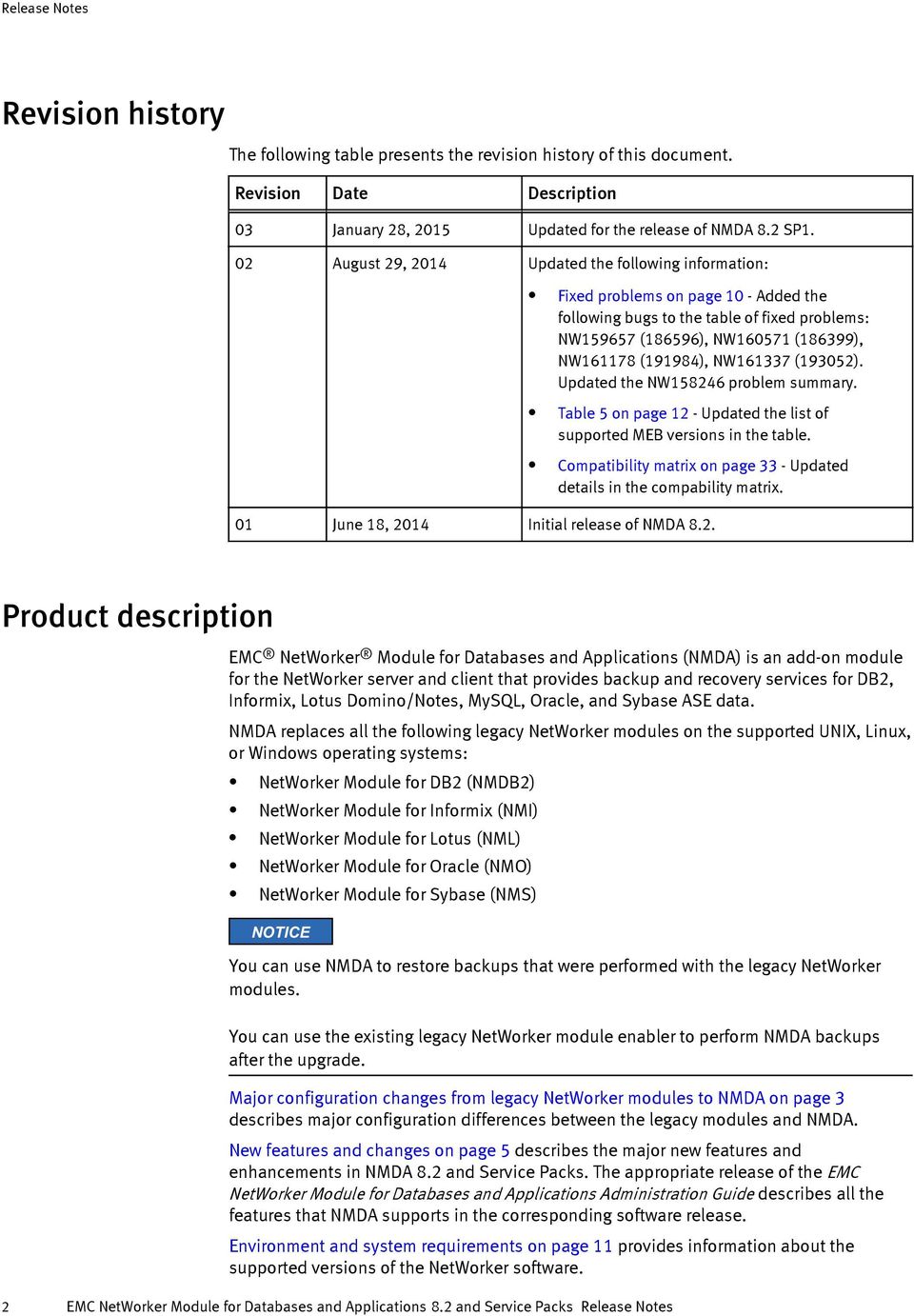
2 Revision history The following table presents the revision history of this document. Revision Date Description 03 January 28, 2015 Updated for the release of NMDA 8.2 SP1. 02 August 29, 2014 Updated the following information: Fixed problems on page 10 - Added the following bugs to the table of fixed problems: NW (186596), NW (186399), NW (191984), NW (193052). Updated the NW problem summary. Table 5 on page 12 - Updated the list of supported MEB versions in the table. Compatibility matrix on page 33 - Updated details in the compability matrix. 01 June 18, 2014 Initial release of NMDA 8.2. Product description EMC NetWorker Module for Databases and Applications (NMDA) is an add-on module for the NetWorker server and client that provides backup and recovery services for DB2, Informix, Lotus Domino/Notes, MySQL, Oracle, and Sybase ASE data. NMDA replaces all the following legacy NetWorker modules on the supported UNIX, Linux, or Windows operating systems: NetWorker Module for DB2 (NMDB2) NetWorker Module for Informix (NMI) NetWorker Module for Lotus (NML) NetWorker Module for Oracle (NMO) NetWorker Module for Sybase (NMS) NOTICE You can use NMDA to restore backups that were performed with the legacy NetWorker modules. You can use the existing legacy NetWorker module enabler to perform NMDA backups after the upgrade. Major configuration changes from legacy NetWorker modules to NMDA on page 3 describes major configuration differences between the legacy modules and NMDA. New features and changes on page 5 describes the major new features and enhancements in NMDA 8.2 and Service Packs. The appropriate release of the EMC NetWorker Module for Databases and Applications Administration Guide describes all the features that NMDA supports in the corresponding software release. Environment and system requirements on page 11 provides information about the supported versions of the NetWorker software. 2 EMC NetWorker Module for Databases and Applications 8.2 and Service Packs Release Notes
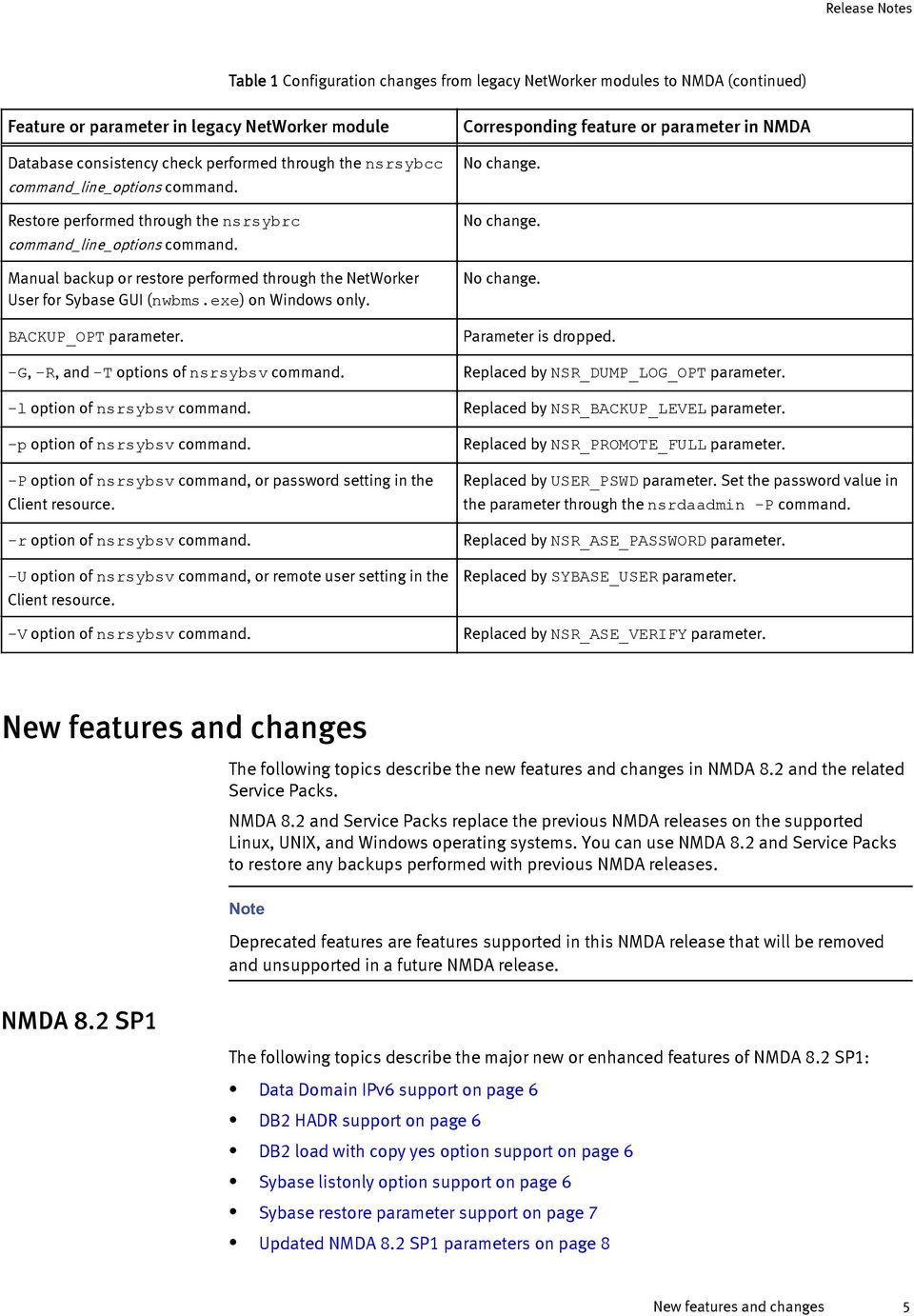
3 Known problems and limitations on page 12 describes the known problems and limitations in NMDA 8.2 and Service Packs. Technical notes on page 22 describes existing NMDA features that require special considerations or require a later version of the NetWorker software. Documentation on page 30 describes the NMDA 8.2 and Service Packs documentation and related documents. Installation on page 31 provides details about installing NMDA. Before you install NMDA, review the compatibility matrix at the end of this document and the NMDA installation guide, administration guide, and other documentation at EMC Online Support. Major configuration changes from legacy NetWorker modules to NMDA The following table compares the major configurations in the legacy NetWorker modules and NMDA, and outlines any changes in those configurations. You must set most NMDA parameters in the NMDA configuration file. The NMDA configuration file templates are in the following directories: On UNIX and Linux: /nsr/apps/config On Windows: NetWorker_install_path\apps\config Table 1 Configuration changes from legacy NetWorker modules to NMDA Feature or parameter in legacy NetWorker module Corresponding feature or parameter in NMDA NSR_DEBUG_FILE = debug_file_full_path. Replaced by NSR_DIAGNOSTIC_DEST = debug_directory_full_path. NSR_ENCRYPTION parameter. Parameter is dropped. Specify backup encryption through the NSR_AES_ENCRYPTION parameter. NetWorker Module for DB2 (NMDB2): Scheduled backup (configured without the wizard) performed through the nsrdb2sv -f configuration_file command. Replaced by scheduled backup (configured without the wizard) performed through the nsrdasv -z configuration_file command. Note The NMDA configuration_file supports the NMDB2 configuration_file format. Manual backup through the db2 commands. Restore through the db2 commands. DB2_PSWD parameter. DB2_USR parameter. NSR_DB2_BACKUP_INFO parameter. NSR_DB2_CONFIG_FILE parameter. No change. No change. Replaced by USER_PSWD parameter. Set the password value in the parameter through the nsrdaadmin -P command. Replaced by DB2_USER parameter. Replaced by NSR_DR_BACKUP_INFO parameter. If NSR_DB2_BACKUP_INFO was not set, NSR_DR_BACKUP_INFO is set to TRUE (default). Replaced by NSR_DR_FILE_LIST parameter. Major configuration changes from legacy NetWorker modules to NMDA 3
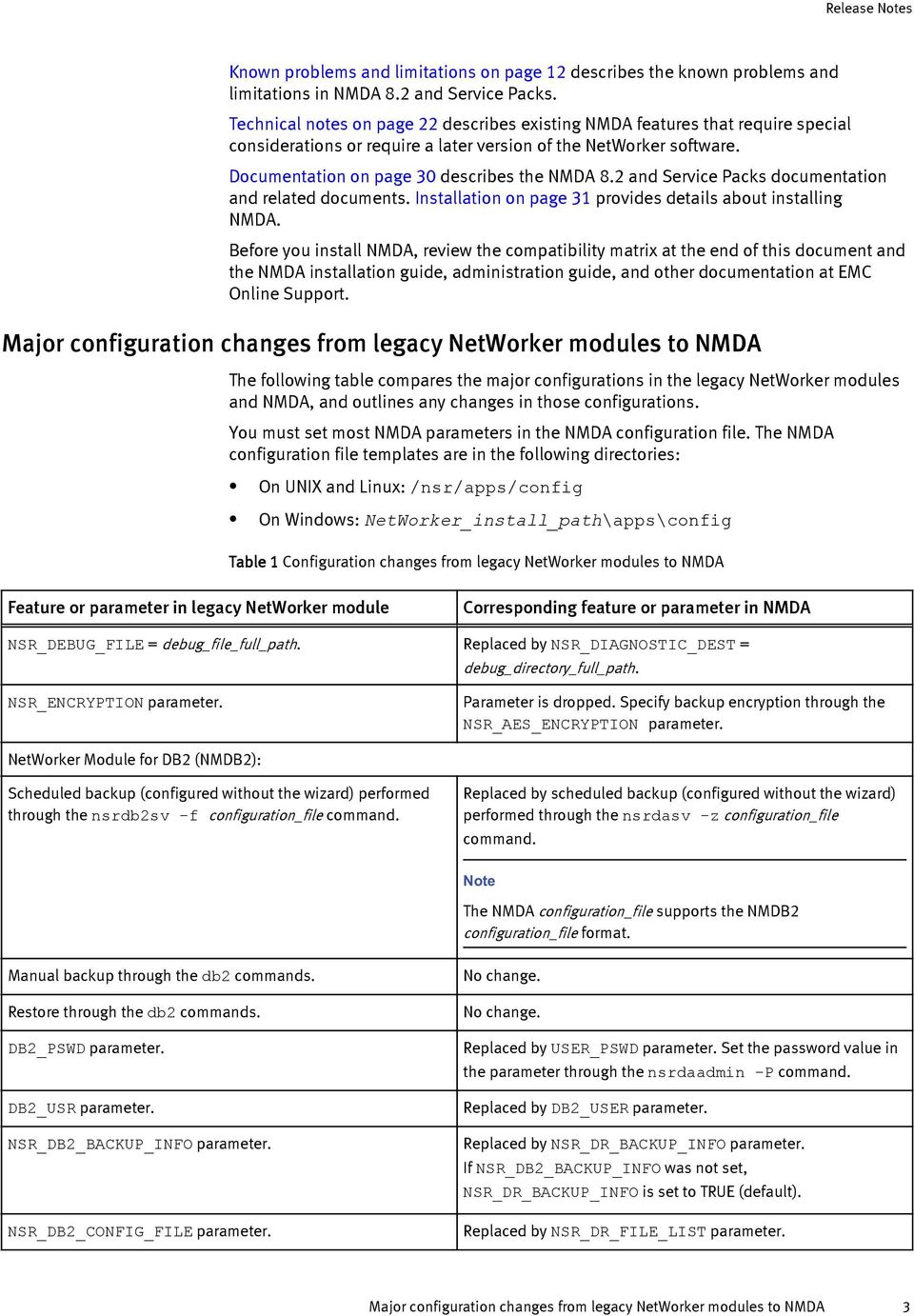
4 Table 1 Configuration changes from legacy NetWorker modules to NMDA (continued) Feature or parameter in legacy NetWorker module NSR_*_DEBUG* parameters. Corresponding feature or parameter in NMDA Replaced by NSR_DEBUG_LEVEL parameter. NetWorker Module for Informix (NMI): Scheduled backup performed through the nsrdbmi shell/batch script. Manual backup performed through the onbar commands. Restore performed through the onbar commands. BOOTFILE parameter. DO_BOOTFILE_BACKUPS parameter. Replaced by scheduled backup performed through the nsrdasv -z configuration_file command. No change. No change. Replaced by NSR_DR_FILE_LIST parameter. Replaced by NSR_DR_BACKUP_INFO parameter. NetWorker Module for Lotus (NML): Scheduled backup (configured without the wizard) or manual backup performed through the nsrnotesv -z configuration_file command. Replaced by scheduled backup (configured without the wizard) or manual backup performed through the nsrdasv -z configuration_file command. Note The NMDA configuration_file supports the NML configuration_file format. Restore performed through the nsrnotesrc -z configuration_file command. Manual backup or restore performed through the NetWorker User for Lotus GUI (nwbml.exe) on Windows only. Document-level recovery performed through the nsrdocrc -z configuration_file command. Document-level recovery performed through the Notes client GUI on Windows only. LOTUSUSER parameter. No change. No change. No change. No change. Replaced by LOTUS_USER parameter. NetWorker Module for Oracle (NMO): Scheduled backup (configured without the wizard) performed through the nsrnmo shell/batch script. Manual backup performed through the Oracle RMAN interface. Restore performed through the Oracle RMAN interface. NSR_SB_DEBUG_FILE parameter. Replaced by scheduled backup (configured without wizard) performed through the nsrdasv -z configuration_file command. No change. No change. Replaced by NSR_DEBUG_LEVEL=1 parameter. NetWorker Module for Sybase (NMS): Scheduled backup performed through the nsrsyb shell/batch script. Manual backup performed through the nsrsybsv command_line_options command. Replaced by scheduled backup performed through the nsrdasv -z configuration_file command. Replaced by manual backup performed through the nsrdasv -z configuration_file command. 4 EMC NetWorker Module for Databases and Applications 8.2 and Service Packs Release Notes
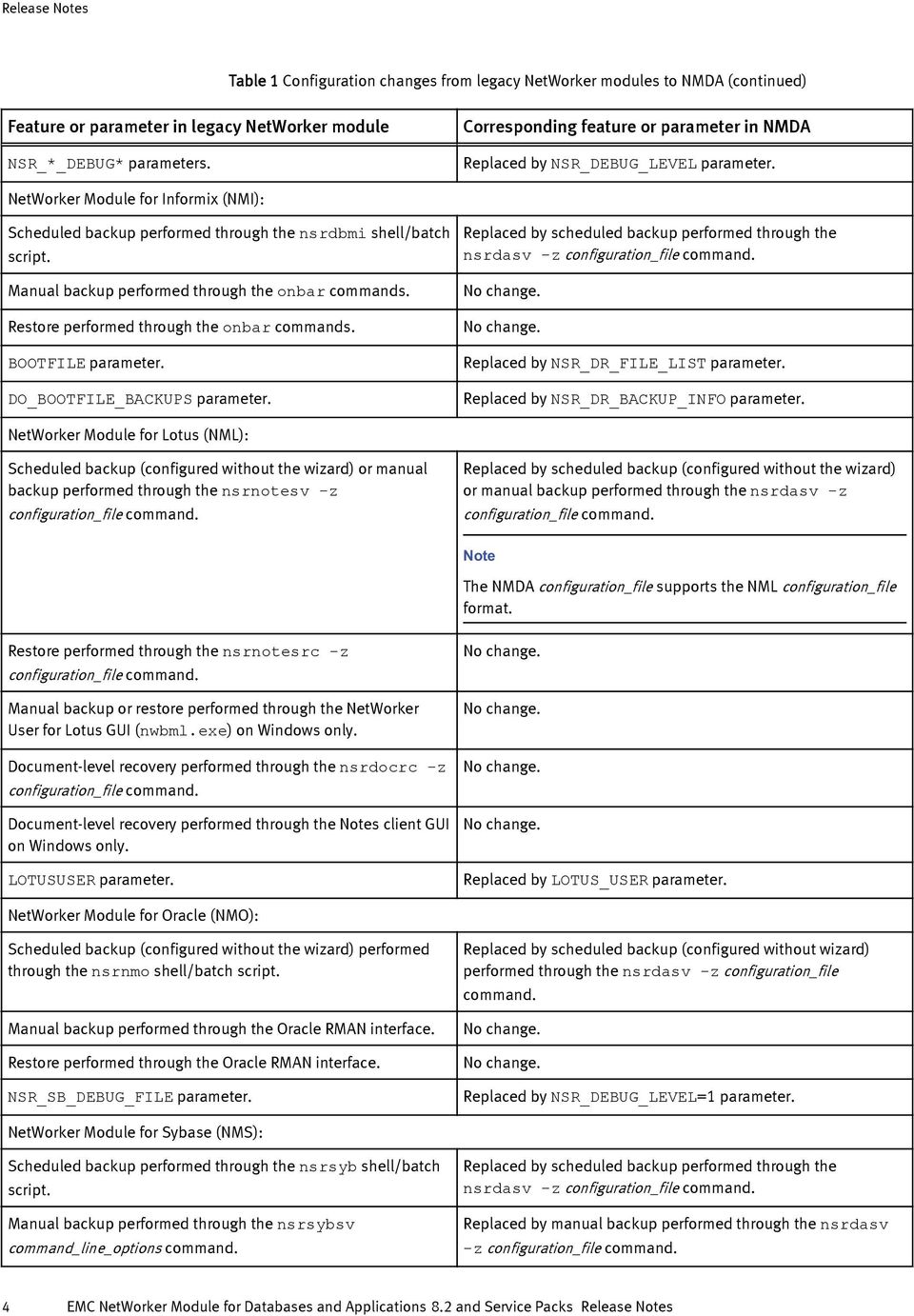
5 Table 1 Configuration changes from legacy NetWorker modules to NMDA (continued) Feature or parameter in legacy NetWorker module Database consistency check performed through the nsrsybcc command_line_options command. Restore performed through the nsrsybrc command_line_options command. Manual backup or restore performed through the NetWorker User for Sybase GUI (nwbms.exe) on Windows only. BACKUP_OPT parameter. -G, -R, and -T options of nsrsybsv command. Corresponding feature or parameter in NMDA No change. No change. No change. Parameter is dropped. Replaced by NSR_DUMP_LOG_OPT parameter. -l option of nsrsybsv command. Replaced by NSR_BACKUP_LEVEL parameter. -p option of nsrsybsv command. Replaced by NSR_PROMOTE_FULL parameter. -P option of nsrsybsv command, or password setting in the Client resource. Replaced by USER_PSWD parameter. Set the password value in the parameter through the nsrdaadmin -P command. -r option of nsrsybsv command. Replaced by NSR_ASE_PASSWORD parameter. -U option of nsrsybsv command, or remote user setting in the Client resource. Replaced by SYBASE_USER parameter. -V option of nsrsybsv command. Replaced by NSR_ASE_VERIFY parameter. New features and changes The following topics describe the new features and changes in NMDA 8.2 and the related Service Packs. NMDA 8.2 and Service Packs replace the previous NMDA releases on the supported Linux, UNIX, and Windows operating systems. You can use NMDA 8.2 and Service Packs to restore any backups performed with previous NMDA releases. Note Deprecated features are features supported in this NMDA release that will be removed and unsupported in a future NMDA release. NMDA 8.2 SP1 The following topics describe the major new or enhanced features of NMDA 8.2 SP1: Data Domain IPv6 support on page 6 DB2 HADR support on page 6 DB2 load with copy yes option support on page 6 Sybase listonly option support on page 6 Sybase restore parameter support on page 7 Updated NMDA 8.2 SP1 parameters on page 8 New features and changes 5
6 Data Domain IPv6 support The EMC NetWorker Module for Databases and Applications Release 8.2 SP1 Administration Guide provides complete configuration details for the new features. The compatibility matrix at the end of this document provides details about the supported environments. NMDA 8.2 SP1 provides support for both the EMC Data Domain IPv6 and mixed IPv4 and IPv6 networks. The EMC NetWorker Release 8.2 SP1 Release Notes provides information about the new support of Data Domain IPv6 networks with NetWorker software. DB2 HADR support NMDA 8.2 SP1 supports DB2 backups and restores in a DB2 High Availability Disaster Recovery (HADR) environment. The NetWorker scheduled backups always run on the active node in the HADR environment. IBM DB2 has the following restrictions with HADR support that impact NMDA functionality: Multiple standby mode is available only with DB and later. DB2 load with copy yes option support Sybase listonly option support HADR is not available in partitioned database environments. DB2 does not support backups on the standby host, even if the Reads on Standby (ROS) feature is enabled. Tablespace-level restore or rollforward is not supported on either a primary or standby database. NMDA supports DB2 HADR configuration with and without Virtual IP (VIP). NMDA has the following limitations with DB2 HADR support: You cannot use the NMDA wizard to configure an HADR backup in a VIP environment. You must use the client-side manual configuration procedure through NMC. NMDA does not support DB2 HADR in a DB2 purescale environment. The EMC NetWorker Module for Databases and Applications Release 8.2 SP1 Administration Guide provides details about how to configure and perform DB2 HADR backups and restores. NMDA supports the use of the DB2 load command with the copy yes option to save a copy of DB2 database changes during the load operation to NetWorker for later use in the database recovery. Rollforward recovery must be enabled for the database before you can use the copy yes option with the load command. The EMC NetWorker Module for Databases and Applications Release 8.2 SP1 Administration Guide provides details about how to use a load operation with the copy yes option to save a load-copy file and use a rollforward operation to recover the file into a database. NMDA 8.2 SP1 supports the use of the Sybase restore command, nsrsybrc, with the listonly option for obtaining structure information from the latest backup of a Sybase instance or databases, without restoring the backup. Sybase ASE 15.7 ESD#2 and later provides the listonly option support. 6 EMC NetWorker Module for Databases and Applications 8.2 and Service Packs Release Notes

7 Sybase restore parameter support The EMC NetWorker Module for Databases and Applications Release 8.2 SP1 Administration Guide provides details about how to obtain the structure information from an NMDA Sybase backup by using the Sybase listonly option. In previous NMDA releases, the Sybase restore parameters were set as nsrsybrc command line options, described in the EMC NetWorker Module for Databases and Applications Command Reference Guide. These command line options are deprecated in NMDA 8.2 SP1, and support of the command line options will be removed in the future. NMDA 8.2 SP1 provides new support for Sybase restore parameters in the NMDA configuration file. After setting the required restore parameters in the configuration file, you can perform a Sybase restore/recovery with the nsrsybrc -z configuration_file_path command. This NMDA release provides separate configuration file templates for the Sybase backup and restore parameters: nmda_sybase_backup.cfg Template for Sybase backup parameters nmda_sybase_restore.cfg Template for Sybase restore parameters The following table lists the parameters that you can set in the NMDA 8.2 SP1 configuration file for a Sybase restore/recovery. The table also lists the corresponding nsrsybrc command line options. The EMC NetWorker Module for Databases and Applications Release 8.2 SP1 Administration Guide provides details about how to set the Sybase parameters. Table 2 NMDA Sybase restore parameters and nsrsybrc command line options Sybase restore parameters in NMDA 8.2 SP1 Corresponding command line options DATABASE_ONLINE (new parameter) nsrsybrc -p NSR_ASE_PASSWORD nsrsybrc -r backup_password NSR_ASE_VERIFY nsrsybrc -V {header full verifyonly} NSR_BACKUP_PATHS nsrsybrc { SYBASE:/ASE_server_name SYBASE:/ASE_server_name/database_name [ SYBASE:/ASE_server_name/ database_name...] } NSR_CLIENT NSR_DEBUG_LEVEL NSR_DIAGNOSTIC_DEST (new parameter) NSR_DPRINTF (new debug parameter) NSR_ENCRYPTION_PHRASES NSR_NWPATH NSR_RECOVER_POOL NSR_RELOCATION_DEST (new parameter) nsrsybrc -c client_name nsrsybrc -D debug_level Not applicable Not applicable nsrsybrc -e AES_pass_phrase Not applicable nsrsybrc -w recover_pool nsrsybrc -d SYBASE:/ASE_server_name[/ database_name] NMDA 8.2 SP1 7
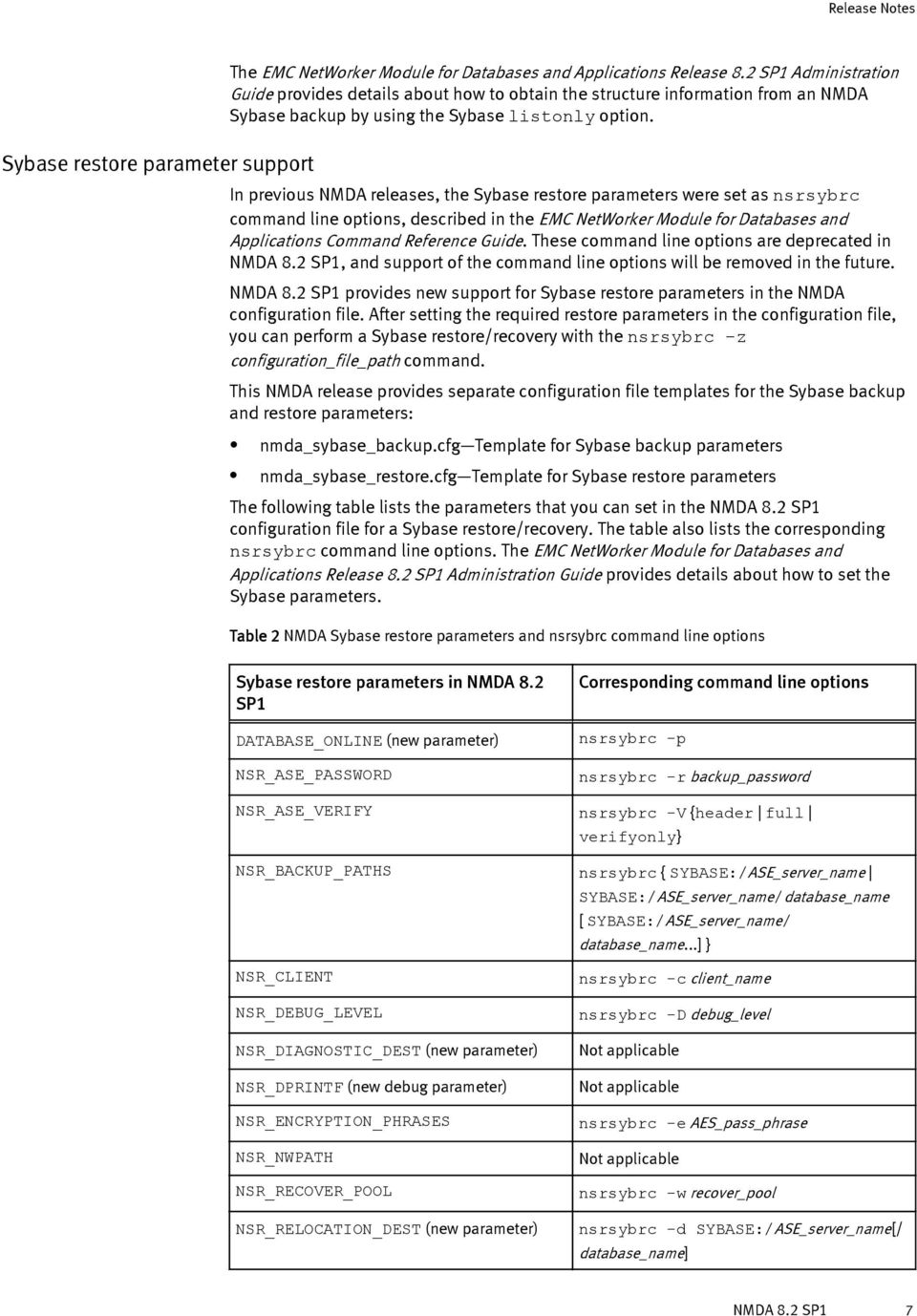
8 Table 2 NMDA Sybase restore parameters and nsrsybrc command line options (continued) Sybase restore parameters in NMDA 8.2 SP1 NSR_SERVER NSR_XBSA_DEBUG (new debug parameter) RECOVER_LISTONLY (new parameter) Corresponding command line options nsrsybrc -s server_name Not applicable nsrsybrc -l {load_sql create_sql} RECOVER_UNTIL (new parameter) nsrsybrc -m {up_to_min up_to_min_noskip} -t backup_time STRIPE_DEVICE_DEST (new parameter) SYBASE_USER nsrsybrc -L temporary_file_pathname nsrsybrc -U username USE_CONSISTENCY_CHECK nsrsybrc -k USER_PSWD nsrsybrc -P password Updated NMDA 8.2 SP1 parameters NMDA 8.2 DB2 data recovery with the HPU utility NMDA 8.2 SP1 supports the new parameter DB2_ACS_METADATA_DELETION_FORCE. You can use this parameter to enforce the deletion of the DB2 snapshot metadata save sets of a snapshot backup. You can enforce this deletion after a deletion of the corresponding NSM snapshot backup succeeded in removing the snapshot save sets but failed to remove the associated metadata save sets. NMDA 8.2 SP1 also provides new support for the Sybase restore parameters described in the preceding topic. The EMC NetWorker Module for Databases and Applications Release 8.2 SP1 Administration Guide provides complete details about all the supported NMDA parameters. The following topics describe the major new or enhanced features of NMDA 8.2: DB2 data recovery with the HPU utility on page 8 Lotus transaction logs backup with multiple concurrent streams on page 9 Oracle recovery wizard support of TNS_ADMIN environment variable on page 9 Sybase network password encryption on page 9 Updated NMDA 8.2 parameters on page 9 The EMC NetWorker Module for Databases and Applications Release 8.2 Administration Guide provides complete configuration details for the new features. The compatibility matrix at the end of this document provides details about the supported environments. NMDA 8.2 introduces support for the IBM Optim High Performance Unload (HPU) utility, which is a high-speed stand-alone utility that unloads, extracts, and repartitions backup data into DB2 databases. The HPU utility unloads data directly from an NMDA DB2 full, incremental, or delta backup to staging files and then writes the data to output files for use with the DB2 load utility. By reading the data directly from a backup image instead of through the DB2 8 EMC NetWorker Module for Databases and Applications 8.2 and Service Packs Release Notes

9 software layer or database engine, the utility provides quick and efficient recovery of discrete volumes of data. The IBM DB2 documentation provides details about HPU and how to create the control file for HPU operations. NMDA support of the HPU utility requires HPU 4.2 Fixpack 1 or later. Lotus transaction logs backup with multiple concurrent streams NMDA 8.2 introduces support for the backup of Lotus archived transaction logs through multiple concurrent (parallel) streams during a full, incremental, or logs only backup. You can improve the backup performance by specifying that multiple concurrent data streams are sent to the NetWorker server for the backup. For a logs only backup, you must set the NSR_PARALLELISM parameter or corresponding wizard option to specify the maximum number of concurrent streams to send to the NetWorker server. During a full or incremental backup, the parameter or option that you set for the data backup is automatically used for the logs backup. Oracle recovery wizard support of TNS_ADMIN environment variable Sybase network password encryption Updated NMDA 8.2 parameters NMDA 8.2 enables you to set the Oracle TNS_ADMIN environment variable in the Oracle recovery configuration wizard to specify a nondefault location for the tnsnames.ora file. You need to set the parameter only if the file is not in the default location. The tnsnames.ora file is required to enable the proper database connections during an NMDA Oracle recovery. NMDA 8.2 supports the Sybase network password encryption feature. This feature encrypts login passwords for secure password transmission between the Sybase server and client. The Sybase network password encryption was introduced in Sybase ASE ESD #2, with support of a value from 0 to 2. A value of 1 restricts clients to use either the RSA public key encryption algorithms or the Sybase proprietary algorithms. A value of 2 restricts clients to use only the RSA encryption algorithms. Starting with Sybase ASE 15.7 ESD #2, the network password encryption also supports a value of 3, which indicates that the server allows only incoming clients that use the EPEP login protocol. The Sybase documentation provides more details about network password encryption. NMDA automatically encrypts the Sybase login passwords by using the algorithms configured on the Sybase ASE server. No additional configuration is needed in NMDA. NMDA 8.2 provides support for the new DB2 parameter SOURCE_DBNAME, which specifies the name of the DB2 database used for a backup of the archived logs. The parameter is mandatory for a rollforward recovery of the destination database after a restore to a different database. NMDA 8.2 no longer supports the NSR_NO_BUSY_ERRORS parameter. Use the NSR_MAX_START_RETRIES parameter instead. You do not need to use this parameter for regular operations, but only in the case of connectivity issues with the NetWorker server. The NMDA Oracle parameter NSR_RETENTION_DISABLED is unsupported. The following results occurred if you used the parameter in a prior NMDA release: NMDA 8.2 9
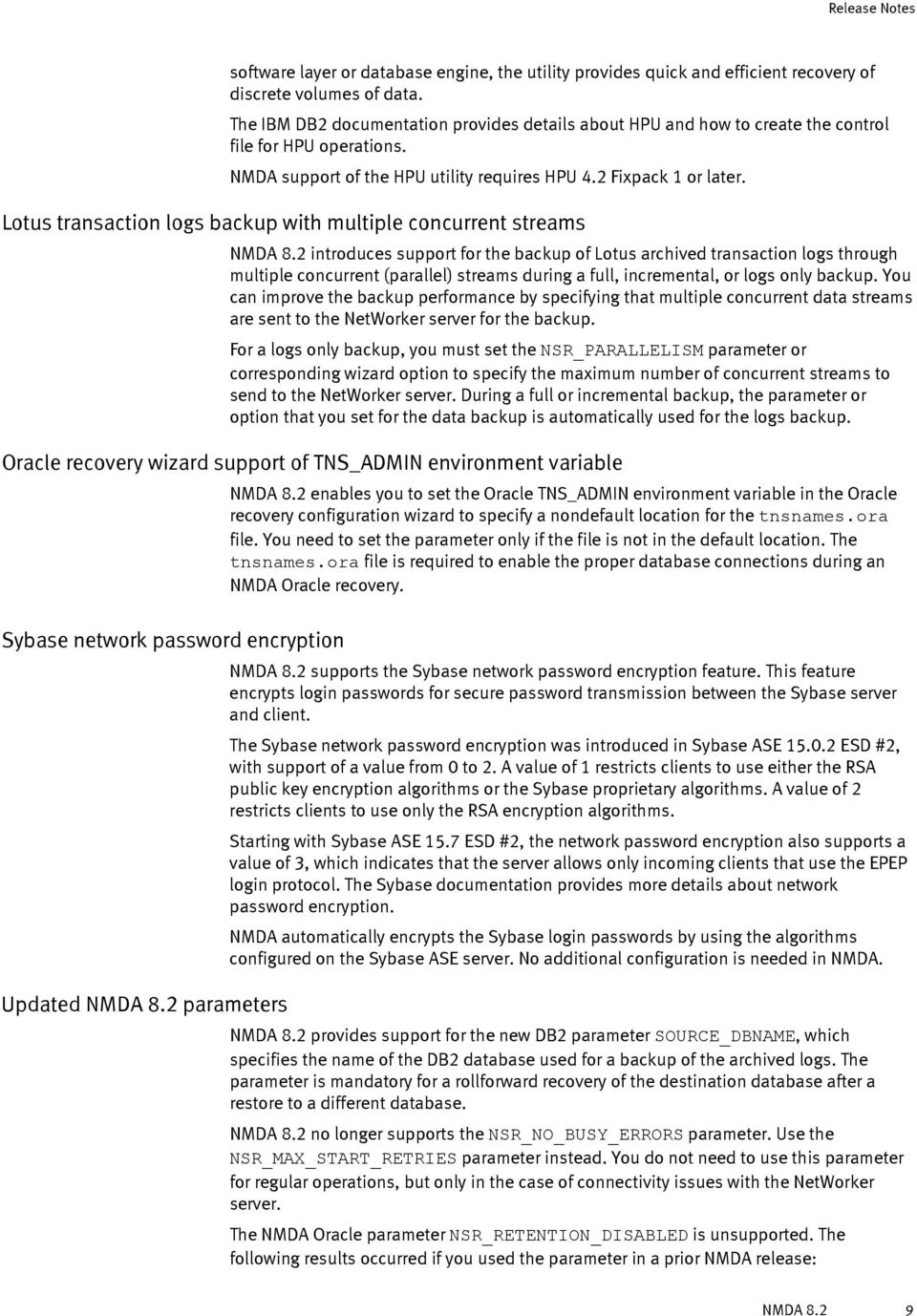
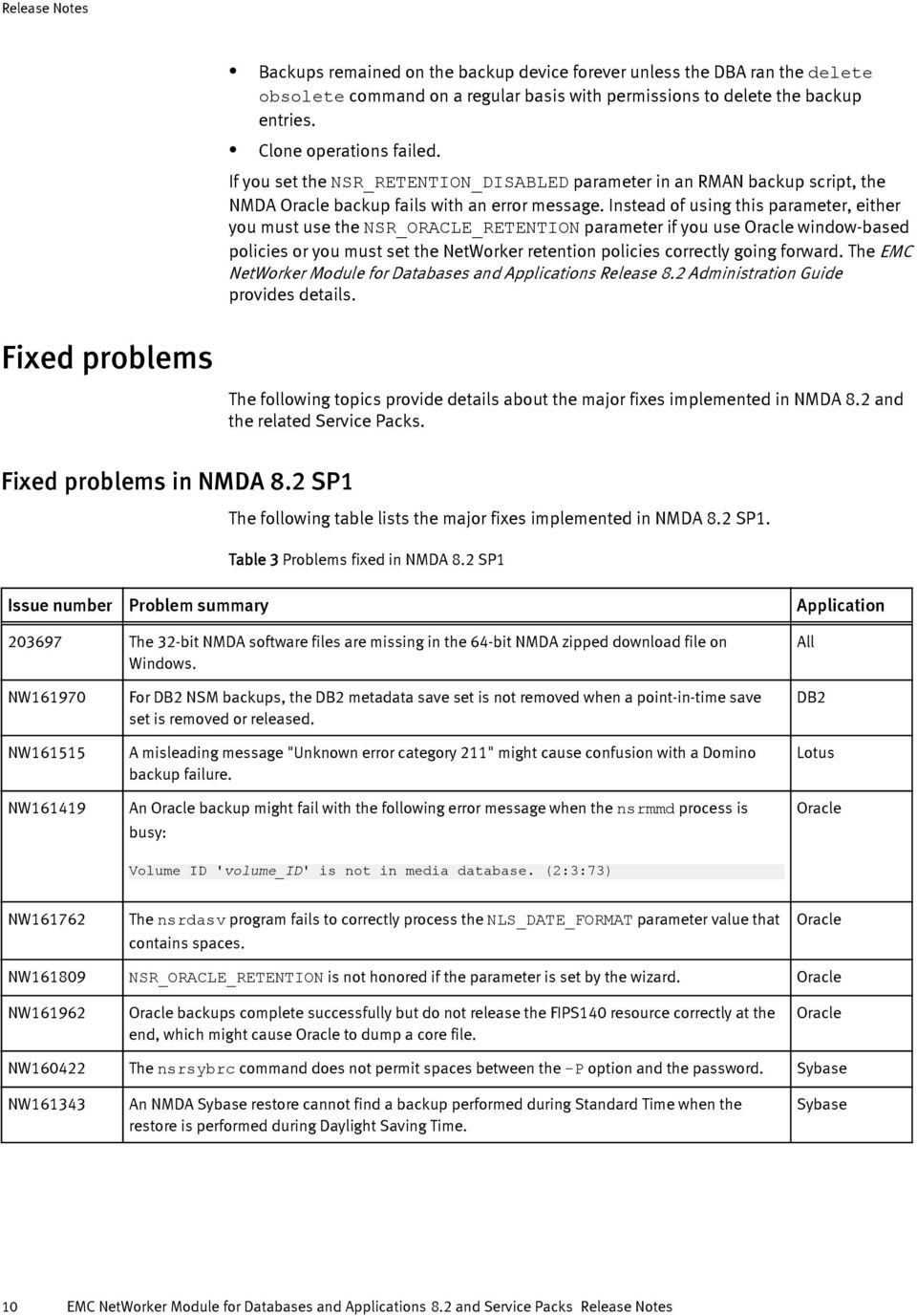
10 Backups remained on the backup device forever unless the DBA ran the delete obsolete command on a regular basis with permissions to delete the backup entries. Clone operations failed. If you set the NSR_RETENTION_DISABLED parameter in an RMAN backup script, the NMDA Oracle backup fails with an error message. Instead of using this parameter, either you must use the NSR_ORACLE_RETENTION parameter if you use Oracle window-based policies or you must set the NetWorker retention policies correctly going forward. The EMC NetWorker Module for Databases and Applications Release 8.2 Administration Guide provides details. Fixed problems The following topics provide details about the major fixes implemented in NMDA 8.2 and the related Service Packs. Fixed problems in NMDA 8.2 SP1 The following table lists the major fixes implemented in NMDA 8.2 SP1. Table 3 Problems fixed in NMDA 8.2 SP1 Issue number Problem summary Application The 32-bit NMDA software files are missing in the 64-bit NMDA zipped download file on Windows. All NW NW NW For DB2 NSM backups, the DB2 metadata save set is not removed when a point-in-time save set is removed or released. A misleading message "Unknown error category 211" might cause confusion with a Domino backup failure. An Oracle backup might fail with the following error message when the nsrmmd process is busy: DB2 Lotus Oracle Volume ID 'volume_id' is not in media database. (2:3:73) NW The nsrdasv program fails to correctly process the NLS_DATE_FORMAT parameter value that contains spaces. Oracle NW NSR_ORACLE_RETENTION is not honored if the parameter is set by the wizard. Oracle NW Oracle backups complete successfully but do not release the FIPS140 resource correctly at the end, which might cause Oracle to dump a core file. Oracle NW The nsrsybrc command does not permit spaces between the -P option and the password. Sybase NW An NMDA Sybase restore cannot find a backup performed during Standard Time when the restore is performed during Daylight Saving Time. Sybase 10 EMC NetWorker Module for Databases and Applications 8.2 and Service Packs Release Notes
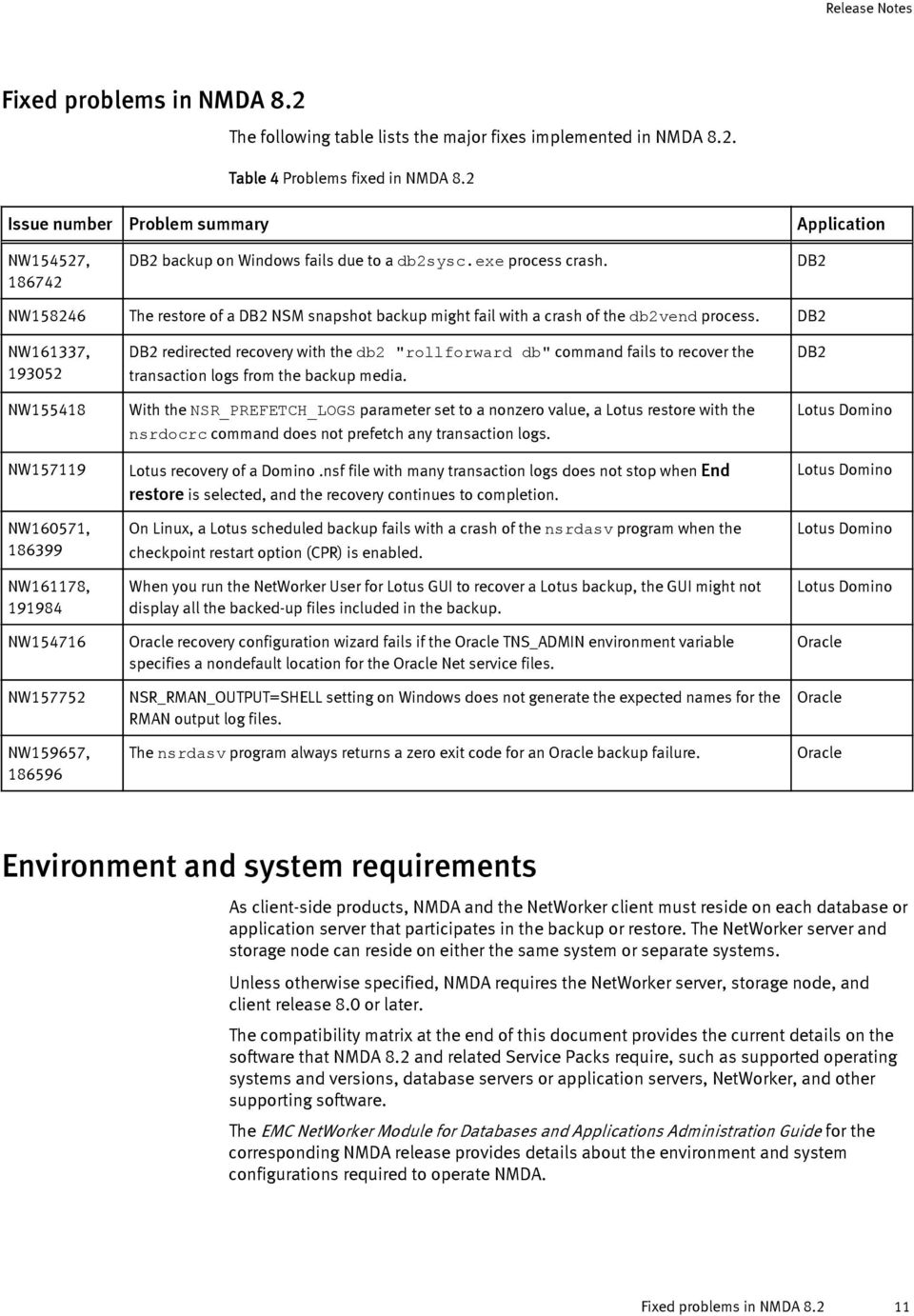
11 Fixed problems in NMDA 8.2 The following table lists the major fixes implemented in NMDA 8.2. Table 4 Problems fixed in NMDA 8.2 Issue number Problem summary Application NW154527, DB2 backup on Windows fails due to a db2sysc.exe process crash. DB2 NW The restore of a DB2 NSM snapshot backup might fail with a crash of the db2vend process. DB2 NW161337, NW NW NW160571, NW161178, NW NW NW159657, DB2 redirected recovery with the db2 "rollforward db" command fails to recover the transaction logs from the backup media. With the NSR_PREFETCH_LOGS parameter set to a nonzero value, a Lotus restore with the nsrdocrc command does not prefetch any transaction logs. Lotus recovery of a Domino.nsf file with many transaction logs does not stop when End restore is selected, and the recovery continues to completion. On Linux, a Lotus scheduled backup fails with a crash of the nsrdasv program when the checkpoint restart option (CPR) is enabled. When you run the NetWorker User for Lotus GUI to recover a Lotus backup, the GUI might not display all the backed-up files included in the backup. Oracle recovery configuration wizard fails if the Oracle TNS_ADMIN environment variable specifies a nondefault location for the Oracle Net service files. NSR_RMAN_OUTPUT=SHELL setting on Windows does not generate the expected names for the RMAN output log files. The nsrdasv program always returns a zero exit code for an Oracle backup failure. DB2 Lotus Domino Lotus Domino Lotus Domino Lotus Domino Oracle Oracle Oracle Environment and system requirements As client-side products, NMDA and the NetWorker client must reside on each database or application server that participates in the backup or restore. The NetWorker server and storage node can reside on either the same system or separate systems. Unless otherwise specified, NMDA requires the NetWorker server, storage node, and client release 8.0 or later. The compatibility matrix at the end of this document provides the current details on the software that NMDA 8.2 and related Service Packs require, such as supported operating systems and versions, database servers or application servers, NetWorker, and other supporting software. The EMC NetWorker Module for Databases and Applications Administration Guide for the corresponding NMDA release provides details about the environment and system configurations required to operate NMDA. Fixed problems in NMDA
12 MySQL and MEB support NMDA interacts with the MySQL Enterprise Backup (MEB) software to perform MySQL backups and restores. You must install a supported version of MEB with the proper version of MySQL as shown in the following table. Table 5 MySQL and MEB version dependencies MySQL version Supported MEB versions , 3.7, 3.8, 3.9, , 3.7, 3.8, 3.9, , 3.7, 3.8, 3.9, 3.10 The following considerations apply to NMDA MySQL operations and MEB dependencies: 32-bit MEB must be installed for 32-bit MySQL support, and 64-bit MEB must be installed for 64-bit MySQL support. NMDA does not support the MEB 3.9 copy-back-and-apply-log operation. MySQL 5.6 support NMDA supports MySQL release 5.6, including the new features except for the use of an encrypted login file, mylogin.cnf, for setting the backup credentials. NMDA support of new features in MySQL 5.6 requires MEB version or later to be installed on the MySQL server host. For a list of the new features supported only with MEB or later, refer to the topic Compatibility Note for MySQL Version in the MySQL Enterprise Backup User s Guide for version or later. Known problems and limitations The following tables list the known problems and limitations that apply to NMDA 8.2 and the related Service Packs: Limitations in NMDA 8.2 and Service Packs on page 13 Limitations in other products that affect NMDA 8.2 and Service Packs on page 13 The issues are grouped according to the specific application to which they apply. The first group includes the common issues that apply to multiple applications. When you contact Customer Service about an issue, use the listed issue number. Unless the entry for a known limitation indicates that it is resolved for a specific release, the limitation applies to NMDA 8.2 and all the Service Packs. A resolved limitation is listed in the fixed problems table for the release in which it is resolved. 12 EMC NetWorker Module for Databases and Applications 8.2 and Service Packs Release Notes

13 Table 6 Limitations in NMDA 8.2 and Service Packs Issue number Description Operating system Product feature Application on page 14 On Linux, NMDA installations and operations fail if the NetWorker client package is installed in a nondefault location. Linux Installation, backup, restore All NW on page 16 The savegroup report for a DB2 snapshot and rollover backup does not include any save set information from the rollover part of the backup. Linux Backup, NSM DB2 NW on page 17 With 32-bit NMDA on AIX, an Informix backup fails with the following error message: AIX Backup Informix Dependent module /usr/lib/liblocktbl.so could not be loaded. NW101758, NW on page 18 NW on page 19 A Lotus backup of 64-bit Domino on AIX might cause the Domino server to crash or become suspended or the backup might fail with a specific error message. A Lotus full database backup might expire before the dependent transaction log backups because NMDA Lotus does not create dependencies between the backups. AIX Backup Lotus Domino All Backup Lotus Domino NW on page 19 Conversion of a MySQL client-side to server-side configuration with the nsrdaadmin -W command Linux Configuration conversion MySQL fails. NW on page 19 When you run the nsrinfo command to obtain information about MySQL backups, the command displays an error message. Linux Backup MySQL LGTsc06110 o n page 20 Japanese Oracle backup information might be displayed incorrectly in the NMC program. All Backup, internationalization Oracle NW on page 20 NW on page 21 NW on page 22 NMDA Oracle save set bundling or policy uniformity fails for a multinode Oracle RAC backup, but the backup is successful and fully recoverable. If a Sybase manual or scheduled backup attempts to back up more than 200 databases, the backup might fail. A Sybase scheduled backup might fail if the Sybase server and NetWorker client run in different locales. All Backup Oracle All Backup Sybase ASE All Backup Sybase ASE Table 7 Limitations in other products that affect NMDA 8.2 and Service Packs Issue number Description Operating system Product feature Application NW on page 15 Due to a NetWorker limitation in non-english locales, backup configuration with the wizard fails. All Configuration wizard, internationalization All Known problems and limitations 13

14 Table 7 Limitations in other products that affect NMDA 8.2 and Service Packs (continued) Issue number Description Operating system Product feature Application on page 16 NW on page 16 NW on page 16 Due to a DB2 bug, if you use the HPU utility to unload and restore an NMDA DB2 incremental backup, then the operation might fail with an error. Due to a DB2 bug, if you run a multisession DB2 backup and use the db2 prune command to delete backup entries from the DB2 history file, the command might leave some entries in the file. Due to a DB2 limitation, NMDA does not delete the logs from the NetWorker server during a db2 prune operation if the NMDA configuration file pathname in the LOGARCHOPTn parameter exceeds 30 ASCII characters. All Restore DB2 All Backup DB2 All Backup DB2 NW on page 20 Due to an Oracle limitation, Oracle backup problems might occur when the RMAN script contains non-ascii data. All Backup, internationalization Oracle NW on page 21 Due to Oracle bug , a point-in-time recovery of an Oracle 12c table, table partition, or pluggable database (PDB) might fail if you use manual channel allocation. All Restore Oracle NW on page 21 Due to Oracle bug , an Oracle 12cR1 container or pluggable database snapshot backup with NSM fails on Windows if some of the datafiles are not located on a snapshotable device. Windows Backup, NSM Oracle Common NMDA problems and limitations This section contains the NMDA problems and limitations that apply to all the applications (DB2, Informix, Lotus Domino/Notes, MySQL, Oracle, Sybase) that NMDA supports. Installations and operations fail on Linux with NetWorker client installed in nondefault location On Linux, if the NetWorker client package is installed in a nondefault location, then NMDA operations cannot load the FIPS140 shared libraries. As a result, the following issues occur: The NMDA installation fails with the following error message: Unable to load FIPS-140 module: The FIPS140 shared library could not be found The NMDA binaries are installed correctly, but the automated wizard registration fails with the error. All other NMDA operations fail with the same error message, including backups, restores, and backup deletions. As a workaround, perform the following steps: 14 EMC NetWorker Module for Databases and Applications 8.2 and Service Packs Release Notes
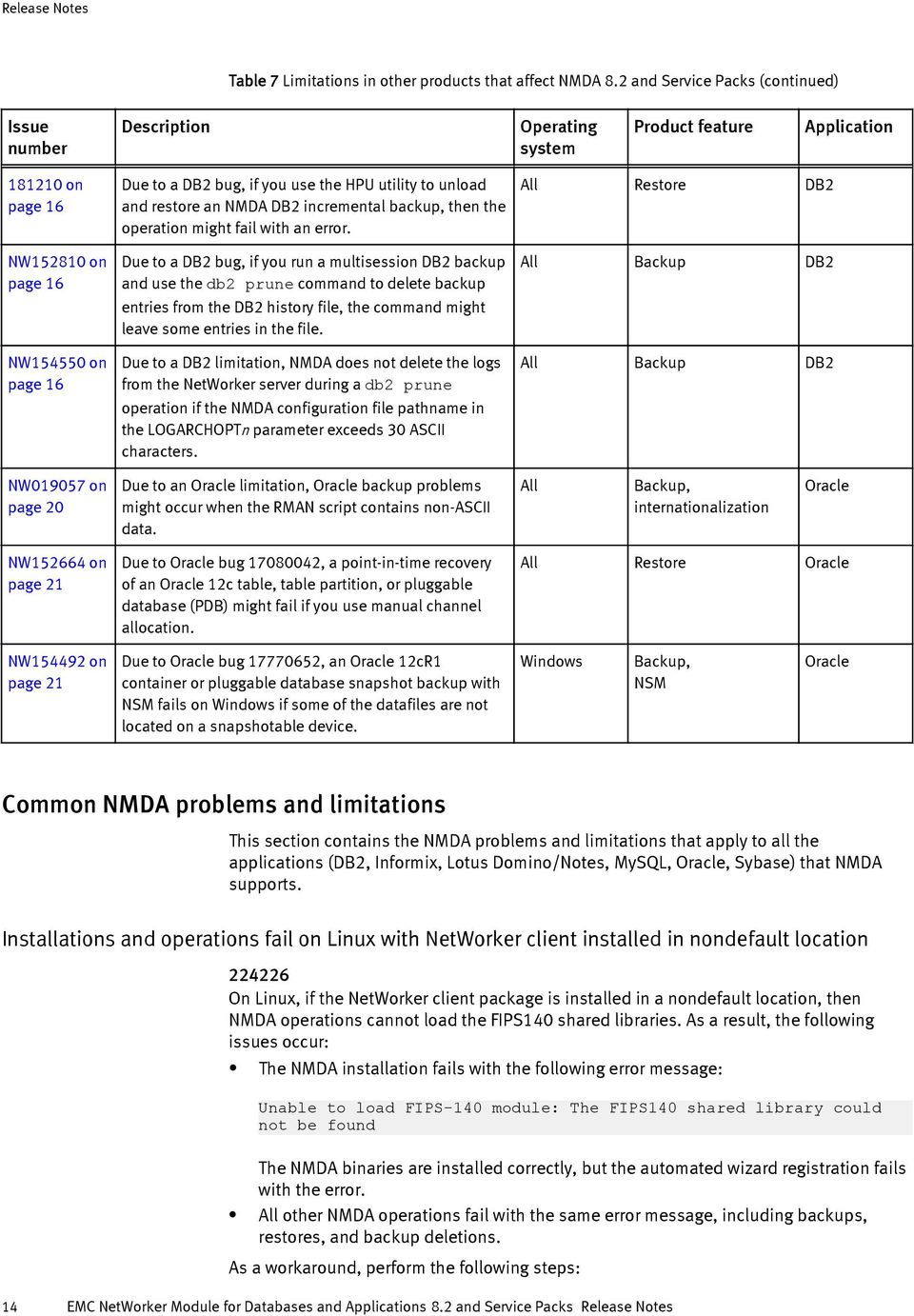
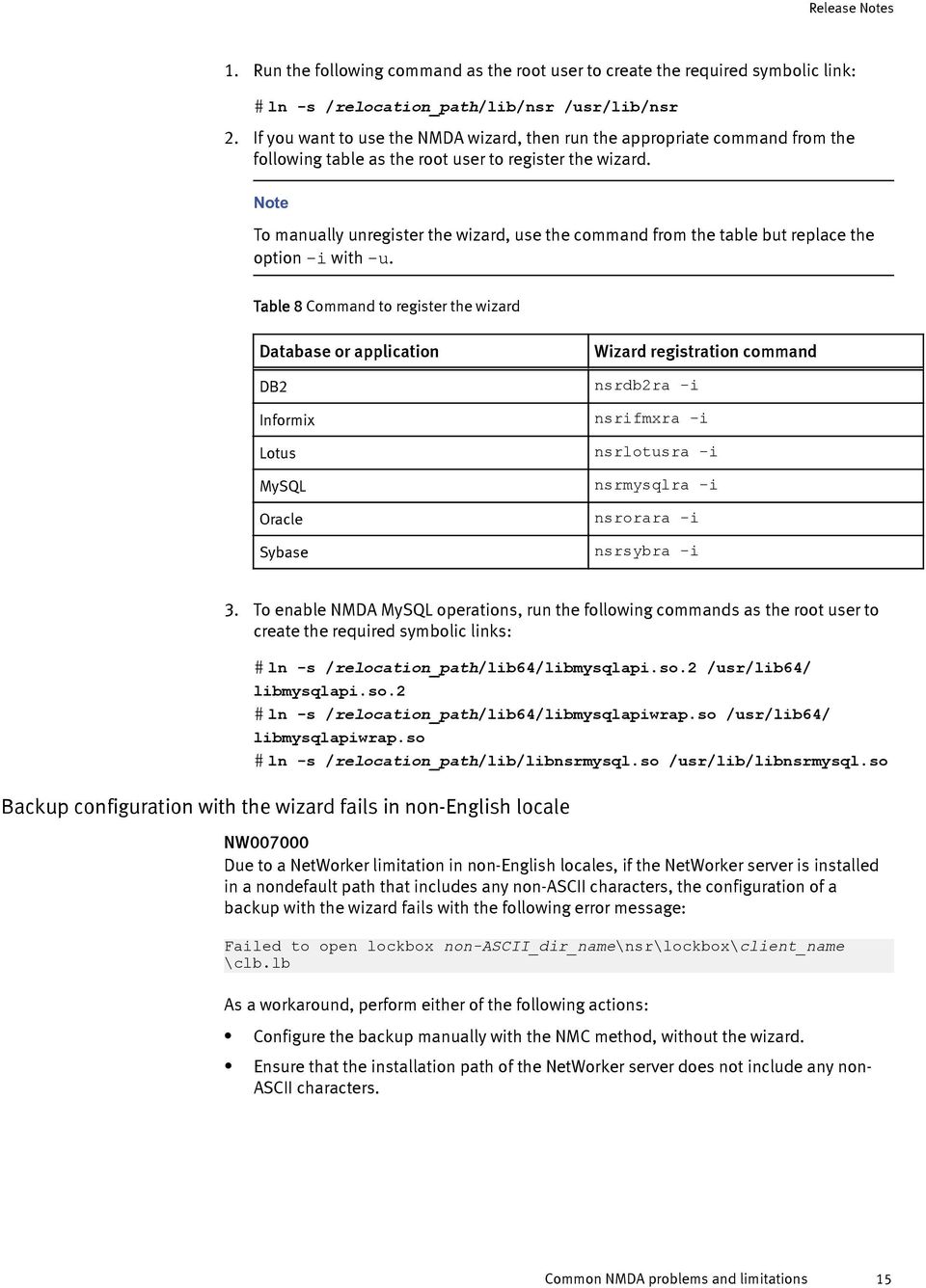
15 1. Run the following command as the root user to create the required symbolic link: # ln -s /relocation_path/lib/nsr /usr/lib/nsr 2. If you want to use the NMDA wizard, then run the appropriate command from the following table as the root user to register the wizard. Note To manually unregister the wizard, use the command from the table but replace the option -i with -u. Table 8 Command to register the wizard Database or application Wizard registration command DB2 nsrdb2ra -i Informix nsrifmxra -i Lotus nsrlotusra -i MySQL nsrmysqlra -i Oracle nsrorara -i Sybase nsrsybra -i 3. To enable NMDA MySQL operations, run the following commands as the root user to create the required symbolic links: # ln -s /relocation_path/lib64/libmysqlapi.so.2 /usr/lib64/ libmysqlapi.so.2 # ln -s /relocation_path/lib64/libmysqlapiwrap.so /usr/lib64/ libmysqlapiwrap.so # ln -s /relocation_path/lib/libnsrmysql.so /usr/lib/libnsrmysql.so Backup configuration with the wizard fails in non-english locale NW Due to a NetWorker limitation in non-english locales, if the NetWorker server is installed in a nondefault path that includes any non-ascii characters, the configuration of a backup with the wizard fails with the following error message: Failed to open lockbox non-ascii_dir_name\nsr\lockbox\client_name \clb.lb As a workaround, perform either of the following actions: Configure the backup manually with the NMC method, without the wizard. Ensure that the installation path of the NetWorker server does not include any non- ASCII characters. Common NMDA problems and limitations 15
16 DB2 problems and limitations This section contains NMDA problems and limitations specific to DB2 operations. DB2 HPU restore might fail with an incremental backup Due to a DB2 bug, if you use the IBM Optim High Performance Unload (HPU) utility to unload and restore an NMDA DB2 incremental backup, then the unload and restore operation might fail with the INZU366I HPU return code 8 (reason code 0x283a001). The DB2 bug is resolved in the following IBM HPU versions: HPU v4.2.1 FP1 with IF11 or later HPU v5.1 with IF8 or later HPU v DB2 snapshot and rollover backup does not report the rollover save set details NW When you use NMDA with NSM to perform a DB2 snapshot and rollover backup, the savegroup report does not include any save set information from the rollover part of the backup. The savegroup report includes information from the snapshot backup only. DB2 prune operation might fail to delete all entries from DB2 history file NW Due to a DB2 bug, if you run a multisession DB2 backup and then use the db2 prune command to delete the backup entries from the DB2 history file, the command deletes the index entries on the NetWorker server but might leave some of the entries in the DB2 history file. The DB2 bug is fixed in DB2 9.7fp4. As a workaround, run the db2 prune command again without the and delete option to delete the remaining entries in the DB2 history file. For example: db2 prune history with force option and delete db2 prune history with force option DB2 prune operation does not delete the logs from the NetWorker server in certain cases NW NMDA does not delete the DB2 transaction logs from the NetWorker server during a DB2 prune operation if the NMDA configuration file pathname specified in the LOGARCHOPTn parameter exceeds 30 ASCII characters. This character length limitation is a DB2 limitation. The LOGARCHOPTn parameter is set when configuring an automatic backup of DB2 transaction logs. The issue is a result of DB2 not setting the NMDA configuration file pathname correctly in the Comment field of the corresponding DB2 history file record when the pathname exceeds 30 ASCII characters. As a workaround, you can perform the following steps. 1. Run the db2 update history command to update the Comment field in the DB2 history file to point to an NMDA configuration file pathname that does not exceed 30 ASCII characters. 16 EMC NetWorker Module for Databases and Applications 8.2 and Service Packs Release Notes

17 db2 list history archive log all for db hat List History File for hat For example, the following db2 list history command output shows that the Comment field in the history file does not contain a valid NMDA configuration file pathname: Op Obj Timestamp+Sequence Type Dev Earliest Log Current Log Backup ID X D O S LOG C Comment: Start Time: End Time: Status: P EID: 25 Location: /usr/lib/libnsrdb2.so Informix problems and limitations You can run the following db2 update history command to update the Comment field with a valid configuration file pathname: db2 update history eid 25 with comment \"@/space/db2inst1/nmda.cfg \" 2. Rerun the db2 prune command. Informix backup fails with 32-bit NMDA on AIX To prevent this issue in future archive log backups, use an NMDA configuration file pathname that does not exceed 30 ASCII characters in the LOGARCHOPTn parameter. This section contains NMDA problems and limitations specific to Informix operations. NW With 32-bit NMDA on AIX, an Informix backup fails with the following error message: Dependent module /usr/lib/liblocktbl.so could not be loaded. As a workaround, run the following command as root, to remove the following symbolic link before you perform any Informix backups: rm /usr/lib/liblocktbl.so This link removal ensures that the 32-bit NMDA Informix library can locate the correct 32- bit libraries. Lotus Domino/Notes problems and limitations This section contains NMDA problems and limitations specific to Lotus Domino/Notes operations. Informix problems and limitations 17

18 Backup of 64-bit Domino on AIX might fail NW101758, NW An NMDA Lotus backup of 64-bit Domino on AIX might cause the Domino server to crash or become suspended or the backup might fail with the following error message: notes_sess_open: Exiting with error: The call to NotesInitExtended failed: 433 To prevent the issues NW and NW113768, perform the following steps on the AIX Domino host after the NMDA software is installed: 1. Log in as the Notes user, run the following commands, and record the command output: > ulimit -a > echo $LDR_CNTRL 2. Log in as the root user, and run the following commands: # ulimit -a # echo $LDR_CNTRL # dump -o /usr/bin/nsrexecd If any of the following conditions is true, perform step 3 on page 18 to step 5 on page 18: a. The data limit reported by the ulimit command for the root user is lower than for the Notes user. b. The LDR_CNTRL value for the root user is different than for the Notes user. c. The output from the dump nsrexecd command contains the following information: maxdata 0x Shut down the NetWorker client that is running on the Domino host by using the nsr_shutdown command. 4. Perform the appropriate action, depending on the issues found: a. Set the data limit for the root user to the same value as for the Notes user. b. Set the LDR_CNTRL parameter for the root user to the same value as for the Notes user. c. Run the following ldedit command on the nsrexecd executable to decrease the amount of memory that it uses: # /usr/ccs/bin/ldedit -bmaxdata:0x /usr/bin/nsrexecd 5. Restart the NetWorker client. If the issue occurs on the AIX Domino host before you have performed the preceding steps: 1. Shut down the Domino server. 2. Reboot the whole machine. 3. Perform the preceding step 1 on page 18 to step 5 on page EMC NetWorker Module for Databases and Applications 8.2 and Service Packs Release Notes

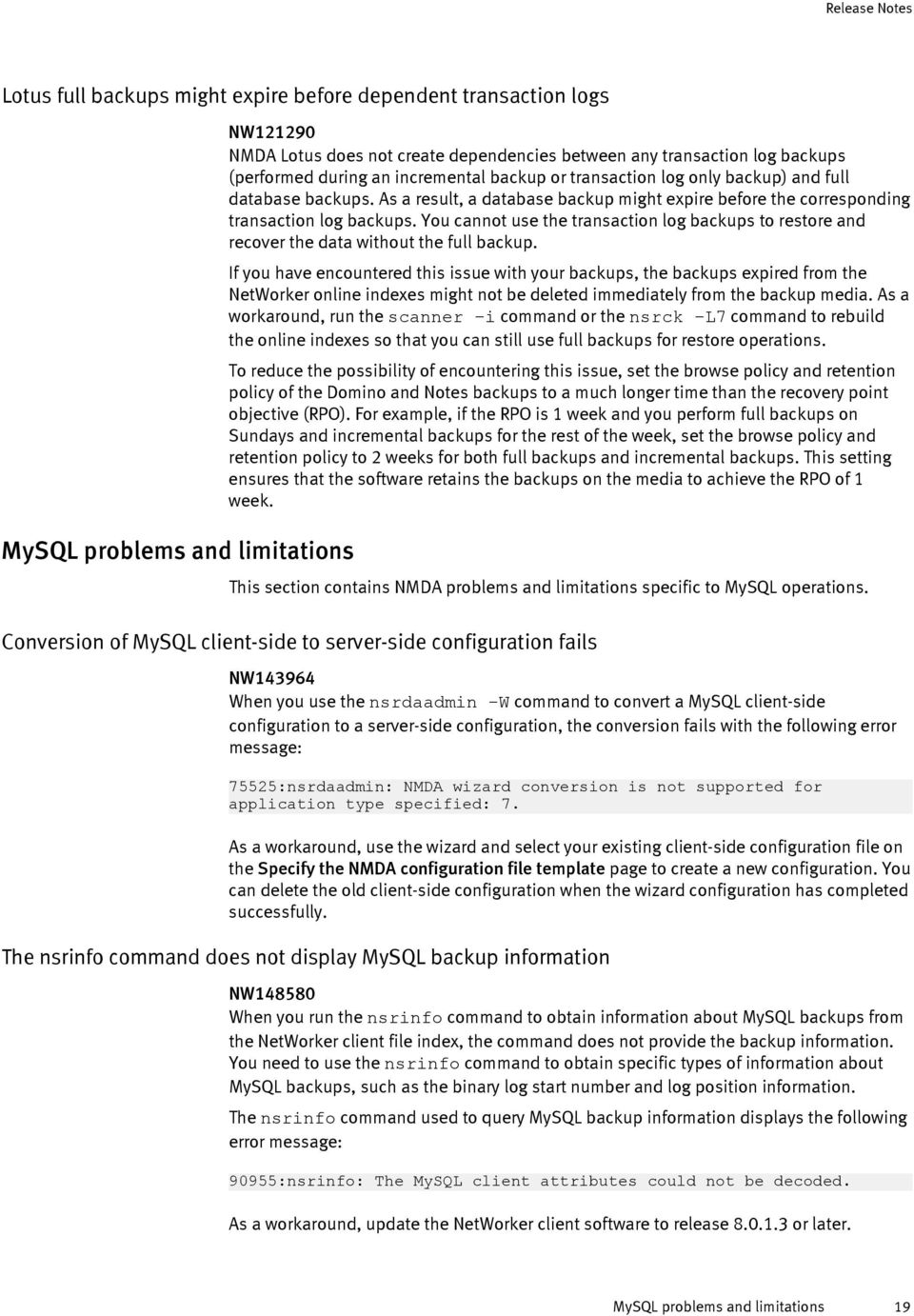
19 Lotus full backups might expire before dependent transaction logs MySQL problems and limitations NW NMDA Lotus does not create dependencies between any transaction log backups (performed during an incremental backup or transaction log only backup) and full database backups. As a result, a database backup might expire before the corresponding transaction log backups. You cannot use the transaction log backups to restore and recover the data without the full backup. If you have encountered this issue with your backups, the backups expired from the NetWorker online indexes might not be deleted immediately from the backup media. As a workaround, run the scanner i command or the nsrck L7 command to rebuild the online indexes so that you can still use full backups for restore operations. To reduce the possibility of encountering this issue, set the browse policy and retention policy of the Domino and Notes backups to a much longer time than the recovery point objective (RPO). For example, if the RPO is 1 week and you perform full backups on Sundays and incremental backups for the rest of the week, set the browse policy and retention policy to 2 weeks for both full backups and incremental backups. This setting ensures that the software retains the backups on the media to achieve the RPO of 1 week. This section contains NMDA problems and limitations specific to MySQL operations. Conversion of MySQL client-side to server-side configuration fails NW When you use the nsrdaadmin -W command to convert a MySQL client-side configuration to a server-side configuration, the conversion fails with the following error message: 75525:nsrdaadmin: NMDA wizard conversion is not supported for application type specified: 7. As a workaround, use the wizard and select your existing client-side configuration file on the Specify the NMDA configuration file template page to create a new configuration. You can delete the old client-side configuration when the wizard configuration has completed successfully. The nsrinfo command does not display MySQL backup information NW When you run the nsrinfo command to obtain information about MySQL backups from the NetWorker client file index, the command does not provide the backup information. You need to use the nsrinfo command to obtain specific types of information about MySQL backups, such as the binary log start number and log position information. The nsrinfo command used to query MySQL backup information displays the following error message: 90955:nsrinfo: The MySQL client attributes could not be decoded. As a workaround, update the NetWorker client software to release or later. MySQL problems and limitations 19
20 Oracle problems and limitations This section contains NMDA problems and limitations specific to Oracle operations. Japanese Oracle backup information might be displayed incorrectly in NMC program LGTsc06110 When a scheduled NMDA Oracle backup is run in a Japanese environment and the output from RMAN or from a preprocessing or postprocessing script (used for the backup) is not UTF8 text, the Japanese backup information displayed in the NMC program might appear incorrectly as box or question mark characters. As a workaround, perform the following actions: Use the NSR_RMAN_ARGUMENTS parameter to redirect the RMAN output to a specified log file. Specify "echo off" in any preprocessing and postprocessing scripts used for the scheduled NMDA Oracle backup. Backup problems might occur due to non-ascii data in RMAN script NW Due to Oracle bug , an NMDA Oracle backup might fail or some parameters might be ignored in a non-english locale when the following conditions exist: NMDA internationalization is set up. The character sets of the RMAN script and Oracle database are different. A non-ascii character is included in the parms option or send command in the RMAN script. For example, if the database uses the UTF8 character set and the RMAN script uses the EUC-JP character set, an NMDA Oracle backup fails when the parms option or send command in the RMAN script contains any non-ascii data. As a result, the NMDA software does not support non-ascii data in the RMAN script when the character set of the RMAN script (set through the NLS_LANG environment variable) differs from the character set of the Oracle database in a non-english locale. NMDA Oracle save set bundling or policy uniformity fails for multinode RAC backups NW If you configure the NMDA Oracle save set bundling or policy uniformity feature, then a multinode Oracle RAC backup generates the following warning: No information could be obtained from the backup piece file. The backup is successful and fully recoverable, but the save set bundling or policy uniformity feature fails. As a workaround: On UNIX or Linux, create a symbolic link that points the /nsr/apps directory on every RAC node to a file system pathname on a shared disk, which is accessible from all the nodes. On Windows, set NSR_TMPDIR in the nwora.res file on every RAC node to a file system pathname on a shared disk, which is accessible from all the nodes. 20 EMC NetWorker Module for Databases and Applications 8.2 and Service Packs Release Notes

21 Oracle 12c point-in-time recovery might fail with manual channel allocation NW Due to Oracle bug , a point-in-time recovery of an Oracle 12c table, table partition, or pluggable database (PDB) might fail if you use manual channel allocation with the allocate channel command. As a workaround, use automatic channel allocation with the configure channel command for a point-in-time recovery of an Oracle 12c table, table partition, or PDB. Oracle 12cR1 container or pluggable database snapshot backup fails on Windows if some datafiles are not on a snapshotable device NW Due to Oracle bug , an Oracle 12cR1 snapshot backup of a container or pluggable database on Windows fails when some of the datafiles are not located on a snapshotable device. For example, you run the following RMAN command to back up a database that consists of datafiles 1 to 5, but datafiles 3 and 4 are not on a snapshotable device: backup proxy full format '%d_%u' database; The backup fails with the following error message: ORA-00600: internal error code, arguments: [krbbbdr_inconsistent_pdbid] As a workaround, exclude from the proxy backup any datafiles that are not on a snapshotable device, and back up those datafiles in a separate backup command without the proxy option. For example, in the previous example where datafiles 3 and 4 are not on a snapshotable device, run two separate backups by using the following separate RMAN commands: backup proxy full format '%d_%u' datafile 1,2,5; backup full format '%d_%u' datafile 3,4; Sybase ASE problems and limitations Backup of more than 200 databases might fail This section contains NMDA problems and limitations specific to Sybase ASE operations. NW If a Sybase manual or scheduled backup attempts to back up more than 200 databases, the backup might fail. Sybase ASE problems and limitations 21
22 Note The limit of 200 databases is based on a maximum size of 30 bytes for a Sybase database name. The database limit might be higher for a backup of databases with names of smaller sizes. As a workaround, perform two or more smaller Sybase backups instead of one large Sybase backup, where each smaller backup backs up fewer than 200 databases. For example, perform one of the following operations: Perform two or more Sybase manual backups with the nsrdasv command, with each nsrdasv command backing up fewer than 200 databases. Perform two or more Sybase scheduled backups that each back up fewer than 200 databases. For each backup, create a separate Client resource and separate configuration file with each configuration file specifying a difference set of databases for the backup. Sybase scheduled backup might fail if Sybase server and NetWorker client run in different locales NW A Sybase scheduled backup might fail if the Sybase server and NetWorker client run in different locales. As described in the EMC NetWorker Module for Databases and Applications Release 8.2 Administration Guide, you must set the NSR_LOCALE parameter to the required locale in the NMDA configuration file for a Sybase manual backup configuration or a client-side scheduled backup configuration. However, NSR_LOCALE is not supported for a serverside scheduled backup or a probe-based backup. As a workaround for a server-side scheduled backup or a probe-based backup, you can set the LANG environment variable in the NetWorker start script that is installed with the NetWorker client software on the Sybase server host. For example on Linux, insert the LANG setting lines at the beginning of the start script after the "#! /bin/sh" line: #! /bin/sh LANG=en_US.UTF-8 export LANG Technical notes Client Direct backups and restores This section provides supplementary technical notes for implementing NMDA 8.2 and the related Service Packs. Some of these notes describe issues that are dependent on the functionality of other products used with NMDA. NMDA supports Client Direct backups to an AFTD or DD Boost device. NMDA also supports the Client Direct feature for NSM snapshot backups of DB2 or Oracle data to these types of devices. Client Direct operations with an AFTD NMDA supports Client Direct backups to and restores from an AFTD. This support requires specific NetWorker software, depending on the operating system: For an AFTD on UNIX or Linux, NetWorker server and storage node release 8.1 or later For an AFTD on Windows, NetWorker server and storage node release 8.0 or later 22 EMC NetWorker Module for Databases and Applications 8.2 and Service Packs Release Notes
23 Client Direct operations with a DD Boost device NMDA supports Client Direct backups to and restores from a DD Boost device over an IP or Fibre Channel (FC) connection. NMDA supports the FC connection on all the platforms where NetWorker 8.1 or later provides the same support. NMDA support of Client Direct operations with DD Boost devices over FC requires the following software: NetWorker server, storage node, and client release 8.1 or later Data Domain DD OS release 5.3 or later Configuration wizards Note The latest versions of the EMC NetWorker Release Notes and the EMC NetWorker and EMC Data Domain Boost Deduplication Devices Integration Guide provide details about supported platforms and any limitations for the DD Boost over FC support. For DD Boost over IP only, Client Direct backups require ONCplus version B or later installed on HP-UX Consider the following limitations for Client Direct backups: NMDA does not support Client Direct Lotus backups that are checkpoint restart enabled due to the dependence of the checkpoint restart feature on the storage node nsrmmd process to ensure that data is written to a device. NMDA does not support Client Direct backups to DD Boost devices for 64-bit Sybase ASE 15.0.x on HP Itanium. NMDA does not require any additional licenses to perform deduplication operations with a DD Boost device, provided that the NetWorker server and Data Domain system are configured and licensed for distributed segment processing through the DD Boost license. Client Direct snapshot operations for DB2 or Oracle data NMDA supports Client Direct backups and restores with an AFTD or DD Boost device for a DB2 or Oracle snapshot backup performed with NSM. By default, NMDA with NSM tries to use the Client Direct feature for both of the following operations: Rolling over the snapshot to secondary storage during a snapshot and rollover backup or a rollover-only backup Restoring from secondary storage during a restore from rollover If a proxy host (mount host) is used, Client Direct operations occur between the proxy host and the device. If a Client Direct operation is not possible, then the backup or restore is automatically routed through the storage node. NMDA support of Client Direct snapshot backups and restores with NSM requires the NetWorker server, storage node, and client release 8.1 or later. Note With NetWorker release 8.1 or later, the NSM feature integrates and replaces the previous stand-alone EMC NetWorker PowerSnap Modules. NSM is available as part of the NetWorker client software. NMDA supports the following configuration wizards: Scheduled backup configuration wizards for all NMDA applications (DB2, Informix, Lotus Domino/Notes, MySQL, Oracle, Sybase) Configuration wizards 23
24 Recovery configuration wizard for Oracle Features supported with the Oracle wizards Features not supported with the wizards NMDA includes wizards for configuring Oracle scheduled backups and Oracle recovery. The configuration wizard also provides the recommended method to create and modify an NMDA configuration for an Oracle snapshot backup with NSM. The wizard ensures the correct sequence of configuration steps and the verification of configuration dependencies. NMDA support of the Oracle snapshot configuration wizard requires NMC release 8.1 SP1 or later. The NetWorker client release 8.1 or later with the NSM feature must be installed on the NMDA host. NMDA supports database authentication with an Oracle wallet (Oracle Secure External Password Store) in the Oracle configuration wizard. When the wallet feature is set up for the database connection on the NMDA host, you do not need to specify a database username and password for the database credentials in the wizard. NMDA also provides full support in the Oracle configuration wizard for operating system authentication on UNIX and Linux systems. In the wizard, you can specify only the OS username to use operating system authentication, which enables you to configure the backup of any objects, such as an entire database, individual tablespaces and datafiles, or archived redo logs only. The scheduled backup configuration wizards do not support the following features: Configuration of probe-based (event-based) backups Note When you create a NetWorker Client resource with the wizard, you can associate the resource with a probe by selecting the Probe attribute in the Client resource in NMC, outside of the wizard. Configuration of backups in active-active application clusters, such as DB2 Database Partitioning Feature (DPF), Informix Multi-node Active Clusters for High Availability or High Availability Clusters, Oracle Real Application Cluster (RAC), and Sybase ASE Cluster Edition Note NMDA documentation uses the MACH acronym for both Informix technologies: Informix Multi-node Active Clusters for High Availability and High Availability Clusters. Configuration of DB2 snapshot backups with NSM. Configuration of split-mirror-based backups of Oracle ASM data with EMC Replication Manager Configuration of two different database backups in the same Client resource Modification of a backup configuration that was created with the wizard from a legacy NetWorker module Modification of a client-side NMDA configuration that was created with the NMC method (without a wizard) 24 EMC NetWorker Module for Databases and Applications 8.2 and Service Packs Release Notes
25 Note Conversion of backup configurations You must convert a client-side configuration to a server-side (wizard) configuration before you can use the wizard to modify the configuration. The Oracle recovery configuration wizard does not support the configuration of Oracle RMAN scripts in a cluster environment. You must convert an existing legacy NetWorker module configuration, created with or without a configuration wizard, to an NMDA configuration before you can use the configuration with NMDA. Major configuration changes from legacy NetWorker modules to NMDA on page 3 describes the configuration changes that occurred between the legacy NetWorker modules and NMDA. NOTICE Immediate cloning support Probe-based backups During the conversion of an NMDB2 4.0 or NMO 5.0 probe-based backup configuration, the nsrdaadmin -M command does not update the NetWorker Probe resource associated with the backup. You must update the Probe resource manually. If you want to use the NMDA configuration wizard to modify an NMDA configuration that was created without the wizard, you must convert the NMDA client-side (nonwizard) configuration to an NMDA server-side (wizard) configuration. NMDA provides support of automatic cloning for an NMDA scheduled backup. You can set a clone operation to start immediately after each save set in the group is backed up (immediate cloning) or start only after all save sets in the group are backed up. To enable immediate cloning in the Group resource, you can select the Clones attribute and set the Clone Mode attribute to Start on each save set completion. The EMC NetWorker Administration Guide provides details. NMDA support of immediate cloning requires the NetWorker server release 8.1 SP1 or later. NMDA supports probe-based (event-based) backups. NMDA does not support probe-based backups for snapshot backups with NSM. Backups and restores in cloud configurations NMDA provides support for backups and restores in private or public cloud configurations for all supported databases and applications. NMDA provides the same cloud support as NetWorker, including an option to send the application backup directly to a cloud device, if required. The NMDA support of cloud backups and restores requires the NetWorker server and client release 8.0 or later. The EMC NetWorker documentation provides details about how to configure and perform cloud operations. Conversion of backup configurations 25
26 Backup operations that Avamar deduplication does not support EMC Avamar deduplication operations do not support the following features: AES encryption, checksumming, or compression of deduplicated data through the NSR_AES_ENCRYPTION, NSR_CHECKSUM, or NSR_COMPRESSION parameter, respectively If NSR_AES_ENCRYPTION, NSR_CHECKSUM, or NSR_COMPRESSION is set for a deduplication backup, the NMDA software applies the AES encryption, checksumming, or compression, respectively, to only the metadata that is stored on the NetWorker storage node. Cloning or staging of deduplicated data on the Avamar server Only the metadata (hash information) stored on the NetWorker backup volumes can be cloned or staged. However, deduplicated data on the Avamar server can be replicated to another Avamar server that has been configured as a replication node by EMC Professional Services. Avamar documentation and the EMC NetWorker Administration Guide provide details on replication of deduplicated data. Avamar deduplication backups with NSM do not support the following operations: Backup of data in instant (PIT) backups Note NSM deduplication backups support only the backup of data that is rolled over to secondary storage. Backup of raw devices or volumes The NSM documentation provides details on any additional requirements and limitations of the NSM deduplication backups and restores. Support for multiple installations of multiple databases on the same host Specific combinations of 32-bit and 64-bit application software can coexist on the same 64-bit AIX, HP-UX PA-RISC, Linux, Solaris SPARC, or Windows system. For example: 32-bit and 64-bit Lotus Domino server might be installed on the same 64-bit AIX system. 32-bit Informix and 64-bit DB2 server might be installed on the same 64-bit Windows system. The appropriate application documentation provides details on the versions of 32-bit and 64-bit application software that can coexist on the same 64-bit system. The NMDA support for 32-bit and 64-bit application coexistence on 64-bit systems includes the following limitations: You cannot use the NMDA wizard to configure backups of 32-bit DB2 or 32-bit Lotus on a 64-bit Windows system where 32-bit and 64-bit applications coexist. You cannot use the NMDA wizard to configure backups of 32-bit Lotus on a 64-bit AIX system where 32-bit and 64-bit applications coexist. You cannot use the NetWorker User for Lotus program for backups or restores of 32- bit Notes on a 64-bit Windows system where 32-bit and 64-bit applications coexist. 32-bit or 64-bit Sybase cannot coexist with DB2, Informix, Lotus Domino/Notes, or Oracle on a 64-bit Windows system. You cannot relocate the software on a 64-bit Linux or Solaris SPARC system where 32- bit and 64-bit applications coexist. 26 EMC NetWorker Module for Databases and Applications 8.2 and Service Packs Release Notes
27 DB2 purescale support The EMC NetWorker Module for Databases and Applications Installation Guide describes how to install and configure NMDA for 32-bit and 64-bit application coexistence on a 64-bit system. NMDA supports DB2 purescale, which is an active-active application cluster with a shared-disk architecture. You can configure purescale to automatically back up logs generated by each member node, to the NetWorker backup device. NMDA supports all the features of a DB2 purescale system except the following features: Automatic failover during scheduled backups Backup configuration with the wizard Snapshot-based backups, due to DB2 limitations NMDA support of DB2 purescale requires DB2 release 10.1 or later on the operating systems that support DB2 purescale. Support of delta and incremental purescale backups requires DB2 10.5fp4 or later as required by DB2. The IBM documentation and the compatibility matrix at the end of this document provide details and requirements of the operating systems for DB2 purescale. Backup and recovery of Domino server fails with secured console Lotus backup features If a Lotus Domino server is configured with a secured (password-protected) console, NMDA cannot back up or recover the Lotus databases. Under these conditions, backups and recoveries fail and report the following error: Notes Library initialization failed, error = 417 For backups and recoveries to succeed, you must remove the password protection for the Domino server console by using the Domino Administrator program or the Set Secure command. The Domino Administrator online help provides instructions on removing password protection. NOTICE To use NMDA backups with 64-bit Domino on AIX, follow the steps in Backup of 64-bit Domino on AIX might fail on page 18 before you perform the first backup. Note If DAOS backups were performed with the NetWorker save command, as required for the NW issue workaround in NMDA 1.0, then you must restore the DAOS backups with the NetWorker recover command. Lotus restartable backups NMDA supports Lotus restartable scheduled backups through the NetWorker checkpoint restart feature. This feature enables you to restart an NMDA Lotus backup from a known good point called a checkpoint, avoiding the backup of any files that were successfully DB2 purescale support 27
28 backed up during the failed backup. The backup is restarted only within the restart window of the backup group. NMDA Lotus checkpoint granularity is always at the file level. The checkpoint option is disabled for browselist save sets. Note NMDA Lotus restartable backups do not support Client Direct backups to Data Domain, described in Client Direct backups and restores on page 22. Child process termination for cancelled Lotus backups If a Lotus manual or scheduled backup is cancelled while child processes are waiting for writable volumes on the NetWorker server, the child processes might not be terminated. To terminate the child processes, make available the writable volumes on the NetWorker server, as requested by the Lotus backup. When the volumes become available, the backup resumes and immediately fails, and the processes are then terminated. Prevent memory allocation failure with 32-bit Lotus Domino restores on AIX If an NMDA Lotus restore with 32-bit Lotus Domino on AIX involves multiple parallel processes (for example, NSR_PARALLELISM is set to a value greater than 1) and produces a memory allocation failure, set the environment variable value EXTSHM=ON and rerun the restore, based on IBM recommendations. For example, with 32-bit Domino on AIX: If an NMDA Lotus restore fails with a memory allocation error, set EXTSHM=ON on the command line where you run the nsrnotesrc program. If an NMDA Lotus directed recovery through the NetWorker User for Lotus program fails with a memory allocation error, uncomment the following line in the nsrlotus_remrecov script: EXTSHM=ON; export EXTSHM Recovery report from NetWorker User for Lotus contains unexpected characters When NetWorker User for Lotus is used to recover a Domino database that has non-ascii characters in its name, the file name might be displayed incorrectly in the GUI. Note On Windows, if the non-ascii characters in the nsrnotesrc command line output are not readable, ensure that you use the proper code page for the language. For example, if the language is Spanish, type the following command to set the proper code page before you use the nsrnotesrc command for recovery: chcp 1251 Multiplexing for Oracle11g multisection backups is supported with AFTDs only Due to Oracle11g and NetWorker limitations, NetWorker multiplexing for multisection backups (a new feature with Oracle11g) is supported with AFTDs only, not with tape or regular file type devices. If you have tape or regular file type devices, you should configure a separate NetWorker device for each RMAN channel to avoid multiplexing in NetWorker. 28 EMC NetWorker Module for Databases and Applications 8.2 and Service Packs Release Notes
29 If you multiplex the Oracle11g multisection backups on a tape or regular file type device and then experience a hang at restore time, use a single RMAN channel to restore the multisection Oracle backups. Prevent possible degradation of NMDA restore performance with Oracle Due to an Oracle limitation, degradation of NMDA restore performance might occur if NetWorker multiplexing is used with NMDA for Oracle backups. If NetWorker multiplexing is enabled, you can prevent the restore performance degradation by including the set parallelmediarestore off command in the RMAN restore script that is used for the Oracle restore. For example, the following RMAN restore script contains the required Oracle command to disable the multiplexing during the Oracle restore: set parallelmediarestore off; run { allocate channel c1 type SBT_TAPE ; restore database; release channel c1; } Prevent possible performance issues with Oracle Exadata backups If an Oracle Exadata database server is running on Linux and the backup data is sent over an Infiniband connection, you can prevent any backup performance issues by setting the following parameter with the parms option for each backup channel in the RMAN script: NSR_SOCK_BUF_UNSET=YES The following RMAN script includes the parameter setting for each channel: run { allocate channel c1 type SBT parms ENV=(NSR_SOCK_BUF_UNSET=YES) ; allocate channel c2 type SBT parms ENV=(NSR_SOCK_BUF_UNSET=YES) ; backup database; } release channel c1; release channel c2; The same environment variable, NSR_SOCK_BUF_UNSET=YES, must also be set on the NetWorker storage node host where the backup will be sent. You can set the environment variable in the NetWorker startup script (for example, /etc/init.d/networker) on UNIX and Linux systems, and in the system environment variables on Microsoft Windows. The storage node must be restarted in order for the environment variables to take effect. The NetWorker documentation provides details on setting environment variables. This environment variable setting causes the NMDA and NetWorker software to not tune the socket buffer size, which results in better performance with an Infiniband connection. Raw devices are not supported with Oracle NSM operations on 64-bit Linux Due to NSM limitations, NMDA does not support Oracle proxy operations with raw devices that use NSM on 64-bit Linux. Prevent possible degradation of NMDA restore performance with Oracle 29
30 Rollback restore fails for Oracle NSM backup in FRA If you create a copy of an Oracle datafile or archived log to the FRA, and then perform a successful NSM snapshot backup of that copy in the recovery area, a rollback restore of the backup fails to restore the Oracle datafile or archived log to its original location outside the recovery area. The rollback restore produces the following RMAN error: ORA-27037: unable to obtain file status Note The FRA is a directory where RMAN places all of the disk type backups it creates (backups not created with NMDA). The NMDA software can back up the backups from the recovery area. For example, you create a datafile copy and an NSM snapshot backup as follows: 1. Use the backup as copy datafile command to create a datafile copy of the file /fs1/test1.dbf to the recovery area located at /fs2. The datafile copy is created as /fs2/datafile/o1_mf_test1_2nnplt1z_.dbf. 2. Use the backup proxy recovery area command to perform an Oracle NSM backup of the datafile copy in the recovery area. Then if you perform a rollback restore of this snapshot backup, the restore occurs to / fs2. The restore produces the RMAN error because RMAN expects the backed-up file to be restored to /fs1, the original file location. As a workaround, use the additional command restore...from datafilecopy to restore from the datafile copy in the recovery area to the original datafile location. Documentation The following sections describe related documentation and any corrections or additions for the NMDA documentation. Related documentation The compatibility matrix at the end of this document provides the latest details about the platforms, operating systems, database servers, application servers, and other software components that NMDA supports. The following documentation provides information about NMDA and is available at EMC Online Support: The NetWorker Module for Databases and Applications documentation set: Administration guide Information on how to configure and use NMDA Installation guide Information on how to install or update NMDA in stand-alone and cluster environments Release notes Information on new NMDA features and changes, fixed problems, and known limitations Command reference guide Reference information on NMDA commands and options The NetWorker client, storage node, and server documentation set, including (but not limited to) the following documents: 30 EMC NetWorker Module for Databases and Applications 8.2 and Service Packs Release Notes
31 Administration guide Information on how to configure and maintain the NetWorker software Installation guide Information on how to install or update the NetWorker software on supported platforms Release notes Information on new NetWorker features and changes, fixed problems, and known limitations Command reference guide Reference information on NetWorker commands and options Data Domain deduplication devices integration guide Information on how to configure and use Data Domain device systems Disaster recovery guide Information on how to prepare for and perform disaster recovery with NetWorker Licensing guide Information on how to enable and license the NetWorker software NetWorker Snapshot Management integration guide Information on the NSM requirements for snapshot backups and restores Other EMC documentation: Replication Manager documentation Information on the Replication Manager releases and requirements for snapshot backups and restores of Oracle ASM The following additional documentation might be useful: Database or application server documentation Database or application database backup and recovery documentation Software media, organization, and files The EMC NetWorker Module for Databases and Applications Installation Guide for NMDA 8.2 or the related Service Pack describes the NMDA software media, organization, and files. Installation The EMC NetWorker Module for Databases and Applications Installation Guide describes how to install, update, uninstall, and license NMDA. Coexistence of NMDA software NMDA does not support the coexistence of NMDA with any other legacy NetWorker module release on the same system. NMDA does not support the coexistence of different NMDA releases on the same system. NMDA reinstall after NetWorker software update If you relocate the NetWorker client installation directory, for example, during a NetWorker software update on the database or application server host where NMDA is installed, you must uninstall and reinstall NMDA. Software media, organization, and files 31
32 Licensing To enable NMDA operations after the end of an evaluation period, obtain and install an NMDA license enabler. If you updated from a legacy NetWorker module to the NMDA software, you can continue to use the legacy enabler for NMDA operations. To enable NSM snapshot operations, obtain and install a separate NSM license enabler. NMDA wizard and GUI installations on supported platforms NMDA installs the configuration wizard for all the applications or databases that the wizard supports on the given platform, regardless of which database or application is actually installed on the system. The wizard also displays all the supported applications accordingly as the available choices of applications for which backups can be configured. If Lotus or Sybase is not installed on a Windows system, NMDA still installs the NetWorker User for Lotus and NetWorker User for Sybase GUI programs on the system. The programs are displayed under the Start menu. Remote update of NMDA by push installation You can update NMDA on one or more remote NMDA hosts with the software distribution (push installation) feature from a centralized NetWorker server. You can perform a push installation with either the Software Administration wizard or the nsrpush command. Note You cannot perform a push installation in a cluster environment. You can perform a push installation of NMDA on the following NMDA platforms (NMDA bitness in parentheses): AIX (32-bit, 64-bit) HP PA-RISC (32-bit, 64-bit) HP Itanium (64-bit) Linux x86 (32-bit) Linux x64 (64-bit) Solaris AMD (64-bit) Solaris SPARC (32-bit, 64-bit) Windows x86 (32-bit) Windows x64 (64-bit) The EMC NetWorker Module for Databases and Applications Installation Guide describes the push installation requirements and procedures. Troubleshooting and getting help The EMC support page provides access to licensing information, product documentation, advisories, and downloads, as well as how-to and troubleshooting information. This 32 EMC NetWorker Module for Databases and Applications 8.2 and Service Packs Release Notes
33 information may enable you to resolve a product issue before you contact EMC Customer Support. Support page To access the support page: 1. Go to 2. Type a product name in the Find a Product box. 3. Select the product from the list that appears. 4. Click the arrow next to the Find a Product box. 5. (Optional) Add the product to the My Saved Products list by clicking Add to My Saved Products in the top right corner of the Support by Product page. Knowledgebase The EMC Knowledgebase contains applicable solutions that you can search for either by solution number (for example, esgxxxxxx) or by keyword. To search the EMC Knowledgebase: 1. Click the Search link at the top of the page. 2. Type either the solution number or keywords in the search box. 3. (Optional) Limit the search to specific products by typing a product name in the Scope by product box and then selecting the product from the list that appears. 4. Select Knowledgebase from the Scope by resource list. 5. (Optional) Specify advanced options by clicking Advanced options and specifying values in the available fields. 6. Click the Search button. Online communities Visit EMC Community Network at for peer contacts, conversations, and content on product support and solutions. Interactively engage online with customers, partners and certified professionals for all EMC products. Live chat To engage EMC Customer Support by using live interactive chat, click Join Live Chat on the Service Center panel of the support page. Service requests For in-depth help from EMC Customer Support, submit a service request by clicking Create Service Request on the Service Center panel of the support page. Note Compatibility matrix To open a service request, you must have a valid support agreement. Contact your EMC sales representative for details about obtaining a valid support agreement or with questions about your account. To review an open service request, click the Service Center link on the Service Center panel, and then click View and manage service requests. The following compatibility matrix provides the latest details about the platforms, operating systems and versions, database servers or application servers, and other software components supported by NMDA 8.2 and Service Packs. Compatibility matrix 33
34 EMC NetWorker Module for Databases and Applications (NMDA) without EMC NetWorker Snapshot Management (NSM); stand-alone configurations Module Version Module Platform (Module bit-ness) Supported OS Supported OS Version Supported IBM DB2 Version Supported Informix IDS Version IMPORTANT: Notes are provided at the end of the table NMDA 8.2 Linux x86 (32-bit) Red Hat Enterprise Linux AS, ES, WS (RHEL) 4, 5, 6, , 9.7, , 11.70, SuSE Linux Enterprise Server (SLES) 9, 10, 11 Linux x64 (64-bit) CentOS Linux 4 5, 6 Redflag Asianux Server 3 Oracle Linux 1 4, 5, 6 Red Hat Enterprise Linux AS, ES, WS (RHEL) SuSE Linux Enterprise Server (SLES) 9, 10, 11 CentOS Linux 4 5, 6 Redflag Asianux Server 3 Oracle Linux 1 4, 5, 6 4, 5, 6, , 9.7, 10.1, , 11.70, Supported Lotus Domino/Notes Version Domino Server 8.0.x, 8.5.x, 9.0.x Supported MySQL Version Supported Oracle Version Supported Sybase ASE Version 5.1, 5.5, gR1, 11gR , 15.5 Domino Server 9.0.x 5.1, 5.5, gR1,11gR2,12cR , 15.5, 15.7, 16.0 IBM System Z (64-bit) Red Hat Enterprise Linux AS, ES, WS 4, 5, 6 9.5, 9.7, 10.1, gR2, 12cR1 SuSE Linux Enterprise Server (SLES) 9, 10, 11 IBM Power AIX (32-bit) IBM AIX 6.1, Domino Server 8.0.x, 8.5.x, 9.0.x IBM Power AIX (64-bit) IBM AIX 6.1, , 9.7, 10.1, , 11.70, Domino Server 8.0.x, x, 9.0.x 11gR1, 11gR2, 12cR1 HP PA-RISC (64-bit) HP-UX 11iv2, 11iv , gR1, 11gR2 HP Itanium (64-bit) HP-UX 11iv2, 11iv3 9.5, 9.7, 10.1, , 11.70, Oracle SPARC (32-bit) Oracle Solaris Domino Server 8.0.x, 8.5.x Oracle SPARC (64-bit) Oracle Solaris 10, , 9.7, 10.1, , 11.70, Oracle x64 (64-bit) Oracle Solaris 10, , 9.7, 10.1, , 11.70, Windows x86 (32-bit) Windows 2003 R2, Vista, 9.5, 9.7, , 11.70, Notes & Domino Server 2008, 2008 R2, x, 8.5.x, 9.0.x 7, 8 3, gR1, 11gR2, 12cR , 15.5, 15.7, , 15.5, 15.7, , 15.5, 15.7, gR1, 11gR2, 12cR1 11gR1, 11gR2, , 15.5, 15.7, cR1 11gR1, 11gR , 15.5, 15.7
35 EMC NetWorker Module for Databases and Applications (NMDA) without EMC NetWorker Snapshot Management (NSM); stand-alone configurations Module Version Module Platform (Module bit-ness) Supported OS Supported OS Version Windows x64 (64-bit) Windows 2003 R2, Vista, 2008, 2008 R2, 7, 8 3, , 2012 R2 5 Notes Consult the latest NMDA Release Notes for limitations, required patches, and more information. NMDA supports NetWorker (Server, Client and Storage Node) versions 8.0 and up NMDA supports Supported IBM DB2 Version Supported Informix IDS Version 9.5, 9.7, 10.1, , 11.70, Supported Lotus Domino/Notes Version Domino Server 8.0.x, 8.5.x, 9.0.x Supported MySQL Version Supported Oracle Version 11gR1, 11gR2, 12cR1 Supported Sybase ASE Version , 15.5, 15.7, 16.0 o all combinations of OS s and databases (i.e. DB2, Informix, Lotus, MySQL, Oracle, Sybase) versions in this table, provided that the OS is supported by both database and the NetWorker Client installed on the NMDA host o raw devices, and all file systems supported by both the application and the NetWorker Client installed on the NMDA host; if the database is Oracle, ASM and ACFS are supported, too o all FixPacks/PatchSets for all database releases in this table (e.g. stated support for Oracle 11.2 implies support for Oracle too; stated support for IDS implies support for FC3 too, etc.) o all Service Packs, Updates, patches, etc, of all OS s listed in this table (e.g. stated support for Oracle Linux 5 implies support for Oracle Linux 5 Update 4 too, stated support for Asianux Server 3 implies support for Asianux Server 3 SP 3 too, stated support for AIX 6.1 implies support for AIX 6.1 TL06 too, etc.) Supported and required bitnesses of involved components: For hosts having a single application installed: For support of Sybase ASE installed on an AIX, HP-UX PA- RISC, or Oracle SPARC host: 32-bit NMDA 8.2 supports both 32-bit and 64-bit Sybase ASE, regardless of whether the OS or the CPU is 32-bit or 64- bit; See the latest NMDA Release Notes for required bitness of the NetWorker Client installed on the NMDA host For support of all other applications and/or OS s: 32-bit NMDA supports 32-bit versions of the installed application, and 64-bit NMDA supports 64-bit versions of the installed application, regardless of whether the OS or the CPU is 32-bit or 64-bit. See the latest NMDA Release Notes for required bitness of the NetWorker Client installed on the NMDA host For hosts having multiple applications installed: see the latest NMDA Release Notes for supported environments and procedures. Deduplication support: o NMDA supports client direct deduplication to Data Domain device on most (see Release Notes for details) environments for which the NetWorker Client installed on the NMDA host supports file system client direct restores. o NMDA supports deduplication to Avamar on most (see Release Notes for details) environments for which the NetWorker Client installed on the NMDA host supports file system deduplication to Avamar. NMDA supports all virtualization environments (such as VMware, Hyper-V, Solaris zone and LDOM, AIX LPAR and WPAR, HP npar and vpar, HP IVM etc,) at the guest-level, provided that the application, NMDA, and the NetWorker Client running on this guest-os support natively this OS. 1 Linux supported with or without UEK (Unbreakable Enterprise Kernel) 2 Solaris 11 (x64) supported for Informix, Oracle and Sybase ASE 3 Windows 8 & 2012 supported for DB2, Lotus Domino/Notes, Oracle and Sybase ASE 4 CentOS supported for MySQL 5 Windows 2012 R2 supported for DB2, Lotus Domino/Notes. Sybase ASE 6 RHEL 7 supported for DB2, Lotus Domino, Sybase ASE
36 EMC NetWorker Module for Databases and Applications (NMDA) without EMC NetWorker Snapshot Management (NSM); cluster configurations Module Version NMDA IBM DB2 Support NMDA supports active-passive cluster configurations: o on all clusters supported by both DB2 and the NetWorker Client installed on the NMDA host active-active application cluster configurations (DPF and purescale): o on all environments supported by both DB2 and NetWorker Client installed on the NMDA host Informix IDS Support NMDA supports active-passive cluster configurations: o on all clusters supported by both IDS and the NetWorker Client installed on the NMDA host active-active application cluster configurations (MACH 11) o on all environments supported by both IDS and the NetWorker Client installed on the NMDA host Lotus Domino/Notes Support NMDA supports active-passive cluster configurations: o on all clusters supported by both Lotus Domino and the NetWorker Client installed on the NMDA host MySQL Support Oracle Support NMDA supports: active-passive cluster configurations: o on all clusters supported by both Oracle and the NetWorker Client installed on the NMDA host active-active application cluster configurations (RAC) o on all clusters supported by both Oracle and the NetWorker Client installed on the NMDA host o on all Oracle OSD clusterware versions supported by Oracle o on raw devices, ASM and all Cluster File Systems supported by Oracle Sybase ASE Support NMDA supports active-passive cluster configurations: o on all clusters supported by both ASE and the NetWorker Client installed on the NMDA host active-active application cluster configurations (ASE Cluster Edition): o on all environments supported by both ASE and the NetWorker Client installed on the NMDA host
37 EMC NetWorker Module for Databases and Applications (NMDA) with EMC NetWorker Snapshot Management (NSM) NSM NSM NSM Platform Version Product (NSM bit-ness) IMPORTANT: Notes are provided at the end of the table NSM 8.2, 8.1 SP1, 8.1 NMDA 8.2 Oracle Support NMDA 8.2 DB2 Support NSM for Symmetrix DMX/VMax Linux x64 (64-bit) HP PA-RISC (64-bit) HP Itanium (64-bit) IBM Power AIX (64-bit) Oracle SPARC (64-bit) Windows x86 (32-bit) Windows x64 (64-bit) NSM for CLARiiON Linux x64 (64-bit) IBM Power AIX (64-bit) Oracle SPARC (64-bit) Windows x86 (32-bit) Windows x64 (64-bit) NSM for RecoverPoint Windows x86 (32-bit) Windows x64 (64-bit) Notes Consult the latest NMDA Release Notes for limitations, required patches, etc. For DB2 and Oracle single-instance, un-clustered, or active-passive cluster configurations: o A check-marked NMDA/NSM combination in this table denotes that this combination is supported provided that all NSM requirements (e.g. homogeneous/heterogeneous configurations, multi-path software, etc.) have been met provided that the bit-nesses of NSM and NMDA are the same for all single-instance, un-clustered or clustered, Oracle and DB2 versions supported by NMDA without NSM on all OS s supported by both NMDA and NSM on raw devices, and on all file systems supported by both NMDA and NSM with all versions of NetWorker (Client, Server and Storage Node) supported by both NMDA and NSM For Oracle active-active application cluster configurations (RAC) o NMDA supports all environments supported by NMDA and NSM for single-instance Oracle (in this table), with the additional limitations support only for NSM for CLARiiON, and for NSM for Symmetrix in homogeneous environment support for raw devices, only on o AIX and HACMP o Solaris SPARC and either Oracle SunCluster or Veritas Cluster Server o Windows x86 and MSCS o HP-UX PA-RISC 64-bit and either ServiceGuard with VxVM or Veritas Cluster Server o HP-UX Itanium 64-bit and Veritas Cluster Server support for cluster file systems, only on o Solaris SPARC and Veritas Cluster Server and Veritas Cluster File System o HP-UX PA-RISC 64-bit and Veritas Cluster Server and Veritas Cluster File System o HP-UX Itanium 64-bit and Veritas Cluster Server and Veritas Cluster File System o Linux x64 and Oracle OSD Cluster and Oracle Cluster File System 2 (OCFS2)
38 Copyright EMC Corporation. All rights reserved. Published in USA. Published January 28, 2015 EMC believes the information in this publication is accurate as of its publication date. The information is subject to change without notice. The information in this publication is provided as is. EMC Corporation makes no representations or warranties of any kind with respect to the information in this publication, and specifically disclaims implied warranties of merchantability or fitness for a particular purpose. Use, copying, and distribution of any EMC software described in this publication requires an applicable software license. EMC², EMC, and the EMC logo are registered trademarks or trademarks of EMC Corporation in the United States and other countries. All other trademarks used herein are the property of their respective owners. For the most up-to-date regulatory document for your product line, go to EMC Online Support ( 34 EMC NetWorker Module for Databases and Applications 8.2 and Service Packs Release Notes
Release Notes. EMC NetWorker Module for Databases and Applications. Release Notes. Version 8.2 and Service Packs 302-000-386 REV 12.
 EMC NetWorker Module for Databases and Applications Version 8.2 and Service Packs Release Notes 302-000-386 REV 12 April 25, 2016 These release notes contain supplemental information about EMC NetWorker
EMC NetWorker Module for Databases and Applications
 EMC NetWorker Module for Databases and Applications Version 8.2 and Service Packs Administration Guide 302-001-217 REV 06 Copyright 2009-2016 EMC Corporation. All rights reserved. Published in the USA.
EMC NetWorker Module for Databases and Applications Release 1.0
 EMC NetWorker Module for Databases and Applications Release 1.0 Administration Guide P/N 300-009-220 REV A01 EMC Corporation Corporate Headquarters: Hopkinton, MA 01748-9103 1-508-435-1000 www.emc.com
EMC NetWorker Module for Databases and Applications Release 1.0
 EMC NetWorker Module for Databases and Applications Release 1.0 Installation Guide P/N 300-009-222 REV A01 EMC Corporation Corporate Headquarters: Hopkinton, MA 01748-9103 1-508-435-1000 www.emc.com Copyright
EMC NetWorker Module for Oracle Release 5.0
 EMC NetWorker Module for Oracle Release 5.0 Administration Guide P/N 300-006-990 REV A02 EMC Corporation Corporate Headquarters: Hopkinton, MA 01748-9103 1-508-435-1000 www.emc.com Copyright 2003-2009
EMC NetWorker Module for SAP with Oracle
 EMC NetWorker Module for SAP with Oracle Release 4.5 Administration Guide P/N 300-014-209 REV 02 Copyright 2009-2013 EMC Corporation. All rights reserved. Published in the USA. Published October, 2013
How To Use Networker With Orgsap With Orgos.Org Software On A Powerbook (Orchestra) On A Networkor (Orroboron) With An Ipa (Ororor) With A Networker
 EMC NetWorker Module for SAP with Oracle Release 3.0.2 Multiplatform Version Release Notes P/N 300-003-576 Rev A02 June 11, 2008 These release notes contain supplemental information about EMC NetWorker
Release Notes P/N 300-003-623 REV A05
 EMC NetWorker Module For Microsoft Exchange Server Release 5.0 Release Notes P/N 300-003-623 REV A05 April 8, 2008 These release notes contain supplemental information about EMC NetWorker Module for Microsoft
DB2 9 for LUW Advanced Database Recovery CL492; 4 days, Instructor-led
 DB2 9 for LUW Advanced Database Recovery CL492; 4 days, Instructor-led Course Description Gain a deeper understanding of the advanced features of DB2 9 for Linux, UNIX, and Windows database environments
TABLE OF CONTENTS. Administration Guide - SAP for MAXDB idataagent. Page 1 of 89 OVERVIEW SYSTEM REQUIREMENTS - SAP FOR MAXDB IDATAAGENT
 Page 1 of 89 Administration Guide - SAP for MAXDB idataagent TABLE OF CONTENTS OVERVIEW Introduction Key Features Full Range of Backup and Recovery Options SnapProtect Backup Command Line Support Backup
Symantec NetBackup 7 Clients and Agents
 Complete protection for your information-driven enterprise Overview Symantec NetBackup provides a simple yet comprehensive selection of innovative clients and agents to optimize the performance and efficiency
EMC Avamar 7.2 for IBM DB2
 EMC Avamar 7.2 for IBM DB2 User Guide 302-001-793 REV 01 Copyright 2001-2015 EMC Corporation. All rights reserved. Published in USA. Published June, 2015 EMC believes the information in this publication
TABLE OF CONTENTS. Administration Guide - SAP for Oracle idataagent. Page 1 of 193 OVERVIEW SYSTEM REQUIREMENTS - SAP FOR ORACLE IDATAAGENT
 Page 1 of 193 Administration Guide - SAP for Oracle idataagent TABLE OF CONTENTS OVERVIEW Introduction Key Features Full Range of Backup and Recovery Options SnapProtect Backup Command Line Support Backup
VERITAS NetBackup 6.0 Database and Application Protection
 VERITAS NetBackup 6.0 Database and Application Protection INNOVATIVE DATA PROTECTION When it comes to database and application recovery, VERITAS Software has a clear goal in mind simplify the complexity
Symantec Backup Exec 2014 Icon List
 Symantec Backup Exec 2014 Icon List Alerts Image Description Alert needs attention Alerts Alert needs attention Alert needs attention Alert needs attention Error Error Error Error Informational alert Informational
TABLE OF CONTENTS OVERVIEW SYSTEM REQUIREMENTS - SAP FOR ORACLE IDATAAGENT GETTING STARTED - DEPLOYING ON WINDOWS
 Page 1 of 44 Quick Start - SAP for Oracle idataagent TABLE OF CONTENTS OVERVIEW Introduction Key Features Full Range of Backup and Recovery Options SnapProtect Backup Command Line Support Backup and Recovery
Symantec NetBackup for Oracle Administrator's Guide
 Symantec NetBackup for Oracle Administrator's Guide UNIX, Windows, and Linux Release 7.5 Symantec NetBackup for Oracle Administrator's Guide The software described in this book is furnished under a license
External Data Connector (EMC Networker)
 Page 1 of 26 External Data Connector (EMC Networker) TABLE OF CONTENTS OVERVIEW SYSTEM REQUIREMENTS INSTALLATION (WINDOWS) INSTALLATION (UNIX) GETTING STARTED Perform a Discovery Perform a Migration ADVANCED
SnapManager for Oracle 2.2. Anand Ranganathan Product & Partner Engineer (PPE)
 SnapManager for Oracle 2.2 Anand Ranganathan Product & Partner Engineer (PPE) Agenda Introduction Key Features Concepts Platform & Protocol Support Installation & Configuration New in Version 2.2 Coming
Veritas NetBackup 6.0 Database and Application Protection
 Veritas NetBackup 6.0 Database and Application Protection Innovative data protection When it comes to database and application recovery, Symantec has a clear goal in mind simplify the complexity of database
Symantec NetBackup Getting Started Guide. Release 7.1
 Symantec NetBackup Getting Started Guide Release 7.1 21159722 Contents NetBackup Getting Started Guide... 5 About NetBackup... 5 How a NetBackup system works... 6 How to make a NetBackup system work for
Turbo Charge Your Data Protection Strategy
 Turbo Charge Your Data Protection Strategy Data protection for the hybrid cloud 1 WAVES OF CHANGE! Data GROWTH User EXPECTATIONS Do It YOURSELF Can t Keep Up Reliability and Visibility New Choices and
EMC NetWorker Snapshot Management for NAS Devices
 EMC NetWorker Snapshot Management for NAS Devices Version 8.2 SP1 Integration Guide 302-001-579 REV 01 Copyright 1990-2015 EMC Corporation. All rights reserved. Published in USA. Published January, 2015
EMC Data Domain Boost for Oracle Recovery Manager (RMAN)
 White Paper EMC Data Domain Boost for Oracle Recovery Manager (RMAN) Abstract EMC delivers Database Administrators (DBAs) complete control of Oracle backup, recovery, and offsite disaster recovery with
FOCUS ON: FDR/UPSTREAM S ONLINE DATABASE SOLUTIONS
 April 2002 FOCUS ON: FDR/UPSTREAM S ONLINE DATABASE SOLUTIONS Features and support at a glance User Experience My company s Oracle DBA said, I love UPSTREAM as it works so well with RMAN. FDR/UPSTREAM
CA ARCserve Backup. UNIX and Linux Data Mover Guide. r16
 CA ARCserve Backup UNIX and Linux Data Mover Guide r16 This Documentation, which includes embedded help systems and electronically distributed materials, (hereinafter referred to as the Documentation )
Administration Guide - Documentum idataagent (DB2)
 Page 1 of 65 Administration Guide - Documentum idataagent (DB2) TABLE OF CONTENTS OVERVIEW Introduction Key Features Supported Environments Full Range of Backup and Recovery Options Scheduling Efficient
FalconStor Recovery Agents User Guide
 FalconStor Recovery Agents User Guide FalconStor Software, Inc. 2 Huntington Quadrangle Melville, NY 11747 Phone: 631-777-5188 Fax: 631-501-7633 Web site: www.falconstor.com Copyright 2007-2009 FalconStor
CA ARCserve Backup for Windows
 CA ARCserve Backup for Windows Agent for Microsoft SharePoint Server Guide r15 This documentation and any related computer software help programs (hereinafter referred to as the "Documentation") are for
BrightStor ARCserve Backup
 BrightStor ARCserve Backup Support for Oracle Backup and Restore on Windows 64-Bit Platform - 1 - TABLE OF CONTENTS 1. Summary... 3 2. Backup and Restore Process... 3 3. RMAN Command and Script Template...
How To Write An Emma Document On A Microsoft Server On A Windows Server On An Ubuntu 2.5 (Windows) Or Windows 2 (Windows 8) On A Pc Or Macbook (Windows 2) On An Unidenor
 EMC Avamar 7.0 for Windows Server User Guide P/N 300-015-229 REV 04 Copyright 2001-2014 EMC Corporation. All rights reserved. Published in the USA. Published May, 2014 EMC believes the information in this
Testking.E20-891.118Q
 Testking.E20-891.118Q Number: E20-891 Passing Score: 800 Time Limit: 120 min File Version: 4.6 http://www.gratisexam.com/ E20-891 Backup Recovery Solutions Expert Exam for Technology Architects It would
VERITAS NetBackup 6.0 for Oracle
 VERITAS NetBackup 6.0 for Oracle System Administrator s Guide for UNIX and Linux N15262B September 2005 Disclaimer The information contained in this publication is subject to change without notice. VERITAS
Restore and Recovery Tasks. Copyright 2009, Oracle. All rights reserved.
 Restore and Recovery Tasks Objectives After completing this lesson, you should be able to: Describe the causes of file loss and determine the appropriate action Describe major recovery operations Back
SecureVault Online Backup Service FAQ
 SecureVault Online Backup Service FAQ C0110 SecureVault FAQ (EN) - 1 - Rev. 19-Nov-2007 Table of Contents 1. General 4 Q1. Can I exchange the client type between SecureVault PC Backup Manager and SecureVault
Symantec NetBackup 7.5 Clients and Agents
 Complete protection for your information-driven enterprise Data Sheet: Data Protection Overviewview Symantec NetBackup provides a simple yet comprehensive selection of innovative clients and agents to
CA ARCserve Backup for Windows
 CA ARCserve Backup for Windows Agent for Sybase Guide r16 This Documentation, which includes embedded help systems and electronically distributed materials, (hereinafter referred to as the Documentation
EMC Legato NetWorker Module for Lotus ADMINISTRATION GUIDE. Release 3.0 Multiplatform Version P/N E2-2243-01
 EMC Legato NetWorker Module for Lotus Release 3.0 Multiplatform Version ADMINISTRATION GUIDE P/N E2-2243-01 EMC Corporation Corporate Headquarters: Hopkinton, MA 01748-9103 1-508-435-1000 www.emc.com Copyright
Symantec NetBackup for DB2 Administrator's Guide
 Symantec NetBackup for DB2 Administrator's Guide UNIX, Windows, and Linux Release 7.5 Symantec NetBackup for DB2 Administrator's Guide The software described in this book is furnished under a license agreement
IBM TSM DISASTER RECOVERY BEST PRACTICES WITH EMC DATA DOMAIN DEDUPLICATION STORAGE
 White Paper IBM TSM DISASTER RECOVERY BEST PRACTICES WITH EMC DATA DOMAIN DEDUPLICATION STORAGE Abstract This white paper focuses on recovery of an IBM Tivoli Storage Manager (TSM) server and explores
VMware vsphere Data Protection 6.0
 VMware vsphere Data Protection 6.0 TECHNICAL OVERVIEW REVISED FEBRUARY 2015 Table of Contents Introduction.... 3 Architectural Overview... 4 Deployment and Configuration.... 5 Backup.... 6 Application
CA ARCserve Backup for Windows
 CA ARCserve Backup for Windows Agent for Sybase Guide r16.5 This Documentation, which includes embedded help systems and electronically distributed materials, (hereinafter referred to as the Documentation
EMC Data Domain Boost for Oracle Recovery Manager (RMAN)
 White Paper EMC Data Domain Boost for Oracle Recovery Manager (RMAN) Abstract EMC delivers Database Administrators (DBAs) complete control of Oracle backup, recovery, and offsite disaster recovery with
Features - Microsoft Data Protection Manager
 Page 1 of 63 Features - Microsoft Data Protection Manager TABLE OF CONTENTS OVERVIEW SYSTEM REQUIREMENTS - MICROSOFT DATA PROTECTION MANAGER INSTALLATION Install the Microsoft Data Protection Manager BACKUP
VMware vsphere Data Protection 5.8 TECHNICAL OVERVIEW REVISED AUGUST 2014
 VMware vsphere Data Protection 5.8 TECHNICAL OVERVIEW REVISED AUGUST 2014 Table of Contents Introduction.... 3 Features and Benefits of vsphere Data Protection... 3 Additional Features and Benefits of
Release Notes P/N 300-011-331 REV A01
 EMC NetWorker Release 7.6 and Service Packs Release Notes P/N 300-011-331 REV A01 September 24, 2010 These release notes contain supplemental information about the EMC NetWorker 7.6 and 7.6 Service Pack
Agenda. Overview Configuring the database for basic Backup and Recovery Backing up your database Restore and Recovery Operations Managing your backups
 Agenda Overview Configuring the database for basic Backup and Recovery Backing up your database Restore and Recovery Operations Managing your backups Overview Backup and Recovery generally focuses on the
This appendix describes the following procedures: Cisco ANA Registry Backup and Restore Oracle Database Backup and Restore
 APPENDIXA This appendix describes the following procedures: Cisco ANA Registry Oracle Database Cisco ANA Registry This section describes the Cisco ANA Registry backup and restore procedure. Overview Provides
CA ARCserve Backup for Linux
 CA ARCserve Backup for Linux Agent for Oracle Guide r16 This Documentation, which includes embedded help systems and electronically distributed materials, (hereinafter referred to as the Documentation
CA ARCserve Backup. UNIX and Linux Data Mover Guide. r15
 CA ARCserve Backup UNIX and Linux Data Mover Guide r15 This documentation and any related computer software help programs (hereinafter referred to as the "Documentation") are for your informational purposes
Content Server Installation Guide
 Content Server Installation Guide Version 5.3 SP3 July 2006 Copyright 1994-2006 EMC Corporation. All rights reserved. Table of Contents Preface... 11 Chapter 1 Server Installation Quick Start... 13 Installing
Isilon OneFS. Version 7.2.1. OneFS Migration Tools Guide
 Isilon OneFS Version 7.2.1 OneFS Migration Tools Guide Copyright 2015 EMC Corporation. All rights reserved. Published in USA. Published July, 2015 EMC believes the information in this publication is accurate
Release Notes P/N 300-012-130 Rev A01
 EMC HomeBase Version 6.5 Release Notes P/N 300-012-130 Rev A01 March 17, 2011 These release notes contain supplemental information about EMC HomeBase Server and Agent Release 6.5. Topics include: Revision
Attix5 Pro Server Edition
 Attix5 Pro Server Edition V7.0.3 User Manual for Linux and Unix operating systems Your guide to protecting data with Attix5 Pro Server Edition. Copyright notice and proprietary information All rights reserved.
Oracle Database 10g: Backup and Recovery 1-2
 Oracle Database 10g: Backup and Recovery 1-2 Oracle Database 10g: Backup and Recovery 1-3 What Is Backup and Recovery? The phrase backup and recovery refers to the strategies and techniques that are employed
Symantec NetBackup for Lotus Notes Administrator's Guide
 Symantec NetBackup for Lotus Notes Administrator's Guide for UNIX, Windows, and Linux Release 7.5 Symantec NetBackup for Lotus Notes Administrator's Guide The software described in this book is furnished
EMC NetWorker Module for Microsoft Exchange Server Release 5.1
 EMC NetWorker Module for Microsoft Exchange Server Release 5.1 Installation Guide P/N 300-004-750 REV A02 EMC Corporation Corporate Headquarters: Hopkinton, MA 01748-9103 1-508-435-1000 www.emc.com Copyright
WHAT S NEW WITH EMC NETWORKER
 WHAT S NEW WITH EMC NETWORKER Unified Backup And Recovery Software 1 Why EMC NetWorker? Centralized Management Industry-Leading Data Deduplication Advanced Application Support Broad Backup-To-Disk Capabilities
Oracle 11g Database Administration
 Oracle 11g Database Administration Part 1: Oracle 11g Administration Workshop I A. Exploring the Oracle Database Architecture 1. Oracle Database Architecture Overview 2. Interacting with an Oracle Database
Performing Database and File System Backups and Restores Using Oracle Secure Backup
 Performing Database and File System Backups and Restores Using Oracle Secure Backup Purpose This lesson introduces you to Oracle Secure Backup which enables you to perform database and file system backups
VMware@SoftLayer Cookbook Backup, Recovery, Archival (BURA)
 VMware@SoftLayer Cookbook Backup, Recovery, Archival (BURA) IBM Global Technology Services: Khoa Huynh ([email protected]) Daniel De Araujo ([email protected]) Bob Kellenberger ([email protected]) 1
EMC NetWorker. Licensing Guide. Release 8.0 P/N 300-013-596 REV A01
 EMC NetWorker Release 8.0 Licensing Guide P/N 300-013-596 REV A01 Copyright (2011-2012) EMC Corporation. All rights reserved. Published in the USA. Published June, 2012 EMC believes the information in
Configuring and Integrating Oracle
 Configuring and Integrating Oracle The Basics of Oracle 3 Configuring SAM to Monitor an Oracle Database Server 4 This document includes basic information about Oracle and its role with SolarWinds SAM Adding
Configuring Backup Settings. Copyright 2009, Oracle. All rights reserved.
 Configuring Backup Settings Objectives After completing this lesson, you should be able to: Use Enterprise Manager to configure backup settings Enable control file autobackup Configure backup destinations
Best Practices. Using IBM InfoSphere Optim High Performance Unload as part of a Recovery Strategy. IBM Smart Analytics System
 IBM Smart Analytics System Best Practices Using IBM InfoSphere Optim High Performance Unload as part of a Recovery Strategy Garrett Fitzsimons IBM Data Warehouse Best Practices Specialist Konrad Emanowicz
VMware vsphere Data Protection Evaluation Guide REVISED APRIL 2015
 VMware vsphere Data Protection REVISED APRIL 2015 Table of Contents Introduction.... 3 Features and Benefits of vsphere Data Protection... 3 Requirements.... 4 Evaluation Workflow... 5 Overview.... 5 Evaluation
How To Use A Microsoft Networker Module For Windows 8.2.2 (Windows) And Windows 8 (Windows 8) (Windows 7) (For Windows) (Powerbook) (Msa) (Program) (Network
 EMC NetWorker Module for Microsoft Applications Release 2.3 Application Guide P/N 300-011-105 REV A03 EMC Corporation Corporate Headquarters: Hopkinton, MA 01748-9103 1-508-435-1000 www.emc.com Copyright
EISOO AnyBackup 5.1. Detailed Features
 EISOO AnyBackup 5.1 Detailed Detailed Content Copyright... 3 EISOO AnyBackup 5.1... 4 1.1 Regular Backup... 4 Regular Backup... 4 File Backup and Recovery... 5 Mail Backup and Recovery... 5 SQL Server
Open Systems SnapVault (OSSV) Best Practices Guide
 Technical Report Open Systems SnapVault (OSSV) Best Practices Guide TR-3466 Revised for OSSV 3.0 ABSTRACT This document is a guide to help aid in the understanding and deployment of Open Systems SnapVault
Laptop Backup - Administrator Guide (Windows)
 Laptop Backup - Administrator Guide (Windows) Page 1 of 86 Page 2 of 86 Laptop Backup - Administrator Guide (Windows) TABLE OF CONTENTS OVERVIEW PREPARE COMMCELL SETUP FIREWALL USING PROXY SETUP FIREWALL
Backup Exec 15 Software Compatibility List (SCL)
 Backup Exec 15 Software Compatibility List (SCL) Updated on September 03, 2015 Copyright 2015 Symantec Corporation. All rights reserved. Symantec, the Symantec Logo, and Backup Exec are trademarks or registered
Oracle Recovery Manager
 1 sur 6 05/08/2014 14:17 ORACLE.COM TECHNOLOGY NETWORK PARTNERS STORE SUPPORT (Sign In / Register for a free DownloadsDocumentation Discussion Forums Articles Sample Code Training RSS Resources For PRODUCT
BackupAssist v6 quickstart guide
 Using the new features in BackupAssist v6... 2 VSS application backup (Exchange, SQL, SharePoint)... 2 Backing up VSS applications... 2 Restoring VSS applications... 3 System State backup and restore...
EMC NetWorker Data Domain Deduplication Devices Version 7.6 Service Pack 1
 EMC NetWorker Data Domain Deduplication Devices Version 7.6 Service Pack 1 Integration Guide P/N 300-011-326 REV A01 EMC Corporation Corporate Headquarters: Hopkinton, MA 01748-9103 1-508-435-1000 www.emc.com
Table of Contents. Online backup Manager User s Guide
 Table of Contents Backup / Restore VMware Virtual Machines... Error! Bookmark not defined. Backup virtual machines running on VMware ESXi / ESX Server with VDDK / non VDDK... 2 Requirements and recommendations...
Technical Notes. EMC NetWorker Performing Backup and Recovery of SharePoint Server by using NetWorker Module for Microsoft SQL VDI Solution
 EMC NetWorker Performing Backup and Recovery of SharePoint Server by using NetWorker Module for Microsoft SQL VDI Solution Release number 9.0 TECHNICAL NOTES 302-001-760 REV 01 September, 2015 These technical
EMC DOCUMENTUM xplore 1.1 DISASTER RECOVERY USING EMC NETWORKER
 White Paper EMC DOCUMENTUM xplore 1.1 DISASTER RECOVERY USING EMC NETWORKER Abstract The objective of this white paper is to describe the architecture of and procedure for configuring EMC Documentum xplore
Backup Exec 2014 Software Compatibility List (SCL)
 Backup Exec 2014 Software Compatibility List (SCL) Updated on January 28, 2015 Copyright 2015 Symantec Corporation. All rights reserved. Symantec, the Symantec Logo, and Backup Exec are trademarks or registered
EMC NetWorker Module for Microsoft Applications Release 2.3. Application Guide P/N 300-011-105 REV A02
 EMC NetWorker Module for Microsoft Applications Release 2.3 Application Guide P/N 300-011-105 REV A02 EMC Corporation Corporate Headquarters: Hopkinton, MA 01748-9103 1-508-435-1000 www.emc.com Copyright
SEP sesam Online/Hot Backup & Restore for Databases and Application Protection
 SEP sesam Online/Hot Backup & Restore for Databases and Application Protection Lösungen im Einsatz 1 SEP sesam Data Availability Network Online/Hot Backup & Restore for Databases and Recovery Application
Embarcadero Performance Center 2.7 Installation Guide
 Embarcadero Performance Center 2.7 Installation Guide Copyright 1994-2009 Embarcadero Technologies, Inc. Embarcadero Technologies, Inc. 100 California Street, 12th Floor San Francisco, CA 94111 U.S.A.
Oracle 12c Recovering a lost /corrupted table from RMAN Backup after user error or application issue
 Oracle 12c Recovering a lost /corrupted table from RMAN Backup after user error or application issue Oracle 12c has automated table level recovery using RMAN. If you lose a table after user error or get
Technical Note P/N 300-011-099 REV A05 September 20, 2010
 EMC NetWorker Microsoft Exchange 2010 Backup and Recovery Support with EMC NetWorker Technical Note P/N 300-011-099 REV A05 September 20, 2010 This technical note describes the backup and recovery procedure
Oracle vs. SQL Server. Simon Pane & Steve Recsky First4 Database Partners Inc. September 20, 2012
 Oracle vs. SQL Server Simon Pane & Steve Recsky First4 Database Partners Inc. September 20, 2012 Agenda Discussions on the various advantages and disadvantages of one platform vs. the other For each topic,
RingStor User Manual. Version 2.1 Last Update on September 17th, 2015. RingStor, Inc. 197 Route 18 South, Ste 3000 East Brunswick, NJ 08816.
 RingStor User Manual Version 2.1 Last Update on September 17th, 2015 RingStor, Inc. 197 Route 18 South, Ste 3000 East Brunswick, NJ 08816 Page 1 Table of Contents 1 Overview... 5 1.1 RingStor Data Protection...
STRATEGIC PLANNING ASSUMPTION(S)
 STRATEGIC PLANNING ASSUMPTION(S) By 2016, one-third of organizations will change backup vendors due to frustration over cost, complexity and/or capability. By 2014, 80% of the industry will choose disk-based
EMC AVAMAR. Deduplication backup software and system. Copyright 2012 EMC Corporation. All rights reserved.
 EMC AVAMAR Deduplication backup software and system 1 IT Pressures 2009 2020 0.8 zettabytes 35.2 zettabytes DATA DELUGE BUDGET DILEMMA Transformation INFRASTRUCTURE SHIFT COMPLIANCE and DISCOVERY 2 EMC
PATROL Console Server and RTserver Getting Started
 PATROL Console Server and RTserver Getting Started Supporting PATROL Console Server 7.5.00 RTserver 6.6.00 February 14, 2005 Contacting BMC Software You can access the BMC Software website at http://www.bmc.com.
How To Backup In Cisco Uk Central And Cisco Cusd (Cisco) Cusm (Custodian) (Cusd) (Uk) (Usd).Com) (Ucs) (Cyse
 This chapter includes the following sections: Backup and Import in Cisco UCS Central, page 1 Backing up and Restoring Cisco UCS Central, page 4 Backing up and Restoring Cisco UCS Domains, page 8 Import
Symantec NetBackup for Oracle Administrator's Guide
 Symantec NetBackup for Oracle Administrator's Guide UNIX, Windows, and Linux Release 7.6 Symantec NetBackup for Oracle Administrator's Guide The software described in this book is furnished under a license
EMC Avamar 7.0 and EMC Data Domain System
 EMC Avamar 7.0 and EMC Data Domain System Integration Guide P/N 300-015-224 REV 02 Copyright 2001-2013 EMC Corporation. All rights reserved. Published in the USA. Published July, 2013 EMC believes the
CA arcserve Unified Data Protection Agent for Linux
 CA arcserve Unified Data Protection Agent for Linux User Guide Version 5.0 This Documentation, which includes embedded help systems and electronically distributed materials, (hereinafter referred to as
Module 14: Scalability and High Availability
 Module 14: Scalability and High Availability Overview Key high availability features available in Oracle and SQL Server Key scalability features available in Oracle and SQL Server High Availability High
How To Protect Your Data From Being Damaged On Vsphere Vdp Vdpa Vdpo Vdprod (Vmware) Vsphera Vdpower Vdpl (Vmos) Vdper (Vmom
 VMware vsphere Data Protection 6.0 Maciej Kot Senior Systems Engineer VMware Overview vsphere Data Protection Overview Data protection for VMs and applications Agent-less VM backup and restore Agents for
Support Document: Microsoft SQL Server - LiveVault 7.6X
 Contents Preparing to create a Microsoft SQL backup policy... 2 Adjusting the SQL max worker threads option... 2 Preparing for Log truncation... 3 Best Practices... 3 Microsoft SQL Server 2005, 2008, or
Xpresstransfer Online Backup Manager General Technical FAQ
 Xpresstransfer Online Backup Manager General Technical FAQ 1. General..... 2 1.1. Can you explain the concept briefly on how the Xpresstransfer software works?... 2 2. Xpresstransfer Online Backup Manager
Oracle EXAM - 1Z0-102. Oracle Weblogic Server 11g: System Administration I. Buy Full Product. http://www.examskey.com/1z0-102.html
 Oracle EXAM - 1Z0-102 Oracle Weblogic Server 11g: System Administration I Buy Full Product http://www.examskey.com/1z0-102.html Examskey Oracle 1Z0-102 exam demo product is here for you to test the quality
EMC Software Release and Service Dates for NetWorker and NetWorker Modules Last Updated on August 16, 2012
 EMC Software Release and Service Dates for NetWorker and NetWorker Modules Last Updated on August 16, 2012 This report provides information about software releases, including release dates, any announced
EMC NetWorker Module for Microsoft for Windows Bare Metal Recovery Solution
 EMC NetWorker Module for Microsoft for Windows Bare Metal Recovery Solution Release 3.0 User Guide P/N 300-999-671 REV 02 Copyright 2007-2013 EMC Corporation. All rights reserved. Published in the USA.