
CA Datacom Task Storage Options. User Key ECSA and Data Space
|
|
|
- Arabella Atkinson
- 9 years ago
- Views:
Transcription
1 CA Datacom Task Storage Options User Key ECSA and Data Space September 19, 2007

2 1. Overview z/os 1.9 default change that blocks user key CSA z/os option AllowUserKeyCSA CA Datacom default use of ECSA CA Datacom alternative to ECSA: Task Storage Data Space Characteristics Illustrations AllowUserKeyCSA Parameter Choices Options Evaluating the Options Recommendation Software Requirements CA Datacom/DB r Base Level SP SP SP CA Datacom/AD r SP CA Datacom/AD r SP SP SP Implementation CA Datacom with ECSA z/os AllowUserKeyCSA parameter CA Datacom Startup Options CA Datacom with Task Storage Data Space z/os AllowUserKeyCSA parameter CA Datacom Startup Options Data Space Owner Job Scheduling Messages Operational Considerations Additional Resources CA Datacom/DB Database System and Administrator Guide CA Datacom/AD Implementation Guide Product Home Pages CA Technical Support Glossary

3 1. Overview CA Datacom/DB or CA Datacom/AD sites running in z/os may choose to eliminate the use of user key Extended Common Storage Area (ECSA). IBM s AllowUserKeyCSA DIAG option was introduced in z/os 1.8 to deal with the potential security risk of unauthorized programs modifying CSA storage. In z/os 1.8 it defaults to YES (allowing user key CSA storage), but in z/os 1.9 it defaults to NO (disallowing user key CSA storage). CA Datacom applications communicate with the CA Datacom Multi-User Facility (MUF) through a task communications area called the Read/Write Task Storage Area (RWTSA). This can be allocated either in ECSA Key 8 storage or in a CA Datacom task storage data space for the LPAR. Some sites using the ECSA option today may choose to switch to the data space option. Those sites wishing to implement the data space option in their environments will need to take two actions: 1. Specify the DATASPACE 2048M,YES startup parameter in the Multi-User Facility (MUF) SYSIN input stream (see section 4.2.2). 2. Initialize the CA Datacom task storage data space before starting up the first MUF utilizing this option in the LPAR (see section 4.2.3). This document gives additional details about the IBM z/os AllowUserKeyCSA parameter and how CA Datacom should be tailored correspondingly to use either the ECSA option or the data space option. 2. z/os 1.9 default change that blocks user key CSA 2.1. z/os option AllowUserKeyCSA The AllowUserKeyCSA parameter resides in the system SYS1.PARMLIB(DIAGxx) member. This parameter is discussed in the MVS Initialization and Tuning Reference for z/os 1.8. It was introduced in z/os 1.8 with a default value: VSM ALLOWUSERKEYCSA(YES) This parameter controls whether applications can acquire user key storage in CSA/ECSA. Specifically, the value NO prevents user key CSA from being allocated by failing any attempt to obtain user key storage from a CSA subpool (through GETMAIN or STORAGE OBTAIN) with a B04-5C, B0A-5C, or B78-5C abend, but YES allows the use of such storage. IBM delivered this parameter defaulting to YES in z/os 1.8 to allow compatibility with various existing programs (whether IBM, CA, a third party, or userwritten) that use user key CSA/ECSA. IBM has indicated in their published literature that the default for AllowUserKeyCSA has changed to NO in z/os CA Datacom default use of ECSA By default, CA Datacom uses ECSA for storing its RWTSAs and a copy of the CA Datacom Master List. These control blocks are highly referenced across address spaces, database application regions (batch, CICS and CA Datacom Server) and the MUF region. In this mode, ECSA is used to facilitate cross-region communication. 3

4 2.3. CA Datacom alternative to ECSA: Task Storage Data Space Characteristics For several releases of CA Datacom, there has been an alternative to the use of ECSA for the execution of a CA Datacom MUF. CA Datacom/DB can execute in a mode where task-related storage (as described above) resides in an IBM data space. This data space designated for CA Datacom task storage is subject to modification only by CA Datacom programs as required to communicate with MUF. To date, the majority of our CA Datacom customers have chosen to use the ECSA default implementation rather than the alternate data space implementation. However, IBM s z/os 1.9 default of AllowUserKeyCSA(NO) may trigger additional customers to review the available options and possibly switch to the data space option. 4

5 Illustrations The following set of diagrams covers a number of sample task storage configurations for both methods: ECSA and data space. Basic Configurations These pictures describe simple MUF implementations that service database requests on a single LPAR. Note: Other data spaces are shown which are allocated to support memory resident data blocks, but they are independent of the data space acquired for CA Datacom taskrelated storage. One LPAR Two Active MUFs ECSA These MUFs are using the default ECSA task storage method. 5

6 Task Storage Data Space These MUFs have specified the startup parameter DATASPACE 2048M,YES to activate a data space to manage their task storage areas. Both In this example, MUF-X is using the default ECSA method, and MUF-Y is using the data space method to manage tasks. 6

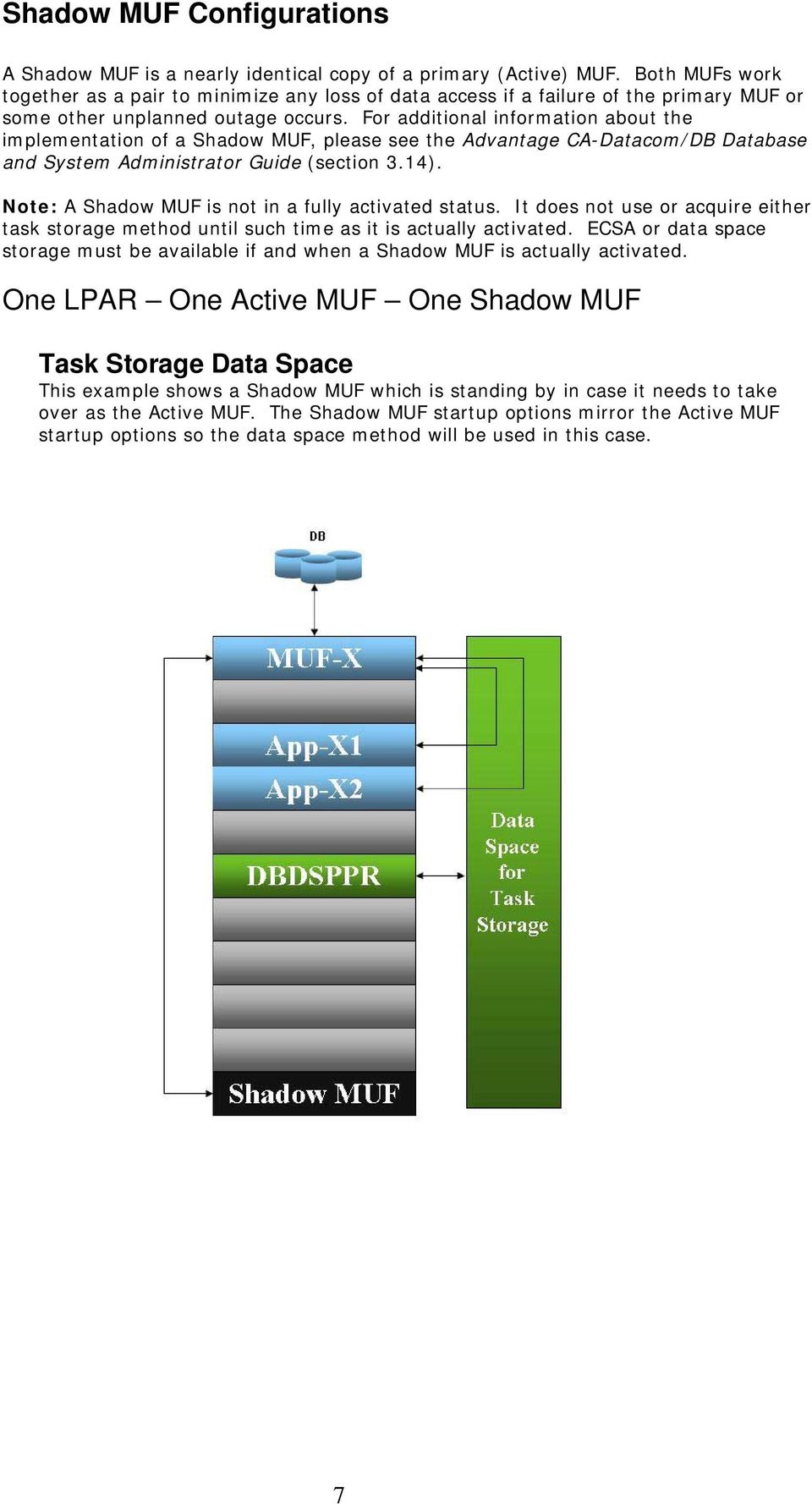
7 Shadow MUF Configurations A Shadow MUF is a nearly identical copy of a primary (Active) MUF. Both MUFs work together as a pair to minimize any loss of data access if a failure of the primary MUF or some other unplanned outage occurs. For additional information about the implementation of a Shadow MUF, please see the Advantage CA-Datacom/DB Database and System Administrator Guide (section 3.14). Note: A Shadow MUF is not in a fully activated status. It does not use or acquire either task storage method until such time as it is actually activated. ECSA or data space storage must be available if and when a Shadow MUF is actually activated. One LPAR One Active MUF One Shadow MUF Task Storage Data Space This example shows a Shadow MUF which is standing by in case it needs to take over as the Active MUF. The Shadow MUF startup options mirror the Active MUF startup options so the data space method will be used in this case. 7
8 Two LPARs One Active MUF One Shadow MUF ECSA This is the standard setup for a multi-lpar Shadow MUF configuration. The Shadow MUF uses no task area storage until it is activated. The Shadow MUF startup options mirror the Active MUF startup options so the ECSA method will be used in this case. Task Storage Data Space In this example, both MUFs have startup options that have requested a data space to manage tasks. Note that the data space must be activated on LPAR 2 in case the Shadow MUF needs to transition to Active MUF status. 8

9 Data Sharing Configurations In a data sharing environment, there are two or more active MUFs that share a single set of database data, index, control and log files with full data integrity. Two LPARs Two Active MUFs Data Sharing Task Storage Data Space This example describes two active MUFs that are full data sharing members that utilize the data space method for task management. Both Task management for MUF-X is using a data space and MUF-Y is using ECSA. 9

10 2.4. AllowUserKeyCSA Parameter Choices Options Sites must make a decision regarding CA Datacom task storage methodology. The choices are: Accept the z/os 1.9 default of VSM ALLOWUSERKEYCSA(NO). With this setting, CA Datacom MUF regions must use the task storage data space option. Keep the z/os 1.8 default of VSM ALLOWUSERKEYCSA(YES). With this setting, CA Datacom MUF regions may use the task storage data space option or the user key ECSA option. The AllowUserKeyCSA parameter is set at the LPAR level as specified in SYS1.PARMLIB(DIAGxx) Evaluating the Options The factors to consider in making a decision about the value for AllowUserKeyCSA in z/os are security and ECSA availability. Security For a brief explanation of the AllowUserKeyCSA parameter introduced in z/os 1.8 and an IBM comment on security, see slide 24 at this link: /1.8/Ease_of_usezOS_simplification/zOS_V1R8_IBM_Health_Checker.pdf?dmuid= Note: Most CA Datacom sites use the default user key 8 ECSA method for task related storage, but both methods are supported by CA Datacom. ECSA Availability Some sites may experience shortages of contiguous ECSA storage in a given LPAR. Running MUF with a data space would be an appropriate option to consider at these sites. ECSA storage used by one or more CA Datacom MUF regions could be freed by the use of a data space, thus making additional ECSA available for other systems and applications Recommendation We suggest that individual sites should test representative workloads in their own environments before implementing a task storage methodology change for CA Datacom production systems. We continue to support both the user key ECSA option and the task storage data space option. 10

11 3. Software Requirements The following sections, by release and service pack level, contain the latest solutions to CA Datacom code resolving all known problems relating to the use of the data space methodology CA Datacom/DB r Base Level Apply following APARs: QO55018, QO73993, QO73994, QO80138, TB30025, TB30246, TB30384 Note: To obtain unconfirmed APARs (beginning with TB ), open an issue with Technical Support at SupportConnect.ca.com SP1 Apply following APARs: QO73993, QO73994, QO80138, TB30025, TB30246, TB30384 Note: For unconfirmed APARs (beginning with TB ), open an issue with Technical Support at SupportConnect.ca.com SP SP3 Apply following APARs: QO79372, QO80138 No additional maintenance necessary CA Datacom/AD r SP2 Apply following APAR: QO79372 Note: Apar QO80138 has already been applied to this product package CA Datacom/AD r SP SP SP4 Apply following APARs: QO45157, QO51001, QO90481, QO90494, QO90495 Apply following APARs: QO45157, QO51001, QO90481, QO90494, QO90495 Apply following APARs: QO51001, QO90481, QO90494, QO

12 4. Implementation 4.1. CA Datacom with ECSA z/os AllowUserKeyCSA parameter VSM ALLOWUSERKEYCSA(NO)prevents a CA Datacom MUF from coming up successfully if ECSA is the chosen mode of operation. If ECSA use is desired, this z/os option must be set to YES for the LPAR in question. This parameter is specified in SYS1.PARMLIB(DIAGxx). See the IBM z/os 1.8 MVS Initialization and Tuning Guide for specific instructions on modifying this parameter CA Datacom Startup Options The DATASPACE MUF startup option controls whether CA Datacom s task-related storage is placed in ECSA or the task storage data space. The syntax of the DATASPACE MUF startup option is: DATASPACE nnnnm,yes NO The nnnnm parameter relates to the size of covered and virtual data spaces involved with the Memory Resident Data Facility (MRDF). It does not relate to the data space CA Datacom uses for its task-related storage. If you do not specify the second parameter, it defaults to NO. Specifying NO or accepting the default indicates that ECSA is to be used for CA Datacom s task-related storage. If the DATASPACE startup option is not present, CA Datacom will use ECSA CA Datacom with Task Storage Data Space z/os AllowUserKeyCSA parameter VSM ALLOWUSERKEYCSA(NO)requires the use of the task storage data space with CA Datacom MUF regions CA Datacom Startup Options DATASPACE The DATASPACE MUF startup parameter controls whether CA Datacom s task-related storage is placed in ECSA or the task storage data space. The syntax of the DATASPACE MUF startup parameter is: DATASPACE nnnnm,yes NO The nnnnm parameter relates to the size of data spaces involved with the COVERED and VIRTUAL startup parameters (CA Datacom s Memory Resident Data Facility (MRDF)). It does not relate to the data space CA Datacom uses for its task-related storage. If you currently specify the DATASPACE startup option with the second parameter NO (or omitted), simply specify YES as the second parameter. 12

13 If you do not currently specify the DATASPACE startup option, CA recommends specifying this startup option as follows: DATASPACE 2048M,YES Specifying YES for the second parameter instructs MUF to enable using the data space for its task-related storage. The CA Datacom data space for the LPAR must have been previously initiated by the data space owner job for the MUF to enable without error. Specifying NO indicates that ECSA is to be used for CA Datacom s task-related storage. If you do not specify the second parameter, it defaults to NO. If the DATASPACE startup parameter is not present, CA Datacom will use ECSA. Relation to MRDF (COVERED and VIRTUAL) A data space is also used for the Memory Resident Data Facility (MRDF). Each area that has been specified in a COVERED or VIRTUAL startup option will occupy memory in a MRDF data space. The data spaces used for MRDF are independent of the data space used for task-related storage. This document does not discuss configuration of MRDF. For information on this topic, see the Advantage CA-Datacom/DB Database and System Administrator Guide for r11 (chapter 6). CSAFREE The CSAFREE MUF startup option controls how CA Datacom frees or retains ECSA storage at MUF termination. Sites that decide to continue using ECSA for CA Datacom task-related storage should continue to use the CSAFREE parameter as they have before. CSAFREE YES specifies that ECSA is to be freed upon termination of the MUF. CSAFREE NO specifies that MUF is not to release ECSA storage at MUF termination. When the LPAR is IPLed, ECSA can become fragmented over a period of time. It is possible that a MUF that frees its ECSA upon termination might not be able to allocate sufficient contiguous ECSA when it is restarted. This parameter, requesting MUF not to free the ECSA, is a means of ensuring that the ECSA in use will be saved and available for the next execution of this MUF. The next MUF execution will reuse the same storage that was left from the previous execution. This ensures that the MUF can come back up despite ECSA fragmentation. The only exception might be if the ECSA requirements are greater the next time MUF is restarted. For example, this can occur if the number of TASKS is increased in the MUF startup options. Sites that have been using ECSA and decide to use the data space option going forward may want to review the use of this parameter. If the data space option is used, taskrelated storage is moved to the data space, but a single 4K page of key 0, not key 8, ECSA will still be used. With a single 4K page of ECSA in use, the value of the CSAFREE parameter is minimal. Presumably 4K will always be available for the next MUF execution. After successfully implementing the data space option, it is suggested that CSAFREE be removed from the MUF startup options Data Space Owner Job Program DBDSPPR The data space owner job executes the DBDSPPR program to initiate the CA Datacom task storage data space. The program runs authorized and non-swappable. The program issues a console message to indicate its success in initiating the data space. Once initialized, the program simply waits. It will not end unless the operator issues the EOJ command (discussed in a following section), cancels the job, or performs an IPL. A TIME= parameter may be necessary on the EXEC statement in the following JCL examples. 13

14 Once started, this task storage data space will be available for use by all CA Datacom MUFs on the LPAR. In most cases, the data space can handle the task storage requirements for over 20 large CA Datacom MUF environments. Job versus started task You have the option of making the data space owner a standard batch job or a started task. Either is acceptable. Sample Job JCL The following is JCL for a sample job to start the data space: //DATASPAC JOB ( ),SYSTEMS-DEPT,CLASS=a,MSGCLASS=b //DSPACE EXEC PGM=DBDSPPR,REGION=0M //STEPLIB DD DSN=xxxxx.CUSLIB,DISP=SHR // DD DSN=xxxxx.CAILIB,DISP=SHR //SYSPRINT DD SYSOUT=* //SYSUDUMP DD SYSOUT=* //SNAPER DD SYSOUT=* //SYSOUT DD SYSOUT=* //SYSPUNCH DD SYSOUT=* Sample Started Task JCL The following example is for a PROC pointed to by the Started Task command: //DATASPAC PROC //DSPACE EXEC PGM=DBDSPPR,REGION=0M //STEPLIB DD DSN=xxxxx.CUSLIB,DISP=SHR // DD DSN=xxxxx.CAILIB,DISP=SHR //SYSPRINT DD SYSOUT=* //SYSUDUMP DD SYSOUT=* //SNAPER DD SYSOUT=* //SYSOUT DD SYSOUT=* //SYSPUNCH DD SYSOUT=* Scheduling You may want to initiate the CA Datacom task storage data space as part of the LPAR IPL process by using a started task for the data space owner. This approach would ensure the data space is present before any CA Datacom MUF regions are initiated Messages DBDSPPR successful initiation message If the CA Datacom task storage data space is not already present on this LPAR, the data space is initiated and the following message is issued. Then the program simply waits (never completes). DB02501I DATASPACE OWNER ENABLED DBDSPPR unsuccessful initiation messages If the CA Datacom data space is already present on this LPAR, DBSDPPR returns the following error message and exits with operating system condition code U0000: DB02507I ANOTHER DATA SPACE ALREADY ENABLED: JOBNAME xxxxxxxx It is possible to experience other general errors in the process of initializing a data space for CA Datacom. If this occurs, you will see the following message: 14

15 DB02502E DATASPACE OWNER ERROR nnnn The nnnn code indicates the specific error condition to be corrected. Status messages There are several status-related messages that appear in response to the STATUS command: DB02504I NO MUFS ENABLED USING THIS DATASPACE DB02505I JOBNAME xxxxxxxx SIZE 9,999,999K One line is printed per MUF currently using this data space. SIZE is the amount of contiguous memory being used by the MUF. DB02506I FREE SPACE SEGMENT(S) 9,999,999K 9,999,999K 9,999,999K This message indicates that free space is available to be used by a MUF. Multi-User Facility error messages relating to data spaces DB00205E MULTI-USER ERROR 1090 NO ROOM IN DATA SPACE There is insufficient room to enable this MUF. DB00205E MULTI-USER ERROR 1091 NO DATASPACE ENABLED No CA Datacom data space has been initialized for this LPAR for the MUF to use Operational Considerations Normal termination of the data space We provide a facility to terminate the data space used for CA Datacom task-related storage in a normal fashion. From the MVS console, issue the MVS MODIFY JOB using the EOJ option: F DATASPAC,EOJ (where DATASPAC is the data space owner job name) If there are no MUF regions using the data space, the data space will be terminated, an appropriate message will be issued and the DBDSPPR step of the data space owner job will end normally. If there are one or more MUF regions still accessing the data space, an error message is issued and the EOJ request is rejected. Normally, once the CA Datacom data space for task-related storage is initiated, it will remain until the next IPL. However, there could be a case where you would want to bring down all MUFs in the LPAR, bring down the data space and then reinitiate them without an IPL of the LPAR. See the discussion on maintenance below. Canceling the data space It is possible for the operator to cancel the data space owner job. Doing so will terminate the data space and free all storage to the operating system, of course, but it will also result in terminating all the MUFs using it on the LPAR. MUFs using the ECSA method on this LPAR would be unaffected. Any and all subsequent access to the storage within the former data space by any MUF in the LPAR using it, will fail. The MUF may not fail immediately, but it will fail on its next access to the data space storage. How to know if one or more MUFs are using the task storage data space 15

16 Issue the following MODIFY command to the data space owner region with the STATUS option: F DATASPAC,STATUS (where DATASPAC is the data space owner job name) The following is an example of output from the STATUS command for an LPAR with two MUF regions using the data space option: JOB30024 DB01311I - STATUS JOB30024 DB02505I - JOBNAME-PRODMUF1 SIZE-----2,240K JOB30024 DB02505I - JOBNAME-TESTMUFX SIZE-----2,632K JOB30024 DB02506I - FREE SPACE SEGMENT(S) 2,092,276K Using data space with mixed MUF environments Test and Production MUFs in a single LPAR Some users may have both test and production MUFs running in the same LPAR using the data space option. This is not a problem. Each MUF obtains its own storage that is segregated from all other MUFs on the LPAR. LPAR running multiple MUFs with different CA Datacom releases It is possible for a site to be running multiple CA Datacom releases. For example, while a site is upgrading from CA Datacom/AD r10 to CA Datacom/AD r11, both versions may be in use for a period of time. When this is the case, there is one restriction. The data space owner job must be running the later release, that is, r11 in the above example. Applying CA Datacom Maintenance Maintenance to DBDSPPR itself It is possible, but very unlikely, that maintenance might be needed to the DBDSPPR program. If there is maintenance to DBDSPPR, the data space must be stopped and restarted to implement the updated DBDSPPR module. Normally, you would install the maintenance into your libraries and then wait for the next IPL to implement it. If it were important to install the maintenance without performing an IPL, you would have to bring down all MUFs using the data space (determine which ones by issuing the STATUS command described above), bring down the data space (by issuing the EOJ command described above) and then rerun the job to start the data space. Maintenance to other CA Datacom modules If MUF maintenance were implemented by means of the NEWCOPY command, the storage in the data space persists and would be unaffected. If the MUF were recycled, its storage in the data space would be released as it came down and then reacquired as it came back up again. Problem resolution documentation Capturing data space storage When reporting a problem to technical support, MUF s task storage may be needed in order to diagnose the situation and resolve it. If ECSA is in use, the SNAP will dump both the MUF address space and its associated ECSA. Issue this MODIFY command from the MUF address space: F MUFJOB,SNAP (where MUFJOB is the MUF job name) 16

17 However, if a data space is in use for task storage, you would want to do a SNAP of the MUF region to get the MUF address space (including the 4K of key 0 ECSA) and then run a DBUTLTY job for the MUF region in question with the statement REPORT MEMORY=DS to get a dump of the data space storage in use for that given MUF. Thus a site switching from the use of ECSA to data space may need to get two dumps for problem resolution now instead of one as before. In some conditions perhaps diagnosing problems with products related to CA Datacom like CA Datacom CICS Services only the MUF task area storage is needed, not the MUF address space. If ECSA is in use, you would dump just the task storage by running the COMM OPTION=SNAPCSA function of DBUTLTY. However, a site switching to the use of data space would instead issue the REPORT MEMORY=DS request against the MUF of interest. SVC MUF dump parameters At the direction of CA support you may be asked to dump the content of the task storage in the data space along with other content in an SVC dump. If so, CA support can assist you in specifying the appropriate SDUMP options based on the jobname of the data space owner job. As always, CA recommends the use of the DUMP_OUTPUT SVC startup parameter to ensure that an SVC dump is taken upon any MUF failure. See the Advantage CA Datacom Database and System Administrator Guide, section for details on this startup parameter. We also recommend the use of RGN, ECSA and SQA to produce complete SVC dumps. 17

18 5. Additional Resources 5.1. CA Datacom/DB Database System and Administrator Guide The Advantage CA Datacom/DB Database and System Administrator Guide covers many of the topics discussed here. In particular, it discusses the ways to configure a MUF region and all MUF startup parameters. This manual is available on support.ca.com by following these steps: 1. Point your browser to SupportConnect.ca.com. 2. Login to SupportConnect. 3. Click on Documentation on the left side under Downloads. 4. Specify Brand CA, select CA Datacom/DB or CA Datacom/AD, select the appropriate release (r11 for DB, r10 or r11 for AD) and click Go. 5. Click on this manual or others of interest CA Datacom/AD Implementation Guide The CA Datacom/AD Implementation Guide is available with the rest of the CA Datacom/AD documentation on SupportConnect.ca.com. See the instructions just above. Be sure to select CA Datacom/AD as the product Product Home Pages The Product Home Pages are a primary source of information on how to use various CA products. To view these: 1. Point your browser to SupportConnect.ca.com. 2. Login to SupportConnect. 3. Click on Product Home Pages under Knowledge. 4. Specify CA Datacom for the product. 5. In the Technical Information section at the bottom of the page, find the Technical Document Index. 5.5 CA Technical Support CA s Technical Support organization is available for in person assistance for licensed customers. Please call CALL-CAI. 6. Glossary CA Datacom/DB Mainframe-based relational DBMS engine that is licensed for enterprisewide database services. CA Datacom/AD CA Datacom/DB package that is bundled as a database repository for a number of CA products including CA Disk, CA 11, CA Scheduler, CA Jobtrac and others. All references to CA Datacom/DB are applicable to CA Datacom/AD unless specifically noted. Multi-User Facility (MUF) The CA Datacom/DB address space that manages application database requests. Shadow MUF A nearly identical copy of a primary (Active) MUF. Both MUFs work together as a pair to minimize any loss of data access if a failure of the primary MUF, or some other unplanned outage, occurs. Read/Write Task Storage Area (RWTSA) The control block that is used to pass individual user task information from the application to the MUF. The database request area in the RWTSA contains the actual request issued by the application along with the result (error code). Common Storage Area (CSA) - The section of common area storage that is addressable by all applications. The CSA is often used to contain data frequently accessed across multiple address spaces. The size of the CSA area is established at system initialization time (IPL) and cannot change while the operating system is active. 18

19 Extended Common Storage Area (ECSA) This range of CSA, which lies above The Line (16 megabytes) but below The Bar (two gigabytes), is a kind of mirror image of the common storage area below The Line. ECSA has the same attributes as CSA, but because of the additional storage available above The Line, its size is much larger. z/os Data Space A common storage area used for data storage (no executable code) with a maximum 2 gigabyte (2 GB) allocation. Data stored in a z/os data space can be shared across multiple address spaces in the same LPAR. CA Datacom Task Storage Data Space A common storage area with maximum 2 gigabyte (2 GB) allocation that can be shared by all MUFs running on a given LPAR. CA Datacom Data Space Owner A job or started task that initiates the CA Datacom task storage data space and owns it thereafter. It can query the status of the data space, produce a snap dump of the data space contents and terminate the data space. CA Datacom Master List A CA Datacom control block that specifies the number and length of data buffers, the number of IXX buffers and the number of DXX buffers along with some additional control information. A copy of the Master List resides in ECSA. If ECSA is used for task storage, this resides in key 8 storage. If the CA Datacom data space is used for task storage, this resides in key 0 storage. 19

IBM i Version 7.2. Security Service Tools
 IBM i Version 7.2 Security Service Tools IBM i Version 7.2 Security Service Tools Note Before using this information and the product it supports, read the information in Notices on page 37. This edition
Security Service tools user IDs and passwords
 System i Security Service tools user IDs and passwords Version 5 Release 4 System i Security Service tools user IDs and passwords Version 5 Release 4 Note Before using this information and the product
Things to consider before you do an In-place upgrade to Windows 10. Setup Info. In-place upgrade to Windows 10 Enterprise with SCCM
 In this doc we will see the steps for In-place upgrade to Windows 10 Enterprise with SCCM. Most of the Organizations today are running Windows 7 on their computers. Looking at the stability and features
CA Datacom/AD 14.0 1 CA RS 1506 Service List
 CA Datacom/AD 14.0 1 CA RS 1506 Service List Description Type 14.0 RO79646 S0C4 IN DBINRPR WITH EXTENDED OPTIONS CALL AFTER DBNTRY ** PRP ** RO79650 DBUTLTY 2ND EXTRACT FAILS WITH DB01801E-INTERFACE ERROR-44
Beyond the Software Life Cycle
 Beyond the Software Life Cycle CA-Endevor Facilitates Ad-hoc Job Processing Southern CA Endevor User Group June 2008 Rose A. Sakach Endevor Practice Leader - RSH Consulting, Inc. [email protected]
CICS Transactions Measurement with no Pain
 CICS Transactions Measurement with no Pain Prepared by Luiz Eduardo Gazola 4bears - Optimize Software, Brazil December 6 10, 2010 Orlando, Florida USA This paper presents a new approach for measuring CICS
Avalanche Site Edition
 Avalanche Site Edition Version 4.8 avse ug 48 20090325 Revised 03/20/2009 ii Copyright 2008 by Wavelink Corporation All rights reserved. Wavelink Corporation 6985 South Union Park Avenue, Suite 335 Midvale,
z/os Unix System Services Dumps - Dump Debugging for Dummies
 Maintenance and Technical Support Technical Support Competence Center z/os Unix System Services Dumps - Dump Debugging for Dummies Matthias Korn z/os Virtual Frontend / Unix System Services EMEA Level
Change Manager 5.0 Installation Guide
 Change Manager 5.0 Installation Guide Copyright 1994-2008 Embarcadero Technologies, Inc. Embarcadero Technologies, Inc. 100 California Street, 12th Floor San Francisco, CA 94111 U.S.A. All rights reserved.
SQL Server 2008 R2 Express Edition Installation Guide
 Hardware, Software & System Requirements for SQL Server 2008 R2 Express Edition To get the overview of SQL Server 2008 R2 Express Edition, click here. Please refer links given below for all the details
SysPatrol - Server Security Monitor
 SysPatrol Server Security Monitor User Manual Version 2.2 Sep 2013 www.flexense.com www.syspatrol.com 1 Product Overview SysPatrol is a server security monitoring solution allowing one to monitor one or
CA Datacom /DB Version 14.0
 PRODUCT SHEET CA Datacom/DB CA Datacom /DB Version 14.0 CA Datacom /DB for z/os is a high-performance relational database management system (RDBMS) for mainframe operating systems. CA Datacom/DB provides
SQL Server 2008 is Microsoft s enterprise-class database server, designed
 In This Chapter Chapter 1 Introducing SQL Server 2008 Understanding database basics Choosing a SQL Server 2008 edition Using SQL Server components Implementing SQL Server databases Finding additional information
DocuShare Installation Guide
 DocuShare Installation Guide Publication date: May 2009 This document supports DocuShare Release 6.5/DocuShare CPX Release 6.5 Prepared by: Xerox Corporation DocuShare Business Unit 3400 Hillview Avenue
CA Workload Automation Restart Option for z/os Schedulers r11
 PRODUCT SHEET CA Workload Automation Restart Option for z/os Schedulers r11 CA Workload Automation Restart Option for z/os Schedulers r11 CA Workload Automation Restart Option for z/os Schedulers (CA WA
CA Chorus for Security and Compliance Management
 CA Chorus for Security and Compliance Management Site Preparation Guide Version 03.0.00, Fifth Edition This Documentation, which includes embedded help systems and electronically distributed materials,
Virto Password Changer Web Part for SharePoint. Release 3.1.0. Installation and User Guide
 Virto Password Changer Web Part for SharePoint Release 3.1.0 Installation and User Guide 2 Table of Contents OVERVIEW... 3 SHORTLIST OF VIRTO SHAREPOINT PASSWORD CHANGE KEY FEATURES... 3 SYSTEM REQUIREMENTS...
Introduction 1-1 Installing FAS 500 Asset Accounting the First Time 2-1 Installing FAS 500 Asset Accounting: Upgrading from a Prior Version 3-1
 Contents 1. Introduction 1-1 Supported Operating Environments................ 1-1 System Requirements............................. 1-2 Security Requirements........................ 1-3 Installing Server
Fiery E100 Color Server. Welcome
 Fiery E100 Color Server Welcome 2011 Electronics For Imaging, Inc. The information in this publication is covered under Legal Notices for this product. 45098226 27 June 2011 WELCOME 3 WELCOME This Welcome
What Is Ad-Aware Update Server?
 Contents What Is Ad-Aware Update Server?...2 Installation and Removal...3 System Requirements...3 Obtaining the Installation File...3 Installing Ad-Aware Update Server...3 Upgrade...4 Repairing, Modifying
Deposit Direct. Getting Started Guide
 Deposit Direct Getting Started Guide Table of Contents Before You Start... 3 Installing the Deposit Direct application for use with Microsoft Windows Vista... 4 Running Programs in Microsoft Windows Vista...
SSL VPN. Virtual Appliance Installation Guide. Virtual Private Networks
 SSL VPN Virtual Appliance Installation Guide Virtual Private Networks C ONTENTS Introduction... 2 Installing the Virtual Appliance... 2 Configuring Appliance Operating System Settings... 3 Setting up the
CMS Server Installation Guide
 CMS Server Installation Guide Models: SVC420GPS-L SVC820GPS-L 1 Contents Pre-requisites... 3 Server Installation... 3 Server Configuration... 8 Add a Client... 9 Add a Device... 10 Unit Setup... 12 Device
Introduction to the new mainframe Chapter 7: Batch processing and the Job Entry Subsystem (JES)
 Chapter 7: Batch processing and the Job Entry Subsystem (JES) Chapter 7 objectives Be able to: Give an overview of batch processing and how work is initiated and managed in the system. Explain how the
CA Database Management Solutions for IMS for z/os
 CA Database Management Solutions for IMS for z/os Best Practices Guide Version 16.0.00 This Documentation, which includes embedded help systems and electronically distributed materials, (hereinafter referred
Scheduling in SAS 9.3
 Scheduling in SAS 9.3 SAS Documentation The correct bibliographic citation for this manual is as follows: SAS Institute Inc 2011. Scheduling in SAS 9.3. Cary, NC: SAS Institute Inc. Scheduling in SAS 9.3
Top 10 Tips for z/os Network Performance Monitoring with OMEGAMON. Ernie Gilman IBM. August 10, 2011: 1:30 PM-2:30 PM.
 Top 10 Tips for z/os Network Performance Monitoring with OMEGAMON Ernie Gilman IBM August 10, 2011: 1:30 PM-2:30 PM Session 9917 Agenda Overview of OMEGAMON for Mainframe Networks FP3 and z/os 1.12 1.
BCA Software Installation and Troubleshooting Guide
 BCA Software Installation and Troubleshooting Guide This document contains four components: Prerequisites provides the list of prerequisites and system requirements to successfully install and run the
Field Manager Mobile Worker User Guide for RIM BlackBerry 1
 Vodafone Field Manager Mobile Worker User Guide for RIM BlackBerry APPLICATION REQUIREMENTS Supported devices listed here o http://support.vodafonefieldmanager.com Application requires 600 KB of application
CA JCLCheck Workload Automation
 PRODUCT SHEET CA JCLCheck Workload Automation CA JCLCheck Workload Automation CA JCLCheck Workload Automation (CA JCLCheck WA) validates z/os JCL before it is submitted for execution. CA JCLCheck WA helps
Upgrading from Call Center Reporting to Reporting for Call Center
 Upgrading from Call Center Reporting to Reporting for Call Center www.nortelnetworks.com 2003 Nortel Networks i Table of Contents Table of Contents Change History...1 How to use this guide...2 Introduction...
IBM Unica emessage Version 8 Release 6 February 13, 2015. User's Guide
 IBM Unica emessage Version 8 Release 6 February 13, 2015 User's Guide Note Before using this information and the product it supports, read the information in Notices on page 403. This edition applies to
Suite. How to Use GrandMaster Suite. Exporting with ODBC
 Suite How to Use GrandMaster Suite Exporting with ODBC This page intentionally left blank ODBC Export 3 Table of Contents: HOW TO USE GRANDMASTER SUITE - EXPORTING WITH ODBC...4 OVERVIEW...4 WHAT IS ODBC?...
CA Insight Database Performance Monitor for DB2 for z/os
 PRODUCT SHEET CA Insight Database Performance Monitor for DB2 for z/os CA Insight Database Performance Monitor for DB2 for z/os CA Insight Database Performance Monitor for DB2 for z/os (CA Insight DPM)
Desktop and Professional Editions
 YOUR AUTOMATED EMPLOYEE Foxtrot Deployment Guide Desktop and Professional Editions Introduction This Deployment Guide is intended for administrators in charge of planning, implementing and maintaining
NetWrix Password Manager. Quick Start Guide
 NetWrix Password Manager Quick Start Guide Contents Overview... 3 Setup... 3 Deploying the Core Components... 3 System Requirements... 3 Installation... 4 Windows Server 2008 Notes... 4 Upgrade Path...
Automation Engine 14. Troubleshooting
 4 Troubleshooting 2-205 Contents. Troubleshooting the Server... 3. Checking the Databases... 3.2 Checking the Containers...4.3 Checking Disks...4.4.5.6.7 Checking the Network...5 Checking System Health...
This presentation introduces you to the Decision Governance Framework that is new in IBM Operational Decision Manager version 8.5 Decision Center.
 This presentation introduces you to the Decision Governance Framework that is new in IBM Operational Decision Manager version 8.5 Decision Center. ODM85_DecisionGovernanceFramework.ppt Page 1 of 32 The
Dynamic Workload Console User s Guide
 IBM Tivoli Workload Automation Dynamic Workload Console User s Guide Version 9 Release 1 IBM Tivoli Workload Automation Dynamic Workload Console User s Guide Version 9 Release 1 Note Before using this
Microsoft SQL Server versus IBM DB2 Comparison Document (ver 1) A detailed Technical Comparison between Microsoft SQL Server and IBM DB2
 Microsoft SQL Server versus IBM DB2 Comparison Document (ver 1) A detailed Technical Comparison between Microsoft SQL Server and IBM DB2 Technical Overview about both the product offerings and their features.
SmartCloud Analytics Log Analysis
 SmartCloud Analytics Log Analysis Clyde Richardson ([email protected]) Technical Sales Specialist Anuja Deedwaniya ([email protected]) IBM z Systems Enterprise Architect Paul Smith (Smitty) ([email protected])
Scheduling in SAS 9.4 Second Edition
 Scheduling in SAS 9.4 Second Edition SAS Documentation The correct bibliographic citation for this manual is as follows: SAS Institute Inc. 2015. Scheduling in SAS 9.4, Second Edition. Cary, NC: SAS Institute
Instruction Bulletin. PowerLogic Tenant Metering Software Installation Guide. Introduction
 Instruction Bulletin PowerLogic Tenant Metering Software Installation Guide 63230-504-200A4 LaVergne, TN, USA Replaces 63230-504-200A3 Retain for future use. Use this installation guide when you install
Upgrading from Call Center Reporting to Reporting for Contact Center. BCM Contact Center
 Upgrading from Call Center Reporting to Reporting for Contact Center BCM Contact Center Document Number: NN40010-400 Document Status: Standard Document Version: 02.00 Date: June 2006 Copyright Nortel Networks
H211L Bulk File Transfer (BFX)
 H211L Bulk File Transfer (BFX) for IBM z/os Operating Systems Limited Edition Release 1.6 Memo to Users May 2014 2002-2014 Network Executive Software, Inc. 6420 Sycamore Lane N #300 Maple Grove, MN 55369
vsphere Upgrade Update 1 ESXi 6.0 vcenter Server 6.0 EN-001804-02
 Update 1 ESXi 6.0 vcenter Server 6.0 This document supports the version of each product listed and supports all subsequent versions until the document is replaced by a new edition. To check for more recent
E-Series. NetApp E-Series Storage Systems Mirroring Feature Guide. NetApp, Inc. 495 East Java Drive Sunnyvale, CA 94089 U.S.
 E-Series NetApp E-Series Storage Systems Mirroring Feature Guide NetApp, Inc. 495 East Java Drive Sunnyvale, CA 94089 U.S. Telephone: +1 (408) 822-6000 Fax: +1 (408) 822-4501 Support telephone: +1 (888)
Stellar Phoenix Exchange Server Backup
 Stellar Phoenix Exchange Server Backup Version 1.0 Installation Guide Introduction This is the first release of Stellar Phoenix Exchange Server Backup tool documentation. The contents will be updated periodically
Smart Business Architecture for Midsize Networks Network Management Deployment Guide
 Smart Business Architecture for Midsize Networks Network Management Deployment Guide Introduction: Smart Business Architecture for Mid-sized Networks, Network Management Deployment Guide With the Smart
Idera SQL Diagnostic Manager Management Pack Guide for System Center Operations Manager. Install Guide. Idera Inc., Published: April 2013
 Idera SQL Diagnostic Manager Management Pack Guide for System Center Operations Manager Install Guide Idera Inc., Published: April 2013 Contents Introduction to the Idera SQL Diagnostic Manager Management
IBM Business Process Manager Version 7.5.0. IBM Business Process Manager for Microsoft SharePoint Add-On Installation Guide
 IBM Business Process Manager Version 7.5.0 IBM Business Process Manager for Microsoft SharePoint Add-On Installation Guide ii Installing PDF books and the information center PDF books are provided as a
VMware Horizon FLEX User Guide
 Horizon FLEX 1.5 This document supports the version of each product listed and supports all subsequent versions until the document is replaced by a new edition. To check for more recent editions of this
11.1. Performance Monitoring
 11.1. Performance Monitoring Windows Reliability and Performance Monitor combines the functionality of the following tools that were previously only available as stand alone: Performance Logs and Alerts
Mass Announcement Service Operation
 Mass Announcement Service Operation The Mass Announcement Service enables you to automate calling a typically large number of contacts, and playing them a pre-recorded announcement. For example, a weather
Simple Disaster Recovery
 Simple Disaster Recovery OVERVIEW NetHelpDesk is unlike most products in the market in so many ways. One of the most notable is the simple disaster recovery (DR) procedure that you can follow, to ensure
User Guide. SysMan Utilities. By Sysgem AG
 SysMan Utilities User Guide By Sysgem AG Sysgem is a trademark of Sysgem AG. Other brands and products are registered trademarks of their respective holders. 2013 Sysgem AG, Lavaterstr. 45, CH-8002 Zürich,
Symantec Backup Exec 2010 R2. Quick Installation Guide
 Symantec Backup Exec 2010 R2 Quick Installation Guide 20047221 The software described in this book is furnished under a license agreement and may be used only in accordance with the terms of the agreement.
TACACS+ Authentication
 4 TACACS+ Authentication Contents Overview...................................................... 4-2 Terminology Used in TACACS Applications:........................ 4-3 General System Requirements....................................
VMware Server 2.0 Essentials. Virtualization Deployment and Management
 VMware Server 2.0 Essentials Virtualization Deployment and Management . This PDF is provided for personal use only. Unauthorized use, reproduction and/or distribution strictly prohibited. All rights reserved.
München 2011. BMC Internet Service Retrieval. Axel Griepenstroh SC
 MainView Roundtable München 2011 BMC Internet Service Retrieval Axel Griepenstroh SC Agenda Was ist BMC ISR Download BMC ISR Starten von BMC ISR - Setup - Submit Request - Receive Request Copyright 5/24/2011
Practice Fusion API Client Installation Guide for Windows
 Practice Fusion API Client Installation Guide for Windows Quickly and easily connect your Results Information System with Practice Fusion s Electronic Health Record (EHR) System Table of Contents Introduction
These release notes are intended to acquaint you with your new software version as quickly as possible.
 Release Notes Building Integration System (BIS) Version 4.2 These release notes are intended to acquaint you with your new software version as quickly as possible. Table of Contents: 1 Installation Notes...
Installation Process
 Installation Process Aivika One Lite New Dynamic Solutions BVBA Contents Contents... 2 Introduction... 3 Aivika One Lite introduction... 4 Concept... 4 Components... 4 Deploying Aivika One Lite... 5 Supported
User Guide for Windows 10
 User Guide for Windows 10 System requirements E10684 First Edition July 2015 To facilitate a smoother transition from your previous operating system, read the system requirements below before upgrading
Deploying Physical Solutions to InfoSphere Master Data Management Server Advanced Edition v11
 Deploying Physical Solutions to InfoSphere Master Data Management Server Advanced Edition v11 How to deploy Composite Business Archives (CBA) to WebSphere John Beaven IBM, Hursley 2013 1 Contents Overview...3
IBM Tivoli Storage Productivity Center (TPC)
 IBM Tivoli Storage Productivity Center (TPC) Simplify, automate, and optimize storage infrastructure Highlights The IBM Tivoli Storage Productivity Center is designed to: Help centralize the management
Archiving File Data with Snap Enterprise Data Replicator (Snap EDR): Technical Overview
 Archiving File Data with Snap Enterprise Data Replicator (Snap EDR): Technical Overview Contents 1. Abstract...1 2. Introduction to Snap EDR...1 2.1. Product Architecture...2 3. System Setup and Software
CA Workload Automation EE r11.3 Report Server. Fred Brisard
 CA Workload Automation EE r11.3 Report Server Fred Brisard Terms of This Presentation This presentation was based on current information and resource allocations as of October 2009 and is subject to change
Tivoli Endpoint Manager for Remote Control Version 8 Release 2. User s Guide
 Tivoli Endpoint Manager for Remote Control Version 8 Release 2 User s Guide Tivoli Endpoint Manager for Remote Control Version 8 Release 2 User s Guide Note Before using this information and the product
Technical Brief High Availability Policy Server
 Technical Brief High Availability Policy Server Software Release 9.0 Copyright Copyright 1996-2008. Finjan Software Inc. and its affiliates and subsidiaries ( Finjan ). All rights reserved. All text and
IBM Tivoli Storage Manager for Linux Version 7.1.5. Installation Guide IBM
 IBM Tivoli Storage Manager for Linux Version 7.1.5 Installation Guide IBM IBM Tivoli Storage Manager for Linux Version 7.1.5 Installation Guide IBM Note: Before you use this information and the product
Chapter 6 Updating Software Images and Configuration Files
 Chapter 6 Updating Software Images and Configuration Files This chapter describes how to copy and save configuration files and software image files. Downloading and Uploading a Software Image on a TFTP
FUSION Installation Guide
 FUSION Installation Guide Version 1.0 Page 1 of 74 Content 1.0 Introduction... 3 2.0 FUSION Server Software Installation... 3 3.0 FUSION Client Software Installation... 10 4.0 FUSION NIM Software Installation...
DIIMS Records Classifier Guide
 DIIMS Records Classifier Guide Featuring Content Server 10 Second Edition, November 2012 Table of Contents Contents 1. DIIMS Overview... 3 1.1 An Overview of DIIMS within the GNWT... 3 1.1.1 Purpose of
Version 5.0. MIMIX ha1 and MIMIX ha Lite for IBM i5/os. Using MIMIX. Published: May 2008 level 5.0.13.00. Copyrights, Trademarks, and Notices
 Version 5.0 MIMIX ha1 and MIMIX ha Lite for IBM i5/os Using MIMIX Published: May 2008 level 5.0.13.00 Copyrights, Trademarks, and Notices Product conventions... 10 Menus and commands... 10 Accessing online
Table of Contents. FleetSoft Installation Guide
 FleetSoft Installation Guide Table of Contents FleetSoft Installation Guide... 1 Minimum System Requirements... 2 Installation Notes... 3 Frequently Asked Questions... 4 Deployment Overview... 6 Automating
Session 2826 February 2001. Stop those Unnecessary IPLS: The Dynamic OS/390 Functions
 Stop those Unnecessary IPLS: The Dynamic OS/390 Functions [email protected] March 6, 2002 Session 2859 1 Trademarks and Copyrights Trademarks and Registered trademarks used in this presentation
Symantec Backup Exec TM 11d for Windows Servers. Quick Installation Guide
 Symantec Backup Exec TM 11d for Windows Servers Quick Installation Guide September 2006 Symantec Legal Notice Copyright 2006 Symantec Corporation. All rights reserved. Symantec, Backup Exec, and the Symantec
Table of Contents. Speedi WIN Online Page 1 of 44 Speedi-WIN Online Install Instructions
 Speedi WIN Online Page 1 of 44 Speedi-WIN Online Install Instructions Table of Contents Logging on to Speedi-WIN Online... 3 Installing Citrix Receiver... 7 Launching Speedi-WIN Online... 11 Existing Speedi-WIN
Network Installation Guide
 Network Installation Guide 2011-2013 by Xactware. All rights reserved. Xactware, Xactimate, Xactimate Online, XactNet, and/or other Xactware products referenced herein are either trademarks or registered
Enterprise Remote Control 5.6 Manual
 Enterprise Remote Control 5.6 Manual Solutions for Network Administrators Copyright 2015, IntelliAdmin, LLC Revision 3/26/2015 http://www.intelliadmin.com Page 1 Table of Contents What is Enterprise Remote
Configuration Backup Restore
 Configuration Backup Restore June 2010 2010 Avaya Inc. All Rights Reserved. States and other countries. Adobe and Flash are either trademarks or registered trademarks in the United States and/or other
2014 Electrical Server Installation Guide
 2014 Electrical Server Installation Guide TITLE: 2014 Electrical Server Installation Guide DATE: September 2013 SUBJECT: ABSTRACT: Installation guide for SolidWorks Electrical 2014 on the server Guide
Backup Exec Cloud Storage for Nirvanix Installation Guide. Release 2.0
 Backup Exec Cloud Storage for Nirvanix Installation Guide Release 2.0 The software described in this book is furnished under a license agreement and may be used only in accordance with the terms of the
DiskPulse DISK CHANGE MONITOR
 DiskPulse DISK CHANGE MONITOR User Manual Version 7.9 Oct 2015 www.diskpulse.com [email protected] 1 1 DiskPulse Overview...3 2 DiskPulse Product Versions...5 3 Using Desktop Product Version...6 3.1 Product
DocuShare Installation Guide
 DocuShare Installation Guide Publication date: February 2011 This document supports DocuShare Release 6.6.1 Prepared by: Xerox Corporation DocuShare Business Unit 3400 Hillview Avenue Palo Alto, California
Intel Active Management Technology with System Defense Feature Quick Start Guide
 Intel Active Management Technology with System Defense Feature Quick Start Guide Introduction...3 Basic Functions... 3 System Requirements... 3 Configuring the Client System...4 Intel Management Engine
Hitachi Dynamic Tiering: Overview, Managing and Best Practices
 Hitachi Dynamic Tiering: Overview, Managing and Best Practices WebTech Q&A Session, November 6 and 13, 2013 1. What is a typical tier distribution (from a percentage perspective) in an HDT pool? In other
MITA End-User VPN Troubleshooting Guide
 01. Introduction MITA VPN users can be assigned one of two types of profiles Client-Based or Web-Based, depending on the type of access required. When logging on to the MITA VPN Portal https://vpn.secure.gov.mt,
FreeAgent DockStar Network Adapter User Guide
 FreeAgent DockStar Network Adapter User Guide FreeAgent DockStar Network Adapter User Guide 2010 Seagate Technology LLC. All rights reserved. Seagate, Seagate Technology, the Wave logo, and FreeAgent are
Release Notes P/N 300-999-710 Rev 01
 EMC SourceOne Email Management Version 6.8 SP2 Release Notes P/N 300-999-710 Rev 01 December 20, 2012 These release notes contain information about EMC SourceOne Email Management version 6.8 SP2. Topics
CA ARCserve Backup for Windows
 CA ARCserve Backup for Windows Agent for Sybase Guide r16 This Documentation, which includes embedded help systems and electronically distributed materials, (hereinafter referred to as the Documentation
Patching the Windows 2000 Server Operating System on S8100 Media Servers, IP600 Communications Servers, & DEFNITY ONE Communications Systems
 Patching the Windows 2000 Server Operating System on S8100 Media Servers, IP600 Communications Servers, & DEFNITY ONE Communications Systems Abstract This document provides guidance on how to apply Microsoft
CA ARCserve Backup for Windows
 CA ARCserve Backup for Windows Agent for Sybase Guide r16.5 This Documentation, which includes embedded help systems and electronically distributed materials, (hereinafter referred to as the Documentation
How to deploy fonts using Configuration Manager 2012 R2
 In this post we will see steps on how to deploy fonts using Configuration Manager 2012 R2. If you have been tasked with deploying fonts using SCCM this post should help you. A font is a set of printable
Introduction to the new mainframe Chapter 4: Interactive facilities of z/os: TSO/E, ISPF, and UNIX
 Chapter 4: Interactive facilities of z/os: TSO/E, ISPF, and UNIX Chapter 4 objectives Be able to: Log on to z/os Run programs from the TSO READY prompt Navigate through the menu options of ISPF Use the
Desktop Programmer (DTP)
 INSTALLATION Desktop Programmer (DTP) Keypads & Readers Contents Set up the System...1 RCI DTP Contents...1 Install the System...2 Initialize the Program...2 Initialize the Door Locks...3 Add a User...4
Performance rule violations usually result in increased CPU or I/O, time to fix the mistake, and ultimately, a cost to the business unit.
 Is your database application experiencing poor response time, scalability problems, and too many deadlocks or poor application performance? One or a combination of zparms, database design and application