
Spotlight on SQL Server Enterprise Federation Guide
|
|
|
- Brent Daniels
- 9 years ago
- Views:
Transcription
1 Spotlight on SQL Server Enterprise 11.6
2 2016 Dell Inc. ALL RIGHTS RESERVED. This product is protected by U.S. and international copyright and intellectual property laws. Dell, the Dell logo, Toad, Toad World and Spotlight are trademarks of Dell Inc. in the United States and/or other jurisdictions. Microsoft, Windows, Windows Vista, Windows Server, Internet Explorer, Hyper-V and SQL Server are either registered trademarks or trademarks of Microsoft Corporation in the United States and/or other countries. VMware and ESX Server are either registered trademarks or trademarks of EMC Corporation in the United States and/or other countries. Citrix and Xen are trademarks of Citrix Systems, Inc. and/or one or more of its subsidiaries, and may be registered in the United States Patent and Trademark Office and in other countries. Pentium is a trademark of Intel Corporation in the U.S. and/or other countries. PAGERDUTY is a trademark of PagerDuty, Inc. All other marks and names mentioned herein may be trademarks of their respective companies. Legend CAUTION: A CAUTION icon indicates potential damage to hardware or loss of data if instructions are not followed. WARNING: A WARNING icon indicates a potential for property damage, personal injury, or death. IMPORTANT NOTE, NOTE, TIP, MOBILE, or VIDEO: An information icon indicates supporting information.
3 Contents Why federation 4 Make (add to) a federation 5 Monitoring connections 8 Custom views 8 Configure monitoring 8 Configuration templates 9 Add connections to the federation 9 SQL Server connections 9 Virtual environments 10 Configure operations 11 Configuration server 11 Spotlight Clients and the primary server 13 Federation and playback data 13 Federation and the Spotlight Cloud 14 Remove (break apart) a federation 15 About Dell 17 Contacting Dell 17 Technical support resources 17 3
4 Why federation The standard Spotlight configuration has one Spotlight Diagnostic Server. All connections are monitored through the Spotlight Diagnostic Server. More than one Spotlight Diagnostic Server may be required when: The number of connections to monitor exceeds the design of one Spotlight Diagnostic Server. A single Spotlight Diagnostic Server is designed to monitor a maximum of 100 SQL Servers, Analysis Services or Replication instances and 100 Windows servers. Your organization is suited to the deployment of geographic hubs, where each geographic region deploys its own Spotlight Diagnostic Server. Multiple Spotlight Diagnostic Server are deployed separately or as a federation. Separate Spotlight deployments A Spotlight Client monitors connections from one Spotlight Diagnostic Server at a time. The deployments do not share custom views, templates and alarm actions. Federation A Spotlight Client monitors connections from all Spotlight Diagnostic Server in the federation. Spotlight Clients in the federation share the same custom views, templates, alarm actions and list of planned outages. 4

5 3 Make (add to) a federation Start with two separate Spotlight deployments. NOTE: A Spotlight Diagnostic Server can connect to one federation at a time. Remove a Spotlight Diagnostic Server from one federation before adding it to a different federation. The Spotlight Diagnostic Servers in the federation cannot be monitoring the same connections. Where duplicate connections exist, federation cannot proceed. Spotlight will prompt you to delete duplicate connections. Each Spotlight Diagnostic Server in the federation must be running Spotlight version 11.6 or later. Each Spotlight Diagnostic Server in the federation authenticates with one selected Spotlight Diagnostic Server in the federation (the Configuration server). Each Spotlight Diagnostic Server authenticates with the Configuration server using Windows authentication over TCP port The Windows account that each Spotlight Diagnostic Server is running under must be valid in the domain of the Configuration server. Spotlight Diagnostic Server running under the built in Windows accounts (local system or network service) cannot be federated. All Spotlight Clients in the federation retrieve monitoring information directly from the Spotlight Diagnostic Server. TCP port 3843 must be open for incoming connections from all Spotlight Diagnostic Server in the federation. We suggest that a VPN is implemented with a federated system for increased security. 5
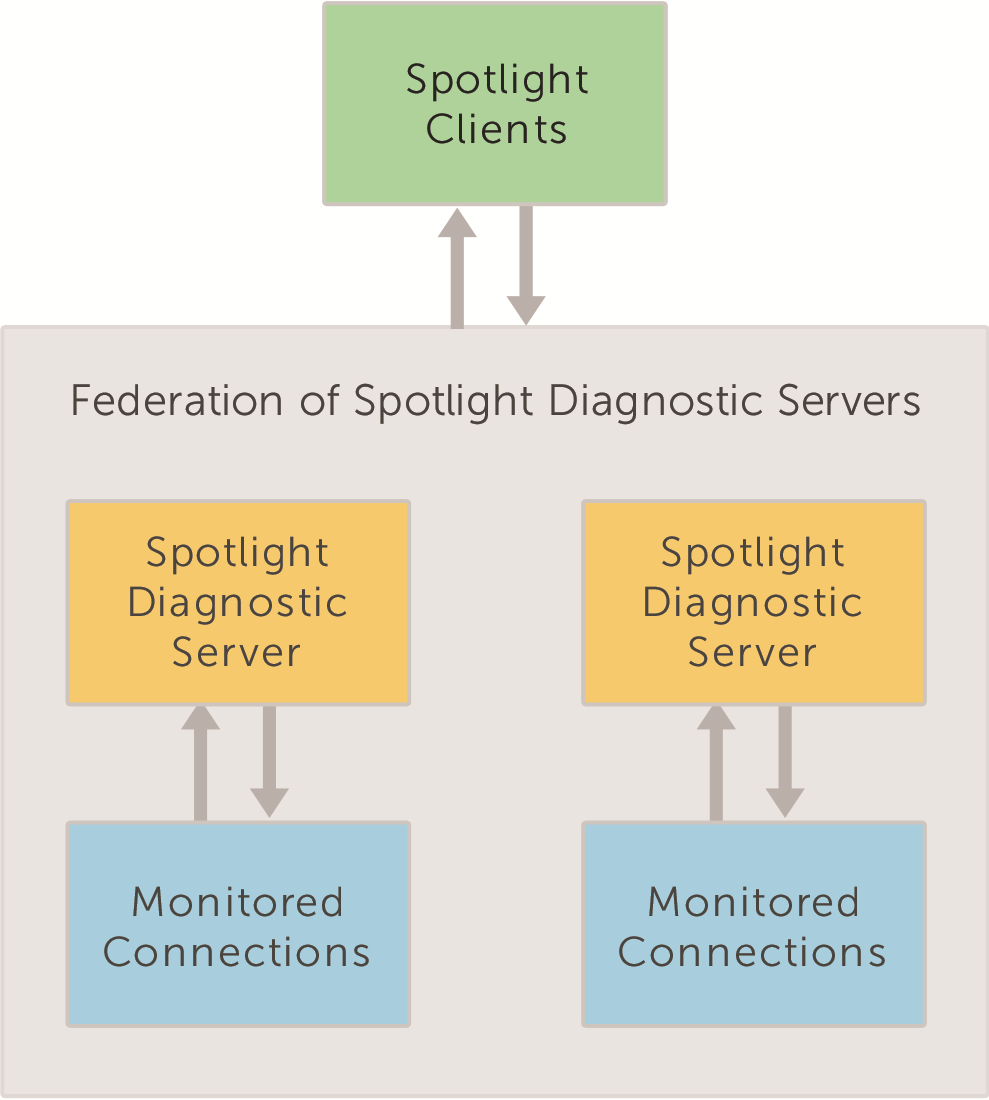
6 Steps to make (add to) a federation 1. Open a Spotlight Client. If the federation already exists, open any Spotlight Client connected to the federation. When federating two separate Spotlight Diagnostic Server, open a Spotlight Client connected to either Spotlight Diagnostic Server. 2. From the Spotlight Client, click Configure Diagnostic Server Federate Diagnostic Servers. 3. Click Add. Select the host of the Spotlight Diagnostic Server. The Spotlight Diagnostic Server should be installed and operational and accessible to the Spotlight Client. Table 1: On adding a Spotlight Diagnostic Server to the federation Spotlight Monitored connections Description The Spotlight Clients connected to the Spotlight Diagnostic Server that has been added to the federation now connect to the federation of Spotlight Diagnostic Server. Spotlight Clients in the federation monitor connections from all Spotlight Diagnostic Server in the federation. Data to / from monitored connections is communicated directly from Spotlight Diagnostic Server to Spotlight Client. It is required that all Spotlight Clients have open communications with all Spotlight Diagnostic Server in the federation. Custom views Alarm Actions Spotlight Clients in the federation have access to all custom views in the federation. The custom views from the newly joined Spotlight Diagnostic Server will be accessible to all Spotlight Clients in the federation. Any two custom views with the same name will be merged into the one view. Spotlight Clients in the federation have access to all Alarm Action rules in the federation. The condition "The Diagnostic Server is " is added to every pre-existing Alarm Action rule from 6
7 Spotlight Description the newly added Spotlight Diagnostic Server. Do nothing for Alarm Action rules specific to that Spotlight Diagnostic Server. For Alarm Action rules applicable to the federation, remove the condition "The Diagnostic Server is " and delete duplicate rules. Planned Outages Configuration templates Spotlight license Spotlight Clients in the federation have access to all scheduled planned outages for all Spotlight connections monitored in the federation. Spotlight Clients in the federation have access to all configuration templates in the federation. The configuration templates from the newly joined Spotlight Diagnostic Server will be accessible to all Spotlight Clients in the federation. Any two templates with the same name will both be renamed to remain separate. The Spotlight license applied to the Configuration server is applied to the federation. For more information, see Configuration server on page 11. 7
8 4 Monitoring connections Custom views Any monitored connection in the federation can be added to any custom view. All Spotlight Clients have access to all custom views in the federation. When a Spotlight Diagnostic Server joins a federation then the custom views from that Spotlight Diagnostic Server will be seen by all Spotlight Clients in the federation. Any two custom views with the same name will be merged into one view. NOTE: Spotlight Enterprise Views from all Spotlight Diagnostic Server in the federation will also be seen by all Spotlight Clients in the federation. If there are two Enterprise Views with the same name, the Enterprise View from the Configuration server will override the local Enterprise View. Note that Spotlight is deprecating Enterprise Views. We recommend taking advantage of the new Custom Views to monitor your SQL Server instances in groups. Configure monitoring Configure monitoring of Spotlight connections from any Spotlight Client in the federation. Icon Ribbon Select Connections Alarms Alarm Actions Scheduling Planned Outage SQL Analysis Description Manage the connections monitored by Spotlight. For more information, see Add connections to the federation on page 9. Set the thresholds and severities that determine when an alarm is raised. Select any template or monitored connection in the federation to configure. Set actions for Spotlight to take when an alarm is raised. Alarm Action Rules may be specific to one Spotlight Diagnostic Server or applied to all Spotlight Diagnostic Server in the federation. Spotlight collects data according to these set schedules. Select any template or monitored connection in the federation to configure. Enter the scheduled maintenance times for the connections Spotlight monitors so Spotlight does not raise alarms and attempt to collect data during the outage period. Planned outages are listed for all monitored connections in the federation. Enable SQL Analysis. Configure the filters used to gather SQL Analysis data. Select any 8
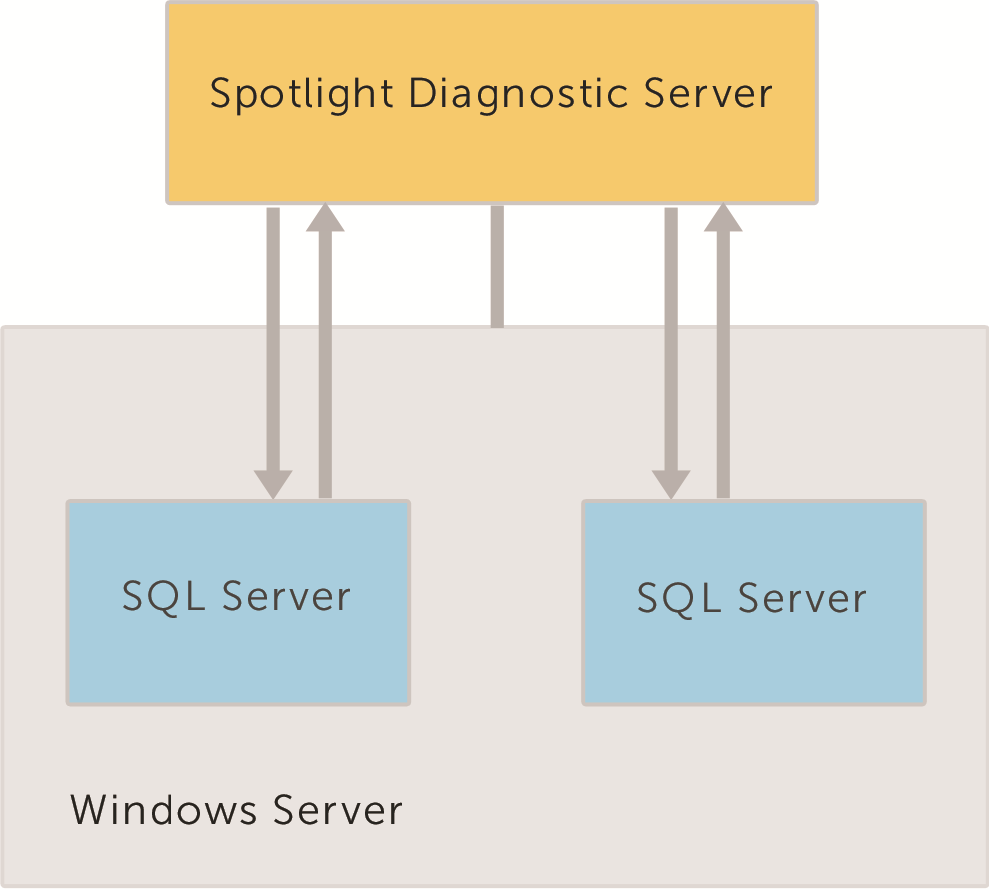
9 Icon Ribbon Select SQL Server Response Time Custom Counters Error Log Entries Monitored Files Description template or monitored connection in the federation to configure. Set the SQL statement that is used to measure SQL Server response time. Select any template or monitored connection in the federation to configure. Create and configure Custom Counters for monitoring connections to SQL Servers and Windows servers. Select any template or monitored connection in the federation to configure. Request Spotlight raise an alarm when a specified entry is logged in the SQL Server error log. Select any template or monitored connection in the federation to configure. Track the growth of specified files (usually log files) on monitored Windows Servers. Select any template or monitored Windows connection in the federation to configure. Configuration templates Spotlight Clients in the federation have access to all configuration templates in the federation. The configuration templates from newly joined Spotlight Diagnostic Server will be accessible to all Spotlight Clients in the federation. Any two templates with the same name will both be renamed to remain separate. Add connections to the federation You will be prompted to select the Spotlight Diagnostic Server when you add a connection to a federated system. The new connection will be monitored through the selected Spotlight Diagnostic Server. NOTE: A single Spotlight Diagnostic Server is designed to monitor a maximum of 100 SQL Servers, Analysis Services or Replication instances and 100 Windows servers. SQL Server connections A SQL Server instance should be monitored on the same Spotlight Diagnostic Server as its SQL Server host. 9
10 Virtual environments Where Windows hosts are in a virtual environment the Windows host should be monitored by the same Spotlight Diagnostic Server as the associated Hyper-V / VMware server. 10

11 5 Configure operations Any Spotlight Client in the federation can configure the operations of any Spotlight Diagnostic Server in the federation. 1. Open the Spotlight Client. 2. Click Configure Diagnostic Server. 3. Select the Spotlight Diagnostic Server operation to configure (Auto Update - Use of Extended Events). 4. The dialog to configure the selected Spotlight Diagnostic Server operation opens. Select the Spotlight Diagnostic Server and set the new configuration. Any Spotlight Client in the federation can configure the operations of the federation. 1. Open the Spotlight Client. 2. Click Configure Diagnostic Server Federate Diagnostic Servers. 3. Add / Remove Spotlight Diagnostic Server from the federation and set the Configuration server. Configuration server One Spotlight Diagnostic Server in the federation is selected as the Configuration server. Configurations shared between the Spotlight Diagnostic Server in the federation are applied to the Configuration server. Other Spotlight Diagnostic Server in the federation poll the Configuration server for updates. 11
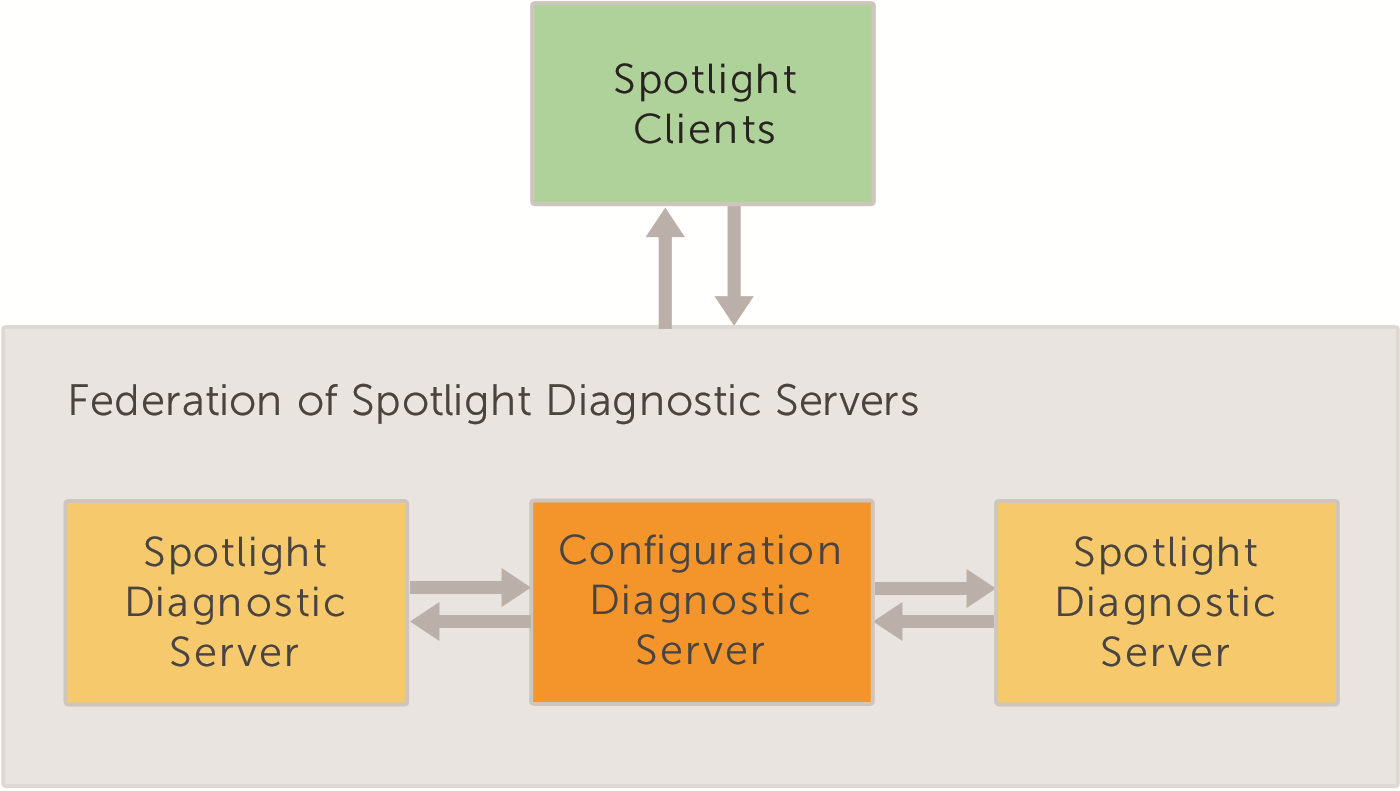
12 The following configurations are applied directly from the Spotlight Client to the Configuration server. Other Spotlight Diagnostic Server in the federation poll for updates from the Configuration server. Custom views Enterprise views Configured Alarm Actions Planned Outages Configuration templates NOTE: If the Configuration server is down then any changes made by a Spotlight Client to any of the above configurations will not be saved. If any other Spotlight Diagnostic Server in the federation is offline then when it is online again it will poll to receive updates from the Configuration server. The Configuration server keeps transactions (recording changes to the above configurations) for 5 days. Steps to assign the Configuration server 1. Open a Spotlight Client in the federation. 2. From the Spotlight Client, click Configure Diagnostic Server Federate Diagnostic Servers. 3. Select the Spotlight Diagnostic Server. 4. Click Set as Configuration server. Spotlight Diagnostic Server authenticate with the Configuration server using Windows authentication over TCP Port For each Spotlight Diagnostic Server in the federation, the Windows account that the Spotlight Diagnostic Server is running under must be valid in the domain of the Configuration server. The Configuration server should have a reliable and fast Internet connection to each of the other Spotlight Diagnostic Server in the federation. 12

13 Spotlight Clients and the primary server Connect a Spotlight Client to a federation by connecting the Spotlight Client to any Spotlight Diagnostic Server in the federation. This is the primary server for the Spotlight Client. Connect a Spotlight Client to a federation 1. Click Configure Diagnostic Server. 2. Click Select a Diagnostic Server 3. In the Host field type or select the machine name where the Spotlight Diagnostic Server is installed. Federation and playback data In a federation of Spotlight Diagnostic Servers, each Spotlight Diagnostic Server connects to its own Playback Database. 13

14 Federation and the Spotlight Cloud In a federation of Spotlight Diagnostic Server each Spotlight Diagnostic Server is independently configured for Spotlight Cloud. 14
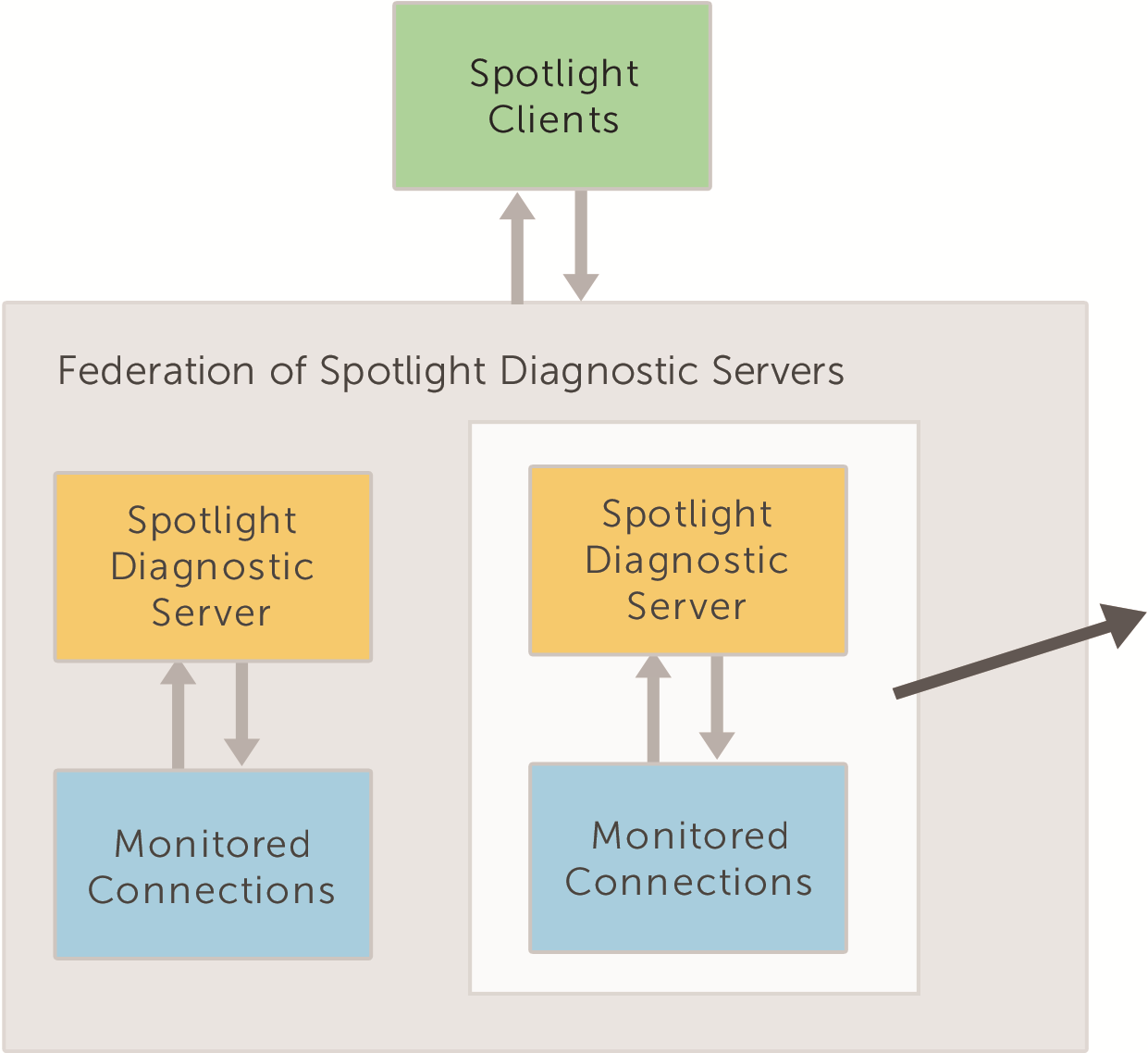
15 6 Remove (break apart) a federation Steps to remove a Spotlight Diagnostic Server from the federation 1. Open a Spotlight Client in the federation. 2. From the Spotlight Client, click Configure Diagnostic Server Federate Diagnostic Servers. 3. Select the Spotlight Diagnostic Server to remove. 4. Click Remove. 5. Confirm your request to remove the Spotlight Diagnostic Server from the federation. Table 2: The federation now the Spotlight Diagnostic Server has been removed Spotlight Monitored connections Description Spotlight Clients connected to the federation can no longer monitor connections from the removed Spotlight Diagnostic Server. Spotlight Clients with the removed Spotlight Diagnostic Server as their primary server are no 15
16 Spotlight Description longer connected to the federation. Custom views Alarm Actions Planned Outages Configuration templates Spotlight license The Custom Views in the federation no longer show monitored connections from the removed Spotlight Diagnostic Server. All Alarm Actions with condition "Where the Diagnostic Server is " the removed Spotlight Diagnostic Server are removed from the federation. Planned Outages for the federation no longer show monitored connections from the removed Spotlight Diagnostic Server. All Configuration templates remain available to the federation. The Spotlight license for the federation does not change. Note that if the Configuration server is removed from the federation the Spotlight license does change to the license of the federation's new Configuration server. Table 3: The Spotlight Diagnostic Server that was removed from the federation Spotlight Monitored connections Custom views Alarm Actions Planned Outages Configuration templates Spotlight license Description Spotlight Clients with the removed Spotlight Diagnostic Server as their primary server are no longer connected to the federation. They monitor connections directly from the Spotlight Diagnostic Server. Any Spotlight Client connecting to the Spotlight Diagnostic Server will have access to all Custom Views from the federation. The Custom Views show only connections monitored directly from the Spotlight Diagnostic Server. Alarm Actions with condition "Where the Diagnostic Server is " the removed Spotlight Diagnostic Server are available to the Spotlight Diagnostic Server when it is removed from the federation. Alarm Actions from the federation that do not have the condition "Where the Diagnostic Server is " are also available to the Spotlight Diagnostic Server when it is removed from the federation. Any Spotlight Client connecting to the Spotlight Diagnostic Server will have access to all Planned Outages on connections monitored by that Spotlight Diagnostic Server. The configuration templates from the federation remain accessible to the Spotlight Diagnostic Server after it has been removed from the federation. The Spotlight Diagnostic Server takes on the Spotlight license that was given to it when it joined the federation; that is the Spotlight license applied to the Configuration server at the time the Spotlight Diagnostic Server joined the federation. 16
17 About Dell Abo ut De ll Dell listens to customers and delivers worldwide innovative technology, business solutions and services they trust and value. For more information, visit Contacting Dell For sales or other inquiries, visit or call Technical support resources Technical support is available to customers who have purchased Dell software with a valid maintenance contract and to customers who have trial versions. To access the Support Portal, go to The Support Portal provides self-help tools you can use to solve problems quickly and independently, 24 hours a day, 365 days a year. In addition, the Support Portal provides direct access to product support engineers through an online Service Request system. The site enables you to: Create, update, and manage Service Requests (cases) View Knowledge Base articles Obtain product notifications Download software. For trial software, go to View how-to videos Engage in community discussions Chat with a support engineer 17
Spotlight Management Pack for SCOM
 Spotlight Management Pack for SCOM User Guide March 2015 The Spotlight Management Pack for SCOM is used to display data from alarms raised by Spotlight on SQL Server Enterprise in SCOM (System Center Operations
Spotlight Management Pack for SCOM
 Spotlight Management Pack for SCOM User Guide January 2015 The is used to display data from alarms raised by Spotlight on SQL Server Enterprise in SCOM (System Center Operations Manager). About System
Dell One Identity Defender 5.8.1
 Dell November 20, 2015 This hotfix for Dell One Identity Defender may receive additional testing. If you are not severely affected by the issue this hotfix addresses, it is recommended that you wait for
Dell Spotlight on Active Directory 6.8.3. Server Health Wizard Configuration Guide
 Dell Spotlight on Active Directory 6.8.3 Server Health Wizard Configuration Guide 2013 Dell Software Inc. ALL RIGHTS RESERVED. This guide contains proprietary information protected by copyright. The software
Dell Active Administrator 8.0
 What s new in Dell Active Administrator 8.0 January 2016 Dell Active Administrator 8.0 is the upcoming release of Dell Software's complete solution for managing Microsoft Active Directory security auditing,
Configuring SonicOS for Microsoft Azure
 Configuring SonicOS for Microsoft Azure December 2015 Topics: Purpose Deployment Considerations Supported Platforms Configuring a Policy-based VPN Configuring a Route-based VPN Purpose This details how
Dell Statistica 13.0. Statistica Enterprise Installation Instructions
 Dell Statistica 13.0 2015 Dell Inc. ALL RIGHTS RESERVED. This guide contains proprietary information protected by copyright. The software described in this guide is furnished under a software license or
Dell InTrust 11.0. Preparing for Auditing Microsoft SQL Server
 2014 Dell Inc. ALL RIGHTS RESERVED. This guide contains proprietary information protected by copyright. The software described in this guide is furnished under a software license or nondisclosure agreement.
Dell Spotlight on Active Directory 6.8.4. Deployment Guide
 Dell Spotlight on Active Directory 6.8.4 2014 Dell Inc. ALL RIGHTS RESERVED. This guide contains proprietary information protected by copyright. The software described in this guide is furnished under
Dell Statistica. Statistica Document Management System (SDMS) Requirements
 Dell Statistica Statistica Document Management System (SDMS) Requirements 2014 Dell Inc. ALL RIGHTS RESERVED. This guide contains proprietary information protected by copyright. The software described
Dell Statistica Document Management System (SDMS) Installation Instructions
 Dell Statistica Document Management System (SDMS) Installation Instructions 2015 Dell Inc. ALL RIGHTS RESERVED. This guide contains proprietary information protected by copyright. The software described
Dell Recovery Manager for Active Directory 8.6. Quick Start Guide
 Dell Recovery Manager for Active Directory 8.6 2014 Dell Inc. ALL RIGHTS RESERVED. This guide contains proprietary information protected by copyright. The software described in this guide is furnished
Dell One Identity Manager 7.0. Help Desk Module Administration Guide
 Dell 2015 Dell Inc. ALL RIGHTS RESERVED. This guide contains proprietary information protected by copyright. The software described in this guide is furnished under a software license or nondisclosure
New Features and Enhancements
 Dell Migration Manager for SharePoint 4.7 Build number: 4.7.20141207 December 9, 2014 These release notes provide information about the Dell Migration Manager for SharePoint release. New Features and Enhancements
Security Analytics Engine 1.0. Help Desk User Guide
 2015 Dell Inc. ALL RIGHTS RESERVED. This guide contains proprietary information protected by copyright. The software described in this guide is furnished under a software license or nondisclosure agreement.
Dell InTrust 11.0. Preparing for Auditing Cisco PIX Firewall
 2014 Dell Inc. ALL RIGHTS RESERVED. This guide contains proprietary information protected by copyright. The software described in this guide is furnished under a software license or nondisclosure agreement.
Dell InTrust 11.0. Preparing for Auditing and Monitoring Microsoft IIS
 Preparing for Auditing and Monitoring Microsoft IIS 2014 Dell Inc. ALL RIGHTS RESERVED. This guide contains proprietary information protected by copyright. The software described in this guide is furnished
Dell Unified Communications Command Suite - Diagnostics 8.0. Data Recorder User Guide
 Dell Unified Communications Command Suite - Diagnostics 8.0 2014 Dell Inc. ALL RIGHTS RESERVED. This guide contains proprietary information protected by copyright. The software described in this guide
Spotlight on SQL Server Enterprise 11.2. Deployment Guide
 Spotlight on SQL Server Enterprise 11.2 2015 Dell Inc. ALL RIGHTS RESERVED. This guide contains proprietary information protected by copyright. The software described in this guide is furnished under a
About Recovery Manager for Active
 Dell Recovery Manager for Active Directory 8.6.1 May 30, 2014 These release notes provide information about the Dell Recovery Manager for Active Directory release. About Resolved issues Known issues System
Dell NetVault Bare Metal Recovery for Dell NetVault Backup Server 10.5. User s Guide
 Dell NetVault Bare Metal Recovery for Dell NetVault Backup Server 10.5 User s Guide Copyright 2015 Dell Inc. All rights reserved. This product is protected by U.S. and international copyright and intellectual
Dell InTrust 11.0 Best Practices Report Pack
 Complete Product Name with Trademarks Version Dell InTrust 11.0 Best Practices Report Pack November 2014 Contents About this Document Auditing Domain Controllers Auditing Exchange Servers Auditing File
Enterprise Reporter Report Library
 Enterprise Reporter Overview v2.5.0 This document contains a list of the reports in the Enterprise Reporter. Active Directory Reports Change History Reports Computer Reports File Storage Analysis Reports
Dell Migration Manager for Enterprise Social What Can and Cannot Be Migrated
 Dell Migration Manager for Enterprise Social What Can and Cannot Be Migrated MMES - What Can and Cannot Be Migrated First Release - April 2015 2015 Dell Inc. ALL RIGHTS RESERVED. This guide contains proprietary
Spotlight on SQL Server Enterprise 11.0.2. Getting Started Guide
 Spotlight on SQL Server Enterprise 11.0.2 2014 Dell Inc. ALL RIGHTS RESERVED. This guide contains proprietary information protected by copyright. The software described in this guide is furnished under
Dell One Identity Cloud Access Manager 8.0.1 - How to Configure Microsoft Office 365
 Dell One Identity Cloud Access Manager 8.0.1 - How to Configure Microsoft Office 365 May 2015 This guide describes how to configure Microsoft Office 365 for use with Dell One Identity Cloud Access Manager
Dell Statistica Web Data Entry
 Dell Statistica Web Data Entry for Release 13.0 September 2015 This administrator guide provides information about Dell Statistica Web Data Entry for release 13.0. Topics: Overview Definitions Unique Values,
About Dell SonicWALL Analyzer 8.1
 Complete Product Name with Trademarks Version Dell SonicWALL Analyzer 8.1 February 2016 These release notes provide information about the Dell SonicWALL Analyzer 8.1 release. Topics: About Pre 8.1 Upgrade
Dell NetVault Backup Plug-in for SQL Server 10.0.1
 Dell NetVault Backup Plug-in for SQL Server 10.0.1, Revision 1 February 2015 These release notes provide information about the Dell NetVault Backup Plug-in for SQL Server release. About Dell NetVault Backup
Dell One Identity Cloud Access Manager 7.0.2. Installation Guide
 Dell One Identity Cloud Access Manager 7.0.2 2014 Dell Inc. ALL RIGHTS RESERVED. This guide contains proprietary information protected by copyright. The software described in this guide is furnished under
About Dell Statistica 12.6... 2
 Complete Product Name with Trademarks Version Dell TM Statistica TM 12.6 Contents Dell TM Statistica TM... 1 About Dell Statistica 12.6... 2 New Features... 2 Workspace Enhancements: Statistica Enterprise
Dell Enterprise Reporter 2.5. Configuration Manager User Guide
 Dell Enterprise Reporter 2.5 2014 Dell Inc. ALL RIGHTS RESERVED. This guide contains proprietary information protected by copyright. The software described in this guide is furnished under a software license
Dell NetVault Backup Plug-in for SQL Server 6.1
 Dell NetVault Backup Plug-in for SQL Server 6.1 April 2014 These release notes provide information about the Dell NetVault Backup Plug-in for SQL Server release. About Enhancements Resolved issues Known
Dell One Identity Cloud Access Manager 8.0 - How To Deploy Cloud Access Manager in a Virtual Private Cloud
 Dell One Identity Cloud Access Manager 8.0 - How To Deploy Cloud Access Manager in a Virtual Private Cloud February 2015 This guide describes how to deploy Dell One Identity Cloud Access Manager within
Dell InTrust 11.0. Preparing for Auditing CheckPoint Firewall
 2014 Dell Inc. ALL RIGHTS RESERVED. This guide contains proprietary information protected by copyright. The software described in this guide is furnished under a software license or nondisclosure agreement.
Spotlight on SQL Server 11.1.1
 Spotlight on SQL Server 11.1.1 Release Notes March 2015 These release notes provide information about the Spotlight on SQL Server Enterprise release. About New features Enhancements Resolved issues Known
Spotlight on SQL Server 11.0.2
 Spotlight on SQL Server 11.0.2 Release Notes January 2015 These release notes provide information about the Spotlight on SQL Server Enterprise release. About New features Deprecated Features Enhancements
Dell NetVault Backup Plug-in for Advanced Encryption 2.2. User s Guide
 Dell Backup Plug-in for Advanced Encryption 2.2 2014 Dell Inc. ALL RIGHTS RESERVED. This guide contains proprietary information protected by copyright. The software described in this guide is furnished
Toad for Oracle 12.5.1. Installation Guide
 Toad for Oracle 12.5.1 Installation Guide Contents Installation Requirements 3 System Requirements 3 Required Windows Privileges 7 Install Toad 8 Install or Upgrade Toad 8 Install Toad on Citrix or Remote
Dell Recovery Manager for Active Directory 8.6. Deployment Guide
 Dell Recovery Manager for Active Directory 8.6 2014 Dell Inc. ALL RIGHTS RESERVED. This guide contains proprietary information protected by copyright. The software described in this guide is furnished
Dell Migration Manager for Exchange 8.11. Product Overview
 Dell Migration Manager for Exchange 8.11 2014 Dell Inc. ALL RIGHTS RESERVED. This guide contains proprietary information protected by copyright. The software described in this guide is furnished under
Dell One Identity Cloud Access Manager 8.0.1- How to Configure for High Availability
 Dell One Identity Cloud Access Manager 8.0.1- How to Configure for High Availability May 2015 Cloning the database Cloning the STS host Cloning the proxy host This guide describes how to extend a typical
SafeNet Authentication Manager 8.2 and Windows Azure. Quick Start Guide
 SafeNet Authentication Manager 8.2 and Windows Azure Copyright 2013 SafeNet, Inc. All rights reserved. All attempts have been made to make the information in this document complete and accurate. SafeNet,
Security Explorer 9.5. About Security Explorer 9.5. New features. June 2014
 June 2014 These release notes provide information about Dell. About New features s Known issues System requirements Product licensing Getting started with Security Explorer Globalization About Dell About
7.5 7.5. Spotlight on Messaging. Evaluator s Guide
 7.5 Spotlight on Messaging 7.5 Evaluator s Guide 2010 Quest Software, Inc. ALL RIGHTS RESERVED. This guide contains proprietary information protected by copyright. The software described in this guide
Dell Command Integration Suite for System Center 2012. Version 4.1. Installation Guide
 Dell Command Integration Suite for System Version 4.1 Installation Guide Notes, cautions, and warnings NOTE: A NOTE indicates important information that helps you make better use of your computer. CAUTION:
Content Filtering Client Policy & Reporting Administrator s Guide
 Content Filtering Client Policy & Reporting Administrator s Guide Notes, Cautions, and Warnings NOTE: A NOTE indicates important information that helps you make better use of your system. CAUTION: A CAUTION
Dell Recovery Manager for Active Directory 8.6.3
 Dell Recovery Manager for Active Directory 8.6.3 May 15, 2015 These release notes provide information about the Dell Recovery Manager for Active Directory release. Resolved Issues Known Issues System Requirements
How To Plan A Desktop Workspace Infrastructure
 Dell Copyright 2014 Moka5, Inc. All rights reserved. Moka5, MokaFive, LivePC, and the Moka5 logo are trademarks of Moka5, Inc. All other product or company names may be trademarks of their respective owners.
Dell NetVault Backup Plug-in for Hyper-V 10.0.1. User s Guide
 Dell NetVault Backup Plug-in for Hyper-V 10.0.1 2015 Dell Inc. ALL RIGHTS RESERVED. This guide contains proprietary information protected by copyright. The software described in this guide is furnished
Dell One Identity Cloud Access Manager 8.0.1 - How to Configure for SSO to SAP NetWeaver using SAML 2.0
 Dell One Identity Cloud Access Manager 8.0.1 - How to Configure for SSO to SAP NetWeaver using SAML 2.0 May 2015 About this guide Prerequisites and requirements NetWeaver configuration Legal notices About
Dell SupportAssist Version 2.0 for Dell OpenManage Essentials Quick Start Guide
 Dell SupportAssist Version 2.0 for Dell OpenManage Essentials Quick Start Guide Notes, Cautions, and Warnings NOTE: A NOTE indicates important information that helps you make better use of your computer.
Cloud Attached Storage
 Using CTERA Agent in VDI mode Cloud Attached Storage November 2014 Version 4.1 Copyright 2009-2014 CTERA Networks Ltd. All rights reserved. No part of this document may be reproduced in any form or by
Application Performance Monitoring for WhatsUp Gold v16.1 Getting Started Guide
 Application Performance Monitoring for WhatsUp Gold v16.1 Getting Started Guide Introduction to WhatsUp Gold APM Welcome to APM APM monitors applications across multiple devices, servers, and systems,
Foglight for SQL Server 5.7.0. Getting Started Guide
 Foglight for SQL Server 5.7.0 2014 Dell Inc. ALL RIGHTS RESERVED. This guide contains proprietary information protected by copyright. The software described in this guide is furnished under a software
Cloud Attached Storage
 Backing Up and Restoring SQL Server Databases Cloud Attached Storage February 2014 Version 4.0 Copyright 2009-2014 CTERA Networks Ltd. All rights reserved. No part of this document may be reproduced in
StreamServe Persuasion SP5 Control Center
 StreamServe Persuasion SP5 Control Center User Guide Rev C StreamServe Persuasion SP5 Control Center User Guide Rev C OPEN TEXT CORPORATION ALL RIGHTS RESERVED United States and other international patents
Defender 5.7 - Token Deployment System Quick Start Guide
 Defender 5.7 - Token Deployment System Quick Start Guide This guide describes how to install, configure and use the Defender Token Deployment System, based on default settings and how to self register
EventTracker: Support to Non English Systems
 EventTracker: Support to Non English Systems Publication Date: April 25, 2012 EventTracker 8815 Centre Park Drive Columbia MD 21045 www.eventtracker.com Introduction This document has been prepared to
Dell One Identity Cloud Access Manager 8.0 - How to Configure vworkspace Integration
 Dell One Identity Cloud Access Manager 8.0 - How to Configure vworkspace Integration February 2015 This guide describes how to configure Dell One Identity Cloud Access Manager to communicate with a Dell
Kaseya 2. User Guide. Version 1.1
 Kaseya 2 Directory Services User Guide Version 1.1 September 10, 2011 About Kaseya Kaseya is a global provider of IT automation software for IT Solution Providers and Public and Private Sector IT organizations.
Backing Up and Restoring Microsoft Hyper-V Server Virtual Machines. Cloud Attached Storage. February 2014 Version 4.0
 Backing Up and Restoring Microsoft Hyper-V Server Virtual Machines Cloud Attached Storage February 2014 Version 4.0 Copyright 2009-2014 CTERA Networks Ltd. All rights reserved. No part of this document
Veeam Backup Enterprise Manager. Version 7.0
 Veeam Backup Enterprise Manager Version 7.0 User Guide August, 2013 2013 Veeam Software. All rights reserved. All trademarks are the property of their respective owners. No part of this publication may
Spotlight on SQL Server 8.1. Deployment Guide
 Spotlight on SQL Server 8.1 Deployment Guide 2011 Quest Software, Inc. ALL RIGHTS RESERVED. This guide contains proprietary information protected by copyright. The software described in this guide is furnished
Cloud Attached Storage 5.0
 Release Notes Cloud Attached Storage 5.0 March 2015 2015 Cloud Attached Storage 5.0 Release Notes 1 1 Release Contents Copyright 2009-2015 CTERA Networks Ltd. All rights reserved. No part of this document
Windows Server Update Services 3.0 SP2 Step By Step Guide
 Windows Server Update Services 3.0 SP2 Step By Step Guide Microsoft Corporation Author: Anita Taylor Editor: Theresa Haynie Abstract This guide provides detailed instructions for installing Windows Server
Zimbra Import Wizard for Microsoft Outlook
 Zimbra Import Wizard for Microsoft Outlook User Guide ZCS 7.1 March 2011 Legal Notices Copyright 2005-2011 VMware, Inc. All rights reserved. This product is protected by U.S. and international copyright
Remote Access Platform. Architecture and Security Overview
 Remote Access Platform Architecture and Security Overview NOTICE This document contains information about one or more ABB products and may include a description of or a reference to one or more standards
Dell Recovery Manager for Active Directory 8.6.0
 Dell Recovery Manager for Active Directory 8.6.0 April, 2014 These release notes provide information about the Recovery Manager for Active Directory release. About Recovery Manager for Active Directory
Test Lab Guide: Creating a Windows Azure AD and Windows Server AD Environment using Azure AD Sync
 Test Lab Guide: Creating a Windows Azure AD and Windows Server AD Environment using Azure AD Sync Microsoft Corporation Published: December 2014 Author: Mark Grimes Acknowledgements Special thanks to the
PANO MANAGER CONNECTOR FOR SCVMM& HYPER-V
 PANO MANAGER CONNECTOR FOR SCVMM& HYPER-V Version 6.0.8 Published: DEC-2013 Updated: 24 MAR 2014 2005-2014 Propalms Ltd. All rights reserved. The information contained in this document represents the current
Lepide Active Directory Self Service. Installation Guide. Lepide Active Directory Self Service Tool. Lepide Software Private Limited Page 1
 Installation Guide Lepide Active Directory Self Service Tool Lepide Software Private Limited Page 1 Lepide Software Private Limited, All Rights Reserved This User Guide and documentation is copyright of
CaseWare Time. CaseWare Cloud Integration Guide. For Time 2015 and CaseWare Cloud
 CaseWare Time CaseWare Cloud Integration Guide For Time 2015 and CaseWare Cloud Copyright and Trademark Notice Copyright. 2015 CaseWare International Inc. ( CWI ). All Rights Reserved. Use, duplication,
How to Test Out Backup & Replication 6.5 for Hyper-V
 How to Test Out Backup & Replication 6.5 for Hyper-V Mike Resseler May, 2013 2013 Veeam Software. All rights reserved. All trademarks are the property of their respective owners. No part of this publication
Deploying Citrix MetaFrame on IBM eserver BladeCenter with FAStT Storage Planning / Implementation
 Deploying Citrix MetaFrame on IBM eserver BladeCenter with FAStT Storage Planning / Implementation Main Managing your Citrix MetaFrame solution on IBM eserver BladeCenter To better manage Citrix MetaFrame
Retail Deployment Guide. Microsoft Dynamics AX 2012 Feature Pack
 Retail Deployment Guide Microsoft Dynamics AX 2012 Feature Pack Microsoft Corporation February 2012 Microsoft Dynamics is a line of integrated, adaptable business management solutions that enables you
vcloud Automation Center Support Matrix vcloud Automation Center 5.1
 vcloud Automation Center Support Matrix vcloud Automation Center 5.1 This document supports the version of each product listed and supports all subsequent versions until the document is replaced by a new
Hyper-V Server 2008 Setup and Configuration Tool Guide
 Hyper-V Server 2008 Setup and Configuration Tool Guide Microsoft Corporation Published: October 2008 Author: Cynthia Nottingham Abstract This guide will help you set up and configure Microsoft Hyper-V
VEEAM ONE 8 RELEASE NOTES
 VEEAM ONE 8 RELEASE NOTES This Release Notes document provides last-minute information about Veeam ONE 8 Update 2, including system requirements, installation instructions as well as relevant information
Configuring Single Sign-on from the VMware Identity Manager Service to Dropbox
 Configuring Single Sign-on from the VMware Identity Manager Service to Dropbox VMware Identity Manager SEPTEMBER 2015 V1 Configuring Single Sign-On from VMware Identity Manager to Dropbox Table of Contents
Integration with Active Directory
 VMWARE TECHNICAL NOTE VMware ACE Integration with Active Directory This document explains how to set up Active Directory to use with VMware ACE. This document contains the following topics: About Active
Pro-Watch Software Suite Installation Guide. 2011 Honeywell Release 3.81
 Pro-Watch Software Suite Release 3.81 Installation Guide Document 7-901073, Revision C Pro-Watch Software Suite Installation Guide 2011 Honeywell Release 3.81 Copyright 2011 Honeywell. All rights reserved.
TSM Studio Server User Guide 2.9.0.0
 TSM Studio Server User Guide 2.9.0.0 1 Table of Contents Disclaimer... 4 What is TSM Studio Server?... 5 System Requirements... 6 Database Requirements... 6 Installing TSM Studio Server... 7 TSM Studio
How to Create a Basic VPN Connection in Panda GateDefender eseries
 How to Create a Basic VPN Connection in Panda GateDefender eseries Support Documentation How-to guides for configuring VPNs with Panda GateDefender eseries Panda Security wants to ensure you get the most
Dell One Identity Quick Connect for Cloud Services 3.6.1
 Dell One Identity Quick Connect for Cloud Services 3.6.1 March 2015 These release notes provide information about the Dell One Identity Quick Connect for Cloud Services release. About New features Resolved
Vidyo Server for Microsoft Lync
 Vidyo Server for Microsoft Lync Quick User Guide Product Version 1.0 Document Version A August, 2014 2014 Vidyo, Inc. all rights reserved. Vidyo s technology is covered by one or more issued or pending
RSA Authentication Agent 7.2 for Microsoft Windows Installation and Administration Guide
 RSA Authentication Agent 7.2 for Microsoft Windows Installation and Administration Guide Contact Information Go to the RSA corporate web site for regional Customer Support telephone and fax numbers: www.rsa.com
GRAVITYZONE HERE. Deployment Guide VLE Environment
 GRAVITYZONE HERE Deployment Guide VLE Environment LEGAL NOTICE All rights reserved. No part of this document may be reproduced or transmitted in any form or by any means, electronic or mechanical, including
Installing and Configuring vcenter Multi-Hypervisor Manager
 Installing and Configuring vcenter Multi-Hypervisor Manager vcenter Server 5.1 vcenter Multi-Hypervisor Manager 1.1 This document supports the version of each product listed and supports all subsequent
Veeam Task Manager for Hyper-V
 Veeam Task Manager for Hyper-V Version 1.0 User Guide July, 2014 2014 Veeam Software. All rights reserved. All trademarks are the property of their respective owners. No part of this publication may be
Embarcadero Performance Center 2.7 Installation Guide
 Embarcadero Performance Center 2.7 Installation Guide Copyright 1994-2009 Embarcadero Technologies, Inc. Embarcadero Technologies, Inc. 100 California Street, 12th Floor San Francisco, CA 94111 U.S.A.
Implementing Endpoint Protection in System Center 2012 R2 Configuration Manager
 Implementing Endpoint Protection in System Center 2012 R2 Configuration Manager Implementing Endpoint Protection in System Center 2012 R2 Configuration Manager This document is for informational purposes
Configuring and Managing Microsoft System Center Essentials 2010
 Configuring and Managing Microsoft System Center Essentials 2010 50373: Configuring and Managing Microsoft System Center Essentials 2010 (2 Days) About this Course This two-day instructor-led course provides
Private Cloud 201 How to Build a Private Cloud
 Private Cloud 201 How to Build a Private Cloud Chris E. Avis Sr. IT Pro Evangelist Microsoft Corp. http://chrisavis.com Presented at Seattle Windows Networking User Group January 4, 2012 al 1 The Cloudscape
VMware/Hyper-V Backup Plug-in User Guide
 VMware/Hyper-V Backup Plug-in User Guide COPYRIGHT No part of this publication may be reproduced, stored in a retrieval system, or transmitted in any form or by any means, electronic, mechanical, photocopying,
Sage HRMS 2014 Sage Employee Self Service Tech Installation Guide for Windows 2003, 2008, and 2012. October 2013
 Sage HRMS 2014 Sage Employee Self Service Tech Installation Guide for Windows 2003, 2008, and 2012 October 2013 This is a publication of Sage Software, Inc. Document version: October 17, 2013 Copyright
Dell One Identity Quick Connect for Cloud Services 3.6.0
 Dell One Identity Quick Connect for Cloud Services 3.6.0 August, 2014 These release notes provide information about the Dell One Identity Quick Connect for Cloud Services release. About New features Resolved
vcenter Chargeback User s Guide vcenter Chargeback 1.0 EN-000186-00
 vcenter Chargeback 1.0 EN-000186-00 You can find the most up-to-date technical documentation on the VMware Web site at: http://www.vmware.com/support/ The VMware Web site also provides the latest product
RSA Authentication Agent 7.1 for Microsoft Windows Installation and Administration Guide
 RSA Authentication Agent 7.1 for Microsoft Windows Installation and Administration Guide Contact Information Go to the RSA corporate web site for regional Customer Support telephone and fax numbers: www.rsa.com