
FileMaker Server 15. Custom Web Publishing Guide
|
|
|
- Arabella Sparks
- 9 years ago
- Views:
Transcription
1 FileMaker Server 15 Custom Web Publishing Guide

2 FileMaker, Inc. All Rights Reserved. FileMaker, Inc Patrick Henry Drive Santa Clara, California FileMaker and FileMaker Go are trademarks of FileMaker, Inc. registered in the U.S. and other countries. The file folder logo and FileMaker WebDirect are trademarks of FileMaker, Inc. All other trademarks are the property of their respective owners. FileMaker documentation is copyrighted. You are not authorized to make additional copies or distribute this documentation without written permission from FileMaker. You may use this documentation solely with a valid licensed copy of FileMaker software. All persons, companies, addresses, and URLs listed in the examples are purely fictitious and any resemblance to existing persons, companies, addresses, or URLs is purely coincidental. Credits are listed in the Acknowledgments documents provided with this software. Mention of third-party products and URLs is for informational purposes only and constitutes neither an endorsement nor a recommendation. FileMaker, Inc. assumes no responsibility with regard to the performance of these products. For more information, visit our website at Edition: 01

3 Contents Preface 8 About this guide 8 Where to find FileMaker documentation 8 Chapter 1 Introducing Custom Web Publishing 9 About the Web Publishing Engine 10 How a Web Publishing Engine request is processed 10 Custom Web Publishing with XML 11 Custom Web Publishing with PHP 11 Comparing XML to PHP 11 Reasons to choose XML 11 Reasons to choose PHP 11 Chapter 2 Preparing databases for Custom Web Publishing 12 Enabling Custom Web Publishing in a database 12 Accessing a protected database 12 Protecting your published databases 13 Web server support for Internet media types (MIME) 14 About publishing the contents of container fields on the web 14 Container field objects embedded in a database 14 Container fields with stored file references 15 Container fields with externally stored data 15 Container fields and progressive download 16 How web users view container field data 17 FileMaker scripts and Custom Web Publishing 17 Script tips and considerations 17 Script behavior in Custom Web Publishing solutions 18 Script triggers and Custom Web Publishing solutions 18 Chapter 3 About Custom Web Publishing with XML 19 Creating dynamic websites with the Web Publishing Engine 19 Key features in Custom Web Publishing with XML 19 Web publishing requirements 20 What is required to publish a database using Custom Web Publishing 20 What web users need to access a Custom Web Publishing solution 20 Connecting to the Internet or an intranet 21 Where to go from here 21

4 4 Chapter 4 Accessing XML data with the Web Publishing Engine 22 Using Custom Web Publishing with XML 22 Differences between the Web Publishing Engine and FileMaker Pro XML Import/Export 22 How the Web Publishing Engine generates XML data from a request 23 General process for accessing XML data from the Web Publishing Engine 24 About the URL syntax for XML data and container objects 24 About the URL syntax for XML data 24 About the URL syntax for FileMaker container objects in XML solutions 25 About URL text encoding 26 Accessing XML data via the Web Publishing Engine 26 About namespaces for FileMaker XML 27 About FileMaker database error codes 27 Retrieving the document type definitions for the FileMaker grammars 27 Using the fmresultset grammar 28 Description of elements in the fmresultset grammar 28 Example of XML data in the fmresultset grammar 30 Using other FileMaker XML grammars 31 Description of elements in the FMPXMLRESULT grammar 31 Example of XML data in the FMPXMLRESULT grammar 32 Description of elements in the FMPXMLLAYOUT grammar 33 Example of XML data in the FMPXMLLAYOUT grammar 35 About UTF-8 encoded data 36 Using FileMaker query strings to request XML data 36 Switching layouts for an XML response 38 Understanding how an XML request is processed 38 Troubleshooting XML document access 39 Chapter 5 Valid names used in XML query strings 40 About the query commands and parameters 40 Guidelines for using query commands and parameters 40 Query command parsing 41 About the syntax for a fully qualified field name 42 Using query commands with portal fields 42 About the syntax for specifying a global field 44 Query command reference 44 dbnames (Database names) query command 44 delete (Delete record) query command 44 dup (Duplicate record) query command 45 edit (Edit record) query command 45 find, findall, or findany (Find records) query commands 45 findquery (Compound find) query command 46 layoutnames (Layout names) query command 47 new (New record) query command 47 scriptnames (Script names) query command 47 view (View layout information) query command 47
5 5 Query parameter reference 48 db (Database name) query parameter 48 delete.related (Portal records delete) query parameter 48 field (Container field name) query parameter 48 fieldname (Non-container field name) query parameter 48 fieldname.op (Comparison operator) query parameter 49 lay (Layout) query parameter 50 lay.response (Switch layout for response) query parameter 50 lop (Logical operator) query parameter 51 max (Maximum records) query parameter 51 modid (Modification ID) query parameter 51 query (Compound find request) query parameter 52 recid (Record ID) query parameter 53 relatedsets.filter (Filter portal records) query parameter 53 relatedsets.max (Limit portal records) query parameter 54 script (Script) query parameter 54 script.param (Pass parameter to Script) query parameter 55 script.prefind (Script before Find) query parameter 55 script.prefind.param (Pass parameter to Script before Find) query parameter 55 script.presort (Script before Sort) query parameter 56 script.presort.param (Pass parameter to Script before Sort) query parameter 56 skip (Skip records) query parameter 56 sortfield (Sort field) query parameter 57 sortorder (Sort order) query parameter 57 Chapter 6 About Custom Web Publishing with PHP 59 Key features in Custom Web Publishing with PHP 59 Custom Web Publishing requirements 59 What is required to publish a database using Custom Web Publishing 59 What web users need to access a Custom Web Publishing solution 60 Connecting to the Internet or an intranet 60 Manually installing the FileMaker API for PHP 61 Where to go from here 62 Chapter 7 Overview of Custom Web Publishing with PHP 63 How the Web Publishing Engine works with PHP solutions 63 General steps for Custom Web Publishing with PHP 63

6 Chapter 8 Using the FileMaker API for PHP 65 Where to get additional information 65 FileMaker API for PHP Reference 65 FileMaker API for PHP support 65 Using the FileMaker class 66 FileMaker class objects 66 FileMaker command objects 66 Decoding data for use in the FileMaker API 67 Connecting to a FileMaker database 67 Working with records 67 Creating a record 68 Duplicating a record 68 Editing a record 69 Deleting a record 69 Running FileMaker scripts 69 Obtaining the list of available scripts 69 Running a FileMaker script 70 Running a script before executing a command 70 Running a script before sorting a result set 70 Running a script after the result set is generated 70 Script execution order 71 Working with FileMaker layouts 71 Using portals 72 Listing the portals defined on a specific layout 72 Obtaining portal names for a specific result object 72 Obtaining information about portals for a specific layout 72 Obtaining information for a specific portal 72 Obtaining the table name for a portal 72 Obtaining the portal records for a specific record 73 Creating a new record in a portal 73 Deleting a record from a portal 73 Using value lists 73 Obtaining the names of all value lists for a specific layout 73 Obtaining an array of all value lists for a specific layout 74 Obtaining the values for a named value list 74 Performing find requests 75 Using the Find All command 75 Using the Find Any command 76 Using the Find command 76 Using a Compound Find command 76 Processing the records in a result set 78 Limiting the portal rows returned by find requests 79 Pre-validating commands, records, and fields 79 Pre-validating records in a command 81 Pre-validating records 81 Pre-validating fields 81 Processing the validation errors 81 Handling errors 83 6
7 7 Chapter 9 Staging, testing, and monitoring a site 84 Staging a Custom Web Publishing site 84 Testing a Custom Web Publishing site 85 Examples of stylesheets for testing XML output 86 Monitoring your site 86 Using the web server access and error logs 87 Using the Web Publishing Engine log 87 Using the Web Server Module error log 89 Using the Tomcat logs 89 Appendix A Error codes for Custom Web Publishing 90 Error code numbers in XML format 90 Error code numbers for FileMaker databases 90 Index 91

8 Preface About this guide This guide assumes you are experienced with using FileMaker Pro to create databases. You should understand the basics of FileMaker Pro database design and the concepts of fields, relationships, layouts, portals, and containers. For information about FileMaker Pro, see FileMaker Pro Help. This guide also assumes you are experienced with developing websites, especially with using technologies like XML or PHP to integrate FileMaker data with websites and web applications. This guide provides the following information about Custom Web Publishing with FileMaker Server: 1 what is required to develop a Custom Web Publishing solution 1 how to publish your databases using XML 1 how to obtain XML data from databases hosted by FileMaker Server 1 how to publish your databases using PHP 1 how to use the FileMaker API for PHP to obtain data from databases hosted by FileMaker Server 1 what web users need to access a Custom Web Publishing solution Where to find FileMaker documentation 1 In FileMaker Server Admin Console, choose Help menu > FileMaker Server Product Documentation. 1 Click the links on the FileMaker Server Admin Console Start Page. 1 To learn about, view, or download additional FileMaker documentation, visit Online Help is accessible from FileMaker Server Admin Console. Choose Help menu > FileMaker Server Help.

9 Chapter 1 Introducing Custom Web Publishing With FileMaker Server, you can publish your FileMaker database on the Internet or an intranet in these ways. FileMaker WebDirect: With FileMaker WebDirect, you can quickly and easily publish layouts from a database on the web. You don t need to install additional software with compatible web browser software and access to the Internet or an intranet, web users can connect to your FileMaker WebDirect solution to view, edit, sort, or search records, if you give them access privileges. With FileMaker WebDirect, the host computer must be running FileMaker Server. The user interface resembles the desktop FileMaker Pro application. The webpages and forms that the web user interacts with are dependent on the layouts and views defined in the FileMaker Pro database. See FileMaker WebDirect Guide. Static publishing: If your data rarely changes, or if you don t want users to have a live connection to your database, you can use static publishing. With static publishing, you export data from a FileMaker Pro database to create a webpage that you can further customize with HTML. The webpage doesn t change when information in your database changes, and users don t connect to your database. (With FileMaker WebDirect, the data is updated in the web browser whenever the data is updated in the database.) See FileMaker Pro Help. Custom Web Publishing: To integrate your FileMaker database with a custom website, use the Custom Web Publishing technologies available with FileMaker Server. FileMaker Server, which hosts the published databases, does not require FileMaker Pro to be installed or running for Custom Web Publishing to be available. With Custom Web Publishing, you can: 1 Integrate your database with another website 1 Determine how users interact with data 1 Control how data displays in web browsers FileMaker Server provides two Custom Web Publishing technologies: 1 Custom Web Publishing with XML: Use XML data publishing to exchange FileMaker data with other websites and applications. By using HTTP URL requests with FileMaker query commands and parameters, you can query a database hosted by FileMaker Server, download the resulting data in XML format, and use the resulting XML data in whatever way you want. 1 Custom Web Publishing with PHP: Use the FileMaker API for PHP, which provides an objectoriented PHP interface to FileMaker Pro databases, to integrate your FileMaker data into a PHP web application. Because you code the PHP webpages yourself, you have complete control over the user interface and how the user interacts with the data.
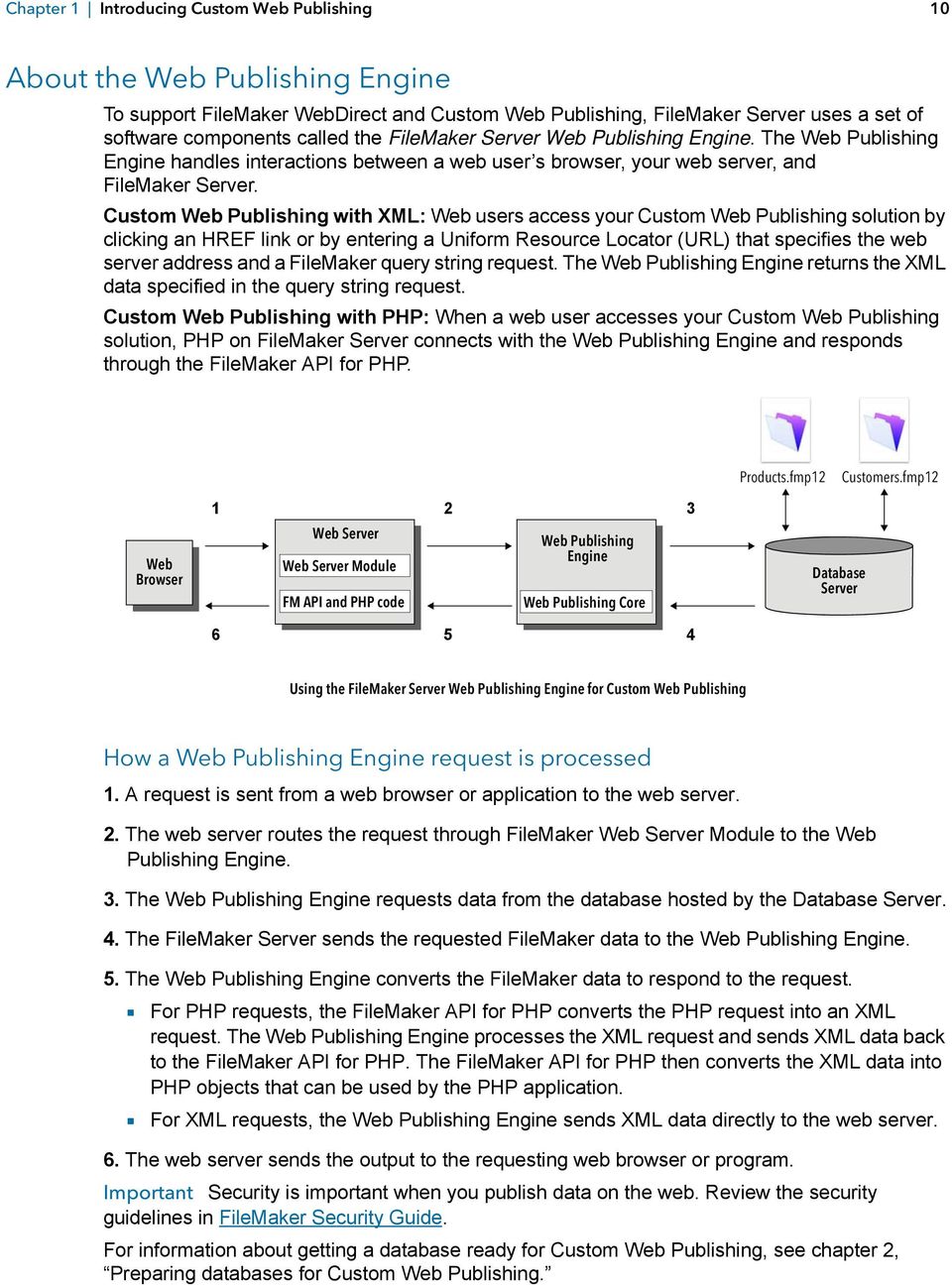
10 Chapter 1 Introducing Custom Web Publishing 10 About the Web Publishing Engine To support FileMaker WebDirect and Custom Web Publishing, FileMaker Server uses a set of software components called the FileMaker Server Web Publishing Engine. The Web Publishing Engine handles interactions between a web user s browser, your web server, and FileMaker Server. Custom Web Publishing with XML: Web users access your Custom Web Publishing solution by clicking an HREF link or by entering a Uniform Resource Locator (URL) that specifies the web server address and a FileMaker query string request. The Web Publishing Engine returns the XML data specified in the query string request. Custom Web Publishing with PHP: When a web user accesses your Custom Web Publishing solution, PHP on FileMaker Server connects with the Web Publishing Engine and responds through the FileMaker API for PHP. Products.fmp12 Customers.fmp12 Web Browser 1 Web Server Web Server Module FM API and PHP code 2 3 Web Publishing Engine Web Publishing Core Database Server Using the FileMaker Server Web Publishing Engine for Custom Web Publishing How a Web Publishing Engine request is processed 1. A request is sent from a web browser or application to the web server. 2. The web server routes the request through FileMaker Web Server Module to the Web Publishing Engine. 3. The Web Publishing Engine requests data from the database hosted by the Database Server. 4. The FileMaker Server sends the requested FileMaker data to the Web Publishing Engine. 5. The Web Publishing Engine converts the FileMaker data to respond to the request. 1 For PHP requests, the FileMaker API for PHP converts the PHP request into an XML request. The Web Publishing Engine processes the XML request and sends XML data back to the FileMaker API for PHP. The FileMaker API for PHP then converts the XML data into PHP objects that can be used by the PHP application. 1 For XML requests, the Web Publishing Engine sends XML data directly to the web server. 6. The web server sends the output to the requesting web browser or program. Important Security is important when you publish data on the web. Review the security guidelines in FileMaker Security Guide. For information about getting a database ready for Custom Web Publishing, see chapter 2, Preparing databases for Custom Web Publishing.
11 Chapter 1 Introducing Custom Web Publishing 11 Custom Web Publishing with XML FileMaker Custom Web Publishing with XML enables you to send query requests to a FileMaker Pro database hosted by FileMaker Server and to display, modify, or manipulate the resulting data. Using an HTTP request with the appropriate query commands and parameters, you can retrieve FileMaker data as an XML document. You can then export the XML data to other applications. Custom Web Publishing with PHP The FileMaker API for PHP provides an object-oriented PHP interface to FileMaker databases. The FileMaker API for PHP enables both data and logic stored in a FileMaker Pro database to be accessed and published on the web, or exported to other applications. The API also supports complex and compound find commands for extracting and filtering data stored in FileMaker Pro databases. Originally designed as a procedural programming language, PHP has been enhanced as an objectoriented web development language. PHP provides programming language functionality for constructing virtually any type of logic within a site page. For example, you can use conditional logic constructs to control page generation, data routing, or workflow. PHP also provides for site administration and security. Comparing XML to PHP The following sections provide some guidelines for determining the best solution for your site. Reasons to choose XML 1 FileMaker XML request parameter syntax is designed for database interaction, which simplifies solution development. 1 XML is a W3C standard. 1 XML is a machine- and human-readable format that supports Unicode, enabling data to be communicated in any written language. 1 XML is well-suited for presenting records, lists, and tree-structured data. 1 You can use FMPXMLRESULT for accessing XML data using Custom Web Publishing and for exporting XML from FileMaker Pro databases. Note For information about Custom Web Publishing with XML, see chapter 3, About Custom Web Publishing with XML. Reasons to choose PHP 1 PHP is a more powerful, object-oriented procedural scripting language, but is relatively easy to learn. There are many resources available for training, development, and support. 1 The FileMaker API for PHP enables data and logic stored in a FileMaker Pro database to be accessed and published on the web, or exported to other applications. 1 PHP lets you use conditional logic to control page construction or flow. 1 PHP provides programming language functionality for constructing many types of logic on a site page. 1 PHP is one of the most popular web scripting languages. 1 PHP is an open source language, available at 1 PHP enables access to a wide variety of third-party components that you can integrate into your solutions. Note For information about Custom Web Publishing with PHP, see chapter 6, About Custom Web Publishing with PHP.

12 Chapter 2 Preparing databases for Custom Web Publishing Before you can use Custom Web Publishing with a database, you must prepare the database and protect it from unauthorized access. Enabling Custom Web Publishing in a database You must enable a Custom Web Publishing extended privilege in each database you want to publish. If you don t enable a Custom Web Publishing extended privilege in the database, web users won t be able to use Custom Web Publishing to access the database even if it is hosted by FileMaker Server that is configured to support a Web Publishing Engine. To enable Custom Web Publishing for a database: 1. In FileMaker Pro, open the database you want to publish using an account that has the Full Access privilege set. Alternatively, you can open the database using an account that has the Manage Extended Privileges access privileges. 2. Assign the Custom Web Publishing extended privilege that you want to use: 1 For Custom Web Publishing with XML, use fmxml 1 For Custom Web Publishing with PHP, use fmphp 3. Assign the privilege set(s) that include the Custom Web Publishing extended privilege to one or more accounts, or to the Admin or Guest account. Note When defining account names and passwords for Custom Web Publishing solutions, use printable ASCII characters, for example a-z, A-Z, and 0-9. For more secure account names and passwords, include punctuation characters such as! and %, but do not include colons. For information on setting up accounts, see FileMaker Pro Help. Accessing a protected database Custom Web Publishing enables you to restrict access to your published databases through database password protection, database encryption, and secure connections. When using a Custom Web Publishing solution to access a database, web users may be prompted for their account information. If the Guest account for the database is disabled or does not have a privilege set enabled that includes a Custom Web Publishing extended privilege, the Web Publishing Engine uses HTTP Basic Authentication to request authentication from web users. The web user s browser displays the HTTP Basic Authentication dialog box for the user to enter a user name and password for an account that has a Custom Web Publishing extended privilege.
13 Chapter 2 Preparing databases for Custom Web Publishing 13 The following list summarizes the process that occurs when a web user uses a Custom Web Publishing solution to access a database: 1 If you have not assigned a password for an account, web users only specify the account name. 1 If the Guest account is disabled, then users will be prompted for account name and password when they access the database. The account must have a Custom Web Publishing extended privilege enabled. 1 If the Guest account is enabled and has a privilege set enabled that includes a Custom Web Publishing extended privilege, all web users automatically open the database with the access privileges assigned to the Guest account. If the Custom Web Publishing extended privilege is assigned to the Guest account: 1 Web users are not prompted for an account name and password when opening a file. 1 All web users will automatically log in with the Guest account and assume the Guest account privileges. You can let users change their login accounts from a web browser with the Re-Login script step (for example, to switch from the Guest account to an account with more privileges). 1 The default privilege set for Guest accounts provides read-only access. You can change the default privileges, including Extended Privileges, for this account. See FileMaker Pro Help. 1 When a web user has entered valid account information, that account information is reused as long as the browser session has not timed out. When the browser session times out, then the web user is again prompted to enter a valid account. Note By default, web users cannot modify their account password from a web browser. You can build this feature into a database with the Change Password script step, which allows web users to change their passwords from their browser. See FileMaker Pro Help. Protecting your published databases When using Custom Web Publishing, you can limit who can access your published databases. 1 Assign passwords to database accounts that are used for Custom Web Publishing. 1 Enable a Custom Web Publishing extended privilege only in the privilege sets for accounts that you want to allow access to your published databases. 1 Disable the Custom Web Publishing extended privilege for a specific database by deselecting the fmxml or fmphp extended privilege for all privilege sets in that database. See FileMaker Pro Help. 1 Enable or disable Custom Web Publishing for all Custom Web Publishing solutions in the Web Publishing Engine using FileMaker Server Admin Console. See FileMaker Server Getting Started Guide and FileMaker Server Help. 1 Configure your web server to restrict the IP addresses that can access your databases via the Web Publishing Engine. For example, you can specify that only web users from the IP address can access your databases. For information on restricting IP addresses, see the documentation for your web server.

14 Chapter 2 Preparing databases for Custom Web Publishing 14 FileMaker Server supports encryption for data written to disk and for data transmitted to clients. 1 Encrypt your database by using the Database Encryption feature of FileMaker Pro Advanced. Encryption protects the FileMaker database file and any temporary files written to disk. For information on encrypting a database, see FileMaker Server Getting Started Guide and FileMaker Pro Help. 1 An encrypted database that is hosted on FileMaker Server is opened by using Admin Console or the command line interface (CLI). As the FileMaker Server administrator, you open the file with its database encryption password, so that FileMaker clients can use the encrypted database. 1 Once the FileMaker encrypted database is opened with the encryption password by the FileMaker Server administrator, FileMaker clients don t need the encryption password to access the encrypted database. For information about opening an encrypted database, see FileMaker Server Help. 1 Use Secure Sockets Layer (SSL) encryption for communication between the web server and web browsers. SSL connections are accessed through an HTTPS connection. FileMaker Server provides a standard SSL certificate signed by FileMaker, Inc. that does not verify the server name. The FileMaker default certificate is intended only for test purposes. A custom SSL certificate is required for production use. See FileMaker Server Getting Started Guide. For information on securing your database, see FileMaker Security Guide. Note For security reasons, webpages hosted by other web servers may not use the <iframe> tag to embed Custom Web Publishing content. If you want to embed Custom Web Publishing content in the <iframe> tags of separate webpages, those webpages must be hosted by the FileMaker Server web server. Web server support for Internet media types (MIME) Your web server determines the support for the current MIME (Multipurpose Internet Mail Extensions) types registered for the Internet. The Web Publishing Engine does not change a web server s support for MIME. See the documentation for your web server. About publishing the contents of container fields on the web The contents of a container field can be embedded in the database, linked by reference using a relative path, or stored externally. Container field objects embedded in a database If a container field stores the actual files in the FileMaker database, then you don t need to do anything with the container field contents if the database file is properly hosted and accessible on FileMaker Server. See About the URL syntax for FileMaker container objects in XML solutions on page 25.

15 Chapter 2 Preparing databases for Custom Web Publishing 15 Container fields with stored file references If a container field stores a file reference, then you must follow these steps to publish the referenced files using the Web Publishing Engine. 1. Store the container object files in the Web folder inside the FileMaker Pro folder. 2. In FileMaker Pro, insert the objects into the container field and select the Store only a reference to the file option. 3. Copy or move the referenced object files in the Web folder to the same relative path location in the root folder of the web server software. 1 For IIS (Windows): [drive]:\program Files\FileMaker\FileMaker Server\HTTPServer\conf where [drive] is the drive on which the Web Publishing Engine component of your FileMaker Server deployment resides. 1 For Apache (OS X): /Library/FileMaker Server/HTTPServer/htdocs Note For container objects stored as file references, your web server must be configured to support the MIME types for the kinds of files you want to serve, such as movies. Your web server determines the support for the current MIME types registered for the Internet. The Web Publishing Engine does not change a web server s support for MIME. See the documentation for your web server. Container fields with externally stored data If a container field stores objects externally that is, if you selected Store container data externally in the FileMaker Pro Options for Field dialog box use FileMaker Pro to transfer database files from the client file system to FileMaker Server. When you use FileMaker Pro to upload a database, the externally stored container field data is uploaded to FileMaker Server as part of the process. See FileMaker Pro Help for information on transferring the database files to FileMaker Server. When you manually upload a database that uses a container field with externally stored objects, then you must follow these steps to publish the externally stored container objects using the Web Publishing Engine. To upload a database manually: 1. Place the database file in the proper location on the server. Place the FileMaker Pro database files that you want FileMaker Server to open or shortcuts (Windows) or aliases (OS X) to those files in the following folders: 1 Windows: [drive]:\program Files\FileMaker\FileMaker Server\Data\Databases\ where [drive] is the primary drive from which the system is started. 1 OS X: /Library/FileMaker Server/Data/Databases/ Or you can place the files in an optionally specified additional database folder. 2. In the folder where you placed the database, create a folder named RC_Data_FMS, if it doesn t already exist.
16 Chapter 2 Preparing databases for Custom Web Publishing In the RC_Data_FMS folder, create a folder with a name that matches the name of your database. For example, if your database is named Customers, then create a folder named Customers. Place the externally stored objects in the new folder you created. Note When databases are hosted on FileMaker Server, there is no way for multiple databases to share a common folder of container objects. The container objects for each database needs to be in a folder identified by that database s name. 4. For files that will be shared from OS X, change the files to belong to the fmsadmin group. For information about manually uploading databases, see FileMaker Server Help. Container fields and progressive download The Web Publishing Engine supports progressive download of audio files (.mp3), video files (.mov,.mp4, and.avi recommended), and PDF files for interactive containers. For example, a web user may start viewing a movie even if the entire movie file has not yet downloaded. To allow for progressive download, you may need to create the files using options that support streaming or that optimize for display on the web. For example, create PDF files using the option to optimize for web viewing. When the FileMaker Server setting Use SSL for database connections is selected, FileMaker Server uses secure connections to transmit data over HTTPS. 1 When the FileMaker Server setting Use SSL for progressive downloading is selected, interactive container data is downloaded over HTTPS. The data is as secure as if the hosted solution were a local database, since no temporary cache files are created and the data is encrypted during transmission. 1 When the FileMaker Server setting Use SSL for progressive downloading is not selected, interactive container data is downloaded over HTTP. FileMaker clients see the interactive container data with minimal delay. FileMaker Server decrypts the container field data to a cache folder on the server when a FileMaker client requests the data. FileMaker Server periodically empties the cache folder, so the data may remain decrypted in the cache folder on the server for up to two hours. The data is not cached locally on the client. When the FileMaker Server setting Use SSL for database connections is not selected, the connections that FileMaker Server uses to transmit data are not encrypted during transmission and data is transmitted over HTTP. 1 FileMaker clients see the interactive container data with minimal delay. 1 FileMaker Server decrypts the container field data to a cache folder on the server when a FileMaker Pro, FileMaker Go, or web client requests the data. The data may remain decrypted in the cache folder on the server for two hours, until FileMaker Server periodically empties the cache folder. The data is not cached locally on the client. Restart the FileMaker Server service (Windows) or FileMaker Server background processes (OS X) when the Use SSL for database connections and Use SSL for progressive downloading settings are changed in order for the new settings to take effect.
17 Chapter 2 Preparing databases for Custom Web Publishing 17 How web users view container field data When you publish a database using the Web Publishing Engine, the following limitations apply to container field objects: 1 Web users cannot modify or add to the contents of container fields. Web users cannot use container fields to upload objects to the database. 1 For databases that use a container field with thumbnails enabled, the Web Publishing Engine downloads the full file, not a thumbnail. FileMaker scripts and Custom Web Publishing The Manage Scripts feature in FileMaker Pro can automate frequently performed tasks and combine several tasks. When used with Custom Web Publishing, FileMaker scripts allow web users to perform more tasks or a series of tasks. FileMaker supports many script steps in Custom Web Publishing. Web users can perform a variety of automated tasks when you use scripts in a query string for a URL. To see script steps that Custom Web Publishing supports, in the FileMaker Pro Script Workspace window, click the Compatibility button and choose Custom Web Publishing. Script steps that are not dimmed are supported for Custom Web Publishing. For information on creating scripts, see FileMaker Pro Help. Script tips and considerations Although many script steps work identically on the web, there are several that work differently. See Script behavior in Custom Web Publishing solutions on page 18. Before sharing your database, evaluate all scripts that will be executed from a web browser. Be sure to log in with different user accounts to make sure they work as expected for all clients. Check the Web Publishing Engine log file (wpe.log) for any scripting-related errors. See Using the Web Publishing Engine log on page 87. Keep these tips and considerations in mind: 1 Consider what values a script may return. Be prepared to handle all of the data that is returned. In FileMaker Pro, a script may return all the records from a table or from the current found set. But if a script returns all the records from a table, a web application may run out of memory trying to processing the records. Consider using the max query parameter with XML queries or the setrange()method with PHP queries to limit the number of records returned. 1 Use accounts and privileges to restrict the set of scripts that a web user can execute. Verify that the scripts contain only web-compatible script steps, and only provide access to scripts that should be used from a web browser. 1 Consider the side effects of scripts that execute a combination of steps that are controlled by access privileges. For example, if a script includes a step to delete records, and a web user does not log in with an account that allows record deletion, the script will not execute the Delete Records script step. However, the script might continue to run, which could lead to unexpected results. 1 In the Script Workspace window, grant full access privileges to a script to allow the script to perform tasks that you would not grant individuals access to. For example, you can prevent users from deleting records with their accounts and privileges, but still allow them to run a script that would delete certain types of records under conditions predefined within a script.
18 Chapter 2 Preparing databases for Custom Web Publishing 18 1 To allow scripts to install plug-ins for Custom Web Publishing and FileMaker WebDirect solutions, use FileMaker Server Admin Console to enable the setting Allow Install Plug-In File script step to update plug-ins for web publishing. To prevent script from installing plug-ins for web publishing solutions, clear this setting. 1 Some scripts that work with one step from a FileMaker Pro client may require an additional Commit Record/Request script step to save the data to the host. Because web users don t have a direct connection to the host, they aren t notified when data changes. For example, features like conditional value lists aren t as responsive for web users because the data must be saved to the host before the effects are seen in the value list field. 1 Any script that modifies data should include the Commit Record/Request script step, because data changes aren t visible in the browser until the data is saved or submitted to the server. This includes several script steps like Cut, Copy, and Paste. Many single-step actions should be converted into scripts to include the Commit Record/Request step. When designing scripts that will be executed from a web browser, include the Commit Record/Request step at the end of a script to make sure all changes are saved. 1 To create conditional scripts based on the type of client, use the Get(ApplicationVersion) function. If the value returned includes a Web Publishing Engine string, then you know that the current user is accessing your database with Custom Web Publishing. For information on functions, see FileMaker Pro Help. 1 Open each script that web users might run, and verify that the script will execute properly when the database is hosted as a Custom Web Publishing solution. Check that the script uses only script steps that are supported for Custom Web Publishing, as described above. Script behavior in Custom Web Publishing solutions Some script steps function differently in Custom Web Publishing solutions than in FileMaker Pro. See FileMaker Pro Help for compatibility information. Scripts in Custom Web Publishing solutions cannot perform scripts in other FileMaker files unless the files are hosted on the same installation of FileMaker Server and unless the same Custom Web Publishing extended privilege is enabled in the other files. Script triggers and Custom Web Publishing solutions In FileMaker Pro, both scripts and user actions (such as the user clicking a field) can activate script triggers. But in Custom Web Publishing, only scripts can activate script triggers. For information on script triggers, see FileMaker Pro Help. Note To specify that you want a script performed when a file is opened, you need to use the OnFirstWindowOpen script trigger. Similarly, to specify that you want a script performed when a file is closed, you need to use the OnLastWindowClose script trigger.
19 Chapter 3 About Custom Web Publishing with XML Creating dynamic websites with the Web Publishing Engine The Web Publishing Engine provides Custom Web Publishing for FileMaker Server using XML data publishing. Custom Web Publishing provides several benefits: 1 Customization: You can determine how web users interact with FileMaker data, and how the data displays in web browsers. 1 Data interchange: By using FileMaker XML, you can exchange FileMaker data with other websites and applications. 1 Data integration: You can integrate FileMaker data into other websites, with other middleware, and with custom applications. You can make the data look like it belongs to another website instead of displaying an entire FileMaker layout in the web browser. 1 Security: The FileMaker Server administrator can individually enable or disable XML web publishing for all databases hosted by the server. As the FileMaker database owner, you can control web user access to or XML web publishing for each database. 1 Control and filtering of published data: You can control and filter the data and the type of database information you want to publish, which prevents unauthorized use of the database. You can also hide metadata, such as database and field names. 1 Based on an open standard: You have more access to tools, resources and skilled personnel for Custom Web Publishing solutions. If you know standard XML, then you can start developing solutions after learning a few unique details about Custom Web Publishing with XML, such as the URL syntax and query parameters to use. Custom Web Publishing with XML allows you to retrieve data from FileMaker databases, and easily use the data in other output formats. By using an HTTP request with the appropriate query commands and parameters, you can retrieve FileMaker data as an XML document. You can then use the XML data in other applications. See Accessing XML data via the Web Publishing Engine on page 26. Key features in Custom Web Publishing with XML FileMaker Server Custom Web Publishing with XML provides several important features: 1 Databases are hosted on FileMaker Server, and FileMaker Pro is not required to be running. 1 You can use server-side processing of the XML using JavaScript. 1 Like FileMaker Pro, access to data, layouts, and fields is based on the user account settings defined in the database s access privileges. The Web Publishing Engine also supports several other security enhancements. See Protecting your published databases on page Web users can perform complex, multistep scripts. FileMaker supports many script steps in Custom Web Publishing. See FileMaker scripts and Custom Web Publishing on page 17.

20 Chapter 3 About Custom Web Publishing with XML 20 1 You can pass a parameter value to a FileMaker script. See script.param (Pass parameter to Script) query parameter on page 55, script.prefind.param (Pass parameter to Script before Find) query parameter on page 55, and script.presort.param (Pass parameter to Script before Sort) query parameter on page The fmresultset XML grammar enables you to access fields by name and manipulate relatedset (portal) data. 1 To access data in a database, you must specify a layout. See chapter 5, Valid names used in XML query strings, Web publishing requirements What is required to publish a database using Custom Web Publishing To publish databases using Custom Web Publishing with XML, you need: 1 a FileMaker Server deployment that includes: 1 a web server, either Microsoft IIS (Windows) or Apache (OS X) 1 the FileMaker Database Server, enabled for Custom Web Publishing 1 the Web Publishing Engine, installed and configured 1 one or more FileMaker Pro databases hosted by FileMaker Server 1 the IP address or domain name of the host running the web server 1 a web browser and access to the web server to develop and test your Custom Web Publishing solution See FileMaker Server Getting Started Guide. What web users need to access a Custom Web Publishing solution To access a Custom Web Publishing solution that uses XML, web users need: 1 a web browser 1 access to the Internet or an intranet and the web server 1 the IP address or domain name of the host running the web server If the database is password-protected, web users must also enter a user name and password for a database account.
21 Chapter 3 About Custom Web Publishing with XML 21 Connecting to the Internet or an intranet When you publish databases on the Internet or an intranet, the host computer must be running FileMaker Server, and the databases you want to share must be hosted and available. In addition: 1 Publish your database on a computer with a full-time Internet or intranet connection. You can publish databases without a full-time connection, but they are only available to web users when your computer is connected to the Internet or an intranet. 1 The host computer for the web server that is part of the FileMaker Server deployment must have a dedicated static (permanent) IP address or a domain name. If you connect to the Internet with an Internet service provider (ISP), your IP address might be dynamically allocated (it is different each time you connect). A dynamic IP address makes it more difficult for web users to locate your databases. If you are not sure of the type of access available to you, consult your ISP or network administrator. Where to go from here Here are some suggestions to get started developing Custom Web Publishing solutions: 1 If you haven t already done so, use FileMaker Server Admin Console to enable Custom Web Publishing. See FileMaker Server Help and FileMaker Server Getting Started Guide. 1 In FileMaker Pro, open each FileMaker database that you want to publish and make sure the database has the appropriate extended privilege(s) enabled for Custom Web Publishing. See Enabling Custom Web Publishing in a database on page To learn how to access data in FileMaker databases using XML, see Accessing XML data via the Web Publishing Engine on page 26.
22 Chapter 4 Accessing XML data with the Web Publishing Engine You can obtain and update FileMaker data in Extensible Markup Language (XML) format by using the Web Publishing Engine. Many individuals, organizations, and businesses use XML to transfer product information, transactions, inventory data, and other business data. Using Custom Web Publishing with XML If you know standard XML, you can start using the Web Publishing Engine after learning a few unique details about Custom Web Publishing with XML, such as the URL syntax and query parameters to use. By using HTTP URL requests with FileMaker query commands and parameters, you can query a database hosted by FileMaker Server and download the resulting data in XML format. For example, you can query a database for all records in a certain postal code, and use the resulting XML data in whatever way you want to. See the FileMaker Knowledge Base. Note The Web Publishing Engine generates XML data that is well-formed and compliant with the XML 1.0 specification. For details about the requirements for well-formed XML, see the XML specification at Differences between the Web Publishing Engine and FileMaker Pro XML Import/Export The Web Publishing Engine and FileMaker Pro both enable you to use XML data with FileMaker databases. There are, however, some important differences between the two methods: 1 For accessing XML data, the Web Publishing Engine supports the fmresultset, FMPXMLRESULT, and FMPXMLLAYOUT grammars. For XML import, FileMaker Pro uses the FMPXMLRESULT grammar, and for export, FileMaker Pro uses the FMPXMLRESULT grammar. See Accessing XML data via the Web Publishing Engine on page To access XML data with the Web Publishing Engine, you use a Web Publishing Engine query string in a URL. To import and export XML with FileMaker Pro, you use FileMaker Pro menu commands or scripts. 1 The Web Publishing Engine is server-based and can be installed on the same or a different host than FileMaker Server. FileMaker Pro XML import and export is desktop-based. 1 You can dynamically access XML data from FileMaker databases by using URL requests with the Web Publishing Engine. The FileMaker Pro XML export feature generates a pre-specified XML data file. 1 Working with XML data via the Web Publishing Engine is an interactive operation. FileMaker Pro XML import and export is a batch operation. 1 The Web Publishing Engine can access XML data from a FileMaker portal, but FileMaker Pro cannot.
23 Chapter 4 Accessing XML data with the Web Publishing Engine 23 1 The Web Publishing Engine can access data in a container field, but FileMaker Pro cannot. 1 The Web Publishing Engine provides real-time access to FileMaker data via HTTP or HTTPS, but FileMaker Pro cannot. Note For information on using FileMaker Pro to import and export data in XML format, see FileMaker Pro Help. How the Web Publishing Engine generates XML data from a request After a request for XML data is sent to the web server, the Web Publishing Engine queries the FileMaker database and returns the data as an XML document. Web Browser 1. HTTP or HTTPS request for XML data is sent from web browser or program to web server. Web Server Web Server Module 2. Web server routes request to Web Publishing Core. FileMaker Server Web Publishing Engine Web Publishing Core Custom Web Publishing Engine (CWPE) 3. Web Publishing Core requests data from database hosted by FileMaker Database Server. FileMaker Database Server Products.fmp12 Customers.fmp12 Request for XML data is routed from web browser or program to FileMaker Database Server Orders.fmp12 Catalog.fmp12 XML data is routed back from FileMaker Database Server to web browser or program Web Browser 6. Web server sends output to web browser or program. Web Server 5. Web Publishing Core converts data to XML and sends it to web server. FileMaker Server Web Publishing Engine Web Publishing Core 4. FileMaker Database Server sends requested data to Web Publishing Core. Web Server Module Custom Web Publishing Engine (CWPE)
24 Chapter 4 Accessing XML data with the Web Publishing Engine 24 General process for accessing XML data from the Web Publishing Engine Here is an overview of the process for using the Web Publishing Engine to access XML data in a FileMaker database: 1. In the FileMaker Server Admin Console, make sure XML Publishing is enabled. See FileMaker Server Help. 2. In FileMaker Pro, open each FileMaker database that you re publishing and make sure the database has the fmxml extended privilege enabled for XML Custom Web Publishing. See Enabling Custom Web Publishing in a database on page 12. To access XML data in a portal, set the view for the database layout to View as Form or View as List. If a user or script changes the view of the database layout to View as Table, only the first related record (first row of the portal) is accessible as XML data. The XML data is output in an order that corresponds to the order in which field objects were added to the layout. If you want the XML data order to match the order in which fields appear on the screen (top-to-bottom, left-to-right), then select all fields, group them, and then ungroup them. This procedure resets the layout order to match the screen order. 3. Send an HTTP or HTTPS request in the form of a URL that specifies the FileMaker XML grammar, one query command, and one or more FileMaker query parameters to the Web Publishing Engine through an HTML form, an HREF link, or a script in your program or webpage. You can also type the URL in a web browser. For information on specifying the URL, see the next section, About the URL syntax for XML data and container objects. For information on query commands and parameters, see Using FileMaker query strings to request XML data on page 36, and chapter 5, Valid names used in XML query strings. 4. The Web Publishing Engine uses the grammar you specified in the URL to generate XML data containing the results of your request, such as a set of records from the database, and returns it to your program or web browser. 5. The web browser, if it has an XML parser, displays the data, or the program uses the data in the way you specified. About the URL syntax for XML data and container objects This section describes the URL syntax for using the Web Publishing Engine to access XML data and container objects from FileMaker databases. About the URL syntax for XML data The URL syntax for using the Web Publishing Engine to access XML data from FileMaker databases is: <scheme>://<host>[:<port>]/fmi/xml/<xml_grammar>.xml[?<query string>] where: 1 <scheme> can be the HTTP or HTTPS protocol. 1 <host> is the IP address or domain name of the host where the web server is installed. 1 <port> is optional and specifies the port that the web server is using. If no port is specified, then the default port for the protocol is used (port 80 for HTTP, or port 443 for HTTPS).
25 Chapter 4 Accessing XML data with the Web Publishing Engine 25 1 <xml_grammar> is the name of the FileMaker XML grammar. Possible values are fmresultset, FMPXMLRESULT, or FMPXMLLAYOUT. See Using the fmresultset grammar on page 28 and Using other FileMaker XML grammars on page <query string> is a combination of one query command and one or more query parameters for FileMaker XML publishing. (The dbnames command doesn t require any parameters.) See Using FileMaker query strings to request XML data on page 36, and chapter 5, Valid names used in XML query strings. Note The URL syntax, including the names of the query command and parameters, is case sensitive except for portions of the query string. The majority of the URL is in lowercase, with the exception of the two uppercase grammar names: FMPXMLRESULT and FMPXMLLAYOUT. For information on the rules for case sensitivity of the query string, see Guidelines for using query commands and parameters on page 40. Here are two examples of URLs for accessing XML data via the Web Publishing Engine: &-findall &-findall About the URL syntax for FileMaker container objects in XML solutions In a generated XML document for an XML solution, the syntax used to refer to a container object is different for container fields that store the actual object in the database, as opposed to container fields that store a reference to the object. If a container field stores the actual object in the database The container field s <data> element uses the following relative URL syntax to refer to the object: <data>/fmi/xml/cnt/data.<extension>?<query string></data> where <extension> is the filename extension identifying the type of object, such as.jpg. The filename extension sets the MIME type to allow the web browser to properly identify the container data. For information on <query string>, see the previous section, About the URL syntax for XML data. For example: <data>/fmi/xml/cnt/data.jpg?-db=products&-lay=sales&-field=product_image(1) &-recid=2</data> Note In the generated XML for a container field, the value for the field query parameter is a fully qualified field name. The number in the parentheses indicates the repetition number for the container field, and is generated for both repeating and non-repeating fields. See About the syntax for a fully qualified field name on page 42. To retrieve the container data from the database, use the following syntax: <scheme>://<host>[:<port>]/fmi/xml/cnt/data.<extension>?<query string> For information about <scheme>, <host>, or <port>, see the previous section, About the URL syntax for XML data.
26 Chapter 4 Accessing XML data with the Web Publishing Engine 26 For example: &-field=product_image(1)&-recid=2 If a container field stores a file reference instead of an actual object The container field s <data> element contains a relative path that refers to the object. For example: <data>/images/logo.jpg</data> Note The referenced container object must be stored in the FileMaker Pro Web folder when the record is created or edited, and then copied or moved to a folder with the same relative location in the root folder of the web server software. See About publishing the contents of container fields on the web on page 14. If a container field is empty The container field s <data> element is empty. About URL text encoding The URLs for accessing XML data and container objects must be encoded in UTF-8 (Unicode Transformation 8 Bit) format. See About UTF-8 encoded data on page 36. For example, to set the value of the info field to fiancée, you could use the following URL: &-lay=relationships&-recid=2&info= fianc%c3%a9e&-edit In this example URL, %C3%A9 is the URL encoded UTF-8 representation of the é character. See the URL specification at Accessing XML data via the Web Publishing Engine To access XML data via the Web Publishing Engine, you use a URL that specifies the name of the FileMaker grammar to use, one FileMaker query command, and one or more FileMaker query parameters. The Web Publishing Engine generates XML data from your database that is formatted by one of the following types of XML grammars: 1 fmresultset: This is the recommended grammar for the Web Publishing Engine for accessing XML data. It is flexible and is optimized for easier field access by name and for easier manipulation of relatedset (portal) data. This grammar is also more directly linked to FileMaker terminology and features such as global storage options and identification of summary and calculation fields. To facilitate web publishing, this grammar is designed to be more verbose than the FMPXMLRESULT grammar. See Using the fmresultset grammar on page FMPXMLRESULT and FMPXMLLAYOUT: You can also use the FMPXMLRESULT and FMPXMLLAYOUT grammars with the Web Publishing Engine for accessing XML data. To use one stylesheet for both XML export and Custom Web Publishing, you must use the FMPXMLRESULT grammar. To access value lists and field display information in layouts, you must use the FMPXMLLAYOUT grammar. See Using other FileMaker XML grammars on page 31.
27 Chapter 4 Accessing XML data with the Web Publishing Engine 27 Depending on the grammar you specify in the URL request, the Web Publishing Engine will generate an XML document using one of the grammars. Each XML document contains a default XML namespace declaration for the grammar. See the next section, About namespaces for FileMaker XML. Use one of these grammars in your document or webpage to display and work with FileMaker data in XML format. Note XML data generated by the Web Publishing Engine is encoded using UTF-8 format (Unicode Transformation Format 8). See About UTF-8 encoded data on page 36. About namespaces for FileMaker XML Unique XML namespaces help distinguish XML tags by the application they were designed for. For example, if your XML document contains two <DATABASE> elements, one for FileMaker XML data and another for Oracle XML data, the namespaces will identify the <DATABASE> element for each. The Web Publishing Engine generates a default namespace for each grammar. For this grammar fmresultset FMPXMLRESULT FMPXMLLAYOUT This default namespace is generated xmlns=" xmlns=" xmlns=" About FileMaker database error codes The Web Publishing Engine returns an error code in the error code elements at the beginning of each XML document that represents the error, if any, in the execution of the most recently executed query command. A value of zero (0) is returned for no error. For this grammar fmresultset FMPXMLRESULT FMPXMLLAYOUT This syntax is used <error code="0"></error> <ERRORCODE>0</ERRORCODE> <ERRORCODE>0</ERRORCODE> The error code element in the XML document indicates errors related to the database and query strings. See appendix A, Error codes for Custom Web Publishing. Retrieving the document type definitions for the FileMaker grammars You can retrieve the document type definitions (DTDs) for the FileMaker grammars by using an HTTP request. For this grammar fmresultset FMPXMLRESULT FMPXMLLAYOUT Use this HTTP request
28 Chapter 4 Accessing XML data with the Web Publishing Engine 28 Using the fmresultset grammar The XML element names in this grammar use FileMaker terminology, and the storage of fields is separated from the type of fields. The grammar also includes the ability to identify summary, calculation, and global fields. To use the fmresultset grammar, specify the following name of the fmresultset grammar in the URL requesting the XML document from the Web Publishing Engine: fmresultset.xml For example: &-findall Note When specifying the fmresultset grammar, be sure to use lowercase. The Web Publishing Engine will generate an XML document using the fmresultset grammar. In the XML document, the Web Publishing Engine will reference the document type definition for the fmresultset grammar in the <!DOCTYPE> instruction in the second line of the document, immediately after the <?xml...?> instruction. The <!DOCTYPE> instruction specifies the URL for downloading the DTD for the fmresultset grammar. Description of elements in the fmresultset grammar The fmresultset grammar consists primarily of the <datasource> element, the <metadata> element, and the <resultset> element. <datasource> element In the fmresultset grammar, the <datasource> element contains the table, layout, dateformat, time-format, timestamp-format, total-count, and database attributes. 1 The date-format attribute of the <datasource> element specifies the format of dates in the XML document: MM/dd/yyyy where: 1 MM is the 2-digit value for the month (01 through 12, where 01 is January and 12 is December) 1 dd is the 2-digit value for the day of the month (01 through 31) 1 yyyy is the 4-digit value for the year 1 The time-format attribute of the <datasource> element specifies the format of times in the XML document: HH:mm:ss where: 1 HH is the 2-digit value for hours (00 through 23, for the 24-hour format) 1 mm is the 2-digit value for minutes (00 through 59) 1 ss is the 2-digit value for seconds (00 through 59) 1 The timestamp-format attribute of the <datasource> element combines the formats of dateformat and time-format into one timestamp: MM/dd/yyyy HH:mm:ss
29 Chapter 4 Accessing XML data with the Web Publishing Engine 29 <metadata> element The <metadata> element of the fmresultset grammar contains one or more <fielddefinition> and <relatedset-definition> elements, each containing attributes for one of the fields of the result set. The <field-definition> attributes specify: 1 whether the field is an auto-enter field ("yes" or "no") 1 whether the field is a four-digit-year field ("yes" or "no") 1 whether it is a global field ("yes" or "no") 1 the maximum number of repeating values (max-repeat attribute) 1 the maximum number of characters allowed (max-characters attribute) 1 whether it is a not-empty field ("yes" or "no") 1 whether it is for numeric data only ("yes" or "no") 1 result ("text", "number", "date", "time", "timestamp", or "container") 1 whether it is a time-of-day field ("yes" or "no") 1 type ("normal", "calculation", or "summary") 1 and the field name (fully qualified as necessary) The <relatedset-definition> element represents a portal. Each related field in a portal is represented by the <field-definition> element contained within the <relatedset-definition> element. If there are multiple related fields in a portal, the field definitions for the related fields are grouped within a single <relatedset-definition> element. <resultset> element The <resultset> element contains the <record> elements returned as the result of a query and an attribute for the total number of records found. Each <record> element contains the field data for one record in the result set including the mod-id and the record-id attributes for the record, and the <data> element containing the data for one field in the record. Each record in a portal is represented by a <record> element within the <relatedset> element. The count attribute of the <relatedset> element specifies the number of records in the portal, and the table attribute specifies the table associated with the portal.
30 Chapter 4 Accessing XML data with the Web Publishing Engine 30 Example of XML data in the fmresultset grammar <fmresultset xmlns=" version="1.0"> <error code="0"/> <product build="02/10/2016" name="filemaker Web Publishing Engine" version=" "/> <datasource database="art" date-format="mm/dd/yyyy" layout="web3" table="art" time-format="hh:mm:ss" timestamp-format="mm/dd/yyyy HH:mm:ss" total-count="12"/> <metadata> <field-definition auto-enter="no" four-digit-year="no" global="no" max-repeat="1" name="title" not-empty="no" numeric-only="no" result="text" time-of-day="no" type="normal"/> <field-definition auto-enter="no" four-digit-year="no" global="no" max-repeat="1" name="artist" not-empty="no" numeric-only="no" result="text" time-of-day="no" type="normal"/> <field-definition auto-enter="no" four-digit-year="no" global="no" max-repeat="1" name="style" not-empty="no" numeric-only="no" result="text" time-of-day="no" type="normal"/> <field-definition auto-enter="no" four-digit-year="no" global="no" max-repeat="1" name="length" not-empty="no" numeric-only="no" result="number" time-of-day="no" type="calculation"/> <relatedset-definition table="artlocations"> <field-definition auto-enter="no" four-digit-year="no" global="no" max-repeat="1" name="artlocations::location" not-empty="no" numeric-only="no" result="text" time-of-day="no" type="normal"/> <field-definition auto-enter="no" four-digit-year="no" global="no" max-repeat="1" name="artlocations::date" not-empty="no" numeric-only="no" result="date" time-of-day="no" type="normal"/> </relatedset-definition> </metadata> <resultset count="1" fetch-size="1"> <record mod-id="6" record-id="17"> <field name="title"> <data>spring in Giverny 6</data> </field> <field name="artist"> <data>claude Monet</data> </field> <field name="style"> <data/> </field> <field name="length"> <data>19</data> </field> <relatedset count="0" table="artlocations"/> </record> </resultset> </fmresultset>
31 Chapter 4 Accessing XML data with the Web Publishing Engine 31 Using other FileMaker XML grammars The other FileMaker XML grammars contain information about field types, value lists, and layouts. FMPXMLRESULT is functionally equivalent to fmresultset. To access value lists and field display information in layouts, you must use the FMPXMLLAYOUT grammar. The FMPXMLRESULT and FMPXMLLAYOUT grammars are more compact for data interchange. To use the FMPXMLRESULT grammar, specify the following grammar name in the URL requesting the XML document from the Web Publishing Engine: FMPXMLRESULT.xml For example: &-findall To use the FMPXMLLAYOUT grammar, specify the following grammar name with the view query command in the URL requesting the XML document from the Web Publishing Engine: FMPXMLLAYOUT.xml For example: &-view Note When specifying the FMPXMLRESULT and FMPXMLLAYOUT grammars, be sure to enter the grammar name in uppercase. In the generated XML document, the Web Publishing Engine will reference the document type definition for the grammar in the <!DOCTYPE> instruction in the second line of the document, immediately after the <?xml...?> instruction. The <!DOCTYPE> instruction specifies the URL for downloading the DTD for the grammar. Description of elements in the FMPXMLRESULT grammar In the FMPXMLRESULT grammar, the <DATABASE> element contains the NAME, RECORDS, DATEFORMAT, LAYOUT, and TIMEFORMAT attributes. The DATEFORMAT attribute of the <DATABASE> element specifies the format of dates in the XML document. The TIMEFORMAT attribute of the <DATABASE> element specifies the format of times in the XML document. The date and time formats for the FMPXMLRESULT and the fmresultset grammars are the same. See Description of elements in the fmresultset grammar on page 28. The <METADATA> element of the FMPXMLRESULT grammar contains one or more <FIELD> elements, each containing information for one of the fields/columns of the result set including the name of the field as defined in the database, the field type, the Yes or No allowance for empty fields (EMPTYOK attribute) and the maximum number of repeating values (MAXREPEAT attribute). Valid values for field types are TEXT, NUMBER, DATE, TIME, TIMESTAMP, and CONTAINER.
32 Chapter 4 Accessing XML data with the Web Publishing Engine 32 The <RESULTSET> element contains all of the <ROW> elements returned as the result of a query and an attribute for the total number of records found. Each <ROW> element contains the field/column data for one row in the result set. This data includes the RECORDID and MODID for the row (see modid (Modification ID) query parameter on page 51), and the <COL> element. The <COL> element contains the data for one field/column in the row where multiple <DATA> elements represent one of the values in a repeating or portal field. Example of XML data in the FMPXMLRESULT grammar The following is an example of XML data generated with the FMPXMLRESULT grammar. <FMPXMLRESULT xmlns=" <ERRORCODE>0</ERRORCODE> <PRODUCT BUILD="02/10/2016" NAME="FileMaker Web Publishing Engine" VERSION=" "/> <DATABASE DATEFORMAT="MM/dd/yyyy" LAYOUT="web" NAME="art" RECORDS="12" TIMEFORMAT="HH:mm:ss"/> <METADATA> <FIELD EMPTYOK="YES" MAXREPEAT="1" NAME="Title" TYPE="TEXT"/> <FIELD EMPTYOK="YES" MAXREPEAT="1" NAME="Artist" TYPE="TEXT"/> <FIELD EMPTYOK="YES" MAXREPEAT="1" NAME="Image" TYPE="CONTAINER"/> </METADATA> <RESULTSET FOUND="1"> <ROW MODID="6" RECORDID="18"> <COL> <DATA>Spring in Giverny 7</DATA> </COL> <COL> <DATA>Claude Monet</DATA> </COL> <COL> <DATA> /fmi/xml/cnt/untitled.pct?-db=art&-lay=web&-recid=18&-field=image(1) </DATA> </COL> </ROW> </RESULTSET> </FMPXMLRESULT> The order of the <COL> elements corresponds with the order of the <FIELD> elements in the <METADATA> element for example, where the Title and Artist fields are listed in the <METADATA> element, Spring in Giverny 7 and then Claude Monet are listed in the same order in the <RESULTSET> and <ROW> elements.
33 Chapter 4 Accessing XML data with the Web Publishing Engine 33 Description of elements in the FMPXMLLAYOUT grammar In the FMPXMLLAYOUT grammar, the <LAYOUT> element contains the name of the layout, the name of the database, and <FIELD> elements for each field found in the corresponding layout in the database. Each <FIELD> element describes the style type of the field, and contains the VALUELIST attribute for any associated value list of the field. The <VALUELISTS> element contains one or more <VALUELIST> elements for each value list found in the layout each including the name of the value list and a <VALUE> element for each value in the list. Depending on the options selected in the Specify Fields for Value List dialog box in the FileMaker database, the <VALUE> element contains a DISPLAY attribute that contains the value in the first field only, the second field only, or both fields of a value list. For example, suppose the first field in a value list stores the art style s ID number (such as 100 ), and the second field displays the art style s associated name (such as Impressionism ). Here is a summary of the contents of the DISPLAY attribute when the various combinations of options are selected in the Specify Fields for Value List dialog box: 1 If Also display values from second field is not selected, the DISPLAY attribute contains the value in the first field of a value list only. In the following XML data example, the DISPLAY attribute contains the art style s ID number only: <VALUELISTS> <VALUELIST NAME="style"> <VALUE DISPLAY="100">100</VALUE> <VALUE DISPLAY="101">101</VALUE> <VALUE DISPLAY="102">102</VALUE> </VALUELIST> </VALUELISTS> 1 If Also display values from second field and Show values only from second field are both selected, the DISPLAY attribute contains the value in the second field only. In the following XML data example, the DISPLAY attribute contains the art style s name only: <VALUELISTS> <VALUELIST NAME="style"> <VALUE DISPLAY="Impressionism">100</VALUE> <VALUE DISPLAY="Cubism">101</VALUE> <VALUE DISPLAY="Abstract">102</VALUE> </VALUELIST> </VALUELISTS>
34 Chapter 4 Accessing XML data with the Web Publishing Engine 34 1 If Also display values from second field is selected and Show values only from second field is not selected, the DISPLAY attribute contains the values in both fields of a value list. In the following XML data example, the DISPLAY attribute contains both the art style s ID number and the art style s name: <VALUELISTS> <VALUELIST NAME="style"> <VALUE DISPLAY="100 Impressionism">100</VALUE> <VALUE DISPLAY="101 Cubism">101</VALUE> <VALUE DISPLAY="102 Abstract">102</VALUE> </VALUELIST> </VALUELISTS> For date, time, and timestamp fields, data for value lists are formatted using the fm format for that field type. The fm formats are MM/DD/YYYY for date, hh:mm:ss for time, and MM/DD/YYYY hh:mm:ss for timestamp. For example, if a birthdays value list is used for a pop-up menu on a birthdate field of a layout, and the birthdate field is of type date, then the values output for that value list will all be in the fm date format. Note If two fields with different field types on a layout share the same value list, the first field s type determines the format of the value list data.
35 Chapter 4 Accessing XML data with the Web Publishing Engine 35 Example of XML data in the FMPXMLLAYOUT grammar <FMPXMLLAYOUT xmlns=" <ERRORCODE>0</ERRORCODE> <PRODUCT BUILD="02/10/2016" NAME="FileMaker Web Publishing Engine" VERSION=" "/> <LAYOUT DATABASE="art" NAME="web2"> <FIELD NAME="Title"> <STYLE TYPE="EDITTEXT" VALUELIST=""/> </FIELD> <FIELD NAME="Artist"> <STYLE TYPE="EDITTEXT" VALUELIST=""/> </FIELD> <FIELD NAME="Image"> <STYLE TYPE="EDITTEXT" VALUELIST=""/> </FIELD> <FIELD NAME="artlocations::Location"> <STYLE TYPE="EDITTEXT" VALUELIST=""/> </FIELD> <FIELD NAME="artlocations::Date"> <STYLE TYPE="EDITTEXT" VALUELIST=""/> </FIELD> <FIELD NAME="Style"> <STYLE TYPE="POPUPMENU" VALUELIST="style"/> </FIELD> </LAYOUT> <VALUELISTS> <VALUELIST NAME="style"> <VALUE DISPLAY="Impressionist">Impressionist</VALUE> <VALUE DISPLAY="Modern">Modern</VALUE> <VALUE DISPLAY="Abstract">Abstract</VALUE> </VALUELIST> </VALUELISTS> </FMPXMLLAYOUT>
36 Chapter 4 Accessing XML data with the Web Publishing Engine 36 About UTF-8 encoded data All XML data generated by the Web Publishing Engine is encoded in UTF-8 (Unicode Transformation 8 Bit) format. This format compresses data from the standard Unicode format of 16 bits to 8 bits for ASCII characters. XML parsers are required to support Unicode and UTF-8 encoding. UTF-8 encoding includes direct representations of the values of for the standard ASCII set of characters used in English, and provides multibyte encodings for Unicode characters with higher values. Note Be sure to use a web browser or text editor program that supports UTF-8 files. The UTF-8 encoding format includes the following features: 1 All ASCII characters are one-byte UTF-8 characters. A legal ASCII string is a legal UTF-8 string. 1 Any non-ascii character (any character with the high-order bit set) is part of a multibyte character. 1 The first byte of any UTF-8 character indicates the number of additional bytes in the character. 1 The first byte of a multibyte character is easily distinguished from the subsequent byte, which makes it is easy to locate the start of a character from an arbitrary position in a data stream. 1 It is easy to convert between UTF-8 and Unicode. 1 The UTF-8 encoding is relatively compact. For text with a large percentage of ASCII characters, it is more compact than Unicode. In the worst case, a UTF-8 string is only 50% larger than the corresponding Unicode string. Using FileMaker query strings to request XML data To request XML data from a FileMaker database, you use the FileMaker query commands and parameters in a query string. For example, you can use the findall query command in the following query string in a URL to request a list of all products in a FileMaker database named products : A query string must contain only one query command, such as new. Most query commands also require various matching query parameters in the query string. For example, all query commands except dbnames require the db parameter that specifies the database to query. You can also use query commands and parameters in a URL. This section contains a summary of the FileMaker query commands and parameters. For information about using them in a query string, see Valid names used in XML query strings on page 40. Use this query command name dbnames delete dup edit find findall To execute this command Retrieve names of all hosted and web-shared databases. Delete record. Duplicate record. Edit record. Find record(s). Find all records.
37 Chapter 4 Accessing XML data with the Web Publishing Engine 37 Use this query command name findany findquery layoutnames new scriptnames view To execute this command Find a random record. Perform complex or compound find request. Retrieve names of all available layouts for a hosted and web-shared database. Add new record. Retrieve names of all available scripts for a hosted and web-shared database. Retrieves layout information from a database if the FMPXMLLAYOUT grammar is specified. Retrieves <metadata> section of XML document and an empty record set if the fmresultset or FMPXMLRESULT grammar is specified. Use these query parameter names db (database name) delete.related field fieldname fieldname.op (operator) lay (layout name) lay.response (switch layout for XML response) lop (logical operator) max (maximum records) modid (modification ID) query recid (record ID) relatedsets.filter relatedsets.max script (perform script) script.param (pass a parameter value to the script specified by script) script.prefind (perform script before find, findany, and findall) script.prefind.param (pass a parameter value to the script specified by script.prefind) script.presort (perform script before sort) script.presort.param (pass a parameter value to the script specified by script.presort) skip (skip records) With these query commands Required with all query commands except dbnames Optional with edit Required to specify a field in a URL for container requests. See About the URL syntax for FileMaker container objects in XML solutions on page 25. At least one field name is required with edit. Optional with find. See fieldname (Non-container field name) query parameter on page 48. Optional with find Required with all query commands, except dbnames, layoutnames, and scriptnames Optional with all query commands, except dbnames, layoutnames, and scriptnames Optional with find Optional with find, findall, and findquery Optional with edit Required with -findquery compound find requests Required with edit, delete, dup. Optional with find Optional with find, findall, findany, edit, new, dup, and findquery Optional with find, edit, new, dup, and findquery Optional with find, findall, findany, new, edit, delete, dup, view, and findquery Optional with script and findquery Optional with find, findany, findall, and findquery Optional with script.prefind and findquery Optional with find, findall, and findquery Optional with script.presort and findquery Optional with find, findall, and findquery
38 Chapter 4 Accessing XML data with the Web Publishing Engine 38 Use these query parameter names sortfield.[1-9] (sort field) sortorder.[1-9] (sort order) With these query commands Optional with find, findall, and findquery Optional with find, findall Switching layouts for an XML response The lay query parameter specifies the layout you want to use when requesting XML data. Often, the same layout is appropriate for processing the data that results from the request. In some cases, you might want to search for data using a layout which contains fields that, for security reasons, don t exist in another layout you want to use for displaying the results. (To do a search for data in a field, the field must be placed on the layout you specify in the XML request.) To specify a different layout for displaying an XML response than the layout used for processing the XML request, you can use the optional lay.response query parameter. For example, the following request searches for values greater than 100,000 in the Salary field on the Budget layout. The resulting data is displayed using the ExecList layout, which does not include the Salary field. &-lay=budget&salary=100000&salary.op=gt&-find&-lay.response=execlist Understanding how an XML request is processed There are several query parameters that affect the processing of an XML request and the generation of an XML document. Here is the order in which FileMaker Server and the Web Publishing Engine process an XML request: 1. Process the lay query parameter. 2. Set the global field values specified in the query (the.global= portion of a URL). 3. Process the script.prefind query parameter, if specified. 4. Process the query commands, such as find or new. 5. Process the script.presort query parameter, if specified. 6. Sort the resulting data, if a sort was specified. 7. Process the script query parameter, if specified. 8. Process the lay.response query parameter to switch to a different layout, if this is specified. 9. Generate the XML document. If one of the above steps generates an error code, the request processing stops; any steps that follow are not executed. However, any prior steps in the request are still executed. For example, consider a request that deletes the current record, sorts the records, and then executes a script. If the sortfield parameter specifies a non-existent field, the request deletes the current record and returns error code 102 ( Field is missing ), but does not execute the script.
39 Chapter 4 Accessing XML data with the Web Publishing Engine 39 Troubleshooting XML document access If you have trouble accessing XML documents with the Web Publishing Engine, verify that: 1 The extended privileges in the database are set for XML Custom Web Publishing and assigned to a user account. See Enabling Custom Web Publishing in a database on page The database is hosted on the Database Server component of the FileMaker Server deployment, and is opened by FileMaker Server. See FileMaker Server Help. 1 The database account name and password you are using, if any, are correct. 1 The web server component of the FileMaker Server deployment is running. 1 The Web Publishing Engine component of the FileMaker Server deployment is running. 1 XML Publishing is enabled in the Web Publishing Engine component. See FileMaker Server Help.
40 Chapter 5 Valid names used in XML query strings This chapter describes the valid names of query commands and parameters you can use in an XML query string when accessing FileMaker data using the Web Publishing Engine. About the query commands and parameters The following is a complete list of the query command names and query parameter names: Query command names dbnames (See page 44.) delete (See page 44.) dup (See page 45.) edit (See page 45.) find, findall, findany (See page 45.) findquery (See page 46.) layoutnames (See page 47.) new (See page 47.) scriptnames (See page 47.) view (See page 47.) Query parameter names db (See page 48.) field (See page 48.) fieldname (See page 48.) fieldname.op (See page 49.) lay (See page 50.) lay.response (See page 50.) lop (See page 51.) max (See page 51.) modid (See page 51.) query (See page 52.) recid (See page 53.) relatedsets.filter (See page 53.) relatedsets.max (See page 54.) script (See page 54.) script.param (See page 55.) script.prefind (See page 55.) script.prefind.param (See page 55.) script.presort (See page 56.) script.presort.param (See page 56.) skip (See page 56.) sortfield.[1-9] (See page 57.) sortorder.[1-9] (See page 57.) Important The lay parameter for specifying a layout is required with all query commands except dbnames, layoutnames, and scriptnames. Guidelines for using query commands and parameters When using query commands and parameters in a query string, keep the following guidelines in mind: 1 A query string must contain only one query command; no more and no less. For example, a query string can contain new to add a new record, but it can t contain new and edit in the same query string. 1 Most query commands require various matching query parameters in the query string. For example, all query commands except dbnames require the db parameter that specifies the database to query. See the table of required parameters in Using FileMaker query strings to request XML data on page 36.
41 Chapter 5 Valid names used in XML query strings 41 1 For query parameters and field names, specify the particular value you want to use, such as -db=employees. For query commands, don t specify an = sign or a value after the command name, such as findall. 1 The Web Publishing Engine converts all reserved words to lowercase, including query commands, query parameters, and command values where specific values are expected (for example: lop=and, lop=or, sortorder=ascend, sortorder=descend, max=all). 1 Database names, layout names, and field names used in query strings are case insensitive, such as using lay=mylayout to specify the layout name MyLayout. 1 It is not recommended to use periods or parentheses in field names. In some cases, field names with periods may work, but field names with the following exceptions can never be used: 1 The period cannot be followed by a number. For example, myfield.9 is an invalid field name. 1 The period cannot be followed by the text string op (the two letters op ). For example, myfield.op is an invalid field name. 1 The period cannot be followed by the text string global (the word global ). For example, myfield.global is an invalid field name. Field names containing any of these exceptions cannot be accessed via XML using an HTTP query. These constructs are reserved for record IDs, as described in the section, About the syntax for a fully qualified field name, below. 1 For the find command, the value of a field is case insensitive. For example, you can use Field1=Blue or Field1=blue. For the new and edit commands, the case you use in the value of a field is preserved and stored in the database exactly as you specify in the query string. For example, LastName=Doe. Query command parsing The Web Publishing Engine parses query commands in the following order, and stops parsing XML queries with the first error. If an error code is returned, the error code returned matches the first error that is identified. 1. Does the query have a command and is the query command valid? It is an error if the query is missing the command or uses an unknown command. For example: -database 2. Does the query have two commands? For example: -find&-edit 3. Does the query have an invalid value for a command or parameter? For example: -lop=amd 4. Is the query missing the required database name parameter ( db parameter)? 5. Is the query missing the required layout name parameter ( lay parameter)?
42 Chapter 5 Valid names used in XML query strings Does the query have an invalid sort? 7. Does the query have invalid field parameters? Note If a query contains valid but extraneous information, the query is processed without an error. For example, if you specify the lop parameter on a delete command, the lop parameter is ignored because it does not cause the query to be invalid or ambiguous. For information about specific error codes returned, see appendix A, Error codes for Custom Web Publishing. About the syntax for a fully qualified field name A fully qualified field name identifies an exact instance of a field. Because fields with common names can be based on different tables, you must use fully qualified names, in some cases, to avoid errors. The syntax for specifying a fully qualified field name is: table-name::field-name(repetition-number).record-id where: 1 table-name is the name of the table that contains the field. The table name is only required if the field is not in the underlying table of the layout specified in the query string. 1 field-name(repetition-number) is the specific value in a repeating field, and is only required for repeating fields. The repetition number starts counting at the numeral 1. For example, field-name(2) refers to the second value in the repeating field. If you don t specify a repetition number for a repeating field, the first value in the repeating field is used. The repetition-number is required for the new and edit query commands involving repeating fields, but it is not required for the find command. 1 record-id is the record ID, and is only required if you are using a query string to add or edit records in portal fields. See the following sections Adding records to a portal, and Editing records in a portal. The record-id is required for the new and edit query commands involving portal fields, but it is not required for the find command. Note To be accessible, fields must be placed on the layout you specify in the query string. Using query commands with portal fields The following sections describe how query commands work with portal fields. Adding records to a portal To add a new record to a portal at the same time you add a parent record, use the new query command and do the following in query string for the request: 1 Use the fully qualified field name for the related portal field. 1 Specify 0 as the record ID after the name of the related portal field. 1 Specify at least one of the fields for the parent record before specifying the related portal field. 1 Specify the data for the match field (key field) in the parent record.
43 Chapter 5 Valid names used in XML query strings 43 For example, the following URL adds a new parent Employee record for John Doe, and a new related record for Jane in the portal at the same time. The name of the related table is Dependents, and the name of the related field in the portal is Names. The match field, ID, stores an employee ID number. &-lay=family&firstname=john&lastname=doe&id=9756&dependents::names.0=jane&-new Note You can only add one related record to a portal per request. Editing records in a portal To edit one or more records in a portal, use the edit command and a record ID to specify the parent record that contains the portal records you want to edit. Specify the particular portal record to edit by using its record ID in a fully qualified field name. You can determine a record ID from the record ID attribute of the <record> element in the <relatedset> element in the XML data. See Using the fmresultset grammar on page 28. For example, the following URL edits a record in a portal where the parent record has the record ID of Dependents is the name of the related table, Names is the name of the related field in the portal, and the 2 in Names.2 is the record ID of a portal record. &-recid=1001&dependents::names.2=kevin&-edit Here is an example of how to use one request to edit multiple portal records via the parent record: &-recid=1001&dependents::names.2=kevin&dependents::names.5=susan&-edit You can also use the edit command and specify 0 as the portal record ID to add a new related record in the portal for an existing parent record. For example: &-recid=1001&dependents::names.0=timothy&-edit Deleting portal records To delete portal records, use the delete.related parameter with the edit command rather than using the delete command. For example, the following URL deletes record 1001 from the table employees : &-recid=1001&-delete But the following URL deletes a portal record with a record ID of 3 from the related table called Dependents, with the parent record ID of &-recid=1001&-delete.related=dependents.3&-edit See delete.related (Portal records delete) query parameter on page 48.
44 Chapter 5 Valid names used in XML query strings 44 Querying portal fields In a solution that has many related records, querying and sorting portal records can be time consuming. To restrict the number of records and rows to display in a related set, use the relatedsets.filter and relatedsets.max parameters with find requests. See relatedsets.filter (Filter portal records) query parameter on page 53 and relatedsets.max (Limit portal records) query parameter on page 54. About the syntax for specifying a global field The syntax for specifying a global field is: table-name::field-name(repetition-number).global where global identifies a field as using global storage. For information about table-name and field-name(repetition-number), see About the syntax for a fully qualified field name on page 42. For information on global fields, see FileMaker Pro Help. You must use the.global syntax to identify a global field in a query string. The Web Publishing Engine sets the parameter values for global fields before performing the query command or setting any other parameter values in the query string. For direct XML requests, the global values expire immediately after the request is made. If you don t use the.global syntax to identify a global field in a query string, the Web Publishing Engine evaluates the global field along with the remainder of the query string without setting the global field value first. For example: &Country.global=USA&-recid=1&-edit Query command reference This section contains information about the query commands available for XML requests. dbnames (Database names) query command Retrieves the names of all databases that are hosted by FileMaker Server and enabled for Custom Web Publishing with XML. Required query parameters: (none) Example: To retrieve the database names: delete (Delete record) query command Deletes the record specified by the recid parameter. Required query parameters: db, lay, recid Optional query parameter: script Example: To delete a record: &-lay=departments&-recid=4&-delete
45 Chapter 5 Valid names used in XML query strings 45 dup (Duplicate record) query command Duplicates the record specified by the recid parameter. Required query parameters: db, lay, recid Optional query parameter: script Example: To duplicate the specified record: &-lay=departments&-recid=14&-dup edit (Edit record) query command Updates the record specified by the recid parameter, populating the fields with the contents of any field name/value pairs. The recid parameter indicates which record should be edited. Required query parameters: db, lay, recid, one or more field name(s) Optional query parameter: modid, script, field name Note The edit command can be used for editing records in a portal. See Editing records in a portal on page 43. Example: To edit a record: &-lay=departments&-recid=13&country=usa&-edit find, findall, or findany (Find records) query commands Submits a search request using defined criteria. Required query parameters: db, lay Optional query parameters: recid, lop, op, max, skip, sortorder, sortfield, script, script.prefind, script.presort, field name Examples: To find a record by field name: &-lay=family&country=usa&-find Note Specifying a field name multiple times in a single request is not supported; FileMaker Server parses all of the values, but uses only the last value parsed. To find a record by record ID: &-recid=427&-find
46 Chapter 5 Valid names used in XML query strings 46 To find all records in the database, use findall: &-findall Note When using the findall command, avoid computer memory overload problems by specifying a default maximum number of records to return per page by using the max query parameter. To find a random record, use findany: &-findany findquery (Compound find) query command Submits a search request using multiple find records and omit records requests. Required query parameters: db, lay, query Optional query parameters: max, skip, sortorder, sortfield, script, script.prefind, script.presort Example: Find records for cats or dogs that are not named Fluffy. &-query=(q1);(q2);!(q3)&-q1=typeofanimal&-q1.value=cat&-q2=typeofanimal &-q2.value=dog&-q3=name&-q3.value=fluffy&-findquery Using the -findquery command for compound finds A findquery statement consists of four parts, in the following order: 1 The query parameter. 1 The query request declarations, consisting of the query identifier declarations and request operations. 1 The search field and value definitions for each query identifier. 1 Define query identifiers. A query identifier is the letter "q" followed by a number. For example: -q1 1 Define query identifier values with the parameter. For example: -q1.value=fieldvalue 1 Define query identifier operators by including it as part of the fieldvalue expression. For example, to use an asterisk as a begins with operator: -q1.value=fieldvalue* 1 The findquery command, at the end of the complete statement. For information on using the query parameter, see query (Compound find request) query parameter on page 52.
47 Chapter 5 Valid names used in XML query strings 47 layoutnames (Layout names) query command Retrieves the names of all available layouts for a specified database that is hosted by FileMaker Server and enabled for Custom Web Publishing with XML. Required query parameters: db Example: To retrieve the names of available layouts: new (New record) query command Creates a new record and populates that record with the contents of any field name/value pairs. Required query parameters: db, lay Optional query parameter: one or more field name(s), script Note For information on including new data for a portal, see Adding records to a portal on page 42. Example: To add a new record: &-lay=departments&country=australia&-new scriptnames (Script names) query command Retrieves the names of all available scripts for a specified database that is hosted by FileMaker Server and enabled for Custom Web Publishing with XML. Required query parameters: db Example: To retrieve the names of all scripts: view (View layout information) query command If the FMPXMLLAYOUT grammar is specified, retrieves layout information from a database and displays it in the FMPXMLLAYOUT grammar. If a data grammar (fmresultset or FMPXMLRESULT) is specified, retrieves the metadata section of XML document and an empty record set. Required query parameters: db, lay Optional query parameter: script Examples: To retrieve layout information: &-lay=departments&-view To retrieve metadata information: &-lay=departments&-view
48 Chapter 5 Valid names used in XML query strings 48 Query parameter reference This section contains information about the query parameters available for XML requests. db (Database name) query parameter Specifies the database that the query command is applied to Value is: Name of the database, not including the filename extension if any. Note When specifying the name of the database for the db parameter in query strings, do not include a filename extension. The actual database filename can optionally include an extension, but extensions are not allowed as a value for the db parameter. Required with: All query commands except dbnames Example: &-lay=departments&-findall delete.related (Portal records delete) query parameter Deletes a record from a portal field. Optional with: edit query command Requires: A related table name and a record id Example: The following example deletes a portal record with a record ID of 20 from the related table called jobtable, with a parent record ID of 7. &-delete.related=jobtable.20&-edit field (Container field name) query parameter Specifies the name of a container field. Required with: Requests for data in a container field See About the URL syntax for XML data and container objects on page 24. fieldname (Non-container field name) query parameter Field names are used to control criteria for the find query command, or to modify the contents of a record. When you need to specify a value for a non-container field for a query command or parameter, use the field name without the hyphen (-) character as the name portion of the name/value pair. Name is: Name of the field in the FileMaker database. If the field is not in the underlying table of the layout specified in the query string, the field name must be fully qualified.
49 Chapter 5 Valid names used in XML query strings 49 It is not recommended to use periods or parentheses in field names. In some cases, field names with periods may work, but field names with the following exceptions can never be used: 1 The period cannot be followed by a number. For example, myfield.9 is an invalid field name. 1 The period cannot be followed by the text string op (the two letters op ). For example, myfield.op is an invalid field name. 1 The period cannot be followed by the text string global (the word global ). For example, myfield.global is an invalid field name. Field names containing any of these exceptions cannot be accessed via XML using an HTTP query. Using periods in field names should be reserved for record IDs, as described in About the syntax for a fully qualified field name on page 42. Value is: For the new and edit query commands, specify the value you want to store in the field in the current record. For the find query commands, specify the value you want to search for in the field. When you specify the value for a date, time, or timestamp field, specify the value using the fm format for that field type. The fm formats are MM/DD/YYYY for date, hh:mm:ss for time, and MM/DD/YYYY hh:mm:ss for timestamp. Required with: edit query command Optional with: new and find query commands Example: &-lay=departments&-op=eq&firstname=sam&-max=1&-find Note Specifying a field name multiple times in a single request is not supported; FileMaker Server parses all of the values, but uses only the last value parsed. fieldname.op (Comparison operator) query parameter Specifies the comparison operator to apply to the field name that precedes the operator. Comparison operators are used with the find query command. Value is: The operator you want to use. Valid operators are as follows: Keyword eq cn bw ew gt gte lt lte neq FileMaker Pro equivalent operator =word *word* word* *word > word >= word < word <= word omit, word Optional with: find query command Requires: A field name and a value
50 Chapter 5 Valid names used in XML query strings 50 The syntax for specifying a comparison operator is: table-name::field-name=value&table-name::field-name.op=op-symbol where: 1 table-name is the table that contains the field and is only required if the field is not in the source table of the layout specified in the query string. 1 op-symbol is one of the keywords in the preceding table, such as cn. Example: &-lay=departments&name=tim&name.op=cn&-find Note The bw keyword does not work with date, time, or timestamp strings, or with the current date (//) find operator. You can use any FileMaker Pro find operator by including it as part of the search criteria instead of specifying the fieldname.op operator keyword. For example, to find a range of values using the range (...) find operator, do not specify any operator keyword. Instead, use the characters... between the range values in the search criteria. Example: -lay=departments&idnum= &-find For information on the operators you can use to find text, see FileMaker Pro Help. lay (Layout) query parameter Specifies the database layout you want to use. Value is: Name of the layout Required with: All query commands except dbnames, layoutnames, and scriptnames Example: &-lay=departments&-view lay.response (Switch layout for response) query parameter Specifies that FileMaker Server should use the layout specified by the lay parameter when processing a request, and switch to the layout specified by the lay.response parameter when processing the XML response. If you don t include the lay.response parameter, FileMaker Server uses the layout specified by the lay parameter when processing both the request and the response. You can use the lay.response parameter for XML requests. Value is: Name of the layout Optional with: All query commands except dbnames, layoutnames, and scriptnames. Example: &-lay=budget&salary=100000&salary.op=gt&-find&-lay.response=execlist
51 Chapter 5 Valid names used in XML query strings 51 lop (Logical operator) query parameter Specifies how the find criteria in the find query command are combined as either an and or an or search. Value is: and or or If the lop query parameter is not included, then the find query command uses the and value. Optional with: find query command Note Not supported by -findquery query command. Example: &-lay=departments&last+name=smith&birthdate=2/5/1972&-lop=and&-find max (Maximum records) query parameter Specifies the maximum number of records you want returned. Value is: A number, or use the value all to return all records. If max is not specified, all records are returned. Optional with: find, findall, and -findquery query commands Note The max query parameter does not affect the values returned for portal records. To limit the number of rows returned for portal records, see relatedsets.max (Limit portal records) query parameter on page 54. Examples: &-lay=departments&-max=10&-findall &-lay=departments&-max=all&-findall modid (Modification ID) query parameter The modification ID is an incremental counter that specifies the current version of a record. By specifying a modification ID when you use an edit query command, you can make sure that you are editing the current version of a record. If the modification ID value you specify does not match the current modification ID value in the database, the edit query command is not allowed and an error code is returned. Value is: A modification ID, which is a unique identifier for the current version of a record in a FileMaker database. Optional with: edit query command Requires: recid parameter Example: &-lay=departments&-recid=22&-modid=6&last_name=jones&-edit
52 Chapter 5 Valid names used in XML query strings 52 query (Compound find request) query parameter Specifies the query names and search criteria for a compound find request. See findquery (Compound find) query command on page 46. Value is: A query expression. Required with: findquery query command The syntax for a compound find request is: -query=<request-declarations><request-definitions>&-findquery where: <request-declarations> is two or more request declarations. 1 Each request declaration is composed of one or more query identifiers separated by commas, and enclosed in parentheses. A query identifier is the letter q followed by a number. For example: q1 1 Enclosed in parentheses, the multiple queries act as logical AND searches that narrow the found set. For example, (q1, q2) returns records that match q1 and q2. Note It is not recommended to use the same fields for multiple q variables in the same and search criteria. 1 As with FileMaker Pro, each request can be either a find request or an omit request. A find request adds the matching records to the found set; an omit request removes the matching records from the found set. The default is a find request. For an omit request, put an exclamation point (!) in front of the opening parenthesis. For example: (q1);!(q2) In this example, q1 is a find request; q2 is an omit request because it is preceded by an exclamation point. 1 Requests are separated by semicolons. Multiple find requests act as logical OR searches that broaden the found set. For example, (q1);(q2) returns records that match q1 or q2. Omit requests do not act as logical OR searches because omit requests remove records from the found set. 1 Requests are executed in the order specified; the found set includes the results of the entire compound find request. <request-definitions> is a request definition for each request declaration. Each request definition consists of a search field and value definition. A minus (-) sign starts the request definition. Syntax: -<query-id>=<fieldname>&-<query-id>.value=<value> For example: -q1=typeofanimal&-q1.value=cat -q2=name&-q2.value=fluffy
53 Chapter 5 Valid names used in XML query strings 53 Example: Find records of gray cats that are not named Fluffy. &-query=(q1, q2);!(q3)&-q1=typeofanimal&-q1.value=cat&-q2=color &-q2.value=gray&-q3=name&-q3.value=fluffy&-findquery recid (Record ID) query parameter Specifies the record you want processed. Used mainly by the edit, and delete query commands. Used by the view command to retrieve related value list data in the FMPXMLLAYOUT grammar. Value is: A record ID, which is a unique specifier to a record in a FileMaker database Required with: edit, delete, and dup query commands Optional with: find query and view commands Example 1: &-lay=departments&-recid=22&-delete Example 2: relatedsets.filter (Filter portal records) query parameter Specifies whether to limit the portal records to be returned in the results for this query. Value is: layout or none 1 If relatedsets.filter is set to layout, then the Initial row setting specified in the FileMaker Pro Portal Setup dialog box is respected. 1 If the Allow vertical scrolling setting is enabled in the Portal Setup dialog box, then use the relatedsets.max option to specify the maximum number of records to be returned. See relatedsets.max (Limit portal records) query parameter below. 1 If the Allow vertical scrolling setting is disabled or the relatedsets.max option is not used, then the Number of rows setting in the Portal Setup dialog box determines the number of portal records to be returned. 1 The default value is none if this parameter is not specified. If relatedsets.filter is set to none, then the Web Publishing Engine returns all records in the portal. The values for Initial row and Number of rows specified in the Portal Setup dialog box are ignored. Notes: 1 The relatedsets.filter parameter has no impact on how portal records are sorted in XML queries. The sort specified in FileMaker Pro is respected whether the relatedsets.filter parameter value is layout or none. 1 The Filter portal records setting in the Portal Setup dialog box is not supported for XML queries. Any calculation specified for the Filter portal records setting is ignored. Optional with: find, edit, new, dup, and findquery.
54 Chapter 5 Valid names used in XML query strings 54 Examples: &-relatedsets.filter=none&-findany &-lay=english&relatedsets.filter=layout&-relatedsets.max=all&-findany &-relatedsets.filter=layout&-relatedsets.max=10&-findany relatedsets.max (Limit portal records) query parameter Specifies the maximum number of portal records to return in the results for this query. Value is: an integer, or all. 1 The relatedsets.max parameter is respected only if the Allow vertical scrolling setting is enabled in the FileMaker Pro Portal Setup dialog box and the relatedsets.filter parameter is layout. 1 If the relatedsets.max parameter specifies an integer, then the Web Publishing Engine returns that number of portal records starting with the initial row. 1 If the relatedsets.max parameter specifies all, then the Web Publishing Engine returns all portal records. Note For information on filtering portal records, see relatedsets.filter (Filter portal records) query parameter above. Optional with: find, edit, new, dup, and findquery. Examples: &-lay=english&relatedsets.filter=layout&-relatedsets.max=all&-findany &-relatedsets.filter=layout&-relatedsets.max=10&-findany script (Script) query parameter Specifies the FileMaker script to run after the query command and sorting are executed. See Understanding how an XML request is processed on page 38. Value is: Script name Optional with: All query commands except dbnames, layoutnames, and scriptnames Example: &-lay=departments&-script=myscript&-findall
55 Chapter 5 Valid names used in XML query strings 55 script.param (Pass parameter to Script) query parameter Passes a parameter to the FileMaker script specified by script Value is: A single text parameter. 1 To pass in multiple parameters, you can create a string delimiting the parameters and have your script parse out the individual parameters. For example, pass param1 param2 param3 as a list with the character URL-encoded as this: param1%7cparam2%7cparam3 1 To treat the text parameter as a value that is not text, your script can convert the text value. For example, to convert the text value to a number, your script could include the following: GetAsNumber(Get(ScriptParam)) 1 If your query contains script.param without script, then script.param is ignored. 1 If your query contains more than one script.param, then the Web Publishing Engine uses the last value that it parses. Optional with: script Example: &-lay=departments&-script=myscript&-script.param=smith%7cchatterjee%7csu &-findall script.prefind (Script before Find) query parameter Specifies the FileMaker script to run before finding and sorting of records (if specified) during processing of the find query command. Value is: Script name Optional with: All query commands except dbnames, layoutnames, and scriptnames Example: &-lay=departments&-script.prefind=myscript&-findall script.prefind.param (Pass parameter to Script before Find) query parameter Passes a parameter to the FileMaker script specified by script.prefind Value is: A single text parameter. 1 To pass in multiple parameters, you can create a string delimiting the parameters and have your script parse out the individual parameters. For example, pass param1 param2 param3 as a list with the character URL-encoded as this: param1%7cparam2%7cparam3 1 To treat the text parameter as a value that is not text, your script can convert the text value. For example, to convert the text value to a number, your script could include the following: GetAsNumber(Get(ScriptParam)) 1 If your query contains script.prefind.param without script.prefind, then script.prefind.param is ignored. 1 If your query contains more than one script.prefind.param, then the Web Publishing Engine uses the last value that it parses. Optional with: script.prefind
56 Chapter 5 Valid names used in XML query strings 56 Example: &-lay=departments&-script.prefind=myscript&-script.prefind.param=payroll &-findall script.presort (Script before Sort) query parameter Specifies the FileMaker script to run after finding records (if specified) and before sorting records during processing of the find query command. Optional with: All query commands except dbnames, layoutnames, and scriptnames Example: &-lay=departments&-script.presort=myscript&-sortfield.1=dept &-sortfield.2=rating&-findall script.presort.param (Pass parameter to Script before Sort) query parameter Passes a parameter to the FileMaker script specified by script.presort. Value is: A single text parameter. 1 To pass in multiple parameters, you can create a string delimiting the parameters and have your script parse out the individual parameters. For example, pass param1 param2 param3 as a list with the character URL-encoded as this: param1%7cparam2%7cparam3 1 To treat the text parameter as a value that is not text, your script can convert the text value. For example, to convert the text value to a number, your script could include the following: GetAsNumber(Get(ScriptParam)) 1 If your query contains script.presort.param without script.presort, then script.presort.param is ignored. 1 If your query contains more than one script.presort.param, then the Web Publishing Engine uses the last value that it parses. Optional with: script.presort Example: &-lay=departments&-script.presort=myscript&-script.presort.param=18%7c65 &-sortfield.1=dept&-sortfield.2=rating&-findall skip (Skip records) query parameter Specifies how many records to skip in the found set. Value is: A number. If the value is greater than the number of records in the found set, then no record is displayed. The default value is 0. Optional with: find query command In the following example, the first 10 records in the found set are skipped and records 11 through 15 are returned. Example: &-lay=departments&-skip=10&-max=5&-findall
57 Chapter 5 Valid names used in XML query strings 57 sortfield (Sort field) query parameter Specifies the field to use for sorting. Value is: field name Optional with: find or findall query commands The sortfield query parameter can been used multiple times to perform multiple field sorts. The syntax for specifying the precedence of the sort fields is: -sortfield.precedence-number=fully-qualified-field-name where the precedence-number in the sortfield.precedence-number query parameter is a number that specifies the precedence to use for multiple sort fields. The value for precedence-number: 1 must start from 1 1 must increment sequentially 1 must not be greater than 9 In the following example, the dept field is sorted first, and then the rating field is sorted. Both fields are sorted in ascending order because the sortorder query parameter is not specified. Example: &-lay=performance&-sortfield.1=dept&-sortfield.2=rating&-findall sortorder (Sort order) query parameter Indicates the direction of a sort. Value is: The sort order. Valid sort orders are as follows, where <value-list-name> is a value list name such as Custom: Keyword FileMaker Pro Equivalent Operator ascend Sort a to z, -10 to 10 descend Sort z to a, 10 to -10 <value-list-name> Sort using the specified value list associated with the field on the layout Optional with: find or findall query commands Requires: sortfield query parameter The sortorder query parameter can been used with the sortfield query parameter to specify the sort order of multiple sort fields. The syntax for specifying the sort order of a sort field is: -sortorder.precedence-number=sort-method where: 1 precedence-number in the sortorder.precedence-number parameter is a number from 1 to 9 that specifies the sortfield query parameter that the sortorder query parameter applies to 1 sort-method is one of the keywords in the preceding table to specify the sort order, such as ascend
58 Chapter 5 Valid names used in XML query strings 58 In the following example, the sort order of the highest precedence sort field (dept) is ascend, and the sort order of the second highest precedence sort field (rating) is descend. The precedencenumber 2 in -sortorder.2 specifies that the query parameter -sortorder.2=descend applies to the -sortfield.2=rating query parameter. Example: &-lay=performance&-sortfield.1=dept&-sortorder.1=ascend&-sortfield.2=rating &-sortorder.2=descend&-findall Note If a sortorder query parameter is not specified for a sort field, the default ascending sort is used.
59 Chapter 6 About Custom Web Publishing with PHP Custom Web Publishing with PHP lets you use the PHP scripting language to integrate data from FileMaker databases with your customized webpage layouts. Custom Web Publishing with PHP provides the FileMaker API for PHP, which is a PHP class created by FileMaker that accesses databases hosted by FileMaker Server. This PHP class connects to the FileMaker Server Web Publishing Engine and makes data available to your web server s PHP engine. Key features in Custom Web Publishing with PHP 1 Create web applications that use the Open Source PHP scripting language. Use the FileMaker Server supported version of PHP, or use your own version of PHP. (If you decide to use your own version of PHP, see Manually installing the FileMaker API for PHP on page 61.) 1 Host databases on FileMaker Server. FileMaker Pro is not required for Custom Web Publishing because FileMaker Server hosts the databases. 1 Write PHP code that can create, delete, edit, and duplicate records in a hosted FileMaker database. Your code can perform field and record validation before committing changes back to the hosted database. 1 Write PHP code that accesses layouts, portals, value lists, and related fields. Like FileMaker Pro, access to data, layouts, and fields is based on the user account settings defined in the database s access privileges. The Web Publishing Engine also supports several other security enhancements. See Protecting your published databases on page Write PHP code that executes complex, multistep scripts. FileMaker supports many script steps in Custom Web Publishing. See FileMaker scripts and Custom Web Publishing on page Write PHP code that performs complex find requests. Custom Web Publishing requirements This section explains what is required to develop a Custom Web Publishing solution using PHP, what web users need in order to access a Custom Web Publishing solution, and what impact hosting a web publishing solution may have on your server. What is required to publish a database using Custom Web Publishing To publish databases using Custom Web Publishing with PHP, you need: 1 a FileMaker Server deployment, which includes three components: 1 a web server, either Microsoft IIS (Windows) or Apache (OS X) the FileMaker Web Server Module is installed on the web server 1 the FileMaker Web Publishing Engine 1 the FileMaker Database Server 1 one or more FileMaker Pro databases hosted by FileMaker Server 1 the IP address or domain name of the host running the web server
60 Chapter 6 About Custom Web Publishing with PHP 60 1 a web browser and access to the web server to develop and test your Custom Web Publishing solution 1 PHP installed on the web server FileMaker Server can install the supported version of PHP, or you can use your own version 1 For the minimum required version of PHP, see the FileMaker Server technical specifications. 1 For information about PHP, see 1 The version of PHP installed on the web server must support curl (client URL library) functions. For information about curl, see Important When you install the FileMaker Server supported version of PHP, it does not show up in the OS X Server Admin tool; it is not supposed to be listed. If you use the OS X Server Admin tool to turn on PHP, you disable the FileMaker Server supported version of PHP, and enable your own version of PHP. See FileMaker Server Getting Started Guide. What web users need to access a Custom Web Publishing solution To access a Custom Web Publishing solution that uses PHP, web users need: 1 a web browser 1 access to the Internet or an intranet and the web server 1 the IP address or domain name of the host running the web server If the database is password-protected, web users must also enter a user name and password for a database account. Connecting to the Internet or an intranet When you publish databases on the Internet or an intranet, the host computer must be running FileMaker Server, and the databases you want to share must be hosted and available. In addition: 1 Publish your database on a computer with a full-time Internet or intranet connection. You can publish databases without a full-time connection, but they are only available to web users when your computer is connected to the Internet or an intranet. 1 The host computer for the web server that is part of the FileMaker Server deployment must have a dedicated static (permanent) IP address or a domain name. If you connect to the Internet with an Internet service provider (ISP), your IP address might be dynamically allocated (it is different each time you connect). A dynamic IP address makes it more difficult for web users to locate your databases. If you are not sure of the type of access available to you, consult your ISP or network administrator.
61 Chapter 6 About Custom Web Publishing with PHP 61 Manually installing the FileMaker API for PHP When you install FileMaker Server, you are given the option to install the FileMaker supported version of PHP. If you already have a PHP engine installed and configured and you want to add only the FileMaker API for PHP, then manually install the FileMaker API for PHP class to make it available to your PHP scripts. If you did not install the FileMaker supported version of PHP, be sure to do the following configuration tasks on your version of the PHP engine: 1 Enable the curl module in php.ini. 1 Specify the location of the FileMaker API for PHP in the include_path variable in php.ini. 1 If you are accessing databases that contain dates and times, install the pear date package. See Note For the minimum required version of PHP, see the FileMaker Server technical specifications. For best results, use the appropriate version of PHP. To make the FileMaker API for PHP accessible to your PHP scripts When you installed FileMaker Server, the FileMaker API for PHP package was included as a.zip file in the following location: 1 For IIS (Windows): [drive]:\program Files\FileMaker\FileMaker Server\Web Publishing\FM_API_for_PHP_Standalone.zip where [drive] is the drive on which the web server component of your FileMaker Server deployment resides. 1 For Apache (OS X): /Library/FileMaker Server/Web Publishing/FM_API_for_PHP_Standalone.zip The FM_API_for_PHP_Standalone.zip file contains a file called FileMaker.php and a folder called FileMaker. Unzip the file and copy the FileMaker.php file and the FileMaker folder to either of these locations: 1 the folder where your PHP scripts reside. 1 For IIS (Windows) through HTTP or HTTPS: [drive]:\program Files\FileMaker\FileMaker Server\HTTPServer\Conf where [drive] is the drive on which the Web Publishing Engine component of your FileMaker Server deployment resides. 1 For Apache (OS X) through HTTP: /Library/FileMaker Server/HTTPServer/htdocs 1 For Apache (OS X) through HTTPS: /Library/FileMaker Server/HTTPServer/htdocs/httpsRoot 1 one of the include_path directories in your PHP installation. The default location for OS X is /usr/lib/php.
62 Chapter 6 About Custom Web Publishing with PHP 62 Where to go from here 1 Use FileMaker Server Admin Console to enable Custom Web Publishing. See FileMaker Server Help and FileMaker Server Getting Started Guide. 1 In FileMaker Pro, open each FileMaker database that you want to publish, and make sure the database has the appropriate extended privileges enabled for Custom Web Publishing. See Enabling Custom Web Publishing in a database on page To learn how to access data in FileMaker databases using the FileMaker API for PHP, see chapter 8, Using the FileMaker API for PHP.
63 Chapter 7 Overview of Custom Web Publishing with PHP The FileMaker API for PHP helps you integrate data from FileMaker Pro databases into PHP solutions. This chapter describes how PHP works with the FileMaker Server Custom Web Publishing Engine. For more detailed information about the FileMaker API for PHP, see chapter 8, Using the FileMaker API for PHP. How the Web Publishing Engine works with PHP solutions FileMaker Server is composed of three components: a web server, the Web Publishing Engine, and the Database Server. (These components may be deployed on one machine or two machines. See FileMaker Server Getting Started Guide.) FileMaker Server hosts the PHP solution when you place the PHP files on the web server where the PHP engine is installed. 1 When a web user opens a PHP solution, the web server routes the request to the PHP engine, which processes the PHP code. 1 If the PHP code contains calls to the FileMaker API for PHP, those calls are interpreted and sent as requests to the Web Publishing Engine. 1 The Web Publishing Engine requests data from databases that are hosted on the Database Server. 1 The Database Server sends the requested data to the Web Publishing Engine. 1 The Web Publishing Engine sends the data to the PHP engine on the web server in response to the API call. 1 The PHP solution processes the data, and displays it for the web user. General steps for Custom Web Publishing with PHP 1. In Admin Console, make sure Enable PHP publishing is selected. See FileMaker Server Getting Started Guide. 2. In Admin Console, choose the Databases pane and make sure each FileMaker database that you re publishing has the fmphp extended privilege enabled for Custom Web Publishing with PHP. If necessary, use FileMaker Pro to enable Custom Web Publishing for a database. See chapter 2, Preparing databases for Custom Web Publishing. Note Make sure that you use equivalent FileMaker database privilege sets when developing PHP solutions that will be given to the end user. Otherwise, you may have access to layouts and features in the FileMaker database that will not be available to the end user, causing inconsistent behavior. 3. Use PHP authoring tools to create your PHP solution, incorporating the FileMaker API functions into your PHP code to access your FileMaker data. See chapter 8, Using the FileMaker API for PHP.
64 Chapter 7 Overview of Custom Web Publishing with PHP Copy or move your site directory structure and files to the following folder on the web server. 1 For IIS (Windows) through HTTP or HTTPS: [drive]:\program Files\FileMaker\FileMaker Server\HTTPServer\Conf where [drive] is the drive on which the Web Publishing Engine component of your FileMaker Server deployment resides. 1 For Apache (OS X) through HTTP: /Library/FileMaker Server/HTTPServer/htdocs 1 For Apache (OS X) through HTTPS: /Library/FileMaker Server/HTTPServer/htdocs/httpsRoot 5. If a database container field stores a file reference instead of an actual file, the referenced container object must be stored in the FileMaker Pro Web folder when the record is created or edited. You must copy or move the object to a folder with the same relative location in the root folder of the web server software. See About publishing the contents of container fields on the web on page Make sure that security mechanisms for your site or program are in place. 7. Test your site using the same accounts and privileges defined for web users. 8. Make the site available and known to users. The URL that the web user enters follows this format: 1 <server> is the machine on which the FileMaker Server resides. 1 <site_path> is the relative path to the home page for your site, determined by the directory structure you used in step 4 above. For example, if your web server is and your site home page is on the web server at c:\inetpub\wwwroot\customers\index.php, then the web user would enter this URL: Note PHP uses Latin-1 (ISO ) encoding. FileMaker Server returns Unicode (UTF-8) data. Use the FileMaker Server Admin Console to specify the default character encoding for your site. For PHP sites, you can specify either UTF-8 or ISO ; UTF-8 is recommended. Specify the same setting for the charset attribute in the <HEAD> section of your site PHP files. For information on deploying and using a PHP solution, see chapter 9, Staging, testing, and monitoring a site.
65 Chapter 8 Using the FileMaker API for PHP The FileMaker API for PHP implements a PHP class the FileMaker class that provides an object-oriented interface to FileMaker databases. The FileMaker API for PHP enables both data and logic stored in FileMaker Pro databases to be accessed and published on the web, or exported to other applications. The FileMaker API for PHP allows PHP code to perform the same kind of functions you already have available in FileMaker Pro databases: 1 create, delete, edit, and duplicate records 1 perform find requests 1 perform field and record validation 1 use layouts 1 run FileMaker scripts 1 display portals and related records 1 use value lists This chapter describes how to use the FileMaker class objects and methods to add these common functions to a PHP solution. This chapter does not cover the entire the FileMaker API for PHP, but introduces key objects and methods. Where to get additional information To learn more about the FileMaker API for PHP, see the following resources. If you already have a PHP engine installed and configured and you want to add only the FileMaker API for PHP, see Manually installing the FileMaker API for PHP on page 61. FileMaker API for PHP Reference If you installed the FileMaker API for PHP, you can find reference information on the web server component of your FileMaker Server deployment. 1 For IIS (Windows): [drive]:\program Files\FileMaker\FileMaker Server\Documentation\PHP API Documentation\index.html where [drive] is the drive on which the web server component of your FileMaker Server deployment resides. 1 For Apache (OS X): /Library/FileMaker Server/Documentation/PHP API Documentation/index.html FileMaker API for PHP support You can find additional information about the FileMaker API for PHP on the FileMaker website:
66 Chapter 8 Using the FileMaker API for PHP 66 Using the FileMaker class To use the FileMaker class in your PHP solution, add the following statement to your PHP code: require_once ('FileMaker.php'); FileMaker class objects The FileMaker class defines class objects that you can use to retrieve data from FileMaker Pro databases. Class object FileMaker database Command Layout Record Field Related set Result Error Use the object to Define the database properties Connect to a FileMaker Pro database Get information about the FileMaker API for PHP Create commands that add records, delete records, duplicate records, edit records, perform find requests, and perform scripts Work with database layouts Work with record data Work with field data Work with portal records Process the records returned from a Find request Check whether an error has occurred Process any errors FileMaker command objects The FileMaker class defines a base command object that you use to instantiate a specific command and to specify the command s parameters. To execute the command, you must call the execute() method. The FileMaker class defines the following specific commands: 1 Add command 1 Compound Find command 1 Delete command 1 Duplicate command 1 Edit command 1 Find command, Find All command, Find Any command 1 Find Request command, which gets added to a Compound Find command 1 Perform Script command Important Commands have different return values, as defined by the FileMaker.php class. For example, some commands return the Boolean value TRUE or a FileMaker_Error object. Other commands return a FileMaker_Result object that could contain an entire found set of records in a layout. To avoid computer memory overload problems, be aware of the expected return values of the commands you use. See the FileMaker API for PHP Reference for detailed information about return values for each command.
67 Chapter 8 Using the FileMaker API for PHP 67 The basic tasks that most PHP applications need to perform are described in the following: 1 Working with records on page 67 1 Running FileMaker scripts on page 69 1 Performing find requests on page 75 Decoding data for use in the FileMaker API If your PHP application retrieves data from a website, that data may be URL-encoded. The FileMaker API for PHP expects data to be decoded strings, not URL-encoded strings. As a general practice, you may want to call the urldecode() function when retrieving data in your PHP application. For example: $user = urldecode($_get['user']); $event = urldecode($_get['event']); Connecting to a FileMaker database The FileMaker class defines a database object that you instantiate in order to connect to a server or to a database. Define the object properties with the class constructor, or by calling the setproperty() method. Example: Connecting to a server to get a list of databases $fm = new FileMaker(); $databases = $fm->listdatabases(); Example: Connecting to a specific database on a server The username and password properties determine the privilege set for this connection. $fm = new FileMaker(); $fm->setproperty('database', 'questionnaire'); $fm->setproperty('hostspec', ' $fm->setproperty('username', 'web'); $fm->setproperty('password', 'web'); Note The hostspec property defaults to the value If the PHP engine is running on the same machine as the web server component of the FileMaker Server deployment, there is no need to specify the hostspec property. If the PHP engine is on a different machine, use the hostspec property to specify the location of the web server component of the FileMaker Server deployment. Working with records The FileMaker class defines a record object that you instantiate to work with records. An instance of a record object represents one record from a FileMaker Pro database. Use a record object with Add, Delete, Duplicate, and Edit commands to change the data in the record. The Find commands Find, Find All, Find Any, and Compound Find return an array of record objects.
68 Chapter 8 Using the FileMaker API for PHP 68 Creating a record There are two ways to create a record: 1 Use the createrecord() method, specifying a layout name, and optionally specifying an array of field values. You can also set values individually in the new record object. The createrecord() method does not save the new record to the database. To save the record to the database, call the commit() method. For example: $rec = $fm->createrecord('form View', $values); $result = $rec->commit(); Using the FileMaker_Record commit() method, the $result variable is assigned the Boolean value TRUE and the new record is created in the FileMaker database when there are no errors. If an error occurs, the variable $result contains a FileMaker_Error object. Check for errors after executing the commit() method. 1 Use the Add command. Use the newaddcommand() method to create a FileMaker_Command_Add object, specifying the layout name and an array with the record data. To save the record to the database, call the execute() method. For example: $newadd = $fm->newaddcommand('respondent', $respondent_data); $result = $newadd->execute(); Using the FileMaker_Command execute() method, the $result variable contains a FileMaker_Result object with all the information about the created record when there are no errors. If an error occurs, the variable $result contains a FileMaker_Error object. Check for errors after executing the execute() method. Duplicating a record Duplicate an existing record using the Duplicate command. Use the newduplicatecommand() method to create a FileMaker_Command_Duplicate object, specifying the layout name and the record ID of the record that you want to duplicate. Then, duplicate the record by calling the execute() method. Example $newduplicate = $fm->newduplicatecommand('respondent', $rec_id); $result = $newduplicate->execute();
69 Chapter 8 Using the FileMaker API for PHP 69 Editing a record There are two ways to edit a record: 1 Using the Edit command. Use the neweditcommand() method to create a FileMaker_Command_Edit object, specifying the layout name, the record ID of the record you want to edit, and an array of values that you want to update. Then, edit the record by calling the execute() method. For example: $newedit = $fm->neweditcommand('respondent', $rec_id, $respondent_data); $result = $newedit->execute(); 1 Using a record object. Retrieve a record from the database, change field values, and then edit the record by calling the commit() method. For example: $rec = $fm->getrecordbyid('form View', $rec_id); $rec->setfield('name', $nameentered); $result = $rec->commit(); Deleting a record There are two ways to delete a record: 1 Retrieve a record from the database, and then call the delete() method. For example: $rec = $fm->getrecordbyid('form View', $rec_id); $rec->delete(); 1 Delete an existing record using the Delete command. Use the newdeletecommand() method to create a FileMaker_Command_Delete object, specifying the layout name and the record ID of the record you want to delete. Then, delete the record by calling the execute() method. For example: $newdelete = $fm->newdeletecommand('respondent', $rec_id); $result = $newdelete->execute(); Running FileMaker scripts A FileMaker script is a named set of script steps. The FileMaker class defines several methods that allow you to work with FileMaker scripts defined in a FileMaker Pro database. For information on web-compatible script steps (the script steps that can be performed in a web solution), see FileMaker scripts and Custom Web Publishing on page 17. Obtaining the list of available scripts Use the listscripts() method to get a list of available scripts from the currently connected database. The listscripts() method returns an array of scripts that can be executed by the username and password specified when the database connection was defined. (See Connecting to a FileMaker database on page 67.) Example $scripts = $fm->listscripts();
70 Chapter 8 Using the FileMaker API for PHP 70 Running a FileMaker script Use the newperformscriptcommand() method to create a FileMaker_Command_PerformScript object, specifying the layout, script name, and any script parameters. Then, perform the script by calling the execute() method. Important When running a FileMaker script, the size of the FileMaker_Result object that is returned depends on behavior of the FileMaker script. For example, if a FileMaker script switches to a specified layout, then all of the records from that layout s table may be in the found set, and all of the records in that found set could be returned in the FileMaker_Result object. To avoid computer memory overload problems, be aware of the data returned by a FileMaker script before running that FileMaker script in a PHP application. Example $newperformscript = $fm->newperformscriptcommand('order Summary', 'ComputeTotal'); $result = $newperformscript->execute(); Running a script before executing a command Use the setprecommandscript() method to specify a script that runs before a command is run. The following example uses a Find command, but you can use the setprecommandscript() method with any command. Example $findcommand = $fm->newfindcommand('students'); $findcommand->addfindcriterion('gpa', $searchvalue); $findcommand->setprecommandscript('updategpa'); $result = $findcommand->execute(); Running a script before sorting a result set Use the setpresortscript() method to specify a script that is run after a Find result set is generated, but before the result set is sorted. See Using the Find command on page 76. Example $findcommand = $fm->newfindcommand('students'); $findcommand->setpresortscript('removeexpelled'); Running a script after the result set is generated Use the setscript() method to specify a script that is run after a Find result set is generated. See Using the Find command on page 76. Example $findcommand = $fm->newfindcommand('students'); $findcommand->setscript('myscript','param1 param2 param3');
71 Chapter 8 Using the FileMaker API for PHP 71 Script execution order You can specify the setprecommandscript(), setpresortscript(), and setscript() methods in conjunction with the setresultlayout() and addsortrule() methods for a single command. Here is the order in which FileMaker Server and the Web Publishing Engine process these methods: 1. Run the script specified on the setprecommandscript() method, if specified. 2. Process the command itself, such as a Find or Delete Record command. 3. Run the script specified on the setpresortscript() method, if specified. 4. Sort the Find result set, if the addsortrule() method was specified. 5. Process the setresultlayout() method to switch to a different layout, if this is specified. 6. Run the script specified on the setscript() method, if specified. 7. Return the final Find result set. If one of the above steps generates an error code, the command execution stops; any steps that follow are not executed. However, any prior steps in the request are still executed. For example, consider a command that deletes the current record, sorts the records, and then executes a script. If the addsortrule() method specifies a non-existent field, the request deletes the current record and returns error code 102 ( Field is missing ), but does not execute the script. Working with FileMaker layouts A layout is the arrangement of fields, objects, pictures, and layout parts that represents the way information is organized and presented when the user browses, previews, or prints records. The FileMaker class defines several methods that allow you to work with the layouts defined in a FileMaker Pro database. You can get information about layouts from several of the FileMaker class objects. With this class object Database Layout Record Field Command Use these methods 1 listlayouts() obtains a list of available layout names. 1 getlayout() obtains a layout object by specifying a layout name. 1 getname() retrieves the layout name of a specific layout object. 1 listfields() retrieves an array of all field names used in a layout. 1 getfields() retrieves an associative array with the names of all fields as keys, and the associated FileMaker_Field objects as array values. 1 listvaluelists() retrieves an array of value list names. 1 listrelatedsets() retrieves an array of related sets names. 1 getdatabase() returns the name of the database. 1 getlayout() returns the layout object associated with a specific record. 1 getlayout() returns the layout object containing specific field. 1 setresultlayout() returns the command s results in a layout different from the current layout.
72 Chapter 8 Using the FileMaker API for PHP 72 Using portals A portal is table that displays rows of data from one or more related records. The FileMaker class defines a related set object and several methods that allow you to work with portals defined in a FileMaker Pro database. A related set object is an array of record objects from the related portal; each record object represents one row of data in the portal. Listing the portals defined on a specific layout For a specific layout object, use the listrelatedsets() method to retrieve a list of table names for all portals defined in this layout. Example $tablenames = $currentlayout->listrelatedsets(); Obtaining portal names for a specific result object For a specific FileMaker_Result object, use the getrelatedsets() method to retrieve the names of all portals in this record. Example $relatedsetsnames = $result->getrelatedsets(); Obtaining information about portals for a specific layout For a specific layout object, use the getrelatedsets() method to retrieve an array of FileMaker_RelatedSet objects that describe the portals in the layout. The returned array is an associative array with the table names as the array keys, and the associated FileMaker_RelatedSet objects as the array values. Example $relatedsetsarray = $currentlayout->getrelatedsets(); Obtaining information for a specific portal For a specific layout object, use the getrelatedset() method to retrieve the FileMaker_RelatedSet object that describes a specific portal. Example $relatedset = $currentlayout->getrelatedset('customers'); Obtaining the table name for a portal For a related set object, use the getname() method to get the table name for the portal. Example $tablename = $relatedset->getname();
73 Chapter 8 Using the FileMaker API for PHP 73 Obtaining the portal records for a specific record For a specific record object, use the getrelatedset() method to retrieve an array of related records for a specific portal on that record. Example $relatedrecordsarray = $currentrecord->getrelatedset('customers'); Creating a new record in a portal Use the newrelatedrecord() method to create a new record in the specified related set, and commit the change to the database by calling the commit() method. Example //create a new portal row in the 'customer' portal $new_row = $currentrecord->newrelatedrecord('customer'); //set the field values in the new portal row $new_row->setfield('customer::name', $newname); $new_row->setfield('customer::company', $newcompany); $result = $new_row->commit(); Deleting a record from a portal Use the delete() method to delete a record in a portal. Example $relatedset = $currentrecord->getrelatedset('customers'); /* Runs through each of the portal rows */ foreach ($relatedset as $nextrow) { } $namefield = $nextrow->getfield('customer::name') if ($namefield == $badname ) { $result = $newrow->delete(); } Using value lists A value list is set of predefined choices. The FileMaker class defines several methods that allow you to work with value lists defined in a FileMaker Pro database. Obtaining the names of all value lists for a specific layout For a specific layout object, use the listvaluelists() method to retrieve an array that contains value list names. Example $valuelistnames = $currentlayout->listvaluelists();
74 Chapter 8 Using the FileMaker API for PHP 74 Obtaining an array of all value lists for a specific layout For a specific layout object, use the getvalueliststwofields() method to retrieve an array containing the values from all value lists. The returned array is an associative array. The array keys are the value list names, and the array values are associative arrays that list the display names and their corresponding choices from each value list. Example $valuelistsarray = $currentlayout->getvalueliststwofields(); Note Although the getvaluelists() method is still supported in the FileMaker API for PHP, it will be deprecated. Instead, use the getvalueliststwofields() method. Obtaining the values for a named value list For a specific layout object, use the getvaluelisttwofields() method to get an array of choices defined for the named value list. The returned array is an associative array that contains the displayed values from the second field of the value list as the keys, and the associated stored values from the first field as the array values. Depending on the options selected in the Specify Fields for Value List dialog box in the FileMaker database, the getvaluelisttwofields() method returns the value in the first field only, the value in the second field only, or the values in both fields of a value list as the stored and displayed values. 1 If Also display values from second field is not selected, the getvaluelisttwofields() method returns the value from the first field of the value list as both the stored value and the displayed value. 1 If Also display values from second field and Show values only from second field are both selected, the getvaluelisttwofields() method returns the value from the first field as the stored value, and the value from the second field as the displayed value. 1 If Also display values from second field is selected and Show values only from second field is not selected, the getvaluelisttwofields() method returns the value from the first field as the stored value, and both values from the first and second fields as the displayed value. Use an iterator with the getvaluelisttwofields() method to find the displayed value and stored value. Example $layout = $fm->getlayout('customers'); $valuearray = $layout->getvaluelisttwofields("region", 4); foreach ($valuearray as $displayvalue => $value) {... } Notes 1 Although the getvaluelist() method is still supported in the FileMaker API for PHP, it will be deprecated. Instead, use the getvaluelisttwofields() method. 1 When using the getvaluelisttwofields() method, be sure to use a foreach loop to loop through the associative array. Do not use a for loop because it can return unexpected results.
75 Chapter 8 Using the FileMaker API for PHP 75 Performing find requests The FileMaker class defines four kinds of Find command objects: 1 Find All command. See Using the Find All command on page Find Any command. See Using the Find Any command on page Find command. See Using the Find command on page Compound Find command. See Using a Compound Find command on page 76. The FileMaker class also defines several methods that can be used for all four types of Find commands: 1 Use the addsortrule() method to add a rule defining how the result set is sorted. Use the clearsortrules() method to clear all sort rules that have been defined. 1 Use the setlogicaloperator() method to change between logical AND searches and logical OR searches. 1 Use the setrange() method to request only part of the result set. Use the getrange() method to retrieve the current range definition. Using the setrange() method can improve the performance of your solution by reducing the number records that are returned by the Find request. For example, if a Find request returns 100 records, you can split the result set into five groups of 20 records each rather than processing all 100 records at once. 1 You can execute FileMaker scripts in conjunction with Find commands. 1 To run a script before executing the Find command, use the setprecommandscript() method. 1 To run a script before sorting the result set, use the setpresortscript() method. 1 To run a script after a result set is generated, but before the result set is sorted, use the setscript() method. Using the Find All command Use the Find All command to retrieve all records from a specified layout. Use the newfindallcommand() method, specifying a specific layout, to create a FileMaker_Command_FindAll object. Then, perform the find request by calling the execute() method. Example $findcommand = $fm->newfindallcommand('form View'); $result = $findcommand->execute; Note When using the Find All command, avoid computer memory overload problems by specifying a default maximum number of records to return per page.
76 Chapter 8 Using the FileMaker API for PHP 76 Using the Find Any command Use the Find Any command to retrieve one random record from a specified layout. Use the newfindanycommand() method, specifying a specific layout, to create a FileMaker_Command_FindAny object. Then, perform the find request by calling the execute() method. Example $findcommand = $fm->newfindanycommand('form View'); $result = $findcommand->execute; Using the Find command Use the newfindcommand() method, specifying a specific layout, to create a FileMaker_Command_Find object. Then, perform the find request by calling the execute() method. Use the addfindcriterion() method to add criteria to the find request. Use the clearfindcriteria() method to clear all find criteria that have been defined. Example - Finding a record by field name $findcommand = $fm->newfindcommand('form View'); $findcommand->addfindcriterion('questionnaire ID', $active_questionnaire_id); $result = $findcommand->execute(); Example - Adding a sort order $findcommand = $fm->newfindcommand('customer List'); $findcommand->addsortrule('title', 1, FILEMAKER_SORT_ASCEND); $result = $findcommand->execute(); Using a Compound Find command The Compound Find command lets you combine multiple Find Request objects into one command. There are several ways to create a Compound Find command: 1 Create a FileMaker_Command_CompoundFind object by calling the newcompoundfindcommand() method. 1 Create one or more FileMaker_Command_FindRequest objects by calling the newfindrequest() method. 1 Use the add() method to add the Find Request objects to the Compound Find command object. 1 Perform the Compound Find command by calling the execute() method.
77 Chapter 8 Using the FileMaker API for PHP 77 Example - Compound Find command // Create the Compound Find command object $compoundfind = $fm->newcompoundfindcommand('form View'); // Create first find request $findreq1 = $fm->newfindrequest('form View'); // Create second find request $findreq2 = $fm->newfindrequest('form View'); // Create third find request $findreq3 = $fm->newfindrequest('form View'); // Specify search criterion for first find request $findreq1->addfindcriterion('quantity in Stock', '<100'); // Specify search criterion for second find request $findreq2->addfindcriterion('quantity in Stock', '0'); // Specify search criterion for third find request $findreq3->addfindcriterion('cover Photo Credit', 'The London Morning News'); // Add find requests to compound find command $compoundfind->add(1,$findreq1); $compoundfind->add(2,$findreq2); $compoundfind->add(3,$findreq3); // Set sort order $compoundfind->addsortrule('title', 1, FILEMAKER_SORT_DESCEND); // Execute compound find command $result = $compoundfind->execute(); // Get records from found set $records = $result->getrecords(); // Print number of records found echo 'Found '. count($records). " results.<br><br>";
78 Chapter 8 Using the FileMaker API for PHP 78 Processing the records in a result set 1 Retrieve an array containing each record in the result set by calling the getrecords() method. Each member of the array is a FileMaker_Record object, or an instance of the class name set in the API for instantiating records. The array may be empty if the result set contains no records. 1 Get a list of field names for all fields in the result set by calling the getfields() method. The method returns only the field names. If you need additional information about the fields, use the associated layout object. 1 Get the number of records in the entire found set by calling the getfoundsetcount() method. 1 Get the number of records in the filtered found set by calling the getfetchcount() method. If no range parameters were specified on the Find command, then this value is equal to the result of the getfoundsetcount() method. It is always equal to the value of count($response->getrecords()). 1 For a specific record, use the getfield() method to return the contents of a field as a string. 1 For a specific record, use the getfieldastimestamp() method to return the contents of a field as a Unix timestamp (the PHP internal representation of a date). 1 If the field is a date field, the timestamp is for the field date at midnight. 1 If the field is a time field, the timestamp is for that time on January 1, If the field is a timestamp field, the FileMaker timestamp value maps directly to the Unix timestamp. 1 If the specified field is not a date or time field, or if the timestamp generated would be out of range, the getfieldastimestamp() method return a FileMaker_Error object. 1 For a specific record, use the getcontainerdata() method to return a container field object as binary data: <IMG src= img.php?-url=<?php echo urlencode($record->getfield('cover Image'));?> > echo $fm->getcontainerdata($_get['-url']); 1 For a specific record, use the getcontainerdataurl() method to return a fully qualified URL for the container field object: // For images, use the HTML img tag echo '<img src="'.$fm-> getcontainerdataurl($record->getfield('container')).'">'; // For movies and PDF files, use the HTML embed tag //echo '<embed src="'.$fm-> getcontainerdataurl($record->getfield('container')).'">';
79 Chapter 8 Using the FileMaker API for PHP 79 Limiting the portal rows returned by find requests In a solution that has many related records, querying and sorting portal records can be time consuming. To limit the number of records to display in a related set, use the setrelatedsetsfilters() method with find requests. The setrelatedsetsfilters() method takes two arguments: 1 a related sets filter value: layout or none 1 If you specify the value none, the Web Publishing Engine returns all rows in the portal, and portal records are not presorted. 1 If you specify the value layout, then the settings specified in the FileMaker Pro Portal Setup dialog box are respected. The records are sorted based on the sort defined in the Portal Setup dialog box, with the record set filtered to start with the initial row specified. 1 the minimum number of portal records returned: an integer value or all 1 This value is used only if the Allow vertical scrolling setting is enabled in the Portal Setup dialog box. If you specify an integer value, that number of rows after the initial row are returned. If you specify all, the Web Publishing Engine returns all of the related records. 1 If the Allow vertical scrolling setting is disabled, the Portal Setup dialog box s Number of rows setting determines the maximum number of related records that are returned. Note The Filter portal records setting in the Portal Setup dialog box is not supported for PHP queries. Any calculation specified for the Filter portal records setting is ignored. Pre-validating commands, records, and fields The FileMaker class lets you pre-validate field data in a PHP solution on the web server before committing the data to the database. When deciding whether to use pre-validation, consider the number of data values that the web user is entering. If the user is updating a small number of fields, then you could improve performance by not using pre-validation. But if the user is entering data for many fields, then prevalidation can keep the user from being frustrated by having a record rejected by the database for validation errors. With the FileMaker class, the PHP engine pre-validates the following field constraints: 1 not empty Valid data is a non-empty character string. The data must contain at least one character. 1 numeric only Valid data contains numeric characters only. 1 maximum number of characters Valid data contains at most the maximum number of characters specified.
80 Chapter 8 Using the FileMaker API for PHP 80 1 four-digit year Valid data is a character string representing a date with a four-digit year in the format M/D/YYYY, where M is a number between 1 and 12 inclusive, D is a number between 1 and 31 inclusive, and YYYY is a four-digit number between 0001 and 4000 inclusive. For example, 1/30/3030 is a valid four-digit year value. However, 4/31/2016 is an invalid four-digit year value because April does not have 31 days. Date validation supports forward slash (/), back slash (\), and hyphen (-) as delimiters. However, the string cannot contain a mix of delimiters. For example, 1\ is invalid. 1 time of day Valid data is a character string representing a 12-hour time value in the one of these formats: 1 h 1 h:m 1 h:m:s 1 h:m:s AM/PM 1 h:m AM/PM where h is a number between 1 and 12 inclusive; m and s are numbers between 1 and 60 inclusive. The PHP engine pre-validation supports implicit checking of field data based on the type of the field: 1 date A field defined as a date field is validated according to the rules of four-digit year validation, except the year value can contain 0-4 digits (the year value can be empty). For example, 1/30 is a valid date even though it has no year specified. 1 time A field defined as a time field is validated according to the rules of time of day validation, except the hour component (H) can be a number between 1 and 24 inclusive to support 24-hour time values. 1 timestamp A field defined as a timestamp field is validated according to the rules of time validation for the time component and according to the rules of date validation for the date component. The FileMaker class cannot pre-validate all of the field validation options that are available in FileMaker Pro. The following validation options cannot be pre-validated because they are dependent on the state of all the data in the database at the time that the data is committed: 1 unique value 1 existing value 1 in range 1 member of value list 1 validate by calculation
81 Chapter 8 Using the FileMaker API for PHP 81 Pre-validating records in a command For a command object, use the validate() method to validate one field or the entire command against the pre-validation rules enforceable by the PHP engine. If you pass the optional field name argument, only that field is pre-validated. If the pre-validation passes, then the validate() method returns TRUE. If the pre-validation fails, then the validate() method returns a FileMaker_Error_Validation object containing details about what failed to validate. Pre-validating records For a record object, use the validate() method to validate one field or all the fields in the record against the pre-validation rules enforceable by the PHP engine. If you pass the optional field name argument, only that field is pre-validated. If the pre-validation passes, then the validate() method returns TRUE. If the pre-validation fails, then the validate() method returns a FileMaker_Error_Validation object containing details about what failed to validate. Pre-validating fields For a field object, use the validate() method to determine whether a given value is valid for a field. If the pre-validation passes, then the validate() method returns TRUE. If the pre-validation fails, then the validate() method returns a FileMaker_Error_Validation object containing details about what failed to validate. Processing the validation errors When pre-validation fails, the FileMaker_Error_Validation object returned contains a threeelement array for each validation failure: 1. The field object that failed pre-validation 2. A validation constant value that indicates the validation rule that failed: 1 - FILEMAKER_RULE_NOTEMPTY 2 - FILEMAKER_RULE_NUMERICONLY 3 - FILEMAKER_RULE_MAXCHARACTERS 4 - FILEMAKER_RULE_FOURDIGITYEAR 5 - FILEMAKER_RULE_TIMEOFDAY 6 - FILEMAKER_RULE_TIMESTAMP_FIELD 7 - FILEMAKER_RULE_DATE_FIELD 8 - FILEMAKER_RULE_TIME_FIELD 3. The actual value entered for the field that failed pre-validation You can also use the following methods with a FileMaker_Error_Validation object: 1 Use the isvalidationerror() method to test whether the error is a validation error. 1 Use the numerrors() method to get the number of validation rules that failed.
82 Chapter 8 Using the FileMaker API for PHP 82 Example //Create an Add request $addrequest = $fm->newaddcommand('test', array('join' => 'added', 'maxchars' => 'abcx', 'field' => 'something', 'numericonly' => 'abc')); //Validate all fields $result = $addrequest->validate(); //If the validate() method returned any errors, print the name of the field, the error number, and the value that failed. if(filemaker::iserror($result)){ echo 'Validation failed:'. "\n"; $validationerrors= $result->geterrors(); foreach ($validationerrors as $error) { $field = $error[0]; echo 'Field Name: '. $field->getname(). "\n"; echo 'Error Code: '. $error[1]. "\n"; echo 'Value: '. $error[2]. "\n"; } } Output Validation failed: Field Name: numericonly Error Code: 2 Value: abc Field Name: maxchars Error Code: 3 Value: abcx
83 Chapter 8 Using the FileMaker API for PHP 83 Handling errors The FileMaker class defines the FileMaker_Error object to help you handle errors that occur in a PHP solution. An error can occur when a command runs. If an error does occur, the command returns a FileMaker_Error object. It is a good practice to check the error that is returned when a command runs. Use the following methods to learn more about the error indicated in the FileMaker_Error object. 1 Test for whether a variable is a FileMaker Error object by calling the iserror() method. 1 Get the number of errors that occurred by calling the numerrors() method. 1 Retrieve an array of arrays describing the errors that occurred by calling the geterrors() method. 1 Display an error message by calling the getmessage() method. Example $result = $findcommand->execute(); if (FileMaker::isError($result)) { echo "<p>error: ". $result->getmessage(). "</p>"; exit; } For information about the error codes returned with the FileMaker Error object, see appendix A, Error codes for Custom Web Publishing.
84 Chapter 9 Staging, testing, and monitoring a site This chapter provides instructions for staging and testing a Custom Web Publishing site before deploying it in a production environment. Instructions are also provided for using log files to monitor the site during testing or after deployment. Staging a Custom Web Publishing site Before you can properly test your site, you must copy or move the required files to the correct locations on the staging server(s). 1. Complete all of the steps outlined in chapter 2, Preparing databases for Custom Web Publishing. 2. Check that Custom Web Publishing has been enabled and properly configured in FileMaker Server Admin Console. See FileMaker Server Help. 3. Verify that the web server and the Web Publishing Engine are running. 4. Copy or move your site files to the web server component of your FileMaker Server deployment. Copy or move your site files to the following directory on the web server machine: 1 IIS (Windows) through HTTP or HTTPS: [drive]:\program Files\FileMaker\FileMaker Server\HTTPServer\Conf where [drive] is the drive on which the Web Publishing Engine component of your FileMaker Server deployment resides. 1 Apache (OS X) through HTTP: /Library/FileMaker Server/HTTPServer/htdocs 1 Apache (OS X) through HTTPS: /Library/FileMaker Server/HTTPServer/htdocs/httpsRoot 5. If you have not already done so, copy or move any referenced container field objects to the appropriate directory on the web server machine. 1 If the database file is properly hosted and accessible on the Database Server component of the FileMaker Server deployment, and the container fields store the actual files in the FileMaker database, then you don t need to relocate the container field contents. 1 If a database container field stores a file reference instead of an actual file, then the referenced container object must be stored in the FileMaker Pro Web folder when the record is created or edited. To stage your site, you must copy or move the referenced containers to a folder with the same relative location in the root folder of the web server software.
85 Chapter 9 Staging, testing, and monitoring a site 85 1 When you use FileMaker Pro to upload a database with container fields that store objects externally, the externally stored container field data is uploaded to FileMaker Server as part of the process. See FileMaker Pro Help for information on transferring the database files to FileMaker Server. 1 When you manually upload a database that uses a container field with externally stored objects, then you must copy or move the referenced objects into a subfolder of the RC_Data_FMS folder, as described in Container fields with externally stored data on page Copy any additional components of your web application to the web server machine. For Custom Web Publishing with XML, your web application processes the XML data before sending it to another application or to the client. Testing a Custom Web Publishing site Before notifying users that your Custom Web Publishing site is available, verify that it looks and functions as you expect. 1 Test features like finding, adding, deleting, and sorting records with different accounts and privilege sets. 1 Verify that privilege sets are performing as expected by logging in with different accounts. Make sure unauthorized users can t access or modify your data. 1 Check all scripts to verify that the outcome is expected. See FileMaker scripts and Custom Web Publishing on page 17 for information on designing web-friendly scripts. 1 Test your site with different operating systems and web browsers. 1 When creating solutions that use the FileMaker API for PHP, it is recommended that you build your solutions with cookie support enabled. The FileMaker API for PHP has better response times with cookies enabled. Cookies are not required to use Custom Web Publishing features, but cookies do allow the Web Publishing Engine to cache session information. Note If you have installed the web server, Web Publishing Engine, and the Database Server in a single-machine deployment, you can view and test your site without using a network connection by using in the URL. 1 For PHP solutions, use where <site_path> is the relative path to the homepage for your site. 1 For information on the URL syntax in XML solutions, see About the URL syntax for XML data and container objects on page 24.
86 Chapter 9 Staging, testing, and monitoring a site 86 Examples of stylesheets for testing XML output Here are two examples of XSLT stylesheets that are useful for testing XML output. 1 The following stylesheet example outputs the requested XML data without doing any transformation. This stylesheet is useful for displaying the actual XML data that the Web Publishing Engine is using. <?xml version="1.0" encoding="utf-8"?> <xsl:stylesheet version="1.0" xmlns:xsl=" xmlns:fmrs=" <xsl:output method="xml"/> <xsl:template match="/"> <xsl:copy-of select="."/> </xsl:template> </xsl:stylesheet> 1 When debugging a stylesheet, you can use the following example of an HTML <textarea> tag to display the XML source document that was accessed via the stylesheet in a scrolling text area. <?xml version="1.0" encoding="utf-8"?> <xsl:stylesheet version="1.0" xmlns:xsl=" xmlns:fmrs=" <xsl:output method="html"/> <html> <body> <xsl:template match="/fmrs:fmresultset"> <textarea rows="20" cols="100"> <xsl:copy-of select="."/> </textarea><br/> </xsl:template> </body> </html> </xsl:stylesheet> Monitoring your site You can use the following types of log files to monitor your Custom Web Publishing site and gather information about web users who visit your site: 1 Web server access and error logs 1 Web Publishing Engine log 1 Web Server Module error log 1 Tomcat logs
87 Chapter 9 Staging, testing, and monitoring a site 87 Using the web server access and error logs IIS (Windows): The Microsoft IIS web server generates an access log file and displays errors in the Windows Event Viewer instead of writing them to a log file. The access log file, which is in the W3C Extended Log File Format by default, is a record of all incoming HTTP requests to the web server. You can also use the W3C Common Logfile Format for the access log. See the documentation for the Microsoft IIS web server. Apache (OS X): The Apache web server generates an access log file and an error log file. The Apache access log file, which is in the W3C Common Logfile Format by default, is a record of all incoming HTTP requests to the web server. The Apache error log is a record of problems involving processing HTTP requests. See the documentation for the Apache web server. Note For information on the W3C Common Logfile Format and the W3C Extended Log File Format, see the World Wide Web Consortium website at Using the Web Publishing Engine log By default, the Web Publishing Engine generates a log file called wpe.log that contains a record of any Web Publishing Engine errors that have occurred, including application errors, usage errors, and system errors. You can also have the Web Publishing Engine include information related to Custom Web Publishing, such as end-user XML requests to generate web publishing output or changes to the Custom Web Publishing settings. The wpe.log file is located on the Web Publishing Engine component of the FileMaker Server deployment: 1 Windows: [drive]:\program Files\FileMaker\FileMaker Server\Logs\wpe.log where [drive] is the primary drive from which the system is started. 1 OS X: /Library/FileMaker Server/Logs/wpe.log Web Publishing Engine log settings The wpe.log file is generated if the Enable logging for Web Publishing setting is enabled in Admin Console. Logging option enabled Error level messages Info and Error level messages Information recorded in wpe.log Any Web Publishing Engine errors that have occurred, including application errors, usage errors, and system errors. Any errors as described above, and information about access to the Web Publishing Engine. It contains a record of all end-user XML requests to generate Custom Web Publishing output. The Error level messages setting is enabled by default. For information on setting these options using Admin Console, see FileMaker Server Help. Important Over time, the wpe.log file may become very large. Use Admin Console to set the maximum size for the wpe.log file. When the wpe.log file reaches this maximum size, the Web Publishing Engine copies the wpe.log file to a single backup file, wpe.log.1, and creates a new wpe.log file. Save an archive of the wpe.log.1 file on a regular basis if you want more than one backup copy.
88 Chapter 9 Staging, testing, and monitoring a site 88 Web Publishing Engine log format The wpe.log file uses the following format for each entry: [TIMESTAMP_GMT] [WPC_HOSTNAME] [CLIENT_IP:PORT] [ACCOUNT_NAME] [MODULE_TYPE] [SEVERITY] [FM_ERRORCODE] [RETURN_BYTES] [MESSAGE] where: 1 [TIMESTAMP_GMT] is the date and time of the entry, in Greenwich Mean Time (GMT). 1 [WPC_HOSTNAME] is the machine name for the machine where the Web Publishing Engine is installed. 1 [CLIENT_IP:PORT] is the IP address and port of the client where the XML request originated. 1 [ACCOUNT_NAME] is the account name used for logging into the hosted FileMaker database. 1 [MODULE_TYPE] is either: XML, for Custom Web Publishing with XML requests, or PHP, for Custom Web Publishing with PHP requests. 1 [SEVERITY] is either INFO, indicating an informational message, or ERROR, indicating an error message. 1 [FM_ERROR_CODE] is the error number returned for an error message. The error number may be an error code for FileMaker databases (see Error code numbers for FileMaker databases on page 90). In addition, the error number may be an HTTP error number, prefixed by an HTTP: string. 1 [RETURN_BYTES] is the number of bytes returned by the request. 1 [MESSAGE] provides additional information about the log entry. Web Publishing Engine log message examples The following examples show the types of messages that may be included in the wpe.log file: 1 When the Web Publishing Engine starts and stops :15: INFO - - FileMaker Server Web Publishing Engine started :46: INFO - - FileMaker Server Web Publishing Engine stopped. 1 Successful or failed XML query requests :21: WPC_SERVER :0 jdoe XML INFO "/fmi/xml/fmresultset.xml?-db=contacts&- lay=contact_details&-findall" :26: WPC_SERVER :0 jdoe XML ERROR "/fmi/xml/fmresultset.xml?-db=contacts&- layout=contact_details&-findall" 1 Scripting errors :33: WPC_SERVER :0 jdoe - ERROR 4 - Web Scripting Error: 4, File: "10b_MeetingsUpload", Script: "OnOpen", Script Step: "Show Custom Dialog"
89 Chapter 9 Staging, testing, and monitoring a site 89 1 Changes to the Custom Web Publishing settings :59: WPC_SERVER :0 jdoe - INFO - - XML Web Publishing Engine is enabled. 1 System errors :30: WPC_SERVER :0 jdoe XML ERROR - - Communication failed Using the Web Server Module error log If the web server is unable to connect to the Web Publishing Engine, the Web Server Module generates a log file that records any errors with its operation. This file is called web_server_module_log.txt and is located in the Logs folder in the FileMaker Server folder on the web server host. Using the Tomcat logs When FileMaker Server has a problem caused by an internal web server error, you may find it helpful to view the Tomcat logs. The Tomcat logs are located on the web server component of the FileMaker Server deployment: 1 Windows: 1 [drive]:\program Files\FileMaker\FileMaker Server\Admin\adminmaster-tomcat\logs\ where [drive] is the primary drive from which the system is started. 1 [drive]:\program Files\FileMaker\FileMaker Server\Web Publishing\publishing-engine\jwpc-tomcat\logs where [drive] is the primary drive from which the system is started. 1 OS X: 1 /Library/FileMaker Server/Admin/admin-master-tomcat/logs/ 1 /Library/FileMaker Server/Web Publishing/publishing-engine/jwpctomcat/logs
90 Appendix A Error codes for Custom Web Publishing The Web Publishing Engine generates error codes for database and query string errors that may occur during an XML data request. For a list of updated error codes, see the FileMaker Knowledge Base. Error code numbers in XML format The Web Publishing Engine generates an error code for databases published in XML format whenever data is requested. This type of error code value is inserted at the beginning of the XML document in the <error code> element for the fmresultset grammar, or in the <ERRORCODE> element for the FMPXMLRESULT or FMPXMLLAYOUT grammars. An error code of 0 indicates that no error has occurred. Here is an example of the database error code in the fmresultset grammar: <?xml version="1.0" encoding="utf-8" standalone="no"?> <!DOCTYPE fmresultset PUBLIC "-//FMI//DTD fmresultset//en" " <fmresultset xmlns=" version="1.0"> <error code="0"></error> Here is an example of the database error code in the FMPXMLRESULT grammar: <?xml version="1.0" encoding="utf-8" standalone="no"?> <!DOCTYPE FMPXMLRESULT PUBLIC "-//FMI//DTD FMPXMLRESULT//EN" " <fmpxmlresult xmlns=" <ERRORCODE>0</ERRORCODE> It is up to you, as the developer of the Custom Web Publishing solution, to check the value of the <error code> or <ERRORCODE> element and handle it appropriately. The Web Publishing Engine does not handle database errors. Error code numbers for FileMaker databases For FileMaker Pro error codes, see FileMaker Pro Help. FileMaker Server provides error code 959 to indicate that a technology has been disabled. For example, if the server administrator disables Custom Web Publishing with XML using the Web Publishing > XML tab in FileMaker Server Admin Console, then XML queries return the error code 959. Here is an example of the error code 959 in the FMPXMLLAYOUT grammar: <FMPXMLLAYOUT> <ERRORCODE>959</ERRORCODE> <LAYOUT DATABASE="" NAME=""/> <VALUELISTS/> </FMPXMLLAYOUT>
91 Index A access log files for web server, described 87 access privileges 13 accounts and privileges enabling for Custom Web Publishing 12 Guest account 13 scripts 17 Add command 68 add() method 76 addsortrule() method 75 Admin Console 13, 24, 62 Allow vertical scrolling setting 53, 79 application log 87 ASCII characters, in XML documents 36 authentication of web users 12 auto-enter attribute 29 available scripts 47 B Basic Authentication for web users 12 C Change Password script 13 clearsortrules() method 75 client URL library 60 commands for queries. See query strings commit() method 68 comparison of XML grammars 26 comparison operators for fields 49 Compound Find command 76 example 77 compound find query command 46 query parameter 52 connecting to a FileMaker database using PHP 67 container fields how web users access data 17 progressive download 16 publishing contents of 14 URL syntax for accessing in XML solutions 25 with externally stored data 15 with referenced files 15 createrecord() method 68 creating a record using PHP 68 using XML 47 curl 60 Custom Web Publishing access to solutions by web users 12 definition 9 enabling in a database 12 enabling in Web Publishing Engine 13 extended privilege for 12 Guest account 13 new features in 19 overview 9 plug-ins for web publishing solutions 18 requirements for 20 restricting IP address access in web server 13 scripts 18 using a static IP address 21 using scripts 17 with PHP 11 with XML 11, 22 Custom Web Publishing Engine (CWPE) 23 D database error codes 27, 90 database layouts available 47 database object 67 databases, protecting when published 13 <datasource> element 28 date field 80 date representation 78 db query parameter 48 dbnames query command 44 Delete command 69 delete query command 44 delete.related query parameter 43 delete() method 69, 73 deleting a record 69 deleting portal records 43 document type definitions (DTDs) 27, 31 documentation, FileMaker 8 dup query command 45 Duplicate command 68 duplicating a record 68 dynamic IP address 60
92 92 E Edit command 69 edit query command 45 editing a record 69 elements database error code 27 in FMPXMLLAYOUT grammar 33 in FMPXMLRESULT grammar 31 in fmresultset grammar 28 enabling Custom Web Publishing in a database 12 encoding URLs 26 XML data 27, 36 <error code> and <ERRORCODE> elements 90 errors database error code elements 27 database error code numbers 90 described 90 handling 83 log files for web server 87 examples of generated FMPXMLRESULT grammar 32 existing value validation 80 export XML data 22 extended privilege for Custom Web Publishing 12 Extensible Markup Language (XML). See XML F field name query parameter (non-container) 48 field names, fully qualified syntax 42 field query parameter (container) 48 <field-definition> element 29 fieldname.op query parameter 49 fields attributes 29 calculation 26, 28 container 14, 25, 31 date 31, 34, 80 four-digit year 80 fully qualified field names 42 global 28 maximum number of characters 79 not empty 79 number 31 numeric only 79 portal 29 portals 42 related in PHP 72 related in XML 29, 43 repeating 25, 42 summary 26, 28 text 31 time 31, 34, 80 time of day 80 timestamp 31, 34, 80 FileMaker API for PHP 11 manual installation 61 reference 65 FileMaker class 66 FileMaker class objects database 67 definition 66 record 67 related set 72 FileMaker command objects Add 68 Compound Find 76 Delete 69 Duplicate 68 Edit 69 Find 75, 76 Find All 75 Find Any 76 FileMaker Pro, contrast with Web Publishing Engine 22 FileMaker Server Admin Console 13, 24 FileMaker Server documentation 8 FileMaker WebDirect 9 Filter portal records setting 53, 79 filtering portal field records 53 Find All command 75 Find Any command 76 Find command 76 Find command objects 75 find query command 45 findall query command 45 findany query command 45 findquery query command 46 fmphp keyword for enabling PHP publishing 12 FMPXMLLAYOUT grammar 22, 26, 33?? FMPXMLRESULT grammar 22, 26, fmresultset grammar 22, 26, 28?? fmsadmin group 16 fmxml keyword for enabling XML publishing 12, 24 four-digit year field 80 four-digit-year attribute 29 fully qualified field name, syntax of 42 G getcontainerdata() method 78 getcontainerdataurl() method 78 getdatabase() method 71 geterrors() method 83 getfetchcount() method 78 getfield() method 78 getfieldastimestamp() method 78 getfields() method 71, 78 getfoundsetcount() method 78 getlayout() method 71 getmessage() method 83 getname() method 71, 72 getrange() method 75 getrecords() method 78 getrelatedset() method 72 getrelatedsets() method 72 getvalueliststwofields() method 74
93 93 getvaluelisttwofields() method 74 global fields in field definition 29 syntax of 44 grammars for XML, described 26 Guest account disabling 13 enabling 13 with Custom Web Publishing 13 H handling errors 83 HTML forms for XML requests 24 I import XML data 22 in range validation 80 Initial row setting 53 installation of the FileMaker API for PHP 61 iserror() method 83 isvalidationerror() method 81 K keywords for enabling Custom Web Publishing 12, 24 L Latin-1 encoding 64 lay query parameter 38, 50 lay.response query parameter 38, 50 layoutnames query command 47 layouts switching for an XML response 38 use in PHP 71 limiting portal field records 54 listfields() method 71 listlayouts() method 71 listrelatedsets() method 71, 72 listscripts() method 69 listvaluelists() method 71, 73 log files 85 described 86 Tomcat 89 web server access 87 web_server_module_log.txt 89 lop query parameter 51 M manual installation of the FileMaker API for PHP 61 max query parameter 51 max-characters attribute 29 maximum number of characters field 79 max-repeat attribute 29 member of value list validation 80 <metadata> element 29 methods add() 76 addsortrule() 75 clearsortrules() 75 commit() 68 createrecord() 68 delete() 69, 73 getcontainerdata() 78 getcontainerdataurl() 78 getdatabase() 71 geterrors() 83 getfetchcount() 78 getfield() 78 getfieldastimestamp() 78 getfields() 71, 78 getfoundsetcount() 78 getlayout() 71 getmessage() 83 getname() 71, 72 getrange() 75 getrecords() 78 getrelatedset() 72 getrelatedsets() 72 getvalueliststwofields() 74 getvaluelisttwofields() 74 iserror() 83 isvalidationerror() 81 listfields() 71 listlayouts() 71 listrelatedsets() 71, 72 listscripts() 69 listvaluelists() 71, 73 newaddcommand() 68 newcompoundfindcommand() 76 newdeletecommand() 69 newduplicatecommand() 68 neweditcommand() 69 newfindallcommand() 75 newfindanycommand() 76 newfindcommand() 76 newfindrequest() 76 newperformscriptcommand() 70 newrelatedrecord() 73 numerrors() 81, 83 setlogicaloperator() 75 setprecommandscript() 70, 75 setpresortscript() 70, 75 setproperty() 67 setrange() 75 setrelatedsetsfilters() 79 setresultslayout() 71 setscript() 70, 75 validate() 81 MIME (Multipurpose Internet Mail Extensions) types 14 modid query parameter 51 monitoring websites 86
94 94 N name attribute 29 namespaces for XML 27 new features in Custom Web Publishing 19 new query command 47 newaddcommand() method 68 newcompoundfindcommand() method 76 newdeletecommand() method 69 newduplicatecommand() method 68 neweditcommand() method 69 newfindallcommand() method 75 newfindanycommand() method 76 newfindcommand() method 76 newfindrequest() method 76 newperformscriptcommand() method 70 newrelatedrecord() method 73 non-empty field 79 not-empty attribute 29 Number of rows setting 53, 79 numbers for database error codes 90 numeric only field 79 numeric-only attribute 29 numerrors() method 81, 83 O online documentation 8 operators, comparison 49 order of XML request processing 38 OS X Server Admin 60 out of memory error 17 overview Custom Web Publishing 9 steps for XML data access 24 P parameters for queries. See query strings passwords Basic Authentication for web users 12 Change Password script 13 defining for Custom Web Publishing 12 no login password 13 PDFs 8 performing find requests 75 PHP Custom Web Publishing, described 11 enabling in a database 12 supported version 61 PHP advantages 11 PHP version 60 plug-ins 18 portal field queries 53, 54 portals adding records 42 deleting records 43 editing records 43 initial row 53 layout 53 number of records 53 sorting records 53 use in PHP 72 pre-validation commands 79 date 80 fields 81 four-digit year 80 maximum number of characters 79 not empty 79 numeric only 79 records 81 time 80 time of day 80 timestamp 80 privilege set, assigning for Custom Web Publishing 12 processing a result set 78 processing a Web Publishing Engine request 10 progressive download 16 protecting published databases 13 publishing on the web connecting to Internet or intranet 21 container field objects 14 database error codes 90 protecting databases 13 requirements for 20 using XML 24 Q query query parameter 52 query strings adding records to portals 42 commands and parameters 36, 40 editing records in portals 43 fully qualified field name, syntax of 42 global fields, syntax of 44 guidelines for 40 requesting XML data 36, 40 querying portal fields 44
95 95 R recid query parameter 53 record object 67 records creating in PHP 68 creating in XML 47 deleting in PHP 69 deleting in XML 44 duplicating in PHP 68 duplicating in XML 45 editing in PHP 69 editing in XML 45 finding in PHP 75 finding in XML 45 skipping in XML 56 reference information 65 related set object 72 <relatedset-definition> element 29 relatedsets.filter query parameter 53 relatedsets.max query parameter 54 Re-Login script step 13 requests for XML data 24 requirements for Custom Web Publishing 20 result attribute 29 result set 78 <resultset> element 29 retrieving available script names 47 layout information 47 layout names 47 S SAT. See FileMaker Server Admin Console script query parameter 54 script triggers 18 script.param query parameter 55 script.prefind query parameter 55 script.prefind.param query parameter 55 script.presort query parameter 56 script.presort.param query parameter 56 scriptnames query command 47 scripts accounts and privileges 17 in Custom Web Publishing 17 tips and considerations 17 use in PHP 69 use in XML requests 24 scripts steps Change Password 13 Re-Login 13 security accounts and passwords 13 documentation 10 guidelines for protecting published databases 13 restricting access from IP addresses 13 Server Admin tool. See OS X Server Admin server requirements 59 setlogicaloperator() method 75 setprecommandscript() method 70, 75 setpresortscript() method 70, 75 setproperty() method 67 setrange() method 75 setrelatedsetsfilters() method 79 setresultslayout() method 71 setscript() method 70, 75 skip query parameter 56 sortfield query parameter 57 sorting portal field records 53 sortorder query parameter 57 specifying layout when requesting XML data 38 SSL (Secure Sockets Layer) encryption 14 static IP address 60 static publishing, described 9 stylesheets, testing 85 summary of steps for XML data access 24 switching layouts for an XML response 38 T testing websites 85 XML output 86 text encoding generated XML data 27 URLs 26 time field 80 time of day field 80 time-of-day attribute 29 timestamp field 78, 80 Tomcat, using log files 89 troubleshooting Custom Web Publishing websites 85 XML document access 39 type attribute 29 U UAC. See FileMaker Server Admin Console Unicode characters used in XML parsers 36 data format returned by FileMaker Server 64 unique value validation 80 Unix timestamp 78 URL syntax for container objects in XML solutions 25 XML requests 24 URL text encoding 26 user names Basic Authentication for web users 12 defining for Custom Web Publishing 12 UTF-8 (Unicode Transformation 8 Bit) format 26, 36 UTF-8 encoding 64
96 96 V validate by calculation 80 validate() method 81 validation commands 79 date 80 fields 81 four-digit year 80 maximum number of characters 79 not empty 79 numeric only 79 records 81 time 80 time of day 80 timestamp 80 value lists use in PHP 73 use in XML 33 view query command 47 W web browser s role in XML requests 23 Web folder, copying container field objects 15 Web Publishing Core illustrated 23 Web Publishing Engine Admin Console 24 application log 87 benefits of 19 described 10 generated error codes 90 generating XML data 23 generating XML documents 24 request processing 10 web server log files 87 MIME type support 14 role in XML requests 23 web users accessing protected databases 12 requirements for accessing Custom Web Publishing solutions 20 using container field data 17 web_server_module_log.txt log file 89 websites creating with Web Publishing Engine 19 FileMaker support pages 8 monitoring 86 testing 85 X XML advantages 11 Custom Web Publishing, described 11 document type definitions (DTDs) 27, 28, 31 enabling in a database 12 encoded using UTF-8 format 27, 36 FMPXMLLAYOUT grammar 33 FMPXMLRESULT grammar 31 fmresultset grammar 28 <datasource> element 28 <field-definition> element 29 <metadata> element 29 <relatedset-definition> element 29 <resultset> element 29 generating XML data from request 23 grammars compared 26 namespaces for 27 order of request processing 38 parsers 24, 36 query strings 36, 40 request, specifying layout 38 requesting data 24 response, switching layout 38 summary of steps for accessing XML data 24 troubleshooting access to XML documents 39 URL text encoding 26 XML 1.0 specification 22 <xsl:stylesheet> element 86 <xsl:template> element 86
FileMaker Server 14. Custom Web Publishing Guide
 FileMaker Server 14 Custom Web Publishing Guide 2004 2015 FileMaker, Inc. All Rights Reserved. FileMaker, Inc. 5201 Patrick Henry Drive Santa Clara, California 95054 FileMaker and FileMaker Go are trademarks
FileMaker Server 13. Custom Web Publishing with XML
 FileMaker Server 13 Custom Web Publishing with XML 2004 2013 FileMaker, Inc. All Rights Reserved. FileMaker, Inc. 5201 Patrick Henry Drive Santa Clara, California 95054 FileMaker and Bento are trademarks
FileMaker Server 12. Custom Web Publishing with XML
 FileMaker Server 12 Custom Web Publishing with XML 2007 2012 FileMaker, Inc. All Rights Reserved. FileMaker, Inc. 5201 Patrick Henry Drive Santa Clara, California 95054 FileMaker and Bento are trademarks
FileMaker Server 13. Custom Web Publishing with PHP
 FileMaker Server 13 Custom Web Publishing with PHP 2007 2013 FileMaker, Inc. All Rights Reserved. FileMaker, Inc. 5201 Patrick Henry Drive Santa Clara, California 95054 FileMaker and Bento are trademarks
FileMaker Server 12. Custom Web Publishing with PHP
 FileMaker Server 12 Custom Web Publishing with PHP 2007 2012 FileMaker, Inc. All Rights Reserved. FileMaker, Inc. 5201 Patrick Henry Drive Santa Clara, California 95054 FileMaker and Bento are trademarks
FileMaker Server 9. Custom Web Publishing with PHP
 FileMaker Server 9 Custom Web Publishing with PHP 2007 FileMaker, Inc. All Rights Reserved. FileMaker, Inc. 5201 Patrick Henry Drive Santa Clara, California 95054 FileMaker is a trademark of FileMaker,
FileMaker Server 13. FileMaker Server Help
 FileMaker Server 13 FileMaker Server Help 2010-2013 FileMaker, Inc. All Rights Reserved. FileMaker, Inc. 5201 Patrick Henry Drive Santa Clara, California 95054 FileMaker and Bento are trademarks of FileMaker,
FileMaker Server 12. FileMaker Server Help
 FileMaker Server 12 FileMaker Server Help 2010-2012 FileMaker, Inc. All Rights Reserved. FileMaker, Inc. 5201 Patrick Henry Drive Santa Clara, California 95054 FileMaker is a trademark of FileMaker, Inc.
FileMaker Server 11. FileMaker Server Help
 FileMaker Server 11 FileMaker Server Help 2010 FileMaker, Inc. All Rights Reserved. FileMaker, Inc. 5201 Patrick Henry Drive Santa Clara, California 95054 FileMaker is a trademark of FileMaker, Inc. registered
FileMaker Server 10 Help
 FileMaker Server 10 Help 2007-2009 FileMaker, Inc. All Rights Reserved. FileMaker, Inc. 5201 Patrick Henry Drive Santa Clara, California 95054 FileMaker, the file folder logo, Bento and the Bento logo
FileMaker Server 14. FileMaker Server Help
 FileMaker Server 14 FileMaker Server Help 2007 2015 FileMaker, Inc. All Rights Reserved. FileMaker, Inc. 5201 Patrick Henry Drive Santa Clara, California 95054 FileMaker and FileMaker Go are trademarks
FileMaker Server 15. Getting Started Guide
 FileMaker Server 15 Getting Started Guide 2007 2016 FileMaker, Inc. All Rights Reserved. FileMaker, Inc. 5201 Patrick Henry Drive Santa Clara, California 95054 FileMaker and FileMaker Go are trademarks
FileMaker Server 13. Getting Started Guide
 FileMaker Server 13 Getting Started Guide 2007 2013 FileMaker, Inc. All Rights Reserved. FileMaker, Inc. 5201 Patrick Henry Drive Santa Clara, California 95054 FileMaker and Bento are trademarks of FileMaker,
FileMaker 13. ODBC and JDBC Guide
 FileMaker 13 ODBC and JDBC Guide 2004 2013 FileMaker, Inc. All Rights Reserved. FileMaker, Inc. 5201 Patrick Henry Drive Santa Clara, California 95054 FileMaker and Bento are trademarks of FileMaker, Inc.
FileMaker 11. Instant Web Publishing Guide
 FileMaker 11 Instant Web Publishing Guide 2004 2010 FileMaker, Inc. All Rights Reserved. FileMaker, Inc. 5201 Patrick Henry Drive Santa Clara, California 95054 FileMaker is a trademark of FileMaker, Inc.
FileMaker 12. ODBC and JDBC Guide
 FileMaker 12 ODBC and JDBC Guide 2004 2012 FileMaker, Inc. All Rights Reserved. FileMaker, Inc. 5201 Patrick Henry Drive Santa Clara, California 95054 FileMaker and Bento are trademarks of FileMaker, Inc.
FileMaker 13. WebDirect Guide
 FileMaker 13 WebDirect Guide 2014 FileMaker, Inc. All Rights Reserved. FileMaker, Inc. 5201 Patrick Henry Drive Santa Clara, California 95054 FileMaker and Bento are trademarks of FileMaker, Inc. registered
FileMaker Server 7. Administrator s Guide. For Windows and Mac OS
 FileMaker Server 7 Administrator s Guide For Windows and Mac OS 1994-2004, FileMaker, Inc. All Rights Reserved. FileMaker, Inc. 5201 Patrick Henry Drive Santa Clara, California 95054 FileMaker is a trademark
FileMaker 11. ODBC and JDBC Guide
 FileMaker 11 ODBC and JDBC Guide 2004 2010 FileMaker, Inc. All Rights Reserved. FileMaker, Inc. 5201 Patrick Henry Drive Santa Clara, California 95054 FileMaker is a trademark of FileMaker, Inc. registered
FileMaker 14. WebDirect Guide
 FileMaker 14 WebDirect Guide 2015 FileMaker, Inc. All Rights Reserved. FileMaker, Inc. 5201 Patrick Henry Drive Santa Clara, California 95054 FileMaker and FileMaker Go are trademarks of FileMaker, Inc.
FileMaker Server 12. Getting Started Guide
 FileMaker Server 12 Getting Started Guide 2007 2012 FileMaker, Inc. All Rights Reserved. FileMaker, Inc. 5201 Patrick Henry Drive Santa Clara, California 95054 FileMaker and Bento are trademarks of FileMaker,
FileMaker 14. ODBC and JDBC Guide
 FileMaker 14 ODBC and JDBC Guide 2004 2015 FileMaker, Inc. All Rights Reserved. FileMaker, Inc. 5201 Patrick Henry Drive Santa Clara, California 95054 FileMaker and FileMaker Go are trademarks of FileMaker,
FileMaker 12. Instant Web Publishing Guide
 FileMaker 12 Instant Web Publishing Guide 2004 2012 FileMaker, Inc. All Rights Reserved. FileMaker, Inc. 5201 Patrick Henry Drive Santa Clara, California 95054 FileMaker and Bento are trademarks of FileMaker,
FileMaker Server 10. Getting Started Guide
 FileMaker Server 10 Getting Started Guide 2007-2009 FileMaker, Inc. All rights reserved. FileMaker, Inc. 5201 Patrick Henry Drive Santa Clara, California 95054 FileMaker, the file folder logo, Bento and
FileMaker Server 11. Getting Started Guide
 FileMaker Server 11 Getting Started Guide 2004 2010 FileMaker, Inc. All Rights Reserved. FileMaker, Inc. 5201 Patrick Henry Drive Santa Clara, California 95054 FileMaker and Bento are trademarks of FileMaker,
FileMaker Security Guide The Key to Securing Your Apps
 FileMaker Security Guide The Key to Securing Your Apps Table of Contents Overview... 3 Configuring Security Within FileMaker Pro or FileMaker Pro Advanced... 5 Prompt for Password... 5 Give the Admin Account
FileMaker Server 8. Administrator s Guide
 FileMaker Server 8 Administrator s Guide 1994-2005 FileMaker, Inc. All Rights Reserved. FileMaker, Inc. 5201 Patrick Henry Drive Santa Clara, California 95054 FileMaker is a trademark of FileMaker, Inc.,
FileMaker Security Guide
 TECH BRIEF FileMaker Security Guide The Key to Securing Your Solutions Table of Contents Overview... 3 Configuring Security Within FileMaker Pro or FileMaker Pro Advanced... 5 Prompt for Password... 5
DiskPulse DISK CHANGE MONITOR
 DiskPulse DISK CHANGE MONITOR User Manual Version 7.9 Oct 2015 www.diskpulse.com [email protected] 1 1 DiskPulse Overview...3 2 DiskPulse Product Versions...5 3 Using Desktop Product Version...6 3.1 Product
FileMaker Server 14. Network Install Setup Guide
 FileMaker Server 14 Network Install Setup Guide 2007 2015 FileMaker, Inc. All Rights Reserved. FileMaker, Inc. 5201 Patrick Henry Drive Santa Clara, California 95054 FileMaker and FileMaker Go are trademarks
FileMaker Server 7 and FileMaker Server 7 Advanced Documentation Errata
 FileMaker Server 7 and FileMaker Server 7 Advanced Documentation Errata The following pages clarify information or correct errors in the FileMaker Server 7 and FileMaker Server 7 Advanced documentation.
FileMaker. Installation and New Features Guide. for FileMaker Pro 15 and FileMaker Pro 15 Advanced
 FileMaker Installation and New Features Guide for FileMaker Pro 15 and FileMaker Pro 15 Advanced 2007-2016 FileMaker, Inc. All Rights Reserved. FileMaker, Inc. 5201 Patrick Henry Drive Santa Clara, California
Setting up FileMaker 10 Server
 Setting up FileMaker 10 Server Note : If your current live Database folder is located in the default database folder ( C:\Program Files\FileMaker\FileMaker Server\Data\Databases ), move\copy this folder
Novell ZENworks 10 Configuration Management SP3
 AUTHORIZED DOCUMENTATION Software Distribution Reference Novell ZENworks 10 Configuration Management SP3 10.3 November 17, 2011 www.novell.com Legal Notices Novell, Inc., makes no representations or warranties
Tenrox. Single Sign-On (SSO) Setup Guide. January, 2012. 2012 Tenrox. All rights reserved.
 Tenrox Single Sign-On (SSO) Setup Guide January, 2012 2012 Tenrox. All rights reserved. About this Guide This guide provides a high-level technical overview of the Tenrox Single Sign-On (SSO) architecture,
Spectrum Technology Platform. Version 9.0. Administration Guide
 Spectrum Technology Platform Version 9.0 Administration Guide Contents Chapter 1: Getting Started...7 Starting and Stopping the Server...8 Installing the Client Tools...8 Starting the Client Tools...9
NETWRIX USER ACTIVITY VIDEO REPORTER
 NETWRIX USER ACTIVITY VIDEO REPORTER ADMINISTRATOR S GUIDE Product Version: 1.0 January 2013. Legal Notice The information in this publication is furnished for information use only, and does not constitute
FileMaker Pro 13. Network Install Setup Guide
 FileMaker Pro 13 Network Install Setup Guide 2007 2013 FileMaker, Inc. All Rights Reserved. FileMaker, Inc. 5201 Patrick Henry Drive Santa Clara, California 95054 FileMaker and Bento are trademarks of
Setting Up SSL on IIS6 for MEGA Advisor
 Setting Up SSL on IIS6 for MEGA Advisor Revised: July 5, 2012 Created: February 1, 2008 Author: Melinda BODROGI CONTENTS Contents... 2 Principle... 3 Requirements... 4 Install the certification authority
FileMaker Pro 13. Using a Remote Desktop Connection with FileMaker Pro 13
 FileMaker Pro 13 Using a Remote Desktop Connection with FileMaker Pro 13 2007 2013 FileMaker, Inc. All Rights Reserved. FileMaker, Inc. 5201 Patrick Henry Drive Santa Clara, California 95054 FileMaker
Customer Tips. Xerox Network Scanning HTTP/HTTPS Configuration using Microsoft IIS. for the user. Purpose. Background
 Xerox Multifunction Devices Customer Tips June 5, 2007 This document applies to these Xerox products: X WC Pro 232/238/245/ 255/265/275 for the user Xerox Network Scanning HTTP/HTTPS Configuration using
www.novell.com/documentation Policy Guide Access Manager 3.1 SP5 January 2013
 www.novell.com/documentation Policy Guide Access Manager 3.1 SP5 January 2013 Legal Notices Novell, Inc., makes no representations or warranties with respect to the contents or use of this documentation,
NETWRIX EVENT LOG MANAGER
 NETWRIX EVENT LOG MANAGER ADMINISTRATOR S GUIDE Product Version: 4.0 July/2012. Legal Notice The information in this publication is furnished for information use only, and does not constitute a commitment
MassTransit 6.0 Enterprise Web Configuration for Macintosh OS 10.5 Server
 MassTransit 6.0 Enterprise Web Configuration for Macintosh OS 10.5 Server November 6, 2008 Group Logic, Inc. 1100 North Glebe Road, Suite 800 Arlington, VA 22201 Phone: 703-528-1555 Fax: 703-528-3296 E-mail:
NetWrix File Server Change Reporter. Quick Start Guide
 NetWrix File Server Change Reporter Quick Start Guide Introduction... 3 Product Features... 3 Licensing... 3 How It Works... 4 Getting Started... 5 System Requirements... 5 Setup... 5 Additional Considerations...
CA Performance Center
 CA Performance Center Single Sign-On User Guide 2.4 This Documentation, which includes embedded help systems and electronically distributed materials, (hereinafter referred to as the Documentation ) is
Ciphermail Gateway PDF Encryption Setup Guide
 CIPHERMAIL EMAIL ENCRYPTION Ciphermail Gateway PDF Encryption Setup Guide March 6, 2014, Rev: 5454 Copyright c 2008-2014, ciphermail.com. CONTENTS CONTENTS Contents 1 Introduction 4 2 Portal 4 3 PDF encryption
Virtual CD v10. Network Management Server Manual. H+H Software GmbH
 Virtual CD v10 Network Management Server Manual H+H Software GmbH Table of Contents Table of Contents Introduction 1 Legal Notices... 2 What Virtual CD NMS can do for you... 3 New Features in Virtual
WebSpy Vantage Ultimate 2.2 Web Module Administrators Guide
 WebSpy Vantage Ultimate 2.2 Web Module Administrators Guide This document is intended to help you get started using WebSpy Vantage Ultimate and the Web Module. For more detailed information, please see
WatchDox Administrator's Guide. Application Version 3.7.5
 Application Version 3.7.5 Confidentiality This document contains confidential material that is proprietary WatchDox. The information and ideas herein may not be disclosed to any unauthorized individuals
RealPresence Platform Director
 RealPresence CloudAXIS Suite Administrators Guide Software 1.3.1 GETTING STARTED GUIDE Software 2.0 June 2015 3725-66012-001B RealPresence Platform Director Polycom, Inc. 1 RealPresence Platform Director
Kofax Export Connector 8.3.0 for Microsoft SharePoint
 Kofax Export Connector 8.3.0 for Microsoft SharePoint Administrator's Guide 2013-02-27 2013 Kofax, Inc., 15211 Laguna Canyon Road, Irvine, California 92618, U.S.A. All rights reserved. Use is subject to
LabVIEW Internet Toolkit User Guide
 LabVIEW Internet Toolkit User Guide Version 6.0 Contents The LabVIEW Internet Toolkit provides you with the ability to incorporate Internet capabilities into VIs. You can use LabVIEW to work with XML documents,
Novell ZENworks Asset Management 7.5
 Novell ZENworks Asset Management 7.5 w w w. n o v e l l. c o m October 2006 USING THE WEB CONSOLE Table Of Contents Getting Started with ZENworks Asset Management Web Console... 1 How to Get Started...
Secure Messaging Server Console... 2
 Secure Messaging Server Console... 2 Upgrading your PEN Server Console:... 2 Server Console Installation Guide... 2 Prerequisites:... 2 General preparation:... 2 Installing the Server Console... 2 Activating
Managing Multi-Hypervisor Environments with vcenter Server
 Managing Multi-Hypervisor Environments with vcenter Server vcenter Server 5.1 vcenter Multi-Hypervisor Manager 1.0 This document supports the version of each product listed and supports all subsequent
Authoring for System Center 2012 Operations Manager
 Authoring for System Center 2012 Operations Manager Microsoft Corporation Published: November 1, 2013 Authors Byron Ricks Applies To System Center 2012 Operations Manager System Center 2012 Service Pack
IBackup Drive User Guide
 IBackup Drive User Guide TABLE OF CONTENTS Introduction... 3 Features... 4 Install IBackup Drive... 5 Login to IBackup Drive... 5 About Main Screen... 7 Settings... 8 Toolbar Options... 11 IBackup Drive
Security Guidelines for MapInfo Discovery 1.1
 Security Guidelines for MapInfo Discovery 1.1 This paper provides guidelines and detailed instructions for improving the security of your Mapinfo Discovery deployment. In this document: Overview.........................................
FileMaker Pro 12. Using a Remote Desktop Connection with FileMaker Pro 12
 FileMaker Pro 12 Using a Remote Desktop Connection with FileMaker Pro 12 2007 2012 FileMaker, Inc. All Rights Reserved. FileMaker, Inc. 5201 Patrick Henry Drive Santa Clara, California 95054 FileMaker
Installing and Configuring vcloud Connector
 Installing and Configuring vcloud Connector vcloud Connector 2.7.0 This document supports the version of each product listed and supports all subsequent versions until the document is replaced by a new
Setting Up ALERE with Client/Server Data
 Setting Up ALERE with Client/Server Data TIW Technology, Inc. November 2014 ALERE is a registered trademark of TIW Technology, Inc. The following are registered trademarks or trademarks: FoxPro, SQL Server,
IBM Unica emessage Version 8 Release 6 February 13, 2015. User's Guide
 IBM Unica emessage Version 8 Release 6 February 13, 2015 User's Guide Note Before using this information and the product it supports, read the information in Notices on page 403. This edition applies to
FileMaker Pro 11. Running FileMaker Pro 11 on Citrix XenApp
 FileMaker Pro 11 Running FileMaker Pro 11 on Citrix XenApp 2007 2010 FileMaker, Inc. All Rights Reserved. FileMaker, Inc. 5201 Patrick Henry Drive Santa Clara, California 95054 FileMaker is a trademark
MadCap Software. Upgrading Guide. Pulse
 MadCap Software Upgrading Guide Pulse Copyright 2014 MadCap Software. All rights reserved. Information in this document is subject to change without notice. The software described in this document is furnished
DigiDelivery Client Quick Start
 DigiDelivery Client Quick Start Installing the DigiDelivery Client To download and install the DigiDelivery client software: 1 Launch your Web browser and navigate to www.digidesign.com/digidelivery/clients.
DocuShare User Guide
 DocuShare User Guide Publication date: April 2011 This document supports DocuShare Release 6.6.1 Prepared by: erox Corporation DocuShare Business Unit 3400 Hillview Avenue Palo Alto, California 94304 USA
Oracle Universal Content Management 10.1.3
 Date: 2007/04/16-10.1.3 Oracle Universal Content Management 10.1.3 Document Management Quick Start Tutorial Oracle Universal Content Management 10.1.3 Document Management Quick Start Guide Page 1 Contents
NSi Mobile Installation Guide. Version 6.2
 NSi Mobile Installation Guide Version 6.2 Revision History Version Date 1.0 October 2, 2012 2.0 September 18, 2013 2 CONTENTS TABLE OF CONTENTS PREFACE... 5 Purpose of this Document... 5 Version Compatibility...
SharePoint Integration Framework Developers Cookbook
 Sitecore CMS 6.3 to 6.6 and SIP 3.2 SharePoint Integration Framework Developers Cookbook Rev: 2013-11-28 Sitecore CMS 6.3 to 6.6 and SIP 3.2 SharePoint Integration Framework Developers Cookbook A Guide
NetWrix SQL Server Change Reporter. Quick Start Guide
 NetWrix SQL Server Change Reporter Quick Start Guide NetWrix SQL Server Change Reporter Quick Start Guide Contents Introduction...3 Product Features...3 Licensing...4 How It Works...5 Getting Started...6
Spectrum Technology Platform. Version 9.0. Spectrum Spatial Administration Guide
 Spectrum Technology Platform Version 9.0 Spectrum Spatial Administration Guide Contents Chapter 1: Introduction...7 Welcome and Overview...8 Chapter 2: Configuring Your System...9 Changing the Default
WESTERNACHER OUTLOOK E-MAIL-MANAGER OPERATING MANUAL
 TABLE OF CONTENTS 1 Summary 3 2 Software requirements 3 3 Installing the Outlook E-Mail Manager Client 3 3.1 Requirements 3 3.1.1 Installation for trial customers for cloud-based testing 3 3.1.2 Installing
Installation Guide for Pulse on Windows Server 2012
 MadCap Software Installation Guide for Pulse on Windows Server 2012 Pulse Copyright 2014 MadCap Software. All rights reserved. Information in this document is subject to change without notice. The software
Okta/Dropbox Active Directory Integration Guide
 Okta/Dropbox Active Directory Integration Guide Okta Inc. 301 Brannan Street, 3rd Floor San Francisco CA, 94107 [email protected] 1-888- 722-7871 1 Table of Contents 1 Okta Directory Integration Edition for
Version 1.0 January 2011. Xerox Phaser 3635MFP Extensible Interface Platform
 Version 1.0 January 2011 Xerox Phaser 3635MFP 2011 Xerox Corporation. XEROX and XEROX and Design are trademarks of Xerox Corporation in the United States and/or other countries. Changes are periodically
End User Guide The guide for email/ftp account owner
 End User Guide The guide for email/ftp account owner ServerDirector Version 3.7 Table Of Contents Introduction...1 Logging In...1 Logging Out...3 Installing SSL License...3 System Requirements...4 Navigating...4
FileMaker Pro and Microsoft Office Integration
 FileMaker Pro and Microsoft Office Integration page Table of Contents Executive Summary...3 Introduction...3 Top Reasons to Read This Guide...3 Before You Get Started...4 Downloading the FileMaker Trial
Legal Notes. Regarding Trademarks. 2012 KYOCERA Document Solutions Inc.
 Legal Notes Unauthorized reproduction of all or part of this guide is prohibited. The information in this guide is subject to change without notice. We cannot be held liable for any problems arising from
TREENO ELECTRONIC DOCUMENT MANAGEMENT. Administration Guide
 TREENO ELECTRONIC DOCUMENT MANAGEMENT Administration Guide October 2012 Contents Introduction... 8 About This Guide... 9 About Treeno... 9 Managing Security... 10 Treeno Security Overview... 10 Administrator
Setting Up Resources in VMware Identity Manager
 Setting Up Resources in VMware Identity Manager VMware Identity Manager 2.4 This document supports the version of each product listed and supports all subsequent versions until the document is replaced
Xerox DocuShare Security Features. Security White Paper
 Xerox DocuShare Security Features Security White Paper Xerox DocuShare Security Features Businesses are increasingly concerned with protecting the security of their networks. Any application added to a
IBM Campaign and IBM Silverpop Engage Version 1 Release 2 August 31, 2015. Integration Guide IBM
 IBM Campaign and IBM Silverpop Engage Version 1 Release 2 August 31, 2015 Integration Guide IBM Note Before using this information and the product it supports, read the information in Notices on page 93.
Sage Abra Timesheet. Quick Start Guide
 Sage Abra Timesheet Quick Start Guide 2010 Sage Software, Inc. All rights reserved. Sage, the Sage logos, and the Sage product and service names mentioned herein are registered trademarks or trademarks
Xerox Multifunction Devices. Verify Device Settings via the Configuration Report
 Xerox Multifunction Devices Customer Tips March 15, 2007 This document applies to these Xerox products: X WC 4150 X WCP 32/40 X WCP 35/45/55 X WCP 65/75/90 X WCP 165/175 X WCP 232/238 X WCP 245/255 X WCP
Request Manager Installation and Configuration Guide
 Request Manager Installation and Configuration Guide vcloud Request Manager 1.0.0 This document supports the version of each product listed and supports all subsequent versions until the document is replaced
Cloud Portal for imagerunner ADVANCE
 Cloud Portal for imagerunner ADVANCE User's Guide Please read this guide before operating this product. After you finish reading this guide, store it in a safe place for future reference. ENG How This
Installation Instructions
 Installation Instructions 25 February 2014 SIAM AST Installation Instructions 2 Table of Contents Server Software Requirements... 3 Summary of the Installation Steps... 3 Application Access Levels... 3
Blue Coat Security First Steps Solution for Deploying an Explicit Proxy
 Blue Coat Security First Steps Solution for Deploying an Explicit Proxy SGOS 6.5 Third Party Copyright Notices 2014 Blue Coat Systems, Inc. All rights reserved. BLUE COAT, PROXYSG, PACKETSHAPER, CACHEFLOW,
Connection Broker Managing User Connections to Workstations and Blades, OpenStack Clouds, VDI, and more. Security Review
 Connection Broker Managing User Connections to Workstations and Blades, OpenStack Clouds, VDI, and more Security Review Version 8.1 March 31, 2016 Contacting Leostream Leostream Corporation http://www.leostream.com
http://docs.trendmicro.com
 Trend Micro Incorporated reserves the right to make changes to this document and to the products described herein without notice. Before installing and using the product, please review the readme files,
enicq 5 System Administrator s Guide
 Vermont Oxford Network enicq 5 Documentation enicq 5 System Administrator s Guide Release 2.0 Published November 2014 2014 Vermont Oxford Network. All Rights Reserved. enicq 5 System Administrator s Guide
Microsoft Dynamics GP Release
 Microsoft Dynamics GP Release Workflow Installation and Upgrade Guide February 17, 2011 Copyright Copyright 2011 Microsoft. All rights reserved. Limitation of liability This document is provided as-is.
Chapter 1: Installing FileMaker Pro. Chapter 2: New features in FileMaker Pro
 FOR WINDOWS 1995-1997 Claris Corporation. All Rights Reserved. Claris Corporation 5201 Patrick Henry Drive Santa Clara, California 95054 http://www.claris.com Claris, ClarisWorks, and FileMaker are trademarks
Direct Storage Access Using NetApp SnapDrive. Installation & Administration Guide
 Direct Storage Access Using NetApp SnapDrive Installation & Administration Guide SnapDrive overview... 3 What SnapDrive does... 3 What SnapDrive does not do... 3 Recommendations for using SnapDrive...
isupplier PORTAL ACCESS SYSTEM REQUIREMENTS
 TABLE OF CONTENTS Recommended Browsers for isupplier Portal Recommended Microsoft Internet Explorer Browser Settings (MSIE) Recommended Firefox Browser Settings Recommended Safari Browser Settings SYSTEM