
HP Data Protector / DDBoost Integration
|
|
|
- Jacob Bennett
- 9 years ago
- Views:
Transcription
1 HP Data Protector / DDBoost Integration This document provides instructions for how to operate the HP DataProtector application integrated with DD Boost. It is intended to serve as a Transfer of Information (TOI) document. It is based on using HPDP version A integrated with the DDBoost Plugin SDK version , and DDOS version

2 HP Data Protector / DDBoost Integration Topics covered Topic Page Start HP DataProtector Manager 3 Basic Operations Supported 11 Enable DDBoost Plugin application call back message logging 12 Add Data Domain Storage Device 17 Backup 35 Observe Backup Job In Progress 46 Restore 50 Licenses 54 2

3 Start HP DataProtector Manager 1) Select from the Windows Start menu: Data Protector Manager 2) Provide credentials:

4 Start HP DataProtector Manager (2) Acknowledge OK if this appears,

5 Start HP DataProtector Manager (3) This guidance could appear: The next slide explains what this means.

6 Start HP DataProtector Manager (4) Connection to CRS failed: To start the Data Protector daemons on the Cell Manager host use the command omnisv start on the Cell Manager or check if the communication between the Cell Manager and client is encrypted with the command onmicc encryption status all on the Cell Manager The command and response are: C:\Users\Administrator>omnisv -start HP Data Protector services successfully started.

7 Start HP DataProtector Manager (5) 3) In the next window "connect to a cell manager", delete the host name in the lower box, then enter Connect. \

8 Start HP DataProtector Manager (6) 4) Acknowledge this message with OK:

9 Start HP DataProtector Manager (7) 5) When the Next Step Wizard pop-up appears, select Close: \

10 Start HP DataProtector Manager (8) 6) The HP Data Protector Manager should now be operating with this window: \

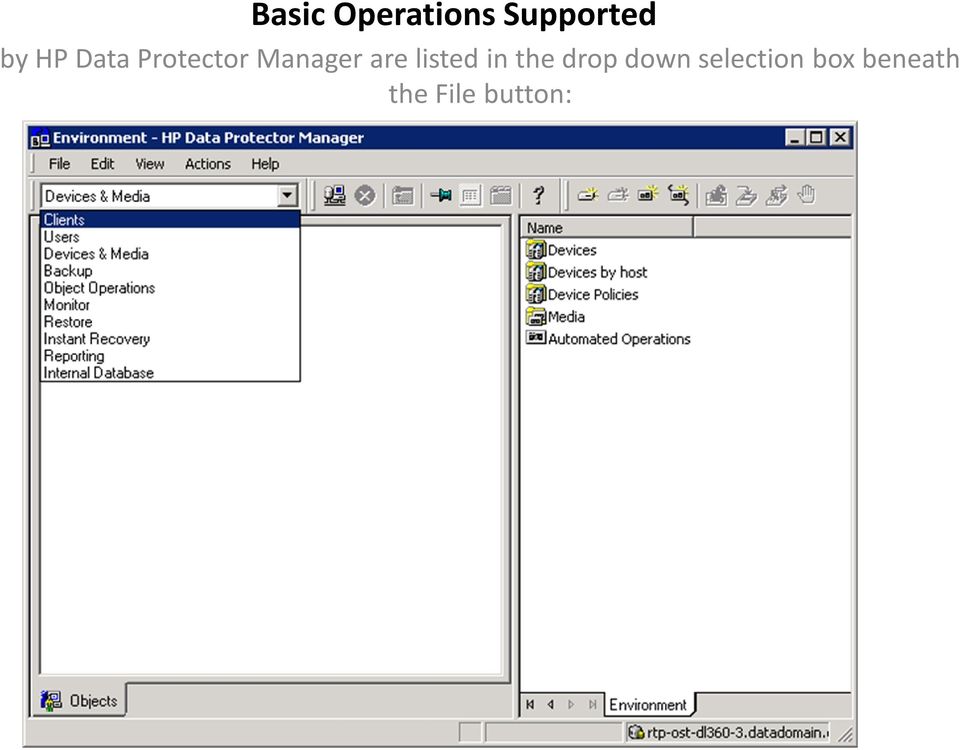
11 Basic Operations Supported by HP Data Protector Manager are listed in the drop down selection box beneath the File button:
12 Enable DDBoost Plugin application call back message logging 1) From the previous HP Data Protector Manager window, select File/Preferences/Debugging. This popup window should Appear

13 Enable DDBoost Plugin application call back message logging (2) 2) There are three options. The first will capture the DDBoost Application call back messages for the current session only. The second will capture the DDBoost Application call back messages as a permanent behavior, and over time could fill up storage on the client with log file information. The third will disable logging of the DDBoost Application call back messages. 3) After making a selection, you must perform "Relaunch GUI now..." any time the preferences are changed.

14 Enable DDBoost Plugin application call back message logging (3) The DDBoost Application call back message log will be placed in directory path: c:\\programdata\omniback\log\debug_ddboost:

15 Enable DDBoost Plugin application call back message logging (4) The DDBoost Application call back message log will be placed in directory path: c:\\programdata\omniback\log\debug_ddboost:

16 Enable DDBoost Plugin application call back message logging (5) For DDBoost HPDP has 2 severity options: 1) Log errors is on at all times Regarding debug severities 2) Log all callbacks and debug information is on when DP debugging is enabled regardless of the DP debugging severity For DP debugging: - choose either option: use these options for the next GUI session only use these setting permanently and then re-launch the DP GUI. or - Set the HPDP internal severity option level for debug as range 1-200, or to control the detail of logging in debug files that are saved in folder: ProgramData/OmniBack/tmp This does not influence the debug_ddbost.log file present in folder: ProgramData/OmniBack/log folder.

17 Add Data Domain Storage Device To add a DataDomain storage device, select the operation "Devices & Media", then select Devices and perform a right click, to access the operation: "Add Device..."

18 Add Data Domain Storage Device (2) The right side of the window will display: Enter the DataDomain storage device name in the Device Name box. You may enter an optional description in the Description box. This is a wizard that walks through the actions needed to add a DataDomain storage device to the client.

19 Add Data Domain Storage Device (3) The selection of Interface Type Data Domain Boost causes the DDBoost Plugin library to be loaded. According to HPDP engineering, when the DDBoost Plugin library is loaded, the HP plugin is NOT loaded. On the next page, enter the host name of the DataDomain storage device in the "Deduplication System" box and also provide the "User Name" and "Password". The Storage Unit name must also be provided. This is the name of the Storage Unit HPDP will use on the DDR.

20 Add Data Domain Storage Device (4) Pressing "Select/Create Storage Unit" should cause this window to appear if the credentials and access rights to the DataDomain storage device are valid

21 Add Data Domain Storage Device (5) After creating the storage unit, we are back on the previous window, and it has been scrolled down to reveal additional specification fields. Note that HPDP supports its own deduplication that is NOT DDBoost deduplication; however, because a DataDomain storage device is selected, the HPDP plugin is not loaded and selection of Source-side deduplication (the HPDP algorithm) should have no effect. NOTE: This is important, you must scroll down to make the To cause the Add Device Storage Unit to be created, click on Add. Add button to appear.
22 Note that when HPDP creates the gateway, it appends "_gw1" to the device name we provided earlier, to form the gateway name. Add Data Domain Storage Device (6)
23 Add Data Domain Storage Device (7) The interface shows it has a way to select DDBoost Deduplication; however, this has no affect and should be ignored. It was intended to work by clicking on the Settings tab, the Add Gateway window should change to look like this:
24 Add Data Domain Storage Device (8) Then click on the Advanced button and another window should appear: From this new window, the user would select Server-side deduplication
25 Add Data Domain Storage Device (9) From this new window, the user would select Server-side deduplication And click OK on the two popup windows that were presented, to cause the original Add Device window to be revealed.
26 Add Data Domain Storage Device (10) Under the Server-Side Deduplication column, a Yes should appear. Again: This has no affect and should be ignored.
27 Add Data Domain Storage Device (11) Click "Next" on the Add Device - HP Data Protector Manager window. In the above example, DDBoost Deduplication is not selected
28 Add Data Domain Storage Device (12) If a new storage unit must be created, this message will appear:
29 Add Data Domain Storage Device (13) After selecting "Yes", and then pressing "Next" this window will appear: Here we can set a limit to the number of connections allowed per storage device, and storage device size quota limit values can be set. For the above example some arbitrary values for a 4.5 Tbyte capacity storage unit have been provided. NOTE: In the case of DDBoost, Soft Quota setting are set for the whole DDR and not for a single storage unit.
30 Add Data Domain Storage Device (14) After clicking "Next", this window should appear: The final step is to press the Finish button
31 Add Data Domain Storage Device (15) When the "Finish" button is pressed, the new device name will appear in the left hand and right hand side of the window:
32 Add Data Domain Storage Device (16) You can check the status of a DataDomain Device from the HPDP Manager, through this set of windows: Devices & Media / Settings / Advanced Options
33 Special Notes about Deduplication Add Data Domain Storage Device (17) In the HPDP GUI DDBoost Deduplication is called Server-side deduplication. Note 1) HPDP deduplication is called Source-side deduplication. If a DataDomain storage device is selected, the Plugin library that services HPDP deduplication is not loaded and selecting this algorithm has no affect. If DSP (Distributed Segment Processing) is set as enabled on DDR, Source-side deduplication works, if it is turned on in this section. Note 2) If a DataDomain storage device is selected, the DDBoost Plugin library is loaded. The Server-side deduplication field has no effect, whether it is set to Yes or No within the HPDP GUI to cause Data Domain Deduplication to occur. But if DSP is set as enabled on DDR, Server-side deduplication is on by default. Note 3) For DDBoost deduplication to work, on the Data Domain Restorer, the dd shell command ddboost status must say DD Boost status: enabled. To turn DSP on/off, run the command ddboost distribted-segment-processing enabled/disabled.
34 Add Data Domain Storage Device (18) You can get on the DDR and use the ddboost shell command (ddsh a) to examine the storage units: ddboost storage-unit show The new storage unit should be listed: Name Pre-Comp (GiB) Status ART_LSU1 0.0 RW ART_LSU RW HPDP_SU 0.0 RW SN_LSU RW SN_LSU RW SN_LSU RW To examine the ddboost status use command: ddboost status DD Boost status: enabled The command to enable DDBoost is: ddboost enable DD Boost enabled.
35 Backup To define a backup job, from the HP Data Protector Manager, select the Tasks tab from the lower border.
36 Backup (2) Then from the right panel, select Interactive Backup Wizard [Load Balanced], and doubleclick. The next view will tell you to Select the items that you want to back up. This should present a display similar to the Windows Explorer file manager. The devices mapped to this client should be visible. Click on the directory structure to open a folder.
37 Backup (3) For this example, Temp folder file aaa_readme.txt has been selected.
38 Backup (4) The selected file is a 159 byte text file that describes HPDP trouble messages. After selecting the pathname to backup, click on Next. The available devices that can be used as the backup appliance should appear in the next window:
39 Backup (5) The checked box indicates the long term retention device, ART has been selected as the backup device
40 Backup (6) Expand on ART to select the ART gateway: In the Description field this text was entered: Small 159 byte file aaa_readme.txt. Then click next to proceed.
41 Backup (7) Then Next > was selected and a calendar page appeared: Note: If the calendar automatically schedules the job to run the next day, it could be because of a time-zone difference between the laptop and the client running HPDP Manager.
42 Backup (8) After selecting Next > the Review summaries page appeared: In the Description field this text was entered: Small 159 byte file aaa_readme.txt. Then click next to proceed.
43 Backup (9) Selection of the Properties button caused an Object Properties pop-up window to appear, and the Trees/Filters tab listed the pathname of the file that the backup job is supposed to write to the storage device:
44 Backup (10) After selecting OK to make the Object Properties page disappear, and Next > on the Review summaries page, this final page is displayed:
45 Backup (11) Select Save as, and name the job Backup to something of your choice (for example ART ). Then select Start Interactive Backup and respond to the pop-up with OK. The initial backup should be a Full backup:
46 Observe Backup Job In Progress When the backup job starts, the Status display should look like this:
47 Observe Backup Job In Progress (2) As the job progresses, additional status message will appear. This is the interim job status for a 100 Gbyte backup while in progress:
48 Observe Backup Job In Progress (3) This is shown for the job completion status: It says Session completed successfully!
49 Restore A backup of the folder containing the original HPDP release of 12_11_2013 was made. The folder was renamed to HPDP_2011_12_11_original, and then restored. These steps describe the restore process.
50 Restore (2) From the pull down menu, select Restore. Then select the directory folder to restore: It says Session completed successfully!
51 Restore (3) Then select Restore and from the pop-up window that appears, select Next
52 Restore (4) If all goes well, the Successful Completion message should appear: It says Restore Session completed successfully!
53 Restore (5) Here we can see the original directory structure has been restored : Note: The Windows Explorer had to be exited and restarted before it would show the restored directory.
Configuration Guide. Remote Backups How-To Guide. Overview
 Configuration Guide Remote Backups How-To Guide Overview Remote Backups allow you to back-up your data from 1) a ShareCenter TM to either a Remote ShareCenter or Linux Server and 2) Remote ShareCenter
1. Data Domain Pre-requisites. 2. Enabling OST
 1. Data Domain Pre-requisites Before we begin to configure NetBackup, we need to verify the following:- Administrator rights and network access to the NetBackup master and media servers That the NetBackup
TSM for Windows Installation Instructions: Download the latest TSM Client Using the following link:
 TSM for Windows Installation Instructions: Download the latest TSM Client Using the following link: ftp://ftp.software.ibm.com/storage/tivoli-storagemanagement/maintenance/client/v6r2/windows/x32/v623/
16.4.3 Lab: Data Backup and Recovery in Windows XP
 16.4.3 Lab: Data Backup and Recovery in Windows XP Introduction Print and complete this lab. In this lab, you will back up data. You will also perform a recovery of the data. Recommended Equipment The
10.3.1.6 Lab - Data Backup and Recovery in Windows XP
 5.0 10.3.1.6 Lab - Data Backup and Recovery in Windows XP Introduction Print and complete this lab. In this lab, you will back up data. You will also perform a recovery of the data. Recommended Equipment
Installing the Software... 1 Using the System Tray Icon... 5 Restoring the System Tray Icon... 6
 Contents Getting Started... 1 Installing the Software... 1 Using the System Tray Icon... 5 Restoring the System Tray Icon... 6 Managing Your Drives... 8 Adjusting the Power Setting... 8 Testing Your Drive...11
12.4.1 Optional Lab: Schedule Task Using GUI and at Command in Windows 7
 12.4.1 Optional Lab: Schedule Task Using GUI and at Command in Windows 7 Introduction Print and complete this lab. In this lab, you will schedule a task using the Windows 7 GUI and schedule a task in a
Xythos on Demand Quick Start Guide For Xythos Drive
 Xythos on Demand Quick Start Guide For Xythos Drive What is Xythos on Demand? Xythos on Demand is not your ordinary online storage or file sharing web site. Instead, it is an enterprise-class document
SonicWALL CDP 5.0 Microsoft Exchange InfoStore Backup and Restore
 SonicWALL CDP 5.0 Microsoft Exchange InfoStore Backup and Restore Document Scope This solutions document describes how to configure and use the Microsoft Exchange InfoStore Backup and Restore feature in
16.4.3 Optional Lab: Data Backup and Recovery in Windows 7
 16.4.3 Optional Lab: Data Backup and Recovery in Windows 7 Introduction Print and complete this lab. In this lab, you will back up data. You will also perform a recovery of the data. Recommended Equipment
Backup Exec Private Cloud Services. Planning and Deployment Guide
 Backup Exec Private Cloud Services Planning and Deployment Guide Chapter 1 Introducing Backup Exec Private Cloud Services This chapter includes the following topics: About Backup Exec Private Cloud Services
10.3.1.4 Lab - Data Backup and Recovery in Windows 7
 5.0 10.3.1.4 Lab - Data Backup and Recovery in Windows 7 Introduction Print and complete this lab. In this lab, you will back up data. You will also perform a recovery of the data. Recommended Equipment
STATISTICA VERSION 12 STATISTICA ENTERPRISE SMALL BUSINESS INSTALLATION INSTRUCTIONS
 STATISTICA VERSION 12 STATISTICA ENTERPRISE SMALL BUSINESS INSTALLATION INSTRUCTIONS Notes 1. The installation of STATISTICA Enterprise Small Business entails two parts: a) a server installation, and b)
5.6.2 Optional Lab: Restore Points in Windows Vista
 5.6.2 Optional Lab: Restore Points in Windows Vista Introduction Print and complete this lab. In this lab, you will create a restore point and return your computer back to that point in time. Recommended
INSTALLATION INSTRUCTIONS FOR UKSSOGATEWAY
 INSTALLATION INSTRUCTIONS FOR UKSSOGATEWAY 1) Install the UKSSOGateway application on the desktop: The UKSSOGateway application passes information from the myuk portal to launch the FESClient. The FESClient
CloudBerry Dedup Server
 Getting Started Guide: CloudBerry Dedup Server Getting Started Guide Getting Started with CloudBerry Dedup Server We are glad to announce our new product CloudBerry Dedup Server. CloudBerry Dedup is a
Symantec Enterprise Vault
 Symantec Enterprise Vault Guide for Microsoft Outlook 2010/2013 Users 10.0 Light Outlook Add-In Symantec Enterprise Vault: Guide for Microsoft Outlook 2010/2013 Users The software described in this book
Using Microsoft SyncToy to Automate Backups
 Using Microsoft SyncToy to Automate Backups Downloading and Installing Microsoft SyncToy SyncToy is one of the many PowerToys offered by Microsoft for Windows XP. You can find a list of these utilities
Erado Archiving & Setup Instruction Microsoft Exchange 2007 Push Journaling
 Erado Archiving & Setup Instruction Microsoft Exchange 2007 Push Journaling This document covers the following Microsoft Exchange Server Editions Microsoft Exchange Enterprise Edition 2007 Microsoft Exchange
STATISTICA VERSION 9 STATISTICA ENTERPRISE INSTALLATION INSTRUCTIONS FOR USE WITH TERMINAL SERVER
 Notes: STATISTICA VERSION 9 STATISTICA ENTERPRISE INSTALLATION INSTRUCTIONS FOR USE WITH TERMINAL SERVER 1. These instructions focus on installation on Windows Terminal Server (WTS), but are applicable
SonicWALL CDP 5.0 Microsoft Exchange User Mailbox Backup and Restore
 SonicWALL CDP 5.0 Microsoft Exchange User Mailbox Backup and Restore Document Scope This solutions document describes how to configure and use the Microsoft Exchange User Mailbox Backup and Restore feature
Network Printing In Windows 95/98/ME
 Network Printing In Windows 95/98/ME If you are using Windows 2000/ XP: To install a printer on your network using D-Link Print Server or DI-series router with built-in print server you do not need to
BSDI Advanced Fitness & Wellness Software
 BSDI Advanced Fitness & Wellness Software 6 Kellie Ct. Califon, NJ 07830 http://www.bsdi.cc SOFTWARE BACKUP/RESTORE INSTRUCTION SHEET This document will outline the steps necessary to take configure the
Installation Instruction STATISTICA Enterprise Small Business
 Installation Instruction STATISTICA Enterprise Small Business Notes: ❶ The installation of STATISTICA Enterprise Small Business entails two parts: a) a server installation, and b) workstation installations
WhatsUp Gold v16.3 Installation and Configuration Guide
 WhatsUp Gold v16.3 Installation and Configuration Guide Contents Installing and Configuring WhatsUp Gold using WhatsUp Setup Installation Overview... 1 Overview... 1 Security considerations... 2 Standard
12 NETWORK MANAGEMENT
 12 NETWORK MANAGEMENT PROJECTS Project 12.1 Project 12.2 Project 12.3 Project 12.4 Understanding Key Concepts Backing Up and Restoring Data Monitoring Computer Activity Configuring SNMP Support 276 Networking
HP D2D NAS Integration with HP Data Protector 6.11
 HP D2D NAS Integration with HP Data Protector 6.11 Abstract This guide provides step by step instructions on how to configure and optimize HP Data Protector 6.11 in order to back up to HP D2D Backup Systems
Administration GUIDE. SharePoint Server idataagent. Published On: 11/19/2013 V10 Service Pack 4A Page 1 of 201
 Administration GUIDE SharePoint Server idataagent Published On: 11/19/2013 V10 Service Pack 4A Page 1 of 201 Getting Started - SharePoint Server idataagent Overview Deployment Configuration Decision Table
Symantec Enterprise Vault
 Symantec Enterprise Vault Guide for Microsoft Outlook 2003/2007 Users 10.0 Light Outlook Add-In Symantec Enterprise Vault: Guide for Microsoft Outlook 2003/2007 Users The software described in this book
WS_FTP Professional 12
 WS_FTP Professional 12 Tools Guide Contents CHAPTER 1 Introduction Ways to Automate Regular File Transfers...5 Check Transfer Status and Logs...6 Building a List of Files for Transfer...6 Transfer Files
5.6.3 Lab: Registry Backup and Recovery in Windows XP
 5.6.3 Lab: Registry Backup and Recovery in Windows XP Introduction Print and complete this lab. In this lab, you will back up a computer registry. You will also perform a recovery of a computer registry.
RDS Online Backup Suite v5.1 Brick-Level Exchange Backup
 Version 5.1.0.5 May 2006 1 Introduction...3 2 How To - Backup Individual Emails...3 2.1 Granting Full Mailbox Access Privileges...3 2.1.1 For one specific mailbox...3 2.1.2 For mailboxes located within
Rentavault Online Backup. MS Exchange Mail Level Backup
 Version 5.1 May 2006 1 Introduction... 3 2 How To - Backup Individual Emails... 3 2.1 Granting Full Mailbox Access Privileges... 3 2.1.1 For one specific mailbox... 3 2.1.2 For mailboxes located within
Auto-Archiving your Emails in Outlook
 Changing the AutoArchive Settings for all your Mailbox Folders Changing the AutoArchive Settings for all your Mailbox Folders (cont.) One way to minimize the amount of server space you are using for your
Learn how to create web enabled (browser) forms in InfoPath 2013 and publish them in SharePoint 2013. InfoPath 2013 Web Enabled (Browser) forms
 Learn how to create web enabled (browser) forms in InfoPath 2013 and publish them in SharePoint 2013. InfoPath 2013 Web Enabled (Browser) forms InfoPath 2013 Web Enabled (Browser) forms Creating Web Enabled
SAS 9.3 Foundation for Microsoft Windows
 Software License Renewal Instructions SAS 9.3 Foundation for Microsoft Windows Note: In this document, references to Microsoft Windows or Windows include Microsoft Windows for x64. SAS software is licensed
DESLock+ Basic Setup Guide Version 1.20, rev: June 9th 2014
 DESLock+ Basic Setup Guide Version 1.20, rev: June 9th 2014 Contents Overview... 2 System requirements:... 2 Before installing... 3 Download and installation... 3 Configure DESLock+ Enterprise Server...
DP-313 Wireless Print Server
 DP-313 Wireless Print Server Quick Installation Guide TCP/IP Printing (LPR for Windows 95/98/Me/2000) Rev. 03 (August, 2001) Copyright Statement Trademarks Copyright 1997 No part of this publication may
BACKUP UTILITY FOR TIMEFORCE
 BACKUP UTILITY FOR TIMEFORCE The "Backup Utility" for TimeForce automatically creates a backup of the information stored in the program database. Backups can be performed manually, or the TimeForce Scheduler
Lenovo Online Data Backup User Guide Version 1.8.14
 Lenovo Online Data Backup User Guide Version 1.8.14 Contents Chapter 1: Installing Lenovo Online Data Backup...5 Downloading the Lenovo Online Data Backup Client...5 Installing the Lenovo Online Data
Microsoft Project Server Integration with SharePoint 2010
 Microsoft Project Server Integration with SharePoint 2010 Microsoft Project Server 2010: brings together the business collaboration platform services of SharePoint Server 2010 with structured execution
How to Install CS OrthoTrac on a New Server and Copy the Data from the Old Server to the New Version 12 and higher
 How to Install CS OrthoTrac on a New Server and Copy the Data from the Old Server to the New Version 12 and higher Purpose This document will show how to install CS OrthoTrac practice management software
FileMaker Server 7. Administrator s Guide. For Windows and Mac OS
 FileMaker Server 7 Administrator s Guide For Windows and Mac OS 1994-2004, FileMaker, Inc. All Rights Reserved. FileMaker, Inc. 5201 Patrick Henry Drive Santa Clara, California 95054 FileMaker is a trademark
Using Logon Agent for Transparent User Identification
 Using Logon Agent for Transparent User Identification Websense Logon Agent (also called Authentication Server) identifies users in real time, as they log on to domains. Logon Agent works with the Websense
Microsoft Outlook. Transition from the ECS Exchange Server to the University Exchange Server. ECS Computing Services August 21, 2012 Version 3.
 Microsoft Outlook Transition from the ECS Exchange Server to the University Exchange Server ECS Computing Services August 21, 2012 Version 3.3 1 Table of Contents Transition Process... 4 What is going
System Administration and Log Management
 CHAPTER 6 System Overview System Administration and Log Management Users must have sufficient access rights, or permission levels, to perform any operations on network elements (the devices, such as routers,
How to manage the Adaptive Call Recorder (v.9-50)
 How to manage the Adaptive Call Recorder (v.9-50) The Adaptive Hybrid Call Recorder records all telephone calls that are made and received. Recording calls provides an audit of what was said in every conversation.
How to use Data Protector 6.0 or 6.10 with Exchange Recovery Storage Groups to restore a single mailbox
 How to use Data Protector 6.0 or 6.10 with Exchange Recovery Storage Groups to restore a single mailbox Introduction... 3 Exchange 2003... 4 Creating a Recovery Storage Group... 4 Restoring the Information
Databoks Remote Backup. MS Exchange Mail Level Backup
 Version 5.1 May 2006 Table of Content 1 Introduction... 3 2 How To - Backup Individual Emails... 3 2.1 Granting Full Mailbox Access Privileges... 3 2.1.1 For one specific mailbox... 3 2.1.2 For mailboxes
Solution domain. Cloud PC Backup Startingkit for users. Date 26/05/2015 Sensitivity Unrestricted Our reference V1.0 Contact E-mail
 Solution domain Cloud PC Backup Startingkit for users Date 26/05/2015 Sensitivity Unrestricted Our reference V1.0 Contact E-mail Table of contents Table of contents... 2 1. What is Cloud PC Backup?...
How To Install And Configure Windows Server 2003 On A Student Computer
 Course: WIN310 Student Lab Setup Guide Microsoft Windows Server 2003 Network Infrastructure (70-291) ISBN: 0-470-06887-6 STUDENT COMPUTER SETUP Hardware Requirements All hardware must be on the Microsoft
Wavecrest Certificate
 Wavecrest InstallationGuide Wavecrest Certificate www.wavecrest.net Copyright Copyright 1996-2015, Wavecrest Computing, Inc. All rights reserved. Use of this product and this manual is subject to license.
Solcon Online Backup. MS Exchange Mail Level Backup
 Version 5.2 Augustus 2007 Table of Content 1 Introduction... 2 2 How To - Backup Individual Emails... 2 2.1 Granting Full Mailbox Access Privileges... 3 2.1.1 For one specific mailbox...... 3 2.1.2 For
Exchange 2013 mailbox setup guide
 Fasthosts Customer Support Exchange 2013 mailbox setup guide This article covers the setup of Exchange 2013 mailboxes in Microsoft Outlook 2013, 2010 and Outlook 2011 for Mac. Contents Exchange 2013 Mailbox
Managing Your Lotus Notes Mail Database Size
 Managing Your Lotus Notes Mail Database Size Your Lotus Notes database consists of Mail, Calendar entries and ToDo items. For the purpose of this document, your Notes database will also be referred to
Video Administration Backup and Restore Procedures
 CHAPTER 12 Video Administration Backup and Restore Procedures This chapter provides procedures for backing up and restoring the Video Administration database and configuration files. See the following
User Guide. CTERA Agent. August 2011 Version 3.0
 User Guide CTERA Agent August 2011 Version 3.0 Copyright 2009-2011 CTERA Networks Ltd. All rights reserved. No part of this document may be reproduced in any form or by any means without written permission
Filtering Email with Microsoft Outlook
 Filtering Email with Microsoft Outlook Microsoft Outlook is an email client that can retrieve and send email from various types of mail servers. It includes some advanced functionality that allows you
Installation Guide. Research Computing Team V1.9 RESTRICTED
 Installation Guide Research Computing Team V1.9 RESTRICTED Document History This document relates to the BEAR DataShare service which is based on the product Power Folder, version 10.3.232 ( some screenshots
Cleaning your Windows 7, Windows XP and Macintosh OSX Computers
 Cleaning your Windows 7, Windows XP and Macintosh OSX Computers A cleaning of your computer can help your computer run faster and make you more efficient. We have listed some tools and how to use these
HP Data Protector Integration with Autonomy IDOL Server
 HP Data Protector Integration with Autonomy IDOL Server Introducing e-discovery for HP Data Protector environments Technical white paper Table of contents Summary... 2 Introduction... 2 Integration concepts...
Installing Oracle 12c Enterprise on Windows 7 64-Bit
 JTHOMAS ENTERPRISES LLC Installing Oracle 12c Enterprise on Windows 7 64-Bit DOLOR SET AMET Overview This guide will step you through the process on installing a desktop-class Oracle Database Enterprises
Getting started with 2c8 plugin for Microsoft Sharepoint Server 2010
 Getting started with 2c8 plugin for Microsoft Sharepoint Server 2010... 1 Introduction... 1 Adding the Content Management Interoperability Services (CMIS) connector... 1 Installing the SharePoint 2010
Swiss Safe Storage Online Backup MS Exchange Mail Level Backup
 Version 5.1 2009 Table of Content Introduction... 3 How To - Backup Individual Emails... 3 Granting Full Mailbox Access Privileges... 3 For one specific mailbox... 3 For mailboxes located within a specific
FTP Server Configuration
 FTP Server Configuration For HP customers who need to configure an IIS or FileZilla FTP server before using HP Device Manager Technical white paper 2 Copyright 2012 Hewlett-Packard Development Company,
Windows Offline Files
 Windows Offline Files 1. Description: Windows Offline Files or Client Side Caching (CSC) allows files and folders stored on any Server Message Block (SMB) network share to be available offline. To further
webkpi SaaS ETL Connector Installation & Configuration Guide
 webkpi SaaS ETL Connector Installation & Configuration Guide SaaS ETL Version 2.5.0.12 Version 1.6 September 2013 webkpi SaaS ETL Connector Version 2.5.0.12 V 1.6 Page 1 Table of Contents Table of Contents
Pcounter CGI Utilities Installation and Configuration For Pcounter for Windows version 2.55 and above
 Pcounter CGI Utilities Installation and Configuration For Pcounter for Windows version 2.55 and above About this document The core Pcounter application contains a number of CGI extension applications which
TFA Laptop Printing - Windows
 TFA Laptop Printing - Windows With Print Anywhere Laptop Printing, print from your personal computer to any Print Anywhere device on campus. When a print job is sent from your laptop it will remain in
LPR for Windows 95/98/Me/2000/XP TCP/IP Printing User s Guide. Rev. 03 (November, 2001)
 LPR for Windows 95/98/Me/2000/XP TCP/IP Printing User s Guide Rev. 03 (November, 2001) Copyright Statement Trademarks Copyright 1997 No part of this publication may be reproduced in any form or by any
Using Windows Task Scheduler instead of the Backup Express Scheduler
 Using Windows Task Scheduler instead of the Backup Express Scheduler This document contains a step by step guide to using the Windows Task Scheduler instead of the Backup Express Scheduler. Backup Express
Copyright 2011 DataNet Quality Systems. All rights reserved. Printed in U.S.A. WinSPC is a registered trademarks of DataNet Quality Systems.
 Copyright 2011 DataNet Quality Systems. All rights reserved. Printed in U.S.A. WinSPC is a registered trademarks of DataNet Quality Systems. All other trademarks or registered trademarks are the property
Microsoft Corporation. Project Server 2010 Installation Guide
 Microsoft Corporation Project Server 2010 Installation Guide Office Asia Team 11/4/2010 Table of Contents 1. Prepare the Server... 2 1.1 Install KB979917 on Windows Server... 2 1.2 Creating users and groups
FileMaker Server 14. FileMaker Server Help
 FileMaker Server 14 FileMaker Server Help 2007 2015 FileMaker, Inc. All Rights Reserved. FileMaker, Inc. 5201 Patrick Henry Drive Santa Clara, California 95054 FileMaker and FileMaker Go are trademarks
Professional Mailbox Email Software Setup Guide
 Professional Mailbox Email Software Setup Guide Table of contents Download and Install Microsoft Outlook 2010 or 2011... 2 Enabling access from email software... 4 Setting up Outlook 2010... 6 Before you
Managing documents, files and folders
 Managing documents, files and folders Your computer puts information at your fingertips. Over time, however, you might have so many files that it can be difficult to find the specific file you need. Without
Backup and Restore of CONFIGURATION Object on Windows 2008
 Backup and Restore of CONFIGURATION Object on Windows 2008 Technical Whitepaper Contents Introduction... 3 CONFIGURATION Backup... 3 Windows configuration objects... 3 Active Directory... 4 DFS... 4 DHCP
PC Agent Quick Start. Open the Agent. Autonomy Connected Backup. Version 8.8. Revision 0
 T E C H N I C A L N O T E Autonomy Connected Backup Version 8.8 PC Agent Quick Start Revision 0 Use this document as a quick reference for common Connected Backup PC Agent tasks. If the Agent is not on
EMC AVAMAR 6.0 GUIDE FOR IBM DB2 P/N 300-011-636 REV A01 EMC CORPORATION CORPORATE HEADQUARTERS: HOPKINTON, MA 01748-9103 1-508-435-1000 WWW.EMC.
 EMC AVAMAR 6.0 FOR IBM DB2 GUIDE P/N 300-011-636 REV A01 EMC CORPORATION CORPORATE HEADQUARTERS: HOPKINTON, MA 01748-9103 1-508-435-1000 WWW.EMC.COM Copyright and Trademark Notices Copyright 2002-2011
Cox Business Premium Online Backup USER'S GUIDE. Cox Business VERSION 1.0
 Cox Business Premium Online Backup USER'S GUIDE Cox Business VERSION 1.0 Table of Contents ABOUT THIS GUIDE... 4 DOWNLOADING COX BUSINESS PREMIUM ONLINE BACKUP... 5 INSTALLING COX BUSINESS PREMIUM ONLINE
Installation instructions for MERLIN Dashboard
 Installation instructions for MERLIN Dashboard Contents Installation Prerequisites:... 2 Procedure to manually backup and restore Views and Settings in AxOEE Manager... 3 For XP users go to:... 3 For Vista
Personal Folders Backup
 Personal Folders Backup The Personal Folders Backup tool is designed for use in Outlook 2000 and later and the operating systems that support each respective Outlook version. The tool provides a quick
Ahsay Online Backup Suite v5.1. Brick-Level Exchange Backup
 Version 5.1.0.5 May 2006 Table of Content 1 Introduction...3 2 How To - Backup Individual Emails...3 2.1 Granting Full Mailbox Access Privileges...3 2.1.1 For one specific mailbox...3 2.1.2 For mailboxes
VMware vsphere Data Protection Advanced 5.5
 Data Protection Advanced 5.5 EMC Data Domain Integration TECHNICAL WHITE PAPER Table of Contents Data Domain Configuration... 4 Architecture Overview.... 4 vsphere Data Protection Advanced Client Support....
Online Backup Client User Manual Mac OS
 Online Backup Client User Manual Mac OS 1. Product Information Product: Online Backup Client for Mac OS X Version: 4.1.7 1.1 System Requirements Operating System Mac OS X Leopard (10.5.0 and higher) (PPC
Online Backup Client User Manual Mac OS
 Online Backup Client User Manual Mac OS 1. Product Information Product: Online Backup Client for Mac OS X Version: 4.1.7 1.1 System Requirements Operating System Mac OS X Leopard (10.5.0 and higher) (PPC
Cloud Services for Backup Exec. Planning and Deployment Guide
 Cloud Services for Backup Exec Planning and Deployment Guide Chapter 1 Introducing Cloud Services for Backup Exec This chapter includes the following topics: About Cloud Services for Backup Exec Security
How to Configure Microsoft System Operation Manager to Monitor Active Directory, Group Policy and Exchange Changes Using NetWrix Active Directory
 How to Configure Microsoft System Operation Manager to Monitor Active Directory, Group Policy and Exchange Changes Using NetWrix Active Directory Change Reporter Table of Contents General Information...
Adding Outlook to a Blackberry, Downloading, Installing and Configuring Blackberry Desktop Manager
 Adding Outlook to a Blackberry, Downloading, Installing and Configuring Blackberry Desktop Manager The following instructions work for the District provided Blackberrys from Sprint, but I think it should
Setup guide. TELUS AD Sync
 Setup guide TELUS AD Sync June 2013 TELUS AD Sync User Guide. The AD Sync Tool must be downloaded onto your organization s Domain Controller. Please call TELUS at 1 877 846 4456 to have this feature provisioned
1. Product Information
 ORIXCLOUD BACKUP CLIENT USER MANUAL LINUX 1. Product Information Product: Orixcloud Backup Client for Linux Version: 4.1.7 1.1 System Requirements Linux (RedHat, SuSE, Debian and Debian based systems such
You must have at least Editor access to your own mail database to run archiving.
 Archiving An archive is a copy of a database you can create to store information no longer in use. Like a replica, an archive contains all documents and design elements in the original database, but unlike
Acronis Backup & Recovery 11
 Acronis Backup & Recovery 11 Quick Start Guide Applies to the following editions: Advanced Server Virtual Edition Advanced Server SBS Edition Advanced Workstation Server for Linux Server for Windows Workstation
AccuGuard Desktop and AccuGuard Server User Guide
 AccuGuard Desktop and AccuGuard Server User Guide 1 2 Table of Contents Welcome 4 Backup Simplified 5 Features 6 Protection Plans 7 Archived Data Viewing 8 Archived Data Restoring 9 Best Practices 11 Getting
Course: WIN310. Student Lab Setup Guide. Summer 2010. Microsoft Windows Server 2003 Network Infrastructure (70-291)
 Course: WIN310 Student Lab Setup Guide Summer 2010 Microsoft Windows Server 2003 Network Infrastructure (70-291) ISBN: 0-470-06887-6 Published by Wiley & Sons 1 STUDENT COMPUTER SETUP Hardware Requirements
Online Backup Client User Manual Linux
 Online Backup Client User Manual Linux 1. Product Information Product: Online Backup Client for Linux Version: 4.1.7 1.1 System Requirements Operating System Linux (RedHat, SuSE, Debian and Debian based
ZENworks 11 Support Pack 4 Full Disk Encryption Agent Reference. May 2016
 ZENworks 11 Support Pack 4 Full Disk Encryption Agent Reference May 2016 Legal Notice For information about legal notices, trademarks, disclaimers, warranties, export and other use restrictions, U.S. Government
Microsoft Visual Studio Integration Guide
 Microsoft Visual Studio Integration Guide MKS provides a number of integrations for Integrated Development Environments (IDEs). IDE integrations allow you to access MKS Integrity s workflow and configuration
WhatsUp Gold v16.1 Installation and Configuration Guide
 WhatsUp Gold v16.1 Installation and Configuration Guide Contents Installing and Configuring Ipswitch WhatsUp Gold v16.1 using WhatsUp Setup Installing WhatsUp Gold using WhatsUp Setup... 1 Security guidelines
Technical Notes. EMC NetWorker Performing Backup and Recovery of SharePoint Server by using NetWorker Module for Microsoft SQL VDI Solution
 EMC NetWorker Performing Backup and Recovery of SharePoint Server by using NetWorker Module for Microsoft SQL VDI Solution Release number 9.0 TECHNICAL NOTES 302-001-760 REV 01 September, 2015 These technical