
Deploying and Managing Microsoft Exchange Server 2013
|
|
|
- Noreen Gaines
- 9 years ago
- Views:
Transcription
1 Deploying and Managing Microsoft Exchange Server 2013

2 Module Overview 1. Exchange Server 2013 Prerequisites and Requirements 2. Exchange Server 2013 Deployment 3. Managing Exchange Server 2013

3 1. Exchange Server 2013 Prerequisites and Requirements Active Directory Components and Exchange Server Integration DNS Server Requirements for Exchange Server 2013 Software Requirements for Exchange Server 2013 Hardware Requirements for Exchange Server 2013 Infrastructure Requirements for Exchange Server 2013 Preparing AD DS for Exchange Server 2013 Deployment

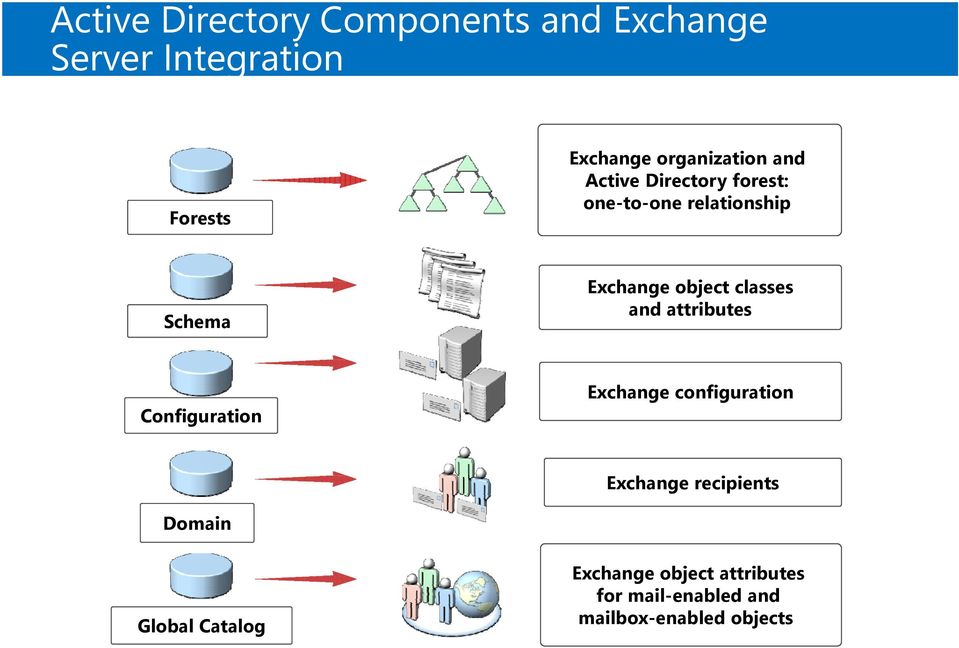
4 Active Directory Components and Exchange Server Integration Forests Exchange organization and Active Directory forest: one-to-one relationship Schema Exchange object classes and attributes Configuration Exchange configuration Exchange recipients Domain Global Catalog Exchange object attributes for mail-enabled and mailbox-enabled objects
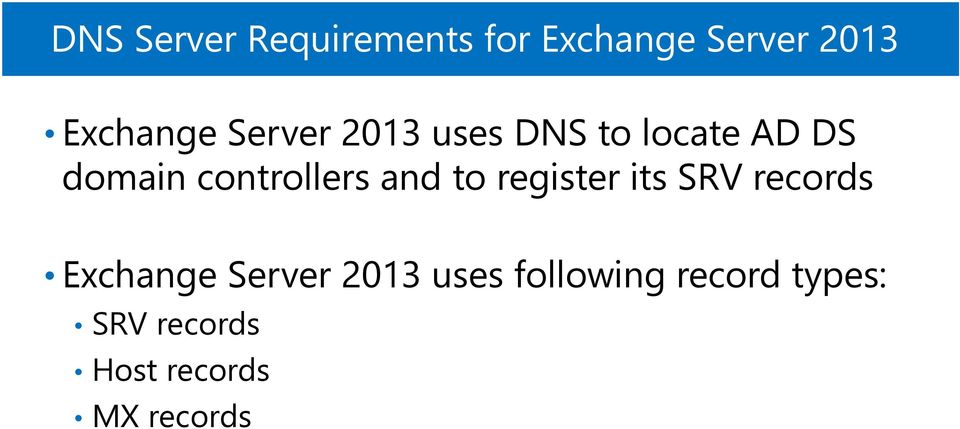
5 DNS Server Requirements for Exchange Server 2013 Exchange Server 2013 uses DNS to locate AD DS domain controllers and to register its SRV records Exchange Server 2013 uses following record types: SRV records Host records MX records
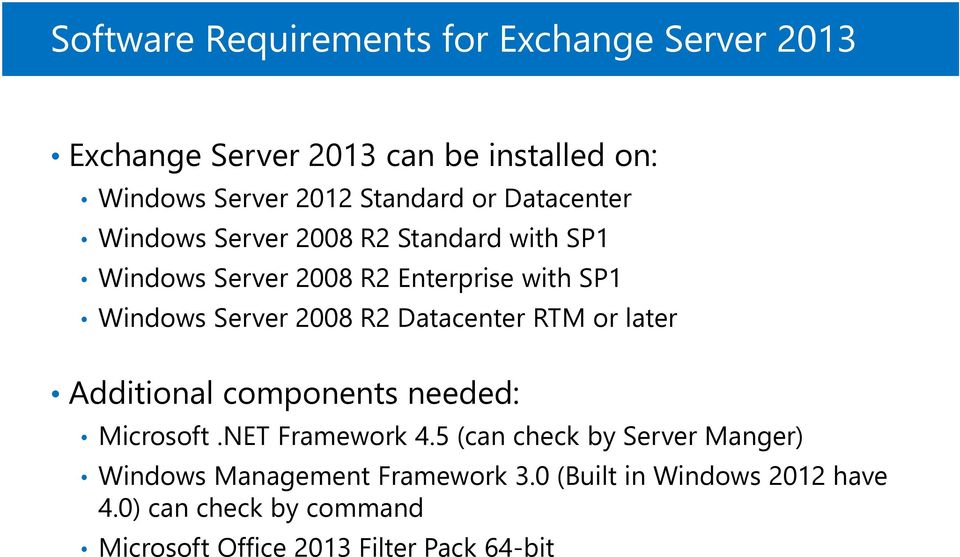
6 Software Requirements for Exchange Server 2013 Exchange Server 2013 can be installed on: Windows Server 2012 Standard or Datacenter Windows Server 2008 R2 Standard with SP1 Windows Server 2008 R2 Enterprise with SP1 Windows Server 2008 R2 Datacenter RTM or later Additional components needed: Microsoft.NET Framework 4.5 (can check by Server Manger) Windows Management Framework 3.0 (Built in Windows 2012 have 4.0) can check by command Microsoft Office 2013 Filter Pack 64-bit
7 Hardware Requirements for Exchange Server 2013 Resource Processor Memory Disk Requirements Intel 64-bit architecture AMD64 architecture 8 GB recommended Additional memory required based on server role and load 1.2 GB free disk space for Exchange Server files 200 MB free on the system drive File System Additional space for mailbox storage NTFS file system for all drives

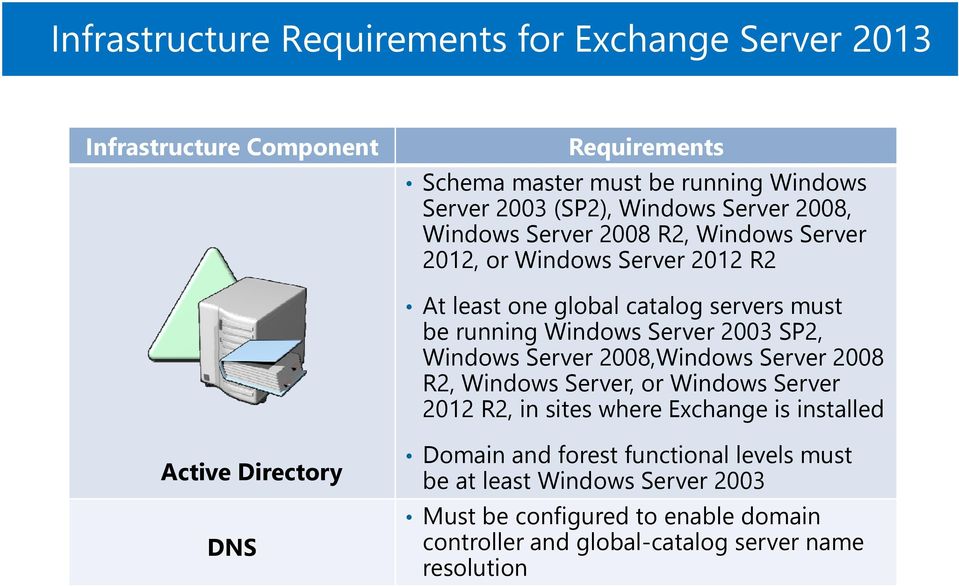
8 Infrastructure Requirements for Exchange Server 2013 Infrastructure Component Requirements Schema master must be running Windows Server 2003 (SP2), Windows Server 2008, Windows Server 2008 R2, Windows Server 2012, or Windows Server 2012 R2 At least one global catalog servers must be running Windows Server 2003 SP2, Windows Server 2008,Windows Server 2008 R2, Windows Server, or Windows Server 2012 R2, in sites where Exchange is installed Active Directory DNS Domain and forest functional levels must be at least Windows Server 2003 Must be configured to enable domain controller and global-catalog server name resolution
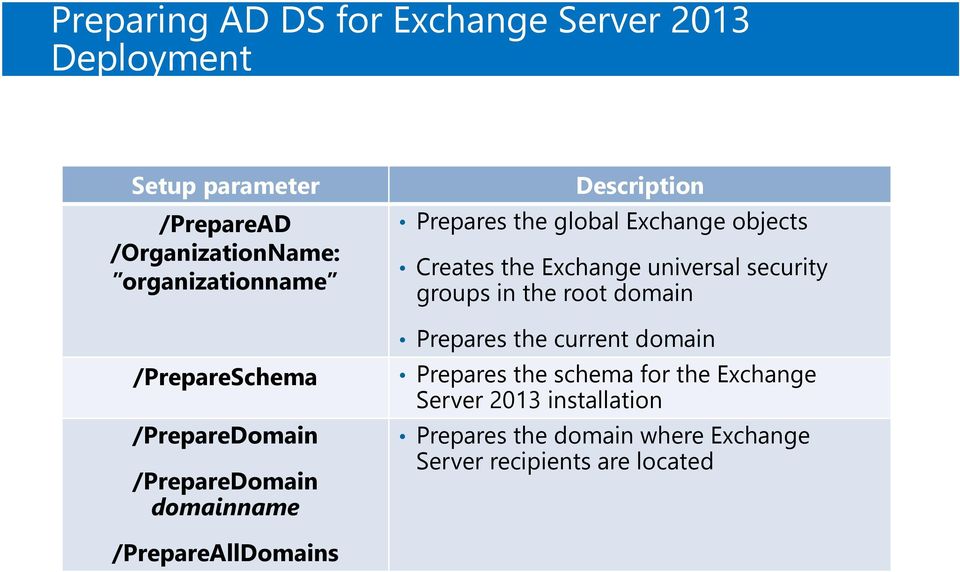
9 Preparing AD DS for Exchange Server 2013 Deployment Setup parameter /PrepareAD /OrganizationName: organizationname /PrepareSchema /PrepareDomain /PrepareDomain domainname Description Prepares the global Exchange objects Creates the Exchange universal security groups in the root domain Prepares the current domain Prepares the schema for the Exchange Server 2013 installation Prepares the domain where Exchange Server recipients are located /PrepareAllDomains
10 2 Exchange Server 2013 Deployment Exchange Server Role Architecture in Exchange Server 2013 Deployment Options for Exchange Server 2013 How to Install Exchange Server 2013 Using the Setup Wizard Demonstration: Installing Exchange Server 2013 Post-Installation Tasks Troubleshooting Exchange Server Installation

11 Exchange Server Role Architecture in Exchange Server 2013 Server roles in Exchange Server 2013: Client Access Server Mailbox Server Client Access Server provides: Client authentication Redirection and proxy services Support for client protocols (HTTP, POP, IMAP, SMTP) Mailbox Server provides: Mailbox and public-folder database Transport services Unified Messaging Client connectivity is only established using RPC over HTTPS

12 Deployment Options for Exchange Server 2013 Exchange Server 2013 versions: Standard (allows creating up to 5 mailbox databases) Enterprise (allows creating up to 50 mailbox databases) Exchange Server CAL (Client access licenses): Standard Enterprise Deployment scenarios: Single-server deployment Multiple-server deployment Hybrid deployment

13 Upgrade and Migration Options

14 How to Install Exchange Server 2013 Using the Setup Wizard Installation steps in the Exchange Server setup wizard include: 1. Check for Updates 2. License Agreement 3. Recommended Settings 4. Server Role Selection 5. Installation Space and Location 6. Exchange Organization 7. Malware Protection Settings 8. Readiness Checks

15 Demonstration: Installing Exchange Server 2013 In this demonstration, you will see how to prepare AD DS and install Exchange Server 2013 from the setup wizard

16 Post-Installation Tasks Verify services functionality Secure your Exchange Server: Restrict physical access Restrict communication Reduce the attack surface Restrict permissions Install and configure additional software (optional): Antivirus software Anti-spam software Backup software Monitoring tools and agents

17 Troubleshooting Exchange Server Installation When troubleshooting Exchange installation, check ExchangeSetupLogs folder for log files Check following common issues: Insufficient disk space Missing software components Incorrect DNS configuration Incorrect domain functional level Insufficient Active Directory permissions Insufficient Exchange permissions

18 3 Managing Exchange Server 2013 Managing Exchange Server 2013 What Is EAC? Managing User Mailbox Properties with Outlook Web App What Is Exchange Management Shell?

19 Managing Exchange Server 2013 Methods for Exchange Server 2013 management: Exchange Administration Center Outlook Web App options Exchange Management Shell

20 What Is EAC?

MS-10135 - Configuring, Managing and Troubleshooting Microsoft Exchange Server 2010
 MS-10135 - Configuring, Managing and Troubleshooting Microsoft Exchange Server 2010 Introduction This course will provide you with the knowledge and skills to configure and manage a Microsoft Exchange
Configuring, Managing and Troubleshooting Microsoft Exchange Server 2010 Service Pack 2
 Course 10135 Configuring, Managing and Troubleshooting Microsoft Exchange Server 2010 Service Pack 2 Length: 5 Days Language(s): English Audience(s): IT Professionals Level: 200 Technology: Microsoft Exchange
Configuring, Managing and Troubleshooting Microsoft Exchange Server 2010 Service Pack 2
 Course 10135B: Configuring, Managing and Troubleshooting Microsoft Exchange Server 2010 Service Pack 2 Length: 5 Days Audience(s): IT Professionals Level: 200 Technology: Microsoft Exchange Server 2010
2400 - Implementing and Managing Microsoft Exchange Server 2003
 2400 - Implementing and Managing Microsoft Exchange Server 2003 Introduction This five-day, instructor-led course provides students with the knowledge and skills that are needed to update and support a
MOC 5047B: Intro to Installing & Managing Microsoft Exchange Server 2007 SP1
 MOC 5047B: Intro to Installing & Managing Microsoft Exchange Server 2007 SP1 Course Number: 5047B Course Length: 3 Days Certification Exam This course will help you prepare for the following Microsoft
Build Your Knowledge!
 About this Course This course will provide you with the knowledge and skills to configure and manage a Microsoft Exchange Server 2010 messaging environment. This course will teach you how to configure
MS 10135 Configuring, Managing and Troubleshooting Microsoft Exchange Server 2010 Service Pack 2
 MS 10135 Configuring, Managing and Troubleshooting Microsoft Exchange Server 2010 Service Pack 2 P a g e 1 of 10 About this Course This course will provide you with the knowledge and skills to configure
Configuring, Managing and Troubleshooting Microsoft Exchange Server 2010 Service Pack 2
 Course 10135B: Configuring, Managing and Troubleshooting Microsoft Exchange Server 2010 Service Pack 2 Course Details Course Outline Module 1: Deploying Microsoft Exchange Server 2010 This module describes
Configuring, Managing and Troubleshooting Microsoft Exchange Server 2010 Service Pack 2
 Configuring, Managing and Troubleshooting Microsoft Exchange Server 2010 Service Pack 2 Course Details Course Code: Duration: 10135B 5 day(s) Elements of this syllabus are subject to change. This course
Course 10135A: Configuring, Managing and Troubleshooting Microsoft Exchange Server 2010
 Course Syllabus Course 10135A: Configuring, Managing and Troubleshooting Microsoft Exchange Server 2010 About this Course This five-day, instructor-led course will provide you with the knowledge and skills
Configuring Managing and Troubleshooting Microsoft Exchange Server 2010
 Course Code: M10135 Vendor: Microsoft Course Overview Duration: 5 RRP: 1,980 Configuring Managing and Troubleshooting Microsoft Exchange Server 2010 Overview This course will provide you with the knowledge
Configuring, Managing and Troubleshooting Microsoft Exchange Server 2010 Service Pack 2
 About this Course This course will provide you with the knowledge and skills to configure and manage a Microsoft Exchange Server 2010 messaging environment. This course will teach you how to configure
MCITPEXCH - Exchange Bootcamp Design, Configure, and Manage (10135/10233)
 MCITPEXCH - Exchange Bootcamp Design, Configure, and Manage (10135/10233) Table of Contents Introduction Audience At Course Completion Prerequisites Microsoft Certified Professional Exams Student Materials
MS-10135: Configuring, Managing and Troubleshooting Microsoft Exchange Server 2010. Course Objectives. Price. Duration. Methods of Delivery
 MS-10135: Configuring, Managing and Troubleshooting Microsoft Exchange Server 2010 This five-day instructor led course will provide you with the knowledge and skills to configure and manage an Exchange
Designing and Deploying Messaging Solutions with Microsoft Exchange Server 2010 Service Pack 2 MOC 10233
 Designing and Deploying Messaging Solutions with Microsoft Exchange Server 2010 Service Pack 2 MOC 10233 Course Outline Module 1: Introduction to Designing a Microsoft Exchange Server 2010 Deployment This
MS 10135B Configuring, Managing and Troubleshooting Microsoft Exchange Server 2010
 MS 10135B Configuring, Managing and Troubleshooting Microsoft Exchange Server 2010 Description: Days: 5 Prerequisites: This course will provide you with the knowledge and skills to configure and manage
Administering Microsoft Exchange Server 2016 20345-1; 5 Days, Instructor-led
 Administering Microsoft Exchange Server 2016 20345-1; 5 Days, Instructor-led Course Description This 5-day instructor-led course teaches IT professionals how to administer and support Exchange Server 2016.
ADMINISTERING MICROSOFT EXCHANGE SERVER 2016
 ADMINISTERING MICROSOFT EXCHANGE SERVER 2016 Table of Contents Prerequisite... 2 About Course... 2 Audience Profile... 2 At Course Completion... 3 Module 1: Deploying Microsoft Exchange Server 2016...
Designing and Deploying Messaging Solutions with Microsoft Exchange Server 2010 Service Pack 2
 Course 10233B: Designing and Deploying Messaging Solutions with Microsoft Exchange Server 2010 Service Pack 2 Length: Delivery Method: 5 Days Instructor-led (classroom) About this Course This five-day,
5053A: Designing a Messaging Infrastructure Using Microsoft Exchange Server 2007
 5053A: Designing a Messaging Infrastructure Using Microsoft Exchange Server 2007 Course Number: 5053A Course Length: 3 Days Course Overview This three-day instructor-led course provides students with the
How To Configure And Manage An Exchange Server 2010 For Free
 Configuring, Managing and Troubleshooting Microsoft Exchange Server 2010 MOC10135 About this Course This five-day, instructor-led course will provide you with the knowledge and skills to configure and
Designing and Deploying Messaging Solutions with Microsoft Exchange Server 2010 Service Pack 2
 Microsoft Exchange About this Course This five-day, instructor-led course provides you with the knowledge and skills to design and deploy messaging solutions with Server 2010. This course describes how
Designing and Deploying Messaging Solutions with Microsoft Exchange Server 2010
 Course 10233A: Designing and Deploying Messaging Solutions with Microsoft Exchange Server 2010 OVERVIEW About this Course This five-day, instructor-led course provides you with the knowledge and skills
Lesson Plans Configuring Exchange Server 2007
 Lesson Plans Configuring Exchange Server 2007 (Exam 70-236) Version 2.1 Table of Contents Course Overview... 2 Section 1.1: Server-based Messaging... 4 Section 1.2: Exchange Versions... 5 Section 1.3:
Course 10233:Designing and Deploying Messaging Solutions with Microsoft Exchange Server 2010 Service Pack 2
 Course 10233:Designing and Deploying Messaging Solutions with Microsoft Exchange Server 2010 Service Pack 2 Type:Course Audience(s):IT Professionals Technology:Microsoft Exchange Level:200 This Revision:B
MS 20341B: Core Solutions of Microsoft Exchange Server 2013
 MS 20341B: Core Solutions of Microsoft Exchange Server 2013 Description: In this course, students will learn to configure and manage a Microsoft Exchange Server 2013 messaging environment. This course
Core Solutions of Microsoft Exchange Server 2013 Course 20341A; 5 Days
 Core Solutions of Microsoft Exchange Server 2013 Course 20341A; 5 Days Lincoln Land Community College Capital City Training Center 130 West Mason Springfield, IL 62702 217-782-7436 www.llcc.edu/cctc Course
This course is intended for IT professionals who are responsible for the Exchange Server messaging environment in an enterprise.
 10233A: Designing and Deploying Messaging Solutions with Microsoft Exchange Server 2010 Course Number: 10233A Course Length: 5 Day Course Overview This instructor-led course provides you with the knowledge
Course Outline: Course 10135A: Configuring, Managing and Troubleshooting Microsoft
 Course Outline: Course 10135A: Configuring, Managing and Troubleshooting Microsoft Exchange Server 2010 Learning Method: Instructor-led Classroom Learning Duration: 5.00 Day(s)/ 40 hrs Overview: This five-day,
Configuring, Managing and Troubleshooting Microsoft Exchange Server 2010 Course 10135: 5 days; Instructor-Led
 Lincoln Land Community College Capital City Training Center 130 West Mason Springfield, IL 62702 217-782-7436 www.llcc.edu/cctc Configuring, Managing and Troubleshooting Microsoft Exchange Server 2010
ABOUT THIS COURSE AT COURSE COMPLETION PREREQUISITES COURSE OUTLINE. Core Solutions of Microsoft Exchange Server 2013 Duration : 5 days
 Core Solutions of Microsoft Exchange Server 2013 Duration : 5 days ABOUT THIS COURSE This course will provide you with the knowledge and skills to plan, deploy, manage, secure, and support Microsoft Exchange
Designing and Deploying Messaging Solutions with Microsoft Exchange Server 2010 Service Pack 2
 Designing and Deploying Messaging Solutions with Microsoft Exchange Service Pack 2 Course Details Course Code: Duration: Notes: 10233B 5 days This course syllabus should be used to determine whether the
Configuring, Managing and Troubleshooting Microsoft Exchange Server 2010
 Course 10135A: Configuring, Managing and Troubleshooting Microsoft Exchange Server 2010 Length: 5 Days Published: February 24, 2010 Language(s): Audience(s): English IT Professionals Level: 200 Technology:
Microsoft Office Outlook 2013: Part 1
 Microsoft Office Outlook 2013: Part 1 Course Specifications Course Length: 1 day Overview: Email has become one of the most widely used methods of communication, whether for personal or business communications.
Microsoft Exchange 2013 Ultimate Bootcamp Your pathway to becoming a GREAT Exchange Administrator
 Microsoft Exchange 2013 Ultimate Bootcamp Your pathway to becoming a GREAT Exchange Administrator Introduction Microsoft Exchange with its inherent high level of security features, improved assistant,
Microsoft Exchange Server 2007, Upgrade from Exchange 2000/2003 (3938. 3938/5049/5050) Course KC3065 5 Days OVERVIEW COURSE OBJECTIVES AUDIENCE
 Microsoft Exchange, Upgrade from Exchange 2000/2003 COURSE OVERVIEW This instructor-led course offers Microsoft Exchange Server administrators with the skills they need to manage a Microsoft Exchange infrastructure.
EXAM - 70-662. TS: Microsoft Exchange Server 2010, Configuring. Buy Full Product. http://www.examskey.com/70-662.html
 Microsoft EXAM - 70-662 TS: Microsoft Exchange Server 2010, Configuring Buy Full Product http://www.examskey.com/70-662.html Examskey Microsoft 70-662 exam demo product is here for you to test the quality
MCSE Objectives. Exam 70-236: TS:Exchange Server 2007, Configuring
 MCSE Objectives Exam 70-236: TS:Exchange Server 2007, Configuring Installing and Configuring Microsoft Exchange Servers Prepare the infrastructure for Exchange installation. Prepare the servers for Exchange
5/20/2013. The primary design goal was for simplicity of scale, hardware utilization, and failure isolation. Microsoft Exchange Team
 Additions and Subtractions The primary design goal was for simplicity of scale, hardware utilization, and failure isolation. Microsoft Exchange Team Exchange Version Exchange Server 2003 and earlier versions
Updating Your Skills from Microsoft Exchange Server 2003 or Exchange Server 2007 to Exchange Server 2010 Course 10165; 5 Days, Instructor-led
 Updating Your Skills from Microsoft Exchange Server 2003 or Exchange Server 2007 to Exchange Server 2010 Course 10165; 5 Days, Instructor-led Course Description There are two main reasons for the course.
Course 20341B: Core Solutions of Microsoft Exchange Server 2013 OVERVIEW
 Course 20341B: Core Solutions of Microsoft Exchange Server 2013 OVERVIEW About this Course This course will provide you with the knowledge and skills to plan, deploy, manage, secure, and support Microsoft
10135A: Configuring, Managing, and Troubleshooting Microsoft Exchange Server 2010
 10135A: Configuring, Managing, and Troubleshooting Microsoft Exchange Server 2010 Course Number: 10135A Course Length: 5 Day Course Overview This instructor-led course will provide you with the knowledge
Core Solutions of Microsoft Exchange Server 2013 Course 20341B; 5 days, Instructor-led
 Core Solutions of Microsoft Exchange Server 2013 Course 20341B; 5 days, Instructor-led Course Description This course will provide you with the knowledge and skills to plan, deploy, manage, secure, and
5054A: Designing a High Availability Messaging Solution Using Microsoft Exchange Server 2007
 5054A: Designing a High Availability Messaging Solution Using Microsoft Exchange Server 2007 Course Number: 5054A Course Length: 2 Days Course Overview This 2-day course teaches messaging engineers to
Table of Contents. Introduction. Audience. At Course Completion
 Table of Contents Introduction Audience At Course Completion Prerequisites Microsoft Certified Professional Exams Student Materials Course Outline Introduction This three-day instructor-led course provides
10233B: Designing and Deploying Messaging Solutions with Microsoft Exchange Server 2010
 Course: 10233B: Designing and Deploying Messaging Solutions with Microsoft Exchange Server 2010 Description: About this Course This five-day, instructor-led course provides you with the knowledge and skills
Core Solutions of Microsoft Exchange Server 2013
 About this Course This course will provide you with the knowledge and skills to plan, deploy, manage, secure, and support Microsoft Exchange. This course will teach you how to configure Exchange and supply
Updating Your Skills from Microsoft Exchange Server 2003 or Exchange Server 2007 to Exchange Server 2010 SP1
 Course 10165A: Updating Your Skills from Microsoft Exchange Server 2003 or Exchange Server 2007 to Exchange Server 2010 SP1 OVERVIEW About this Course There are two main reasons for the course. Firstly,
Outline SSS6422 - Microsoft Windows Server 2008 Hyper-V Virtualization
 Outline SSS6422 - Microsoft Windows Server 2008 Hyper-V Virtualization Duration: Three consecutive Saturdays About this Course This instructor led course teaches students how to implement and manage Windows
Core Solutions of Microsoft Exchange Server 2013 MOC 20341
 Core Solutions of Microsoft Exchange Server 2013 MOC 20341 Course Outline Module 1: Deploying and Managing Exchange Server 2013 This module explains how to plan and perform deployment and management of
Microsoft Dynamics 2011: MS-80296 Installation and Deployment
 coursemonster.com/uk Microsoft Dynamics 2011: MS-80296 Installation and Deployment View training dates» Overview This two day instructor led course covers the installation and configuration of Microsoft
Microsoft Dynamics CRM 2011 Installation and Deployment
 Microsoft Dynamics CRM 2011 Installation and Deployment Course 80296; 2 Days, Instructor-led Course Description This two-day instructor course covers the installation and configuration of Microsoft Dynamics
MS 20342B: Advanced Solutions of Microsoft Exchange Server 2013
 MS 20342B: Advanced Solutions of Microsoft Exchange Server 2013 Description: Days: 5 Prerequisites: In this course, students will learn to to configure and manage a Microsoft Exchange Server 2013 messaging
MCSA Objectives. Exam 70-236: TS:Exchange Server 2007, Configuring
 MCSA Objectives Exam 70-236: TS:Exchange Server 2007, Configuring Installing and Configuring Microsoft Exchange Servers Prepare the infrastructure for Exchange installation. Prepare the servers for Exchange
70-662: Deploying Microsoft Exchange Server 2010
 70-662: Deploying Microsoft Exchange Server 2010 Course Introduction Course Introduction Chapter 01 - Active Directory and Supporting Infrastructure Active Directory and Supporting Infrastructure Network
Monitoring and Troubleshooting Microsoft Exchange Server 2007 (5051A) Course length: 2 days
 Monitoring and Troubleshooting Microsoft Exchange Server 2007 (5051A) Course length: 2 days Who Should Attend: This workshop is intended for experienced enterprise-level messaging professionals who have
Core Solutions of Microsoft Exchange Server 2013
 Course 20341B: Core Solutions of Microsoft Exchange Server 2013 Page 1 of 6 Core Solutions of Microsoft Exchange Server 2013 Course 20341B: 4 days; Instructor-Led Introduction This course will provide
20342 Advanced Solutions of Microsoft Exchange Server
 20342 Advanced Solutions of Microsoft Exchange Server Course Number: 20342 Category: Exchange Server 2013 Duration: 5 days Course Description This course will provide you with the knowledge and skills
Exchange 2013 Deployment, Coexistence, Virtualization. Jeff Mealiffe Senior Program Manager Exchange Product Group
 Exchange 2013 Deployment, Coexistence, Virtualization Jeff Mealiffe Senior Program Manager Exchange Product Group Agenda Fundamentals of Deployment Upgrade and Coexistence Public Folder Migrations Virtualization
Course 20341B: Core Solutions of Microsoft Exchange Server 2013
 Course 20341B: Core Solutions of Exchange Server 2013 Length : 5 days Audience(s) : IT Professionals Level : 300 Technology : Exchange Server 2013 Delivery Method : Instructor-led (classroom) Course Overview
LEARNING SOLUTIONS website milner.com/learning email [email protected] phone 800 875 5042
 Course 6451B: Planning, Deploying and Managing Microsoft System Center Configuration Manager 2007 Length: 3 Days Published: June 29, 2012 Language(s): English Audience(s): IT Professionals Level: 300 Technology:
Getting Started with HC Exchange Module
 Getting Started with HC Exchange Module HOSTING CONTROLLER WWW.HOSTINGCONROLLER.COM HOSTING CONTROLLER Contents Introduction...1 Minimum System Requirements for Exchange 2013...1 Hardware Requirements...1
20341B: Core Solutions of Microsoft Exchange Server 2013
 20341B: Core Solutions of Microsoft Exchange Server Course Details Course Code: Duration: Notes: 20341B 5 days This course syllabus should be used to determine whether the course is appropriate for the
E2E Complete 4.0. Requirements
 E2E Complete 4.0 Requirements January 2016 Table of Contents Section 1. Introduction... 3 Section 2. Prerequisites... 3 2.1 Hardware Prerequisites... 3 2.2 Software Prerequisites... 3 2.3 Account Requirements...
Deploying and administering Microsoft Dynamics CRM Online and Microsoft Dynamics CRM 2015
 Deploying and administering Microsoft Dynamics CRM Online and Microsoft Dynamics CRM 2015 Version 7.1.1 This document contains the information that was titled the Microsoft Dynamics CRM Implementation
Core Solutions of Microsoft Exchange Server 2013
 Course 20341B: Core Solutions of Microsoft Exchange Server 2013 Course Details Course Outline Module 1: Deploying and Managing Microsoft Exchange Server 2013 This module describes Exchange Server 2013
Designing and Deploying Messaging Solutions with Microsoft Exchange Server 2010 Service Pack 2 20465B; 5 days, Instructor-led
 Designing and Deploying Messaging Solutions with Microsoft Exchange Server 2010 Service Pack 2 20465B; 5 days, Instructor-led Course Description This five-day, instructor-led course provides you with the
Exclaimer Mail Archiver 3.04 Release Notes
 Exclaimer Mail Archiver 3.04 Release Notes Release Number The current Release Number for this product is: 3.04.0.453 System Requirements: Mail Archiver Console and Web Server Hardware Minimum Requirements
Getting Started Guide
 GFI MailArchiver for Exchange Getting Started Guide By GFI Software Ltd. http://www.gfi.com Email: [email protected] Information in this document is subject to change without notice. Companies, names, and
E-MAIL AND SERVER SECURITY
 E-MAIL AND SERVER SECURITY DEPLOYMENT GUIDE 1 E-MAIL AND SERVER SECURITY Deployment Guide 2 CONTENTS 1. Overview 3 2. Deployment scenarios 5 2.1 Stand-alone server 5 2.2 Deploying the product with F-Secure
E-MAIL AND SERVER SECURITY
 E-MAIL AND SERVER SECURITY DEPLOYMENT GUIDE 1 E-MAIL AND SERVER SECURITY Deployment Guide 2 CONTENTS 1. Overview 3 1.1 How the product works 3 1.2 Product contents 4 2. Deployment scenarios 5 2.1 Stand-alone
Multi-Tenant Scalability Guidance for Exchange Server 2010 Service Pack 2
 Multi-Tenant Scalability Guidance for Exchange Server 2010 Service Pack 2 Customer Advisory Team Exchange Product Group Microsoft Corporation December 2011 Contents Introduction... 3 Scalability Guidance...
GFI Product Manual. Administrator Guide
 GFI Product Manual Administrator Guide The information and content in this document is provided for informational purposes only and is provided "as is" with no warranty of any kind, either express or implied,
Introduction. Part I Introduction to Exchange Server 2010 1
 Contents Introduction xxix Part I Introduction to Exchange Server 2010 1 Chapter 1 Introduction to Exchange Server 2010 3 Part II Brief History of Exchange Servers 4 New Features in Exchange Server 2010
Planning for Windows Server 2008 Servers
 Planning for Windows Server 2008 Servers Course Number: 6430B Course Length: 3 Days Course Overview This 3-day course is intended for IT pros who are interested in the knowledge and skills necessary to
COURSE OUTLINE MOC 20341: CORE SOLUTIONS OF MICROSOFT EXCHANGE SERVER 2013 MODULE 1: DEPLOYING AND MANAGING MICROSOFT EXCHANGE SERVER 2013
 COURSE OUTLINE MOC 20341: CORE SOLUTIONS OF MICROSOFT EXCHANGE SERVER 2013 MODULE 1: DEPLOYING AND MANAGING MICROSOFT EXCHANGE SERVER 2013 This module describes Exchange Server 2013 prerequisites and requirements,
Project Server 2010 - hardware and software requirements
 Project Server 2010 - hardware and software requirements At a high-level, the key requirements for Project Server 2010 are as follows: The 64-bit version of Windows Server 2008 Service Pack 2 or Windows
Microsoft Office Outlook 2010: Level 1
 Microsoft Office Outlook 2010: Level 1 Course Specifications Course length: 8 hours Course Description Course Objective: You will use Outlook to compose and send email, schedule appointments and meetings,
MICROSOFT EXCHANGE SERVER 2013 INSTALLATION
 MICROSOFT EXCHANGE SERVER 2013 INSTALLATION An Enterprise Grade Email Solution This document focuses on Microsoft s leading email solution software; the Exchange Server 2013. This document also is a guide
Module: Sharepoint Administrator
 Module: Sharepoint Administrator Mode: Classroom Duration: 40 hours This course teaches IT Professionals to design and deploy Microsoft SharePoint 2010. Course Outline: Module 1: Designing a Logical Architecture
Workshop 5051A: Monitoring and Troubleshooting Microsoft Exchange Server 2007
 Course Syllabus Workshop 5051A: Monitoring and Troubleshooting Microsoft Exchange Server 2007 About This Workshop Elements of this syllabus are subject to change. This two-day workshop teaches messaging
Ignify ecommerce. Item Requirements Notes
 wwwignifycom Tel (888) IGNIFY5 sales@ignifycom Fax (408) 516-9006 Ignify ecommerce Server Configuration 1 Hardware Requirement (Minimum configuration) Item Requirements Notes Operating System Processor