
Vocia MS-1 Network Considerations for VoIP. Vocia MS-1 and Network Port Configuration. VoIP Network Switch. Control Network Switch
|
|
|
- Robyn Gwenda Thomas
- 10 years ago
- Views:
Transcription
1 Vocia MS-1 Network Considerations for VoIP Vocia software rev. 1.4 or higher required Vocia MS-1 and Network Port Configuration The Vocia Message Server 1 (MS-1) has a number of roles in a Vocia Paging System. It is able to be used for storage and delivery of Pre-Recorded messages, reporting, Message Scheduling, Inter-World communications, system logging,serving Device Configuration automatically and as an Interface to third party control. An MS-1 also allows Control communication between devices in a Vocia World and a PC using Vocia control software and has a built in VoIP interface for User Recorded Live Pages or Pre Recorded Paging. There are a number of specific Technical Notes can be reviewed for more details of connection settings. To facilitate the features of the MS-1 is fitted with four RJ45 Ethernet ports to accommodate multiple network topologies. Looking at the rear of the unit these ports are: - LAN-1: Control - LAN-2: CobraNet - LAN-3: VoIP - LAN-4: Not Used This document outlines the requirements for configuring the MS-1 IP Control network and VoIP interface and will be focusing on the role of the LAN-1 and LAN-3 ports. LAN-2 is used for connection to a CobraNet network to allow sharing of control and audio data to other Vocia devices. This is a layer 2 protocol that does not use logical addressing and is not routable. For more information on CobraNet refer to the separate CobraNet Technical Note. It is recommended that each of the MS-1 LAN ports be connected to separate networks as shown in figure 1. LAN Not Used Control Network VoIP Network Vocia Devices in Local World CobraNet Network VoIP Phone VoIP Call manager Figure 1 - MS-1 physical network setup using IP Control, CobraNet and VoIP BIAMP SYSTEMS TECHNICAL SUPPORT GROUP Page 1 of 6

2 VoIP and Control on different networks, single VoIP network This is the recommended method to configure a Vocia system that requires VoIP paging. This example assumes a valid IP connection is configured between the MS-1 and the control computer and that the Vocia software is online. The MS-1 supports segregating traffic to separate networks. In this configuration the LAN-1 Control Port and LAN-3 VoIP port are on different physical network segments. The VoIP port must be configured to use different IP and Gateway settings to the Control network. All the VoIP phones that communicate to the MS-1 are on the same network as the and the MS-1 VoIP port. IP: LAN-1 MS-1 IP: LAN-3 VoIP IP: Figure 2 - Setup for Control and VoIP on different networks. No VoIP Static Routes required. Using the Vocia Software, in the MS-1 Properties dialog > VoIP General section, Enable VoIP and confirm the VoIP Network Settings Radio button is set to Use Dedicated VoIP Network Connection (LAN-3). The examples will show LAN-1 using the default MS-1 IP address of while LAN 3 will use the IP address of and gateway. Figure 3 - IP settings for Control and VoIP on different networks BIAMP SYSTEMS TECHNICAL SUPPORT GROUP Page 2 of 6

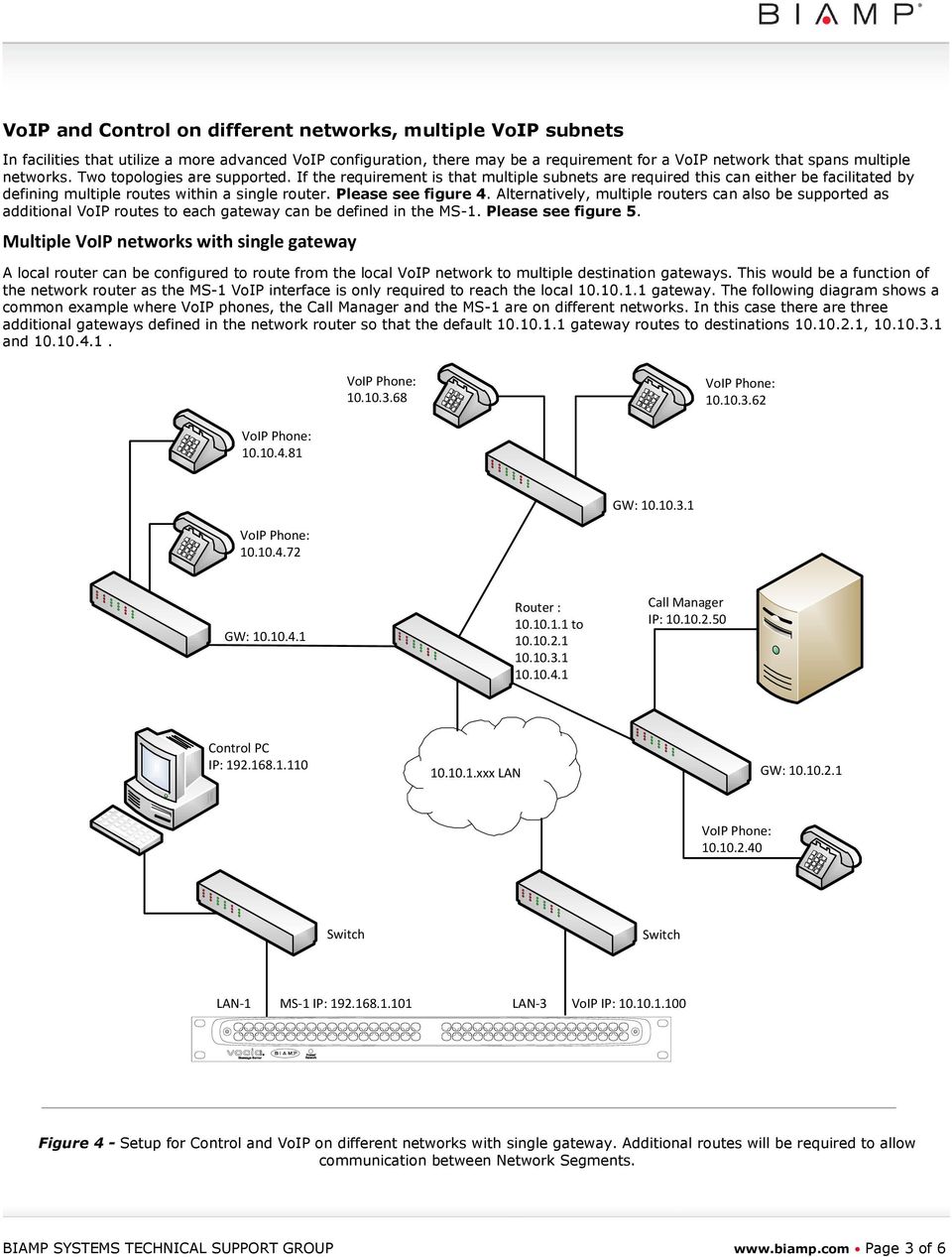
3 VoIP and Control on different networks, multiple VoIP subnets In facilities that utilize a more advanced VoIP configuration, there may be a requirement for a VoIP network that spans multiple networks. Two topologies are supported. If the requirement is that multiple subnets are required this can either be facilitated by defining multiple routes within a single router. Please see figure 4. Alternatively, multiple routers can also be supported as additional VoIP routes to each gateway can be defined in the MS-1. Please see figure 5. Multiple VoIP networks with single gateway A local router can be configured to route from the local VoIP network to multiple destination gateways. This would be a function of the network router as the MS-1 VoIP interface is only required to reach the local gateway. The following diagram shows a common example where VoIP phones, the and the MS-1 are on different networks. In this case there are three additional gateways defined in the network router so that the default gateway routes to destinations , and GW: GW: Router : to IP: xxx LAN GW: LAN-1 MS-1 IP: LAN-3 VoIP IP: Figure 4 - Setup for Control and VoIP on different networks with single gateway. Additional routes will be required to allow communication between Network Segments. BIAMP SYSTEMS TECHNICAL SUPPORT GROUP Page 3 of 6
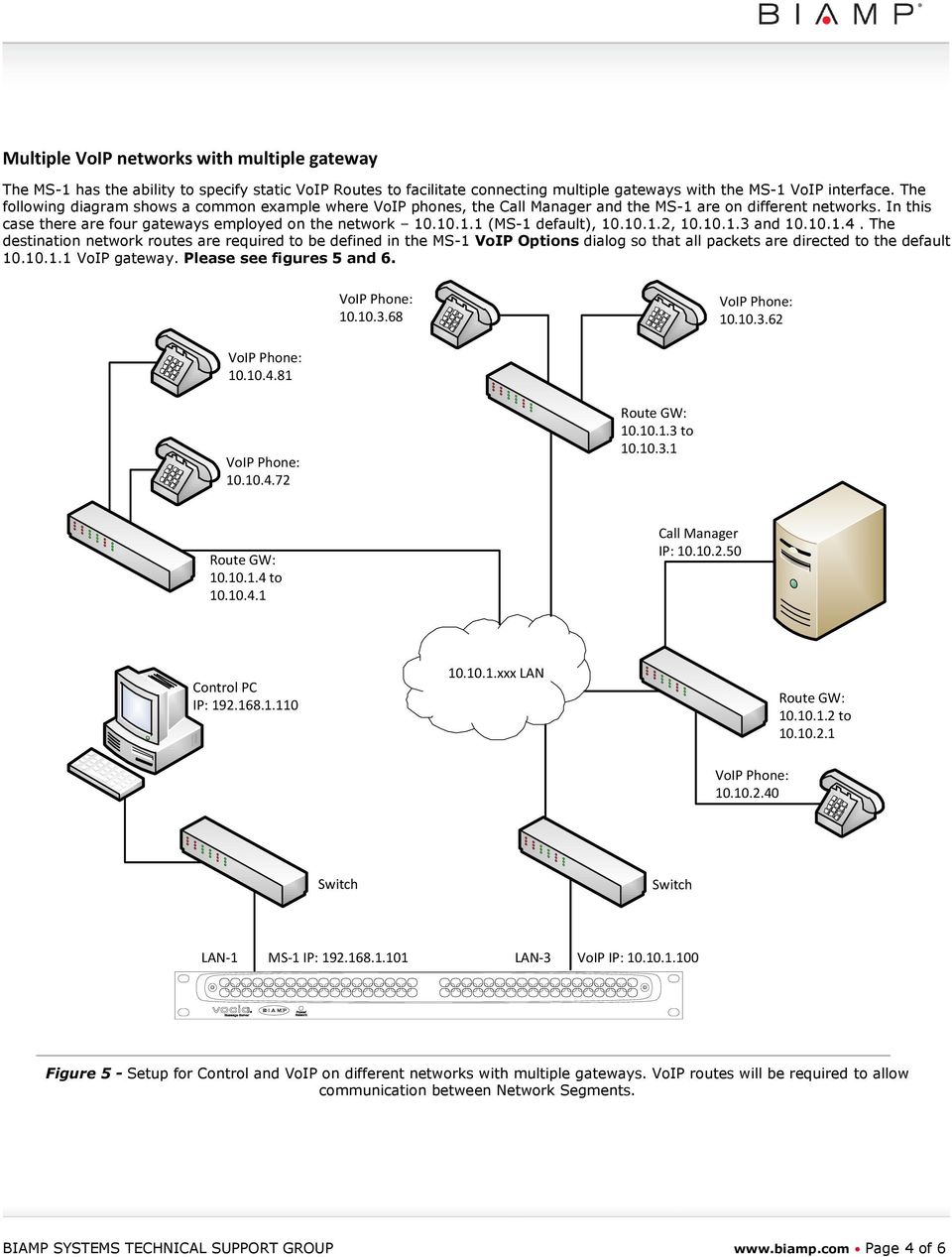
4 Multiple VoIP networks with multiple gateway The MS-1 has the ability to specify static VoIP Routes to facilitate connecting multiple gateways with the MS-1 VoIP interface. The following diagram shows a common example where VoIP phones, the and the MS-1 are on different networks. In this case there are four gateways employed on the network (MS-1 default), , and The destination network routes are required to be defined in the MS-1 VoIP Options dialog so that all packets are directed to the default VoIP gateway. Please see figures 5 and Route GW: to Route GW: to IP: xxx LAN Route GW: to LAN-1 MS-1 IP: LAN-3 VoIP IP: Figure 5 - Setup for Control and VoIP on different networks with multiple gateways. VoIP routes will be required to allow communication between Network Segments. BIAMP SYSTEMS TECHNICAL SUPPORT GROUP Page 4 of 6
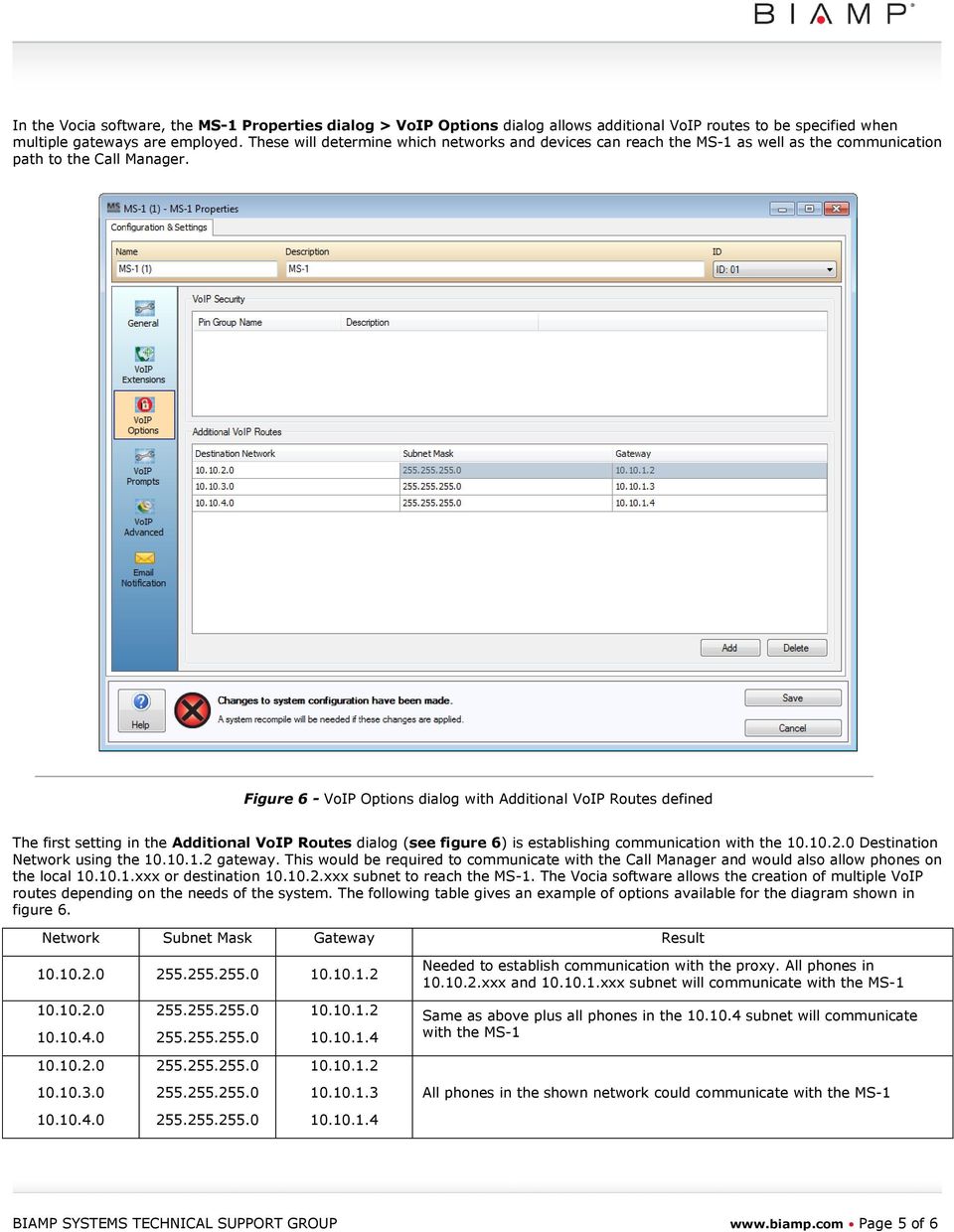
5 In the Vocia software, the MS-1 Properties dialog > VoIP Options dialog allows additional VoIP routes to be specified when multiple gateways are employed. These will determine which networks and devices can reach the MS-1 as well as the communication path to the. Figure 6 - VoIP Options dialog with Additional VoIP Routes defined The first setting in the Additional VoIP Routes dialog (see figure 6) is establishing communication with the Destination Network using the gateway. This would be required to communicate with the and would also allow phones on the local xxx or destination xxx subnet to reach the MS-1. The Vocia software allows the creation of multiple VoIP routes depending on the needs of the system. The following table gives an example of options available for the diagram shown in figure 6. Network Subnet Mask Gateway Result Needed to establish communication with the proxy. All phones in xxx and xxx subnet will communicate with the MS Same as above plus all phones in the subnet will communicate with the MS All phones in the shown network could communicate with the MS BIAMP SYSTEMS TECHNICAL SUPPORT GROUP Page 5 of 6
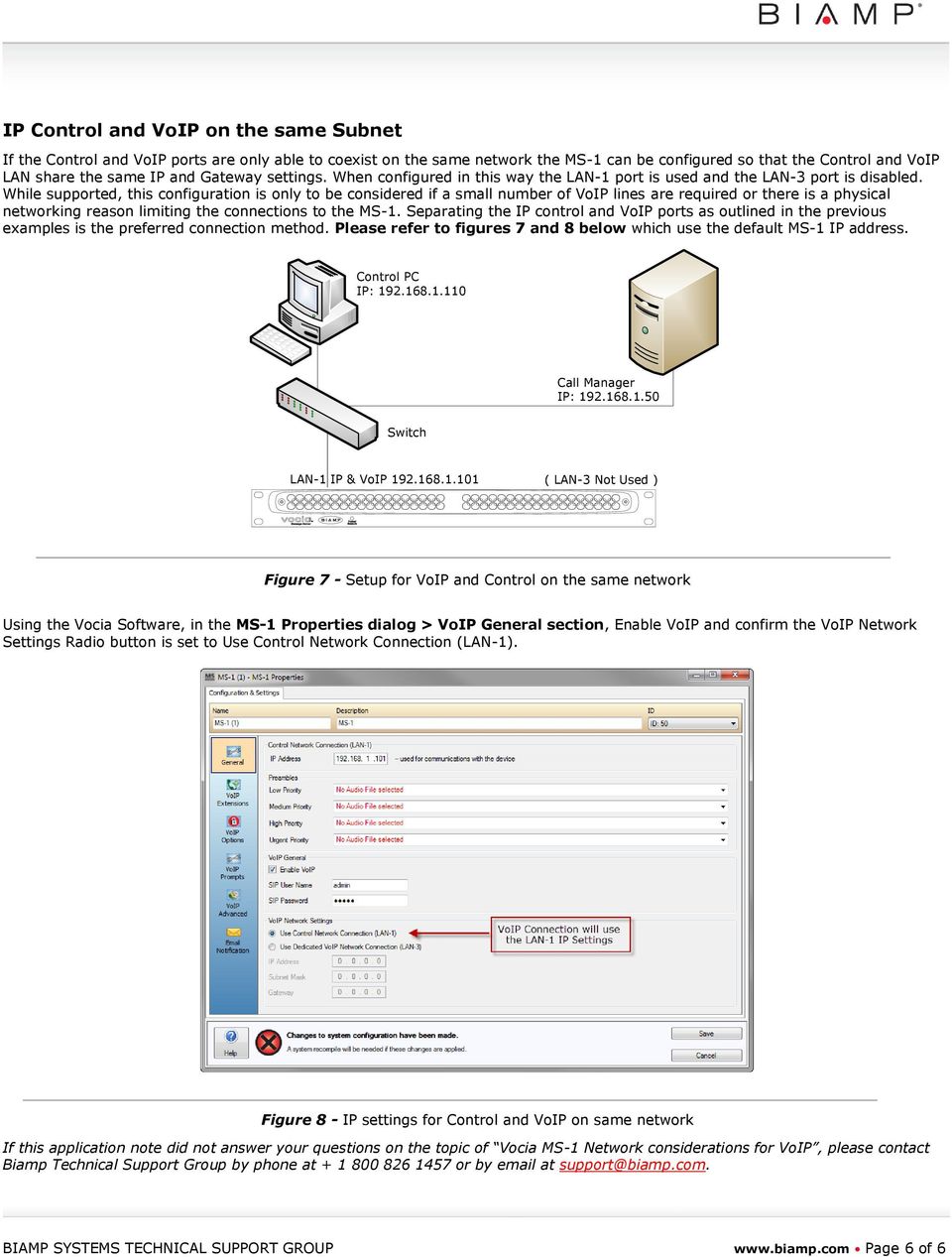
6 IP Control and VoIP on the same Subnet If the Control and VoIP ports are only able to coexist on the same network the MS-1 can be configured so that the Control and VoIP LAN share the same IP and Gateway settings. When configured in this way the LAN-1 port is used and the LAN-3 port is disabled. While supported, this configuration is only to be considered if a small number of VoIP lines are required or there is a physical networking reason limiting the connections to the MS-1. Separating the IP control and VoIP ports as outlined in the previous examples is the preferred connection method. Please refer to figures 7 and 8 below which use the default MS-1 IP address. IP: LAN-1 IP & VoIP ( LAN-3 Not Used ) Figure 7 - Setup for VoIP and Control on the same network Using the Vocia Software, in the MS-1 Properties dialog > VoIP General section, Enable VoIP and confirm the VoIP Network Settings Radio button is set to Use Control Network Connection (LAN-1). Figure 8 - IP settings for Control and VoIP on same network If this application note did not answer your questions on the topic of Vocia MS-1 Network considerations for VoIP, please contact Biamp Technical Support Group by phone at or by at [email protected]. BIAMP SYSTEMS TECHNICAL SUPPORT GROUP Page 6 of 6
What communication protocols are used to discover Tesira servers on a network?
 Understanding device discovery methods in Tesira OBJECTIVES In this application note, basic networking concepts will be summarized to better understand how Tesira servers are discovered over networks.
Optimum Business SIP Trunk Set-up Guide
 Optimum Business SIP Trunk Set-up Guide For use with IP PBX only. SIPSetup 07.13 FOR USE WITH IP PBX ONLY Important: If your PBX is configured to use a PRI connection, do not use this guide. If you need
Session Title: Exploring Packet Tracer v5.3 IP Telephony & CME. Scenario
 Session Title: Exploring Packet Tracer v5.3 IP Telephony & CME Scenario With the scheduled release of Packet Tracer v5.3 in the near future, this case study is designed to provide you with an insight into
Knowledgebase Solution
 Knowledgebase Solution Goal Enable coexistence of a 3 rd -party VPN / Firewall with an EdgeMarc appliance. Describe characteristics and tradeoffs of different topologies. Provide configuration information
Enabling NAT and Routing in DGW v2.0 June 6, 2012
 Enabling NAT and Routing in DGW v2.0 June 6, 2012 Proprietary 2012 Media5 Corporation Table of Contents Introduction... 3 Starting Services... 4 Distinguishing your WAN and LAN interfaces... 5 Configuring
1 PC to WX64 direction connection with crossover cable or hub/switch
 1 PC to WX64 direction connection with crossover cable or hub/switch If a network is not available, or if it is desired to keep the WX64 and PC(s) completely separated from other computers, a simple network
Application Description
 Application Description Firewall in front of LAN Different Servers located behind Firewall Firewall to be accessible from Internet Load Balancer to be installed in a TRANSPARENT MODE between Firewall and
Teldat Router. ARP Proxy
 Teldat Router ARP Proxy Doc. DM734-I Rev. 10.00 November, 2002 INDEX Chapter 1 Introduction...1 1. ARP Proxy... 2 Chapter 2 Configuration...4 1. ARP Proxy Configuration... 5 1.1. Enabling ARP Proxy...
NB6 Series Quality of Service (QoS) Setup (NB6Plus4, NB6Plus4W Rev1)
 NB6 Series Quality of Service (QoS) Setup (NB6Plus4, NB6Plus4W Rev1) NB6 Series and Quality of Service (QoS) The following Quality of Service (QoS) settings offer a basic setup example, setting up 3 devices
1. Hardware Installation
 4 Port 10/100M Internet Broadband Router with USB Printer server Quick Installation Guide #4824904AXZZ0 1. Hardware Installation A. System Requirement Before you getting started, make sure that you meet
Configuring a customer owned router to function as a switch with Ultra TV
 Configuring a customer owned router to function as a switch with Ultra TV This method will turn the customer router into a wireless switch and allow the Ultra Gateway to perform routing functions and allow
H0/H2/H4 -ECOM100 DHCP & HTML Configuration. H0/H2/H4--ECOM100 DHCP Disabling DHCP and Assigning a Static IP Address Using HTML Configuration
 H0/H2/H4 -ECOM100 DHCP & HTML 6 H0/H2/H4--ECOM100 DHCP Disabling DHCP and Assigning a Static IP Address Using HTML 6-2 H0/H2/H4 -ECOM100 DHCP DHCP Issues The H0/H2/H4--ECOM100 is configured at the factory
How To Load balance traffic of Mail server hosted in the Internal network and redirect traffic over preferred Interface
 How To Load balance traffic of Mail server hosted in the Internal network and redirect traffic over preferred Interface How To Configure load sharing and redirect mail server traffic over preferred Gateway
For extra services running behind your router. What to do after IP change
 For extra services running behind your router. What to do after IP change This guide is for customers who meet the following conditions: - Customers who have moved from a TPG Layer 3 plan to a TPG Layer
Technical Note. Monitoring Ethernet Traffic with Tolomatic ACS & Managed Switch. Contents
 Monitoring Ethernet Traffic with Tolomatic ACS & Managed Switch Contents 1. Introduction...2 2. Equipment...2 3. Software...3 4. Definitions...3 5. Procedure...3 6. Change PC IP Address...3 7. Network
Networking Basics for Automation Engineers
 Networking Basics for Automation Engineers Page 1 of 10 mac-solutions.co.uk v1.0 Oct 2014 1. What is Transmission Control Protocol/Internet Protocol (TCP/IP)------------------------------------------------------------
Fonality. Optimum Business Trunking and the Fonality Trixbox Pro IP PBX Standard Edition V4.1.2- p13 Configuration Guide
 Fonality Optimum Business Trunking and the Fonality Trixbox Pro IP PBX Standard Edition V4.1.2- p13 Configuration Guide Fonality Table of Contents 1. Overview 2. SIP Trunk Adaptor Set-up Instructions 3.
Technical Support Information
 Technical Support Information Broadband Module/Broadband Module Plus Configuration Guidance Setting up Remote Access to a Network Device (Mail/File Server/Camera Etc) connected to the LAN port of the Broadband
Chapter 3 LAN Configuration
 Chapter 3 LAN Configuration This chapter describes how to configure the advanced LAN features of your ProSafe Dual WAN Gigabit Firewall with SSL & IPsec VPN. This chapter contains the following sections
IT 3202 Internet Working (New)
 [All Rights Reserved] SLIATE SRI LANKA INSTITUTE OF ADVANCED TECHNOLOGICAL EDUCATION (Established in the Ministry of Higher Education, vide in Act No. 29 of 1995) Instructions for Candidates: Answer any
SIP Trunking using Optimum Business SIP Trunk Adaptor and the Allworx 6x IP PBX 7.1.6.1
 ALLWORX SIP Trunking using Optimum Business SIP Trunk Adaptor and the Allworx 6x IP PBX 7.1.6.1 Goal The purpose of this configuration guide is to describe the steps needed to configure the Allworx 6x
Vocia MS-1 Voice-over-IP Interface. Avaya System Verification. Configuring Avaya Aura Session Manager system with Biamp s Vocia MS-1
 Configuring Avaya Aura Session Manager system with Biamp s Vocia MS-1 Vocia MS-1 Voice-over-IP Interface The Biamp Vocia Message Server (MS-1) includes functionality to allow pages to be initiated over
NETWORK SETUP INSTRUCTIONS
 NETWORK SETUP INSTRUCTIONS How to Connect AVTECH Product to Internet To connect AVTECH DVR or network camera to Internet, you need to: 1). Figure out your network environment, and have related IP information
LAN TCP/IP and DHCP Setup
 CHAPTER 2 LAN TCP/IP and DHCP Setup 2.1 Introduction In this chapter, we will explain in more detail the LAN TCP/IP and DHCP Setup. 2.2 LAN IP Network Configuration In the Vigor 2900 router, there are
Document No. FO1101 Issue Date: Work Group: FibreOP Technical Team October 31, 2013 FINAL:
 Document No. FO1101 Issue Date: Work Group: FibreOP Technical Team October 31, 2013 FINAL: Title: FibreOP Business Internet 5 Static IP Customer Configuration Version 1.1 Summary: This document provides
nexvortex Setup Template
 nexvortex Setup Template ZULTYS, INC. April 2013 5 1 0 S P R I N G S T R E E T H E R N D O N V A 2 0 1 7 0 + 1 8 5 5. 6 3 9. 8 8 8 8 Introduction This document is intended only for nexvortex customers
Document No. FO1004 Issue Date: Draft: Work Group: FibreOP Technical Team July 23, 2013 Final: Single Static IP Customer Owned LAN Router Support
 Document No. FO1004 Issue Date: Draft: Work Group: FibreOP Technical Team July 23, 2013 Final: Title: Single Static IP Customer Owned LAN Router Support Version 1.0 Summary: Use the following method to
Cisco - Configure the 1721 Router for VLANs Using a Switch Module (WIC-4ESW)
 Page 1 of 20 Configure the 1721 Router for VLANs Using a Switch Module (WIC-4ESW) Document ID: 50036 Contents Introduction Prerequisites Requirements Components Used Network Diagram The Role of Switched
2. What is the maximum value of each octet in an IP address? A. 28 B. 255 C. 256 D. None of the above
 CCNA1 V3.0 Mod 10 (Ch 8) 1. How many bits are in an IP C. 64 2. What is the maximum value of each octet in an IP A. 28 55 C. 256 3. The network number plays what part in an IP A. It specifies the network
VLAN 802.1Q. 1. VLAN Overview. 1. VLAN Overview. 2. VLAN Trunk. 3. Why use VLANs? 4. LAN to LAN communication. 5. Management port
 1. VLAN Overview 2. VLAN Trunk 3. Why use VLANs? 4. LAN to LAN communication 5. Management port 6. Applications 6.1. Application 1 6.2. Application 2 6.3. Application 3 6.4. Application 4 6.5. Application
Multi-Homing Dual WAN Firewall Router
 Multi-Homing Dual WAN Firewall Router Quick Installation Guide M73-APO09-400 Multi-Homing Dual WAN Firewall Router Overview The Multi-Homing Dual WAN Firewall Router provides three 10/100Mbit Ethernet
Packet Tracer 3 Lab VLSM 2 Solution
 Packet Tracer 3 Lab VLSM 2 Solution Objective Create a simulated network topology using Packet Tracer Design an IP addressing scheme using a Class B subnetwork address and VLSM Apply IP addresses to the
Firewall VPN Router. Quick Installation Guide M73-APO09-380
 Firewall VPN Router Quick Installation Guide M73-APO09-380 Firewall VPN Router Overview The Firewall VPN Router provides three 10/100Mbit Ethernet network interface ports which are the Internal/LAN, External/WAN,
Configuring the CyberData VoIP 4-Port Zone Controller with Audio Out
 NetVanta Unified Communications Technical Note Configuring the CyberData VoIP 4-Port Zone Controller with Audio Out Introduction The CyberData Voice over Internet Protocol (VoIP) zone controller enables
SSVP SIP School VoIP Professional Certification
 SSVP SIP School VoIP Professional Certification Exam Objectives The SSVP exam is designed to test your skills and knowledge on the basics of Networking and Voice over IP. Everything that you need to cover
Quick Note 53. Ethernet to W-WAN failover with logical Ethernet interface.
 Quick Note 53 Ethernet to W-WAN failover with logical Ethernet interface. Digi Support August 2015 1 Contents 1 Introduction... 2 1.1 Introduction... 2 1.2 Assumptions... 3 1.3 Corrections... 3 2 Version...
LOAD BALANCING 2X APPLICATIONSERVER XG SECURE CLIENT GATEWAYS THROUGH MICROSOFT NETWORK LOAD BALANCING
 SECURE CLIENT GATEWAYS THROUGH MICROSOFT NETWORK LOAD BALANCING Contents Introduction... 3 Network Diagram... 3 Installing NLB... 3-4 Configuring NLB... 4-8 Configuring 2X Secure Client Gateway... 9 About
Load Balancing ContentKeeper With RadWare
 Load Balancing ContentKeeper With RadWare The RadWare Fireproof may be used with ContentKeeper to provide load balanced and redundant Internet content filtering for your network. The RadWare FireProof
Internet Telephony PBX System
 Internet Telephony PBX System GSM Gateway PSTN call busy forward to GSM Configuration Copyright PLANET Technology Corporation. All rights reserved. Case 32: PSTN call busy forward to GSM Configuration
How to Configure the NEC SV8100 for use with Integra Telecom SIP Solutions
 How to Configure the NEC SV8100 for use with Integra Telecom SIP Solutions Overview: This document provides a reference for configuration of the NEC SV8100 IP PBX to connect to Integra Telecom SIP trunks.
Wireless Router Quick Start Guide Rev. 1.0a Model: WR300NQ
 Wireless Router Quick Start Guide Rev. 1.0a Model: WR300NQ 1 Step One: Hardware Connection 1. If you have xdsl Broadband internet access, connect your hardware as shown in the following diagram: 2. If
White Paper 230-1040-001. Copyright 2011 Nomadix, Inc. All Rights Reserved. Thursday, January 05, 2012
 Nomadix Service Engine Enterprise Guest Access Application Copyright 2011 Nomadix, Inc. All Rights Reserved. Thursday, January 05, 2012 30851 Agoura Road Suite 102 Agoura Hills, CA 91301 USA www.nomadix.com
Installation of the On Site Server (OSS)
 Installation of the On Site Server (OSS) rev 1.1 Step #1 - Initial Connection to the OSS Having plugged in power and an ethernet cable in the eth0 interface (see diagram below) you can connect to the unit
Basic ViPNet VPN Deployment Schemes. Supplement to ViPNet Documentation
 Basic ViPNet VPN Deployment Schemes Supplement to ViPNet Documentation 1991 2015 Infotecs Americas. All rights reserved. Version: 00121-04 90 01 ENU This document is included in the software distribution
Chapter 4 Customizing Your Network Settings
 Chapter 4 Customizing Your Network Settings This chapter describes how to configure advanced networking features of the RangeMax Dual Band Wireless-N Router WNDR3300, including LAN, WAN, and routing settings.
Savvius Insight Initial Configuration
 The configuration utility on Savvius Insight lets you configure device, network, and time settings. Additionally, if you are forwarding your data from Savvius Insight to a Splunk server, You can configure
The IP Transmission Process. V1.4: Geoff Bennett
 The IP Transmission Process V1.4: Geoff Bennett Contents Communication Between Hosts Through a MAC Bridge Through a LAN Switch Through a Router The tutorial is divided into four sections. Section 1 looks
Recommended Network Setup
 Recommended Network Setup Greater Giving Event Software uses Windows File Sharing to allow multiple computers to connect to the same database within your network. This document uses Windows XP as the default
Establishing a VPN tunnel to CNet CWR-854 VPN router using WinXP IPSec client
 Establishing a VPN tunnel to CNet CWR-854 VPN router using WinXP IPSec client Generally speaking, remote users need to use a VPN client software for establishing a VPN connection to their home/work router
IP Addressing A Simplified Tutorial
 Application Note IP Addressing A Simplified Tutorial July 2002 COMPAS ID 92962 Avaya Labs 1 All information in this document is subject to change without notice. Although the information is believed to
Computer Networks. Introduc)on to Naming, Addressing, and Rou)ng. Week 09. College of Information Science and Engineering Ritsumeikan University
 Computer Networks Introduc)on to Naming, Addressing, and Rou)ng Week 09 College of Information Science and Engineering Ritsumeikan University MAC Addresses l MAC address is intended to be a unique identifier
CREATING AN IKE IPSEC TUNNEL BETWEEN AN INTERNET SECURITY ROUTER AND A WINDOWS 2000/XP PC
 CREATING AN IKE IPSEC TUNNEL BETWEEN AN INTERNET SECURITY ROUTER AND A WINDOWS 2000/XP PC 1 Introduction Release date: 11/12/2003 This application note details the steps for creating an IKE IPSec VPN tunnel
Application Note Configuring the Synapse SB67070 SIP Gateway for Broadvox GO! SIP Trunking
 Configuring the Synapse SB67070 SIP Gateway for Broadvox GO! SIP Trunking 2012 Advanced American Telephones. All Rights Reserved. AT&T and the AT&T logo are trademarks of AT&T Intellectual Property licensed
FortiVoice. Version 7.00 VoIP Configuration Guide
 FortiVoice Version 7.00 VoIP Configuration Guide FortiVoice Version 7.00 VoIP Configuration Guide Revision 2 14 October 2011 Copyright 2011 Fortinet, Inc. All rights reserved. Contents and terms are subject
VLSM Static routing. Computer networks. Seminar 5
 VLSM Static routing Computer networks Seminar 5 IP address (network and host part) Address classes identified by first three bits Subnet mask determines how the IP address is divided into network and host
IP Filter/Firewall Setup
 IP Filter/Firewall Setup Introduction The IP Filter/Firewall function helps protect your local network against attack from outside. It also provides a method of restricting users on the local network from
ZyXEL IP PBX Support Note. ZyXEL IP PBX (X2002) VoIP. Support Notes
 ZyXEL IP PBX (X2002) VoIP Support Notes Version 1.00 October 2008 1 Contents Overview ZyXEL IP PBX Support Note 1. How to manage and maintain your IPPBX?...3 1.1 Firmware Upgrade..3 1.2 Backing up your
CyberData VoIP V2 Speaker with VoIP Clock Kit Configuration Guide for OmniPCX Enterprise
 CyberData VoIP V2 Speaker with VoIP Clock Kit Configuration Guide for OmniPCX Enterprise CyberData Corporation 2555 Garden Road Monterey, CA 93940 T:831-373-2601 F: 831-373-4193 www.cyberdata.net 2 Introduction
1:1 NAT in ZeroShell. Requirements. Overview. Network Setup
 1:1 NAT in ZeroShell Requirements The version of ZeroShell used for writing this document is Release 1.0.beta11. This document does not describe installing ZeroShell, it is assumed that the user already
Lab 8.4.2 Configuring Access Policies and DMZ Settings
 Lab 8.4.2 Configuring Access Policies and DMZ Settings Objectives Log in to a multi-function device and view security settings. Set up Internet access policies based on IP address and application. Set
Debugging Network Communications. 1 Check the Network Cabling
 Debugging Network Communications Situation: you have a computer and your NetBurner device on a network, but you cannot communicate between the two. This application note provides a set of debugging steps
Using Cisco UC320W with Windows Small Business Server
 Using Cisco UC320W with Windows Small Business Server This application note explains how to deploy the Cisco UC320W in a Windows Small Business Server environment. Contents This document includes the following
VoIP Network Configuration Guide
 The owner friendly phone system for small business VoIP Network Configuration Guide Release 7.10 Copyright 2011 Fortinet, Inc. All rights reserved. Fortinet, FortiGate, FortiGuard, FortiCare, FortiManager,
VOIP NETWORK CONFIGURATION GUIDE RELEASE 6.10
 TALKSWITCH DOCUMENTATION VOIP NETWORK CONFIGURATION GUIDE RELEASE 6.10 CT.TS005.002606 ANSWERS WITH INTELLIGENCE INTRODUCTION About this guide This guide will help you plan and configure a TalkSwitch system
Information about IP Proprietary Telephones KX-TDA50/KX-TDA100 KX-TDA200/KX-TDA600. Hybrid IP-PBX. Model No.
 Information about IP Proprietary Telephones Hybrid IP-PBX Model No. KX-TDA50/KX-TDA100 KX-TDA200/KX-TDA600 Thank you for purchasing a Panasonic Hybrid IP-PBX. Please read this manual carefully before using
Using VDOMs to host two FortiOS instances on a single FortiGate unit
 Using VDOMs to host two FortiOS instances on a single FortiGate unit Virtual Domains (VDOMs) can be used to divide a single FortiGate unit into two or more virtual instances of FortiOS that function as
DVG-2101SP VoIP Telephone Adapter
 This product can be set up using any current web browser, i.e., Internet Explorer 6 or Netscape Navigator 6.2.3. DVG-2101SP VoIP Telephone Adapter Before You Begin 1. If you purchased this VoIP Telephone
Appendix A: Configuring Firewalls for a VPN Server Running Windows Server 2003
 http://technet.microsoft.com/en-us/library/cc757501(ws.10).aspx Appendix A: Configuring Firewalls for a VPN Server Running Windows Server 2003 Updated: October 7, 2005 Applies To: Windows Server 2003 with
PT Activity 8.1.2: Network Discovery and Documentation Topology Diagram
 Topology Diagram All contents are Copyright 1992 2007 Cisco Systems, Inc. All rights reserved. This document is Cisco Public Information. Page 1 of 6 Addressing Table Device Interface IP Address Subnet
configure WAN load balancing
 How To configure WAN load balancing Introduction With the increasing use of the Internet to service core business functions comes the need for reliable WAN connectivity. A specific aspect of this requirement
Getting Started KX-TDA5480
 4-Channel VoIP Gateway Card Getting Started KX-TDA5480 Model KX-TDA0484 Thank you for purchasing the Panasonic 4-Channel VoIP Gateway Card, KX-TDA5480/KX-TDA0484. Please read this manual carefully before
HREP Series DVR DDNS Configuration Application Note
 HREP Series DVR DDNS Configuration Application Note DDNS enables your HREP Series DVR to be remotely accessed using a Dynamic DNS server, which is commonly used if a broadband connection does not have
Broadband Phone Gateway BPG510 Technical Users Guide
 Broadband Phone Gateway BPG510 Technical Users Guide (Firmware version 0.14.1 and later) Revision 1.0 2006, 8x8 Inc. Table of Contents About your Broadband Phone Gateway (BPG510)... 4 Opening the BPG510's
Chapter 4 Customizing Your Network Settings
 . Chapter 4 Customizing Your Network Settings This chapter describes how to configure advanced networking features of the Wireless-G Router Model WGR614v9, including LAN, WAN, and routing settings. It
AT&T IP Flex Reach/ IP Toll Free Configuration Guide IC 3.0 with Interaction SIP Proxy
 INTERACTIVE INTELLIGENCE AT&T IP Flex Reach/ IP Toll Free Configuration Guide IC 3.0 with Interaction SIP Proxy Version 1.7 9/2/2009 TABLE OF CONTENTS 1 AT&T... 5 1.1 Introduction... 5 1.2 Product Descriptions...
Device Interface IP Address Subnet Mask Default Gateway
 Felix Rohrer Topology Diagram Addressing Table Device Interface IP Address Subnet Mask Default Gateway S1 VLAN 99 192.168.99.11 255.255.255.0 192.168.99.1 S2 VLAN 99 192.168.99.12 255.255.255.0 192.168.99.1
EarthLink Business SIP Trunking. Switchvox SMB 5.5 & Adtran SIP Proxy Implementation Guide
 EarthLink Business SIP Trunking Switchvox SMB 5.5 & Adtran SIP Proxy Implementation Guide Publication History First Release: Version 1.0 April 20, 2012 CHANGE HISTORY Version Date Change Details Changed
Interconnecting Cisco Network Devices 1 Course, Class Outline
 www.etidaho.com (208) 327-0768 Interconnecting Cisco Network Devices 1 Course, Class Outline 5 Days Interconnecting Cisco Networking Devices, Part 1 (ICND1) v2.0 is a five-day, instructorled training course
Configuring Static IP for your Pace Devices
 Configuring Static IP for your Pace Devices This Section will walk you through configuring the RG for use of a Static IP block. As mentioned earlier but repeated here for convenience is an overview in
EarthLink Business SIP Trunking. Toshiba IPedge Customer Configuration Guide
 EarthLink Business SIP Trunking Toshiba IPedge Customer Configuration Guide Publication History First Release: Version 1.0 August 30, 2011 CHANGE HISTORY Version Date Change Details Changed By 1.0 8/30/2011
Application Note Configuring the UGate 3000 for use with ClipMail Pro and ClipExpress
 Application Note Configuring the UGate 3000 for use with Introduction This Application Note guides the ClipMail user through the UGate gateway configuration process by using a simple dial up connection
Load Balance Mechanism
 Load Balance Application in Dual-WAN Interface Load Balance Mechanism To which WAN port the traffic will be routed is determined according to the Load Balance mechanism. Below diagram shows how Vigor router
CCNA R&S: Introduction to Networks. Chapter 9: Subnetting IP Networks
 CCNA R&S: Introduction to Networks Chapter 9: Subnetting IP Networks Frank Schneemann Chapter 9: Subnetting IP Networks Subnetting IP Networks In this chapter, you will be learning how devices can be grouped
FSM73xx GSM73xx GMS72xxR Shared access to the Internet across Multiple routing VLANs using a Prosafe Firewall
 FSM73xx GSM73xx GMS72xxR Shared access to the Internet across Multiple routing VLANs using a Prosafe Firewall This document describes how to: - Create multiple routing VLANs - Obtain Internet access on
Supporting Multiple Firewalled Subnets on SonicOS Enhanced
 SONICOS ENHANCED Supporting Multiple Firewalled Subnets on SonicOS Enhanced Introduction This tech note describes how to configure secondary subnets with static ARP which allows multiple subnets to be
Knowledgebase Solution
 Knowledgebase Solution Updated: 2/27/2014 Configuring an EdgeMarc for SIP trunking with an IP PBX This document describes the steps needed to configure an IP PBX behind the EdgeMarc which is pointing to
Sample Configuration Using the ip nat outside source static
 Sample Configuration Using the ip nat outside source static Table of Contents Sample Configuration Using the ip nat outside source static Command...1 Introduction...1 Before You Begin...1 Conventions...1
What is VLAN Routing?
 Application Note #38 February 2004 What is VLAN Routing? This Application Notes relates to the following Dell product(s): 6024 and 6024F 33xx Abstract Virtual LANs (VLANs) offer a method of dividing one
Network Setup Guide. 1 Glossary. 2 Operation. 1.1 Static IP. 1.2 Point-to-Point Protocol over Ethernet (PPPoE)
 Network Setup Guide 1 Glossary 1.1 Static IP Computers are communicated and recognized by their own unique IP addresses over the Internet. Static IP provided by your ISP (Internet Service Provider) means
EDGE FX Network configuration
 Page 1 of 16 TITLE: Category: EDGE FX Network configuration GERBER EDGE Document Number: 4280 Supplied by: Gerber Service Last Modified: April 14, 2011 Summary: In order to connect an EDGE FX to your PC
Requirements for Connecting VoIP devices to the HEAD acoustics test network HEAD acoustics GmbH Ebertstr. 30 a D-52134 Herzogenrath
 Requirements for Connecting VoIP devices to the HEAD acoustics test network HEAD acoustics GmbH Ebertstr. 30 a D-52134 Herzogenrath Phone: +49 2407/577 0 Fax: +49 2407/577 99 Content 1. Introduction...
Configuration Guide. How to Configure SSL VPN Features in DSR Series. Overview
 Configuration Guide How to Configure SSL VPN Features in DSR Series Overview This document describes how to configure D-Link DSR-500N to enable SSL VPN feature. An SSL VPN is a form of VPN that can be
BROADBAND INTERNET ROUTER USER S MANUAL. Version 1.0. - Page 1 of 13 -
 Version 1.0 - Page 1 of 13 - 10/100M Broadband Router GETTING TO KNOW 2 3 4 1 5 7 6 - Page 2 of 13 - LED Indicator S/N Indicator Function 1 Power LED (Green) LED lights up steadily indicate that the power
ipad Installation and Setup
 ipad Installation and Setup INDEX ipad Features Page 2 Charging.. Page 2 User Guide... Page 3 Setup for ipad use in the office (Office wireless network) Setup Office computers Verify Remote Desktop is
KNX IP Interface. Operating and installation manual
 KNX IP Interface Operating and installation manual Application The KNX IP Interface can be used as an interface for accessing the KNX/EIB via IP, replacing an RS232 or USB interface. It has an external
Networking your DVR Made Easy
 Networking your DVR Made Easy 1 Contents 1: DVR Networking...3 2: Setting up your PC and router...3 3: Setting up your DVR with a static IP address...4 4: Remote DVR Software...3 2 DVR NETWORKING 1. SETTING
SIP Domain/Proxy, Ring Detect Extension or/and Page Audio Extension, (The 8180 needs its own phone extension) Authentication ID, Password,
 The 8180 requires the information below: SIP Domain/Proxy, Ring Detect Extension or/and Page Audio Extension, (The 8180 needs its own phone extension) Authentication ID, Password, Get TalkSwitch SIP Domain/Proxy:
Packet Tracer - Subnetting Scenario 1 (Instructor Version)
 (Instructor Version) Instructor Note: Red font color or gray highlights indicate text that appears in the instructor copy only. Optional activities are designed to enhance understanding and/or to provide
How To Understand and Configure Your Network for IntraVUE
 How To Understand and Configure Your Network for IntraVUE Summary This document attempts to standardize the methods used to configure Intrauve in situations where there is little or no understanding of
How to Configure the Toshiba Strata CIX for use with Integra Telecom SIP Solutions
 How to Configure the Toshiba Strata CIX for use with Integra Telecom SIP Solutions Overview: This document provides a reference for configuration of the Toshiba Strata CIX IP PBX to connect to Integra