
PeopleTools 8.54 Online Help Updates, December 2014
|
|
|
- Candice Spencer
- 10 years ago
- Views:
Transcription
1 PeopleTools 8.54 Online Help Updates, December 2014 PeopleBook Topic Description Accessibility Accessibility Navigating with the Keyboard Accessibility in PeopleSoft s Creating Record Definitions > Setting Record Properties Using Page Controls > Using Secondary Pages Using Page Controls > Using Edit Boxes and Long Edit Boxes Creating New Field Definitions > Creating New Field Definitions > Specifying Long Character Field Attributes and > Specifying Image Field Attributes Creating Page Definitions > Modifying the Rich Text Editor User Interface > Creating Custom Style Files Working with the Default Style Sheet > Changing the Default Style Sheet Creating Custom Plug-In Files for the Rich Text Editor > Creating Custom Buttons Constructing File Layouts and Performing Data Added a new section: Using the Keyboard with the NavBar. Added a new section: Pagelet Behavior in Accessibility Mode. Added a description of the Advanced Query Security and provided a link to the Query documentation for details. Added a section on modeless windows and specified that only one active child window (modeless or modal) can be opened from any parent. Added "Note. The character limit counter is not applicable for use with fields enabled for the rich text editor. If a field is enabled for rich text editor, the system does not display the character limit counter." Updated information related to how DB2 handles and stores large character fields and image fields. Updated sample code to include new syntax. Changed from CKEDITOR.addStylesSet to CKEDITOR.stylesSet.add. Updated information related to changing default style sheets. Removing reference to the UPGPT850SWAN Engine program. Section now links to documentation for the Branding System Options page. Updated the sample code to match the new syntax. Added a section describing how to export data to an ISO standard-format XML file.

2 Lifecycle Management Lifecycle Management Interchanges > Understanding File Layouts > XML Format Files Using Scroll Areas, Scroll Bars, and Grids > Using Grids Setting Record Field Properties > Setting Record Field Use Properties > Audit Style Sheets Definitions List Running PeopleTools Cross- Reports Using Scroll Areas and Scroll Bar \ Selecting Scroll Ara Label Properties \ Header Area Properties \ Find (term in the table) Using the PeopleSoft User Interface> Compile All Added a note describing that after upgrades and updates, grid personalizations will need to be reapplied. Clarified further when field-level auditing is applicable. Added the reference table that describes definition lists to modify user interface elements for classic pages. Revised the Understanding Cross- Reports topic to delete references to Crystal reports and to add SQR reports. Also renamed the Running Crystal Reports topic to Running SQR Reports. Added a note indicating that the system ignores fields in HTML areas when users use the Find link to run a Find request. Updated description for Compile all and added links. Command Line Parameters Corrected CMTBL to CMTABLE. Command Line Parameters Command Line Parameters Added a section Command Line Option Sequence. Added note to -CP and TP that password can be plain text or encrypted. and revised command

3 Lifecycle Management Engine Engine User's User's Change Assistant and Update Manager Change Assistant and Update Manager Change Impact Analyzer Data Management Data Management Data Management Running Engine Programs > Using the Command Line to Invoke Engine Programs Enabling Engine Tracing > Setting Command Line Options Working With PeopleSoft s > Using Drop-Down Menus > Using SmartNavigation Using the Universal Navigation Header > Adding Pages to the Favorites Menu Configuring an Environment Management Agent Using Update Manager Action Setting Reporting and Logging Options Ensuring Data Integrity: Running SYSAUDIT: "Security Integrity" Ensuring Data Integrity: Running SYSAUDIT:"Pivot Grid Integrity" Ensuring Data Integrity: Running SYSAUDIT:" lines. Adding a note to -CP, command line option, indicating passwords may also be passed in encrypted form. Removed a junk character from the code. Clarified that the "Actions" folder in the breadcrumbs is added to show the user's navigation path in certain scenarios, but not for additional drop-down navigation. Appended the note to add that dynamically created folder content cannot be marked as a Favorite. Updated description for windowsdrivestocrawl and unixdrivestocrawl to include PS_APP_HOME. Added a new topic for Defining Target Database to clarify the ps homes for PUM. Deleted a reference and a topic on Logging Options windowa. Updated the screenshot to show the Options window without the Logging tab because the Logging options are removed from the user interface. Revised information for SEC-25. Added information for PIVOT-13 and PIVOT-14 audits. Added information for IBRK-25 audit.

4 Data Management Getting Started With PeopleTools Global Integrity" Administering PeopleSoft Databases on Oracle: Monitoring PeopleSoft Database Connections: "Monitoring PeopleSoft Module and Action Information" PeopleTools Product/Feature PeopleBook Index Swapping the Base Managing REST Services, Adding REST Service Definitions, Understanding, Naming Services and Service Aliases for REST Service Definitions Managing REST Service Operations, Defining REST Service Operation Version Information, Defining Fault Messages for REST Service Operations Developing Transform Programs Using the XSLT Transform Builder Using Listening Connectors and Target Connectors, Understanding Listening Connectors Added information about needing to set EnableAEMonitoring to 1 to use this feature. New section to match products or features to the PeopleBook where they are documented. Added a new section titled Managing and Patching Swapped Database to compare different methods of patching available. Clarified naming conventions for REST service names and aliases. Specifically, REST services and alias names cannot begin with special characters. Added information about HTTP return status codes for fault messages, including using the OnError method and the impact of service system status (production mode versus development mode) on return status codes. In the "Understanding Using Oracle XSL Mapper to Build Transformation Programs in the XSLT Transform Builder" section added a note that users cannot use Oracle XSL Mapper to modify XSLT that has been hand-coded or created with any other XSLT editing tool. In the "Manually Building Transformation Programs in the XSLT Transform Builder" section added information that step names can be no longer than eight (8) characters and step descriptions can be no longer than 30 characters. Added a section called, "Listening Connectors and UTF-8 Encoding," that describes that the listening connectors delivered with PeopleSoft support UTF-8 encoding. Using Listening Updated and labeled optional AS2 connector
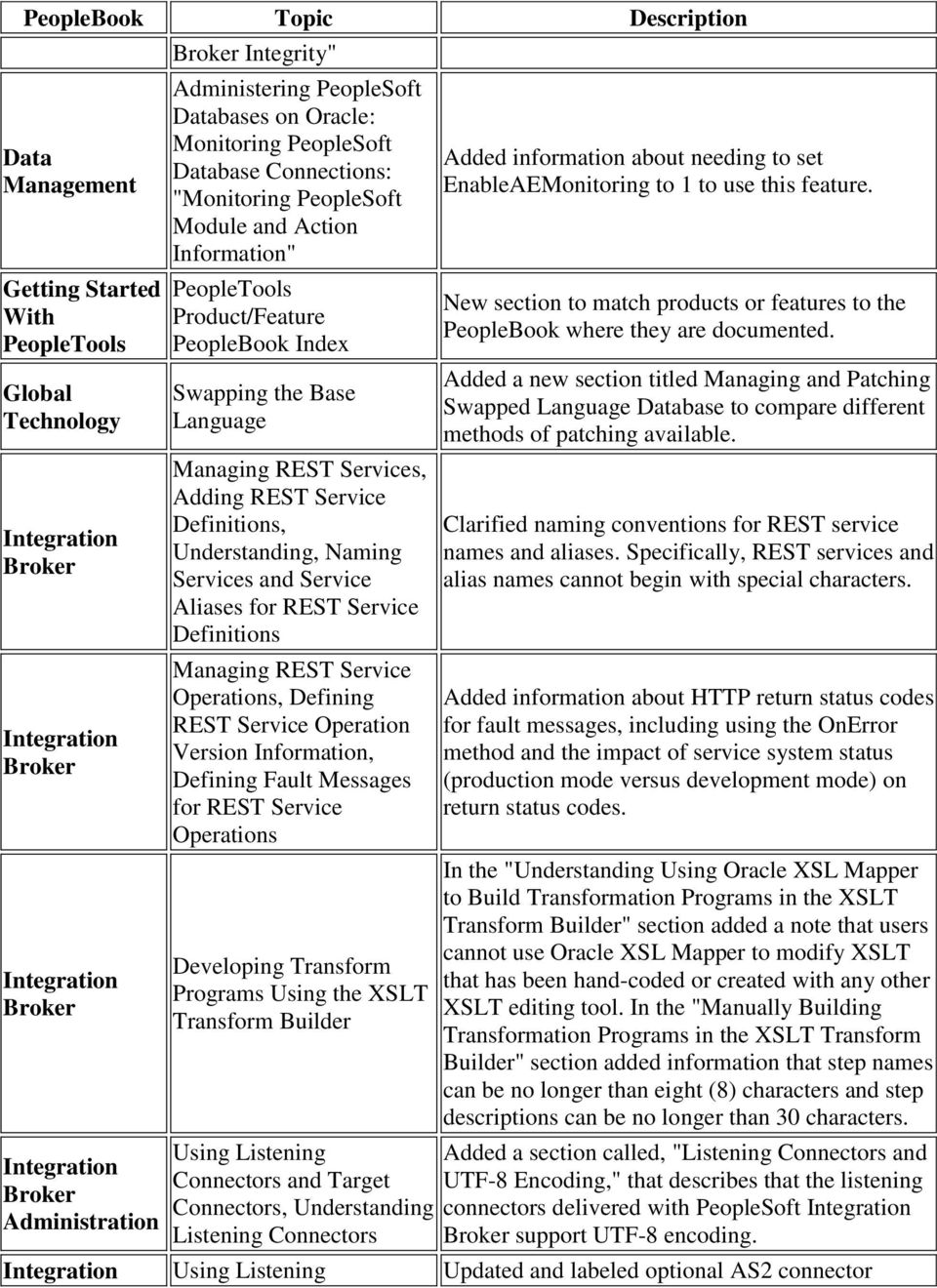
5 Service Operations Monitor Mobile Platform Connectors and Target Connectors, Working with the AS2 Connectors Managing Gateways, Configuring Security and General Properties, Setting General Connection Properties Managing Gateways, Configuring Security and General Properties, Displaying the PeopleTools Version of Gateways Working with the JMS Connectors, Using the JMS Listening Connector Working with the JMS Connectors, Using the JMS Target Connector, Asynchronous and Synchronous Communication Using the Delivered Listening Connectors and Target Connectors, Example 10: Using the RIDC Target Connector Viewing Gateway Logging Data for Service Operations Defining Push Button Page Elements, Understanding Defining Push Button Page Elements properties. Added documentation for specifying a string of server URLs when using the integrationgateway.properties file to define Oracle Jolt connect string properties. The integrationgateway.properties file features a new ig.gateway.showdetails property. When you set this property equal to True, the Tools version is displayed when you ping the integration gateway using the Ping Gateway button on the Gateways page. As of the PeopleTools 8.54 release, the JMSListeningConnectorAdminstrator has been deprecated. In order to control the JMS Listeners, please use the JMSAdministratorConsole which is accessed directly from the gateway administration page. The JMS target connector now uses the JMSCorrelation ID of the request message to populate the correlation ID of its response message. In previous releases the connector used the messageid of the request. An example has been added to the documentation for using the delivered RIDC target connector. This topic has been modified to better describe how to configure the system to view gateway transaction logs using PIA from the Service Operations Monitor. Added a subsection called "Save Type Push Buttons in Pop-Up Container Elements" to explain that Save event processing via Save type push buttons does not return input data to the application server when defined in pop-up containers. In these cases use an Ajax event for save processing. Mobile Documentation for Page The documentation for the Mobile

6 Platform Elements, Utilities and tools. Platform has been enhanced to include documentation for: Defining all layout page elements and their properties properties. Using Mobile Platform utilities. Using Mobile Platform administration tools to delete layouts, delete layout templates, rename layouts, update layout status, and set default layout properties. NA NA API API API NA NA BI Publisher Classes Charting Classes Charting Classes Oracle Business Intelligence Enterprise Edition (OBIEE) is certified for use with PeopleTools 8.54; support for OBIEE is dropped as of this release. PeopleTools 8.54 includes a new Pagelet Wizard XSL template named Accordion Menu, which can be selected as custom XSL for navigation collection pagelets at step 5 in Pagelet Wizard. Added topics to document the classes, methods, and properties that support digitally signed PDF reports: DigitalCertStore class. IPDFSignature class. Deprecated the Gantt class, SetTaskExpanded method. Added a property delivered in PeopleTools : Chart class, IsXAxisInteger. Removed documentation on the following items since they are internal use only and are not supported for customer use: API Charting Classes Chart class, DeviceType property. Chart class, OverrideSystemDefaultforAccessibility property. DialGauge class, DeviceType property. LEDGauge class, DeviceType property. StatusMeterGauge class, DeviceType

7 property. API API Charting Classes Charting Classes Corrected the Chart class IsLineChartSmoothing property to IsLineChartLineSmoothing. Legends are not available for funnel charts. The use of Chart class methods and properties for legends has no effect on a funnel chart. Added the following methods and properties to the Field class to support the fluid interface: API Field Class Field class methods: AddFFClass, GetDNDField, GetDNDRow, GetDNDRowset, GetDNDTargetField, GetDNDTargetRow, GetDNDTargetRowset, ReplaceFFClass, SetGroupletActionUrl, SetGroupletDisplayIn, SetGroupletID, SetGroupletImage, SetGroupletMOptions, SetGroupletTargetID, SetGroupletTimer, SetGroupletType, and SetGroupletUrl. Field class properties: Draggable, Droppable, FreeFormStyleName, HtmlAttributes, HtmlInputType, IsHyperlink, JavaScriptEvents, and PlaceholderText. API API API API Grid Classes Grid Classes Grid Classes Internet Script Classes (iscript) Added the following properties to the Grid class to support the fluid interface: FreeFormStyleName. Layout. Added the RowHighlight property to the Grid class to disable or enable row highlighting for a grid. Added the following items to manage row headers for accessibility mode: Grid class, SetRowHeader method. GridColumn class, RowHeader property. Added the following methods and properties to support the fluid interface:

8 Request class methods: FormFactor and GetDeviceInfo. Request class properties: BrowserDeviceFormFactor, BrowserDeviceType, BrowserFluidCapable, BrowserPlatformClass, BrowserTypeClass, ExtraLarge, Large, Medium, and Small. API API API API Message Classes > Message Class Methods Message Classes > Message Class Properties Mobile Platform (MAP) Classes PeopleSoft Search Framework Classes Revised the description of the OverrideURIResource method to indicate that it is used to override the URI template portion of thegenerated URL. Removed the IsEmpty property, which was removed from the code line in PeopleTools Added three new methods to the Map class that were introduced in PeopleTools : GetAuthTokenDomain, GetPortaName, and GetPortaNodeName. Add the following to support images in search results: SearchQuery class, IncludeImages property. SearchResult class, GetImageUrl method. API PSEvent Class Using Methods and Built- In Functions > Implementing Modal Transfers Working With File Attachments > Understanding the File Attachment Functions Working With File Attachments > Deployment and System Configuration Added a chapter on the PSEvent class, which provides all of the methods for publishing and subscribing to notifications from the Push Notification Framework. Added a section on modeless windows and specified that only one active child window (modeless or modal) can be opened from any parent. Added a note for FTP sites and HTTP repositories regarding Windows processing file names in a case-insensitive manner. Virus scanning now applies to files uploaded with the MAddAttachment built-in function.

9 Considerations Working With File Attachments > Deployment and System Configuration Considerations Debugging Your > Compiling All Programs at Once Debugging Your > Finding s to Packages and Classes Debugging Your > Using the Find In Feature PeopleTools now includes utility pages that allow CopyAttachments and CleanAttachments to be run as batch processes to avoid timeout issues. Compiling in provides the option to compile and save directive. Revised these topics to include descriptions on filter options for record and page. Using the Editor Using the Editor Added a new "Accessing Editor" section to describe new toolbar buttons for viewing page and record. Added a new "Using the Auto-Complete Feature" section to describe the auto-complete feature for application classes, built-in classes, built-in functions, system variables and constants. Added the following built-in functions to support the fluid interface: Built-in Functions and AddJavaScript, AddMetaTag, AddOnLoadScript, AddStyleSheet, CreateSearchRowset, DoModalComponentPopup, DoModalPopup, ExecuteSearchSavePC, GetAddSearchRecName, GetPageTitle, GetPageType, GetSearchRecName, IsAddMode, IsBackEnabled, IsFluidMode, IsFluidSearchStart, IsGroupletRequest, IsHomeEnabled, IsLogoutEnabled, IsNavBarEnabled, IsNextInListEnabled, IsNotifyEnabled, IsPinEnabled,

10 IsPrevInListEnabled, IsSaveEnabled, IsSearchEnabled, SetAddMode, SetThemeId, and SetTransferAttributes. Built-in Functions and Built-in Functions and Built-in Functions and Built-in Functions and Built-in Functions and Built-in Functions and Built-in Functions and Built-in Functions and Built-in Functions and Added a note to the Clean function: All white space characters (for example, a blank space, a tab, a carriage return, and so on) are deemed printable. Therefore, they are not removed by the Clean function. PeopleTools now includes utility pages that allow CopyAttachments and CleanAttachments to be run as batch processes to avoid timeout issues. Clarified the use of forward slashes in various parameters of the attachment functions. Added CreateBreadcrumb and GetBreadcrumbs that allow application developers to manage the user's breadcrumbs. Added the DateTimeToUserFormat for converting PeopleSoft internal date/time format to the user preferred date/time format. Added the GetAttachmentURL function for MAP applications. Virus scanning now applies to files uploaded with the MAddAttachment built-in function. The InsertImage built-in function now supports PNG and SVG file formats. Added the following three functions for conditional navigation: OverrideCNAVDisplayMode, ShouldSuppressCREF, and UIDisplayMode. In addition, noted that the following methods, properties, and functions are conditional navigation aware, which means that they will generate a URL or return a value that is dependent on the conditional navigation configuration:

11 Built-in Functions and Built-in Functions and Built-in Functions and Built-in Functions and > Directive Functions and Meta-SQL AbsoluteContentURL property (content reference class and content reference link class), AbsoluteURL property (content reference class and content reference link class), FindCRefByName method (Registry class), FindCRefByURL method (Registry class), FindCRefLinkByName method (Registry class), GenerateComponentContentRelURL builtin function, GenerateComponentContentURL built-in function, GenerateComponentRelURL built-in function, GenerateComponentURL built-in function, GenerateComponentRelativeURL built-in function, GenerateHomepageURL built-in function, GenerateHomepageRelativeURL built-in function, GetAbsoluteContentURL method (Registry class), GetURL built-in function, Transfer built-in function, and ViewURL built-in function Added the ResizeImage function to create one or more resized copies of the source image (or images). Revised the RevalidatePassword function to indicate that the function automatically accounts for scenarios in which the signon ID and the ID in effect after signon differ, and it requests revalidation based on the signon ID. Split this chapter into smaller topics alphabetically: A, B, C, and so on. Added a new topic describing directive : #If and #ToolsRel. Added the %SelectDummyTable meta-sql variable to perform a SELECT without specifying a specific table, such as performing a select on

12 Meta-SQL Meta-HTML PS_INSTALLATION and others. Added the %SqlHint meta-sql function that inserts a database platform-specific SQL hint into the specified SQL statement. Added the following meta-html elements to support the branding framework: %Content %StyleSheet Added the following meta-html elements to support the fluid interface: Meta-HTML %BB, %BP, and %BV. %ExplainMessage. %FORMFACTOREXTRALARGE, %FORMFACTORLARGE, %FORMFACTORMEDIUM, and %FORMFACTORSMALL. Pivot Grid Using Component Real- Time Search and Pivot Grids in Fluid Mode \ Publishing Pivot Grid Fluid Views as Grouplets Additional Branding Tasks Creating and Maintaining Action Items > Configuring Action Items Migrating Activity Data > Upgrading Activity Data Using ADS Definitions Developing to Customize Activity Usage > Developing Navigation Buttons Using Pagelet Wizard to Create and Manage Pagelets: Step 6: Added two notes to clarify the security settings between Pivot Grid Viewer and Pivot Grid grouplets. Provided additional information on managing custom homepage tabs. Added a note to ensure that the external URL in the Define Related Content Service page for a non- PeopleSoft URL has the additional parameter: PTAI=T. Added a table listing the ADS and managed objects that are migrated with activity guide data. Added content for the two new reserved methods, PTAI_NAV_SAVE and PTAI_NAV_SAVE_NEXT. Added a new topic: Publishing a Pagelet as a Grouplet for a Fluid Homepage.

13 Specifying Pagelet Publishing Options Administering s > Administering Content s > Defining Content s Developing and Configuring Related Content Services > Managing Related Content > Managing Related Content for Content s Updated the topic to remove the KEYWORDS attribute from the list of content reference attributes and revised description to instruct users to use the KEYWORD attribute. Administering s > Administering Content s Configuring the Environment > Configuring Web Profiles > Configuring Appearance and Character Configuring the Environment > Configuring Web Profiles > Configuring Security Configuring the Environment > Defining Nodes > Setting Node Characteristics Administering Homepages and Dashboard Pages Configuring PeopleSoft s to Use Oracle WebCenter Add a section, "Setting Fluid Attributes for Content s," for the Fluid Attributes tab. Clarified the use of the View File Time to Live setting. Updated the Start Page group box to describe the start page iscript and the Fluid Homepage field. Revised this topic to add descriptions for two new page elements - Host Node and Network Node Name and updated the screenshot. Created a new topic, "Searching for and Importing Pagelets," to fully document the use of the Pagelet Search page. As of PeopleTools 8.54, integration with Oracle WebCenter through the delivered related content services has been deprecated. These service definitions may be removed from a future release

14 Related Content of PeopleTools. Services Enabling Locale Switching Through Query Parameters in Oracle WebCenter Working with Conditional Navigation Administering Content s > Defining Content s Configuring Web Profiles > Configuring General Properties Created a new topic, "Working with Conditional Navigation," to describe the configuration of conditional navigation. Added descriptions for two new page elements: Fluid Mode and Small Form Factor Optimized. Added descriptions for two new page elements: Disable Fluid Mode and Disable Fluid on Desktop. Process Scheduler Process Scheduler Process Scheduler Query Query Configuring WS-Security for WSRP Consumption and Production, Configuring WS-Security for PeopleSoft as a WSRP Producer Scheduled JobSet Definitions Selecting Output Types and Formats Defining Search Configuration Defining Selection Criteria \ Drilling URL in PeopleSoft Query \ Understanding Drilling URLs Working with Advanced Query Options \ Joining Added information about the WSRP security options that are supported in WebCenters. Updated the description of Time Zone indicating that the default time zone is the server time zone. Added a note indicating that if multiple files of the same output format are generated and made available in the destination directory, one file may be picked up randomly and attached to an outgoing . Updated the screenshots and the steps for enabling indexing. Added a note describing the limitation when using queries with Unions. Add a limitation note for using the Outer Join functionality.

15 Query Query Query Query Query Search Search Search Search Security Records \ Creating Outer Joins Creating and Running Simple Queries \ Creating New Queries Using Composite Query \ Composite Query Overview \ Composite Query Considerations and Limitations Using Composite Query \ Creating Composite Query Definitions \ Selecting Based Query \ Query Alias (term) Scheduling Queries \ Selecting Process Requests Drilling URL in PeopleSoft Query \ Defining Attachment URL Widgets Working with Global Search > Working With the Registry Search > Setting Up the Registry Search Modified a note to clarify that the record alias doesn't include AS and TO. Added a limitation note indicating that Composite Query is not supported on the Informix environment. Modified the description of the Query Alias field to add the format rules when adding the query aliases. Removing this statement: "If a query result includes a file without data, the report headers or other text are sent in that indicates that the report was empty." Modified a note to clarify the user permissions and roles when they view the attachment URL file. Updated content to include information on using the SES console to combine search definitions into a single search group. Mapping Search Attributes Revised description of Attribute Name field. PeopleSoft Search Framework Versus Verity Search Engine > Understanding Key Differences Between Oracle SES and Verity Working with the Search Results > Working with Persistent Search Controls Managing PeopleSoft Personalizations, Working with Personalization Included stemming to the list of differences and added the supported languages for stemming. Added a note on support for persistent search. In the "Working with Personalizations Options" topic, the heading of the subtopic, Understanding Navigation Personalizations has been changed to

16 Security Security Security Security SQR for PeopleSoft SQR for PeopleSoft Options Administering User Profiles, Specifying User Profile Attributes, Setting Roles Setting Up Roles, Executing Dynamic Role Rules Working with User Profiles Across Multiple PeopleSoft Databases Implementing Definition Security (Three-Tier) Processing-Limits Section Processing-Limits Section Tracing, Logging, and Debugging > Setting Up the Debugger Setting Domain Parameters > SMTP Settings Understanding Navigation Settings. A note has been added to this topic explaining that you cannot overwrite roles in the Roles grid. To add a role click the Add Row button (+). To delete a role click the Delete row button (-). This topic contained a section called, "Executing Dynamic Role Rules for a User Profile," which described using the User Profile - Roles page to execute a dynamic role rule for a single user profile. You cannot execute role rules for a single user profile. The behavior is that you can execute role rules for all roles assigned to a user profile. The incorrect section has been removed from the documentation. A new section has been added called, "Executing Dynamic Role Rules for All Roles Assigned to a User Profile," which describes using the User Profile - Roles page to execute dynamic role rules for all roles assigned to a user profile. Added a topic, "Securing User Profile Synchronization," listing options to secure service operations during user profile synchronization. The documentation as been enhanced with more complete documentation for three-tier definition security. Updated the Processing-Limits Section to define the sizes and limitations of some of the SQR internal structures. Added a note indicating that the value for the keyword NUMVARIABLES in $PS_HOME/sqr/pssqr.ini should be ignored. Added note: " (PSIDE.EXE) will not connect to the Debugger through a firewall using Network Address Translation (NAT)." Added settings to enable and control TLS security. Setting Clarified the dbflags parameter with respect to

17 Domain Parameters > PSTOOLS Options Understanding PeopleSoft Internet Architecture > PeopleSoft Architecture Fundamentals Understanding Verity Search Indexes > Components of Verity and PeopleSoft Search Architecture WebLogic Domain Types Changing WebLogic User Passwords Setting Up Reverse Proxy s>configuring Microsoft IIS 7.0 as RPS Engine and behavior. Added a note indicating the PeopleSoft architecture supports both IPv4 and IPv6 network protocols. Added a note under Verity Technologies indicating the Verity mkvdk fails and displays error when the collection storage drive/partition is less than 4Tb. Updated the MAX_FILE_DESCRIPTOR, debugging output setting to a limit of and added a note for user to set the optimum value of the environment variable in setenv.sh file. WebLogic "operator" user name and password is removed from setenv.* script in PIA. Instead the operator user name and password values are encrypted and stored in a properties file in the PIA installer. If the customer later changes the operator password in WebLogic, they have to modify the properties file with encrypted value of the new password. Updated the steps to modify the properties file. Removed section Configuring Microsoft IIS as an RPS and updated steps to configure Microsoft IIS 7.0 for reverse proxy server. Bypassing Restrict-by- File-Type Functionality for Added the missing punctuation. System Administrators Configuring Verity Search and Building Verity Search Indexes Using Utilities > File Extension List > Standard Extensions Moved the Building Verity-Based Registry Search Indexes topic from the book to the. Removed a note that had a reference to the web.xml file and revised the section. Configuring Process Entered a description for the PSSQR Path.

18 Test Framework Test Framework Test Framework Test Framework Test Framework Test Framework Workflow Scheduler > SQR Using Utilities > DDL Model Defaults Installing and Configuring PTF: Defining PTF Configuration Options Using PeopleSoft Test Framework: Using the Log Viewer Using PeopleSoft Test Framework: Using the PTF Test Recorder Installing and Configuring PTF: Installing a PTF Client Updated the list to include information about DDL model statement. Updated the description for the Allow Untrusted SSL option. This option is now disabled. Connections must be secure, unless a delivered web service is activated by a PTF administrator. Added the Export command to the Log Menu Command table. Updated the list of Configure Recording Tools options. Added information about installing from the command line. Test Added Exists and Get Property actions for DIV.. Test Added Weekday() function. Migrating Workflow Data Added information about delivered ADS templates for workflow data migration.

Release Notes. Oracle s PeopleSoft PeopleTools 8.54
 Release Notes Oracle s PeopleSoft PeopleTools 8.54 Release Notes for PeopleSoft PeopleTools 8.54 Copyright 2015, Oracle and/or its affiliates. All rights reserved. Oracle and Java are registered trademarks
PeopleTools 8.51 PeopleBook: PeopleSoft Application Designer Lifecycle Management Guide
 PeopleTools 8.51 PeopleBook: PeopleSoft Application Designer Lifecycle Management Guide August 2010 PeopleTools 8.51 PeopleBook: PeopleSoft Application Designer Lifecycle Management Guide SKU pt8.51tlcm-b0810
Contents About the Contract Management Post Installation Administrator's Guide... 5 Viewing and Modifying Contract Management Settings...
 Post Installation Guide for Primavera Contract Management 14.1 July 2014 Contents About the Contract Management Post Installation Administrator's Guide... 5 Viewing and Modifying Contract Management Settings...
ORACLE BUSINESS INTELLIGENCE WORKSHOP
 ORACLE BUSINESS INTELLIGENCE WORKSHOP Integration of Oracle BI Publisher with Oracle Business Intelligence Enterprise Edition Purpose This tutorial mainly covers how Oracle BI Publisher is integrated with
IBM Campaign Version-independent Integration with IBM Engage Version 1 Release 3 April 8, 2016. Integration Guide IBM
 IBM Campaign Version-independent Integration with IBM Engage Version 1 Release 3 April 8, 2016 Integration Guide IBM Note Before using this information and the product it supports, read the information
SonicWALL GMS Custom Reports
 SonicWALL GMS Custom Reports Document Scope This document describes how to configure and use the SonicWALL GMS 6.0 Custom Reports feature. This document contains the following sections: Feature Overview
IBM Campaign and IBM Silverpop Engage Version 1 Release 2 August 31, 2015. Integration Guide IBM
 IBM Campaign and IBM Silverpop Engage Version 1 Release 2 August 31, 2015 Integration Guide IBM Note Before using this information and the product it supports, read the information in Notices on page 93.
Application. 1.1 About This Tutorial. 1.1.1 Tutorial Requirements. 1.1.2 Provided Files
 About This Tutorial 1Creating an End-to-End HL7 Over MLLP Application 1.1 About This Tutorial 1.1.1 Tutorial Requirements 1.1.2 Provided Files This tutorial takes you through the steps of creating an end-to-end
Integrating with BarTender Integration Builder
 Integrating with BarTender Integration Builder WHITE PAPER Contents Overview 3 Understanding BarTender's Native Integration Platform 4 Integration Builder 4 Administration Console 5 BarTender Integration
NETWRIX EVENT LOG MANAGER
 NETWRIX EVENT LOG MANAGER ADMINISTRATOR S GUIDE Product Version: 4.0 July/2012. Legal Notice The information in this publication is furnished for information use only, and does not constitute a commitment
Configuration Information
 Configuration Information Email Security Gateway Version 7.7 This chapter describes some basic Email Security Gateway configuration settings, some of which can be set in the first-time Configuration Wizard.
Configuration Information
 This chapter describes some basic Email Security Gateway configuration settings, some of which can be set in the first-time Configuration Wizard. Other topics covered include Email Security interface navigation,
Top 10 Oracle SQL Developer Tips and Tricks
 Top 10 Oracle SQL Developer Tips and Tricks December 17, 2013 Marc Sewtz Senior Software Development Manager Oracle Application Express Oracle America Inc., New York, NY The following is intended to outline
Parallels Plesk Panel
 Parallels Plesk Panel Copyright Notice ISBN: N/A Parallels 660 SW 39th Street Suite 205 Renton, Washington 98057 USA Phone: +1 (425) 282 6400 Fax: +1 (425) 282 6444 Copyright 1999-2010, Parallels, Inc.
MAS 500 Intelligence Tips and Tricks Booklet Vol. 1
 MAS 500 Intelligence Tips and Tricks Booklet Vol. 1 1 Contents Accessing the Sage MAS Intelligence Reports... 3 Copying, Pasting and Renaming Reports... 4 To create a new report from an existing report...
Jet Data Manager 2012 User Guide
 Jet Data Manager 2012 User Guide Welcome This documentation provides descriptions of the concepts and features of the Jet Data Manager and how to use with them. With the Jet Data Manager you can transform
Merak Outlook Connector User Guide
 IceWarp Server Merak Outlook Connector User Guide Version 9.0 Printed on 21 August, 2007 i Contents Introduction 1 Installation 2 Pre-requisites... 2 Running the install... 2 Add Account Wizard... 6 Finalizing
Sisense. Product Highlights. www.sisense.com
 Sisense Product Highlights Introduction Sisense is a business intelligence solution that simplifies analytics for complex data by offering an end-to-end platform that lets users easily prepare and analyze
Data Tool Platform SQL Development Tools
 Data Tool Platform SQL Development Tools ekapner Contents Setting SQL Development Preferences...5 Execution Plan View Options Preferences...5 General Preferences...5 Label Decorations Preferences...6
Building A Very Simple Web Site
 Sitecore CMS 6.2 Building A Very Simple Web Site Rev 100601 Sitecore CMS 6. 2 Building A Very Simple Web Site A Self-Study Guide for Developers Table of Contents Chapter 1 Introduction... 3 Chapter 2 Building
SAP BusinessObjects Business Intelligence Platform Document Version: 4.1 Support Package 5-2014-11-06. Business Intelligence Launch Pad User Guide
 SAP BusinessObjects Business Intelligence Platform Document Version: 4.1 Support Package 5-2014-11-06 Business Intelligence Launch Pad User Guide Table of Contents 1 Document history....7 2 Getting started
Glyma Deployment Instructions
 Glyma Deployment Instructions Version 0.8 Copyright 2015 Christopher Tomich and Paul Culmsee and Peter Chow Licensed under the Apache License, Version 2.0 (the "License"); you may not use this file except
System Administration Training Guide. S100 Installation and Site Management
 System Administration Training Guide S100 Installation and Site Management Table of contents System Requirements for Acumatica ERP 4.2... 5 Learning Objects:... 5 Web Browser... 5 Server Software... 5
LearnFromGuru Polish your knowledge
 SQL SERVER 2008 R2 /2012 (TSQL/SSIS/ SSRS/ SSAS BI Developer TRAINING) Module: I T-SQL Programming and Database Design An Overview of SQL Server 2008 R2 / 2012 Available Features and Tools New Capabilities
How To Use Peoplesoft 8.51.1.1 (Peoplesoft)
 PeopleTools 8.51 Update and Roadmap 2010 Stephen Wills ([email protected]) PeopleSoft Application Technology Sales Consultant, Oracle The following is intended to outline our
SAP BusinessObjects Business Intelligence (BI) platform Document Version: 4.1, Support Package 3-2014-04-03. Report Conversion Tool Guide
 SAP BusinessObjects Business Intelligence (BI) platform Document Version: 4.1, Support Package 3-2014-04-03 Table of Contents 1 Report Conversion Tool Overview.... 4 1.1 What is the Report Conversion Tool?...4
Tips and Tricks SAGE ACCPAC INTELLIGENCE
 Tips and Tricks SAGE ACCPAC INTELLIGENCE 1 Table of Contents Auto e-mailing reports... 4 Automatically Running Macros... 7 Creating new Macros from Excel... 8 Compact Metadata Functionality... 9 Copying,
Release Value Proposition. Oracle PeopleSoft PeopleTools 8.54
 Release Value Proposition Oracle PeopleSoft PeopleTools 8.54 Release Value Proposition for PeopleSoft PeopleTools 8.54. Copyright 2014, Oracle and/or its affiliates. All rights reserved. License Restrictions
New Features... 1 Installation... 3 Upgrade Changes... 3 Fixed Limitations... 4 Known Limitations... 5 Informatica Global Customer Support...
 Informatica Corporation B2B Data Exchange Version 9.5.0 Release Notes June 2012 Copyright (c) 2006-2012 Informatica Corporation. All rights reserved. Contents New Features... 1 Installation... 3 Upgrade
Release 6.2.1 System Administrator s Guide
 IBM Maximo Release 6.2.1 System Administrator s Guide Note Before using this information and the product it supports, read the information in Notices on page Notices-1. First Edition (January 2007) This
DiskPulse DISK CHANGE MONITOR
 DiskPulse DISK CHANGE MONITOR User Manual Version 7.9 Oct 2015 www.diskpulse.com [email protected] 1 1 DiskPulse Overview...3 2 DiskPulse Product Versions...5 3 Using Desktop Product Version...6 3.1 Product
P R O V I S I O N I N G O R A C L E H Y P E R I O N F I N A N C I A L M A N A G E M E N T
 O R A C L E H Y P E R I O N F I N A N C I A L M A N A G E M E N T, F U S I O N E D I T I O N R E L E A S E 1 1. 1. 1.x P R O V I S I O N I N G O R A C L E H Y P E R I O N F I N A N C I A L M A N A G E
HP Service Manager. Software Version: 9.40 For the supported Windows and Linux operating systems. Application Setup help topics for printing
 HP Service Manager Software Version: 9.40 For the supported Windows and Linux operating systems Application Setup help topics for printing Document Release Date: December 2014 Software Release Date: December
for Sage 100 ERP Business Insights Overview Document
 for Sage 100 ERP Business Insights Document 2012 Sage Software, Inc. All rights reserved. Sage Software, Sage Software logos, and the Sage Software product and service names mentioned herein are registered
isupport 15 Release Notes
 isupport 15 Release Notes This document includes new features, changes, and fixes in isupport v15. The Readme.txt file included with the download includes a list of known issues. New Features in isupport
Richmond SupportDesk Web Reports Module For Richmond SupportDesk v6.72. User Guide
 Richmond SupportDesk Web Reports Module For Richmond SupportDesk v6.72 User Guide Contents 1 Introduction... 4 2 Requirements... 5 3 Important Note for Customers Upgrading... 5 4 Installing the Web Reports
J j enterpririse. Oracle Application Express 3. Develop Native Oracle database-centric web applications quickly and easily with Oracle APEX
 Oracle Application Express 3 The Essentials and More Develop Native Oracle database-centric web applications quickly and easily with Oracle APEX Arie Geller Matthew Lyon J j enterpririse PUBLISHING BIRMINGHAM
Parallels Plesk Panel
 Parallels Plesk Panel Copyright Notice ISBN: N/A Parallels 660 SW 39th Street Suite 205 Renton, Washington 98057 USA Phone: +1 (425) 282 6400 Fax: +1 (425) 282 6444 Copyright 1999-2009, Parallels, Inc.
Vector HelpDesk - Administrator s Guide
 Vector HelpDesk - Administrator s Guide Vector HelpDesk - Administrator s Guide Configuring and Maintaining Vector HelpDesk version 5.6 Vector HelpDesk - Administrator s Guide Copyright Vector Networks
Terms and Definitions for CMS Administrators, Architects, and Developers
 Sitecore CMS 6 Glossary Rev. 081028 Sitecore CMS 6 Glossary Terms and Definitions for CMS Administrators, Architects, and Developers Table of Contents Chapter 1 Introduction... 3 1.1 Glossary... 4 Page
ibolt V3.2 Release Notes
 ibolt V3.2 Release Notes Welcome to ibolt V3.2, which has been designed to deliver an easy-touse, flexible, and cost-effective business integration solution. This document highlights the new and enhanced
GP REPORTS VIEWER USER GUIDE
 GP Reports Viewer Dynamics GP Reporting Made Easy GP REPORTS VIEWER USER GUIDE For Dynamics GP Version 2015 (Build 5) Dynamics GP Version 2013 (Build 14) Dynamics GP Version 2010 (Build 65) Last updated
CommonSpot Content Server Version 6.2 Release Notes
 CommonSpot Content Server Version 6.2 Release Notes Copyright 1998-2011 PaperThin, Inc. All rights reserved. About this Document CommonSpot version 6.2 updates the recent 6.1 release with: Enhancements
Advanced Event Viewer Manual
 Advanced Event Viewer Manual Document version: 2.2944.01 Download Advanced Event Viewer at: http://www.advancedeventviewer.com Page 1 Introduction Advanced Event Viewer is an award winning application
InfoView User s Guide. BusinessObjects Enterprise XI Release 2
 BusinessObjects Enterprise XI Release 2 InfoView User s Guide BusinessObjects Enterprise XI Release 2 Patents Trademarks Copyright Third-party contributors Business Objects owns the following U.S. patents,
Spectrum Technology Platform. Version 9.0. Administration Guide
 Spectrum Technology Platform Version 9.0 Administration Guide Contents Chapter 1: Getting Started...7 Starting and Stopping the Server...8 Installing the Client Tools...8 Starting the Client Tools...9
Qlik REST Connector Installation and User Guide
 Qlik REST Connector Installation and User Guide Qlik REST Connector Version 1.0 Newton, Massachusetts, November 2015 Authored by QlikTech International AB Copyright QlikTech International AB 2015, All
McAfee Web Gateway 7.4.1
 Release Notes Revision B McAfee Web Gateway 7.4.1 Contents About this release New features and enhancements Resolved issues Installation instructions Known issues Find product documentation About this
Implementation notes on Integration of Avaya Aura Application Enablement Services with Microsoft Lync 2010 Server.
 Implementation notes on Integration of Avaya Aura Application Enablement Services with Microsoft Lync 2010 Server. Introduction The Avaya Aura Application Enablement Services Integration for Microsoft
PORTAL ADMINISTRATION
 1 Portal Administration User s Guide PORTAL ADMINISTRATION GUIDE Page 1 2 Portal Administration User s Guide Table of Contents Introduction...5 Core Portal Framework Concepts...5 Key Items...5 Layouts...5
IBM Unica emessage Version 8 Release 6 February 13, 2015. User's Guide
 IBM Unica emessage Version 8 Release 6 February 13, 2015 User's Guide Note Before using this information and the product it supports, read the information in Notices on page 403. This edition applies to
Oracle Business Intelligence 11g OPN Advanced Workshop
 Oracle Business Intelligence 11g OPN Advanced Workshop Lab Book OPN: Oracle Business Intelligence 11g Advanced Workshop OPN Workshop: BI 11g Advanced Seite 1 Authors Revision Jignesh Mehta Naresh Nemani
User's Guide. ControlPoint. Change Manager (Advanced Copy) SharePoint Migration. v. 4.0
 User's Guide ControlPoint Change Manager (Advanced Copy) SharePoint Migration v. 4.0 Last Updated 7 August 2013 i Contents Preface 3 What's New in Version 4.0... 3 Components... 3 The ControlPoint Central
Legal Notes. Regarding Trademarks. 2012 KYOCERA Document Solutions Inc.
 Legal Notes Unauthorized reproduction of all or part of this guide is prohibited. The information in this guide is subject to change without notice. We cannot be held liable for any problems arising from
NS DISCOVER 4.0 ADMINISTRATOR S GUIDE. July, 2015. Version 4.0
 NS DISCOVER 4.0 ADMINISTRATOR S GUIDE July, 2015 Version 4.0 TABLE OF CONTENTS 1 General Information... 4 1.1 Objective... 4 1.2 New 4.0 Features Improvements... 4 1.3 Migrating from 3.x to 4.x... 5 2
Installing and Configuring vcloud Connector
 Installing and Configuring vcloud Connector vcloud Connector 2.7.0 This document supports the version of each product listed and supports all subsequent versions until the document is replaced by a new
Results CRM 2012 User Manual
 Results CRM 2012 User Manual A Guide to Using Results CRM Standard, Results CRM Plus, & Results CRM Business Suite Table of Contents Installation Instructions... 1 Single User & Evaluation Installation
WebSphere Business Monitor V7.0 Business space dashboards
 Copyright IBM Corporation 2010 All rights reserved IBM WEBSPHERE BUSINESS MONITOR 7.0 LAB EXERCISE WebSphere Business Monitor V7.0 What this exercise is about... 2 Lab requirements... 2 What you should
FTP Service Reference
 IceWarp Server FTP Service Reference Version 10 Printed on 12 August, 2009 i Contents FTP Service 1 V10 New Features... 2 FTP Access Mode... 2 FTP Synchronization... 2 FTP Service Node... 3 FTP Service
Strategic Asset Tracking System User Guide
 Strategic Asset Tracking System User Guide Contents 1 Overview 2 Web Application 2.1 Logging In 2.2 Navigation 2.3 Assets 2.3.1 Favorites 2.3.3 Purchasing 2.3.4 User Fields 2.3.5 History 2.3.6 Import Data
LANDESK Service Desk. Desktop Manager
 LANDESK Service Desk Desktop Manager LANDESK SERVICE DESK DESKTOP MANAGER GUIDE This document contains information, which is the confidential information and/or proprietary property of LANDESK Software,
File Management Utility User Guide
 File Management Utility User Guide Legal Notes Unauthorized reproduction of all or part of this guide is prohibited. The information in this guide is subject to change without notice. We cannot be held
Click Studios. Passwordstate. Installation Instructions
 Passwordstate Installation Instructions This document and the information controlled therein is the property of Click Studios. It must not be reproduced in whole/part, or otherwise disclosed, without prior
BlackBerry Enterprise Service 10. Version: 10.2. Configuration Guide
 BlackBerry Enterprise Service 10 Version: 10.2 Configuration Guide Published: 2015-02-27 SWD-20150227164548686 Contents 1 Introduction...7 About this guide...8 What is BlackBerry Enterprise Service 10?...9
Deploying the BIG-IP System v10 with Oracle Application Server 10g R2
 DEPLOYMENT GUIDE Deploying the BIG-IP System v10 with Oracle Application Server 10g R2 Version 1.1 Table of Contents Table of Contents Deploying the BIG-IP system v10 with Oracle s Application Server 10g
Server Manager. Open Text Web Solutions Management Server 10.0
 Server Manager Open Text Web Solutions Management Server 10.0 Copyright 2009 Open Text Corporation. All rights reserved. Documentation 01/2009 - Management Server 10.0 This documentation contains information
Customer Tips. Xerox Network Scanning HTTP/HTTPS Configuration using Microsoft IIS. for the user. Purpose. Background
 Xerox Multifunction Devices Customer Tips June 5, 2007 This document applies to these Xerox products: X WC Pro 232/238/245/ 255/265/275 for the user Xerox Network Scanning HTTP/HTTPS Configuration using
GFI Product Manual. Administration and Configuration Manual
 GFI Product Manual Administration and Configuration Manual http://www.gfi.com [email protected] The information and content in this document is provided for informational purposes only and is provided "as is"
Copyright 2012 Trend Micro Incorporated. All rights reserved.
 Trend Micro Incorporated reserves the right to make changes to this document and to the products described herein without notice. Before installing and using the software, please review the readme files,
IBM Emptoris Contract Management. Release Notes. Version 10.0.1.5 GI13-3418-09
 IBM Emptoris Management Release Notes Version 10.0.1.5 GI13-3418-09 Note: Before using this information and the product it supports, read the information in Notices on page 75. Copyright IBM Corporation
Exclaimer Signature Manager 2.0 User Manual
 Exclaimer Exclaimer UK +44 (0) 1252 531 422 USA 1-888-450-9631 [email protected] Contents GETTING STARTED... 10 Signature Manager Overview... 11 How Does it Work?... 11 But That's Not All...... 12 And
ADMINISTRATOR GUIDE VERSION
 ADMINISTRATOR GUIDE VERSION 4.0 2014 Copyright 2008 2014. All rights reserved. No part of this document may be reproduced or transmitted in any form or by any means electronic or mechanical, for any purpose
An Oracle White Paper May 2013. Creating Custom PDF Reports with Oracle Application Express and the APEX Listener
 An Oracle White Paper May 2013 Creating Custom PDF Reports with Oracle Application Express and the APEX Listener Disclaimer The following is intended to outline our general product direction. It is intended
Monitoring Oracle Enterprise Performance Management System Release 11.1.2.3 Deployments from Oracle Enterprise Manager 12c
 Monitoring Oracle Enterprise Performance Management System Release 11.1.2.3 Deployments from Oracle Enterprise Manager 12c This document describes how to set up Oracle Enterprise Manager 12c to monitor
Decision Support AITS University Administration. EDDIE 4.1 User Guide
 Decision Support AITS University Administration EDDIE 4.1 User Guide 2 P a g e EDDIE (BI Launch Pad) 4.1 User Guide Contents Introduction to EDDIE... 4 Log into EDDIE... 4 Overview of EDDIE Homepage...
MGC WebCommander Web Server Manager
 MGC WebCommander Web Server Manager Installation and Configuration Guide Version 8.0 Copyright 2006 Polycom, Inc. All Rights Reserved Catalog No. DOC2138B Version 8.0 Proprietary and Confidential The information
EMC Documentum Composer
 EMC Documentum Composer Version 6.5 User Guide P/N 300 007 217 A02 EMC Corporation Corporate Headquarters: Hopkinton, MA 01748 9103 1 508 435 1000 www.emc.com Copyright 2008 EMC Corporation. All rights
BusinessObjects Enterprise InfoView User's Guide
 BusinessObjects Enterprise InfoView User's Guide BusinessObjects Enterprise XI 3.1 Copyright 2009 SAP BusinessObjects. All rights reserved. SAP BusinessObjects and its logos, BusinessObjects, Crystal Reports,
5.1 Features 1.877.204.6679. [email protected] Denver CO 80202
 1.877.204.6679 www.fourwindsinteractive.com 3012 Huron Street [email protected] Denver CO 80202 5.1 Features Copyright 2014 Four Winds Interactive LLC. All rights reserved. All documentation
Bitrix Site Manager ASP.NET. Installation Guide
 Bitrix Site Manager ASP.NET Installation Guide Contents Introduction... 4 Chapter 1. Checking for IIS Installation... 5 Chapter 2. Using An Archive File to Install Bitrix Site Manager ASP.NET... 7 Preliminary
ORACLE BUSINESS INTELLIGENCE WORKSHOP
 ORACLE BUSINESS INTELLIGENCE WORKSHOP Creating Interactive Dashboards and Using Oracle Business Intelligence Answers Purpose This tutorial shows you how to build, format, and customize Oracle Business
There are numerous ways to access monitors:
 Remote Monitors REMOTE MONITORS... 1 Overview... 1 Accessing Monitors... 1 Creating Monitors... 2 Monitor Wizard Options... 11 Editing the Monitor Configuration... 14 Status... 15 Location... 17 Alerting...
HP A-IMC Firewall Manager
 HP A-IMC Firewall Manager Configuration Guide Part number: 5998-2267 Document version: 6PW101-20110805 Legal and notice information Copyright 2011 Hewlett-Packard Development Company, L.P. No part of this
PeopleSoft Compare Process
 PeopleSoft Compare Process Agenda Describe Compare Process Run Compare and Report Viewing Compare Report Describing the Compare Process Source and Target Database PeopleSoft Application Designer enables
... Introduction... 17
 ... Introduction... 17 1... Workbench Tools and Package Hierarchy... 29 1.1... Log on and Explore... 30 1.1.1... Workbench Object Browser... 30 1.1.2... Object Browser List... 31 1.1.3... Workbench Settings...
Macromedia Dreamweaver 8 Developer Certification Examination Specification
 Macromedia Dreamweaver 8 Developer Certification Examination Specification Introduction This is an exam specification for Macromedia Dreamweaver 8 Developer. The skills and knowledge certified by this
MyOra 3.0. User Guide. SQL Tool for Oracle. Jayam Systems, LLC
 MyOra 3.0 SQL Tool for Oracle User Guide Jayam Systems, LLC Contents Features... 4 Connecting to the Database... 5 Login... 5 Login History... 6 Connection Indicator... 6 Closing the Connection... 7 SQL
2X ApplicationServer & LoadBalancer Manual
 2X ApplicationServer & LoadBalancer Manual 2X ApplicationServer & LoadBalancer Contents 1 URL: www.2x.com E-mail: [email protected] Information in this document is subject to change without notice. Companies,
IBM. Implementing SMTP and POP3 Scenarios with WebSphere Business Integration Connect. Author: Ronan Dalton
 IBM Implementing SMTP and POP3 Scenarios with WebSphere Business Integration Connect Author: Ronan Dalton Table of Contents Section 1. Introduction... 2 Section 2. Download, Install and Configure ArGoSoft
DocuShare User Guide
 DocuShare User Guide Publication date: April 2011 This document supports DocuShare Release 6.6.1 Prepared by: erox Corporation DocuShare Business Unit 3400 Hillview Avenue Palo Alto, California 94304 USA
Simply Accounting Intelligence Tips and Tricks Booklet Vol. 1
 Simply Accounting Intelligence Tips and Tricks Booklet Vol. 1 1 Contents Accessing the SAI reports... 3 Running, Copying and Pasting reports... 4 Creating and linking a report... 5 Auto e-mailing reports...
Using Logon Agent for Transparent User Identification
 Using Logon Agent for Transparent User Identification Websense Logon Agent (also called Authentication Server) identifies users in real time, as they log on to domains. Logon Agent works with the Websense
ithenticate User Manual
 ithenticate User Manual Version: 2.0.2 Updated March 16, 2012 Contents Introduction 4 New Users 4 Logging In 4 Resetting Your Password 5 Changing Your Password or Username 6 The ithenticate Account Homepage
IceWarp to IceWarp Server Migration
 IceWarp to IceWarp Server Migration Registered Trademarks iphone, ipad, Mac, OS X are trademarks of Apple Inc., registered in the U.S. and other countries. Microsoft, Windows, Outlook and Windows Phone
Preparing for GO!Enterprise MDM On-Demand Service
 Preparing for GO!Enterprise MDM On-Demand Service This guide provides information on...... An overview of GO!Enterprise MDM... Preparing your environment for GO!Enterprise MDM On-Demand... Firewall rules
Teradata SQL Assistant Version 13.0 (.Net) Enhancements and Differences. Mike Dempsey
 Teradata SQL Assistant Version 13.0 (.Net) Enhancements and Differences by Mike Dempsey Overview SQL Assistant 13.0 is an entirely new application that has been re-designed from the ground up. It has been
Crystal Reports Server 2008 V1 Upgrade Guide Crystal Reports Server 2008 V1
 Crystal Reports Server 2008 V1 Upgrade Guide Crystal Reports Server 2008 V1 2009-09-22 Copyright 2009 SAP BusinessObjects. All rights reserved. SAP BusinessObjects and its logos, BusinessObjects, Crystal
Database Studio is the new tool to administrate SAP MaxDB database instances as of version 7.5.
 1 2 3 4 Database Studio is the new tool to administrate SAP MaxDB database instances as of version 7.5. It replaces the previous tools Database Manager GUI and SQL Studio from SAP MaxDB version 7.7 onwards
<Insert Picture Here> Oracle Application Express 4.0
 Oracle Application Express 4.0 The following is intended to outline our general product direction. It is intended for information purposes only, and may not be incorporated into any