
Automated Business Reply Mail (ABRM) Tool Instructional Process Guide
|
|
|
- Damian Ferguson
- 10 years ago
- Views:
Transcription
1 Automated Business Reply Mail (ABRM) Tool Instructional Process Guide The USPS Automated Business Reply Mail (ABRM) application is an online tool that allows mailers to create artwork with an Intelligent Mail barcode for card, letter, and flat-size pieces of the following domestic Reply Mail options: Business Reply Mail Courtesy Reply Mail Metered Reply Mail ABRM also creates artwork for card and letter-size pieces of Qualified Business Reply Mail (QBRM). In addition, ABRM offers a FIM and Barcode Only option for Business Reply Mail and Courtesy Reply Mail. Primary Requirements for ABRM Tool Access: Before using the ABRM tool, obtain the following information: 1. A Mailer ID (MID) from the Business Customer Gateway 2. A Business Reply Mail PostalOne! Permit Number (for BRM and QBRM pieces) 3. USPS-assigned BRM/QBRM ZIP+4 Code (for BRM and QBRM pieces) 4. A business account in the Business Customer Gateway (BCG) *Please review the tool s functionality limitations listed at the bottom of this guide before proceeding to create artwork Current Reply Mail Customers Proceed to page 4 and begin using the ABRM Tool if you are a Reply Mail customer and have the four required elements listed above. New Reply Mail Customers Please follow the steps outlined below if you are a new Reply Mail customer: Obtain Business Reply Mail Permit and BRM/QBRM ZIP+4 Code o Apply for a BRM Permit by completing a PS Form 3615, Mailing Permit Application and Customer Profile. Forms are available online by accessing PS Form Apply for a ZIP+4 Code by completing section 1 of PS Form 6805, BRM/QBRM Application for ZIP+4 Code Assignment/Validation and QBRM Approval. Forms are available at a local Post Office or mailing requirements office and must be returned to that location upon completion. Only permits from a PostalOne! office will be recognized and validated by the ABRM tool. o Once the application process is complete, the designated local office personnel will assign the permit number and will request the BRM ZIP+4 Code from the Address Management (AMS) office. The ZIP+4 Code will be provided to the customer upon receipt from AMS.
2 Create a business account profile through the Business Customer Gateway (BCG) o At the USPS.com access the Business Customer Gateway (BCG) on the lower right-hand corner of the web page. o Establish a business account profile, include the appropriate company information and create a Username and Password. o Request a MID by clicking the Request a Mailer ID button and following the stated application process. Once these primary steps are complete, access the ABRM Tool either through the Business Customer Gateway (BCG). Accessing the ABRM Tool through the Business Customer Gateway: 1. Log into the Business Customer Gateway at:

3 2. On the left panel left panel select Mailing Services

4 3. Click on Automated Business Reply Mail Go To Service

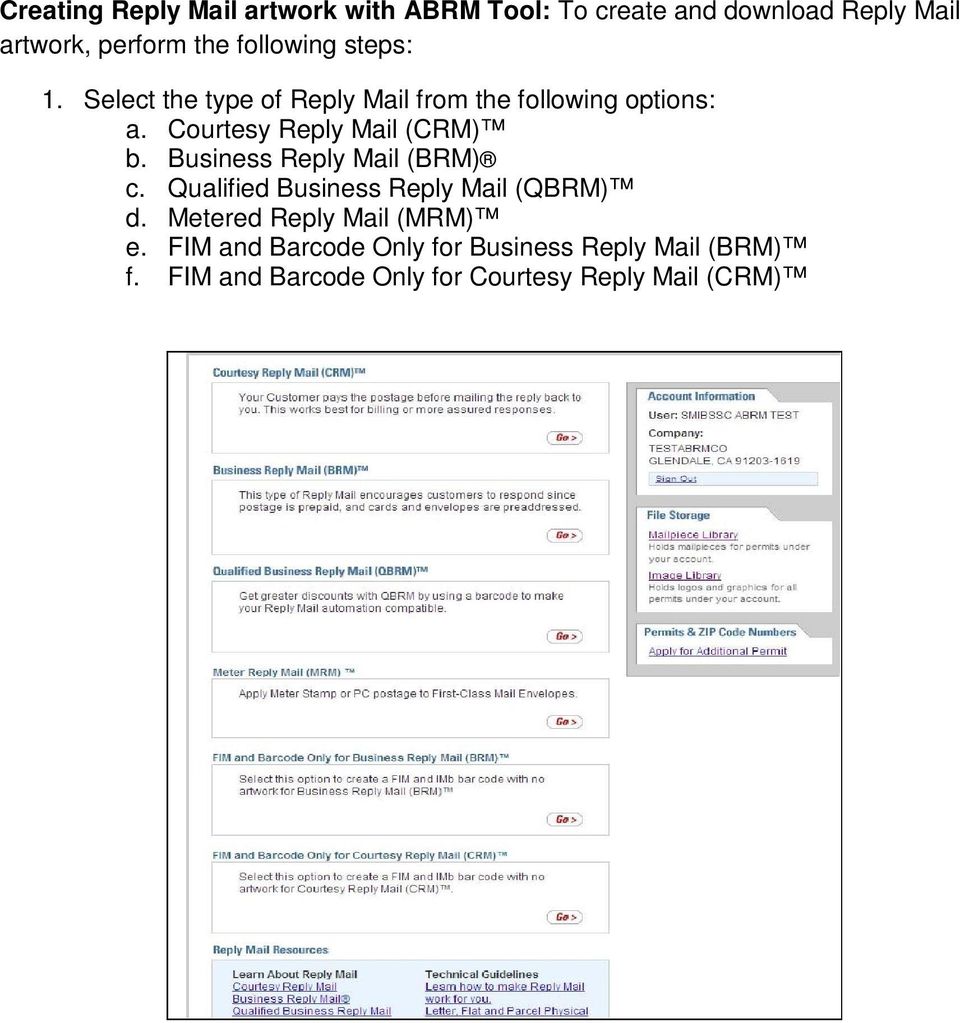
5 Creating Reply Mail artwork with ABRM Tool: To create and download Reply Mail artwork, perform the following steps: 1. Select the type of Reply Mail from the following options: a. Courtesy Reply Mail (CRM) b. Business Reply Mail (BRM) c. Qualified Business Reply Mail (QBRM) d. Metered Reply Mail (MRM) e. FIM and Barcode Only for Business Reply Mail (BRM) f. FIM and Barcode Only for Courtesy Reply Mail (CRM)
6 2. Verify the PostalOne! Reply Mail Permit issued by the Post Office a. Reply Mail Permit Numbers must be obtained before Reply Mail Artwork can be created I. Reference the process for obtaining Permit Numbers listed above II. Permit Numbers are not required for CRM b. Enter the Permit Number and ZIP Code of the issuing Post Office, or mailing requirements office I. Error messaging will appear for invalid Permit Numbers; if an error message is encountered, notify PostalOne! for assistance 3. Enter the Delivery Address that will be used on the mailpiece a. Delivery Address I. Company name and ZIP+4 Code are required fields II. For BRM/QBRM ZIP+4 Code must be entered in the full 9-digit format (XXXXX-XXXX) III. For CRM enter the 9-digit ZIP+4 Code. There is a ZIP Code Look-up tool available on the screen 4. Select Mailpiece Size a. You may select a fixed size for a card or letter from the drop-down list OR enter the Length and Height of the card, letter or flat of your mailpiece. Choose only one of the two available options. I. Fixed Size II. Custom Size b. Click Continue. 5. From the Reply Mail Creation webpage, populate the following fields: a. Mailer ID (MID)(required) I. Enter the assigned MID or the MID that will be attached to the individual mailpiece 1. The ABRM system will either pre-populate the MID based on the mailer account profile through the BCG, or

7 the mailer can manually enter the MID which will then be verified as valid or invalid by the system b. Card/Letter Design (required) I. Enter the Card/Letter Design information as prompted in the second field of the Business Reply Mail 1. Populate the Name/Campaign field a. Information will be stored in the Mailpiece Library list, mailers will be able to select previously created artwork for new artwork generation * 2. Input the Card/Letter Size including Font Type and Size a. The ABRM system will automatically re-format Font Type and Size to fit mailpiece dimensions 3. Option, select the placement of the IMb on top of the delivery address by clicking the checkbox

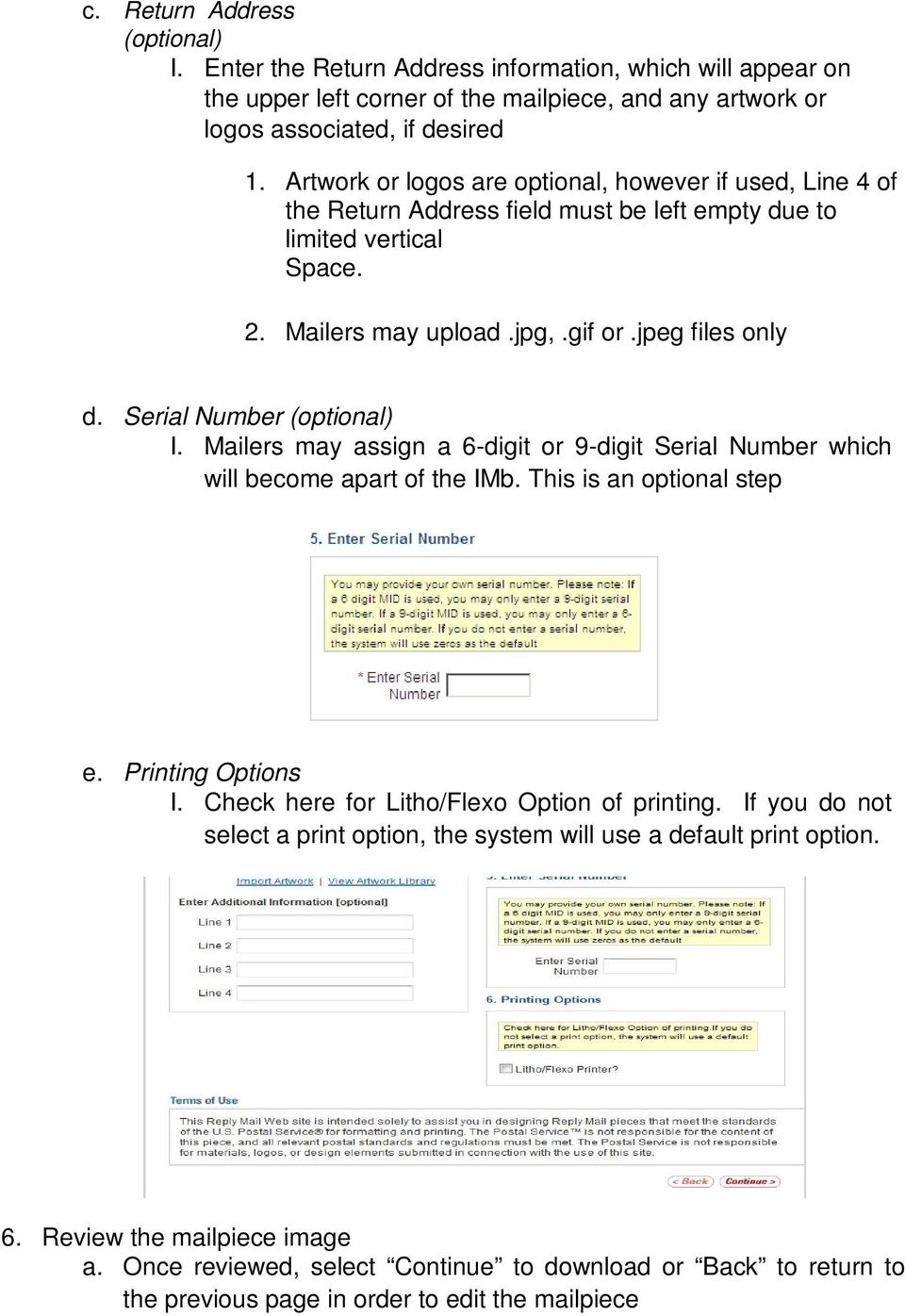
8 c. Return Address (optional) I. Enter the Return Address information, which will appear on the upper left corner of the mailpiece, and any artwork or logos associated, if desired 1. Artwork or logos are optional, however if used, Line 4 of the Return Address field must be left empty due to limited vertical Space. 2. Mailers may upload.jpg,.gif or.jpeg files only d. Serial Number (optional) I. Mailers may assign a 6-digit or 9-digit Serial Number which will become apart of the IMb. This is an optional step e. Printing Options I. Check here for Litho/Flexo Option of printing. If you do not select a print option, the system will use a default print option. 6. Review the mailpiece image a. Once reviewed, select Continue to download or Back to return to the previous page in order to edit the mailpiece
9 7. Once Download Mailpiece has been selected, the design will be automatically saved to the Mailpiece Library for future reprint or reuse a. The mailpiece image must be downloaded to the desktop in either PDF or EPS format

10 ABRM Tool Functionality Limitations If you would like to create artwork for one of the items listed below, please contact the MDA Customer Service Help Desk at or your request to Please indicate that you are requesting artwork for services not provided by ABRM. Artwork Services Not Provided by ABRM International BRM Labels Non-PostalOne! Permit o Only PostalOne! Permits can be used on ABRM Using IMb Tracing MID o Cannot be used on ABRM Using evs MID o Cannot be used on Reply Mail o You will need to request another MID to be used on Reply Mail A company name with more than 50 characters including spaces Artwork Services Not Provided by ABRM or MDA you will need to solicit the services of a vendor Absentee Ballot Penalty Permit Reply Mail Any service that requires the Intelligent Mail parcel barcode (IMpb) Services provided by USPS Web-Tools at: Merchandise Return Services Label
Proposed 2013 Postal Changes and How They Could Affect Your Organization. Akron/Canton PCC Seminar 11/1/12
 Proposed 2013 Postal Changes and How They Could Affect Your Organization Akron/Canton PCC Seminar 11/1/12 On the Move The National Customer Support Center (NCSC) is moving its office location. Starting
RMS Postal Workout Program
 RMS Postal Workout Program Workout #8 Reply & Return Mail Updated - 2013 Response Marketing Services Knowledge That Delivers Postal Workout 1. RMS Introduction & Processes 2. Mail Classification 3. Processing
Mailpiece Design Analyst (MDA) Customer Service Help Desk Process
 Mailpiece Design Analyst (MDA) Customer Service Help Desk Process MDA Customer Service Help Desk Agenda: Services Provided by MDAs Introduction to the new MDA Customer Service Help Desk Process MDA Customer
2015 EARNED VALUE PROMOTION
 Program Requirements 2015 EARNED VALUE PROMOTION CONTENTS I. Background and Program Description... 2 II. Program Parameters... 2 III. Registration Requirements... 2 IV. Mailing Requirements... 3 V. Earned
RMS Postal Workout Program
 RMS Postal Workout Program Workout # 5B Barcodes Intelligent Mail Barcode Data Updated - 2013 Response Marketing Services Knowledge That Delivers Postal Workout 1. RMS Introduction & Processes 2. Mail
Implementing the Intelligent Mail Barcode An Envelope Makers Guide
 Implementing the Intelligent Mail Barcode An Envelope Makers Guide A Caution The contents of this presentation contain information provided by the United States Postal Service. Our source is www.ribbs.gov.
Revisions to Publication 199, Intelligent Mail Package Barcode. (IMpb) Implementation Guide for: Confirmation Services and
 Revisions to Publication 199, Intelligent Mail Package Barcode (IMpb) Implementation Guide for: Confirmation Services and Electronic Verification System (evs) Mailers Supplement for Bulk Proof of Delivery
The Mailer ID (MID) is a field within the Intelligent Mail barcode. It is used to identify Mail Owners and/or Mail Service Providers
 1 2 3 A customer registration ID (CRID) defines a company at a location. CRIDs are used mostly by the business applications that are accessed through the Business Customer Gateway such as PostalOne!, FAST,
Intelligent Mail Barcode Technical Resource Guide
 Intelligent Mail Barcode Technical Resource Guide Prepared by: Intelligent Mail Planning and Standards United States Postal Service June 30, 2009 Rev. 4.1 Copyright Copyright 2006, 2007, 2008, 2009 United
Program Registration External Online Enrollment User Guide
 Program Registration External Online Enrollment User Guide May 17, 2015 Version: 3.7 Page 1 of 102 Table of Contents Change History... 12 1. Introduction... 13 1.1. Purpose of Technical Specifications...
INTELLIGENT MAIL FOR SMALL BUSINESS MAILERS (IM sb) USER GUIDE
 INTELLIGENT MAIL FOR SMALL BUSINESS MAILERS (IM sb) USER GUIDE FEBRUARY 2015 Table of Contents OVERVIEW... 3 GETTING STARTED... 3 Prerequisites... 3 Database formats allowed:... 5 Business Customer Gateway...
Full-Service Webinar Frequently Asked Questions. Table of Contents Basic vs. Full Service...2. Full Service related...3. Full Service Discounts...
 Table of Contents Basic vs. Full Service...2 Full Service related...3 Full Service Discounts...4 Full Service Approved Vendors...5 Full Service Permits...5 Full Service Reports...6 Barcodes...9 Mailing
USPS RETURNS CUSTOMER GUIDE
 USPS RETURNS CUSTOMER GUIDE MAY 2015 2 Contents Introduction... 5 Why should you choose the Postal Service for your returns program?... 5 USPS Returns Made Simple... 6 Merchandise Return Service (MRS)...
Mailing Made Easy for Small Business
 Mail Entry & Payment Technologies Mailing Made Easy for Small Business Intelligent Mail for Small Business (IMsb) Intelligent Mail for Small Business Tool The IMsb tool is a new, free online tool specifically
Business Customer Gateway. Business Customer Gateway 1
 Business Customer Gateway Business Customer Gateway 1 Table of Contents Highlights Basics 5 Login and New Accounts 8 Your Account Settings 18 Business Services 31 Accounts 38 Design & Prepare 43 Mail &
Simplified Mailing Process // User Guide. Every Door Direct Mail
 2 V. Simplified Mailing Process // User Guide Every Door Direct Mail Table of Contents Overview What is Every Door Direct Mail? 1 What are My Mailing Options 2 Registration New User Registration 3 Every
Getting Started: Full Service For New Users. National PCC Day September 18, 2013
 Getting Started: Full Service For New Users National PCC Day September 18, 2013 1 XYZ CORPORATION INTERNATIONAL FALLS, MN What is Intelligent Mail Service? Intelligent Mail uses information-rich barcodes
Official Election Mail Training Webinar
 Official Election Mail Training Webinar Agenda Official Election Mail Preparation procedures for Official Election Mail Steps for Successful Mailing Resources 2 Agenda Official Election Mail Definition
Simplified Mailing Process // User Guide. Every Door Direct Mail
 2 V. Simplified Mailing Process // User Guide Every Door Direct Mail Table of Contents Overview What is Every Door Direct Mail? 1 What are My Mailing Options 2 Registration New User Registration 3 Every
Intelligent Mail Symposium
 Intelligent Mail Symposium Intelligent Mail Barcodes Christine Simone July 16, 2009 Barcode Workshop Agenda Intelligent Mail Barcodes 1 Intelligent Mail Services- Basic & Full-Service Options 2 Intelligent
One Test - Test Process for Full-Service Mailings
 One Test - Test Process for Full-Service Mailings AccuZIP Inc. is now an approved, Full-Service Authorized edoc Vendor. This means our software was tested to determine edoc populates correctly on the dashboard,
STATE AND LOCAL ELECTION MAIL USER S GUIDE. February 2016 Publication 632
 STATE AND LOCAL ELECTION MAIL USER S GUIDE February 2016 Publication 632 Contents How to Use This Guide.... 4 Section I. Determining the Appropriate Class of Mail to Use... 5 What You Are Mailing....
1.0 Business Reply Mail (BRM)
 Additional Services: Business Reply Mail 505 505.1.1.5 505 Return Services Overview 1.0 Business Reply Mail (BRM) 2.0 Permit, Pre-paid (Metered), and Courtesy Reply Mail 3.0 Merchandise Return Service
STATE AND LOCAL ELECTION MAIL USER S GUIDE. March 2016 Publication 632
 STATE AND LOCAL ELECTION MAIL USER S GUIDE March 2016 Publication 632 Contents How to Use This Guide.... 4 Section I. Determining the Appropriate Class of Mail to Use... 5 What You Are Mailing.... 6 How
INTELLIGENT MAIL BARCODES FREQUENTLY ASKED QUESTIONS:
 INTELLIGENT MAIL BARCODES FREQUENTLY ASKED QUESTIONS: General What is the Intelligent Mail barcode? The Intelligent Mail barcode, formerly referred to as the 4-State Customer barcode, is a new Postal Service
Merchant Returns Service
 Merchant Returns Service User s Guide Document Version 2.0 2015 Version History Version Date of Summary of Additions Addition 1.0 08/07/2014 Document created. 2.0 2/21/2015 Updated based on changes from
PostalOne! Release Notes R44.0.0.0 August 2016 Version 2 June 30, 2016
 PostalOne! Release Notes R44.0.0.0 August 2016 Version 2 June 30, 2016 Release Notes R44 Version 2 6/30/2016 Page i of iii The Release Numbers USPS systems are: 44.0.0.0 for PostalOne! 34.0.0.0 for FAST
CONTENTS. Program Requirements 2016 MOBILE SHOPPING PROMOTION PROGRAM REQUIREMENTS I. BACKGROUND AND PROGRAM DESCRIPTION 2
 Program Requirements 2016 MOBILE SHOPPING PROMOTION CONTENTS I. BACKGROUND AND PROGRAM DESCRIPTION 2 II. PROGRAM PARAMETERS.2 III. ELIGIBILITY REQUIREMENTS 3 A. MAILPIECE CONTENT REQUIREMENTS 3 B. REGISTRATION
Reaping the Full Benefits from Full-Service IMb. Anchor Software, LLC. Jim Barlow Mail Systems Management Consultants
 Title: Reaping the Full Benefits from Full-Service IMb Scheduled For: Monday, March 17, 2:45-3:45 pm Presented By: Anthony Aruldross Anchor Software, LLC Jim Barlow Mail Systems Management Consultants
Getting Started with the Intelligent Mail Barcode
 August 01, 2012 CUSTOMER COLLATERAL SV62591 Rev. B Getting Started with the Intelligent Mail Barcode Applies to: SmartMailer Purpose This document provides instructions on how to start using the Intelligent
Every Door Direct Mail. Simplified Mailing Process // User Guide
 4 V. Every Door Direct Mail Simplified Mailing Process // User Guide Table of Contents Overview What is Every Door Direct Mail Service? What Are My Mailing Options? 3 3 4 Registration New User Registration
Simplified Mailing Process // User Guide. Every Door Direct Mail
 3 V. Simplified Mailing Process // User Guide Every Door Direct Mail Table of Contents Overview What is Every Door Direct Mail service? 3 What are My Mailing Options 4 Registration New User Registration
Test Environment for Mailers (TEM) Guide for: Electronic Verification System (evs ) United States Postal Service Document
 Test Environment for Mailers (TEM) Guide for: Electronic Verification System (evs ) United States Postal Service Document 2011 United States Postal Service TABLE OF CONTENTS 1 Getting Started... 1 1.1
Table of Contents. January 2008 2
 Table of Contents 1.0 Introduction...3 About Express Order Entry Ship in Canada Secure solution...3 Access to Express Order Entry Ship in Canada Secure solution...3 2.0 Express Order Entry - Ship in Canada
MDA CUSTOMER SERVICE HELP DESK FREQUENTLY ASKED QUESTIONS (FAQS)
 MDA CUSTOMER SERVICE HELP DESK FREQUENTLY ASKED QUESTIONS (FAQS) Revised July 29, 2014 1 MDA CUSTOMER SERVICE HELP DESK GENERAL INFORMATION... 3 1. MDA CUSTOMER SERVICE HELP DESK CONTACT INFORMATION &
Mail Services. Internal Procedure for Bulk Mailings
 Mail Services Internal Procedure for Bulk Mailings PURPOSE Bulk Mailings provide a substantial cost savings for UDM postage; therefore, Mail Services encourages the use of the Bulk Mailing Permit whenever
Reference Document. SedonaOnline Support
 Document Overview This document is being provided to explain how to request a SedonaOnline password and how to use SedonaOnline to submit and view Support Tickets. Our company utilizes the SedonaOffice
Merchandise Return Service
 Merchandise Return Service Reinaldo Padilla Field Sales Representative March 11, 2015 1 Why a Consumer Returns a Product 4 Reasons for Returns 1. Returned Merchandise- The product did not meet the consumer
Help Desk User Manual (Version 1.0)
 Help Desk User Manual (Version 1.0) Table of Contents Accessing Infinity Technologies Help Desk Portal... 2 Logging into Infinity Technologies Help Desk Portal for the First Time... 3 Resetting Your Password...
Creating an Apple ID Account Using the Internet on a Desktop or Laptop Computer
 Creating an Apple ID Account Using the Internet on a Desktop or Laptop Computer An Apple ID account is required to complete the device setup and to purchase apps. Your Apple ID is used for almost everything
Presort Services. Customer Guide Mailpiece Design
 Presort Services Customer Guide Mailpiece Design Table Of Contents 1.0 Automation Compatible Mail 2.0 Mailpiece Design Letters 5 Cards 5 Flats 6 Self-Mailers 8 OCR Read Area 9 Address Format/Address Block
Helpful Mailing Tips
 Helpful Mailing Tips Mail Piece Specifications & Characteristics This document is an overview only. For the specific DMM (Domestic Mail Manual) standards, consult the DMM. This is not meant to be used
FedEx Billing Online User Guide
 FedEx Billing Online User Guide Introduction FedEx Billing Online allows you to efficiently manage and pay your FedEx invoices online. It s free, easy and secure. FedEx Billing Online helps you streamline
333 Prices and Eligibility. 2.0 Content Standards for First-Class Mail Flats. 1.0 Prices and Fees for First-Class Mail
 333333.2.1 333 Prices and Eligibility Overview 1.0 Prices and Fees for First-Class Mail 2.0 Content Standards for First-Class Mail Flats 3.0 Eligibility Standards for First-Class Mail Flats 4.0 Additional
Parcel Labeling Guide
 Parcel Labeling Guide New Products and Innovation Version: 2.0 July, 2014 Table of Contents 1. Introduction... 5 1.1. Purpose... 5 1.2. Scope... 5 1.3. Audience... 5 1.4. The Domestic Mail Manual... 5
MAILROOM POLICIES & PROCEDURES
 MAILROOM POLICIES & PROCEDURES Policy Id: Bus.014 Mailroom Policies and Procedures Contact: Michael Merseburg, Mailroom Coordinator [email protected] - Ext. 8532 Gary Zaragovitch-Graphics [email protected]
PostalOne! Help Desk. Issue Resolution Process. Last Updated: 7/19/13
 Issue Resolution Process Last Updated: 7/19/13 Table of Contents Overview:...3 Issue Identification:...4 Issue Reporting:...5 Issue Tracking:...5 Requesting Changes:...5 Appendix A: Process Flow...6 Appendix
Product Samples & Picture Permit Promotions
 Product Samples & Picture Permit Promotions 1 2013 Promotions 2 Product Samples Promotion Overview Upfront 5% postage discount on qualifying mail that contain product samples Eligible Mail Classes Standard
Welcome to the Political Campaign Mail and Official Election Mail webinar.
 Welcome to the Political Campaign Mail and Official Election Mail webinar. 1 Today s Political Campaign Mail and Official Election Mail webinar will cover the latest information for the 2014 Election Mail
FLAT MAIL BUNDLE VISIBILITY
 FLAT MAIL BUNDLE VISIBILITY January 2015 1 THREE-PRONGED APPROACH TO EXPANDING FLAT BUNDLE VISIBILITY Full Service Bundle Visibility Saturation Mail Bundle Visibility Large National/Regional Mailers* *must
Postage Guide. Action, Inc. Effective January 22, 2012. Includes information for: Mailpiece Layout... Page 8. Envelope Sizes...
 Action, Inc. Postage Guide Includes information for: First-Class Mail... Pages 2-3 Standard Mail... Pages 4-5 Nonprofit Mail... Pages 6-7 Mailpiece Layout... Page 8 Move Update... Page 9 Envelope Sizes...
Self-serve Incentive Program (SIP) User Guide Version 3.0. For use by Industrial Customers for Lighting System and Compressed Air projects
 Self-serve Incentive Program (SIP) User Guide Version 3.0 For use by Industrial Customers for Lighting System and Compressed Air projects Introduction The Self-serve Incentive Program (SIP) allows an Industrial
SecureAnywhereTM Web Security Service
 SecureAnywhereTM Web Security Service This document provides a general overview of the Webroot SecureAnywhere Web Security Service Partner Management Portal. Webroot Partners such as Managed Service Providers
Direct Mail Tips #3 Classes of Mail, Prices & Postage Payment
 Direct Mail Tips #3 Classes of Mail, Prices & Postage Payment First-Class Mail **Delivery time: Guaranteed in 1 3 business days Minimum Weight: None. Maximum Weight: 13 ounces (over 13 ounces, First-Class
Ancillary Service Endorsements
 Ancillary Endorsements 015 Overview (F010.4) General (M012.4) Other Physical Standards (M012.4) OCR Read Area (M012.4) Ancillary service endorsements are used by mailers to request an addressee s new address
Macs are not directly compatible with Noetix.
 Those that use Macintosh computers to access Noetix cannot directly access Noetix through http://www.sandiego.edu/noetix. If one is on a Mac and goes to Noetix directly in a web browser, the page is likely
Qualtrics Survey Tool
 Qualtrics Survey Tool This page left blank intentionally. Table of Contents Overview... 5 Uses for Qualtrics Surveys:... 5 Accessing Qualtrics... 5 My Surveys Tab... 5 Survey Controls... 5 Creating New
Service Type IDentifier (STID) Table May 22 2016
 First-Class Mail No Address Corrections 300 310 260 270 First-Class Mail Manual Corrections * 700 040 036 041 OneCode ACS ASR 1 230 220 OneCode ACS ASR 2 080 140 OneCode ACS CSR1 504 502 OneCode ACS CSR
333 Prices and Eligibility. 1.0 Prices and Fees for First-Class Mail. 1.0 Prices and Fees for First-Class Mail
 333333.1.6 333 Prices and Eligibility Overview 1.0 Prices and Fees for First-Class Mail 2.0 Content Standards for First-Class Mail Flats 3.0 Eligibility Standards for First-Class Mail Flats 4.0 Additional
Premium Forwarding Service Residential (PFS-Residential ) Application
 Premium Forwarding Service Residential (PFS-Residential ) Application Instructions PLEASE READ CAREFULLY BEFORE YOU COMPLETE THIS FORM. Instructions for completing this form are printed on the reverse
MQA Online Services Portal
 MQA Online Services Portal Registration and Adding a License User Guide 1. Hello and welcome to the Division of Medical Quality Assurance s online help tutorials. The MQA Online Services Portal is the
Intelligent Mail Barcodes and Placard Solu4ons
 Intelligent Mail Barcodes and Placard Solu4ons Lance Bell USPS 2014 National Postal Forum Washington, DC Welcome to Intelligent Male 2 1 Intelligent Mail Barcodes and Placard Solu;ons This workshop will
Click-N-Ship for Business Transition FAQ
 Click-N-Ship for Business Transition FAQ What changes are being made to the Click-N-Ship for Business application? To meet the needs of our business customers, in late April 2015 the Click-N-Ship for Business
How To Use A Certifiedprofile.Com
 Gateway Technical College Step-by-Step Instructions for Order Placement welcome to certifiedprofile! When you place your initial order, you will be prompted to create your secure CertifiedProfile account.
How do I Install and Configure MS Remote Desktop for the Haas Terminal Server on my Mac?
 Enterprise Computing & Service Management How do I Install and Configure MS Remote Desktop for the Haas Terminal Server on my Mac? In order to connect remotely to a PC computer from your Mac, we recommend
Database Program Instructions
 Database Program Instructions 1) Start your Comparative Rating software by double-clicking the icon on your desktop. 2) Click on the button on the Comparative Rating Software Main Menu. 3) A message Loading
Publication 199: Intelligent Mail Package Barcode
 : Intelligent Mail Package Barcode (IMpb) Implementation Guide for: Confirmation s and Electronic Verification System (evs) Mailers Version 10.1 10/14/2015 United States Postal Document 2015 United States
Premium Forwarding Service (PFS ) Application
 Instructions PLEASE READ CAREFULLY BEFORE YOU COMPLETE THIS FORM. Individual Entire Household Premium Forwarding Service (PFS ) Application Instructions for completing this form are printed on the reverse
How do I Install and Configure MS Remote Desktop for the Haas Terminal Server on my Mac?
 How do I Install and Configure MS Remote Desktop for the Haas Terminal Server on my Mac? In order to connect remotely to a PC computer from your Mac, we recommend the MS Remote Desktop for Mac client.
USPS or Mailer System Issue/Outage Contingency Plan. Version 2.0
 USPS or Mailer System Issue/Outage Contingency Plan Version 20 February 1, 2016 PostalOne! External Contingency Plan Page 2 Table of Contents Table of Contents 2 1 USPS or Mailer System Issue/Outage Contingency
Online Payroll Documents (OPD) User Guide
 Online Payroll Documents (OPD) User Guide Contents 1. Online Payroll Documents (OPD) 2. Self-Registration 3. Payslips 4. P60 s 3.1 View your payslip 3.2 Print your payslip 3.3 Save your payslip 4.1 View
Full-Service Intelligent Mail Answers Meeting Minutes 07/16/10
 Full-Service Intelligent Mail Answers Meeting Minutes 07/16/10 Sunset of Intelligent Mail Answers Meeting The Intelligent Mail Answers meeting has ended effective July 16. With respect to the customers
Security Information Management System
 Commonwealth of Kentucky Security Information Management System User Guide Release 1.8 February 2016 DISCLAIMER: The Commonwealth is in process of securing a service to allow use of mobile phone numbers
Learning Management System (LMS) Quick Tips. Contents LMS REFERENCE GUIDE
 Learning Management System (LMS) Quick Tips Contents Process Overview... 2 Sign into the LMS... 3 Troubleshooting... 5 Required Software... 5 Mobile devices are not supported... 5 Using the Check System
8x8 Virtual Office Click2Pop for eagent Setup Guide
 8x8 Virtual Office April 2012 Table of Contents 8x8 Click2Pop for eagent... 3 8x8 Click2Pop provides eagent CRM with two functions:... 3 Requirements.... 3 Installation... 3 Start the Application and Integrate
QAS Small Business for Salesforce CRM
 INTRODUCTION This document provides an overview of integrating and configuring QAS for Salesforce CRM. It will take you through the standard integration and configuration process and also provides an appendix
SJRWMD Cloud-Based Email Quick-Start Guide
 SJRWMD Cloud-Based Email Quick-Start Guide Your email account is now in the Microsoft cloud, also known as Office 365. This change from onpremise email provisioning to the cloud allows the agency to provide
FAQ for Students. Note: The new password must be between six and 12 characters long.
 What is MY Portal? MY Portal is a secure website that provides access to news, announcements, personal information, registration and online billing services, collaboration areas, Blackboard and email.
How to Get Set Up for the 2014 BE-180 and Request an Extension if Needed
 How to Get Set Up for the 2014 BE-180 and Request an Extension if Needed For instructions on how to get set up for the 2014 BE-180 and to request an extension if one is needed, click on one of the links
MTE Order and Request Manual for MTESC Mailers
 MTE Order and Request Manual for MTESC Mailers Revised May 7, 2015 Introduction The Mail Transport Equipment Ordering System (MTEOR) is a fast, reliable, and convenient place to order mail transport equipment
Simplified Mail Accountability Reporting Tool (SMART) User Guide
 Simplified Mail Accountability Reporting Tool (SMART) User Guide Office of Asset and Transportation Management Office of Government-wide Policy General Services Administration Revised September 24, 2015
Host Excellence. Client Helpdesk. Version 1.0
 Host Excellence Client Helpdesk Version 1.0 1 Table of Contents 1 Accessing the Helpdesk... 3 2 What Is A Helpdesk Ticket?... 3 3 Ticket Overview... 3 3.1 Ticket Status... 4 3.2 Ticket Category... 4 3.3
Websense Secure Messaging User Help
 Websense Secure Messaging User Help Welcome to Websense Secure Messaging, a tool that provides a secure portal for the transmission and viewing of sensitive, personal data in email. Use the portal to view
Mailing Services. Made Easy. Providing the information and tools for your mail pieces from start to finish.
 Mailing Services Made Easy. Guide Book Providing the information and tools for your mail pieces from start to finish. Mailing Services Made Easy. Table of Contents Smart, Dynamic Mailings.... 2 Classes
BushSoft Accounts - Installation manual
 BushSoft Accounts - Installation manual You should have received a license file from BushSoft to be able to complete the installation. You will be prompted for this file at the end of the installation