
Oracle Cloud Administering Transactional Analyses Release
|
|
|
- Abel Rogers
- 10 years ago
- Views:
Transcription
1 Oracle Cloud Administering Transactional Analyses Release E July 2015 This guide describes administrative procedures and concepts for reports and analytics.
2 Oracle Cloud Administering Transactional Analyses Release E Copyright 2014, 2015, Oracle and/or its affiliates. All rights reserved. This software and related documentation are provided under a license agreement containing restrictions on use and disclosure and are protected by intellectual property laws. Except as expressly permitted in your license agreement or allowed by law, you may not use, copy, reproduce, translate, broadcast, modify, license, transmit, distribute, exhibit, perform, publish, or display any part, in any form, or by any means. Reverse engineering, disassembly, or decompilation of this software, unless required by law for interoperability, is prohibited. The information contained herein is subject to change without notice and is not warranted to be error-free. If you find any errors, please report them to us in writing. If this is software or related documentation that is delivered to the U.S. Government or anyone licensing it on behalf of the U.S. Government, the following notice is applicable: U.S. GOVERNMENT END USERS: Oracle programs, including any operating system, integrated software, any programs installed on the hardware, and/or documentation, delivered to U.S. Government end users are "commercial computer software" pursuant to the applicable Federal Acquisition Regulation and agency-specific supplemental regulations. As such, use, duplication, disclosure, modification, and adaptation of the programs, including any operating system, integrated software, any programs installed on the hardware, and/or documentation, shall be subject to license terms and license restrictions applicable to the programs. No other rights are granted to the U.S. Government. This software or hardware is developed for general use in a variety of information management applications. It is not developed or intended for use in any inherently dangerous applications, including applications that may create a risk of personal injury. If you use this software or hardware in dangerous applications, then you shall be responsible to take all appropriate failsafe, backup, redundancy, and other measures to ensure its safe use. Oracle Corporation and its affiliates disclaim any liability for any damages caused by use of this software or hardware in dangerous applications. Oracle and Java are registered trademarks of Oracle and/or its affiliates. Other names may be trademarks of their respective owners. Intel and Intel Xeon are trademarks or registered trademarks of Intel Corporation. All SPARC trademarks are used under license and are trademarks or registered trademarks of SPARC International, Inc. AMD, Opteron, the AMD logo, and the AMD Opteron logo are trademarks or registered trademarks of Advanced Micro Devices. UNIX is a registered trademark of The Open Group. This software or hardware and documentation may provide access to or information about content, products, and services from third parties. Oracle Corporation and its affiliates are not responsible for and expressly disclaim all warranties of any kind with respect to third-party content, products, and services unless otherwise set forth in an applicable agreement between you and Oracle. Oracle Corporation and its affiliates will not be responsible for any loss, costs, or damages incurred due to your access to or use of third-party content, products, or services, except as set forth in an applicable agreement between you and Oracle.

3 Contents Preface... Audience... Documentation Accessibility... Related Documents... Conventions... vii vii vii vii vii 1 Introduction Reports and Analytics in Oracle Fusion Applications Tools for Administering Reports and Analytics Business Intelligence Presentation Catalog: Where You Maintain Your Reports and Analytics Identifying Objects in the Catalog Functional Setup Tasks for Transactional Business Intelligence Displaying Tasks in the Functional Setup Manager Completing Required Tasks in the Functional Setup Manager Assigning Security Profiles to Job Roles Configuring Flexfields for Business Intelligence Configuring Key Flexfields for Transactional Business Intelligence Enabling Key Flexfields for Business Intelligence Reporting Mapping Non-Qualified Segments to BI Objects Identifying Supported Key Flexfields Setting up the GL Accounting Flexfields Understanding Accounting Key Flexfields Identifying Accounting Key Flexfield Segments Assigning Unique Segment Labels Performing Column Flattening Designating GL Accounting Segment Instances as BI-Enabled Deploying Accounting Key Flexfields Configuring Descriptive Flexfields for Transactional Business Intelligence Configuring Descriptive Flexfield Segments Designating Descriptive Flexfields as BI-Enabled Configuring Extensible Flexfields for HCM Designating Extensible Flexfields as BI-Enabled iii
4 Essbase Rule File and Cubes Importing Changes to Flexfields Automatically Overview of Importing Flexfield Changes Running the Import Job Disabling Flexfields as BI-Enabled Disabling Key Flexfields as BI-Enabled Disabling Descriptive Flexfields as BI-Enabled Disabling Extensible Flexfields as BI-Enabled Managing Report Availability Managing Catalog Folders Creating Folders Setting Folder Properties Mapping Reports to Work Areas Moving Reports and Analytics Securing Reports and Analytics Security Levels in Reports and Analytics About Object-Level Security About Roles in Reports and Analytics About Security Configuration Tools in Reports and Analytics Using Oracle Identity to Manage Users and Enterprise Roles Using Oracle Authorization Policy Manager to Configure Roles and Privileges Using the Oracle BI Administration Page to Configure Duty Role Privileges Securing Analytics Creating Users and Assigning Them to Job Roles Assigning Enterprise Roles (or Job Roles) to Duty Roles Creating Duty Roles Assigning Duty Role Privileges to Oracle BI Presentation Catalog Objects Securing BI Publisher Reports and Related Components Setting Catalog Permissions Granting Permissions to the Oracle Enterprise Scheduler Job Definition Managing Reports Managing Report Delivery Servers Navigating to the Oracle BI Publisher Administration Page Configuring Report Delivery Servers Understanding the Report and Delivery Processors Managing Report Processing and Delivery Server Load Diagnosing Report Processing Issues Configuring System Properties for Reporting iv
5 A Mapping Between Oracle Fusion Offerings and Transactional Business Intelligence Subject Areas B C Supported Descriptive Flexfields Creating a Report of Fusion User Accounts v
6 vi

7 Preface Administering Transactional Analyses explains how to administer Oracle Transactional Business Intelligence, a real time, self service analysis and reporting solution offered to Oracle Fusion application users to create ad hoc analyses and analyze them for daily decision-making. Audience Administering Transactional Analyses is intended for Administrators who are responsible for configuring and maintaining Oracle Transactional Business Intelligence. Documentation Accessibility Oracle is committed to accessibility. For information about Oracle's commitment to accessibility, visit the Oracle Accessibility Program website at Access to Oracle Support Oracle customers that have purchased support have access to electronic support through My Oracle Support. For information, visit or visit if you are hearing impaired. Related Documents Additional resources are available for more information. See these Oracle resources: Oracle Public Cloud For information about Oracle's commitment to accessibility, visit the Oracle Accessibility Program website at Getting Started with Oracle Cloud Conventions The text conventions used in this document are described in this topic: vii

8 Convention boldface italic monospace Meaning Boldface type indicates graphical user interface elements associated with an action, or terms defined in text or the glossary. Italic type indicates book titles, emphasis, or placeholder variables for which you supply particular values. Monospace type indicates commands within a paragraph, URLs, code in examples, text that appears on the screen, or text that you enter. viii

9 1 1Introduction [1]Oracle Transactional Business Intelligence is a real time, self service analysis and reporting solution offered to Oracle Fusion application users to create ad hoc analyses and analyze them for daily decision-making. Topics: Reports and Analytics in Oracle Fusion Applications Tools for Administering Reports and Analytics Business Intelligence Presentation Catalog: Where You Maintain Your Reports and Analytics Reports and Analytics in Oracle Fusion Applications Reports and analytics in Oracle Fusion Applications are built using Oracle Business Intelligence tools and technologies. When you installed and configured Oracle Fusion Applications you installed the Oracle Business Intelligence components to enable the reporting and analytical features of your applications. Oracle Fusion applications provide different report types to satisfy different reporting requirements. Oracle Business Intelligence provides several tools to meet the various reporting requirements in Oracle Fusion Applications. Analytics (analyses or analytical reports) are visualizations (such as charts and tables) of a specific set of data. An analysis can be embedded into an application page, or included as a component of a dashboard. Analyses are generally interactive and provide ad hoc analysis capabilities to enable the user to customize the presentation of the data in real time. Dashboards are a collection of analyses grouped together to return data. Some examples include: Absence and Accrual dashboard in Oracle Employee Expenses dashboard in Oracle Fusion Financials Project dashboard in Oracle Project Portfolio The analyses and dashboards embedded in your applications can report on real-time transactional data or on historical data. Reports based on real-time data use Oracle Transactional Business Intelligence. Reports based on historical data use Oracle Business Intelligence Applications. Oracle Transactional Business Intelligence reports are constructed queries and reports executed in real time against the transactional schema supported by a layer of view objects. These are configured and deployed during provisioning. Introduction 1-1

10 Tools for Administering Reports and Analytics Operational reports are static reports that meet operational and statutory reporting requirements. Operational reporting includes the generation of high-volume business documents such as payroll and invoices. Oracle Business Intelligence Publisher is the tool that provides this functionality within Oracle Fusion Applications. Many reports are delivered with your applications. Examples include: Total Compensation Statement Report ( ) Purchase Agreement Report (Procurement/Purchasing) Journals Check Report (Financials/General Ledger) Tools for Administering Reports and Analytics Oracle Business Intelligence includes several components, each providing specific functionality that enables you to modify and administer your Oracle Fusion Applications reports and analytics. The Oracle BI Presentation Catalog is where you interact directly with your Oracle Fusion Applications reports and analyses. Use this interface to manage permissions, properties, and organization of your reporting components. Use the Oracle Business Intelligence Publisher administration pages to configure settings specific to the running and scheduling of BI Publisher reports, such as setting up your delivery servers, managing scheduler work load, and setting run-time properties for reports. Business Intelligence Presentation Catalog: Where You Maintain Your Reports and Analytics Reports, analyses, and dashboards used in Oracle Fusion applications pages are stored in the Business Intelligence Presentation catalog. The Oracle BI Presentation Catalog stores the applications content in a directory structure of individual files. To administer reports in Oracle Fusion applications you must understand how to navigate and identify object in the catalog. To navigate the BI catalog: 1. On the Navigator, under Tools, click Reports and Analytics. 2. In the Reports and Analytics pane, click Browse Catalog. You are redirected to the Oracle BI Catalog within Oracle Business Intelligence. 1-2 Administering Transactional Analyses

11 Business Intelligence Presentation Catalog: Where You Maintain Your Reports and Analytics Identifying Objects in the Catalog Oracle Fusion Applications reporting objects are organized by product family in the catalog typically as follows: Top Level: Shared Folders Product Family Folder (example: Financials) Product folder (example: Payables) --Report group folders (example: Invoices) -- Dashboard Report Folders -- Data Models folder - Report Components folders - BI Publisher Reports Introduction 1-3

12 Business Intelligence Presentation Catalog: Where You Maintain Your Reports and Analytics The following table describes the common reporting components that you find in the catalog: Catalog Object Description Located in the Report Components folder. Analyses are used primarily by dashboards. Dashboard folder Located in the reporting group folder Dashboard Prompt Located in the Prompts folder Used in dashboards Filter Located in Prompts folder Used in dashboards and analyses Report (Operational report created by Business Intelligence Publisher) Located in the reporting group folder Data Model Located in the Data Models folder Used by reports created with Business Intelligence Publisher Subtemplate Located in the reporting group folder Used by reports created with Business Intelligence Publisher 1-4 Administering Transactional Analyses

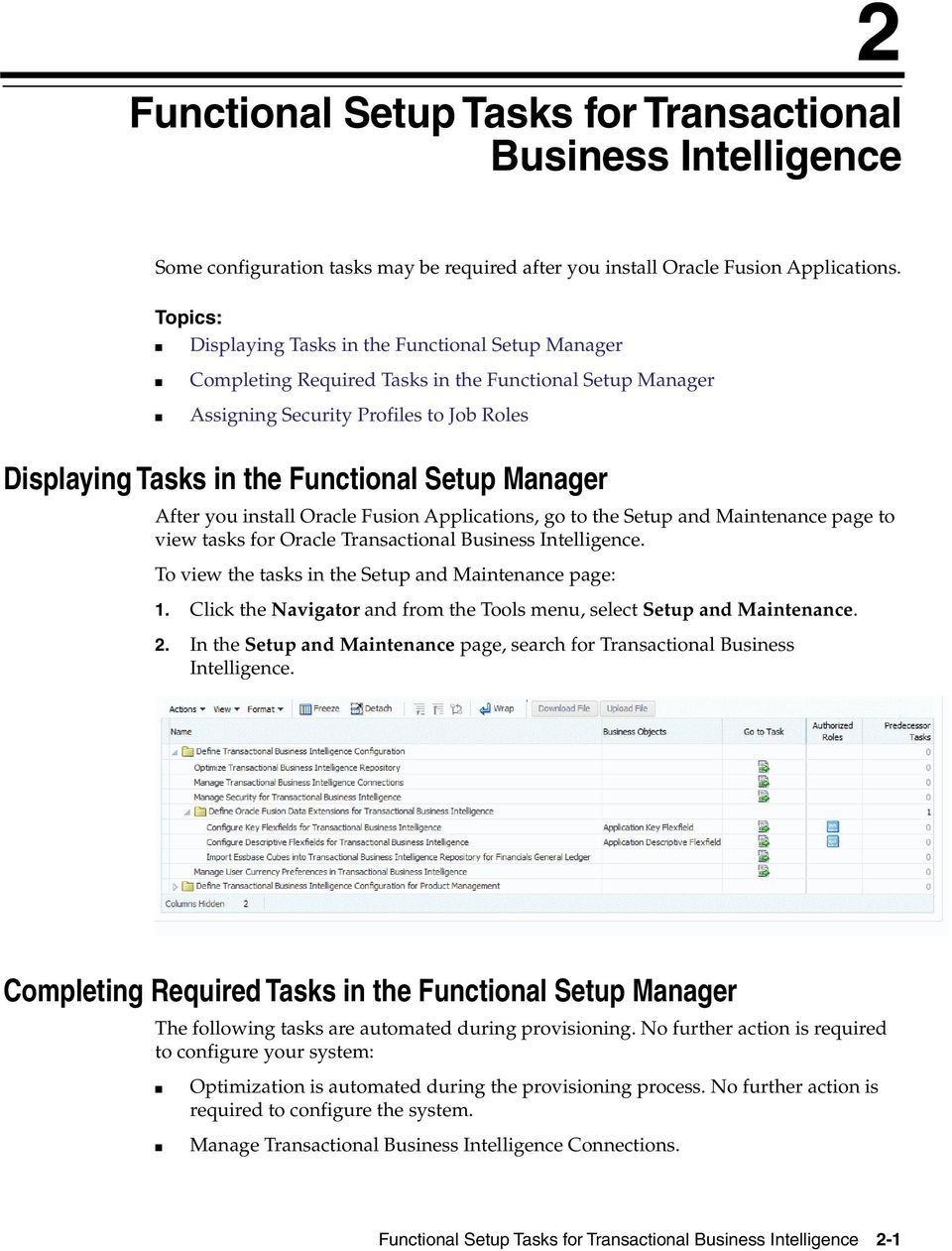
13 2 2Functional Setup Tasks for Transactional Business Intelligence [2]Some configuration tasks may be required after you install Oracle Fusion Applications. Topics: Displaying Tasks in the Functional Setup Manager Completing Required Tasks in the Functional Setup Manager Assigning Security Profiles to Job Roles Displaying Tasks in the Functional Setup Manager After you install Oracle Fusion Applications, go to the Setup and Maintenance page to view tasks for Oracle Transactional Business Intelligence. To view the tasks in the Setup and Maintenance page: 1. Click the Navigator and from the Tools menu, select Setup and Maintenance. 2. In the Setup and Maintenance page, search for Transactional Business Intelligence. Completing Required Tasks in the Functional Setup Manager The following tasks are automated during provisioning. No further action is required to configure your system: Optimization is automated during the provisioning process. No further action is required to configure the system. Manage Transactional Business Intelligence Connections. Functional Setup Tasks for Transactional Business Intelligence 2-1
14 Assigning Security Profiles to Job Roles Connections are set up as part of the provisioning process. No Further action is required to configure the system. Manage Security for Transactional Business Intelligence. To change the default security configuration, see Securing BI Publisher Reports and Related Components. Configure Key Flexfields for Transactional Business Intelligence. See Configuring Key Flexfields for Transactional Business Intelligence. Configure Descriptive Flexfields for Transactional Business Intelligence. See Configuring Descriptive Flexfields for Transactional Business Intelligence. Assigning Security Profiles to Job Roles Default security is configured automatically. To make changes to the default security configuration, see Securing Reports and Analytics. Users of Transactional Business Intelligence must access some person data to successfully run certain reports. To provide this access, assign a predefined security profile to the relevant job or abstract roles. Use the Oracle setup task Manage Data Role and Security Profiles in the Setup and Maintenance work area. For more information, see Oracle Cloud Securing Oracle HCM Cloud. The following example shows how to assign a security profile to a job or abstract role to enable users with that role to access person data. This task is required for users of Transactional Business Intelligence who do not also use Oracle (HCM). Prerequisite: You must have the IT Security Manager role. 1. Select Navigator. 2. Under Tools, select Setup and Maintenance. 3. On the Overview page, search for the task Manage Data Role and Security Profiles. 4. Search for the job or abstract role. 5. Assign the relevant security profile to the job or abstract role. 6. On the Manage HCM Data Roles page, enter the job name (for example, Warehouse Manager) in the Role field and click Search. 7. In the search results, select the job role (for example, Warehouse Manager) and click Edit. 8. On the Edit Data Role: Role Details page, click Next. 9. In the Person Security Profile field on the Edit Data Role: Security Criteria page, select the security profile View All Workers. 10. Click Review. 11. On the Edit Data Role: Review page, click Submit. Upon completion of this task, Oracle Fusion Data Security is updated automatically for roles being used to access Transactional Business Intelligence. The following table identifies, by Oracle Fusion product, the roles that access person data and the predefined security profile that you assign to each role. 2-2 Administering Transactional Analyses

15 Assigning Security Profiles to Job Roles Product Job or Abstract Role Security Profile Assets Asset Accountant View All Workers Assets Accounting Manager View All Workers Enterprise Planning and Budgeting Enterprise Planning and Budgeting Budget Analyst Budget Manager View All Workers View All Workers Financial Consolidation Hub Consolidation Accountant View All Workers Financial Consolidation Hub Consolidation Manager View All Workers Financials Common Module Intercompany Accountant View All Workers General Ledger Financial Analyst View All Workers General Ledger General Accountant View All Workers General Ledger General Accounting Manager View All Workers Incentive Compensation Incentive Compensation Participant Manager View Manager Hierarchy Inventory Warehouse Manager View All Workers Project Foundation Project Accountant View All Workers Project Foundation Project Administrator View All Workers Project Foundation Project Billing Specialist View All Workers Purchasing Buyer View All Workers Sourcing Category Manager View All Workers Sourcing Sourcing Project Collaborator View All Workers For example, as part of their Transactional Business Intelligence setup: Oracle Assets implementers must assign the predefined security profile View All Workers to the Asset Accountant and Asset Accounting Manager job roles. Oracle Incentive Compensation implementers must assign the predefined security profile View Manager Hierarchy to the Incentive Compensation Participant Manager abstract role. Note: The security profiles that Oracle roles use to access Transactional Business Intelligence are assigned during the setup of Oracle data security. No additional setup is required for Transactional Business Intelligence purposes. Functional Setup Tasks for Transactional Business Intelligence 2-3

16 Assigning Security Profiles to Job Roles 2-4 Administering Transactional Analyses

17 3 3Configuring Flexfields for Business Intelligence [3]To include flexfields in Transactional Business Intelligence reporting, you must enable them and import them into Oracle Business Intelligence. Topics: Configuring Key Flexfields for Transactional Business Intelligence Setting up the GL Accounting Flexfields Configuring Descriptive Flexfields for Transactional Business Intelligence Configuring Extensible Flexfields for HCM Essbase Rule File and Cubes Importing Changes to Flexfields Automatically Disabling Flexfields as BI-Enabled Configuring Key Flexfields for Transactional Business Intelligence To include flexfields in your Transactional Business Intelligence reporting, you must enable them for Business Intelligence. Topics: Enabling Key Flexfields for Business Intelligence Reporting Mapping Non-Qualified Segments to BI Objects Identifying Supported Key Flexfields Enabling Key Flexfields for Business Intelligence Reporting Enable key flexfields as BI-enabled so you can include them in your BI reports. To designate the key flexfields as BI-enabled: 1. Navigate to Manage Key Flexfields in Oracle Fusion Applications. 2. Enter your search value in Key Flexfield Code. 3. Click the Manage Structure Instances button. 4. Enter your search value in Structure Instance Code. 5. Click Edit to display the Edit Key Flexfield Structure Instance dialog box. Configuring Flexfields for Business Intelligence 3-1

18 Configuring Key Flexfields for Transactional Business Intelligence 6. Select the BI Enabled option. 7. Click OK. 8. For each flexfield segment instance, repeat steps 5 through Click Save. 10. Populate the BI Object Name for each of the segment labels: a. Query the Key Flexfield Code in the Manage Key Flexfields window. b. From the Actions menu, select Manage Segment Labels. c. Populate the BI Object Name for each segment label to be mapped. The BI Object Name for the following qualified segment labels should not be modified: Segment Label Code FA_COST_CTR GL_BALANCING GL_ACCOUNT BI Object Name Dim - Cost Center Dim - Balancing Segment Dim - Natural Account Segment 3-2 Administering Transactional Analyses

19 Configuring Key Flexfields for Transactional Business Intelligence Note: Before you deploy a flexfield, you must access the Chart of Accounts Instance and assign the newly created segment label to the appropriate segment in the Chart of Accounts. For more information, see Assigning Unique Segment Labels. d. Click Deploy Flexfield. e. Click Save and Close. Mapping Non-Qualified Segments to BI Objects For non-qualified segments that need to be mapped and used in Oracle Transactional Business Intelligence, create a new label and associate a BI object with the label. Associate this new segment label with the segment code. To map non-qualified segments to BI Objects: 1. From Manage Key Flexfields, search for the appropriate key flexfield code. 2. From the Actions menu, select Manage Segment Labels. 3. Click the Add Row icon (green plus sign). 4. Enter the details for the Segment Label Code, including name, description, and BI Object name. Key Flexfield BI Object Name Accounting (GL) Dim - GL Segment1 through Dim - GL Segment10 Budgetary Control (XCC) Dim - XCC Segment1 through Dim - XCC Segment10 Revenue (VRM) Dim - VRM Segment 1 through Dim - VRM Segment 10 Note: Enter the BI Object names carefully and note whether there is a space between "Segment" and the number. 5. Complete the mapping by Assigning Unique Segment Labels to the key flexfields. Identifying Supported Key Flexfields Key flexfields are used to store internally defined codes unique to a particular business. These codes specify part numbers, general ledger accounts, and other business entities. Configuring Flexfields for Business Intelligence 3-3

20 Setting up the GL Accounting Flexfields Supported Descriptive Flexfields provides a list of supported key flexfields and their corresponding key flexfield dimensions. Product Area Key Flexfield Dimension Fixed Assets Category (CAT#) Dim - Asset Category Fixed Assets Location (LOC#) Dim - Asset Location General Ledger Accounting (GL#) Dim - Balancing Segment Dim - Cost Center Dim - Natural Account Payroll Costing Dim - Costing Segments Supply Chain Locator Dim - Inventory Org Supply Chain Item Category Dim - Item Revenue Pricing Dimensions (VRM) Dim - VRM Segment Budgetary Control Budgeting (XCC) Dim - XCC Segment Setting up the GL Accounting Flexfields This is the work flow for setting up Accounting key flexfields but these steps also apply for other key flexfields. Topics: Understanding Accounting Key Flexfields Identifying Accounting Key Flexfield Segments Assigning Unique Segment Labels Performing Column Flattening Deploying Accounting Key Flexfields Understanding Accounting Key Flexfields The Accounting Key Flexfield is used to identify GL accounts. A chart of accounts segment is a component of the Accounting Key Flexfield. Each segment has a value set attached to it to provide formatting and validation of the set of values used with that segment. The combination of segments creates the account combination used for recording and analyzing financial transactions. Note: You must set up your Chart of Accounts (COA) as part of implementing Oracle Fusion Applications or Oracle Fusion Accounting Hub. Examples of segments that may be found in a chart of accounts structure include Company, Cost Center, Department, Division, Region, Account, Product, Program, and Location. The Natural Account segment of the General Ledger Accounting Key Flexfield defines the account used in the account combination to record transactions. The logical segment dimensions in the Oracle BI metadata are Dim Cost Center, Dim Balancing Segment, Dim Natural Account Segment and all Dim GL Segmentn 3-4 Administering Transactional Analyses

21 Setting up the GL Accounting Flexfields dimensions. These dimension tables are populated from a Tree value object or from a Value Set value object depending on whether a tree was associated with the segment in the Fusion Applications setup: For each segment associated with trees, two value objects are generated (Tree and TreeCode) with the following naming structure: FscmTopModelAM.AccountBIAM.FLEX_TREE_VS_segmentlabel_VI & FscmTopModelAM.AccountBIAM.FLEX_TREECODE_VS_segmentlabel_VI For each segment without trees, one view object are generated with the following naming structure: FscmTopModelAM.AccountBIAM.FLEX_VS_ XXX_VI In addition to the segment dimension tables, the BI Extension process also extends Flex BI Flattened VO; FscmTopModelAM.AccountBIAM.FLEX_BI_Account_VI. This view object has a pair of columns for each segment; segmentlabel _ and segmentlabel _c. For example, for your Cost Center segment which has the segment label FA_COST_CTR, there are two columns in this view object, named FA_COST_CTR_ and FA_COST_ CTR_c. Identifying Accounting Key Flexfield Segments For each Chart of Accounts (Accounting Key Flexfield) used to analyze Transactional Business Intelligence facts, identify the segments of the chart of accounts and map them to the Transactional Business Intelligence GL Accounting Segment logical dimensions. Accounting Key Flexfield Segment Segment Label Transactional Business Intelligence GL Accounting Segment Logical Dimension Balancing GL_BALANCING Dim Balancing Segment Natural Account GL_ACCOUNT Dim Natural Account Segment Cost Center FA_COST_CTR Dim Cost Center Other segments to be equalized across the charts of accounts Assigning Unique Segment Labels Other unique segment label Dim GL Segment n where n is an integer from 1 to 10 You must assign a unique segment label to the charts of accounts segments that are the balancing segments or the natural account segments, and that are used for specific purposes. For example, assign the Primary Balancing segment label to the segment used for your company or legal entities in order to provide a correct recording of intercompany transactions and company analysis. Other segment labels are optional and can be assigned as needed. To assign unique segment labels to charts of accounts segments: 1. Launch the Manage Charts of Accounts task and then navigate to the Manage Chart of Accounts window. 2. In the Search section, enter the GL# for the Key Flexfield Code and then click the Search button. 3. In the Search Results section, select Accounting Flexfield and then click the Manage Structures button to navigate to Manage Key Flexfield Structures. Configuring Flexfields for Business Intelligence 3-5
22 Setting up the GL Accounting Flexfields 4. In the Search section, enter the chart of accounts code or the name for Structure Code or Name, and then click the Search button. 5. In the Search Results section, select the chart of accounts and then click Edit to navigate to the Edit Key Flexfield Structure window. 6. Select the Enabled check box to code-enable the Structure code. 7. In the Segments section, select the applicable segments and then click Edit to navigate to the Edit Key Flexfield Segment window. 8. Select the Enabled check box to enable the segments. 9. In the Segment Labels section, select the unique segment labels to equalize the segments across the charts of accounts, and then click the right arrow to move the segments to the selected list. 10. Click Save and Close to return to the Edit Key Flexfield Structure window. 11. Click Done to return to the Manage Key Flexfields window. Performing Column Flattening Perform column flattening for the account hierarchies needed for analysis in Transactional Business Intelligence. Column flattening of Trees is required in order for OTBI hierarchy analyses to be populated with correct data. To flatten columns for account hierarchies: 1. Launch Manage Trees and Tree Versions and navigate to the Manage Trees and Tree Versions window. 2. In the Search section, enter GL_ACCT_FLEX for the Tree Structure Code and the involved tree code or name, and click Search. 3. In the Search Results section, select the tree version you want to flatten. If the status of the Tree Version is Draft, to make the Tree Version active, select Actions, then Status, and then Active. 4. (Optional): After the tree version is specified, perform an audit on the Tree Version to ensure its integrity before launching the flattening job. Select Actions and then Audit. See the section on working with Trees in the Oracle Fusion Application Developer's Guide. 5. Choose Column Flattening from the Actions drop-down menu. 6. Click the Online Flattening button to launch the flattening job immediately or click the Schedule Flattening button to schedule the flattening job according to your requirements. Designating GL Accounting Segment Instances as BI-Enabled Specify the applicable chart of accounts segment instances that are BI-enabled to make them available for use in Transactional Business Intelligence. To specify the chart of accounts segment instances as BI-enabled: 1. In the Search Results section of the Manage Key Flexfields window, select Accounting Flexfield, and then click the Manage Structure Instances button to navigate to the Manage Key Flexfield Structure Instances window. 2. In the Search section, select the chart of accounts for Structure Name and click the Search button. 3-6 Administering Transactional Analyses
23 Setting up the GL Accounting Flexfields 3. In the Search Results section, select the structure instance and click Edit to navigate to the Edit Key Flexfield Structure Instance window. 4. Check the Enabled check box to code-enable the structure instance. 5. In the Segment Instances section, select the segment instances and click Edit to update. Note: Each segment instances must be selected individually. 6. Check the Business Intelligence enabled check box in the Edit Key Flexfield Segment pop-up window and click OK to return to Edit Key Flexfield Structure Instance window. 7. After you have enabled all applicable segment instances for Business Intelligence, click Save and Close to save the changes and return to the Edit Key Flexfield Structure Instance window. 8. Repeat steps 2-6foreach chart of accounts to enable all the applicable segment instances for Business Intelligence. 9. Click Done to return to the Manage Key Flexfields window. 10. After you have configured all the charts of accounts, click the Deploy Flexfield button to deploy Accounting Flexfield and make the latest definition available for use. Deploying Accounting Key Flexfields After you have set up accounting key flexfields, you must deploy them. To deploy accounting key flexfields: 1. Access Manage Chart of Accounts from Setup and Maintenance. 2. Click Search. 3. Use the horizontal scroll bar (if necessary) to find the column Deployment Status. 4. Click the icon under the heading. 5. Select Edited. 6. Click Deploy Flexfield. 7. Monitor the Deployment Status. 8. When 100% is reached in the deployment status, click OK. 9. Verify that a green check mark displays under the Deployment Status column. 10. Click Done. Deployment Status Accounting key flexfields have one of the following statuses: Edited The flexfield definition has not been deployed or changes have been made to the structure, the structure instances, or the value sets. Patched The flexfield definition has been modified through a patch, but the flexfield has not yet been deployed so the patched definition is not reflected. Deployed to Sandbox The flexfield is deployed and available in a flexfield-enabled sandbox. Configuring Flexfields for Business Intelligence 3-7
24 Configuring Descriptive Flexfields for Transactional Business Intelligence Deployed The flexfield definition is deployed and available to end users. Error The deployment attempt failed. Configuring Descriptive Flexfields for Transactional Business Intelligence Descriptive flexfields are used to track unique information not typically found on business forms. The descriptive flexfields capture details that are vital, yet would clutter a form if present. For example, an asset form could become unwieldy if it contained many specific details about the asset, yet the user still needs access to the details. Descriptive flexfields provide a place to store these details. Descriptive flexfields provide a way for you to add custom attributes to entities and to define validation and display properties for them. A descriptive flexfield is a logical grouping of attributes (segments) that are mapped to a set of extension columns which are shipped as part of Oracle Fusion Applications tables. For a list of supported descriptive flexfields, see Supported Descriptive Flexfields. Topics: Configuring Descriptive Flexfield Segments Designating Descriptive Flexfields as BI-Enabled Configuring Descriptive Flexfield Segments If a descriptive flexfield is enabled for Oracle Business Intelligence, you can enable global and context segments for Oracle Business Intelligence, and you can select segment labels. To configure descriptive flexfield segments: 1. Navigate to the Setup and Maintenance window. 2. Navigate to the Manage Descriptive Flexfields window. 3. If the BI Enabled option is cleared, select it. 4. Select the options for deployment of the descriptive flexfields. 3-8 Administering Transactional Analyses
25 Configuring Extensible Flexfields for HCM Designating Descriptive Flexfields as BI-Enabled If a descriptive flexfield is already defined, you can enable it for use in Business Intelligence reports. To designate descriptive flexfields as BI-enabled: 1. Access Oracle Fusion Applications. 2. Navigate to Setup and Maintenance. 3. Navigate to the Edit Descriptive Flexfields window. 4. Enter the Descriptive Flexfield Name. 5. Optional: Enter a Description. 6. Check the BI Enabled check box on the desired descriptive flexfields. 7. Click OK. 8. Click Save. Configuring Extensible Flexfields for HCM An extensible flexfield is similar to a descriptive flexfield in that it provides a customizable expansion space that implementation team, such as Oracle Fusion Applications customers, can use to configure additional attributes (segments) without additional programming. As with descriptive flexfields, each segment is represented Configuring Flexfields for Business Intelligence 3-9
26 Configuring Extensible Flexfields for HCM in the database as a single column. However, with extensible flexfields, the context values and context-sensitive segments are stored in an extension table. Categories and Contexts Implementation team can combine and arrange the segments into attribute groups that are tailored to a customer's specific needs. For example, they can group related segments so that they appear together on the page. The attribute groups are referred to as contexts. You can optionally set up an extensible flexfield to enable implementation team to group contexts into categories. For more information, please refer to Using Extensible Flexfields in Oracle Fusion Applications Developer s Guide. List of EFFs in HCM (CoreHR and Payroll) EFF Number of Categories Number of Contexts PER_JOBS_EIT_EFF 1 0 (none seeded) PER_LOCATION_INFORMATION_EFF 1 5 (none are multi-row context) PER_POSITIONS_EIT_EFF 1 0 (none seeded) PER_PERSON_EIT_EFF 1 9 (2 multi-row contexts) PER_ASSIGNMENT_EIT_EFF 1 0 PAY_ELEMENT_INFORMATION_EFF 1 0 PER_JOBS_LEG_EFF 1 1 PER_LOCATION_LEG_EFF 1 5 PER_POSITIONS_LEG_EFF 1 0 PER_ORGANIZATION_INFORMATION_ EFF Category - Department 4 (1 multi-row context) Category - Enterprise 4 (no multi-row contexts) Category - Disability Organization 0 Category - Division 1 Category - Legal Employer 16 (2 multi-row contexts) Category - Professional Body 0 Category - Payroll Statutory Unit 76 (1 multi-row context) Category - Reporting Establishment 1 Category - Tax Reporting Unit 98 (3 multi-row contexts) 9 You can add contexts and segments to EFFs just like the DFFs. To see the EFFs in OTBI Answers, they need to be deployed and followed by a BI Extender Essbase job. To configure extensible flexfields: 1. Launch the Manage Extensible Flexfield task Administering Transactional Analyses
27 Configuring Extensible Flexfields for HCM 2. Search for the EFF you want to configure, then highlight it and click the Edit icon. 3. In the Edit Extensible Flexfield dialog, highlight the category Display Name, then select Manage Contexts. Configuring Flexfields for Business Intelligence 3-11
28 Configuring Extensible Flexfields for HCM 4. In the Manage Context dialog, search for the context that contains the segment you want to configure, highlight it, then click the Edit icon. 5. In the Edit Context dialog, click the Edit icon. 6. Edit the segment, as required, then click Save Administering Transactional Analyses
29 Configuring Extensible Flexfields for HCM Designating Extensible Flexfields as BI-Enabled Extensible flexfields are BI enabled if at least one segment in a context is BI enabled. To designate extensible flexfields as BI-enabled: 1. Access Oracle Fusion Applications. 2. Navigate to Setup and Maintenance. 3. Navigate to Manage Extensible Flexfields. 4. Enter the extensible flexfield Name; for example, "Organization Information EFF." 5. Select the applicable extensible flexfield, and then click Edit to navigate to Edit Extensible Flexfield. 6. Select the applicable Category. The category contexts are populated automatically. 7. Click Manage Contexts to navigate to Manage Contexts. 8. Select the applicable Context, and then click Edit to navigate to Edit Context. Configuring Flexfields for Business Intelligence 3-13
30 Essbase Rule File and Cubes 9. Select the applicable Segment, and then click Edit to navigate to Edit Segment. 10. Check the BI Enabled check box displayed at the bottom of the screen. 11. Click Save. Essbase Rule File and Cubes Generate the Essbase rule file by running the Fusion Applications job Create Rules XML File for BI Extender Automation. Note: The Essbase rule file must be generated for all Oracle Essbase cubes mapped in the repository file (RPD). To generate the ESSBASE rule: 1. In Fusion Applications, access the Scheduled Processes window: 3-14 Administering Transactional Analyses
31 Importing Changes to Flexfields Automatically 2. Select Search and Select: Name. 3. Highlight Create Rules XML File for BI Extender Automation. 4. Click OK. 5. Schedule the job. Job Status Conditions The job status displays one of these conditions. INIT: The job has just begun and is waiting for the extender command line JAR to update the status with more details. COMPLETED_NO_EXTENSION_NEEDED: No new Flex changes were detected in any of the fusion sources; because the RPD is already synchronized with all FLEX changes, no changes were made in the RPD. COMPLETED: The RPD was successfully updated with Flex changes and uploaded into the Oracle Business Intelligence server. FAILED: Error conditions exist which require manual intervention. Importing Changes to Flexfields Automatically You can automate the process for importing flexfield changes. Configuring Flexfields for Business Intelligence 3-15
32 Importing Changes to Flexfields Automatically Topics: Overview of Importing Flexfield Changes Running the Import Job Overview of Importing Flexfield Changes Use the "Import Oracle Fusion Data Extensions for Transactional Business Intelligence" job to automatically import the following types of changes: Key Flexfield changes Descriptive Flexfield changes Extensible Flexfield changes The Import Oracle Fusion Data Extensions for Transactional Business Intelligence job imports extensible data, including data in descriptive flexfield segments, key flexfield segments, and General Ledger balances in Essbase cubes, into Transactional Business Intelligence. If you have changes to key flexfields and descriptive flexfields, you can import all the changes in the same job. Caution: We strongly recommend that you backup the Oracle Business Intelligence Enterprise Edition prior to importing any flexfield changes. Caution: Running the Import Oracle Fusion Data Extensions for Transactional Business Intelligence job disconnects all users from the server. You should not run this job when maintenance operations or system updates are being performed on the server. Note: The Import Oracle Fusion Data Extensions for Transactional Business Intelligence job is an Oracle Fusion Applications job; it is not a BI Applications job. Detailed information on this job can be found in Oracle Cloud Applications documentation. Running the Import Job Run the Import Oracle Fusion Data Extensions for Transactional Business Intelligence job in Fusion Applications. 1. In Fusion Applications, access the Scheduled Processes window: 3-16 Administering Transactional Analyses
33 Importing Changes to Flexfields Automatically 2. Select Search and Select: Name. 3. Highlight Import Oracle Fusion Data Extensions for Transactional Business Intelligence. 4. Click OK. 5. Schedule the job. Job Status Conditions When the job is finished, the biextendercmdutility.jar writes the status of the job into the JNDI file ess_biextenderessjob_jobstatus, which can be viewed in Oracle WebLogic Server: The job status displays one of the following conditions: INIT The job has just begun and is waiting for the extender command line JAR to update the status with more details. COMPLETED_NO_EXTENSION_NEEDED No new Flex changes were detected in any of the fusion sources; because the Oracle Business Intelligence is already synchronized with all FLEX changes, no changes were made in the Oracle Business Intelligence. COMPLETED Oracle Business Intelligence was successfully updated with Flex changes and uploaded into the Oracle Business Intelligence server. Configuring Flexfields for Business Intelligence 3-17
34 Disabling Flexfields as BI-Enabled COMPLETED: PROCESS_ERRORS Oracle Business Intelligence was updated with the Flex changes but with some warnings that require manual intervention. FAILED Error conditions exist that require manual intervention. Successful Import Job If the Import Job is successful, you can perform the following actions: Query subject areas by segment dimensions such as Balancing Segment and Cost Center. Access DFF attributes for analyses. Use the General Ledger - Balances subject area to query Essbase cubes. Disabling Flexfields as BI-Enabled There may be times (such as during development phases) when you try using a flexfield and later determine it is no longer needed. If you created a flexfield that you no longer want to use or report against, you can disable the flexfield as BI-enabled. Note: If you are considering disabling flexfields, keep in mind that any flexfields created in Oracle Fusion Applications must be designated as BI-enabled to be exposed in Transactional Business Intelligence. If you disable a flexfield, it cannot be deployed. Also, error conditions may occur if you disable a descriptive flexfield that has been implemented in BI Applications. Caution: If error conditions arise from disabling flexfields as BI-enabled, troubleshooting the errors can be difficult and time-consuming. Topics: Disabling Key Flexfields as BI-Enabled Disabling Descriptive Flexfields as BI-Enabled Disabling Extensible Flexfields as BI-Enabled Disabling Key Flexfields as BI-Enabled If you are considering disabling key flexfields, keep in mind that any flexfields created in Oracle Fusion Applications must be designated as BI-enabled to be exposed in Transactional Business Intelligence. To disable key flexfields as BI-enabled: 1. Navigate to Manage Key Flexfields in Oracle Fusion Applications. 2. Enter your search value in Key Flexfield Code. 3. Click the Manage Structure Instances button. 4. Enter your search value in Structure Instance Code. 5. Click Edit. The Edit Key Flexfield Structure Instance dialog box displays Administering Transactional Analyses
35 Disabling Flexfields as BI-Enabled 6. In Edit Key Flexfield Segment Instance, deselect the BI Enabled check box. 7. Click OK. 8. Click Save. Disabling Descriptive Flexfields as BI-Enabled If you are considering disabling descriptive flexfields, keep in mind that any flexfields created in Oracle Fusion Applications must be designated as BI-enabled to be exposed in Transactional Business Intelligence. To disable descriptive flexfields as BI-enabled: 1. Access Oracle Fusion Applications. 2. Navigate to Setup and Maintenance. 3. Navigate to the Edit Descriptive Flexfields window. 4. Enter the Descriptive Flexfield Name. 5. Deselect the BI Enabled check box on the desired descriptive flexfields. 6. Click OK. 7. Click Save. Disabling Extensible Flexfields as BI-Enabled If you are considering disabling extensible flexfields, keep in mind that any flexfields created in Oracle Fusion Applications must be designated as BI-enabled to be exposed in Transactional Business Intelligence. To disable extensible flexfields as BI-enabled: 1. Access Oracle Fusion Applications. 2. Navigate to Setup and Maintenance. Configuring Flexfields for Business Intelligence 3-19
36 Disabling Flexfields as BI-Enabled 3. Navigate to Manage Extensible Flexfields. 4. Enter the extensible flexfield Name; for example, "Organization Information EFF." 5. Select the applicable extensible flexfield, and then and Edit to navigate to Edit Extensible Flexfield. 6. Select the applicable Category. The category contexts are populated automatically. 7. Click Manage Contexts to navigate to Manage Contexts. 8. Select the applicable Context and click Edit to navigate to Edit Context. 9. Select the applicable Segment and click Edit to navigate to Edit Segment Administering Transactional Analyses
37 Disabling Flexfields as BI-Enabled 10. Clear the BI Enabled option displayed at the bottom of the screen. 11. Click Save. Configuring Flexfields for Business Intelligence 3-21
38 Disabling Flexfields as BI-Enabled 3-22 Administering Transactional Analyses
39 4 4Managing Report Availability [4]A key administration task is managing the organization and availability of your reports. Reports reside in the Business Intelligence catalog, but are typically accessed through the reporting pane. Topics: Managing Catalog Folders Mapping Reports to Work Areas Moving Reports and Analytics Managing Catalog Folders Creating Folders The catalog is organized into folders that are either shared or personal. Topics: Creating Folders Setting Folder Properties Create a folder to organize reports. To create a folder: 1. In the catalog, navigate to the desired location of the new folder in the Folders pane. 2. In the catalog toolbar, click New, and select Folder. 3. In the New Folder dialog, enter the folder name, and click OK. Note: "If you upgrade or patch Oracle Business Intelligence, and conflicts are detected during those processes, the system creates backup_nnn folders in the BI Catalog. After reviewing and resolving any conflicts found in the backup_nnn folders, Oracle recommends that you manually delete the folders from the catalog. You can contact Oracle support to request an automated removal if you have a large number of folders to delete. Managing Report Availability 4-1
40 Managing Catalog Folders Setting Folder Properties You can access the properties of any object or folder to perform tasks such as viewing system information or changing ownership. All other users can only access and modify the properties of the objects that they create or own. To set folder properties: 1. In the catalog, select the folder to which you want to assign properties. 2. In the Tasks pane click Properties. 3. In the Properties dialog, select these field values: Attributes Hidden Specifies that the object is hidden. System Specifies that the object is a system object. Read Only Specifies that the object is read-only. Do not Index Excludes the object from the index used by the full-text catalog search. Excluded objects do not display in the results of any full-text catalog search; the object can still be found using the basic catalog search. Ownership Use this area in the Properties dialog to take ownership of a folder or object in the catalog. This area displays only if the proper privileges were assigned to the user, group, or role. Note that the owner of an object or folder cannot automatically access the object or folder. Set Ownership of this item Click to become the owner of the folder. Set Ownership of this item and all subitems Click to become the owner of the folder and any sub folders or sub items contained within the item. For example, if you click this link for a dashboard folder, then you take ownership of all of the dashboard's components. 4-2 Administering Transactional Analyses
41 Mapping Reports to Work Areas Mapping Reports to Work Areas To display reports in the Reports and Analytics Pane for a specific user or role, you map the reports to the work area to which the user or role is a member. Any mapping changes you make apply to all users with access to the mapped work areas. For a user to view or run the report, he must first have permissions set on the report in the Oracle BI Presentation Catalog. You can also restrict access to specific reports for specific users by setting permissions on the reporting objects in the catalog. For more information, see Securing BI Publisher Reports and Related Components. Oracle Business Intelligence Publisher reports must be registered as processes to be submitted from the Reports and Analytics pane. To map reporting objects to work areas: 1. Click Navigator and then select Setup and Maintenance. 2. In the Setup and Maintenance page, search for "Map Reports to Work Areas". 3. In the Search Results table, click Go to Task. 4. Select an Application and a Work Area and click Search. 5. Click Select and Add. Managing Report Availability 4-3
42 Moving Reports and Analytics 6. Click All to navigate down the folder structure to find the reporting object you wish to map to the work area. 7. Select the report and click Apply. 8. Click OK. 9. In the Map Reports to Work Areas task, click Save. Moving Reports and Analytics Archiving enables you to bundle the entire catalog, specific folders, or multi-component objects as a.catalog file and upload the.catalog file to unarchive the data to another location in the catalog. This process enables you to transfer specific data across environments. For example, you can use this feature to transfer data from a development environment to a production environment. To create an archive file: 1. Locate the object in the catalog. 2. Select More and then select Archive. 4-4 Administering Transactional Analyses
43 Moving Reports and Analytics 3. In the Archive dialog, select one or more of the following options:. Keep Permissions Use this option to maintain the object or folder's existing permissions. If you do not select this option, then the archiving process does not include any permissions. Upon unarchiving, the system assigns the parent folder's permissions to all of the objects and folders. Keep Timestamps Use this option to maintain the CreationTime, LastModified, and LastAccessed timestamps assigned to the object or folder. Upon unarchiving, the LastModified timestamp is updated to indicate the time at which the object or folder is unarchived. If you select this option, the Old option in the Paste Overview area of the Preferences dialog is available when unarchiving. You use the Old option to overwrite existing catalog items that are older than the catalog items in the archive. If you do not select this option, then the archiving process does not include timestamp information and the Old option in the Paste Overview area of the Preferences dialog is not available. 4. Click OK to download the archive file. To unarchive a file in a new location: 1. Select the folder in the catalog where you want to upload the archive file. 2. In the Tasks pane click Unarchive. Managing Report Availability 4-5
44 Moving Reports and Analytics 3. In the Unarchive dialog, select the following field values: Archive File Browse for and select the archive file. Replace Use to specify whether to replace existing folder or object with the same name. All Select this option to replace any existing folders or objects with the same names as folders or objects included in the archive file that you are uploading. Old Select this option to replace folders or objects except those folders or objects that exist, unless they are older than the source. None Select this option to add any new folders or objects, but preserve any existing folders or objects. Force Select this option to add and replace all folders or objects. ACL Use to specify how the folders or objects are assigned permissions using Access Control Lists (ACLs) when unarchived. Inherit Inherits the folder or object's permissions (ACL) from its new parent folder. Preserve Preserves the folder or object's permissions (ACL) as it was in the original, mapping accounts as necessary. Create Preserves the folder or object's permissions (ACL) as it was in the original, creating and mapping accounts as necessary. 4. Click OK. 4-6 Administering Transactional Analyses
45 5 5Securing Reports and Analytics [5]There are many tasks that you must perform to secure reports and analytics within Oracle Fusion Applications. Topics: Security Levels in Reports and Analytics About Roles in Reports and Analytics About Security Configuration Tools in Reports and Analytics Securing Analytics Securing BI Publisher Reports and Related Components Security Levels in Reports and Analytics About Object-Level Security Security in reports and analytics are classified broadly into the following three levels: User-level security (authentication of users) User-level security concerns the authentication and confirmation of the identity of a user based on the credentials provided, such as user name and password. Object-level security Object-level security controls the visibility to business logical objects based on a user's role. You can set up object-level security for Web objects, such as dashboards and dashboard pages, which are defined in the Presentation Catalog. For more information, see About Object-Level Security. Data-level security Data-level security controls the visibility of data (content rendered in subject areas, dashboards, Oracle BI Answers, and so on) based on the user's association to data in the transactional system. Object-level security is the specification of Duty Role permissions on Oracle BI Presentation Services objects, such as dashboard pages. You secure these objects using Duty Roles and their associated policies and privileges. Duty Roles are stored in the Fusion Policy Store, which is accessed by the Oracle BI Presentation Catalog. For information about default mappings for Duty Roles, Job Roles, and Data Roles, to secure objects in the Oracle BI Presentation Catalog, see Document Oracle Business Intelligence Applications Duty Role Assignments for Fusion Applications on My Oracle Support: Securing Reports and Analytics 5-1
46 About Roles in Reports and Analytics About Roles in Reports and Analytics Roles fall into two classes, application-wide roles (Duty Roles), and enterprise-wide roles (Job Roles, Data Roles, and Abstract Roles). Application-wide roles are defined in terms of the tasks that are needed to perform a job, and are held in the policy store with associated reporting privileges. Enterprise-wide roles are defined in terms of an occupation within an enterprise, and are held in the identity store with associated users. Note: Oracle BI duty roles inherit the BI Consumer role by default and the BI Author role is assigned at the Fusion job role level to select Fusion job roles. Four common role types are used in reports and analytics: Job Roles (enterprise-wide roles, also referred to as Fusion Applications Enterprise Roles) A Job Role represents the job definition of a person in your organization, for example, AP manager, HR specialist. Users are assigned to Job Roles. A Job Role inherits one or more Duty Roles, and therefore, users inherit Duty Roles through Job Roles. For example, the Job Role AP_ACCOUNTS_PAYABLE_MANAGER_ JOB might be associated with the Duty Role RUN_ACCOUNTS_PAYABLE_ REPORT_DUTY. For more information about Oracle Sales Cloud Job Roles, see Oracle Sales Cloud Securing Oracle Sales Cloud. For more information about Oracle Cloud Job Roles, see Oracle Securing Oracle HCM Cloud. Duty Roles (application-wide roles, also referred to as Application Roles) A Duty Role represents a specific task needed to do a job, and comprises the privileges required to perform that job. For example, the Duty Role RUN_ ACCOUNTS_PAYABLE_REPORT_DUTY enables a user to run the Accounts Payable report. The privileges assigned to a Duty Role are defined in application policies within the policy store. For more information, see Using Oracle Authorization Policy Manager to Configure Roles and Privileges. For more information about Oracle Sales Cloud Duty Roles, see Oracle Sales Cloud Securing Oracle Sales Cloud. For more information about Oracle Cloud Duty Roles, see Oracle Securing Oracle HCM Cloud. Data Roles (enterprise-wide roles) A Data Role is implemented as Job Roles for a defined set of data. This role describes the job a user does within that defined set of data. The Data Role inherits a Job Role and is granted applicable data security privileges. For more information about Oracle Sales Cloud Data Roles, see Oracle Sales Cloud Securing Oracle Sales Cloud. For more information about Oracle Cloud Data Roles, see Oracle Securing Oracle HCM Cloud. 5-2 Administering Transactional Analyses
47 About Security Configuration Tools in Reports and Analytics Data Roles grant specific data to users. For example, HR Admin UK has access to all UK employees, or Sales Rep West Coast can access West Coast customer accounts. Data Roles are built at the customer site as they are data dependant. Data Roles are built using Job Role and permission grants on custom data. For example: An Accounts Payables Specialist might be assigned the Data Role 'Accounts Payables Specialist - US Business Unit'. This Data Role inherits the Job Role 'Accounts Payable Specialist' and grants access to transactions in the US Business Unit. A Benefits Administrator is assigned the Data Role 'Benefits Administrator - Surname A-E'. This Data Role inherits the Job Role 'Benefits Administrator' and grants access to Employees with the Surname starting from A to E. Typically, a person is hired into a job, which might trigger an event to automatically assign a Job Role without being assigned a defined set of data. A person in a functional department might at a later point in time assign his staff a Data Role that describes the job of that person within that defined set of data. Data roles can be provisioned to a user on request. Data Roles can be formed by declaring child Duty, Abstract, and Job Roles. Abstract Roles (enterprise-wide roles) These roles are associated with a user irrespective of their job or job function, and are not associated with a job or duty. For example, Employee (Human Resources), Manager (Human Resources), Customer, Supplier etc. Abstract Roles are normally assigned by the system (based on user attributes) but can be provisioned to a user on request. For more information about Oracle Sales Cloud Abstract Roles, see Oracle Sales Cloud Securing Oracle Sales Cloud. For more information about Oracle Cloud Abstract Roles, see Oracle Securing Oracle HCM Cloud. About Security Configuration Tools in Reports and Analytics There are many tools that enable you to configure security in reports and analytics. Topics: Using Oracle Identity to Manage Users and Enterprise Roles Using Oracle Authorization Policy Manager to Configure Roles and Privileges Using the Oracle BI Administration Page to Configure Duty Role Privileges Using Oracle Identity to Manage Users and Enterprise Roles Oracle Identity enables you to manage authenticated users, Job Roles, and Data Roles in the LDAP directory. For more information about managing Users and Groups (Job Roles, Abstract Roles, Data Roles), see Creating Users and Assigning Them to Job Roles. Securing Reports and Analytics 5-3
48 About Security Configuration Tools in Reports and Analytics Using Oracle Authorization Policy Manager to Configure Roles and Privileges Oracle Authorization Policy Manager (APM) enables you to create and manage Duty Roles that control access privileges to Oracle Business Intelligence resources. Job Roles (or Fusion Applications Enterprise Roles) in the LDAP directory are mapped by default to the pre-configured Duty Roles. For detailed steps on mapping Enterprise Roles to Duty Roles, see Assigning Enterprise Roles (or Job Roles) to Duty Roles. In Oracle APM, you can search on roles related to a specific functional area. To do so, navigate to the Search Role tab of the Role Catalog page, and select the appropriate functional area from the Category list. Using the Oracle BI Administration Page to Configure Duty Role Privileges Use the Oracle Business Intelligence Administration Manage Privileges page to grant access and privileges to dashboards and other content to Duty Roles. 5-4 Administering Transactional Analyses
49 About Security Configuration Tools in Reports and Analytics You can use this page to grant specific privileges, for example to: Manage device types. Access a subject area within BI Answers (for example, Subject Area: General Ledger - Balances ). View a dashboard prompt. To configure Oracle BI Presentation Catalog Duty Role privileges: 1. Log in to Oracle Business Intelligence with Administrator privileges. 2. Select the Administration link to display the Administration page. 3. Select the Manage Privileges link to display the Manage Privileges page. 4. In the Manage Privileges page, click a link to display the Privilege dialog, where you can grant or deny the privilege to the currently selected role. Securing Reports and Analytics 5-5
50 About Security Configuration Tools in Reports and Analytics 5. Click the Add users/roles icon (+) to display the Add Application Roles, Catalog Groups, and Users dialog. 6. Click OK. 7. To configure permissions for Duty Roles on functional dashboards and reports: a. In the top, click Catalog and expand Shared Folders in the left pane. b. Click the required pillar or functional area folder to open it. For example, select the Workforce Deployment dashboard under the Human Capital shared folder. c. Click the More link for the Workforce Deployment dashboard to open the Permissions dialog box. 5-6 Administering Transactional Analyses
51 Securing Analytics d. Use the Permission dialog box to add or modify role permissions for the Workforce Deployment dashboard. Note: Similar steps can be taken to configure security for other objects in the Oracle BI Presentation Catalog. Securing Analytics This section describes how to set up security using the Job Roles and Duty Roles that are installed. Topics: Creating Users and Assigning Them to Job Roles Assigning Enterprise Roles (or Job Roles) to Duty Roles Creating Duty Roles Assigning Duty Role Privileges to Oracle BI Presentation Catalog Objects Creating Users and Assigning Them to Job Roles When you create a new user you must assign them to one or more Job Roles or Data Roles using Oracle Identity. The new user inherits appropriate privileges from the Duty Roles that are associated with the Job Role or Data Role. New users are automatically added to the Fusion Applications Identity Store. For Fusion Business Intelligence, Oracle Business Intelligence authenticates against Fusion Applications Identity Store at runtime. Securing Reports and Analytics 5-7
52 Securing Analytics To create a new user and assign the user to a Job Role or Data Role: 1. Use Oracle Identity as described in Using Oracle Identity to Manage Users and Enterprise Roles. 2. Create a new user using Oracle Identity. 3. Assign the new user to a Job Role or Data Role. If the default Job Roles or Data Roles do not meet your business requirements, then create your own Job Roles or Data Roles. Assigning Enterprise Roles (or Job Roles) to Duty Roles If the default security settings meet your business needs, then you do not need to alter the mappings. If the default security settings do not meet your needs, then you might: Edit the default Duty Roles and map them to different Enterprise Roles. Create new Duty Roles and map them to Enterprise Roles. Follow the steps below to map an Enterprise Role to a Duty Role. Prerequisite: Before you start, the Enterprise Role must already exist in the LDAP directory, and the Duty Role must already exist in the Role Catalog. You can either use one of the pre-configured Enterprise Roles or you can use OID to create your own Enterprise Roles. To map an Enterprise Role to a Duty Role: 1. In Oracle APM, navigate to the 'obi' Application and use the Search options to locate the Duty Role that you want to map. 2. Select the Duty Role, then click Open to display the <Application> Application Role dialog. 3. Display the External Role Mapping tab. You use this tab to search for and select the Enterprise Roles that you want to map to that Duty Role. 4. Click Add to display the External Role Search dialog. 5-8 Administering Transactional Analyses
53 Securing Analytics 5. Click Map Roles to map the Enterprise Roles selected for the Duty Role, and return to the External Role Mapping tab. Creating Duty Roles If the default Duty Roles meet your business needs, then you do not need to change them. If the default Duty Roles do not meet your needs, then you might create new Duty Roles and map them to Job Roles. To create a Duty Role: 1. Log in to Oracle Authorization Policy Manager, and select the 'obi' Application area. 2. In the Applications pane\create area select the New Application Role link to display the <Application> Application Role dialog. 3. In the General tab, use the Display Name field to specify the Duty Role name. 4. In the General tab, use the Role Name field to specify the Duty Role name in upper-case. Leave the Role Category field blank. 5. Click Save. The other tabs only become active after you click Save. Securing Reports and Analytics 5-9
54 Securing BI Publisher Reports and Related Components At this point, you might want to map Job Roles to the new Duty Role by following the steps in Assigning Enterprise Roles (or Job Roles) to Duty Roles, or you might want to map Job Roles to the new Duty Role at a later date. Assigning Duty Role Privileges to Oracle BI Presentation Catalog Objects You assign Duty Role privileges to Oracle BI Presentation Catalog objects to enable users associated with that Duty Role to be granted specific query permissions (for example, dashboard and other content). For more information, see Using the Oracle BI Administration Page to Configure Duty Role Privileges. Securing BI Publisher Reports and Related Components Select catalog permissions and then grant permissions through Oracle Enterprise Scheduler. Topics: Setting Catalog Permissions Setting Catalog Permissions Granting Permissions to the Oracle Enterprise Scheduler Job Definition For a user to run a report, Read permissions must be granted to that user's role on every object in the Oracle BI Presentation Catalog that is used in the report. This always includes at least two objects: the report and the data model. If your report also references a subtemplate or a style template, you must also grant Read permissions on those objects. The report object requires additional grants to run, schedule, and view output. Configuring permissions in the BI Presentation catalog consists of the following subtasks: Grant the Role Permissions to the Report Grant the Role Permissions to the Data Model and Other Referenced Objects Delete Permissions Grant the Role Permissions to the Report To grant permissions in the catalog: 1. Navigate to the report in the catalog, click More and then click Permissions to display the Permissions dialog. 2. In the Permissions dialog, click Add users/roles Administering Transactional Analyses
55 Securing BI Publisher Reports and Related Components 3. In the Add Application Roles, Catalog Groups and Users dialog, search for your custom role and use the shuttle buttons to move it to the Selected Members list. In the Set Permission to list, select Custom, and then click OK. 4. In the Permissions dialog, locate the role you added, and click Edit. Securing Reports and Analytics 5-11
56 Securing BI Publisher Reports and Related Components 5. In the Custom Permissions dialog, select the permissions to enable. Typically, you enable the following for a BI Publisher report: Read gives authority to access, but not modify, the report Traverse gives the authority to copy the report Run Publisher Report gives authority to read, traverse the folder that contains the report, and run the report. Schedule Publisher Report gives authority to read, traverse the folder that contains the report, and schedule the report View Publisher Output enables the user to view the report output generated by the scheduler Grant the Role Permissions to the Data Model and Other Referenced Objects To grant permissions in the catalog: 1. Navigate to the data model in the catalog, click More and then click Permissions to display the Permissions dialog. 2. Follow the instructions in Grant the Role Permissions to the Report, but in the Custom Permissions dialog, enable the Read and Traverse permissions Administering Transactional Analyses
57 Securing BI Publisher Reports and Related Components 3. Repeat this procedure for any other referenced objects (subtemplates or style templates). Delete Permissions To remove custom report inherited permissions from a report: 1. Navigate to the object in the catalog, click More and then click Permissions. The Permissions dialog launches and the inherited permissions are shown. 2. Select the permission to delete and then click the Delete toolbar button. Granting Permissions to the Oracle Enterprise Scheduler Job Definition If the custom report is to be scheduled through Oracle Enterprise Scheduler, execution permissions must also be granted to enable users belonging to the role to submit the job. Securing Reports and Analytics 5-13
58 Securing BI Publisher Reports and Related Components 5-14 Administering Transactional Analyses
59 6 6Managing Reports [6]If you to use Oracle Business Intelligence Publisher with Oracle Fusion applications, there are some administrative tasks that you must perform. Topics: Managing Report Delivery Servers Navigating to the Oracle BI Publisher Administration Page Configuring Report Delivery Servers Understanding the Report and Delivery Processors Managing Report Processing and Delivery Server Load Diagnosing Report Processing Issues Configuring System Properties for Reporting Managing Report Delivery Servers Oracle Business Intelligence Publisher is the report generation and delivery engine for Oracle Fusion Applications. Oracle BI Publisher receives report requests from Oracle Fusion Applications in the following ways: Through Oracle Enterprise Scheduler Through the Reports and Analytics pane From an application page Requests submitted through Oracle Enterprise Scheduler are processed by the Oracle BI Publisher scheduler. Requests submitted through the Reports and Analytics pane can be either real-time online requests or scheduled requests. Requests submitted through an application may invoke Oracle Enterprise Scheduler or may return report request results directly back to the application page. After installing Oracle Fusion Applications, Oracle BI Publisher is configured to accept requests from Oracle Fusion Applications. However, before you can deliver report documents to their destinations you must define the delivery servers in Oracle BI Publisher. Use the Oracle BI Publisher Administration page to define your delivery servers. After setup, you can then further configure the number of report processor and delivery threads to best handle your processing and delivery requirements. In addition, you can configure report properties for the system or at the report level to tune performance of your reports. To diagnose report processing issues, BI Publisher provides a set of scheduler diagnostics. Managing Reports 6-1
60 Navigating to the Oracle BI Publisher Administration Page Navigating to the Oracle BI Publisher Administration Page Use the Oracle BI Publisher Administration page to: Configure delivery servers Manage report and delivery processors View scheduler diagnostics Set system properties and report runtime configuration properties Note: You must be assigned the BIAdministrator role to access the BI Publisher Administration page. To navigate to the Oracle BI Publisher Administration page: 1. From the Oracle Fusion Applications Navigator, under Tools, click Reports and Analytics. 2. In the Reports and Analytics pane, click Catalog to display the Oracle Business Intelligence presentation catalog page. 3. From here, click Administration and then click Manage BI Publisher. Configuring Report Delivery Servers To configure delivery servers: 1. From the BI Publisher Administration page, click Delivery Configuration. 2. Enter values in the Delivery Configuration Options tab to set general properties for deliveries and notifications. 3. To configure a delivery server, click the appropriate tab. The following table lists the report delivery channels supported by Oracle BI Publisher. Delivery Type Printer and Fax WebDAV Section Adding a Printer or Fax Server Adding an Server Adding a WebDAV Server 6-2 Administering Transactional Analyses
61 Managing Report Processing and Delivery Server Load Delivery Type HTTP FTP Section Adding an HTTP Server Adding an FTP Server Note: Printing is supported through Internet Printing Protocol (IPP). If Oracle BI Publisher is operating in a UNIX environment, you must set up the Common Unix Printing Service (CUPS) and then define your CUPS server to Oracle BI Publisher. For a Windows environment, you must set up Windows Print Server for IPP. Understanding the Report and Delivery Processors When Oracle Enterprise Scheduler initiates a job, it is picked up by the BI Publisher scheduler queue. The processors perform as follows: Job Processor listens for requests from the scheduler queue. When the job information is received, the job processor executes the data model (and splits the data for bursting jobs), stores the data in the shared temporary folder, and sends the report metadata to the report queue. Report Processor listens for requests from the report queue. When the report information is received, the report processor generates the report documents, stores it in the shared temporary folder and puts the delivery information in the delivery queue. Delivery Processor listens to the delivery queue and handles the delivery of reports for its channel. The delivery processors are: Processor File Processor FTP Processor Print Processor WebDAV Processor Fax Processor You can configure the number of threads dedicated to each processor. Managing Report Processing and Delivery Server Load Manage the processors in the BI Publisher Scheduler Configuration page. By default, each processor is enabled and the thread count for each is set to five. For each managed server that is running in the BI cluster, a table for that instance's processors is displayed. Use the table to enable or disable processors for the instance and configure the thread counts. To configure processor threads: 1. From the BI Publisher Administration page, click Scheduler Configuration. 2. On the Scheduler Configuration page, scroll to the Cluster Instances region. Managing Reports 6-3
62 Diagnosing Report Processing Issues 3. Enter the Number Threads value in the processor configuration table. Note: All processors are automatically be set to use the number of threads defined in the Threads Per JMS Processor value of the JMS Configuration region of the page. Enter a value in the Number Threads column to change the value from this default. Next Steps: After performing the scale-out procedure, follow the steps in Managing Report Processing and Delivery Server Load to configure the processor threads for each cluster instance. Diagnosing Report Processing Issues The following tools enable you to diagnose report processing and delivery issues: The Scheduler Diagnostics page provides the runtime status of the scheduler. It provides status of its JMS configuration, JMS queues, cluster instances, scheduler Database, Toplink, and Oracle Enterprise Scheduler. To access the Scheduler Diagnostics page: 1. Navigate to the Oracle Business Intelligence Publisher Administration page. 2. In the System Maintenance group, click Scheduler Diagnostics. 6-4 Administering Transactional Analyses
63 Configuring System Properties for Reporting Configuring System Properties for Reporting Use the Oracle BI Publisher Runtime Configuration page to set the system-level runtime properties for reports. To access the Runtime Configuration page: 1. Navigate to the Oracle Business Intelligence Publisher Administration page. 2. In the Runtime Configuration group, click Properties. Managing Reports 6-5
64 Configuring System Properties for Reporting 6-6 Administering Transactional Analyses
65 A AMapping Between Oracle Fusion Offerings and Transactional Business Intelligence Subject Areas This section contains a table that shows the mapping between Oracle Fusion offerings and Oracle Transactional Business Intelligence subject areas. Oracle Fusion Applications Offering Subject Area Repository (rpd) Offering Compensation Benefits Action Items Fusion Compensation Transactional Compensation Benefits Enrollment Opportunities Fusion Compensation Transactional Compensation Benefits Enrollments Fusion Compensation Transactional Compensation Benefits Potential Life Events Real Time Fusion Compensation Transactional Compensation Benefits Setup Fusion Compensation Transactional Compensation Compensation Compensation Compensation Compensation Compensation Compensation Salary Details Real Time Compensation Stock Details Real Time Payroll Payments Costing Real Time Payroll Payments Distribution Real Time Payroll Payroll Run Costing Real Time Payroll Payroll Run Results Real Time Fusion Compensation Transactional Fusion Compensation Transactional Fusion Compensation Transactional Fusion Compensation Transactional Fusion Compensation Transactional Fusion Compensation Transactional Mapping Between Oracle Fusion Offerings and Transactional Business Intelligence Subject Areas A-1
66 Oracle Fusion Applications Offering Subject Area Repository (rpd) Offering Compensation Payroll Retroactive Pay Fusion Compensation Transactional Compensation Compensation Fusion Accounting Hub Compensation Workforce Compensation Budgets Compensation Workforce Compensation Financials Common Module Intercompany Transactions Real Time Fusion Compensation Transactional Fusion Compensation Transactional Fusion Financial Control and Reporting Transactional Fusion Accounting Hub General Ledger Balances Fusion Financial Control and Reporting Transactional Fusion Accounting Hub General Ledger Journals Fusion Financial Control and Reporting Transactional Fusion Accounting Hub Fusion Accounting Hub Financials Financials Financials Financials Financials Financials Financials Financials Financials Financials Financials Financials Financials General Ledger Period Status Real Time General Ledger Transactional Balances Cash Bank Statement Balances Cash Bank Statement Line Charges Cash Bank Statements Cash External Cash Transactions Financials Common Module Intercompany Transactions Fixed Assets Asset Assignments Fixed Assets Asset Balance Real Time Fixed Assets Asset Depreciation Fixed Assets Asset Financial Information Fixed Assets Asset Retirements and Reinstatements Fixed Assets Asset Source Lines Fixed Assets Asset Transactions Fixed Assets Asset Transfer Real Time Fusion Financial Control and Reporting Transactional Fusion Financial Control and Reporting Transactional Fusion Financials Transactional Fusion Financials Transactional Fusion Financials Transactional Fusion Financials Transactional Fusion Financials Transactional Fusion Financials Transactional Fusion Financials Transactional Fusion Financials Transactional Fusion Financials Transactional Fusion Financials Transactional Fusion Financials Transactional Fusion Financials Transactional Fusion Financials Transactional Financials General Ledger Balances Fusion Financials Transactional A-2 Administering Transactional Analyses
67 Oracle Fusion Applications Offering Subject Area Repository (rpd) Offering Financials General Ledger Journals Fusion Financials Transactional Financials Financials General Ledger Period Status Real Time General Ledger Transactional Balances Fusion Financials Transactional Fusion Financials Transactional Financials Payables Invoices Holds Fusion Financials Transactional Financials Financials Financials Financials Financials Financials Financials Financials Financials Financials Financials Financials Financials Financials Financials Financials Financials Payables Invoices Installments Real Time Payables Invoices Prepayment Invoice Distributions Payables Invoices Transactions Payables Invoices Trial Balance Payables Invoices Withholding Payables Payments Disbursements Payables Payments Payment History Receivables Adjustments Real Time Receivables Credit Memo Applications Receivables Credit Memo Requests Receivables Disputes History Real Time Receivables Miscellaneous Receipts Receivables Payment Schedules Receivables Receipt Conversion Rate Adjustments Receivables Receipts History Real Time Receivables Revenue Adjustments Receivables Standard Receipts Real Time Fusion Financials Transactional Fusion Financials Transactional Fusion Financials Transactional Fusion Financials Transactional Fusion Financials Transactional Fusion Financials Transactional Fusion Financials Transactional Fusion Financials Transactional Fusion Financials Transactional Fusion Financials Transactional Fusion Financials Transactional Fusion Financials Transactional Fusion Financials Transactional Fusion Financials Transactional Fusion Financials Transactional Fusion Financials Transactional Fusion Financials Transactional Financials Receivables Transactions Fusion Financials Transactional Financials Financials Subledger Accounting Journals Subledger Accounting Payables Summary Reconciliation Fusion Financials Transactional Fusion Financials Transactional Mapping Between Oracle Fusion Offerings and Transactional Business Intelligence Subject Areas A-3
68 Oracle Fusion Applications Offering Subject Area Repository (rpd) Offering Financials Financials Incentive Compensation Incentive Compensation Incentive Compensation Incentive Compensation Incentive Compensation Incentive Compensation Incentive Compensation Incentive Compensation Incentive Compensation Incentive Compensation Incentive Compensation Incentive Compensation Incentive Compensation Incentive Compensation Incentive Compensation Incentive Compensation Subledger Accounting Receivables Summary Reconciliation Subledger Accounting Supporting References Incentive Compensation Earning and Attainment Summary Incentive Compensation Attainments Real Time Incentive Compensation Compensation Plan Assignments Incentive Compensation Credits Incentive Compensation Disputes Incentive Compensation Earnings Incentive Compensation Participant Balances Incentive Compensation Participant Compensation Plan Incentive Compensation Participant Detail Incentive Compensation Participant Interval Goals Incentive Compensation Participant Period Goals Incentive Compensation Pay Group Assignments Incentive Compensation Payment Plan Assignments Incentive Compensation Payments Incentive Compensation Paysheet Summary Incentive Compensation Transactions Real Time Fusion Financials Transactional Fusion Financials Transactional Fusion Incentive Compensation Transactional Fusion Incentive Compensation Transactional Fusion Incentive Compensation Transactional Fusion Incentive Compensation Transactional Fusion Incentive Compensation Transactional Fusion Incentive Compensation Transactional Fusion Incentive Compensation Transactional Fusion Incentive Compensation Transactional Fusion Incentive Compensation Transactional Fusion Incentive Compensation Transactional Fusion Incentive Compensation Transactional Fusion Incentive Compensation Transactional Fusion Incentive Compensation Transactional Fusion Incentive Compensation Transactional Fusion Incentive Compensation Transactional Fusion Incentive Compensation Transactional Marketing CRM Sales Predictor Input Fusion Marketing Transactional Marketing CRM Sales Predictor ROI Analyses Fusion Marketing Transactional Marketing CRM Sales Predictor Sales Estimation Fusion Marketing Transactional A-4 Administering Transactional Analyses
69 Oracle Fusion Applications Offering Subject Area Repository (rpd) Offering Marketing Marketing CRM B2B Customers Fusion Marketing Transactional Marketing Marketing CRM B2C Customers Fusion Marketing Transactional Marketing Marketing Marketing Marketing Marketing Marketing Marketing Marketing Marketing CRM Campaign Launch Fusion Marketing Transactional Marketing CRM Campaign Performance Marketing CRM Campaigns and Contacts Marketing CRM Campaigns and Leads Marketing CRM Campaigns and Opportunities Marketing CRM Interactions and Campaigns Marketing CRM Interactions and Leads Marketing CRM Interactions Real Time Fusion Marketing Transactional Anaysis Fusion Marketing Transactional Fusion Marketing Transactional Fusion Marketing Transactional Fusion Marketing Transactional Fusion Marketing Transactional Fusion Marketing Transactional Marketing Marketing CRM Lead to Order Fusion Marketing Transactional Marketing Marketing CRM Leads Fusion Marketing Transactional Marketing Marketing CRM Leads and Opportunities Fusion Marketing Transactional Marketing Marketing CRM Leads Fusion Marketing Transactional Marketing Marketing Segmentation Cache and Saved Results Fusion Marketing Transactional Marketing Marketing Segmentation Campaigns Fusion Marketing Transactional Marketing Marketing Segmentation Interactions Fusion Marketing Transactional Marketing Marketing Segmentation Leads Fusion Marketing Transactional Marketing Marketing Segmentation Opportunities Fusion Marketing Transactional Marketing Marketing Segmentation Responses Fusion Marketing Transactional Marketing Marketing Segmentation Targets Fusion Marketing Transactional Marketing RTD Model Fusion Marketing Transactional Marketing Sales Predictor Output Fusion Marketing Transactional Marketing Sales Prospector Dashboard Fusion Marketing Transactional Mapping Between Oracle Fusion Offerings and Transactional Business Intelligence Subject Areas A-5
70 Oracle Fusion Applications Offering Subject Area Repository (rpd) Offering Marketing Territory CRM Leads Fusion Marketing Transactional Marketing Materials and Logistics Materials and Logistics Materials and Logistics Territory CRM Sales Accounts Costing COGS And Gross Margin Fusion Marketing Transactional Fusion Materials and Logistics Transactional Costing Cost Accounting Fusion Materials and Logistics Transactional Costing Inventory Valuation Real Time Fusion Materials and Logistics Transactional Materials and Logistics Costing Item Cost Fusion Materials and Logistics Transactional Materials and Logistics Materials and Logistics Materials and Logistics Materials and Logistics Costing Receipt Accounting Real Time Inventory Inventory Balance Real Time Inventory Inventory Supply Real Time Inventory Inventory Transactions Fusion Materials and Logistics Transactional Fusion Materials and Logistics Transactional Fusion Materials and Logistics Transactional Fusion Materials and Logistics Transactional Materials and Logistics Inventory Organization Fusion Materials and Logistics Transactional Materials and Logistics Materials and Logistics Materials and Logistics Materials and Logistics Materials and Logistics Receiving Interorganization Receipts Receiving Intransit Advanced Shipment Notifications Receiving Intransit Interorganization Inventory Transfers Receiving Intransit Shipments Real Time Receiving Purchase Receipts Real Time Fusion Materials and Logistics Transactional Fusion Materials and Logistics Transactional Fusion Materials and Logistics Transactional Fusion Materials and Logistics Transactional Fusion Materials and Logistics Transactional Materials and Logistics Receiving Receipts Fusion Materials and Logistics Transactional Materials and Logistics Receiving Transactions Fusion Materials and Logistics Transactional Materials and Logistics Receiving Unordered Receipts Real Time Fusion Materials and Logistics Transactional Materials and Logistics Shipping Fusion Materials and Logistics Transactional Order Orchestration Order Orchestration Order Orchestration Distributed Order Orchestration Fulfillment Lines Distributed Order Orchestration Order Headers Real Time Distributed Order Orchestration Order Holds Real Time Fusion Order Orchestration Transactional Fusion Order Orchestration Transactional Fusion Order Orchestration Transactional A-6 Administering Transactional Analyses
71 Oracle Fusion Applications Offering Subject Area Repository (rpd) Offering Order Orchestration Order Orchestration Order Orchestration Sales Sales Distributed Order Orchestration Order Lines Real Time Distributed Order Orchestration Price Adjustments Distributed Order Orchestration Process Instances Partners CRM Leads and Opportunities Partners CRM Opportunities and Products Fusion Order Orchestration Transactional Fusion Order Orchestration Transactional Fusion Order Orchestration Transactional Fusion Partner Transactional Fusion Partner Transactional Sales Partners CRM Partner Overview Fusion Partner Transactional Sales Partners CRM Partner Performance Fusion Partner Transactional Sales Partners CRM Partner Programs Fusion Partner Transactional Sales Sales Sales Sales Procurement Procurement Procurement Partners CRM Partners and Products Partners CRM Program Enrollments Partners CRM Program Performance Partners CRM Registered Leads Procurement Implemented Change Orders Procurement Pending Change Orders Procurement Purchasing Agreements Fusion Partner Transactional Fusion Partner Transactional Fusion Partner Transactional Fusion Partner Transactional Fusion Procurement Transactional Fusion Procurement Transactional Fusion Procurement Transactional Procurement Procurement Purchasing Fusion Procurement Transactional Procurement Procurement Procurement Procurement Procurement Requisitions Real Time Sourcing Supplier Awards Real Time Sourcing Supplier Negotiations Sourcing Supplier Responses Real Time Fusion Procurement Transactional Fusion Procurement Transactional Fusion Procurement Transactional Fusion Procurement Transactional Procurement Sourcing Supplier Fusion Procurement Transactional Product Product Product Change Order Line Product Change Order Fusion Product Transactional Fusion Product Transactional Mapping Between Oracle Fusion Offerings and Transactional Business Intelligence Subject Areas A-7
72 Oracle Fusion Applications Offering Subject Area Repository (rpd) Offering Product Product Product Product Product Product Product Product Product Product Components Product Cross Reference Item Product Item Revisions Product New Item Request Line Product New Item Request Product Related Item Product Source System Item Product Structures Product Trading Partner Item Fusion Product Transactional Fusion Product Transactional Fusion Product Transactional Fusion Product Transactional Fusion Product Transactional Fusion Product Transactional Fusion Product Transactional Fusion Product Transactional Fusion Product Transactional Product Project Billing Invoices Fusion Projects Transactional Product Project Billing Revenue Fusion Projects Transactional Product Project Control Budgets Fusion Projects Transactional Product Product Product Project Costing Actual Costs Real Time Project Costing Commitments Real Time Project Costing Unprocessed Transactions Fusion Projects Transactional Fusion Projects Transactional Fusion Projects Transactional Sales Sales CRM Customer Overview Fusion Sales Transactional Sales Sales Sales CRM Customers and Contacts Sales CRM Customers and Sales Resources Fusion Sales Transactional Fusion Sales Transactional Sales Sales CRM Forecasting Fusion Sales Transactional Sales Sales Sales Sales Sales Sales CRM Interactions and Customers Sales CRM Interactions and Opportunities Sales CRM Opportunities and Competitors Sales CRM Opportunities and Partners Sales CRM Opportunities and Products Fusion Sales Transactional Fusion Sales Transactional Fusion Sales Transactional Fusion Sales Transactional Fusion Sales Transactional A-8 Administering Transactional Analyses
73 Oracle Fusion Applications Offering Subject Area Repository (rpd) Offering Sales Sales CRM Pipeline Fusion Sales Transactional Sales Sales CRM Quota Fusion Sales Transactional Sales Sales CRM Sales Activity Fusion Sales Transactional Sales Sales Prospector Dashboard Fusion Sales Transactional Sales Territory CRM Forecast Fusion Sales Transactional Sales Territory CRM Leads Fusion Sales Transactional Sales Territory CRM Pipeline Fusion Sales Transactional Sales Territory CRM Quota Fusion Sales Transactional Sales Territory CRM Sales Accounts Fusion Sales Transactional Workforce Deployment Benefits Action Items Fusion Workforce Deployment Transactional Workforce Deployment Benefits Enrollment Opportunities Fusion Workforce Deployment Transactional Workforce Deployment Benefits Enrollments Fusion Workforce Deployment Transactional Workforce Deployment Benefits Potential Life Events Real Time Fusion Workforce Deployment Transactional Workforce Deployment Benefits Setup Fusion Workforce Deployment Transactional Workforce Deployment Workforce Deployment Workforce Deployment Workforce Deployment Workforce Deployment Workforce Deployment Compensation Salary Details Real Time Compensation Stock Details Real Time Payroll Payments Costing Real Time Payroll Payments Distribution Real Time Payroll Payroll Run Costing Real Time Payroll Payroll Run Results Real Time Fusion Workforce Deployment Transactional Fusion Workforce Deployment Transactional Fusion Workforce Deployment Transactional Fusion Workforce Deployment Transactional Fusion Workforce Deployment Transactional Fusion Workforce Deployment Transactional Workforce Deployment Payroll Retroactive Pay Fusion Workforce Deployment Transactional Workforce Deployment Workforce Deployment Workforce Deployment Workforce Goals Goal Alignments Workforce Goals Goal Status Overview Workforce Goals Goal Tasks Real Time Fusion Workforce Deployment Transactional Fusion Workforce Deployment Transactional Fusion Workforce Deployment Transactional Mapping Between Oracle Fusion Offerings and Transactional Business Intelligence Subject Areas A-9
74 Oracle Fusion Applications Offering Subject Area Repository (rpd) Offering Workforce Deployment Workforce Deployment Workforce Deployment Workforce Deployment Workforce Deployment Workforce Deployment Workforce Deployment Workforce Deployment Workforce Deployment Workforce Deployment Workforce Deployment Workforce Deployment Workforce Deployment Workforce Deployment Workforce Deployment Workforce Deployment Workforce Deployment Workforce Deployment Workforce Deployment Workforce Development Workforce Development Workforce Development Workforce Goals Target Outcomes Workforce Absence Workforce Employment Contract Workforce Grade Rate Workforce Person Workforce Position Workforce Work Relationship Workforce Worker Assignment Event Workforce Worker Assignment Workforce Performance Performance Document Status Workforce Performance Performance Rating Distribution Workforce Performance Performance Rating Workforce Performance Performance Task Status Workforce Profiles Library Objects Workforce Profiles Model Profile Workforce Profiles Person Profile Compensation Workforce Compensation Budgets Compensation Workforce Compensation Workforce Talent Review Talent Review Meeting Workforce Goals Goal Alignments Workforce Goals Goal Status Overview Workforce Goals Goal Tasks Real Time Fusion Workforce Deployment Transactional Fusion Workforce Deployment Transactional Fusion Workforce Deployment Transactional Fusion Workforce Deployment Transactional Fusion Workforce Deployment Transactional Fusion Workforce Deployment Transactional Fusion Workforce Deployment Transactional Fusion Workforce Deployment Transactional Fusion Workforce Deployment Transactional Fusion Workforce Deployment Transactional Fusion Workforce Deployment Transactional Fusion Workforce Deployment Transactional Fusion Workforce Deployment Transactional Fusion Workforce Deployment Transactional Fusion Workforce Deployment Transactional Fusion Workforce Deployment Transactional Fusion Workforce Deployment Transactional Fusion Workforce Deployment Transactional Fusion Workforce Deployment Transactional Fusion Workforce Development Transactional Fusion Workforce Development Transactional Fusion Workforce Development Transactional A-10 Administering Transactional Analyses
75 Oracle Fusion Applications Offering Subject Area Repository (rpd) Offering Workforce Development Workforce Development Workforce Development Workforce Development Workforce Development Workforce Development Workforce Development Workforce Development Workforce Development Workforce Development Workforce Development Workforce Development Workforce Development Workforce Development Workforce Development Workforce Development Workforce Development Workforce Development Workforce Development Workforce Goals Target Outcomes Workforce Absence Workforce Employment Contract Workforce Grade Rate Workforce Person Workforce Position Workforce Work Relationship Workforce Worker Assignment Event Workforce Worker Assignment Workforce Performance Performance Document Status Workforce Performance Performance Rating Distribution Workforce Performance Performance Rating Workforce Performance Performance Task Status Workforce Profiles Library Objects Workforce Profiles Model Profile Workforce Profiles Person Profile Compensation Workforce Compensation Budgets Compensation Workforce Compensation Workforce Talent Review Talent Review Meeting Fusion Workforce Development Transactional Fusion Workforce Development Transactional Fusion Workforce Development Transactional Fusion Workforce Development Transactional Fusion Workforce Development Transactional Fusion Workforce Development Transactional Fusion Workforce Development Transactional Fusion Workforce Development Transactional Fusion Workforce Development Transactional Fusion Workforce Development Transactional Fusion Workforce Development Transactional Fusion Workforce Development Transactional Fusion Workforce Development Transactional Fusion Workforce Development Transactional Fusion Workforce Development Transactional Fusion Workforce Development Transactional Fusion Workforce Development Transactional Fusion Workforce Development Transactional Fusion Workforce Development Transactional Mapping Between Oracle Fusion Offerings and Transactional Business Intelligence Subject Areas A-11
76 A-12 Administering Transactional Analyses
77 B BSupported Descriptive Flexfields This section contains a table that shows the dimensions supported by Oracle Transactional Business Intelligence descriptive flexfields. Product Area DFF Code Fact Name Financials AP_CHECKS Dim - AP Disbursement Details Financials AP_HOLDS Dim - AP Hold Details Financials AP_INVOICE_DISTRIBUTIONS Dim - AP Transaction Details Financials AP_INVOICE_LINES Dim - AP Transaction Details Financials AP_INVOICES Dim - AP Transaction Details Financials AP_PAYMENT_SCHEDULES Dim - AP Payment Schedule Details Financials AP_TERMS_B Dim - AP Terms Financials AR_ADJUSTMENTS Dim - AR Adjustment Details Financials AR_APPROVAL_ACTION_HISTORY Dim - AR Adjustment Approval Action History Details Financials AR_CASH_RECEIPTS Dim - AR Standard Receipt Details Financials AR_MISC_CASH_DISTRIBUTIONS Dim - AR Miscellaneous Receipt Details Financials AR_PAYMENT_SCHEDULES Dim - AR Payment Schedule Details Financials AR_RATE_ADJUSTMENTS Dim - AR Receipt Rate Adjustment Details Financials AR_RECEIPT_CLASSES Dim - AR Receipt Method Financials AR_RECEIPT_METHODS Dim - AR Receipt Method Financials AR_RECEIVABLE_APPLICATIONS Dim - AR Standard Receipt Details Financials AR_REVENUE_ADMUSTMENTS Dim - AR Revenue Adjustment Details Financials CE_BANK_ACCOUNTS Dim - CE Bank Accounts Financials CE_EXTERNAL_TRANSACTIONS Dim - CE External Cash Transaction Details Financials CE_STATEMENT_HEADERS Dim - CE Bank Statement Details Financials CE_STATEMENT_LINES Dim - CE Bank Statement Details Financials FA_ADDITIONS Dim - Fixed Asset Financials FA_ASSET_INVOICES Dim - Asset Source Lines Details Financials FA_BOOK_CONTROLS Dim - Asset Book Supported Descriptive Flexfields B-1
78 Product Area DFF Code Fact Name Financials FA_CALENDAR_TYPES Dim - Date Fixed Assets Calendar Financials FA_CATEGORIES Dim - Asset Category Financials FA_CATEGORY_BOOKS Dim - Asset Category Book Financials FA_FISCAL_YEAR Dim - Date Fixed Assets Calendar Financials FA_LOCATIONS Dim - Asset Location Financials FA_RETIREMENTS Dim - Asset Retirement Details Financials FA_TRANSACTION_HEADERS Dim - Asset Transaction History Details Financials FUN_DIST_LINES Dim - Intercompany Transaction Distribution Details Financials FUN_TRX_BATCHES Dim - Intercompany Transaction Distribution Details Financials FUN_TRX_HEADERS Dim - Intercompany Transaction Distribution Details Financials GL_CODE_COMBINATIONS Dim - GL Account Financials GL_JE_BATCHES Dim - GL Journal Details Financials GL_JE_CATEGORIES Dim - GL Journal Category Financials GL_JE_HEADERS Dim - GL Journal Details Financials GL_JE_LINES Dim - GL Journal Details Financials GL_JE_SOURCES Dim - GL Journal Source Financials GL_LEDGERS Dim - Ledger Financials GL_PERIOD_STATUSES Fact - Fins - GL Period Statuses Financials GL_PERIODS Dim - Date Fiscal Calendar Financials Payroll Developer DF Dim - Payroll Financials RA_CUST_TRX_LINE_GL_DIST Dim - AR Transaction Details Financials RA_CUST_TRX_LINE_SALESREPS Dim - AR Transaction Details Financials RA_CUST_TRX_TYPES Dim - AR Transaction Type Financials RA_CUSTOMER_TRX Dim - AR Transaction Details Financials RA_CUSTOMER_TRX_LINES Dim - AR Transaction Details Financials RA_RULES Dim - AR Accounting Rule Financials RA_TERMS Dim - AR Payment Terms Financials RA_TERMS_LINES Dim - AR Payment Terms Financials VRM_FMV_LINES Dim - VRM FMV Line Details Financials VRM_FMV_LINE_SETS Dim - VRM FMV Set Details Financials VRM_FMV_TEMPLATES_B Dim - VRM FMV Profile Financials VRM_FMV_TEMPL_ASSIGNMENTS Dim - VRM FMV Profile Financials VRM_ITEM_GROUPS_VL Dim - VRM FMV ItemType Financials VRM_MEA_DOC_CARVEOUT_LINES Dim - VRM MEA Carveout Lines Details Financials VRM_MEA_DOC_HEADERS Dim - VRM MEA Carveout Lines Details B-2 Administering Transactional Analyses
79 Product Area DFF Code Fact Name Financials VRM_MEA_DOC_LINES Dim - VRM MEA Carveout Lines Details Financials VRM_MEA_RULES_VL Dim - VRM MEA Rules Financials VRM_PRICE_EFF_PERIODS_VL Dim - VRM FMV Effective Period Financials VRM_REV_DOCUMENTS Dim - VRM Recognition Details Financials VRM_REV_DOC_LINES Dim - VRM Recognition Details Financials VRM_REV_DOC_LINE_SCHEDULES Dim - VRM Recognition Details Financials VRM_REV_DOC_LINE_SPLITS_ALL Dim - VRM Recognition Details Financials VRM_SOURCE_DOCUMENTS Dim - VRM Source Document Details Financials VRM_SOURCE_DOC_LINES Dim - VRM Source Document Details Financials XLA_AE_HEADERS Dim - SLA Journal Details Financials XLA_AE_LINES Dim - SLA Journal Details Financials XLE_ETB_INFO_DEV Dim - Legal Entity Financials XLE_LE_ADD_INFO Dim - Legal Entity Financials XLE_LE_INFO_DEV Dim - Legal Entity ANC_PER_ABS_ENTRIES_DFF GMS_AWARD_HEADERS_DFF GMS_AWARD_PERSONNEL_DFF GMS_AWARD_PROJECTS_DFF GMS_INSTITUTIONS_DFF HRA_DOC_TYPES_B HRA_EVAL_ITEMS HRA_EVAL_RATINGS HRA_EVALUATIONS HRA_SECTION_DEFNS_B HRA_TMPL_DEFNS_B HRA_TMPL_SECTIONS HRG_GOAL_PLANS_B HRG_GOALS Dim - Assignment Absences Details Dim - Award Dim - Personnel Dim - Award Project Dim - Award Dim - Document Type Dim - Performance Document Section Item Dim - Performance Rating Dim - Performance Evaluation Dim - Performance Document Section Dim - Performance Template Dim - Performance Document Dim - Performance Goal Plan Dim - Performance Goals Supported Descriptive Flexfields B-3
80 Product Area DFF Code Fact Name HRM_PLAN_CANDIDATES HRR_MEETINGS HRT_CONTENT_ITEMS_B HRT_PROFILE_ITEMS HRT_RATING_LEVELS_B HRT_RATING_MODELS_B PER_ABSENCE_DFF PER_ACT_DFF PER_ACT_LEG_DDF PER_ACT_REASONS_DFF PER_ADDRESSES_DFF PER_ALLOCATED_CHECKLISTS_DFF PER_ALL_PEOPLE_DFF PER_ASG_DFF PER_ASG_LEG_DDF PER_ASG_WORK_MEASURES_DFF PER_CHECKLISTS_DFF PER_CITIZENSHIPS_DFF PER_CONTACT_RELSHIPS_DFF PER_CONTRACT_DFF PER_CONTRACT_LEG_DDF PER_DOCUMENTS_OF_RECORD_DFF PER_DOC_OF_RECORD_LEG_DDF PER_DRIVERS_LICENSE_TYPES_DFF Dim - Succession Plan Candidates Dim - Talent Review Meeting Dim - Content Item Dim - Person Profile Details Dim - Potential Dim - Rating Model Dim - Assignment Absences Details Dim - HR Action Dim - HR Action Dim - HR Action Reason Dim - Worker Location Dim - Checklist Task Details Dim - Person Details Dim - Worker Assignment Details Dim - Worker Assignment Details Dim - Worker Measure Details Dim - Checklist Task Template Dim - Person Citizenship Dim - Person Contact Relationship Dim - Employment Contract Details Dim - Employment Contract Details Dim - Document of Record Details Dim - Document of Record Details Dim - Person Driver License B-4 Administering Transactional Analyses
81 Product Area DFF Code Fact Name PER_ _ADDRESSES_DFF PER_ETHNICITIES_DFF PER_EVALUATION_CRITERIA_DFF PER_GRADES_DFF PER_JOB_FAMILY_DFF PER_JOBS_DFF PER_LOCATIONS_DF PER_NATIONAL_IDENTIFIERS_DFF PER_ORGANIZATION_UNIT_DFF PER_PERSONDRIVERS_LICENSE_LEG_ DDF PER_PERSON_ADDR_USG_DFF PER_PERSON_ALLOCATED_TASKS_DFF PER_PERSON_CONTACT_ RELATIONSHIP_DDF PER_PERSON_DLVRY_METHODS_DFF PER_PERSON_LEGISLATIVE_DATA_ LEG_DDF PER_PERSON_LEGISLATIVE_DFF PER_PERSON_NAME_DFF PER_PERSON_NAME_LEG_DDF PER_PERSON_PASSPORT_LEG_DDF PER_PERSON_TYPE_USG_DFF PER_PERSON_VISA_LEG_DDF PER_PERSONS_DFF PER_PHONES_DFF PER_POSITIONS_DFF Dim - Person Addresses Dim - Person Ethnicity Dim - Job Dim - HR Grade Dim - Job Dim - Job Dim - Worker Location Dim - Person National Identifiers Dim - Department Dim - Person Driver License Dim - Person Address Dim - Checklist Task Details Dim - Person Contact Relationship Dim - Person Delivery Methods Dim - Person Legislative Information Dim - Person Legislative Information Dim - Person Names Dim - Person Names Dim - Person Passport Details Dim - Person Type Dim - Person Work Permit Fact - Person Dim - Person Phones Dim - HR Position Supported Descriptive Flexfields B-5
82 Product Area DFF Code Fact Name PER_PPS_DFF PER_PPS_LEG_DDF PER_RATE_VALUES_DFF PER_RATES_DF PER_RELIGIONS_DFF PER_TASKS_IN_CHECKLIST_DFF PER_VISA_PERMIT_DFF Dim - Work Relationship Details Dim - Work Relationship Details Fact - Grade Rate Dim - Grade Rate Dim - Person Religion Dim - Checklist Task Template Dim - Person Work Permit Incentive Compensation CN_COMP_PLANS_DFF Dim - Compensation Plan Incentive Compensation CN_MEASURES_DFF Dim - Performance Measure Incentive Compensation CN_PARTICIPANT_DETAIL_DFF Dim - Participant Details Incentive Compensation CN_PLAN_COMPONENTS_DFF Dim - Plan Component Incentive Compensation CN_TP_BASETRANS_DFF Dim - Participant Transaction Details Procurement PO_ATTRIBUTE_VALUES Dim - Purchase Agreement Details Procurement PO_DISTRIBUTIONS Dim - Purchase Order Details Procurement PO_DOCUMENT_TYPES Dim - Purchase Order Transaction Type Procurement PO_HEADERS Dim - Purchase Order Details Procurement PO_LINE_LOCATIONS Dim - Purchase Order Details Procurement PO_LINE_TYPES Dim - Purchase Line Type Procurement PO_LINES Dim - Purchase Order Details Procurement PO_NOTIFICATION_CONTROLS Dim - Agreement Notification Controls Procurement PON_AUCTION_HEADERS Dim - Sourcing Negotiation Details Procurement PON_AUCTION_ITEM_PRICES Dim - Sourcing Negotiation Details Procurement PON_AUCTION_SUPPLIER_HEADERS Dim - Sourcing Negotiation Details Procurement POR_REQ_DISTRIBUTIONS Dim - Purchase Requisition Details Procurement POR_REQUISITION_HEADERS Dim - Purchase Requisition Details Procurement POR_REQUISITION_LINES Dim - Purchase Requisition Details Procurement POZ_SUPPLIER_SITES_ALL_M Dim - Supplier Sites Procurement POZ_SUPPLIERS Dim - Supplier Projects Contract Deliverable Flexfield Dim - Project Contract Projects ContractHeaderFlexfield Dim - Project Contract Projects OKC_LINES_DESC_FLEX Dim - Project Contract Projects PJB_BILLING_EVENTS_FLEX Dim - Project Invoice Details Projects PJB_INVOICE_HEADERS_FLEX Dim - Project Invoice Details Projects PJB_INVOICE_LINES_FLEX Dim - Project Invoice Details B-6 Administering Transactional Analyses
83 Product Area DFF Code Fact Name Projects PJC_EXP_ITEMS_DESC_FLEX Dim - Project Costing Details Projects PJC_PRJ_ASSETS_DESC_FLEX Dim - Project Capitalization Details Projects PJC_TXN_XFACE_DESC_FLEX Dim - Project Unprocessed Transaction Details Projects PJF_CLASS_CATEGORIES_DESC_FLEX Dim - Project Projects PJF_CLASS_CODES_DESC_FLEX Dim - Project Projects PJF_EVENT_TYPES_DESC_FLEX Fact Project ETL VOs - do not delete Projects PJF_EXP_CATEGORIES_DESC_FLEX Dim - Financial Resource Projects PJF_EXP_TYPES_DESC_FLEX Dim - Financial Resource Projects PJF_NONLAB_RES_DESC_FLEX Dim - Non Labor Resource Projects PJF_PROJECT_CLASS_CODE_DESC_FLEX Dim - Project Projects PJF_PROJECT_TYPES_DESC_FLEX Dim - Project Projects PJF_PROJECTS_DESC_FLEX Dim - Project Projects PJF_TASK_STRUCTURE_DFF Dim - Task Projects PJF_WORK_TYPES_DESC_FLEX Dim - Work Type Projects PJO_PLAN_LINES_DFF Dim - Project Budget Details Projects PJO_PLANNING_OPTIONS_DFF Dim - Project Budget Version Projects PROJECTS_STD_COST_COLLECTION Dim - Project Costing Details Projects PROJECTS_STD_COST_COLLECTION Dim - Project Unprocessed Transaction Details Supply Chain Supply Chain Supply Chain Supply Chain Supply Chain Supply Chain Supply Chain Supply Chain Supply Chain Supply Chain Supply Chain CARRIER_ORGANIZATION CST_ANALYSIS_CODES_B CST_ANALYSIS_GROUPS_B CST_COST_BOOKS_B CST_COST_ELEMENTS_B CST_COST_ORG_BOOKS CST_ELEMENT_ANALYSIS_GROUPS CST_VAL_STRUCTURES_B CST_VAL_UNITS_B DOO_PROCESS_DEFS_ADD_INFO DOO_PROCESS_STEPS_ADD_INFO Dim - Shipping Method Dim - Cost Group Dim - Cost Group Dim - Cost Organization Book Dim - Cost Element Dim - Cost Organization Book Dim - Cost Group Dim - Cost Valuation Unit Dim - Cost Valuation Unit Dim - DOO Process Dim - Step Supported Descriptive Flexfields B-7
84 Product Area DFF Code Fact Name Supply Chain Supply Chain Supply Chain Supply Chain Supply Chain Supply Chain Supply Chain Supply Chain Supply Chain Supply Chain Supply Chain Supply Chain Supply Chain Supply Chain Supply Chain Supply Chain Supply Chain Supply Chain Supply Chain Supply Chain Supply Chain Supply Chain Supply Chain Supply Chain DOO_TASK_TYPES_ADD_INFO EGO_CHANGE_LINE EGO_ENGINEERING_CHANGES EGP_CATEGORY_DFF EGP_CATEGORY_SETS_DFF EGP_COMPONENT_DFF EGP_ITEM_CLASS_DFF EGP_ITEM_RELATIONSHIPS_DFF EGP_ITEM_REVISIONS_DFF EGP_REFERENCE_DESIGNATOR_DFF EGP_STRUCTURE_HEADER_DFF EGP_SUBSTITUTE_COMPONENT_DFF EGP_SYSTEM_ITEMS_DFF EGP_TRADING_PARTNER_ITEMS_DFF INV_GRADES INV_ITEM_LOCATIONS INV_LOT_ATTRIBUTES INV_LOT_NUMBERS INV_MATERIAL_TXNS INV_ORG_PARAMETERS INV_SECONDARY_INVENTORIES INV_TRANSACTION_REASONS INV_TRANSACTION_TYPES INV_TXN_SOURCE_TYPES Dim - Primary Task Dim - New Item Request Line Details Dim - New Item Request Details Dim - Item Dim - Item Dim - PIM - Components Details Dim - PIM - Item Class Dim - Cross Reference Item Details Dim - PIM - Item and Revisions Details Dim - PIM - Reference Designator Dim - PIM - Structure Details Dim - PIM - Substitute Component Dim - Item Dim - Trading Partner Item Details Dim - Inventory Grade Dim - Storage Location Dim - Inventory Lot Dim - Inventory Lot Dim - Inventory Details Dim - Inventory Org Dim - Storage Location Dim - Receipt Transaction Reasons Dim - Movement Types Dim - Inventory Transaction Source Type B-8 Administering Transactional Analyses
85 Product Area DFF Code Fact Name Supply Chain Supply Chain Supply Chain Supply Chain Supply Chain Supply Chain RCV_SHIPMENT_HEADERS RCV_SHIPMENT_LINES RCV_TRANSACTIONS WSH_CARRIERS WSH_DELIVERY_DETAILS WSH_NEW_DELIVERIES Dim - Inbound Shipment Details Dim - Inbound Shipment Details Dim - Receipt Details Dim - Carrier Dim - Sales Pick Details Dim - Sales Pick Details Supported Descriptive Flexfields B-9
86 B-10 Administering Transactional Analyses
87 C CCreating a Report of Fusion User Accounts [7]You can create a report that includes a batch of Fusion user accounts that you can then import to your Cloud environment. You extract the Fusion Application user account information into a comma-separated values (CSV) file that lists the information required to set up each user account. Once you create the CSV file, you can import these accounts to Oracle Cloud. To extract the Fusion Applications user account information: 1. From the Fusion Applications Home page, click Navigator. Figure C 1 Fusion Applications Home page 2. Under Tools, select Reports and Analytics. Figure C 2 Tools section in Navigator menu 3. Click the Browse Catalog icon to open the Oracle BI Catalog, then select New, then Data Model. Creating a Report of Fusion User Accounts C-1
88 Figure C 3 BI Catalog New Data Model 4. Create a new SQL Query data set. Under the Diagram tab, click New, then SQL Query. Figure C 4 Diagram tab New menu 5. In the New Data Set - SQL Query dialog, enter a Name, select ApplicationDB_ HCM as the Data Source and select Standard SQL as the Type of SQL. Enter the following SQL query in the SQL Query section, then click OK. --HCM SELECT e. _address AS FROM fusion.per_users u, fusion.per_roles_dn r, fusion.per_user_roles ur, fusion.per_all_people_f f JOIN fusion.per_ _addresses e ON e.person_id = f.person_id AND e. _ address_id = f.primary_ _id AND e. _type = 'W1' WHERE TRUNC(SYSDATE) BETWEEN f.effective_start_date AND f.effective_end_date AND u.person_id = f.person_id AND u.active_flag = 'Y' AND r.role_common_name = :Bind AND r.role_guid = ur.role_guid AND C-2 Administering Transactional Analyses
89 ur.active_flag = 'Y' AND ur.terminated_flag!= 'Y' --TCA UNION SELECT c. _address AS FROM fusion.per_users u, fusion.per_roles_dn r, fusion.per_user_roles ur, fusion.hz_person_profiles p JOIN fusion.hz_contact_points c ON c.owner_table_id = p.party_id AND c.owner_ table_name = 'HZ_PARTIES' AND c.overall_primary_flag = 'Y' AND c.contact_ point_type = ' ' AND c.status = 'A' AND TRUNC(SYSDATE) BETWEEN c.start_ date AND c.end_date WHERE u.party_id = p.party_id AND TRUNC(SYSDATE) BETWEEN p.effective_start_date AND p.effective_end_date AND p.status = 'A' AND u.active_flag = 'Y' AND r.role_common_name = :Bind AND r.role_guid = ur.role_guid AND ur.active_flag = 'Y' AND ur.terminated_flag!= 'Y' 6. In the Add Parameter dialog, select the first Bind to be added as parameter., then click OK. This parameter is used as the input to the report for getting all users for a Role. Figure C 5 Add Parameter dialog 7. Enter a name and display label for the bind parameter. Creating a Report of Fusion User Accounts C-3
90 Figure C 6 Parameters dialog 8. Click View Data to display the Data tab, then enter a value for role name parameter, for example, FUSION_APPS_HCM_ADF_APPID. a. Click View. b. Once the data appears, click Save As Sample Data. c. Click Save to save the data model in the Drafts folder (under My Folders). Figure C 7 Data Model Tree View 9. At the top of the window, click New, then select Report. Figure C 8 BI Catalog menu for New Report C-4 Administering Transactional Analyses
91 10. In the Select Data dialog, for Data Model, select the Data Model you created, accept the other default selections, then click Next. Figure C 9 Select Data Model 11. In the Select Layout dialog, accept the default report layout selections, then click Next. Figure C 10 Select Layout dialog 12. In the Create Table dialog, drag and drop the column. Creating a Report of Fusion User Accounts C-5
92 Figure C 11 Create Table dialog 13. Deselect the Show Grand Totals Row check box, and then click Next. 14. In the Save Report dialog, select View Report and then click Finish. Figure C 12 Save Report dialog 15. Save the report. a. In the Save As dialog, name the report Users, and save it in the Drafts folder (under My Folders), then click OK. The Layout Editor automatically displays the Users report. b. From the output drop-down list, select Excel (*.xlsx). C-6 Administering Transactional Analyses
93 Figure C 13 Save Output As Excel drop-down list c. In the Open dialog, open the report with the default, Microsoft Excel. d. In Microsoft Excel, from the Save As menu, select Save as type CSV, select where you want to store the file, and then click Save. Figure C 14 Save As dialog with CSV selected as file type 16. In the CSV file, rename the column to to comply with the Oracle Cloud requirements of importing this file. Next Steps Import the CSV file with the Fusion Applications account users to Oracle Cloud. See Importing a Batch of User Accounts at paid_ subscriptions/csgsg/guid-7a e11c-41bc-8446-bb8a5a5dd583.htm#csgsg584 in Getting Started with Oracle Cloud. 1. Make sure CSV file conforms to the requirements documented in Task Perform Task 2 to import the CSV file. Creating a Report of Fusion User Accounts C-7
94 C-8 Administering Transactional Analyses
Oracle Cloud. Creating a Business Intelligence Cloud Extract 11.1.1.10.1 E59934 01
 Oracle Cloud Creating a Business Intelligence Cloud Extract 11.1.1.10.1 E59934 01 June 2015 Oracle Cloud Creating a Business Intelligence Cloud Extract, 11.1.1.10.1 E59934 01 Copyright 2014, 2015, Oracle
Oracle Cloud E37404-05
 Oracle Cloud Known Issues for Oracle Business Intelligence Cloud Service E37404-05 November 2015 Describes information about known software issues and their workarounds for this release of Oracle Business
Oracle Cloud E66330-01
 Oracle Cloud Known Issues for Oracle Data Visualization Cloud Service E66330-01 November 2015 Describes information about known software issues and their workarounds for this release of Oracle Data Visualization
Oracle Sales Cloud Reporting and Analytics Overview. Release 13.2 Part Number E51666-02 January 2014
 Oracle Sales Cloud Reporting and Analytics Overview Release 13.2 Part Number E51666-02 January 2014 Copyright 2005, 2014 Oracle and/or its affiliates. All rights reserved. This software and related documentation
Oracle Business Intelligence Applications
 Oracle Business Intelligence Applications Security Guide 11g Release 1 (11.1.1.8.1) E51484-01 March 2014 Explains security considerations for Oracle BI Applications. Oracle Business Intelligence Applications
Oracle Enterprise Manager
 Oracle Enterprise Manager System Monitoring Plug-in Installation Guide for Microsoft Active Directory Release 12.1.0.1.0 E28548-04 February 2014 Microsoft Active Directory, which is included with Microsoft
Oracle Human Capital Management Cloud Securing Oracle HCM Cloud. Release 10
 Oracle Human Capital Management Cloud Release 10 Oracle Human Capital Management Cloud Part Number E61339-03 Copyright 2011-2015, Oracle and/or its affiliates. All rights reserved. Authors: Suzanne Kinkead,
Oracle Fusion Middleware
 Oracle Fusion Middleware Getting Started with Oracle Business Intelligence Publisher 11g Release 1 (11.1.1) E28374-02 September 2013 Welcome to Getting Started with Oracle Business Intelligence Publisher.
IBM WebSphere Portal Reference Guide Release 9.2
 [1]JD Edwards EnterpriseOne IBM WebSphere Portal Reference Guide Release 9.2 E53620-03 March 2016 Describes how to use this guide to supplement the use of the IBM WebSphere Portal with Oracle JD Edwards
Application Interface Services Server for Mobile Enterprise Applications Configuration Guide Tools Release 9.2
 [1]JD Edwards EnterpriseOne Application Interface Services Server for Mobile Enterprise Applications Configuration Guide Tools Release 9.2 E61545-01 October 2015 Describes the configuration of the Application
Oracle Enterprise Manager
 Oracle Enterprise Manager System Monitoring Plug-in Installation Guide for Microsoft Internet Information Services Release 12.1.0.2.0 E28547-05 February 2014 This document provides a brief description
Reference Process Models User's Guide for Oracle Application Integration Architecture Foundation Pack 11g Release 1 (11.1.1.9.0)
 [1]Oracle Fusion Middleware Reference Process Models User's Guide for Oracle Application Integration Architecture Foundation Pack 11g Release 1 (11.1.1.9.0) E17368-09 December 2014 Describes the modeling
Oracle Audit Vault Administrator s Guide Oracle Audit Vault Auditor s Guide Oracle Enterprise Manager Cloud Control Administrator s Guide
 Oracle Enterprise Manager System Monitoring Plug-in Installation Guide for Oracle Audit Vault Release 12.1 (12.1.0.2.0) E26595-02 September 2012 Oracle Audit Vault is used to transparently collect and
Oracle Utilities Meter Data Management Business Intelligence
 Oracle Utilities Meter Data Management Business Intelligence Metric Reference Guide Release 2.3.2 E22567-01 May 2011 Oracle Utilities Meter Data Management Business Intelligence Metric Reference Guide
JD Edwards EnterpriseOne Tools. 1 Understanding JD Edwards EnterpriseOne Business Intelligence Integration. 1.1 Oracle Business Intelligence
 JD Edwards EnterpriseOne Tools Embedded Business Intelligence for JD Edwards EnterpriseOne Release 8.98 Update 4 E21426-02 March 2011 This document provides instructions for using Form Design Aid to create
Integrating Oracle Sales Cloud, Release 9 with JD Edwards EnterpriseOne release 9.1 Implementation Guide
 December 2014 Integrating Oracle Sales Cloud, Release 9 with JD Edwards EnterpriseOne release 9.1 Implementation Guide Doc version 1.0 Copyright 2005, 2014 Oracle and/or its affiliates. All rights reserved.
Oracle Fusion Middleware. 1 Oracle Identity Management Templates
 Oracle Fusion Middleware Domain Reference for Oracle Identity and Access Management 11g Release 2 (11.1.2) E35961-01 July 2012 This chapter describes the WebLogic domain and extension templates that are
Oracle Agile Product Lifecycle Management for Process
 Oracle Agile Product Lifecycle Management for Process Document Reference Library User Guide Release 6.1.0.1 E27854-01 March 2012 Oracle Agile Product Lifecycle Management for Process Document Reference
Oracle Fusion Transactional Business Intelligence 11.1.1.8.0
 Oracle Fusion Transactional Business Intelligence 11.1.1.8.0 Payroll Payroll Run Results Real Time Subject Area November 2014 Contents Payroll Payroll Run Results Real Time... 3 Description... 3 This subject
Oracle Enterprise Manager Ops Center. Introduction. Tuning Monitoring Rules and Policies 12c Release 1 (12.1.1.0.0)
 Oracle Enterprise Manager Ops Center Tuning Monitoring Rules and Policies 12c Release 1 (12.1.1.0.0) E27340-01 August 2012 This guide provides an end-to-end example for how to use Oracle Enterprise Manager
Oracle Virtual Desktop Client for ipad. User Guide for Version 1.0
 Oracle Virtual Desktop Client for ipad User Guide for Version 1.0 Oracle Virtual Desktop Client for ipad: User Guide for Version 1.0 Published June 2011 Abstract Part Number: E23350-01 This manual describes
Oracle Virtual Desktop Client for Android. Release Notes for Release 1.2
 Oracle Virtual Desktop Client for Android Release Notes for Release 1.2 E35974-01 February 2013 Oracle Virtual Desktop Client for Android: Release Notes for Release 1.2 Copyright 2013, Oracle and/or its
Oracle Virtual Desktop Client. Release Notes for Release 3.2
 Oracle Virtual Desktop Client Release s for Release 3.2 E36350-03 January 2013 Oracle Virtual Desktop Client: Release s for Release 3.2 Copyright 2013, Oracle and/or its affiliates. All rights reserved.
Oracle Retail MICROS Stores2 Functional Document General - License Control Release 1.37.1. September 2015
 Oracle Retail MICROS Stores2 Functional Document General - License Control Release 1.37.1 September 2015 Oracle Retail MICROS Stores2 Functional Document General - License Control, Release 1.37.1 Copyright
Oracle Fusion Middleware
 Oracle Fusion Middleware Installation Guide for Oracle Business Intelligence 11g Release 1 (11.1.1) E10539-05 February 2013 Explains how to install and deinstall Oracle Business Intelligence products (including
Oracle Field Service Cloud SmartCollaboration Administration Panel. Release 4.5
 Oracle Field Service Cloud SmartCollaboration Administration Panel Release 4.5 Copyright 2015 Oracle and/or its affiliates. All rights reserved. Part Number E62377-02. This software and related documentation
Oracle Cloud E66791-05
 Oracle Cloud Using Oracle Managed File Transfer Cloud Service 16.2.5 E66791-05 June 2016 Oracle Managed File Transfer (MFT) is a standards-based, endto-end managed file gateway. Security is maintained
Introduction to Virtual Datacenter
 Oracle Enterprise Manager Ops Center Configuring a Virtual Datacenter 12c Release 1 (12.1.1.0.0) E27347-01 June 2012 This guide provides an end-to-end example for how to use Oracle Enterprise Manager Ops
P R O V I S I O N I N G O R A C L E H Y P E R I O N F I N A N C I A L M A N A G E M E N T
 O R A C L E H Y P E R I O N F I N A N C I A L M A N A G E M E N T, F U S I O N E D I T I O N R E L E A S E 1 1. 1. 1.x P R O V I S I O N I N G O R A C L E H Y P E R I O N F I N A N C I A L M A N A G E
Oracle Fusion Middleware
 Oracle Fusion Middleware Installation Guide for Oracle Business Intelligence 11g Release 1 (11.1.1) E10539-04 April 2012 Explains how to install and deinstall Oracle Business Intelligence products (including
Oracle Virtual Desktop Client. Release Notes for Version 3.0
 Oracle Virtual Desktop Client Release s for Version 3.0 Oracle Virtual Desktop Client: Release s for Version 3.0 Published August 2011 Abstract Part Number: E23537-01 This manual provides information about
NetFlow Collection and Processing Cartridge Pack User Guide Release 6.0
 [1]Oracle Communications Offline Mediation Controller NetFlow Collection and Processing Cartridge Pack User Guide Release 6.0 E39478-01 June 2015 Oracle Communications Offline Mediation Controller NetFlow
Oracle Cloud E54561-04
 Oracle Cloud Known Issues for Trial and Paid Subscriptions Release 15.3 E54561-04 August 2015 Documentation for Oracle Cloud administrators that lists the known issues related to subscription of Oracle
Oracle Fusion Middleware
 Oracle Fusion Middleware Getting Started with Oracle Stream Explorer 12c Release (12.1.3) E58912-05 October 2015 Describes the prerequisites and how to install Oracle Stream Explorer on top of the existing
Review Employee Leave Balances
 COPYRIGHT & TRADEMARKS Copyright 1998, 2009, Oracle and/or its affiliates. All rights reserved. Oracle is a registered trademark of Oracle Corporation and/or its affiliates. Other names may be trademarks
Oracle Transactional Business Intelligence Enterprise for Human Capital Management Cloud Service 11.1.1.10
 Oracle Transactional Business Intelligence Enterprise for Human Capital Management Cloud Service 11.1.1.10 Human Resources Workforce Learning Enrollment and Completion July 2015 Contents Human Resources
Oracle Retail MICROS Stores2 Functional Document Tax Free - Manual Receipt Number Assignment Release 1.35. September 2015
 Oracle Retail MICROS Stores2 Functional Document Tax Free - Manual Receipt Number Assignment Release 1.35 September 2015 Oracle Retail MICROS Stores2 Functional Document Tax Free - Manual Receipt Number
Crystal Access Guide HCM 9.1 All Sites
 Crystal Access Guide HCM 9.1 Version Date: April 2013 COPYRIGHT & TRADEMARKS Copyright 1998, 2011, Oracle and/or its affiliates. All rights reserved. Oracle is a registered trademark of Oracle Corporation
Third Party System Management Integration Solution
 Third Party System Management Integration Solution Oracle Hardware Management Connector Update Catalog 1.1 for Microsoft System Center Configuration Manager 2007 A complete list of currently supported
Oracle Enterprise Manager. Introduction to the Oracle Virtual Networking Plug-in. Requirements. Supported Versions
 Oracle Enterprise Manager System Monitoring Plug-in Installation Guide for Oracle Virtual Networking Release 12.1.0.2.0 E40873-02 October 2013 This document describes how to install and use the System
Oracle Enterprise Manager
 Oracle Enterprise Manager System Monitoring Plug-in Installation Guide for Apache Tomcat Release 12.1.0.1.0 E28545-04 February 2014 This document provides installation instructions and configuration information
Introduction. Document Conventions. Administration. In This Section
 MS Project Integration Guide March 2014 Contents Introduction... 5 Document Conventions... 5 Administration... 5 MS Project Template... 6 MS Project Template Usage... 6 Project Metadata... 6 Project WBS/Assignments...
Oracle Retail MICROS Stores2 Functional Document Sales - Reasons Release 1.34. September 2015
 Oracle Retail MICROS Stores2 Functional Document Sales - Reasons Release 1.34 September 2015 Oracle Retail MICROS Stores2 Functional Document, Sales - Reasons, Release 1.34 Copyright 2015, Oracle and/or
Oracle WebCenter Sites. Backup and Recovery Guide 11g Release 1 (11.1.1)
 Oracle WebCenter Sites Backup and Recovery Guide 11g Release 1 (11.1.1) April 2012 Oracle WebCenter Sites Backup and Recovery Guide, 11g Release 1 (11.1.1) Copyright 2012 Oracle and/or its affiliates.
JD Edwards EnterpriseOne Applications
 JD Edwards EnterpriseOne Applications Customer Relationship Management Fundamentals Implementation Guide Release 9.1 E15092-03 November 2012 JD Edwards EnterpriseOne Applications Customer Relationship
Reviewing Employee History
 COPYRIGHT & TRADEMARKS Copyright 1998, 2009, Oracle and/or its affiliates. All rights reserved. Oracle is a registered trademark of Oracle Corporation and/or its affiliates. Other names may be trademarks
Oracle WebCenter Content Service for Microsoft Exchange
 Oracle WebCenter Content Service for Microsoft Exchange Installation and Upgrade Guide 10g Release 3 (10.3) November 2008 Oracle WebCenter Content Service for Microsoft Exchange Installation and Upgrade
StorageTek Library Attach for Window Servers
 StorageTek Library Attach for Window Servers Release Notes Version 1.4.3 Part Number: 316138001 May 2010, Revision AA Submit comments about this document by clicking the Feedback [+] link at: http://docs.sun.com
Revenue/Expenses Balance by Fund
 COPYRIGHT & TRADEMARKS Copyright 1998, 2009, Oracle and/or its affiliates. All rights reserved. Oracle is a registered trademark of Oracle Corporation and/or its affiliates. Other names may be trademarks
ORACLE USER PRODUCTIVITY KIT USAGE TRACKING ADMINISTRATION & REPORTING RELEASE 3.6 PART NO. E17087-01
 ORACLE USER PRODUCTIVITY KIT USAGE TRACKING ADMINISTRATION & REPORTING RELEASE 3.6 PART NO. E17087-01 FEBRUARY 2010 COPYRIGHT Copyright 1998, 2009, Oracle and/or its affiliates. All rights reserved. Part
NEW FEATURES ORACLE ESSBASE STUDIO
 ORACLE ESSBASE STUDIO RELEASE 11.1.1 NEW FEATURES CONTENTS IN BRIEF Introducing Essbase Studio... 2 From Integration Services to Essbase Studio... 2 Essbase Studio Features... 4 Installation and Configuration...
Pre-Installation Instructions
 Agile Product Lifecycle Management PLM Mobile Release Notes Release 2.0 E49504-02 October 2014 These Release Notes provide technical information about Oracle Product Lifecycle Management (PLM) Mobile 2.0.
Oracle Taleo Enterprise Scheduling Center Configuration Guide
 Oracle Taleo Enterprise Scheduling Center Configuration Guide Feature Pack 15A Part Number: E64232-01 June 19, 2015 Scheduling Center Configuration Guide Part Number: E64232-01 Copyright 2015, Oracle and/or
Oracle Banking Digital Experience
 Oracle Banking Digital Experience Merchant Payments User Manual Release 16.1.0.0.0 Part No. E71761-01 March 2016 Merchant Payments User Manual March 2016 Oracle Financial Services Software Limited Oracle
Oracle CRM On Demand Connected Mobile Sales Administration Guide. Version 1.0.3 March 2012
 Oracle CRM On Demand Connected Mobile Sales Administration Guide March 2012 Copyright 2005, 2012 Oracle and/or its affiliates. All rights reserved. This software and related documentation are provided
JD Edwards World. Database Audit Manager Release A9.3 E21957-02
 JD Edwards World Database Audit Manager Release A9.3 E21957-02 April 2013 JD Edwards World Database Audit Manager, Release A9.3 E21957-02 Copyright 2013, Oracle and/or its affiliates. All rights reserved.
Oracle Banking Current Accounts and Savings Accounts
 Oracle Banking Current Accounts and Savings Accounts Functional Overview Release 2.2.0.0.0 E51323-01 December 2013 Oracle Banking Current Accounts and Savings Accounts Functional Overview, Release 2.2.0.0.0
Agile Product Lifecycle Management for Process
 Document Reference Library User Guide Release 6.0.0.3.0 Part No. E18528-01 September 2010 Copyrights and Trademarks Agile Product Lifecycle Management for Process, Release 6.0.0.3.0 E18528-01 Copyright
Oracle Utilities Mobile Workforce Management Business Intelligence
 Oracle Utilities Mobile Workforce Management Business Intelligence Metric Reference Guide Release 2.4.0 E26818-01 December 2011 Oracle Utilities Mobile Workforce Management Business Intelligence Metric
About Contract Management
 Contract Management System Architecture Data Sheet June 2015 About Contract Management Oracle Primavera Contract Management is a multi-user, multi-project Web-based application that manages all aspects
Report Writer's Guide Release 14.1
 Prime Report Writer's Guide Release 14.1 March 2014 Contents Understanding and Working With the Reporting User's Schema... 5 Understanding The Reporting User's Schema... 5 Working With the Reporting User's
Hardware and Software Requirements
 Oracle Retail Allocation Release Notes Release 14.1 E58971-01 December 2014 This document highlights the major changes for Release 14.1 of Oracle Retail Allocation. Overview A retailer's most important
Oracle Global Human Resources Cloud Using Reputation Management
 Oracle Global Human Resources Cloud Using Reputation Management Release 9 This guide also applies to on-premise implementations Oracle Global Human Resources Cloud Part Number E55735-01 Copyright 2011-2014,
Siebel Application Deployment Manager Guide. Siebel Innovation Pack 2013 Version 8.1/8.2 September 2013
 Siebel Application Deployment Manager Guide Siebel Innovation Pack 2013 Version 8.1/8.2 September 2013 Copyright 2005, 2013 Oracle and/or its affiliates. All rights reserved. This software and related
Version 15.5. Using Oracle Commerce Cloud Service Agent Console
 Version 15.5 Using Oracle Commerce Cloud Service Agent Console Using Oracle Commerce Cloud Service Agent Console Product version: 15.5 Release date: 10-28-15 Document identifier: UsingCCAgent1511110401
Oracle Utilities Mobile Workforce Management Business Intelligence
 Oracle Utilities Mobile Workforce Management Business Intelligence Metric Reference Guide Release 2.4.0.4 E35280-03 December 2012 Oracle Utilities Mobile Workforce Management Business Intelligence Metric
Viewing Paycheck Information Online - LSU Health New Orleans - On Campus
 Viewing Paycheck Information Online - LSU Health New Orleans - On Campus Version Date: March 2013 COPYRIGHT & TRADEMARKS Copyright 1998, 2011, Oracle and/or its affiliates. All rights reserved. Oracle
Oracle. Human Capital Management Cloud Using Workforce Reputation Management. Release 11. This guide also applies to on-premise implementations
 Oracle Human Capital Management Cloud Using Workforce Reputation Management Release 11 This guide also applies to on-premise implementations Oracle Human Capital Management Cloud Part Number E67266-01
1 Changes in this release
 Oracle SQL Developer Oracle TimesTen In-Memory Database Support Release Notes Release 4.0 E39883-01 June 2013 This document provides late-breaking information as well as information that is not yet part
Oracle Sales Cloud Securing Oracle Sales Cloud. Release 10
 Oracle Sales Cloud Securing Release 10 Oracle Sales Cloud Securing Part Number E61255-03 Copyright 2011-2015, Oracle and/or its affiliates. All rights reserved. Authors: Shannon Connaire, Scott Dunn, David
Siebel Correspondence, Proposals, and Presentations Guide. Siebel Innovation Pack 2013 Version 8.1/8.2 September 2013
 Siebel Correspondence, Proposals, and Presentations Guide Siebel Innovation Pack 2013 Version 8.1/8.2 September 2013 Copyright 2005, 2013 Oracle and/or its affiliates. All rights reserved. This software
Vendor Performance Summary Report
 COPYRIGHT & TRADEMARKS Copyright 1998, 2009, Oracle and/or its affiliates. All rights reserved. Oracle is a registered trademark of Oracle Corporation and/or its affiliates. Other names may be trademarks
Oracle. SCM Cloud Implementing Product Management. Release 11. This guide also applies to on-premise implementations
 Oracle SCM Cloud Release 11 This guide also applies to on-premise implementations Oracle SCM Cloud Part Number E67451-02 Copyright 2011-2016, Oracle and/or its affiliates. All rights reserved. Author:
Oracle Fusion Middleware
 Oracle Fusion Middleware Getting Started with Oracle Data Integrator 12c Virtual Machine Installation Guide December 2014 Oracle Fusion Middleware Getting Started with Oracle Data Integrator, 12c Copyright
Viewing Paycheck Information Online - LSUSH Off Campus
 Viewing Paycheck Information Online - LSUSH Off Version Date: March 2013 COPYRIGHT & TRADEMARKS Copyright 1998, 2011, Oracle and/or its affiliates. All rights reserved. Oracle is a registered trademark
http://support.oracle.com/
 Contract Management System Architecture Data Sheet October 2012 Legal Notices Copyright 1997, 2012, Oracle and/or its affiliates. All rights reserved. Oracle and Java are registered trademarks of Oracle
Oracle Banking Digital Experience
 Oracle Banking Digital Experience Dashboard Widgets Personal Finance Management User Manual Release 15.1.0.0.0 Part No. E66313-01 October 2015 Dashboard Widgets Personal Finance Management User Manual
COPYRIGHT & TRADEMARKS
 COPYRIGHT & TRADEMARKS Copyright 1998, 2009, Oracle and/or its affiliates. All rights reserved. Oracle is a registered trademark of Oracle Corporation and/or its affiliates. Other names may be trademarks
Contents Legal Notices... 2 Preface... 5 Introduction... 7 Installation Instructions... 8
 Unifier File Transfer Utility Instructions Release 9.13.0.0 August 2013 Legal Notices Oracle Primavera Unifier File Transfer Utility Instructions Copyright 1998, 2013, Oracle and/or its affiliates. All
Oracle Fusion Applications Security Guide. 11g Release 5 (11.1.5) Part Number E16689-05
 Oracle Fusion Applications Security Guide 11g Release 5 (11.1.5) Part Number E16689-05 June 2012 Oracle Fusion Applications Security Guide Part Number E16689-05 Copyright 2011-2012, Oracle and/or its affiliates.
MySQL Installer Guide
 MySQL Installer Guide Abstract This document describes MySQL Installer, an application that simplifies the installation and updating process for a wide range of MySQL products, including MySQL Notifier,
Rental Management Implementation Guide Release 9.1
 [1]JD Edwards EnterpriseOne Applications Rental Management Implementation Guide Release 9.1 E55294-09 May 2016 Describes the Rental Management module, and discusses how to set up and use the module to
How To Create Employee Review Documents In Peoplesoft
 PeopleSoft HR 9.1 PeopleBook: Manage Employee Reviews March 2012 PeopleSoft HR 9.1 PeopleBook: Manage Employee Reviews SKU hcm91fp2herv-b0312 Copyright 1988, 2012, Oracle and/or its affiliates. All rights
PeopleSoft Enterprise FSCM 9.1 Mobile Inventory Management Hardware and Software Requirements
 PeopleSoft Enterprise FSCM 9.1 Mobile Inventory Management Hardware and Software Requirements FEBRUARY 2011 PeopleSoft Enterprise FSCM 9.1 Mobile Inventory Hardware and Software Requirements SKU ifscm91hwsw_021011
Oracle Retail MICROS Stores2 Functional Document Customers - Online Centralized Customer Management Release 1.34.1. September 2015
 Oracle Retail MICROS Stores2 Functional Document Customers - Online Centralized Customer Management Release 1.34.1 September 2015 Oracle Retail MICROS Stores2 Functional Document, Customers - Online Centralized
Oracle Business Intelligence Applications. Security Guide Release 7.9.7.1 E18914-02
 Oracle Business Intelligence Applications Security Guide Release 7.9.7.1 E18914-02 Copyright 2010, 2012, Oracle and/or its affiliates. All rights reserved. This software and related documentation are
How To Customize An Orgsync App On Anorus Mobile Security Suite On A Microsoft Ipad Oracle 2.5 (Ios) On A Pc Orca 2.2 (Iphone) On An Android Orca2 (Ip
 Oracle Fusion Middleware Customization and Branding Guide for Oracle Mobile Security Suite Release 3.0 E51967-01 February 2014 Oracle Mobile Security Suite enhances employee productivity by allowing secure
New Features in Primavera Contract Management 14.1
 New Features in Primavera Contract Management 14.1 July 2014 COPYRIGHT & TRADEMARKS Copyright 2014 Oracle and/or its affiliates. All rights reserved. Oracle is a registered trademark of Oracle Corporation
Oracle Banking Digital Experience
 Oracle Banking Digital Experience Dashboard Widgets Loans User Manual Release 15.1.0.0.0 Part No. E66313-01 October 2015 Dashboard Widgets Loans User Manual October 2015 Oracle Financial Services Software
PeopleSoft Customer Relationship Management 9.1 Hardware and Software Requirements Guide
 PeopleSoft Customer Relationship Management 9.1 Hardware and Software Requirements Guide June 2012 PeopleSoft Customer Relationship Management 9.1 Hardware and Software Requirements Guide SKU crm91hwsw
Oracle FLEXCUBE Direct Banking Android Tab Client Installation Guide Release 12.0.3.0.0
 Oracle FLEXCUBE Direct Banking Android Tab Client Installation Guide Release 12.0.3.0.0 Part No. E52543-01 April 2014 Oracle Financial Services Software Limited Oracle Park Off Western Express Highway
Human Resources 9.1 Basic Navigation Guide
 Human Resources 9.1 Version Date: July 2012 COPYRIGHT & TRADEMARKS Copyright 1998, 2011, Oracle and/or its affiliates. All rights reserved. Oracle is a registered trademark of Oracle Corporation and/or
Siebel Business Process Framework: Workflow Guide. Siebel Innovation Pack 2013 Version 8.1/8.2 September 2013
 Siebel Business Process Framework: Workflow Guide Siebel Innovation Pack 2013 Version 8.1/8.2 September 2013 Copyright 2005, 2013 Oracle and/or its affiliates. All rights reserved. This software and related
Oracle Utilities Integration for Device Operations
 Oracle Utilities Integration for Device Operations Release Notes Oracle Utilities Meter Data Management v2.0.1.8 Oracle Utilities Operational Device Management v2.0.1 E36211-01 October 2012 Oracle Utilities
New Features in Primavera P6 Professional 15.1
 New Features in Primavera P6 Professional 15.1 COPYRIGHT & TRADEMARKS Copyright 2015, Oracle and/or its affiliates. All rights reserved. Oracle is a registered trademark of Oracle Corporation and/or its
Oracle Hospitality OPERA Cloud Services Security Guide Release 1.20 Part Number: E69079-01. April 2016
 Oracle Hospitality OPERA Cloud Services Security Guide Release 1.20 Part Number: E69079-01 April 2016 Copyright 2016, Oracle and/or its affiliates. All rights reserved. This software and related documentation
Siebel Installation Guide for UNIX. Siebel Innovation Pack 2013 Version 8.1/8.2, Rev. A April 2014
 Siebel Installation Guide for UNIX Siebel Innovation Pack 2013 Version 8.1/8.2, Rev. A April 2014 Copyright 2005, 2014 Oracle and/or its affiliates. All rights reserved. This software and related documentation
Ticketing. User Guide
 Ticketing Version 10.1.2 User Guide Oracle ATG One Main Street Cambridge, MA 02142 USA ATG Ticketing User Guide Product version: 10.1.2 Release date: 12-17-12 Document identifier: TicketingGuide1404301402
Oracle Retail Clearance Optimization Engine. Overview. About Patch Releases. Release Notes Release 14.0.1
 Oracle Retail Clearance Optimization Engine Release Notes Release 14.0.1 E53504-01 May 2014 Oracle Retail Clearance Optimization Engine (COE) Release 14.0.1 is a patch release for COE 14.0. COE 14.0.1
Oracle Beehive. Using iphone or ipad with Oracle Beehive Release 2 (2.0.1.6)
 Oracle Beehive Using iphone or ipad with Oracle Beehive Release 2 (2.0.1.6) November 2011 Document updated November 4, 2011 This page contains instructions on how to access Oracle Beehive from your iphone