
UNIVERSITY OF CALIFORNIA Department of Electrical Engineering and Computer Sciences Computer Science Division. P. N. Hilfinger
|
|
|
- Dortha Gwendoline Booth
- 10 years ago
- Views:
Transcription
1 UNIVERSITY OF CALIFORNIA Department of Electrical Engineering and Computer Sciences Computer Science Division CS 61B Fall 2012 P. N. Hilfinger Version Control and Homework Submission 1 Introduction Your work in this course generally consists of producing numerous on-line documents: programs, homework answers, test files, and so forth. As a result, there are various recurring issues to address: How can you protect yourself against accidents (losing a file or laptop, for example)? What happens if you realize that changes you ve made to your solution don t work, but no longer have the previous version to go back to? How can you review your recent changes? If you work with a partner on an assignment, how do you coordinate changes that you make? If you work at various sites (e.g., at home and in a computer lab), how do you keep copies of an assignment on the two systems synchronized? How do you hand in your assignment? There are real-world analogues of all these questions, and there is also a common tool for answering them: a version-control system. A version-control system (also source-code control system or revision-control system) is a utility for keeping around multiple versions of files that are undergoing development. Basically, it maintains copies of as many old and current versions of the files as desired, allowing its users to retrieve old versions (for example, to back out of some change they come to regret), to compare versions of a file, to merge changes from independently changing versions of a file, to attach additional information (change logs, for example) to each version, and to define symbolic labels for versions to facilitate later reference. No serious professional programmer should work without version control of some kind. Subversion, which we ll be using this semester, is an open-source version-control system that enjoys considerable use. The basic idea is simple: Subversion maintains repositories, each of which is a set of versions (plus a little global data). A version is simply a snapshot of the contents of an entire directory structure a hierarchical collection of directories (or folders in the Mac and PC worlds) that contain files and other directories. A repository s administrator (in this class, that s the staff), can control which parts of the repository any given person or group has access to. Subversion is an example of a client/server system. That is, running it requires two programs, one of which (the server) accesses the repository and responds to requests from the other program (the client), which is what you run. The client and server need not run on the same machine, allowing remote access to the repository. We have one server program, which the staff will look after, and several alternatives 1

2 Version Control and Homework Submission 2 for the client program, depending on how you are working. In this document, we ll describe the standard command-line client (called svn), which you run in a shell. The staff will maintain a Subversion repository containing subdirectories for each of you on the instructional machines. The Subversion server program manipulates this repository and runs on one of the instructional machines. You will be able to run the Subversion client program (svn) either from your class account or remotely from any machine where svn is installed. Your subdirectory will contain subdirectories of its own corresponding to the course assignments. At any given time, you may have checked out a copy of all or part of these assignment directories into one of your own directories (known as a working directory or working copy.) You can make whatever changes you want (without having any effect on the repository) and then create (commit or check in) a new version containing modifications, additions, or deletions you ve made in your working directory. If you are working in a team, another member might check out a completely independent copy of the same version you are working on, make modifications, and commit those. You may both, from time to time, update your working directory to contain the latest committed files, including changes from other team members. Should several of you have changed a particular file you in a committed revision, let us say, and others in their working copies then the others can update their working copies with your changes, merging in any of your changes to files you ve both modified. After these team members then commit the current state of their working directories, all changes they ve made will be available to you on request. If you attempt to commit a file that someone else has modified and committed, then Subversion will require you to update your file (merging these committed changes into it) before it will allow you to commit. Should you mess something up, all the versions you created up to that point still exist unchanged in the repository. You can simply fall back to a previous version entirely, or replace selected files from a previous version. Of course, to make use of this facility, you must check your work in frequently. Even though the abstraction that Subversion presents is that of numbered snapshots of entire directory trees full of files, its representation is far more efficient. It actually stores differences between versions, so that storing a new version that is little changed from a previous one adds little data to the repository. In particular, the representation makes it particularly fast and cheap to create a new version that contains an additional copy of an entire subdirectory (but in a different place and with a different name). No matter how big the subdirectory is, the repository contains only the information of what subdirectory in what version it was copied from. You can use these cheap copies to get the effect of branching a project, and of tagging (naming) specific versions. These copies have other uses as well. In particular, they allow you to import a set of skeleton files for an assignment without significantly increasing the size of the repository. Subversion is a reasonably complex system with many features, and past experience has shown me that students have an uncanny ability to mess up their working copies in mysterious ways. Therefore, I have implemented a command, hw, which cans a set of interactions of Subversion that covers most of what we need for this course. You are still free, if sufficiently motivated, to use Subversion directly (there are links to the full documentation on the course web pages), but we won t require it. 2 Basic Actions Our version-control software manipulates two things: A repository, which is maintained outside your directories and contains copies of all versions of all your assignments that you have committed. Each of these committed versions has a revision number in the repository. Revision numbers of your directories are increasing, but will not, in
3 Version Control and Homework Submission 3 general, be consecutive, since the number reflects all commits of all assignments made by all students. Working directories, which reside in your personal file space (on one or more machines) and contain copies of assignments from the repository, together with local changes you have made to these assignments. 2.1 Committing You do all your work on your local copies your working directories. As you do so, they will diverge from the contents of the repositories. Periodically (which we suggest you interpret as often ), you reconcile your working directory with its corresponding repository directory by copying changes to the working directory to the repository, thus creating a new version of an assignment. We call this copying process committing (or checking in) your changes. 2.2 Updating Sometimes, you will want to have several working copies of a single assignment. For example, you may want to do most of your work on your laptop computer, but occasionally work on an assignment using the instructional servers 1. When you do that, you have to be sure that your working directory reflects any changes you made while working on the other system. To this end, you must be careful to commit changes one copy when you are finished working on that copy, and must then update the other working directory before you begin work there. Updating a directory copies changes from the repository to the working copy Checking out copies When the repository already contains versions of an assignment, you can start a new working directory by copying the latest version to a directory. This process is called checking out the assignment from the repository. 2.4 Submitting (tagging) When your repository contains a version of an assignment that you think suitable for handing in, you submit it by creating a copy of the entire assignment in a particular repository directory, recognized by our submission software. In effect, you create a repository directory that names a particular version of a particular assignment. In version-control lingo, we call such a directory copy a tag. Once submitted, the contents of the tag don t change. Any changes you commit to your working directory have no effect on your submissions (but you can always create a new submission of these new contents). The system maintains copies of all your submissions, as well as all committed versions of your assignment. 2.5 Logs Whenever you commit a version of an assignment, you will be asked to provide commentary on that version, which becomes the log entry for that version. The log is part of the metadata of the repository 1 Using ssh to connect to the instructional machines from your laptop counts as using the instructional servers for this purpose. 2 If you have modified one working copy after committing to the repository a different working copy, the updating process is clever enough to merge the changes rather than simply overwriting the working copy that you are updating. However, this is an imperfect process (especially when the changes overlap) and it is much safer to make sure that you always commit when you finish working on one directory and always update when you start working on another.
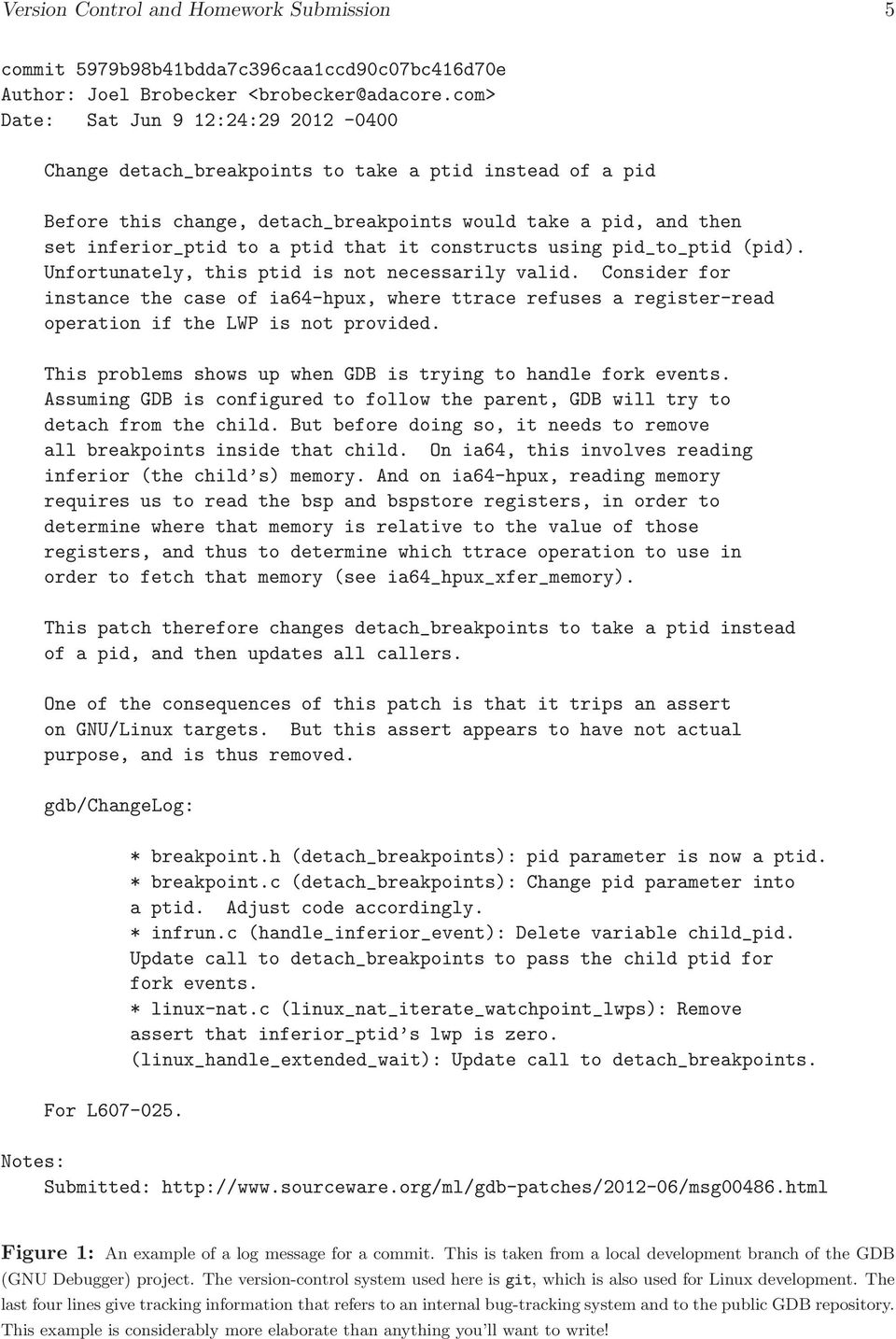
4 Version Control and Homework Submission 4 contents the data about the data. In the real world, logs are extremely useful. They allow changes to be attached to explanations of the changes, including which bug reports are addressed by these changes. The version-control software can then produce a report showing the entire change history for a project (i.e., a real-world assignment ) or for an individual file, complete with dates and authors. Figure1 shows an example taken from the open-source GDB debugger project. You probably won t have anything so elaborate, but you should try to say something useful to remind yourself of which committed versions to consider when trying to resurrect the previous contents of a file. 2.6 URLs If you have installed hw on your personal computer and are working there instead of on the instructional servers, you will need to tell hw where to find the instructional repository. If necessary, hw will ask for the URL (Uniform Resource Locator) or your instructional login, and save it for future use. If you are using Subversion bare or through Eclipse, you will need to know the full URL, which is svn+ssh://[email protected]/login where LOGIN is your instructional account name (cs61b-xx). Each of your assignments will reside in a repository directory at URL REPOS/trunk/ASSIGNMENT where RESPOS is the URL for your respository, described above. Each submission of an assignment will reside at URL REPOS/tags/ASSIGNMENT-SEQ where SEQ is a sequence number (you can have multiple submissions of the same assignment; the sequence numbers distinguish them.) Finally, the templates for assignments reside at svn+ssh://[email protected]/staff/assignment Again, you don t need this information if using Subversion through the hw command. 3 The hw Command On the instructional machines, we ve provided the command hw, which performs a number of functions. The general form of the command is $ hw subcommand arguments where subcommand identifies the particular function to be performed. You may abbreviate subcommand with any subsequence that starts with the same letter and uniquely identifies the command. For example, you can substitute hw ch hw1 or hw ck hw1 for hw checkout hw1. For those of you running MacOS or Linux, you can download hw from the course web pages. It requires that you have Python 3, Subversion, and ssh installed on your system. At the moment, we don t support a Windows version. If you use hw from home, you should be particularly careful to commit changes frequently (see 3.4) and if you move between working from your home computer and working on the instructional machines to update your working copy (see 3.3) whenever you change from one to the other. This is a better way of transferring work between systems than using scp, rsync, or PuTTy.

5 Version Control and Homework Submission 5 commit 5979b98b41bdda7c396caa1ccd90c07bc416d70e Author: Joel Brobecker <[email protected]> Date: Sat Jun 9 12:24: Change detach_breakpoints to take a ptid instead of a pid Before this change, detach_breakpoints would take a pid, and then set inferior_ptid to a ptid that it constructs using pid_to_ptid (pid). Unfortunately, this ptid is not necessarily valid. Consider for instance the case of ia64-hpux, where ttrace refuses a register-read operation if the LWP is not provided. This problems shows up when GDB is trying to handle fork events. Assuming GDB is configured to follow the parent, GDB will try to detach from the child. But before doing so, it needs to remove all breakpoints inside that child. On ia64, this involves reading inferior (the child s) memory. And on ia64-hpux, reading memory requires us to read the bsp and bspstore registers, in order to determine where that memory is relative to the value of those registers, and thus to determine which ttrace operation to use in order to fetch that memory (see ia64_hpux_xfer_memory). This patch therefore changes detach_breakpoints to take a ptid instead of a pid, and then updates all callers. One of the consequences of this patch is that it trips an assert on GNU/Linux targets. But this assert appears to have not actual purpose, and is thus removed. gdb/changelog: For L * breakpoint.h (detach_breakpoints): pid parameter is now a ptid. * breakpoint.c (detach_breakpoints): Change pid parameter into a ptid. Adjust code accordingly. * infrun.c (handle_inferior_event): Delete variable child_pid. Update call to detach_breakpoints to pass the child ptid for fork events. * linux-nat.c (linux_nat_iterate_watchpoint_lwps): Remove assert that inferior_ptid s lwp is zero. (linux_handle_extended_wait): Update call to detach_breakpoints. Notes: Submitted: Figure 1: An example of a log message for a commit. This is taken from a local development branch of the GDB (GNU Debugger) project. The version-control system used here is git, which is also used for Linux development. The last four lines give tracking information that refers to an internal bug-tracking system and to the public GDB repository. This example is considerably more elaborate than anything you ll want to write!
6 Version Control and Homework Submission Starting an assignment: working directories The hw command assumes that your working directories have the same names as the repository subdirectories they are copied from, which will themselves all have the names of assignments (e.g., hw1 or proj1 ) 3. For each assignment, we provide a template containing skeletons of files you will eventually submit (although you may also have to add others). To start work on an assignment (let s say hw1), place yourself in the directory you ll use to hold your work (which could be your home directory), and use the command: $ hw init hw1 This does several things: 1. Creates a new entry in your repository called hw1, and containing our initial template for hw1. 2. Creates a new working (sub)directory called hw1. 3. Copies the files from your hw1 repository entry into this new working directory. You only initialize an assignment once (hw won t let you do it again). After that, you either work on the working hw1 directory created in step 2, or you can create another working copy of the repository entry with the hw checkout command ( 3.4). 3.2 Checking out an assignment Once you have initialized an assignment, you can use the working directory that hw init creates. All committed copies of work done to that directory are retained in the class repository, regardless of what happens to your working directory. However, if you need to produce a new working directory for an assignment (say hw1 to continue our running example) (perhaps on a different machine), you can do so with the command: $ hw checkout hw1 Old versions. You can use the hw checkout command to fetch any previous version of an assignment that you have committed. First, use hw log to find the revision number of the version you want ( 3.10). Then fetch the desired version (let s say revision number 42 of assignment hw1) with the command $ hw checkout hw1-r42 This creates a new directory named hw1-r42 containing the desired version 4. To prevent accidents, this new directory is not a working directory (that is, it is missing the hidden information that links it back to the repository). However, by copying selectively from hw1-r42 into a working directory for hw1, you can roll back the clock on any desired file. 3 In fact, once a working directory is created, its name no longer matters (the system maintains information about which assignment it came from inside the working directory itself). You can change the name of the working directory if desired (using the Unix mv command, for example). We suggest, however, that you avoid this if possible. 4 Revision numbers apply to the class repository as a whole; they increase whenever anybody commits to the repository, so revision 42 might not be a revision at which you committed hw1. If so, you will instead get whatever version of hw1 you last committed before revision 42 of the repository.

7 Version Control and Homework Submission 7 Retrieving submissions. The hw checkout command will also fetch assignments you have submitted (see 3.5). For example, to get a copy of submission number 2 of hw1, type $ hw checkout hw1-2 You can use hw submissions to list all your submissions (see 3.7). Again, the resulting directory will not be a working directory, but you can copy its contents into a working directory if desired. 3.3 Updating To make sure that a working directory, say hw1, has the same contents as the latest repository entry, use the command $ hw update hw1 or, if hw1 is already your current directory, just $ hw update This provides a convenient way to transfer work from home to the instructional machines or viceversa: be sure to commit the work when finished working on one of the directories, and then run hw update in the other. The command will complain if something goes wrong, such as Attempting to update a directory that is not a working copy. Attempting to update a non-existent directory. Updating a directory to which you have made conflicting changes before updating from the repository. This happens, for example, if you commit changes on your laptop, then change some of your files on the instructional machines in places that overlap the changes you just committed, and only then remember to update the working copy on the instructional machines. 3.4 Committing At frequent intervals (and certainly when you pause to go do something else), you should send a new version a snapshot of your working directory to the repository. It never hurts to do this. The command $ hw commit hw1 commits the contents of the working directory named hw1. If you are already in a working directory for an assignment, simply use $ hw commit The system will ask for a log message, by opening up an editor session. Type whatever you want and exit from the editor. Plain Subversion commits only files that you ve told it about, and it gets upset if you have deleted a file without telling it that you ve done so. The hw command will prompt you about any such files. If you have created a new file or directory in your working directory that is not currently in the respository (say NewFile.java), hw commit will give you a message such as NewFile.java is untracked. Add it? [y]
8 Version Control and Homework Submission 8 Generally, you ll want to answer y or yes (or simply return) to cause NewFile.java to get added to the repository. If you have deleted a file (say BadFile.java), hw commit will ask BadFile.java has been deleted. Remove from the repository, too? [y] Responding y will remove BadFile.java from the next committed version in the repository. However, since the repository contains all committed versions of your working directory, you will still be able to recover old versions of BadFile.java (see ). After asking about these files, hw commit will perform a hw update command to make sure that you don t undo changes to the repository that were made previously. Finally, it will commit your changes (creating a new version of the assignment in the repository). There are certain files that hw does not track by default. The main ones are Java.class and.jar files, files that end in ~ or #, and files containing Eclipse metadata. Again, the command will complain if something goes wrong. It is best to consult the staff when this happens, because it means that you have not saved you recent work and simply pushing on will just confuse things still further. 3.5 Submitting To submit the assignment in a given directory (say hw1), use the command $ hw submit hw1 or, if you are already in your hw1 working directory, $ hw submit The system will first commit the current directory, if necessary (see 3.4). It will tell you the name it chose for the submission, as in: $ hw submit Submitting hw Submission complete. As usual, if you don t see messages like this, something went wrong; don t assume the submission was successful. 3.6 Reverting changes Once a file is committed for the first time and is therefore in the repository, it is said to be tracked. After you change a tracked file in a working directory (including by deletion), but before you next commit the directory, you can restore that file to its previous contents (that is, its contents as of the previous commit or update). For example, if you accidentally delete or otherwise mutilate Solver.java, you can get it back with hw revert Solver.java This won t work for files you have just created and not yet committed, since the system has no prior copy of them. Likewise, it will not restore the contents of a file from a previous revision from before the last commit. To do that, use the hw checkout to fetch the previous revision and then copy the desired file from there into the working directory.

9 Version Control and Homework Submission Listing assignments and submissions To see a list of all your submissions of a given assignment (say hw1), use $ hw submissions hw1 This will tell you the submission sequence numbers, dates, and times of all submissions of the assignment The command $ hw submissions will do the same for all assignments you ve submitted. To list all the assignments you ve worked on or started (and therefore committed to the repository, but perhaps not submitted), use the command $ hw assignments which lists the assignments and the last time you committed each. 3.8 Status of a working directory To see which files you ve changed, added, or deleted relative to the last hw commit for our hw1 assignment, use the command or just $ hw status hw1 $ hw status if you are already in the working directory. This will give a list of files and the status of each. For example: $ hw status Files and directories that are not in the repository yet, but will be added by hw commit : NewFile.java tests/newtest.data Files you have modified, but not committed: Main.java Files and directories you have deleted, but not committed: Optional.java When you see files listed by hw status like this, it generally suggests that you have material to commit. On the other hand, $ hw status No changes since last commit means that nothing remains to be committed. The related commands $ svn list hw1 $ svn list produce the same results as svn status, but in addition produce a list of other tracked files that are unchanged.
10 Version Control and Homework Submission 10 $ hw diff Modifications to files ( + lines are additions; - deletions): Index: Main.java =================================================================== --- Main.java (revision 14) +++ Main.java (working -41,10 switch (args.length) { case 1: - output = new PrintWriter(new Display()); + output = new PrintWriter(new Display(true)); break; case 2: - waittoclose = false; if (args[1].equals("-")) { output = new PrintWriter(System.out); } else -58,6 translate(input, output); if (waittoclose) { System.err.printf("Type <RETURN> or <ENTER> to quit.%n"); + System.err.printf("Type? for help.%n"); try { System.in.read(); } catch (IOException e) { Figure 2: Example of hw diff. 3.9 Listing differences The hw diff command allows you to see the changes you ve made to a working directory since committing it or checking it out, but have not yet committed. Without an additional argument, it lists differences for the current directory. With an argument, it lists differences in the named directory or file. Figure 2 shows an example of a command and resulting output. The output shows lines that you have added to the working file (indicated by a leading + ), those that you have deleted (leading - ), and those you have modified (which show up as a deletion of the old line and an addition of the new version). The listing also includes a few lines of context on either side of changes to help locate the change (also, the lines indicate line numbers in the old and new versions.) By supplying a revision number (see 3.10 for finding revision numbers), you can compare the working directory against a revision other than the last one in the repository. For example $ hw diff 130 compares the working directory with whatever contents were committed for revision 130. The command $ hw diff Main.java 130 does the same for the single file Main.java.
![length) { case 1: - output = new PrintWriter(new Display()); + output = new PrintWriter(new Display(true)); break; case 2: - waittoclose = false; if (args[1].](/docs-images/45/10657431/images/page_10.jpg "equals(\"-\")) { output = new PrintWriter(System.out); } else { @@ -58,6 +57,7 @@ translate(input, output); if (waittoclose) { System.err.printf(\"Type <RETURN> or <ENTER> to quit.%n\"); + System.err.printf(\"Type? for help.")
11 Version Control and Homework Submission Listing log information To get a listing of the commits you ve made to the assignment in the current directory, use the command hw log which gives a listing something like this: r146 cs61b-yu :20: (Fri, 07 Sep 2012) 10 lines Changed paths: M /cs61b-yu/trunk/hw1/progs.java Solve problem r142 cs61b-yu :44: (Fri, 07 Sep 2012) 50 lines Changed paths: M /cs61b-yu/trunk/hw1/progs.java M /cs61b-yu/trunk/hw1/hw1test.java Solve problems 1&2. Add tests for same r130 cs61b-yu :10: (Thu, 06 Sep 2012) 2 lines Changed paths: A /cs61b-yu/trunk/hw1 (from /staff/hw1) Start hw Each commit produces an entry giving the revision number, date, time, the files changed, and the log message. To limit the number of log entries listed to the most recent N entries, use hw log N or to track entries mentioning a single file (say Progs.java), use or hw log Progs.java hw log Progs.java N for the latest N entries about Progs.java.

12 Version Control and Homework Submission 12 4 Summary of Basic Use Let s look at the entire life cycle of assignment hw1. Let s assume that you group homework directories in a single directory called hw, which you have created with $ mkdir ~/hw # Make directory hw in your home directory. To start hw1, get a copy of its template: $ cd ~/hw $ hw init hw1 # Creates directory ~/hw/hw1 A typical basic work cycle then goes like this: $ cd ~/hw/hw1 edit, test, debug $ hw commit # You ll be asked to supply a log message edit, test, debug $ hw commit... $ hw submit # This also commits, if needed If you work from home (and have installed the hw command), you can import work from school with $ hw checkout hw1 This may ask you for the repository URL, which you can find by logging into your instructional account and typing $ echo $MYREPOS It will be something like svn+ssh://[email protected]/{\it YOURLOGIN} The same commands should work from your home account as at school (that is, when you actually do your editing, compilation, and debugging using your own computer as opposed to using ssh to login in remotely to the instructional machines.) When switching from home to the instructional machines, be sure to run hw commit when done at home, and $ cd ~/hw/hw1 $ hw update before doing any editing on the instructional machines (likewise going in the other direction). This will transfer your work from one location to the other. The init, commit, and submit commands are sufficient for creating and submitting homework on the instructional machines. For remote work, you may also need checkout and update. The other commands in 3 allow you to compare your current work with copies of it saved or submitted to the repository.
13 Version Control and Homework Submission 13 5 Using hw at Home The hw command should work on Linux or MacOS systems. First, you ll need to have ssh, Subversion, and Python 3 installed on your system (use Google to find out how for your system). You can obtain hw with the command $ scp -p YOUR [email protected]:/home/ff/cs61b/bin/hw DIR where DIR is the directory where you want to store the command (a directory listed in $PATH.) When you run hw for the first time, it will ask for your instructional login or a URL, which you should provide (providing your login is easiest.) In order for hw to work, ssh must know about the SSH key that was issued with your CS61B account. This key is the file ~/.ssh/id_rsa in your instructional account. Download that file into your own ~/.ssh directory (probably with a different name, because you are like to already have a key of that name.) For example, you might use the command $ scp YOUR [email protected]:.ssh/id_rsa ~/.ssh/id_rsa_cs61b Assuming you do this, you should also add the line IdentityFile ~/.ssh/id_rsa_cs61b to the file ~/.ssh/config, creating that file if it does not already exist. Once you ve done this, by the way, you should be able to use commands like ssh, scp, or rsync without having to supply a password.
14 Version Control and Homework Submission 14 6 Quick Reference Here is a quick recap of the available commands. You can get the same information with hw help. In what follows, optional arguments are denoted with square brackets ([]), and alternatives are separated by vertical bars ( ). When a command takes an argument that can be a directory (denoted dir ) it refers to a working directory and, if defaulted, refers to the current directory. Commands: hw init assignment Create a fresh working directory named assignment containing the initial files (if any) for the assignment of that name. Commits the working directory to your repository, creating an entry for assignment (which must not have previously existed). hw checkout assignment Create a fresh working directory named assignment containing a copy of the latest version of assignment from your repository. hw checkout assignment - number Create a fresh directory named assignment - number containing a copy of the tag (submission) named assignment - number from the repository. This is NOT a working copy, and cannot be committed back to the repository. hw checkout assignment -r number Create a fresh directory named assignment -r number containing a copy of previously committed revision number of assignment from the repository. To find revision numbers for past commits, use the hw log command. The resulting directory is NOT a working copy, and cannot be committed back to the repository. hw update [ dir ] Copies any changes in the repository copy of the assignment in dir into dir. Reports any conflicts (such as files in the working directory that have been changed in a way that differs from ho the repository version was changed). hw revert file Reverts file to its state just after the last commit, checkout, or init. If file was modified or deleted, restores its previous contents. hw commit [ dir ] Copies the contents of dir to the repository, thus creating a new version. First asks about any anomalies, such as files that have been added, deleted, or incompletely merged. hw submit [ dir ] Submit the contents of dir, creating a tag. First runs various checks that the submission is complete. The directory must be the top-level directory for an assignment. hw status [ dir ] List the files in dir that differ from the contents of the repository, indicating which are modified, and which are not tracked (i.e., not in the repository in any version). hw diff [ file dir ] [ revision number ] Reports differences between contents of file or dir (default, current directory), and the last version of it that was checked out. hw list [ dir ] List all files in dir indicating any that are modified, or are not tracked (i.e., not in the repository in any version). This is like status, but includes all files. hw log [ dir ] [ lim ] List log entries for commits of dir, most recent first. If lim is specified, it is an integer indicating the maximum number of entries. hw assignments Lists all the assignments you have worked on and committed to the repository, whether or not you ve submitted them. hw submissions [ assignment ] Lists all your submissions of assignment in the repository, or, if assignment is defaulted, all your submissions of all assignments.

Using Git for Project Management with µvision
 MDK Version 5 Tutorial AN279, Spring 2015, V 1.0 Abstract Teamwork is the basis of many modern microcontroller development projects. Often teams are distributed all over the world and over various time
Using Subversion in Computer Science
 School of Computer Science 1 Using Subversion in Computer Science Last modified July 28, 2006 Starting from semester two, the School is adopting the increasingly popular SVN system for management of student
Git Basics. Christopher Simpkins [email protected]. Chris Simpkins (Georgia Tech) CS 2340 Objects and Design CS 1331 1 / 22
 Git Basics Christopher Simpkins [email protected] Chris Simpkins (Georgia Tech) CS 2340 Objects and Design CS 1331 1 / 22 Version Control Systems Records changes to files over time Allows you to
Version control. HEAD is the name of the latest revision in the repository. It can be used in subversion rather than the latest revision number.
 Version control Version control is a powerful tool for many kinds of work done over a period of time, including writing papers and theses as well as writing code. This session gives a introduction to a
CISC 275: Introduction to Software Engineering. Lab 5: Introduction to Revision Control with. Charlie Greenbacker University of Delaware Fall 2011
 CISC 275: Introduction to Software Engineering Lab 5: Introduction to Revision Control with Charlie Greenbacker University of Delaware Fall 2011 Overview Revision Control Systems in general Subversion
Version Control with Subversion
 Version Control with Subversion http://www.oit.duke.edu/scsc/ http://wiki.duke.edu/display/scsc [email protected] John Pormann, Ph.D. [email protected] Software Carpentry Courseware This is a re-work from the
Version Control with. Ben Morgan
 Version Control with Ben Morgan Developer Workflow Log what we did: Add foo support Edit Sources Add Files Compile and Test Logbook ======= 1. Initial version Logbook ======= 1. Initial version 2. Remove
CSE 374 Programming Concepts & Tools. Laura Campbell (Thanks to Hal Perkins) Winter 2014 Lecture 16 Version control and svn
 CSE 374 Programming Concepts & Tools Laura Campbell (Thanks to Hal Perkins) Winter 2014 Lecture 16 Version control and svn Where we are Learning tools and concepts relevant to multi-file, multi-person,
Version Control with Subversion and Xcode
 Version Control with Subversion and Xcode Author: Mark Szymczyk Last Update: June 21, 2006 This article shows you how to place your source code files under version control using Subversion and Xcode. By
Using SVN to Manage Source RTL
 Using SVN to Manage Source RTL CS250 Tutorial 1 (Version 092509a) September 25, 2009 Yunsup Lee In this tutorial you will gain experience using the Subversion (SVN) to manage your source RTL and code.
CS 2112 Lab: Version Control
 29 September 1 October, 2014 Version Control What is Version Control? You re emailing your project back and forth with your partner. An hour before the deadline, you and your partner both find different
Version control. with git and GitHub. Karl Broman. Biostatistics & Medical Informatics, UW Madison
 Version control with git and GitHub Karl Broman Biostatistics & Medical Informatics, UW Madison kbroman.org github.com/kbroman @kwbroman Course web: kbroman.org/tools4rr Slides prepared with Sam Younkin
Version Control! Scenarios, Working with Git!
 Version Control! Scenarios, Working with Git!! Scenario 1! You finished the assignment at home! VC 2 Scenario 1b! You finished the assignment at home! You get to York to submit and realize you did not
using version control in system administration
 LUKE KANIES using version control in system administration Luke Kanies runs Reductive Labs (http://reductivelabs.com), a startup producing OSS software for centralized, automated server administration.
Version Control with Svn, Git and git-svn. Kate Hedstrom ARSC, UAF
 1 Version Control with Svn, Git and git-svn Kate Hedstrom ARSC, UAF 2 Version Control Software System for managing source files For groups of people working on the same code When you need to get back last
Version Control with Subversion
 Version Control with Subversion Introduction Wouldn t you like to have a time machine? Software developers already have one! it is called version control Version control (aka Revision Control System or
MATLAB & Git Versioning: The Very Basics
 1 MATLAB & Git Versioning: The Very Basics basic guide for using git (command line) in the development of MATLAB code (windows) The information for this small guide was taken from the following websites:
Using SVN to Manage Source RTL
 Using SVN to Manage Source RTL CS250 Tutorial 1 (Version 083010a) August 30, 2010 Yunsup Lee In this tutorial you will gain experience using the Subversion (SVN) to manage your source RTL and code. You
Introducing Xcode Source Control
 APPENDIX A Introducing Xcode Source Control What You ll Learn in This Appendix: u The source control features offered in Xcode u The language of source control systems u How to connect to remote Subversion
Lab 0 (Setting up your Development Environment) Week 1
 ECE155: Engineering Design with Embedded Systems Winter 2013 Lab 0 (Setting up your Development Environment) Week 1 Prepared by Kirill Morozov version 1.2 1 Objectives In this lab, you ll familiarize yourself
Introduction to Git. Markus Kötter [email protected]. Notes. Leinelab Workshop July 28, 2015
 Introduction to Git Markus Kötter [email protected] Leinelab Workshop July 28, 2015 Motivation - Why use version control? Versions in file names: does this look familiar? $ ls file file.2 file.
1 Basic commands. 2 Terminology. CS61B, Fall 2009 Simple UNIX Commands P. N. Hilfinger
 CS61B, Fall 2009 Simple UNIX Commands P. N. Hilfinger 1 Basic commands This section describes a list of commonly used commands that are available on the EECS UNIX systems. Most commands are executed by
Data management on HPC platforms
 Data management on HPC platforms Transferring data and handling code with Git scitas.epfl.ch September 10, 2015 http://bit.ly/1jkghz4 What kind of data Categorizing data to define a strategy Based on size?
Version Control Using Subversion. Version Control Using Subversion 1 / 27
 Version Control Using Subversion Version Control Using Subversion 1 / 27 What Is Version Control? Version control is also known as revision control. Version control is provided by a version control system
Introduction to Version Control
 Research Institute for Symbolic Computation Johannes Kepler University Linz, Austria Winter semester 2014 Outline General Remarks about Version Control 1 General Remarks about Version Control 2 Outline
Introduction to Source Control ---
 Introduction to Source Control --- Overview Whether your software project is large or small, it is highly recommended that you use source control as early as possible in the lifecycle of your project.
CPSC 491. Today: Source code control. Source Code (Version) Control. Exercise: g., no git, subversion, cvs, etc.)
 Today: Source code control CPSC 491 Source Code (Version) Control Exercise: 1. Pretend like you don t have a version control system (e. g., no git, subversion, cvs, etc.) 2. How would you manage your source
MATLAB @ Work. MATLAB Source Control Using Git
 MATLAB @ Work MATLAB Source Control Using Git Richard Johnson Using source control is a key practice for professional programmers. If you have ever broken a program with a lot of editing changes, you can
Source Code Management for Continuous Integration and Deployment. Version 1.0 DO NOT DISTRIBUTE
 Source Code Management for Continuous Integration and Deployment Version 1.0 Copyright 2013, 2014 Amazon Web Services, Inc. and its affiliates. All rights reserved. This work may not be reproduced or redistributed,
Source Control Systems
 Source Control Systems SVN, Git, GitHub SoftUni Team Technical Trainers Software University http://softuni.bg Table of Contents 1. Software Configuration Management (SCM) 2. Version Control Systems: Philosophy
Version Control with Git. Kate Hedstrom ARSC, UAF
 1 Version Control with Git Kate Hedstrom ARSC, UAF Linus Torvalds 3 Version Control Software System for managing source files For groups of people working on the same code When you need to get back last
Introduction to the Git Version Control System
 Introduction to the Sebastian Rockel [email protected] University of Hamburg Faculty of Mathematics, Informatics and Natural Sciences Department of Informatics Technical Aspects of Multimodal
Linux Overview. Local facilities. Linux commands. The vi (gvim) editor
 Linux Overview Local facilities Linux commands The vi (gvim) editor MobiLan This system consists of a number of laptop computers (Windows) connected to a wireless Local Area Network. You need to be careful
CSCB07 Software Design Version Control
 CSCB07 Software Design Version Control Anya Tafliovich Fall 2015 Problem I: Working Solo How do you keep track of changes to your program? Option 1: Don t bother Hope you get it right the first time Hope
Dalhousie University CSCI 2132 Software Development Winter 2015 Lab 7, March 11
 Dalhousie University CSCI 2132 Software Development Winter 2015 Lab 7, March 11 In this lab, you will first learn how to use pointers to print memory addresses of variables. After that, you will learn
Before you can use the Duke Ambient environment to start working on your projects or
 Using Ambient by Duke Curious 2004 preparing the environment Before you can use the Duke Ambient environment to start working on your projects or labs, you need to make sure that all configuration settings
Version control with GIT
 AGV, IIT Kharagpur September 13, 2012 Outline 1 Version control system What is version control Why version control 2 Introducing GIT What is GIT? 3 Using GIT Using GIT for AGV at IIT KGP Help and Tips
Remote Access to Unix Machines
 Remote Access to Unix Machines Alvin R. Lebeck Department of Computer Science Department of Electrical and Computer Engineering Duke University Overview We are using OIT Linux machines for some homework
Pragmatic Version Control
 Extracted from: Pragmatic Version Control using Subversion, 2nd Edition This PDF file contains pages extracted from Pragmatic Version Control, one of the Pragmatic Starter Kit series of books for project
Version Control with Git. Linux Users Group UT Arlington. Rohit Rawat [email protected]
 Version Control with Git Linux Users Group UT Arlington Rohit Rawat [email protected] Need for Version Control Better than manually storing backups of older versions Easier to keep everyone updated
Revision control systems (RCS) and
 Revision control systems (RCS) and Subversion Problem area Software projects with multiple developers need to coordinate and synchronize the source code Approaches to version control Work on same computer
Setting up PostgreSQL
 Setting up PostgreSQL 1 Introduction to PostgreSQL PostgreSQL is an object-relational database management system based on POSTGRES, which was developed at the University of California at Berkeley. PostgreSQL
Git - Working with Remote Repositories
 Git - Working with Remote Repositories Handout New Concepts Working with remote Git repositories including setting up remote repositories, cloning remote repositories, and keeping local repositories in-sync
Laboration 3 - Administration
 Laboration 3 - Administration During this laboration we will learn how to install, configure and test servers that will allow you to have access remote machines, copy files between computers and file sharing.
BlueJ Teamwork Tutorial
 BlueJ Teamwork Tutorial Version 2.0 for BlueJ Version 2.5.0 (and 2.2.x) Bruce Quig, Davin McCall School of Engineering & IT, Deakin University Contents 1 OVERVIEW... 3 2 SETTING UP A REPOSITORY... 3 3
Lab 1 Beginning C Program
 Lab 1 Beginning C Program Overview This lab covers the basics of compiling a basic C application program from a command line. Basic functions including printf() and scanf() are used. Simple command line
NASA Workflow Tool. User Guide. September 29, 2010
 NASA Workflow Tool User Guide September 29, 2010 NASA Workflow Tool User Guide 1. Overview 2. Getting Started Preparing the Environment 3. Using the NED Client Common Terminology Workflow Configuration
Mercurial. Why version control (Single users)
 Mercurial Author: Hans Fangohr Date: 2008-05-21 Version: 033c85b22987 Id: talk.txt,v 033c85b22987 2008/05/21 08:42:42 fangohr Series: SESA2006 2008, last lecture Hint Adjust font-size
CS 103 Lab Linux and Virtual Machines
 1 Introduction In this lab you will login to your Linux VM and write your first C/C++ program, compile it, and then execute it. 2 What you will learn In this lab you will learn the basic commands and navigation
Setting up a local working copy with SVN, MAMP and rsync. Agentic - 2009
 Setting up a local working copy with SVN, MAMP and rsync Agentic - 2009 Get MAMP You can download MAMP for MAC at this address : http://www.mamp.info/en/downloads/index.html Install MAMP in your APPLICATION
Git Basics. Christian Hanser. Institute for Applied Information Processing and Communications Graz University of Technology. 6.
 Git Basics Christian Hanser Institute for Applied Information Processing and Communications Graz University of Technology 6. March 2013 Christian Hanser 6. March 2013 Seite 1/39 Outline Learning Targets
Subversion. Nadir SOUALEM. Linux Users subversion client svn 1.6.5 or higher. Windows users subversion client Tortoise 1.6.
 Subversion Nadir SOUALEM 1 Requirements Linux Users subversion client svn 1.6.5 or higher Windows users subversion client Tortoise 1.6.6 or higher 2 What is Subversion? Source control or version control
PuTTY/Cygwin Tutorial. By Ben Meister Written for CS 23, Winter 2007
 PuTTY/Cygwin Tutorial By Ben Meister Written for CS 23, Winter 2007 This tutorial will show you how to set up and use PuTTY to connect to CS Department computers using SSH, and how to install and use the
Version Control. Luka Milovanov [email protected]
 Version Control Luka Milovanov [email protected] Configuration Management Configuration management is the management of system change to software products Version management: consistent scheme of version
An Introduction to Mercurial Version Control Software
 An Introduction to Mercurial Version Control Software CS595, IIT [Doc Updated by H. Zhang] Oct, 2010 Satish Balay [email protected] Outline Why use version control? Simple example of revisioning Mercurial
INF 111 / CSE 121. Homework 4: Subversion Due Tuesday, July 14, 2009
 Homework 4: Subversion Due Tuesday, July 14, 2009 Name : Student Number : Laboratory Time : Objectives Preamble Set up a Subversion repository on UNIX Use Eclipse as a Subversion client Subversion (SVN)
Version Control Tools
 Version Control Tools Source Code Control Venkat N Gudivada Marshall University 13 July 2010 Venkat N Gudivada Version Control Tools 1/73 Outline 1 References and Resources 2 3 4 Venkat N Gudivada Version
Lab Exercise Part II: Git: A distributed version control system
 Lunds tekniska högskola Datavetenskap, Nov 25, 2013 EDA260 Programvaruutveckling i grupp projekt Labb 2 (part II: Git): Labbhandledning Checked on Git versions: 1.8.1.2 Lab Exercise Part II: Git: A distributed
Source Control Guide: Git
 MadCap Software Source Control Guide: Git Flare 11.1 Copyright 2015 MadCap Software. All rights reserved. Information in this document is subject to change without notice. The software described in this
RecoveryVault Express Client User Manual
 For Linux distributions Software version 4.1.7 Version 2.0 Disclaimer This document is compiled with the greatest possible care. However, errors might have been introduced caused by human mistakes or by
Hypercosm. Studio. www.hypercosm.com
 Hypercosm Studio www.hypercosm.com Hypercosm Studio Guide 3 Revision: November 2005 Copyright 2005 Hypercosm LLC All rights reserved. Hypercosm, OMAR, Hypercosm 3D Player, and Hypercosm Studio are trademarks
Xcode Source Management Guide. (Legacy)
 Xcode Source Management Guide (Legacy) Contents Introduction 5 Organization of This Document 5 See Also 6 Source Management Overview 7 Source Control Essentials 7 Snapshots 8 Managing Source in Xcode 8
1. Product Information
 ORIXCLOUD BACKUP CLIENT USER MANUAL LINUX 1. Product Information Product: Orixcloud Backup Client for Linux Version: 4.1.7 1.1 System Requirements Linux (RedHat, SuSE, Debian and Debian based systems such
Source Code Management/Version Control
 Date: 3 rd March 2005 Source Code Management/Version Control The Problem: In a typical software development environment, many developers will be engaged in work on one code base. If everyone was to be
Two Best Practices for Scientific Computing
 Two Best Practices for Scientific Computing Version Control Systems & Automated Code Testing David Love Software Interest Group University of Arizona February 18, 2013 How This Talk Happened Applied alumnus,
Distributed Version Control with Mercurial and git
 OpenStax-CNX module: m37404 1 Distributed Version Control with Mercurial and git Hannes Hirzel This work is produced by OpenStax-CNX and licensed under the Creative Commons Attribution License 3.0 Abstract
Version Uncontrolled! : How to Manage Your Version Control
 Version Uncontrolled! : How to Manage Your Version Control Harold Dost III, Raastech ABSTRACT Are you constantly wondering what is in your production environment? Do you have any doubts about what code
Online Backup Client User Manual Linux
 Online Backup Client User Manual Linux 1. Product Information Product: Online Backup Client for Linux Version: 4.1.7 1.1 System Requirements Operating System Linux (RedHat, SuSE, Debian and Debian based
Online Backup Linux Client User Manual
 Online Backup Linux Client User Manual Software version 4.0.x For Linux distributions August 2011 Version 1.0 Disclaimer This document is compiled with the greatest possible care. However, errors might
Version Control. Version Control
 Version Control CS440 Introduction to Software Engineering 2013, 2015 John Bell Based on slides prepared by Jason Leigh for CS 340 University of Illinois at Chicago Version Control Incredibly important
Online Backup Client User Manual
 For Linux distributions Software version 4.1.7 Version 2.0 Disclaimer This document is compiled with the greatest possible care. However, errors might have been introduced caused by human mistakes or by
Introduction To Version Control With Mercurial
 Introduction To Version Control With Mercurial How To Manage Changes To Your Files Author: Daniel Rocco, [email protected] Date: 2009-12-29 Version: TortoiseHG 0.8.x Copyright: c 2009 Daniel Rocco License:
Version Control using Git and Github. Joseph Rivera
 Version Control using Git and Github Joseph Rivera 1 What is Version Control? Powerful development tool! Management of additions, deletions, and modifications to software/source code or more generally
CLC Server Command Line Tools USER MANUAL
 CLC Server Command Line Tools USER MANUAL Manual for CLC Server Command Line Tools 2.5 Windows, Mac OS X and Linux September 4, 2015 This software is for research purposes only. QIAGEN Aarhus A/S Silkeborgvej
Version Control Tutorial using TortoiseSVN and. TortoiseGit
 Version Control Tutorial using TortoiseSVN and TortoiseGit Christopher J. Roy, Associate Professor Virginia Tech, [email protected] This tutorial can be found at: www.aoe.vt.edu/people/webpages/cjroy/software-resources/tortoise-svn-git-tutorial.pdf
Subversion Integration for Visual Studio
 Subversion Integration for Visual Studio VisualSVN Team VisualSVN: Subversion Integration for Visual Studio VisualSVN Team Copyright 2005-2008 VisualSVN Team Windows is a registered trademark of Microsoft
CONNECTING TO DEPARTMENT OF COMPUTER SCIENCE SERVERS BOTH FROM ON AND OFF CAMPUS USING TUNNELING, PuTTY, AND VNC Client Utilities
 CONNECTING TO DEPARTMENT OF COMPUTER SCIENCE SERVERS BOTH FROM ON AND OFF CAMPUS USING TUNNELING, PuTTY, AND VNC Client Utilities DNS name: turing.cs.montclair.edu -This server is the Departmental Server
To reduce or not to reduce, that is the question
 To reduce or not to reduce, that is the question 1 Running jobs on the Hadoop cluster For part 1 of assignment 8, you should have gotten the word counting example from class compiling. To start with, let
University of Toronto
 1 University of Toronto APS 105 Computer Fundamentals A Tutorial about UNIX Basics Fall 2011 I. INTRODUCTION This document serves as your introduction to the computers we will be using in this course.
Version Control Systems
 Version Control Systems ESA 2015/2016 Adam Belloum [email protected] Material Prepared by Eelco Schatborn Today IntroducGon to Version Control Systems Centralized Version Control Systems RCS CVS SVN
QlikView 11 Source Control Walkthrough
 QlikView 11 Source Control Walkthrough A QlikView Technology White Paper Originally published: August, 2011 Updated August, 2012 www.qlikview.com 1 Table of Contents BACKGROUND... 3 SOURCE CONTROL BASICS...
Version control with Subversion
 Version control with Subversion Davor Cubranic Grad Seminar October 6, 2011 With searching comes loss And the presence of absence: My Thesis not found. Version Control A tool for managing changes to a
Group Policy for Beginners
 Group Policy for Beginners Microsoft Corporation Published: April 2011 Abstract Group Policy is the essential way that most organizations enforce settings on their computers. This white paper introduces
Version control tracks multiple versions. Configuration Management. Version Control. V22.0474-001 Software Engineering Lecture 12, Spring 2008
 Configuration Management Version Control V22.0474-001 Software Engineering Lecture 12, Spring 2008 Clark Barrett, New York University Configuration Management refers to a set of procedures for managing
BACKUP YOUR SENSITIVE DATA WITH BACKUP- MANAGER
 Training course 2007 BACKUP YOUR SENSITIVE DATA WITH BACKUP- MANAGER Nicolas FUNKE PS2 ID : 45722 This document represents my internships technical report. I worked for the Biarritz's Town Hall during
Using Oracle Cloud to Power Your Application Development Lifecycle
 Using Oracle Cloud to Power Your Application Development Lifecycle Srikanth Sallaka Oracle Product Management Dana Singleterry Oracle Product Management Greg Stachnick Oracle Product Management Using Oracle
Advanced Computing Tools for Applied Research Chapter 4. Version control
 Advanced Computing Tools for Applied Research Jaime Boal Martín-Larrauri Rafael Palacios Hielscher Academic year 2014/2015 1 Version control fundamentals 2 What you probably do now Manually save copies
FEEG6002 - Applied Programming 3 - Version Control and Git II
 FEEG6002 - Applied Programming 3 - Version Control and Git II Sam Sinayoko 2015-10-16 1 / 26 Outline Learning outcomes Working with a single repository (review) Working with multiple versions of a repository