
Ondřej Výšek Sales Lead, Microsoft MVP.
|
|
|
- Louise Martin
- 10 years ago
- Views:
Transcription


1 Ondřej Výšek Sales Lead, Microsoft MVP

2 Azure Active Directory

3 Features Free edition Basic edition Premium edition Directory as a service User and group management using UI or Windows PowerShell cmdlets Device registration Access Panel portal for SSO-based user access to SaaS and custom applications User-based application access management and provisioning Self-service password change for cloud users Azure AD Connect For syncing between on-premises directories and Azure Active Directory Standard security reports High availability SLA uptime (99.9%) Group-based application access management and provisioning Customization of company logo and colours to the Sign In and Access Panel pages Self-service password reset for cloud users Application Proxy: Secure Remote Access and SSO to on-premises web applications Advanced application usage reporting Self-service group management for cloud users Self-service password reset with on-premises write-back Microsoft Identity Manager (MIM) user licenses For on-premises identity and access mgmt Advanced anomaly security reports (machine learning-based) Cloud app discovery Multi-Factor Authentication service for cloud users Multi-Factor Authentication server for on-premises users Azure Active Directory Connect Health to monitor the health of on-premises Active Directory infrastructure, and get usage analytics. <500K objects No limit No limit 10 apps / user 10 apps / user No app limit

4
5


6 Google Apps Azure AD SalesForce.com AD FS DirSync Active Directory Domain Services
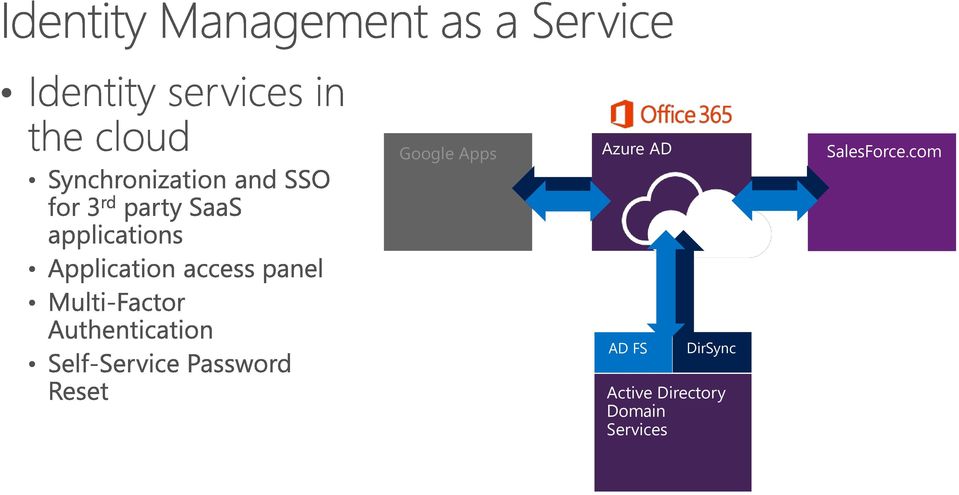
7 Synchronization Microsoft Azure *Write back of attributes to support cloud first and co-existence User attributes are synchronized including the password hash, Authentication can be completed against either Azure or Windows Server Active Directory Federation Microsoft Azure AD FS provides conditional access to resources, Work Place Join for device registration and integrated Multi-Factor Authentication User attributes are synchronized, Authentication is passed back through federation and completed against Windows Server Active Directory

8
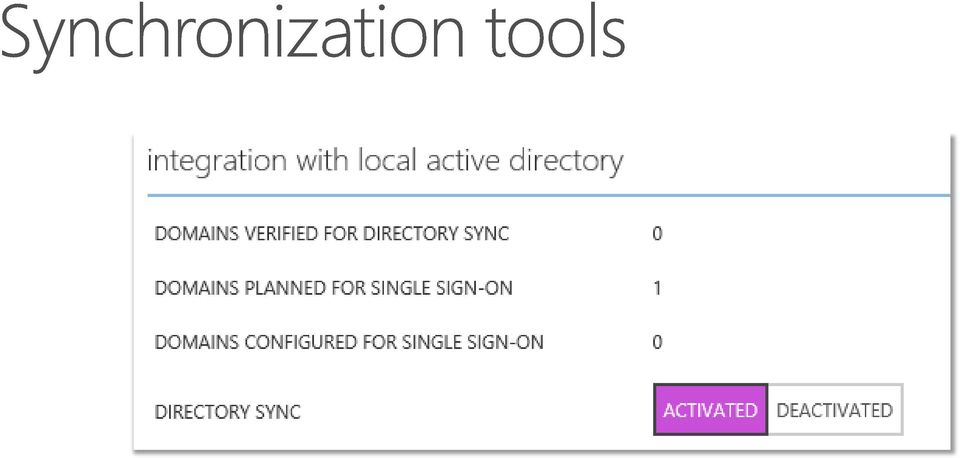
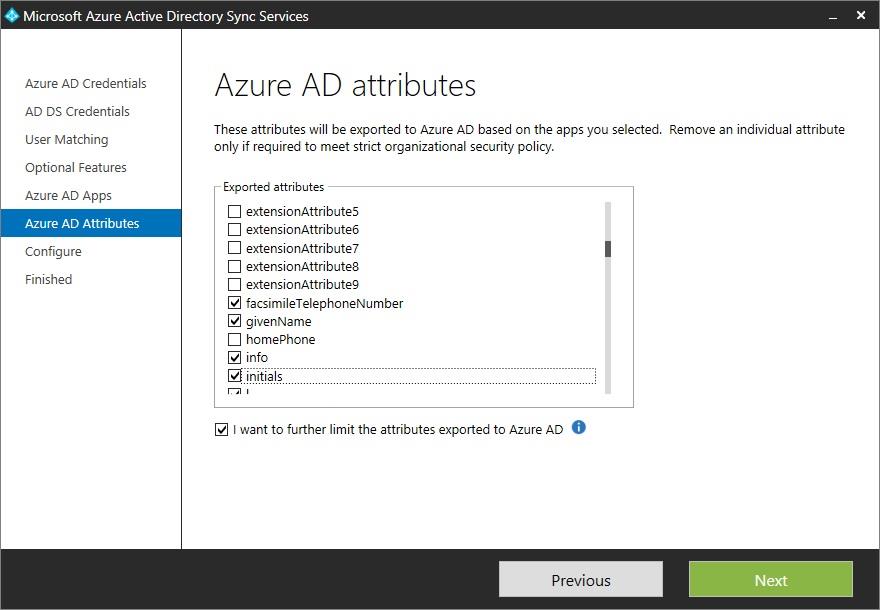
9 See Install the Azure AD Sync Service

10


11
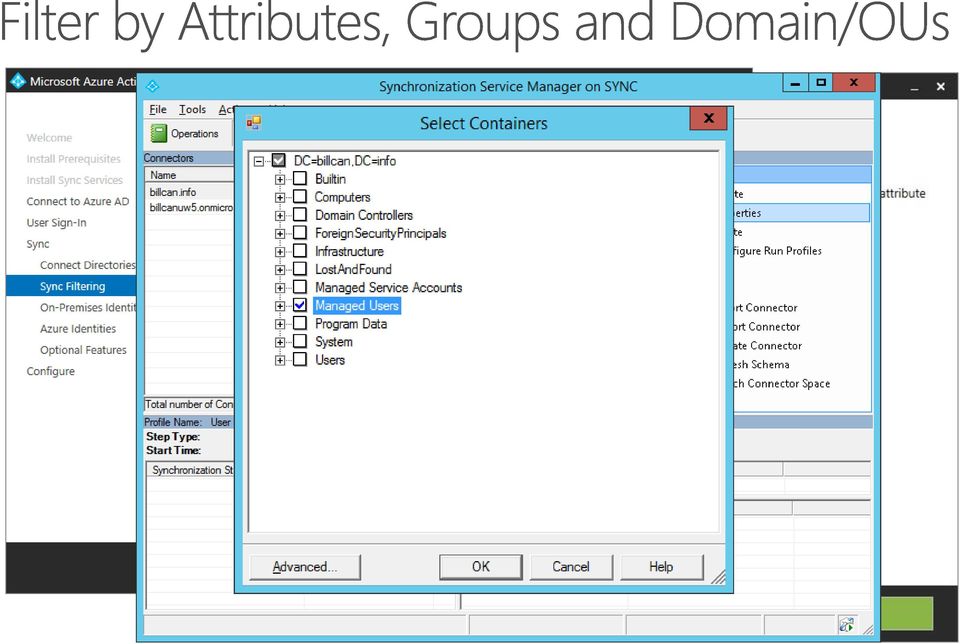
12
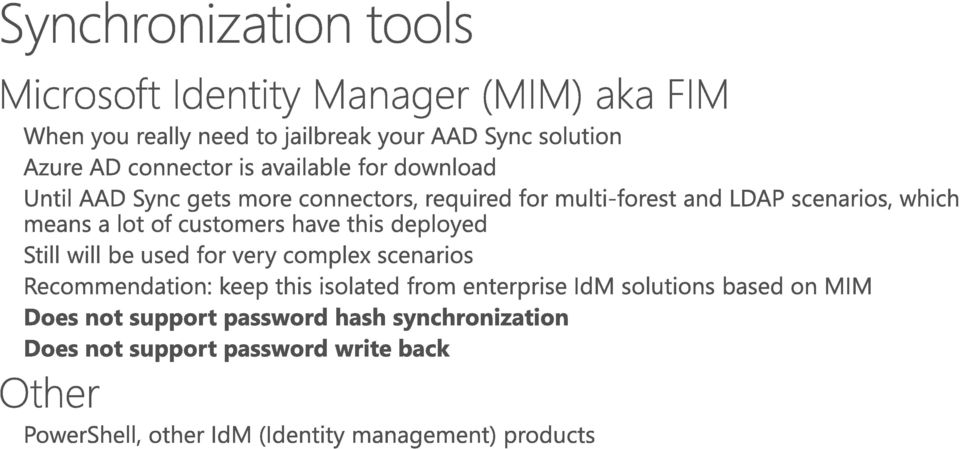
13 Source Anchor

14
15

16 Features Azure AD (Free) Azure AD Basic Azure AD Premium Directory as a Service Up to 500k objects No object limit No object limit User and group management using UI or Windows PowerShell Yes Yes Yes Cmdlets Access Panel portal for SSO-based user access to SaaS and 10 applications per 10 applications per No limit custom applications user user User-based application access management/provisioning Yes Yes Yes Self-service password change for cloud users Yes Yes Yes Directory synchronization tool For syncing between onpremises Yes Yes Yes Active Directory and Azure Active Directory Standard security reports Yes Yes Yes High availability SLA uptime (99.9%) Yes Yes Group-based application access management and provisioning Yes Yes Company branding - customization of company logo and colors Yes Yes to the Sign In and Access Panel pages Self-service password reset for cloud users Yes Yes

17 Features Azure AD (Free) Azure AD Basic Azure AD Premium Application Proxy Yes Yes Self-service group management for cloud users Yes Yes Self-service password reset with on-premises writeback Yes Microsoft Identity Manager (MIM) server licenses Yes For syncing between on-premises databases and/or directories and Azure Active Directory Advanced anomaly security reports (machine Yes learning-based) Advanced usage reporting Yes Multi-Factor Authentication service for cloud users Yes Multi-Factor Authentication server for on-premises users Yes AAD Editions Office365+AAD

18 PowerShell Graph API Portal: manage.microsoft.com
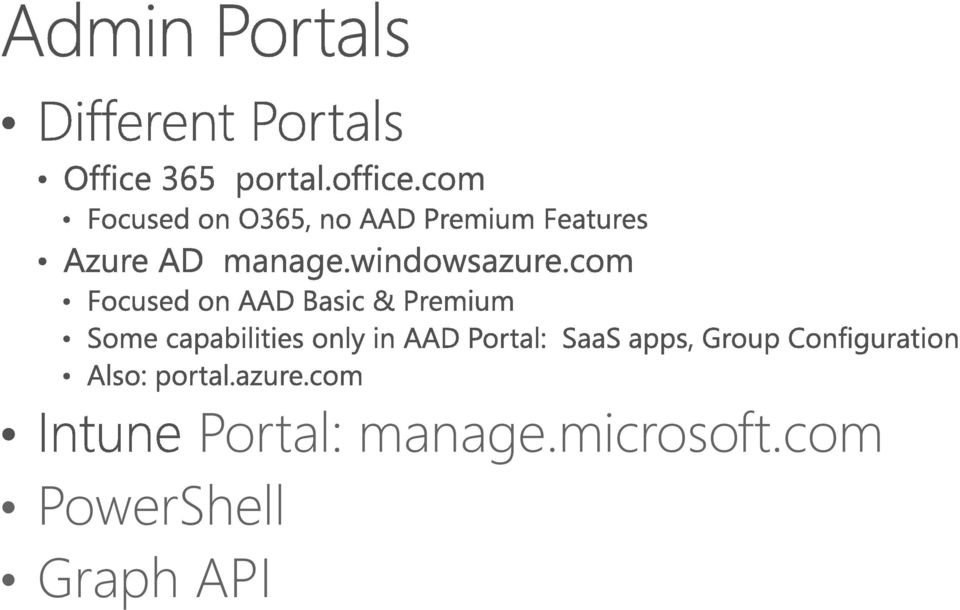
19

20 Desktop

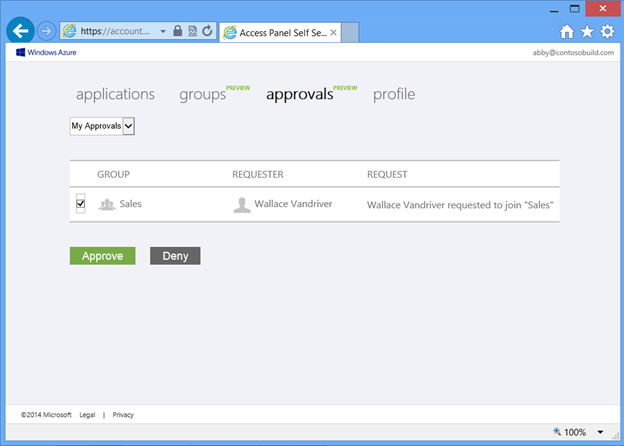
21 Self Service Group Management (SSGM)
22

23

24
25
26
27
28
29 SSGM also enables users to request membership in groups by clicking on the gear icon on the group and clicking join.
30
31

32
33
34 Azure AD Application Integration
35
36
37
38
39 us/library/azure/dn aspx

40
41 contoso.com Read more
42 Azure AD Premium Security Reports
43
44
45
46

47
48 MultiFactor Authentication (MFA)
49
50
51

52 1 2
53 MFA for Office 365 Azure Multi-Factor Authentication Administrators can Enable/Enforce MFA to end-users Yes Yes Use Mobile app (online and OTP) as second authentication factor Yes Yes Use Phone call as second authentication factor Yes Yes Use SMS as second authentication factor Yes Yes Application passwords for non-browser clients (e.g. Outlook, Lync) Yes Yes Default Microsoft greetings during authentication phone calls Yes Yes Custom greetings during authentication phone calls Fraud alert MFA SDK Security Reports MFA for on-premises applications/ MFA Server. One-Time Bypass Block/Unblock Users Customizable caller ID for authentication phone calls Event Confirmation Yes Yes Yes Yes Yes Yes Yes Yes Yes
54 What are you trying to secure? Cloud Multi-Factor Authentication Multi-Factor Authentication Server First party Microsoft apps SaaS apps in the app gallery IIS applications published through CWAP IIS applications not published through CWAP Remote access systems such as VPN, RDG
55 User Location Azure Active Directory Azure AD and on-premises AD using federation with AD FS Azure AD and on-premises AD using DirSync, Azure AD Sync, Azure AD Connect no password sync Azure AD and on-premises AD using DirSync, Azure AD Sync, Azure AD Connect with password sync On-premises Active Directory Solution Cloud Multi-Factor Authentication Both Cloud Multi-Factor Authentication and Multi-Factor Authentication are available options Both Cloud Multi-Factor Authentication and Multi-Factor Authentication are available options Cloud Multi-Factor Authentication Multi-Factor Authentication Server
56 MFA Versions Feature Comparison Multi-Factor Authentication for Office 365 (Included in Office 365 SKUs) Multi-Factor Authentication for Azure Administrators (Included with Azure Subscription) Administrators can protect accounts with MFA (Available only for Azure Administrator accounts) Azure Multi-Factor Authentication (Included in Azure AD Premium and EMS) Mobile app as a second factor Phone call as second factor SMS as second factor App passwords for clients that don t support MFA Admin control over authentication methods PIN mode Fraud alert MFA Reports One-Time Bypass Custom greetings for phone calls Customizable caller ID for phone calls Event Confirmation Trusted IPs Suspend MFA for remembered devices (Public Preview) MFA SDK MFA for on-premises applications using MFA
57 Cloud Multi-Factor Authentication Multi-Factor Authentication Server Mobile app notification as a second factor Mobile app verification code as a second factor Phone call as second factor One-way SMS as second factor Two-way SMS as second factor Hardware Tokens as second factor App passwords for clients that don t support MFA Admin control over authentication methods PIN mode MFA Versions Cloud vs. Server feature comparison Fraud alert MFA Reports One-Time Bypass Custom greetings for phone calls Customizable caller ID for phone calls Trusted IPs Suspend MFA for remembered devices (Public Preview) Conditional access Cache
58 AD FS Azure AD Azure MFA Web App Azure AD-Integrated MFA for Federated Identities Text Message [One-way]

59 AD FS Azure MFA Server Azure AD Azure MFA Web App AD FS-Integrated Azure MFA Text Message [Two-way]
60 Self Service Password Reset (SSPR)
61
62
63
64
65
66
67
68 Azure AD Application Proxy
69

70 Forefront UAG/TMG Web Application Proxy + AD FS

71 Remote Access as a Service Easily publish your on-prem applications to users outside the corporate network On-Premises Applications Extend Azure AD to on-prem Utilize Azure AD as a central management point for all your apps Azure Active Directory

72 Azure Active Directory DMZ Corporate Network
73 RMS


74
75
76
77
78
79
80
81
82 Side by side: AD RMS vs. Azure RMS EXO Operating in 3-Geos NA, EU, AP Azure KMS KMSP (HSM) AD Azure AD SPO Azure AD AD RMS New mobile REST endpoints Azure RMS Exchange Exchange SharePoint SharePoint Windows Server FCI Windows Server FCI Office 2007 Office 2010 Office 2013 Office 2007 Office 2010 Office 2013
83
84
85
86 Microsoft InTune
87 Enroll Provision Provide a self-service Company Portal for users to enroll devices Deliver custom terms and conditions at enrollment Deploy device security policy settings Deploy certificates, , VPN, and WiFi profiles Bulk enroll devices using Apple Configurator, DEP or service account Restrict access to Exchange or SharePoint if a device is not enrolled User IT Install mandatory apps Deploy app restriction policies Deploy data protection policies Retire Manage and Protect Revoke access to corporate resources Perform selective wipe Audit lost and stolen devices Restrict access to corporate resources if policies are violated (e.g., jailbroken device) Protect corporate data by restricting actions such as copy/cut/paste/save outside of managed app ecosystem Report on device and app compliance
88 Intune standalone (cloud only) Configuration Manager integrated with Intune (hybrid) IT IT Intune web console Configuration Manager console System Center Configuration Manager Mobile devices and PCs Domain joined PCs Mobile devices
89 IT Intune standalone (cloud only) Intune web console Manage and Protect No existing infrastructure necessary No existing Configuration Manager deployment required Simplified policy control Simple web-based administration console Faster cadence of updates Always up-to-date Devices Supported Windows PCs (x86/64, Intel SoC) Windows RT Windows Phone 8.x ios Android Mobile devices and PCs
90 System Center 2012 R2 Configuration Manager SP1 with Microsoft Intune Build on existing Configuration Manager deployment Full PC management (OS deployment, endpoint protection, application delivery control, custom reporting) Deep policy control requirements Large scale Extensible administration tools (RBA, PowerShell, SQL reporting services) Devices Supported Windows PCs (x86/64, Intel SoC) Windows to Go Windows Server Linux/UNIX server Mac OS X Windows RT Windows Phone ios Android IT Configuration Manager console System Center Configuration Manager Windows PC & Server, Mac, Linux Windows Phone, ios, Android
91 Trial or existing Intune tenant? Existing Office 365 tenant? Azure AD only or on-premises AD Synchronization with Azure AD? Deployment option (Standalone or Hybrid)?
92 Certificates and Keys to enable device platform management Azure AD Directory Synchronization Tool (Optional) Exchange Connector (Optional) SCEP Infrastructure (Optional)
93 Microsoft Intune supports ios 7.1+, Android 4.0+, Windows 8.1 and Windows Phone 8+, and Windows 10. Apple ID required for APNs certificate. If sideloading Apps on Windows 8.1 and Windows Phone 8.1, Code signing certificates and sideloading keys are required. Can limit the number of devices a user can enroll (default is 5). User enrolls a device via the Intune Company Portal App.
94 DMZ Intune, O365, Azure AD Mobile Device Internet External Firewall Reverse Proxy ADFS Proxy Internal Network Internal Firewall Identity Management Exchange SCEP AD/ADFS Azure AD Connect (Optional) Exchange 2010/2013 Exchange Connector (On-Prem ( - Exchange only) CA NDES/NDES Connector (Cert Enrollment Only)
95 Settings Management User Comprehensive security policies are enforced on each platform Extensive configuration settings are available for each platform Reporting available on each setting whether it is applicable, conformant or has an error Policies can be applied to user and device groups
96 List of complete settings OMA-URI Settings Configurator Profile OMA-URI Settings OMA-URI Settings

97
98
Microsoft Enterprise Mobility Suite
 Microsoft Enterprise Mobility Suite Standalone - overview Peter Daalmans http://configmgrblog.com, [email protected] IT-Concern John Marcum Enterprise Client Management Architect / [email protected]
Webinar Self-service in Microsoft Azure AD Premium
 Webinar Self-service in Microsoft Azure AD Premium Hugh Simpson-Wells : CEO Agenda What is Azure Active Directory Premium? Self-service demo basis Self-service security groups Self-service application
Mobile device and application management. Speaker Name Date
 Mobile device and application management Speaker Name Date 52% 90% >80% 52% of information workers across 17 countries report using three or more devices for work* 90% of enterprises will have two or more
Infrastructure Deployment for Mobile Device Management with Microsoft System Center Configuration Manager and Windows Intune
 Infrastructure Deployment for Mobile Device Management with Microsoft System Center Configuration Manager and Windows Intune Enrollment and Management of Mobile Devices with Microsoft System Center Configuration
Enterprise Mobility Suite Overview. Joe Kuster Catapult Systems
 Enterprise Mobility Suite Overview Joe Kuster Catapult Systems 52% 90% >80% 52% of information workers across 17 countries report using three or more devices for work* 90% of enterprises will have two
Apps. Devices. Users. Data. Deploying and managing applications across platforms is difficult.
 Users Devices Apps Data Users expect to be able to work in any location and have access to all their work resources. The explosion of devices is eroding the standards-based approach to corporate IT. Deploying
Azure Active Directory
 Azure Active Directory Your Cloud Identity Brian Mansure Azure Specialist [email protected] Agenda What Azure Active Directory is What Azure Active Directory is not Hybrid Identity Features Roadmap
Enterprise Mobility Suite (EMS) Sean Lewis Principal Partner Technology Strategist
 Enterprise Mobility Suite (EMS) Sean Lewis Principal Partner Technology Strategist Industry trends driving IT pressures Devices Apps Big data Cloud 52% of information workers across 17 countries report
Agenda. Enterprise challenges. Hybrid identity. Mobile device management. Data protection. Offering details
 Agenda Enterprise challenges Hybrid identity Mobile device management Data protection Offering details 2 The time to address enterprise mobility is now 29% of today s global workforce use 3+ devices, work
Overview of Microsoft Enterprise Mobility Suite (EMS) Cloud University
 Overview of Microsoft Enterprise Mobility Suite (EMS) Cloud University www.infrontconsulting.com Global #1 on System Center Trusted for over a decade Microsoft Partner of the year 2012, 2013 & 2014 #1
Microsoft Enterprise Mobility Suite
 Microsoft Enterprise Mobility Suite March 25, 2015 Colm Whelan VP of Cloud Solutions [email protected] @colmw https://www.linkedin.com/in/colmwhelan Lighthouse Computer Services, All rights reserved
SINGLE & SAME SIGN-ON ASPECTS
 SINGLE & SAME SIGN-ON ASPECTS OF AZURE ACTIVE DIRECTORY Harold Baele Senior ICT Trainer JULY 2, 2015 SLIDE 1 TRAINER INFO Harold Baele MCT at RealDolmen Education [email protected] - @hbaele
Identity and Access Management for the Hybrid Enterprise
 Identity and Access Management for the Hybrid Enterprise Redmond Identity Summit 2014 Directories Devices Identity Keith Brintzenhofe Microsoft Corporation Thank You to our Sponsors Gold Silver Plus Silver
Identity + Mobile Management + Security = Enterprise Mobility Suite
 presenta Identity + Mobile Management + Security = Enterprise Mobility Suite Alessandro Appiani Founder & CTO - Pulsar IT [email protected] twitter: @AlexAppiani Gabriele Tansini Partner
Creating a Single Sign on Web Portal using Azure. Robert Crane Office 365 MVP @directorcia
 Creating a Single Sign on Web Portal using Azure Robert Crane Office 365 MVP @directorcia Agenda What is Office 365? What is Azure? What is Single Sign on (SSO)? What is WAAD? Accessing your free WAAD
Mod 2: User Management
 Office 365 for SMB Jump Start Mod 2: User Management Chris Oakman Managing Partner Infrastructure Team Eastridge Technology Stephen Hall CEO & SMB Technologist District Computers 1 Jump Start Schedule
Microsoft Windows Intune: Cloud-based solution
 Microsoft Windows Intune: Cloud-based solution So what exactly is Windows Intune? Windows Intune simplifies and helps businesses manage and secure PCs using Windows cloud services and Windows 7. Windows
Advanced Configuration Steps
 Advanced Configuration Steps After you have downloaded a trial, you can perform the following from the Setup menu in the MaaS360 portal: Configure additional services Configure device enrollment settings
How Microsoft IT manages mobile device management
 IT Insights A service of Microsoft IT Showcase How Microsoft IT manages mobile device management July 2015 Bring Your Own Device (BYOD) is no longer just a trend. It is arguably the dominant culture in
Enterprise Mobility Services
 Learn. Connect. Explore. Enterprise Mobility Services MS Anand Technical Architect Evangelist Anirudh Singh Rautela Enterprise Mobility Business lead - India The challenges we face today in keeping users
Bill Fiddes Learning and Development Specialist Rob Latino Program Manager in Office 365 Support
 Bill Fiddes Learning and Development Specialist Rob Latino Program Manager in Office 365 Support Learning & Development Specialist Customer Support Services Been with Microsoft for 7 years Professionally
Azure Active Directory Solutions for Identity and Access Management. February 2015
 Azure Active Directory Solutions for Identity and Access Management February 2015 Copyright The information contained in this document represents the current view of Microsoft Corporation on the issues
Agenda. Federation using ADFS and Extensibility options. Office 365 Identity overview. Federation and Synchronization
 Agenda Office 365 Identity overview 1 Federation and Synchronization Federation using ADFS and Extensibility options 2 3 What s New in Azure AD? Cloud Business App - Overview 4 Identity Management is
Identity. Provide. ...to Office 365 & Beyond
 Provide Identity...to Office 365 & Beyond Sponsored by shops around the world are increasingly turning to Office 365 Microsoft s cloud-based offering for email, instant messaging, and collaboration. A
Getting Started Guide: Getting the most out of your Windows Intune cloud
 Getting Started Guide: Getting the most out of your Windows Intune cloud service Contents Overview... 3 Which Configuration is Right for You?... 3 To Sign up or Sign in?... 4 Getting Started with the Windows
Introduction to Unified Device Management with Intune and System Center Configuration Manager
 Introduction to Unified Device Management with Intune and System Center Configuration Manager Most IT pros and the IT organizations they work for have the challenge of supporting a wide diversity of apps,
Azure Active Directory
 Azure Active Directory Mika Seitsonen Vartti tunnista Kouluttajanne Mika Seitsonen Faktat M.Sc., University of Nottingham, U.K. DI, Lappeenrannan teknillinen yliopisto Co-author of "Inside Active Directory"
Andrej Zdravkovic Regional Vice President, Platform Solutions Intellinet
 Andrej Zdravkovic Regional Vice President, Platform Solutions Intellinet Platforms Operations Process Productivity Alignment Marketplace What We Do Business Transformation Through Strategic. Technology-Enabled.
Dell World Software User Forum 2013
 Dell World Software User Forum 2013 December 9-12 Austin, TX SaaS Mobile Management Overview of Cloud Client Manager and integration with KACE K1000 Introducing Dell Enterprise Mobility Management Your
Alexander De Houwer Technology Advisor Devices Win 10 Vincent Dal Technology Advisor Business Productivity
 Alexander De Houwer Technology Advisor Devices Win 10 Vincent Dal Technology Advisor Business Productivity Agenda INTRODUCTION (5 slides) WINDOWS 10 (10 slides) OFFICE 2016 (11 slides) Enterprise Mobility
Employee Active Directory Self-Service Quick Setup Guide
 Employee Active Directory Self-Service Quick Setup Guide (V2.0) Last update: 11/5/2014 Copyright 2014 InfraDog Inc. All rights reserved Corporate Phone: +1 (416) 473-4096, Fax: +1 (888) 863-3936, Email:
Where are Organizations Today? The Cloud. The Current and Future State of IT When, Where, and How To Leverage the Cloud. The Cloud and the Players
 The Current and Future State of IT When, Where, and How To Leverage the The and the Players Software as a Service Citrix VMWare Google SalesForce.com Created and Presented by: Rand Morimoto, Ph.D., MCITP,
MICROSOFT 70-346 EXAM QUESTIONS & ANSWERS
 MICROSOFT 70-346 EXAM QUESTIONS & ANSWERS Number: 70-346 Passing Score: 800 Time Limit: 120 min File Version: 58.5 http://www.gratisexam.com/ MICROSOFT 70-346 EXAM QUESTIONS & ANSWERS Exam Name:Managing
Microsoft Enterprise Mobility and Client Futures
 Microsoft Enterprise Mobility and Client Futures Steve Newby& Andy Taylor Device & Mobility TSPs Microsoft UK 66% 18% 33% of employees use personal devices for work purposes.* of all software spending
Office 365 Windows Intune Administration Guide
 Chapter 7 Office 365 Windows Intune Administration Guide Office 365 is a suite of technologies delivered as a Software as a Service (SaaS) offering. Office 365 reduces the IT costs for businesses of any
Managing Office 365 Identities and Services 20346C; 5 Days, Instructor-led
 Managing Office 365 Identities and Services 20346C; 5 Days, Instructor-led Course Description This is a 5-day Instructor Led Training (ILT) course that targets the needs of IT professionals who take part
How To Make Your Computer System More Secure And Secure
 Unified Device Management with Windows Intune Andras Khan Microsoft Western Europe HQ Agenda What are the challenges we are seeing cross vertical Unified Device Management Strategy How Unified Device Management
Planning your Microsoft Application Strategy in a Cloud Crazy World. Steve Soper Senior Managing Partner
 Planning your Microsoft Application Strategy in a Cloud Crazy World Steve Soper Senior Managing Partner Who is AdaptivEdge Founded in June 2013 Partnered with Nth Generation for 2+ years and delivered
Course 20346: Managing Office 365 Identities and Services
 Course 20346: Managing Office 365 Identities and Services Overview About this course This is a 5-day Instructor Led Training (ILT) course that targets the needs of IT professionals who take part in evaluating,
Big data variety, 179 velocity, 179 volume, 179 Blob storage containers
 Index A AADRM. See Azure active directory rights management (AADRM) AADRM PowerShell module Azure AD module, 164 Connect-AadrmService cmdlet, 164 Connect-MsolService cmdlet, 164 PowerShell v2.0 and.net
How To Configure A Windows 8.1 On A Windows 7.1.1 (Windows) With A Powerpoint (Windows 8) On A Blackberry) On An Ipad Or Ipad (Windows 7) On Your Blackberry Or Black
 Introduction to Cloud-Based Mobile Device Management with Intune Information in this document, including URLs and other Internet Web site references, is subject to change without notice. Unless otherwise
Managing Office 365 Identities and Services
 Course 20346B: Managing Office 365 Identities and Services Page 1 of 7 Managing Office 365 Identities and Services Course 20346B: 4 days; Instructor-Led Introduction This is a 4-day Instructor Led Training
Information Rights Management in SharePoint. by André Vala
 Information Rights Management in SharePoint by André Vala About Me... André Vala SharePoint Solutions Architect Office & SharePoint Solutions Team Leader [email protected] @atomicvee http://blogit.create.pt/andrevala
STRONGER AUTHENTICATION for CA SiteMinder
 STRONGER AUTHENTICATION for CA SiteMinder Adding Stronger Authentication for CA SiteMinder Access Control 1 STRONGER AUTHENTICATION for CA SiteMinder Access Control CA SITEMINDER provides a comprehensive
Windows Phone 8 Device Management
 Windows Phone 8 Device Management with Windows Intune and System Center Configuration Manager SP1 This white paper is part of a series of technical papers designed to help IT professionals evaluate Windows
Microsoft Azure Multi-Factor authentication. (Concept Overview Part 1)
 Microsoft Azure Multi-Factor authentication (Concept Overview Part 1) In this Document we will discuss the concept of Azure Multifactor Authentication (MFA) concept, when and how you can use it and what
Configuration Guide. BES12 Cloud
 Configuration Guide BES12 Cloud Published: 2016-04-08 SWD-20160408113328879 Contents About this guide... 6 Getting started... 7 Configuring BES12 for the first time...7 Administrator permissions you need
CCT Technologies Inc., dba ComputerLand of Silicon Valley Complete Technology Solutions Provider headquartered in San Jose, California Serving
 May 21, 2015 CCT Technologies Inc., dba ComputerLand of Silicon Valley Complete Technology Solutions Provider headquartered in San Jose, California Serving Education, Government, and Commercial customers
A Guide to New Features in Propalms OneGate 4.0
 A Guide to New Features in Propalms OneGate 4.0 Propalms Ltd. Published April 2013 Overview This document covers the new features, enhancements and changes introduced in Propalms OneGate 4.0 Server (previously
Device Enrollment Guide
 TechReady Are you ready to implement IT solutions? Device Enrollment Guide Mobile Device Management with Enterprise Mobility Suite Created for: TechReady 7 iunie 2016 Version 0.3 Created by: Adrian Stoian
Enterprise Mobility Management Migration Migrating from Legacy EMM to an epo Managed EMM Environment. Paul Luetje Enterprise Solutions Architect
 Enterprise Mobility Management Migration Migrating from Legacy EMM to an epo Managed EMM Environment Paul Luetje Enterprise Solutions Architect Table of Contents Welcome... 3 Purpose of this document...
Hosting Models. Business Model Software (as a Service) Platform (as a Service) Infrastructure (as a Service) On Premises. Applications. Data.
 You manage You manage You manage On Premises Hosting Models Infrastructure (as a Service) Platform (as a Service) Business Model Software (as a Service) Customizations Applications Data Runtime Middleware
WHITEPAPER. 13 Questions You Must Ask When Integrating Office 365 With Active Directory
 WHITEPAPER 13 Questions You Must Ask When Integrating Office 365 With Active Directory Many organizations have begun their push to the cloud with a handful of applications. Microsoft s Office 365 offering
Microsoft SharePoint Architectural Models
 Microsoft SharePoint This topic is 1 of 5 in a series Introduction to Fundamental SharePoint This series is intended to raise awareness of the different fundamental architectural models through which SharePoint
Manage all your Office365 users and licenses
 Manage all your Office365 users and licenses Delegate 365 White Paper Authors: Toni Pohl, Martina Grom Version: 1.2 of December 2014 atwork information technology gmbh. All rights reserved. For information
Total Cost of Ownership Overview ADFS vs OneLogin WHITEPAPER
 Total Cost of Ownership Overview vs OneLogin WHITEPAPER Are you really going to double down on machines, software and professional services to extend Active Directory (AD)? Executive Summary Are you planning
Speeding Office 365 Implementation Using Identity-as-a-Service
 August 2015 www.sarrelgroup.com [email protected] Speeding Office 365 Implementation Using Identity-as-a-Service White paper August 2015 This white paper is sponsored by Centrify. August 2015 www.sarrelgroup.com
Managing Office 365 Identities and Services
 Course 20346B: Managing Office 365 Identities and Services Course Details Course Outline Module 1: Preparing for Office 365 This module reviews the features of Office 365 and identifies recent improvements
Office 365 deployment checklists
 Chapter 128 Office 365 deployment checklists This document provides some checklists to help you make sure that you install and configure your Office 365 deployment correctly and with a minimum of issues.
An Overview of Samsung KNOX Active Directory and Group Policy Features
 C E N T R I F Y W H I T E P A P E R. N O V E M B E R 2013 An Overview of Samsung KNOX Active Directory and Group Policy Features Abstract Samsung KNOX is a set of business-focused enhancements to the Android
CUSTOMER SAP Afaria Overview
 SAP Afaria 7 SP15 Document Version: 1.0 2016-06-13 CUSTOMER Content 1 Afaria Overview....3 1.1 About Afaria....3 1.2 Afaria Access and Support....4 1.3 Finding Information....5 2 Afaria Architecture....7
Cisco Mobile Collaboration Management Service
 Cisco Mobile Collaboration Management Service Cisco Collaboration Services Business is increasingly taking place on both personal and company-provided smartphones and tablets. As a result, IT leaders are
Microsoft Azure for IT Professionals 55065A; 3 days
 Lincoln Land Community College Capital City Training Center 130 West Mason Springfield, IL 62702 217-782-7436 www.llcc.edu/cctc Microsoft Azure for IT Professionals 55065A; 3 days Course Description This
* Over de uitslag kan niet worden gecorrespondeerd, prijzen zijn voorbeelden All results are final, prices are examples
 * Over de uitslag kan niet worden gecorrespondeerd, prijzen zijn voorbeelden All results are final, prices are examples Laat ons weten wat u vindt van deze sessie! Vul de evaluatie in via www.techdaysapp.nl
Configuration Guide. BlackBerry Enterprise Service 12. Version 12.0
 Configuration Guide BlackBerry Enterprise Service 12 Version 12.0 Published: 2014-12-19 SWD-20141219132902639 Contents Introduction... 7 About this guide...7 What is BES12?...7 Key features of BES12...
AVG Business SSO Connecting to Active Directory
 AVG Business SSO Connecting to Active Directory Contents AVG Business SSO Connecting to Active Directory... 1 Selecting an identity repository and using Active Directory... 3 Installing Business SSO cloud
Exchange Deployment Options: On-premises, cloud, or hybrid? Jeff Mealiffe Principal Program Manager Microsoft
 Exchange Deployment Options: On-premises, cloud, or hybrid? Jeff Mealiffe Principal Program Manager Microsoft Agenda Overview of the options & decision points Keep it all to myself Outsource it all Outsource
Configuration Guide BES12. Version 12.2
 Configuration Guide BES12 Version 12.2 Published: 2015-07-07 SWD-20150630131852557 Contents About this guide... 8 Getting started... 9 Administrator permissions you need to configure BES12... 9 Obtaining
HOTPin Integration Guide: Microsoft Office 365 with Active Directory Federated Services
 HOTPin Integration Guide: Microsoft Office 365 with Active Directory Federated Services Disclaimer Disclaimer of Warranties and Limitation of Liabilities All information contained in this document is provided
Copyright 2013, 3CX Ltd. http://www.3cx.com E-mail: [email protected]
 Manual Copyright 2013, 3CX Ltd. http://www.3cx.com E-mail: [email protected] Information in this document is subject to change without notice. Companies names and data used in examples herein are fictitious
Configuration Guide BES12. Version 12.1
 Configuration Guide BES12 Version 12.1 Published: 2015-04-22 SWD-20150422113638568 Contents Introduction... 7 About this guide...7 What is BES12?...7 Key features of BES12... 8 Product documentation...
New Features: What s new in Windows Intune?
 New Features: What s new in Windows Intune? Contents Release Overview... 2 Unified Enterprise Management Solution... 2 User-based Licensing... 5 Extending Client Support... 5 Understanding Mobile Device
Centrify Cloud Connector Deployment Guide
 C E N T R I F Y D E P L O Y M E N T G U I D E Centrify Cloud Connector Deployment Guide Abstract Centrify provides mobile device management and single sign-on services that you can trust and count on as
How To Manage A Plethora Of Identities In A Cloud System (Saas)
 TECHNICAL WHITE PAPER Intel Cloud SSO How Intel Cloud SSO Works Just as security professionals have done for ages, we must continue to evolve our processes, methods, and techniques in light of the opportunities
I believe. Satya Nadella CEO, Microsoft. History of making big bets
 I believe over the next decade computing will become even more ubiquitous and intelligence will become ambient. The coevolution of software and new hardware form factors will intermediate and digitize
Device Management Workshop. Enterprise Mobility
 Device Management Workshop Enterprise Mobility Selecting the Management Platform Unified Device Management System Center 2012 R2 Configuration Manager with Windows Intune Cloud-based Management - Standalone
Enterprise Mobility Suite (EMS) Overview
 Enterprise Mobility Suite (EMS) Overview Industry trends driving IT pressures Devices Apps Big data Cloud 52% of information workers across 17 countries report using 3+ devices for work Enable my employees
Office 365 deploym. ployment checklists. Chapter 27
 Chapter 27 Office 365 deploym ployment checklists This document provides some checklists to help you make sure that you install and configure your Office 365 deployment correctly and with a minimum of
Hybrid Cloud Identity and Access Management Challenges
 Hybrid Cloud Identity and Access Management Challenges Intro: Timothy P. McAliley [email protected] Microsoft Premier Field Engineer, SQL Server, Washington, DC CISA, CISM, CISSP, ITIL V3,
Microsoft Enterprise Client Management Report. Windows Intune* and System Center Configuration Manager*
 Executive Summary The bring your own device (BOD) workplace presents a number of challenges to IT management. Mobile devices come in a wider variety of devices and operating systems in the mobile realm
Cloud Based Device Management Using Enterprise Mobility Suite Production Pilot Service Definition Document
 Microsoft Services - GCloud 7 Catalogue Cloud Based Device Management Using Enterprise Mobility Suite Production Pilot Service Definition Document 1 Overview of the Service 1.1 Service Objectives The 2
WHITEPAPER. SECUREAUTH 2-FACTOR AS A SERVICE 2FaaS
 WHITEPAPER SECUREAUTH 2-FACTOR AS A SERVICE 2FaaS EXECUTIVE OVERVIEW 2-Factor as a Service (2FaaS) is a 100% cloud-hosted authentication solution that offers flexible security without compromising user
Collaborating with External Users
 Collaborating with External Users Peter Carson March 10, 2015 Gold Sponsor Silver Sponsors Peter Carson President, Envision IT SharePoint MVP Virtual Technical Specialist, Microsoft Canada [email protected]
AZP: Microsoft Azure Infrastructure for IT Professional
 AZP: Microsoft Azure Infrastructure for IT Professional Objective: This course provides knowledge in Microsoft Azure, Microsoft s cloud computing platform. The course focuses on infrastructure implementation
Managing Enterprise Devices and Apps using System Center Configuration Manager
 Course 20696B: Managing Enterprise Devices and Apps using System Center Configuration Manager Course Details Course Outline Module 1: Managing Desktops and Devices in the Enterprise This module explains
Direct Control for Mobile & Supporting Mac OS X in Windows Environments
 Direct Control for Mobile & Supporting Mac OS X in Windows Environments Leveraging Existing IT Staff Knowledge, Processes and Infrastructure to Support Mac OS X Systems and Their Users Ed Frola Senior
Mod 3: Office 365 DirSync, Single Sign-On & ADFS
 Office 365 for SMB Jump Start Mod 3: Office 365 DirSync, Single Sign-On & ADFS Chris Oakman Managing Partner Infrastructure Team Eastridge Technology Stephen Hall CEO & SMB Technologist District Computers
Identity in the Cloud
 White Paper Identity in the Cloud Use the cloud without compromising enterprise security Table of Contents The Cloud Conundrum 3 Managing Cloud Identity 3 The Identity Lifecycle 4 SaaS Single Sign-On 4
Enterprise Self Service Quick start Guide
 Enterprise Self Service Quick start Guide Software version 4.0.0.0 December 2013 General Information: [email protected] Online Support: [email protected] 1 2013 CionSystems Inc. ALL RIGHTS RESERVED.
Configuration Guide BES12. Version 12.3
 Configuration Guide BES12 Version 12.3 Published: 2016-01-19 SWD-20160119132230232 Contents About this guide... 7 Getting started... 8 Configuring BES12 for the first time...8 Configuration tasks for managing
Aurora Hosted Services Hosted AD, Identity Management & ADFS
 22/09/2013 Aurora Hosted Services Hosted AD, Identity Management & ADFS 1 Service Overview - Hosted Identity Management Core provides a fully managed solution hosted in Azure and connected directly to
Administration Guide. BlackBerry Enterprise Service 12. Version 12.0
 Administration Guide BlackBerry Enterprise Service 12 Version 12.0 Published: 2015-01-16 SWD-20150116150104141 Contents Introduction... 9 About this guide...10 What is BES12?...11 Key features of BES12...
Course 20533: Implementing Microsoft Azure Infrastructure Solutions
 Course 20533: Implementing Microsoft Azure Infrastructure Solutions Overview About this course This course is aimed at experienced IT Professionals who currently administer their on-premises infrastructure.
User identity, Account Provisioning, Directory Synchronization, Federation
 User identity, Account Provisioning, Directory Synchronization, Federation Workshop Purpose and Objectives Workshop Purpose Plan for user identity and provisioning, including discussion of Active Directory
Administration Guide BES12. Version 12.3
 Administration Guide BES12 Version 12.3 Published: 2015-10-30 SWD-20151028105551254 Contents Introduction... 11 About this guide...12 How to use this guide... 13 Steps to administer BES12... 13 Examples