
GRUNDFOS INSTRUCTIONS. SMART Digital - DDA. Installation and operating instructions
|
|
|
- Ross Miller
- 10 years ago
- Views:
Transcription
1 GRUNDFOS INSTRUCTIONS SMART Digital - DDA Installation and operating instructions

2 Declaration of conformity Declaration of conformity GB: EC declaration of conformity We, Grundfos, declare under our sole responsibility that the products DDA, DDC and DDE, to which this declaration relates, are in conformity with these Council directives on the approximation of the laws of the EC member states: Machinery Directive (2006/42/EC). Standards used: EN 809: 1998, EN ISO A1: 2009, EN ISO A1: Low Voltage Directive (2006/95/EC). * Standard used: EN : 2001 (second edition). EMC Directive (2004/108/EC). Standards used: EN : 2006, * Only for products with operating voltage > 50 VAC or > 75 VDC. This EC declaration of conformity is only valid when published as part of the Grundfos installation and operating instructions. BG: EC декларация за съответствие Ние, фирма Grundfos, заявяваме с пълна отговорност, че продуктите DDA, DDC и DDE, за които се отнася настоящата декларация, отговарят на следните указания на Съвета за уеднаквяване на правните разпоредби на държавите членки на ЕС: Директива за машините (2006/42/EC). Приложени стандарти: EN 809: 1998, EN ISO A1: 2009, EN ISO A1: Директива за нисковолтови системи (2006/95/EC). * Приложен стандарт: EN : 2001 (второ издание). Директива за електромагнитна съвместимост (2004/108/EC). Приложени стандарти: EN : 2006, * Само за продукти, работещи при напрежение > 50 VAC или > 75 VDC. Тази ЕС декларация за съответствие е валидна само когато е публикувана като част от инструкциите за монтаж и експлоатация на Grundfos. CZ: ES prohlášení o shodě My firma Grundfos prohlašujeme na svou plnou odpovědnost, že výrobky DDA, DDC a DDE, na něž se toto prohlášení vztahuje, jsou v souladu s ustanoveními směrnice Rady pro sblížení právních předpisů členských států Evropského společenství v oblastech: Směrnice pro strojní zařízení (2006/42/ES). Použité normy: EN 809: 1998, EN ISO A1: 2009, EN ISO A1: Směrnice pro nízkonapět ové aplikace (2006/95/ES). * Použitá norma: EN : 2001 (druhé vydání). Směrnice pro elektromagnetickou kompatibilitu (EMC) (2004/108/ES). Použité normy: EN : 2006, * Pouze pro výrobky s provozním napětím > 50 VAC nebo > 75 VDC. Toto ES prohlášení o shodě je platné pouze tehdy, pokud je zveřejněno jako součást instalačních a provozních návodů Grundfos. DE: EG-Konformitätserklärung Wir, Grundfos, erklären in alleiniger Verantwortung, dass die Produkte DDA, DDC und DDE, auf die sich diese Erklärung bezieht, mit den folgenden Richtlinien des Rates zur Angleichung der Rechtsvorschriften der EU-Mitgliedsstaaten übereinstimmen: Maschinenrichtlinie (2006/42/EG). Normen, die verwendet wurden: EN 809: 1998, EN ISO A1: 2009, EN ISO A1: Niederspannungsrichtlinie (2006/95/EG). * Norm, die verwendet wurde: EN : 2001 (zweite Ausgabe). EMV-Richtlinie (2004/108/EG). Normen, die verwendet wurden: EN : 2006, * Nur für Produkte mit Betriebsspannungen > 50 VAC oder > 75 VDC. Diese EG-Konformitätserklärung gilt nur, wenn sie in Verbindung mit der Grundfos Montage- und Betriebsanleitung veröffentlicht wird. DK: EF-overensstemmelseserklæring Vi, Grundfos, erklærer under ansvar at produkterne DDA, DDC og DDE som denne erklæring omhandler, er i overensstemmelse med disse af Rådets direktiver om indbyrdes tilnærmelse til EF-medlemsstaternes lovgivning: Maskindirektivet (2006/42/EF). Anvendte standarder: EN 809: 1998, EN ISO A1: 2009, EN ISO A1: Lavspændingsdirektivet (2006/95/EF). * Anvendt standard: EN : 2001 (anden udgave). EMC-direktivet (2004/108/EF). Anvendte standarder: EN : 2006, * Gælder kun for produkter med driftsspænding > 50 VAC eller > 75 VDC. Denne EF-overensstemmelseserklæring er kun gyldig når den publiceres som en del af Grundfos-monterings- og driftsinstruktionen. EE: EL vastavusdeklaratsioon Meie, Grundfos, deklareerime enda ainuvastutusel, et tooted DDA, DDC ja DDE, mille kohta käesolev juhend käib, on vastavuses EÜ Nõukogu direktiividega EMÜ liikmesriikide seaduste ühitamise kohta, mis käsitlevad: Masinate ohutus (2006/42/EC). Kasutatud standardid: EN 809: 1998, EN ISO A1: 2009, EN ISO A1: Madalpinge direktiiv (2006/95/EC). * Kasutatud standard: EN : 2001 (teine väljaanne). Elektromagnetiline ühilduvus (EMC direktiiv) (2004/108/EC). Kasutatud standardid: EN : 2006, * Ainult toodete jaoks mille tööpinge on suurem kui > 50 VAC või suurem kui > 75 VDC. Käesolev EL-i vastavusdeklaratsioon kehtib ainult siis, kui see avaldatakse Grundfosi paigaldus- ja kasutusjuhendi osana. 2

3 GR: ήλωση συμμόρφωσης EC Εμείς, η Grundfos, δηλώνουμε με αποκλειστικά δική μας ευθύνη ότι τα προϊόντα DDA, DDC και DDE στα οποία αναφέρεται η παρούσα δήλωση, συμμορφώνονται με τις εξής Οδηγίες του Συμβουλίου περί προσέγγισης των νομοθεσιών των κρατών μελών της ΕΕ: Οδηγία για μηχανήματα (2006/42/EC). Πρότυπα που χρησιμοποιήθηκαν: EN 809: 1998, EN ISO A1: 2009, EN ISO A1: Οδηγία χαμηλής τάσης (2006/95/EC). * Πρότυπο που χρησιμοποιήθηκε: EN : 2001 (δεύτερη έκδοση). Οδηγία Ηλεκτρομαγνητικής Συμβατότητας (EMC) (2004/108/EC). Πρότυπα που χρησιμοποιήθηκαν: EN : 2006, * Μόνο για προϊόντα με τάση λειτουργίας > 50 VAC ή > 75 VDC. Αυτή η δήλωση συμμόρφωσης EC ισχύει μόνον όταν συνοδεύει τις οδηγίες εγκατάστασης και λειτουργίας της Grundfos. FR: Déclaration de conformité CE Nous, Grundfos, déclarons sous notre seule responsabilité, que les produits DDA, DDC et DDE, auxquels se réfère cette déclaration, sont conformes aux Directives du Conseil concernant le rapprochement des législations des Etats membres CE relatives aux normes énoncées ci-dessous : Directive Machines (2006/42/CE). Normes utilisées : EN 809: 1998, EN ISO A1: 2009, EN ISO A1: Directive Basse Tension (2006/95/CE). * Norme utilisée : EN : 2001 (deuxième édition). Directive Compatibilité Electromagnétique CEM (2004/108/CE). Normes utilisées : EN : 2006, ES: Declaración CE de conformidad Nosotros, Grundfos, declaramos bajo nuestra entera responsabilidad que los productos DDA, DDC y DDE, a los cuales se refiere esta declaración, están conformes con las Directivas del Consejo en la aproximación de las leyes de las Estados Miembros del EM: Directiva de Maquinaria (2006/42/CE). Normas aplicadas: EN 809: 1998, EN ISO A1: 2009, EN ISO A1: Directiva de Baja Tensión (2006/95/CE). * Norma aplicada: EN : 2001 (segunda edición). Directiva EMC (2004/108/CE). Normas aplicadas: EN : 2006, * Sólo para productos con tensión de funcionamiento > 50 VAC o > 75 VDC. Esta declaración CE de conformidad sólo es válida cuando se publique como parte de las instrucciones de instalación y funcionamiento de Grundfos. HR: EZ izjava o usklađenosti Mi, Grundfos, izjavljujemo pod vlastitom odgovornošću da je proizvod DDA, DDC i DDE, na koji se ova izjava odnosi, u skladu s direktivama ovog Vijeća o usklađivanju zakona država članica EU: Direktiva za strojeve (2006/42/EZ). Korištene norme: EN 809: 1998, EN ISO A1: 2009, EN ISO A1: Direktiva za niski napon (2006/95/EZ). * Korištena norma: EN : 2001 (drugo izdanje). Direktiva za elektromagnetsku kompatibilnost (2004/108/EZ). Korištene norme: EN : 2006, * Samo za proizvode s radnim naponom > 50 VAC ili > 75 VDC. Declaration of conformity * Convient uniquement aux produits avec tension de service > 50 VAC ou > 75 VDC. Cette déclaration de conformité CE est uniquement valide lors de sa publication dans la notice d'installation et de fonctionnement Grundfos. IT: Dichiarazione di conformità CE Grundfos dichiara sotto la sua esclusiva responsabilità che i prodotti DDA, DDC e DDE, ai quali si riferisce questa dichiarazione, sono conformi alle seguenti direttive del Consiglio riguardanti il riavvicinamento delle legislazioni degli Stati membri CE: Direttiva Macchine (2006/42/CE). Norme applicate: EN 809: 1998, EN ISO A1: 2009, EN ISO A1: Direttiva Bassa Tensione (2006/95/CE). * Norma applicata: EN : 2001 (seconda edizione). Direttiva EMC (2004/108/CE). Norme applicate: EN : 2006, * Solo per prodotti con tensione di alimentazione > 50 VAC o > 75 VDC. Questa dichiarazione di conformità CE è valida solo quando pubblicata come parte delle istruzioni di installazione e funzionamento Grundfos. LT: EB atitikties deklaracija Mes, Grundfos, su visa atsakomybe pareiškiame, kad gaminiai DDA, DDC ir DDE, kuriems skirta ši deklaracija, atitinka šias Tarybos Direktyvas dėl Europos Ekonominės Bendrijos šalių narių įstatymų suderinimo: Mašinų direktyva (2006/42/EB). Taikomi standartai: EN 809: 1998, EN ISO A1: 2009, EN ISO A1: Žemų įtampų direktyva (2006/95/EB). * Taikomas standartas: EN : 2001 (antrasis leidimas). EMS direktyva (2004/108/EB). Taikomi standartai: EN : 2006, * Tik produktams, kurių darbinė įtampa yra > 50 V kintama arba > 75 V nuolatinė. Ši EB atitikties deklaracija galioja tik tuo atveju, kai yra pateikta kaip "Grundfos" įrengimo ir naudojimo instrukcijos dalis. Ova EZ izjava o suklađnosti važeća je jedino kada je izdana kao dio Grundfos montažnih i pogonskih uputa. LV: EK paziņojums par atbilstību prasībām Sabiedrība GRUNDFOS ar pilnu atbildību dara zināmu, ka produkti DDA, DDC un DDE, uz kuriem attiecas šis paziņojums, atbilst šādām Padomes direktīvām par tuvināšanos EK dalībvalstu likumdošanas normām: Mašīnbūves direktīva (2006/42/EK). Piemērotie standarti: EN 809: 1998, EN ISO A1: 2009, EN ISO A1: Zema sprieguma direktīva (2006/95/EK). * Piemērotais standarts: EN : 2006 Elektromagnētiskās saderības direktīva (2004/108/EK). Piemērotie standarti: EN : 2006, * Tikai produktiem, kuru darba spriegums ir > 50 V maiņstrāvas vai > 75 V līdzstrāvas. Šī EK atbilstības deklarācija ir derīga vienīgi tad, ja ir publicēta kā daļa no GRUNDFOS uzstādīšanas un ekspluatācijas instrukcijām. HU: EK megfelelőségi nyilatkozat Mi, a Grundfos, egyedüli felelősséggel kijelentjük, hogy a DDA, DDC és DDC termékek, amelyekre jelen nyilatkozik vonatkozik, megfelelnek az Európai Unió tagállamainak jogi irányelveit összehangoló tanács alábbi előírásainak: Gépek (2006/42/EK). Alkalmazott szabványok: EN 809: 1998, EN ISO A1: 2009, EN ISO A1: Kisfeszültségű Direktíva (2006/95/EK). * Alkalmazott szabvány: EN : 2001 (második kiadás). EMC Direktíva (2004/108/EK). Alkalmazott szabványok: EN : 2006, * Csak a > 50 VAC vagy > 75 VDC feszültségnél magasabb üzemi feszültségű berendezések. Ez az EK megfelelőségi nyilatkozat kizárólag akkor érvényes, ha Grundfos telepítési és üzemeltetési utasítás részeként kerül kiadásra. 3

4 Declaration of conformity NL: EC overeenkomstigheidsverklaring Wij, Grundfos, verklaren geheel onder eigen verantwoordelijkheid dat de producten DDA, DDC en DDE waarop deze verklaring betrekking heeft, in overeenstemming zijn met de Richtlijnen van de Raad in zake de onderlinge aanpassing van de wetgeving van de EG Lidstaten betreffende: Machine Richtlijn (2006/42/EC). Gebruikte normen: EN 809: 1998, EN ISO A1: 2009, EN ISO A1: Laagspannings Richtlijn (2006/95/EC). * Gebruikte norm: EN : 2001 (tweede editie). EMC Richtlijn (2004/108/EC). Gebruikte normen: EN : 2006, * Alleen voor producten met bedrijfspanning > 50 VAC of > 75 VDC. Deze EC overeenkomstigheidsverklaring is alleen geldig wanneer deze gepubliceerd is als onderdeel van de Grundfos installatie- en bedieningsinstructies. UA: Свідчення про відповідність вимогам ЄС Компанія Grundfos заявляє про свою виключну відповідальність за те, що продукти DDA, DDC та DDE, на які поширюється дана декларація, відповідають таким рекомендаціям Ради з уніфікації правових норм країн - членів ЄС: Механічні прилади (2006/42/ЄС). Стандарти, що застосовувалися: EN 809: 1998, EN ISO A1: 2009, EN ISO A1: Низька напруга (2006/95/ЄС). * Стандарти, що застосовувалися: EN : 2001 (друге видання). Електромагнітна сумісність (2004/108/ЄС). Стандарти, що застосовувалися: EN : 2006, * Тільки для продуктів з робочою напругою > 50 VAC або > 75 VDC. Ця декларація відповідності ЄС дійсна тільки в тому випадку, якщо публікується як частина інструкцій Grundfos з монтажу та експлуатації. PL: Deklaracja zgodności WE My, Grundfos, oświadczamy z pełną odpowiedzialnością, że nasze wyroby DDA, DDC oraz DDE, których deklaracja niniejsza dotyczy, są zgodne z następującymi wytycznymi Rady d/s ujednolicenia przepisów prawnych krajów członkowskich WE: Dyrektywa Maszynowa (2006/42/WE). Zastosowane normy: EN 809: 1998, EN ISO A1: 2009, EN ISO A1: Dyrektywa Niskonapięciowa (LVD) (2006/95/WE). * Zastosowana norma: EN : 2001 (drugie wydanie). Dyrektywa EMC (2004/108/WE). Zastosowane normy: EN : 2006, * Dotyczy produktów o napięciu zasilania > 50 VAC lub > 75 VDC. Deklaracja zgodności WE jest ważna tylko i wyłącznie wtedy kiedy jest opublikowana przez firmę Grundfos i umieszczona w instrukcji montażu i eksploatacji. RU: Декларация о соответствии ЕС Мы, компания Grundfos, со всей ответственностью заявляем, что изделия DDA, DDC и DDE, к которым относится настоящая декларация, соответствуют следующим Директивам Совета Евросоюза об унификации законодательных предписаний стран-членов ЕС: Механические устройства (2006/42/ЕС). Применявшиеся стандарты: EN 809: 1998, EN ISO A1: 2009, EN ISO A1: Низковольтное оборудование (2006/95/EC). * Применявшийся стандарт: EN : 2001 (второе издание). Электромагнитная совместимость (2004/108/EC). Применявшиеся стандарты: EN : 2006, * Только для изделий с рабочим напряжением > 50 В AC или > 75 В DC. Данная декларация о соответствии ЕС имеет силу только в случае публикации в составе инструкции по монтажу и эксплуатации на продукцию производства компании Grundfos. SK: Prehlásenie o konformite EÚ My firma Grundfos prehlasujeme na svoju plnú zodpovednost, že výrobky DDA, DDC a DDE, na ktoré sa toto prehlásenie vzt ahuje, sú v súlade s ustanovením smernice Rady pre zblíženie právnych predpisov členských štátov Európskeho spoločenstva v oblastiach: Smernica pre strojové zariadenie (2006/42/EC). Použité normy: EN 809: 1998, EN ISO A1: 2009, EN ISO A1: Smernica pre nízkonapät ové aplikácie (2006/95/EC). * Použitá norma: EN : 2001 (druhé vydanie). Smernica pre elektromagnetickú kompatibilitu (2004/108/EC). Použité normy: EN : 2006, * Len pre produkty s prevádzkovým napätím > 50 VAC or > 75 VDC. Toto prehlásenie o konformite ES je platné iba vtedy, ak je zverejnené ako súčasť montážnych a prevádzkových pokynov Grundfos. PT: Declaração de conformidade CE A Grundfos declara sob sua única responsabilidade que os produtos DDA, DDC e DDE, aos quais diz respeito esta declaração, estão em conformidade com as seguintes Directivas do Conselho sobre a aproximação das legislações dos Estados Membros da CE: Directiva Máquinas (2006/42/CE). Normas utilizadas: EN 809: 1998, EN ISO A1: 2009, EN ISO A1: Directiva Baixa Tensão (2006/95/CE). * Norma utilizada: EN : 2001 (segunda edição). Directiva EMC (compatibilidade electromagnética) (2004/108/CE). Normas utilizadas: EN : 2006, * Apenas para produtos com tensão de funcionamento > 50 VCA ou > 75 VCC. Esta declaração de conformidade CE é apenas válida quando publicada como parte das instruções de instalação e funcionamento Grundfos. RO: Declaraţie de conformitate CE Noi, Grundfos, declarăm pe propria răspundere că produsele DDA, DDC şi DDE, la care se referă această declaraţie, sunt în conformitate cu aceste Directive de Consiliu asupra armonizării legilor Statelor Membre CE: Directiva Utilaje (2006/42/CE). Standarde utilizate: EN 809: 1998, EN ISO A1: 2009, EN ISO A1: Directiva Tensiune Joasă (2006/95/CE). * Standard utilizat: EN : 2001 (a doua editie). Directiva EMC (2004/108/CE). Standarde utilizate: EN : 2006, * Numai pentru produse cu tensiunea de funcţionare > 50 VAC ori > 75 VDC. Această declarație de conformitate CE este valabilă numai când este publicată ca parte a instrucțiunilor Grundfos de instalare și funcționare. SI: ES izjava o skladnosti V Grundfosu s polno odgovornostjo izjavljamo, da so naši izdelki DDA, DDC in DDE, na katere se ta izjava nanaša, v skladu z naslednjimi direktivami Sveta o približevanju zakonodaje za izenačevanje pravnih predpisov držav članic ES: Direktiva o strojih (2006/42/ES). Uporabljeni normi: EN 809: 1998, EN ISO A1: 2009, EN ISO A1: Direktiva o nizki napetosti (2006/95/ES). * Uporabljena norma: EN : 2001 (druga izdaja). Direktiva o elektromagnetni združljivosti (EMC) (2004/108/ES). Uporabljeni normi: EN : 2006, * Samo za izdelke z delovno napetostjo, večjo od 50 V AC ali manjšo od 75 V DC. ES izjava o skladnosti velja samo kadar je izdana kot del Grundfos instalacije in navodil delovanja. 4

5 RS: EC deklaracija o konformitetu Mi, Grundfos, izjavljujemo pod vlastitom odgovornošću da je proizvod DDA, DDC i DDE, na koji se ova izjava odnosi, u skladu sa direktivama Saveta za usklađivanje zakona država članica EU: Direktiva za mašine (2006/42/EC). Korišćeni standardi: EN 809: 1998, EN ISO A1: 2009, EN ISO A1: Direktiva niskog napona (2006/95/EC). * Korišćen standard: EN : 2001 (drugo izdanje). EMC direktiva (2004/108/EC). Korišćeni standardi: EN : 2006, * Samo za proizvode sa radnim naponom > 50 VAC ili > 75 VDC. Ova EC deklaracija o konformitetu važeća je jedino kada je izdata kao deo Grundfos uputstava za instalaciju i rad. FI: EY-vaatimustenmukaisuusvakuutus Me, Grundfos, vakuutamme omalla vastuullamme, että tuotteet DDA, DDC ja DDE, joita tämä vakuutus koskee, ovat EY:n jäsenvaltioiden lainsäädännön yhdenmukaistamiseen tähtäävien Euroopan neuvoston direktiivien vaatimusten mukaisia seuraavasti: Konedirektiivi (2006/42/EY). Sovellettavat standardit: EN 809: 1998, EN ISO A1: 2009, EN ISO A1: Pienjännitedirektiivi (2006/95/EY). * Sovellettu standardi: EN : 2001 (uudistettu versio). EMC-direktiivi (2004/108/EY). Sovellettavat standardit: EN : 2006, * Vain laitteille, joiden käyttöjännite on > 50 VAC tai > 75 VDC. Tämä EY-vaatimustenmukaisuusvakuutus on voimassa vain, kun se julkaistaan osana Grundfosin asennus- ja käyttöohjeita. Declaration of conformity SE: EG-försäkran om överensstämmelse Vi, Grundfos, försäkrar under ansvar att produkterna DDA, DDC och DDE, som omfattas av denna försäkran, är i överensstämmelse med rådets direktiv om inbördes närmande till EU-medlemsstaternas lagstiftning, avseende: Maskindirektivet (2006/42/EG). Tillämpade standarder: EN 809: 1998, EN ISO A1: 2009, EN ISO A1: Lågspänningsdirektivet (2006/95/EG). * Tillämpad standard: EN : 2001 (andra upplagan). EMC-direktivet (2004/108/EG). Tillämpade standarder: EN : 2006, * Endast för produkter med driftspänning > 50 VAC eller > 75 VDC. Denna EG-försäkran om överensstämmelse är endast giltig när den publiceras som en del av Grundfos monterings- och driftsinstruktion. CN: EC 产 品 合 格 声 明 书 我 们 格 兰 富 在 我 们 的 全 权 责 任 下 声 明, 产 品 DDA, DDC 和 DDE, 即 该 合 格 证 所 指 之 产 品, 符 合 欧 共 体 使 其 成 员 国 法 律 趋 于 一 致 的 以 下 欧 共 理 事 会 指 令 : 机 械 设 备 指 令 (2006/42/EC) 所 用 标 准 : EN 809: 1998, EN ISO A1: 2009, EN ISO A1: 2009 低 电 压 指 令 (2006/95/EC) * 所 用 标 准 : EN : 2001 ( 第 2 版 ) 电 磁 兼 容 性 指 令 (2004/108/EC) 所 用 标 准 : EN : 2006, * 仅 适 用 于 工 作 电 压 > 50 VAC 或 > 75 VDC 的 产 品 本 EC 合 格 性 声 明 仅 在 作 为 格 兰 富 安 装 与 操 作 指 导 手 册 的 一 部 分 时 有 效 KO: EC *.. TR: EC uygunluk bildirgesi Grundfos olarak bu beyannameye konu olan DDA, DDC ve DDE ürünlerinin, AB Üyesi Ülkelerin kanunlarını birbirine yaklaştırma üzerine Konsey Direktifleriyle uyumlu olduğunun yalnızca bizim sorumluluğumuz altında olduğunu beyan ederiz: Makineler Yönetmeliği (2006/42/EC). Kullanılan standartlar: EN 809: 1998, EN ISO A1: 2009, EN ISO A1: Düşük Voltaj Yönetmeliği (2006/95/EC). * Kullanılan standart: EN : 2001 (ikinci baskı). EMC Diretifi (2004/108/EC). Kullanılan standartlar: EN : 2006, * Çalışma voltajı yalnızca > 50 VAC veya > 75 VDC değerinde olan ürünler için. İşbu EC uygunluk bildirgesi, yalnızca Grundfos kurulum ve çalıştırma talimatlarının bir parçası olarak basıldığı takdirde geçerlilik kazanmaktadır. JP: EC * Pfinztal, 1 June 2011 Ulrich Stemick Technical Director Grundfos Water Treatment GmbH Reetzstr. 85, D Pfinztal, Germany Person authorised to compile technical file and empowered to sign the EC declaration of conformity. 5

6 English (GB) English (GB) Installation and operating instructions Original installation and operating instructions. CONTENTS Page 1. Safety instructions Symbols used in this document Qualification and training of personnel Safety instructions for the operator/user Safety of the system in the event of a failure in the dosing pump Dosing chemicals 7 2. General information Applications Improper operating methods Symbols on the pump Warranty Nameplate Type key Product overview Technical data / Dimensions Technical data Dimensions Assembly and installation Pump assembly Requirements Align and install mounting plate Engage pump in mounting plate Adjusting control cube position Hydraulic connection Electrical connection Start-up Setting the menu language Deaerating the pump Calibrating the pump Operation Control elements Display and symbols Navigation Operating states Sleep mode (energy-saving mode) Overview of display symbols Main menus Operation Info Alarm Setup Operation modes Manual Pulse Analog 0/4-20 ma Batch (pulse-based) Dosing timer cycle Dosing timer week Analog output SlowMode FlowControl Pressure monitoring Pressure setting ranges Calibration of pressure sensor Flow measurement AutoFlowAdapt Auto deaeration Key lock Temporary deactivation Deactivation Display Setup Units Additional display Time+date Bus communication GENIbus communication Profibus communication Inputs/Outputs Relay outputs External stop Empty and Low level signals Basic settings Service Cleaning Service system Perform service Dosing head overview Dismantling the diaphragm and valves Reassembling the diaphragm and valves Resetting the service system Repairs Faults List of faults Faults with error message General faults Disposal 41 Prior to installation, read these installation and operating instructions. Installation and operation must comply with local regulations and accepted codes of good practice. 6

7 1. Safety instructions These installation and operating instructions contain general instructions that must be observed during installation, operation and maintenance of the pump. It must therefore be read by the installation engineer and the relevant qualified operator prior to installation and start-up, and must be available at the installation location at all times. 1.1 Symbols used in this document Caution Note If these safety instructions are not observed, it may result in personal injury. If these safety instructions are not observed, it may result in malfunction or damage to the equipment. Notes or instructions that make the job easier and ensure safe operation. 1.2 Qualification and training of personnel The personnel responsible for the installation, operation and service must be appropriately qualified for these tasks. Areas of responsibility, levels of authority and the supervision of the personnel must be precisely defined by the operator. If necessary, the personnel must be trained appropriately. Risks of not observing the safety instructions Non-observance of the safety instructions may have dangerous consequences for the personnel, the environment and the pump and may result in the loss of any claims for damages. It may lead to the following hazards: Personal injury from exposure to electrical, mechanical and chemical influences. Damage to the environment and personal injury from leakage of harmful substances. 1.3 Safety instructions for the operator/user The safety instructions described in these instructions, existing national regulations on health protection, environmental protection and for accident prevention and any internal working, operating and safety regulations of the operator must be observed. Information attached to the pump must be observed. Leakages of dangerous substances must be disposed of in a way that is not harmful to the personnel or the environment. Damage caused by electrical energy must be prevented, see the regulations of the local electricity supply company. Caution Note Only original accessories and original spare parts should be used. Using other parts can result in exemption from liability for any resulting consequences. 1.4 Safety of the system in the event of a failure in the dosing pump The dosing pump was designed according to the latest technologies and is carefully manufactured and tested. If it fails regardless of this, the safety of the overall system must be ensured. Use the relevant monitoring and control functions for this. Caution Before any work to the pump, the pump must be in the "Stop" operating state or be disconnected from the mains. The system must be pressureless! The mains plug is the separator separating the pump from the mains. Make sure that any chemicals that are released from the pump or any damaged lines do not cause damage to system parts and buildings. The installation of leak monitoring solutions and drip trays is recommended. 1.5 Dosing chemicals Before switching the supply voltage back on, the dosing lines must be connected in such a way that any chemicals in the dosing head cannot spray out and put people at risk. The dosing medium is pressurised and can be harmful to health and the environment. When working with chemicals, the accident prevention regulations applicable at the installation site should be applied (e.g. wearing protective clothing). Observe the chemical manufacturer's safety data sheets and safety instructions when handling chemicals! If the diaphragm leaks or is broken, dosing liquid will escape from the drain opening on the dosing head (see fig. 3). Take suitable precautions to prevent harm to health and damage to property from escaping dosing liquid! Check daily whether liquid is escaping from the discharge opening! Changing the diaphragm, see section 7. Service. 7 English (GB)

8 English (GB) Caution Caution Caution A deaeration hose, which is routed into a container, e.g. a drip tray, must be connected to the deaeration valve. The dosing medium must be in liquid aggregate state! Observe the freezing and boiling points of the dosing medium! The resistance of the parts that come into contact with the dosing medium, such as the dosing head, valve ball, gaskets and lines, depends on the medium, media temperature and operating pressure. Ensure that parts in contact with the dosing media are resistant to the dosing medium under operating conditions, see data booklet! Should you have any questions regarding the material resistance and suitability of the pump for specific dosing media, please contact Grundfos. 2. General information The DDA dosing pump is a self-priming diaphragm pump. It consists of a housing with stepper motor and electronics, a dosing head with diaphragm and valves and the control cube. Excellent dosing features of the pump: Optimal intake even with degassing media, as the pump always works at full suction stroke volume. Continuous dosing, as the medium is sucked up with a short suction stroke, regardless of the current dosing flow, and dosed with the longest possible dosing stroke. 2.1 Applications The pump is suitable for liquid, non-abrasive, non-flammable and non-combustible media strictly in accordance with the instructions in these installation and operating instructions. Areas of application Drinking water treatment Wastewater treatment Swimming pool water treatment Boiler water treatment CIP (Clean-In-Place) Cooling water treatment Process water treatment Wash plants Chemical industry Ultrafiltration processes and reverse osmosis Irrigation Paper and pulp industry Food and beverage industries 2.2 Improper operating methods The operational safety of the pump is only guaranteed if it is used in accordance with section 2.1 Applications. Other applications or the operation of pumps in ambient and operating conditions, which are not approved, are considered improper and are not permitted. Grundfos cannot be held liable for any damage resulting from incorrect use. The pump is NOT approved for operation in potentially explosive areas! A sunscreen is required for outdoor installation! Caution Frequent disengagement from the mains voltage, e.g. via a relay, can result in damage to the pump electronics and in the breakdown of the pump. The dosing accuracy is also reduced as a result of internal start procedures. Do not control the pump via the mains voltage for dosing purposes! Only use the "External stop" function to start and stop the pump! 8

9 2.3 Symbols on the pump Symbol Description Indication of universally dangerous spot. English (GB) In case of emergency and prior to all maintenance work and repairs, take the mains plug out of the mains supply! The device complies with electrical safety class II. Connection for deaeration hose at dosing head. If the deaeration hose is not correctly connected, danger will arise due to possible leakage of dosing liquid! 2.4 Warranty A guarantee claim in accordance with our general terms of sale and delivery is only valid if the following requirements are fulfilled: The pump is used in accordance with the information within this manual. The pump is not dismantled or incorrectly handled. The maintenance is carried out by authorised and qualified personnel. Original spare parts are used for repairs during maintenance. 2.5 Nameplate Type U Model f Imax Pmax W IP 65 l/h gph A Q P Made in France Bar psi N5454 NEMA 4X TM Fig. 1 Nameplate Pos. Description Pos. Description 1 Type designation 6 Enclosure class 2 Voltage 7 Mark of approval, CE mark, etc. 3 Frequency 8 Country of origin 4 Power consumption 9 Max. operating pressure 5 Max. dosing flow 10 Model 9

10 English (GB) 2.6 Type key The type key is used to identify the precise pump and is not used for configuration purposes. Code Example DDA AR- PP/ V/ C- F- 3 1 U2U2 F G Pump type Max. flow [l/h] Max. pressure [bar] AR FC FCM PP PVC PV SS E V T C SS F U2U2 U7U7 AA VV XX I001 I002 I003 I004 F B G I E J L G Control variant Standard AR with FlowControl FC with integrated flow measurement Dosing head material Polypropylene PVC (polyvinyl chloride, only up to 10 bar) PVDF (polyvinylidene fluoride) Stainless steel DIN Gasket material EPDM FKM PTFE Valve ball material Ceramic Stainless steel DIN Control cube position Front-mounted (can be changed to the right or left) Voltage 1 x V, 50/60 Hz Valve type Standard Spring-loaded (HV version) Suction/discharge side connection Hose, 4/6 mm, 6/9 mm, 6/12 mm, 9/12 mm Hose 0.17" x 1/4"; 1/4" x 3/8"; 3/8" x 1/2" Threaded Rp 1/4", female (stainless steel) Threaded 1/4" NPT, female (stainless steel) No connection Installation set * Hose, 4/6 mm (up to 7.5 l/h, 13 bar) Hose, 9/12 mm (up to 60 l/h, 9 bar) Hose, 0.17" x 1/4" (up to 7.5 l/h, 13 bar) Hose, 3/8" x 1/2" (up to 60 l/h, 10 bar) Mains plug EU USA, Canada UK Australia, New Zealand, Taiwan Switzerland Japan Argentina Design Grundfos * including: 2 pump connections, foot valve, injection unit, 6 m PE discharge hose, 2 m PVC suction hose, 2 m PVC deaeration hose (4/6 mm) 10
![pressure [bar] AR FC FCM PP PVC PV SS E V T C SS F 3 1 2 U2U2 U7U7 AA VV XX I001 I002 I003 I004 F B G I E J L G Control variant Standard AR with FlowControl FC with integrated flow measurement Dosing](/docs-images/40/8456664/images/page_10.jpg "head material Polypropylene PVC (polyvinyl chloride, only up to 10 bar) PVDF (polyvinylidene fluoride) Stainless steel DIN 1.")
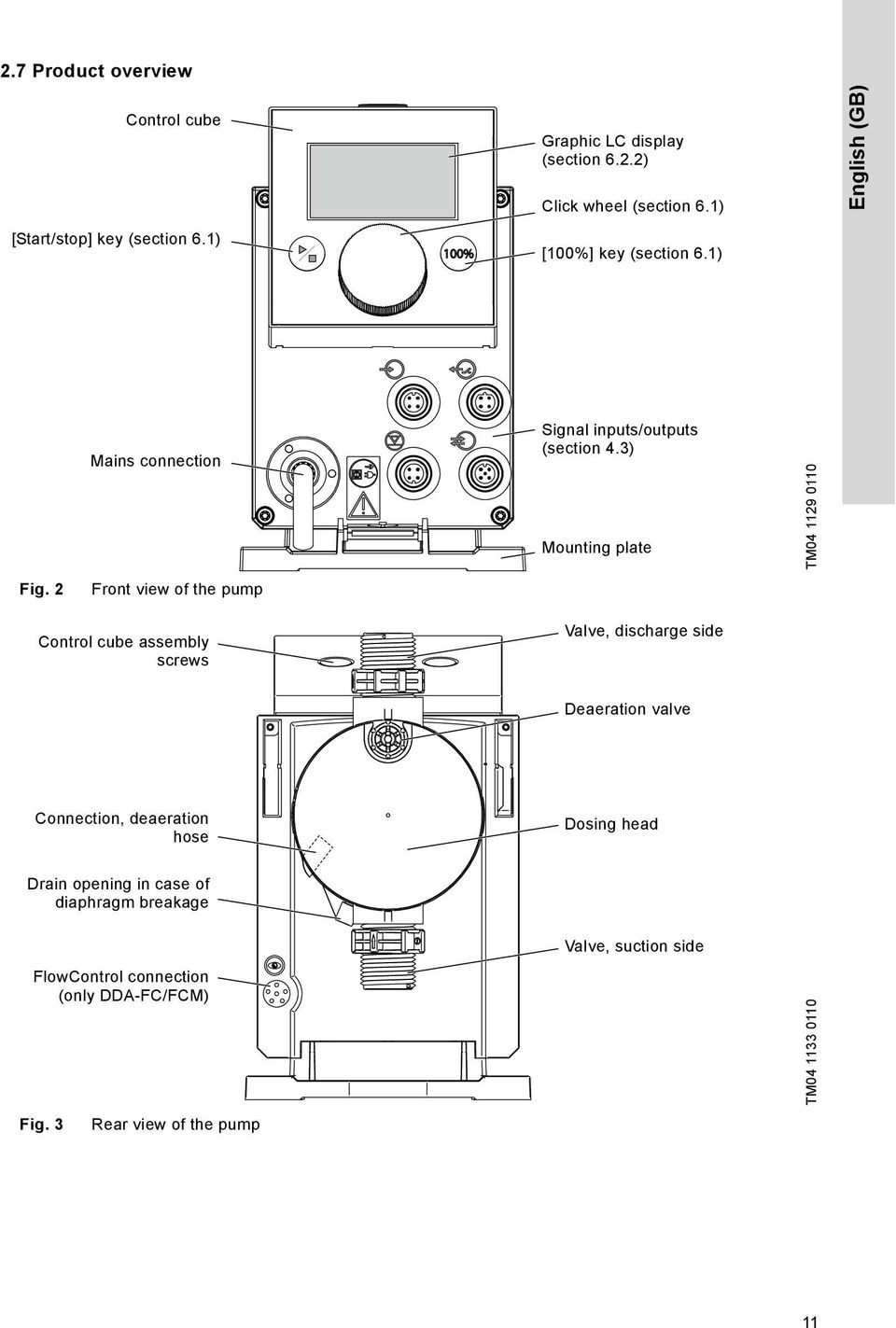
11 2.7 Product overview Control cube Graphic LC display (section 6.2.2) Click wheel (section 6.1) English (GB) [Start/stop] key (section 6.1) 100% [100%] key (section 6.1) Mains connection Signal inputs/outputs (section 4.3) Mounting plate TM Fig. 2 Front view of the pump Control cube assembly screws Valve, discharge side Deaeration valve Connection, deaeration hose Dosing head Drain opening in case of diaphragm breakage Valve, suction side FlowControl connection (only DDA-FC/FCM) TM Fig. 3 Rear view of the pump 11
12 English (GB) 3. Technical data / Dimensions 3.1 Technical data Data Mechanical data Turndown ratio (setting range) [1:X] Max. dosing capacity Max. dosing capacity with SlowMode 50 % Max. dosing capacity with SlowMode 25 % Min. dosing capacity [l/h] [gph] [l/h] [gph] [l/h] [gph] [l/h] [gph] Max. operating pressure [bar] [psi] Max. stroke frequency 1) [strokes/ min] Stroke volume [ml] Accuracy of repeatability [%] ± 1 Max. suction lift during operation 2) [m] 6 Max. suction lift when priming with wet valves 2) [m] Min. pressure difference between suction and discharge side [bar] 1 (FC and FCM: 2) Max. inlet pressure, suction side [bar] 2 Max. viscosity in SlowMode 25 % with spring-loaded valves 3) Max. viscosity in SlowMode 50 % with spring-loaded valves 3) Max. viscosity without SlowMode with spring-loaded valves 3) [mpas] (= cp) [mpas] (= cp) [mpas] (= cp) Max. viscosity without spring-loaded valves 3) [mpas] (= cp) Min. internal hose/pipe diameter suction/discharge side 2), 4) [mm] Min. internal hose/pipe diameter suction/discharge side (high viscosity) 4) [mm] 9 Min./Max. liquid temperature [ C] -10/45 Min./Max. ambient temperature [ C] 0/45 Min./Max. storage temperature [ C] -20/70 Max. relative humidity (non-condensing) [%] 96 Max. altitude above sea level [m]
![00 [l/h] 1.88 3.00 4.25 7.50 [gph] 0.50 0.78 1.13 2.00 [l/h] 0.0025 0.0120 0.0170 0.0300 [gph] 0.0007 0.0031 0.0045 0.0080 Max. operating pressure [bar] 16 10 7 4 [psi] 230 150 100 60 Max.](/docs-images/40/8456664/images/page_12.jpg "stroke frequency 1) [strokes/ min] 190 155 205 180 Stroke volume [ml] 0.74 1.45 1.55 3.10 Accuracy of repeatability [%] ± 1 Max. suction lift during operation 2) [m] 6 Max.")
13 Data Electrical data Signal input Signal output Weight/size Voltage [V] V, - 10 %/+ 10 %, 50/60 Hz Length of mains cable [m] 1.5 Max. inrush current for 2 ms (100 V) [A] 8 Max. inrush current for 2 ms (230 V) [A] 25 Max. power consumption P 1 [W] 24 5) Enclosure class IP65, Nema 4X Electrical safety class II Pollution degree 2 Max. load for level input 12 V, 5 ma Max. load for pulse input 12 V, 5 ma Max. load for External stop input 12 V, 5 ma Min. pulse length [ms] 5 Max. pulse frequency [Hz] 100 Impedance at 0/4-20 ma analog input [Ω] 15 Max. resistance in level/pulse circuit [Ω] 1000 Max. ohmic load on relay output [A] 0.5 Max. voltage on relay/analog output [V] 30 VDC/30 VAC Impedance at 0/4-20 ma analog output [Ω] 500 Weight (PVC, PP, PVDF) [kg] Weight (stainless steel) [kg] Diaphragm diameter [mm] English (GB) Sound pressure Approvals Max. sound pressure level [db(a)] 60 CE, CB, CSA-US, NSF61, GOST, C-Tick 1) 2) 3) 4) 5) The maximum stroke frequency varies depending on calibration Data is based on measurements with water Maximum suction lift: 1 m, dosing capacity reduced (approx. 30 %) Length of suction line: 1.5 m, length of discharge line: 10 m (at max. viscosity) With E-Box 13
![load for level input 12 V, 5 ma Max. load for pulse input 12 V, 5 ma Max. load for External stop input 12 V, 5 ma Min. pulse length [ms] 5 Max.](/docs-images/40/8456664/images/page_13.jpg "pulse frequency [Hz] 100 Impedance at 0/4-20 ma analog input [Ω] 15 Max. resistance in level/pulse circuit [Ω] 1000 Max. ohmic load on relay output [A] 0.5 Max. voltage on relay/analog output [V] 30 VDC/30 VAC Impedance at 0/4-20 ma analog output [Ω] 500 Weight (PVC, PP, PVDF) [kg] 2.")
14 3.2 Dimensions English (GB) G 5/8" A1 A 100% C B x Ø6 D TM Fig. 4 Dimensional sketch Pump type A [mm] A1 [mm] B [mm] C [mm] D [mm] DDA DDA 12-10/ DDA
![4 Dimensional sketch Pump type A [mm] A1 [mm] B [mm] C [mm] D [mm] DDA](/docs-images/40/8456664/images/page_14.jpg "7.5-16 280 251 196 46.5 24 DDA 12-10/17-7 280 251 200.5 39.")
15 4. Assembly and installation Note For use in Australia: Installation of this product must comply with AS/NZS3500! Certificate of suitability number: CS9431 C-tick number: N Pump assembly Install the pump in such a way that the plug can easily be reached by the operator during operation! This will enable the operator to separate the pump from the mains quickly in case of emergency! The pump is delivered with a mounting plate. The mounting plate can be mounted vertically e.g. on a wall or horizontally e.g. on a tank. It takes just a few quick steps to firmly secure the pump to the mounting plate by means of a slot mechanism. The pump can easily be released from the mounting plate for maintenance Requirements The mounting surface must be stable and must not vibrate. Dosing must flow upwards vertically Align and install mounting plate Vertical installation: Mounting plate slot mechanism must be above. Horizontal installation: Mounting plate slot mechanism must be opposite the dosing head. The mounting plate can be used as a drill template, please see fig. 4 for drill hole distances Engage pump in mounting plate 1. Attach the pump to the mounting plate support clamps and slide under slight pressure until it engages. Fig. 6 Engaging the pump Adjusting control cube position The control cube is fitted to the front of the pump on delivery. It can be turned by 90 so that the user can select to operate the pump from the right or left side. Caution Caution The enclosure class (IP65/Nema 4X) and shock protection are only guaranteed if the control cube is installed correctly! Pump must be disconnected from the power supply! 1. Carefully remove both protective caps on the control cube using a thin screwdriver. 2. Loosen screws. 3. Carefully lift off control cube only so far from the pump housing that no tensile stress is produced on the flat band cable. 4. Turn control cube by 90 and re-attach. Make sure the O-ring is secure. 5. Tighten screws slightly and attach protective caps. TM English (GB) TM Fig. 5 Locate mounting plate Make sure that you do not damage any cables and lines during installation! 1. Indicate drill holes. 2. Drill holes. 3. Secure mounting plate using four screws, diameter 5 mm, to the wall, on the bracket or the tank. Fig. 7 Adjusting control cube IP65, Nema 4X TM

16 English (GB) 4.2 Hydraulic connection Caution Risk of chemical burns! Wear protective clothing (gloves and goggles) when working on the dosing head, connections or lines! The dosing head may contain water from the factory check! When dosing media which should not come into contact with water, another medium must be dosed beforehand! Hose connection procedure 1. Push union nut and tensioning ring across hose. 2. Push cone part fully into hose, see fig Attach cone part with hose to corresponding pump valve. 4. Tighten union nut manually. Do not use tools! 5. Tighten up union nuts after 2-5 operating hours if using PTFE gaskets! 6. Attach deaeration hose to the corresponding connection (see fig. 3) and run into a container or a collecting tray. Caution Caution Faultless function can only be guaranteed in conjunction with lines supplied by Grundfos! The lines used must comply with the pressure limits as per section 3.1 Technical data! Important information on installation Observe suction lift and line diameter, see section 3.1 Technical data. Shorten hoses at right angles. Ensure that there are no loops or kinks in the hoses. Keep suction line as short as possible. Route suction line up towards the suction valve. Installing a filter in the suction line protects the entire installation against dirt and reduces the risk of leakage. Only control variant FC/FCM: For discharge quantities < 1 l/h we recommend the use of an additional spring-loaded valve (approx. 3 bar) on the discharge side for the safe generation of the necessary differential pressure. Hose Fig. 8 Note Caution Cone Tensioning ring Union nut Hydraulic connection part Pressure differential between suction and discharge side must be at least 1 bar/14.5 psi! Tighten up the dosing head screws once before commissioning and after 2-5 operating hours at 3 Nm. Installation example The pump offers various installation options. In the picture below, the pump is installed in conjunction with a suction line, level switch and multifunction valve on a Grundfos tank. Multifunction valve TM Deaeration hose Tank Suction line with empty signal TM Fig. 9 Installation example 16

17 4.3 Electrical connection The enclosure class (IP65/Nema 4X) is only guaranteed if plugs or protective caps are correctly installed! The pump can start automatically when the mains voltage is switched on! Do not manipulate mains plug or cable! English (GB) Note The mains plug is the separator separating the pump from the mains. The rated voltage of the pump, see section 2.5 Nameplate, must conform to local conditions. Signal connections Electric circuits of external devices connected to the pump inputs must be separated from dangerous voltage by means of double or reinforced insulation! GND GND 5 GND 4 3 BUS 2 BUS TM Fig. 10 Wiring diagram of the electrical connections 17

18 English (GB) Analog, External stop and pulse input Pins Function Plug type 1/brown 2/white 3/blue 4/black Analog GND/(-) ma (+) ma ma signal External stop GND X Pulse Pulse GND X Pulse Level signals: Empty signal and Low-level signal Pins Function Plug type Low-level signal X GND Pulse Empty signal X GND Pulse GENIbus, Analog output Caution Danger of damage to the product due to short circuit! Pin 1 supplies 30 VDC. Never short-circuit pin 1 with any of the other pins! Function GENIbus Relay outputs Pins 1/brown 2/white 3/blue 4/black +30 V GENI bus TXD GENI bus RXD 5/yellow/ green GND Plug type Analog output (+) ma GND/(-) ma ma signal Pins Function Plug type 1/brown 2/white 3/blue 4/black Relay 1 X X Pulse Relay 2 X X Pulse Bus FlowControl signal connection Sensor TM Fig. 11 FlowControl signal connection 18

19 5. Start-up 5.1 Setting the menu language For description of control elements, see section Turn click wheel to highlight the cog symbol. Operation 7.50 Manual l/h English (GB) 2. Press the click wheel to open the "Setup" menu. Operation 7.50 l/h Manual 3. Turn the click wheel to highlight the "Language" menu. 4. Press the click wheel to open the "Language" menu. 5. Turn the click wheel to highlight the desired language. 6. Press the click wheel to select the highlighted language. 7. Press the click wheel again to confirm the "Confirm settings?" prompt and apply the setting. Setup Language Operation mode Analog output SlowMode FlowControl active Setup Language Operation mode Analog output SlowMode FlowControl active English Deutsch Francais Espanol Italiano English Deutsch Francais Espanol Italiano Language Language Language Confirm settings? English > Manual > Actual flow > Off > English > Manual > Actual flow > Off > TM Fig. 12 Set menu language 19

20 English (GB) 5.2 Deaerating the pump The deaeration hose must be connected correctly and inserted into a suitable tank! 1. Open deaeration valve by approximately half a turn. 2. Press and hold down the [100%] key (deaeration key) until liquid flows continuously without any bubbles from the deaeration hose. 3. Close deaeration valve. Note Press the [100%] key and simultaneously turn the click wheel clockwise to increase the duration of the process to up to 300 seconds. After setting the seconds, do not press the key any longer. 5.3 Calibrating the pump The pump is calibrated in the factory for media with a viscosity similar to water at maximum pump backpressure (see section 3.1 Technical data). If the pump is operated with a backpressure that deviates or if dosing a medium whose viscosity deviates, the pump must be calibrated. For pumps with FCM control variant, it is not necessary to calibrate the pump if there is deviating or fluctuating backpressure as long as the "AutoFlowAdapt" function has been enabled (see section 6.10 AutoFlowAdapt). Requirements The hydraulics and electrics of the pump are connected (see section 4. Assembly and installation). The pump is integrated into the dosing process under operating conditions. The dosing head and suction hose are filled with dosing medium. The pump has been deaerated. 20
![Note Press the [100%] key and simultaneously turn the click wheel clockwise to increase the duration of the process to up to 300 seconds. After setting the seconds, do not press the key any longer. 5.](/docs-images/40/8456664/images/page_20.jpg "3 Calibrating the pump The pump is calibrated in the factory for media with a viscosity similar to water at maximum pump backpressure (see section 3.1 Technical data).")
21 Calibration process - example for DDA Fill a measuring beaker with dosing medium. Recommended filling volumes V 1 : DDA : 0.3 l DDA 12-10: 0.5 l DDA 17-7: 1.0 l DDA 30-4: 1.5 l V 1 = 300 ml English (GB) 2. Read off and note down the fill volume V 1 (e.g. 300 ml). 3. Place the suction hose in the measuring beaker. 4. Start the calibration process in the "Setup > Calibration" menu. 5. The pump executes 200 dosing strokes and displays the factory calibration value (e.g. 125 ml). Strokes: Strokes: Calibration 0 Calibrat. volume: ml Calibration 200 START STOP START STOP Calibrat. volume: 125ml 6. Remove the suction hose from the measuring beaker and check the remaining volume V 2 (e.g. 170 ml). V 2 = 170 ml 7. From V 1 and V 2, calculate the actual dosed volume V d = V 1 - V 2 (e.g. 300 ml ml = 130 ml). V d = V 1 - V 2 = 130 ml 8. Set and apply V d in the calibration menu. The pump is calibrated. Calibration START Strokes: 200 STOP Calibrat. volume: 130 ml Actual dosed volume V d TM
22 6. Operation 6.2 Display and symbols English (GB) 6.1 Control elements The pump control panel includes a display and the following control elements. Operation Manual [Start/stop] key Fig. 13 Keys 7.50 l/h 7.49 l/h Control panel 100% [100%] key Graphical LC display Click wheel TM Navigation In the "Info", "Alarm" and "Setup" main menus, the options and submenus are displayed in the rows below. Use the "Back" symbol to return to the higher menu level. The scroll bar at the right edge of the display indicates that there are further menu items which are not shown. The active symbol (current cursor position) flashes. Press the click wheel to confirm your selection and open the next menu level. The active main menu is displayed as text, the other main menus are displayed as symbols. The position of the cursor is highlighted in black in the sub-menus. When you position the cursor on a value and press the click wheel, a value is selected. Turning the click wheel clockwise increases the value, turning the click wheel counter-clockwise reduces the value. When you now press the click wheel, the cursor will be released again Operating states The operating state of the pump is indicated by a symbol and display colour. Key [Start/stop] key [100%] key Function Starting and stopping the pump. The pump doses at maximum flow regardless of the operation mode. Click wheel The click wheel is used to navigate through the menus, select settings and confirm them. Turning the click wheel clockwise moves the cursor clockwise in increments in the display. Turning the click wheel counter-clockwise moves the cursor counter-clockwise. Display Fault Operating state White - Green - Yellow Red Alarm Stop Standby Running Stop Standby Running Stop Standby Sleep mode (energy-saving mode) If in the "Operation" main menu the pump is not operated for 30 seconds, the header disappears. After two minutes, the display brightness is reduced. If in any other menu the pump is not operated for two minutes, the display switches back to the "Operation" main menu and the display brightness is reduced. This state will be cancelled when the pump is operated or a fault occurs. 22
23 6.2.4 Overview of display symbols The following display symbols may appear in the menus. Top row with main menus (Sect. 6.3) Operation Info Alarm Setup Operation Back Run display Running - rotates when pump is dosing Blocked drive - flashing symbol English (GB) 7.48 l/h Manual 7.48l/h Activated functions SlowMode (Sect. 6.6) FlowControl (Sect. 6.7) Key lock (Sect. 6.12) Bus (Sect. 6.15) Auto deaeration (Sect. 6.11) Operation mode Manual (Sect ) Pulse (Sect ) Analog 0/4-20 ma (Sect ) Batch (Sect ) Timer (Sect , 6.4.6) Additional display (Sect ) AR, FC variant: Target flow FCM variant: Actual flow Remaining batch volume (Batch/Timer) Input current (Analog) Time until next dosing process (Timer) Total dosed volume Actual backpressure Signal/error display External stop (Sect ) Empty signal (Sect ) Low-level signal (Sect ) Operating state (Sect ) and dosing flow 100% Running Standby Stop Deaerating Diaphragm position "out" (Sect. 7.) Diaphragm position "in" (Sect. 7.) Cable break (Sect ) E-box (Sect. 6.15) Service (Sect. 7.) TM Fig. 14 Overview of display symbols 23
24 English (GB) 6.3 Main menus The main menus are displayed as symbols at the top of the display. The currently active main menu is displayed as text Operation Status information such as the dosing flow, selected operation mode and operating state is displayed in the "Operation" main menu. Operation 7.48 l/h Manual 7.48l/h Info You can find the date, time and information about the active dosing process, various counters, product data and the service system status in the "Info" main menu. The information can be accessed during operation. The service system can also be reset from here. Info Th :34 Backpressure Counters Service 15.0bar > - ServiceKit Reset service system Software rev. V0.20 Serial no.: Product no.: Type Key: Counters The "Info > Counters" menu contains the following counters: Counters Volume Total dosed volume [l] or US gallons Operating hours Accumulated operating hours (pump switched on) [h] Motor runtime Accumulated motor runtime [h] Strokes Accumulated number of dosing strokes Power on/off Accumulated frequency of switching mains voltage on Resettable Yes No No No No TM TM Alarm You can view errors in the "Alarm" main menu. Alarm 1 Empty 2 Low level Delete alarm messages Up to 10 warnings and alarms, together with their date, time and cause, are listed in chronological order. If the list is full, the oldest entry will be overwritten, see section 8. Faults Setup The "Setup" main menu contains menus for pump configuration. These menus are described in the following sections. Setup Language English > Operation mode Pulse > Pulse memory* Analog scaling > Batch volume* 1.06 l Dosing time[mm:ss]* 7:50 Dosing timer cycle* > Dosing timer week* > Analog output Actual flow > SlowMode Off > FlowControl active* FlowControl* > Pressure monitoring* > AutoFlowAdapt* Auto deaeration Calibration > Key lock Off > Display > Time+date > Bus > Inputs/Outputs > Basic settings > 12:34 12:34 * These submenus are only displayed for specific default settings and control variants. The contents of the "Setup" menu also vary depending on the operation mode. Section TM TM
25 6.4 Operation modes Six different operation modes can be set in the "Setup > Operation mode" menu. Manual, see section Pulse, see section Analog 0-20mA, see section Analog 4-20mA, see section Batch (pulse-based), see section Dosing timer cycle, see section Dosing timer week, see section Manual In this operation mode, the pump constantly doses the dosing flow set with the click wheel. The dosing flow is set in l/h or ml/h in the "Operation" menu. The pump automatically switches between the units. Alternatively, the display can be reset to US units (gph). See section 6.13 Display Setup. Operation 3.40 l/h Manual 3.40l/h Fig. 15 Manual mode The setting range depends on the pump type: Setting range * Type [l/h] [gph] DDA DDA DDA DDA * When the "SlowMode" function is active, the maximum dosing flow is reduced, see section 3.1 Technical data. TM Pulse In this operation mode, the pump doses the set dosing volume for each incoming (potential-free) pulse, e.g. from a water meter. The pump automatically calculates the optimum stroke frequency for dosing the set volume per pulse. The calculation is based on: the frequency of external pulses the set dosing volume/pulse. Operation ml/ Pulse 3.40l/h Fig. 16 Pulse mode The dosing volume per pulse is set in ml/pulse in the "Operation" menu using the click wheel. The setting range for the dosing volume depends on the pump type: Type Setting range [ml/pulse] DDA DDA DDA DDA The frequency of incoming pulses is multiplied by the set dosing volume. If the pump receives more pulses than it can process at the maximum dosing flow, it runs at the maximum stroke frequency in continuous operation. Excess pulses will be ignored if the memory function is not enabled. Memory function When the "Setup > Pulse memory" function is enabled, up to 65,000 unprocessed pulses can be saved for subsequent processing. Subsequent processing of saved pulses can cause local increase in concentration! The contents of the memory will be deleted by: Switching off the power supply Changing the operation mode Interruption (e.g. alarm, External stop). TM English (GB) 25
26 English (GB) Analog 0/4-20 ma In this operation mode, the pump doses according to the external analog signal. The dosing volume is proportional to the signal input value in ma. Operation mode 4-20 ma 0-20 ma If the input value in operation mode 4-20 ma falls below 2 ma, an alarm is displayed and the pump stops. A cable break or signal transmitter error has occurred. The "Cable break" symbol is displayed in the "Signal and error display" area of the display. Q [%] Fig. 17 Input value [ma] 4-20 ma Analog scaling Dosing flow [%] ma Operation 6.50 ml/h 0-20mA 17.14mA [ma] TM TM Set analog scaling Analog scaling refers to the assignment of the current input value to the dosing flow. Changes of analog scaling affect also the analog output signal. See section 6.5 Analog output. Analog scaling passes through the two reference points (I 1 /Q 1 ) and (I 2 /Q 2 ), which are set in the "Setup > Analog scaling" menu. The dosing flow is controlled according to this setting. Example 1 (DDA ) Analog scaling with positive gradient: Q [l/h] I [ma] Fig. 19 Analog scaling with pos. gradient In example 1, the reference points I 1 = 6 ma, Q 1 = 1.5 l/h and I 2 = 16 ma, Q 2 = 7.5 l/h have been set. From 0 to 6 ma analog scaling is described by a line that passes through Q = 0 l/h, between 6 ma and 16 ma it rises proportionally from 1.5 l/h to 7.5 l/h and from 16 ma onwards it passes through Q = 7.5 l/h. Example 2 (DDA ) Analog scaling with negative gradient (Operation mode 0-20 ma): 7,5 Q [l/h] (I 1 /Q 1 ) (I 1 /Q 1 ) (I 2 /Q 2 ) TM Fig. 18 Analog operation mode 1, (I 2 /Q 2 ) I [ma] TM Fig. 20 Analog scaling with neg. gradient In example 2, the reference points I 1 = 2 ma, Q 1 = 7.5 l/h and I 2 = 16 ma, Q 2 = 1.3 l/h have been set. From 0 to 2 ma analog scaling is described by a line that passes through Q = 0 l/h, between 2 ma and 16 ma it drops proportionally from 7.5 l/h to 1.3 l/h and from 16 ma onwards it passes through Q 2 = 1.3 l/h. 26
27 Set analog scaling in the "Operation" menu Analog scaling can also be modified after a security prompt directly in the "Operation" menu. This is how the dosing flow is directly modified for the current flow input value. Caution 100 Q [%] Please observe that changes also have a direct effect on point I 2 /Q 2 (see fig. 21)! (I 1 /Q 1 ) (I 2 /Q 2 ) new (I 2 /Q 2 ) actual ma 20 I [ma] Fig. 21 Set analog scaling ("Operation" menu) Batch (pulse-based) In this operation mode, the pump doses the set batch volume in the set dosing time (t 1 ). A batch is dosed with each incoming pulse. TM The batch volume (e.g. 75 ml) is set in the "Setup > Batch volume" menu. The minimum dosing time required for this (e.g. 36 seconds) is displayed and can be increased. Operation mode Batch volume Dosing time[s] Analog output SlowMode Fig. 23 Batch mode Signals received during a batch process or an interruption (e.g. alarm, External stop) will be ignored. If the pump is restarted following an interruption, the next batch volume is dosed on the next incoming pulse. Operation Setup 75.0 ml Batch 43.0ml Batch > 75.0ml 36.0 Input > Off > TM TM English (GB) Batch volume Fig. 24 Batch mode t 1 t 1 Pulse Pulse Time TM In the "Operation" menu, the total batch volume (e.g. 75 ml) and the remaining batch volume still to be dosed (e.g. 43 ml) are shown in the display. Fig. 22 Batch (pulse-based) The setting range depends on the pump type: Setting range per batch Type Resolution * from [ml] to [l] [ml] DDA DDA DDA DDA * Thanks to the digital motor control, dosing quantities with a resolution of up to 1/8 of the dosing stroke volume can be dosed. 27
28 English (GB) Dosing timer cycle In this operation mode, the pump doses the set batch volume in regular cycles. Dosing starts when the pump is started after a singular start delay. The setting range for the batch volume corresponds to the values in section Batch (pulse-based). Fig. 25 t 1 t 2 t 3 t 2 Dosing timer cycle diagram Dosing time Start delay Cycle time Batch volume t 1 t 1 t3 In the event of an interruption (e.g. interruption of the mains voltage, External stop), the dosing will be stopped while the time continues running. After suspending the interruption, the pump will continue to dose according to the actual timeline position. The following settings are required in the "Setup > Dosing timer cycle" menu: Timer Batch volume Dosing time[mm:ss] Cycle time[mm:ss] Start delay[mm:ss] 125ml 1:54 3:00 2:00 Fig. 26 Dosing timer cycle The batch volume to be dosed (e.g. 125 ml) is set in the "Setup > Dosing timer cycle" menu. The dosing time required for this (e.g. 1:54) is displayed and can be changed. TM TM The total batch volume (e.g. 125 ml) and the remaining batch volume still to be dosed are displayed in the "Operation" menu. During breaks in dosing, the time until the next dosing process (e.g. 1:21) is displayed. Fig. 27 Dosing timer cycle Dosing timer week In this operation mode, up to 16 dosing procedures are defined for a week. These dosing procedures may take place regularly on one or several week days. The setting range for the batch volume corresponds to the values in section Batch (pulse-based). Fig. 28 Note Operation 125 ml Timer 1:21 MO TU WE TH FR SA SU Example for Dosing timer week function In the event of an interruption (e.g. disconnection of the mains voltage, External stop), the dosing is stopped while the time continues running. After suspending the interruption, the pump continues to dose according to the actual timeline position. The following settings are required in the "Setup > Dosing timer week" menu for each dosing procedure: TM TM If several procedures overlap, the process with the higher dosing flow has priority! Timer Procedure Batch volume Dosing time[s] Start time[hh:mm] M T W T ml :00 F S S TM Fig. 29 Setting the timer 28
29 The batch volume (e.g ml) is set in the "Setup > Dosing timer week" menu. The dosing time required for this (e.g. 39.0) is displayed and can be changed. In the "Operation" menu, the total batch volume (e.g ml) and the remaining batch volume to be dosed is displayed. During breaks in dosing, the time (e.g. 43:32) until the next dosing is displayed. Fig Analog output Weekly timer dosing (break in dosing) Fig. 31 Configure analog output The analog output of the pump is parametrised in the "Setup > Analog output" menu. The following settings are possible: Setting Output = Input Actual flow ** Backpres sure Bus control Operation 80.5 ml Timer 43:32 Output = Input Actual flow Backpressure Bus control Analog out Description of output signal The analog input signal is mapped 1:1 to the analog output (e.g. to control several pumps using one signal) Current actual flow 0/4 ma = 0 % 20 ma = 100 % see section 6.9 Flow measurement Backpressure, measured in the dosing head 0/4 ma = 0 bar 20 ma = Max. operating pressure see section 6.8 Pressure monitoring Enabled by command in Bus control, see section 6.15 Bus communication FCM Variant FC * Output signal is based on motor speed and pump status (target flow). ** Signal has same analog scaling as the current analog input signal. See Analog 0/4-20 ma. TM TM AR X X X X X * X * X X X X X Wiring diagram see section 4.3 Electrical connection. Note 6.6 SlowMode When the "SlowMode" function is enabled, the pump slows down the suction stroke. The function is enabled in the "Setup > SlowMode" menu and is used to prevent cavitation in the following cases: for dosing media with a high viscosity for degassing dosing media for long suction lines for large suction lift. In the "Setup > SlowMode" menu, the speed of the suction stroke can be reduced to 50 % or 25 %. Caution Fig. 32 In all operation modes, the analog output has a range of 4-20 ma. Exception: Operation mode 0-20 ma. Here, the analog output range is 0-20 ma. Enabling the 'SlowMode' function reduces the maximum dosing flow of the pump to the set percentage value! SlowMode Off SlowMode (50% max.) SlowMode (25% max.) SlowMode menu TM English (GB) 29
30 English (GB) 6.7 FlowControl Applies to DDA-FC/FCM control variant. This function is used to monitor the dosing process. Although the pump is running, various influences e.g. air bubbles, can cause a reduced flow or even stop the dosing process. In order to guarantee optimum process safety, the enabled "FlowControl" function directly detects and indicates the following errors and deviations: Overpressure Damaged discharge line Air in the dosing chamber Cavitation Suction valve leakage > 70 % Discharge valve leakage > 70 %. The occurrence of a fault is indicated by the 'eye' symbol flashing. The faults are displayed in the "Alarm" menu (see section 8. Faults). FlowControl works with a maintenance-free sensor in the dosing head. During the dosing process, the sensor measures the current pressure and continuously sends the measured value to the microprocessor in the pump. An internal indicator diagram is created from the current measured values and the current diaphragm position (stroke length). Causes for deviations can be identified immediately by aligning the current indicator diagram with a calculated optimum indicator diagram. Air bubbles in the dosing head reduce e.g. the discharge phase and consequently the stroke volume (see fig. 33). Requirements for a correct indicator diagram are: FlowControl function is active pressure difference between suction and discharge side is > 2 bar No interruption/pause in discharge stroke Pressure sensor and cable are functioning properly No leakage > 50 % in suction or discharge valve If one of these requirements is not met, the indicator diagram cannot be evaluated. Pressure 2 Trouble-free dosing stroke Faulty dosing stroke: Air bubbles in the dosing head Stroke length TM Fig. 33 Indicator diagram Compression phase Discharge phase Expansion phase Sensitivity In "Sensitivity" the deviation in stroke volume, which will result in an error message, is set in percent. 4 Suction phase Sensitivity Deviation Setting FlowControl The "FlowControl" function is set using the two parameters "Sensitivity" and "Delay" in the "Setup > FlowControl" menu. low approx. 70 % medium approx. 50 % high approx. 30 % 30
31 Delay The "Delay" parameter is used to define the time period until an error message is generated: "short", "medium" or "long". The delay depends on the set dosing flow and therefore cannot be measured in strokes or time. Air bubbles The "FlowControl" function identifies air bubbles > 60 % of the stroke volume. After switching to "Air bubble" warning status, the pump adapts the stroke frequency to approximately % of max. stroke frequency, and starts a special motor drive strategy. The adaptation of the stroke frequency allows the air bubbles to rise from suction to discharge valve. Due to the special motor drive strategy the air bubbles are displaced from the dosing head into the discharge line. If the air bubbles have not been eliminated after a maximum of 60 strokes, the pump returns to the normal motor drive strategy Calibration of pressure sensor The pressure sensor is calibrated in the factory. As a rule, it does not need to be re-calibrated. If specific circumstances (e.g. pressure sensor exchange, extreme air pressure values at the location of the pump) necessitate a calibration, the sensor can be calibrated as follows: 1. Set pump to "Stop" operating state. 2. Make system pressureless and flush. 3. Dismantle suction line and suction valve. Calibrating when the suction valve is installed produces incorrect calibration and can cause personal injuries and damage to property! Only carry out a calibration if this is technically required! 4. Proceed as described below to calibrate: English (GB) 6.8 Pressure monitoring Applies to DDA-FC/FCM control variant. A pressure sensor monitors the pressure in the dosing head. If the pressure during the discharge phase falls below 2 bar, a warning is generated (pump continues running). If in the "Setup > Pressure monitoring" menu the function "Min. pressure alarm" is activated, an alarm is generated and the pump is stopped. If the pressure exceeds the "Max. pressure" set in the "Setup > Pressure monitoring" menu, the pump is shut down, enters the standby state and indicates an alarm. Caution The pump restarts automatically once the backpressure falls below the set "Max. pressure"! Pressure setting ranges Type Fixed min. pressure [bar] Adjustable max. pressure [bar] DDA < DDA < DDA 17-7 < DDA 30-4 < Install a pressure-relief valve in the pressure line to provide protection against impermissibly high pressure! Plug in pressure sensor plug or select "Setup > FlowControl active" menu Prompt: "Activate FlowContr.?" FlowControl not activated Prompt: "Sensor calibration?" Prompt: "Suction valve removed?" OK Message: "Sensor calib. OK!" "Current pressure: X bar" FlowControl active, Sensor not calibrated. Sensor not calibrated. Calibration error Message: "Sensor calib. failed!" "Repeat?" Sensor not calibrated. TM Caution The pressure measured in the dosing head is slightly higher than the actual system pressure. Therefore the "Max. pressure " should be set at least 0.5 bar higher than the system pressure. If a calibration is not successfully possible, check plug connections, cable and sensor and replace defective parts where necessary. 31
32 English (GB) 6.9 Flow measurement Applies to DDA-FCM control variant. The pump accurately measures the actual flow and displays it. Via the 0/4-20 ma analog output, the actual flow signal can easily be integrated into an external process control without additional measuring equipment (see section 6.5 Analog output). The flow measurement is based on the indicator diagram as described in section 6.7 FlowControl. The accumulated length of the discharge phase multiplied by the stroke frequency produces the displayed actual flow. Faults e.g. air bubbles or backpressure that is too low result in a smaller or larger actual flow. When the "AutoFlowAdapt" function is activated (see section 6.10 AutoFlowAdapt), the pump compensates for these influences by correction of the stroke frequency. Note 6.10 AutoFlowAdapt Applies to DDA-FCM control variant. The "AutoFlowAdapt" function is activated in the "Setup" menu. It detects changes in various parameters and responds accordingly in order to keep the set target flow constant. Note Strokes which cannot be analysed (partial strokes, pressure differential which is too low) are provisionally calculated based on the setpoint value and displayed. Dosing accuracy is increased when "AutoFlowAdapt" is activated. This function processes information from the pressure sensor in the dosing head. Errors detected by the sensor are processed by the software. The pump responds immediately regardless of the operation mode by adjusting the stroke frequency or where necessary compensating for the deviations with a corresponding indicator diagram. If the target flow cannot be achieved by the adjustments, a warning is issued. "AutoFlowAdapt" operates on the basis of the following functions: FlowControl: malfunctions are identified (see section 6.7 FlowControl). Pressure monitoring: pressure fluctuations are identified (see section 6.8 Pressure monitoring). Flow measurement: deviations from the target flow are identified (see section 6.9 Flow measurement). Example of "AutoFlowAdapt" Pressure fluctuations The dosing volume decreases as backpressure increases and conversely the dosing volume increases as the backpressure decreases. The "AutoFlowAdapt" function identifies pressure fluctuations and responds by adjusting the stroke frequency. The actual flow is thus maintained at a constant level Auto deaeration Dosing degassing media can result in air pockets in the dosing head during breaks in dosing. This can result in no medium being dosed when restarting the pump. The "Setup > Auto deaeration" function performs pump deaeration automatically at regular intervals. Software-controlled diaphragm movements encourage any bubbles to rise and gather at the discharge valve so that they can be removed on the next dosing stroke. The function works: when the pump is not in the "Stop" operating state during breaks in dosing (e.g. External stop, no incoming pulses, etc.). Note 6.12 Key lock The key lock is set in the "Setup > Key lock" menu by entering a four-digit code. It protects the pump by preventing changes to settings. Two levels of key lock can be selected: Level Settings Settings + keys The diaphragm movements can displace small volumes into the discharge line. When dosing strongly degassing media, this is however virtually impossible. Description All settings can only be changed by entering the lock code. The [Start/stop] key and the [100%] key are not locked. The [Start/stop] key and the [100%] key and all settings are locked. It is still possible to navigate in the "Alarm" and "Info" main menu and reset alarms Temporary deactivation If the "Key lock" function is activated but settings need to be modified, the keys can be unlocked temporarily by entering the deactivation code. If the code is not entered within 10 seconds, the display automatically switches to the "Operation" main menu. The key lock remains active Deactivation The key lock can be deactivated in the "Setup > Key lock" menu via the "Off" menu point. The key lock is deactivated after the general code "2583" or a pre-defined custom code has been entered. 32
33 6.13 Display Setup Use the following settings in the "Setup > Display" menu to adjust the display properties: Units (metric/us) Display contrast Additional display Units Metric units (litres/millilitres/bar) or US units (US gallons/psi) can be selected. According to the operation mode and menu, the following units of measurement are displayed: Operation mode/ function Metric units US units Manual control ml/h or l/h gph Pulse control ml/ ml/ 0/4-20 ma Analog control ml/h or l/h gph Batch (pulse- or timer-controlled) ml or l gal Calibration ml ml Volume counter l gal Pressure monitoring bar psi Additional display The additional display provides additional information about the current pump status. The value is shown in the display with the corresponding symbol. In "Manual" mode the "Actual flow" information can be displayed with Q = 1.28 l/h (see fig. 34). Fig. 34 Operation 1.30 l/h Manual 1.28l/h Additional display Display with additional display TM The additional display can be set as follows: Setting Default display Dosed volume 1) 2) only DDA-FCM control variant only if indicator diagram can be evaluated (see 6.7 FlowControl) 3) only DDA-FCM/FC control variant 6.14 Time+date Description The time and date can be set in the "Setup > Time+date" menu. The conversion between summer and Caution winter time does not take place automatically! 6.15 Bus communication Depending on the operation mode: Actual flow (Manual/Pulse) 1), 2) Target flow (Pulse) Input current (analog) Remaining batch volume (Batch, Timer) Period until next dosing (Timer) Dosed vol. since last reset (see Counters on page 24) Actual flow Current actual flow 1) Backpressure Current backpressure in the dosing head 3) The bus communication enables remote monitoring and setting of the pump via a fieldbus system GENIbus communication The pump is supplied with an integrated module for GENIbus communication. The pump identifies the bus control after connecting to the corresponding signal input. The "Activate communication?" prompt is displayed. After confirmation, the corresponding symbol appears in the "Activated functions" area in the "Operation" menu. In the "Setup > Bus" menu the GENIbus address can be set from 32 to 231 and bus control can be deactivated. English (GB) Bus Bus control active Bus address 126 TM Fig. 35 Bus menu 33
34 English (GB) Profibus communication The pump can be integrated into a Profibus DP network using the additional E-box 150 (retrofitting possible for software version V2.0 and higher). Prior to installation and start-up, read the documentation delivered with the E-Box 150! The functional profile for Profibus communication and the GSD-file can be found on the product CD delivered with the E-box 150. Activate communication 1. Set the pump to operating state "Stop" with the [Start/stop] key. 2. Switch off the power supply of the pump. 3. Install and connect the E-Box 150 as described in the separate installation and operating instructions of the E-Box Switch on the power supply of the pump. The "Activate communication?" prompt is displayed. After confirmation, the "Bus" symbol appears in the "Activated functions" area of the "Operation" menu, no matter if the prompt was accepted or refused. If the prompt has been accepted, the bus control function is activated. If the prompt has been refused, bus control function can be activated in "Setup > Bus" menu. Profibus Bus control active Bus address 126 Fig. 36 Submenu for Profibus Setting the bus address 1. Enter "Setup > Bus" menu and set desired bus address from 0 to The pump needs to be restarted to initialise the new bus address. Switch off the power supply of the pump and wait for approximately 20 seconds. 3. Switch on the power supply of the pump. The pump is initialised with the new bus address. Characteristics of bus communication To start and stop the pump via Profibus, it needs to be in operating state "Running". When the pump is remotely stopped from Profibus, the "External stop" symbol is displayed and the pump switches to operating state "Standby". While bus control function is activated, the "Setup" menu only shows the "Bus" and "Key lock" submenus. The other main menus, the "External stop" function and the keys are still available. TM All operation modes (see section 6.4 Operation modes) can still be used when bus control is activated. This allows to use the bus control only for monitoring and setting the pump. In this case the "ProfibusWatchDog" (see funtional profile on E-Box product CD) should be deactivated in Profibus control, because otherwise faults in communication can stop the pump. Note The analog output can not be used while the pump is bus-controlled as both functions use the same electrical connection. See section 4.3 Electrical connection. Deactivate communication Bus control function can be deactivated in the "Setup > Bus" menu. After deactivation all submenus in "Setup" menu are available. The "Bus" symbol in the display disappears at next restart of the pump, after the E-Box plug was disconnected. Caution To change any settings manually, the bus control function must be deactivated temporarily. After deactivating the bus control function, the pump can start automatically! Before deactivating the bus control function, set the pump to operating state "Stop"! After disconnecting any plug, always refit protective cap! Communication faults Faults are only detected, if the "ProfibusWatchDog" (see funtional profile on E-Box product CD) is activated. After a communication fault is repaired, the pump can start automatically, depending on current bus control and pump settings! Before repairing any fault, set the pump to operating state "Stop"! In case of bus communication faults (e.g. communication cable break), the pump stops dosing and switches to operating state "Standby" approximately 10 seconds after the fault was detected. An alarm is triggered, detailing the cause of the fault. See section 8. Faults. 34
35 6.16 Inputs/Outputs In the "Setup > Inputs/Outputs" menu, you can configure the two outputs "Relay 1+Relay 2" and the signal inputs "External stop", "Empty signal" and "Low-level signal". Fig. 37 Inputs/Outputs menu Relay outputs The pump can switch two external signals using installed relays. The relays are switched by potential-free pulses. The connection diagram of the relays is shown in section 4.3 Electrical connection. Both relays can be allocated with the following signals: Relay 1 signal Alarm * * Stroke signal Pump dosing Pulse input ** Bus control Relay 1 Relay 2 External stop Empty signal Low-level signal Relay 2 signal Alarm Stroke signal Pump dosing * Pulse input ** Bus control Timer Cycle Timer Week In/Output Description > > NO NO NO Display red, pump stopped (e.g. empty signal, etc.) Display yellow, pump is running (e.g. low-level signal, etc.) Each full stroke * Factory setting ** The correct transmission of incoming pulses can only be guaranteed up to a pulse frequency of 5Hz. TM Pump running and dosing Each incoming pulse from pulse input Activated by a command in the bus communication See following sections See following sections Contact type NO * NO * Normally open contact NC NC Normally closed contact Timer Cycle (Relay 2) For the "Relay 2 > Timer Cycle" function, set the following parameters: On (t 1 ) Start delay (t 2 ) Cycle time (t 3 ) t 2 Fig. 38 Diagram Timer Week (Relay 2) This function saves up to 16 relay on-times for a week. The following settings can be made for each relay switching operation in the "Relay 2 > Timer Week" menu: Procedure (No.) On time (duration) Start time Weekdays External stop The pump can be stopped via an external pulse, e.g. from a control room. When activating the external stop pulse, the pump switches from the operating state "Running" into the operating state "Standby". The corresponding symbol appears in the "Signal/error display" area of the display. Caution t 1 t 1 t3 The contact type is factory-set to normally open contact (NO). In the "Setup > Inputs/Outputs > External stop" menu, the setting can be changed to normally closed contact (NC). TM Frequent disengagement from the mains voltage, e.g. via a relay, can result in damage to the pump electronics and in the breakdown of the pump. The dosing accuracy is also reduced as a result of internal start procedures. Do not control the pump via the mains voltage for dosing purposes! Only use the "External stop" function to start and stop the pump! English (GB) 35
36 English (GB) Empty and Low level signals In order to monitor the filling level in the tank, a dual-level sensor can be connected to the pump. The pump responds to the signals as follows: Sensor signal Low level Empty Caution Both signal inputs are allocated to the normally open contact (NO) in the factory. They can be re-allocated in the "Setup > Inputs/Outputs" menu to normally closed contact (NC) Basic settings All settings can be reset to the settings default upon delivery in the "Setup > Basic settings" menu. Selecting "Save customer settings" saves the current configuration to the memory. This can then be activated using "Load customer settings". The memory always contains the previously saved configuration. Older memory data is overwritten. 7. Service Pump status Display is yellow Flashes Pump continues running Display is red Flashes Pump stops When the tank is filled up again, the pump restarts automatically! In order to ensure a long service life and dosing accuracy, wearing parts such as diaphragms and valves must be regularly checked for signs of wear. Where necessary, replace worn parts with original spare parts made from suitable materials. Should you have any questions, please contact your service partner. If the diaphragm leaks or is broken, dosing liquid will escape from the drain opening on the dosing head (see fig. 3). Take suitable precautions to prevent harm to health and damage to property caused by escaping dosing liquid! Check daily whether liquid is escaping from the drain opening! 7.2 Service system According to the motor runtime or after a defined period of operation, service requirements will appear. Service requirements appear regardless of the current operating state of the pump and do not affect the dosing process. Service requirement * Since the last service system reset Fig. 39 Service soon! Motor runtime [h] * Time interval [months] * Service soon! Service now! Service soon! Please exchange diaphragm and valves! Service kit: 97xxxxxx Service now! Please exchange diaphragm and valves! Service kit: 97xxxxxx Fig. 40 Service now! The service requirement signals when the replacement of wearing parts is due and displays the number of the service kit. Press the click wheel to temporarily hide the service prompt. When the "Service now!" message appears (displayed daily), the pump must be serviced immediately. The symbol appears in the "Operation" menu. The number of the service kit required is also displayed in the "Info" menu. For media which result in increased wear, the service interval must be shortened. TM TM Cleaning If necessary, clean all pump surfaces with a dry and clean cloth. 36
37 7.3 Perform service Only spare parts and accessories from Grundfos should be used for maintenance. The usage of non-original spare parts and accessories renders any liability for resulting damages null and void. Information about carrying out maintenance can be found in the service kit catalog on our homepage ( Caution Dosing head overview Fig. 41 Risk of chemical burns! When dosing dangerous media, observe the corresponding precautions in the safety data sheets! Wear protective clothing (gloves and goggles) when working on the dosing head, connections or lines! Do not allow any chemicals to leak from the pump. Collect and dispose of all chemicals correctly! Before any work to the pump, the pump must be in the "Stop" operating state or be disconnected from the mains. The system must be pressureless! Changing the diaphragm and valves 1 Safety diaphragm 2 Flange 3 O-ring 4 Diaphragm 5 Valve on discharge side 6 Valve on suction side 7 Dosing head 8 Screws with discs 9 Cover 10 Deaeration valve 9 TM Dismantling the diaphragm and valves 1. Make system pressureless. 2. Empty dosing head before maintenance and flush it if necessary. 3. Set pump to "Stop" operating state using the [Start/stop] key. 4. Press the [Start/stop] and [100%] keys at the same time to put the diaphragm into "out" position. Symbol must be displayed (see fig. 14). 5. Take suitable steps to ensure that the returning liquid is safely collected. 6. Dismantle suction, pressure and deaeration hose. 7. Dismantle valves on suction and discharge side (5, 6). 8. Remove the cover (9). 9. Undo screws (8) on the dosing head (7) and remove with discs. 10. Remove the dosing head (7). 11. Unscrew diaphragm (4) counter-clockwise and remove with flange (2) Reassembling the diaphragm and valves 1. Attach flange (2) correctly and screw on new diaphragm (4) clockwise. Make sure that the O-ring (3) is seated correctly! 2. Press the [Start/stop] and [100%] keys at the same time to put the diaphragm into "in" position. Symbol must be displayed (see fig. 14). 3. Attach the dosing head (7). 4. Install screws with discs (8) and cross-tighten. Torque: 3 Nm. 5. Attach the cover (9). 6. Install new valves (5, 6). Do not interchange valves and pay attention to direction of arrow. 7. Connect suction, pressure and deaeration hose (see section 4.2 Hydraulic connection) 8. Press the [Start/stop] key to leave the service mode. 9. Deaerate dosing pump (see section 5.2 Deaerating the pump). 10. Please observe the notes on commissioning in section 5. Start-up! English (GB) 37
38 English (GB) 7.4 Resetting the service system After performing the service, the service system must be reset using the "Info > Reset service system" function. 7.5 Repairs After consulting Grundfos, please send the pump, together with the safety declaration completed by a specialist, to Grundfos. The safety declaration can be found at the end of these instructions. It must be copied, completed and attached to the pump. Caution The pump housing must only be opened by personnel authorised by Grundfos! Repairs must only be carried out by authorised and qualified personnel! Switch off the pump and disconnect it from the voltage supply before carrying out maintenance work and repairs! If the pump has been used to dose toxic liquids or liquids hazardous to health, the pump must be cleaned prior to dispatch! If the above requirements are not met, Grundfos may refuse to accept delivery of the pump. The shipping costs will be charged to the sender. 8. Faults In the event of faults in the dosing pump, a warning or an alarm is triggered. The corresponding fault symbol flashes in the "Operation" menu, see section 8.1 List of faults. The cursor jumps to the "Alarm" main menu symbol. Press the click wheel to open the "Alarm" menu and, where necessary, faults to be acknowledged will be acknowledged. A yellow display indicates a warning and the pump continues running. A red display indicates an alarm and the pump is stopped. The last 10 faults are stored in the "Alarm" main menu. When a new fault occurs, the oldest fault is deleted. The two most recent faults are shown in the display, you can scroll through all the other faults. The time and cause of the fault are displayed. Alarm 1 Empty 2 Low level Delete alarm messages 12:34 12:34 TM The list of faults can be deleted at the end of the list. If there is a service requirement, this appears when the "Alarm" menu is opened. Press the click wheel to temporarily close the service prompt (see section 7.2 Service system). 38
39 8.1 List of faults Faults with error message Display in the "Alarm" menu Empty (Alarm) Low level () Overpressure (Alarm) Low backpressure (/alarm *) Air bubble () Cavitation () Suct. valve leak () Disch. valve leak () Flow deviation () Possible cause Possible remedy Dosing medium tank empty Fill tank. Check contact setting (NO/NC). Dosing medium tank almost empty Discharge valve blocked Isolating valve in discharge line closed Pressure peaks due to high viscosity Max. pressure set too low (see section 6.8 Pressure monitoring) Faulty diaphragm Broken discharge line Pressure differential between suction and discharge side too low Leakage in the pressure loading valve at Q < 1 l/h Deaeration valve open Broken/leaky suction line Strongly degassing medium Tank dosing medium empty Blocked/constricted/squeezed suction line Blocked/constricted suction valve Suction lift too high Viscosity too high Leaky/dirty suction valve Deaeration valve open Leaky/dirty discharge valve Leakage in the pressure loading valve Deaeration valve open Considerable deviation between target and actual flow Pump not or incorrectly calibrated Replace valve if necessary (see section 7.3 Perform service). Check flow direction of valves (arrow) and correct if necessary. Open the isolating valve (on the discharge side). Enlarge diameter of discharge line. Change pressure setting (see section 6.8 Pressure monitoring). Change the diaphragm (see section 7.3 Perform service). Check discharge line and repair if necessary. Install additional spring-loaded valve (approx. 3 bar) on the discharge side. Close the deaeration valve. Check suction line and repair if necessary. Provide positive inlet pressure (place dosing medium tank above the pump). Enable "SlowMode" (see section 6.6 SlowMode). Fill tank. Enable "SlowMode" (see section 6.6 SlowMode). Reduce suction lift. Increase suction hose diameter. Check suction line and open isolating valve if necessary. Check valve and tighten it up. Flush system. Replace valve if necessary (see section 7.3 Perform service). Check O-ring position. Install filter in suction line. Close the deaeration valve. Check valve and tighten it up. Flush system. Replace valve if necessary (see section 7.3 Perform service). Check O-ring position. Install screen in suction line. Close the deaeration valve. Install spring-loaded valve on the discharge side. Check installation. Calibrate the pump (see section 5.3 Calibrating the pump). English (GB) 39
40 English (GB) Display in the "Alarm" menu Pressure sensor () Motor blocked (Alarm) Bus error (Alarm) E-Box (Alarm) Cable break (Alarm) Service now () Possible cause Broken "FlowControl" cable (see fig. 11) Sensor defect Pressure sensor not correctly calibrated. Backpressure greater than nominal pressure Damage to gears Check plug connection. Change sensor if necessary. Calibrate pressure sensor correctly (see section Calibration of pressure sensor). Reduce backpressure. Arrange for repair of gears, if necessary. Fieldbus communication error Check cables for correct specification and damage; replace if necessary. Check cable routing and shielding; correct if necessary. E-Box connection error Faulty E-Box Defect in analog cable 4-20 ma (input current < 2 ma) Possible remedy Check plug connection. Replace E-Box if necessary. Check cable/plug connections and replace, if necessary. Check signal transmitter. Time interval for service expired Perform service (see section 7.3 Perform service). * Depending on setting General faults Fault Possible cause Possible remedy Dosing flow too high No dosing flow or dosing flow too low Inlet pressure greater than backpressure Incorrect calibration Air in dosing head Faulty diaphragm Leakage/fracture in lines Valves leaking or blocked Valves installed incorrectly Blocked suction line Suction lift too high Viscosity too high Faulty calibration Deaeration valve open Install additional spring-loaded valve (approx. 3 bar) on the discharge side. Increase pressure differential. Calibrate the pump (see section 5.3 Calibrating the pump). Deaerate the pump. Change the diaphragm (see section 7.3 Perform service). Check and repair lines. Check and clean valves. Check that the arrow on the valve housing is pointing in the direction of flow. Check whether all O-rings are installed correctly. Clean suction line/install filter. Reduce suction lift. Install priming aid. Enable "SlowMode" (see section 6.6 SlowMode). Enable "SlowMode" (see section 6.6 SlowMode). Use hose with larger diameter. Install spring-loaded valve on the discharge side. Calibrate the pump (see section 5.3 Calibrating the pump). Close the deaeration valve. 40
41 Fault Possible cause Possible remedy Irregular dosing Liquid escaping from the drain opening on the flange Liquid escaping Pump not sucking in Valves leaking or blocked Backpressure fluctuations Faulty diaphragm Dosing head screws not tightened Valves not tightened Suction lift too high Backpressure too high Soiled valves Tighten up valves, replace valves if necessary (see section 7.3 Perform service). Keep backpressure constant. Activate "AutoFlowAdapt" (only DDA-FCM). Change the diaphragm (see section 7.3 Perform service). Tighten up screws (see section 4.2 Hydraulic connection). Tighten up valves/union nuts (see section 4.2 Hydraulic connection). Reduce suction lift; if necessary, provide positive inlet pressure. Open the deaeration valve. Flush system, replace valves if necessary (see section 7.3 Perform service). English (GB) 9. Disposal This product or parts of it must be disposed of in an environmentally sound way. Use appropriate waste collection services. If this is not possible, contact the nearest Grundfos company or service workshop. Subject to alterations. 41
42 Appendix Appendix 1 Safety declaration Please copy, fill in and sign this sheet and attach it to the pump returned for service. Note Fill in this document using English or German language. Product type (nameplate) Model number (nameplate) Dosing medium Fault description Please make a circle around the damaged parts. In the case of an electrical or functional fault, please mark the cabinet. 100% TM Please describe the error/cause of the error in brief. We hereby declare that the pump has been cleaned and is completely free from chemical, biological and radioactive substances. Date and signature Company stamp 42
43 43
44 44
45 45
46 Grundfos companies Argentina Bombas GRUNDFOS de Argentina S.A. Ruta Panamericana km Lote 34A Garin Pcia. de Buenos Aires Phone: Telefax: Australia GRUNDFOS Pumps Pty. Ltd. P.O. Box 2040 Regency Park South Australia 5942 Phone: Telefax: Austria GRUNDFOS Pumpen Vertrieb Ges.m.b.H. Grundfosstraße 2 A-5082 Grödig/Salzburg Tel.: Telefax: Belgium N.V. GRUNDFOS Bellux S.A. Boomsesteenweg B-2630 Aartselaar Tél.: Télécopie: Belarus Представительство ГРУНДФОС в Минске , Минск, ул. В. Хоружей, 22, оф Тел.: +(375) Факс: (375) [email protected] Bosnia/Herzegovina GRUNDFOS Sarajevo Trg Heroja 16, BiH Sarajevo Phone: Telefax: [email protected] Brazil BOMBAS GRUNDFOS DO BRASIL Av. Humberto de Alencar Castelo Branco, 630 CEP São Bernardo do Campo - SP Phone: Telefax: Bulgaria Grundfos Bulgaria EOOD Slatina District Iztochna Tangenta street no. 100 BG Sofia Tel Fax [email protected] Canada GRUNDFOS Canada Inc Brighton Road Oakville, Ontario L6H 6C9 Phone: Telefax: China Grundfos Alldos Dosing & Disinfection ALLDOS (Shanghai) Water Technology Co. Ltd. West Unit, 1 Floor, No. 2 Building (T 4-2) 278 Jinhu Road, Jin Qiao Export Processing Zone Pudong New Area Shanghai, Phone: Telefax: [email protected] China GRUNDFOS Pumps (Shanghai) Co. Ltd. 50/F Maxdo Centre No. 8 Xing Yi Rd. Hongqiao Development Zone Shanghai PRC Phone: Telefax: Croatia GRUNDFOS CROATIA d.o.o. Cebini 37, Buzin HR Zagreb Phone: Telefax: Czech Republic GRUNDFOS s.r.o. Čapkovského Olomouc Phone: Telefax: Denmark GRUNDFOS DK A/S Martin Bachs Vej 3 DK-8850 Bjerringbro Tlf.: Telefax: [email protected] Estonia GRUNDFOS Pumps Eesti OÜ Peterburi tee 92G Tallinn Tel: Fax: Finland OY GRUNDFOS Pumput AB Mestarintie 11 FIN Vantaa Phone: Telefax: France Pompes GRUNDFOS Distribution S.A. Parc d Activités de Chesnes 57, rue de Malacombe F St. Quentin Fallavier (Lyon) Tél.: Télécopie: Germany GRUNDFOS Water Treatment GmbH Reetzstraße 85 D Pfinztal (Söllingen) Tel.: Telefax: [email protected] Germany GRUNDFOS GMBH Schlüterstr Erkrath Tel.: +49-(0) Telefax: +49-(0) [email protected] Service in Deutschland: [email protected] Greece GRUNDFOS Hellas A.E.B.E. 20th km. Athinon-Markopoulou Av. P.O. Box 71 GR Peania Phone: Telefax: Hong Kong GRUNDFOS Pumps (Hong Kong) Ltd. Unit 1, Ground floor Siu Wai Industrial Centre Wing Hong Street & 68 King Lam Street, Cheung Sha Wan Kowloon Phone: / Telefax: Hungary GRUNDFOS Hungária Kft. Park u. 8 H-2045 Törökbálint, Phone: Telefax: India GRUNDFOS Pumps India Private Limited 118 Old Mahabalipuram Road Thoraipakkam Chennai Phone: Indonesia PT GRUNDFOS Pompa Jl. Rawa Sumur III, Blok III / CC-1 Kawasan Industri, Pulogadung Jakarta Phone: Telefax: / Ireland GRUNDFOS (Ireland) Ltd. Unit A, Merrywell Business Park Ballymount Road Lower Dublin 12 Phone: Telefax: Italy GRUNDFOS Pompe Italia S.r.l. Via Gran Sasso 4 I Truccazzano (Milano) Tel.: Telefax: / Japan GRUNDFOS Pumps K.K. Gotanda Metalion Bldg. 5F, , Higashi-gotanda Shiagawa-ku, Tokyo, Japan Phone: Telefax:
47 Korea GRUNDFOS Pumps Korea Ltd. 6th Floor, Aju Building Yeoksam-dong, Kangnam-ku, Seoul, Korea Phone: Telefax: Latvia SIA GRUNDFOS Pumps Latvia Deglava biznesa centrs Augusta Deglava ielā 60, LV-1035, Rīga, Tālr.: , Fakss: Lithuania GRUNDFOS Pumps UAB Smolensko g. 6 LT Vilnius Tel: Fax: Malaysia GRUNDFOS Pumps Sdn. Bhd. 7 Jalan Peguam U1/25 Glenmarie Industrial Park Shah Alam Selangor Phone: Telefax: Mexico Bombas GRUNDFOS de México S.A. de C.V. Boulevard TLC No. 15 Parque Industrial Stiva Aeropuerto Apodaca, N.L Phone: Telefax: Netherlands GRUNDFOS Netherlands Veluwezoom AE Almere Postbus CA ALMERE Tel.: Telefax: [email protected] New Zealand GRUNDFOS Pumps NZ Ltd. 17 Beatrice Tinsley Crescent North Harbour Industrial Estate Albany, Auckland Phone: Telefax: Norway GRUNDFOS Pumper A/S Strømsveien 344 Postboks 235, Leirdal N-1011 Oslo Tlf.: Telefax: Poland GRUNDFOS Pompy Sp. z o.o. ul. Klonowa 23 Baranowo k. Poznania PL Przeźmierowo Tel: (+48-61) Fax: (+48-61) Portugal Bombas GRUNDFOS Portugal, S.A. Rua Calvet de Magalhães, 241 Apartado 1079 P Paço de Arcos Tel.: Telefax: Romania GRUNDFOS Pompe România SRL Bd. Biruintei, nr 103 Pantelimon county Ilfov Phone: Telefax: [email protected] Russia ООО Грундфос Россия, Москва, ул. Школьная 39 Тел. (+7) , Факс (+7) , [email protected] Serbia GRUNDFOS Predstavništvo Beograd Dr. Milutina Ivkovića 2a/29 YU Beograd Phone: / Telefax: Singapore GRUNDFOS (Singapore) Pte. Ltd. 24 Tuas West Road Jurong Town Singapore Phone: Telefax: Slovenia GRUNDFOS d.o.o. Šlandrova 8b, SI-1231 Ljubljana-Črnuče Phone: Telefax: [email protected] South Africa Grundfos (PTY) Ltd. Corner Mountjoy and George Allen Roads Wilbart Ext. 2 Bedfordview 2008 Phone: (+27) Fax: (+27) [email protected] Spain Bombas GRUNDFOS España S.A. Camino de la Fuentecilla, s/n E Algete (Madrid) Tel.: Telefax: Sweden GRUNDFOS AB (Box 333) Lunnagårdsgatan Mölndal Tel.: Telefax: Switzerland GRUNDFOS ALLDOS International AG Schönmattstraße 4 CH-4153 Reinach Tel.: Telefax: [email protected] Switzerland GRUNDFOS Pumpen AG Bruggacherstrasse 10 CH-8117 Fällanden/ZH Tel.: Telefax: Taiwan GRUNDFOS Pumps (Taiwan) Ltd. 7 Floor, 219 Min-Chuan Road Taichung, Taiwan, R.O.C. Phone: Telefax: Thailand GRUNDFOS (Thailand) Ltd. 92 Chaloem Phrakiat Rama 9 Road, Dokmai, Pravej, Bangkok Phone: Telefax: Turkey GRUNDFOS POMPA San. ve Tic. Ltd. Sti. Gebze Organize Sanayi Bölgesi Ihsan dede Caddesi, 2. yol 200. Sokak No Gebze/ Kocaeli Phone: Telefax: [email protected] Ukraine ТОВ ГРУНДФОС УКРАЇНА Київ, Вул. Московська 8б, Тел.:( ) Фах.: ( ) [email protected] United Arab Emirates GRUNDFOS Gulf Distribution P.O. Box Jebel Ali Free Zone Dubai Phone: Telefax: United Kingdom GRUNDFOS Pumps Ltd. Grovebury Road Leighton Buzzard/Beds. LU7 8TL Phone: Telefax: U.S.A. GRUNDFOS Pumps Corporation West 118th Terrace Olathe, Kansas Phone: Telefax: Uzbekistan Представительство ГРУНДФОС в Ташкенте Ташкент ул.усмана Носира 1-й тупик 5 Телефон: (3712) Факс: (3712) Addresses revised Grundfos companies
48 Being responsible is our foundation Thinking ahead makes it possible Innovation is the essence ECM: The name Grundfos, the Grundfos logo, and the payoff Be Think Innovate are registrated trademarks owned by Grundfos Management A/S or Grundfos A/S, Denmark. All rights reserved worldwide.
GRUNDFOS INSTRUCTIONS. CR Monitoring. Installation and operating instructions
 GRUNDFOS INSTRUCTIONS CR Monitoring Installation and operating instructions Declaration of Conformity We Grundfos declare under our sole responsibility that the product CR Monitor, to which this declaration
Digital inductive conductivity transmitter
 Digital inductive conductivity transmitter Optimal solution for conductivity measurements in difficult fluids (polluted, dirty,...) PEEK/PPA version for CIP applications Large range of process connections
OPL BASIC. Dosing System for Professional Laundry machines. Contents
 OPL BASIC Dosing System for Professional Laundry machines Contents 1 Getting Started. Page 2 2 Installation. Page 4 3 Set Up & Operation. Page 8 4 Maintenance & Accessories. Page 10 5 Troubleshooting Page
Art.S001-S002 SOLAR MODULE WITH DELIVERY AND RETURN CONNECTIONS
 Art.S001-S002 SOLAR MODULE WITH DELIVERY AND RETURN CONNECTIONS Technical Information sheet 0001/07/Rev01 ENG FUNCTION Series S001 and S002 circulation units are applied to the primary circuit of solar
How To Control A Power Supply With A Mini Transmitter And Switch (Power Supply)
 transmitter (2 wire) / switch for continuous or On/Off Control Indication, monitoring, transmitting and continuous or On/Off control in one device Output signal 4...20 ma, 2-wire for continuous control
Liquid Level Limit Switch liquiphant T FTL 20
 Technical Information TI 64F/4/ae Liquid Level Limit Switch liquiphant T FTL 0 Level limit switch for liquids Applications The Liquiphant T FTL 0 is a level limit switch for virtually any kind of fluid
SunMaxx Solar Filling Station Operating Instructions
 SunMaxx Solar Filling Operating Instructions Content 1. Declaration of conformity... 2 2. Introduction... 2 3. Transportation and unpacking... 4 4. Mounting and commissioning... 5 5. End of operation...
Grundfos GF Solar Modules
 GRUNDFOS INSTRUCTIONS Grundfos GF Solar Modules Installation and operating instructions Grundfos GF Solar Modules Declaration of conformity.......................................... 5 English (GB) Installation
MOUNTING AND OPERATING INSTRUCTIONS
 MOUNTING AND OPERATING INSTRUCTIONS CF 51/55 1. Delivery CF 51/55-1 calculator with battery (optionally with mains power supply) - 1 wall mounting bracket - package with material for sealing, screws, wall
Proportional pressure regulators VPPE
 Proportional pressure regulators VPPE Proportional pressure regulators VPPE Product range overview Function Version Pneumatic connection Proportional pressure regulator Nominal size for pressurisation/
How To Use A Flowmeter
 INLINE flowmeter for continuous flow measurement Economic integration in pipe systems without any additional piping 3-wire frequency pulse version to directly interface with PLC s (both PNP and NPN) Connection
Oil and Coolant Circulating Heating System. Model - OCSM
 Oil and Coolant Circulating Heating System Model - OCSM Installation & Operation Manual 216280-000 REV 2 Identifying Your System The HOTSTART heating system is designed to heat fluids for use in marine
CL90i. 77-021 Please read these instructions before operating the product. 3 - Beam Self-Leveling Cross Line Laser
 3 - Beam Self-Leveling Cross Line Laser CL90i 77-01 Please read these instructions before operating the product Self-Leveling GB D F I E PT NL DK SE FIN NO PL GR CZ RU HU SK SI BG RO EE LV LT Contents
Service manual. Website: www.andico.com.au CAUTION - BEFORE SERVICING THE UNIT, READ THE SAFETY - PRECAUTIONS IN THIS MANUAL.
 Website: www.andico.com.au Service manual CAUTION - BEFORE SERVICING THE UNIT, READ THE SAFETY - PRECAUTIONS IN THIS MANUAL. - ONLY FOR AUTHORISED SERVICE PERSONNEL. MODELS: MPK1-09CR-QB8 MPK1-12ER-QB6
HERZ-Thermal Actuators
 HERZ-Thermal Actuators Data Sheet 7708-7990, Issue 1011 Dimensions in mm 1 7710 00 1 7710 01 1 7711 18 1 7710 80 1 7710 81 1 7711 80 1 7711 81 1 7990 00 1 7980 00 1 7708 11 1 7708 10 1 7708 23 1 7709 01
Multifunction devices
 devices devices devices, electronic Type Page LED multifunction displays pulse, frequency, time (DC) Codix 524 240 pulse, frequency, time (AC+DC) Codix 544 243 LCD multifunction preset counters 1 or 2
Technical data. General specifications. Indicators/operating means. 30 Hz Multiplex operation 30 Hz / n, n = number of sensors, n 5
 Model Number Single head system Features Parameterization interface for the application-specific adjustment of the sensor setting via the service program ULTRA 000 programmable switch outputs Hysteresis
Ergo-Pro Single Line Solar Station Installation and Operating Instructions
 Rp 3/4 Ergo-Pro Single Line Solar Station Installation and Operating Instructions Item No Pump type 677.21.70 WILO ST 15/6 13 2 4 11 Technical Specifications Max. operating pressure: 6 bar Max. operating
Infrarot-Bewegungsmelder IP44
 Infrarot-Bewegungsmelder IP44 infrared motion sensors IP44 ODA (weiß) slim ODA (schwarz) slim 95174 96000 ODA (weiß) ODA (schwarz) 95175 96001 Betriebsanleitung User s Manual User s Manual infrared motion
RL HW / RL HW+ / RL HGW / RL HV / RL HVPW/RL HVPW-G
 Auto-Levelling Rotary Laser Level RL HW / RL HW+ / RL HGW / RL HV / RL HVPW/RL HVPW-G 77-496 / 77-429 / 77-439 / 77-497 / 77-427/ 77-441 Please read these instructions before operating the product Auto-Levelling
Cable Plug acc. to DIN EN 175301-803, Form A
 Cable Plug acc. to DIN EN 175301-803, Form A Complete program Contact form 18 mm Also available with LED indicator Optional 4-pin version for pressure switch or impulse valves respectively Versions with
! WARNING. Before using product, read and understand instructions.
 McDonnell & Miller Installation & Maintenance Instructions MM-600G) Series FS8-W General Purpose Liquid Flow Switch OPERATION This control is an independently mounted water flow sensing device that makes
OPERATING INSTRUCTIONS. Air scrubber A600 A1200
 OPERATING INSTRUCTIONS Air scrubber A600 A1200 Introduction Dear Customer, Thank you for choosing Ermator as your supplier. We hope that the Ermator air cleaner will be to your satisfaction and meet your
LUCCI AIRFUSION QUEST II CEILING FAN
 LUCCI AIRFUSION QUEST II CEILING FAN WITH IR REMOTE INSTALLATION OPERATION MAINTENANCE WARRANTY INFORMATION CAUTION READ INSTRUCTIONS CAREFULLY FOR SAFE INSTALLATION AND FAN OPERATION. V1.0 QUEST II IR
Assisted lift operated 2/2-way solenoid valves Type EV250B
 MAKING MODERN LIVING POSSIBLE Data sheet Assisted lift operated 2/2-way solenoid valves Type EV250B EV250B with assisted lift can operate from zero and up to 10 bar differential pressure. This 2/2-way
Leak Detection System
 Instructions - Parts List Leak Detection System 311200A For detecting leaks in your diaphragm pump system. Not for use in explosive atmospheres. Part No. 234576 120 psi (0.8 MPa, 8 bar) Maximum Air Input
RI-215A Operator s Manual. Part Number: 71-0045RK Revision 0 Released: 10/3/05
 RI-215A Operator s Manual Part Number: 71-0045RK Revision 0 Released: 10/3/05 Warranty RKI Instruments, Inc., warrants gas alarm equipment sold by us to be free from defects in materials and workmanship,
Series 510 Submersible Level Transmitters
 Series 510 Submersible Level Transmitters The Series 510 Submersible Level Transmitters are solid state instruments designed for direct submergence into many types of liquid for quick, accurate and reliable
Advantium 2 Plus Alarm
 ADI 9510-B Advantium 2 Plus Alarm INSTALLATION AND OPERATING INSTRUCTIONS Carefully Read These Instructions Before Operating Carefully Read These Controls Corporation of America 1501 Harpers Road Virginia
PBX Series Quick Fit Connector Bimetallic Steam Traps
 6262100/6 IM-P626-01 ST Issue 6 PBX Series Quick Fit Connector Bimetallic Steam Traps Installation and Maintenance Instructions 1. Safety information 2. General product information 3. Installation 4. Commissioning
ALMATEC Series CX CX 10 CX 130
 ALMATEC Series CX CX 10 CX 130 Operating and Installation Instructions ought to be studied before installing the pump The ALMATEC Maschinenbau GmbH is certified as a modern, quality-orientated enterprise
Outdoor 33.6W Dual Port Passive Power-over-Ethernet Midspan For External Security Cameras and Wireless Access Points
 Outdoor 33.6W Dual Port Passive Power-over-Ethernet Midspan For External Security Cameras and Wireless Access Points Features SELV Compliant No Detection Passive Injector Gigabit Compatible Full Protection
CONTOIL DFM 8EDM. Table of contents. Mounting and operating instructions
 Mounting and operating instructions CONTOIL DFM 8EDM Table of contents Safety instructions 2 - Designed use - Installation, commissioning and operation - Operational safety - Return of the instruments
SWIMMING POOL HEAT PUMP Owners Manual
 SWIMMING POOL HEAT PUMP Owners Manual This manual refers to the 17.0kw and 21.0kw models only. The heat pump unit is sold with a 1 year warranty. In addition there is a 2 year parts warranty on the compressor
Adjustment functions for both span and shift have been incorporated
 SENSORS FOR SERIES LED Type Wafer Alignment Sensor FX-0-F FT-F9 FD-F7 EX-F70/F60 M SH-7 FD-L4 M-DW The use of a safe LED light beam now allows for high precision detection with a resolution of 0!m (.8
Series 7500 Torque Sensor
 Properties PTO (Power Take-Off) shaft with integrated torque and angle measurement Non-contact measurement system, high robustness Plug & Play solution, no additional electronics required Performance Measurement
Solid Core and Split Core Adjustable Current Status Switches CSS-O, CSS-C; CSP-O, CSP-C
 Solid Core and Split Core Adjustable Current Status Switches CSS-O, CSS-C; CSP-O, CSP-C DESCRIPTION FEATURES PRODUCT DATA Very low operating trip points LED status indication Integral DIN rail mounting
Plastic tube flowmeters Series PT/PS
 Plastic tube flowmeters Variable area flowmeter for liquids and gases Low cost, excellent readability and light weight Simple installation (flanged, threaded or socket ends for solvent or fusion welding
Float and Thermostatic Traps Series H, C and X
 Hoffman Specialty Installation & Maintenance Instructions HS-(E) and Thermostatic Traps Series H, C and X Series C & NPT Series C NPT Series X NPT Series C NPT Series H Ratings Maximum Max. Operating NPT
Machine Documentation
 Machine Documentation BELKI Oil Separator type 211 0 Tabel of contents: Machine Documention...0 Tabel of contens...1 Description...2 Specifications...3 Diagram...4 Partlist...5 Pumpdrawing...6 Part list
Duct Humidity Transmitter
 SDC-H Duct Humidity Transmitter Features Replaceable sensor element Humidity measurement for air ducts Minimum and maximum value memory 0 0V, 0 0mA or 0V, 4 0mA measuring signals selectable with jumpers
Automation System TROVIS 6400 TROVIS 6493 Compact Controller
 Automation System TROVIS 6400 TROVIS 6493 Compact Controller For panel mounting (front frame 48 x 96 mm/1.89 x 3.78 inch) Application Digital controller to automate industrial and process plants for general
TL-PS310U Single USB 2.0 Port MFP and Storage Server
 Single USB 2.0 Port MFP and Storage Server REV3.0.0 1910010947 COPYRIGHT & TRADEMARKS Specifications are subject to change without notice. is a registered trademark of TP-LINK TECHNOLOGIES CO., LTD. Other
Clear Glass Sensor. Ordering Information E3S-CR67/62. Optimum Sensor for Detecting Transparent Glass and Plastic Bottles
 Clear Glass Sensor Optimum Sensor for Detecting Transparent Glass and Plastic Bottles E3S-CR67/62 Retroreflective Sensor smoothly detects 5-mm gaps. Detects transparent bottles that have a lens effect.
Operating instructions Optical distance sensor O1D100 O1D103 704991 / 00 08 / 2012
 Operating instructions Optical distance sensor UK O1D100 O1D103 704991 / 00 08 / 2012 Contents 1 Preliminary note4 1.1 Symbols used 4 1.2 Warning signs used 4 2 Safety instructions 4 3 Functions and features
33.6W Power over Ethernet Waterproof Adapter PoE Plus Single Port Injector for Outdoor Application
 33.6W Power over Ethernet Waterproof Adapter PoE Plus Single Port Injector for Outdoor Application Features Compliant with the IEEE802.3at Standard -40 to +60 C Temperature Range Diagnostic LEDs Full Protection
with MERCURY FREE 1 HP Relays ! WARNING Before using this product read and understand instructions.
 B Installation & Maintenance Instructions MM-414 Series 150E and 157E Low Water Cut-Off/Pump Controllers For Steam Boilers and Other Level Control Applications A Typical Applications: Primary or secondary
CONTENTS. 1. CE DECLARATION OF CONFORMITY FOR MACHINES pag.11. 2. DESCRIPTION pag.12. 3. TECHNICAL SPECIFICATIONS pag.13. 4. INSTALLATION pag.
 CONTENTS 1. CE DECLARATION OF CONFORMITY FOR MACHINES pag.11. DESCRIPTION pag.1 3. TECHNICAL SPECIFICATIONS pag.13 4. INSTALLATION pag.13 5. TESTING THE AUTOMATED SYSTEM pag.19 6. MANUAL OPERATION pag.19
POSEIDON 2-29, 2-25 & 2-22 POSEIDON 2-29, 2-25 & 2-22 XT
 POSEION 2-29, 2-25 & 2-22 POSEION 2-29, 2-25 & 2-22 XT Repair Manual Index A. Safety precautions 3 B. Technical data 4 C. Structure 5-6. Service / Repair 7-23 E. Tools 24 F. Function 25-26 G. Electric
PWR-480A INSTALLATION MANUAL
 PWR-480A INSTALLATION MANUAL Datalogic Automation S.r.l. Via S. Vitalino 13 40012 - Lippo di Calderara di Reno Bologna - Italy PWR-480A Installation Manual Ed.: 12/2008 ALL RIGHTS RESERVED Datalogic reserves
Modular I/O System Analog and Digital Interface Modules
 OPERATING INSTRUCTIONS Modular I/O System Analog and Digital Interface Modules Installation Operation Maintenance Document Information Document ID Title: Operating Instructions Modular I/O System Part
Operating instructions Diffuse reflection sensor. OJ50xx 701396 / 01 07 / 2004
 Operating instructions Diffuse reflection sensor OJ50xx 7096 / 0 07 / 004 Contents Preliminary note. Symbols used Function and features Installation. Installation of the supplied mounting fixture 4 4 Electrical
Operating Instructions
 Operating Instructions Control unit Ex p > Contents 1 Contents 1 Contents...2 2 General Information...2 3 General Safety Instructions...3 4 Designated Use...4 5 Technical Data...4 6 Transport, Storage
Electronic pressure switch with display Model PSD-30, standard version Model PSD-31, with flush diaphragm
 Electronic pressure measurement Electronic pressure switch with display Model PSD-30, standard version Model PSD-31, with flush diaphragm WIKA data sheet PE 81.67 Applications Machine tools Hydraulics
Installation Instructions. Thermo Call TC3
 Installation Instructions Thermo Call TC3 1 2 # 24990A 965 082 AMP 3 4 # 98393A # 67769A sw Improper installation or repair of Webasto heating and cooling systems can cause fire or the leakage of deadly
Power Supply and Indicator Unit Type 5024-1. Fig. 1 Type 5024-1. Mounting and Operating Instructions EB 9539 EN
 Power Supply and Indicator Unit Type 5024-1 Fig. 1 Type 5024-1 Mounting and Operating Instructions EB 9539 EN Edition October 2003 Application 1 Application The Type 5024-1 Power Supply and Indicator Unit
Electronic Pressure Switch EDS 300
 Electronic Pressure Switch EDS 300 User manual Page 2 of 16 Content 1. Functions of the EDS 300...3 2. Mounting...3 3. Operating keys on the membrane keypad...4 4. Digital display...4 5. Output function...5
Installation Instructions. ThermoCall TC4. Entry/Advanced
 Installation Instructions ThermoCall TC4 Entry/Advanced Thermo Call TC4 1 2 # 24990A 965 082 AMP 3 4 # 98393A # 67769A Thermo Call TC4 5 ThermoCall TC4 Entry 1 2 3 4 5 6 7 8 9 10 11 12 sw Please refer
Electronic Pressure Switch EDS 3000
 For Your Information Electronic Pressure Switch EDS 3000 User Manual Revision: November 01, 2002 1. EDS 3000 Functions The EDS 3000 unit offers the following functions: Display pressure in psi, MPa, or
Y7230A CO 2 Alarm System
 Y7230A CO 2 Alarm System FOR CO 2 GAS DETECTION PRODUCT DATA FEATURES APPLICATION Y7230A CO 2 alarm system is used to detect gas leaking from CO 2 beverage dispensing systems and posts an alarm to occupants
2013 Wireless Video Intercom INSTALLATION GUIDE
 2013 Wireless Video Intercom INSTALLATION GUIDE INDEX System configuration and wiring VL-SWD501 System Component.. 4 VL-SWD501EX wiring schematic diagram VL-SWD501EX wiring type and length... 5.... 6 Door
Digital input modules
 8 172 TX-I/O Digital input modules TXM1.8D TXM1.16D Two fully compatible versions: TXM1.8D: 8 inputs, each with a three-color LED (green, yellow or red) TXM1.16D: As TXM1.8X, but 16 inputs, each with a
Electrical data Nominal voltage AC/DC 24 V Nominal voltage frequency
 echnical data sheet NV24A--RE Communicative globe valve actuator for 2-way and 3-way globe valves Actuating force 1000 N Nominal voltage AC/DC 24 V Control Modulating DC (0)2...10 V Variable Nominal stroke
WATER LEAK DETECTION SYSTEM WLDS-10 INSTALLATION & COMMISSIONING
 WATER LEAK DETECTION SYSTEM WLDS-10 INSTALLATION & COMMISSIONING DESCRIPTION: An electronic control panel used in conjunction with one pulse meter (water meter with pulse output proportional to flow rate)
Original instructions Tina 3A/Aps Adaptor unit
 Original instructions Tina 3A/Aps Adaptor unit ABB Jokab Safety Varlabergsvägen 11, SE-434 39 Kungsbacka, Sweden www.abb.com/jokabsafety Read and understand this document Please read and understand this
Portable Air Conditioner. OWNER S MANUAL Read these instructions before use. Model: MF08CESWW. Voltage rating: 115V~60Hz Power rating : 800W
 MODE ALARM Portable Air Conditioner OWNER S MANUAL Read these instructions before use 8 Model: MF08CESWW Voltage rating: 115V~60Hz Power rating : 800W Customer Support : 1-800-474-2147 For product inquiries
Pressure transmitter For general industrial applications Model A-10
 Electronic pressure measurement Pressure transmitter For general industrial applications Model A-10 WIKA data sheet PE 81.60 for further approvals see page 9 Applications Machine building Shipbuilding
Operating Instructions Drill rig DRU160
 Operating Instructions Drill rig DRU160 Index 000 / 001 Original operating instructions 10988825 en / 20.10.2009 Congratulations! With a Hydrostress unit from TYROLIT you have chosen a tried and tested
Ordering Information. Cylindrical Proximity Sensor E2E/E2E2
 Cylindrical Sensor E2E/E2E2 A New Series of Easy-to-use and Tough E2E/E2E2 Models Long-size E2E2 Sensor Conforms to CENELEC Ideal for a variety of applications. With a metal connector that can be tightened
RISH EM 3490 DS Dual Source Energy Meter RISH EM 3490 DS. Application : Product Features:
 Application : RISH Master 3490 DS measures important electrical parameters of Utility (in normal mode) & Generators (in Power back up) in three phase and single phase Network & replaces the multiple analog
Cooling system components, removing and installing
 Page 1 of 34 19-1 Cooling system components, removing and installing WARNING! The cooling system is pressurized when the engine is warm. When opening the expansion tank, wear gloves and other appropriate
FLOW CALCULATOR INSTRUCTION MANUAL MESURES BAMOPHOX 759 26-06-2007 759 M1 02 E MES FLOW CALCULATOR 759-02/1
 BAMOPHOX 759 E - M FLOW CALCULATOR INSTRUCTION MANUAL MESURES 22, Rue de la Voie des Bans - Z.I. de la Gare - 95100 ARGENTEUIL Tél : (33) 01 30 25 83 20 - Web : www.bamo.fr Fax : (33) 01 34 10 16 05 -
Addendum to the Operating Instructions
 Drive Technology \ Drive Automation \ System Integration \ Services Addendum to the Operating Instructions MOVIMOT with AS-Interface and AC Motor DT/DV Unit Replacement MOVIMOT MM..C -> MM..D with MLK3A
Technical data. General specifications. Indicators/operating means. Electrical specifications Operating voltage U B Power consumption P 0 Interface
 Release date: 06-0- 09: Date of issue: 06-0- 009_eng.xml Model Number Single head system Features Parameterization interface for the application-specific adjustment of the sensor setting via the service
Operating Instructions Bedienungsanleitung Mode d emploi
 Operating Instructions Bedienungsanleitung Mode d emploi DW 400 www.bron-kobold.com Operating instructions DW 400 Before use Please read all the information contained in these operating instructions carefully.
USER S MANUAL HSC-24A
 AIRREX AIR CONDITIONER USER S MANUAL HSC-24A Thank you for purchasing an AIRREX AIR CONDITIONER. BEFORE operation please read this user s manual carefully. Keep this manual readily available. It is ESSENTIAL
CG-1171-20 PTFE Diaphragm Liquid Transfer Pump
 3800 N. Mill Road Vineland, NJ 08360 Phone: 800.843.1794 Fax: 800.922.4361 CG-1171-20 PTFE Diaphragm Liquid Transfer Pump This is the safety alert symbol. It is used to alert you to potential personal
Doro PhoneEasy 331ph
 Doro PhoneEasy 331ph 1 2 6 3 4 5 English 1 Ringer indicator 2 Hanging Hook for Handset 3 Redial function 4 Volume control 5 Flash button/programming 6 Speed dial memories This device is intended for the
DIAMOND Retractable Rodding Robot Model SPRAYROD-R
 2004-12-21 2 1 (23) DIAMOND Retractable Rodding Robot Model SPRAYROD-R 2004-12-21 2 2 (23) Table of contents 1 TECHNICAL DESCRIPTION...4 1.1 MAIN DETAILS...5 1.2 COMPONENTS DESCRIPTION...5 1.2.1 Pneumatic
Cross-beam scanning system to detect slim objects. 100 mm 3.937 in
 891 Object Area Sensor General terms and conditions... F-17 Related Information Glossary of terms... P.1359~ Sensor selection guide...p.831~ General precautions... P.1405 PHOTO PHOTO Conforming to EMC
DALI RC BASIC SO. Control unit Operating instructions
 DALI RC BASIC SO Control unit Operating instructions Contents Safety... 4 General instructions 4 Safety instructions 4 Description... 5 Purpose and application 5 Function 5 Light control 5 Brightness
Conlift1, Conlift2, Conlift2 ph+
 GRUNDFOS DATA BOOKLET Conlift1, Conlift2, Conlift2 ph+ Small lifting stations 50 Hz CONLIFT1, CONLIFT2, CONLIFT2 ph+ Table of contents 1. Product overview 3 Conlift for condensate applications 3 Applications
Doc.No. NDP 192U-02. Electric Pump Controller CE-124P. Instruction Manual
 Doc.No. NDP 192U-02 Electric Pump Controller CE-124P Instruction Manual 1. Parts Name and Function 1) POWER LED Indicate that CE-124P is powered up. 2) START/STOP KEY (SELECTOR KEY) Used to start and stop
Inductive sensor NI10-M18-Y1X-H1141
 ATEX category II 1 G, Ex zone 0 ATEX category II 1 D, Ex zone 20 SIL2 as per IEC 61508 Threaded barrel, M18 x 1 Chrome-plated brass DC 2-wire, nom. 8.2 VDC Output acc. to DIN EN 60947-5-6 (NA- MUR) M12
Series 6000 Torque measured metal bellow coupling
 Properties Free of float metal bellow coupling with integrated torque measurement Non-contact measurement system, high robustness High torsional stiffness Limited torque of inertia Performance Measurement
A1000 Cheat Sheet (Open Loop Vector)
 A1000 Cheat Sheet (Open Loop Vector) The following procedure is a supplement to supplied with this equipment and will guide the user in properly wiring the A1000 and. It will also show the user how to
TMS TANK MANAGEMENT SYSTEM
 TMS TANK MANAGEMENT SYSTEM Page 1 of 9 Operating Instructions GENERAL The Tank Management System is a bespoke design to control, monitor and accommodate efficient storage and dispensing of TMS. FUNCTIONS
Montaj ve işletme kılavuzu Инструкция по монтажу и эксплуатации
 7590 Electronic Lap Counter Montage- und Betriebsanleitung Assembly and instructions Instructions de montage et d utilisation Instrucciones de uso y montaje Instruções de montagem e modo de utilização
Input signal Maximum Range Accuracy. Thermocouple E -50 to 700 C (-58 to 1832 F) ±1 C
 F4 Process Controller Installation and Operation Guide SAFETY ALERTS The symbols below are used on the equipment and throughout this document to draw the user s attention to important operational and safety
SVC400P/SVC800P. 4/8 Camera Live Tracking Vehicle DVR Installation Manual. Version 1.0
 SVC400P/SVC800P 4/8 Camera Live Tracking Vehicle DVR Installation Manual Version 1.0 1. MAIN FEATURES... 2 2. PRODUCT OVERVIEW... 2 3. DIMENSIONS... 4 4. PACKAGE CONTENTS... 5 5. MOUNTING AND ENVORNMENTAL
aseries A13B Mini Bullet Camera User Manual
 aseries A13B Mini Bullet Camera User Manual Thank you for purchasing our product. If there are any questions, or requests, please do not hesitate to contact the dealer. This manual applies to the MicroView
Installation and Operation Instructions Domestic hot water modules: FriwaMidi DN 20 FriwaMaxi DN 25
 PAW GmbH & Co. KG Böcklerstr. 11, D-31789 Hameln, Germany Phone: +49-5151-9856-0, Fax: +49-5151-9856-98 E-mail: [email protected], Web: www.paw.eu Installation and Operation Instructions Domestic hot water modules:
www.kem-kueppers.com [email protected] Certified according to DIN EN ISO 9001 Technical Datasheet TRICOR Series Mass Flow Meters
 www.kem-kueppers.com [email protected] Certified according to DIN EN ISO 9001 Technical Datasheet TRICOR Series Mass Flow Meters Description The Tricor Mass Flow Meters measure simultaneously mass
Pressure monitoring equipment for oil-sf 6. bushings, type GOEK
 Pressure monitoring equipment for oil-sf 6 bushings, type GOEK Installation and maintenance guide 5693 827-6 en, Rev. 3, 2002-01-30 This document must not be copied without our written permission, and
OEM Pressure Transmitters for heavy-duty applications, Type MBS 1200 and MBS 1250
 MAKING MODERN LIVING POSSIBLE Data sheet OEM Pressure Transmitters for heavy-duty applications, Type MBS 1200 and MBS 1250 The compact OEM pressure transmitter programme is designed for use in severe hydraulic
SENSORS. Fiber Optic Sensors - S70. Advanced fiber optic amplifiers for high speed and low contrast applications
 Fiber Optic Sensors - S7 Advanced fiber optic amplifiers for high speed and low contrast applications DIN rail mountable models with dual digital displays speed models: 2 μs...5 ms Super high speed models:
FCC COMPLIANCE STATEMENT FOR AMERICAN USERS
 FCC COMPLIANCE STATEMENT FOR AMERICAN USERS This equipment has been tested and found to comply with the limits for a CLASS A digital device, pursuant to Part 15 of the FCC Rules. These limits are designed
MCR1900 Media Converter 19-Slot Chassis
 MCR1900 Media Converter 19-Slot Chassis Installation Guide Part #5500304-11 Copyright Statement This document must not be reproduced in any way whatsoever, either printed or electronically, without the
Mounting instructions. Junction box VKK2R-8 DIGITAL. A1145-1.0 en
 Mounting instructions Junction box VKK2R-8 DIGITAL VKK2R-8 DIGITAL 3 Contents Page Safety instructions... 4 1 Introduction and appropriate use... 7 2 Mechanical construction... 8 2.1 Mounting... 9 3 Electrical