
Best Practices for Sales Managers
|
|
|
- Beverly Cobb
- 10 years ago
- Views:
Transcription
1 Best Practices for Sales Managers If you re a sales manager, Salesforce CRM can change your life with better ways to predict revenues, manage your deals and your people, and stay on top of business. The best practices below are based on what we ve learned from thousands of successful customers. Use them to explore how you can get the most from Salesforce CRM. Overview for sales managers Understanding the basic building blocks of Salesforce CRM 9 reasons why sales manager love Salesforce CRM 13 reasons sales reps love Salesforce CRM Optimize your lead process 6 proven ways to generate more leads 5 steps to effective lead management 9 tips for using lead scoring to close more deals Optimize your sales process 8 steps to unlocking your pipeline with opportunities 5 simple steps to reports and dashboards Become even more productive Tips for using incentives and awards for boosting adoption Turbo-charge customer communications with templates Customizable forecasting: What s in it for you? 4 steps to deciding if territory management is right for you 8 keys for mobile CRM success Business strategy How to measure and increase customer loyalty 5 secrets to building a customer-centric business For business success, mind your metrics

2 Understanding the basic building blocks of Salesforce CRM Do you want to make your reps more efficient, your managers more effective, and watch your bottom line go off the charts? With Salesforce CRM, thousands of customers have done just that. To reap all the benefits of Salesforce CRM, make sure your users understand the basic building blocks of the application. It s critical when CRM projects underperform it s usually not because of technology, but because reps don t use the application. When we asked around to find out why, we found that some customers just weren t prepared for all the power of Salesforce CRM and didn t understand how to work with application s basic building blocks, which we call objects. In this document, we ll introduce these objects, provide examples, and show how they help you manage your pipeline like never before. You ll learn to: Understand the data objects Understand your pipeline Reap the benefits Abstract To take advantage of all Salesforce CRM has to offer, your sales reps and managers need to understand how to use the application to manage each deal. It s the key to accurately predicting revenue, managing your people, and continuously improving sales performance. By Sylvia Lehnen Understand the data objects The graphic below shows an overview of the basic objects and how they relate to each other. As reps work their deals, these objects hold all the data related to those deals, from the beginning to the end of every sales cycle. These objects are the basis of well-designed, proven sales process that ensures that all information is in one place and makes it easy for reps to manage their own deals and for managers to get complete insight into all deals and customers. Of course, you can customize the process to meet your own needs; for example, some organizations don t use leads.
3 Understanding the basic building blocks of Salesforce CRM Leads A lead object is a person or a company that might be interested in your product or service; for example, someone a rep met at a conference or who filled out a Web form. Because leads aren t connected to other objects, reps can create new leads without worrying about data quality. If the rep qualifies a lead and decides to pursue it, the lead is converted, which automatically transforms it into three objects: an account, a contact, and an opportunity. Accounts The account object represents a company. You can create account records for prospects, customers, competitors, partners, or any other entities that makes sense for your business. An account record contains or connects to all information about your interactions with the company, such as inprogress and completed deals, your points of contact, and records of past interactions. Think of accounts as your information backbone, with every other object related to the account. Contacts The contact object stores information about people who work at the companies represented by the account object. A contact record contains all relevant information about the person, such as phone numbers, title, role in a deal, and much more. With contacts, you can capture all the personal information to help you develop the relationships that are so important in sales. When a rep converts a lead, the information in the lead is automatically transferred to the contact. As your engagement with a company widens and your reps meet more people, they can keep creating additional contacts associated with the corresponding account record. Opportunities The opportunity object contains the information for every deal you re tracking, such as deal size and expected close date. The opportunity object is at the core of your sales process. By managing it correctly, you ll get the most value from your investment in Salesforce CRM. To gain visibility into your pipeline, you need to make sure that your reps diligently track their deals and update the opportunity fields with accurate information. This process makes everyone s life easier. Sales managers will be able to see how the sales organization is performing in real time, and the sales reps won t have to spend hours putting together reports and sales projections. Updating the opportunity object is so important that many organizations insist that, If it isn t in Salesforce, it doesn t exist. Activities Activities consist of the tasks, events, calls, and s that make it possible to track every customer interaction. Did you just have a phone conversation in which the customer agreed to certain terms and conditions of an in-progress deal? Click Log a Call on the opportunity record to document any BEST PRACTICE 2

4 8 steps to unlocking your pipeline with opportunities agreements. Did a customer ask you to send some collateral? Log a task so that you won t forget. Tasks and s can be fully synchronized with Microsoft Outlook. Example of how objects are used Let s say Jenna, a sales rep for Baci Communications, meets Jason from Red Corp. at a conference. Jason is interested in Baci s switching equipment and gives Jenna his business card. Here s how Jenna would proceed: 1. In Salesforce CRM, Jenna creates a lead with Jason s contact information. 2. She schedules follow-up calls with Jason and his boss to confirm that the product is a good fit and that Red Corp. has the necessary budget. 3. In Salesforce CRM, Jenna converts Jason s lead, resulting in a contact, an account, and an opportunity. The app automatically converts Jason s information into a contact, creates an account for Red Corp., and creates an opportunity for the switching equipment. Jenna also manually adds another contact with information about Jason s boss. 4. Jenna then enters all the information about the opportunity that will keep the deal on track. As the deal progresses, she regularly updates that information. For example, when Red Corp. decides it needs additional equipment, she updates the projected deal value and creates an additional opportunity. 5. Each time she has contact with Red Corp. a meeting, an , a call Jenna creates an activity so that all communications are documented in a single place. As a result, both Jenna and her boss can always review all interactions to date. Understand your pipeline Once qualified leads are converted into opportunities (step 3 above), they feed the sales pipeline. Reps can also create opportunities directly, without going through the lead process. When all reps use the opportunity object correctly, they can track their own deals, along with all communications with their prospects, with various dashboards, reports, and reminders. Sales managers can track the deals of reps that report to them to identify possible bottlenecks and decide where additional resources are needed. And the VP of sales can see the company s entire pipeline to spot emerging trends and forecast with confidence. With the process that a rep follows in mind, let s take a look at the big picture of what happens as an opportunity moves through the sales stages. Every opportunity includes fields to track critical information about each deal, such as the deal amount (or deal size), projected deal close date, and probability of close. BEST PRACTICE 3

5 8 steps to unlocking your pipeline with opportunities Here s an overview of the most important fields in the opportunity object: Opportunity owner is the name of the rep responsible for the deal. Correctly assigning owners lets the sales manager know the performance of every rep and sales manager. It s the first step toward managing sales productivity. Opportunity name reflects what the deal entails. Your company probably sells multiple products and services and may even uses multiple discount structures. Although there are advanced features for product and pricing management, it will help to simply adopt a consistent opportunity naming convention. Unless you use the product and pricebook objects, we recommend that your opportunity name contains account name, product, and price for example, Acme Inc.-Blue Series Router XT6800-$25,000. If you do use the product object, put all products into a single opportunity. We also recommend creating separate opportunities for every product or service. For example, if Acme sells installation services in addition to routers, it could create a separate opportunity named Acme-Blue Series Router XT6800 Installation-$2,500, instead of just adding that amount to the total. Creating separate opportunities gives you a better, more differentiated view of your business, so you can run reports that show which products sell best, for which regions, and so on. Amount reflects how much revenue the deal will bring in, which typically equals the selling price. Of course, as your deal progresses, you can keep tweaking the amount field depending on where you are with your negotiations. It s vital that the amount field is accurate at opportunity close because that s the number that will flow into all your closed business reports. Close date reflects when the deal is expected to complete. Keeping your close dates accurate will give you greater visibility into the timing of your revenue inflows. Stage reflects where you are in the deal cycle. For example, Prospecting, Value Proposition, and Negotiation/Review are some of the names for the stages we use internally at salesforce.com; be sure to name your stages so they reflect your own sales process. As the deal progresses, reps update the stages. Each successive stage should be associated with a higher probability of closing the deal, which is recorded in the Probability field. Probability reflects the chance of successful deal close. Salesforce CRM automatically assigns default probabilities of close to each stage. As you keep honing your sales process, you ll tweak those probabilities to better reflect your business. For additional best practices for managing your pipeline, see the Best Practice 8 steps to unlocking your pipeline with opportunities. Reap the benefits When your reps correctly manage their sales pipelines, you ve got the basis for success with Salesforce CRM. You can now create dashboards and reports to analyze your pipeline including the progress toward sales goals, which reps are most successful, how long it takes to convert deals, where deals are getting stuck, your win/lost trends, and much more. BEST PRACTICE 4

6 8 steps to unlocking your pipeline with opportunities From these dashboards, you can drill down to see the progress on any single deal to decide whether additional effort is needed to help a deal along. The bottom line: All the information you need to increase your bottom line is always at your fingertips. Summary Be sure your managers and your reps understand the basic model for Salesforce CRM, the objects that hold critical information, and their role in entering that information to bring those objects to life. This process is the secret to getting more business and closing more deals. It s also the basis for using more advanced features in Salesforce CRM to continually improve your process and your sales performance. For More Information Contact your account executive to learn how we can help you accelerate your CRM success. BP_WhatYouNeed2Understand_

7 9 reasons why sales managers love Salesforce CRM With Salesforce CRM, managers can truly own the sales process, with total visibility into all information about prospects and customers, all in one place. They can see the status of their pipeline, deals in progress, projected revenues, and the performance of their reps. They can also stay on top of emerging trends and move quickly to take advantage or avoid mistakes. With this information, they can easily identify which deals need help, which reps are doing well, who needs coaching, and what it all means to the bottom line. Here s what managers get with Salesforce CRM: 1. Decision support Managers have the information to quickly prioritize deals or customer issues. Because the team s pipeline is in front of them 24/7, they can plan ahead, set targets, and strategize on reaching quotas. 2. Support for coaching team members Managers can see when a rep needs assistance, either in general or with a specific opportunity. With this information, they can better understand customers goals and issues. Of course, the application also shows where team members excel, so managers can encourage effective behavior. 3. Advanced forecasting Because the entire team s opportunities are updated and aggregated in the application, there s no more need for Excel spreadsheets. Managers can review previously submitted forecasts and update or override forecasts. 4. On-demand reports Managers can run reports in real time no waiting for team submissions. Current reports on accounts, opportunities, team member tasks, and activities performed are always available. 5. Dashboards Managers can get at-a-glance status information about their most critical business metrics with color-coded dashboards. For example, dashboards can show: User adoption Sales goals and metrics Support and service metrics Abstract Managing all aspects of sales productivity takes work. By providing 360-degree visibility into the sales process, however, Salesforce CRM makes that work easier and more effective than ever before. By Ly Townsend 6. Trending analysis and benchmarking Thanks to real-time reports and dashboards, it s never been easier to develop and track a team s short- and long-term business goals and key performance indicators (KPIs). 7. Lead management analysis Managers can see the percentage of qualified leads, how long it takes to convert them, and where leads are coming from. They can also see which sales reps are most effective at converting leads and use that information to make the most of their teams skills.

8 9 reasons why sales managers love Salesforce CRM 8. Opportunity management analysis By quickly searching through weeks or quarters for a side-byside analyses of team numbers, managers can see where opportunities were won or lost and what issues should be tackled right away. 9. Activity management analysis Managers can evaluate sales activities at a glance, including outbound calls, s, follow-up conversations, and more. Activities can help ensure that the biggest deals and highest-priority customers receive the most attention. For More Information Contact your account executive to learn how we can help you accelerate your CRM success. BP_9ReasonsManagersLoveSF_
9 13 reasons sales reps love Salesforce CRM What s the main reason CRM projects fail? According to experts, the most common problem is insufficient user adoption. One of the built-in advantages of Salesforce CRM is that the user experience is intuitive and delivers features that make a sales rep s life easier. It s these benefits that make Salesforce CRM a sales effectiveness tool for your reps. People naturally resist change, however, so you ll find it helpful to communicate early and often with your users, to tell them what s in it for them. Also, be sure to listen. By incorporating the feedback from your users, you can get a great head start on adoption. Here s what reps get with Salesforce CRM: 1. Better visibility into customer information Reps can see all By Matt Jadhav their accounts, contacts, opportunities, tasks, and events in a single place. It means convenience, always being organized, and a 360-degree view of the customer. It means no more paper folders, Excel spreadsheets, or sticky notes it s all in Salesforce CRM. 2. Easy account planning Reps can do their own account planning. Because reps can see their customers history, they can develop an account strategy and an action plan, complete with to-do tasks. Reps can also create reminders of follow-up activities on specific dates. Finally, they can see the amount of time committed to each account and the outcome of their efforts. 3. Better time management Reps can better prioritize their days and manage their activities. They can see their calendars and upcoming tasks on their home pages. And by checking the Opportunities view in Salesforce CRM, they can focus on and prioritize current opportunities. 4. Reports Reps can run their own reports, including the following: Accounts they haven t visited in a while Opportunities in the pipeline, including won opportunities and lost opportunities Products they ve sold Activities and tasks they ve completed Abstract Regular use of Salesforce CRM is important to driving full adoption. To achieve this goal, sales reps need to know how the application benefits them, day after day. The bottom line: Salesforce CRM is not just a tracking tool it s a sales effectiveness tool. 5. Dashboards Reps can create their own dashboards to see how they re doing at a glance. With dashboards, they can see the information that s critical to them, in various graph formats. They can also designate red, yellow, and green thresholds to show progress toward their goals. 6. Trending analyses Reps can see selling trends and use this information to generate more sales. With trending analysis, it s possible to calculate the win/loss ratio on opportunities, see monthly trends with opportunities in the pipeline, see the types of activities the rep does most, and see the number of closed deals versus quota.

10 13 reasons sales reps love Salesforce CRM 7. Opportunity forecasts Because all opportunities are updated in Salesforce CRM, reps can see where sales are coming in, what they forecast for previous periods, and where they can sell more. They no longer have to update Excel spreadsheets and mail their forecasts to their managers. Their managers will be happy as well they can edit the forecasts without needing additional spreadsheets. 8. templates Reps can communicate more easily and consistently with their customers. Salesforce CRM provides standard templates such as Introductory Sales Call, Welcome Customer, and Thank You for Your Business that can be easily edited and sent to multiple contacts. 9. Easy data updates With the click of a button, reps can request that their contacts update their contact information. As with other templates, it s easy to customize this stay-in-touch . When the contact responds, reps can decide whether to accept the updated information. 10. Easy collaboration Reps can share information with their team members easily through Salesforce Chatter. That makes it easy to communicate about changes such as territory realignment, information needs to be passed to the next account owner, or anything else. Reps can add team members to either accounts or opportunities. 11. Built-in record search and create Reps can quickly create or search for the records they need. They can also add new leads, accounts, contacts, and opportunities with a single click. 12. Outlook integration Being able to synchronize contacts, tasks, and calendar events between Microsoft Outlook and Salesforce CRM is a huge boon to productivity. Reps no longer have to send s twice. s sent from Outlook can also be added as a record in Salesforce CRM, and Salesforce CRM can be accessed from Outlook folders. 13. No more micromanagement Because managers can easily see histories, they can look in the application for pipeline information instead of constantly asking their reps. Also, accountability issues are easily resolved because reps always know what is assigned to them. For more information Contact your account executive to learn how we can help you accelerate your CRM success. BP_13Reasons2LoveCRM_

11 6 proven ways to generate more leads Few things are more vital to a business than generating leads and future sales. But traditional marketing efforts to generate leads have been very costly. One way to get more from your marketing efforts at a lower cost is to meet your customers where they are on the Internet. With Salesforce CRM, you can automatically capture leads when people find your site and fill out your Web forms. You can then route those leads to your reps for immediate follow up. Because consumer behavior changes constantly, so do lead-generation opportunities. The latest opportunities for getting leads come from social networking sites. For that reason, it s important to revisit your lead capture strategies periodically to take advantage of evolving consumer behavior and technical trends. Abstract Capture more leads and follow up on them more efficiently with Salesforce CRM. This document covers the tools and resources that will turbocharge your lead-generation efforts. By Kirti Patel Here s are 6 ways Salesforce CRM can help you get more leads, process them more effectively, and refine your lead-generation efforts: 1. Simplify lead capture from tradeshows and conferences If your business participates in such events, you know they re a great tool for generating interest and lots of business cards. You also know that getting all those contact details into the application can be time-consuming and prone to errors. No more! By using applications such as CardLasso, you can automatically transcribe business cards into leads. Instead of wasting time typing in contact information, your reps can be calling new leads. 2. Use Web-to-lead functionality People who visit your website are already interested in your product or service. You can capture visitor information automatically to create leads in Salesforce CRM, ready for your reps to qualify. When using Web-to-lead, keep in mind the following points: Know your target audience Before creating your Web-to-lead form, think about what information you want to collect in standard and custom fields during the initial contact. Taking the time to define these details also helps define your internal process. For example, if a lead is interested in a particular product, you can use assignment rules or queues to assign that lead to a product expert. Consider where and how much When designing your form, decide where to place the input fields and how much information to ask for. Usability tests show that contact information fields near the bottom of forms generate more leads than those near the top. Also, don t ask people for too much personal information at the first contact it s the most common reason people don t complete forms. Don t be afraid to multiply Use several forms to capture different types of information, depending on where the form appears. For example, you may want to collect different information in a Contact me form than in an Event Registration form.

12 6 proven ways to generate more leads 3. Market where your prospects are looking There are many tools both free and available for a fee to help you make sure people find your site when they search. Use Google AdWords Capture prospects that use Google to search for your designated keywords and generate leads automatically. Then segment those leads so your reps can follow up quickly. 4. Check the AppExchange Look for apps that will enhance your SEM efforts. For example, the free edition of the app SEO for Salesforce automatically connects to intelligence data through Google Analytics. Use this information to track lead origins and report by search engine, search type, keyword, and campaign through your entire sales cycle. 5. Use the social cloud Be ready to take advantage of the latest trend in marketing using social networking and salesforce.com s tools to help you capture leads from those areas. For example, check out AppExchange apps that help you promote your product through Twitter campaigns and automatically capture leads from Twitter, such as Toucan CRM. 6. Evaluate your lead sources In the past, it was difficult to see which lead sources performed best. With the analytics functionality of Salesforce CRM, it s easy to track how lead sources perform, so you can invest in those marketing techniques that get the best results. For example, check out the lead and opportunity management dashboards on the AppExchange. For More Information Contact your account executive to learn how we can help you accelerate your CRM success. BP_LeadGeneration_

13 5 steps to effective lead management Leads are the people who are interested in your product and service. They re the life blood of any business converting leads to loyal customers is what it takes to stay in business and thrive. By managing your leads in a systematic and structured way, you can increase both the number of leads you generate and how many of those leads you convert. The following 5 steps can help you increase your pipeline, make sure you focus on the right leads, and track what works and what doesn t: 1. Align sales and marketing 2. Capture more leads 3. Keep data clean 4. Work leads efficiently 5. Track lead-generation efforts Abstract Fine-tune your lead management process to get more leads and then make the most of them. Step #1: Align sales and marketing You spend lots of resources developing leads. Now make the most of those efforts by making sure marketing and sales work together so no lead is overlooked or dropped. Align sales and marketing, grow your pipeline, shorten your sales cycle, and turn more leads into customers. By John Kucera Many companies use a three-step process for processing leads: Marketing nurtures leads, inside sales qualifies the leads and converts them to opportunities, and sales works the opportunity. Others use just two steps: Marketing converts the leads to sales opportunities when they meet agreed-upon criteria, such as a high lead score. Sales then works the opportunity. Map out your sales process Ask yourself: What are the stages of your sales cycle? Which stages of the lead status do you want to track? And what happens to leads after they come in? Define clear hand-off criteria between marketing and sales Define when a marketing lead is passed to inside sales. And determine when an inside sales lead should be converted into an opportunity, account, and contact. Many organizations pass marketing leads to inside sales only if a lead reaches a lead-score threshold. Before passing on a lead, it s a best practice to make sure the lead has a defined need, the necessary budget, the purchasing authority, and an appropriate purchasing timeline. If not, you should continue to nurture the lead within marketing. Define success metrics up front How will you measure success for both marketing and sales? By defining these metrics up front, you ll be sure you ll capture the most important information as leads move through the funnel. Many successful companies measure marketing based on pipeline generated. For example, to measure pipeline by industry, your reps could enter industry information into the lead or you could capture that information on your landing pages. Then you can use a lead history report to show the number of all open opportunities by converted lead industry.

14 5 steps to effective lead management Step #2: Capture more leads More leads mean more potential business. With Salesforce CRM, you have several options for getting leads into the app: capture them automatically from your Web site or through social media, import them, or enter them manually. For more details, see the Best Practice 5 proven ways to generate more leads. Capture leads automatically Use your Web properties, search engine marketing (SEM) campaigns, and social media to capture potential customers. These strategies are very successful because potential customers are already looking for you. Use Web-to-lead forms Capture contact information from people who fill out your forms. Use SEM and Google AdWords Capture and analyze prospects who use Google to search for your keywords. With Salesforce CRM, you can see which AdWords campaigns generate the most revenue, not just which campaigns generate the most leads. For more information about SEM campaigns, see the Best Practice How to make the most of search engine marketing. Use Twitter Set up your Twitter page and convert the people who follow you. Import leads Take lead lists from Excel spreadsheets or from applications such as Outlook or Gmail. You can also import leads directly from other CRM applications such as ACT! Enter leads manually This approach works well for individual leads. Step #3: Keep your data clean Here s a common scenario: A rep meets a prospect at a conference and enters that person s information as a lead in Salesforce CRM. The same person then clicks on a Google ad, which takes him to a landing page with a form he submits. You ve now got a duplicate lead. What to do? Ask your reps to use the Find Duplicates button frequently to find and resolve duplicate leads. Also explore the following ways to keep your data clean: Clean your leads regularly Despite your best efforts, data will get dirty because of prospects job changes, human error, and duplicate or incomplete submissions. Check out the data cleansing tools in the AppExchange to help with your de-duplication efforts. Use validation rules For example, you can create a rule that prevents leads from being converted if no address was entered or if the customer s need has not been defined. For more information about data quality, see the Best Practice 6 steps toward top data quality. Step #4: Work leads efficiently Once you have lots of leads, how do you make the most of them? Because leads differ in quality, you should prioritize them to make sure reps focus on your hottest leads first. Prioritize leads with lead scoring Use a point system to assign values to characteristics that align with successful sales. For example, you may assign 10 points to a CEO and 3 points to a manager, based on the experience that CEO prospects result in more closed deals. Revisit scoring criteria regularly as you learn more about how various characteristics correlate with success. Also consider formula fields for basic demographic scoring. For more information about lead scoring, see the Best Practice 9 tips for using lead scoring to close more deals. Visit the AppExchange to install the free lead scoring app from salesforce.com. For more advanced scoring needs such as scoring a visit to a pricing page or opening an HTML check out these scoring applications. BEST PRACTICE 2

15 5 steps to effective lead management Categorize scored leads Once scored, you can categorize leads into levels of priority, such as A, B, and C. Meet regularly to fine-tune the criteria for these categories. If your threshold for an A lead is usually 50, for example, you might lower that threshold to flow more leads to sales if lead volume is low. Use assignment rules to route leads It s a good idea to assign unqualified leads, such as category C leads, to a marketing queue to be nurtured until they re ready to buy. Route qualified leads to the appropriate inside sales rep for further qualification. Also be sure to create a rule without filters that routes leads to a default user, such as the marketing queue. That way, you can make sure no leads are lost because of gaps in your rules. Step #5: Track your lead-generation efforts To improve lead generation, you need to know which marketing tools work best for you. Is it campaigns? Google AdWords campaigns? Webinars? Trade shows? Here s how to find out: Identify and track lead sources Find out where you get most of your leads. Enter the lead source for each opportunity coming into the funnel so you can track ROI as it moves through the funnel. Use the lead history report to analyze revenue and pipeline The lead history report can tie lead criteria such as lead source, industry, or annual revenue to opportunity amounts, giving you the power to slice and dice revenue and pipeline for different leads. Use campaigns for deeper metrics Campaigns are a great tool for tracking the success of different lead-generation efforts using metrics such as # leads, # converted leads, $$ pipeline, $$ pipeline influenced, and ROI. Use reports and dashboards Create a clear view of your funnel by defining the stages of your sales process for example, # leads, # marketing qualified leads, # sales qualified leads, # opportunities, and $$ closed revenue. You can then slice and dice these numbers to best measure success, whether that s by industry, lead source, product, or geography. Follow these 5 steps and you re on your way to getting more leads and closing more deals. For More Information Contact your account executive to learn how we can help you accelerate your CRM success. BP_ Campaign_

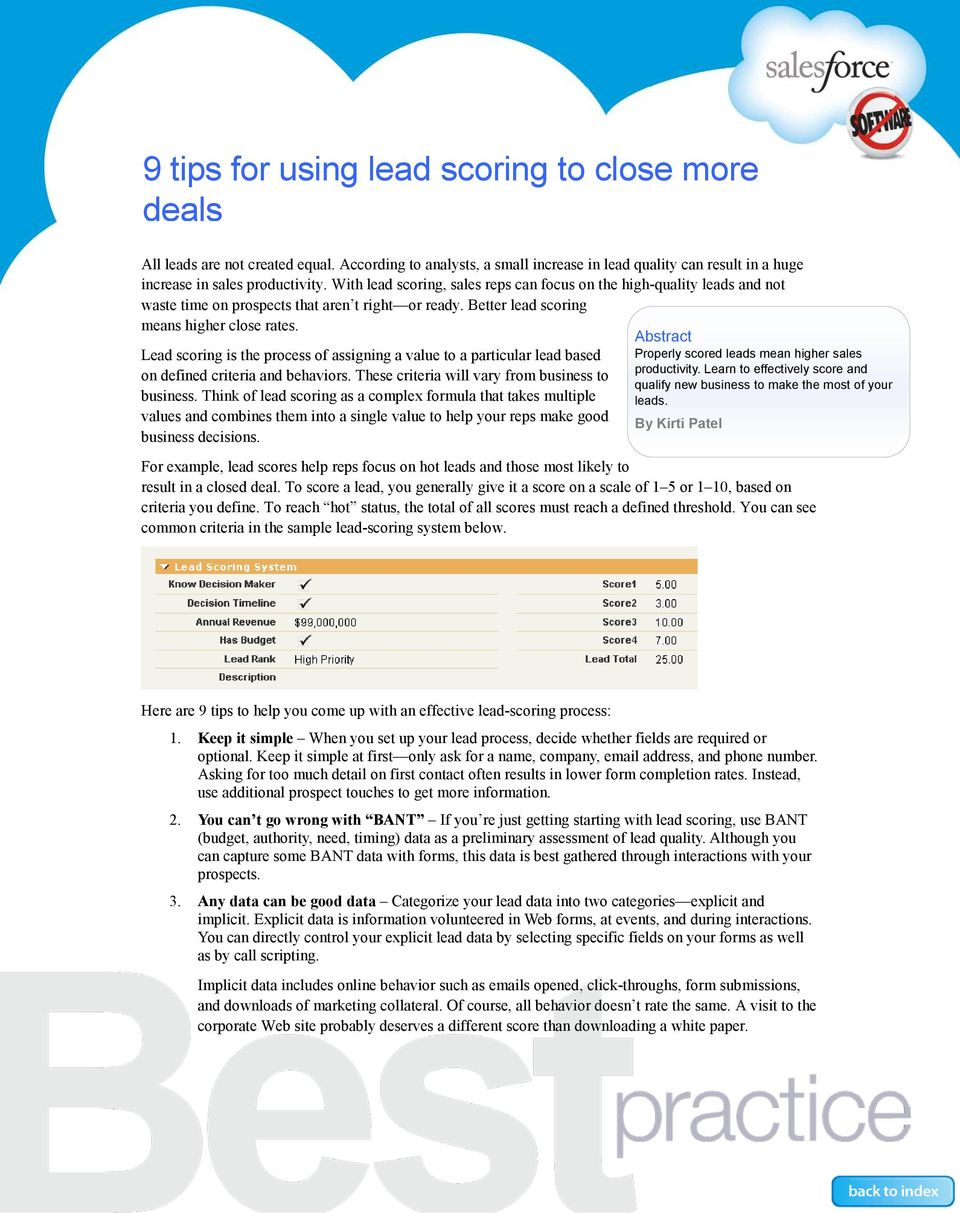
16 9 tips for using lead scoring to close more deals All leads are not created equal. According to analysts, a small increase in lead quality can result in a huge increase in sales productivity. With lead scoring, sales reps can focus on the high-quality leads and not waste time on prospects that aren t right or ready. Better lead scoring means higher close rates. Lead scoring is the process of assigning a value to a particular lead based on defined criteria and behaviors. These criteria will vary from business to business. Think of lead scoring as a complex formula that takes multiple values and combines them into a single value to help your reps make good business decisions. Abstract Properly scored leads mean higher sales productivity. Learn to effectively score and qualify new business to make the most of your leads. By Kirti Patel For example, lead scores help reps focus on hot leads and those most likely to result in a closed deal. To score a lead, you generally give it a score on a scale of 1 5 or 1 10, based on criteria you define. To reach hot status, the total of all scores must reach a defined threshold. You can see common criteria in the sample lead-scoring system below. Here are 9 tips to help you come up with an effective lead-scoring process: 1. Keep it simple When you set up your lead process, decide whether fields are required or optional. Keep it simple at first only ask for a name, company, address, and phone number. Asking for too much detail on first contact often results in lower form completion rates. Instead, use additional prospect touches to get more information. 2. You can t go wrong with BANT If you re just getting starting with lead scoring, use BANT (budget, authority, need, timing) data as a preliminary assessment of lead quality. Although you can capture some BANT data with forms, this data is best gathered through interactions with your prospects. 3. Any data can be good data Categorize your lead data into two categories explicit and implicit. Explicit data is information volunteered in Web forms, at events, and during interactions. You can directly control your explicit lead data by selecting specific fields on your forms as well as by call scripting. Implicit data includes online behavior such as s opened, click-throughs, form submissions, and downloads of marketing collateral. Of course, all behavior doesn t rate the same. A visit to the corporate Web site probably deserves a different score than downloading a white paper.
17 9 tips for using lead scoring to close more deals 4. Evaluate explicit and implicit data together To come up with the best possible lead score, evaluate both types of data together. Don t depend only on profile data such as job function or title. For example, a lead with the right target profile, but who has never attended a Webinar or downloaded a white paper, may score lower than a prospect with an identical profile who has been more engaged. Similarly, just knowing someone has repeatedly engaged with the corporate site is not enough. You also want to make sure the prospect s profile shows he or she can make purchasing decisions. 5. Understand your target prospect s profile When targeting prospects, look for ideal profiles, depending on your industry. For example, if your company sells computer equipment to other businesses, someone with the title IT Director might be the best profile for making purchasing decisions. As a result, you d assign such a lead additional points. 6. Get creative with Salesforce CRM Use the application s native functionality to score leads using custom formula fields. To learn more about custom formula fields, see this resource. 7. Automate, automate, automate Once you identify qualified prospects with lead scoring, automate the process by adding workflow and alerts. For example, when a lead reaches a certain score, set up an alert to notify a sales rep to follow up immediately. 8. A cold lead today can get hot tomorrow The nature of business is that it s always changing. That means a lead that doesn t qualify today based on a low score should perhaps be nurtured for the future. Instead of simply setting the lead status to Disqualified, update your fields with details about why the lead isn t qualified at this time. Depending on why the lead was disqualified, you may want to follow up with targeted marketing efforts. 9. Leverage the AppExchange When you re ready to take lead scoring to the next level, check out the scoring applications in the AppExchange directory. For more information Contact your account executive to learn how we can help you accelerate your CRM success. BP_LeadScoring_

18 8 steps to unlocking your pipeline with opportunities A major advantage of using Salesforce CRM is that you ll gain visibility into your organization s pipeline so your managers can accurately predict future revenues based on all deals in progress. They can also track any individual deal, to know when to step in to help a deal along and guide the rep, as necessary. To take advantage of these benefits, your sales organization needs a disciplined sales process that uses the opportunities object in Salesforce CRM. The process itself is simple; however, it has to be understood by everyone in the organization and enforced by management. This document covers the steps for getting started with opportunities and how to use related features to make your reps more productive: 1. Define your sales stages 2. Establish naming conventions 3. Make key fields mandatory 4. Run your forecast meetings with the pipeline report 5. Create big deal alerts 6. Use activities and templates 7. Use the similar opportunities feature 8. Use Chatter to follow specific opportunities Abstract Take control of your pipeline and your deals by making the most of the opportunity object in Salesforce CRM. Align your sales process with Salesforce CRM and make your reps more productive as a result. By Jason Garoutte Step 1: Define your sales stages Because stages are the key to tracking deals as they progress, reps need to assign a stage and probability to every sales opportunity. The easiest stages to understand are won and lost, but it s also important to assign stages to deals in progress. Stages should progress from getting-started efforts, such as prospecting or qualifying, to final efforts, such as negotiation. Typically, each stage is associated with key activities, deliverables, or milestones to be completed before moving to the next stage. Be sure to clearly identify these components and build them into your process.

19 8 steps to unlocking your pipeline with opportunities If you don t yet have an explicit process, use the default stages in Salesforce CRM, as shown in the illustration below. To make sure your stages fit your business, ask your administrator to customize each stage with a relevant name. Whether you use the default stages or customize them to fit your business, your entire sales organization should understand what each stage means. So write your stage definitions on a cheat sheet, spend 30 minutes training your reps, and enforce those definitions every chance you get. Step 2: Establish naming conventions To make it easy to read and understand reports, it s important that all reps use a consistent format when naming deals. You can use any names that suit you, but use a name that identifies whatever s important to your organization. Here are some simple examples to get started: Account Name Product Quantity Example: Salesforce.com Printers 10 Account Name Time line Example: Salesforce.com June 2009 Order As with stages, the key is to train your reps on correct naming for deals and to point out when they do it wrong. Step 3: Make key fields mandatory By assigning mandatory fields to opportunities, you can make sure each rep enters key information. For every opportunity, decide which fields are mandatory. You can make great progress with just a few required fields such as amount, close date, stage, and competition as well as two to three fields tailored to your organization. But don t go overboard with required fields having too many required fields can hurt adoption. Step 4: Run forecast calls with pipeline reports You want your sales managers to treat Salesforce CRM as the single source of truth it s the only way to get an accurate picture of future revenues. To achieve this goal, you need to be sure sales management is on board. The mantra should be, If it s not in Salesforce, it doesn t exist. Managers must stick to this mantra when they run their forecast calls. At salesforce.com, we run forecast calls with everyone looking at the same report. Occasionally a manager will get information at odds with the mandatory fields on an opportunity, such as Yeah, I know I typed $10,000 as a placeholder, but it s really more like a $30,000 deal. When that happens, it s critical to reinforce the importance of keeping records current. BEST PRACTICE 2

20 8 steps to unlocking your pipeline with opportunities If you re just getting started with reports, check out the Salesforce CRM pre-defined reports. At salesforce.com, we also customize reports grouped first by fiscal period and then by stage, so our sales managers can discuss which deals are expected to close in each of the coming months. To get the predefined pipeline report: Go to the report folder called Opportunity Reports and choose the Opportunity Pipeline report. That report shows the entire open pipeline, sorted by stage and probability. Step 5: Create big deal alerts When it comes to a large sales opportunity, everyone needs to work together. By sending an automated big deal alert, you can quickly marshal all your resources. Such an alert sends a snapshot of the opportunity when it reaches certain milestones; for example, when it reaches 70% probability, as shown below. To set up alerts: Go to Setup/Customize/Opportunities Step 6: Teach reps to use activities and templates By storing any phone calls or s to a prospect with the opportunity, you always have a complete record of all communications. By sending s from the Activities section of the opportunity record, reps can save time. Those s are automatically associated with a specific opportunity, contact, and account. They can also save time by using pre-defined templates just ask your administrator to customize them. These templates make communicating easy for reps, while ensuring all your communications are consistent and professional. To use templates: Go to Setup/Administration Setup/Communication Templates. For additional tips, check out the document Turbo-charge customer communications with templates. Step 7: Use the similar opportunities feature This feature helps your organization learn what works based on your collective experience. By showing similar opportunities that share up to 10 dimensions, reps can learn from similar deals that were won and use any associated resources. For example, you could look for wins selling a similar product, competing against the same competitor, or in the same industry. Incorporate this information into your sales meetings. Also use it in one-on-one discussions between managers and reps as part of a deal review process to understand the deal s history, current status, process compliance, and feedback. It s a great way to manage your business and train your reps. Note that this feature gives users limited visibility into other reps opportunities, overriding the settings in a private sharing mode. To enable this feature: Go to Setup/Customize/Opportunities/Similar Opportunities. Note that you must have Enterprise or Unlimited Edition to use this feature. BEST PRACTICE 3

21 8 steps to unlocking your pipeline with opportunities Step 8: Track deals automatically with Chatter Unlike traditional collaboration tools that make you do all the work, Chatter brings everything you need to do your job to you including updates about people, documents, and data. Use Chatter to follow every record that s important to you whenever there s a change on that record, your personal Chatter feed will be updated automatically, as shown below. Also follow any documents or activities associated with that opportunity. When the entire team can see everything related to a record, everyone can collaborate for a faster win. Ask your administrator to turn on Chatter by clicking Setup and navigating to AppSetup/Customize/Chatter. Enabling Chatter also activates the Salesforce user interface, which is not supported by Internet Explorer 6. For more information on using Chatter, go to the Chatter Getting Started page. For information about how we use Chatter, see the Best Practice document How salesforce.com uses Chatter. For More Information Contact your account executive to learn how we can help you accelerate your CRM success. BP_Opportunities_
22 5 simple steps to reports and dashboards Reports and dashboards show how you performed in the past and what s happening at the moment they re key to driving success and adoption for any CRM project. The information provided by reports and dashboards is especially important in today s environment, where it s critical to be proactive, rather than reactive, in your approach. You want to be able to spot trends and act on them immediately. For example, a sales organization wants to know which deals were lost, which competitors are gaining ground, and whether the average time to close is increasing or decreasing. For a customer service organization, it s important to track the average days or time to close and satisfaction. And marketing organizations want to track campaign effectiveness and ROI. To make the most of Salesforce CRM s reporting capabilities, it s important to plan carefully and then follow these 5 proven steps to making reports and dashboards part of your business process: 1. Know what keeps your executives up at night 2. Capture the right data 3. Build your reports 4. Build your dashboards 5. Use data to change behavior and drive results Abstract To track and improve business performance, you need reports that show trends as well as real-time dashboards for up-to-the minute information about your business. Salesforce CRM makes it easy to create both. By Leahanne Merritt Step #1: Know what keeps your executives up at night Finding answers to critical business questions and making good decisions is vital to executives and to their companies success and competitive position: Ask questions and start at the top When designing reports and dashboards, first define what your executives your CEO; the VPs of Sales, Marketing, Support; and your channels need to know to run their business. What are their key metrics? What behaviors do they want to encourage? Align metrics with your company vision Take your business objectives, determine the metrics that measure those objectives, and map those metrics to the capabilities of Salesforce CRM. For example, if forecasting and tracking large deals are important to the VP of Sales, make sure you understand the key data points that give insight into those tasks and the best frequency for reporting that data. Or if your VP of Marketing needs to track response rates, sales, trials, meetings, or campaign awareness, you need to capture that data at the campaign, campaign member, lead, and opportunity level to return meaningful metrics. Tip: Salespeople thrive on competition. If you make it possible to track their progress in relation to their peers, your overall adoption rates will go up.
23 5 simple steps to reports and dashboards Step #2: Capture the right data Your reports and dashboards are only as good as the data behind them planning is the key to capturing and displaying the correct metrics. Identify your sources early. Consider working backwards: plan your reports first and then configure the application by adding custom fields, formulas, and so on. If your marketing team wants to see campaign effectiveness over time, for example, you d want to track which campaigns lead to leads, opportunities, and closed/won deals. Every week, you could use snapshot reports on lead status by campaign and opportunity status by campaign to show how many leads and opportunities were received and converted from each campaign. Manage what you measure Pick a limited number of key performance indicators (KPIs) or metrics. A third-party survey of the number of metrics used by CEOs showed that 52 percent use 5 10 metrics to manage their entire business. Limit the number of reports/dashboards Focus on those tied to specific business objectives. Develop a clear, concise naming strategy That approach will make report and dashboard folders easy to find. Use labels that are meaningful to your users; for example MW Sales Team, Premier/Gold Support Analysts, or Converted Leads for Verticals Team. For dashboard folders, start with the word Dashboard (Dashboard MW Sales Team, Dashboard Premier/Gold Support Analysts ). Determine security and access for the report and dashboard folders and give users access based on their job functions or roles. Step #3: Build your reports Most customers start with a current report tracked in Excel or Access and use it as a baseline. As you begin to build reports in Salesforce CRM, there are several resources to help you get started. Start with out-of the-box reports. Salesforce.com offers standard reports across all standard objects. You can use these reports as the basis for your custom reports. Understand the three different report types and how they re used: Tabular reports are the simplest and fastest way to return your data in a simple list view format. Keep in mind that tabular reports can t be used to create dashboard components. Summary reports return your data with subtotals and other summary-level information. Summary reports are great for showing average dollar values for closed won opportunities by salesperson or number of cases by status by support representative. Matrix reports show data summaries against both horizontal and vertical criteria; for example, total sales per sales rep per year by quarter. Bookmark the Analytics blog on the Salesforce.com Community Web site. Check back on a regular basis (especially prior to each release) for tips, tricks, and use cases for new analytics features and product enhancements. Step #4: Build your dashboards When you finish planning after asking all the right questions and building your reports, you re ready to build your dashboards. The key to building dashboards your VPs, managers, and users can t live without is to match the dashboard metrics to a compelling business metric. Understand the different dashboard formats and what type of data is best displayed in each format: Horizontal bar/vertical column charts are great for showing geographical data, stage or status information, or any data that s part of a single grouping. BEST PRACTICE 2
24 5 simple steps to reports and dashboards Pie and donut charts are useful for displaying data that shows proportions of a total, such as the number of leads by lead source. One of the newest chart types, the funnel, is best used for showing ordered picklists such as opportunity stage, case status, or lead stage. For more information, go to Help & Training and search on chart types. Don t reinvent the wheel! Go to the AppExchange, download the free, pre-built dashboards such as the Lead and Opportunity Management dashboard created by Force.com Labs, and customize them to meet your business needs. Use these dashboards to track and measure adoption, sales productivity, campaigns, lead generation, and service and support. Step #5: Use data to drive behavior and produce results Reports and dashboards are designed to be iterative it s important to keep them current and relevant. To successfully roll out business metrics, good communication is key. Make it easy for your users to find, view, and access the dashboards relevant to them. Use the schedule refresh feature to ensure your users see the most recent data. And use schedule and reports and dashboards to remind your users that their business-critical metrics are in Salesforce CRM. Manage from the top down Encourage managers to run forecast calls directly from their dashboards. Many customers also have the following mandate for sales: If it s not in Salesforce, it doesn t exist. This directive proves to be extremely motivating for salespeople. Include adoption and data quality metrics Include a dashboard component that tracks faulty data, such as all accounts without an industry, contacts without valid addresses, or leads with a status of qualified that haven t been converted. Again, publishing such metrics can be extremely motivating. Engage your user community Don t make the mistake of tracking such metrics only at the executive level make sure your users see the same metrics on their personal dashboards. What do your users want to see? What will help them do their jobs faster and smarter? Those are the metrics that matter. For example, you could create reports and dashboards that rank salespeople by top deal or top salespeople per quarter. For More Information Contact your account executive to learn how we can help you accelerate your CRM success. BP_5steps2reports-dashboards_
25 Tips for using incentives and rewards to boost adoption How can you get users onboard with Salesforce CRM? How can you get them to realize its value and encourage them to use it? Try incentive and reward programs they re a proven way to engage and motivate people. Incentives can take different forms, including recognition, cash, points, or actual rewards. For example, one customer gives away iphones to the strongest adopters each quarter. Another hands out monthly Starbucks coffee cards to those who convert the most leads. Measure usage Before you can reward usage, you need to know who s doing what, how often, and how well. To get that information, go to the AppExchange and download some of the free adoption dashboards created by salesforce.com. The most popular of these are the adoption dashboards and a sales activity dashboard. Abstract User adoption is key to making Salesforce CRM a success. To ensure high rates of user adoption you need a long-term strategy, with ongoing efforts to drive adoption. Find out how to make incentives and rewards part of your adoption strategy. By: Nancye Michaelian Tie compensation to usage One of the strongest measures to boost adoption is to tie usage to compensation. Build use of Salesforce CRM into your job descriptions and performance evaluations. And adopt the mantra, If it s not in Salesforce CRM, it doesn t exist. It s an easy way to make sure user behavior aligns with your business objectives. Ensure data quality In addition to requiring that users enter data into Salesforce CRM, be specific about both timeliness and quality. For example, reps should enter prospects and early-stage opportunities immediately, rather than waiting until just before closing a deal to enter data. Use picklists and validation rules to enforce these standards. You can also use the free data quality analysis dashboards to analyze the quality of the data your team enters. Make adoption fun Decide what behavior you want to reward most such as proposals or on-site demos and then reward the top performers as part of a game or contest. Create a reward points program One way of encouraging and tracking progress is to give people points. For example, a 90 percent login rate for the month could earn 10 points. Users can cash in accumulated points on a special Web site ( Or start by giving users a certain numbers of points and then subtracting points when they do something wrong, such as not entering required information. Monthly newsletters Start a monthly newsletter with tips that reinforce your business processes and highlight success stories. You could include a quiz for example, have users guess who has the largest pipeline this quarter, what campaign generated the most revenue, and so on. Get it right and get a prize.
26 Turbo-charge customer communications with templates Make a game of it Because your implementation is a work in progress, it s important to keep users engaged. A great way to do that is to make training creative and fun with games such as Tic Tac Toe (divide into teams and ask questions about functionality until someone wins), Jeopardy (create categories on different topics, divide into groups of 2 or 3, highest points win), and Poker Hand (get a card for asking and answering questions the best poker hand wins the pot). Engage the team spirit Break user groups into teams and have them meet at regular intervals (for example, quarterly) to get their feedback and suggestions. Use the application s ideas or cases functionality to track feedback and then let your admin judge the best ideas. The winning team gets dinner, tickets to sporting events, or something similar. Reward mentorship Assign team mentors, then reward the mentors of those teams that get good results. Try lunches with the executives, where they can get visibility for themselves and their teams. Use peer pressure Let s face it sometimes rewards just don t do the trick. In such cases, you can use disincentives to get people to comply. For example, a wall of fame wall of shame page, which highlights those at the top and bottom of the leader board, can be a strong motivational tool. A real-life example of this approach comes from a customer who created a dashboard called Clean Your Room to discourage negligence such as stuck opportunities, pushed opportunities, and accounts with no recent activity. For More Information Contact your account executive to learn how we can help you accelerate your CRM success. BP_EncourageAdoption_
27 Turbo-charge customer communications with templates Following up with an after meeting a prospect or customer is a basic courtesy and a welcome chance to reinforce important points and keep the communications channel open. Of course, some reps are better at writing than others, and some would rather not write at all. With templates, you can make sure all your reps have high-quality, consistent responses to various situations at their fingertips. When reps use templates with the Salesforce CRM Mass capabilities, they can easily communicate with their entire customer base. In addition, product managers can use templates to communicate about new products and features, and marketing users can promote regional customer events and invite prospects to events such as Webinars. There s also a builtin dynamic tracking feature that lets you track which s were opened, how many times, and when each recipient last opened the . And finally, templates reinforce your corporate look and feel and ensure that the messaging in all your communications is accurate and up to date. You can create professional, high-impact HTML templates even without knowing HTML. With HTML expertise, you can create exactly the kind of you want. And with the pages functionality of Force.com, you can even merge fields from multiple records or objects in the . Make the most of templates To help get the most out of templates: Know the pros and cons of different types of templates Ensure a consistent look and feel Leverage mass for targeted communications Take advantage of tracking Protect templates from being changed by users Consider partner products for marketing campaigns Keep templates organized For detailed instructions on how to create templates, go to Help & Training. Abstract Make your sales reps more productive, enforce your corporate look-and-feel, and ensure your messaging is always consistent and on point. By: Oliver Demuth & Carman Chan
28 Turbo-charge customer communications with templates Choose your templates Salesforce.com provides four types of templates: 1. Text 2. HTML with letterhead 3. Custom HTML 4. Force.com pages (Visualforce) The table below summarizes the advantages and disadvantages of each template type. Type of template Pros Cons Text Does not require Edit HTML permission Requires no HTML knowledge Few/no issues with filters No tracking for mass s No customization or corporate branding No visual elements HTML with letterhead Custom HTML Force.com pages (Visualforce) Tracking Consistent branding across organization Quick add targeted messaging Tracking Consistent branding across organization Fully customizable; you get exactly what you want Makes it possible to merge fields from multiple records or objects Requires Edit HTML permission Requires letterhead setup Limited customization May get caught in filters Requires Edit HTML permission Requires HTML knowledge May get caught in filters Requires Force.com pages/force.com code experience Not available for mass ing Ensure a consistent look and feel You can ensure a consistent look and feel by creating a single letterhead to serve as the basis of all your HTML templates. Your letterhead can define the following attributes of the header and footer of your HTML s: background color, header properties (including logo), a top line, body colors, a middle line, footer properties, and a bottom line. The template itself determines the format of the s main body. If your corporate identity changes frequently, simply changing your letterhead automatically changes all HTML templates based on the letterhead. Tip: Keep the number of letterheads to a minimum. Multiple letterheads are useful for companies with multiple divisions that use different corporate brands or companies with logos in different languages. Most companies just need a single letterhead, however. Leverage mass for targeted communications Depending on your Salesforce CRM edition, users can send between 250 and 1,000 s at a time, with just a few clicks of the mouse. Sales reps can leverage personal or corporate s templates to efficiently communicate with leads and contacts about new products, promotions, and upcoming events. Take advantage of tracking Salesforce CRM lets you track s, both at the level of an individual contact and for all accounts, including an overview of the exact date, time, and number of times your was opened. If multiple s are never opened, Salesforce CRM flags the contact so you can check whether he or she is still with the company. BEST PRACTICE 2
29 Turbo-charge customer communications with templates Protect your templates One of the benefits of using templates is that you get a consistent look and feel and control over messaging, while still letting individual users personalize their s. However, you may want to prevent users from changing sections of the template, such as pricing information, dates and locations, specific corporate disclaimers, policies and procedures, and of course logos and corporate branding. Consider partner products for marketing campaigns The Salesforce CRM Mass capabilities make it possible to deliver 1,000 s per organization per day. Although that s fine for individual reps, check out the partner products in the Marketing section of the AppExchange to create sophisticated campaigns and other demanding projects. Here you ll find more full-featured apps for creating mailing lists of any size, tracking campaigns in progress, and getting postcampaign statistics to evaluate the effort. Keep templates organized Keep your templates up to date and easily accessible. Make sure to keep public and personal templates separate. Ask users to place all self-created templates in a personal folder. Use the Clone button to copy public templates into a personal folder. Deactivate old templates by unchecking the Available for Use checkbox. Note that deleted templates are not stored in the recycle bin, but are permanently deleted. If you think you may need these templates again, deactivate rather than delete them. For More Information Contact your account executive to learn how we can help you accelerate your CRM success. BP_DataQuality_
30 Customizable forecasting: What s in it for you? Customizable forecasting available in Professional, Enterprise, and Unlimited Editions lets sales managers fine-tune their forecasting to better meet their companies needs. Forecasting is both a science and an art. With customizable forecasting, the science part of the equation comes from combining the total dollar amounts represented by the opportunities in each stage and rolling up that total under the different forecast categories shown in the illustration below. The art consists in the ability to override forecasts. You also get additional flexibility in managing forecasts by being able to align forecast categories to opportunity stages, so the sales and forecasting processes truly complement each other. In addition, you can display and manage sales targets, quotas, product segments, and product quantities from within the Forecast tab. Read on to: Find out whether customizable forecasting is right for you Get an example of customizable forecasting Learn the steps for implementing the feature Abstract Find out whether the customizable forecasting functionality is right for you and how to prepare to implement it. By Jennifer West & Eran Agrios Is customizable forecasting right for you? Before deciding to use this feature in Salesforce CRM, consider all your forecasting options and decide which of the following approaches meets your needs: Standard and custom reports For many companies, it s sufficient to report on expected revenues based on various opportunity stages and expected close dates. Several standard reports provide this level of reporting, and you can create custom reports as well. Forecast tab The Forecasts tab is available out of the box. This tab displays a home page you can use to quickly create and locate forecasts and quotas. In addition, the tab displays your monthly revenue projections, the amounts associated with open opportunities in your pipeline, and the amounts associated with closed/won opportunities. Managers forecasts also show a roll-up of forecast data for users that report to them. Note: The Forecast tab is unlike any other tab in the application in that it shows real-time aggregation. As a sales manager, you can be confident that the numbers in the Forecast tab are always up to date with any changes in your pipeline. Customizable forecasting With this functionality, you can take a sales funnel approach to forecasting by aligning your forecast categories to your organization s unique opportunity stages, as shown in the following diagram:
31 Customizable forecasting: What s in it for you? Example of a pipeline breakdown based on an 8-stage sales process In addition to forecasting according to your sales funnel, customizable forecasting makes it possible to: Override entries by sales reps to align with a sales manager s gut check. For example, let s say a sales rep identifies a $100,000 opportunity for the current quarter. If the sales manager thinks this assessment is too aggressive and the deal may slip, he can override the rep s opportunity to bring the forecast in line with a more realistic goal and timeline. Manage sales targets and quotas by showing those values for all opportunities on the Forecast tab. Forecast by product segments to break down forecasts by showing how much individual products contribute to the total. Important note about Forecast reports: If you use Forecast reports, please note that the Commit category is an aggregation of the Pipeline, Best Case, and Commit fields. To get a separate breakdown of the numbers in each of these categories, use the Opportunity report instead. Customizable forecasting: an example Two important advantages of customizable forecasting include deciding how forecasts are aggregated and being able to override forecasts. The scenario below shows how to do that in the application. 1. Aggregating You can decide how your forecasts are aggregated over time, on specific dates, or on the type of forecast: Period Monthly or Quarterly Date Opportunity Close Date, Product Date, Schedule Date Type Overall Forecast, Product Family 2. Overriding You can override forecasts to align with your intuitive feelings. The figure below shows the Forecast tab before any overrides. The figures that follow show how to override the forecast categories as well as an individual opportunity. BEST PRACTICE 2
32 Customizable forecasting: What s in it for you? From the Forecast tab, managers and direct reports can override their own forecasts. From the Opportunities tab, managers and direct reports can also override values from the individual opportunity at the opportunity and product level, but not at the product schedule level. The result? The diagram below shows the Forecast tab after the overrides: BEST PRACTICE 3
33 Customizable forecasting: What s in it for you? 6 steps toward implementing customizable forecasting To effectively forecast in Salesforce CRM, it s important to clearly define your forecasting process. About 80% of your time will be spent on process and planning, 20% on implementing the functionality. To achieve accurate forecasts, be sure to complete the following 6 tasks: 1. Define your business process A disciplined opportunity management process is critical for accurate forecasting. Set up a review process with your reps and managers to discuss current and future opportunities. Use this review to reinforce the sales stages. 2. Define your sales stages Make sure your users know at which point opportunities are moved from one stage to another and how that impacts their forecasts. With defined meanings, the stages help to accurately reflect where opportunities fall within the forecast. 3. Align your stages with a forecast category Make sure your users know how the opportunity stages and forecast categories map to each other. 4. Review forecast settings Decide whether to forecast by revenue, quantity, or both. Also determine how forecasts should be displayed in the Forecast tab. 5. Quotas Decide whether to track sales quotas. 6. Define key reports Reports may include a combination of forecast reports and opportunity pipeline reports. Such combinations will help you understand the metrics important for making business decisions, as you can see in the examples below. If you decide that customizable forecasting is right for you, check out Forecasting Excellence: How To Achieve Pipeline Visibility and Forecast Accuracy on the Salesforce.com Community. For More Information Contact your account executive to learn how we can help you accelerate your CRM success. BP_CustomizableForecasting _
34 4 steps to deciding if territory management is right for you No, it has nothing to do with managing the Pacific Northwest. Instead, territory management (TM) is a sharing model you can use to change the default data-sharing model and start forecasting in a new way. TM is available to Salesforce CRM Enterprise and Unlimited Edition customers. You ll also need a Force.com sandbox environment for testing prior to a full rollout. The Salesforce CRM default data-sharing model lets you access your records and those of anyone in the role hierarchy below you. By using TM, you can expand this model to also grant access to Accounts, Opportunities, and Cases based on any record characteristics (called territories ) you specify. TM is a very powerful feature that, once turned on for your org, cannot be disabled. For that reason, it s critical that you plan carefully, test thoroughly, and consider getting expert guidance from Salesforce.com Consulting, for example, before making this change. Abstract Territory management can make your organization more efficient by organizing and sharing your data in a unique way. But it s not for everyone. Find out whether it s right for your organization. By: Jason Suen Why use TM? Let s say Stephanie is a sales engineer who works on all accounts in the high-tech vertical, regardless of the account owner. If you re an administrator setting up her permissions without TM, you d probably use a set of sharing rules or the Account Teams feature to access the high-tech accounts that belong to various users, regions, and roles in her company. With TM, you can automatically assign a territory to Accounts with characteristics similar to the high-tech account and make Stephanie a member. Now, Stephanie and any peers that belong to the high-tech territory can access, collaborate, and work on all high-tech accounts together. Providing data access based on territories is one way that TM changes how users can access data. The other way is that TM makes it possible to forecast based on territories rather than roles (the default today). In fact, enhanced forecasting is a major reason why companies turn to TM. As a result, how you structure your territories directly affects how you can forecast because forecasting by role will no longer be possible. To use TM, you must enable Customizable Forecasting. It s a one-way change: There s no going back to the default forecasting model. Is TM right for you? The following four steps will help you understand what s possible with TM and what factors you need to consider. For implementation guidance, check out Help & Training and the Salesforce.com Community. If you decide to go ahead with TM, you ll find links to additional how-to information at the end of this document.
35 4 steps to deciding if territory management is right for you To evaluate whether TM is right for you, work through the following steps: 1. Understand common use cases 2. Visualize a sample territory hierarchy 3. Assess your forecasting needs 4. Assess your sharing needs Step 1: Understand common TM use cases You can use other Salesforce CRM features to accomplish some of the things you can do with TM. For example, you can use the Mass Transfer utility to easily and frequently reassign records. However, there are two use cases for which TM is the perfect solution: You re using the Account Teams and Sales Teams feature to align territories, but are finding this approach difficult to manage (e.g., frequent staffing changes, re-alignments, sharing requirements). In this case, TM becomes the better option as the number of reps and records increases. Your sales organization is set up as a matrix rather than a tree, as in the example below. In such an organization, sales reps need to roll up their opportunities and forecast to more than one manager. If your reps are responsible for more than one territory, TM can help you increase your forecast visibility by territory. For example, in the diagram below, Rep 6 is part of two sales regions Toronto and San Francisco. With TM, all of Rep 6 s opportunities will roll up to either Toronto or San Francisco, based on the Territory field on the Opportunity. Without TM, all of Rep 6 s opportunities would simply roll up to the forecast manager above Rep 6 in the role hierarchy. You can use TM to organize in all sorts of ways in addition to geography for example, by product lines, verticals, segmentation, and so on. As you can see, TM provides a flexible way to organize your data (Accounts, Opportunities, and Cases) and then share it with a group of users (Territory members), based on common characteristics (defined Territories). CEO Marketing HR Operations Toronto Ottawa Vancouver Boston Rep 1 Rep 2 Rep 3 Rep 6 will submit two forecasts: one for San Francisco and another for Toronto New York Rep 3 Rep 4 Rep 5 San Fran Rep 6 Rep 7 Rep 9 BEST PRACTICE 2
36 4 steps to deciding if territory management is right for you Step 2: Visualize a sample territory hierarchy It s easy to think of a territory as a geographical trait, but in the context of TM, a territory can be any common characteristic among a set of records for a group that needs to access those records. To think of it another way, a territory is a flexible collection of accounts and users, in which users have at least read access to the accounts, regardless of who owns them. If your company s org structure is nested, as in the example below, and if your sharing needs depend more on account traits than on individual ownership, TM could be right for you. Characteristics (or nested levels) commonly used in a territory hierarchy are account size, strategic accounts, named accounts, and region Step 3: Assess how TM can affect forecasting In addition to making it possible to roll up opportunities to multiple forecast managers, TM offers another big benefit: flexibility in forecasting by territory. Note: Once TM is enabled, your forecast hierarchy based on a role hierarchy will be disabled and will simply mirror your territory hierarchy. The forecast hierarchy is now identical to the territory hierarchy You can now generate a unique forecast for every territory you define Just assign a forecast manager to the territory, and you re ready to go BEST PRACTICE 3
37 4 steps to deciding if territory management is right for you The Forecast tab view shows that you can now forecast by territory as well You can assign more than one territory to Accounts and Users, although Opportunities can only have one territory association. So, if Stephanie (the sales engineer) is part of the Shipping Accounts and High-Tech territories, she could work an account called ABC Corp that is assigned to the Shipping Accounts and Consumer territories. Shipping Accounts is the common territory that lets Stephanie access this account. When an Opportunity is created, she must associate that Opportunity to a single territory for forecasting. Her options will be the common territories between her (User) and the Account. In this case, it will be the Shipping Accounts territory. This example illustrates an important change in how TM shifts your forecasting. Without TM, you get typical, tree-type hierarchy forecasts in which managers see all the Opportunities of their teams. This approach works well for managers with only a few reps who simply want a roll up of all the Opportunities in their teams. But with TM, if Stephanie reports to Nigel, Nigel s forecast will only include Opportunities associated to the territory for which he s responsible. He will not see all of Stephanie s Opportunities in his forecast unless they are also part of his territory. This difference between forecasting using a role hierarchy versus a territory hierarchy brings us to the fourth and final step. Step 4: Assess your sharing needs with TM TM is a great way to expand on the default Salesforce CRM sharing model, which is organized around a particular owner s records. By managing territories effectively and assigning the right users to those territories, you can set up a highly collaborative sharing model that fits more complex org structures. When you explore TM to extend sharing, think about how you organize your data access today. Are you using the existing features of Salesforce CRM to their fullest? Sharing rules, assignment rules, Account and Sales teams, and your role hierarchy setup you can use them all to ensure that different account teams can work together. As you evaluate TM, consider how a territory hierarchy will change how your users share data compared to the default role hierarchy. The assumption in the table below is that the Org Wide Default setting on the Account object is set to Private, with no extra sharing rules. These changes are summarized in this table: Role hierarchy A user has a single role Account is accessible by owner, those above in the role hierarchy, and those who have access to a child object on the Account (such as a Case or Opportunity) User has a single forecast based on role Sales teams used for team selling/overlays No custom fields Territory hierarchy User can be part of many territories In addition to those users listed in the left column, Account is also accessible by all users in territories to which it is assigned, as well as those above them in the territory hierarchy Users have a forecast for each territory in which they work with active Opportunities Either sales teams or overlay territories may be used for team selling Custom fields may be used for integration BEST PRACTICE 4
38 4 steps to deciding if territory management is right for you As mentioned earlier, whether a user can access a record depends on the common territories between the user and the record. You can also set the default access levels for all objects affected by TM. Although TM extends access to Accounts, Cases, and Opportunities based on their territories, this capability is not true for other objects. You decide whether users can only view records or give them greater access, as needed Summary TM can help you manage a complex set of sharing and forecasting requirements that would otherwise not be possible. Because you can use TM to assign records to territories automatically, in real time, based on flexible territory assignment rules, there s even more you can do. Looking for seamless Opportunity transfers and deal hold-outs? TM can do that, too. If you think the TM capabilities we ve described might benefit your organization, it s time to explore additional resources to understand the finer nuances of TM: Territory Management Deployment Guide Get more information about TM, including step-by-step instructions for rolling out TM in your org. Working with Territories Get tips on assigning territories to records and viewing territory information. If you decide to proceed with TM, we suggest you engage Salesforce.com Consulting early to ensure you fully implement this feature in the right circumstances. Remember to use the Force.com sandbox and test every change before rolling it into production. And as always, reach out to your account executive and the Salesforce.com Consulting teams to guide you along the way. For More Information Contact your account executive to learn how we can help you accelerate your CRM success. BP_TerritoryManagement_
39 8 keys to mobile CRM success Giving your field sales, service, and executive teams mobile access to Salesforce is one of the easiest ways for your team to get instant, added value from Salesforce. You ll boost productivity, improve data quality, and help make sure that being out of the office doesn t mean being out of the loop. What s the best approach for getting your people, your processes, and your devices ready to go mobile? To start, it s important to know salesforce.com has two mobile products: Salesforce s mobile capabilities for your CRM needs and soon, Chatter Mobile for collaboration. Follow these 8 tips and you ll be well on your way to mobile success. 1. Leverage mobile collaboration (Chatter Mobile) The rise of social networking Web sites like Facebook and Twitter have changed the way users access information, and this shift is rapidly extending to the enterprise. Products like Salesforce Chatter give enterprise users a way to share and follow relevant people and records in an environment that s trusted and secure. Mobile access to one s feed is key to keeping employees across the organization continually informed and productive no matter where they go. 2. Use newer devices Whenever possible, give your team the latest mobile devices. Salesforce CRM s mobile functionality supports the most current iphone and BlackBerry devices. Once available, Chatter Mobile will also work on ipad and Android devices. If you re not sure whether your device is supported, consult our supported devices list. Or download our mobile apps to test on your device. 3. Identify key mobile use cases (the Sales Cloud s mobile capabilities) You ve put lots of thought into customizing your core business processes to meet your organization s needs. Why should your mobile solution be different? Before you get started, identify clear and simple mobile use cases with obvious benefits. Start by defining tasks and processes your users will need in the field, such as: Logging phone calls, s, and visits on the fly Processing orders or updating customer cases in real time Abstract Mobile access to Salesforce is one of easiest ways to get the most from your Salesforce investment. To get started right, follow the tips in this document. It s an approach that s yielded great results for hundreds of customers. By: Joshua Schneyer Accessing content in Salesforce like presentations or brochures and forwarding them to customers Consider running a quick pilot on easy-to-deploy Mobile Lite for useful insight about which mobile use cases are key to your business. 4. Less is more (the Sales Cloud s mobile capabilities) Mobile users rarely need access to all the data and features in Salesforce. Be selective about which applications and data you make available. Users on the go tend to use a small subset of data and repeat the same tasks over and over, such as logging calls and s and updating opportunities or cases that relate to their territories.
40 8 keys to mobile CRM success Limit available data fields to what s relevant for certain users and avoid the common trap of downloading every record a user might need. Instead, use the application s intelligent filtering capabilities to store only relevant records on the device at any given time. 5. Train your users As with any new application, it s important to show users how to use it and how they ll benefit. Ask users to watch the Getting Started with Mobile Access videos or attend training before giving them mobile access. 6. Choose the right version (the Sales Cloud s mobile capabilities) Salesforce offers two mobile versions: Mobile Lite, which is free across all editions, and the full version, which is free for Salesforce CRM Unlimited Edition users (or available via an add-on license for other editions). If your users only need basic mobile access to standard tabs like Contacts, Leads, and Opportunities, try Mobile Lite. It s free and you can enable it for your org with one click. If your mobile use cases include use of custom objects, Force.com pages (Visualforce), or thirdparty apps from the AppExchange, you ll probably want to use the full version of mobile. Different users have different needs. Consider a hybrid approach where mobile users with advanced needs are set up on the full version and those with basic needs receive Mobile Lite. 7. Work with your IT department Be sure to work with your IT department to accommodate restrictions or requirements related to mobile devices. For example, if your BlackBerry devices connect through your corporate firewall, there may be security and communications requirements. 8. Take advantage of our resources Mobile access to Salesforce can become one of your most powerful business tools, but there are a few extra moving parts. Salesforce.com provides a range of free resources to jump-start your mobile deployment, including live Q&A Webinars, how-to videos, implementation guides, and tip sheets. To get started, check out these resources: Mobile for the Sales Cloud Web site Getting Started with Mobile video Mobile Community blog Supported Devices list Of course, feel free to contact your account team for recommendations for your specific needs. Summary Mobile access to Salesforce is one of easiest ways to enhance the value of your Salesforce investment. Before you start, have clear goals that define what you want people to be able to do from the field. For the best performance, make sure you have newer mobile devices. To prepare, define clear use cases and train your users. As you roll out mobile features, start with a standard configuration (Mobile Lite) and improve the application based on user feedback as you expand access and capabilities. Consider providing all employees not just those working outside the office with mobile access to Chatter for enhanced, realtime collaboration and communication. Finally, be sure to take advantage of the resources provided by salesforce.com. For More Information Contact your account executive to learn how we can help you accelerate your CRM success. BP_MobileSuccess_
41 How to measure and increase customer loyalty For companies that face both significant competition and high costs associated with acquiring each customer, customer loyalty becomes crucial. Studies have shown that organizations with loyal customers had profits of up to 60 percent higher than those of competitors. They were also twice as likely to exceed the forecasts of financial analysts. In addition, high customer satisfaction scores consistently show a correlation with sales growth. The bottom-line equation is simple: customer loyalty = higher profits. It s no wonder that customer loyalty and retention consistently rank among the top challenges faced by CEOs, as shown by Gartner surveys of CEOs and business executives. Measure customer loyalty A popular model that provides a view of customer loyalty is Harvard Business Review s Apostle Model, which segments customers into four quadrants (Figure 1). To measure the attitudes that result in this model, customers are asked to rate their overall satisfaction on a scale of 1 to 10 (horizontal axis) and their likelihood to continue to do business with you on a scale of Definitely Will to Definitely Will Not (vertical axis). In this model, Defectors are defined as anyone who answers the satisfaction question with a score of 6 or less and reports that they definitely or probably will not continue to do business with you in the future. Abstract Customer loyalty has a significant impact on a company s profits and its prospects for the future. This article provides insight on how you can find out where you stand with your customers and how to use that information to make your customers more loyal. By: Wendy Close Figure 1: The Apostle Model measures both loyalty and satisfaction. By plotting the scores for both variables, you can segment customers into four categories.
42 How to measure and increase customer loyalty Strategies for each customer segment By asking your customers to rate your company in a similar survey, you can segment your customers as well. Once you know how your customers fit into these categories, you can focus on the best strategies for dealing with each group. Loyalists report both high satisfaction and high loyalty. These customers are, in essence, an extension of your sales force because they spread positive word-of-mouth publicity. Loyalists also typically increase their spending more rapidly than other customers in your customer base. Understand, serve, and protect these customers and focus on developing communities for (and with) them. Because relationships with loyalists tend to last longer and because of their role in generating referrals, customer acquisition costs for loyalists tend to be lower than those for other customers. Because of the many benefits loyalists bring to your business, you should prioritize any strategies that strengthen and expand these relationships. Hostages report high loyalty despite low satisfaction. This situation typically appears when there is little competition or a high risk associated with changing suppliers, such as economic costs or time investments. Customers in this category feel trapped. For such customers, focus on strategies that can turn them into loyalists by understanding and addressing their issues before they spread their dissatisfaction to others or abandon your company. Communicating intensively with such customers is crucial: If they see that you re listening to them, addressing their issues, and making it easier to use your product or service, they re less likely to decrease their spending and more likely to say positive things about you. Mercenaries report high satisfaction, but low loyalty. These are the customers who are highly pricesensitive and will switch easily when they have the opportunity. For such customers, focus on communicating those benefits of your product or service that show they re getting good value overall from your company. Defectors report both low satisfaction and low loyalty. In addition to the costs associated with losing them, defectors also tend to spread their disgruntlement to others defectors are typically responsible for 80 to 90 percent of a company s negative word-of-mouth publicity. Defectors also tend to complain more frequently, thereby consuming customer service resources. Focus on strategies for releasing these customers with good will intact or implement a well-designed customer win-back program. Another popular model for measuring customer loyalty is Fred Reichheld s Net Promoter Score (NPS), explained in his latest book, The Ultimate Question. Using the question How likely is it that you would recommend Company X to a friend or colleague? customers are mapped into three categories: promoter, passive, and detractor. You can then quantify the value of a promoter or detractor and use the results to develop strategies for turning more of your customers into promoters. Measure emotional vs. rational customer loyalty Another aspect of customer loyalty involves the difference between emotional and rational loyalty. Are your customers rationally loyal because they appreciate the tangible benefits of your products or services? Are they emotionally loyal because they love your business and how you make them feel? Or is it some combination of the two? According to Dr. Gerald Zaltman of Harvard Business School, Laboratory of the Consumer Mind, Consumers are driven far less by tangible attributes of products and services than by subconscious sensory and emotional elements derived from the total experience surrounding a transaction. Because customers who are rationally loyal often know how to work the system, they tend to be less profitable than customers who are also emotionally loyal. For that reason, it s important to measure both dimensions of loyalty and to take steps to increase your customers emotional loyalty. Customers who have a high degree of both rational and emotional loyalty are considered to be engaged customers. BEST PRACTICE 2
43 How to measure and increase customer loyalty Measure and enhance emotional loyalty The following questions are examples of how to measure emotional loyalty, which is closely related to whether customers think your organization has their best interests at heart 1. To measure this dimension, use a scale of 1 to 10, where 1 is Strongly Disagree and 10 is Strongly Agree. <Company> behaves with fairness and integrity <Company> strives to understand a customer s needs <Company> strives to meet its commitments to a customer <Company> resolves conflicts with a customer fairly <Company> communicates openly and honestly with a customer <Company> is committed to a customer s success <Company> makes a customer feel appreciated <Company> is deserving of a customer s loyalty To enhance emotional loyalty, focus on turning customer problems into opportunities for your company. Research shows that customers who complained and felt that a company adequately addressed their problems reported higher loyalty than customers who didn t complain. Also, train all customer-facing employees to act as ambassadors of messages your customers most need to hear, such as we appreciate you. Above all, focus on strategies that engage customers emotions, such as passion, intimacy and partnership, interdependency, and commitment. Examples of companies that have done so extraordinarily well include Apple, Google, and Harley Davidson. Measure and enhance brand perception When you measure both rational and emotional loyalty, you in essence measure brand perception to determine whether your efforts to create a particular brand perception are successful. The questions that follow are examples for measuring perceptions around safety and trust. The questions you would ask would of course depend on how you want to position yourself 2. To measure brand perception, use a scale of 1 to 10, where 1 is Strongly Disagree and 10 is Strongly Agree. <Company> is a reliable company <Company> is a reputable company <Company> is a trustworthy company <Company> is easy to do business with <Company> inspires confidence <Company> provides good value <Company> is a leader in xyz (e.g., enterprise storage) Use salesforce.com resources to increase customer loyalty Finding out where you stand in terms of customer loyalty is the first step toward increasing it. To help measure your customers attitudes, the AppExchange includes a number of partner apps such as Zoomerrang and Clicktools for collecting and analyzing customer responses from within Salesforce CRM. Such tools can also provide real-time feedback at customer touch points such as an event or service call. Research into how companies use customer feedback shows some surprising results. 1 MarketTools, Inc. Best Practices in Customer Satisfaction and Loyalty Programs 2 MarketTools, Inc. How to Approach Customer Experience Management BEST PRACTICE 3
44 How to measure and increase customer loyalty For example, although 95 percent of all companies collect customer feedback in some form, surprisingly few report actually using that information constructively. Only 50 percent report sharing this information with staff, 30 percent report basing important decisions on that information, 10 percent use the information to deploy new products or services, and only 5 percent share it with their customers. It s obvious that a lot of potential is lost a loss that provides any company that leverages such information with a significant competitive advantage. Here are some suggestions for doing just that: Decide on mechanisms for sharing satisfaction data with your customers, such as dashboards on your Web site or periodic updates in your newsletters. If your organization has user groups, engaging with those groups is a powerful way of building loyalty. Consider assigning an employee to act as a liaison to customers and keep them informed about what happened to their feedback. Create a portal that lets customers register their level of satisfaction with your products/services and requires that you be accountable if satisfaction slips below a certain level of service. Summary The stakes couldn t be higher. In addition to the high correlation of customer loyalty to profits, research firms that specialize in customer feedback systems, such as MarketTools, Inc., report that customer feedback can help to reduce defection by 2 to 3 percent per year on average. It s no wonder that customer feedback tools consistently rank as one of the most-wanted applications and that customer loyalty is considered a top priority by CEOs. For more information Contact your account executive to learn how we can help you accelerate your CRM success. BP_Loyalty_2010_11_08
45 5 secrets for building a customer-centric business According to a major analyst, enterprises that deploy CRM strategies will return at least 25 percent better financial returns than those that don t. How can your organization deliver such results? If you re a small or midsize business, work to incorporate the 5 secrets below in your CRM system. In the process, you ll transform your business and set the stage for even greater success in the years ahead. 1. Without a clear mission, you ll falter 2. CRM is a business strategy, not a technology 3. Don t invest another dime in technology infrastructure 4. CRM dashboards are more than just eye candy 5. Becoming customer centric is an ongoing process Secret 1: Without a clear mission, you ll falter Studies of successful businesses show one clear indicator of success: The business knows exactly what value it s delivering, to whom, and how to do so profitably. Successful CRM demands a clear CRM vision so you can put a strategy and corresponding infrastructure in place. For example, our mission at salesforce.com is to make every customer and partner wildly successful. We came up with several CRM strategies to realize our mission a user community for sharing information and best practices, an online service for sharing business applications ( a virtual demo environment, and free trials for a taste of success before buying ( Secret 2: CRM is a business strategy, not a technology A CRM system will help you achieve these basic strategies for a successful customer-centric business: Extend the depth and breadth of your customer relationships Reduce delivery channel costs and create barriers to entry Reinforce your brand Create customer satisfaction and loyalty Abstract Small and midsize businesses can greatly increase their chances for success by becoming customer centric. Here are 5 secrets for achieving that goal. By Wendy Close In an independent survey of 944 small to midsize businesses (SMBs) that use Salesforce CRM, the top three business strategies were revenue enhancement, customer loyalty and satisfaction, and cost reduction. What are your key strategies?
46 5 secrets for building a customer-centric business Secret 3: Don t invest another dime in technology infrastructure Many CIOs of SMBs are trapped, spending their entire IT budget just on keeping the lights on. To avoid that fate, consider spending 20 to 35 percent of your IT budget on innovation. Decommission any legacy client/server apps that are hard to use, maintain, support, and upgrade they re likely to be a hefty portion of your IT budget. Then integrate those applications where it makes sense to exchange data into CRM. Secret 4: CRM dashboards are more than just eye candy Investing in developing dashboards can have a big impact on business performance. Dashboards inspire by showing information in context, highlighting productivity and showing effectiveness all at a glance. With dashboards, you can see key CRM performance indicators all together: the number of open opportunities, close rate, competitive knockouts, number of open service calls, average time to service resolution, and more. There are literally hundreds of CRM metrics you can track. Best practice is to use no more than 7 (±2) metrics at any given management level. Secret 5: Becoming customer centric is an ongoing process As an SMB, being able to adapt to change is your greatest weapon against competition from larger businesses. Your CRM strategy and the technology that supports it should be flexible and adaptable to changing conditions. Make sure you regularly reevaluate your approach to stay customer centric. Use these secrets to evaluate your own approach to CRM. With the right vision, strategies, and tools, you can develop closer customer relationships, gain competitive advantage, and succeed. For More Information Contact your account executive to learn how we can help you accelerate your CRM success. BP_5Secrets-2-CSB _
47 For business success, mind your metrics You don t have to track all your customers. Just those you want to keep. That s how one CEO recently summarized his rationale for tracking the metrics that show how his company gets new customers, sells more to those it already has, and retains customers despite increasing competition. Like many other executives, he insists on measuring performance and using those measures to continually raise the bar and ensure accountability. Companies have spent millions on software to manage corporate performance. The umbrella term Corporate Performance Management (CPM) is often used to describe these methodologies, metrics, processes, and systems. By making the most of the CRM metrics in your Salesforce CRM system, you can get many of the benefits of a CPM solution for free. In the past, companies primarily looked to stock market valuation and perhaps market share as the key indicators of their success. But many managers outside the financial areas saw their departments contribution as more of an art than a science. One marketing manager famously said he knew half of his advertising budget was wasted, he just didn t know which half. Three developments have made such attitudes unthinkable today. The first is a focus on corporate governance as a result of legislation. The second is increasing pressure on managers in all areas to prove the contributions of their departments. Finally, the metrics that quantify those contributions have become easier to capture, interpret, and visualize. Although a business must be profitable to be successful, there is increasing awareness that there s more to success than the bottom line. By tracking not just the standard metrics that make up corporate balance sheets, Abstract Metrics are measurements that quantify business performance Metrics are also your ticket to increasing that performance, improving planning and control cycles, and ensuring accountability. Initially driven by a need for corporate transparency and legislation such as the Sarbanes-Oxley Act, businesses are embracing a trend toward identifying and measuring key metrics. They are aided in this task by tools that help to analyze and visualize data in a way business users can understand. There are key metrics for just about any corporate function. This document highlights metrics relevant to CRM particularly in sales, marketing, and customer service and shows how salesforce.com helps to make that information available to all who need to know. By: Wendy Close companies can greatly increase their chances of success. It s easy to see the benefits and competitive advantages of such a strategy: By continually tracking performance you can spot both potential problems and new opportunities early and take appropriate action. What s harder is knowing exactly how to apply this knowledge to your organization. To successfully use CRM metrics, you ll have to address the following questions: What metrics are most important for you to track? How do you get them and distribute them? And how do you make the most of them? This document will get you started on answering those questions.
48 For business success, mind your metrics Why bother with CRM metrics? Performance. Improvement. Accountability. If these are the mantras of today s business world, metrics are the means to achieving them. Metrics ensure that decisions aren t made on the basis of one person s wishful thinking or another s sinking feeling. In addition to these general goals, here are some specific contributions metrics can make to your organization: Achieve your company vision You know what sets you apart. By choosing metrics that measure your progress in the areas that differentiate you, you can grow toward your vision. Evaluate and plan acquisitions Whether you re shopping for new software or a new company, defining success metrics will help you search for the best candidates, recognize them when you find them, and calculate the return on investment (ROI). Calculate and improve effectiveness Knowing what works and what doesn t is crucial to success. By evaluating which campaigns or investments pay off, you can invest resources in those areas with the biggest payoff and learn from your mistakes. Look out for problems Consistently following success metrics will alert you to trends that could spell trouble. You can also identify additional metrics to temporarily monitor special situations, such as a new product introduction. Improve communication Everyone has an opinion. Making the same concrete facts available to all the stakeholders helps to focus and facilitate discussion and decision-making. Spot opportunities Spotting trends early gives you a jump-start on your competitors. Get executive buy-in Executive support has been identified as crucial to a successful project. Using metrics to make your case of why a solution is needed, explaining what it will cost, and showing how the company will benefit will help you prove your case and keep on proving it. Justify your existence In today s corporate culture, resources go to those who can show how their projects contribute to the bottom line and to the company s vision. Which CRM metrics should you track? There are hundreds of CRM metrics you can track, so select them carefully. Best practice is to monitor about 7 (± 2) metrics for any particular area. The key is to get good insight without becoming a slave to metrics. One approach is to tie CRM metrics to your organization s other financial and business objectives. Also, keep in mind that the CRM metrics you choose should be specific to your company, its size, the product lifecycle, and your corporate mission. For example, a new company with a promising but unknown product will need to invest heavily in marketing campaigns to solicit customers, build product awareness, and establish its brand. Such a company would want to keep close track of metrics such as number of new leads per marketing campaign, number of sales opportunities per campaign, and opportunities closed per campaign. On the other hand, a company with a well-established brand, a large customer base, and a portfolio of products would want to focus on metrics that identify its most profitable customers and those programs that motivate them to further increase their spending. Such a company would want to track upsells and cross-sells with metrics such as number of products/services per customer and profit per customer. Metrics to measure customer loyalty Regardless of product or company size, measuring customer satisfaction and loyalty is crucial. Customer satisfaction has been consistently linked to superior stock performance and sales growth. Four satisfaction metrics that work together to measure loyalty include overall customer satisfaction, likelihood to continue to do business, likelihood to recommend you, and likelihood to expand business with you. The Harvard Business Review s Apostle Model uses the overall customer satisfaction and continue to do business BEST PRACTICE 2
49 For business success, mind your metrics metrics for segmenting customers into four groups (Loyalists, Mercenaries, Hostages, and Defectors) and recommending specific strategies for appealing to each group. Metrics to measure sales performance Other metrics most companies will want to track are those related to sales performance, including increasing revenues, sales effectiveness, and market share. Sales metrics let you track sales trends over time and measure the impact of programs designed to improve them. For example, when executives were asked about improvements in key sales success metrics, the survey found an average improvement of 38 percent in forecast accuracy and a 29 percent increase in lead conversion rate since adopting Salesforce CRM1. To determine sales effectiveness, you can track metrics available through Salesforce CRM, such as average deal size, length of sales cycle, number of calls required to close, percentage of deals that close as forecasted, and close rate. In addition, metrics that show results at various stages of the sales funnel can help improve your sales close rate. By tracking new leads by product, percentage of leads resulting in meetings, percentage of meetings resulting in presentations, percentage of presentations resulting in proposals, and percentage of proposals resulting in sale, you can identify at which stage your sales process may be breaking down. For example, if many customers request presentations, but few presentations result in requests for proposal, you ll want to find ways to improve your presentations. Having such information helps to define where to invest resources; in the past, many managers trying to increase sales simply kept creating additional awareness campaigns. Getting metrics There are several sources for metrics: Internal systems, such as your financial systems or your Salesforce CRM system. Most of the rest of this article is about metrics available through Salesforce CRM. Surveys related to customer satisfaction and loyalty check the AppExchange. Regardless of the frequency of your surveys or the tools you use, store the results in Salesforce CRM by account. Commercial marketing data providers. For example, to measure market share you need to compare your performance to that of your peers and competitors such information is available through AC Nielsen. Calculations involving individual metrics that result in aggregates that provide insight about trends. Salesforce.com puts many key metrics at your fingertips: Sales metrics Based on the capabilities of salesforce.com s Sales Cloud including sales management, forecasting, win-loss analysis, and pipeline analysis sales metrics provide insight into overall sales trends as well as into the performance of particular channels, sales teams, and individual representatives. Marketing metrics Based on the capabilities of Salesforce CRM s marketing functionality including campaign management, marketing, lead management, contact management, and marketing analytics marketing metrics help you determine which marketing activities are most effective, adjust campaigns accordingly, and serve as a basis for determining marketing budgets. Service metrics Based on the features of salesforce.com s Service Cloud including cases, solutions, ideas, and customer portal service metrics show how well your service organization is performing overall and analyze the performance of specific service centers and individual customer service representatives. 1 Salesforce.com Customer Relationship Survey, conducted April 2010 by independent third-party vendor MarketTools Inc.; 4,000+ customers were randomly selected. Response sizes per question varied. BEST PRACTICE 3
50 For business success, mind your metrics Sales metrics Service metrics Marketing metrics # of prospects Cases closed same day # of campaigns # of new customers # of retained customers # of open opportunities # of cases handled by agent # of responses by campaign Close rate # of service calls # of purchases by campaign # of sales calls # of requests by type Revenue by campaign # of calls per opportunity Average time to resolution # of new customers by campaign Amount new/recurring revenue Average number of calls per day Cost per interaction by campaign Time to close by channel Percentage compliance SLAs # of new leads by product Margin Percentage service renewals Customer satisfaction level Sales stage/sales cycle duration Complaint time-to-resolution Propensity for customer defection Table 1: This table shows sample metrics available through Salesforce CRM. Of course, many customers create additional metrics by adding custom fields and then including those values in their dashboards and reports. Distributing metrics Until recently, metrics outside finance and accounting were uncommon and the people who created them worked in what was, for most people, a mysterious area known as business intelligence. With complex analytical tools or complicated spreadsheets their findings were out of reach to the average manager or business user. However, with the advent of tools that make it easy to extract metrics from business data and to visualize it in Salesforce CRM reports and dashboards, business intelligence was democratized. As a result, access to an organization s most important metrics is no longer restricted to those with special training and tools. Ordinary business users can easily customize reports and build dashboards to create and monitor those metrics that are most important to them. Figure 1: This sample pipeline dashboard shows the type of real-time, graphical reports that can be created from Salesforce CRM data. Making the most of metrics To make the most of metrics, determine how to best aggregate them to show trends, identify specific events where metrics can provide one-time decision support, and distribute metrics to mobile devices. Make better one-off decisions In addition to tracking trends, you can identify specific event-driven metrics and add them to a Salesforce CRM dashboard to track how an event is evolving and make adjustments accordingly. For example, you could monitor the number of service calls related to a new product introduction and look for spikes in call volumes that would show that additional resources are needed. Another example, shown below, shows an actual dashboard created by a marketing operations manager who plans and manages more than 75 marketing events each year. BEST PRACTICE 4
51 For business success, mind your metrics Figure 2: This dashboard shows progress toward the goal of total registrations, lists registered clients (blanked out because it is propriety information), and provides a breakdown of client segments. Make better long-term decisions Context counts. Besides choosing individual metrics, it s important to choose metrics that work well in relation to one another, such as the metrics that show results at each stage of the sales cycle. By identifying what decisions you need to make, you can identify those metrics that work together to deliver the information needed to make those decisions. Also, keep in mind that the raw metrics from your data may not show those trends that will impact your organization s overall financial and business objectives over time. To achieve that goal, consider combining metrics to calculate higher-level metrics in the sales, marketing, and customer service areas. Metrics on the go Another way to make the most of metrics is to make them available to your field staff, so that being out of the office won t mean being out of the loop. With mobile access to Salesforce CRM, users not only have access to all the latest data, but they can enter data that updates critical metrics as well. And because all leading mobile devices and operating systems are supported, you won t have to invest in new devices. Visit for dozens of mobile applications that are ready to go. Summary Select metrics that measure each stage of the sales funnel to determine where intervention may be needed. Tie metrics to business goals and choose about 7 metrics per area (±2). Choose metrics most helpful to your particular business situation. Collect customer loyalty metrics with surveys and store that data in salesforce.com by account. Survey semi-annually if you have fewer than 500 customers with one or two contacts per customer. Survey quarterly if you have more than 500 customers and multiple contacts per customer. Leverage the AppExchange for sample dashboards, survey tools, and other resources. For more information Contact your account executive to learn how we can help you accelerate your CRM success. BP_Metrics_
Understanding the basic building blocks of Salesforce CRM
 Understanding the basic building blocks of Salesforce CRM Do you want to make your reps more efficient, your managers more effective, and watch your bottom line go off the charts? With Salesforce CRM,
Leads Best Practice: Lead Generation, Management & Performance
 Leads Best Practice: Lead Generation, Management & Performance Best Practice: Leads Business Driver Best Practice Overview Best Practice: Leads Marketing Effectiveness Lead Generation and Integration Lead
4 ways to grow your small business with Salesforce CRM
 4 ways to grow your small business with Salesforce CRM Contents Executive Summary... 2 Make everyone more productive... 2 Customize: Make Salesforce CRM work the way you do... 2 Organize: Centralize your
Overview of the features that provide the highest return on your investment in Tour de Force
 ROI Summary Overview of the features that provide the highest return on your investment in Tour de Force Tour de Force provides many areas of functionality that will help automate your sales organization
How To Get More Out Of Leads
 Lead Scoring for Success A practical guide to achieving better results with lead scoring Lead Scoring The Growing Need for Lead Scoring The Growing Need for Lead Scoring A company s website is still one
Introduction to Integrated Marketing: Lead Scoring
 Introduction to Integrated Marketing: Lead Scoring Are You Making The Most Of Your Sales Leads? Lead scoring is a key missing link in many B2B marketing strategies. According to a recent Gartner study,
Stop doing data entry... Let Chatter bring updates to you... Make territory planning painless... Plan on making a big deal...
 7 data.com Table of Contents Dreamforce 2012 was visionary. But it was also practical. And the proof is in this ebook. It has our top takeaways of basic strategies to help you make the biggest impact on
Sales Process Map. A step-by-step guide to reach prospects, qualify leads, and close deals
 Sales Process Map A step-by-step guide to reach prospects, qualify leads, and close deals z Website Visitors Sales Plan and Execute Marketing Campaigns Organic web traffic AdWords referrals Email responses
MARKETING AUTOMATION & YOUR CRM THE DYNAMIC DUO. Everything you need to know to create the ultimate sales and marketing tool.
 MARKETING AUTOMATION & YOUR CRM THE DYNAMIC DUO Everything you need to know to create the ultimate sales and marketing tool. Table of Contents Introduction...3 Chapter 1: What Is Marketing Automation?...4
25 Questions Top Performing Sales Teams Can Answer - Can You?
 25 Questions Top Performing Sales Teams Can Answer - Can You? How high growth businesses use Sales Force Automation to drive success The best performing sales teams can answer the sales management questions
Marketing Automation Request for Proposal
 Marketing Automation Request for Proposal Choosing the right marketing automation system isn t easy. This is why we created this sample RFP, consisting entirely of actual questions from real RFPs submitted
9 Principles of Killer Dashboards SELL. SERVICE. MARKET. SUCCEED.
 9 Principles of Killer Dashboards SELL. SERVICE. MARKET. SUCCEED. The information provided in this e-book is strictly for the convenience of our customers and is for general informational purposes only.
Sales Force Automation
 Sales Force Automation Maximizer CRM helps sales managers, teams and individual contributors collaborate, access and share information across Sales, Marketing and Customer Service & Support. Key Benefits
Lead Scoring: The Smarketer s Guide
 Lead Scoring: The Smarketer s Guide I m sure your salespeople would agree that not all leads are created equal, and marketers should too. By working together, your two teams can coordinate for better profits,
WHITE PAPER CRM and Marketing Automation. Integration for the Ultimate ROI
 WHITE PAPER CRM and Marketing Automation Integration for the Ultimate ROI The B2B sales and marketing landscape has changed tremendously. Marketers no longer gather copious amounts of leads and hand them
Marketing & Sales Integrate for the Ultimate ROI
 Marketing & Sales Integrate for the Ultimate ROI How CRM & Marketing Automation are the tools to help Winning and keeping customers requires modern data tactics. Marketing must deliver value with every
MARKETING AUTOMATION: HOW TO UNLOCK THE VALUE OF YOUR CRM DATA
 : HOW TO UNLOCK THE VALUE OF YOUR CRM DATA Kynetix Technology Group Introduction People who remember using a Rolodex to keep track of their clients consigned this little piece of history to the back of
35 Examples How Sales Teams Benefit from Microsoft Dynamics CRM
 35 Examples How Sales Teams Benefit from Microsoft Dynamics CRM Achieving Growth Targets 1. Managing Sales Goals Sales teams need to know how they re performing in comparison to their sales goals. Are
Dynamics CRM for Outlook Basics
 Dynamics CRM for Outlook Basics Microsoft Dynamics CRM April, 2015 Contents Welcome to the CRM for Outlook Basics guide... 1 Meet CRM for Outlook.... 2 A new, but comfortably familiar face................................................................
QAD Customer Relationship Management Demonstration Guide. May 2015 EE2015 / CRM 6.7
 QAD Customer Relationship Management Demonstration Guide May 2015 EE2015 / CRM 6.7 Overview This demonstration shows how QAD Customer Relationship Management supports the vision of the Effective Enterprise;
A Quicker, Simpler Path to Lead Management ROI
 A Quicker, Simpler Path to Lead Management ROI A Step by Step Guide Lisa Cramer Co-Founder & President LeadLife Solutions [email protected] 770.670.6702 Because marketers are time, budget and resource-constrained,
Got CRM? WHY YOU NEED MARKETING AUTOMATION, TOO. AN ACT-ON ebook
 Got CRM? WHY YOU NEED MARKETING AUTOMATION, TOO AN ACT-ON ebook MARKETING AUTOMATION IS THE MARKETING COUNTERPART TO YOUR CRM SALES SYSTEM. CRM SUPPORTS SALES... Your established customer relationship
Your Complete CRM Handbook
 Your Complete CRM Handbook Introduction Introduction Chapter 1: Signs You REALLY Need a CRM Chapter 2: How CRM Improves Productivity Chapter 3: How to Craft a CRM Strategy Chapter 4: Maximizing Your CRM
THE BIG EASY GUIDEBOOK TO MARKETING AUTOMATION
 THE BIG EASY GUIDEBOOK TO MARKETING AUTOMATION The essential guide to EASILY creating sophisticated, automated marketing programs that drive revenue 2009 Marketo, Inc. All rights reserved Forget the Hard
730 Yale Avenue Swarthmore, PA 19081 www.raabassociatesinc.com [email protected]
 Lead Scoring: Five Steps to Getting Started 730 Yale Avenue Swarthmore, PA 19081 www.raabassociatesinc.com [email protected] Introduction Lead scoring applies mathematical formulas to rank potential
YOUR COMPLETE CRM HANDBOOK EVERYTHING YOU NEED TO KNOW TO GET STARTED WITH CRM
 YOUR COMPLETE CRM HANDBOOK EVERYTHING YOU NEED TO KNOW TO GET STARTED WITH CRM Introduction WHAT IS CRM? CRM is much more than a buzzy acronym that s been tossed around the business and sales world for
Designing a Lead Lifecycle in Salesforce
 Designing a Lead Lifecycle in Salesforce A Best Practices White Paper for Response Management Better data. Better marketing. Table of Contents Introduction 4 The Words We Use 4 What is a Lead? 4 Evolving
How Top Home Improvement Pros Boost their Bottom Line:
 How Top Home Improvement Pros Boost their Bottom Line: Manage and Track Your Leads to Win More Deals and Earn More Profit CONTENTS PART I: MISSING PUZZLE PIECES PART II: HOW TO NURTURE YOUR LEADS CONCLUSION
SAP Digital CRM. Getting Started Guide. All-in-one customer engagement built for teams. Run Simple
 SAP Digital CRM Getting Started Guide All-in-one customer engagement built for teams Run Simple 3 Powerful Tools at Your Fingertips 4 Get Started Now Log on Choose your features Explore your home page
On-Demand CRM Executive Brief
 On-Demand CRM Executive Brief Five Key Measurements to Monitor Sales Productivity Moving from Art to Science www.tatacommunications.com/enterprise/saas/crm.asp For many, the art of selling is just that
A KUNO CREATIVE EBOOK. How to Get Started with MARKETING AUTOMATION
 A KUNO CREATIVE EBOOK How to Get Started with MARKETING AUTOMATION So you have a database of a few thousand contacts. Every month you send those contacts a nice email newsletter with little bits of information
MARKETO CHECKLIST. All users are setup within Marketo with the appropriate roles and permissions.
 Setup Users & Roles All users are setup within Marketo with the appropriate roles and permissions. Smart Campaign Settings Limit set to abort smart campaigns if number of qualified leads exceeds this limit
white paper Tracking Phone Leads: The Missing Piece of Marketing Automation
 white paper Tracking Phone Leads: The Missing Piece of Marketing Automation Tracking Phone Leads: The Missing Piece of Marketing Automation 21 Executive Summary Marketing organizations today including
TOP 10. Features Small and Medium Businesses
 Introduction Once thought of as only relevant for enterprises, CRM technology is increasingly being used by small and medium businesses across industries. Even the smallest organizations recognize the
HOW A CRM SOLUTION HELPS SMALL BUSINESSES
 Book 3 of 4 HOW A CRM SOLUTION HELPS SMALL BUSINESSES PART OF THE CRM SUCCESS SERIES Introduction LEARNING ABOUT CRM Technology has changed the game for small businesses. Where department size was once
This document is provided "as-is". Information and views expressed in this document, including URLs and other Internet Web site references, may
 This document is provided "as-is". Information and views expressed in this document, including URLs and other Internet Web site references, may change without notice. Some examples depicted herein are
THE 20-MINUTE PPC WORK WEEK MAKING THE MOST OF YOUR PPC ACCOUNT IN MINIMAL TIME
 THE 20-MINUTE PPC WORK WEEK MAKING THE MOST OF YOUR PPC ACCOUNT IN MINIMAL TIME THE 20-MINUTE PPC WORK WEEK MAKING THE MOST OF YOUR PPC ACCOUNT IN MINIMAL TIME If you look at the pay-per-click (PPC) marketing
10 Tips For Lead Management
 10 Tips For Lead Management Demand Generation Software Buyers Kit Ten Tips For Best Practice Lead Managment Only 25% of new leads are sales-ready. 25% are disqualified. How do you handle the remaining
Why Marketing Automation is a Must-Have For Every B2B
 Why Marketing Automation is a Must-Have For Every B2B VP of Sales Robert M. Walmsley President and CEO, Tailwind Strategies In the age of Internet marketing there is no salesmarketing alignment issue more
THE TOP 5 RECRUITMENT KPIs
 BETTER DATA, BETTER BUSINESS: THE TOP 5 RECRUITMENT KPIs Jointly written by: COPYRIGHT 2012, BULLHORN + INSIGHTSQUARED, ALL RIGHTS RESERVED. Companies today are increasingly competing in a data-centric
MASTERING THE LEAD MANAGEMENT PROCESS
 MASTERING THE LEAD MANAGEMENT PROCESS FOR INSIDE SALES the power of simplicity TM Mastering the Lead Management Process for Inside Sales Managing leads is one of the largest expenses and most perplexing
CLOSED-LOOP REPORTING
 1 CLOSED-LOOP REPORTING MODASSIC MARKETING 2 CONTENTS HOW CLOSED LOOP MARKETING WORKS 8 WHAT YOU NEED TO SET UP CLOSED-LOOP MARKETING 19 BECOME A BETTER MARKETER BY CLOSING THE LOOP 25 HOW TO FIX A BROKEN
Enhancing productivity. Enabling success. Sage CRM
 Enhancing productivity. Enabling success. Sage CRM Customer Relationship Management Customer Relationship Management (CRM) is far more than just a software application. It is a business solution that gives
Lead Scoring. Five steps to getting started. wowanalytics. 730 Yale Avenue Swarthmore, PA 19081 www.raabassociatesinc.com info@raabassociatesinc.
 Lead Scoring Five steps to getting started supported and sponsored by wowanalytics 730 Yale Avenue Swarthmore, PA 19081 www.raabassociatesinc.com [email protected] LEAD SCORING 5 steps to getting
Inbound Marketing vs. Outbound A Guide to Effective Inbound Marketing
 Inbound Marketing vs. Outbound A Guide to Effective Inbound Marketing There s a new, yet not so new way to market your business these days, and it s a term called Inbound Marketing. Inbound marketing may
10 Killer Salesforce Reports
 10 Killer Salesforce Reports for Measuring Marketing Performance A Best Practices White Paper for Response Management from Full Circle Insights Full Circle Insights FullCircleInsights.com 650.641.2766
Things you should be doing with Salesforce
 Things you should be doing with Salesforce Postcode Anywhere has teamed up with Salesforce experts, Westbrook, to put together top tips on how you can use Salesforce to its full potential. Introduction
NetSuite CRM+ Powerful CRM That Drives The Complete Customer Lifecycle. Why NetSuite CRM+? NETSUITE BENEFITS. Data Sheet
 NetSuite CRM+ Powerful CRM That Drives The Complete Customer Lifecycle Data Sheet NETSUITE BENEFITS Benefits experienced by organizations using NetSuite CRM+ include 1 : Improve sales productivity by 15%
The B2B Marketing Landscape...2. Why Marketing Automation?...3. Maximize ROI...4. Drive Sales & Accelerate the Funnel...6
 Table of Contents Interested in what marketing automation can do for your marketing and sales teams? Peruse through our CMO Toolkit to get information about the marketing automation capabilities that you
Pay per Click Success 5 Easy Ways to Grow Sales and Lower Costs
 Pay per Click Success 5 Easy Ways to Grow Sales and Lower Costs Go Long! The Benefits of Using Long Tail Keywords clogged sewage line, I ll see a higher conversion How many keywords are in your pay-per-click
Simplifies how inside sales teams work and collaborate Makes it easier for sales managers to set goals and objectives consistent with future growth
 Executive Summary: In 2011, inside sales eclipsed outside sales by an astounding 300 percent (source: InsightSquared.com), and became the dominant means of business development. Companies had to adapt
Customer Relationship Management
 P R I S M Invoice Campaign Delivery Sales Order CRM Lead Opportunity Purchase Order Quote Customer Relationship Management PRISM SalesPRO - CRM. DONE SIMPLY. Reports & Dashboards E-mail Campaigns CRM Automatic
How to put the SiriusDecisions Demand Waterfall. into action using marketing automation
 How to put the SiriusDecisions Demand Waterfall into action using marketing automation 2 Formalize marketing with a proven framework Whether your company refers to it as the sales waterfall or something
Why Automation Should Drive Your Marketing Engagement, Starting Now
 Why Automation Should Drive Your Marketing Engagement, Starting Now Do we need a marketing automation system? If you re planning on marketing in 2016 and beyond, the answer is Yes. The truth of the matter
Sales Process Map, Campaign to Customer
 Sales Process Map, Campaign to Customer Two tier sales process typically found in high volume B2B sales organizations where marketing campaigns generate leads, a tier one team qualifies leads to pass on
Social Media Measuring Your Efforts 03. Step One Align Your Objectives 04. Step Two Measure Reach and Share of Conversation 05
 Social Media Measuring Your Efforts 03 Step One Align Your Objectives 04 Step Two Measure Reach and Share of Conversation 05 Step Three Measure Conversions and Sales 08 Step Four Track and Measure Your
Eloqua Insight The data you need, the way you want it, when you need it
 Datasheet Eloqua Insight The data you need, the way you want it, when you need it Freedom from Spreadsheets Marketers are under pressure to demonstrate the impact their programs have on revenue. But it
end to end marketing automation
 end to end marketing automation C O N S U L T I N G I M P L E M E N T A T I O N D E V E L O P M E N T O P T I M I S A T I O N T R A I N I N G S U P P O R T Act-On Marketing MARKETING MADE EASIER. MORE
Customer Timeline - New in Summer 2012. Web Lead Capture - New in Summer 2012. Built-In Dashboards - New in Summer 2012
 What s New Maximizer CRM 12 Features New Mobile Access User Interface Enhanced Mobile Access Appointment Management Enhanced Web Access User Interface Improved Web Access Speed & Navigation LinkedIn Integration
Sage CRM Focused Sales Management
 Sage CRM Focused Sales Management Equipping your sales team with the complete customer information and the necessary tools to enable them to do their job effectively is very important. Sage CRM empowers
MARKETING ROCKSTAR S. Guide to. Marketo. Learn How to Use Marketo Effectively from Day 1 JOSH HILL
 MARKETING ROCKSTAR S Guide to Marketo Learn How to Use Marketo Effectively from Day 1 JOSH HILL Marketing Rockstar s Guide to Marketo P a g e 1 Sales Insight Training for Sales Note: this section is for
10 TIPS FOR ACCELERATING YOUR PIPELINE
 10 TIPS FOR ACCELERATING YOUR PIPELINE Accelerate the Funnel The average sales cycle length has increased 22% over the past five years due to more decision makers being involved in the buying process (SiriusDecisions).
to get more customers online
 ONLINE MARKETING WITH 25 MARKETING TIPS & TRICKS to get more customers online @ 2015 ReachLocal, Inc. All Rights Reserved. REACHLOCAL is a registered trademark. reachlocal.com 1 In the perfect world, getting
The ROI of Marketing Automation
 The ROI of Marketing Automation The ROI of Marketing Automation 1 Introduction Today s fastest growing companies are using repeatable marketing and sales 2.0 techniques to grow revenue predictably and
Personalised view of metrics for an instant snapshot of your business. Wizard-Driven Dashboards
 Workflow Automation Build a competitive advantage with automated processes and increased business visibility While the competition struggles with manual processes, queries and reports on customer interactions,
How an Innovative Email Marketing Strategy Can Pave the Way to New Customers
 How an Innovative Email Marketing Strategy Can Pave the Way to New Customers AN EMAIL MARKETING STRATEGY WHITE PAPER EMAIL MARKETING PROGRAMS According to the Direct Marketing Association, email marketing
An Introduction to Marketing Automation. The process; The content; The benefits
 NuSpark Marketing An Introduction to Marketing Automation The process; The content; The benefits www.nusparkmarketing.com, @nusparkmktg About NuSpark Marketing emarketing Firm focusing on lead generation,
CREATE A MARKETING PLAN
 CREATE A MARKETING PLAN IN 10 EASY STEPS WORKING OUT A PLAN Building a marketing plan is a lot like the first time you go to a gym. There s some apprehension, some indecision, and as a whole you may not
How to Evaluate a CRM System
 How to Evaluate a CRM System Implementing an effective Customer Relationships Management (CRM) software system is becoming increasingly necessary for companies struggling to weather the recession to build
Rawson Internet Marketing
 Introduction: Connect Connecting with the right prospects is the first step to sales and marketing automation success. Let s cover how to identify your ideal buyer and connect with leads that come to your
Transform Inbound Contacts Into Profits: Best Practices for Optimizing Lead Management.
 Transform Inbound Contacts Into Profits: Best Practices for Optimizing Lead Management. September 2012 OptifiNow September 2012 Transform Inbound Contacts Into Profits: Best Practices for Optimizing Lead
Social Business Intelligence For Retail Industry
 Actionable Social Intelligence SOCIAL BUSINESS INTELLIGENCE FOR RETAIL INDUSTRY Leverage Voice of Customers, Competitors, and Competitor s Customers to Drive ROI Abstract Conversations on social media
Mothernode CRM ENTERPRISE (ERP) EDITION
 Mothernode CRM ENTERPRISE (ERP) EDITION Everything you need to run your business from sales to order fulfillment, inventory management to invoicing, and much more. Mothernode CRM The easiest way to run
HOW TO. to Executives. You know that marketing automation is the greatest thing since sliced bread. After all, what else can help you...
 HOW TO Sell Marketing to Executives Automation You know that marketing automation is the greatest thing since sliced bread. After all, what else can help you... 1 making inroads with the corner office
c360 Product Catalog
 c360 Product Catalog Built on Microsoft Dynamics CRM 2011 c360 Solutions Inc 2002 Perimeter Summit Blvd Suite 700 Atlanta, GA 30319 Toll Free Product Sales 888.929.3670 E-mail [email protected] c360 PRODUCTS
Moreketing. With great ease you can end up wasting a lot of time and money with online marketing. Causing
 ! Moreketing Automated Cloud Marketing Service With great ease you can end up wasting a lot of time and money with online marketing. Causing frustrating delay and avoidable expense right at the moment
setup and provide drill-down capabilities to view further details on metrics and dynamic updates for a real-time view of your business conditions.
 Workflow Automation Build a competitive advantage with automated processes and increased business visibility While the competition struggles with manual processes, queries and reports on customer interactions,
How To Manage A Focused Outreach Lead Generation Initiative
 Focused Outreach Lead Generation to Produce High Quality Leads and Raise Your ROI By Elisa Ciarametaro of Exceed Sales www.exceedsales.com Elisa Ciarametaro and Exceed Sales, Inc. Table of Contents What
5 STEP WEB-TO-LEAD CONVERSION
 Marketing Expertise - Topic Two: What Contractors Need to Know About Online Lead Conversion 5 STEP WEB-TO-LEAD CONVERSION Learn what every home remodeling contractor should know about online lead generation.
Sage CRM. Communicate, Collaborate, Compete with Sage CRM
 Sage CRM Communicate, Collaborate, Compete with Sage CRM FEATURES AT-A-GLANCE FOR ALL USERS Easy to use with fresh look and feel Fully customisable interactive dashboard End-user personalisation of interface
Focused sales management
 Focused sales management Make the most of every sales opportunity Sage CRM directs your sales efforts toward the most profitable, most winnable deals and helps you make the most of cross-selling and upselling
Designing a Lead Lifecycle in Salesforce
 Designing a Lead Lifecycle in Salesforce A Best Practices White Paper for Response Management from Full Circle CRM Full Circle CRM FullCircleCRM.com 650.641.2766 877.834.4001 Copyright 2015, Full Circle
Zoho CRM. Getting Started. Guidelines for Beginners
 Zoho CRM Getting Started Guidelines for Beginners - 1 - Getting Started on Zoho CRM Welcome to Zoho CRM, an On-demand Customer Relationship Management (CRM) software for managing your customer relations
CHAPTER 8: MANAGING LEADS
 Chapter 8: Managing Leads CHAPTER 8: MANAGING LEADS Objectives Introduction The objectives are: Understand the process for using leads in Microsoft Dynamics CRM. Create and import leads into Microsoft
10 Steps To Getting Started With. Marketing Automation
 So the buzz about marketing automation and what the future holds for marketing in general finally got to you. Now you are ready to start using marketing automation and are not really sure where to start.
A Guide to Selling SharpSpring
 A Guide to Selling SharpSpring (for those new to marketing automation) version 3.19.14 WELCOME This is your first step towards a long and successful partnership with SharpSpring. With this guide, we will
THE 10 Ways that Digital Marketing + Big Data =
 1 Ways that Digital Marketing + Big Data = Sales Productivity The best global companies are transforming the way they market and sell. Here s how! Evolves into Digital TOP 10 about us MarketBridge is a
WHITEPAPER IMPROVE YOUR MARKETING AND SALES PERFORMANCES THROUGH OPTIMISED LEAD MANAGEMENT
 IMPROVE YOUR MARKETING AND SALES PERFORMANCES THROUGH OPTIMISED LEAD MANAGEMENT 2 ABOUT Why has lead management become so important today for business? Two trends currently reinforce the need to implement
HOW A CRM SOLUTION CAN HELP YOUR BUSINESS Zyprr E-Book Series. www.zyprr.com 1
 HOW A CRM SOLUTION CAN HELP YOUR BUSINESS Zyprr E-Book Series www.zyprr.com 1 Contents 1. Introduction: 1. What is CRM 2. Adoption: How to Succeed 1. Executive Buy-in 2. Establish Measurable Goals 3. Understanding
Enhancing Productivity. Enabling Success. Sage CRM
 Enhancing Productivity. Enabling Success. Sage CRM Customer Relationship Management Customer Relationship Management (CRM) is far more than just a software application. It is a business solution that gives