
Analysis and design of a server-side Web architecture for HMI Embedded Systems
|
|
|
- Josephine Dixon
- 10 years ago
- Views:
Transcription
1 POLITECNICO DI MILANO Facoltà di Ingegneria dell Informazione POLO REGIONALE DI COMO Corso di Laurea Specialistica in Ingegneria Informatica Analysis and design of a server-side Web architecture for HMI Embedded Systems Relatore: Prof. Fraternali Piero Correlatore: Ing. Brambilla Marco Tesi di laurea di: Arcara Luca matr Anno Accademico 2004/05
2 Italian abstract Traduzione del capitolo Introduction Analysis and design of a server-side Web architecture for HMI Embedded Systems In questi ultimi anni, la diffusione e l importanza dei sistemi embedded ha subito una notevole crescita dovuta alla disponibilità di tecnologie e sistemi adatti a diversi contesti di applicazione. Il significato intrinseco di sistema embedded consiste nel concetto di dispositivo progettato per essere utilizzato in contesti particolari e poco comuni; un sistema embedded risulta quindi essere ideale quando è in grado di adattarsi al più alto numero di situazioni. In questo contesto, i dispositivi HMI (Human Machine Interface) rappresentano validi strumenti per gestire diversi tipi di sistemi complessi quali impianti di produzione, reti o sistemi integrati di gestione degli edifici; questi tipi di soluzione possono essere controllati in maniera semplice ed efficace da un operatore attraverso i dispositivi HMI. Il mercato HMI sta seguendo un andamento che lo sta portando ad un approccio completamente diverso nella gestione e visualizzazione dei dati: un primo passo è consistito nell utilizzare strumenti di visualizzazione più potenti (avendo a disposizione schermi a colori e ad alta risoluzione) e pannelli di controllo interattivi (non solamente con tasti ma anche con touch screen); a causa delle sempre maggiori capacità, e nonostante stringenti requisiti di business e vincoli fisici, i dispositivi HMI stanno andando verso un unificazione con il mondo dei sistemi basati su PC; questo è un esempio di come il concetto di sistema embedded sia basato su un continuo compromesso tra funzionalità e prestazioni; il mercato HMI si sta anche dirigendo verso applicazioni capaci di fornire caratteristiche quali la gestione distribuita di sistemi complessi (accesso remoto), l adattamento automatico in base al diverso canale di accesso (PDA, cellulari, PC) e gestione della mobilità (wireless LAN). Parallelo al contesto HMI vi è la presenza del vasto universo delle applicazioni informatiche; questo mondo si sta evolvendo seguendo il fenomeno della convergenza digitale, il quale è caratterizzato da: dispositivi e applicazioni sempre più potenti e flessibili, e capaci di garantire remotizzazione, multicanalità, mobilità, personalizzazione e adattività; numerose specifiche di standard tecnologici (XML, HTML); successo di interfacce utente e architetture standard (browser, grafica vettoriale, architetture basate su IP, architetture a tre livelli). Inoltre, negli ultimi tempi la capacità di gestire le informazioni in maniera coordinata e integrata costituisce un fattore di sempre più rilevante importanza. E in questo contesto che il progetto Poli-HMI ha origine; un progetto che è nato da un accordo tra una società HMI (identificata in questo documento con il nome HMI-COMPANY a motivo delle informazioni confidenziali in esso contenute) e il Polo Regionale di Como del Politecnico di Milano; una sinergia capace potenzialmente di fondere esperienze in campi completamente diversi del vasto mondo delle applicazioni informatiche. HMI-COMPANY opera nel mercato industriale da molto tempo, mentre il Politecnico è sempre stato all avanguardia rispetto alle più nuove evoluzioni tecnologiche nel mondo dell informatica, e, nello specifico del Polo Regionale di Como, delle applicazioni Web e multi canali. Poli-HMI è un interessante esperimento ed è anche un esempio di collaborazione tra il mondo dell università e dell industria, il cui valore è aumentato dal fatto che nasce da un accordo tra enti aventi due approcci completamente diversi nell affrontare cambiamenti ed innovazione: HMI-COMPANY ha una cultura tradizionale, mentre il Politecnico è più orientato verso l innovazione affrontata con un approccio metodologico ed ingegneristico. I

3 Il fine del progetto Poli-HMI è di portare forti innovazioni nel mondo HMI, con l idea di rinnovare il portafoglio prodotti di HMI-COMPANY; l obiettivo è di essere in grado di garantire nuovi dispositivi che: supportino caratteristiche quali remotizzazione, multicanalità, mobilità, personalizzazione e adattività; lavorino con interfacce utente standard (browser); siano costruiti su architetture basate sul Web; utilizzino standard e framework diffusi nel mondo del Web come XML, HTML, SVG e Flash. Questa attività di rinnovamento industriale aspira a reingegnerizzare il modello architetturale degli attuali prodotti HMI-COMPANY; in particolare, l architettura dovrebbe migrare dall attuale modello monolitico verso un più flessibile modello Web. Il progetto Poli-HMI copre molti aspetti riguardanti le applicazioni informatiche, prendendo in considerazione sia problematiche software che hardware. Per ciò che concerne il sistema software che si intende realizzare, l idea principale è di sviluppare una soluzione Web clientserver (come mostrato nella figura successiva) configurabile tramite un apposito configuratore. Una volta installata, l applicazione consentirà agli operatori di accedere al dispositivo lavorando direttamente sul congegno stesso (compact configuration con client e server che vengono eseguiti sullo stesso dispositivo HMI-COMPANY) oppure attraverso connessione Internet remota (detached configuration con client e server che vengono eseguiti su terminali differenti). Poli-HMI client (terminale remoto) Internet Poli-HMI client (browser) Poli-HMI client (PDA + micro browser) Modello dell interfaccia LAN Ambiente controllato (impianto, edificio, museo) Sistema di modellizzazione dell interfaccia Poli-HMI server Presentation layer (produzione markup e oggetti di interfaccia) Business layer (elaborazione dati XML, personalizzazione, adattamento dinamico interfacce) Data/field interface layer (gestione profile utente, dati di contesto, raccolta dati campo, emissione comandi al campo) HMI standalone Architettura proposta per il nuovo sistema Poli-HMI Questa tesi consiste nell analisi dei requisiti e nel design dell architettura server su cui basare il nuovo sistema Poli-HMI; lo studio è stato effettuato seguendo il modello a cascata per lo sviluppo di software, ossia un processo diviso in fasi, quali analisi, design, implementazione, test, integrazione e manutenzione. In realtà, l approccio è stato leggermente diverso da quello classico definito nel modello a cascata, in quanto ha considerato anche una fase di analisi di tecnologie, studio di un sistema preesistente e sviluppo di prototipi. II

4 Il modo in cui questa tesi è stata sviluppata e i punti principali che sono stati approfonditi possono essere sintetizzati nel seguente elenco: 1. un tema centrale è stata l analisi delle tecnologie che supportano lo sviluppo di applicazioni server. Lo studio si è reso necessario in quanto il progetto Poli-HMI consiste in un approccio completamente nuovo nel mondo dei sistemi embedded, infatti ci sono poche applicazioni embedded esistenti che supportano funzionalità server. Il risultato di questa sezione della tesi si è concretizzato nella proposta di una tecnologia server da utilizzare come base per lo sviluppo successivo del progetto; 2. parte di questo lavoro è stato dato dall analisi dell attuale applicazione HMI- COMPANY; si è reso necessario effettuare questo passo, in quanto si è considerato primario e utile, prima di partire con lo sviluppo del nuovo sistema, conoscere come il sistema HMI-COMPANY è strutturato e quali funzionalità offre; 3. una volta concluse le due analisi sopra descritte è stato possibile partire con la definizione dei requisiti software del nuovo sistema. Allo scopo di ottenere una migliore specifica dei requisiti funzionali, si è preferito effettuare anche l analisi degli Use Case; 4. dopo la definizione dei requisiti è stato preso in considerazione il design della struttura principale su cui basare il nuovo sistema Poli-HMI. Il design è stato sviluppato seguendo un approccio funzionale, caratterizzato dall evidenziazione, per ogni singola funzionalità del sistema, solo dei componenti coinvolti; 5. infine, è stato inoltre sviluppato un prototipo della nuova applicazione Poli-HMI, allo scopo di testare alcune funzionalità della nuova architettura e la sua fattibilità. I capitoli contenuti in questo documento sono: capitolo 2 - Poli-HMI project overview: contiene una spiegazione più approfondita del progetto sviluppato in collaborazione tra HMI-COMPANY e il Politecnico di Milano; capitolo 3 - Server-side Web technologies for embedded systems: analizza tutte le tecnologie che supportano lo sviluppo di applicazioni server-side che possono essere eseguite su sistemi embedded, più nello specifico su sistemi che supportano il sistema operativo Windows CE; capitolo 4 - HMI-COMPANY run-time architecture: contiene uno studio dell architettura run-time che al momento è installata sui prodotti HMI-COMPANY; capitolo 5 - Software Requirement Specifications: specifica i requisiti software del nuovo sistema server-side, supportando inoltre questa analisi con lo studio degli use case; capitolo 6 - Poli-HMI server run-time architecture: definisce il design della parte server del run-time Poli-HMI; capitolo 7 - A prototype of the Poli-HMI architecture: descrive il prototipo sviluppato per effettuare un primo test del nuovo sistema; capitolo 8 - Conclusions and future works: contiene un riassunto del lavoro svolto e presenta alcuni possibili sviluppi futuri. III

5 Ringraziamenti Mi piacerebbe esprimere gratitudine in questo breve spazio a coloro che mi hanno aiutato a raggiungere questo passo importante della mia vita. Un grazie anche per avermi sopportato, soprattutto in questo ultimo periodo in cui sono stato poco disponibile. In particolare vorrei ringraziare coloro che in prima persona hanno supervisionato il mio lavoro quali il Professore Fraternali e l ingegnere Marco Brambilla, che mi hanno assistito nello sviluppo di un approccio ingegneristico alle problematiche di questo progetto. Un ricordo speciale a tutti i ragazzi, compagni di viaggio in questi 5 anni di università. Grazie anche a tutti i colleghi del Politecnico con cui ho collaborato in questi mesi di lavoro: Luca, Davide, Alberto, Antonio, Tommaso, Mattia, Giovanni; in particolare però coloro con cui ho condiviso anche il lavoro e i numerosi pranzi ossia Marco, Paolo e Alessandro. Un ringraziamento anche a Paolo e Davide, i ragazzi dell ufficio ospiti, che hanno contribuito ad allietare questi mesi di tesi, e a Natalino per la disponibilità mostratami nel rispondere alle mie domande. Come non ricordare poi la mia famiglia a cui devo maggiormente il fatto di aver concluso gli studi universitari e che mi ha sopportato in questo periodo in cui sono stato poco presente. Un grazie speciale per la revisione del documento di tesi a mia madre, Michele, Anna, Daniele, Angela, Marco, Paolo, Marco e Alessandro. IV

6 Table of Contents Analysis and design of a server-side Web architecture for HMI Embedded Systems 1 INTRODUCTION POLI-HMI PROJECT OVERVIEW HMI-COMPANY PROJECT OVERVIEW CURRENT VIEW OF INDUSTRIAL APPLICATIONS MARKET AND TECHNOLOGIES TRENDS EVOLUTION THE IDENTIFIED OPPORTUNITIES CURRENT OFFER LIMITATIONS OF HMI-COMPANY AND THE HMI MARKET THE PROPOSED TECHNOLOGICAL INNOVATIONS THE FINAL INNOVATION PROPOSAL PROJECT GOALS HARDWARE AND SOFTWARE ARCHITECTURE RESEARCH PROBLEMS TO BE SOLVED SERVER-SIDE WEB TECHNOLOGIES FOR EMBEDDED SYSTEMS ANALYSIS CONTEXT METHODOLOGY CGI OVERVIEW HOW IT WORKS REQUIREMENTS SUPPORT ADVANTAGES DRAWBACKS SUPPORT ON WINDOWS CE CONCLUSIONS ISAPI INTRODUCTION HOW IT WORKS SUPPORT ON WINDOWS CE INPUT/OUTPUT CAPABILITIES REQUIREMENTS ON WINDOWS CE TESTS AND RESULTS ADVANTAGES DRAWBACKS CONCLUSIONS...19 V

7 3.4 ASP OVERVIEW HOW IT WORKS SUPPORT ON WINDOWS CE REQUIREMENTS ON WINDOWS CE INPUT/OUTPUT CAPABILITIES ADVANTAGES DRAWBACKS CONCLUSIONS ASP.NET OVERVIEW HOW IT WORKS ASP COMPATIBILITY SUPPORT ADVANTAGES DRAWBACKS SUPPORT ON WINDOWS CE CONCLUSIONS WEB SERVICES OVERVIEW HOW IT WORKS CLIENT AND SERVER-SIDE COMPONENTS SUPPORT ON EMBEDDED SYSTEMS INPUT/OUTPUT CAPABILITIES TESTS AND RESULTS WINDOWS CE REQUIREMENTS ADVANTAGES DRAWBACKS CONCLUSIONS CONCLUSIONS ABOUT SERVER-SIDE WEB TECHNOLOGIES HMI-COMPANY RUN-TIME ARCHITECTURE INTRODUCTION OPC EXTERNAL DEVICE MANAGER OPC DA OPC SERVER OPC CLIENT...40 VI
8 4.3 INTERNAL DEVICE MANAGERS INTRODUCTION DATA BUFFER CONFIGURATION MANAGED VARIABLES DATA SERVER INTRODUCTION TAGS EXPORTED METHODS APPLICATION MANAGERS INTRODUCTION PAGE MANAGER GRID VIEWS ALARMS MANAGER RECIPES MANAGER SCRIPTING EVOLUTION OF CURRENT ARCHITECTURE SOFTWARE REQUIREMENT SPECIFICATIONS INTRODUCTION OVERVIEW OF THE NEW ARCHITECTURE REQUIREMENT ANALYSIS AND SPECIFICATIONS NON FUNCTIONAL REQUIREMENTS FUNCTIONAL REQUIREMENTS SUMMARY OF CLIENT-SIDE SOFTWARE REQUIREMENT SPECIFICATIONS USE CASES USER GROUP IDENTIFICATION GENERAL USE CASE DIAGRAM USE CASE SPECIFICATIONS FOR OPERATIVE USERS USE CASE SPECIFICATIONS FOR ADMINISTRATIVE USERS USE CASE SPECIFICATIONS FOR THE GENERAL SYSTEM POLI-HMI SERVER RUN-TIME ARCHITECTURE INTRODUCTION PREMISES NEW SYSTEM GENERAL OVERVIEW PERSONALIZATION DATA MODEL APPLICATION FUNCTIONALITIES INITIALIZATION OF THE APPLICATION...94 VII

9 6.4.2 SESSION LOGIN AUTHENTICATION PAGES CONFIGURATION FILE FIELD DATA RETRIEVAL ALARMS MANAGEMENT VARIABLES VALUE REQUEST COMMANDS EXECUTION LOGGING DESIGN REVISION A PROTOTYPE OF THE POLI-HMI ARCHITECTURE PROTOTYPE SIMULATING THE CONTROL OF A MILK PLANT REQUIRED RESOURCES A PROTOTYPE FOR THE POLI-HMI SERVER ARCHITECTURE REQUIRED RESOURCES RESULTS CONCLUSIONS FUTURE DEVELOPMENTS REFERENCES WEB SITES VIII
10 1 INTRODUCTION Nowadays, diffusion and importance of embedded systems are dramatically increasing due to availability of new technologies and systems that are suitable for many different contexts of application. The intrinsic meaning of embedded system consists in a device designed to be used in particular and uncommon contexts. An ideal embedded system should be able to fit to the highest number of situations. In this context, HMI (Human Machine Interface) devices are valid instruments for managing different types of complex systems like production plants, networks or Computer Integrated Building systems. They allow users to control these kinds of systems in a simple and effective way. HMI market has followed a trend that is bringing it to a completely different approach in the way data are visualized and managed: a first step has consisted in using more powerful view tools (having high resolution with colours) and interaction panel control (with not only keys but also touch screens); because of their growing capabilities, even with tight business requirements or physical constraints, HMI devices are going towards a unification with the world of PC based systems; this is an example of how the concept of embedded systems is based on the continuous compromise between functionalities and performances; it is also directed towards applications able to provide features such as distributed management of complex systems (remote access), automatic adaptation to different channels (PDAs, mobile phones, PCs) and mobility management (wireless LAN). Parallel to the HMI context there is the huge universe of computer applications; this world is evolving according to the digital convergence phenomena, that is characterized by: devices and applications that are more and more powerful and flexible, till being able to guarantee remotization, multi-channel systems, mobility, personalization and adaptivity; the well-established definition of many technological standards (XML, HTML); the success of standard user interfaces and architectures (browsers, vector graphics, IP-based architectures, three-tiers architectures). Furthermore, nowadays the capability to provide an integrated and coordinated management of information is becoming more and more important. It is in this context that the Poli-HMI project takes place; a project that was born from an agreement between an HMI company (referred in this document as HMI-COMPANY due to the contained confidential information) and the Campus of Como of the Politecnico di Milano. It is a synergy that can potentially merge experiences based on completely different aspects of the wide world of computer applications. HMI-COMPANY has been operating in the industrial market for a long time, while the Politecnico has been always up-to-date with the newest technologic evolution of the computer science world, and, specifically at the Campus of Como, with Web and multi-channel applications. This project called Poli-HMI is an interesting experiment and an example of collaboration between university and industrial companies, which value is raised by the fact that it comes from an agreement between two complete different approaches in facing changes and evolution: HMI-COMPANY has a traditional culture, while the Politecnico is more oriented to innovation, always using an engineering-based methodology able to identify and evaluate each technology according to well-established rules. 1
11 The goal of the Poli-HMI project is to apply radical innovations to the HMI world, with the idea to strongly renovate the HMI-COMPANY products portfolio; the plan is to be able to guarantee new devices: supporting features such as remotization, multi-channel systems, mobility, personalization and adaptivity; working with uniform user interfaces (browser); built with a Web-based architecture; using well-established standards and frameworks in the Web world like XML, HTML, SVG and Flash. Hence, this industrial innovation activity aims at the re-engineering of the architectural model of the current HMI-COMPANY products; in particular, the architecture should move from the current monolithic model towards a more flexible Web system. The Poli-HMI project covers many aspects of computer applications, considering both hardware and software solutions. Regarding the software system that is supposed to be implemented, the main idea is to develop a Web client-server application (as it is shown in figure 1.1) that can be configured by means of a design tool. Once deployed, the application will allow the users to access the device through standalone mode (compact configuration with client and server running on the same HMI-COMPANY device) and also through a remote Internet connection (detached configuration with client and server running on different hosts). Poli-HMI client (remote terminal) Internet Poli-HMI client (browser) Poli-HMI client (PDA + micro browser) Interface model LAN Controlled environment (plant, building, museum) Interface modelization system Poli-HMI server Presentation layer (mark-up and interface objects production) Business layer (XML data elaboration, personalization, interfaces dynamic adaptation) Data/field interface layer (user profile management, context and field data collection, commands to the field emission) HMI standalone Figure 1.1: Proposed architecture for the Poli-HMI system This thesis aims to deal with the requirements analysis and the design of the server-side architecture on which basing the new Poli-HMI system; the study has followed a modified waterfall model for software development, that is a process divided into phases, such as requirement analysis, design, implementation, testing, integration and maintenance. The approach has been slightly different from the classical waterfall model, as it has considered also a phase of technology analysis, existing system study and prototypes development. 2

12 The way this thesis has been developed and the main points that have been studied in depth can be summarized in the following list: 1. a central theme has been the analysis of the technologies supporting the development of server-side applications. This study has been necessary because the Poli-HMI project considers a completely new approach in the embedded systems world, in fact there are few existing embedded applications supporting server functionalities. The goal of this part of the thesis has been the proposal of a server technology to be used during the following development of the project; 2. part of this work has consisted in the analysis of the current HMI-COMPANY application; this step has been performed because it has been considered necessary and also useful, before starting with the new system development, to work out how the HMI-COMPANY system is structured and which functionalities it offers; 3. after finishing these two analyses, it has been possible to start defining the software requirements of the new system. In order to obtain a more complete specification of the functional requirements, it has been preferred to perform also a Use Case analysis; 4. after the definition of the requirements, the design of the main structure on which base the new Poli-HMI system has been considered. The design has been developed following a functional approach, that is to highlight, for any functionality of the system, only the components involved in the execution of such functionality; 5. finally, a prototype of the new Poli-HMI application has been developed, in order to test some functionalities of the new architecture and its feasibility. The chapters composing this document are: chapter 2 - Poli-HMI project overview: it contains a deeper explanation of the project developed with the collaboration of HMI-COMPANY and the Politecnico di Milano; chapter 3 - Server-side Web technologies for embedded systems: it analyses all the technologies supporting the development of server-side applications that can run on embedded systems, in particular on systems based on Windows CE O.S.; chapter 4 - HMI-COMPANY run-time architecture: it contains a study of the run-time architecture that at the moment is deployed on the HMI-COMPANY products; chapter 5 - Software Requirement Specifications: it specifies the software requirements for the new server-side system, supporting also this analysis by means of the study of use cases; chapter 6 - Poli-HMI server run-time architecture: it defines the design of the Poli-HMI server-side run-time; chapter 7 - A prototype of the Poli-HMI architecture: it explains the prototype developed for a first test of the new system; chapter 8 - Conclusions and future works: it contains a summary of the work that has been done and some suggested future development lines. 3
13 2 POLI-HMI PROJECT OVERVIEW This work is part of the Poli-HMI project born from the collaboration between HMI-COMPANY and the Politecnico di Milano. The project aims at the analysis, development and prototyping of a new generation of HMI (Human Machine Interface) devices for applications of industrial automation, building automation, home and general system control, with advanced features such as personalization, mobility, multi-channel, adaptive and remote systems. These advanced features shall be studied and inserted inside the company products portfolio; hence, the project considers also a study of the current state of the company from different points of view: products, technologies and production processes. Afterwards the research activity aims at the evaluation of the possible methods and interesting technologies. It is foreseen to reach these project goals through an effort in innovation oriented toward two main directions: 1. the functional and architectural revision of the HMI-COMPANY traditional products portfolio addressed to the industrial automation market; 2. the products flexibility derived from the introduction of the above listed features. 2.1 HMI-COMPANY HMI-COMPANY is a product company that includes in its products portfolio industrial HMI panels; in particular it sells Windows CE touch screen terminals. These products are also supported by two different kinds of applications: configuration software: it is a software provided by HMI-COMPANY that allows the developer to design the model of the plant and to describe the user interface that he/she wants to visualize on the operator panel. Through this single software the user can program all his/her devices. There are different types of configuration software according to the devices they configure; panel-side software: it is a software working at run-time which is able to understand and execute the files generated from the configurator software. Two separated layers cooperate at run-time: data acquisition and presentation. 2.2 Project Overview Current view of industrial applications An HMI (Human Machine Interface) is a device that, placed inside a complex data system (for example a company network, a group of production plants or an advanced system of Computer Integrated Buildings), provides the operator an interface for visualizing and interacting with the information contained within the same system. Hence, HMI regards extremely effective tools for data monitoring and management, that allow the operator to visualize the information, but also to modify the plants state through the introduction of data and values into the same HMI devices. Nowadays, in real terms, these HMI tools allow only a local data monitoring and management; this means that it is possible only when the operator is present near the field that is locally linked to the application or the control server. The interaction is performed using a keyboard or a touch screen that let user to move through the different tags or pages configured in the same HMI device. 4
14 Lately, it is getting more and more urgent the requirement to visualize, control and interact at a data and information level in a remote context: the problem is that, at the moment, it does not exist a remote HMI environment able to obtain acceptable results in the presence of high amount of data and different representations Market and technologies trends evolution The HMI market trend reflects the evolution directions introduced by digital convergence phenomenon in other sectors, such as consumer informatics and management informatics. In these fields, there has been a double evolution: The applications and devices are getting more and more flexible and powerful, using the hardware capacity and network connection that continuously increase their performances. Flexibility and power are embedded in the following features: o remotization: the possibility that the same application can be accessed in a standalone mode, on a local network or on the Internet/Web; o multi-channel system: the possibility that the same application can be viewed on different devices (PC, mobile phone, PDA, smart phone, dedicated devices, etc.); o mobility: the ability to support mobile users, connected to the application according to procedures different from the ones used in systems based on local or fixed geographic networks; o personalization: the ability of an application to serve different contents and commands to different users according to their different characteristics; o adaptivity: the ability of an application to serve different contents and commands to the same user in different moments, according to the interaction context (place, day hour, etc.). There is an increasing presence of these features inside computer applications. The user interfaces and the application architectures have reached a uniform level and some technological standards have imposed themselves on the international scenario; between them there are: o the use of standard browsers as universal interface for accessing applications; o the use of architectures based on the IP protocol (fixed or mobile) as an instrument for local and remote connectivity; o the use of software architectures with three tiers (data, business and presentation) for separating the user interface from the other application functionalities; o the adoption of mark-up languages (HTML, XML, SVG) for data exchange and contents visual rendering; o the adoption of architectures based on Web services for the development of distributed applications based on the HTTP protocol. This evolution has not completely reached the Italian market of HMI products for industrial automation, due to the strong presence on the field of traditional devices and to the conjunctural difficulties of the small/medium companies in elaborating the investment plan necessary to reconvert their own automation infrastructures. Nevertheless, in a medium term the evolution towards HMI devices supporting the features above described will unavoidably happen both on the Italian and the international market and it is already possible to recognize in the biggest international producers (for instance Siemens) some signals of commercial offer orientation towards the above indicated direction. 5

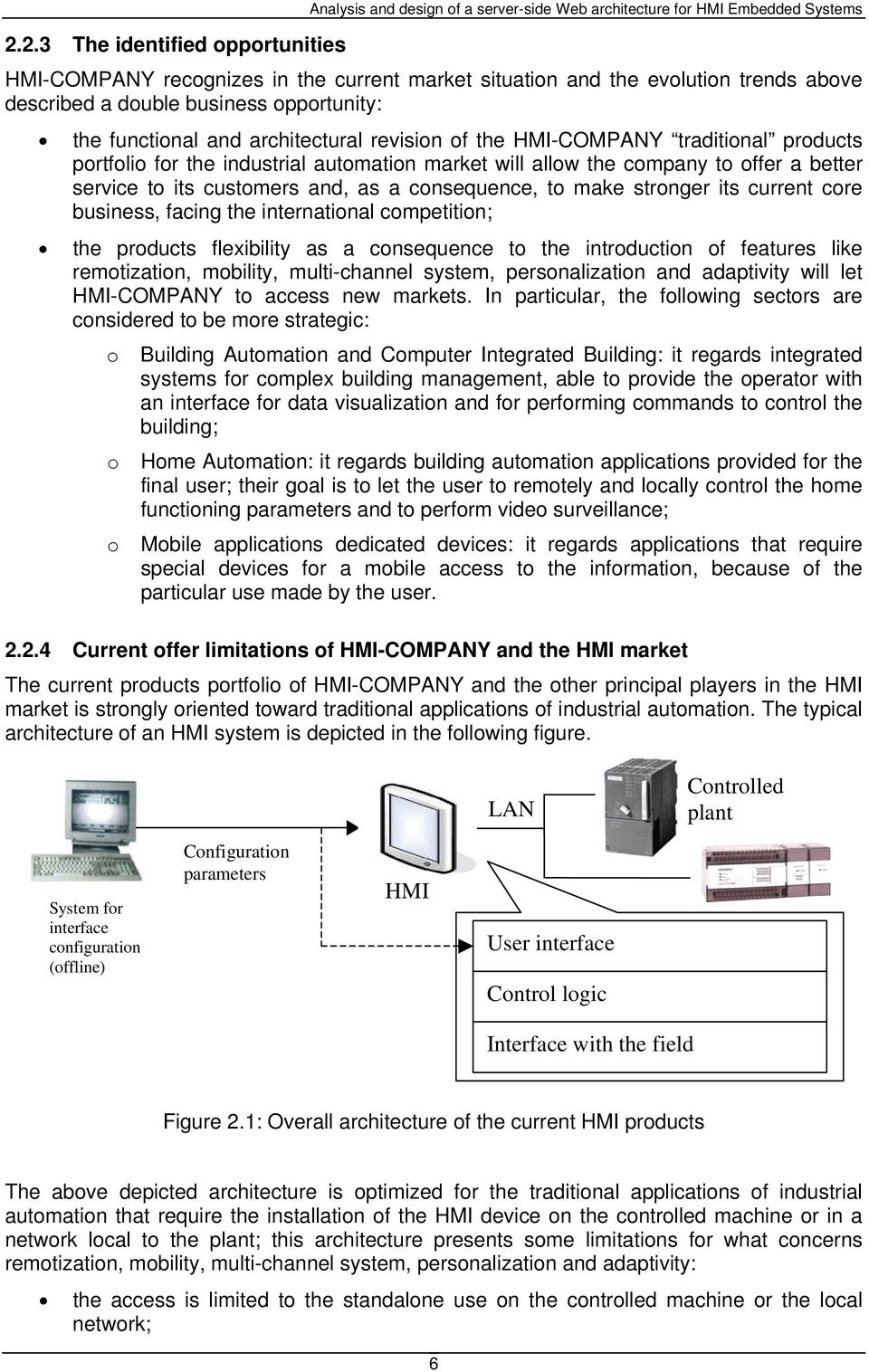
15 2.2.3 The identified opportunities HMI-COMPANY recognizes in the current market situation and the evolution trends above described a double business opportunity: the functional and architectural revision of the HMI-COMPANY traditional products portfolio for the industrial automation market will allow the company to offer a better service to its customers and, as a consequence, to make stronger its current core business, facing the international competition; the products flexibility as a consequence to the introduction of features like remotization, mobility, multi-channel system, personalization and adaptivity will let HMI-COMPANY to access new markets. In particular, the following sectors are considered to be more strategic: o Building Automation and Computer Integrated Building: it regards integrated systems for complex building management, able to provide the operator with an interface for data visualization and for performing commands to control the building; o Home Automation: it regards building automation applications provided for the final user; their goal is to let the user to remotely and locally control the home functioning parameters and to perform video surveillance; o Mobile applications dedicated devices: it regards applications that require special devices for a mobile access to the information, because of the particular use made by the user Current offer limitations of HMI-COMPANY and the HMI market The current products portfolio of HMI-COMPANY and the other principal players in the HMI market is strongly oriented toward traditional applications of industrial automation. The typical architecture of an HMI system is depicted in the following figure. LAN Controlled plant System for interface configuration (offline) Configuration parameters HMI User interface Control logic Interface with the field Figure 2.1: Overall architecture of the current HMI products The above depicted architecture is optimized for the traditional applications of industrial automation that require the installation of the HMI device on the controlled machine or in a network local to the plant; this architecture presents some limitations for what concerns remotization, mobility, multi-channel system, personalization and adaptivity: the access is limited to the standalone use on the controlled machine or the local network; 6
16 the user interface uses a proprietary program and is not based on standard technology (browser and mark-up languages); the software architecture does not aim to make the presentation independent from the business logic. Even if the two software layers are distinct, the lack of a neutral from presentation representation of the information and the commands implies that the logic and the user interface objects are not perfectly isolated from each other; the interface configurability, even if allowed by the configuration system, does not adapt contents and interaction commands to access devices belonging to very different typologies, such as a PC provided with a wide screen and a PDA; mobility absence: the application is designed for being accessed locally or in a fixed network and does not take into consideration mobile access features (band limitations, discontinuity of the link, limited I/O apparatus); personalization absence: the interface configurability is static and does not take into consideration the preferences of the single user; adaptability absence: contents and commands that are present in the interface are not adaptable to the context in which the interaction happens. Furthermore, an evaluation of HMI-COMPANY and HMI market has highlighted also the following aspects: HMI-COMPANY appears to lose the pace with innovation with respect to the new technologies and features. This is particularly clear for Web-based features, such as ing, messaging, remotization of interfaces, browser-based interaction, multidevice rendering; The most aggressive competitors are exploiting internet oriented features for marketing purposes, however they currently provide only low-level features, which can be achieved with small effort. Only a few advanced SCADA products provide real value-added features. Possibly, current customer knowledge is not enough for appreciating the difference The proposed technological innovations The following table shows the innovations proposed in this project to face the above described limitations. Current limitation Proposed innovation The access is limited to standalone use on the controlled machine or the local network. The user interface uses a proprietary program and is not based on standard technology (browser and mark-up languages). Software architecture where presentation and business logic are coupled Limited interface configurability Multifunctional architecture for standalone, local (LAN), fixed remote (Web), mobile remote (Wireless) access. Use of standard browser-based interfaces and mark-up and presentation technologies (HTML, XML, SVG, XML+Flash, ActiveX, Curl, etc.) Adoption of multi-tier architectures with a separate presentation layer. Use of XML as a neutral format for data representation and user interface commands. High level system for representing interface contents. Static and/or dynamic generation of the interfaces for each access channel (PC, PDA, mobile phone, etc.) using XML data. 7
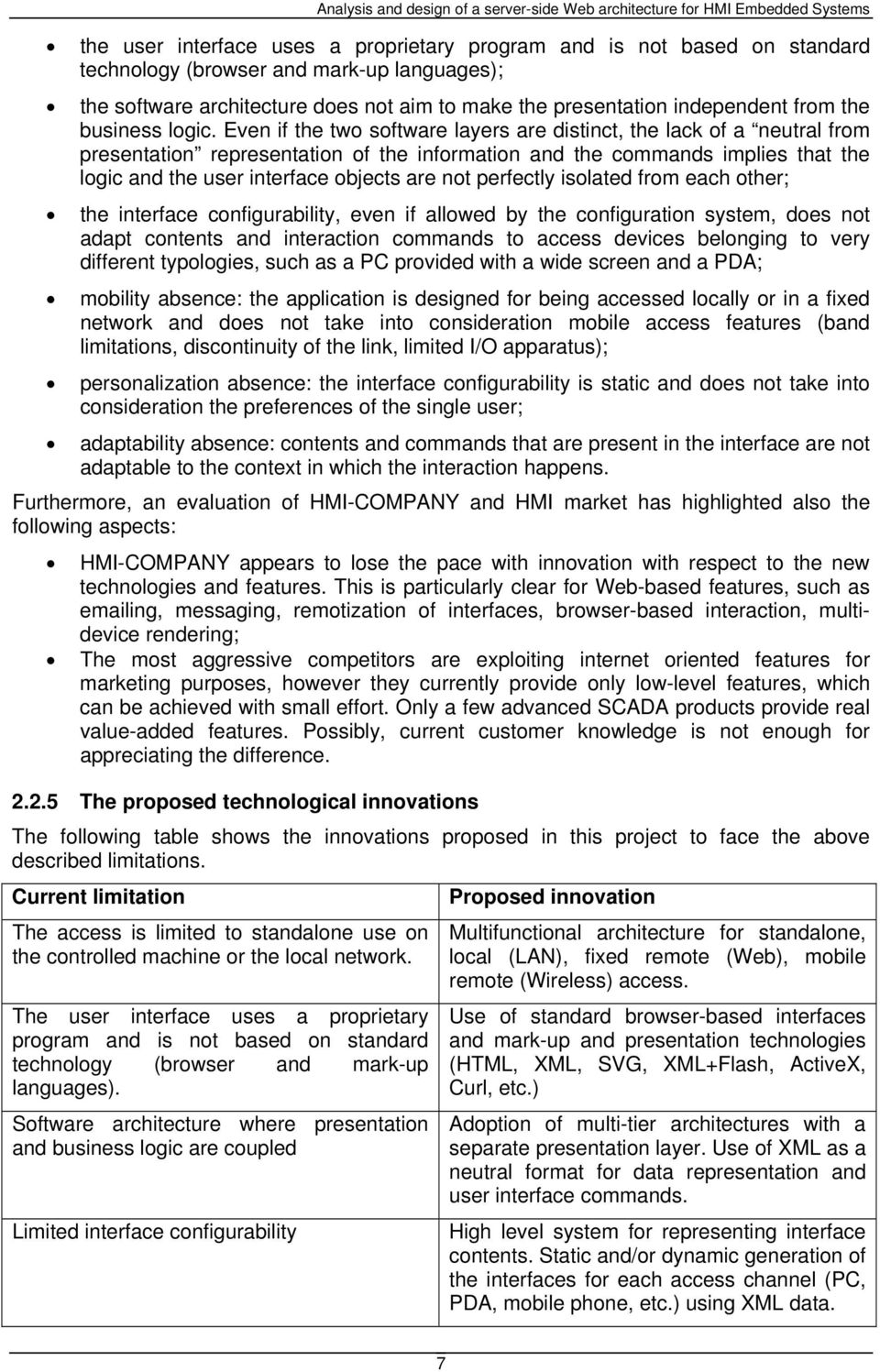
17 Mobility absence Personalization absence Adaptability absence Use of an HMI-server able to produce interfaces suited for mobile access (e.g. GSM/SMS, GPRS or UMTS). Explicit representation in the control logic and in the profile user data; interface customization starting from such profile. Explicit representation in the control logic and in user interaction context data; interface customization starting from such context. Table 2.1: Proposed innovations Thanks to the technological solutions that will be adopted, the new devices will allow to change substantially many access modalities for managing complex system; in fact, it will be feasible to access the system from any remote place with the same interaction and control capabilities given by the local standalone access: in other words, the development of Poli- HMI project will surely lead to the simplification and decrease of costs in controlling and interacting with complex systems, and also to the complete users satisfaction. 2.3 The final innovation proposal The evaluation of HMI-COMPANY current status and HMI market allows defining a product innovation strategy that aims at reaching (and passing over) the current technological status of competitors. The Politecnico di Milano proposal consists in a three-step solution that incrementally increases the features of HMI-COMPANY products in the direction of innovative, Web- based and mobile communications. 1. Web enabling the current product lines As a first step, it is proposed to maintain the current run-time software, operating system and configurator. By introducing a few new components, it can be provided the user with advanced communication features. It is aimed at enabling Web functionalities, based on already available data, that are accessed by the new components. In particular, it is proposed to insert in the system a Web server, a database server (optional), and a (XML configurable) dynamic Web application. The result consists in the possibility of publishing on the Web the plant data and events log. It is also planned a minimal interaction with the field (some non-critical commands can be executed). 2. Remotization of the HMI interface It is proposed to adopt an incremental solution, starting from the previous one: instead of publishing plant status using only traditional Web pages, it is introduced a rendering technology (SVG/Flash) which reproduces the panel interface in a simplified way, using the currently generated configuration files, possibly modified with a few variants. It is also planned some interaction with the field (some commands can be executed). 3. Architecture implementation shifting For the long term solution the proposal consists in a Web-based architecture to be used both for local and remote access. 8
18 2.4 Project goals Hardware and software architecture The following figure shows the overview architecture of the Poli-HMI solution proposed for this project: Poli-HMI client (remote terminal) Internet Poli-HMI client (browser) Poli-HMI client (PDA + micro browser) Interface model LAN Controlled environment (plant, building, museum) Interface modelization system Poli-HMI server Presentation layer (mark-up and interface objects production) Business layer (XML data elaboration, personalization, interfaces dynamic adaptation) Data/field interface layer (user profile management, context and field data collection, commands to the field emission) HMI standalone Figure 2.2: proposed architecture for the Poli-HMI solution Research problems to be solved The evolution towards the Poli-HMI concept and architecture shown in the previous paragraphs involves directly the HMI-COMPANY core business and therefore it must be managed with a proper technical and scientific support. For this reason, the project in discussion considers a strong involvement of the Politecnico di Milano as responsible for the scientific research supporting the development. In particular, the Politecnico researchers have been involved in the following research area: analysis of the competitive scenario of the HMI products; monitoring of the evolution of the technologies that are important for building remote, multi-channel, mobile, personalized and adaptive applications; analysis of the requirements, the architecture specification and the user interfaces; definition of the software engineering and project management procedures suitable to the Poli-HMI systems development; definition of the modalities for analysing the applications performances; application of the concept of Poli-HMI architecture in the arts area. 9

19 3 SERVER-SIDE WEB TECHNOLOGIES FOR EMBEDDED SYSTEMS In order to create an architecture able to support the development of the Poli-HMI solution it has been important to analyse the technologies that can be implemented on embedded systems, considering their features, efficiency and performances. The core of this study has been the server-side of the architecture, therefore in this chapter it is described only an analysis of technologies for creating server applications; furthermore, the focus has been restricted to server-side frameworks providing support for Web solutions. The technologies that have been considered are: CGI (Common Gateway Interface) ISAPI (Internet Server Application Program Interface) ASP (Active Server Pages) ASP.NET Web services 3.1 Analysis context Before starting with the description of server-side technologies it is important to define the context in which the study has been done, in particular it is significant to underline that it has been essentially used only the Windows CE Operating System; the reason for this choice can be found in the fact that, after a detailed evaluation of embedded operating systems, it has come out that only Windows CE and Linux offer the most complete solutions, resulting each one in a low cost and maximum flexibility combination. It has been preferred to analyse Linux and Windows CE in two different studies and in this document only the results concerning Windows CE are given. It must be also emphasized that, at the moment, some of the products of the HMI-COMPANY adopts Windows CE as operating system and this means that HMI-COMPANY has a high competence on this OS. Windows CE is a good compromise between performances, offered functionalities and footprint size. In fact, in an embedded system, it is difficult to find solutions able to reach good performances on a wide range of functionalities without having an exceeding footprint. Microsoft Windows CE 5.0 is an open, scalable, 32-bit operating system (OS) that integrates reliable, real time capabilities with advanced Windows technologies. Windows CE allows you to build a wide range of innovative, small footprint devices. [w1] It must be also mentioned that it is available a tool called Platform Builder for Microsoft Windows CE 5.0 that is a fully-integrated development environment (IDE) for building custom Windows CE OSs and components for embedded system devices Methodology The adopted methodology has been determined by the specific needs of the Poli-HMI project; hence, the following conclusions strictly apply to this specific context. The following sections analyse and evaluate the above listed technologies; the paragraph structure for each technology consists in: overview: it gives a general description of the technology; how it works: it explains the components and the processes involved in the execution of applications built using the technology; 10
20 support: it gives a list of operating systems and/or Web servers supporting the technology; support on Windows CE: it considers the possibility to run on Windows CE applications built with the technology; requirements: it gives a list of the software requirements for running the technology; requirements on Windows CE: it considers the requirements applying to a possible Windows CE implementation; Input/Output capabilities: it evaluates the capacity of the technology to support Input/Output operations such as file, XML file and databases management; advantages: it lists the advantages in adopting the technology; drawbacks: it lists the disadvantages in adopting the technology; conclusions: it gives a final evaluation of the technology. In the following paragraphs it is possible to find technologies evaluation according to their Input/Output capabilities. The libraries identified and tested have been only the ones considered to be a standard way for performing I/O functions. To determine if a library could be seen as a standard way or not, two aspects have been evaluated: the company that produces and supports the library: it makes sense to study and test software that is developed by a software company that is well-know in the computer applications world and that also offers other software products; an example is Microsoft s products that have been used for this analysis; search on the Web of code samples for performing I/O functionalities: it can be considered to be an important parameter of evaluation, in fact the Internet community of programmers offers a wide range of code samples; usually these examples use the most standardized code. It must be said that the sources which the samples are downloaded from must be always checked, in fact it may be that sometimes they are not reliable. More in general, one of the main aspects that has been considered is the need of robustness and commercial feasibility of the solutions: for example it does not make sense to try some libraries that are not standard or that are not supported by a proper development team; indeed, these technologies would be too risky for HMI-COMPANY, since all the future versions of HMI-COMPANY products would depend on not well supported software. 3.2 CGI Overview CGI stands for Common Gateway Interface, a standard for interfacing external applications with information servers, such as HTTP or Web servers. It simply may be intended as an agreement between HTTP server and such external applications about how to communicate. External applications may be scripts or programs: the difference is that scripts are lists of commands written in a scripting language (like PERL, TCL) which are compiled and executed at run-time, while programs are standalone compiled executable files written in traditional programming languages (like C, C++, VB, etc.): a CGI script or a program is a program that the Web server can invoke. Invocation can be provided with in input explicit (from a Web form) or implicit (from HTTP header) data. 11
21 Originally, CGI was invented by NCSA (National Center of Supercomputing Applications) for the NCSA HTTPd Web server in 1993, so it is a relatively old technology which has been gradually replaced by more powerful techniques. On the other hand, it is still used especially in old-generation applications which use separate CGI programs to generate dynamic Web content. The programming language PERL is well known as a language used for CGI, but one of the points of CGI is to be language-neutral: the Web server does not need to know anything about the language used for development, therefore it is possible to use every type of language and any operating system; it must be considered that scripting languages require a script interpreter plug-in installed in the Web server but they are easier to debug, modify, and maintain than a typical compiled program How it works The way CGI works from the Web server point of view is that certain locations are defined to be served by a CGI program. Whenever a request to a matching URL is received, the corresponding program is called, with any data that the client has sent as input. Output from the program is collected by the Web server, augmented with appropriate headers, and sent back to the client. The following figures illustrate this process more in detail: Figure 3.1: The GET request is sent by the client Figure 3.2: The Web server starts the CGI script/program 12
22 Figure 3.3: The output of the script is sent to the Web server Figure 3.4: The HTTP response is sent to the client The Web server and the CGI programs communicate in four major ways: environment variables, command line, standard input and standard output. The first three ways are used to pass data from the client HTTP request (POST or GET) to the CGI program, while the last is used to return data to the client. Environment variables allow to maintain and to pass information state between independent HTTP request (HTTP is a stateless protocol): they are set when the server executes the external program Requirements As it is a long-time asserted standard, CGI is supported by any modern Web server; owning a CGI-enabled Web server is the only requirement needed to execute CGI scripts. CGI scripts and programs may be directly requested from a simple HTML page, so it is not necessary to provide the Web server with scripting capabilities (like ASP, PHP, JSP, etc.) Support Despite it is a relatively old technology, developing CGI extensions is quite easy and there is a wide active developers community which supports it providing solutions to common and specific problems. Developing in CGI can be considered a home-made solution without additional costs beside simple time spent in building source code. 13
23 3.2.5 Advantages Summarizing, it can be identified a list of advantages in implementing a CGI application: language-neutral: as it has been previously written CGI does not depend on the language used to build the program; architecture-independent: the CGI program is independent from the architecture it is installed on; open standard; no license/run-time cost: it is not a proprietary standard; process isolation: the program is independent from other processes, hence it depends only on its execution environment Drawbacks As any old technology, there are some disadvantages in using CGI: main problems affect security and performances. Since a CGI program is executable, it is basically the equivalent of letting the world run a program on a system, which is not particularly safe. Therefore, there are some security precautions that need to be implemented when using CGI programs. Typically these safety measures regard access permission to the directory where CGI scripts are located, so extra time to configure Web server is needed in order to protect it against not permitted executions. Although this, security cannot be fully guaranteed. CGI was originally conceived to define a standard for communication between Web server and external applications, therefore lifecycle of CGI programs is quite resource-consuming: when the Web server receives a request which refers to a CGI program, it must create a new process in order to execute the program and, for passing to this application all the information that could be necessary in order to generate the response, it can only communicate by means of environment variables and standard input. The creation of a process for each request is time-consuming and remarkably engages the resources of the Web server, factor which limits the number of requests that the Web server can manage. A direct consequence is that programs cannot interact with the Web server or take advantage of its abilities as they take place in separate processes. As an example, a CGI script cannot write on the Web server log. There is also an alternative technology, called FastCGI, which is more performing as it uses a single persistent process to execute the CGI program, but it does not contribute in any way to make more interactive the Web server and the external program Support on Windows CE The Windows CE Web Server is implemented as an installable device driver, which is loaded at the start-up of the system; on this Web server there is no support for CGI applications and it is also reasonable to believe that it will not be supported even in the future Conclusions CE Web server limitations do not allow the use of CGI technology. Anyway, other serious limitations of this technology (especially performances) would not have made its choice preferable as time requirements are very strict in the Poli-HMI project; indeed, frequent consecutive requests to Web server which make use of CGI programs, would be extremely resource-consuming as there is much overhead generated by processes that are activated each time a request is issued. 14
24 3.3 ISAPI Introduction ISAPI is the acronym of Internet Server Application Program Interface; this technology was initially introduced for running on the Microsoft Internet Information Web Server (IIS). An ISAPI server extension is a DLL that can be loaded and called by an HTTP server. Internet server extensions, also known as Internet server applications (ISAs), are used to enhance the capabilities of an Internet Server API (ISAPI)-compliant server. An ISA is invoked in response to a browser request and provides similar functionalities to Common Gateway Interface (CGI) applications. The goal of ISAPI is to enable programmers to develop applications faster than CGI programs, due to their tighter integration with the Web Server How it works There are two types of ISAPI: Extensions: they are modules that are explicitly called by the client to perform some tasks; they run within the server and respond by means of it to the client; Filters: they are always active modules, registered at the server start-up for being activated in response to certain events. When the respective event happens, the Filter performs its task. The advantage of filters is that they are transparent to the invoked applications/pages. Extensions are conceptually free-threaded version of CGI programs, while Filters conceptually sit between the HTTP Server and the HTTP Socket. ISAPI applications can be used to enrich HTML pages and to provide dynamic data (like CGI), while ISAPI filters can be used to add new authentication schemes, support new encryption or compression methods, change the content based on the client or other conditions, or provide logging capabilities. Example of Extension: a user fills in a form and clicks a submit button to send these data to the Web server; this invokes the ISAPI extension that stores the information in a database and builds the HTTP response to be sent back to the client. Example of Filter: the client sends an HTTP request with the session ID; this request is intercepted by the authentication filter that checks the validity of the given ID. If the validation is refused, the filter notifies an error to the server that sends back to the client an HTTP error message. Both server extensions and filters run in the process space of the Web server, providing an efficient way to extend the server capabilities. ISAPI are implemented in C/C++ and Delphi. An ISAPI is substantially a program that implements some conventional function and compiled as a dynamic link library. It must be said that all the samples and tests made for this analysis have been developed only using C/C++. 15
25 As previously described, the main difference between ISAPI extensions and filters is the way they start. While the former are called explicitly by the client, the latter are called by the server when a certain event happens. These tasks are performed by two entry points that must be implemented: Filters: o o GetFilterVersion: when the server starts up, it collects all the DLLs by calling this function, that provides version information and determines the desired notifications and delivery priority. ISAPI filter applications should register only for the events that are required. Every time the server processes one of the available events, it will call any filters that have registered for that event; HttpFilterProc: when the HttpFilterProc entry point is called, the filter performs a switch on the NotificationType parameter to determine which action must be taken; Extensions: o GetFilterVersion: it is executed the first time the extension is called. This function is called only the first time there is a call to the ISAPI DLL, therefore it is useful to insert in it all the initialization operations; o HttpExtensionProc: this function accepts only one parameter and contains the code to handle the client request. One of the fundamental structures for an ISAPI is EXTENSION_CONTROL_BLOCK: it is passed to the ISAPI from the server through the HttpExtensionProc call and it contains information and methods for responding to the request. The use of this structure is showed in the following examples: methods and fields of this structure are used in the implementation of the ISAPI; for example it can be used to know the requested method: if (!strcmp (pecb->lpszmethod, GET )) where pecb is a variable of EXTENSION_CONTROL_BLOCK type; to write the response to the client it may be used the method WriteClient: PECB->WriteClient(pECB->ConnID, some text,&dwlen,0); where the used connection ID is retrieved by the block and dwlen is the size of the written string. The process following to a client request is here summarized: a client requests the ISAPI execution via HTTP; the Web server receives the request and calls the ISAPI DLL; it is executed the HttpExtensionProc( ) function; the HttpExtensionProc( ) function creates the HTTP response; the Web server sends the response to the client Support on Windows CE ISAPI filters and extensions are widely supported, making their use convenient. In particular it is significant to say that 2.0 version of ISAPI Filters and Extensions is supported by the Microsoft IIS, the Zeus Web Server, while Apache 2.0 supports only ISAPI Extensions. Regarding Windows CE, the Web server (HTTPD) implementation supports both filters and extensions but only as in-process. 16
26 3.3.4 Input/Output capabilities This paragraph analyses the features offered by ISAPI for managing Input/Output operations. In particular, it has been considered explicitly only Windows CE as deploying environment. What must be underlined is that I/O features are not granted by ISAPI, but by the programming language used to develop the ISAPI libraries; considering that ISAPI applications can be developed using C/C++, this allows to support a wide range of functionalities. Therefore, the limitation depends from the embedded system on which the application should be deployed on, in fact not all the C/C++ libraries are available for being compiled on different processors (like ARM, x86) or used on different operating systems. For what concerns this study, it has been tried to identify some libraries and instructions supporting the development of I/O features on Windows CE. In the following subparagraphs it can be found the analysis regarding file management, database access and XML parsing File management It is possible to manage files with the standard C/C++ primitives (fopen, fprintf), in fact ISAPI applications are allowed (depending on the OS settings) to access the file system, reading and writing files Database management It has been possible to identify two possible solutions for managing a database on Windows CE (both 5.0 and.net version): SQLServerCE SQLite The former is the Microsoft SQL Server 2000 Windows CE Edition that is the compact database provided by Microsoft for embedded systems. It allows to develop applications supporting the SQL syntax. Its engine exposes only an essential set of relational database features. SQLite is a DBMS embedded system technology that is well compatible with ISAPI (and C in general). SQLite is a totally free technology that allows creating, managing and querying SQL 3 relational databases. This technology has been used in other projects for embedded systems and has the advantage to be Open Source and at the same time well supported by its developing team, in fact its library is continuously updated. SQLite supports almost entirely the SQL expressive power: all the syntax constructs are enabled except for writing on views, drop and alter columns, right and full outer join, grant and revoke of privileges. It supports also nested transactions and, partially, triggers. Sources are available and can be compiled as a static library and linked together with the ISAPI extension that, in this way, incorporates DB management features XML files management ISAPI has been plugged with the standard Microsoft parser, MSXML (version 3.0) and all its features are supported. MSXML is available both in DOM (Document Object Model) and SAX (Simple API for XML) version. A DOM parser creates a hierarchical data structure representing the XML document, which, after the parsing process, can be explored and used. SAX instead acts at parsing time generating events during the parsing process, such as startelement, endelement, etc. 17
27 Considering how ISAPI technology will be used in the project, SAX seems to be more useful since it does not use main memory storage for the whole XML file. Indeed, memory occupation can be huge in the case of large documents manipulation with DOM parsing. SAX parser manages the document raising events related to the XML nodes: it warns for beginning and ending of elements and the document, but also for encountering PCDATA content. The controller of these warnings is a module called handler that must implement an interface called ISAXContentHandler; this interface defines all the possible events; the handler contains the code to manage the related event. The parser, when generates an event, gives information related to it. For example, if the event is startelement, it calls the respective function in the handler, giving information of that element: the URI, the tag name, the attributes names and values, etc. Regarding the DOM parser, it is possible to instantiate an object that represents the whole XML tree that can be parsed and also modified using XML Path Language (XPath) Requirements on Windows CE To let an ISAPI DLL run, the image of Windows CE must contain the following modules: WebServer HTTPD DeviceManagement ISAPI Extension WebServer Administration ISAPI For managing XML files, it must be also installed the Microsoft XML library (MSXML3), while for database management, it is required to have installed either SQL Server CE 2.0 or the compiled SQLite library Tests and results An ISAPI extension has been developed to test the features described in this report, and invoked remotely on ARM4i board running WinCE 4.2. A test has been also performed on the HMI-COMPANY device, X86, revealing the correct behaviour of the ISAPI technology on WinCE. All the previously described features (file, SQLServerCE, SQLite, SAX parsing, DOM parsing and writing) have been tested and the results are successful, in fact it has been possible to develop ISAPI extensions able to provide these I/O capabilities. The performances of these utilities have been studied in another analysis inside the Poli-HMI project; from this study it has been possible to identify a ranking based on performances: 1. Files reader/writer (best performances) 2. SAX parser 3. DOM parser 4. SQLite 5. SQLServerCE (worst performances) Advantages As already written, initially the goal of ISAPI was to enable programmers to develop applications faster than CGI programs, through a tighter integration with the Web Server. Compared with CGI, ISAPI has some advantages: it is more efficient and lighter for what concerns processes management; it makes simpler to pass data from the Web server to the ISAPI DLL. 18
28 Other general advantages of using ISAPI are: it is a technology with high performances as it is C/C++ compiled code; it is a powerful technology, as with C/C++ code it is possible to implement a very wide range of functionalities; there is only one process and this means better performances; it maintains the state between different requests Drawbacks Implementing ISAPI brings also some disadvantages: it is not possible to easily separate logic and presentation layers, in fact the HTML response is built on the same ISAPI that calls the business functions; high complexity in writing code, in fact: o it is more complex and cost-demanding than a scripting language (as for the case of ASP pages); o ISAPI DLLs are multi-threaded, therefore, during the development phase, it is required to follow rules for thread-safeness; o ISAPI DLLs are in-process, therefore they are part of the server core; this means that security-safety considerations must be taken and also that ISAPI wrong access to the memory could bring down the entire Web server Conclusions ISAPI is a convenient technology because it is widely supported; it is efficient because it is multi-threaded and powerful because it can be thought as a remote interface of a C/C++ application. It has been also proved to support all the main I/O functionalities. 3.4 ASP Overview Active Server Pages (ASP) offer the possibility to use in a single Web page normal HTML code and also scripted code; this allows the Web server to return to the browser dynamically generated and customized content. ASP comes after CGI technology; it was released by Microsoft Corporation in 1996, to run on its Internet Information Server (IIS) and Personal Web Server (PWS). There have been other releases of ASP, in particular 2.0 and 3.0 versions. ASP has evolved in ASP.NET, so there are no new versions of ASP; in fact Microsoft is now developing on.net platform. It is available also an application that offers support for ASP and that is not a Microsoft s product; this application is Sun Java System Active Server Pages (formerly Chili!Soft ASP) software that allows organizations to deploy Active Server Pages (ASP)-based Web applications on a variety of Web servers and operating systems How it works A Web page returned by ASP is only made of HTML code and client-side scripting, as the server-side scripting is executed by the Web server, transformed in HTML code and added to the HTTP Response. Therefore, at client side no ASP code is visible. 19
29 The following figure shows how the ASP technology proceeds: Analysis and design of a server-side Web architecture for HMI Embedded Systems Figure 3.5: ASP pages execution process (Figure taken from Introduction to Active Server Pages for New Programmers Tutorial 2002 WestLake Internet Training) The entire process of execution can be summarized as: 1. the Web client makes an HTTP Request asking for an ASP page; 2. the Web server receives the Request and finds on its directories the requested page; 3. ASP statements are executed by the ASP engine of the server that can also produce HTML code that is inserted in the response; the ASP statements are removed. The output of this process is the HTTP Response that contains HTML code without any server-side scripting; 4. the Response is sent back to the Web client; 5. the client processes the HTML and client-side scripting contained in the Response and displays the content Examples of ASP scripting Server-side scripting in ASP can be inserted inside an ASP file surrounded by the delimiters <% and %>. The code contained by these delimiters is executed by the ASP engine on the server and it can be written with any expressions, functions and operators valid for the chosen scripting language. There are two main scripting languages for ASP files: VBScript and JScript; the default one is the former. In ASP there are some useful objects that can be used: Response: it can be used to send output to the user by means of the server; Request: it can be used to get information from the user; Server: it is particularly important and it is used to access properties and methods on the server. One of the most important methods the Server object offers is CreateObject that creates an instance of an object; Application and Session: they offer a context from which a page can collect information or functions. The Application context is related to the whole Web application while the Session context refers to a single user. 20
30 3.4.3 Support on Windows CE Windows CE includes an HTTPD WebServer that is able to execute ASP pages. This functionality is offered by both 4.2 and 5.0 version of Windows CE (but also by previous versions of Windows CE). ASP has been one of the first technologies that allowed developing server-side scripting and was introduced by Microsoft in ASP has been continuously developed and now its successor is ASP.NET; this technology comes directly from ASP, hence the development of ASP has been dismissed by Microsoft that is going on only with the.net framework. A direct consequence of this approach by Microsoft is that some ASP libraries are no more supported and updated. Another aspect that must be considered is that the Windows CE implementation of ASP supports only a subset of the functionalities that are supported by the Microsoft standard implementation (Microsoft Internet Information Services) of ASP Limitations of Windows CE implementation of ASP The Windows CE implementation of ASP supports only a subset of the functionalities that are supported by the IIS implementation of ASP. The following list shows the main functionalities that are not supported by Windows CE based ASP (the following missing functionalities refer to both 5.0 and.net version): state maintained between requests: this is the greatest difference between the IIS and Windows CE implementations of ASP. Windows CE does not provide support for the Session or Application objects and does not send the Session-ID cookie that is used on IIS. Therefore, there is no automatic technique for maintaining state or session; Global.asa file: Windows CE based ASP does not search automatically for a file that is named Global.asa to obtain global settings. Initial settings or commonly used routines can be only included by using header files; automatic initialization or termination functions: script procedures may be named Application_OnStart, Application_OnEnd, Session_OnStart, or Session_OnEnd, although Windows CE based ASP does not treat them differently from any other user-created procedure. Windows CE based ASP does not call script procedures automatically on application initialization or termination, as in the case with IIS-based ASP List of Server Objects supported by Windows CE implementation of ASP and differences from the version supported by IIS The following list shows the three built-in server objects that the Windows CE implementation of ASP supports. Request Response Server Each of these objects provides a subset of the corresponding IIS implementation. In particular, Server.CreateObject is an important function that lets create COM objects. It is not supported by Windows CE-based ASP, therefore the creation of COM objects must be made with another procedure as suggested by Microsoft. 21
31 3.4.4 Requirements on Windows CE To let the ASP pages run, the image of Windows CE must contain the following modules: Active Server Pages (ASP) VBScript 5.5 (or Jscript 5.5) Internet Explorer 6.0 for Windows CE Input/Output capabilities It is here given an evaluation of the possibility to access files or databases with Windows-CE based ASP File access Regarding file access there is much literature that can be found on Internet; there are many code samples that show how to access files with a standard ASP program. The most common way of accessing files with standard ASP is using the FileSystemObject object contained in the scripting library accessible from scrrun.dll. This DLL file is provided by Microsoft for IIS Web server side scripting with several classes (Dictionary, FileSystemObject, Drive, Folder, File, TextStream). The more important classes are FileSystemObject and File. The former represents the file system of the operating system on which the Web server is running; the latter is a class representing a file in a file system. At the moment it is not identifiable a version of the scrrun.dll library that can be executed in a Windows CE context, therefore this field of research is closed. Searching on the Internet it has been possible to identify another way for accessing files using ASP. Another possibility is in fact to use another object, filectl.file. Again it has not been possible to identify a Windows CE-based DLL supporting it XML file access Another possibility for accessing files is using functions that can manage XML files. This is a more limited possibility as it considers only XML files, but it must be said that XML importance is rising on the Internet. In order to manage XML files in ASP is available the Microsoft XML Core Services (MSXML) library; it allows users to build high-performance XML-based applications that provide a good degree of interoperability with other solutions that adhere to the XML 1.0 standard. An XML parser allows to access and manipulate an XML document. The two most common parsers are DOM (Document Object Model) and SAX (Simple API for XML); they are both implemented by MSXML library. The former manages the whole XML document and accesses the elements and properties using XML Path (XPath), while the latter uses an event-based approach, in fact it analyses the XML document step by step (element by element) and handles all the elements that are managed in the ContentHandler class processing them as it is written in the class. Regarding Windows CE 5.0 and 4.2 it is available the 3.0 release of MSXML (corresponding to MSXML3.dll); there are two other official releases of the same library: 4.0 and 5.0 versions. The version 3.0 is not the last one, but it can be said that it is still supported by Microsoft, even it seems that this support does not regard the Windows CE version of MSXML. 22
32 The Microsoft XML Parser (MSXML) 3.0 release provides several new features not available in previous releases of MSXML; the most important are: support for server-safe HTTP; compliancy with XSLT 1.0 and XPath 1.0 specifications; support for Simple API for XML, version 2 (SAX2); namespace support when querying the DOM using XPath. The Microsoft XML Parser (MSXML) 4.0 and 5.0 releases provide several new features not available in MSXML 3.0 version; the most important are: support for XML Schemas (XSD); version-independent ProgIDs removed; removal of legacy code; XML Digital Signature. This list of differences is helpful in order to understand what is missing in the MSXML 3.0 version Tests and results As already written MSXML3 offers the possibility to use two different XML parsers: DOM and SAX. Regarding the DOM parser some ASP pages have been developed for evaluating the possibility to use this parser in a Windows CE-based context. All the examples written for testing both writing and reading through the DOM parser have been tested on Windows CE. The results are satisfactory, in fact each of the examples is executed properly without any error. The tests have been executed on different platforms obtaining the same results; the used versions are: Windows CE 5.0 running on x86 micro-processor Windows CE 4.2 running on x86 micro-processor Windows CE 4.2 running on ARM micro-processor Regarding the use of SAX parser, ASP technology is not enough; in fact with SAX-based approach there is the need of a Content Handler class that implements the event-based model for any singular type of XML document. ASP does not support the possibility to create classes and therefore it is not directly possible to implement the SAXContentHandler interface. A solution could be to develop an ActiveX control that includes the content handler class. To create this ActiveX control there are two possible ways: Visual Basic or Visual C++. In order to develop Windows CE-based applications with these two languages, Microsoft offers two integrated development environment (IDE): embedded Visual Basic (3.0) and embedded Visual C++ (4.0). Only embedded Visual C++ allows to create ActiveX control, in fact embedded Visual Basic does not support classes that are the basic instrument to create ActiveX. The SAX parser has not been tested. 23
33 Required Resources In order to use properly the MSXML3 library with all its functionalities it must be included in the Windows CE image with the following extensions: xmldom: it supports the basic Document Object Model (DOM) for MSXML; xmlhttp: it implements the XMLHTTP object; xmlsax: it supports Simple API for XML (SAX)-based parsing; xmlxql: it provides support for the XML Query Language (XQL) Evaluation The results of the tests made prove that the MSXML DOM parser works properly. The main drawbacks of using a DOM parser is that, in order to work correctly, it requires to keep the whole XML document in RAM. This problem must be taken into account considering that embedded systems usually have lack of resources. In this context, the advantage of using the DOM parser instead of the SAX parser is that the former does not required to develop an ActiveX control and everything can be managed just programming in ASP Database access Concerning the access to databases, one of the most common library for doing it in Microsoft-based languages is ADO (ActiveX Data Objects). It enables to access and manipulate data from a variety of sources by means of an OLE DB provider. ADO and OLE DB with ODBC are the three primary technologies of Microsoft Data Access Components (MDAC). MDAC is a series of interfaces that provides data access that is independent from data stores, tools, and languages. Microsoft has developed a version of ADO for Windows CE: ADOCE. It provides a subset of ADO for the Windows CE Operating System that includes implementation of the Recordset and Field objects. ADOCE adds new database functionalities to Windows CE by enabling access to databases stored locally on a device and provides synchronization of data to a network database. It provides access to the Windows CE database engine from any COMcapable environment. ADOCE libraries are available and can be downloaded from Microsoft Web site. The latest version of ADOCE that is available is 3.1. It was developed in 2000 and in that period Windows CE releases were 2.0 and 3.0 versions; hence, there is not an explicit version for later versions of Windows CE (4.2 and 5.0). Even if ADOCE 3.1 was not developed for 4.2 and 5.0 versions of Windows CE, it is possible to use some of the libraries to develop database access functions with also these two newer versions of Windows CE. The problem is that not all the ADOCE libraries are accepted and can be registered. The two most standard types of database that can be managed on Windows CE by means of ADOCE are: Native CE database (compact database - *.cdb) SQL Server CE database (*.sdf) Native CE databases are simple databases that offer standard functionalities, while SQL Server CE DB are more powerful. In order to manage cdb files it is required to install only the ADOCE library, while for managing SQL server database files it is also necessary to install the SQL server library (sqlserverce.dll). 24
34 Tests and results In order to test the functionalities of ADOCE some ASP pages have been developed. The same functionalities have been tested for the two types of database above described. The tested functionalities are: database creation; table creation and modification; records input; records extraction through SQL query. These tests have been executed on different platforms; the used versions are: Windows CE 5.0 running on x86 micro-processor Windows CE 4.2 running on x86 micro-processor Windows CE 4.2 running on ARM micro-processor As already written, ADOCE 3.1 was released before the development of 4.2 and 5.0 versions of Windows CE, therefore it is not guaranteed its compatibility with them. In fact, not all the libraries of ADOCE can be registered on Windows CE 4.2 and 5.0. Even with this problem it has been possible to provide the previously listed functionalities for almost all the tested platforms. The main problem is related to the ARM-version of Windows CE on which it is not possible to register the DLLs for accessing Native CE databases. In order to access databases in ASP, there are some resources that are required to be present on the operating system: SQL Server CE 2.0 (only for testing SQL Server CE databases) ADOCE libraries are not included in Windows CE and therefore they must be installed and registered on the operating system. In order to register a DLL it is enough to use the program regsvrce.exe ADOCE libraries (adoce31.dll, adocedb30.dll, adocedb31.dll, adoceoledb31.dll, adoxce31.dll) MS Database libraries (msdadc.dll, msdaer.dll, msdaerde.dll, msdaeren.dll, msdaerit.dll): they do not work with ARM-based Windows CE Evaluation Being impossible to identify a later version of ADOCE than 3.1 means that there is no a direct support for the following versions of Windows CE, like 4.2, 5.0 and also for future releases. One of the reasons for this situation may be that ADO was developed by Microsoft until the coming of.net and after this, Microsoft has started developing a new version of ADO based on the.net framework. This new release called ADO.NET is present in the.net framework (it is also present in the.net Compact Framework even if some classes are not included. Therefore, on Windows CE ADO.NET guarantees an easy approach to databases but it cannot be used in a Web server-based context, because ASP.NET is not available on Windows CE, as it is explained in the next section. The decision of using ADOCE inside the HMI-COMPANY project could be risky, in fact if there are no further releases of ADOCE it will be difficult to go on with it. 25
35 3.4.6 Advantages After this analysis it has been possible to draw some conclusions on the ASP technology; there are some considerations that are related only to Windows CE-based ASP and others that are common also to standard ASP. For some aspects ASP, being a server-side scripting technology, is better than other technologies like ISAPI and CGI that allow to build Web application but that do not allow to use server-side scripting; in fact, the advantage of being able to use scripts is that it is easier to distinguish between code for dynamic content and code for static content, therefore it is less complicated to program and to create a more flexible application. Regarding the relationship between ASP and ASP.NET, the decision of developing an ASP application, even if ASP importance is diminishing, can be supported by the fact that ASP.NET offers backward compatibility to ASP (as it is explained in the next section) and therefore the ASP code can be easily translated to the.net version. This compatibility is not complete, but it gives the possibility to migrate step by step an ASP application to an ASP.NET one, avoiding a single cut-over, that can be very risky, from one application to the other Drawbacks As for the advantages, the drawbacks that are here presented could be related only to Windows CE-based ASP while others also to standard ASP. ASP has been substituted by ASP.NET and therefore, in some way, it can be said that it is an old technology, because it is not directly supported anymore. An example that underlines this issue is the analysis of the ADOCE situation showed in a previous paragraph. Considering the Windows CE context it seems that ASP is almost not supported anymore, in fact it has not been possible to identify libraries for accessing common files and the ones found for accessing databases are, for some aspects, out-of-date. ASP technology works with limited scripting languages (JScript, VBScript); these offer less functionality than normal programming languages. One of the limitations is that with these scripting languages it is possible to use objects but it is not possible to build new objects. In fact, to develop a new class it is necessary to create an ActiveX control and this can be programmed only using other languages like Visual C++ or Visual Basic. The advantage of other server-side scripting technologies like Java Server Pages (JSP) and ASP.NET is that they can use as scripting language the same programming language that can be used for developing desktop applications; this allows them to create new classes with the same language and to be more flexible in using them. In Windows CE-based ASP it is not possible to use the Application and Session Objects and this represents a disadvantage, in fact this forces the developers to work only at a page level. This problem can be overcome but it certainly does not help in developing an application Conclusions ASP has been proved to be an out-of-date technology as overcome by the.net technology, therefore it could be risky to base the Poli-HMI architecture on it. Furthermore, its advantage given by the fact that ASP is a server-side scripting technology, is not so important inside this project as the client-side content will be mainly built by other technologies (Flash, SVG). 26
36 3.5 ASP.NET Overview ASP.NET is a technology included in the Microsoft.NET Framework; it provides a unified Web development model that includes the services necessary to build enterprise-class Web applications: it is not simply a language or a new version of ASP pages but a compiled,.netbased environment that enables the benefits of.net technologies, which include the managed common language run-time environment, type safety, inheritance and so on. ASP.NET pages (aspx files) are executed on the server and generate mark-up such as HTML, WML or XML that is sent to the client. ASP.NET pages use a compiled, event-driven programming model that improves performance and enables the separation of application logic and user interface. ASP.NET pages contain server-side logic written in Microsoft Visual Basic.NET, Microsoft Visual C#.NET, or any Microsoft.NET Framework-compatible language; this is the main advantage of ASP.NET: a single application may be developed using different languages. Additionally, the entire.net Framework is available to any ASP.NET application How it works IIS communicates with the.net framework through unmanaged (non-.net code) ISAPI extensions: aspnet_isapi.dll and aspnet_filter.dll. The aspnet_isapi.dll is an extension that serves as a request router. When the.net framework is installed on a machine with IIS installed on it, IIS is configured so that requests for specific extensions are handled by aspnet_isapi.dll. Requests for ASP.NET resources are forwarded by IIS to ASP.NET via this configured extension; this extension is the bridge between unmanaged and managed code. In the next figure is depicted the ASP.NET architecture. Figure 3.6: ASP.NET architecture When an ASPX page is requested: the worker process ASPNET_wp.exe is invoked by the ISAPI extension; if it is the first request for this page, the file is compiled with the opportune compiler to MSIL (Microsoft intermediate language): o all the external class dependencies are found; o the appropriate compiler from used language to MSIL is invoked; o the MSIL code is saved in memory; the assembly is executed just in time in memory. 27
37 Figure 3.7: ASP.NET pages execution process ASP compatibility ASP.NET offers significant improvements over ASP in the areas of performance, state management, scalability, configuration, deployment, security, output cache control, Web farm support and XML Web services infrastructure. The relationship between ASP and ASP.NET is here summarized: most existing ASP pages will have to be modified in order to run under ASP.NET; ASP and ASP.NET can run side by side on an Internet Information Services; session state and application state are not shared between ASP and ASP.NET pages Support ASP.NET is a Microsoft very popular technology and it is supported not only by the same Microsoft but also by many developers communities. It is possible to develop ASP.NET sites in any text editor, but the two main development tools which support ASP.NET are Web Matrix (available as a free download) and Visual Studio.NET (available as a free trial or for purchase), both produced by Microsoft. As well, Macromedia Dreamweaver MX, Borland C# Builder, also offer support for ASP.NET Advantages Implementing ASP.NET applications has some advantages: flexible language options: it is possible to use different languages for developing.net applications (e.g. Visual Basic.NET, C#, and JScript.NET); great tool support: Visual Studio.NET is a very powerful integrated development environment (IDE); rich class framework: there is a wide range of class libraries already developed that encapsulate rich functionalities; XML Web services support: it supports Web services. 28
38 3.5.6 Drawbacks The.NET framework only runs on Windows, its supported hardware and the.net environment. There is no portability offered by Microsoft. It should be noted that there have been hints by Microsoft that additional implementations of.net will be available for other platforms. A good alternative for other operating systems is Mono that provides a wide support for developing and running.net client and server applications for many operating systems such as Linux, Solaris, Mac OS X and Windows even if some functionalities are not provided yet Support on Windows CE Microsoft Windows CE provides the.net Compact Framework that is a subset of the.net Framework class library and also contains classes exclusively designed for it. The subset is appropriate for applications designed to run on resource-constrained devices and is semantically compatible with same-named classes in the.net Framework. ASP.NET cannot be used on Windows CE as the.net Compact Framework is primarily a rich client platform and does not provide ASP.NET support Conclusions Many tests have been performed to evaluate the applicability of ASP.NET technology to the HMI-COMPANY project but, as Windows CE is considered a client platform designed to run on resource-constrained devices, the.net Compact Framework does not allow the use of ASP.NET for developing Web applications. 3.6 Web services Overview It is interesting to analyse a possible approach to server-side technologies using Web services. A Web service is a software system that can be used for inter-application data exchange; there are many systems and protocols that offer possible solutions to this problem: Sun Microsystems RPC (Remote Procedure Call); CORBA; Microsoft s DCOM; Sun Microsystems Java RMI (Remote Method Invocation). Web services represent a new approach for solving this issue, a new way that is thought to work with systems based on different languages and platforms. The goal of this part of the document is to give a short introduction to what Web services are and how they work, and to identify tools and frameworks for developing Web services on embedded systems. In the following sections it is also possible to find a more detailed explanation of how some of these tools work. This analysis regards Web services for embedded systems, but more in particular for embedded systems supporting Windows CE; the Java world has not been considered, in fact only tools directly supported by Windows CE Operating System have been chosen. 29
39 3.6.2 How it works From the definition given by the W3C Web Services Architecture Working Group, a Web Service is a software system identified by a URI, whose public interfaces and bindings are defined and described using Extensible Mark-up Language (XML). Its definition can be discovered by other software systems. These systems may then interact with the Web service in manner prescribed by its definition, using XML based messages conveyed by Internet protocols. [2]. The Web services architecture is based on many specifications that are XML, Simple Object Access Protocol (SOAP), Web Services Description Language (WSDL) and Universal Description, Discovery and Interface (UDDI); these are just the main standards, while there are others specifications, not yet standards, whose goal is to solve other issues about Web services. A global vision architecture regarding Web services is showed in the following figure: Service Requestor Invoke Use Find Service Provider Publish Service Directory Figure 3.1: Service Oriented Architecture There is a Service Provider that offers some services and can publish them on a Service Directory; on this directory a Service Requestor can find the services it is interested in and, once discovered, it can invokes and uses them communicating directly with the Service Provider. This architecture can be seen on different layers, each of them is supported by one or more standards; in particular the services publishing and discovery follows the UDDI standard, the services description is regulated by WSDL, the XML-based messaging follows the XML and SOAP standards, while the transport is based on HTTP. SOAP is a W3C Recommendation and its last version is the 1.2 of There is a previous specification (1.1 of 2000) that is also important as there are tools that still refer to this specification to develop Web services. SOAP is a lightweight protocol for exchanging information in a decentralized, distributed environment. It is an XML based protocol and consists of some parts; in particular, an envelope that defines a framework for describing what is contained in a message and how to process it, a set of encoding rules for expressing instances of application-defined data types, and a convention for representing remote procedure calls and responses. SOAP can potentially be used in combination with a variety of other protocols; the main binding, that is also well described in the specification, is SOAP over HTTP; this kind of binding (with HTTP 1.1) is the only normative one for SOAP 1.2 messages. One of the design goals of SOAP is to encapsulate and exchange RPC calls using the extensibility and flexibility of XML. Using SOAP for RPC is orthogonal to the SOAP protocol. In the case of using HTTP as the protocol binding, an RPC call maps naturally to an HTTP request and an RPC response maps to an HTTP response. 30
40 WSDL is a W3C Recommendation and its last version is the 1.1 of From this specification it can be read that WSDL is an XML format for describing network services as a set of endpoints operating on messages containing either document-oriented or procedureoriented information. The operations and messages are described abstractly, and then bound to a concrete network protocol and message format to define an endpoint. Related concrete endpoints are combined into abstract endpoints (services). WSDL is extensible to allow description of endpoints and their messages regardless of what message formats or network protocols are used to communicate, however, the only bindings describe in this document describe how to use WSDL in conjunction with SOAP 1.1, HTTP GET/POST, and MIME. [7]. UDDI is a standard defining how to publish and discover services; it is not a goal of this document to focus on it Client and server-side components This section is related to server-side technologies and hence it has focused on frameworks supporting the development of server-side SOAP applications. It must be mentioned also the possibility to implement client-side components inside server SOAP applications, in fact it would be the case of intra-components communication. It could be useful for developing a machine-to-machine communication. In such situation, there would be the need to use client-side SOAP methods inside the server-side code. In this work, it has been also performed a brief client-side analysis as it has been considered a way for creating a future machine-to-machine architecture. This kind of study has been also useful for testing the server-side, in fact in order to investigate the capabilities of a SOAP server there has been the need to develop SOAP client applications Support on embedded systems Web services with WSDL and SOAP represent in some way only standards; this is one of the reasons why there is a high number of these standards implementations. Mainly these implementations are developed in C++, Java or.net. In this document the focus is on embedded systems and in particular on Windows CE; in the following list it can be found a brief description of the main frameworks for Web services on embedded systems: the micro-services framework considers a subset of the Web services protocols and only a subset of the SOAP/XML primitive types and compound is supported; the esoap toolkit for C++ and Java, developed by EXOR International, is a proprietary SOAP implementation for embedded systems with an API based on a class library; the ksoap toolkit for Java, developed by Ehnydra, runs on embedded devices that support Sun s KVM (Java 2 Micro Edition). The ksoap toolkit offers a class library for SOAP/XML packaging; Microsoft.NET compact framework provides a platform-dependent Web services for embedded devices. It allows to develop only client-side components; the gsoap toolkit is the only Web services development environment that includes a fully automated RPC compiler supporting pure C and C++ Web Services applications; Microsoft SOAP Toolkit that offers a framework for building client and server-side components on Windows CE. Some of the above introduced frameworks are described in the following paragraphs, focusing the analysis in particular on Windows CE Operating System. 31
41 Microsoft SOAP Toolkit On Microsoft Windows CE.NET 4.2 and 5.0 it is available a toolkit that enables Web services communication. It is called SOAP Toolkit and is a Microsoft product. It offers the possibility to develop client-side components, for invoking services, and also server-side components, for exposing services. In particular, the SOAP Toolkit for Microsoft Windows CE [w3] consists of: a client-side component that allows an application to invoke Web service operations described by a Web Services Description Language (WSDL) document; a server-side component that maps invoked Web service operations to Component Object Model (COM) object method calls as described by the WSDL and Web Services Meta Language (WSML) files. This file is necessary for the Microsoft implementation of SOAP; necessary components that construct, transmit, read, and process SOAP messages. These processes are collectively referred to as marshaling and unmarshaling. Microsoft has announced that it will not support the SOAP toolkit for long. In fact, the toolkit is deprecated by the.net Framework. The toolkit provides basic Web services capabilities for COM components and applications and its support has been extended from the originally posted July 1, 2004 deadline. Mainstream SOAP Toolkit support was retired in March 31, 2005 with extended support lasting until March 31, 2008 [w4]. The last version of SOAP Toolkit that has been released by Microsoft is 3.0 and is a desktop version; it is not the same version of the SOAP Toolkit present on Windows CE that, in fact, is based on a previous release (2.2). Windows CE-based Toolkit is compliant with WSDL 1.1 (15 March 2001) specification and SOAP 1.1 (8 May 2000) technical recommendation; the latter is not the latest SOAP specification that is 1.2 (24 June 2003). The SOAP Toolkit offers support also for the W3C XML Schema Proposed Recommendations (Part 0, Part 1, Part 2), for arrays of simple types, and arrays of complex types, for multidimensional arrays, for complex types, for RPCencoded and document-literal WSDL operations and for SOAP headers. As this document is related to server-side technologies it makes more sense to analyse in particular the server-side component of the SOAP Toolkit, in fact it could be thought as the element that acts as Web server that receives all the clients requests. A client-side component could be interesting to be studied both as a tool for testing server-side modules and also as a possible way for implementing Web services machine-to-machine communication WSDL and WSML inside the SOAP Toolkit For managing Web services it is important to define a WSDL file that describes all the operations and services that are offered. As it follows a standard, this file allows to de-couple the interface of the services from their implementation. Therefore, with WSDL it is possible to define only the interface of the offered operations. For implementing Web services with the SOAP Toolkit it is necessary to define also a Web Services Meta Language (WSML) file; this kind of file is related only to the Microsoft Toolkit. Its role is to provide information about the mapping between the operations of a service (the ones described using WSDL) and the related methods in the COM objects. Using the WSML file it is possible to determine which COM object should be loaded to serve a request for an operation. The Toolkit offers a program, called WSDL/WSML Generator, that generates these files according to the DLL given in input. 32
42 Server-side component The SOAP Toolkit provides two options for implementing a SOAP listener (the handler of incoming SOAP requests on the server): An Internet Server API (ISAPI) server An Active Server Pages (ASP) server gsoap The gsoap toolkit is a Web services development environment that supports C and C++ Web services applications. A great advantage of gsoap is that it is completely open source and therefore all the code source is available and can be modified. It tries to automate the development and deployment cycle of C/C++ Web services. It is at the 2.7 release and it is WSDL 1.1 and SOAP 1.1/1.2 compliant. It also includes an HTTP 1.0/1.1 Web server. Starting from 2.0 version the gsoap toolkit supports Windows CE [4]. With gsoap it is possible to have different kinds of SOAP listener; more specifically, gsoap offers Apache_mod, IIS, WinInet, CGI, and FastCGI interfaces. ISAPI has been proved to be a fast and easy way for developing server-side applications on Windows CE. mod_gsoap is an ISAPI extension DLL that allows to run services integrated in process inside the Microsoft IIS. It has been possible to compile this DLL for Win32 while the test has failed on Windows CE; therefore, the study of gsoap has ended with the creation of a gsoap application that has not been possible to be tested. This application has been produced automatically by the gsoap WSDL importer starting from the WSDL file describing the methods offered by the Web service (it can be made starting from the C/C++ Header File Specification). A future development could be to run gsoap services as stand-alone services, as it is written on the gsoap documentation Microsoft.NET Compact Framework and Web services On Windows CE Microsoft provides a compact version of the.net framework; this reduced version does not offer server-side functionalities. This is the reason why it is not possible to develop a SOAP server with.net. The Compact Framework provides instead support to client-side Web services, therefore it has been possible to build applications invoking Web services. If the Compact Framework is combined with Microsoft Visual Studio.NET it results very easy to build this kind of applications, in fact starting from a WSDL file it is possible to create a Web reference that automatically creates the class managing the Web service, and starting from this class the Web service methods can be invoked Input/Output capabilities The study of the I/O capabilities offered by the above introduced frameworks for Web services is reduced to the Microsoft SOAP Toolkit as it is the only framework that has been deeply analysed Microsoft SOAP Toolkit The Microsoft SOAP Toolkit considers only the development of Web services through C/C++, therefore for what concerns its I/O capabilities it is valid what has been written in the corresponding paragraph regarding ISAPI. 33
43 3.6.6 Tests and results In the next paragraphs it can be found a report of the performed tests and results obtained with Web services Microsoft SOAP Toolkit The Microsoft SOAP Toolkit has been used to develop some sample applications, either client or server-side, in order to understand its capability on Windows CE. In this paragraph it is given a brief description of how these applications have been built Server-side sample Regarding the server-side part of the SOAP Toolkit, the main sample that has been built is a component that is part of a prototype application simulating the control of a plant. The Web services server is running waiting for SOAP requests and it communicates also with a plant simulator running on a JSP server. The main tasks of the server are to expose some services and operations, to wait for the SOAP requests and to build and return the response. As it has already been written there are two ways, using the Microsoft Toolkit, to handle the incoming SOAP requests: through either an ASP or an ISAPI server. In this demo and also in the other samples that have been developed it has been used an ISAPI server as a SOAP listener. The reason why the focus has been put only on ISAPI is related to the fact that previous analysis on ASP and ISAPI have underlined the better performances and efficiency on Windows CE of the latter. The ISAPI handler is represented by SoapIsap.dll that is present on Windows once installed the server-side part of the SOAP Toolkit. The ISAPI handler loads the WSDL and WSML files, executes the operation or operations specified in the SOAP request message, and returns the resulting SOAP response message to the client. It is here given the list of steps that have been taken to build the above described solution and that, in general, can be followed to create Web services with the Microsoft Toolkit: 1. creation of the COM object containing the functions that are desired to be exposed; 2. generation of the WSDL and WSML files; 3. registration of the COM object on the Windows CE device and upload of the WSDL and WSML files. As it has been already written, once the DLL is available, it is possible with the WSDL/WSML generator tool to create the WSDL and WSML files that can be uploaded, with the same DLL, on the Web server. Before the SOAP server is ready to serve the SOAP requests, the DLL must be registered on the operating system Client-side sample Regarding the client-side part of the SOAP Toolkit, it has been built a sample application running on Windows CE that connects to a SOAP server component also developed with the toolkit. In order to create a SOAP client application with the SOAP toolkit there are some steps that must be followed: 1. it is instantiated the SoapClient object that implements the ISoapClient interface; this step is performed invoking the CoCreateInstance function; 2. the SoapClient object is initialized by calling ISoapClient::mssoapinit; the input parameters for this function are the WSDL file name, the service name and the port information. During this phase, all the methods described in the WSDL file are bound dynamically to the ISoapClient interface; 34
44 3. using the Invoke function the methods described in the WSDL file are called. It has also been built a SOAP Toolkit client on Win CE connecting to a remote Web service Tests and results The demo and also other server-side Web services applications have been tested once developed with the Microsoft SOAP Toolkit. The performed tests have been useful for checking the right behaviour of the implemented methods and the correct execution of the SOAP messages exchange with the Toolkit. What is more interesting regards the client-side Web services running on either Windows CE or not. The tests that have been made on these applications are useful to understand something more about the performances of the Microsoft Toolkit and also about Web services applications developed with the.net Compact Framework. These measurements also represent a minimum bound of the server-side performances; in fact, these tests have been efficiently supported by the server applications and there has not been any failure on the server side. The tests that have been executed regard clients connecting to the same Web service running on Windows CE and developed with the SOAP Toolkit. This is the list of the tests: SOAP Toolkit client running on the same device of the server; SOAP Toolkit client running on a Windows 2000 PC (see the results in the following table);.net client running on a Windows 2000 PC (see the results in the following table);.net Compact Framework client running on the same device of the server; Flash client running on a Windows XP PC (see the results in the following table); SVG client running on a Windows XP PC. Here some of the results are showed: Server hardware Client hardware Client OS Type of client Performances (requests/sec) Board HMI- COMPANY Windows CE.NET 4.2, ViaX86 compatible 400MHz, 64MB Flash, 128MB Ram Board HMI- COMPANY Windows CE.NET 4.2, ViaX86 compatible 400MHz, 64MB Flash, 128MB Ram Board HMI- COMPANY Windows CE.NET 4.2, ViaX86 compatible 400MHz, 64MB Flash, 128MB Ram Pentium 4 2,26GHz 512 MB Ram Pentium 4 2,26GHz 512 MB Ram Pentium 4 2,26GHz 512 MB Ram Windows 2000 Server Windows 2000 Server 35 SOAP Toolkit.NET (C#) Windows XP Flash Player 7 (running on Internet Explorer 6) Table 3.1: Tests results 92,76/sec 3,06/sec 7,8/sec
45 It has come out that the best results are given by the client built with the Microsoft SOAP Toolkit; the results have been similar for the SOAP Toolkit client running on the Windows CE device. What also has been highlighted through these tests is that.net, SVG and Flash clients are much slower; the main reason for these lower performances is related to the parsing of the XML SOAP request and response, that in.net, SVG and Flash is less efficient than using C and C Windows CE requirements Microsoft SOAP Toolkit To develop server-side Web applications there are some required components that must be installed on the Windows CE Operating System: COM (inproc) SOAP Server HTTPD Server XML/HTTP Active Template Library (ATL) While the first four elements are compulsory, ATL is not essential; anyway, the samples this document refers to have been developed using ATL. Developing Web services using ATL is easy, considering the possibility of using the automatic Wizard for ATL/COM objects present in Embedded Visual C++ 4.0, the development tool provided by Microsoft Advantages Web services have been analysed in many papers and the idea that comes out is that they have the great advantage of enabling loosely coupled communication between components, allowing interaction between applications based on different platforms and languages. For what concerns the Microsoft SOAP Toolkit, it can be considered a valid instrument for creating server-side Web services application; a great advantage of this toolkit is that allows the use of native code, with consequent high performances and high capability to implement a wide range of functionalities Drawbacks One of the weakness of Web services is related to their performances, in fact using Web services requires to parse every time an XML message, and this operation is high demanding. Furthermore, Web services standards, as they are intended to aim to simplicity and extensibility, do not offer direct support for security, even if there are other supporting protocols that face this aspect. For what concerns the Microsoft SOAP Toolkit, there is a problem related to native code, in fact, compared with, for example, the.net framework, it is more difficult to manage all the variables and objects in order to avoid memory leaks Conclusions At the end of this section some partial conclusions about Web services can be drawn. Regarding the Microsoft SOAP Toolkit, it can be considered a valid instrument for creating server-side Web services applications; performance problems seem to come out for what concerns a possible use of Web services on the client-side (Flash, SVG) of the Poli-HMI project. 36
46 Considering the client-side performances, and thinking about a possible implementation of a machine-to-machine communication architecture based on Web services, the Microsoft SOAP Toolkit represents a good solution seen its performances on client-side applications. Talking about intra-components interaction using Web services, it must be taken under account the fact that the more levels are present the slower the application will be. Looking at the SOAP 1.2 Specification it can be found a solution that could improve the performances, in fact using the SOAP Response Message Exchange Pattern only the response must be built using SOAP, while the request is just an HTTP GET; this simplification could grant higher performances as it is not required anymore to parse and build the XML SOAP request. This pattern could be used provided the fact that a request is just like an RPC method call, in fact an RPC call maps naturally to an HTTP request. This pattern cannot be used inside the Microsoft SOAP Toolkit as it is not SOAP 1.2 compliant. 3.7 Conclusions about server-side Web technologies During this work, it has been necessary to challenge some difficult situations due to the lack of information sources and technology support to the embedded systems world. The technologies analysis can be summarized with the following table. File management Database access XML parsing Win CE support Requirements / Performances CGI NO Not acceptable ASP NO ADOCE YES Obsolete Low performances ASP.NET NO Not acceptable ISAPI YES SQLite SQLServerCE YES YES Good results Web Services (MS SOAP Toolkit) YES SQLite SQLServerCE YES Obsolete Acceptable (server-side) Table 3.2: Server-side Web technologies summary Web services are not suitable for this project, as client applications (SVG, Flash) do not give acceptable performance results. Web services represent instead a feasible solution for machine-to-machine communication. This study regarding Windows CE has highlighted that only ISAPI seems to meet the requirements of the projects, and so far there are no alternatives. In particular, ISAPI has many functionalities and high-quality performances compared with the other ones (CGI, ASP) and has not an excessive demand of resources, features of extreme importance in an HMI embedded system. The problem related to this technology consists in the high complexity in writing code for what concerns security and safety, in fact ISAPI DLLs are multi-threaded and in-process applications. 37
47 4 HMI-COMPANY RUN-TIME ARCHITECTURE Before analysing the requirements of the new Poli-HMI run-time it has been important to understand how the current HMI-COMPANY application works, and to identify and analyse the components contained in the deployed HMI-COMPANY environment. The HMI-COMPANY run-time that has been analysed in this section is the application package deployed on the HMI-COMPANY devices for running a project. It refers only to the class of HMI-COMPANY devices supporting Windows CE. The reason why it is considered only Windows CE is because this study concerns mainly with the possibility that the new runtime will be provided on this type of operating system and the main functionalities given by the current application shall be present also in the new system. 4.1 Introduction HMI-COMPANY run-time consists in an application package that recovers, manages, retrieves and shows data from an application field (for example a factory process), to a user, by means of a terminal. It is composed by different modules that are organized according to the roles necessary to perform these tasks. These components are based on COM implementation. The next picture shows the high level view of the architecture that are described, module by module, in the following sections of this document. Application Manager * 1 1 Data Server * Tag 1 * Device Manager Figure 4.1: High level view of HMI-COMPANY run-time architecture Device Manager is an overall abstraction for the manager that organizes all the different types of data both internal and external; conceptually, it can be split in two sub-managers, internal device manager and external device manager. The following sections explain the HMI-COMPANY panel-side software starting from the interface with the field and arriving until the client interface: 1. description of the external Device Manager through the OPC technology; 2. description of the internal Device Managers; 3. description of the Data Server; 4. description of the Application Managers. 38
48 Before starting with a more detailed analysis, it is useful to understand the structure of CE/PC panel, that is shown in the following diagram of HW/SW architecture: Operating System OPC Server OPC client OPC server DLL Interface DLL C.I.B. (communication interface board) CIB MSP ASP Figure 4.2: HMI-COMPANY HW/SW architecture It is here given a short explanation to the components depicted in the previous figure: MSP: Multi Serial Port (25 pin); ASP: Auxiliary Serial Port (9 pin); C.I.B. (Communication Interface Board) is the HW component that manages a number of protocols and ensures interoperability between HMI-COMPANY products. It is composed by two serial port: a MSP and an ASP; Interface DLL is an intermediate layer that masks the communication and exposes a common interface with OPC server; OPC (OLE for Process Control) Server component that interfaces with the OPC client and, in this way, allows the application package to use the CIB; OPC Client component that accesses the field tags by means of the OPC Server. 4.2 OPC external device manager OPC DA The HMI-COMPANY run-time follows the OPC Data Access Custom Interface Specification 3.0, coupled with an OPC Server version ; OPC (OLE for Process Control) is a communication standard designed to allow software applications to access plant data. OPC provides the big advantage to decouple the management of the communication between the plant and the application from the management of the field variables. In this way, it is absolutely transparent to whom accesses the OPC Server how this component connects and communicate with the plant for retrieving data. Therefore, it grants integration even in a very heterogeneous environment. 39
49 4.2.2 OPC Server It is here represented a vision of the components involved in the communication between the HMI-COMPANY device and the external devices: CIB OPC SERVER cibapi.dll Figure 4.3: Interface between CIB and OPC Server The CIB is the access device to the field data. Cibapi.dll contains services for the CIB and functionalities of items/groups reading and writing. The Communication Interface Board is the physical device acting the communication interface with the field. The role of the OPC Server is to interface with the field and the OPC Client allowing the latter to access the field monitored tags. OPC Server makes transparent to the OPC Client the communication between HMI-COMPANY device and external devices. Using OPC the field is implemented as a set of variables that are wanted to be monitored. Field variables, called Tags, are defined as a set of values and as visualization methods. An OPC item is an object defined to represent a Tag. Tags and OPC-Items are in a 1 to 1 association. OPC-Items are organized in groups, OPC-Groups, and can be accessed only by means of the OPC-Group they belong to OPC Client OPC Client is a module of the application that manages the data communication arriving from the field through the OPC Server. The following picture shows the architecture: Figure 4.4: Communication with the field The OPC client interfaces with the HMI-COMPANY Data Server. Client/Server connection begins at the start-up of the client and it is maintained until the server releases the resources before being switched-off. The client exposes an interface to the application to make available the data. 40
50 The main methods offered by the OPC Client object are: Start-up: o SetOPCServerInterface: the application passes to the client the OPC interface of the server; Read: o ReadTagImmediate: the application requests to the client the value of a tag, that must be immediately provided; o ReadTagSubscribe: the application asks to the client to be notified every time a specified tag is modified. The application does this request for single items, while OPC allows automatic refreshes for groups. Hence, the client is warned from the server about an entire group for each change of an item contained in the group. The client refreshes the application only when the requested tag is modified; o ReadGroupSubscribe: the application has the possibility to register an entire group to be refreshed when any item of the group is modified; Write: o WriteTagImmediate: the application asks the client to write directly a value into an item; o WriteTagDelayed: similarly to the direct write, the client obtains an item handler from the server and asks the write operation of a value into a tag. The operation is asynchronous and the client receives a callback (that means to receive an asynchronous response) with the code of the operation; next, it communicates the received message to the application through another callback. Finally the client frees the used resources (handler, cancel code and callback parameters). 4.3 Internal device managers Introduction HMI-COMPANY CE system has to be able to access tags stored on different devices. There is a class of tags whose values reside on external devices: all of these tags are handled by the OPC interface. On the other side, there are other tags whose values reside on devices, internally stored within the system; these tags and devices are handled by different dedicated Device Managers. Application Manager * 1 1 Data Server * Tag 1 * Device Manager Figure 4.5: HMI-COMPANY run-time overview The Data Server must be interfaced with several Device Managers; each one must be able to handle a specific type of device. 41
51 In this section three kinds of internal dedicated devices are described: device for internal variables (handled by a dedicated device manager); device for recipe variables (handled by a dedicated device manager); device for system variables (handled by a dedicated device manager). The interface of the internal Device Managers is inspired to the OPC Client interface. An internal Device Manager must: hold an internal buffer for the values of the configured items; expose an interface for items access; include the functionalities exposed by external Device Managers that are distributed among the OPC Client, the OPC Server, the Communication Board and the connected external device. The following figure shows the two different structures. IDeviceManager IDeviceManager Internal Device Manager OPC Client memory area internal devices OPC Server PLC memory area external devices Figure 4.6: Internal and external devices structure Data Buffer The Data Buffer is a memory area that stores the values of the items exchanged with the interfaced applications. Values are exchanged with the applications in form of items, where an item has the same meaning of those exported by OPC; it could be seen as a container of a variable value with some specific characteristics such as name, dimension, type and address. The size of the memory dedicated to the data buffer is dynamic; it depends on the configured items: the device is configured to export a specific set of items. Two copies of the buffer are needed: one has to be allocated to the RAM while the other has to be stored on a persistent file. This is required because some items could be configured to be persistent; as a consequence, their values have not to be lost when the system is switched off. 42
52 4.3.3 Configuration The configuration of a Device Manager is defined in a specific file, created by the HMI- COMPANY configurator. When, at start-up, the device manager reads its configuration file, it can build the tree structure of its groups and items, and configure the namespace of its exported objects Managed variables The managers for internal devices are used for different kind of items: internal variables, system variables and the recipe variables. The internal variables are general purpose tags created to store temporary values, intermediate values for complex script elaborations, variable limits and correction parameters for other tags, and so on. The system variables are tags known by all the application managers that use these variables to store information about the system state and configuration (for example the number of configured pages), the name of the active page, the last error message received from an external device, the presence of active alarms, and so on. The recipe variables are tags used to store the values of internal temporary parameters, part of a consistent group, that have to be exchanged with other devices. 4.4 Data Server Introduction The following figure shows another view of the HMI-COMPANY run-time application modules structure: Application managers DATA SERVER answers & callbacks Tags request request request request memory area System Variables memory area Internal Variables... memory area Recipes Variables OPC Client OPC Server / CIB internal devices memory area PLC memory area DRIVER... memory area device external devices Figure 4.7: HMI-COMPANY run-time modules structure Data Server has a central role in the application; in particular it handles the link between the tags and the corresponding devices. Each time a tag value is read or written, the application manager must interact by means of the Data Server interface. 43
53 Tags are the abstraction of the variables to be read and written. The Data Server works as an interface between tags and the application, thus performing the following tasks: to create all the tags needed by the application, maintain their references and update their values and states as needed by the input and output operations; to handle all the accesses to the internal and external devices; to register and deregister the tags for automatic values refreshes and request read and write operations to the needed devices; to receive the notification that a new value for a tag is available and request the updates for all the controls associated with that tag; to receive the tag user-input notification, command the user input and request the updates for all the controls associated with that tag Tags Tags are the abstraction of the field variables; their names are identified by a unique string. Tags are organized and collected in groups, whose access is optimised and whose composition depends on the needs of the applications. Optimized function can access the entire group and collect all the tag values. Input and output operations are performed given the information, for the desired tag, in the form path.group.tag where path depends on the device, group depends on the optimisation group and tag is the identifier of the item. All the supported device managers export an identical interface allowing the application to access them in a homogeneous way. All the accesses for input and output operations of tags values can be done always exactly in the same way, with no regard to the type of the actually interested device manager. The Data Server accesses the Device Managers; each time a read or write operation of a tag is requested, it identifies the correct device and then accesses the correct device manager. The Data Server is able to handle a number of XML files used to define the characteristics of the tags, their attributes and behaviour Exported methods The main methods that the Data Server exports to perform its tasks are: registration: o Register: it registers a tag and requests automatically its reading and update o UpdateRead: it is used to specify a new tag value and to cause the update of all the objects interested in it and previously registered with the tag reading: o ReadTagAsync: it requests a one-time reading of the tag value from its device o ReadTagSync: it requests a one-time reading of the tag value from its device; this function immediately returns the tag value writing: o WriteTagAsync: it specifies a tag value that has to be written on the related device o WriteTagSync: it specifies a tag value that has to be written on the related device; this function immediately performs the write operation 44
54 general management: o LoadConfigFiles: it opens and loads in memory (when needed) the configuration files with the definitions of the tags and of the string conversion tables o SetDeviceManagerInterface: it specifies the address of the interface of a new Device Manager Data Server callback To enable callback capabilities, the server offers this function: void CALLBACK ReadTagPeriodicCallback; this callback function is specified by the Data Server to a Device Manager; it is called by the interested Device Manager any time the tag value changes. The function performs the following actions: checks the read result; updates the read tag value; updates the tag states; calls the callback functions of all the objects that have registered with the tag. 4.5 Application managers Introduction Current HMI-COMPANY terminal GUIs are implemented in C++, reflecting the MVC (Model View Controller) pattern; a simplified view of the architecture can be seen in the following figure: Visual Control * 1 Page Manager Data Server 1 * Tag OPC Client OPC Server Figure 4.8: High level class diagram of HMI-COMPANY run-time The Page Manager acts as a controller/mediator between the model, which is implemented through the Data Server and Tags, and all Visual Controls used to compose the view over the model. A more detailed class diagram focusing in particular on the presentation and business layers is depicted in the next figure. 45
55 1 1 1 PageManager 1 1 * 1 * * Button * ComboBox * * 1 1 Data control * 1 1 ViewManager Grid GridView 1 RowData 1 * DataServer 1 1 UserObserver UserTable * AlarmObserver * 1 AlarmManager 11 RecipeObserver RecipeManager Figure 4.9: Class diagram focused on the presentation and application layers The most important objects shown in the previous diagram are described in the following paragraphs Page Manager The Page Manager performs mainly three functions: it instantiates a page and all the Visual Controls composing the View (e.g. windows, panes, buttons, grids, complex controls, etc.) when a page is invoked, and takes care of releasing resources when a page is closed; upon user generated events (e.g. closing a window, pressing a button, changing a field value) it either handles the event directly, or acts as a mediator delegating event handling to another component; upon data value changes/events coming from the system (the field), the Page Manager receives notification and causes the refresh of the appropriate components Page opening/closing A Page is a window (a Child-Window of the Main-Window) that can contain several Visual Controls (Labels, Datafields, Gauges, Buttons, etc.): each page is identified by a unique PageName and a unique PageID. There are two types of pages: Full-Screen pages and Pop- Up pages. The Page Manager can find all the information to open a Page in the corresponding XML page-description file. When a page is invoked the following sequence takes place: the Page window is created and shown becoming the active Page; all the related Visual Controls are instantiated and all their properties are set; all the opening functions are executed; all the Visual Controls are displayed; all the Tags related with all the Visual Controls are registered to the Data Server; 46
56 When there is a request for closing a page, the Page Manager must destroy it and also release all the instances of all the Visual Controls of the Page Event handling When a Button sends a Press/Release event to the Page Manager, the Page Manager finds out the corresponding functions and executes them. Some actions are not executed by the Page Manager but by other controls (as Data Server, Alarms Manager, Command Manager, etc.); in this case, the Page Manager dispatches the command to the correct controller Data access Data reading At the Page start-up, the Page Manager registers the Tags of each Visual Control to the Data Server. Any time the Data Server invokes the corresponding callback function, the Page Manager refreshes the Visual Controls according to the value and the status (invalid/offline) of the associated Tags Data writing When the user performs an input on a Visual Control, the Control sends the event OnValueChange to the Page Manager; then the Page Manager sends the write request to the Data Server. Finally, the Data Server sends the corresponding callback function and the Page Manager refreshes the Visual Control according to the value and the status (invalid/offline) of the associated Tag Grid Views Grid views are components planned to cover visualization of alarms, recipes, and system users. The actors involved in the data representation are: Grid: Grids are used to manage tabular data (spreadsheets); they are usually combined with other controls (buttons, combo boxes, data controls) for interaction purposes; GridView: a collection of a grid and the controls interacting with it. GridViews are meant to show three different types of data: alarms, recipes or users data; PageManager: the mediator used in the GUI to avoid tight-coupling between components enabling reuse. It is responsible of creation/destruction of all components and handling of all events; ViewManager: a mediator used to handle data of grid components; different implementations exist in order to deal with each grid data type (alarms, recipes, users). ViewManager instances do not directly own the data; they are associated with specific data manager classes (UserTable, AlarmManager, RecipeManager). Data manager classes interact with the Data Server. When one of the controls in the GridView generates an event, the PageManager handles it first, then it forwards the event to the ViewManager responsible of dealing with it. The ViewManager has references to all the other controls in the GridView and uses them to access other values either to read or to write them. In addition, it interacts with the appropriate data manager. 47
57 ViewManager instances register as observers of data manager content. When data changes, the DataManager notifies the PageManager which, in turn, invokes the appropriate instance of the ViewManager Alarms Manager The Alarms Manager is the control component which role it to collect and analyse a series of events (alarms) that must be notified immediately to the user. An alarm could be related to the state of field variables (e.g. too high temperature) but also to anomalous system states (e.g. memory full). The Alarms Manager contains a database for saving active alarms and another one for saving history information about the raised alarms. An alarm is considered active when it has not been solved yet. This information can be visualized by the application in the corresponding pages. To understand how the Alarms Manager works it is useful to have a general view of the components involved in the administration of the alarms. Figure 4.10: Alarms management component diagram The Alarms Manager uses the Data Server to ask for changing in the variables it is monitoring in order to evaluate if a new alarm has to be raised. A new alarm could be launched also if the system application needs to warn the users about internal anomalies. The following diagram depicts these two possible situations: Alarms Manager Register Callback Data Server Direct alarm method System application Figure 4.11: How to raise an alarm 48
58 When there is a new alarm or a change in the alarm state, the Alarms Manager notifies the Page Manager which is responsible for the visualization of the page corresponding to the alarm. The Alarms Manager accesses the corresponding Alarm Observers and requests their update; the Alarm Observers are controls able to interact with the Alarms Manager for requesting the information needed for the visualization of the alarms and with the Grid View for requesting their proper rendering. An important aspect in managing alarms is the concept of acknowledgement that the users sends to the system to notify that they have realized the alarm activation. This acknowledgement command is sent to the Alarm Manager, for changing the alarm state, through the Alarm Observer. It is possible also to send acknowledgment requests from remote devices Recipes Manager A recipe is a set of instructions used by the plant PLC to prepare or make something. Recipes can be either downloaded or uploaded from/to the HMI-COMPANY terminal to/from an external device by means of the Recipes Manager. A recipe is represented through a set of values/parameters stored in the internal memory of the device. These values can be sent to an external device and for doing this, each parameter to be sent is assigned to a DeviceTag (an external tag). At run-time the user can edit a recipe by transferring it in an internal Recipe Buffer, hence it is assigned a BufferTag (an internal tag) to each field of the recipe. Summarizing, the Recipes Manager: reads and writes the buffertags and devicetags through the Data Server; manages the Recipe Views through the Page Manager and Recipe Observers; Recipe Views and Observers are classes which manages the visualization of the recipes information; could receive the command from the Page Manager or the Exchange Areas Manager (components that manages areas of data residing on external devices used to exchange information between the devices and the application) to transfer the recipes Scripting Scripting is a component that adds support for hosting scripts. The HMI-COMPANY Scripting component is based on script engines and, at the moment, the accepted script languages are VBScript and Jscript. The model can be easily extended to new script languages instantiating the corresponding script engine. These scripts can also refer to run-time Managers (e.g. Page Manager and Recipe Manager), therefore the standard script languages are extended with new objects able to access properties and methods of HMI-COMPANY run-time managers. The main roles of the Scripting component are: to instance the needed script engine to load and execute the requested scripts to access the data exposed by the Manager components 49
59 4.6 Evolution of current architecture Analysis and design of a server-side Web architecture for HMI Embedded Systems After this analysis it can be underlined how some components are valid also for a new possible run-time; in particular, the Alarms Manager and Recipes Manager structures are strictly related to the alarm and recipe policy driven by HMI-COMPANY, therefore they shall be maintained adding some functionalities. Also the Scripting component seems to be valid and independent from a new different architecture. For what concerns the field access, OPC seems to keep the pace with innovation thanks to XML-OPC modules, thus it can be considered a valid solution also for future product releases. However, the choice to maintain it or not depends on HMI-COMPANY directives that, at the moment, seem oriented to a conservative direction. In conclusion the HMI-COMPANY components that, in a first phase of the new project development, shall be maintained are: AlarmsManager RecipesManager DataServer OPCClient OPCServer DeviceManager Scripting 50
60 5 SOFTWARE REQUIREMENT SPECIFICATIONS 5.1 Introduction This section analyses the Software Requirement Specifications (SRS) for the development of the Poli-HMI server-side architecture. The whole SRS document considers not only the server-side structure of the new architecture but is related also to other parts like the client-side and the configurator. This SRS analysis has been based on: the agreement between the Politecnico and HMI-COMPANY regarding the Poli-HMI project; the previous HMI-COMPANY run-time architecture analysis, that has allowed to understand the main features the current HMI-COMPANY system offers the analysis of the features offered by the HMI-COMPANY competitors; these features come out from previous studies of the competitors. In particular, there are some advanced features that have been considered to be fundamental, as they have immediate effect on how the customers perceive the quality level of the product. The list of advanced feature are: Terminal features o library extensions and components editor: it consists in allowing designers to edit at configuration time the standard visual components offered by the configurator; o support for AutoCAD and vector graphic files; o screen resolution adaptation; o real time data representation (graphs and tables); o Web browser; o Office/PDF (Portable Document Format) reader. Process automation o scripting language: it consists in enabling at configuration time to define some scripts to be executed at run-time. Message notification o ; o SMS; o print on events: it consists in printing whenever a defined event happens; o instant messaging: it consists in message notifications using instant messaging protocols (ICQ, MSN); o distributed alarm management: it consists in providing a system able to notify and control an alarm from more than one device. Data management o persistent data logging; o data exporting: it consists in providing functionalities for extracting data in standard formats (XML, XLS, CSV); 51
61 o data sharing: it consists in providing functionalities for connecting the application database manager to an external one and automatically exchange data with it; o FDA 21 CFR 11 compliancy: it consists in guaranteeing some functionalities defined in this specification; this sort of certification is important in the process automation industry. Security o single user access: it consists in allowing the access only to authenticated user; o hierarchical groups: it consists in assigning to each user a group that could have a limit set of permissions. Remote control o network services (HTTP, Remote control); o HTML support; o thin client plug-in (java applet, SVG viewer, ActiveX); o PDA/Smart phone support. Summarizing the new architecture shall be able to offer the same set of features already supported by the current HMI-COMPANY devices. Furthermore, there is a list of advanced features, that should be supported; some of them are required to be immediately provided (like Remote control, Security, Process automation, Data management) for filling the current gap with the competitors, while others will be optionally implemented in the future (like Voice over IP, Video Streaming) in order to introduce unique and interesting functionalities to gain competitive advantage over the other producers. These requirement specifications have been developed in collaboration with people from HMI-COMPANY and Politecnico involved in the Poli-HMI project. They have been worked out after many revisions and meetings. This chapter can be divided in two main parts, the first one lists all the software requirements involving the server-side architecture classified in non-functional and functional; the second part concerns the Use Case analysis that regards the use cases describing the system response to actions performed by the system actors. The reason why both SRS and Use Case analysis have been used is that the latter is useful for better defining and understanding many of the functional software requirements; nevertheless, the SRS study has been extremely important because it is more suitable for non-functional requirements that cannot be well-explained using use cases. The following section regards an overview of the new architecture; it defines some general considerations that were taken before starting with the proper specification of the software requirements Overview of the new architecture The Poli-HMI devices will support a re-engineered architecture of the current system, in order to support the new required features. The overall architecture of the product shall exploit traditional solutions for Web publishing, together with necessary interface components to the field. The following figure depicts a general overview of the new architecture. 52
62 Figure 5.1: overview of the new architecture The main innovation of the software architecture will be the separation of concerns between application rendering (client side), business logic and field interface (server side) aspects. Client and server side shall be completely detached and communication between the two layers will be achieved by means of HTTP and other standard protocols. The introduction of a Web based publishing architecture will be required for easily obtaining multi-device rendering, remote messaging, distributed and shared projects, video and audio streaming, based on standard solutions and formats. Moreover, this will allow flexible installation of client and server sides both on the same device and on different devices, connected by means of a LAN or the Internet Client-side solution As already written, the client-side of the architecture has not been analysed in this document; anyway, it is important to say that the rendering of the graphic interface will be delegated to standard Web browsers, equipped with appropriate plug-ins. The provided plug-ins shall render the HMI interface in vector graphics, using a well-established technology like SVG or Macromedia Flash. Rendered pages will be configured by means of XML configuration files that the server side will provide after the first request. Clients shall exploit also limited GUI self-configuration capabilities, which will allow users with appropriate access rights to modify the appearance of their interface Server-side architecture Regarding the server-side architecture the Web publishing component will consist in a Web server. Dynamic content generation for remote peers will be provided through Microsoft COM compatible technologies, at the purpose of easily connecting to existing COM components. In particular, given the current technology limitations on Windows CE platforms, the best suited implementation technology is the ISAPI solution, which provides seamless connection to COM objects. ISAPI classes shall publish on the Web all or part of the available information about the field. This will be obtained by connecting through COM technologies the ISAPI to the Data Server component and to the related Managers (except for the Page Manager, whose functionalities for Web pages will be provided directly by the ISAPI). This solution will provide complete separation between field and Web publishing interface, 53
63 thus allowing re-engineering of lower levels of the architecture with no impact on the current APIs and on the Web publishing layer. Once a complete implementation of.net framework is available on Windows CE, porting to this technology will be advisable. Remote messaging features (SMS, s, PC messaging) shall exploit additional server components Configuration An important component of the Poli-HMI applications is the configurator software; this tool must be coordinated with the client and server software, in particular it will produce configuration XML files that describes the structure of the whole application. Such files will include information both for the server and client side component. At server side, configuration files will be used by HMI-COMPANY COM components for tags management and so on. At client side, configuration files will describe the GUI structure of the project, thus allowing the designers to decide which components will be needed on the client. Notice that XML configuration files shall include also the description of different page profiles for devices. 5.2 Requirement analysis and specifications In this chapter it is possible to find all the conditions and capabilities the system shall conform to; the first part presents the list of non-functional requirements, while the second one the list of functional requirements Non functional requirements General Architecture Tiers The general architecture shall comprise both a client and server-side tier. Tier distribution The server side tier and the client tier shall run either on the same physical host (compact configuration) or on separate hosts connected by a TCP-IP connection (detached configuration). C/S communication The client shall communicate with the server using an HTTP based protocol; it can be pure HTTP or SOAP over HTTP, so that the communication can pass through standard HTTP-based firewalls Hardware Processor The server and client tier shall run, in both compact and detached configuration, on one or more of the following processors: Intel Xscale PXA 270 running at different frequencies: 416 MHz (for devices with 320x240 resolution) 520 MHz (for devices with 640x480 resolution) 520 MHz plus a graphic accelerator (for devices with 800x600 resolution) Intel X86 or VIA X86 porting running at different frequencies: 400 MHz or higher 54
64 RAM Flash memory Analysis and design of a server-side Web architecture for HMI Embedded Systems The server and client tier shall run in compact configuration with a minimum of 64 MB of RAM for Windows CE devices or with a minimum of 128 MB of RAM for Linux based devices. The server tier shall run in detached configuration with a minimum of 64 MB of RAM. The client tier shall run in detached configuration with a minimum of 64 MB of RAM for Windows CE devices or with a minimum of 128 MB of RAM for Linux based devices. The server and client tier shall run in compact configuration with a minimum of 32 MB of flash memory for Windows CE devices (64 MB recommended) or with a minimum of 128 MB of flash memory for Linux based devices. The server tier shall run in detached configuration with a minimum of 32 MB of flash memory for Windows CE devices or with a minimum of 64 MB of flash memory for Linux based devices. The client tier shall run in detached configuration with a minimum of 32 MB of flash memory for Windows CE devices or with a minimum of 128 MB of flash memory for Linux based devices. Network The client and server tier shall run on a board equipped with a 10/100 Mbps Ethernet (RJ-45) port and optionally with Wireless LAN (IEEE b), Bluetooth or IrDA infrared connection ability. Field connection Input devices Other output devices Sound Mass storage The client and server tier shall run on a board equipped with a bus interface for connection to the field, using protocols like Profibus, Interbus, CANopen. Field interface shall be provided by the current HMI-COMPANY CIB solution, with respective ports. The client and server tier shall run on a board with touch-screen interaction The client and server tier shall run on a board equipped with one or two PS/2 port for an external keyboard/mouse connection. The client and server tier shall run on a board equipped with the following: a serial port (RS-232, RS-422 or RS-285) a parallel port (LPT) for printer connection an USB port (host plus device) Secure Digital The client and server tier will run on a board optionally equipped with a Sound Card The client and server tier will run on a board optionally equipped with a Compact Flash slot Operating System Server O.S. The server tier shall run on one or more of the following operating systems: Windows CE 5.0 on Intel Xscale PXA 270 based HMI-COMPANY devices Windows CE 4.2 or 5.0 on X86 based HMI-COMPANY devices Linux O.S. (based on a self-made distribution) 55
65 Architecture of the server General mandatory General optional HTTP server Windows CE HTTP server Linux Run-time technologies on Windows CE Run-time technologies on Linux HTTP server run-time engine interface on Windows CE HTTP server run-time engine interface on Linux Field connection library Win CE Field connection library Linux Run-time to field connection library interface Windows CE Run-time to field connection library interface Linux Analysis and design of a server-side Web architecture for HMI Embedded Systems The server tier shall comprise a standard HTTP 1.0 server providing the keep alive functionality, a run-time engine and a field connection library. The server tier will optionally comprise a SOAP listener and a relational database for data logging The HTTP server on Windows CE platform shall be the Hyper Text Transfer Protocol Daemon (HTTPD) The HTTP server on Linux platform may be one of the following: Mono-XSP Apache On Windows CE, the run-time will be developed using one of the following technologies:.net Compact C/C# programming language Microsoft C++ COM libraries On Linux, the run-time will be developed using one of the following technologies: C/C++ programming language C#.NET on Mono platform On windows CE the HTTP server shall interface to the run-time engine using Microsoft ISAPI On Linux the HTTP server will interface to the run-time engine using one of the following standard protocols: ASP.NET on Mono platform PHP or others On Windows CE the field connection library shall be based on current HMI- COMPANY software components. On Linux, the field connection library shall be based on current HMI- COMPANY software components. On windows CE the run-time shall interface to the field connection library using the Microsoft COM standard protocols. On Linux the run-time shall interface to the field connection library using the standard communication tools provided by C/C++ language. 56
66 Performance Minimum server throughput Maximum number of users connected to the server Maximum delay in treating alarms O.S. boot delay Windows CE O.S. boot delay Linux Project boot delay Page switch delay Alarms page delay Variable logging frequency Report display delay Trend update frequency Analysis and design of a server-side Web architecture for HMI Embedded Systems The server shall be able to respond to a minimum of 5 requests per second per connected client. The server shall guarantee to support a number of logged users comprised between 1 and 16 simultaneously. The notification of the alarm to a client shall be performed with a maximum delay of half a second on devices connected by means of LAN network. On other type of networks, this delay could be higher due to transmission latency. The Windows CE Operating System boot shall be made in a maximum of 25 seconds. The Linux Operating System boot shall be made in a maximum of 50 seconds. The client shall display the first page (login interface) of a project in a maximum of 5 seconds, excluded operating system boot. Client maximum page switch delay shall be less than 1 second. The load of the first page may require additional time. Active alarms page shall be loaded in less than 2 seconds. Any variable shall be saved (in RAM) with a frequency not higher than 1 log per second. Client maximum report visualization delay shall be 10 seconds for PDF generated reports. The maximum frequency for trend graph update shall be 2 times per second Reliability User/faultinduced abnormal interruption In a situation of user/fault-induced abnormal interruption of the system (for example caused by an AC interruption) there shall not be any loss of data stored on persistent storage supports. It shall be possible to determine when the interruption has happened with a maximum error of 2 seconds 57
67 Security Access modes A project shall be accessed in local mode (locally on the host where the server resides or from a client in another host located inside an intranet) and in remote mode (from the public Internet). Access in usage mode Protected objects Access to protected objects Application lock Password refresh policy Operating System Access Remote access protocol Access in usage mode shall be protected by login (username and password). Objects in a project (e.g. variables and commands) shall be classified as public or protected. Access to protected objects in usage mode shall be granted only to users having permission rights on them. The system shall be able to temporarily lock all the distributed client applications and avoid new log-in operations; the lock shall be performed only after confirmation of all the connected users. Optionally the period of validity of the user password could be limited. In the compact configuration, the user shall not be able to access directly any O.S. features (e.g. desktop, toolbars and applications). Remote access from the Internet shall use Secure HTTP Functional requirements Bootstrap and project loading Project The project shall be loaded without the user interaction. loading Final result The final result of the project loading shall be the client application running showing the login page User login and access rights Access Access to the project shall be granted only after successful login using standard account data (username and password). Session Profile Groups Cardinality Protection Object permissions Once a user is logged, it shall be assigned to him/her a session ID. Users shall have profile data including password and shall be able to change them. Users shall be clustered into groups with homogenous access rights. The number of groups shall be unlimited, the number of users per group shall be unlimited. Project objects shall be either public or protected. Access to protected objects shall be granted only to users belonging to groups having explicit permission rights. 58
68 Object permission type Marketing rules Marketing rules priority Page permissions Permissions specification Permissions inheritance Unique membership Logout Automatic logout Permission shall be classified as: right to modify the object visibility right to modify the object access (read/write) right to modify the position of the object in a page right to modify the size of the object in a page It shall be possible to deny access to objects according to marketing rules defined by HMI-COMPANY; these rules could define restrictions based on the device type (e.g. HMI-COMPANY device, PC, PDA, etc.). Group permissions cannot overcome the defined marketing rules. Access to a page shall be granted only to users belonging to groups having an explicit permission rights. Permissions shall be specified at group level. Users shall be granted permissions collectively inherited from the group they belong to. Users shall belong to a single group. Multiple membership shall require distinct accounts. Users shall be given the possibility to logout from the system. The system shall automatically logout a user when he/she does not send any request for more than 30 minutes; a request is considered to belong to a user if it is an HTTP request with his/her session ID Connection to the field Connection to the field Read/write access Multi device management Field connection will be performed using current HMI-COMPANY OPC technology, available only on devices with Windows CE Operating System. The ISAPI or Web Service technology on server side will acquire variables values from the HMI-COMPANY Data Server component. It shall be possible to access the field both for reading variables (variable request) and for writing variables (command execution). The system shall be able to manage more than one connection to external devices (e.g. more than one PLC) Project display Interface Project interface shall be organized into a set of pages. organization Home page Page content One page shall be marked as the home page of the project and shall be displayed after successful login. Each page shall be a container of data and commands, rendered through suitable widgets. 59
69 Commands management Command execution Command execution permission Analysis and design of a server-side Web architecture for HMI Embedded Systems Users shall be given the possibility to send commands to the field when permission is granted. A user shall be able to execute a command, only if it is granted to him/her the access in write mode to the corresponding object implemented in a page Alarms management Alarm logic The alarms shall be managed according to the logic defined by HMI- COMPANY for the current HMI-COMPANY Alarms manager Current HMI- COMPANY requirements Data retrieval Alarms dispatch Automatic signals visualization Current HMI-COMPANY requirements regarding the alarms management can be summarized as: an alarm can regards only a single variable; an alarm can be generated by one of the following event: bit, value, threshold or direct alarm; an alarm can be classified as generic event, internal diagnostic or alarm; alarm state: ON (the alarm situation is still active), OFF (the alarm situation has been solved) and ACK (an acknowledgment has been performed); the system shall provide users with the list of active alarms; the system shall store an historical log of the alarms; there is a management of the alarms priority; when an alarm is activated, the system can notify the user with visual or acoustic signals according to the alarm priority; Alarms data will be retrieved from current HMI-COMPANY Alarms manager, based on Microsoft COM technology, available only on devices with Windows CE Operating System. It shall be possible to notify events referring to alarms by means of: Visual notification notification SMS notification Instant messaging notification Print notification (to be investigated) It shall be possible the activation of signals to warn the user about the presence of alarms with a high priority. The possible signals are the following: visual signals: a special window is launched acoustic signals: a special sound is played 60
70 Acoustic signals Active alarms page Historical alarms page Report personalization Alarm acknowledge Remote alarm acknowledge Global acknowledge Data permanent store Analysis and design of a server-side Web architecture for HMI Embedded Systems Where the hardware supports it, the system plays an audio file, otherwise, if the hardware supports it, a buzzer sound. Audio files shall have.mp3 or.wav extensions and last at most 3 seconds. It shall be possible to visualize a page showing all the active alarms to the user. It shall be possible to visualize a page showing the alarms history to the user. The alarms history can be classified as report, therefore it shall be treated as a report. Inside the alarms report page it shall be possible to filter the showed information according to some attributes (e.g. date, alarm type) defined via configurator. For a user, it shall be possible to acknowledge an alarm from the page with the active alarms. It shall be possible to send acknowledgment requests from remote devices. An alarm acknowledgment once made by a user shall be valid also for all the other users. It shall be possible to save the alarm data permanently on Flash memory or Secure Digital. This operation will optionally happen: at a certain frequency (e.g. every hour); after an explicit and authorized user request; at a scheduled time. Alarm file alert The run-time shall alert the user when the alarm file size exceeds a threshold. Alarm logging could be either suspended until the alarm file size returns below the threshold or let go on overwriting the old alarm file (this option shall be defined at configuration time). Alarm file deletion The user will be optionally given the possibility to delete the alarm history file Trends management Real time trends Historical trends Background trend update Real time trends shall show up-to-date data that shall be continuously refreshed. It shall be possible to store the last collected data of a trend on persistent storage support. This will allow that, when the application is started again, the trend can be initially drawn with the previously stored data and then updated with new real-time data. The system shall update the data that must be visualized by a trend visual object even when this object is not visible to any user (e.g. there is no user visualizing the page containing the trend object). 61
71 Recipe management HMI- COMPANY component Current HMI- COMPANY requirements Analysis and design of a server-side Web architecture for HMI Embedded Systems Recipe management will be implemented using the current HMI-COMPANY Recipe Manager realized through Microsoft COM technology, available only on devices with Windows CE Operating System. Other terminals, not physically connected to the field, will remotely interact with the Recipe Manager of the HMI panel. Current HMI-COMPANY requirements regarding the recipes management can be summarized as: the recipes structure shall be defined at configuration time; the authorized user shall be able to set different values for a recipe; the user shall be able to either download or upload a recipe to/from an external device; the system shall be able to visualize information about recipes Personalization and adaptation Personalization category User personalization Group personalization Personalization level Personalization type Multi device personalization User and group personalization rules conflict Device class Device declaration Adaptation rules It shall be possible to define personalization rules applying to users and groups. It shall be possible for a user to define user personalization rules. It shall be possible to define group personalization rules. Personalization rules work at object level, that is they refer to a single object. A personalization rule shall refer to one of the following categories: visible/not visible; read/write/read-write; object position; object size; other features (e.g. colour). It shall be possible to define personalization rules referring only to a set of device classes. In a situation of conflict between user and its group personalization rules, the ones that shall be adopted are the rules defined for the user. The devices shall be clustered into classes with homogeneous capabilities (e.g. according to the resolution). The client shall declare the device on which it is running. It shall be possible to define personalization rules applying to a device class. 62
72 Adaptation level Adaptation type Adaptation and personalization rules conflict Adaptation rules work at object level, that is they refer to a single object. An adaptation rule shall refer to one of the following categories: visible/not visible; object size. In a situation of conflict between an adaptation and a personalization rule, it shall be adopted the personalization rule Internationalization Internalization (I18N) is the process of writing a software that can be easily configured to interact with the user in more than one language Internalization The design of the system shall guarantee internalization. User language The user will optionally have a default language. Project The project shall have a default language defined via the configurator. language Change language At run-time it shall be possible for a user to change the language adopted by the application Users and permissions management User creation Users shall be able to create a user in an existing group if permission of user creation on that group is granted. User modification User deletion Users shall be able to modify an existing user if permission of user modification on that group is granted. Users shall be able to delete a user in an existing group if permission of user deletion on that group is granted. User migration Users shall be able to move a user from an existing group into another existing group if permission of user migration on those groups is granted. Group creation Group modification Users shall be able to create a group if permission of group creation is granted. Users shall be able to modify an existing group if permission to modify that group is granted. Group deletion Users shall be able to delete an existing group if permission to delete that group is granted. Permissions creation Permissions modification Administrative permissions set A user that has created a group and also the users belonging to his/her group shall be able to create permissions for the created group. A user that has created a group and also the users belonging to his/her group shall be able to modify permissions for the created group. User creation, User modification, User deletion, User migration, Group creation, Group modification, Group deletion, Permissions creation, Permissions deletion represent a set of permissions that will be identified as Administrative permissions set. 63
73 Indivisibility of administrative permissions set Permission hierarchy Object permissions management Group hierarchy User-group relationship Administrator presence Administrative permissions shall be considered as indivisible; this means that this kind of permissions can be assigned only as a whole indivisible block. A user belonging to a group with a set of permissions including administrative ones shall be able to assign to a group only the same set or a subset of permissions he/she has. This shall work also for what concerns Administrative Permissions set. Via the configurator, it shall be possible to define a set of permissions for each object. This set will be considered the largest set of permissions on that object that can be assigned to a user. It shall be possible to track the relationship of hierarchy between creating and created groups. A user shall have a belonging group, otherwise its account shall not be active. The application shall always have a user having the largest set of assignable permissions. This user will be called Administrator Logging Log Event definition Log events Variable log type Log permanent store Log file alert Log file deletion Data exporting FDA 21 CFR 11 Compliancy The definition of the events to be logged shall be done only via the configurator. Log events shall comprise the following events: user login, user logout, alarm occurrence, alarm treatment, alarm acknowledge, alert sending, page access, user command to the server, recipe management, variable values (on change, on a frequency). It shall be possible to log variable values according to the on change method, hence the value of the variable is logged whenever it increases or decreases. It shall be possible for the user to save the log data permanently on Flash memory or secure digital. This operation will optionally happen: at a certain frequency (e.g. every hour); after an explicit and authorized user request; at a scheduled time. The run-time shall alert the user when the log file size exceeds a threshold. Logging could be either suspended until the log file size returns below the threshold or let go on overwriting the old log file (this option shall be defined at configuration time). The user will be optionally given the possibility to delete the log file. It shall be possible to export logged data in XML, CSV and XLS formats. The logging procedure shall be FDA 21 CFR 11 compliant. 64
74 Reporting Report There shall be a special widget called report, which corresponds to the extraction of data from the server log with a query defined in the configuration of the project. Report content Reports shall be constructed upon data that have been logged (trend, variables, alarms). Parametric reports Report parameters Personalized report Special value Expressive power Default output format Embedded graphs Embedded graphs format Reports will optionally be parametric. Report parameters shall be a set of variables (e.g. start date, end date, user, etc.) of primitive type (string, integer, float, date, etc.). Users shall be able to define a set of parameter values for a specific report and save them as a named personalized report. Personalized parameters value shall be saved in the user profile. There shall be a set of special values for report parameters (e.g. current date, current time, current user, current group). Report queries defined via the configurator shall have an expressive power comparable to SQL 92 Where conditions. Reports shall be formatted by defaults in XHTML. Reports will optionally contain embedded graphs. Embedded graphs shall be rendered by default using SVG or Flash technology. Optionally embedded graphs will be rendered as raster images in the following formats: jpg, png. Export formats Reports will be optionally formatted into PDF (Portable Document Format) and RTF (Rich Text Format). Report mailing It shall be possible for a user to send a report via to a recipient list. Report printing It shall be possible for a user to send a report to a local or network printer, using standard printers and IP network drivers Process Automation Scripting functionality HMI- COMPANY component Commands sequence Scripting language Messaging functionalities The application shall be able to execute scripting code that has been set using the configurator. Scripting management will be implemented using the current HMI- COMPANY Scripting component realized through Microsoft COM technology, available only on devices with Windows CE Operating System. It shall be given the possibility to link a script to a macro for the execution of a sequence of commands. It shall be defined a policy for solving conflicts in simultaneous access to commands by more than one user. The scripting language that shall be used are VBScript (Visual Basic Script) and JScript. Using a script it shall be possible to send /sms/instant messages. 65
75 Response to errors The system response to a situation of run-time error generated by the script, shall be defined at compile-time according to the following modes: go on with the script execution; stop the script execution; notify administrators through or SMS; notify the error to connected users Scheduled activities Scheduled activities Nonmodifiable activities Via the configurator, it shall be possible to define scheduled activities. A scheduled activity is a procedure that the run-time engine shall execute at a given absolute time or at a given period (e.g. running a report and sending it via to a recipient list). Scheduled activities defined via configurator shall not be accessible and modifiable at run-time. These activities shall be executed only in the way defined in the configurator Project diagnosis and upgrade Project download Project upgrade Lock of application sections It shall be possible to download a new project on an HMI-COMPANY device. It shall be possible to upgrade an existing project and download it on an HMI-COMPANY device. During the project upgrade the system can optionally either automatically log out all the users or leave them logged in; in both situation the system shall ask the confirmation of all the connected users Shutdown Data safety It shall be possible to turn off a device instantly without losing any data saved on persistent storage. Automatic shutdown Automatic OS reboot Automatic shutdown feature will be optionally available as a scheduled task depending on device hardware capabilities. It shall be granted the possibility to remotely and locally reboot the operating system. 66
76 5.2.3 Summary of client-side Software Requirement Specifications For better understanding the SRS defined for the server-side of the application it is useful to have at least a general overview of those requirements that refer to the client-side. In the following paragraphs it is given a list of the main client requirements Non functional requirements Architecture of the client: o Thin client: the client tier shall run on a thin configuration, comprising a standard Web browser and standard rendition language plug-ins. Rendition Languages: o Non-graphical data: the client shall use the XHTML language for rendering non graphical data; o 2D graphics: the client shall use the SVG language and the Flash language for rendering 2D graphical data; o Plug-in: the client shall run on Windows CE platform in a browser equipped with the following plug-ins: Flash or SVG plug-in for graphical rendering. Additional plug-ins may be needed for audio and video streaming. Event handling: o Event capture: the client shall capture the events on mouse over, on click, on release, on rollover, on rollout and on received data (from server tier); o On-event response: the client shall be able to enact the following responses: page load, page exit, object properties modifications, page print, audio file playback. Client-server communication o Polling: the client shall refresh the information by polling the server; polling consists in actively sampling the status of the page variables through synchronous requests; o Poll frequency: the client shall refresh information through polling the server with a minimum refresh rate of 5 times per second (2 times for PDA devices). Refresh frequency on open Internet may be subjected to network latency delays; o Poll data: at each request the client shall ask only the dynamic data of the displayed page Functional requirements Project display and interaction o Page browsing: pages of the project shall be ordered so that they can be accessed in sequential mode (previous, next, home, last); o Indexed access: pages of the project shall be named so that they can be accessed directly via an index of page names; o Widget manipulation: widget manipulation shall occur inside the same page; no widget manipulation shall change the displayed page; o Objects positioning: objects (widget and resources) shall be classified as fixed or positionable; 67
77 o Positionable objects: the user shall be given the possibility to change the position of positionable objects in the page; o Object visibility: widget and resources shall be classified as normal or hideable o Hideable objects: the user shall be given the possibility of hiding hideable objects in the page and redisplaying previously hidden objects (with the same position and size they had before being hidden); o Object size: objects (widgets and resources) shall be classified as fixed-size or resizable; o Resizable objects: the user shall be given the possibility to change the size of objects in the page and set previously resized objects to the default size; o Resize options: by default object resizing shall scale objects; no cropping shall occur. Alarm management o Type of automatic signals: the automatic visual signals shall be of two different types, according to the alarm priority defined at configuration time: modal: it is not possible to go on working with the application until the alarm window is managed; modeless: it is possible to go on working with the application having the alarm window in background. 68
78 5.3 Use cases Analysis and design of a server-side Web architecture for HMI Embedded Systems This section includes the list of the system user categories and corresponding use cases; a use case represents a sequence of actions performed by a system that produce an observable result to a particular actor User group identification The user type hierarchy is shown in the following figure. Figure 5.2: Identification of user categories The following tables describe the role of each category of users. Name Operative User Description It is a user of the customer company that purchases the Poli-HMI solution. He uses the panel to control the environment. Profile data Main objects accessed in read mode Main objects accessed in write mode Notes First name, last name, username, password All the objects that can be contained in a project Personalization rules and personal profile data. Operative users can be clustered into customer-specific groups, for the purpose of attaching collective permissions at the group level and inheriting them at the individual level. Table 5.1: Operative User description 69
79 Name Description Profile data Main objects accessed in read mode Main objects accessed in write mode Notes Administrative User It is a user of the customer company that purchase the Poli-HMI solution. He sets up general project preferences, and creates users and groups for a specific project. First name, last name, username, password All the objects that can be contained in a project, users data and personalization rules Group personalization and permission rules and personal profile data Instances of the administrative users must be created via the configurator. Table 5.2: Administrative User description General use case diagram A Use cases is described according to the following schema: Name Description Purpose: Aim of the user when he/she enacts the case Pre-conditions: Conditions that must be in place before starting the case Post-condition: Conditions that shall be in place after the case execution Main success scenario: Sequence of steps that allows to perform the case execution Extensions: Steps that represent an alternative flow to the main success scenario; they are indicated with the Ext notation. For instance: Ext A 3. Credentials are incorrect, the user receives a warning: Username and/or password are incorrect It means that the point 3 of the main success scenario has an alternative in the extension A. Table 5.3: Use Case schema description Specific use cases are defined for the various users (Operative and Administrative user), as described in the following sections. The use cases can be summarized in a Use Cases diagram, as depicted in the next figure. 70
80 Figure 5.3: Use Cases diagram 71
81 5.3.3 Use case specifications for Operative Users Analysis and design of a server-side Web architecture for HMI Embedded Systems Bootstrap of the system Name Bootstrap of the system Purpose: To express the way in which the whole deployed application (client and server) is loaded after that the device is turned-on Pre-conditions: The device is turned off The application to be loaded is stored in the device memory Post-condition: The device is turned on and the application is loaded ready to receive users commands Main success scenario: Extensions: 1. The operator turns the device on [Ext A] 2. The operating system is loaded 3. The server application is loaded 4. The general (non personalized) project definition is parsed and loaded in main memory 5. The browser is loaded 6. The client application is loaded 7. The run-time interprets the first client request and extracts the device profile parameters 8. The device profile is loaded into main memory and the adaptation rules are fetched 9. The client renders the login page to the user Ext A 1. The system has been rebooted Reboot of the system Name Reboot of the system Purpose: To express the way in which the whole system (client and server) is restarted after a user request Pre-conditions: The device is turned on The user is allowed to reboot the system Post-condition: The device is first turned off and then restarted Main success 1. The operator commands to reboot the system scenario: 2. All the data are safely stored on non-volatile memory 3. The system is restarted 4. Bootstrap of the system 72
82 Login Name Purpose: Login Analysis and design of a server-side Web architecture for HMI Embedded Systems To express the way in which a user accesses to the functions of the panel. Pre-conditions: The user must is registered as a user permitted to access the project The user has not been suspended for password expiry or other reasons The user account is active Post-condition: The user logs in successfully Main success scenario: Extensions: 1. The user accesses a fixed page with the project name and a form for username and password 2. The user inserts his/her credentials 3. Credentials are correct, the user is authenticated [Ext A] 4. Logging data ( login operation ) Ext A 3. Credentials are incorrect, the user receives a warning: Username and/or password are incorrect and is redirected to step Displaying the home page of the project Name Displaying the home page of the project Purpose: To express the way in which the first page of the project is displayed to a user, by taking into consideration the user and group personalization rules and the device adaptation rules. Pre-conditions: The general (non personalized) project definition has been parsed and loaded in main memory Post-condition: The home page is displayed to the user in accordance to the user and group personalization rules, and the device adaptation rules. The run-time has cached in main memory the rules related to all the pages of the project. Main success scenario: 1. Login 2. The run-time interprets the client request and extracts the device profile parameters [Ext A] 3. The device profile is loaded into main memory and the adaptation rules are fetched 4. The device marketing rules are fetched 5. The main memory map of all the pages of the project is updated according to the device adaptation rules and the marketing rules (e.g. some objects are deleted, the default skin is changed) 6. The group profile of the user is loaded into main memory, the group personalization rules are fetched 7. The main memory map of all the pages of the project is updated according to the group personalization rules and the group permissions (e.g. some commands are disabled) 73
83 Extensions: 8. The individual profile of the user is loaded into main memory and the personalization rules are fetched 9. The main memory map of all the pages of the project is updated according to the personalization rules (e.g. some widgets are repositioned) 10. The updated map of all the pages of the project is serialized for presentation (e.g. into XHTML plus SVG or XML plus Flash) and sent to the client together with the selected skin 11. The client renders the home page to the user Ext A 2. The run-time interprets the client request and the device declared does not match a device class for which there are adaptation rules 3. The default device profile is loaded into main memory and the adaptation rules are fetched 4. The default device marketing rules are fetched Changing the displayed page Name Changing the displayed page Purpose: To express the way in which the user changes a displayed page by browsing the project. The displayed page is showed to the user by taking into consideration the user, group and device adaptation rules. Pre-conditions: The user has successfully logged in The client has already the map of all the pages The device is already showing a page Post-condition: The requested page is displayed to the user in accordance to the user and group personalization rules, and the device adaptation rules. Main success scenario: 1. The user has interacted with the system and requested another page. 2. The client renders the page requested by the user 3. Logging data ( change page operation ) Modifying personal profile Name Modifying personal profile Purpose: To express the way in which a user modifies his/her personal profile data Pre-conditions: The user has successfully logged in Post-condition: The user profile is modified accordingly with the newly inserted information Main success 1. The user enters in modify personal profile page scenario: 2. The user performs the desired modifications on his/her profile data 3. The inserted data are checked and considered to be valid [Ext A] 4. The user profile data are stored 5. Logging data ( personal profile modification ) 74
84 Extensions: 6. The GUI is redirected to a success page Ext A 3a. The inserted data are checked and considered to be wrong 3b. Go to step Customizing the page Name Customizing the page Purpose: To express the way in which the user is allowed to modify and customize to some extent the graphical properties of the visual objects and the page layout. These modification are referred to as user profiles. Pre-conditions: The user has successfully logged in The general (non personalized) project definition has been parsed and loaded in main memory Post-condition: The user is able to access and modify a set of predefined object/page visual properties. The modification are saved in the user preferences and applied in the future rendering phases Main success scenario: Extensions: 1. The user enters in design mode (i.e. operative mode that allows the user to modify the page visual properties) 2. The user selects the page he/she wants to personalize 3. The map of all the pages with the customization details is already available to the client [Ext A] 4. The requested page is rendered to the user 5. The users modifies a set of visual properties 6. The user saves the modification performed 7. The server stores the modification 8. The map of all the pages is updated according to the new changes 9. Logging data ( page customization operation ) 10. Go from step 2 to 10 until the user exits from design mode Ext A 3a. The map of all the pages with the customization details is not available to the client 3b. The run-time interprets the client request and extracts the device profile parameters [Ext A.A] 3c. The device profile is loaded into main memory and the adaptation rules are fetched 3d. The device marketing rules are fetched 3e. The main memory map of all the pages with the customization details is updated according to the device adaptation rules and the marketing rules (e.g. some objects are deleted, the default skin is changed) 3f. The group profile of the user is loaded into main memory and the group personalization rules are fetched 75
85 3g. The group permissions are fetched 3h. The main memory map of all the pages with the customization details is updated according to the group personalization rules and the group permissions (e.g. some commands are disabled) 3i. The individual profile of the user is loaded into main memory and the personalization rules are fetched 3l. The main memory map of all the pages with the customization details is updated according to the user personalization rules (e.g., some widgets are repositioned) 3m. The updated map of all the pages with the customization details is serialized for presentation (e.g. into XHTML plus SVG or XML plus Flash) and sent to the client, together with the selected skin Ext A.A 3b. The run-time interprets the client request and the device declared does not match a device class 3c. The default device profile is loaded into main memory and the adaptation rules are fetched 3d. The default device marketing rules are fetched Signalling an alarm Name Signalling an alarm Purpose: To express the way an operator can be warned of an alarm. The signal can be performed through visual and aural means, remotely and locally. Pre-conditions: The user has successfully logged in The general (non personalized) project definition has been parsed and loaded in main memory A possible critical situation or system failure (or any other selected event) has occurred (i.e. a monitored variable crossed a predefined threshold and triggered the alarm) The alarm settings have been loaded into memory Post-condition: A visual and optionally an aural warning signals are emitted in order to warn the operator Main success scenario: 1. The settings defined for a particular alarm are fetched from the memory 2. Logging data ( new alarm ) 3. It is determined the kind of visual response to the alarm according to its priority 4. The alarm has a high priority level [Ext A][Ext B] 5. The client renders to the user a modal window with the information of the new alarm 6. The system checks for hardware audio support 7. The device hardware supports audio file [Ext C][Ext D] 8. The system plays recursively the audio file set for the alarm 76
86 Extensions: 9. The alarm data is printed on the server device 10. Alerting users with messages (SMS, , instant messaging) Ext A 4. The alarm has a medium priority level 5. The client renders to the user a modeless window with the information of the new alarm Ext B 4. The alarm has a low priority level 5. The client does not render any window Ext C 7. The device hardware supports only buzzer sounds 8. The system plays a buzzer sound Ext D 7. The device hardware supports no sounds 8. The system does not play any sound Alerting users with messages (SMS, , instant messaging) Name Alerting users with messages Purpose: To express the way operators can be warned of an alarm via , SMS and/or other asynchronous messaging means. Pre-conditions: The general (non personalized) project definition has been parsed and loaded in main memory A possible critical situation or system failure (or any other selected event) has occurred (i.e. a monitored variable crossed a predefined threshold and triggered the alarm) The settings defined for the corresponding alarm have been already fetched from the memory Post-condition: The alarm is notified remotely to the users through an message, a mobile phone message and/or an instant message. Main success scenario: 1. All the group profiles are loaded 2. It is identified a list of all the users interested in receiving messages for this kind of alarm 3. It is determined a list of accounts 4. It is identified a list of all the users interested in receiving SMS messages for this kind of alarm 5. It is determined a list of SMS numbers 6. It is identified a list of all the users interested in receiving instant messages for this kind of alarm 7. It is determined a list of contacts for any messaging system (i.e. AOL, ICQ, MSN) 8. The business logic composes the messages 77
87 9. The formatted message is sent to the SMTP server who will provide to dispatch it to the mail addresses 10. The formatted SMS message is sent to the mobile gateway who will provide to dispatch it to the provided numbers 11. The formatted instant message is sent to the selected messaging system gateway (i.e. AOL, ICQ, MSN) who will provide to dispatch it to the provided contacts Monitoring active alarms Name Purpose: Monitoring active alarms To express the way an operator can monitor all the active alarms. Pre-conditions: The user has successfully logged in The general (non personalized) project definition has been parsed and loaded in main memory Post-condition: A list of all the active alarms is rendered to the operator. Main success scenario: Extensions: 1. The user opens the alarm management window 2. It is prepared a list of all the active alarms 3. The list is rendered on the active alarms page 4. [Ext A] Ext A 4. The user applies some filters to the showed list 5. The list of active alarms is updated according to the new applied filters 6. The new list is rendered on the page 7. Go from step 4 to 6 until the user has access to the active alarms page Acknowledging an alarm Name Purpose: Acknowledging an alarm To express the way an alarm is first acknowledged by an operator and turned off thanks to the countermeasures taken by the user or by selfhealing systems. Pre-conditions: The user has successfully logged in A possible critical situation or system failure (or any other selected event) has occurred (i.e. a monitored variable crossed a predefined threshold and triggered the alarm) The alarm type is ON-ACK or ON-ACK-OFF Post-condition: The alarm is acknowledged and the active alarm state is accordingly changed. The alarm management window is updated consistently with the alarm new state Main success scenario: 1. Monitoring active alarms [Ext A] 2. The user selects the alarm he/she wants to acknowledge 78
88 Extensions: 3. The active alarm is an ON-ACK alarm [Ext B][Ext C] 4. The alarm is deactivated 5. Logging data ( alarm acknowledgment ) 6. Logging data ( alarm deactivation ) 7. All the terminals (involved in the distributed alarm management system) disable, if they are present, the alarm visual procedures in use to highlight the non-acknowledge faulty condition 8. All the terminals (involved in the distributed alarm management system) in which it is currently displayed the alarm management window shows a new updated version of the active alarms according to the new alarm state change Ext A 1a. The considered alarm has a medium or high priority level 1b. The client has rendered to the user a modeless/modal window with the information of the considered alarm 1c. The user accesses the alarm management window through the modeless/modal window 1d. Monitoring active alarms Ext B 3. The active alarm is an ON-ACK-OFF alarm and the alarm OFF event has already been registered Ext C 3. The active alarm is an ON-ACK-OFF alarm and the alarm OFF event has not been registered yet 4. The state of the alarm is changed registering the ACK event 5. Logging data ( alarm acknowledgment ) 6. No deactivation is logged Managing an alarm OFF event Name Managing an alarm OFF event Purpose: To express the way an alarm is managed to face an OFF event generated when an alarm condition disappears Pre-conditions: An alarm condition has disappeared thanks to the countermeasures taken by the user or by self-healing systems The alarm type is ON-OFF or ON-ACK-OFF Post-condition: The active alarm state is changed according to the OFF event. The alarm management window is updated consistently with the alarm new state Main success scenario: 1. An OFF event is generated for an alarm as the alarm condition has disappeared 2. The active alarm is an ON-OFF alarm [Ext A][Ext B] 3. The alarm is deactivated 79
89 Extensions: 4. Logging data ( alarm OFF event ) 5. Logging data ( alarm deactivation ) 6. All the terminals (involved in the distributed alarm management system) disable, if they are present, the alarm visual procedures in use to highlight the faulty condition related to the alarm 7. All the terminals (involved in the distributed alarm management system) in which it is currently displayed the alarm management window shows a new updated version of the active alarms according to the previous alarm state change Ext A 2. The active alarm is an ON-ACK-OFF alarm and the alarm ACK event has already been registered Ext B 2. The active alarm is an ON-ACK-OFF alarm and the alarm ACK event has not been registered yet 3. The state of the alarm is changed registering the OFF event 4. Logging data ( alarm OFF event ) 5. No deactivation is logged Displaying a trend Name Displaying a trend Purpose: To express the way the real-time values of a variable are showed on the terminal, through the use of a trend object. Pre-conditions: The user has successfully logged in The currently displayed page has a visual object (i.e. trend object) dedicated to dynamically represent the variable values. Post-condition: The real-time graph representing the variable values is showed on the GUI Main success scenario: 1. The historical data values referring to the monitored variable are loaded 2. The historical data values are drawn on the trend object 3. The business logic starts polling the current (i.e. non historical) values of the monitored variable. The sampling rate is expressed at configuration time 4. The pen who draws the values on the trend object board is positioned accordingly with the acquired field values. 80
90 Logging data Name Purpose: Logging data Analysis and design of a server-side Web architecture for HMI Embedded Systems To express the way any sensible information is persistently stored in a storage support system. Sensible data can be considered any kind of information such as user action, field variable values, occurrence of errors etc. Pre-conditions: An event has occurred The logging policies are loaded in memory Post-condition: The information is logged Main success scenario: 1. A new event has been raised by the system, the alarm manager or after a user request 2. The logging policies are fetched from memory 3. The business logic checks the event to determine if it must be logged or not (i.e. it is checked its presence in the logging policies) 4. The event occurrence time stamp is determined 5. Other event related information are collected (e.g. username, variable name, etc.) 6. The business logic inserts in the storage system the newly collected information along with the timestamp Displaying log reports Name Purpose: Displaying log reports To express the way stored data are published and made available Pre-conditions: The user has successfully logged in The currently displayed page has a visual object dedicated to publish static data The displayable data sets that can be selected by a user are defined at configuration time Post-condition: The information is published on the GUI Main success scenario: Extensions: 1. The user selects the data set that need to be published 2. The application queries the storage support asking the logged data 3. The application provides a publishable set of information 4. The visual object delegated to the publication is populated 5. [Ext A] Ext A 5. The user applies some filters to the showed data 6. Data are updated according to the new applied filters 7. The visual object delegated to the publication is populated with the updated data 8. Go from step 5 to 7 until the user has access to the active alarms page 81
91 Clearing the log Name Purpose: Clearing the log Analysis and design of a server-side Web architecture for HMI Embedded Systems To express the way log stored in a repository is cleared Pre-conditions: The user has successfully logged in Post-condition: The information is cleared persistently Main success scenario: Extensions: 1. The user selects the log clearing command 2. The user has permission to clear the log file [Ext A] 3. The stored information are deleted Ext A 2. The user has no permission to clear the log file 3. End of the use case Storing the log on persistent storage support Name Storing the log on persistent storage support Purpose: To express the way data stored in a temporary repository are saved in a persistent storage support Pre-conditions: The user has successfully logged in Post-condition: The information is stored persistently Main success scenario: Extensions: 1. The user selects the store log persistently command 2. The user has permission to store persistently the log file [Ext A] 3. The log file is stored on a persistent storage support Ext A 2. The user has no permission to store persistently the log file 3. End of the use case Logout Name Logout Purpose: To express the way in which an operative user disconnects himself/herself from the system Pre-conditions: The user has successfully logged in Post-condition: The user is not able to control the system unless another login procedure is performed The terminal shows the fixed login page Main success 1. The user requests to perform a logout procedure scenario: 2. The user profile is unloaded from memory 3. The user is the only logged-in user of his/her group therefore the group profile is unloaded from memory [Ext A] 4. Logging data ( logout operation ) 5. The terminal shows the fixed login page 82
92 Extensions: Ext A 3. There are other logged-in users belonging to the user group Use case specifications for Administrative Users Creating a user Name Creating a user Purpose: To express the way in which an administrative user adds a new user to the system Pre-conditions: The administrative user has successfully logged in Post-condition: The system has a new user that can access the system Main success scenario: Extensions: 1. The administrator enters in create user page 2. The administrator inserts the information of the user and its credentials (username and password) 3. The inserted data are checked and considered to be valid [Ext A] 4. The user profile data are stored 5. The administrator is given a list of groups on which he/she has access permissions 6. The administrative user is given the possibility to relate the user to a group on which the administrator has access permissions 7. The administrator selects a group 8. The new relationship between group and user is saved 9. Logging data ( user creation ) 10. The GUI is redirected to a success page Ext A 3a. The inserted data are checked and considered to be wrong 3b. Go to step Modifying a user Name Modifying a user Purpose: To express the way in which an administrator modifies user data (username, password, etc.) Pre-conditions: The administrative user has successfully logged in The user to be modified has not been already created The user to be modified is not logged in Post-condition: The user is modified accordingly with the newly inserted information Main success scenario: 1. The administrator enters in modify user page 2. The administrator is given a list of groups on which he/she has access permissions 3. The administrator selects a group 83
93 Extensions: 4. It is shown a list of the users belonging to the selected group 5. The administrator selects the user he/she wants to modify 6. The administrative user wants to change the user profile data [Ext A] 7. The administrative user performs the needed modifications on the user profile data 8. The inserted data are checked and considered to be valid [Ext B] 9. The user profile data are stored 10. The administrator is given a list of groups on which he/she has access permissions 11. The administrative user is given the possibility to relate the user to a group on which the administrator has access permissions 12. The administrator wants to change the user group and selects the new group [Ext C] 13. The new relationship between group and user is saved 14. Logging data ( user modification ) 15. The GUI is redirected to a success page Ext A 6a. The administrative user does not want to change the user profile data 6b. Go to step 10 Ext B 8a. The inserted data are checked and considered to be wrong 8b. Go to step 7 Ext C 12a.The administrative user does not want to change the user group 12b.Go to step Deleting a user Name Deleting a user Purpose: To express the way in which an administrative user deletes a user and all the associated data Pre-conditions: The administrative user has successfully logged in The user to be deleted has been already created The user to be deleted is not logged in Post-condition: The user is deleted and therefore he/she will not be able to access the system anymore; all the other information regarding the user (user preferences, etc.) are deleted Main success scenario: 1. The administrator enters in the delete user page 2. The administrator is given a list of groups on which he/she has access permissions 84
94 3. The administrator selects a group 4. It is shown a list of the users belonging to the selected group 5. The administrator selects the user he/she wants to delete 6. Deletion is performed and stored 7. Logging data ( user deletion ) 8. The GUI is redirected to a success page Creating a group Name Creating a group Purpose: To express the way in which an administrative user creates a users group and connects it to a set of group preferences Pre-conditions: The administrative user has successfully logged in Post-condition: The system has a new users group provided with a set of permissions and personalization rules Main success scenario: Extensions: 1. The administrator enters in the create group page 2. The administrator inserts the basic group information (group name, description, etc.) [Ext A] 3. The inserted data are checked and considered to be valid [Ext B] 4. To the administrator it is showed a list of permissions he/she can set or reduce for the created group 5. The administrator selects the proper permissions 6. The administrator is given the possibility to set some personalization rules for each screen resolution size 7. The administrative user selects the proper personalization rules 8. The administrative user saves the operation 9. The group profile data are stored 10. The group permissions are stored 11. The personalization rules are stored 12. Logging data ( group creation ) 13. The GUI is redirected to a success page Ext A 2-7. The user can go through these points in any direction (forward, backward) Ext B 3a. The inserted data are checked and considered to be wrong 3b. Go to step 2 85
95 Modifying a group Name Purpose: Modifying a group Analysis and design of a server-side Web architecture for HMI Embedded Systems To express the way in which an administrative user modifies an existing users group or its preferences Pre-conditions: The administrative user has successfully logged in Post-condition: The group specifications and/or its preferences get modified. Main success scenario: Extensions: 1. The administrator enters in the modify group page 2. The administrator is given a list of groups he/she has access to 3. The administrative user selects the group to be modified 4. The administrative user wants to change the profile data of the group [Ext A] [Ext B] 5. The administrator inserts the basic group information (group name, description, etc.) 6. The inserted data are checked and considered to be valid [Ext D] 7. The administrative user wants to change the permissions of the group [Ext E] 8. To the administrator is showed a list of permissions he/she can set or reduce for the created group 9. The administrator selects the proper permissions 10. The administrative user wants to change the personalization rules for the group [Ext F] 11. The administrator is given the possibility to set some personalization rules for each screen resolution size 12. The administrative user selects the proper personalization rules 13. The administrative user saves the operation 14. The group profile data are stored 15. The group permissions are stored 16. The personalization rules are stored 17. Logging data ( group modification ) 18. The GUI is redirected to a success page Ext A The user can go through these points in any direction (forward, backward) Ext B 4a. The administrative user does not want to change the profile data of the group 4b. Go to step 7 Ext C 5a. The inserted data are checked and considered to be wrong 5b. Go to step 4 86
96 Ext D 7a. The administrative user does not want to change the permissions of the group 7b. Go to step 10 Ext E 10a.The administrative user does not want to change the personalization rules for the group 10b. Go to step Deleting a group Name Deleting a group Purpose: To express the way in which an administrative user deletes a group and all its associated data Pre-conditions: The administrative user has successfully logged in The group to be deleted has been already created No user belonging to the group is currently logged in the system Post-condition: The group is deleted and therefore none of its users will be able to access the system anymore, all the other information regarding the group (group preferences, etc.) are deleted Main success scenario: 1. The administrator enters in the delete group page 2. The administrator is given a list of groups he/she has access to 3. The administrative user selects the group to be deleted 4. The group personalization rules are deleted 5. The group permissions are deleted 6. The group profile data are deleted 7. Logging data ( group deletion ) 8. The GUI is redirected to a success page Use case specifications for the general system The next use case does not refer to any user but regards the general system Executing a scheduled activity Name Executing a scheduled activity Purpose: To express the way in which the system executes a scheduled activity Pre-conditions: The server application is on The general (non personalized) project definition has been parsed and loaded in main memory The scheduled activities definition has been loaded in main memory Post-condition: A scheduled activity is executed by the system 87
97 Main success scenario: Extension 1. The system waits for monitored events or monitored fixed times 2. A monitored event happens [Ext A][Ext B] 3. It is executed the script of the activity corresponding to the identified event 4. Go from step 1 to 3 until the server application is turned off Ext A 2. A monitored fixed time comes 3. It is executed the script of the activity corresponding to the occurred fixed time 4. The scheduled activity is a periodical activity 5. It is calculated the new fixed time the system has to monitor 6. Go to step 1 Ext B 2. A monitored fixed time comes 3. It is executed the script of the activity corresponding to the occurred fixed time 4. The scheduled activity is based on absolute timing 5. Go to step 1 88
98 6 POLI-HMI SERVER RUN-TIME ARCHITECTURE 6.1 Introduction The goal of this chapter is to define the run-time architecture for what concerns the serverside of the Poli-HMI solution; it is described the general design that must be followed during the following implementation phase. The starting point for this analysis is the information collected during the previous Software Requirements Specification and the Use Cases analysis. In this section many graphs are shown in order to help readers in better understanding the design; these diagrams have been developed using the Unified Model Language 2 (UML 2) standard Premises Any architecture design is performed following some constraints and directives; for what concerns the system under discussion, the architecture that has been designed can be considered general and valid for any operating system it is deployed on, but it must be said that it is Windows CE oriented, in the way, according to the software requirements specification analysis, that some used components derive directly from the HMI-COMPANY current run-time objects. This does not mean that this design cannot be used on other operating systems, but in that case these HMI-COMPANY components, already provided on Windows CE, are required to be implemented for the new system; in such situation it could also be possible to optimize some objects, for example avoiding to use wrapper classes. 6.2 New system general overview In this section, it is presented only a general overview of the server architecture, trying in this way to separate the whole system in large partitions for a better understanding of what are the roles of the main components composing the architecture. The first general representation uses a package diagram dividing the system in main packages and it is shown in the following figure. 89
99 Figure 6.1: General architecture overview This diagram is complete except for the connections to errors_mgmt and config packages; in fact all the other packages depend on them. It is here given a brief description of the packages: control: this package conceptually contains the main ISAPI extension that elaborates the client request, calls the business modules to manage the request, calls the modules responsible to determine the format of the answer to the client and finally returns the HTTP response that the Web server sends to the client; view: this package contains classes whose functionality is to format the response to be given to the client; model: this package contains classes whose role is to prepare the data to be sent back to the client after a page request or a command. These classes collaborate with others belonging to other packages for retrieving the alarms state, the field variables value and for accessing other utilities; alarms_mgmt: it determines the alarms state according to field variables changes and notifications coming from other devices or users; field_data_retrieval: this component collects all the classes whose role is to retrieve field data from the monitored plant and update the internal state of corresponding server variables; 90
100 logging_mgmt: this package contains classes responsible for logging the system events; it receives from other components (e.g. from alarms_mgmt) an event and, according to the configuration files, can decide to log it; data_utilities: in this package there are the classes whose functionality is to control the storing support and to provide an interface to access this support type. This interface is made in order to let the classes using it, to be independent from the type of storing support the application is using. access_rights_mgmt: this component is responsible for monitoring and allowing accesses to the system. pages_configuration_mgmt: this package is composed by classes managing the permissions and personalization rules related to the single visual objects. It is responsible also for preparing the file for configuring the client application. utilities: this package contains classes whose role is to provide functionalities such as and SMS messaging execution. scripting_utilities: this package contains classes whose role is to provide functionalities for the scripting languages implemented by the application (e.g. the script engines). config: it contains the classes responsible for configuring all the other packages. errors_mgmt: it is responsible for managing the errors produced at run-time. It must be underlined that there are no bidirectional dependencies between packages in order to guarantee an high level of independence between them. The new system has been designed in accordance to the MVC (Model View Control) pattern, even if the view logic functionalities are mainly performed by the client application, while the server view component just offers few additional features. In fact, after the configuration phase, in which the server builds the structure of each page deployed on the client application, the client is completely responsible to manage the format and the way information are visualized on the user interface. 6.3 Personalization data model One of the main innovation that it is wanted to be introduced with the Poli-HMI project is customization at user and device level. The goal is to provide a multi-channel system able to be personalized according to the user characteristics. Furthermore, this application must provide management of user accesses and be able to provide different levels of access permissions to the single visual objects. In the following figure it is depicted the data schema representing how personalization and access permissions are managed. 91
101 Figure 6.2: Personalization and access data model Permission rules are defined only at Group level; their role is to indicate if a user belonging to a group has the right to modify the object visibility, the object access mode (read/write), the position of the object in a page or the size of the object in a page. At Group level some personalization rules can also be defined. A User can define personalization rules only if his/her Group is granted the permission to act on that personalization rule. Both User and Group personalization rules can be defined for a particular Device Class Resolution. There could be also some adaptation rules defined for a Device Class Resolution; these are set at configuration time and can be considered as the base on which applying User and Group personalization rules. In the previous diagram the marketing rules already described in this document are not shown; these are included in the Visual Object Type. When it is necessary to solve conflicts on personalization and adaptation rules, this is the method that is followed: 1. first of all, marketing rules are considered, in order to understand if an object is enabled on the device the client application is running on; 2. if the object is accessible, the adaptation rules for the Device Class Resolution are considered; 3. then Group personalization rules for that Device Class Resolution are applied; 4. finally, User personalization rules for that Device Class Resolution are applied. 6.4 Application functionalities In this section it is presented a list of the main functionalities the application will support and the way they will be executed; for a better explanation some UML 2 diagrams are also provided. The next figure shows the whole class diagram of the system; the meaning of the classes contained in this chart is discussed in the next paragraphs during the explanation of the provided application functionalities. 92
102 Analysis and design of a server-side Web architecture for HMI Embedded Systems Figure 6.3: Class diagram 93
103 For simplicity, the classes properties and operations have not been showed. In this UML diagram it is possible to identify components belonging to the current HMI- COMPANY run-time; they have been used because of the specification defined in the software requirements analysis. In some cases it has been possible to use them as they are, while in other situations it has been necessary to implement wrappers for extending their functionalities or allowing the new introduced components to use them. In a first phase of the project development the HMI-COMPANY components must be considered as unchangeable while later it would be possible even to modify them; hence, in the future there could be some modifications to the design of the HMI-COMPANY objects and their corresponding wrappers (e.g. a merge of the two objects) Initialization of the application The system is based mainly on the Web server and the ISAPI DLL; the ISAPI is in-process to the Web server, therefore for being initialized it is necessary a direct invocation. For doing this it can be used the GetExtensionVers function. It is here presented the steps sequence followed by the system after the first call to the ISAPI: Figure 6.4: First call to the ISAPI sequence diagram The InitializeAllComponents function is used to create all the system components and to configure all the objects that need to be set before they can start working. The configuration is made through files previously created with the configurator and deployed on the device Session Working with the HTTP protocol the session is not automatically maintained, therefore a session management system is required. The class responsible for the session management is Session_manager contained in the access_rights_mgmt package. The idea is to create a session after the user has logged in the system and to pass the session ID in any HTTP request between client and server. An advantage of using session management is that the client and the server are not obliged to pass each other the userid and the password, but just the sessionid Login The system can only be accessed by authorized users and for checking this, it is necessary that a user logs in the system. Once logged, it is possible to assign a sessionid to the user. 94
104 The sequence of the login operation is showed in the next diagram: Figure 6.5: Login sequence diagram The sequence diagram above depicted considers two main operation that are performed by the user: The first request is the one containing the proper login request with username and password; these parameters are used firstly by the Authentication_filter for allowing the request to reach the Isapi object and then by the Session_manager to create a new session related to the new logged user. The second request asks the configuration file used by the client to build the clientside application able to run and visualize the project. In this chart there are some references to other UML diagrams, that are not here explained as it will be done later in the document Authentication Each user request before arriving to Isapi must be checked for being valid; this operation is made always by the Authentication_filter that extracts from the HTTP request the proper parameters and checks if they correspond to authorized users. There are two possible situations that could be faced: Login: the HTTP request contains the username and the password of the user, therefore the Authentication_filter checks their correctness; Normal request: the HTTP request contains the sessionid, therefore the Authentication_filter checks its correctness using the Session_manager class. 95
105 The sequence diagram representing the authentication of a normal user request is here presented. Figure 6.6: Authentication sequence diagram The Authentication_filter is an ISAPI filter and, if the sessionid is recognized, tells the Web server to go on with the flow of the request, while if there is an unauthorized access it tells the Web server to refuse the request and send back an HTTP error response Pages configuration file The client application is configured at run-time considering the permission rights and personalization rules set according to the user, his/her belonging group and the device the client application is running on. Previously in this document it has been presented how customizations and permissions work on the visual objects; now it is explained how the file used by the client application is created. The component that is competent for building this configuration file is the server-side application and more in particular is the Pages_configurator object. The configuration file is an XML document. The next figure represents a subset of the general class diagram showing only the objects involved in the Pages configuration. 96
106 Figure 6.7: Pages configuration class diagram The elements that are involved in this diagram are: control o Isapi: the module that receives a request from the client for having the pages configuration file pages_configuration_mgmt o Pages_configurator: it is the component that really creates the structure of the configuration file to be given back to the client application. It considers all the visual objects contained in the pages the user has access to. It also determines the variables monitored by each of the visual object o Page_access_manager: it is the class responsible for retrieving the pages that a user belonging to a group has permission to access o visual_elements Page: this class represents the concept of page that contains visual objects Visual_object: this object represents the concept of visual object instance. It also contains the type of visual object it belongs to o personalizations_mgmt Visual_objects_manager: it is the class responsible for extracting the properties of the visual objects according to the personalization and permission rules defined for them. Personalization: it is an utility class used by the Visual_objects_manager for temporarily storing the personalization rules during the phase for solving conflicts between rules applying on the same property (e.g. default personalization rule defined for a group that is overwritten by a user personalization) 97
107 Permission: it is an utility abstract class used by the Visual_objects_manager for temporarily storing the permission rules during the phase for solving conflicts between rules applying on the same property. This abstract class is extended by two specifications: Device_resolution_permission and Group_permission Mktg_rules_manager: this object manages the marketing rules defined for the class of the device the client application is running on data_utilities o XML_manager: it is responsible for creating the XML file according to the specifications given by the Pages_configurator It is easier to understand the role of each components watching at the sequence diagrams explaining how the pages configuration file is built. Figure 6.8: getpagesconfigfile sequence diagram 98
108 Figure 6.9: BuildPageConfigFile sequence diagram The first graph shows a general view, in which there is an alternative check if the configuration file is already built or not; in the case the file already exists it is checked the type of request; the client could ask for the whole file or only for the updates made after the last request for the configuration file. In the case the pages configuration file is not present, the application manages to build it, as it is showed in the BuildPageConfigFile sequence diagram; the Pages_configurator checks first the pages the user has access to according to its belonging group, then, for each object contained in these pages, it is determined the list of configurable and non configurable properties; the former are taken from the Visual_object while for the list of configurable properties it is used the Visual_object_manager that is responsible to ask the Project_repository_manager the personalization rules related to the user, the group and the device class resolution. If there are adaptation rules applying on the same property, it is considered only one of them according to the rules previously defined in this document. Once created the structure of the pages configuration file, it is first transformed in XML and later saved in the repository. The previously presented sequence diagrams consider only the building of the configuration file; what it has not been considered is what happens when the personalization and permission rules are changed at run-time Field data retrieval The connection to the field is performed using the HMI-COMPANY components related to the OPC technology, therefore all the management for retrieving data is assigned to the HMI- COMPANY objects. 99
109 It is here given the representation of the objects involved in the field connection; their role is explained in the section regarding the current HMI-COMPANY run-time. Figure 6.10: Field data retrieval class diagram Alarms management The alarms management policies follow strictly HMI-COMPANY directives, hence the current HMI-COMPANY AlarmsManager is exactly the same earlier described in this document and it has been only slightly modified in order to be included in the new system. In the following class diagram it is possible to identify the core of the alarms management in the new run-time. Figure 6.11: Alarms management class diagram The new element that has been inserted is the Alarms_wrapper that is a class acting as a proxy object able to mask the behaviours of the AlarmsManager to the external components. The main role of the Alarms_wrapper is to substitute the HMI-COMPANY PageManager, in fact in the current system when there is a change of an alarm state, the AlarmsManager notifies it to the PageManager that is responsible to manage this new situation. With the new 100
110 run-time the PageManager has been considered no more, but, due to the impossibility to change the HMI-COMPANY AlarmsManager, it has been introduced the Alarms_wrapper. In a possible future development these two components could be merged in only one class. The two interfaces involved in this package are IObserver implemented by the Alarms_wrapper; it allows the AlarmsManager to notify the changes in the alarms states. The other interface is IListBrowser that allows the Alarms_wrapper, once notified of the changes, to ask the AlarmsManager information about the alarms. In the next diagram it is possible to observe the behaviour of the system when there are changes in the alarms state. Figure 6.12: Alarm event ON and alarm event OFF management sequence diagram This chart depicts how the system reactsto events such as alarm event ON and alarm event OFF. The AlarmsManager sends an update to the Alarms_wrapper that is responsible to start the log operation and to notify the Alarms_mapper of the new event. The Alarms_mapper object will be treated in the next paragraphs. Concerning alarms acknowledgments, they can be sent from either remote devices or by the user; in the former case the notification arrives directly to the AlarmsManager through the DataServer, while in the latter case the notification passes through Isapi, Variables_page_setter, Alarms_mapper and Alarms_wrapper before reaching the AlarmsManager Variables value request A possible client request to the server is the demand of the variable values that are needed by the objects visualized on the user interface for updating their state. These variables can be of different types, in particular there are variables related to the field and other to the alarms. This kind of information can be retrieved from different objects, in particular through the DataServer, the RecipesManager and the Alarms_wrapper. The following class diagram depicts the objects involved in this type of request. 101
111 Figure 6.13: Variables value request It is here given a short description of all the involved elements: control o Isapi: it is the object responsible to call the model object that must solve the user request and the view class that must format the results to be sent back to the client model o Variables_page_getter: it is the module responsible to return to the Isapi the variables values related to the page asked by the user. The variables that are considered are the ones related to objects that are actually present in the client interface according to personalization and permission rules. o Variables_mapper: it is the class responsible for registering the variables to the DataServer and storing the updated values for making them available to the Variables_page_getter. o Alarms_mapper: it is responsible for making the alarm states available to the Variables_page_getter. o recipes_mgmt: it is the module for managing the recipes. It contains all the HMI-COMPANY elements with a wrapper object able to manage the interaction with the new system. This module has not been analysed in this document. alarms_mgmt o Alarms_wrapper: it is responsible for notifying alarm events to the Alarms_mapper. view o Result_formatter: it receives from the Isapi the variables values and formats the response that must be sent back to the client. The most important object is the Variables_page_getter that stores for each logged user the tree of pages and variables it has access to. This tree is set as soon as the user logs in the system, after that the pages configuration file has been built. The sequence explaining how this happens it is here given. 102
112 Figure 6.14: Configuration of the pages and variables tree structure sequence diagram Isapi invokes Variable_page_getter asking for configuration; Variable_page_setter connects to Pages_configurator asking for the variables related to the objects that could be visible to the user according to adaptation and permission rules. A similar configuration is performed for Variable_page_setter, that works like Variable_page_setter but which role is to allow the user to send commands to the system and the field. The fact that is Isapi to invoke directly the configuration on Variable_page_getter and Variable_page_setter does not fit well with the MVC pattern; a possible solution would be to use another object for managing the whole configuration process. Two sequence diagrams are here presented for showing how a variables page request is processed. Figure 6.15: Client page variables request sequence diagram 103
113 Figure 6.16: Page sequence diagram The Isapi checks if the client request is of type page, in that case it asks the Variables_page_getter to give back the variables whose value has changed after the last request; the same for what concerns the variables representing alarm states, but, this time, the variables that are given as results are not only the ones that have changed but also the ones signalling an active alarm state (ACK or ON state). For having highest security, it can be also chosen a safer policy that consists in sending back to the client all the variables, not only the ones that have been changed, at a given frequency (any 1 or 2 second). The values of the variables stored in the Variables_mapper and the Alarms_mapper are updated according to callback methods; therefore the DataServer and the Alarms_wrapper notify them the changes in the variables value. How these callback are made is depicted in the paragraphs describing the field data retrieval and the alarms management Commands execution A possible client request to the server is the demand of executing a command; the two main categories of commands that could be considered are field command and alarms acknowledgment; while the latter has been already considered in the Alarms management paragraph, the former is here described. The following class diagram depicts the objects involved in this type of request. 104
114 Figure 6.17: Command execution request It is here given a short description of all the involved elements: control o Isapi: it is the object responsible to call the model object that must solve the user request model o Variables_page_setter: it is the module responsible to understand the type of the command to be executed (alarm notification or field command) o Variables_mapper: it is the class responsible for setting the variable corresponding to the command o Alarms_mapper: it is responsible for notifying the acknowledgment to the Alarms_wrapper alarms_mgmt o Alarms_wrapper: it is responsible for notifying the acknowledgment to the AlarmsManager When a command execution request is invoked, Isapi calls Variables_page_setter that identifies the command type and activates either Alarms_mapper or Variables_mapper Logging As described in the SRS analysis there are different types of events that can be logged; more in particular there are events related to: variables: they are managed by Log_variables_mapper; alarms: they are managed by Alarms_wrapper; user operations: they are managed by Session_manager and more in general by Isapi. These modules, when an event is activated, call the Logging_manager that is responsible for calculating if an event must be logged or not, according to the configuration files. The next sequence diagram depicts how the Logging_manager works. 105
115 Figure 6.18: Logging sequence diagram The diagram shows how the Logging_manager, once received a log request, checks if the event must be logged; in the case the event has been configured to be logged, then the Logging_manager invokes the Log_formatter that formats the message to be logged; finally the Logging_manager asks Project_repository_manager to add the message to the log file. 6.5 Design revision As it has been designed, this architecture does not completely correspond to the MVC framework; in fact, the Control module invokes first the Model and then the View passing to it the result given back by the Model. For being MVC compliant the Control should not have visibility of the business objects resulting by the Model execution and it should be the View to access them directly. Therefore, a possible future development could be to slightly modify the designed Poli-HMI architecture to match with the MVC pattern. The use of ISAPI technology is given as a requirement, therefore it has been possible to use also ISAPI filters (e.g. authentication filter); in a future case that a new server framework is used then it could be necessary to slightly modify the design in order to express the concept of ISAPI filters in the new technology. The design here performed is not completed, in fact there are many aspects that must still be considered, aspects that are mostly related to new features that are wanted to be introduced in the new system. These advanced characteristics, such as and SMS messaging on HMI devices, have not been studied yet, therefore it has not been possible to design the components dedicated to provide such functionalities. Also some other functionalities such as recipes management, reports management, trends management, internationalization, errors management, scheduled activities management and scripting have been analysed only in general and not in detail. Finally, administrative functionalities have not been considered yet; functionalities such as content management, like changes to the user personalization rules or user creation and deletion, etc. 106
116 7 A PROTOTYPE OF THE POLI-HMI ARCHITECTURE In this section it can be possible to find the description of two prototypes that have been developed during this thesis; the first focuses on testing ISAPI technology, while the second aims to test the new designed Poli-HMI architecture. 7.1 Prototype simulating the control of a milk plant To test the server-side technologies some sample applications have been developed. For what concerns the ISAPI analysis, it has been preferred to produce a prototype in order not only to test the ISAPI capabilities, but also the client-side applications (SVG and Flash). The demo application simulates the control of a milk plant; the structure of the prototype is showed in the next figure: Internet Internet Poli-HMI client (browser) SVG / Flash Remote configuration Poli-HMI server (on HMI board) ISAPI Plant simulator (on PC) JSP + Java XML Configuration Figure 7.1: Demo application with a plant simulator developed with JSP The client application, developed in SVG or Flash and running on a normal PC, connects by means of the Internet to the Poli-HMI server, developed with ISAPI technology and installed on an HMI-COMPANY device, and asks for the field variables values and for the alarms state. In turn, the Poli-HMI server connects to the plant simulator, developed in JSP and running on a standard PC, and asks the corresponding variables values. With these variables the server updates the alarms state and sends back a response to the client application that is then responsible to visualize on the user interface the state of the plant. The server offers also the possibility to save on a database (SQLite or SQLServerCE) the history log of the alarms; this log information can be asked by the client application in order to be visualized on the user interface. Finally, some utilities for user access have been also implemented. This prototype has been useful for testing ISAPI and also for understanding its performances that can be considered acceptable for the needs required by the Poli-HMI applications. The demo application has been built without using any of the current HMI-COMPANY components, in particular the alarms state is calculated by new objects developed without following any particular requirement. Furthermore, there is no dynamic configuration of the client application. 107
117 7.1.1 Required resources The demo application has been successfully tested with the following resources: Poli-HMI client: running on a PC, Windows XP, Pentium 4 2,26GHz, 512MB Ram Poli-HMI server: running on an HMI-COMPANY Board, Windows CE.NET 4.2, ViaX86 compatible 400MHz, 64MB Flash, 128MB Ram plant simulator: running on a PC, Windows XP, Pentium 4 2,26GHz, 512MB Ram 7.2 A prototype for the Poli-HMI server architecture A further development has been the building of a new kind of prototype based on the new Poli-HMI architecture described in the previous chapter. This time, it has been used a different kind of simulator that has been installed on a standard PC connected to the device by means of a serial bus; how the demo application works is still depicted by the figure 7.1 but with a different kind of simulator and communication between the simulator and the Poli- HMI server. This simulator is an evolution of ModBus the one used by HMI-COMPANY operators for application testing. The functionalities offered by the prototype are: ISAPI access: it allows to use ISAPI server technology; page request: it allows the client application to request the values of the variables managed by the visual objects of a page; command execution request: it allows the client application to send a request for performing a command, setting the value of the corresponding variable; mapping the variables to be monitored for a page: it creates a tree structure for storing, for each page, the variables to be monitored; update and registration of the variables: it registers the variables to be monitored and updates their state; result formatting: it allows to format the response to be given back to the client application; connection to the field (the plant simulator): it allows to connect to the plant simulator using the HMI-COMPANY components responsible for performing this operation. In this prototype the main aspects that have not been considered are alarms, personalization and permission rules, logging and reporting management. Furthermore, there is no dynamic configuration of the client application. It is here given the class diagram with all the objects that have been implemented. 108
118 Figure 7.2: Prototype class diagram The Isapi module can receive page or command execution requests. When it is asked a page, Isapi calls Variables_page_getter for having the variables values. Variables_page_getter asks for these variables to the Variables_mapper that returns their values; the only alternative could be that the variables are not registered yet to the DataServer, in that case Variables_mapper registers the variables and asks the DataServer their values. Once Isapi has got the variables with the corresponding values, it asks to Result_formatter to format the response to be given back to the client. When it is asked the execution of a command, the process is similar to the previous one, but this time the Variables_mapper is asked to set a new value for the variable related to the command, and this value is set on the DataServer that, in turn, sets this value also on the plant simulator. Another aspect that must be considered is that the variables values stored in Variables_mapper are updated using a callback method by the DataServer whenever is changed the value on the field of a registered variable Required resources The demo application has successfully been tested with the following resources: Poli-HMI client: running on a PC, Windows XP, Pentium 4 2,26GHz, 512MB Ram Poli-HMI server: running on an HMI-COMPANY Board, Windows CE.NET 4.2, ViaX86 compatible 400MHz, 64MB Flash, 128MB Ram plant simulator: running on a PC, Windows 2000, Pentium 4 2,26GHz, 512MB Ram 109
119 7.3 Results Analysis and design of a server-side Web architecture for HMI Embedded Systems Both the two prototypes have been tested with satisfactory results for what concerns performances and also functionalities. Summarizing, the development of these prototypes has proved that a Web client-server architecture is suitable for this kind of applications, enabling to control an industrial plant from a remote Internet connection; this guarantees a high probability of succeeding in proceeding with the development of the whole project. It has been also tried to create a framework able to completely maintain the current HMI- COMPANY system adding to it the new functionalities like remotization and mobility deriving from the SRS analysis. It has been tested this possibility but the results have not been satisfactory, in fact this approach is not possible, because of the context in which ISAPI extensions are executed. This approach could have been good for a transition phase, in fact it would have allowed users not only to utilize HMI-COMPANY devices as it is at the moment, but also to access these terminals from the Internet. 110
120 8 CONCLUSIONS Working with a brand new approach on systems with limited resources has been an extremely interesting and challenging experience. However, at times this challenge has been aggravated by the lack of information sources and technology support to the embedded systems world. The main points that have been worked out in this study are the following: Web services are not suitable for this project, as client applications (SVG, Flash) do not give acceptable performance results. Web services represent instead a feasible solution for machine-to-machine communication; the analysis of the technologies available for developing server Web architectures on Windows CE has highlighted that only ISAPI currently meets the requirements of the project, and so far there are no alternatives. In particular, ISAPI has high-quality performances compared with the other ones (CGI, ASP, Web services) and does not have an excessive demand of resources, features that are of extreme importance in an HMI embedded system. The problem related to this technology consists in the high complexity in writing code for what concerns security and safety as ISAPI DLLs are multi-threaded and in-process ; the greatest advantage of developing the server run-time with ISAPI is that the current HMI-COMPANY run-time works using Microsoft COM objects; ISAPI is also a COM technology therefore the old run-time can be easily integrated within the new application. The analysis of the current HMI-COMPANY system allowed the identification of the functionalities that the new system must also offer, and which components can potentially be reused in the new run-time architecture; the main difference between the old and the new architecture is the number of tiers, as the new one follows a client-server approach while the old system was running on a monolithic architecture. the proposed solution considers a conservative approach, using some of the HMI- COMPANY current run-time components; some of them are used as they are (DataServer, DeviceManager, OPCClient, OPCServer) while others need to be linked to new wrapper objects able to integrate them in the new system (AlarmsManager, RecipesManager, Scripting). Using already made HMI-COMPANY components also has the advantage of accelerating the new application implementation process; due to the context in which ISAPI extensions are executed, it has not been possible to develop an architecture able to completely maintain the current HMI-COMPANY system adding to it other required functionalities, such as remotization and mobility; this could have been a good approach for a transition phase, allowing users to access a HMI-COMPANY device terminal from the Internet also; the development of the prototypes has proved that a Web client-server architecture is suitable for these kinds of applications, allowing the control of an industrial plant from a remote Internet connection; this guarantees a high probability of succeeding in developing the whole project. 111
121 8.1 Future developments Analysis and design of a server-side Web architecture for HMI Embedded Systems There are many aspects of this project that can be further analysed; some of them concern the process of development, which has already been started. The following must be addressed: the component and deployment analysis; the possibility of having new server-side requirements resulting from the analysis of the relationship between the configuration tool and the server run-time that in this thesis has been only slightly treated; the possibility of upgrading the designed architecture to be completely MVC compliant, in fact, as described previously in this document, at the moment the business objects needed by the View module are also visible to the Control. the option of setting personalization rules for the alarms, based on group permissions; advanced features, such as , SMS and instant messaging, printing; other phases of the development process: implementation, testing, integration and maintenance; the possibility of upgrading the HMI-COMPANY current components reused in the system, extending them to face the new requirements, avoiding in this way the use of wrapper objects. There are some other aspects that can be considered related to the Poli-HMI project in general: porting of the whole architecture on.net technology instead of COM, bringing advantages in reusing object and memory leak management. This operation cannot be performed at the moment, as it is not available ASP.NET on Windows CE; developing a XAML (extensible Application Markup Language) based architecture (that at the moment cannot be tested), which exploits the XAML peculiar feature of using the same programs (a sort of XML configuration files), both for local and remote applications. extending the system through the development of a distributed server architecture on which it will be possible for servers to inter-communicate in order to exchange data, allowing the modeling and control of wider and more complex industrial plants. 112
122 9 REFERENCES [1] Stefano Ceri, Piero Fraternali, Aldo Bongio, Marco Brambilla, Sara Comai, Maristella Matera. Designing Data-Intensive Web Applications. Dec Morgan-Kaufmann [2] Hans-Erik Eriksson, Magnus Penker, Brian Lyons, David Fado. UML 2 Toolkit. Wiley [3] Erich Gamma, Richard Helm, Ralph Johnson, John Vlissides. Design Patterns: Elements of Reusable Object-Oriented Software Addison-Wesley [4] Robert van Engelen. Code Generation Techniques for Developing Light-Weight XML Web Services for Embedded Devices ACM Symposium on Applied Computing [5] Web services architecture requirements. W3C Working Group Note 11 Feb 2004 [6] SOAP specification, W3C: SOAP 1.1. W3C Note 08 May 2000 (Chapter 6, 7, 8) SOAP 1.2 Part 0: Primer. W3C Recommendation 24 Jun 2003 (Chapter 4) SOAP 1.2 Part 1: Messaging Framework. W3C Recommendation 24 Jun 2003 (Chapter 1, 7) SOAP 1.2 Part 2: Adjuncts. W3C Recommendation 24 Jun 2003 (Chapter 6, 7) [7] WSDL specification 1.1. W3C Note 15 Mar 2001 [8] Martin Naedele. Standards for XML and Web Services Security. Apr IEEE [9] David Geer. Taking Steps to Secure Web Services. Oct IEEE [10] Mike Hall. Building XML Web Services in Native Code for Windows CE.NET [11] Introduction to Active Server Pages for New Programmers Tutorial WestLake, Internet Training. (Chapter: Active Server Pages, A Web Server-Side Technology ) [12] IEEE Recommended Practice for Software Requirements Specifications IEEE [13] Leslee Probasco, Dean Leffingwell Combining Software Requirements Specifications with Use-Case Modeling. Rational Software. [14] The Struts User s Guide. The Apache Software Foundation. (Chapter: Introduction - [15] Jean-Micheal Garnier. Struts 1.1 Controller UML diagrams. Dec [16] Piero Fraternali, Giovanni Toffetti. Organizzare la generazione dinamica delle pagine Web con i Presentation Framework. Politecnico di Milano [17] Custom Units Tutorial and Reference Guide WebRatio Web Models s.r.l. (Chapter: Architecture of WebRatio applications ) 9.1 Web sites [w1] Microsoft MSDN ( for: Windows CE 5.0 Windows CE.NET Active Server Pages in Windows CE 5.0 Active Server Pages in Windows CE.NET Microsoft XML parser ADOCE
123 .NET Compact Framework Microsoft Windows CE.NET 4.2 SOAP Toolkit [w2] Windows CE, [w3] Mono, [w4] SOAP Toolkit 3.0 Download, [w5] gsoap, [w6] mod_gsoap. ISAPI extension for gsoap, [w7] SQLite, [w8] Isapi Developer Site, [w9] CodeGuru Developer Community, [w10] ASP.NET Official Site of ASP.NET technology, [w11] The server side.net community, [w12] ASP Italia Italian ASP.NET community, [w13] ASP tutorial of W3C, [w14] Sun Java System Active Server Pages 4.0, 114
Corso: Supporting and Troubleshooting Windows 10 Codice PCSNET: MW10-3 Cod. Vendor: 10982 Durata: 5
 Corso: Supporting and Troubleshooting Windows 10 Codice PCSNET: MW10-3 Cod. Vendor: 10982 Durata: 5 Obiettivi Al termine del corso i partecipanti saranno in grado di: Descrivere i processi coinvolti nella
Smart Factory: non un lontano futuro, ma un attuale opportunità grazie al concetto Optimized Packaging Plant (OPP)
 Smart Factory: non un lontano futuro, ma un attuale opportunità grazie al concetto Optimized Packaging Plant (OPP) For internal use only / Siemens AG 2011. All Rights Reserved. Smart Factory: le esigenze
Programmable Graphics Hardware
 Programmable Graphics Hardware Alessandro Martinelli [email protected] 6 November 2011 Rendering Pipeline (6): Programmable Graphics Hardware Rendering Architecture First Rendering Pipeline
How To Manage A Network On A Pnet 2.5 (Net 2) (Net2) (Procedure) (Network) (Wireless) (Powerline) (Wired) (Lan 2) And (Net1) (
 Il presente documento HLD definisce l architettura e le configurazioni necessarie per separare la rete di management dai servizi dati dedicati al traffico cliente, con l obiettivo di poter accedere agli
Nuovi domini di primo livello - Registra nuove estensioni con FabsWeb_HOST
 Oltre 700 nuove estensioni per domini personalizzati Il conto alla rovescia è terminato! Finalmente più di 700 nuove estensioni di dominio gtld stanno per arrivare sul mercato e sono destinate a rivoluzionare
«Software Open Source come fattore abilitante dei Progetti per le Smart Cities»
 «Software Open Source come fattore abilitante dei Progetti per le Smart Cities» Le esperienze nell Electronic Ticketing, nel Wireless Sensor Networks, nei Telematic Services & Location Based Systems Enrico
Cloud Services: cosa sono e quali vantaggi portano alle aziende manifatturiere
 Cloud Services: cosa sono e quali vantaggi portano alle aziende manifatturiere Sergio Gimelli Sales Consulting Director Oracle Italy Fabbrica Futuro Verona, 27 Giugno 2013 1 2 Cosa è il Cloud? il Cloud
Primiano Tucci Università di Bologna
 Hard real-time meets embedded multicore NIOS SoPCs Primiano Tucci Università di Bologna DEIS Dipartimento di Elettronica, Informatica e Sistemistica Il paradigma System on (Programmable) Chip come fattore
Technologies and systems for business integration. www.xdatanet.com
 Technologies and systems for business integration www.xdatanet.com X DataNet, X software DataNet, builders software builders We have been We building, have been creating, building, and creating, developing
Progetto Ombra Milano propone un nuovo progetto dal design tutto italiano. Una SCALA di prestigio accessibile a tutti.
 la crisi è la migliore benedizione che ci può accadere, tanto alle persone quanto ai paesi, poiché questa porta allo sviluppo personale e ai progressi. Crisis is the best blessing that could ever happen,
Source code security testing
 Source code security testing Simone Riccetti EMEA PSS Security Services All information represents IBM's current intent, is subject to change or withdrawal without notice, and represents only IBM ISS goals
22/11/2015-08:08:30 Pag. 1/10
 22/11/2015-08:08:30 Pag. 1/10 CODICE: TITOLO: MOC20462 Administering Microsoft SQL Server Databases DURATA: 5 PREZZO: LINGUA: MODALITA': 1.600,00 iva esclusa Italiano Classroom CERTIFICAZIONI ASSOCIATE:
Le sfide e le opportunità dell internet mobile nelle aziende
 Davide Albo MobileFirst Solution Executive IBM SWG Europe Ottobre 2014 Le sfide e le opportunità dell internet mobile nelle aziende Il fattore tecnologico è tornato come prima priorità CIO 2009 CIO 2011
SCADA / Smart Grid Security Who is really in control of our Control Systems?
 SCADA / Smart Grid Security Who is really in control of our Control Systems? Simone Riccetti Certified SCADA Security Architect Agenda Overview of Security landscape SCADA security problem How to protect
Lezione 10 Introduzione a OPNET
 Corso di A.A. 2007-2008 Lezione 10 Introduzione a OPNET Ing. Marco GALEAZZI 1 What is OPNET? Con il nome OPNET viene indicata una suite di prodotti software sviluppati e commercializzati da OPNET Technologies,
L informatica nel mondo industriale
 Gian Luca Sacco - Marketing Director South & Central Europe L informatica nel mondo industriale Page 1 Smarter decisions, better products. Today s Product Challenges are More Difficult Than Ever Before
ITIL v3 - Overview. Claudio Tancini Marzo 2015 INTERNAL USE ONLY
 ITIL v3 - Overview Claudio Tancini Marzo 2015 ITIL Da Wikipedia, l'enciclopedia libera. Information Technology Infrastructure Library (ITIL) è un insieme di linee guida ispirate dalla pratica (Best Practices)
VASCO Data Security. The Authentication Company. Richard Zoni Channel Manager Italy
 VASCO Data Security The Authentication Company Richard Zoni Channel Manager Italy 05/05/2010 Le password... più utilizzate 1. password 2. 123456 3. Qwerty 4. Abc123 5. pippo 6. 696969 7. Myspace1 8. Password1
Big Data, Big True. IDC Big Data Conference II, Bologna 19 novembre 2013. Fabio Rizzotto IT Research&Consulting Director, IDC Italy
 Big Data, Big True IDC Big Data Conference II, Bologna 19 novembre 2013 Fabio Rizzotto IT Research&Consulting Director, IDC Italy Il sorpasso dei Big Data sulla BI Business Intelligence Big Data Worldwide
Alberto Meneghini! Security Leader, IBM Italia! IBM Security. 2015 IBM Corporation. 12015 IBM Corporation
 Alberto Meneghini! Security Leader, IBM Italia! 12015 IBM Corporation Esistono istituzioni finanziarie che sanno cosa significa essere attaccate ed altre che neppure lo immaginano. In quale vi riconoscete?!
Ferramedia Network business center Berlin Dubai, Mumbai e Palermo. sister companies
 Ferramedia is a Company network formed by several companies registered around the World operating within many different markets. Most recently we have opened 4 business centers, Berlin, Dubai, Mumbai,
The New Luxury World: l identità digitale nel lusso fa la differenza
 The New Luxury World: l identità digitale nel lusso fa la differenza Massimo Fubini Founder & CEO di ContactLab 7 Luxury Summit, Il Sole 24ORE, 10 giugno 2015 It may not be modified, organized or reutilized
Navicat Premium è uno strumento di amministrazione per database con connessioni-multiple, consente di connettersi
 Navicat Premium è uno strumento di amministrazione per database con connessioni-multiple, consente di connettersi simultaneamente con una singola applicazione a MySQL, SQL Server, SQLite, Oracle e PostgreSQL,
Un nuovo modello di efficienza all interno del Data Center Fabio Di Dionisio HP Storage Division
 HP Converged Storage: Un nuovo modello di efficienza all interno del Data Center Fabio Di Dionisio HP Storage Division Copyright 2014 Hewlett-Packard Development Company, L.P. The information contained
Corso: Mastering Microsoft Project 2010 Codice PCSNET: MSPJ-11 Cod. Vendor: 50413 Durata: 3
 Corso: Mastering Microsoft Project 2010 Codice PCSNET: MSPJ-11 Cod. Vendor: 50413 Durata: 3 Obiettivi Comprendere la disciplina del project management in quanto si applica all'utilizzo di Project. Apprendere
Introduction to the IBM Rational Software Development Platform
 IBM Software Group Introduction to the IBM Software Development Platform Luca Amato SOA Leader Certified IT Architect [email protected] Messina, 24 Maggio 2007 2005 IBM Corporation IBM Software Agenda
How To Test An Electronic Board With A Flying Probe Tester
 REVERSE ENGINEERING PER LA RIPARAZIONE DI SCHEDE ELETTRONICHE Luca Corli Key Account Manager Seica S.p.A. Nell'industria elettronica si definisce normalmente con reverse engineering "il processo di ricostruzione
The New Luxury World: l identità digitale nel lusso fa la differenza
 The New Luxury World: l identità digitale nel lusso fa la differenza Massimo Fubini Founder & CEO di ContactLab 7 Luxury Summit, Il Sole 24ORE, 10 giugno 2015 It may not be modified, organized or reutilized
DIRECTORS AND OFFICERS PROPOSTA DI POLIZZA
 DIRECTORS AND OFFICERS PROPOSTA DI POLIZZA La presente proposta deve essere compilata dall`amministratore o dal Sindaco della Societa` proponente dotato di opportuni poteri. La firma della presente proposta
Public Affairs & Communication Huawei Italia
 Security Level: Talent Lab A training program sponsored by Huawei and MIUR Public Affairs & Communication Huawei Italia www.huawei.com HUAWEI TECHNOLOGIES CO., LTD. The project : TALENT LAB Talent Lab
Base One's Rich Client Architecture
 Base One's Rich Client Architecture Base One provides a unique approach for developing Internet-enabled applications, combining both efficiency and ease of programming through its "Rich Client" architecture.
Web Pages. Static Web Pages SHTML
 1 Web Pages Htm and Html pages are static Static Web Pages 2 Pages tagged with "shtml" reveal that "Server Side Includes" are being used on the server With SSI a page can contain tags that indicate that
Information Systems at Politecnico di Milano
 1 Information Systems at Politecnico di Milano Outline Research in Information Systems Studying Information Systems Outline Research in Information Systems Studying Information Systems 4 Research Themes
Sistemi di supporto alla cooperazione. Sistemi di supporto alla collaborazione, condivisione dell informazione
 Sistemi di supporto alla cooperazione Sistemi di supporto alla collaborazione, condivisione dell informazione Applicazioni Groupware: 3C Supporto alla comunicazione sincrona: Tele/video/desktop conferencing,
Presentation title here
 Come abbattere il costo delle Presentation title here licenzesoracle Database ubtitle here Maurizio Priano Informatica Roma, 5 Novembre 2013 Problema: come
User Manual ZMONITOR. Tool for managing parametric controllers
 User Manual ZMONITOR Tool for managing parametric controllers INDICE 1. PRESENTATION... 4 MINIMUM SYSTEM REQUIREMENTS... 4 DEVICES TO BE MANAGED ZMONITOR... 5 2. INSTALLATION... 6 3. LANGUAGE... 8 4. MAIN
WEBINARS. Realtà Aumentata e casi studio rilevanti nel settore industriale. Mauro Rubin. Copyright 2015 by InfoComm International
 WEBINARS Realtà Aumentata e casi studio rilevanti nel settore industriale Mauro Rubin Copyright 2015 by InfoComm International About Mauro Rubin JoinPad President & Founder Tags: #Geek #VR #Entrepreneur
FLAVIO D ANNUNZIO Digital for Business
 ITALIAN ORPHAN DRUGS DAY Venerdì 13 febbraio 2015 Sala conferenze Digital for Business - Sesto San Giovanni (MI) FLAVIO D ANNUNZIO Digital for Business www.digitalforacademy.com Find the Patients, Drive
PLC: SIMATIC S7-1500 più TIA Portal V12 SP 1
 Nr. 2013/1.10/32 Data: 26.07.13 PLC: SIMATIC S7-1500 più TIA Portal V12 SP 1 Il TIA Portal V12 Service Pack 1 è rilasciato e pronto per fare un download (Le informazioni esistono ancora solo in tedesco)
USERS MANUAL IN.TRA.NET PROJECT
 This project has been funded with support from the European Commission. This publication (communication) reflects the views only of the author, and the Commission cannot be held responsible for any use
Service Discovery with the Google Android Mobile Platform
 tesi di laurea Service Discovery with the Google Android Mobile Platform Anno Accademico 2007/2008 relatore Ch.mo prof. Stefano Russo correlatore Ing. Marcello Cinque candidato Marco Faiella Matr. 885/139
(A) DESNET (DEmand & Supply NETwork) Identification. Identification
 V-LAB-Instruction Ver 4.0.doc (A) DESNET (DEmand & Supply NETwork) Identification Name Address Web site E - mail Distretto Industriale dell abbigliamento Valle del Liri Reference Corporation: C.C.I.A.A.
Corso: Core Solutions of Microsoft Skype for Business 2015 Codice PCSNET: MSKY-5 Cod. Vendor: 20334 Durata: 5
 Corso: Core Solutions of Microsoft Skype for Business Codice PCSNET: MSKY-5 Cod. Vendor: 20334 Durata: 5 Obiettivi Al termine del corso i partecipanti saranno in grado di: Descrivere l'architettura di
How To Lock A File In A Microsoft Microsoft System
 Level 1 Opportunistic Locks Si intuisce che level 1 corrisponde concettualmente allo stato M di un dato in cache nel protocollo MESI A level 1 opportunistic lock on a file allows a client to read ahead
Cognos + IBM Customer Experience Suite:
 Cognos + IBM Customer Experience Suite: dall' antifrode collaborativo al collaborative decisioning all'intelligent multichannel content delivery: l'intelligenza integrata nelle nuove interazioni 2.0. Max
Cad Service e l integrazione CAD : Una partnership di valore per. Meeting. G.Delmonte Founder and CEO CadService
 Cad Service e l integrazione CAD : Una partnership di valore per G.Delmonte Founder and CEO CadService Meeting Company Profile Opera da oltre 15 anni nel facility ed asset management, con ottime referenze,
Trasmissione di segnali a banda larga per mezzo di impianti elettrici
 L Aquila, 19 Gennaio 2011 Trasmissione di segnali a banda larga per mezzo di impianti elettrici Prof. Sami Barmada Departimento di Energia ed Ingegneria dei Sistemi Università di Pisa [email protected]
From Complexity to Client Centricity - Business Analytics nel settore bancario
 From Complexity to Client Centricity - Business Analytics nel settore bancario IBM Forum Milano, 22 Giugno 2011 Francesca Gandini IBM Associate Partner, Banking Sector [email protected] Un recente studio
SCADA/HMI MOVICON TRAINING COURSE PROGRAM
 SCADA/HMI MOVICON TRAINING COURSE PROGRAM The Movicon training program includes the following courses: Basic Training Course: 1 day course at Progea head offices or authorized center. On location at client
Corso: Microsoft Project Server 2010 Technical Boot Camp Codice PCSNET: AAAA-0 Cod. Vendor: - Durata: 5
 Corso: Microsoft Project Server 2010 Technical Boot Camp Codice PCSNET: AAAA-0 Cod. Vendor: - Durata: 5 Obiettivi Comprendere la terminologia Project Server e i componenti principali del sistema Descrivere
IBM Academic Initiative
 IBM Academic Initiative Sistemi Centrali Modulo 3- Il sistema operativo z/os (quarta parte) Unix Services Sapienza- Università di Roma - Dipartimento Informatica 2007-2008 UNIX System Services POSIX XPG4
FOSS Relational Database and GeoDatabase Part II. PostgreSQL, Data Base Open Source and GRASS. Marco Ciolli, Fabio Zottele
 FOSS Relational Database and GeoDatabase Part II PostgreSQL, Data Base Open Source and GRASS Marco Ciolli, Fabio Zottele Dipartimento di Ingegneria Civile e Ambientale Universita' degli Studi di Trento
ANTAREX. AutoTuning and Adaptivity approach for Energy efficient exascale HPC systems. Type of action: H2020: Research & Innovation Actions (RIA)
 ANTAREX AutoTuning and Adaptivity approach for Energy efficient exascale HPC systems Call: H2020-FET-HPC-1-2014 Type of action: H2020: Research & Innovation Actions (RIA) Topics: Subtopic Project Coordinator
Catalogo Corsi 2013/2014
 Catalogo Corsi 2013/2014 Area Brand Titolo gg Aula gg 1 to 1 Grafica Ottimizzazioni immagini per schermo 1 1 Grafica Adobe After Effect CS5 base 3 3 Grafica Adobe After Effect CS6 base 3 3 Grafica Adobe
kids collection new generation
 kids collection new generation ARTIGIANALITA TECNOLOGIA SOSTENIBILITA CRAFTSMANSHIP TECHNOLOGY SUSTAINABILITY 45 anni di tradizione, qualità, design e innovazione tecnologica hanno reso Almax leader internazionale
Programma corso di formazione J2EE
 Programma corso di formazione J2EE Parte 1 Web Standard Introduction to Web Application Technologies Describe web applications Describe Java Platform, Enterprise Edition 5 (Java EE 5) Describe Java servlet
DTI / Titolo principale della presentazione IPHONE ENCRYPTION. Litiano Piccin. 11 ottobre 2014
 1 IPHONE ENCRYPTION 2 MOBILE FORENSICS Nella Computer Forensics, le evidenze che vengono acquisite sono dispositivi statici di massa; questa significa che possiamo ottenere la stessa immagine (bit stream)
Client/server is a network architecture that divides functions into client and server
 Page 1 A. Title Client/Server Technology B. Introduction Client/server is a network architecture that divides functions into client and server subsystems, with standard communication methods to facilitate
How To Read Investire In Borsa Con I Trend Pdf
 INVESTIRE IN BORSA CON I TREND PDF ==> Download: INVESTIRE IN BORSA CON I TREND PDF INVESTIRE IN BORSA CON I TREND PDF - Are you searching for Investire In Borsa Con I Trend Books? Now, you will be happy
Rassegna Stampa Maggio Ottobre 2013
 Rassegna Stampa Maggio Ottobre 2013 Lettori: 109.000 Diffusione: 48.323 Dir. Resp.: Enrico Romagna-Manoja 18-OTT-2013 da pag. 85 1 2 3 4 5 Lettori: n.d. Diffusione: n.d. Insurance Review 01-SET-2013 da
combiarialdo accessories & hardware for metal fittings combiarialdo.it >2010 Collection
 combiarialdo accessories & hardware for metal fittings combiarialdo.it >2010 Collection Believe in people, the value of a handshake. Respect and know the market. Team work with our partners. Our mission...a
Application Lifecycle Management. Build Automation. Fabrizio Morando Application Development Manger Microsoft Italia
 Application Lifecycle Management Build Automation Fabrizio Morando Application Development Manger Microsoft Italia Application Lifecycle Management Fondamenti di Build Management Do your systems talk business?
Dynamic Web Programming BUILDING WEB APPLICATIONS USING ASP.NET, AJAX AND JAVASCRIPT
 Dynamic Web Programming BUILDING WEB APPLICATIONS USING ASP.NET, AJAX AND JAVASCRIPT AGENDA 1. Introduction to Web Applications and ASP.net 1.1 History of Web Development 1.2 Basic ASP.net processing (ASP
Windows Embedded Security and Surveillance Solutions
 Windows Embedded Security and Surveillance Solutions Windows Embedded 2010 Page 1 Copyright The information contained in this document represents the current view of Microsoft Corporation on the issues
Titoli delle qualifiche
 Level 1: Level 1 Award in Selling lawfully and ethically (Legalità ed etica della vendita) Level 1 Award in Understanding the sales cycle (Capire il processo di vendita) Level 1 Award in Understanding
TRADING ONLINE E STATISTICA PDF
 TRADING ONLINE E STATISTICA PDF ==> Download: TRADING ONLINE E STATISTICA PDF TRADING ONLINE E STATISTICA PDF - Are you searching for Trading Online E Statistica Books? Now, you will be happy that at this
Corso: Administering Microsoft SQL Server 2012 Databases Codice PCSNET: MSQ2-1 Cod. Vendor: 10775 Durata: 5
 Corso: Administering Microsoft SQL Server 2012 Databases Codice PCSNET: MSQ2-1 Cod. Vendor: 10775 Durata: 5 Obiettivi Pianificare e installare SQL Server. Descrive i database di sistema, la struttura fisica
How To Understand The History Of The Web (Web)
 (World Wide) Web WWW A way to connect computers that provide information (servers) with computers that ask for it (clients like you and me) uses the Internet, but it's not the same as the Internet URL
IBM System Storage DS3400 Simple SAN Express Kit PN.172641U
 IBM System Storage Simple SAN Express Kit PN.172641U Facile da implementare Pronto per supportare la crescita del tuo business Al prezzo che non ti aspetti 1 Soluzione Dischi SAN Fibre 4Gbps a basso costo
Percorso Mcsa Managing and Mainting Windows 8
 Percorso Mcsa Managing and Mainting Windows 8 Descrizione In questo corso, gli studenti imparano a progettare l'installazione, la configurazione e la manutenzione di Windows 8. Due caratteristiche uniche
Corso: Configuring and Administering Windows 7 Codice PCSNET: MSW7-8 Cod. Vendor: 50322 Durata: 5
 Corso: Configuring and Administering Windows 7 Codice PCSNET: MSW7-8 Cod. Vendor: 50322 Durata: 5 Obiettivi Descrivere e scegliere le varie versioni di Windows 7 Eseguire una nuova installazione di Windows
In this issue: News from Jesa: Location, location, location Social Security Law took effect on October 15 th Third quarter economic data: the slow
 JESA INVESTMENT & MANAGEMENT CO. LTD. NEWSLETTER OCTOBER 2011 In this issue: News from Jesa: Location, location, location Social Security Law took effect on October 15 th Third quarter economic data: the
T101 - Migrating your HMI System
 T101 - Migrating your HMI System PUBLIC PUBLIC - 5058-CO900G 2 Agenda Why Migrate to Integrated Architecture How to Migrate What s New in HMI Software RSView32 to FactoryTalk View SE migrations FactoryTalk
SAP FORUM 2014 Hana Cloud Portal: Il cloud come ti serve
 SAP FORUM 2014 Hana Cloud Portal: Il cloud come ti serve Dario Tripolisi Milano, 30/10/2014 Agenda Altevie Technologies Progetto «Pirelli Hana Cloud Portal» La piattaforma Cloud SAP SuccessFactors Extension
Our analysis of the results of the experiment did not provide an explanation of its failure, because our data collection lacked the precision needed.
 ESERCIZI DI STILE Errori di stile ESERCIZIO 1 Our analysis of the results of the experiment did not provide an explanation of its failure, because our data collection lacked the precision needed. i verbi
Web Cloud Architecture
 Web Cloud Architecture Introduction to Software Architecture Jay Urbain, Ph.D. [email protected] Credits: Ganesh Prasad, Rajat Taneja, Vikrant Todankar, How to Build Application Front-ends in a Service-Oriented
8Q PRQGR GL FRQWHQLWRUL $ ZRUOG RI HQFORVXUHV
 www.italtronic.com 0 L MODULBOX XT COMPACT MODULBOX XT COMPACT Norme DIN 880 Materiale: Blend PC/ABS autoestinguente Colore: Grigio RAL0 Misure: M/M/M/M/M/8M/9M/M CARATTERISTICHE GENERALI & SERVIZIO TUTTO
IBM System Storage DS3400 Simple SAN Ready Express
 IBM System Storage Simple SAN Ready Express Facile da implementare Pronto per supportare la crescita del tuo business Al prezzo che non ti aspetti 1 Soluzione Dischi SAN Fibre 4Gbps a basso costo ma affidabile?
DANGER indicates that death or severe personal injury will result if proper precautions are not taken.
 Multi-User Systems 1 ArchiveServer 2 SIMATIC HMI WinCC V7.0 SP1 File Server 3 WinCC ServiceMode 4 Redundant Systems 5 System Manual Print of the Online Help 11/2008 Legal information Warning notice system
CAR AND THE CITY: ATTORI INNOVATIVI E SCENARI SOCIO-TECNOLOGICI. Gerardo Marletto TAT/Lab, Università di Sassari [email protected]
 CAR AND THE CITY: ATTORI INNOVATIVI E SCENARI SOCIO-TECNOLOGICI Gerardo Marletto TAT/Lab, Università di Sassari [email protected] Obiettivo generale di questa presentazione: Analizzare gli scenari futuri
A Monitored Student Testing Application Using Cloud Computing
 A Monitored Student Testing Application Using Cloud Computing R. Mullapudi and G. Hsieh Department of Computer Science, Norfolk State University, Norfolk, Virginia, USA [email protected], [email protected]
Master of Advanced Studies in Music Performance and Interpretation
 Master of Advanced Studies in Music Performance and Interpretation The MAS in Music Performance and Interpretation is designed for students who already have a degree in musical studies and are interested
LED Power. Power Supplies for constant current HI-POWER LEDs 350/700mA Alimentatori per LED in corrente costante HI-POWER 350/700mA 82206/700
 LED Power The power supplies and accessories showed in this section are designed to achieve the best lighting and long lasting performances for LED fixtures. A particular attention has been dedicated to
ASP.NET: THE NEW PARADIGM FOR WEB APPLICATION DEVELOPMENT
 ASP.NET: THE NEW PARADIGM FOR WEB APPLICATION DEVELOPMENT Dr. Mike Morrison, University of Wisconsin-Eau Claire, [email protected] Dr. Joline Morrison, University of Wisconsin-Eau Claire, [email protected]
Hadn t he been there before?
 Past perfect simple Forma affermativa sogg. + had ( d) + participio passato interrogativa had + sogg. + participio passato? negativa sogg. + had not (hadn t) + participio passato interrogativo-negativa
Introduction to Firefox OS for developers
 Open world, open technologies Introduction to Firefox OS for developers Mobile internet is a privilege that not many people in this world get to share. We sometimes forget this in our digital bubble; not
WHATʼS DESIGN " THINKING?"
 STEFANO MAFFEI! WHATʼS DESIGN " THINKING?" IL DESIGN E DAPPERTUTTO!! DESIGN SCHOOL _ POLITECNICO DI MILANO" Corso di Laurea Magistrale in Design _ Anno Accademico 2011/2012 " " Cultori della materia: Massimo
Ricercare l efficienza operativa facilitando il cambiamento con soluzioni enterprise avanzate
 Ricercare l efficienza operativa facilitando il cambiamento con soluzioni enterprise avanzate Fabio Della Lena Principal Solutions Designer, Infor 27 Giugno 2013 1 www.infor.com 2 Ricerca dell efficienza
How to renew S&S Video Italian version. 2009 IBM Corporation
 How to renew S&S Video Italian version A. Renewal Email Lasciate che vi illustri come rinnovare le vostre licenze software IBM con Passport Advantage Online. (Let me show you how to renew your IBM software
Gli International Standard on Auditing e gli altri Standard Professionali Internazionali
 Gli International Standard on Auditing e gli altri Standard Professionali Internazionali 1 Agenda International Standard on Auditing Altri Standard professionali internazionali 2 International Standard