
ASAV Configuration Advanced Spam Filtering
|
|
|
- Lenard Pierce
- 10 years ago
- Views:
Transcription
1 ASAV Configuration Advanced Spam Filtering Step 1: Login to using the login credentials supplied in the Spam, Virus (ASAV) activation . Step 2: Configuring Protection Level Protection Level ASAV Protection Level is customizable depending on the administrator preferences and requirements. If there is an increase in spam s, the protection level can be set as High. The default Protection Level is configured as Medium. * Please note that some legitimate s will be quarantined if the protection level is set as High Protection Level Definition Protection Level Off Low Medium High Definition Using default scanning mechanism. No ASAV features in use. Virus Protection activated. Default scanning mechanism. Spam are marked with a score of 5 but not quarantined. All attachment types and definition- s with bad SMTP headers are allowed. All s are tagged with spam scoring information [Score of 1 and quarantined

![at a Score of 5]. All attachments types, bad headers and virus emails are quarantined.](/docs-images/25/4780017/images/2-0.png "Step 3: Quarantined / Banned emails Identification [Cache Contents] The Cache contents displayed the numerical item value on banned and quarantined files / emails captured.")
2 at a Score of 5]. All attachments types, bad headers and virus s are quarantined. Step 3: Quarantined / Banned s Identification [Cache Contents] The Cache contents displayed the numerical item value on banned and quarantined files / s captured. This will gives the administrator an overall view of the number of banned files and quarantined s captured by the ASAV system. Cache Content ASAV system works more effectively with user-defined criteria and rules. Administrator would need to verify the banned files and quarantined s by reporting them as Spam or Non- Spam. This process will enable the system to learn the user-defined rules such that in future, the same s will be not quarantined if user reports it as Non-Spam initially. Click on Suspected Spam : Identifying the s as Spam or Non-Spam

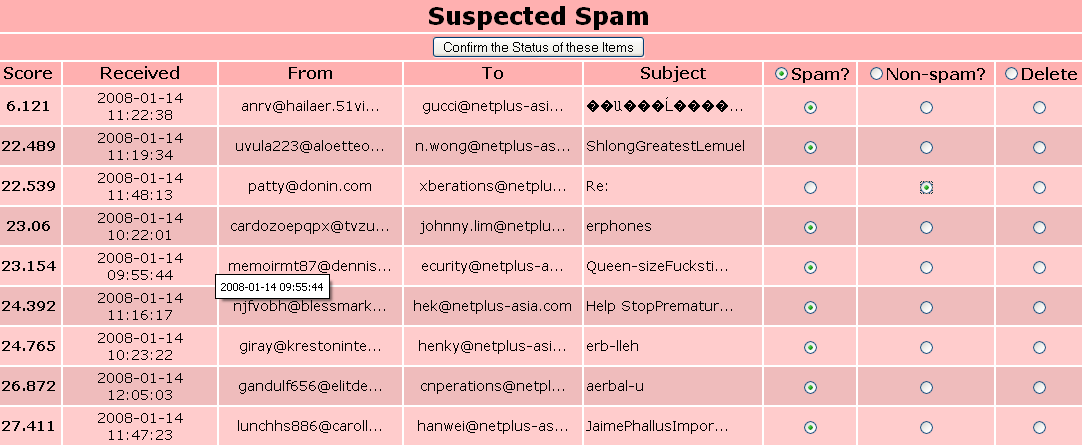
3 Once, the administrator confirmed the status of the (Spam or Non-Spam), the ASAV system will learn and recognize the signatures and report the same the next time it received as accordance to user-defined Spam or Non-Spam criteria. Definition notes: Level: means the scoring system which the Spam Assassin is using. Default score for spam is 5. This scoring system is based on the number of rules triggered by the content and header of the . Quarantined: means the are cached or saved in the ASAV server. Note that it will only be cached for 30days. Non-spam items: s items that have already been delivered but shown in the web platform in case the s delivered are spam-in-disguise. Thus, allowing users to blacklist or report them as spam. These items are cached for 5 days only and discarded.

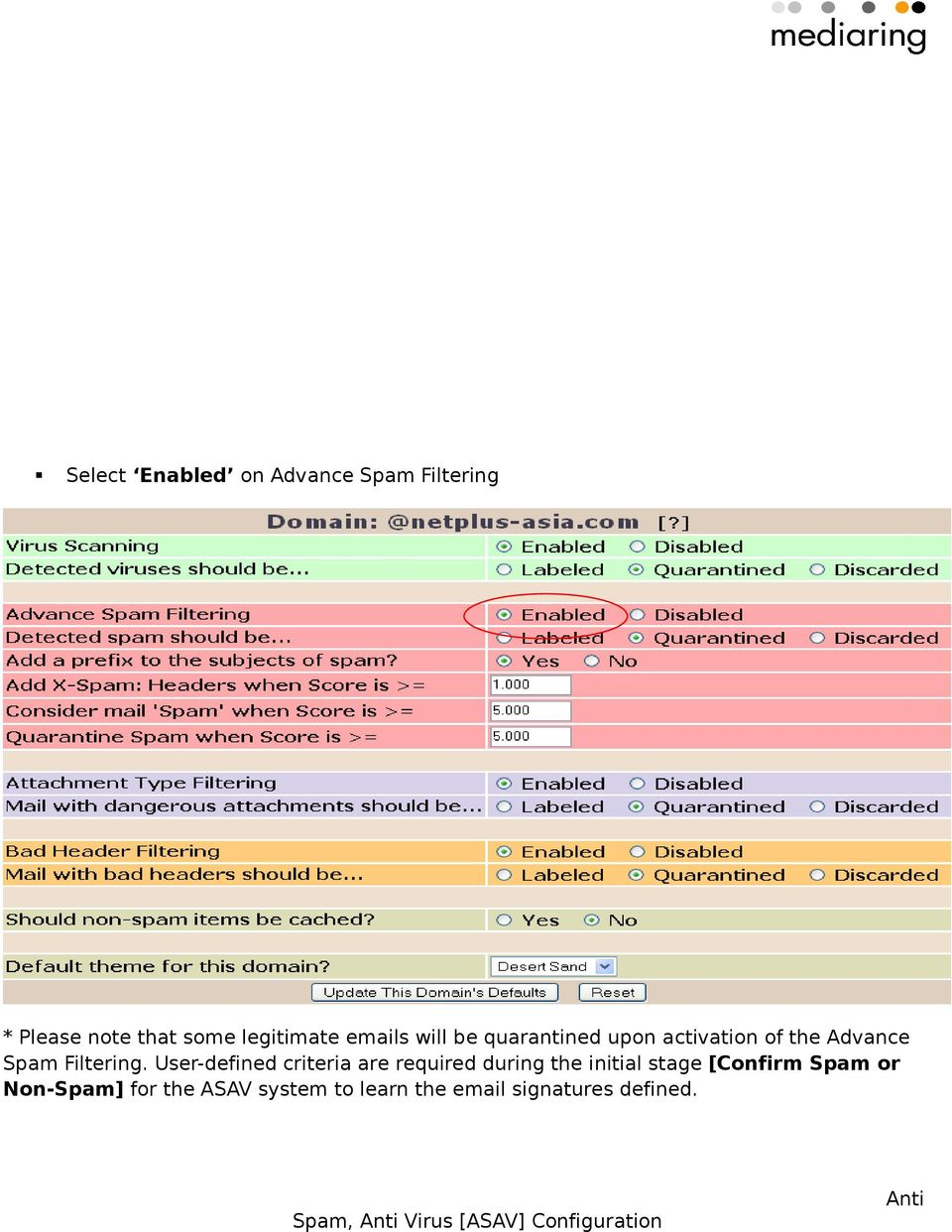
4 Spam items: s items that have been picked by the ASAV server as Spam. They are quarantined in the ASAV servers should you need to re-classify them in case the is being wrongly identify as Spam. These items are cached for 30 days only and is a catch-all account - any recipient s not found in user list will be passed over for administration. Step 4: Enabling Advance Spam Filtering [Domain Level] Click on Admin Select [Domains]


5 Select Enabled on Advance Spam Filtering * Please note that some legitimate s will be quarantined upon activation of the Advance Spam Filtering. User-defined criteria are required during the initial stage [Confirm Spam or Non-Spam] for the ASAV system to learn the signatures defined.
6 Step 5: Enable Advance Spam Filtering [Individual User management] Click on Admin Select [Users] Add users
![User management] Click on](/docs-images/45/4780017/images/page_6.jpg "Admin Select [Users] Add")
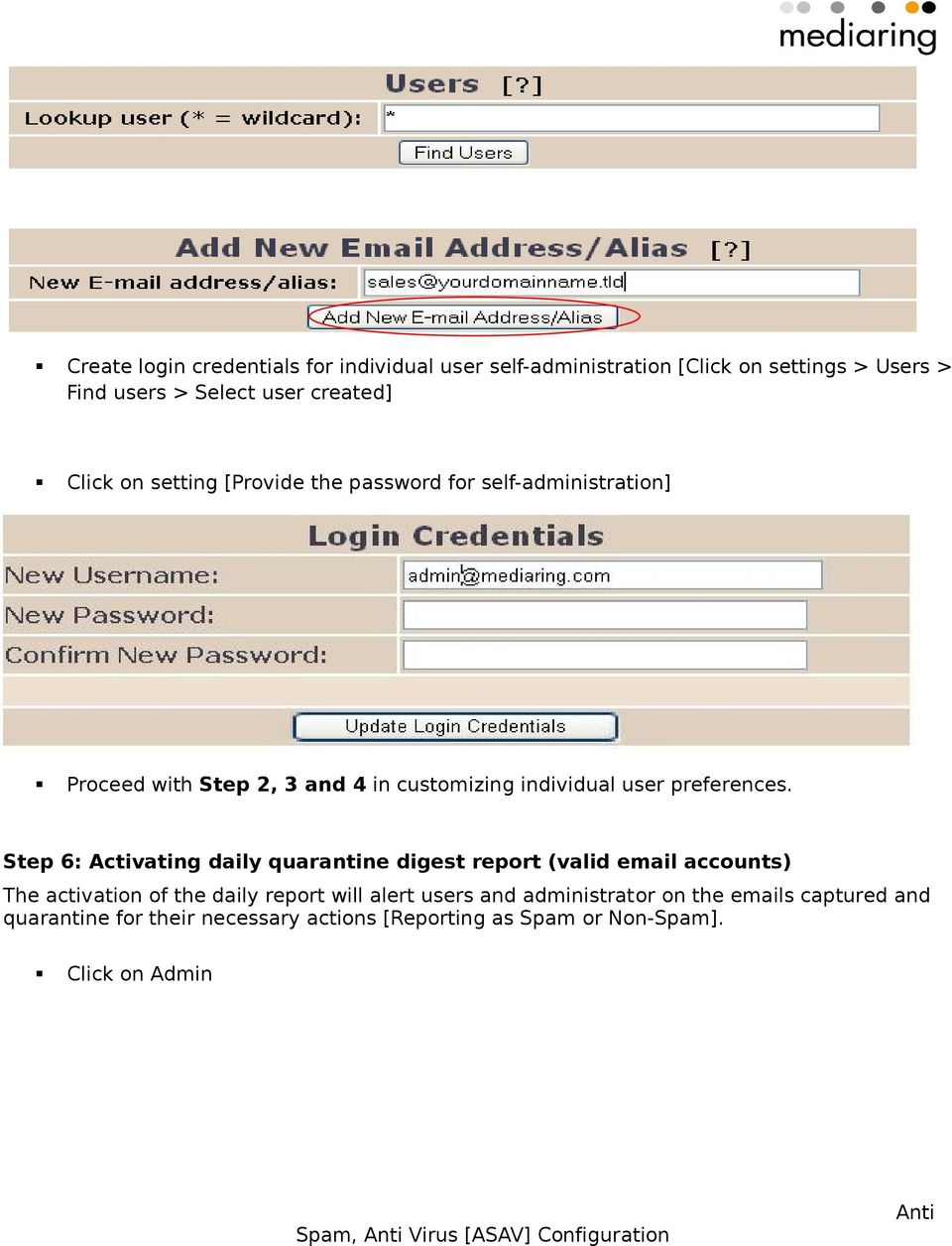
![Create login credentials for individual user self-administration [Click on settings > Users > Find users > Select user created]](/docs-images/25/4780017/images/7-0.jpg "Click on setting [Provide the password for self-administration] Proceed with Step 2, 3 and 4 in customizing individual user")

7 Create login credentials for individual user self-administration [Click on settings > Users > Find users > Select user created] Click on setting [Provide the password for self-administration] Proceed with Step 2, 3 and 4 in customizing individual user preferences. Step 6: Activating daily quarantine digest report (valid accounts) The activation of the daily report will alert users and administrator on the s captured and quarantine for their necessary actions [Reporting as Spam or Non-Spam]. Click on Admin
8 Select [Users] Find users and select the desired users Click on Setting and Select Send quarantine reminder Yes Key in the desired delivery schedule to be delivered in the field " Digest interval?" (in minutes). To save the options, click on "Update Miscellanous Settings".

9 =================================== End ===================================

Using the Barracuda Spam Firewall to Filter Your Emails
 Using the Barracuda Spam Firewall to Filter Your Emails This chapter describes how end users interact with the Barracuda Spam Firewall to check their quarantined messages, classify messages as spam and
KUMC Spam Firewall: Barracuda Instructions
 KUMC Spam Firewall: Barracuda Instructions Receiving Messages from the KUMC Spam Firewall Greeting Message The first time the KUMC Spam Firewall quarantines an email intended for you, the system sends
Using the Barracuda to Filter Your Emails
 Using the Barracuda to Filter Your Emails The following describes how end users interact with the Barracuda to check their quarantined messages, classify messages as spam and not spam, and modify their
Barracuda Spam Firewall Users Guide. Greeting Message Obtaining a new password Summary report Quarantine Inbox Preferences
 Barracuda Spam Firewall Users Guide Greeting Message Obtaining a new password Summary report Quarantine Inbox Preferences Greeting Message The first time the Barracuda Spam Firewall quarantines an email
Email Migration Manual (For Outlook Express 6)
 Email Migration Manual (For Outlook Express 6) By SYSCOM (USA) May 13, 2013 Version 1.0 1 Contents 1. How to Change POP3/SMTP Setup for Outlook Express... 3 2. How to Login to Webmail... 7 3. How to Change
Email Migration Manual (For Outlook 2010)
 Email Migration Manual (For Outlook 2010) By SYSCOM (USA) May 13, 2013 Version 2.2 1 Contents 1. How to Change POP3/SMTP Setting for Outlook 2010... 3 2. How to Login to Webmail... 10 3. How to Change
Barracuda Spam Firewall
 Barracuda Spam Firewall E-mail is one of our key communication tools within the district, and offensive and inappropriate e-mail messages have become an increasing problem. Because of this, we installed
How to Use Red Condor Spam Filtering
 What is Spam Filtering? Spam filtering is used to detect unsolicited and unwanted email. By looking for certain words in an email's subject line, or through suspicious word patterns or word frequencies
Apps4Rent Hosted Exchange Spam Management Interface Guide.
 Spam Management Interface Guide. Apps4Rent Hosted Exchange Spam Management Interface Guide. NOTE: This document contains functionalities and procedures which are mainly used to manage your spam settings
Barracuda Spam Firewall User s Guide
 Barracuda Spam Firewall User s Guide 1 Copyright Copyright 2005, Barracuda Networks www.barracudanetworks.com v3.2.22 All rights reserved. Use of this product and this manual is subject to license. Information
Barracuda Spam Firewall
 Barracuda Spam Firewall Overview The Barracuda Spam Firewall is a network appliance that scans every piece of email our organization receives. Its main purposes are to reduce the amount of spam we receive
FastNetSecurity SpamGuard Email Spam Filter How-To
 FastNetSecurity SpamGuard Email Spam Filter How-To Using your web browser, log on to https://spamguard.fastnetsecurity.com Tip: Add a bookmark to this page for easy access! Login credentials will incorporate
How does the Excalibur Technology SPAM & Virus Protection System work?
 How does the Excalibur Technology SPAM & Virus Protection System work? All e-mail messages sent to your e-mail address are analyzed by the Excalibur Technology SPAM & Virus Protection System before being
Configuring Your Gateman Email Server
 Configuring Your Gateman Email Server Your Gateman Lifestyle Server includes an Email Server that provides users access to email via an email client and via your web browser using your laptop and mobile
How To Manage Your Quarantine Email On A Blackberry.Com
 Barracuda Spam Firewall User s Guide 1 Copyright Copyright 2005, Barracuda Networks www.barracudanetworks.com v3.2.22 All rights reserved. Use of this product and this manual is subject to license. Information
Email - Spam Spam Email Firewall How Does the Spam Firewall Work? Getting Started username Create New Password
 Email - Spam Spam Email Firewall ODU s Information Services has implemented a Spam Firewall to help you manage spam e-mail from Internet senders. Generally defined, spam e-mail is an unsolicited mailing,
Barracuda Spam Firewall User s Guide
 Barracuda Spam Firewall User s Guide 1 Managing your Quarantine Inbox This chapter describes how you can check your quarantine messages, classify messages as spam and not spam, and modify your user preferences
Barracuda Spam Firewall Users Guide. How to Download, Review and Manage Spam
 Barracuda Spam Firewall Users Guide How to Download, Review and Manage Spam By: Terence Peak July, 2007 1 Contents Reviewing Barracuda Messages... 3 Managing the Barracuda Quarantine Interface... 4 Preferences...4
Personal Spam Solution Overview
 Personal Spam Solution Overview Please logon to https://mailstop.dickinson.edu using your network logon and password. This is an overview of what you can do with this system. Common Terms used in this
IT Email Services page 1 of 10 Spam Filtering. Overview
 IT Email Services page 1 of 10 Overview Comcast Spectacor has implemented a system to control unwanted Internet email (spam) from the Internet. Virus emails and some known spam will be filtered automatically.
Core Filtering Admin Guide
 Core Filtering Admin Guide 3193 Red Hill Avenue Costa Mesa, CA 92626 United States p.866.spam.out f.949.203.6425 e. [email protected] www.spamsoap.com Table of Contents Login... 3 Overview... 3 Quarantine...
More Details About Your Spam Digest & Dashboard
 TABLE OF CONTENTS The Spam Digest What is the Spam Digest? What do I do with the Spam Digest? How do I view a message listed in the Spam Digest list? How do I release a message from the Spam Digest? How
Version 5.x. Barracuda Spam & Virus Firewall User s Guide. Barracuda Networks Inc. 3175 S. Winchester Blvd Campbell, CA 95008 http://www.barracuda.
 Version 5.x Barracuda Spam & Virus Firewall User s Guide Barracuda Networks Inc. 3175 S. Winchester Blvd Campbell, CA 95008 http://www.barracuda.com? 1 Copyright Copyright 2005-2012, Barracuda Networks
Version 3.x. Barracuda Spam & Virus Firewall User s Guide. Barracuda Networks Inc. 3175 S. Winchester Blvd Campbell, CA 95008 http://www.barracuda.
 Version 3.x Barracuda Spam & Virus Firewall User s Guide Barracuda Networks Inc. 3175 S. Winchester Blvd Campbell, CA 95008 http://www.barracuda.com? 1 Copyright Copyright 2005-2009, Barracuda Networks
Email Filtering Admin Guide. Guide to Administrative Functions of Spam and Virus Filtering Service
 Email Filtering Admin Guide Guide to Administrative Functions of Spam and Virus Filtering Service Table of Contents Welcome Page 3 Logon Page 3 Home Page 4 Spam Page 5 Message Searching Releasing Held
Quarantined Messages 5 What are quarantined messages? 5 What username and password do I use to access my quarantined messages? 5
 Contents Paul Bunyan Net Email Filter 1 What is the Paul Bunyan Net Email Filter? 1 How do I get to the Email Filter? 1 How do I release a message from the Email Filter? 1 How do I delete messages listed
Core Protection Suite
 Core Protection Suite Admin Guide Spam Soap, Inc. 3193 Red Hill Avenue Costa Mesa, CA 92626 United States p.866.spam.out f.949.203.6425 e. [email protected] www.spamsoap.com Contents EMAIL PROTECTION OVERVIEW...3
Avira Managed Email Security (AMES) User Guide
 Avira Managed Email Security (AMES) User Guide 1 Product information... 3 1.1 Functionality... 3 1.2 Licensing AMES... 3 2 Getting started with AMES... 4 2.1 Adding a new domain to AMES... 4 2.2 Logging
Microsoft and Windows are either registered trademarks or trademarks of Microsoft Corporation in the United States and/or other countries.
 2001 2014 EdgeWave. All rights reserved. The EdgeWave logo is a trademark of EdgeWave Inc. All other trademarks and registered trademarks are hereby acknowledged. Microsoft and Windows are either registered
E-MAIL FILTERING FAQ
 V8.3 E-MAIL FILTERING FAQ COLTON.COM Why? Why are we switching from Postini? The Postini product and service was acquired by Google in 2007. In 2011 Google announced it would discontinue Postini. Replacement:
Barracuda Spam & Virus Firewall User's Guide 5.x
 Barracuda Spam & Virus Firewall Barracuda Spam & Virus Firewall User's Guide 5.x This guide describes how you can check your quarantined messages, classify messages as spam and not spam, manage whitelisting
"Spam Scoring Levels" Quarantine Cutoff Level
 A set of default "Spam Scoring Levels" have been pre-configured to reflect a basic optimum setting which will detect and filter up to 98% of all Spam/UCE and other unwanted email. You can change the default
D3 TECHNOLOGIES SPAM FILTER
 D3 TECHNOLOGIES SPAM FILTER The D3 Technologies spam filtering provides virus, attachment, and spam filtering services for email. We check all emails for viruses and malicious content, since we feel these
Chapter 6: ScanMail emanager
 Chapter 6: ScanMail emanager Chapter 6: ScanMail emanager Chapter Objectives After completing this chapter, you should be able to achieve the following objectives: Describe the purpose of ScanMail emanager
Barracuda Spam Firewall User s Guide
 Barracuda Firewall User s Guide 1 Copyright Copyright 2005, Barracuda Networks www.barracudanetworks.com v3.2.22 All rights reserved. Use of this product and this manual is subject to license. Information
Purchase College Barracuda Anti-Spam Firewall User s Guide
 Purchase College Barracuda Anti-Spam Firewall User s Guide What is a Barracuda Anti-Spam Firewall? Computing and Telecommunications Services (CTS) has implemented a new Barracuda Anti-Spam Firewall to
Tufts Technology Services (TTS) Proofpoint Frequently Asked Questions (FAQ)
 Tufts Technology Services (TTS) Proofpoint Frequently Asked Questions (FAQ) What is Proofpoint?... 2 What is an End User Digest?... 2 In my End User Digest I see an email that is not spam. What are my
Policy Based Encryption Gateway. Administration Guide
 Policy Based Encryption Gateway Administration Guide Document Revision Date: Sept. 11, 2012 Policy Based Encryption Gateway Admin Guide i Contents Description of Policy Based Encryption... 1 Policy Based
eprism Email Security Suite
 FAQ V8.3 eprism Email Security Suite 800-782-3762 www.edgewave.com 2001 2012 EdgeWave. All rights reserved. The EdgeWave logo is a trademark of EdgeWave Inc. All other trademarks and registered trademarks
Quarantine Central for end users: FAQs
 Quarantine Central for end users: FAQs About is a leading hosted email services company. Founded in 1994, was one of the first companies to offer hosted email security services to the North American market.
EnterGroup offers multiple spam fighting technologies so that you can pick and choose one or more that are right for you.
 CONFIGURING THE ANTI-SPAM In this tutorial you will learn how to configure your anti-spam settings using the different options we provide like Challenge/Response, Whitelist and Blacklist. EnterGroup Anti-Spam
Title: Spam Filter Active / Spam Filter Active : CAB Page 1 of 5
 Friday, April 18, 2008 11:24:8 AM Title: Spam Filter Active / Spam Filter Active : CAB Page 1 of 5 Name: Author: Subject: Spam Filter Active CAB Administrator Spam Filter Active Keywords: Category: The
the barricademx end user interface documentation for barricademx users
 the barricademx end user interface documentation for barricademx users BarricadeMX Plus The End User Interface This short document will show you how to use the end user web interface for the BarricadeMX
Barracuda Spam Firewall User s Guide
 Barracuda Spam Firewall User s Guide 1 Managing your Quarantine Inbox This chapter describes how you can check your quarantined messages, classify messages as spam and not spam, and modify your user preferences
Overview. Accessing the User Interface. Logging In. Resetting your Password
 Overview The message filtering service lets a company easily provide real-time spam and virus filtering, attack blocking, and email-traffic monitoring across a user deployment of any size. Users receive
Cloud Services. Cloud Control Panel. Admin Guide
 Cloud Services Cloud Control Panel Admin Guide 10/18/2014 CONTENTS Description of Policy Based Encryption... 2 Policy Based Encryption and Email Content Control... 2 Features Summary... 3 Creating an Encryption
Comprehensive Anti-Spam Service
 Comprehensive Anti-Spam Service Chapter 1: Document Scope This document describes how to implement and manage the Comprehensive Anti-Spam Service. This document contains the following sections: Comprehensive
SpamPanel Email Level Manual Version 1 Last update: March 21, 2014 SpamPanel
 SpamPanel Email Level Manual Version 1 Last update: March 21, 2014 SpamPanel Table of Contents Incoming... 1 Incoming Spam Quarantine... 2 Incoming Log Search... 4 Delivery Queue... 7 Report Non-Spam...
POP3 Connector for Exchange - Configuration
 Eclarsys PopGrabber POP3 Connector for Exchange - Configuration PopGrabber is an excellent replacement for the POP3 connector included in Windows SBS 2000 and 2003. It also works, of course, with Exchange
Introduction. How does email filtering work? What is the Quarantine? What is an End User Digest?
 Introduction The purpose of this memo is to explain how the email that originates from outside this organization is processed, and to describe the tools that you can use to manage your personal spam quarantine.
GWAVA 5. Migration Guide for Netware GWAVA 4 to Linux GWAVA 5
 GWAVA 5 Migration Guide for Netware GWAVA 4 to Linux GWAVA 5 Copyright 2010 GWAVA, Inc. All rights reserved. Content may not be reproduced without permission. http://www.gwava.com Overview While GWAVA
Email Migration Project Plan for Cisco Cloud Email Security
 Sales Tool Email Migration Project Plan for Cisco Cloud Email Security 2014 Cisco and/or its affiliates. All rights reserv ed. This document is Cisco Conf idential. For Channel Partner use only. Not f
ModusMail Software Instructions.
 ModusMail Software Instructions. Table of Contents Basic Quarantine Report Information. 2 Starting A WebMail Session. 3 WebMail Interface. 4 WebMail Setting overview (See Settings Interface).. 5 Account
Using Email Security to Protect Against Phishing, Spam, and Targeted Attacks: Combining Features for Higher Education
 White Paper Using Email Security to Protect Against Phishing, Spam, and Targeted Attacks: Combining Features for Higher Education Online criminals are constantly looking for new ways to reach their targets
Using Barracuda Spam Firewall
 Using Barracuda Spam Firewall Creating your Barracuda account Your Barracuda account has been created for you if you are a current Hartwick College student, staff or faculty member. Setting Your Password.
Barracuda Spam Control System
 Barracuda Spam Control System 1. General Information The Barracuda anti-spam server inspects all email coming into campus from the Internet for spam and either delivers the message to your email inbox,
ExchangeDefender. Understanding the tool that can save and secure your business
 ExchangeDefender Understanding the tool that can save and secure your business OVERVIEW The purpose of this Startup Guide is to familiarize you with ExchangeDefender's Exchange and SharePoint Hosting.
Avira Managed Email Security AMES FAQ. www.avira.com
 Avira Managed Email Security AMES FAQ www.avira.com Can AMES be used immediately after an account for our organization has been set up in the MyAccount user portal? Using your account requires a change
MailScanner Tips for NOCO Hosting Clients
 MailScanner Tips for NOCO Hosting Clients March 2014 1) cpanel MailScanner Configuration With the MailScanner service you can control what happens to spam and viruses by changing the configuration in your
Avira Managed Email Security (AMES) User Guide
 Avira Managed Email Security (AMES) User Guide Table of Contents Table of Contents 1. Product information... 4 1.1 Functionality................................................................4 1.2 Licensing
Frequently Asked Questions for New Electric Mail Administrators 1 Domain Setup/Administration
 Frequently Asked Questions for New Electric Mail Administrators 1 Domain Setup/Administration 1.1 How do I access the records of the domain(s) that I administer? To access the domains you administer, you
YSU Spam Solution Guide to Using Proofpoint
 Proofpoint Web Interface Introduction In 2006, YSU deployed the Proofpoint appliance in response to a growing number of spam messages infiltrating their way past current detection technologies into user
E-MAIL DEFENDER SERVICES
 E-MAIL DEFENDER SERVICES Email Defender User Guide 2015-02-12 What does E-Mail Defender do? Anti-Virus testing to eliminate known and suspected viruses. Blacklist services check distributed lists for fingerprints
Symantec Hosted Mail Security. Console and Spam Quarantine User Guide
 Symantec Hosted Mail Security Console and Spam Quarantine User Guide Symantec Hosted Mail Security Console and Spam Quarantine User Guide The software described in this book is furnished under a license
Webmail Friends & Exceptions Guide
 Webmail Friends & Exceptions Guide Add email addresses to the Exceptions List and the Friends List in your Webmail account to ensure you receive email messages from family, friends, and other important
Symantec Hosted Mail Security Getting Started Guide
 Symantec Hosted Mail Security Getting Started Guide Redirecting Your MX Record You have successfully activated your domain within the Symantec Hosted Mail Security Console. In order to begin the filtration
Barracuda SPAM Firewall
 Barracuda SPAM Firewall SPAM and other types of unwanted email is a steadily growing problem for all businesses and schools. Because of the growing nature of the problem, we have a SPAM filter and Quarantine
Government of Canada Managed Security Service (GCMSS) Annex A-5: Statement of Work - Antispam
 Government of Canada Managed Security Service (GCMSS) Date: June 8, 2012 TABLE OF CONTENTS 1 ANTISPAM... 1 1.1 QUALITY OF SERVICE...1 1.2 DETECTION AND RESPONSE...1 1.3 MESSAGE HANDLING...2 1.4 CONFIGURATION...2
Feature Comparison Guide
 Feature Comparison Guide Stay Secure Portal Autumn 2015 Contents Introduction... 3 Description on some of the new features... 5 Customer overview from partner portal... 5 Partner & customer portal linkage...
K7 Mail Security FOR MICROSOFT EXCHANGE SERVERS. v.109
 K7 Mail Security FOR MICROSOFT EXCHANGE SERVERS v.109 1 The Exchange environment is an important entry point by which a threat or security risk can enter into a network. K7 Mail Security is a complete
eprism Email Security Appliance 6.0 Intercept Anti-Spam Quick Start Guide
 eprism Email Security Appliance 6.0 Intercept Anti-Spam Quick Start Guide This guide is designed to help the administrator configure the eprism Intercept Anti-Spam engine to provide a strong spam protection
Email Filter User Guide
 Table of Contents Subject Page Getting Started 2 Logging into the system 2 Your Home Page 2 Manage your Account 3 Account Settings 3 Change your password 3 Junk Mail Digests 4 Digest Scheduling 4 Using
Green House Data Spam Firewall Administrator Guide
 Green House Data Spam Firewall Administrator Guide Spam Firewall Administrator Guide... 2 Navigating the Web Interface... 2 How to Drill Down from the DOMAINS Page to Account Level... 2 Message Logs...
About this documentation
 Wilkes University, Staff, and Students have a new email spam filter to protect against unwanted email messages. Barracuda SPAM Firewall will filter email for all campus email accounts before it gets to
Barracuda Spam Firewall User 's Guide 6.x
 Barracuda Spam Firewall User 's Guide 6.x Last update: Thursday, 6. Mar 2014 This guide describes how you can use the Barracuda Spam Firewall web interface to: Check your quarantined messages Classify
HLI MailGuard For End Users
 HLI MailGuard For End Users VC Technology Solutions, Inc. 6085 King Drive, Unit 102 Ventura, CA 93003 HLI MailGuard For End Users 1 Introduction 1.1 1.2 1.3 1.4 Contacting HLI Systems 5 The Unwanted E-mail
PureMessage for Microsoft Exchange Help. Product version: 4.0
 PureMessage for Microsoft Exchange Help Product version: 4.0 Document date: July 2013 Contents 1 About PureMessage for Microsoft Exchange...3 2 Key concepts...4 3 Administration console...7 4 Monitoring...9
Policy Patrol 7 Upgrade Guide
 Policy Patrol 7 technical documentation September 4, 2012 www.policypatrol.com If you have Policy Patrol 4, 5 or 6 installed you can upgrade to version 7 and keep your existing configuration. Please follow
E-MAIL - Spam Filtering
 E-MAIL - Spam Filtering SPAM FILTERING OVERVIEW... USER S GUIDE...... Common Login Errors......... Lists Tab... 5 Profile Tab... 7 Quarantine Tab... 0 LOGGING IN MAIN SCREEN SPAMBLOCKER TABS (LISTS, PROFILE
IBM Express Managed Security Services for Email Security. Anti-Spam Administrator s Guide. Version 5.32
 IBM Express Managed Security Services for Email Security Anti-Spam Administrator s Guide Version 5.32 Table of Contents 1. Service overview... 3 1.1 Welcome... 3 1.2 Anti-Spam (AS) features... 3 1.3 How
Hosted CanIt. Roaring Penguin Software Inc. 26 April 2011
 Hosted CanIt Roaring Penguin Software Inc. 26 April 2011 1 1 Introduction Thank you for selecting Hosted CanIt. This document explains how Hosted CanIt works and how you should configure your network to
CONFIGURING FUSEMAIL ANTI-SPAM
 CONFIGURING FUSEMAIL ANTI-SPAM In this tutorial you will learn how to configure your anti-spam settings using the different options we provide like FuseFilter, Challenge/Response, Whitelist and Blacklist.
HPL Barracuda Spam/Virus Firewall
 HPL Barracuda Spam/Virus Firewall The Barracuda Spam/Virus Firewall has been deployed behind the HPL Campus Firewall. Its mission is to scan incoming and outgoing mail for known spam and viruses in the
HOW TO: Use the UWITC Barracuda Spam Filter System
 HOW TO: Use the UWITC Barracuda Spam Filter System The Barracuda Spam Firewall has a learning engine that learns how to deal with future messages based on the ones you classify as spam and not spam. The
Implementing MDaemon as an Email Security Gateway to Exchange Server
 Implementing MDaemon as an Email Security Gateway to Exchange Server Introduction MDaemon is widely deployed as a very effective antispam/antivirus gateway to Exchange. For optimum performance, we recommend
Using the Barracuda Spam Blocker
 CLIENT INSTRUCTIONS PRIMARY KNOWLEDGE AREA Using the Barracuda Spam Blocker Email Purpose: Barracuda is a spam-blocking and virus-blocking firewall. Its goal is to save you time from having to deal with
PureMessage for Microsoft Exchange Help. Product version: 3.1
 PureMessage for Microsoft Exchange Help Product version: 3.1 Document date: June 2015 Contents 1 About PureMessage for Microsoft Exchange...4 2 Key concepts...5 2.1 Key concepts overview...5 2.2 Inbound,
CanIt-PRO End-User s Guide Roaring Penguin Software Inc. 9 September 2005
 CanIt-PRO End-User s Guide Roaring Penguin Software Inc. 9 September 2005 2 Contents 1 Introduction 5 2 Accessing The CanIt-PRO User Interface 7 3 CanIt-PRO Simplified Interface 9 4 CanIt-PRO Expert Interface
Important Information
 June 2015 Important Information The following information applies to Proofpoint Essentials US1 data center only. User Interface Access https://usproofpointessentials.com MX Records mx1-usppe-hosted.com