
Ethernet/IP Interface User Manual
|
|
|
- Ira Christian Washington
- 9 years ago
- Views:
Transcription

1 Ethernet/IP Interface User Manual This document applies to the following drives: E1250-IP-xx C1250-IP-xx E1450-IP-xx (with Ethernet/IP Interface SW installed)
2 2012 NTI AG This work is protected by copyright. Under the copyright laws, this publication may not be reproduced or transmitted in any form, electronic or mechanical, including photocopying, recording, microfilm, storing in an information retrieval system, not even for didactical use, or translating, in whole or in part, without the prior written consent of NTI AG. LinMot is a registered trademark of NTI AG. Note: The information in this documentation reflects the stage of development at the time of press and is therefore without obligation. NTI AG reserves itself the right to make changes at any time and without notice to reflect further technical advance or product improvement. Document version / Whp, ka, August 2014 NTI AG / LinMot Page 2/32
3 1 System overview References Connecting to the Ethernet/IP Network Pin Assignment of the Connectors X17-X Default IP Address Settings Setup in the PLC RSLinx Classic LinMot Configuration in the PLC Getting started with the Watch Window Control Word Motion Command Interface Ethernet/IP Parameters Parameters Realtime IO Data Mapping Default O ->T and T->O Mapping Default O T Mapping Assembly Instance Default T O Mapping Assembly Instance O ->T and T->O Mapping With Configuration Module Default O T Mapping Assembly Instance Default T O Mapping Assembly Instance PLC Setup of Mapping with Configuration Module Example of reading Parameter RAM value with Configuration Module O ->T and T->O Mapping without Controlword and without Motion Command Default O T Mapping Assembly Instance Default T O Mapping Assembly Instance O->T and T->O Mapping with Configuration Module and Motion Command but without Controlword Default O T Mapping Assembly Instance Default T O Mapping Assembly Instance Contact Addresses...32 NTI AG / LinMot Page 3/32
4 1 System overview The LinMot Ethernet/IP drives have the following functionalities: Device Property Minimal Ethernet/IP cycle time DHCP -Support EDS Support IEEE1588 (CIP-Synch) DLR Support (Device Level Ring Protocol) Value / Remark 1 ms Supported Not yet supported from AB For 3 rd parties not supported from AB No Ethernet/IP is a real time Ethernet protocol based on the standard Ethernet protocols TCP/IP and UDP/IP. For further information on Ethernet/IP please visit: References All user manuals are distributed with the LinMot-Talk configuration software. The newest version can also be downloaded from the LinMot homepage in the download section. Ref Title Source 1 User Manual Motion Control SW 2 LinMot Drive Configuration over Fieldbus Interfaces SG5 NTI AG / LinMot Page 4/32
5 2 Connecting to the Ethernet/IP Network 2.1 Pin Assignment of the Connectors X17-X18 The Ethernet/IP connector is a standard RJ45 female connector with a pin assignment as defined by EIA/TIA T568B: X17 X18 RealTime Ethernet Connector Pin Wire color code Assignment 100BASE-TX case WHT/ORG ORG WHT/GRN BLU WHT/BLU GRN WHT/BRN BRN - Rx+ Rx- Tx+ - - Tx RJ-45 Use standard patch cables (twisted pair, S/UTP, AWG26) for wiring. This type of cable is usually referred to as a Cat5e- Cable. 2.2 Default IP Address Settings The default IP address is xxx, where the last byte xxx is defined via the two hex switches S1 and S2. S1 sets the high and S2 the low digit. S1, S2: IP Selectors S1 S2 Bus ID High Bus ID Low (0h Fh) (0h Fh) IMPORTANT: The switch value S1 = S2 = 0 (factory default setting) is a special configuration which acquires the IP address via DHCP. NTI AG / LinMot Page 5/32

6 3 Setup in the PLC IMPORTANT: Use only AB PLC firmware 18.0 or higher! The following steps describe the integration of a LinMot Ethehernet/IP drive in the PLC. In the example an Allen Bradley master PLC is used. RSLinx tool can only be used to see if the device is on the network and under which IP-address it can be accessed. The whole configuration is done in the PLC, which is described in chapter RSLinx Classic In the RSLinx the LinMot device should occur under the defined IP address as Unrecognized Device LinMot device with the IP address in the RSLinx tool. NTI AG / LinMot Page 6/32

7 LinMot device properties 3.2 LinMot Configuration in the PLC There are two possibilities to configure a LinMot in the PLC, one with the EDS-File and the other is to configure it as a Generic Ethernet Module. The LinMot can be configured in the I/O configuration section, in the Ethernet section as a NTI AG / LinMot Page 7/32

8 new module NTI AG / LinMot Page 8/32

9 Then you have to select in the Communications Module the ETHERNET-MODULE NTI AG / LinMot Page 9/32

10 Under the Module Properties you can define the module specific data: Name Comm Format in the example a 16 bit Format is chosen! IP Address Input Assembly instance and size Output Assembly Instance and size Be careful when defining these parameters, because only a correct setting will run in the Ethernet/IP network. Only the name can be defined freely. NTI AG / LinMot Page 10/32

11 In the Connection tab of the Module Properties the desired cycle time is specified in the range between 1ms and 3200ms. Then the configuration/program can be downloaded and you can change to the online view. It is recommended to use Unicast Connection type, because there are no known problems with this type. NTI AG / LinMot Page 11/32


12 To configure the LinMot with the EDS File, the EDS-File must be downloaded into the configuration software for the PLC. In the RSLogix 5000 there is the EDS Hardware Installation Tool, which is used for the installation. It can be found in the Menu under Tools. Then you can click next until the Options window is shown. In this window Register an EDS file(s) has to be selected. NTI AG / LinMot Page 12/32


13 In the Registration window, Register a directory of EDS files has to be selected. The path of the directory is../linmot-talkx.x BuildX/Firmware/Interfaces/EthernetIP/EDS. After this selection you can click next and finish the EDS Hardware Installation. When the EDS-Files are downloaded in the PLC configuration software, the LinMot can be configured in the I/O configuration section, in the Ethernet section as a new module. In the section Module Type Vendor Filters there is the Vendor NTI Limited, where the drive can be selected. NTI AG / LinMot Page 13/32
14 After creating a new module under Module Definition 'Change...' four communication types can be chosen. - As_0x28_0x18: Realtime IO with configuration module - As_0x20_0x10: Realtime IO without configuration module - As_0x08_0x18: Realtime IO with configuration module, but without the control word and without the Motion Command - As_0x27_0x18: Realtime IO with configuration module and with Motion Command but without the control word. This type can be used in parallel with the EasySteps application for example. The other module properties are configured same the generic Ethernet Module. For an other new Module, the EDS File download is not needed once more. NTI AG / LinMot Page 14/32

15 If all is set up correctly the LinMot module status should be running NTI AG / LinMot Page 15/32
16 In the LinMot-Talk configuration software the Ethernet/IP connection state can be watched under variables\ethernet/ip:o ->T, T-> O config. If everything is set up correctly, the connection state should change to Established when powered on after a certain time. In this state both counters O T and T O should count up depending on the configured period time. NTI AG / LinMot Page 16/32

17 3.3 Getting started with the Watch Window In this section the basics of the LinMot device handling are explained. Instead of programming the LinMot, data can be directly influenced with the watch window. So, for the next steps, map the modules input data and output data in the quick watch window as below. In the following examples it is assumed, that a motor has been configured, the power supply is on, and the drive is correctly embedded in the Ethernet/IP network. NTI AG / LinMot Page 17/32

18 3.3.1 Control Word The Control Word is mapped to the output data word 0. If setting this value to 1 the Switch On bit (bit 0) of the control word is set This can also be monitored with the LinMot-Talk software. NTI AG / LinMot Page 18/32

19 Setting the control word to 2049 (0x0801) sets also the Home bit (Bit 11) in the Control Word. Wait until the input word 0 State Var has the value 2319 (0x090F) Main State 9 (Homing) Sub State 0x0F (Homing finished). NTI AG / LinMot Page 19/32

20 Then the Control Word can be set to 1 again, the drive will change to Main State 8 (Operation Enabled) Sub State 0xC0 (Homed and In Target Position), the corresponding input word 0 has the value NTI AG / LinMot Page 20/32
![3.3.2 Motion Command Interface The rest of the output data (O.data[1]..O.data[11]) is mapped to the Motion Command Interface. The first word (O.data[1]) is the motion command header, the rest (O.](/docs-images/54/35167230/images/21-0.png "data[1]..O.data[11]) is the command specific motion parameter set. In the next example we will set up a Predef VAI Go To Pos (020xh) Motion Command. First we set the target position low word (O.")
21 3.3.2 Motion Command Interface The rest of the output data (O.data[1]..O.data[11]) is mapped to the Motion Command Interface. The first word (O.data[1]) is the motion command header, the rest (O.data[1]..O.data[11]) is the command specific motion parameter set. In the next example we will set up a Predef VAI Go To Pos (020xh) Motion Command. First we set the target position low word (O.data[2]) to 0 then the target position high word (O.data[3]) to 2 and the motion command header (O.data[1]) to 513 (0x0201). Press the Read Command button and you see the sent command. NTI AG / LinMot Page 21/32

22 We will use the same command to move back to 0mm. Change the target position high word to 0. Then change the count nibble in the motion command header to 0. NTI AG / LinMot Page 22/32
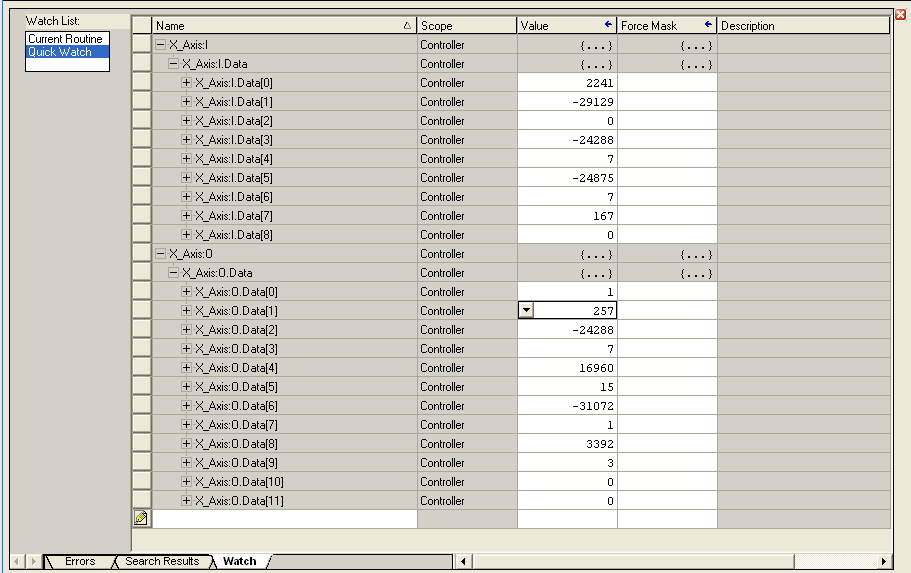
23 In the next example we are going to use the most common motion command VAI Go To Pos (010xh). In this example we define the motion command in the control panel first. Then we put the same values in the watch window. First the motion parameters, then the motion header! NTI AG / LinMot Page 23/32
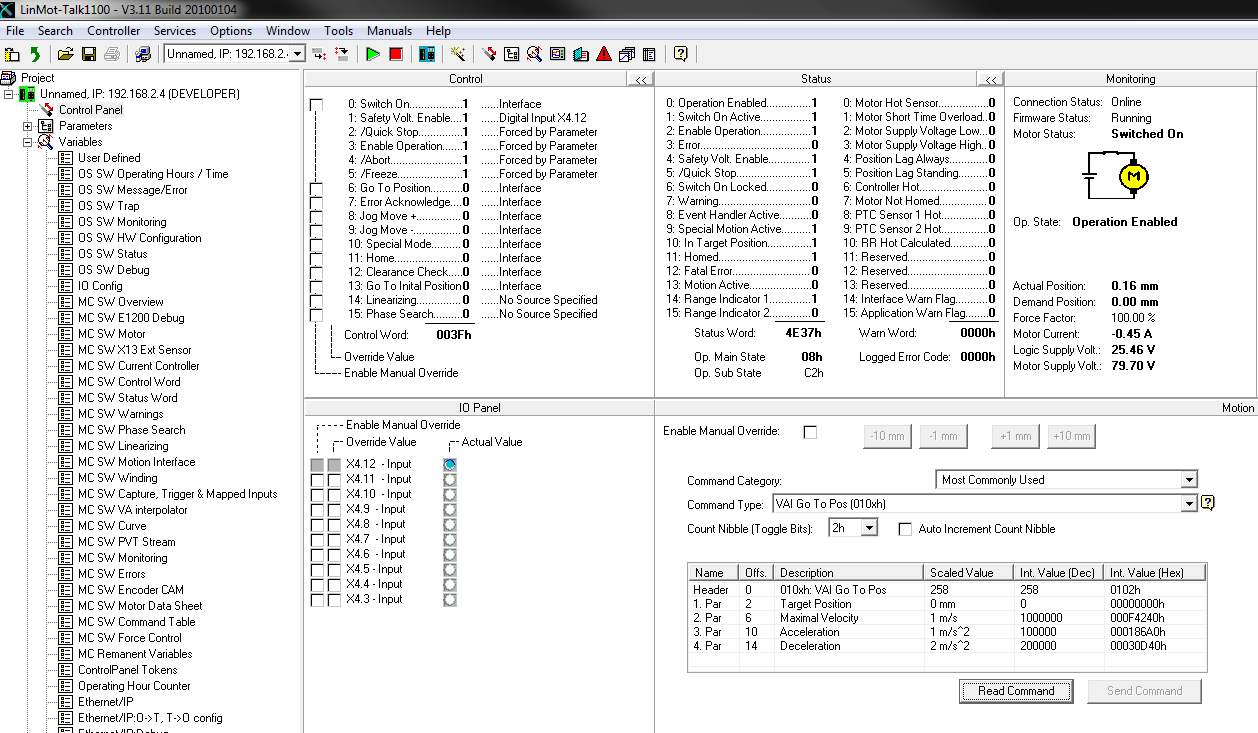
24 For moving back to 0mm with the same motion command and the same parameters, just set the target position to 0 (O.Data[2] and O.Data[3]) then change the count nibble in the motion command header to 2 for example. NTI AG / LinMot Page 24/32
25 4 Ethernet/IP Parameters 4.1 Parameters The Ethernet/IP interface has an additional parameter tree branch (Parameters Ethernet/IP Intf), which can be configured with the distributed LinMot-Talk software. With these parameters, the Ethernet/IP communication parameters can be configured. The LinMot-Talk software can be downloaded from under the section download, software & manuals. Ethernet/IP Intf\ Dis-/Enable With the Dis-/Enable parameter the LinMot drive can be run without the Ethernet Ethernet/IP interface going online. So in a first step the system can be configured and run without any bus connection. Ethernet/IP\ Dis-/Enable Disable Enable The drive runs without Ethernet/IP. The drive runs with Ethernet/IP connection. IMPORTANT: If the Ethernet/IP interface is disabled, the integrated Ethernet/IP switch is not powered! No messages will be sent to other devices connected to the Ethernet-Network via the LinMot drive. Ethernet/IP Intf\Ethernet Configuration\ IP Configuration Mode This parameter defines how the IP address is assigned. Ethernet/IP Intf\Ethernet Configuraton\ IP configuration Mode DHCP Static by IP Configuration Static with switches S1 and S2 (DHCP) IP address is acquired via DHCP mechanism. IP address is defined with parameters only. IP address is defined with parameters and the last byte is defined with the value of the switches S1 and S2. The default IP address setting is xxx ( xxx stands for the value of the switches S1 and S2) IMPORTANT: The switch value S1 = 0 and S2 = 0 (factory default setting) defines acquiring the IP address via DHCP. NTI AG / LinMot Page 25/32
26 Ethernet/IP Intf\Ethernet Configuration\ IP Configuration In this section the parameters for the IP address netmask, default gateway and multicast IP address are located. Ethernet/IP Intf\Ethernet Configuration\ IP Configuration IP address 1st Byte IP address 2nd Byte IP address 3rd Byte IP address 4th Byte Netmask 1st Byte Netmask 2nd Byte Netmask 3rd Byte Netmask 4th Byte Default Gatway 1st Byte Default Gatway 2nd Byte Default Gatway 3rd Byte Default Gatway 4th Byte Highest byte of IP address Mid high byte of IP address Mid low byte of IP address Lowest byte of IP address Highest byte of Netmask Mid high byte of Netmask Mid low byte of Netmask Lowest byte of Netmask Highest byte of Default Gatway Mid high byte of Default Gatway Mid low byte of Default Gatway Lowest byte of Default Gatway NTI AG / LinMot Page 26/32
27 5 Realtime IO Data Mapping If you want to control the LinMot device just over the Control Word and the Motion Command Interface it is sufficient to use the mapping described in chapter 5. The different mappings over different instances are selected in the assembly class. 5.1 Default O ->T and T->O Mapping Default O T Mapping Assembly Instance 32 In this real time IO mapping the 16 bit control word, the 16 bit motion command header and the motion command parameters are exchanged. The size of this mapping is 24 bytes or 12 words. The AB generic Ethernet module adds another 6 bytes (status and counts) so the real exchanged size is 30 bytes. Assembly Class Instance 32 Byte Description Size / Type Offset 00h MC SW_ControlWord UInt16 / Bit coded 02h MC SW_MotionCommandHeader UInt16 / 12Bit Command 4Bit count nibble 04h MC SW_MotionCommandPar Bytes UInt32 / Command specific 08h MC SW_MotionCommandPar Bytes UInt32 / Command specific 0Ch MC SW_MotionCommandPar Bytes UInt32 / Command specific 10h MC SW_MotionCommandPar Bytes UInt32 / Command specific 14h MC SW_MotionCommandPar Bytes UInt32 / Command specific Default T O Mapping Assembly Instance 16 In this real time IO Mapping the StateVar for the main state machine and several other helpful data is exchanged. The size of this mapping is 18 bytes or 9 words. For the AB generic Ethernet module another 2 bytes (Status and counts) are added, so the real exchanged size is 20 bytes. Assembly Class Instance 16 Byte Description Size / Type Offset 00h MC SW StateVar UInt16 / coded state depending 02h MC SW StatusWord UInt16 / Bit coded 04h MC SW WarnWord UInt16 / Bit coded 06h MC SW DemandPosition Int32 / Position [100nm] 0Ah MC SW ActualPosition Int32 / Position [100nm] 0Eh MC SW DemandCurrent Int32 / Current [1mA] For the configuration in PLC of this data refer to chapter 3.2 of this manual. 5.2 O ->T and T->O Mapping With Configuration Module With this real time IO configuration, an additional configuration module is mapped into the IO data communication. The functionality of this module is the same for all different fieldbus interfaces. For this reason, the functionality is described in the document [2] Drive Configuration over Fieldbus. NTI AG / LinMot Page 27/32
28 5.2.1 Default O T Mapping Assembly Instance 40 In this real time IO Mapping the 16 bit control word, the 16 bit motion command header and the motion command parameters are exchanged. The size of this mapping is 32 bytes or 16 words. The AB generic Ethernet module adds another 6 bytes (Status and counts) so the real exchanged size is 38 bytes. Assembly Class Instance 40 Byte Description Size / Type Offset 00h MC SW_ControlWord UInt16 / Bit coded 02h MC SW_MotionCommandHeader UInt16 / 12Bit Command 4Bit count nibble 04h MC SW_MotionCommandPar Bytes UInt32 / Command specific 08h MC SW_MotionCommandPar Bytes UInt32 / Command specific 0Ch MC SW_MotionCommandPar Bytes UInt32 / Command specific 10h MC SW_MotionCommandPar Bytes UInt32 / Command specific 14h MC SW_MotionCommandPar Bytes UInt32 / Command specific 18h Cfg Module Control Word UInt16 1Ah Cfg Module Index/.. UInt16 2Ch Cfg Module Value/.. UInt32/SInt Default T O Mapping Assembly Instance 24 In this real time IO mapping the StateVar for the main state machine and several other helpful data is exchanged. The size of this mapping is 26 bytes or 13 words. For the AB generic Ethernet module another 2 bytes (Status and counts) are added, so the real exchanged size is 28 bytes. Assembly Class Instance 24 Byte Description Size / Type Offset 00h MC SW StateVar UInt16 / coded state depending 02h MC SW StatusWord UInt16 / Bit coded 04h MC SW WarnWord UInt16 / Bit coded 06h MC SW DemandPosition Int32 / Position [100nm] 0Ah MC SW ActualPosition Int32 / Position [100nm] 0Eh MC SW DemandCurrent Int32 / Current [1mA] 12h Cfg Module Status Word UInt16 14h Cfg Module Index/.. UInt16 16h Cfg Module Value/.. UInt32/SInt32 In the PLC this is configured as followed: NTI AG / LinMot Page 28/32

29 5.2.3 PLC Setup of Mapping with Configuration Module Configuration of LinMot axis with additional Configuration Module (4 word input and 4 word output direction). NTI AG / LinMot Page 29/32
![5.2.4 Example of reading Parameter RAM value with Configuration Module Reading RAM value (0x1101 = 4353; X_Axis1:O.Data[12]) P Gain Position Control Parameter Set A (UPID5026; X_Axis1:O.](/docs-images/54/35167230/images/30-0.png "Data[13]) the result in this example is 15 (X_Axis1:I.Data[11] and X_Axis1:I.Data[12]). The data in the response is valid as soon the count nibble value in the response state (X_Axis1:I.")
30 5.2.4 Example of reading Parameter RAM value with Configuration Module Reading RAM value (0x1101 = 4353; X_Axis1:O.Data[12]) P Gain Position Control Parameter Set A (UPID5026; X_Axis1:O.Data[13]) the result in this example is 15 (X_Axis1:I.Data[11] and X_Axis1:I.Data[12]). The data in the response is valid as soon the count nibble value in the response state (X_Axis1:I.Data[9]) changes to the same value as in the control Word (X_Axis1:O.Data[12]). NTI AG / LinMot Page 30/32
31 5.3 O ->T and T->O Mapping without Controlword and without Motion Command With this Realtime IO configuration, it is possible to configure the Drive over the Fieldbus. This is described in the document [2] Drive Configuration over Fieldbus. But the Controlword and the MotionCommand would not mapped in this configuration Default O T Mapping Assembly Instance 8 In this real time IO Mapping the Config Module is exchanged. The size of this mapping is 8 bytes or 4 words. The AB generic Ethernet module adds another 6 bytes (Status and counts) so the real exchanged size is 14 bytes. Assembly Class Instance 8 Byte Description Size / Type Offset 00h Cfg Module Control Word Uint16 02h Cfg Module Index/.. Uint16 04h Cfg Module Value/.. Uint32/Sint Default T O Mapping Assembly Instance 24 This Mapping is the same like it is described in Chapter O->T and T->O Mapping with Configuration Module and Motion Command but without Controlword This Realtime IO configuration is like the configuration described in Chapter 5.3 but the Motion Command is mapped also Default O T Mapping Assembly Instance 27 The size of this mapping is 27 bytes. The AB generic Ethernet module adds another 6 bytes so the real exchanged size is 33 bytes. Assembly Class Instance 8 Byte Description Size / Type Offset 00h MC SW_MotionCommandHeader Uint16 / 12Bit Command 4Bit count nibble 02h MC SW_MotionCommandPar Bytes Uint32 / Command specific 06h MC SW_MotionCommandPar Bytes Uint32 / Command specific 0Ah MC SW_MotionCommandPar Bytes Uint32 / Command specific 0Eh MC SW_MotionCommandPar Bytes Uint32 / Command specific 12h MC SW_MotionCommandPar Bytes Uint32 / Command specific 16h Cfg Module Control Word Uint16 18h Cfg Module Index/.. Uint16 1Ah Cfg Module Value/.. Uint32/Sint Default T O Mapping Assembly Instance 24 This Mapping is the same like it is described in Chapter NTI AG / LinMot Page 31/32

32 6 Contact Addresses SWITZERLAND NTI AG / LinMot Haerdlistr. 15 CH-8957 Spreitenbach Sales and Administration: +41-(0) [email protected] Tech. Support: +41-(0) [email protected] Tech. Support (Skype) : skype:support.linmot Fax: +41-(0) Web: USA LinMot, Inc Townline Road Elkhorn, WI Sales and Administration: Tech. Support: Fax: Web: [email protected] Please visit to find the distributor closest to you. Smart solutions are NTI AG / LinMot Page 32/32
Install Linmot-Talk R1.3.16 on Windows 8 64
 Install Linmot-Talk R1.3.16 on Windows 8 64 How to install and run LinMot-Talk on a virtual machine with VMware Player on Windows 8 64 Version: 1.0 (eng) VC, 03/26/2013 2013 NTI AG This work is protected
Install Linmot-Talk R1.3.16 in XP Mode
 Install Linmot-Talk R1.3.16 in XP Mode How to install and run LinMot-Talk using the XP mode of Windows 7 Version: 0.2 (eng) fj, 07/17/2012 2012 NTI AG This work is protected by copyright. Under the copyright
AKD EtherNet/IP Communication
 AKD EtherNet/IP Communication Edition August 2012, Revision C Valid for firmware version 1.7 Patents Pending Part Number 903-200008-00 Keep all manuals as a product component during the life span of the
Accessing EtherNet/IP Network Variables in a WAGO 750-841 with a ControlLogix PLC Application note
 Accessing EtherNet/IP Network Variables in a WAGO 750-841 with a ControlLogix PLC, English Version 1.0.0 2 General Copyright 2002 by WAGO Kontakttechnik GmbH All rights reserved. WAGO Kontakttechnik GmbH
To perform Ethernet setup and communication verification, first perform RS232 setup and communication verification:
 PURPOSE Verify that communication is established for the following products programming option (488.2 compliant, SCPI only): DCS - M9C & DCS M130, DLM M9E & DLM-M9G & DLM M130, DHP - M9D, P series, SG,
ETHERNET/IP PROGRAMMER'S GUIDE
 ETHERNET/IP PROGRAMMER'S GUIDE 3600-4168_00_EtherNetIP LINEAR SOLUTIONS MADE EASY Tolomatic reserves the right to change the design or operation of the equipment described herein and any associated motion
EZ-ZONE RMA & EtherNet/IP Configuration & Startup Using an Allen-Bradley CompactLogix PLC EtherNet/IP Fundamentals
 EtherNet/IP Fundamentals EtherNet/IP is built on the Common Industrial Protocol (CIP) at a foundational level. When communicating using CIP there are two ways to communicate to/from the Master and Slave
Adding a Modbus TCP Device to the Network. Setting Up Your Network
 Page 1 of 17 Adding a Modbus TCP Device to the Network Overview This section extends the sample Unity Pro application, by describing how to: add an STB NIP 2212 Modbus TCP network interface module to your
BIT COMMANDER. Serial RS232 / RS485 to Ethernet Converter
 BIT COMMANDER Serial RS232 / RS485 to Ethernet Converter (Part US2000A) Copyrights U.S. Converters 1 Contents Overview and Features... 3 Functions..5 TCP Server Mode... 5 Httpd Client Mode.5 TCP Auto mode....6
PLC training panel (Twido version)
 PLC training panel (Twido version) User manual Name School of Trades Produced by: GJR October 2012 Colour leaves: 9 BW leaves: 2 Cover colour: White Cover image: G.J.Rogerson Acknowledgments: Much of the
Technical Note. Monitoring Ethernet Traffic with Tolomatic ACS & Managed Switch. Contents
 Monitoring Ethernet Traffic with Tolomatic ACS & Managed Switch Contents 1. Introduction...2 2. Equipment...2 3. Software...3 4. Definitions...3 5. Procedure...3 6. Change PC IP Address...3 7. Network
HWg-STE HWg-STE PoE MANUAL
 HWg-STE HWg-STE PoE MANUAL www.hw-group.com Page 2 HWg-STE connectors LED indicators Green: Power & Mode Yellow: Link & Activity SENSORS S1 and S2 ports for connecting temperature or humidity sensors.
Using the AnyBus -X Gateway to Communicate between a DVT camera and a Profibus Master
 Using the AnyBus -X Gateway to Communicate between a DVT camera and a Profibus Master Page 1 of 13 Table of Contents 1 OVERVIEW... 3 2 INSTALLING AND CONFIGURING THE ANYBUS -X GENERIC GATEWAY AND ETHERNET
Configuring Allen-Brandly ControlLogix PLC with Moxa MGate 5105-MB-EIP. 1 Application Description... 3. 1.1 Objective... 3 1.2 Goals...
 Moxa MGate 5105-MB-EIP Contents Moxa Technical Support Team [email protected] 1 Application Description... 3 1.1 Objective... 3 1.2 Goals... 3 2 System Topology... 3 3 Hardware and Software Requirements...
Wireless LAN 802.11g USB Adapter
 Wireless LAN 802.11g USB Adapter User s Guide Version 1.0 User s Guide 0 Copyright statement No part of this publication may be reproduced, stored in a retrieval system, or transmitted in any form or by
TDP43ME NetPS. Network Printer Server. Control Center. for Ethernet Module
 Panduit Corp. 2010 TDP43ME NetPS PA26306A01 Rev. 01 11-2010 Network Printer Server Control Center for Ethernet Module NOTE: In the interest of higher quality and value, Panduit products are continually
Using a simple crossover RJ45 cable, you can directly connect your Dexter to any computer.
 Dexter is a network device using the Ethernet protocol to connect and communicate with other devices on the network: Computers, routers, DHCP servers. Thus you have to setup your Dexter and your network
Modbus and ION Technology
 70072-0104-14 TECHNICAL 06/2009 Modbus and ION Technology Modicon Modbus is a communications protocol widely used in process control industries such as manufacturing. PowerLogic ION meters are compatible
Flexi Soft Ethernet IP: Implicit Messaging with a Omron PLC
 O N L I N E - H E L P Flexi Soft Ethernet IP: Implicit Messaging with a Omron PLC s GB Online Help This document is protected by the law of copyright, whereby all rights established therein remain with
Cisco - Configure the 1721 Router for VLANs Using a Switch Module (WIC-4ESW)
 Page 1 of 20 Configure the 1721 Router for VLANs Using a Switch Module (WIC-4ESW) Document ID: 50036 Contents Introduction Prerequisites Requirements Components Used Network Diagram The Role of Switched
StarWind iscsi SAN Software: Installing StarWind on Windows Server 2008 R2 Server Core
 StarWind iscsi SAN Software: Installing StarWind on Windows Server 2008 R2 Server Core www.starwindsoftware.com Copyright 2008-2011. All rights reserved. COPYRIGHT Copyright 2008-2011. All rights reserved.
GV-Data Capture V3 Series User's Manual
 GV-Data Capture V3 Series User's Manual Before attempting to connect or operate this product, please read these instructions carefully and save this manual for future use. 2006 GeoVision, Inc. All rights
APPLICATION NOTE. CC5MPX Digital Camera and IPn3Gb Cellular Modem 10/14. App. Note Code: 3T-Z
 APPLICATION NOTE App. Note Code: 3T-Z CC5MPX Digital Camera and IPn3Gb Cellular Modem 10/14 C o p y r i g h t 2 0 1 3-2 0 1 4 C a m p b e l l S c i e n t i f i c ( C a n a d a ) C o r p. Table of Contents
MBP_MSTR: Modbus Plus Master 12
 Unity Pro MBP_MSTR 33002527 07/2011 MBP_MSTR: Modbus Plus Master 12 Introduction This chapter describes the MBP_MSTR block. What s in this Chapter? This chapter contains the following topics: Topic Page
Vicon Flash Upgrade Software
 INSTRUCTION MANUAL Notes Refer to XX134 NO. XX134-13-01 REV. 1212 Vicon Flash Upgrade Software It is possible to upgrade software for the SurveyorVFT and Surveyor -Mini Camera Domes through a PC using
APPLICATION NOTE. Ethernet Configuration Guide for D-500 D-700
 Tel: +90-216 466 84 60 Fax: +90-216 364 65 65 [email protected] http://www.datakom.com.tr APPLICATION NOTE Ethernet Configuration Guide for D-500 D-700 PRODUCTS AFFECTED: D-500 / D-700 WRITTEN BY:
Internet-bridge XPort
 Ing. Z.Královský Ing. Petr Štol Perk 457 Okrajová 1356 675 22 STA 674 01 T EBÍ Development & production of control equipment Tel.: 568 870982 Tel.: 568 848179 Visualization, measurement and regulation
Using IDENT M System T with Modbus/TCP
 Using IDENT M System T with Modbus/TCP Introduction The Pepperl+Fuchs IDENT M System T consists of two models MTT3000-F180-B12- V45-MON, which is a read only unit and the MTT6000-F120-B12-V45 which is
< Introduction > This technical note explains how to connect New SVR Series to DSL Modem or DSL Router. Samsung Techwin Co., Ltd.
 < Introduction > This technical note explains how to connect New to DSL Modem or DSL Router. Samsung Techwin Co., Ltd. 1 Contents 1. General... 4 1.1. DSL (xdsl)... 4 1.2. Modem... 5 1.2.1. Modem... 5
UPS Network Interface. Quick InstallationGuide
 UPS Network Interface Quick InstallationGuide Version 1.1 March 1999 COPYRIGHT Copyright 1999 RINGDALE UK Limited. All rights reserved. No part of this publication may be reproduced, transmitted, transcribed,
User Manual. EtherUSB
 User Manual EtherUSB USB Ethernet Access Point for PDA V 2.0 Clarinet Systems, Inc. Clarinet Systems, Inc. http://www.clarinetsys.com Page 1 Publication Revision No. Control Table Rev. No. Date Contents
Application Note. WAGO 750-880 EtherNet/IP Communications with a CompactLogix PLC Using Explicit Messaging. A500620e, English Version: 1.0.
 Application Note WAGO 750-880 EtherNet/IP Communications with a CompactLogix PLC Using Explicit Messaging A500620e, English Version: 1.0.0 2 2013 by WAGO Kontakttechnik GmbH & Co. KG All rights reserved.
EZ-View Network Communications Guide www.cszindustrial.com
 Network Communications Guide EzView Network Communications Guide RevB July 2013 (V2.2) Supersedes: RevA (May 2011) Cincinnati Sub-Zero Products, LLC 513-772-8810 12011 Mosteller Road Cincinnati, Ohio 45241
USER MANUAL. PingBrother EPIW104 managed passive poe switch & IP watchdog
 USER MANUAL PingBrother EPIW104 managed passive poe switch & IP watchdog CONTENT Content... 2 Chapter 1... 3 1.1 Preface... 3 1.2 CE mark warning... 3 1.3 FCC warning... 4 Chapter 2... 5 2.1 Physical description...
ACU-1000 Manual Addendum Replacement of CPM-2 with CPM-4
 ACU-1000 Manual Addendum Replacement of CPM-2 with CPM-4 1 PURPOSE:... 1 2 CPM-4/CPM-2 COMPATIBILITY... 2 2.1 NETWORK CABLES... 2 2.2 FACTORY DEFAULT SETTINGS... 2 2.3 CHANGING THE RS-232 SERIAL PORT BAUD
7.7 Ethernet Communication (AFPX-COM5)
 7.7 Ethernet Communication (AFPX-COM5) 7.7.1 AFPX-COM5 Overview The communication cassette AFPX-COM5 has an Ethernet interface at the COM1 port and a 3-wire RS232C interface at the COM2 port. The Ethernet
4m. MONITORING OF ETHERNET/IP NETWORK TRAFFIC.
 4m. MONITORING OF ETHERNET/IP NETWORK TRAFFIC. Wireshark (see Section 6) is a network packet analyser. It is used to: troubleshoot network problems, examine security problems, debug protocol implementations,
Model 2120 Single Port RS-232 Terminal Server Frequently Asked Questions
 Applications What are some of the applications for the Model 2120 Single Port Terminal Server? The Patton Single Port RS-232 Terminal Server provides the ability to bring virtually any RS-232 device onto
DeviceNet Motor Control
 Quick-Start Guide for the DN65 DeviceNet I/O Module using Rockwell RSNetWorx version 2.22 or later This Quick-Start Guide provides instructions for configuring a Cutler-Hammer Freedom full voltage, non-reversing
L5354 ControlNet Communications Interface
 L5354 ControlNet Communications Interface Technical Manual HA470733 Issue 2 Copyright SSD Drives Inc 2005 All rights strictly reserved. No part of this document may be stored in a retrieval system, or
Ethernet Interface Manual Thermal / Label Printer. Rev. 1.01 Metapace T-1. Metapace T-2 Metapace L-1 Metapace L-2
 Ethernet Interface Manual Thermal / Label Printer Rev. 1.01 Metapace T-1 Metapace T-2 Metapace L-1 Metapace L-2 Table of contents 1. Interface setting Guiding...3 2. Manual Information...4 3. Interface
 Control Technology Corporation CTC Monitor User Guide Doc. No. MAN-1030A Copyright 2001 Control Technology Corporation All Rights Reserved Printed in USA The information in this document is subject to
NXT Controller Manual IP Assignment in WAN Environments Application Note
 It is difficult to perform NXT controller IP address assignment and auto-configuration when controllers are on different subnets from the local PC (the PC from which the Doors.NET client is run). This
Ethernet Radio Configuration Guide
 Ethernet Radio Configuration Guide for Gateway, Endpoint, and Repeater Radio Units April 20, 2015 Customer Service 1-866-294-5847 Baseline Inc. www.baselinesystems.com Phone 208-323-1634 FAX 208-323-1834
P-660HW-Tx v3. 802.11g Wireless ADSL2+ 4-port Gateway DEFAULT LOGIN DETAILS. Firmware v3.70 Edition 1, 2/2009
 P-660HW-Tx v3 802.11g Wireless ADSL2+ 4-port Gateway Firmware v3.70 Edition 1, 2/2009 DEFAULT LOGIN DETAILS IP Address: http://192.168.1.1 Admin Password: 1234 User Password: user www.zyxel.com Copyright
Vicon Flash Upgrade Software
 NOTES NO. REV. SEC. INSTRUCTION MANUAL Refer to XX134-11-00 1108 3 XX134 Vicon Flash Upgrade Software It is possible to upgrade software for the SurveyorVFT through a PC using the Flash Upgrade software.
Configuring Network Load Balancing with Cerberus FTP Server
 Configuring Network Load Balancing with Cerberus FTP Server May 2016 Version 1.0 1 Introduction Purpose This guide will discuss how to install and configure Network Load Balancing on Windows Server 2012
Setting up VPN Access for Remote Diagnostics Support
 Setting up VPN Access for Remote Diagnostics Support D. R. Joseph, Inc. supports both dial-up and Internet access for remote support of 3GIBC1 and LF-Sizer control systems. This document describes how
Omron I/O Driver (Series 2) Programmable Serial Interface Card
 Omron I/O Driver (Series 2) Programmable Serial Interface Card USER MANUAL Rev. P1.55 June 8, 2012 DeltaV is a trademark of Emerson Process Management, Inc Emerson Process Management, Inc. 1998, 1999.
User Manual. AS-Interface Programmer
 AS-Interface Programmer Notice: RESTRICTIONS THE ZMD AS-INTERFACE PROGRAMMER HARDWARE AND ZMD AS-INTERFACE PROGRAMMER SOFTWARE IS DESIGNED FOR IC EVALUATION, LABORATORY SETUP AND MODULE DEVELOPMENT ONLY.
SUDT AccessPort TM Advanced Terminal / Monitor / Debugger Version 1.37 User Manual
 SUDT AccessPort TM Advanced Terminal / Monitor / Debugger Version 1.37 User Manual Version 1.0 - January 20, 2015 CHANGE HISTORY Version Date Description of Changes 1.0 January 20, 2015 Initial Publication
RN-XV-RD2 Evaluation Board
 RN-XV-RD2 Evaluation Board 2012 Roving Networks. All rights reserved. -1.01Version 1.0 9/28/2012 USER MANUAL OVERVIEW This document describes the hardware and software setup for Roving Networks RN-XV-RD2
Allen-Bradley Stratix 5700 Network Address Translation (NAT)
 00:00:BC:66:0F:C7 DANGER SINK\ SOURCE SOURCE 0 1 2 3 4 5 6 7 8 9 10 11 12 13 14 15 0 1 2 3 4 5 6 7 8 9 10 11 12 13 14 15 00 08 01 09 02 10 03 11 04 12 05 13 06 14 07 15 COM COM 0 1 NC NC +V +V 00 08 01
EMBEDDED ACCESS CONTROL Hardware Installation Guide
 EMBEDDED ACCESS CONTROL Hardware Installation Guide Lenel goentry Hardware Installation Guide, product version 1.00. This guide is item number DOC- ENHW-ENU, revision 1.003, April 2009 Copyright 2009 Lenel
1 PC to WX64 direction connection with crossover cable or hub/switch
 1 PC to WX64 direction connection with crossover cable or hub/switch If a network is not available, or if it is desired to keep the WX64 and PC(s) completely separated from other computers, a simple network
User Manual Web Operating Panel AP User Manual. General Settings, Updating and Troubleshooting
 User Manual Web Operating Panel AP User Manual General Settings, Updating and Troubleshooting Copyright The documentation and the software included with this product are copyrighted 2010 by Advantech Co.,
Application Note: Connecting to a 2500 Series Processor using PLC Workshop
 Application Note: Connecting to a 2500 Series Processor using PLC Workshop This application note will describe a step by step process for the three ways to connect to a 2500-CXXX with PLC Workshop. The
SolarEdge. RS485 Expansion Kit Installation Guide. Version 1.0
 SolarEdge RS485 Expansion Kit Installation Guide Version 1.0 Disclaimers Disclaimers Important Notice Copyright SolarEdge Inc. All rights reserved. No part of this document may be reproduced, stored in
FBs-CM25/CM55/CBE. Ethernet Module. User s Manual
 FBs-CM25/CM55/CBE Ethernet Module User s Manual Ver. 2.1 Fatek Automation Corp. 7/1/2004 1. Preface...2 2. Specification...2 2.1 Serial Communication Connector(FBS-CM25E/CM55E only)...2 2.2 Ethernet Serial
Install the DeviceNet Module using the following procedure:
 Installation INSTALLATION INSTRUCTIONS: MCD DEVICENET MODULE Order Code: 175G9002 1. Installation Install the DeviceNet Module using the following procedure: 1. Remove control power and mains supply from
Using Ladder Logic Instructions to Communicate with an Ethernet IP Nexus Unit
 Communicating to an AMCI Ethernet IP Nexus unit is typically accomplished by using a scanner module in the PLC rack. However, it is also possible to communicate with these units directly using instructions
Using a Modbus TCP to Profibus PA Gateway by IFAK system
 Using a Modbus TCP to Profibus PA Gateway by IFAK system AG012314 Objective: Learn how set up the gateway Learn how the data is mapped Equipment: Web browser Modbus TCP Client Ethernet X0 cable or Ethernet
SenseLink TM. End-Point Controller. Addendum
 SenseLink TM End-Point Controller Addendum MKS Instruments, Inc. Control & Information Technology Products Group 3350 Scott Blvd Bldg 4 Santa Clara, CA 95054 Main: 408.235.7620 Fax: 408.235.7625 SenseLink
S-SupremaConfigurationGuide-DOC 7/23/2014. Suprema Biometrics Configuration Guide ACS OnSite Aparato
 S-SupremaConfigurationGuide-DOC 7/23/2014 Suprema Biometrics Configuration Guide ACS OnSite Aparato Page 2 Suprema Configuration Guide ACS OnSite Aparato Table of Contents 1. SUPREMA BIOSTAR CONFIGURATION...
Internet Telephony PBX system IPX-1980
 Internet Telephony PBX system IPX-1980 Quick Installation Guide Table of Contents 1. Package Contents... 3 2. Hardware Installation... 4 2.1 Safety Instruction... 4 2.2 Front panel... 4 2.3 LED & Button
Ethernet/IP Comms between a WAGO 750-841 and a Mettler Toledo JAGXTREME Terminal Application note
 Ethernet/IP Comms between a WAGO 750-841 and a Mettler Toledo JAGXTREME Terminal, English Version 1.0.0 2 General Copyright 2004 by WAGO Kontakttechnik GmbH All rights reserved. WAGO Kontakttechnik GmbH
Modbus RTU (RS-485) TCP/IP (Ethernet)
 Eaton Innovative Technology PEM PC Software Installation and Operation Instruction Manual: IM01005006E Rev. 2 March 2007 Modbus RTU (RS-485) TCP/IP (Ethernet) Effective Date 3/2007 For more information
TECH BULLETIN NETGEN1 DOOR CONTROLLER WI-FI NETWORK CONFIG
 TECH BULLETIN NETGEN1 DOOR CONTROLLER WI-FI NETWORK CONFIG February 12, 2008 The factory default network configuration for BlueWave Security s Wi-Fi NetGen1 door controllers is a dynamic DHCP IP address,
NC-12 Modbus Application
 NC-12 Modbus Application NC-12 1 Table of Contents 1 Table of Contents... 2 2 Glossary... 3 SCADA...3 3 NC-12 Modbus in general... 3 4 Entire system... 4 4.1 PFC to PC connection alternatives...4 4.1.1
Ethernet Port Quick Start Manual
 Ethernet Port Quick Start Manual THIS MANUAL CONTAINS TECHNICAL INFORMATION FOR THE ETHERNET PORT OF EDI SIGNAL MONITORS with Ethernet Version 1.5 firmware. DETAILS OF THE ECCOM OPERATION ARE DESCRIBED
Anybus OPC Server. Application Note. Doc.Id. SCM-7032-028 Rev. 3.01. HMS Industrial Networks AB
 Application Note Anybus OPC Server Doc.Id. HMS Industrial Networks AB Germany Japan Sweden U.S.A. France Italy China Phone: + 49-721 - 96472-0 + 81-45 - 478-5340 + 46-35 - 17 29 20 + 1-312 - 829-0601 +
IP SERIAL DEVICE SERVER
 IP SERIAL DEVICE SERVER ( 1 / 2 / 4 serial port ) Installation guide And User manual Version 1.0 1Introduction... 5 1.1Direct IP mode...5 1.2Virtual COM mode...5 1.3Paired mode...6 1.4Heart beat... 6
Application Techniques. EDS AOP Guidelines for Logix Designer
 Application Techniques EDS AOP Guidelines for Logix Designer Important User Information Solid-state equipment has operational characteristics differing from those of electromechanical equipment. Safety
for both the Verbatim Gateway and Catalyst Autodialer EtherNet Options
 RSLogix 5000 Configuration for both the Verbatim Gateway and Catalyst Autodialer EtherNet Options Addendum 1.0 Revision History Rev # Description Author/Editor Date 1.0 Original Davey Hudson 05/01/2015
AgGPS 542 Receiver: Enable GLONASS through the Web Browser
 15 April 2011 AgGPS 542 Receiver: Enable GLONASS through the Web Browser This document describes how to use the web browser to enable GLONASS on a Trimble AgGPS 542 receiver. Note: Some AgGPS 542 receivers
Configuring IP to Serial with Auto Answer and Serial to IP
 Configuring IP to Serial with Auto Answer and Serial to IP You can configure the AirLink device to: Auto answer incoming TCP/IP or UDP/IP connections and send the packet payload out the AirLink device
E-Mon Communication Gateway Utility Instructions for BACnet/mstp
 E-Mon Communication Gateway Utility Instructions for BACnet/mstp The E-Mon Communication Gateway utility will allow you to configure the Device Instance (Node ID) and other parameters needed for your BACnet/mstp
Troubleshooting 920i / iqube Email Issues
 TM UNITS PRINT Troubleshooting 920i / iqube Email Issues If you are having trouble connecting to your networked 920i, the problem might be caused by IP addressing or network firewall issues. First, see
TCP/IP MODULE CA-ETHR-A INSTALLATION MANUAL
 TCP/IP MODULE CA-ETHR-A INSTALLATION MANUAL w w w. c d v g r o u p. c o m CA-ETHR-A: TCP/IP Module Installation Manual Page Table of Contents Introduction...5 Hardware Components... 6 Technical Specifications...
BASLER ACE QUICK INSTALLATION GUIDE
 BASLER ACE QUICK INSTALLATION GUIDE Rev. 01 Quick installation Guide V1 1 Introduction The installation procedures in this guide assume that you want to get your camera operational and begin capturing
ENET-710. ENET-710 - Ethernet Module ENET-710 JAN / 06 FOUNDATION
 ENET-710 ENET-710 - Ethernet Module JAN / 06 ENET-710 FOUNDATION E N E T 7 1 0 ME smar www.smar.com Specifications and information are subject to change without notice. Up-to-date address information is
PePWave Surf Series PePWave Surf Indoor Series: Surf 200, AP 200, AP 400
 PePWave Surf Series PePWave Surf Indoor Series: Surf 200, AP 200, AP 400 PePWave Surf Outdoor Series: Surf AP 200/400-X, PolePoint 400-X, Surf 400-DX User Manual Document Rev. 1.2 July 07 COPYRIGHT & TRADEMARKS
Andover Continuum. Network Security Configuration Guide
 Andover Continuum Network Security Configuration Guide 2010, Schneider Electric All Rights Reserved No part of this publication may be reproduced, read or stored in a retrieval system, or transmitted,
RS-232/422/485, Power over Ethernet
 IP-COM-M IP-COMi-M IP-COM-M PoE IP-COMi-M PoE RS-232 RS-232/422/485 RS-232, Power over Ethernet RS-232/422/485, Power over Ethernet Edition: September 2012 The computer programs provided with the hardware
ProSAFE 8-Port and 16-Port Gigabit Click Switch
 ProSAFE 8-Port and 16-Port Gigabit Click Switch Model GSS108E and GSS116E User Manual March 2015 202-11520-01 350 East Plumeria Drive San Jose, CA 95134 USA Support Thank you for selecting NETGEAR products.
To configure TCP/IP parameters from the control panel, use the following instructions:
 Page: 1 of 7 To configure TCP/IP parameters from the control panel, use the following instructions: HP LaserJet 2300, 2400, 4200, 4250, 4300, 4350, 9000, 9050 and Color LaserJet 4600, 4650, 5500, 5550
TD-8610/TD-8610B External ADSL2+ MODEM
 TD-8610/TD-8610B External ADSL2+ MODEM Rev: 1.0.2 1910010011 COPYRIGHT & TRADEMARKS Specifications are subject to change without notice. is a registered trademark of TP-LINK TECHNOLOGIES CO., LTD. Other
Link Link sys E3000 sys RE1000
 User Guide High Performance Extender Wireless-N Router Linksys Linksys RE1000 E3000Wireless-N Table of Contents Contents Chapter 1: Product Overview 1 Front 1 Top 1 Bottom 1 Back 2 Chapter 2: Advanced
How To Connect A Directsofl To A Powerpoint With An Acd With An Ctel With An Dm-Tel Modem On A Pc Or Ipad Or Ipa (Powerpoint) With A Powerline 2 (Powerline
 Application Note Last reviewed: 03/17/2008 AN-KEP-003.doc Page 1 of 23 Introduction... 1 Recommended s and ports to use... 1 Cable Wiring... 2 MDM-TEL Configuration ( Wizard)... 3 Direct Logic Communications
16-PORT POWER OVER ETHERNET WEB SMART SWITCH
 16-PORT POWER OVER ETHERNET WEB SMART SWITCH User s Manual (DN-95312) - 0 - Content Web Smart Switch Configure login ---------------------------------- 2 Administrator Authentication Configuration ---------------------------------------------
Installing an Omnicast System Omnicast version 3.5
 Installing an Omnicast System Omnicast version 3.5 INST-9001 Version 1.0 INST-9001 Page 1 Omnicast Install Table of Contents 1 PREAMBLE...3 1.1 DOCUMENT REVISIONS...3 1.2 OMNICAST OVERVIEW...3 1.3 SUPPORTED
ATV71 and ATV32 on Ethernet/IP with M340 and NOC0401 configured on Unity V6.0. Assemblies 20 70
 ATV71 and ATV32 on Ethernet/IP with M340 and NOC0401 configured on Unity V6.0 Assemblies 20 70 Unity Hardware catalog update...3 Adding the NOC0401...4 Way properties... 5 TCP/IP parameters... 5 Configuration
RN-131-PICTAIL & RN-171-PICTAIL Web-Server Demo Application
 RN-131-PICTAIL & RN-171-PICTAIL Web-Server Demo Application 2012 Roving Networks. All rights reserved. RN-131/171-PICTAIL-UM Version 1.0 1/8/2013 OVERVIEW The RN-131 and RN-171 WiFly radio modules are
Application Note Profinet Modules
 BusWorks XT Series XT1xx3-000 I/O Models for Profinet 10/100MB Industrial Ethernet I/O Modules Application Note Profinet Modules Communicating with Acromag Model XTxxx3-000 Profinet I/O Modules From a
E-Blocks Easy Internet Bundle
 Page 1 Cover Page Page 2 Flowcode Installing Flowcode Instruction for installing Flowcode can be found inside the installation booklet located inside the Flowcode DVD case. Before starting with the course
Application Notes for Configuring NMS Adaptive Desktop SMS with Avaya IP Office R8.0 using Avaya IP Office TAPI Service Provider - Issue 1.
 Avaya Solution & Interoperability Test Lab Application Notes for Configuring NMS Adaptive Desktop SMS with Avaya IP Office R8.0 using Avaya IP Office TAPI Service Provider - Issue 1.0 Abstract These Application
Configuring PROFINET
 CHAPTER 9 This chapter describes how to configure the PROFINET feature on the Cisco IE 3000 switch. Understanding PROFINET, page 9-1, page 9-4 Displaying the PROFINET Configuration, page 9-5 Troubleshooting
Using KEPServerEX OPC Server (Kepware)with the iologik E2210
 Using KEPServerEX OPC Server (Kepware)with the iologik E2210 Alex Chen, Senior Engineer, Moxa Technical Support Dept. In this Technical Note, we cover the following topics: 1. Obtaining Modbus addresses
Ethernet/IP Explicit Messaging Using Unity Software
 Data Bulletin 8000DB1025 07/2010 Raleigh, NC, USA Ethernet/IP Explicit Messaging Using Unity Software Retain for future use. Overview Presumption Requirements This data bulletin illustrates how to setup
How to use KEPServerEX OPC Server (Kepware) with iologik 4000 (Modbus TCP/IP NA-4010 and Modbus Serial NA-4020/NA-4021)
 with iologik 4000 (Modbus TCP/IP NA-4010 and Modbus Serial NA-4020/NA-4021) Alex Chen, Senior Engineer, Moxa Technical Support Dept. In this Technical Note, we cover the following topics: 1. How to export