
HP printers supported in Citrix XenApp server environments
|
|
|
- Hollie Hodge
- 10 years ago
- Views:
Transcription
1 Technical white paper HP printers supported in Citrix XenApp server s Table of contents Overview 3 What s new 3 Versions of Microsoft Terminal Server and Citrix supported by HP 3 Testing performed by HP and by Citrix 4 Feature testing by HP 4 Stress testing by HP 4 HP LaserJet printers and supported versions 4 HP color multifunction printers with HP Edgeline Technology and supported versions 18 Using the in Citrix s 19 Citrix Ready status 19 Traditional Mode 19 Dynamic Mode 19 Use a valid auto-created port when running the Citrix StressPrinters test 20 Comparing Citrix and s 20 HP and Citrix UPD usage recommendations 21 HP Business Inkjet and Deskjet printers and supported versions 21 Using HP Deskjet printers 22 HP ink-based All-in-One and Photosmart printers and supported versions 23 HP Designjets and supported versions 26 Issues when using HP printers in Citrix s 27 Resolved issues 27

2 Unresolved issues 29 Microsoft issues 29 Frequently asked questions 29 Citrix-tested HP printers 30 Testing methodology for HP printers 31 Network print servers 31 Printer policies 32 Client printer properties 33 Universal printer 33 Auto-created client printers 34 Printer compatibility 34 Client printer mapping 35 Dynamic printer mapping 36 Citrix-tested scanning capability of HP AIO devices 37 TWAIN redirection 37 Planned future testing 37 Citrix and Microsoft hotfixes for XenApp 6.5 and Windows Server 2008 R2 37 Feedback 38

3 Overview Citrix has collaborated with HP to test select HP printers and their associated HP print s in Citrix s up to and including Citrix XenApp 6.5 with Microsoft Windows Server 2008 R2 Edition. These tests were run to determine how HP printers and their associated printer s performed using the standard printer and printer-related features tests that Citrix uses to test its XenApp server and client software. This document lists all of the printers tested by HP in Citrix s, explains the printer tests performed by Citrix, identifies which HP printers and printer versions were used, and describes any issues that occurred when these tests were performed. Citrix has also collaborated with HP to test scanning functions on select HP All-in-One (AIO) devices and their associated HP TWAIN s in a XenApp. These tests were run to determine how HP AIO devices and their associated TWAIN s performed with the scan-related feature tests that Citrix uses to test its XenApp server and client software. This document explains the scan tests performed by Citrix, identifies which HP AIO devices and TWAIN versions were used, and describes any issues that occurred while these tests were being performed. What s new The tables of HP supported printers and s have been updated. HP Universal Print Driver (UPD) 5.5 is listed as Citrix Ready. Versions of Microsoft Terminal Server and Citrix supported by HP Windows Server 2008 R2 Edition Terminal Services XenApp 6.0 XenApp 6.5 Windows Server 2008 x32 and x64 Edition Terminal Services XenApp 5.0 XenApp 5.0 Feature Pack 2 and 3 Windows Server 2008 Terminal Services XenApp 5.0 XenApp 5.0 Feature Pack 2 and 3 Windows Server 2003 x32 and x64 Edition Terminal Services Citrix Presentation Server 4.5 Presentation Server 4.0 Windows Server 2003 Terminal Services Presentation Server 4.5 Presentation Server 4.0 Citrix MetaFrame Presentation Server, 3.0 MetaFrame XP Presentation Server (Feature Release 1, 2, and 3) 3

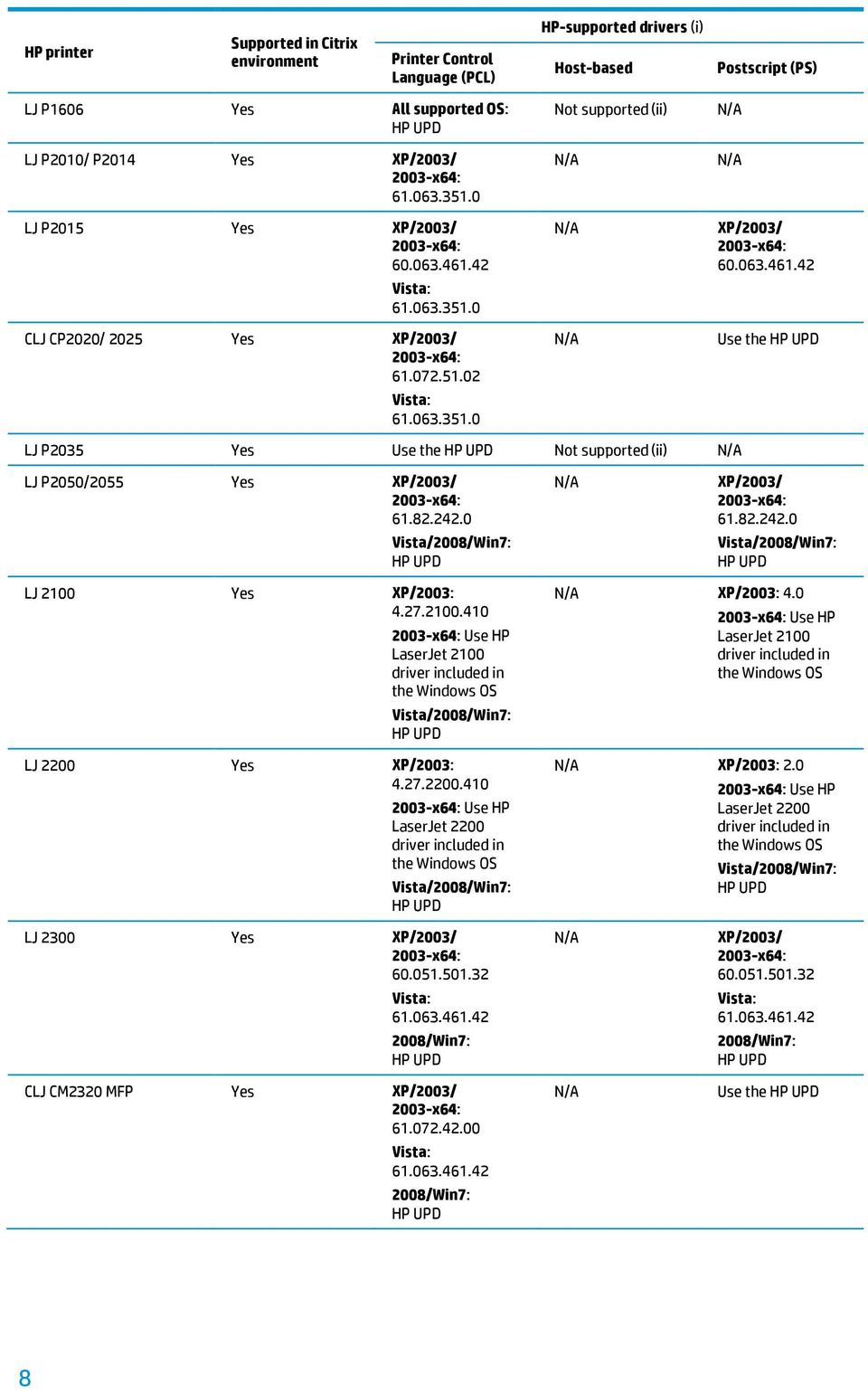
4 Testing performed by HP and by Citrix HP performs Windows Server/XenApp testing on its print s and is confident in the stability and functionality of the versions listed in this document. HP also screens all releases to verify that the s are free of memory leaks and memory allocation issues that might cause print spooler crashes or Citrix logon issues. HP has selected a combination of LaserJet, Designjet, Business Inkjet, and Deskjet printers for Citrix to test as a representative sample of all printers in the HP printer family. Because the code bases of these printers are common to all printers in the HP printer family, the testing performed by Citrix on these select printers translates to all other HP printers. All HP printers and their associated printer s listed in this document are supported by HP in Citrix s. HP only supports the on the Citrix server and no other components from the CD-ROM supplied with the printer or printing system installed on the Citrix server. Feature testing by HP The HP test team installs the print on the Citrix server, logs into a Citrix session, and verifies that printing is successful to client printers and network printers. The feature testing performed by HP is very similar to that achieved with the Citrix Interoperability Test Kit for the Citrix Ready program. Stress testing by HP HP performs stress testing of its print s in both Citrix and non-citrix s. HP tests its print s with the StressPrinters tool provided by Citrix to simulate a user logon where multiple printers are auto-created concurrently. HP also employs other printing stress suites to ensure its s are compatible and stable in Citrix s and can stand up to the printing and auto-creation demands that are commonly experienced by a Citrix server. HP LaserJet printers and supported versions Table 1 identifies the LaserJet printers and minimum levels of associated s that are supported in Citrix s by HP. These printers and printer s were tested by HP. For a description of issue resolutions and known product limitations, refer to Issues when using HP printers in Citrix s. Note: The versions in this table reflect the model-specific information that was available at the time of publication. Subsequent to publication, newer s may have been released; others may no longer be available for download from the HP website. For the most current information, please consult hp.com. Note: For many of the devices listed below, the can be used. Consult hp.com/go/upd to determine whether a particular device is supported by the HP UPD. 4

5 Table 1. HP LaserJet printers and supported s HP printer Printer Control Language (PCL) HP-supported s (i) Host-based Postscript (PS) HP LaserJet Pro 100 Color MFP M175 HP LaserJet Pro 200 color MFP M275 HP LaserJet Pro 300 color M351 HP LaserJet Pro 300 color MFP M375 Yes UPD UPD Yes UPD UPD Yes UPD UPD Yes UPD UPD HP LaserJet Pro 400 M401 Yes UPD UPD HP LaserJet Pro 400 MFP M425 HP LaserJet Pro 400 color M451 HP LaserJet Pro 400 color MFP M475/M476 HP LaserJet Enterprise 500 M525 Yes UPD UPD Yes UPD UPD Yes UPD UPD Yes UPD UPD HP LaserJet Enterprise 500 color M551 Yes UPD UPD HP LaserJet Enterprise 500 color M575 Yes UPD UPD HP LaserJet Enterprise 600 M601/M602/M603 Yes UPD UPD LJ 1000 No Not supported (ii) LJ P1005 No Not supported (ii) LJ P1006 No Not supported (ii) LJ P1008 No Not supported (ii) LJ 1010/1012 Yes Windows XP/ Windows Server 2003: Not supported Windows Vista : LJ 1015 Yes XP/2003: Use HP LaserJet 1200 included in CLJ CM1015/ 1017 MFP Yes LJ 1018 No Not supported (ii) LJ 1020 No Not supported (ii) 5

6 HP printer Printer Control Language (PCL) HP-supported s (i) Host-based Postscript (PS) LJ 1022 Yes Use HP LaserJet 6L PCL5e included in the Windows OS Not supported (ii) LJ Pro CP1025 No Not supported (ii) LJ 1100 Yes XP/2003: Use HP LaserJet 1100 included in LJ P1102w No Not supported (ii) LJ 1150 Yes XP/2003: Use HP LaserJet 1200 included in Vista/Windows Server 2008/ Windows 7: LJ 1160 Yes XP/2003: Use HP LaserJet 1200 included in Vista/ HP UPD Vista/ 2008/ Win7: HP UPD LJ 1200 Yes XP/2003: Use HP LaserJet 1200 included in XP/2003: Use HP LaserJet 1200 included in CLJ CP1215 No Not supported (ii) LJ 1300 Yes XP/2003: Use HP LaserJet 1200 included in XP/2003: Use HP LaserJet 1200 included in CLJ CM1312 MFP Yes

7 HP printer Printer Control Language (PCL) HP-supported s (i) Host-based Postscript (PS) LJ 1320 Yes XP/2003: Use HP LaserJet 1200 included in LJ Pro CM1410 series Yes 2003-R2/ Vista/2008/ Win7/2008 R2: XP/2003: Use HP LaserJet 1200 included in 2003-R2/ Vista/2008/ Win7/2008 R2: CLJ 1500 No XP/2003: Not supported (ii) LJ P1505 No Not supported (ii) LJ P1505n Yes CLJ CP1510 series Yes CLJ CP1518 Yes 2003-R2/Vista/ 2008/Win7/ 2008 R2: LJ Pro CP1520 series Yes 2003-R2/Vista/ 2008/Win7/ 2008 R2: LJ M1522 MFP series Yes LJ Pro M1530 MFP series Yes 2003-R2/Vista/ 2008/Win7/ 2008 R2: LJ Pro CP1525 series Yes 2003-R2/Vista/ 2008/Win7/ 2008 R2: LJ Pro M1536 series Yes 2003-R2/Vista/ 2008/Win7/ 2008 R2: Not supported (ii) Not supported (ii) R2/Vista/ 2008/Win7/ 2008 R2: 2003-R2/Vista/ 2008/Win7/ 2008 R2: x64: R2/Vista/ 2008/Win7/ 2008 R2: 2003-R2/Vista/ 2008/Win7/ 2008 R2: 2003-R2/Vista/ 2008/Win7/ 2008 R2: CLJ 1600 No Not supported (ii) LJ P1600 No Not supported (ii) 7

8 HP printer Printer Control Language (PCL) HP-supported s (i) Host-based Postscript (PS) LJ P1606 Yes All supported OS: LJ P2010/ P2014 Yes LJ P2015 Yes Vista: CLJ CP2020/ 2025 Yes Vista: Not supported (ii) Use the LJ P2035 Yes Use the Not supported (ii) LJ P2050/2055 Yes LJ 2100 Yes XP/2003: Use HP LaserJet 2100 included in LJ 2200 Yes XP/2003: Use HP LaserJet 2200 included in XP/2003: 4.0 Use HP LaserJet 2100 included in XP/2003: 2.0 Use HP LaserJet 2200 included in LJ 2300 Yes Vista: CLJ CM2320 MFP Yes Vista: Vista: Use the 8
9 HP printer Printer Control Language (PCL) HP-supported s (i) Host-based Postscript (PS) LJ 2410/2420/ 2430 Yes Vista: Vista: CLJ 2500 Yes XP/2003: Use HP Color LaserJet 4550 included in XP/2003: Use HP Color LaserJet 4550 included in CLJ 2550 Yes XP/2003: Use HP Color LaserJet 4550 included in CLJ 2600 No Not supported (ii) CLJ 2605 Yes XP/2003: Use HP Color LaserJet 4550 included in CLJ 2700 Yes LJ M2727 MFP Yes b Vista: LJ 2820/ 2830/2840 Yes XP/2003: Use HP LaserJet 2400 CLJ 3000 Yes LJ P3005 Yes b Vista: XP/2003: Use the HP LaserJet

10 HP printer Printer Control Language (PCL) HP-supported s (i) Host-based Postscript (PS) LJ 3015 Yes All supported OS: LJ 3020/3030 Yes XP/2003: Use HP LaserJet P3005 LJ M3027/ M3035 MFP Yes Vista: LJ 3050/3052/ 3055 Yes XP/2003: Use HP LaserJet P3005 LJ 3100 Yes Use HP LaserJet Series II included in the Windows OS LJ 3150 Yes Use HP LaserJet Series II included in the Windows OS LJ 3200 Yes XP/2003: Use HP LaserJet 3200 included in LJ 3300 MFP Yes XP/2003: Use HP LaserJet P3005 XP/2003: Use HP LaserJet P Vista: XP/2003: Use HP LaserJet P3005 XP/2003: Use HP LaserJet P

11 HP printer Printer Control Language (PCL) HP-supported s (i) Host-based Postscript (PS) LJ 3380 Yes XP/2003: Use HP LaserJet P3005 LJ 3390/3392 Yes XP/2003: Use HP LaserJet P3005 XP/2003: Use HP LaserJet P3005 XP/2003: Use HP LaserJet P3005 CLJ 3500 Yes XP/2003: Use HP Color LaserJet 3550 CLJ CP3505 Yes 2003-x64/Vista/ 2008: Win7: CLJ CP3520/ 3525 Yes Win7: CLJ CM3530 MFP Yes x64/ Win7: Vista: Use the CLJ 3550 Yes Vista: CLJ 3600 Yes CLJ 3700 Yes 2003-x64/Vista: CLJ 3800 Yes 2003-x64/Vista: 2003-x64/Vista: 2003-x64/Vista: 11

12 HP printer Printer Control Language (PCL) HP-supported s (i) Host-based Postscript (PS) LJ 4000 Yes XP/2003: Use HP LaserJet 4000 included in XP/2003: 4.0 Use HP LaserJet 4000 included in CLJ CP4005 Yes 2003-x64/Vista: LJ P4014 Yes 2003-R2/Vista: /Win7/ 2008 R2: CLJ CP4025 Yes 2003-x64/Vista/ LJ 4015 Yes PCL5: PCL6: Win7: LJ 4050 Yes XP/2003: Use HP LaserJet 4050 included in 2003-x64/ Vista: 2003-R2/Vista: /Win7/ 2008 R2: Win7: XP/2003: 4.0_1.30 Use HP LaserJet 4050 included in LJ 4100/ 4101 MFP Yes XP/2003: Use HP LaserJet 4100 included in XP/2003: Use HP LaserJet 4100 included in LJ 4200 Yes Win7: Win7: 12

13 HP printer Printer Control Language (PCL) HP-supported s (i) Host-based Postscript (PS) LJ 4240/4250 Yes LJ 4300 Yes Win7: LJ 4345 MFP Yes Win7: LJ M4345 MFP Yes Win7: LJ 4350 Yes Win7: Win7: Win7: Win7: Win7: CLJ 4500 Yes XP/2003: Use HP Color LaserJet 4500 included in XP/2003: Use HP Color LaserJet 4500 included in LJ 4515 Yes PCL5: 2003-x64/ Vista: PCL6: CLJ CP4525 Yes Win7/Vista/ 2003-x64/2008: CLJ CM4540 MFP Yes 2003-R2/Vista/ 2008/Win7/ 2008 R2: 2003-x64/Vista: R2/Vista/ 2008/Win7/ 2008 R2: 13

14 HP printer Printer Control Language (PCL) HP-supported s (i) Host-based Postscript (PS) CLJ 4550 Yes XP/2003: Use HP Color LaserJet 4550 included in LJ M4555 MFP Yes 2003-R2/Vista/ 2008/Win7/ 2008 R2: CLJ 4600 Yes PCL5: XP/2003: PCL6: 2003-x64/ Vista: CLJ 4650 Yes 2003-x64/Vista: CLJ 4700 Yes Win7: CLJ 4730 MFP Yes Win7: CLJ CM4730 MFP Yes Win7: XP/2003: Use HP Color LaserJet 4550 included in 2003-R2/Vista/ 2008/Win7/ 2008 R2: x64/Vista: 2003-x64/Vista: Win7: Win7: Win7: LJ 5000 Yes XP/2003: Use HP LaserJet 5000 included in XP/2003: 4.0 Use HP LaserJet 5000 included in 14

15 HP printer Printer Control Language (PCL) HP-supported s (i) Host-based Postscript (PS) LJ M5025/ M5035 MFP Yes Win7: LJ 5100 Yes PCL6: x64/ Win7: PCL5: LJ 5200/5200L Yes x64/vista/ 2008: Win7: CLJ CP5220 Yes Win7/Vista/ 2003-x64/2008: 1.1 Win7: x64/vista/ 2008: Win7: x64/ Win7: CLJ CP5225 series Yes CLJ CP5520 series Yes CLJ CP5525 series Yes 2003-R2/Vista/ 2008/Win7/ 2008 R2: LJ 5500 Yes PCL6: 2003-x64/ Vista: HP UPD PCL5: 2003-x64/ 2008/ Win7: CLJ 5550 Yes PCL6: Win7: 2003-x64/Vista: Win7: 15

16 HP printer Printer Control Language (PCL) HP-supported s (i) Host-based Postscript (PS) CLJ CP6015 Yes PCL6: Vista: CLJ CM6030/CM6040 MFP Yes PCL6: Win7: Vista: LJ 8000 Yes XP/2003: Use HP LaserJet 8000 included in LJ 8100 Yes XP/2003: Use HP LaserJet 8100 included in LJ 8150 Yes XP/2003: Use HP LaserJet 8150 included in CLJ 8500 Yes XP/2003: 1.0 Use HP LaserJet 8500 included in XP/2003: 4.0 Use HP LaserJet 8000 included in XP/2003: 4.0 Use HP LaserJet 8100 included in XP/2003: Use HP LaserJet 8150 included in XP/2003: 4.01 Use HP LaserJet 8500 included in CLJ 8550 Yes XP/2003: Use HP Color LaserJet 8550 included in XP/2003: Use HP Color LaserJet 8550 included in 16

17 HP printer Printer Control Language (PCL) HP-supported s (i) Host-based Postscript (PS) LJ 9000/9000 MFP Yes PCL6: 2003-x64/ Win7: PCL5: LJ 9040/9050 Yes 2003-x64/Vista/ 2008: Win7: LJ 9040 MFP/ 9050 MFP Yes Win7: LJ 9055 MFP Yes PCL5: XP/2003: PCL6: XP/2003: Use HP LaserJet 9040 LJ 9065 MFP Yes PCL5: XP/2003: PCL6: XP/2003: Use HP LaserJet 9040 CLJ 9500 Yes 2003-x64/ Win7: CLJ 9500 MFP Yes 2003-x64/ Win7: 2003-x64/ Win7: 2003-x64/Vista/ 2008: Win7: Win7: XP/2003: Use HP LaserJet 9040 XP/2003: Use HP LaserJet x64/ Win7: 2003-x64/ Win7: 17

18 HP printer Printer Control Language (PCL) HP-supported s (i) Host-based Postscript (PS) LJ 4, 5, 6 Family Yes XP/2003: x64/ Vista/2008/ Win7: Use included in XP/2003: x64/Vista/ 2008/ Win7: Use included in (i) There may be a newer version for your HP device at hp.com that is also supported. However, the versions listed in this table are acceptable and are supported. (ii) HP does not recommend installing these host-based LaserJet s on the Citrix server; however, the devices may function by using the Citrix UPD on the Citrix server with the HP host-based installed on the client. Print s for your product may be available within the Windows 7 operating system. HP color multifunction printers with HP Edgeline Technology and supported versions Table 2 identifies the HP color multifunction printers with Edgeline technology, along with the minimum levels of associated s that are supported in Citrix s by HP. These printers and printer s were tested by HP. For a description of issue resolutions and known product limitations, refer to Issues when using HP printers in Citrix s. Note: The versions in this table reflect the information that was available at the time of publication. Subsequent to publication, newer s may have been released, and some s may no longer be available for download from the HP website. For the most current information, please consult hp.com. Table 2. HP color multifunction printers with Edgeline technology and supported s HP printer HP-supported s (i) PCL Host-based PS CM8050/8060 MFP Yes (i) There may be a newer version for your HP device at hp.com that is also supported. However, the versions listed in this table are acceptable and are supported. 18

19 Using the in Citrix s The version 5.5.x, freely available at hp.com/go/upd, is supported by HP in Citrix and Terminal Server s. HP has tested the HP Universal Print PCL 5, HP Universal Print PCL 6, and the HP Universal PS emulation in Citrix s. Citrix Ready status UPD 5.5 PCL 5, PCL 6, and PS (64-bit) are listed as Citrix Ready. See citrix.com/ready/partners/hewlettpackard/products/hp-universal-print- for more information. Traditional Mode The can be installed in Traditional Mode on the Citrix server and will perform as a print for all compatible auto-created printers or redirected printers. For auto-created printers, the HP Universal Print PCL 5 can be mapped to print to all PCL 5-capable HP client printers. Similarly, the HP Universal Print PS emulation can be mapped to print to all PS-capable HP client printers through mapping in the Citrix management tools. To install the in Traditional Mode, download the software from hp.com/go/upd and run install.exe from the command line on the server; alternatively, you can use the Add Printer Wizard or the Add Printer Driver Wizard. You can then configure mapping from within the Citrix server. For Terminal Server 2003 SP1 configurations, the can be configured as the PCL or PS fallback when installed in Traditional Mode. See hp.com/go/upd for more information and white papers on the. Dynamic Mode Installing the on clients in Dynamic Mode The following scenarios are supported: Installing and using the in Dynamic Mode on Citrix and Terminal Server clients Using the as an auto-created printer in a Citrix or Terminal Services session is a supported configuration. However, you should be aware of the following caveats: When a job is printed from within the Citrix or Terminal Services session, no Dynamic Mode UI is presented. The print job will automatically print to the last printer that was selected on the client. If the UPD Dynamic Mode installation is new and no printing has ever been done, UPD Dynamic Mode will default to LPT1. If there is no printer connected to LPT1, the print job will fail. If you wish to change the physical printer that the job will go to, there are two options: The is installed on clients in Dynamic Mode, and the Citrix auto-create policy is configured so that the Citrix UPD is the that is mapped to the on the client This is the recommended scenario. The following steps can be performed from within a Citrix session: After selecting Print from within an application, select Preferences. When the Citrix UPD UI appears, select Local Driver. The UPD Dynamic Mode UI will be displayed. You can then select the desired printer. When the UPD print preferences UI is displayed, you can click cancel. 19

20 The is installed as a on the Citrix or Terminal server and mapped to the Dynamic Mode UPD on the clients You must perform the following steps prior to logging in to a Citrix session or published application: Open the Printers folder and select Dynamic Mode UPD printer. Right click the printer and select Printing Preferences. The UPD Dynamic Mode UI will be displayed. You can then select the desired printer. When the UPD print preferences UI is displayed, you can click Cancel. Installing the in Dynamic Mode on the Citrix server Installing the in Dynamic Mode on the Citrix server is not supported in a multi-user. Because the Windows operating system limits a print queue to one port at a time, multiple users would compete for the single port bound to the queue if installed in Dynamic Mode. Use a valid auto-created port when running the Citrix StressPrinters test Citrix knowledge base article CTX suggests that you use LPT1 as the printer port name when running the StressPrinters test this is also the default setting. However, using LPT1 will give erroneous results because the needs to make queries to the printer during the auto-creation process to obtain the printer s configuration. If an invalid printer port like LPT1 is selected, these queries will time out and fail with indications that include exceptionally long auto-create times and/or test failure. To get results that are accurate and reflect actual performance, use a valid auto-created port instead. These ports can be easily identified because the port name has one of the following formats: client:<session #>::<printer name on client>> CLIENT\ \<session information>>#\ \<printer name on client>> Client\ \<session information>>#\ \<printer name on client>> CLIENT/<session information>>#/<printer name on client>> Client/<session information>>#/<printer name on client>> Comparing Citrix and s The Citrix UPD for Presentation Server 4.0, 4.5, XenApp 5.0, or XenApp 6.0 works well for auto-created client printers and for Windows XP or Windows Vista clients. However, you should be aware of the following caveats: The Citrix UPD cannot be used for auto-created network print share session printers that are connected at login by a Citrix policy. UPD or model-specific print s must be installed on the Citrix server for any session printer. The Citrix UPD requires Windows XP, Vista, or Windows 7 on the client. The Citrix UPD is not supported with thin clients that utilize embedded operating systems because the UPD works in conjunction with the Windows print installed on the client for communication of print settings and rendering of print jobs locally. The works well for mapping to any HP PCL or PS client print for auto-created client printers. It works well for any client, including thin clients with embedded operating systems. The Citrix UPD has the ability to provide all printer configurations and user settings from the client printer such as print-on-both sides as default to the auto-created printer within the Citrix user session. The has the ability, if the client printer is a network printer, to communicate with the printer and determine its configuration, such as tray configuration; however, the cannot determine user settings of the client printers from the client. The auto-created printers using the will have default print settings, such as print single-sided as default. 20

21 HP and Citrix UPD usage recommendations Table 3 outlines when it may be better to use the HP or Citrix UPD. Table 3. Usage recommendations Platform Citrix UPD MetaFrame XP FR 1, 2, 3 Available for Windows clients only Better choice for printing to any client Presentation Server 3.0 Available for Windows clients only Better choice for printing to any client Presentation Server 4.0/4.5 Better choice for Windows clients Better choice for non-windows clients or thin clients XenApp 5.0/6.0 Better choice for Windows clients Better choice for non-windows clients or thin clients HP Business Inkjet and Deskjet printers and supported versions Table 4 identifies the HP Business Inkjet and Deskjet printers and minimum levels of associated s that are supported in Citrix s by HP. These printers and printer s have been tested by HP. For a description of issue resolutions and known product limitations, refer to Issues when using HP printers in Citrix s. Note: The versions listed in Table 4 reflect the information that was available at the time of publication. Subsequent to publication, newer s may have been released; some s may no longer be available for download from the HP website. For the most current information, please consult hp.com. Table 4. HP Inkjet and Deskjet printers with supported s HP printer HP-supported s (i) PCL Host-based PS Deskjet 310/ 320/340 (Monochrome) Not tested Use OS Deskjet 350C Not tested XP: Ver. 1.0 Deskjet 450 Yes XP: Ver. 1.0 XP: Ver. 1.8 Deskjet 460 Yes Ver. 1.1 Deskjet 1000C No Deskjet 1100/1120 Not tested XP: Ver. 1.1 Deskjet 1125C Not tested XP: 1120 Deskjet 1220C MetaFrame 1.8 only Ver. 2.1 Ver. 2.1 Inkjet 2000C Not tested Ver. 3.1 light Inkjet 2500C Not tested Ver. 3.1 light Color Inkjet cp1160 Yes XP: Ver
22 HP printer HP-supported s (i) PCL Host-based PS Color Inkjet cp1700 Yes XP: Ver. 1.8 BIJ 1000 Yes Ver BIJ 1100d Yes Ver. 1.1 BIJ 1200d Yes Ver. 1.0 BIJ 2200 Yes PCL3 Ver. 1.4 BIJ 2250 Yes PCL5 Ver. 1.4 PCL5/PS Ver. 1.4 BIJ 2230 Yes PCL3 Ver. 1.0 BIJ 2280 Yes PCL5 Ver. 1.0 PCL5/PS Ver. 1.0 BIJ 2300 Yes Ver. 1.0 BIJ 2600 Yes PCL5 Ver. 1.0 PCL5/PS Ver. 1.0 BIJ 2800 Yes Ver. 1.0 BIJ 3000 Yes PCL6/PCL5 Ver. 1.0 PCL6/PCL5/PS Ver. 1.0 Deskjet 9300 Yes PCL3 Ver. 1.0 Deskjet 9600 Series Yes PCL3 Ver. 1.1 Deskjet 9800 Series Yes PCL3 Ver. 1.0 (i) There may be a newer version for your HP device at hp.com that is also supported. However, the versions listed in this table are acceptable and are supported. Using HP Deskjet printers HP recognizes the need for small inexpensive printing solutions for Citrix s and offers a wide range of compatible products to meet the needs of Citrix users. HP recommends the use of Business Inkjets over consumer Deskjets whenever possible in Citrix s for the following reasons: Lower cost per page Faster print speeds in normal modes Robust networking capabilities, comparable to HP LaserJets Lower intervention rates with higher capacity paper trays and ink supplies Higher reliability and duty load More comprehensive testing in Citrix s Many of these printers and printer s have not been tested by HP. While these printers and s are not directly supported by HP, most customers will be able to use them without issue. 22
23 HP ink-based All-in-One and Photosmart printers and supported versions HP does not directly support the use of consumer ink-based All-in-One (AIO) and Photosmart products in Citrix s. Customers who wish to use HP ink-based AIO printers in Citrix s may use the associated Deskjet printer (as listed in Table 5), which limits product use to printing; all other product features (such as fax, scan, and card reader) are available on a walk-up basis. HP recommends downloading the basic features or corporate s when using mapped s. AIO and Photosmart products that are leveraged from Lightweight Imaging Device Interface Language (LIDIL)-based Deskjet devices are not supported. These products include PSC and Officejet products leveraged from the Deskjet 3000 series. Note: The versions in Table 5 reflect the information that was available at the time of publication. Subsequent to publication, newer s may have been released; other s may no longer be available for download from the HP website. For the most current information, please consult hp.com. Table 5. HP ink-based AIO and Photosmart printers with supported s HP printer HP-supported s (i) PCL Host-based PS HP Officejet 100 Mobile L411 Yes Officejet 500/600 Not tested Use Deskjet 660 Officejet Pro K550 series Yes PCL3 Ver. 1.0 Officejet 700 Not tested Use Deskjet 690 Officejet Pro K850 series Yes PCL3 Ver. 1.0 Officejet 1150 Not tested Use Deskjet 850 Officejet 1170/ 1175 No Officejet D series Not tested Use Color Inkjet cp1160 Officejet G series Not tested Use Deskjet 970 Officejet H470 Yes Ver. 1.0 Officejet J4500/4640/ 4680 Yes Ver. 1.0 Officejet J5700 Yes Ver. 1.0 Officejet J6400 Yes Ver. 1.0 Officejet 6700 Yes Officejet K series Not tested Use Deskjet 970 Officejet Pro K5300 series Yes Ver
24 HP printer HP-supported s (i) PCL Host-based PS Officejet Pro K5400 series Yes Ver. 1.0 Officejet Pro K5700 series Yes Ver. 1.0 Officejet Pro K8600 series Yes Ver. 1.0 Officejet Pro L7300 series Yes Ver. 1.0 Officejet Pro L7500 series Yes Ver. 1.0 Officejet Pro L7600 series Yes Ver. 1.0 Officejet Pro L7700 series Yes Ver. 1.0 Officejet R series Not tested Use Deskjet 895 Officejet T series Not tested Use Deskjet 895 Officejet V series Not tested Use Deskjet 970 Officejet 4100 series No Officejet 4200 series No Officejet 5100 series No Officejet 5500 series No Officejet 5600 series No Officejet 6000 series Yes Officejet 6100 series Not tested Use Deskjet 5550 Officejet 6200 series Not tested Use Deskjet 5740 Officejet 6300 series Not tested Use Deskjet 5900 Officejet 6500 series Yes Officejet 6500A series Yes Officejet 7100 series Not tested Use Color Inkjet cp1160 Officejet 7200 series Not tested Use Deskjet 6540 Officejet 7300 series Not tested Use Deskjet 6540 Officejet 7400 series Not tested Use Deskjet 6540 Officejet 7500 series Yes Officejet Pro 8000 Yes Officejet Pro 8000 Enterprise Yes 8580 Officejet Pro 8100 Yes Officejet Pro 8500 AIO Yes Officejet Pro 8500A AIO Yes
25 HP printer HP-supported s (i) PCL Host-based PS Officejet Pro 8600 Yes Officejet 9100 series Yes Ver. 1.0 PSC 750, 950 Not tested Use Deskjet 970 PSC 1100 series No PSC 1200 series No PSC 1300 series No PSC 1400 series No PSC 1500 series No PSC 1600 series No PSC 2100 Not tested Use Deskjet 5550 PSC 2170/ 2175 Not tested Use Deskjet 5550 PSC 2200 Not tested Use Deskjet 5550 PSC 2300 Not tested Use Deskjet 5740 PSC 2400 Not tested Use Deskjet 5650 PSC 2510 Not tested Use Deskjet 5650 PSC 2600 Not tested Use Deskjet 6540 PSC 2700 Not tested Use Deskjet 6540 PS 2575 AIO No PS 3110 AIO No PS 3210 AIO No PS 3310 AIO No Photosmart C3100 AIO series Photosmart C4100 AIO series Photosmart C5100 AIO series Photosmart C6100 AIO series Photosmart C7100 AIO series No No No No No Deskjet F300 AIO series No PS P-1000 Not tested Use Deskjet 970Cxi PS P-1100 Not tested Use Deskjet 970Cxi 25
26 HP printer HP-supported s (i) PCL Host-based PS PS 1115 Not tested Use Deskjet 990 PS1215/1218 Not tested Use Deskjet 990 PS 1315 Not tested Use Deskjet 990 PS 7150 Not tested Use Deskjet 5550 PS 7260 No Yes PS 7300 Not tested Use Deskjet 5550 PS 7400 No Yes PS 7500 No (iii) PS 7600 Not tested Use Deskjet 5650 PS 7700 Not tested Use Deskjet 5650 PS 7800 Not tested Use Deskjet 6540 PS 7900 No (iii) PS 8000 Not tested Use 5900 Commercial slim PS 8100 Not tested Use Deskjet 6540 PS 8200 No PS 8400 No (iii) PS 8700 No (iii) (i) There may be a newer version for your HP device at hp.com that is also supported. However, the versions listed in this table are acceptable and are supported. (iii) The HP Photosmart 7550, 7900, 8400, and 8700 printer series are PCL3 devices but use three cartridge print assemblies that are not supported by Deskjet base s. HP Designjets and supported versions Table 6 identifies the HP Designjet printers and minimum levels of associated s that are supported in Citrix s by HP. These printers and printer s were tested by HP. For a description of issue resolutions and known product limitations, refer to Issues when using HP printers in Citrix s. Note: The versions listed in Table 6 reflect the information that was available at the time of publication. Subsequent to publication, newer s may have been released; some s may no longer be available for download from the HP website. For the most current information, please consult hp.com. 26
27 Table 6. HP Designjet printers with supported s HP printer HP-supported s (i) HPGL2 Host-based PS DJ 70/90 Not tested Not tested DJ 100/110 Not tested Not tested DJ 30/130 Yes 6.03 DJ 500 Yes 5.35, 6.03 DJ HPGL2 card/ 510 Yes All All DJ 800 Yes DJ 5500 Yes DJ 1050/1055 Yes DJ 4000/ 4500/4020/ 4520 Yes All All HP DeskJet Designjet T790 Yes All All DJ T1100/ T1120/T610/ T620/T770/ T1200 HP DeskJet Designjet T1300 Yes All All Yes All All DJ T2300 Yes All All DJ T7100 Yes All All (i) There may be a newer version for your HP device at hp.com that is also supported. However, the versions listed in this table are acceptable and are supported. Issues when using HP printers in Citrix s Resolved issues Job storage not working as expected when printing from a XenApp published application A job will not be stored in-device when printing from a published application in XenApp if the application is published as Allow anonymous users. This happens because UPD job storage requires the user ID to store the job; however, in this case, the application is run as an anonymous user on the XenApp server. Process HPMUPxxx.BIN fails to shut down In versions prior to 5.1, a process named HPMUPxxx.BIN (HPMUP081.bin, HPMUP083.bin, HPMUP084.bin, or HPMUP091.bin) failed to shut down during Citrix session logoff. This process has been removed in UPD 5.1. Auto-creation performance in Citrix The versions 4.1, 4.5, and 4.7 and discrete print versions xxx.xx and xxx.xx have a known performance issue when auto-creating printers at user login. The process msiexec.exe might consume CPU resources and slow auto-creation of the printer as well as other applications hosted on the Citrix server. version 5.0 included a fix for this issue. In general, the time it takes to auto-create a printer using the or a discrete HP print version 60.xxx.xxx.xxx or 61.xxx.xx.xxx is 2 10 seconds, depending upon the performance and load of the print spooler and other processes on the Citrix server. This is due to the time taken to initialize the or discrete print. 27
28 When using the Citrix StressPrinters tool to test the, selecting the default LPT1: port from the tool provides install times that are not accurate. The attempts to communicate with the printer over the LPT1: port and times out after a long period of time. To achieve a true simulation of the, run StressPrinters from a Citrix server and select a Citrix redirected port that is connected to a live network printer. HKCU\Software\Hewlett-Packard registry hive increases in size in Citrix Print versions xxx.xx fail to clean up registry data written to the HKEY_CURRENT_USER\Software\Hewlett-Packard registry hive. Keys under this hive will grow over time a new registry key is created each time a user logs on to a Citrix server for each printer auto-created. An example of such a key is HKEY_CURRENT_USER\Software\Hewlett-Packard\165b c4-4a84-c392-d da where 165b c4-4a84-c392-d da is a globally unique identifier (GUID). HPBIDIInfo and HPCUSTOMForms are keys in the GUID hive. Newer versions of the print, such as version xxx.xx or the latest, have a fix for this issue. Memory issues cause problems with spooler, auto-creation, and server performance The following components may cause issues: hpbmini.dll Memory leaks and memory corruption are possible with the (or older) dll, which will not cause a spooler crash but may degrade server performance. This issue occurs with 60.x.x.x and 4.x.x.x. print s containing hpbmini.dll version or older. Version and newer has the fix. Version 4.x.x.x print s have an issue unloading hpbmini.dll, which will probably cause a spooler crash when the server has a heavy load of connected users. hpcdmc32.dll Memory leaks are possible with the (or older) dll, which will not cause a spooler crash but may cause performance degradation. This issue occurs with 60.x.x.x and 4.x.x.x print s containing hpcdmc32.dll version or older. Version and newer has the fix. 1 Other symptoms caused by the above components include failed auto-creation of printers and auto-created client printers not being deleted when users log off. Solution To determine if these issues are affecting a server and for a workaround, rename hpbmini.dll and hpcdmc32.dll in the windows\system32\spool\s\w32sx86\3 directory and remove hpbmini.dll from DependentFiles registry entry in HKLM\SYSTEM\CurrentControlSet\Control\Print\Environments\Windows NT x86\drivers\version-3\<> hive. For HP print s version 4.x.x.x, HP strongly recommends upgrading to the 60.x.x.x or 61.x.x.x versions available on hp.com. If one is not available, then use the. For existing 60.x.x.x s with these suspected issues, HP strongly recommends upgrading to the latest available on hp.com. Auto-creation of HP printer fails with Citrix This issue occurs when an HP PCL (version 4.3.x.x to 4.20.x.x.) is installed on the server. When Citrix auto creates using an older HP, the process halts and any remaining printers fail to auto-create. To resolve this situation, update the HP on the server to the version listed in the tables above. Client settings lost during auto-creation This is a limitation of MetaFrame 3.0 and older versions. Most settings such as tray configuration, duplexer, printer memory, and quick sets are not read at auto-creation. Paper size and orientation are the only client settings that are read during auto-creation; the remaining settings are determined by the default settings of the installed on the server. Citrix has provided this functionality in Presentation Server 4.0 and beyond by using the Citrix UPD for client printers. The server must be at least 4.0 and the client must be a 32-bit Windows client (Windows XP, Windows Vista, Windows 7) with at least ICA version At the time of writing, the most recent version of hpcdmc32.dll is
29 If Feature Release 1/Service Pack 1 or later is installed on a MetaFrame/XP server, go to the properties of the autocreated printer and configure the for features manually, then set the tray configuration, duplexer, and hard disk settings. The settings are saved to the user s profile when the user logs out and will be restored the next time the user logs in. This feature is available in s running MetaFrame XP with Feature Release 1 and Service Pack 1 or greater. Unresolved issues HP Deskjet printer s do not load under non-administrator privileges HP does not recommend the use of host-based printers in Citrix s. Host-based printers rely upon the bulk of the rendering being performed on the host machine by the host-based and are designed for direct-connect, nonnetworked s. As a result, host-based print jobs can be considerably larger than PCL-based jobs, which is undesirable when printing over constrained bandwidth connections. An alternative is to use the Citrix UPD to print to a host-based client printer. Known limitation of the when used for auto-created printers or redirected printers with directly attached client printers Outside the Citrix, the can configure itself according to actual printer features such as tray configuration by communicating directly with the printer. However, when the is installed on the server and mapped for auto-created printers, it cannot communicate with the printer installed on the client if the client s printer is directly attached to the client machine (via USB, for example). If the printer is networked, automatic configuration is supported. For directly attached printers on the client, such as USB-connected printers, the PCL defaults to black-and-white, no extra trays, no device-specific paper handling, and so on. The PS defaults to color, no extra trays, no device-specific paper handling, and so on. Note: Printers that are attached to the client via network ports are not affected. The, installed on the server, can communicate with client printers that are available on the network. Microsoft issues HP printer with DOT4 port on client does not create a redirected printer in Terminal Server This issue does not occur with Citrix, only with Terminal Server. If an HP printer is connected to a client with a USB DOT4 port, then no redirected printer is created when logging on to a Terminal Server. Microsoft has a workaround described in their knowledge base article Frequently asked questions Which printing features are supported in Terminal Server/Citrix s? All printing features of the are supported in Terminal Server/Citrix s with the exception of bidirectional communication to client printers. Bi-directional communication to networked printers is unaffected. Is my HP printer supported in a Citrix by HP? Check the LaserJet, Business Inkjet and Deskjet, ink-based AIO and Photosmart, and Designjet printer sections of this white paper to see if your printer is listed as supported. 29
30 Is a certain HP print certified by Citrix? The is listed as Citrix Ready. Other print s and printers may have been tested by HP and Citrix in Presentation Server and XenApp s. To determine if a particular printer is supported, check the appropriate section of this white paper. All support for a printer and print is claimed by HP and provided by HP. How do I configure my Citrix server to map print s, use and configure the Citrix UPD, or configure and session network printers? Consult the Citrix Advanced Concept Guide and other online documentation at citrix.com. Why do my auto-created printer settings not reflect the correct printer settings from my client printers? Presentation Server 4.0/4.5, XenApp 5.0, XenApp 6.0, and the Citrix UPD can read local printer settings from the client. The server must be at least 4.0 and the client must be a 32-bit or 64-bit Windows client with at least ICA version 9.0. Can I use my AIO, MFP, MFD, or scanner connected to my client to scan to applications within my Citrix ICA session? Yes, Presentation Server 4.0/4.5, XenApp 5.0, or XenApp 6.x with a 32-bit or 64-bit Windows client and ICA 9.0 support TWAIN devices directly connected to the client. Where can I download the Windows Server 2003 for Deskjet, PSC, Officejet, and Photosmart printers? HP does not develop Windows Server 2003 s for consumer-based inkjet products. Microsoft recommends using XP s which should work without issue. Citrix-tested HP printers Citrix tested the HP printers shown in Table 7 and their associated 32-bit and 64-bit s with XenApp 6.5. During this testing, no problems were encountered when running Citrix test cases with the HP printers and s listed for each test case. Table 7. HP printers tested by Citrix HP printer tested Officejet Pro K5400 Officejet Pro L7680 AIO Officejet Pro 8500 Color LaserJet 4700n Color LaserJet CP4525 Color LaserJet CP2025 Color LaserJet CP1518ni Color LaserJet CP3525n LaserJet P2035n LaserJet P2015dn Designjet T1300 Designjet T790 Software tested XenApp 6.5 Citrix Receiver for Windows version 13.0, PCL, PS printers and 32-bit/64-bit s 30
31 Testing methodology for HP printers Citrix tested the following areas: Network print servers Printer policies Client printer properties Universal printer Auto-created client printers Printer compatibility Client printer mapping Dynamic printer mapping The testing performed in each of these areas is described below. Each description outlines the following: Description Basic description of the feature being tested Test methodology Summary of the particular testing that was performed Note: Actual testing was much more extensive and is therefore beyond the scope of this document. Various client and server systems from numerous manufacturers were used throughout the testing process. The number of systems and configurations are outside the scope of this document. Printers were connected to both client and server systems, and as stand-alone network printers using HP Jetdirect print server devices. Printers were connected to the client and server systems using IP addresses and USB cables. The 32- and 64-bit printer versions listed are the versions that were available at time of testing. Newer versions may be available. Network print servers Description Network print servers those not running XenApp are servers with shared printers attached to them. Administrators add these shared printers to the Citrix Session Printers policy in order to make them available to all users when they connect to the server farm. Test methodology The HP printers listed in Table 8 were attached to the print server using a parallel cable, USB cable, or TCP/IP port or via Jetdirect. These printers were configured for multiple users. Drivers for the printers were downloaded from the HP Driver Support website. A printer policy was then created for session printers and a user filter created for the session printer policy for domain users, allowing domain users logged on to the XenApp server farm to verify that the shared network printer was available in the client session and that the client could print successfully. 31
32 Table 8. Network print servers tested by Citrix HP printer tested HP version Color LaserJet 4700n Color LaserJet 4700 PCL5c ( ) Color LaserJet 4700 PS ( ) Color LaserJet CP3525n Color LaserJet CP3525 PCL6 ( ) Color LaserJet CP3525 PCL6 ( ) LaserJet P2015dn LaserJet P2015 series PCL5e ( ) LaserJet P2015 series PCL6 ( ) LaserJet P2015 series PS ( ) LaserJet P2035n LaserJet P2035n XPS ( ) No issues were discovered when testing the XenApp Session Printers policy using these HP printers and s. Printer policies Description Policies are used to apply XenApp settings (for client device mapping, for example) to specific users, clients, and servers. Printer policies are used for configuring settings such as auto-creation, printer property retention, print job routing, printer mapping, printer configuration, and session printers. Test methodology The HP printers listed in Table 9 were installed on the client system using a parallel cable, USB cable, or TCP/IP port; s for the printers were downloaded from the HP Driver Support website. The client system connected to the XenApp server farm. Each type of printer setting that is configurable by printer policies was checked to verify operability with the HP printer and and to ensure that the client could print successfully. Table 9. Printers tested by Citrix HP printer tested HP version Color LaserJet 4700n Color LaserJet 4700 PCL5c ( ) Color LaserJet 4700 PS ( ) Color LaserJet CP3525n Color LaserJet CP3525 PCL6 ( ) Color LaserJet CP3525 PCL6 ( ) LaserJet P2015dn LaserJet P2015 series PCL5e ( ) LaserJet P2015 series PCL6 ( ) LaserJet P2015 series PS ( ) LaserJet P2035n LaserJet P2035n XPS ( ) Officejet Pro K5400 Officejet Pro K5400 series ( ) Officejet Pro L7680 All-in-One Officejet Pro L7600 series ( ) No issues were discovered when testing XenApp server printer policies using these HP printers and s. 32
33 Client printer properties Description Client printer properties control the configuration of printers installed on the client system. These properties are set locally on the client s desktop. Some of the more common settings are propagated to the autocreated client printer in the user s session. Test methodology The HP printers listed in Table 10 were installed on the client device using a parallel cable, USB cable, or TCP/IP port; s for the printers were downloaded from the HP Driver Support website. Setting changes were made to the HP printer installed locally on the client system, after which the client connected to the XenApp server farm. The settings were propagated and the client was able to print successfully. Table 10. Printers tested by Citrix HP printer tested HP version LaserJet P2035n LaserJet P2035n XPS ( ) LaserJet P2015dn LaserJet P2015 series PCL5e ( ) LaserJet P2015 series PCL6 ( ) LaserJet P2015 series PS ( ) Officejet Pro K5400 Officejet Pro K5400 series ( ) Officejet Pro L7680 All-in-One Officejet Pro L7600 series ( ) No issues were discovered when testing client printer properties using these HP printers and s. Universal printer Description Auto-creation of client printers requires s for these printers to be available on XenApp servers. When you use universal printing, you do not need to install native printer s in your server farm; rather, the client printers are auto-created using Citrix universal printing. Test methodology The HP printers listed in Table 11 were installed on the client system using a parallel cable, USB cable, or TCP/IP port. Because printer s are not needed to test the universal printer, only HP printers are tested with this feature. The client system connected to the XenApp server farm, which verified that the client s locally attached HP printers were available in the user s session and that the client could print successfully to these printers. Table 11. Printers tested by Citrix HP printer tested HP Color LaserJet 4700 HP Color LaserJet CP3525n HP LaserJet P2015dn HP LaserJet P2035n HP Officejet Pro K5400 HP Officejet Pro L7680 All-in-One Citrix version Citrix Universal Printer ( ) Citrix XPS Universal Printer ( ) No issues were discovered when testing Citrix universal printing using these HP printers. 33
34 Auto-created client printers Description Auto-created client printers are printers that are connected to ports on users Win16, Win32, and Win64 client devices (Windows CE, DOS, and Macintosh OS platforms). Test methodology The HP printers listed in Table 12 were installed on the client system using a parallel cable, USB cable, or TCP/IP port; s for the printers were downloaded from the HP Driver Support website. The client system connected to the XenApp server farm, which verified that the client s locally-attached HP printer was available in the user s session and that the client could print successfully to this printer. Table 12. Printers tested by Citrix HP printer tested HP versions HP Color LaserJet 4700n HP Color LaserJet 4700 PCL5c ( ) HP Color LaserJet 4700 PS ( ) HP LaserJet P2035n HP LaserJet P2035n XPS ( ) HP Color LaserJet CP3525n HP Color LaserJet CP3525 PCL6 ( ) HP Color LaserJet CP3525 PCL6 ( ) HP LaserJet P2015dn HP LaserJet P2015 series PCL5e ( ) HP LaserJet P2015 series PCL6 ( ) HP LaserJet P2015 series PS ( ) HP Officejet Pro K5400 HP Officejet Pro K5400 series ( ) HP Officejet Pro L7680 All-in-One HP Officejet Pro L7600 series ( ) No issues were discovered when testing auto-created client printers using these HP printers and s. Printer compatibility Description Some printer s can cause server problems when printing to client printers in the XenApp server farm and may result in a fatal system error on the server. Because of this, you might need to prevent the auto-creation of client printers that use certain printer s. The printer compatibility feature allows you to designate or prohibit s for use with client printers. Test methodology The HP printers listed in Table 13 were installed on the client system using a parallel cable, USB cable, or TCP/IP port; s for the printers were downloaded from the HP Driver Support website. The printer mapping and compatibility policy was configured and enabled on the XenApp Server; in addition, the for the HP printer was configured to allow the auto-creation of the client printer using that particular HP. After the client had connected to the XenApp server farm, the auto-creation of the client printer was verified. The client printer was able to print successfully. Subsequently, in the printer mapping and compatibility policy, the for the HP printer was configured to disallow the auto-creation of the client printer using that particular HP. On this occasion, the client printer was not auto-created after the client connected to the Citrix server farm. There were no issues with preventing the HP printer from being auto-created. 34
35 Table 13. Printers tested by Citrix HP printer tested HP versions Color LaserJet 4700n Color LaserJet 4700 PCL5c ( ) Color LaserJet 4700 PS ( ) Color LaserJet CP3525n Color LaserJet CP3525 PCL6 ( ) Color LaserJet CP3525 PCL6 ( ) LaserJet P2015dn LaserJet P2015 series PCL5e ( ) LaserJet P2015 series PCL6 ( ) LaserJet P2015 series PS ( ) Officejet Pro K5400 Officejet Pro K5400 series ( ) Officejet Pro L7680 All-in-One Officejet Pro L7600 series ( ) No issues were discovered when testing the XenApp printer compatibility feature using these HP printers and s. Client printer mapping Description When using XenApp clients, you map printer s on the server to client s that have different names for the same printer. You need to use mapping if the printer s installed on XenApp servers have names for client printers that differ from the s used on client systems. Test methodology The HP printers listed in Table 14 were attached to the client system using a parallel cable, USB cable, or TCP/IP port. The printer was installed on the client system; s were downloaded from the HP Driver Support website and installed on the XenApp server. A printer with a different name than the HP installed on the server was installed on the client system. The client printer was mapped to the HP printer installed on the server. The client connected to the XenApp server farm and the auto-creation of the client printer was verified. The client printer was able to print successfully. Table 14. Printers tested by Citrix HP printer tested HP versions HP Color LaserJet 4700 HP Color LaserJet 4700 PCL5c ( ) HP Color LaserJet 4700 PS ( ) HP LaserJet P2035n HP LaserJet P2035n XPS ( ) HP Color LaserJet CP3525n HP Color LaserJet CP3525 PCL6 ( ) HP Color LaserJet CP3525 PCL6 ( ) HP LaserJet P2015dn HP LaserJet P2015 series PCL5e ( ) HP LaserJet P2015 series PCL6 ( ) HP LaserJet P2015 series PS ( ) HP Officejet Pro K5400 HP Officejet Pro K5400 series ( ) HP Officejet Pro L7680 All-in-One HP Officejet Pro L7600 series ( ) No issues were discovered when testing client printer mapping with XenApp using these HP printers and s. 35
36 Dynamic printer mapping Description When using XenApp clients, users can dynamically map client printer objects to the remote session in the server. Test methodology The HP printers listed in Table 15 were attached to the client system using a parallel cable, USB cable, or TCP/IP port. The printer was installed on the client system; s were downloaded from the HP Driver Support website and installed on the XenApp server. The client connected to a session on the XenApp server. The user removed the printer object from the client machine by disconnecting the printer from the machine or removing the device from the client s control panel. The user then reconnected the same printer device and tried to print to this device. The client printer was able to print successfully. Table 15. Printers tested by Citrix HP printer tested HP versions HP Color LaserJet 4700n HP Color LaserJet 4700 PCL5c ( ) HP Color LaserJet 4700 PS ( ) HP LaserJet P2035n HP LaserJet P2035n XPS ( ) HP Color LaserJet CP3525n HP Color LaserJet CP3525 PCL6 ( ) HP Color LaserJet CP3525 PCL6 ( ) HP LaserJet P2015dn HP LaserJet P2015 series PCL5e ( ) HP LaserJet P2015 series PCL6 ( ) HP LaserJet P2015 series PS ( ) HP Officejet Pro K5400 HP Officejet Pro K5400 series ( ) HP Officejet Pro L7680 All-in-One HP Officejet Pro L7600 series ( ) No issues were discovered when testing dynamic printer mapping with XenApp using these printers and s. 36
37 Citrix-tested scanning capability of HP AIO devices Citrix tested the HP AIO devices shown in Table 16 and their associated s with XenApp 6.0. Although they are multifunction devices, Citrix only tested the scanning capability of these AIO devices; no other functionality was tested. During the testing, no problems were encountered when running Citrix test cases with the HP AIO devices and s listed for each test case. Table 16. HP AIO printers tested by Citrix HP AIO printer tested Software tested HP Officejet Pro L7680 All-in-One XenApp 6.5 Citrix Receiver for Windows version 13.0 Test methodologies were similar to those described in the Citrix-tested HP printers section. However, the AIO devices were always connected via SCSI or USB; the devices were not tested as stand-alone network printers. Citrix tested the AIO device s TWAIN redirection capability. TWAIN redirection Description XenApp can now redirect client-connected imaging devices, notably document scanners, from the client to the server. This allows users to control client-attached imaging devices from applications that run on the server. Test methodology The HP AIO devices listed in Table 17 were connected to the client system using a SCSI cable or USB cable; the for the AIO device was either downloaded from the HP Driver Support website or installed from the CD-ROM supplied with the device. The client system connected to the XenApp server farm, which verified that TWAIN-compatible applications in a XenApp server session could recognize and utilize the AIO device for scanning within the particular application. Table 17. HP AIO devices tested by Citrix HP printer tested TWAIN tested HP Officejet Pro L7680 All-in-One HP Officejet Pro L7600 series ( ) No issues were discovered when testing TWAIN redirection using these HP AIO devices. Planned future testing Testing of HP LaserJet, Business Inkjet, Designjet, and Deskjet printers and AIO devices is planned to continue with the next release of XenApp. Newer model HP LaserJet, Business Inkjet, Designjet, and Deskjet printers and AIO devices will be added to the test matrix. Citrix and Microsoft hotfixes for XenApp 6.5 and Windows Server 2008 R2 For more information and to download hotfixes for XenApp 6.5 and Windows Server 2008 R2, please visit: 37
38 Feedback To help us improve our documents, please provide feedback at hp.com/solutions/feedback. Get connected hp.com/go/getconnected Current HP, support, and security alerts delivered directly to your desktop Copyright 2006, 2007, 2008, 2009, 2010, 2011, 2012 Hewlett-Packard Development Company, L.P. The information contained herein is subject to change without notice. The only warranties for HP products and services are set forth in the express warranty statements a ccompanying such products and services. Nothing herein should be construed as constituting an additional warranty. HP shall not be liable for technical or editorial errors or omissions contained herein. Microsoft, Windows Vista, and Windows are registered trademarks of Microsoft Corporation in the U.S. and other countries. Citrix, MetaFrame, Citrix Presentation Server, and XenApp are trademarks of Citrix Systems, Inc. and/or one or more of its subsidiaries, and may be registered in the United States Patent and Trademark Office and in other countries. 38 4AA0-8465ENW, Created January 2006, Updated July 2012, Rev. 24
HP printers supported in Citrix Presentation Server environments
 HP printers supported in Citrix Presentation Server environments June 2008 Executive summary... 2 What s new... 2 Versions of Terminal Server and Citrix supported by HP... 2 Testing performed by HP...
HP printers supported in Citrix Presentation Server environments
 HP printers supported in Citrix Presentation Server environments April 2008 Executive summary... 2 What s new... 2 Versions of Terminal Server and Citrix supported by HP... 2 Testing performed by HP...
HP printers supported in Citrix XenApp Server environments
 HP printers supported in Citrix XenApp Server environments November 2008 Executive summary... 2 What s new... 2 Versions of Terminal Server and Citrix supported by HP... 2 Testing performed by HP... 3
HP Print and Scan Devices Supported in Citrix XenApp and XenDesktop Environments
 Technical white paper HP Print and Scan Devices Supported in Citrix XenApp and XenDesktop Environments Microsoft Terminal Server and Citrix environments Table of contents Executive summary... 3 What s
HP printers supported in Citrix XenApp server environments
 Technical white paper s supported in XenApp server s Microsoft Terminal Server and s Table of contents Executive summary... 3 What s new... 3 Versions of Microsoft Terminal Server and supported by HP...
HP printers supported in Citrix Presentation Server environments
 HP printers supported in Citrix Presentation Server environments July 2007 Executive summary... 2 What s new... 2 Versions of Terminal Server and Citrix supported by HP... 2 Testing performed by HP...
Printing and Imaging Support on HP Compaq Thin Clients
 Printing and Imaging Support on HP Compaq Thin Clients Overview.............................................................. 2 Microsoft Windows XP Embedded Operating System............................
SMART INSTALL CONTENTS. Questions and answers
 SMART INSTALL Questions and answers CONTENTS Frequently asked questions...2 Compatibility...3 USB connection...3 Wired or wireless network connection...4 Software CD...5 After installation...6 Software
DIGITAL MULTIFUNCTIONAL SYSTEM
 MODEL: MX-M283N MX-M363N MX-M453N MX-M503N DIGITAL MULTIFUNCTIONAL SYSTEM Software Setup Guide BEFORE INSTALLING THE SOFTWARE SETUP IN A WINDOWS ENVIRONMENT SETUP IN A MACINTOSH ENVIRONMENT TROUBLESHOOTING
UFR II Driver Guide. UFR II Driver Ver. 2.20 ENG
 UFR II Driver Guide UFR II Driver Ver. 2.20 Please read this guide before operating this product. After you finish reading this guide, store it in a safe place for future reference. ENG 0 Ot UFR II Driver
DIGITAL FULL COLOR MULTIFUNCTIONAL SYSTEM. Software Setup Guide
 DIGITAL FULL COLOR MULTIFUNCTIONAL SYSTEM Software Setup Guide BEFORE INSTALLING THE SOFTWARE SETUP IN A WINDOWS ENVIRONMENT SETUP IN A MACINTOSH ENVIRONMENT TROUBLESHOOTING Thank you for purchasing this
HP Universal Print Driver
 HP Universal Print Driver Solution and Feature Guide Technology for better business outcomes CONTENTS Getting to know the HP Universal Print Driver...1 How the HP Universal Print Driver works...2 Top
Networking Best Practices Guide. Version 6.5
 Networking Best Practices Guide Version 6.5 Summer 2010 Copyright: 2010, CCH, a Wolters Kluwer business. All rights reserved. Material in this publication may not be reproduced or transmitted in any form
Operating Instructions Driver Installation Guide
 Operating Instructions Driver Installation Guide For safe and correct use, be sure to read the Safety Information in "Read This First" before using the machine. TABLE OF CONTENTS 1. Introduction Before
eprint SOFTWARE User Guide
 eprint SOFTWARE User Guide HP eprint software User Guide Copyright and License 2012 Copyright Hewlett-Packard Development Company, L.P. Reproduction, adaptation, or translation without prior written permission
SOFTWARE SETUP GUIDE DIGITAL MULTIFUNCTIONAL SYSTEM
 SOFTWARE SETUP GUIDE DIGITAL MULTIFUNCTIONAL SYSTEM INTRODUCTION CONTENTS INSTALLING THE SOFTWARE (THAT ACCOMPANIES THE MACHINE) INSTALLING THE SOFTWARE (FOR OPTIONS) TROUBLESHOOTING AND USEFUL INFORMATION
SOFTWARE SETUP GUIDE DIGITAL MULTIFUNCTIONAL SYSTEM
 SOFTWARE SETUP GUIDE DIGITAL MULTIFUNCTIONAL SYSTEM INTRODUCTION CONTENTS INSTALLING THE SOFTWARE (THAT ACCOMPANIES THE MACHINE) INSTALLING THE SOFTWARE (FOR OPTIONS) TROUBLESHOOTING AND USEFUL INFORMATION
ThinPrint.print Server Engine installation and architecture
 ActiveAnswers iss solutions september 2003 installation guide ThinPrint.print Server Engine installation and architecture contents introduction... 3 SBC printing challenges... 3 enterprise computing printing
Xerox Global Print Driver. Installation Guide
 Xerox 2010 Xerox Corporation. All Rights Reserved. Unpublished rights reserved under the copyright laws of the United States. Contents of this publication may not be reproduced in any form without permission
HP LaserJet 1010 series printer. Software Technical Reference
 HP LaserJet 1010 series printer Software Technical Reference ii ENWW Contents 1 Purpose 2 Software overview Printer configurations........................................................ 9 HP LaserJet
Installing and Configuring HP Remote Desktop Protocol (RDP) Multimedia and USB Enhancement Software for Linux
 Installing and Configuring HP Remote Desktop Protocol (RDP) Multimedia and USB Enhancement Software for Linux Overview... 2 Enhanced Multimedia Experience on an RDP Connection... 2 Extends USB Connectivity...
Print Administrator Resource Kit Release Notes
 Print Administrator Resource Kit Release Notes The HP Print Administrator Resource Kit (PARK) is a collection of tools, scripts and documentation to help print administrators install, deploy, configure
This white paper has been deprecated. For the most up to date information, please refer to the Citrix Virtual Desktop Handbook.
 This white paper has been deprecated. For the most up to date information, please refer to the Citrix Virtual Desktop Handbook. Prepared by: Worldwide Consulting Desktops and Apps Group Consulting Solutions
Troubleshooting Citrix MetaFrame Procedures
 Troubleshooting Citrix MetaFrame Procedures Document name Troubleshooting a Citrix MetaFrame environment v1.0.doc Author Marcel van As Last Revision Date 28 February 2006 Edited and released by: www.dabcc.com
Thin Client Printing with the HP Universal Print Driver
 Thin Client Printing with the HP Universal Print Driver Introduction... 2 Pre-requisites... 2 Printing with HP Thin Clients... 3 The HP Universal Print Driver for Thin Clients add-on... 3 Installing the
HP LaserJet MFP Analog Fax Accessory 300 Send Fax Driver Guide
 HP LaserJet MFP Analog Fax Accessory 300 Send Fax Driver Guide Copyright and License 2008 Copyright Hewlett-Packard Development Company, L.P. Reproduction, adaptation, or translation without prior written
Send to Network Folder. Embedded Digital Sending
 Send to Network Folder Embedded Digital Sending Embedded Digital Sending Legal Notice Copyright 2005 Hewlett-Packard Development Company, L.P. The information contained herein is subject to change without
Software Technical Reference for the HP LaserJet 8150 Series Printers (8150, 8150N, 8150DN, 8150HN, 8150MFP)
 Software Technical Reference for the HP LaserJet 8150 Series Printers (8150, 8150N, 8150DN, 8150HN, 8150MFP) Notice The information contained in this document is subject to change without notice. HEWLETT-PACKARD
hp embedded web server for hp LaserJet printers
 hp embedded web server for hp LaserJet printers user guide Trademark Credits Microsoft is a U.S. registered trademark of Microsoft Corporation. Netscape is a U.S. trademark of Netscape Communications Corporation.
Label Gallery Software for Microsoft Windows Terminal Services and Citrix MetaFrame
 Label Gallery Software for Microsoft Windows Terminal Services and Citrix MetaFrame White Paper Version 20100716 2009 SATO CORPORATION. All rights reserved. http://www.satoworldwide.com [email protected]
January 9, 2014. Xerox Global Print Driver Installation Guide
 January 9, 2014 Xerox Global Print Driver Installation Guide 2010-2014 Xerox Corporation. All Rights Reserved. Xerox, Xerox and Design, WorkCentre, Global Print Driver, and Mobile Express Driver are trademarks
January 20, 2014. Helpful Hints for Printing in Citrix Using Xerox Print Drivers Customer Tip
 January 20, 2014 Helpful Hints for Printing in Citrix Using Xerox Print Drivers Customer Tip 2014 Xerox Corporation. All rights reserved. Xerox, Xerox and Design and Global Print Driver are trademarks
HP ThinPro. Table of contents. USB Manager. Technical white paper
 Technical white paper HP ThinPro USB Manager Table of contents Introduction... 2 Background... 2 Generic USB redirection... 2 Device mapping/virtual devices... 3 Methods summary... 3 USB Manager overview...
SETUP MANUAL. Midmark Products over Thin Client Environments
 SETUP MANUAL Midmark Products over Thin Client Environments Version 1.8 Part Number: 3-100-1126 Revision B Table of Contents I. INTRODUCTION... 1 A. RELATED DOCUMENTS... 1 B. CAUTIONARY NOTE... 1 C. GLOSSARY
Quick start to evaluating HP Windows Embedded Standard 2009 Thin Clients. HP t5630w, HP t5730w, HP t5740, HP gt7720
 Get your thin client running Right out of the box Quick start to evaluating HP Windows Embedded Standard 2009 Thin Clients HP t5630w, HP t5730w, HP t5740, HP gt7720 Get your new thin client system up and
HP Universal Print Driver
 HP Universal Print Driver Overview and solutions for deployment methods Table of contents Introduction & Overview... 2 Assessment... 3 Planning... 5 Key Deployment Decisions... 6 Manage your UPD environment...
MULTIFUNCTIONAL DIGITAL SYSTEMS. Software Installation Guide
 MULTIFUNCTIONAL DIGITAL SYSTEMS Software Installation Guide 2008-2010 TOSHIBA TEC CORPORATION All rights reserved Under the copyright laws, this manual cannot be reproduced in any form without prior written
USING THE HP UNIVERSAL PRINT DRIVER WITH WINDOWS 8 AND WINDOWS SERVER 2012
 USING THE HP UNIVERSAL PRINT DRIVER WITH WINDOWS 8 AND WINDOWS SERVER 2012 CONTENTS Overview... 1 Windows 8 and Windows Server 2012 HP UPD Support... 2 PARK tools... 2 Windows 8 User Interfaces... 2 Windows
Legal Notes. Regarding Trademarks. Models supported by the KX printer driver. 2011 KYOCERA MITA Corporation
 Legal Notes Unauthorized reproduction of all or part of this guide is prohibited. The information in this guide is subject to change without notice. We cannot be held liable for any problems arising from
Legal Notes. Regarding Trademarks. 2013 KYOCERA Document Solutions Inc.
 Legal Notes Unauthorized reproduction of all or part of this guide is prohibited. The information in this guide is subject to change without notice. We cannot be held liable for any problems arising from
MULTIFUNCTIONAL DIGITAL SYSTEMS. Operator's Manual for TWAIN Driver/File Downloader
 MULTIFUNCTIONAL DIGITAL SYSTEMS Operator's Manual for TWAIN Driver/File Downloader 2008 KYOCERA MITA Corporation All rights reserved Preface Thank you for purchasing KYOCERA MITA Multifunctional Digital
Infor Web UI Sizing and Deployment for a Thin Client Solution
 Infor Web UI Sizing and Deployment for a Thin Client Solution Copyright 2012 Infor Important Notices The material contained in this publication (including any supplementary information) constitutes and
Quick Start to Evaluating. HP t5630w, HP t5730w, HP gt7720
 Get your thin client Get your running thin client running Right out Right out of of the box the box Quick Start to Evaluating HP Windows Embedded Standard Thin Clients HP t5630w, HP t5730w, HP gt7720 Get
August 13, 2014. Install/Uninstall/Share Xerox Print Drivers Best Practices for Windows Server 2012 R2 Customer Tip
 August 13, 2014 Install/Uninstall/Share Xerox Print Drivers Best Practices for Windows Server 2012 R2 Customer Tip 2014 Xerox Corporation. All rights reserved. Xerox, Xerox and Design, ColorQube, and WorkCentre
NiceLabel Software for Microsoft Windows Terminal Services and Citrix MetaFrame
 www.nicelabel.com [email protected] NiceLabel Software for Microsoft Windows Terminal Services and Citrix MetaFrame White Paper Version 20072711-08 2007 Euro Plus & Niceware International. All rights
October, 2015. Install/Uninstall Xerox Print Drivers & Apps Best Practices for Windows 8, 8.1, and 10 Customer Tip
 October, 2015 Install/Uninstall Xerox Print Drivers & Apps Best Practices for Windows 8, 8.1, and 10 Customer Tip 2015 Xerox Corporation. All rights reserved. Xerox, Xerox and Design, ColorQube, and WorkCentre
HP One-Button Disaster Recovery (OBDR) Solution for ProLiant Servers
 Reference guide HP One-Button Disaster Recovery (OBDR) Solution for ProLiant Servers Reference guide Contents One button disaster recovery (OBDR) 2 Requirements 2 HP tape drive and server support 2 Creating
Sharp Remote Device Manager (SRDM) Server Software Setup Guide
 Sharp Remote Device Manager (SRDM) Server Software Setup Guide This Guide explains how to install the software which is required in order to use Sharp Remote Device Manager (SRDM). SRDM is a web-based
LOCAL PRINT AGENT OVERVIEW
 LOCAL PRINT AGENT OVERVIEW The Local Print Agent is used to collect information from local printing devices. The technology of the local device determines the information reported to the Local Print Agent
Using HP System Software Manager for the mass deployment of software updates to client PCs
 Using HP System Software Manager for the mass deployment of software updates to client PCs Introduction... 2 HP manageability solutions... 2 SSM overview... 3 Software updates... 3 Why not SSM-enabled?...
WinConnect Server ES User Manual
 THINSOFT PTE LTD 23 Tai Seng Drive, #06-00, Singapore 535224, Fax (65) 6289-7308 www.thinsoftinc.com WinConnect Server ES User Manual Document Version 1.0 1 WinConnect Server ES User Manual Copyright 2007
HP ThinPro. Table of contents. Enabling RemoteFX for RDP. Technical white paper
 Technical white paper HP ThinPro Enabling RemoteFX for RDP Table of contents Overview... 2 Operating system requirements... 2 USB redirection... 2 Enabling RemoteFX on the RDP server... 2 Windows 7 and
Sage MAS 200 ERP Level 3.71 Version 4.30 Supported Platform Matrix
 The information in this document applies to Sage MAS 200 ERP Level 3.71 through version 4.30. Sage generally supports only the current Sage MAS 200 level and one prior major level. As of the version 4.10
CentreWare Internet Services Setup and User Guide. Version 2.0
 CentreWare Internet Services Setup and User Guide Version 2.0 Xerox Corporation Copyright 1999 by Xerox Corporation. All rights reserved. XEROX, The Document Company, the digital X logo, CentreWare, and
FAS Asset Accounting FAS CIP Accounting FAS Asset Inventory SQL Server Installation & Administration Guide Version 2011.1
 FAS Asset Accounting FAS CIP Accounting FAS Asset Inventory SQL Server Installation & Administration Guide Version 2011.1 2011 Sage Software, Inc. All rights reserved. Published by Sage 2325 Dulles Corner
KX Driver User Guide
 KX Driver User Guide Legal Notes Unauthorized reproduction of all or part of this guide is prohibited. The information in this guide is subject to change for improvement without notice. We cannot be held
Citrix MetaFrame Presentation Server 3.0 and Microsoft Windows Server 2003 Value Add Feature Guide
 Citrix MetaFrame Presentation Server 3.0 and Microsoft Windows Server 2003 Value Add Feature Guide Advanced Functionality Basic Functionality Feature MANAGEMENT Microsoft Management Console Enhanced Connection
Danware introduces NetOp Remote Control in version 7.01 replacing version 7.0 as the shipping version.
 Release notes version 7.01 Danware introduces NetOp Remote Control in version 7.01 replacing version 7.0 as the shipping version. It s available as a free downloadable upgrade to existing version 7.0 customers
HP ProLiant Essentials Vulnerability and Patch Management Pack Planning Guide
 HP ProLiant Essentials Vulnerability and Patch Management Pack Planning Guide Product overview... 3 Vulnerability scanning components... 3 Vulnerability fix and patch components... 3 Checklist... 4 Pre-installation
PostScript 3 Supplement
 PostScript 3 Supplement 1 2 3 4 Windows Configuration Mac OS Configuration Using PostScript 3 Printer Utility for Mac Read this manual carefully before you use this machine and keep it handy for future
Printer Driver Installation Manual
 Printer Driver Installation Manual Copyrights Any unauthorized reproduction of the contents of this document, in part or whole, is strictly prohibited. Limitation of Liability SATO Corporation and its
Proactive VDI Performance Monitoring
 Proactive VDI Performance Monitoring Visibility into virtual desktop environments for a consistent user experience Because of Goliath s status as a Citrix Ready partner, our mutual customers can be assured
MAS 200 Supported Platform Matrix
 The information in this document applies to MAS 200 Level 3.60 and higher. Best Software only supports the current MAS 200 level and one major level back. As of the Level 3.70 release, MAS 200 Levels 3.51
HP eprint Enterprise. Installation Checklist. Release 4.2
 HP eprint Enterprise Installation Checklist Release 4.2 Copyright and License Copyright 2015 HP Development Company, L.P. Reproduction, adaptation, or translation without prior written permission is prohibited,
Installation and Setup Guide
 Installation and Setup Guide Contents 1. Introduction... 1 2. Before You Install... 3 3. Server Installation... 6 4. Configuring Print Audit Secure... 11 5. Licensing... 16 6. Printer Manager... 17 7.
Opera 3 & Opera II System Requirements Guide
 Opera 3 & Opera II Opera 3 & Opera II September 2013 Copyright Pegasus Software Limited, 2013 Manual published by: Pegasus Software Limited Orion House Orion Way Kettering Northamptonshire NN15 6PE www.pegasus.co.uk
use hp color LaserJet 5500 hp LaserJet 4100mfp hp embedded web server hp color LaserJet 4600 hp LaserJet 4300 hp LaserJet 9000mfp
 use hp embedded web server hp LaserJet 00 hp color LaserJet 500 hp LaserJet 400mfp hp LaserJet 400 hp LaserJet 400 hp color LaserJet 4600 hp color LaserJet 5500 hp LaserJet 9000mfp hp embedded web server
HP LeftHand SAN Solutions
 HP LeftHand SAN Solutions Support Document Installation Manuals Installation and Setup Guide Health Check Legal Notices Warranty The only warranties for HP products and services are set forth in the express
TROUBLESHOOTING GUIDE
 Lepide Software LepideAuditor Suite TROUBLESHOOTING GUIDE This document explains the troubleshooting of the common issues that may appear while using LepideAuditor Suite. Copyright LepideAuditor Suite,
Legal Notes. Regarding Trademarks. 2012 KYOCERA Document Solutions Inc.
 Legal Notes Unauthorized reproduction of all or part of this guide is prohibited. The information in this guide is subject to change without notice. We cannot be held liable for any problems arising from
INFUSION BUSINESS SOFTWARE Installation and Upgrade Guide
 INFUSION BUSINESS SOFTWARE Installation and Upgrade Guide 27/01/2016 Published by Infusion Business Software Ltd All Rights Reserved Copyright Infusion Business Software Ltd 2012 Copyright No part of this
Citrix EdgeSight for Load Testing Installation Guide. Citrix EdgeSight for Load Testing 3.8
 Citrix EdgeSight for Load Testing Installation Guide Citrix EdgeSight for Load Testing 3.8 Copyright Use of the product documented in this guide is subject to your prior acceptance of the End User License
Network Scanner Tool R3.1. User s Guide Version 3.0.04
 Network Scanner Tool R3.1 User s Guide Version 3.0.04 Copyright 2000-2004 by Sharp Corporation. All rights reserved. Reproduction, adaptation or translation without prior written permission is prohibited,
Sharing Pictures, Music, and Videos on Windows Media Center Extender
 Sharing Pictures, Music, and Videos on Windows Media Center Extender Applies to: Microsoft Windows XP Media Center Edition Microsoft Windows Media Center Extender Microsoft Windows Media Center Extender
Documentum Management & Imaging System Overview
 Documentum Management & Imaging System Overview Introduction The University of Tennessee is in the process of purchasing an electronic document management system (EDMS) that will enable Graduate Admissions
support HP MFP Scan Setup Wizard 1.1
 support HP MFP Scan Setup Wizard 1.1 Security Level: Customer Verbal Use Date Written/Updated: October 11, 2007 Document Summary a The Scan Setup Wizard is a Windows utility that end users can download
Citrix Systems, Inc.
 Citrix Systems, Inc. Notice The information in this publication is subject to change without notice. THIS PUBLICATION IS PROVIDED AS IS WITHOUT WARRANTIES OF ANY KIND, EXPRESS OR IMPLIED, INCLUDING ANY
Release Notes for Websense Email Security v7.2
 Release Notes for Websense Email Security v7.2 Websense Email Security version 7.2 is a feature release that includes support for Windows Server 2008 as well as support for Microsoft SQL Server 2008. Version
High Availability Setup Guide
 High Availability Setup Guide Version: 9.0 Released: March 2015 Companion Guides: The UniPrint Infinity Administrator s Guide, Cluster Guide and Mobile Setup Guide can be found online for your convenience
HP Web Jetadmin Database Connector Plug-in reference manual
 HP Web Jetadmin Database Connector Plug-in reference manual Copyright notice 2004 Copyright Hewlett-Packard Development Company, L.P. Reproduction, adaptation or translation without prior written permission
Configure thin client settings locally
 This chapter contains information to help you set up your thin client hardware, look and feel, and system settings using the Control Center. Tip While it is not recommended to use dialog boxes for configuring
Core Protection for Virtual Machines 1
 Core Protection for Virtual Machines 1 Comprehensive Threat Protection for Virtual Environments. Installation Guide e Endpoint Security Trend Micro Incorporated reserves the right to make changes to this
User Reports. Time on System. Session Count. Detailed Reports. Summary Reports. Individual Gantt Charts
 DETAILED REPORT LIST Track which users, when and for how long they used an application on Remote Desktop Services (formerly Terminal Services) and Citrix XenApp (known as Citrix Presentation Server). These
HP PolyServe Software 4.1.0 upgrade guide
 HP StorageWorks HP PolyServe Software 4.1.0 upgrade guide This document describes how to upgrade to HP PolyServe Matrix Server 4.1.0, HP PolyServe Software for Microsoft SQL Server 4.1.0, and HP PolyServe
HP SCOM Management Packs User Guide
 HP SCOM Management Packs User Guide Abstract This guide describes the HP extensions for Microsoft System Center Operations Manager that are provided as part of HP Insight Control for Microsoft System Center.
Load Manager Administrator s Guide For other guides in this document set, go to the Document Center
 Load Manager Administrator s Guide For other guides in this document set, go to the Document Center Load Manager for Citrix Presentation Server Citrix Presentation Server 4.5 for Windows Citrix Access
System Release Notes Express5800/320LB System Release Notes
 System Release Notes Express5800/320LB System Release Notes PN: 455-01681-004 2 Proprietary Notice and Liability Disclaimer The information disclosed in this document, including all designs and related
BroadWorks Receptionist
 BroadWorks Receptionist Administration Guide Release 14.sp2 Document Version 1 220 Perry Parkway Gaithersburg, MD USA 20877 Tel +1 301.977.9440 Fax +1 301.977.8846 WWW.BROADSOFT.COM BroadWorks Guide Copyright
Windows XP Service Pack 2 Issues
 Windows XP Service Pack 2 Issues NOTICE THIS DOCUMENT SHALL NOT BE REPRODUCED IN WHOLE OR IN PART, FOR ANY PURPOSE OR IN ANY FASHION AND DISTRIBUTED WITHOUT THE PRIOR WRITTEN CONSENT OF RICOH CORPORATION.
MULTIFUNCTIONAL DIGITAL SYSTEMS. Scanning Guide
 MULTIFUNCTIONAL DIGITAL SYSTEMS Scanning Guide 2008, 2009 TOSHIBA TEC CORPORATION All rights reserved Under the copyright laws, this manual cannot be reproduced in any form without prior written permission
CONSTRUCTION / SERVICE BILLING SYSTEM SPECIFICATIONS
 CONSTRUCTION / SERVICE BILLING SYSTEM SPECIFICATIONS Jonas Software, March 2013 Contents Introduction... 3 Hardware Specifications... 4 Recommended Server Hardware Specifications... 4 Recommended Workstation
Upgrade to Webtrends Analytics 8.7: Best Practices
 Technical Best Practices 8.7 Software Upgrade Upgrade to Webtrends Analytics 8.7: Best Practices Version 3 Webtrends Analytics is a powerful application that must be installed on a dedicated computer.
Product Description. Licenses Notice. Introduction TC-200
 User Manual TC-200 Introduction TC-200 Product Description The TC-200 provides the fastest Thin Client performance on the market, It runs embedded Linux, swing user interface, Citrix 6.3, Microsoft RDP
Printer Performance and Troubleshooting Printers
 Printer Performance and Troubleshooting Printers Revised May 22, 2013 2013 ImproMed, LLC. All rights reserved. No part of this publication may be reproduced, transmitted, transcribed, stored in a retrieval
InventoryControl for use with QuoteWerks Quick Start Guide
 InventoryControl for use with QuoteWerks Quick Start Guide Copyright 2013 Wasp Barcode Technologies 1400 10 th St. Plano, TX 75074 All Rights Reserved STATEMENTS IN THIS DOCUMENT REGARDING THIRD PARTY
Artikel-Detailinformationen
 Artikel-Detailinformationen Hersteller Art-Nr Herst-Nr Hewlett-Packard 0112575M CN598A#A80 Bezeichnung 1 Bezeichnung 2 Bezeichnung 3 Artikel-Bild OfficeJet Pro X576DW MFP Print/Scan/Copy/Fax/Web USB, LAN,
System Planning, Deployment, and Best Practices Guide
 www.novell.com/documentation System Planning, Deployment, and Best Practices Guide ZENworks Application Virtualization 9.0 February 22, 2012 Legal Notices Novell, Inc., makes no representations or warranties
Table of Contents. FleetSoft Installation Guide
 FleetSoft Installation Guide Table of Contents FleetSoft Installation Guide... 1 Minimum System Requirements... 2 Installation Notes... 3 Frequently Asked Questions... 4 Deployment Overview... 6 Automating
Amadeus Selling Platform 3.1 P120
 Amadeus Selling Platform 3.1 P120 Installation Guide Terminal Server and Citrix Index 1 Introduction... 3 1.1 About this guide... 3 1.2 Intended audience... 3 2 Limitations and requirements... 3 3 Technical