
QUALITY PRODUCTS SINCE WORKSPACE MANAGEMENT
|
|
|
- Ralf Hoover
- 9 years ago
- Views:
Transcription
1 QUALITY PRODUCTS SINCE WORKSPACE MANAGEMENT

2 OFFICE WELL-BEING SOLUTIONS A few easy adjustments to your workstation set-up can make a huge difference in how you feel about your daily routine. Use the guide on the right to identify areas of discomfort and find the ideal product solutions for stress reduction and promoting a neutral work posture. > For more information and product demos, please visit > Look for the DID YOU KNOW icon to find out more about your favorite products Almost 7 out of 10 people spend time each day adjusting and / or rearranging their workspaces in order to get more comfortable. 1 1 Results based on 1,000 surveys. Toluna Research, August 2012

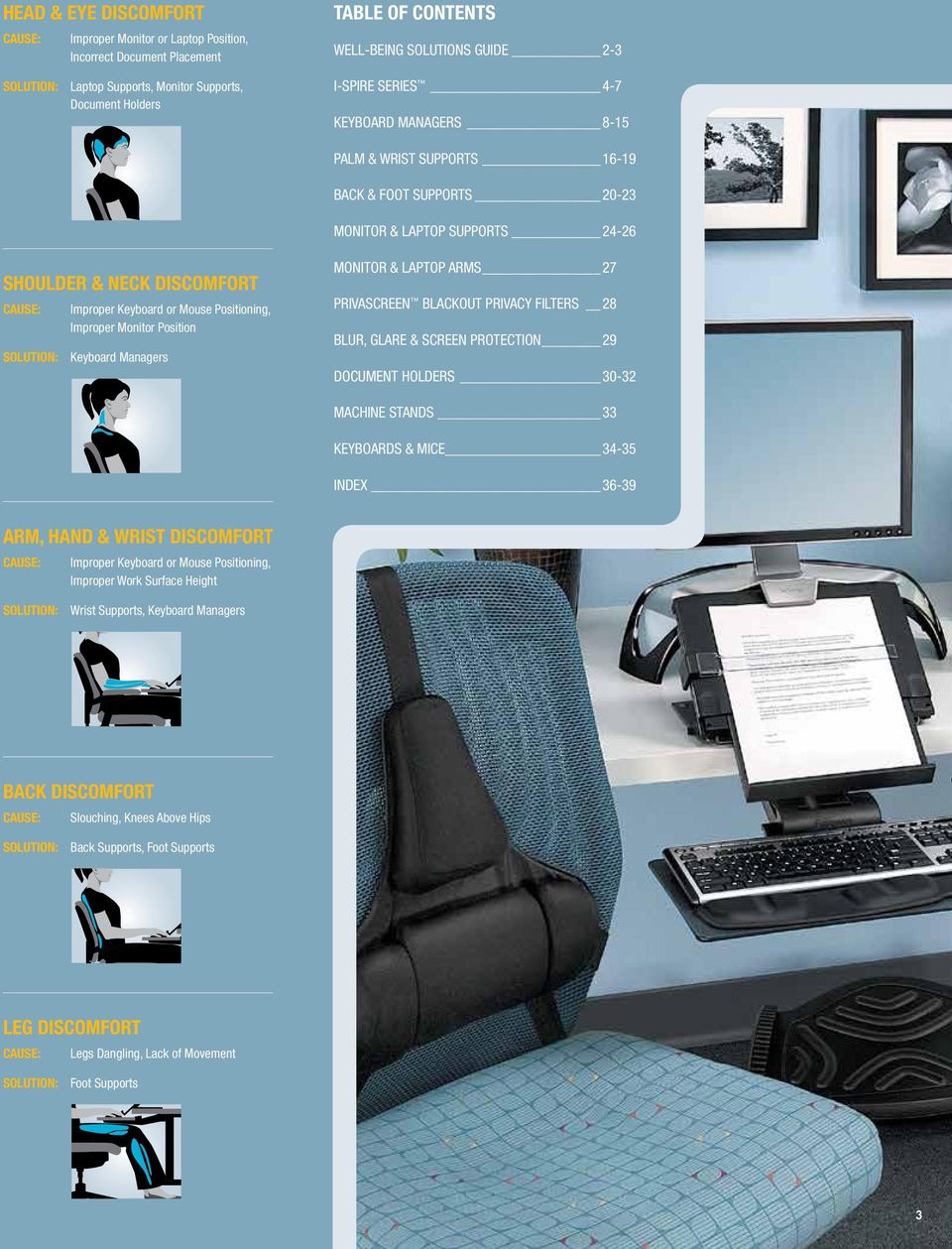
3 HEAD & EYE DISCOMFORT CAUSE: Improper Monitor or Laptop Position, Incorrect Document Placement SOLUTION: Laptop Supports, Monitor Supports, Document Holders TABLE OF CONTENTS WELL-BEING SOLUTIONS GUIDE 2-3 I-SPIRE SERIES 4-7 KEYBOARD MANAGERS 8-15 PALM & WRIST SUPPORTS BACK & FOOT SUPPORTS MONITOR & LAPTOP SUPPORTS SHOULDER & NECK DISCOMFORT CAUSE: Improper Keyboard or Mouse Positioning, Improper Monitor Position SOLUTION: Keyboard Managers MONITOR & LAPTOP ARMS 27 PRIVASCREEN BLACKOUT PRIVACY FILTERS 28 BLUR, GLARE & SCREEN PROTECTION 29 DOCUMENT HOLDERS MACHINE STANDS 33 KEYBOARDS & MICE INDEX ARM, HAND & WRIST DISCOMFORT CAUSE: Improper Keyboard or Mouse Positioning, Improper Work Surface Height SOLUTION: Wrist Supports, Keyboard Managers BACK DISCOMFORT CAUSE: Slouching, Knees Above Hips SOLUTION: Back Supports, Foot Supports LEG DISCOMFORT CAUSE: Legs Dangling, Lack of Movement SOLUTION: Foot Supports 3
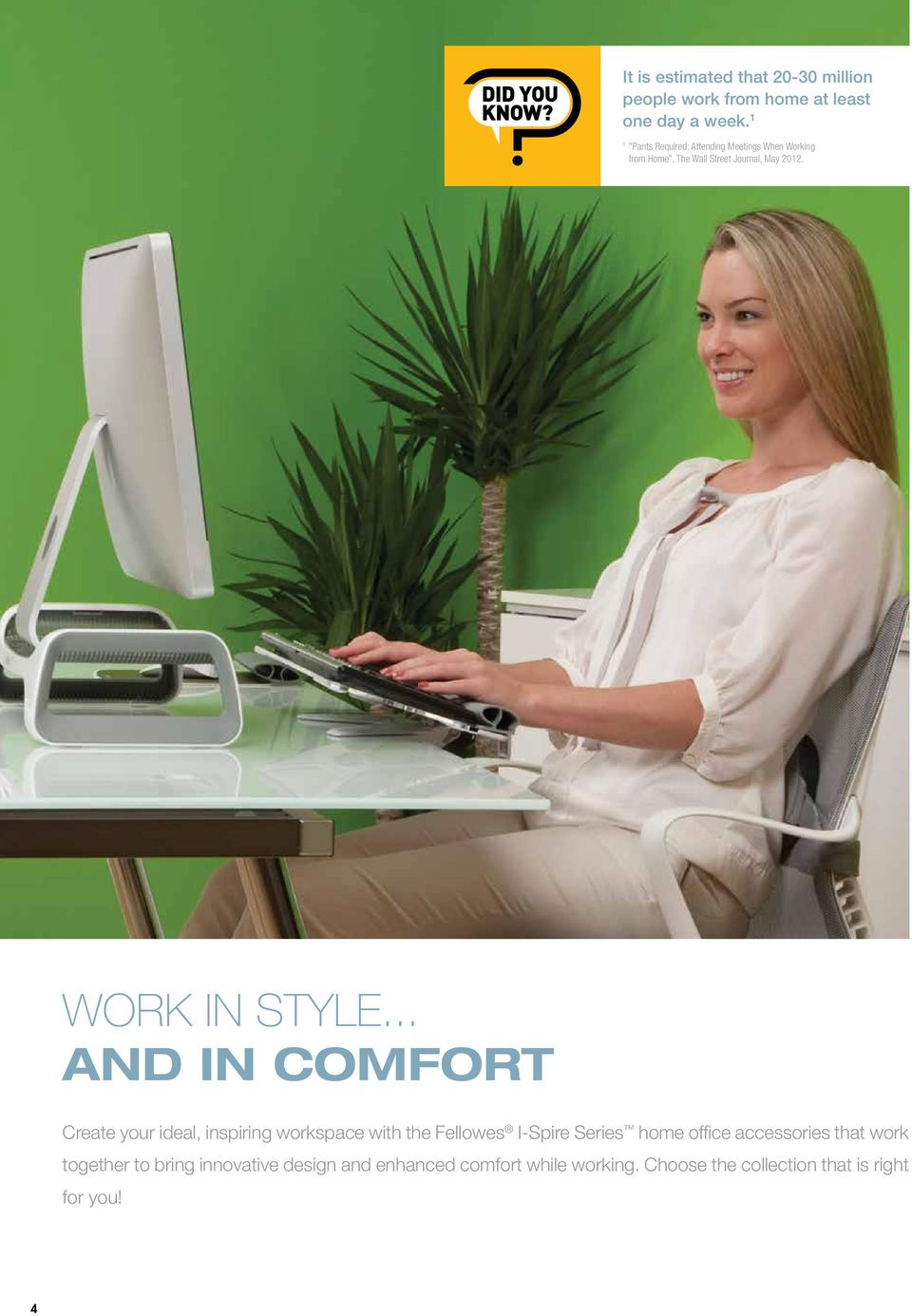
4 It is estimated that million people work from home at least one day a week. 1 1 "Pants Required: Attending Meetings When Working from Home", The Wall Street Journal, May WORK IN STYLE... AND IN COMFORT Create your ideal, inspiring workspace with the Fellowes I-Spire Series home office accessories that work together to bring innovative design and enhanced comfort while working. Choose the collection that is right for you! 4
5 IF YOU USE A MONITOR AT YOUR DESK... D H A I C E B G F J A. Monitor Lift D. File Station NEW! H. Document Lift > Innovative design elevates monitor 3-3/8" above > Space saving design with three tiered sorter slots > Innovative 3-in-1 Design document holder, dry desktop for enhanced viewing comfort > Non-skid feet protect work surfaces erase board and clipboard > Helps reduce neck strain and shoulder tension from scratches and scuffs > Places documents in a more comfortable viewing > Supports all monitors up to 25 lbs position to help reduce neck, shoulder and eye strain > Product is 100% Recyclable > Allows portrait and landscape orientations with B. Desktop Edge Keyboard Lift > Compact design attaches to desktop edges up to 1-1/2" thick without tools and fits in corner and standard workspaces > Extended knee clearance keeps you comfortable while typing > Easy tilt adjustment keeps your keyboard in the correct position for typing > Innovative silicone wrist support provides a soft, cool place for your wrists and wipes clean with a damp cloth NEW! E. Wrist Rocker > Elliptical design offers a smooth, effortless rocking motion for enhanced mousing comfort > Provides a soft, cool place for your wrist > Easy to clean with a damp cloth > Patent pending design Gray White/Gray F. Foot Cushion > Soothing foam cushion top provides a soft resting place for your feet > Elevates feet and legs for a more comfortable working position > Helps reduce lower back tension and leg pressure > Non-skid rubber feet a weighted base for added sturdiness > Dry erase memo board for quick notes or reminders while copy clip holds up to 15 sheets of letter-sized paper I. Tablet SuctionStand NEW! > Suction technology automatically fixes to smooth, flat surfaces when tablet is inserted, providing a secure stand for tablet interaction or display > Holds tablet in vertical or horizontal position, making it ideal for hands free viewing > Innovative design enhances sound when tablet is in the vertical position > 20 incline provides a comfortable viewing angle and accommodates all tablets up to 3/8" thick C. Pencil & Phone Station > Positions pencils and phone for enhanced viewing comfort and easy charger port access > Dual compartments store paperclips and other desk accessories > Weighted base for added stability and built-in cord management NEW! G. Lumbar Cushion > Supports lower back for enhanced comfort while seated > Helps reduce back tension > Adjustable strap with durable buckle fits most chairs and holds lumbar cushion in place > Breathable mesh fabric J. Keyboard Wrist Rocker > Elliptical design offers a smooth, effortless rocking motion for enhanced typing comfort > Provides a soft, cool place for your wrists > Easy to clean with a damp cloth > Patent pending design Gray White enhances personal comfort

6 IF YOU USE A LAPTOP AT YOUR DESK... B A E G H F C I D A. Laptop Lift > Innovative design elevates your laptop for enhanced viewing comfort while working at your desk > Built-in curved design helps keep laptop cool > Front bumpers hold all laptops up to 17" securely in place > 25 incline provides a comfortable viewing height B. File Station NEW! > Space saving design with three tiered sorter slots > Non-skid feet protect work surfaces from scratches and scuffs C. Pencil & Phone Station NEW! > Positions pencils and phone for enhanced viewing comfort and easy charger port access > Dual compartments store paperclips and other desk accessories > Weighted base for added stability and built-in cord management D. Foot Cushion > Soothing foam cushion top provides a soft resting place for your feet > Elevates feet and legs for a more comfortable working position > Helps reduce lower back tension and leg pressure > Non-skid rubber feet E. Document Lift > Innovative 3-in-1 Design document holder, dry erase board and clipboard > Places documents in a more comfortable viewing position to help reduce neck, shoulder and eye strain > Allows portrait and landscape orientations with a weighted base for added sturdiness > Dry erase memo board for quick notes or reminders while copy clip holds up to 15 sheets of letter-sized paper F. Wrist Rocker > Elliptical design offers a smooth, effortless rocking motion for enhanced mousing comfort > Provides a soft, cool place for your wrist > Easy to clean with a damp cloth > Patent pending design Gray White/Gray G. Tablet SuctionStand > Suction technology automatically fixes to smooth, flat surfaces when tablet is inserted, providing a secure stand for tablet interaction or display > Holds tablet in vertical or horizontal position, making it ideal for hands free viewing > Innovative design enhances sound when tablet is in the vertical position > 20 incline provides a comfortable viewing angle and accommodates all tablets up to 3/8" thick H. Lumbar Cushion > Supports lower back for enhanced comfort while seated > Helps reduce back tension > Adjustable strap with durable buckle fits most chairs and holds lumbar cushion in place > Breathable mesh fabric enhances personal comfort I. Laptop Lapdesk NEW! NEW! > Positions laptop for enhanced viewing and typing comfort, whether you re working at a desk or on the couch > Built-in channel design helps keep laptop cool > Front bumpers hold all laptops up to 17" securely in place

7 IF YOU USE A TABLET AT YOUR DESK... B A E F H C G I D A. Tablet Lift > Innovative design elevates tablet 3" above desktop for enhanced viewing comfort > Helps reduce neck strain and shoulder tension > Displays all tablets up to 1/2" thick in portrait and landscape orientations D. Foot Cushion > Soothing foam cushion top provides a soft resting place for your feet > Elevates feet and legs for a more comfortable working position > Helps reduce lower back tension and leg pressure > Non-skid rubber feet G. Keyboard Wrist Rocker > Elliptical design offers a smooth, effortless rocking motion for enhanced typing comfort > Provides a soft, cool place for your wrists > Easy to clean with a damp cloth > Patent pending design Gray White B. File Station NEW! > Space saving design with three tiered sorter slots > Non-skid feet protect work surfaces from scratches and scuffs C. Pencil & Phone Station NEW! > Positions pencils and phone for enhanced viewing comfort and easy charger port access > Dual compartments store paperclips and other desk accessories > Weighted base for added stability and built-in cord management E. Document Lift > Innovative 3-in-1 Design document holder, dry erase board and clipboard > Places documents in a more comfortable viewing position to help reduce neck, shoulder and eye strain > Allows portrait and landscape orientations with a weighted base for added sturdiness > Dry erase memo board for quick notes or reminders while copy clip holds up to 15 sheets of letter-sized paper F. Wrist Rocker > Elliptical design offers a smooth, effortless rocking motion for enhanced mousing comfort > Provides a soft, cool place for your wrist > Easy to clean with a damp cloth > Patent pending design Gray White/Gray H. Lumbar Cushion > Supports lower back for enhanced comfort while seated > Helps reduce back tension > Adjustable strap with durable buckle fits most chairs and holds lumbar cushion in place > Breathable mesh fabric enhances personal comfort I. Tablet SuctionStand NEW! > Suction technology automatically fixes to smooth, flat surfaces when tablet is inserted, providing a secure stand for tablet interaction or display > Holds tablet in vertical or horizontal position, making it ideal for hands free viewing > Innovative design enhances sound when tablet is in the vertical position > 20 incline provides a comfortable viewing angle and accommodates all tablets up to 3/8" thick

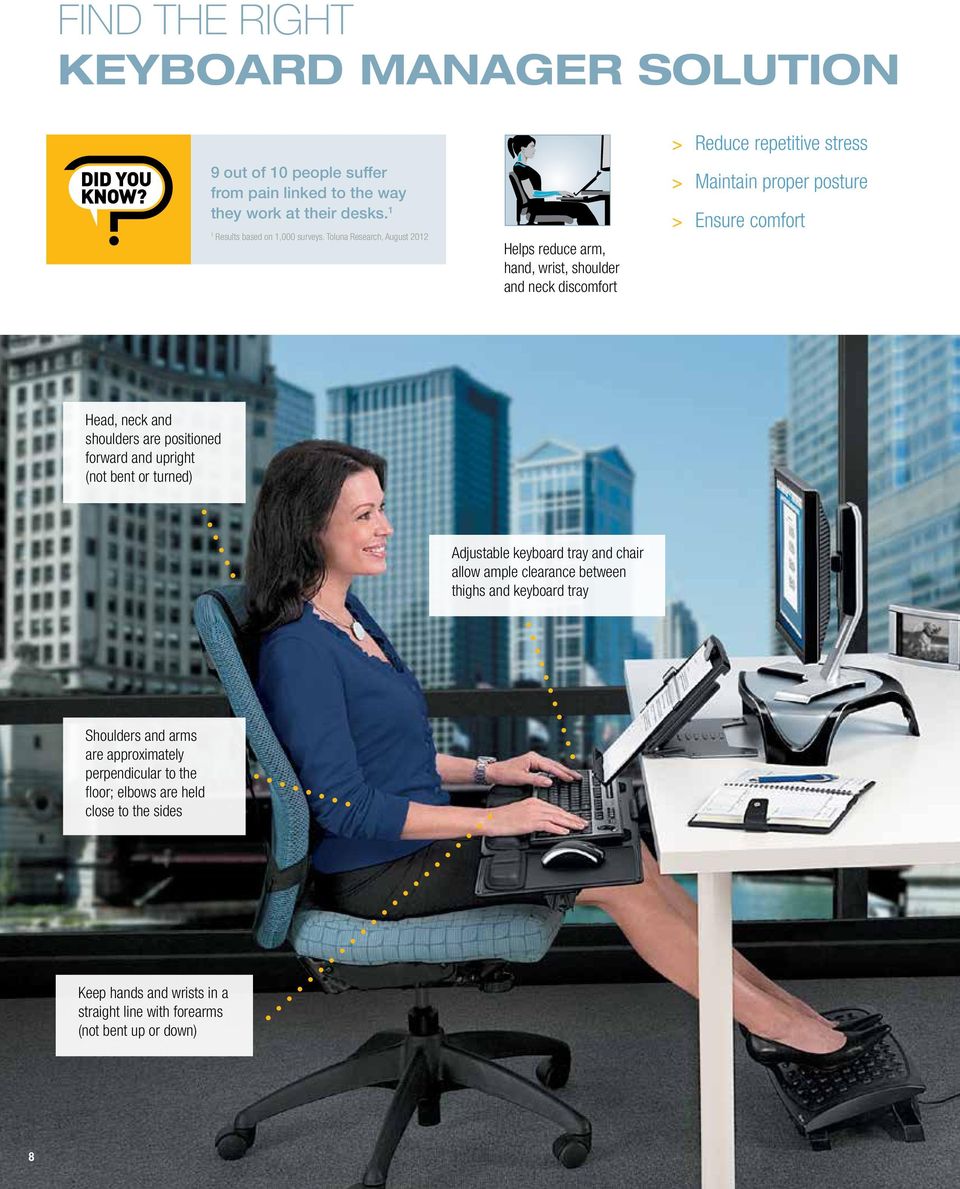
8 FIND THE RIGHT KEYBOARD MANAGER SOLUTION 9 out of 10 people suffer from pain linked to the way they work at their desks. 1 1 Results based on 1,000 surveys. Toluna Research, August 2012 Helps reduce arm, hand, wrist, shoulder and neck discomfort > Reduce repetitive stress > Maintain proper posture > Ensure comfort Head, neck and shoulders are positioned forward and upright (not bent or turned) Adjustable keyboard tray and chair allow ample clearance between thighs and keyboard tray Shoulders and arms are approximately perpendicular to the floor; elbows are held close to the sides Keep hands and wrists in a straight line with forearms (not bent up or down) 8
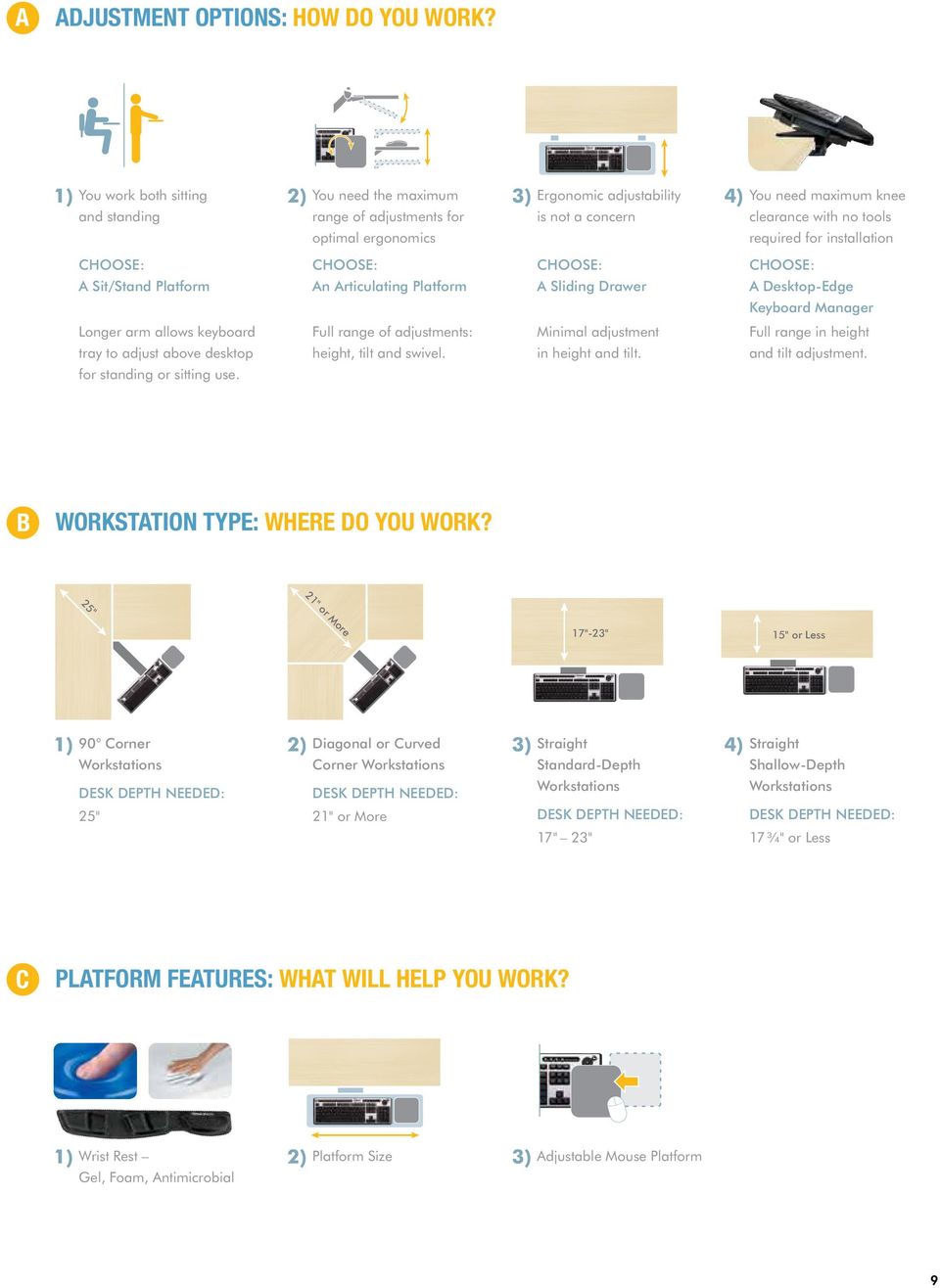
9 25" A ADJUSTMENT OPTIONS: HOW DO YOU WORK? 1) You work both sitting and standing 2) You need the maximum range of adjustments for optimal ergonomics 3) Ergonomic adjustability is not a concern 4) You need maximum knee clearance with no tools required for installation CHOOSE: A Sit/Stand Platform CHOOSE: An Articulating Platform CHOOSE: A Sliding Drawer CHOOSE: A Desktop-Edge Keyboard Manager Longer arm allows keyboard tray to adjust above desktop for standing or sitting use. Full range of adjustments: height, tilt and swivel. Minimal adjustment in height and tilt. Full range in height and tilt adjustment. B WORKSTATION TYPE: WHERE DO YOU WORK? 21" or More 17"-23" 15" or Less 1) 90 Corner Workstations DESK DEPTH NEEDED: 25" 2) Diagonal or Curved Corner Workstations DESK DEPTH NEEDED: 21" or More 3) Straight Standard-Depth Workstations DESK DEPTH NEEDED: 17" 23" 4) Straight Shallow-Depth Workstations DESK DEPTH NEEDED: 17 ¾" or Less C PLATFORM FEATURES: WHAT WILL HELP YOU WORK? 1) Wrist Rest Gel, Foam, Antimicrobial 2) Platform Size 3) Adjustable Mouse Platform 9 7
10 PROFESSIONAL SERIES KEYBOARD TRAYS All Professional Series Keyboard Trays feature the following: > Designed and manufactured for Fellowes by Humanscale > Lift and lock feature lets you adjust height with one hand tilt platform to reposition, then straighten to lock in place > ANSI / BIFMA level 1 certified Demo available at: Professional Series Sit / Stand Keyboard Tray Work in either a "sitting" or "standing" position > Increased height adjustment range up to 6¼" above and 5" below desktop > 10" round mousing platform mounts over keypad or flush with keyboard for easier mousing Designed to be used at sitting or standing workstations Professional Series Executive Keyboard Trays Features adjustable height and tilt on keyboard tray plus versatile Comfort-Lift system for mouse platform adjustment > Height and tilt indicators let you customize keyboard tray settings > Single-touch lever slides from left to right to adjust tray tilt > Comfort-Lift system lets you slide mouse platform left or right over keyboard numeric pad and offers 2 custom height positions > Mouse platform tilts forward or backward, adjusts up or down to height of keyboard and mounts on left or right side of keyboard > Corner Executive ( ) Extended track length designed to maneuver in corner workstation Fully Adjustable Total mouse platform adjustability: height and tilt Warning Trak keeps mouse from sliding off tray Single-touch lever, height and tilt indicators Professional Series Executive Keyboard Tray Professional Series Corner Executive Keyboard Tray Compatibility Adjustability Comfort Features Professional Series Comparison Chart Item Number Diagonal / Curved Straight 90º Corner Glide Track Length Maximum Width of Keyboard and Mouse Platform Keyboard Platform Dimensions (WxD) Adjustable Arm Height Above / Depth Below Mounting Surface Keyboard Tray Tilt Swivel Keyboard Tray Height Adjustable Mouse Tray Wrist Rest Included Microban Protection Mouse Platform Dimensions (WxD) Mouse Left / Right Mount Professional Series Sit / Stand Keyboard Tray YES YES " 29" 19" x " YES 6 1 4" above track to 5" below track -10º 360º YES Memory Foam (keyboard platform only) YES 10" Round Both Professional Series Executive Keyboard Tray YES YES " " 19" x " YES 5" below track to 1 1 4" above track -10º 360º YES Memory Foam YES 8 1 2" x " Both Professional Series Corner Executive Keyboard Tray YES YES YES 25" " 19" x " YES 5" below track to 1 1 4" above track -10º 360º YES Memory Foam YES 8 1 2" x " Both 10

11 Expanded mousing surface accommodates Fellowes Gliding Palm Support Memory foam wrist supports with Microban antimicrobial protection to keep product cleaner Patented Health-V channel relieves wrist pressure to help prevent carpal tunnel syndrome Professional Series Premier Keyboard Tray Features adjustable height and tilt on keyboard tray plus versatile Comfort-Lift system for mouse platform adjustment > Comfort-Lift system lets you slide mouse platform left or right over keyboard numeric pad and offers 2 custom height positions > Mouse platform tilts forward or backward, adjusts up or down to height of keyboard and mounts on left or right side of keyboard > Single manual knob adjusts tray tilt Fully Adjustable Total mouse platform adjustability: height and tilt Warning Trak keeps mouse from sliding off tray Mouse Platform Lowered Professional Series Compact Keyboard Tray Provides comfort and maneuverability for smaller workspaces > Features compact 17¾" glide track > Standard platform accommodates both right and left-handed mousing > Single manual knob adjusts tray tilt Warning Trak keeps mouse from sliding off tray Compatibility Adjustability Comfort Features Professional Series Comparison Chart Item Number Diagonal / Curved Straight 90º Corner Glide Track Length Maximum Width of Keyboard and Mouse Platform Keyboard Platform Dimensions (WxD) Adjustable Arm Height Above / Depth Below Mounting Surface Keyboard Tray Tilt Swivel Keyboard Tray Height Adjustable Mouse Tray Wrist Rest Included Microban Protection Mouse Platform Dimensions (WxD) Mouse Left / Right Mount Professional Series Premier Keyboard Tray YES YES " " 19" x " YES 5" below track to 1 1 4" above track -10º 360º YES Memory Foam YES 8 1 2" x " Both Professional Series Compact Keyboard Tray YES YES " " 19" x 9 1 2" YES 3 1 2" below track to 1 2" above track -10º 360º Memory Foam YES 8 1 2" x 9 1 2" Both 11

12 KEYBOARD TRAYS Designer Suites Premium Keyboard Tray Features adjustable height and tilt on keyboard tray plus adjustable mouse platform > Comfort-Lift system lets you slide mouse platform left or right over keyboard numeric pad and offers 2 custom height positions > Mouse platform tilts forward or backward, adjusts up or down to height of keyboard and mounts on left or right side of keyboard > Single knob adjusts tray height and tilt > Soothing memory foam wrist rests with Microban antimicrobial protection to keep product cleaner Fully Adjustable Total mouse platform adjustability: height and tilt Warning Trak keeps mouse from sliding off tray 50% LARGER Expanded mousing surface accommodates Fellowes Gliding Palm Support See Demo Online Mouse Platform Lowered Designer Suites Compact Keyboard Tray Fully adjustable tray enhances comfort in smaller workspaces > Features compact " glide track to fit restricted workspaces > Standard platform accommodates both right and left-handed mousing > Soothing memory foam wrist rests with Microban antimicrobial protection to keep product cleaner Warning Trak keeps mouse from sliding off tray 50% LARGER Expanded mousing surface accommodates Fellowes Gliding Palm Support See Demo Online Office Suites Keyboard Tray Fully adjustable unit moves keyboard and mouse off the desktop to save workspace > Single knob adjusts tray height and tilt > Keyboard tray swivels right or left and swings back underneath work surface for storage > Sliding arm lets you pull keyboard tray closer to you for ease of use 0 Product Contains 100% Recycled Materials Standard Keyboard Tray Combines comfort with easy space management > Fully adjustable unit moves keyboard and mouse off the desktop to save workspace > Single knob adjusts tray height and tilt > Mouse tray stows underneath when not in use Compatibility Adjustability Comfort Features Keyboard Tray Comparison Chart Item Number Diagonal / Curved Straight 90º Corner Glide Track Length Maximum Width of Keyboard and Mouse Platform Keyboard Platform Dimensions (WxD) Adjustable Arm Height Above / Depth Below Mounting Surface Keyboard Tray Tilt Swivel Keyboard Tray Height Adjustable Mouse Tray Wrist Rest Included Microban Protection Mouse Platform Dimensions (WxD) Mouse Left / Right Mount Designer Suites Premium Keyboard Tray YES YES " " 19" x " YES 4 1 4" below track to 1 1 4" above track -10º 360º YES Memory Foam YES 8 1 2" x " Both Designer Suites Compact Keyboard Tray YES YES " " 19" x 9 1 2" YES 4 1 4" below track to 1 1 4" above track -10º 360º Memory Foam YES 8 1 2" x 9 1 2" Both Office Suites Keyboard Tray YES YES " " " x 10" YES 4 3 4" below track to 1 1 8" above track -10º 360º Memory Foam NO 8 1 2" x 7 7 8" Both 12 Standard Keyboard Tray YES YES " " " x " YES 4 1 4" below track to 1 1 4" above track -10º 360º Gel NO 8" x 9 1 4" Both

13 KEYBOARD DRAWERS Designer Suites DeskReady Keyboard Drawer Easily attaches to most workstations without tools or complex instructions > Patented clamp attaches unit to desktop ( 5 8" 1 1 2" thick), without surface damage (33 3 4" wide space required) > Offers 3 height positions below desktop to ensure personal comfort: ", " and 3 1 2" > Tray tilts at -3, -6, and -9 degrees to suit personal preference > Soothing memory foam wrist rests with Microban antimicrobial protection to keep product cleaner > Separate keyboard and mouse platforms allow you to position mouse on right or left side of keyboard tray No tools required for installation Office Suites Deluxe Keyboard Drawer Height adjustable unit moves keyboard and mouse off the desktop to save workspace > Features 3 height adjustments to suit preferred work position > Mouse tray stows underneath when not in use > Soothing memory foam wrist rests with Microban antimicrobial protection to keep product cleaner 0 Product Contains 100% Recycled Materials Office Suites Underdesk Keyboard Drawer Height adjustable unit moves keyboard and mouse off the desktop to save workspace > Features 3 height adjustments to suit preferred work position > Mouse tray stows underneath when not in use 0 Product Contains 100% Recycled Materials Compatibility Adjustability Comfort Features Keyboard Drawer Comparison Chart Item Number Diagonal / Curved Straight 90º Corner Glide Track Length Maximum Width of Keyboard and Mouse Platform Keyboard Platform Dimensions (WxD) Adjustable Arm Height Above / Depth Below Mounting Surface Sliding Keyboard Drawer Keyboard Tray Tilt Wrist Rest Included Microban Protection Mouse Platform Dimensions (WxD) Mouse Left / Right Mount Designer Suites Deskready Keyboard Drawer Office Suites Deluxe Keyboard Drawer Office Suites Underdesk Keyboard Drawer YES " Travel " " x " NO 23 16", ", 3 1 2" below track YES YES 10" Travel " " x " NO 21 2", 2 1 8" or 1 3 4" below track YES YES 10" Travel " " x 7 3 4" NO 21 2", 2 1 8" or 1 3 4" below track YES -3º, -6º, -9º Memory Foam YES x " Both YES Memory Foam YES 9 x " Both YES Plastic NO 7 3 8" x 7 5 8" Both 13

14 14
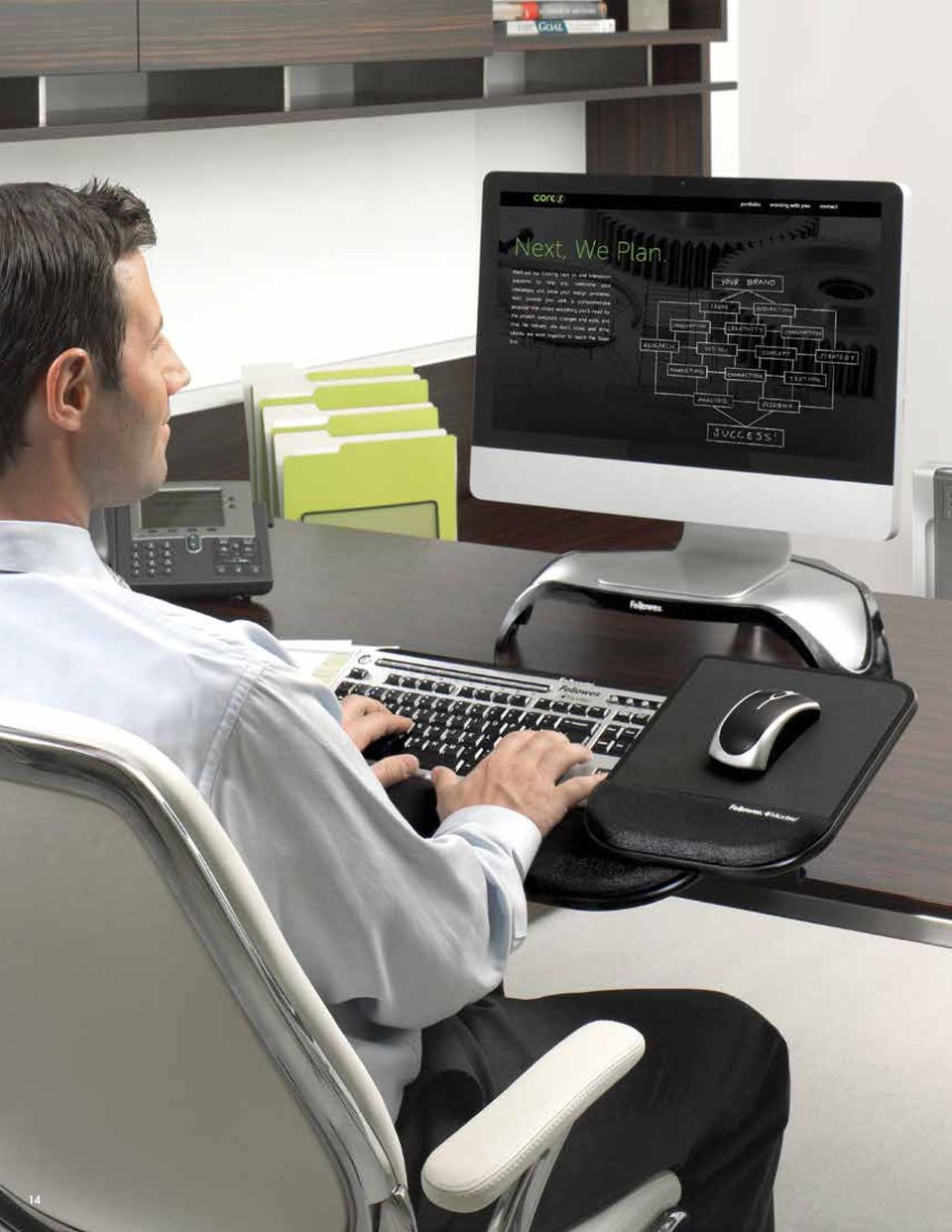
15 DESKTOP-EDGE KEYBOARD MANAGERS Tilt n Slide Pro Keyboard Manager Attaches to desktop-edge without tools and features the Comfort Glide System > Comfort Glide System mouse tray slides over numeric key pad for additional comfort while mousing > Extended knee clearance keeps you comfortable while typing and mousing > Single lever easily adjusts tilt (flat to 30 ) and slide (4 5 8" travel distance) > New, stronger brackets easily attach to desktops up to 1 3 4" thick without surface damage > Unique textured surface keeps mouse from sliding off mousing platform ( IP pending ) > Ultra soft memory foam wrist rest with Microban antimicrobial protection to keep product cleaner Tilt n Slide Keyboard Manager Attaches to desktop-edge without tools, which allows platform to tilt or slide with ease > Extended knee clearance keeps you comfortable while typing and mousing > Single lever easily adjusts tilt (flat to 30 ) and slide (4 5 8" travel distance) > New, stronger brackets easily attach to desktops up to 1 3 4" thick without surface damage > Unique textured surface keeps mouse from sliding off mousing platform ( IP pending ) > Ultra soft memory foam wrist rest with Microban antimicrobial protection to keep product cleaner No tools required for installation See Demo Online No tools required for installation See Demo Online Side View Side View Compatibility Adjustability Comfort Features Tilt 'n Slide Comparison Chart Item Number Straight Maximum Desk Thickness Minimum Desk Depth to Install Keyboard Platform Dimensions (WxD) Without Wrist Support Keyboard Platform Dimensions (WxD) With Wrist Support Maximum Width of Keyboard and Mouse Platform Mouse Platform Dimensions (WxD) Height Above / Depth Below Mounting Surface Total Keyboard Tray Travel Keyboard Tray Tilt Height Adjustable Mouse Tray Wrist Rest Included Microban Protection Tilt n Slide Pro Keyboard Manager YES 1¾" 4" above 3 1 2" underside 19 ½" x 7 7 8" 19 ½" x 11 ½" " x " 8 ¾" x 11" " above to 2 1 8" below 4 5 8" 0º, 10º, 20º, 30º YES Memory Foam YES Tilt n Slide Keyboard Manager YES 1¾" 4" above 3 1 2" underside 19 ½" x 7 7 8" 19 ½" x " " x 11 ½" 8 ½" x 7 ¼" " above to 2 ¼" below 4 5 8" 0º, 10º, 20º, 30º NO Memory Foam YES 15

16 Almost 4 out of 10 people experience pain in their wrists, hands, and / or arms while working at their desks. 1 1 Results based on 1,000 surveys. Toluna Research, August 2012 FIND THE RIGHT PALM & WRIST SOLUTION Helps reduce arm, hand, and wrist discomfort > Experience true comfort > Provide exceptional support > Help you achieve a neutral posture Fellowes Palm & Wrist Support Solutions provide exceptional support while redistributing the pressure points on your wrists. These products are designed to increase your comfort while typing and mousing and are available in a variety of colors, coverings, and materials. 16

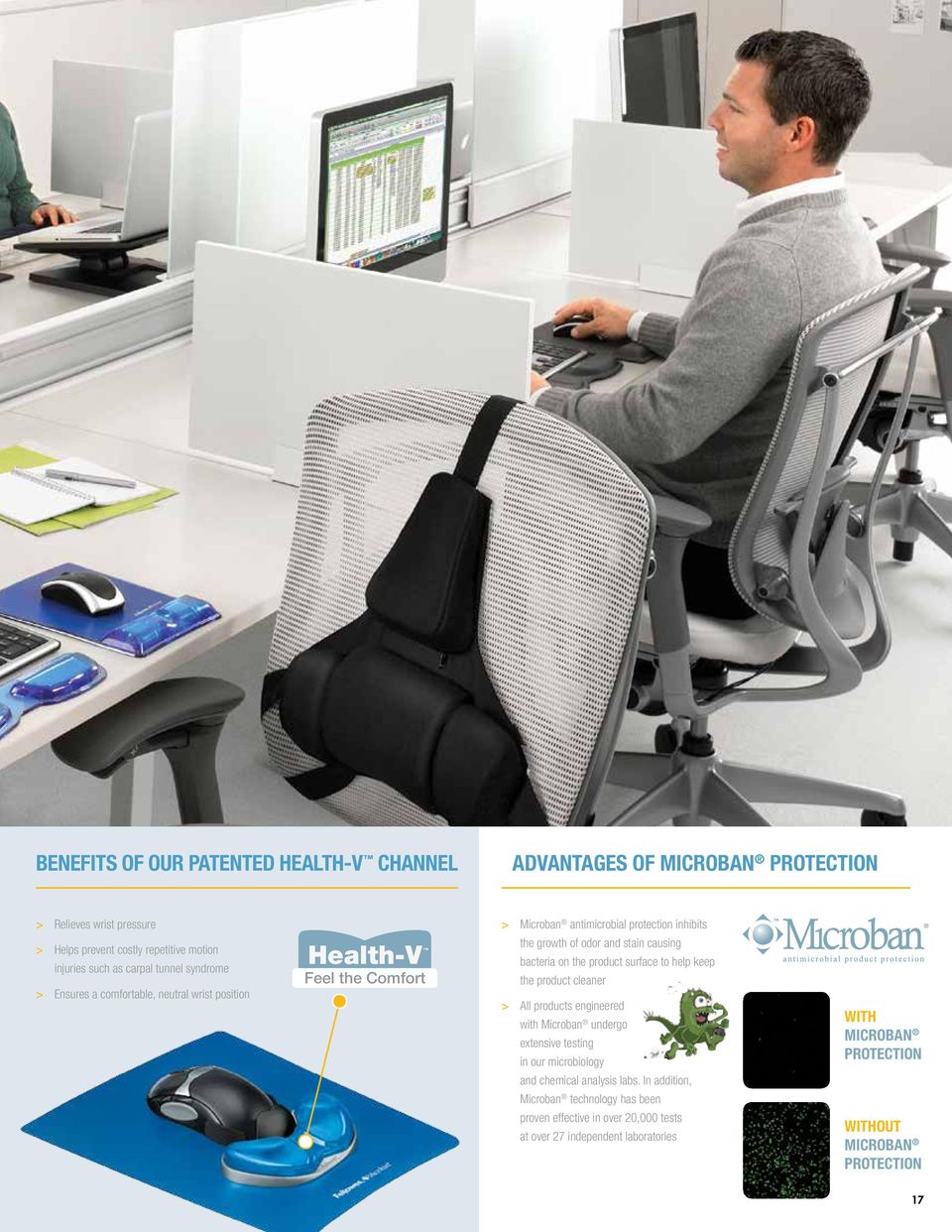
17 BENEFITS OF OUR PATENTED HEALTH-V CHANNEL ADVANTAGES OF MICROBAN PROTECTION > Relieves wrist pressure > Helps prevent costly repetitive motion injuries such as carpal tunnel syndrome > Ensures a comfortable, neutral wrist position Health-V Feel the Comfort > Microban antimicrobial protection inhibits the growth of odor and stain causing bacteria on the product surface to help keep the product cleaner > All products engineered with Microban undergo extensive testing in our microbiology and chemical analysis labs. In addition, Microban technology has been proven effective in over 20,000 tests at over 27 independent laboratories WITH MICROBAN PROTECTION WITHOUT MICROBAN PROTECTION 17
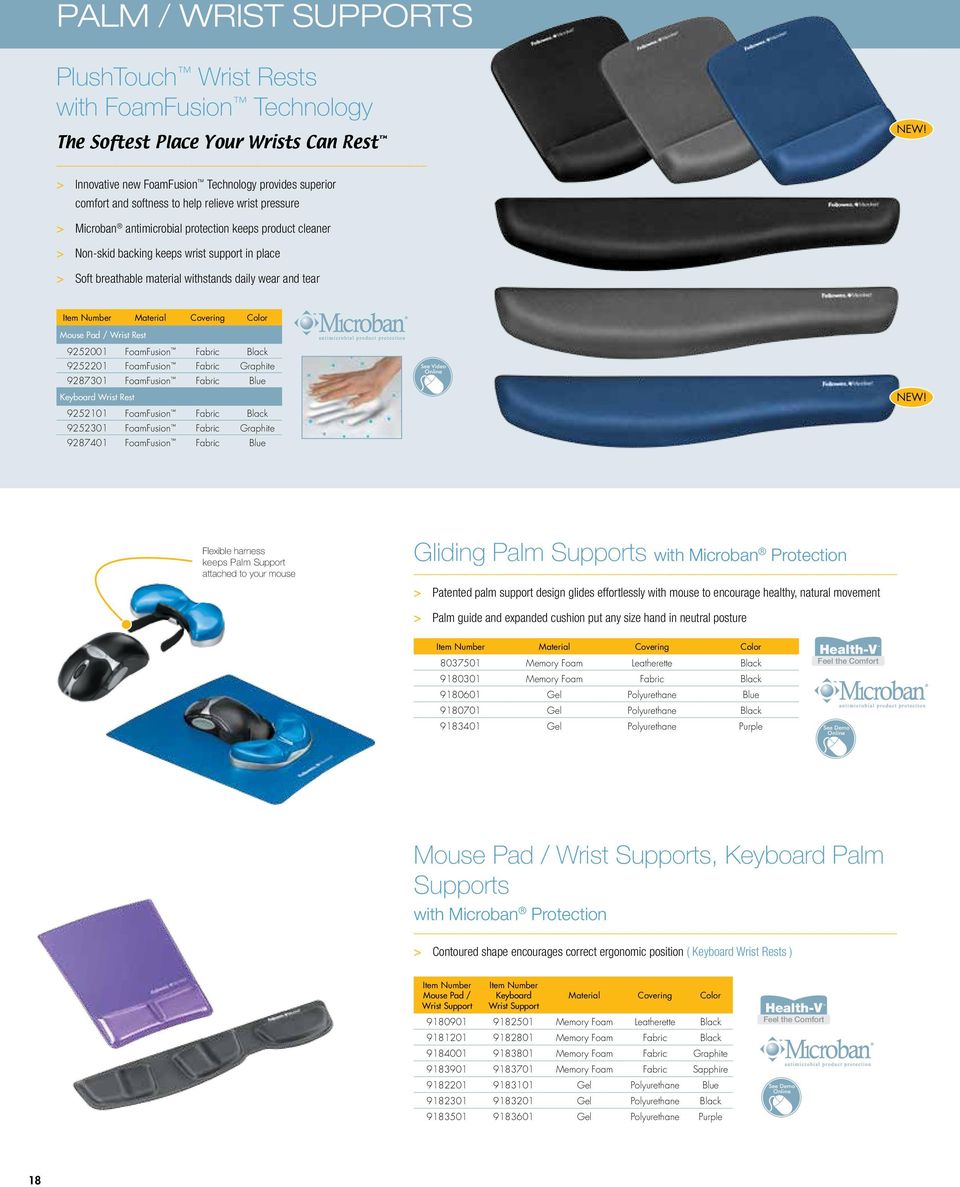
18 PALM / WRIST SUPPORTS PlushTouch Wrist Rests with FoamFusion Technology The Softest Place Your Wrists Can Rest NEW! > Innovative new FoamFusion Technology provides superior comfort and softness to help relieve wrist pressure > Microban antimicrobial protection keeps product cleaner > Non-skid backing keeps wrist support in place > Soft breathable material withstands daily wear and tear Item Number Material Covering Color Mouse Pad / Wrist Rest FoamFusion Fabric Black FoamFusion Fabric Graphite FoamFusion Fabric Blue Keyboard Wrist Rest FoamFusion Fabric Black FoamFusion Fabric Graphite FoamFusion Fabric Blue See Video Online NEW! Flexible harness keeps Palm Support attached to your mouse Gliding Palm Supports with Microban Protection > Patented palm support design glides effortlessly with mouse to encourage healthy, natural movement > Palm guide and expanded cushion put any size hand in neutral posture Item Number Material Covering Color Memory Foam Leatherette Black Memory Foam Fabric Black Gel Polyurethane Blue Gel Polyurethane Black Health-V Feel the Comfort Gel Polyurethane Purple See Demo Online Mouse Pad / Wrist Supports, Keyboard Palm Supports with Microban Protection > Contoured shape encourages correct ergonomic position ( Keyboard Wrist Rests ) Item Number Mouse Pad / Wrist Support Item Number Keyboard Wrist Support Material Covering Color Memory Foam Leatherette Black Memory Foam Fabric Black Memory Foam Fabric Graphite Memory Foam Fabric Sapphire Gel Polyurethane Blue Gel Polyurethane Black Gel Polyurethane Purple Health-V Feel the Comfort See Demo Online 18
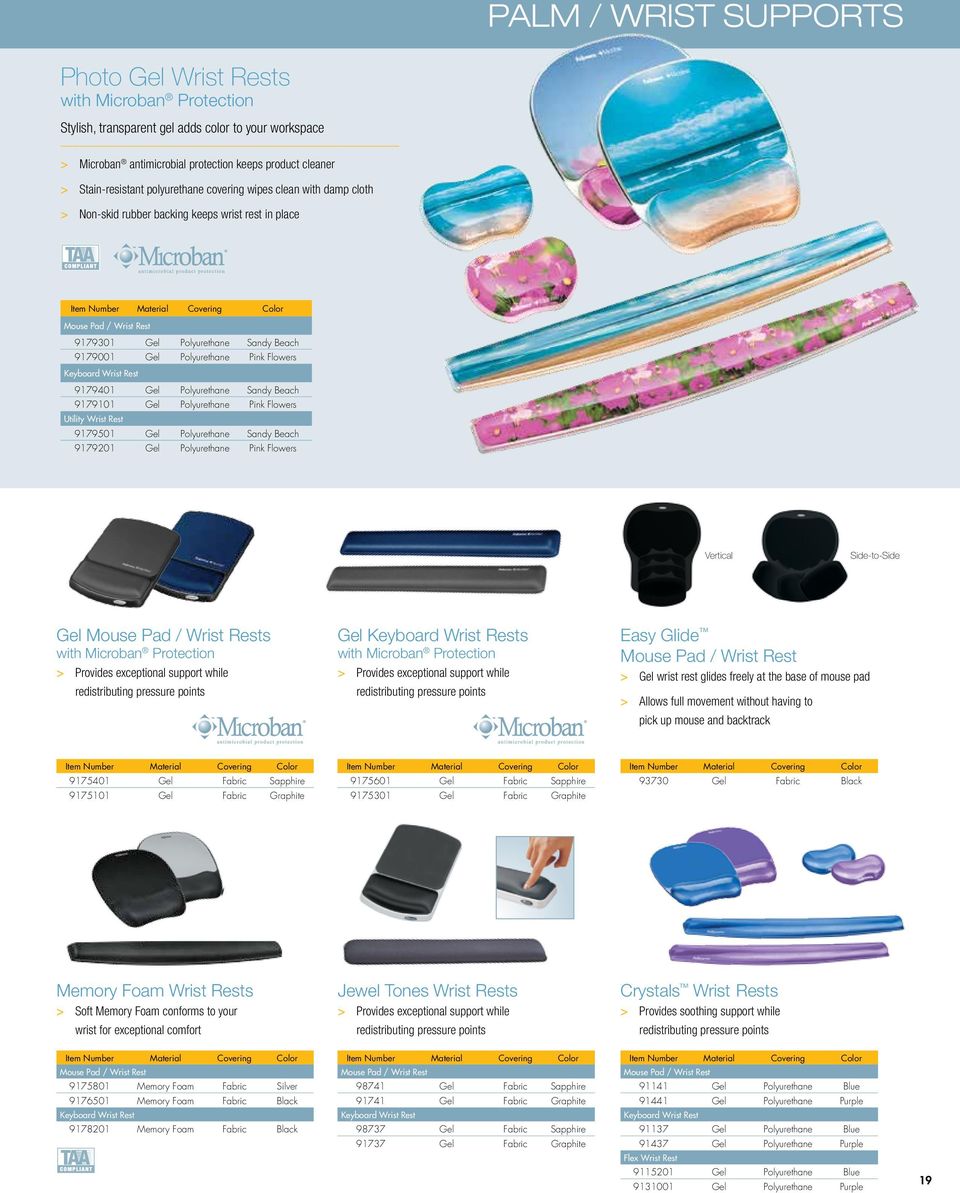
19 PALM / WRIST SUPPORTS Photo Gel Wrist Rests with Microban Protection Stylish, transparent gel adds color to your workspace > Microban antimicrobial protection keeps product cleaner > Stain-resistant polyurethane covering wipes clean with damp cloth > Non-skid rubber backing keeps wrist rest in place Item Number Material Covering Color Mouse Pad / Wrist Rest Gel Polyurethane Sandy Beach Gel Polyurethane Pink Flowers Keyboard Wrist Rest Gel Polyurethane Sandy Beach Gel Polyurethane Pink Flowers Utility Wrist Rest Gel Polyurethane Sandy Beach Gel Polyurethane Pink Flowers Vertical Side-to-Side Gel Mouse Pad / Wrist Rests with Microban Protection > Provides exceptional support while redistributing pressure points Gel Keyboard Wrist Rests with Microban Protection > Provides exceptional support while redistributing pressure points Easy Glide Mouse Pad / Wrist Rest > Gel wrist rest glides freely at the base of mouse pad > Allows full movement without having to pick up mouse and backtrack Item Number Material Covering Color Gel Fabric Sapphire Gel Fabric Graphite Item Number Material Covering Color Gel Fabric Sapphire Gel Fabric Graphite Item Number Material Covering Color Gel Fabric Black Memory Foam Wrist Rests > Soft Memory Foam conforms to your wrist for exceptional comfort Jewel Tones Wrist Rests > Provides exceptional support while redistributing pressure points Crystals Wrist Rests > Provides soothing support while redistributing pressure points Item Number Material Covering Color Mouse Pad / Wrist Rest Memory Foam Fabric Silver Memory Foam Fabric Black Keyboard Wrist Rest Memory Foam Fabric Black Item Number Material Covering Color Mouse Pad / Wrist Rest Gel Fabric Sapphire Gel Fabric Graphite Keyboard Wrist Rest Gel Fabric Sapphire Gel Fabric Graphite Item Number Material Covering Color Mouse Pad / Wrist Rest Gel Polyurethane Blue Gel Polyurethane Purple Keyboard Wrist Rest Gel Polyurethane Blue Gel Polyurethane Purple Flex Wrist Rest Gel Polyurethane Blue Gel Polyurethane Purple 19
20 Almost 7 out of 10 people experience back pain while working at their desks. 1 1 Results based on 1,000 surveys. Toluna Research, August 2012 FIND THE RIGHT BACK & FOOT SOLUTION Sitting in a chair for hours at a time without proper foot and back support can cause poor circulation, back discomfort, and overall fatigue. Helps reduce back tension Helps reduce leg pressure If your chair does not adjust to provide proper lumbar support, use a backrest with a foot support to maintain correct posture. 20
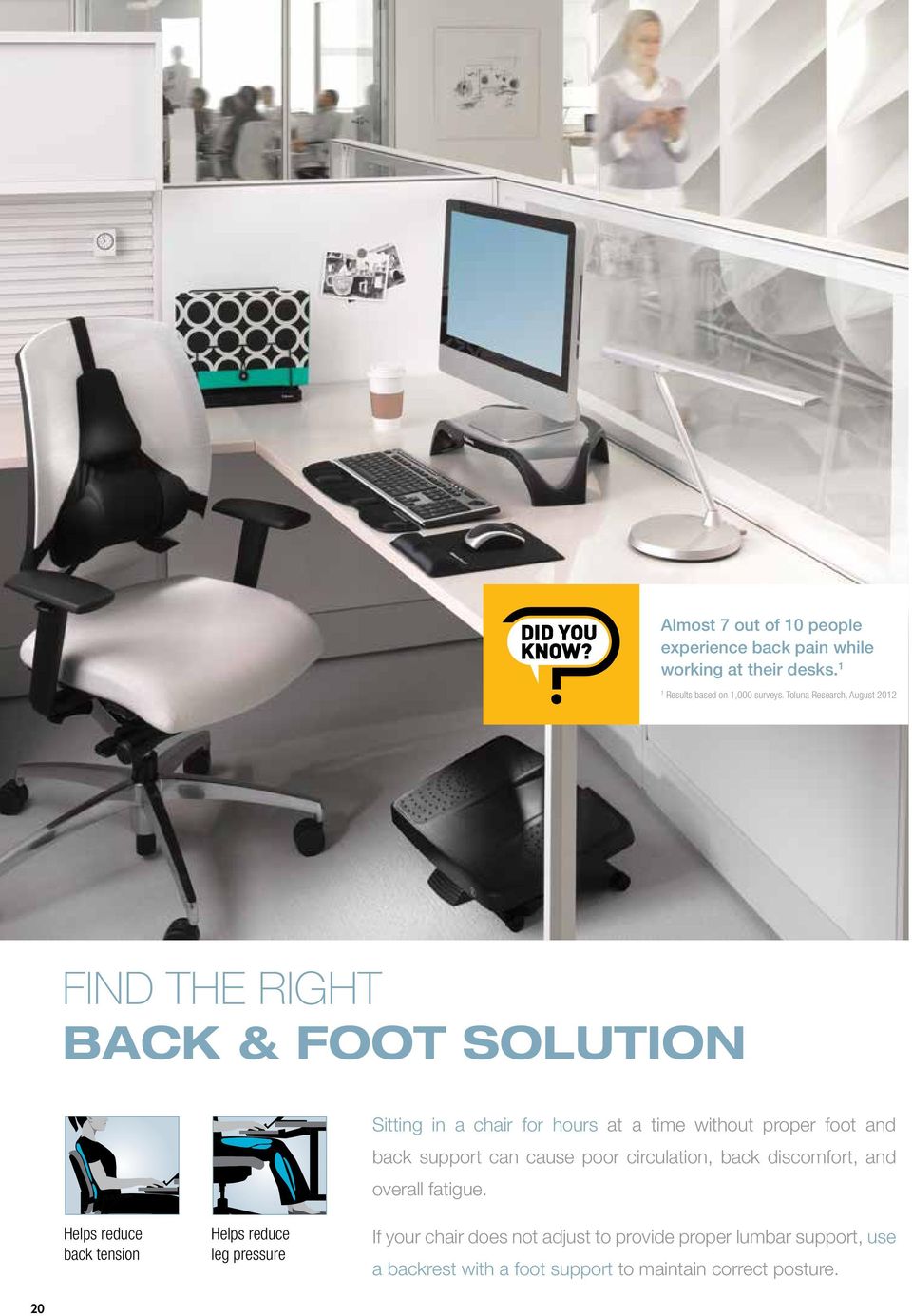
21 BACK SUPPORTS Professional Series Back Support with Microban Protection 2-tiered support system for optimal working comfort > Mid spinal support with Memory Foam promotes good posture > Lower lumbar support with three Memory Foam sections conforms comfortably to body curvature > Microban antimicrobial protection to keep product cleaner > Tri-Tachment system eliminates the need for readjustment Heat and Soothe Back Support Personalize workspace comfort with temperature control and back support > Gel lumbar pack conforms to individual users for the ultimate flexible back support > Gel lumbar pack heats up in microwave or chills in refrigerator for climate control > Slim profile with soft touch fabric enhances personal comfort See Demo Online Office Suites Mesh Back Support > Helps reduce tension by maintaining the lumbar curve of your lower back > Mesh fabric allows airflow for your personal comfort > Easily attaches to any chair Standard Backrest > High-density foam promotes neutral posture > Soft brushed cover can be removed for cleaning Black Graphite Lumbar Back Support > Supports lower back during extended periods of sitting > Adjustable strap holds lumbar back support in place Comparison Chart Item Number Product Dimensions (HxWxD) Professional Series Back Support with Microban Protection " x 15" x 2" Heat and Soothe Back Support " x " x 3" Office Suites Mesh Back Support " x " x 5" Standard Backrest - Black " x 13" x 4" Standard Backrest - Graphite " x 13" x 4" Lumbar Back Support " x 12" x 3 1 8" 21
22 FOOT SUPPORTS Heat and Slide Footrest Provides soothing heat above or below platform to promote comfort while seated > Smooth sliding track helps increase circulation in the legs and feet > HeatSafe Power Button lights up for easy, hands-free operation > 8-hour auto-off feature > Elevates feet and legs to help relieve lower back pressure and improve posture > Economical - requires only 90 watts / 0.75 amps to run > UL Approved See Demo Online ways to keep warm: Climate Control Footrest Versatile unit works as a footrest or provides free-standing climate control > Features three temperature settings: cool fan, low heat, and high heat > 8-hour auto-off feature > Elevates feet and legs to help relieve lower back pressure and improve posture > Economical - requires only 250 watts / 2.1 amps to run > ETL Approved See Demo Online Ultimate Foot Support Free-floating platform allows for rocking motion to improve circulation > 3 platform height settings and up to 25o tilt > Elevates feet and legs to help relieve lower back pressure and improve posture See Demo Online Comparison Chart Item Number Platform Dimensions (WxD) Height Adjustments Heat and Slide Footrest " x " 4 1 4", 5" Climate Control Footrest " x " 5 1 2", 6 1 2" Ultimate Foot Support " x " 4", 5 1 4", 6 1 2" 22
23 FOOT SUPPORTS Professional Series Independent Foot Support > Dual platforms with independent motion promote better balance and healthy circulation See Demo Online > Each platform locks or tilts freely up to 22º > Surface massage bumps help relieve work-related stress Increases Balance & Circulation Foot Rocker with Microban Protection > Rocking motion helps improve circulation and reduce fatigue > Flip product over to adjust height > Microban antimicrobial protection keeps product cleaner See Demo Online Office Suites Adjustable Footrest > Adjustable footrest tilts 30º forward or back > Locks in place or tilts freely for improved circulation with Microban without Microban ( only ) Standard Footrest > Dual-position height adjustment > Allows legs to stretch for increased circulation 0 Product Contains 100% Post-Consumer Recycled Materials Comparison Chart Item Number Platform Dimensions (WxD) Height Adjustments Professional Series Independent Foot Support " x 12" per platform Foot Rocker with Microban Protection " x " 2 3 4", 4" Office Suites Adjustable Footrest with Microban Protection " x 13" 4 1 8", 4 7 8", 5 5 8" Office Suites Adjustable Footrest " x 13" 4 1 8", 4 7 8", 5 5 8" Standard Footrest " x 12" 3 1 2", 4 3 8" 23
24 FIND THE RIGHT DISPLAY SOLUTION Fellowes Monitor and Laptop Supports position your monitor or laptop at a comfortable viewing angle in order to minimize shoulder, neck, and eye strain. Each support product is adjustable so that you can customize your screen position and create more usable space on the desktop. Helps reduce eye strain Helps reduce neck strain and shoulder tension Almost 5 out of 10 people experience neck strain, eye strain, and / or headaches while working at their desks. 1 1 Results based on 1,000 surveys. Toluna Research, August 2012 OPTIMIZE YOUR SCREEN POSITION Use the following guidelines to set the optimal position for your monitor and avoid unnecessary eye and shoulder strain. 20" - 35" 17 DISTANCE Viewing distance should be about an arm s length away (20" - 35") OPTIMAL HEIGHT Position the top portion of the screen just below eye level (17 Range) OTHER CONSIDERATIONS MONITOR ROTATION Consider a monitor support that rotates a full 360º for maximum ease of use and overall usability ROTATES 360 º DOCUMENT HOLDERS A built-in document holder helps reduce desk clutter, increase efficiency, and improve ergonomic posture BUILT-IN BUILT-IN COPY HOLDER 24
25 MONITOR RISERS Professional Series Flat Panel Workstation Set up your workstation to suit your ergonomic needs and your work style > Adjusts to 3 different heights (from 2.5" - 4.5") to maximize viewing comfort > Includes mini sorter and accessory tray for top shelf or desktop use > Slick-Slide mat stows laptop and /or docking station under top shelf > Includes cord management and power strip mount for easy hook-up/access See Demo Online Cord Management Slick-Slide Mat BUILT-IN BUILT-IN COPY HOLDER Designer Suites Monitor Riser > Storage tray organizes essentials such as pens and paper clips Office Suites Standard Monitor Riser Plus > Platform features 3-way height and tilt adjustment for laptops > In-line document holder positions documents for easy, comfortable viewing Office Suites Premium Monitor Riser > Includes cup holder and CD case compartments Smart Suites Corner Monitor Riser > Unique shape fits neatly into desk corner to maximize work space Office Suites Monitor Riser > Designed to easily sit above laptop and features convenient supplies drawer Standard Monitor Riser > Versatile design holds CRT or LCD monitor Comparison Chart Item Number Height Range Height Adjustments Weight Capacity Platform Dimensions (WxD) Professional Series Flat Panel Workstation " " 3 40 lbs " x 8 1 2" Designer Suites Monitor Riser " - 6" 3 40 lbs. 16" x 9 3 8" Office Suites Standard Monitor Riser Plus " " 3 80 lbs " x 14" Office Suites Premium Monitor Riser " " 2 80 lbs " x 14" Smart Suites Corner Monitor Riser " " 3 40 lbs. 12" x 9 3 4" Office Suites Monitor Riser " " 2 80 lbs " x 14" Standard Monitor Riser " - 4" 3 60 lbs. 13" x 13" 25
26 LAPTOP RISERS Professional Series Laptop Workstation with 4 Port USB Positions laptop at comfortable height to help prevent neck strain > Sturdy metal frame with padding and rubber strip firmly supports and protects laptop > In-line document holder offers vertical or horizontal page orientation > Adjusts easily and provides 9 height selections for your custom comfort See Demo Online Smart Suites Laptop Riser with USB > Encourages separate keyboard use for correct ergonomic posture > Offers 3 height adjustments for personal comfort > Triangular design with integrated 4 port 2.0 USB Designer Suites Laptop Riser > Stabilizing front edge prevents laptop from sliding off unit > Cooling vents help dissipate laptop heat BUILT-IN COPY HOLDER Office Suites Laptop Riser > Adjustable tilt for optimal viewing angle ROTATES 360 º Office Suites Laptop Riser Plus > Features in-line document holder, cooling vents, and swivel feet for easy cord access > 360 rotation for easy cord access Laptop GoRiser > Patent pending SoftShock technology elevates display, keeps lap cool, and provides soft cushioning for legs > Cooling vents help prevent laptop from overheating > Folds flat to fit most briefcases Folds flat PORTABLE DESIGN Comparison Chart Item Number Height Range Height Adjustments Angle Range Weight Capacity Display Capacity 26 Professional Series Laptop Workstation with 4 Port USB " - 10" lbs. 17" Laptop Smart Suites Laptop Riser with USB " " lbs. 17" Laptop Designer Suites Laptop Riser " " lbs. 17" Laptop Office Suites Laptop Riser " " lbs. 17" Laptop Office Suites Laptop Riser Plus " " lbs. 17" Laptop Laptop GoRiser lbs. 15.4" Laptop
27 ROTATES 360 º MONITOR & LAPTOP ARMS Professional Series Depth Adjustable Monitor Arm 3-dimensional adjustability for optimum viewing comfort > Elevates LCD monitors from 3 1 2" to " above desk with a reach of 2 1 2" to 27" > Tilts up or down +/- 37 and has 360 rotation capability > Meets VESA mounting standards EASY TO ATTACH Requires no tools to attach and mounts to surfaces 1" to 3" thick (2" desk overhang required) or mounts in grommet hole) and Professional Series Depth Adjustable Dual Monitor Arm Two fully adjustable monitor arms for optimum viewing control > Elevates LCD monitors from 3 1 2" to " above the desk with a reach of 2 1 2" to 27" > Tilts up or down +/- 37º and has 360º rotation capability > Meets VESA mounting standards Designer Suites Monitor Arm Elevates flat panel monitor to optimal viewing height to help prevent neck strain > Height adjustable arm moves up or down to 5 positions (1" increments each) > Tilts up or down +/- 45, pivots left to right 180, and has 360 rotation capability EASY TO ATTACH Requires no tools to attach and mounts to surfaces up to 2½" thick (2" desk overhang required) or mounts in grommet hole) and See Demo Online Designer Suites Laptop Arm Elevates laptop to optimal viewing height to help prevent neck strain > Height adjustable arm moves up or down to 3 positions (1" increments each) > Tilts up or down +/- 45, pivots left to right 180, and has 360 rotation capability See Demo Online Comparison Chart Item Number Height Range Height Adjustments Depth Adjustability Range Weight Capacity Display Capacity Professional Series Depth Adjustable Monitor Arm " " Infinite within height range 2 1 2" - 27" 24 lbs. 21" Flat Panel Monitor Professional Series Depth Adjustable Dual Monitor Arm " " Infinite within height range 2 1 2" - 27" 24 lbs. per arm 21" Flat Panel Monitor Designer Suites Monitor Arm " " 5 20 lbs. 21" Flat Panel Monitor Designer Suites Laptop Arm " " 3 10 lbs. 19" Laptop 27
28 BLACKOUT PRIVACY FILTERS Privacy You Can Trust Protect private information on your laptop, desktop, smartphone and tablet. PrivaScreen Blackout Privacy Filters blackout the screen image when viewed from 30 side angles while keeping on-screen data clearly visible from a straight-on view. How to choose the right size PrivaScreen Blackout Privacy Filter > Carefully measure the viewable height and width of your screen WIDESCREEN STANDARD > Review the screen size and dimensions listed by product > Review the size chart to find the perfect fit for you > Get help selecting your PrivaScreen Blackout Privacy Filter with the easy to use online Perfect Fit Selector Tool at: Viewable Height DIAGONAL Viewable Height DIAGONAL Viewable Width Viewable Width PrivaScreen Laptop and Monitor Blackout Privacy Filters > Clear front view total blackout side view > Easy to apply and remove > Protects from scratches and fingerprints Clear Front View PrivaScreen Tablet and Smartphone Blackout Privacy Filters NEW! Total Blackout Side View Tablet > Clear front view total blackout side view > Protects the screen from fingerprints and scratches > Easy attach adhesive corner tabs for trouble-free attachment Smartphone > Clear front view total blackout side view > Protects the screen from fingerprints and scratches and reduces glare > Easy to apply and remove, leaving no unwanted residue 28 AVAILABLE SUMMER 2014 Laptop and Monitor PrivaScreen Blackout Privacy Filters Laptops and Monitors Widescreen Item # Aspect Ratio Diagonal Width Height 12.5" W PrivaScreen Blackout Privacy Filter :9 12.5" " 6.125" 13.3" W PrivaScreen Blackout Privacy Filter :9 13.3" 11.5" 6.5" 14.0" W PrivaScreen Blackout Privacy Filter :9 14" " 6.875" 14.1" W PrivaScreen Blackout Privacy Filter : " 11.95" 7.5" 15.4" W PrivaScreen Blackout Privacy Filter : " 13.06" 8.19" 15.6" W PrivaScreen Blackout Privacy Filter :9 15.6" " 7.69" 17.0" W PrivaScreen Blackout Privacy Filter :10 17" 14.5" " 17.3" W PrivaScreen Blackout Privacy Filter :9 17.3" " 8.5" 19.0" W PrivaScreen Blackout Privacy Filter :10 19" 16.1" " 20.0" W PrivaScreen Blackout Privacy Filter :9 20" 17.44" 9.88" 20.1" W PrivaScreen Blackout Privacy Filter : " " 10.7" 21.5" W PrivaScreen Blackout Privacy Filter :9 21.5" 18.75" 10.56" 22.0" W PrivaScreen Blackout Privacy Filter :10 22" 18.7" 11.7" 23.0" W PrivaScreen Blackout Privacy Filter :9 23" 20.07" 11.29" 24.0" W PrivaScreen Blackout Privacy Filter :10 24" 20.5" " 24.0" W PrivaScreen Blackout Privacy Filter :9 24" 20.9" 11.7" Laptops and Monitors Standard Item # Aspect Ratio Diagonal Width Height 14.1" PrivaScreen Blackout Privacy Filter :3 14.1" 11.25" 8.5" 15.0" PrivaScreen Blackout Privacy Filter :3 15" 12" 9" 17.0" PrivaScreen Blackout Privacy Filter :4 17" " " 18.1" PrivaScreen Blackout Privacy Filter :4 18.1" " " 19.0" PrivaScreen Blackout Privacy Filter :4 19" 14.8" 11.9" 20.1" PrivaScreen Blackout Privacy Filter :3 20.1" " " Tablet and Smartphone PrivaScreen Blackout Privacy Filters Tablets Item # Orientation Diagonal Width Height PrivaScreen Blackout Privacy Filter for Apple ipad Air Landscape 10.1" 7.125" 9.25" PrivaScreen Blackout Privacy Filter for Apple ipad 2/3/ Landscape 10.1" 7.125" 9.25" Smartphones Item # Orientation Diagonal Width Height PrivaScreen Blackout Privacy Filter for Apple iphone 5/5C/5S Portrait 4" 2.19" 4.75" PrivaScreen Blackout Privacy Filter for Samsung Galaxy S Portrait 5" 2.625" 5.19"
29 BLUR / GLARE / SCREEN PROTECTION VisiScreen Screen Protectors AVAILABLE SUMMER 2014 > Maximum screen protection > Touchscreen and stylus compatible > Easy bubble free application > Residue free removal VisiScreen Screen Protectors Tablets Item # Diagonal Width Height VisiScreen Screen Protector for Apple ipad Air " 7.125" 9.25" VisiScreen Screen Protector for Apple ipad 2/3/ " 7.125" 9.25" Smartphones Item # Diagonal Width Height VisiScreen Screen Protector for Apple iphone 5/5s " 2.19" 4.75" VisiScreen Screen Protector for Samsung Galaxy S " 2.625" 5.19" WriteRight Universal Screen Protectors Protects mobile device screens from scratches > Clear material reduces screen glare > Won t leave residue when removed > Overlay grid to precisely trim screen protector to desired size > Fits mobile devices with screens up to 3" x 4.5" > Works with stylus and touch screens > Includes 5 universal screen protectors WriteRight Universal Screen Protectors Smartphone Item # Width Height WriteRight Universal Screen Protector 5 pack " 4.5" Front View Blur Flat Panel Privacy Filters > Distorts screen image from side view > Constructed of shatter-proof, clear acrylic with plastic accent > Easy to mount adheres to monitor without leaving any residue behind Item Number Fits LCD Size " " Side View Glare CRT / Flat Panel Filters > Optical coating eliminates the glare and reflection from nearby light sources > Quality filters reduce over 99% of glare > Tinted glass enhances image contrast for easier viewing Side View Item Number Fits CRT Size Fits LCD Size " 17" " Screen Protectors Flat Panel Screen Protectors > Protects delicate screen from abrasions, dents, and other damage > Reduces screen glare > Constructed of shatter-proof, clear acrylic with plastic accent 0 Product is 100% Recyclable Front View 0 Screen Contains 96% Pre-Consumer Recycled Materials Item Number Fits LCD Size " " 29
30 FIND THE RIGHT DOCUMENT HOLDER SOLUTION Almost 5 out of 10 people experience neck strain, eye strain, and / or headaches while working at their desks. 1 1 Results based on 1,000 surveys. Toluna Research, August 2012 Placing documents flat on the desktop or at an awkward viewing angle while at your computer can cause eye, neck and shoulder strain. Neck Flexion Neutral Posture Helps reduce eye, neck and shoulder strain Document holders help minimize this type of discomfort by placing documents in an ergonomically - correct viewing position. 30
31 DOCUMENT HOLDERS Professional Series In-Line Document Holder Places documents between monitor and keyboard for optimal ergonomic viewing range > Promotes neutral posture and helps reduce awkward neck and eye movements > Top and bottom sections adjust to accommodate letter and legal documents > Offers six separate angle adjustments from 25 to 75 incline > Stable weighted base HOLDS 250 SHEETS See Demo Online Folds Flat for Easy Storage Office Suites Desktop Copyholder with Memo Board Three-In-One Copyholder document holder, dry-erase memo board, and clipboard > Adjustable tilt customizes viewing angle by up to 45º > Line guide glides up or down and swings out of the way when not in use > Holds letter / legal size paper HOLDS 150 SHEETS 31
32 DOCUMENT HOLDERS Flex Arm Weighted Base Copyholder > Rotates 90º for vertical or horizontal positioning > Holds letter / legal size paper or wide forms 0 Product Contains 98% Pre-Consumer Recycled Materials Desktop Reference Rack > Features adjustable viewing height and angle > 10 clear plastic pockets hold up to 20 documents (tabs / pockets included) > Weighted base keeps reference rack stable while in use HOLDS 150 SHEETS HOLDS 20 DOCUMENTS Metal Copyholder > Adjustable tilt customizes viewing angle to help prevent neck strain > Holds letter size paper 0 Product is 100% Recyclable HOLDS 200 SHEETS Office Suites Monitor Mount Copyholder > Adjustable tilt customizes your viewing angle > Line guide glides up or down and swings out of way when not in use > Holds letter size paper HOLDS 150 SHEETS Standard Copyholder > Copyholder plate rotates 90 for vertical or horizontal positioning > Holds letter / legal size paper 0 Product Contains 98% Pre-Consumer Recycled Materials HOLDS 150 SHEETS Non-Magnetic Copyholders > Track design allows user to re-position line guide and paper holder along the top or side > Holds letter size paper Platinum Black HOLDS 125 SHEETS BookLift > Ideal for e-readers, tablets, planners, large manuals, or reference materials > Two patented adjustable clips hold pages open at desired location > 9 height adjustments for a variety of viewing angles > Holds up to 10 lbs Copystand > 6 adjustable viewing angles maximize personal comfort > Folds flat for easy storage > Holds letter size paper HOLDS 75 SHEETS 32
33 MACHINE STANDS FIND THE RIGHT MACHINE STAND SOLUTION Many of the workstation accessories we use most often occupy the most space on our desktops. Essential tools such as CPU Stands, Phone Stands, and Printer Stands can help you make the most of your available workspace while keeping everything within easy reach. CPU Stand > Adjusts from 6" to 9" wide to accommodate virtually all CPUs > Supports up to 50 lbs. 0 Product Contains 95% Pre-Consumer Recycled Materials Telephone Stand > Stacks on top of Office Suites Letter Tray to save valuable workspace Professional Series Underdesk CPU Support > Rotates 360 for complete access to cables and ports > Adjusts to fit CPUs 3¼" to 9" wide and 10½" to 18" tall > Easily supports CPUs weighing up to 40 lbs. > Installed Dimensions: Width = CPU width + 1.5" Height = CPU height + 3" 0 Product is 100% Recyclable Printer Stand > Multi-purpose design supports a fax machine, printer, or scanner > Paper storage drawer keeps letter, legal, or A4 size paper ready for reloads > Supports up to 50 lbs Stacks to Save SPACE ROTATES 360 º 33
34 KEYBOARDS / MICE a CLEAN connection Dirty surfaces are not only unsightly, they can also harbor bacteria. Stop microbes in their tracks with Fellowes keyboards and mice featuring Microban antimicrobial protection. The exclusive Microban antimicrobial technology protects against product harming microbes. Microban Split Design Keyboard > Microban antimicrobial protection keeps product cleaner > 16-character buffer for fast typists > 7 additional hot keys for multimedia control and one touch Internet access > No software required for use with Windows Vista and Windows 7 > Dimensions: 2 1 4" H x " W x 9 3 4" D corded vs. cordless wired wireless Wireless input devices create a clean, clutter free desk and offer maximum flexibility but may require batteries or charging. Wired devices are powered by your computer. Microban Basic 104 Keyboard > Microban antimicrobial protection keeps product cleaner > Plug & Play compliant no software required; USB connectivity > Windows XP, Vista & Windows 7 compatible HD precision HD HD precision 34 The Fellowes HD precision mouse features advanced optical tracking sensors for exact movements and is available in both corded and cordless models. Antimicrobial Custom Keyguard > Protect your keyboard from dust and spills > Antimicrobial protection keeps product cleaner > Easy to clean, clear polyurethane resists abrasions, cracking, and tearing > Prepaid kit includes an order form to complete on-line or via fax / mail > Model-specific Keyguard Cover will arrive by mail in 2-3 weeks 99680
35 KEYBOARDS / MICE media keys Control popular Multi Media applications Microban Slimline Cordless Combo Offers advanced technology in a space-saving design > Microban antimicrobial protection keeps product cleaner > Superior light touch and feel > 2.4Ghz wireless technology provides cordless capability with reception up to 15 ft. > Features Multi Media keys, including Quick Launch buttons for search and web browsing > Cordless mouse has clear reception for up to 15 ft. 3rd button/scroll capability offers ease of use and 1000 dpi optical readability % thinner than standard keyboards A reduction in keyboard height and thickness creates a more comfortable ergonomic wrist position. HD Precision Cordless Optical Gel Mouse > Features a patented soft gel cushion for added comfort > Long battery life and superior optical sensor ensure hassle-free cordless mousing Microban 5-Button Cordless Optical Mouse > Microban antimicrobial protection keeps product cleaner > Long battery life and superior optical sensor ensure hassle-free cordless mousing HD > Compatible as a Plug & Play device with Windows 7 (no software available) > Compatible as a Plug & Play device with Windows 7 (no software available) HD Precision Optical Gel Mouse > Features a patented soft gel cushion for added comfort > Compatible as a Plug & Play device with Windows 7 (no software available) Microban 5-Button Optical Mouse > Microban antimicrobial protection keeps product cleaner > Compatible as a Plug & Play device with Windows 7 (no software available) HD 35
36 INDEX 36 I-SPIRE SERIES Item No. Description Color List Price Units / CTN Page No. Warranty I-Spire Series Monitor Lift Gray / White $ Year I-Spire Series Laptop Lift Gray / White $ Year I-Spire Series Tablet Lift Gray / White $ Year I-Spire Series Document Lift Gray / White $ Year I-Spire Series Lumbar Cushion Gray $ Year I-Spire Series Foot Cushion Gray / White $ Year I-Spire Series Wrist Rocker Gray $ Year I-Spire Series Wrist Rocker Gray / White $ Year I-Spire Series Keyboard Wrist Rocker Gray $ Year I-Spire Series Keyboard Wrist Rocker White $ Year I-Spire Series Laptop Lapdesk NEW Gray / White $ Year I-Spire Series Pencil & Phone Station NEW Gray / White $ Year I-Spire Series File Station NEW Gray / White $ Year I-Spire Series Desktop Edge Keyboard Lift NEW Gray / White $ Year I-Spire Series Tablet SuctionStand NEW Gray / White $ Year KEYBOARD TRAYS Item No. Description Color List Price Units / CTN Page No. Warranty Standard Keyboard Tray Graphite / Black $ Year Designer Suites Compact Keyboard Tray Black $ Year Designer Suites Premium Keyboard Tray Black $ Year Professional Series Compact Keyboard Tray Black $ Limited Lifetime Professional Series Sit / Stand Keyboard Tray Black $ Limited Lifetime Office Suites Adjustable Keyboard Manager Black / Silver $ Year Professional Series Corner Executive Keyboard Tray Black $ Limited Lifetime Professional Series Premier Keyboard Tray Black $ Limited Lifetime Professional Series Executive Keyboard Tray Black $ Limited Lifetime Tilt 'n Slide Keyboard Manager Black $ Year Tilt 'n Slide Pro Keyboard Manager Black $ Year KEYBOARD DRAWERS Item No. Description Color List Price Units / CTN Page No. Warranty Office Suites Deluxe Keyboard Drawer Black $ Year Designer Suites DeskReady Keyboard Drawer Black $ Year Office Suites Underdesk Keyboard Drawer Black $ Year PALM SUPPORTS AND MOUSE PAD / WRIST SUPPORTS Item No. Description Color List Price Units / CTN Page No. Warranty Crystals Mouse Pad / Wrist Rest, Gel Blue $ Year Crystals Mouse Pad / Wrist Rest, Gel Purple $ Year Mouse Pad / Wrist Rest, Gel Graphite $ Year Easy Glide Mouse Pad / Wrist Rest, Gel Black $ Year Mouse Pad / Wrist Rest, Gel Sapphire $ Year Gliding Palm Support with Microban Protection - Leatherette, Memory Foam Black $ Year Mouse Pad / Wrist Rest with Microban Protection - Fabric, Gel Graphite $ Year Mouse Pad / Wrist Rest with Microban Protection - Fabric, Gel Sapphire $ Year Mouse Pad / Wrist Rest, Memory Foam Silver $ Year Mouse Pad / Wrist Rest, Memory Foam Black $ Year Photo Gel Mouse Pad / Wrist Rest with Microban Protection Pink Flowers $ Year Photo Gel Mouse Pad / Wrist Rest with Microban Protection Sandy Beach $ Year Gliding Palm Support with Microban Protection - Fabric, Memory Foam Black $ Year Gliding Palm Support with Microban Protection - Clear, Gel Blue $ Year Gliding Palm Support with Microban Protection - Clear, Gel Black $ Year Mouse Pad / Wrist Support with Microban Protection - Leatherette, Memory Foam Mouse Pad / Wrist Support with Microban Protection - Fabric, Memory Foam Black $ Year Black $ Year Mouse Pad / Wrist Support with Microban Protection - Clear, Gel Blue $ Year
37 CUSTOMER SERVICE: am-7pm CST INDEX Item No. Description Color List Price Units / CTN Page No. Warranty Mouse Pad / Wrist Support with Microban Protection - Clear, Gel Black $ Year Gliding Palm Support with Microban Protection - Clear, Gel Purple $ Year Mouse Pad / Wrist Support with Microban Protection - Clear, Gel Purple $ Year Mouse Pad / Wrist Support with Microban Protection - Fabric, Memory Foam Mouse Pad / Wrist Support with Microban Protection - Fabric, Memory Foam Sapphire $ Year Graphite $ Year PlushTouch Mouse Pad / Wrist Rest with FoamFusion Technology Black $ Year PlushTouch Mouse Pad / Wrist Rest with FoamFusion Technology Graphite $ Year PlushTouch Mouse Pad / Wrist Rest with FoamFusion Technology NEW Blue $ Year KEYBOARD PALM AND WRIST SUPPORTS Item No. Description Color List Price Units / CTN Page No. Warranty Crystals Wrist Rest - Clear, Gel Blue $ Year Crystals Wrist Rest - Clear, Gel Purple $ Year Wrist Rest - Fabric, Gel Graphite $ Year Wrist Rest - Fabric, Gel Sapphire $ Year Wrist Rest - Microban Protection - Fabric, Gel Graphite $ Year Wrist Rest - Microban Protection - Fabric, Gel Sapphire $ Year Wrist Rest - Fabric, Memory Foam Black $ Year Photo Gel Keyboard Wrist Rest - Microban Protection Pink Flowers $ Year Photo Gel Keyboard Wrist Rest - Microban Protection Sandy Beach $ Year Keyboard Palm Support - Microban Protection - Leatherette, Memory Foam Black $ Year Keyboard Palm Support - Microban Protection - Fabric, Memory Foam Black $ Year Keyboard Palm Support - Microban Protection - Clear, Gel Blue $ Year Keyboard Palm Support - Microban Protection - Clear, Gel Black $ Year Keyboard Palm Support - Microban Protection - Clear, Gel Purple $ Year Keyboard Palm Support - Microban Protection - Fabric, Memory Foam Sapphire $ Year Keyboard Palm Support - Microban Protection - Fabric, Memory Foam Graphite $ Year PlushTouch Keyboard Wrist Rest - FoamFusion Technology Black $ Year PlushTouch Keyboard Wrist Rest - FoamFusion Technology Graphite $ Year PlushTouch Mouse Pad / Wrist Rest - FoamFusion Technology NEW Blue $ Year UTILITY / FLEX WRIST RESTS Item No. Description Color List Price Units / CTN Page No. Warranty Crystals Flex Rest with Microban Protection, Gel Blue $ Year Crystals Flex Rest with Microban Protection, Gel Purple $ Year Photo Gel Utility Wrist Rest with Microban Protection Pink Flowers $ Year Photo Gel Utility Wrist Rest with Microban Protection Sandy Beach $ Year BACK SUPPORTS Item No. Description Color List Price Units / CTN Page No. Warranty Standard Ergonomic Backrest - Black Black $ Year Standard Ergonomic Backrest - Graphite Graphite $ Year Mesh Back Support Black $ Year Professional Series Back Support with Microban Protection Black $ Limited Lifetime Heat and Soothe Back Support Black $ Year Lumbar Back Support Black $ Year FOOT SUPPORTS Item No. Description Color List Price Units / CTN Page No. Warranty Heat and Slide Footrest Black / Gray $ Year Standard Footrest Graphite $ Year Foot Rocker with Microban Protection Black $ Year Climate Control Footrest Black $ Year Office Suites Adjustable Footrest Black / Silver $ Year Office Suites Adjustable Footrest with Microban Protection Black / Silver $ Year Professional Series Independent Foot Support Black $ Limited Lifetime Ultimate Foot Support Black / Gray $ Year 37
38 INDEX MONITOR / LAPTOP SUPPORTS Item No. Description Color List Price Units / CTN Page No. Warranty Standard Monitor Riser Platinum / Graphite $ Year Smart Suites Corner Monitor Riser Black $ Year Smart Suites Laptop Riser with USB Black $ Year Professional Series Laptop Workstation with USB Black $ Limited Lifetime Laptop GoRiser Black $ Year Office Suites Premium Monitor Riser Black / Silver $ Year Office Suites Monitor Riser Black / Silver $ Year Office Suites Laptop Riser Black / Silver $ Year Designer Suites Laptop Arm Black Pearl $ Year Office Suites Standard Monitor Riser Plus Black $ Year Office Suites Laptop Riser Plus Black $ Year Professional Series Flat Panel Workstation Black / Graphite $ Limited Lifetime Designer Suites Monitor Riser Black Pearl $ Year Designer Suites Monitor Arm Black Pearl $ Year Designer Suites Laptop Riser Black Pearl $ Year Professional Series Depth Adjustable Monitor Arm Black $ Limited Lifetime Professional Series Depth Adjustable Dual Monitor Arm Black $ Year PRIVASCREEN BLACKOUT PRIVACY FILTERS Item No. Description Aspect Ratio LAPTOPS AND MONITORS WIDESCREEN Color List Price Units / CTN Page No. Warranty " W PrivaScreen Blackout Privacy Filter NEW 16:9 Clear / Black $ Year Limited " W PrivaScreen Blackout Privacy Filter NEW 16:9 Clear / Black $ Year Limited " W PrivaScreen Blackout Privacy Filter NEW 16:9 Clear / Black $ Year Limited " W PrivaScreen Blackout Privacy Filter NEW 16:10 Clear / Black $ Year Limited " W PrivaScreen Blackout Privacy Filter NEW 16:10 Clear / Black $ Year Limited " W PrivaScreen Blackout Privacy Filter NEW 16:9 Clear / Black $ Year Limited " W PrivaScreen Blackout Privacy Filter NEW 16:10 Clear / Black $ Year Limited " W PrivaScreen Blackout Privacy Filter NEW 16:9 Clear / Black $ Year Limited " W PrivaScreen Blackout Privacy Filter NEW 16:10 Clear / Black $ Year Limited " W PrivaScreen Blackout Privacy Filter NEW 16:9 Clear / Black $ Year Limited " W PrivaScreen Blackout Privacy Filter NEW 16:10 Clear / Black $ Year Limited " W PrivaScreen Blackout Privacy Filter NEW 16:9 Clear / Black $ Year Limited " W PrivaScreen Blackout Privacy Filter NEW 16:10 Clear / Black $ Year Limited " W PrivaScreen Blackout Privacy Filter NEW 16:9 Clear / Black $ Year Limited " W PrivaScreen Blackout Privacy Filter NEW 16:10 Clear / Black $ Year Limited " W PrivaScreen Blackout Privacy Filter NEW 16:9 Clear / Black $ Year Limited LAPTOPS AND MONITORS STANDARD " PrivaScreen Blackout Privacy Filter NEW 4:3 Clear / Black $ Year Limited " PrivaScreen Blackout Privacy Filter NEW 4:3 Clear / Black $ Year Limited " PrivaScreen Blackout Privacy Filter NEW 5:4 Clear / Black $ Year Limited " PrivaScreen Blackout Privacy Filter NEW 5:4 Clear / Black $ Year Limited " PrivaScreen Blackout Privacy Filter NEW 5:4 Clear / Black $ Year Limited " PrivaScreen Blackout Privacy Filter NEW 4:3 Clear / Black $ Year Limited TABLETS & SMARTPHONES ipad 2, 3, 4 PrivaScreen Blackout Privacy Filter AVAILABLE SUMMER 2014 ipad Air PrivaScreen Blackout Privacy Filter AVAILABLE SUMMER 2014 iphone 5, 5C, 5S PrivaScreen Blackout Privacy Filter AVAILABLE SUMMER 2014 Samsung Galaxy S4 PrivaScreen Blackout Privacy Filter AVAILABLE SUMMER 2014 Clear / Black $ Year Limited Clear / Black $ Year Limited Clear / Black $ Year Limited Clear / Black $ Year Limited 38
39 CUSTOMER SERVICE: am-7pm CST INDEX VISISCREEN SCREEN PROTECTORS Item No. Description Color List Price Units / CTN Page No. Warranty VisiScreen Screen Protector for Apple ipad Air AVAILABLE SUMMER VisiScreen Screen Protector for Apple ipad 2/3/4 AVAILABLE SUMMER VisiScreen Screen Protector for Apple iphone 5/5s AVAILABLE SUMMER VisiScreen Screen Protector for Samsung Galaxy S 4 AVAILABLE SUMMER 2014 WRITERIGHT SCREEN PROTECTORS TABLETS & SMARTPHONES Clear $ Year Limited Clear $ Year Limited Clear $ Year Limited Clear $ Year Limited Item No. Description Color List Price Units / CTN Page No. Warranty SMARTPHONE WriteRight Universal Screen Protector 5 pack Clear $ Year BLUR / GLARE / SCREEN PROTECTION Item No. Description Color List Price Units / CTN Page No. Warranty " LCD Privacy Filter Clear $ Limited Lifetime " LCD Privacy Filter Clear $ Limited Lifetime Standard Filter Trad Tint 16/17in Black $ Year Standard Filter Trad Tint 19/21in Black $ Year " LCD Screen Protector Clear $ Limited Lifetime " LCD Screen Protector Clear $ Limited Lifetime DOCUMENT HOLDERS Item No. Description Color List Price Units / CTN Page No. Warranty Metal Copyholder Letter Black $ Year Copystand Platinum $ Year Book Lift Copyholder Platinum $ Year Non-Magnetic Copyholder - Platinum Platinum $ Year Non-Magnetic Copyholder - Black Black $ Year Standard Copyholder Platinum $ Year Flex Arm Weighted Base Copyholder Platinum $ Year Desktop Reference Rack Platinum $ Year Office Suites Desktop Copyholder With Memo Board Black / Silver $ Year Office Suites Monitor Mount Copyholder Black / Silver $ Year Professional Series In-Line Document Holder Black $ Limited Lifetime MACHINE STANDS Item No. Description Color List Price Units / CTN Page No. Warranty Premium CPU Stand Platinum $ Year Office Suites Telephone Stand Black / Silver $ Year Office Suites Printer Stand Black / Silver $ Year Professional Series Underdesk CPU Support Black $ Limited Lifetime INPUT DEVICES Item No. Description Color List Price Units / CTN Page No. Warranty KEYBOARDS Microban Split Design Keyboard Black $ Year Microban Basic 104 Keyboard Black $ Year Microban Slimline Cordless Combo Black $ Year Antimicrobial Custom Keyguard Clear $ Year MICE HD Precision Cordless Optical Gel Mouse Silver / Blue $ Year HD Precision Optical Gel Mouse Silver / Blue $ Year Microban Cordless 5-Button Optical Mouse Black / Silver $ Year Microban 5-Button Optical Mouse Black / Silver $ Year NOTE: Prices subject to change. Consult your local office supply dealer for actual price. 39
40 2014 FELLOWES, INC. ALL RIGHTS RESERVED 1789 Norwood Avenue, Itasca, Illinois USA australia benelux canada china deutschland españa france italia japan korea polska singapore united kingdom united states PDF Version
Computer Workstation Ergonomic Self Evaluation
 Computer Workstation Ergonomic Self Evaluation Use this guidance to perform a preliminary evaluation of your workstation, and make any adjustments that are necessary to achieve a correct neutral posture.
Proper Workstation Setup
 Proper Workstation Setup A Step by Step Guide to help you organize your workstation and reduce the risk of injury Step 1 Review Work Habits Working in a stationary position for long periods will increase
Texas Department of Insurance. Office Ergonomics. Provided by. Division of Workers Compensation HS03-003C (03-09)
 Texas Department of Insurance Office Ergonomics Provided by Division of Workers Compensation HS03-003C (03-09) Contents Introduction 1 The Ergonomic Checklist 1 Sharp Edge Hazards 1 Equipment Adjustability
A guide for employees
 A guide for employees This booklet has been developed as a guide to assist in the prevention of muscular discomfort and strain that can sometimes be associated with computer use. The information provided
How To Fit Out A Hospital Bed For A Patient
 Hospital Emergency Room Ergonomic Evaluations & Recommendations Karleigh Burns Janna Burrows Chris Moe Lily Nirenberg Course taught by Professor Alan Hedge DEA 470, Spring 2004 Introduction Computers &
Loss Prevention Reference Note. Adjusting the Computer Workstation. Glare Viewing Distance. Line of Sight Neck Posture Arm Posture Back Posture
 Loss Prevention Reference Note Adjusting the Computer Workstation Line of Sight Neck Posture Arm Posture Back Posture Adjustability Glare Viewing Distance Work Surfaces Mouse Position Leg Space Leg Support
ROSA Rapid Office Strain Assessment. Michael Sonne, MHK, CK. [email protected]
 ROSA Rapid Office Strain Assessment Michael Sonne, MHK, CK. [email protected] Rapid Office Strain Assessment ROSA is a picture based posture checklist designed to quantify exposure to risk factors in
MONITOR MOUNTS. Monitor Arms OVERVIEW. Space saving benefits. Collaboration benefits. Performance benefits
 Monitor Arms OVERVIEW MONITOR MOUNTS Monitor arms can be used with either fixed height or adjustable height workcenters and are an excellent way to achieve the optimal level of adjustability recommended
The Ideal Solution for Hospice Care
 The Ideal Solution for Hospice Care Comfort and Pain Management Quality of Life Safety Durability www.brodaseating.com 1-800-668-0637 1 Why BRODA chairs are the ideal choice for hospice care: Comfort and
STANDARD OPERATING PROCEDURES (SOP) FOR COMPUTER WORK, DESK TOP
 STANDARD OPERATING PROCEDURES (SOP) FOR COMPUTER WORK, DESK TOP General Guidelines-Best Practices: The following guidelines are applicable to office workers who sit at a desk and/or work on computers.
SeeWhat s New. Summer 2014. iteach Tablet Charging/Syncing Cart. iteach High Capacity Cart. iteach Desktop Sync/Charger. A La Cart. www.moorecoinc.
 SeeWhat s New Summer 2014 iteach Tablet Charging/Syncing Cart iteach High Capacity Cart Our iteach Tablet Cart now offers the ability to synchronize up to 32 tablets or other mobile computing devices,
Office Ergonomics. Guidelines for preventing Musculoskeletal Injuries
 Office Ergonomics Guidelines for preventing Musculoskeletal Injuries january 2010 Table of Contents introduction 4 The purpose of this guide Getting familiar with the jargon Good Posture versus Poor Posture
Workplace Job Accommodations Solutions for Effective Return to Work
 Workplace Job Accommodations Solutions for Effective Return to Work Workplace Job Accommodations Solutions for Effective Return to Work Published by 102 275 Broadway Winnipeg, MB R3C 4M6 www.mflohc.mb.ca
Approachproach to Office Ergonomics
 Office Ergonomics A Practical Approachproach to Office Ergonomics ErgoSystems Consulting Group, Inc. Minneapolis, MN Voice: 952-401-9296 Web: www.ergosystemsconsulting.com Welcome to ErgoSystems! Who sits
Equipment loan arrangements and loan form
 Safety and Health Services Equipment loan arrangements and loan form Document control information Published document name: Work-equip-loan-gn Date issued: February 2016 Version: 4.1 Previous review dates:
HEADACHES, NECK & EYE FATIGUE. Deep tissue massage. Regular upper body stretches. Consult Optometrist/Ophthalmologist
 HEADACHES, NECK & EYE FATIGUE Headaches Vision concerns Itchy and irritated eyes Overall Neck Pain Muscular tension See NECK PAIN and VISION CONCERNS below Need corrective lenses or new prescription Inadequate
Designed for comfort and built to last.
 Designed for comfort and built to last. Inter IKEA Systems B.V. 2015 Whether we work in an office or at home, many of us spend the majority of the day at a desk. A comfortable workspace is therefore essential
Preventing Overuse Injuries at Work
 Preventing Overuse Injuries at Work The Optimal Office Work Station Use an adjustable chair with good lumbar support. Keep your feet flat on a supportive surface (floor or foot rest). Your knees should
ERGONOMICS. University at Albany Office of Environmental Health and Safety 2010
 ERGONOMICS University at Albany Office of Environmental Health and Safety 2010 WHAT IS ERGONOMICS? From the Greek: ergon work and nomoi natural laws Defined by Webster as: Biotechnology WHAT IS ERGONOMICS?
SETTING UP THE COMPUTER WORKSTATION TO FIT YOU
 SETTING UP THE COMPUTER WORKSTATION TO FIT YOU TABLE OF CONTENTS Adjusting Your Chair...1 Adjusting an Adjustable Working Surface...2 Adjusting a Non-adjustable Working Surface...3 Adjusting Your Keyboard...3
Care and Handling of Your VAIO Computer
 Care and Handling of Your VAIO Computer Proper Handling Use your computer on a clean dry, stable surface. Use only specified peripheral equipment and interface cables or you may experience problems. When
Mounts & Stands HOME OFFICE COMMERCIAL
 Vol. 3 Mounts & Stands HOME OFFICE COMMERCIAL Universal Touch Screen/LCD/LED Monitors Tabletop Stand - Universal Television/ Touch Screen Stand with Steady Base - Full-Motion LCD/LED Monitor Desk Stand
A Guide to Work with Computers
 A Guide to Work with Computers This guide is prepared by the Occupational Safety and Health Branch, Labour Department This edition May 2010 This guide is issued free of charge and can be obtained from
ERGONOMICS. Improve your ergonomic intelligence by avoiding these issues: Awkward postures Repetitive tasks Forceful exertions Lifting heavy objects
 ERGONOMICS The goal of ergonomics is to reduce your exposure to work hazards. A hazard is defined as a physical factor within your work environment that can harm your body. Ergonomic hazards include working
White Paper. Ergotron Desk Stands DESIGN OF AN ERGONOMICALLY CORRECT DESK STAND FOR FLAT PANEL MONITORS
 White Paper Ergotron Desk Stands DESIGN OF AN ERGONOMICALLY CORRECT DESK STAND FOR FLAT PANEL MONITORS DESIGN OF AN ERGONOMICALLY CORRECT DESK STAND FOR FLAT PANEL MONITORS Presented by Ergotron, Inc.
Cornell Digital Reading Room Ergonomics Checklist
 Cornell Digital Reading Room Ergonomics Checklist The Cornell Digital Reading Room Ergonomics Checklist is intended as a quick evaluation of the working environment for radiologists who work with digital
Ergonomic Workplace Evaluation ISE 210, Human Factors and Ergonomics San Jose State University Fall 2003
 Ergonomic Workplace Evaluation ISE 210, Human Factors and Ergonomics San Jose State University Fall 2003 Robert Murphy Table of Contents Introduction... 2 Task... 2 Equipment... 4 Workers... 5 Observations
pc-6 humantouch.com use & care manual 800.355.2762
 pc-6 800.355.2762 2009 Human Touch, LLC. Patents pending and intellectual property rights enforced. No medical claims are warranted or implied by the use of this product. Human Touch is a trademark of
TOTAL SHOWROOM SOLUTIONS 2014 CATALOG. Palmer Promotional Products. dish.palmerdist.com/catalog 1-800-444-1912
 TOTAL SHOWROOM SOLUTIONS 2014 CATALOG 1-800-444-1912 dish.palmerdist.com/catalog DISH STORE PACKAGES DISH STORE - LARGE Item # STOREPKGLG Price: $5.110.00 Display table with built-in wire and cable management,
Steelcase Worktools. Visit Steelcase.com C7977. facebook.com/steelcase twitter.com/steelcase youtube.com/steelcasetv
 C7977 Steelcase Worktools Visit Steelcase.com facebook.com/steelcase twitter.com/steelcase youtube.com/steelcasetv Concept and Design / Steelcase DW006EN 04/15 2013 Steelcase Inc. All rights reserved.
Workstation and Work Area Ergonomics
 Workstation and Work Area Ergonomics If you answer "yes" to one of the following questions, you need to read further. Do you spend hours working on a computer, either at work or home? Does your computer
Yes No Correction Date. Seated Position Do you know how to adjust your chair? Is your chair adjusted for support & comfort?
 UC Davis Health System - Computer Workstation Self Evaluation Assessment Date: Employee Name: Employee ID#: Department: Supervisor: Union Affiliation: Date of Hire (if new hire) Reason for Assessment (circle
Universal Mount Industrial Monitors
 Universal Mount Industrial Monitors Tu Sitio de Automatización! VESA Mount Options Yoke Mount Options Pedestal Mount Options VESA Mount Options Radial Arm Wall Mount Bracket Benchtop Stand Radial Arm Mount
Physiotherapy Database Exercises for people with Spinal Cord Injury
 Physiotherapy Database Exercises for people with Spinal Cord Injury Compiled by the physiotherapists associated with the following Sydney (Australian) spinal units : Last Generated on Mon Mar 29 16:57:20
HEALTHCARE. Professional AV Mounts. From medical labs to nurse stations to patient rooms, Chief has an exceptional range of reliable monitor
 HEALTHCARE Professional AV Mounts From medical labs to nurse stations to patient rooms, Chief has an exceptional range of reliable monitor mounting solutions to meet a wide variety of healthcare needs.
COMPUTER ERGONOMICS: WORKSTATION LAYOUT AND LIGHTING
 COMPUTER ERGONOMICS: WORKSTATION LAYOUT AND LIGHTING An electronic copy of this publication is available on the Ministry of Labour website at www.labour.gov.on.ca A hardcopy of this publication can be
ToThePOINT. Best Practices WORKER SAFETY. A Critical Factor in Workplace Safety. Understand Musculoskeletal Disorders LOSS CONTROL SERVICES
 ToThePOINT Best Practices LOSS CONTROL SERVICES Office Ergonomics A Critical Factor in Workplace Safety WORKER SAFETY The fastest growing category of workplace injury is a group of conditions called Musculoskeletal
Display screen equipment (DSE) workstation checklist
 Display screen equipment (DSE) workstation checklist Workstation location and number (if applicable):... User:... Checklist completed by:... Assessment checked by:... Any further action needed: / This
Range of Motion. A guide for you after spinal cord injury. Spinal Cord Injury Rehabilitation Program
 Range of Motion A guide for you after spinal cord injury Spinal Cord Injury Rehabilitation Program This booklet has been written by the health care providers who provide care to people who have a spinal
Moving and Handling Techniques
 Moving and Handling Techniques Introduction Manual handling involves any activity that requires the use of force exerted by a person to lift, lower, push, pull, carry or otherwise move or hold an object.
Precision Vise Combinations
 Precision Vise Combinations PanaVise vises and work holding tools have hundreds of uses limited only by your imagination! Each vise allows the head to Tilt, Turn & Rotate and position your work anywhere
YOUR COMPUTER WORKSTATION AND YOUR OFFICE ENVIRONMENT
 WORKPLACE ERGONOMICS Your Guide to Health and Comfort at Work YOUR COMPUTER WORKSTATION AND YOUR OFFICE ENVIRONMENT CAN YOU ANSWER THESE SELF-HELP QUESTIONS? How do you adjust your chair for good posture
EasyNote TJ Series. Disassembly Manual
 EasyNote TJ Series Disassembly Manual CHAPTER3 Replacing notebook components Preventing static electricity discharge Preparing the work space Required tools Preparing the notebook Adding or replacing memory
Injuries from lifting, loading, pulling or pushing can happen to anyone in any industry. It is important to be aware of the risks in your workplace.
 Workplace safety: lifting One of the biggest concerns in the workplace is lifting and loading. When you lift something, the load on your spine increases and your spine can only bear so much before it is
A Simple Guide to Health Risk Assessment Office Environment Series OE 5/2003
 A Simple Guide to Health Risk Assessment Office Environment Series OE 5/2003 Occupational Safety and Health Branch Labour Department Occupational Safety and Health Council Contents Introduction 1 Office
UPLIFT Height Adjustable Standing Desk (T-Frame) DIRECTIONS FOR ASSEMBLY AND USE - - ALSO - - Watch our assembly video
 UPLIFT Height Adjustable Standing Desk (T-Frame) DIRECTIONS FOR ASSEMBLY AND USE - - ALSO - - Watch our assembly video http://bit.ly/9ywwh! CAUTION MAKE SURE NO OBSTACLES ARE IN THE DESK S PATH AND ALL
AND DESIGN FROM CONCEPT. Why did we develop Xenon? Experienced team. Christopher Schmidt
 Designed by Engineered by & Christopher Schmidt FROM CONCEPT Why did we develop Xenon?...during the entire product development process, we had at our disposal the most up-to-date prototyping and production
Massage, Heat & Air Systems
 Product Catalog www.raffel.com Massage, Heat & Air Systems Raffel Systems Tranquil Ease line offers numerous options that incorporate massage, heat and air systems into seating and bedding products. Vibration
Banner Stands & Displays
 Banner Stands & Displays LEARN MORE ABOUT WHAT WE CAN DO! Looking for a trade show banner stand and display? Showcase your banner anywhere with these high-quality stands and pop-up display systems. If
Stretching in the Office
 Stretching in the Office Legs: Quads, Hamstrings, IT band, Hip flexors, Gluts, Calves Quads: Standing @ desk maintaining upright posture, grab one leg @ a time by foot or ankle and bring it towards backside
General Guidelines. Neck Stretch: Side. Neck Stretch: Forward. Shoulder Rolls. Side Stretch
 Stretching Exercises General Guidelines Perform stretching exercises at least 2 3 days per week and preferably more Hold each stretch for 15 20 seconds Relax and breathe normally Stretching is most effective
Service Guide. Gateway M275
 Service Guide Gateway M275 Contents Replacing Gateway M275 Components.................................... 1 Identifying the convertible tablet PC model...................................... 2 Identifying
Coyote popup features
 Coyote popup features The Coyote popup display system combines strength, reliablility, and style in a lightweight and easy to use system. It is fully magnetic, making it simple to assemble and disassemble,
The ergonomics of tablet use in business applications
 The ergonomics of tablet use in business applications An Ergonomic Solutions white paper by Melanie Swann MSc(Hons), Grad IOSH For more information and contact details, please go to ergonomic-solutions.net
apple Service Source PowerBook G4 (DVI) Updated 4 December 2003 2003 Apple Computer, Inc. All rights reserved.
 apple Service Source PowerBook G4 (DVI) Updated 4 December 2003 2003 Apple Computer, Inc. All rights reserved. apple Service Source Upgrades PowerBook G4 (DVI) 2003 Apple Computer, Inc. All rights reserved.
CHILD BOOSTER SEAT. Instructions for Installation & Use Series No. 4050/A/2013 IMPORTANT: KEEP THIS BOOK IN THE PLACE PROVIDED ON THE CHILD RESTRAINT
 CHILD BOOSTER SEAT Instructions for Installation & Use Series No. 4050/A/2013 IMPORTANT: KEEP THIS BOOK IN THE PLACE PROVIDED ON THE CHILD RESTRAINT INDEX PAGE 3 4 6 7 9 10 14 19 21 22 INTRODUCTION WARNINGS
HUR Rehab Line H E A L T H & F I T N E S S E Q U I P M E N T
 H E A L T H & F I T N E S S E Q U I P M E N T HUR Rehab Line HUR naturally different Contents HUR naturally different HUR SmartCard 1 HUR Rehab Line key to rehabilitation 2 SmartCard FCM Rehab Line computerized
Atigra T2 Seat System Notes for the Therapist
 The Atigra comes with the T2 seat system. The T2 seat system has many advantages for the therapist who is looking for a seat and backrest system that will provide good postural support and a high level
COMPUTER WORKSTATION ERGONOMICS
 COMPUTER WORKSTATION ERGONOMICS Keeping the workplace safe Table of Contents Introduction.. 2 Office Ergonomics Process at UCDHS.. 3 Completing / Conducting the Self Workstation Evaluation.. 4 Computer
Exercise 1: Knee to Chest. Exercise 2: Pelvic Tilt. Exercise 3: Hip Rolling. Starting Position: Lie on your back on a table or firm surface.
 Exercise 1: Knee to Chest Starting Position: Lie on your back on a table or firm surface. Action: Clasp your hands behind the thigh and pull it towards your chest. Keep the opposite leg flat on the surface
Vascular Ultrasound Tables. and Accessories IODEX ISO 9001:2008 ISO 13485:2003 CERTIFIED. The Clinical Advantage
 The Clinical Advantage Echo/Vasc Pro Vascular Ultrasound Table Vasc Pro Vascular Ultrasound Table Vascular Ultrasound Tables and Accessories These products are available through: JRT Associates BAvenue,
Flexible Mounting Solutions for. the Modern Office
 Flexible Mounting Solutions for the Modern Office Through insightful design and responsive manufacturing capabilities, Innovative leads the way in producing ergonomic, space-saving products for professionals.
Replacement Instructions. Warning: During this procedure, keep small parts away from children.
 apple ibook G4 Memory Card Replacement Instructions Follow the instructions in this sheet carefully. Failure to follow these instructions could damage your equipment and void its warranty. Note: Written
MSD Hazards & Solutions FORCE
 FORCE Lower Force Good Posture Less Repetition Reduced MSD Risk Lifting/Lowering Hazards Lifting from the floor Overhead Lifting Lifting out of a Bin Lifting while reaching Lifting heavy loads Lifting/Lowering
elearning at Ramsay Online Orientation Program Guide Version 2.0 Please email any elearning questions to [email protected].
 elearning at Ramsay Online Orientation Program Guide Version 2.0 Please email any elearning questions to [email protected] Table of contents Introduction to elearning... 3 Ergonomics... 3
techorganizer and techbench built for durability, designed for flexibility
 techorganizer and techbench built for durability, designed for flexibility Wright Line sets a higher standard for engineering, manufacturing, test and assembly environments with TechBench and. TechBench,
HELPFUL HINTS FOR A HEALTHY BACK
 HELPFUL HINTS FOR A HEALTHY BACK 1. Standing and Walking For correct posture, balance your head above your shoulders, eyes straight ahead, everything else falls into place. Try to point toes straight ahead
glass & Glazing Products
 glass & Glazing Products WallMaker Create an unlimited variety of bright, beautiful and secure interior environments with the easy-to-install Stylmark WallMaker glass wall system. This versatile system
Evaluation and Design Strategy of an Upper Limb supporting for desktop work
 Evaluation and Design Strategy of an Upper Limb supporting for desktop work Ghi-Hwei Kao 1,2, a, Chia-Chi Tai 1, b, Chih-Hsi Ssu 1, c, Chin-Yuan Wang 1, d, Horng-Yi Yu 1, e 1 National Taipei University
he American Physical Therapy Association would like to share a secret with you. It can help you do more with less effort breathe easier feel great.
 The Secret... T he American Physical Therapy Association would like to share a secret with you. It can help you do more with less effort breathe easier feel great. The secret is about good posture, which
HP Compaq LE1902x, LE2002x, LE2002xm, and LE2202x LED Backlit LCD Monitors. User Guide
 HP Compaq LE1902x, LE2002x, LE2002xm, and LE2202x LED Backlit LCD Monitors User Guide 2011 Hewlett-Packard Development Company, L.P. Microsoft, Windows, and Windows Vista are either trademarks or registered
IMPORTANT INFORMATION - PLEASE READ. Table of Contents. Introduction. General Information
 IMPORTANT INFORMATION - PLEASE READ Introduction Congratulations! Welcome to the world of the ELLIPTICAL CROSS TRAINER. The ELLIPTICAL CROSS TRAINER is one of the finest and most comprehensive pieces of
The Advantages of Ergonomics
 The Advantages of Ergonomics Workers come in all different sizes. Ergonomics can help make the work more comfortable for the individual worker. What is ergonomics? Ergonomics is designing a job to fit
Models Ultrabook Professional Sleeves HP Ultrabook Professional Sleeve 15.6
 Models Ultrabook Professional Sleeves HP Ultrabook Professional Sleeve 12.5 HP Ultrabook Professional Sleeve 14.1 HP Ultrabook Professional Sleeve 15.6 HP Slim Ultrabook Cases HP UltraSlim Tablet Sling
Ergonomics for Schoolchildren and Young Workers
 Ergonomics for Schoolchildren and Young Workers Schoolchildren and Backpacks Schoolchildren everywhere are being asked to carry more and more weight around on their backs. There are many reasons why children
HP EliteDisplay LED Backlit Monitors. User Guide
 HP EliteDisplay LED Backlit Monitors User Guide 2012, Hewlett-Packard Development Company, L.P. Microsoft and Windows are U.S. registered trademarks of Microsoft Corporation. The only warranties for HP
RISER & INCLUSION OF LIFESTYLE IMAGERY? + RISE & RECLINE IMAGERY
 RISER & RISER RECLINERS & RECLINERS INCLUSION OF LIFESTYLE IMAGERY? + RISE & RECLINE IMAGERY 124 125 CHICAGO RISER & RECLINERS BOSTON & BOSTON PETITE NEW YORK SNOOZE CHAIR This is without doubt the best
Canyon cases are very convenient at maintenance and are easy to look after. Durable, high-quality material is easy to clean from dirt and stains.
 PC Tablet Cases It is easy to fill the image up with stylish and trendy Canyon mobile accessories. Beautiful and pleasant to touch devises, nice texture of qualitative cases it is all about Canyon. Add
Invacare Uni-Recliners. Invacare. Uni-Recliners
 Invacare Uni-Recliners Invacare Uni-Recliners Invacare Uni-Recliners Invacare Uni-Recliners deliver outstanding value, durability and comfort in health care chairs and recliners. Our Mobile Recumbent Chairs
KITCHENS. Tip PAGE 1 FITTING YOUR KITCHEN GUIDE. How to mark out a kitchen. Tools required for installing a kitchen STEP ONE STEP TWO STEP THREE
 FITTING YOUR KITCHEN GUIDE How to mark out a kitchen PAGE 1 Before starting on the installation, measure 870mm from the lowest point of the floor and mark a datum line around the room to indicate where
Passive Range of Motion Exercises
 Exercise and ALS The physical or occupational therapist will make recommendations for exercise based upon each patient s specific needs and abilities. Strengthening exercises are not generally recommended
Injury Prevention for the Back and Neck
 Injury Prevention for the Back and Neck www.csmr.org We have created this brochure to provide you with information regarding: Common Causes of Back and Neck Injuries and Pain Tips for Avoiding Neck and
CORNER FRIDGE REFRIGERATION UNIT INSTALLATION AND OPERATION INSTRUCTIONS
 CORNER FRIDGE REFRIGERATION UNIT INSTALLATION AND OPERATION INSTRUCTIONS D E F Y I N G C O N V E N T I O N Congratulations on your new Corner Fridge Your new corner fridge may have different functions
Digital Photo Picture Frame. Operation Manual
 Digital Photo Picture Frame Operation Manual 20070309 CONGRATULATIONS on your purchase of a Polaroid 7 LCD Digital Photo Picture Frame. Please read carefully and follow all warnings and instructions in
Base Cabinet with Self-storing Folding Doors and Floor
 Usable Kitchens When designing a kitchen for use by persons with mobility impairments, especially those who use wheelchairs, careful layout of the kitchen is crucial to maintaining accessibility. People
How To Stretch Your Body
 Exercise Module A New Leaf Choices for Healthy Living University of North Carolina at Chapel Hill 2007 Center for Health Promotion and Disease Prevention Physical Activity Exercises for Keeping Active
Integral Kit Instructions
 Integral Kit Instructions For Fisher & Paykel Cabinet widths of 525, 635, 680, 790 mm wide For curved door Models Series B, C, D & G Manual 814980 Updated August 2008 IMPORTANT If your refrigerator has
EZFold Trade Show Flat Panel TV Stand for 37-70" Flat Panel Displays
 EZFold Trade Show Flat Panel TV Stand for 37-70" Flat Panel Displays The EZFold Portable Trade Show Stand offers modular, light weight, anodized aluminum truss sections that easily assemble without the
HP ProDisplay P19A LED Backlit Monitor. User Guide
 HP ProDisplay P19A LED Backlit Monitor User Guide 2013 Hewlett-Packard Development Company, L.P. The only warranties for HP products and services are set forth in the express warranty statements accompanying
Ergonomics and Repetitive Strain Injury
 Ergonomics and Repetitive Strain Injury Desk Research conducted by StrategyOne for Microsoft April 2008 Ergonomics and Repetitive Strain Injury What is RSI? Repetitive Strain Injury, commonly known as
19" Data Racks. Adjustable feet To compensate for uneven floors and assure great stability all feet can be up to 20 mm adjusted.
 19" Data Racks Attractive design and high quality are characteristic. Basic framework is welded from multiple bent metal plate, which assures great rigidity suitable for heavier equipment. All profile
Remote Working Policy for Juniper Users
 Remote Working Policy for Juniper Users 1 Introduction The Local Authority supports Remote Access to facilitate managers and employees to maximise their time and resources, and to provide anytime, anywhere
Ultra Laptop Support Desk Mount Series
 Ultra Laptop Support Desk Mount Series Ultra Laptop Support Desk Mount Series 0 The Ultra series of mounting solutions for Laptops is a durable, high quality, articulating laptop support arm. +/- 180 Landscape
TABLE OF CONTENTS INTERIOR BANNER DISPLAYS 2-4 LIGHT BOX DISPLAYS 5 EXTERIOR SIGN DISPLAYS 6 HARDWARE 7-9
 DISPLAY CATALOG TABLE OF CONTENTS 2-4 LIGHT BOX DISPLAYS 5 EXTERIOR SIGN DISPLAYS 6 7-9 Whether you need a small yard sign or an oversized banner display, look to Signs and Graphics by FedEx Office to