
Version Management in Purchase Requisitions and Purchase Orders
|
|
|
- Emory Dean
- 9 years ago
- Views:
Transcription
1 Version Management in Purchase Requisitions and Purchase Orders Applies to: SAP ECC6.0 Version. For more information, visit the Supply Chain Management homepage. Summary This article will be helpful to the consultants in procurement area. It explains step by step procedure of configuring version management in Purchase Requisitions (PR s) and Purchase Orders (PO s) with business scenario examples in simple and easy to understandable way. Any suggestions and improvements towards this document will be always welcome. Author: Baskar.N Company: L&T Infotech Created on: 14 March 2011 Author Bio Baskar.N, a SAP certified Procurement consultant has total 9 years of experience out of which more than 3 years experience in SAP consulting of procure to pay (P2P) process. He has worked in various areas like boiler engineering, valve engineering and process quality as a part of domain experience. He is a certified BSCM consultant by APICS organization and also acquired Green Belt in Six Sigma process SAP AG 1

2 Table of Contents Version Management Overview Version Management configuration for PR s and PO s Set up Version Management for Purchase Requisitions Set up Version Management for External Purchasing Documents Define Reasons for Change Set up Change Displays Version-Relevant Fields of Purchase Requisitions Creation of Purchase Requisition with version Business scenario Creation of PR Significance of Version Completion Indicator Creation of Purchase Order with version Business scenario Creation of PO (Version-0) Message output for PO (Version-0) Amendment of PO (Version-1) Message output for PO (Version-1) Related Content Disclaimer and Liability Notice SAP AG 2
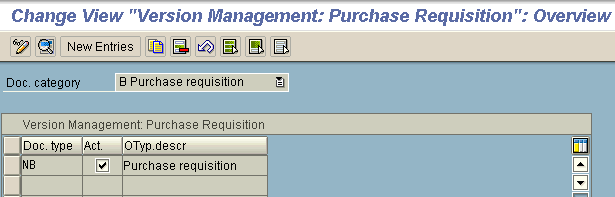
3 Version Management Overview In the procurement function, we need to work with internal documents and legal documents like Purchase Requisition, Purchase order, Invoice etc., Here we need a process to track any changes done to these documents. Version management plays a significant role in tracking the changes in purchasing documents. Also this tracking is essential for audit requirements. Version Management in PR or PO groups a set of changes against version number and provides the user with an overview of the various changes that may have been made in the course of time. In this article we can understand how to setup version Management in SAP for PR s and PO s 1. Version Management configuration for PR s and PO s 1.1. Set up Version Management for Purchase Requisitions Choose SPRO> Materials Management> Purchasing> Version Management. In this step, we will set up version management for purchase requisitions. We need to activate version management for the combination of document type and document category. The changes made in PR s will get managed in version, only if this tick mark is set. We can set control data and field selection for versions against the combination of document type and document category. For certain fields like Reason, Short text, Requester, External Number, Posting Date, we can specify which properties we need to have: mandatory entry, optional entry, display only or suppressed as per our Client requirements SAP AG 3


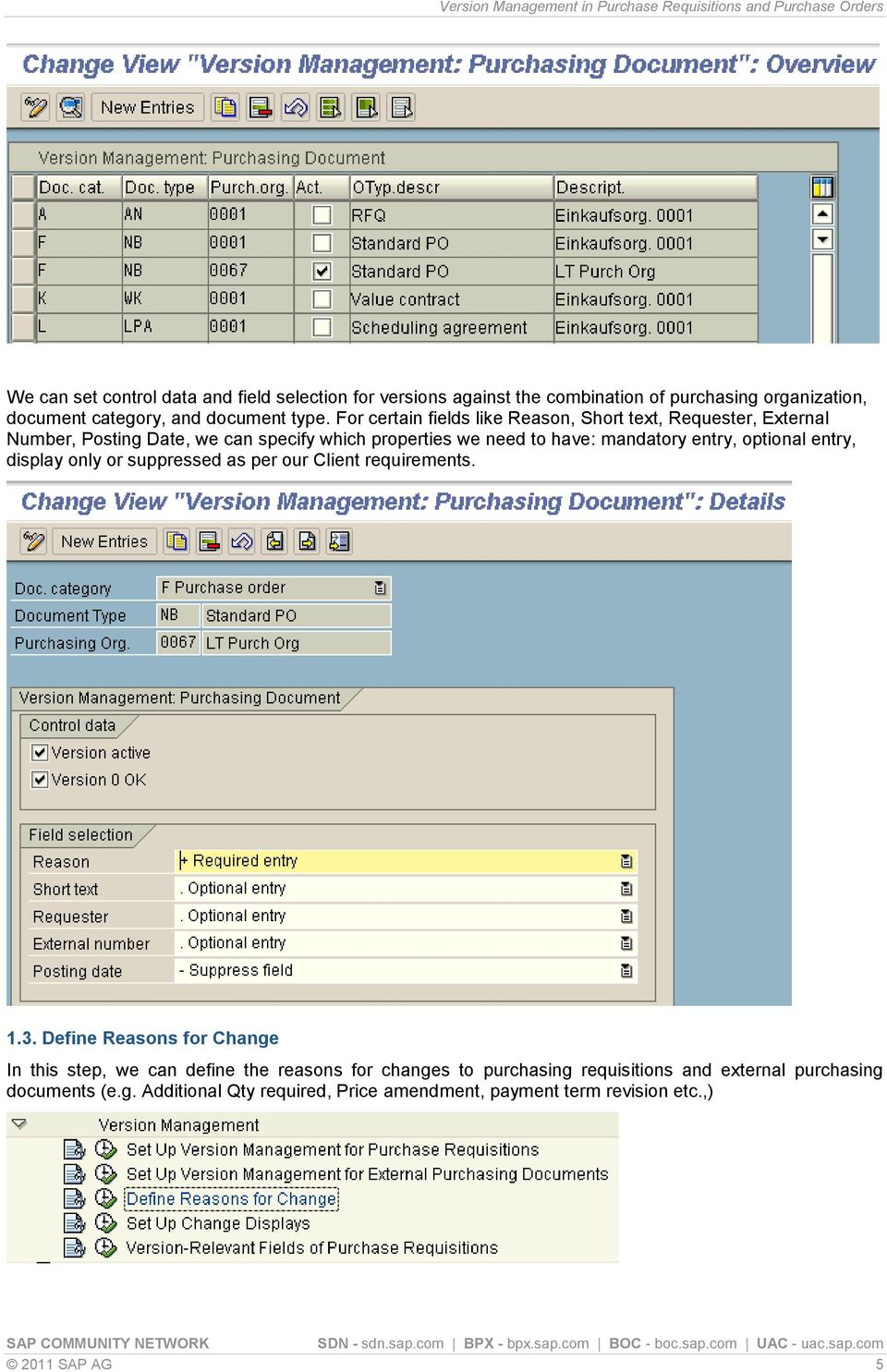
4 1.2. Set up Version Management for External Purchasing Documents In this step, we will set up the version management for external purchasing documents. We need to activate version management for the combination of purchasing organization, document category, and document type. The changes to an external purchasing document are managed in versions only if the version management is active SAP AG 4


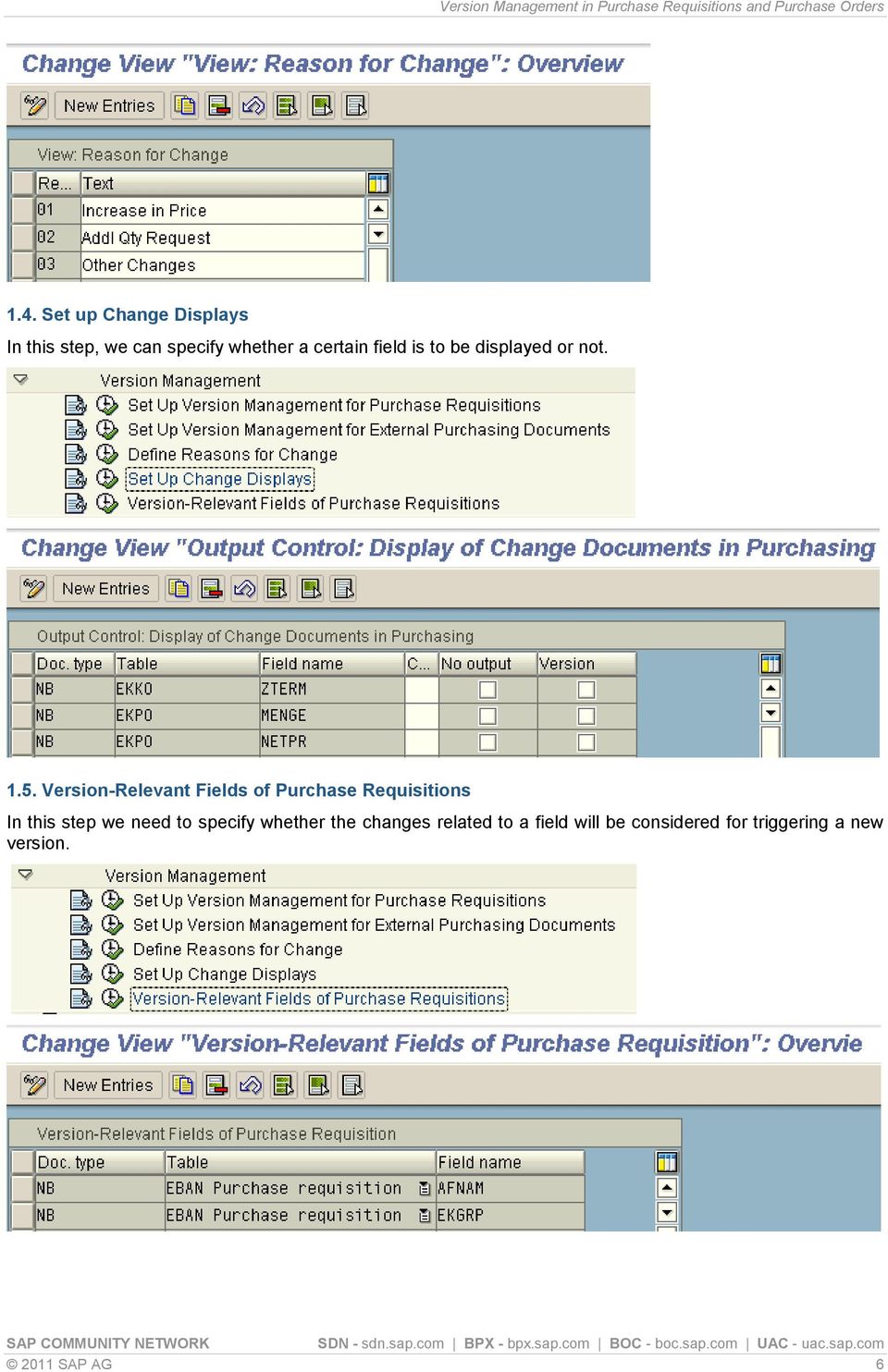
5 We can set control data and field selection for versions against the combination of purchasing organization, document category, and document type. For certain fields like Reason, Short text, Requester, External Number, Posting Date, we can specify which properties we need to have: mandatory entry, optional entry, display only or suppressed as per our Client requirements Define Reasons for Change In this step, we can define the reasons for changes to purchasing requisitions and external purchasing documents (e.g. Additional Qty required, Price amendment, payment term revision etc.,) 2011 SAP AG 5
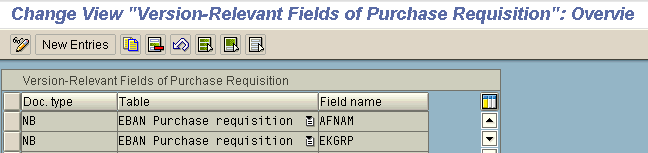
6 1.4. Set up Change Displays In this step, we can specify whether a certain field is to be displayed or not Version-Relevant Fields of Purchase Requisitions In this step we need to specify whether the changes related to a field will be considered for triggering a new version SAP AG 6
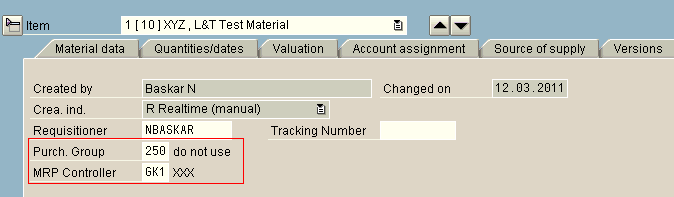
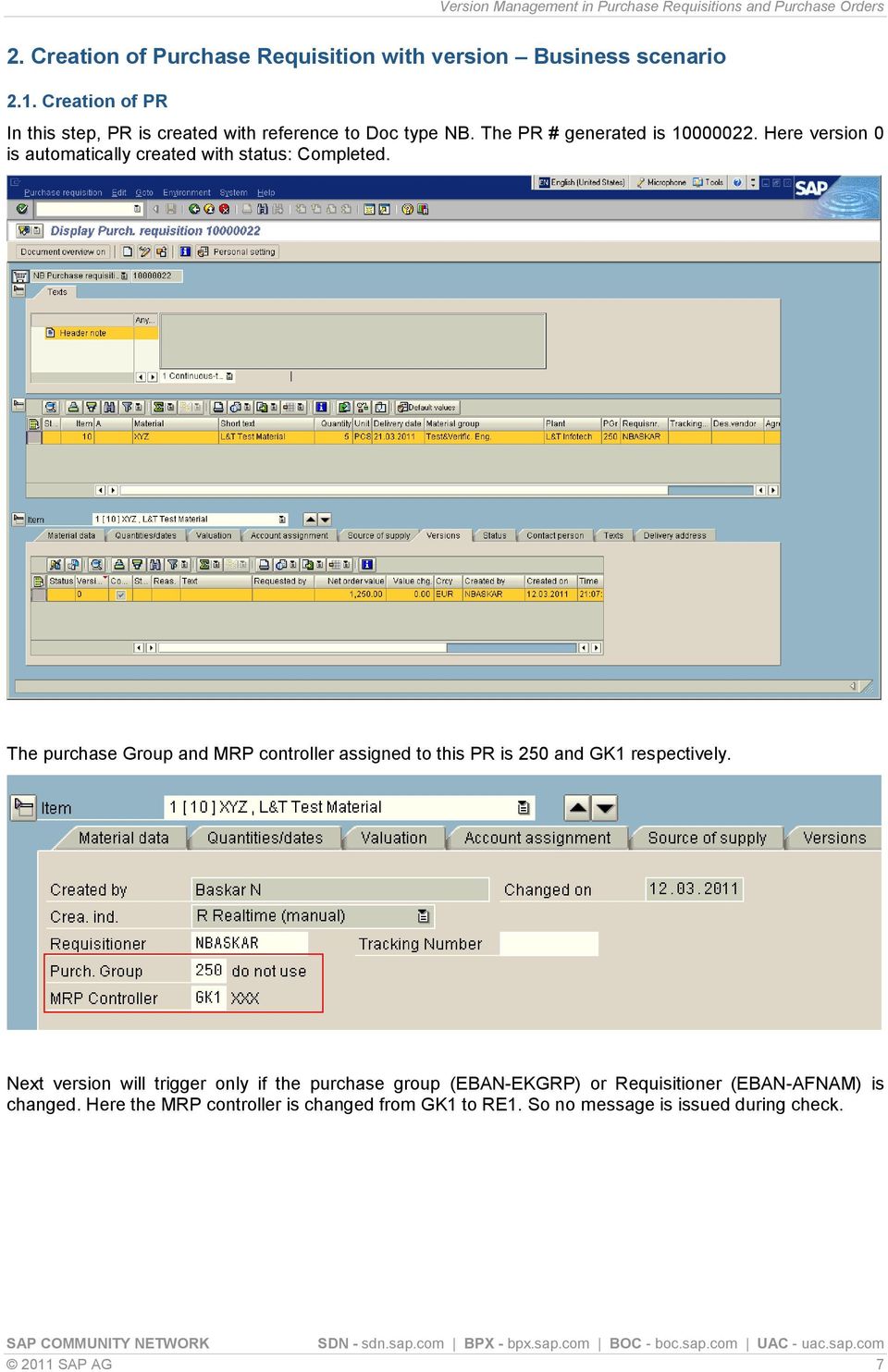
7 2. Creation of Purchase Requisition with version Business scenario 2.1. Creation of PR In this step, PR is created with reference to Doc type NB. The PR # generated is Here version 0 is automatically created with status: Completed. The purchase Group and MRP controller assigned to this PR is 250 and GK1 respectively. Next version will trigger only if the purchase group (EBAN-EKGRP) or Requisitioner (EBAN-AFNAM) is changed. Here the MRP controller is changed from GK1 to RE1. So no message is issued during check SAP AG 7
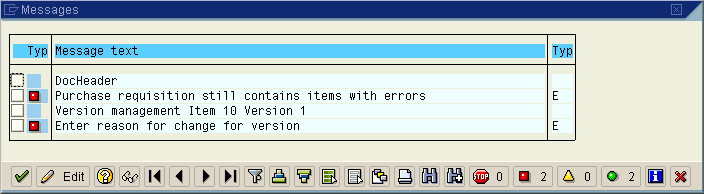
8 Now the Purchase group is changed from 250 to 851. Next version is triggered due to this purchase Group change. The reason for change is Mandatory entry. Hence we have entered the reason for change as 03 (Other changes) SAP AG 8


9 2.2. Significance of Version Completion Indicator This indicates whether or not a version has been completed. Select this indicator if the desired changes have been completed. Only if this indicator has been selected for the current version, a purchase requisition be converted into a PO. Change documents are always assigned to the current version, even if the Completed indicator has been selected. This is done until such time as a new version is created. Now we will try to create a PO with reference to this PR , provided the condition of version completion indicator is not set in PR. We got the below error message You have attempted to create or process a follow-on document to purchase requisition, item, with the processing state 01(Version in Process). This is not possible. The current version of PR must have been completed Hence we set the version completion indicator for final version (1) 2011 SAP AG 9

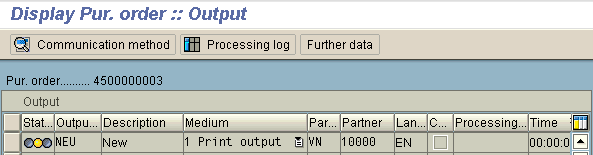
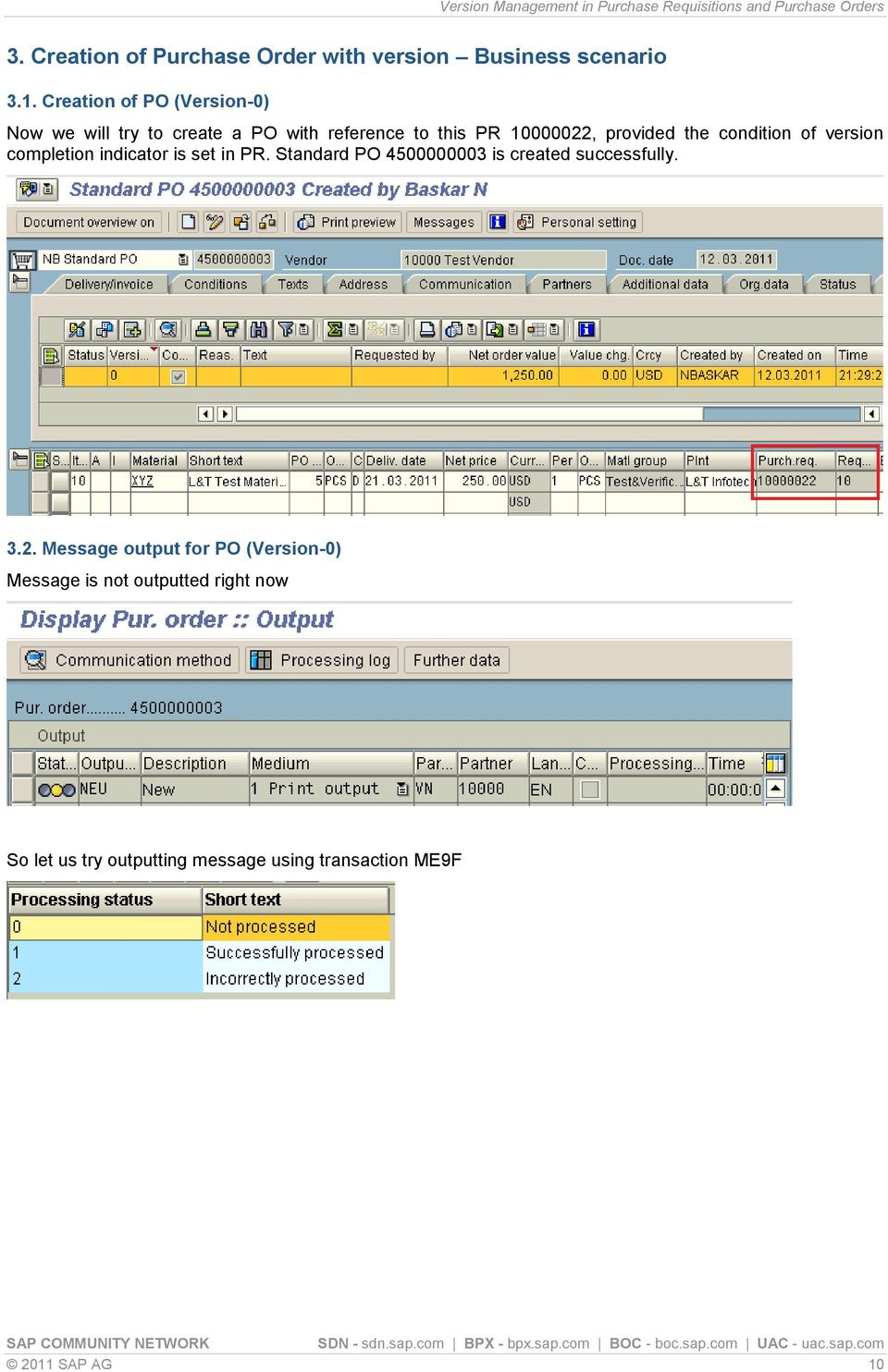
10 3. Creation of Purchase Order with version Business scenario 3.1. Creation of PO (Version-0) Now we will try to create a PO with reference to this PR , provided the condition of version completion indicator is set in PR. Standard PO is created successfully Message output for PO (Version-0) Message is not outputted right now So let us try outputting message using transaction ME9F 2011 SAP AG 10
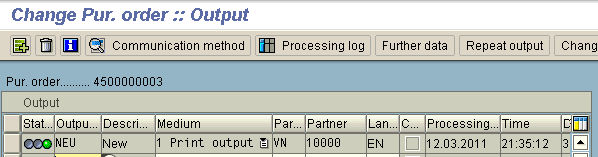
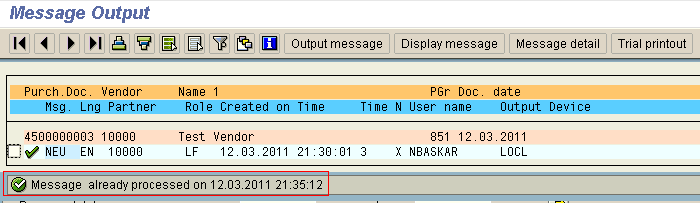
11 Message for version 0 is successfully outputted at 21:35:12 on 12-Mar SAP AG 11


12 3.3. Amendment of PO (Version-1) PO Quantity is increased from 5 pcs to 10 pcs Next version is triggered due to this Quantity change The reason for change is Mandatory entry. Hence we have entered the reason for change as 02 (Addl. Qty Request) SAP AG 12

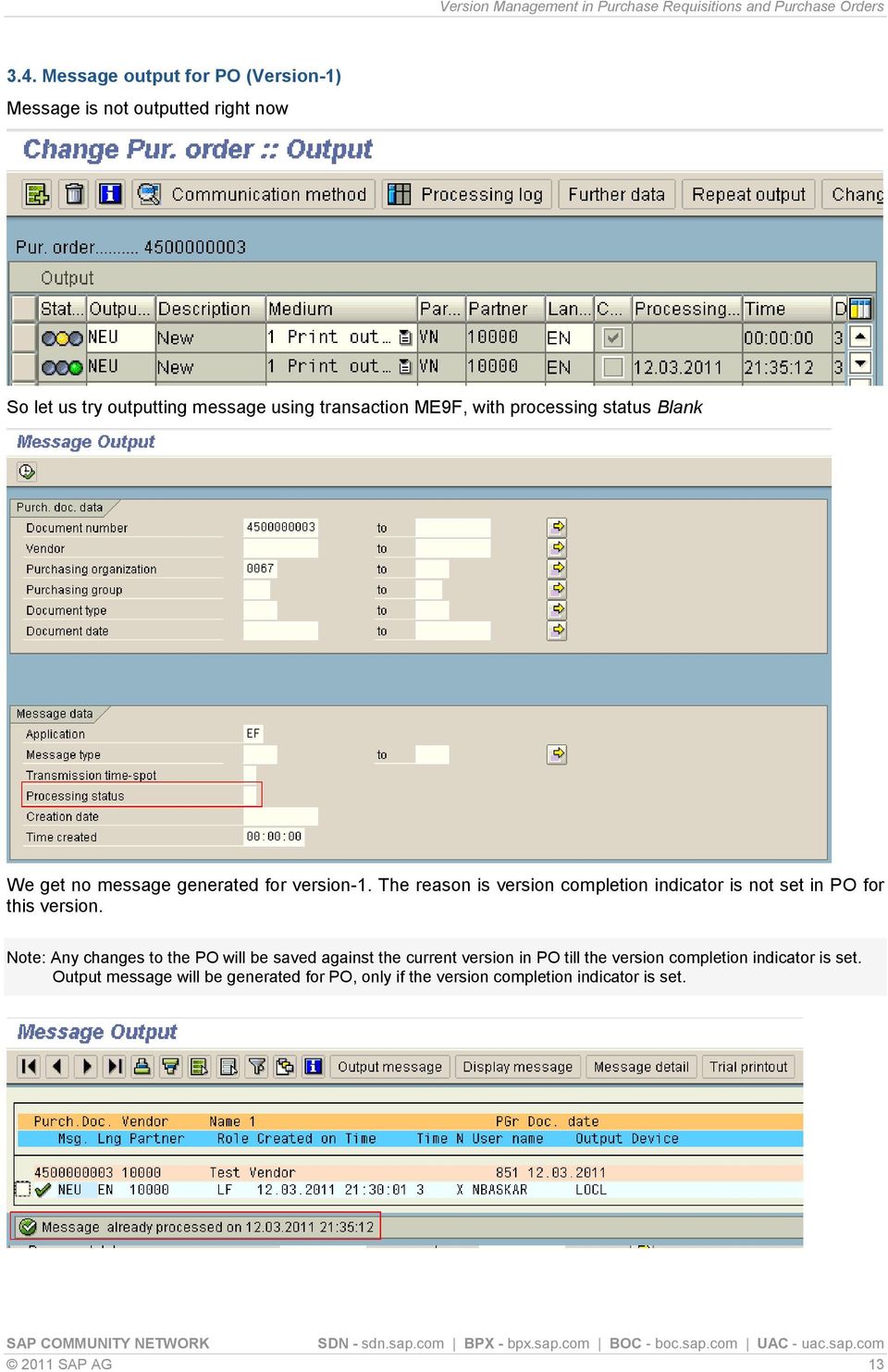
13 3.4. Message output for PO (Version-1) Message is not outputted right now So let us try outputting message using transaction ME9F, with processing status Blank We get no message generated for version-1. The reason is version completion indicator is not set in PO for this version. Note: Any changes to the PO will be saved against the current version in PO till the version completion indicator is set. Output message will be generated for PO, only if the version completion indicator is set SAP AG 13

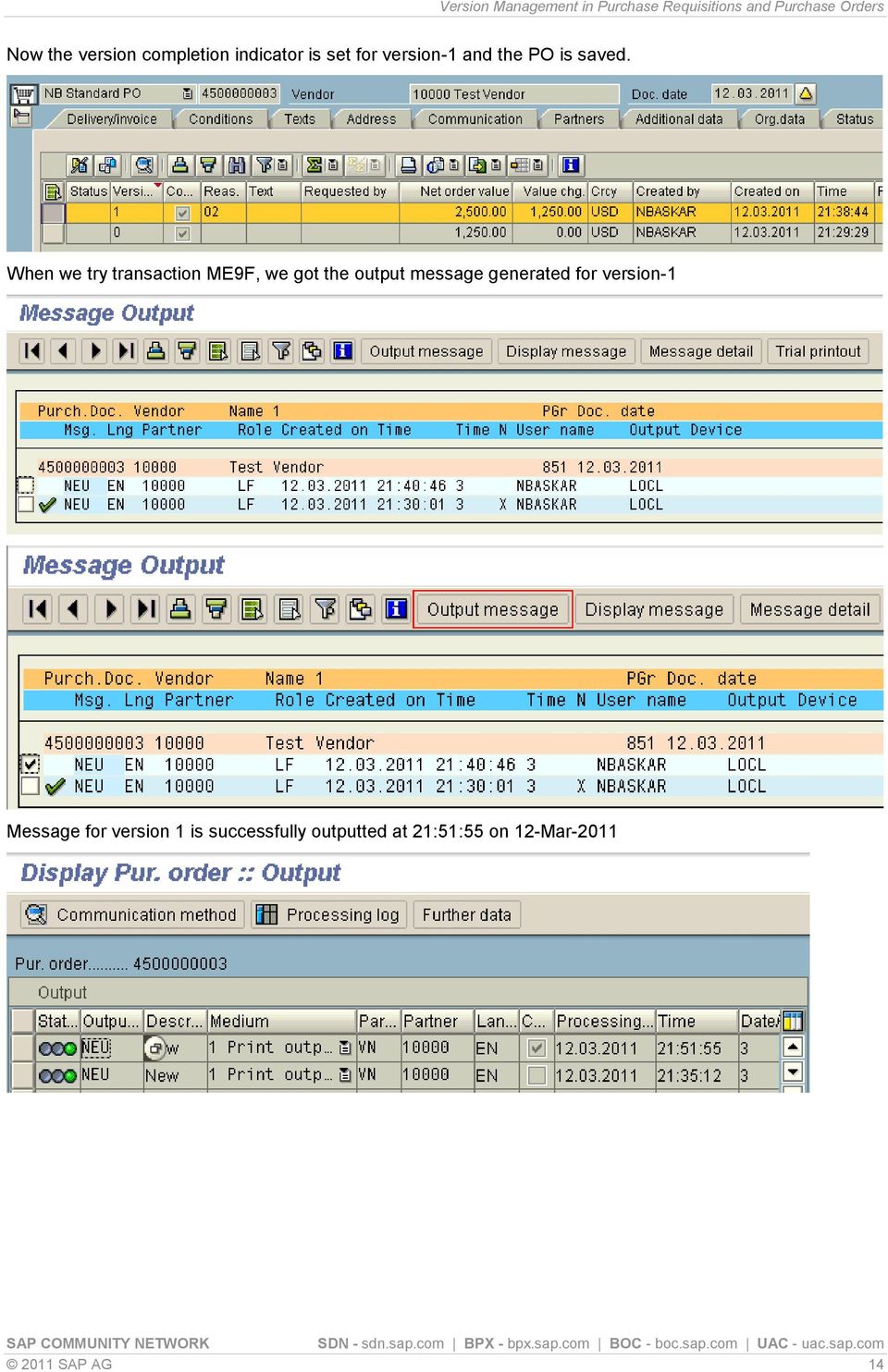
14 Now the version completion indicator is set for version-1 and the PO is saved. When we try transaction ME9F, we got the output message generated for version-1 Message for version 1 is successfully outputted at 21:51:55 on 12-Mar SAP AG 14
15 Related Content FAQ in Version management For more information, visit the Supply Chain Management homepage 2011 SAP AG 15
16 Disclaimer and Liability Notice This document may discuss sample coding or other information that does not include SAP official interfaces and therefore is not supported by SAP. Changes made based on this information are not supported and can be overwritten during an upgrade. SAP will not be held liable for any damages caused by using or misusing the information, code or methods suggested in this document, and anyone using these methods does so at his/her own risk. SAP offers no guarantees and assumes no responsibility or liability of any type with respect to the content of this technical article or code sample, including any liability resulting from incompatibility between the content within this document and the materials and services offered by SAP. You agree that you will not hold, or seek to hold, SAP responsible or liable with respect to the content of this document SAP AG 16
Multi Level Purchase Order Release Strategy
 Multi Level Purchase Order Release Strategy Applies to: SAP ECC 6.0. For more information, visit the Enterprise Resource Planning homepage. For more information, visit the Supply Chain Management homepage.
Vendor Consignment. Applies to: Summary. Author Bio. SAP ECC 6.0. For more information, visit the Supply Chain Management homepage.
 Applies to: SAP ECC 6.0. For more information, visit the Supply Chain Management homepage. Summary This document helps the P2P consultants to understand the Vendor Consignment scenario in SAP. It explains
Step by Step Guide for Language Translation Tool
 Step by Step Guide for Language Translation Tool Applies to: SAP ECC 6.0 Summary This document helps people to understand the steps involved in translation of standard SAP screen and also helps to change
Direct Subcontracting Process (SAP SD & MM)
 Direct Subcontracting Process (SAP SD & MM) Applies to: This article is applicable to SAP SD & MM modules of SAP for version SAP 4.7 till ERP 6.0 Summary This article describes a process called Direct
How to Assign Transport Request for Language Translation?
 How to Assign Transport Request for Language Translation? Applies to: SAP ECC 6.0. For more information, visit the ABAP homepage. Summary This document helps people to create a transport request for the
Creating Email Content Using SO10 Objects and Text Symbols
 Creating Email Content Using SO10 Objects and Text Symbols Applies to: SAP ECC 6.0. For more information, visit the ABAP homepage. Summary The article describes the benefits of SO10 objects in comparison
SAP FI - Automatic Payment Program (Configuration and Run)
 SAP FI - Automatic Payment Program (Configuration and Run) Applies to: SAP ECC 6.0. For more information, visit the Financial Excellence homepage. Summary This document helps you to configure and run Automatic
Step by Step Procedure to Block and Debug a CIF Queue Flowing from R/3 to APO System
 Step by Step Procedure to Block and Debug a CIF Queue Flowing from R/3 to APO System Applies to: SAP R/3 and SAP APO. For more information, visit the ABAP homepage. Summary This article gives a detailed
Release Strategy Enhancement in Purchase Order
 Release Strategy Enhancement in Purchase Order Applies to: SAP ECC 6.0. For more information, visit the Enterprise Resource Planning homepage Summary This document helps the P2P consultants to understand
How to Modify, Create and Delete Table Entries from SE16
 How to Modify, Create and Delete Table Entries from SE16 Applies to This article applies to all SAP ABAP based products; however the examples and screen shots are derived from ECC 6.0 system. For more
Order Split Usage in Production Orders
 Order Split Usage in Production Orders Applies to: SAP Shop Floor Control (Production Orders) R/3 and ECC 6.0. For more information, visit the Enterprise Resource Planning homepage. Summary: This is an
Creating New Unit of Measure in SAP BW
 Creating New Unit of Measure in SAP BW Applies to: Software Component: SAP_BW. For more information, visit the Business Intelligence homepage. Release: 700 Summary This article is intended to serve as
SAP CRM 2007 - Campaign Automation
 SAP CRM 2007 - Campaign Automation Applies to: SAP CRM 7.0 For more information, visit the Customer Relationship Management homepage Summary Campaign Automation is designed to help you in the increasingly
SAP CRM System 6.0/7.0. For more information, visit the Customer Relationship Management homepage
 Applies to: SAP CRM System 6.0/7.0. For more information, visit the Customer Relationship Management homepage Summary This article explains how to customize the Fact Sheet for different business roles.
Creating Transaction and Screen Variants
 Creating Transaction and Screen Variants Applies to: Tested on SAP version ECC 6. Summary This article explain a way to create Transaction and Screen Variants to change screen layouts. And how to assign
Invoice Collaboration: Self Billing Invoice
 Invoice Collaboration: Self Billing Invoice Applies to: Supply Network Collaboration 5.1 with the back end system ERP 5.0 with SP 10 and above. For more information, visit the Supply Chain Management homepage.
Multi Provider Creation Based on Sales and Planning Info Cubes
 Multi Provider Creation Based on Sales and Planning Info Cubes Applies to: SAP BI 2004s or SAP BI 7.x. For more information, visit the Business Intelligence homepage. Summary In This article, I am going
Working with SAP BI 7.0 Data Transfer Process (DTP)
 Working with SAP BI 7.0 Data Transfer Process (DTP) Applies to: SAP BI 7.0. For more information, visit the EDW homepage Summary The objective of this document is to know the various available DTP options
Data Flow from LBWQ/SMQ1 to RSA7 in ECC and Delta Extraction in BI
 Data Flow from LBWQ/SMQ1 to RSA7 in ECC and Delta Extraction in BI Applies to: SAP NetWeaver Business Warehouse (Formerly BI), Will also work on SAP BI 3.5. Business Intelligence homepage. Summary This
Restricting Search Operators in any Search View
 Restricting Search Operators in any Search View Applies to SAP CRM 2007 and SAP CRM 7.0. For more information, visit the Customer Relationship Management homepage. Summary The purpose of this article is
SAP MM: Purchase Requisition with Classification and Workflow Approval
 SAP MM: Purchase Requisition with Classification and Workflow Approval Applies to: SAP 4.7 and above, SAP-MM-PUR-REL. For more information, visit the Enterprise Resource Planning homepage. Summary The
Currency Conversion using Variables in SAP BI -Reporting
 Currency Conversion using Variables in SAP BI -Reporting Applies to: SAP BI 7.0. For more information, visit the Business Intelligence homepage. Summary This Article gives you a brief idea on how to do
Display Options in Transaction SE16
 Display Options in Transaction SE16 Applies to: SAP-HCM. For more information, visit the Enterprise Resource Planning homepage. Summary This document deals with the various data display options available
Make to Order in SAP ERP
 Applies to: SAP ECC 6.0. For more information, visit the Enterprise Resource Planning homepage. Summary This document shall help consultants in the cross functional areas like Sales and Distribution, Production
Sales Commission Calculation & Settlement Handling through Order Processing
 Sales Commission Calculation & Settlement Handling through Order Processing Applies to: SAP Sales & Distribution & Incentive and Commission Management in ECC 6.0. For more information, visit the Enterprise
Inventory Management (0IC_C03) Part - 3
 Inventory Management (0IC_C03) Part - 3 Applies to: SAP NetWeaver Business Warehouse (Formerly BI), Will also work on SAP BI 3.5. For more information, visit the Business Intelligence homepage. Summary
Step by Step Guide How to Copy Flat File from Other Application Server to BI and Load through Info Package
 Step by Step Guide How to Copy Flat File from Other Application Server to BI and Load through Info Package Applies to: SAP BW 7.x. For more information, visit the EDW Homepage. Summary The objective of
Organizational Management- Organizational Structure Creation
 Organizational Management- Organizational Structure Creation Applies to: SAP ECC6.0 (Release 700, SP 12). For more information, visit the Enterprise Resource Planning homepage. Summary HR applications
Standard SAP Configuration of SMS through HTTP with Third Party SMS Gateway
 Standard SAP Configuration of SMS through HTTP with Third Party SMS Gateway Applies to: SAP R/3 4.7 EE SR 200,ECC 5.0 For more information, visit the Web Services homepage. Summary There is an increasing
SPDD & SPAU Adjustments Handbook
 SPDD & SPAU Adjustments Handbook Applies to: SAP Upgrades. For more information, visit the ABAP homepage. Summary Through this document the reader will be able to get a detailed idea about the working
Table of Content. SAP Query creation and transport Procedure in ECC6
 SAP Query creation and transport Procedure in ECC6 Applies to: ECC6, For more information, visit the Enterprise Resource Planning homepage. Summary This article guides the how to technique for creating
Reverse Transport Mechanism in SAP BI
 Reverse Transport Mechanism in SAP BI Applies to: SAP Net Weaver 2004s BI 7.0 Ehp1 SP 08. For more information, visit the EDW homepage Summary This document helps you to understand the detailed step by
SAP BW - Excel Pivot Chart and Pivot Table report (Excel)
 SAP BW - Excel Pivot Chart and Pivot Table report (Excel) Applies to: SAP BI Consultants. For more information, visit the EDW HomePage. Summary Document explains to create Excel Pivot Chart and Pivot Table
How to Generate Stack Xml for Ehp4 and Above Upgrade
 How to Generate Stack Xml for Ehp4 and Above Upgrade Applies to: ECC 6.0 EHP4 or Above. For more information, visit the Enterprise Resource Planning homepage Summary For upgrading Enhancement Package4
First step to Understand a Payroll Schema
 First step to Understand a Payroll Schema Applies to: This article is relevant to SAP HCM module where Payroll is implemented. This applies to all SAP Releases. For more information; visit the Enterprise
How to Create an ecatt?
 How to Create an ecatt? Applies to: SAP ECC 5.0 and above Summary This is a step by step guide to create a CATT script in SAP ECC version 5 and upwards. It can be used by beginners to create a basic CATT
Creation and Configuration of Business Partners in SAP CRM
 Creation and Configuration of Business Partners in SAP CRM Applies to: SAP CRM 2005 (5.0) and above release. For more information, visit the Customer Relationship Management homepage. Summary This document
SAP CRM 7.0 E2C Setup: CRM via Email Toolset
 SAP CRM 7.0 E2C Setup: CRM via Email Toolset Applies to: SAP CRM 700/NW 701. For more information, visit the Customer Relationship Management homepage. Summary This article describes the Email2CRM functionality
Create Automatic Mail Notification/ Email Alert for Process Chain Monitoring
 Create Automatic Mail Notification/ Email Alert for Process Chain Monitoring Applies to: SAP BW 3.X, Business Intelligence 7.0. For more information, visit the EDW homepage. Summary This document will
Market Basket Price Calculation in Retail
 Market Basket Price Calculation in Retail Applies to: SAP IS Retail 6.0 (release number, SP, etc.) to which this article or code sample applies. For more information, visit the Business Process Expert
Deleting the User Personalization done on Enterprise Portal
 Deleting the User Personalization done on Enterprise Portal Applies to: SRM 7.0 with EP 6.0. For more information, visit the Supplier Relationship Management homepage Summary This document explains the
Step by Step guide of Report-to- Report Interface in BW Reporting
 Step by Step guide of Report-to- Report Interface in BW Reporting Applies to: SAP BI 7.0. For more information, visit the Business Intelligence Home Page Summary This paper gives a detail understanding
Middleware Configuration and Monitoring for Master Data Transfer from SRM to ECC
 Middleware Configuration and Monitoring for Master Data Transfer from SRM to ECC Applies to: SRM 5.0, SRM 7.0 For more information, visit the Supplier Relationship Management homepage. Summary Master data
Extractor in R/3 and Delta Queue
 Applies to: SAP BW (3.5) / SAP BI(7.0). For more information, visit the Business Intelligence homepage. Summary This article contains all the information required in order to create data sources in R/3
Integrated Testing Solution Using SAP Solution Manager, HP-QC/QTP and SAP TAO
 Integrated Testing Solution Using SAP Solution Manager, HP-QC/QTP and SAP TAO Applies to: SAP Test Acceleration and Optimization, HP Quality Center, HP Quick Test Professional, SAP Solution Manager. For
Automating Invoice Processing in SAP Accounts Payable
 Automating Invoice Processing in SAP Accounts Payable Applies to: SAP 4.6C, SAP 4.7 Enterprise, mysap ERP 2004, mysap ERP 2004 Summary Paying to the vendor who supplies good or provides services is the
Step by Step Procedure to Create Broadcasters, to Schedule and to Enhance of SAP- BI Queries from Query Designer
 Step by Step Procedure to Create Broadcasters, to Schedule and to Enhance of SAP- BI Queries from Query Designer Applies to: SAP Business Intelligence 7.0. For more information, visit the EDW homepage.
Query OLAP Cache Optimization in SAP BW
 Query OLAP Cache Optimization in SAP BW Applies to: SAP NetWeaver 2004s BW 7.0 Summary This article explains how to improve performance of long running queries using OLAP Cache. Author: Sheetal Maharshi
Table of Contents. Passing Data across Components through Component Controller between Two Value Nodes
 Passing Data across Components through Component Controller between Two Value Nodes Applies to: SAP CRM WEBCLIENT UI 2007. For more information, visit the Customer Relationship Management homepage Summary
Workflow Troubleshooting and Monitoring in SAP ECC 6.0
 Workflow Troubleshooting and Monitoring in SAP ECC 6.0 Applies to: ECC 6.0, Workflow Troubleshooting & Monitoring Summary A major advantage of workflow is the ability to monitor the workflow steps according
IDOC Payment Process with SAP
 Applies to: SAP ECC 6.0. For more information, visit the Enterprise Resource Planning homepage. Summary There multiple modes of outgoing payments viz., Manual, electronic, through bank without any electronic
Embedding Crystal Reports inside ECC ALV Reports
 Embedding Crystal Reports inside ECC ALV Reports Applies to: Applies to ECC Enhancement Package 5 Summary These steps describe how to configure and set up embedded Crystal Reports inside the ECC system
Process Controlled Workflow SRM 7.0 (Using BRF)
 Process Controlled Workflow SRM 7.0 (Using BRF) Applies to: SAP SRM 7.0 For more information, visit the Supplier Relationship Management homepage. Summary This document helps user to create workflow s
Using PI to Exchange PGP Encrypted Files in a B2B Scenario
 Using PI to Exchange PGP Encrypted Files in a B2B Scenario Applies to: SAP Net Weaver Process Integration 7.1 (SAP PI 7.1). For more information, visit the SOA Management homepage. Summary This document
Credit Management in Sales and Distribution
 Credit Management in Sales and Distribution Applies to: Credit Management in Sales and Distribution. For more information, visit the Enterprise Resource Planning Homepage. Summary This document illustrates
Guidelines for Effective Data Migration
 Guidelines for Effective Data Migration Applies to: SAP R/3. All releases. For more information, visit the ABAP homepage. Summary Data Migration is an important step in any SAP implementation projects.
Valuation of Materials using FIFO Method
 Valuation of Materials using FIFO Method Applies to: 4.7EE, ECC 6.0 For more information, visit the Enterprise Resource Planning homepage. Summary This article explains the Configuration and Process steps
Different Types of Alerts for Process Chains. Table of Content
 Different Types of Alerts for Process Chains Applies to: This article applies to BW 3.x and SAP Business Intelligence (BI 7.0) with highest support package. For more information, visit the EDW homepage.
Quantifying the Amount of Cash Discount Lost
 Quantifying the Amount of Cash Discount Lost Applies to: All Business organizations where the Financial Controller wants to analyze how much cash discount is lost due to non-adherence to payment terms
SAP BW 7.3: Exploring Semantic Partitioning
 SAP BW 7.3: Exploring Semantic Partitioning Applies to: SAP BW 3.x & SAP BI Net Weaver 2004s. For more information, visit the EDW homepage. Summary A semantically partitioned object is an InfoProvider
Configuration of Enterprise Services using SICF and SOA Manager
 Configuration of Enterprise Services using SICF and SOA Manager Applies to: SAP NetWeaver 7.0 SP14 and above. For more information, visit the SOA Management homepage. Summary This document will provide
Introduction to COPA and COPA Realignment
 Introduction to COPA and COPA Realignment Applies to: SAP BI Consultants & Developers working on COPA Data Model. For more information, visit the EDW homepage Summary This document gives a brief introduction
Creating Web Service from Function Modules/BAPIs & Integrating with SAP Interactive Forms
 Creating Web Service from Function Modules/BAPIs & Integrating with SAP Interactive Forms Applies to: ECC 6.0, SAP Interactive forms by Adobe. Summary This document states how to create Web Service from
ABAP Proxy Interfacing
 Applies to: This document applies to SAP versions ECC 6.0. Summary This article contains the guidelines for using the ABAP Proxy interfacing. ABAP proxies are used when ABAP applications needs to send
ALE Settings, for Communication between a BW System and an SAP System
 ALE Settings, for Communication between a BW System and an SAP System Applies to: SAP ECC 6.0. For more details, visit the EDW homepage. Summary This document helps people to create ALE settings, which
LSMW: Upload Master Data using Batch Input Recording
 LSMW: Upload Master Data using Batch Input Recording Applies to: All modules of SAP where upload of data need to be performed using Batch Input Recording. For more information, visit the Master Data Management
Web Dynpro: Multiple ALV Grids and Layouts in ALV
 Web Dynpro: Multiple ALV Grids and Layouts in ALV Applies to: SAP ECC 6.0. For more information, visit the Web Dynpro ABAP homepage. Summary The article is designed in such a way that person with ABAP
Quick Viewer: SAP Report Generating Tool
 Quick Viewer: SAP Report Generating Tool Applies to: SAP Net Weaver 7.0, ABAP, SAP ECC 6.0, to all those who wants to learn about SAP Report Generating Tool: Quick Viewer. For more information, please
SAP NetWeaver Developer Studio 7.30 Installation Guide
 SAP NetWeaver Developer Studio 7.30 Installation Guide Applies to: SAP NetWeaver CE 7.30, SAP Net Weaver Developer Studio (7.30). For more information, visit the Web Dynpro ABAP homepage. Summary This
How to Get Work Items from Workflow in your Outlook Inbox
 How to Get Work Items from Workflow in your Outlook Inbox Applies to: Ecc 6.0 & Above ABAP- Workflow. For more information, visit the ABAP homepage. Summary The frequent question will come into your mind
SAP CRM 7.0 for Newbies: (Part 1) Simple BOL Object Creation for CRM Webclient UI
 SAP CRM 7.0 for Newbies: (Part 1) Simple BOL Object Creation for CRM Webclient UI Applies to: This article applies to SAP Netweaver 7.0, CRM ABAP 7.0. For more information, visit the Customer Relationship
Inventory Management in SAP BW
 Applies to: SAP BW 3.X and BI NetWeaver 2004s. For more information, visit the EDW homepage. Summary This document aims to explain the concept of Inventory management using non cumulative key figures in
How to Load Data from Flat Files into BW PSA
 How to Load Data from Flat Files into BW PSA Applies to: SAP BI/BW 7.0 and above. Summary The document is aimed at all those who are at beginner level in BW. It details out step by step processes that
SDN Community Contribution
 SDN Community Contribution (This is not an official SAP document.) Disclaimer & Liability Notice This document may discuss sample coding or other information that does not include SAP official interfaces
Registration, Evaluation, Authorization and Restriction of Chemicals (REACH) Compliance
 Registration, Evaluation, Authorization and Restriction of Chemicals (REACH) Compliance Applies to: SAP REACH Compliance Summary Chemicals have always been a boon for Human development but its negligent
BW Performance Monitoring
 Applies to: SAP BW 7.0. For more information, visit the EDW homepage. Summary This article helps to achieve BW statistics of the system which will help a user to calculate the performance for a particular
Step By Step Procedure to Create Logical File Path and Logical File Name
 Step By Step Procedure to Create Logical File Path and Logical File Name Applies to: SAP BW (3.5) / SAP BI(7.0) For more information, visit Business Intelligence Homepage. Summary These documents describe
Converting and Exporting Data in XML Format
 Converting and Exporting Data in XML Format Applies to: SAP BW 3.5, SAP BI 7.0 etc. For more information, visit the EDW homepage. Summary This paper briefs about Information broadcasting that allows you
How to Develop Programs for SAP Mobile RF
 How to Develop Programs for SAP Mobile RF Applies to: SAP R3 4.6c and above. For more information, visit the ABAP homepage. Summary This article will help you how to develop programs for SAP Mobile RF
How to Integrate CRM 2007 WebClient UI with SAP NetWeaver Portal
 How to Integrate CRM 2007 WebClient UI with SAP NetWeaver Portal Applies to: Enterprise Portal, CRM 2007. For more information, visit the Portal and Collaboration homepage. Summary This document will describe
Consuming Services in SOA Manager
 Consuming Services in SOA Manager Applies to: ECC 60. PI 7.1. For more information, visit the SOA Management homepage. Summary Here you ll find a little example of how you can consume Enterprise Services
MM: Display Tax Conditions in Purchase Order for Brazilian Companies
 MM: Display Tax Conditions in Purchase Order for Brazilian Companies Applies to: This solution could be applied for release 4.6 and higher. The documents was created using ECC 6.0 For more information,
SAP BW - Generic Datasource Function Module (Multiple Delta Fields)
 SAP BW - Generic Datasource Function Module (Multiple Delta Fields) Applies to: SAP BW 3.5 / SAP 7.0 Consultants. For more information, visit the EDW HomePage. Summary Fetch the delta on multiple fields
Step by Step Guide to Extract Batch Master Data via Generic and Classification Datasource to BW
 Step by Step Guide to Extract Batch Master Data via Generic and Classification Datasource to BW Applies to: SAP ECC 5.0 and above releases and BW 7.0 Summary This paper gives a detail understanding on
Time Evaluation RPTIME00 Report Prerequisites, Process Flow and Storing results on Cluster B2
 Time Evaluation RPTIME00 Report Prerequisites, Process Flow and Storing results on Cluster B2 Applies to: SAP ERP 6.0 (SAP HR) Summary This document helps a user to understand different types of Time Evaluation
SAP Workflow in Plain English
 Applies to: SAP Workflow. For more information, visit the Business Process Modeling homepage. Summary This article describes the basics of SAP workflow in very simple terms along with the basic terminology
Solution Manager Service Desk an End-to-End Helpdesk Solution
 Solution Manager Service Desk an End-to-End Helpdesk Solution Summary With SAP s Solution Manager Initiative, customers are now required to incorporate a Solution Manager system into their SAP landscape.
Compounding in Infoobject and Analyzing the Infoobject in a Query
 Compounding in Infoobject and Analyzing the Infoobject in a Query Applies to: SAP BI 7.0. For more information, visit the EDW homepage Summary This article demonstrates step by step process of creating
Web Dynpro ABAP: ALV and Table in Popup Window
 Web Dynpro ABAP: ALV and Table in Popup Window Applies to: SAP ECC 6.0 Summary Normally in ABAP, we come across the scenario of displaying ALV in popup. This article tells about displaying data both in
Deleting the Requests from the PSA and Change Log Tables in Business Intelligence
 Deleting the Requests from the PSA and Change Log Tables in Business Intelligence Applies to: SAP BI 7.0. For more information, visit the Business Intelligence homepage Summary This paper discusses how
Forgot or Lock "Administrator or J2EE_ADMIN" Password
 Forgot or Lock "Administrator or J2EE_ADMIN" Password Applies to: SAP NetWeaver Portal 7.0. For more information, visit the Portal and Collaboration homepage. Summary This article provides you a step guide
Step by Step Procedures to Load Master Data (Attribute and Text) from FlatFile in BI 7.0
 Step by Step Procedures to Load Master Data (Attribute and Text) from FlatFile in BI 7.0 Applies to: SAP Business Intelligence (BI 7.0). For more information, visit the EDW homepage Summary This article
Splitting the Custom Container & Display more than one ALV
 Splitting the Custom Container & Display more than one ALV Applies to: This document applies to SAP ECC 6.0, SAP Netweaver 2004s. For more information, visit the ABAP homepage. Summary This article contains
Case Study of a Segregation of Duties Project
 Case Study of a Segregation of Duties Project Applies to: SAP Security, SAP GRC Access Control Suite For more information, visit the Security homepage. Summary As Companies today are struggling to meet
Sending an Image File Through XI in a File-to-Mail Scenario
 SDN Contribution Sending an Image File Through XI in a File-to-Mail Scenario Summary This article depicts the usage of the Additional files parameter in a File adapter to send a binary file(image) through
ABAP Debugging Tips and Tricks
 Applies to: This article applies to all SAP ABAP based products; however the examples and screen shots are derived from ECC 6.0 system. For more information, visit the ABAP homepage. Summary This article
Document Information, Statuses & Exceptions in Ariba
 This document will provide information that explains each screen view in Ariba based upon the document type accessed. Within each document type there are different tabs that can be accessed that give you
Exposing RFC as Web Service and Consuming Web Service in Interactive Forms in ABAP
 Exposing RFC as Web Service and Consuming Web Service in Interactive Forms in ABAP Applies to: SAP Interactive Forms by Adobe and Web Service in ABAP. For more information, visit SAP Interactive forms
A Step-by-Step guide on SMTP Configuration and File to Mail Scenario Using Process Integration Scenario in PI 7.1
 A Step-by-Step guide on SMTP Configuration and File to Mail Scenario Using Process Integration Scenario in PI 7.1 Applies to: SAP NetWeaver Process Integration 7.1 For more information, visit the SOA Management
Overcoming Testing Challenges in SAP Upgrade Projects
 Overcoming Testing Challenges in SAP Upgrade Projects Applies to: SAP Upgrade Projects. For more information, visit the Enterprise Resource Planning homepage. Summary Testing in SAP Upgrade forms the crucial