
A Step-by-Step guide on SMTP Configuration and File to Mail Scenario Using Process Integration Scenario in PI 7.1
|
|
|
- Alannah Harper
- 9 years ago
- Views:
Transcription
1 A Step-by-Step guide on SMTP Configuration and File to Mail Scenario Using Process Integration Scenario in PI 7.1 Applies to: SAP NetWeaver Process Integration 7.1 For more information, visit the SOA Management homepage. Summary This document gives complete step-by-step procedures for implementing and testing a File-to-Mail scenario from scratch using the Business Systems in the Integration Directory (ID). The document also provides some basic idea and working knowledge on how to configure SMTP. Some insight on TCodes- Profile Parameters (Transaction RZ10), User Maintenance (Transaction SU01), maintain services and assigning a client (Transaction SICF), SAPconnect Administration (Transaction SCOT) So, this document can be treated as a ready reference in real life situations when working with Mail scenario. Author: Sandeep Sharma Company: HCL Technology Noida Created on: 21 October 2009 Author Bio Sandeep Sharma is working as a SAP NetWeaver Consultant for HCL Technology Noida INDIA. He is SAP PI 7.0 certified developer. He is having a good experience in ALE/IDOC also SAP AG 1

2 Table of Contents Introduction... 3 Basic Concepts and Overview... 3 Requirement Study and Scope Identification... 3 Prerequisites... 4 Knowledge Requirements... 4 System Requirements... 4 Implementation Build Solution SMTP Configuration guide Purpose Prerequisites Process Flow Settings for the Profile Parameters (Transaction RZ10) User Maintenance (Transaction SU01) Assigning the Clients (Transaction SICF) SAPconnect Administration (Transaction SCOT) File to Mail Scenario Enterprise Service Repository (Designing) Design Objects: Integration Directory (Configuration) Directory Objects: Testing the Scenario (SXMB_IFR) Testing the Scenario (SXMB_MONI) Related Content Disclaimer and Liability Notice SAP AG 2

3 Introduction This guide gives you a clear IDEA and complete step by step procedures to be followed while implementing File to Mail scenario. There are many blogs and articles on SDN for XI and PI 7.0 for mail scenario. This guide is especially for PI 7.1 users and also for those who want to learn how to configure SMTP. It becomes very difficult for any beginner and Intermediate XI aspirants to implement such a scenario in PI 7.1 from scratch. Hence, I have tried to come up with a complete solution and How to guide document to provide all steps required implementing such a scenario from the very beginning. Hope this document will help all PI professionals as a ready reference in real life situation while working with File and Mail PI scenario in cross company environment. Happy Learning Basic Concepts and Overview As per general thumb rule to implement any XI scenario (like File - XI - File) we need to implement following: In SLD: Create Product and Software Components with/without dependencies, Technical System and Business System for each (Sender and Receiver) Tip: If we don t have sufficient information to create a Business System in SLD for Sender or Receiver then we can use Business Service in ID (Cross Company Environment). In ESR: Import Software Components that we have created in SLD, Create Namespaces then under Interface Object we have to create Data type, Message Type, Service Interface and actions for each (Sender and Receiver). After this we have to create Massage Mapping and Operation Mapping for the scenario under Mapping Objects. Finally we have to create one process integration scenario and activate all these objects we have created in ESR. In ID: Create Communication Channels for (Sender and Receiver), then apply model from ESR and import your process integration scenario which you have designed in ESR. Again we have to activate all these objects in ID. the Requirement Study and Scope Identification Create two third party Business System in SLD for Sender and Receiver Systems.If you don t have sufficient authorization to create it then you can ask your Basis team to create these for you or you can use Business Service in ID like in any Cross Company Environment 2009 SAP AG 3

4 Prerequisites Knowledge Requirements Basic knowledge of XI and how it works. Nice to have one file to file scenario implementation experience. Please see the reference section if you want to go through one file to file scenario example System Requirements Two Business Systems in SLD (System Landscape directory) are required which should be created using Third Party Option Access to Transactions RZ10, SU01, SICF, SCOT, SXMB_MONI, SXMB_IFR are required for PI System. Tip: If you don t have access right to any of this transaction, you can contact your basis /XI administrator so that he can help you to create / configure objects for you including SLD. Developer Access to PI System is required to create this scenario Implementation Build Solution 1 SMTP Configuration guide 1.1 Purpose To enable mail communication between SAP systems and SMTP mail server, without having to use additional external components, kernel of the SAP Web Application Server should be SMTP (Simple Mail Transfer Protocol) compatible. Using this SMTP functionality, it is possible to exchange faxes and messages which are packed as s. For this mail server should analyze the domain of the recipient addresses. Mail server either forwards the e- mails to an internal fax-/text message server or to an external provider To receive any fax or text message, server or provider sends s to addresses that have the domain of the SAP system. 1.2 Prerequisites To enable mail communication, mail server must be SMTP-compatible. 1.3 Process Flow Settings for the Profile Parameters (Transaction RZ10) If you want to use SMTP functionality, you have to adjust the profile of the SAP web application server because SAPConnect send job can only be scheduled for SMTP activated servers. Run tcode rz10 and create a profile SAP AG 4


5 Configure the following two profile parameters: A) icm/server_port_<*> = PROT=SMTP,PORT=<port> (this parameter opens a TCP/IP port for receiving mails through SMTP) here <*> stands for the sequence number (starting from zero)of frequently occurring parameters. <port> the number of the port that is to be used ( can t yet be used by another program on this host.) In my case here value of * (sequence number) is 2 and PORT = SAP AG 5

6 B) is/smtp/virt_host_<*> = <host>:<port>,<port>,...; This parameter defines a virtual mail host for receiving mails. Here <host> describes the name of the host to which the incoming mails are addressed. <port> describes the number of the port to which the incoming mails are addressed. Note: 1- This parameter is not required If one single client of the SAP system is receiving and processing all incoming mails). 2-Default value for this parameter is/smtp/virt_host_0 = *:*; 3-In case of multiple clients, a virtual host has to be created for each of these clients. In my example I have used *:25000 here * is used because I want the mails to be sent independently of the host being addressed and is the value of PORT SAP AG 6


7 User Maintenance (Transaction SU01) Create a service user to process incoming mails Call transaction SU01 to create a user with type Service and assign the profile S_A.SCON to this user SAP AG 7

8 Click on create 2009 SAP AG 8


9 User addresses Assign the valid Internet mail address to your user (which is supposed to receive s) in transaction SU01, under on the tab page Address Assigning the Clients (Transaction SICF) One SMTP server (SAPconnect) has already been created in transaction SICF and is delivered with every SAP system. Now Use this to create the first client and then create another SMTP server for each additional client. Run tcode SICF and enter the following details: Press F8. In the next screen double click on SAP connect 2009 SAP AG 9


10 Host data tab Enter the sequence number of a parameter is/smtp/virt_host_<*> from the profile. If you have only created one client and therefore have not specified this parameter type, enter 0.As shown in the figure: Enter *:* in host configuration information. Handler list Enter CL_SMTP_EXT_SAPCONNECT at position SAP AG 10

11 SAPconnect Administration (Transaction SCOT) In this step, Define SAPconnect settings for the client that is to be used for send processes. Run tcode SCOT Under Settings Default Domain, define the domain of the SAP system client. Each client has an SMTP node. This node is created by the SAP system and cannot be deleted. The following steps need to be carried out to configure the node so that sending Internet mail is possible: 1. First confirm that you are in the Node view, and then double click on that node name. 2. Choose Node in use. 3. In the Mail Host and Mail Port fields, specify the mail server to which the outbound mails are to be sent.in my case, Mail Host = smtp.rediffmailpro.com (or you can use IP address also ) and Mail Port = Next to Internet, click on set button and Enter the address area of the recipient addresses that are to be reached using this node. In general, * is used if all s are to be sent using SMTP. 5. Enter the output format for SAP documents and Confirm your selection 2009 SAP AG 11


12 Note: If you also want to configure the node for sending text messages (pager/sms) or faxes, please follow the reference link given at the end of this document SAP AG 12


13 Send Job (shift +F7) s sent from an SAP application are first stored in a queue. A periodical background process, the SAPconnect send job, gets the s from this queue and sends them over the Internet. To schedule this job in SAPconnect: Administration, proceed as follows: Press shift+f7 or click on the job button as shown in the figure below: 1. Choose View Jobs. 2. If no other job has been scheduled, choose Job Create. 3. Enter a job name ( for ex: MailSend)and confirm it. 4. Select the variant SAP&CONNECTALL by positioning the cursor on it. 5. Choose Schedule Job. In the next window, Choose Schedule periodically. Select the interval you require, such as 10 minutes. Choose Create SAP AG 13


14 2-File to Mail Scenario 2.1 Enterprise Service Repository (Designing) The first scenario that I am explaining is sending the file to the receiver through mail. File adapter will pick up the file from FTP, do the simple 1 to 1 transformation and send the file to the receiver through mail. The mail adapter is using the transport protocol as SMTP Design Objects: Data Types: Create the two Data Types, one for the source and other for the target side. Source Data Type: The source data type contains the following fields FROM, TO and CONTENT as shown below. Fig1. Source Data Type Target Data Type: Fig2.Target Data Type Message Types: Create the Message Type for both the data types as shown below SAP AG 14


15 Source Message Type: Fig3. Source Message Type Target Message Type: Fig4. Target Message Type Message Interfaces: Create the Message Interfaces for the above message types as shown below SAP AG 15


16 Outbound Message Interface: Fig5. Outbound Service Interface 2009 SAP AG 16


17 Inbound Message Interface: Fig6. Inbound Service Interface 2009 SAP AG 17


18 Message Mapping: Create the Message Mapping between the source message type and the target message type as shown below. Fig7. Message Mapping Operation Mapping: Create the Interface Mapping between the outbound and inbound interface as shown below. Fig8. Operation Mapping 2009 SAP AG 18


19 Actions: Create two actions for source service interface and the target service interface as shown below. Fig9. Source action Fig10. Target action 2009 SAP AG 19


20 Process Integration Scenario: Create a process integration scenario as shown below 1. Right click and insert your sender component. In my example it is SAMPLE_TEST_SCENARIO Again right click and insert your receiver component. In my example again it is SAMPLE_TEST_SCENARIO Right click on first component and click on insert action. Here assign your sender action. In this example it is FileSender. Or you may drag and drop this action. 4. Now right click on second component and click on insert action. Here assign your receiver action. In this example it is Mailreceiver. Or you may drag and drop this action. 5. Now click on sender action (FileSender) press shift button on keyboard and then click on receiver action (Mail receiver) both will be highlighted. release shift button and then right click and select option create connection between selected actions Fig11. Action connection 2009 SAP AG 20


21 Double click on the mid of arrow, a new window will open, 2009 SAP AG 21

22 Click on assign mapping and assign the mapping using drop down menu. Save and activate all your objects. Your ESR part is completed 2009 SAP AG 22

23 2.2. Integration Directory (Configuration) Directory Objects: Create the Business Scenario and create the sender business service (MAIL_SND) and receiver business service (MAIL_RCV).Assign sender and receiver Interface to both service. Assign these services to your business scenario. Sender Communication Channel: Create the sender communication channel of Adapter type as File. Select the Transport Protocol as FTP SAP AG 23

24 Fi12. Sender Communication Channel 2009 SAP AG 24

25 Receiver Communication Channel: Create the Receiver communication channel of Adapter type as MAIL. Fig13. Receiver Communication Channel 2009 SAP AG 25

26 Now go to tools tab and apply model from ESR Fig14. Apply ESR model In the wizard, Fill the details of process integration scenario which you have created in ESR Fig15. Wizard step SAP AG 26

27 Click on continue Fig16. Wizard step2 Click on finish Fig17. Wizard finish Click on close 2009 SAP AG 27

28 A new window will open Fig18. Model Configurator 2009 SAP AG 28
29 Click on sender action (FileSender) and assign communication component Fig19. Assign component in Model Configurator 2009 SAP AG 29
30 Again click on receiver action (MailReceiver) and assign communication component Fig20. Assign component in Model Configurator 2009 SAP AG 30

31 Now click on the arrow connecting two actions and assign the communication channels. Fig21. Assign channel in Model Configurator 2009 SAP AG 31

32 Click on simulation button (4 th button in the above screen shot) and select Generation Simulation radio button Fig22. Simulation Click on start After simulation new window will popup close that and again click on the simulation button SAP AG 32

33 This time select radio button Generation Fig23. Simulation generation 2009 SAP AG 33

34 Click on start. Again new window for log will popup close that. Click on apply button.following objects will be created. Fig24. Configuration objects scenario Save your configuration scenario and activate your change list. This completes your ID part SAP AG 34
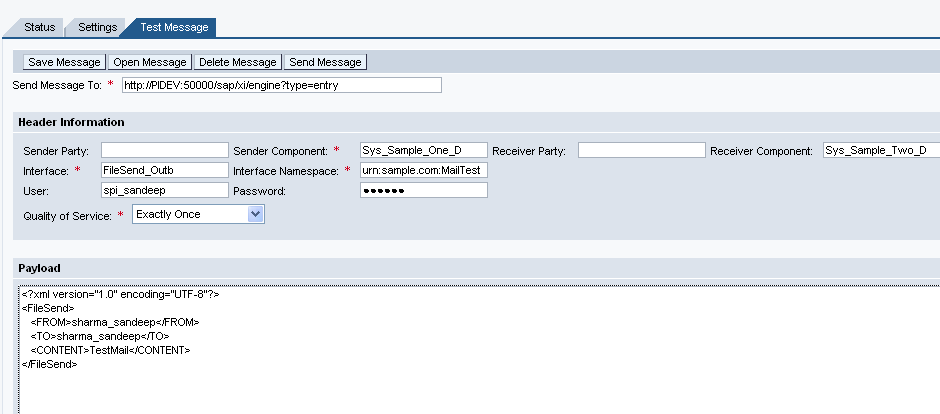
35 2.3. Testing the Scenario (SXMB_IFR) 1- Open RWB->component Monitoring->Display->Integration Engine->Test Message Fill up the details as below and also take your payload from ESR message mapping with some test values. Paste that payload here in test message. Fig25. Test RWB Click on send message. Now you can check the message in SXMB_MONI. 2- Alternatively you can test the scenario by putting the file MAIL.TXT on your FTP. After some time file will be deleted from FTP 2009 SAP AG 35

36 2.4. Testing the Scenario (SXMB_MONI) To Test the scenario put the file MAIL.TXT on your FTP. After some time file will be deleted from FTP Message in SXMB_MONI is shown below. Fig26. Message in SXMB_MONI 2009 SAP AG 36

37 You will receive a mail in your box like the screenshot below: Fig27. Message in Inbox 2009 SAP AG 37
38 Related Content SMTP configure SAP AG 38
39 Disclaimer and Liability Notice This document may discuss sample coding or other information that does not include SAP official interfaces and therefore is not supported by SAP. Changes made based on this information are not supported and can be overwritten during an upgrade. SAP will not be held liable for any damages caused by using or misusing the information, code or methods suggested in this document, and anyone using these methods does so at his/her own risk. SAP offers no guarantees and assumes no responsibility or liability of any type with respect to the content of this technical article or code sample, including any liability resulting from incompatibility between the content within this document and the materials and services offered by SAP. You agree that you will not hold, or seek to hold, SAP responsible or liable with respect to the content of this document SAP AG 39
SAP Note 455140 - Configuration of e-mail, fax, paging or SMS using SMTP
 Note Language: English Version: 18 Validity: Valid Since 25.10.2010 Summary Symptom How do you configure e-mail, fax, paging or SMS in the SAP Web Application Server using SMTP? Which prerequisites and
SAP CRM 7.0 E2C Setup: CRM via Email Toolset
 SAP CRM 7.0 E2C Setup: CRM via Email Toolset Applies to: SAP CRM 700/NW 701. For more information, visit the Customer Relationship Management homepage. Summary This article describes the Email2CRM functionality
Creating Transaction and Screen Variants
 Creating Transaction and Screen Variants Applies to: Tested on SAP version ECC 6. Summary This article explain a way to create Transaction and Screen Variants to change screen layouts. And how to assign
SAP CRM 2007 - Campaign Automation
 SAP CRM 2007 - Campaign Automation Applies to: SAP CRM 7.0 For more information, visit the Customer Relationship Management homepage Summary Campaign Automation is designed to help you in the increasingly
Sending an Image File Through XI in a File-to-Mail Scenario
 SDN Contribution Sending an Image File Through XI in a File-to-Mail Scenario Summary This article depicts the usage of the Additional files parameter in a File adapter to send a binary file(image) through
Salesforce.com Integration Using SAP PI: A Case Study
 Salesforce.com Integration Using SAP PI: A Case Study Applies to: SAP NetWeaver Process Integration 7.1. For more information, visit the Service Bus-based Integration homepage. Summary This article explains
Standard SAP Configuration of SMS through HTTP with Third Party SMS Gateway
 Standard SAP Configuration of SMS through HTTP with Third Party SMS Gateway Applies to: SAP R/3 4.7 EE SR 200,ECC 5.0 For more information, visit the Web Services homepage. Summary There is an increasing
Different Types of Alerts for Process Chains. Table of Content
 Different Types of Alerts for Process Chains Applies to: This article applies to BW 3.x and SAP Business Intelligence (BI 7.0) with highest support package. For more information, visit the EDW homepage.
LSMW: Upload Master Data using Batch Input Recording
 LSMW: Upload Master Data using Batch Input Recording Applies to: All modules of SAP where upload of data need to be performed using Batch Input Recording. For more information, visit the Master Data Management
SAP FI - Automatic Payment Program (Configuration and Run)
 SAP FI - Automatic Payment Program (Configuration and Run) Applies to: SAP ECC 6.0. For more information, visit the Financial Excellence homepage. Summary This document helps you to configure and run Automatic
Create Automatic Mail Notification/ Email Alert for Process Chain Monitoring
 Create Automatic Mail Notification/ Email Alert for Process Chain Monitoring Applies to: SAP BW 3.X, Business Intelligence 7.0. For more information, visit the EDW homepage. Summary This document will
Step by Step Procedure to Block and Debug a CIF Queue Flowing from R/3 to APO System
 Step by Step Procedure to Block and Debug a CIF Queue Flowing from R/3 to APO System Applies to: SAP R/3 and SAP APO. For more information, visit the ABAP homepage. Summary This article gives a detailed
Configuring HTTPs Connection in SAP PI 7.10
 Configuring HTTPs Connection in SAP PI 7.10 Applies to: SAP NetWeaver 7.1x For more information, visit the SOA Management homepage. Summary In the new version on SAP PI there are several changes in Https
Deleting the User Personalization done on Enterprise Portal
 Deleting the User Personalization done on Enterprise Portal Applies to: SRM 7.0 with EP 6.0. For more information, visit the Supplier Relationship Management homepage Summary This document explains the
Using PI to Exchange PGP Encrypted Files in a B2B Scenario
 Using PI to Exchange PGP Encrypted Files in a B2B Scenario Applies to: SAP Net Weaver Process Integration 7.1 (SAP PI 7.1). For more information, visit the SOA Management homepage. Summary This document
ABAP Debugging Tips and Tricks
 Applies to: This article applies to all SAP ABAP based products; however the examples and screen shots are derived from ECC 6.0 system. For more information, visit the ABAP homepage. Summary This article
Restricting Search Operators in any Search View
 Restricting Search Operators in any Search View Applies to SAP CRM 2007 and SAP CRM 7.0. For more information, visit the Customer Relationship Management homepage. Summary The purpose of this article is
Configuration of Enterprise Services using SICF and SOA Manager
 Configuration of Enterprise Services using SICF and SOA Manager Applies to: SAP NetWeaver 7.0 SP14 and above. For more information, visit the SOA Management homepage. Summary This document will provide
Deploying Crystal Reports on Top of a SAP BI Query
 Deploying Crystal Reports on Top of a SAP BI Query Applies to: SAP BI NetWeaver 2004s, Crystal Reports 2008. For more information, visit the Business Intelligence homepage. Summary The objective of the
Step by Step Procedure to Create Broadcasters, to Schedule and to Enhance of SAP- BI Queries from Query Designer
 Step by Step Procedure to Create Broadcasters, to Schedule and to Enhance of SAP- BI Queries from Query Designer Applies to: SAP Business Intelligence 7.0. For more information, visit the EDW homepage.
SAP CRM Middleware Configurations
 SAP CRM Middleware Configurations Applies to: SAP CRM Middleware Configurations. For more information, visit the Customer Relationship Management homepage. Summary This whitepaper elaborates the steps
Reverse Transport Mechanism in SAP BI
 Reverse Transport Mechanism in SAP BI Applies to: SAP Net Weaver 2004s BI 7.0 Ehp1 SP 08. For more information, visit the EDW homepage Summary This document helps you to understand the detailed step by
Web Dynpro ABAP: ALV and Table in Popup Window
 Web Dynpro ABAP: ALV and Table in Popup Window Applies to: SAP ECC 6.0 Summary Normally in ABAP, we come across the scenario of displaying ALV in popup. This article tells about displaying data both in
Creating and Scheduling Publications for Dynamic Recipients on SAP Business Objects Enterprise
 Creating and Scheduling Publications for Dynamic Recipients on SAP Business Objects Enterprise Applies to: SAP BusinessObjects Enterprise. For more information, visit the Business Objects homepage. Summary
SAP BW - Excel Pivot Chart and Pivot Table report (Excel)
 SAP BW - Excel Pivot Chart and Pivot Table report (Excel) Applies to: SAP BI Consultants. For more information, visit the EDW HomePage. Summary Document explains to create Excel Pivot Chart and Pivot Table
Salesforce Integration Using PI: How to Perform Query and Other DML Operations Using the Enterprise WSDL
 Salesforce Integration Using PI: How to Perform Query and Other DML Operations Using the Enterprise WSDL Applies to: SAP NetWeaver Process Integration 7.1 Summary A case study for integrating Salesforce.com
Creating Web Service from Function Modules/BAPIs & Integrating with SAP Interactive Forms
 Creating Web Service from Function Modules/BAPIs & Integrating with SAP Interactive Forms Applies to: ECC 6.0, SAP Interactive forms by Adobe. Summary This document states how to create Web Service from
How to Integrate CRM 2007 WebClient UI with SAP NetWeaver Portal
 How to Integrate CRM 2007 WebClient UI with SAP NetWeaver Portal Applies to: Enterprise Portal, CRM 2007. For more information, visit the Portal and Collaboration homepage. Summary This document will describe
BW Performance Monitoring
 Applies to: SAP BW 7.0. For more information, visit the EDW homepage. Summary This article helps to achieve BW statistics of the system which will help a user to calculate the performance for a particular
Setup Guide Central Monitoring of SAP NetWeaver Proces Integration 7.3 with SAP Solution Manager 7.1. Active Global Support February 2011
 Setup Guide Central Monitoring of SAP NetWeaver Proces Integration 7.3 with SAP Solution Manager 7.1 Active Global Support February 2011 Agenda Overview Landscape Setup Recommended Setup SLD/LMDB Synchronization
SDN Community Contribution
 SDN Community Contribution (This is not an official SAP document.) Disclaimer & Liability Notice This document may discuss sample coding or other information that does not include SAP official interfaces
How to Generate Stack Xml for Ehp4 and Above Upgrade
 How to Generate Stack Xml for Ehp4 and Above Upgrade Applies to: ECC 6.0 EHP4 or Above. For more information, visit the Enterprise Resource Planning homepage Summary For upgrading Enhancement Package4
Step by Step Guide How to Copy Flat File from Other Application Server to BI and Load through Info Package
 Step by Step Guide How to Copy Flat File from Other Application Server to BI and Load through Info Package Applies to: SAP BW 7.x. For more information, visit the EDW Homepage. Summary The objective of
Exposing RFC as Web Service and Consuming Web Service in Interactive Forms in ABAP
 Exposing RFC as Web Service and Consuming Web Service in Interactive Forms in ABAP Applies to: SAP Interactive Forms by Adobe and Web Service in ABAP. For more information, visit SAP Interactive forms
Understanding BEx Query Designer: Part-2 Structures, Selections and Formulas
 Understanding BEx Query Designer: Part-2 Structures, Selections and Formulas Applies to: SAP NetWeaver BW. Summary This document is the second installment of a 6 part Query Designer Training guide for
ALE Settings, for Communication between a BW System and an SAP System
 ALE Settings, for Communication between a BW System and an SAP System Applies to: SAP ECC 6.0. For more details, visit the EDW homepage. Summary This document helps people to create ALE settings, which
Install MS SQL Server 2012 Express Edition
 Install MS SQL Server 2012 Express Edition Sohodox now works with SQL Server Express Edition. Earlier versions of Sohodox created and used a MS Access based database for storing indexing data and other
Forgot or Lock "Administrator or J2EE_ADMIN" Password
 Forgot or Lock "Administrator or J2EE_ADMIN" Password Applies to: SAP NetWeaver Portal 7.0. For more information, visit the Portal and Collaboration homepage. Summary This article provides you a step guide
SDN Contribution Beginners guide to CRM Interaction Center (IC) Winclient setup
 SDN Contribution Beginners guide to CRM Interaction Center (IC) Winclient setup 2006 SAP AG 1 Applies to: SAP CRM 4.0 and higher Summary The Interaction Center forms the foundation for collaboration and
Transfer of GL Master from Source SAP System to a Target SAP System through IDOCS
 Transfer of GL Master from Source SAP System to a Target SAP System through IDOCS Applies to: SAP ECC 6.0. For more information, visit the Enterprise Resource Planning homepage. Summary SAP offers a wide
Web Dynpro: Multiple ALV Grids and Layouts in ALV
 Web Dynpro: Multiple ALV Grids and Layouts in ALV Applies to: SAP ECC 6.0. For more information, visit the Web Dynpro ABAP homepage. Summary The article is designed in such a way that person with ABAP
How to Modify, Create and Delete Table Entries from SE16
 How to Modify, Create and Delete Table Entries from SE16 Applies to This article applies to all SAP ABAP based products; however the examples and screen shots are derived from ECC 6.0 system. For more
Step by Step Guide for Language Translation Tool
 Step by Step Guide for Language Translation Tool Applies to: SAP ECC 6.0 Summary This document helps people to understand the steps involved in translation of standard SAP screen and also helps to change
Step by Step Guide to Archiving and Deleting of XML Messages in SAP NetWeaver PI
 Step by Step Guide to Archiving and Deleting of XML Messages in SAP NetWeaver PI Applies to: SAP NetWeaver Process Integration 3.0 / 7.0 / 7.1. Summary This document explains the step by step procedure
Table of Contents. Passing Data across Components through Component Controller between Two Value Nodes
 Passing Data across Components through Component Controller between Two Value Nodes Applies to: SAP CRM WEBCLIENT UI 2007. For more information, visit the Customer Relationship Management homepage Summary
Creation and Configuration of Business Partners in SAP CRM
 Creation and Configuration of Business Partners in SAP CRM Applies to: SAP CRM 2005 (5.0) and above release. For more information, visit the Customer Relationship Management homepage. Summary This document
Setup Guide for Exchange Server
 Setup Guide for Exchange Server Table of Contents Overview... 1 A. Exchange Server 2007/2010 Inbound Mail... 2 B. Exchange Server 2007/2010 Outbound Mail (optional)... 8 C. Exchange Server 2003/2000 Inbound
Order Split Usage in Production Orders
 Order Split Usage in Production Orders Applies to: SAP Shop Floor Control (Production Orders) R/3 and ECC 6.0. For more information, visit the Enterprise Resource Planning homepage. Summary: This is an
Sitecore is a trademark of Sitecore A/S. All other brand and product names are the property of their respective holders.
 Newsletter Module User Manual Author: Sitecore A/S, Date: November 2003 Release: Release 4.0 Language: English Sitecore is a trademark of Sitecore A/S. All other brand and product names are the property
Deleting the Requests from the PSA and Change Log Tables in Business Intelligence
 Deleting the Requests from the PSA and Change Log Tables in Business Intelligence Applies to: SAP BI 7.0. For more information, visit the Business Intelligence homepage Summary This paper discusses how
Workflow Troubleshooting and Monitoring in SAP ECC 6.0
 Workflow Troubleshooting and Monitoring in SAP ECC 6.0 Applies to: ECC 6.0, Workflow Troubleshooting & Monitoring Summary A major advantage of workflow is the ability to monitor the workflow steps according
Table of Content. SAP Query creation and transport Procedure in ECC6
 SAP Query creation and transport Procedure in ECC6 Applies to: ECC6, For more information, visit the Enterprise Resource Planning homepage. Summary This article guides the how to technique for creating
How to Create an ecatt?
 How to Create an ecatt? Applies to: SAP ECC 5.0 and above Summary This is a step by step guide to create a CATT script in SAP ECC version 5 and upwards. It can be used by beginners to create a basic CATT
So far in the first three chapters of this book we have studied an overview of SAP
 4 CHAPTER SAP ERP Integration Overview with Other Systems So far in the first three chapters of this book we have studied an overview of SAP business suite applications and the NetWeaver Application Server
Sage HRMS 2014 Sage Employee Self Service Tech Installation Guide for Windows 2003, 2008, and 2012. October 2013
 Sage HRMS 2014 Sage Employee Self Service Tech Installation Guide for Windows 2003, 2008, and 2012 October 2013 This is a publication of Sage Software, Inc. Document version: October 17, 2013 Copyright
SAP NetWeaver Process Integration - Demo Example Configuration
 SAP NetWeaver 7.40 f SAP NetWeaver Process Integration - Demo Example Configuration Document Version 1.0 October 2013 SAP AG Dietmar-Hopp-Allee 16 69190 Walldorf Germany T +49/18 05/34 34 24 F +49/18 05/34
Display Options in Transaction SE16
 Display Options in Transaction SE16 Applies to: SAP-HCM. For more information, visit the Enterprise Resource Planning homepage. Summary This document deals with the various data display options available
Understanding DSO (DataStore Object) Part 1: Standard DSO
 Understanding DSO (DataStore Object) Part 1: Standard DSO Applies to: SAP NetWeaver BW. Summary This is the first of a three part series of documents containing each and every detail about DSOs and their
XSLT Mapping in SAP PI 7.1
 Applies to: SAP NetWeaver Process Integration 7.1 (SAP PI 7.1) Summary This document explains about using XSLT mapping in SAP Process Integration for converting a simple input to a relatively complex output.
StreamServe Persuasion SP4 StreamServe Connect for SAP - Business Processes
 StreamServe Persuasion SP4 StreamServe Connect for SAP - Business Processes User Guide Rev A StreamServe Persuasion SP4StreamServe Connect for SAP - Business Processes User Guide Rev A SAP, mysap.com,
Invoice Collaboration: Self Billing Invoice
 Invoice Collaboration: Self Billing Invoice Applies to: Supply Network Collaboration 5.1 with the back end system ERP 5.0 with SP 10 and above. For more information, visit the Supply Chain Management homepage.
Application. 1.1 About This Tutorial. 1.1.1 Tutorial Requirements. 1.1.2 Provided Files
 About This Tutorial 1Creating an End-to-End HL7 Over MLLP Application 1.1 About This Tutorial 1.1.1 Tutorial Requirements 1.1.2 Provided Files This tutorial takes you through the steps of creating an end-to-end
Erado Archiving & Setup Instruction Microsoft Exchange 2007 Push Journaling
 Erado Archiving & Setup Instruction Microsoft Exchange 2007 Push Journaling This document covers the following Microsoft Exchange Server Editions Microsoft Exchange Enterprise Edition 2007 Microsoft Exchange
StarterPlus Mailbox Email Software Setup Guide
 StarterPlus Mailbox Email Software Setup Guide Setting up an StarterPlus mailbox only takes a few minutes. You can set up any email software to send and receive email from your mailbox. You can connect
ABAP Proxy Interfacing
 Applies to: This document applies to SAP versions ECC 6.0. Summary This article contains the guidelines for using the ABAP Proxy interfacing. ABAP proxies are used when ABAP applications needs to send
Configuring Security for SMTP Traffic
 4 Configuring Security for SMTP Traffic Securing SMTP traffic Creating a security profile for SMTP traffic Configuring a local traffic SMTP profile Assigning an SMTP security profile to a local traffic
Core Protection Suite
 Core Protection Suite Admin Guide Spam Soap, Inc. 3193 Red Hill Avenue Costa Mesa, CA 92626 United States p.866.spam.out f.949.203.6425 e. [email protected] www.spamsoap.com Contents EMAIL PROTECTION OVERVIEW...3
ABAP How To on SQL Trace Analysis
 Applies To: ABAP Summary SQL trace is a performance analysis tool that shows how open SQL statements are converted into native SQL statements. The following document discusses the performance measure utility
Direct Subcontracting Process (SAP SD & MM)
 Direct Subcontracting Process (SAP SD & MM) Applies to: This article is applicable to SAP SD & MM modules of SAP for version SAP 4.7 till ERP 6.0 Summary This article describes a process called Direct
Sage HRMS 2012 Sage Employee Self Service. Technical Installation Guide for Windows Server 2003 and Windows Server 2008
 Sage HRMS 2012 Sage Employee Self Service Technical Installation Guide for Windows Server 2003 and Windows Server 2008 2011 Sage Software, Inc. All rights reserved. Sage, the Sage logos, and the Sage product
Releasing blocked email in Data Security
 Releasing blocked email in Data Security IN-TopicInfo:Topic 41101/ Updated: 02-May-2011 Applies To: Websense Data Security v7.1.x Websense Data Security v7.5.x Websense Data Security v7.6.x - v7.8x SMTP
SPDD & SPAU Adjustments Handbook
 SPDD & SPAU Adjustments Handbook Applies to: SAP Upgrades. For more information, visit the ABAP homepage. Summary Through this document the reader will be able to get a detailed idea about the working
SAP CRM-BW Adapter an Overview
 Applies to: SAP CRM / SAP BW (3.5 / 7.0). For more information, visit the Customer Relationship Management homepage. Summary This article gives an overview about the BW Adapter that is used in the BI-CRM
F-Secure Messaging Security Gateway. Deployment Guide
 F-Secure Messaging Security Gateway Deployment Guide TOC F-Secure Messaging Security Gateway Contents Chapter 1: Deploying F-Secure Messaging Security Gateway...3 1.1 The typical product deployment model...4
Emailing from The E2 Shop System EMail address Server Name Server Port, Encryption Protocol, Encryption Type, SMTP User ID SMTP Password
 Emailing from The E2 Shop System With recent releases of E2SS (at least 7.2.7.23), we will be allowing two protocols for EMail delivery. A new protocol for EMail delivery Simple Mail Transfer Protocol
Consuming Services in SOA Manager
 Consuming Services in SOA Manager Applies to: ECC 60. PI 7.1. For more information, visit the SOA Management homepage. Summary Here you ll find a little example of how you can consume Enterprise Services
Configuring Java IDoc Adapter (IDoc_AAE) in Process Integration. : SAP Labs India Pvt.Ltd
 Configuring Java IDoc Adapter (IDoc_AAE) in Process Integration Author Company : Syed Umar : SAP Labs India Pvt.Ltd TABLE OF CONTENTS INTRODUCTION... 3 Preparation... 3 CONFIGURATION REQUIRED FOR SENDER
SAP MM: Purchase Requisition with Classification and Workflow Approval
 SAP MM: Purchase Requisition with Classification and Workflow Approval Applies to: SAP 4.7 and above, SAP-MM-PUR-REL. For more information, visit the Enterprise Resource Planning homepage. Summary The
SAP BW Configuration Basic System Settings
 SAP BW Configuration Basic System Settings Applies to: SAP BI 7.0. For more information, visit the EDW homepage Summary This document is intended to show the basic configuration settings that should be
Web Application Designer for Beginners
 Applies To: Web Application Designer, SAP BW Version: 3.5, SAP GUI version 6.40/Patch Level 13 BW 3.5 front end patch 7 (bw350_7-10001615) Summary The document will run the readers through a step by step
Install and configure e-mail server
 IBM WEBSPHERE ADAPTER 6.0.2 LAB EXERCISE Copyright IBM Corporation 2007 All rights reserved Install and configure e-mail server What this exercise is about... 1 What you should be able to do... 1 Introduction...
AXIS 70U - Using Scan-to-File
 AXIS 70U - Using Scan-to-File Introduction This document describes the Scan-to-File feature in the AXIS 70U. The step-by-step instructions describe the process of configuring the AXIS 70U and an FTP server.
Converting and Exporting Data in XML Format
 Converting and Exporting Data in XML Format Applies to: SAP BW 3.5, SAP BI 7.0 etc. For more information, visit the EDW homepage. Summary This paper briefs about Information broadcasting that allows you
Install FileZilla Client. Connecting to an FTP server
 Install FileZilla Client Secure FTP is Middle Georgia State College s supported sftp client for accessing your Web folder on Webdav howeve you may use FileZilla or other FTP clients so long as they support
Outlook Quick Steps & Rules
 Page 1 of 8 Page 1 of 8 Page 1 of 8 Automate common or repetitive tasks with Quick Steps and manage email messages by using Rules. QUICK STEPS Default Quick Steps in Outlook 2013: Quick Step Move to: To
How To Create A Mailbox In Windows Mail On A Pc Or Mac Or Ipad (For A Mac)
 Advanced Mailbox Email Software Setup Guide Advanced Mailbox Setup Guide Setting up an Advanced mailbox only takes a few minutes. You can set up any email software to send and receive email from your mailbox.
1. Open Thunderbird. If the Import Wizard window opens, select Don t import anything and click Next and go to step 3.
 Thunderbird The changes that need to be made in the email programs will be the following: Incoming mail server: newmail.one-eleven.net Outgoing mail server (SMTP): newmail.one-eleven.net You will also
Step by Step guide of Report-to- Report Interface in BW Reporting
 Step by Step guide of Report-to- Report Interface in BW Reporting Applies to: SAP BI 7.0. For more information, visit the Business Intelligence Home Page Summary This paper gives a detail understanding
Standard Mailbox Email Software Setup Guide
 Standard Mailbox Email Software Setup Guide Standard Mailbox Setup Guide Setting up a Standard mailbox only takes a few minutes. You can set up any email software to receive email from your mailbox. This
SAP CRM 7.0 for Newbies: (Part 1) Simple BOL Object Creation for CRM Webclient UI
 SAP CRM 7.0 for Newbies: (Part 1) Simple BOL Object Creation for CRM Webclient UI Applies to: This article applies to SAP Netweaver 7.0, CRM ABAP 7.0. For more information, visit the Customer Relationship
Device Log Export ENGLISH
 Figure 14: Topic Selection Page Device Log Export This option allows you to export device logs in three ways: by E-Mail, FTP, or HTTP. Each method is described in the following sections. NOTE: If the E-Mail,
Avaya Modular Messaging Microsoft Outlook Client Release 5.2
 Avaya Modular Messaging Microsoft Outlook Client Release 5.2 Important: Instructions in this guide are applicable only if your message store is the Avaya Message Storage Server (MSS) or Microsoft Exchange
NETWRIX EVENT LOG MANAGER
 NETWRIX EVENT LOG MANAGER ADMINISTRATOR S GUIDE Product Version: 4.0 July/2012. Legal Notice The information in this publication is furnished for information use only, and does not constitute a commitment
Release Strategy Enhancement in Purchase Order
 Release Strategy Enhancement in Purchase Order Applies to: SAP ECC 6.0. For more information, visit the Enterprise Resource Planning homepage Summary This document helps the P2P consultants to understand
E-mail Encryption. How do I send my e-mail encryption key?
 E-mail Encryption SecurenCrypt e-mail encryption was designed to work as a plug-in with Microsoft Outlook. The following instructions are geared toward users encrypting e-mail with Outlook. However, throughout
How to Assign Transport Request for Language Translation?
 How to Assign Transport Request for Language Translation? Applies to: SAP ECC 6.0. For more information, visit the ABAP homepage. Summary This document helps people to create a transport request for the
HOW TO CONFIGURE SQL SERVER REPORTING SERVICES IN ORDER TO DEPLOY REPORTING SERVICES REPORTS FOR DYNAMICS GP
 HOW TO CONFIGURE SQL SERVER REPORTING SERVICES IN ORDER TO DEPLOY REPORTING SERVICES REPORTS FOR DYNAMICS GP When you install SQL Server you have option to automatically deploy & configure SQL Server Reporting
Table of Contents GETTING STARTED... 3. Enter Password Dialog...3 Using Online Help...3 System Configuration Menu...4
 Table of Contents DV2000 Configuration - Service Release 3.0 GETTING STARTED... 3 Enter Password Dialog...3 Using Online Help...3 System Configuration Menu...4 SYSTEM CONFIGURATION OVERVIEW... 5 Using