
Spatial Thinking with GPS, Maps, and Your School District
|
|
|
- Angel Floyd
- 9 years ago
- Views:
Transcription
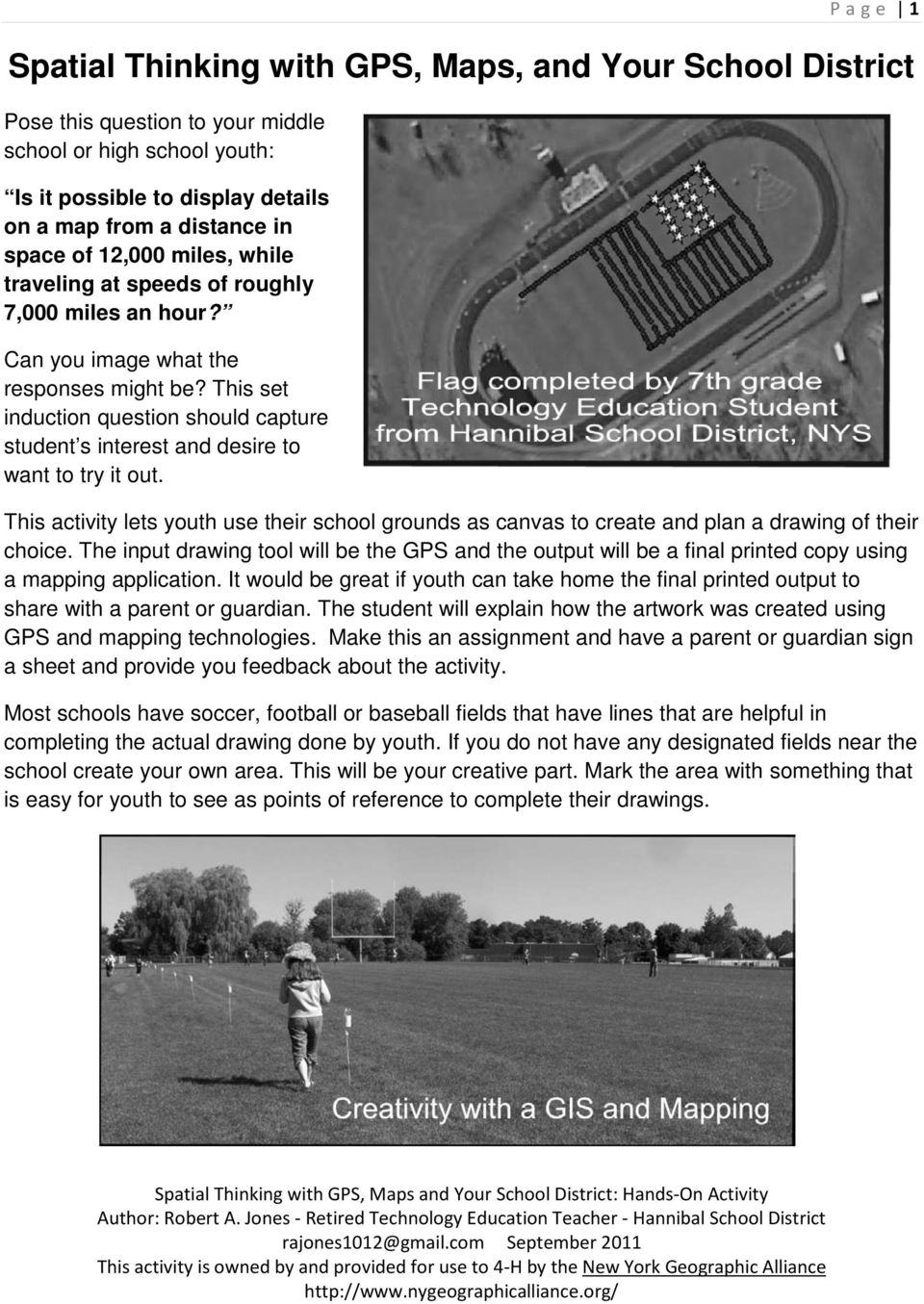
1 Page 1 Spatial Thinking with GPS, Maps, and Your School District Pose this question to your middle school or high school youth: Is it possible to display details on a map from a distance in space of 12,000 miles, while traveling at speeds of roughly 7,000 miles an hour? Can you image what the responses might be? This set induction question should capture student s interest and desire to want to try it out. This activity lets youth use their school grounds as canvas to create and plan a drawing of their choice. The input drawing tool will be the GPS and the output will be a final printed copy using a mapping application. It would be great if youth can take home the final printed output to share with a parent or guardian. The student will explain how the artwork was created using GPS and mapping technologies. Make this an assignment and have a parent or guardian sign a sheet and provide you feedback about the activity. Most schools have soccer, football or baseball fields that have lines that are helpful in completing the actual drawing done by youth. If you do not have any designated fields near the school create your own area. This will be your creative part. Mark the area with something that is easy for youth to see as points of reference to complete their drawings.
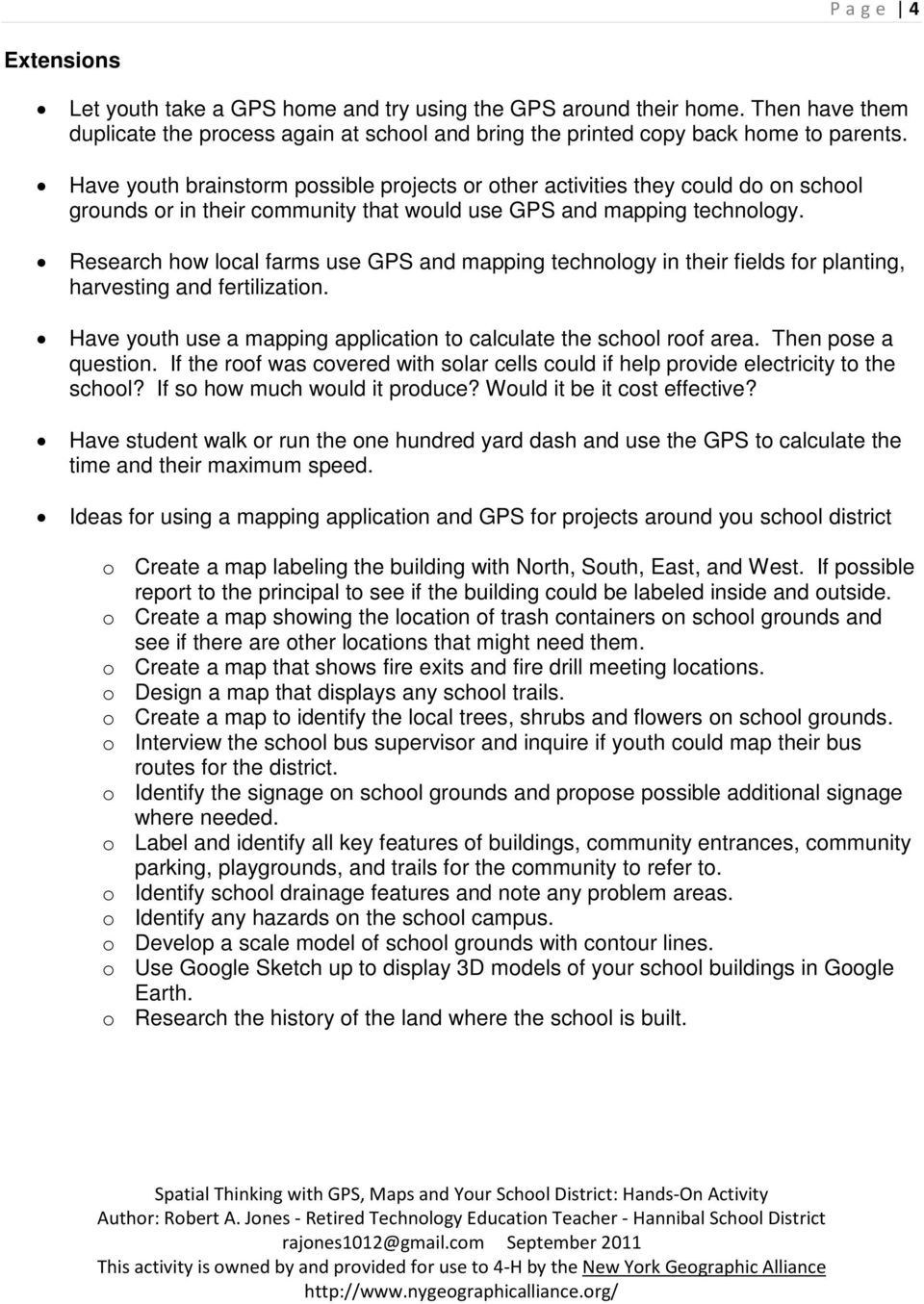
2 Page 2 Whatever area you use for the drawing, it is important to have youth plan out their design on paper. You can have youth use graph paper, create your own planning sheet, or use drawings or images from the web. When they are in the field using the GPS they will have to make spatial relationships between their drawings and where they will be walking. A clip board can be handy in the field. (Field example from internet and teacher example - below) From my experience, the best way for middle or high school youth to complete their drawing is to use waypoints. Every 6th step youth will mark a waypoint. Most GPS units can capture about 500 to 1000 waypoints. Many of the energetic youth will record close to 999 waypoints and others will record in the 300 to 500 range. The tracks function can also be turned to capture their tracks as they walk. Sometimes when projected in mapping applications there may be stray lines and a little more difficult to edit. Back in the classroom, the software of choice (and also free) is DNR Garmin but there are other applications that can be used. Youth will download their data by hooking the GPS to either a serial port or USB port depending on the computer used. The DNR Garmin application can recognize either connection. Youth will download their waypoints and save them to a location they can access later. The easiest to use will be Google Earth Format (*.kml) which can be used with Google Earth. If you have Arc Map software or want to use ArcGIS Explorer Online save waypoints as ArcView Shape (Projected) (*.shp). Make sure youth name and save to a location that they can retrieve the waypoints later. The file name should be the student s last name and project name with no spaces. Have youth input their waypoints into a mapping application. Hopefully during this stage you will hear a buzz like, Wow, I created this cool drawing with multimillion dollars satellites 12,000

3 Page 3 miles high in the atmosphere, while traveling at speeds of roughly 7,000 miles an hour for free! For the final step, youth will need to symbolize the waypoints with color, size, text and other information you require. A final copy of the map can be created by the keyboard function Print Screen and then pasting into a software program like Word, Photoshop or PhotoDraw. Evaluation Planning of drawing to be used on the football field - final drawing attached GPS drawing - waypoints resemble what you planned Using GIS mapping software provide proper layout and print a final copy for evaluation Parent or Guardian signature Standards - NYS Standards related to these activities that were used to support technology education curriculum. Students will explore how subsystems and system elements inputs, processes, outputs interact within systems. Students will demonstrate engineering design to locate and utilize a range of printed, electronic, and human information resources to obtain ideas. Students will demonstrate the proper use a computer system to connect to and access needed information from various Internet sites and use appropriate GIS software. Standards - (ISTE) International Society for Technology in Education Creativity and Innovation - Students demonstrate creative thinking, construct knowledge, and develop innovative products and processes using technology Critical Thinking, Problem Solving, and Decision Making - Students use critical thinking skills to plan and conduct research, manage projects, solve problems, and make informed decisions using appropriate digital tools and resources. Technology Operations and Concepts - Students demonstrate a sound understanding of technology concepts, systems, and operations.

4 Page 4 Extensions Let youth take a GPS home and try using the GPS around their home. Then have them duplicate the process again at school and bring the printed copy back home to parents. Have youth brainstorm possible projects or other activities they could do on school grounds or in their community that would use GPS and mapping technology. Research how local farms use GPS and mapping technology in their fields for planting, harvesting and fertilization. Have youth use a mapping application to calculate the school roof area. Then pose a question. If the roof was covered with solar cells could if help provide electricity to the school? If so how much would it produce? Would it be it cost effective? Have student walk or run the one hundred yard dash and use the GPS to calculate the time and their maximum speed. Ideas for using a mapping application and GPS for projects around you school district o Create a map labeling the building with North, South, East, and West. If possible report to the principal to see if the building could be labeled inside and outside. o Create a map showing the location of trash containers on school grounds and see if there are other locations that might need them. o Create a map that shows fire exits and fire drill meeting locations. o Design a map that displays any school trails. o Create a map to identify the local trees, shrubs and flowers on school grounds. o Interview the school bus supervisor and inquire if youth could map their bus routes for the district. o Identify the signage on school grounds and propose possible additional signage where needed. o Label and identify all key features of buildings, community entrances, community parking, playgrounds, and trails for the community to refer to. o Identify school drainage features and note any problem areas. o Identify any hazards on the school campus. o Develop a scale model of school grounds with contour lines. o Use Google Sketch up to display 3D models of your school buildings in Google Earth. o Research the history of the land where the school is built.
5 Page 5 References Going places with GPS - Easy GPS Activities for Clubs, Classrooms and Beyond Roger Palmer and Anita Palmer Manufactured by: GISetc Easy GPS Activities for Clubs, Classroom and beyond is the first GPS book with fun and exciting lessons and activities that you can do with your GPS. This book eases the beginning user into using a GPS with straight forward, simple exercises and then gradually adds to the level of difficulty. Fun with GPS Donald Cooke 2005 For the millions of GPS owners who love their GPS units but don't know all they can do with them, this fun guide shows that a GPS can do a lot more than just calculate a location. Dozens of illustrated examples show how a GPS can be attached to a multitude of devices, including dogsleds, race cars, hot-air balloons, windsurfers, pet animals, ski racers, hockey players, and sailboats. Each example includes maps and photographs to inspire hobbyists, airline passengers, athletes, animal lovers, drivers, teachers, and youth to track and map their activities. How to incorporate GPS mapping technology in the classroom in order to reinforce science, math, and geography curricula, provide the groundwork for project-based learning, and show youth that their schoolwork is important and relevant is discussed. Integrating GIS and Global Positioning Systems Karen Steede-Terry 2000 The coupling of the Global Positioning System (GPS) with Geographic Information System (GIS) is an information revolution that will give unprecedented accuracy in measurement and completeness of coverage to anyone who works with geographic data of any kind. This comprehensive reference answers the myriad questions involved in combining these two systems for maximum benefit. It provides information about how GPS works, the pros and cons of implementing GPS use, what is the best GPS system for specific applications, and how to integrate the technology and equipment needed to use GPS with existing GIS systems.

6 Page 6 DNRGarmin GPS Application Software can be downloaded for free This extension was built to provide users the ability to directly transfer data between Garmin GPS handheld receivers and various GIS software packages. Using this program a user can use point features (graphics or shapefile) and upload them to the GPS as Waypoints. Line and Polygon Graphics or shapes can be uploaded to the GPS as Track Logs or Routes. Conversely, Waypoints, Track Logs, and Routes collected using the GPS can be transferred directly to ArcView/ArcMap/Google Earth/Landview and saved as Graphics or Shapefiles. GeoMentor Program - A GeoMentor "adopts" a school, class, or club and supports the educator/s in working with youth. Using tools of geography (such as maps and globes, atlases, charts, imagery, and field work), the GeoMentor helps the educator and youth develop skills in geographic thinking. Examples - online imagery and waypoints

7
Learning about GPS and GIS
 Learning about GPS and GIS Standards 4.4 Understand geographic information systems (G.I.S.). B12.1 Understand common surveying techniques used in agriculture (e.g., leveling, land measurement, building
Introduction to Geography
 High School Unit: 1 Lesson: 1 Suggested Duration: 3 days Introduction to Lesson Synopsis: The purpose of this lesson is to introduce students to geography and geography terminology, to teach students about
Using the Garmin etrex 10 GPS
 Using the Garmin etrex 10 GPS Topic 1: Getting started... 2 1. What is Garmin etrex 10 GPS?... 2 2. About this guide... 2 Topic 2: Getting to know your etrex 10... 3 1. Buttons and components... 3 2. Getting
DNR Garmin A User Guide for Educators Prepared by: The Virginia Geospatial Extension Program
 Introduction to GPS DNR Garmin A User Guide for Educators Prepared by: The Virginia Geospatial Extension Program Overview DNR Garmin is an easy to use software application that allows you to manage, manipulate
FCC Management Software Field Manager PRO 360
 FCC Management Software Field Manager PRO 360 Mapping Guide Setup Defining the main farm address To define the main farm address (internet connection required): 1. Click on the Setup menu. 2. Select Fields.
WHAT IS GIS - AN INRODUCTION
 WHAT IS GIS - AN INRODUCTION GIS DEFINITION GIS is an acronym for: Geographic Information Systems Geographic This term is used because GIS tend to deal primarily with geographic or spatial features. Information
Using Google Earth for Environmental Science Research
 Using Google Earth for Environmental Science Research This document is up-to-date as of August 2013. If you have any questions or additions to this material please email [email protected]. Note: this
From GPS Data Collection to GIS Data Display A Walk-Through Example
 From GPS Data Collection to GIS Data Display A Walk-Through Example The Global Positioning System (GPS) is a satellite based navigation system consisting of 24 satellites, a worldwide network of tracking
Using Handheld GPS Units in the Field Overview
 Using Handheld GPS Units in the Field Overview Most recently revised 3/13/12 Equipment to have with you in the field PC laptop loaded with: - ESRI ArcMap 10 (get from Tufts GIS Support) - DNR Garmin (freeware
Sample Pages. Free E-mail Newsletter Sign up Today! Learn Through Experience
 Learn Through Experience Sample Pages Sample pages from this product are provided for evaluation purposes. The entire product is available for purchase at www.socialstudies.com or www.teachinteract.com
Once in a Blue Moon (Number Systems and Number Theory)
 The Middle School Math Project Once in a Blue Moon (Number Systems and Number Theory) Objective Students will use number theory skills to investigate when certain planets are aligned. Overview of the Lesson
PHASE 2_3 RD SESSION REPORT KU GIS LABS ARCGIS TRAINING: USING ARCGIS (APPLICATIONS) 18 TH - 22 ND AUGUST 2014 SCHOOL OF ENGINEERING COMPUTER LAB
 PHASE 2_3 RD SESSION REPORT KU GIS LABS ARCGIS TRAINING: USING ARCGIS (APPLICATIONS) 18 TH - 22 ND AUGUST 2014 SCHOOL OF ENGINEERING COMPUTER LAB PHASE 2_3 rd SESSION REPORT ARCGIS TRAINING: 18 TH - 22
Guide to Viewing Maps in Google Earth
 Guide to Viewing Maps in Google Earth The BCT made the decision to provide the GIS (Geographic Information System) resources for Bat Groups in the form of Google Earth maps because they do not require
Tutorial 6 GPS/Point Shapefile Creation
 Tutorial 6 GPS/Point Shapefile Creation The objectives of this tutorial include: 1. Converting GPS field collected point information into a shapefile 2. Creating a shapefile from a simple x,y coordinate
Introduction to GIS. http://libguides.mit.edu/gis
 Introduction to GIS http://libguides.mit.edu/gis 1 Overview What is GIS? Types of Data and Projections What can I do with GIS? Data Sources and Formats Software Data Management Tips 2 What is GIS? 3 Characteristics
SECOND GRADE 1 WEEK LESSON PLANS AND ACTIVITIES
 SECOND GRADE 1 WEEK LESSON PLANS AND ACTIVITIES UNIVERSE CYCLE OVERVIEW OF SECOND GRADE UNIVERSE WEEK 1. PRE: Discovering stars. LAB: Analyzing the geometric pattern of constellations. POST: Exploring
GPS Applications in Agriculture. Gary T. Roberson Agricultural Machinery Systems
 GPS Applications in Agriculture Gary T. Roberson Agricultural Machinery Systems What is a Positioning System? A position information system enables the user to determine absolute or relative location of
GIS: Geographic Information Systems A short introduction
 GIS: Geographic Information Systems A short introduction Outline The Center for Digital Scholarship What is GIS? Data types GIS software and analysis Campus GIS resources Center for Digital Scholarship
The benefits and challenges of wind energy
 Lesson Overview The benefits and challenges of wind energy In this lesson, students will evaluate the potential of wind energy in terms of its benefits and challenges. Students will use critical thinking
1. Download Track using BaseMap if using Oregon (MapSource does not work with Oregon)
 RegisCad GARMIN TRACKS LAT, LONG --> Y,X 1. Download Track using BaseMap if using Oregon (MapSource does not work with Oregon) 2. Edit unnecessary points in BaseMap 3. Save as.gdb file 4. Bring into Mapsource
Introduction to Google Earth May 24, 2011. TJ Keiran Senior Planner / GIS Specialist Cowlitz-Wahkiakum Council of Governments
 Introduction to Google Earth May 24, 2011 TJ Keiran Senior Planner / GIS Specialist Cowlitz-Wahkiakum Council of Governments Purpose of this class Introduce free version of Google Earth Demonstrate common
Preschool Science Curriculum Map
 Month & Ideas AUG. Help each child explore the room Unit Family KY EC Standards & Benchmarks Science Standard 1: Demonstrates scientific ways of thinking and working (with wonder and curiosity) Benchmark
Thought for the Day Master Lesson
 Welcome and Introductions Lesson 2 LESSON 2 Thought for the Day Master Lesson Thought for the Day Education is not the filling of a pail, but the lighting of a fire. William Butler Yeats Overview: The
GUIDEBOOK. Version 1. 2006-07
 GUIDEBOOK Version 1. 2006-07 Table of Contents Introduction...1 How to Register...2 Lesson Plan...3 Make the Game Interesting...5 How to Initiate the Activity...6 Letter to Teachers...7 Class Mileage Tracker...8
GIS Tools for Land Managers
 Citation: Karl, J. 2010. GIS Tools for Land Managers. Sound Science White Paper Series #05. www.sound-science.org. GIS Tools for Land Managers Most land managers recognize that geographic information systems
Egypt Lesson Plan 7: Touring Ancient Egypt
 Egypt Lesson Plan 7: Touring Ancient Egypt Introduction: This lesson focuses on the importance of geographic features and the abundance of natural resources that helped ancient Egypt become the world s
Previous Letterland at Tweetsie Railroad Motivation and reward Letterland at Tweetsie Curriculum Guides
 Previous Letterland at Tweetsie Railroad Each May since 2007, children from all over North Carolina (and Texas and Georgia) have come to Letterland at Tweetsie Railroad, where we have transformed our theme
The Use of GIS and Handheld GPS Integration for the Preparation of Quick Plans
 The Use of GIS and Handheld GPS Integration for the Preparation of Quick Plans Can Ayday Satellite and Space Sciences Research Institute Anadolu University Eskisehir-TURKEY E mail: [email protected]
Educational Level Guide. Pros
 GIS software summary This information is based on an evaluation carried out on behalf of the RGS-IBG (please see disclaimer). Category* Cost E- learnin g credits Educational Level Guide Pros Cons Summary
Providing the Public with Data Visualization using Google Maps
 GIS - T March 30 th, 2011 Providing the Public with Data Visualization using Google Maps Patrick Kielty and Matt Allen Pennsylvania Department of Transportation Purpose Quickly and Easily create web based
GIS I Business Exr02 (av 9-10) - Expand Market Share (v3b, Jul 2013)
 GIS I Business Exr02 (av 9-10) - Expand Market Share (v3b, Jul 2013) Learning Objectives: Reinforce information literacy skills Reinforce database manipulation / querying skills Reinforce joining and mapping
Signs of the Seasons: A Maine Phenology Project
 Signs of the Seasons: A Maine Phenology Project http://umaine.edu/signs- of- the- seasons/ Mapping and Graphing Your Phenology Observations Authors: Beth Bisson 1, Medea Steinman 2, and Esperanza Stancioff
Cookbook 23 September 2013 GIS Analysis Part 1 - A GIS is NOT a Map!
 Cookbook 23 September 2013 GIS Analysis Part 1 - A GIS is NOT a Map! Overview 1. A GIS is NOT a Map! 2. How does a GIS handle its data? Data Formats! GARP 0344 (Fall 2013) Page 1 Dr. Carsten Braun 1) A
Systems of Transportation and Communication Grade Three
 1 Ohio Standards Connection: Geography Benchmark D Analyze ways that transportation and communication relate to patterns of settlement and economic activity. Indicator 8 Identify systems of transportation
Elementary Whiteboard Resources
 Elementary Whiteboard Resources Scholastic Science Reports Activities on erosion, animals adaptations, friction and simple machines. http://teacher.scholastic.com/dirtrep/index.htm Class Tools Allows you
User s Guide to ArcView 3.3 for Land Use Planners in Puttalam District
 User s Guide to ArcView 3.3 for Land Use Planners in Puttalam District Dilhari Weragodatenna IUCN Sri Lanka, Country Office Table of Content Page No Introduction...... 1 1. Getting started..... 2 2. Geo-referencing...
Civil Engineering and Architecture (CEA) Detailed Outline
 Civil Engineering and Architecture (CEA) Detailed Outline Unit 1: Overview of Civil Engineering and Architecture (23 days) Lesson 1.1: History of Civil Engineering and Architecture 1. Many features of
GPS 72. Personal Navigator. Read This First! quick start guide
 GPS 72 Personal Navigator Read This First! quick start guide Internal Antenna Quick Start Unit Overview Interface keys MOB ZOOM Battery Compartment MARK External Data/Auxilary Power Port 120 x 160 Four
Educator s Guide to Food Webs in Google Earth
 Educator s Guide to Food Webs in Google Earth Overview: This activity is directed towards 7 th grade science students exploring food webs. Students will research individual organisms with in a food web
CanWay User S Manual. 2012 December
 CanWay User S Manual 2012 December Contents Install CanWay.3 Read GPS Log From Device... 5 Clear Data Logger Memory... 10 Data Logger Configuration... 10 Track List Window... 12 TAB List Window... 12 Add
NJ ASK PREP. Investigation: Mathematics. Paper Airplanes & Measurement. Grade 3 Benchmark 3 Geometry & Measurement
 S E C T I O N 4 NJ ASK PREP Mathematics Investigation: Paper Airplanes & Measurement Grade 3 Benchmark 3 Geometry & Measurement This work is licensed under the Creative Commons Attribution-NonCommercial-NoDerivs
Free Google Tools for Creating Interactive Mapping Mashups
 Free Google Tools for Creating Interactive Mapping Mashups Cary Chadwick Emily Wilson Tuesday, May 10, 2011 2pm Welcome to the CLEAR Webinar Series! This is the fourth in the 2011 series Riparian Corridors,
Mapping Mashup/Data Integration Development Resources
 Mapping Mashup/Data Integration Development Resources David Hart GIS Specialist University of Wisconsin Sea Grant Institute October 6, 2008 Virtual Globes A virtual globe is a 3D software model or representation
Parts of a Computer. Preparation. Objectives. Standards. Materials. 1 1999 Micron Technology Foundation, Inc. All Rights Reserved
 Parts of a Computer Preparation Grade Level: 4-9 Group Size: 20-30 Time: 75-90 Minutes Presenters: 1-3 Objectives This lesson will enable students to: Identify parts of a computer Categorize parts of a
http://www.esri.com/bia
 ArcGIS for Tribal Transportation Management David Gadsden Federal Account Manager [email protected] d d 1 David Gadsden GIS Background UW Geography (1995) Peace Corps Tanzania Environmental Social Science
National Register of Historic Places: GIS Webinar Cultural Resource GIS Facility National Park Service June 2012
 National Register of Historic Places: GIS Webinar Cultural Resource GIS Facility National Park Service June 2012 In February and March 2012 the National Register of Historic Places held webinars in conjunction
Elementary Math Methods Syllabus
 Elementary Math Methods Syllabus Course Description This course is designed to support both new and experienced elementary math educators in refining and focusing their instructional skills. Close examination
GIS Lesson 6 MAPS WITH RASTER IMAGES III: SATELLITE IMAGERY TEACHER INFORMATION
 GIS Lesson 6 MAPS WITH RASTER IMAGES III: SATELLITE IMAGERY TEACHER INFORMATION Lesson Summary: During this lesson students use GIS to load and view truecolor and enhanced satellite images of Alaska. Based
Unit: Healthy Habits Grade: 1
 Unit: Healthy Habits 5.3b Good health habits include hand washing, personal cleanliness; avoiding harmful substances; eating a balanced diet; engaging in regular eercise ways to stay healthy Wash hands
Teacher notes and activities
 Teacher notes and activities This resource provides teachers in the early years with a versatile classroom resource that can be used on the Internet or printed out and presented as a booklet or worksheets.
Paper Airplane Lab Assignment Sheet
 Science Paper Airplane Activity Summary In this activity, students will: Create a name and design for three (3) paper Prior Knowledge Essential Skills Making paper airplanes Use of stopwatches airplanes
Problem of the Month: Fair Games
 Problem of the Month: The Problems of the Month (POM) are used in a variety of ways to promote problem solving and to foster the first standard of mathematical practice from the Common Core State Standards:
Introduction to Teacher Aide
 Introduction to Teacher Aide TEACHER AIDES WHAT THEY ARE AND WHAT THEY ARE NOT Teacher aides come in all sizes, shapes, and ages. Some are junior high students who tutor elementary school students. Other
Making MAGIC with Your Data: Interactive Maps, Map Mashups, and Data Visualization Tools
 Making MAGIC with Your Data: Interactive Maps, Map Mashups, and Data Visualization Tools Michael Howser Connecticut State Data Center Coordinator & Undergraduate Education & GIS Librarian What is the Connecticut
Quick Start Guide to. ArcGISSM. Online. for Public Accounts
 Quick Start Guide to ArcGISSM Online for Public Accounts Using ArcGIS Online with a Public Account ArcGIS SM Online is a cloud-based mapping platform that allows you to easily and quickly make maps, collaborate,
Where in the World is the arctic?
 Where in the World is the arctic? Summary: Students map the arctic in relation to their home in order to learn the location and countries of the arctic. Grade Level: 3-4; 5-8; K-2 Time one class period.
Google Earth Connections for ArchiCAD 15. Product Manual
 Google Earth Connections for ArchiCAD 15 Product Manual GRAPHISOFT Visit the GRAPHISOFT website at http://www.graphisoft.com for local distributor and product availability information. Google Earth Connections
Subject: Using Google Earth, Google Earth Pro, and Google Maps for FWS activities
 Subject: Using Google Earth, Google Earth Pro, and Google Maps for FWS activities Page 1 of 5 As an FWS employee, can I use Google mapping software or applications to help me with my job? The short answer
NCSS Standards 1. d. compare ways in which people from different cultures think about and deal with their physical environment and social conditions;
 NCSS Standards 1 National Council for the Social Studies (NCSS) Curriculum Standards for Social Studies Standard I. Culture study of culture and cultural diversity, so that the learner can a. explore and
A Brief Explanation of Basic Web Services
 A Brief Explanation of Basic Web Services What is REST? REpresentational State Transfer (REST) is a way for software to work when distributed across a network. For example, if I want to view the Iowa Dept
Sonar Principles:- A typical specification sheet would look like this:-
 Sonar Principles:- In part one I concentrated on the head unit s display size, resolution and brightness thus highlighting how important it is to understand these features before actually buying a Sonar,
Meaning of Home. Writing Assignment: Lesson plan for Grades 4, 5 and 6
 Meaning of Home Writing Assignment: Lesson plan for Grades 4, 5 and 6 Background Are you looking for interesting ways to engage your students in creative writing or community service? From October 1 to
Third Grade Shapes Up! Grade Level: Third Grade Written by: Jill Pisman, St. Mary s School East Moline, Illinois Length of Unit: Eight Lessons
 Third Grade Shapes Up! Grade Level: Third Grade Written by: Jill Pisman, St. Mary s School East Moline, Illinois Length of Unit: Eight Lessons I. ABSTRACT This unit contains lessons that focus on geometric
Skoolbo - Go US Kids Go! Parent Guide
 10/7/2014 VERSION 1.6.4 Skoolbo Ltd. USA 400 Continental Blvd., 6 th Floor, #6024, El Segundo, CA 90245 310.307.3757 1 Table of Contents 1. Welcome... 3 2. Quick Start Getting Going... 4 2.1 Download the
for Technology (ICT) Literate Students
 A major component of the NETS Project is the development of a general set of profiles describing technology (ICT) literate students at key developmental points in their precollege education. These profiles
Weed Survey and Mapping
 Weed Survey and Mapping The primary objective of weed surveying and mapping is to accurately identify and delineate land with populations of invasive plants or noxious weeds. These surveys allow land managers
Pre visit lesson: Eco Hike Biotic and Abiotic
 Pre visit lesson: Eco Hike Biotic and Abiotic 1. Lesson Plan Information Subject/Course: Science Understanding Life Systems/Maintaining Healthy Organ Systems Grade Level: 7 Topic: Human Organ Systems (STEM)
ALIKE AND DIFFERENT: GERMANY, THE UNITED STATES, AND OUR REGION. A Second Grade Lesson Plan
 ALIKE AND DIFFERENT: GERMANY, THE UNITED STATES, AND OUR REGION A Second Grade Lesson Plan Wanda Dengel Notre Dame Elementary Portsmouth, Ohio September 26,2008 1 (NOTE: The Second Grade Lesson below can
EMERGENCY ACTION AND FIRE PREVENTION PLAN
 Sample Written Safety Program For EMERGENCY ACTION AND FIRE PREVENTION PLAN Page 1 EMERGENCY ACTION AND FIRE PREVENTION PLAN (YOUR COMPANY NAME) EMPLOYEE EMERGENCY AND FIRE PREVENTION PLANS Emergencies
LifeSmarts Safety Smart Ambassador Program PowerPoint Discussion Notes
 Slide 1 Safety Smart Ambassador Program LifeSmarts challenges teens to engage in service learning and community service This presentation will help you understand more about the Safety Smart Ambassador
Elementary School Sea Turtle Lesson Plan Developed by Cathy Payne
 Elementary School Sea Turtle Lesson Plan Developed by Cathy Payne Background: Elementary school-aged children are very drawn to stories, both fiction and nonfiction, about sea turtles, but there are limited
Rome Lesson Plan 4: Mapping an Empire
 Rome Lesson Plan 4: Mapping an Empire Introduction: In this lesson, students will compare a map of the Roman Empire in 44 BC with one of the Roman Empire in 116 AD. Using these two maps as a reference,
Motion & The Global Positioning System (GPS)
 Grade Level: K - 8 Subject: Motion Prep Time: < 10 minutes Duration: 30 minutes Objective: To learn how to analyze GPS data in order to track an object and derive its velocity from positions and times.
Advanced Level. www.takechargetoday.arizona.edu EACH LESSON PLAN IS DESIGNED AND CONTINUALLY MATERIALS
 Page 1 2.2.2 THE BASICS OF TAXES Advanced Level www.takechargetoday.arizona.edu RECOMMENDED GRADE LEVELS 10 12 AVERAGE TIME TO COMPLETE Anticipatory Set & Facilitation: 55 minutes Conclusion/Assessment
Tiered Assignments. Basic Tiered Activity Example: Completing a Character Map
 Tiered Assignments In a differentiated classroom, a teacher uses varied levels of tasks to ensure that students explore ideas and use skills at a level that builds on what they already know and encourages
Give students a lesson in navigation from the points of the compass to GPS mapping.
 Lesson 5: Teaching Directions, Maps, and Coordinates Give students a lesson in navigation from the points of the compass to GPS mapping. by Jenny Parma; curriculum by Diane Petersen and Karen Dvornich
SUBSTITUTE TEACHER GUIDE
 NATICK PUBLIC SCHOOLS SUBSTITUTE TEACHER GUIDE Our Vision Statement: The Natick Public Schools is a community focused on and dedicated to all students achieving high standards in a safe, trusting, respectful
Maryland Technology Literacy Standards for Students
 Standard 1.0 Technology Systems: Develop foundations in the understanding and uses of technology systems Pre-kindergarten Kindergarten Grade 1 Grade 2 Grade 3 A. Systems A. Systems A. Systems A. Systems
Hello Purr. What You ll Learn
 Chapter 1 Hello Purr This chapter gets you started building apps. It presents the key elements of App Inventor the Component Designer and the Blocks Editor and leads you through the basic steps of creating
Plant In a Cup. When considering what to do for our curriculum project, our main goal was
 Sammi Meril and Grace Slone Final Paper Kindergarten Education 200 May/6/2013 Plant In a Cup When considering what to do for our curriculum project, our main goal was to create stimulating lesson that
Churnet View Middle School Displays
 Churnet View Middle School Displays Following meetings where the importance of visual learning has been discussed we have, as an English department, made a conscious effort to use more interesting, interactive
Tips & Tricks for ArcGIS. Presented by: Jim Mallard, Crime Analysis Supervisor Arlington, Texas. 2007 IACA Conference Pasadena, Ca
 Tips & Tricks for ArcGIS Presented by: Jim Mallard, Crime Analysis Supervisor Arlington, Texas 2007 IACA Conference Pasadena, Ca Table of Contents Lock & Load Labels for Maximum Speed!...2 Choose your
Mapping Mashup/Data Integration Development Resources Teaching with Google Earth and Google Ocean Stone Lab August 13, 2010
 Mapping Mashup/Data Integration Development Resources Teaching with Google Earth and Google Ocean Stone Lab August 13, 2010 David Hart GIS Specialist University of Wisconsin Sea Grant Institute Virtual
Acquisition Lesson Plan for the Concept, Topic or Skill---Not for the Day
 Acquisition Lesson Plan Concept: Linear Systems Author Name(s): High-School Delaware Math Cadre Committee Grade: Ninth Grade Time Frame: Two 45 minute periods Pre-requisite(s): Write algebraic expressions
Measuring Angles. Grade Band: 3-5. Lesson Length: Approximately 2 days
 Measuring rade Band: 3-5 Lesson Length: Approximately 2 days NCTM Standard and Expectation eometry Standard 1. Analyze characteristics and properties of two- and three-dimensional geometric shapes and
Google Sites From the Ground Up
 Table of Contents Web Publishing Basics...3 Parental Permission...3 Protection...3 Creating a Google Site...4 Basic Page Content...6 Update Content...6 Previewing the Page...6 Email Contact Link...7 Sidebar
Hold a Petition Signing Event for The End of Bullying Begins With Me
 Hold a Petition Signing Event for The End of Bullying Begins With Me Guidelines for encouraging kids, teens, and adults to sign the petition PACER s National Bullying Prevention Center PACER.org/Bullying
Have several sets of truck pieces (see below for list of truck pieces) cut out for the group.
 TEACHER S GUIDE III Grades: 3rd and 4th Grade The exercises below are meant to inspire greater creativity with more complex tasks and reasoning. Students are required to pay attention and follow instructions
Basic Computer Skills Module 4. Introduction to Microsoft PowerPoint 2010
 Basic Computer Skills Module 4 Introduction to Microsoft PowerPoint 2010 Basic Computer Skills Module 4 Introduction to Microsoft PowerPoint 2010 Summary Goal(s): This unit includes lessons on how to use
Creating a Jeopardy Review Game using PowerPoint software.
 DKeane MSMC ED 5700 ICP - Lesson Plan Using Technology in the K-8 Science Curriculum Creating a Jeopardy Review Game using PowerPoint software. (Sample Performance objectives and questions are based on
T E A C H E R S N O T E S
 T E A C H E R S N O T E S Focus: Students explore energy: its sources, forms, and transformations. Students also consider the benefits of energy-efficient technologies and energy conservation. Learning