
Symantec Security Information Manager 4.5 Reporting Guide
|
|
|
- Vernon Robertson
- 9 years ago
- Views:
Transcription

1 Symantec Information Manager 4.5 Reporting Guide

2 The software described in this book is furnished under a license agreement and may be used only in accordance with the terms of the agreement. Documentation version 1.0 Legal Notice Copyright 2007 Symantec Corporation. All rights reserved. Symantec, the Symantec Logo are trademarks or registered trademarks of Symantec Corporation or its affiliates in the U.S. and other countries. Other names may be trademarks of their respective owners. The product described in this document is distributed under licenses restricting its use, copying, distribution, and decompilation/reverse engineering. No part of this document may be reproduced in any form by any means without prior written authorization of Symantec Corporation and its licensors, if any. THE DOCUMENTATION IS PROVIDED "AS IS" AND ALL EXPRESS OR IMPLIED CONDITIONS, REPRESENTATIONS AND WARRANTIES, INCLUDING ANY IMPLIED WARRANTY OF MERCHANTABILITY, FITNESS FOR A PARTICULAR PURPOSE OR NON-INFRINGEMENT, ARE DISCLAIMED, EXCEPT TO THE EXTENT THAT SUCH DISCLAIMERS ARE HELD TO BE LEGALLY INVALID. SYMANTEC CORPORATION SHALL NOT BE LIABLE FOR INCIDENTAL OR CONSEQUENTIAL DAMAGES IN CONNECTION WITH THE FURNISHING, PERFORMANCE, OR USE OF THIS DOCUMENTATION. THE INFORMATION CONTAINED IN THIS DOCUMENTATION IS SUBJECT TO CHANGE WITHOUT NOTICE. The Licensed Software and Documentation are deemed to be commercial computer software as defined in FAR and subject to restricted rights as defined in FAR Section "Commercial Computer Software - Restricted Rights" and DFARS , "Rights in Commercial Computer Software or Commercial Computer Software Documentation", as applicable, and any successor regulations. Any use, modification, reproduction release, performance, display or disclosure of the Licensed Software and Documentation by the U.S. Government shall be solely in accordance with the terms of this Agreement. Symantec Corporation Stevens Creek Blvd. Cupertino, CA Printed in the United States of America
3 Technical Support Symantec Technical Support maintains support centers globally. Technical Support s primary role is to respond to specific queries about product feature and function. The Technical Support group also authors content for our online Knowledge Base. The Technical Support group works collaboratively with the other functional areas within Symantec to answer your questions in a timely fashion. For example, the Technical Support group works with Product Engineering and Symantec Response to provide alerting services and virus definition updates. Symantec s maintenance offerings include the following: A range of support options that give you the flexibility to select the right amount of service for any size organization A telephone and web-based support that provides rapid response and up-to-the-minute information Upgrade assurance that delivers automatic software upgrade protection Global support that is available 24 hours a day, 7 days a week Advanced features, including Account Management Services For information about Symantec s Maintenance Programs, you can visit our Web site at the following URL: Contacting Technical Support Customers with a current maintenance agreement may access Technical Support information at the following URL: Before contacting Technical Support, make sure you have satisfied the system requirements that are listed in your product documentation. Also, you should be at the computer on which the problem occurred, in case it is necessary to recreate the problem. When you contact Technical Support, please have the following information available: Product release level Hardware information Available memory, disk space, and NIC information Operating system
4 Version and patch level Network topology Router, gateway, and IP address information Problem description: Error messages and log files Troubleshooting that was performed before contacting Symantec Recent software configuration changes and network changes Licensing and registration Customer service If your Symantec product requires registration or a license key, access our technical support Web page at the following URL: Customer service information is available at the following URL: Customer Service is available to assist with the following s of issues: Questions regarding product licensing or serialization Product registration updates such as address or name changes General product information (features, language availability, local dealers) Latest information about product updates and upgrades Information about upgrade assurance and maintenance contracts Information about the Symantec Buying Programs Advice about Symantec's technical support options Nontechnical presales questions Issues that are related to CD-ROMs or manuals

5 Maintenance agreement resources Additional Enterprise services If you want to contact Symantec regarding an existing maintenance agreement, please contact the maintenance agreement administration team for your region as follows: Asia-Pacific and Japan: Europe, Middle-East, and Africa: North America and Latin America: Symantec offers a comprehensive set of services that allow you to maximize your investment in Symantec products and to develop your knowledge, expertise, and global insight, which enable you to manage your business risks proactively. Enterprise services that are available include the following: Symantec Early Warning Solutions These solutions provide early warning of cyber attacks, comprehensive threat analysis, and countermeasures to prevent attacks before they occur. Managed Services Consulting Services Educational Services These services remove the burden of managing and monitoring security devices and events, ensuring rapid response to real threats. Symantec Consulting Services provide on-site technical expertise from Symantec and its trusted partners. Symantec Consulting Services offer a variety of prepackaged and izable options that include assessment, design, implementation, monitoring and management capabilities, each focused on establishing and maintaining the integrity and availability of your IT resources. Educational Services provide a full array of technical training, security education, security certification, and awareness communication programs. To access more information about Enterprise services, please visit our Web site at the following URL: Select your country or language from the site index.

6

7 Contents Technical Support Chapter 1 Chapter 2 Chapter 3 Chapter 4 Introducing Symantec Information Manager reporting About Symantec Information Manager reporting... 9 Components of Symantec Information Manager reporting About Symantec Information Manager queries About Symantec Information Manager reports Where to get more information about Symantec Information Manager Understanding Symantec Information Manager queries About the predefined System queries What you can do with Symantec Information Manager queries Using the query features Understanding Symantec Information Manager reports About Symantec Information Manager reports Using the report creation tools Example: Creating a simple network health report System queries reference All folder folder Templates folder Product folder SSIM folder folder... 63
8 8 Contents queries Custom queries Summary queries Index

9 Chapter 1 Introducing Symantec Information Manager reporting This chapter includes the following topics: About Symantec Information Manager reporting Components of Symantec Information Manager reporting Where to get more information about Symantec Information Manager About Symantec Information Manager reporting Symantec Information Manager provides a rich set of query and reporting tools that allow you to collect and present data in a format that meets the needs of your organization. are used to retrieve data from the system for viewing events, displaying information on the dashboard, and building reports. Reports are designed, previewed, and scheduled from the Information Manager console. Numerous predefined queries are provided with Information Manager that can help you get started with building your own queries and reports. The query and reporting features allow you to distill the data that Information Manager gathers into the pieces of information that are most important to you.
10 10 Introducing Symantec Information Manager reporting Components of Symantec Information Manager reporting Components of Symantec Information Manager reporting The key components of reporting are queries and reports. are accessible from the Events tab in the system console. Reports are accessible from the Reports tab in the system console. and reports are saved in the System directory under default top-level folders, which determine how the files can be used for reporting. About Symantec Information Manager queries are used to retrieve data from the system for viewing events, displaying information on the dashboard, and building reports. Reports are designed, previewed, and scheduled from the Information Manager console. Numerous predefined queries are provided with Information Manager that can help you get started with building your own queries and reports. For more information on working with queries, see the Symantec Information Manager Administrator's Guide or the Symantec Information Manager User's Guide. About the query folders Information Manager includes the following groups of queries: My Published System Folder in the directory where queries are saved. These queries are only accessible by the user who created the query. saved as My can be used in the user dashboard or My Reports. Published is a folder in the directory where queries can be saved and shared. These queries are accessible by all system users. saved as Published can be used in the dashboard or Published Reports. System is a folder in the directory where predefined queries that are distributed with Information Manager are stored. These queries are accessible by all system users, but cannot be modified. System can be used as templates for queries that are saved as My or Published in the directory. The System provided are grouped into sub-folders by topics of interest such as by product, compliance, or security.

11 Introducing Symantec Information Manager reporting Where to get more information about Symantec Information Manager 11 About Symantec Information Manager reports The Information Manager console includes an interface to design, preview, and distribute reports. You can create reports by inserting queries, graphics, and specifying other elements in a report template. For example, you could setup headers and footers, add your company logo, specify the report color scheme, select fonts, and so forth. The default, top-level folders are My Reports and Published Reports. About the Reports folders Information Manager includes the following groups of reports: My Reports Published Reports My Reports is a folder in the directory where reports can be saved. These reports are only accessible by the user who created the report. saved as My, Published, and System can be used in reports saved as My Reports. Published Reports is a folder in the directory where reports can be saved and shared. These reports are accessible by all system users. saved as Published or System can be used in reports saved as Published Reports. Where to get more information about Symantec Information Manager This guide provides an overview of the query and report creation features of Information Manager as well as a query reference to facilitate ization. For more details including step-by-step instructions on how to use the query and reports features that are available in the Information Manager console, see the the following: Symantec Information Manager User's Guide Symantec Information Manager Administrator's Guide
12 12 Introducing Symantec Information Manager reporting Where to get more information about Symantec Information Manager

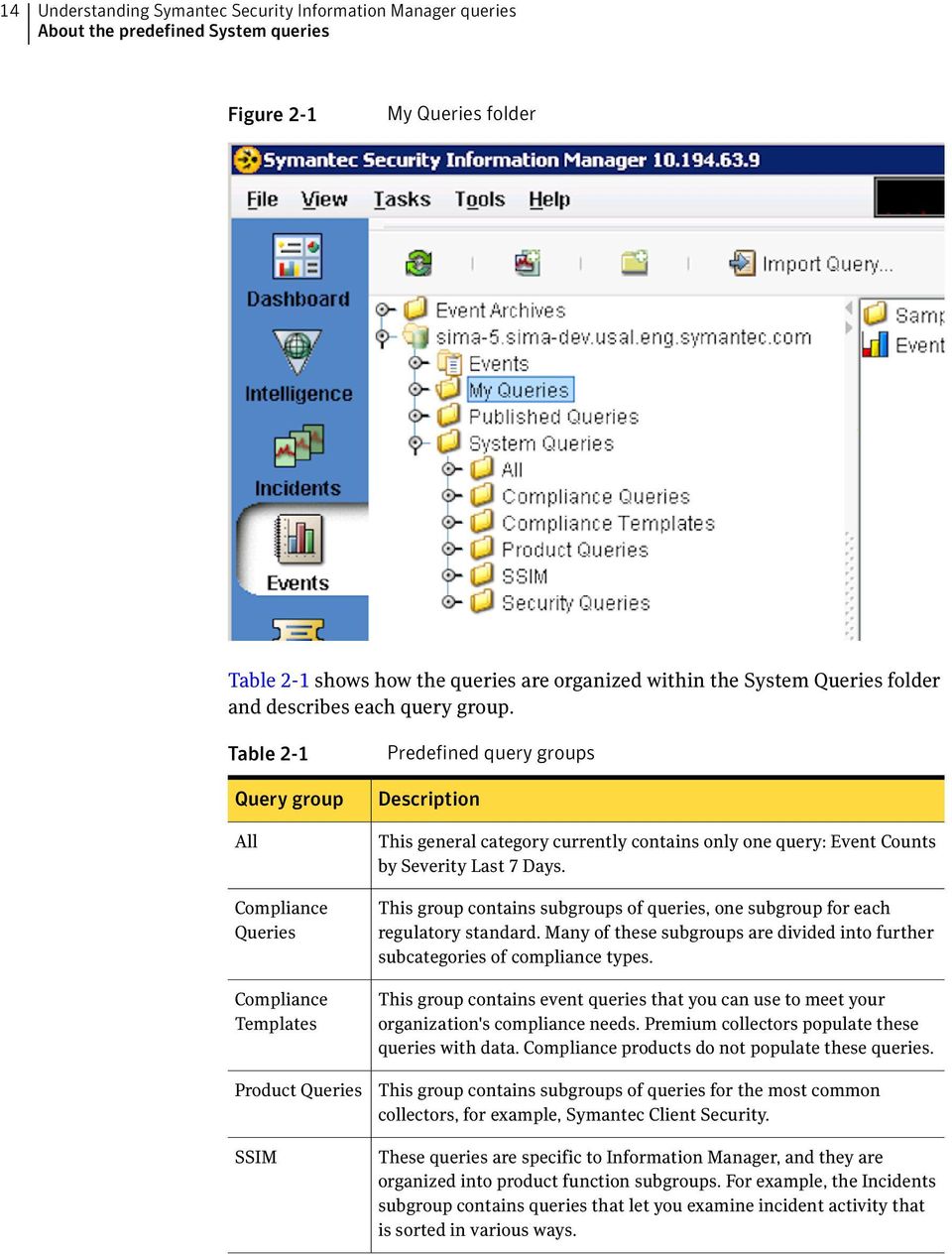
13 Chapter 2 Understanding Symantec Information Manager queries This chapter includes the following topics: About the predefined System queries What you can do with Symantec Information Manager queries About the predefined System queries In the Information Manager console, on the Events page, the System folder contains numerous predefined queries that you can use as query templates. Use these templates to create ized queries that are sui for your environment. Note: You cannot edit a query in the System folder. You must first move the query to the My folder by either exporting and then importing the query into the My folder, or dragging and dropping the query into that folder. You can also edit queries in the Published folder.


14 14 Understanding Symantec Information Manager queries About the predefined System queries Figure 2-1 My folder Table 2-1 shows how the queries are organized within the System folder and describes each query group. Table 2-1 Query group All Templates Product SSIM Predefined query groups Description This general category currently contains only one query: Event Counts by Severity Last 7 Days. This group contains subgroups of queries, one subgroup for each regulatory standard. Many of these subgroups are divided into further subcategories of compliance s. This group contains event queries that you can use to meet your organization's compliance needs. Premium collectors populate these queries with data. products do not populate these queries. This group contains subgroups of queries for the most common collectors, for example, Symantec Client. These queries are specific to Information Manager, and they are organized into product function subgroups. For example, the Incidents subgroup contains queries that let you examine incident activity that is sorted in various ways.
15 Understanding Symantec Information Manager queries What you can do with Symantec Information Manager queries 15 Table 2-1 Query group Predefined query groups (continued) Description This group contains event queries, which are grouped by device s that report the events, for example, intrusion devices. In many cases, the predefined queries require editing to meet your needs. To edit a query in the My folder, you can right-click the query and select Edit Query... to change the properties for that query. For example, the default time range in a query may be the previous 7 days. If you want the query to display data for the previous 30 days, you can edit the query to meet your requirements. s must contain only alphanumeric characters. Because some predefined query names contain non-alphanumeric characters, you must edit these query names before you can import them into My or Published. To edit a query name, export the query, then open the QML file in a text editor such as Wordpad. Edit the filename in the line called <query_filename>. Then import the query file into the desired query folder. For more information, see the Symantec Information Manager Administrator's Guide or the Symantec Information Manager User's Guide. What you can do with Symantec Information Manager queries Using the query features The queries that Symantec Information Manager provides include hundreds of preconfigured, izable queries and templates that can be used to analyze business aspects such as compliance and risk management. The queries return data in a meaningful, concise, and izable format that can be viewed from the Information Manager dashboard, dropped into a report, and distributed. The query functions that Information Manager provides include hundreds of preconfigured queries that can be ized to aggregate and filter data. Symantec Information Manager uses a combination of and language to gather and filter relevant data. Using the data querying tools that Information Manager provides, you can perform tasks such as the following: Use many of the preconfigured queries without a need to ize the settings.

16 16 Understanding Symantec Information Manager queries What you can do with Symantec Information Manager queries Customize an existing query by dropping it into the My folder and changing the parameters. Use the Query Wizard to create a new query that focuses on the data fields and settings you choose. The Query Wizard can be used to create a query that returns event or summary data, or it can be used to create a new query using. Import and export queries that can be saved or shared. Publish queries to other Information Manager users. Organize queries into query groups that are relevant to your organization. Change the appearance of the query results by changing the chart properties. For more information on working with queries, see the Symantec Information Manager Administrator's Guide.

17 Chapter 3 Understanding Symantec Information Manager reports This chapter includes the following topics: About Symantec Information Manager reports Using the report creation tools About Symantec Information Manager reports Symantec Information Manager provides a rich set of report creation tools that allow you to represent multiple, related sets of query data in the format you choose. To create a report, you can use the Information Manager reports page to assemble the data that you want to present, and format the document to meet your company standards. A report can be as simple as a single query with no formatting, or as complex as dozens of queries that are wrapped in a branded, organized format. Using the reports features, you can create reports by inserting queries, graphics, and other elements in a report template. Examples of izations include the ability to add graphics such as your company brand, add header and footer information, create a specific color scheme, select fonts, and so forth.
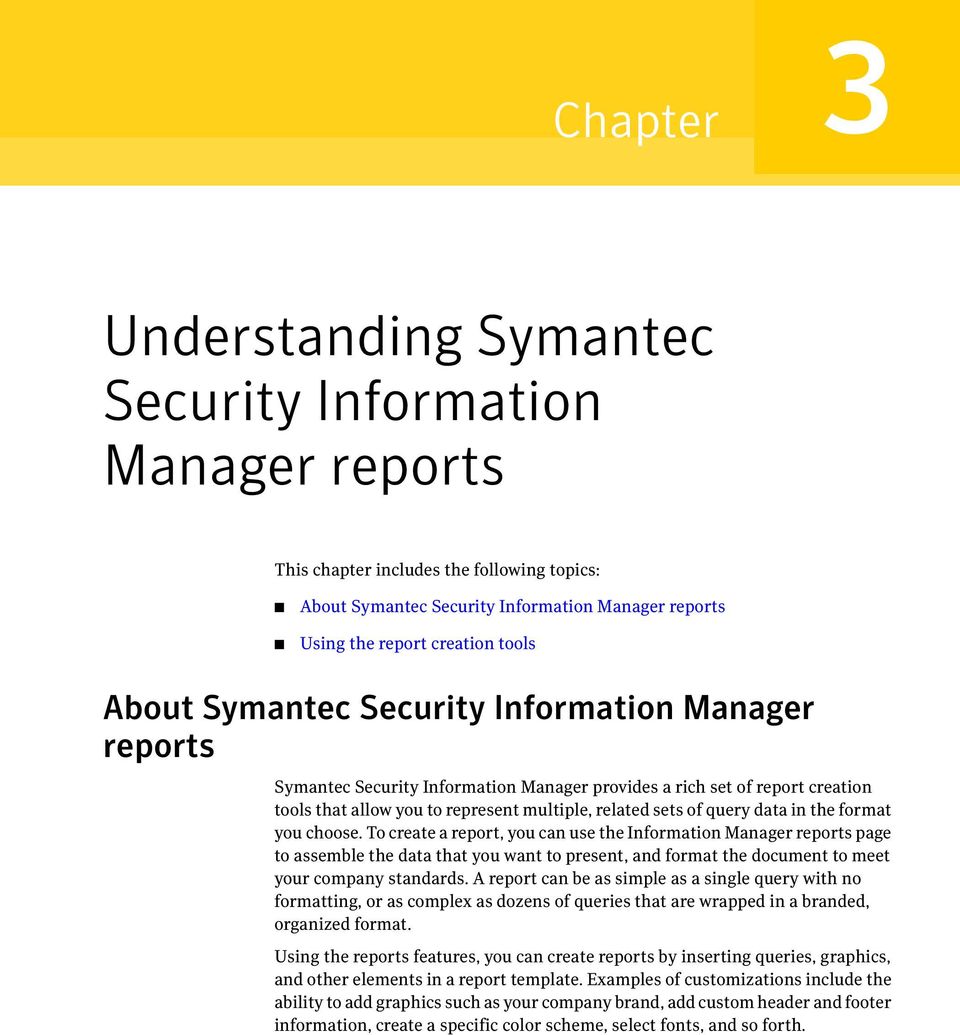

18 18 Understanding Symantec Information Manager reports About Symantec Information Manager reports Figure 3-1 Reports Design view
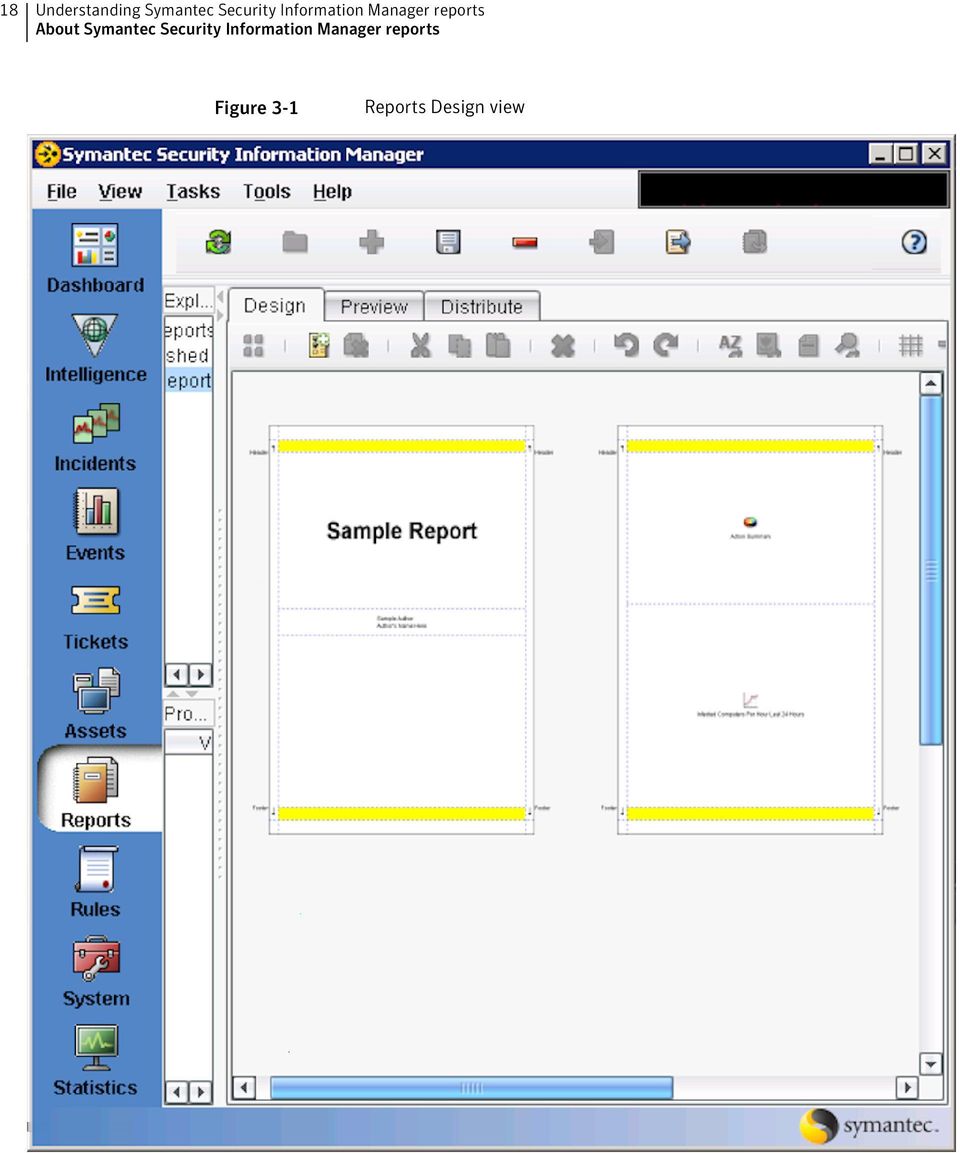

19 Understanding Symantec Information Manager reports About Symantec Information Manager reports 19 After you have created a report, you can share the report format with other users by publishing it. By default, a report is private in the Information Manager interface, meaning that it is only visible to the user that created it. Publishing a report places the report in the Published Reports folder, which makes it available to other Information Manager users. After a report has been placed in the Published Reports folder, you can use the features on the Distribute tab to schedule and send a report to the recipients you specify. To distribute the report, you can schedule a report for delivery to specified recipients. You can also export the report as an.rml file which can then be distributed to be imported by another user, or saved as a backup copy. Figure 3-2 Reports Distribute view

20 20 Understanding Symantec Information Manager reports Using the report creation tools The flexibility of the reports feature provides a means to create ized reports that describe multiple sets of data in a single document. Most organizations employ a combination of query information to determine the overall state of the network. For example, an auditor may need to see a report that describes both the number of computers that are compliant with specific PCI regulations, as well as vulnerability data for those computers. Using the reporting tools provided, Information Manager reports can be ized to reflect a meaningful correlation of that data in report. For more infomation on working with reports, see the Symantec Information Manager Administrator's Guide or the Symantec Information Manager User's Guide. Using the report creation tools Using the completely izable report creation tools that Information Manager provides, you can create concise reports that represent security data in an understandable format. Using queries to populate an Information Manager report, you can create any report that you need, from compliance reports that are branded with your company logo to risk management reports that summarize the most important security risks on the network. The Reports tab in the Information Manager console allows you to design, preview, save, and distribute reports that you create. A report can be as simple as a single query dropped onto a page, or as complex as a full-featured report that includes the company brand, relevant contextual information, and multiple queries that are within the scope of the report. For more information on working with the report creation features, see About Symantec Information Manager reports Example: Creating a simple network health report The following example describes a real-world situation for which the Information Manager query and reporting features can be effectively used. In the scenario, the security administrator must compile a series of reports that describe the overall health of the network. Identify the requirements As part of the request from management, the security administrator must compile a report from Information Manager that includes visual representations of the following: Top 10 viruses

21 Understanding Symantec Information Manager reports Using the report creation tools 21 Top 20 security threats Viruses detected viruses Most vulnerable computers in the enterprise Times of day that firewalls are under the most stress Divide the requirements into logical groups The data for each item in the request can be acquired using the queries that are available in the Information Manager console. By analyzing the requirements, the security administrator divides the list into the following categories: Antivirus queries Vulnerability data queries data queries Intrusion detection (IDS) queries Identify and ize the applicable queries in Information Manager Information Manager provides queries that supply the data that is needed. Each of the queries are fully izable. In this case, the the security administrator adjusts the following settings where necessary: Visual representation of data Filter based on specific product To adjust the queries, the security administrator moves each query to the My folder and adjust the parameters. To move a query to the My folder, in the left pane of the Events page, drag and drop the query from the System folder to the My folder. In this case, the security administrator creates a subfolder named Sample network health queries in the My folder, and stores the copy of each query in this subfolder.
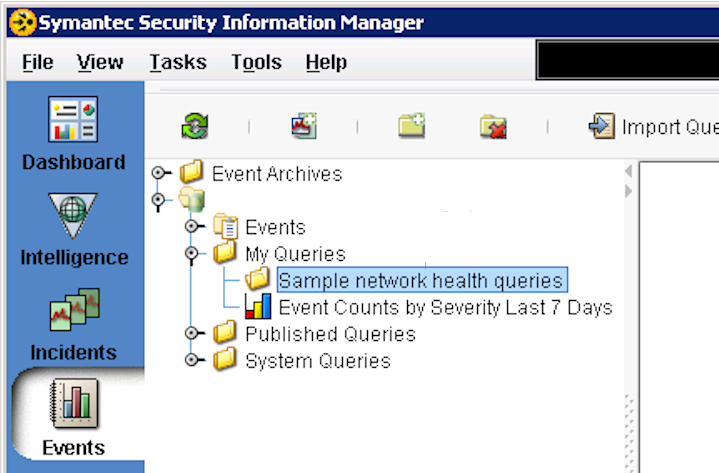
22 22 Understanding Symantec Information Manager reports Using the report creation tools Figure 3-3 Sample network health queries folder For example, the security administrator decides to edit the presentation of the Top 10 Virus query. After the Top 10 Virus queries is moved into the the Critical reports subfolder, the security administrator right-clicks the query and chooses Edit Query...

23 Understanding Symantec Information Manager reports Using the report creation tools 23 Figure 3-4 Choosing Edit Query from the right-click menu In the Edit Event Query dialog box, the Filter Criteria tab shows that the query is configured to use data from the last 30 days, and it is based on the Event ID equalling Virus. The security administrator decides that these parameters meet the requirements for this report. In the Edit Event Query dialog box, on the Chart Properties tab, the security administrator decides to change the visual properties of the data. The security administrator izes the title and changes the Chart to Pie.
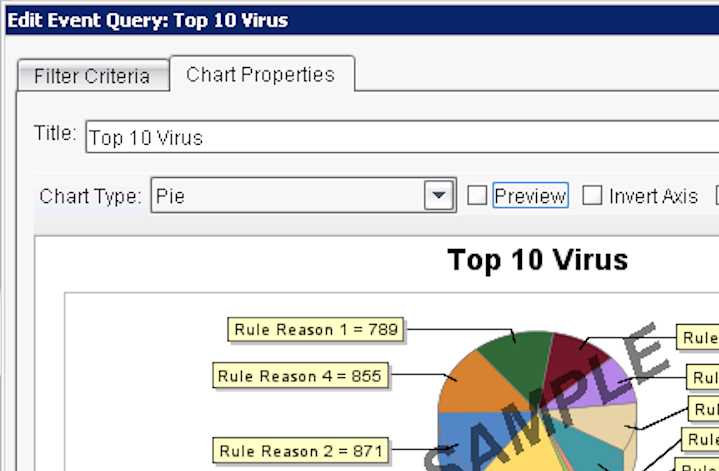
24 24 Understanding Symantec Information Manager reports Using the report creation tools Figure 3-5 Chart properties view For each query that is used, the security administrator repeats these steps depending on the parameters and visual options that are most effective. Prepare the report After the queries have been ized, the security administrator creates the report. To create the report the security administrator does the following: In the Reports pane, create a new report. Insert the queries in the preferred display order. Customize the header and footer. Adjust the query display elements, such as the column width that is used in each and the colors that are used in each chart. Preview the report to verify that the output is what is expected.

25 Understanding Symantec Information Manager reports Using the report creation tools 25 Figure 3-6 Reports Preview view Distribute the report After the security administrator has configured the report with the desired queries and izations, the report is distributed. To distribute the report, the security administrator does the following: Set the distribution methods. Save the report.
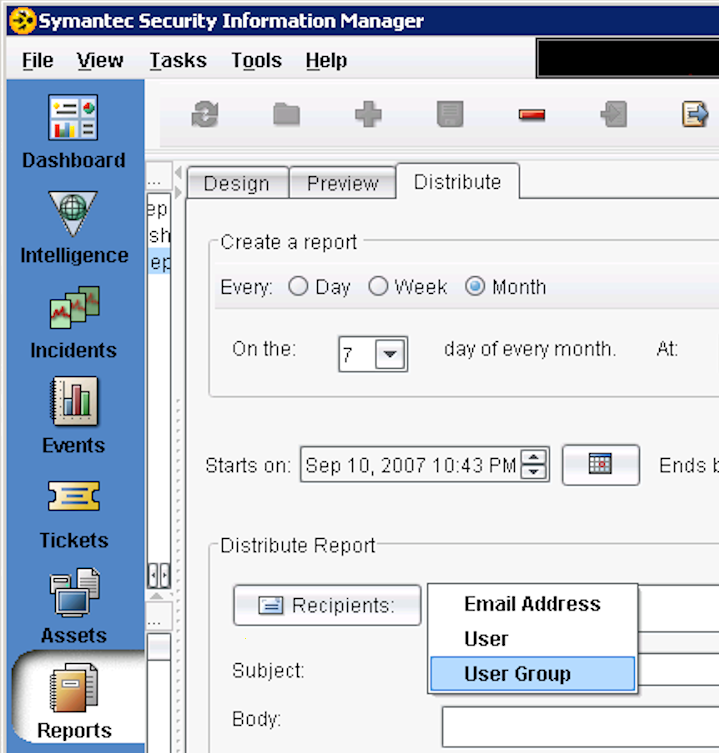
26 26 Understanding Symantec Information Manager reports Using the report creation tools Figure 3-7 Reports Distribute view
27 Chapter 4 System queries reference This chapter includes the following topics: queries Custom queries Summary queries The s in this section provide detailed information about the system queries. This information will be helpful as you decide which queries you want to adapt for your own use. Note: The s in this section describe the queries that are available with the current release of Symantec Information Manager, including the most recent updates. If you do not see some of these queries in the console, you may not have the most recent updates installed. You may need to run additional scripts to access all of the queries, such as the compliance queries. For more information, see the Readme documentation that is included with the most recent update. The s describe the queries in each subfolder under System. In addition, there are specialized s for several s of queries: Each query that contains in the column also has an entry in Table 4-12, which shows the field that is substituted for N in the query.
28 28 System queries reference Custom Summary Each query that contains Custom in the column also has an entry in Table 4-13, which shows the database that the query uses. Each query that contains Summary in the column also has an entry in Table 4-14, which shows the summary that the query uses. Note: The time range of some queries is expressed in relative seconds. For example, a value of equals relative seconds, or 1 day (24 hours). All folder Table 4-1 describes the contents of the All folder. Table 4-1 All folder Event Counts by Severity Last 7 Days not applicable Current -7 days / folder The folder contains subgroups of queries, one subgroup for each regulatory standard. Many of these subgroups are divided into further subcategories of compliance s. FISMA queries in the folder Table 4-2 describes the contents of the FISMA subfolder. The time range column sometimes contains the letter R followed by a number. This value represents the duration of the query as a relative number of seconds. For example, a value of R equals relative seconds, or 1 day (24 hours).
29 System queries reference 29 Table 4-2 FISMA queries in the folder FISMA Administrative Access to Systems Event Code = 733, 39770, or Windows username = Administrator and product id =3105 FISMA Application Access Event Code = or FISMA Audit Policy Changes Event Code = 1525 FISMA Disabled Accounts Event Code = 2894 FISMA File and Directory Access Event Code = 765, 38765, 38768, 38676, 3788, 3789, 3790, 3791, 3792, 20280, 11501, 12985, 1560, FISMA Logon Failures event id = or Event Code = 707, 645, 708, 785, 779, 1535, 3988, 2708, 39768, 1246, 3237, OR intrusion_action = and intrusion outcome = , OR event_detail_id= or or OR event_id = FISMA User Account Management Changes Event Code = 44111, 719, 762, 757, 2322, 2894, 758, 759, 1559, 38765, 771, 38766, 1553 OR event_class= and target_resource=/people/ and event_id is not or FISMA User Logins event id = , or Event Code= 2931, 3708, 3960, 38755, 41543, 40574, 11357, 777, 10532, 733, 623, 3103, 3733, 10423, 1564, 3105, 12775, or 4466 FISMA User Logouts vendor code =:538, event id = , or Event Code = 720, or intrusion action=
30 30 System queries reference GLBA queries in the folder Table 4-3describes the contents of the GLBA subfolder. The time range column sometimes contains the letter R followed by a number. This value represents the duration of the query as a relative number of seconds. For example, a value of R equals relative seconds, or 1 day (24 hours). Table 4-3 GLBA queries in the folder GLBA Logon Failures event id = or Event Code = 707, 645, 708, 785, 779, 1535, 3988, 2708, 39768, 1246, 3237, OR intrusion_action = and intrusion outcome = , OR event_detail_id= or or OR event_id = GLBA User Logoff event id = , or Event Code= 2931, 3708, 3960, 38755, 41543, 40574, 11357, 777, 10532, 733, 623, 3103, 3733, 10423, 1564, 3105, 12775, or 4466 GLBA User Logon vendor code =:538, event id = , or Event Code = 720, or intrusion action= HIPAA queries in the folder Table 4-4describes the contents of the HIPAA subfolder. The time range column sometimes contains the letter R followed by a number. This value represents the duration of the query as a relative number of seconds. For example, a value of R equals relative seconds, or 1 day (24 hours).
31 System queries reference 31 Table 4-4 HIPAA queries in the folder HIPAA > Administrative Safeguards Open Incident Aging status <> 2 all sql HIPAA > Administrative Safeguards Closed Incidents by Disposition WHERE STATUS = 2 N/A sql HIPAA > Administrative Safeguards Open vs Closed Incident Count by Creation Date Last 7 Days case when status = 0 or status = 1 or status = 2 creation_time >= (current timestamp - 7 DAYS) sql HIPAA > Administrative Safeguards Opened Incident Count by Creation Date case when status = 0 or status = 1 creation_time >= (current timestamp - 7 DAYS) sql HIPAA Account Information Failed status id and Event Code = 42488, HIPAA Account Integrity Failed status id and Event Code = HIPAA Audit Logs Access Event Code =38764 or HIPAA Configuration and Policy Changes Event Code = 1525 HIPAA Configuration and Policy Changes on Windows Vendor signature=:612 HIPAA File Attributes and Watch Failed compliance status = and Event Code = or 41708
32 32 System queries reference Table 4-4 HIPAA queries in the folder (continued) HIPAA Logon Failures event id = or Event Code = 707, 645, 708, 785, 779, 1535, 3988, 2708, 39768, 1246, 3237, OR intrusion_action = and intrusion outcome = , OR event_detail_id= or or OR event_id = HIPAA Network Integrity and Complexity Failed Event Code = 42476, 42485, 42493, and compliance status = HIPAA OS Patches Failed Event Code= and compliance status= HIPAA Object Access event id = , , , , , , , , , OR Event Code = 39745, 39744, 39746, HIPAA Password Changes Event Code = 718 HIPAA Privilege Use Event Code = 733, 734, 39770, 42823, 41543, or product = 3105 and windows user=administrator HIPAA Strong Authentication and Password Policy Failed Event Code = 41460, or and compliance status= HIPAA System Auditing Failed Event Code = and compliance status= HIPAA User Logins event id = , or Event Code= 2931, 3708, 3960, 38755, 41543, 40574, 11357, 777, 10532, 733, 623, 3103, 3733, 10423, 1564, 3105, 12775, or 4466
33 System queries reference 33 Table 4-4 HIPAA queries in the folder (continued) HIPAA User Logouts vendor code =:538, event id = , or Event Code = 720, or intrusion action= ISO17799 queries in the folder Table 4-5 describes the contents of the ISO17799 subfolder. The time range column sometimes contains the letter R followed by a number. This value represents the duration of the query as a relative number of seconds. For example, a value of R equals relative seconds, or 1 day (24 hours). Table 4-5 ISO17799 queries in the folder ISO17799 Administrative Access to Systems Event Code = 733, 39770, or Windows username = Administrator and product id =3105 ISO17799 Disabled Accounts Event Code = 2894 ISO17799 Logon Failures event id = or Event Code = 707, 645, 708, 785, 779, 1535, 3988, 2708, 39768, 1246, 3237, OR intrusion_action = and intrusion outcome = , OR event_detail_id= or or OR event_id = PCI queries in the folder Table 4-6describes the contents of the PCI subfolder. The time range column sometimes contains the letter R followed by a number. This value represents the duration of the query as a relative number of seconds. For example, a value of R equals relative seconds, or 1 day (24 hours).
34 34 System queries reference Table 4-6 PCI queries in the folder PCI > Antivirus Management All Risk Events event id = PCI > Antivirus Managemen All Virus Events per Hour event_id= Summarizer PCI > Antivirus Managemen Antivirus Disabled Event Code = 3825 PCI > Antivirus Managemen Daily Virus Definitions Successful Last 30 Days event_id=92004 CURRENT TIMESTAMP - 30 DAYS sql PCI > Antivirus Managemen Infected Computers per Hour event id = or Summarizer PCI > Antivirus Managemen Top 15 Users Triggering Risks Last 7 Days event = chart PCI > Antivirus Managemen Top 15 Users Triggering Viruses Last 7 Days event = chart PCI > Antivirus Managemen Total Client AV Version Count count(product_version) as "Total Client Count" sql PCI > Antivirus Managemen Virus Definition Updates Per Hour event_id=92004 >= CURRENT TIMESTAMP - 1 DAY sql PCI > Encrypt Transmissions HTTPS Connections source port = 443 or destination port = 443 or destination service = HTTPS AND event id = or PCI > Encrypt Transmissions Network Traffic Encryption Checks Event Code = 42536
35 System queries reference 35 Table 4-6 PCI queries in the folder (continued) PCI > Encrypt Transmissions Network Traffic Encryption Failed Event Code = and compliance status = PCI > Encrypt Transmissions VPN Client Connections Accepted During the Day event id = PCI > Encrypt Transmissions VPN Client Connections Failed During the Day event_id= PCI > Maintain Dropped or Denied Connections event id = or R PCI > Maintain Alerts or Failures Event Code = or 3969 PCI > Maintain Configuration Changes Event Code = 3974 or 3964 PCI > Maintain Failed Authentication Events Hourly Tally event id = Summarizer PCI > Maintain Intrusion Detection Events event id = PCI > Maintain Successful Authentication Events Hourly Tally event id = Summarizer PCI > Maintain Information Policy Information Policy Checks Event Code = or 42486
36 36 System queries reference Table 4-6 PCI queries in the folder (continued) PCI > Maintain Information Policy Information Policy Failed Event Code = or AND PCI > Maintain Information Policy Device Policy Modifications Event Code = 42916, 42915, or PCI > Protect Stored Data Administrative Access to Systems Event Code = 733, 39770, or Windows username = Administrator and product id =3105 PCI > Protect Stored Data Database Configuration Change Checks Event Code = PCI > Protect Stored Data Database Configuration Change Failed Event Code = and compliance status id= PCI > Protect Stored Data Database Failed Logins product 3214 or 3234 or 3213 or 3229 or 3282 and intrusion_action= and intrusion_outcome= PCI > Protect Stored Data Database Failed Logins Top 5 Destination Hosts product 3214 or 3234 or 3213 or 3229 or 3282 and intrusion_action= and intrusion_outcome= chart PCI > Protect Stored Data Database Failed Logins Top 5 Usernames product 3214 or 3234 or 3213 or 3229 or 3282 and intrusion_action= and intrusion_outcome= chart PCI > Protect Stored Data Database Rights Granted Event Code = 3587
37 System queries reference 37 Table 4-6 PCI queries in the folder (continued) PCI > Protect Stored Data Database Successful Logins product 3214 or 3234 or 3213 or 3229 or 3282 and intrusion_action= and intrusion_outcome= PCI > Protect Stored Data Database Successful Logins Top 5 Destination Hosts product 3214 or 3234 or 3213 or 3229 or 3282 and intrusion_action= and intrusion_outcome= chart PCI > Protect Stored Data Database Successful Logins Top 5 Usernames product 3214 or 3234 or 3213 or 3229 or 3282 and intrusion_action= and intrusion_outcome= chart PCI > Protect Stored Data Database Users Added product 3214 or 3234 or 3213 or 3229and Event Code = 722 PCI > Protect Stored Data Database Users Removed product 3214 or 3234 or 3213 or 3229and Event Code =758 OR vendor signature = DROP USER PCI > Protect Stored Data Failed Logins event id = OR vendor code = :529, :530, :531, :532, :533, :534, :535, :536, :537, :539, :675, :676, :681 AND intrusion action= and intrusion outcome = PCI > Protect Stored Data Failed Logins Top 5 Destination Hosts event id = OR vendor code = :529, :530, :531, :532, :533, :534, :535, :536, :537, :539, :675, :676, :681 AND intrusion action= and intrusion outcome = chart
38 38 System queries reference Table 4-6 PCI queries in the folder (continued) PCI > Protect Stored Data Failed Logins Top 5 Usernames event id = OR vendor code = :529, :530, :531, :532, :533, :534, :535, :536, :537, :539, :675, :676, :681 AND intrusion action= and intrusion outcome = chart PCI > Protect Stored Data Strong Authentication and Password Policy Checks Event Code = 41460, or PCI > Protect Stored Data Strong Authentication and Password Policy Failed Event Code = 41460, or and compliance status= PCI > Protect Stored Data Suspicious Database Traffic Events Event Code = 41389, or 3518 PCI > Regularly Test Systems and Processes Scan Conclusion Events Event id PCI > Regularly Test Systems and Processes Incident Overview For Last Week N/A current timestamp - 7 days sql PCI > Regularly Test Systems and Processes Incidents Created Over Past Week status as "Status" current timestamp - 7 days sql
39 System queries reference 39 Table 4-6 PCI queries in the folder (continued) PCI > Regularly Test Systems and Processes Incidents Created Today N/A date (creation_ time + current timezone) = current date sql PCI > Regularly Test Systems and Processes Most Detected CVE Codes CVE_ID, N/A sql PCI > Regularly Test Systems and Processes Most Detected Vulnerability Codes VULNERABILITY_ID N/A sql PCI > Regularly Test Systems and Processes Open Incident Aging status <> 2 all sql PCI > Regularly Test Systems and Processes Open Incident Aging by Assignee Table status <> 2 all sql PCI > Regularly Test Systems and Processes Open Incidents By Assignee severity >= 1 and status < 2 sql PCI > Regularly Test Systems and Processes Open and Closed Incidents For Assignee Today when status = 0 or status = 1 or status = 2 DATE (CREATION_TIME + CURRENT TIMEZONE) = CURRENT_DATE) sql
40 40 System queries reference Table 4-6 PCI queries in the folder (continued) PCI > Regularly Test Systems and Processes Open vs Closed Incident Count by Creation Date Last 7 Days case when status = 0 or status = 1 or status = 2 creation_ time >= (current timestamp - 7 DAYS) sql PCI > Regularly Test Systems and Processes Recent Events Vulnerability eventclass= , or PCI > Regularly Test Systems and Processes Time to Resolve Incidents Over Last Day CLOSED_TIME IS NOT NULL CREATED_ TIME >= (current timestamp - 1 Days) sql PCI > Regularly Test Systems and Processes Vulnerability Scans Commenced event_id= PCI > Restrict Access to Data Access Control Device Denied Events product Event Code 3988 or 785 or or 785 PCI > Restrict Access to Data Failed Logins event id = OR vendor code = :529, :530, :531, :532, :533, :534, :535, :536, :537, :539, :675, :676, :681 AND intrusion action= and intrusion outcome =
41 System queries reference 41 Table 4-6 PCI queries in the folder (continued) PCI > Restrict Access to Data Failed Logins Top 5 Destination Hosts event id = OR vendor code = :529, :530, :531, :532, :533, :534, :535, :536, :537, :539, :675, :676, :681 AND intrusion action= and intrusion outcome = chart PCI > Restrict Access to Data Failed Logins Top 5 Usernames event id = OR vendor code = :529, :530, :531, :532, :533, :534, :535, :536, :537, :539, :675, :676, :681 AND intrusion action= and intrusion outcome = chart PCI > Restrict Access to Data File Ownership and Permissions Checks Event Code = PCI > Restrict Access to Data File Ownership and Permissions Failed Event Code = and compliance status id = PCI > Restrict Access to Data Monitored System Object Created product=3248 and vendor signature = Object creation PCI > Restrict Access to Data Monitored System Object Deleted product=3248 and vendor signature = Object deleting or Deleted Element PCI > Restrict Access to Data Monitored System Object Modified product=3248 and vendor signature = Object changed or Object modification PCI > Restrict Access to Data Privileged Account Review Checks Event Code = 42488
42 42 System queries reference Table 4-6 PCI queries in the folder (continued) PCI > Restrict Access to Data Privileged Account Review Failed Event Code = and compliance status= PCI > Restrict Access to Data Successful Logins event id = or , OR Event Code = 1564, 3733, 3105 OR intrusion action = and intrusion outcome= PCI > Restrict Access to Data Successful Logins Top 5 Destination Hosts event id = or , OR Event Code = 1564, 3733, 3105 OR intrusion action = and intrusion outcome= chart PCI > Restrict Access to Data Successful Logins Top 5 Usernames event id = or , OR Event Code = 1564, 3733, 3105 OR intrusion action = and intrusion outcome= chart PCI > Restrict Access to Data System Access Restrictions Checks Event Code = PCI > Restrict Access to Data System Access Restrictions Failed Event Code = and compliance status= PCI > Restrict Physical Access Network Access Control Protection Checks Event Code = PCI > Restrict Physical Access Network Access Control Protection Failed Event Code = and compliance status= PCI > Secure Systems and Applications Most Detected CVE Codes CVE_ID, N/A sql PCI > Secure Systems and Applications Most Detected Vulnerability Codes VULNERABILITY_ID N/A sql
43 System queries reference 43 Table 4-6 PCI queries in the folder (continued) PCI > Secure Systems and Applications OS Patches Checks Event Code= R PCI > Secure Systems and Applications OS Patches Failed Event Code= and compliance status= PCI > Secure Systems and Applications Patch Management Events event id = or PCI > Secure Systems and Applications Patches Deployed event id = PCI > Secure Systems and Applications Systems Most Vulnerable to Attack count cve, vulnerability on CIA sql PCI > Secure Systems and Applications Systems Not Patched event = PCI > Track and Monitor All Access Access Logging and Monitoring Checks Event Code = 42474, 42386, PCI > Track and Monitor All Access Access Logging and Monitoring Failed status id and Event Code = 42474, 42386, PCI > Track and Monitor All Access Administrative Access to Systems Event Code = 733, 39770, or Windows username = Administrator and product id =3105 PCI > Track and Monitor All Access Audit Logs Access Event Code =38764 or 39628
44 44 System queries reference Table 4-6 PCI queries in the folder (continued) PCI > Track and Monitor All Access Failed Logins event id = OR vendor code = :529, :530, :531, :532, :533, :534, :535, :536, :537, :539, :675, :676, :681 AND intrusion action= and intrusion outcome = PCI > Track and Monitor All Access Failed Logins Top 5 Destination Hosts event id = OR vendor code = :529, :530, :531, :532, :533, :534, :535, :536, :537, :539, :675, :676, :681 AND intrusion action= and intrusion outcome = chart PCI > Track and Monitor All Access Failed Logins Top 5 Usernames event id = OR vendor code = :529, :530, :531, :532, :533, :534, :535, :536, :537, :539, :675, :676, :681 AND intrusion action= and intrusion outcome = chart PCI > Track and Monitor All Access Sensor Invalid Timestamp Incidents INCIDENT_TYPE_ID = 'Invalid Event Date Alert' CREATION_ TIME >= (current timestamp - 30 DAYS sql PCI > Track and Monitor All Access Successful Logins event id = or , OR Event Code = 1564, 3733, 3105 OR intrusion action = and intrusion outcome=
45 System queries reference 45 Table 4-6 PCI queries in the folder (continued) PCI > Track and Monitor All Access Successful Logins Top 5 Destination Hosts event id = or , OR Event Code = 1564, 3733, 3105 OR intrusion action = and intrusion outcome= chart PCI > Track and Monitor All Access Successful Logins Top 5 Usernames event id = or , OR Event Code = 1564, 3733, 3105 OR intrusion action = and intrusion outcome= chart PCI > Track and Monitor All Access User Logins event id = , or Event Code= 2931, 3708, 3960, 38755, 41543, 40574, 11357, 777, 10532, 733, 623, 3103, 3733, 10423, 1564, 3105, 12775, or 4466 PCI > Track and Monitor All Access User Logouts vendor code =:538, event id = , or Event Code = 720, or intrusion action= PCI > Unique User IDs Default Username Authentications event id= or OR Event Code= 1564, 3733,3105 or mechanisms = 11 or intrusion_action= and intrusion_outcome= AND target_resource=admin, administrator, root, guest or sa PCI > Unique User IDs Default Username Authentications Top 5 Usernames event id= or OR Event Code= 1564, 3733,3105 or mechanisms = 11 or intrusion_action= and intrusion_outcome= AND target_resource=admin, administrator, root, guest or sa chart PCI > Unique User IDs Strong Authentication and Password Policy Checks Event Code = 41460, or 42491
46 46 System queries reference Table 4-6 PCI queries in the folder (continued) PCI > Unique User IDs Strong Authentication and Password Policy Failed Event Code = 41460, or and compliance status= PCI > Unique User IDs User Account Management Changes Event Code = 44111, 719, 762, 757, 2322, 2894, 758, 759, 1559, 38765, 771, 38766, 1553 OR event_class= and target_resource=/people/ and event_id is not or PCI > Unique User IDs User Accounts Created Event Code = 722 PCI > Unique User IDs User Accounts Deleted Event Code = 758 PCI > Vendor Supplied Defaults Administrative Access to Systems Event Code = 733, 39770, or Windows username = Administrator and product id =3105 PCI > Vendor Supplied Defaults Audit Policy Changes Event Code = 1525 PCI > Vendor Supplied Defaults Default Username Authentications event id= or OR Event Code= 1564, 3733,3105 or mechanisms = 11 or intrusion_action= and intrusion_outcome= AND target_resource=admin, administrator, root, guest or sa PCI > Vendor Supplied Defaults Default Username Authentications Detected Event Code = 777, 2352 or 41376
47 System queries reference 47 Table 4-6 PCI queries in the folder (continued) PCI > Vendor Supplied Defaults Default Username Authentications Top 5 Usernames event id= or OR Event Code= 1564, 3733,3105 or mechanisms = 11 or intrusion_action= and intrusion_outcome= AND target_resource=admin, administrator, root, guest or sa chart PCI > Vendor Supplied Defaults Disabled Accounts Event Code = 2894 PCI > Vendor Supplied Defaults Disabled User Accounts with Failed Login Attempts vendor signature = :531 r PCI > Vendor Supplied Defaults Authentication Events Hourly Tally event id = or Summarizer PCI > Vendor Supplied Defaults Password Changes Event Code = 718 SOX queries in the folder Table 4-7 describes the contents of the SOX subfolder. The time range column sometimes contains the letter R followed by a number. This value represents the duration of the query as a relative number of seconds. For example, a value of R equals relative seconds, or 1 day (24 hours). Table 4-7 SOX queries in the folder SOX Administrative Access to Systems Event Code = 733, 39770, or Windows username = Administrator and product id =3105 SOX Application Access Event Code = or 39748
48 48 System queries reference Table 4-7 SOX queries in the folder (continued) SOX Audit Logs Access Event Code =38764 or SOX Audit Policy Changes Event Code = 1525 SOX Disabled Accounts Event Code = 2894 SOX File and Directory Access Event Code = 765, 38765, 38768, 38676, 3788, 3789, 3790, 3791, 3792, 20280, 11501, 12985, 1560, SOX Incident Overview for Last Week N/A current timestamp - 7 days sql SOX Incidents Created Over Past Week status as "Status" current timestamp - 7 days sql SOX Incidents Created Today N/A date(creation_time + current timezone) = current date sql SOX Logon Failures event id = or Event Code = 707, 645, 708, 785, 779, 1535, 3988, 2708, 39768, 1246, 3237, OR intrusion_action = and intrusion outcome = , OR event_detail_id= or or OR event_id = SOX Open Incident Aging by Assignee Table status <> 2 all sql SOX Open Incidents by Assignee severity >= 1 and status < 2 sql SOX Open and Closed Incidents for Assignees Today when status = 0 or status = 1 or status = 2 DATE(CREATION_ TIME + CURRENT TIMEZONE) = CURRENT_DATE) sql
49 System queries reference 49 Table 4-7 SOX queries in the folder (continued) SOX Password Change Attempts vendor signature = :627 or Event Code = 1559, 718 or SOX Log Management Event Code = or SOX Time to Resolve Incidents Over Last Day CLOSED_TIME IS NOT NULL CREATED_ TIME >= (current timestamp - 1 Days) SOX User Account Management Changes Event Code = 44111, 719, 762, 757, 2322, 2894, 758, 759, 1559, 38765, 771, 38766, 1553 OR event_class= and target_resource=/people/ and event_id is not or SOX User Group Management Changes Event Code = 709, 710, 772, 1552, 731, 1538, 38770, 38769, 38747, 39767, 39646, or SOX User Logins event id = , or Event Code= 2931, 3708, 3960, 38755, 41543, 40574, 11357, 777, 10532, 733, 623, 3103, 3733, 10423, 1564, 3105, 12775, or 4466 SOX User Logouts vendor code =:538, event id = , or Event Code = 720, or intrusion action= SOX Windows Account Policy Changes vendor_code=:643, and option1 = Password Policy or Lockout Policy
50 50 System queries reference Table 4-7 SOX queries in the folder (continued) SOX > Administrative Safeguards Opened Incident Count by Creation Date case when status = 0 or status = 1 creation_ time >= (current timestamp - 7 DAYS) SOX > Change Notification Reports Account Integrity Failed status id and Event Code = SOX > Change Notification Reports File Attributes and Watch Failed compliance status = and Event Code = or R SOX > Change Notification Reports Network Integrity and Complexity Failed Event Code = 42476, 42485, 42493, and compliance status = SOX > Control Reports OS Patches Failed Event Code= and compliance status= SOX > Control Reports System Auditing Failed Event Code = and compliance status= SOX > Resource Review Reports Account Information Failed status id and Event Code = 42488, SOX > Resource Review Reports Strong Authentication and Password Policy Failed Event Code = 41460, or and compliance status= Templates folder The Templates folder contains event queries that you can use to meet your organization's compliance needs. Premium collectors populate these queries with data. products do not populate these queries. In Table 4-8, the time range column sometimes contains the letter R followed by a number. This value represents the duration of the query as a relative number
51 System queries reference 51 of seconds. For example, a value of equals relative seconds, or 1 day (24 hours). Table 4-8 Templates folder Application Monitoring event_code=39747 or R events Audit Policy Changes event_code=1525 R events File Monitoring event_code=pro R events Log Management event_code=38764 or R events Logon Failures event_id= or event_code=707, 645, 708, 785, 779, 1535, 3988, 2708, 39768, 1246, 3237, or intrusion_action_id= and intrusion_outcome_id= or event_detail_id= or event_detail_id OR event_id= R events Object Monitoring event_id=302004, ,302003, , , , , , , OR event_code 39745, 39744, 39746, R events User Account Management event_code=722, 44111, 719, 762, 757, 2322, 2894, 758, 759, 1559, 38765, 771, 38766, 1553 or event_class_id= and target_resource contains /People/ OR event_id= or R events User Group Management event_code=709, 710, 772, 1552, 731, 1538, 38770, 38769, 38747, 39767, 39646, 39647, R events User Logon event_id= , or event_code=2931, 3708, 3960, 38755, 41543, 40574, 11357, 777, 10532, 733, 623, 3103, 3733, 10423, 1564, 3105, 12775, 4466 R events User Logout event_id= , event_code=720 or intrusion_action_id= R events Product folder The Product folder contains subgroups of queries, one subgroup for each collector that is installed, for example, Symantec Client.
52 52 System queries reference In Table 4-9, the time range column sometimes contains the letter R followed by a number. This value represents the duration of the query as a relative number of seconds. For example, a value of equals relative seconds, or 1 day (24 hours). Table 4-9 Product folder or grouping IIS Collector Top 10 Requested Files for Web Events Product_id=3149 / IIS Collector Top 10 Src IPs for Web Events Product_id=3149 / MS Server Database Failed Logins Product_id=3214, intrusion_action_id= , intrusion_outcome_id= events MS Server Database Successful Logins Product_id=3214, intrusion_action_id= , intrusion_outcome_id= events Symantec Client All Checkin Violation Events event_id= , product_id=3012 events Symantec Client All Client Audit Events event_class_id= , product_id=3012 complete events Symantec Client All Detail Snapshot Events event_id= complete events Symantec Client All Snapshot Catalog Events event_class_id= complete events Symantec Client All Snapshot Events event_id= , , , , , , , , , events Symantec Client All Summary Snapshot Events event_id= complete events
53 System queries reference 53 Table 4-9 Product folder (continued) or grouping Symantec Client Client Version Summary Latest Snapshot select product_version, count group by product_version pie chart Symantec Client Client Versions Latest Snapshot select columns not applicable from summarizer Symantec Client Clients By Version All Snapshots firewall version and count group by CF_version, CFV_count pie chart Symantec Client Daily Virus Definitions Successful Deployment Last 30 Days event_id=92004 and time_slice current timestamp -30 days line chart Symantec Client Detected Intrusion Violations product_id=3012 and event_id= complete events Symantec Client License Allocation by Serial ID ELS_SERIAL_ID group by els_serial_id from summarizer Symantec Client License Allocation by Server Group SAV_DOMAIN as Parent Server Group, sum(l_count) group by sav_domain from summarizer Symantec Client License Status Summary ELS_LIFECYCLE as "License LifeCycle" not applicable from summarizer Symantec Client License Status per Computer L_COUNT as "License Count" not applicable from summarizer Symantec Client Licenses In Use ELS_FEATURE_NAME as "License Feature Name" not applicable from summarizer
54 54 System queries reference Table 4-9 Product folder (continued) or grouping Symantec Client Licenses In Use Summary select * not applicable from summarizer Symantec Client SCF Disabled vendor_code = SCF_ Shutdown, swfeature_id= and event_id = events Symantec Client SCF Enabled vendor_code=scf_startup, swfeature_id= and event_id= events Symantec Client SCF Intrusion Detection Status Events event_class_id=401001and event_id= events Symantec Client SCF Policy Update event_id= and swfeature_id= events Symantec Client Summary of Virus Definition Deployment Last 30 Days product_id=3012 and event_id=92004 R pie chart / Symantec Client Top 10 Infected SCS Server Groups data_status_id=117233, or / Symantec Client Top 10 Infected SCS Client Groups data_status_id=117233, or / Symantec Client Top 10 Infected SCS Parent Servers data_status_id=117237, , or / Symantec Client Top 10 SCS Client Groups Containing Virus Events event_id= /
55 System queries reference 55 Table 4-9 Product folder (continued) or grouping Symantec Client Top 10 SCS Parent Servers Containing Virus Events event_id= / Symantec Client Top 10 SCS Server Groups Containing Virus Events event_id= / Symantec Client Total Client AV Version Count count(product_version) group by product_version pie chart Symantec Client Total Clients per Parent Server parent server and count SNAPSHOT_MACHINE group by parent from summarizer Symantec Client Virus Definition Updates Per Hour Last 24 Hours event_id=92004 current timestamp -1 day line chart summary Symantec Client Virus Definitions Current - Last 30 Snapshots virusdef = maxvirusdef order by bsav.snapshot_id line chart Symantec Client Virus Definitions Out of Date - Last 30 Snapshots virus_definitions < mvd.maxvdef order by bsav.snapshot_ id line chart Symantec Client Virus Definitions Summary - Last 30 Snapshots rank <= 30 group by virus_ definitions stacked bar chart Symantec Client Virus Definitions Summary - Latest Snapshot snapshot_id = max order by virus_ definitions pie chart Symantec Client Virus Definitions Summary Table - Last 30 Snapshots select * order by snapshot_ id desc from summarizer Symantec Client Virus Definitions by Client Group - Out of Date - Latest parent_virus_definitions > virus_definitions order by client_group line chart
56 56 System queries reference Table 4-9 Product folder (continued) or grouping Symantec Client Virus Definitions by Computer (Latest Snapshot) returns all rows not applicable from summarizer Symantec Client Virus Definitions by Computer Last 30 Snapshots where client_good = 1 order by snapshot_ machine, snapshot_ id desc from summarizer Symantec Client Virus Definitions by Computer with Inactive Last 30 Snapshots all columns order by snapshot_machine, snapshot_id desc from summarizer Symantec Client Virus Definitions by Computer_Current Only (Latest Snapshot) where savlt.virus_definitions = savlt.parent_virus_definitions order by newest to oldest from summarizer Symantec Client Virus Definitions by Computer_Out of Date (Latest Snapshot) where savlt.virus_definitions < savlt.parent_virus_definitions order by newest to oldest from summarizer Symantec Client Virus Definitions by Parent Server - Out of Date - Latest parent_virus_definitions > virus_definitions order by parent pie chart Symantec Client Virus Definitions by Server Group - Out of Date - Latest parent_virus_definitions > virus_definitions order by sav_domain pie chart Symantec Client Virus Definitions by User Out of Date Latest Snapshot parent_virus_definitions > virus_definitions group by user_name pie chart
57 System queries reference 57 Table 4-9 Product folder (continued) or grouping Windows Event Log Top 10 Windows IPs by Failed Auth Attempts product_id=3105 and vendor_code=:529, :530, :531, :532, :533, :534, :535, :536, :537, :675, or :539 R / Windows Event Log Windows Account Policy Changes vendor_code=:643 and Option 1=Password Policy or Lockout Policy events Windows Event Log Windows Administrator User Activity windows_username is Administrator and product_id=3105 events Windows Event Log Windows Audit Log Cleared vendor_code=:517 events Windows Event Log Windows Audit Policy Changes vendor_code=:612 events Windows Event Log Windows Failed Logins vendor_code=:529, :530, :531, :532, :533, :534, :535, :536, :537, :539, :576, :675, or :581 R events Windows Event Log Windows Failed Logins for a Username target resource, username, and vendor_code=:529, :530, :531, :532, :533, :534, :535, :536, :537, :539, :576, :675, or :581 R events Windows Event Log Windows Members Added to Priv Groups Option3=Administrators, Backup Operators or Power Users and vendor_code=:636, :632, or :660 events
58 58 System queries reference Table 4-9 Product folder (continued) or grouping Windows Event Log Windows Members Added to Groups vendor_code=:636, :632, or :660 events Windows Event Log Windows Password Change Attempts vendor_code=:627 events Windows Event Log Windows Password Policy Changes vendor_code=:643 and option1=password Policy events Windows Event Log Windows Privileged Actions by a User windows_user_name=ser_name, vendor_code=:577 or :578 events Windows Event Log Windows Recent Events product_id=3105 R events Windows Event Log Windows Groups Created vendor_code=:635, :631, or :658 events Windows Event Log Windows Groups Deleted vendor_code=:638, :634, or :662 events Windows Event Log Windows Shutdowns vendor_code=:513 events Windows Event Log Windows Startups vendor_code=:512 events Windows Event Log Windows Successful Logins vendor_code=:528 or :540 events Windows Event Log Windows Successful Logins for a Username target_resource=username, vendor_code=:528 or :540 R events Windows Event Log Windows User Accounts Created vendor_code=:624 events Windows Event Log Windows User Accounts Deleted vendor_code=:630 events
59 System queries reference 59 Table 4-9 Product folder (continued) or grouping Windows Event Log Windows User Rights Assignments vendor_code=:608 and Option1=SeLoadDriverPrivilege, SePrivilege, SeShutdownPrivilege, or SeTakeOwnershipPrivilege events SSIM folder The SSIM folder contains queries that are specific to Information Manager. The queries in this folder are organized into product function subgroups. For example, the Incidents subgroup contains queries that let you examine incident activity that is sorted in various ways. In Table 4-10, the time range column sometimes contains the letter R followed by a number. This value represents the duration of the query as a relative number of seconds. For example, a value of equals relative seconds, or 1 day (24 hours). Table 4-10 SSIM folder or grouping Assets Incidents by Asset Top 10 distinct SOURCE_IP 10 rows ordered by count Assets Incidents by Policy distinct E.INCIDENT_GUID order by sum(incident_count) desc Assets Incidents by Source Top 10 distinct INCIDENT_GUID count(distinct incident_guid) desc Assets Incidents by Target Top 10 distinct INCIDENT_GUID count(distinct incident_guid) desc Incidents Closed Incidents by Assignee Priority case when Assignee = '' order by lcase(assignee) desc
60 60 System queries reference Table 4-10 SSIM folder (continued) or grouping Incidents Closed Incidents by Assignee Severity case when Assignee = '' order by lcase(assignee) desc Incidents Closed Incidents by Disposition case when DISPOSITION = 0 where Status = 2 Incidents Incident Overview For Last Week N/A current timestamp - 7 days incidents Incidents Incidents by Assignee Priority select "Assignee" as Assignee order by lcase(assignee) desc Incidents Incidents by Assignee Severity select by severity order by Severity 5 Count Incidents Incidents by Day Last 7 Days select date(creation_time + current timezone) as Creation Date order by Creation Date Incidents Incidents Created Over Past Week status as "Status" current timestamp - 7 days incidents Incidents Incidents Created Today N/A date (creation_ time + current timezone) = current date incidents Incidents Incidents by Last 7 Days select, count(1) order by count(1) desc Incidents Open Incident Aging by Assignee I.status <> 2 group by I.assignee Incidents Open Incident Aging current timestamp - I.created_time all Incidents Open Incidents by Assignee Priority status IN (0, 1) order by lcase(assignee) desc
61 System queries reference 61 Table 4-10 SSIM folder (continued) or grouping Incidents Open Incidents by Assignee Severity case when Assignee = '' order by lcase(assignee) desc Incidents Open Incidents by Correlation Rule I.status <> 2 order by count(i.guid) desc Incidents Open Incidents by Target IP Top 10 count(distinct I.guid) as Target order by count(distinct I.guid) desc Incidents Open vs Closed Incident Count by Creation Date when status = 0 or status = 1, when status=2 order by Creation Date Incidents Open vs Closed Incidents by Assignee when status = 0 or status = 1, when status=2 order by Open Incident Count, Closed Incident Count Incidents Time to Resolve Incidents Over Last 7 Days timestampdiff(8, char(closed_time - created_time)) + 1 group by timestampdiff Incidents Time to Resolve Incidents Over Last Day CLOSED_TIME IS NOT NULL CREATED_TIME >= (current timestamp - 1 Days) incidents SSIM system Audit Events for SSIM event_class_id= complete events SSIM system SSIM Failed Logins event_code=708 and event_class_id= events SSIM system SSIM Rule Modifications event_class_id= , event_id= , AND target_resource contains "Rules" events
62 62 System queries reference Table 4-10 SSIM folder (continued) or grouping SSIM system SSIM Table Modifications event_class_id= , event_id = , AND Target Resource contains /Lookup Tables/ events Tickets Closed Tickets by Assignee Priority status = 2 order by tkt_assignee desc Tickets Closed Tickets by Disposition status = 2 order by tkt_assignee desc Tickets Open Ticket Aging by Assignee status <> 2 group by assignee Tickets Open Ticket Aging status <> 2 N/A Tickets Open Tickets by Assignee Details status <> 2 order by T.assignee, T.ticket_id from summarizer Tickets Open Tickets by Assignee Priority status = 1 order by tkt_assignee desc Tickets Open Tickets by Correlation Rule status <> 2 order by count(distinct T.ticket_id) desc Tickets Open vs Closed Tickets by Assignee when status = 1 (Open) when status = 2 (Closed) order by tkt_assignee desc Tickets Open vs Closed Tickets Last 7 Days T.resolution_time BETWEEN (current timestamp hours) AND (current timestamp hours) order by Day desc Tickets Tickets by Assignee Priority case when tkt_assignee = '' then '(Unassigned)' else tkt_assignee" order by tkt_assignee desc
63 System queries reference 63 Table 4-10 SSIM folder (continued) or grouping Tickets Time to Resolve Tickets Over Last 7 Days where resolution_time is not null and Status = 2 group by timestampdiff folder The folder contains event queries, which are grouped by device s that report the events, for example, intrusion devices. In Table 4-11, the time range column sometimes contains the letter R followed by a number. This value represents the duration of the query as a relative number of seconds. For example, a value of equals relative seconds, or 1 day (24 hours). Table 4-11 folder or grouping Backup and Restore Tasks Completed Backup Tasks Event "Backup Complete" and Event Code events Backup and Restore Tasks Completed Restore Tasks Event "Restore Complete" and Event Code events Backup and Restore Tasks Failed Backup Tasks Event ID "Backup Cancel" events Backup and Restore Tasks Incomplete Backup Tasks Event events Backup and Restore Tasks Latest Backup Tasks 24 Hours Event Class "Backup and Restore Activity" and Event Code or events Backup and Restore Tasks Pending Backup and Restore Tasks Event events Diagnostic Events Application Start Events Event "Application Start" events
64 64 System queries reference Table 4-11 folder (continued) or grouping Diagnostic Events Application Stop Events Event "Application Stop" events Diagnostic Events Configuration Change Events Event Class "Configuration Update" or "Configuration Change Class" events Blocked Connection on Port 80 or 443 by IP address (Event ID = Rejected) AND (Network Traffic Direction = Inbound) AND (Destination Port = 80 or 443) events Denied Connections (Event ID = Rejected) OR (Event ID = Dropped) R events Failed Authentication Events Hourly Tally (Month) Event ID = R events summary Inbound FTP Connections (Network Traffic Direction = Inbound) AND (Destination Port = 20 or 21) events Network Intrusion Events Event Class ID Network Intrusion Activity" events Number of Events per Hour during the Day Event Class Current -1day Outbound FTP Connections (source port being 20 or 21) AND (Network Traffic Direction = outbound) events Permitted Connections per Hour (Event ID = Connection Accepted) N/A summary Top 10 Denied Connections Outbound by IP Source Address (Network Traffic Direction = Outbound) AND (Event ID = Connection Rejected) from summarizer /
65 System queries reference 65 Table 4-11 folder (continued) or grouping Top 10 Denied Connections Outbound by IP Source Port (Network Traffic Direction = Outbound) AND (Event ID = Connection Rejected) R from summarizer / Top 10 Denied Inbound Traffic by IP Source Address (Network Traffic Direction = Inbound) AND (Event ID = Connection Rejected) R from summarizer summary Top 10 Denied Inbound Traffic by IP Source Port (Network Traffic Direction = Inbound) AND (Event ID = Connection Rejected) / Top 10 Denied Outbound Traffic by IP Source Port (Network Traffic Direction = Outbound) AND (Event ID = Connection Rejected) / Top 10 Dst IPs for Possible Remote Admin Traffic (Destination Port = 22 or 23 or 3389 or 4899 or 5631 or 5632 or 5800 or 5900 or 6129) AND (Event Class ID = network) AND (Event ID = Connection Accepted) / Top 10 Events Inbound by Target Resource (Network Traffic Direction = Inbound) from summarizer / Top 10 Events Outbound by Target Resource (Network Traffic Direction = Outbound) from summarizer / Top 10 Inbound URL or FTP Traffic by Organizational Unit (Network Traffic Direction = Inbound) AND (Destination Port = 443 or 80 or 21 or 20) from summarizer / Top 10 Internal Sources Sending by IP Source Address (Network Traffic Direction = Outbound) from summarizer /
66 66 System queries reference Table 4-11 folder (continued) or grouping Top 10 Internal SrcIPs of Dropped Dst Port 445 Traffic (Destination port = 445) AND (Network Traffic Direction IS NOT External AND IS NOT Inbound) AND (Event ID = Connection Dropped or Connection Rejected) / Top 10 Internal SrcIPs of Dropped Possible IRC Traffic (Destination port = 6666 or 6667 or 6668 or 6669 or 7000) AND (Network Traffic Direction IS NOT External AND IS NOT Inbound) AND (Event ID = Connection Dropped or Connection Rejected) / Top 10 Internal SrcIPs of Dropped Possible SMTP (Destination port = 25) AND (Network Traffic Direction IS NOT External AND IS NOT Inbound) AND (Event ID = Connection Dropped or Connection Rejected) / Top 10 Internal Targets Received During the Day (Network Traffic Direction = Inbound) / Top 10 Outbound URL or FTP Traffic by Organizational Unit (Network Traffic Direction = Outbound) AND (Destination Port = 443 or 80 or 21 or 20) from summarizer / Top 10 Outbound URL or FTP Traffic Requested by External IP (Network Traffic Direction = Outbound) AND (Source port = 443 or 80 or 21 or 20) from summarizer / Top 10 Source IPs of Possible IRC Traffic (Destination port = 6666 or 6667 or 6668 or 6669 or 7000) / Top 10 Src IPs for Destination Port 445 Traffic (Destination port = 445) /
67 System queries reference 67 Table 4-11 folder (continued) or grouping Top 10 Src IPs for Possible SMTP Traffic (Destination port = 25) / Top 5 Targets for Dropped Events (Event Class ID = ) AND (Event ID = Connection Accepted) (also TOP n BY field was done on Target_resource) / Total Attack Events This query was a SELECT statement read FROM the sum_1440_intrusionsdpair current timestamp -7 days from summarizer Intrusion > Existing Accounts Access Attempts Disabled User Accounts with Failed Login Attempts Vendor Signature = :531 events Intrusion > Existing Accounts Access Attempts Failed Logins against a Username vendor_code=:529, :530, :531, :532, :533, :534, :535, :536, :537, :539, :576, :675, :581 or intrusion_outcome_id = AND Option 2 OR target_resource = specified user_name events Intrusion > Existing Accounts Access Attempts Failed Logins Daily (Month) vendor_code=:529, :530, :531, :532, :533, :534, :535, :536, :537, :539, :576, :675, :581 or intrusion_outcome_id = events
68 68 System queries reference Table 4-11 folder (continued) or grouping Intrusion > Existing Accounts Access Attempts Top 10 IPs as Sources of Failed Logins over 7 Days vendor_code=:529, :530, :531, :532, :533, :534, :535, :536, :537, :539, :576, :675, :581 or intrusion_outcome_id = / Intrusion > Existing Accounts Access Attempts Top 10 IPs as Targets of Failed Logins over 7 Days vendor_code=:529, :530, :531, :532, :533, :534, :535, :536, :537, :539, :576, :675, :581 or intrusion_outcome_id = / Intrusion > Existing Accounts Access Attempts Top 10 Usernames with Failed Logins over 7 Days vendor_code=:529, :530, :531, :532, :533, :534, :535, :536, :537, :539, :576, :675, :581 or intrusion_outcome_id = / Intrusion > HIDS HIDS Event Counts Daily by Severity event_id= current timestamp -7 days Intrusion > HIDS HIDS Events Daily Tally event_id= R line chart summary Intrusion > HIDS HIDS Events Hourly Tally event_id= line chart summary Intrusion > HIDS Host Intrusion Events event_class= R events Intrusion > HIDS Top 10 Event Codes for HIDS Events event_class= /
69 System queries reference 69 Table 4-11 folder (continued) or grouping Intrusion > HIDS Top 10 IPs Reporting HIDS Events event_class= / Intrusion > HIDS Top 10 Vendor Codes for HIDS Events event_class= / Intrusion > HIDS Top 5 Target Resources for HIDS Events event_class= / Intrusion > NIDS Network Intrusion Events event_class= R events Intrusion > NIDS NIDS Event Counts Daily by Severity event_id= current timestamp -7 days Intrusion > NIDS NIDS Events against a Destination event_class= events Intrusion > NIDS NIDS Events Daily Tally event_id= R line chart summary Intrusion > NIDS NIDS Events from a Source event_class= events Intrusion > NIDS NIDS Events Hourly Tally event_id= line chart summary Intrusion > NIDS Top 10 Destination IPs for NIDS Events event_class= / Intrusion > NIDS Top 10 Destination Ports for NIDS Events event_class= / Intrusion > NIDS Top 10 Event Codes for NIDS Events event_class= / Intrusion > NIDS Top 10 Source IPs for NIDS Events event_class= / Intrusion > NIDS Top 10 Vendor Codes for NIDS Events event_class= /
70 70 System queries reference Table 4-11 folder (continued) or grouping Intrusion > NIDS Top 5 Target Resources for NIDS Events event_class= / Intrusion All IDS Event Counts Daily by Severity event_id = ( OR ) current timestamp -7 days Intrusion IDS Event Counts Hourly by Severity event_id = ( OR ) current timestamp -1 day Intrusion Top 10 Source Destination Pairs for IDS Events event_id from summarizer summary Intrusion Top 10 Src IPs for IDS Events against a Destination Condition is host name summary Patch Management Patch Management Events event id = or events Patch Management Patches Deployed event id = events Patch Management Systems Not Patched event id = events Policy Products All Data N/A 50 rows from summarizer Policy Products by Domain group by domain 50 rows pie chart Policy Products by Domain over Last 7 Days group by domain current timestamp -7 days from summarizer Policy Products by Org Unit group by org_unit 50 rows pie chart
71 System queries reference 71 Table 4-11 folder (continued) or grouping Policy Products by Org Unit over Last 7 Days group by org_unit current timestamp -7 days from summarizer Policy Products by Policy group by compliance_found 50 rows pie chart Policy Products by Policy over Last 7 Days group by compliance_found current timestamp -7 days from summarizer Policy Products Percentage by Domain group by domain current timestamp -7 days pie chart Policy Products Percentage by Domain over Last 7 Days group by domain current timestamp -7 days from summarizer Policy Products Percentage by Org Unit group by org_unit current timestamp -7 days pie chart Policy Products Percentage by Org Unit over Last 7 Days group by org_unit current timestamp -7 days from summarizer Policy Products Percentage by Policy group by compliance_found current timestamp -7 days pie chart Policy Products Percentage by Policy over Last 7 Days group by compliance_found current timestamp -7 days from summarizer Routers Switches and VPNs Remote VPN Client Authentication Failed During the Day event_id = R events
72 72 System queries reference Table 4-11 folder (continued) or grouping Routers Switches and VPNs Remote VPN Client Connection During the Day event_id = events Routers Switches and VPNs VPN Client Failure event_id= complete events Routers Switches and VPNs VPN Connection Accepted during the Day event_id= R events Routers Switches and VPNs VPN Connection Failed during the Day event_id= R events Risk Action Summary event_id = and data_status_id= complete pie chart / Risk All Boot Record Virus Events event_id= and data id = events Risk All Virus Events event_id= and data id = or events Risk All File Virus Events event_id= and data id = events Risk All Groupware Virus Events event_id= and data id = or events Risk All Memory Virus Events event_id= and data id = events Risk All Scans event_id=112051, , , or complete events Risk All Risk Events Last 24 Hours event_id= from summarizer summary Risk All Risk Events event_id= events
73 System queries reference 73 Table 4-11 folder (continued) or grouping Risk All Side Effects event_id= complete events Risk All Unscannable Violations event_id= events Risk All Virus Events per Hour (last 24 hours) event_id= complete from summarizer summary Risk All Virus Events event_id= events Risk AV Violations Last 30 Days event_id= or R events Risk Daily Risk Counts Detected Last 30 Days event_id= current -30 days line chart Risk Daily Virus Counts Detected Last 30 Days event_id= current -30 days line chart Risk Definition Updates event_id=92054, 92004, , or complete events Risk Infected Computers Per Day Last 30 Days event_id= R line chart summary Risk Infected Computers Per Hour Last 24 Hours event_id= or line chart summary Risk License Allocations event_id= , , , and event_class_id = or complete events Risk License Install Failures event_id= , , or events Risk Licenses Owned event_class_id= complete events Risk Threat Tracer event_id= complete pie chart /
74 74 System queries reference Table 4-11 folder (continued) or grouping Risk Top 5 Files Cleaned data id= and data_status_id= or top N / Risk Top 5 Files Infected data id= and data_status_id= or , top N / Risk Top 5 Files Moved to Quarantine data_status_id= and data id= top N / Risk Top 10 Infected Machines data_status_id=117233, or complete top N / Risk Top 10 Infected OS Domains data_status_id=117233, or / Risk Top 10 Infected Users data_status_id=117233, or complete top N / Risk Top 10 IP with Virus Infections event_id= and data_status_id=117233, , or complete / Risk Top 10 Machines with Virus Infections event_id=122000, and data_status_id=117233, or complete / Risk Top 10 OS Domains Containing Virus Events event_id= / Risk Top 10 Risk s Detected Last 30 Days event_id= R / Risk Top 10 Risks Not Quarantined Last 48 Hours event_id=122001and data_status_id=117233, , or R / Risk Top 10 Risks event_id= complete /
75 System queries reference 75 Table 4-11 folder (continued) or grouping Risk Top 10 Virus Locations event_id= / Risk Top 10 Virus s Detected Last 30 Days event_id= R / Risk Top 10 Virus event_id= complete top N / Risk Top 10 Viruses Not Quarantined Last 48 Hours event_id= and data_status_id=117232, , or R / Risk Top 15 Infections Detected event_id= or / Risk Top 15 Users Triggering Risks Last 7 Days event_id= / Risk Top 15 Users Triggering Viruses Last 7 Days event_id= / Risk Virus Incidents Per Hour Last 24 Hours event_id= summary Risk Viruses Detected Daily event_id= complete from summarizer summary Vulnerability Most Detected CVE Codes count of vulnerabilities (CVE) 10 rows Vulnerability Most Detected Vulnerability Codes count of vulnerabilities (BID) 10 rows Vulnerability Recent Events Vulnerability eventclass_id= , or events Vulnerability Systems Most Vulnerable to Attack count of vulnerabilities (CVE and BID) 10 rows from incident
76 76 System queries reference queries Table 4-11 folder (continued) or grouping Vulnerability Top Business Risks count of vulnerabilities (CVE and BID) 10 rows from incident Vulnerability Vulnerability Count by Asset Location count of vulnerabilities (CVE and BID) grouped by Location pie chart Vulnerability Vulnerability Count by Asset Top 10 count of vulnerabilities (CVE and BID) 10 rows pie chart Vulnerability Vulnerability Count by OS count of vulnerabilities (CVE and BID) grouped by Host OS pie chart Vulnerability Vulnerability Count by OU count of vulnerabilities (CVE and BID) grouped by Host Org Unit pie chart queries queries refers to queries that have a field substituted for N in the query. Table 4-12 describes the queries that are available. Table 4-12 queries Query group field PCI/Antivirus Management Top 15 Users Triggering Risks Last 7 Days user_name PCI/Antivirus Management Top 15 Users Triggering Viruses Last 7 Days user_name PCI/Protect Stored Data Database Failed Logins Top 5 Destination Hosts destination_host_name PCI/Protect Stored Data Database Failed Logins Top 5 Usernames by top 5 target resource PCI/Protect Stored Data Database Successful Logins Top 5 Destination Hosts destination_host_name PCI/Protect Stored Data Database Successful Logins Top 5 Usernames by top 5 target resource
77 System queries reference queries 77 Table 4-12 queries (continued) Query group field PCI/Protect Stored Data Failed Logins Top 5 Destination Hosts destination_host_name PCI/Protect Stored Data Failed Logins Top 5 Usernames by top 5 target resource PCI/Restrict Access to Data Failed Logins Top 5 Destination Hosts destination_host_name PCI/Restrict Access to Data Failed Logins Top 5 Usernames by top 5 target resource PCI/Restrict Access to Data Successful Logins Top 5 Destination Hosts destination_host_name PCI/Restrict Access to Data Successful Logins Top 5 Usernames by target resource PCI/Track and Monitor All Access Failed Logins Top 5 Destination Hosts destination_host_name PCI/Track and Monitor All Access Failed Logins Top 5 Usernames by top 5 target resource PCI/Track and Monitor All Access Successful Logins Top 5 Destination Hosts destination_host_name PCI/Track and Monitor All Access Successful Logins Top 5 Usernames by target resource PCI/Unique User IDs Default Username Authentications Top 5 Usernames target_resource PCI/Vendor Supplied Defaults Default Username Authentications Top 5 Usernames target_resource Product IIS Collector Top 10 Requested Files for Web Events target_resource Product IIS Collector Top 10 Src IPs for Web Events source_ip Product Symantec Client Summary of Virus Definition Deployment Last 30 Days curr_version
78 78 System queries reference queries Table 4-12 queries (continued) Query group field Product Symantec Client Top 10 Infected SCS Server Groups sav_domain Product Symantec Client Top 10 Infected SCS Client Groups client_group Product Symantec Client Top 10 Infected SCS Parent Servers parent Product Symantec Client Top 10 SCS Client Groups Containing Virus Events client_group Product Symantec Client Top 10 SCS Parent Servers Containing Virus Events parent Product Symantec Client Top 10 SCS Server Groups Containing Virus Events sav_domain Product Windows Event Log Top 10 Windows IPs by Failed Auth Attempts machine_ip Top 10 Denied Connections Outbound by IP Source Address source_ip Top 10 Denied connections Outbound by IP Source Port source_port Top 10 Denied Inbound Traffic by IP Source Port source_port Top 10 Denied Outbound Traffic by IP Source Port source_port Top 10 Dst Ips for Possible Remote Admin Traffic destination_ip Top 10 Events Inbound by Target Resource target_resource Top 10 Events Outbound by Target Resource target_resource Top 10 Inbound URL or FTP Traffic by Organizational Unit org_unit Top 10 Internal Sources Sending by IP Source Address source_ip
79 System queries reference queries 79 Table 4-12 queries (continued) Query group field Top 10 Internal SrcIPs of Dropped Dst Port 445 Traffic source_ip Top 10 Internal SrcIPs of Dropped Possible IRC Traffic source_ip Top 10 Internal SrcIPs of Dropped Possible SMTP source_ip Top 10 Internal Targets Received During the Day destination_ip Top 10 Outbound URL or FTP Traffic by Organizational Unit org_unit Top 10 Outbound URL or FTP Traffic Requested by External IP source_ip Top 10 Source IPs of Possible IRC Traffic source_ip Top 10 Src IPs for Destination Port 445 Traffic source_ip Top 10 Src IPs for Possible SMTP Traffic source_ip Top 5 Targets for Dropped Events target_resource Intrusion > Existing Accounts Access Attempts Top 10 IPs as Sources of Failed Logins over 7 Days source_ip Intrusion > Existing Accounts Access Attempts Top 10 IPs as Targets of Failed Logins destination_ip
80 80 System queries reference queries Table 4-12 queries (continued) Query group field Intrusion > Existing Accounts Access Attempts Top 10 Usernames with Failed Logins target_resource Intrusion > HIDS Top 10 Event Codes for HIDS Events event_code Intrusion > HIDS Top 10 IPs Reporting HIDS Events destination_ip Intrusion > HIDS Top 10 Vendor Codes for HIDS Events vendor_code Intrusion > HIDS Top 5 Target Resources for HIDS Events target_resource Intrusion > NIDS Top 10 Destination IPs for NIDS Events destination_ip Intrusion > NIDS Top 10 Destination Ports for NIDS Events destination_port Intrusion > NIDS Top 10 Event Codes for NIDS Events event_code Intrusion > NIDS Top 10 Source IPs for NIDS Events source_ip Intrusion > NIDS Top 10 Vendor Codes for NIDS Events vendor_code Intrusion > NIDS Top 5 Target Resources for NIDS Events target_resource Risk Action Summary data_status_id Risk Threat Tracer source_host_name Risk Top 5 Files Cleaned data_name Risk Top 5 Files Infected data_name
81 System queries reference queries 81 Table 4-12 queries (continued) Query group field Risk Top 5 Files Moved to Quarantine data_name Risk Top 10 Infected Machines machine Risk Top 10 Infected OS Domains os_domain Risk Top 10 Infected Users user_name Risk Top 10 IP with Virus Infections destination_ip Risk Top 10 Machines with Virus Infections destination_host_name Risk Top 10 OS Domains Containing Virus Events os_domain Risk Top 10 Risk s Detected Last 30 Days data id Risk Top 10 Risks Not Quarantined Last 48 Hours data_rule_reason Risk Top 10 Risks data_rule_reason Risk Top 10 Virus Locations data id Risk Top 10 Virus s Detected Last 30 Days data id Risk Top 10 Virus data_rule_reason Risk Top 10 Viruses Not Quarantined Last 48 Hours data_rule_reason Risk Top 15 Infections Detected data_rule_reason Risk Top 15 Users Triggering Risks Last 7 Days user_name
82 82 System queries reference Custom queries Table 4-12 queries (continued) Query group field Risk Top 15 Users Triggering Viruses Last 7 Days user_name Custom queries Custom queries gather information from database s that are specific to each query.table 4-13 shows the database that the query uses. Table 4-13 Custom queries Query group Database queried All not applicable Event Counts by Severity Last 7 Days symcmgmt.sum_60_alleventidsev HIPAA/ Administrative Safeguards Closed Incidents by Disposition SYMCMGMT.SYMC_SIM_INCIDENT HIPAA/ Administrative Safeguards Open Incident Aging symcmgmt.symc_sim_incident HIPAA/Administrative Safeguards Open vs Closed Incident Count by Creation Date Last 7 Days symcmgmt.symc_ IMR_INC_FILTER_ LIST_VIEW HIPAA/ Administrative Safeguards Opened Incident Count by Creation Date symcmgmt.symc_ IMR_INC_FILTER_ LIST_VIEW PCI/Antivirus Management Daily Virus Definitions Successful Deployment Last 30 Days symcmgmt.sum_1440_alleventidsevday PCI/Antivirus Management Total Client AV Version Count symcmgmt.sto2_0_savlatest PCI/Antivirus Management Virus Definition Updates Per Hour symcmgmt.sum_60_alleventidsev PCI/Regularly Test Systems and Processes Incidents Created Today symcmgmt.symc_ IMR_INC_FILTER_ LIST_VIEW
83 System queries reference Custom queries 83 Table 4-13 Custom queries (continued) Query group Database queried PCI/Regularly Test Systems and Processes Incident Overview For Last Week SYMCMGMT.SYMC_ SIM_INCIDENT PCI/Regularly Test Systems and Processes Incidents Created Over Past Week SYMCMGMT.SYMC_ SIM_INCIDENT PCI/Regularly Test Systems and Processes Most Detected CVE Codes SYMCMGMT.SYMC_ SIM_ASSET_ CVE_MAP PCI/Regularly Test Systems and Processes Most Detected Vulnerability Codes SYMCMGMT.SYMC_SIM_ASSET_ VULNERABILITY_MAP PCI/Regularly Test Systems and Processes Open and Closed Incidents for Assignees Today symcmgmt.symc_ IMR_INC_FILTER_ LIST_VIEW PCI/Regularly Test Systems and Processes Open Incident Aging symcmgmt.symc_sim_incident PCI/Regularly Test Systems and Processes Open Incident Aging by Assignee Table symcmgmt.symc_sim_incident PCI/Regularly Test Systems and Processes Open Incidents By Assignee symcmgmt.symc_ IMR_INC_FILTER_ LIST_VIEW PCI/Regularly Test Systems and Processes Open vs Closed Incident Count by Creation Date Last 7 Days symcmgmt.symc_ IMR_INC_FILTER_ LIST_VIEW
84 84 System queries reference Custom queries Table 4-13 Custom queries (continued) Query group Database queried PCI/Regularly Test Systems and Processes Time to Resolve Incidents Over Last Day SYMCMGMT.SYMC_ SIM_INCIDENT PCI/Secure Systems and Applications Most Detected CVE Codes SYMCMGMT.SYMC_ SIM_ASSET_ CVE_MAP PCI/Secure Systems and Applications Most Detected Vulnerability Codes SYMCMGMT.SYMC_ SIM_ASSET_ VULNERABILITY_MAP PCI/Secure Systems and Applications Systems Most Vulnerable to Attack SYMCMGMT.SYMC_ SIM_ASSET PCI/Track and Monitor All Access Sensor Invalid Timestamp Incidents SYMCMGMT.SYMC_ IMR_INCIDENT_ LIST_VIEW SOX Incidents Created Today symcmgmt.symc_ IMR_INC_FILTER_ LIST_VIEW SOX Incident Overview For Last Week SYMCMGMT.SYMC_ SIM_INCIDENT SOX Incidents Created Over Past Week SYMCMGMT.SYMC_ SIM_INCIDENT SOX Open and Closed Incidents for Assignees Today symcmgmt.symc_ IMR_INC_FILTER_ LIST_VIEW SOX Open Incident Aging by Assignee Table symcmgmt.symc_ sim_incident SOX Open Incidents By Assignee symcmgmt.symc_imr_inc_filter_list_view Product Symantec Client Client Version Summary Latest Snapshot symcmgmt.sto2_0_savlatest Product Symantec Client Client Versions Latest Snapshot symcmgmt.sto2_0_savlatest
85 System queries reference Custom queries 85 Table 4-13 Custom queries (continued) Query group Database queried Product Symantec Client Clients By Version All Snapshots symcmgmt.sto2_0_savsumall Product Symantec Client Daily Virus Definitions Successful Deployment Last 30 Days symcmgmt.sum_1440_ alleventidsevday Product Symantec Client License Allocation By Serial ID symcmgmt.sto2_0_savsumlical Product Symantec Client License Allocation By Server Group symcmgmt.sto2_0_savsumlical Product Symantec Client License Status per Computer symcmgmt.sto2_0_savsumlicck2 Product Symantec Client License Status Summary symcmgmt.sto2_0_savsumlicck2 Product Symantec Client Licenses In Use Summary symcmgmt.sto2_0_savsumlicck2 Product Symantec Client Licenses In Use symcmgmt.sto2_0_savsumlicck1 Product Symantec Client Total Client AV Version Count symcmgmt.sto2_0_savlatest Product Symantec Client Total Clients per Parent Server symcmgmt.sto2_0_savlatest Product Symantec Client Virus Definition Updates Per Hour Last 24 Hours symcmgmt.sum_60_alleventidsev Product Symantec Client Virus Definition by Client Group - Out of Date - Latest symcmgmt.sto2_0_savsum Product Symantec Client Virus Definitions by Computer (Latest Snapshot) symcmgmt.sto2_0_savlatest Product Symantec Client Virus Definitions by Computer Last 30 Snapshots symcmgmt.sto2_0_savlast30 Product Symantec Client Virus Definitions by Computer with Inactive Last 30 Snapshots symcmgmt.sto2_0_savlast30 Product Symantec Client Virus Definitions by Computer_Current Only (Latest Snapshot) symcmgmt.sto2_0_savlatest
86 86 System queries reference Custom queries Table 4-13 Custom queries (continued) Query group Database queried Product Symantec Client Virus Definitions by Computer_Out of Date (Latest Snapshot) symcmgmt.sto2_0_savlatest Product Symantec Client Virus Definitions by Parent Server - Out of Date - Latest symcmgmt.sto2_0_savsum Product Symantec Client Virus Definitions by Server Group - Out of Date - Latest symcmgmt.sto2_0_savsum Product Symantec Client Virus Definitions by User Out of Date Latest Snapshot symcmgmt.sto2_0_savlatest Product Symantec Client Virus Definitions Current - Last 30 Snapshots symcmgmt.sto2_0_savsum Product Symantec Client Virus Definitions Out of Date - Last 30 Snapshots symcmgmt.sto2_0_savsum Product Symantec Client Virus Definitions Summary - Last 30 Snapshots symcmgmt.sto2_0_savsum Product Symantec Client Virus Definitions Summary - Latest Snapshot symcmgmt.sto2_0_savsum Product Symantec Client Virus Definitions Summary Table Last 30 Snapshots symcmgmt.sto2_0_savsum SSIM Assets Incidents by Asset Top 10 symc_sim_event, symc_sim_asset SSIM Assets Incidents by Policy symc_sim_policy, symc_sim_asset_policy_map, symc_sim_asset, symc_sim_event SSIM Assets Incidents by Source Top 10 symc_sim_event SSIM Assets Incidents by Target Top 10 symc_sim_event SSIM Incidents Closed Incidents by Assignee Priority symcmgmt.symc_ imr_inc_filter_ list_view SSIM Incidents Closed Incidents by Assignee Severity symcmgmt.symc_ imr_inc_filter_ list_view SSIM Incidents Closed Incidents by Disposition symcmgmt.symc_ sim_incident SSIM Incidents Incidents by Assignee Priority symcmgmt.symc_ imr_inc_filter_ list_view
87 System queries reference Custom queries 87 Table 4-13 Custom queries (continued) Query group Database queried SSIM Incidents Incidents by Assignee Severity symcmgmt.symc_ imr_inc_filter_ list_view SSIM Incidents Incidents By Day Last 7 Days symcmgmt.symc_ imr_inc_filter_ list_view SSIM Incidents Incidents By Last 7 Days symcmgmt.symc_ sim_incident SSIM Incidents Open Incident Aging by Assignee symcmgmt.symc_sim_incident SSIM Incidents Open Incident Aging symcmgmt.symc_sim_incident SSIM Incidents Open Incidents by Assignee Priority symcmgmt.symc_ imr_inc_filter_ list_view SSIM Incidents Open Incidents by Assignee Severity symcmgmt.symc_ imr_inc_filter_ list_view SSIM Incidents Open Incidents by Correlation Rule symcmgmt.symc_sim_incident SSIM Incidents Open Incidents by Target IP Top 10 symcmgmt.symc_ sim_incident, symcmgmt.symc_ sim_conclusion, symcmgmt.symc_ sim_event SSIM Incidents Open vs Closed Incident Count by Creation Date symcmgmt.symc_ imr_inc_filter_ list_view SSIM Incidents Open vs Closed Incidents by Assignee symcmgmt.symc_ imr_inc_filter_ list_view SSIM Incidents Time to Resolve Incidents Over Last 7 Days symcmgmt.symc_ sim_incident SSIM Tickets Closed Tickets by Assignee Priority symcmgmt.symc_ hdr_ticket_list_view SSIM Tickets Closed Tickets by Disposition symcmgmt.symc_ hdr_ticket_list_view SSIM Tickets Open Ticket Aging by Assignee symcmgmt.symc_hdr_ticket SSIM Tickets Open Ticket Aging symcmgmt.symc_hdr_ticket SSIM Tickets Open Tickets by Assignee Details symcmgmt.symc_hdr_ticket SSIM Tickets Open Tickets by Assignee Priority symcmgmt.symc_ hdr_ticket_list_view
88 88 System queries reference Custom queries Table 4-13 Custom queries (continued) Query group Database queried SSIM Tickets Open Tickets by Correlation Rule symcmgmt.symc_hdr_ticket, symcmgmt.symc _sim_ticket_ incident_map, symcmgmt.symc_sim_incident SSIM Tickets Open vs Closed Tickets by Assignee symcmgmt.symc_ hdr_ticket_list_view SSIM Tickets Open vs Closed Tickets Last 7 Days symcmgmt.symc_hdr_ticket SSIM Tickets Tickets by Assignee Priority symcmgmt.symc_ hdr_ticket_list_view SSIM Tickets Time to Resolve Tickets Over Last 7 Days symcmgmt.symc_ hdr_ticket_list_view Number of Events per Hour during the Day sum_60_allevents Intrusion > HIDS HIDS Event Counts Daily by Severity symcmgmt.sum_ 60_alleventidsev Intrusion > NIDS NIDS Event Counts Daily by Severity symcmgmt.sum_60_alleventidsev Intrusion All IDS Event Counts Daily by Severity symcmgmt.sum_60_alleventidsev Intrusion IDS Event Counts Hourly by Severity symcmgmt.sum_60_alleventidsev Policy Products All Data symcmgmt.sto_0_policycompliancestatus Policy Products by Domain over Last 7 Days symcmgmt.sto_0_ policycompliancestatus Policy Products by Domain symcmgmt.sto_0_ policycompliancestatus Policy Products by Org Unit over Last 7 Days symcmgmt.sto_0_ policycompliancestatus
89 System queries reference Custom queries 89 Table 4-13 Custom queries (continued) Query group Database queried Policy Products by Org Unit symcmgmt.sto_0_ policycompliancestatus Policy Products by Policy over Last 7 Days symcmgmt.sto_0_ policycompliancestatus Policy Products by Policy symcmgmt.sto_0_ policycompliancestatus Policy Products Percentage by Domain over Last 7 Days symcmgmt.sto_0_ policycompliancestatus Policy Products Percentage by Domain symcmgmt.sto_0_ policycompliancestatus Policy Products Percentage by Org Unit over Last 7 Days symcmgmt.sto_0_ policycompliancestatus Policy Products Percentage by Org Unit symcmgmt.sto_0_ policycompliancestatus Policy Products Percentage by Policy over Last 7 Days symcmgmt.sto_0_ policycompliancestatus Policy Products Percentage by Policy symcmgmt.sto_0_ policycompliancestatus Risk Daily Risk Counts Detected Last 30 Days symcmgmt.sum_ 1440_alleventidsevday Risk Daily Virus Counts Detected Last 30 Days symcmgmt.sum_1440_ alleventidsevday Vulnerability Most Detected CVE Codes symc_sim_asset_cve_map
90 90 System queries reference Summary queries Table 4-13 Custom queries (continued) Query group Database queried Vulnerability Most Detected Vulnerability Codes sim_asset_vulnerability_map Vulnerability Systems Most Vulnerable to Attack symcmgmt.symc_sim_asset, symc_sim_asset_cve_map, symc_sim_asset_vulnerability_map Vulnerability Top Business Risks symcmgmt.symc_sim_asset, symc_sim_asset_cve_map, symc_sim_asset_vulnerability_map Vulnerability Vulnerability Count by Asset Location symcmgmt.symc_sim_asset, symc_sim_asset_cve_map, symc_sim_asset_vulnerability_map Vulnerability Vulnerability Count by Asset Top 10 symcmgmt.symc_sim_asset, symc_sim_asset_cve_map, symc_sim_asset_vulnerability_map Vulnerability Vulnerability Count by OS symcmgmt.symc_sim_asset, symc_sim_asset_cve_map, symc_sim_asset_vulnerability_map Vulnerability Vulnerability Count by OU symcmgmt.symc_sim_asset, symc_sim_asset_cve_map, symc_sim_asset_vulnerability_map Summary queries Summary queries gather information from summary s. Table 4-14 shows the summary that the query uses. Table 4-14 Summary queries Query group Summary queried PCI/Antivirus Management All Virus Events per Hour ALL_EVENT_ID_SEV PCI/Antivirus Management Infected Computers Per Hour ALL_EVENT_ID_SEV PCI/Maintain Failed Authentication Events Hourly Tally ALL_EVENT_ID_SEV
91 System queries reference Summary queries 91 Table 4-14 Summary queries (continued) Query group Summary queried PCI/Maintain Successful Authentication Events Hourly Tally ALL_EVENT_ID_SEV PCI/Vendor Supplied Defaults Authentication Events Hourly Tally ALL_EVENT_ID_SEV Product Symantec Client Virus Definition Updates Per Hour Last 24 Hours symcmgmt.sum_60_alleventidsev Failed Authentication Events Hourly Tally (Month) all_event_id_sev Permitted Connections Per Hour all_event_id_sev Top 10 Denied Inbound Traffic by IP Source Address fw_pair Intrusion > HIDS HIDS Events Daily Tally all_event_id_sev_day Intrusion > HIDS HIDS Events Hourly Tally all_event_id_sev Intrusion > NIDS NIDS Events Daily Tally all_event_id_sev_day Intrusion > NIDS NIDS Events Hourly Tally all_event_id_sev Intrusion Top 10 Source Destination Pairs for IDS Events intrusion_sd_pair Intrusion Top 10 Src Ips for IDS Events against a Destination intrusion_sd_pair Risk All Risk Events, Last 24 Hours all_event_id_sev Risk All Virus Events per Hour (last 24 hours) all_event_id_sev Risk Infected Computers Per Day Last 30 Days all_event_id_sev_day
92 92 System queries reference Summary queries Table 4-14 Summary queries (continued) Query group Summary queried Risk Infected Computers Per Hour Last 24 Hours all_event_id_sev Risk Virus Incidents Per Hour Last 24 Hours all_event_id_sev Risk Viruses Detected Daily all_event_id_sev
93 Index A All folder 28 All query group 14 Alphanumeric query names 15 C 14 Templates 14 Templates folder 51 Custom queries 28, 90 M My 10 My Reports folder 11 Reports, scheduling 19 S 15 folder 76 queries 28, 90 SSIM folder 63 SSIM 14 Summary queries 28, 92 System 10 System queries 13 T queries 27, 82 N Naming queries 15 P Predefined queries 13 Product 14 Product folder 59 Published 10 Published Reports folder 11 Q QML files 15 Query features 15 Query folders 10 Query groups predefined 15 R References 11 Report examples 20 Report features 20 Reports overview 9 Reports, about 17 Reports, distributing 19
Symantec Critical System Protection Configuration Monitoring Edition Release Notes
 Symantec Critical System Protection Configuration Monitoring Edition Release Notes Symantec Critical System Protection Configuration Monitoring Edition Release Notes The software described in this book
Symantec Critical System Protection Agent Event Viewer Guide
 Symantec Critical System Protection Agent Event Viewer Guide Symantec Critical System Protection The software described in this book is furnished under a license agreement and may be used only in accordance
Symantec Event Collector 4.3 for Microsoft Windows Quick Reference
 Symantec Event Collector 4.3 for Microsoft Windows Quick Reference Symantec Event Collector for Microsoft Windows Quick Reference The software described in this book is furnished under a license agreement
Symantec Event Collector for Kiwi Syslog Daemon version 3.7 Quick Reference
 Symantec Event Collector for Kiwi Syslog Daemon version 3.7 Quick Reference Symantec Event Collector for Kiwi Syslog Daemon Quick Reference The software described in this book is furnished under a license
Symantec Enterprise Security Manager Modules for Sybase Adaptive Server Enterprise Release Notes 3.1.0
 Symantec Enterprise Security Manager Modules for Sybase Adaptive Server Enterprise Release Notes 3.1.0 Release 3.1.0 for Symantec ESM 6.5.x and 9.0.1 Symantec Enterprise Security Manager Modules for Sybase
Symantec Backup Exec System Recovery Granular Restore Option User's Guide
 Symantec Backup Exec System Recovery Granular Restore Option User's Guide Symantec Backup Exec System Recovery Granular Restore Option User's Guide The software described in this book is furnished under
Symantec Backup Exec System Recovery Exchange Retrieve Option User's Guide
 Symantec Backup Exec System Recovery Exchange Retrieve Option User's Guide Symantec Backup Exec System Recovery Exchange Retrieve Option User's Guide The software described in this book is furnished under
Symantec LiveUpdate Administrator. Getting Started Guide
 Symantec LiveUpdate Administrator Getting Started Guide Symantec LiveUpdate Administrator Getting Started Guide The software described in this book is furnished under a license agreement and may be used
Symantec Critical System Protection Agent Event Viewer Guide
 Symantec Critical System Protection Agent Event Viewer Guide Symantec Critical System Protection Agent Event Viewer Guide The software described in this book is furnished under a license agreement and
Symantec Event Collector for Cisco NetFlow version 3.7 Quick Reference
 Symantec Event Collector for Cisco NetFlow version 3.7 Quick Reference Symantec Event Collector for Cisco NetFlow Quick Reference The software described in this book is furnished under a license agreement
Symantec Security Information Manager - Best Practices for Selective Backup and Restore
 Symantec Security Information Manager - Best Practices for Selective Backup and Restore Symantec Security Information Manager - Best practices for selective backup and restore The software described in
Symantec Mail Security for Microsoft Exchange Management Pack Integration Guide
 Symantec Mail Security for Microsoft Exchange Management Pack Integration Guide Symantec Mail Security for Microsoft Exchange Management Pack Integration Guide The software described in this book is furnished
Symantec Enterprise Security Manager Oracle Database Modules Release Notes. Version: 5.4
 Symantec Enterprise Security Manager Oracle Database Modules Release Notes Version: 5.4 Symantec Enterprise Security Manager Oracle Database Modules Release Notes The software described in this book is
Symantec Mobile Management for Configuration Manager
 Symantec Mobile Management for Configuration Manager Replication Services Installation Guide 7.5 Symantec Mobile Management for Configuration Manager: Replication Services Installation Guide The software
Symantec Protection Center Enterprise 3.0. Release Notes
 Symantec Protection Center Enterprise 3.0 Release Notes Symantec Protection Center Enterprise 3.0 Release Notes The software described in this book is furnished under a license agreement and may be used
Veritas Cluster Server Getting Started Guide
 Veritas Cluster Server Getting Started Guide Windows Server 2003, Windows Server 2008 5.1 Service Pack 2 21101490 Veritas Cluster Server Getting Started Guide The software described in this book is furnished
Symantec Integrated Enforcer for Microsoft DHCP Servers Getting Started Guide
 Symantec Integrated Enforcer for Microsoft DHCP Servers Getting Started Guide Legal Notice Copyright 2006 Symantec Corporation. All rights reserved. Federal acquisitions: Commercial Software - Government
Symantec Security Information Manager 4.8 Release Notes
 Symantec Security Information Manager 4.8 Release Notes Symantec Security Information Manager 4.8 Release Notes The software described in this book is furnished under a license agreement and may be used
Symantec NetBackup Desktop and Laptop Option README. Release 6.1 MP7
 TM Symantec NetBackup Desktop and Laptop Option README Release 6.1 MP7 2 The software described in this document is furnished under a license agreement and may be used only in accordance with the terms
Symantec Enterprise Security Manager Patch Policy Release Notes
 Symantec Enterprise Security Manager Patch Policy Release Notes Symantec Enterprise Security Manager Patch Policy Release Notes The software described in this book is furnished under a license agreement
Symantec Virtual Machine Management 7.1 User Guide
 Symantec Virtual Machine Management 7.1 User Guide Symantec Virtual Machine Management 7.1 User Guide The software described in this book is furnished under a license agreement and may be used only in
Symantec Client Firewall Policy Migration Guide
 Symantec Client Firewall Policy Migration Guide Symantec Client Firewall Policy Migration Guide The software described in this book is furnished under a license agreement and may be used only in accordance
Altiris IT Analytics Solution 7.1 SP1 from Symantec User Guide
 Altiris IT Analytics Solution 7.1 SP1 from Symantec User Guide Altiris IT Analytics Solution 7.1 from Symantec User Guide The software described in this book is furnished under a license agreement and
Veritas Operations Manager Package Anomaly Add-on User's Guide 4.1
 Veritas Operations Manager Package Anomaly Add-on User's Guide 4.1 November 2011 Veritas Operations Manager Package Anomaly Add-on User's Guide The software described in this book is furnished under a
Symantec Response Assessment module Installation Guide. Version 9.0
 Symantec Response Assessment module Installation Guide Version 9.0 The software described in this book is furnished under a license agreement and may be used only in accordance with the terms of the agreement.
Symantec Endpoint Protection Shared Insight Cache User Guide
 Symantec Endpoint Protection Shared Insight Cache User Guide Symantec Endpoint Protection Shared Insight Cache User Guide The software described in this book is furnished under a license agreement and
Symantec Security Information Manager 4.6 Administrator's Guide
 Symantec Security Information Manager 4.6 Administrator's Guide Symantec Security Information Manager 4.6 Administrator's Guide The software described in this book is furnished under a license agreement
Configuring Symantec AntiVirus for Hitachi High-performance NAS Platform, powered by BlueArc
 Configuring Symantec AntiVirus for Hitachi High-performance NAS Platform, powered by BlueArc Configuring Symantec AntiVirus for Hitachi High-performance NAS Platform, powered by BlueArc The software described
Symantec NetBackup Vault Operator's Guide
 Symantec NetBackup Vault Operator's Guide UNIX, Windows, and Linux Release 7.5 Symantec NetBackup Vault Operator's Guide The software described in this book is furnished under a license agreement and may
Symantec Security Information Manager 4.5 Administrator's Guide
 Symantec Security Information Manager 4.5 Administrator's Guide Symantec Security Information Manager 4.5 Administrator's Guide The software described in this book is furnished under a license agreement
Symantec System Recovery 2013 Management Solution Administrator's Guide
 Symantec System Recovery 2013 Management Solution Administrator's Guide Symantec System Recovery 2013 Management Solution Administrator's Guide The software described in this book is furnished under a
Symantec Mobile Security Manager Administration Guide
 Symantec Mobile Security Manager Administration Guide Symantec Mobile Security Manager The software described in this book is furnished under a license agreement and may be used only in accordance with
Veritas Operations Manager LDom Capacity Management Add-on User's Guide 4.1
 Veritas Operations Manager LDom Capacity Management Add-on User's Guide 4.1 November 2011 Veritas Operations Manager LDom Capacity Management Add-on User's Guide The software described in this book is
Backup Exec Cloud Storage for Nirvanix Installation Guide. Release 2.0
 Backup Exec Cloud Storage for Nirvanix Installation Guide Release 2.0 The software described in this book is furnished under a license agreement and may be used only in accordance with the terms of the
Symantec Data Center Security: Server Advanced v6.0. Agent Guide
 Symantec Data Center Security: Server Advanced v6.0 Agent Guide Symantec Data Center Security: Server Advanced Agent Guide The software described in this book is furnished under a license agreement and
Symantec Enterprise Security Manager Modules. Release Notes
 Symantec Enterprise Security Manager Modules for MS SQL Server Databases Release Notes Release 4.1 for Symantec ESM 9.0.x and 10.0 For Windows 2000/2008 and Windows Server 2003 Symantec Enterprise Security
Email Encryption. Administrator Guide
 Email Encryption Administrator Guide Email Encryption Administrator Guide Documentation version: 1.0 Legal Notice Copyright 2015 Symantec Corporation. All rights reserved. Symantec, the Symantec Logo,
Symantec NetBackup Backup, Archive, and Restore Getting Started Guide. Release 7.5
 Symantec NetBackup Backup, Archive, and Restore Getting Started Guide Release 7.5 Symantec NetBackup Backup, Archive, and Restore Getting Started Guide The software described in this book is furnished
Symantec Event Collector 3.6 for Blue Coat Proxy Quick Reference
 Symantec Event Collector 3.6 for Blue Coat Proxy Quick Reference Symantec Event Collector for Blue Coat Proxy Quick Reference The software described in this book is furnished under a license agreement
Symantec Mobile Management 7.2 MR1Quick-start Guide
 Symantec Mobile Management 7.2 MR1Quick-start Guide Symantec Mobile Management 7.2 MR1 Quick-start Guide The software described in this book is furnished under a license agreement and may be used only
Symantec Security Information Manager 4.8 User Guide
 Symantec Security Information Manager 4.8 User Guide Symantec Security Information Manager User Guide The software described in this book is furnished under a license agreement and may be used only in
Altiris Patch Management Solution for Linux 7.1 SP2 from Symantec User Guide
 Altiris Patch Management Solution for Linux 7.1 SP2 from Symantec User Guide Altiris Patch Management Solution for Linux 7.1 SP2 from Symantec User Guide The software described in this book is furnished
Symantec NetBackup OpenStorage Solutions Guide for Disk
 Symantec NetBackup OpenStorage Solutions Guide for Disk UNIX, Windows, Linux Release 7.6 Symantec NetBackup OpenStorage Solutions Guide for Disk The software described in this book is furnished under a
Altiris Asset Management Suite 7.1 SP2 from Symantec User Guide
 Altiris Asset Management Suite 7.1 SP2 from Symantec User Guide Altiris Asset Management Suite 7.1 SP2 from Symantec User Guide The software described in this book is furnished under a license agreement
Symantec Protection Engine for Cloud Services 7.0 Release Notes
 Symantec Protection Engine for Cloud Services 7.0 Release Notes Symantec Protection Engine for Cloud Services Release Notes The software described in this book is furnished under a license agreement and
Altiris Asset Management Suite 7.1 from Symantec User Guide
 Altiris Asset Management Suite 7.1 from Symantec User Guide Altiris Asset Management Suite 7.1 from Symantec User Guide The software described in this book is furnished under a license agreement and may
Symantec Security Information Manager 4.7.4 Administrator Guide
 Symantec Security Information Manager 4.7.4 Administrator Guide Symantec Security Information Manager 4.7.4 Administrator Guide The software described in this book is furnished under a license agreement
Symantec Event Collector 4.3 for SNARE for Windows Quick Reference
 Symantec Event Collector 4.3 for SNARE for Windows Quick Reference Symantec Event Collector for SNARE for Windows Quick Reference The software described in this book is furnished under a license agreement
Configuring Symantec AntiVirus for NetApp Storage system
 Configuring Symantec AntiVirus for NetApp Storage system Configuring Symantec AntiVirus for NetApp Storage system The software described in this book is furnished under a license agreement and may be used
Symantec ApplicationHA agent for SharePoint Server 2010 Configuration Guide
 Symantec ApplicationHA agent for SharePoint Server 2010 Configuration Guide Windows on Hyper-V 6.1 February 2014 Symantec ApplicationHA agent for SharePoint Server 2010 Configuration Guide The software
Symantec Enterprise Vault Technical Note
 Symantec Enterprise Vault Technical Note Configuring Internal and External WebApp URLs for OWA 2007 SP4 and later Symantec Enterprise Vault: Configuring Internal and External WebApp URLs for OWA The software
Symantec Critical System Protection 5.2.9 Agent Guide
 Symantec Critical System Protection 5.2.9 Agent Guide Symantec Critical System Protection Agent Guide The software described in this book is furnished under a license agreement and may be used only in
Symantec Security Information Manager 4.5 Installation Guide
 Symantec Security Information Manager 4.5 Installation Guide PN: 10912602 Symantec Security Information Manager 4.5 Installation Guide The software described in this book is furnished under a license agreement
Symantec Patch Management Solution for Windows 7.5 SP1 powered by Altiris User Guide
 Symantec Patch Management Solution for Windows 7.5 SP1 powered by Altiris User Guide Altiris Patch Management Solution for Windows 7.5 SP1 from Symantec User Guide The software described in this book is
Symantec System Recovery 2011 Management Solution Administrator's Guide
 Symantec System Recovery 2011 Management Solution Administrator's Guide Symantec System Recovery 2011 Management Solution Administrator's Guide The software described in this book is furnished under a
PGP CAPS Activation Package
 PGP CAPS Activation Package Administrator's Guide 9.12/10.0 The software described in this book is furnished under a license agreement and may be used only in accordance with the terms of the agreement.
Symantec Enterprise Vault
 Symantec Enterprise Vault Setting up SMTP Archiving 10.0 Symantec Enterprise Vault: Setting up SMTP Archiving The software described in this book is furnished under a license agreement and may be used
PGP Desktop Version 10.2 for Mac OS X Maintenance Pack Release Notes
 PGP Desktop Version 10.2 for Mac OS X Maintenance Pack Release Notes Thank you for using this Symantec Corporation product. These Release Notes contain important information regarding this release of PGP
Symantec NetBackup for Microsoft SharePoint Server Administrator s Guide
 Symantec NetBackup for Microsoft SharePoint Server Administrator s Guide for Windows Release 7.5 Symantec NetBackup for Microsoft SharePoint Server Administrator s Guide The software described in this
Recovering Encrypted Disks Using Windows Preinstallation Environment. Technical Note
 Recovering Encrypted Disks Using Windows Preinstallation Environment Technical Note Preface Documentation version Documentation version: 11.0, Release Date: Legal Notice Copyright Symantec Corporation.
Veritas Operations Manager Release Notes. 3.0 Rolling Patch 1
 Veritas Operations Manager Release Notes 3.0 Rolling Patch 1 Veritas Operations Manager Release Notes The software described in this book is furnished under a license agreement and may be used only in
Symantec ApplicationHA Agent for Microsoft Internet Information Services (IIS) Configuration Guide
 Symantec ApplicationHA Agent for Microsoft Internet Information Services (IIS) Configuration Guide Windows Server 2003, Windows Server 2008 and 2008 R2 6.0 September 2011 Symantec ApplicationHA Agent for
Symantec ApplicationHA agent for Microsoft Exchange 2010 Configuration Guide
 Symantec ApplicationHA agent for Microsoft Exchange 2010 Configuration Guide Windows on Hyper-V 6.1 February 2014 Symantec ApplicationHA agent for Microsoft Exchange 2010 Configuration Guide The software
Symantec Endpoint Protection Integration Component 7.5 Release Notes
 Symantec Endpoint Protection Integration Component 7.5 Release Notes Symantec Endpoint Protection Integration Component 7.5 Release Notes Legal Notice Copyright 2013 Symantec Corporation. All rights reserved.
Symantec NetBackup for Microsoft SharePoint Server Administrator s Guide
 Symantec NetBackup for Microsoft SharePoint Server Administrator s Guide for Windows Release 7.6 Symantec NetBackup for Microsoft SharePoint Server Administrator s Guide The software described in this
Symantec Secure Email Proxy Administration Guide
 Symantec Secure Email Proxy Administration Guide Documentation version: 4.4 (2) Legal Notice Copyright 2014 Symantec Corporation. All rights reserved. Symantec, the Symantec Logo, and the Checkmark Logo
Symantec Management Platform Installation Guide. Version 7.0
 Symantec Management Platform Installation Guide Version 7.0 Symantec Management Platform Installation Guide The software described in this book is furnished under a license agreement and may be used only
Altiris Monitor Solution for Servers 7.5 from Symantec User Guide
 Altiris Monitor Solution for Servers 7.5 from Symantec User Guide Altiris Monitor Solution for Servers 7.5 from Symantec User Guide The software described in this book is furnished under a license agreement
Symantec Protection for SharePoint Servers 6.0.4 Implementation Guide
 Symantec Protection for SharePoint Servers 6.0.4 Implementation Guide for Microsoft SharePoint 2003/2007 Symantec Protection for SharePoint Servers Implementation Guide The software described in this book
Symantec Database Security and Audit 3100 Series Appliance. Getting Started Guide
 Symantec Database Security and Audit 3100 Series Appliance Getting Started Guide Symantec Database Security and Audit 3100 Series Getting Started Guide The software described in this book is furnished
Symantec bv-control for Microsoft Exchange 9.0 Getting Started Guide
 Symantec bv-control for Microsoft Exchange 9.0 Getting Started Guide Symantec bv-control for Microsoft Exchange 9.0 Getting Started Guide The software described in this book is furnished under a license
Symantec NetBackup for Lotus Notes Administrator's Guide
 Symantec NetBackup for Lotus Notes Administrator's Guide for UNIX, Windows, and Linux Release 7.5 Symantec NetBackup for Lotus Notes Administrator's Guide The software described in this book is furnished
Symantec Event Collector 4.3 for Cisco PIX Quick Reference
 Symantec Event Collector 4.3 for Cisco PIX Quick Reference Symantec Event Collector for Cisco PIX Quick Reference The software described in this book is furnished under a license agreement and may be used
Symantec Enterprise Vault
 Symantec Enterprise Vault Setting up SMTP Archiving 11.0 Symantec Enterprise Vault: Setting up SMTP Archiving The software described in this book is furnished under a license agreement and may be used
Veritas Storage Foundation Scalable File Server Replication Guide 5.5
 Veritas Storage Foundation Scalable File Server Replication Guide 5.5 Veritas Storage Foundation Scalable File Server Replication Guide The software described in this book is furnished under a license
Symantec ApplicationHA agent for Internet Information Services Configuration Guide
 Symantec ApplicationHA agent for Internet Information Services Configuration Guide Windows on Hyper-V 6.1 February 2014 Symantec ApplicationHA agent for Internet Information Services Configuration Guide
Symantec Security Information Manager 4.7.4 User Guide
 Symantec Security Information Manager 4.7.4 User Guide Symantec Security Information Manager 4.7.4 User Guide The software described in this book is furnished under a license agreement and may be used
Symantec NetBackup AdvancedDisk Storage Solutions Guide. Release 7.5
 Symantec NetBackup AdvancedDisk Storage Solutions Guide Release 7.5 21220064 Symantec NetBackup AdvancedDisk Storage Solutions Guide The software described in this book is furnished under a license agreement
Veritas Cluster Server Database Agent for Microsoft SQL Configuration Guide
 Veritas Cluster Server Database Agent for Microsoft SQL Configuration Guide Windows Server 2003, Windows Server 2008 5.1 Service Pack 1 Veritas Cluster Server Database Agent for Microsoft SQL Configuration
Symantec Enterprise Vault
 Symantec Enterprise Vault Reporting 10.0 Symantec Enterprise Vault: Reporting The software described in this book is furnished under a license agreement and may be used only in accordance with the terms
Symantec Security Information Manager 4.7.4 Release Notes
 Symantec Security Information Manager 4.7.4 Release Notes Symantec Security Information Manager 4.7.4 Release Notes The software described in this book is furnished under a license agreement and may be
Altiris Patch Management Solution for Windows 7.1 SP2 from Symantec User Guide
 Altiris Patch Management Solution for Windows 7.1 SP2 from Symantec User Guide Altiris Patch Management Solution for Windows 7.1 SP2 from Symantec User Guide The software described in this book is furnished
Symantec NetBackup Plug-in for VMware vcenter Guide. Release 7.6
 Symantec NetBackup Plug-in for VMware vcenter Guide Release 7.6 Symantec NetBackup Plug-in for vcenter Guide The software described in this book is furnished under a license agreement and may be used only
Getting Started with Symantec Endpoint Protection
 Getting Started with Symantec Endpoint Protection 20983668 Getting Started with Symantec Endpoint Protection The software described in this book is furnished under a license agreement and may be used only
Veritas Cluster Server Library Management Pack Guide for Microsoft System Center Operations Manager 2007
 Veritas Cluster Server Library Management Pack Guide for Microsoft System Center Operations Manager 2007 Windows Server 2003, Windows Server 2008 VCS Library Management Pack Veritas Cluster Server Library
Altiris Monitor Solution for Servers 7.1 SP1from Symantec User Guide
 Altiris Monitor Solution for Servers 7.1 SP1from Symantec User Guide Altiris Monitor Solution for Servers 7.1 SP1from Symantec User Guide The software described in this book is furnished under a license
Symantec Mail Security for Microsoft Exchange Management Pack Integration Guide
 Symantec Mail Security for Microsoft Exchange Management Pack Integration Guide Symantec Mail Security for Microsoft Exchange Management Pack Integration Guide The software described in this book is furnished
Symantec NetBackup PureDisk Deduplication Option Guide
 Symantec NetBackup PureDisk Deduplication Option Guide Windows, Linux, and UNIX Release 6.6.5 Revision 1 The software described in this book is furnished under a license agreement and may be used only
PGP Desktop Version 10.2 for Windows Maintenance Pack Release Notes
 PGP Desktop Version 10.2 for Windows Maintenance Pack Release Notes Thank you for using this Symantec Corporation product. These Release Notes contain important information regarding this release of PGP
bv-control for Active Directory v8.50 User Guide
 bv-control for Active Directory v8.50 User Guide bv-control for Active Directory v8.50 bv-control for Active Directory User Guide The software described in this book is furnished under a license agreement
Symantec Enterprise Vault Technical Note. Administering the Monitoring database. Windows
 Symantec Enterprise Vault Technical Note Administering the Monitoring database Windows December 2006 Symantec Enterprise Vault Administering the Monitoring database Copyright 2006 Symantec Corporation.
Symantec NetBackup for Enterprise Vault Agent Administrator's Guide
 Symantec NetBackup for Enterprise Vault Agent Administrator's Guide for Windows Release 7.6 The software described in this book is furnished under a license agreement and may be used only in accordance
Symantec Client Security Administrator's Guide
 Symantec Client Security Administrator's Guide Symantec Client Security Administrator's Guide The software described in this book is furnished under a license agreement and may be used only in accordance
Symantec Encryption Desktop Version 10.3 for Windows Maintenance Pack Release Notes
 Symantec Encryption Desktop Version 10.3 for Windows Maintenance Pack Release Notes Thank you for using this Symantec Corporation product. These Release Notes contain important information regarding this
Symantec Enterprise Vault. Upgrading to Enterprise Vault 11.0.1
 Symantec Enterprise Vault Upgrading to Enterprise Vault 11.0.1 Symantec Enterprise Vault: Upgrading to Enterprise Vault 11.0.1 The software described in this book is furnished under a license agreement
Symantec Backup Exec Management Plug-in for VMware User's Guide
 Symantec Backup Exec Management Plug-in for VMware User's Guide The software described in this book is furnished under a license agreement and may be used only in accordance with the terms of the agreement.
Symantec AntiVirus Corporate Edition Administrator's Guide
 Symantec AntiVirus Corporate Edition Administrator's Guide Symantec AntiVirus Corporate Edition Administrator's Guide The software described in this book is furnished under a license agreement and may
Veritas Storage Foundation and High Availability Solutions HA and Disaster Recovery Solutions Guide for Enterprise Vault
 Veritas Storage Foundation and High Availability Solutions HA and Disaster Recovery Solutions Guide for Enterprise Vault Windows Server 2003 Windows Server 2008 5.1 Service Pack 2 Veritas Storage Foundation
Symantec Storage Foundation and High Availability Solutions Microsoft Clustering Solutions Guide for Microsoft SQL Server
 Symantec Storage Foundation and High Availability Solutions Microsoft Clustering Solutions Guide for Microsoft SQL Server Windows 6.1 February 2014 Symantec Storage Foundation and High Availability Solutions