
SIMOCODE ES Online Help. SIMOCODE pro. SIMOCODE ES V12 Online Help. Tooltips SIRIUS + SIMOCODE. General information. Device configuration
|
|
|
- Rodney Miller
- 9 years ago
- Views:
Transcription
1 SIMOCODE ES Online Help Tooltips SIRIUS + SIMOCODE 1 General information 2 SIMOCODE pro Programming and Operating Manual Device configuration 3 Diagnostics & Online 4 Parameterization of the modules 5 Commissioning 6 Working with continuous function charts (CFCs) for SIMOCODE 7 Migrating a SIMOCODE pro project 8 Additional information 9 08/2013 A5E A/RS-AA/001
2 Legal information Warning notice system This manual contains notices you have to observe in order to ensure your personal safety, as well as to prevent damage to property. The notices referring to your personal safety are highlighted in the manual by a safety alert symbol, notices referring only to property damage have no safety alert symbol. These notices shown below are graded according to the degree of danger. DANGER indicates that death or severe personal injury will result if proper precautions are not taken. WARNING indicates that death or severe personal injury may result if proper precautions are not taken. CAUTION indicates that minor personal injury can result if proper precautions are not taken. NOTICE indicates that property damage can result if proper precautions are not taken. If more than one degree of danger is present, the warning notice representing the highest degree of danger will be used. A notice warning of injury to persons with a safety alert symbol may also include a warning relating to property damage. Qualified Personnel The product/system described in this documentation may be operated only by personnel qualified for the specific task in accordance with the relevant documentation, in particular its warning notices and safety instructions. Qualified personnel are those who, based on their training and experience, are capable of identifying risks and avoiding potential hazards when working with these products/systems. Proper use of Siemens products Note the following: WARNING Siemens products may only be used for the applications described in the catalog and in the relevant technical documentation. If products and components from other manufacturers are used, these must be recommended or approved by Siemens. Proper transport, storage, installation, assembly, commissioning, operation and maintenance are required to ensure that the products operate safely and without any problems. The permissible ambient conditions must be complied with. The information in the relevant documentation must be observed. Trademarks All names identified by are registered trademarks of Siemens AG. The remaining trademarks in this publication may be trademarks whose use by third parties for their own purposes could violate the rights of the owner. Disclaimer of Liability We have reviewed the contents of this publication to ensure consistency with the hardware and software described. Since variance cannot be precluded entirely, we cannot guarantee full consistency. However, the information in this publication is reviewed regularly and any necessary corrections are included in subsequent editions. Siemens AG Industry Sector Postfach NÜRNBERG GERMANY P 07/2014 Subject to change Copyright Siemens AG All rights reserved
3 Table of contents 1 Tooltips SIRIUS + SIMOCODE Tooltips SiriusPLAT without links Device Module parameter - Identification - Device - Order number Module parameter - Identification - Device - Short code Module parameter - Identification - Device - Manager Module parameter - Identification - Device - PI profile Module parameter - Identification - Device - Device family Module parameter - Identification - Device - Device subfamily Module parameter - Identification - Device - Device class Module parameter - Identification - Device - Ident No Module parameter - Identification - Device - Hardware revision level Module parameter - Identification - Device - Firmware revision level Module parameter - Identification - Device - Revision counter Module parameter - Identification - Device - IaM version Module parameter - Identification - Device - Supported IaM data Module parameter - Identification - Device - Time stamp Fieldbus interface Fieldbus interface - Start-up parameter block Fieldbus interface - DP address Fieldbus interface - PROFIsafe address Fieldbus interface - Transmission speed Fieldbus interface - Basic type Fieldbus interface - Diagnosis for process messages Fieldbus interface - Diagnosis for process warnings Fieldbus interface - Diagnosis for process faults Fieldbus interface - Diagnosis for device faults Tooltips SiriusPLAT Device Module parameter - Identification - Device - Order number Module parameter - Identification - Device - Short code Module parameter - Identification - Device - Manager Module parameter - Identification - Device - PI profile Module parameter - Identification - Device - Device family Module parameter - Identification - Device - Device subfamily Module parameter - Identification - Device - Device class Module parameter - Identification - Device - Ident No Module parameter - Identification - Device - Hardware revision level Module parameter - Identification - Device - Firmware revision level Module parameter - Identification - Device - Revision counter Module parameter - Identification - Device - IaM version Module parameter - Identification - Device - Supported IaM data Module parameter - Identification - Device - Time stamp Fieldbus interface Fieldbus interface - Start-up parameter block Programming and Operating Manual, 08/2013 3
4 Table of contents Fieldbus interface - DP address Fieldbus interface - PROFIsafe address Fieldbus interface - Transmission speed Fieldbus interface - Basic type Fieldbus interface - Diagnosis for process messages Fieldbus interface - Diagnosis for process warnings Fieldbus interface - Diagnosis for process faults Fieldbus interface - Diagnosis for device faults Module parameters without links Identification Marking Configuration Configuration - Selection of an initialization module Configuration - Application (control function) - SIMOCODE pro C basic unit Configuration - Application (control function) - SIMOCODE pro V basic unit Configuration - Application (control function) - SIMOCODE pro S basic unit Configuration - Thermistor Configuration - Removal error when operator panel is removed Motor protection Overload/Unbalance/Stalled rotor Motor control Control stations Control function Machine monitoring Ground fault Current limits Operation monitoring Voltage monitoring Cos phi monitoring Active power monitoring / 4-20 ma monitoring Temperature monitoring Monitoring interval for mandatory testing Inputs Digital module inputs Basic unit inputs Analog module inputs Temperature module inputs Outputs Basic unit outputs Cyclic send data Acyclic send data Operator panel LED Digital module outputs Analog module - output Standard functions OPO - Positioner response Test/Reset Test position feedback, TPF External fault Emergency start Safety-related tripping Programming and Operating Manual, 08/2013

5 Table of contents Watchdog (PLC/PCS monitoring) Operational protection OFF Power failure monitoring Time stamping Logic modules Counters Timer Signal conditioning Non-volatile element Flashing Flicker Limit monitor Truth table 2I/1O Truth table 3I/1O Truth table 5I/2O Calculators UF50 compatibility mode UF50 compatibility mode UF50 basic type UF50 operating mode Analog value recording Analog-value recording - Trigger edge Analog-value recording - Pre-trigger Analog-value recording - Sampling rate Analog-value recording - Assigned analog value Analog-value recording - Trigger input Online parameters Online - status command start pause Online - event short circuit Online - event open circuit Online - event InM deleted Online - event InM programmed Online - event InM read-in Online - event InM Ident Data readonly Online - event InM readonly Online - event MeM readonly Online - status InM readonly Change not possible Online - warning EMplus short circuit Online - warning EMplus open circuit Online - trip EMplus short circuit Online - trip EMplus open circuit Online - E module P ground-fault current Online - E module P last Module parameters Identification Marking Configuration Configuration - Selection of an initialization module Configuration - Application (control function) - SIMOCODE pro C basic unit Configuration - Application (control function) - SIMOCODE pro V basic unit Configuration - Application (control function) - SIMOCODE pro S basic unit Configuration - Thermistor Programming and Operating Manual, 08/2013 5

6 Table of contents Configuration - Removal error when operator panel is removed Motor protection Overload/Unbalance/Stalled rotor Motor control Control stations Control function Machine monitoring Ground fault Current limits Operation monitoring Voltage monitoring Cos phi monitoring Active power monitoring / 4-20 ma monitoring Temperature monitoring Monitoring interval for mandatory testing Inputs Digital module inputs Basic unit inputs Analog module inputs Temperature module inputs Outputs Basic unit outputs Cyclic send data Acyclic send data Operator panel LED Digital module outputs Analog module - output Standard functions OPO - Positioner response Test/Reset Test position feedback, TPF External fault Emergency start Safety-related tripping Watchdog (PLC/PCS Monitoring) Operational Protection Off Power failure monitoring Time stamping Logic modules Counter Timer Signal conditioning Non-volatile element Flashing Flicker Limit monitor Truth table 2I/1O Truth table 3I/1O Truth table 5I/2O Calculators UF50 compatibility mode Programming and Operating Manual, 08/2013

7 Table of contents UF50 compatibility mode UF50 basic type UF50 operating mode Analog value recording Analog-value recording - Trigger edge Analog-value recording - Pre-trigger Analog-value recording - Sampling rate Analog-value recording - Assigned analog value Analog-value recording - Trigger input Online parameters Online - status command start pause Online - event short circuit Online - event open circuit Online - event InM deleted Online - event InM programmed Online - event InM read-in Online - event InM Ident Data readonly Online - event InM readonly Online - event MeM readonly Online - status InM readonly Change not possible Online - warning EMplus short circuit Online - warning EMplus open circuit Online - trip EMplus short circuit Online - trip EMplus open circuit Online - E module P ground-fault current Online - E module P last Help texts for function blocks and connection blocks in the CFC Editor Protection/Control Extended protection Extended control Control stations Thermistor Analog value recording Ground fault Current limits Voltage Power factor (cos phi) Active power /4-20 ma (analog module 1) Operation monitoring Monitoring interval for mandatory testing Temperature (TM1) BU inputs OP buttons DM1 inputs, DM2 inputs TM1 inputs AM1 inputs Cycl. receive byte 0, cycl. receive byte 1, cycl. receive byte 2/3, cycl. receive byte 4/ BU outputs OP LED DM1 outputs, DM2 outputs AM1 output Programming and Operating Manual, 08/2013 7

8 Table of contents Cycl. send byte 0, cycl. send byte 1, cycl. send byte 2/3, cycl. send byte 4/9, cycl. send byte 10/ Test Test Reset 1,2, TPF External fault 1,2,3,4,5, OPO UVO Emergency start Safety-related tripping Watchdog Time stamping Truth table TT 1 to 9, 3I/1O Counters 1 to Timers 1 to Signal conditioning 1 to Non-volatile elements 1 to Flashing 1, 2, Flicker 1, 2, Limit monitors 1 to Calculator 1 to Device o.k Current flowing Device test active General fault General warning Remote mode Hardware fault basic unit Module fault Temporary components Configuration error Parameterization '0' '1' Fixed level Configured operator panel missing Phase unbalance Voltage U_min Power factor (cos phi) Thermal motor model Time to trip Remaining cooling down period Last trip current (% of le) Stop time Max. current I_max (% of Ie) Current I_L1 (% of Ie), current I_L2 (% of Ie), current I_L3 (% of Ie) Number of overload trips Int. number of overload trips Number of parameterizations Phase voltage UL1-N, phase voltage UL2-N, phase voltage UL3-N Motor operating hours (H word), motor operating hours (L word) Programming and Operating Manual, 08/2013

9 Table of contents Int. motor operating hours (H word), int. motor operating hours (L word) Motor operating hours (H word), motor operating hours (L word) Number of starts (H word), number of starts (L word) Int. number of starts clockwise (H word), int. number of starts clockwise (L word) Int. number of starts counterclockwise (H word), int. number of starts counterclockwise (L word) Consumed energy (H word), consumed energy (L word) Active power P (H word), active power P (L word) Apparent power S (H word), apparent power S (L word) Max. current I_max (10 ma) Current I_L1 (10 ma), current I_L2 (10 ma), current I_L3 (10 ma) Max. current I_max (100 ma) Current I_L1 (100 ma), current I_L2 (100 ma), current I_L3 (100 ma) General information SIMOCODE ES - Online Help System manuals for SIMOCODE pro Device configuration Diagnostics & Online General information Diagnostics status Channel diagnostics Parameterization of the modules Identification Device Marking Libraries Application selection Fieldbus interface Device parameters PROFIBUS address Motor protection Motor protection introduction Overload protection Unbalance protection Blocking protection Thermistor protection Motor control Control stations Operating modes Mode selector Enables Enables and enabled control command schematic Control function Contactor controls Lamp controls and status information Programming and Operating Manual, 08/2013 9

10 Table of contents Non-maintained command mode Saving change-over command DM-F LOCAL/DM-F PROFIsafe - Separate function from control function Load type Feedback time Execution time Interlocking time Change-over pause Max. star time Current measuring module built into the delta circuit or the supply cable Scope and application Machine monitoring Ground fault Internal ground-fault monitoring External ground-fault monitoring Current limits Current limits I> (upper limit) Current limits I< (lower limit) Voltage monitoring Cos phi monitoring Active power monitoring / 4-20 ma monitoring Hysteresis 0 / 4-20 ma Operation monitoring Operating hours monitoring Stop time monitoring Number of starts monitoring motor Temperature monitoring (analog) Hysteresis for temperature Monitoring interval for mandatory testing Inputs Inputs Basic unit inputs Operator panel buttons Digital module inputs Temperature module inputs Analog module inputs Cyclic receive Acyclic receive Analog value recording UF50 compatibility mode Outputs Basic unit Operator panel LED Digital module Analog module Cyclic send data Acyclic send data Standard functions Test/Reset Programming and Operating Manual, 08/2013
11 Table of contents Test position feedback (TPF) External fault Operational protection OFF (OPO) Power failure monitoring (UVO) Emergency start Safety-related tripping Watchdog (Bus monitoring, PLC/PCS monitoring) Time stamping Logic modules Truth table 2I/1O Truth table 3I/1O Truth table 5I/2O Counter Timer Signal conditioning Non-volatile element Flashing Flicker Limit monitor Calculators Calculator Calculator UF50 compatibility mode UF50 compatibility mode - diagram of the data Commissioning Control/status information Faults Warnings Messages Measured values Service data - statistical data Error buffer/error protocol Test Command Password Parameter comparison Actual configuration Analog value recording Working with continuous function charts (CFCs) for SIMOCODE Description Overview - Toolbar - Menu commands Calling the graphic editor Programming and Operating Manual, 08/

12 Table of contents 7.4 Functions Connecting Selecting a function block or connection block and using it in the plan Select all Move plan Monitoring Representations Position blocks according to data flow Set colors Switching the grid on and off Functions of the toolbar Transferring the online data to the hardware Transferring the online data to the offline project Insert text field Highlight signal flow Select view Zoom in Show all Adapting the selection to the size of the work area Zoom out Show/hide unused connections Activate/deactivate monitoring Delete Migrating a SIMOCODE pro project Migrating projects Launching the migration Additional information Service Active control stations, contactor controls and lamp controls Diagnostics via LED display Restoring factory settings Setting the PROFIBUS DP address Backing up and saving parameters Configuring the diagnostics response Setting the safety relay functions Replacing SIMOCODE pro components Replacing the basic unit Replacing the expansion module Replacing a DM-F Replacing the current measuring module and the current/voltage measuring module Data sets Data set 92 - Device diagnostics Data set 94 - Measured values Data set 95 - Service and statistical data Examples Examples for the conversion factor Limit monitor example Calculator examples Index Programming and Operating Manual, 08/2013

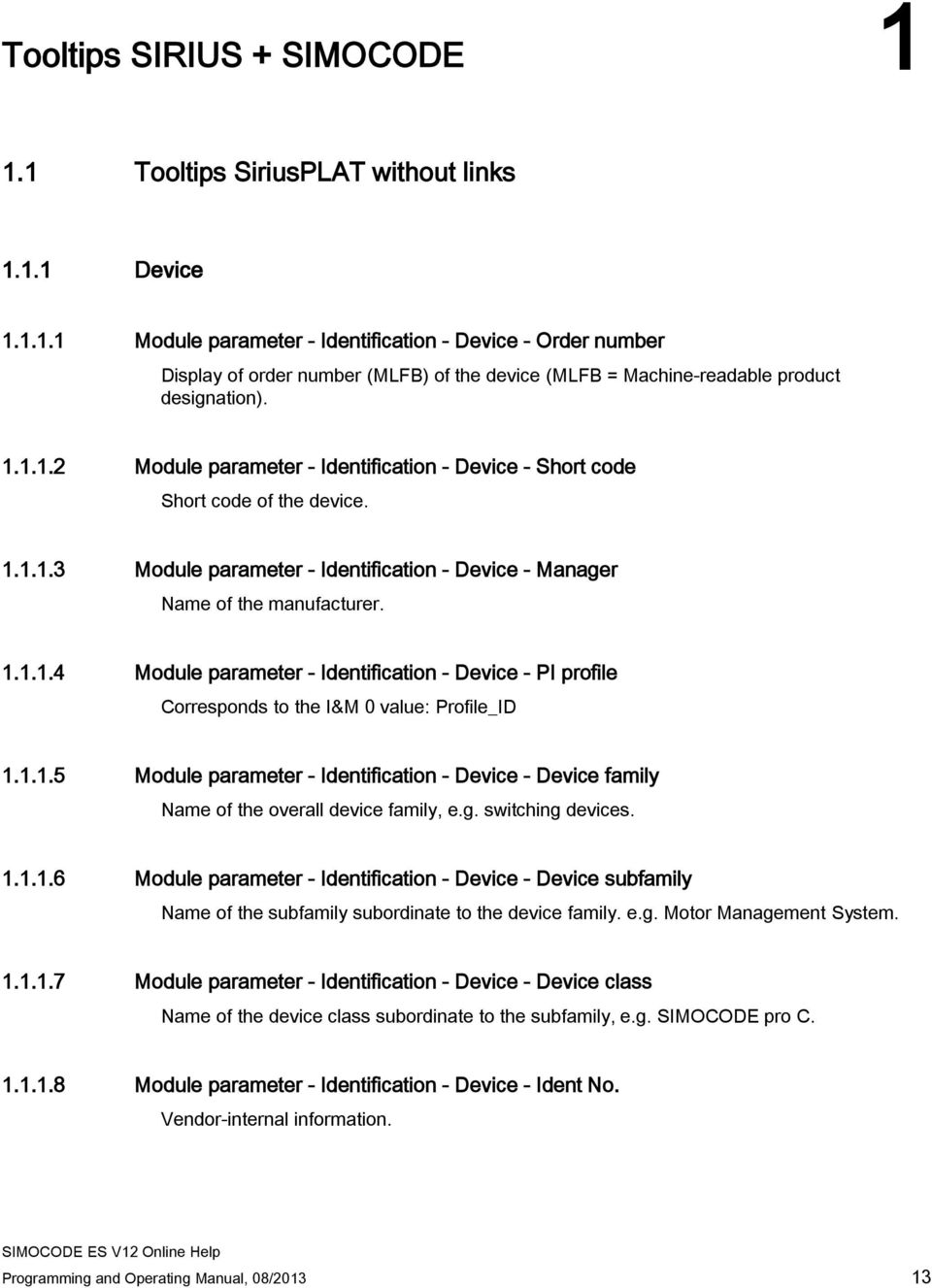
13 Tooltips SIRIUS + SIMOCODE Tooltips SiriusPLAT without links Device Module parameter - Identification - Device - Order number Display of order number (MLFB) of the device (MLFB = Machine-readable product designation) Module parameter - Identification - Device - Short code Short code of the device Module parameter - Identification - Device - Manager Name of the manufacturer Module parameter - Identification - Device - PI profile Corresponds to the I&M 0 value: Profile_ID Module parameter - Identification - Device - Device family Name of the overall device family, e.g. switching devices Module parameter - Identification - Device - Device subfamily Name of the subfamily subordinate to the device family. e.g. Motor Management System Module parameter - Identification - Device - Device class Name of the device class subordinate to the subfamily, e.g. SIMOCODE pro C Module parameter - Identification - Device - Ident No. Vendor-internal information. Programming and Operating Manual, 08/
14 Tooltips SIRIUS + SIMOCODE 1.1 Tooltips SiriusPLAT without links Module parameter - Identification - Device - Hardware revision level Corresponds to the I&M 0 value: Hardware_Revision Module parameter - Identification - Device - Firmware revision level Corresponds to the I&M 0 value: Software_Revision Module parameter - Identification - Device - Revision counter Corresponds to the I&M 0 value: Rev_Counter Module parameter - Identification - Device - IaM version Corresponds to the I&M 0 value: IM_Version Module parameter - Identification - Device - Supported IaM data Corresponds to the I&M 0 value: IM_Support Module parameter - Identification - Device - Time stamp Vendor-internal information Fieldbus interface Fieldbus interface - Start-up parameter block Activate the "Startup parameter block active" checkbox if you want to prevent the parameter data that is currently stored by SIMOCODE pro being overwritten by the PROFIBUS DP master during startup. In this case, you can only modify parameter data using the SIMOCODE ES software. Default setting: Activated: When parameterizing in SIMOCODE ES directly deactivated: In accordance with factory setting or when integrated via SIMOCODE pro Fieldbus interface - DP address Selection of the PROFIBUS DP address. A node's address must be unique within a PROFIBUS DP network. Select a unique DP address here. Address 126 is generally assigned to a factory-set device. 14 Programming and Operating Manual, 08/2013

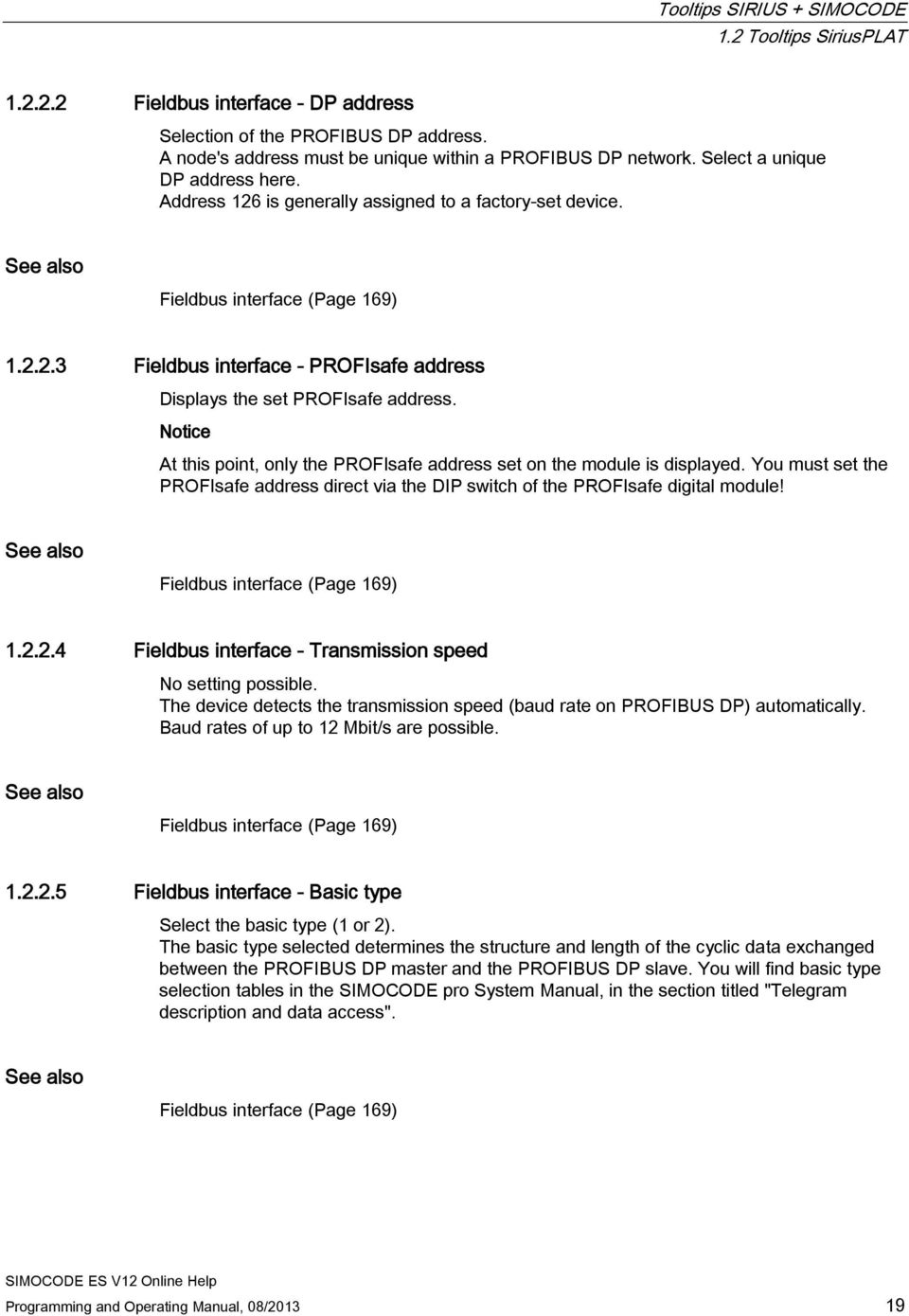
15 Tooltips SIRIUS + SIMOCODE 1.1 Tooltips SiriusPLAT without links Fieldbus interface - PROFIsafe address Displays the set PROFIsafe address. Notice At this point, only the PROFIsafe address set on the module is displayed. You must set the PROFIsafe address direct via the DIP switch of the PROFIsafe digital module! Fieldbus interface - Transmission speed No setting possible. The device detects the transmission speed (baud rate on PROFIBUS DP) automatically. Baud rates of up to 12 Mbit/s are possible Fieldbus interface - Basic type Select the basic type (1 or 2). The basic type selected determines the structure and length of the cyclic data exchanged between the PROFIBUS DP master and the PROFIBUS DP slave. You will find basic type selection tables in the SIMOCODE pro System Manual, in the section titled "Telegram description and data access" Fieldbus interface - Diagnosis for process messages Activated: Event messages are transferred via PROFIBUS DP in the form of an alarm. Deactivated: Event messages are not transferred via PROFIBUS DP Fieldbus interface - Diagnosis for process warnings Activated: Warning messages are transferred via PROFIBUS DP in the form of an alarm. Deactivated: Warning messages are not transferred via PROFIBUS DP Fieldbus interface - Diagnosis for process faults Activated: Trip messages are transferred via PROFIBUS DP in the form of an alarm. Deactivated: Trip messages are not transferred via PROFIBUS DP Fieldbus interface - Diagnosis for device faults Activated: Device faults are transferred via PROFIBUS DP in the form of a diagnostic alarm. Deactivated: Device faults are not transferred via PROFIBUS DP. Programming and Operating Manual, 08/

16 Tooltips SIRIUS + SIMOCODE 1.2 Tooltips SiriusPLAT 1.2 Tooltips SiriusPLAT Device Module parameter - Identification - Device - Order number Display of order number (MLFB) of the device (MLFB = Machine-readable product designation). Device (Page 165) Module parameter - Identification - Device - Short code Short code of the device. Device (Page 165) Module parameter - Identification - Device - Manager Name of the manufacturer. Device (Page 165) Module parameter - Identification - Device - PI profile Corresponds to the I&M 0 value: Profile_ID Device (Page 165) Module parameter - Identification - Device - Device family Name of the overall device family, e.g. switching devices. Device (Page 165) 16 Programming and Operating Manual, 08/2013

17 Tooltips SIRIUS + SIMOCODE 1.2 Tooltips SiriusPLAT Module parameter - Identification - Device - Device subfamily Name of the subfamily subordinate to the device family. e.g. Motor Management System. Device (Page 165) Module parameter - Identification - Device - Device class Name of the device class subordinate to the subfamily, e.g. SIMOCODE pro C. Device (Page 165) Module parameter - Identification - Device - Ident No. Vendor-internal information. Device (Page 165) Module parameter - Identification - Device - Hardware revision level Corresponds to the I&M 0 value: Hardware_Revision. Device (Page 165) Module parameter - Identification - Device - Firmware revision level Corresponds to the I&M 0 value: Software_Revision. Device (Page 165) Module parameter - Identification - Device - Revision counter Corresponds to the I&M 0 value: Rev_Counter. Device (Page 165) Programming and Operating Manual, 08/

18 Tooltips SIRIUS + SIMOCODE 1.2 Tooltips SiriusPLAT Module parameter - Identification - Device - IaM version Corresponds to the I&M 0 value: IM_Version. Device (Page 165) Module parameter - Identification - Device - Supported IaM data Corresponds to the I&M 0 value: IM_Support. Device (Page 165) Module parameter - Identification - Device - Time stamp Vendor-internal information. Device (Page 165) Time stamping (Page 259) Fieldbus interface Fieldbus interface - Start-up parameter block Activate the "Startup parameter block active" checkbox if you want to prevent the parameter data that is currently stored by SIMOCODE pro being overwritten by the PROFIBUS DP master during startup. In this case, you can only modify parameter data using the SIMOCODE ES software. Default setting: Activated: When parameterizing in SIMOCODE ES directly deactivated: In accordance with factory setting or when integrated via SIMOCODE pro. Fieldbus interface (Page 169) 18 Programming and Operating Manual, 08/2013

19 Tooltips SIRIUS + SIMOCODE 1.2 Tooltips SiriusPLAT Fieldbus interface - DP address Selection of the PROFIBUS DP address. A node's address must be unique within a PROFIBUS DP network. Select a unique DP address here. Address 126 is generally assigned to a factory-set device. Fieldbus interface (Page 169) Fieldbus interface - PROFIsafe address Displays the set PROFIsafe address. Notice At this point, only the PROFIsafe address set on the module is displayed. You must set the PROFIsafe address direct via the DIP switch of the PROFIsafe digital module! Fieldbus interface (Page 169) Fieldbus interface - Transmission speed No setting possible. The device detects the transmission speed (baud rate on PROFIBUS DP) automatically. Baud rates of up to 12 Mbit/s are possible. Fieldbus interface (Page 169) Fieldbus interface - Basic type Select the basic type (1 or 2). The basic type selected determines the structure and length of the cyclic data exchanged between the PROFIBUS DP master and the PROFIBUS DP slave. You will find basic type selection tables in the SIMOCODE pro System Manual, in the section titled "Telegram description and data access". Fieldbus interface (Page 169) Programming and Operating Manual, 08/
20 Tooltips SIRIUS + SIMOCODE 1.2 Tooltips SiriusPLAT Fieldbus interface - Diagnosis for process messages Activated: Event messages are transferred via PROFIBUS DP in the form of an alarm. Deactivated: Event messages are not transferred via PROFIBUS DP. Fieldbus interface (Page 169) Fieldbus interface - Diagnosis for process warnings Activated: Warning messages are transferred via PROFIBUS DP in the form of an alarm. Deactivated: Warning messages are not transferred via PROFIBUS DP. Fieldbus interface (Page 169) Fieldbus interface - Diagnosis for process faults Activated: Trip messages are transferred via PROFIBUS DP in the form of an alarm. Deactivated: Trip messages are not transferred via PROFIBUS DP. Fieldbus interface (Page 169) Fieldbus interface - Diagnosis for device faults Activated: Device faults are transferred via PROFIBUS DP in the form of a diagnostic alarm. Deactivated: Device faults are not transferred via PROFIBUS DP. Fieldbus interface (Page 169) 20 Programming and Operating Manual, 08/2013

21 Tooltips SIRIUS + SIMOCODE 1.3 Module parameters without links 1.3 Module parameters without links Identification Marking Module parameter - Identification - Designation Entry of any text, e.g. for plant documentation Configuration Configuration - Selection of an initialization module Selection of an initialization module. The initialization module allows all system parameter settings to be backed up and transferred to a new system (in the case of device replacement, for example) without the need for additional resources or detailed specialist expertise. Note The SIMOCODE pro S and SIMOCODE pro V basic units from product version *E09* and higher do not support the initialization module Configuration - Application (control function) - SIMOCODE pro C basic unit Selection of one of the following applications (control functions) for the SIMOCODE pro C basic unit: Overload relay Direct starter Reversing starter Molded-case circuit breaker (MCCB) Configuration - Application (control function) - SIMOCODE pro V basic unit Selection of one of the following applications (control functions) for the SIMOCODE pro V basic unit: Overload relay Direct starter Reversing starter Programming and Operating Manual, 08/
22 Tooltips SIRIUS + SIMOCODE 1.3 Module parameters without links Molded case circuit breaker (MCCB) Star-delta starter Star-delta reversing starter Dahlander Dahlander reversing starter Pole-changing starter Pole-changing reversing starter Valve Positioner 1 Positioner 2 Positioner 3 Positioner 4 Positioner 5 Soft starter with reversing contactor Soft starter Configuration - Application (control function) - SIMOCODE pro S basic unit Selection of one of the following applications (control functions) for the SIMOCODE pro S basic unit: Overload relay Direct starter Reversing starter Molded case circuit breaker (MCCB) Star-delta starter Soft starter Configuration - Thermistor Activate the "Thermistor" checkbox if you want to use the thermistor (binary PTC) to monitor motor temperature. When the checkbox is activated, the "Thermistor" motor protection dialog appears. Here you can define the response when the trip level is reached and the response in the event of a sensor fault. 22 Programming and Operating Manual, 08/2013
23 Tooltips SIRIUS + SIMOCODE 1.3 Module parameters without links Configuration - Removal error when operator panel is removed If "Yes" is set in the dropdown menu, the message "Removal error" will be output if a configured operator panel without display is removed. If "No" is set, the message "Removal error" will not be displayed if the operator panel is removed during operation. Use this setting if an operator panel is connected temporarily. Notice If the operator panel is the motor's only active control station, the motor might not shut down again! Motor protection Overload/Unbalance/Stalled rotor Motor protection - Voltage measurement - Load type Here you select whether SIMOCODE pro is to protect a 1-phase or a 3-phase load (default setting: 3-phase). For a "1-phase" type of load, proceed as follows: Deactivate the internal ground-fault detection and unbalance protection Route just one of the two conductors through any feed-through opening on the current measuring module. Phase failure monitoring is deactivated automatically. Overload protection - Type of load Here you select whether SIMOCODE pro is to protect a 1-phase or a 3-phase load (default setting). For a "1-phase" type of load, proceed as follows: If necessary, deactivate internal ground-fault detection. Route just one of the two conductors through any feed-through opening on the current measuring module. Phase failure monitoring is deactivated automatically. Overload protection - Reset Manual (default setting): Faults must be acknowledged by a reset signal: Via the "Reset" button on the basic unit or Via the "Reset" button on the operator panel or Via "Standard functions -> Reset" (the "Reset - Input" inputs (plugs) must be connected to the corresponding sockets, e.g. using a reset via the bus). Programming and Operating Manual, 08/
24 Tooltips SIRIUS + SIMOCODE 1.3 Module parameters without links Motor protection - Thermistor - Response when trip level reached Here you can set how SIMOCODE pro should respond if the thermistor trip level is exceeded (default setting: tripping). Motor protection - Thermistor - Response to sensor fault Here you can set how SIMOCODE pro should respond in the event of a short circuit or if an open circuit occurs in the thermistor cable (default setting: warning). Motor protection - Blocking protection - Delay Selection of the delay time (0 to 25.5 s, default setting: 0.5 s) for the set response (signaling, warning, tripping). This setting can be modified during operation. Overload protection - Cooling down period Time setting (60 to s, default setting: 300 s), after which an overload trip can be reset. This setting can be modified during operation. Overload protection - Pause time Time setting (0 to s, default setting: 0 s) for the cooling down response of the motor when tripped under normal operating conditions (not in the case of an overload trip). This setting can be modified during operation. After this time the "thermal motor model" will be deleted and a new cold start will be possible. This means that many startups can be performed in a short space of time. Motor protection - Response when trip level reached Here you can set how SIMOCODE pro should respond if the trip level is exceeded in the event of an overload (default setting: tripping). Motor protection - Overload protection - Response when prewarning threshold reached Here you can set how SIMOCODE pro should respond if the prewarning level (I> 115 % Is) is exceeded in the event of an overload (default setting: warning). Motor protection - Overload protection - Response to unbalance Here you can set how SIMOCODE pro should respond to a phase unbalance (default setting: warning). 24 Programming and Operating Manual, 08/2013
25 Tooltips SIRIUS + SIMOCODE 1.3 Module parameters without links Overload protection - Class The Class (tripping class) defines the maximum time within which SIMOCODE pro must trip from cold at 7.2 times the setting current (motor protection to IEC 60947). You can choose between 8 different settings (Class 5 to Class 40). Please note that with startups > Class 10, the permissible AC3 current of the contactor may have to be reduced (derated), i.e. you must select a larger contactor. The tripping class can be modified during operation. Motor protection - Delay in the event of overload operation (delay prewarning) Define how long (default setting: 0.5 s) the prewarning level (1.15 x Is) must be constantly exceeded before SIMOCODE pro executes the desired response. If no setting is made, there will be no response. In the event of a loss of phase or an unbalance > 50%, the prewarning level will be reached earlier, at approximately 0.85 x Is. You can change this setting during operation. Motor protection - Unbalance protection threshold Setting of the unbalance protection level (0 to 100%, default setting: 40%), which must be exceeded for SIMOCODE pro to respond. Loss of one phase corresponds to an unbalance of 100%. This setting can be modified during operation. Overload protection - Blocking protection threshold Setting of a blocking threshold for the motor current (0 to 1020% of the set current Is in 4% increments, default setting: 0) at which SIMOCODE pro will react as per the selected response. The response is triggered as soon as the motor current exceeds this threshold. This setting can be modified during operation. Overload protection - Set current Is1 Setting of the motor rated current. This value can be found on the rating plate of the motor. The overload trip characteristic is calculated based on this value. The setting range depends on the current measuring module or current/voltage measuring module selected. This setting can be modified during operation. Overload protection - Is1-Is2 transformation ratio active Activate this checkbox if you are using an interposing transformer or looping the main current lines through the current measuring module or the current/voltage measuring module several times. If the checkbox is activated, you can enter a transformation ratio. Overload protection - Is1 transformation ratio - Numerator Enter the transformation ratio of the interposing transformer (primary) here, with the "Is1 transformation ratio - Active" checkbox activated. Range: 0 to (default: 0). Programming and Operating Manual, 08/
26 Tooltips SIRIUS + SIMOCODE 1.3 Module parameters without links Overload protection - Is1 transformation ratio - Denominator Enter the transformation ratio of the interposing transformer (secondary) here, with the "Is1 transformation ratio - Active" checkbox activated. Range: 0 to 15 (default: 0). Overload protection - Is2 transformation ratio - Numerator Enter the transformation ratio of the interposing transformer (primary) here, with the "Is2 transformation ratio - Active" checkbox activated. Range: 0 to (default: 0). Overload protection - Is2 transformation ratio - Denominator Enter the transformation ratio of the interposing transformer (secondary) here, with the "Is2 transformation ratio - Active" checkbox activated. Range: 0 to 15 (default: 0). Overload protection - Set current Is2 Set current Is2 can only be set for control functions with two speeds (Dahlander, Dahlander reversing starter, pole-changing starter, pole-changing reversing starter) as a way of ensuring that appropriate overload protection is also provided for the higher of the two speeds. Is2 is usually set to a value higher than Is1. The setting range depends on the selected current measuring module or current/voltage measuring module. This setting can be modified during operation. Motor protection - Overload protection - Delay in the event of unbalance Selection of the delay time (0 to 25.5 s, default setting: 0.5 s) for the set response (signaling, warning, tripping). Motor protection - Blocking protection - Response when blocking threshold reached Here you can select how SIMOCODE pro should respond if the blocking threshold is exceeded (default setting: deactivated). 26 Programming and Operating Manual, 08/2013
27 Tooltips SIRIUS + SIMOCODE 1.3 Module parameters without links Motor control Control stations Control stations - Operation mode switch S1, S2 You can use the operation mode switch to change over between the following operating modes using any signals (any sockets, e.g. device inputs, PROFIBUS DP control bits, etc.): Local 1 Local 2 Local 3 Remote/Automatic Input S1: Local 1 (0), Local 2 (0), Local 3 (1), Remote/Auto (1) Input S2: Local 1 (0), Local 2 (1), Local 3 (0), Remote/Auto (1) Control stations - Activate enables Enables, which must be activated, are assigned to the "ON" and "OFF" control commands for each control station in every operating mode. Activate the enables for the "ON" and "OFF" control commands ("ON" only, "OFF" only, or "ON" and "OFF") for each control station, depending on whether the control station is to be able to only switch the motor on, only switch it off, or switch it on and off. Control station - PLC/PCS Select any socket (typically the sockets of the "Cyclic receive" function blocks). Control station - PC This control station is primarily intended for switching commands on any PC which, along with the automation system, is used as a second master on the PROFIBUS DP. The control commands are received from the PROFIBUS DPV1 via the acyclic control telegram. No connection needs to be established if the SIMOCODE ES Professional or SIMATIC PDM PC software is connected to SIMOCODE pro via PROFIBUS DP. In this case, the control commands will be implemented automatically via the PC control station [DPV1]. Control station - Operator panel Select any socket (typically the sockets of the "Operator panel buttons" function block). Since the operator panel only has four buttons for controlling the motor feeder, one button must be used as a speed change-over button for control functions with two speeds and two directions of rotation. For this purpose, this button must be assigned to the internal control command "[OP]<>/<<>>". Programming and Operating Manual, 08/
28 Tooltips SIRIUS + SIMOCODE 1.3 Module parameters without links If the SIMOCODE ES PC software on a PC is connected to SIMOCODE pro via the system interface, its control commands are implemented automatically via the "Operator panel (OP)" control station and must be enabled here as applicable. Control station - Local control Select any socket (typically the sockets of the "BU inputs" and "DM1 inputs" or "DM2 inputs" function blocks). The OFF command "LC OFF" is 0-active. This ensures that SIMOCODE pro shuts the motor down if an open circuit occurs in the incoming cable, for example. The precondition is that the control station is active Control function Control function - Auxiliary control input FC The "Auxiliary control input FC" function block is an expanded status message for the "Positioner" or "Valve" control functions. PC (Feedback Close) can be connected to any socket, though usually with that of an input to which the limit switch is wired. Control function - Auxiliary control input FO The "Auxiliary control input FO" function block is an expanded status message for the "Positioner" or "Valve" control functions. PO (Feedback Open) can be connected to any socket, though usually with that of an input to which the limit switch is wired. Control function - Auxiliary control input TC The "Auxiliary control input TC" function block is an expanded status message for the "Positioner" or "Valve" control functions. TC (Torque Closed) can be connected to any socket, though usually with that of an input to which the torque switch is wired. Control function - Auxiliary control input TO The "Auxiliary control input TO" function block is an expanded status message for the "Positioner" or "Valve" control functions. TO (Torque Open) can be connected to any socket, though usually with that of an input to which the torque switch is wired. 28 Programming and Operating Manual, 08/2013
29 Tooltips SIRIUS + SIMOCODE 1.3 Module parameters without links Control function - Control commands Plugs of the "Control stations" function block. Connect these plugs to any sockets (e.g. binary inputs on the basic unit, PROFIBUS DP control bits) so that the control commands can be implemented. Each control station can output up to five different control commands (via the plugs ON <<, ON <, OFF, ON >, ON >>). The number of active plugs depends on the control function selected. With a direct-on-line starter, for example, only the plugs "ON >" and "OFF" are active. Control function - Auxiliary control input Feedback ON SIMOCODE pro monitors statuses using the "Feedback ON" auxiliary control channel, which is usually derived directly from the current flow in the main circuit, via the current measuring modules. Select any socket (usually the preset socket, "Status - Current flowing"). Control function "Star-delta starter" and "Star-delta reversing starter" - Max. time for star mode Setting of the maximum time for star mode when switching over from star to delta if the current-dependent reversing point could not be detected (0 to 255 s, default setting: 20 s). Control function "Star-delta starter" and "Star-delta reversing starter" - Integrated current measuring module Select "Incoming cable" if the current measuring module is integrated in the motor supply cable. Select "In delta" if the current measuring module is integrated in the star-delta circuit's delta. The set current Is is reduced to Irated x 3. Control function - Type of load Select either "motor" (default setting) or "resistive load" (e.g. heating). If "Motor" is selected, following an ON command "Status - Start active" will be set for the duration of the "Class" that has been set. All current-dependent monitoring functions (stalled rotor, current limits, cos phi, active power) only become active once the set "Class" time has elapsed. If "Resistive load" is selected, "Status - Start active" will not be set. All current-dependent monitoring functions (stalled rotor, current limits, cos phi, active power) become active immediately after the start. Control function - Save switching command Deactivated: Change-over commands from one direction of rotation/speed to the other are only implemented if "OFF" has previously been set and once the interlocking time/change-over pause has elapsed. This setting is the default and the one which is normally used. Activated: Change-over commands from one direction of rotation/speed to the other are implemented without a previous "OFF", once the interlocking time/change-over pause has elapsed. Programming and Operating Manual, 08/
30 Tooltips SIRIUS + SIMOCODE 1.3 Module parameters without links Control function - DM-F LOCAL/PROFIsafe - Separate function from control function Deactivated: A safety-related disconnection by the DM-F modules is also effected by the SIMOCODE pro control function, avoiding additional follow-on fault messages. Select this setting for applications where the safety-related disconnection directly affects the motor controlled by SIMOCODE pro. Activated: A safety-related disconnection by the DM-F modules does not affect the SIMOCODE pro control function. Select this setting for applications where the safetyrelated disconnection is not in any way linked to the motor controlled by SIMOCODE pro. Control function - Jog mode Deactivated (default setting): Normal mode: In this operating mode, a control command (ON <, ON <<, ON >, ON >>) is saved (corresponds to contactor locking). Activated: If you want to switch a motor on and off, either just the one time or on a repeated temporary basis, activate the "Jog mode" checkbox. In this operating mode, a control command (ON <, ON <<, ON >, ON >>) only remains active as long as a "high signal" is present at the corresponding plugs. Control function - Change-over pause Control functions "Dahlander" and "Pole-changing starter": The change-over from the fast speed to the slow speed can be delayed by the time set for the change-over pause (0 to s, default setting: 0). Control function "star/delta": The time that elapses between switching off the star contactor and switching on the delta contactor is extended by the time set for the changeover pause (0 to s, default setting: 0). This setting can be modified during operation. Control function - Execution time Selection of the execution time (0 to s, default setting: 1.0 s) for monitoring the start and shutdown cycle. The start and shutdown cycle must be completed within the set time, otherwise a fault message will be output. Following an "ON" control command, SIMOCODE pro must measure the current in the main circuit within the execution time, otherwise the "Fault - Execution ON command" error message will be output. Following an "OFF" control command, SIMOCODE pro must not measure any current in the main circuit once the execution time has elapsed, otherwise the "Fault - Execution OFF command" error message will be output. This setting can be modified during operation. Control function - Interlocking time Setting an interlocking time (0 to 255 s, default 0 s) for the line contactors in the case of the control functions with reversing function and pole-changing function. With the interlocking time, the change-over of the direction of rotation or the change-over of the speed from fast to slow can be time-delayed. This setting can be modified during operation. 30 Programming and Operating Manual, 08/2013
31 Tooltips SIRIUS + SIMOCODE 1.3 Module parameters without links Control function - Check-back time Setting of a feedback time (0 to 25.5 s, default setting: 0.5 s) for monitoring the status of the feeder (ON or OFF). If the status is "ON", the current flow may be interrupted for the duration of the feedback time, which will then be followed by "Fault - Feedback ON". If the status is "OFF", current may flow for the duration of the feedback time, which will then be followed by "Fault - Feedback (FB) OFF". This setting can be modified during operation Machine monitoring Ground fault EMplus - Response to sensor fault Here you can set how SIMOCODE pro should respond in the event of a sensor fault (default setting: deactivated). EMplus - Monitoring - Warning Unless deactivated, this function is always active, independent of whether the motor is running or not (operating state "ON"). Here you can specify in which motor operating states the warning level is to take effect: always (on) (default setting): warning level always active, regardless of whether the motor is running or at a standstill if motor is running, except TPF (run): warning level only active if motor is running if motor is running, except with TPF, with startup override (run+): warning level only active if motor is running and the start procedure has been completed. EMplus - Monitoring Unless deactivated, this function is always active, independent of whether the motor is running or not (operating state "ON"). Here you can specify in which motor operating states the trip level is to take effect: always (on) (default setting): trip level always active, regardless of whether the motor is running or at a standstill if motor is running, except TPF (run): trip level only active if motor is running if motor is running, except with TPF, with startup override (run+): trip level only active if motor is running and the start procedure has been completed. EMplus - Hysteresis Here you can set the hysteresis for the ground-fault current (0 to 15% of the threshold value in 1% increments, default setting: 5 %) Programming and Operating Manual, 08/
32 Tooltips SIRIUS + SIMOCODE 1.3 Module parameters without links EMplus - Delay - Warning Selection of the delay time (0 to 25.5 s, default setting: 0.1 s) for the set response (signaling, warning). Can be modified during operation. EMplus - Trip level Setting a trip level for the ground-fault current (30 ma to 40 A in 10 ma increments, default: 1000 ma). If the ground-fault current exceeds the trip level, the ground-fault current monitor responds. This setting can be modified during operation. EMplus - Warning level Setting a warning level for the ground-fault current (20 ma to 40 A in 10 ma increments, default: 500 ma). If the ground-fault current exceeds the warning level, the ground-fault current monitor responds. This setting can be modified during operation. EMplus - Response to warning of an external ground fault Here you can set how SIMOCODE pro should respond if the warning level for the groundfault current is undershot (default setting: deactivated). EMplus - Response to an external ground fault Here you can set how SIMOCODE pro should respond if the trip level for the ground-fault current is undershot (default setting: signaling) EMplus - Delay - Trip/warning level Selection of the delay time (0 to 25.5 s) for the set response (signaling, warning, tripping). Setting range for the delay time if the trip level is undershot: 0 to 25.5 s (default setting: 0.5 s) 1 ) Setting range for the delay time if the warning level is undershot: 0 to 25.5 s (default setting: 0.1 s) 1 ) The delay time can be modified during operation. 1) Extension of the residual current transformer delay External ground-fault monitoring - Delay Selection of the delay time (0 to 25.5 s, default setting: 0.5 s), which is an additional delay to that for the summation current transformer, for the set response (signaling, warning, tripping). The delay time can be modified during operation. Internal ground-fault monitoring - Response Here you can set how SIMOCODE pro should respond to an internal ground fault (default setting: deactivated). 32 Programming and Operating Manual, 08/2013
33 Tooltips SIRIUS + SIMOCODE 1.3 Module parameters without links External ground-fault monitoring - Response Here you can set how SIMOCODE pro should respond to an external ground fault (default setting: signaling). Internal ground-fault monitoring - Delay Selection of the delay time (0 to 25.5 s, default setting: 0.5 s) for the set response (signaling, warning, tripping). The delay time can be modified during operation Current limits Monitoring current limits - Trip level I> (high limit) Setting of a trip level I> for the motor current (0 to 1020% of setting current Is in 4% increments, default setting: 0), at which SIMOCODE pro will generate a message or trip the motor. The response is triggered as soon as the current of one or more phases exceeds this level. This setting can be modified during operation. Monitoring current limits - Response when trip level I> reached Here you can set how SIMOCODE pro should respond if the trip level I> is exceeded (default setting: deactivated). Monitoring current limits - Warning level I> (high limit) Setting of a warning level I> for the motor current (0 to 1020% of setting current Is in 4% increments, default setting: 0), at which SIMOCODE pro will generate a message or an alarm. The message or alarm is generated as soon as the current of one or more phases exceeds this level. This setting can be modified during operation. Monitoring current limits - Response when warning level I> reached Here you can set how SIMOCODE pro should respond if the warning level I> is exceeded (default setting: deactivated). Monitoring current limits - Trip level I< (low limit) Setting of a trip level I< for the motor current (0 to 1020% of setting current Is in 4% increments, default setting: 0), at which SIMOCODE pro will generate a message or trip the motor. The response is triggered as soon as the current of one or more phases undershoots this level. This setting can be modified during operation. Monitoring current limits - Response when trip level I< not reached Here you can set how SIMOCODE pro should respond if the trip level I< is undershot (default setting: deactivated). Programming and Operating Manual, 08/
34 Tooltips SIRIUS + SIMOCODE 1.3 Module parameters without links Monitoring current limits - Warning level I< (low limit) Setting of a warning level I< for the motor current (0 to 1020% of setting current Is in 4% increments, default setting: 0), at which SIMOCODE pro will generate a message or an alarm. The message or alarm is tripped as soon as the current undershoots one or more phases of this level. This setting can be modified during operation. Monitoring current limits - Response when warning level I< not reached Here you can set how SIMOCODE pro should respond if the warning level I< is undershot (default setting: deactivated). Monitoring current limits - Trip I> delay (high limit) Selection of the delay time (0 to 25.5 s, default setting: 0.5 s) for the set response (signaling, tripping). The delay time can be modified during operation. Monitoring current limits - Warning I> delay (high limit) Selection of the delay time (0 to 25.5 s, default setting: 0.5 s) for the set response (signaling, warning). The delay time can be modified during operation. Monitoring current limits - Trip < delay (low limit) Selection of the delay time (0 to 25.5 s, default setting: 0.5 s) for the set response (signaling, tripping). The delay time can be modified during operation. Monitoring current limits - Warning I< delay (low limit) Selection of the delay time (0 to 25.5 s, default setting: 0.5 s) for the set response (signaling, warning). The delay time can be modified during operation. Monitoring current limits - Hysteresis Here you can set the hysteresis for current limits (0 to 15% of the threshold value in 1% increments, default setting: 5%) Operation monitoring Operating hours monitoring - Threshold Setting of the response threshold (0 to 1,193,046 hours, default setting: 0) for monitoring a motor's operating hours (service life). This setting can be modified during operation. Monitoring of operating hours - Response to overshoot Here you can set how SIMOCODE pro should respond if the set threshold (0 to 1,193,046 h) is exceeded (default setting: deactivated). 34 Programming and Operating Manual, 08/2013
35 Tooltips SIRIUS + SIMOCODE 1.3 Module parameters without links Stop time monitoring - Response to overshoot Here you can set how SIMOCODE pro should respond if the set motor stop time (0 to h) is exceeded (default setting: deactivated). Stop time monitoring - level Setting of the threshold, i.e. the length of the permissible motor stop time (0 to hours, default setting: 0). If the permissible motor stop time is exceeded, SIMOCODE pro reacts as per the response which has been selected. The threshold setting can be modified during operation. Monitoring the number of starts - Interlocking time Setting of an interlocking time (00:00:00 to 18:12:15 hh:mm:ss, default setting: 00:00:00). If a new start command is issued within the start period after the last permitted start, it will not be executed if "Response to overshoot - Tripping" is set. The "Fault - No. of starts >" fault message is displayed and the set interlocking time is activated. This setting can be modified during operation. Monitoring the number of starts - Start period Setting of a start period (00:00:00 to 18:12:15 hh:mm:ss, default setting: 00:00:00) for the permissible startup procedures. Once the parameterized start period has elapsed, the maximum number of starts is available once more. This setting can be modified during operation. Monitoring the number of starts - Permissible starts Entry of the maximum number of permissible starts (1 to 255, default setting: 1). The set "start period" starts to elapse when the first start is executed. The setting of the maximum number of permissible starts can be modified during operation. Monitoring the number of starts - Response to prewarning Here you can set how SIMOCODE pro should respond following the penultimate start (default setting: deactivated). Monitoring the number of starts - Response to overshoot Here you can set how SIMOCODE pro should respond if the number of starts is exceeded during the start period (default setting: deactivated). Programming and Operating Manual, 08/
36 Tooltips SIRIUS + SIMOCODE 1.3 Module parameters without links Voltage monitoring Voltage monitoring - Response when trip level not reached (low limit) Here you can set how SIMOCODE pro should respond if the voltage of one or more phases has undershot the trip level U< (default setting: deactivated). Voltage monitoring - Response when warning level not reached (low limit) Here you can set how SIMOCODE pro should respond if the voltage of one or more phases has undershot the warning level U< (default setting: deactivated). Voltage monitoring - Trip level (low limit) Setting of a trip level U< for the line voltage (0 to 2040 V in 8 V increments, default: 0), at which SIMOCODE pro will generate a message or trip the motor. The response is triggered as soon as the voltage of one or more phases undershoots this level. This setting can be modified during operation. Voltage monitoring - Warning level (low limit) Setting of a warning level U< for the line voltage (0 to 2040 V in 8-V increments, default: 0), at which SIMOCODE pro will trip the motor. The response is triggered as soon as the voltage of one or more phases undershoots this level. This setting can be modified during operation. Voltage monitoring - Trip level delay (low limit) Selection of the delay time (0 to 25.5 s, default setting: 0.5 s) for the set response (signaling, tripping). Can be modified during operation. Voltage monitoring - Warning level delay (low limit) Selection of the delay time (0 to 25.5 s, default setting: 0.5 s) for the set response (signaling, warning). Can be modified during operation. 36 Programming and Operating Manual, 08/2013
37 Tooltips SIRIUS + SIMOCODE 1.3 Module parameters without links Voltage monitoring - Activity of trip level Definition of the motor operating states in which the trip level is to be active: always (on) 1): trip level always active, regardless of whether the motor is running or at a standstill always, except in the case of TPF (on+) (default): trip level always active, regardless of whether the motor is running or at a standstill; exception: "TPF", that is, motor feeder is in test position if motor is running, except TPF (run): trip level only active if the motor is ON and not in the test position 1) When using basic unit 2 (product version *E03* and higher) with a current/voltage measuring module. Voltage monitoring - Activity of warning level Definition of the motor operating states in which the warning level is to be active: always (on) 1): warning level always active, regardless of whether the motor is running or at a standstill always, except in the case of RMT (on+) (default): warning level always active, regardless of whether the motor is running or at a standstill; exception: "TPF", i.e. motor feeder is in test position if motor is running, except TPF (run): warning level only active if the motor is ON and not in the test position 1) When using basic unit 2 (product version *E03* and higher) with a current/voltage measuring module Voltage monitoring - Hysteresis for voltage, cos phi, power Here you can set the hysteresis for the voltage, cos phi and power (0 to 15% of the threshold value in 1% increments, default setting: 5%) Cos phi monitoring Cos phi monitoring - Response to trip level (lower limit) Here you can set how SIMOCODE pro should respond if the cos phi has undershot the trip level cos phi< (default setting: deactivated). Cos phi monitoring - Response to warning level (lower limit) Here you can set how SIMOCODE pro should respond if the cos phi has undershot the warning level cos phi< (default setting: deactivated). Programming and Operating Manual, 08/
38 Tooltips SIRIUS + SIMOCODE 1.3 Module parameters without links Cos phi monitoring - Trip level cos phi< (lower limit) Setting of a trip level cos phi< (lower limit) for the cos phi (0 to 100% of Is in 1% increments, default setting: 0) at which SIMOCODE pro will generate a message or trip the motor. This setting can be modified during operation. Cos phi monitoring - Warning level cos phi< (lower limit) Setting of a warning level cos phi < (lower limit) for the cos phi (0 to 100% of Is in 1% increments, default setting: 0) at which SIMOCODE pro will generate a message or a warning. This setting can be modified during operation. Cos phi monitoring - Trip level delay (lower limit) Selection of the delay time (0 to 25.5 s, default setting: 0.5 s) for the set response (signaling, tripping). Can be modified during operation. Cos phi monitoring - Warning level delay (lower limit) Selection of the delay time (0 to 25.5 s, default setting: 0.5 s) for the set response (signaling, warning). Can be modified during operation Active power monitoring Active power monitoring - Response when trip level reached (high limit) Here you can set how SIMOCODE pro should respond if the active power has exceeded the trip level P> (default setting: deactivated). Active power monitoring - Response when warning level reached (high limit) Here you can set how SIMOCODE pro should respond if the active power has exceeded the warning level P> (default setting: deactivated). Active power monitoring - Response when trip level not reached (low limit) Here you can set how SIMOCODE pro should respond if the active power has undershot the trip level P< (default setting: deactivated). Active power monitoring - Response when warning level not reached (low limit) Here you can set how SIMOCODE pro should respond if the active power has undershot the warning level P< (default setting: deactivated). 38 Programming and Operating Manual, 08/2013
39 Tooltips SIRIUS + SIMOCODE 1.3 Module parameters without links Active power monitoring - Trip level delay (high limit) Selection of the delay time (0 to 25.5 s, default setting: 0.5 s) for the set response (signaling, tripping). Can be modified during operation. Active power monitoring - Warning level delay (high limit) Selection of the delay time (0 to 25.5 s, default setting: 0.5 s) for the set response (signaling, warning). Can be modified during operation. Active power monitoring - Trip level delay (low limit) Selection of the delay time (0 to 25.5 s, default setting: 0.5 s) for the set response (signaling, tripping). Can be modified during operation. Active power monitoring - Warning level delay (low limit) Selection of the delay time (0 to 25.5 s, default setting: 0.5 s) for the set response (signaling, warning). Can be modified during operation. Active power monitoring - Trip level P> (high limit) Setting of a trip level P> for the active power (0.000 to 4,294, kw, default setting: 0.000) at which SIMOCODE pro will generate a message or trip the motor. This setting can be modified during operation. Active power monitoring - Warning level P> (high limit) Setting of a warning level P> for the active power (0.000 to 4,294, kw, default setting: 0.000) at which SIMOCODE pro will generate a message or a warning. This setting can be modified during operation. Active power monitoring - Trip level P< (low limit) Setting of a trip level P< for the active power (0.000 to 4,294, kw, default setting: 0.000) at which SIMOCODE pro will generate a message or trip the motor. This setting can be modified during operation. Active power monitoring - Warning level P< (low limit) Setting of a warning level P< for the active power (0.000 to 4,294, kw, default setting: 0.000) at which SIMOCODE pro will generate a message or a warning. This setting can be modified during operation. Programming and Operating Manual, 08/
40 Tooltips SIRIUS + SIMOCODE 1.3 Module parameters without links / 4-20 ma monitoring 0 / 4-20 ma monitoring (upper limit) - Trip level activity Definition of the motor operating states in which the trip level is to be active: always (on) (default setting): trip level always active, regardless of whether the motor is running or at a standstill always, except TPF (on+): trip level is always active regardless of whether the motor is running or at a standstill, with the exception of "TPF", i.e. motor feeder is in the test position if motor is running, except TPF (run): trip level only active if the motor is ON and not in the test position if motor is running, except TPF, with startup override (run+): trip level only active if the motor is running, the startup procedure has been completed, and no test position (TPF) is detected. 0 / 4-20 ma monitoring (upper limit) - Warning level activity Definition of the motor operating states in which the warning level is to be active: always (on) (default setting): warning level always active, regardless of whether the motor is running or at a standstill always, except TPF (on+): warning level is always active regardless of whether the motor is running or at a standstill, with the exception of "TPF", i.e. motor feeder is in the test position if motor is running, except TPF (run): warning level only active if the motor is ON and not in the test position if motor is running, except TPF, with startup override (run+): warning level only active if the motor is running, the startup procedure has been completed, and no test position (TPF) is detected. 0 / 4-20 ma monitoring (lower limit) - Trip level activity Definition of the motor operating states in which the trip level is to be active: always (on) (default setting): trip level always active, regardless of whether the motor is running or at a standstill always, except TPF (on+): trip level always active, regardless of whether the motor is running or at a standstill; exception: "TPF", i.e. motor feeder is in test position if motor is running, except TPF (run): trip level only active if the motor is ON and not in the test position if motor is running, except TPF, with startup override (run+): trip level only active if the motor is running, the startup procedure has been completed, and no test position (TPF) is detected. 40 Programming and Operating Manual, 08/2013
41 Tooltips SIRIUS + SIMOCODE 1.3 Module parameters without links 0 / 4-20 ma monitoring (lower limit) - Warning level activity Definition of the motor operating states in which the warning level is to be active: always (on) (default setting): warning level always active, regardless of whether the motor is running or at a standstill always, except TPF (on+): warning level always active, regardless of whether the motor is running or at a standstill; exception: "TPF", i.e. motor feeder is in test position if motor is running, except TPF (run): warning level only active if the motor is ON and not in the test position if motor is running, except TPF, with startup override (run+): warning level only active if the motor is running, the startup procedure has been completed, and no test position (TPF) is detected. 0 / 4-20 ma monitoring - Response to trip level (upper limit) Here you can set how SIMOCODE pro should respond if the analog signal 0 / 4-20 ma has overshot trip level 0 / 4-20 ma (default setting: deactivated). 0 / 4-20 ma monitoring - Response to warning level (upper limit) Here you can set how SIMOCODE pro should respond if the analog signal 0 / 4-20 ma has overshot warning level 0 / 4-20 ma (default setting: deactivated). 0 / 4-20 ma monitoring - Response to trip level (lower limit) Here you can set how SIMOCODE pro should respond if the analog signal 0 / 4-20 ma has undershot trip level 0 / 4-20 ma (default setting: deactivated). 0 / 4-20 ma monitoring - Response to warning level (lower limit) Here you can set how SIMOCODE pro should respond if the analog signal 0 / 4-20 ma has undershot warning level 0 / 4-20 ma (default setting: deactivated). 0 / 4-20 ma monitoring - Trip level (upper limit) Setting of a trip level 0 / 4-20 ma> for the 0 / 4-20 ma output signal (0.0 to 23.6 ma, default setting: 0.0 ma) at which SIMOCODE pro will generate a message or trip the motor. This setting can be modified during operation. 0 / 4-20 ma monitoring - Warning level (upper limit) Setting of a warning level 0 / 4-20 ma> for the 0 / 4-20 ma output signal (0.0 to 23.6 ma, default setting: 0.0 ma) at which SIMOCODE pro will generate a message or an alarm. This setting can be modified during operation. Programming and Operating Manual, 08/
42 Tooltips SIRIUS + SIMOCODE 1.3 Module parameters without links 0 / 4-20 ma monitoring - Trip level (lower limit) Setting of a trip level 0 / 4-20 ma< for the 0 / 4-20 ma output signal (0.0 to 23.6 ma, default setting: 0.0 ma) at which SIMOCODE pro will generate a message or trip the motor. This setting can be modified during operation. 0 / 4-20 ma monitoring - Warning level (lower limit) Setting of a warning level 0 / 4-20 ma< for the 0 / 4-20 ma output signal (0.0 to 23.6 ma, default setting: 0.0 ma) at which SIMOCODE pro will generate a message or an alarm. This setting can be modified during operation. Monitoring 0 / 4-20 ma - Trip level delay (high limit) Selection of the delay time (0 to 25.5 s, default setting: 0.5 s) for the set response (signaling, tripping). The delay time can be modified during operation. Monitoring 0 / 4-20 ma - Warning level delay (high limit) Selection of the delay time (0 to 25.5 s, default setting: 0.5 s) for the set response (signaling, warning). The delay time can be modified during operation. Monitoring 0 / 4-20 ma - Trip level delay (low limit) Selection of the delay time (0 to 25.5 s, default setting: 0.5 s) for the set response (signaling, tripping). The delay time can be modified during operation. Monitoring 0 / 4-20 ma - Warning level delay (low limit) Selection of the delay time (0 to 25.5 s, default setting: 0.5 s) for the set response (signaling, warning). The delay time can be modified during operation. Monitoring 0 / 4-20 ma (high limit) - Marking The marking is saved in the device and assigned and displayed in the "Faults/Warnings" online dialog box. Optional marking for identifying the message, e.g. "0 / 4 to 20 ma >"; range: maximum 10 characters. 0 / 4-20 ma monitoring - Hysteresis Here you can set the hysteresis for the 0 / 4-20 ma analog signal (0 to 15% of the threshold value in 1% increments, default setting: 5%). 0 / 4-20 ma monitoring (low limit) - Marking The marking is saved in the device and assigned and displayed in the "Faults/Warnings" online dialog box. Optional marking for identifying the message, e.g. "0 / 4 to 20 ma<"; range: maximum 10 characters. 42 Programming and Operating Manual, 08/2013
43 Tooltips SIRIUS + SIMOCODE 1.3 Module parameters without links Temperature monitoring Temperature monitoring - Response when trip level T> reached Here you can set how SIMOCODE pro should respond if the temperature has exceeded the trip level T> (default setting: tripping). Temperature monitoring - Response when warning level T> reached Here you can set how SIMOCODE pro should respond if the temperature has exceeded the warning level T> (default setting: warning). Temperature monitoring - Hysteresis Here you can set the hysteresis for the temperature (0 to 255 C in 1 C increments, default setting: 5 C). Temperature monitoring - Trip level T> Setting of a trip level T> for the temperature at the temperature sensors (-273 C to 65,262 C) at which SIMOCODE pro will generate a message or shut the motor down. This setting can be modified during operation. Temperature monitoring - Warning level T> Setting of a warning level T> for the temperature at the temperature sensors (-273 C to 65,262 C) at which SIMOCODE pro will generate a message or an alarm. This setting can be modified during operation. Temperature monitoring - Trip level marking - Warning level Optional marking for identifying the message, e.g. "Temperature>"; range: maximum 10 characters Monitoring interval for mandatory testing Monitoring interval to mandatory testing - response You can define here the behavior when the set limit is reached (default: deactivated). Monitoring - Interval to mandatory testing - Test interval Adjustable limit for the interval for mandatory testing: Range: 0 to 255 weeks (default: 0). Programming and Operating Manual, 08/
44 Tooltips SIRIUS + SIMOCODE 1.3 Module parameters without links Inputs Digital module inputs Digital module inputs - Delay If required, you can set a delay for the inputs (6, 16, 26, 36 ms, default setting: 16 ms) in order to prevent temporary faults being incorrectly identified as signals, for example. These values apply to digital modules with a 24 V DC input supply. The values are approximately 40 ms higher for digital modules with input supplies of 110 to 240 V AC/DC. Notice Delay times for the digital module inputs can only be set, or are only relevant, if "monostable" or "bistable" is set for digital module 1. If digital module 1 is a DM-F PROFIsafe, the delay time cannot be set. If digital module 1 is a DM-F Local, the delay times are set using the DIP switch of the DM- F Local on the front Basic unit inputs Basic unit inputs - Delays If required, you can set a delay for the basic unit inputs (6, 16, 26, 36 ms, default setting: 16 ms) to prevent temporary faults being incorrectly detected as signals, for example Analog module inputs Analog module inputs - Active inputs Select whether only 1 analog module input or 2 analog module inputs are to be activated. Analog module inputs - Response to open circuit Here you can set how SIMOCODE pro should respond to an open circuit (default setting: warning). Analog module inputs - Input signal measuring range Selection of the range of values (0 to 20 ma or 4 to 20 ma, default setting: 0 to 20 ma) of the analog module input signal. 44 Programming and Operating Manual, 08/2013
45 Tooltips SIRIUS + SIMOCODE 1.3 Module parameters without links Temperature module inputs Temperature module inputs - Response to sensor fault/out of range Here you can set how SIMOCODE pro should respond to a fault in the sensor measuring circuits (default setting: warning). Temperature module inputs - Number of active sensors Setting of the number of active sensors (1, 2, or 3; default setting: 3). Temperature module inputs - Sensor type Selection of the sensor type (PT100, PT1000, KTY83, KTY84, NTC, default setting: PT100) Outputs Basic unit outputs BU output The "BU output" function block can be activated by any signal (e.g. device inputs, PROFIBUS DP control bits, QE contactor control) Cyclic send data Cyclic send - Byte 0, byte 1 Different types of send data can be cyclically transmitted to the automation system via PROFIBUS DP. For this purpose, select any digital signal (fixed level 0 or 1, function block input or output, event or fault signal). Cyclic send - Byte 2/3 Different types of send data can be cyclically transmitted to the automation system via PROFIBUS DP. To activate a word, select any analog value (any socket, e.g. maximum current Imax, remaining cooling down period, timer actual value, etc.). Programming and Operating Manual, 08/
46 Tooltips SIRIUS + SIMOCODE 1.3 Module parameters without links Cyclic send - Byte 4/5, 6/7, 8/9 Different types of send data can be cyclically transmitted to the automation system via PROFIBUS DP. To activate four words, select any analog value Acyclic send data Acyclic send Different types of send data can be transmitted to the automation system via PROFIBUS DP at irregular intervals (acyclically). For this purpose, select any digital signal (fixed level 0 or 1, function block input or output, event or fault signal) Operator panel LED OP LED green Green 1 to Green 4: The "OP LED" function block can be activated by any signal (any sockets, e.g. feedback, motor operating state). OP LED yellow Yellow 1 to yellow 3: The "OP LED" function block can be activated by any signal (any sockets, e.g. status displays, events, faults) Digital module outputs DM - Output The "DM1 output" and "DM2 output" function blocks can be activated by any signal (any sockets, e.g. device inputs, PROFIBUS DP control bits, etc.), usually the QE contactor controls. 46 Programming and Operating Manual, 08/2013
47 Tooltips SIRIUS + SIMOCODE 1.3 Module parameters without links Analog module - output Analog module output - Start-value range Selection of the range of values (0 to 65,535, default setting: 0) for the start value of the analog module output signal. If the output is to be used as the current source for an analog output circuit, this value (and the end-value range) must be set to 65,535. This setting can be modified during operation. Analog module output - End-value range Selection of the range of values (0 to 65535, default setting: 27648) for the end value of the analog module output signal. If the output is to be used as the current source for an analog output circuit, this value (and the start-value range) must be set to 65,535. This setting can be modified during operation. Analog module - Output The analog module allows you to expand basic unit 2 by one analog output. The corresponding function block allows every analog value (2 bytes/1 word) in SIMOCODE pro to be output as a 0/4-20 ma signal to a connected pointer instrument, for example. If the function block is activated via the "Assigned analog output value" plug using any integer value between 0 and 65535, an equivalent analog signal of 0 to 20 ma or 4 to 20 ma will be sent to the output terminals of the analog module. Analog module output - Assigned analog output value Set any value available in SIMOCODE pro (1 word/2 bytes) Standard functions OPO - Positioner response Specification of the positioner response (only for "Positioner" control functions) if an input signal is pending: "CLOSED": Positioner runs in "CLOSED" direction "OPEN": Positioner runs in "OPEN" direction Test/Reset Standard functions - Test/Reset buttons blocked Activate the "Test/Reset buttons blocked" checkbox if you want to block the Test/Reset buttons on the basic unit and the operator panel for fault acknowledgment/device tests so that you can then assign other functions to them instead. Programming and Operating Manual, 08/
48 Tooltips SIRIUS + SIMOCODE 1.3 Module parameters without links Test 1 Select any socket, e.g. device inputs, PROFIBUS DP control bits for test 1 (with check/shutdown of the output relays) or test 2 (without shutdown of the output relays, usually for a test via a bus). Test 2 Select any socket, e.g. device inputs, PROFIBUS DP control bits for test 1 (with check/shutdown of the output relays) or test 2 (without shutdown of the output relays, usually for a test via a bus). Reset 1 The "Reset" function block can be activated by any signal (any sockets, e.g. device inputs, PROFIBUS DP control bits, etc.). The function of the "TEST/RESET" button on the basic unit or the operator panel is generally dependent upon the operating state of the device. Reset 2 The "Reset" function block can be activated by any signal (any sockets, e.g. device inputs, PROFIBUS DP control bits, etc.). The function of the "TEST/RESET" button on the basic unit or the operator panel is generally dependent upon the operating state of the device. Reset 3 The "Reset" function block can be activated by any signal (any sockets, e.g. device inputs, PROFIBUS DP control bits, etc.). The function of the "TEST/RESET" button on the basic unit or the operator panel is generally dependent upon the operating state of the device Test position feedback, TPF Test position feedback (TPF) - Type (level of controlled run-down to cold condition) In the context of the "Cold restart" function test (testing the motor feeder with no current in the main circuit), activate the "NO contact" option if you want to set the input logic of the "Test position feedback" function block to "1-active" (default setting), or the "NC contact" option if you want to set the same input logic to "0-active". Test position feedback - Input Select any signal (any socket, e.g. device input). 48 Programming and Operating Manual, 08/2013
49 Tooltips SIRIUS + SIMOCODE 1.3 Module parameters without links External fault External fault Response Here you can set how SIMOCODE pro should respond to an external fault (devices, states) (default setting: signaling). External fault Reset also using Specification of further (common) acknowledgment options using additional reset types: Test/Reset buttons on the basic unit and the operator panel or, in the case of the operator panel with display, via the menu (panel reset) (set by default) Remote reset: Acknowledgment via reset 1 to 3, DPV1, "Reset" command (default) Auto reset: The fault resets itself after the cause has been eliminated (after removal of the activation signal) Off command reset: "OFF" control command, resets the fault External fault - Input The "External fault" function block can be used to monitor any statuses or external devices and to generate fault messages or trip the motor, if required. The block is addressed by the signal to be monitored: Select any socket, e.g. device inputs, PROFIBUS DP control bits. External fault - Reset input A specific reset input is also available in addition to the other reset options (remote reset, Test/Reset button, OFF command reset). Furthermore, auto reset can also be activated. Acknowledge the "External fault" fault via any signal (any socket, e.g. device inputs, PROFIBUS DP control bits). External fault - Marking Optional marking for identifying the message, e.g. "Speed>"; range: maximum 10 characters. External fault Activity Select the "Always" option if a fault evaluation is always to be performed, regardless of whether the motor is running or at a standstill. Select the "Only if motor is running" option if a fault evaluation is only to be performed if the motor is ON. Programming and Operating Manual, 08/
50 Tooltips SIRIUS + SIMOCODE 1.3 Module parameters without links External fault Type Activate The "NO contact" option if you want to set the input logic of the "External fault" function block to "1-active" (default setting) The "NC contact" option if you want to set the input logic of the "Test position feedback" function block to "0-active" Emergency start Standard functions - Emergency start - Input The "Emergency start" function block can be addressed by any signal (any sockets, e.g. device inputs, PROFIBUS DP control bits, etc.) and is edge-active. "Emergency start" deletes the SIMOCODE pro thermal memory each time it is activated Safety-related tripping Standard functions - Safety-related tripping - Response Here you can adjust the response of SIMOCODE pro in the case of a safety-related tripping by the DM-F Local or DM-F PROFIsafe (default: deactivated). Notes: 1. In the event that the option "DM-F LOCAL / Separate PROFIsafe function from control function" has been activated under "Motor control > Control function > Operating mode", only "Deactivated", "Signaling" or "Warning" can be set and not "Tripping". 2. The response of the modules is not influenced by this setting. If the conditions for safetyrelated disconnection are met, the enable circuits are always disabled! Standard functions - Safety-related tripping - Reset Here you can specify whether a SIMOCODE pro fault caused by the safety-related disconnection is to be acknowledged manually or automatically (default: Manual). 50 Programming and Operating Manual, 08/2013
51 Tooltips SIRIUS + SIMOCODE 1.3 Module parameters without links Standard functions - Safety-related tripping - Without / with cross-circuit detection With/without cross-circuit detection: Cross-circuit detection is only possible with floating sensors. You must connect the sensors between T1 Y12, Y33 and T2 Y22, Y34. The device anticipates the T1 terminal test signal at the terminals Y12 and Y33, and the T2 terminal test signal at the terminals Y22 and Y34. The device detects a sensor fault if the signal at the terminals Y12 and Y33 or Y22 and Y34 does not agree with the test signals T1 or T2. Deactivate cross-circuit detection if electronic sensors such as light arrays or laser scanners are connected. In this case, the DM-F LOCAL no longer monitors the sensor inputs for cross-circuits. Usually, the outputs of safety sensors (OSSD) are already monitored for cross-circuits in the sensor itself. If "without cross-circuit detection" is set on the device, the test outputs T1 and T2 are deactivated and may no longer be connected. At the inputs Y12 and Y22 as well as Y33 and Y34, the DM-F Local expects a 24 V DC signal from the same current source as the one from which the device receives its power supply (possible only in the case of DM-F Local*1AB00) or from T3 (static 24 V DC). In the case of the DM-F Local-*1AU00 variant, you must connect the terminal T3 to the floating sensor contacts due to the electrical isolation of the input circuit and sensor supply. Standard functions - Safety-related tripping - 1NC + 1NO evaluation / 2NC evaluation 1NC + 1NO evaluation / 2NC evaluation In addition to 2-channel connection of the same types of sensor contacts (NC/NC), sensors with opposite types of contacts (NC/NO), as are frequently used in the case of electromagnetic switches, can also be evaluated. Make sure that the normally closed contact is connected to Y12, and the normally open contact to Y22. Standard functions - Safety-related tripping - 2 x 1-channel / 1x 2-channel 2 x 1-channel / 1 x 2-channel: 2 sensors with one contact each (2 x 1-channel) (NC/NC). It is expected that both sensors are AND-connected. Simultaneity is not monitored. 1 sensor with two contacts each (1 x 2-channel) (NC/NC). It is expected that both contacts are opened simultaneously. Programming and Operating Manual, 08/
52 Tooltips SIRIUS + SIMOCODE 1.3 Module parameters without links Standard functions - Safety-related tripping - Delays for sensor inputs 50 ms / 10 ms Delays for sensor inputs 50 ms / 10 ms Delay 50 ms: Switch position changes of strongly bouncing contacts are suppressed (e.g. position switches on heavy protective doors). Delay 10 ms: The shorter delay permits faster deactivation of bounce-free sensors (e.g. light arrays). Standard functions - Safety-related tripping - Autostart / monitored start sensor input Autostart / monitored start sensor input Autostart: The enabling circuits are switched to the active position as soon as the switchon condition is satisfied at the Y12, Y22, Y34 and 1 sensor inputs. The start button connection terminal Y33 is not queried. Monitored start: The enabling circuits are switched to the active position as soon as the switch-on condition is satisfied at the Y12, Y22, Y34 and 1 sensor inputs, and the start button at the Y33 terminal is actuated (start at falling edge). Standard functions - Safety-related tripping - Autostart / monitored start cascading input Autostart / monitored start cascading input Autostart: The enabling circuits are switched to the active position as soon as the switchon condition at cascading input 1 is satisfied, i.e. as soon as a static 24 V DC signal is present (e.g. from T3). Monitored start: The enabling circuits are switched to the active position as soon as the switch-on condition at cascading input 1 is satisfied, i.e. as soon as a static 24 V DC signal is present (e.g. from T3), and the START button at the Y33 terminal is actuated (start at falling edge). Standard functions - Safety-related tripping - With / without startup testing With / without startup testing After a power failure, startup testing requires that the system operator actuates the sensors at Y12 and Y22 once. 52 Programming and Operating Manual, 08/2013
53 Tooltips SIRIUS + SIMOCODE 1.3 Module parameters without links Standard functions - Safety-related tripping - With autom. startup / without autom. startup after power failure With automatic startup / without automatic startup after power failure: The parameters of the DM-F Local can be defined so that the enabling circuits switch automatically to the active position again after a power failure, i.e. without actuation of the start button Y33. Requirements: Y12, Y22 or the cascading input 1 are set to "monitored start". The switch-on condition at the sensor inputs and at the cascading input is satisfied. The START button was actuated before the power failure and this was valid, i.e. the enabling circuits were in the active position Watchdog (PLC/PCS monitoring) Standard functions - Watchdog - Bus/PLC fault - Reset Select whether faults are to be acknowledged automatically or manually. Standard functions - Watchdog - Bus monitoring Activated: If a bus fault occurs, the "Fault - Bus" fault message is generated and must be acknowledged. Deactivated: No fault message. Standard functions - Watchdog - PLC/PCS monitoring Activated: If a PLC fault occurs, the "PLC/PCS fault" fault message is generated and must be acknowledged. Deactivated: No fault message. Watchdog PLC/PCS monitoring - Input The "Watchdog" function block can be activated by a signal that is to be monitored (e.g. PROFIBUS DP control bits). If PLC/PCS monitoring is activated, a "Fault - PLC/PCS" fault message is generated and must be acknowledged. If it is deactivated, no fault message is generated. Programming and Operating Manual, 08/
54 Tooltips SIRIUS + SIMOCODE 1.3 Module parameters without links Operational protection OFF Operational protection off - Input Select any signal (any socket, e.g. device input). Operational protection off - Type Specification of the input logic of the "Operational protection off" function block: Normally open contact = 1 active (default setting), normally closed contact = 0 active Power failure monitoring Power failure monitoring (UVO) - Addressing external power failure monitoring Select any signal (any sockets, e.g. device inputs, PROFIBUS DP control bits). Power failure monitoring (UVO) - Type Specification of the type of power failure monitoring: Deactivated No interruption of device power supply. The SIMOCODE pro control voltage is maintained. The failure of the line voltage must be detected, for example, by a separate voltage relay. Power failure monitoring (UVO) - Power failure time Power failure time Time that starts when the power fails. If the line voltage is restored within the power failure time, all drives which were running prior to the power failure are reconnected automatically. If the line voltage is not restored within the power failure time, the drives remain disconnected and the "Fault - Power failure (UVO)" message is generated. Once the line voltage has been restored, this fault message can be acknowledged using "Reset". Range: 0 to 25.5 s, in increments of 0.1 s 26 to 255 s, in increments of 1 s 256 to 2550 s, in increments of 10 s. 54 Programming and Operating Manual, 08/2013
55 Tooltips SIRIUS + SIMOCODE 1.3 Module parameters without links Power failure monitoring (UVO) - Restart time delay Setting of a restart time delay (0 to 255 s, default setting: 0) to enable staggered motor startup following power restoration, thus preventing the line voltage from dropping. Power failure monitoring (UVO) - Fault The "Power failure monitoring" function block is activated by the signal to be monitored (any socket, e.g. device input, PROFIBUS DP control bits, etc.). The following setting options are available: 1. All contactors (QE) are disconnected immediately after the monitoring relay has been operated/the input has been activated (UVO). 2. If the voltage is restored within the "power failure time", the motor will be reset to its previous state. This can either be done immediately or with a time delay (restart time delay). 3. If the "power failure time" elapses without the voltage being restored, the device enters the fault state (undervoltage-off fault) Time stamping Time stamping active SIMOCODE pro V can timestamp up to eight digital signals with high temporal precision (10 ms). In the process, every change in the state of the digital signal will be recorded. Possible fields of application: Precise chronological recording of faults in a procedural system Analysis of system-wide interrelationships Recording and signaling of time-critical signal changes Activate the "Time stamping active" checkbox if you want to use this function. Time stamping - Input Select any signal (socket). Programming and Operating Manual, 08/
56 Tooltips SIRIUS + SIMOCODE 1.3 Module parameters without links Logic modules Counters Counter - Input +, input -, reset Counters are activated via the plugs "+" or "-". The counter output switches to "1" when the preset limit is reached. The counter is reset with "Reset". The current actual value is also available for internal processing and to the automation system. The counter consists of: Three plugs (input +, input and reset) One logic component One socket One "Actual value" analog socket with the current value in the range between 0 and the limit. The value is retained even in the event of a power failure. Select any socket (e.g. device input, PROFIBUS DP control bit). Counter - Limit Value (0 to 65535, default: 0) that can be reached when counting and at which the counter issues an output signal. This value can be modified during operation Timer Timer - Type Select one of the following as the type for the timer output signal: With closing delay With closing delay with memory With off delay With fleeting closing Timer - Limit Time (0 to 6,553.5 s, default setting: 0) at which the timer issues an output signal during addressing, depending on the timer type (output response). This value can be modified during operation. 56 Programming and Operating Manual, 08/2013
57 Tooltips SIRIUS + SIMOCODE 1.3 Module parameters without links Timer - Input - Reset The timer consists of Two plugs (input and reset) One socket One "Actual value" analog socket with the actual value. The current actual value (reset = 0) is available as a socket for further internal processing and can also be transmitted to the automation system. If an input signal is pending, the timer issues an output signal according to the chosen timer type: Closing delay (with and without memory) Opening delay With fleeting closing Select any socket (e.g. device input, PROFIBUS DP control bit) Signal conditioning Signal conditioning - Type Select one of the following as the type for the signal conditioning output signal: Level not inverted (default setting) Level inverted Edge rising with memory Edge falling with memory Signal conditioning- Input and reset If an input signal is pending, the signal conditioning issues an output signal according to the selected signal conditioning type: Non-inverting Inverting Edge rising with memory Edge falling with memory The signal conditioning is reset to 0 when a reset is performed. The signal conditioning consists of Two plugs (input and reset) One logic component One socket Select any signal (any socket, e.g. device input, PROFIBUS DP control bit). Programming and Operating Manual, 08/
58 Tooltips SIRIUS + SIMOCODE 1.3 Module parameters without links Non-volatile element Non-volatile element - Type Select one of the following output responses for the non-volatile element: Level not inverted (default setting) Level inverted Edge rising with memory Edge falling with memory Non-volatile element - Input and reset Non-volatile elements respond in the same way as signal conditioning, but are not retained if the supply voltage fails. If an input signal is pending, the signal conditioning issues an output signal according to the set signal conditioning type (non-inverting, inverting, edge rising with memory, edge falling with memory). The non-volatile element consists of Two plugs (input and reset) One logic component One socket The signal conditioning is reset to 0 when a reset is performed Flashing Flashing 1 If an input signal is pending at its plug, the "Flashing" logic module issues a signal to its socket, which alternates between binary 0 and 1 at a fixed frequency of 1 Hz. You can use this to make the LEDs on the operator panel flash, for example. The logic module consists of One plug One logic component One socket. 58 Programming and Operating Manual, 08/2013
59 Tooltips SIRIUS + SIMOCODE 1.3 Module parameters without links Flashing 2 If an input signal is pending at its plug, the "Flashing" logic module issues a signal to its socket, which alternates between binary 0 and 1 at a fixed frequency of 1 Hz. You can use this to make the LEDs on the operator panel flash, for example. The logic module consists of One plug One logic component One socket. Flashing 3 If an input signal is pending at its plug, the "Flashing" logic module issues a signal to its socket, which alternates between binary 0 and 1 at a fixed frequency of 1 Hz. You can use this to make the LEDs on the operator panel flash, for example. The logic module consists of One plug One logic component One socket Flicker Flicker 1 You can use the "Flicker" logic modules to assign the "Flicker" function to the operator panel LEDs, for example. If an input signal is pending, the module issues an output signal of 4 Hz. The function block consists of One plug One logic component One socket Flicker 2 You can use the "Flicker" logic modules to assign the "Flicker" function to the operator panel LEDs, for example. If an input signal is pending, the module issues an output signal of 4 Hz. The function block consists of One plug One logic component One socket Programming and Operating Manual, 08/
60 Tooltips SIRIUS + SIMOCODE 1.3 Module parameters without links Flicker 3 You can use the "Flicker" logic modules to assign the "Flicker" function to the operator panel LEDs, for example. If an input signal is pending, the module issues an output signal of 4 Hz. The function block consists of One plug One logic component One socket Limit monitor Hysteresis for limit monitor Setting of the hysteresis for the limit monitor (0 to 15% of the threshold value in 1% increments, default setting: 5%). Limit monitor - Marking Optional marking for identifying the message, e.g. "Limit>"; range: maximum 10 characters. Limit monitor - Activity Specification of the motor operating states in which the limit monitor is to be evaluated: always (on) (default setting): always evaluate, regardless of whether the motor is running or at a standstill always, except TPF (on+): always evaluate, regardless of whether the motor is running or at a standstill, with the exception of "TPF", i.e. motor feeder is in the test position Only evaluate if the motor is ON and not in the test position (TPF) Only evaluate if the motor is running, the startup procedure has been completed, and no test position (TPF) is detected; example: cos phi monitoring Limit monitor - Delay Selection of the delay time (0 to 25.5 s, default setting: 0.5 s) for the set response (signaling). The delay time can be modified during operation. Limit monitor - Limit Operating value (0 to 65535, default setting: 0) for triggering a message indicating that the limit of the corresponding analog value (2 bytes/1 word) has exceeded/undershot the set limit. This value can be modified during operation. 60 Programming and Operating Manual, 08/2013
61 Tooltips SIRIUS + SIMOCODE 1.3 Module parameters without links Limit monitor - Input Connect the analog plug of the limit monitor to the value that is to be monitored (2 bytes), e.g. maximum current Imax, remaining cooling down period, timer actual value. Limit monitor - Method Specification of whether the relevant analog value should be monitored to find out if it is exceeding (>) or undershooting (<) the limit (default setting: > exceeding) Truth table 2I/1O Truth table 2I/1O - Input The truth table 2I/1O consists of Two plugs One logic component One socket. You can choose which of the four possible input conditions an output signal should be generated for. Select any signal (any socket, e.g. device input, PROFIBUS DP control bit). Truth table - Type Setting of the binary output signal type (0 or 1) Truth table 3I/1O Truth table 3I/1O - Input The truth table 3I/1O consists of Three plugs One logic component One socket You can choose which of the eight possible input conditions an output signal should be generated for. Select any signal (any socket, e.g. device input, PROFIBUS DP control bit). Truth table - Type Setting of the binary output signal type (0 or 1). Programming and Operating Manual, 08/
62 Tooltips SIRIUS + SIMOCODE 1.3 Module parameters without links Truth table 5I/2O Truth table 5I/2O - Input The truth table 5I/2O consists of Five plugs One logic component Two sockets. You can choose which of the 32 possible input conditions a maximum of two output signals should be generated for. Select any signal (any socket, e.g. device input, PROFIBUS DP control bit). Truth table - Type Setting of the binary output signal type (0 or 1) Calculators Calculator - Input Both the "Calculator 1" and "Calculator 2" logic modules integrated in basic unit 2 contain the standard calculation modes and enable all analog values that occur in SIMOCODE pro to be adapted, calculated, and converted. Each calculator consists of: One analog plug (Calculator 1) or two analog plugs (Calculator 2) One logic component One analog socket. Calculator 1 - Numerator/Offset Setting of the range of values For the numerator of arithmetic function block 1 (-32, ,767) For an offset value, if required (addend within the Calculator 1 formula) Calculator 1 - Denominator Setting of the range of values for the denominator of arithmetic function block 1 (0 to 255, increments of 1). 62 Programming and Operating Manual, 08/2013
63 Tooltips SIRIUS + SIMOCODE 1.3 Module parameters without links Calculator 2 - Operating mode Setting of the operating mode for arithmetic function block 2: Both inputs of word type: The analog value at input 1 is combined with the analog value at input 2 using a predefined formula and taking into account the specified parameters (numerators, denominators, offsets, operators). Inputs 1 and 2 correspond to a D word input: The analog values at inputs 1 and 2 are processed together as a double word. Input 1 represents the high word and input 2 the low word. The result is calculated by means of the formula defined for this operating mode using the specified parameters (numerators, denominators, offsets) and is output by the function block as 1 word/2 bytes. In this operating mode it is also possible to process double words (e.g. active power, apparent power) and to display them (2 bytes/1 word). Calculator 2 - Numerator 1 Setting of the range of values for numerator 1 of arithmetic function block 2 ( , increments of 1). Calculator 2 - Denominator 1 Setting of the range of values for denominator 1 of arithmetic function block 2 (0 to 255, increments of 1). Calculator 2 - Numerator 2 Setting of the range of values for numerator 2 of arithmetic function block 2 (0 to 255, increments of 1). Only relevant for operating mode 1 (both inputs "word" type). Calculator 2 - Denominator 2 Setting of the range of values for denominator 2 of arithmetic function block 2 (-128 to +127, increments of 1). Calculator 2 - Offset Setting of a range of values (-2,147,483,648 to 2,147,483,647) for an offset value (addend within the Calculator 2 formula), if required. Calculator 2 - Operator Setting of the operator (+, -, *, /) for arithmetic function block 2 (only relevant for operating mode "both inputs 'word' type"). Programming and Operating Manual, 08/
64 Tooltips SIRIUS + SIMOCODE 1.3 Module parameters without links UF50 compatibility mode UF50 compatibility mode Activate the "3UF50 - Compatibility mode" checkbox if a SIMOCODE DP device is to be used by a SIMOCODE pro device without changing the configuration. If the 3UF50 compatibility mode is activated, you can operate a SIMOCODE pro V basic unit 2 with a 3UF50 configuration. In this case, from the point of view of the PLC (master class 1) communication with SIMOCODE pro is the same as communication with SIMOCODE DP. SIMOCODE DP supports cyclic communication (basic types 1-3), diagnostics, as well as DPV1 data records (DR 130, DR 131, DR 133) UF50 basic type If the 3UF50 compatibility mode is activated (checkbox), you can set the basic type (1, 2, or 3) used to configure the SIMOCODE 3UF UF50 operating mode Setting which specifies whether SIMOCODE pro V is to be operated on PROFIBUS DP with DPV0 functions (standard) or DPV1 functions (including acyclic services and interrupts) Analog value recording Analog-value recording - Trigger edge Setting of the trigger edge (positive, negative, default setting: positive) Analog-value recording - Pre-trigger You can use the pre-trigger value (0 to 100% in 5% increments) to specify the time between starting analog value recording and the presence of the trigger signal. The pre-trigger is set as a percentage of the entire sampling time Analog-value recording - Sampling rate The recording time for any analog values (2 bytes/1 word) determines the sampling rate in SIMOCODE pro (sampling time = sampling rate[s] * 60). It can be set in 0.1 s increments, in the range 0.1 to 50 s (default setting: 0.1 s) Analog-value recording - Assigned analog value The "Analog value recording" function block can be used to record any analog values (2 bytes/1 word) in SIMOCODE pro over a set period of time. Select any analog value (1 word/2 bytes) in SIMOCODE pro. 64 Programming and Operating Manual, 08/2013
65 Tooltips SIRIUS + SIMOCODE 1.3 Module parameters without links Analog-value recording - Trigger input Analog value recording can be started by any signal at the trigger input. Select any signal (any socket, e.g. device inputs, current flowing) Online parameters Online - status command start pause Change-over pause active: With the control functions "Dahlander", "Dahlander reversing starter", "Pole-changing starter" and "Pole-changing reversing starter", the change-over from fast to slow speed can be delayed with the set time 0.00 s to s; default: 0.00 s). With the control functions "Star-delta starter" and "Star-delta reversing starter", the changeover pause extends the time between disconnecting the star contactor and switching on the delta contactor by the set time Online - event short circuit Short-circuit detection has responded Online - event open circuit Open circuit detection has responded Online - event InM deleted The initialization module was deleted and is now back in the as-delivered state Online - event InM programmed The reparameterization was accepted in the initialization module Online - event InM read-in The parameters of the memory module were read into SIMOCODE Online - event InM Ident Data readonly The device addressing and the I&M data in the initialization module are write-protected. Parameterization will only be accepted by SIMOCODE pro if the new parameter set is identical to the data stored in the initialization module at that time. Select a parameterization with identical addressing and I&M data Deactivate the partial write protection of the initialization module. Programming and Operating Manual, 08/
66 Tooltips SIRIUS + SIMOCODE 1.3 Module parameters without links Online - event InM readonly The initialization module is fully write-protected. Deactivate the write protection of the initialization module Online - event MeM readonly The memory module is fully write-protected. Deactivate the write protection of the memory module Online - status InM readonly Change not possible The initialization modules is completely or partially write-protected. Reparameterization of SIMOCODE pro is denied because the initialization module is write-protected. Deactivate write protection of the initialization module Online - warning EMplus short circuit Short-circuit detection has responded Online - warning EMplus open circuit Open circuit detection has responded Online - trip EMplus short circuit Short-circuit detection has responded Online - trip EMplus open circuit Open circuit detection has responded Online - E module P ground-fault current Impermissibly high fault current Online - E module P last Last trip current 66 Programming and Operating Manual, 08/2013
67 Tooltips SIRIUS + SIMOCODE 1.4 Module parameters 1.4 Module parameters Identification Marking Module parameter - Identification - Designation Entry of any text, e.g. for plant documentation. Marking (Page 165) Configuration Configuration - Selection of an initialization module Selection of an initialization module. The initialization module allows all system parameter settings to be backed up and transferred to a new system (in the case of device replacement, for example) without the need for additional resources or detailed specialist expertise. Note The SIMOCODE pro S and SIMOCODE pro V basic units from product version *E09* and higher do not support the initialization module. Device configuration (Page 157) Configuration - Application (control function) - SIMOCODE pro C basic unit Selection of one of the following applications (control functions) for the SIMOCODE pro C basic unit: Overload relay Direct starter Reversing starter Molded-case circuit breaker (MCCB) Programming and Operating Manual, 08/
68 Tooltips SIRIUS + SIMOCODE 1.4 Module parameters Application selection (Page 167) Configuration - Application (control function) - SIMOCODE pro V basic unit Selection of one of the following applications (control functions) for the SIMOCODE pro V basic unit: Overload relay Direct starter Reversing starter Molded case circuit breaker (MCCB) Star-delta starter Star-delta reversing starter Dahlander Dahlander reversing starter Pole-changing starter Pole-changing reversing starter Valve Positioner 1 Positioner 2 Positioner 3 Positioner 4 Positioner 5 Soft starter with reversing contactor Soft starter. Application selection (Page 167) 68 Programming and Operating Manual, 08/2013
69 Tooltips SIRIUS + SIMOCODE 1.4 Module parameters Configuration - Application (control function) - SIMOCODE pro S basic unit Selection of one of the following applications (control functions) for the SIMOCODE pro S basic unit: Overload relay Direct starter Reversing starter Molded case circuit breaker (MCCB) Star-delta starter Soft starter Application selection (Page 167) Configuration - Thermistor Activate the "Thermistor" checkbox if you want to use the thermistor (binary PTC) to monitor motor temperature. When the checkbox is activated, the "Thermistor" motor protection dialog appears. Here you can define the response when the trip level is reached and the response in the event of a sensor fault. Thermistor protection (Page 181) Configuration - Removal error when operator panel is removed If "Yes" is set in the dropdown menu, the message "Removal error" will be output if a configured operator panel without display is removed. If "No" is set, the message "Removal error" will not be displayed if the operator panel is removed during operation. Use this setting if an operator panel is connected temporarily. Notice If the operator panel is the motor's only active control station, the motor might not shut down again! Device configuration (Page 157) Programming and Operating Manual, 08/
70 Tooltips SIRIUS + SIMOCODE 1.4 Module parameters Motor protection Overload/Unbalance/Stalled rotor Motor protection - Voltage measurement - Load type Here you select whether SIMOCODE pro is to protect a 1-phase or a 3-phase load (default setting: 3-phase). For a "1-phase" type of load, proceed as follows: Deactivate the internal ground-fault detection and unbalance protection Route just one of the two conductors through any feed-through opening on the current measuring module. Phase failure monitoring is deactivated automatically. Replacing the current measuring module and the current/voltage measuring module (Page 335) Overload protection - Type of load Here you select whether SIMOCODE pro is to protect a 1-phase or a 3-phase load (default setting). For a "1-phase" type of load, proceed as follows: If necessary, deactivate internal ground-fault detection. Route just one of the two conductors through any feed-through opening on the current measuring module. Phase failure monitoring is deactivated automatically. Overload protection (Page 174) Overload protection - Reset Manual (default setting): Faults must be acknowledged by a reset signal: Via the "Reset" button on the basic unit or Via the "Reset" button on the operator panel or Via "Standard functions -> Reset" (the "Reset - Input" inputs (plugs) must be connected to the corresponding sockets, e.g. using a reset via the bus). Test/Reset (Page 242) 70 Programming and Operating Manual, 08/2013
71 Tooltips SIRIUS + SIMOCODE 1.4 Module parameters Motor protection - Thermistor - Response when trip level reached Here you can set how SIMOCODE pro should respond if the thermistor trip level is exceeded (default setting: tripping). Thermistor protection (Page 181) Motor protection - Thermistor - Response to sensor fault Here you can set how SIMOCODE pro should respond in the event of a short circuit or if an open circuit occurs in the thermistor cable (default setting: warning). Thermistor protection (Page 181) Motor protection - Blocking protection - Delay Selection of the delay time (0 to 25.5 s, default setting: 0.5 s) for the set response (signaling, warning, tripping). This setting can be modified during operation. Blocking protection (Page 180) Overload protection - Cooling down period Time setting (60 to s, default setting: 300 s), after which an overload trip can be reset. This setting can be modified during operation. Overload protection (Page 174) Overload protection - Pause tme Time setting (0 to s, default setting: 0 s) for the cooling down response of the motor when tripped under normal operating conditions (not in the case of an overload trip). This setting can be modified during operation. After this time the "thermal motor model" will be deleted and a new cold start will be possible. This means that many startups can be performed in a short space of time. Overload protection (Page 174) Programming and Operating Manual, 08/
72 Tooltips SIRIUS + SIMOCODE 1.4 Module parameters Motor protection - Response when trip level reached Here you can set how SIMOCODE pro should respond if the trip level is exceeded in the event of an overload (default setting: tripping). Overload protection (Page 174) Motor protection - Overload protection - Response when prewarning threshold reached Here you can set how SIMOCODE pro should respond if the prewarning level (I> 115 % Is) is exceeded in the event of an overload (default setting: warning). Overload protection (Page 174) Motor protection - Overload protection - Response to unbalance Here you can set how SIMOCODE pro should respond to a phase unbalance (default setting: warning). Overload protection (Page 174) Overload protection - Class The Class (tripping class) defines the maximum time within which SIMOCODE pro must trip from cold at 7.2 times the setting current (motor protection to IEC 60947). You can choose between 8 different settings (Class 5 to Class 40). Please note that with startups > Class 10, the permissible AC3 current of the contactor may have to be reduced (derated), i.e. you must select a larger contactor. The tripping class can be modified during operation. Overload protection (Page 174) Motor protection - Delay in the event of overload operation (delay prewarning) Define how long (default setting: 0.5 s) the prewarning level (1.15 x Is) must be constantly exceeded before SIMOCODE pro executes the desired response. If no setting is made, there will be no response. In the event of a loss of phase or an unbalance > 50%, the prewarning level will be reached earlier, at approximately 0.85 x Is. You can change this setting during operation. 72 Programming and Operating Manual, 08/2013
73 Tooltips SIRIUS + SIMOCODE 1.4 Module parameters Overload protection (Page 174) Motor protection - Unbalance protection threshold Setting of the unbalance protection level (0 to 100%, default setting: 40%), which must be exceeded for SIMOCODE pro to respond. Loss of one phase corresponds to an unbalance of 100%. This setting can be modified during operation. Unbalance protection (Page 179) Overload protection - Blocking protection threshold Setting of a blocking threshold for the motor current (0 to 1020% of the set current Is in 4% increments, default setting: 0) at which SIMOCODE pro will react as per the selected response. The response is triggered as soon as the motor current exceeds this threshold. This setting can be modified during operation. Blocking protection (Page 180) Overload protection - Set current Is1 Setting of the motor rated current. This value can be found on the rating plate of the motor. The overload trip characteristic is calculated based on this value. The setting range depends on the current measuring module or current/voltage measuring module selected. This setting can be modified during operation. Overload protection (Page 174) Overload protection - Is1-Is2 transformation ratio active Activate this checkbox if you are using an interposing transformer or looping the main current lines through the current measuring module or the current/voltage measuring module several times. If the checkbox is activated, you can enter a transformation ratio. Overload protection (Page 174) Programming and Operating Manual, 08/
74 Tooltips SIRIUS + SIMOCODE 1.4 Module parameters Overload protection - Is1 transformation ratio - Numerator Enter the transformation ratio of the interposing transformer (primary) here, with the "Is1 transformation ratio - Active" checkbox activated. Range: 0 to (default: 0). Overload protection (Page 174) Overload protection - Is1 transformation ratio - Denominator Enter the transformation ratio of the interposing transformer (secondary) here, with the "Is1 transformation ratio - Active" checkbox activated. Range: 0 to 15 (default: 0). Overload protection (Page 174) Overload protection - Is2 transformation ratio - Numerator Enter the transformation ratio of the interposing transformer (primary) here, with the "Is2 transformation ratio - Active" checkbox activated. Range: 0 to (default: 0). Overload protection (Page 174) Overload protection - Is2 transformation ratio - Denominator Enter the transformation ratio of the interposing transformer (secondary) here, with the "Is2 transformation ratio - Active" checkbox activated. Range: 0 to 15 (default: 0). Overload protection (Page 174) Overload protection - Set current Is2 Set current Is2 can only be set for control functions with two speeds (Dahlander, Dahlander reversing starter, pole-changing starter, pole-changing reversing starter) as a way of ensuring that appropriate overload protection is also provided for the higher of the two speeds. Is2 is usually set to a value higher than Is1. The setting range depends on the selected current measuring module or current/voltage measuring module. This setting can be modified during operation. 74 Programming and Operating Manual, 08/2013
75 Tooltips SIRIUS + SIMOCODE 1.4 Module parameters Overload protection (Page 174) Motor protection - Overload protection - Delay in the event of unbalance Selection of the delay time (0 to 25.5 s, default setting: 0.5 s) for the set response (signaling, warning, tripping). Overload protection (Page 174) Motor protection - Blocking protection - Response when blocking threshold reached Here you can select how SIMOCODE pro should respond if the blocking threshold is exceeded (default setting: deactivated). Blocking protection (Page 180) Motor control Control stations Control stations - Operation mode switch S1, S2 You can use the operation mode switch to change over between the following operating modes using any signals (any sockets, e.g. device inputs, PROFIBUS DP control bits, etc.): Local 1 Local 2 Local 3 Remote/Automatic Input S1: Local 1 (0), Local 2 (0), Local 3 (1), Remote/Auto (1) Input S2: Local 1 (0), Local 2 (1), Local 3 (0), Remote/Auto (1) Mode selector (Page 186) Programming and Operating Manual, 08/
76 Tooltips SIRIUS + SIMOCODE 1.4 Module parameters Control stations - Activate enables Enables, which must be activated, are assigned to the "ON" and "OFF" control commands for each control station in every operating mode. Activate the enables for the "ON" and "OFF" control commands ("ON" only, "OFF" only, or "ON" and "OFF") for each control station, depending on whether the control station is to be able to only switch the motor on, only switch it off, or switch it on and off. Enables (Page 186) Enables and enabled control command schematic (Page 187) Control station - PLC/PCS Select any socket (typically the sockets of the "Cyclic receive" function blocks). Control stations (Page 183) Cyclic receive (Page 225) Acyclic receive (Page 226) Watchdog (Bus monitoring, PLC/PCS monitoring) (Page 258) Control station - PC This control station is primarily intended for switching commands on any PC which, along with the automation system, is used as a second master on the PROFIBUS DP. The control commands are received from the PROFIBUS DPV1 via the acyclic control telegram. No connection needs to be established if the SIMOCODE ES Professional or SIMATIC PDM PC software is connected to SIMOCODE pro via PROFIBUS DP. In this case, the control commands will be implemented automatically via the PC control station [DPV1]. Control stations (Page 183) 76 Programming and Operating Manual, 08/2013
77 Tooltips SIRIUS + SIMOCODE 1.4 Module parameters Control station - Operator panel Select any socket (typically the sockets of the "Operator panel buttons" function block). Since the operator panel only has four buttons for controlling the motor feeder, one button must be used as a speed change-over button for control functions with two speeds and two directions of rotation. For this purpose, this button must be assigned to the internal control command "[OP]<>/<<>>". If the SIMOCODE ES PC software on a PC is connected to SIMOCODE pro via the system interface, its control commands are implemented automatically via the "Operator panel (OP)" control station and must be enabled here as applicable. Control stations (Page 183) Operator panel buttons (Page 216) Control station - Local control Select any socket (typically the sockets of the "BU inputs" and "DM1 inputs" or "DM2 inputs" function blocks). The OFF command "LC OFF" is 0-active. This ensures that SIMOCODE pro shuts the motor down if an open circuit occurs in the incoming cable, for example. The precondition is that the control station is active. Control stations (Page 183) Control function Control function - Auxiliary control input FC The "Auxiliary control input FC" function block is an expanded status message for the "Positioner" or "Valve" control functions. PC (Feedback Close) can be connected to any socket, though usually with that of an input to which the limit switch is wired. Lamp controls and status information (Page 190) Programming and Operating Manual, 08/
78 Tooltips SIRIUS + SIMOCODE 1.4 Module parameters Control function - Auxiliary control input FO The "Auxiliary control input FO" function block is an expanded status message for the "Positioner" or "Valve" control functions. PO (Feedback Open) can be connected to any socket, though usually with that of an input to which the limit switch is wired. Lamp controls and status information (Page 190) Control function - Auxiliary control input TC The "Auxiliary control input TC" function block is an expanded status message for the "Positioner" or "Valve" control functions. TC (Torque Closed) can be connected to any socket, though usually with that of an input to which the torque switch is wired. Lamp controls and status information (Page 190) Control function - Auxiliary control input TO The "Auxiliary control input TO" function block is an expanded status message for the "Positioner" or "Valve" control functions. TO (Torque Open) can be connected to any socket, though usually with that of an input to which the torque switch is wired. Lamp controls and status information (Page 190) Control function - Control commands Plugs of the "Control stations" function block. Connect these plugs to any sockets (e.g. binary inputs on the basic unit, PROFIBUS DP control bits) so that the control commands can be implemented. Each control station can output up to five different control commands (via the plugs ON <<, ON <, OFF, ON >, ON >>). The number of active plugs depends on the control function selected. With a direct-on-line starter, for example, only the plugs "ON >" and "OFF" are active. 78 Programming and Operating Manual, 08/2013
79 Tooltips SIRIUS + SIMOCODE 1.4 Module parameters Control function (Page 188) Contactor controls (Page 189) Control stations (Page 183) Control function - Auxiliary control input Feedback ON SIMOCODE pro monitors statuses using the "Feedback ON" auxiliary control channel, which is usually derived directly from the current flow in the main circuit, via the current measuring modules. Select any socket (usually the preset socket, "Status - Current flowing"). Control function (Page 188) Feedback time (Page 192) Contactor controls (Page 189) Scope and application (Page 194) Control function "Star-delta starter" and "Star-delta reversing starter" - Max. time for star mode Setting of the maximum time for star mode when switching over from star to delta if the current-dependent reversing point could not be detected (0 to 255 s, default setting: 20 s). Max. star time (Page 193) Current measuring module built into the delta circuit or the supply cable (Page 193) Scope and application (Page 194) Control function "Star-delta starter" and "Star-delta reversing starter" - Integrated current measuring module Select "Incoming cable" if the current measuring module is integrated in the motor supply cable. Select "In delta" if the current measuring module is integrated in the star-delta circuit's delta. The set current Is is reduced to Irated x 3. Current measuring module built into the delta circuit or the supply cable (Page 193) Max. star time (Page 193) Scope and application (Page 194) Programming and Operating Manual, 08/
80 Tooltips SIRIUS + SIMOCODE 1.4 Module parameters Control function - Type of load Select either "motor" (default setting) or "resistive load" (e.g. heating). If "Motor" is selected, following an ON command "Status - Start active" will be set for the duration of the "Class" that has been set. All current-dependent monitoring functions (stalled rotor, current limits, cos phi, active power) only become active once the set "Class" time has elapsed. If "Resistive load" is selected, "Status - Start active" will not be set. All current-dependent monitoring functions (stalled rotor, current limits, cos phi, active power) become active immediately after the start. Load type (Page 192) Control function - Save switching command Deactivated: Change-over commands from one direction of rotation/speed to the other are only implemented if "OFF" has previously been set and once the interlocking time/change-over pause has elapsed. This setting is the default and the one which is normally used. Activated: Change-over commands from one direction of rotation/speed to the other are implemented without a previous "OFF", once the interlocking time/change-over pause has elapsed. Saving change-over command (Page 191) Control function - DM-F LOCAL/PROFIsafe - Separate function from control function Deactivated: A safety-related disconnection by the DM-F modules is also effected by the SIMOCODE pro control function, avoiding additional follow-on fault messages. Select this setting for applications where the safety-related disconnection directly affects the motor controlled by SIMOCODE pro. Activated: A safety-related disconnection by the DM-F modules does not affect the SIMOCODE pro control function. Select this setting for applications where the safetyrelated disconnection is not in any way linked to the motor controlled by SIMOCODE pro. DM-F LOCAL/DM-F PROFIsafe - Separate function from control function (Page 191) 80 Programming and Operating Manual, 08/2013
81 Tooltips SIRIUS + SIMOCODE 1.4 Module parameters Control function - Jog mode Deactivated (default setting): Normal mode: In this operating mode, a control command (ON <, ON <<, ON >, ON >>) is saved (corresponds to contactor locking). Activated: If you want to switch a motor on and off, either just the one time or on a repeated temporary basis, activate the "Jog mode" checkbox. In this operating mode, a control command (ON <, ON <<, ON >, ON >>) only remains active as long as a "high signal" is present at the corresponding plugs. Non-maintained command mode (Page 191) Control function - Change-over pause Control functions "Dahlander" and "Pole-changing starter": The change-over from the fast speed to the slow speed can be delayed by the time set for the change-over pause (0 to s, default setting: 0). Control function "star/delta": The time that elapses between switching off the star contactor and switching on the delta contactor is extended by the time set for the changeover pause (0 to s, default setting: 0). This setting can be modified during operation. Change-over pause (Page 193) Max. star time (Page 193) Current measuring module built into the delta circuit or the supply cable (Page 193) Scope and application (Page 194) Control function - Execution time Selection of the execution time (0 to s, default setting: 1.0 s) for monitoring the start and shutdown cycle. The start and shutdown cycle must be completed within the set time, otherwise a fault message will be output. Following an "ON" control command, SIMOCODE pro must measure the current in the main circuit within the execution time, otherwise the "Fault - Execution ON command" error message will be output. Following an "OFF" control command, SIMOCODE pro must not measure any current in the main circuit once the execution time has elapsed, otherwise the "Fault - Execution OFF command" error message will be output. This setting can be modified during operation. Execution time (Page 192) Programming and Operating Manual, 08/
82 Tooltips SIRIUS + SIMOCODE 1.4 Module parameters Control function - Interlocking time Setting an interlocking time (0 to 255 s, default 0 s) for the line contactors in the case of the control functions with reversing function and pole-changing function. With the interlocking time, the change-over of the direction of rotation or the change-over of the speed from fast to slow can be time-delayed. This setting can be modified during operation. Interlocking time (Page 193) Control function - Check-back time Setting of a feedback time (0 to 25.5 s, default setting: 0.5 s) for monitoring the status of the feeder (ON or OFF). If the status is "ON", the current flow may be interrupted for the duration of the feedback time, which will then be followed by "Fault - Feedback ON". If the status is "OFF", current may flow for the duration of the feedback time, which will then be followed by "Fault - Feedback (FB) OFF". This setting can be modified during operation. Feedback time (Page 192) Machine monitoring Ground fault EMplus - Response to sensor fault Here you can set how SIMOCODE pro should respond in the event of a sensor fault (default setting: deactivated). Ground fault (Page 195) 82 Programming and Operating Manual, 08/2013
83 Tooltips SIRIUS + SIMOCODE 1.4 Module parameters EMplus - Monitoring - Warning Unless deactivated, this function is always active, independent of whether the motor is running or not (operating state "ON"). Here you can specify in which motor operating states the warning level is to take effect: always (on) (default setting): warning level always active, regardless of whether the motor is running or at a standstill if motor is running, except TPF (run): warning level only active if motor is running if motor is running, except with TPF, with startup override (run+): warning level only active if motor is running and the start procedure has been completed. Ground fault (Page 195) EMplus - Monitoring Unless deactivated, this function is always active, independent of whether the motor is running or not (operating state "ON"). Here you can specify in which motor operating states the trip level is to take effect: always (on) (default setting): trip level always active, regardless of whether the motor is running or at a standstill if motor is running, except TPF (run): trip level only active if motor is running if motor is running, except with TPF, with startup override (run+): trip level only active if motor is running and the start procedure has been completed. Ground fault (Page 195) EMplus - Hysteresis Here you can set the hysteresis for the ground-fault current (0 to 15% of the threshold value in 1% increments, default setting: 5 %) Ground fault (Page 195) EMplus - Delay - Warning Selection of the delay time (0 to 25.5 s, default setting: 0.1 s) for the set response (signaling, warning). Can be modified during operation. Programming and Operating Manual, 08/
84 Tooltips SIRIUS + SIMOCODE 1.4 Module parameters Ground fault (Page 195) EMplus - Trip level Setting a trip level for the ground-fault current (30 ma to 40 A in 10 ma increments, default: 1000 ma). If the ground-fault current exceeds the trip level, the ground-fault current monitor responds. This setting can be modified during operation. Ground fault (Page 195) EMplus - Warning level Setting a warning level for the ground-fault current (20 ma to 40 A in 10 ma increments, default: 500 ma). If the ground-fault current exceeds the warning level, the ground-fault current monitor responds. This setting can be modified during operation. Ground fault (Page 195) EMplus - Response to warning of an external ground fault Here you can set how SIMOCODE pro should respond if the warning level for the groundfault current is undershot (default setting: deactivated). External ground-fault monitoring (Page 196) EMplus - Response to an external ground fault Here you can set how SIMOCODE pro should respond if the trip level for the ground-fault current is undershot (default setting: signaling) External ground-fault monitoring (Page 196) 84 Programming and Operating Manual, 08/2013
85 Tooltips SIRIUS + SIMOCODE 1.4 Module parameters EMplus - Delay - Trip/warning level Selection of the delay time (0 to 25.5 s) for the set response (signaling, warning, tripping). Setting range for the delay time if the trip level is undershot: 0 to 25.5 s (default setting: 0.5 s) 1 ) Setting range for the delay time if the warning level is undershot: 0 to 25.5 s (default setting: 0.1 s) 1 ) The delay time can be modified during operation. 1) Extension of the residual current transformer delay Ground fault (Page 195) External ground-fault monitoring - Delay Selection of the delay time (0 to 25.5 s, default setting: 0.5 s), which is an additional delay to that for the summation current transformer, for the set response (signaling, warning, tripping). The delay time can be modified during operation. External ground-fault monitoring (Page 196) Internal ground-fault monitoring - Response Here you can set how SIMOCODE pro should respond to an internal ground fault (default setting: deactivated). Internal ground-fault monitoring (Page 195) External ground-fault monitoring - Response Here you can set how SIMOCODE pro should respond to an external ground fault (default setting: signaling). External ground-fault monitoring (Page 196) Programming and Operating Manual, 08/
86 Tooltips SIRIUS + SIMOCODE 1.4 Module parameters Internal ground-fault monitoring - Delay Selection of the delay time (0 to 25.5 s, default setting: 0.5 s) for the set response (signaling, warning, tripping). The delay time can be modified during operation. Internal ground-fault monitoring (Page 195) Current limits Monitoring current limits - Trip level I> (high limit) Setting of a trip level I> for the motor current (0 to 1020% of setting current Is in 4% increments, default setting: 0), at which SIMOCODE pro will generate a message or trip the motor. The response is triggered as soon as the current of one or more phases exceeds this level. This setting can be modified during operation. Current limits I> (upper limit) (Page 198) Monitoring current limits - Response when trip level I> reached Here you can set how SIMOCODE pro should respond if the trip level I> is exceeded (default setting: deactivated). Current limits I> (upper limit) (Page 198) Monitoring current limits - Warning level I> (high limit) Setting of a warning level I> for the motor current (0 to 1020% of setting current Is in 4% increments, default setting: 0), at which SIMOCODE pro will generate a message or an alarm. The message or alarm is generated as soon as the current of one or more phases exceeds this level. This setting can be modified during operation. Current limits I> (upper limit) (Page 198) Monitoring current limits - Response when warning level I> reached Here you can set how SIMOCODE pro should respond if the warning level I> is exceeded (default setting: deactivated). 86 Programming and Operating Manual, 08/2013
87 Tooltips SIRIUS + SIMOCODE 1.4 Module parameters Current limits I> (upper limit) (Page 198) Monitoring current limits - Trip level I< (low limit) Setting of a trip level I< for the motor current (0 to 1020% of setting current Is in 4% increments, default setting: 0), at which SIMOCODE pro will generate a message or trip the motor. The response is triggered as soon as the current of one or more phases undershoots this level. This setting can be modified during operation. Current limits I< (lower limit) (Page 199) Monitoring current limits - Response when trip level I< not reached Here you can set how SIMOCODE pro should respond if the trip level I< is undershot (default setting: deactivated). Current limits I< (lower limit) (Page 199) Monitoring current limits - Warning level I< (low limit) Setting of a warning level I< for the motor current (0 to 1020% of setting current Is in 4% increments, default setting: 0), at which SIMOCODE pro will generate a message or an alarm. The message or alarm is tripped as soon as the current undershoots one or more phases of this level. This setting can be modified during operation. Current limits I< (lower limit) (Page 199) Monitoring current limits - Response when warning level I< not reached Here you can set how SIMOCODE pro should respond if the warning level I< is undershot (default setting: deactivated). Current limits I< (lower limit) (Page 199) Programming and Operating Manual, 08/
88 Tooltips SIRIUS + SIMOCODE 1.4 Module parameters Monitoring current limits - Trip I> delay (high limit) Selection of the delay time (0 to 25.5 s, default setting: 0.5 s) for the set response (signaling, tripping). The delay time can be modified during operation. Current limits I> (upper limit) (Page 198) Monitoring current limits - Warning I> delay (high limit) Selection of the delay time (0 to 25.5 s, default setting: 0.5 s) for the set response (signaling, warning). The delay time can be modified during operation. Current limits I> (upper limit) (Page 198) Monitoring current limits - Trip < delay (low limit) Selection of the delay time (0 to 25.5 s, default setting: 0.5 s) for the set response (signaling, tripping). The delay time can be modified during operation. Current limits I< (lower limit) (Page 199) Monitoring current limits - Warning I< delay (low limit) Selection of the delay time (0 to 25.5 s, default setting: 0.5 s) for the set response (signaling, warning). The delay time can be modified during operation. Current limits I< (lower limit) (Page 199) Monitoring current limits - Hysteresis Here you can set the hysteresis for current limits (0 to 15% of the threshold value in 1% increments, default setting: 5%). Current limits (Page 198) 88 Programming and Operating Manual, 08/2013
89 Tooltips SIRIUS + SIMOCODE 1.4 Module parameters Operation monitoring Operating hours monitoring - Threshold Setting of the response threshold (0 to 1,193,046 hours, default setting: 0) for monitoring a motor's operating hours (service life). This setting can be modified during operation. Operating hours monitoring (Page 209) Operation monitoring (Page 207) Monitoring of operating hours - Response to overshoot Here you can set how SIMOCODE pro should respond if the set threshold (0 to 1,193,046 h) is exceeded (default setting: deactivated). Operating hours monitoring (Page 209) Operation monitoring (Page 207) Stop time monitoring - Response to overshoot Here you can set how SIMOCODE pro should respond if the set motor stop time (0 to h) is exceeded (default setting: deactivated). Stop time monitoring (Page 209) Operation monitoring (Page 207) Stop time monitoring - level Setting of the threshold, i.e. the length of the permissible motor stop time (0 to hours, default setting: 0). If the permissible motor stop time is exceeded, SIMOCODE pro reacts as per the response which has been selected. The threshold setting can be modified during operation. Stop time monitoring (Page 209) Operation monitoring (Page 207) Programming and Operating Manual, 08/
90 Tooltips SIRIUS + SIMOCODE 1.4 Module parameters Monitoring the number of starts - Interlocking time Setting of an interlocking time (00:00:00 to 18:12:15 hh:mm:ss, default setting: 00:00:00). If a new start command is issued within the start period after the last permitted start, it will not be executed if "Response to overshoot - Tripping" is set. The "Fault - No. of starts >" fault message is displayed and the set interlocking time is activated. This setting can be modified during operation. Number of starts monitoring motor (Page 210) Operation monitoring (Page 207) Monitoring the number of starts - Start period Setting of a start period (00:00:00 to 18:12:15 hh:mm:ss, default setting: 00:00:00) for the permissible startup procedures. Once the parameterized start period has elapsed, the maximum number of starts is available once more. This setting can be modified during operation. Number of starts monitoring motor (Page 210) Operation monitoring (Page 207) Monitoring the number of starts - Permissible starts Entry of the maximum number of permissible starts (1 to 255, default setting: 1). The set "start period" starts to elapse when the first start is executed. The setting of the maximum number of permissible starts can be modified during operation. Number of starts monitoring motor (Page 210) Operation monitoring (Page 207) Monitoring the number of starts - Response to prewarning Here you can set how SIMOCODE pro should respond following the penultimate start (default setting: deactivated). Number of starts monitoring motor (Page 210) Operation monitoring (Page 207) 90 Programming and Operating Manual, 08/2013
91 Tooltips SIRIUS + SIMOCODE 1.4 Module parameters Monitoring the number of starts - Response to overshoot Here you can set how SIMOCODE pro should respond if the number of starts is exceeded during the start period (default setting: deactivated). Number of starts monitoring motor (Page 210) Operation monitoring (Page 207) Voltage monitoring Voltage monitoring - Response when trip level not reached (low limit) Here you can set how SIMOCODE pro should respond if the voltage of one or more phases has undershot the trip level U< (default setting: deactivated). Voltage monitoring (Page 201) Voltage monitoring - Response when warning level not reached (low limit) Here you can set how SIMOCODE pro should respond if the voltage of one or more phases has undershot the warning level U< (default setting: deactivated). Voltage monitoring (Page 201) Voltage monitoring - Trip level (low limit) Setting of a trip level U< for the line voltage (0 to 2040 V in 8 V increments, default: 0), at which SIMOCODE pro will generate a message or trip the motor. The response is triggered as soon as the voltage of one or more phases undershoots this level. This setting can be modified during operation. Voltage monitoring (Page 201) Programming and Operating Manual, 08/
92 Tooltips SIRIUS + SIMOCODE 1.4 Module parameters Voltage monitoring - Warning level (low limit) Setting of a warning level U< for the line voltage (0 to 2040 V in 8-V increments, default: 0), at which SIMOCODE pro will trip the motor. The response is triggered as soon as the voltage of one or more phases undershoots this level. This setting can be modified during operation. Voltage monitoring (Page 201) Voltage monitoring - Trip level delay (low limit) Selection of the delay time (0 to 25.5 s, default setting: 0.5 s) for the set response (signaling, tripping). Can be modified during operation. Voltage monitoring (Page 201) Voltage monitoring - Warning level delay (low limit) Selection of the delay time (0 to 25.5 s, default setting: 0.5 s) for the set response (signaling, warning). Can be modified during operation. Voltage monitoring (Page 201) Voltage monitoring - Activity of trip level Definition of the motor operating states in which the trip level is to be active: always (on) 1): trip level always active, regardless of whether the motor is running or at a standstill always, except in the case of TPF (on+) (default): trip level always active, regardless of whether the motor is running or at a standstill; exception: "TPF", that is, motor feeder is in test position if motor is running, except TPF (run): trip level only active if the motor is ON and not in the test position 1) When using basic unit 2 (product version *E03* and higher) with a current/voltage measuring module. 92 Programming and Operating Manual, 08/2013
93 Tooltips SIRIUS + SIMOCODE 1.4 Module parameters Voltage monitoring (Page 201) Voltage monitoring - Activity of warning level Definition of the motor operating states in which the warning level is to be active: always (on) 1): warning level always active, regardless of whether the motor is running or at a standstill always, except in the case of RMT (on+) (default): warning level always active, regardless of whether the motor is running or at a standstill; exception: "TPF", i.e. motor feeder is in test position if motor is running, except TPF (run): warning level only active if the motor is ON and not in the test position 1) When using basic unit 2 (product version *E03* and higher) with a current/voltage measuring module Voltage monitoring (Page 201) Voltage monitoring - Hysteresis for voltage, cos phi, power Here you can set the hysteresis for the voltage, cos phi and power (0 to 15% of the threshold value in 1% increments, default setting: 5%). Voltage monitoring (Page 201) Cos phi monitoring Cos phi monitoring - Response to trip level (lower limit) Here you can set how SIMOCODE pro should respond if the cos phi has undershot the trip level cos phi< (default setting: deactivated). Cos phi monitoring (Page 203) Cos phi monitoring - Response to warning level (lower limit) Here you can set how SIMOCODE pro should respond if the cos phi has undershot the warning level cos phi< (default setting: deactivated). Programming and Operating Manual, 08/
94 Tooltips SIRIUS + SIMOCODE 1.4 Module parameters Cos phi monitoring (Page 203) Cos phi monitoring - Trip level cos phi< (lower limit) Setting of a trip level cos phi< (lower limit) for the cos phi (0 to 100% of Is in 1% increments, default setting: 0) at which SIMOCODE pro will generate a message or trip the motor. This setting can be modified during operation. Cos phi monitoring (Page 203) Cos phi monitoring - Warning level cos phi< (lower limit) Setting of a warning level cos phi < (lower limit) for the cos phi (0 to 100% of Is in 1% increments, default setting: 0) at which SIMOCODE pro will generate a message or a warning. This setting can be modified during operation. Cos phi monitoring (Page 203) Cos phi monitoring - Trip level delay (lower limit) Selection of the delay time (0 to 25.5 s, default setting: 0.5 s) for the set response (signaling, tripping). Can be modified during operation. Cos phi monitoring (Page 203) Cos phi monitoring - Warning level delay (lower limit) Selection of the delay time (0 to 25.5 s, default setting: 0.5 s) for the set response (signaling, warning). Can be modified during operation. Cos phi monitoring (Page 203) 94 Programming and Operating Manual, 08/2013
95 Tooltips SIRIUS + SIMOCODE 1.4 Module parameters Active power monitoring Active power monitoring - Response when trip level reached (high limit) Here you can set how SIMOCODE pro should respond if the active power has exceeded the trip level P> (default setting: deactivated). Active power monitoring (Page 204) Active power monitoring - Response when warning level reached (high limit) Here you can set how SIMOCODE pro should respond if the active power has exceeded the warning level P> (default setting: deactivated). Active power monitoring (Page 204) Active power monitoring - Response when trip level not reached (low limit) Here you can set how SIMOCODE pro should respond if the active power has undershot the trip level P< (default setting: deactivated). Active power monitoring (Page 204) Active power monitoring - Response when warning level not reached (low limit) Here you can set how SIMOCODE pro should respond if the active power has undershot the warning level P< (default setting: deactivated). Active power monitoring (Page 204) Active power monitoring - Trip level delay (high limit) Selection of the delay time (0 to 25.5 s, default setting: 0.5 s) for the set response (signaling, tripping). Can be modified during operation. Active power monitoring (Page 204) Programming and Operating Manual, 08/
96 Tooltips SIRIUS + SIMOCODE 1.4 Module parameters Active power monitoring - Warning level delay (high limit) Selection of the delay time (0 to 25.5 s, default setting: 0.5 s) for the set response (signaling, warning). Can be modified during operation. Active power monitoring (Page 204) Active power monitoring - Trip level delay (low limit) Selection of the delay time (0 to 25.5 s, default setting: 0.5 s) for the set response (signaling, tripping). Can be modified during operation. Active power monitoring (Page 204) Active power monitoring - Warning level delay (low limit) Selection of the delay time (0 to 25.5 s, default setting: 0.5 s) for the set response (signaling, warning). Can be modified during operation. Active power monitoring (Page 204) Active power monitoring - Trip level P> (high limit) Setting of a trip level P> for the active power (0.000 to 4,294, kw, default setting: 0.000) at which SIMOCODE pro will generate a message or trip the motor. This setting can be modified during operation. Active power monitoring (Page 204) Active power monitoring - Warning level P> (high limit) Setting of a warning level P> for the active power (0.000 to 4,294, kw, default setting: 0.000) at which SIMOCODE pro will generate a message or a warning. This setting can be modified during operation. 96 Programming and Operating Manual, 08/2013
97 Tooltips SIRIUS + SIMOCODE 1.4 Module parameters Active power monitoring (Page 204) Active power monitoring - Trip level P< (low limit) Setting of a trip level P< for the active power (0.000 to 4,294, kw, default setting: 0.000) at which SIMOCODE pro will generate a message or trip the motor. This setting can be modified during operation. Active power monitoring (Page 204) Active power monitoring - Warning level P< (low limit) Setting of a warning level P< for the active power (0.000 to 4,294, kw, default setting: 0.000) at which SIMOCODE pro will generate a message or a warning. This setting can be modified during operation. Active power monitoring (Page 204) / 4-20 ma monitoring 0 / 4-20 ma monitoring (upper limit) - Trip level activity Definition of the motor operating states in which the trip level is to be active: always (on) (default setting): trip level always active, regardless of whether the motor is running or at a standstill always, except TPF (on+): trip level is always active regardless of whether the motor is running or at a standstill, with the exception of "TPF", i.e. motor feeder is in the test position if motor is running, except TPF (run): trip level only active if the motor is ON and not in the test position if motor is running, except TPF, with startup override (run+): trip level only active if the motor is running, the startup procedure has been completed, and no test position (TPF) is detected. 0 / 4-20 ma monitoring (Page 205) Programming and Operating Manual, 08/
98 Tooltips SIRIUS + SIMOCODE 1.4 Module parameters 0 / 4-20 ma monitoring (upper limit) - Warning level activity Definition of the motor operating states in which the warning level is to be active: always (on) (default setting): warning level always active, regardless of whether the motor is running or at a standstill always, except TPF (on+): warning level is always active regardless of whether the motor is running or at a standstill, with the exception of "TPF", i.e. motor feeder is in the test position if motor is running, except TPF (run): warning level only active if the motor is ON and not in the test position if motor is running, except TPF, with startup override (run+): warning level only active if the motor is running, the startup procedure has been completed, and no test position (TPF) is detected. 0 / 4-20 ma monitoring (Page 205) 0 / 4-20 ma monitoring (lower limit) - Trip level activity Definition of the motor operating states in which the trip level is to be active: always (on) (default setting): trip level always active, regardless of whether the motor is running or at a standstill always, except TPF (on+): trip level always active, regardless of whether the motor is running or at a standstill; exception: "TPF", i.e. motor feeder is in test position if motor is running, except TPF (run): trip level only active if the motor is ON and not in the test position if motor is running, except TPF, with startup override (run+): trip level only active if the motor is running, the startup procedure has been completed, and no test position (TPF) is detected. 0 / 4-20 ma monitoring (Page 205) 98 Programming and Operating Manual, 08/2013
99 Tooltips SIRIUS + SIMOCODE 1.4 Module parameters 0 / 4-20 ma monitoring (lower limit) - Warning level activity Definition of the motor operating states in which the warning level is to be active: always (on) (default setting): warning level always active, regardless of whether the motor is running or at a standstill always, except TPF (on+): warning level always active, regardless of whether the motor is running or at a standstill; exception: "TPF", i.e. motor feeder is in test position if motor is running, except TPF (run): warning level only active if the motor is ON and not in the test position if motor is running, except TPF, with startup override (run+): warning level only active if the motor is running, the startup procedure has been completed, and no test position (TPF) is detected. 0 / 4-20 ma monitoring (Page 205) 0 / 4-20 ma monitoring - Response to trip level (upper limit) Here you can set how SIMOCODE pro should respond if the analog signal 0 / 4-20 ma has overshot trip level 0 / 4-20 ma (default setting: deactivated). 0 / 4-20 ma monitoring (Page 205) 0 / 4-20 ma monitoring - Response to warning level (upper limit) Here you can set how SIMOCODE pro should respond if the analog signal 0 / 4-20 ma has overshot warning level 0 / 4-20 ma (default setting: deactivated). 0 / 4-20 ma monitoring (Page 205) 0 / 4-20 ma monitoring - Response to trip level (lower limit) Here you can set how SIMOCODE pro should respond if the analog signal 0 / 4-20 ma has undershot trip level 0 / 4-20 ma (default setting: deactivated). 0 / 4-20 ma monitoring (Page 205) Programming and Operating Manual, 08/
100 Tooltips SIRIUS + SIMOCODE 1.4 Module parameters 0 / 4-20 ma monitoring - Response to warning level (lower limit) Here you can set how SIMOCODE pro should respond if the analog signal 0 / 4-20 ma has undershot warning level 0 / 4-20 ma (default setting: deactivated). 0 / 4-20 ma monitoring (Page 205) 0 / 4-20 ma monitoring - Trip level (upper limit) Setting of a trip level 0 / 4-20 ma> for the 0 / 4-20 ma output signal (0.0 to 23.6 ma, default setting: 0.0 ma) at which SIMOCODE pro will generate a message or trip the motor. This setting can be modified during operation. 0 / 4-20 ma monitoring (Page 205) 0 / 4-20 ma monitoring - Warning level (upper limit) Setting of a warning level 0 / 4-20 ma> for the 0 / 4-20 ma output signal (0.0 to 23.6 ma, default setting: 0.0 ma) at which SIMOCODE pro will generate a message or an alarm. This setting can be modified during operation. 0 / 4-20 ma monitoring (Page 205) 0 / 4-20 ma monitoring - Trip level (lower limit) Setting of a trip level 0 / 4-20 ma< for the 0 / 4-20 ma output signal (0.0 to 23.6 ma, default setting: 0.0 ma) at which SIMOCODE pro will generate a message or trip the motor. This setting can be modified during operation. 0 / 4-20 ma monitoring (Page 205) 0 / 4-20 ma monitoring - Warning level (lower limit) Setting of a warning level 0 / 4-20 ma< for the 0 / 4-20 ma output signal (0.0 to 23.6 ma, default setting: 0.0 ma) at which SIMOCODE pro will generate a message or an alarm. This setting can be modified during operation. 0 / 4-20 ma monitoring (Page 205) 100 Programming and Operating Manual, 08/2013
101 Tooltips SIRIUS + SIMOCODE 1.4 Module parameters Monitoring 0 / 4-20 ma - Trip level delay (high limit) Selection of the delay time (0 to 25.5 s, default setting: 0.5 s) for the set response (signaling, tripping). The delay time can be modified during operation. 0 / 4-20 ma monitoring (Page 205) Monitoring 0 / 4-20 ma - Warning level delay (high limit) Selection of the delay time (0 to 25.5 s, default setting: 0.5 s) for the set response (signaling, warning). The delay time can be modified during operation. 0 / 4-20 ma monitoring (Page 205) Monitoring 0 / 4-20 ma - Trip level delay (low limit) Selection of the delay time (0 to 25.5 s, default setting: 0.5 s) for the set response (signaling, tripping). The delay time can be modified during operation. 0 / 4-20 ma monitoring (Page 205) Monitoring 0 / 4-20 ma - Warning level delay (low limit) Selection of the delay time (0 to 25.5 s, default setting: 0.5 s) for the set response (signaling, warning). The delay time can be modified during operation. 0 / 4-20 ma monitoring (Page 205) Monitoring 0 / 4-20 ma (high limit) - Marking The marking is saved in the device and assigned and displayed in the "Faults/Warnings" online dialog box. Optional marking for identifying the message, e.g. "0 / 4 to 20 ma >"; range: maximum 10 characters. 0 / 4-20 ma monitoring (Page 205) Programming and Operating Manual, 08/
102 Tooltips SIRIUS + SIMOCODE 1.4 Module parameters 0 / 4-20 ma monitoring (low limit) - Marking The marking is saved in the device and assigned and displayed in the "Faults/Warnings" online dialog box. Optional marking for identifying the message, e.g. "0 / 4 to 20 ma<"; range: maximum 10 characters. 0 / 4-20 ma monitoring (Page 205) 0 / 4-20 ma monitoring - Hysteresis Here you can set the hysteresis for the 0 / 4-20 ma analog signal (0 to 15% of the threshold value in 1% increments, default setting: 5%). 0 / 4-20 ma monitoring (Page 205) Temperature monitoring Temperature monitoring - Response when trip level T> reached Here you can set how SIMOCODE pro should respond if the temperature has exceeded the trip level T> (default setting: tripping). Temperature monitoring (analog) (Page 211) Temperature monitoring - Response when warning level T> reached Here you can set how SIMOCODE pro should respond if the temperature has exceeded the warning level T> (default setting: warning). Temperature monitoring (analog) (Page 211) Temperature monitoring - Hysteresis Here you can set the hysteresis for the temperature (0 to 255 C in 1 C increments, default setting: 5 C). Temperature monitoring (analog) (Page 211) 102 Programming and Operating Manual, 08/2013
103 Tooltips SIRIUS + SIMOCODE 1.4 Module parameters Temperature monitoring - Trip level T> Setting of a trip level T> for the temperature at the temperature sensors (-273 C to 65,262 C) at which SIMOCODE pro will generate a message or shut the motor down. This setting can be modified during operation. Temperature monitoring (analog) (Page 211) Temperature monitoring - Warning level T> Setting of a warning level T> for the temperature at the temperature sensors (-273 C to 65,262 C) at which SIMOCODE pro will generate a message or an alarm. This setting can be modified during operation. Temperature monitoring (analog) (Page 211) Temperature monitoring - Trip level marking - Warning level Optional marking for identifying the message, e.g. "Temperature>"; range: maximum 10 characters. Temperature monitoring (analog) (Page 211) Monitoring interval for mandatory testing Monitoring interval to mandatory testing - response You can define here the behavior when the set limit is reached (default: deactivated). Monitoring interval for mandatory testing (Page 213) Monitoring - Interval to mandatory testing - Test interval Adjustable limit for the interval for mandatory testing: Range: 0 to 255 weeks (default: 0). Monitoring interval for mandatory testing (Page 213) Programming and Operating Manual, 08/
104 Tooltips SIRIUS + SIMOCODE 1.4 Module parameters Inputs Digital module inputs Digital module inputs - Delay If required, you can set a delay for the inputs (6, 16, 26, 36 ms, default setting: 16 ms) in order to prevent temporary faults being incorrectly identified as signals, for example. These values apply to digital modules with a 24 V DC input supply. The values are approximately 40 ms higher for digital modules with input supplies of 110 to 240 V AC/DC. Notice Delay times for the digital module inputs can only be set, or are only relevant, if "monostable" or "bistable" is set for digital module 1. If digital module 1 is a DM-F PROFIsafe, the delay time cannot be set. If digital module 1 is a DM-F Local, the delay times are set using the DIP switch of the DM- F Local on the front. Digital module inputs (Page 218) Basic unit inputs Basic unit inputs - Delays If required, you can set a delay for the basic unit inputs (6, 16, 26, 36 ms, default setting: 16 ms) to prevent temporary faults being incorrectly detected as signals, for example. Basic unit inputs (Page 215) Analog module inputs Analog module inputs - Active inputs Select whether only 1 analog module input or 2 analog module inputs are to be activated. Analog module inputs (Page 223) 104 Programming and Operating Manual, 08/2013
105 Tooltips SIRIUS + SIMOCODE 1.4 Module parameters Analog module inputs - Response to open circuit Here you can set how SIMOCODE pro should respond to an open circuit (default setting: warning). Analog module inputs (Page 223) Analog module inputs - Input signal measuring range Selection of the range of values (0 to 20 ma or 4 to 20 ma, default setting: 0 to 20 ma) of the analog module input signal. Analog module inputs (Page 223) Temperature module inputs Temperature module inputs - Response to sensor fault/out of range Here you can set how SIMOCODE pro should respond to a fault in the sensor measuring circuits (default setting: warning). Temperature module inputs (Page 221) Temperature module inputs - Number of active sensors Setting of the number of active sensors (1, 2, or 3; default setting: 3). Temperature module inputs (Page 221) Temperature module inputs - Sensor type Selection of the sensor type (PT100, PT1000, KTY83, KTY84, NTC, default setting: PT100). Temperature module inputs (Page 221) Programming and Operating Manual, 08/
106 Tooltips SIRIUS + SIMOCODE 1.4 Module parameters Outputs Basic unit outputs BU output The "BU output" function block can be activated by any signal (e.g. device inputs, PROFIBUS DP control bits, QE contactor control). Basic unit (Page 231) Cyclic send data Cyclic send - Byte 0, byte 1 Different types of send data can be cyclically transmitted to the automation system via PROFIBUS DP. For this purpose, select any digital signal (fixed level 0 or 1, function block input or output, event or fault signal). Cyclic send data (Page 238) Cyclic send - Byte 2/3 Different types of send data can be cyclically transmitted to the automation system via PROFIBUS DP. To activate a word, select any analog value (any socket, e.g. maximum current Imax, remaining cooling down period, timer actual value, etc.). Cyclic send data (Page 238) Cyclic send - Byte 4/5, 6/7, 8/9 Different types of send data can be cyclically transmitted to the automation system via PROFIBUS DP. To activate four words, select any analog value. 106 Programming and Operating Manual, 08/2013
107 Tooltips SIRIUS + SIMOCODE 1.4 Module parameters Cyclic send data (Page 238) Acyclic send data Acyclic send Different types of send data can be transmitted to the automation system via PROFIBUS DP at irregular intervals (acyclically). For this purpose, select any digital signal (fixed level 0 or 1, function block input or output, event or fault signal). Acyclic send data (Page 240) Operator panel LED OP LED green Green 1 to Green 4: The "OP LED" function block can be activated by any signal (any sockets, e.g. feedback, motor operating state). Operator panel LED (Page 233) OP LED yellow Yellow 1 to yellow 3: The "OP LED" function block can be activated by any signal (any sockets, e.g. status displays, events, faults). Operator panel LED (Page 233) Programming and Operating Manual, 08/
108 Tooltips SIRIUS + SIMOCODE 1.4 Module parameters Digital module outputs DM - Output The "DM1 output" and "DM2 output" function blocks can be activated by any signal (any sockets, e.g. device inputs, PROFIBUS DP control bits, etc.), usually the QE contactor controls. Digital module (Page 234) Analog module - output Analog module output - Start-value range Selection of the range of values (0 to 65,535, default setting: 0) for the start value of the analog module output signal. If the output is to be used as the current source for an analog output circuit, this value (and the end-value range) must be set to 65,535. This setting can be modified during operation. Analog module (Page 236) Analog module output - End-value range Selection of the range of values (0 to 65535, default setting: 27648) for the end value of the analog module output signal. If the output is to be used as the current source for an analog output circuit, this value (and the start-value range) must be set to 65,535. This setting can be modified during operation. Analog module (Page 236) Analog module - Output The analog module allows you to expand basic unit 2 by one analog output. The corresponding function block allows every analog value (2 bytes/1 word) in SIMOCODE pro to be output as a 0/4-20 ma signal to a connected pointer instrument, for example. If the function block is activated via the "Assigned analog output value" plug using any integer value between 0 and 65535, an equivalent analog signal of 0 to 20 ma or 4 to 20 ma will be sent to the output terminals of the analog module. 108 Programming and Operating Manual, 08/2013
109 Tooltips SIRIUS + SIMOCODE 1.4 Module parameters Analog module (Page 236) Analog module output - Assigned analog output value Set any value available in SIMOCODE pro (1 word/2 bytes). Analog module (Page 236) Standard functions OPO - Positioner response Specification of the positioner response (only for "Positioner" control functions) if an input signal is pending: "CLOSED": Positioner runs in "CLOSED" direction "OPEN": Positioner runs in "OPEN" direction. Operational protection OFF (OPO) (Page 250) Test/Reset Standard functions - Test/Reset buttons blocked Activate the "Test/Reset buttons blocked" checkbox if you want to block the Test/Reset buttons on the basic unit and the operator panel for fault acknowledgment/device tests so that you can then assign other functions to them instead. Test/Reset (Page 242) Test 1 Select any socket, e.g. device inputs, PROFIBUS DP control bits for test 1 (with check/shutdown of the output relays) or test 2 (without shutdown of the output relays, usually for a test via a bus). Programming and Operating Manual, 08/
110 Tooltips SIRIUS + SIMOCODE 1.4 Module parameters Test/Reset (Page 242) Test 2 Select any socket, e.g. device inputs, PROFIBUS DP control bits for test 1 (with check/shutdown of the output relays) or test 2 (without shutdown of the output relays, usually for a test via a bus). Test/Reset (Page 242) Reset 1 The "Reset" function block can be activated by any signal (any sockets, e.g. device inputs, PROFIBUS DP control bits, etc.). The function of the "TEST/RESET" button on the basic unit or the operator panel is generally dependent upon the operating state of the device. Test/Reset (Page 242) Reset 2 The "Reset" function block can be activated by any signal (any sockets, e.g. device inputs, PROFIBUS DP control bits, etc.). The function of the "TEST/RESET" button on the basic unit or the operator panel is generally dependent upon the operating state of the device. Test/Reset (Page 242) Reset 3 The "Reset" function block can be activated by any signal (any sockets, e.g. device inputs, PROFIBUS DP control bits, etc.). The function of the "TEST/RESET" button on the basic unit or the operator panel is generally dependent upon the operating state of the device. Test/Reset (Page 242) 110 Programming and Operating Manual, 08/2013
111 Tooltips SIRIUS + SIMOCODE 1.4 Module parameters Test position feedback, TPF Test position feedback (TPF) - Type (level of controlled run-down to cold condition) In the context of the "Cold restart" function test (testing the motor feeder with no current in the main circuit), activate the "NO contact" option if you want to set the input logic of the "Test position feedback" function block to "1-active" (default setting), or the "NC contact" option if you want to set the same input logic to "0-active". Test position feedback (TPF) (Page 245) Test position feedback - Input Select any signal (any socket, e.g. device input). Test position feedback (TPF) (Page 245) External fault External fault Response Here you can set how SIMOCODE pro should respond to an external fault (devices, states) (default setting: signaling). External fault (Page 247) External fault Reset also using Specification of further (common) acknowledgment options using additional reset types: Test/Reset buttons on the basic unit and the operator panel or, in the case of the operator panel with display, via the menu (panel reset) (set by default) Remote reset: Acknowledgment via reset 1 to 3, DPV1, "Reset" command (default) Auto reset: The fault resets itself after the cause has been eliminated (after removal of the activation signal) Off command reset: "OFF" control command, resets the fault External fault (Page 247) Programming and Operating Manual, 08/
112 Tooltips SIRIUS + SIMOCODE 1.4 Module parameters External fault - Input The "External fault" function block can be used to monitor any statuses or external devices and to generate fault messages or trip the motor, if required. The block is addressed by the signal to be monitored: Select any socket, e.g. device inputs, PROFIBUS DP control bits. External fault (Page 247) External fault - Reset input A specific reset input is also available in addition to the other reset options (remote reset, Test/Reset button, OFF command reset). Furthermore, auto reset can also be activated. Acknowledge the "External fault" fault via any signal (any socket, e.g. device inputs, PROFIBUS DP control bits). External fault (Page 247) External fault - Marking Optional marking for identifying the message, e.g. "Speed>"; range: maximum 10 characters. External fault (Page 247) External fault Activity Select the "Always" option if a fault evaluation is always to be performed, regardless of whether the motor is running or at a standstill. Select the "Only if motor is running" option if a fault evaluation is only to be performed if the motor is ON. External fault (Page 247) 112 Programming and Operating Manual, 08/2013
113 Tooltips SIRIUS + SIMOCODE 1.4 Module parameters External fault Type Activate The "NO contact" option if you want to set the input logic of the "External fault" function block to "1-active" (default setting) The "NC contact" option if you want to set the input logic of the "Test position feedback" function block to "0-active". External fault (Page 247) Emergency start Standard functions - Emergency start - Input The "Emergency start" function block can be addressed by any signal (any sockets, e.g. device inputs, PROFIBUS DP control bits, etc.) and is edge-active. "Emergency start" deletes the SIMOCODE pro thermal memory each time it is activated. Emergency start (Page 253) Safety-related tripping Standard functions - Safety-related tripping - Response Here you can adjust the response of SIMOCODE pro in the case of a safety-related tripping by the DM-F Local or DM-F PROFIsafe (default: deactivated). Notes: 1. In the event that the option "DM-F LOCAL / Separate PROFIsafe function from control function" has been activated under "Motor control > Control function > Operating mode", only "Deactivated", "Signaling" or "Warning" can be set and not "Tripping". 2. The response of the modules is not influenced by this setting. If the conditions for safetyrelated disconnection are met, the enable circuits are always disabled! Safety-related tripping (Page 254) Programming and Operating Manual, 08/
114 Tooltips SIRIUS + SIMOCODE 1.4 Module parameters Standard functions - Safety-related tripping - Reset Here you can specify whether a SIMOCODE pro fault caused by the safety-related disconnection is to be acknowledged manually or automatically (default: Manual). Safety-related tripping (Page 254) Standard functions - Safety-related tripping - Without / with cross-circuit detection With/without cross-circuit detection: Cross-circuit detection is only possible with floating sensors. You must connect the sensors between T1 Y12, Y33 and T2 Y22, Y34. The device anticipates the T1 terminal test signal at the terminals Y12 and Y33, and the T2 terminal test signal at the terminals Y22 and Y34. The device detects a sensor fault if the signal at the terminals Y12 and Y33 or Y22 and Y34 does not agree with the test signals T1 or T2. Deactivate cross-circuit detection if electronic sensors such as light arrays or laser scanners are connected. In this case, the DM-F LOCAL no longer monitors the sensor inputs for cross-circuits. Usually, the outputs of safety sensors (OSSD) are already monitored for cross-circuits in the sensor itself. If "without cross-circuit detection" is set on the device, the test outputs T1 and T2 are deactivated and may no longer be connected. At the inputs Y12 and Y22 as well as Y33 and Y34, the DM-F Local expects a 24 V DC signal from the same current source as the one from which the device receives its power supply (possible only in the case of DM-F Local*1AB00) or from T3 (static 24 V DC). In the case of the DM-F Local-*1AU00 variant, you must connect the terminal T3 to the floating sensor contacts due to the electrical isolation of the input circuit and sensor supply. Safety-related tripping (Page 254) Standard functions - Safety-related tripping - 1NC + 1NO evaluation / 2NC evaluation 1NC + 1NO evaluation / 2NC evaluation In addition to 2-channel connection of the same types of sensor contacts (NC/NC), sensors with opposite types of contacts (NC/NO), as are frequently used in the case of electromagnetic switches, can also be evaluated. Make sure that the normally closed contact is connected to Y12, and the normally open contact to Y22. Safety-related tripping (Page 254) 114 Programming and Operating Manual, 08/2013
115 Tooltips SIRIUS + SIMOCODE 1.4 Module parameters Standard functions - Safety-related tripping - 2 x 1-channel / 1x 2-channel 2 x 1-channel / 1 x 2-channel: 2 sensors with one contact each (2 x 1-channel) (NC/NC). It is expected that both sensors are AND-connected. Simultaneity is not monitored. 1 sensor with two contacts each (1 x 2-channel) (NC/NC). It is expected that both contacts are opened simultaneously. Safety-related tripping (Page 254) Standard functions - Safety-related tripping - Delays for sensor inputs 50 ms / 10 ms Delays for sensor inputs 50 ms / 10 ms Delay 50 ms: Switch position changes of strongly bouncing contacts are suppressed (e.g. position switches on heavy protective doors). Delay 10 ms: The shorter delay permits faster deactivation of bounce-free sensors (e.g. light arrays). Safety-related tripping (Page 254) Standard functions - Safety-related tripping - Autostart / monitored start sensor input Autostart / monitored start sensor input Autostart: The enabling circuits are switched to the active position as soon as the switchon condition is satisfied at the Y12, Y22, Y34 and 1 sensor inputs. The start button connection terminal Y33 is not queried. Monitored start: The enabling circuits are switched to the active position as soon as the switch-on condition is satisfied at the Y12, Y22, Y34 and 1 sensor inputs, and the start button at the Y33 terminal is actuated (start at falling edge). Safety-related tripping (Page 254) Programming and Operating Manual, 08/
116 Tooltips SIRIUS + SIMOCODE 1.4 Module parameters Standard functions - Safety-related tripping - Autostart / monitored start cascading input Autostart / monitored start cascading input Autostart: The enabling circuits are switched to the active position as soon as the switchon condition at cascading input 1 is satisfied, i.e. as soon as a static 24 V DC signal is present (e.g. from T3). Monitored start: The enabling circuits are switched to the active position as soon as the switch-on condition at cascading input 1 is satisfied, i.e. as soon as a static 24 V DC signal is present (e.g. from T3), and the START button at the Y33 terminal is actuated (start at falling edge). Safety-related tripping (Page 254) Standard functions - Safety-related tripping - With / without startup testing With / without startup testing After a power failure, startup testing requires that the system operator actuates the sensors at Y12 and Y22 once. Safety-related tripping (Page 254) Standard functions - Safety-related tripping - With autom. startup / without autom. startup after power failure With automatic startup / without automatic startup after power failure: The parameters of the DM-F Local can be defined so that the enabling circuits switch automatically to the active position again after a power failure, i.e. without actuation of the start button Y33. Requirements: Y12, Y22 or the cascading input 1 are set to "monitored start". The switch-on condition at the sensor inputs and at the cascading input is satisfied. The START button was actuated before the power failure and this was valid, i.e. the enabling circuits were in the active position. Safety-related tripping (Page 254) 116 Programming and Operating Manual, 08/2013
117 Tooltips SIRIUS + SIMOCODE 1.4 Module parameters Watchdog (PLC/PCS Monitoring) Standard functions - Watchdog - Bus/PLC fault - Reset Select whether faults are to be acknowledged automatically or manually. Watchdog (Bus monitoring, PLC/PCS monitoring) (Page 258) Standard functions - Watchdog - Bus monitoring Activated: If a bus fault occurs, the "Fault - Bus" fault message is generated and must be acknowledged. Deactivated: No fault message. Watchdog (Bus monitoring, PLC/PCS monitoring) (Page 258) Standard functions - Watchdog - PLC/PCS monitoring Activated: If a PLC fault occurs, the "PLC/PCS fault" fault message is generated and must be acknowledged. Deactivated: No fault message. Watchdog (Bus monitoring, PLC/PCS monitoring) (Page 258) Watchdog PLC/PCS monitoring - Input The "Watchdog" function block can be activated by a signal that is to be monitored (e.g. PROFIBUS DP control bits). If PLC/PCS monitoring is activated, a "Fault - PLC/PCS" fault message is generated and must be acknowledged. If it is deactivated, no fault message is generated. Watchdog (Bus monitoring, PLC/PCS monitoring) (Page 258) Programming and Operating Manual, 08/
118 Tooltips SIRIUS + SIMOCODE 1.4 Module parameters Operational Protection Off Operational protection off - Input Select any signal (any socket, e.g. device input). Operational protection OFF (OPO) (Page 250) Operational protection off - Type Specification of the input logic of the "Operational protection off" function block: Normally open contact = 1 active (default setting), normally closed contact = 0 active. Operational protection OFF (OPO) (Page 250) Power failure monitoring Power failure monitoring (UVO) - Addressing external power failure monitoring Select any signal (any sockets, e.g. device inputs, PROFIBUS DP control bits). Power failure monitoring (UVO) (Page 251) Power failure monitoring (UVO) - Type Specification of the type of power failure monitoring: Deactivated No interruption of device power supply. The SIMOCODE pro control voltage is maintained. The failure of the line voltage must be detected, for example, by a separate voltage relay. Power failure monitoring (UVO) (Page 251) 118 Programming and Operating Manual, 08/2013
119 Tooltips SIRIUS + SIMOCODE 1.4 Module parameters Power failure monitoring (UVO) - Power failure time Power failure time Time that starts when the power fails. If the line voltage is restored within the power failure time, all drives which were running prior to the power failure are reconnected automatically. If the line voltage is not restored within the power failure time, the drives remain disconnected and the "Fault - Power failure (UVO)" message is generated. Once the line voltage has been restored, this fault message can be acknowledged using "Reset". Range: 0 to 25.5 s, in increments of 0.1 s 26 to 255 s, in increments of 1 s 256 to 2550 s, in increments of 10 s. Power failure monitoring (UVO) (Page 251) Power failure monitoring (UVO) - Restart time delay Setting of a restart time delay (0 to 255 s, default setting: 0) to enable staggered motor startup following power restoration, thus preventing the line voltage from dropping. Power failure monitoring (UVO) (Page 251) Power failure monitoring (UVO) - Fault The "Power failure monitoring" function block is activated by the signal to be monitored (any socket, e.g. device input, PROFIBUS DP control bits, etc.). The following setting options are available: 1. All contactors (QE) are disconnected immediately after the monitoring relay has been operated/the input has been activated (UVO). 2. If the voltage is restored within the "power failure time", the motor will be reset to its previous state. This can either be done immediately or with a time delay (restart time delay). 3. If the "power failure time" elapses without the voltage being restored, the device enters the fault state (undervoltage-off fault). Power failure monitoring (UVO) (Page 251) Programming and Operating Manual, 08/
120 Tooltips SIRIUS + SIMOCODE 1.4 Module parameters Time stamping Time stamping active SIMOCODE pro V can timestamp up to eight digital signals with high temporal precision (10 ms). In the process, every change in the state of the digital signal will be recorded. Possible fields of application: Precise chronological recording of faults in a procedural system Analysis of system-wide interrelationships Recording and signaling of time-critical signal changes Activate the "Time stamping active" checkbox if you want to use this function. Time stamping (Page 259) Time stamping - Input Select any signal (socket). Time stamping (Page 259) Logic modules Counter Counter - Input +, input -, reset Counters are activated via the plugs "+" or "-". The counter output switches to "1" when the preset limit is reached. The counter is reset with "Reset". The current actual value is also available for internal processing and to the automation system. The counter consists of: Three plugs (input +, input and reset) One logic component One socket One "Actual value" analog socket with the current value in the range between 0 and the limit. The value is retained even in the event of a power failure. Select any socket (e.g. device input, PROFIBUS DP control bit). 120 Programming and Operating Manual, 08/2013
121 Tooltips SIRIUS + SIMOCODE 1.4 Module parameters Counter (Page 265) Limit monitor (Page 274) Counter - Limit Value (0 to 65535, default: 0) that can be reached when counting and at which the counter issues an output signal. This value can be modified during operation. Counter (Page 265) Limit monitor (Page 274) Timer Timer - Type Select one of the following as the type for the timer output signal: With closing delay With closing delay with memory With off delay With fleeting closing Timer (Page 267) External fault (Page 247) Timer - Limit Time (0 to 6,553.5 s, default setting: 0) at which the timer issues an output signal during addressing, depending on the timer type (output response). This value can be modified during operation. Timer (Page 267) Programming and Operating Manual, 08/
122 Tooltips SIRIUS + SIMOCODE 1.4 Module parameters Timer - Input - Reset The timer consists of Two plugs (input and reset) One socket One "Actual value" analog socket with the actual value. The current actual value (reset = 0) is available as a socket for further internal processing and can also be transmitted to the automation system. If an input signal is pending, the timer issues an output signal according to the chosen timer type: Closing delay (with and without memory) Opening delay With fleeting closing Select any socket (e.g. device input, PROFIBUS DP control bit). Timer (Page 267) Signal conditioning Signal conditioning - Type Select one of the following as the type for the signal conditioning output signal: Level not inverted (default setting) Level inverted Edge rising with memory Edge falling with memory Signal conditioning (Page 268) 122 Programming and Operating Manual, 08/2013
123 Tooltips SIRIUS + SIMOCODE 1.4 Module parameters Signal conditioning- Input and reset If an input signal is pending, the signal conditioning issues an output signal according to the selected signal conditioning type: Non-inverting Inverting Edge rising with memory Edge falling with memory The signal conditioning is reset to 0 when a reset is performed. The signal conditioning consists of Two plugs (input and reset) One logic component One socket Select any signal (any socket, e.g. device input, PROFIBUS DP control bit). Signal conditioning (Page 268) Non-volatile element Non-volatile element - Type Select one of the following output responses for the non-volatile element: Level not inverted (default setting) Level inverted Edge rising with memory Edge falling with memory Non-volatile element (Page 270) Programming and Operating Manual, 08/
124 Tooltips SIRIUS + SIMOCODE 1.4 Module parameters Non-volatile element - Input and reset Non-volatile elements respond in the same way as signal conditioning, but are not retained if the supply voltage fails. If an input signal is pending, the signal conditioning issues an output signal according to the set signal conditioning type (non-inverting, inverting, edge rising with memory, edge falling with memory). The non-volatile element consists of Two plugs (input and reset) One logic component One socket The signal conditioning is reset to 0 when a reset is performed. Non-volatile element (Page 270) Flashing Flashing 1 If an input signal is pending at its plug, the "Flashing" logic module issues a signal to its socket, which alternates between binary 0 and 1 at a fixed frequency of 1 Hz. You can use this to make the LEDs on the operator panel flash, for example. The logic module consists of One plug One logic component One socket. Flashing (Page 272) 124 Programming and Operating Manual, 08/2013
125 Tooltips SIRIUS + SIMOCODE 1.4 Module parameters Flashing 2 If an input signal is pending at its plug, the "Flashing" logic module issues a signal to its socket, which alternates between binary 0 and 1 at a fixed frequency of 1 Hz. You can use this to make the LEDs on the operator panel flash, for example. The logic module consists of One plug One logic component One socket. Flashing (Page 272) Flashing 3 If an input signal is pending at its plug, the "Flashing" logic module issues a signal to its socket, which alternates between binary 0 and 1 at a fixed frequency of 1 Hz. You can use this to make the LEDs on the operator panel flash, for example. The logic module consists of One plug One logic component One socket. Flashing (Page 272) Flicker Flicker 1 You can use the "Flicker" logic modules to assign the "Flicker" function to the operator panel LEDs, for example. If an input signal is pending, the module issues an output signal of 4 Hz. The function block consists of One plug One logic component One socket Flicker (Page 273) Programming and Operating Manual, 08/
126 Tooltips SIRIUS + SIMOCODE 1.4 Module parameters Flicker 2 You can use the "Flicker" logic modules to assign the "Flicker" function to the operator panel LEDs, for example. If an input signal is pending, the module issues an output signal of 4 Hz. The function block consists of One plug One logic component One socket Flicker (Page 273) Flicker 3 You can use the "Flicker" logic modules to assign the "Flicker" function to the operator panel LEDs, for example. If an input signal is pending, the module issues an output signal of 4 Hz. The function block consists of One plug One logic component One socket Flicker (Page 273) Limit monitor Hysteresis for limit monitor Setting of the hysteresis for the limit monitor (0 to 15% of the threshold value in 1% increments, default setting: 5%). Limit monitor (Page 274) Limit monitor - Marking Optional marking for identifying the message, e.g. "Limit>"; range: maximum 10 characters. Limit monitor (Page 274) 126 Programming and Operating Manual, 08/2013
127 Tooltips SIRIUS + SIMOCODE 1.4 Module parameters Limit monitor - Activity Specification of the motor operating states in which the limit monitor is to be evaluated: always (on) (default setting): always evaluate, regardless of whether the motor is running or at a standstill always, except TPF (on+): always evaluate, regardless of whether the motor is running or at a standstill, with the exception of "TPF", i.e. motor feeder is in the test position Only evaluate if the motor is ON and not in the test position (TPF) Only evaluate if the motor is running, the startup procedure has been completed, and no test position (TPF) is detected; example: cos phi monitoring Limit monitor (Page 274) Limit monitor - Delay Selection of the delay time (0 to 25.5 s, default setting: 0.5 s) for the set response (signaling). The delay time can be modified during operation. Limit monitor (Page 274) Limit monitor - Limit Operating value (0 to 65535, default setting: 0) for triggering a message indicating that the limit of the corresponding analog value (2 bytes/1 word) has exceeded/undershot the set limit. This value can be modified during operation. Limit monitor (Page 274) Limit monitor - Input Connect the analog plug of the limit monitor to the value that is to be monitored (2 bytes), e.g. maximum current Imax, remaining cooling down period, timer actual value. Limit monitor (Page 274) Programming and Operating Manual, 08/
128 Tooltips SIRIUS + SIMOCODE 1.4 Module parameters Limit monitor - Method Specification of whether the relevant analog value should be monitored to find out if it is exceeding (>) or undershooting (<) the limit (default setting: > exceeding). Limit monitor (Page 274) Truth table 2I/1O Truth table 2I/1O - Input The truth table 2I/1O consists of Two plugs One logic component One socket. You can choose which of the four possible input conditions an output signal should be generated for. Select any signal (any socket, e.g. device input, PROFIBUS DP control bit). Truth table 2I/1O (Page 262) Truth table - Type Setting of the binary output signal type (0 or 1). Truth table 2I/1O (Page 262) 128 Programming and Operating Manual, 08/2013
129 Tooltips SIRIUS + SIMOCODE 1.4 Module parameters Truth table 3I/1O Truth table 3I/1O - Input The truth table 3I/1O consists of Three plugs One logic component One socket You can choose which of the eight possible input conditions an output signal should be generated for. Select any signal (any socket, e.g. device input, PROFIBUS DP control bit). Truth table 3I/1O (Page 262) Truth table - Type Setting of the binary output signal type (0 or 1). Truth table 3I/1O (Page 262) Truth table 5I/2O Truth table 5I/2O - Input The truth table 5I/2O consists of Five plugs One logic component Two sockets. You can choose which of the 32 possible input conditions a maximum of two output signals should be generated for. Select any signal (any socket, e.g. device input, PROFIBUS DP control bit). Truth table 5I/2O (Page 264) Programming and Operating Manual, 08/
130 Tooltips SIRIUS + SIMOCODE 1.4 Module parameters Truth table - Type Setting of the binary output signal type (0 or 1). Truth table 5I/2O (Page 264) Calculators Calculator - Input Both the "Calculator 1" and "Calculator 2" logic modules integrated in basic unit 2 contain the standard calculation modes and enable all analog values that occur in SIMOCODE pro to be adapted, calculated, and converted. Each calculator consists of: One analog plug (Calculator 1) or two analog plugs (Calculator 2) One logic component One analog socket. Calculator 1 (Page 276) Calculator 2 (Page 279) Calculator 1 - Numerator/Offset Setting of the range of values For the numerator of arithmetic function block 1 (-32, ,767) For an offset value, if required (addend within the Calculator 1 formula) Calculator 1 (Page 276) Calculator 1 - Denominator Setting of the range of values for the denominator of arithmetic function block 1 (0 to 255, increments of 1). Calculator 1 (Page 276) 130 Programming and Operating Manual, 08/2013
131 Tooltips SIRIUS + SIMOCODE 1.4 Module parameters Calculator 2 - Operating mode Setting of the operating mode for arithmetic function block 2: Both inputs of word type: The analog value at input 1 is combined with the analog value at input 2 using a predefined formula and taking into account the specified parameters (numerators, denominators, offsets, operators). Inputs 1 and 2 correspond to a D word input: The analog values at inputs 1 and 2 are processed together as a double word. Input 1 represents the high word and input 2 the low word. The result is calculated by means of the formula defined for this operating mode using the specified parameters (numerators, denominators, offsets) and is output by the function block as 1 word/2 bytes. In this operating mode it is also possible to process double words (e.g. active power, apparent power) and to display them (2 bytes/1 word). Calculator 2 (Page 279) Calculator 2 - Numerator 1 Setting of the range of values for numerator 1 of arithmetic function block 2 ( , increments of 1). Calculator 2 (Page 279) Calculator 2 - Denominator 1 Setting of the range of values for denominator 1 of arithmetic function block 2 (0 to 255, increments of 1). Calculator 2 (Page 279) Calculator 2 - Numerator 2 Setting of the range of values for numerator 2 of arithmetic function block 2 (0 to 255, increments of 1). Only relevant for operating mode 1 (both inputs "word" type). Calculator 2 (Page 279) Programming and Operating Manual, 08/
132 Tooltips SIRIUS + SIMOCODE 1.4 Module parameters Calculator 2 - Denominator 2 Setting of the range of values for denominator 2 of arithmetic function block 2 (-128 to +127, increments of 1). Calculator 2 (Page 279) Calculator 2 - Offset Setting of a range of values (-2,147,483,648 to 2,147,483,647) for an offset value (addend within the Calculator 2 formula), if required. Calculator 2 (Page 279) Calculator 2 - Operator Setting of the operator (+, -, *, /) for arithmetic function block 2 (only relevant for operating mode "both inputs 'word' type"). Calculator 2 (Page 279) UF50 compatibility mode UF50 compatibility mode Activate the "3UF50 - Compatibility mode" checkbox if a SIMOCODE DP device is to be used by a SIMOCODE pro device without changing the configuration. If the 3UF50 compatibility mode is activated, you can operate a SIMOCODE pro V basic unit 2 with a 3UF50 configuration. In this case, from the point of view of the PLC (master class 1) communication with SIMOCODE pro is the same as communication with SIMOCODE DP. SIMOCODE DP supports cyclic communication (basic types 1-3), diagnostics, as well as DPV1 data records (DR 130, DR 131, DR 133). 3UF50 compatibility mode - diagram of the data (Page 282) 132 Programming and Operating Manual, 08/2013
133 Tooltips SIRIUS + SIMOCODE 1.4 Module parameters UF50 basic type If the 3UF50 compatibility mode is activated (checkbox), you can set the basic type (1, 2, or 3) used to configure the SIMOCODE 3UF50. 3UF50 compatibility mode - diagram of the data (Page 282) UF50 operating mode Setting which specifies whether SIMOCODE pro V is to be operated on PROFIBUS DP with DPV0 functions (standard) or DPV1 functions (including acyclic services and interrupts). 3UF50 compatibility mode - diagram of the data (Page 282) Analog value recording Analog-value recording - Trigger edge Setting of the trigger edge (positive, negative, default setting: positive). Analog value recording (Page 310) Analog-value recording - Pre-trigger You can use the pre-trigger value (0 to 100% in 5% increments) to specify the time between starting analog value recording and the presence of the trigger signal. The pre-trigger is set as a percentage of the entire sampling time. Analog value recording (Page 310) Analog-value recording - Sampling rate The recording time for any analog values (2 bytes/1 word) determines the sampling rate in SIMOCODE pro (sampling time = sampling rate[s] * 60). It can be set in 0.1 s increments, in the range 0.1 to 50 s (default setting: 0.1 s). Programming and Operating Manual, 08/
134 Tooltips SIRIUS + SIMOCODE 1.4 Module parameters Analog value recording (Page 310) Analog-value recording - Assigned analog value The "Analog value recording" function block can be used to record any analog values (2 bytes/1 word) in SIMOCODE pro over a set period of time. Select any analog value (1 word/2 bytes) in SIMOCODE pro. Analog value recording (Page 310) Analog-value recording - Trigger input Analog value recording can be started by any signal at the trigger input. Select any signal (any socket, e.g. device inputs, current flowing). Analog value recording (Page 310) Online parameters Online - status command start pause Change-over pause active: With the control functions "Dahlander", "Dahlander reversing starter", "Pole-changing starter" and "Pole-changing reversing starter", the change-over from fast to slow speed can be delayed with the set time 0.00 s to s; default: 0.00 s). With the control functions "Star-delta starter" and "Star-delta reversing starter", the changeover pause extends the time between disconnecting the star contactor and switching on the delta contactor by the set time. Saving change-over command (Page 191) Online - event short circuit Short-circuit detection has responded. 134 Programming and Operating Manual, 08/2013
135 Tooltips SIRIUS + SIMOCODE 1.4 Module parameters Messages (Page 298) Online - event open circuit Open circuit detection has responded. Messages (Page 298) Online - event InM deleted The initialization module was deleted and is now back in the as-delivered state. Messages (Page 298) Online - event InM programmed The reparameterization was accepted in the initialization module. Messages (Page 298) Online - event InM read-in The parameters of the memory module were read into SIMOCODE. Messages (Page 298) Online - event InM Ident Data readonly The device addressing and the I&M data in the initialization module are write-protected. Parameterization will only be accepted by SIMOCODE pro if the new parameter set is identical to the data stored in the initialization module at that time. Select a parameterization with identical addressing and I&M data Deactivate the partial write protection of the initialization module. Programming and Operating Manual, 08/
136 Tooltips SIRIUS + SIMOCODE 1.4 Module parameters Messages (Page 298) Online - event InM readonly The initialization module is fully write-protected. Deactivate the write protection of the initialization module. Messages (Page 298) Online - event MeM readonly The memory module is fully write-protected. Deactivate the write protection of the memory module. Messages (Page 298) Online - status InM readonly Change not possible The initialization modules is completely or partially write-protected. Reparameterization of SIMOCODE pro is denied because the initialization module is write-protected. Deactivate write protection of the initialization module. Messages (Page 298) Online - warning EMplus short circuit Short-circuit detection has responded. Warnings (Page 294) Online - warning EMplus open circuit Open circuit detection has responded. 136 Programming and Operating Manual, 08/2013
137 Tooltips SIRIUS + SIMOCODE 1.4 Module parameters Warnings (Page 294) Online - trip EMplus short circuit Short-circuit detection has responded. Faults (Page 288) Online - trip EMplus open circuit Open circuit detection has responded. Faults (Page 288) Online - E module P ground-fault current Impermissibly high fault current. Ground fault (Page 195) Online - E module P last Last trip current Ground fault (Page 195) Programming and Operating Manual, 08/
138 Tooltips SIRIUS + SIMOCODE 1.5 Help texts for function blocks and connection blocks in the CFC Editor 1.5 Help texts for function blocks and connection blocks in the CFC Editor Protection/Control The function block "Protect/control" is the central motor protection and control block that performs the fundamental motor protection and control functions dependent on the selected control function, the pending input signals, and the set parameters. Control stations (Page 183) Extended protection The function block "Extended protection" is the extended part of the central function block "Protect/control" and contains additional parameters and status signals related to the motor protection functions. Motor protection introduction (Page 173) Extended control The function block "Extended control" is the advanced part of the central function block "Protection/control" and contains additional parameters and status signals related to the control function. Control stations (Page 183) Control function (Page 188) Control stations Control stations are places from which control commands are issued to the motor or SIMOCODE pro. The "Control stations" function block is used for administration, switching and prioritization of these different control stations. 138 Programming and Operating Manual, 08/2013
139 Tooltips SIRIUS + SIMOCODE 1.5 Help texts for function blocks and connection blocks in the CFC Editor Control stations (Page 183) Control function (Page 188) Thermistor Thermistor protection is based on a direct temperature measurement in the motor via binary PTC thermistors which can be connected to the basic unit. Thermistor protection (Page 181) Analog value recording This function block can be used to record any analog values in SIMOCODE pro over a set period of time. Analog module (Page 236) Analog value recording (Page 310) Ground fault SIMOCODE pro acquires and monitors all three phase currents. By evaluating the summation current of the three current values, the motor feeder can be monitored for a possible fault current or ground fault. Internal ground-fault monitoring (Page 195) External ground-fault monitoring (Page 196) Current limits Monitoring of current limits is used for process monitoring independent of overload protection. SIMOCODE pro supports two-phase monitoring of the motor current for freely selectable upper and lower current limit values. Programming and Operating Manual, 08/
140 Tooltips SIRIUS + SIMOCODE 1.5 Help texts for function blocks and connection blocks in the CFC Editor Current limits I> (upper limit) (Page 198) Current limits I< (lower limit) (Page 199) Voltage SIMOCODE pro supports two-phase undervoltage monitoring of either a three-phase network or a single-phase network for freely selectable limits. Voltage measuring is carried out using current/voltage measuring modules. This is based on the minimum voltage of all voltages Umin. Voltage monitoring (Page 201) Power factor (cos phi) Cos phi monitoring monitors the load condition of inductive loads. The main field of application is for asynchronous motors in 1-phase or 3-phase networks with loads that fluctuate significantly. Cos phi monitoring (Page 203) Active power SIMOCODE pro can indirectly monitor the state of a device or system via the active power. SIMOCODE pro supports two-phase monitoring of the active power for freely selectable upper and lower current limits. Active power monitoring (Page 204) /4-20 ma (analog module 1) SIMOCODE pro can monitor the operating hours and stop times of a motor and restrict the number of start-ups in a defined time frame in order to avoid plant downtimes due to failed motors caused by running or being stopped for too long. 140 Programming and Operating Manual, 08/2013
141 Tooltips SIRIUS + SIMOCODE 1.5 Help texts for function blocks and connection blocks in the CFC Editor 0 / 4-20 ma monitoring (Page 205) Analog module (Page 236) Operation monitoring SIMOCODE pro can monitor the operating hours and stop times of a motor and restrict the number of start-ups in a defined time frame in order to avoid plant downtimes due to failed motors caused by running or being stopped for too long. Operation monitoring (Page 207) Monitoring interval for mandatory testing Function for monitoring the interval between the connection and the tripping of the enabling circuit (actuator tripping). The monitoring time starts anew every time the enabling circuit closes. This function supports you in maintaining test intervals requiring verification. Monitoring interval for mandatory testing (Page 213) Temperature (TM1) Temperature monitoring (e.g. of the motor windings, or the motor bearings) can be performed using up to three analog temperature sensors. Temperature monitoring takes into account the highest temperature of all the sensor measuring circuits of the temperature module. Temperature monitoring (analog) (Page 211) BU inputs Appropriate to the inputs on the basic unit, the function block "BU inputs" with four binary inputs is available in SIMOCODE pro. You can connect, for example, the buttons for a local control station to the inputs. Programming and Operating Manual, 08/
142 Tooltips SIRIUS + SIMOCODE 1.5 Help texts for function blocks and connection blocks in the CFC Editor Basic unit inputs (Page 215) OP buttons The operator panel contains freely usable buttons. Correspondingly, the "OP buttons" function block is available in SIMOCODE pro with five sockets. Operator panel buttons (Page 216) DM1 inputs, DM2 inputs Appropriate to the digital modules, SIMOCODE pro has the "DM inputs" function blocks, each with 4 binary inputs. You can connect, for example, the buttons for a local control station to the inputs. Digital module inputs (Page 218) TM1 inputs Appropriate to the temperature module, SIMOCODE pro has a "TM inputs" function block with three analog sockets corresponding to the three sensor measuring circuits. The temperature (in K) of the three measuring circuits can be read from these sockets. An additional analog socket always supplies the maximum temperature of all three measured temperatures. Temperature module inputs (Page 221) AM1 inputs The inputs of the analog module are available on the appropriate "AM inputs" function block. On the corresponding analog sockets of the function block, the analog signal is represented as a word in S7 format (0 to 27648). Analog module inputs (Page 223) 142 Programming and Operating Manual, 08/2013
143 Tooltips SIRIUS + SIMOCODE 1.5 Help texts for function blocks and connection blocks in the CFC Editor Cycl. receive byte 0, cycl. receive byte 1, cycl. receive byte 2/3, cycl. receive byte 4/5 With the "Cyclic receive" function block, you can specify which cyclic data from the automation system will be further processed via SIMOCODE pro. Cyclic receive (Page 225) BU outputs Appropriate to the relay outputs on the basic unit, the function block "BU outputs" with three binary outputs is available in SIMOCODE pro. The relay outputs can be used to activate contactors or indicator lights, for example. Basic unit (Page 231) OP LED The freely usable LEDs of the operator panel can be activated for displaying any status information using the "OP LED" function block. Operator panel LED (Page 233) DM1 outputs, DM2 outputs Appropriate to the digital modules, SIMOCODE pro has the "DM outputs" function blocks, each with two binary outputs. The relay outputs can be used to activate contactors or indicator lights, for example. Digital module (Page 234) Programming and Operating Manual, 08/
144 Tooltips SIRIUS + SIMOCODE 1.5 Help texts for function blocks and connection blocks in the CFC Editor AM1 output Appropriate to the output of the analog module, each analog value (0 to 65535) present in SIMOCODE pro can be mapped or output to a 0/4-20 ma signal using the "AM output" function block. Analog module (Page 236) Cycl. send byte 0, cycl. send byte 1, cycl. send byte 2/3, cycl. send byte 4/9, cycl. send byte 10/19 The "Cyclic send" function blocks allow you to specify the information to be transferred cyclically to the automation system. Cyclic send data (Page 238) Test 1 A function test of SIMOCODE pro with testing/disconnection of the output relay can be initialized using the "Test 1" function block Test 2 A function test of SIMOCODE pro with testing/disconnection of the output relay can be initialized using the "Test 2" function block (usually for test via the bus). Test/Reset (Page 242) Reset 1,2,3 In addition to the TEST/RESET buttons, SIMOCODE pro allows internal reset via the function blocks. Test/Reset (Page 242) 144 Programming and Operating Manual, 08/2013
145 Tooltips SIRIUS + SIMOCODE 1.5 Help texts for function blocks and connection blocks in the CFC Editor TPF You can carry out the "Cold run" function test of the motor feeder using the "Test position feedback (TPF)" function block. Current flow in the main circuit results here in immediate shutdown for safety reasons. Test position feedback (TPF) (Page 245) External fault 1,2,3,4,5,6 The "External fault 1-6" function blocks can be used to monitor any statuses and/or external devices, to generate fault messages and, if necessary, to switch off the motor. External fault (Page 247) OPO The "Operational Protection OFF (OPO)" function block puts the positioner into a safe position or switches a motor off. Operational protection OFF (OPO) (Page 250) UVO The "Power Failure Monitoring (UVO)" function block is activated via the plug. This is carried out via an external voltage relay that is connected to the function block via the binary inputs of SIMOCODE pro. Power failure monitoring (UVO) (Page 251) Programming and Operating Manual, 08/
146 Tooltips SIRIUS + SIMOCODE 1.5 Help texts for function blocks and connection blocks in the CFC Editor Emergency start Emergency start deletes the thermal memory from SIMOCODE pro each time it is activated. This allows the motor to be immediately restarted after an overload trip. If emergency starts are performed too frequently this may result in thermal overloading of the motor! Emergency start (Page 253) Safety-related tripping Function block for defining the SIMOCODE pro response to safety-related tripping via DM-F LOCAL or DM-F PROFIsafe. Safety-related tripping (Page 254) Watchdog The "Watchdog" function block monitors communication with the PLC via PROFIBUS DP, as well as the operating state of the PLC in the "Remote" operating mode. Watchdog (Bus monitoring, PLC/PCS monitoring) (Page 258) Time stamping SIMOCODE pro V can timestamp up to eight digital signals with high temporal precision (10 ms). In the process, every change in the state of the digital signal will be recorded. Time stamping (Page 259) Truth table TT 1 to 9, 3I/1O Truth tables enable the logical combination (AND, OR...) of binary input signals with one or more binary output signal(s) in the form of a table. 146 Programming and Operating Manual, 08/2013
147 Tooltips SIRIUS + SIMOCODE 1.5 Help texts for function blocks and connection blocks in the CFC Editor Truth table 3I/1O (Page 262) Truth table 2I/1O (Page 262) Truth table 5I/2O (Page 264) Counters 1 to 4 Counters can be activated via the "+" or "-" connectors, or reset via their reset input. The actual counter value is always between 0 and the set limit value. When the limit value is reached, the counter output is activated. Counter (Page 265) Timers 1 to 4 If an input signal is pending, the timer issues an output signal according to the chosen timer type. The timer is restarted or the actual timer value is reset via the reset input. Timer (Page 267) Signal conditioning 1 to 4 The signal conditioning can be used to invert binary input signals, evaluate edges, or implement flip-flops. Signal conditioning (Page 268) Non-volatile elements 1 to 4 The non-volatile elements can be used to invert binary input signals, evaluate edges, or implement flip-flops. In contrast to the signal conditioning, the switching state of the output signal is not lost here even if the supply voltage is lost. Non-volatile element (Page 270) Programming and Operating Manual, 08/
148 Tooltips SIRIUS + SIMOCODE 1.5 Help texts for function blocks and connection blocks in the CFC Editor Flashing 1, 2, 3 If an input signal is pending at its plug, the "Flashing" logic module issues a signal to its socket, which alternates between binary 0 and 1 at a fixed frequency of 1 Hz. Flashing (Page 272) Flicker 1, 2, 3 If an input signal is pending at its plug, the "Flicker" logic module issues a signal to its socket, which alternates between binary 0 and 1 at a fixed frequency of 4 Hz. Flicker (Page 273) Limit monitors 1 to 4 With the limit monitor, any analog values (2 bytes / 1 word) can be monitored for limit overshooting or limit undershooting. The limit monitor issues the "Limit" signal at its socket. The unit of the monitored analog value must be noted when setting the limit value. Limit monitor (Page 274) Calculator 1 to 2 The calculators can perform the basic arithmetic operations, and they enable the adaptation, calculation and conversion of each analog value available in SIMOCODE pro. Calculator 1 (Page 276) Calculator 2 (Page 279) 148 Programming and Operating Manual, 08/2013
149 Tooltips SIRIUS + SIMOCODE 1.5 Help texts for function blocks and connection blocks in the CFC Editor Device o.k. This status information is shown when SIMOCODE pro functions as intended Current flowing SIMOCODE pro's current measuring module provides the feedback as to whether current is flowing on the main current side Device test active This status information is shown when SIMOCODE pro is in the device test state General fault This status information is shown when there is a general fault. Faults (Page 288) General warning This status information is shown when there is a general warning. Warnings (Page 294) Remote mode This status information is shown when SIMOCODE pro is in Remote mode Hardware fault basic unit This fault exists when the hardware of the SIMOCODE pro basic unit is defective. Programming and Operating Manual, 08/
150 Tooltips SIRIUS + SIMOCODE 1.5 Help texts for function blocks and connection blocks in the CFC Editor Module fault This fault exists when the hardware of the SIMOCODE pro module is not ready for operation Temporary components This fault exists when a fault has been detected in the memory module, the address connector, or the PC cable at the system interface Configuration error This fault exists when the set device configuration does not agree with the actual configuration of SIMOCODE pro Parameterization This fault exists when there is an error in the parameter data '0' Constant level logic "0" '1' Constant level logic "1" Fixed level Fixed level for analog constant Configured operator panel missing Configured operator panel has been removed Phase unbalance Phase unbalance: Range: 0 100, unit: 1 %. 150 Programming and Operating Manual, 08/2013
151 Tooltips SIRIUS + SIMOCODE 1.5 Help texts for function blocks and connection blocks in the CFC Editor Voltage U_min Minimum of the three phase voltages U_min, unit: V Power factor (cos phi) Power factor: Range: 0 100, unit: 1 % Thermal motor model Thermal motor model: Range: , unit: % Time to trip Time to trip: Range: , unit: 100 ms Remaining cooling down period Remaining cooling down period: Range: , unit: 100 ms Last trip current (% of le) Last trip current: Range: , unit: 1% of Ie Stop time Stop time: Range: , unit: 1 h Max. current I_max (% of Ie) Maximum current of all phases: Range: , unit: 1% of Ie Current I_L1 (% of Ie), current I_L2 (% of Ie), current I_L3 (% of Ie) Phase current: Range: , unit: 1% of Ie. Programming and Operating Manual, 08/
152 Tooltips SIRIUS + SIMOCODE 1.5 Help texts for function blocks and connection blocks in the CFC Editor Number of overload trips Number of overload trips: Range: Int. number of overload trips Internal number of overload trips: Range: Number of parameterizations Number of parameterizations: Range: Phase voltage UL1-N, phase voltage UL2-N, phase voltage UL3-N Phase voltage: Range: , unit: 1 V Motor operating hours (H word), motor operating hours (L word) Motor operating hours: Range: xFFFFFFFF, unit: 1 s Int. motor operating hours (H word), int. motor operating hours (L word) Internal motor operating hours: Range: xFFFFFFFF, unit: 1 s Motor operating hours (H word), motor operating hours (L word) Operating state of the basic unit: Range: xFFFFFFFF, unit: 1 s Number of starts (H word), number of starts (L word) Number of starts: Range: xFFFFFFFF Int. number of starts clockwise (H word), int. number of starts clockwise (L word) Number of starts CW: Range: xFFFFFFFF 152 Programming and Operating Manual, 08/2013
153 Tooltips SIRIUS + SIMOCODE 1.5 Help texts for function blocks and connection blocks in the CFC Editor Int. number of starts counterclockwise (H word), int. number of starts counterclockwise (L word) Number of starts CCW: Range: xFFFFFFFF Consumed energy (H word), consumed energy (L word) Consumed energy: Range: xFFFFFFFF, unit: 1 kwh Active power P (H word), active power P (L word) Active power: Range: xFFFFFFFF, unit: 1 W Apparent power S (H word), apparent power S (L word) Apparent power: Range: xFFFFFFFF, unit: 1 VA Max. current I_max (10 ma) Maximum current of all phases: Range: 0...??, unit: 10 ma Current I_L1 (10 ma), current I_L2 (10 ma), current I_L3 (10 ma) Phase current: Range: , unit: 10 ma Max. current I_max (100 ma) Maximum current of all phases: Range: 0...??, unit: 100 ma Current I_L1 (100 ma), current I_L2 (100 ma), current I_L3 (100 ma) Phase current: Range: , unit: 100 ma Programming and Operating Manual, 08/
154 Tooltips SIRIUS + SIMOCODE 1.5 Help texts for function blocks and connection blocks in the CFC Editor 154 Programming and Operating Manual, 08/2013
155 General information SIMOCODE ES - Online Help Description For every SIMOCODE ES dialog box, there is a help topic in the Online Help. Some of the topics are very extensive. Reference is made to further information at many points. Representation of default values 1. Default values are displayed in bold type Range: 5, 10, 15, 20, 25, 30, 35, Default values have an additional "Default" line Range: 0 to 100% Default: 40 % "Additional information" folder The Online Help contains an "Additional information" folder that includes the following information: Configuring example: reversing starter Table of the active control stations, contactor controls and lamp controls Different examples Different data sets Note Observe the operating instructions / manuals for the components used. Limit monitor (Page 274) Limit monitor example (Page 338) Programming and Operating Manual, 08/
156 General information 2.2 System manuals for SIMOCODE pro 2.2 System manuals for SIMOCODE pro You can find the system manual for SIMOCODE pro PROFIBUS on the Internet: System manual ( 156 Programming and Operating Manual, 08/2013
157 Device configuration 3 This dialog box gives you an overview of the device configuration. You can use this for system documentation purposes, for example. Basic unit Select SIMOCODE pro C, SIMOCODE pro S or SIMOCODE pro V as the basic unit. In doing so, you define the supported range of functions/parameters of the basic unit, and any additional modules. Version Firmware revision level for the selected basic unit: SIMOCODE pro C basic unit: Select V1.0 or V2.0 SIMOCODE pro S basic unit: Select V1.0 SIMOCODE pro V basic unit: Select V1.1, V2.0, V3.0, V3.1 or V3.2. Thermistor The basic units provide the option of connecting thermistor sensors (binary PTC) for monitoring the motor temperature. Activate the checkbox when you want to use this option. If the checkbox is activated, the Thermistor (Page 181) dialog box is additionally set up in the "Motor protection" folder. You can edit the thermistor parameters there. Modules The modules are inserted in the device view by dragging & dropping them from the hardware catalog. During dragging & dropping, the order designation of the module is shown against a blue background. The following modules are available for selection: Current measurement: Select the current measuring module with the correct current range here. Digital module 1: Specify here whether a digital module with monostable, bistable or safety outputs (DM-F Local or DM-F PROFIsafe) is to be used. Note The fail-safe digital modules DM-F Local and DM-F PROFIsafe can be activated from firmware revision level V3.0. Programming and Operating Manual, 08/
158 Device configuration Digital module 2: Specify here whether a digital module with monostable or bistable outputs is to be used. Operator panel: Specify here whether an operator panel is to be used. Voltage measurement: Specify here whether a current/voltage measuring module is to be used for monitoring the voltage, the power factor (cos-phi) or the active power. Voltage display: Select "Phase voltage" or "Line-to-line voltage" here (default: phase voltage). Can only be activated if Version = V3.0 and a current measuring module has been selected. Temperature module 1/2. Choose here whether or not a temperature module is to be used for temperature monitoring (e.g. for monitoring the motor windings, motor bearings, coolant temperature, or gearbox temperature). Temperature modul 2 can only be activated if temperature module 1 has been configured. Analog module 1/2: Specify here whether the analog signals of a transducer (normalized output signal 0/4-20 ma) are to be monitored. Analog module 2 can only be activated if analog module 1 has been configured. Ground-fault module: Specify here whether external ground-fault monitoring via a summation current transformer and a ground-fault module is to be used. External ground-fault monitoring is normally used on networks that are grounded with high impedance. Ground-fault module. Select here whether external ground-fault monitoring is to be used via a summation current transformer and a ground-fault module. If yes, select The 3UF500 ground-fault module (in conjunction with the 3UL22 summation current transformer) The 3UF7510 ground-fault module (in conjunction with the 3UL23 residual current transformer) The multifunction module (only with SIMOCODE pro S basic unit in conjunction with the 3UL23 residual current transformer). Note The 3UL23 residual current transformer is suitable for detecting pure AC fault currents and AC fault currents with a pulsating direct-current component. Requirement for the use of a 3UF7510 ground-fault module: Use of this ground-fault module requires a SIMOCODE pro V basic unit with at least product version *E10* (from 09/2013). Requirement for the use of a 3UF7500 ground-fault module: Use of this ground-fault module requires a SIMOCODE pro V basic unit with at least product version *E02* (from 04/2005). External ground-fault monitoring is normally used in the following cases: - Where networks with high impedance are grounded - Where precise measurement of the ground-fault current is necessary, e.g. for the purpose of condition monitoring. 158 Programming and Operating Manual, 08/2013
159 Device configuration DANGER No personnel protection or fire protection! The 3UF75* ground-fault modules monitor devices and systems for correct functioning. They are not suitable for personnel protection or protection against fire. Configuration error due to missing operator panel without display Normally, a missing configured operator panel results in the error message "Configuration error". "Yes" is set in the dropdown menu. If "No" is set in the dropdown menu, the message "Configuration error" will not be displayed if the operator panel is removed during operation. Use this setting if an operator panel is connected temporarily. Note If the operator panel is the motor's only active control station, the motor might not shut down again. Application (control function) Select the application (control function) for which parameters are to be set. Note If you modify the application (control function) at a later date, this can, under certain circumstances, result in indirect parameter changes, in other words, parameters that do not exist for the newly selected control function will be set to "not connected" or to default values. Selection of an initialization module The device parameters, the device addressing and the identification data (I&M data) are stored in an initialization module permanently installed in the switchgear or motor control center. When the SIMOCODE pro device is started up, this data is loaded into the SIMOCODE basic unit. When parameterizing SIMOCODE pro, this data is also additionally written to the initialization module. Application selection (Page 167) Programming and Operating Manual, 08/
160 Device configuration 160 Programming and Operating Manual, 08/2013
161 Diagnostics & Online General information Description SIMOCODE ES is a TIA Portal-based software tool for configuring, parameterizing, commissioning and diagnosing SIMOCODE pro switching devices. Select Devices > Project > SIMOCODE > Online & Diagnostics in the Project navigation view. The Diagnostics > General button contains the information on the modules and the manufacturer. Table 4-1 Module Information Meaning Short code Short code of the device Order number Order number (MLFB) of the device (MLFB = Machine-readable product designation) Hardware Corresponds to the I&M 0 value: Hardware_Revision 1 ) Firmware Corresponds to the I&M 0 value: Software_Revision 1 ) Firmware expansion Corresponds to the I&M 0 value: Software_Revision 1 ) Rack Rack specifications Slot Device slot 1) Manufacturer internal information Table 4-2 Module information Information Device name Module name Plant identifier Location designation Installation date Additional information Meaning Device designation Module designation Plant designation Location specifications Date of installation / commissioning Additional Information Programming and Operating Manual, 08/
162 Diagnostics & Online 4.1 General information Table 4-3 Manufacturer information Information Description of manufacturer Serial number Meaning Name of manufacturer Copyright entry Copyright information 1 ) Profile Profile details 1) Manufacturer internal information Order number (MLFB) of the device (MLFB = Machine-readable product designation) Name of the higher-level device family, e.g. switching devices Name of the subfamily subordinate to the device family, e.g. motor management system Device (Page 165) 162 Programming and Operating Manual, 08/2013
163 Diagnostics & Online 4.2 Diagnostics status 4.2 Diagnostics status Status of the device diagnostics Select Devices > Project > SIMOCODE > Online & Diagnostics in the Project navigation view. The Diagnostics > Diagnostics Status button shows the status and the standard diagnostics of the general modules. The device-specific diagnostics dialog boxes are displayed via the "Commissioning editor". Supported diagnostics dialog boxes: Control/status information Faults/warnings/messages Measured values Service data/statistical data Error buffer/error protocol Test Command Password Parameter comparison Actual configuration Analog value recording Hardware inputs and outputs Structure of the diagnostics dialog boxes Faults and warnings are indicated using colored icons. The colors are defined according to system technology (e.g. red for fault/error). Messages are output in the form of lists Measured values/statistical data are output in the edit fields Recorded values are displayed in a curve control Faults/warnings/measured values that belong together are grouped Programming and Operating Manual, 08/
164 Diagnostics & Online 4.3 Channel diagnostics 4.3 Channel diagnostics Select Devices > Project > SIMOCODE > Online & Diagnostics > Channel Diagnostics in the Project navigation view. Channel diagnostics indicate any device fault or configuration error. If SIMOCODE ES is installed, this information can also be viewed in the commissioning editor. Channel diagnostics are also available if the Step7+ and SIMOCODE ES applications are installed in parallel. 164 Programming and Operating Manual, 08/2013
165 Parameterization of the modules Identification Device The dialog box provides you with an overview of device-specific information. You can use the overview for system documentation purposes, for example. In the Project Navigation Devices view, you call up the device data with the menu command "Project > SIMOCODE > Parameter > Identification". Table 5-1 Device Information Order number Short code Vendor Device family Device subfamily Meaning Order number (MLFB) of the device (MLFB = Machine-readable product designation) Short code of the device SIEMENS AG Name of the higher-level device family, e.g. switching devices Name of the subfamily subordinate to the device family, e.g. motor management system Marking You can freely edit the following product descriptions: Plant identifier Location designation Installation date Description. You can use these descriptions for system documentation purposes, for example. The data is read out directly from the switching device, or from the device via online connection. You have a total of 124 characters available. Programming and Operating Manual, 08/
166 Parameterization of the modules 5.2 Libraries 5.2 Libraries General information Objects are stored for re-use in the libraries. Use the extensive libraries with off-the-shelf statements and objects. Programming of the statements and objects is not necessary so the likelihood of errors is reduced. Note Supplied libraries In the global library "SimocodeApplications", you will find ready-made device configurations for the respective application. You can transfer these to the project by dragging & dropping. Project libraries For each project, there is a project library that is integrated into the project. The project library contains objects that can be re-used within the project. The project library is always opened, saved and closed together with the current project. Global libraries As well as the project library, any number of global libraries can be created independently of any specific project. The libraries are compatible with each other and can be used across project boundaries. The library elements can be copied and moved between libraries. Other users have access to global libraries stored centrally. Procedure: Create templates, for example, for objects Insert the templates into the project library Develop the objects further Place a copy in the global library Make the global libraries available to the other personnel in your project Adapt the objects to your personal requirements. Copy templates The objects can be saved as copy templates and re-inserted into the project later. You can, for example, save entire devices with their contents or cover sheets as copy templates for the system documentation. 166 Programming and Operating Manual, 08/2013
167 Parameterization of the modules 5.3 Application selection 5.3 Application selection Description If you select and load a preset application (e.g. the reversing starter) in SIMOCODE ES, all protective functions, links and interlocks for the reversing starter are set up in the basic unit. Note Supplied libraries If you modify the preset application, you may under certain circumstances have to re-adapt many protective functions, links and interlocks manually. In the global library "SimocodeApplications", you will find ready-made device configurations for the respective application. You can transfer these to the project by dragging & dropping. You can choose here between the following control functions depending on the basic unit used: Control function Overload relay Direct starter Reversing starter Molded case circuit breaker (MCCB) Star-delta starter Brief description SIMOCODE pro behaves like an overload relay. Switching motors on and off Controlling the direction of rotation of motors (clockwise, counterclockwise) Switching a circuit breaker on and off (e.g. 3WL, 3VL) To limit the starting current, SIMOCODE pro initially starts the motor with a star-connected stator winding and then switches it to delta. Star-delta reversing starter Star-delta starter with both directions of rotation (clockwise, counter-clockwise) Dahlander Controlling motors with only one stator winding in two speed stages (fast, slow) Dahlander reversing starter Pole-changing starter Pole-changing reversing starter Valve Dahlander with both directions of rotation (clockwise, counterclockwise) Controlling motors with two stator windings in two speed stages (fast, slow) Pole-changing starter with both directions of rotation (clockwise, counter-clockwise) Activation of a solenoid valve Positioner (1, 2, 3, 4, 5) Activation of positioners or actuators. Versions 1 to 5 Soft starter Activation of the 3RW soft starter Soft starter with reversing contactor Activation of the 3RW soft starter including an additional reversing contactor. Programming and Operating Manual, 08/
168 Parameterization of the modules 5.3 Application selection Control stations (Page 183) Control function (Page 188) Libraries (Page 166) 168 Programming and Operating Manual, 08/2013
169 Parameterization of the modules 5.4 Fieldbus interface 5.4 Fieldbus interface Device parameters If parameters for the connected device or the actual settings are not available, they are grayed out in the display. Station address The addresses of all devices connected to the bus must be unique, i.e. each address can be assigned only once to a single unit. Setting range: 1 to 126 Baud rate Automatic baud rate detection Applicable baud rates: 9.6 kbd / 19.2 kbd / kbd / kbd / kbd / 500 kbd / 1500 kbd / 3000 kbd / kbd Note If you change the address and download it to the device, the new address does not take effect until you switch the supply voltage off and on again or you enter the "Restart" command. Group diagnostics You use this parameter to specify whether or not diagnostics via PROFIBUS DP (fault type) should be enabled or disabled. Waiting for start-up parameter datasets This bit is set directly by the Object Manager if a DPV1 is configured using STEP 7. It tells the motor starter if a data set will be transmitted. The start-up phase of the starter is interrupted until the complete data set has been transmitted Response to CPU/master STOP You use this device parameter to specify how the motor starter is to respond in the event of a CPU/master stop: Retain last value Switch substitute value Note This device parameter is only relevant in "automatic mode". Programming and Operating Manual, 08/
170 Parameterization of the modules 5.4 Fieldbus interface Substitute value In the event of a bus failure, the outputs of the motor starters are controlled by a corresponding substitute process image. Note This device parameter is only relevant if you have parameterized "response to CPU/master STOP" as "Use substitute value"! "0" is the only permissible substitute value for some motor starters. In this case, all input options for the substitute value are grayed out. The substitute value comprises the following bits, which vary depending on the unit type: Bit Meaning Bit Meaning 0.0 Motor RIGHT 1.0 Output Motor LEFT 1.1 Output Brake 1.2 Select active parameter set 0.3 Trip reset Emergency start 1.4 Reduction factor - bit Self-test 1.5 Reduction factor - bit Creep feed 1.6 Reduction factor - bit Reserved 1.7 Disable quick stop Startup parameter block Activate this parameter with the checkbox. With this parameter, you instruct SIMOCODE pro to ignore all parameter data sent to the individual devices at startup of the DP master. The current parameter data that SIMOCODE pro has saved are not overwritten by the DP master in this case. When "Startup parameter block" is activated, you can only change the parameter data by entering new parameters with SIMOCODE ES. Default setting: Activated, when parameterizing in SIMOCODE ES directly Not activated after executing the "Factory settings" command in the online "Command" dialog when integrating using SIMOCODE Activated when parameterizing directly in SIMOCODE ES. Not activated after executing the "Factory settings" command in the online "Command" dialog when integrating using SIMOCODE. 170 Programming and Operating Manual, 08/2013
171 Parameterization of the modules 5.4 Fieldbus interface Diagnostics By selecting the corresponding checkbox, you can specify which diagnostics data are to be signaled via PROFIBUS: Diagnostics for device faults Diagnostics for process faults Diagnostics for process warnings Diagnostics for process events. Further information: Configuring the diagnostics response (Page 333) PROFIBUS address Bus parameters NOTICE Assigning a new address When changing the PROFIBUS address, the online connection to PROFIBUS is interrupted. Restore the online connection after changing the address. The new address is active after downloading to the device. DP address The addresses of all devices on the bus must be unique. Each address can only be assigned once to one device. Note Factory settings - address 126 A device with factory settings has the address 126 PROFIBUS address 126 is not a valid address. Downloading with PROFIBUS address 126 is not possible. Change the address after prompting. Setting range: 1 to 125. Programming and Operating Manual, 08/
172 Parameterization of the modules 5.4 Fieldbus interface Note Changing the address with PROFIBUS connection Search for the device under online accesses with your PROFIBUS adapter Change PROFIBUS address 126 in the Parameter Editor Click on the button "Transfer online data to the hardware" Otherwise: Go online with the SIMOCODE pro in the project Change address 126 Click on the button "Transfer online data to the hardware". Transmission rate Baud rates up to 12 Mbit/s are possible. The device automatically detects the baud rate on PROFIBUS DP. 172 Programming and Operating Manual, 08/2013
173 Parameterization of the modules 5.5 Motor protection 5.5 Motor protection Motor protection introduction Description Topics and information on motor protection include: Overload protection (Page 174) Unbalance protection (Page 179) Blocking protection (Page 180) Thermistor protection (Page 181) Schematic: The following schematic shows the "Extended Protection" function block ("Overload protection", "Unbalance protection" and "Stalled rotor protection") with optional parameter settings and events. 1) Adjustable transformation ratio when using interposing transformers with SIMOCODE pro V for the SIMOCODE pro V basic unit above version *E03* Programming and Operating Manual, 08/
174 Parameterization of the modules 5.5 Motor protection Adjustable responses "Overload protection", "Unbalance protection" and "Stalled rotor protection" Response Prewarning level "Overload protection" Trip level "Overload protection" Level "Unbalance" Level "Stalled rotor protection" Deactivation X X X X Signaling X X X X Warning X X X X Tripping X X X Delay s (0.5 s) s (0.5 s) s (0.5 s) Note Deactivate unbalance protection in SIMOCODE ES when the load type is set to singlephase! Overload protection Description of overload protection SIMOCODE pro protects three-phase or AC motors in accordance with IEC requirements. The trip class can be set to eight different settings, ranging from Class 5 to Class 40. Thus, the tripping time can be adapted precisely to the power-up behavior of the motor, improving utilization of the motor capacity. Additionally, the "Thermal motor model" and time to overload trip are calculated and made available to the control system. After an overload trip, the remaining cooling down period can be displayed. The motor current is saved in the case of an overload trip. Depending on the control function, the set current Is is separately parameterizable for one or two speeds (Is1 and Is2). Set current I s1 The rated motor current is usually set with the set current Is1. This value can be found on the rating plate of the motor. The overload trip characteristic is calculated based on this value. Range: Depends on the selected current measuring module or current / voltage measuring module: 0.3 A to 3 A, 2.4 A to 3 A, 10 A to 100 A, 20 A to 25 A, 63 A to 630 A. 174 Programming and Operating Manual, 08/2013
175 Parameterization of the modules 5.5 Motor protection Transformation ratio active Required when using an interposing transformer, or if the main supply cable is looped several times through the current measuring module or the current/voltage measuring module. Activate the checkbox if you wish to use this option. The parameterized set current corresponds here largely to the actual rated motor current and does not have to be calculated. The transformation ratio is calculated from the ratio between the rated motor current [A] and the measured current [A] or any multiple of the ratio. Transformation ratio - primary Enter the primary current here, with the "Transformation ratio - active" checkbox activated. Range: Transformation ratio - secondary Enter the secondary current here, with the "Transformation ratio - active" checkbox activated. Range: Set current I s2 The set current Is2 is only required for motors with two speeds to guarantee the suitable overload protection for the higher speed too. Generally, Is2 should be set higher than Is1. Range: Depends on the selected current measuring module or current/voltage measuring module: 0.3 A to 3 A, 2.4 A to 3 A, 10 A to 100 A, 20 A to 25 A, 63 A to 630 A. Programming and Operating Manual, 08/
176 Parameterization of the modules 5.5 Motor protection Transformation ratio - active When using an interposing transformer, or if the main supply cable is looped several times through the current measuring module or the current/voltage measuring module, you can enter the transformation ratio of the interposing transformer. Activate the checkbox if you wish to use this option. The parameterized set current thus continues to correspond to the actual rated motor current and does not have to be converted. The transformation ratio is calculated from the ratio between the rated motor current [A] and any multiple of this ratio. Note This parameter is only available when using SIMOCODE pro V basic unit above version *E03*. Transformation ratio - primary Enter the primary current here, with the "Transformation ratio - active" checkbox activated. Range: Transformation ratio - secondary Enter the secondary current here, with the "Transformation ratio - active" checkbox activated. Range: Note In the case of motors with two speeds, the same or different transformation ratios can be set for each speed, depending upon whether the same or two different interposing transformers is/are used for each speed. Class The Class (trip class) defines the maximum time within which SIMOCODE pro must trip from cold at 7.2 times the set current Is (motor protection to IEC 60947). Please note that with startups > "Class 10", the permissible AC3 current of the contactor may have to be reduced (derated), i.e. you must select a larger contactor. You can make the following settings: 5, 10, 15, 20, 25, 30, 35, Programming and Operating Manual, 08/2013
177 Parameterization of the modules 5.5 Motor protection Response to overload The SIMOCODE pro response to overload can be additionally adjusted here: Note With motors for EEx e applications, the response must remain set to "Tripping"! Cooling down period The cooling down period is the amount of time that must elapse before an overload trip can be reset. This is usually 5 minutes. When this cooling down period has elapsed, the thermal memory (motor model) is deleted. Supply voltage failures of SIMOCODE pro during this time extend the specified time correspondingly. You can make the following settings: 60 to s (default: 300 s). Thermal motor model (thermal memory) When the rated motor current (Is) is at 100%, the value of "Thermal motor model" is 87% (1/1.15 x 100%) in a steady state, and 100% at the moment of an overload trip. "At operating temperature" state In the "at operating temperature" state, the tripping times are reduced by the factors listed in the table. These factors apply to 3-pole symmetrical loads, Class 5 to Class 40: xie Preload in [%] of the set current Example: You have operated and switched off a motor with set current 100% Is. You immediately switch the motor back on. This causes an overload trip with 2 x Is, Class 10. Tripping time in cold state: approximately 40 s (see tripping characteristic). Factor for tripping time with preload 100% Is: 0.19 (in accordance with table). Reduced tripping time: 0.18 x 40 s = 7.6 s. Programming and Operating Manual, 08/
178 Parameterization of the modules 5.5 Motor protection Pause time The pause time is the specified time for the cooling down response of the motor when tripped under normal operating conditions (not in the case of an overload trip). After this interval, the thermal memory in SIMOCODE pro is deleted and a new cold start is possible. This means that many startups can be performed in a short space of time. Note Both the motor and the switching devices must be dimensioned specifically for this load! You can make the following settings: 0 to s. Load type You can select whether SIMOCODE pro is to protect a 1-phase or a 3-phase load. For a "1-phase" type of load, proceed as follows: The internal ground-fault detection and unbalance protection must be deactivated. Route just one of the two conductors through any feed-through opening on the current measuring module. Phase failure monitoring is deactivated automatically. You can make the following settings: 1-phase, 3-phase. Delay prewarning The "Delay" parameter (default: 0.5 s) determines the amount of time that the prewarning level (1.15 x Is) must be permanently exceeded before SIMOCODE pro executes the desired response. If no setting is made, there will be no response. In the event of a loss of phase or an unbalance > 50%, the prewarning level will be reached earlier, at approximately 0.85 x Ie. Reset If the "Reset" parameter is set to "Auto", the "Overload", "Overload + Unbalance" and "Thermistor" faults will be acknowledged automatically When the cooling down period has expired When the thermistor value has dropped back down to the specified reset value. If the "Reset" parameter is set to "Manual", the faults must be acknowledged by a reset signal: "Reset" button on the basic unit "Reset" button on the operator panel Standard function "Reset". For this, the "Reset - Input" (plugs) must be connected to the corresponding sockets, e.g. using reset via bus. You can make the following settings: Manual, Auto. 178 Programming and Operating Manual, 08/2013
179 Parameterization of the modules 5.5 Motor protection WARNING Unexpected restart of the motor The "Auto-Reset" mode must not be used for applications where an unexpected motor restart may cause personal injury or damage to property Unbalance protection Description The extent of the phase unbalance can be monitored and transmitted to the control system. If a specified limit value is violated, a defined and delayable response can be initiated. If the phase unbalance is larger than 50%, the tripping time is also automatically reduced in accordance with the overload characteristic since the heat generation of the motors increases in asymmetrical conditions. The phase unbalance is calculated using the following equation: Level The level of unbalance to which SIMOCODE pro should react is set here. Level as follows: Level: 100 % (40 %) Response as follows: Deactivated, signaling, warning, tripping Delay as follows: Setting range: s (0.5 s) Programming and Operating Manual, 08/
180 Parameterization of the modules 5.5 Motor protection Blocking protection Description If the motor current rises above an adjustable stalled rotor protection level (current level), a definable and delayable response can be configured for SIMOCODE pro. In this case, for example, the motor can be shut down independently of the overload protection. The stalled rotor protection is only active after the parameterized class time has elapsed, e.g. for Class 10 after 10 seconds, and prevents unnecessarily high thermal and mechanical loads as well as premature aging of the motor. Exceeding the stalled rotor level Level as follows: Level: % of Is Note Intermediate values are automatically rounded. Response to exceeding the stalled rotor level Response as follows: Deactivated, signaling, warning, tripping Delay of the stalled rotor level The "Delay" parameter determines the amount of time that the stalled rotor level must be permanently exceeded before SIMOCODE pro executes the desired response. If no setting is made, there will be no response. Range: s (0.5 s) 180 Programming and Operating Manual, 08/2013
181 Parameterization of the modules 5.5 Motor protection Thermistor protection Description Thermistor protection is based on a direct temperature measurement in the motor via binary PTC thermistors which can be connected to the SIMOCODE pro basic unit. Thermistor protection is used for: Motors with high switching frequencies Converter operation Motors with heavy starting Intermittent duty and/or braking operation Hampered air infeed Speeds below the rated speed. In this case, the sensors are mounted in the winding slot or bearing of the motor. Schematic The following schematic shows the Thermistor logic module: Figure 5-1 Thermistor (thermistor protection) Response to overtemperature Here you can select how SIMOCODE pro should respond when the temperature has overshot the trip level. Response as follows: Signaling, warning, tripping Note Motors for EEx e applications With motors for EEx e applications, the response must be set to "Tripping"! Programming and Operating Manual, 08/
182 Parameterization of the modules 5.5 Motor protection Response to sensor fault Here you can select the SIMOCODE pro response in the case of a short-circuit or a break in the thermistor sensor cable. Response as follows: Deactivated, signaling, warning, tripping 182 Programming and Operating Manual, 08/2013
183 Parameterization of the modules 5.6 Motor control 5.6 Motor control Control stations Description Control stations are places from which control commands are issued to the motor. The "Control stations" function block is used for administration, switching and prioritization of these different control stations. SIMOCODE pro allows the parallel administration of up to four different control stations. Dependent on the set control function, up to five different control commands can be transmitted from every control station to SIMOCODE pro. Control stations: Local control (in the direct vicinity of the motor). Control commands via pushbuttons. PLC/PCS, switching commands are issued by the automation system (remote). PC or PC/OPC-UA [HMI], control commands are issued via an operator control station or via PROFIBUS DPV1 or OPC-UA with the SIMOCODE ES software. Operator panel, control commands are issued via the buttons of the operator panel in the switchgear cabinet door. Examples of control commands: Motor ON (ON>), Motor OFF (OFF) for a direct starter Motor LEFT (ON<), Motor OFF (OFF), Motor RIGHT (ON>) for a reversing starter Motor SLOW (ON>), Motor FAST (ON>>), Motor OFF (OFF) for a Dahlander circuit. The plugs of the "Control Stations" function block must be connected to any sockets (e.g. binary inputs on the basic unit, control bits from PROFIBUS DP, etc.) for the control commands to take effect. Up to five different control commands can come from each control station. Up to five plugs (plug ON<<, ON<, OFF, ON>, ON>>) are available on the function block for each control station. The number of active plugs depends on the control function selected. With a direct starter, for example, only the plugs "ON>" and "OFF" are active. Programming and Operating Manual, 08/
184 Parameterization of the modules 5.6 Motor control Control stations: Local: In this case, the command devices are usually in the direct vicinity of the motor and are wired to the inputs of SIMOCODE pro. The plugs of the "Control Stations" function block must be connected to any sockets (normally the function blocks for the basic units or the digital module inputs BU inputs, DM inputs) for the control commands to take effect. Note The OFF command "LC OFF" is 0-active. This ensures that SIMOCODE pro shuts the motor down safely if an open circuit occurs in the supply cable, for example. The precondition is that the control station is active. PLC/PCS or PLC/PCS [PN]: This control station is primarily intended for control commands from the automation system (PLC/PCS) via the cyclic receive telegram of PROFIBUS DP. The plugs of the "Control Stations" function block must be connected to any sockets (normally MIT Cyclic Receive) for the control commands to take effect. PC or PC/OPC-UA [HMI] This control station is primarily intended for switching commands on an arbitrary PC that, along with the automation system, is used as a second master on PROFIBUS DP or that, as a client, accesses the data made available by SIMOCODE pro, as server, via OPC- UA. The control commands are sent via the Acyclic receive telegram from PROFIBUS DPV1 or are transferred using a client-server connection via OPC-UA. Note If the "SIMOCODE ES Professional" or SIMATIC PDM PC software is connected to SIMOCODE pro via PROFIBUS DP, its control commands automatically take effect via the "PC [DPV1]" or "PC/OPC-UA" control station. At the same time, the enabled commands for this control station also take effect for SIMOCODE ES. Operator panel: This control station is primarily intended for control commands issued via the buttons on the 3UF72 operator panel, which is mounted in a switchgear cabinet door, for example. The plugs of the "Control Stations" function block must be connected to any sockets (normally to the function block for the buttons of the operator panel - OP buttons) for the control commands to take effect. Note Since the operator panel only has four buttons for controlling the motor feeder, one button must be used as a speed changeover button for control functions with two speeds and two directions of rotation. For this purpose, this button must be assigned to the internal control command "[OP]<>/<<>>". 184 Programming and Operating Manual, 08/2013
185 Parameterization of the modules 5.6 Motor control Note If the SIMOCODE ES PC software on a programming device is connected to SIMOCODE pro via the system interface, its control commands automatically take effect via the "Operator panel [OP]" control station. At the same time, the enabled commands for this control station also take effect for SIMOCODE ES Operating modes Operating modes You can use the control stations either individually or in combination. There are four different operating modes available for selection: Local 1 Local 2 Local 3 Remote/Automatic: In this operating mode, the system must communicate via PLC. Not all control stations are usually connected. If more than one control station (e.g. local and PLC/PCS) is connected, it makes sense and is also mandatory to operate the control stations selectively. Four operating modes are provided for this purpose which can be selected via two control signals (mode selectors). For each individual control station in every operating mode, you can define whether "ON commands" and/or "OFF commands" are to be accepted. In multiplex mode, the operating modes are controlled in such a way that only one operating mode is active at any one time. Example: There are three operating modes in a system: Operating mode Keyswitch operation, e.g. Local 1 Manual operation, e.g. Local 3 Description Only local control inputs are permitted! All other control stations are disabled. Only operator panel control commands and local control commands can be issued. Remote operation, e.g. remote/automatic Only control commands from the PLC/PCS are permitted. The keyswitch must be read in via an input to select these operating modes. The remote switching operation should be controlled via the bus. Keyswitch operation has priority over all other operating modes. Programming and Operating Manual, 08/
186 Parameterization of the modules 5.6 Motor control Mode selector Mode selector The S1/S2 mode selectors are used to switch between the operating modes "Local 1", "Local 2", "Local 3" and "Remote/Automatic". To do this, plugs S1 and S2 must be connected to any sockets (e.g. device inputs, PROFIBUS DP control bits, etc.). The table below shows the operating modes depending on the signal states of mode selectors S1 and S2: Input Operating mode Local 1 Local 2 Local 3 Remote/Automatic S S The different operating modes for enabling the control stations can be used to specify the switch authorizations for the individual control stations Local control [LC] PLC/PCS [DP] PC [DPV1] or PC/OPC-UA [HMI] Operator panel (OP) Only the following are active: The operating mode set by plugs S1 and S2 of the "Control Stations" function block and the enables selected there Enables Enables Enables, which must be activated, are assigned to the "ON" and "OFF" control commands for each control station in every operating mode. This means, depending on the operating mode, you can define for every control station whether the motor may be switched on only, off only, or on and off from the control station. The corresponding checkbox is activated in the "Control stations" dialog in SIMOCODE ES. 186 Programming and Operating Manual, 08/2013
187 Parameterization of the modules 5.6 Motor control Enables and enabled control command schematic Enables and enabled control command schematic Example for enabled commands: The following diagram shows an example of enabled commands for the "Local 2" operating mode, "Dahlander reversing starter" control function: In the example, the motor can only be switched on and off in the "Local 2" operating mode via the buttons (local) connected to the inputs of the basic unit and the digital module. Programming and Operating Manual, 08/
188 Parameterization of the modules 5.6 Motor control Control function Description Control functions (e.g. direct starters, reversing starters) are used for controlling load feeders. They are characterized by the following important features: Monitoring the switch-on/switch-off process Monitoring the ON/OFF status Tripping if a fault occurs. SIMOCODE pro monitors these statuses using the "Feedback ON" auxiliary control input, which is usually derived directly from the current flow in the main circuit, via the current measuring modules. All the necessary interlocks and logic operations for the respective applications are already implemented in the control functions. Control functions include: Plugs for control commands (ON <<, ON <, OFF, ON >, ON >>) that are usually connected with the "Enabled control command" sockets. Auxiliary control inputs (plugs), e.g. Feedback ON Sockets for Contactor controls QE1 to QE5. Displays (lamp controls) QL*, QLS. Status, e.g. "Status - ON <<, Status - ON >>". Faults, e.g. "Fault - Feedback (FB) On", "Fault - Antivalence" Settings, e.g. interlocking time, non-maintained command mode ON/OFF, etc. A logic component with all necessary interlocks and connections for the control function. Like control functions, the motor protection with its parameters and signals is active "at a higher level in the background". Motor protection and thermistor protection are independent functions that switch off the motor when activated via the control function. 188 Programming and Operating Manual, 08/2013
189 Parameterization of the modules 5.6 Motor control Control function schematic The schematic below shows the general representation of the control function ("Protection/Control" function block): Control stations (Page 183) Application selection (Page 167) Contactor controls Description The QE contactor controls are switched dependent on the incoming control commands and taking the specified control function into consideration, including all corresponding interlocks, feedbacks, corresponding parameters and the higher-level motor protection. In general, the QE contactor controls are directly connected to the outputs of the basic unit or the digital modules, and they switch the connected contactors using relays. The number of usable QE contactor controls is directly dependent on the set control function. Programming and Operating Manual, 08/
190 Parameterization of the modules 5.6 Motor control Lamp controls and status information Description The feeder status feedback is signaled via the status information or the QL lamp controls. They are all directly dependent on the status of the auxiliary control input "FB ON". The number of usable lamp controls and status information is directly dependent on the specified control function. Feeder status feedback: Status information, e.g. "Status ON<": These are transmitted, for example, via PROFIBUS DP to the automation system and signal the status of the feeder there. Displays (lamp control) "Display - QLE<": These can, for example, activate a signal lamp or a pushbutton lamp for status display. Note If the motor is running in test operation, the indicators show a different response (e.g. flashing). The lamp controls "QL..." signal the following in addition to the status indicators: - Unacknowledged fault (lamp output general fault QLS flashes) - Saved changeover command (lamp outputs QLE flicker) - Lamp test: All QL outputs are activated for approx. 2 s. Additional (extended) status information: - Start active: If "Motor" has been selected as the load type, this signal is present during the start process of the motor for the duration of the specified class time (e.g. 10 s for Class 10). Exceptions are the "Overload relay" and "Valve" control functions. - Interlocking time running: For control functions with a change in the direction of rotation, the signal remains present until the specified interlocking time has elapsed. - Change-over pause running: For the "Dahlander", "Pole-changing starter" and "Stardelta" control functions, the signal is present after changeover until the specified time has elapsed. Additional (extended) status information for the control function "Positioner" or "Valve": - Feedback Closed (FC) - Feedback Open (FO) - Torque Closed (TC) - Torque Open (TO). These feedback signals specify the present status of the corresponding limit switch and/or torque switch. The amount of usable status information is directly dependent on the selected control function. Additional (extended) fault messages for the "Positioner" or "Valve" control function: - Stalled positioner: The torque switch has been activated before the corresponding limit switch. The positioner may have stalled - Double 0: Both torque switches have responded - Double 1: Both limit switches have responded - End position: Positioner has left the end position without receiving a control command - Antivalence: The changeover contacts of the limit switches do not issue an antivalent signal (only for the "Positioner 5" control function). 190 Programming and Operating Manual, 08/2013
191 Parameterization of the modules 5.6 Motor control Non-maintained command mode Description Deactivated The control command on the corresponding plug of the control stations "ON <, ON <<, ON >, ON >>" is saved. It can only be revoked by an "OFF" control command from the corresponding control station. An auxiliary contact for locking the contactor is not required. Motor feeders are usually operated in locking mode. Locking is preset. Activated Depending on the control function chosen, non-maintained command mode acts on the plugs of all control stations "ON <, ON <<, ON >, ON >>". A control command is only effective as long as there is a "high signal" Saving change-over command Description Deactivated Commands for switching from one direction of rotation/speed to the other are only implemented via a previous "OFF" and after the interlocking time/change-over pause has elapsed. This setting is used under normal conditions and is the default setting. Activated Change-over commands for switching from one direction of rotation/rotational speed to the other are implemented without a previous "OFF" once the interlocking time/changeover pause has elapsed. If the selected direction/speed cannot be executed immediately due to a parameterized interlocking time/change-over pause, the selection is signaled by flickering QLE displays. Your selection can be canceled at any time with "OFF" DM-F LOCAL/DM-F PROFIsafe - Separate function from control function Description Deactivated Safety-related tripping via the DM-F modules also affects the SIMOCODE pro control function, so that the contactor control is also always switched off. This setting is selected for applications where safety-related tripping directly affects the motor controlled by SIMOCODE pro. Activated: Safety-related tripping via the DM-F modules does not affect the SIMOCODE pro control function, so that the contactor control is not switched off. This setting is selected for applications where safety-related tripping does not affect the motor controlled by SIMOCODE pro. Programming and Operating Manual, 08/
192 Parameterization of the modules 5.6 Motor control Load type Description You can choose between Motor and Resistive load (e.g. heater): Since overcurrent generally does not flow during startup on a resistive load, the "Start active" status is not signaled. In this case, the start-up override does not occur for the "Signaling", "Warning" and "Tripping" functions Feedback time Description SIMOCODE pro monitors the status of the feeder (ON or OFF) via FB ON. If the status of FB ON changes without a corresponding switching command, "Fault - Feedback (FB)" switches off the feeder. Default: 0.5 s. The feedback time can be used to suppress such "feedback faults" for a defined period of time, e.g. in the case of network switches. When the motor is switched off, SIMOCODE pro continuously checks if FB ON = 0. If the current flows longer than the set feedback time without the "ON" control command being issued, a fault message "Fault - Feedback (FB) ON" is issued. The contactor controls can only be re-connected after the fault has been rectified. When the motor is switched on, SIMOCODE pro continuously checks if FB ON = 1. If no current flows for longer than the set feedback time without the "OFF" control command being issued, a fault message "Fault - Feedback (FB) OFF" is issued. The contactor controls are deactivated Execution time Description SIMOCODE pro monitors the switch-on and switch-off process. The switch-on or switch-off process must be completed within this time. Default: 1.0 s. After the "ON" control command is issued, SIMOCODE pro must be able to measure current in the main circuit within the execution time. Otherwise, the fault message "Fault - execution ON command" will be issued. SIMOCODE pro deactivates the contactor controls. After the "OFF" control command is issued, SIMOCODE pro must not be able to measure any current in the main circuit after the execution time has elapsed. Otherwise, the fault message "Fault - Execution STOP cmmand" is issued. The contactor controls can only be re-connected after the fault has been rectified. 192 Programming and Operating Manual, 08/2013
193 Parameterization of the modules 5.6 Motor control Interlocking time Description SIMOCODE pro prevents both contactors from switching on at the same time, in the case of reversing starters, for example. Switching from one direction of rotation to the other can be delayed via the interlocking time. Default: 0 s Change-over pause Description In the "Dahlander" and "Pole-changing starter" control functions, switching from FAST to SLOW can be delayed by the time configured. In the "Star-delta starter" control function, the change-over pause extends the time between switching off the star contactor and switching on the delta contactor by the time configured. Default: 0.00 s Max. star time Description With the control functions "Star-delta starter" or "Star-delta reversing starter": Time-dependent switching from star to delta. Max. star time: s (default: 20 s) Current measuring module built into the delta circuit or the supply cable Description With the control functions "Star-delta starter" or "Star-delta reversing starter": The set current and the change-over levels for star-delta switching depend on the installation location of the current measuring module: In the delta circuit: Set current Is- is reduced to Irated x 1/ 3 In supply cable: Set current Is = In (rated current of the motor). Programming and Operating Manual, 08/
194 Parameterization of the modules 5.6 Motor control Scope and application Description Depending on the device series, the system provides the following control functions: Control function SIMOCODE pro C pro S pro V Overload relay Direct starter Reversing starter Circuit breaker Star-delta starter Star-delta reversing starter Dahlander Dahlander reversing starter Pole-changing starter Pole-changing reversing starter Valve Positioner 1 to Positioner 5 Soft starter Soft starter with reversing contactor 194 Programming and Operating Manual, 08/2013
195 Parameterization of the modules 5.7 Machine monitoring 5.7 Machine monitoring Ground fault SIMOCODE pro acquires and monitors all three phase currents. By evaluating the summation current of the three current values, the motor feeder can be monitored for a possible fault current or ground fault. Internal ground-fault monitoring (Page 195) External ground-fault monitoring (Page 196) Internal ground-fault monitoring Description Internal ground-fault monitoring via current measuring modules or current/voltage measuring modules is only possible for motors with a 3-phase connection in networks that are either grounded directly or with low impedance. You can activate internal ground-fault monitoring by parameterization. It covers two different operating conditions: Normal operation to 2x Is. The actual operating current must be less than twice the set current Is. Fault currents of > 30% of the set current ls will be detected. Start-up or overload operation to 2x Is. The actual operating current is greater than twice the set current Is. Fault currents of > 15% of the actual motor current will be detected. NOTICE False tripping in the case of internal ground-fault monitoring False tripping can occur if you use internal ground-fault monitoring for star-delta circuits. During delta operation, the summation current is non-zero due to harmonics. Programming and Operating Manual, 08/
196 Parameterization of the modules 5.7 Machine monitoring Schematic The following schematic shows the "Ground fault monitoring" function block: Defining the response to internal ground-fault monitoring Response as follows: Deactivated, signaling, warning, tripping Delay as follows: Setting range: s (0.5 s) Activity Unless deactivated, this function is always active, regardless of whether the motor is running or not (operating state "ON") External ground-fault monitoring Description External ground-fault monitoring via a summation current transformer/residual current transformer and ground-fault module is normally used in the following cases: Where networks with high impedance are grounded Where precise measurement of the ground-fault current is necessary, e.g. for the purpose of condition monitoring. Rated fault currents of 0.3 A / 0.5 A / 1 A can be evaluated with the 3UL22 summation current transformer. The response delay of the summation current transformer is 300 ms ms. This response delay can be additionally delayed with the relevant parameterization of SIMOCODE pro. With the 3UL23 residual current transformer, it is possible to determine the precise fault current as a measured value, and to define freely selectable warning and trip limits in a wide range from 30 ma to 40 ma. 196 Programming and Operating Manual, 08/2013
197 Parameterization of the modules 5.7 Machine monitoring Principle of operation: The main conductors and, if present, the neutral conductor to which the load is connected, are routed through the opening of the 3UL23 residual current transformer. Its secondary winding is connected to the ground-fault module. If an insulation fault occurs, for example, a residual current is created between the inflowing and outflowing currents, and this is evaluated by the ground-fault module. Settings in the device configuration Select here whether external ground-fault monitoring is to be used via a summation current transformer and a ground-fault module. If yes, select The 3UF7500 ground-fault module (in conjunction with the 3UL22 summation current transformer) or The 3UF7510 ground-fault module (in conjunction with the 3UL23 residual current transformer) or The multifunction module (only with SIMOCODE pro S basic unit in conjunction with the 3UL23 residual current transformer). The multifunction module can be used to add an input to the SIMOCODE pro S basic unit to connect a 3UL23 residual current transformer. Note The 3UL23 residual current transformer is suitable for detecting pure AC fault currents and AC fault currents with a pulsating direct-current component Requirements for using a 3UF7510 ground-fault module: Use of this ground-fault module requires a SIMOCODE pro V basic unit, with at least product version *E10* (from 09/2013). Requirement for the use of a 3UF7500 ground-fault module: Use of this ground-fault module requires a SIMOCODE pro V basic unit with at least product version *E02* (from 04/2005). DANGER No personnel protection or fire protection The 3UF75* ground-fault modules monitor devices and systems for their correct function. Use suitable and trained personnel for fire protection. A definable and delayable response can be parameterized in the event a ground fault is detected. A message is output if the ground fault limit is exceeded. You can define additional trips by parameterization. If the rated fault currents are exceeded, SIMOCODE pro V responds either by turning off the contactor controls QE, or by issuing a warning. Programming and Operating Manual, 08/
198 Parameterization of the modules 5.7 Machine monitoring Current limits Description Monitoring of current limits is used for process monitoring independent of overload protection. SIMOCODE pro supports two-phase monitoring of the motor current for freely selectable upper and lower current limit. The response of SIMOCODE pro can be freely configured and delayed if it reaches a prewarning or trip level. The motor current is measured using current measuring modules or current/voltage measuring modules. Current limits I> (upper limit) (Page 198) Current limits I< (lower limit) (Page 199) Current limits I> (upper limit) Trip level, warning level When monitoring current limits I> (upper limit), two different response levels, I> (upper limit) trip level and I> (upper limit ) warning level, can be parameterized and monitored. If the current of one or more phases exceeds the response level, current limit monitoring responds. Trip level: 0 to 1020% of ls in 4% increments Warning level: 0 to 1020% of ls in 4% increments Schematic The following schematic shows the "Current limits" function block: 198 Programming and Operating Manual, 08/2013
199 Parameterization of the modules 5.7 Machine monitoring Trip level activity, warning level The trip level/warning level is active only when the motor is running, the start-up procedure has been completed, and there is no test position feedback (TPF) (run+). Defining the response to trip level overshoot Response as follows: Deactivated Signaling Tripping Delay as follows: Setting range: 0 to 25.5 s (0.5 s) Defining the response to warning level overshoot Response as follows: Deactivated Signaling Warning Delay as follows: Setting range: 0 to 25.5 s (0.5 s) Setting the hysteresis for current limits I> (upper limit) Range: 0 to 15% of the level value in 1% increments (5% ) Current limits (Page 198) Current limits I< (lower limit) Trip level, warning level When monitoring current limits I< (lower limit), two different response levels (trip level/warning level) can be parameterized and monitored. If the current of the phases (Imax) drops below the response level, the current limit monitor responds. Trip level: 0 to 1020% of ls in 4% increments Warning level: 0 to 1020% of ls in 4% increments Programming and Operating Manual, 08/
200 Parameterization of the modules 5.7 Machine monitoring Schematic The following schematic shows the "Current limits" function block: Trip level activity, warning level The trip level/warning level is active only when the motor is running, the start-up procedure has been completed, and there is no test position feedback (TPF) (run+). Defining the response to trip level undershoot Response as follows: Deactivated Signaling Tripping Delay as follows: Setting range: 0 to 25.5 s (0.5 s) Defining the response to warning level undershoot Response as follows: Deactivated Signaling Tripping Delay as follows: Setting range: 0 to 25.5 s (0.5 s) Setting the hysteresis for current limits I> (lower limit) Range: 0 to 15% of the level value in 1% increments (5% ) Current limits (Page 198) 200 Programming and Operating Manual, 08/2013
201 Parameterization of the modules 5.7 Machine monitoring Voltage monitoring Description SIMOCODE pro supports two-phase undervoltage monitoring of either a three-phase network or a single-phase network for freely selectable limits. The response of SIMOCODE pro on reaching a prewarning level or trip level can be freely parameterized and delayed. Voltage measuring is carried out using current/voltage measuring modules. This is based on the minimum voltage of all voltages Umin. Note Please note that only phase voltages are available with SIMOCODE pro V basic units up to version *E06*. If required, the line-to-line voltage can be calculated from the phase voltage using the logic module "Calculator 1/2" as follows: Line-to-line voltage = phase voltage * From version *E07* onwards, either phase voltage or line-to-line voltage can be used as the basis for monitoring. Furthermore, even when the motor is switched off, SIMOCODE pro can determine and signal the further availability of the feeder by measuring the voltage directly at the circuit breaker or at the fuses in the main circuit. Schematic The following schematic shows the "Voltage monitoring" function block: Trip level, warning level You can parameterize two different response levels (trip level/warning level). If the current of one or more phases undershoots the response level or the warning level, voltage monitoring responds. Trip level: 0 to 2040 V in 8 V increments Warning level: 0 to 2040 V in 8 V increments Programming and Operating Manual, 08/
202 Parameterization of the modules 5.7 Machine monitoring Trip level activity, warning level Here you can specify in which motor operating states the trip level/warning level is to take effect: Always, except TPF (on+) Trip level/warning level always effective, regardless of whether the motor is running or at a standstill; exception: "TPF", i.e. motor feeder is in test position If motor runs, except TPF (run) Trip level/warning level only active if the motor is ON and not in the test position Always (on) 1) Trip level/warning level always takes effect, regardless of whether the motor is running or at a standstill 1) When using the SIMOCODE pro V basic unit (product version *E03* and higher) with a current/voltage measuring module Defining the response to trip level undershoot Response as follows: Deactivated Signaling Tripping Delay as follows: Setting range: 0 to 25.5 s (0.5 s) Defining the response to warning level undershoot Response as follows: Deactivated Signaling Warning Delay as follows: Setting range: 0 to 25.5 s (0.5 s) Setting the hysteresis for voltage, cos phi, power Range: 0 to 15% of the level value in 1% increments (5% ) Voltage measurement - Load type for voltage, cos phi, power Here you can specify whether 1-phase or 3-phase loads are to be displayed. 202 Programming and Operating Manual, 08/2013
203 Parameterization of the modules 5.7 Machine monitoring Cos phi monitoring Cos phi monitoring monitors the load condition of inductive loads. The main field of application is for asynchronous motors in 1-phase or 3-phase networks with loads that fluctuate significantly. If the set trip level or warning level is undershot, a signal is generated or the motor is switched off, depending upon the setting. Schematic The following schematic shows the "Cos phi monitoring" function block: Trip level, warning level You can parameterize two different response levels (trip level/warning level) for cos phi monitoring. Trip level: 0 to 100% Warning level: 0 to 100% Trip level activity, warning level The trip level/warning level is active only when the motor is running, the start-up procedure has been completed, and there is no test position feedback (TPF) (run+). Defining the response to undershooting the set trip level Response as follows: Deactivated Signaling Tripping Delay as follows: Setting range: 0 to 25.5 s (0.5 s) Defining the response to undershooting the set warning level Response as follows: Deactivated Signaling Warning Delay as follows: Setting range: 0 to 25.5 s (0.5 s) Programming and Operating Manual, 08/
204 Parameterization of the modules 5.7 Machine monitoring Active power monitoring SIMOCODE pro can indirectly monitor the state of a device or system via the active power. For example, by monitoring the active power of a pump motor, conclusions can be drawn from the active power level about the flow rate or fluid fill levels. SIMOCODE pro supports two-phase monitoring of the active power for freely selectable upper and lower current limits. The response of SIMOCODE pro can be freely configured and delayed if it reaches a prewarning or trip level. Active power measuring is carried out using current/voltage measuring modules. Schematic The following schematic shows the "Active power monitoring" function block: Trip level, warning level With active power monitoring, you can parameterize two different response levels (trip level/warning level) for the upper and lower limits: Trip level: P> (upper limit) 0 to kw P < (lower limit) Warning level: P> (upper limit) 0 to kw P < (lower limit) Trip level activity, warning level The trip level/warning level is active only when the motor is running, the start-up procedure has been completed, and there is no test position feedback (TPF) (run+). 204 Programming and Operating Manual, 08/2013
205 Parameterization of the modules 5.7 Machine monitoring Response to trip level P> (upper limit), P< (lower limit) Response as follows: Deactivated Signaling Tripping Delay as follows: Setting range: 0 to 25.5 s (0.5 s) Response to warning level P> (upper limit), P< (lower limit) Response as follows: Deactivated Signaling Tripping Delay as follows: Setting range: 0 to 25.5 s (0.5 s) / 4-20 ma monitoring SIMOCODE pro supports two-phase monitoring of the analog signals of a transducer (standardized 0 / 4-20 ma output signal). The analog signals are fed to the "0 / 4-20 ma (AM1) monitoring" function block via the analog module. Schematic The following schematic shows the "0 / 4-20 ma (AM1) monitoring" function block: Programming and Operating Manual, 08/
206 Parameterization of the modules 5.7 Machine monitoring Trip level, warning level With 0/4-20 ma monitoring, you can parameterize two different response levels (trip level/warning level) for the upper and lower limits: Trip level: 0 / 4-20> (upper limit), 0 to 23.6 ma (0.0 ma) 0 / 4-20< (lower limit) Warning level: 0 / 4-20> (upper limit), 0 to 23.6 ma (0.0 ma) 0 / 4-20< (lower limit) Trip level activity, warning level Here you can specify in which motor operating states the trip level/warning level is to take effect: always (on) trip level/warning level always active, regardless of whether the motor is running or at a standstill always, except in the case of TPF (on+); trip level/warning level always active, regardless of whether the motor is running or at a standstill; exception: "TPF", that is, motor feeder is in test position if motor is running, except TPF (run) trip level/warning level only active if the motor is ON and not in the test position. If the motor is running, except TPF, with startup override (run+) Trip level/warning level is only active if the motor is running, the startup procedure has been completed, and no test position (TPF) is detected. Response to trip level 0 / 4-20 ma> (upper limit), 0 / 4-20 ma < (lower limit) Response as follows: Deactivated Signaling Tripping Delay as follows: Setting range: 0 to 25.5 s (0.5 s) 206 Programming and Operating Manual, 08/2013
207 Parameterization of the modules 5.7 Machine monitoring Response to warning level 0 / 4-20 ma> (upper limit), 0 / 4-20 ma < (lower limit) Response as follows: Deactivated Signaling, Warning Delay as follows: Setting range: 0 to 25.5 s (0.5 s) Marking The marking is saved in the device and assigned and displayed in the Faults/Warnings online dialog. Optional marking for identifying the message, e.g. "0 / 4-20 ma>"; range: maximum 10 characters Hysteresis for 0 / 4-20 ma Here you can set the fluctuation range for the analog signal: Hysteresis for the analog signal: 0 to 15% in 1% increments (5% ) Note Monitoring of a second process variable via input 2 of the analog module can be done, for example, by free limit monitors Hysteresis 0 / 4-20 ma Here you can set the fluctuation range for the analog signal: Hysteresis for the analog signal: 0 to 15% of the level value in 1% increments (5% ) Operation monitoring Description SIMOCODE pro can monitor the operating hours and stop times of a motor and restrict the number of start-ups in a defined time frame in order to avoid plant downtimes due to failed motors caused by running or being stopped for too long. When an adjustable limit is violated, a message or alarm can be generated which can indicate that the corresponding motor must be serviced or replaced. After the motor has been replaced, the operating hours and stop times can be reset, for example. Programming and Operating Manual, 08/
208 Parameterization of the modules 5.7 Machine monitoring To avoid excessive thermal loads and premature wear of the motor, it is possible to limit the number of motor startups for a specifiable period. The number of still possible starts is available in the SIMOCODE pro for further processing. The limited number of possible starts can be indicated by prewarnings. Note Operating hours, stop times and the number of motor starts can be monitored completely in the device and/or transmitted to the automation system via PROFIBUS. Schematic The following schematic shows the "Operation monitoring": Response Response Operating hours monitoring level Stop time monitoring - level Number of starts overshoot Number of starts prewarning Deactivated X X X X Signaling X X X X Warning X X X X Tripping X -- Operating hours monitoring (Page 209) Stop time monitoring (Page 209) Number of starts monitoring motor (Page 210) 208 Programming and Operating Manual, 08/2013
209 Parameterization of the modules 5.7 Machine monitoring Operating hours monitoring The motor operating hours monitoring function enables the operating hours (service life) of a motor to be recorded so that motor maintenance prompts can be generated in good time. Level If the operating hours exceed the set response level, the monitoring function responds. Level: hours Activity Unless deactivated, this function is always active, regardless of whether the motor is running or not (operating state "ON"). Response You can define the response to overshoot here. Operation monitoring (Page 207) Stop time monitoring System parts for important processes often have dual drives (A and B drives). Ensure that these are always operated alternately. This prevents long stop times and reduces the risk of non-availability. The stop time monitoring function can be used, for example, to generate an alarm, thus initiating connection of the motor. Level The length of the permissible stop time is stipulated here; if exceeded, the monitoring function responds. Level: hours Activity Unless deactivated, this function is always active, regardless of whether the motor is running or not (operating state "ON"). Programming and Operating Manual, 08/
210 Parameterization of the modules 5.7 Machine monitoring Response You can define the response to overshoot of the permissible stop time here. Operation monitoring (Page 207) Number of starts monitoring motor Monitoring the number of motor starts can protect system parts (motor and switching devices such as soft starters and converters) from too many start processes within a parameterizable time frame and thus prevent damage. This is particularly useful for commissioning or manual control. Schematic The schematic below illustrates the principle of monitoring the number of starts: Permissible starts The maximum permissible number of starts is set here. The time interval "Time range for starts" commences to run after the first start. After the second to last permissible start has been executed, the "Just one start possible" prewarning is generated. Permissible starts: 1 to 255 Time range for starts The time range for permissible start processes is set here. The maximum number of starts is only available again after the parameterized time range for starts has elapsed. The number of available starts is shown by the analog value "Permissible starts - actual value". Time range for starts: 00:00:00 to 18:12:15 hh:mm:ss Activity Unless deactivated, this function is always active, regardless of whether the motor is running or not (operating state "ON"). 210 Programming and Operating Manual, 08/2013
211 Parameterization of the modules 5.7 Machine monitoring Response to overshoot You can define the response to overshoot of the number of starts within the time range for starts here. Response to prewarning You can define the response after the penultimate start here. Interlocking time If a new start command is issued within the time range for starts after the last permissible start, this new start command will no longer be executed if the setting "Response to overshoot - tripping" has been set. "Fault - No. of starts >" is generated and the set interlocking time activated. Interlocking time: 00:00:00 to 18:12:15 hh:mm:ss Operation monitoring (Page 207) Temperature monitoring (analog) Description Temperature monitoring of, for example, motor windings, motor bearings, coolant and gearbox temperature, can be carried out via up to three analog temperature sensors such as NTC, KTY 83/84, PT100, PT1000. SIMOCODE pro supports two-phase monitoring for overtemperature: Separate levels for warning and tripping temperature can be set. Temperature monitoring takes into account the highest temperature of all the sensor measuring circuits of the temperature module. Schematic The following schematic shows the "Temperature monitoring" function block (TM1): Programming and Operating Manual, 08/
212 Parameterization of the modules 5.7 Machine monitoring Settings for temperature trip level T> Range: C to C Response to trip level T> Defining the response when the temperature is overshot (see the following table "Response") Marking for trip level T> No parameter. Optional marking for identifying the message, e.g. "Temperature>"; range: Maximum. 10 characters Settings for temperature warning level T> Range: C to C Response to warning level T> Defining the response when the temperature is overshot (see the following table "Response") Marking for warning level T> No parameter. Optional marking for identifying the message, e.g. "Temperature>"; range: Maximum 10 characters Hysteresis 0 to 255 C in 1 C increments (5 C) Trip level activity/warning level The trip level/warning level is always active, regardless of whether the motor is running or not (operating state "ON"). Response to overshoot of the trip level/warning level for the temperature Response to trip level T> as follows: Signaling Tripping Response to warning level T> as follows: Deactivated Signaling Warning Note The sensor type, the number of measuring circuits in use and the response to a sensor fault must be set in the "Temperature module inputs (TM1/2 inputs)" function block if temperature monitoring is used. 212 Programming and Operating Manual, 08/2013
213 Parameterization of the modules 5.7 Machine monitoring Note To monitor several sensor measuring circuits individually and independently, a suitable number of free limit monitors can be connected to the "Temperature module inputs (TM1/2 inputs)" function block and differing limits set for the individual temperature sensors, instead of the "Temperature monitoring" function block Hysteresis for temperature Setting the temperature Here you can set the fluctuation range for the temperature: Hysteresis for temperature: 0 to 255 C in 1 C increments (5 C) Monitoring interval for mandatory testing Description Function for monitoring the interval between the connection and the tripping of the enabling circuit (actuator tripping). Each time the enabling circuit is closed, the monitoring time starts again. This function supports you in complying with test intervals that require verification. In the enabling circuit of the DM-F Local and the DM-F PROFIsafe, relay contacts perform safety-related tripping. You can only determine whether or not the relay contacts of the enabling circuit actually open by changing the switching state of the contacts. The function "Monitoring interval for mandatory testing" supports plant operators in monitoring the time that has elapsed since the enabling circuit was last switched in. When the set limit is reached, the set response is triggered (deactivated, signaling, warning; see response). This is logged in the event memory. This monitoring function is an organizational measure that supports the system operator in detecting faults by carrying out regular tests, see information in the operating instructions on regularly testing the function of a safety device. The monitoring function itself need not be safety-related. Programming and Operating Manual, 08/
214 Parameterization of the modules 5.7 Machine monitoring Schematic The following schematic shows the "Monitoring interval for mandatory testing" function block: Response to monitoring interval for mandatory testing Defining the response when the set limit is reached: Deactivated Signaling Warning Test interval: Adjustable limit for the interval for mandatory testing: 0 to 255 weeks. 214 Programming and Operating Manual, 08/2013
215 Parameterization of the modules 5.8 Inputs 5.8 Inputs Inputs Basic unit inputs (Page 215) Operator panel buttons (Page 216) Digital module inputs (Page 218) Temperature module inputs (Page 221) Analog module inputs (Page 223) Cyclic receive (Page 225) Acyclic receive (Page 226) Basic unit inputs Description SIMOCODE pro has a "BU inputs" function block with four binary inputs connected to common potential. You can connect, for example, the buttons for a local control station to the inputs. These signals can be further processed in SIMOCODE pro by internally connecting the sockets of the "BU inputs" function blocks. The "BU inputs" function block consists of: Input terminals located on the outside of the basic unit, corresponding to the sockets "BU input 1" to "BU input 4" Sockets in SIMOCODE pro that can be connected to any plugs, e.g. to the "Control stations" function block A socket for the "TEST/RESET" button The function of the "TEST/RESET" button is generally dependent upon the operating state of the device: Reset function for the acknowledgement of pending faults Test function for executing device tests. In addition, other functions can be assigned to the "TEST/RESET" button (e.g. operation of the memory module and the addressing plug). One BU inputs function block is provided. Programming and Operating Manual, 08/
216 Parameterization of the modules 5.8 Inputs Schematic The following schematic shows the "BU inputs" function block: Application examples You can wire the start and stop buttons of the local control station, for example, to the inputs. These can then be assigned to the "Local control stations" function block. If assigned accordingly, the input signals also can be used to activate, for example, function blocks such as "RESET" or "External fault". Basic unit settings Delay for inputs You can set a delay time for the inputs, if required. Range: 6, 16, 26, 36 ms Operator panel buttons Description The operator panel contains buttons 1 to 4 as well as the "TEST/RESET" button. Correspondingly, the "OP buttons" function block is available in SIMOCODE pro with five sockets. Note The "OP buttons" function blocks can only be used if the operator panel (OP) is connected and configured in the device configuration! 216 Programming and Operating Manual, 08/2013
217 Parameterization of the modules 5.8 Inputs Note The operator panel with display does not have a TEST/RESET button. The allocated functions can be carried out via the operator panel menu or via softkeys. Similarly, the corresponding status signal will then be available at the "OP test/reset button" socket. Buttons 1 to 4, operator panel: Buttons 1 to 4 are usually intended for input of control commands for the motor feeder. Control commands can be, for example: Motor ON (ON>), Motor OFF (OFF) for a direct starter Motor LEFT (ON <), Motor OFF (OFF), Motor RIGHT (ON >) for a reversing starter Motor SLOW (ON >), Motor FAST (ON >>), Motor OFF (OFF) for a Dahlander circuit. However, buttons 1 to 4 are not rigidly assigned to the above mentioned control commands, and can be assigned to other functions via different internal connection of the respective function block socket in SIMOCODE pro. "TEST/RESET" button, Operator panel: The function of the "TEST/RESET" button is generally assigned to fixed functions: Reset function for the acknowledgement of pending faults Test function for carrying out device plugs Operation of the memory module or the addressing plug. Nevertheless, the status of the "TEST/RESET" button is picked off at the corresponding socket of the function block and assigned to further functions in SIMOCODE pro. Schematic The following schematic shows the "OP buttons" function block: Programming and Operating Manual, 08/
218 Parameterization of the modules 5.8 Inputs Digital module inputs Description SIMOCODE pro has two "DM inputs" function blocks, each with 4 binary inputs connected to common potential. You can connect, for example, the buttons for a local control station to the inputs. These signals can be further processed in SIMOCODE pro by internally connecting the sockets of the "DM inputs" function blocks. Note "DM inputs" function blocks can only be used if the corresponding digital modules (DM) are connected and configured in the device configuration! Note When using DM-F Local and DM-F PROFIsafe fail-safe digital modules, the input signals are available as non-safety-related information. Each "DM inputs" function block consists of: Input terminals located on the outside of the digital module, corresponding to the sockets "DM input 1" to "DM input 4" Sockets in SIMOCODE pro that can be connected to any plugs, e.g. to the "Control stations" function block. The following are available: 1 DM1 inputs function block on the SIMOCODE pro S basic unit 1 ) 1 DM1 inputs function block and 1 DM2 inputs function block on the SIMOCODE pro V basic unit. Note 1) For the SIMOCODE pro S basic unit, the DM1 inputs and the temperature input are located on the multifunction module. 218 Programming and Operating Manual, 08/2013
219 Parameterization of the modules 5.8 Inputs Schematic (1) The following schematic shows the "DM1/DM2 inputs" function blocks: Schematic (2) The following schematic shows the "DM1 inputs" function block as a DM-F Local fail-safe digital module: Meaning of the inputs: Input: 1 - "tripped" state Start: Start input state (Y33) Feedback: Feedback circuit state (Y34): 1 - closed; 0 - open Cascade: Cascade input state (1) Sensor 1: Sensor circuit 1 state (Y12) Sensor 2: Sensor circuit 2 state (Y22). Programming and Operating Manual, 08/
220 Parameterization of the modules 5.8 Inputs Schematic (3) The following schematic shows the "DM1 inputs" function block as a DM-F PROFIsafe failsafe digital module: Meaning of the inputs: Input 1: State of IN1 (83) Input 2: State of IN2 (85) Input 3: State of IN3 (89) Input 4: Feedback circuit state FBC (91): 1 - closed; 0 - open Application examples Digital modules allow the number of binary inputs and binary outputs on basic unit 2 to be increased in increments. SIMOCODE pro V can thus be extended to a maximum of twelve binary inputs and seven binary outputs. If assigned accordingly, the input signals can be also used to activate, for example, function blocks such as "Reset" or "External fault". 220 Programming and Operating Manual, 08/2013
221 Parameterization of the modules 5.8 Inputs Digital module settings Delay for inputs You can set a delay for the inputs, if required. Range: 6, 16, 26, 36 ms. These values apply to digital modules with a 24 V DC input supply. The values are approximately 40 ms higher for digital modules with input supplies of 110 to 240 V AC/DC. NOTICE Delays Delays for the digital module inputs can only be set, or are only relevant, if "monostable" or "bistable" is set for digital module 1. If digital module 1 is a DM-F PROFIsafe, the delay cannot be set. If digital module 1 is a DM-F Local, the delays are set using the DIP switch of the DM-F Local on the front Temperature module inputs Description SIMOCODE pro has a "TM1 inputs" function block with three analog sockets corresponding to the three sensor measuring circuits of the temperature module. The temperature of the three measuring circuits (K) can be read from these sockets and processed internally. An additional analog socket always supplies the maximum temperature of all three measured temperatures. Furthermore, the two binary sockets of the function block represent the status of the sensor measuring circuits. The temperatures can be processed internally and/or transmitted cyclically to the automation system via the "Cyclic send" function blocks. Note The "TM1 inputs" function block can only be used if the corresponding temperature module TM1 is connected and configured in the device configuration! Programming and Operating Manual, 08/
222 Parameterization of the modules 5.8 Inputs Schematic The following schematic shows the "TM1 inputs" function block: Note Wiring You can connect up to three 2-wire or two 3-wire temperature sensors. Application examples Among other things, you can monitor the following motor components: Motor windings Motor bearings Motor coolant temperature Motor gearbox oil temperature The individual temperatures of the three sensor measuring circuits can also be monitored independently of each other by connecting free limit monitors. 222 Programming and Operating Manual, 08/2013
223 Parameterization of the modules 5.8 Inputs Temperature module settings Sensor type: PT100 PT1000 KTY83 KTY84 NTC Response to sensor fault/out of range as follows: Deactivated Signaling Warning Tripping Number of active sensors: 1 sensor 2 sensors 3 sensors Analog module inputs Description SIMOCODE pro has an "AM1 inputs" function block with two analog sockets, corresponding to the two analog inputs of the analog module. The effective analog value of each input can be read from these sockets and processed internally. An additional binary socket of the function block also represents the status of the analog measuring circuits. The analog values can be processed internally and/or transmitted cyclically to the automation system via the "Cyclic send" function blocks. Note The "AM1 inputs" function block can only be used if the analog module AM1 is connected and configured in the device configuration! Programming and Operating Manual, 08/
224 Parameterization of the modules 5.8 Inputs Schematic The following schematic shows the "AM1 inputs" function block: Application examples Typical applications are, for example: Fill-level monitoring for implementing dry running protection for pumps Monitoring of pollution in a filter using a differential pressure transducer Analog module settings Input signal 0-20 ma 4-20 ma Response to open circuit Signaling Warning Tripping Active inputs 1 input 2 inputs Note The value of the analog module inputs is in S7 format. 224 Programming and Operating Manual, 08/2013
225 Parameterization of the modules 5.8 Inputs Note The inputs of the analog module are passive inputs, i.e. to configure an analog input circuit, each input will require an additional, isolated external current source connected in series. If the output of the analog module is not being used by another application, it can also be used as a current source for an analog module input circuit. The "Start value of value range" and the "End value of value range" of the analog module output have to be set to for this. Thus, the maximum possible current will always be available via the analog module output Cyclic receive Description With the "Cyclic receive" function block, you can specify which cyclic data from the automation system will be further processed via PROFIBUS DP in SIMOCODE pro. These will normally be PLC/PCS binary control commands. Connection with the "Control stations" function block in SIMOCODE pro will allow the motor to be controlled via PROFIBUS DP. Direct connection of the analog value with the "AM output" function block will result in, for example, the cyclic output of the value sent via PROFIBUS DP at the output of the analog module. The "Cyclic receive" function blocks consist of: Eight bits each (= 2 bytes, byte 0 and byte 1 for binary information) Two words (= 2 bytes, byte 2 to 3 for an analog value, freely parameterizable) A total of three "Cyclic receive" function blocks (0, 1, 2/3) are provided. Programming and Operating Manual, 08/
226 Parameterization of the modules 5.8 Inputs Schematic The following schematic shows the "Cyclic receive" function blocks: Cyclic services PROFIBUS DP: The cyclic data is exchanged between DP master and DP slave in every DP cycle. The DP master sends the cyclic receive data (Cyclic receive) to SIMOCODE pro each time. SIMOCODE pro responds by sending the cyclic send data (Cyclic send) to the DP master Acyclic receive Description In addition to "Cyclic receive", it is possible to transfer further data acyclically to SIMOCODE pro via PROFIBUS DP. With the "Acyclic receive" function block, you can specify which acyclic information from PROFIBUS DP will be further processed in SIMOCODE pro. For this, you only have to connect the sockets of the "Acyclic receive" function blocks to any other function blocks in SIMOCODE pro. The "Acyclic receive" function blocks consist of: Eight bits each (= 2 bytes, byte 0 and byte 1 for binary information) One word (= 2 bytes, byte 2 to 3 for an analog value, freely parameterizable) One input each from PROFIBUS DP Overall there are three "Acyclic receive" function blocks (0, 1, 2/3). 226 Programming and Operating Manual, 08/2013
227 Parameterization of the modules 5.8 Inputs Schematic The following schematic shows the "Acyclic receive" function blocks: Acyclic services Acyclic services will only be transferred on request. The information (4 bytes) can be found in data set 202. This data set can be read by every master (PLC or PC) that supports the acyclic services of PROFIBUS DPV1. Connection monitoring is activated every time the data set is received. The content of the data set is deleted after a 5-second time-out has elapsed Analog value recording With the "Analog value recording" function block, you record any analog values (2 bytes/1 word) in SIMOCODE pro. The recording time period can be adjusted. SIMOCODE must be online for analog value recording. Establish the online connection via the LifeList. Alternatively, click on "Connect Online" in the project. During commissioning, open the section "Analog value recording". Functions of analog value recording: 1. Upload values Upload the 60 recorded values and show values as graphics. 2. Save Save and export the 60 values as a csv file. 3. "Trigger event occurred" After the trigger event defined in the parameters has occurred, the display shows a green light. After the trigger event, 60 values are recorded again. 4. Graphical representation The 60 recorded values are shown in a diagram. Programming and Operating Manual, 08/
228 Parameterization of the modules 5.8 Inputs The recording is made direct in SIMOCODE pro, related to the motor feeder, and independently of PROFIBUS or the automation system. Each value present at the analog output "assigned analog value" is recorded and saved. Recording starts on the basis of the edge (positive/negative) via any binary signal at the trigger input of the function block. Up to 60 values can be saved internally in the device. The time frame of the recording is indirectly determined by the selected sampling rate: Sampling time = sampling rate [s] x 60 values The pre-trigger is used to specify how far in advance the recording should commence before the trigger signal is issued. The pre-trigger is set as a percentage of the total sampling time. Schematic The following schematic shows the "Analog value monitoring (record)" function block: Signal/value settings Trigger input Start of analog value recording with any signal (any outputs, e.g. device inputs, current flowing) Assigned analog value Any value (1 word/2 bytes) in SIMOCODE pro Trigger edge Positive/negative Sampling rate 0.1 to 50 seconds in 0.1 s increments Pre trigger 0 to 100% in 5 % increments 228 Programming and Operating Manual, 08/2013
229 Parameterization of the modules 5.8 Inputs UF50 compatibility mode Description Activate 3UF50 compatibility mode if a SIMOCODE DP device is to be used by a SIMOCODE pro device without changing the configuration. If 3UF50 compatibility mode is activated, you can operate a SIMOCODE pro V basic unit with a 3UF50 configuration. In this case, from the point of view of the PLC (master class 1) communication with SIMOCODE pro is the same as communication with SIMOCODE DP. SIMOCODE DP supports cyclic communication (basic types 1-3), diagnosis, as well as DPV1 data sets (DS 130, DS 131, DS 133). 3UF50 operating mode You can specify here whether SIMOCODE pro V is to be operated on PROFIBUS DP with DPV0 functions (standard) or DPV1 functions (including acyclic services and interrupts) Win SIMOCODE DP converter In order for the technical functions (parameterization) of SIMOCODE DP to be integrated into the technical functions of SIMOCODE pro V, the device parameters must be adjusted accordingly. The "Win SIMOCODE DP Converter" software supports you in this process. This software enables you to convert the parameter files (smc files) created with Win SIMOCODE DP into SIMOCODE ES parameter files (sdp files). 3UF50 basic type You can set here the basic type (1, 2, or 3) used to configure the 3UF50. Safety notices Note Communication with a DP master (class 2 master), e.g. with the Win SIMOCODE DP Professional software via PROFIBUS DP, is not covered by the 3UF50 compatibility mode. Note In the 3UF50 compatibility mode, the startup parameter block is always set, i.e. the transmission of the device parameters created using the SIMOCODE DP GSD or SIMOCODE DP cannot be integrated into SIMOCODE pro V. Programming and Operating Manual, 08/
230 Parameterization of the modules 5.8 Inputs Note The 3UF50 compatibility mode supports SIMOCODE DP projects in which SIMOCODE DP is integrated via GSD SIEM8031.gs?, SIEM8069.gs? or via the SIMOCODE DP. 230 Programming and Operating Manual, 08/2013
231 Parameterization of the modules 5.9 Outputs 5.9 Outputs Basic unit Description In this dialog you can connect the three inputs (plugs) to a socket. To do so, choose the appropriate socket in the scroll boxes. SIMOCODE pro has a "BU outputs" function block with two or three relay outputs. You can, for example, switch contactors or lamps via these relay outputs. For this, the inputs (plugs) of the function block must be connected to the respective sockets (usually the QE. contactor controls of the control function). The "BU outputs" function block consists of: Three plugs corresponding to the relay outputs Out1 to Out3 Three relays Output terminals One "BU outputs" function block is available for the SIMOCODE pro C, pro S and pro V basic units. Schematic The following schematic shows the "BU outputs" function block on the SIMOCODE pro C, pro S and pro V basic units: Programming and Operating Manual, 08/
232 Parameterization of the modules 5.9 Outputs The following schematic shows the "BU outputs" function block on the SIMOCODE pro S basic unit: Application examples Activation of the main contactor in the motor feeder: You can, for example, define which relay output is used for controlling the motor contactor in the motor feeder. To do this, connect the desired relay output to the respective "QE." contactor control of the control function. Activation of lamps for displaying operating states: You can, for example, define the relay outputs via which lamps/leds are to be displayed (fault, ON, OFF, fast, slow...). For this purpose, connect the desired relay output with the corresponding contactor control "QE..." of the control function. These are provided specially for controlling lamps and LEDs. In addition to the status signals, the "QL..." lamp controls automatically signal the following using a 2-Hz flashing frequency: Test mode (QLE.../QLA lamp outputs are flashing) Unacknowledged fault (lamp output general fault QLS is flashing.) Transfer of any other information, status information, warnings, faults, etc. to the relay outputs Lamp test: All QL outputs are activated for approx. 2 s. In most cases, the outputs of the basic unit will be connected to the QE or QL outputs. BU outputs settings Output 1 to 3 Activation of the "BU outputs" function block via any signal (any sockets, e.g. device inputs, PROFIBUS DP control bits, etc., usually from the QE contactor controls). 232 Programming and Operating Manual, 08/2013
233 Parameterization of the modules 5.9 Outputs Operator panel LED Description In this dialog, you can connect each of the seven inputs (plugs) to a socket. To do so, choose the appropriate socket in the scroll boxes. SIMOCODE pro has an "OP LED" function block for controlling the seven freely usable LEDs. The LEDs are located in the operator panel and can be used for any status displays. For this, the inputs (plugs) of the "OP LED" function block must be connected to the respective sockets (e.g. to the sockets for the status information of the control function). Note The "OP LED" function block can only be used if the operator panel (OP) is connected and configured in the device configuration! The "OP LED" function block consists of: Four plugs, "OP LED green 1" to "OP LED green 4", corresponding to the green LEDs. The green LEDs are assigned visually/mechanically to the buttons on the operator panel. They normally display feedback concerning the motor operating state. Three plugs, "OP LED yellow 1" to "OP LED yellow 3", corresponding to the yellow LEDs Four green LEDs Three yellow LEDs (not for the operator panel with display). One "OP LED" function block is provided for BU1 and BU2. Schematic The following schematic shows the "OP LED" function block: Programming and Operating Manual, 08/
234 Parameterization of the modules 5.9 Outputs Application examples Display of operating states: You can, for example, define which LEDs are to be controlled to display the operating states of the motor (fault, ON, OFF, fast, slow...) For this purpose, connect the desired LED with the corresponding lamp control "QL." of the control function. In many cases, the LEDs are connected with the QL outputs. Transfer of any other information, status information, warnings, faults, etc. to the yellow LEDs. Operator panel LED settings In this dialog, you can connect each of the seven inputs (plugs) to a socket. To do so, choose the appropriate socket in the scroll boxes. Green 1 to green 4 Activation of the "OP LED" function block with any signal (any sockets, e.g. "motor" operating state feedback) Yellow 1 to yellow 3 Activation of the "OP LED" function block with any signal (any sockets, e.g. displays for status, events, faults) Digital module Description In this dialog, you can connect each of the two inputs (plugs) to a socket. To do so, choose the appropriate socket in the scroll boxes. SIMOCODE pro has two "DM1 outputs" and "DM2 outputs" function blocks, which are each equipped with two relay outputs. You can, for example, switch contactors or lamps via these relay outputs. For this, the inputs (plugs) of the "DM outputs" function blocks must be connected to the respective sockets (e.g. of the control function). Note "DM outputs" function blocks can only be used if the corresponding digital modules (DM) are connected and configured in the device configuration! Each function block has: Two plugs, corresponding to relay outputs Out1, Out2 Two relays Output terminals. 234 Programming and Operating Manual, 08/2013
235 Parameterization of the modules 5.9 Outputs The following are available: One "DM1 outputs" function block on the SIMOCODE pro S basic unit 1 ) Two "DM1 outputs" and "DM2 outputs" function blocks on the SIMOCODE pro V basic unit. Note 1) For the SIMOCODE pro S basic unit, the DM1 outputs are located on the multifunction module. Schematic The following schematic shows the "DM1 outputs" / "DM2 outputs" function blocks: Application examples Controlling the main contactor in the motor feeder You can, for example, define which relay output is used for controlling the main contactor in the motor feeder. For this, connect the desired relay output to the respective "QE" contactor control of the control function. Controlling lamps for displaying operating states: You can, for example, define which relay outputs are to be used for controlling the lamps/leds that display the operating states of the motor (Fault, ON, OFF, fast, slow...). For this, connect the desired relay output to the respective "QL..." lamp control of the control function. Transfer of any other information, status information, warnings, faults, etc. to the relay outputs. "DM1/DM2 outputs" settings Output 1 to 2 Activation of the "DM1 outputs" and "DM2 outputs" function blocks via any signal (any socket, e.g. device inputs, PROFIBUS DP control bits, etc., usually from the QE contactor controls). Programming and Operating Manual, 08/
236 Parameterization of the modules 5.9 Outputs Analog module Description Analog module 1 allows you to expand basic unit 3 by one analog output. The corresponding "AM1 output" function block allows every analog value (2 bytes/1 word) in SIMOCODE pro to be output as a 0 / 4-20 ma signal to a connected pointer instrument, for example. By activating the function block via the "Assigned analog output value" plug with any integer value between 0 and 65535, an equivalent analog signal of 0 to 20 ma will be sent to the output terminals of the analog module. Note The "AM1 output" function block can only be used if the analog module (AM) is connected and configured in the device configuration! Schematic The following schematic shows the "AM1 output" function block: Signal/value settings Assigned analog output value Any value (1 word/2 bytes) in SIMOCODE pro Output signal 0-20 ma, 4-20 ma Start value of value range 0 to End value of value range 0 to Note The inputs of the analog module are passive inputs, i.e. to configure an analog input circuit, each input will require an additional, isolated external current source connected in series. If the output of the analog module is not being used by another application, it can also be used as a current source for an analog module input circuit. The "Start value of value range" and the "End value of value range" of the analog module output have to be set to for this. Thus, the maximum possible current will always be available via the analog module output. 236 Programming and Operating Manual, 08/2013
237 Parameterization of the modules 5.9 Outputs Application examples 1) Output of the effective motor current - across the entire motor current range The motor current of a motor is within the range 0 to 8 A. The rated current IN of the motor at rated load is 2 A. The set current in SIMOCODE ES Is corresponds to the rated current IN (2 A). The effective phase currents or the maximum current (current IL_1, IL_2, IL_3, max. current I_max) are represented in SIMOCODE pro in accordance with the selected range as a percentage of the parameterized set current Is: 0 A motor current corresponds to 0% of Is 8 A motor current corresponds to 400% of Is The smallest unit for the effective motor current in SIMOCODE pro is 1% As a result, The "Start value of value range" to be selected is: 0 The "End value of value range" to be selected is: 400 When the parameterized "Output signal" = 0-20 ma: 0% motor current: 0 ma at the analog module output 400% motor current: 20 ma at the analog module output When the parameterized "Output signal" = 4-20 ma: 0% motor current: 4 ma at the analog module output 400% motor current: 20 ma at the analog module output 2) Output of the effective motor current - only part of the motor current range (overload range) The motor current of a motor is within the range 0 to 8 A. The rated current IN of the motor at rated load is 2 A. The set current in SIMOCODE ES Is corresponds to the rated current IN (2 A). However, only the overload range (2 A - 8 A) is to be displayed on an instrument via the analog module output. The effective phase currents or the maximum current (current IL_1, IL_2, IL_3, max. current I_max) are represented in SIMOCODE pro in accordance with the selected range as a percentage of the parameterized set current Is 2 A motor current corresponds to 100% of Is 8 A motor current corresponds to 400% of Is The smallest unit for the effective motor current in SIMOCODE pro is 1% As a result, The "Start value of value range" to be selected is: 100. The "End value of value range" to be selected is: 400. Programming and Operating Manual, 08/
238 Parameterization of the modules 5.9 Outputs When the parameterized "Output signal" = 0-20 ma: 100% motor current: 0 ma at the analog module output 400% motor current: 20 ma at the analog module output When the parameterized "Output signal" = 4-20 ma: 100% motor current: 4 ma at the analog module output 400% motor current: 20 ma at the analog module output 3) Output of any analog value from the automation system (cyclically via PROFIBUS) One word (2 bytes) can be transmitted cyclically from the automation system to SIMOCODE pro via PROFIBUS. Any value can be output as a 0 / 4-20 ma signal by directly connecting this cyclic receive word from PROFIBUS to the analog module output. If the transmitted value is in S7 format (0 to 27648) this must be taken into consideration when parameterizing. As a result, The "Start value of value range" to be selected is: 0 The "End value of value range" to be selected is: When the parameterized "Output signal" = 0-20 ma: 0: 0 ma at the analog module output 27648: 20 ma at the analog module output When the parameterized "Output signal" = 4-20 ma: 0: 4 ma at the analog module output 27648: 20 ma at the analog module output Cyclic send data Description In this dialog, you can connect each of the inputs (plugs) to a socket. To do so, choose the appropriate socket in the scroll boxes. The "Cyclic send" function blocks allow you to specify the information to be transferred cyclically to the automation system via PROFIBUS DP. "Cyclic send" function blocks consist of Eight bits each (two bytes, byte 0 and byte 1 for binary information) Nine words (= 18 bytes, bytes 2 to 19 for nine analog values, freely parameterizable) One output to PROFIBUS DP each Overall there are four "Cyclic send" function blocks (0, 1, 2/3, 2/9). 238 Programming and Operating Manual, 08/2013
239 Parameterization of the modules 5.9 Outputs Schematic The following schematic shows the "Cyclic send" function blocks: Cyclic PROFIBUS DP services Cyclic send data is exchanged between the DP master and the DP slave once in every DP cycle. The DP master sends the cyclic receive data to SIMOCODE pro. In response, SIMOCODE pro sends the cyclic send data to the DP master. Cyclic send data settings Byte 0 to 1; bit 0 to bit 7; basic types 1*, 2 Activation of bits by any signals (any sockets, e.g. device inputs, send data, etc.) Byte 2/3; basic types 1*, 2 Activation of 1 word (2 bytes) by any analog values (any sockets, e.g., maximum current Imax, remaining cooling down period, actual value of timers, etc.) Byte 4/5, 6/7, 8/9; basic type 1 Activation of 3 words (6 bytes) by any analog values (any sockets) *) For basic unit 2 only Byte 0 of the send data is already preset; byte 2/3 is preset with the max. current Imax! Programming and Operating Manual, 08/
240 Parameterization of the modules 5.9 Outputs Cyclic send data settings Byte 0 to 1; bit 0 to bit 7; basic types 1*, 2, 3** Activation of bits by any signals (any sockets, e.g. device inputs, send data, etc.) Byte 2/3, basic types 1*, 2, 3** Activation of 1 word (2 bytes) by any analog values (any sockets, e.g., maximum current Imax, remaining cooling down period, actual value of timers, etc.) Byte 4/5, 6/7, 8/9; basic type 1* Activation of 3 words (6 bytes) by any analog values (any sockets) Byte 10/11, 12/13, 14/15, 16/17, 18/19, basic type 3** Activation of 5 words (10 bytes) by any analog values (any sockets) *) For basic unit 2 only **) For basic unit 3 only Byte 0 of the send data is already preset; byte 2/3 is preset with the max. current Imax! Acyclic send data Description In this dialog, you can connect each of the inputs (plugs) to a socket. To do so, choose the appropriate socket in the scroll boxes. In addition to "Cyclic send" it is also possible to transfer a further 16 bits of binary information to the PLC/PC via acyclic services. The "Acyclic Send" function blocks allow you to specify the information to be transferred acyclically to the automation system via PROFIBUS DP. The inputs (plugs) of the function blocks must be connected to the respective sockets. "Acyclic send" function blocks consist of Eight bits each (= two bytes, byte 0 and byte 1 for binary information) One output to PROFIBUS DP each. A total of 2 "Acyclic send" function blocks are available for the SIMOCODE pro C, SIMOCODE pro S and SIMOCODE pro V basic units. 240 Programming and Operating Manual, 08/2013
241 Parameterization of the modules 5.9 Outputs Schematic The following schematic shows the "Acyclic send" function blocks: Acyclic services Acyclic send data will only be transferred on request. The information (two bytes) can be found in data set 203. This data set can be read by every master (PLC or PC) that supports the acyclic services of PROFIBUS DPV1. Acyclic send data settings Byte 0-1, bit 0-7 Activation of bits by any signals (any sockets, e.g. device inputs, send data, status information, events, etc.) Programming and Operating Manual, 08/
242 Parameterization of the modules 5.10 Standard functions 5.10 Standard functions Test/Reset Test/Reset description The function of the "TEST/RESET" button on the basic unit or operator panel is generally dependent upon the operating state of the device: Reset function: If a fault occurs Test function: In other operating states. In addition to the TEST/RESET buttons, SIMOCODE pro allows internal Test/Reset tripping via the "Test" function blocks. The "Test" function block consists of one plug. A total of two function blocks, "Test 1" and "Test 2," are provided, each function block having a slightly different function: Test 1: Tests/trips of the output relays Test 2: Does not trip the output relays (normally for testing via the bus). Schematic The following schematic shows the general representation of the function block of a standard function: 242 Programming and Operating Manual, 08/2013
243 Parameterization of the modules 5.10 Standard functions Schematic The following schematic shows a general representation of the "TEST/RESET" function blocks: Testing Testing can be carried out as follows: Via the "TEST/RESET" button on the basic unit and on the operator panel (can be deactivated), as well as via PC with SIMOCODE ES software. Via the plugs of the internal "Test 1" or "Test 2" function blocks Via the menu of the operator panel with display (e.g. the "Commands" menu item). Testing can be terminated at any time - it does not influence the thermal motor model of the overload function, i.e. after switching off via test, the system can be shut down immediately. Tripping only occurs for the "Test 1" function block when the operating mode is set to "Remote". Reset function Resetting can be carried out as follows: Via the "TEST/RESET" button on the basic unit and on the operator panel (can be deactivated), as well as via PC with SIMOCODE ES software. Using the "Reset input" plug of the internal function blocks via the plugs of the internal function blocks "Reset 1", "Reset 2" and "Reset 3". Via the menu of the operator panel with display (e.g. the "Commands" menu item). The "Reset" function block consists of one plug. A total of three function blocks, Reset 1 to 3, are available All reset inputs (sockets) are equal (OR function). Programming and Operating Manual, 08/
244 Parameterization of the modules 5.10 Standard functions Test function A SIMOCODE pro function test can also be initialized via the test function. The test function comprises the following steps: Lamp/LED test (test function activated for < 2 s) Test of the device functionality (test function activated for 2 s - 5 s) For "Test 1" function block only: Switching off the QE (test function activated > 5 s). Settings for test 1 to 2 Input Activation of the "Test" function block by any signal (any sockets, e.g. device inputs, PROFIBUS DP control bits, etc.). Test/Reset buttons disabled The blue Test/Reset buttons on the basic unit and the operator panel are usually intended for acknowledging faults and for carrying out a device test. The buttons can be disabled by means of "Test/Reset keys disabled". These can then be used for other purposes. On the operator panel with display, blocking is carried out via the corresponding menu function (default: not blocked) Acknowledgment of faults Generally, the following applies to the acknowledgement of faults: Faults can only be acknowledged if the cause of the fault has been eliminated if there is no "ON" control command pending. A reset will not be possible if the cause of the fault has not been eliminated and/or if an "ON" control command is pending. The reset will be saved depending on the type of fault. Saving a reset is indicated by the "GEN. FAULT" LED on the basic unit and on the operator panel. The LED changes from flashing to continuous signal. Automatic acknowledgement of faults Faults are automatically acknowledged in the following cases: A reset has been saved and the cause of the fault is no longer present (user has previously acknowledged the fault) Auto reset of an overload trip or thermistor trip if motor protection reset = Auto (an automatic acknowledgment is issued here after expiry of the cooling down period). The motor cannot start immediately since reset cannot be performed when an ON command is pending. If a configured module fails, all related faults will be acknowledged automatically. However, a configuration error will be generated (exception: operator panel, if parameterized accordingly). If a function or module is deactivated in the device configuration (via parameterization), all related faults are acknowledged automatically. 244 Programming and Operating Manual, 08/2013
245 Parameterization of the modules 5.10 Standard functions If a parameter of a function is changed from "Tripping" to "Warning", or to "Signaling" or "Deactivated". For an external fault: With its own parameter: "Auto reset". Settings for reset 1 to 3 Input Activation of the "Reset" function block by any signal (any sockets, e.g. device inputs, PROFIBUS DP control bits, etc.). Test/Reset buttons disabled The blue Test/Reset buttons on the basic unit and the operator panel are usually intended for acknowledging faults and for carrying out a device test. The buttons can be disabled by means of "Test/Reset keys disabled". These can then be used for other purposes. On the operator panel with display, blocking is carried out via the corresponding menu function (default: not blocked) Test position feedback (TPF) Description You can carry out the "Cold run" function test using the "Test Position Feedback (TPF)" function block. For this purpose, the function block input (plug) must be connected to the respective socket. The active test position is signaled by flashing QL of the control function. The "Test Position Feedback (TPF)" function block comprises: One plug One "Status - test position" socket. The output is set if a signal is pending at the input. One "Fault - test position feedback error" socket. The output is set when "TPF" is activated although current is flowing in the main circuit "TPF" is activated and current is flowing in the main circuit. In total, one "Test Position Feedback" function block is available. In this dialog, you can: Connect the input (plug) with a socket. To do so, choose the appropriate socket in the scroll boxes. Select the input logic (NO/NC contact) under "Type". Note When the test position is enabled, the QLE/QLA sockets of the control function are activated to indicate test operation of the motor feeder via a flashing button LED, for example. Programming and Operating Manual, 08/
246 Parameterization of the modules 5.10 Standard functions Schematic The following schematic shows the "Test Position Feedback" function block: Cold run If the motor feeder is in the test position, its main circuit is isolated from the network. However, the control voltage is connected. The "cold run" function test is performed with the feeder in this state. This means the motor feeder is tested without a current in the main circuit. To enable this function to be differentiated from normal operation, it must be activated via the socket on the function block. The feedback that the motor feeder is disconnected from the line voltage on the primary current side can be made, for example, via an auxiliary contact of the main switch in the motor feeder, wired to any device input (terminal). This is then internally connected to the "Test Position Feedback (TPF) - input" plug of the function block. When using current/voltage measuring modules, this type of auxiliary contact is entirely unnecessary. The "TPF" function block can be activated here by monitoring for undervoltage ("Voltage monitoring" function block). "Fault - Test Position Feedback (TPF)" fault message and acknowledgement Note "Fault - Test Position Feedback (TPF)" will be generated if: "TPF" is activated, although current is flowing in the motor feeder "TPF" is activated and current is flowing in the motor feeder. Acknowledge with "Reset". 246 Programming and Operating Manual, 08/2013
247 Parameterization of the modules 5.10 Standard functions Test position feedback (TPF) settings Input Activation of the "Test Position Feedback (TPF)" function block by any signal (any sockets, e.g. device input) Type Specification of the input logic NO contact (1-active) NC contact (0-active) External fault Description The "External fault 1 to 4" function blocks can be used to monitor any statuses and/or external devices, to generate fault messages and, if necessary, to switch off the motor. To do this, the inputs (plugs) of the "External fault" function blocks must be connected to any sockets (e.g. device inputs, control bits, etc.). External faults can also be marked in SIMOCODE pro. This facilitates their allocation to the actual malfunction. Example: monitoring the rotational speed of the motor using an external speed monitor. The "External fault" function block consists of: Two plugs (one plug for setting, one plug for resetting) One "Event - external fault" socket. The output is set if a signal is pending at the input. The following are available: Four "External faults 1 to 4" function blocks for the SIMOCODE pro C and SIMOCODE pro S basic units Six "External faults 1 to 6" function blocks for the SIMOCODE pro V basic units. Programming and Operating Manual, 08/
248 Parameterization of the modules 5.10 Standard functions Schematic The following schematic shows the "External fault" function blocks: Special reset options A specific reset input is also available in addition to the other reset options (remote reset, Test/Reset buttons, OFF command reset). Furthermore, auto reset can also be activated (see "Settings"). External fault 1 to 6 settings Input Activation of the "External fault" function block by the monitored signal (any sockets, e.g. device inputs, PROFIBUS DP control bits, etc.) Type Specification of the input logic: NO contact (1-active) NC contact (0-active) 248 Programming and Operating Manual, 08/2013
249 Parameterization of the modules 5.10 Standard functions Activity Specify in which motor operating state the external fault is to be evaluated: Always:: Always evaluate, regardless of whether the motor is running or at a standstill. Only if motor is ON: Evaluation only if motor is switched ON Response Specification of the response to an external fault when activated via the input (see the "Response" table) Reset Acknowledge the "External fault" fault by any signal (any sockets, e.g. device inputs, PROFIBUS DP control bits, etc.) Reset also by Specification of further (common) acknowledgement options using additional reset types: Test/Reset buttons on the basic unit and the operator panel or, in the case of the operator panel with display, via the menu (panel reset) Remote reset: Acknowledgment via reset 1-3, DPV1, "Reset" command Auto reset: The fault resets itself after the cause has been eliminated (after removal of the activation signal) OFF command reset: "OFF" control command, resets the fault Marking No parameter. Optional marking for designating the event, e.g. "Rotational speed ", e.g. with SIMOCODE ES. Range: maximum 10 characters. "External fault" response Response as follows: Fault/tripping Warning Signaling Programming and Operating Manual, 08/
250 Parameterization of the modules 5.10 Standard functions Operational protection OFF (OPO) Description The "Operational Protection OFF" (OPO) function block returns the positioner to a safe position. To do this, the input (plug) must be connected to any socket (e.g. device inputs, PROFIBUS DP control bits, etc.). The "Operational Protection OFF" function block consists of: One plug One "Status - OPO" socket. The output is set if a signal is pending at the input. One "Fault - OPO Fault" socket. The output is set when the respective, safe end position has been reached. Overall, there is one "Operational Protection OFF (OPO)" function block for the SIMOCODE pro V basic unit. Schematic The following schematic shows the "Operational Protection OFF (OPO)" function block: Operational protection OFF (OPO) settings Input Activation of the "Operational Protection OFF" function block by the monitored signal (any sockets, e.g. device inputs, etc.) Positioner response Specification of the response for the "Positioner" control function when activated via the input: CLOSED: Positioner moves in "CLOSED" direction OPEN: Positioner moves in "OPEN" direction Type Specification of the input logic NO contact (1-active) NC contact (0-active) 250 Programming and Operating Manual, 08/2013
251 Parameterization of the modules 5.10 Standard functions Safety notices Note A "Fault - Operational protection OFF (OPO)" fault message is not generated if the "OPO" command attempts to run the positioner to the end position if it is approaching or has already reached this end position. Note No other control command (counter command or stop command) is carried out while "Operational protection OFF (OPO)" is active. Note The "Fault - Operational protection OFF (OPO)" fault message must be acknowledged by the open or closed control commands, depending on the present "OPO" end position. Note Acknowledgment is performed even if the desired end position has not yet been reached. Note The fault message is available as diagnosis via PROFIBUS DP. Response to other control functions For other control functions, the following scenarios can be differentiated between for OPO: Motor is on: The motor is switched off with a "Fault - Operational protection OFF (OPO)" fault. Motor is off: Initially no fault. "Fault - Operational protection OFF (OPO)" only occurs when an "ON command" is issued Power failure monitoring (UVO) Description The "Power failure monitoring (UVO)" function block is activated via the plug. This is carried out via an external voltage relay that is connected to the function block via the binary inputs of SIMOCODE pro. Overall, there is one "Power failure monitoring (UVO)" function block for the SIMOCODE pro V basic unit. Programming and Operating Manual, 08/
252 Parameterization of the modules 5.10 Standard functions Schematic The following schematic shows the "Power failure monitoring (UVO)" function block: Power failure monitoring (UVO) settings Input Activation of the "Power failure monitoring (UVO)" function block by the monitored signal (any socket, e.g. device inputs, PROFIBUS DP control bits, etc.) Type Specification of the type of power failure monitoring: Deactivated No interruption of device power supply. The SIMOCODE pro control voltage is maintained. The failure of the line voltage must be detected, for example, by a separate voltage relay. Power failure time Time that starts when the power fails. If the line voltage is restored within the power failure time, all drives which were running prior to the power failure are reconnected automatically. If the line voltage is not restored within the power failure time, the drives remain disconnected and the "Fault - power failure (UVO)" message is generated. Once the line voltage has been restored, this fault message can be acknowledged using "Reset". Range: 0 to 25.5 s in 0.1 s increments 26 to 255 s in 1 s increments 256 to 2550 s in 10 s increments Restart time delay (staggered) You can set a restart time delay so that not all motors restart simultaneously (the line voltage would otherwise break down again). Range: 0 to 255 seconds. Activation of external power failure monitoring Activation of the "Power failure monitoring (UVO)" function block with the monitored signal (any socket, e.g. device inputs, PROFIBUS DP control bits, etc.) 252 Programming and Operating Manual, 08/2013
253 Parameterization of the modules 5.10 Standard functions Emergency start Description Emergency start deletes the thermal memory from SIMOCODE pro each time it is activated. This allows the motor to be immediately restarted after an overload trip. This function can be used to Enable an immediate reset and restart after an overload trip Delete the thermal memory (motor model) during operation, if required. CAUTION Thermal overload If emergency starts are performed too frequently this may result in thermal overloading of the motor! An emergency start is carried out as follows: Using the plug of the function block. To do this, the input (plug) must be connected to any socket (e.g. device inputs, PROFIBUS DP control bits, etc.). The "Emergency start" function block consists of: One plug One "Status - emergency start executed" socket. The output is set when an emergency start has been executed. Overall, there is one "Emergency start" function block available. Schematic The following schematic shows the "Emergency start" function block: Emergency start settings Input Activation of the "Emergency start" function block by any signal (any sockets, e.g. device inputs, PROFIBUS DP control bits, etc.). Programming and Operating Manual, 08/
254 Parameterization of the modules 5.10 Standard functions Safety-related tripping Safety-related tripping Note Please note that the information made available for further processing is in the form of nonsafety-related signals. Note Please note that the "Safety-related tripping" function block is not itself a safety-related tripping function. The DM-F Local safety function is determined solely by the DIP switch settings on the module. The DM-F PROFIsafe safety function is implemented by the fail-safe program in the F-CPU. Overall, there is one "Safety-related tripping" function block for SAFETY (Local) or PROFIsafe for the SIMOCODE pro V basic unit. DM-F Local schematic The DM-F Local "Safety-related tripping" function block consists of three sockets: Event - DM-F LOCAL o.k.: The DM-F Local is ready for operation. Event - "Safety-related tripping": Safety-related tripping has been carried out. Status - enabling circuit closed: The enabling circuit is closed. The following schematic shows the "Safety-related tripping" function block and the setting of the DIP switches, DM-F Local: Schematic The following schematic shows the "Safety-related tripping" function block: 254 Programming and Operating Manual, 08/2013
255 Parameterization of the modules 5.10 Standard functions Settings of the DIP switches (DM-F Local) Note DIP switches target setting The target setting of the DIP switches in the SIMOCODE ES user interface (can be made using the mouse pointer) is transferred to the basic unit on download but does not affect the function of the DM-F Local. The desired function is thus saved as soon as the parameterization has been created. You must set the effective parameterization via the DIP switches on the front of the DM-F Local (see tables below and/or the manual "Fail-safe digital modules SIMOCODE pro Safety Solutions"). The basic unit compares the target setting (from the download) with the actual setting on the DM-F Local. If these differ "Configuration deviation" is output! DM-F Local with/without cross-circuit detection 1 NC + 1 NO evaluation / 2 NC evaluation Description Cross-circuit detection is only possible with floating sensors. The sensors must be connected between T1 - Y12, Y33 and T2 Y22, Y34. The device expects the test signal of terminal T1 at the terminals Y12 and Y33, and the test signal of T2 at the terminals Y22 and Y34. The device detects a sensor fault if the signal at the terminals Y12, Y33 or Y22, Y34 does not agree with the test signals T1, T2. Cross-circuit detection must be deactivated if electronic sensors such as light arrays or laser scanners are connected. In this case, the DM-F LOCAL no longer monitors the sensor inputs for cross-circuits. Usually, the outputs of safety sensors (OSSD) are already monitored for cross-circuits in the sensor itself. If "Without cross-circuit detection" is set on the device, the test outputs T1, T2 are deactivated and may no longer be connected. At the Y12, Y22, Y33, and Y34 inputs, the DM-F LOCAL expects a +24 V DC signal from the same current source as the one from which the device receives its power supply (possible only in the case of DM-F LOCAL- *1AB00) or from T3 (static +24 V DC). In the case of the DM-F Local-*1AU00 device version, it is imperative to connect the T3 terminal to the floating sensor contacts due to the electrical isolation between the input circuit and the sensor power supply. In addition to 2-channel connection of the same types of sensor contacts (NC/NC), sensors with opposite types of contacts (NC/NO), such as are frequently used for magneticallyoperated switches, can also be evaluated. Make sure that the normally closed contact is connected to Y12, and the normally open contact to Y22. 2x 1-channel / 1x 2-channel Two sensors with one contact each (2x 1-channel) (NC/NC). It is expected that both sensors are AND-connected. Simultaneity is not monitored. One sensor with two contacts each (1x 2-channel) (NC/NC). It is expected that both contacts are opened simultaneously. Programming and Operating Manual, 08/
256 Parameterization of the modules 5.10 Standard functions DM-F Local Delay time for sensor inputs 50 ms / 10 ms Sensor input automatic start / monitored start Cascade input automatic start / monitored start Description Any change in the sensor signal during the delay time is not evaluated. Delay 50 ms: Switch position changes of strongly bouncing contacts are suppressed (e.g. position switches on heavy protective doors). Delay 10 ms: The shorter delay time permits faster deactivation of bounce-free sensors (e.g. light arrays). Automatic start: The enabling circuits are switched to the active position as soon as the switch-on condition is satisfied at the sensor inputs Y12, Y22, Y34 and 1. The start button connection terminal Y33 is not queried. Monitored start: The enabling circuits are switched to the active position as soon as the switch-on condition is satisfied at the sensor inputs Y12, Y22, Y34 and 1 and the start button at the terminal Y33 has been actuated (start with the falling edge). Automatic start: The enabling circuits are switched to the active position as soon as the switch-on condition at the cascading input 1 is satisfied, i.e. as soon as a static +24 V DC signal is present (e.g. from T3). Monitored start: The enabling circuits are switched to the active position as soon as the switch-on condition at the cascading input 1 is satisfied, i.e. as soon as a static +24 V DC signal is present (e.g. from T3), and the START button at terminal Y33 has been actuated (start with falling edge). With / without startup testing After a power failure, startup testing requires that the system operator actuates the sensors at Y12 and Y22 once. With automatic starting / without automatic starting after power failure The parameters of the DM-F Local can be defined so that the enabling circuits switch automatically to the active position again after a power failure, i.e. without actuation of the start button Y33. Requirements: Y12, Y22 or the cascading input 1 are set to "monitored start". The switch-on condition at the sensor inputs and at the cascading input is satisfied. The START button was actuated before the power failure and this was valid, i.e. the enabling circuits were in the active position. DM-F PROFIsafe schematic The "Safety-related tripping" DM-F PROFIsafe function block consists of three sockets: Event - PROFIsafe active: Fail-safe communication between the F-CPU and the DM-F PROFIsafe is active. Event - "Safety-related tripping": Safety-related tripping has been carried out. Status - enabling circuit closed: The enabling circuit is closed. 256 Programming and Operating Manual, 08/2013
257 Parameterization of the modules 5.10 Standard functions The following schematic shows the DM-F PROFIsafe "Safety-related tripping" function block: The PROFIsafe address is set using the DIP switches on the DM-F PROFIsafe: Settings of the DIP switches (DM-F PROFIsafe) Use the DIP switches to set the PROFIsafe address on the DM-F PROFIsafe as follows: If a DIP switch is at ON, the respective value is active. If more than one DIP switch is at ON, the respective values must be added. "Safety-related tripping" response Here, you set the SIMOCODE pro response to safety-related tripping via DM-F Local or DM- F PROFIsafe. Note The response of the modules is not influenced by this setting. If the conditions for safetyrelated disconnection are met, the enable circuits are always disabled! Response as follows: Tripping Deactivated Signaling Warning Note In the event that the option "DM-F LOCAL/PROFIsafe - separate function from control function" has been activated under "Motor control > Control function > Operating mode", only "Deactivated", "Signaling" or "Warning" can be set and not "Tripping". "Safety-related tripping" reset Here, you can select manual or automatic acknowledgment of SIMOCODE pro faults caused by safety-related tripping (default: Manual). Programming and Operating Manual, 08/
258 Parameterization of the modules 5.10 Standard functions Setting the safety relay functions (Page 333) Watchdog (Bus monitoring, PLC/PCS monitoring) Description The "Watchdog" function block monitors communication with the PLC via PROFIBUS DP, as well as the operating state of the PLC in the "Remote" operating mode. Bus monitoring With this type of monitoring, the "Fault - bus" fault is generated if "Bus monitoring" is active Cyclic data transfer between the PLC and SIMOCODE pro is interrupted in the "Remote" operating mode (mode selector S1=1 and S2=1), e.g. as a result of interruption of the PROFIBUS DP connection. "Status - bus o.k." can always be evaluated. If SIMOCODE pro is cyclically exchanging data with the PLC, "Status - bus o.k." is set to "1". PLC/PCS monitoring With this type of monitoring, the "Fault - PLC/PCS" message is generated if "PLC/PCS monitoring" is activated The PROFIBUS DP switches to the "CLEAR" status when in the "Remote" operating mode (mode selector S1=1 and S2=1). "Status - PLC/PCS in Run" can always be evaluated. If the PROFIBUS DP is in the "CLEAR" state, "Status - PLC/PCS in Run" is set to"0". If the "PLC/PCS monitoring - input" is connected primarily to the "Cyclic receive - bit 0.7" bit, the status of the PLC is deduced from this bit only. Schematic The following schematic shows the "Watchdog" (PLC/PCS monitoring) function block: 258 Programming and Operating Manual, 08/2013
259 Parameterization of the modules 5.10 Standard functions Note PROFIBUS DP "Bus monitoring" and "PLC/PCS monitoring" can only be effective if the DP slave watchdog function is activated in the DP master system. Watchdog settings Monitoring PLC/PCS input Activation of the "Watchdog" function block by the monitored signal (any sockets, e.g. PROFIBUS DP control bits, etc.) Bus monitoring Activated: If a bus fault occurs, the "Fault - bus" message is generated and must be acknowledged. Deactivated: No fault message; however, the "Status - bus o.k." information can be evaluated at any time. PLC/PCS monitoring Activated: If a PLC fault occurs, the "Fault - PLC/PCS" message is generated and must be acknowledged Deactivated: No fault message; however, the "Status - PLC/PCS in Run" information can be evaluated at any time. Bus/PLC fault - reset You can select whether faults are to be acknowledged automatically or manually. Range: Manual/Auto "Fault bus"/"fault PLC/PCS" response Response as follows: Fault Deactivated Time stamping Description SIMOCODE pro V can timestamp up to eight digital signals with high temporal precision (10 ms). In the process, every change in the state of the digital signal will be recorded. Programming and Operating Manual, 08/
260 Parameterization of the modules 5.10 Standard functions Possible areas of application are: Precise chronological recording of faults in a process plant Analysis of system-wide interrelationships Recording and signaling of time-critical signal changes Precondition To use SIMOCODE pro V time stamping, the DP master being used must support time synchronization functions via Profibus (e.g. DP master connections for SIMATIC S7-400), or a master clock must be used (e.g. SICLOCK). Process in Step 7 Time-of-day synchronization for SIMOCODE pro V is activated in the STEP 7 device configuration in the slave properties under "Time Synchronization". Note The set synchronization interval must correspond to the configuration of the clock master. For SIMOCODE pro, transmission of timestamped information is analogous to transmission with SIMATIC S7 IM Therefore, the "FB 62 TIMESTMP" function block can be used for further processing of time stamped information in the CPU to transmit time stamped messages from the "Standard Library > Miscellaneous Blocks" library. Note The "LADDR" parameter contains the diagnostics address of the DP slave from the STEP 7 device configuration. In the DP mode "DPV1" of the DP master - integrated via SIMOCODE pro - LADDR2 contains the diagnostics address of Slot 2 of SIMOCODE pro. For all other configurations, LADDR2 will contain the same address as LADDR. In the DP mode "DPV1" of the DP master - integrated via SIMOCODE pro - LADDR2 contains the diagnostics address of Slot 2 of SIMOCODE pro. For all other configurations, LADDR2 will contain the same address as LADDR. In contrast to the STEP 7 Online Help of FB 62, when integrating via GSD, the slot number of the module is transmitted with Slot 1 for signal messages, and with Slot 0 for special messages. For further information on FB 62, refer to the STEP 7 Online Help system. 260 Programming and Operating Manual, 08/2013
261 Parameterization of the modules 5.10 Standard functions Schematic The following schematic shows the "Time stamping" function block: Programming and Operating Manual, 08/
262 Parameterization of the modules 5.11 Logic modules 5.11 Logic modules Truth table 2I/1O Description The truth table 2I/1O consists of: Two plugs One logic component One socket. You can choose which of the four possible input conditions an output signal should be generated for. In total, two truth tables (7 to 8) are available for the SIMOCODE pro S and SIMOCODE pro V basic units. Schematic The following schematic shows the "Truth table 2I/1O" logic modules: Truth table 3I/1O Description The truth table 3I/1O consists of: Three plugs One logic component One socket. You can choose which of the eight possible input conditions an output signal should be generated for. 262 Programming and Operating Manual, 08/2013
263 Parameterization of the modules 5.11 Logic modules The following are available: Three truth tables (1 to 3) for the SIMOCODE pro C basic unit Four truth tables (1 to 4) for the SIMOCODE pro S basic unit Six truth tables (1 to 6) for the SIMOCODE pro V basic unit Schematic The following schematic shows the "Truth table 3I/1O" logic modules: Settings for truth table 1-9 3I/1O Input 1 to 3 Activation of the truth table by any signal (any sockets, e.g. device inputs, PROFIBUS DP control bits, etc.). Programming and Operating Manual, 08/
264 Parameterization of the modules 5.11 Logic modules Truth table 5I/2O Description The truth table 5I/2O consists of: Five plugs One logic component Two sockets. You can choose which of the 32 possible input conditions a maximum of two output signals should be generated for. Overall, there is one truth table (9) for the SIMOCODE pro V basic unit. Schematic The following schematic shows the "Truth table 5I/2O" logic module: Truth table 9, 5I/2O settings Input 1 to 5 Activation by any signal (any sockets, e.g. device inputs, PROFIBUS DP control bits, etc.) 264 Programming and Operating Manual, 08/2013
265 Parameterization of the modules 5.11 Logic modules Counter Description Counters are integrated in the SIMOCODE pro system. These are controlled via the plugs "+" or "-". The counter output switches to "1" when the preset limit is reached. The counter is reset with "Reset". The current actual value is available as a socket for further internal processing and can also be transmitted to the automation system. Plug +: Increase actual value by 1 (maximum: limit). Plug -: Reduce the actual value by 1 (minimum: 0) Reset: Resets the actual value to 0. The counter consists of: Three plugs (input +, input -, reset) One logic component One socket One "Actual value" analog socket with the current value in the range between 0 and the limit. The value is retained even in the event of a power failure. The following are available: Two counters (1 to 2) for the SIMOCODE pro C basic unit Two counters (1 to 2) for the SIMOCODE pro S basic unit Four counters (1 to 4) for the SIMOCODE pro V basic unit Schematic The following schematic shows the "Counter" logic modules: Programming and Operating Manual, 08/
266 Parameterization of the modules 5.11 Logic modules Note The time between the events to be counted depends on The input delay The device cycle time. Note The actual value remains the same During parameterization or failure of the supply voltage If there are simultaneous input signals at input + and input -. Note The output is always 0 if a reset is pending. Settings of counters 1 to 4 Input + Increase actual value by 1. Activation by any signal (any sockets, e.g. device inputs, PROFIBUS DP control bits, etc.). Input - Reduce actual value by 1. Activation by any signal (any sockets, e.g. device inputs, PROFIBUS DP control bits, etc.). Reset Reset actual value to 0 (count value and output) Activation by any signal (any sockets, e.g. device inputs, PROFIBUS DP control bits, etc.). Limit The maximum value that can be reached when counting and where the counter issues an output signal. Range: 0 to Programming and Operating Manual, 08/2013
267 Parameterization of the modules 5.11 Logic modules Timer Description The timer consists of: Two plugs (input and reset) One socket One "Actual value" analog socket with the actual value. The current actual value is available as a socket for further internal processing and can also be transmitted to the automation system. If an input signal is pending, the timer issues an output signal according to the chosen timer type: With closing delay With closing delay with memory With off delay With fleeting closing. The following are available: Two timers (1 to 2) for the SIMOCODE pro C basic unit Two timers (1 to 2) for the SIMOCODE pro S basic unit Four timers (1 to 4) for the SIMOCODE pro V basic unit Schematic The following schematic shows the "Timer" logic modules: Note The output is always 0 if a reset is pending. Programming and Operating Manual, 08/
268 Parameterization of the modules 5.11 Logic modules Note The response of the inputs of all timers (input, reset) has been completely changed to levelactive for the SIMOCODE pro C basic unit from version *E05* or the SIMOCODE pro V basic unit from version *E03*. Use of an unchanged parameter file utilizing integrated timers may thus result in a different response if such basic units are used. For example, if "Fixed level - '1'" is set at the timer input, the timer function is automatically restarted after the timer reset occurs. However, in timers with the parameterized type = "Fleeting closing" there is no change in the response. Settings of timers 1 to 4 Input Activation by any signal (any sockets, e.g. device inputs, PROFIBUS DP control bits, etc.). Reset Reset actual value to 0. Activation by any signal (any sockets, e.g. device inputs, PROFIBUS DP control bits, etc.). Type Different output responses Range: With closing delay, closing delay with memory, with opening delay, with fleeting closing Value Time during which the timer provides an output signal when activated, depending on the output response (type). Range: 0 to 65535, unit 100 ms Signal conditioning Description If an input signal is pending, the signal conditioning issues an output signal according to the selected signal conditioning type: Non-inverting Inverting Edge rising with memory Edge falling with memory You can set the output response. 268 Programming and Operating Manual, 08/2013
269 Parameterization of the modules 5.11 Logic modules The signal conditioning consists of: Two plugs (input and reset) One logic component One socket. The following are available: Two signal conditioners (1 and 2) for the SIMOCODE pro C basic unit Four signal conditioners (1 to 4) for the SIMOCODE pro S basic unit Four signal conditioners (1 to 4) for the SIMOCODE pro V basic unit. Schematic The following schematic shows the "Signal conditioning" logic modules: Note The output is always 0 if a reset is pending. Programming and Operating Manual, 08/
270 Parameterization of the modules 5.11 Logic modules Settings of signal conditioning 1 to 4 Input Activation by any signal (any sockets, e.g. device inputs, PROFIBUS DP control bits, etc.). Reset Reset signal conditioning to 0. Activation by any signal (any sockets, e.g. device inputs, PROFIBUS DP control bits, etc.). Type Different output responses; Range: Level not inverted Level inverted Edge rising with memory Edge falling with memory Non-volatile element Description Non-volatile elements behave like signal conditioners. However, these output signals are retained after a power supply failure. If an input signal is pending, the signal conditioning issues an output signal according to the selected signal conditioning type: Non-inverting Inverting Edge rising with memory Edge falling with memory You can set the output response. The non-volatile element consists of Two plugs (input and reset) One logic component One socket. The following are available: Two non-volatile elements (1 and 2) for the SIMOCODE pro C basic unit Two non-volatile elements (1 and 2) for the SIMOCODE pro S basic unit Four non-volatile elements (1 to 4) for the SIMOCODE pro V basic unit 270 Programming and Operating Manual, 08/2013
271 Parameterization of the modules 5.11 Logic modules Schematic The following schematic shows the "Non-volatile elements" logic modules: Note The output is always 0 if a reset is pending. Settings of non-volatile elements 1 to 4 Input Activation by any signal (any sockets, e.g. device inputs, PROFIBUS DP control bits, etc.) Reset Reset signal conditioning to 0. Activation by any signal (any sockets, e.g. device inputs, PROFIBUS DP control bits, etc.) Type Different output responses; Range: Level not inverted Level inverted Edge rising with memory Edge falling with memory Programming and Operating Manual, 08/
272 Parameterization of the modules 5.11 Logic modules Flashing Description If an input signal is pending, the "Flashing" logic component issues an output signal with a fixed frequency of 1 Hz between binary 0 and 1. This makes the LEDs on the operator panel flash. The logic module consists of: One plug One logic component One socket. A total of three logic modules, "Flashing" (1 to 3), are available. Schematic The following schematic shows the "Flashing" logic modules: Flashing 1 to 3 settings Input Activation by any signal (any sockets, e.g. device inputs, signals, status, etc.) 272 Programming and Operating Manual, 08/2013
273 Parameterization of the modules 5.11 Logic modules Flicker Description You can use the "Flicker" logic modules to assign the "Flicker" function to the operator panel LEDs. If an input signal is pending, the "Flicker" logic module issues an output signal with a frequency of 4 Hz. The logic module consists of: One plug One logic component One socket. A total of three logic modules, "Flicker" (1 to 3), are available. Schematic The following schematic shows the "Flicker" logic modules: Settings of flicker 1 to 3 Input Activation by any signal (any sockets, e.g. signals, etc.) Programming and Operating Manual, 08/
274 Parameterization of the modules 5.11 Logic modules Limit monitor Description With the limit monitor, any analog values (2 bytes/1 word) can be monitored for limit overshooting or limit undershooting. The limit monitor issues the "Limit" signal at its socket. In addition, limit monitors can be "marked" according to their function. Example: Monitoring the individual sensor measuring circuits of the temperature module (temperature 1-3) for overtemperature. The limit monitor consists of: One analog plug One logic component One socket. Overall, there are four limit monitors (1 to 4) for the SIMOCODE pro V basic unit. Schematic The following schematic shows the "Limit monitor" logic modules: Response for limit 1 to 4 Response as follows: Signaling Delay Range: 0 to 25, 5 s (0.5 s) 274 Programming and Operating Manual, 08/2013
275 Parameterization of the modules 5.11 Logic modules Functional principle The limit signal issued depends on The operating state of the motor The TPF function The parameterized "activity": on on+ run run+. Limit monitor settings Input Analog plug of the limit monitor for linking to the analog value to be monitored (2 bytes), e.g. maximum current Imax, remaining cooling down period, actual value of timers, etc.) Type Specifies if the limit has to be monitored for overshooting or undershooting. Activity Determines in which motor operating state the limit monitor is to be evaluated: on, i.e. always evaluate, regardless of whether or not the motor is running on+, i.e. always evaluate, regardless of whether or not the motor is running. Exception: "TPF", i.e. motor feeder is in test position; run, i.e. evaluate only if the motor is in the ON state and not in the test position (TPF). run+, i.e. evaluate only if the motor is running and the start-up procedure is finished (i.e. the "Start active" message is no longer active) and there is no test position feedback (TPF); example: Cos phi monitoring Limit Monitor response value. The return value is always determined by the "Limit monitor - delay" parameter. Range: 0 to Delay Specifies the time period for which the limit must be constantly overshot before the "Event - limit" output is set. Range: 0 to 25.5 s (0.5 s) Marking No parameter. Optional marking for identifying the message, e.g. "Limit>"; range: max. 10 characters. Note When using limit monitors, always ensure that the correct range and unit are used for the analog value connected to the limit input. These always have a direct influence on the unit of the limit to be set. Programming and Operating Manual, 08/
276 Parameterization of the modules 5.11 Logic modules Examples of typical units and ranges in SIMOCODE pro: Unit Range Temperatures (e.g. max. temperature) 1 K 0 to Operating hours 1 s 0 to Stop time 1 h 0 to Active power 1 W 0 to Apparent power 1 VA 0 to Timer actual value 100 ms 0 to Currents (e.g. max. current_imax) 1% ls 0 to Analog module inputs -- 0 to (S7 format) Thus, for example, a limit of 473 (K) must be parameterized for a limit monitor to monitor a maximum temperature of 200 C Calculators Calculator 1 Description The two logic modules "Calculator 1" and "Calculator 2" integrated in basic unit 2 are capable of the standard calculation modes and enable all analog values featured in SIMOCODE pro to be adapted, calculated, and converted, e.g. Conversion of the measured temperature from K (Kelvin) to F or C Conversion of the motor current from [%] to [A] Conversion of the 0 / 4-20-mA signals of the analog module directly into fill levels, pressures and flow rates. The analog value (2 bytes/1 word) present at the analog sockets is calculated using a defined formula and using freely-selectable parameters (numerators, denominators, operators, offsets). The result of the calculation is output as an analog value (2 bytes/1 word) at the analog socket of the logic module for further processing. Each calculator consists of: One analog plug (Calculator 1) or two analog plugs (Calculator 2) One logic component One analog socket. 276 Programming and Operating Manual, 08/2013
277 Parameterization of the modules 5.11 Logic modules Schematic The following schematic shows the "Calculator 1" logic module: Settings Calculator 1 Description Input Any value (2 bytes/1 word) Range: 0 to Output Calculated value (2 bytes/1 word) Range: 0 to Numerator Range: to , increment 1 Denominator Range: 0 to 255, increment 1 Offset Range: to , increment 1 Programming and Operating Manual, 08/
278 Parameterization of the modules 5.11 Logic modules Formula Output: Calculated value (2 bytes/1 word): Range: Example 1: Calculator 278 Programming and Operating Manual, 08/2013
279 Parameterization of the modules 5.11 Logic modules Example 2: Calculator Conversion of the maximum temperature of the temperature module from K to F Example 3: Calculator Calculator 2 Description The two logic modules "Calculator 1" and "Calculator 2" integrated in basic unit 2 are capable of the standard calculation modes and enable all analog values featured in SIMOCODE pro to be adapted, calculated, and converted, e.g. Conversion of the measured temperature from K (Kelvin) to F or C Conversion of the motor current from [%] to [A] Conversion of the 0 / 4-20-mA signals of the analog module directly into fill levels, pressures and flow rates. The analog value (2 bytes/1 word) present at the analog sockets is calculated using a defined formula and using freely-selectable parameters (numerators, denominators, operators, offsets). The result of the calculation is output as an analog value (2 bytes/1 word) at the analog socket of the logic module for further processing. Programming and Operating Manual, 08/
280 Parameterization of the modules 5.11 Logic modules Each calculator consists of: One analog plug (Calculator 1) or two analog plugs (Calculator 2) One logic component One analog socket. Schematic The following schematic shows the "Calculator 2" logic module: Operating mode 1 and operating mode 2 The mode of the "Calculator 2" logic module can be changed via the "Operating mode" parameter: Operating mode 1 The analog value at input 1 is combined with the analog value at input 2 using a predefined formula and taking into account the specified parameters (numerators, denominators, offsets, operators). Operating mode 2 The analog values at input 1 and input 2 are processed together as a double word. Input 1 represents the high word and input 2 the low word. The result is calculated by means of the formula defined for this operating mode using the specified parameters (numerators, denominators, offsets) and is output by the function block as 1 word/2 bytes. In operating mode 2, it is also possible to process double words (e.g. active power, apparent power) and to map them (2 bytes/1 word). 280 Programming and Operating Manual, 08/2013
281 Parameterization of the modules 5.11 Logic modules Settings Calculator 2 Description Input 1 Any value (2 bytes/1 word) Range: 0 to Input 2 Any value (2 bytes/1 word) Range: 0 to Output Calculated value (2 bytes/1 word) Range: 0 to Numerator 1 Range: -128 to +127, increment 1 Denominator 1 Range: 0 to 255, increment 1 Numerator 2 * Range: 0 to 255, increment 1 Denominator 2 Range: -128 to +127, increment 1 * Offset Range: to , Increment 2 Operating 1 or 2 mode Operator * +, -, *, / * Only relevant for operating mode = 1 Equations Operating mode 1: Both inputs of word type. Operating mode 2: Both inputs 1 and 2 correspond to a D word input. Offset value range: to , increment 1. Output - calculated value: 2 bytes/1 word. Range 0 to Programming and Operating Manual, 08/
282 Parameterization of the modules UF50 compatibility mode UF50 compatibility mode UF50 compatibility mode - diagram of the data Diagram of receive and send data Table 5-2 Control Basic type 1 SIMOCODE DP Basic type 1 SIMOCODE pro V Basic type 2 SIMOCODE DP Basic type 2 SIMOCODE pro V 0 1 Cyclic receive bit Cyclic receive bit Receive data 2 Receive data 2 3 Not supported 3 Not supported 3 Basic type 3 SIMOCODE DP Receive data Basic type 3 SIMOCODE pro V Cyclic receive bit Not supported Table 5-3 Send Basic type 1 SIMOCODE DP Basic type 1 SIMOCODE pro V Basic type 2 SIMOCODE DP Basic type 2 SIMOCODE pro V 0 Send data Cyclic send 0 Send data Cyclic send 1 bit bit Motor current Specified: Max. 2 Motor current Specified: Max. 3 current I_max 3 current I_max 3 4 Number of Number of 5 starts starts (bytes ) 6 7 Counter 1 Counter 1 8 value value - actual value 9 Counter 2 10 value Counter 2 value - actual value 11 Sensor value TM - max. temperature Basic type 3 SIMOCODE DP Basic type 3 SIMOCODE pro V 0 Send data Cyclic send bit Cyclic send bit Programming and Operating Manual, 08/2013
283 Parameterization of the modules UF50 compatibility mode Diagram of diagnostics data The following table shows the diagnostics data in 3UF50 compatibility mode: Byte, bit Structure of 3UF50 devicespecific diagnostics in accordance with the DP standard of SIMOCODE-DP Byte, bit Structure of 3UF50 devicespecific diagnostics in accordance with DPV1 SIMOCODE-DP Equivalent in SIMOCODE pro V 6 0x0B Same as 3UF50 diagnostics 7 0x81 8 0x04 6 0x0E 9 0x Free 10.0 Free 7.1 Event: DP block 10.1 Event: DP block Event - startup parameter block active 7.2 Event: Emergency start 10.2 Event: Emergency start Status - emergency start executed 7.3 Event: HW test o.k Event: HW test o.k. No fault - HW fault basic unit No fault - module fault No fault - temporary components 7.4 Free 10.4 Free Event: Ext. event Event: Ext. event 1 Event: external fault Event: Ext. event Event: Ext. event 2 Event: external fault Event: Ext. event Event: Ext. event Warning: Ext. warning 11.0 Warning: Ext. warning Warning: external fault Warning: Unbalance > 40% 11.1 Warning: Unbalance > 40% Warning. Unbalance 8.2 Event: Failure PLC-CPU 11.2 Event: Failure PLC-CPU Status - PLC/PCS (inverted) 8.3 Warning: Sensor short circuit 11.3 Warning: Sensor short circuit Warning - thermistor short circuit 8.4 Event: Cooling down period 11.4 Event: Cooling down period Status - cooling down period active active active Status: TPF Status - test position (TPF) 8.6 Free 11.6 Free Free 11.7 Free Warning: Ground fault 12.0 Warning: Ground fault Warning - Int. ground fault or Warning - Ext. ground fault 9.1 Warning: Overload 12.1 Warning: Overload Warning: Overload 9.2 Warning: Overload + unbalance 12.2 Warning: Overload + Warning: Overload + phase failure unbalance 9.3 Warning: I1 response level overshot 12.3 Warning: I1 response level overshot Warning - Warning level I> 9.4 Warning: I1 response level undershot 9.5 Warning: I2 response level overshot 9.6 Warning: I2 response level undershot 12.4 Warning: I1 response level undershot 12.5 Warning: I2 response level overshot 12.6 Warning: I2 response level undershot Warning - Warning level I< Programming and Operating Manual, 08/
284 Parameterization of the modules UF50 compatibility mode Byte, bit Structure of 3UF50 devicespecific diagnostics in accordance with the DP standard of SIMOCODE-DP Byte, bit Structure of 3UF50 devicespecific diagnostics in accordance with DPV1 SIMOCODE-DP Equivalent in SIMOCODE pro V 9.7 Warning: Thermistor 12.7 Warning: Thermistor Warning - thermistor overload Warning - thermistor open circuit Warning - TM warning T> Warning - TM sensor fault Warning - TM out of range 10.0 Trip: Ground fault 13.0 Trip: Ground fault Fault - Int. ground fault or Fault - Ext. ground fault 10.1 Trip: Overload 13.1 Trip: Overload Fault - overload 10.2 Trip: Overload + unbalance 13.2 Trip: Overload + unbalance Fault - overload + phase failure 10.3 Trip: I1 response level overshot 13.3 Trip: I1 response level Fault - trip level I> overshot 10.4 Trip: I1 response level 13.4 Trip: I1 response level Fault - trip level I< undershot undershot 10.5 Trip: I2 response level overshot 13.5 Trip: I2 response level overshot Trip: I2 response level undershot 13.6 Trip: I2 response level undershot 10.7 Trip: Thermistor 13.7 Trip: Thermistor Warning - thermistor overload Warning - thermistor short circuit Warning - thermistor open circuit Warning - TM warning T> Warning - TM sensor fault Warning - TM out of range 11.0 Trip: FB ON 14.0 Trip: FB ON Fault - feedback ON 11.1 Trip: FB OFF 14.1 Trip: FB OFF Fault - feedback OFF 11.2 Trip: Stalled rotor 14.2 Trip: Stalled rotor Fault - stalled rotor 11.3 Trip: Stalled positioner 14.3 Trip: Stalled positioner Fault - stalled positioner 11.4 Trip: Double Trip: Double 0 Fault - double Trip: Double Trip: Double 1 Fault - double Trip: End position 14.6 Trip: End position Fault - end position 11.7 Trip: Antivalence 14.7 Trip: Antivalence Fault - antivalence 12.0 Trip: ESB 14.0 Trip: ESB Fault - external fault Trip: OPO 15.1 Trip: OPO Fault - Operational Protection Off (OPO) 12.2 Trip: UVO 15.2 Trip: UVO Fault - undervoltage (UVO) 12.3 Trip: external fault Trip: external fault 1 Fault - external fault Trip: external fault Trip: external fault 2 Fault - external fault Trip: TPF fault 15.5 Trip: TPF fault Fault - cold start (TPF) fault 12.6 Trip: Runtime On 15.6 Trip: Runtime On Fault - execution ON command Programming and Operating Manual, 08/2013
285 Parameterization of the modules UF50 compatibility mode Byte, bit Structure of 3UF50 devicespecific diagnostics in accordance with the DP standard of SIMOCODE-DP Byte, bit Structure of 3UF50 devicespecific diagnostics in accordance with DPV1 SIMOCODE-DP Equivalent in SIMOCODE pro V 12.7 Trip: Runtime OFF 15.7 Trip: Runtime OFF Fault - execution STOP command 13.0 Trip: Parameter fault Trip: Parameter fault 0 Fault - parameterization 13.1 Trip: Parameter fault Trip: Parameter fault Trip: Parameter fault Trip: Parameter fault Trip: Parameter fault Trip: Parameter fault Trip: Parameter fault Trip: Parameter fault 4 Fault - configuration error 13.5 Trip: Parameter fault Trip: Parameter fault Trip: Parameter fault Trip: Parameter fault Trip: Parameter fault Trip: Parameter fault 7 Fault - HW fault basic unit Number of overload trips Number of overload trips I of the overload trip [%/IE] Last trip current Operating hours [10 h] Motor operating hours Programming and Operating Manual, 08/
286 Parameterization of the modules UF50 compatibility mode 286 Programming and Operating Manual, 08/2013
287 Commissioning Control/status information Controlling the feeder The feeder is controlled with "ON<<, ON<, OFF, ON>, ON>>". The number of buttons depends on the control function selected. The buttons are not present on the overload relay. On the direct starter, only "OFF" and "ON" are shown. The buttons are only effective if The operator enables for the operator panel [OP] are set when the connection is made via the system interface The operator enables for PC [DPV1] are set when the connection is made via the fieldbus. Acknowledging faults Faults are acknowledged and the device is made ready for operation again with "Reset". Hardware test A hardware test is initiated with "Test". Note The different messages are indicated by the lamp symbols. Diagnostics via LED display (Page 325) Programming and Operating Manual, 08/
288 Commissioning 6.2 Faults 6.2 Faults Displaying faults Different fault messages concerning the following topics are indicated by lamp symbols: Control system Protection Safety technology Monitoring Other - General Control system Display Meaning/possible fault cause/acknowledgment/fault correction Execution ON command The motor feeder could not be turned on after an ON command was issued. Possible causes of the fault: Main circuit is interrupted (fuse, circuit breaker) The motor contactor or contactor control is defective Execution Off command "Execution time" parameter too short. Acknowledge with "Reset" or OFF command/counter-command. The motor feeder could not be turned off after an OFF command was issued. Possible causes of the fault: The contactor contact is welded "Execution time" parameter too short Feedback (FB) ON The "OPEN" end position has not been reached during the parameterized runtime (only for the "Positioner" and "Valve" control functions). Acknowledge with "Reset" or a counter-command. Current is flowing in the motor feeder without the motor feeder being switched on. Possible causes of the fault: Contactor contacts have been manually activated Contactor was not activated using the corresponding SIMOCODE QE output Feedback (FB) OFF Test position feedback The "CLOSED" end position has not been reached during the parameterized runtime (only for the "Positioner" and "Valve" control functions). Acknowledge with "Reset" or a counter-command. The current flow in the motor feeder has been interrupted without the motor feeder being turned off. The positioner may be blocked. Possible causes of the fault: The main circuit has been interrupted (fuse, circuit breaker, main switch) The motor contactor or contactor control is defective. Acknowledge with "Reset". Current is flowing in the motor feeder although the motor feeder is in the test position (TPF). The main circuit is not interrupted in test operation. Acknowledge with "Reset". 288 Programming and Operating Manual, 08/2013
289 Commissioning 6.2 Faults Display Power failure (UVO) Stalled positioner Double 0 Meaning/possible fault cause/acknowledgment/fault correction The power failure lasted longer than the set power failure time. Acknowledge with "Reset". "Positioner" control function: The torque switch has activated before or without the respective limit switch. Possible cause of the fault: The positioner is blocked. Acknowledge by "releasing" with the counter-command "OPEN/CLOSED". Please check the positioner application and the limit switches. "Positioner" control function: If both torque switches respond simultaneously (TO=0 and TC=0), the positioner is switched off immediately with the fault message 'Fault - double 0'. Possible causes of the fault: Open circuit torque switch Torque switch is defective. Double 1 End position Antivalence "Positioner" control function: If both limit switches respond simultaneously (FO=1 and FC=1), the positioner is switched off immediately with the fault message 'Fault - double 1'. Possible cause of the fault: Limit switch is defective. "Positioner" control function: Positioner/valve has left the end position without a command being issued. The motor feeder has been turned off. Acknowledge by "releasing" with the counter-command "OPEN/CLOSED". "Positioner" control function: The limit switches are not reporting any antivalent signals. Possible cause of the fault: Limit switch open circuit. Please check the positioner application and the limit switches. Acknowledge with the counter-command "OPEN/CLOSED" Protection Display Meaning/possible fault cause/acknowledgment/fault correction Overload The motor feeder has been overloaded. Please check the motor and the application that is being driven by the motor. The motor can be switched on again after the cooling down period has expired or after an emergency start. Acknowledge with "Reset", if auto reset is not active. Further information: See Overload protection (Page 174). Overload + phase failure The motor feeder has been overloaded. Possible cause: Phase failure. Check the motor and the motor feeder. The motor can be switched on again after the cooling down period has expired or after an emergency start. Acknowledge with "Reset", if auto reset is not active. Further information: See Overload protection (Page 174) and Unbalance protection (Page 179). Programming and Operating Manual, 08/
290 Commissioning 6.2 Faults Display Unbalance Stalled rotor Thermistor trip level Meaning/possible fault cause/acknowledgment/fault correction The unbalance level has been exceeded. Check the motor and the motor feeder. The motor can be switched on again after the cooling down period has expired or after an emergency start. Acknowledge with "Reset", if auto reset is not active. Further information: See Unbalance protection (Page 179). The maximum motor current has exceeded the threshold for stalled rotor protection. Possible cause of the fault: The motor is blocked. Please check the application that is being driven by the motor. Acknowledge with "Reset". Further information: See Blocking protection (Page 180). Thermistor protection has activated. The temperature of the motor is too high. Please check the motor and the application that is being driven by the motor. The motor cannot be switched on again until the temperature has reached the reset point of the thermistor. Acknowledge with "Reset", if auto reset is not active. Further information: See Thermistor protection (Page 181). Safety technology Display DM-F safety-related tripping DM-F wiring DM-FL cross circuit Meaning/possible fault cause/acknowledgment/fault correction The DM-F has tripped the enabling circuit for safety reasons. The motor cannot be switched on again until the enabling circuits of the DM-F are reclosed. Acknowledge with "Reset", if auto reset is not active. Further information: See Safety-related tripping (Page 254). A wiring error has occurred on the DM-F (short-circuit to ground in the sensor/feedback circuit). Check the wiring of the sensor circuits/feedback circuit and correct the fault. Acknowledge with "Reset". Further information: See Safety-related tripping (Page 254). A cross-circuit fault has occurred in the sensor circuit of the DM-F Local. Check the wiring of the two sensor circuits for cross-circuit faults and correct the fault. Acknowledge with "Reset". Further information: See Safety-related tripping (Page 254). 290 Programming and Operating Manual, 08/2013
291 Commissioning 6.2 Faults Monitoring Display Trip level I> Trip level I< Internal ground fault External ground fault Trip level P> Trip P< Trip level U< Meaning/possible fault cause/acknowledgment/fault correction The maximum current has overshot the trip level. Please check the application that is being driven by the motor. Further information: See Current limits I> (upper limit) (Page 198). The maximum current has undershot the trip level. Please check the application that is being driven by the motor. Further information: See Current limits I< (lower limit) (Page 199). Internal ground-fault monitoring has activated. An impermissibly high fault current is flowing. Please check the motor connection cable for damage. Acknowledge with "Reset". Further information: See Internal ground-fault monitoring (Page 195). External ground-fault monitoring has activated. An impermissibly high fault current is flowing. Please check the motor connection cable for damage. Acknowledge with "Reset". Further information: See External ground-fault monitoring (Page 196). The active power of the motor has overshot the trip level. Please check the application that is being driven by the motor. Further information: See Active power monitoring (Page 204). The active power of the motor has undershot the trip level. Please check the application that is being driven by the motor. Further information: See Active power monitoring (Page 204). The voltage in the motor feeder has undershot the trip level. Possible causes: Undervoltage in the network Trip level cos phi< Trip level 0 / 4-20 ma> Trip level 0 / 4-20 ma< Fuse has tripped. Check the motor feeder. Further information: See Voltage monitoring (Page 201). The power factor cos phi has undershot the trip level. Possible cause: The motor is being operated without a load. Please check the application that is being driven by the motor. Further information: See Cos phi monitoring (Page 203). The measured value at the analog input has overshot the trip level. Check the measuring station. Further information: See 0 / 4-20 ma monitoring (Page 205). The measured value at the analog input has undershot the trip level. Check the measuring station. Further information: See 0 / 4-20 ma monitoring (Page 205). Programming and Operating Manual, 08/
292 Commissioning 6.2 Faults Display No. of starts > Temperature at trip level T> Meaning/possible fault cause/acknowledgment/fault correction The permissible number of starts in the monitoring timeframe has already been exceeded. The next start should not be carried out until the interlocking time has expired. Further information: See Number of starts monitoring motor (Page 210). The temperature warning level has been exceeded. Check the temperature measuring station. Further information: See Temperature monitoring (analog) (Page 211). Other - General Display External fault 1 to 6 Bus PLC/PCS Hardware fault basic unit Module fault Meaning/possible fault cause/acknowledgment/fault correction A signal is pending at the input (socket) of the "External fault 1, 2, 3, 4, 5 or 6" standard function. Check the motor feeder. Acknowledgment depending on parameterization. Further information: See External fault (Page 247). PROFIBUS DP communication has been interrupted or is interrupted. Check the PROFIBUS connection (plugs, cables, etc.). Acknowledge with "Reset", if auto reset is not active. Further information: See Watchdog (Bus monitoring, PLC/PCS monitoring) (Page 258) and Diagnostics via LED display (Page 325). The PLC that controls the feeder was or is in STOP mode. Check the operating state of the PLC. Acknowledge with "Reset", if auto reset is not active. Further information: See Watchdog (Bus monitoring, PLC/PCS monitoring) (Page 258). The SIMOCODE pro basic unit hardware is defective. Replace the basic unit. Further information: See Replacing the basic unit (Page 334) and Diagnostics via LED display (Page 325). At least 1 SIMOCODE pro module is not ready for use. Possible causes: Connecting cable defective or incorrectly connected Temporary components Module defective. Replace the module. Acknowledge with "Reset". Further information: See Replacing the basic unit (Page 334) Replacing the expansion module (Page 334) Replacing the current measuring module and the current/voltage measuring module (Page 335) Diagnostics via LED display (Page 325). Fault - temporary components (addressing plug, memory module or PC cable). Replace the defective components. Acknowledge with "Reset". 292 Programming and Operating Manual, 08/2013
293 Commissioning 6.2 Faults Display Meaning/possible fault cause/acknowledgment/fault correction Configuration error The configured device configuration does not match the actual configuration. Measures: Check whether all the configured components are available Check the actual configuration with "Configuration". Acknowledge with "Reset". Further information: See Actual configuration (Page 309). Analog modules 1/2 An open circuit has occurred in the analog value measuring circuit. open circuit Check the measured value sensor and the measuring circuit. Acknowledge with "Reset". Further information: See Analog module (Page 236). Thermistor short circuit A short circuit has occurred in the thermistor sensor cable. Check the thermistor sensor cable and the thermistor. Acknowledge with "Reset" after correcting the fault. Further information: See Thermistor protection (Page 181). Thermistor open circuit An open circuit has occurred in the thermistor sensor cable. Check the thermistor sensor cable and the thermistor. Acknowledge with "Reset" after correcting the fault. Further information: See Thermistor protection (Page 181). Temperature module Either a short circuit or an open circuit has occurred in the temperature sensor circuit. 1/2 sensor fault Check the temperature sensor and the sensor cable. Acknowledge with "Reset". Temperature module Temperature sensor is delivering impermissible values. 1/2 out of range Check the temperature sensor. Acknowledge with "Reset". Parameterization Incorrect parameters: 1. Set new parameters 2. Switch the control voltage off and on again. Test trip Operational protection OFF (OPO) The motor feeder has been checked and switched off by a test trip. Acknowledge with "Reset". An "Operational protection OFF (OPO)" signal is pending. A switched-on motor feeder has been switched off. The feeder cannot be switched on while the OPO signal is active. Further information: See Operational protection OFF (OPO) (Page 250). Programming and Operating Manual, 08/
294 Commissioning 6.3 Warnings 6.3 Warnings Displaying warnings Different warnings concerning the following topics are indicated by lamp symbols. Protection Safety technology Monitoring Other - General Protection Display Prewarning overload (I>115%Is) Unbalance Overload Overload + phase failure Stalled rotor Thermistor trip level Meaning/possible fault cause/acknowledgment/fault correction The motor feeder is in overload operation. If this condition continues to persist, the motor feeder will trip within a short period of time due to overload. Please check the motor and the application that is being driven by the motor. The unbalance level has been exceeded. Check the motor and the motor feeder. The motor can be switched on again after the cooling down period has expired or after an emergency start. Further information: See Unbalance protection (Page 179). The motor feeder has been overloaded. Please check the motor and the application that is being driven by the motor. The motor can be switched on again after the cooling down period has expired or after an emergency start. Further information: See Overload protection (Page 174). The motor feeder has been overloaded. Possible cause: Phase failure. Check the motor and the motor feeder. The motor can be switched on again after the cooling down period has expired or after an emergency start. Further information: See Overload protection (Page 174) and Unbalance protection (Page 179). The maximum motor current has exceeded the threshold for stalled rotor protection. Possible cause of the fault: The motor is blocked. Please check the application that is being driven by the motor. Further information: See Blocking protection (Page 180). Thermistor protection has activated. The temperature of the motor is too high. Please check the motor and the application that is being driven by the motor. The motor cannot be switched on again until the temperature has reached the reset point of the thermistor. Further information: See Thermistor protection (Page 181). 294 Programming and Operating Manual, 08/2013
295 Commissioning 6.3 Warnings Safety technology Display Monitoring interval for mandatory testing DM-F safety-related tripping DM-FL simultaneity DM-F feedback circuit Meaning/possible fault cause/acknowledgment/fault correction The enabling circuits of the DM-F Local / DM-F PROFIsafe have not been opened and closed again within the configured time period. The function of the enabling circuit relay contacts can only be tested when they are switched. Further information: See Monitoring interval for mandatory testing (Page 213). The DM-F has tripped the enabling circuit for safety reasons. The motor cannot be switched on again until the enabling circuits of the DM-F module are reclosed. Further information: See Safety-related tripping (Page 254). The DM-F Local has detected a discrepancy error in the two-channel sensor circuit. Check the switching elements in the sensor circuit. The DM-F has detected a fault in the feedback circuit. The feedback circuit must be closed at the time of switching on the enabling circuit. Check the feedback circuit of the DM-F Local or DM-F PROFIsafe. Monitoring Display Warning level I> Warning level I< Internal ground fault External ground fault Warning level P> Warning level P< Meaning/possible fault cause/acknowledgment/fault correction The maximum current has overshot the warning level. Please check the application that is being driven by the motor. Further information: See Current limits I> (upper limit) (Page 198). The maximum current has undershot the warning level. Please check the application that is being driven by the motor. Further information: See Current limits I< (lower limit) (Page 199). Internal ground-fault monitoring has activated. An impermissibly high fault current is flowing. Please check the motor connection cable for damage. Further information: See Internal ground-fault monitoring (Page 195). External ground-fault monitoring has activated. An impermissibly high fault current is flowing. Please check the motor connection cable for damage. Further information: See External ground-fault monitoring (Page 196). The active power of the motor has overshot the warning level. Please check the application that is being driven by the motor. Further information: See Active power monitoring (Page 204). The active power of the motor has undershot the warning level. Please check the application that is being driven by the motor. Further information: See Active power monitoring (Page 204). Programming and Operating Manual, 08/
296 Commissioning 6.3 Warnings Display Warning level U< Warning level cos phi < Warning level 0 / 4-20 ma> (analog module 1/2) Warning level 0 / 4-20 ma< (analog module 1/2) No. of starts > Just one start possible No start permitted Motor operating hours > Stop time > Warning level T > DM-F test requirement Meaning/possible fault cause/acknowledgment/fault correction The voltage in the motor feeder has undershot the warning level. Possible causes: Undervoltage in the network Fuse has tripped. Check the motor feeder. Further information: See Voltage monitoring (Page 201). The power factor cos phi has undershot the warning level. Possible cause: The motor is being operated without a load. Please check the application that is being driven by the motor. Further information: See Cos phi monitoring (Page 203). The measured value at the analog input has overshot the warning level. Check the measuring station. Further information: See 0 / 4-20 ma monitoring (Page 205). The measured value at the analog input has undershot the warning level. Check the measuring station. Further information: See 0 / 4-20 ma monitoring (Page 205). The permissible number of starts in the monitoring timeframe has already been exceeded. The next start should not be carried out until the interlocking time has expired. Further information: See Number of starts monitoring motor (Page 210). The start after the next one should not be carried out until the interlocking time has expired. The permissible number of starts in the monitoring timeframe has been attained. The next start should not be carried out until the interlocking time has expired. The configured limit value for motor operating hours monitoring has been exceeded. Please apply the maintenance measures intended for the feeder. The configured limit value for stop time monitoring has been exceeded. Please apply the maintenance measures intended for the feeder. If possible, switch on the feeder. The temperature warning level (temperature module 1/2) has been exceeded. Check the temperature measuring station. Further information: See Temperature monitoring (analog) (Page 211). The enabling circuits of the DM-F Local / DM-F PROFIsafe have not been opened and closed again within the configured time period. The function of the enabling circuit relay contacts can only be tested when they are switched. Please apply the maintenance measures prescribed for this scenario. 296 Programming and Operating Manual, 08/2013
297 Commissioning 6.3 Warnings Other - General Display External fault 1 to 6 Analog modules 1/2 open circuit Thermistor short circuit Thermistor open circuit Temperature module 1/2 sensor fault Temperature module 1/2 out of range Meaning/possible fault cause/acknowledgment/fault correction A signal is pending at the input (socket) of the "External fault 1, 2, 3, 4, 5 or 6" standard function. Check the motor feeder. Further information: See Auto-Hotspot. An open circuit has occurred in the analog value measuring circuit. Check the measured value sensor and the measuring circuit. Further information: See Analog module (Page 236). A short circuit has occurred in the thermistor sensor cable. Check the thermistor sensor cable and the thermistor. Further information: See Thermistor protection (Page 181). An open circuit has occurred in the thermistor sensor cable. Check the thermistor sensor cable and the thermistor. Further information: See Thermistor protection (Page 181). Either a short circuit or an open circuit has occurred in the temperature sensor circuit. Check the temperature sensor and the sensor cable. Temperature sensor is delivering impermissible values. Check the temperature sensor. Motor protection (Page 173) Machine monitoring (Page 195) Programming and Operating Manual, 08/
298 Commissioning 6.4 Messages 6.4 Messages Display of messages Display Startup parameter block active Configuration error Required function is not supported Wrong parameter Parameter changes not allowed in the current operating state Password wrong DM-F safety-related tripping Monitoring interval for mandatory testing Meaning/possible fault cause/acknowledgment/fault correction The startup parameter block prevents transfer of SIMOCODE pro parameters that can be saved in the DP master. The block must be set if SIMOCODE ES or SIMATIC PDM is used for parameterization. The block must not be set if SIMOCODE pro C/pro V is integrated into STEP 7 via SIMOCODE pro, or if SIMOCODE pro C has been parameterized via the GSD. The configured device configuration does not match the actual configuration. Check whether all the configured components are available Check the actual configuration with "Configuration". At least one parameterized function is not supported by the version of the basic unit. Activate only the functions that are supported by the version of the basic unit. For example, SIMOCODE pro V basic units with the version E01 do not support voltage measurement, the temperature module or the analog module. The parameter data transferred to the unit is incorrect. Errors in the parameter data can occur, for example, if the device has not been parameterized with SIMOCODE ES or SIMATIC PDM. Check the parameter data (data sets ) that has been transmitted to the device for the correct content. You attempted to change at least one parameter that cannot be changed in the current operating state. Many parameters can only be changed if the motor feeder is switched off and not in "Remote" mode. The SIMOCODE pro parameters are protected by a password. An attempt has been made to change the parameters without entering the password. Please use the correct password for changing the parameters. If you do not know the password, new parameters can only be entered after the factory settings have been restored. Further information: See Restoring factory settings (Page 330). The DM-F Local / DM-F PROFIsafe has tripped the enabling circuits for safety reasons. The motor cannot be switched on again until the enabling circuits of the DM-F module are reclosed. Further information: See Safety-related tripping (Page 254). The enabling circuits of the DM-F Local / DM-F PROFIsafe have not been opened and closed again within the configured time period. The function of the enabling circuit relay contacts can only be tested when they are switched. Further information: See Monitoring interval for mandatory testing (Page 213). 298 Programming and Operating Manual, 08/2013
299 Commissioning 6.4 Messages Display DM-F Local o.k. PROFIsafe active DM-F Local configuration mode DM-F Local Actual and set configuration are different DM-F Local waiting for start-up test DM-F incorrect PROFIsafe address or incorrect PROFIsafe parameters Status - enabling circuit closed No module voltage Initialization module write-protected Initialization module write-protected, parameter changes not allowed Initialization module identification data write-protected Meaning/possible fault cause/acknowledgment/fault correction The DM-F Local is ready for operation. The DM-F PROFIsafe is in the "PROFIsafe active" status. The DM-F Local is in "Configuration mode" status. Complete the configuration. The actual configuration of the DM-F Local does not correspond to the parameterized set configuration. Check whether the effective configuration actually agrees with the parameterized set configuration, and if necessary, correct the effective configuration by setting the DIP switches or the parameterized set configuration. The DM-F Local is in the "Waiting for start-up test" status. The parameter settings of the PROFIsafe profile are incorrect or the set PROFIsafe address is not identical to the configured address. Check the PROFIBUS/PROFIsafe parameters of SIMOCODE pro that were set on the DP master system. (Modify text) The enabling circuits of the DM-F Local / DM-F PROFIsafe are closed. Supply voltage on the DM-F is either too low or there is no voltage. Check whether the terminals are correctly wired. The DM-F module is possibly defective. Replace the module. The initialization module is completely write-protected. Deactivate write protection of the initialization module. The initialization modules is completely or partially write-protected. Reparameterization of SIMOCODE pro is denied because the initialization module is write-protected. Deactivate write protection of the initialization module. The device addressing and the I&M data in the initialization module are writeprotected. Parameterization will only be accepted by SIMOCODE if the new parameter set is identical to the data stored in the initialization module at that time. Select a parameterization with identical addressing and I&M data Deactivate the partial write protection of the initialization module. Initialization module read in Initialization module programmed Initialization module deleted Memory module read in Memory module erased Memory module programmed Memory module write-protected The parameters of the initialization module were read into SIMOCODE. The reparameterization was accepted in the initialization module. The initialization module was deleted and is now back in the as-delivered state. The parameters of the memory module were read into SIMOCODE. The memory module was deleted and is now back in the as-delivered state. The reparameterization was accepted in the memory module. The memory module is completely write-protected. Deactivate write protection of the memory module. Programming and Operating Manual, 08/
300 Commissioning 6.5 Measured values 6.5 Measured values Displaying measured values Current Range Unit Max. current I_max 0 to % Is Current I_L1 0 to % Is Current I_L2 0 to % Is Current I_L3 0 to % Is Last trip current 0 to % Is Phase unbalance 0 to 100 % (100% corresponds to the failure of one phase) Voltage Range Unit Voltage U_L1 0 to V Voltage U_L2 0 to V Voltage U_L3 0 to V For voltage measurements, you require SIMOCODE pro V with a current/voltage measuring module. Thermal motor model Range Unit Thermal motor model (Page 174) Remaining cooling down period 0 to 255 %, related to the symmetrical trip level; Representation in 2% increments in bits 6 to 0 (value range 0 to 254%); Bit 7 indicates unbalance (fixed level 50%) 0 to s Time to trip 0 to s (The motor is currently not in an overload situation. However, under the current load conditions, the motor will be switched off in x seconds due to overload.) Power/power factor Range Unit Active power P 0 to kw Apparent power S 0 to kva Cos phi 0 to 100 % (power factor is 100% if the motor current is flowing or no voltage is measured.) For power considerations, you require SIMOCODE pro V with a current/voltage measuring module. 300 Programming and Operating Manual, 08/2013
301 Commissioning 6.5 Measured values Temperature module 1/2 Range Unit Max. temperature to C Temperature to C Temperature to C Temperature to C For temperature measurements, you require SIMOCODE pro V with a temperature module and the corresponding temperature sensor. Analog module 1/2 Range Unit Analog module - input 1 0 to S7 format: 0/4 ma = 0, 20 ma = Analog module - input 2 0 to S7 format: 0/4 ma = 0, 20 ma = Analog module - output 0 to S7 format: 0/4 ma = 0, 20 ma = Programming and Operating Manual, 08/
302 Commissioning 6.6 Service data - statistical data 6.6 Service data - statistical data Displaying statistical data Motor Motor operating hours Range 0 to h Motor operating hours > See Warnings (Page 294) Number of overload trips 0 to Number of starts 0 to Permissible starts - actual value 0 to 255 Just one start possible See Warnings (Page 294) No start permitted See Warnings (Page 294) Stop time 0 to h Stop time > See Warnings (Page 294) Consumed energy Time until test required 0 to kwh 0 to 255 w (weeks) Test required See Warnings (Page 294), DM-F test range (Page 294) For example, via "Motor operating hours" and "Number of starts", you can decide whether the motor and/or the motor contactors should be replaced. You can modify these values by entering a new value in the right input field and then clicking on "Set". The value is adopted by the device. Basic unit Range Meaning Device operating hours 0 to Specifies for how long the power supply of the SIMOCODE pro was switched on. You can find further information under Fault memory (Page 304). Module time: Time information for the unbuffered real-time clock Date (only in conjunction with SIMOCODE pro S basic unit). Time The real-time clock can be synchronized using an NTP server or via Target system -> Command (Page 306). Time shift UTC + h Configured time difference between the module time and UTC (Universal Time Coordinated) (only in conjunction with SIMOCODE pro S basic unit) Int. number of parameter settings 0 to Programming and Operating Manual, 08/2013
303 Commissioning 6.6 Service data - statistical data Setting ranges for timers, counters and calculators Timer actual value Range: 0 to 6554 s Counter actual value Range: 0 to Calculators output Range: 0 to Programming and Operating Manual, 08/
304 Commissioning 6.7 Error buffer/error protocol 6.7 Error buffer/error protocol Description Timestamping in the error buffer is based on the operating hours (resolution: 1 s) of SIMOCODE pro. The "Error/Fault" and "Power - On" events are logged. Each of these events is given a time stamp. Error/Fault The last 21 errors are stored in a ring buffer, whereby the incoming error (rising edge) is always logged. An outgoing error (falling edge) will not be logged. Power - On: If the most recent entry is "Power - On", this is not logged multiple times. Instead, the error number is used as a power-on counter. Thus, the error buffer cannot be deleted by frequent on/off operations. Entry 1 is the most recent entry and entry 21 the oldest. When using a DM-F, the events "Enabling circuit closed" and "Enabling circuit open" are logged for the DM-F Local and/or the DM-F PROFIsafe in a separate window: Time Event: "Enabling circuit closed" or "Enabling circuit open" Number: - Line 1: 200 or Line 2: 201 or 203 Text: - Line 1: "DM-F Local enabling circuit 0 1" or "DM-F PROFIsafe enabling circuit 0 -> 1" - Line 2: "DM-F Local enabling circuit 1 0" or "DM-F PROFIsafe enabling circuit 1 0". The current DIP switch position of the "DM-F Local" and/or "DM-F PROFIsafe" is displayed under "DIP switch position DM-F during the last event". 304 Programming and Operating Manual, 08/2013
305 Commissioning 6.8 Test 6.8 Test Testing functions To test the functions, proceed as follows: 1. Select the device-internal outputs (sockets) and display the logic states. 2. Select the device-internal inputs (plugs) and set their input signals to 0 or 1 by clicking on the corresponding buttons. 3. Display the logic states of the device-internal inputs (plugs). 4. Use this procedure to test, for example, the functioning of the truth tables. Schematic Note The input can only be set in the test position, that is, the standard function "Test position feedback (TPF)" must be active! Test position feedback (TPF) (Page 245) Programming and Operating Manual, 08/
306 Commissioning 6.9 Command 6.9 Command Sending commands to SIMOCODE pro Note The command is executed immediately! Command Addressing plug - adopt DP address Program memory module Clear memory module Read memory module Memory module write protection on Memory module write protection off Initialization module write protection on Initialization module write protection off Meaning Reading of the DP address from the addressing plug. The addressing plug must be plugged into the system interface for this purpose. Parameters are transferred to the memory module. The memory module must be plugged into the system interface for this purpose. Parameters in the memory module are deleted. The memory module must be plugged into the system interface for this purpose. Transfer of the parameters from the memory module to the basic unit. The memory module must be plugged into the system interface for this purpose. All contents of the memory module are write-protected. This prevents any inadvertent changes to the contents of the memory module and any parameter changes to the connected SIMOCODE pro S basic unit. Inadvertent changing of parameters for a motor feeder is thus prevented. SIMOCODE pro signals the successful execution of the command with the event "Memory module write-protected". With this command you can cancel the write protection of the memory module. All contents of the initialization module are write-protected. This prevents any inadvertent changes to the contents of the initialization module and any parameter changes to the connected SIMOCODE pro S basic unit. Inadvertent changing of parameters for a motor feeder is thus prevented. SIMOCODE pro signals successful execution of the command with the "initialization module write-protected" event. With this command, you can remove the write protection of the initialization module. 306 Programming and Operating Manual, 08/2013
307 Commissioning 6.9 Command Command Initialization module write protection for identification data in Initialization module identification data write protection off Clear initialization module Cold restart Factory setting Set time (= PC time) Test Reset Meaning (Identification & Maintenance) are write-protected. With this command, you can prevent inadvertent changes to the parameters (e.g. device names) and the I&M data for the motor feeder. continue to make parameter changes in the initialization module as well as in the SIMOCODE pro S basic unit if the address data and I&M data are identical to the data already contained in the device when parameters are downloaded. SIMOCODE pro signals the successful execution of the command with the "initialization module identification data write-protected" event. With this command, you can remove the write protection of the identification data of the initialization module. With this command all contents of the initialization module are deleted The initialization module is reset to the as-delivered state. SIMOCODE pro signals the successful deletion with the "Initialization module cleared" event. On startup with an empty initialization module, the basic unit signals "Fault - parameterization". The "General Fault" LED of the basic unit flashes red. Reparameterization of the device, e.g. with SIMOCODE ES, writes valid parameters to the basic unit and the initialization module again. You can then acknowledge the fault message. Initialization of SIMOCODE pro. New start. All parameters have their factory setting again, except for the password. Only possible if password protection is not active or the password is known. If an NTP server address has not been configured or a server was not found on the network, you can set the time of day here. The system time of the PC is then calculated and transferred to the device in the format "NTP clock". If a valid time of day is available (either synchronized by NTP or set via SIMOCODE ES), the entries in the error buffer/error protocol (i.e. log) will be additionally displayed with the time of day. In addition, the "Clock set (NTP)" and "Clock synchronized (NTP)" messages are displayed. Execute (Page 242) test function. Same function as "Test/Reset" button on the basic unit and operator panel. Performing a reset operation. Acknowledging faults. Same function as "Test/Reset" button on the basic unit and operator panel. Programming and Operating Manual, 08/
308 Commissioning 6.10 Password 6.10 Password Assign a password for SIMOCODE pro. This allows the protection in the basic unit to be activated or deactivated. Only if protection is deactivated can parameters be saved in or exported to the basic unit. Note If the password is not known, parameter changes can only be carried out after "Establish factory settings with Test/Reset on the basic unit"! The current device parameters (including the password) are thus restored to the factory settings. Restoring factory settings (Page 330) 6.11 Parameter comparison SIMOCODE ES compares parameters from the connected device (online value) with the parameters in the project (offline value). The values that differ from each other are displayed. 308 Programming and Operating Manual, 08/2013
309 Commissioning 6.12 Actual configuration 6.12 Actual configuration Read in actual configuration Establish a connection with SIMOCODE pro. Read in the existing configuration. Establish whether or not the set device configuration agrees with the actual device configuration. This is shown by the following symbols: Symbol Description Module available and ready for operation Module not available Module faulty Check DIP switch position (if DM1 = DM-F Local or DM-F PROFIsafe) The "Actual configuration" shows the actual DIP switch position from data set 105 (see System Manual), The configured DIP switch position comes from data set 130 (see System Manual). You will find additional information on the Internet at: System manuals ( Programming and Operating Manual, 08/
310 Commissioning 6.13 Analog value recording 6.13 Analog value recording With the "Analog value recording" function block, you record any analog values (2 bytes/1 word) in SIMOCODE pro. The recording time period can be adjusted. SIMOCODE must be online for analog value recording. Establish the online connection via the LifeList. Alternatively, click on "Connect Online" in the project. During commissioning, open the section "Analog value recording". Functions of analog value recording: 1. Upload values Upload the 60 recorded values and show values as graphics. 2. Save Save and export the 60 values as a csv file. 3. "Trigger event occurred" After the trigger event defined in the parameters has occurred, the display shows a green light. After the trigger event, 60 values are recorded again. 4. Graphical representation The 60 recorded values are shown in a diagram. The recording is made direct in SIMOCODE pro, related to the motor feeder, and independently of PROFIBUS or the automation system. Each value present at the analog output "assigned analog value" is recorded and saved. Recording starts on the basis of the edge (positive/negative) via any binary signal at the trigger input of the function block. Up to 60 values can be saved internally in the device. The time frame of the recording is indirectly determined by the selected sampling rate: Sampling time = sampling rate [s] x 60 values The pre-trigger is used to specify how far in advance the recording should commence before the trigger signal is issued. The pre-trigger is set as a percentage of the total sampling time. 310 Programming and Operating Manual, 08/2013
311 Commissioning 6.13 Analog value recording Schematic The following schematic shows the "Analog value monitoring (record)" function block: Signal/value settings Trigger input Start of analog value recording with any signal (any outputs, e.g. device inputs, current flowing) Assigned analog value Any value (1 word/2 bytes) in SIMOCODE pro Trigger edge Positive/negative Sampling rate 0.1 to 50 seconds in 0.1 s increments Pre trigger 0 to 100% in 5 % increments Programming and Operating Manual, 08/
312 Commissioning 6.13 Analog value recording 312 Programming and Operating Manual, 08/2013
313 Working with continuous function charts (CFCs) for 7 SIMOCODE 7.1 Description The graphic editor is an optional, graphical expansion to the SIMOCODE ES parameterization and service software. It is not mandatory for parameterizing SIMOCODE pro. However, it facilitates and accelerates parameterization via the graphical user interface. It is specially designed for combining function blocks (e.g. timers, truth tables, etc.). Plugs are connected with sockets by dragging & dropping. Before the device is parameterized with the graphic editor, the following definitions have been made since these are only possible directly from the "SIMOCODE ES" software: 1. Identification > Marking (Page 165) (if required) 2. Device configuration (Page 157) (always required) 3. Device parameters > Bus parameters (Page 171) (if required) 4. Device parameters > 3UF50 compatibility mode (Page 282) (if required). Programming and Operating Manual, 08/
314 Working with continuous function charts (CFCs) for SIMOCODE 7.2 Overview - Toolbar - Menu commands 7.2 Overview - Toolbar - Menu commands The following table shows the different Toolbar buttons and the associated commands: Button Command Transfer online data to the hardware Transfer online data to the offline project Position blocks according to data flow Grid on/off Insert text field Highlight for signal flow View > Show all View > Zoom in View > Zoom dialog View > Zoom out Show/hide unused connections Monitoring On/Off Plans folder Start graphic editor Delete 7.3 Calling the graphic editor There are two methods of opening the graphic editor: 1. Go to Project view and open your project. Click in the project navigation window on "SIMOCODE > Plans > Plan_1" to open the graphic editor. 2. Alternatively, change to the "Portal view (lower left corner of the screen) > Control devices configuration > Plan_1". Note Starting the graphic editor with Basic, Standard or Premium License The graphic editor is always installed. With the BASIC License, the information that the suitable license for starting the graphic editor is not available is shown. The graphic editor can only be started with a Standard or Premium License. 314 Programming and Operating Manual, 08/2013
315 Working with continuous function charts (CFCs) for SIMOCODE 7.4 Functions 7.4 Functions Connecting Drawing a connection You can connect function block terminals with each other. To do so, proceed as follows: Step Description 1 Move the cursor over an unconnected input. It is then highlighted. 2 Press the left mouse button and keep it pressed. Keep the mouse button pressed and draw a connection to the output until it is highlighted in blue. 3 Release the mouse button. 4 A connection is established between the two terminals. Note: You can also draw the connection from the output to the input. Rules for drawing connections: Several connections can originate from one output. Only one connection can be connected to an input. Binary outputs can only be connected to binary inputs, and analog outputs can only be connected to analog inputs. Marking the function block or connection You can use the mouse to mark both function blocks and connections. Multiple selection is possible with Ctrl. + click. Moving the function block or connection Keep the mouse button pressed to move function blocks and connections. When function blocks are moved, the start and end points of connections are fixed, since they are linked to the terminals of function blocks. Programming and Operating Manual, 08/
316 Working with continuous function charts (CFCs) for SIMOCODE 7.4 Functions Deleting the function block or connection If you delete function blocks, all connections emanating from the function block will also be deleted. Deleting a function block means it will not be used in the current plan; in other words, all inputs and outputs of the function block are not connected. Select all (Page 316) Selecting a function block or connection block and using it in the plan You can drag & drop function blocks and blocks to the plan and then interconnect them. The function blocks are stored hierarchically in directories. The graphics symbol shows the function block that can be inserted into the plan or that is already used in the plan. Alternatively, you can transfer function blocks and blocks to the plan by double-clicking Select all You can mark all function blocks, connections and comments with the menu command "Edit" > "Select all", or with the key combination "Ctrl.+A". Alternatively, you can draw a rectangle over all objects with the mouse. The marked elements can then be moved or deleted Move plan The view of the plan can be moved up, down, to the right, and to the left using the scroll bars. 316 Programming and Operating Manual, 08/2013
317 Working with continuous function charts (CFCs) for SIMOCODE 7.4 Functions Monitoring With the "Monitoring" function, you can monitor the inputs and outputs of function blocks online. Change to "Project navigation > Devices > SIMOCODE_1 > Plans > Plan_1". Click the "Monitoring on/off" button to switch the function on. The objects interconnected in the plan are monitored online according to their settings and specifications. Display of the connecting lines: Connecting lines of logic values are shown in light green ("TRUE") throughout. Blue broken connecting lines are "FALSE". Set the properties for "General" and "Parameters" for monitoring in the inspector window. Selection by activating checkboxes. Select individual inputs, outputs or objects. In the shortcut menu, select "For Test" to monitor the connection or the object. The value of the connection is displayed next to the connection Representations Position blocks according to data flow Click on the "Position blocks according to data flow" button in the graphic editor. The function blocks and connections arrange themselves automatically. This function is executed when the graphic editor is first called for existing parameterization. The following rules are observed when automatically arranging function blocks and connections: No overlapping of function blocks. Function blocks are displayed in a regular column grid Function blocks containing exclusively outputs are placed in the column on the extreme left Function blocks containing exclusively inputs are placed in the column on the extreme right Function blocks with inputs and outputs are arranged so as to result in minimum feedback By using the three last-named rules, a signal flow from left to right is achieved The page layout is automatically adapted. The required number of pages is set automatically. It is also ensured that no function blocks are placed on page margins. Programming and Operating Manual, 08/
318 Working with continuous function charts (CFCs) for SIMOCODE 7.4 Functions Set colors Setting the colors of the interconnection lines In the CFC, the interconnection lines are color-coded depending on the data type. Different color adaptations are possible. The colors can be modified later. The colors are assigned to the interconnection lines using the menu command "Options > Settings > General > Plans > CFC > General". The data type of the data source is always relevant to the color shown. With interconnections to operands with undefined data type, the standard value "black" is used. Define in the menu the colors of the interconnection lines for data type: Bool Byte Word / DWord Int / Dint Real Times Note Changes in color assignment Color assignments have an immediate effect on the display of the interconnection lines in an opened CFC. The color settings are stored and are available for further sessions. They apply for all projects. With the "Standard values" button, you restore the settings to the standard values Switching the grid on and off Click on the "Grid on/off" button to switch the grid on/off in the plan. For manual optimization of the graphical display, objects are aligned with the grid or with other objects. 318 Programming and Operating Manual, 08/2013
319 Working with continuous function charts (CFCs) for SIMOCODE 7.5 Functions of the toolbar 7.5 Functions of the toolbar Transferring the online data to the hardware Click on the button to transfer the online data to the hardware. Note Parameterization changes In test mode, changes to the input/output parameters of the blocks and instructions are transferred direct to the device and also adopted into the project. Such changes do not necessitate renewed loading Transferring the online data to the offline project Click on the button to transfer the online data to the offline project. During commissioning or when testing a CFC, it is possible to execute and test different parameter changes online in the device. When these changes have been successfully tested, they can be read back to the offline program. Note Reading back parameterization changes Prerequisites: Online mode is activated. Parameter changes were made in online mode Insert text field Click the button to insert a text field. Open a text frame at any point in the plan while holding the left mouse key pressed Left-click on the text field and enter your comment. Moving the text field Select the text field Press and hold the left mouse button to position the text field at the desired location in the plan. Programming and Operating Manual, 08/
320 Working with continuous function charts (CFCs) for SIMOCODE 7.5 Functions of the toolbar Changing the size of the text field The size of the text frame can be adjusted to suit the available space in the plan. Select the text field Press and hold the left mouse key to drag the handles of the text frame and set the desired size. Copying and inserting a text field Select the text field Press the right mouse button and select "Copy Ctrl.+C" in the shortcut menu Press the right mouse button and select "Insert Ctrl.+V" in the shortcut menu Press and hold the left mouse button to move the text field to the desired location in the plan. Edit text field Click on the text field for write mode Enter, change or delete the text. Delete text field Select the text field Press the right mouse button and select "Delete Del." in the shortcut menu. Alternatively you can delete the selected text field with the "Del" key Highlight signal flow Click the button to highlight the signal flow. The following objects are indicated in color: All blocks and connections that indirectly send signals to an input of the selected block (signal flow on the input side) All blocks and connections to which the signals of all outputs of the selected block are sent directly or indirectly (signal flow on the output side). Display of the data flow deactivates following: Selection of another function block in the plan Deletion of a function block in the highlighted plan Selection or deletion of a connection Click the button. 320 Programming and Operating Manual, 08/2013
321 Working with continuous function charts (CFCs) for SIMOCODE 7.5 Functions of the toolbar Select view Select a button to structure the desired view of the plan. Buttons Selection: Zoom in Show all Adapting the selection to the size of the work area Zoom out Zoom in Click the button to zoom into the view of the plan. The zoom factor is increased or decreased by a fixed value. Otherwise: Key combination "Ctrl." + "+" on the numerical keypad Hold the "Ctrl." key pressed and operate the mousewheel Show all Click on the button to adapt the plan to the size of the work area. In the "Show all" view, all pages/plans pertaining to the project are shown Adapting the selection to the size of the work area Click the button to select an area of the plan. Hold the left mouse button pressed and draw a rectangle over the desired objects of the plan. The selection is marked. Click the button. The selection is adapted to fit the work area. Programming and Operating Manual, 08/
322 Working with continuous function charts (CFCs) for SIMOCODE 7.5 Functions of the toolbar Zoom out Click the button to zoom out of the view of the plan. The zoom factor is increased or decreased by a fixed value. Otherwise: Key combination "Ctrl." + "-" on the numerical keypad Hold the "Ctrl." key pressed and operate the mousewheel Show/hide unused connections Click on the "Show/hide unused connections" button. All unused connections are hidden. A second click on the button shows the connections again Activate/deactivate monitoring Click the "Monitoring on/off" button to switch the function on and off. The blocks interconnected in the plan are monitored online according to their settings and specifications Delete Use the menu command "Edit > Delete" to delete one or more selected objects and connections. Otherwise: Press the "Del" button Click the symbol "Right mouse button > Delete" "Right mouse button > Del key" Note By deleting an object, you delete all connections or open connections leading to this block. 322 Programming and Operating Manual, 08/2013
323 Migrating a SIMOCODE pro project Migrating projects Migrating project data from SIRIUS ES classic Existing project files can be migrated from SIRIUS ES classic (Version 2007 and higher). The project data is converted to a TIA project. The converted project data can be further processed in the SIRIUS ES Client (initially only SIMOCODE ES). The migration supports only classic project files for one device but no group files. If the device is not supported in the TIA Client, information is displayed in the inspector window and the migration is canceled. Note If, for example, a specific module is not supported for the SIMOCODE header module, only this component is not migrated. All other supported modules are migrated. Information is displayed. Programming and Operating Manual, 08/
324 Migrating a SIMOCODE pro project 8.2 Launching the migration 8.2 Launching the migration The migration can be launched using two commands. 1. Portal view 2. Project view You select the project file from SIRIUS ES classic via both versions. An appropriate file filter for *.sdp files (SIRIUS Engineering Files) is registered for this purpose. After selecting the sdp file, the migration begins. This always involves the creation of a new project. Note Direct import to an existing TIA project is not possible. Information on progress and status is displayed during the migration. On completion of the migration, you will find the information "Migration finished" in the inspector window. You can also find more information in the general Help of the TIA Information System: Migrating projects in a TIA portal project ( 324 Programming and Operating Manual, 08/2013
325 Additional information Service Active control stations, contactor controls and lamp controls The SIMOCODE pro PROFIBUS system manuals can be found at the following link: System manuals ( Diagnostics via LED display Diagnostics via LED display on the basic unit and on the operator panel (PROFIBUS) The basic units and the operating panel have three LEDs for displaying specific device states: LED Status Display Description Corrective measures for faults Device Device status Green Device ON Green flickering Internal error Send back the basic unit Yellow Memory module or addressing plug recognized, Test/Reset buttons control the memory module or addressing plug Yellow flashing Memory module / addressing plug read in; factory settings restored (duration: 3 s) Yellow flickering Memory module programmed (duration: 3 s) Red Parameterization incorrect (also Gen. Fault on) Parameterize again and switch the control voltage off and on again Basic unit defective (also Gen. Fault on) Replace the basic unit! Red flashing Memory module, addressing plug, expansion modules defective (also Gen. Fault on - flashing) Reprogram/replace the memory module, replace the expansion modules Off Supply voltage too low Check whether the supply voltage is connected/switched on Programming and Operating Manual, 08/
326 Additional information 9.1 Service LED Status Display Description Corrective measures for faults Bus Bus status Off Bus not connected or bus fault Connect the bus or check bus parameters Green flashing Baud rate recognized / communication with PC / programming device Green Communication with PLC/PCS Gen. Fault Fault status Red Fault pending; reset has been saved Rectify fault, e.g. overload Red flashing Fault pending; reset has not been Rectify fault, e.g. overload saved Off No error Diagnostics via LED display on the basic unit and on the operator panel The basic unit and the operating panel have LEDs for displaying specific device states: LED Status Display Description Corrective measures for faults Device Device Green Device ON - status Green flickering Internal error Send back the basic unit Yellow Memory module recognized, TEST/RESET buttons control the memory module Yellow flashing Memory module read in; factory settings configured (duration: 3 s) Yellow flickering Memory module programmed (duration: 3 s) Red Device defective (also Gen. Fault on) Replace the basic unit! Red flashing Memory module or expansion modules defective (also Gen. Fault on - flashing) Reprogram/replace the memory module, replace the expansion modules Off Supply voltage too low Check whether the supply voltage is connected/switched on Green flashing PE energy saving mode active Bus Bus status Off No communication with the IO Controller of the PLC/PCS Green Communication with the IO Controller of the PLC/PCS is active Connect the bus or check parameters (IP parameters, device name) Gen. Fault Fault status Red Fault pending; reset has been saved Rectify fault, e.g. overload Red flashing Fault pending; reset has not been saved Off No error 326 Programming and Operating Manual, 08/2013
327 Additional information 9.1 Service LED Status Display Description Corrective measures for faults PORT1 (only on basic unit) PORT2 (only on basic unit) Bus status Green Ethernet connection available Off No Ethernet connection available Check the Ethernet connection and the wiring Flashing Station flash test for device location active Bus status Green Ethernet connection available Off No Ethernet connection available Check the Ethernet connection and the wiring Flashing Station flash test for device location active Diagnostics via LEDs on DM-F Local The DM-F Local has more than 10 LEDs that display specific device states: LED display Color Meaning READY OFF Green Green flashing DEVICE OFF Green Green flashing Yellow Yellow flashing Red OUT OFF Green Green flashing IN OFF Green Green flashing 1 OFF Yellow Yellow flashing Yellow flickering 2 OFF Yellow Yellow flashing Yellow flickering System interface not connected/supply voltage too low/device defective Device ON/system interface OK Device ON/system interface not active or not OK Supply voltage too low Device ON Self-test Configuration mode Error in configuration Device defective or faulty Safety-related output not active Safety-related output active Feedback circuit not closed although start condition satisfied Input not active Input active Fault detected (e.g. cross-circuit at input, sensor simultaneity not fulfilled) Cross-circuit detection off Cross-circuit detection ON Configuration mode, waiting for confirmation Error in configuration NC contact/no contact NC contact/nc contact Configuration mode, waiting for confirmation Error in configuration Programming and Operating Manual, 08/
328 Additional information 9.1 Service LED display Color Meaning 3 OFF Yellow Yellow flashing Yellow flickering 4 OFF Yellow Yellow flashing Yellow flickering 5 OFF Yellow Yellow flashing Yellow flickering 6 OFF Yellow Yellow flashing Yellow flickering 7 OFF Yellow Yellow flashing Yellow flickering 8 OFF Yellow Yellow flashing Yellow flickering 2 x single-channel 1 x two-channel Configuration mode, waiting for confirmation Error in configuration Delays Y12, Y22, Y34 approx. 50 ms Delays Y12, Y22, Y34 approx. 10 ms Configuration mode, waiting for confirmation Error in configuration Sensor circuit, automatic start Sensor circuit, monitored start Configuration mode, waiting for confirmation Error in configuration Cascading input 1, automatic start Cascading input 1, monitored start Configuration mode, waiting for confirmation Error in configuration With start-up testing Without start-up testing Configuration mode, waiting for confirmation Error in configuration Automatic starting after power failure No automatic starting after power failure Configuration mode, waiting for confirmation Error in configuration 328 Programming and Operating Manual, 08/2013
329 Additional information 9.1 Service Diagnostics via LEDs on DM-F PROFIsafe The DM-F PROFIsafe has more than 10 LEDs that display specific device states: LED display Color Meaning OFF READY OFF Green Green flashing System interface not connected/supply voltage too low/device defective Device ON/system interface OK Device ON/system interface not active or not OK DEVICE OFF Green Green flashing Red Supply voltage too low Device ON Self-test Device defective or faulty OUT OFF Green Green flashing Safety-related output not active Safety-related output active Feedback circuit not closed although start condition satisfied SF OFF Red No group fault Group fault (PROFIsafe not active, incorrect PROFIsafe address, wiring error, device defective) 1 Yellow PROFIsafe address 1 2 Yellow PROFIsafe address 2 3 Yellow PROFIsafe address 4 4 Yellow PROFIsafe address 8 5 Yellow PROFIsafe address 16 6 Yellow PROFIsafe address 32 7 Yellow PROFIsafe address 64 8 Yellow PROFIsafe address Yellow PROFIsafe address Yellow PROFIsafe address 512 Programming and Operating Manual, 08/
330 Additional information 9.1 Service Restoring factory settings With the factory settings, all parameters are reset to the factory values. Restoring the factory settings with the Test/Reset button on the basic unit Proceed as follows: 1. Switch off the supply voltage for the basic unit. 2. Press the Test/Reset button on the basic unit and keep it pressed. 3. Switch on the supply voltage for the basic unit. The Device LED is yellow. 4. Release the Test/Reset button after approx. two seconds. 5. Press the Test/Reset button again after approx. two seconds. 6. Release the Test/Reset button after approx. two seconds. 7. Press the Test/Reset button again after approx. two seconds. 8. The factory setting is restored. Note If any of the steps are not carried out correctly, the basic unit will revert to normal operation. Note This function is always active, independent of the "TEST/RESET keys disabled" parameter. Restoring the factory settings with the SIMOCODE ES software Prerequisites: SIMOCODE pro is connected to the PC/PG via PROFIBUS DP or via the system interface, and SIMOCODE ES is started. Proceed as follows: 1. In the Project navigation view, select "Online accesses > COM [Sirius PtP] > Update accessible stations > SIMOCODE > Commissioning > Command". 2. Click on the "Factory settings" button. The factory settings are restored. 3. "Factory settings OK" is displayed in the inspector window. 330 Programming and Operating Manual, 08/2013
331 Additional information 9.1 Service Setting the PROFIBUS DP address Setting the PROFIBUS DP address via the addressing plug Proceed as follows: 1. Set the desired valid address on the DIP switch. The switches are numbered. Example: Address 21: Put the "16"+"4"+"1" switches in the "ON" position. 2. Plug the addressing plug into the system interface. The "Device" LED is yellow. 3. Briefly press the Test/Reset button. The address you set is now stored. The "Device" LED flashes yellow for approx. 3 seconds. 4. Remove the addressing plug from the system interface. 5. After transferring the data to the basic unit, you will receive the message "Download to device successfully accomplished". Setting the PROFIBUS DP address via SIMOCODE ES Proceed as follows: 1. Plug the PC cable into the system interface. 2. In the Project navigation Devices view, select "Online accesses > COM [Sirius PtP] > Update accessible stations > SIMOCODE > Parameters > Fieldbus interface". 3. Enter the DP address. After entering a new DP address, the button "Transfer online data to the hardware" becomes active. 4. Click on the button. The online data is transferred to the hardware. The DP address is set. Settings of the PROFIsafe address, DM-F PROFIsafe Safety-related tripping (Page 254) Programming and Operating Manual, 08/
332 Additional information 9.1 Service Backing up and saving parameters Always save the parameters in the memory module or in the project. This particularly applies if you replace a basic unit, or if you wish to transfer data from one basic unit to another. Saving parameters from the basic unit to the memory module Proceed as follows: 1. Plug the memory module into the system interface. The "Device" LED lights up yellow for approx. 10 seconds. During this time, press the "TEST/RESET" button for approx. 3 seconds. The parameters will be saved in the memory module. After successful data transfer, the "Device" LED flickers yellow for approx. 3 seconds. 2. If necessary, unplug the memory module from the system interface Saving parameters from the basic unit to the project Proceed as follows: 1. Plug the PC cable into the system interface. 2. Start SIMOCODE ES. 3. Select the menu command Online > Download from device. The parameters are loaded into the main memory from the basic unit. 4. Open the menu command Project > Save as... The parameters are saved from RAM to the project. Saving parameters from the memory module to the basic unit Proceed as follows: 1. Plug the memory module into the system interface. The "Device" LED lights up yellow for approx. 10 seconds. During this time, briefly press the "TEST/RESET" button. The parameters will be transferred to the basic unit. After successful data transfer, the "Device" LED flashes yellow for approx. 3 seconds. 2. If necessary, unplug the memory module from the system interface Note If the memory module is plugged in, the parameters will be transferred from the memory module to the basic unit when the supply voltage is switched on. 332 Programming and Operating Manual, 08/2013
333 Additional information 9.1 Service Saving parameters from a project to the basic unit Proceed as follows: 1. Plug the PC cable into the system interface. 2. Start SIMOCODE ES. 3. Select the menu command Online > Download from device. The parameters are loaded into the project from RAM. 4. Select the menu command Online > Load to device. The parameters will be saved to the basic unit from RAM Configuring the diagnostics response Description In SIMOCODE pro, you can set which diagnostic events trigger the transmission of diagnostics data or alarms to the PLC: Diagnostics for device faults, e.g. parameterization errors, hardware faults Diagnostics for process faults: For events labeled "S" in table B-8: Data set 92 - Diagnostics in the column headed "DP diagnostics", diagnostics data or alarms are transferred to the PLC. Diagnostics for process warnings: For events labeled "W" in table B-8: Data set 92 - Diagnostics" in the column headed "DP diagnostics", diagnostics data or alarms are transferred to the PLC. Diagnostics for process events: For events labeled "M" in table B-8: Data set 92 - Diagnostics" in the column headed "DP diagnostics", diagnostics data or alarms are transferred to the PLC. You can find the system manual for SIMOCODE pro PROFIBUS on the Internet ( Data set 92 - Device diagnostics (Page 336) Setting the safety relay functions See Safety-related tripping (Page 254). Programming and Operating Manual, 08/
334 Additional information 9.1 Service Replacing SIMOCODE pro components Replacing the basic unit Replacing SIMOCODE pro C, pro S and pro V basic units Proceed as follows: 1. Save the parameters (Page 332). 2. Switch off the main power for the unit feeder and the power supply for the basic unit. 3. Withdraw the PC cable if necessary, then remove the cover or the connecting cable from the system interface. 4. Withdraw the removable terminals. You do not need to detach the wiring. 5. Dismantle the basic unit. 6. Withdraw the removable terminals from the new basic unit. 7. Mount the new basic unit. 8. Connect the wired, removable terminals. 9. Connect the cables to the system interfaces. 10. Switch on the supply voltage for the basic unit. 11. Save (Page 332) the parameters to the basic unit. 12. Switch on the main power for the unit feeder Replacing the expansion module Proceed as follows: 1. Switch off the main power for the unit feeder and the power supply for the basic unit. 2. Withdraw the PC cable if necessary, then remove the cover or the connecting cable from the system interface. 3. Withdraw the removable terminals. You do not need to detach the wiring. 4. Dismantle the expansion module. 5. Withdraw the removable terminals from the new basic expansion module. 6. Mount the new expansion module. 7. Connect the wired, removable terminals. 8. Connect the cables to the system interfaces. 9. Switch on the supply voltage for the basic unit. 10. Switch on the main power for the unit feeder. 334 Programming and Operating Manual, 08/2013
335 Additional information 9.1 Service Replacing a DM-F See manual "Fail-safe Digital Modules SIMOCODE pro Safety ( Replacing the current measuring module and the current/voltage measuring module Safety notices WARNING Replacing current measuring modules and current/voltage measuring modules The main power for the feeder and the supply voltage for the basic unit must be switched off before replacing current measuring modules and current/voltage measuring modules. Note Please observe the information contained in the operating instructions! Note It is not necessary to detach the wiring from the removable terminals to replace the components! Proceed as follows: 1. Switch off the main power for the unit feeder and the power supply for the basic unit. 2. Pull out the connecting cable from the system interface. 3. Withdraw the removable terminal from the module as illustrated below (current/voltage measuring modules only). 4. Disconnect the 3 cables of the 3 phases of the main circuit. 5. Replace the module. 6. Connect the 3 cables of the main circuit, running them through the feed-through openings. 7. Plug the removable terminals onto the module (current/voltage measuring modules only). 8. Connect the cable to the system interface. 9. Switch on the supply voltage for the basic unit. 10. Switch on the main power for the unit feeder. Programming and Operating Manual, 08/
336 Additional information 9.2 Data sets 9.2 Data sets Data set 92 - Device diagnostics Data set 92 - Device diagnostics See SIMOCODE pro System Manuals ( Data set 94 - Measured values Data set 94 - Measured values See SIMOCODE pro System Manuals ( Data set 95 - Service and statistical data See SIMOCODE pro System Manuals ( 336 Programming and Operating Manual, 08/2013
337 Additional information 9.3 Examples 9.3 Examples Examples for the conversion factor Example 1: Rated motor current 700 A A 3UF G current transformer (205 to 820 A) is used as interposing current transformer (transformation ratio 820 : 1) and the secondary side is executed once by a current measuring module 0.3 to 3 A. Transformation ratio for Is = 820 : 1; Is = 700 A Settings: Set current Is1: 700 A Is1 - conversion factor - numerator: 820 Is1 - conversion factor - denominator: 1 Example 2: Rated motor current is 225 A A 3UF G current transformer (205 to 820 A) is used as interposing current transformer (transformation ratio 820 : 1) and the secondary side is executed twice by a current measuring module 0.3 to 3 A. Transformation ratio for Is = 820 : 2; Is = 225 A Settings: Set current Is1: 225 A Is1 - conversion factor - numerator: 820 Is1 - conversion factor - denominator: 2 Example 3: Rated motor current is 0.25 A The motor cable is 2x by a current measuring module 0.3 to 3 A for a motor with rated current 0.25 A: transformation ratio for Is = 1 : 2; Is = 0.25 A Settings: Set current Is1: 0.25 A Is1 - conversion factor - numerator: 1 Is1 - conversion factor - denominator: 2 Note In the case of motors with two speeds, the same or different transformation ratios can be set for each speed, depending upon whether the same or two different interposing transformers is/are used for each speed. Programming and Operating Manual, 08/
338 Additional information 9.3 Examples Limit monitor example Example The temperature sensors of the temperature module (TM) are to be monitored individually. If the temperature exceeds 60 C, the limit monitor is to generate a message. Note Please note that the measured values of the temperature sensors are in Kelvin. For this reason, 273 must be added. Settings Limit monitor - input TM - temperature 1 Type Overshoot, undershoot Limit value 333 (temperature available in Kelvin, for this reason, add 273) Calculator examples Example 1 Conversion of the maximum temperature of the temperature module from K to C. 338 Programming and Operating Manual, 08/2013
339 Additional information 9.3 Examples Example 2 Conversion of the maximum temperature of the temperature module from K to F Example 3 Conversion of motor current Imax from % to A (e.g. set current Is= 3.36 A) Programming and Operating Manual, 08/
340 Additional information 9.3 Examples 340 Programming and Operating Manual, 08/2013
341 Index " "At operating temperature" state, 177 "TEST/RESET" button, operator panel, 217 PC or PC/OPC-UA [HMI], PLC/PCS or PLC/PCS [PN], 184 Cos phi monitoring, 203 Counter, 265 Cyclic receive, 225 Cyclic send, 226, /4-20 ma monitoring, UF50 basic type, 229 3UF50 compatibility mode, 229 3UF50 operating mode, 229 A Active power monitoring, 204 Acyclic receive, 226 Acyclic send, 240 AM1 output, 236 Analog value recording, 227, 310 Application selection, 159 Auto reset, 249 B Basic unit SIMOCODE pro C, 157 SIMOCODE pro V, 157 SIMOCODE pro V (PN), 157 Blocking protection, 180 BU outputs, 231 Bus monitoring, 258 C Calculators, 276 Class, 176 Configuration error, 159 Contactor controls, 189 Control stations Local, 184 Operator panel, 184 D Delay of the stalled rotor level, 180 Delay prewarning, 178 Delays, 221 Description of overload protection, 174 Diagnostics Basic unit (PROFIBUS), 325 Basic unit (PROFINET), 326 DM-F Local, 327 DM-F PROFIsafe, 329 DM inputs, 218 DM1 outputs, 234 E EEx e applications, 181 Emergency start, 253 Exceeding the stalled rotor level, 180 External fault, 247 External ground-fault monitoring, 196 F Faults/warnings/messages, 288 Flashing, 272 Flicker, 273 G Group diagnostics, 169 H Hysteresis, 202 for voltage:cos phi:power, 202 Hysteresis for 0/4-20 ma, 207 Programming and Operating Manual, 08/
342 Index I Internal ground-fault monitoring, 195 L Lamp controls, 190 LEDs for device diagnostics Basic unit / Operator panel, 325 Limit monitor, 274 Load type, 178 M Mode selector, 186 Modules, 157 Analog module 1/2, 157 Analog module 2, 157 Digital module 1, 157 Digital module 2, 157 Ground-fault module, 157 Temperature module 1/2, 157 Temperature module 2, 157 Monitoring interval for mandatory testing, 214 Motor control Non-maintained command mode, 191 Motor runtimes, 207 Motor stop times, 207 N Non-volatile elements, 270 Number of starts monitoring motor, 210 O OFF command reset, 249 OP LED, 233 Operating hours monitoring, 209 Operating modes, 185 Operation monitoring, 208 Operator panel, buttons 1 to 4, 217 Overtemperature, 181 P Pause time, 178 Phase unbalance, 179 PLC/PCS monitoring, 259 Power failure monitoring, 252 R Remote reset, 249 Reset, 178 Response to CPU/master STOP, 169 Response to overload, 177 Restoring factory settings with the SIMOCODE ES software, 330 with the Test/Reset button, 330 S Sampling time, 228, 310 Saving parameters from a SIMOCODE ES file to the basic unit, 333 Saving parameters from the basic unit to a SIMOCODE ES file, 332 Saving parameters from the basic unit to the memory module, 332 Saving parameters from the memory module to the basic unit, 332 Sensor fault, 182 Set current Is1, 174 Set current Is2, 175 Signal conditioning, 268 Stalled rotor level, 180 Startup parameter block, 229 Stop time monitoring, 209 T Temperature monitoring, 211 Test position feedback (TPF), 245 Test/Reset, 249 TEST/RESET, 242 Thermal motor model (thermal memory), 177 Thermistor Motor protection with PTC (binary), 157 Thermistor protection, 157 Thermistor sensor, 157 Thermistor protection, 181 Time stamping, 261 Timer, 267 Transformation ratio - active, 176 Transformation ratio - primary, 175 Transformation ratio - secondary, 175, 176 Transformation ratio active, 175 Trip level, 181, 202, 203 Truth table 2I/1O, 262 Truth table 3I/1O, 262 Truth table 5I/2O, Programming and Operating Manual, 08/2013
343 Index W Waiting for start-up parameter datasets, 169 Warning level, 202, 203 Watchdog, 258 Win SIMOCODE DP converter, 229 Programming and Operating Manual, 08/
344 Index 344 Programming and Operating Manual, 08/2013
Getting Started - SINAMICS Startdrive. Startdrive. SINAMICS Getting Started - SINAMICS Startdrive. Introduction 1
 Introduction 1 Connecting the drive unit to the PC 2 Startdrive SINAMICS Getting Started - SINAMICS Startdrive Getting Started Creating a project 3 Going online and incorporating devices 4 Commissioning
Validity 1. Improvements in STEP 7 2. Improvements in WinCC 3 SIMATIC. Readme. Programming and Operating Manual
 Validity 1 Improvements in STEP 7 2 SIMATIC Improvements in WinCC 3 Readme Programming and Operating Manual 07/2013 Legal information Warning notice system This manual contains notices you have to observe
Visualization SIMATIC. Visualization. Present sample project. HMI configuration. Insert HMI device from libraries 3. Configuring HMI connection 4
 Present sample project 1 HMI configuration 2 SIMATIC Getting Started Insert HMI device from libraries 3 Configuring HMI connection 4 Configuring system diagnostics 5 Simulating an HMI device 6 05/2014
DeviceNet Bus Software Help for Programming an Allen Bradley Control System
 FBP FieldBusPlug V7 DeviceNet Bus Software Help for Programming an Allen Bradley Control System DeviceNet Software Help for Programming an Allen Bradley Control System Contents Page General Purpose...
Creating the program. TIA Portal. SIMATIC Creating the program. Loading the block library. Deleting program block Main [OB1] Copying program blocks
![Creating the program. TIA Portal. SIMATIC Creating the program. Loading the block library. Deleting program block Main [OB1] Copying program blocks](/thumbs/37/17675850.jpg "Creating the program. TIA Portal. SIMATIC Creating the program. Loading the block library. Deleting program block Main [OB1] Copying program blocks") Loading the block library 1 Deleting program block Main [OB1] 2 TIA Portal SIMATIC Getting Started Copying program blocks 3 Cyclic interrupt OB 4 Copying tag tables 5 Compiling a project 6 Load project
Loading the block library 1 Deleting program block Main [OB1] 2 TIA Portal SIMATIC Getting Started Copying program blocks 3 Cyclic interrupt OB 4 Copying tag tables 5 Compiling a project 6 Load project
Validity 1. Improvements in STEP 7 2. Improvements in WinCC 3. Simatic. Readme. Readme
 Validity 1 Improvements in STEP 7 2 Simatic Improvements in WinCC 3 2012 Legal information Warning notice system This manual contains notices you have to observe in order to ensure your personal safety,
SIMATIC S7-300. Getting Started for First Time Users. Order No.: 6ZB5310-0NC02-0BA0 04/2007 A5E01094750-01
 SIMATIC S7-300 Getting Started for First Time Users Order No.: 6ZB5310-0NC02-0BA0 04/2007 A5E01094750-01 Safety Guidelines This manual contains notices you have to observe in order to ensure your personal
SIMATIC NET. CP 243-2 AS-Interface Master B C. Preface Contents. Technical Description and Installation Instructions Interface to the User Program
 Preface Contents SIMATIC NET CP 243-2 AS-Interface Master Manual Technical Description and Installation Instructions Interface to the User Program 2 in the S7-200 CPU Access to the Data of the AS-i Slaves
WinCC Runtime Professional Readme SIMATIC HMI. WinCC V11 SP1. Readme WinCC Runtime Professional. Special considerations for Windows 7.
 WinCC Runtime Professional Readme SIMATIC HMI WinCC V11 SP1 Special considerations for Windows 7 1 Installation 2 Runtime 3 Options 4 HMI devices 5 Readme WinCC Runtime Professional System Manual Online
Applications & Tools. Configuration of Messages and Alarms in WinCC (TIA Portal) WinCC (TIA Portal) Application description December 2012
 Cover Configuration of Messages and Alarms in WinCC (TIA Portal) WinCC (TIA Portal) Application description December 2012 Applications & Tools Answers for industry. Siemens Industry Online Support This
Validity 1. Installation 2 SIMATIC. WinCC flexible Tag simulator Update 1. Readme
 Validity 1 Installation 2 SIMATIC WinCC flexible Readme 05/2011 Legal information Warning notice system This manual contains notices you have to observe in order to ensure your personal safety, as well
SIMATIC. WinCC V7.0. Getting started. Getting started. Welcome 2. Icons 3. Creating a project 4. Configure communication 5
 SIMATIC WinCC V7.0 SIMATIC WinCC V7.0 Printout of the Online Help 1 Welcome 2 Icons 3 Creating a project 4 Configure communication 5 Configuring the Process Screens 6 Archiving and displaying values 7
Information Server Documentation SIMATIC. Information Server V8.0 Update 1 Information Server Documentation. Introduction 1. Web application basics 2
 Introduction 1 Web application basics 2 SIMATIC Information Server V8.0 Update 1 System Manual Office add-ins basics 3 Time specifications 4 Report templates 5 Working with the Web application 6 Working
CPU 317-2 PN/DP: Configuring an ET. 200S as PROFINET IO device SIMATIC. PROFINET CPU 317-2 PN/DP: Configuring an ET 200S as PROFINET IO device
 CPU 317-2 PN/DP: Configuring an ET 200S as PROFINET IO device SIMATIC PROFINET CPU 317-2 PN/DP: Configuring an ET 200S as PROFINET IO device Introduction 1 Preparation 2 Learning units 3 Further Information
SIMATIC. ET 200S distributed I/O 2AO I ST analog electronic module (6ES7135-4GB01-0AB0) Preface. Properties 1. Parameters 2.
 SIMATIC ET 200S distributed I/O SIMATIC ET 200S distributed I/O 2AO I ST analog electronic module (6ES7135-4GB01-0AB0) Manual Preface Properties 1 Parameters 2 Diagnostics 3 Analog value representation
How To Write A Profibus Dpl (Profibus) Program
 SIMATIC NET DP Base Programming Interface for CP 5613/CP 5614 Manual Preface, Contents Basic Steps in Creating a DP Application 1 Overview of PROFIBUS DP 2 Overview of the DP Base Interface 3 Description
SIMATIC HMI. WinCC flexible 2008 Getting Started - First-Time Users Getting Started. Printout of the Online Help 06/2008 A5E00279548-04
 SIMATIC HMI WinCC flexible 2008 Getting Started - First-Time Users Getting Started Printout of the Online Help 06/2008 A5E00279548-04 Safety Guidelines This manual contains notices you have to observe
Brake module AX5021. Documentation. Please read this document carefully before installing and commissioning the brake module!
 Documentation Brake module AX5021 Please read this document carefully before installing and commissioning the brake module! Version : 1.2 : 2012.03.05 Date Article-no. : TDmlAX-5021-0000-0200 Page 2/8
I.S. 1 remote I/O system Redundant coupling via PROFIBUS DP
 I.S. 1 remote I/O system Redundant coupling via PROFIBUS DP 1. Functions An I. S. 1 fieldstation can be equipped with a primary and a redundant central unit (), whereby each has its own independent PROFIBUS
PROFINET IO Diagnostics 1
 PROFINET IO is a very cost effective and reliable technology. However, extensive installations can have thousands of PROFINET IO devices operating on many networks. The reliable operation of these networks
SIMATIC NET. DP Base Programming Interface for CP 5613/CP 5614. Preface, Contents. Basic Steps in Creating a DP Application 1
 SIMATIC NET DP Base Programming Interface for CP 5613/CP 5614 Manual Preface, Contents Basic Steps in Creating a DP Application 1 Overview of PROFIBUS DP 2 Overview of the DP Base Interface 3 Description
SINAMICS drives SINAMICS DCM. DC converters from 6 kw to 2500 kw for variable-speed direct-current drives. Load-balanced control application
 SINAMICS DCM DC converters from 6 kw to 2500 kw for variable-speed direct-current drives Edition 01-12/2010 SINAMICS drives SINAMICS DCM Compact User Manual Legal information Warning notice system This
DB Administration COMOS. Platform DB Administration. Trademarks 1. Prerequisites. MS SQL Server 2005/2008 3. Oracle. Operating Manual 09/2011
 Trademarks 1 Prerequisites 2 COMOS Platform MS SQL Server 2005/2008 3 Oracle 4 Operating Manual 09/2011 A5E03638301-01 Legal information Legal information Warning notice system This manual contains notices
Short-circuit current rating (SCCR) of. industrial control panels. NEC Article 409 and UL 508A
 Short-circuit current rating (SCCR) of industrial control panels NEC Article 409 and UL 508A Short-circuit current rating (SCCR) of industrial control panels 1 Introduction 2 Overview of NEC Article 409
Parameterization, Configuration and Visualization with SIRIUS
 Parameterization, Configuration and Visualization with SIRIUS Price groups 200, 346, 42B, 42C, 42D, 42H, 42J, 4N1 /2 Introduction /5 Soft Starter ES /9 SIRIUS 3RW44 soft starter block library for SIMATIC
1 Application Description... 3. 1.1 Objective... 3 1.2 Goals... 3
 Contents Moxa Technical Support Team [email protected] 1 Application Description... 3 1.1 Objective... 3 1.2 Goals... 3 2 System Topology... 3 3 Hardware and Software Requirements... 4 4 Configuration...
DANGER indicates that death or severe personal injury will result if proper precautions are not taken.
 Multi-User Systems 1 ArchiveServer 2 SIMATIC HMI WinCC V7.0 SP1 File Server 3 WinCC ServiceMode 4 Redundant Systems 5 System Manual Print of the Online Help 11/2008 Legal information Warning notice system
User manual. magnetic absolute positioning drive AG03/1
 User manual magnetic absolute positioning drive AG03/1 1 GENERAL REMARKS... 3 1.1 DOCUMENTATION... 3 1.2 BLOCK DIAGRAM... 3 2 FUNCTIONAL DESCRIPTION... 4 2.1 SYSTEM STATUS WORD... 4 2.2 OPERATING MODES...
Permissible ambient temperature Operation Storage, transport
 The Sitras PRO combined DC protective unit and controller is used in the power supply for DC railways in mass transit and main-line systems up 3,000 V DC. It protects DC switch gear and contact line systems
SIMATIC. SIMATIC Logon. User management and electronic signatures. Hardware and Software Requirements. Scope of delivery 3.
 SIMATIC SIMATIC SIMATIC User management and electronic signatures 1 Hardware and Software Requirements 2 Scope of delivery 3 Installation 4 5 Configuration Manual 08/2008 A5E00496669-05 Legal information
Safety Integrated. SIMATIC Safety Matrix. The Management Tool for all Phases of the Safety Lifecycle. Brochure September 2010. Answers for industry.
 SIMATIC Safety Matrix The Management Tool for all Phases of the Safety Lifecycle Brochure September 2010 Safety Integrated Answers for industry. Functional safety and Safety Lifecycle Management Hazard
SIMATIC. ET 200S distributed I/O Digital electronic module 8DO DC24V/0.5 A (6ES7132-4BF00-0AA0) Preface. Properties 1. Diagnostics 2.
 SIMATIC ET 200S distributed I/O SIMATIC Preface Properties 1 Diagnostics 2 ET 200S distributed I/O Digital electronic module 8DO DC24V/0.5 A (6ES7132-4BF00-0AA0) Manual 04/2007 A5E01077385-01 Safety Guidelines
WA Manager Alarming System Management Software Windows 98, NT, XP, 2000 User Guide
 WA Manager Alarming System Management Software Windows 98, NT, XP, 2000 User Guide Version 2.1, 4/2010 Disclaimer While every effort has been made to ensure that the information in this guide is accurate
Software redundancy for SIMATIC S7 SIMATIC. S7-300/S7-400 Software redundancy for SIMATIC S7. Contents 1
 Contents 1 How should I use this description? - A tip for 2 readers SIMATIC S7-300/S7-400 Software redundancy for SIMATIC S7 Function Manual Introduction 3 How software redundancy works 4 Blocks for software
..OR How To Protect your 3-Phase Equipment Investment with 3-Phase Monitors from Time Mark...
 ..OR How To Protect your 3-Phase Equipment Investment with 3-Phase Monitors from Time Mark... TIME MARK CORPORATION 11440 EAST PINE STREET TULSA, OK 74116 USA tel 918 438-1220 fax 918 437-7584 www.time-mark.com
LOGO! LOGO! App V.10. LOGO! app 1. Making basic settings and establishing a connection to LOGO! Using the device overview 3. Creating controls 4
 LOGO! app 1 Making basic settings and establishing a connection to LOGO! 2 LOGO! Using the device overview 3 Creating controls 4 Settings and project information 5 Operating Manual 04/2016 A5E38071463-AA
Training Document for Comprehensive Automation Solutions Totally Integrated Automation (T I A) MODULE A5 Programming the CPU 314C-2DP
 Training Document for Comprehensive Automation Solutions Totally Integrated Automation (T I A) MODULE T I A Training Document Page 1 of 25 Module This document has been written by Siemens AG for training
SIMATIC. C7-621, C7-621 AS-i Control Systems. Volume 2 Working with C7 A B C D E. Contents. User Information. Introduction. Startup.
 Contents User Information Introduction 1 Startup 2 SIMATIC C7-621, C7-621 AS-i Control Systems Volume 2 Working with C7 Manual Controlling Controlling with the C7 CPU 3 Addessing, Parameter Assignment,
SIMATIC. S7-1200 Getting started with S7-1200. Preface. Quick review 1. Installation 2. Create a simple latch circuit 3. Complete the user program 4
 Preface S7-1200 SIMATIC S7-1200 Getting Started Quick review 1 Installation 2 Create a simple latch circuit 3 Complete the user program 4 Use a watch table for monitoring 5 11/2009 A5E02486791-01 Legal
VLT 6000 HVAC. Contents
 Contents Introduction Safety...3 Safety Guidelines...3 Warnings Against Unintended Start...3 Introduction...4 About this manual...4 Assumptions...4 References...4 Trademarks...5 Programming the VLT 6000
FAQ about Drive Technology
 FAQ about Drive Technology Technology CPU FAQ Operation of SINAMICS S120 (Firmware V2.2) with the Technology CPU (S7 Technology V2.0 SP1) SINAMICS S120 at Technology CPU Entry ID: 21767896 Table of Contents
SIMOTION. Supplement to the FM 350-1, FM 350-2 and FM 352 Modules. Preface. Description 1. Function blocks of the FM 350-1
 Preface SIMOTION Supplement to the FM50-1, FM50-2 and FM 352 Modules SIMOTION Supplement to the FM 350-1, FM 350-2 and FM 352 Modules Function Manual Description 1 Function blocks of the FM 350-1 2 Function
How to read this guide
 How to read this guide The following shows the symbols used in this Quick start guide with descriptions and examples. Symbol Description Example P oint Reference Caution [ ] This symbol explains information
Configuration limits for products of the SIMATIC NET PC Software V12 SIMATIC NET. Configuration limits for products of the SIMATIC NET PC Software V12
 Configuration limits for products of the SIMATIC NET PC Software V12 Communications partners and configuration limits for HARDNET-PB DP-Base 1 software Configuration limits, SOFTNET-PB DP 2 SIMATIC NET
CB15/CB155. PROFIBUS Module
 CB15/CB155 PROFIBUS Module Contents Warning and Caution Notes 1. OVERVIEW 1.1 Description and Features 1.2 Application on a PROFIBUS Link 2. INSTALLATION 2.1 Installing the Module 2.1.1 CB15 Installation
NX Series Inverters. HVAC Pocket Programming Guide
 NX Series Inverters HVAC Pocket Programming Guide HVAC Pocket Programming Guide HVAC Pocket Programming Guide / Contents This guide provides a single reference document for the user of NXL HVAC (product
Parameterizing options. 8.1.1 Parameterization options based on the communication protocols used
 Setting module parameters 8 PARAMETERIZATION 8.1 Parameterizing options 8.1.1 Parameterization options based on the communication protocols used Many fieldbuses currently in use do not have sufficient
COMOS. Lifecycle COMOS Snapshots. "COMOS Snapshots" at a glance 1. System requirements for installing "COMOS Snapshots" Database management 3
 "" at a glance 1 System requirements for installing "COMOS Snapshots" 2 COMOS Lifecycle Operating Manual Database management 3 Configuring "COMOS Snapshots" 4 Default settings for "COMOS Snapshots" 5 Starting
SIMATIC. ET 200S distributed I/O Digital electronic module 8DI DC24V (6ES7131-4BF00-0AA0) Preface. Properties 1. Diagnostics 2.
 SIMATIC ET 200S distributed I/O SIMATIC Preface Properties 1 Diagnostics 2 ET 200S distributed I/O Digital electronic module 8DI DC24V (6ES7131-4BF00-0AA0) Manual 04/2007 A5E01077339-01 Safety Guidelines
Performing an automated installation
 Principles of an automated installation 1 Automated installation using the record / play mode 2 Automated installation via the command line 3 Parameter list 4 Return values from the installation process
Indoor coil is too warm in cooling mode or too cold in heating mode. Reversing valve or coil thermistor is faulty
 Codes Room Air Conditioner range: Indoor unit alarm s If timer lamp flashes for 1 second on, 1 second off, this indicates pre heating on the coil during heating mode and is not an error. If timer lamp
User and installation manual
 User and installation manual aquaero 5 The information contained in this manual is subject to change without prior notice. All rights reserved. Current as of April 2011 ENGLISH: PAGE 1 DEUTSCH: SEITE 13
Technical Training Module ( 30 Days)
 Annexure - I Technical Training Module ( 30 Days) Section 1 : Programmable Logic Controller (PLC) 1. Introduction to Programmable Logic Controller - A Brief History, Need and advantages of PLC, PLC configuration,
IPThermo206G. Offline/online data collector, SMS alarm sender, watchdog terminal for IPThermo Pro network
 IPThermo206G Offline/online data collector, SMS alarm sender, watchdog terminal for IPThermo Pro network IPThermo 206G is the central data handling terminal of the IPThermo Pro measurement network. This
ABB i-bus EIB / KNX Switch Actuator Modules for the Room Controller SA/M 2.6.1 ES/M 2.230.1, ES/M 2.24.1
 Product Manual ABB i-bus EIB / KNX Switch Actuator Modules for the Room Controller SA/M 2.6.1 ES/M 2.230.1, ES/M 2.24.1 Intelligent Installation Systems This manual describes the function of the Switch
CP 1242-7 SIMATIC NET. S7-1200 - Telecontrol CP 1242-7. Preface. Application and properties. Displays and connectors 2
 Preface Application and properties 1 SIMATIC NET S7-1200 - Telecontrol Operating Instructions Displays and connectors 2 Installation, connecting up, commissioning 3 Notes on operation and configuration
Patch management and security. updates SIMATIC. Process Control System PCS 7 Patch management and security updates. Preface 1
 Patch management and security updates SIMATIC Preface 1 Patch management and security updates 2 Practical information 3 Process Control System PCS 7 Patch management and security updates Commissioning
DANGER indicates that death or severe personal injury will result if proper precautions are not taken.
 Basic Settings 1 Configuring the firewall 2 SIMATIC HMI Configuring DCOM 3 Configuring DCOM Machine Default 4 Using OPC via DCOM with Windows XP SP3 Readme 01/2010 Safety Guidelines This manual contains
SIMATIC. Process Control System PCS 7 Configuration Symantec Endpoint Protection (V12.1) Preface 1. Virus scanner administration 2.
 Preface 1 Virus scanner administration 2 SIMATIC Configuration 3 Process Control System PCS 7 Configuration Symantec Endpoint Protection (V12.1) Commissioning Manual 04/2013 A5E03874574-02 Legal information
SIMATIC HMI. WinCC flexible Getting Started First Time User. Order number 6ZB5370-1CL02-0BA2. Edition 04/2006 A5E00279548-03
 SIMATIC HMI WinCC flexible Getting Started First Time User Order number 6ZB5370-1CL02-0BA2 Edition 04/2006 A5E00279548-03 Safety Guidelines This manual contains notices which you should observe to ensure
Industrial Automation Training Academy. PLC, HMI & Drives Training Programs Duration: 6 Months (180 ~ 240 Hours)
 nfi Industrial Automation Training Academy Presents PLC, HMI & Drives Training Programs Duration: 6 Months (180 ~ 240 Hours) For: Electronics & Communication Engineering Electrical Engineering Instrumentation
SIMATIC. ET 200S distributed I/O IM151-1 STANDARD interface module (6ES7151-1AA05-0AB0) Preface. Properties 1. Parameters 2.
 Preface SIMATIC ET 200S distributed I/O SIMATIC ET 200S distributed I/O IM151-1 STANDARD interface module (6ES7151-1AA05-0AB0) Manual Properties 1 Parameters 2 Functions 3 Interrupt, error, and system
Addendum to the Operating Instructions
 Drive Technology \ Drive Automation \ System Integration \ Services Addendum to the Operating Instructions MOVIMOT with AS-Interface and AC Motor DT/DV Unit Replacement MOVIMOT MM..C -> MM..D with MLK3A
ASIsafe. SIRIUS Safety Integrated. Function Manual April 2008 SIRIUS. www.siemens.com/automation
 ASIsafe SIRIUS Safety Integrated Function Manual April 2008 SIRIUS www.siemens.com/automation About this documentation 1 Introduction 2 SIRIUS Safety Integrated ASIsafe Safety Integrated Application Manual
Softstarters. Type PSTX Fieldbus communication, Built-in Modbus RTU. 1SFC132089M0201 April 2015 1SFC132089M0201 1
 Softstarters Type PSTX Fieldbus communication, Built-in Modbus RTU 1SFC132089M0201 April 2015 1SFC132089M0201 1 1 Modbus RTU The Modbus protocol is a fieldbus protocol that provides full control and status
SECTION 13XXX CONTROL DESCRIPTION (DICP Models 02-412NC, 412, 622, 826, 1030)
 PART 1 - GENERAL SECTION 13XXX CONTROL DESCRIPTION (DICP Models 02-412NC, 412, 622, 826, 1030) 1.01 SUMMARY This section describes the operation and control of a drip irrigation system. The major components
Product Description Full Voltage Starting Electric Fire Pump Controllers FTA1000
 Product Description Full Voltage Starting Electric Fire Pump Controllers FTA1000 Description Firetrol FTA1000 Full Voltage Fire Pump Controllers are intended for use with electric motor driven fi re pumps
DeviceNet Communication Manual
 DeviceNet Communication Manual Soft-Starter Series: SSW-07/SSW-08 Language: English Document: 10000046963 / 00 03/2008 Summary ABOUT THIS MANUAL... 5 ABBREVIATIONS AND DEFINITIONS... 5 NUMERICAL REPRESENTATION...
DVPPF02-H2. PROFIBUS DP Slave Communication Module Application Manual
 DVPPF02-H2 PROFIBUS DP Slave Communication Module Application Manual Warning Please read this instruction carefully before use and follow this instruction to operate the device in order to prevent damages
Thermistor motor protection
 Thermistor motor protection CM-E Range Thermistor motor protection Thermistor motor protection relays Benefits and advantages Selection table Operating principle and fields of application for thermistor
GE Power Controls FIELDBUS APPENDIX PROFIBUS DP. Doc. No.: ASTAT Plus PB_Appendix-v0
 GE Power Controls = FIELDBUS APPENDIX PROFIBUS DP = Doc. No.: ASTAT Plus PB_Appendix-v0 Fieldbus Appendix: PROFIBUS DP 1 Fieldbus Introduction...... 2 1.1 Introduction to Profibus-DP... 2 1.2 Network Overview...
SIMATIC The Process Device Manager Manual Edition 12/2004 A5E00325944-01
 s SIMATIC Manual Preface, Contents Product Introduction and Installation 1 Starting SIMATIC PDM 2 Configuring Networks and Devices 3 SIMATIC PDM Integrated 4 Working with SIMATIC PDM 5 Loading of Data
UM-X Field display for continous level sensors
 Technical Documentation Field display for continous level sensors 10/2007 Edition: 1 Item No.: 207120 FAFNIR GmbH Bahrenfelder Str. 19 D-22765 Hamburg Telephone: +49 (0)40-39 82 07-0 Fax: +49 (0)40-3 90
Install the DeviceNet Module using the following procedure:
 Installation INSTALLATION INSTRUCTIONS: MCD DEVICENET MODULE Order Code: 175G9002 1. Installation Install the DeviceNet Module using the following procedure: 1. Remove control power and mains supply from
SystemGuard. Brief Description. Benefits. SystemGuard Main Window
 SystemGuard Issue May 2009 Product SystemGuard Pages 8 Brief Description SystemGuard is an application software (published under freeware terms and conditions) from Fujitsu Technology Solutions which can
WinCC. Communication Manual. Manual 2. This manual is part of the documentation package with the order number: 6AV6392-1CA05-0AB0 C79000-G8276-C156-01
 WinCC Communication Manual Manual 2 This manual is part of the documentation package with the order number: 6AV6392-1CA05-0AB0 Release: September 1999 WinCC, SIMATIC, SINEC, STEP are trademarks of Siemens.
Expat kiss_fft gsoap smartgwt Linux Qt md5 zlig log 4cpp sqlite gcc/g++/libc/libc++ gwt
 1 FAG Industrial Services GmbH Kaiserstraße 100 52134 Herzogenrath Germany +49 (0) 2407 9149-66 +49 (0) 2407 9149-59 [email protected] Web www.schaeffler.comservices All rights reserved.
AuCom s IMS2 soft starters are a total motor starting solution, combining highlevel functionality with ease of use:
 AuCom s IMS2 soft starters are a total motor starting solution, combining highlevel functionality with ease of use: advanced soft start and soft stop control protection functions that operate even when
Tebis application software
 Tebis application software Input products / ON / OFF output / RF dimmer Electrical / Mechanical characteristics: see product user manual Product reference Product designation TP device RF devices WYC81xQ
Number 1 in efficiency
 PowerXL DE1 Variable Speed Starter www.eaton.eu/de1 Number 1 in efficiency The easiest way of variable motor speed NEW Variation DE11 The new device category! The PowerXL DE1 Variable Speed Starter Why
L5354 ControlNet Communications Interface
 L5354 ControlNet Communications Interface Technical Manual HA470733 Issue 2 Copyright SSD Drives Inc 2005 All rights strictly reserved. No part of this document may be stored in a retrieval system, or
WinCC. Configuration Manual. Manual Volume 2
 WinCC Configuration Manual Manual Volume 2 This manual is part of the documentation package with the order number: 6AV6392-1CA05-0AB0 Release: September 1999 WinCC, SIMATIC, SINEC, STEP are trademarks
NEC Express5800 Series NEC ESMPRO AlertManager User's Guide
 NEC Express5800 Series NEC ESMPRO AlertManager User's Guide 7-2006 ONL-4152aN-COMMON-128-99-0606 PROPRIETARY NOTICE AND LIABILITY DISCLAIMER The information disclosed in this document, including all designs
ABB i-bus EIB Logic Module LM/S 1.1
 Product Manual ABB i-bus EIB Logic Module LM/S 1.1 Intelligent Installation System Contents page 1 General... 3 1.1 About this manual... 3 1.2 Product and functional overview... 3 2 Device technology...
SENTRON Switching and Protection Devices Air Circuit Breakers
 Siemens AG 9 SENTRON Switching and rotection Devices Air Circuit reakers 5 5/ Introduction 3WL Air Circuit reakers 3WL Air Circuit reakers/ Non-Automatic Air Circuit reakers up to 63 A (AC) 5/6 General
Electronic Power Control
 Service. Self-Study Programme 210 Electronic Power Control Design and Function With the Electronic Power Control system, the throttle valve is actuated only by an electric motor. This eliminates the need
Training Document for Integrated Automation Solutions Totally Integrated Automation (TIA) MODULE M1
 Training Document for Integrated Automation Solutions Totally Integrated Automation (TIA) MODULE M1 Startup Programming of the SIMATIC S7-1200 with TIA Portal V10 T I A Ausbildungsunterlage Seite 1 von
Medical Vacuum Systems-PXMI
 Medical Vacuum Systems-PXMI Please read and save these instructions. Read carefully before attempting to assemble, install, operate or maintain the product described. Protect yourself and others by observing
ETS4 Diagnostics. KNX Association
 ETS4 Diagnostics Table of Contents 1 Diagnostics and fault location... 3 2 Diagnostics: Individual addresses...... 4 2.1 Devices in Programming Mode... 4 2.2 Checking if an address exists and locating
Switch Actuator, 8-fold, 10 A, MDRC AT/S 8.10.1, GH Q631 0075 R0111
 , GH Q631 0075 R0111 The 8-fold switch actuator is a DIN rail mounted device for insertion in the distribution board. It is connected to the EIB via a bus terminal. In the event of bus voltage failure,
Technical Manual. FAN COIL CONTROLLER COOLING or HEATING ANALOG or PWM Art. 119914 631001A
 COOLING or HEATING ANALOG or PWM Art. 119914 631001A TOTAL AUTOMATION GENERAL TRADING CO. LLC SUITE NO.506, LE SOLARIUM OFFICE TOWER, SILICON OASIS, DUBAI. UAE. Tel. +971 4 392 6860, Fax. +971 4 392 6850
ABB Drives. User s Manual HTL Encoder Interface FEN-31
 ABB Drives User s Manual HTL Encoder Interface FEN-31 HTL Encoder Interface FEN-31 User s Manual 3AUA0000031044 Rev B EN EFFECTIVE: 2010-04-06 2010 ABB Oy. All Rights Reserved. 5 Safety instructions
Programming A PLC. Standard Instructions
 Programming A PLC STEP 7-Micro/WIN32 is the program software used with the S7-2 PLC to create the PLC operating program. STEP 7 consists of a number of instructions that must be arranged in a logical order
WinCC Options. Redundancy. Manual C79000-G8263-C142-01
 WinCC Options Redundancy Manual Edition November 1998 WinCC, SIMATIC, SINEC, STEP are Siemens registered trademarks. All other product and system names in this manual are (registered) trademarks of their
CPUs - CPU 315-2 PN/DP
 Overview The CPU with a medium program memory and quantity framework High processing performance in binary and floating-point arithmetic Used as a central controller on production lines with central and
WinCC. Configuration Manual. Manual Volume 3
 WinCC Configuration Manual Manual Volume 3 This manual is part of the documentation package with the order number: 6AV6392-1CA05-0AB0 Release: September 1999 WinCC, SIMATIC, SINEC, STEP are trademarks
Electrical data Nominal voltage AC/DC 24 V Nominal voltage frequency
 echnical data sheet NV24A--RE Communicative globe valve actuator for 2-way and 3-way globe valves Actuating force 1000 N Nominal voltage AC/DC 24 V Control Modulating DC (0)2...10 V Variable Nominal stroke
Creating the project and hardware. TIA Portal. SIMATIC Creating the project and hardware. Introduction to the TIA Portal 1. Creating a project
 Introduction to the TIA Portal 1 Creating a project 2 TIA Portal SIMATIC Getting Started Creating an S7-1500 CPU 3 Running the hardware detection 4 Creating ET 200 interface modules 5 Networking ET 200
Documentation. M-Bus 130-mbx
 Documentation M-Bus 130-mbx Introduction The mx M-Bus module is part of the mx Smart Slot communications family. With the integrated SmartSlot technology, mx systems ag offers automatic consumer data read-out
BK MIKRO9. Tool monitoring system. Getting Started with Profibus Release 1.00 / 21.4.2008
 BK MIKRO9 Tool monitoring system Getting Started with Profibus Release 1.00 / 21.4.2008 MSC Tuttlingen GmbH Rudolf-Diesel-Straße 17 D-78532 Tuttlingen Tel. +49 7461 925 200 Fax +49 7461 925 268 E-Mail