
Educational Technology Plan July 1, 2012 through June 30, 2015 CDS Code:
|
|
|
- Gary West
- 10 years ago
- Views:
Transcription
1 Yucaipa-Calimesa Joint Unified School District Educational Technology Plan July 1, 2012 through June 30, 2015 CDS Code:

2 2 Education Technology Plan Contact Information Education Technology Plan Review System (ETPRS) Contact Information County & District Code: LEA Name: Yucaipa-Calimesa Joint Unified School District Mrs. Susan Gott Director of Assessment & Technology Third Street Yucaipa Salutation: First Name: Last Name: Job Title: Address: City: Zip Code: Telephone: (909) , Ext. 158 Fax: (909) st Back-up Name: Sue Christensen, Teacher on Assignment, Technology 1 st Back-up [email protected] 2 nd Back-up Name: Eric Vreeman, Director Child Welfare, Attendance, & Accountability 2 nd Back-up [email protected] 3 rd Back-up Name: Victoria Schumacher, Ph.D., Assistant Superintendent, Educational Services 3 rd Back-up [email protected] Appendix J

3 3 Overview The Yucaipa-Calimesa Joint Unified School District (YCJUSD) is located in the foothills of the San Bernardino Mountains at the eastern edge of the Inland Empire. The Yucaipa-Calimesa Joint Unified School District Board of Education consists of five members who each represent the entire community. The district includes six elementary schools, two middle schools, an alternative school (which includes a community day school as well as K-5, 6-8, and 9-12 special education components), one high school (9-12), one continuation high school, and one dependent K-8 charter school. Approximately 9,000 students are served by the district. In addition, the district serves students within the Colton-Redlands-Yucaipa Regional Occupation Program (CRYROP) and the Yucaipa Adult School. The YCJUSD Education Technology Plan is designed to serve as a roadmap for technology development and implementation, curriculum development, and staff training through the 2015 school years. Developers of this plan represent all levels of instruction and the constituent groups that will be involved in its implementation, including district administrators in curriculum and technology, school administrators, teachers, librarians, classified staff, parents, students, and community members. The following outside documents and resources were used in developing this revision of the District Education Technology Plan: the 2010 National Education Technology Plan; National Education Technology Standards (2008 NETS) for Students, Teachers, and Administrators; California Learning Resources Network (CLRN); Technology Information Center for Administrative Leadership (TICAL); K-12 High Speed Network web site ( TechSETS web site ( California Department of Education s Nine Essential Program Components, EdTech Profile reports, Education Technology Planning: A Guide for Schools and Districts, and the Enhancing Education Through Technology California Formula Grant Guidelines. By no later than 2015, the district will have a full-time Educational Technology and Distance Learning Coordinator (actual title may vary slightly), who will report to the Superintendent and the Director of Assessment & Technology. This person will manage implementation of the District Educational Technology Plan, coordinate the efforts of the District Technology Steering Committee--working to have each site fairly represented through that committee, and will coordinate the development and implementation of distance learning, possibly including a K-12 virtual school. Steering Committee members from each school site who are teachers or aides are known as Technology Liaisons and will assist site principals in implementing the District Education Technology Plan at the site level and assuring that at least 90% of the certificated staff from each school site completes the EdTech Technology Proficiency Profile Survey each school year. The results of the EdTech Profile Survey will be the basis for developing a coordinated and comprehensive site professional development program that meets individual and district needs and concerns, as well as national education technology standards (NETS). In addition, members of the District Technology Steering Committee will assist, as needed, the efforts of the district curriculum committees in developing strategies to integrate technology as required by the adoption of the Common Core State Standards. It should be noted that all school sites (except Chapman Heights, which opened in August 2008, Mesa View, which opened in August 2009, and Competitive Edge Charter Academy, which opened in August 2011) have site technology plans
4 4 and a local site committee that continually monitors implementation of the site plan. Chapman Heights Elementary School, Mesa View Middle School, and Competitive Edge Charter Academy will have site technology plans in place by Fall In addition, all other sites will update their existing plans by Fall Site technology liaisons will assist in the implementation of student technology assessments using the Student Survey module of the EdTech Profile as outlined later in this plan. The district s network and Internet connectivity is based upon a star topology centered on a router housed at Yucaipa High School, which is connected to the San Bernardino County Superintendent of Schools, the Internet Service Provider and firewall manager, via a Verizon 100 MB line. Most school sites and the District Office connect to the high school via a 10MB line; however, Mesa View Middle School, Park View Middle School, and the high school connect via 100MB lines. The district maintains a web presence using the domain addresses of and including individual sites for all schools including the adult school, but excepting the Early Childhood Education Center (ECEC). The Student Services Division, which oversees the ECEC, is planning to develop its own web site in the future. A web content management system, SchoolFusion by Edline (a Blackboard company), is in place and all staff and students have user accounts. Parents also have access. All web pages contain translation buttons for translation into eight additional common languages spoken. The following additional technology services are supported at the district level: , voice mail (except Wildwood Elementary and Park View Middle School), emergency staff and student/parent notification system, accounting/payroll system, purchase order system, work order system, warehouse order system, absence reporting/substitute procurement system (Aesop ), professional development management system (OMS), asset management system, student information system (Aeries CS and Aeries Browser Interface, or ABI ), Web IEP (EVSELPA), Intel-Assess for benchmark creation, Learning.com (EasyTech and Aha!Math ), and Data Director. The district s top priority is to ensure the success of all students within a safe learning environment. This educational technology plan will be used as a guide for the next three years (July 1, June 30, 2015) to attain our vision in which all students and staff become selfdirected, life-long learners in a technology-infused learning environment. We also believe that an educational technology plan is a living document which is researched, implemented, evaluated, revised, and revisited on a continual basis. The Technology Steering Committee will remain current on the changes in technology standards for hardware, software, professional development, as well as student and staff proficiencies. The District Technology Director or designee will attend regional district technology leadership network (TLN) meetings and will disseminate this information to committee members. In addition, site Technology Liaisons will be provided training opportunities. Site staff will be trained in an on-going basis by the District Teacher on Assignment, Technology Support; their site Technology Liaisons; by third-party providers; by district-organized workshops led by specialized District staff; or by online professional development offered through CTAP, TechSETS or other providers. All appropriate staff will annually complete the EdTech Profile Survey, and the Technology Steering Committee will evaluate the results and will advise appropriate District staff to plan for professional development accordingly. This technology plan will serve as a reference and that we will meet or exceed our goals and objectives, ensuring that the students and staff of Yucaipa-Calimesa Joint Unified School District remain in the forefront of educational technology.

5 5 This district educational technology plan addresses goals for technology focus and integration in curriculum, professional development, and procurement, maintenance and enhancement of infrastructure. Students will increase achievement and success through development of technological literacy, while engaging in information literacy, higher-order thinking and problemsolving activities, and by using their learning in real-world applications. As students use technology to become self-directed learners, they will develop an understanding of the relationship between technology, lifelong learning, and the workplace.
6 6 Philosophy Ensuring the success of all students is the district's top priority. Whether students are dealing with a textbook, viewing video, learning from a teacher, progressing through an online curriculum, talking with someone, or reflecting on ideas, they are interacting with the thoughts of others. Through this interactive process, students search for meaning. Technology, woven through the curriculum, is an important tool for students and staff. The full potential of the educational program will be maximized as students and staff acquire the necessary technological literacy to: o o o o o o o o o o identify, organize, plan, allocate, and manage resources interact with others in learning, peer teaching, and leading access, evaluate, analyze, interpret, and use information communicate through a variety of media monitor, evaluate, and adjust individual growth select and apply a variety of technologies address multiple perspectives held by diverse audiences pursue academic and career goals use technology ethically, safely, and responsibly develop partnerships with family, business, and the education community We believe technology provides many essential tools for access of information from primary and secondary sources and communication of this information within our modern society. The scope of technology use within the district must encompass the enhancement of instructional practice, pursuit of curricular goals, and support of the related needs of students, staff, and community. Technology will increase the effectiveness of personnel and contribute to the mission of the school district in achieving excellence in education. To achieve our goals, we envision a technology-rich environment where: Students, parents, teachers, support staff, and administrators use technology for effective information management, analysis, planning, and communication. Students, teachers, support staff, and administrators are efficient, self-directed learners, and use technology to engage in critical thinking and problem solving activities. All learners achieve information literacy as they use technology to access, analyze, evaluate, synthesize, and communicate information in an ethical, responsible manner. All learners enrich their appreciation of diverse cultures and fine arts through interactive electronic experiences and learning adventures. Telecommunication is used to electronically access local and global information sources. Telecommunication is used to collaborate and interact with a variety of experts. Telecommunication is used to provide real-time communication among staff, students, parents, and the community. All learners experience success as they develop technological fluency, commit to curricular standards, and understand the value of life-long learning.

7 7 We believe: Students, teachers, support staff, and administrators need technological literacy, ethics, and fluency in order to live, work, and thrive in our ever-advancing, highly-connected world. Technology will enhance learning and motivation, resulting in increased academic achievement and productivity. Implementation of the educational technology plan requires human and financial commitment and resources. Effective use of technological tools requires ongoing and comprehensive professional development programs. Technology is an essential learning tool that should be infused into all aspects of the educational program. Technological tools play an important role in providing an accessible curriculum. Curriculum development includes finding new ways to help all students prepare themselves for a technologically-oriented society. Collaboration with family, community and government resources is essential for development of a comprehensive learning environment.

8 8 1. Plan Duration Criterion The plan should guide the district s use of education technology for the next three to five years. This plan was written during the school year and will have a duration of three years from July 1, 2012, through June 30, Stakeholders Criterion Description of how a variety of stakeholders from within the school district and the community-at-large participated in the planning process. The District Technology Steering Committee representing grades pre-k through 12, the continuation high school, adult school, and the district office assessed, defined, and prioritized the needs of the district. The steering committee members worked together to recommend revisions to the previous technology plan to address these needs as well as to be aligned with the California Department of Education s Education Technology Manual. Individual site technology liaisons solicited input from their site teachers, counselors, administrators, and classified staff; students; parents; community members; site councils; PTSA/PTSOs; GATE Committees; and ELACs. These contributions were discussed at District Technology Steering Committee meetings throughout 2011 and the pertinent input has been incorporated into this plan. In addition, a private group page for collaboration exists in SchoolFusion where links were provided to group members to all associated documents and reports. Also, a CTAP-sponsored wiki (CTAP s Tech Plan Builder) was set up and utilized. The revised plan was then reviewed by the YCJUSD District s Educational Services Department, Business Services Department, IT Staff, the Superintendent, and the Region 10 RIMS California Technology Assistance Project (CTAP) staff. This educational technology plan will enable our district to successfully pursue additional funding for educational technology and will serve as a guide for accomplishing equal access, making a positive difference in every child s life, and increasing achievement and productivity for all students and staff.

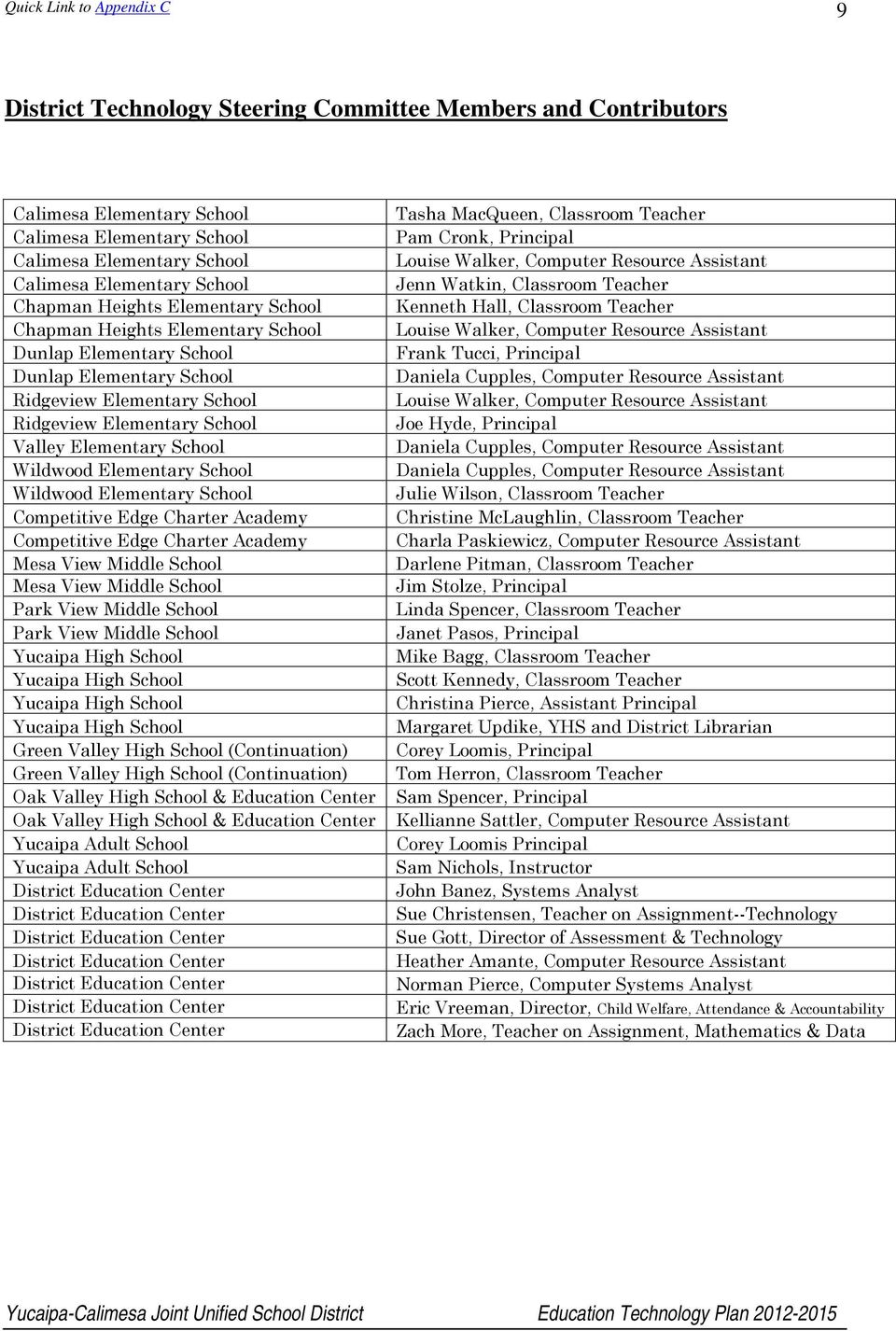
9 9 District Technology Steering Committee Members and Contributors Calimesa Elementary School Calimesa Elementary School Calimesa Elementary School Calimesa Elementary School Chapman Heights Elementary School Chapman Heights Elementary School Dunlap Elementary School Dunlap Elementary School Ridgeview Elementary School Ridgeview Elementary School Valley Elementary School Wildwood Elementary School Wildwood Elementary School Competitive Edge Charter Academy Competitive Edge Charter Academy Mesa View Middle School Mesa View Middle School Park View Middle School Park View Middle School Yucaipa High School Yucaipa High School Yucaipa High School Yucaipa High School Green Valley High School (Continuation) Green Valley High School (Continuation) Oak Valley High School & Education Center Oak Valley High School & Education Center Yucaipa Adult School Yucaipa Adult School District Education Center District Education Center District Education Center District Education Center District Education Center District Education Center District Education Center Tasha MacQueen, Classroom Teacher Pam Cronk, Principal Louise Walker, Computer Resource Assistant Jenn Watkin, Classroom Teacher Kenneth Hall, Classroom Teacher Louise Walker, Computer Resource Assistant Frank Tucci, Principal Daniela Cupples, Computer Resource Assistant Louise Walker, Computer Resource Assistant Joe Hyde, Principal Daniela Cupples, Computer Resource Assistant Daniela Cupples, Computer Resource Assistant Julie Wilson, Classroom Teacher Christine McLaughlin, Classroom Teacher Charla Paskiewicz, Computer Resource Assistant Darlene Pitman, Classroom Teacher Jim Stolze, Principal Linda Spencer, Classroom Teacher Janet Pasos, Principal Mike Bagg, Classroom Teacher Scott Kennedy, Classroom Teacher Christina Pierce, Assistant Principal Margaret Updike, YHS and District Librarian Corey Loomis, Principal Tom Herron, Classroom Teacher Sam Spencer, Principal Kellianne Sattler, Computer Resource Assistant Corey Loomis Principal Sam Nichols, Instructor John Banez, Systems Analyst Sue Christensen, Teacher on Assignment--Technology Sue Gott, Director of Assessment & Technology Heather Amante, Computer Resource Assistant Norman Pierce, Computer Systems Analyst Eric Vreeman, Director, Child Welfare, Attendance & Accountability Zach More, Teacher on Assignment, Mathematics & Data
10 10 Local and County School District Technology Steering Committee Advisors Kathy Carroll, E-Rate Consultant California School Management Group Tim Downey, Project Specialist (Regional Contact) California Technology Assistance Project, RIMS Sherry Kendrick, Ed.D., Superintendent Patty Metheny, Director of Student Services Linda Moffatt, Director of Curriculum K-12 Melissa Moore, Assistant Superintendent, Human Resources Barbra Newlin, Director of Purchasing Services Victoria Schumacher, Ed.D., Assistant Superintendent, Educational Services David Stevenson, Director of Facilities Jenny Thomas, Project Specialist California Technology Assistance Project, RIMS Eric Vreeman, Ed.D., Director of Child Welfare, Attendance, & Accountability

11 11 3. Curriculum Component Criteria 3.a. Description of teachers and students current access to technology tools both during the school day and outside of school hours. Districtwide: The Yucaipa-Calimesa Joint Unified School District Education Center staff and budget support the sites by providing funding and support an Internet-connected computer workstation for each teacher, administrator, counselor, student services support staff member, and clerical staff member, which includes the following services: . All administrators, counselors, teachers, school resource officers, head coaches, EL aides, most instructional aides, and clerical staff have district accounts with Communigate Pro (also known as C-Mail ) through the county schools office; however, the county has notified us that this system may not be available far into the future, so the District is currently reviewing its options. The county-provided system includes 100mb of storage and a simple calendar and task management system, as well. Most staff access their accounts via the web portal; however, administrators, counselors, and clerical staff are linked to C-Mail through workstationbased Microsoft Outlook. This system is available to staff both at home and at school via the C-Mail web portal. The District does not supply students with accounts at this time, but the SchoolFusion web content management system includes an internal communications module, and all students, parents, and staff members have access to SchoolFusion user accounts. If the user has an account, the SchoolFusion communications module also forwards messages to that address. If not, the user gains access to messages once logged into SchoolFusion. Telephone System. All sites except three have VOIP (Voice Over Internet Protocol--Park View Middle School, Wildwood Elementary School, and the District Office). The District Office has an alternate voic system based on Lucent technology. Student Information System. The District uses the Aeries Student Information System by Eagle Software. The version currently in use is Aeries CS with a centralized SQL database. All sites additionally use Aeries Browser Interface (ABI) teachers take attendance and maintain gradebooks with ABI, and students and parents have access to ABI to view personal data. The ABI system is open to students and parents in grades 7-12 (plus grade 6 at Competitive Edge Charter Academy), with plans to eventually expand parent access to elementary grades in future years. Elementary sites are using the ABI Standards-Based Gradebook and Report Card. Web IEP. All special education staff use Web IEP for recording and viewing IEP student information. Web IEP is a service provided for a fee from East Valley SELPA. Web Sites. The district office and all schools have web sites which communicate basic school information, news, contact information for staff, school accountability report cards, classroom/team/club events/assignments/activities, and, at the secondary level, real-time grade
12 12 and attendance data. All school sites maintain a web presence and are linked from the District web site at and Each site has its own domain address: District Office, with links to all school sites, including Adult School: or High Schools (9-12): Yucaipa High School: or Middle Schools (7-8): Mesa View Middle School: Park View Middle School: Alternative and Continuation Schools: Oak View High School and Education Center (K-12): Green Valley High School (11-12): Elementary Schools (K-6): Calimesa Elementary School: Chapman Heights Elementary School: Dunlap Elementary School: Ridgeview Elementary School: Valley Elementary School: Wildwood Elementary School: Direct-Funded Charter Schools: Competitive Edge Charter Academy (K-8): Telephone Alert/Notification System. Since March 2006, the District has used a web-based notification system. With this type of system, staff members have been able to use either the web site or a telephone to send out messages to homes of students in their classes, clubs, or athletic teams. This system allows for general and emergency communications by the superintendent and principals to parent cell phones and addresses, in addition to home telephones. Since December 2008, the vendor for these services has been GlobalConnect. Autocallers and Homework Hotlines. Most sites have either implemented an autocaller system (some tied directly into the student information system) or a homework hotline system. While the district now has another alert system, the autocaller and hotline systems will remain in use for site-

13 13 based general, emergency, attendance, and homework calls in the forseeable future for a few sites. Data Director. The District also supports sites through providing instructional leadership in the progress of unwrapping standards, calibrating curriculum, creating curriculum guides and maps, developing benchmark assessments, and analyzing formative and summative assessment data for individual students and student cohort groups in guiding site-level discussions on how to modify instruction in order to optimally improve student achievement. The District recognizes the importance of utilizing technology tools to achieve these ends and to this end six years ago implemented the use of Data Director to put comprehensible data in the hands of teachers and administrators. OMS. In Fall 2008, the District implemented the use of OMS (Organization Management Systems), which is an online meeting and consultation management tool. MyTechDesk. The District uses the K12HSN application MyTechDesk. Office staff input tickets for technology-related support services and district office and site-based tech support staff follow up with services and close the tickets when completed. Elementary Level: Each of the district s six elementary schools has a computer lab set up to accommodate a full class of students at one time. Labs generally include 35 PCs running Windows XP, Vista, or Windows 7 with Internet and network printer access. Elementary classrooms generally have one to seven Internet-connected PC computers and network printer access. At Competitive Edge Charter Academy (CECA, K-8), labs are located throughout the school, with one in each pod. Two sites are utilizing equipment which allows one CPU to be shared among several keyboard/monitor workstations. All elementary sites access the Internet via 10Mbps fiber optic lines. Classroom teachers at all sites have at least one, but often two to six computers which allow students access to Accelerated Reader and other Renaissance Learning systems, as well as Learning.com for Aha!Math and EasyTech, varying by site. Several sites also use Rosetta Stone, BrainPop, ST Math, and Kidspiration. Classroom teachers at most of the elementary sites each have an LCD projector and a document camera, as well as access to the usual software. The Title I elementary sites have recently purchased interactive white boards and short-throw projectors, and most also purchased interactive pads and personal response systems for each classroom. In addition, these sites are providing staff training to implement their use and have invited other sites to participate, as well. All sites have at least one scanner workstation for the purpose of scanning benchmark results into Data Director. Each elementary site and CECA (K-8) employ a part-time computer resource assistant to supervise in the computer lab, assist staff and students, and to provide maintenance of the hardware. Each elementary school uses an InfoCentre electronic catalog system for library management. The number of student stations in the library itself for access to the electronic catalog system varies from none (Dunlap and Valley) to four (Ridgeview), however all lab computers have access since InfoCentre is web-based. Back-up of the electronic catalog systems is completed by zip drive back up (Calimesa, Chapman Heights, Dunlap, Valley, and Wildwood), tape back up
14 14 (CECA), or server back up (Ridgeview). All schools utilize the Aeries student information system software for attendance and student records. Aeries Browser Interface (ABI) is used for attendance, standards-based gradebook maintenance, report card management, and simple records look up. Elementary 4 th -6 th grade students at all sites except CECA have at least 50 minutes of scheduled computer lab time each week during the instructional day and under the management and supervision of a computer resource assistant. (CECA, because of its additional labs, has a daily availability to all classes, with teachers able to schedule their classes into the labs with relative ease. Additionally, CECA students in grades 3-8 each have a RenLean Neo for use at home or school, and each CECA classroom has a master Neo station for uploading/downloading completed documents.) The labs at the elementary school sites are also available for class use by K-6 teachers on a sign-up basis. In addition, a few sites utilize lunch periods and before and after school sessions to provide intervention and tutoring programs for students not meeting grade level standards in math and/or language arts. Middle School Level: Both middle schools access the Internet via 100Mbps fiber optic lines. Mesa View Middle School (7-8) opened in August There are several networked computer labs that allow Internet access for students. Three labs are for assigned as classrooms for specific teachers (one 40-station lab is for computer instruction; one 10-station lab is set aside for reading intervention (Read180 ); and one 8-station lab is used for journalism/yearbook). Two labs (Rooms F102 and F123), consisting of 19 workstations each, are drop-in labs available for teacher/classroom use on a sign-up basis. MVMS has eight workrooms that serve their pods of classrooms, and six of these workrooms include 4-8 networked computer workstations, available for use by teachers and/or their students in the adjoining classrooms on an as-needed basis. Each drop-in lab has an LCD projector. All labs are accessible only during school hours when teachers are available as there is no lab staff to monitor students. All classrooms have one teacher workstation and one or more student workstations. Thirty classrooms have an LCD projector, interactive white board, and mobile tablet. An Apple Mobile Learning Cart, containing ten MacBook laptops, a 1TB hard drive, an AirPort Extreme wireless router, and a laser printer is currently being used by the Math and Science departments. The library has two workstations for online catalog searches and three workstations for use by students for research purposes. Two scanner workstations are available for the purpose of scanning benchmark results into Data Director. Park View Middle School (7-8) has four networked computer labs. Three labs consist of 36 Pentium IV computers, with one dedicated to the instructor, an LCD projector, and laser printer. All labs run Windows XP. XClass is installed in two labs and NetOp School is installed in the other one. The fourth lab consists of 18 Pentium IV computers, also running Windows XP, with an LCD projector. This lab, which is in a side room off of the library, and one of the larger labs serve as drop-in labs, with the other two dedicated to computer courses. All core subject area teachers have a tablet PC and an LCD projector. All classrooms have at least one PC computer and Internet access except for five portable classrooms. The library also has two workstations dedicated to accessing the online library catalog. Hours of access include normal school hours for all access points. The 18-station mini lab is open after school three days a week for student use.

15 15 Two scanner workstations are available for the purpose of scanning benchmark results into Data Director. High School Level: Yucaipa High School (9-12) has eight fully networked computer labs and a LAN with multiple IDFs connected to an MDF housed in the library. Three 35-station labs one in the library and twin labs next door to each other with a folding divider wall are in M204/M205 are drop-in labs for which teachers can sign up using calendars which are posted publicly on the YHS web site. All three labs are open before and after school, as well as during class time, and have supervising staff available during those times. Every classroom and/or learning area is equipped with two or more Internet-connected computers. Each classroom at the high school has Internet access via 100Mbps fiberoptic line between the district router which is housed at the high school and the county which is the Internet Service Provider. Science classrooms are equipped with varying numbers (1-6) student workstations with attached probes. A 35-station STEM lab, which includes AutoCAD software, is available to math, science, and engineering classes on a teacher sign-up basis. There are several mini labs located on campus within the following subject area classrooms- -math, special education, English/Language Arts, foreign language, CRY-ROP (Colton-Redlands- Yucaipa Regional Occupation Program) Medical Front Office, YHS Career Center, and video production. Several scanners are available for the purpose of scanning benchmark results into Data Director. Two of these scanners are located in faculty workrooms, and the remainder are housed in department chairperson classrooms. One of the site s Xerox copiers is also configured as a scanner for the purpose of scanning benchmark results into Data Director. A credit recovery program is housed in Room L1 where a classroom set of PCs are used by students to complete lessons on A+ Learning Systems software suite. A mathematics lab in Room M201 is equipped with 35 PCs that are 12 years old. Students in this lab use Geometer s Sketchpad and various web-based mathematics subscription curriculum. Several career web site subscriptions are also available to students while at home or at school: CX Bridges, COIN3, College Source, and ACINET. Library, counseling, and Career Center staff assist students in utilizing these resources. The Career Center has an eight-station mini-lab. A desktop media lab consisting of 35 Dell Dual Core workstations and Adobe Creative Suite 5.5 is housed in Room M206. An auto-updating subscription to Maya (a professional-grade 3-D modeling and animation software) is also used in this lab. One mini lab of 15 older PC workstations serves Read-180 software needs and two additional mini labs in the C and F Buildings house additional workstations (5 each) for Read 180, as well. All classrooms have a television monitor and a cable connection; however, because several of the connections provide poor quality, not much use is being made of the system, and, at present, no cable provider is supplying service. Most teachers are using online services for video in place of the cable TV system.

16 16 At present, approximately 40% of all workstations run Windows7 and 60% run Windows XP. Hours of access include school hours (8 a.m. 2:49 p.m. Monday Friday) for all access points. The lab (35 stations) in the library is open from 7:30 a.m. until 4 p.m. Monday through Friday. The open-lab (70 stations) in the M building is open 7:30 a.m. 4 p.m. Monday Friday with a computer resource assistant present. One lab is shared by the foreign language department as a language lab. All other labs are dedicated to specific teachers and curriculum on a daily basis. In addition to high school student use, the district s adult school utilizes one of the high school s computer labs several evenings each week. Alternative Education: Oak View Education Center is an alternative education center which serves two schools: a 9-12 community day school of about 120 students and a special needs center. Each CDS classroom has at least two admin-side Internet-connected computers (one for the teacher and one for the aide), an LCD projector (which also supplies wireless access within the classroom, and an interactive white board. In the special needs center, each teacher has one admin-side computer, an LCD projector, and 4 student workstations. A drop-in computer lab with 20 workstations and an LCD projector is also available, and one laptop/lcd projector cart is available for meetings and gatherings. All facilities are available only during regular school hours. A computer resource aide is available four hours daily. Green Valley High School/Green Valley Independent Study School/PEP+, Yucaipa-Calimesa JUSD s continuation high school, has 30 PCs available for student use in a networked lab, along with an LCD projector. Software (local and online) include the Read-180 curriculum, math literacy, Skills Connection, and A+LS curriculum. Each teacher has a networked PC for his/her use. Both English teachers have a document camera. Each of the staff PCs has Internet access and is used for professional record keeping in addition to traditional PC uses. The computers are all accessible during the regular school day; however, approximately 50% are more than five years old. Additionally, the district s long-term personalized education program (PEP+) is based on the Green Valley campus and has three PCs that are Internet accessible and provide curriculum access for parents and students involved in this long-term independent study program in which the parents work as partners in the education process with the school district. Families come in one at a time, so not many workstations are needed. Yucaipa Adult School maintains one computer lab, located in what is known as the Academic Learning Center. This computer lab consists of ten student workstations, one teacher workstation, and one server. The workstations run Windows XP Professional, Service Pack 3, and are all equipped with Microsoft Office XP. The server runs Windows Server 2003, Service Pack 2. The ten student workstations are installed with Real Achievement Educational Software which provides module instruction on Reading, Language Arts, ESL/Basic Literacy, Mathematics, Science, and Workplace Preparation. Yucaipa Adult School also has a second mini-lab, which consists of three Windows XP student workstations and one Windows NT Server. These computers are more than ten years old and are near the end of life. They are used by the Adult School s high school diploma students for Destination English and Math lessons (however, the report module no longer works) and by EL students using Rosetta Stone.

17 17 3b. Description of the district s current use of hardware and software to support teaching and learning. The following analysis is based upon survey of the various school sites in the district and joint work on the text via the CTAP Tech Plan Builder. Elementary Sites: Students in classrooms utilize computers for word processing and skills training in reading and writing. Each site maintains a library of academic software and teachers determine which programs best fit their students needs and the goals of his/her lessons each week. The labs are utilized for assessment purposes (i.e. Accelerated Reader STAR assessment) as well as for research, word processing, preparation of multimedia presentation and spreadsheet projects, mathematics support using Aha!Math by Learning.com and computer/information literacy training using EasyTech by Learning.com. Elementary school libraries maintain online card catalogs that are accessible via the Internet. Classroom computers are utilized for teacher record keeping, research, assessment, report card completion, and word processing. All elementary classrooms have at least one Internet-connected computer. Elementary sites are at about 70% in the acquisition of LCD projectors, document cameras, and interactive classroom tools (boards, tablets, response systems). Elementary school students at most sites learn to create multimedia presentations through the use of Microsoft PowerPoint and other multimedia programs. These multimedia presentations include sound recordings, digital pictures, and animations. All teachers are involved in the implementation of common benchmark assessments in the core subject areas. Analysis of benchmark data is handled using Data Director and Intell-Assess, a subscription system used exclusively to support curriculum blueprinting and assessment creation. The district also uses Data Director to track DIBELS (Dynamic Indicators of Basic Early Literacy Skills) data, also. All elementary schools currently use Aeries Browser Interface (ABI) for attendance, with most 4 th -6 th grade teachers also using it for gradebook purposes. All elementary teachers use ABI for submitting data for the creation of report cards. All teachers have classroom web sites using SchoolFusion, and many are also using its interactive features, including online quizzes, blogs, slideshows, and podcasts. Middle Schools: Both of the middle schools in the Yucaipa-Calimesa School District have similar patterns of current use. All teachers use ABI for attendance and gradebook record keeping, as well as for e-
18 18 mail on a regular basis. All teachers have classroom web sites using SchoolFusion, and many are also using its interactive features, including online quizzes, blogs, slideshows, and podcasts. Teachers of core subjects are implementing common benchmark assessments, which are managed by Data Director. Students utilize computers for keyboarding skills, word processing, Internet research, spreadsheets, and multimedia projects. Both schools offer computer skills classes, as well as technology infused classes related to STEM programs, including the use of AutoCAD. Mesa View Middle School will be implementing a comprehensive STEM academy that will be available for grades 6-8 beginning in The educational Media Centers (libraries) have online card file systems and online textbook inventory with bar coding/scanner equipment. The A+LS computerized curriculum is used in the math and reading intervention classes and PhotoShop, InDesign, and PowerPoint are regularly used in the Journalism and Yearbook courses offered on each campus. Nearly all active classrooms at Mesa View Middle School include LCD projectors and interactive white boards. At Park View Middle School, a few classrooms have interactive whiteboards and most have LCD projectors. High Schools: At Yucaipa High School, all classes have had Internet access since 1999 and the implementation of the Digital High School plan. Wireless access is available in some buildings, as well, although such access is not enterprise-managed. All learning areas are wired for video/voice/data transmissions. Voice mail is being used by all staff. All teachers use ABI for attendance and gradebook, as well as on a regular basis. All teachers have access to maintain classroom web sites using SchoolFusion, and many are also using its interactive features, including online quizzes, blogs, slideshows, and podcasts. Core subject area teachers are administering district benchmark assessments on a quarterly basis, using Data Director as a data management tool. The high school Educational Media Center (EMC, also library ) provides an online card file system with accessibility via the Internet, networked textbook inventory (with bar coding/scanner equipment), access at school and home to the Gale Gold Student Resource Center and EBSCO Student Research Center with Language Arts, Science, Points of View and History Reference Centers, satellite video subscription service with video feed to all classrooms, and instruction for all students as needed and for entire classes by appointment on The Big Six research steps. The EMC maintains a website link on the YHS website, including an online calendar for staff use in planning use of the library s computer lab, study, and lecture areas. The English/Language Arts department maintains writing proficiency portfolios (word processed) for all students, includes internet research for literature projects and careers unit in department curriculum, supports the Epigraph newsmagazine (winner of multiple national awards over the past decade, utilizes state-of-the-art software and equipment), and video projection equipment in many department classrooms. Students are encouraged to use multimedia presentation software to communicate projects/activities. Teachers use projectors for presentations and scanners to scan student work for group editing. All teacher-generated documents are word processed and several department teachers maintain class websites on the YHS site. The Mathematics department at YHS has the following technological aspects: There are remediation math programs/games in the CAHSEE Math Support class, A+ network-based curriculum is used to support students who have repeatedly failed Algebra I. The Tech prep math class uses Internet sources to gather data for application problems and spreadsheet development

19 19 and use is taught in this class, as well. Graphing calculators are used in all levels of math. Trigonometry students use internet sites to compare unit circle graphs to coordinate plane graphs. The Social Studies department at YHS is primarily responsible for teaching Internet research and information literacy to the student population. All projects assigned through this department require collection of Internet sources and proper documentation. All of the projects assigned encourage students to follow the Big Six research system. Internet research is required for a stock portfolio project in all Economics classes and is used when researching currency exchange rates and corporate activity. Students and teachers utilize multimedia presentation software and equipment in social studies classes. Social Studies teachers are proficient users of word processing and multimedia presentation software and related equipment. In Science classes, students create PowerPoint presentations of research findings. Internet research is used in both life and physical science classes. Electronic probeware connected to computers and assistive software is used. An active STEM program includes the use of AutoCAD s design elements. Teachers use multimedia software and equipment in making presentations and encourage students to do the same. All teacher-generated documents are word processed and most teachers use multimedia presentation software. Foreign Language classes utilize technology in several ways. The Internet is used by students to research culture, travel, monuments, music, and history. Students do college/university/scholarship Internet research and job searches using the Internet, as well. Staff members use word processing for creation of documents used in class and also, occasionally, for producing letters of recommendation for students on request. A few foreign language teachers maintain websites linked off of the YHS site. In the high school Fine Arts and Performing Arts departments students digitally enhance art projects and also create digital portfolios for Advanced Placement Studio Arts submissions to ETS and for college entrance requirements. Digital cameras and scanners are used for digitizing projects and portfolios in most art classes. A digital camera and Adobe Photoshop are used for photo manipulation and digital camcorders and video editing software are used in video production classes. Music students utilize tutorial software. Drama students use digital stage lighting/sound equipment. The high school s Technology and Information Science department offers a variety of technology courses including: Beginning and Advanced Desktop Publishing (Adobe CS 5.5 ), Internet Publishing (HTML, Adobe CS 5.5 ), 3-D Design (Maya ), CRY-ROP Medical Office and Business classes (Microsoft Office ). Students and staff regularly assist with site-wide technology support activities. The P.E. department maintains a departmental website and the P.E. staff uses and electronic grade books. Students prepare a personal fitness portfolio which is word processed and Internet researched. In the high school s Special Education classes, students use the Internet for research and Word for writing assignments. Software has been installed where necessary to support students who are enrolled in classes which utilize software tools (A+, Algebra, Accounting, Keyboarding, etc.). Special Education staff uses , electronic grade books, Office Suite software, and WebIEP

20 20 online management software. Two credit recovery programs are currently available at YHS one utilizes A+ online software and the other utilizes Apex Learning online software. In the counseling department, students use the Internet for college/career/scholarship searches, college applications, and financial aid applications. COIN software and CX.Bridges are used for aptitude assessment and career research. Counselors use , word processing software, and student information management software based on Microsoft Access (Aeries ) regularly. They make PowerPoin presentations to parents and students and are currently working on a departmental website to link off of the YHS web site. At both alternative school sites Oak View High School and Education Center and Green Valley High School/Green Valley Independent Study School/PEP+ students use technology to supplement classroom instruction while teachers use it to access communications system such as and SchoolFusion. Oak View and Green Valley teachers have recently begun use of both ABI Gradebook for record keeping and grade reporting and Data Director for implementation of benchmark assessments. Both sites use A+ online software for credit recovery. Oak View is also using Apex Learning online software for credit recovery and, also, in support of regular classroom instruction.

21 21 EdTech Profile Reports ( ) In what ways and to what degree do teachers use technology tools (computers, video, Internet, and hand-held devices) to (number of responses, and relative percentage): Daily 2-4 days a week Between once a week and monthly Less than monthly Never Total Responses Create instructional materials % % 60 15% 13 3% 21 5% 392 Deliver classroom instruction % 82 21% 68 17% 28 7% 53 14% 392 Manage student grades and attendance % 30 8% 17 4% 11 3% 24 6% 392 Communicate with colleagues % 77 20% 24 6% 11 3% 4 1% 392 Communicate with parents or students Gather information for planning lessons Access model lesson plans and best practices % % 60 15% 13 3% 14 4% % % 59 15% 26 7% 17 4% % % % 49 13% 28 7% 392 Teachers assign students work that involves using technology (computers, video, Internet, and hand-held devices) with the following frequency (number of responses, and relative percentage): Daily 2-4 days a week Between once a week and monthly Less than monthly Never Total Responses Word processing 27 7% 45 12% % 90 23% % 391 Reinforcement and practice 54 14% 72 18% % 68 17% 85 22% 391 Research, using the Internet and/or CD-ROMs 26 7% 38 10% % % % 391 Creating reports or projects 20 5% 22 6% % % % 391 Demonstrations or simulations Correspondence with experts, authors, students from other schools, etc., via or Internet Solving problems or analyzing data Graphically presenting information 18 5% 22 6% 85 22% 98 25% % % 10 3% 37 9% 91 23% % % 39 10% 67 17% 88 23% % % 23 6% 68 17% 94 24% % 390 Much progress has been made since the writing of the Technology Plan, when the largest group in each case was the lower end of the Intermediate level group; however, gaps still exist and the technology revolution keeps unrolling before us. Based upon the information contained in the survey question response tables (see Appendix), there is still room for improvement in staff technology knowledge and skills and making the instruction of technology and information literacy skills more accessible for both staff and students. At the very least, a
22 22 full-time administrator dedicated exclusively to educational technology is needed. At best, an entire instructional technology department needs to evolve, including a director of instructional technology, support staff, and teachers on assignment to support elementary and secondary usage.
23 23 3c. Summary of the district s curricular goals and academic content standards in various district and site comprehensive planning documents. The District s guiding document for curricular goals is the Local Education Agency (LEA) Plan supporting the 2001 No Child Left Behind (NCLB) Act. The NCLB LEA Plan duration runs through June 30, 2016, and the current revision was completed in The plan builds upon the District s Mission and Vision in order to develop effective performance goals which will enable students to achieve the long and short-range objectives of the No Child Left Behind Act. Other district documents (Technology Plan, Master Plan for the Education of English Learner Students, Carl D. Perkins Career Technical Education Act Plan, etc.) and site-based documents (site plans, WASC Self-Study Reports and Action Plans, etc.) are aligned with the District LEA Plan. Mission The Yucaipa-Calimesa Joint Unified School District is committed to providing a rigorous education that extends the opportunity for all students to achieve success academically, vocationally, and personally. Through a safe and caring environment, students will be prepared to become productive citizens in a democratic society. The District motto is currently To Make a Difference in the Life of Each Child. Vision All students in our district will: 1. Demonstrate strong basic skills in reading, speaking, listening, writing, and viewing, and will be able to apply those skills when sharing information with others, learning new concepts, making decisions, and solving problems. 2. Set and accomplish goals and work hard to succeed in their chosen careers. 3. Demonstrate acceptable social skills, will act appropriately, and will work individually, collaboratively, and effectively while demonstrating a respect for others. 4. Demonstrate the integrity and self-confidence to make ethical decisions independent of peer pressure. 5. Demonstrate the use of available resources to locate, synthesize, analyze, and evaluate information in a changing world which requires adaptability and learning for a lifetime. 6. Demonstrate a commitment to learning. 7. Demonstrate a commitment to academic achievement in a broad range of subjects, including arts and sciences. 8. Demonstrate a respect for the environment. 9. All parents/guardians, staff, and the broader community we serve will be welcome and active partners in educating our students. 10. All educators will be highly qualified and will demonstrate effective teaching in a positive environment to meet the diverse needs of each student.
24 24 LEA Plan Performance Goals (Duration of Plan: July 1, 2011, through June 30, 2016 To support the vision, and to support the accomplishment of the objectives of the No Child Left Behind Act of 2001, the Yucaipa-Calimesa Joint Unified School District has adopted the following LEA Plan Performance Goals: Performance Goal 1A: Proficiency in Reading-Language Arts All students will attain proficient or above in English/Language Arts (ELA) by By September 2011, the percentage of all students, including all student groups (English Learners (EL s), Students with Disabilities (SWD), Socio Economically Disadvantaged (SED), Hispanic, and other significant student groups) scoring at proficient and above will increase according to the following targets as measured by the reading/language arts portion of the California Standards Test (CST). Performance Goal 1B: Proficiency in Mathematics All students will attain proficient or above in mathematics by By September 2011, the percentage of all students, including all student groups (English learners (EL s), Students with Disabilities, Socio Economically Disadvantaged (SED), Hispanic, and other significant student groups) scoring at proficient and above will increase according to the following targets as measured by the mathematics portion of the California Standards Test (CST). Performance Goal 2A: Annual Progress Learning English An increasing percentage of English learners will make annual progress in learning English. Performance Goal 2B: English Proficiency An increasing percentage of English learners will attain English language proficiency annually. Performance Goal 2C: AMAO 3 Annual Yearly Progress for English Learner Subgroup An increasing percentage of English learners will attain proficiency in Reading/Language Arts and Mathematics annually. Performance Goal 2D: High Quality Professional Development The LEA will provide high quality professional development to teachers, administrators and other school or community-based personnel to improve the education of English learners. Performance Goal 2E: Parent and Community Participation The LEA will promote the involvement of parents and community members in the education of English learners. Performance Goal 2F: Parent Notification SCHOOL GOAL # 2F The LEA will provide required communications to parents in a timely manner. Performance Goal 2G: Services for Immigrant Students SCHOOL GOAL # 2G The LEA will provide high quality Instruction and Support Services to all immigrant students. Performance Goal 3: Highly Qualified Teachers SCHOOL GOAL # 3
25 25 Per ESEA legislation, all students will be taught by highly qualified teachers. Poor and minority students will not be taught by inexperienced, unqualified or out of field teachers at higher rates than other students. Performance Goal 5A: Increase Graduation Rate SCHOOL GOAL # 5A Increase the graduation rate for English learners. Performance Goal 5B: Decrease Dropout Rate SCHOOL GOAL # 5B Decrease the Dropout Rate Performance Goal 5C: Increase Enrollment in Advanced Placement Courses SCHOOL GOAL # 5C Increase the number of English learners that enroll in Advanced Placement Courses. All site School Improvement Plans, WASC Action Plans, the Master Plan for English Language Learners, site technology plans and other District planning structures use these goals, as well as the descriptions of specific actions to improve educational practice as defined in the LEA Plan, as a primary guide to planning. Several structures have been organized within the District to assist in the alignment of instruction with state content standards an elementary committee focused on modifying curriculum and instruction based upon analysis of formative and summative multiple assessment data (Curriculum Information Management Advisory, or CIMA ), as well as secondary subject area task forces (English/Language Arts, Social Studies, Mathematics, and Science). Unwrapping of the standards, curriculum calibration, scope and sequence alignment, curriculum mapping and development, blueprinting, and careful analysis of formative and summative assessment data have been for several years, and will continue to be, a primary focus for District staff. Other district-wide committees which impact curriculum and instruction include the Textbook Adoption Committees, the Wellness Committee, Budget Committee, and the Technology Steering Committee. To ensure that the District meets all of its goals, the Superintendent developed the following overarching, or Umbrella, goals at the beginning of the school year: ry student will increase by 10% or, if proficient, by 10 points each year on the STAR ELA/Mathematics. ry English Learner will move up one CELDT Proficiency Level each year until reclassification. Eve Eve In addition, the District is in Program Improvement, and the 2011 PI and AYP statistics are displayed on the pages following. The LEA Plan and this Educational Technology Plan have been revised to reflect the new emphases necessary to address the shortcomings in mathematics and English Language Arts performance of special education and English Learner populations.
26 26 Federal Accountability: Adequate Yearly Progress (AYP) Made 2011 AYP: No Met 14 of 26 AYP Criteria California Alternate Performance Assessment (CAPA) Percent Proficient and Above Above 1.0 Exception Approved English-Language Arts 1.2 Yes Adj Mathematics 0.9 No California Modified Assessment (CMA) Percent Proficient and Above Cap Above Cap English-Language Arts Yes Mathematics No Participation Rate English-Language Arts Target 95% Met all participation rate criteria? Yes Mathematics Target 95% Met all participation rate criteria? Yes Enrollment Number Met Enrollment Number Met GROUPS First Day of Testing of Students Tested Rate 2011 AYP Criteria Alternative Method First Day of Testing of Students Tested Rate 2011 AYP Criteria Alternative Method LEA-wide Yes Yes Black or African American American Indian or Alaska Native Asian Filipino Hispanic or Latino Yes Yes Native Hawaiian or Pacific Islander White Yes Yes Two or More Races Socioeconomically Disadvantaged Yes Yes English Learners Yes Yes Students with Disabilities Yes Yes
27 27 Percent Proficient - Annual Measurable Objectives (AMOs) English-Language Arts Target 67.0 % Met all percent proficient rate criteria? No Number At or Above Proficient Percent At or Above Proficient Met 2011 AYP Criteria Mathematics Target 67.3 % Met all percent proficient rate criteria? No Number At or Above Proficient Percent At or Above Proficient GROUPS Valid Scores Alternative Method Valid Scores LEA-wide No No Black or African American American Indian or Alaska Native Asian Filipino Hispanic or Latino No No Native Hawaiian or Pacific Islander White No No Two or More Races Socioeconomically Disadvantaged No No English Learners No No Students with Disabilities No No Met 2011 AYP Criteria Alternative Method Academic Performance Index (API) - Additional Indicator for AYP 2010 Base API 2011 Growth API Growth Met 2011 API Criteria Yes Alternative Method 2011 API Criteria for meeting federal AYP: A minimum "2011 Growth API" score of 710 OR " Growth" of at least one point. Graduation Rate Goal: 90 Percent Current Year: Graduation Rate Results 2010 Graduation Rate (Class of ) 2011 Graduation Rate (Class of ) 2011 Target 2011 Graduation Graduation Rate Rate Criteria Met Yes DA Alternative Method or Exclusion Graduation Rate Criteria: (1) met or exceeded the goal of 90%, or (2) met the fixed target graduation rate, or (3) met the variable target graduation rate. Fixed and variable target graduation rates are calculated for local educational agencies and schools that have not reached the 90% goal.
28 28 Program Improvement Status Report for PI Placement : Year 3 Prior PI Placement: Year 3 First Year of PI Implementation: Special Conditions: None Met Adequate Yearly Progress (AYP) Criteria English-Language Arts Mathematics Academic Performance Index (API) Graduation Rate 2010 No No Yes Yes 2011 No No Yes Yes Met Grade Span Criteria English-Language Arts Mathematics 2010 Grades 2-5 No No Grades 6-8 No No Grade 10 No Yes 2011 Grades 2-5 No No Grades 6-8 No No Grade 10 No No
29 29 Technology Plan Goals 2015 To support the Mission, Vision, and LEA Plan Performance Goals, the Yucaipa-Calimesa Joint Unified School District has adopted the following curricular goals for technology: (Appendix C Reference) (3.d) (3.e, 3.f, 3.g) (3.h) (3.i) (3.j) (4.b) (4.b) (4.b) Staff will provide an effective, coordinated, technologically rich instructional program that is equitable across all Pre-K through Grade 12 sites, as appropriate by grade level, and that will ensure success for every student. All students will acquire technology and information literacy skills, ethics, and Internet safety skills needed to succeed in the classroom, meet the District s curricular goals and graduation requirements, and prepare for successful entry into the workplace. All students will have access to existing technology resources that are suitable to their specific educational needs and that support the content standards. Staff will use technology to make record keeping, curriculum management/delivery, and assessment more efficient and timely; and to deliver student information, including assessment data, to teachers and administrators, so that they may make data-driven instructional decisions. State-of-the-art voice, data, curriculum content hosting, video conferencing, school information web hosting, and electronic communication systems will facilitate individualized instruction, as well as promoting proactive communication and interaction among parents, teachers, students, and the community. Certificated staff will be proficient in the skills and knowledge identified in the District Technology Scope and Sequence and in the National Education Technology Standards (NETS) for Teachers, including strategies for appropriate technology integration to improve instruction and student achievement overall and in support of implementation of the California Common Core State Standards (CCSS), with special focus on mathematics and English Language Arts support for special education students and English Learner students, utilizing available technology tools and applications. Administrators will utilize technology to effectively carry out management tasks, including analysis of student information, disaggregation of assessment data in order to guide site conversations about instructional strategies, improvement of home-school communication, documentation in relation to supervision of staff, implementation of professional development strategies, and management of time and resources. Classified/confidential staff will be proficient in technology skills and knowledge in order to be optimally effective in carrying out the duties of their positions.
30 30 3.d. List of clear goals, measurable objectives, annual benchmarks, and an implementation plan for using technology to improve teaching and learning by supporting the district curricular goals. Goal 3.d.1: Staff will provide an effective, coordinated, technologically rich instructional program that is equitable across all Pre-K through Grade 12 sites, as appropriate by grade level, and that will ensure success for every student. Link to LEA Plan: Performance Goal 1 Objective 3.d.1.1 By June 2015, 100% of district curriculum guides and maps will include written strategies for technology integration in curriculum and instruction in alignment with the Common Core State Standards, where identified as appropriate by district curriculum advisory committees. Benchmarks 1. By June 2013, 25% of curriculum guides and maps will include written strategies for technology integration in curriculum and instruction, where identified by Common Core State Standards. 2. By June 2014, 75% of curriculum guides and maps will include written strategies for technology integration in curriculum and instruction, where identified by Common Core State Standards. 3. By June 2015, 100% of curriculum guides and maps will include written strategies for technology integration in curriculum and instruction, where identified by Common Core State Standards. Action Plan Timeline Review membership of curriculum advisory committees, and strategically place Fall technology liaisons or proficient teachers on each committee Review Common Core State Standards, curriculum guides, and maps for incorporation of technology integration strategies starting first with K English/Language Arts (in support of the current paragraph writing project) and also with Introduction to Algebra and Algebra I (in support of a pending three-year National Science Foundation Grant in collaboration with the University of Southern California and Stanford University in order to scientifically study the impact of computer game programming on success in mathematics and later interest in technology, along with other factors such as how new methods of scheduling students into mathematics classes impact student success), and later selecting subject areas by identifying critical needs areas in the curriculum where technology would contribute significantly to improved student achievement, such as low incidence subject areas, adaptation to various learning styles, students with special needs, and differentiation of instruction. Revise curriculum guides, maps, blueprints, and benchmarks to include appropriate technology integration strategies Support informed decision making on the selection, purchase, and implementation of appropriate software in order to facilitate new strategies of technology integration in 2015 and the curriculum. ongoing Acquire necessary hardware and software to implement strategies in the classroom,
31 31 including but not limited to computers (desktops and/or laptops), printers, scanners, digital still and movie cameras, interactive white boards, wireless mobile tablets, wireless personal response systems, LCD projectors, document cameras, sound enhancement systems, video conferencing equipment and software, online and/or networked video streaming services, EL language acquisition software/systems, MP3 players, digital textbooks and support texts, digital support tools associated with textbook/courseware adoptions, Web 2.0/3.0 tools, and any new technology deemed important to achieving district goals. Increase bandwidth and wireless interconnectivity (including portable 3G/4G access off site as needed by some staff/students) to accommodate network usage to accomplish the implementation of this goal. Develop a strategic plan for the training of staff in order to meet the needs of the technology requirements of the revised curriculum guides and maps. Train staff as necessary to implement strategies contained in curriculum guides and maps. Person Responsible Directors of Curriculum and Instruction K-12, Director of Technology, Teachers on Assignment, Technology Liaisons, District Librarian, principals, teachers 2015 and ongoing as strategies are adopted , and ongoing Monitoring and Evaluation Process Early each school year, the Director of Technology and/or support staff will collect updated information from the Director of Curriculum and Instruction K-12 regarding current status of Objective 3.d.1.1 and will also review the previous year s EdTech Profile results (Standards 9a, 9b, 9f, 9g, 9h, 16c, 16d, 16e, 16g) in order to report to the District Technology Steering Committee on the progress of technology integration strategies in the District s curriculum guides and maps, so that the committee may have time to conduct research and make recommendations on adjustments during the coming school year. In the spring of each school year, the Director of Technology will include information on technology integration strategies incorporated into the District s curriculum guides and maps in the annual technology report to the Board.
32 32 Objective 3.d.1.2 By June 2015, 100% of the District s teachers will integrate technology-based support, enrichment, and remedial activities that are outlined/adopted in the District s curriculum guides and maps. Benchmarks 1. By June 2013, 25% of the District s teachers will integrate technology-based support, enrichment, and remedial activities that are outlined/adopted in the District s curriculum guides and maps. 2. By June 2014, 75% of the District s teachers will integrate technology-based support, enrichment, and remedial activities that are outlined/adopted in the District s curriculum guides and maps. 3. By June 2015, 100% of the District s teachers will integrate technology-based support, enrichment, and remedial activities that are outlined/adopted in the District s curriculum guides and maps. Action Plan Analyze current practice at all sites (observation, survey, interviews, meetings, study of Lab Use Logs) Research and evaluate for purchase and/or adoption technology-based educational tools that meet the support, enrichment, and remedial needs of all students, including tools that address the special needs of English Language Learners and special education students in accordance with their Individual Education Plan (IEP). Evaluate use of the adopted data assessment, creation, and monitoring tool and any necessary related hardware or software so that the tool is easily accessible by all teachers, counselors, and administrators and continues to meet the goals of the district (Data Director has been in use since Fall 2006.) Evaluate current web content management systems and determine if sufficient for support of future courseware hosting and other uses. If necessary, acquire and implement a new web platform or learning management system (LMS) in addition to existing system (SchoolFusion ). Train staff to use Data Director (or any adopted successor system) and associated software and hardware for data mining, development of assessments, and, also, to monitor the effect of programs and strategies on student cohort groups. Train staff to use all technology support, remediation, and enrichment tools available to the schools. Teachers assign, prescribe, and monitor technology-based learning, support, enrichment, and remedial activities for their students using District-supplied monitoring tools. Date and ongoing 2013, and ongoing 2013 and ongoing
33 33 Person Responsible Directors of Curriculum and Instruction K-12, Director of Assessments, Director of Technology, Director of Student Services, psychologists, Site Technology Liaisons, Teachers on Assignment, principals, teachers, administrators, and IT support staff Monitoring and Evaluation Process The Technology Director and/or support staff will review EdTech Profile results for teachers (Standards 9f, 9g, 16g), Site Lab Use Logs, lesson plans, STAR results, CELDT results, CAHSEE results, Data Director usage statistics, and other artifacts as supplied by sites to track 3.d.1.2. Results will be reported to the Technology Steering Committee early in the fall each year so that adjustments may be made. Results will be updated and reported in the annual Technology Report to the Board each spring.
34 34 Objective 3.d.1.3 By June 2015, 80% of all Grade 8 students will demonstrate the ability to utilize grade-level appropriate computer skills, information literacy knowledge, ethics/safety, and applications to research and present their work in core content areas. Benchmarks 1. By June 2013, 25% of all Grade 8 students will demonstrate the ability to utilize grade-level appropriate computer skills, information literacy knowledge, ethics/safety, and applications to research and present their work in core content areas. 2. By June 2014, 50% of all Grade 8 students will demonstrate the ability to utilize grade-level appropriate computer skills, information literacy knowledge, ethics/safety, and applications to research and present their work in core content areas. 3. By June 2015, 80% of all Grade 8 students will demonstrate the ability to utilize grade-level appropriate computer skills, information literacy knowledge, ethics/safety, and applications to research and present their work in core content areas. Date 2015, and ongoing Action Plan Implement completion of the EdTech Profile Student Survey by all fifth and eighth graders annually each spring. Train staff and implement use of EasyTech by Learning.com in grades K , Train teachers, computer resource assistants, instructional aides, and library staff K-12 on Big Six research method and provide ongoing support for implementation. Create and deploy a lab-accessible Internet portal for each grade level in grades K-6 in order to facilitate student access to technology tools, tutorials, and other resources. Review major core content area Common Core State Standards-related projects and activities by subject in grades 4-6 at the various elementary sites. (Most technology skills and knowledge will be acquired via completion of core subject area projects in conjunction and supported by work in EasyTech, which operates in both English and Spanish.) Determine strategies to integrate technology tools and skills into those projects and incorporate those strategies into curriculum guides and maps. Plan for modifications for success of EL and special education students. Outfit 7-12 libraries with Big Six posters, student computer PC workstations for access to online catalog system and other research tools, presentation station PC computer and mounted LCD projector or panel. Provide web access to Big Six information and online catalogs so that students may access information and collection information from school or home. ongoing 2015, and ongoing 2015, ongoing , and ongoing By Fall 2013
35 35 Site Technology Liaisons at K-6 sites will participate in professional development to prepare for the implementation of technology strategies in researching and presenting core subject area projects. Provide professional development to K-6 grade teachers and lab computer resource assistants so that they are able to instruct students and monitor their progress in utilizing technology tools, skills, knowledge, and applications in research and presentation of their work. Through work of 7-8 subject area committees for Social Science and Science, develop best practices projects in 7 th and 8 th grade science and social studies curriculum maps that completely integrate technology and information literacy standards and benchmarks for students in Grades 7 and 8. Provide professional development to Grades 7-8 science and social studies teachers so that they are able to guide students through projects which build upon and extend technology skills, knowledge, and applications to research and presentation projects. Person Responsible Director of Technology, Directors of Curriculum and Instruction K- 12, Teachers on Assignment, Technology Liaisons, principals, teachers, library staff, library clerks, IT support staff, and computer resource assistants 2015, and ongoing 2013, and ongoing 2014, and ongoing , and ongoing Monitoring and Evaluation Process The Technology Director and/or support staff will collect data from sites based upon EdTech Profile Staff Survey (Standards 9a, 9b, 9h, 16c), Student Survey (all questions), lesson plans, project criteria, and actual student artifacts and will present this information for review by the District Technology Steering Committee in the fall of each year. The Director of Technology will report on status of 3.d.1.3 as part of annual technology report to the Board each Spring.
36 36 3.e. List of clear goals, measurable objectives, annual benchmarks, and an implementation plan detailing how and when students will acquire technology skills and information literacy skills needed to succeed in the classroom and the workplace. Goal 3.e.1: All students will acquire technology and information literacy skills, ethics, and Internet safety skills needed to succeed in the classroom, meet the District s curricular goals and graduation requirements, and prepare for successful entry into the workplace. Link to LEA Plan: Performance Goal 1 Objective 3.e.1.1 By June 2015, 100% of the District's 4th-6th grade students will receive instruction, primarily through EasyTech online curriculum and via integration of technology in academic content area projects, to become proficient with the information and technological literacy skills in the District Technology Scope and Sequence (K-6) by the 8 th grade level. (EasyTech operates in both English and Spanish.) Benchmarks 1. By June 2013, 25% of the District's 4th-6th grade students will receive instruction, primarily through EasyTech online curriculum and via integration of technology in academic content area projects, to become proficient with the information and technological literacy skills in the District Technology Scope and Sequence (K-6) by the 8 th grade level. 2. By June 2014, 50% of the District's 4th-6th grade students will receive instruction, primarily through EasyTech online curriculum and via integration of technology in academic content area projects, to become proficient with the information and technological literacy skills in the District Technology Scope and Sequence (K-6) by the 8 th grade level. 3. By June 2015, 100% of the District's 4th-6th grade students will receive instruction, primarily through EasyTech online curriculum and via integration of technology in academic content area projects, to become proficient with the information and technological literacy skills in the District Technology Scope and Sequence (K-6) by the 8 th grade level. Action Plan The District Technology Steering Committee will work with CIMA to establish recommended Best Practice lessons and projects for the acquisition of technology knowledge and skills as outlined in the Technology Scope and Sequence K-12 (See Appendix for Technology Scope and Sequence.) Procure and install computers, software, and peripherals to provide in-class access to Internet-accessible computers at a ratio of 7:1 (generally 5 computers per classroom) and stationary or mobile lab access to Internet-accessible computers at a ratio of 1:1 while in the lab, with a minimum of one lab per 850 students. Date 2013, and ongoing 2014, and ongoing
37 37 Research and make recommendations to the Budget Committee and the Board regarding alternative means of achieving a 1:1 ratio for students, including laptop computers and tablets. Continually monitor and improve bandwidth to accommodate access of network and Internet resources so that bandwidth load does not regularly exceed 80% of capacity. Create and deploy a lab-accessible Internet portal for each grade level in grades K-6 in order to facilitate student access to technology tools, tutorials, and other resources. Provide professional development to all K-6 teachers, librarians, library clerks, and computer resource aides in the implementation of the recommended Best Practices for monitoring student progress in EasyTech and integrating technology into core projects and curriculum, in general. In all classes via use of in-class computers, drop-in labs, mobile labs, and/or during regularly scheduled computer lab time under the supervision of a trained computer resource assistant (generally 50 minutes per week in grades 4-6), students will complete activities and special projects as assigned and monitored by their teachers with the assistance of the computer resource aide(s). Person Responsible Directors of Curriculum and Instruction K-12, Director of Technology, Teachers on Assignment, District Technology Steering Committee, Technology Liaisons, principals, teachers, librarians, library clerks, IT support staff and computer resource aides Beginning Fall 2012, continuing until ratio reached 2013, and ongoing 2013, and ongoing 2013, and ongoing 2013, and ongoing Monitoring and Evaluation Process Early each school year, the Director of Technology and/or support staff will collect updated information from Director of Curriculum and Instruction K-12 regarding current status of Objective 3.e.1.1 and will also review the previous year s EdTech Profile results (Standards 9a, 9b, 9f, 9g, 9h, 16c, 16d, 16e, 16g) and all question responses in the EdTech Profile Student Survey in order to report to the District Technology Steering Committee on the progress toward Objective 3.e.1.1, so that the committee may have time to conduct research and make recommendations on adjustments during the coming school year. In the spring of each school year, the Technology Director will include information on technology skills and knowledge acquisition in the annual technology report to the Board.
38 38 Objective 3.e.1.1 Benchmarks By June 2015, 100% of the 1. By June 2013, 25% of the District's 7th-12th grade District's 7th-12th grade students students will receive instruction and reinforcement of will receive instruction and prior learning leading to proficiency with the reinforcement of prior learning information and technological literacy skills in the leading to proficiency with the District Technology Scope and Sequence for Grades 7-8 information and technological and literacy skills in the District 2. By June 2014, 50% of the District's 7th-12th grade Technology Scope and Sequence students will receive instruction and reinforcement of for Grades 7-8 and prior learning leading to proficiency with the information and technological literacy skills in the District Technology Scope and Sequence for Grades 7-8 and By June 2015, 100% of the District's 7th-12th grade students will receive instruction and reinforcement of prior learning leading to proficiency with the information and technological literacy skills in the District Technology Scope and Sequence for Grades 7-8 and Action Plan Date The District Technology Steering Committee will work with secondary subject area task force committees to establish recommended Best Practice lessons and 2013, and projects for the acquisition and reinforcement of technology knowledge and skills as ongoing outlined in the Technology Scope and Sequence Grades 7-8 and 9-12 (See Appendix for Technology Scope and Sequence Grades 7-8 and 9-12.) Procure and install computers, software, and peripherals to provide in-class access to Internet-accessible technology at a ratio of 7:1 (generally 5 computers per classroom) and stationary or mobile lab access to Internet-accessible computers at a ratio of 1:1 while in the lab, with a minimum of one drop-in or mobile lab per 850 students. Research and make recommendations to the Budget Committee and the Board regarding alternative means of achieving a 1:1 ratio for students, including laptop computers and tablets. Continually monitor and improve bandwidth to accommodate access of network and Internet resources so that bandwidth load does not regularly exceed 80% of capacity. Research feasibility, procure as appropriate, install, and train staff in use of technology tools that support and improve student learning in grades 7-12 in both core subjects and technology. Create and deploy a web-accessible Internet portal for grades 7-12 in order to facilitate student access to technology tools, tutorials, and other resources necessary for research and learning. Provide professional development to all 7-12 teachers, librarians, library clerks, and computer resource aides in the implementation of the recommended Best Practices for integrating technology into core projects and curriculum, in general. 2015, and ongoing 2012 and continuing until ratio reached 2013, and ongoing 2013, and ongoing 2013, and ongoing 2013, and ongoing
39 39 Representative groups of students will complete the EdTech Profile Student Survey annually in Grades 5, 8, and 11 in order to provide the district with data to monitor progress on Objectives 3.e.1.1 and 3.e.1.2. Person Responsible Directors of Curriculum and Instruction K-12, Director of Technology, Teachers on Assignment, District Technology Steering Committee, Technology Liaisons, principals, teachers, librarians, library clerks, IT support staff and computer resource aides 2013, and ongoing Monitoring and Evaluation Process Early each school year, the Director of Technology and/or support staff will collect updated information from Director of Curriculum and Instruction K-12 regarding current status of Objective 3.e.1.2 and will also review the previous year s EdTech Profile results (Standards 9a, 9b, 9f, 9g, 9h, 16c, 16d, 16e, 16g) and all question responses in the EdTech Profile Student Survey in order to report to the District Technology Steering Committee on the progress toward Objective 3.e.1.2, so that the committee may have time to conduct research and make recommendations on adjustments during the coming school year. In the spring of each school year, the Technology Director will include information on technology skills and knowledge acquisition in the annual technology report to the Board.
40 40 3.f. List of goals and an implementation plan that describe how the district will address ethical use of information technology in the classroom so that students can distinguish lawful from unlawful uses of copyrighted works, including the following topics: the concept and purpose of both copyright and fair use; distinguishing lawful from unlawful downloading and peer-to-peer file sharing; and avoiding plagiarism (AB 307). Goal 3.f.1 (same as 3.e.1): All students will acquire technology and information literacy skills, ethics, and Internet safety skills needed to succeed in the classroom, meet the District s curricular goals and graduation requirements, and prepare for successful entry into the workplace. Objective 3.f By June 2013 and annually thereafter, 100% of the District s teachers, administrators, and students (as appropriate to their grade level per the district Technology Scope and Sequence) will be able to distinguish lawful from unlawful uses of copyrighted works, including the following topics: the concept and purpose of both copyright and fair use; distinguishing lawful from unlawful downloading and peerto-peer file sharing; and avoiding plagiarism in alignment with the Technology Scope & Sequence where various levels of mastery are delineated for students in grades Benchmarks 1. By August 2012 and annually thereafter, 100% of district teachers and administrators will sign an Acceptable Use Policy (AUP) which addresses ethical copyright practice in educational settings. 2. Ongoing from September 2012 and annually thereafter, 100% of new certificated employees to the district will receive professional development regarding the AUPs and ethical use of copyrighted material in educational settings by both teachers and students as part of the New Certificated Employee Orientation process. 3. By August 2012, 100% of 2013 students will annually sign (on the back of their Emergency Release Card) that they have received and read a copy of the Acceptable Use Policy (AUP, different versions exist for K-3 and 4-12). 4. By August 2013 and annually thereafter, 100% of students entering the district during the school year will sign (on the back of their Emergency Release Card) that they have received and read a copy of the Acceptable Use Policy (AUP, different versions exist for K-3 and 4-12). 5. By June 2013 and continuing through and , 100% of the District s students will be able to distinguish lawful from unlawful uses of copyrighted works, including the following topics: the concept and purpose of both copyright and fair use; distinguishing lawful from unlawful downloading and peer-to-peer file sharing; and avoiding plagiarism in alignment with the Technology Scope & Sequence where various levels of mastery are delineated for students in grades 3-12.
41 41 Action Plan The District Technology Steering Committee will review for copyright and plagiarism/illegal copying issues, as well as for implications of illegal file sharing and/or downloading, and update annually the student Computer and Network Acceptable Use Policy (AUP) in both English and Spanish. (Current AUPs were updated in November 2011 and are included in the Appendix.) All students and parents will sign (on the back of the Emergency Release Card) that they have received and read the AUP each year as a part of paperwork required in order to register for school. New students and parents entering the district after the beginning of the school year will sign documents prior to enrollment. Library staff or site technology liaison (principal s choice) will participate in the CTAP Online Workshop covering Information Literacy/Internet Safety workshop. Library staff or site technology liaison will deliver staff training to elementary teachers and site administrators and model student lessons on Information Literacy, including referencing to EasyTech information literacy lessons at K-6 sites. Library staff or site technology liaison in cooperation with CIMA representatives will deliver staff training to elementary new teachers and site administrators and model student lessons on Information Literacy, including referencing to EasyTech information literacy lessons at K-6 sites. All certificated staff, as well as classified/confidential staff, will sign the district acceptable use policy. Date Fall 2012, and annually thereafter Fall 2012, and annually thereafter Fall 2012 Spring 2013, and ongoing Fall 2013, and as needed in subsequent years Fall 2012, and annually thereafter All students will participate in a short lesson on the AUP annually. Fall 2013, and annually thereafter Students in grades 4-6 will complete information literacy modules in EasyTech, taking pre- and post-tests to assess progress on information literacy proficiency. Students will incorporate appropriate copyright and fair use into their classroomassigned projects. CIMA and 7-12 subject area advisory committees will review ELA and social science curriculum for incorporation of copyright coverage and will add this standard into curriculum guides and maps where appropriate. Elementary and Secondary Discipline chart sections regarding cheating and plagiarism will be reviewed annually for effectiveness in light of plagiarism and illegal digital copyright use infractions. Fall 2012, and ongoing in subsequent years , and ongoing in subsequent years By 2013, and annually in subsequent years 2013, and annually thereafter
42 42 Academic Integrity Policies and statements contained in student and/or parent handbooks and on the District web sites will be reviewed annually for effectiveness in light of plagiarism infractions. Person Responsible Directors of Curriculum and Instruction K-12, Director of Technology, Site Technology Liaisons, Teachers on Assignment, principals, administrators, teachers, librarians, library clerks, and computer resource aides. 2013, and annually thereafter Monitoring and Evaluation Process The Technology Director and/or support staff will review EdTech Profile results for teachers (Standards 9f, 9g, 16g) and students (all questions), Site Lab Use Logs, EasyTech student proficiency data, curriculum maps, lesson plans, discipline statistics, and other artifacts as supplied by sites. Results on progress for 3.f will be reported to the Technology Steering Committee early in the fall each year so that adjustments may be made. Results will be updated and reported in the annual Technology Report to the Board each spring.
43 43 3.g. List of goals and an implementation plan that describe how the district will address Internet safety, including how to protect online privacy and avoid online predators (AB 307). Goal 3.g.1 (same as 3.e.1 and 3.f.1): All students will acquire technology and information literacy skills, ethics, and Internet safety skills needed to succeed in the classroom, meet the District s curricular goals and graduation requirements, and prepare for successful entry into the workplace. Objective 3.g By June 2013 and annually thereafter, 100% of the District s teachers, administrators, and students (as appropriate to their grade level per the district Technology Scope and Sequence) will be able to apply Internet safety rules, including how to protect their online privacy and avoid online predators when they are using the Internet as appropriate for the grade level as outlined in the District Technology Standards Scope & Sequence. Benchmarks 1. By September 2012, 100% of the District s existing certificated staff will sign an Acceptable Use Policy (AUP) which addresses Internet safety and its place in classroom instruction. 2. Ongoing from August 2012 and thereafter, 100% of new certificated staff to the district will sign the AUP as part of the New Teacher/Administrator Orientation process. 3. By September 2012 and continuously as new students enroll thereafter, 100% of the District s students and their parents will sign (on the back of their Emergency Release Card) that they have received and read a copy of the Acceptable Use Policy (AUP). 4. By February 2013, 100% of the District s teachers will have received training on Internet safety and its place in classroom instruction. 5. Beginning February 2013, and continuously thereafter, 100% of new certificated staff will receive training on Internet safety and its place in classroom instruction as part of the new certificated staff orientation process. 6. By June 2013 and annually thereafter, 100% of the District s students will be able to apply Internet safety rules, including how to protect their online privacy and avoid online predators when they are using the Internet as appropriate for their grade level as outlined in the District Technology Standards Scope & Sequence. Date 2013, and annually thereafter Action Plan The District Technology Steering Committee and district safety manager will review and update annually in both English and Spanish the student Computer and Network Acceptable Use Policy (AUP) for modifications needed to address emerging and evolving Internet safety issues. (Current AUPs were recently updated and are included in the Appendix.)
44 44 All students and their parents will annually sign (the back of their Emergency Release Card) that they have received and read a copy of the AUP each year as a part of paperwork required in order to register for school. New students entering after the beginning of the school year and their parents will sign documents prior to enrollment. All certificated staff, as well as classified/confidential staff, will annually sign the district acceptable use policy (AUP). Computer Resource Assistants and/or site technology liaisons (site principal s choice) will participate in CTAP Online or face-to-face workshops covering the topics of online safety and information literacy instruction. Computer Resource Assistants and/or site technology liaisons in cooperation with CIMA will deliver staff training to all teachers and site administrators and model student lessons on Internet safety, including referencing to EasyTech Internet safety lessons at K-6 sites and isafe lessons at K-12 sites. Computer Resource Assistants and/or site technology liaisons in cooperation with CIMA will deliver staff training to new teachers and site administrators who missed the initial training and model student lessons on Internet safety, including referencing to EasyTech Internet safety lessons at K-6 sites and isafe lessons at K-12 sites. Fall 2012, and continuously thereafter Fall 2012 and annually thereafter Fall 2012 Spring 2013 Spring 2013 and as needed in subsequent years Students will participate in a short lesson on the AUP annually. Fall 2013 Students in grades 4-6 will complete Internet safety modules in EasyTech, Fall 2012, taking pre- and post-tests to assess progress on information literacy proficiency. and ongoing Students will receive lessons which integrate principles in Internet safety 2013, throughout the curriculum. and ongoing Students will take the isafe (or similar) pre- and post-assessment appropriate , for their grade level, K-12. annually, Teachers in grades 7-12 will use the CTAP Region 4 Cybersafety resources as appropriate available at Middle school students will participate in a school wide cyber safety event, which could be, but is not limited to, an isafe dramatic assembly. District Technology Steering Committee will collect and evaluate data to determine modifications to the instructional program to better ensure understanding of Internet safety, online privacy, and avoiding online predators. Information will be shared with CIMA and subject area advisory committees so that modifications can be incorporated into curriculum maps. Person Responsible Monitoring and Evaluation Process Directors of Curriculum and Instruction K-12, Director of Technology, Site Technology Liaisons, District Technology Steering Committee, Teachers on Assignment, principals, administrators, teachers, librarians, library clerks, and computer resource aides. fall/spring 2013, and ongoing 2013, and ongoing 2013, and ongoing The Technology Director and/or support staff will review annual EdTech Profile results for teachers (Standards 9f, 9g, 16g) and students (all questions), Site Lab Use Logs, EasyTech student proficiency data, lesson plans, discipline statistics, and other artifacts as supplied by sites. Results on progress for 3.g will be reported to the Technology Steering Committee early in the fall each year so that adjustments may be made. Results will be updated and reported in the annual Technology Report to the Board each spring.
45 45 3.h. Description of or goals about the district policy or practices that ensure equitable technology access for all students. Goal 3.h: All students will have access to existing technology resources that are suitable to their specific educational needs and address the specific content standards. Link to LEA Plan: Performance Goals 1, 2, 5 Objective 3.h.1 Benchmarks By June 2013, 100% of students 1. By June 2013 and continuing annually in and will have access to additional , 100% of students will have access to technology resources that are additional technology resources that are specific to their specific to their educational educational needs and that address the content area needs and that address the standards. content area standards. Action Plan Continue to evaluate existing and proposed technology resources designed to assist students to meet their specific educational needs, for quality of resources, ADA compliance, and alignment to state and district content standards via committee evaluation and consultation with California Learning Resource Network (CLRN) database. Continue to evaluate existing and proposed technology resources for technical feasibility, support requirements, and cost and benefit; advise site administrators. Continue to select and acquire optimal products and resources for schools, based on student achievement information and input from district instructional and technical support staff. Continue to install software and links on district student web portals to online learning resources and materials following ADA best practices. Continue to organize instructional schedules to facilitate student access to instructional resources. Date 2013, and ongoing in subsequent years 2013, and ongoing in subsequent years 2013, and ongoing in subsequent years 2013, and ongoing in subsequent years 2013, and ongoing in subsequent years
46 46 Continue to train appropriate teachers, support staff, administrators, and computer resource aides in use of additional technology resources that are specific to student educational needs and that address the content area standards. Teachers, support staff, and computer resource aides will be functionally trained; whereas administrators will be trained for an understanding which will support their management responsibilities. New staff will be covered as they are added. All students will utilize instructional technology resources specific to their educational needs to access rich content resources that are aligned with academic content standards. Resources will include but are not limited to Thomson-Gale research databases, multimedia online tutorial programs (A+LS, Apex, Compass Learning Odyssey, Renaissance Learning, Rosetta Stone, EasyTech, SchoolFusion, or others as reviewed, evaluated using CLRN tools, selected, and implemented). Person Responsible District Technology Steering Committee, District English Learner Advisory Committee, District GATE Advisory Committee, Directors of Curriculum and Instruction K-12, Director of Student Services, Director of Technology, Teachers on Assignment, Technology Liaisons, District Librarian, principals, teachers, computer resource aides, library clerks, IT support staff, East Valley SELPA technology support staff. 2013, and ongoing in subsequent years 2013, and ongoing in subsequent years Monitoring and Evaluation Process Early each school year, the Director of Technology and/or support staff will collect updated information from the Director of Curriculum and Instruction K-12 regarding current status of Objective 3.h.1 and will also review the previous year s EdTech Profile results (Staff Standards 9a, 9b, 9f, 9g, 9h, 16c, 16d, 16e, 16g and all student questions), Lab Logs, lesson plans, student artifacts, and student achievement data in order to report to the District Technology Steering Committee on the progress of appropriate access for all students, so that the committee may have time to conduct research and make recommendations on adjustments during the coming school year. In the spring of each school year, the Director of Technology will include information per 3.h.1 in the annual technology report to the Board.
47 47 Objective 3.h.1.2 By June 2013, 100% of schools will implement the use of language acquisition, language arts, and mathematics software and online learning tools specifically designed or adapted to assist EL students. Benchmarks 1. By June 2013 and continuing annually in and , 100% of schools will implement the use of language acquisition, language arts, and mathematics software and online learning tools specifically to assist EL students. Action Plan Evaluate existing and proposed instructional software and online learning tools designed to assist EL students, for quality of resources and alignment to state and district content standards via committee evaluation and consultation with California Learning Resource Network (CLRN) database. Evaluate existing and proposed instructional software and online learning tools designed to assist EL students, for technical feasibility, support requirements, and cost and benefit; advise District Technology Steering Committee and District English Learner Advisory Committee. Select and acquire the optimal products and resources designed to assist EL students for schools, based on student achievement data and input from district instructional and technical support staff. Install software and links to online learning resources and materials on district student web portal pages. Organize instructional schedules/programs to facilitate student access to instructional resources. Train EL teachers, EL support staff, classroom teachers (where appropriate), and computer resource aides in use of EL support software and equipment. New staff will be trained as they are added. Date 2013, and ongoing in subsequent years 2013, and ongoing in subsequent years 2013, and ongoing in subsequent years 2013, and ongoing in subsequent years 2013, and ongoing in subsequent years 2013, and ongoing in subsequent years
48 48 All EL students utilize language acquisition, language arts, and mathematics software and online learning tools (for example, Rosetta Stone, Accu-Reading programs, Achieve ELA, Compass Learning, ebooks, and other resources selected after review and evaluation) to enhance their learning of the English language and application in English Language Arts and Mathematics. 2013, and ongoing in subsequent years Person Responsible Director of Technology, Director of Curriculum K-12 (Categorical Projects), Teachers on Assignment, Technology Liaisons, principals, EL teachers, EL support staff, DELAC, site ELACs, computer resource aides, IT support staff Monitoring and Evaluation Process Early each school year, the Director of Technology and/or support staff will collect updated information from the Director of Curriculum K-12 (Categorical Projects) regarding current status of Objective 3.h.1.2 and will also review the previous year s EdTech Profile results (Staff Standards 9a, 9b, 9f, 9g, 9h, 16c, 16d, 16e, 16g and all student questions), Lab Logs, lesson plans, student artifacts, and student achievement data in order to report to the District English Learners Advisory Committee (DELAC) and the District Technology Steering Committee on the progress of appropriate access for all EL students, so that the committee may have time to conduct research and make recommendations on adjustments during the coming school year. In the spring of each school year, the Director of Technology will include information per 3.h.1.2 in the annual technology report to the Board.
49 49 Objective 3.h.1.3 By June 2013, 100% of schools with special education populations will implement the use of appropriate hardware, software, and online learning tools that are designed to meet the needs of Special Education Students, as specified in their Individual Education Plan (IEP). Action Plan Evaluate existing and proposed instructional software and online learning tools designed to meet the needs of Special Education students as identified in their IEP, for quality of resources and alignment to state and district content standards and to assure ADA compliance. Review via committee evaluation and consultation with California Learning Resource Network (CLRN) database and guidance from East Valley SELPA. Benchmarks 1. By June 2013 and continuing annually in and , 100% of schools with special education populations will implement the use of appropriate hardware, software, and online learning tools that are designed to meet the needs of Special Education Students, as specified in their Individual Education Plan (IEP). Evaluate existing and proposed instructional software and online learning tools designed to meet the IEP-specified needs of Special Education students, for technical feasibility, support requirements, and cost and benefit; adviser site administrators. Select the optimal products and resources designed to help meet the identified needs of Special Education students, based on student achievement information and input from district instructional and technical support staff. Date 2013, and ongoing in subsequent years 2013, and ongoing in subsequent years 2013, and ongoing in subsequent years Install software and links to online learning resources and materials. 2013, and ongoing in subsequent years Organize instructional schedules to facilitate student access to instructional resources. Train special education teachers, special education support staff, appropriate regular education teachers, and computer resource aides in use of special education support equipment and software. New staff will be trained as they are added. 2013, and ongoing in subsequent years 2013, and ongoing in subsequent years
50 50 All special education students will use the hardware, software, and online learning tools as identified in their IEP to enhance learning. June 2015, w/steady progress from Fall 2012 Person Responsible Director of Student Services, Student Services Support Staff, Director of Technology, Teachers on Assignment, Technology Liaisons, principals, regular and special education teachers, East Valley SELPA support staff, computer resource aides, IT support staff Monitoring and Evaluation Process Early each school year, the Director of Technology and/or support staff will collect updated information from the Director of Student Services regarding current status of Objective 3.h.1.3 and will also review the previous year s EdTech Profile results (Staff Standards 9a, 9b, 9f, 9g, 9h, 16c, 16d, 16e, 16g and all student questions), Lab Logs, lesson plans, IEPs, student artifacts, and student achievement data in order to report to the District Technology Steering Committee on the progress of appropriate access and ADA compliance for all special education students, so that the committee may have time to conduct research and make recommendations on adjustments during the coming school year. In the spring of each school year, the Director of Technology will include information per 3.h.1.3 in the annual technology report to the Board.
51 51 3.i. List of clear goals, measurable objectives, annual benchmarks, and an implementation plan to use technology to make student record keeping and assessment more efficient and supportive of teachers efforts to meet individual student academic needs. Goal 3.i.1: Staff will use technology to make record keeping, curriculum management/delivery, and assessment more efficient and to deliver student information, including assessment data, to teachers and administrators so that they may make data-driven instructional decisions. Link to LEA Plan: Performance Goals 1, 2, 5 Objective 3.i.1.1 Benchmarks By June 2015, 100% of teachers 1. By June 2013, 25% of teachers will use available data will use available data from from online student assessment and information online student assessment and databases to develop and improve instructional information databases to develop strategies for individuals and groups of students, sharing and improve instructional new curriculum across the district and with online strategies for individuals and students via a district wide learning management system groups of students, sharing new (LMS). curriculum across the district and 2. By June 2014, 75% of teachers will use available data with online students via a district from online student assessment and information wide learning management databases to develop and improve instructional system (LMS). strategies for individuals and groups of students, sharing new curriculum across the district and with online students via a district wide learning management system (LMS). 3. By June 2015, 100% of teachers will use available data from online student assessment and information databases to develop and improve instructional strategies for individuals and groups of students, sharing new curriculum across the district and with online students via a district wide learning management system (LMS). Action Plan Continue to review, evaluate, and make improvements upon district network infrastructure and traffic capacities so that average load does not exceed 80% of available bandwidth. Ensure that every District teacher continues to have a computer with Internet access for use in classroom management, including obtaining and managing assessment and attendance data on students. Date 2013, and ongoing 2013, ongoing
52 52 Continue to roll out Aeries Browser Interface (ABI) and its new standards-based record keeping books. ABI is currently in use by all teachers for attendance records and report card creation, and by secondary teachers for gradebook keeping. All K-12 teachers use Aeries Browser Interface (ABI) for attendance, report cards, and gradebook record keeping. Migrate to Aeries.Net in order to gain access to extended options in both Aeries and ABI. Continue to train teachers, as well as counselors and administrators, to use Data Director (or its successors) as a tool to track individual and cohort group progress in a variety of areas, to make informed decisions about instructional strategies, and to design and implement effective formative assessments utilizing the test banks module developed by Data Director and other sources, such as Intel-Assess. Continue to evaluate and improve upon benchmark process involving Data Director (or its successors), including evaluation/revision of assessment instruments, ordering/printing of test booklets and answer documents, and scanning/input of results (including possible migration from DataScanner to DataGrader for scanning/uploading purposes). Teachers, administrators, and counselors use information accessed through Data Director to develop and modify assessment instruments, analyze data, and design instructional strategies differentiated for individual students and cohort groups. Where helpful and/or necessary to do so, administrators and mobile staff (such as PE teachers) will use portable devices to access and update the student information system. Convert elementary Aeries databases to master schedule-based databases so that they can track student association with more than just one teacher or program. Continue to train physical education teachers in Grades 5, 7, and 9 to use Physical Fitness record keeping module in ABI. Physical Education teachers in Grades 5, 7, and 9 will use the ABI tools for annual Physical Fitness testing. Evaluate various learning management systems, and select, acquire, and implement one for use with online programs and for district wide curriculum management. Provide professional development to all teachers, administrators, and instructional support staff on the use of the adopted LMS. (Train Educational Services staff first and proceed from there, beginning with online program teachers and CIMA members.) Person Responsible Directors of Curriculum K-12, Director of Assessments, Director of Technology, Teachers on Assignment, Technology Liaisons, CIMA, principals, teachers, IT support staff, clerical staff 2013 and ongoing Fall 2014 Summer , and ongoing 2013 and ongoing 2013 and ongoing and ongoing Complete all by 2015 Annually before February Annually each spring 2013, ongoing 2013 and ongoing Monitoring and Evaluation Process The Director of Assessment & Technology and/or support staff will collect data on deployment and usage for reporting on the status of implementation of 3.i.1.1 to the Board with the report on the technology plan each Spring.
53 53 3.j. List of clear goals, measurable objectives, annual benchmarks, and an implementation plan to use technology to improve two-way communication between home and school. Goal 3.j.1: State-of-the-art voice, data, curriculum content hosting, video conferencing, school information web hosting, and electronic communication systems will facilitate individualized instruction, as well as promoting proactive communication and interaction among parents, teachers, students, and the community. Link to LEA Plan: Performance Goals 1, 2, 5 Objective 3.j.1.1 Benchmarks By June 2015, 100% of teachers and administrators will proficiently utilize , voice mail, internal system messaging, web site hosting content 1. By June 2013, 50% of teachers and administrators will proficiently utilize , voice mail, internal system messaging, web site hosting content management systems, and video conferencing tools in communicating with parents, students, and the community. management systems, and video conferencing tools in communicating with parents, students, and the community. 2. By June 2014, 90% of teachers and administrators will proficiently utilize , voice mail, internal system messaging, web site hosting content management systems, and video conferencing tools in communicating with parents, students, and the community. 3. By June 2015, 100% of teachers and administrators will proficiently utilize , voice mail, internal system messaging, web site hosting content management systems, and video conferencing tools in communicating with parents, students, and the community. Action Plan Continue support and monitoring of Internet and network access at all district instructional and administration workstations. Improve available bandwidth to each site and to the District in general so that average load does not exceed 80% of bandwidth. Migrate to Microsoft Live@edu or similar solution. (Continue support for existing workstation Outlook installations so that office personnel have access to extended Outlook capabilities.) Date 2013, and ongoing in subsequent years 2013, and ongoing in subsequent years 2013, and ongoing in subsequent years
54 54 Deploy use of integrated messaging tools wherever possible (voice mail to /text). Ensure that every District teacher has a computer with Internet access for use in classroom management, including obtaining and managing assessment and attendance data on students using databases which are also partially web-accessible to students and parents. Ensure that every District administrator, online teacher, and appropriate mobile District employee that needs to be easily accessible has a cellular telephone with e- mail and Microsoft Outlook compatibility, as well as web browsing capability, or is provided a monthly stipend to assist with such costs. Ensure that every District classroom and office has direct access to telephone and voice mail services, and that staff are trained to use voice mail services, and the voice mail services are configured properly for staff use and public accessibility. Train teachers, administrators, and office staff to use the District system and messaging/video conferencing tools that exist in other systems as appropriate. All teachers, site administrators, and all office staff use , telephony/voice mail, internal messaging systems, video conferencing (as appropriate) to communicate with parents, students, colleagues, and members of the community. Person Responsible Director of Technology, Teachers on Assignment, Technology Liaisons, principals, teachers, IT support staff, clerical staff , and ongoing in subsequent years 2013, and ongoing in subsequent years 2013, and ongoing in subsequent years 2013, and ongoing in subsequent years 2013, and ongoing in subsequent years 2013, and ongoing in subsequent years Monitoring and Evaluation Process The Director of Assessment & Technology and/or support staff will collect data on deployment and usage (both from the systems themselves and, also, from EdTech Profile Technology Use Staff Survey; questions 3, 9, and 30) for reporting on the status of implementation of 3.j.1.1 to the Board with the report on the technology plan each Spring.
55 55 Objective 3.j.1.2 By July 2013, the District Office and all school sites will maintain dynamic student information, utility, classroom, group, club, and team websites; online survey tools; and up-to-date interactive, combinable, and synchronizable online calendars. Benchmarks 1. By August 2013, 80% of District Office and school sites will maintain dynamic student information, utility, classroom, group, club, and team websites; online survey tools; and interactive, combinable, and synchronizable online calendars. 2. By January 2014, 90% of District Office and school sites will maintain dynamic student information, utility, classroom, group, club, and team websites; online survey tools; and interactive, combinable, and synchronizable online calendars. 3. By July 2015 and continuing in and 2012, 100% of District Office and school sites will maintain dynamic student information, utility, classroom, group, club, and team websites; online survey tools; and interactive, combinable, and synchronizable online calendars. Date 2013, and ongoing in subsequent years Action Plan Continue support and monitoring of Internet connectivity and network access at all district instructional and administration workstations. Continue to monitor and improve when necessary available bandwidth to each site and to the District in general so that average load does not exceed 80% of bandwidth. Annually review the district s Acceptable Use Policy (AUP) for students and staff in order to be sure that all parties who participate in web publishing or /messaging understand their responsibilities. (See AUPs in Appendix.) School and district web sites will be kept up to date and in compliance with the Americans with Disabilities Act. Deploy (includes procurement of equipment, installation of hardware and software, staff training, and marketing to students/parents) and support Aeries.Net and successor versions of ABI. 2013, and ongoing in subsequent years 2013, and ongoing in subsequent years 2013, and ongoing in subsequent years 2013, and ongoing in subsequent years
56 56 Continue to train and support via help desk appropriate staff to use all features of the SchoolFusion web content management and calendaring system in support of the District s Web Content Evaluation Rubric (see Appendix). 2013, and ongoing in subsequent years Annually review current web content management system against other options and make adjustments, if any, as part of the E-Rate application process the following winter. Person Responsible Director of Technology, Teachers on Assignment, Technology Liaisons, principals, teachers, IT support staff, clerical staff 2013, and ongoing in subsequent years. Monitoring and Evaluation Process The Director of Assessment & Technology and/or support staff will collect data on deployment and usage (both from the systems themselves and, also, from EdTech Profile Technology Use Staff Survey; questions 2, 8, 9, 23, 24, 25, 28, 31, 33) for reporting on the status of implementation of 3.j.1.2 to the Board with the report on the technology plan each Spring.
57 57 Objective 3.j.1.3 By August 2012, the District Office and all school sites will utilize a web-based notification system which utilizes parent home, work, cell phone, and e- mail contact information to send recorded messages to all parents in 30 minutes or less. Benchmarks 1. By August 2012 and continuing in 2013, , and , the District Office and all school sites will utilize a web-based notification system which utilizes parent home, work, cell, and contact information (depending on nature of the notification) to send recorded messages to all parents in 30 minutes or less. Note: GlobalConnect is currently the chosen product for this service. The District will review and make appropriate adjustments as necessary in the future. Action Plan Continue deployment and provide ongoing support for GlobalConnect notification system and fully automate connection to the student information system. Train administrators, appropriate clerical staff, and teachers/counselors (where appropriate) on how to use the notification system. New staff will be trained as part of the orientation process. Administrators and other staff as appropriate will utilize the notification system to alert parents about news, attendance, and other school information. Person Responsible Director of Technology, Teachers on Assignment, Technology Liaisons, principals, teachers, IT support staff, clerical staff Date 2013 and continuing annually thereafter 2013, and ongoing as needed in subsequent years 2013 and ongoing in subsequent years Monitoring and Evaluation Process The Director of Technology will collect data on deployment and usage from surveys and from the notification system s historical records for reporting on the status of implementation of 3.j.1.3 to the Board with the report on the technology plan each Spring.
58 58 3.k. Describe the process that will be used to monitor the Curricular Component (Sections 3d-3j) goals, objectives, benchmarks, and planned implementation activities including roles and responsibilities. The Education Technology Plan monitoring and evaluation process narrative is embedded on each table for goal/objectives 3d, 3e, 3f, 3g, 3h, 3i, and 3j in the Monitoring and Evaluation Process box. In general, the Director of Technology or designee will, with the assistance of the District Technology Steering Committee and the Directors of Curriculum K-12, monitor and evaluate the overall progress of the Curriculum section (Section 3). The Director of Assessment & Technology will report the findings to stakeholders and make modifications to the plan as necessary.
59 59 4. Professional Development Component Criteria The Yucaipa-Calimesa Joint Unified School District will provide the following professional development in technology to address needs as outlined in Section 3 Curriculum Criteria Component and, also, as made apparent by analysis of the results of the November 2011 EdTech Profile Staff Survey: New Teacher Induction/Orientation Workshops BTSA technology training Training on Aeries Browser Interface (attendance, student information, and gradebook) Training on GlobalConnect notification system Training on Data Director Training on SchoolFusion web content management system Training on EasyTech (by Learning.com) for K-6 staff Training on Rosetta Stone for all ELL staff Training on technology integration strategies in core content areas in alignment with CCSS Training on use of digital classroom tools and systems such as interactive pads, tablet PCs, interactive boards, personal response systems, document cameras, LCD projectors/panels, learning management systems, and video conferencing systems, as they become available Training on District s , system messaging, and Voice Mail Systems Training for specific software applications needed by various staff Specific training for teachers assigned to teach online courses Ongoing personal technology skills and knowledge training Help desk assistance via phone and Online manuals and tutorials for staff, parents, and students Professional development will take place via release time, extra time pay, during site staff meetings, summer boot camps, conferences, and professional development days. Workshops will be taught by vendors, district technology staff, site technology liaisons, teachers on assignment, and online tutorials.
60 60 4.a. Summary of the teachers and administrators current technology proficiency and integration skills and needs for professional development. Current Professional Development The Yucaipa-Calimesa Joint Unified School District provides ongoing staff technology development to all staff, including administrators, teachers, aides, counselors, psychologists, speech therapists, librarians, secretaries, clerks, technicians, and other classified staff as appropriate to their job needs. In , more than 50 district-organized technology workshops were conducted. The workshops were conducted primarily by the District s Teacher on Assignment Technology, but a few were conducted by other technology staff members, and some were conducted by vendors and site technology liaisons. Workshops took place at school sites of all levels and at the District Office. In addition, resources (manuals and tutorials) were posted online and help desk assistance was available by phone or . CTAP online and inperson workshops were utilized, as well. Workshops in primarily involved training on Data Director 4.0, ABI Gradebook, and SchoolFusion s FusionPage elements. In addition, vendor-led training occurred on an as-needed basis as new technologies were acquired by sites, such as interactive boards, student response systems, short-throw projectors, etc. Elementary staff receives ongoing training on the use of RtI (Response to Intervention) technology tools to assist in development of reading skills. The Student Services Department developed and maintains a private K-6 RtI staff web page containing tips, links, forms, and manuals. Data Director training, in support of RtI, also occurs regularly. Classified and confidential employees are trained as needed in the various Microsoft Office and Adobe Acrobat applications, also, but their workshops were geared toward office use, including integration with the District student information system, were more detailed, and were offered in various levels for each application. In addition, one-on-one training in creation of.pdf documents and fill-in forms, publishing updates to departmental web sites, and creation of specialized spreadsheet forms has been occurring on an as-needed basis. Over the period covered by the Technology Use Plan, the District sent IT staff to the Aeries User Conference, the CUE Conference (site and District staff), the TechEd Conference, EdTech Classroom Conference, Data Director Users Conference, monthly RIMS CTAP Technology Leadership Network meetings, and other job-appropriate technology trainings/events such as CALPADS trainings, CDE and CETPA technology meetings, Cisco/SQL courses, etc., and has subscribed to online tutorial resources to support staff in staying up to date with technology equipment, software, and networking changes.
61 61 Summary of Staff Technology Skills and Use The November 2011 EdTech Profile Survey results for YCJUSD teachers appear on the following pages. These response tables provide valuable data to guide professional development planning both in content and in configuration. Skill Level. Of 400 classroom teachers surveyed in , 393 completed the EdTech Profile online survey, which is a 98% completion rate. While far more teachers are now in the Intermediate and Proficient levels for General Computer Knowledge and Skills than was the case in , actual usage of technology in instruction and in curriculum materials and activities is still in predominantly the lower levels. For the 2015 Education Technology Plan, the focus must, then, be on improving integration and usage for instructional and curricular purposes by all teachers. The number of hours spent in technology professional development over the past three years increased for all teachers; however, the vast majority reported having very little training during this same time period most likely because they are not including training in the use of our web content management system, SchoolFusion, and our data management systems, Aeries/ABI and Data Director they are thinking only of workshops on topics like Microsoft Office or Photoshop, etc. When questioned regarding the professional development format they prefer, teachers overwhelmingly chose small group training conducted during the school day with release time. Administrative results were stronger, having higher percentages in the proficient level, especially on use of , spreadsheets, and presentation software. Of 30 credentialed site and district administrators, 21 completed the survey. Administrators prefer training that takes place on nonstudent days. Usage Trends. The EdTech Profile Survey indicates that teachers are primarily in the Introductory to mid-intermediate stage of integrating technology skills into their everyday instructional and communication practices. Administrators generally did not complete the usage section, but have reported that usage is moving toward a need to be able to use peripherals more effectively, and they would like more training along these lines. In addition, administrators have also indicated a wish to improve their ability to use spreadsheets and other data tools, such as Data Director. "The main thing that's holding technology back is... a fear--a well-placed fear, I might add--that if technology becomes ubiquitous, it will totally transform the practice of education. There are a lot of people who don't want the practice of education transformed, because they're very comfortable with it." David Thornburg (2006)
62 62 Teacher/Administrator Proficiencies: The following data comes from the November 2011 EdTech Profile Survey taken by teachers and administrators. An analysis follows: Administrators: Responses for Category: Computer Knowledge and Skills General computer knowledge and skills Question 1: General computer knowledge and skills. Rate your skill level in this area. # of Respondents % Not Applicable: I do not have any of the skills listed below. 0 0% Beginning user: I have the majority of the skills listed below in column % Intermediate user: I have the majority of the skills listed below in column 1 and % Proficient user: I have the majority of the skills listed here below in column 1, 2 and % Internet skills Question 1: Internet skills. Rate your skill level in this area. # of Respondents % Not Applicable: I do not have any of the skills listed below. 0 0% Beginning user: I have the majority of the skills listed below in column % Intermediate user: I have the majority of the skills listed below in column 1 and % Proficient user: I have the majority of the skills listed below in column 1, 2 and % skills Question 1: skills: Rate your skill level in this area. # of Respondents % Not Applicable: I do not have any of the skills listed below. 0 0% Beginning user: I have the majority of the skills listed below in column % Intermediate user: I have the majority of the skills listed below in columns 1 and % Proficient user: I have the majority of the skills listed below in columns 1, 2 and % Word processing skills Question 1: Word processing skills. Rate your skill levels in this area. # of Respondents % Not Applicable: I do not have any of the skills listed below. 0 0% Beginning user: I have the majority of the skills listed below in column % Intermediate user: I have the majority of the skills listed below in columns 1 and % Proficient user: I have the majority of the skills listed below in columns 1, 2 and % Presentation software skills Question 1: Presentation software skills. Rate your skill level in this area. # of Respondents % Not Applicable: I do not have any of the skills listed below. 0 0% Beginning user: I have the majority of the skills listed below in column %
63 63 Intermediate user: I have the majority of the skills listed below in columns 1 and % Proficient user: I have the majority of the skills listed below in columns 1, 2 and % Spreadsheet software skills Question 1: Spreadsheet software skills. Rate your skill level in this area. # of Respondents % Not Applicable: I do not have the skills in this area. 0 0% Beginning user: I have the majority of the skills listed below in column % Intermediate user: I have the majority of the skills listed below in columns 1 and % Proficient user: I have the majority of the skills listed below in columns 1, 2, and % Database software skills Question 1: Database software skills. Rate your skill level in this area. # of Respondents % Not Applicable: I do not have the skills in this area. 1 5% Beginning user: I have the majority of the skills listed below in column % Intermediate user: I have the majority of the skills listed below in columns 1 and % Proficient user: I have the majority of the skills listed below in columns 1, 2, and % Teachers: Responses for Category: Computer Knowledge and Skills General computer knowledge and skills Question 1: General computer knowledge and skills. Rate your skill level in this area. # of Respondents % Not Applicable: I do not have any of the skills listed below. 3 1% Beginning user: I have the majority of the skills listed below in column % Intermediate user: I have the majority of the skills listed below in column 1 and % Proficient user: I have the majority of the skills listed here below in column 1, 2 and % Internet skills Question 1: Internet skills. Rate your skill level in this area. # of Respondents % Not Applicable: I do not have any of the skills listed below. 9 2% Beginning user: I have the majority of the skills listed below in column % Intermediate user: I have the majority of the skills listed below in column 1 and % Proficient user: I have the majority of the skills listed below in column 1, 2 and % skills Question 1: skills: Rate your skill level in this area. # of Respondents % Not Applicable: I do not have any of the skills listed below. 4 1% Beginning user: I have the majority of the skills listed below in column % Intermediate user: I have the majority of the skills listed below in columns 1 and % Proficient user: I have the majority of the skills listed below in columns 1, 2 and %
64 64 Word processing skills Question 1: Word processing skills. Rate your skill levels in this area. # of Respondents % Not Applicable: I do not have any of the skills listed below. 4 1% Beginning user: I have the majority of the skills listed below in column % Intermediate user: I have the majority of the skills listed below in columns 1 and % Proficient user: I have the majority of the skills listed below in columns 1, 2 and % Presentation software skills Question 1: Presentation software skills. Rate your skill level in this area. # of Respondents % Not Applicable: I do not have any of the skills listed below. 34 9% Beginning user: I have the majority of the skills listed below in column % Intermediate user: I have the majority of the skills listed below in columns 1 and % Proficient user: I have the majority of the skills listed below in columns 1, 2 and % Spreadsheet software skills Question 1: Spreadsheet software skills. Rate your skill level in this area. # of Respondents % Not Applicable: I do not have the skills in this area % Beginning user: I have the majority of the skills listed below in column % Intermediate user: I have the majority of the skills listed below in columns 1 and % Proficient user: I have the majority of the skills listed below in columns 1, 2, and % Database software skills Question 1: Database software skills. Rate your skill level in this area. # of Respondents % Not Applicable: I do not have the skills in this area % Beginning user: I have the majority of the skills listed below in column % Intermediate user: I have the majority of the skills listed below in columns 1 and % Proficient user: I have the majority of the skills listed below in columns 1, 2, and %
65 65 Teachers: Teachers' proficiency levels in CCTC Program Standard 9 sub-categories: Using Technology in the Classroom: Standard 9a (Includes 394 in calculation) Each candidate considers the content to be taught and selects appropriate technological resources to support, manage, and enhance student learning in relation to prior experiences and level of academic accomplishment. Standard 9b (Includes 393 in calculation) Each candidate analyzes best practices and research findings on the use of technology and designs lessons accordingly. Standard 9d (Includes 393 in calculation) Each candidate uses computer applications to manage records and to communicate through printed media. Standard 9e (Includes 393 in calculation) Each candidate interacts with others using and is familiar with a variety of computer-based collaborative. Standard 9f (Includes 393 in calculation) Each candidate examines a variety of current educational technologies and uses established selection criteria to evaluate materials, for example, multimedia, Internet resources, telecommunications, computer-assisted instruction, and productivity and presentation tools. (See California State guidelines and evaluations.) Standard 9g (Includes 393 in calculation) Each candidate chooses software for its relevance, effectiveness, alignment with content standards, and value added to student learning. Standard 9h (Includes 393 in calculation) Each candidate demonstrates competence in the use of electronic research tools and the ability to assess the authenticity, reliability, and bias of the data gathered. Standard 9i (Includes 393 in calculation) Each candidate demonstrates knowledge of copyright issues and of privacy, security, safety issues and Acceptable Use Policies.
66 66 Teachers' proficiency levels in CCTC Program Standard 16 sub-categories: Using Technology in the Classroom: Standard 16a (Includes 393 in calculation) Each participating teacher communicates through a variety of electronic media. Standard 16b (Includes 393 in calculation) Each participating teacher interacts and communicates with other professionals through a variety of methods, including the use of computer-based collaborative tools to support technology enhanced curriculum. Standard 16c (Includes 393 in calculation) Each participating teacher uses technological resources available inside the classroom or in library media centers, computer labs, local and county facilities, and other locations to create technology enhanced lessons aligned with the adopted curriculum. Standard 16d (Includes 393 in calculation) Each participating teacher designs, adapts, and uses lessons which address the students' needs to develop information literacy and problem solving skills as tools for lifelong learning. Standard 16e (Includes 393 in calculation) Each participating teacher uses technology in lessons to increase students' ability to plan, locate, evaluate, select, and use information to solve problems and draw conclusions. He/she creates or makes use of learning environments that promote effective use of technology aligned with the curriculum inside the classroom, in library media centers or in computer labs. Standard 16f (Includes 393 in calculation) Each participating teacher uses computer applications to manipulate and analyze data as a tool for assessing student learning and for providing feedback to students and their parents. Standard 16g (Includes 393 in calculation) Each participating teacher demonstrates competence in evaluating the authenticity, reliability and bias of the data gathered, determines outcomes, and evaluates the success or effectiveness of the process used. He/she frequently monitors and reflects upon the results of using technology in instruction and adapts lessons accordingly.
67 67 Responses for Category: Staff Development Needs Staff Development Needs Question 1: How many hours of formal professional development (online classes, workshops, coaching, technology conferences, etc.) in the use of computers and the Internet did you participate in during the last 3 years? # of Respondents % 0 hours % 1-8 hours % 9-20 hours 75 12% hours 27 4% More than 40 hours 59 9% Question 2: Indicate your needs and preferences regarding technology training at your school. Select all that apply. I need opportunities to participate in educational technology staff development focused on: # of Respondents % Basic computer/technology skills % Integrating technology into the curriculum % Question 3: Indicate your needs and preferences regarding technology training at your school. Select all that apply. The training format I prefer is: # of Respondents % One-on-one informal technology training % Small group technology training % Online web-based technology training % Question 4: Indicate your needs and preferences regarding technology training at your school. Select all that apply. I prefer technology training to be offered: # of Respondents % During the school day % After school % In the evening. 49 5% On the weekend. 31 3% During the summer/off track %
68 68 Analysis of Professional Development Needs Based upon the District s technology curricular goals and objectives as described in Section 3, technology professional development in 2015 needs to cover the following: Content and ramifications of staff acceptable use policies, as needed. Aeries Browser Interface (teachers, administrators, counselors, and some clerical staff), including specific training for PE staff at grades 5, 7, and 9 on how to use ABI for the California Physical Fitness Testing recordkeeping and reporting as well as how to use standards-based gradebook features in the new version set to release in Summer Data Director (teachers, administrators, counselors, special education support staff, and some clerical staff) The new 4.0 version has many changes for staff use, and the coming scanning software changes will also require new training. District system Continue training on existing system, but also plan for globally training all staff and possibly students on next system (possibly Microsoft Live@edu ). GlobalConnect notification system Continue training staff annually, as needed. Train staff on any learning management system and/or video conferencing system acquired and implemented in the future. IT staff training to remain current on support issues and trends. Teachers' proficiency levels in CCTC Program Standard 9 subcategories: Web content management system (SchoolFusion (teachers, administrators, counselors, and some clerical staff) Microsoft Office (teachers, aides, administrators, counselors, clerical staff) Internet Skills (teachers, aides, administrators, counselors, clerical staff) Knowledge of K-12Technology Scope and Sequence (including, but not limited to, Internet/Computer ethics and online safety) and Best Practices for implementation, including EasyTech by Learning.com and other instructional practices as adopted (teachers, computer resource aides, administrators, librarians, library clerks) Use of peripheral devices such as digital cameras, scanners, LCD projectors, document cameras, tablets, interactive white boards, interactive personal response devices, MP3 Players, panel monitor/whiteboard/conferencing systems (teachers, instructional aides, counselors, student services personnel, and administrators, as acquired) Use of physically connected devices/drives, as well as use of cloud-based resources and storage Use of Web 2.0/3.0 tools Use and implementation in the curriculum of video conferencing tools
69 69 Use of OMS for management of professional development activities and consultation events Basic computer repair and troubleshooting (site technology liaisons) Emerging technologies affecting systems and networks (IT staff) New and existing software and online services (all staff as applicable to their position) Guided development of Best Practices for implementation of Technology Scope and Sequence and Technology Integration (site technology liaisons and technology lead teachers by grade and/or content area) Technology integration skills, knowledge, and best practices by subject area Knowledge of how to research and select the most appropriate software for acquisition and use. The data from the survey also shows that most staff members prefer training that occurs during the school day or immediately after school. Training during the school day should not displace students from computer labs, so one or more district training computer labs need to be available. Also, integration of technology into instruction and the curriculum has moved to higher importance than acquisition of basic skills, which still is important, but much improvement in moving to proficiency has occurred for staff over the past three years.
70 70 4.b. List of clear goals, measurable objectives, annual benchmarks, and an implementation plan for providing professional development opportunities based on district needs assessment data (4a) and the Curriculum Component objectives (sections 3d through 3j) of the plan. Professional development is a critical component in determining how efficiently and effectively technology is used within the District. The Yucaipa-Calimesa Joint Unified School District is committed to providing experiences for teachers to learn technology and integration skills in a professional development model that is research-based, high-quality, ongoing, and tied to classroom implementation in order to carry out the goals and objectives of this technology plan. Professional development will include time for collaboration within and between sites, so that best practices can be identified, disseminated, and implemented across the District in order to improve student achievement. Time. The EdTech Profile data indicates that teachers wish to participate in training during or after the regular school day. Shelton and Jones ( Professional development that works! A tale of four T s. NASSP Bulletin, 80[582], 1995, ) suggest that teachers need considerable training and development time outside of the school day so they can concentrate on instruction and training objectives without having to deal with the normal school day demands. EdTech Profile data on administrators seems to indicate that they, also, prefer training outside of the hours of the regular school day, but still on a work day. Workshops will primarily consist of one-day (or shorter) workshops, with follow up training and/or on-site coaching support. Help desk support is also a part of the implementation of this technology plan. Training may also consist of online professional development and attendance at conferences and workshops provided away from the work site. Where possible, training will occur during non-school hours on work days so as not to take staff away from classrooms and disrupt the educational program. Format. The trainer-of-trainers model is a research-based delivery system designed to provide personal proficiency professional development for certificated staff at both the District and site levels. Coaching models will also be utilized in providing support for implementation of integration strategies in the classroom. District trainers will receive training in technology and integration skills, as well as training in effective presentation, mentoring, and working with adult learners. Since coaching models lead to a higher (85%) success in implementation, trainers will continue support through mentoring and coaching once training has taken place. District trainers will consist, primarily, of the site Technology Liaisons, but may also include lead technology teachers on subject area curriculum advisory committees and lead technology classified staff. District trainers will work together, under the direction of the Director of Curriculum and Instruction, the Director of Technology, and the District Technology Steering Committee to develop a comprehensive professional development program that is tied to staff needs. All offerings will be published in flyers and/or booklets, as well as being posted on the district website. Registration will be completed using the Organizational Management System (OMS).
71 71 Goal 4.b.1: Certificated staff will be proficient in the skills and knowledge identified in the District Technology Scope and Sequence and in the current National Education Technology Standards (NETS) for Teachers, including strategies for appropriate technology integration to improve instruction and student achievement overall and in support of implementation of the California Common core State Standards (CCSS), with special focus on mathematics and English Language Arts support for special education students and English Learner students, utilizing available technology tools and applications. Objective 4.b.1.1 A cadre of technologically proficient staff, to be known as Technology Liaisons, representing all sites in the District and including teachers, computer resource assistants will continue to exist and will be ready to train and/or coach staff at their sites. Benchmarks 1. By August 2012 and continuing in 2013, , and , 100% of the site principals will appoint one to three technology liaisons and will locally appropriate sufficient budget to enable release time and/or stipends for all activities of the Technology Liaisons. 2. By June 2013, and continuing in and , 100% of the Technology Liaisons will participate in a full year of monthly meetings, which will include professional development to be shared at the site level. 3. By June 2013 and continuing in and , 100% of the site principals will provide appropriate supervision of the Technology Liaisons, ensuring that their support, training, and coaching activities are carried out in order to assist teachers to optimally utilize technology to improve student achievement. Action Plan Date All certificated staff will complete the EdTech Profile each year. 2013, annually A job description for the position of Technology Liaison will be written and 2013, reviewed annually. annually Site principals will select one to three Technology Liaisons and will locally 2013, appropriate sufficient budget to enable their activities. annually Site principals will provide appropriate supervision of the Technology Liaisons, 2013 ensuring that their support, training, and coaching activities are carried out in order annually to assist teachers to appropriately utilize technology to improve student thereafter achievement. One or more professional development rooms will be configured, maintained, and supported with Internet access, computers, printers, scanners, document cameras, digital cameras, LCD projectors and/or monitors, interactive tablets, interactive white boards, and personal response systems. Site Technology Liaisons and other District technology training staff will receive training to increase their ability to provide formal and informal professional development at the site and/or district level and one-on-one just-in-time support to other staff at the site (trainer-of-trainers model; mentoring; coaching, adult learning theory) 2013 and annually thereafter 2013 and annually thereafter
72 72 Site Technology Liaisons and other District technology training staff provide technology skills instruction in accordance with NETS for Teachers and technology integration strategies for implementation of the District s Technology Scope and Sequence as well as to support the core curriculum to certificated staff. New teachers will receive training as part of the orientation process. Site Technology Liaisons and other District technology training staff provide formal and informal mentoring and peer support/coaching to assist in the implementation of technology integration at their site. New teachers will receive training as part of the orientations process. Person Responsible Director of Technology, Teachers on Assignment, Technology Liaisons, principals, teachers, IT support staff 2013 and ongoing in subsequent years 2013 and ongoing in subsequent years Monitoring and Evaluation Process The Director of Technology and/or support staff will collect and review evaluations of workshops, as well as annual EdTech Profile data, and will report on progress on Objective 4.b.1.1 to the Technology Steering Committee and in the annual Technology Report to the Board.
73 73 Goal 4.b.2: Administrators will utilize technology to effectively carry out management tasks, including analysis of student information, disaggregation of assessment data in order to guide site conversations about instructional strategies, improvement of home-school communication, documentation in relation to supervision of staff, implementation of professional development strategies, and management of time and resources. Objective 4.b.2.1 By June 2013 and annually, 100% of administrators will receive training to increase their ability to effectively use technology for a variety of management tasks. Benchmarks 1. By June 2013 and ongoing as needed in and , 100% of administrators will receive training to increase their ability to use technology in a variety of management tasks. Action Plan Date All administrators will complete the EdTech Profile each year and annually thereafter The District will determine the standard technology tools and skills which are 2013 appropriate to carrying out management tasks. and ongoing in subsequent The District will plan a strategy for ensuring that administrators receive adequate training and support to use technology tools and skills which are appropriate to carrying out management tasks. Administrators will receive training (via online tutorials and materials and at annual Administrative Retreat, workshops, General Council meetings, conferences, and individualized sessions) in using technology tools and skills which are appropriate to carrying out management tasks. New administrators will receive training in using the District s technology tools and skills which are appropriate to carrying out management tasks as part of the new administrator orientation process. years Summer 2012 and annually in subsequent years 2013 and ongoing in subsequent years 2013 and ongoing in subsequent years
74 74 Administrators will use technology tools and skills which are appropriate to carrying out management tasks and ongoing in subsequent years Person Responsible Assistant Superintendents of Human Resources and Educational Services, Directors of Curriculum K-12, Technology Director, Teacher on Assignment Technology, IT Support Staff, Technology Liaisons, administrators Monitoring and Evaluation Process The Director of Assessment & Technology and/or support staff will collect and review evaluations of workshops, as well as annual EdTech Profile data, and will report on progress on Objective 4.b.2.1 to the Technology Steering Committee and in the annual Technology Report to the Board. Goal 4.b.3: Classified/confidential staff will be proficient in technology skills and knowledge in order to be optimally effective in carrying out the duties of their positions. Objective 4.b.3.1 By June 2015, 100% of classified/confidential staff who have direct interaction with technology in their daily work will receive training to be proficient in technology skills and knowledge in order to be optimally effective in carrying out the duties of their positions. Benchmarks 1. By June 2013, 50% of classified/confidential staff will receive training to be proficient in technology skills and knowledge in order to be optimally effective in carrying out the duties of their position. 2. By June 2014, 75% of classified/confidential staff will receive training to be proficient in technology skills and knowledge in order to be optimally effective in carrying out the duties of their position. 3. By June 2015, 100% of classified/confidential staff will receive training to be proficient in technology skills and knowledge in order to be optimally effective in carrying out the duties of their position. Date 2013 and annually thereafter Action Plan All classified/confidential staff having direct contact with students in learning situations will complete the EdTech Profile Surveyor similar survey tool each year. The District Human Resources Department will determine standard technology tools and skills which are appropriate to carrying out on-the-job tasks and annually thereafter
75 75 The District Human Resources Department will plan a strategy for ensuring that classified/confidential staff receive adequate training and support to use technology tools and skills which are appropriate to carrying out on-the-job tasks. As needed, classified/confidential staff will receive training in using technology tools and skills which are appropriate to carrying out on-the-job tasks. New staff will be trained as appropriate. Classified/confidential staff will successfully use technology tools and skills which are appropriate to carrying out on-the-job tasks associated with their positions and annually thereafter 2013 and annually thereafter 2013 and annually thereafter Person Responsible Assistant Superintendent of Human Resources, Technology Director, Teacher on Assignment Technology, IT Support Staff, Technology Liaisons, administrators, classified/confidential staff Monitoring and Evaluation Process The Director of Assessment and Technology and/or support staff will collect and review evaluations of workshops, as well as annual EdTech Profile Survey (or similar survey instrument) data, and will report on progress on Objective 4.b.3.1 to the Technology Steering Committee and in the annual Technology Report to the Board.
76 76 4.c. Describe the process that will be used to monitor the Professional Development (Section 4b) goals, objectives, benchmarks, and planned implementation activities including roles and responsibilities. The process for monitoring the Professional Development (Section 4b) goals, objectives, benchmarks, and planned implementations activities including roles and responsibilities is embedded on each table for goal/objectives 4.b.1, 4.b.2, and 4.b.3. Essentially, the Director of Technology or designee will work closely with the Assistant Superintendents of Human Resources and Educational Services and the Directors of Curriculum K-12 in order to annually analyze needs, create an annual professional development plan, and implement the plan. Once a year, the Director of Technology will report data to stakeholders and will modify implementation as necessary.
77 77 5. Infrastructure, Hardware, Technical Support, and Software Component Criteria The Yucaipa-Calimesa Joint Unified School District will enhance learning environments by providing district- and site-level support for the installation, maintenance, security, upgrade, and program coordination of a state-of-the-art technology and communication infrastructure. All technology and infrastructure will meet or exceed standards as outlined in the Design Standards for Future Telecommunications Improvements, by The San Bernardino County Educational Technology Joint Powers of Authority. This technology-rich learning environment will enhance communication and collaboration among the district, community, region, nation, and the world. A technologically-enhanced learning environment provides a climate in which productivity, effectiveness, creativity, and success for all learners is encouraged, respected, valued, and supported. 5.a. Describe the existing hardware, Internet access, electronic learning resources, and technical support already in the district that will be used to support the Curriculum and Professional Development Components (Sections 3 & 4) of the plan. Existing Hardware. Please refer to the chart following this paragraph (chart of CSTS 2008 data updated via a local survey in 2011; chart also appears at beginning of Section 5b) for a listing of instructional computers by site, along with needs to reach optimum levels. Most sites have a few additional computers that are not Internet-accessible that do still support instruction in some way but are not being supported for repair. If they cease to function, they are discarded. All new systems are purchased with a minimum three-year warranty. These warranties provide for either on-site or mail-in support. Online ticketing systems facilitate the work order process with vendors and also internally ( The goal for turn-around time is two days or less on most requests for service; however, this is a goal that has become difficult to meet in recent years as IT staff has been reduced due to budget cuts. For high-priority requests, the IT staff works to meet needs as immediately as possible or within two days. Networked laser printers are available either by building or by department. Office staff members generally share one networked laser printer per office area space. Networked color laser printers are available in each department and at several school sites, and the Reprographics Office and Yucaipa High School both have laser color high-speed copiers. The District Office and all sites utilize networked Xerox scanning/copying/ ing equipment, which, at the school sites, also provide service in Data Director scanning. The Reprographics Office has a high-speed, networked commercial black and white scanning/copying system. Secondary sites have print-to-mail printers which generate report cards and progress reports in sealed, mailable format.
78 78 Hardware and Connectivity Status by Site Number of Internet- Connected Ratio of Students to Computers (No. of Computers Needed to Achieve 4:1 School Name (No. of Students as of ) Computers Ratio) Calimesa Elementary (596, K-6) :1 (22) Chapman Heights Elementary (819, K-6) :1 (84) Competitive Edge Charter Academy (466, K-8) :1 (0) Dunlap Elementary* (425, K-6) :1 (0) Green Valley High (133, 11-12) :1 (0) Green Valley Independent Study/PEP+ (55, K-12) :1 (10) Mesa View Middle School (603, 7-8) :1 (0) Oak View High School/Education Center (128, K :1 12) (0) Park View Middle* (667, 7-8) :1 (0) Ridgeview Elementary (833, K-6) :1 (88) Valley Elementary (685, K-6) :1 (52) Wildwood Elementary (735, K-6) 144 5:1 (40) Yucaipa High* (2,744, 9-12) 449 6:1 (237) District Ratio (8,889, K-12) 1, :1 (224) County Ratio (in 2008, most recent data 4.4:1 available) State Ratio (in 2008, most recent data available) 4.1:1 Internet- Connected Classrooms
79 79 Existing Hardware Specific to Elementary: Approximately 80 percent of all K-6 classrooms have LCD projectors and a document camera connected to an Internet-connected teacher s computer. Additionally, the Title I sites (Calimesa, Dunlap, and Valley Elementary School, or approximately 60 percent of all K-6 classrooms) have interactive whiteboards with short-throw projectors, and another 20%, approximately, have class sets of personal response systems and interactive pads. Existing Hardware Specific to Secondary: Approximately 40 percent of all middle school classrooms have interactive whiteboards, LCD projectors, and interactive tablets connected to an Internet-connected teacher s computer. Each middle school has two computer labs one dedicated to classroom use and another for drop-in use. At Yucaipa High School (108 teachers in ), every classroom has at least one Internet-connected computer, with some classrooms having more workstations available for student use. Additionally, the following peripherals are available at the high school: 30 printers, 10 scanners, 71 LCD projects, 32 document cameras, 13 interactive white boards, and 213 other special-use devices, such as science probes, etc. There are eight computer labs at Yucaipa High School two of which are drop-in labs and the rest are dedicated to classroom use. Existing Hardware Specific to Alternative Education: Both alternative education sites Oak View High School and Education Center and Green Valley High School/Independent Study School have a dedicated computer lab with a class set of student workstations and an LCD projector. Each classroom teacher has an LCD projector connected to an Internet-connected computer. In addition, teachers at Oak View have interactive whiteboards, laptops, document cameras, and short-throw projectors (in place of LCD projectors) with wireless hub capability. English teachers at Green Valley High School have document cameras. District Wide WAN/Telecommunications. The District s wide area network (WAN) is based upon 14 Verizon TLS fiberoptic lines connected to a router at Yucaipa High School and then connected to the county (the Internet service provider). A15th line is maintained by the District, but is used by and funded by Inland Leaders Charter School, which is currently housed in the former Yucaipa Elementary School campus. The connection to the county is at 100Mbps, and the connections to the high school and middle schools are also currently at 100Mbps. Connections to all other sites are at 10Mbps. In addition, a connection exists to Chaffey Joint USD for the purpose of data back up and business services applications. All sites except Parkview Middle School, Wildwood Elementary School, and the District Office have VOIP hardware, software, and connectivity in place. Cisco switching is the standard throughout the district. Calimesa Elementary and Park View Middle School need to replace a few older Allied Telesyn switches with Cisco switches in order to have the standard in place district wide. Additional bandwidth is still needed in order to increase through-put to support future plans to increase usage of such web-based applications as Renaissance Place, Odyssey Learning, EasyTech, Aha!Math and possible web-based curriculum delivery systems, to move toward our own Microsoft Exchange Server mail system, and to provide more streamed video content and conferencing services. Therefore, the District needs to move toward further increasing of the bandwidth of its fiberoptic network. District Office: The District Office LAN is 100% wired, although more drops are needed for future growth. Overall District infrastructure diagram can be found in the Appendix.
80 80 School Sites: Data lines at each site are connected to an MDF switch. Please note, however, that the District Maintenance and Operations Office/Facility connects through the Oak View High School/Education Center and has no MDF of its own. Fiber, CAT5, or coax cable connects the IDF switches and/or hubs to the MDF switch. The number of IDF switches per building is specific to each site s needs. All sites currently have hard wired and/or wireless connectivity in every active classroom. Electrical capacity at four sites needs improvement: Yucaipa High School, Calimesa Elementary, Dunlap Elementary, and Valley Elementary. This mainly involves increased numbers of outlets and circuits needed for each classroom. As described above, some sites lack adequate infrastructure to support some of the district s goals. The long-term plan is to provide the necessary infrastructure at each site in order to meet the district s objectives and to address the issues described in the first paragraph of this section. San Bernardino County Superintendent of School s BEST NET consortium provides Internet filters, firewalls, server management and accounts, and Internet web site caching. The District has a maintenance contract with the SBCSS BEST NET consortium for all Internet data lines and router hardware. Business-Personnel Educational Software Technology and Network Consortium (BEST NET) was formed on July 1, 2003, as a result of combining the San Bernardino County Educational Technology Joint Powers Authority (JPA) and the San Bernardino County Computer Consortium into one organization. BEST NET provides two primary services: (1) financial and personnel software application support to all 37 school districts in San Bernardino County, five community colleges, the Virtual High Tech High program, and Inyo and Mono County Offices of Education and (2) Wide Area Network (WAN) connectivity and support. Filtering software utilized by BEST NET is Child Internet Protection Act (CIPA) compliant and is evidenced by a certificate posted online at: BEST NET provides filtering using 86e Technology tools. The District Office hosts the following software applications to schools over the District WAN: the student information system (Aeries Client/Server), stores requisitioning and processing, maintenance work orders, and human resources personnel requests and processing. In addition, the District provides third-party online software to the sites: Aesop attendance management software, Web IEP, Data Director, EasyTech, OMS, and MyTechDesk. The SBCOE BEST NET consortium hosts the following services to the District Office and all school sites: purchasing, accounting and budgeting services (Financial 2000 ), services (Communigate Pro), payroll, and fixed asset management. Existing Software Resources. The District has adopted a standard of purchasing Microsoft Windows systems pre-loaded with Microsoft Office. District IT staff install and manage antivirus software (Kaspersky ) on all office systems. School sites are in the process of migrating to Kaspersky, with a few sites continuing use of Deep Freeze in place of Kaspersky. The elementary and secondary computer labs and classrooms maintain a broad range of software titles. The District provided one license of Adobe Acrobat professional for each department and
81 81 school site, so that fill-in forms can be posted on the web site and data can be saved that is typed into the forms by staff. Please refer to Sections 3a and 3b for a complete listing of existing resources by site. Existing Technical Support. The District utilizes two stages of internal technical support site level Technology Liaisons and district-level IT professionals. The Liaisons are partially certificated and partially classified staff. The IT professionals are district-based classified staff. Instructional aides, called Computer Resource Assistants, are assigned to K-6 school site labs, as well as the high school drop-in lab, on a part-time basis in order to cover mandated release times to the computer labs for grades 4-6, and, also, to provide support as needed. They are the first resource for support at a site and are called on to handle basic troubleshooting and software issues. They do not handle hardware issues. If the Computer Resource Assistant is not available or cannot resolve the issue, a district-level IT professional is contacted. The District Office currently employs four IT professionals and one administrator: a Systems Analyst, a Computer Systems Analyst, a Computer Resource Assistant (part time), and a Teacheron-Assignment for Technology. The Systems Analyst s tasks include but are not limited to network and VOIP management, office and classroom technology repair, and help desk. The Computer Systems Analyst s tasks include but are not limited to SQL database administration, application development, CALPADS data management, and student information system office user help desk. The Computer Resource Assistant s tasks include but are not limited to classroom technology and scanner/printer management, and help desk. The TOA Technology s duties include but are not limited to implementation of the District Education Technology Plan, E-Rate process management, providing direct support and training to all staff, as well as management of the following systems: ABI, Data Director, SchoolFusion, EasyTech, and APEX Learning. Duties of the Director of Technology include management of the District Education Technology Plan; oversight of the Technology Steering Committee, IT support, and communications; supervision of IT Department personnel; and administration of all technologyrelated grants and programs such as the E-Rate program and EETT formula and competitive funding; and others as they become available. The Director of Technology and the TOA Technology assist sites in creation and maintenance of their own technology plans, as well. EdTech Profile Survey Results on Technical Support: The average response for the time required to fix hardware was o 1-2 hours or less. o 4 - More than a week but less o 2 - More than 2 hours, but by the than a month. end of the day. o 5 - A month or more. o 3 - Within 2 to 5 work days. When warranted, third party vendors will be utilized for support services. The criteria for determining validity and necessity of third party vendors are expertise, deadline compliance, and budgetary obligation. In addition, current District purchasing standards require that all computer systems purchased come with three-year warranty repair agreements. Acceptable Use Policies. The District has adopted an Acceptable Use Policy (AUP) for Students
82 82 in Grades K-3, Students in Grades 4-12, Students With Web Publishing Privileges, Instructional Staff, and Non-Instructional Staff. Copies of these AUPs are located in the Appendix.
83 83 5.b. Describe the technology hardware, electronic learning resources, networking and telecommunications infrastructure, physical plant modifications, and technical support needed by the district s teachers, students, and administrators to support the activities in the Curriculum and Professional Development Components of the plan. In order to meet District goals for improved student academic achievement and personal/professional technology use, it will be necessary for the District and individual school sites to purchase more technology of all types servers, desktops, laptops, tablets, handhelds, ultra mobiles (UMPC), peripheral equipment, networking equipment, projectors, LCD screens, interactive whiteboards, MP3 players, and cabling, to name a few. Computers and Peripheral Equipment Needs. The following chart details the number of Internetconnected computers available at each site per the 2008 California School Technology Survey and then updated by 2011 local counts, the current ratio of students to computers using February 2012 enrollment reports, and the estimated number needed to meet the basic District ratio desired of 4:1. Please note that all computers counted are Internet-accessible; however, many are more than four years old. As laptops, tablet PCs, handhelds, UMPCs and other such devices become fiscally more attainable, especially when coupled with a movement by textbook companies to provide textbooks digitally, it may serve many needs in the future to supply technology to students on a 1:1 basis.
84 84 Hardware and Connectivity Status by Site Number of Internet- Connected Ratio of Students to Computers (No. of Computers Needed to Achieve 4:1 School Name (No. of Students as of ) Computers Ratio) Calimesa Elementary (596, K-6) :1 (22) Chapman Heights Elementary (819, K-6) :1 (84) Competitive Edge Charter Academy (466, K-8) :1 (0) Dunlap Elementary* (425, K-6) :1 (0) Green Valley High (133, 11-12) :1 (0) Green Valley Independent Study/PEP+ (55, K-12) :1 (10) Mesa View Middle School (603, 7-8) :1 (0) Oak View High School/Education Center (128, K :1 12) (0) Park View Middle* (667, 7-8) :1 (0) Ridgeview Elementary (833, K-6) :1 (88) Valley Elementary (685, K-6) :1 (52) Wildwood Elementary (735, K-6) 144 5:1 (40) Yucaipa High* (2,744, 9-12) 449 6:1 (237) District Ratio (8,889, K-12) 1, :1 (224) County Ratio (in 2008, most recent data 4.4:1 available) State Ratio (in 2008, most recent data available) 4.1:1 Internet- Connected Classrooms *Please note that more than 55% of computers are in excess of four years old (see aging chart).
85 85 Instructional Support Hardware. Implementation of the Curriculum Component and the Professional Development Component of this Education Technology Plan will require the acquisition of the following hardware items: Computers, printers, VOIP phones, scanners, cameras, and other devices as needed to bring all sites to a 4:1 students-to-computer ratio and to replace existing equipment that needs to be retired. Ideally, equipment will continue to be purchased to bring the ratio down even more, with special focus on equipment for EL students, special education students according to their IEPs, and libraries. Microsoft Exchange Server to host staff locally and support calendar, task, and resource management (or use of cloud-based system, such as Microsoft Live@edu. Interactive white boards, LCD projectors, screens, personal response system appliances, and wireless tablets to enhance instruction (LCD and plasma wall monitors with video conferencing capabilities may replace LCD projectors and screens as prices come down). Handheld computers, laptops, MP3 players, or other personal computing devices as needed to implement the Best Practices delineated in core area curriculum guides and maps Digital cameras (still and video), scanners, microphones, headphones, and printers as needed to carry out the Best Practices delineated in core area curriculum guides and maps Appropriate desks, chairs, stands, security hardware, and installation brackets to manage acquired equipment Handheld computers or laptops and cell phone stipends for all management personnel for emergency communications and organization of management data when out of the office Video conferencing cameras, microphones, and system hardware for all secondary schools and the district office in order to participate in California High-Speed Network (HSN) videoconferencing activities with PORTS, NASA, USGS, the parks service, etc. Hardware and furniture as needed and recommended by East Valley SELPA to support the needs of special education students as recorded in their IEP Network Improvements. Other hardware needs include replacing network switches over time as needed to conform to the District wide Cisco standard at Park View Middle School to support inline power to VOIP telephony, and eventually to be able to transition to gigabit-to-the-desktop across all sites. As time passes, the cost of gigabit network interface cards (NICs) is coming down, and when it becomes feasible to buy those cards (or new equipment containing gigabit cards), we want to be ready with the infrastructure to support them. Fiberoptic Telecommunications. The District is moving toward a future of greater fiberoptic telecommunications bandwidth in order to support Criteria 3 and 4 goals and objectives. In order to support those objectives, all sites will need gradual bandwidth increases. Elementary sites and the District Office, currently at 10Mbps, will need to increase to at least 100Mbps and eventually above, and secondary sites will need to increase from 100Mbps to 500Mbps to 1Gbps and above. Wireless Networks. Wireless connectivity has been deployed in small pockets at various sites: the District Office, Yucaipa High School (10-12), Mesa View Middle School, Park View Middle School, Oak View High School and Education Center, Wildwood Elementary School, and Dunlap Elementary School. At present, Mesa View Middle School and the District Office have wireless access managed by a centralized enterprise-level management tool. Current District goals are to
86 86 blanket the entire District s school and office sites in full wireless connectivity that is managed utilizing an enterprise-level wireless management tool. Installed Software and Cloud Resources. The following software and online resources will aid in meeting the goals in this plan. Please note that the District reserves the right to select another vendor for a similar product should pricing and features make that step desirable. Data Director GlobalConnect Aeries CS and Aeries Browser Interface Compass Learning (or similar product) A+LS (or similar product) Renaissance Place (or similar product) TechSETS My Skill Source TechSETS My Tech Desk Microsoft TechNET Proquest Gale-Thompson Databases SchoolFusion Rosetta Stone EasyTech isafe BrainPop United Streaming SchoolKit S T Math Geometer s Sketchpad Microsoft Office Adobe Creative Studio Maya Google Tools for Education EdTech Profile Kaspersky Enterprise Antivirus Deep Freeze Enterprise NetOp School HotMath.com TurnitIn.com FirstinMath.com APEX Learning Aha!Math AutoCAD CX Bridges Software Resources. Upgrading of operating systems and application software will need to take place in order to take advantage of new and emerging online and computer-based resources. An upgrade to Microsoft Windows 7 and Microsoft Office 2010 (and successors) will be
87 87 necessary in the next two years since support of earlier products is discontinuing in Ideally, the district should subscribe to district licensing from Microsoft which would provide automatic upgrades as a part of the licensing. Anti-virus software (Kaspersky ) is acquired by subscription for each administrative/clerical system and is being installed in scheduled waves on classroom computers throughout the District. Site Technology Liaisons need access to imaging software (Norton Ghost ) in order to quickly image multiple systems at once. Also, teachers and aides working in labs would be able to more effectively monitor systems for Internet safety and appropriate use by students if labs were equipped with a network management tool such as NetOP School. These system software products not only provide supervision assistance, but also facilitate deployment and collection of files and software and remote control and demos for instructional purposes. Physical Plant Modifications. All sites have undergone modernization in the last few years, and electrical circuitry will support technology and ADA compliance needs over the next three years. Several sites report, however, that outlets are scarce in classrooms, and this will need to be addressed by our electricians over the next few years. In order to achieve the professional development goals, one or two professional development computer labs will be necessary. The space selected to house these labs will need data and electrical connections installed at a level to support approximately 20 computer workstations each, plus printers, scanners, and projection/display equipment. The District currently has two professional development classrooms, so these rooms will need to be outfitted with wireless laptops or tablets. Wireless connectivity already exists in the Professional Development classrooms. Technical Support Needed. The District recognizes the need for a full-service technology department which includes both information technology and educational technology support staff, as well as administrative staff and clerical support. At present, supervision is provided by an administrator who also oversees all district assessments. Ideally, the IT Department should be managed by an administrator solely assigned to oversee technology or a coordinator position should be created to assist with management of implementation of the Education Technology Plan, manage other technology grants and funding, coordinate and facilitate all technology training, and support several databases/systems utilized by classroom staff (ABI, SchoolFusion, Data Director, EasyTech, and any future adoption of learning management systems or courseware). 5.c. List of clear annual benchmarks for obtaining the hardware, infrastructure, learning resources and technical support required to support the other plan components as identified in Section 5b. Item No. 5.c.0 Benchmark Activity (This is the optimal implementation guideline. Actual timeline dependent upon funding and budget.) Continue current IT personnel (two systems analysts, one part-time computer resource assistant, one TOA, one certificated director, who also oversees Assessment). Increase Computer Resource Assistant to full time and move TOA to coordinator position. Target Date 2013, ,
88 88 5.c.1 Subscribe to GlobalConnect (or equivalent) 2013, , c.2 Subscribe to Data Director (or equivalent) 2013, , c.3 Subscribe to Microsoft TechNET (for IT staff only) 2013, , c.4 5.c.5 5.c.6 5.c.7 5.c.8 5.c.9 5.c.10 5.c.11 5.c.12 5.c.13 5.c.14 5.c.15 Maintain User Accounts and Option Setup for My Tech Desk (free from California K12HSN) Replace all remaining Allied Telesyn switches (PVMS) with Cisco switches Complete E-Rate Process (Forms 470, 471, 486, etc.) to acquire discounts on services and hardware Purchase needed computers, scanners or other imaging equipment for maintenance of Data Director (or equivalent) services at sites Continue to blanket all District sites in enterprise managed wireless connectivity Create 100% dedicated position of either Director of Technology or Technology Coordinator Subscribe to a learning management system that is used by all teachers, students, and Educational Services to manage and access courseware and curriculum. Subscribe to and configure/manage SchoolFusion or similar web content management system Purchase, configure, manage a Microsoft Exchange Server (or equivalent cloud-based application) Purchase computers for each site that needs to bring student to computer ratio nearer to 4:1 overall and 8:1 in each classroom Subscribe to TechSETS My Skill Source or similar online tutoring in applications and troubleshooting for all IT Staff and Technology Liaisons Continue to support stipend support of cell phones needed by management and other appropriate personnel 2013, , , , , , , , , , By , , , , c.16 Purchase and manage video conferencing monitors, cameras, microphones, and system hardware for all sites 5.c.17 Purchase/subscribe to EL support software at all sites 2013, , c.18 Subscribe to EasyTech and Aha!Math by Learning.com 2013, , c.19 Maintain and replace as necessary UPS devices and batteries connected to all servers 2013, ,
89 89 5.c.20 5.c.21 5.c.22 5.c.23 Maintain servers, train staff, and subscribe annually to Aeries Client Server (CS) and Aeries.net Migrate to 1000Mbps fiberoptic connection between district at YHS and ISP (SBCSS) Migrate to 100Mbps to 1000Mbps fiberoptic connections between YHS and all sites Continue subscription A+LS or Apex Learning (or similar credit recovery online system) 2013, , , , c.24 Purchase, install, and support complete computer labs (2) for district professional development center 5.c.25 Continue subscription to OMS 2013, , c.26 Continue network maintenance contract 2013, , c.27 Continue network security consultant services contract 2013, , c.28 Continue to make adjustments to electrical infrastructure as needed 2013, , c.29 5.c.30 Subscribe to cloud-based video conferencing application to be available for all teachers and management staff Subscribe to cloud-based distance learning software for grades K-12 as needed to support virtual learning programs
90 90 5.c.31 5.c.32 5.c.33 5.c.34 5.c.35 5.c.36 5.c.37 5.c.38 5.c.39 5.c.40 5.c.41 5.c.42 5.c.43 5.c.44 5.c.45 5.c.46 5.c.47 5.c.48 5.c.49 5.c.50 5.c.51 5.c.52 5.c.53 5.c.54 Acquire as funding permits and planning dictates: Gigabit-to-the-Desktop Networking; Improved network security Compass Learning (or similar product) Renaissance Place (or similar product) Proquest Gale-Thompson Databases Interactive white boards, LCD projectors, document cameras, screens, personal response system appliances, and wireless tablets to enhance instruction (LCD and plasma wall monitors may replace LCD projectors and screens as prices come down) Handheld computers, Laptops, MP3 players, or UMPCs as needed to implement the Best Practices delineated in core area curriculum guides and maps Digital cameras (still and video), scanners, microphones, headphones, and printers as needed to carry out the Best Practices delineated in core area curriculum guides and maps Appropriate desks, chairs, stands, security hardware, and mounting brackets to manage acquired equipment Additional computers and ceiling mounted LCD projectors for all libraries Hardware and furniture as needed and recommended by East Valley SELPA to support the needs of special education students as recorded in their IEP Acquisition of technology software and tools designed to accompany adopted textbooks (i.e. Open Court software and multimedia files to support teacher instruction) Additional computers, LCD projectors or panels, and printers in K- 12 and Adult School classrooms in order to assure academic success for all students. Purchase install and maintain NetOp School, CrossTec School View or similar product in all district K-12 and Adult School labs. Implement district managed wireless networks at all school sites. Upgrade operating system and basic office application software as new versions become available and are approved for use locally. Subscribe/purchase an online modular learning tool, such as SchoolKit.com, to assist with subject area technology integration activities in grades Purchase and install antivirus or other security solution for all classroom/lab computers. Electrical outlet/circuitry additions to classrooms, labs, offices, and other areas as necessary to support this plan. Acquire additional math resources, such as HotMath.com, S T Math by Mind Research Institute, and FirstinMath.com Acquire additional resources to teach computer skills, information literacy, and Net citizenship such as SchoolKit.com Acquire additional resources to combat plagiarism such as TurnItIn.com Maintain and upgrade as necessary high-speed copier scanners at all sites Make technology changes needed to convert Mesa View Middle School to a high school should that be needed prior to , ,
91 91 5.c.55 5.c.56 5.c.57 Purchase and install hardware and software to support distance learning as needed, as well as any equipment needed by students Purchase and install ebook mag generator software in YHS library 3G/4G portable wireless access for staff and students as needed to support plan. 5.d. Describe the process that will be used to monitor the annual benchmarks including roles and responsibilities. The District will maintain accurate hardware and software inventory locally. If available for future use by districts, the California Technology Survey will be completed by site and District staff annually. In addition, the Director of Technology will gather information on software, online resources, hardware, infrastructure, and IT support every year and will report on status of 5.c to the Technology Steering Committee, where a thorough discussion resulting in recommendations for the next year will take place. Next, the Director of Technology will report all of the data and information collected on 5.c, plus any recommendations from the Technology Steering Committee, to the Administrative Cabinet, General Council, and the Board of Education at least once each year, preferably early in the budget planning process for the following year.
92 92 6. Funding and Budget Component Criteria The Yucaipa-Calimesa Joint Unified School District will enhance learning environments by providing district- and site-level support for the installation, maintenance, security, upgrade, and program coordination of a state-of-the-art technology and communication infrastructure. All technology and infrastructure will meet or exceed standards as outlined in the Design Standards for Future Telecommunications Improvements, by The San Bernardino County Educational Technology Joint Powers of Authority. This technology-rich learning environment will enhance communication and collaboration among the district, community, region, nation, and the world. A technologically-enhanced learning environment provides a climate in which productivity, effectiveness, creativity, and success for all learners is encouraged, respected, valued, and supported. The following section describes an optimal implementation guideline; however, actual the actual timeline will be dependent upon funding and budget. 6.a. List established and potential funding sources. Although the timeline for implementation of this plan will ultimately depend upon availability of funding from a variety of sources including but not limited to general fund, fund raising, a pending plan for a possible local educational facility and technology general obligation bond initiative in the Fall of 2012, donations, modernization funds, new schools funds, grants, E-Rate discounts, collaborative efforts, as well as local, state, and federally-allotted funds (GATE; Title I, II; Carl D. Perkins, state technology voucher programs) proposed timelines are detailed in the charts that accompany the specific goals of the Education Technology Plan. The District staffs the positions of Director of Assessment & Technology and Teacher on Assignment--Technology, who disseminate grant information and support sites and departments as necessary in the writing of technology grant applications. The Director of Technology will monitor the status of all technology funding sources and will support application processes if RFAs/RFPs are posted. Lastly, the District s Purchasing Office carefully utilizes the statewide discounting, bidding, and cost-control programs offered through CMAS, Cal-Save, WSCA, etc. 6.b. Estimate annual implementation costs for the term of the plan. Technology improvements are planned for in the various timelines located throughout this education technology plan; however, actual expenditures will occur as funding and budget allow. Wherever possible, E-Rate discounts and vendor discounting will be utilized.
93 93 Projected Costs to Upgrade Infrastructure for Optimum Performance Site Calimesa Elementary Chapman Heights Elementary Dunlap Elementary Ridgeview Elementary Valley Elementary Wildwood Elementary Competitive Edge Charter Academy Mesa View Middle Cost $6,000 $25,000 $6,000 $25,000 $6,000 $25,000 $6,000 $25,000 $6,000 $25,000 $6,000 $25,000 $6,000 $30,000 $6,000 $50,000 Site Infrastructure and Electronics Needs Migrate to 100Mbps- 1000Mbps fiberoptic connection to rest of district District-managed wireless connectivity as needed Migrate to 100Mbps- 1000Mbps fiberoptic connection to rest of district District-managed wireless connectivity as needed Migrate to 100Mbps- 1000Mbps fiberoptic connection to rest of district District-managed wireless connectivity as needed Migrate to 100Mbps- 1000Mbps fiberoptic connection to rest of district District-managed wireless connectivity as needed Migrate to 100Mbps- 1000Mbps fiberoptic connection to rest of district District-managed wireless connectivity as needed Migrate to 100Mbps- 1000Mbps fiberoptic connection to rest of district District-managed wireless connectivity as needed Migrate to 100Mbps- 1000Mbps fiberoptic connection to rest of district District-managed wireless connectivity as needed Migrate to 250Mbps- 1000Mbps fiberoptic connection to rest of district District-managed wireless connectivity as needed Projected Year(s) of Completion
94 94 Park View Middle Yucaipa High School Green Valley High School/Green Valley Independent Study School/PEP+ Oak View Alternative Education Center District Office Total $10,000 $6,000 $50,000 $6,000 $100,000 $6,000 $20,000 $10,000 $25,000 $5,000 $30,000 Replace old switches Migrate to 250Mbps- 1000Mbps fiberoptic connection to rest of district District-managed wireless connectivity as needed Migrate to 250Mbps- 1000Mbps fiberoptic connection to SBCSS District-managed wireless connectivity as needed Migrate to 100Mbps- 1000Mbps fiberoptic connection to rest of district District-managed wireless connectivity as needed Migrate to 100Mbps- 1000Mbps fiberoptic connection to rest of district District-managed wireless connectivity as needed Migrate to 100Mbps- 1000Mbps fiberoptic connection to rest of district Increase number of active drops for professional development areas and offices District-managed wireless connectivity $546,000 before E-Rate discounts, if available (12-13 Discount Rate=67%) Note: Monthly total for Internet access from carrier (before discounts) is projected to be approximately $16,500.
95 95 Other Asset Implementation Costs for the term of the plan: (Assume 5% annual increases for inflation; Plan is for optimal; however, funding and budget will determine actual expenditures.) Cost Item Projected Year 2013, $28,000 Annual subscription to GlobalConnect 2014, $3,000 Conversion to Aeries CS with Aeries.net Summer , $19,000 Annual Maintenance of Contract for Aeries 2014, , $36,000 Annual subscription to Data Director (or equivalent) 2014, , $24,000 Annual subscription to Intel-Assess or equivalent 2014, , $400 Annual subscription to Microsoft TechNet (IT staff only) 2014, No Cost (from CDE) Maintenance of My Tech Desk 2013, , Continue annual subscriptions to virus/security software 2013, $30,000 for office/administrative systems 2014, $28,000 Internal/External Internet Connectivity Maintenance/Support (Data, Voice, Voic , Video) $28,000 County Services (ISP, consultant, server, firewall) $14,000 Network Security Consultant Support Annual Subscription to SchoolFusion Web Content $14,000 Management System Purchase or Lease Microsoft Exchange Server (or cloudbased $32,000 alternative) $300,000 $2,500 $48,000 $20,000 $150,000 Purchase 300 desktop or mobile computers annually (with basic software complement) to achieve equitable access and retire outdated equipment Subscribe to My TechSETS My Skill Source (IT Staff and Technology Liaisons ext. 25 subscriptions) Annual subscription to EasyTech/Aha!Math (Learning.com) Maintain monthly cell phone stipends for management and other appropriate staff Additional technology at Mesa View to convert to a 9-12 site (additional labs, CTE equipment/software, Career Center, language lab, increased technology for various programs only if this occurs prior to 2015) 2013, , , , , , , , , , , , , , , , , , , ,
96 96 $138,500 $6,000 $5,000 Annual Professional Development Plan (includes cost of subs and fees for the following projects which have technology components: CIMA, Academic Vocabulary and Summary Paragraph Writing, Secondary Mathematics, AVID, Lesson Study, RtI, Thinking Maps, DII, Co- Plan/Co-Teach, and Supportive Site Visits forteachers and Administrators (Title funds). Ongoing Training for Data Director, ABI, and SchoolFusion occurs during regularly scheduled faculty meetings, so there is no added cost. Professional Development Aeries Users Conference (one attendee per site) Professional Development CUE Conference (one attendee per site) Professional Development Data Director (or equivalent) Users Conference $5,000 Combination of Gigabit-to-the-Desktop Networking costs for infrastructure (See previous page for infrastructure amounts; equipment and equipment above) $60,000 Compass Learning (or equivalent) Blanket all district sites in centrally managed wireless $1,403,000 network $45,000 A+LS or Apex Learning (or equivalent) $60,000 Renaissance Place, with Accelerated Reader $5,000 Proquest 80,000 Discovery Education (streaming video) $4,000 ebook Mag Generator Software $5,300 Gale-Thompson Gold Databases Web-based plagiarism monitoring/peer Review Tools (i.e. $5,200 Turn-it.com; Secondary only) High-speed, plain paper scanners for 7-12 sites, and other sites as necessary (for benchmark scanning) $4,500 per site $2,500 per site BrainPop $3,500 per site Geometer s Sketchpad $3,000 per site Rosetta Stone $4,500 per site TechSteps $90 per student ST Math $9,000 per lab Adobe CS for CTE $9,000 per lab Adobe Premiere for CTE $16,000 per lab Maya for CTE $5,000 per site AutoCAD for STEM at CECA, MVMS, PVMS, YHS $500 per site Hotmath $6.75 per student FirstinMath.com 2013, , , , , , (not in SoCal ) As funding becomes available
97 97 $4,600 per classroom ($1,748,000) $18,000 per classroom of 35 Basic Set Up In Every Classroom: Teacher laptops, interactive white boards, LCD projectors and screens (or flat panel monitors), personal response system appliances, and wireless tablets Handheld computers, laptops, MP3 players, or UMPCs as needed for instructional improvement Digital cameras, document cameras, scanners, $600 per microphones, headphones, and printers as needed for classroom instructional improvement $1,000 per Desks, chairs, stands, security hardware, surge protectors, classroom and mounting brackets $10,000- $40,000 per site Additional video conferencing equipment for sites Hardware, software, and furniture as needed to coordinate with East Valley SELPA and support special education $3,000 per site IEPs $25,000 Equipment and software to implement online courses $50,000 per lab Maintenance of subscription contract for Organization $4,600 Management System (OMS) $5,000 Acquire additional Cisco switches for Park View MS Configure two professional development classrooms as computer labs (computers, scanners, cameras, printers, LCD projectors/panels, document cameras, interactive pads, interactive boards, personal response systems, and all necessary software to match classrooms. Improve electrical outlet availability in classrooms at Calimesa Elementary, Dunlap Elementary, Valley Elementary $10,000 per site $181,000 VOIP at WES, PVMS, and DO $12,000 SIF agent and server Replace core router with Cisco ASA5520 Firewall $28,000 Appliance $87,000 Network switch upgrade (20 switches at various sites) Refresh/expand current network so that the number of $800,000 drops per room/site is adequate for current standard use. Add locks and A/C and/or ventilation to all IDFs and $30,000 MDFs District phone directory update electronically (staff hours only) $1,000 $200,000 Upgrade facility for District data center $5,000,000 Portable computer devices for all students $40 per month per unit Portable wireless access off site for staff and students as needed to support plan.
98 98 Projected Personnel Expenditures (Includes Benefits and Projected Step and COLA Increases Annually) Position Continue funding of IT Support Positions (two system analysts, two part time tech aides) $235,000 $236,000 $237,000 Teacher on Assignment, Technology (1 FTE) $108,700 $109,120 $109,600 Directory of Technology $131,900 $132,200 $132,600 Site Technology Liaisons (Hourly Overtime up to 100 hours per site annually) $52,000 $53,000 $54,000 Add an additional IT Support Specialist to recover from 2011 layoff X X $86,500 Online Learning/Ed Tech Adminstrator (Coordinator)/Specialist $112,200 $117,700 $123,300 6.c. Describe the District s replacement policy for obsolete equipment. After five years, technology equipment and software shall be deemed obsolete, will not be supported, and should be replaced. Site principals are directed annually to budget for and order back-up supplies (such as back-up UPS batteries, fans, CPU batteries). Sites with aging instructional equipment (more than five years old), are encouraged to research and apply for grants and partnerships in order to acquire replacements. The District will support replacement of equipment that is used for administrative functions, however; including equipment related to the scanning of assessment instruments. Generally, equipment will no longer be repaired when the cost of repair exceeds the value of the item. The District IT staff will provide technical support to sites for all equipment and software purchased or received through donations that meets the District s purchasing recommendation for that year at the time of acquisition. Vendor assistance with installation of networked products should be included in the purchase agreement where possible. District staff will provide assistance with deployment of equipment and software as long as purchasing standards have been followed. The District IT will provide assistance with working with vendor extended warranties, if necessary, and will continue to provide assistance with equipment for up to five years. In addition, sites are responsible for keeping all software and hardware maintenance agreement contracts up to date. The district IT staff will not be able to assist schools with software and hardware when these contracts have not been maintained. The District will continue to investigate and implement where feasible environmentally sound methods of equipment disposal.
99 99 6.d. Describe the process that will be used to monitor Ed Tech funding, implementation costs and new funding opportunities and adjust budgets as necessary. The IT staff meets monthly to discuss ongoing issues and projects. The Director of Technology meets individually with every staff member on alternating weeks and weekly with the Assistant Superintendent of Business Services. The Technology Steering Committee (which includes site Technology Liaisons) meets several times per year, and its sub-committees meet on an as-needed basis. One sub-committee, the IT Standards Committee, will create an updated list of purchasing guidelines annually and will disseminate this information to the Purchasing Department and to all department heads and principals. The Director of Technology will review progress on funding and budget decisions with the Technology Steering Committee at each meeting and will provide an annual update to the Board as a part of the annual technology update that the Board hears early each calendar year. In addition, the Assistant Superintendent of Business Services provides information on a weekly basis to the Cabinet and to the Board.
100 Monitoring and Evaluation Component Criteria 7.a. Describe the process for evaluating the plan s overall progress and impact on teaching and learning. The District Technology Director and Teacher on Assignment Technology will oversee and facilitate the monitoring and evaluation process of the District Technology Plan. The District IT staff and site Technology Liaisons will remain current in the field of technology and literacy through continued research and professional development, site representation in the District s Technology Steering Committee, and District representation at the RIMS CTAP Technology Leadership Network meetings and workshops. The District s IT staff will meet monthly to discuss ongoing issues and projects. The Technology Director will meet separately with each member of the IT support staff bi-weekly. The District Technology Steering Committee, which meets several times per year (excluding sub-committee meetings) will be comprised of representatives from each district site, ensuring dissemination of current information and a forum for feedback. Each site, under the leadership and supervision of its principal, will evaluate and communicate progress toward achieving the District Education Technology Plan goals, objectives, and action steps. As a part of this process, each site will evaluate and revise as necessary its own site Education Technology Plan, which may be included in its School Improvement Plan. Each site will establish a committee to monitor progress in attaining the goals of both the site and District technology plans. The Technology Steering Committee will annually evaluate district and site level data from the EdTech Profile online staff and student surveys, district benchmarks, state assessments, and the California School Technology Survey to determine progress in critical areas: access, content, professional development and integration of technology into the curriculum. Additionally, the District Technology Steering Committee will review hardware, software, and infrastructure needs at every meeting and will recommend plan adjustments and revisions as needed. A formal complete review will take place in November of each year in order to assure that the plan remains aligned with E-Rate needs. Reports and recommendations from this committee will be included in Friday reports to the Board as necessary and in the Director of Technology s annual technology report to the Board of Education. The details regarding monitoring and evaluation of each curricular and professional development goal are listed in the charts for each plan criteria section (see list below) and will be overseen by the Director of Technology and will be disseminated as described in the paragraph above. 3d.1 3e.1 3f.1 3g.1 3h.1 4b.1 4b.2 4b.3
101 101 7.b. Schedule for evaluating the effect of plan implementation. Typical Annual Schedule: August September October November December January February March April May July IT Staff Meetings IT Staff Meetings Technology Steering Committee (Review of grants, E-Rate options) IT Staff Meetings Technology Steering Committee IT Staff Meetings Technology Steering Committee (Review of Plan for Next Year/E-Rate) IT Staff Meetings IT Staff Meetings Technology Steering Committee IT Staff Meeting Technology Steering Committee IT Staff Meeting (CUE and TechEd Conferences) IT Staff Meeting (Review of EdTech Profile and CSTS data) Technology Steering Committee IT Staff Meeting Technology Steering Committee (Review of Professional Development/Plan for next year) Annual Technology Report to the Board In addition, the Director of Technology will provide weekly Technology updates to the Assistant Superintendent of Business Services, who will include the information in Friday reports to the Board of Education as needed. 7.c. Describe the process and frequency of communicating evaluation results to tech plan stakeholders. Information obtained through the monitoring and evaluation process will be used by the Director of Technology to make recommendations to departments and site principals for future action. The Director of Technology will share data and other information at all meetings of the IT staff and the Technology Steering Committee, as well as with the Board of Education as a part of the annual technology report. Data reports and recommendations from these groups will help the Board of Education make informed decisions regarding implementation of the District Education Technology Plan.
102 Effective Collaborative Strategies with Adult Literacy Providers to Maximize the Use of Technology Criterion 8.a. If the district has identified adult literacy providers, there is a description of how the program will be developed in collaboration with those providers. Adult literacy is provided within the school district through a variety of vehicles. Our Adult School offers classes for improving English literacy and English language knowledge courses are offered at two of our elementary school campuses through the CBET (Community-Based English Tutoring) program. Both programs (Adult School Classes and CBET) incorporate technology as an element of their curriculum delivery. The Adult School staff maintains a web site, including course descriptions, testing, and other relevant information. Funding for Adult School technology has come from various sources. Adult School funds were utilized to purchase all of the Adult School hardware, furniture/equipment, and software. The English language knowledge courses (CBET) utilize the existing site computer labs, software and Internet access at the campuses where they are housed. These courses are offered in the evening and thus do not conflict with the student and staff use of the labs. The Yucaipa Adult School regularly sends a representative to the meetings of the District Technology Steering Committee in order to assure that their programs can continue to fully take advantage of technology resources available through the District and, also, to conduct ongoing discussions on how collaboration can be improved in the future.
103 Effective, Research-based Methods, Strategies, and Criteria 9.a. Summarize the relevant research and describe how it supports the plan s curricular and professional development goals. The staff of the Yucaipa-Calimesa Joint Unified School District recognizes that some students have situations in their lives that make it difficult to achieve academic success; however, we have chosen to commit to a no excuses attitude. We have studied and embraced effective schools correlates based on the work of Dr. Larry Lezotte and Dr. Ron Edmonds: 1) strong instructional leadership of the principal, 2) high expectations and teacher behaviors that convey high expectations, 3) a pervasive and broadly understood instructional focus, 4) a safe and orderly climate conducive to teaching and learning, and 5) use of multiple measures of pupil achievement as the basis of program evaluation. The district contracted with Dr. Gerald Anderson, a consultant, to guide staff in developing a program improvement model based on effective schools research. In keeping with our no excuses commitment, classified and certificated staff have been involved in examining student achievement data, planning for improvement, implementing the plans, checking progress, and making adjustments as indicated by the data (Plan, Do, Check, Act). The District has also embraced the strategies based upon the research of Mid-continent Research for Education and Learning (McREL) which includes the identification of nine instructional strategies that are most likely to improve student achievement across all content areas and across all grade levels. These strategies are explained in the book Classroom Instruction That Works by Robert Marzano, Debra Pickering, and Jane Pollock, and, although Marzano never (in this book) mentions technology as a tool, it is clear to us that appropriate use of technology can optimize the implementation of each of these instructional strategies, known as The Essential Nine : 1. Identifying similarities and differences 2. Summarizing and note taking 3. Reinforcing effort and providing recognition 4. Homework and practice 5. Nonlinguistic representations 6. Cooperative learning 7. Setting objectives and providing feedback 8. Generating and testing hypotheses 9. Cues, questions, and advance organizers Supervision and professional development have been geared toward incorporating these strategies, and teachers are continually identifying new and innovative ways to integrate technology into them.
104 104 Technology is becoming an increasingly important part of comprehensive school improvement. Data analysis and presentation to stakeholders would not be possible without effective use of technology. This plan incorporates the use of technology in the management of student information and assessment data, including the construction of the benchmark assessments, themselves. Additionally, at-risk students are supported through the use of standards-based instructional technology. The A+LS program for intervention and remediation in Mathematics is used for secondary students at the Middle School, Junior High and High School levels. The California Mathematics Framework (2005) states in Chapter 9 that computers should not play a major role in the mathematics curriculum in kindergarten through grade five. However, the use of interactive white boards and other similar tools will aid in instructional strategies, and the occasional use of mathematics application software will effectively reinforce learning acquired from classroom instruction. At the middle and high school levels, the mathematics framework clearly supports extensive use of computers to augment and support classroom instruction. Also, the framework warns educators to remember that computer literacy skills must be developed at all levels, K-12, and that this is separate from the mathematics curriculum and instruction. The California frameworks for English/Language Arts, Social Studies, and Science all include the use of technology at every level from kindergarten through grade 12. Emerging research is reevaluating the use of technology in the delivery and assessment of mathematics curriculum and the finding are changing to show a correlation between increased success on standardized tests and increased use of technology in the delivery of curriculum/instruction to the student. In Barrow, Markman, Rouse (2008), the researchers found that students randomly assigned to classes using the computer lab score at least 0.17 of a standard deviation higher on a test of pre-algebra and algebra achievement designed to reflect the curriculum in the districts relative to students assigned to traditional classrooms. Because of the state of change in research availability on this topic, the District will rely on further research by local curriculum leaders, CLRN evaluations, and other resources to determine the feasibility of moving toward increased use of mathematics courseware by teachers in delivering instruction and evaluating student progress. Another major goal for student literacy and achievement support is the full implementation of Renaissance Learning Accelerated Reader software. The Renaissance school improvement process, an academic improvement process for pre-kindergarten through high school, combines the advanced technology of learning information systems (LISs), scientific research-based teaching techniques, and professional development to support teachers and enhance a school's chosen curriculum. Its primary objectives are accelerating reading, math, and writing achievement for all students, and reducing the variance in achievement between students. The LIS tools employed in the Renaissance school improvement process include the Accelerated Reader reading management and Accelerated Math management programs, Perfect Copy writing skill development software, STAR Reading, STAR Early Literacy, and STAR Math computeradaptive assessment software. To date, more than 300,000 educators nationwide have been trained in Renaissance best practices. While the Renaissance system is currently in use, other products may, through a thorough research and analysis process by the District, replace this product if data calls for such a change. In fact, Read 180 is already in use in grades Ongoing research takes many forms Renaissance Learning's own studies, reports from schools and teacher-researchers, and third-party published studies and is collected and disseminated by Renaissance Learning in bi-annual research summaries on its web site. LISs are based on
105 105 information theory. The founders of information theory, Norbert Wiener of MIT, Claude Shannon of Bell Labs, and John von Neumann, the inventor of the first electronic computer, derived information theory through analogous reasoning from the second law of thermodynamics and the concept of entropy, the measure of disorder in a system. The most important predictive axioms of information theory are that increases in the amount and frequency of information feedback will increase the speed of adaptation and learning, reduce variance in outcomes, and increase group cohesion. In an LIS, learning activities chosen and managed directly by the teacher lead to computerized, curriculum-based self-assessment by the student and computerized, evaluative information feedback to the student and teacher. Such systems provide structured and detailed feedback directly to the student, directly to the teacher, and to the student as mediated and interpreted by the teacher. Information theory has been widely applied in the social and physical sciences, including organizational theory (March and Simon, 1958), communication (Shannon and Weaver, 1949), computers (von Neumann, 1966), biology (Loewenstein, 1999), psychology (Dewey, 1896; Miller, 1967), motivation (Csikszentmihalyi, 1997), economics (Hayek, 1960), and brain research (Pinker, 1997). Paul (1995, 1996) has elaborated on the application of information theory to education and LIS. Bangert-Drowns, Kulik, Kulik, and Morgan (1991) concluded from their meta-analysis that feedback improved learning effectiveness only in cases where its "mindful reception" was assured. Teachers need to consider and respond to the feedback information, and intervene appropriately with students. They can then use the LIS software to track the impact of their intervention. The system thus facilitates early intervention and its subsequent evaluation. Central to the concept of motivation is the need for challenge and high expectations. This can be seen in the research of Mihaly Csikszentmihalyi of the University of Chicago (1997) and his concept of "flow" and also Vygotsky (1962, 1978) and his concept of the "zone of proximal development." Maximum learning motivation occurs when there is both information connecting the learning activity to the students' purposes and sufficient challenge so that the task is neither too easy, which leads to boredom, nor too hard, which leads to frustration. Computer software, like any other teaching aid, does not by itself make any difference to student outcomes. It is the teacher that makes the difference. As stated at the 2004 NECC by Intel s CEO and President, Craig Barrett, We have a saying at Intel that computers aren t magic teachers are. How effectively the teacher uses the software and performs instructional tasks is crucial. Research clearly shows that teachers make a significant difference in student achievement. Sanders has shown that the difference in student test scores between students assigned to teachers in the highest quintile of ability versus those assigned to the lowest quintile of teachers after three years is 50 percent (Sanders and Rivers, 1996). Fuchs, Fuchs, Hamlett, and Stecker (1991) found that professional development was important in helping teachers translate classroom-based assessment information into intervention and raised student achievement. A component of the Renaissance process is professional development in the use of the materials and software. Two large-scale Renaissance Learning Madison studies suggest a positive causal relationship between practice and achievement. In a 1996 study, an analysis of standardized test data for 2500 Texas elementary, middle, and high schools showed statistically significant differences between the reading scores of Accelerated Reader schools and the control schools. In a 1997 analysis of
106 106 Tennessee Comprehensive Assessment Program scores for nearly 700 schools, Accelerated Reader schools outperformed control schools in all grades (three through eight) and subjects (reading, math, language, science, and social studies). Documents and Resolutions Regarding Curriculum The following Yucaipa-Calimesa Joint Unified School District documents address curriculum, and their primary focus areas are literacy and mathematics: the site level School Improvement (SI) plans, the District NCLB LEA Plan, and the district master plan for the Education of English Learner Students. The Board has adopted all current California core content standards as they exist in 2012, and is actively working to meet the needs of the draft California Common Core State Standards as they evolve. Information described in this plan includes data gathered and analyzed from the following sources: Current E-rate Plan Digital High School Plans (YHS, YJHS, & GVHS) District Board of Education Goals and Objectives Site Technology Plans Existing District Technology Plan ( ) Under-Performing School Plans School Improvement Plans Local Improvement Plans Professional Development Plans District Budgets EdTech Profile Results Existing Technology Inventories and the California School Technology Survey CDE Technology Standards Across Curricula CDE Superintendent s Challenge Standards Aiming High Caught in the Middle No Child Left Behind STAR Data UC/CSU Admissions Recommendations CAHSEE Data Innovative Strategies District-level Technology Steering Committee meetings are used to introduce new technologies and computer programs to teachers and administrators. Usually, one school will begin piloting a particular technology or computer program for a period of time to evaluate its usefulness. Then, if it is found to be of particular value, more schools will adopt the technology or program as funding allows. Also, YCJUSD has support from a full-time RIMS CTAP project specialist. YCJUSD has utilized some innovative strategies to teach technology. Yucaipa High School students are taught Visual BASIC programming, digital graphic design, Internet design, 3-D
107 107 digital media, and video production. Partnerships and/or projects with local and regional business and city organizations have enabled students to experience real-world uses and applications of their technology skills. Additionally, the District is currently applying for a National Science Foundation grant in cooperation with the University of Southern California and Stanford University. The focus of this grant will be to study the effect of programming game projects in Introduction to Algebra and Algebra I. Some of the research questions in this project include whether programming game projects which culminate learning units increase understanding and retention of algebraic concepts and whether these projects increase student interest in technology pathways in secondary academic plans. 9.b. Describe the district s plans to use technology to extend or supplement the district s curriculum with rigorous academic courses and curricula, including distance-learning technologies. The district utilizes SchoolFusion as a web content management system. Teachers, using SchoolFusion s FusionPage tools are able to extend learning through the use of multimedia and text blogs and online formative quizzes. Students are able to submit assignments to their teachers online and they and their parents are kept up to date on school, club, sport, and classroom calendar events via RSS feeds and daily digest s. The high school is piloting and exploring ways to offer a few courses online for graduation credit. Currently, two systems are being utilized: Apex Learning and A+LS. A district wide committee is currently looking into possibilities for developing a district online school, program, or academy in the near future in order to address needs of various students not best addressed in the traditional comprehensive school. This technology plan also includes the acquisition of a learning management system and video conferencing tools. Use of video conferencing will enable staff and students to participate in activities and learning environments around the world as well as from home. We are excited to be able to link our students to specially-designed lessons conducted by PORTS, NASA, JPL, the US Parks Service, US Geological Survey, and other geographically distant organizations of scientific, historical, and sociological research and education. Video conferencing tools will also enable professional development to transcend barriers of geography, as well. The District is moving quickly down this path, and it is likely that online learning resources will be acquired and staff trained in the very near future in order to meet the needs of all students to achieve academic success.
108 Appendix 108 Administrators: EdTech Profile Response Tables Standards 9 and 16 Technology Curriculum and Integration Responses for Category: Computer Knowledge and Skills General computer knowledge and skills Question 1: General computer knowledge and skills. Rate your skill level in this area. # of Respondents % Not Applicable: I do not have any of the skills listed below. 0 0% Beginning user: I have the majority of the skills listed below in column % Intermediate user: I have the majority of the skills listed below in column 1 and % Proficient user: I have the majority of the skills listed here below in column 1, 2 and % Internet skills Question 1: Internet skills. Rate your skill level in this area. # of Respondents % Not Applicable: I do not have any of the skills listed below. 0 0% Beginning user: I have the majority of the skills listed below in column % Intermediate user: I have the majority of the skills listed below in column 1 and % Proficient user: I have the majority of the skills listed below in column 1, 2 and % skills Question 1: skills: Rate your skill level in this area. # of Respondents % Not Applicable: I do not have any of the skills listed below. 0 0% Beginning user: I have the majority of the skills listed below in column % Intermediate user: I have the majority of the skills listed below in columns 1 and % Proficient user: I have the majority of the skills listed below in columns 1, 2 and % Word processing skills Question 1: Word processing skills. Rate your skill levels in this area. # of Respondents % Not Applicable: I do not have any of the skills listed below. 0 0% Beginning user: I have the majority of the skills listed below in column % Intermediate user: I have the majority of the skills listed below in columns 1 and % Proficient user: I have the majority of the skills listed below in columns 1, 2 and % Presentation software skills Question 1: Presentation software skills. Rate your skill level in this area. # of Respondents % Not Applicable: I do not have any of the skills listed below. 0 0% Beginning user: I have the majority of the skills listed below in column % Intermediate user: I have the majority of the skills listed below in columns 1 and % Proficient user: I have the majority of the skills listed below in columns 1, 2 and %
109 109 Spreadsheet software skills Question 1: Spreadsheet software skills. Rate your skill level in this area. # of Respondents % Not Applicable: I do not have the skills in this area. 0 0% Beginning user: I have the majority of the skills listed below in column % Intermediate user: I have the majority of the skills listed below in columns 1 and % Proficient user: I have the majority of the skills listed below in columns 1, 2, and % Database software skills Question 1: Database software skills. Rate your skill level in this area. # of Respondents % Not Applicable: I do not have the skills in this area. 1 5% Beginning user: I have the majority of the skills listed below in column % Intermediate user: I have the majority of the skills listed below in columns 1 and % Proficient user: I have the majority of the skills listed below in columns 1, 2, and %
110 110 Teachers Responses for Category: Computer Knowledge and Skills General computer knowledge and skills Question 1: General computer knowledge and skills. Rate your skill level in this area. # of Respondents % Not Applicable: I do not have any of the skills listed below. 3 1% Beginning user: I have the majority of the skills listed below in column % Intermediate user: I have the majority of the skills listed below in column 1 and % Proficient user: I have the majority of the skills listed here below in column 1, 2 and % Internet skills Question 1: Internet skills. Rate your skill level in this area. # of Respondents % Not Applicable: I do not have any of the skills listed below. 9 2% Beginning user: I have the majority of the skills listed below in column % Intermediate user: I have the majority of the skills listed below in column 1 and % Proficient user: I have the majority of the skills listed below in column 1, 2 and % skills Question 1: skills: Rate your skill level in this area. # of Respondents % Not Applicable: I do not have any of the skills listed below. 4 1% Beginning user: I have the majority of the skills listed below in column % Intermediate user: I have the majority of the skills listed below in columns 1 and % Proficient user: I have the majority of the skills listed below in columns 1, 2 and % Word processing skills Question 1: Word processing skills. Rate your skill levels in this area. # of Respondents % Not Applicable: I do not have any of the skills listed below. 4 1% Beginning user: I have the majority of the skills listed below in column % Intermediate user: I have the majority of the skills listed below in columns 1 and % Proficient user: I have the majority of the skills listed below in columns 1, 2 and % Presentation software skills Question 1: Presentation software skills. Rate your skill level in this area. # of Respondents % Not Applicable: I do not have any of the skills listed below. 34 9% Beginning user: I have the majority of the skills listed below in column % Intermediate user: I have the majority of the skills listed below in columns 1 and % Proficient user: I have the majority of the skills listed below in columns 1, 2 and % Spreadsheet software skills Question 1: Spreadsheet software skills. Rate your skill level in this area. # of Respondents %
111 111 Not Applicable: I do not have the skills in this area % Beginning user: I have the majority of the skills listed below in column % Intermediate user: I have the majority of the skills listed below in columns 1 and % Proficient user: I have the majority of the skills listed below in columns 1, 2, and % Database software skills Question 1: Database software skills. Rate your skill level in this area. # of Respondents % Not Applicable: I do not have the skills in this area % Beginning user: I have the majority of the skills listed below in column % Intermediate user: I have the majority of the skills listed below in columns 1 and % Proficient user: I have the majority of the skills listed below in columns 1, 2, and % [Back to Top] Teachers: Teachers' proficiency levels in CCTC Program Standard 9 sub-categories: Using Technology in the Classroom: 1 2 Standard 9a (Includes 394 in calculation) Each candidate considers the content to be taught and selects appropriate technological resources to support, manage, and enhance student learning in relation to prior experiences and level of academic accomplishment. Standard 9b (Includes 393 in calculation) Each candidate analyzes best practices and research findings on the use of technology and designs lessons accordingly.
112 Standard 9d (Includes 393 in calculation) Each candidate uses computer applications to manage records and to communicate through printed media. Standard 9e (Includes 393 in calculation) Each candidate interacts with others using and is familiar with a variety of computer-based collaborative. Standard 9f (Includes 393 in calculation) Each candidate examines a variety of current educational technologies and uses established selection criteria to evaluate materials, for example, multimedia, Internet resources, telecommunications, computer-assisted instruction, and productivity and presentation tools. (See California State guidelines and evaluations.) Standard 9g (Includes 393 in calculation) Each candidate chooses software for its relevance, effectiveness, alignment with content standards, and value added to student learning. Standard 9h (Includes 393 in calculation) Each candidate demonstrates competence in the use of electronic research tools and the ability to assess the authenticity, reliability, and bias of the data gathered. Standard 9i (Includes 393 in calculation) Each candidate demonstrates knowledge of copyright issues and of privacy, security, safety issues and Acceptable Use Policies. Teachers' proficiency levels in CCTC Program Standard 16 sub-categories: Using Technology in the Classroom: 1 2 Standard 16a (Includes 393 in calculation) Each participating teacher communicates through a variety of electronic media. Standard 16b (Includes 393 in calculation) Each participating teacher interacts and communicates with other professionals through a variety of methods, including the use of computer-based collaborative tools to support technology enhanced curriculum.
113 Standard 16c (Includes 393 in calculation) Each participating teacher uses technological resources available inside the classroom or in library media centers, computer labs, local and county facilities, and other locations to create technology enhanced lessons aligned with the adopted curriculum. Standard 16d (Includes 393 in calculation) Each participating teacher designs, adapts, and uses lessons which address the students' needs to develop information literacy and problem solving skills as tools for lifelong learning. Standard 16e (Includes 393 in calculation) Each participating teacher uses technology in lessons to increase students' ability to plan, locate, evaluate, select, and use information to solve problems and draw conclusions. He/she creates or makes use of learning environments that promote effective use of technology aligned with the curriculum inside the classroom, in library media centers or in computer labs. Standard 16f (Includes 393 in calculation) Each participating teacher uses computer applications to manipulate and analyze data as a tool for assessing student learning and for providing feedback to students and their parents. Standard 16g (Includes 393 in calculation) Each participating teacher demonstrates competence in evaluating the authenticity, reliability and bias of the data gathered, determines outcomes, and evaluates the success or effectiveness of the process used. He/she frequently monitors and reflects upon the results of using technology in instruction and adapts lessons accordingly.
114 114 TECHNOLOGY CURRICULUM STANDARDS In the Yucaipa-Calimesa Joint Unified School District, the learning community, both staff and students, will be provided with dynamic technology, resources, and instruction to achieve district curriculum goals. Using a variety of technologies, learners will become information literate, as informed navigators, critical thinkers, and skilled communicators who are prepared to succeed in the classroom, college, and career. STANDARD 1: Fundamental Operations and Concepts Students understand the operations and function of technology systems and are proficient in the use of technology and portability of data. STANDARD 2: Social, Ethical and Human Issues Students understand the social, ethical and human issues related to using technology in their daily lives and demonstrate responsible use of technology systems, information, and software. STANDARD 3: Technology Productivity Tools Students use technology tools to enhance learning, to increase productivity and creativity and to construct technology-enhanced models, prepare publications and produce other creative works. STANDARD 4: Technology Communication Tools Building on productivity tools, students will collaborate, publish, and interact with peers, experts and other audiences using telecommunications and media. STANDARD 5: Technology Research Tools Students utilize technology-based research tools to locate and collect information pertinent to the task, as well as evaluate and analyze information from a variety of sources. STANDARD 6: Technology as a Tool for Problem Solving and Decision-Making Students use technology to make and support decisions in the process of solving realworld problems.
115 115 TECHNOLOGY SCOPE AND SEQUENCE (K-6) I = Introduced, R = Reinforced, M = Mastery Computer Operations K Components (peripherals i.e., scanner) I I/R I/R I/R I/R I/R I/R Vocabulary (web page, URL, hypertext) I I/R I/R I/R I/R I/R I/R Log in/log out I/R/M M M M M M M Use Scroll Bar Arrows and Box I R/M M M M M M Open/Quit Applications I R/M M M M M M Open Document I R/M R/M R/M R/M M M Click and Drag from Menus I R/M M M M M M Name/Save Document with steps I R/M M M M M M Save Document Using Various Portability Locations N/A N/A N/A N/A I R M Name/Save document independently N/A I R/M M M M M Rename Document N/A I R/M M M M M Save As N/A I I/M M M M M Undo N/A I R/M M M M M Use Dialog boxes N/A I R/M M M M M Choose appropriate application N/A N/A I I/R M M M Demonstrate elements of basic computer care N/A N/A N/A I/R R M M Keyboarding K Left hand/right hand I I/R R R R/M M M Letter recognition I I/R R R M M M Number recognition I I/R R R M M M Use proper spacing I I/R R R M M M Keyboarding minimum speed N/A N/A N/A Special Keys K Space Bar I R M M M M M Shift I R M M M M M Enter I R M M M M M Caps Lock I I I I I R M Delete I R M M M M M Shift I R M M M M M Backspace I R M M M M M Arrow keys I R M M M M M Tab N/A I R M M M M Page Up/Page Down N/A N/A N/A I R R M
116 116 Home/End N/A N/A N/A I R R M Insert/Overstrike N/A N/A N/A I R R M Control/Alternate/Function N/A N/A N/A N/A I R M Print Screen N/A N/A N/A N/A I R M Communications/Internet K Launch Browser N/A N/A N/A I/R R/M M M Back N/A N/A N/A I/R I/R M M Forward N/A N/A N/A I/R I/R M M Home N/A N/A N/A I/R I/R M M Go N/A N/A N/A I/R I/R M M Reload N/A N/A N/A I/R I/R M M Stop N/A N/A N/A I/R I/R M M Open Location N/A N/A N/A I/R I/R M M Single Click on Links N/A N/A N/A I/R I/R M M Quit N/A N/A N/A I/R I/R M M Use and Set Bookmarks N/A N/A N/A I/R I/R M M Organize Bookmarks N/A N/A N/A I/R I/R M M Copy Image/Text N/A N/A N/A I/R I/R M M Paste Image/Text N/A N/A N/A I/R I/R M M Use Search Engines/Directories N/A N/A N/A N/A I R M Copy Location (Web Address) N/A N/A N/A N/A I R M Use Boolean operators to refine searches N/A N/A N/A N/A I R M Citing sources correctly N/A N/A N/A N/A N/A I M Identify components of an message N/A N/A N/A N/A N/A I R Identify elements of etiquette N/A N/A N/A N/A N/A N/A I Compose an message N/A N/A N/A N/A N/A N/A I Attach a document to an message N/A N/A N/A N/A N/A N/A I Identify and exemplify courteous and safe behavior while online. N/A N/A I I/R R R/M M Word Processing K Place the cursor N/A I/R M M M M M Utilize text wrap when typing N/A I R M M M M Select text to edit N/A I R M M M M Print N/A I R M M M M Use text alignment tools N/A I R M M M M Change font/size/style/color N/A I R M M M M Indent with preset tabs N/A I R M M M M Check spelling N/A I R M M M M Change page setup N/A I R M M M M
117 117 Select with arrow tool N/A N/A I R M M M Insert graphics N/A N/A I R M M M Change line spacing N/A N/A I R M M M Cut, copy, paste N/A N/A I R M M M Select/Move graphics N/A N/A I R M M M Resize graphics N/A N/A N/A I R M M Use graphic object text wrap option N/A N/A N/A I R M M Create text box N/A N/A N/A I R M M Resize text box N/A N/A N/A I R M M Move text box N/A N/A N/A I R M M Create columns N/A N/A N/A I R R M Set margins N/A N/A N/A I R R M Resize page (Page View) N/A N/A N/A I R R M Create a header/footer N/A N/A N/A I R R M Insert page numbering N/A N/A N/A I R M M Insert a table N/A N/A N/A I R M M Format a personal letter N/A N/A N/A I I R M Format a report in MLA Format N/A N/A N/A N/A I R M Drawing/Painting K Draw shapes using drawing tools I I R/M M M M M Select with arrow tool I I R/M M M M M Fill objects with color/patterns I I R/M M M M M Use pen tool palette to change border I I R/M M M M M Duplicate objects N/A I R/M M M M M Cut, copy, paste N/A I R/M M M M M Use text tool N/A I R/M M M M M Create text box N/A N/A N/A I R M M Resize text box N/A N/A N/A I R M M Move text box N/A N/A N/A I R M M Change font/size/color N/A N/A N/A I R M M Use text alignment options N/A N/A N/A I R M M Check spelling N/A N/A N/A I R M M Insert graphics N/A N/A N/A I R M M Select/Move graphics N/A N/A N/A I R M M Resize graphics N/A N/A N/A I R M M Import a graphic from a exterior source N/A N/A N/A N/A I R R/M Multimedia Presentation K Create Slide I R R/M M M M M
118 118 Design/Modify background I R R/M M M M M Add text to slide I R R/M M M M M Use Drawing/Painting tools I R R/M M M M M Define/Modify text styles N/A I R M M M M Add new slide N/A N/A N/A I R M M Record voice N/A N/A N/A I R M M Insert graphics/tables N/A N/A N/A I R M M Link slides N/A N/A N/A I R M M Save presentation N/A N/A N/A I R M M Navigate through slides N/A N/A N/A I R M M Add transitions N/A N/A N/A I R M M Insert sounds N/A N/A N/A I R M M Insert movie/animation N/A N/A N/A I R M M Present slide show N/A N/A N/A I R M M Spreadsheet K Identify entry bar, cell, cell address N/A N/A N/A I R M M Enter data N/A N/A N/A I R M M Edit data N/A N/A N/A I R M M Fill cell using paint palette N/A N/A N/A I R M M Format font/sizes/style/color N/A N/A N/A I R M M Center alignment N/A N/A N/A I R M M Print N/A N/A N/A I R M M Undo N/A N/A N/A I R M M Cut, copy, paste data N/A N/A N/A I R M M Create/Graph/Table/Chart N/A N/A N/A I R R/M R/M Insert and delete row/column N/A N/A N/A N/A I R R/M Resize row/column N/A N/A N/A N/A I R R/M Add a formula N/A N/A N/A N/A N/A I R Copy formula N/A N/A N/A N/A N/A I R Information Literacy Research Skills (Utilizing the Big 6 Context as a foundation) Standard 1: The student who is information literate recognizes an information need. K Define the task (the information problem) N/A I I R R R R 1.2 Identify information needed in order to complete the task (to solve the information problem) Standard 2: The student who is information literate develops information seeking strategies N/A I I R R R R K Brainstorm all possible sources N/A I I I R R R 2.2 Select the best sources. N/A I I I I R R
119 119 Standard 3: The student who is information literate is able to use information appropriately. K Locate sources N/A I I I R R R 3.2 Find information within the source N/A I I R R R R Standard 4: The student who is information literate is able to use information appropriately. K Engage the source (read, hear, view, touch) N/A I I I R R M 4.2 Extract relevant information N/A N/A I I I R R Standard 5: The student who is information literate is able to synthesize information. K Organize information from multiple sources N/A N/A N/A I I I R 5.2 Present information in a designated format N/A N/A I I R R R Standard 6: The student is information literate is able to evaluate the product. K Judge the process (efficiency) N/A N/A I I I R R 6.2 Judge the product (effectiveness) N/A N/A I I I R R Standard 7: The student who is information literate practices ethical behavior in regard to information and information technologies. K Respect copyright and fair use law N/A N/A N/A I I R R 7.2 Follow school requirements regarding responsible use of information and communication technologies N/A I I R R R M
120 120 TECHNOLOGY SCOPE AND SEQUENCE (7-8) Prior to completion of Grade 8, students will: 1. Apply strategies for identifying and solving routine hardware, software, and data portability problems that occur during everyday use. (1) 2. Demonstrate knowledge of current changes in information technologies and the effect those changes have on the workplace and society. (2) 3. Exhibit safe, legal, and ethical behaviors when using information and technology, and discuss consequences of misuse. (2) 4. Use content-specific tools, software, and simulations (e.g., environmental probes, graphing calculators, exploratory environments, Web tools) to support learning and research. (3, 5) 5. Apply productivity/multimedia tools and peripherals to support personal productivity, group collaboration, and learning throughout the curriculum. (3, 6) 6. Design, develop, publish, and present products (e.g., documents, Web pages, digital media) using technology resources that demonstrate and communicate curriculum concepts to audiences inside and outside the classroom following information literacy standards. (4, 5, 6) 7. Collaborate with peers, experts, and others using telecommunications and collaborative tools to investigate curriculum-related problems, issues, and information, and to develop solutions or products for audiences inside and outside the classroom. (4, 5) 8. Select and use appropriate tools and technology resources to accomplish a variety of tasks and solve problems. (5, 6) 9. Demonstrate an understanding of concepts underlying hardware, software, and connectivity, and of practical applications to learning and problem solving. (1, 6) 10. Research and evaluate the accuracy, relevance, appropriateness, comprehensiveness, and bias of electronic information sources concerning real-world problems. (2, 5, 6)
121 121 TECHNOLOGY SCOPE AND SEQUENCE (9-12) Prior to completion of Grade 12, students will: 1. Identify capabilities and limitations of contemporary and emerging technology resources and assess the potential of these systems and services to address personal, lifelong learning, and workplace needs. (2) 2. Make informed choices among technology systems, data resources, and services. (1, 2) 3. Analyze advantages and disadvantages of widespread use and reliance on technology in the workplace and in society as a whole. (2) 4. Demonstrate and advocate for safe, legal, and ethical behaviors among peers, family, and community regarding the use of technology and information. (2) 5. Use technology tools and resources for managing and communicating personal/professional information (e.g., finances, schedules, addresses, purchases, correspondence). (3, 4) 6. Evaluate technology-based options, including distance and distributed education, for lifelong learning. (5) 7. Routinely and efficiently use online information resources to meet needs for collaboration, research, publications, communications, and productivity and present research information following standards for information literacy. (4, 5, 6) 8. Select and apply technology tools for research, information analysis, problem-solving, and decisionmaking in content learning. (4, 5) 9. Investigate and apply expert systems, intelligent agents, and simulations in real-world situations. (3, 5, 6) 10. Collaborate with peers, experts, and others to contribute to a content-related knowledge base by using technology to compile, synthesize, produce, and disseminate information, models, and other creative works. (4, 5, 6)
122 122
123 123
124 124
125 125
126 126
127 127
128 128
129 129
130 130
131 131
132 132
133 133 All employees are required to sign this form. Parents sign acknowledgement of AUP on the back of the Student Emergency Release Information Card each year.
134 134
135 135
136 136
137 137 DISTRICT TECHNOLOGY Repair/Replacement Guidelines * Web Site Support 1. District standards must be used when purchasing computer hardware in order to insure that such purchases meet minimum specifications of acceptable quality for particular items. Only equipment purchased on a district-approved purchase order will be supported. Donations will be supported only if the donated equipment met the District s standards at the time of acquisition. 2. Should costs for repairs be incurred that are the result of student/staff tampering or destruction, the site will be charged for the cost of repair parts, replacement components, or costs of outside vendors as appropriate. Where site employees have attempted to troubleshoot problems and have made major changes to local area networks without proper documentation, sites may also be responsible for the cost of outside consultants. 3. The District Support Staff will attempt to repair technology equipment as stipulated in all work orders, but if parts are not available or the cost to repair exceeds the cost of replacement, the item must be replaced. If the repairs cannot be made by District IT Support Staff or by an approved outside vendor at a reasonable cost not to exceed the cost of replacement, then it is the responsibility of the site to replace the equipment, if desired. If the site wishes to upgrade the equipment at this point, it may do so by funding the additional cost over a like replacement. The district and sites plan for budget to support this replacement policy. 4. New computers acquired by the district have three-year warranties. The sites may contact IT Support Staff for repairs on older district-approved computers; however, sites are responsible for purchase of new equipment if repairs are not feasible or possible. 5. It is the responsibility of a site or department acquiring new equipment and software to provide funding for installation and training. The IT Support Staff may assist with selected installations as time permits; such assistance must be arranged for in advance. IT Support Staff may also assist in developing specifications as time permits. 6. As sites/departments acquire new technology, consideration should be given to all system software necessary to continue district-wide and county applications. It is the responsibility of the site/department to upgrade hardware and software as required. IT Support Staff will provide direction upon request. 7. At this time, the district will support only Windows 2003 Server networks (file servers, workstations) for administrative applications. The District IT staff will also provide support for Windows 2000/2003 Servers in lab environments. 8. The Teacher on Assignment--Technology is the district webmaster and the contact for district and school web site issues. Supervision of design and content is the responsibility of the Director of Technology.
138 138 Appendix C Criteria for EETT Funded Technology Plans In order to be approved, a technology plan needs to have Adequately Addressed each of the following criteria: For corresponding EETT Requirements, see the EETT Technology Plan Requirements (Appendix D). Include this form (Appendix C) with Page in District Plan completed at the end of your technology plan. 1. PLAN DURATION CRITERION The plan should guide the district s use of education technology for the next three to five years. (For a new plan, can include technology plan development in the first year) 2. STAKEHOLDERS CRITERION Corresponding EETT Requirement(s): 7 and 11 (Appendix D). Description of how a variety of stakeholders from within the school district and the community-at-large participated in the planning process. Page in District Plan Example of Adequately Addressed 8 The technology plan describes the distric ts use of education technology for the next three to five years. (For new plan, description of technology plan development in the first year is acceptable). Specific start and end dates are recorded (7/1/xx to 6/30/xx). Page in District Plan Example of Adequately Addressed 8-10 The planning team consisted of representatives who will implement the plan. If a variety of stakeholders did not assist with the development of the plan, a description of why they were not involved is included. Example of Not Adequately Addressed The plan is less than three years or more than five years in length. Plan duration is Not Adequately Addressed Little evidence is included that shows that the district actively sought participation from a variety of stakeholders.
139 CURRICULUM COMPONENT CRITERIA Corresponding EETT Requirement(s): 1, 2, 3, 8, 10, 12 (Appx D). a. Description of teachers and students current access to technology tools both during the school day and outside of school hours. b. Description of the district s current use of hardware and software to support teaching and learning. c. Summary of the district s curricular goals that are supported by this tech plan. d. List of clear goals, measurable objectives, annual benchmarks, and an implementation plan for using technology to improve teaching and learning by supporting the district curricular goals. e. List of clear goals, measurable objectives, annual benchmarks, and an implementation plan detailing how and when students will acquire the technology skills and information literacy skills needed to succeed in the classroom and the workplace. Page in District Plan Example of Adequately Addressed The plan describes the technology access available in the classrooms, library/media centers, or labs for all students and teachers The plan describes the typical frequency and type of use (technology skills/information literacy/integrated into the curriculum) The plan summarizes the district s curricular goals that are supported by the plan and referenced in district document(s) The plan delineates clear goals, measurable objectives, annual benchmarks, and a clear implementation plan for using technology to support the district s curriculum goals and academic content standards to improve learning The plan delineates clear goal(s), measurable objective(s), annual benchmarks, and an implementation plan detailing how and when students will acquire technology skills and information literacy skills. Example of Not Adequately Addressed The plan explains technology access in terms of a student-to-computer ratio, but does not explain where access is available, who has access, and when various students and teachers can use the technology. The plan cites district policy regarding use of technology, but provides no information about its actual use. The plan does not summarize district curricular goals. The plan suggests how technology will be used, but is not specific enough to know what action needs to be taken to accomplish the goals. The plan suggests how students will acquire technology skills, but is not specific enough to determine what action needs to be taken to accomplish the goals.
140 140 f. List of goals and an implementation plan that describe how the district will address the appropriate and ethical use of information technology in the classroom so that students can distinguish lawful from unlawful uses of copyrighted works, including the following topics: the concept and purpose of both copyright and fair use; distinguishing lawful from unlawful downloading and peer-to-peer file sharing; and avoiding plagiarism (AB 307) g. List of goals and an implementation plan that describe how the district will address Internet safety, including how to protect online privacy and avoid online predators. (AB 307) h. Description of or goals about the district policy or practices that ensure equitable technology access for all students The plan describes or delineates clear goals outlining how students will learn about the concept, purpose, and significance of the ethical use of information technology including copyright, fair use, plagiarism and the implications of illegal file sharing and/or downloading (as stated in AB 307) The plan describes or delineates clear goals outlining how students will be educated about Internet safety (as stated in AB 307) The plan describes the policy or delineates clear goals and measurable objectives about the policy or practices that ensure equitable technology access for all students. The policy or practices clearly support accomplishing the plan s goals. The plan suggests that students will be educated in the ethical use of the Internet, but is not specific enough to determine what actions will be taken to accomplish the goals. The plan suggests Internet safety education but is not specific enough to determine what actions will be taken to accomplish the goals. The plan does not describe policies or goals that result in equitable technology access for all students. Suggests how technology will be used, but is not specific enough to know what action needs to be taken to accomplish the goals.
141 141 i. List of clear goals, measurable objectives, annual benchmarks, and an implementation plan to use technology to make student record keeping and assessment more efficient and supportive of teachers efforts to meet individual student academic needs. j. List of clear goals, measurable objectives, annual benchmarks, and an implementation plan to use technology to improve two-way communication between home and school. k. Describe the process that will be used to monitor the Curricular Component (Section 3d-3j) goals, objectives, benchmarks, and planned implementation activities including roles and responsibilities The plan delineates clear goal(s), measurable objective(s), annual benchmarks, and an implementation plan for using technology to support the district s student recordkeeping and assessment efforts The plan delineates clear goal(s), measurable objective(s), annual benchmarks, and an implementation plan for using technology to improve twoway communication between home and school. 58 The monitoring process, roles, and responsibilities are described in sufficient detail. The plan suggests how technology will be used, but is not specific enough to know what action needs to be taken to accomplish the goals. The plan suggests how technology will be used, but is not specific enough to know what action needs to be taken to accomplish the goals. The monitoring process either is absent, or lacks detail regarding procedures, roles, and responsibilities.
142 PROFESSIONAL DEVELOPMENT COMPONENT CRITERIA Corresponding EETT Requirement(s): 5 and 12 (Appendix D). a. Summary of the teachers and administrators current technology proficiency and integration skills and needs for professional development. b. List of clear goals, measurable objectives, annual benchmarks, and an implementation plan for providing professional development opportunities based on your district needs assessment data (4a) and the Curriculum Component objectives (Sections 3d through 3j) of the plan. c. Describe the process that will be used to monitor the Professional Development (Section 4b) goals, objectives, benchmarks, and planned implementation activities including roles and responsibilities. Page in District Plan Example of Adequately Addressed The plan provides a clear summary of the teachers and administrators current technology proficiency and integration skills and needs for professional development. The findings are summarized in the plan by discrete skills that include CTC Standard 9 and 16 proficiencies The plan delineates clear goals, measurable objectives, annual benchmarks, and an implementation plan for providing teachers and administrators with sustained, ongoing professional development necessary to reach the Curriculum Component objectives (sections 3d through 3j) of the plan. 76 The monitoring process, roles, and responsibilities are described in sufficient detail. Example of Not Adequately Addressed Description of current level of staff expertise is too general or relates only to a limited segment of the district s teachers and administrators in the focus areas or does not relate to the focus areas, i.e., only the fourth grade teachers when grades four to eight are the focus grade levels. The plan speaks only generally of professional development and is not specific enough to ensure that teachers and administrators will have the necessary training to implement the Curriculum Component. The monitoring process either is absent, or lacks detail regarding who is responsible and what is expected.
143 INFRASTRUCTURE, HARDWARE, TECHNICAL SUPPORT, AND SOFTWARE COMPONENT CRITERIA Corresponding EETT Requirement(s): 6 and 12 (Appendix D). a. Describe the existing hardware, Internet access, electronic learning resources, and technical support already in the district that will be used to support the Curriculum and Professional Development Components (Sections 3 & 4) of the plan. b. Describe the technology hardware, electronic learning resources, networking and telecommunications infrastructure, physical plant modifications, and technical support needed by the district s teachers, students, and administrators to support the activities in the Curriculum and Professional Development Components of the plan. Page in District Plan Example of Adequately Addressed The plan clearly summarizes the existing technology hardware, electronic learning resources, networking and telecommunication infrastructure, and technical support to support the implementation of the Curriculum and Professional Development Components The plan provides a clear summary and list of the technology hardware, electronic learning resources, networking and telecommunications infrastructure, physical plant modifications, and technical support the district will need to support the implementation of the district s Curriculum and Professional Development Components. Example of Not Adequately Addressed The inventory of equipment is so general that it is difficult to determine what must be acquired to implement the Curriculum and Professional Development Components. The summary of current technical support is missing or lacks sufficient detail. The plan includes a description or list of hardware, infrastructure, and other technology necessary to implement the plan, but there doesn t seem to be any real relationship between the activities in the Curriculum and Professional Development Components and the listed equipment. Future technical support needs have not been addressed or do not relate to the needs of the Curriculum and Professional Development Components.
144 144 c. List of clear annual benchmarks and a timeline for obtaining the hardware, infrastructure, learning resources and technical support required to support the other plan components as identified in Section 5b. d. Describe the process that will be used to monitor Section 5b & the annual benchmarks and timeline of activities including roles and responsibilities. 6. FUNDING AND BUDGET COMPONENT CRITERIA Corresponding EETT Requirement(s): 7 & 13, (Appendix D) a. List established and potential funding sources. b. Estimate annual implementation costs for the term of the plan. c. Describe the district s replacement policy for obsolete equipment The annual benchmarks and timeline are specific and realistic. Teachers and administrators implementing the plan can easily discern what needs to be acquired or repurposed, by whom, and when. 91 The monitoring process, roles, and responsibilities are described in sufficient detail. Page in District Plan Example of Adequately Addressed 92 The plan clearly describes resources that are available or could be obtained to implement the plan Cost estimates are reasonable and address the total cost of ownership, including the costs to implement the curricular, professional development, infrastructure, hardware, technical support, and electronic learning resource needs identified in the plan. 98 Plan recognizes that equipment will need to be replaced and outlines a realistic replacement plan that will support the Curriculum and Professional Development Components. The annual benchmarks and timeline are either absent or so vague that it would be difficult to determine what needs to be acquired or repurposed, by whom, and when. The monitoring process either is absent, or lacks detail regarding who is responsible and what is expected. Example of Not Adequately Addressed Resources to implement the plan are not clearly identified or are so general as to be useless. Cost estimates are unrealistic, lacking, or are not sufficiently detailed to determine if the total cost of ownership is addressed. Replacement policy is either missing or vague. It is not clear that the replacement policy could be implemented.
145 145 d. Describe the process that will be used to monitor Ed Tech funding, implementation costs and new funding opportunities and to adjust budgets as necessary. 99 The monitoring process, roles, and responsibilities are described in sufficient detail. The monitoring process either is absent, or lacks detail regarding who is responsible and what is expected. 7. MONITORING AND EVALUATION COMPONENT CRITERIA Corresponding EETT Requirement(s): 11 (Appendix D). a. Describe the process for evaluating the plan s overall progress and impact on teaching and learning. b. Schedule for evaluating the effect of plan implementation. c. Describe the process and frequency of communicating evaluation results to tech plan stakeholders. Page in District Plan Example of Adequately Addressed 100 The plan describes the process for evaluation using the goals and benchmarks of each component as the indicators of success. 101 Evaluation timeline is specific and realistic. 101 The plan describes the process and frequency of communicating evaluation results to tech plan stakeholders. Example of Not Adequately Addressed No provision for an evaluation is included in the plan. How success is determined is not defined. The evaluation is defined, but the process to conduct the evaluation is missing. The evaluation timeline is not included or indicates an expectation of unrealistic results that does not support the continued implementation of the plan. The plan does not provide a process for using the monitoring and evaluation results to improve the plan and/or disseminate the findings. 8. EFFECTIVE COLLABORATIVE STRATEGIES WITH ADULT LITERACY PROVIDERS TO MAXIMIZE THE USE OF TECHNOLOGY CRITERION Corresponding EETT Requirement(s): 11 (Appendix D). Page in District Plan Example of Adequately Addressed Example of Not Adequately Addressed
146 146 If the district has identified adult literacy providers, describe how the program will be developed in collaboration with them. (If no adult literacy providers are indicated, describe the process used to identify adult literacy providers or potential future outreach efforts.) 9. EFFECTIVE, RESEARCHED- BASED METHODS, STRATEGIES, AND CRITERIA Corresponding EETT Requirement(s): 4 and 9 (Appendix D). a. Summarize the relevant research and describe how it supports the plan s curricular and professional development goals. b. Describe the district s plans to use technology to extend or supplement the district s curriculum with rigorous academic courses and curricula, including distance-learning technologies. 102 The plan explains how the program will be developed in collaboration with adult literacy providers. Planning included or will include consideration of collaborative strategies and other funding resources to maximize the use of technology. If no adult literacy providers are indicated, the plan describes the process used to identify adult literacy providers or potential future outreach efforts. Page in District Plan Example of Adequately Addressed The plan describes the relevant research behind the plan s design for strategies and/or methods selected. 107 The plan describes the process the district will use to extend or supplement the district s curriculum with rigorous academic courses and curricula, including distance learning opportunities (particularly in areas that would not otherwise have access to such courses or curricula due to geographical distances or insufficient resources). There is no evidence that the plan has been, or will be developed in collaboration with adult literacy service providers, to maximize the use of technology. Not Adequately Addressed The description of the research behind the plan s design for strategies and/or methods selected is unclear or missing. There is no plan to use technology to extend or supplement the district s curriculum offerings.
5. Infrastructure, Hardware, Software, & Technical Support
 5. Infrastructure, Hardware, Software, & Technical Support 5 A & B: Current District Hardware Existing hardware and electronic resources at each of our sites is included in Component 3a: Current Technology
FLORENCE SCHOOL DISTRICT TWO DISTRICT TECHNOLOGY PLAN. 2121 South Pamplico Highway, Pamplico, South Carolina 29583
 FLORENCE SCHOOL DISTRICT TWO DISTRICT TECHNOLOGY PLAN 2010 2015 Robert E. Sullivan Jr., Superintendent Mark A. Parker, Information Technology Coordinator 2121 South Pamplico Highway, Pamplico, South Carolina
Technology Plan. Culver City Unified School District. July 1, 2015 - June 30, 2018
 Technology Plan Culver City Unified School District July 1, 2015 - June 30, 2018 4/30/2015 This document will serve as an update to the previous CCUSD Technology Plan from July 1, 2013 - June 30, 2016
Educational Technology Plan for Orion Academy - 000559
 Educational Technology Plan for Orion Academy - 000559 School Years: 2009-10 2010-11 2011-12 etech Ohio Certified on Feb 12, 2009 Certification Period: July 1, 2009 - Jun 30, 2012 *created using the etech
Three Year Strategic Technology Plan for. Decatur County School System. For the Period of July 2013 through July 2016.
 Three Year Strategic Technology Plan for Decatur County School System For the Period of July 2013 through July 2016 Prepared by: Linda Graves Technology Coordinator Angela Boggan-Federal Projects Director
How To Improve Technology In A District School
 1 of 7 10/21/2008 2:26 PM BURTON ISD Technology Plan for E-Rate Year 11 2008-2011 JAMES PALMER SUPERINTENDENT DISTRICT PROFILE ESC Region: 6 City, State Zip: BURTON, TX 778350037 Phone: (979) 289-3131
MORIAH CSD Instructional Technology Plan - Annually - 2015
 LEA Information A. LEA Information 1. What is the total student enrollment based on the most recent BEDS Day submission? 2. 693 What is the student enrollment by grade band based on the latest BEDS Day
Douglas County School System
 Douglas County School System Douglasville, Georgia Three-Year Plan July 1, 2009 June 30, 2012 Creation Date December 10, 2008 Superintendent Don Remillard Todd Hindmon 770-651-2387 [email protected]
INSTRUCTIONAL TECHNOLOGY
 INSTRUCTIONAL TECHNOLOGY Department of Computer Science and Information Technology Program Contact Information Yefim Kats, Ph.D., Department Chair and Graduate Program Coordinator Program Offerings Master
Technology Plan Saugus Public Schools 2014-2017 http://www.saugus.k12.ma.us
 Technology Plan Saugus Public Schools 2014-2017 http://www.saugus.k12.ma.us Executive Summary This document contains the Three-Year Technology Plan for the Saugus Public Schools developed by a technology
TECHNOLOGY PLAN SUMMARY
 IV. TECHNOLOGY PLAN SUMMARY The Oklahoma City Metropolitan Area Public Schools (OCMAPS) Technology Plan serves as a guide for OCMAPS funding of technology into the Oklahoma City Public School District
Monroe County Department of Education. Technology Plan
 Monroe County Department of Education Technology Plan Madisonville Tennessee 2011-2013 Office of Technology Gary Sharp, Director III. SYSTEM-WIDE GOALS AND OBJECTIVES Instructional Technology A. GOAL I:
MARYSVILLE JOINT UNIFIED SCHOOL DISTRICT EDUCATION TECHNOLOGY PLAN JULY 1, 2012 JUNE 30, 2015. Marysville Joint Unified School District Page 1 of 50
 MARYSVILLE JOINT UNIFIED SCHOOL DISTRICT EDUCATION TECHNOLOGY PLAN JULY 1, 2012 JUNE 30, 2015 County Name: Yuba County District Name: Marysville Joint Unified School District County and District Code:
Performance Goal 1: All students will reach high standards, at a minimum, attaining proficiency or better in reading and mathematics by 2013-2014.
 Performance Goal 1: All students will reach high standards, at a minimum, attaining proficiency or better in reading and mathematics by 2013-2014. Planned Improvement in Student Performance in Reading
North Platte Public School District
 North Platte Public School District Student Learning, Student Achievement, Student Success District Technology Plan 2014-2019 Table of Contents Table of Contents 2 Executive Summary 3 District Description
eportfolio Requirements for IT Master s Program
 eportfolio Requirements for IT Master s Program The graphic at the left is a good visual representation of the components that make a good instructional technology eportfolio. Helen Barrett who has done
WILLSBORO CSD Instructional Technology Plan - Annually - 2015
 LEA Information A. LEA Information 1. What is the total student enrollment based on the most recent BEDS Day submission? 2. 249 What is the student enrollment by grade band based on the latest BEDS Day
The National Educational Technology Standards. (Upon which our local standards are based)
 The National Educational Standards (Upon which our local standards are based) Students demonstrate a sound understanding of the nature and operation of technology systems. Students are proficient in the
Educational Technology Plan for Columbus City SD - 043802
 Educational Technology Plan for Columbus City SD - 043802 School Years: 2009-10 2010-11 2011-12 etech Ohio Certified on Jun 10, 2009 Certification Period: July 1, 2009 - Jun 30, 2012 *created using the
Elementary and Middle School Technology Curriculum Guidelines
 Elementary and Middle School Technology Curriculum Guidelines Catholic Schools Office Diocese of Erie March, 2007 PHILOSOPHY STATEMENT... 1 TECHNOLOGY CURRICULUM FOUNDATION... 1 TECHNOLOGY FOUNDATION STANDARDS
How To Improve The Long Lake Central School District
 Long Lake Central School 2014 2017 Information Technology Plan Information Technology Mission Statement The Long Lake Central School District will utilize technology to enhance learning and provide 21
The Baltimore County Public Schools 2015-2019 Technology Plan
 2015-2019 Technology Plan Prepared by: The Department of Information Technology Plan Origination Date: March 2014 Plan Updated April 2015 Version 2.0 The guiding document of Baltimore County Public Schools
2015-2016 Instructional Management Plan
 Greenwood Public School District Dr. Montrell Greene, Superintendent Dr. June Leigh, Director of Curriculum 2015-2016 Instructional Management Plan Greenwood Public School District Academic Education Department
2009-2012. Integrating Technology into Instructional & Professional Practice for Enhanced Student Learning
 2009-2012 Integrating Technology into Instructional & Professional Practice for Enhanced Student Learning Cecelia Amuchastegui, Superintendent Revised March 5, 2009 Klamath Falls City School District
The primary goals of the technology plan are to support the goals of the district strategic plan:
 STOUGHTON PUBLIC SCHOOLS TECHNOLOGY PLAN 2012-2015 I. MISSION The mission of Stoughton Public School's Technology Program is to provide technology systems and support that meet the needs of students, teachers,
LEE COUNTY SCHOOLS. Leesburg, Georgia THREE-YEAR TECHNOLOGY PLAN JULY 1, 2012 JUNE 30, 2015. Superintendent. Dr. Lawrence T.
 LEE COUNTY SCHOOLS Leesburg, Georgia THREE-YEAR TECHNOLOGY PLAN JULY 1, 2012 JUNE 30, 2015 Superintendent Dr. Lawrence T. Walters Curriculum Director Gail Melvin (229) 903-2100 [email protected] Technology
Note: Survey responses are based upon the number of individuals that responded to the specific question. Response Responses Responses
 State: IN Results based on 133 survey(s). Note: Survey responses are based upon the number of individuals that responded to the specific question. What is your current job responsibility? (select one)
2013-2016 Technology Plan
 2013-2016 Technology Plan Technology Planning Process A group of six stakeholders including an administrator, one board member, one parent, a teacher, a technology coordinator and a library media specialist
Information Technology Plan for Harmony Hill School
 Information Technology Plan for Harmony Hill School 2011-2013 William S. Bunch 8/24/10 Harmony Hill School, Inc. 63 Harmony Hill Road Chepachet, RI 02815 Janice DeFrances, Ed.D. Chief Executive Officer
NETS for Teachers: Achievement Rubric
 NETS for Teachers: Achievement Rubric DRAFT (March 18, 2005) Purpose: This draft version of the NETS for Teachers: Achievement Rubric is available online for educational technology professionals to review
Administrative and Instructional Technology
 Administrative and Instructional Technology Summary The Indian River County School District is using all nine of the administrative and instructional technology best practices. The district acquires technology
K 1 2 K 1 2 K 1 2 K 1 2 K 1 2 K 1 2 K 1 2
 Michigan Educational Technology Standards (METS) - K-8 Checklist by Grade Levels Grades K through 2 Technology Standards and Expectations (by the end of Grade 2) 1. Basic Operations and Concepts. a. Students
Master Technology Teacher Standards
 Master Technology Teacher Standards FINAL Approved on January 4, 2002 Texas State Board for Educator Certification MASTER TECHNOLOGY TEACHER STANDARDS Standard I. Standard II. Standard III. Standard IV.
The library media program enhances student achievement through a systematically, collaboratively planned instructional program.
 21 st Century Library Media Programs in Florida's K-12 Schools ExC 3 EL Expectations for Collaboration, Collections, and Connections to Enhance Learning: A Program Evaluation Rubric Mission: The ExC 3
Instructional Computing in Secondary Schools
 Instructional Computing in Secondary Schools Day/Time: Daily, 4:10 9:00 PM (times flexible, see schedule below) Classroom: BH 218 Instructors: Dr. Brian Beatty Office: Department of Instructional Technologies
THROUGH GRADE 12 COMPUTER TECHNOLOGY COMPETENCY STANDARDS FOR STUDENTS
 Place Artwork Here CONNECTICUT PREKINDERGARTEN 2001 THROUGH GRADE 12 COMPUTER TECHNOLOGY COMPETENCY STANDARDS FOR STUDENTS Adopted by the Connecticut State Board of Education June 13, 2001 Office of Grant
Novi Community School District District Technology Plan
 Novi Community School District District Technology Plan July 1, 2012-June 30, 2015 Plan Web Address http://www.novi.k12.mi.us/district/tech/ Oakland Intermediate School District State Code 63 Contact Person:
Instructional Technology Plan
 Okeechobee County School Board 700 SW 2 nd Ave Okeechobee, FL 34974 Phone 863-462-5000 ext. 235 Fax 863-462-5017 Instructional Technology Plan Okeechobee County School Board District Instructional Technology
CDW G 21st-Century Classroom Assessment Tool
 CDW G 21st-Century Classroom Assessment Tool CONTENTS Instructions... 3 Student Survey Instrument... 4 Faculty Survey Instrument... 14 IT Staff Survey Instrument... 22 2 2010 CDW G 21st-Century Classroom
New Prague Area Schools ISD 721. 2012-2017 Technology Plan
 New Prague Area Schools ISD 721 2012-2017 Plan 0 Table of Contents District Mission, Vision, and Values... 2 Demographics of School District... 2 Organization Leadership and Planning... 3 Needs Assessment...
A. Supervised work experience or other outside school experience in accordance with Education Code 51760.3 and 5 CCR 1635.
 INSTRUCTION CORONA-NORCO UNIFIED SCHOOL DISTRICT 6522 PROMOTION AND GRADUATION REQUIREMENTS HIGH SCHOOL GRADUATION REQUIREMENTS ALTERNATIVE CREDITS TOWARD GRADUATION In order to meet individual student
Strategies. to Put Instruction Ahead of Technology PREVIEW. Lessons Learned
 PREVIEW Strategies to Put Instruction Ahead of Technology By Eric Jones One-to-one computing, laptop learning, technology immersion: such initiatives are gaining momentum and sparking excitement and controversy
Name: Jodi Canale Student ID: 1183465
 Check objectives that apply TF-I. TF-II. Name: Jodi Canale Student ID: 1183465 Alignment Document for E-Portfolio Artifacts URL of your e-portfolio: http://gozips.uakron.edu/~jld40/hypermedia/final/index.html
NASSAU COUNTY SCHOOL DISTRICT DIGITAL CLASSROOM PLAN
 NASSAU COUNTY SCHOOL DISTRICT DIGITAL CLASSROOM PLAN The Digital Classroom Plan (DCP) provides a perspective on what the district considers to be vital and critically important in relation to digital learning
2013-2016. Three Year District Technology Plan. Pasco School District #1 July 1, 2013 to June 30, 2016
 2013-2016 Three Year District Technology Plan Pasco School District #1 July 1, 2013 to June 30, 2016 Development History August 2012 November 2012 December 2012 December 2012 February 2013 March 2013 April
Woodland Park School District Online Program 2014-2015
 Woodland Park School District Online Program 2014-2015 Student / Parent Handbook Woodland Park School District Re-2 155 Panther Way PO Box 99 Woodland Park, CO 80863 719.686.2000 www.wpsdk12.org Welcome
APPENDIX I.A. Alignment of ISTE National Educational Technology Standards with Proposed Programs
 APPENDIX I.A. Alignment of ISTE National Educational Technology Standards with Proposed Programs I. Technology Operations and Concepts. Teachers demonstrate a sound understanding of technology operations
Glassboro Public Schools Three Year Technology Plan
 Glassboro Board of Education Glassboro Public Schools Three Year Technology Plan Compiled by Director of Technology 04/10/2013 04/17/2013 This page intentionally left blank Page ii Contents I. STAKEHOLDERS...
Office of Information Technology Service Catalog FY2015
 Office of Information Technology Service Catalog FY2015 Office of Information Technology Service Catalog FY2015 Table of Contents Accounts & Passwords... 3 Administrative... 4 Business Tools and Services...
CHARLTON HESTON ACADEMY TECHNOLOGY PLAN, 2012-2015
 CHARLTON HESTON ACADEMY TECHNOLOGY PLAN, 2012-2015 1350 N. St. Helen Rd., St. Helen, MI 48656 989-632-3390-phone 989-632-3393-fax [email protected] www.charltonhestonacademy.com David
TECHNOLOGY PLAN for Edgebrook Elementary School 6530 N. Minnehaha Ave. Chicago, IL 60646. Principal: Chad P. Weiden
 TECHNOLOGY PLAN for Edgebrook Elementary School 6530 N. Minnehaha Ave. Chicago, IL 60646 Principal: Chad P. Weiden Prepared by: Edgebrook School nology August 2013 Page 1 of 22 1. Executive Summary 3 2.
Dell Connected Learning for Schools. Transforming Education for the Digital Age
 Dell Connected Learning for Schools Transforming Education for the Digital Age This document was created to provide Dell s point of view for primary and secondary schools and contains the following sections:
Kaweah High School 2013-14
 Kaweah High School 2013-14 Published During 2014-15 Kaweah High Contact Information (School Year 2014-15) 21215 Avenue 300 Exeter, CA 93221-9731 (559) 592-4420 Principal: Contact E-mail Address: Darin
MiraCosta College Computer Studies Department ~
 MiraCosta College Computer Studies Department ~ CSIT: Computer Studies and Information Technology Course Catalog Effective Fall 2010 (pending final approval) Table of Contents CSIT Courses... 3 CSIT 100:
Sky Mountain Charter Eric Schoffstall A o b u o t u t O u O r u r S c S h c o h o o l C n o t n a t c a t
 Sky Mountain Charter Eric Schoffstall Principal, Sky Mountain Charter About Our School About Our School Sky Mountain is an Independent Study Charter School that is managed by Innovative Education Management,
Technology Proficiencies of Administrators, Teachers & Teacher-Librarians
 Technology Proficiencies of Administrators, Teachers & Teacher-Librarians Since the launch of Washington State s standards for educational technology, there has been a corresponding attention given to
West Mifflin Area School District Technology Department Strategic Plan 2013-2016
 West Mifflin Area School District Technology Department Strategic Plan 2013-2016 Table of Contents 1. Planning Process Overview... 2 2. Membership List... 2 3. Mission... 3 4. Technology Analysis... 3
NC TEACHER EVALUATION PROCESS SAMPLE EVIDENCES AND ARTIFACTS
 STANDARD I: ELEMENT A: Teachers demonstrate leadership Teachers lead in their classroom Developing Has assessment data available and refers to it to understand the skills and abilities of students Accesses
2.) Where do you primarily work? o School Site o District
 1.) What is your current job responsibility? o Librarian o Librarian Media Specialist o Library Assistant o Media Specialist o Teacher Librarian o Instructional Technology Specialist o Other 2.) Where
Minnetonka Public Schools Technology Plan
 Minnetonka Public Schools Technology Plan 2012-2015 Table of Contents State Technology Planning Requirements... 1 Summary of Audit Results... 3 Current Technology Reflections... 5 Instructional Overview...
IT 101 Introduction to Information Technology
 Applied Information Technology Department Course Syllabus IT 101 Introduction to Information Technology Catalog Description Introduces students to the fundamental concepts in information technology (IT)
QUESTIONS AND ANSWERS MassCore Updated October 16, 2015
 GENERAL QUESTIONS 1. What is? is a recommended, rigorous course of study based on standards in Massachusetts s curriculum frameworks that aligns high school coursework with college and career expectations.
BOARD POLICY 6178 Page 1 of 5 CAREER TECHNICAL EDUCATION INSTRUCTION EFFECTIVE: OCTOBER 13, 2015 REVISED:
 Page 1 of 5 SUBJECT: ORIGINATING OFFICE: CAREER TECHNICAL EDUCATION ASSISTANT SUPERINTENDENT, CURRICULUM AND INSTRUCTION EFFECTIVE: OCTOBER 13, 2015 REVISED: The Board of Trustees desires to provide a
St. Martin Parish Virtual Learning Program. Lottie Beebe, Ed.D, Superintendent ST. MARTIN PARISH SCHOOL BOARD
 St. Martin Parish Virtual Learning Program Lottie Beebe, Ed.D, Superintendent ST. MARTIN PARISH SCHOOL BOARD 2013-2014 1 P a g e MISSION STATEMENT The mission of the St. Martin Parish School District s
Technology Plan 2010-2015 Attleboro Public Schools
 ATTLEBORO PUBLIC SCHOOLS 100 RATHBUN WILLARD DRIVE ATTLEBORO, MA 02703 Technology Plan 2010-2015 Attleboro Public Schools ATTLEBORO COMMUNITY PROFILE Attleboro, Massachusetts Attleboro is a small city
Harmony Hill School School Technology Plan School Year 2015/2016
 School Technology Plan School Year 2015/2016 Harmony Hill School 63 Harmony Hill Road Chepachet, RI 02814 Created: September, 2014 Revised: By: William F. Kelley (401) 949-0690 x3360 Submitted to RIDE:
Swampscott Public Schools Technology Report 2009-2014
 Swampscott Public Schools Technology Report 2009-2014 Introduction and Current State: The district formulated a Technology Plan that articulated four primary tenets around which all technology initiatives
Technology Curriculum Kindergarten Gwinn Area Community Schools
 Technology Curriculum Kindergarten Gwinn Area Community Schools * Standards are to be introduced. All other standards are to be reinforced or applied. 1. Basic Operations and Concepts a. Students demonstrate
ty School District Digita al Classrooms Plan
 Nassau Count ty School District Digita al Classrooms Plan Nassau County School Districtt Digital Classrooms Plan 1 P age The intent of the District Digital Classroom Plan (DCP) is to provide a perspective
Yale School of Art Digital Technology Office Information
 Yale School of Art Digital Technology Office Information Online: http://art.yale.edu/diglab/ Email: [email protected] Phone: 203-432- 9120 Edgewood Email: [email protected] The Digital Technology
Chabot-Las Positas Community College District Bond Measure Technology Improvements Supplement to Capital Improvement Program
 Chabot-Las Positas Community College District Bond Measure Technology Improvements Supplement to Capital Improvement Program Guidelines for Technology Estimates: The Capital Improvement Program for both
Education Technology Plan Review System (ETPRS) Contact Information
 Appendix J Plan Contact Information Education Plan Review System (ETPRS) Contact Information County & District Code: 01-61259 School Code (Direct funded charters only): _ LEA Name: Oakland Unified School
Hiring the Best Qualified Technology Coordinator: A Pennsylvania Perspective. Roger A. Place Lee James Lesisko
 Hiring the Best Qualified Technology Coordinator 1 Hiring the Best Qualified Technology Coordinator: A Pennsylvania Perspective By Roger A. Place Lee James Lesisko Copyright 2005 Paper presented at the
Southwest Riverside County Adult Education Consortium Narrative
 Objective 1 Narrative Classes and courses for immigrants eligible for educational services in citizenship and English as a second language, and workforce preparation classes in basic skills Beaumont Adult
By Bruce Pohlmann, ehow Contributor
 1 of 6 11/16/2011 4:40 PM Top 5 To Try Pros & Cons of Single Computers Vs. Computer Labs in School Computer Forensics Lab Certification Requirements Benefits of a Mobile Computer Lab How to Plan a School
Technology in the Boston Public Schools
 Technology in the Boston Public Schools Office of Instructional & Information Technology Type Date Here Melissa Dodd Type Presenter Name/Contact Here Chief Information Officer 1 BPS Technology Vision Why
It provides the performance indicators to evaluate the level of knowledge and competence of teacher to apply ICT in the educational setting.
 COMMISSION ON INFORMATION AND COMMUNICATIONS TECHNOLOGY NATIONAL ICT COMPETENCY STANDARD (NICS) FOR TEACHERS INTRODUCTION The National ICT Competency Standard (NICS) for Teachers defines the competency
Education Technology Plan
 Education Technology Plan Berkeley Unified School District July 1, 2012 - June 30, 2015 William Huyett Superintendent Berkeley Unified School District Page 1 Appendix J - Technology Plan Contact Information
REVERE PUBLIC SCHOOLS
 Theme 1 Student Learning/Curriculum and Instruction High expectations are at the heart of the vision for all students in the Revere Public Schools. By embracing the Massachusetts Curriculum Frameworks,