
Computer Peripherals
|
|
|
- Adrian Rice
- 10 years ago
- Views:
Transcription
1 Computer Peripherals School of Computer Engineering Nanyang Technological University Singapore These notes are part of a 3rd year undergraduate course called "Computer Peripherals", taught at Nanyang Technological University School of Computer Engineering in Singapore, and developed by Associate Professor Kwoh Chee Keong. The course covered various topics relevant to modern computers (at that time), such as displays, buses, printers, keyboards, storage devices etc... The course is no longer running, but these notes have been provided courtesy of him although the material has been compiled from various sources and various people. I do not claim any copyright or ownership of this work; third parties downloading the material agree to not assert any copyright on the material. If you use this for any commercial purpose, I hope you would remember where you found it. Further reading is suggested at the end of each chapter, however you are recommended to consider a much more modern alternative reference text as follows: Computer Architecture: an embedded approach Ian McLoughlin McGraw-Hill 2011
2 Chapter 15. Ink Jet Printing 15.1 General Overview "Ink jet" is a collection of printing techniques that take small quantities of ink from a reservoir, convert them into drops, and transport the drops through the air to the printed medium (paper, transparencies, beverage containers, etc.). Ink jet printers work by spraying a very fine stream of quick-drying ink on the paper. As with the dot matrix type, there are seven print points where the ink gets "squirted" onto the paper. Because the ink must be squirted, it must be thinner than regular ink. Many ink jet printers specify that special paper should be used so the ink doesn't run or bleed for high quality printing (more than 300 dpi). Printing should be done on the shiny side of the paper. Ink jet technology has been implemented in a wide variety of ways. Figure 1 The ink jet tree structure provides a pictorial representation to cover most of the better known printing techniques. At the heavy-duty high performance end, some printers can print in excess of 1000 feet per minute. A typical use of these printers would be in the printing of mailing labels. These systems, usually classified under continuous or pressurised ink jet. The ink is continuously shot out in tiny drops even when nothing is being printed. This helps to keep the ink port from being clogged from ink drying on it. To control the formation of characters on the paper, the ink is directed by magnetic fields and is selected and guided to the printed medium by electrostatic or magnetic forces. This is done in much the same way as the electron beam in a where magnetic fields are used to deflect the charged ink droplet. During the times when nothing is being printed, the ink is directed to a catcher so that it recycles back into the ink reservoir where it can be used again. The other major classification is drop-on-demand, in which drops are formed only when required. The forces used to create and transport these drops may be mechanical, electrostatic, magnetic, or thermal.

3 Ink Jet Printing 2 INK JET TECHNOLOGY CONTINUOUS INTERMITTENT (Electostatic) DROP-ON-DEMAND Vibrated Not-Vibrated Deflected Undeflected Piezoelectric Thermal Binary Deflected Scanned Nozzle Liquid ink Bubble Multilevel Deflected Hertz Hot Melt Spark Binary Deflected Dispersion Wax Thermoplastic Dry Ink Liquid Ink Figure 1 Ink jet technology tree Market The ability to combine a wide selection of important printing characteristics in a single technology make ink jet an attractive and important competitor in the printer market. These characteristics include: colour, high speed, high resolution, low cost, non-contact, low noise, and ability to print on various media. Special application areas: industrial marking; large format raster printing Technology Continuous Ink Jet Continuous ink jet printers can be further classified by the drop break-up method, and by their means for guiding drops to the printed medium. Typically only a small fraction of the drops is used for printing, the majority being directed to a catcher or gutter and re-circulated via a pump and filters. A primary advantage of continuous is the greater number of drops per unit time available per element Vibrated/Multilevel Deflection: Uniform drops are generated by applying a periodic perturbation to the jet, typically using a piezoelectric transducer. (See Figure 2 Continuous ink jet with piezoelectric stimulation of break-off and multilevel electrostatic deflection for character generation.) Drops are charged by an electrode located at the point of drop break-off and then deflected by high voltage plates to print a dot at a position proportional to the applied charging voltage.

4 Ink Jet Printing 3 A continuous jet is formed by applying pressure to a fluid contained in a chamber having a small opening called the nozzle or orifice. A fluid jet is inherently unstable and will break-up into drops as a result of its natural tendency to minimise surface free-energy, which is equivalent to minimising the surface area. If no forces other than surface tension act upon the free surface of the jet, it will break up quasi-randomly into drops of varying size and velocity. Applying a periodic perturbation at an appropriate frequency, typically by mean of a vibrating piezoelectric transducer attached to the chamber, results in the formation of a stream of drops of uniform size and velocity. Figure 2 Continuous ink jet with piezoelectric stimulation of break-off and multilevel electrostatic deflection for character generation. An example of continuous ink jet vibrated/multilevel deflection printer is IBM Which has 40 Positions, can print at 92 cps with resolution of 240 by 240 dpi. The nozzle diameter is 33 µm. Drive frequency at 117 khz with a charge voltage of 200 V, deflection voltage of 3.3 kv Charging Drops are charged just before they separate from the jet by an electrode that surrounds the region where break-off occurs. One simple design is as shown in Figure 3 Simplified equivalent circuit of drop charging at break-off. Figure 3 Simplified equivalent circuit of drop charging at break-off.

5 Ink Jet Printing Vibrated / Binary Deflection Same general operation as above, but printing is done with the uncharged drops, while the charged drops are deflected into a catcher and are re-circulated. (See Figure 4 Multiple array continuous ink jet with quasi-random break-up. Charged drops are deflected to the gutter for re-circulation.) The primary advantage over multilevel deflection is that the complex charging schemes needed to compensate for electrostatic and aerodynamic interactions between charged drops are avoided. The primary disadvantage for a serial character printer is that one jet is needed for every vertical dot position in a character. Figure 4 Multiple array continuous ink jet with quasi-random break-up. Charged drops are deflected to the gutter for re-circulation. An example is the Diconix (Kodak) Dijit - 1 which has 64 nozzles, duplex operation with resolution of 300 by 300 dpi. The throughput is 20 ppm, performance comparable to medium speed laser printers

6 Ink Jet Printing Not-vibrated / Undeflected Figure 5 Voltage cause the dispersion of a charged drop stream to modulate the number of drops pass through an aperture. Not-Vibrated/Undeflected. In this technique, drop break-up occurs quasi-randomly. A high charging voltage ( V) creates strong electrostatic repulsion forces which cause drops to fan out. Varying the voltage affects the dispersion and can be used to control the number of drops passing through an aperture to the paper, thus the density of the spot can be varied in an analogue fashion for halftone printing with lighter tones produced at higher voltages. For low voltages applied to the control electrode maximum print density is achieved; at the maximum voltage few drops pass through the hole. (Figure 5 Voltage cause the dispersion of a charged drop stream to modulate the number of drops pass through an aperture.) Not-vibrated / Deflected As in the undeflected case, break-up is quasi-random thus producing drops of varying size. The use of deflection plates to collect non-printing drops improves print quality; each spot may be composed of 30 drops or more. (Figure 6 Not-vibrated / Deflected ink jet. Printing is done with the uncharged drops.)
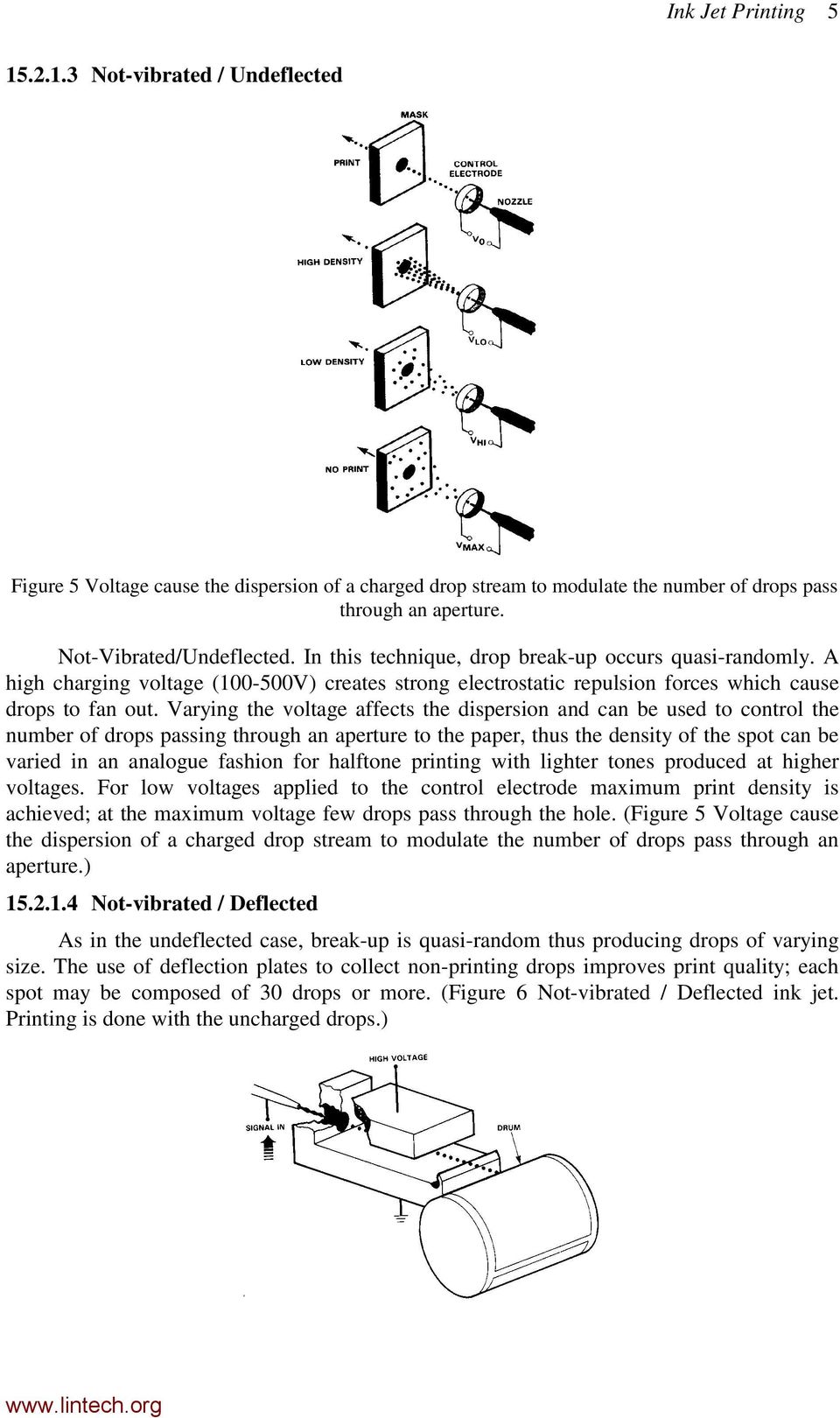
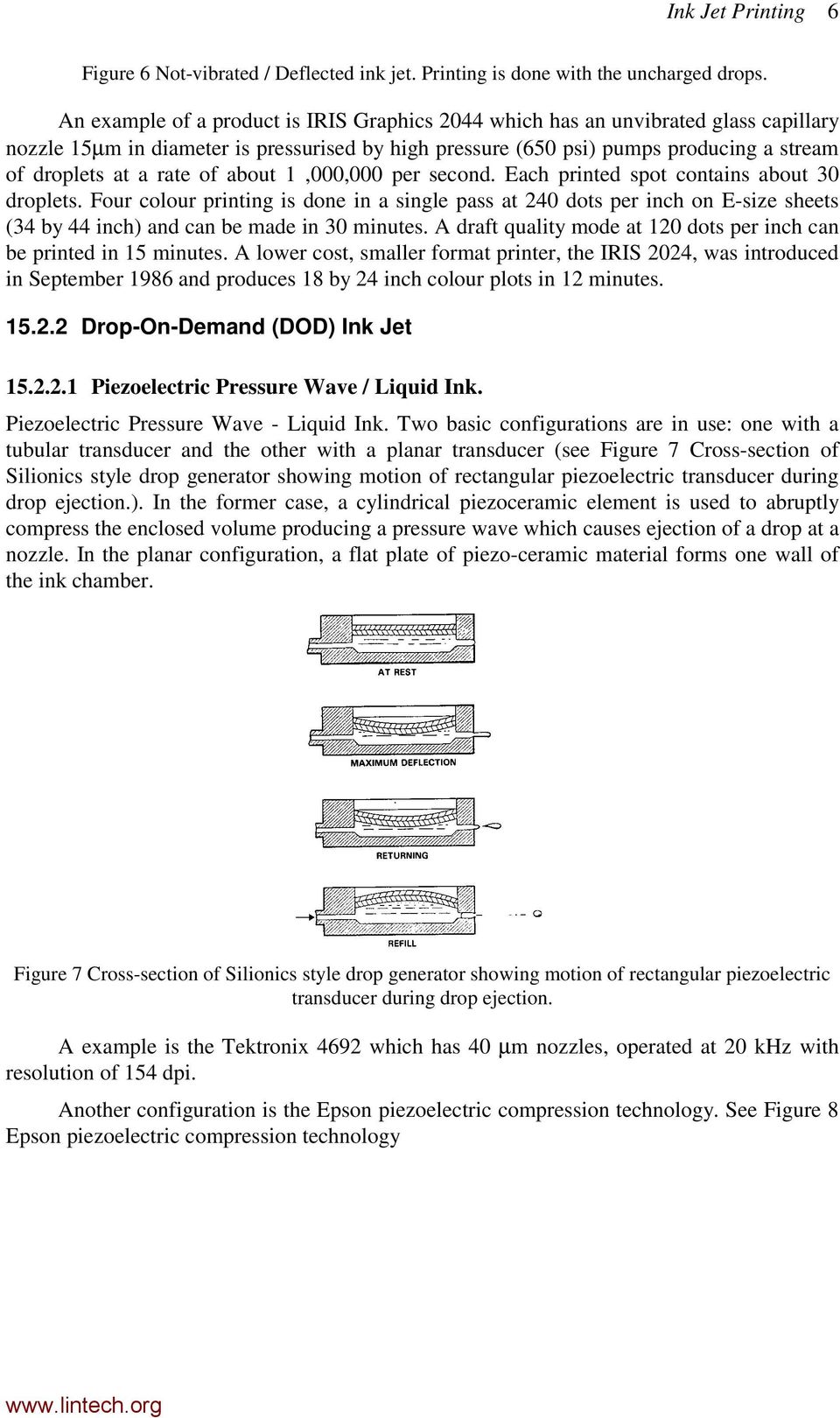
7 Ink Jet Printing 6 Figure 6 Not-vibrated / Deflected ink jet. Printing is done with the uncharged drops. An example of a product is IRIS Graphics 2044 which has an unvibrated glass capillary nozzle 15µm in diameter is pressurised by high pressure (650 psi) pumps producing a stream of droplets at a rate of about 1,000,000 per second. Each printed spot contains about 30 droplets. Four colour printing is done in a single pass at 240 dots per inch on E-size sheets (34 by 44 inch) and can be made in 30 minutes. A draft quality mode at 120 dots per inch can be printed in 15 minutes. A lower cost, smaller format printer, the IRIS 2024, was introduced in September 1986 and produces 18 by 24 inch colour plots in 12 minutes Drop-On-Demand (DOD) Ink Jet Piezoelectric Pressure Wave / Liquid Ink. Piezoelectric Pressure Wave - Liquid Ink. Two basic configurations are in use: one with a tubular transducer and the other with a planar transducer (see Figure 7 Cross-section of Silionics style drop generator showing motion of rectangular piezoelectric transducer during drop ejection.). In the former case, a cylindrical piezoceramic element is used to abruptly compress the enclosed volume producing a pressure wave which causes ejection of a drop at a nozzle. In the planar configuration, a flat plate of piezo-ceramic material forms one wall of the ink chamber. Figure 7 Cross-section of Silionics style drop generator showing motion of rectangular piezoelectric transducer during drop ejection. A example is the Tektronix 4692 which has 40 µm nozzles, operated at 20 khz with resolution of 154 dpi. Another configuration is the Epson piezoelectric compression technology. See Figure 8 Epson piezoelectric compression technology
8 Ink Jet Printing 7 Figure 8 Epson piezoelectric compression technology An example is the Epson Stylus Pro printer, which has 64 black nozzles and 16 X 3 colour nozzles for magenta, cyan and yellow. Which has bi-directional printing with resolution at 720 by 720 dpi with MicroDot. There are also piezoelectric-solid ink printers. These work basically like a liquid ink system, since the "ink" is melted both in the head and in the ink reservoir when the printer is in operation. The ink, however, is solid when loaded into the printer and solidifies on contact with the printed medium. The advantage is that thick solid ink gives good saturation. An example is the Howtek PixelMaster. Which has 32 rotating nozzles, can print four colours. At 30 khz Operation with resolution of 240 by 480 dpi. The throughput is 4 mins per page. Currently most higher performance Ink-Jet Printers use piezoelectric transducers to eject either liquid or solid ink Thermal Ink Jet/Bubble Jet Commonly known as Bubble Jet by Canon of Japan and Thermal Ink Jet and ThinkJet by Hewlett-Packard. When heating a thin film resistor causes sudden vaporisation of a small portion of the ink vehicle; this displaces fluid in the ink chamber causing drop ejection through an adjacent orifice. Figure 9 The process of ink ejection with thermal heating
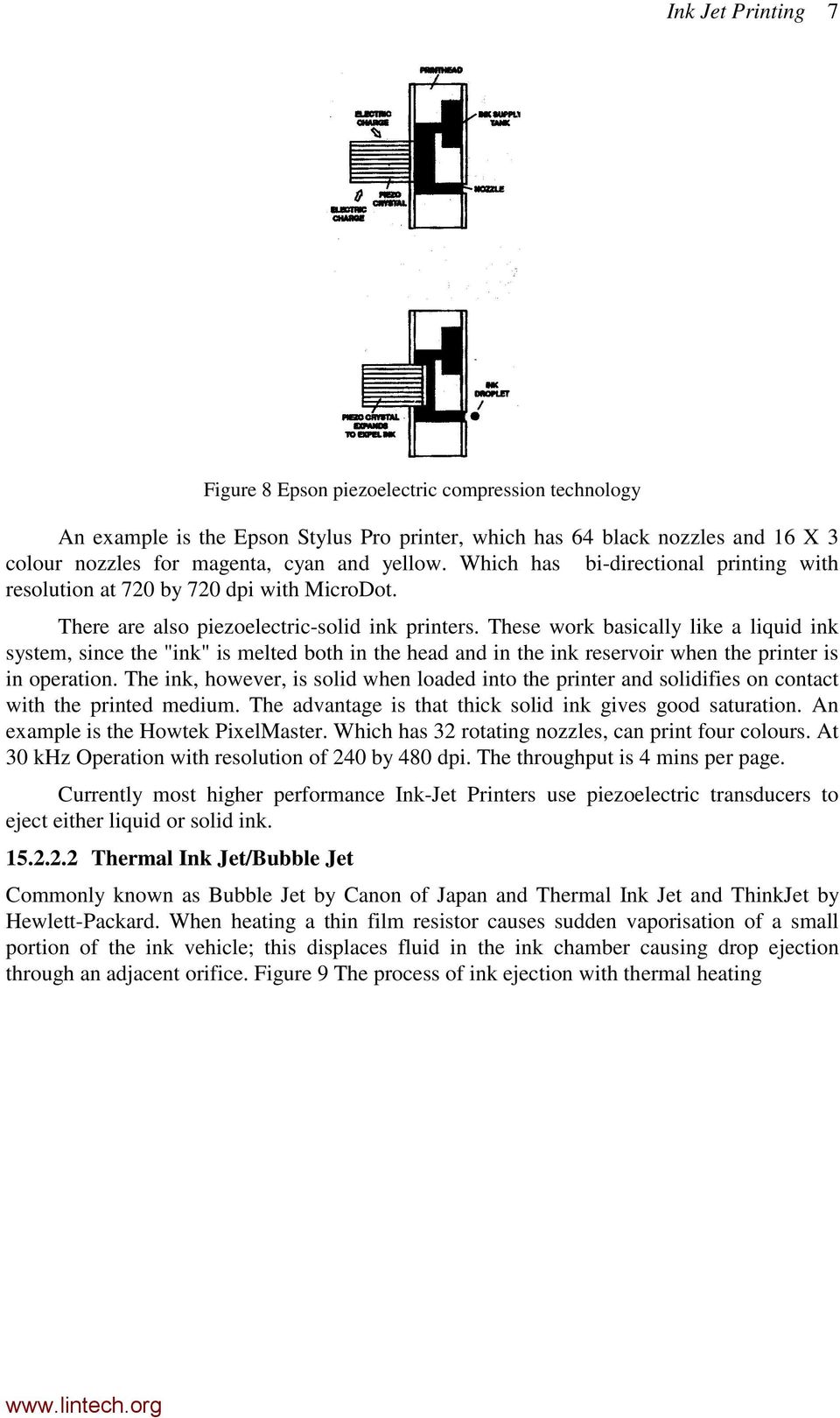
9 Ink Jet Printing 8 Figure 9 The process of ink ejection with thermal heating HP DeskJet 500 Canon BJ-330 Epson stylus Pro Nozzles 50 1 x 64 1 x 64 Speed 4Khz cpi 3 ppm/1.5 ppm colour Resolution 300 dpi 360 x 360 dpi 720 x 720 dpi Noise 45 dba To expel a drop, the temperature of the thin film heater resistor is rapidly increased by the application of an electric current. The typical pulse duration (of 3 to 10 µsec) is too short for convection to influence heat transfer. The rate of change of temperature is in excess of 30 million degree C per second. Heating cause tiny vapour bubbles to be formed. Further growth is supported by stored heat in the superheated ink layer. When the bubble become a big pillow-shaped, ink will eject at the open orifice. As the stored energy is consumed, bubble starts to collapse and the ink replenished Thermal - Spark. Solid ink and liquid ink configurations have been developed. An electrical discharge through a conductive ink vaporises one or more of its components. The expanding gas propels some of the ink particles toward the paper. Figure 10 Dry spark ink cartridge, where an electrical pulse at 4-6 µsec at about 4 kv, then at 400V to maintain the spark. In Figure 11 Liquid spark ink jet cartridge, where an electric arc vaporise the ink and expel a fine spray, similar to thermal printer. These type of technologies have the disadvantages of smudging, noisy and problem that are associated with electric arcing. Figure 10 Dry spark ink cartridge

10 Ink Jet Printing 9 Figure 11 Liquid spark ink jet cartridge Intermittent (Electrostatic Pull) Undeflected. The ink is under slight positive pressure (about 1 cm of water) to form a convex meniscus. High voltage (about 2 kv) on a gating electrode just outside the nozzle overcomes the surface tension and allows a stream of drops to emerge which are all equally charged. Drops are further accelerated toward the printing surface by an additional high voltage (about 7 kv). This method has been used for facsimile recording. (See Figure 12 Intermittent (electrostatic pull) ink jet without deflection) Figure 12 Intermittent (electrostatic pull) ink jet without deflection Deflected. Drops are extracted by the technique described above. Deflections in vertical and horizontal directions are controlled by two orthogonal sets of electrodes. (See Figure 13 Intermittent (electrostatic pull) ink jet with both vertical and horizontal deflection)

11 Ink Jet Printing 10 Figure 13 Intermittent (electrostatic pull) ink jet with both vertical and horizontal deflection 15.3 Halftone Printing Images reproduced in books and magazines are generally printed using halftone techniques in which continuous-tone artwork, such as a photograph, is converted to a pattern of dots of varying size and shape. It is interesting find out how few dots are required to reproduce some recognisable detail in the image. For most of today's printers which use dot patterns rather than fully formed characters, 300 dots per inch has become a standard and 600 dots per inch or higher is now getting popular; 150 dots per inch resolution for an image may seem anomalously low. In reality, the information content of a halftone image (and its perceived quality) goes beyond being described by the simple notion of resolution; the number of different dot sizes and even the shape of the dots must be taken into consideration: Picture Quality Halftone = Element Index * 1 Level Density Halftone techniques provide an alternative to higher resolution for improving image quality. Higher resolution increases cost and complexity. For example, doubling the resolution requires twice the number of nozzles and associated drivers operating at twice the drop frequency to maintain the same print speed; memory requirements will increase by a factor of four. A four level halftone, at the original resolution, will provide similar image quality with only twice the memory required, but will be less accurate in rendering the finest level of detail in the. Three techniques are used in ink jet printing to vary the average optical density of a pixel: (1) drop volume control, (2) dye dilution, and (3) pixel pattern techniques Drop Volume Control For continuous ink jet, for example the Not-Vibrated/Undeflected printers, charge electrode voltage can be varied to control the amount of ink spray passing through an

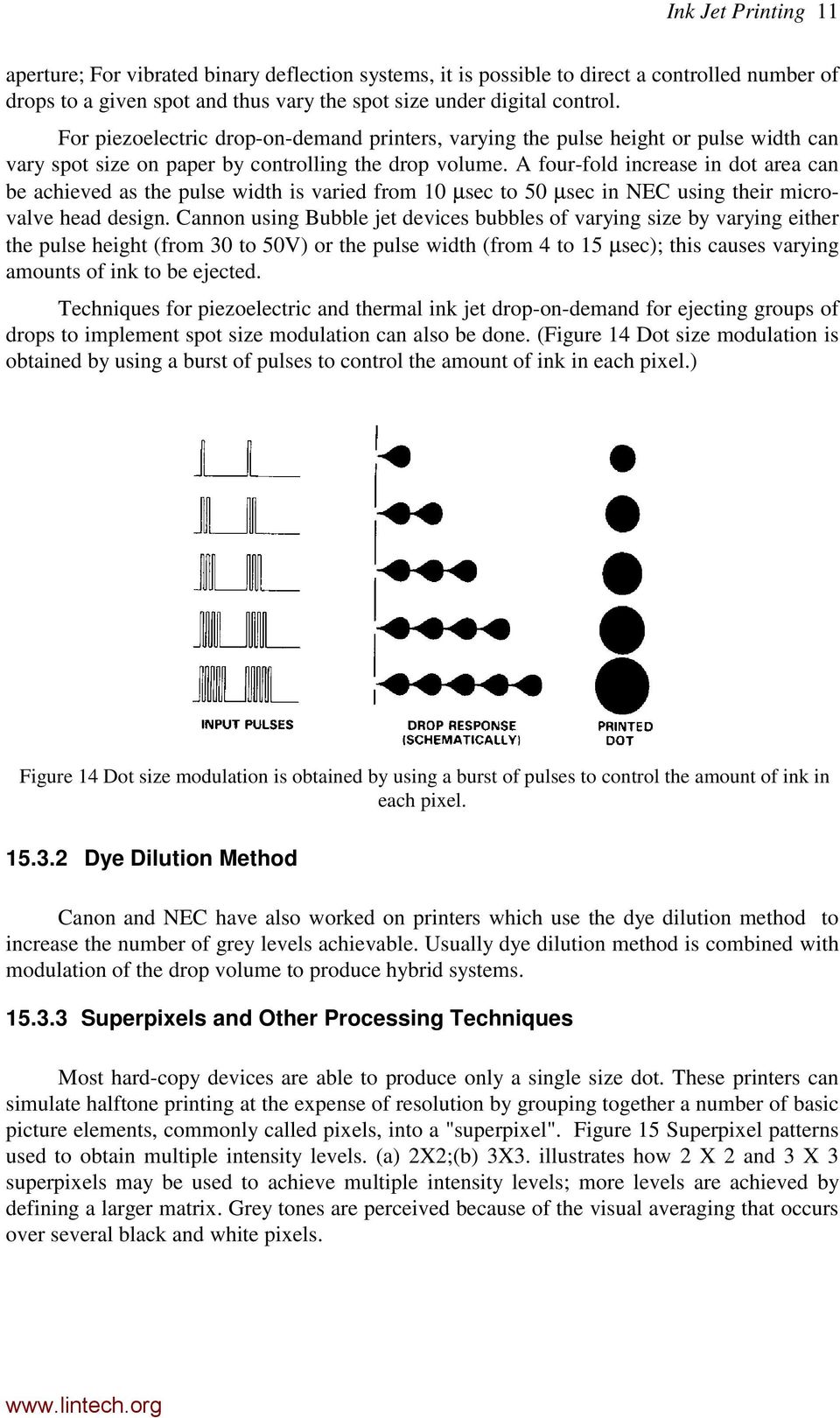
12 Ink Jet Printing 11 aperture; For vibrated binary deflection systems, it is possible to direct a controlled number of drops to a given spot and thus vary the spot size under digital control. For piezoelectric drop-on-demand printers, varying the pulse height or pulse width can vary spot size on paper by controlling the drop volume. A four-fold increase in dot area can be achieved as the pulse width is varied from 10 µsec to 50 µsec in NEC using their microvalve head design. Cannon using Bubble jet devices bubbles of varying size by varying either the pulse height (from 30 to 50V) or the pulse width (from 4 to 15 µsec); this causes varying amounts of ink to be ejected. Techniques for piezoelectric and thermal ink jet drop-on-demand for ejecting groups of drops to implement spot size modulation can also be done. (Figure 14 Dot size modulation is obtained by using a burst of pulses to control the amount of ink in each pixel.) Figure 14 Dot size modulation is obtained by using a burst of pulses to control the amount of ink in each pixel Dye Dilution Method Canon and NEC have also worked on printers which use the dye dilution method to increase the number of grey levels achievable. Usually dye dilution method is combined with modulation of the drop volume to produce hybrid systems Superpixels and Other Processing Techniques Most hard-copy devices are able to produce only a single size dot. These printers can simulate halftone printing at the expense of resolution by grouping together a number of basic picture elements, commonly called pixels, into a "superpixel". Figure 15 Superpixel patterns used to obtain multiple intensity levels. (a) 2X2;(b) 3X3. illustrates how 2 X 2 and 3 X 3 superpixels may be used to achieve multiple intensity levels; more levels are achieved by defining a larger matrix. Grey tones are perceived because of the visual averaging that occurs over several black and white pixels.
13 Ink Jet Printing 12 Figure 15 Superpixel patterns used to obtain multiple intensity levels. (a) 2X2;(b) 3X3. Ordered dither is a widely used, easily implemented technique in which a continuous tone or multi-level image is converted to a binary representation by comparing each pixel intensity with a predefined value in a threshold matrix whose elements repeat periodically in both dimensions. Where the intensity of a pixel exceeds the threshold corresponding to that pixel, a dot is printed; where it is less than the threshold value, no dot is printed. The simplicity of the technique results in low computer processing and memory requirements. In order to minimise contouring and texture visibility, while maximising the retention of detail, proper selection of values in the dither matrix is important. Error diffusion is a technique for further increasing the number of tone levels achievable by additional computer processing of the data. Data from a multi-level image is compared to a selected threshold level; the difference between these values generates an error value which is then distributed (with different weighting factors) to neighbouring pixels. The error value may be positive or negative and can continue to propagate to other pixels or may be truncated.

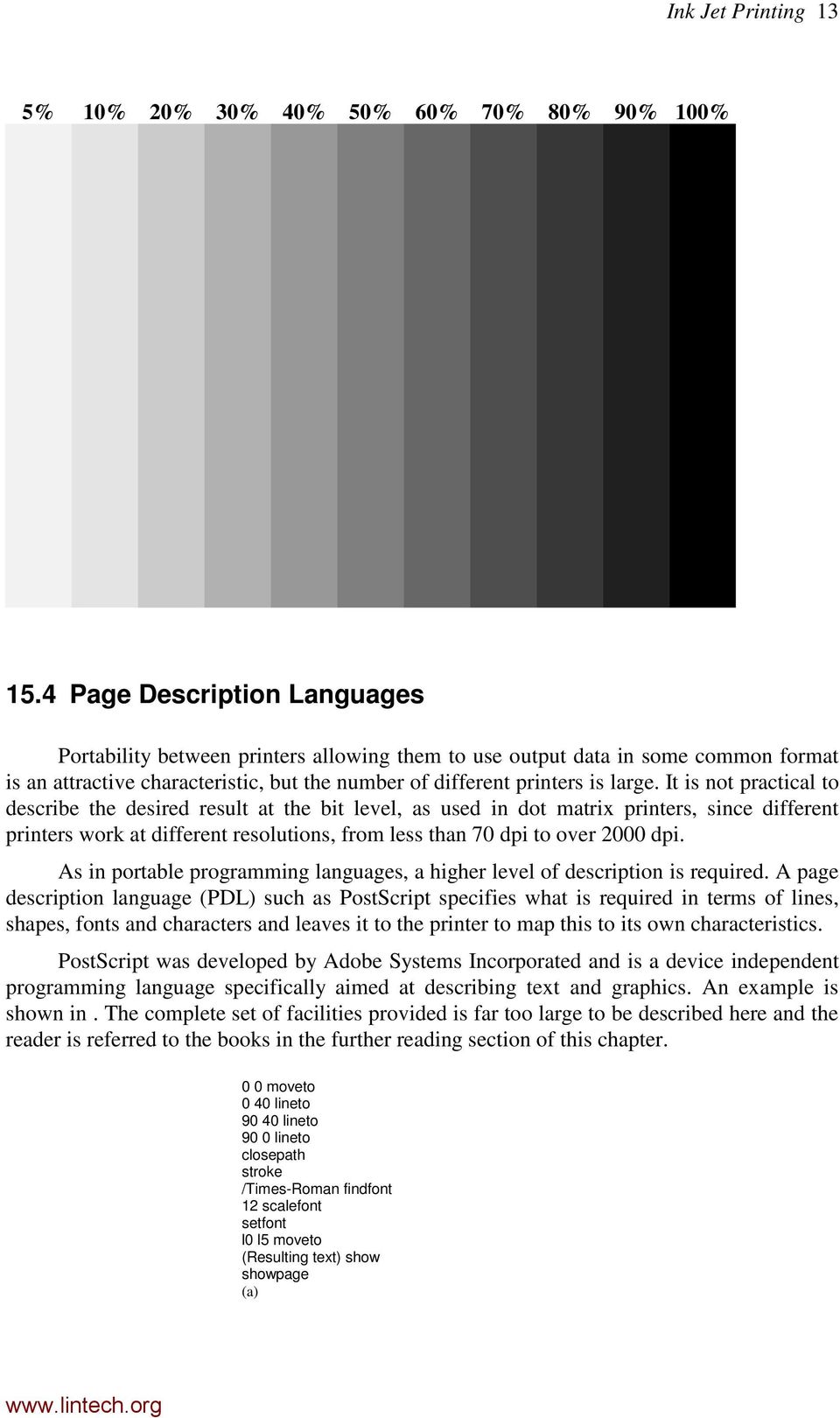
14 Ink Jet Printing 13 5% 10% 20% 30% 40% 50% 60% 70% 80% 90% 100% 15.4 Page Description Languages Portability between printers allowing them to use output data in some common format is an attractive characteristic, but the number of different printers is large. It is not practical to describe the desired result at the bit level, as used in dot matrix printers, since different printers work at different resolutions, from less than 70 dpi to over 2000 dpi. As in portable programming languages, a higher level of description is required. A page description language (PDL) such as PostScript specifies what is required in terms of lines, shapes, fonts and characters and leaves it to the printer to map this to its own characteristics. PostScript was developed by Adobe Systems Incorporated and is a device independent programming language specifically aimed at describing text and graphics. An example is shown in. The complete set of facilities provided is far too large to be described here and the reader is referred to the books in the further reading section of this chapter. 0 0 moveto 0 40 lineto lineto 90 0 lineto closepath stroke /Times-Roman findfont 12 scalefont setfont l0 l5 moveto (Resulting text) show showpage (a)
15 Ink Jet Printing 14 Resulting text (b) Figure 16 PostScript: (a) source text; (b) what it produces For other printer language, such as that employed by HP in their ink-jet and laser printers, refer to the lab manuals of HP deskjet 500C.

Introduction. Inkjet Technology Explained
 Introduction The concept of inkjet in theory is straightforward. A print head ejects tiny drops of ink onto a substrate. However, in practice implementation of the technology is complex and requires multidisciplinary
Computer Peripherals
 Computer Peripherals School of Computer Engineering Nanyang Technological University Singapore These notes are part of a 3rd year undergraduate course called "Computer Peripherals", taught at Nanyang Technological
Development of New Inkjet Head Applying MEMS Technology and Thin Film Actuator
 Development of New Inkjet Head Applying MEMS Technology and Thin Film Actuator Kenji MAWATARI, Koich SAMESHIMA, Mitsuyoshi MIYAI, Shinya MATSUDA Abstract We developed a new inkjet head by applying MEMS
www.eazynotes.com Gursharan Singh Tatla Page No. 1 COMPUTER GRAPHICS (Short Answer type Questions)
 www.eazynotes.com Gursharan Singh Tatla Page No. 1 COMPUTER GRAPHICS (Short Answer type Questions) Q 1. Can you give some basic features of computer graphics? Ans. The salient feature of computer graphics
Otis Photo Lab Inkjet Printing Demo
 Otis Photo Lab Inkjet Printing Demo Otis Photography Lab Adam Ferriss Lab Manager [email protected] 310.665.6971 Soft Proofing and Pre press Before you begin printing, it is a good idea to set the proof
Print quality requirements for single-pass inkjet printing the whole picture
 Print quality requirements for single-pass inkjet printing the whole picture Mark Ritchie, Product Manager, Xaar plc The subject of print quality is an area which is very complex, subjective and difficult
Digital printing? Digital C Print. Inkjet. i.e. pictures from Target, Wal-Mart, or Walgreens. i.e. Epson, Canon, Hewlett-Packard
 Jeremy Moore Digital printing? Digital printing refers to printing (specifically photographs in our case) where at least one step is entirely in the digital realm. Two main methods of digital printing
The Keyboard One of the first peripherals to be used with a computer and is still the primary input device for text and numbers.
 Standard Methods of Input Input device enables you to input information and commands into the computer. The Keyboard One of the first peripherals to be used with a computer and is still the primary input
Prof. Dr. M. H. Assal
 Prof. Dr. M. H. Assal AS 26/10/2014 Computer hardware is the collection of physical elements that comprise a computer system Computer hardware can be classified as following: o Input devices o Output devices
5. PRINTERS. 5.1. Printer Types. Input/Output Systems and Peripheral Devices
 Input/Output Systems and Peripheral Devices 1 5. PRINTERS This laboratory work presents the main types of printers, the general structure of a printing equipment, and the operating principle of inkjet,
The six steps of Printing 1. Cleaning
 The Printer Laser Printers Laser Printers Ink-Jet printers Dot Matrix Printers Advantages/Disadvantages Laser Printers Advantages Fast Good image Quality Reliable Durable water resistant image Excellent
Digital Technology Review
 Digital Technology Review Prepared By Digital Printing Systems Digital Printing Systems 300 Blaisdell Road Suite One Orangeburg, NY 10962 Tel: (845) 365-6400 Fax: (845) 365-6001 www.digitalprintingsystems.com
Understanding Resolution and the meaning of DPI, PPI, SPI, & LPI
 Understanding Resolution and the meaning of DPI, PPI, SPI, & LPI 2003, 2006, and 2012 David Creamer I.D.E.A.S. Publishing Consultant & Trainer Authorized Adobe Training Provider for Photoshop, Illustrator,
What Resolution Should Your Images Be?
 What Resolution Should Your Images Be? The best way to determine the optimum resolution is to think about the final use of your images. For publication you ll need the highest resolution, for desktop printing
10.1 FUNCTIONS OF INPUT AND OUTPUT DEVICES
 FORM 4 COMPUTER STUDIES Chapter 10: Input and Output Devices March, 01 10.1 FUNCTIONS OF INPUT AND OUTPUT DEVICES The main function of an input device is to The main function of an output device is to
HIGH-RESOLUTION INKJET THERMAL TRANSFER LABELS FOR BARCODING
 HIGH-RESOLUTION INKJET VS. THERMAL TRANSFER LABELS FOR BARCODING TABLE OF CONTENTS Introduction 1 Technology 1 Consumable Costs 2 Barcode Printing Capability 2 Print Contrast 4 Product Handling Requirements
ELECTRONIC DOCUMENT IMAGING
 AIIM: Association for Information and Image Management. Trade association and professional society for the micrographics, optical disk and electronic image management markets. Algorithm: Prescribed set
Displays. Cathode Ray Tube. Semiconductor Elements. Basic applications. Oscilloscope TV Old monitors. 2009, Associate Professor PhD. T.
 Displays Semiconductor Elements 1 Cathode Ray Tube Basic applications Oscilloscope TV Old monitors 2 1 Idea of Electrostatic Deflection 3 Inside an Electrostatic Deflection Cathode Ray Tube Gun creates
Graphic Design Basics. Shannon B. Neely. Pacific Northwest National Laboratory Graphics and Multimedia Design Group
 Graphic Design Basics Shannon B. Neely Pacific Northwest National Laboratory Graphics and Multimedia Design Group The Design Grid What is a Design Grid? A series of horizontal and vertical lines that evenly
WHAT You SHOULD KNOW ABOUT SCANNING
 What You should Know About Scanning WHAT You SHOULD KNOW ABOUT SCANNING If you re thinking about purchasing a scanner, you may already know some of the ways they can add visual interest and variety to
Discovering Computers. Technology in a World of Computers, Mobile Devices, and the Internet. Chapter 7. Input and Output
 Discovering Computers Technology in a World of Computers, Mobile Devices, and the Internet Chapter 7 Input and Output Objectives Overview Differentiate among various types of keyboards: standard, compact,
Computer Peripherals
 Computer Peripherals School of Computer Engineering Nanyang Technological University Singapore These notes are part of a 3rd year undergraduate course called "Computer Peripherals", taught at Nanyang Technological
CSCA0201 FUNDAMENTALS OF COMPUTING. Chapter 4 Output Devices
 CSCA0201 FUNDAMENTALS OF COMPUTING Chapter 4 Output Devices 1 Topics: Output Devices Examples of Output Device Printer Monitor Speakers Projector 2 Output Devices Any peripheral that receives or displays
Preparing an electronic file for McAdams Graphics, Inc.
 Preparing an electronic file for McAdams Graphics, Inc. The following information has been developed to ensure the consistent and accurate processing of your job. Any file not meeting these requirements
Digital Image Basics. Introduction. Pixels and Bitmaps. Written by Jonathan Sachs Copyright 1996-1999 Digital Light & Color
 Written by Jonathan Sachs Copyright 1996-1999 Digital Light & Color Introduction When using digital equipment to capture, store, modify and view photographic images, they must first be converted to a set
BIOMEDICAL ULTRASOUND
 BIOMEDICAL ULTRASOUND Goals: To become familiar with: Ultrasound wave Wave propagation and Scattering Mechanisms of Tissue Damage Biomedical Ultrasound Transducers Biomedical Ultrasound Imaging Ultrasonic
Produce Traceability Initiative Best Practices for Direct Print
 Produce Traceability Initiative Best Practices for Direct Print About This Best Practice Guideline (Revision 1.0) Best practices are generally accepted, informally-standardized techniques, methods or processes
Print and Archival Topics: Laser Digital Color Robert Anderson
 Print and Archival Topics: Laser Digital Color Robert Anderson This review highlights what is known about the archival properties of laser digital color prints and compares it with thermal ink jet. An
COMP175: Computer Graphics. Lecture 1 Introduction and Display Technologies
 COMP175: Computer Graphics Lecture 1 Introduction and Display Technologies Course mechanics Number: COMP 175-01, Fall 2009 Meetings: TR 1:30-2:45pm Instructor: Sara Su ([email protected]) TA: Matt Menke
REVISED JUNE 2011. PLEASE DISCARD ANY PREVIOUS VERSIONS OF THIS GUIDE. Graphic Style Guide
 REVISED JUNE 2011. PLEASE DISCARD ANY PREVIOUS VERSIONS OF THIS GUIDE. Graphic Style Guide 1 Introduction 2 Logo Fonts 4 Logo Color 6 Logo Size & Clear Space 8 Logo Composition 10 Logo Application 16 Corporate
Logo Standards Guideline
 Logo Standards Guideline TABLE OF CONTENTS Nurturing The Brand 1 Logo Guidelines 2 Correct Usage 2 Color Guidelines 6 How to Use the Provided Logo Files 9 Glossary 10 NURTURING THE BRAND THE FOLLOWING
4 Common Printing Methods. Inkjet Dye sublimation Digital photo processor (photo labs/colour snap shots) Electrography (laser prints)
 Inkjet Prints Digital Prints 2006 more photos from digital output than film Only 14% of images printed - almost all on home inkjet printers 2003 digital cameras outsold traditional cameras in Canada 4
Scanners and How to Use Them
 Written by Jonathan Sachs Copyright 1996-1999 Digital Light & Color Introduction A scanner is a device that converts images to a digital file you can use with your computer. There are many different types
Graphic Design. Background: The part of an artwork that appears to be farthest from the viewer, or in the distance of the scene.
 Graphic Design Active Layer- When you create multi layers for your images the active layer, or the only one that will be affected by your actions, is the one with a blue background in your layers palette.
On-Demand Printing Technologies
 On-Demand Printing Technologies Executive Summary Some of the most popular choices for on-demand label printing are dot matrix, ink jet, laser and thermal printing From a cost perspective, thermal printers
AS COMPETITION PAPER 2008
 AS COMPETITION PAPER 28 Name School Town & County Total Mark/5 Time Allowed: One hour Attempt as many questions as you can. Write your answers on this question paper. Marks allocated for each question
Graphical displays are generally of two types: vector displays and raster displays. Vector displays
 Display technology Graphical displays are generally of two types: vector displays and raster displays. Vector displays Vector displays generally display lines, specified by their endpoints. Vector display
DIVIDER G U I D E L I N E S
 3212 E. Hwy 30 P. O. Box 2110 Kearney, NE 68847 800-445-6621 Fax: 308-234-3969 web: www.morriscookbooks.com e-mail: [email protected] Press-Ready DIVIDER G U I D E L I N E S Accepted Software &
SUBMITTING A PRESS-READY COVER For Paperback Books with Perfect Binding, Plastic Comb, and Plastic Coil Binding
 For Paperback Books with Perfect Binding, Plastic Comb, and Plastic Coil Binding Press-Ready Material We will only accept a digital file for a press-ready cover. The file must be print-ready with no typesetting
So you say you want something printed...
 So you say you want something printed... Well, that s great! You ve come to the right place. Whether you re having us design and edit your work, or you fancy yourself a designer and plan to hand over your
Preparing Images for PowerPoint, the Web, and Publication
 What is Resolution?... 2 How Resolution Affects File Memory Size... 2 Physical Size vs. Memory Size... 3 Thinking Digitally... 4 What Resolution is Best For Printing?... 5 Professional Publications...
EPSON SCANNING TIPS AND TROUBLESHOOTING GUIDE Epson Perfection 3170 Scanner
 EPSON SCANNING TIPS AND TROUBLESHOOTING GUIDE Epson Perfection 3170 Scanner SELECT A SUITABLE RESOLUTION The best scanning resolution depends on the purpose of the scan. When you specify a high resolution,
The Flat Shape Everything around us is shaped
 The Flat Shape Everything around us is shaped The shape is the external appearance of the bodies of nature: Objects, animals, buildings, humans. Each form has certain qualities that distinguish it from
Chapter 9 Input/Output Devices
 Chapter 9 Input/Output Devices Contents: I. Introduction II. Input Devices a. Keyboard,mouse,joystick,scanners,digital camera, bar code reader, touch Sreeen,Speech input device (microphone) III. Output
Periodontology. Digital Art Guidelines JOURNAL OF. Monochrome Combination Halftones (grayscale or color images with text and/or line art)
 JOURNAL OF Periodontology Digital Art Guidelines In order to meet the Journal of Periodontology s quality standards for publication, it is important that authors submit digital art that conforms to the
Industrial Digital Printing for the Converting Industry Dene Taylor A & Vince Cahill B September, 2012 2012 AIMCAL Fall Conference
 Industrial Digital Printing for the Converting Industry Dene Taylor A & Vince Cahill B September, 2012 2012 AIMCAL Fall Conference Introduction: Digital printing has had phenomenal success for one reason
A new level in digital inkjet printing
 Océ JetStream 1100/2200 A new level in digital inkjet printing Powered by Océ DigiDot technology Full-process color with 600 dpi at 150 meters per minute Océ DigiDot drop-on-demand piezoelectric inkjet
Digitisation Disposal Policy Toolkit
 Digitisation Disposal Policy Toolkit Glossary of Digitisation Terms August 2014 Department of Science, Information Technology, Innovation and the Arts Document details Security Classification Date of review
THE NEW DIGITAL MANTRA: RESOLUTION, RESOLUTION, RESOLUTION!
 THE NEW DIGITAL MANTRA: RESOLUTION, RESOLUTION, RESOLUTION! by David Ski Witzke Vice President, Program Management FORAY Technologies By far, the most misunderstood concept that has caused more problems
Common Defects in Digital Printing. Paul Geldenhuys & Amir Shapira January, 2009
 Common Defects in Digital Printing Paul Geldenhuys & Amir Shapira January, 2009 Overview Ambient Influences Humidity Temperature Sunlight & UV Abrasion Chemical Resistance Common Defects in Digital Printing
Dot matrix Label ID Products. C Vinyl cloth labels. Dot Matrix. Features and benefits. Part numbering system
 Dot Matrix C Vinyl cloth labels Tyco Electronics C is a dot matrix printable vinyl coated cloth material with a permanent acrylic adhesive that is designed for application to irregular surfaces where conformability
Photo Laser Printers. Océ LightJet. Wide format high speed photo printers. The professionals choice for exceptional indoor displays
 Océ LightJet Photo Laser Printers Wide format high speed photo printers The professionals choice for exceptional indoor displays Océ LightJet Sharp text, exceptional detail No visible dots Ultimate color
Understanding Print Cartridge Page Yields. Test Standards and Factors that Impact Actual Results
 Understanding Print Cartridge Page Yields Test Standards and Factors that Impact Actual Results Comparing Page Yields: The Role that ISO/IEC Standardized Testing Plays Page yield describes the estimated
Introduction to Digital Resolution
 Introduction to Digital Resolution 2011 Copyright Les Walkling 2011 Adobe Photoshop screen shots reprinted with permission from Adobe Systems Incorporated. Version 2011:02 CONTENTS Pixels of Resolution
05, The third building which will be occupying 6,000 sq meters will be finished built soon, totaling to more than 16,000 sq meters..
 Shenzhen Runtianzhi Image Technology Co., Ltd is located in Guanlan Hi-tech Industry Park, Baoan District.. It occupies a lot area of 10,250 square meters for the first two building project which was finished
The Future of PCB Printing? An Introduction to Ink Jet Printing
 The Future of PCB Printing? An Introduction to Ink Jet Printing Giles Branthwaite Posted: March 1, 2003 Ink jet printing is no longer a technology limited to plastic boxes sitting on your desk that quickly
Technical backgrounder HP 60 and 901 ink cartridge technology
 Affordable new ink cartridge technology leverages success of HP s integrated printhead system to deliver: Low-cost, highquality cartridges for Deskjet customers High-yield cartridges with lower cost and
Panasonic Print Head Technology and Market Applications
 Panasonic Print Head Technology and Market Applications by Paul Morgavi - President & C.E.O November 7th to 9th, 2007 IMPIKA SA 135 Rue du Dirigeable, ZI Les Paluds 13400 AUBAGNE France www.impika.com
WHO CARES ABOUT RESOLUTION?
 WHO CARES ABOUT RESOLUTION? At Poli we certainly do not care about resolution as a concept! However we do care deeply about resolution when used as a measure of quality. Resolution is a very dry and technical
INTRODUCTION SOME USES OF SPRAY NOZZLES INTRODUCTION TYPES OF SPRAY NOZZLES
 SOME USES OF SPRAY NOZZLES It is important that the nozzle you select is appropriate for your particular application Liquid sprays are used in a seemingly endless variety of applications Some of the more
Troubleshooting Guide for Digital Printing on Creative Papers
 Troubleshooting Guide for Digital Printing on Creative Papers Troubleshooting guide for digital printing on creative papers Introduction This guide is in two parts, part 1 for HP Indigo presses and part
ELFRING FONTS INC. MICR FONTS FOR WINDOWS
 ELFRING FONTS INC. MICR FONTS FOR WINDOWS This package contains ten MICR fonts (also known as E-13B) used to print the magnetic encoding lines on checks, and eight Secure Fonts for use in printing check
A World-class Leading Company in Inkjet Applications INKTEC INK REPORT
 A World-class Leading Company in Inkjet Applications InkTec Co., Ltd. 1124, Shingil-dong Danwon-gu Ansan-city Kyungki-do, 425-839, Korea Tel: +82-31-493-7388 Fax: +82-31-492-2041 www.inktec.com All brand
FILE PREPARATION GUIDE
 Introduction The commercial printing equipment used by is very different to standard desk top printers so it is important that files submitted for printing are prepared properly to ensure they print correctly.
Samsung Rendering Engine for Clean Pages (ReCP) Printer technology that delivers professional-quality prints for businesses
 Samsung Rendering Engine for Clean Pages (ReCP) Printer technology that delivers professional-quality prints for businesses Contents Introduction 3 Improve scan and copy quality with ReCP 3 Small text
Use of Signature Analysis to Discriminate Digital Printing Technologies
 IS&T's NIP18: International Conference on Digital Printing Technologies Use of Signature Analysis to Discriminate Digital Printing Technologies John Oliver and Joyce Chen Alberta Research Council Edmonton,
Tips for optimizing your publications for commercial printing
 Tips for optimizing your publications for commercial printing If you need to print a publication in higher quantities or with better quality than you can get on your desktop printer, you will want to take
An overview of photo printing. Jim West
 An overview of photo printing Jim West Tonight s agenda We ll spend the 1 st half of tonight s talk discussing making photo prints using online photo labs: Why make prints? A few print examples. Pros and
Unit A451: Computer systems and programming. Section 2: Computing Hardware 4/5: Input and Output Devices
 Unit A451: Computer systems and programming Section 2: Computing Hardware 4/5: Input and Output Devices Input and Output devices Candidates should be able to: (a) understand the need for input and output
E190Q Lecture 5 Autonomous Robot Navigation
 E190Q Lecture 5 Autonomous Robot Navigation Instructor: Chris Clark Semester: Spring 2014 1 Figures courtesy of Siegwart & Nourbakhsh Control Structures Planning Based Control Prior Knowledge Operator
Sublimation Frequently Asked Questions
 Sublimation Frequently Asked Questions Print Quality Questions: What can I do when my colors are transferring incorrectly? Did the nozzle check pattern print correctly? Are you using PowerDriver color
A. Scan to PDF Instructions
 Revised 08/17/11 Scan to PDF Instructions (Epson scanner example) Scan to PDF Adobe Acrobat 9.0 A. Scan to PDF Instructions Refer to the user manual for your scanner. These instructions are for an Epson
Creating Print-Ready Files
 A GUIDE TO Creating Print-Ready Files Our People. Your Vision. Let s Create. What is a Print-Ready File? A print-ready file allows a printer to produce your project quickly and efficiently. At Kopytek,
LARGE FORMAT PRINT SOLUTIONS. Large Format Print Solutions for CAD
 LARGE FORMAT PRINT SOLUTIONS Large Format Print Solutions for CAD FOR COMPUTER AIDED DESIGN AND GEOGRAPHICAL INFORMATION SYSTEMS MULTIFUNCTIONAL LINE-UP Print big with style! Canon Large Format Printers
Desktop Publishing 5N0785 Learning Outcome 2 Monaghan Institute Level 5 Module
 Desktop Publishing 5N0785 Learning Outcome 2 Monaghan Institute Level 5 Module Contents Learners will be able to describe the characteristics of key components of DTP systems including those used for input,
Color quality guide. Quality menu. Color quality guide. Page 1 of 6
 Page 1 of 6 Color quality guide The Color Quality guide helps users understand how operations available on the printer can be used to adjust and customize color output. Quality menu Menu item Print Mode
Instructions for Creating a Poster for Arts and Humanities Research Day Using PowerPoint
 Instructions for Creating a Poster for Arts and Humanities Research Day Using PowerPoint While it is, of course, possible to create a Research Day poster using a graphics editing programme such as Adobe
A Barcode Primer for Manufacturers Dr. Peter Green BellHawk Systems Corporation
 A Barcode Primer for Manufacturers Dr. Peter Green BellHawk Systems Corporation Introduction This document is an introduction to the principles and practice of barcode scanning as it relates to a manufacturing
RAPID PROTOTYPING. Learning Objectives: By the end of the lecture the student should be able to: Explain the fundamentals of Rapid Prototyping
 RAPID PROTOTYPING Learning Objectives: By the end of the lecture the student should be able to: Explain the fundamentals of Rapid Prototyping Outline and explain differences of Rapid Prototyping Technologies
Cathode Ray Tube. Introduction. Functional principle
 Introduction The Cathode Ray Tube or Braun s Tube was invented by the German physicist Karl Ferdinand Braun in 897 and is today used in computer monitors, TV sets and oscilloscope tubes. The path of the
Variable spot size, image quality and productivity
 Grayscale and Beyond Combining superior print quality with unprecedented speed is the driving force behind high performance industrial inkjet imaging. Until recently, systems developers had to trade-off
Set up and solve a transient problem using the pressure-based solver and VOF model.
 Tutorial 18. Using the VOF Model This tutorial was run using ANSYS FLUENT 12.1. The results have been updated to reflect the change in the default setting of node-based smoothing for the surface tension
Photography of Cultural Heritage items
 Photography of Cultural Heritage items A lot of people only get to know art pieces through photographic reproductions. Nowadays with digital imaging far more common than traditional analogue photography,
Installing and using the driver
 8/00 Rev. 2.08-00 MANUAL Installation,Using, page 1 Installing and using the driver System Requirements... 2 Installing the printer driver... 3 Extracting the driver files... 3 Install a printer driver
Injection molding equipment
 Injection Molding Process Injection molding equipment Classification of injection molding machines 1. The injection molding machine processing ability style clamping force(kn) theoretical injection volume(cm3)
CorrStream Digital Printer Series True industrial inkjet dedicated to the corrugated industry; robust, reliable and consistent
 CorrStream Digital Printer Series True industrial inkjet dedicated to the corrugated industry; robust, reliable and consistent CorrStream 0 Versatility, Productivity, and Quality Aqueous ink, single pass
How many PIXELS do you need? by ron gibbs
 How many PIXELS do you need? by ron gibbs We continue to move forward into the age of digital photography. The basic building block of digital images is the PIXEL which is the shorthand for picture element.
MassArt Studio Foundation: Visual Language Digital Media Cookbook, Fall 2013
 INPUT OUTPUT 08 / IMAGE QUALITY & VIEWING In this section we will cover common image file formats you are likely to come across and examine image quality in terms of resolution and bit depth. We will cover
Links. Blog. Great Images for Papers and Presentations 5/24/2011. Overview. Find help for entire process Quick link Theses and Dissertations
 Overview Great Images for Papers and Presentations May 26, 2011 Web Tips Definitions Using the Michigan Tech logo Photography 101 Great images from others Great images you create PDF conversion Final words
Turn Speed Into Profitability
 Turn Speed Into Profitability Océ ColorWave 900 printing system Large format color production at 12 inches per second Production Speed with Digital Flexibility Productive high volume color large format
Scanning and OCR Basics
 Scanning and OCR Basics Scan Text Documents into Word 2003 using OCR Software 1. Place the document to scan face down on the flatbed scanner. 2. Launch Microsoft Word 2003 for Windows. 3. Select Acquire
6 Design of Gates. 6.1 The Sprue Gate
 6 Design of Gates 6.1 The Sprue Gate The sprue gate is the simplest and oldest kind of gate. It has a circular cross-section, is slightly tapered, and merges with its largest cross-section into the part.
Leidenfrost effect. Scott Schollenberger. MCEN 5228: Flow Visualization
 Leidenfrost effect Scott Schollenberger MCEN 5228: Flow Visualization 3/10/2011 Introduction The image above was taken of water on the surface of a hot pan, substantially above 100 o C, the evaporation
4 WAYS TO REDUCE SECONDARY PACKAGING COSTS BY REPLACING PRE-PRINTED CORRUGATED BOXES WITH DIRECT CARTON MARKING
 Press Contact: Lyndsey Farrow, Marketing Communications Specialist Matthews Marking Systems [email protected] 412.665.2536 4 WAYS TO REDUCE SECONDARY PACKAGING COSTS BY REPLACING PRE-PRINTED CORRUGATED
Elfring Fonts, Inc. PCL MICR Fonts
 Elfring Fonts, Inc. PCL MICR Fonts This package contains five MICR fonts (also known as E-13B), to print magnetic encoding on checks, and six Secure Number fonts, to print check amounts. These fonts come
Printing Guide. MapInfo Pro Version 15.0. Contents:
 MapInfo Pro Version 15.0 The purpose of this guide is to assist you in getting the best possible output from your MapInfo Pro software. We begin by covering the new print, import, and export features and
2 1 Printing Techniques. 1.1 Basic Printing Techniques. The Journey from a Pixel to a Printed Point. How Image Pixels are Reproduced by Printer Dots
 Printing Techniques 1 There are various methods of printing your own photographs. We only address one method in detail printing using inkjet printers. In this chapter, we take a glance at different printing
HYDROGRAPHIC ECHOSOUNDER FOR SOUNDING INLAND WATERS ANDRZEJ JEDEL, LECH KILIAN, JACEK MARSZAL, ZAWISZA OSTROWSKI, ZBIGNIEW WOJAN, KRZYSZTOF ZACHARIASZ
 HYDROGRAPHIC ECHOSOUNDER FOR SOUNDING INLAND WATERS ANDRZEJ JEDEL, LECH KILIAN, JACEK MARSZAL, ZAWISZA OSTROWSKI, ZBIGNIEW WOJAN, KRZYSZTOF ZACHARIASZ Gdańsk University of Technology, Faculty of Electronics,
The quadrature signals and the index pulse are accessed through five 0.025 inch square pins located on 0.1 inch centers.
 Quick Assembly Two and Three Channel Optical Encoders Technical Data HEDM-550x/560x HEDS-550x/554x HEDS-560x/564x Features Two Channel Quadrature Output with Optional Index Pulse Quick and Easy Assembly