
INSTALLATION AND SERVICE MANUAL
|
|
|
- Abner McDowell
- 10 years ago
- Views:
Transcription
1 INSTALLATION AND SERVICE MANUAL CENTURION EXCEL CENTURA CENTRY THE 21 ST CENTURY SERIES

2 Agency Approvals Medical Electrical Equipment With respect to electric shock, fire And mechanical hazards only In accordance with UL /CAN/CSA C22.2 No Classifications: 1. Protection against electrical shock (5.1, 5.2). Class I permanently connected. 2. Protection against harmful ingress of water (5.3). None. 3. Degree of safety in the presence of flammable anesthetics or oxygen (5.5). Not suitable for use in the presence of flammable anesthetics or oxygen. 4. Mode of operation (5.6). Continuous. 5. Luminaire for Diagnosis (IEC ). 6. Surgical Luminaire (IEC ) Minor. Electromagnetic compatibility for immunity And emissions in accordance with EN (1993) Group 1 Class A Test report E Medical Electrical Equipment Particular requirements for the safety of surgical Luminaries and lumenaires for diagnosis In accordance with IEC Intended use The 21 st Century Series are AC powered devices that provide a field of illumination for general examination and surgery. 21 st Century Series Service Manual ( Rev F) Page i

3 21 st Century Installation and Service Manual Revisions Revision letter ECO number Pages Affected Date F 691 Manual revised to UL-2601 standard G 848 Centurion Excel Specifications updated st Century Series Service Manual ( Rev G) Page ii
4 Table of Contents Section 1: Terminology Definition of Terms List of Symbols Section 2: Specifications Centurion Specifications Centurion Excel Specifications Centura and Centura F/O Specifications Centry Specifications Chuttle Track Specifications Warranty Section 3: Installation/Assembly Ceiling Mount Pre-Installation Guidelines Ceiling Rod Calculation Single Ceiling Mount Ceiling Rod Calculation Double Ceiling Mount Extended Ceiling Mount Extended Ceiling Mount Installation Single Ceiling Mount Installation Double Ceiling Mount Installation Wall Mounted Light Installation Floor Stand Light Installation Arm Assembly to Upright Pole Installation Installation of Light Head to Arm Chuttle Track Ceiling Track Mount Chuttle Track Pre-Installation Requirements Disassembly of the Track Mount Before Installation Track Mount Installation Procedure Section 4: Operating Instructions Centurion and Centurion Excel Operation Centura and Centura F/O Operation Centry Operation Section 5: Safety Instructions Safety Tips 21 st Century Series Service Manual ( Rev G) Page iii

5 Table of Contents (continued) Section 6: 21 st Century Maintenance Lamp Replacement Centurion and Centurion Excel Initial Lamp Installation/Lamp Replacement Centry Lamp Replacement Centura and Centura F/O Fuse Replacement Arm Adjustment Head/Yoke Adjustment Handle Sterilization Cleaning Instructions Maintenance Schedule Section 7: Troubleshooting General Troubleshooting Section 8: Exploded Views and Parts List Centurion, Centurion Excel and Centry Electric Schematic Centura Electric Schematic Centura with F/O Electric Schematic Centurion Exploded View, Light Head Assembly Centurion Light Head Assembly Part s List Centurion Excel Exploded View, Light Head Assembly Centurion Excel Part s List, Light Head Assembly Centura Exploded View, Light Head Assembly Centura Part s List, Light Head Assembly Centura F/O Exploded View, Light Head Assembly Centura F/O Part s List, Light Head Assembly Centry Exploded View, Light Head Assembly Centry Part s List, Light Head Assembly 21 st Century Series Service Manual ( Rev G) Page iv

6 List of Figures Figure Number and Description Page Figure 1: Single Ceiling Mount Ceiling Rod Calculation 11 Figure 2: Double Ceiling Mount Ceiling Rod Calculation 12 Figure 3: Extended Ceiling Mount Installation 13 Figure 4: Sub-Assemblies for Single Ceiling Mount 15 Figure 5: Single Ceiling Mount Installation 17 Figure 6: Double Ceiling Mount Components 18 Figure 7: Wire Harness Positioning 20 Figure 8: Wire Channel 20 Figure 9: Double Ceiling Mount Installation 21 Figure 10: Wall Mount Dimensions 23 Figure 11: Wall Mount Installation 24 Figure 12: Floor Mount Dimensions 26 Figure 13: Floor Stand Lights Installation 27 Figure 14: Arm Assembly to Upright Pole Installation 28 Figure 15: Installation of Light Head to Arm 29 Figure 16: Light Head to Arm Electrical Connections 30 Figure 17: Track Assembly and Components 31 Figure 18: Mounting Pallet Perpendicular to Wood Joist 33 Figure 19: Mounting Pallet Parallel to Wood Joist 33 Figure 20: Mounting Pallet To a Suspended Ceiling 33 Figure 21: Suspended Ceiling Wood Bracing Detail (End View) 33 Figure 22: End Plate Removal 34 Figure 23: Side Panel Removal 35 Figure 24: Dress Cover Removal 35 Figure 25: Stop Pins Removal 36 Figure 26: Trolley Assembly Removal 36 Figure 27: Ceiling Rod and Roll Pin Installation 38 Figure 28: Power Cord Placement 39 Figure 29: Centurion and Centurion Excel Operation 40 Figure 30: Centura Spotlight Operation 41 Figure 31: Centura Spotlight Controls 42 Figure 32: Centura Fiber Optic Spotlight Model Operation 43 Figure 33: Centry Diagnostic/Specialty Light Operation 44 Figure 34: Centurion/Centurion Excel Lamp Replacement 48 Figure 35: Centry Lamp Replacement 50 Figure 36: Centura Lamp Replacement 52 Figure 37: Fuse Replacement 54 Figure 38: Centura Fiber Optic Fuse Replacement 54 Figure 39: Arm Adjustment 55 Figure 40: Head/Yoke Adjustment 56 Figure 41: Handle Sterilization 57 Figure 42: Electric Schematic for Centurion, Centurion Excel and Centry, 120VAC, VAC, &240 VAC 21 st Century Series Service Manual ( Rev G) Page v

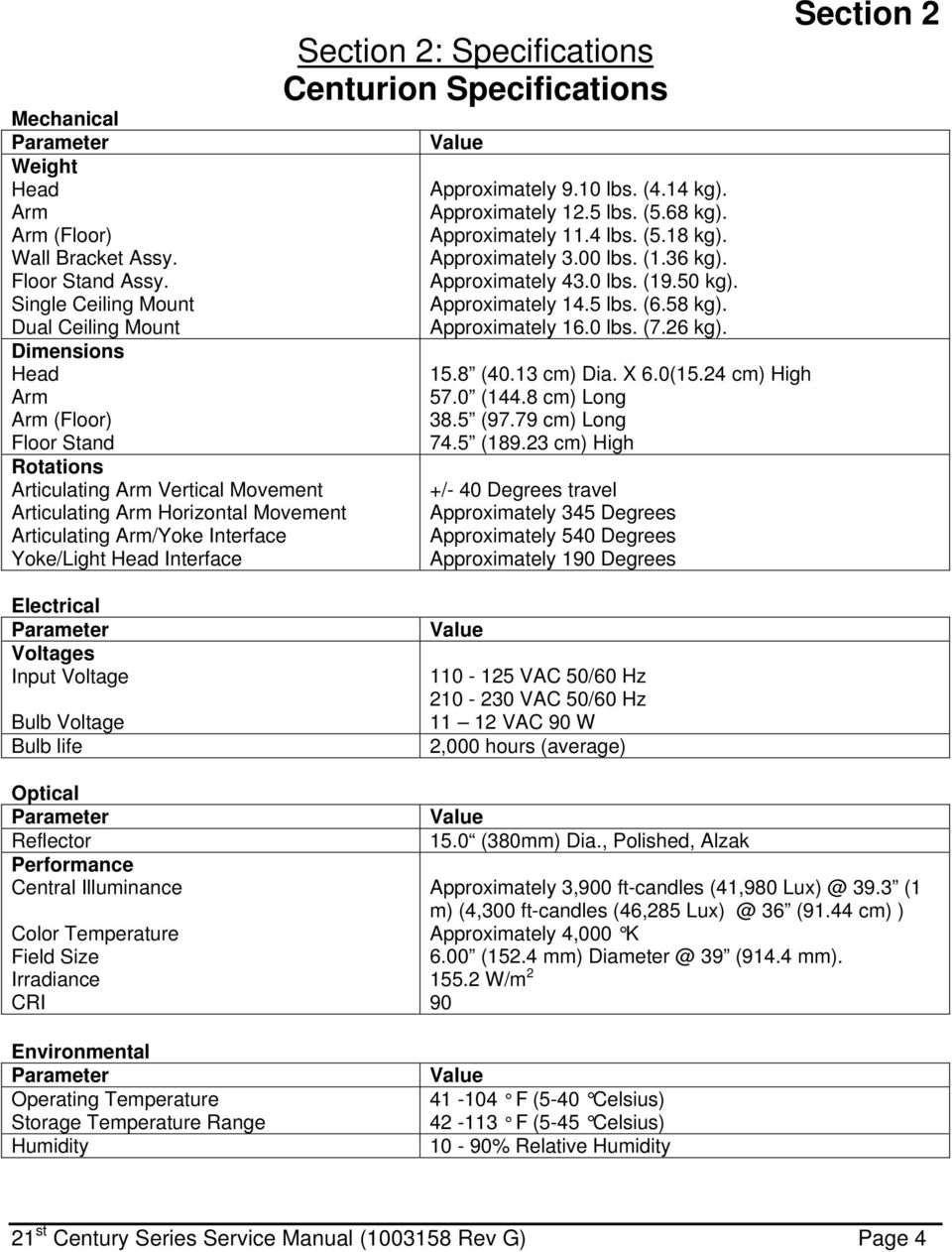
7 List of Figures (continued) Figure 43: Electric Schematic for Centurion, Centurion Excel & Centry, 100VAC 63 Figure 44: Electric Schematic for Centura, 120VAC & 230 VAC 64 Figure 45: Electric Schematic for Centura 100 VAC 65 Figure 46: Electric Schematic for Centura Fiber Optic 115/120 VAC 66 Figure 47: Electric Schematic for Centura Fiber Optic 220/240 VAC 67 Figure 48: Centurion Light Head Assembly 68 Figure 49: Centurion Light Head Assembly, Bill of Materials 69 Figure 50: Centurion Excel Head Assembly 70 Figure 51: Centurion Excel Head Assembly, Bill of Materials 71 Figure 52: Centura Spotlight Head Assembly 72 Figure 53: Centura Spotlight Head Assembly, Bill of Materials 73 Figure 54: Centura Fiber Optic Head Assembly 74 Figure 55: Centura Fiber Optic Head Assembly, Bill of Materials 75 Figure 56: Centry Head Assembly 76 Figure 57: Centry Head Assembly, Bill of Materials st Century Series Service Manual ( Rev G) Page vi
8 I.E.C. U.L. Section 1: Terminology Definition of Terms International Electrotechnical Commission Underwriter s Laboratories Section 1 Medical Electrical Equipment Electrical equipment intended to diagnose, treat the patient under medical supervision. Electrical equipment that transfers energy to the patient. Central Illuminance Illuminance of light head measured at 1 meter from the light emitting area with no obstructions. Expressed in Foot-candles or Lux. Light Field Center Point of maximum illuminance in lighted area. This is the reference point for light field size and light distribution measurements. Light Field Diameter Diameter of the circle where illuminance reaches 10% of light field center illuminance. Depth of Illumination The overall distance from 1 meter where the central illuminance is reduced to 20%. Shadow Dilution Ability of the equipment to minimize the impact of shadows in the working area. Shadows can be due to partial obstruction by the operator or other medical personnel. Correlated Color Temperature The color temperature of the light fixture when compared to a blackbody radiator expressed in degrees Kelvin. Total Irradiance The total amount of energy imparted to the patient by the lighting system expressed in Watts/meter squared. Color Rendering Index (CRI) A method of how well a light source will render other colors when illuminating them based upon eight CIE chromaticity coordinates measured with a spectroradiometer. Handle Sterilizable Device when properly sterilized maintains a sterile area in order to handle it under aseptic conditions when attached to the equipment. 21 st Century Series Service Manual ( Rev G) Page 1

9 Definition of Terms (continued) Section 1 Light Head/Articulating Arm Assembly: That part of the device that includes the light source, heat removal system, and light head vertical positioning arm. Extension Arm Horizontal section of the positioning arm with pivots on both ends that is used to increase the area covered by the light head and articulating arm. Light Mounting Support apparatus used to connect light head/articulating arm assembly to a fixed surface, consisting of either a single or double ceiling mount, wall mount, or track mount. Light head/articulating arm assembly may also be used with a mobile floor mount Neutral Conductor In an AC circuit, the return line for current. Protective Earth Ground The conductor used to connect the non-current-carrying metal parts of equipment, raceways, and other enclosures to the system grounded conductor, the grounding electrode conductor, or both, of the circuit at the service equipment or at the source of a separately derived system. Ft-Lbs. Foot-pounds. The unit of measurement of torque that is caused by an off-center load. 21 st Century Series Service Manual ( Rev G) Page 2

10 List of Symbols Section 1 U.L. Listing Marking Read accompanying documents C.E. Marking Protective Earth Ground Caution Electric Shock Hazard Fuse Marking Neutral Conductor 21 st Century Series Service Manual ( Rev G) Page 3
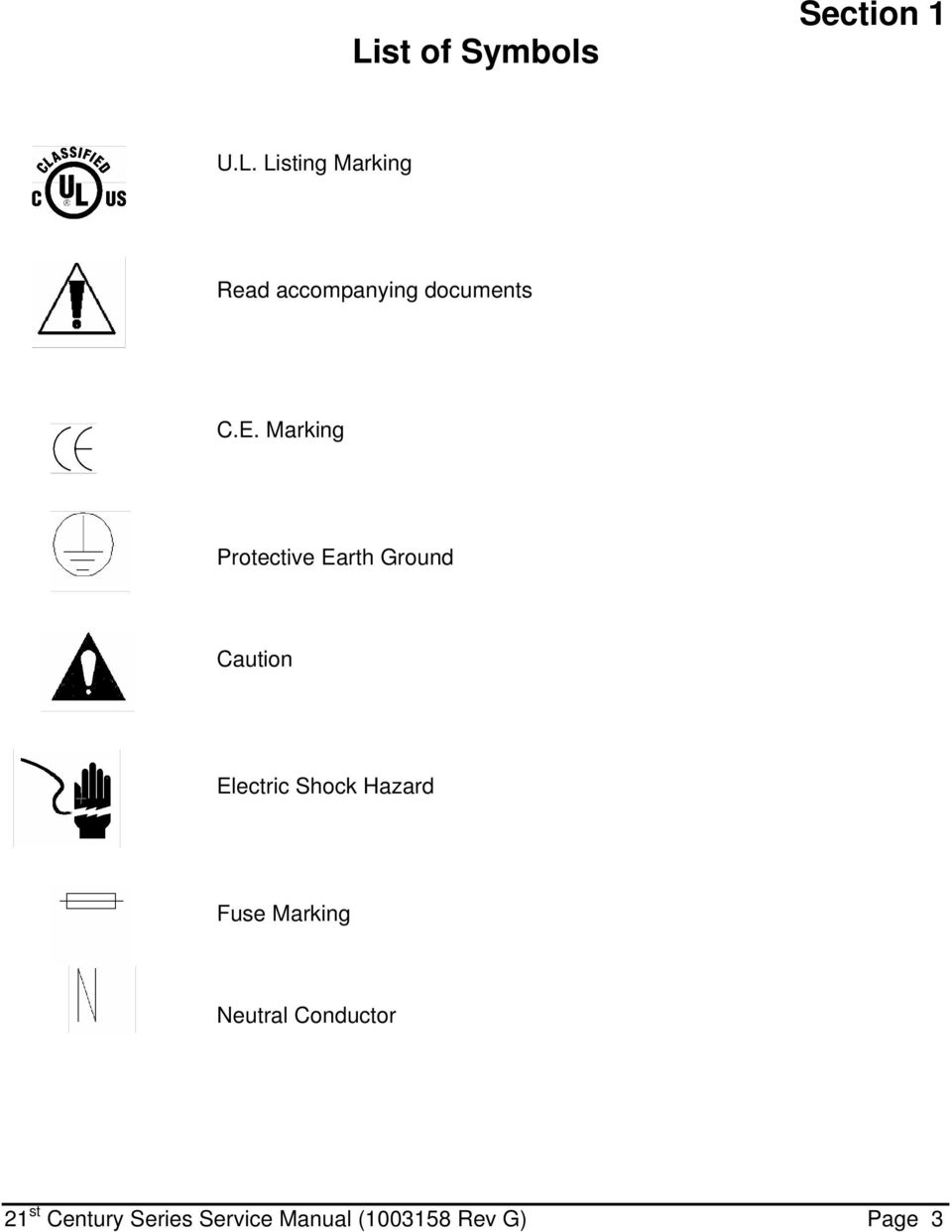
11 Mechanical Parameter Weight Head Arm Arm (Floor) Wall Bracket Assy. Floor Stand Assy. Single Ceiling Mount Dual Ceiling Mount Dimensions Head Arm Arm (Floor) Floor Stand Rotations Articulating Arm Vertical Movement Articulating Arm Horizontal Movement Articulating Arm/Yoke Interface Yoke/Light Head Interface Section 2: Specifications Centurion Specifications Value Approximately 9.10 lbs. (4.14 kg). Approximately 12.5 lbs. (5.68 kg). Approximately 11.4 lbs. (5.18 kg). Approximately 3.00 lbs. (1.36 kg). Approximately 43.0 lbs. (19.50 kg). Approximately 14.5 lbs. (6.58 kg). Approximately 16.0 lbs. (7.26 kg) (40.13 cm) Dia. X 6.0(15.24 cm) High 57.0 (144.8 cm) Long 38.5 (97.79 cm) Long 74.5 ( cm) High +/- 40 Degrees travel Approximately 345 Degrees Approximately 540 Degrees Approximately 190 Degrees Section 2 Electrical Parameter Voltages Input Voltage Bulb Voltage Bulb life Optical Parameter Reflector Performance Central Illuminance Color Temperature Field Size Irradiance CRI Environmental Parameter Operating Temperature Storage Temperature Range Humidity Value VAC 50/60 Hz VAC 50/60 Hz VAC 90 W 2,000 hours (average) Value 15.0 (380mm) Dia., Polished, Alzak Approximately 3,900 ft-candles (41, (1 m) (4,300 ft-candles (46, (91.44 cm) ) Approximately 4,000 K 6.00 (152.4 mm) 39 (914.4 mm) W/m 2 90 Value F (5-40 Celsius) F (5-45 Celsius) 10-90% Relative Humidity 21 st Century Series Service Manual ( Rev G) Page 4
12 Mechanical Parameter Weight Head Arm Arm (Floor) Wall Bracket Assy. Floor Stand Assy. Single Ceiling Mount Dual Ceiling Mount Dimensions Head Arm Arm (Floor) Floor Stand Rotations Articulating Arm Vertical Movement Articulating Arm Horizontal Movement Articulating Arm/Yoke Interface Yoke/Lamp Head Interface Centurion Excel Specifications Value Approximately lbs. (4.58 kg). Approximately 12.5 lbs. (5.68 kg). Approximately 11.4 lbs. (5.18 kg). Approximately 3.00 lbs. (1.36 kg). Approximately 43.0 lbs. (19.50 kg). Approximately 14.5 lbs. (6.58 kg). Approximately 16.0 lbs. (7.26 kg). 18 (45.72 cm) Dia. X 6.60 High (16.7 cm) 57.0 (144.8 cm) Long 38.5 (97.79 cm) Long 74.5 ( cm) High +/- 40 Degrees travel Approximately 345 Degrees Approximately 540 Degrees Approximately 190 Degrees Section 2 Electrical Parameter Voltages Input Voltage Bulb Voltage Bulb life Optical Parameter Reflector Performance Color temperature Focal length Central illuminance Light field diameter Depth of illumination Light field diameter (d50) Illuminance (one mask) Illuminance (two masks) Illuminance at bottom of standard tube Illuminance at bottom of standard tube with one mask. Illuminance at bottom of standard tube with two masks Irradiance CRI Environmental Parameter Operating Temperature Storage Temperature Range Humidity Value VAC 50/60 Hz VAC 50/60 Hz VAC 90 W 2,000 hours (average) Value (419.1 mm) diameter, aluminum, multi-facetted 4,000 K 39 (1 meter) 6,520 foot-candles (70,180 Lux) 5.61 (142.5 mm) (1067 mm) 3.76 (95.5 mm) 560 foot-candles (6,027 Lux) 1, foot-candles (21,250 Lux) 6,520 foot-candles (70,180 Lux) 743 foot-candles (7,998 Lux) 1, foot-candles (20,125 Lux) W/m 2 89 Value F (5-40 Celsius) F (5-45 Celsius) 10-90% Relative Humidity 21 st Century Series Service Manual ( Rev G) Page 5

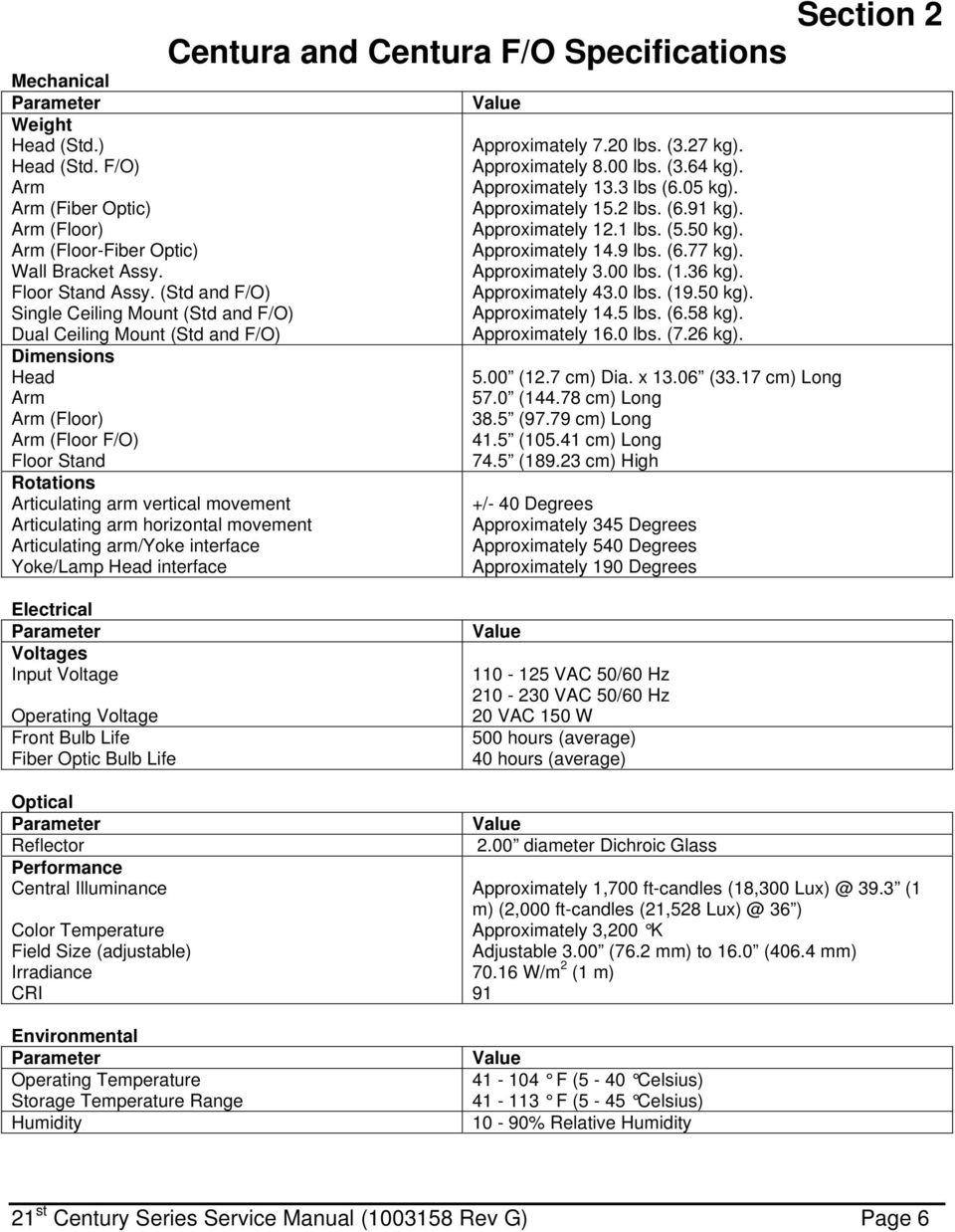
13 Mechanical Parameter Weight Head (Std.) Head (Std. F/O) Arm Arm (Fiber Optic) Arm (Floor) Arm (Floor-Fiber Optic) Wall Bracket Assy. Floor Stand Assy. (Std and F/O) Single Ceiling Mount (Std and F/O) Dual Ceiling Mount (Std and F/O) Dimensions Head Arm Arm (Floor) Arm (Floor F/O) Floor Stand Rotations Articulating arm vertical movement Articulating arm horizontal movement Articulating arm/yoke interface Yoke/Lamp Head interface Centura and Centura F/O Specifications Value Approximately 7.20 lbs. (3.27 kg). Approximately 8.00 lbs. (3.64 kg). Approximately 13.3 lbs (6.05 kg). Approximately 15.2 lbs. (6.91 kg). Approximately 12.1 lbs. (5.50 kg). Approximately 14.9 lbs. (6.77 kg). Approximately 3.00 lbs. (1.36 kg). Approximately 43.0 lbs. (19.50 kg). Approximately 14.5 lbs. (6.58 kg). Approximately 16.0 lbs. (7.26 kg) (12.7 cm) Dia. x (33.17 cm) Long 57.0 ( cm) Long 38.5 (97.79 cm) Long 41.5 ( cm) Long 74.5 ( cm) High +/- 40 Degrees Approximately 345 Degrees Approximately 540 Degrees Approximately 190 Degrees Section 2 Electrical Parameter Voltages Input Voltage Operating Voltage Front Bulb Life Fiber Optic Bulb Life Optical Parameter Reflector Performance Central Illuminance Color Temperature Field Size (adjustable) Irradiance CRI Environmental Parameter Operating Temperature Storage Temperature Range Humidity Value VAC 50/60 Hz VAC 50/60 Hz 20 VAC 150 W 500 hours (average) 40 hours (average) Value 2.00 diameter Dichroic Glass Approximately 1,700 ft-candles (18, (1 m) (2,000 ft-candles (21, ) Approximately 3,200 K Adjustable 3.00 (76.2 mm) to 16.0 (406.4 mm) W/m 2 (1 m) 91 Value F (5-40 Celsius) F (5-45 Celsius) 10-90% Relative Humidity 21 st Century Series Service Manual ( Rev G) Page 6
14 Mechanical Parameter Weight Head Arm Arm (Floor) Wall Bracket Assy. Floor Stand Assy. Single Ceiling Mount Dual Ceiling Mount Dimensions Head Arm Arm (Floor) Floor Stand Rotations Articulating arm vertical movement Articulating arm horizontal movement Articulating arm/yoke interface Lamp head rotation Centry Specifications Value Approximately 3.50 lbs. (1.59 kg). Approximately 12.5 lbs. (5.68 kg). Approximately 11.4 lbs. (5.18 kg). Approximately 3.00 lbs. (1.36 kg). Approximately 43.0 lbs. (19.50 kg). Approximately 14.5 lbs. (6.58 kg). Approximately 16.0 lbs. (7.26 kg) (15.88 cm) Dia. x 6.50 High (16.51 cm) 57.0 ( cm) 38.5 (97.79 cm) long 74.5 ( cm) +/- 40 Degrees Approximately 345 Degrees Approximately 540 Degrees Approximately 190 Degrees Section 2 Electrical Parameter Voltages Input Voltage Bulb Voltage Bulb life Optical Parameter Reflector Parameter Performance Central Illuminance Color Temperature Field Size Irradiance CRI Environmental Parameter Operating Temperature Storage Temperature Range Humidity Value VAC 50/60 Hz VAC 50/60 Hz 12 VAC 75 W 2,000 hours (average) Value 5.00 (127 mm) diameter, Dichroic Glass Value Approximately 1,750 ft-candles (18, (1 m) (4,000 ft-candles (32, (60.96 cm)) Approximately 4,000 K Approximately 10.0 (25.4 cm) Dia. at 39.3 (1 m) (6.0 ( (60.96 cm) ) W/m 2 (1 m) 91 Value F (5 40 Celsius) F (5 45 Celsius) 10-90% relative humidity 21 st Century Series Service Manual ( Rev G) Page 7

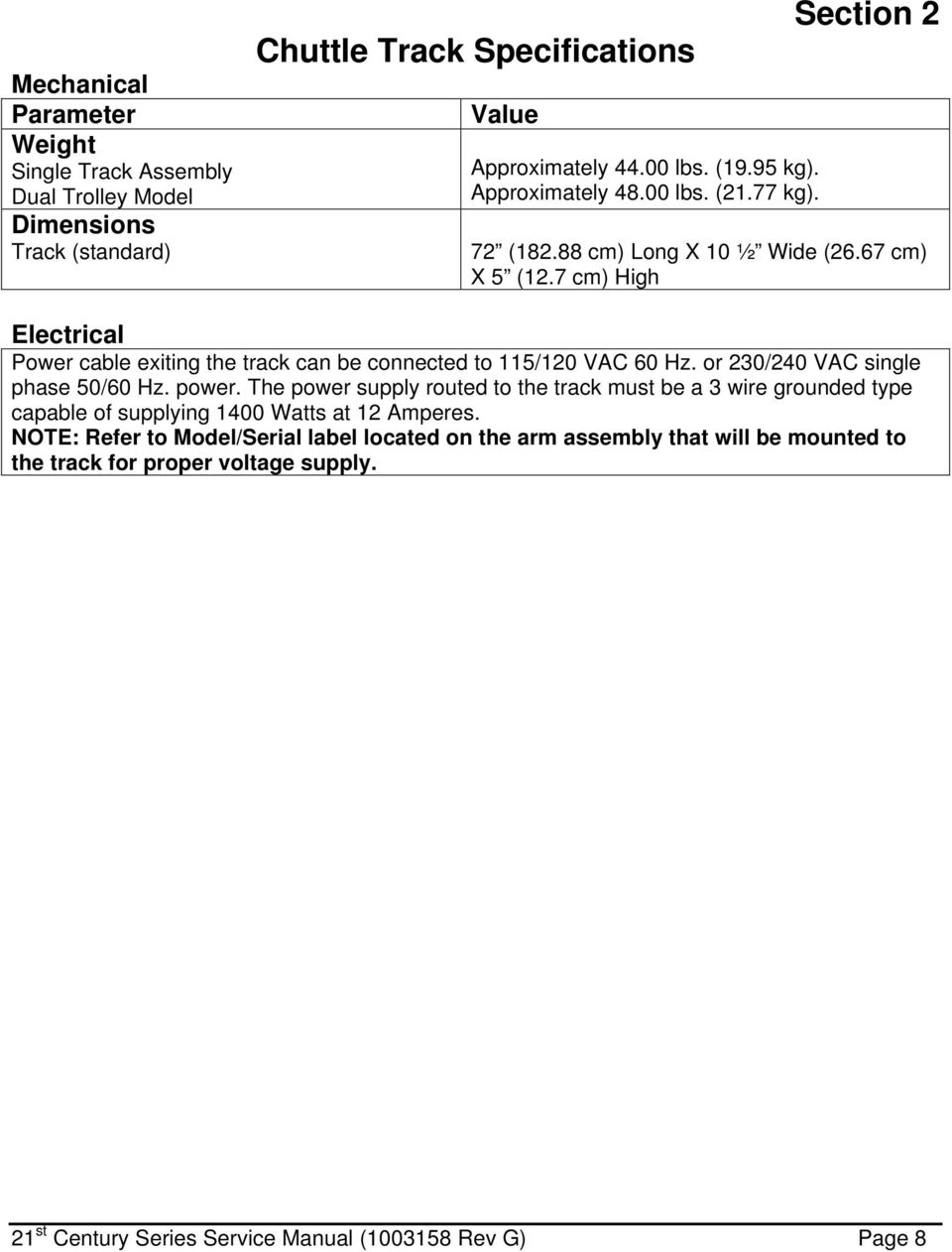
15 Mechanical Parameter Weight Single Track Assembly Dual Trolley Model Dimensions Track (standard) Chuttle Track Specifications Value Approximately lbs. (19.95 kg). Approximately lbs. (21.77 kg). Section 2 72 ( cm) Long X 10 ½ Wide (26.67 cm) X 5 (12.7 cm) High Electrical Power cable exiting the track can be connected to 115/120 VAC 60 Hz. or 230/240 VAC single phase 50/60 Hz. power. The power supply routed to the track must be a 3 wire grounded type capable of supplying 1400 Watts at 12 Amperes. NOTE: Refer to Model/Serial label located on the arm assembly that will be mounted to the track for proper voltage supply. 21 st Century Series Service Manual ( Rev G) Page 8
16 Section 2 Medical Illumination International, Inc. Lighting Equipment Limited Warranty Medical Illumination International, Inc. Lighting Equipment is warranted against defective material and/or workmanship, excluding normal replacement parts (e.g. bulbs or glass items), for a period of three (3) years from the date of shipment. This warranty applies exclusively to the repair or replacement of parts recognized as defective by Medical Illumination International, Inc., are in normal use, and have not been modified or repaired by unauthorized personnel. This warranty supersedes all other guarantees or warranties, expressed or implied. In the event of a failure covered under this warranty, please take the following action: 1. Call the Medical Illumination Customer Service Department at (818) A. Be prepared to give the model number, serial number, and full description of the failure. B. Customer Service will attempt to solve the problem over the phone. If it becomes necessary to send the product to the factory for repair, Customer Service will provide a Return Authorization number. No product should be returned without a Return Authorization number. 2. Carefully package the light component (light head, arm assembly, or mount assembly) and return it, freight prepaid and insured, with the Return Authorization number clearly marked on the box, to: Medical Illumination International, Inc. 547 Library Street San Fernando, CA RA# Damage resulting from inadequate packing is not covered by this warranty and shipping insurance does not cover damage from inadequate packing. We recommend that the package be insured against loss or in-transit damage. Medical Illumination cannot be responsible for in-transit loss or damage. 3. DAMAGE TO THE PRODUCT RESULTING FROM TAMPERING, ACCIDENT, ABUSE, NEGLIGENCE, OR OTHER CAUSES UNRELATED TO PROBLEMS WITH MATERIAL AND/OR WORKMANSHIP, ARE NOT COVERED BY THIS WARRANTY. 4. Warranty may be voided if equipment is found to have been installed incorrectly, resulting in equipment failure. 5. This warranty does not cover any labor costs associated with removing, re-packaging for shipment or reinstalling this product. Such costs are the responsibility of the purchaser. 6. Medical Illumination International, Inc. will evaluate the returned product, repair as appropriate, and ship the product back to you freight paid. 7. In the event non-warranty damage or failure is discovered, you will be contacted before repairs are performed. 21 st Century Series Service Manual ( Rev G) Page 9

17 Section 3 Section 3: Installation/Assembly Ceiling Mount Pre-Installation Guidelines SPECIAL NOTE: Installation and repair of this equipment should be performed by qualified persons only. Medical Illumination International, Inc. does not warranty any damage occurring as a result of improper installation. It is recommended that this installation manual be completely reviewed prior to installation. Before installation, check to insure the following minimum conditions are provided: The structural ceiling mount should be designed to support a vertical load of at least 100 lbs. and an off center moment of 300 ft-lbs. The structural mount should meet all local building codes. A structural mount that does not meet these minimum conditions can cause serious injury and/or property damage. It is recommended that the equipment be mounted directly over a 4-0 junction box. If this is not possible the input power supply lines should be wired in accordance with all applicable building codes. The supply circuit line must be as follows: 120 VAC lights: VAC 60 Hz, single phase, three wire, capable of supplying Amperes. 220 VAC lights: VAC, 50/60 Hz, single phase, three wire, capable of supplying Amperes. The power supply circuit line must be routed and wired to the light head in compliance with all applicable building codes. Failure to provide a circuit meeting these minimum standards or complying with local building codes can cause a shock hazard. Check the length of the ceiling rod supplied to make sure that it is the proper length to install and operate the light without interference or over reach (See ceiling Rod Calculation pages 11-12). 21 st Century Series Service Manual ( Rev G) Page 10

18 Ceiling Rod Calculation Single Ceiling Mount Section 3 Use the following table to select the correct length ceiling rod for your application. Ceiling Rod Calculation, Single Ceiling Mount Ceiling Mounting Height (2,29-2,59 m) (2,62-2,89 m) (2,92-3,20 m) Ceiling Rod Length X Value Y Value 16 (406,4 mm) 22 (558,8 mm) (2,29-2,59 m) 25 (635,0 mm) 31 (787,4 mm) (2, m) 35 (889,0 mm) 41 (1041,4 mm) (2, m) Head room to bottom of extension arm (y value-x value) (1,72-2,02 m) (1,82-2,13 m) (1,87-2,18 m) NOTE: Longer ceiling rods are available for higher ceilings. See page 14 for extended ceiling mount installation instructions. FIGURE 1: Single Ceiling Mount Ceiling Rod Calculation Note: The Centry Diagnostic / Specialty Light is shown for reference. The dimensions indicated also apply to the Centurion Diagnostic, Centurion Excel minor surgery light and the Centura Spotlight. Dimensions are approximate. *Ceiling Rod Table applies to single and dual ceiling mounts. 21 st Century Series Service Manual ( Rev G) Page 11

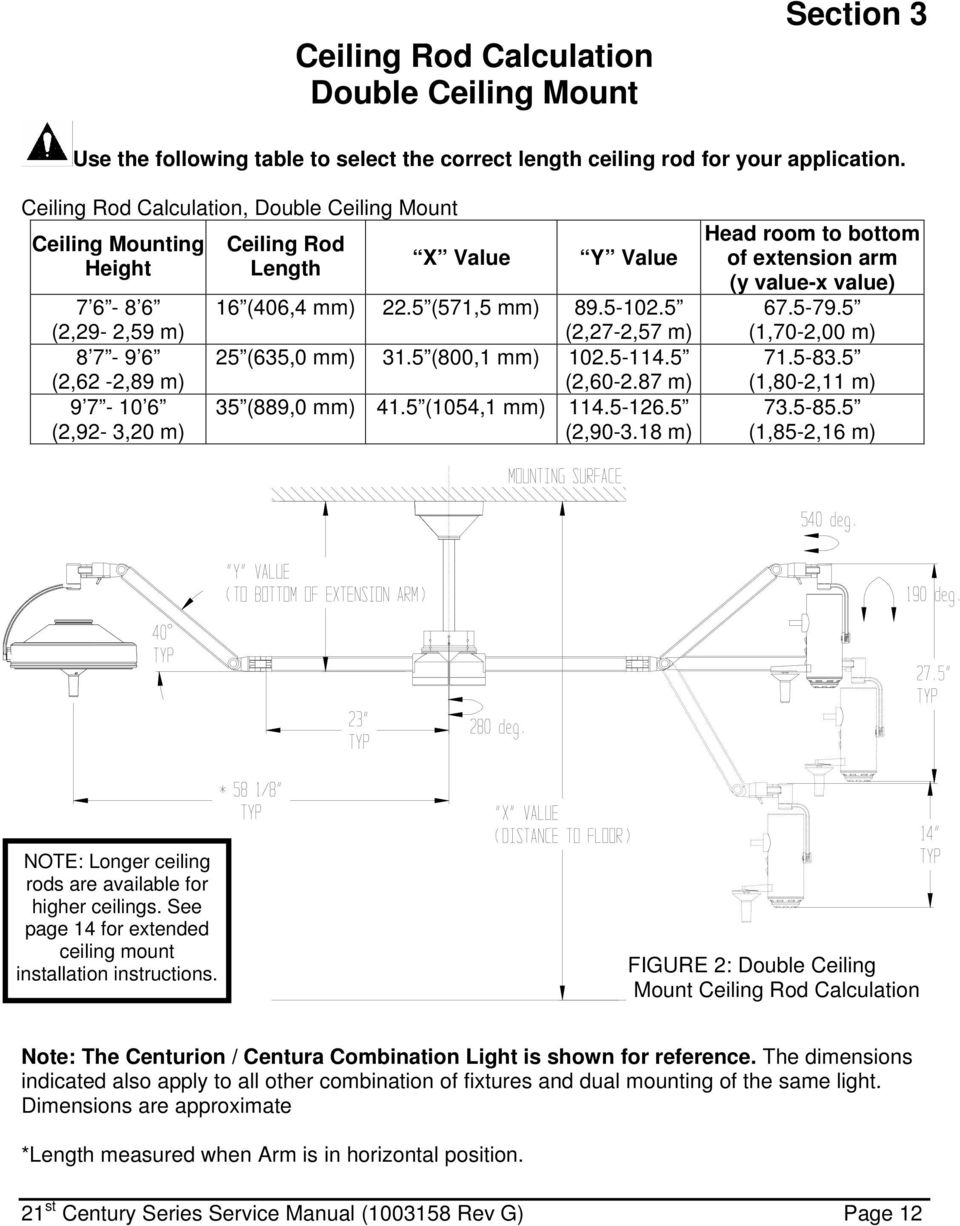
19 Ceiling Rod Calculation Double Ceiling Mount Section 3 Use the following table to select the correct length ceiling rod for your application. Ceiling Rod Calculation, Double Ceiling Mount Ceiling Mounting Height (2,29-2,59 m) (2,62-2,89 m) (2,92-3,20 m) Ceiling Rod Length X Value Y Value 16 (406,4 mm) 22.5 (571,5 mm) (2,27-2,57 m) 25 (635,0 mm) 31.5 (800,1 mm) (2, m) 35 (889,0 mm) 41.5 (1054,1 mm) (2, m) Head room to bottom of extension arm (y value-x value) (1,70-2,00 m) (1,80-2,11 m) (1,85-2,16 m) NOTE: Longer ceiling rods are available for higher ceilings. See page 14 for extended ceiling mount installation instructions. FIGURE 2: Double Ceiling Mount Ceiling Rod Calculation Note: The Centurion / Centura Combination Light is shown for reference. The dimensions indicated also apply to all other combination of fixtures and dual mounting of the same light. Dimensions are approximate *Length measured when Arm is in horizontal position. 21 st Century Series Service Manual ( Rev G) Page 12
20 Extended Ceiling Mount Section 3 Use the following table to select the correct length ceiling rod for your application. Extended Ceiling Ceiling Rod Mount Kit P/N Extension Length Mounting Height Extension P/N (508,0 mm) (3,20-3,56 m) (863,6 mm) (3,58-3,91 m) (1219,2 mm) (3,94-4,27 m) MOUNTING SURFACE Wire Harness Dowel Pin P/N Set Screws (2) P/N ¼ -20 x 2 Bolt P/N Ceiling Rod Extension (SEE TABLE) Molex Connector Distance to Floor (Mounting Height) Ceiling Casting P/N Casting Cover P/N Collar P/N Cap Nut P/N Set Screws (2) P/N Ceiling Rod P/N FIGURE 3: Extended Ceiling Mount Installation 21 st Century Series Service Manual ( Rev G) Page 13

21 Extended Ceiling Mount Installation For (3.2m 4.27m) Ceilings Section 3 Insert the ceiling rod up through the ceiling casting until the hole in the ceiling rod becomes visible. Insert the dowel pin into the hole in the ceiling rod and lower the rod in the ceiling casting, making sure the pin is seated securely in the indentation on the ceiling casting. Securely tighten the two set-screws located in the casting. Failure to install the dowel pin can cause the arm/head assembly to fall from the ceiling causing serious injury and/or property damage. Improper fastening of the ceiling casting can cause serious injury and/or property damage. Make certain the installation is capable of supporting a load of at least 100 pounds and an off center moment of 300 ft-lbs. Fasten the ceiling casting to the desired location using four 5 / x 3 long (minimum length) hex bolts or lag screws with washers (hardware not provided). This can be done by mounting the casting to a suitable material that will function as a ground conductor, or a wire lead that must be attached to the ground screw on the casting then routed to proper ground. Note: The ceiling rod must be plumb. Shim the casting if necessary. Note: The ceiling casting itself must be electrically grounded to maintain proper grounding reliability. If ceiling rod is not plumb, unwanted arm drifting may occur. Feed the wire harness through the ceiling rod extension and route to a junction box. Leave sufficient wire to extend slightly beyond the bottom of the ceiling rod. Important: To achieve proper grounding reliability, the green ground wire from the wire harness MUST be properly fastened to the grounding screw located on the ceiling casting. Make all electrical connections in compliance with all applicable electrical codes. Failure to comply with local electrical codes can cause a shock hazard. Slide the casting cover up the rod extension and over the casting. Similarly, slide the collar to the casting cover, then tighten the set screw to hold the cover in place. Feed the wire harness through the 35 ceiling rod with the rod in the direction shown. Slide ceiling rod up through ceiling rod extension until the holes in the ceiling rod align with the upper holes in the ceiling rod extension. Insert a ¼ -20 x 2 bolt carefully, making certain not to damage the wire harness, and then fasten the cap nut. Secure rods in place with the two set screws provided. See Single or Dual Ceiling Mount Instructions to complete installation. 21 st Century Series Service Manual ( Rev G) Page 14
22 Single Ceiling Mount Installation Ceiling Casting Assembly Light Head Assembly Section 3 Cable Assembly Ceiling Rod Arm Assembly FIGURE 4: Sub-Assemblies for Single Ceiling Mount GENERAL INFORMATION Installation and repair of this equipment should be performed by qualified persons only. Medical Illumination does not warranty any damage occurring as a result of improper installation. The shipping cartons contain a light head assembly, an arm assembly, a ceiling casting, casting cover, collar, bolt cover, ceiling rod, hardware kit, wire harness, and an Installation and Service Manual. Notes: There are 3 standard length rods for different ceiling heights. Extended ceiling rod kits are available for ceilings over Verify that your ceiling rod length is correct for your ceiling height (see page 12). If not correct please contact customer service. Prior to installation insure that all components shown in figure 4 are present. When removing parts from the shipping carton, be careful not to damage the components or break any glassware. Important: thoroughly check each box for parts that may be located in areas that can be overlooked. Note: The Centry Light is shown for reference. 21 st Century Series Service Manual ( Rev G) Page 15
23 Single Ceiling Mount Installation Section 3 Insert the ceiling rod up through the ceiling casting until the hole in the ceiling rod becomes visible (see figure 5). Insert the dowel pin into the hole in the ceiling rod and lower the rod in the ceiling casting, making sure the pin is seated securely in the indentation on the ceiling casting. Securely tighten the two set-screws located in the casting. Failure to install the dowel pin can cause the arm/head assembly to fall from the ceiling causing serious injury and/or property damage. Improper fastening of the ceiling casting can cause serious injury and/or property damage. Make certain the installation is capable of supporting a load of at least 100 pounds and an off center moment of 300 ft-lbs. Fasten the ceiling casting to the desired location using four 5 / x 3 long (minimum length) hex bolts or lag screws with washers (hardware not provided). This can be done by mounting the casting to a suitable material that will function as a ground conductor, or a wire lead that must be attached to the ground screw on the casting then routed to proper ground. Note: The ceiling rod must be plumb. Shim the casting if necessary. Note: The ceiling casting itself must be electrically grounded to maintain proper grounding reliability. If ceiling rod is not plumb, unwanted arm drifting may occur. Feed the wire harness through the ceiling rod extension and route to a junction box. Leave sufficient wire to extend slightly beyond the bottom of the ceiling rod. Important: To achieve proper grounding reliability, the green ground wire from the wire harness MUST be properly fastened to the grounding screw located on the ceiling casting. Make all electrical connections in compliance with all applicable electrical codes. Failure to comply with local electrical codes can cause a shock hazard. Slide the casting cover up the rod over the casting. Similarly, slide the collar to the casting cover, then tighten the set screw to hold the cover in place. Feed the wire harness through the ceiling rod with the rod in the direction shown. Do not install the extension arm with the light head attached. Installation with the light head attached can cause damage to the light. Refer to the procedure for installing the head to the arm after the bracket and arm are installed. Raise the extension arm to the ceiling rod and plug the Molex connectors together. Push the wire into the ceiling rod while inserting the transformer housing into the rod. Secure the housing to the ceiling rod using the four supplied bolts as shown. Two ¼ -20 x ¼ screws must be installed on one side of the ceiling rod. Two ¼ -20 x 3/8 screws and lock washers must be used to mount the stop bracket on the other side of the rod. Be sure the bend on the stop faces down, towards the arm. Failure to install the stop clip subassembly can cause damage to the light fixture. 21 st Century Series Service Manual ( Rev G) Page 16
24 Single Ceiling Mount Installation Section 3 Failure to install or tighten the ¼ -20 socket head cap screw can cause the arm/head assembly to fall causing serious injury and/or property damage. Complete the installation by lowering the bolt cover onto the transformer housing. See the instructions for Installation of Light Head to Arm on page 29 to complete the assembly. Wire Harness (1) P/N Ceiling Casting (1) P/N Dowel Pin (1) P/N Mounting Hardware (NOT PROVIDED) Use 5 / 16 DIA Bolt (4) Casting Cover P/N Collar (1) P/N Set Screw (2) P/N Ceiling Rod (1) P/N P/N P/N Bolt Cover (1) P/N Molex Connectors Set Screw (1) P/N Stop Bracket (1) P/N ¼ -20 X ¼ Screw (2) P/N ¼ Lock Washer (2) P/N Extension Arm Assembly FIGURE 5: Single Ceiling Mount Installation ¼ -20 x 3 / 8 Screw (2) P/N st Century Series Service Manual ( Rev G) Page 17
25 Section 3 Double Ceiling Mount Installation Cable Assembly Ceiling Casting Assembly Ceiling Rod Double Ceiling Mount Light Head Assemblies Arm Assemblies FIGURE 6: Double Ceiling Mount Components GENERAL INFORMATION The shipping cartons each contain a head assembly and arm assembly. One of the cartons also contains a ceiling casting, casting cover, collar, ceiling rod, double mount assembly, hardware kit, wire harness, and an Installation and Service Manual. Prior to installation insure that all components in figure 6 are present. When removing parts from the shipping carton, be careful not to damage the components or break any glassware. Important: thoroughly check each box for parts that may be located in areas that can be overlooked. Note: The Centurion / Centura Combination Light is shown for reference. 21 st Century Series Service Manual ( Rev G) Page 18
26 Double Ceiling Mount Installation Section 3 Insert the ceiling rod up through the ceiling casting until the hole in the ceiling rod becomes visible (see figure 9). Insert the dowel pin into the hole in the ceiling rod and lower the rod in the ceiling casting, making sure the pin is seated securely in the indentation on the ceiling casting. Securely tighten the two set-screws located in the casting. Failure to install the dowel pin can cause the arm/head assembly to fall from the ceiling causing serious injury and/or property damage. Improper fastening of the ceiling casting can cause serious injury and/or property damage. Make certain the installation is capable of supporting a load of at least 100 pounds and an off center moment of 300 ft-lbs. Fasten the ceiling casting to the desired location using four 5 / x 3 long (minimum length) hex bolts or lag screws with washers (hardware not provided). This can be done by mounting the casting to a suitable material that will function as a ground conductor, or a wire lead that must be attached to the ground screw on the casting then routed to proper ground. Note: The ceiling rod must be plumb. Shim the casting if necessary. Note: The ceiling casting itself must be electrically grounded to maintain proper grounding reliability. If ceiling rod is not plumb, unwanted arm drifting may occur. Feed the wire harness through the ceiling rod extension and route to a junction box. Leave sufficient wire to extend slightly beyond the bottom of the ceiling rod. Important: To achieve proper grounding reliability, the green ground wire from the wire harness MUST be properly fastened to the grounding screw located on the ceiling casting. Make all electrical connections in compliance with all applicable electrical codes. Failure to comply with local electrical codes can cause a shock hazard. Slide the casting cover up the rod and over the casting. Similarly, slide the collar to the casting cover, then tighten the set screw to hold the cover in place. Feed the wire harness through the ceiling rod with the rod in the direction shown. Do not install the extension arm with the light head attached. Installation with the light head attached can cause damage to the light. Refer to the procedure for installing the head to the arm after the bracket and arm are installed. 21 st Century Series Service Manual ( Rev G) Page 19
27 Double Ceiling Mount Installation Section 3 Bring one section of the double ceiling mount casting to the ceiling rod and fasten it to the rod with the 2 long bolts (P/N ) and cap nuts (P/N ). Tighten the cap nuts just enough to hold the section in place; they do not need to be fully tightened at this time. Bring an arm assembly to the double mount section and fasten the transformer housing into the extension arm mounting cavity with two 3 / 8 long mounting screws (P/N ). Install the other arm assembly to the section with two more 3 / 8 long screws. Route the wire and Molex connector from the ceiling rod into the wire channel as shown in figure 8. Plug the connector at the end of each transformer housing to the mating Molex connector from the wire harness. Place each set of wires within the channel area. Wire Channel Ceiling Rod Extension Arm Mount Wire Harness Double Ceiling Mount Section FIGURE 7: Wire Harness Positioning Ceiling Rod Wire Channel Wire Harness Double Ceiling Mount Section Extension Arm Mount FIGURE 8: Wire Channel 21 st Century Series Service Manual ( Rev G) Page 20
28 Section 3 Ceiling Rod (1) P/N P/N P/N Double Ceiling Mount Installation Wire Harness (1) P/N Ceiling Casting (1) P/N Mounting Hardware (Not Provided) Dowel Pin (1) P/N Set Screw (2) P/N Casting Cover (1) P/N Collar (1) P/N Cap Nuts (2) P/N Double Ceiling Mount (1) (2 sections) P/N Set Screw (1) P/N Extension Arms Mounting Bolts (8) P/N Long Bolt (2) P/N Molex Connectors P/N FIGURE 9: Double Ceiling Mount Installation 21 st Century Series Service Manual ( Rev G) Page 21
29 Double Ceiling Mount Installation Section 3 Position the two extension arms as shown in figure 9 to allow for easier mounting of the remaining double mount section. Firmly press the fastened double ceiling mount section against the ceiling rod. While firmly holding the double ceiling mount section in place, remove only the cap nuts from the 2 long bolts. It is strongly recommended that a second person hold the arms in place while the nuts are removed. Place the remaining double ceiling mount section onto the bolts. Be sure the wires are enclosed within the wire channel to avoid pinching them. Replace the cap nuts and fully tighten. Install the remaining four 3 / 8 long mounting screws and then fully tighten all eight screws. Failure to tighten the cap nuts for the 2 long bolts can cause the arm/head assembly to fall causing serious injury and/or property damage. Failure to install or tighten all eight of the 3 / 8 mounting screws can cause the arm/head assembly to fall causing serious injury and/or property damage. Check to make sure that the wire connections are seated far enough into the double casting enclosure. Fasten the cover plates to the casting enclosure using the four 3 / 8 long pan-head screws (P/N ) and plastic grommets (P/N ) supplied in the hardware kit. See the instructions for Installation of Light Head to Arm on page 29 to complete the assembly. 21 st Century Series Service Manual ( Rev G) Page 22
30 Section 3 Wall Mounted Light Installation FIGURE 10: Wall Mount Dimensions Height H Centurions = 13 Centura = 15 Centry = 11.5 Note: The Centurion light head is shown. GENERAL INFORMATION The shipping cartons contain a light head assembly, arm assembly, a wall bracket assembly with a hospital grade plug attached, hardware kit, and an Installation and Service Manual. (Mounting hardware for attaching the wall bracket to the wall is not supplied). Prior to installation insure that all components shown on figure 10 are present. When removing parts from the shipping carton, be careful not to damage the components or break any glassware. Important: thoroughly check each box for parts that may be located in areas that can be overlooked. 21 st Century Series Service Manual ( Rev G) Page 23
31 Wall Mounted Light Installation Section 3 Arm Subassembly Molex Connectors Wall Bracket (1) P/N Flat Head Cap Screw (1) P/N Mounting Hardware (Not included) Phillips Screws (4) P/N FIGURE 11: Wall Mount Installation Cord Retainer Plate (1) P/N Improper fastening of the wall bracket can cause serious injury and/or property damage. Make certain the installation is capable of supporting a load of at least 50 pounds and an off center moment of 150 ft-lbs. To maintain proper grounding reliability, the ground wire connections with the wall bracket must be kept properly fastened at all times Do not install the extension arm with the light head attached. Installation with the light head attached can cause damage to the light. Refer to the procedure for installing the head to the arm after the bracket and arm are installed. 21 st Century Series Service Manual ( Rev G) Page 24
32 Wall Mounted Light Installation Section 3 Attach the wall bracket to the desired location using two 5 / 16 Diameter x 2 ½ long (minimum length) lag screws or bolts with washers (Hardware not provided). See figure 11. The bracket must be anchored to a structural backing with sufficient support. Failure to use the correct backing could cause the arm/head to become unstable causing personal injury and/or property damage Remove the four screws holding the cord retainer plate in place. Carefully pull the plate away from the wall bracket to expose the Molex connector. DO NOT use excessive force during this procedure or in any way loosen or disconnect the green wires within the bracket. Failure to comply with local electrical codes can cause a shock hazard. Bring the extension arm over the wall bracket and feed the Molex connector from the transformer housing into the bracket while inserting the housing into the bracket. Secure the housing to the bracket with the flat head cap screw provided. Bring the cord retainer plate up to the bottom of the wall bracket and plug the Molex connector at the end of the power cord to the connector from the transformer. Route the connectors and wire to the rear of the bracket (not shown). Refasten the retainer plate to the bracket with the four screws provided. NOTE: The light installation can also be wired to a power source permanently. The wall bracket must first be mounted over an electrical junction box. Remove the hospital plug from the power cord. The cord can then be inserted through the rear opening in the bracket and wired directly to the power source. Wiring must be done in compliance with all applicable electrical codes. Failure to comply with local electrical codes can cause a shock hazard. See the instructions for Installation of Light Head to Arm on page st Century Series Service Manual ( Rev G) Page 25
33 Floor Stand Light Installation Section 3 FIGURE 12: Floor Mount Dimensions Note: The Centurion Light is shown. GENERAL INFORMATION The shipping carton contains a light head assembly, arm assembly, floor base casting, two leg assemblies, a hardware kit, and an Installation and Service Manual. A second carton contains the upright pole assembly. Prior to installation insure that all components are present. When removing parts from the shipping carton, be careful not to damage the components or break any glassware. Important: thoroughly check each box for parts that may be located in areas that can be overlooked. 21 st Century Series Service Manual ( Rev G) Page 26
34 Power Cord Exit location Anti-rotation Slot Base Casting P/N Set Screw P/N Floor Stand Light Installation Upright Assembly P/N End Cap (4) P/N Flange Nut (4) P/N Section 3 Adjustment Nut (4) Caster (2) P/N Caster (2) Brake P/N Leg (2) P/N Anti-rotation Pin P/N FIGURE 13: Floor Stand Light Installation Lock Washer (4) P/N Bolt (4) P/N Bolt the assembled legs onto the cast iron base using four ¼ -20 x 1 ¾ bolts and ¼ lock washers. Position the floor base casting so that the set-screw in the base is at the rear of the assembly. See figure 13. Insert the upright pole fully into the floor base casting so that the anti-rotation slot sits over the pin in the casting. Rotate the pole until the slots slides fully over the pin, lowering the pole. The power cord (not shown on figure) should be in line with the set-screw. Once the pole is properly positioned, securely tighten the set-screw using the 1/8 hex key provided. Do not install the extension arm with the light head attached. Installation with the light head attached can cause damage to the light. Refer to the procedure for installing the head to the arm after the floor mount is assembled and the arm is in place. 21 st Century Series Service Manual ( Rev G) Page 27
35 Section 3 Arm Assembly to Upright Pole Installation Transformer Housing Extension Arm Molex Connectors Mounting Bolts P/N FIGURE 14: Arm Assembly to Upright Pole Installation While securely supporting the extension arm above the upright pole, firmly grasp the cable at the end of the pole. DO NOT allow the cable to slip into the pole as it may be difficult to retrieve it. Connect the Molex connector from the transformer housing to the connector at the end of the pole. Remove the cable tie holding the harness in place and discard it. Carefully lower the extension arm and insert the transformer housing while pushing the wiring into the pole. Secure the housing to the pole utilizing the two ¼ -20 x 3 / 8 bolts supplied. Tighten the bolts securely. The light arm should be between the extended legs as shown in figure 14. To level the base, remove the end caps at the end of each leg and adjust the caster bolts and nuts. Once the base has been leveled, tighten the nuts securely and insert the leg cap in the end of each leg. See figure 13. See the instructions for Installation of Light Head to Arm on page st Century Series Service Manual ( Rev G) Page 28
36 Installation of Light Head to Arm Section 3 ¼ -28 x 1 9 / 16 Hex Bolt P/N Anti-Rotation Screw P/N ¼ -28 Hex Nut P/N Yoke / Arm Connector Head Assembly Cover P/N Arm Assembly Switch Assembly Cover Flat Head Screws (2) P/N FIGURE 15: Installation of Light Head to Arm Installation and repair of this equipment should be performed by qualified persons only. Medical Illumination does not warranty any damage occurring as a result of improper installation. Make sure the light head is installed to the correct arm when assembling multiple lights or combination models. Mounting the incorrect light head to the arm can cause improper arm support, inefficient bulb performance, and /or bulb failure. Remove the two screws from the switch assembly cover and pull downward exposing the switch and the wire connector. See figure 15. Insert the wire set from the yoke / arm connector through the hole in the arm/wire junction. Note: The Centurion Light is shown. 21 st Century Series Service Manual ( Rev G) Page 29
37 Installation of Light Head to Arm Section 3 Insert the yoke/arm connector into the arm until the bolt-holes are aligned. Insert the ¼ -28 x 19 / 16 bolt as shown being careful not to damage the wires, and secure with the ¼ -28 hex nut. Tighten the nut securely, but do not over tighten. Tighten the anti-rotation screw into the yoke/arm connector using the hex key provided. One set of wires exits from the light head assembly, and two other sets exit from the arm/wire junction assembly. Connect the wires with spade connectors, one from the arm and one from the head as shown. Connect the wires with flag connectors on the switch box. Position the connectors in the junction housing to allow room for the switch. Replace the switch assembly cover and securely tighten the two screws. See figure 16. Press the snap cover onto the top of the hex bolt as shown on figure 15. Spade Connectors (2) Flag Connectors (2) FIGURE 16: Light Head to Arm Electrical Connections 21 st Century Series Service Manual ( Rev G) Page 30
38 Chuttle Track Ceiling Track Mount Section 3 Installation and repair of this equipment should be performed by qualified personnel only. Medical Illumination International, Incorporated does not warranty any damage or injuries as a result of improper installation. Trolley Assembly Cable Carrier Junction Box FIGURE 17: Track Assembly and Components GENERAL INFORMATION Track Assembly The shipping carton contains a fully assembled track mount and an installation and service manual. Carefully remove the track from the shipping carton. Check the track for any visible damage or missing components. The major components provided are the track assembly, trolley assembly, and a junction box as shown on figure 17. Dual trolley Model No will have two trolley assemblies and two wire harness cables. Prior to installation insure that all components are present. Some disassembly of the unit is required before mounting it to the ceiling. Be careful not to damage any of the components when removing parts from the shipping carton. Important: Thoroughly check each box for parts that may be located in areas that can be overlooked. 21 st Century Series Service Manual ( Rev G) Page 31
39 Section 3 Chuttle Track Pre-Installation Requirements Installation and repair of this equipment should be performed by qualified persons only. Medical Illumination does not warranty any damage or injuries occurring as a result of improper installation. Before installation, check to insure the following conditions are provided and in place. A structural ceiling mount meeting the specifications of the architectural plans, or suggested structural mounting shown in figures 18 through 21. The installation must be capable of supporting a weight of at least 200 pounds and an off center load of 500 ft-lbs. The track mount should not be mounted higher than 9 feet 6 inches (9 ½ feet) above the floor. The track mount must be mounted at the finished ceiling level whether the ceiling surface is solid or dropped type. Mounting the unit higher than 9 ½ feet may result in instability of the light system and the arm assembly mounted too high to be accessable, Check the length of the ceiling rod supplied (located in the carton with the light head and arm). The rod lengths available for the Chuttle Track are 16 long for a mounting height of 7 feet 6 inches to 8 feet 6 inches. A 25 long rod is available for a mounting height of 8 feet 7 inches to 9 feet 6 inches. If a problem occurs, contact our customer service department at (818) The mounting bolts used to fasten the track must be able to support a minimum of 200 pounds each ( 3 / 8 diameter bolts required). 21 st Century Series Service Manual ( Rev G) Page 32
40 Section 3 Chuttle Track Pre-Installation Requirements Figure 18: Mounting Pallet Perpendicular to Wood Joist Figure 19: Mounting Pallet Parallel to Wood Joist Figure 20: Mounting Pallet to a Suspended Ceiling Figure 21: Suspended Ceiling Wood Bracing Detail (End View) 21 st Century Series Service Manual ( Rev G) Page 33
41 Section 3 Disassembly of the Track Mount Before Installation Note: For installations where there are two existing trolley assemblies on a single track (Dual Trolley Model No ), the left and right trolley must be removed from the track from their respective sides. When disassembling the track, remove both end plates from the unit. Remove the right trolley from the right side and the left trolley from the left side of the track. Do not mix the right and left trolley assemblies. The cord bracket within each trolley is positioned to make electrical connection for the right and left light fixtures respectively. Medical Illumination International, Inc. recommends temporarily marking each trolley if needed to make sure these are assembled onto the track in the proper location and orientation. When performing this procedure DO NOT disassemble the components of the trolley assembly or remove the track extrusion channel from the plywood pallet. Take the end plate/plates P/N off the side of the track by unfastening the two (2) #6 wood screws. See figure 22. Wood Screws End plate Plywood Pallet FIGURE 22: End Plate Removal 21 st Century Series Service Manual ( Rev G) Page 34
42 Section 3 Disassembly of the Track Mount Before Installation Take off the two side panels P/N by removing the two (2) #10 wood screws at the end of each panel. See figure 23. Side Panels Wood Screws FIGURE 23: Side Panel Removal Loosen the three #8 set screws along each side of the track channel extrusion P/N with the provided hex Allen wrench. Remove both dress covers P/N See figure 24. Set Screws (6) FIGURE 24: Dress Cover Removal Dress Covers 21 st Century Series Service Manual ( Rev G) Page 35
43 Section 3 Disassembly of the Track Mount Before Installation Keep the side panels and dress covers in a safe place to prevent damage until reassembly. Remove the two stop pins P/N and the #6 flat head screws P/N holding the pins in place from the track end with the end plate already removed. See figure 25. Flat Heads Stop Pins FIGURE 25: Stop Pins Removal Secure all screws and hardware until it is time for reassembly. Disconnect the Molex connector attached to the trolley first. Slide the trolley assembly P/N off the track. See figure 26. Trolley Assembly FIGURE 26: Trolley Assembly Removal 21 st Century Series Service Manual ( Rev G) Page 36
44 Track Mount Installation Procedure Section 3 Warning: Improper fastening of the track mount can cause serious injury and/or property damage. Insure the installation is capable of supporting a weight of at least 200 pounds and an off center load of 500 ft-lbs. It is recommended that the head of each mounting bolt be recessed flush or just below the surface of the plywood pallet. This will allow for easier assembly of the side panels once the track is mounted. Drill six (6) 7 / 16 diameter clearance holes in the plywood pallet for the bolts. Counterbore the holes to 1 diameter by 3 / 8 deep. The holes should be evenly spaced along the pallet at the outside edge of the track base extrusion. Note: The fasteners can also be placed in the interior of the track extrusion if ceiling conditions do not allow mounting the fixture at the plywood pallet. Mark the hole locations on the ceiling structure to match the hole locations on the plywood pallet. Drill the proper sized pilot or clearance holes in the ceiling structure depending on the type of fastener that has been chosen. Note: The next step requires two people to mount the track base. One person is needed to support the fixture at the ceiling while the other person fastens the bolts. Failure to use two people could result in equipment damage and/or personal injury. Proper movement of the trolley requires the track to be mounted to a level ceiling structure. Check the ceiling with a leveling device in the length and width directions before mounting the base. Install the base to the desired location with six (6) 3 / 8 diameter by 4 (minimum length) hex bolts with flat washers or hex lag screws with washers (hardware is not provided). If shimming is required (¼ or less), flat washers can be placed between the track pallet and the ceiling surface to achieve a level installation. An electrical junction box is provided if one is not available in the ceiling. Fasten the box as close as possible to the power cable exiting the back of the track. Route the cable from the track to the junction box then connect the power source to the cable (figure not shown). Note: A ground wire is provided and must be fastened to an earth ground to insure proper grounding reliability for the lighting fixture(s). Wire routing and connections must be done in accordance to local and national electrical codes. 21 st Century Series Service Manual ( Rev G) Page 37
45 Track Mount Installation Procedure Section 3 Remove the ¼ by 2 roll pin taped down in the trolley assembly. Insert the pin into the ceiling rod end that has one hole in both walls. The pin should extend the same amount on both sides of the ceiling rod. Install the ceiling rod into the trolley and allow the roll pin to rest in the indentation in the trolley. See figure 27. Failure to install the roll pin correctly can cause serious injury and/or property damage. Secure the ceiling rod by tightening the four ¼ -20 set screws in the trolley hub. Insert the wire harness exiting the light head through the ceiling rod. The large Molex connector from the wire harness must be located at the roll pin end. Insert the connector into the cord bracket attached on the trolley s bottom until it locks in place. Ceiling Rod Side Rollers Alignment Bracket Adjustment Screws Roll Pin ¼-20 Set Screws Trolley Assembly Cord Bracket Wire Harness FIGURE 27: Ceiling Rod and Roll Pin Installation Slide the trolley with the installed ceiling rod back onto the track. The cord-mounting bracket in the trolley should be positioned so it is next to the mating Molex connector on the power cord. Insure that the trolley rolls freely along the track. If adjustment is necessary loosen the adjustment screws and position the side rollers against the base track extrusion as shown on figure 27. Retighten the screws. Ensure the power cord does not get twisted when attaching it to the cord bracket on the next step. Do not proceed with the installation before correcting the problem. 21 st Century Series Service Manual ( Rev G) Page 38
46 Track Mount Installation Procedure Section 3 Ensure the cable carrier chain lays flat within the track. Attach the Molex connector to the mating connector on the trolley assembly. See figures 27 and 28. Cable Clamp Trolley Assembly Ceiling Rod Cable Carrier FIGURE 28: Power Cord Placement Cable Carrier should have a Simple Radius If the cable carrier and trolley move properly along the track, replace the two stop pins and screws at the open track end. Carefully slide the center dress covers through the trolley. Be careful not to damage the trolley components, wire connections, or the covers when installing these back. Tighten the three set screws along both sides of the track to secure the covers in place. Reinstall the side panels and secure in place with the wood screws. Ensure the holes in the pallet are aligned with the holes in the side panel before fastening. Note: If the bolt heads were not previously set flush with the plywood, clearance holes need to be drilled in each panel to allow these to sit against the plywood pallet. Refer to Section 3 in this manual to install the light fixture(s) to the end of the ceiling rod. Refer to either Single Ceiling mount or Double Ceiling mount accordingly. 21 st Century Series Service Manual ( Rev G) Page 39
47 Section 4 Section 4: Operating Instructions Centurion and Centurion Excel Operation On/Off Toggle Switch: Switch energizes or de-energizes lamp. To position the light head and arm over the work area, firmly grasp the sterilizable handle or the handle located on the side of the reflector housing and bring the light head or arm to the desired location. Adjust the tilt of the light head by holding the sterilizable handle and rotating forward or backward. The light head can revolve around the Yoke/Arm connector by grasping the side handle or yoke and moving it in a circular motion. Switch Yoke / Arm Connector Yoke Handle Button Note: Centurion Excel light head shown Sterilizable Handle FIGURE 29: Centurion and Centurion Excel Operation 21 st Century Series Service Manual ( Rev G) Page 40
48 Centura and Centura F/O Operation Section 4 Do not operate the unit front and /or rear lamps if the fan is not operating. Heat buildup due to insufficient cooling will damage the equipment. Main Power Switch: On standard models, the toggle switch turns on power to the front lamp and the fan. On models that have the optional fiber optic side lamp, the toggle switch turns on the main power to the light head only. The fan will be on when the switch is on. The individual lamps are controlled by the rocker switches located on the light housing. Position Adjustment: To move the light head and arm over the work area, firmly grasp the sterilizable handle or the yoke located opposite the handle and bring the light head to the required height. Adjust the angle of the light head by holding the handle and either pulling forward or pushing backward to change the tilt. Rotating the light head can be done by grasping the yoke or handle and moving it on its axis in a circular motion. Yoke Sterilizable Handle Main Power Switch FIGURE 30: Centura Spotlight Standard Operation 21 st Century Series Service Manual ( Rev G) Page 41
49 Centura and Centura F/O Operation Section 4 Iris Diaphragm and Dimmer Control Handles: Controls the spot diameter and light intensity for the front lamp. Move the handles left or right as necessary. Sterilizable Handle: A sterilizable handle is provided on the light head. This handle can be used to position the light head as needed. Firmly grasp the handle and pull forward or push backward to adjust the tilt of the light head. Refer to the maintenance section for removal and proper sterilization instructions. Sterilizable Handle Iris Diaphragm Control (Controls Spot Size) Dimmer Control (Adjust Light Intensity) FIGURE 31: Centura Spotlight Controls 21 st Century Series Service Manual ( Rev G) Page 42
50 Centura and Centura F/O Operation Section 4 Fiber Optic Generator: If your spotlight includes an optional fiber optic generator, the light output port and on/off switched are located as shown in figure 32. The light head has a turret that allows a selection of output ports for a variety of common cable fittings. This multi-port model will accept fiber optic cables with ACMI, OLYMPUS, STORZ, and WOLF plug fittings. To operate the turret, rotate it in either direction to align it with the port opening. NOTE: Make sure that all cables have been fully removed from the turret before rotating it to a new position. To remove the fiber optic cable, grasp the plug at the end of the cable and gently pull until it releases from the output port. Use only the connector types shown. Other connectors may require an adapter. Multiport Turret Fiber Optic Lamp Switch Front Lamp Switch Sterilizable Handle FIGURE 32: Centura Fiber Optic Spotlight Model Operation 21 st Century Series Service Manual ( Rev G) Page 43
51 Centry Operation Section 4 On/Off Switch: Turns on power to light. Position Adjustment: To position the light head arm, firmly grasp the sterilizable handle located on the side of the light housing or the yoke and adjust the light as necessary. Yoke Switch Optional Sterilizable Handle FIGURE 33: Centry Light Operation 21 st Century Series Service Manual ( Rev G) Page 44
52 Section 5: Safety Instructions Safety Tips Section 5 Only facility authorized maintenance personnel should troubleshoot the unit. Troubleshooting by unauthorized personnel could result in personal injury and/or property damage. Only facility authorized personnel should repair the unit. Repair by unauthorized personnel could result in personal injury and/or property damage and could void warranty. After completing a repair of the unit, ensure the unit is in proper working order. Failure to do so could result in personal injury and/or property damage Use only Medical Illumination approved replacement lamps (refer to Lamp Replacement Instructions on Section 6). Failure to do so will affect the operating specifications. Use of a higher wattage lamp may cause a fire hazard, resulting in personal injury and/or property damage. Do not touch the lamp or inner glass lens directly. Body oils may significantly lower the life expectancy of these parts and cause equipment damage. Follow the product manufacturer s instructions. Failure to do so could result in personal injury and/or property damage. If the unit fails any part of the preventive maintenance functional checks, repair the unit before use on any patient. Failure to do so could result in personal injury and/or property damage. Do not use harsh cleaners, solvents, or detergents. Failure to do so could result in equipment damage. Do not use silicone-based lubricants. Equipment damage could occur. Turn the power off or unplug the power cord before any repairs are started. Failure to do so could result in personal injury and/or property damage. Do not pinch any wires during installation or during any repair. Pinched wires can cause an electrical shock hazard, resulting in personal injury and/or property damage. Do not expose the unit to excessive moisture. Failure to do so could result in personal injury and/or property damage. 21 st Century Series Service Manual ( Rev G) Page 45
53 Safety Tips (continued) Section 5 Use only Medical Illumination fuses if replacement is necessary (refer to Fuse Replacement Instructions on Section 6). Failure to do so could result in personal injury and/or property damage. The Centurion and Centurion Excel lights come with an internal I.R. filtering system. Never operate the light with this filter system removed. Failure to do so could result in personal or patient injury. The Centurion and Centurion Excel lights come with an internal I.R. filtering system. If the filter appears damaged in any way repair or replace immediately before use on any patient. Failure to do so could result in personal or patient injury. 21 st Century Series Service Manual ( Rev G) Page 46
54 Section 6 Section 6: 21 st Century Maintenance Lamp Replacement Centurion and Centurion Excel The 21 st Century lights operate at high temperatures. Allow the unit or units to cool at least 30 minutes before performing any maintenance. Failure to do so could result in personal injury. Installation and repair of this equipment should be performed by qualified persons only. Medical Illumination does not warranty any damage or injuries occurring as a result of improper installation. Unplug the power cord (floor models) before lamps are replaced. Failure to do so could result in personal injury and/or property damage. For the Centurion and Centurion Excel pull off the rear housing cover from the light head as shown in figure 34. Remove the lamp holder assembly from the light head by pulling it by the knob. Grasp the bulb by its base and carefully remove it from the lamp holder assembly. Replace the bulb with Medical Illumination International, Inc. parts. For the Centurion and Centurion Excel use light bulb P/N Use the bulb s wrapping (plastic bubble sheet) to handle bulb and avoid skin contact. Do not touch the lamp directly. Body oils may significantly lower the life expectancy of the lamp and cause equipment damage. If contact is made, clean the lamp with alcohol after installing it into the holder. Carefully reinstall the lamp holder assembly back into the light head. Care should be taken not to bump the lamp against any internal components. Reinstall the rear housing cover. 21 st Century Series Service Manual ( Rev G) Page 47
55 Section 6 Lamp Replacement Centurion and Centurion Excel Rear Cover Lamp Holder P/N Centurion P/N Centurion Excel Head/Yoke Assembly Knob Light Bulb P/N FIGURE 34: Centurion/Centurion Excel Lamp Replacement Note: The Centurion Excel Light is shown. 21 st Century Series Service Manual ( Rev G) Page 48
56 Section 6 Initial Lamp Installation/Lamp Replacement Centry The 21 st Century lights operate at high temperatures. Allow the unit or units to cool at least 30 minutes before performing any maintenance. Failure to do so could result in personal injury. Installation and repair of this equipment should be performed by qualified persons only. Medical Illumination does not warranty any damage or injuries occurring as a result of improper installation. Unplug the power cord (floor models) before lamps are replaced. Failure to do so could result in personal injury and/or property damage. Twist the rear cover counter clockwise approximately 7 degrees to unlock the rear cover and remove it from the head as shown in figure 35. Remove the lamp from its package. Use a tissue or glove when handling the lamp to avoid touching the glass with your fingers. Oil from your hands will shorten the life of the lamp. If contact is made, clean the lamp with alcohol after installing it into the holder. Grasp the lamp by its base and carefully insert the metal pins into the ceramic socket at the end of the lamp holder. Make sure the lamp is fully seated in the lamp holder (pins will remain partially exposed). Insert the two metal jacks on the lamp holder into the mating plugs located in the light head. Make sure the lamp holder is fully and evenly seated. Replace the rear housing cover. When replacing a lamp, use Medical Illumination P/N for the Centry Diagnostic/Specialty light, and use light bulb P/N for the Centry O.B. Do not touch the lamp directly. Body oils may significantly lower the life expectancy of the lamp and cause equipment damage. If contact is made, clean the lamp with alcohol after installing it into the holder. 21 st Century Series Service Manual ( Rev G) Page 49
57 Section 6 Initial Lamp Installation/Lamp Replacement Centry Lamp Holder P/N (Centry) Rear Cover Head/Yoke Assembly Head/Yoke Assembly Knob Light Bulb P/N (Centry) P/N (Centry O.B) FIGURE 35: Centry Lamp Replacement Note: The Centry light is shown. 21 st Century Series Service Manual ( Rev G) Page 50
58 Section 6 Lamp Replacement Centura and Centura F/O The 21 st Century lights operate at high temperatures. Allow the unit or units to cool at least 30 minutes before performing any maintenance. Failure to do so could result in personal injury. Installation and repair of this equipment should be performed by qualified persons only. Medical Illumination does not warranty any damage or injuries occurring as a result of improper installation. Unplug the power cord (floor models) before lamps are replaced. Failure to do so could result in personal injury and/or property damage. Turn off power and allow the bulbs to cool down approximately 30 minutes. (Refer to figure 36 for the Centura Spotlight.) Facing the back of the light, lower the housing and keep it in a horizontal position. Using a small Phillips screwdriver, loosen the screw located on the rear grille as shown. The screw cannot be removed from the grille once it is loosened; however the grill can now be separated from the housing. Separate the rear grille and housing sections by firmly grasping the grille with one hand while bracing the housing with the other hand. Carefully pull the rear grille toward you until the sections begin to separate. Continue to slowly pull the rear grille until the sliding platform slides out exposing the bulb(s). The front bulb will not be completely exposed, but there is sufficient space to remove the bulb. Remove the bulb by pressing the lever on the lamp holder backward, towards the socket. As the bulb begins to move upward in the socket, grasp the area behind the reflector and guide the bulb out of the lamp holder. Remove the socket from the bulb by carefully pulling the pins out of the socket. Replace the bulb by inserting the new bulb into the socket by pulling the lever fully forward, and carefully installing the bulb into the lamp holder. Handle the bulb from the outside surface only. Avoid contact of the inner reflector or glass tube with fingers. This will avoid the premature bulb failure. If contact is made, clean the bulb with alcohol after installing it into the holder. Ensure that the spring clips are positioned behind the glass reflector, and push the bulb fully into the socket. Push the grille back into the closed position being careful not to pinch any wiring as the platform slides in. Retighten the screw on the grille and then check for proper lamp operation. When replacing the front bulb, use only 20VAC/150Watt quartz halogen (DDL), Medical Illumination P/N When replacing the optional rear bulb, use only 21VAC/ 150Watt quartz halogen (EJA), Medical Illumination P/N st Century Series Service Manual ( Rev G) Page 51
59 Section 6 Lamp Replacement Centura and Centura F/O Lamp Holder Fiber Optic Lamp (Optional) P/N Lever Yoke Rear Grille Sterilizable Handle Fan Motor Socket Housing Front Lamp P/N Lamp Containment Front Lens FIGURE 36: Centura Lamp Replacement 21 st Century Series Service Manual ( Rev G) Page 52
60 Fuse Replacement Section 6 See figures 37and 38 for fuse location. Unplug the power cord (floor models) or turn off main power before fuses are replaced. Failure to do so could result in personal injury and/or property damage. Use a flat blade screwdriver, turn the fuse holder counter-clockwise ¼ turn. Remove the spring-loaded holder. Replace the blown/broken fuses with Medical Illumination approved replacement fuses. Use only Medical Illumination fuses if replacement is necessary. Failure to do so could result in personal injury and/or property damage. To reduce the risk of fire, replace the fuse only with the same type and electrical rating as indicated on the attached table or on the fuse replacement label. Note: Do not use light should it continue to blow fuses. Contact the factory immediately. Centurion, Centurion Excel (All mounting styles) INPUT VOLTAGE AMPERAGE RATING P/N 115/120 VAC 1.50 A, 250V /240 VAC 0.75A, 250 V VAC 1.50 A, 250V Centura Spotlight Standard 115/120 VAC 230/240 VAC 100 VAC 2.00 A, 250V 1.00 A, 250 V 2.00 A, 250V Centura Fiber Optic (All mounting styles) 115/120 VAC 230/240 VAC 3.50 A, 250V 1.80 A, 250 V Centry (All mounting styles) 115/120 VAC 230/240 VAC 100 VAC 1.50 A, 250V 0.75 A, 250 V 1.50 A, 250V st Century Series Service Manual ( Rev G) Page 53
61 Fuse Replacement Section 6 P/N , 100 VAC & 110VAC (Centurion, Centurion Excel & Centry) P/N , 220VAC (Centurion, Centurion Excel & Centry) P/N , 110VAC (Centura) P/N , 220VAC (Centura) P/N , 100VAC (Centura) Fuse Replacement Warning Label Transformer Housing FIGURE 37: Fuse Replacement Transformer Housing Fuse P/N , 115/120 VAC P/N , 230/240 VAC Fuse Replacement Warning Label FIGURE 38: Centura Fiber Optic Fuse Replacement 21 st Century Series Service Manual ( Rev G) Page 54
62 Arm Adjustment Section 6 The arm has been pre-adjusted by the factory. Should further adjustment be necessary, utilize the following procedure. Remove the cover over the spring tension adjustment slot as shown on figure 39. Move the arm vertically until the adjustment nut is visible in the slot. Using the adjustment wrench provided, turn the nut in the direction of the arrow as shown in figure 39 to increase the arm tension, or turn the nut in the opposite direction to decrease the tension until the required adjustment is reached. Do not over tighten the nut. Doing so could result in equipment damage. Replace the spring tension adjustment slot cover. After adjusting the spring tension, fine adjustment can be achieved by inserting the supplied hex hey into the friction adjustment hole shown. Turn the hex key slightly until the desired friction is obtained. Allen Wrench Positive Spring Tension Direction Adjusting Wrench Friction Adjustment Hole Cover Slot (Spring Tension Adjustment) FIGURE 39: Arm Adjustment 21 st Century Series Service Manual ( Rev G) Page 55
63 Head/Yoke Adjustment Section 6 The head/yoke has been pre-adjusted by the factory. Should further adjustment be necessary, utilize the following procedure. Find the yoke cap for your specific light as shown in a heavy circle below. Cradle the sides of the cap with your thumb and index finger. Squeeze and then pull out the yoke cap to expose the nut, or gently pry off with a flat bladed screwdriver. Use a wrench or pliers to tighten the nut as shown. Add thread-locking liquid (e.g. Loctite) around the inside of the nut if the nut continues to loosen during yoke rotation. NOTE: Do not over tighten the nut. Doing so could result in equipment damage. Push the yoke cap back into its original position. Yoke Cap Nut FIGURE 40: Head / Yoke Adjustment 21 st Century Series Service Manual ( Rev G) Page 56
64 Handle Sterilization Section 6 Remove sterilizable handle by pressing the button near the base of the handle and pulling the handle off the handle post (see figure 41). Sterilize the handle utilizing steam sterilization of minimum 250 Fahrenheit for a minimum of 30 minutes in compliance with AAMI-SSSA-1988: Good Hospital Practices, Steam Sterilization and Sterility Assurance, or equivalent method. Sterilizable Handle P/N Head/Yoke Assembly Handle Button FIGURE 41: Handle Sterilization Note: The Centry Exam/Diagnosis light is shown. 21 st Century Series Service Manual ( Rev G) Page 57
65 Cleaning Instructions Section 6 Units operate at high temperatures. Allow the unit to cool at least 30 minutes before performing any maintenance. Failure to do so could result in personal injury. Clean the lens using glass/plastic cleaner or mild soap and water mix. It is very important to use a clean, soft cloth to avoid any scratching of the front lens. Never spray the cleaning fluid directly onto the lens surface, but instead spray into clean cloth and then wipe the lens. Clean the light housing and arm(s) using mild soap and water mixture. Apply this mixture to a clean cloth and wipe down the light-head and arm. Never spray the cleaning fluid directly onto the light head or arm. Do not use harsh cleaners, solvents, or detergents. Failure to do so could result in equipment damage. The Centurion Excel front lens is supplied with a protective hard coat to resist scratching. Never use abrasive cleaners on front lens. Failure to do so could result in equipment damage. Do not expose the unit to excessive moisture. Failure to do so could result in personal injury and/or property damage. 21 st Century Series Service Manual ( Rev G) Page 58
66 Maintenance Schedule Section 6 Function Light bulb/lamp Holder Glass lens/reflector Bolts and nuts Casters Moving joints/adjustments Overall appearance Procedure Ensure that light bulb is seated properly in socket. Examine socket and wiring for signs of heat degradation. Inspect wiring for signs of chafing. Replace any damaged parts. Check glass lens and reflector to assure there are no chips, cracks, or other damage. Do not use equipment if glass parts are damaged. Replace damaged parts immediately. Check to see that all mounting and attachment screws, washers, etc. are in place and securely tightened. Replace any missing screws and retighten as required. Ensure that casters are seated properly on the base assembly. Examine the base for any damage. Check to make sure all moving joints function properly along the mounting system and head and arm system. If the articulating arm does not position properly (drifts from original position) refer to arm adjustment on figure 39, page 55. If this does not solve the problem contact customer service as the unit may require factory repair. Check the general aesthetics. Units should be kept clean and dust free. Clean and dust as necessary. Note: Maintenance schedules vary for each light depending on usage and operating instructions. An annual inspection of the equipment is recommended at a minimum. Note: Medical Illumination International Inc. recommends that the maintenance records for this equipment be kept on file at the health care facility. 21 st Century Series Service Manual ( Rev G) Page 59
67 Section 7: Troubleshooting General Troubleshooting Section 7 Warning: Disconnect the light from the power supply before attempting any of the electrical checks mentioned below. Problem Cause Remedy Light will not turn on or stay on Bulb burns out quickly** Light does not maintain its position vertically Light head will not rotate at yoke interface Arm cannot be moved any lower Arm cannot be raised any higher Arm stopped moving horizontally Caster/casters cannot be reinstalled 1. Power to unit is off (not plugged in). 2. Fuse is blown. 3. Bulb has failed. 4. Bulb is damaged or burned out. 5. Bulb is not seated in socket correctly. 6. Incorrect bulb installed. 7. Exposed wires are cut or damage. 8. Wire not connected correctly during installation. 9. Wire connections made during installation have disconnected. 10. No input power to light unit. 11. Disconnected wires at switch or transformer. 12. Socket is damaged or faulty. 13. No power output from transformer when input power to transformer is measured. Centura Model Only 14. Disconnected wires at lamp holder. 15. Bulb switch onside of light is in Off position (Fiber Optic models). 1. Incorrect bulb installed in light head. 2. Supply voltage does not correspond to ratings label. 3. Transformer failure. 4. The light head is mounted on the wrong arm. 1. Spring tension is incorrect. 2. Additional equipment was added to unit. 1. Turn on power (plug in unit). 2. Replace fuse (check for correct fuse). 3. Replace bulb (check for correct bulb). 4. Replace bulb (check for correct bulb). 5. Insure that bulb is fully seated in socket 6. Install correct bulb. 7. Replace wire assembly. 8. Check all wiring connections. 9. Reconnect wires per the instructions. 10. Check power input connections and circuit breakers. 11. Reconnect wires. 12. Replace socket/lamp power. 13. Replace transformer. 14. Reconnect wires. 15. Turn switch to On position. 1. Install correct bulb. 2. Check supply circuit to which light was installed to verify correct voltage. 3. Replace faulty transformer. 4. Remount the light head on the correct arm. 1. Adjust spring (see arm adjustment page 55). 2. Remove additional equipment from arm. 1. Light head is against internal stop. 1. Rotate head in opposite direction. 1. Arm is against internal stop. 1. Rotate arm in opposite direction. 1. Arm is against internal stop. 1. Rotate arm in opposite direction. 1. Arm is against internal stop. 1. Rotate arm in opposite direction. 1. Floor base has been damaged. 1. Contact Customer Service or Field Representative. 21 st Century Series Service Manual ( Rev G) Page 60
68 General Troubleshooting (continued) Section 7 Problem Cause Remedy Centura Models Only Fan will not turn on Light does not maintain its position horizontally Upright rotates in floor stand Light output is irregular in shape or intensity 1. Fan blades are obstructed by foreign object. 2. Fan motor wires are disconnected. 3. Fan motor has failed. 4. Fan operates but bulb will not turn on. 1. Mounting bracket is not level. 2. Hex nuts on pivot bolts are loose. 1. Upright set screw is loose. 2. Upright is not fully seated on antirotation pin. 1. Incorrect bulb is installed in light. 2. Bulb is not seated in its socket correctly. 3. Input voltage does not correspond to rating label. 4. The light head is not mounted on the proper arm (Combo models). Centura Models Only 5. Lamp holder is bent or mounting bolts are loose causing light to focus away from the center of lens. 6. Sliding platform and rear grille are not fully seated in the light head housing. 7. Dimmer and spot size controls are out of adjustment. 1. Remove the foreign object/objects. 2. Re-connect the fan motor wires. 3. Replace the fan motor. 4. Thermal fuse has blown. Replace thermal fuse. 1. Adjust or shim as necessary. 2. Remove plastic caps and adjust as necessary. 1. Securely tighten set screw. 2. Reinstall upright. Ensure the upright fully seats on the anti-rotation pin seats.. 1. Install correct bulb. 2. Push bulb fully into the socket. 3. Check circuit to whish light was installed. 4. Remount light head on the correct arm. 5. Straighten lamp holder and securely tighten the mounting bolts. 6. Slide the grille into place and tighten the retaining screw. 7. Adjust controls to desired output. **Note: Rated bulb life is the average published by bulb manufacturers. Actual bulb life varies dependant upon bulb manufacturer and/or operating conditions. 21 st Century Series Service Manual ( Rev G) Page 61
69 Section 8 Section 8: Exploded Views and Parts List Centurion, Centurion Excel and Centry Electric Schematic 120 VAC, 50/60 Hz 220/230 VAC 50/60 Hz 240 VAC, 50/60 Hz Neutral Fuse: ¼ x1 ¼ 1.50 A, 250 V Slow Blow (.75A, 250 V Slow Blow) Fuse: ¼ x1 ¼ 1.50 A, 250 V Slow Blow (.75A, 250 V Slow Blow) Power Transformer Split bobbin type 100 VA, 12VAC 220/230 VAC Switch, toggle SPST, On-Off Circuit 20A, 125 VAC 10A, 250 VAC 240 VAC 12 VAC 12 VAC Lamp Type T4, GY 6.35 Base 75W, 12VAC (Centry) 100W max 12VAC (Centurion and Centurion Excel FIGURE 42: Electric Schematic for Centurion, Centurion Excel and Centry, 120, 220/230, & 240 VAC 21 st Century Series Service Manual ( Rev G) Page 62
70 Section 8 Centurion, Centurion Excel and Centry Electric Schematic 100 VAC 100 VAC, 50/60 Hz Neutral Fuse: ¼ x1 ¼ 1.50 A, 250 V Slow Blow (.75A, 250 V Slow Blow) Fuse: ¼ x1 ¼ 1.50 A, 250 V Slow Blow (.75A, 250 V Slow Blow) Power Transformer Split bobbin type 100 VA, 12VAC Switch, toggle SPST, On-Off Circuit 20A, 125 VAC 10A, 250 VAC 12 VAC 12 VAC Lamp Type T4, GY 6.35 Base 75W, 12VAC (Centry) 100W max 12VAC (Centurion and Centurion Excel FIGURE 43: Electric Schematic for Centurion, Centurion Excel & Centry, 100 VAC 21 st Century Series Service Manual ( Rev G) Page 63
71 Centura 120 VAC Centura Electric Schematic 115/120 VAC 50/60 Hz Neutral Section 8 Fuse 2.0 A 250 V Slow BLow Fuse 2.0 A 250 V Slow BLow Toroidal Power Transformer 20 VAC 170 VA 20 VAC Switch, toggle (Main power/fan) 20A 125 VAC 10A 250 VAC Thermal fuse (set at 152 C) Lamp (Front) 150 W 20 V Halogen type DDL 20 VAC Centura 230 VAC Fuse 1.0 A 250 V Slow Blow 230/240 VAC 50/60 Hz Fan / Motor 24 VAC, 50/60 Hz 17W Neutral Fuse 1.0 A 250 V Slow Blow 20 VAC Toroidal Power Transformer 20 VAC 170 VA Switch, toggle (Main power/fan) 20A 125 VAC 10A 250 VAC Lamp (Front) 150 W 20 V Halogen type DDL Thermal fuse (set at 152 C) 20 VAC Fan / Motor 24 VAC, 50/60 Hz 17W FIGURE 44: Electric Schematic for Centura, 115/120 VAC & 230 VAC 21 st Century Series Service Manual ( Rev G) Page 64
72 Centura Electric Schematic 100 VAC Section VAC 50/60 Hz Neutral Fuse 1.5 A 250 V Slow BLow Fuse 1.5A 250 V Slow BLow 20 VAC Toroidal Power Transformer 20 VAC 170 VA Lamp (Front) 150 W 20 V Halogen type DDL Switch, toggle (Main power/fan) 20A 125 VAC 10A 250 VAC Thermal fuse (set at 152 C) 20 VAC Fan / Motor 24 VAC, 50/60 Hz 17W FIGURE 45: Electric Schematic for Centura 100 VAC 21 st Century Series Service Manual ( Rev G) Page 65
73 Centura with F/O Electric Schematic 115/120 VAC Section 8 115/120 VAC 50/60 Hz Neutral Fuse 3.5 A 250 VAC Slow Blow Fuse 3.5 A 250 VAC Slow Blow 20 VAC Toroidal Power Transformer 20 VAC 320 VA Switch, Rocker 16 A 125 VAC Switch, Rocker (Fiber Optic Lamp) 16 A 125 VAC Switch, Toggle (Main power/fan) 20 A 125 VAC 10 A 250 VAC Thermal fuse (set at 152 C Lamp (front) 150 W 20 VAC Halogen type DDL Lamp, side (fiber optic) 150 W 21 VAC Halogen type EJA 20 VAC Fan / Motor 24 VAC, 50/60 Hz 17 W FIGURE 46: Electric Schematic for Centura Fiber Optic 115/120 VAC 21 st Century Series Service Manual ( Rev G) Page 66
74 Centura with F/O Electric Schematic 220/240 VAC 220/240 VAC 50/60 Hz 1 Ø Neutral Section 8 Fuse 1.8 A 250 VAC 20 VAC Toroidal Power Transformer rated@ 20 VAC 320 VA Switch, rocker (front lamp) 16 A 125 VAC Switch, rocker (fiber optic lamp) 16 A 125 VAC Lamp (front) 150 W 20 VAC Halogen type DDL Lamp (side fiber optic) 150 W 20 VAC Halogen type DDL Switch, toggle (main power/fan) 20 A 125 VAC 10 A 250 VAC Thermal fuse (set at 152 C) 20 VAC Fan/Motor 24 VAC, 50/60 Hz 17 W FIGURE 47: Electric Schematic for Centura Fiber Optic 220/240 VAC 21 st Century Series Service Manual ( Rev G) Page 67
75 Centurion Exploded View Light Head Assembly Section 8 FIGURE 48: Centurion Light Head Assembly 21 st Century Series Service Manual ( Rev G) Page 68
76 Centurion Light Head Assembly Part s List P/N Section 8 FIGURE 49: Centurion Light Head Assembly, Bill of Materials 21 st Century Series Service Manual ( Rev G) Page 69
77 Centurion Excel Exploded View Light Head Assembly Section 8 FIGURE 50: Centurion Excel Head Assembly 21 st Century Series Service Manual ( Rev G) Page 70
78 Centurion Excel Light Head Assembly Part s List P/N Section 8 FIGURE 51: Centurion Excel Head Assembly, Bill of Materials 21 st Century Series Service Manual ( Rev G) Page 71
79 Centura Exploded View Light Head Assembly Section 8 FIGURE 52: Centura Spotlight Head Assembly 21 st Century Series Service Manual ( Rev G) Page 72
80 Centura Light Head Assembly Part s List P/N Section 8 FIGURE 53: Centura Spotlight Head Assembly, Bill of Materials 21 st Century Series Service Manual ( Rev G) Page 73
81 Centura F/O Exploded View Light Head Assembly Section 8 FIGURE 54: Centura Fiber Optic Head Assembly 21 st Century Series Service Manual ( Rev G) Page 74
82 Centura F/O Light Head Assembly Part s List P/N Section 8 FIGURE 55: Centura Fiber Optic Head Assembly, Bill of Materials 21 st Century Series Service Manual ( Rev G) Page 75
83 Centry Exploded View Light Head Assembly Section 8 FIGURE 56: Centry Head Assembly 21 st Century Series Service Manual ( Rev G) Page 76
84 Centry Light Head Assembly Part s List - P/N Section 8 FIGURE 57: Centry Head Assembly, Bill of Materials 21 st Century Series Service Manual ( Rev G) Page 77
ATS Overhead Table Shelf System INSTRUCTION MANUAL
 ATS Overhead Table Shelf System INSTRUCTION MANUAL ATS Overhead Table Shelf System Instruction Manual Warranty Newport Corporation warrants this product to be free of defects in material and workmanship
GreenWay Solar LED Path and Trail Lighting System. Installation and Owner s Manual
 GreenWay Solar LED Path and Trail Lighting System Installation and Owner s Manual Important Notes and Warnings This installation and instruction manual provides installation, operation, and maintenance
INSTALLATION AND OPERATING INSTRUCTIONS For Model GL1 Gate Locks
 Securitron Magnalock Corp. www.securitron.com ASSA ABLOY, the global leader Tel 800.624.5625 [email protected] in door opening solutions INSTALLATION AND OPERATING INSTRUCTIONS For Model GL1 Gate
Owners & Installation Manual for the Sheridan, Mountainair, Pine Valley and Old Forge Ceiling Fan Family
 Owners & Installation Manual for the Sheridan, Mountainair, Pine Valley and Old Forge Ceiling Fan Family Part of the Kiva Lighting Family Custom Lighting and Fans Since 1992 1312 12th St NW Albuquerque,
ALL WEATHER W-SERIES QUARTZ TUBE ELECTRIC INFRARED RADIANT HEATER INSTALLATION USE & CARE MANUAL
 ALL WEATHER W-SERIES QUARTZ TUBE ELECTRIC INFRARED RADIANT HEATER TABLE OF CONTENTS: INSTALLATION USE & CARE MANUAL IMPORTANT INFORMATION Assembly Instructions 2 Wiring Instructions 2 Outdoor Installation
BUILT-IN DISHWASHER INSTALLATION INSTRUCTIONS
 BUILT-IN DISHWASHER INSTALLATION INSTRUCTIONS PLEASE READ COMPLETE INSTRUCTIONS BEFORE YOU BEGIN LEAVE INSTALLATION INSTRUCTIONS AND USER'S GUIDE WITH OWNER ALL ELECTRIC WIRING AND PLUMBING MUST BE DONE
TWIN EAGLES ALL WEATHER ELECTRIC RADIANT HEATER
 TWIN EAGLES, INC. Defining the Art of Outdoor Cooking TWIN EAGLES ALL WEATHER ELECTRIC RADIANT HEATER OWNER S MANUAL MODEL TEEH-1512 TEEH-2524 TEEH-3524 NEED ASSISTANCE? PLEASE CALL: (562) 802-3488 This
Express5800/120Ed. Rack Mount Kit Installation Procedures PN: 455-01607-001
 Express5800/120Ed Rack Mount Kit Installation Procedures PN: 455-01607-001 Proprietary Notice and Liability Disclaimer The information disclosed in this document, including all designs and related materials,
OWNER S MANUAL Table Tennis Table Patent Pending
 OWNER S MANUAL Table Tennis Table Patent Pending Be sure to write your model number and serial number here for future reference. You can find these numbers printed on the bottom of the table. MODEL # T8179
PRODUCT: WASHER / WASHER-DRYER COMBO MODEL: AW 120 / AW 122 / AW 125 AWD 120 / AWD 121 / AWD 129
 PRODUCT: WASHER / WASHER-DRYER COMBO MODEL: The information included in this Splendide Repair Manual may change without notice. Please see our web site www.splendide.com/service/docs.html for updates,
Owner s Manual Gantry Cranes
 Owner s Manual Gantry Cranes Fixed Height Gantry Crane MODEL NUMBER: SERIAL NUMBER: CAPACITY IN TONS: Telescoping Gantry Crane Bushman AvonTec 262-790-4200, 800338-7810, Fax 262-790-4200 www.bushmanavontec.com
Elo Touch Solutions Wall-mounting Kit for the 5501L IDS Touchmonitors
 Installation Manual Elo Touch Solutions Wall-mounting Kit for the 5501L IDS Touchmonitors SW602206 Rev B Table of Contents Chapter 1: Safety Warning... 3 Chapter 2: Kit Contents... 4 Included in Kit...
HP UPS R1500 Generation 3
 HP UPS R1500 Generation 3 Installation Instructions Part Number 650952-001 NOTE: The rating label on the device provides the class (A or B) of the equipment. Class B devices have a Federal Communications
PS6500 Storage Arrays Rack Mount Instructions
 PS6500 Storage Arrays Rack Mount Instructions Part Number: R724M Rev. A01 Copyright 2010 Dell, Inc. All rights reserved. Dell is a trademark of Dell, Inc. EqualLogic is a registered trademark. All trademarks
Table of Contents. www.hunterfan.com. What to Expect with. Preparation. Tools Needed. Wiring. Hanging the Fan. Blades. Motor Housing.
 www.hunterfan.com Table of Contents What to Expect with Your Installation 30 inches Hanging the Fan Wiring 8 Maintenance, Operation & Cleaning Light Kit 13??? 14 1 9 Troubleshooting 11 5 Blades Motor Housing
CortezTM A Kichler Décor Ceiling Fan
 CortezTM A Kichler Décor Ceiling Fan Kichler Lighting 7711 East Pleasant Valley Road P.O. Box 318010 Cleveland, Ohio 44131-8010 Customer Service 866.558.5706 8:30 AM to 5:00 PM EST, Monday - Friday Instruction
Advantium 2 Plus Alarm
 ADI 9510-B Advantium 2 Plus Alarm INSTALLATION AND OPERATING INSTRUCTIONS Carefully Read These Instructions Before Operating Carefully Read These Controls Corporation of America 1501 Harpers Road Virginia
Owner s Guide and Installation Manual. Vancouver Model Name. 21321, 21328 Model No. English Español
 For Your Records and Warranty Assistance For reference, also attach your receipt or a copy of your receipt to the manual. Vancouver Model Name 21321, 21328 Model No. Type A Models Owner s Guide and Installation
1. SAFETY RULES. 8. Avoid placing objects in the path of the blades.
 1 1. SAFETY RULES 1. To reduce the risk of electric shock, insure electricity has been turned off at the circuit breaker or fuse box before beginning. 2. All wiring must be in accordance with the National
16/32 Channel 1U Rack Mount CCTV Power Supply
 16/32 Channel 1U Rack Mount CCTV Power Supply Manual PH-A3224-GUQ Shown 16-Channel 32-Channel PTC PH-A1612-PUQ PH-A3224-PUQ Glass Fuse PH-A1612-GUQ PH-A3224-GUQ Industrial design 12 Amp 3 Amps per channel
USE &CARE GUIDE. Remote Faucet Pump System. See Important Safeguards on page 2
 Remote Faucet Pump System USE &CARE GUIDE See Important Safeguards on page 2 An exclamation point within an equilateral triangle is intended to alert user to the presence of important operating and maintenance
Cooktop Low-Profile Ventilation Hoods
 INSTALLATION GUIDE Cooktop Low-Profile Ventilation Hoods Contents Wolf Cooktop Low-Profile Ventilation Hoods........ 3 Cooktop Low-Profile Hood Specifications.......... 4 Cooktop Low-Profile Hood Installation............
AMERBRITE UNDERWATER WHITE LED POOL LAMP
 AMERBRITE UNDERWATER WHITE LED POOL LAMP FOR USE ONLY WITH PENTAIR AMERLITE LUMINAIRE INSTALLATION AND USER S GUIDE IMPORTANT SAFETY INSTRUCTIONS READ AND FOLLOW ALL INSTRUCTIONS SAVE THESE INSTRUCTIONS
3. SEISCO PARTS & SERVICE REMOVAL AND REPAIR GUIDE
 4 3. SEISCO PARTS & SERVICE REMOVAL AND REPAIR GUIDE A. Changing the Control Board B. Replacing a Heating Element C. Thermistor Replacement D. High Limit Switch Replacement E. Level Detector Replacement
Anthro Tablet Charging Cabinets
 Owner's Manual for Anthro Tablet Charging Cabinets Covers part numbers beginning TAB16 and TAB20. Components at a Glance The open views of the front and side of the cabinet below are for the TAB20 cabinet.
1. SAFETY RULES WARNING TO REDUCE THE RISK OF FIRE, ELECTRIC SHOCK OR PERSONAL INJURY, MOUNT FAN TO OUTLET BOX MARKED "ACCEPTABLE FOR FAN SUPPORT".
 1 1. SAFETY RULES 1. To reduce the risk of electric shock, insure electricity has been turned off at the circuit breaker or fuse box before beginning. 2. All wiring must be in accordance with the National
Installation Instructions For Slider Casement Air Conditioners
 Installation Instructions For Slider Casement Air Conditioners NOTE: These instructions describe installation in a typical wood framed window with a wood SLIDE-BY sash, or installation in a metal CASEMENT
Dell P Series Monitor VESA Mounting Bracket Installation Instructions
 Dell P Series Monitor VESA Mounting Bracket Installation Instructions The VESA mounting bracket enables a Wyse cloud client to be mounted to the Dell P Series Monitor and the Dell E24 Monitor. The cloud
INSTALLATION MANUAL ELECTRIC RANGE. Please read these instructions thoroughly before installing and operating the range.
 ENGLISH ESPAÑOL INSTALLATION MANUAL ELECTRIC RANGE Please read these instructions thoroughly before installing and operating the range. LRE3025ST LRE3085ST LRE3083ST LRE3083SB LRE3083SW LRE3021ST LDE3037ST
Part Name/Description Part Number Quantity. Power Cable 4000950-5 1
 Note: Indented items indicate parts included in an assembly listed above Part Name/Description Part Number Quantity Power Cable 4000950-5 1 Raven Harness Adapter Kit 4100525 1 Installation Instructions
AutoDome Easy II. VEZ Series. Mounting Manual
 AutoDome Easy II VEZ Series en Mounting Manual AutoDome Easy II Table of Contents en 3 Table of Contents 1 Important Safety Instructions 5 2 Unpacking 7 2.1 Parts List 7 3 Description 9 4 Installing a
Lighting. Midmark Animal Health Products
 Lighting Midmark Animal Health Products Complement your facility with quality lighting solutions from Midmark. Procedure, treatment or exam room...midmark lights excel in all applications while protecting
READ THIS MANUAL BEFORE PROCEEDING WITH THE INSTALLATION. FAILURE TO FOLLOW THE INSTALLATION INSTRUCTIONS MAY VOID YOUR WARRANTY!
 READ THIS MANUAL BEFORE PROCEEDING WITH THE INSTALLATION. FAILURE TO FOLLOW THE INSTALLATION INSTRUCTIONS MAY VOID YOUR WARRANTY! The main power to any existing system must be disconnected prior to the
Rack Installation Instructions
 Rack Installation Instructions Second Edition (June 2014) 2014 Contents Chapter 1. Safety information..... 1 Chapter 2. Rack kit parts inentory... 3 Chapter 3. Rack installation...... 5 Identifying the
Foodservice Equipment Specialists P.O. Box 880 Saco, ME. / U.S.A. 04072 877-854-8006 * FAX (207) 283-8080
 Foodservice Equipment Specialists P.O. Box 880 Saco, ME. / U.S.A. 04072 877-854-8006 * FAX (207) 283-8080 FOR SERVICE ASSISTANCE U.S. AND CANADA CALL: 1-877-854-8006 24 HOURS/DAY 7 DAYS/WEEK TABLE OF CONTENTS
ECM-D70T / ECM-D70T1.5
 Elliptical Ceiling Dual Mount for 37 to 50 Flat Panels INSTALLATION INSTRUCTIONS CREATING POSITIVE CUSTOMER EXPERIENCES 9531-041-001-01 Contents ECM-D70T / ECM-D70T1.5 Installation Tools... 3 Parts List...
SECURITY SYSTEM SMART SIREN KIT
 -J00876 REV. 009-0-09 SECURITY SYSTEM SMART SIREN KIT GENERAL Kit Number 688-0 Models For model fitment information, see the P&A Retail Catalog or the Parts and Accessories section of www.harley-davidson.com
MTV-FS1 / FS1T / FSB375
 MTV-FS1 / FS1T / FSB375 MYE Entertainment Freestanding LCD TV Floor Stand with Base Assembly Instructions man_mtvfs1_b3 www.myeclubtv.com Table of Contents Parts List 3 Parts Identification......3 Hardware
LED Security Spotlight User Manual
 MOT ION-TR ACKING LED Security Spotlight User Manual www.jascoproducts.com 1-800-654-8483 2 TABLE OF CONTENTS Parts List 3 Questions? Missing Parts? 4 Installation (Wall mount) 6-9 Installation (Eave mount)
Trillium 40 Axis Spring Tensioner Wire Replacement Instructions
 Trillium 40 Axis Spring Tensioner Wire Replacement Instructions 1 Overview The objective is to replace the broken axis spring tensioner wire. This requires the following tasks: 1. Remove the seismometer
42U/45U 28" Wide Rack Installation & Service Guide
 42U/45U 28" Wide Rack Installation & Service Guide 96-00171-005 Rev B Important Information Information in this document is subject to change without notice and does not represent a commitment on the part
Ceiling Fan Installation Instructions
 Ceiling Fan Installation Instructions 1525..series OWNER S MANUAL READ AND SAVE THESE INSTRUCTIONS Total fan wieght with light kit 1-1525-CUL-English INSTALLATION CH-545 Safety Tips WARNING: TO REDUCE
Navico-Northstar 2kW JRC Radar Package, Scanner Cable Removal and Replacement
 Navico-Northstar 2kW JRC Radar Package, Scanner Cable Removal and Replacement This work instruction describes the methods and means for which to remove and reinstall optional scanner cable configurations
Operating Instructions
 Operating Instructions Series L 000 Cord Reels Model Numbers: L 000 L 0 0 L 0 B L 0 X L 00 L A X L 0 L 0 0 L 00 L 0 L 0 B L 0 0 X L 00 L 0 A L 0 X IMPORTANT Read this manual carefully before installing,
Unpacking, Installation, and Customization
 Unpacking, Installation, and Customization NetShelter WX Enclosure AR100 AR100HD Contents Unpacking... 1 How to Unpack the Enclosure............................... 1 Please Recycle..........................................
Installation. Smart-UPS VT MGE Galaxy 3500. Maintenance Bypass Panel. 10-40 kva 400 V
 Installation Smart-UPS VT MGE Galaxy 3500 Maintenance Bypass Panel 10-40 kva 400 V Contents Safety.................................................. 1 Save these instructions...................................
Installing the Broadband Global Area Network (BGAN) Fixed Mount Kit
 Installing the Broadband Global Area Network (BGAN) Fixed Mount Kit Product description BGAN fixed mount kit Although the BGAN satellite modem terminal is designed for portable use, the BGAN Fixed Mount
User Manual. Instructions for installing the Sure Stitch on the Next Generation Quilting Frame. Parts Included:
 User Manual Instructions for installing the Sure Stitch on the Next Generation Quilting Frame. Parts Included: 1: Display Console 1: Control Box 2: Encoder (Wires attached) (Not Shown) 1: 5v Power Supply
Model 349KLX Remote Display Digital Scale User Instructions
 Model 349KLX Remote Display Digital Scale User Instructions P/N UM349KLX Rev 3-080713 1 Model 349KLX Thank you for your purchase of this Health o meter Professional product. Please read this manual carefully,
OPL BASIC. Dosing System for Professional Laundry machines. Contents
 OPL BASIC Dosing System for Professional Laundry machines Contents 1 Getting Started. Page 2 2 Installation. Page 4 3 Set Up & Operation. Page 8 4 Maintenance & Accessories. Page 10 5 Troubleshooting Page
Triple Threat 3-in-1 Game Table 3 IN 1 GAME TABLE
 NG0M Triple Threat 3-in- Game Table 3 IN GAME TABLE Thank 3 in Y Game Table Thank you for your purchase of our product. We work around the clock and around the globe to ensure that our products maintain
IMPORTANT INSTRUCTIONS & OPERATING MANUAL. Houston 50 Inch Electric Wall Mounted Fireplace Black / White
 IMPORTANT INSTRUCTIONS & OPERATING MANUAL Houston 50 Inch Electric Wall Mounted Fireplace Black / White Model Number:MFE5050BK Model Number:MFE5050WH Read these instructions carefully before attempting
INSTALLATION INSTRUCTION SPEC. SHEET 7/00. City of New York Calendar #40747 ETL LISTED UNDER U.L. STD. 2108 LOW VOLTAGE TRACK LIGHTING SYSTEM
 7/00 INSTALLATION INSTRUCTION SPEC. SHEET 99052 99063 City of New York Calendar #40747 Copyright c 2000 ALFA Lighting, Inc. All rights reserved. Call:1-415-975-8080 QUICK JACK QJS R LISTED 9901483 ETL
Installer s Guide WARNING: 18-GJ11D1-2. Ultraviolet (UV-C) Lamp Kit for 2-5 Ton Air Handlers HAZARDOUS VOLTAGE - DISCONNECT POWER BEFORE SERVICING
 Installer s Guide 18-GJ11D1-2 : Models: BAYUVCLK001-40 Watt, 2 Lamp NOTE: A BAYCC24VK01 can be installed for Series 8 Air Handlers to extend the life of the lamp. This accessory kit will disable the lamp
Scottsdale 52 in Ceiling Fan Owne r s manual. Scottsdale Ventilador de Techo de 1,32 Manual del Propietario
 538 855 Scottsdale 52 in Ceiling Fan Owne r s manual Scottsdale Ventilador de Techo de 1,32 Manual del Propietario m Scottsdale by Hampton Bay 56 Scottsdale Thank you for purchasing our ceiling fan. This
Operating Instructions Bedienungsanleitung Mode d emploi
 Operating Instructions Bedienungsanleitung Mode d emploi DW 400 www.bron-kobold.com Operating instructions DW 400 Before use Please read all the information contained in these operating instructions carefully.
Small Flat Panel Lift Arm FSA-1004 and KSA-1004
 I N S T A L L A T I O N I N S T R U C T I O N S Small Flat Panel Lift Arm FSA-1004 and KSA-1004 The Lift Arm is an accessory that can be used with a broad range of Small Flat Panel Displays. The allows
National Optical & Scientific Instrument Inc. 11113 Landmark 35 Drive San Antonio, Texas 78233 Phone (210) 590-9010 Fax (210) 590-1104
 National Optical & Scientific Instrument Inc. 11113 Landmark 35 Drive San Antonio, Texas 78233 Phone (210) 590-9010 Fax (210) 590-1104 INSTRUCTIONS FOR STEREOSCOPIC MICROSCOPES MODEL NUMBERS 400 400TL
PARTS & SERVICE MANUAL for CONTEMPO SERIES WARMER LAMPS
 PARTS & SERVICE MANUAL for CONTEMPO SERIES WARMER LAMPS Merco Contempo Warmer Lamps offer graceful, dramatic styling to match any décor. They are made of exacting tolerance from heavy duty, solid, mandrelspun
Co-location Interconnect Power Panel (CIPP) Installation Guide
 Co-location Interconnect Power Panel (CIPP) Installation Guide Document INS-97xxxxxxx This guide covers the following part numbers- Trimm 97xxxxxxx Series Table of Contents Section 1 - General Information...
Rack installation instructions
 Rack installation instructions Review the documentation that comes with the rack cabinet for safety and cabling information. Before you install the server in a rack cabinet, review the following guidelines:
OEM Manual MODEL 2350 ELECTRONIC DUAL CYLINDER SCALE
 OEM Manual MODEL 2350 ELECTRONIC DUAL CYLINDER SCALE Scaletron Industries, Ltd. Bedminster Industrial Park 53 Apple Tree Lane P.O. Box 365 Plumsteadville, PA 18949 USA Toll Free: 1-800-257-5911 (USA &
CP2 Buried Cable Pedestal Initial & Rehab Installation Instructions
 Printing 3 March 2008 CP2 Buried Cable Pedestal Initial & Rehab Installation Instructions This instruction is intended for CP2 cable pedestal installations and replacements. The following tools will be
DTM04 TANK MONITOR DTM08 TANK MONITOR Dtm12 TANK MONITOR. Installation and Operation Manual
 DTM04 TANK MONITOR DTM08 TANK MONITOR Dtm12 TANK MONITOR Installation and Operation Manual 1 ENGLISH Safety Instructions 2 Features 2-3 Specifications 3 Installation 4-5 Wiring Diagrams 6-7 Warranty 8
By SP Partners, LLC. www.rainbowatticstair.com INSTALLATION GUIDE. Prestige
 By SP Partners, LLC www.rainbowatticstair.com INSTALLATION GUIDE Prestige IMPORTANT READ THIS FIRST Inspect stair for any damage prior to installation. Stair is NOT to be installed while home is under
Name of Equipment Silver King Model SKMCD1P/C1. This equipment chapter is to be inserted in the appropriate section of the Equipment Manual.
 Name of Equipment Silver King Model SKMCD1P/C1 This equipment chapter is to be inserted in the appropriate section of the Equipment Manual. Manufactured exclusively for McDonald s By Silver King Refrigeration,
POWER LOCK KIT GENERAL INSTALLATION -J04427 REV. 2007-12-04. Kit Number. Models. Additional Parts Required. Kit Contents
 -J0 REV. 00--0 POWER LOCK KIT GENERAL Kit Number -0, 0-0 Models For model fitment information, please see the P&A Retail Catalog or the Parts and Accessories section of www.harleydavidson.com (English
MCR1900 Media Converter 19-Slot Chassis
 MCR1900 Media Converter 19-Slot Chassis Installation Guide Part #5500304-11 Copyright Statement This document must not be reproduced in any way whatsoever, either printed or electronically, without the
Architect/Contractor Information Package
 Architect/Contractor Information Package 3M SelfCheck System C-Series C1 Model 877 This package provides architects and contractors with the information necessary for the successful installation of the
Oceanscience Cable Chimp II Cableway ROV System User Guide and Warranty
 Oceanscience Cable Chimp II Cableway ROV System User Guide and Warranty Page 1 Table of Contents Introduction Page 3 Overview Page 3 Setup and Operation Page 5 Remote Control Page 6 Power Management Page
CONTENTS TOOLS REQUIRED: Ratchet 13mm Socket 10mm Socket Phillips Screwdriver Pliers Panel Removal Tool. Amp Installation
 CONTENTS 1EA. SUBWOOFER ASSEMBLY P/N RUWRANGLER 1EA. 200 WATT AMP/BRACKET ASSEMBLY P/N RM11JKBTL - Bracket P/N RE08BTL200R - Amp 1EA. POWER HARNESS P/N RHWRANGLERPWR 1EA. OVERLAY HARNESS P/N RHWRANGLER
In-Ground Basketball System Owners Manual
 In-Ground Basketball System Owners Manual Customer Service Center N53 W4700 South Corporate Circle Sussex, WI 53089 U.S.A. Write Model Number From Box Here: WARNING! 3 Capable Adults REQUIRED TOOLS AND
FRONT TURN SIGNAL RELOCATION KIT
 -J0 REV. 00-0-0 FRONT TURN SIGNAL RELOCATION KIT GENERAL Kit Number -0 Models This kit fits 00 and later Dyna model motorcycles (except FXDSE), relocating the front turn signal from the handlebars to the
Owner s Manual Read and keep this manual. Patents World Wide
 Owner s Manual Read and keep this manual. Patents World Wide S & S Industries, Inc., Sarasota, FL, USA www.trail-gator.com Copyright 2008 All Rights Reserved The following manual is provided to assist
TOYOTA Tundra 2007 - BACK-UP CAMERA SYSTEM Preparation
 Preparation Part Number(s): PT233-34070, PT923-35070-11, PT923-35070-43 NOTE: Part number of this accessory may not be the same as part number shown. Back Up Monitor Kit Contents PT923-35070-11 / PT923-35070-43
EXPLORE 4-Leg Teaming Table with Screen Share Assembly Instructions
 EXPLORE 4-Leg Teaming Table with Screen Share Monitor Display Requirements: your flat panel display must confirm to the following requirements. y With the stand removed, the monitor must not exceed 40
Outdoor 33.6W Dual Port Passive Power-over-Ethernet Midspan For External Security Cameras and Wireless Access Points
 Outdoor 33.6W Dual Port Passive Power-over-Ethernet Midspan For External Security Cameras and Wireless Access Points Features SELV Compliant No Detection Passive Injector Gigabit Compatible Full Protection
GeekDesk Max Instructions for Assembly & Use
 GeekDesk Max Instructions for Assembly & Use Work Sitting OR Standing! With the touch of a button... Elevate Your Work Instructions release 1.5, 2012-08-09 WELCOME! Thank you for purchasing a GeekDesk!
SECTION G2: CABLE PROCESSOR MODULE MAINTENANCE
 SECTION G2: CABLE PROCESSOR MODULE MAINTENANCE Cable Processor Module overview WARNING! When tipping the Cable Processor Module back, (after removing the toggle arm pin), use extreme caution not to drop
60" TulleTM. Instruction Manual. A Kichler Select ceiling fan
 60" TulleTM A Kichler Select ceiling fan Kichler Lighting 7711 East Pleasant Valley Road P.O. Box 318010 Cleveland, Ohio 44131-8010 Customer Service 866.558.5706 8:30 AM to 5:00 PM EST, Monday - Friday
Tablet Management Rack 16
 Tablet Management Rack 16 User's Guide Table of Contents Hazard Symbols Review... 2 Components... 2 Charging Set-up... 3-4 LED and Syncing... 4-5 Cleaning and Maintenance... 6 Specifications... 6 Service
ELECTRIC CONVECTION BUILT-IN OVEN
 ENGLISH ESPAÑOL FRANÇAIS INSTALLATION MANUAL ELECTRIC CONVECTION BUILT-IN OVEN Please read these instructions thoroughly before installing and operating the oven. LWS3081ST LWD3081ST LSWS305ST LSWD305ST
INSTALLATION GUIDE. APPLICATION LENGTH MODEL YR PART # Bestop PART #
 INSTALLATION GUIDE APPLICATION LENGTH MODEL YR PART # Bestop PART # Ford Super Duty F-250 / F-350 Regular Cab (48 ) 1999 2007 10-02513-24 75102-01 Ford Super Duty F-250 / F-350 Super Cab (60 ) 1999 2007
Installation Instructions HighRock 4x4 TM
 Installation Instructions HighRock 4x4 TM Slider Step Vehicle Application: Jeep YJ and TJ Wrangler 1986 2006 Part Number: 49312 www.bestop.com - We re here to help! Visit our web site and click on Ask
Atlanta CAUTION READ INSTRUCTIONS CAREFULLY FOR SAFE INSTALLATION AND FAN OPERATION. IF UNSURE CONSULT A QUALIFIED ELECTRICIAN
 OWNERS INSTRUCTION MANUAL 30 /76cm Atlanta INSTALLATION OPERATION MAINTENANCE CAUTION READ INSTRUCTIONS CAREFULLY FOR SAFE INSTALLATION AND FAN OPERATION. IF UNSURE CONSULT A QUALIFIED ELECTRICIAN PAGE
ELECTRIC METERING COMMERCIAL & INDUSTRIAL
 ELECTRIC METERING COMMERCIAL & 1.0 INDEX 1.0 INDEX 2.0 SCOPE 3.0 GENERAL REQUIREMENTS 4.0 METER LOCATIONS 5.0 UNDERGROUND TERMINATIONS 6.0 METERING TRANSFORMER ENCLOSURES 7.0 SINGLE CUSTOMER METER INSTALLATIONS
TraceTek TTDM Series Leak Detection and Location Modules Replacement Parts Installation Instructions
 TraceTek TTDM Series Leak Detection and Location Modules Replacement Parts Installation Instructions TRACETEK TraceTek TTDM Replacement Parts General Information These instructions detail the steps to
Installation and Operation Guide PD4600 Series Converter Replacement
 Installation and Operation Guide PD4600 Series Converter Replacement Extended warranties are available for purchase at www.progressivedyn.com Member Thank you for selecting Progressive Dynamics as your
WINEGARD MOTORIZED SENSAR ANTENNA Models MA1055W & MA1055G MADE IN U.S.A. U.S. Patents D500,496 and 7,358,909 INSTALLATION MANUAL
 WINEGARD MOTORIZED SENSAR ANTENNA Models MA1055W & MA1055G MADE IN U.S.A. U.S. Patents D500,496 and 7,358,909 INSTALLATION MANUAL CAUTION: This system is not for use with antenna in raised position while
Packaged Terminal Air Conditioner Wall Sleeve Installation
 Installation & Maintenance Data IM 1196 Group: PTAC Part Number: 910141799 Date: October 2013 Packaged Terminal Air Conditioner Installation x 42" PGAN with Top-Mounted Hydronic Heat Note: Installation
I BEAM TRACK INSTALLATION
 PDQ 0/700 FESTOON SYSTEM INSTALLATION AND MAINTENANCE INSTRUCTIONS INTRODUCTION The PDQ Festoon System was designed to run on one of three sizes of I-beams: S x., S8 x 8. and S x.. System trolleys must
LS-1 Series Tungsten Halogen Light Sources Installation and Operation Instructions
 LS-1 Series Tungsten Halogen Light Sources Installation and Operation Instructions Description The LS-1 Series of tungsten halogen light sources are versatile, white-light lamps optimized for use in the
Depending on which elastic support you have you can secure the V2 power unit to the following seat bracket tubes: EXTERNAL DIAMETER 27.
 ASSEMBLY 1 - EPS V2 POWER UNIT (SOLUTION 5) 1.1 - POSITIONING INSIDE THE SEAT TUBE WITH ELASTIC SUPPORT IN THE SEAT BRACKET TUBE Depending on which elastic support you have you can secure the V2 power
Installation and Operation Guide for PD5100 Automatic Transfer Switch
 Installation and Operation Guide for PD5100 Automatic Transfer Switch Member P r o gr e ssive Dynamics, Inc. 507 Industrial Rd Marshall, MI 49068 www.progressivedyn.com 2012 Progressive Dynamics, Inc.
33.6W Power over Ethernet Waterproof Adapter PoE Plus Single Port Injector for Outdoor Application
 33.6W Power over Ethernet Waterproof Adapter PoE Plus Single Port Injector for Outdoor Application Features Compliant with the IEEE802.3at Standard -40 to +60 C Temperature Range Diagnostic LEDs Full Protection
INSTRUCTION BOOK FOR. Dual Monitor Video Conferencing Cart
 INSTRUCTION BOOK FOR Dual Monitor Video Conferencing Cart Procedure 1. Remove contents from cartons and examine for damaged or missing parts. The keys for the cabinet doors are tied to the outside of the
UNIVERSAL LUMBAR INSTALLATION INSTRUCTIONS
 UNIVERSAL LUMBAR INSTALLATION INSTRUCTIONS CONTENTS Parts List... 2 Parts Diagram... 2 Helpful Hints... 3 Installation... 4 Operation and Troubleshooting Guide... 6 Warranty Information... 8 Form #3132,
Operating Instructions
 Operating Instructions Series L 4000 Spring Driven Cord Reels 63 3 3 3 7A 63 0 63 3 3-RP 3 7B 63 X 6 3 3A 63 8 3 X 6 3 3A-RP 63 8 L 4000 63 3 3 3B 63 9 L 400 63 3-RP A 63 5 3 9 L 4500 63 3 A 63 5 3 9G
WARNING: FAILURE TO FOLLOW THESE RULES MAY RESULT IN SERIOUS PERSONAL INJURY CAUTION: INSTALLATION LOCATION:
 Revision Level: 01 Revision Date: 07/07/2011 Please read all instructions carefully to help ensure a correct and SAFE installation of your Second Wind Ultraviolet Germicidal Air Purifier. Failure to do
Portable Air Conditioner. OWNER S MANUAL Read these instructions before use. Model: MM14CCS. Voltage rating: 115V~60Hz Power rating : 1400W
 Portable Air Conditioner OWNER S MANUAL Read these instructions before use Model: MM14CCS Customer Support : 1-800-474-2147 Voltage rating: 115V~60Hz Power rating : 1400W For product inquiries or support