
Using PyObjC for Developing Cocoa Applications with Python
|
|
|
- Sharon Bryan
- 10 years ago
- Views:
Transcription
1 Search Advanced Search Log In Not a Member? Contact ADC ADC Home > Cocoa > While Cocoa applications are generally written in Objective-C, Python is a fully capable choice for application development. Python is an interpreted, interactive and object-oriented programming language, that provides higher-level features such as regular expressions and garbage collection, and it's built into Mac OS X Tiger. Best of all, there's little you need to sacrifice in order to gain Python's flexibility and productivity, which are making this language increasingly popular. With Python, you still leverage the complete power and maturity of Cocoa, the capable project management of Xcode and the rapid interface development offered by Interface Builder. Today, you can build native, uncompromising, best-of-breed Mac OS X applications using only Python. Python stands alone from Cocoa, as does Cocoa from Python. Between the two systems, enabling interoperability, stands PyObjC, the Python/Objective-C bridge. PyObjC (pronounced pie-obz-see) is the key piece which makes it possible to write Cocoa applications in Python. It enables Python objects to message Objective-C objects as if they're fellow Python objects, and likewise facilitates Objective-C objects to message Python objects as brethren. In this article, we'll touch on Cocoa bridges and Python in general, and discuss some of the factors to consider before choosing this option. Then we'll explain where to get PyObjC and how to install it. Finally, you'll learn how to write a Cocoa application in Python by building a simple application from start to finish. A trio of QuickTime movies are included which demonstrate using Interface Builder to accomplish this task. Many Bridges to Your Destination PyObjC is just one of many Cocoa bridges. Apple has offered its Java bridge since Mac OS X 10.0, and Mac OS X Tiger 10.4 rolled out a JavaScript bridge which allows Dashboard Widgets to communicate with Objective-C objects. Third-party developers have also created bridges for C#, Lisp, Perl, Ruby and Smalltalk to name a few. And, of course, Python. PyObjC's scope ranges all the way from a simple imperative scripting environment for dynamically interacting with Cocoa objects, all the way to building fully-fledged custom applications. It supports the latest technologies, such as Key-Value Observing, Core Data and Xgrid. PyObjC's maturity is unmatched it's been around longer than even Apple's Java bridge (it originated on NeXTstep). Finally, while PyObjC is a third-party bridge, it is well known internally at at Apple, and boasts an exceptionally talented group of enthusiastic developers. There are few limits in terms of how Objective-C and Python can work together. Objective-C classes can inherit from Python classes, and Python classes can inherit from Objective-C classes. You can declare categories on Objective-C classes, with the method definition given in Python. Python classes can implement and define Objective-C protocols, and it's perfectly fine to use Cocoa Bindings to bind a Python object to an Objective-C object and vice-versa. Python Advantages The primary advantage to using PyObjC for Cocoa application development is development speed. PyObjC offers a Page 1 of 13

2 very rapid development environment owing to a number of factors: Automatic Memory Management. Python is garbage collected, freeing you of most manual memory allocation bookkeeping. When you create an Objective-C object instance from Python, Python takes ownership of the object and manages its retain count on your behalf. Python is succinct. Python gets a lot of work done in a small amount of code, without being terse. Its expressive nature means you write less code to get any job done. And less code can lead to less bugs and greater productivity. Common tasks such as performing an operation for each element in a collection are one-liners in Python. And the built-in regular expression support makes processing text a breeze. Compile and link times vanish. Gone are the days of editing a fundamental.h file, and having to wait for a recompile of your entire application. When change is cheap, you'll be able to explore more options, faster. (Though you can compile Python, during development you'll probably want to skip compiling and execute your application via the source interpreter.) More Dynamic. PyObjC builds on the Objective-C runtime, enabling even more dynamism. For example, PyObjC allows you to create Cocoa-compatible classes at runtime, even allowing you to create new methods while your app continues. PyObjC comes with an interpreter window you can add to (or inject into) your application, enabling instant control and inspection over your application's objects. Another advantage is Python's cross-platform nature. It's quite feasible to maintain a cross-platform code base, utilizing PyObjC to build a best-of-breed, Mac-native user interface. Traditionally, such a cross-platform code is written in C or C++, but Python may be a better fit for your project. For instance, PyObjC allows binding your cross-platform objects directly to Cocoa UI elements. This isn't the case for C++, where you need to create either proxy objects or custom controllers. Getting Started with PyObjC It's easy getting started with PyObjC. Python (version 2.3.5) comes pre-installed with Mac OS X Tiger 10.4, so you just need to install the Python/Objective-C bridge itself from the PyObjC project homepage (PyObjC is the current version as of this writing). Unless you want to manually install a newer version of Python than what comes with Mac OS X, download the version that uses Python 2.3.x. Figure 1: Downloading PyObjC Installing is equally easy: simply open the downloaded Installer package and walk through the standard installation assistant. Once the installation is completed, you'll want to take notice of a new folder on your boot volume: /Developer/Python. Page 2 of 13

3 Figure 2: The installed PyObjC folder The PyObjC folder contains PyObjC documentation and example code. The py2app folder contains a utility which converts python scripts into stand-alone Mac OS X applications. The PyObjC installer also installs Xcode project and file templates, making it painless to create new PyObjC Cocoa applications. Once PyObjC is installed, you're ready to create your first PyObjC application. Start by opening Xcode (this text assumes Xcode 2.1, but 2.0 should work as well). Create a new project by selecting New Project from the File menu, and select PyObjC Application under the Application group. Page 3 of 13

4 Figure 3: The installed PyObjC folder Name the project "PyAverager". This will be your first PyObjC application. But before you're ready to lay down code, you need to understand specifically how Python interoperates with Objective-C. Rules of the Bridge Tabs vs. Spaces While Python and Objective-C play well together, there are notable differences. For one, Python famously uses text indenting to denote code structure (Objective-C, like most languages, ignores indentation level). This is mostly a non-issue except this reliance on whitespace brings up the eternal spaces-versus-tabs debate. Python will happily use either, but you must use either consistently (no mixing of spaces and tabs for indenting). It so happens the developers of PyObjC use spaces for indentation, so the PyObjC-supplied sample code, project and file templates all use spaces. Thus, you'll probably want to use spaces yourself just avoid headaches. Xcode can effortlessly use spaces (instead of tabs) for indentation, but first you need to adjust the correct preference. Ensure that "Insert 'tabs' instead of spaces" checkbox is unchecked in the Indentation panel of Xcode's preferences window before writing new Python code. Page 4 of 13

5 Figure 4: Xcode Indentation Preferences Calling Objective-C Methods Python and Objective-C differ in their syntax for invoking methods on objects. Objective-C uses square brackets to denote "message sends", like so: [mystring capitalizedstring]; Python uses the more common dot notation (also used by C++, Java and JavaScript): mystring.capitalizedstring() The difference is trivial. Where the two languages diverge further is how they handle method parameters. Objective-C interleaves the method's name with its parameters, such as in this example: [myobject In contrast, Python goes the more traditional route and keeps the method name separate from the parameters. Here's the same call in PyObjC: myobject.setvalue_forkey_(u"fred", u"firstname") Page 5 of 13

6 This may seem somewhat confusing at first, but PyObjC follows a straightforward rule for transformation: it replaces colons with underscores. In this example, the Objective-C method name (selector) is setvalue:forkey: (in Objective-C, each colon indicates a parameter position, so this method takes two parameters). Replacing the colons with underscores yields a PyObjC method name of setvalue_forkey_. If an Objective-C method accepts only one parameter, then the PyObjC method name will have a trailing underscore. For example, this Objective-C code: [hellostring stringbyappendingstring:@"world"]; Translates to this PyObjC code: hellostring.stringbyappendingstring_(u"world") Leaving off the trailing underscore will lead to a runtime error. PyObjC will raise an AttributeError, reporting the object does not have an attribute with the name stringbyappendingstring. As a side note, Apple's JavaScript bridge also uses the colons-become-underscores technique for enabling JavaScript to message Objective-C objects. Unlike PyObjC, however, it also allows the Objective-C side to expose "prettier" JavaScript-style method names. The NSError** Rule In addition to the colons-become-underscores rule, there's an additional rule for methods that accept NSError** parameters. NSError was introduced in Mac OS X 10.2 Jaguar to better encapsulate runtime error information. Today, more and more System-supplied methods will return rich error information if desired. NSError-returning methods deduce whether error information is wanted by checking to see if a non-nil pointer-to-a-pointer is passed in the error: parameter. If a non-nil pointer is supplied, the NSError object is created and populated if an error occurs. Unfortunately the PyObjC bridge lacks an apparatus for representing pointer-to-pointers to Python objects in method parameter lists. To work around this limit, PyObjC introduces another rule: when calling with a method taking an NSError** parameter from Python, skip that parameter. PyObjC will notice the NSError** and will dynamically supply the parameter on your behalf. Once the method returns, PyObjC will append the NSError to the return result. It does so by bundling the method's result and the NSError result into one tuple, which it returns as the actual result. This NSError** rule means every method that accepts a NSError** parameter will return a tuple. As an example, consider NSString's stringwithcontentsoffile:encoding:error: method. Here's how you would call it using Objective-C: NSError *error; NSString *names = [NSString stringwithcontentsoffile:@"/usr/share/dict/propernames" encoding:nsasciistringencoding error:&error]; if(error == nil) { NSLog(@"Successfully read names: %@", names); } else { NSLog(@"Encountered an error attempting to read names: %@", [error description]); } In Objective-C, you're responsible for allocating a pointer to an NSError on the stack and a pointer to the pointer to the method. In contrast, PyObjC handles this for you, simply returning the NSError along with the method's Page 6 of 13

7 to the method. In contrast, PyObjC handles this for you, simply returning the NSError along with the method's standard result: names, error = NSString.stringWithContentsOfFile_encoding_error_( u"/usr/share/dict/propernames", NSASCIIStringEncoding) if(error == None): NSLog(u"Successfully read names: "+names) else: NSLog(u"Encountered an error attempting to read names: "+error.description()) Notice how the Python version of the code doesn't pass in an error parameter in the call to stringwithcontentsoffile_encoding_error_(). The error parameter is skipped because it's an NSError**. Object Creation Instantiating an NSObject-derived object differs from Python's standard object creation idiom. Python's standard instantiation technique is to call the class name like a function: mypythonobject = MyPythonClass() Instantiating NSObject-derived classes differs in that it reads like Objective-C, with explicit invocation of the allocation and initialization methods: mystring = NSString.alloc().init() The widespread Objective-C practice of offering instantiating convenience class methods (which bundle the allocation, initialization and autoreleasing of objects under one method call) is also supported: mystring = NSString.string() PyObjC offers a safety net that will issue a runtime TypeError if the incorrect instantiation technique is used on an NSObject-derived class: >>> mystring = NSString() Traceback (most recent call last): File "<stdin>", line 1, in? TypeError: Use class methods to instantiate new Objective-C objects Creating Your First PyObjC Application Now that you know the rules of the bridge, you're ready to write your PyObjC application. Return to the PyAverager Xcode project you created above. This simple application will calculate the averages (both the mean and the median) of the numbers the user enters. Create a new Python class named "Averager" by selecting New File... from the File menu. Select Python Class under the Cocoa group. This code will house the logic of the application. Page 7 of 13

8 Figure 5: Creating a New PyObjC class Enter the following source code into Averager.py: from Foundation import * import objc class Averager (NSObject): numbersinput = objc.ivar(u"numbersinput") calculatedmean = objc.ivar(u"calculatedmean") calculatedmedian = objc.ivar(u"calculatedmedian") def setnumbersinput_(self, value): self.numbersinput = value # Parse the string into a sorted array of numbers. numbers = [] Page 8 of 13

9 numbers = [] if(value!= None): numberstrings = value.split() for numberstring in numberstrings: numbers.append(float(numberstring)) numbers.sort() numbercount = len(numbers) if(numbercount > 0): # Calculate the mean. self.calculatedmean = sum(numbers) / numbercount # Calculate the median. self.calculatedmedian = numbers[ (((numbercount+1)/2)-1) ] else: self.calculatedmean = 0.0 self.calculatedmedian = 0.0 Walking Through the Source Averager.py is a model class it defines the heart of the program, and doesn't have any knowledge of the application's user interface. Averager relies on Cocoa Bindings to reduce the amount of necessary code. Indeed, it only defines one method: setnumbersinput_(), which is used as a bottleneck on the user's input to recalculate the dependent properties (calculatedmean and calculatedmedian). from Foundation import * import objc The first import statement is analogous to #import <Foundation/Foundation.h> in Objective-C it adds all of Cocoa's fundamental classes (like NSObject, NSString and NSDictionary) and functions (like NSLog() and NSMakeRange()) to the current namespace, suitable for invocation. Meanwhile, import objc brings in PyObjC's support for tighter Objective-C integration, seen below. class Averager (NSObject): This line defines a class named Averager that inherits from NSObject, provided by the Foundation module imported above. numbersinput = objc.ivar(u"numbersinput") calculatedmean = objc.ivar(u"calculatedmean") calculatedmedian = objc.ivar(u"calculatedmedian") Python, like Objective-C, supports instance variables. However, normal Python instance variables will only be visible from Python. In order to leverage Cocoa bindings, expose the instance variables to Objective-C using the special objc.ivar() property. def setnumbersinput_(self, value): This is the bottleneck mutator method called automatically by Cocoa Bindings. When called, it will update all the other instance variables with the correct calculated values. The act of assigning the new calculated values to the instance variables will fire change notifications to any and all observing objects, which will keep the user interface Page 9 of 13

10 updated and synchronized with the object's state. self.numbersinput = value Here, the new value (a string representing a whitespace-delimited list of numbers) entered by the user will be copied into the object's instance variable. # Parse the string into a sorted array of numbers. numbers = [] if(value!= None): numberstrings = value.split() for numberstring in numberstrings: numbers.append(float(numberstring)) numbers.sort() numbercount = len(numbers) If the user enters a nonempty value (the test against None), the string is broken into a list on whitespace boundaries (split()). The list of strings is parsed into a list of numbers (the for loop and float() parsing function) and is sorted by value (sort()) and the number of elements noted (len()). if(numbercount > 0): # Calculate the mean. self.calculatedmean = sum(numbers) / numbercount # Calculate the median. self.calculatedmedian = numbers[ (((numbercount+1)/2)-1) ] else: self.calculatedmean = 0.0 self.calculatedmedian = 0.0 Finally, if the user entered any numbers, the calculations are performed (otherwise the calculation results are zeroed out). The sum is divided by the count to yield the calculated mean, and the middle number of the sorted list is selected as the calculated median. Thanks to Cocoa Bindings and PyObjC, simply assigning the new values to the instance variables will automatically update the user interface. Building with Interface Builder Averager.py is the only source file that was necessary to add, so the only development task left is to define the user interface in Interface Builder. Open the MainMenu.nib file in the PyAverager project. Once MainMenu.nib is opened, go under the Classes tab, select NSObject and control-click it to subclass it. The subclass name should be "Averager", just like your Python class name. Now that you've registered the class's existence with Interface Builder, control-click the subclass and instantiate it. You can view these steps in Movie 1. Page 10 of 13
![# Parse the string into a sorted array of numbers. numbers = [] if(value!= None): numberstrings = value.split() for numberstring in numberstrings: numbers.append(float(numberstring)) numbers.](/docs-images/45/10905629/images/page_10.jpg "sort() numbercount = len(numbers) If the user enters a nonempty value (the test against None), the string is broken into a list on whitespace boundaries (split()).")
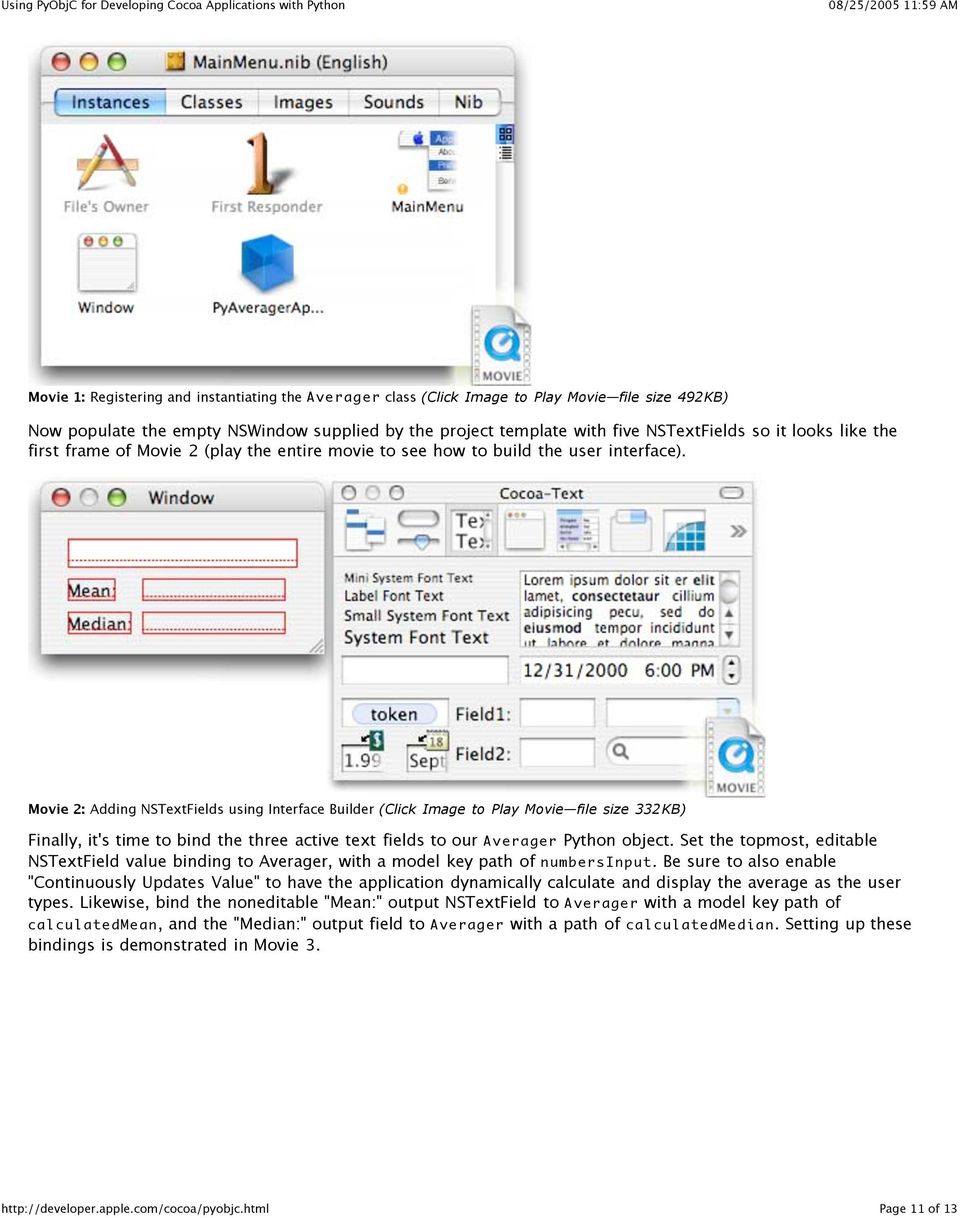
11 Movie 1: Registering and instantiating the Averager class (Click Image to Play Movie file size 492KB) Now populate the empty NSWindow supplied by the project template with five NSTextFields so it looks like the first frame of Movie 2 (play the entire movie to see how to build the user interface). Movie 2: Adding NSTextFields using Interface Builder (Click Image to Play Movie file size 332KB) Finally, it's time to bind the three active text fields to our Averager Python object. Set the topmost, editable NSTextField value binding to Averager, with a model key path of numbersinput. Be sure to also enable "Continuously Updates Value" to have the application dynamically calculate and display the average as the user types. Likewise, bind the noneditable "Mean:" output NSTextField to Averager with a model key path of calculatedmean, and the "Median:" output field to Averager with a path of calculatedmedian. Setting up these bindings is demonstrated in Movie 3. Page 11 of 13
12 Movie 3: Binding the active NSTextFields to the Averager Python model object (Click Image to Play Movie file size 572KB) At this point your application is ready to use. Build and run in Xcode (be sure to notice the lack of the lengthy header-precompile phase that usually occurs when first compiling a Cocoa project) and start entering numbers into your application. As you type in numbers, the mean and median should be calculated and displayed in the bottom of the window. For More Information This article gave you the grounding you need to start using Python for Cocoa development. The resources mentioned below will help you further explore Python on Mac OS X: The Python website is the canonical Python destination, and the Python Library Reference is a handy place to bookmark. The PyObjC SourceForge project makes Python on Cocoa possible. It's continuously evolving, and the mailing lists are a good place to keep up-to-date and ask questions. If you don't feel like recreating the Averager project yourself (or if you're stuck and are trying to figure out what went wrong), the completed Averager project (527KB) is available for download. O'Reilly's Learning Python, Second Edition is good bedtime reading to get you started on the Python language. Since you're going to be using Python with Cocoa, you'll want make sure you're current with the latest Cocoa documentation. Posted: Page 12 of 13

13 Get information on Apple products. Visit the Apple Store online or at retail locations MY-APPLE Copyright 2005 Apple Computer, Inc. All rights reserved. Terms of use Privacy Notice Page 13 of 13

iphone Objective-C Exercises
 iphone Objective-C Exercises About These Exercises The only prerequisite for these exercises is an eagerness to learn. While it helps to have a background in object-oriented programming, that is not a
An Introduction to Modern Software Development Tools Creating A Simple GUI-Based Tool Appleʼs XCode Version 3.2.6
 1 2 3 4 An Introduction to Modern Software Development Tools Creating A Simple GUI-Based Tool Appleʼs XCode Version 3.2.6 5 6 7 8 9 10 11 12 13 14 15 16 17 18 19 Charles J. Ammon / Penn State August, 2011
INTRODUCTION TO OBJECTIVE-C CSCI 4448/5448: OBJECT-ORIENTED ANALYSIS & DESIGN LECTURE 12 09/29/2011
 INTRODUCTION TO OBJECTIVE-C CSCI 4448/5448: OBJECT-ORIENTED ANALYSIS & DESIGN LECTURE 12 09/29/2011 1 Goals of the Lecture Present an introduction to Objective-C 2.0 Coverage of the language will be INCOMPLETE
ios Dev Crib Sheet In the Shadow of C
 ios Dev Crib Sheet As you dive into the deep end of the ios development pool, the first thing to remember is that the mother ship holds the authoritative documentation for this endeavor http://developer.apple.com/ios
MA-WA1920: Enterprise iphone and ipad Programming
 MA-WA1920: Enterprise iphone and ipad Programming Description This 5 day iphone training course teaches application development for the ios platform. It covers iphone, ipad and ipod Touch devices. This
Chapter 1. Introduction to ios Development. Objectives: Touch on the history of ios and the devices that support this operating system.
 Chapter 1 Introduction to ios Development Objectives: Touch on the history of ios and the devices that support this operating system. Understand the different types of Apple Developer accounts. Introduce
Exercise 4 Learning Python language fundamentals
 Exercise 4 Learning Python language fundamentals Work with numbers Python can be used as a powerful calculator. Practicing math calculations in Python will help you not only perform these tasks, but also
Objective C and iphone App
 Objective C and iphone App 6 Months Course Description: Understanding the Objective-C programming language is critical to becoming a successful iphone developer. This class is designed to teach you a solid
ios Development Tutorial Nikhil Yadav CSE 40816/60816: Pervasive Health 09/09/2011
 ios Development Tutorial Nikhil Yadav CSE 40816/60816: Pervasive Health 09/09/2011 Healthcare iphone apps Various apps for the iphone available Diagnostic, Diet and Nutrition, Fitness, Emotional Well-being
Objective-C and Cocoa User Guide and Reference Manual. Version 5.0
 Objective-C and Cocoa User Guide and Reference Manual Version 5.0 Copyright and Trademarks LispWorks Objective-C and Cocoa Interface User Guide and Reference Manual Version 5.0 March 2006 Copyright 2006
Ruby and Python Programming Topics for Mac. (Retired Document)
 Ruby and Python Programming Topics for Mac (Retired Document) Contents Introduction to Ruby and Python Programming Topics for OS X 5 Organization of This Document 5 Ruby and Python on OS X 6 What Are Ruby
Programming Cocoa with Ruby Create Compelling Mac Apps Using RubyCocoa
 Programming Cocoa with Ruby Create Compelling Mac Apps Using RubyCocoa Brian Mariek The Pragmatic Bookshelf Raleigh. North Carolina Dallas. Texas 1 Introduction 1 1.1 What Is Cocoa? 2 1.2 What Is RubyCocoa?
Exercise 1: Python Language Basics
 Exercise 1: Python Language Basics In this exercise we will cover the basic principles of the Python language. All languages have a standard set of functionality including the ability to comment code,
ADOBE DRIVE CC USER GUIDE
 ADOBE DRIVE CC USER GUIDE 2 2013 Adobe Systems Incorporated. All rights reserved. Adobe Drive CC User Guide Adobe, the Adobe logo, Creative Cloud, Creative Suite, Illustrator, InCopy, InDesign, and Photoshop
Introduction to Python
 WEEK ONE Introduction to Python Python is such a simple language to learn that we can throw away the manual and start with an example. Traditionally, the first program to write in any programming language
How To Package In Composer 2.5.2.2 (Amd64)
 Composer User Guide Version 9.1 JAMF Software, LLC 2013 JAMF Software, LLC. All rights reserved. JAMF Software has made all efforts to ensure that this guide is accurate. JAMF Software 301 4th Ave S Suite
WHITEPAPER. Managing Design Changes in Enterprise SBM Installations
 WHITEPAPER Managing Design Changes in Enterprise SBM Installations By Tom Clement Serena Software, Inc. October 2013 Summary This document explains how to organize your SBM maintenance and development
ios Dev Fest Research Network Operations Center Thursday, February 7, 13
 ios Dev Fest Research Network Operations Center Outline http://goo.gl/02blw Getting Started With App Development Setup Developer Environment Setup Certificates and Provisioning Deploying App To Device
Praktikum Entwicklung von Mediensystemen mit
 Praktikum Entwicklung von Mediensystemen mit Wintersemester 2013/2014 Christian Weiß, Dr. Alexander De Luca Today Organization Introduction to ios programming Hello World Assignment 1 2 Organization 6
INTRODUCTION TO IOS CSCI 4448/5448: OBJECT-ORIENTED ANALYSIS & DESIGN LECTURE 13 02/22/2011
 INTRODUCTION TO IOS CSCI 4448/5448: OBJECT-ORIENTED ANALYSIS & DESIGN LECTURE 13 02/22/2011 1 Goals of the Lecture Present an introduction to ios Program Coverage of the language will be INCOMPLETE We
Chapter 13: Program Development and Programming Languages
 15 th Edition Understanding Computers Today and Tomorrow Comprehensive Chapter 13: Program Development and Programming Languages Deborah Morley Charles S. Parker Copyright 2015 Cengage Learning Learning
Assignment I Walkthrough
 Assignment I Walkthrough Objective Reproduce the demonstration (building a calculator) given in class. Goals 1. Downloading and installing the ios4 SDK. 2. Creating a new project in Xcode. 3. Defining
NSPersistentDocument Core Data Tutorial for Mac OS X v10.4. (Retired Document)
 NSPersistentDocument Core Data Tutorial for Mac OS X v10.4. (Retired Document) Contents Introduction to NSPersistentDocument Core Data Tutorial for Mac OS X v10.4 8 Who Should Read This Document 8 Organization
Creating a Custom Class in Xcode
 Creating a Custom Class in Xcode By Mark Mudri March 28, 2014 Executive Summary: Making an ios application requires the use of Xcode, an integrated development environment (IDE) developed by Apple. Within
CommonSpot Content Server Version 6.2 Release Notes
 CommonSpot Content Server Version 6.2 Release Notes Copyright 1998-2011 PaperThin, Inc. All rights reserved. About this Document CommonSpot version 6.2 updates the recent 6.1 release with: Enhancements
Xcode User Default Reference. (Legacy)
 Xcode User Default Reference (Legacy) Contents Introduction 5 Organization of This Document 5 Software Version 5 See Also 5 Xcode User Defaults 7 Xcode User Default Overview 7 General User Defaults 8 NSDragAndDropTextDelay
Kevin Hoffman. Sams Teach Yourself. Mac OS* X Lion" App Development. 800 East 96th Street, Indianapolis, Indiana, 46240 USA
 Kevin Hoffman Sams Teach Yourself Mac OS* X Lion" App Development 800 East 96th Street, Indianapolis, Indiana, 46240 USA Table of Contents Introduction 1 Part 9: Mac OS X Lion Programming Basics HOUR 1:
Building Mobile Applications Creating ios applications with jquery Mobile, PhoneGap, and Drupal 7
 Building Mobile Applications Creating ios applications with jquery Mobile, PhoneGap, and Drupal 7 Jeff Linwood 1st Chapter, Early Release Introduction... 3 Prerequisites... 3 Introduction to Mobile Apps...
Introduction to Programming with Xojo
 Introduction to Programming with Xojo IOS ADDENDUM BY BRAD RHINE Fall 2015 Edition Copyright 2013-2015 by Xojo, Inc. This work is licensed under a Creative Commons Attribution-NonCommercial-ShareAlike
Installation & Configuration Guide User Provisioning Service 2.0
 Installation & Configuration Guide User Provisioning Service 2.0 NAVEX Global User Provisioning Service 2.0 Installation Guide Copyright 2015 NAVEX Global, Inc. NAVEX Global is a trademark/service mark
Assignment 1: Matchismo
 Assignment 1: Matchismo Objective This assignment starts off by asking you to recreate the demonstration given in the second lecture. Not to worry, the posted slides for that lecture contain a detailed
Hypercosm. Studio. www.hypercosm.com
 Hypercosm Studio www.hypercosm.com Hypercosm Studio Guide 3 Revision: November 2005 Copyright 2005 Hypercosm LLC All rights reserved. Hypercosm, OMAR, Hypercosm 3D Player, and Hypercosm Studio are trademarks
Chapter 1. Xcode Projects
 Chapter 1 Xcode Projects Every program you create in Xcode requires a project, even a simple command-line program with one file. Because every program requires a project, covering projects is a good way
Mobility Introduction Android. Duration 16 Working days Start Date 1 st Oct 2013
 Mobility Introduction Android Duration 16 Working days Start Date 1 st Oct 2013 Day 1 1. Introduction to Mobility 1.1. Mobility Paradigm 1.2. Desktop to Mobile 1.3. Evolution of the Mobile 1.4. Smart phone
This documentation is made available before final release and is subject to change without notice and comes with no warranty express or implied.
 Hyperloop for ios Programming Guide This documentation is made available before final release and is subject to change without notice and comes with no warranty express or implied. Requirements You ll
Introduction to Open Atrium s workflow
 Okay welcome everybody! Thanks for attending the webinar today, my name is Mike Potter and we're going to be doing a demonstration today of some really exciting new features in open atrium 2 for handling
Application Programming on the Mac COSC346
 Application Programming on the Mac COSC346 OS X Application An application is a complex system made of many subcomponents Graphical interface Event handling Multi-threading Data processing Storage 2 Cocoa
Contents. About Testing with Xcode 4. Quick Start 7. Testing Basics 23. Writing Test Classes and Methods 28. At a Glance 5 Prerequisites 6 See Also 6
 Testing with Xcode Contents About Testing with Xcode 4 At a Glance 5 Prerequisites 6 See Also 6 Quick Start 7 Introducing the Test Navigator 7 Add Testing to Your App 11 Create a Test Target 12 Run the
Moving from CS 61A Scheme to CS 61B Java
 Moving from CS 61A Scheme to CS 61B Java Introduction Java is an object-oriented language. This document describes some of the differences between object-oriented programming in Scheme (which we hope you
Web conferencing @ UTAS. Common problems and solutions. Common problems with Java settings. Ensuring that you have the correct Java settings in place
 Common problems and solutions Common problems with Java settings Elluminate is one of many web based applications that use software called Java. Certain Java settings may affect the way that Elluminate
Using the Caché Objective-C Binding
 Using the Caché Objective-C Binding Version 2014.1 25 March 2014 InterSystems Corporation 1 Memorial Drive Cambridge MA 02142 www.intersystems.com Using the Caché Objective-C Binding Caché Version 2014.1
Cloud Backup Express
 Cloud Backup Express Table of Contents Installation and Configuration Workflow for RFCBx... 3 Cloud Management Console Installation Guide for Windows... 4 1: Run the Installer... 4 2: Choose Your Language...
The Smalltalk Programming Language. Beatrice Åkerblom [email protected]
 The Smalltalk Programming Language Beatrice Åkerblom [email protected] 'The best way to predict the future is to invent it' - Alan Kay. History of Smalltalk Influenced by Lisp and Simula Object-oriented
Smooks Dev Tools Reference Guide. Version: 1.1.0.GA
 Smooks Dev Tools Reference Guide Version: 1.1.0.GA Smooks Dev Tools Reference Guide 1. Introduction... 1 1.1. Key Features of Smooks Tools... 1 1.2. What is Smooks?... 1 1.3. What is Smooks Tools?... 2
ios Application Development &
 Introduction of ios Application Development & Swift Programming Language Presented by Chii Chang [email protected] Outlines Basic understanding about ios App Development Development environment: Xcode IDE Foundations
How To Use Ios 5
 Chapter 1 The Brand New Stuff In 2007, the late Steve Jobs took the stage at Macworld and proclaimed that software running on iphone was at least five years ahead of the competition. Since its initial
MEAP Edition Manning Early Access Program Hello! ios Development version 14
 MEAP Edition Manning Early Access Program Hello! ios Development version 14 Copyright 2013 Manning Publications For more information on this and other Manning titles go to www.manning.com brief contents
Code::Blocks Student Manual
 Code::Blocks Student Manual Lawrence Goetz, Network Administrator Yedidyah Langsam, Professor and Theodore Raphan, Distinguished Professor Dept. of Computer and Information Science Brooklyn College of
QaTraq Pro Scripts Manual - Professional Test Scripts Module for QaTraq. QaTraq Pro Scripts. Professional Test Scripts Module for QaTraq
 QaTraq Pro Scripts Professional Test Scripts Module for QaTraq QaTraq Professional Modules QaTraq Professional Modules are a range of plug in modules designed to give you even more visibility and control
1/20/2016 INTRODUCTION
 INTRODUCTION 1 Programming languages have common concepts that are seen in all languages This course will discuss and illustrate these common concepts: Syntax Names Types Semantics Memory Management We
6.170 Tutorial 3 - Ruby Basics
 6.170 Tutorial 3 - Ruby Basics Prerequisites 1. Have Ruby installed on your computer a. If you use Mac/Linux, Ruby should already be preinstalled on your machine. b. If you have a Windows Machine, you
Cross-platform mobile development with Visual C++ 2015
 Cross-platform mobile development with Visual C++ 2015 Sasha Goldshtein @goldshtn CTO, Sela Group blog.sashag.net App Targeting Spectrum Developer pain exponential jump in complexity, but not in user experience
Getting Started with the Internet Communications Engine
 Getting Started with the Internet Communications Engine David Vriezen April 7, 2014 Contents 1 Introduction 2 2 About Ice 2 2.1 Proxies................................. 2 3 Setting Up ICE 2 4 Slices 2
Oracle SOA Suite 11g Oracle SOA Suite 11g HL7 Inbound Example
 Oracle SOA Suite 11g Oracle SOA Suite 11g HL7 Inbound Example [email protected] June 2010 Table of Contents Introduction... 1 Pre-requisites... 1 Prepare HL7 Data... 1 Obtain and Explore the HL7
Elixir Schedule Designer User Manual
 Elixir Schedule Designer User Manual Release 7.3 Elixir Technology Pte Ltd Elixir Schedule Designer User Manual: Release 7.3 Elixir Technology Pte Ltd Published 2008 Copyright 2008 Elixir Technology Pte
QML and JavaScript for Native App Development
 Esri Developer Summit March 8 11, 2016 Palm Springs, CA QML and JavaScript for Native App Development Michael Tims Lucas Danzinger Agenda Native apps. Why? Overview of Qt and QML How to use JavaScript
Xcode Project Management Guide. (Legacy)
 Xcode Project Management Guide (Legacy) Contents Introduction 10 Organization of This Document 10 See Also 11 Part I: Project Organization 12 Overview of an Xcode Project 13 Components of an Xcode Project
Example of Standard API
 16 Example of Standard API System Call Implementation Typically, a number associated with each system call System call interface maintains a table indexed according to these numbers The system call interface
Creating, Sharing, and Selling Buzztouch Plugins
 Plugins Market Creating, Sharing, and Selling Buzztouch Plugins Rev 11/20/2013 1 of 17 Table of Contents About Plugins... 4 What plugins do...4 Why plugins are necessary... 5 Who creates plugins... 5 How
You must download the desktop client before you start, this is found on the Yuuguu page on your Ezereach web portal.
 Help using Yuuguu Screen sharing How to host a screen sharing (or web conferencing) session You must download the desktop client before you start, this is found on the Yuuguu page on your Ezereach web
ODBC Driver Version 4 Manual
 ODBC Driver Version 4 Manual Revision Date 12/05/2007 HanDBase is a Registered Trademark of DDH Software, Inc. All information contained in this manual and all software applications mentioned in this manual
WebObjects Web Applications Programming Guide. (Legacy)
 WebObjects Web Applications Programming Guide (Legacy) Contents Introduction to WebObjects Web Applications Programming Guide 6 Who Should Read This Document? 6 Organization of This Document 6 See Also
Semester Review. CSC 301, Fall 2015
 Semester Review CSC 301, Fall 2015 Programming Language Classes There are many different programming language classes, but four classes or paradigms stand out:! Imperative Languages! assignment and iteration!
Introduction to iphone Development
 Introduction to iphone Development Introduction to iphone Development Contents Task 1 2 3 4 Application Runtime Core Architecture and Life-cycles What s in a bundle? The resources in an app bundle Customizing
Table of Contents. Welcome... 2. Login... 3. Password Assistance... 4. Self Registration... 5. Secure Mail... 7. Compose... 8. Drafts...
 Table of Contents Welcome... 2 Login... 3 Password Assistance... 4 Self Registration... 5 Secure Mail... 7 Compose... 8 Drafts... 10 Outbox... 11 Sent Items... 12 View Package Details... 12 File Manager...
Chapter 1: Getting Started
 Chapter 1: Getting Started Every journey begins with a single step, and in ours it's getting to the point where you can compile, link, run, and debug C++ programs. This depends on what operating system
Source Code Translation
 Source Code Translation Everyone who writes computer software eventually faces the requirement of converting a large code base from one programming language to another. That requirement is sometimes driven
1. To start Installation: To install the reporting tool, copy the entire contents of the zip file to a directory of your choice. Run the exe.
 CourseWebs Reporting Tool Desktop Application Instructions The CourseWebs Reporting tool is a desktop application that lets a system administrator modify existing reports and create new ones. Changes to
Installing Ruby on Windows XP
 Table of Contents 1 Installation...2 1.1 Installing Ruby... 2 1.1.1 Downloading...2 1.1.2 Installing Ruby...2 1.1.3 Testing Ruby Installation...6 1.2 Installing Ruby DevKit... 7 1.3 Installing Ruby Gems...
Generate Android App
 Generate Android App This paper describes how someone with no programming experience can generate an Android application in minutes without writing any code. The application, also called an APK file can
Mobile App Design and Development
 Mobile App Design and Development The course includes following topics: Apps Development 101 Introduction to mobile devices and administrative: Mobile devices vs. desktop devices ARM and intel architectures
Amazon WorkMail. User Guide Version 1.0
 Amazon WorkMail User Guide Amazon WorkMail: User Guide Copyright 2016 Amazon Web Services, Inc. and/or its affiliates. All rights reserved. Amazon's trademarks and trade dress may not be used in connection
Object Oriented Programming and the Objective-C Programming Language 1.0. (Retired Document)
 Object Oriented Programming and the Objective-C Programming Language 1.0 (Retired Document) Contents Introduction to The Objective-C Programming Language 1.0 7 Who Should Read This Document 7 Organization
Understanding class paths in Java EE projects with Rational Application Developer Version 8.0
 Understanding class paths in Java EE projects with Rational Application Developer Version 8.0 by Neeraj Agrawal, IBM This article describes a variety of class path scenarios for Java EE 1.4 projects and
Key-Value Coding Programming Guide
 Key-Value Coding Programming Guide Contents Introduction 6 Organization of This Document 6 See Also 7 What Is Key-Value Coding? 8 Key-Value Coding and Scripting 8 Using Key-Value Coding to Simplify Your
Programming Languages CIS 443
 Course Objectives Programming Languages CIS 443 0.1 Lexical analysis Syntax Semantics Functional programming Variable lifetime and scoping Parameter passing Object-oriented programming Continuations Exception
Programming. Languages & Frameworks. Hans- Pe(er Halvorsen, M.Sc. h(p://home.hit.no/~hansha/?page=sodware_development
 h(p://home.hit.no/~hansha/?page=sodware_development Programming O. Widder. (2013). geek&poke. Available: h(p://geek- and- poke.com Languages & Frameworks Hans- Pe(er Halvorsen, M.Sc. 1 ImplementaVon Planning
Site Maintenance Using Dreamweaver
 Site Maintenance Using Dreamweaver As you know, it is possible to transfer the files that make up your web site from your local computer to the remote server using FTP (file transfer protocol) or some
How To Collaborate On A Project Plan 365 Plan On A Pcode On A Microsoft Project World On A Macbook Or Ipad Or Ipa Or Ipam Or Ipat Or Ipar Or Ipor Or Ipro Or Ipo Or Ip
 Project Plan 365 Collaboration with Microsoft Project Files (MPP) in SharePoint cloud White Paper Housatonic Software - Project Plan 365 App 2014 Contents 1. Introduction... 3 2. Prerequisites... 4 3.
App Distribution Guide
 App Distribution Guide Contents About App Distribution 10 At a Glance 11 Enroll in an Apple Developer Program to Distribute Your App 11 Generate Certificates and Register Your Devices 11 Add Store Capabilities
The C Programming Language course syllabus associate level
 TECHNOLOGIES The C Programming Language course syllabus associate level Course description The course fully covers the basics of programming in the C programming language and demonstrates fundamental programming
EMC Documentum Business Process Suite
 EMC Documentum Business Process Suite Version 6.5 SP1 Sample Application Tutorial P/N 300-008-170 A01 EMC Corporation Corporate Headquarters: Hopkinton, MA 01748-9103 1-508-435-1000 www.emc.com Copyright
University of Hull Department of Computer Science. Wrestling with Python Week 01 Playing with Python
 Introduction Welcome to our Python sessions. University of Hull Department of Computer Science Wrestling with Python Week 01 Playing with Python Vsn. 1.0 Rob Miles 2013 Please follow the instructions carefully.
Mobile Game and App Development the Easy Way
 Mobile Game and App Development the Easy Way Developed and maintained by Pocketeers Limited (http://www.pocketeers.co.uk). For support please visit http://www.appeasymobile.com This document is protected
Star Micronics Cloud Services ios SDK User's Manual
 Star Micronics Cloud Services ios SDK User's Manual General Outline This document provides information about the Star Micronics Cloud Services ios SDK, showing guidelines for our customers to build the
Dashcode User Guide. (Retired Document)
 Dashcode User Guide (Retired Document) Contents Introduction to Dashcode User Guide 7 Who Should Read This Document? 7 Organization of This Document 7 Getting and Running Dashcode 8 Reporting Bugs 8 See
CinePlay 1.1.2. User Manual
 CinePlay User Manual 1 CinePlay 1.1.2 User Manual CinePlay is a professional ios video player complete with timecode overlays, markers, masking, safe areas and much more. It is ideal for dailies, portfolios,
Your First App Store Submission
 Your First App Store Submission Contents About Your First App Store Submission 4 At a Glance 5 Enroll in the Program 5 Provision Devices 5 Create an App Record in itunes Connect 5 Submit the App 6 Solve
SnapLogic Salesforce Snap Reference
 SnapLogic Salesforce Snap Reference Document Release: October 2012 SnapLogic, Inc. 71 East Third Avenue San Mateo, California 94401 U.S.A. www.snaplogic.com Copyright Information 2012 SnapLogic, Inc. All
Chapter 1 Fundamentals of Java Programming
 Chapter 1 Fundamentals of Java Programming Computers and Computer Programming Writing and Executing a Java Program Elements of a Java Program Features of Java Accessing the Classes and Class Members The
View Controller Programming Guide for ios
 View Controller Programming Guide for ios Contents About View Controllers 10 At a Glance 11 A View Controller Manages a Set of Views 11 You Manage Your Content Using Content View Controllers 11 Container
Lecture 9. Semantic Analysis Scoping and Symbol Table
 Lecture 9. Semantic Analysis Scoping and Symbol Table Wei Le 2015.10 Outline Semantic analysis Scoping The Role of Symbol Table Implementing a Symbol Table Semantic Analysis Parser builds abstract syntax
Creating Home Directories for Windows and Macintosh Computers
 ExtremeZ-IP Active Directory Integrated Home Directories Configuration! 1 Active Directory Integrated Home Directories Overview This document explains how to configure home directories in Active Directory
Test Automation Integration with Test Management QAComplete
 Test Automation Integration with Test Management QAComplete This User's Guide walks you through configuring and using your automated tests with QAComplete's Test Management module SmartBear Software Release
Cross-Platform Development
 2 Cross-Platform Development Cross-Platform Development The world of mobile applications has exploded over the past five years. Since 2007 the growth has been staggering with over 1 million apps available