
KeyStone Architecture Security Accelerator (SA) User Guide
|
|
|
- Jack Freeman
- 10 years ago
- Views:
Transcription
1 KeyStone Architecture Security Accelerator (SA) User Guide Literature Number: SPRUGY6B January 2013

2 Release History Release Date Description/Comments SPRUGY6B January 2013 Added addition engine IDs within Appendix. (Page A-3) Added Keystone II note to SA function block diagram figure in Intro. (Page 1-6) Added aditional bits for second authentication and encryption modules in CMD_STATUS. (Page 4-3) Added features not supported in intruduction. (Page 1-4) Added Tru Random Number generator KeyStone II details in features. (Page 1-4) Added KeyStone II SCCTL Register structure in Appendix. (Page A-8) Added details for in SRTP KeyStone II Devices (Page 3-8) Added KeyStone II details to SA Engine Processing (Page 2-8) Added KeyStone II specifics to SRTP examples (Page 3-8) Added mention of KeyStone II engine to Protocol Descriptions. (Page 2-5) Added Specifics for IPsec in KeyStone II devices at IPsec Examples. (Page 3-3) Included SRTP KeyStone II Updates (Page 2-21) Put KeyStone II specification in IPSEC Use (Page 2-11) SPRUGY6A July 2012 Added AES XCBC authentication mode support to IPsec ESP. (Page 2-15) Added AES XCBC support for data mode. (Page 2-9) Added AES XCBC support for IPsec AH. (Page 2-12) Added DES CBC cipher support for the encryption and decryption engine. (Page 1-4) Added DES CBC support data mode. (Page 2-8) Added DES CBC support for the IPsec ESP protocol. (Page 2-15) Added information to PHP2 to state that it is used with the Air Cipher Engine for 3GPP operations. (Page 1-5) Added note to reference the SA LLD documentation for the full list of channel interface APIs. (Page 2-3) Added note to reference the SA LLD documentation for the full list of common interface APIs. (Page 2-3) Added support for AES XCBC authentication. (Page 1-4) Updated 3GPP Air Cipher Channel SA LLD APIs table to remove information that is duplicated in the global Channel API table. (Page 2-6) Updated Data Mode Channel SA LLD APIs table to remove information that is duplicated in the global Channel API table. (Page 2-10) Updated IPsec AH Channel SA LLD APIs table to remove information that is duplicated in the global Channel API table. (Page 2-12) Updated IPsec ESP Channel SA LLD APIs table to remove information that is duplicated in the global Channel API table. (Page 2-16) Updated SRTCP Channel SA LLD APIs table to remove information that is duplicated in the global Channel API table. (Page 2-19) Fixed typo in data-mode authentication section. Previously, it erroneously listed the authentication modes as being under the IPsec ESP protocol. (Page 2-9) Removed FIPS compliance statement from Industry Standard(s) Compliance Statement section (Page 1-6) Removed FIPS compliance statement from the True Random number generator in the Features section (Page 1-4) Removed note that AES CMAC authentication is not supported. This functionality has been added to the SA LLD. (Page 2-6) Changed PS_FLAGS to error flags (Page 2-30) SPRUGY6 May 2011 Initial Release ø-ii KeyStone Architecture Security Accelerator (SA) User Guide SPRUGY6B January 2013

3 Contents Contents Release History ø-ii List of Tables ø-vii List of Figures ø-ix List of Procedures ø-xi Preface ø-xiii About This Manual ø-xiii Notational Conventions ø-xiii Related Documentation from Texas Instruments ø-xiv Trademarks ø-xiv Chapter 1 Chapter 2 Introduction Purpose of the Peripheral Terminology Used in This Document Features Features Not Supported Functional Block Diagram Industry Standard(s) Compliance Statement Architecture Clock Control Memory Map Security Accelerator Programming with the Low-Level Driver SA LLD Common Interface APIs SA LLD Channel Interface APIs Protocol Descriptions GPP Air Cipher SA Hardware Engine Utilization Supported Cipher Modes Supported Authentication Modes Protocol-Specific SA LLD Channel APIs Descriptor Protocol-Specific Information Section Data-Mode SA Data Processing Engine Utilization Supported Cipher Modes Supported Authentication Modes Protocol-Specific SA LLD Channel APIs Descriptor Protocol-Specific Information Section IPsec AH SA Hardware Engine Utilization Supported Cipher Modes Supported Authentication Modes Protocol-Specific SA LLD Channel APIs Descriptor Protocol-Specific Information Section IPsec ESP SA Hardware Engine Utilization Supported Cipher Modes Supported Authentication Modes Protocol-Specific SA LLD Channel APIs SPRUGY6B January 2013 KeyStone Architecture Security Accelerator (SA) User Guide ø-iii

4 Contents Descriptor Protocol-Specific Information Section SRTCP SA Hardware Engine Utilization Supported Cipher Modes Supported Authentication Modes Protocol-Specific SA LLD Channel APIs SRTP SA Hardware Engine Utilization Supported Cipher Modes Supported Authentication Modes Protocol-Specific SA LLD Channel APIs Descriptor Protocol-Specific Information Section Command Labels Descriptor Software Information Words Security Contexts Generating Security Contexts Security Context Memory Allocation Security Context Cache Security Context Fetch Security Context Tiers Security Context Identification and Security Context Pointers Security Context Cache Control Flags Context Cache Algorithm Packet Header Processor Modules Command Label Generation Authentication Tag Verification Authentication Tag Insertion Packet Replay Protection PHP Processing IPsec AH packets with PHP Processing IPsec ESP Packets with PHP PHP Processing SRTP Packets with PHP Processing Air Cipher packets with PHP Procedure for Downloading Firmware onto the PHP PDSPs Encryption and Decryption Engine Authentication Engine Air Cipher Engine Public Key Accelerator Programming Considerations Functional Description PKA Components Configuration and Status Registers PKA_APTR, PKA_BPTR, PKA_CPTR, PKA_DPTR Registers PKA_ALENGTH and PKA_BLENGTH Registers PKA_SHIFT Register PKA_FUNCTION Register PKA_COMPARE Register PKA_MSW Register PKA_DIVMSW Register Vector RAM RAM Size Requirements PKA Input Requirements Result Vector RAM Allocation True Random Number Generator Programming Considerations Initial Latency after Reset Random Number Generation Read Random Number ø-iv KeyStone Architecture Security Accelerator (SA) User Guide SPRUGY6B January 2013
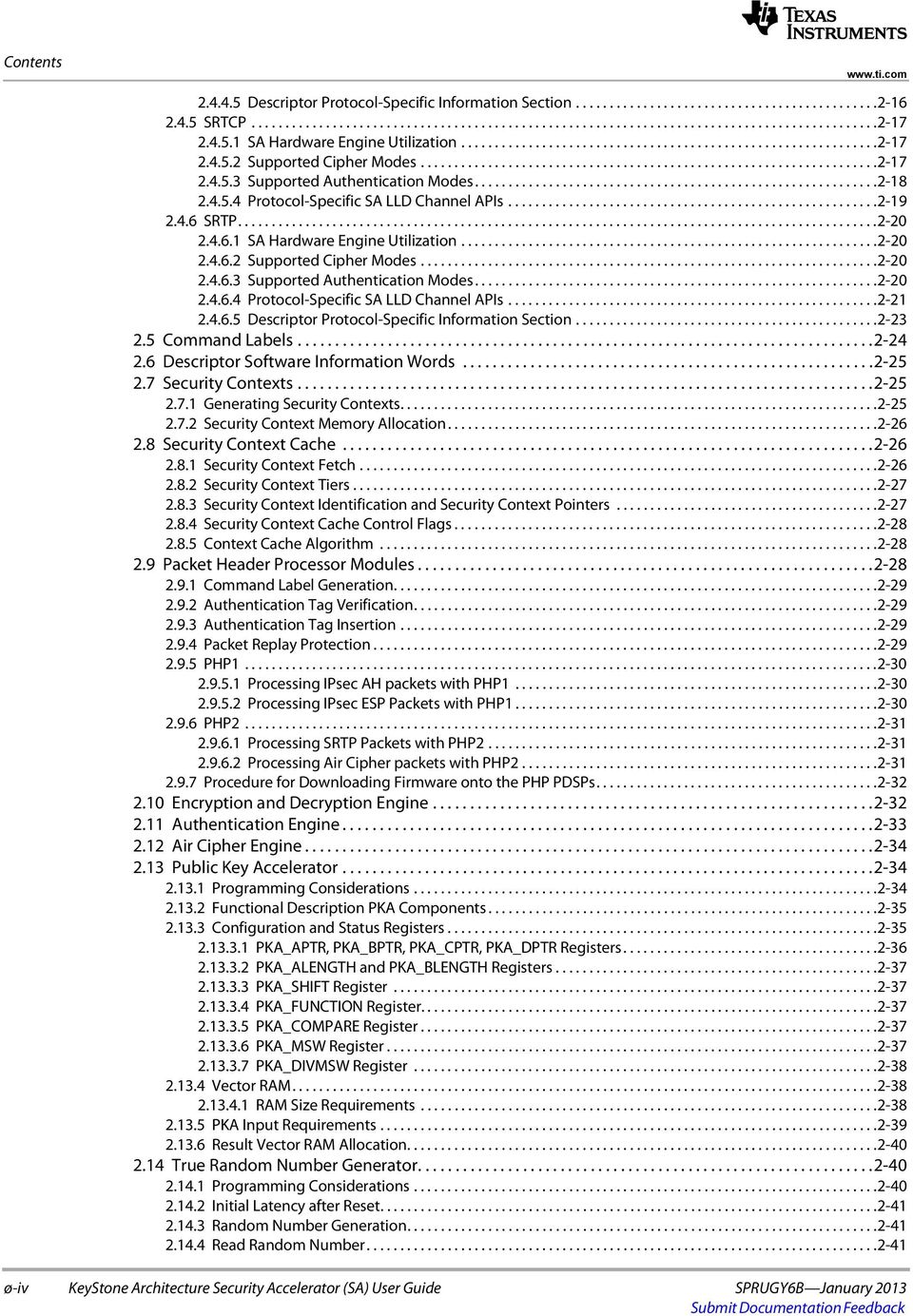
5 Contents TRNG Example Configuration Initializing the SA Using the SA LLD SA LLD Channel Initialization and Configuration Sending Packets to the SA for Processing SA Transmit Queues Interrupt Support DMA Event Support Power Management Chapter 3 Chapter 4 Data Flow Examples Overview GPP Air Cipher Examples GPP Air Cipher Encryption Example GPP Air Cipher Encryption Example Overview GPP Air Cipher Decryption Example GPP Air Cipher Decryption Example Overview IPsec AH Examples IPsec AH Authentication Tag Generation Example IPsec AH Authentication Verification Example Overview IPsec AH Authentication Tag Verification Example IPsec AH Encryption Example Overview IPsec ESP Examples IPsec ESP Encryption Example IPsec ESP Encryption Example Overview IPsec ESP Decryption Example IPsec ESP Decryption Example Overview SRTP Examples SRTP Encryption Example SRTP Encryption Example Overview SRTP Decryption Example SRTP Decryption Example Overview Registers Security Accelerator System Register Region Peripheral and Version Identification Register (PID) Command Status Register (CMD_STATUS) SA1 Port Flow Identification Register (SA1_FLOWID) SA0 Port Flow Identification Register (SA0_FLOWID) SA1 Next Engine Identification Register (SA1_ENG_ID) SA0 Next Engine Identification Register (SA0_ENG_ID) Context Cache Register Region Context Cache Control Register (CTXCACH_CTRL) Context Cache Security Context Pointer Register (CTXCACH_SC_PTR) Context Cache Security Context Identification Register (CTXCACH_SC_ID) Context Cache Miss Count Register (CTXCACH_MISSCNT) PHP PDSP Control and Status Registers PDSP Control Register (PDSP_CONTROL) PDSP Status Register PDSP Cycle Count Register (PDSP_CYCLECOUNT) PDSP Stall Count Register (PDSP_STALLCOUNT) PDSP Constant Table Block Index 0 Register (PDSP_BLK_IDX0) PDSP Constant Table Block Index 1 Register (PDSP_BLK_IDX1) PDSP Constant Table Programmable Pointer Register 0 (PDSP_POINTER0) SPRUGY6B January 2013 KeyStone Architecture Security Accelerator (SA) User Guide ø-v

6 Contents Appendix A PDSP Constant Table Programmable Pointer Register 1 (PDSP_POINTER1) Public Key Accelerator Register Region Operand A Pointer Register (PKA_APTR) Operand B Pointer Register (PKA_BPTR) Operand C Pointer Register (PKA_CPTR) Operand D Pointer Register (PKA_DPTR) Operand A Length Register (PKA_ALENGTH) Operand B Length Register (PKA_BLENGTH) Shift Operation Register (PKA_SHIFT) Function Select Register (PKA_FUNCTION) Compare Results Register (PKA_COMPARE) Result Most Significant Word Address Register (PKA_MSW) Division Remainder Most Significant Word Address Register (PKA_MSWDIV) True Random Number Generator Register Region Data Output Least Significant Word Register (TRNG_OUTPUT_L) Data Output MSW Register (TRNG_OUTPUT_H) Status Register (TRNG_STATUS) Interrupt Acknowledge Register (TRNG_INTACK) Control Register (TRNG_CONTROL) Configuration Register (TRNG_CONFIG) Additional Security Accelerator Details A-1 A.1 Descriptor Software Information Word Configuration A-2 A.1.1 Descriptor Software Information Word A-2 A.1.2 Descriptor Software Information Word A-4 A.1.3 Descriptor Software Information Word A-5 A.2 Security Context Structure in Host Memory A-5 A.2.1 Security Context Software-Only A-6 A.2.2 Security Context PHP A-6 A KeyStone I Security Context Control Structure A-6 A KeyStone II Security Context Control Structure A-8 A.2.3 Security Context Data Processing Engine A-10 A.3 Security Context Control Flags A-10 A.3.1 Evict Flag A-10 A.3.2 Tear-Down Flag A-10 A.3.3 No Payload Flag A-11 Index IX-1 ø-vi KeyStone Architecture Security Accelerator (SA) User Guide SPRUGY6B January 2013

7 List of Tables List of Tables Table 2-1 Security Accelerator Memory Map Table 2-2 SA LLD Channel Specific API Overview Table 2-3 3GPP Air Cipher Channel SA LLD APIs Table 2-4 Cipher Mode to SA Data Processing Engine Mapping Table 2-5 Authentication Mode to SA Data Processing Engine Mapping Table 2-6 SA LLD Data-mode Channel APIs Table 2-7 SA LLD IPsec AH Channel APIs Table 2-8 SA LLD IPsec ESP Channel APIs Table 2-9 SA LLD SRTCP Channel APIs Table 2-10 SA LLD SRTP Channel APIs Table 2-11 PKA Status and Control Registers Table 2-12 Functional Roles of PKA_APTR, PKA_BPTR, PKA_CPTR, and PKA_DPTR Registers Table 2-13 Vector RAM Requirement for ACT Operations Table 2-14 Supported ACTs vs. Modulus Length for 8 Kbyte Vector RAM Table 2-15 PKA Input Requirements Table 2-16 Minimum Memory Allocation for Result Vector Table 4-1 Security Accelerator Register Regions Table 4-2 Security Accelerator System Register Region Table 4-3 Peripheral and Version Identification Register Field Descriptions Table 4-4 Command Status Register Field Descriptions Table 4-5 SA1 Port Flow Identification Register Field Descriptions Table 4-6 SA0 Port Flow Identification Register Field Descriptions Table 4-7 SA1 Next Engine Identification Register Field Descriptions Table 4-8 SA0 Next Engine Identification Register Field Descriptions Table 4-9 Context Cache Register Region Table 4-10 Context Cache Control Register Field Descriptions Table 4-11 Context Cache Security Context Pointer Register Field Descriptions Table 4-12 Context Cache Security Context Identification Register Field Descriptions Table 4-13 Register Field Descriptions Table 4-14 PDSP Control/Status Register Region Table 4-15 PDSP Control Register Field Descriptions Table 4-16 PDSP Status Register Field Descriptions Table 4-17 PDSP Cycle Count Register Field Descriptions Table 4-18 PDSP Stall Count Register Field Descriptions Table 4-19 PDSP Constant Table Block Index 0 Register Field Descriptions Table 4-20 PDSP Constant Table Block Index Register 1 Field Descriptions Table 4-21 PDSP Constant Table Programmable Pointer Register 0 Field Descriptions Table 4-22 PDSP Constant Table Programmable Pointer Register 1 Field Descriptions Table 4-23 Public Key Accelerator Register Region Table 4-24 Operand A Pointer Register Field Descriptions Table 4-25 Operand B Pointer Register Field Descriptions Table 4-26 Operand C Pointer Register Field Descriptions Table 4-27 Operand D Pointer Register Field Descriptions Table 4-28 Operand D Pointer Register Field Descriptions Table 4-29 Operand D Pointer Register Field Descriptions Table 4-30 Shift Operation Register Field Descriptions Table 4-31 Function Select Register Field Descriptions Table 4-32 Compare Results Register Field Descriptions Table 4-33 Result Most Significant Word Address Register Field Descriptions Table 4-34 Division Remainder Most Significant Word Address Register Field Descriptions Table 4-35 Public Key Accelerator Register Region Table 4-36 Data Output Least Significant Word Register Field Descriptions SPRUGY6B January 2013 KeyStone Architecture Security Accelerator (SA) User Guide ø-vii

8 List of Tables Table 4-37 Data Output Most Significant Word Register Field Descriptions Table 4-38 Status Register Field Descriptions Table 4-39 Interrupt Acknowledge Register Field Descriptions Table 4-40 Control Register Field Descriptions Table 4-41 Configuration Register Field Descriptions Table A-1 Descriptor Software Info 0 Field Descriptions A-2 Table A-2 KeyStone I Engine ID Mapping A-3 Table A-3 KeyStone II Engine ID Mapping A-3 Table A-4 Descriptor Software Info 1 Field Descriptions A-4 Table A-5 Descriptor Software Info 2 Field Descriptions A-5 Table A-6 Keystone I Security Context Control (SCCTL) Structure A-7 Table A-7 Keystone II Security Context Control (SCCTL) Structure A-9 ø-viii KeyStone Architecture Security Accelerator (SA) User Guide SPRUGY6B January 2013

9 List of Figures List of Figures Figure 1-1 Keystone I Security Accelerator Functional Block Diagram Figure 2-1 3GPP Air Cipher Descriptor Protocol-Specific Information Diagram Figure 2-2 Data-Mode Descriptor Protocol-Specific Information Diagram Figure 2-3 IPsec AH Descriptor Protocol-Specific Information Diagram Figure 2-4 IPsec ESP Descriptor Protocol-Specific Information Diagram Figure 2-5 SRTP Descriptor Protocol-Specific Information Diagram Figure 3-1 3GPP Air Cipher Encryption Example Figure 3-2 3GPP Air Cipher Decryption Example Figure 3-3 IPsec AH Authentication Tag Generation Example Figure 3-4 IPsec AH Authentication Verification Example Figure 3-5 IPsec ESP Encryption Example Figure 3-6 IPsec ESP Decryption Example Figure 3-7 SRTP Encryption Example Figure 3-8 SRTP Decryption Example Figure 4-1 Peripheral and Version Identification Register Figure 4-2 Command Status Register Figure 4-3 SA1 Port Flow Identification Register Figure 4-4 SA0 Port Flow Identification Register Figure 4-5 SA1 Next Engine Identification Register Figure 4-6 SA0 Next Engine Identification Register Figure 4-7 Context Cache Control Register Figure 4-8 Context Cache Security Context Pointer Register Figure 4-9 Context Cache Security Context Identification Register Figure 4-10 Context Cache Security Context Identification Register Figure 4-11 PDSP Control Register Figure 4-12 PDSP Status Register Figure 4-13 PDSP Cycle Count Register Figure 4-14 PDSP Stall Count Register Figure 4-15 PDSP Constant Table Block Index 0 Register Figure 4-16 PDSP Constant Table Block Index 1 Register Figure 4-17 PDSP Constant Table Programmable Pointer 0 Register Figure 4-18 PDSP Constant Table Programmable Pointer 1 Register Figure 4-19 Operand A Pointer Register Figure 4-20 Operand B Pointer Register Figure 4-21 Operand C Pointer Register Figure 4-22 Operand D Pointer Register Figure 4-23 Operand A Length Register Figure 4-24 Operand B Length Register Figure 4-25 Shift Operation Register Figure 4-26 Function Select Register Figure 4-27 Compare Results Register Figure 4-28 Result Most Significant Word Address Register Figure 4-29 Division Remainder Most Significant Word Address Register Figure 4-30 Data Output Least Significant Word Register Figure 4-31 Data Output Most Significant Word Register Figure 4-32 Status Register Figure 4-33 Interrupt Acknowledge Register Figure 4-34 Control Register Figure 4-35 Configuration Register Figure A-1 Descriptor Software Info A-2 Figure A-2 Descriptor Software Info A-4 Figure A-3 Descriptor Software Info A-5 SPRUGY6B January 2013 KeyStone Architecture Security Accelerator (SA) User Guide ø-ix
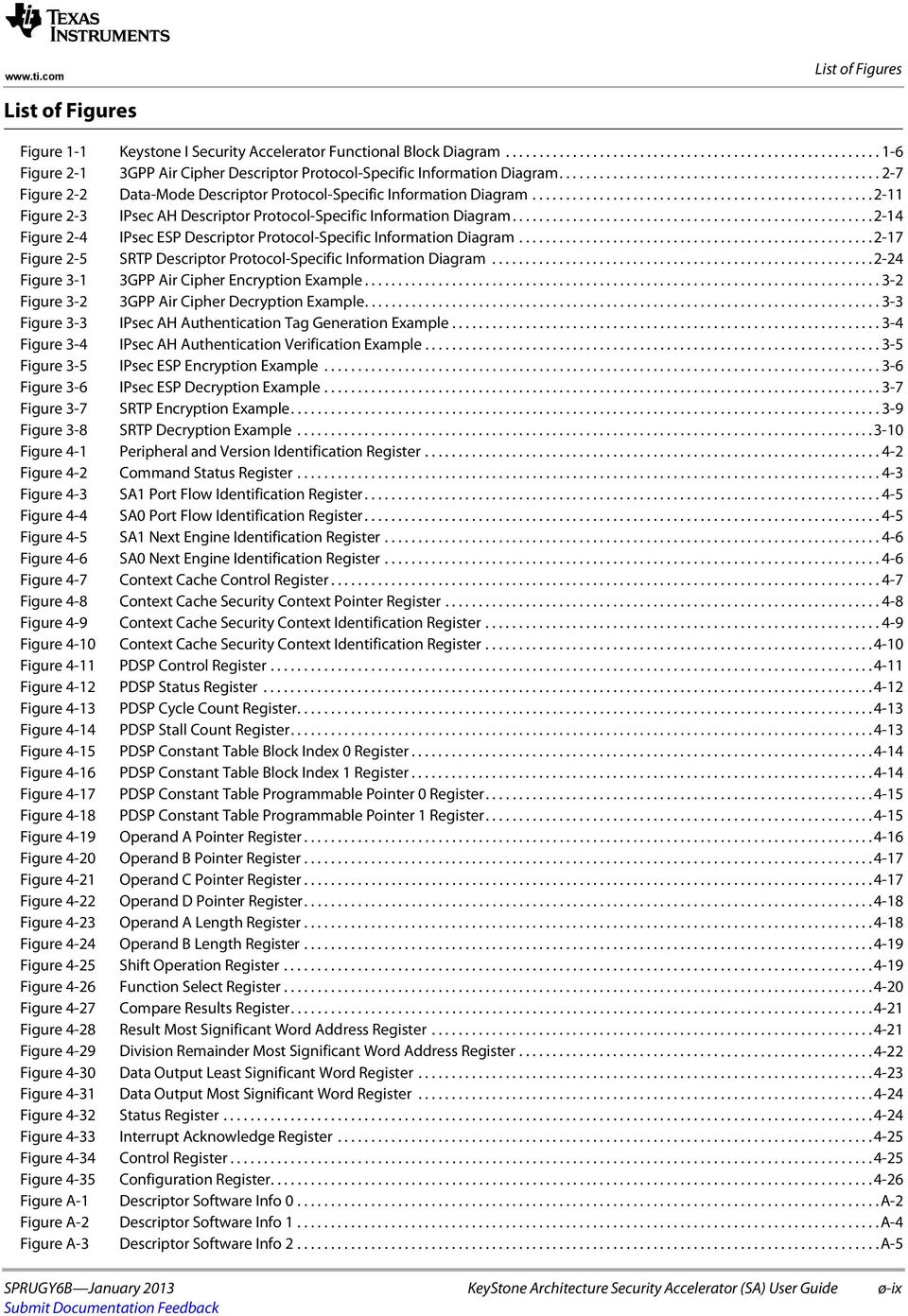
10 List of Figures Figure A-4 Security Context Structure A-6 Figure A-5 Security Context Control Structure Word A-7 Figure A-6 Security Context Control Structure Word A-7 Figure A-7 Security Context Control Structure Word A-8 Figure A-8 Security Context Control Structure Word A-8 ø-x KeyStone Architecture Security Accelerator (SA) User Guide SPRUGY6B January 2013

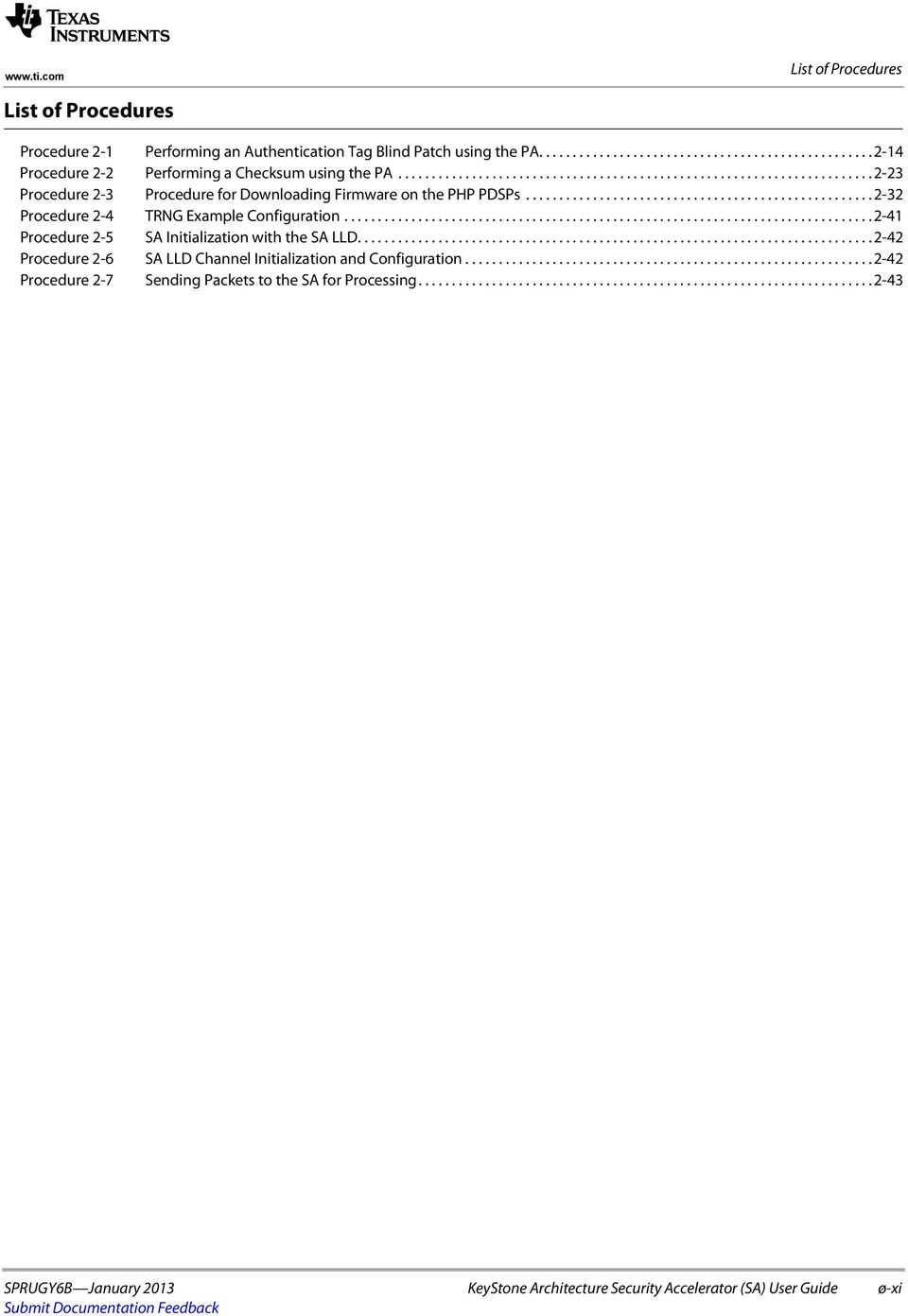
11 List of Procedures List of Procedures Procedure 2-1 Performing an Authentication Tag Blind Patch using the PA Procedure 2-2 Performing a Checksum using the PA Procedure 2-3 Procedure for Downloading Firmware on the PHP PDSPs Procedure 2-4 TRNG Example Configuration Procedure 2-5 SA Initialization with the SA LLD Procedure 2-6 SA LLD Channel Initialization and Configuration Procedure 2-7 Sending Packets to the SA for Processing SPRUGY6B January 2013 KeyStone Architecture Security Accelerator (SA) User Guide ø-xi
12 List of Procedures ø-xii KeyStone Architecture Security Accelerator (SA) User Guide SPRUGY6B January 2013

13 Preface About This Manual The Security Accelerator (SA) provides hardware engines to perform encryption, decryption, and authentication operations on packets for commonly supported protocols, including IPsec ESP and AH, SRTP, and Air Cipher. The SA also provides the hardware modules to assist the host in generating public keys and random numbers. Notational Conventions This document uses the following conventions: Commands and keywords are in boldface font. Arguments for which you supply values are in italic font. Terminal sessions and information the system displays are in screen font. Information you must enter is in boldface screen font. Elements in square brackets ([ ]) are optional. Notes use the following conventions: Note Means reader take note. Notes contain helpful suggestions or references to material not covered in the publication. The information in a caution or a warning is provided for your protection. Please read each caution and warning carefully. CAUTION Indicates the possibility of service interruption if precautions are not taken. WARNING Indicates the possibility of damage to equipment if precautions are not taken. SPRUGY6B January 2013 KeyStone Architecture Security Accelerator (SA) User Guide ø-xiii

14 Preface Related Documentation from Texas Instruments Multicore Navigator for KeyStone Devices User Guide Network Coprocessor (NETCP) for KeyStone Devices User Guide SPRUGR9 SPRUGZ6 Trademarks C66x is a trademark of Texas Instruments Incorporated. All other brand names and trademarks mentioned in this document are the property of Texas Instruments Incorporated or their respective owners, as applicable. ø-xiv KeyStone Architecture Security Accelerator (SA) User Guide SPRUGY6B January 2013

15 Chapter 1 Introduction IMPORTANT NOTE The information in this document should be used in conjunction with information in the device-specific Keystone Architecture data manual that applies to the part number of your device. 1.1 "Purpose of the Peripheral" on page "Terminology Used in This Document" on page "Features" on page "Functional Block Diagram" on page "Industry Standard(s) Compliance Statement" on page 1-6 SPRUGY6B January 2013 KeyStone Architecture Security Accelerator (SA) User Guide 1-1

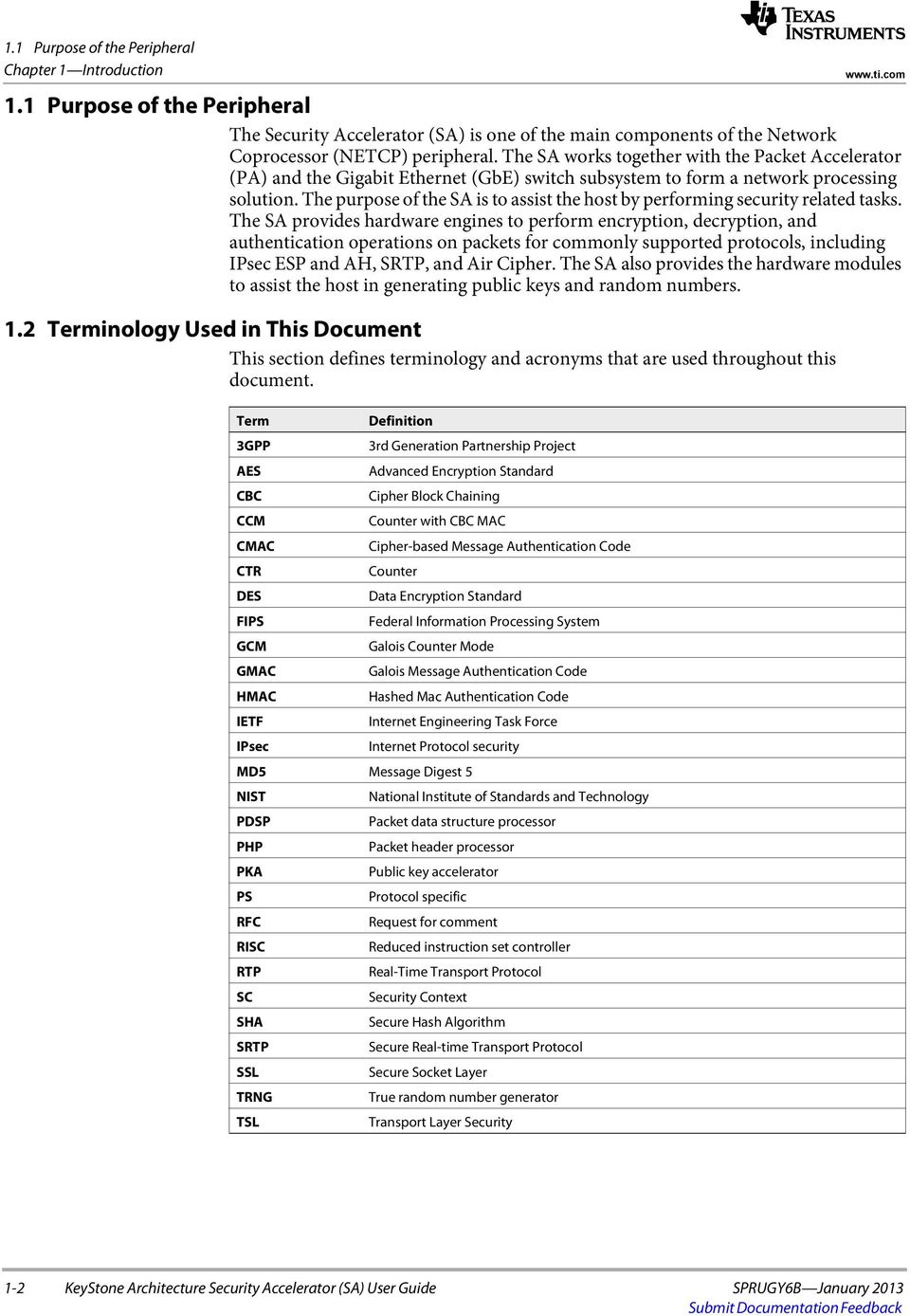
16 1.1 Purpose of the Peripheral Chapter 1 Introduction Purpose of the Peripheral The Security Accelerator (SA) is one of the main components of the Network Coprocessor (NETCP) peripheral. The SA works together with the Packet Accelerator (PA) and the Gigabit Ethernet (GbE) switch subsystem to form a network processing solution. The purpose of the SA is to assist the host by performing security related tasks. The SA provides hardware engines to perform encryption, decryption, and authentication operations on packets for commonly supported protocols, including IPsec ESP and AH, SRTP, and Air Cipher. The SA also provides the hardware modules to assist the host in generating public keys and random numbers. 1.2 Terminology Used in This Document This section defines terminology and acronyms that are used throughout this document. Term Definition 3GPP 3rd Generation Partnership Project AES Advanced Encryption Standard CBC Cipher Block Chaining CCM Counter with CBC MAC CMAC Cipher-based Message Authentication Code CTR Counter DES Data Encryption Standard FIPS Federal Information Processing System GCM Galois Counter Mode GMAC Galois Message Authentication Code HMAC Hashed Mac Authentication Code IETF Internet Engineering Task Force IPsec Internet Protocol security MD5 Message Digest 5 NIST National Institute of Standards and Technology PDSP Packet data structure processor PHP Packet header processor PKA Public key accelerator PS Protocol specific RFC Request for comment RISC Reduced instruction set controller RTP Real-Time Transport Protocol SC Security Context SHA Secure Hash Algorithm SRTP Secure Real-time Transport Protocol SSL Secure Socket Layer TRNG True random number generator TSL Transport Layer Security 1-2 KeyStone Architecture Security Accelerator (SA) User Guide SPRUGY6B January 2013
17 1.3 Features 1.3 Features Chapter 1 Introduction This section gives an overview of the features provided by the security accelerator. Protocol stack features provided: Provides IPsec protocol stack Support transport mode for both AH and ESP processing Support tunnel mode for both AH and ESP processing Full header parsing and padding checks Constructs initialization vector from header Supports anti-replay Supports true 64K bytes packet processing Provides SRTP protocol stack Supports F8 mode of processing Supports replay protection Supports true 64K bytes packet processing Provides 3GPP protocol stack, Wireless Air cipher standard AES counter ECSD A5/3 key generation GEA3 (GPRA) key generation GSM A5/3 key generation Kasumi F8 Snow3G SPRUGY6B January 2013 KeyStone Architecture Security Accelerator (SA) User Guide 1-3

18 1.3 Features Chapter 1 Introduction Features provided by respective hardware modules: Encryption and Decryption Engine 3DES CBC cipher AES CTR cipher AES CBC cipher AES F8 cipher AES XCBC authentication CCM cipher DES CBC cipher GCM cipher Authentication Engine provides hardware modules to support keyed (HMAC) and non-keyed hash calculations: CMAC authentication GMAC authentication HMAC MD5 authentication HMAC SHA1 authentication HMAC SHA2 224 authentication HMAC SHA2 256 authentication Air Cipher Engine AES CTR cipher AES CMAC authentication Kasumi F8 cipher Snow3G F8 cipher Kasumi F9 authentication Programmable Header Parsing module PDSP based header processing engine for packet parsing, algorithm control and decode Carry out protocol related packet header and trailer processing Support null cipher and null authentication for debugging True Random number generator True (not pseudo) random number generator FIPS Compliant (if KeyStone II) Non-deterministic noise source for generating keys, IV, etc. Public Key accelerator High performance public key engine for large vector math operation Supports modulus size up to 4096 bits Extremely useful for public key computations Context cache module to automatically fetch security context Features Not Supported SHA2 beyond 256 RC4 stream cipher Snow3G F9 Authentication KeyStone Architecture Security Accelerator (SA) User Guide SPRUGY6B January 2013

19 1.4 Functional Block Diagram Chapter 1 Introduction 1.4 Functional Block Diagram Figure 1-1 shows the Security Accelerator (SA) functional block diagram. The SA provides two ports to interface to the packet streaming switch in the Network Coprocessor (NETCP). All data packets entering and exiting the SA must use one of these two ports. The SA0 port is used for packets entering the SA from queue 647. The SA1 port is used for packets entering the SA from queue 646. To encrypt, decrypt, and authenticate data packets, the SA provides the following modules: Security Context Cache: fetches and caches the security contexts that are used by the SA hardware modules to encrypt, decrypt, and authenticate data packets. Packet Header Processor 1 (PHP1) PDSP: primarily used with the encryption and decryption engine and the authentication engine to perform IPsec operations. Encryption and Decryption Engine: used with PHP1 and PHP2 to perform encryption and decryption operations. PHP1 uses this engine for IPsec operations, while PHP2 uses this engine for SRTP operations. This module can also be used with data-mode packets without engaging the PHPs. Authentication Engine: used with PHP1 and PHP2 to perform authentication operations. PHP1 uses this engine for IPsec operations, while PHP2 uses this engine for SRTP operations.this module can also be used with data-mode packets without engaging the PHPs. PHP2 PDSP: primarily used with the encryption and decryption engine and the authentication engine to perform SRTP operations, or the Air Cipher engine to perform 3GPP operations. Air Cipher Engine: used with PHP2 to perform Air Cipher encryption and decryption operations. This module can also be used with data-mode packets without engaging the PHP2. In addition to the modules provided for packet processing, the SA also provides the following two modules to assist the host in security related operations: Public Key Accelerator (PKA): used primarily for large vector math, as typically used in public key operations. True Random Number Generator (TRNG): used primarily for generating random numbers. SPRUGY6B January 2013 KeyStone Architecture Security Accelerator (SA) User Guide 1-5

20 1.5 Industry Standard(s) Compliance Statement Chapter 1 Introduction Figure 1-1 Keystone I Security Accelerator Functional Block Diagram Connections to Packet Streaming Switch Security Context Cache SA0 Input/Output Ports SA1 Input/Output Ports Interconnect PHP1 PDSP Encryption and Decryption Engine Authentication Engine PHP2 PDSP Public Key Acclerator True Random Number Generator Connections to Configuration Bus Air Cipher Engine For Keystone II devices, there are two extra engines connected to the interconnect for authentication and encryption/decryption operations. Note The encryption and decryption engine, the authenticating engine, and the air cipher engine do not have connections to the configuration bus. Since these engines are not connected to the configuration bus, these modules do not contain memory-mapped registers and cannot be accessed through register reads and writes. All configuration for these modules is taken care of automatically by the PHP firmware. 1.5 Industry Standard(s) Compliance Statement The SA is compliant with the following standards: RFC 1321 The MD5 Message-Digest Algorithm RFC 2104 HMAC: Keyed-Hashing for Message Authentication RFC 2246 Transport Layer Security Protocol RFC 3711 The Secure Real-time Transport Protocol (SRTP) RFC 4301 Security Architecture for IP RFC 4302 IP Authentication Header RFC 4303 IP Encapsulating Security Payload (ESP) RFC 4305 Cryptographic Algorithm Implementation Requirements for Encapsulating Security Payload (ESP) and Authentication Header Secure socket layer protocol 1-6 KeyStone Architecture Security Accelerator (SA) User Guide SPRUGY6B January 2013

21 Chapter 2 Architecture This chapter describes the Security Accelerator architecture. 2.1 "Clock Control" on page "Memory Map" on page "Security Accelerator Programming with the Low-Level Driver" on page "Protocol Descriptions" on page "Command Labels" on page "Descriptor Software Information Words" on page "Security Contexts" on page "Security Context Cache" on page "Packet Header Processor Modules" on page "Encryption and Decryption Engine" on page "Authentication Engine" on page "Air Cipher Engine" on page "Public Key Accelerator" on page "True Random Number Generator" on page "Initializing the SA Using the SA LLD" on page "SA LLD Channel Initialization and Configuration" on page "Sending Packets to the SA for Processing" on page "SA Transmit Queues" on page "Interrupt Support" on page "DMA Event Support" on page "Power Management" on page 2-44 SPRUGY6B January 2013 KeyStone Architecture Security Accelerator (SA) User Guide 2-1
22 2.1 Clock Control Chapter 2 Architecture 2.1 Clock Control 2.2 Memory Map The Security Accelerator (SA) has one clock, which it receives from the Network Coprocessor (NETCP). This clock is used to operate all of the SA logic. To reduce power consumption, this clock is disabled by default; therefore, this clock must be enabled before using the SA. For more information about this clock, including the operating frequency, see the Network Coprocessor (NETCP) for KeyStone Devices User Guide, and the device-specific data manual. For more information about power management for the SA, see Section 2.21 Power Management on page The memory map of the Security Accelerator (SA) is shown in Table 2-1. Table 2-1 Security Accelerator Memory Map 1 Memory Region Address Offset Security Accelerator System 00000h Context Cache Module 00100h PHP1 PDSP Module 01000h PHP2 PDSP Module 01100h PHP1 PDSP Program Memory 04000h PHP2 PDSP Program Memory 08000h Public Key Accelerator Module 20000h Public Key Accelerator Vector RAM 22000h True Random Number Generator Module 24000h End of Table The address offsets are relative to the base address of the SA module. See the NETCP user guide to determine the base address of the SA module relative to the NETCP. 2.3 Security Accelerator Programming with the Low-Level Driver To ease the task of programming the Security Accelerator (SA) by abstracting many of the hardware details, a low-level driver (LLD) software package has been generated for use with the SA. Included with the SA LLD are firmware images that must be loaded onto the PHP PDSPs before using the SA to encrypt, decrypt, and authenticate packets. Due to interdependencies between the PHP firmware and the SA LLD, all users must use the SA LLD to generate the security contexts for the SA. Failure to use the SA LLD to generate security contexts will result in undefined behavior. The SA LLD provides a set of APIs that can be called to configure and control the SA. The APIs provided by the SA LLD can be divided into two main categories: common interface APIs and channel interface APIs. These APIs are described in detail in the following sections SA LLD Common Interface APIs The common interface APIs are provided primarily to abstract the SA hardware from the user, and eliminates the need for the user to directly program the SA memory mapped registers. These APIs handle all the SA register reads and writes that are required to initialize and use the SA hardware. The common interface APIs provide the ability to enable, initialize, and use the hardware modules in the SA. The common interface provides APIs for configuring the following modules: SA System Configuration Security Context Cache 2-2 KeyStone Architecture Security Accelerator (SA) User Guide SPRUGY6B January 2013
23 Packet header processor 1 (PHP1) Packet header processor 2 (PHP2) Public key accelerator (PKA) True random number generator (TRNG) 2.3 Security Accelerator Programming with the Low-Level Driver Chapter 2 Architecture Using the common interface APIs, the following list shows some of the tasks that can be performed: Reset, download, and update the PDSP firmware images on the SA PHP hardware modules Generate a 64-bit true random number from the TRNG hardware module Perform large integer arithmetic through the PKA hardware module Query SA states and statistics Monitor and report SA system errors Note For the full list of common interface APIs provided by the SA LLD, see the SA LLD documentation SA LLD Channel Interface APIs The channel interface APIs are provided to assist the SA with protocol-specific operations for the protocols listed in Section 2.4. For each of these protocols, the SA LLD channel interface allows the user to create channels allowing the SA to perform encryption, decryption, and authentication operations. Each channel is differentiated through a separate channel identification value, which is specified by the user. For each channel, the channel interface APIs perform the following tasks: Convert channel configuration information into security contexts for use by the SA encryption and decryption, authentication, and PHP hardware modules Perform protocol-specific packet operations such as insertion of the ESP header, padding, and ESP tail Decrypt and authenticate received SRTP packets when the SA hardware is not able to perform the operations due to key validation failure Generate SA operation control command labels when operating in data mode Maintain protocol-specific channel statistics For details about the protocol-specific operations that will be completed by each protocol, see Section 2.4. Note A subset of the channel-specific APIs is provided in Table 2-2. For the full list of channel interface APIs provided by the SA LLD, see the SA LLD documentation. SPRUGY6B January 2013 KeyStone Architecture Security Accelerator (SA) User Guide 2-3
24 2.3 Security Accelerator Programming with the Low-Level Driver Chapter 2 Architecture Table 2-2 API SA LLD Channel Specific API Overview Description Sa_chanGetBufferReq Get SA channel memory requirements. This API is responsible for determining the SA LLD channel memory requirements for the protocol that will be used. Sa_chanCreate Create the SA LLD channel. This API is responsible for instantiating the SA channel for the desired protocol. This API only instantiates the channels, and does not configure that channel. The Sa_chanControl API must be used to configure the channel. Sa_chanClose Close the SA LLD channel. This API is responsible for closing the SA channel. It will free the memory associated with the channel, tear down the security context, return the security context ownership to the Host, and remove the security context from the SA security context cache. If the channel was setup for both TX and RX, then the above actions are completed for both the TX and RX portions of the channel. Sa_chanControl Configure the SA LLD channel. This API is responsible for configuring the SA LLD channel. This API should be called multiple times to configure a channel and for re-key operations. 1. The first call to this function will set up the general settings such as the cipher mode, authentication mode, and other configuration parameters. For IPsec ESP, this is where things like the block size, MAC size, and SPI are specified. For Air Cipher, this is where things like the count-c, fresh, and IV size are specified. 2. The second call to this function will set up the protocol specific key information used for the channel. 3. Subsequent calls to this API are used to generate the TX and RX security contexts for the channel. Sa_chanSendData Prepare packet and descriptor for transmission to the SA. This API is responsible for completing protocol-specific operations to prepare the packet for transmission to the SA. This API is also responsible for generating the information required for the descriptor so that the SA will have the information required to process the packet. These operations include generating the descriptor software info words, and providing the updated packet and buffer lengths after making the protocol-specific updates to the packet. Sa_chanReceiveData Post process a packet after receiving it from the SA. This API is responsible for doing the post-sa protocol-specific operations on the decrypted and/or integrity verified receive packet. Sa_chanGetStats Get the statistics for the channel. This API is responsible for getting the SA LLD channel protocol-specific statistics. Sa_chanGetID Get the channel ID. This API is responsible for getting the ID associated with the channel. End of Table 2-2 Note The channel-level interface APIs do not communicate directly with the SA hardware. 2-4 KeyStone Architecture Security Accelerator (SA) User Guide SPRUGY6B January 2013
25 2.4 Protocol Descriptions Chapter 2 Architecture 2.4 Protocol Descriptions This section describes the high-level protocols supported by the SA and the SA LLD. The types of cipher modes and the authentication modes supported by each protocol are discussed in detail. The following protocols are supported by the SA and the SA LLD. See the protocol-specific section listed below for more details. 3GPP Air Cipher Data-Mode IPsec AH IPsec ESP SRTCP SRTP For KeyStone II devices, the SA has two IPSEC/SRTP engines, versus only one in KeyStone I devices GPP Air Cipher This section describes how to use the 3GPP air cipher protocol with the SA and the SA LLD and provides details about the SA hardware engines used to perform air cipher encryption, decryption, and authentication. This section also provides details about which cipher modes and authentication modes are supported when using the 3GPP air cipher protocol. Note The information in this section is accurate for SA LLD version See the documentation provided with the version of the SA LLD that you are using for the most up-to-date information SA Hardware Engine Utilization Packets using the 3GPP air cipher protocol require the use of the following hardware engines: PHP2 Air cipher engine When sending a packet to the SA, the SA transmit queue selected must adhere to the requirements in Section When it is in the appropriate queue, the NETCP packet DMA transfers the packet to the SA for encryption and authentication operations. There is no additional configuration needed to direct packets between the PHP2 and the air cipher engine. All transmission between modules inside the SA is taken care of by the packet command label, which is generated by PHP2 for the 3GPP air cipher protocol. For more information on command labels, see Section 2.5. For more information about sending packets to the SA, see Procedure Supported Cipher Modes The SA supports the following cipher modes for the 3GPP air cipher protocol: Null (no cipher) AES Counter ECSD A5/3 key generation GEA3 (GPRA) key generation SPRUGY6B January 2013 KeyStone Architecture Security Accelerator (SA) User Guide 2-5
26 2.4 Protocol Descriptions Chapter 2 Architecture GSM A5/3 key generation Kasumi F8 Snow3G F8 The desired cipher mode can be selected when creating and configuring a channel using the SA LLD. The cipher used can be selected on a per-channel basis, meaning that only one cipher can be used per channel; however, different ciphers can be used by creating multiple channels and selecting a different cipher for each channel. The same cipher also can be used for multiple channels. For more information on creating and configuring channels see Procedure Supported Authentication Modes The SA supports the following authentication modes for the 3GPP air cipher protocol: Null (no authentication) AES CMAC Kasumi F9 The desired authentication mode can be selected when creating and configuring a channel using the SA LLD. The authentication mode that is used can be selected on a per-channel basis, meaning that only one authentication mode can be used per channel; however, different authentication modes can be used by creating multiple channels and selecting a different authentication mode for each channel. The same authentication mode also can be used for multiple channels. For more information on creating and configuring channels see Procedure Protocol-Specific SA LLD Channel APIs Table 2-3 lists the protocol-specific operations performed by the SA LLD channel specific APIs when using the 3GPP air cipher protocol. Table 2-3 API Sa_chanSendData Sa_chanReceiveData 3GPP Air Cipher Channel SA LLD APIs 3GPP Air Cipher Channel Operations Prepare a 3GPP air cipher From-Air packet for transmission to the SA. This API is mainly responsible for generating the SA-specific software information, which is required for every packet that is sent to the SA. This API only modifies the descriptor information and does not make any modifications to the packet data for the 3GPP air cipher protocol. Prepare a 3GPP air cipher To-Air packet for transmission to the SA. This API is mainly responsible for generating the SA-specific software information, which is required for every packet that is sent to the SA. This API only modifies the descriptor information and does not make any modifications to the packet data for the 3GPP air cipher protocol. Note Table 2-3 only provides information specific to the 3GPP air cipher protocol. For an overview of the functionality provided for all protocols by the SA LLD channel specific APIs, see Table KeyStone Architecture Security Accelerator (SA) User Guide SPRUGY6B January 2013
27 2.4 Protocol Descriptions Chapter 2 Architecture Descriptor Protocol-Specific Information Section This section describes the descriptor protocol-specific information (PS info) section of the 3GPP air cipher protocol. The content stored in descriptor PS info section will be discussed for both transmit and receive packets Transmit Packet Descriptor Protocol-Specific Information This section describes the transmit configuration required for the descriptor PS info section of 3GPP air cipher packets. In this case, a transmit packet refers to a packet that is generated by the Host, and will be sent to the SA for encryption and/or authentication operations. For transmit operations, the PASAHO_SINFO_FORMAT_CMD macro should be used to create a command with the offset to the encryption payload, and the length of the encryption payload in bytes. This information must be placed in the PS info section of the descriptor so that the SA knows what section of the packet needs to be processed. For 3GPP air cipher packets requiring authentication, the SA automatically inserts the authentication tag into the packet before the packet exits the SA. The PS info section does not require any additional configuration for 3GPP air cipher packets. A diagram of the PS info section of a 3GPP air cipher transmit packet is shown in Figure 2-1. Figure 2-1 3GPP Air Cipher Descriptor Protocol-Specific Information Diagram Beginning of PS Info Section Short Info Command for SA Encryption/Authentication Receive Packet Descriptor Protocol-Specific Information This section describes the information in the PS info section of receive packets. 3GPP air cipher packets received by the SA and PA contain the PA/SA/Host long info structure in the PS info section. This structure is shared by both the PA and the SA. From this structure, the offset to the 3GPP air cipher header as well as additional information about the headers contained in the packet can be determined. For more information about the PA/SA/Host long info structure, see the Network Coprocessor (NETCP) for KeyStone Devices User Guide Data-Mode This section describes how to use the data-mode configuration with the SA and the SA LLD. This section provides details about the SA data processing engines used to perform encryption and authentication. This section also provides details about which cipher modes and authentication modes are supported when using data-mode. The data-mode protocol is used when using the PHPs is not desired, or when using the other protocols is not desired SA Data Processing Engine Utilization The packets using data-mode can use of the following data processing engines: Encryption and decryption engine Authentication engine Air cipher engine SPRUGY6B January 2013 KeyStone Architecture Security Accelerator (SA) User Guide 2-7
28 2.4 Protocol Descriptions Chapter 2 Architecture Unlike other protocols, data-mode does not use SA PHP modules. Since the PHPs are not used, they cannot generate the command label for the packet, so the command label must be generated by the Host processor and inserted into the PS info section of the packet before sending it to the SA for processing. Data-mode command labels are discussed in more detail in Table 2-6 and Section For data-mode, the exact data processing engine that will be used is not as clearly defined as it is for the other protocols, and depends on the cipher mode and authentication mode that is used for the packet. A mapping between the cipher mode and data processing engine used is provided in Table 2-4. Similarly, a mapping between the authentication mode and the data processing engine used is provided in Table 2-5. Due to the fact that the SA data processing engines used to process a packet are not as clear as for the other protocols, extra care must be taken to adhere to the requirements mentioned in Section 2.18 to make sure that the correct transmit queue for the SA is used, so a deadlock condition can be avoided. Once the packet is placed into the appropriate transmit queue, the NETCP packet DMA will transfer the packet to the SA for encryption and authentication operations. There is no additional configuration needed to direct the packet between the SA data processing engines. All communication between the modules inside the SA will be taken care of by the packet command label. For more information on command labels, see Section 2.5. Note, that for KeyStone II devices, when using IPSEC or SRTP protocols, the SA will use two engines instead of one (as used in KeyStone1 devices) to authenticate and encrypt or decrypt payloads. The information in this section is accurate for SA LLD version See the documentation provided with the version of the SA LLD that you are using for the most up-to-date information Supported Cipher Modes The SA supports the following cipher modes for the data-mode protocol: Null (no cipher) 3DES CBC AES CTR AES CBC AES F8 CCM DES CBC GCM Kusami F8 Snow3G F8 The desired cipher mode can be selected when creating and configuring a channel using the SA LLD. The cipher that is used can be selected on a per-channel basis, meaning that only one cipher can be used per channel; however, different ciphers can be used by creating multiple channels and selecting a different cipher for each channel. The same cipher also can be used for multiple channels. For more information on creating and configuring channels see Procedure KeyStone Architecture Security Accelerator (SA) User Guide SPRUGY6B January 2013
29 2.4 Protocol Descriptions Chapter 2 Architecture Table 2-4 maps each of the cipher modes available in data-mode to the data processing engine in the SA that will take care of encrypting and decrypting the packet. Table 2-4 Cipher Mode to SA Data Processing Engine Mapping Cipher Mode Null 3DES CBC AES CTR AES CBC AES F8 CCM DES CBC GCM ECSD A5/3 Key Generation GEA3 (GPRA) Key Generation GSM A5/3 Key Generation Kusami F8 Snow3G F8 End of Table 2-4 SA Data processing Engine Used No data processing engines will be used to encrypt or decrypt the packet. Encryption and Decryption Engine Encryption and Decryption Engine/Air Cipher Engine Encryption and Decryption Engine Encryption and Decryption Engine Encryption and Decryption Engine Encryption and Decryption Engine Encryption and Decryption Engine Air Cipher Engine Air Cipher Engine Air Cipher Engine Air Cipher Engine Air Cipher Engine Supported Authentication Modes The SA supports the following authentication modes for the data-mode protocol: Null (no authentication) AES CMAC AES XCBC CMAC GMAC HMAC MD5 HMAC SHA1 HMAC SHA2 224 HMAC SHA2 256 Kasumi F9 The desired authentication mode can be selected when creating and configuring a channel using the SA LLD. The authentication mode used can be selected on a per-channel basis, meaning that only one authentication mode can be used per channel; however, different authentication modes can be used by creating multiple channels and selecting a different authentication mode for each channel. The same authentication mode also can be used for multiple channels. For more information on creating and configuring channels see Procedure 2-6. SPRUGY6B January 2013 KeyStone Architecture Security Accelerator (SA) User Guide 2-9
30 2.4 Protocol Descriptions Chapter 2 Architecture Table 2-5 maps each of the cipher modes available in data-mode to the data processing engine in the SA that will handle authenticating the packet. Table 2-5 Authentication Mode to SA Data Processing Engine Mapping Cipher Mode Null AES CMAC AES XCBC CMAC GMAC HMAC MD5 HMAC SHA1 HMAC SHA2-224 HMAC SHA2-256 Kusami F9 End of Table 2-5 SA Data Processing Engine Used No data processing engines will be used to authenticate the packet. Air Cipher Engine Encryption and Decryption Engine Authentication Engine Authentication Engine Authentication Engine Authentication Engine Authentication Engine Authentication Engine Air Cipher Engine Protocol-Specific SA LLD Channel APIs Table 2-3 lists the protocol-specific operations performed by the SA LLD channel-specific APIs when using the data-mode protocol. Table 2-6 API Sa_chanSendData Sa_chanReceiveData SA LLD Data-mode Channel APIs Data-mode Channel Operations Prepare a data-mode packet and descriptor for transmission to the SA. This API is responsible for completing 3 tasks: Generate SA-specific software information (required for all packets to be delivered to the SA) Update the data mode command label based on the payload information Perform Kasumi-F9 padding if required Unlike for the other protocols, when generating the descriptor software information words, the Descriptor Software Information Word 2 is also generated to specify the multicore navigator information for the packet. Unlike for the other protocols, this API generates the command label. The command label contains instructions on how the SA should process the packet, and needs to be placed in the protocol-specific section of the descriptor. For more information on command labels, see Section 2.5. This API is used to post process a data-mode packet from the SA, and supports removal of Kasumi-F9 padding if required. See the SA LLD documentation for more detail. Note Table 2-6 provides information specific only to the data-mode protocol. For an overview of the functionality provided for all protocols by the SA LLD channel-specific APIs, see Table Descriptor Protocol-Specific Information Section This section describes the descriptor protocol-specific information (PS info) section of the data-mode protocol. The content stored in the descriptor PS info section is discussed for both transmit and receive packets KeyStone Architecture Security Accelerator (SA) User Guide SPRUGY6B January 2013
31 2.4 Protocol Descriptions Chapter 2 Architecture Transmit/Receive Packet Descriptor Protocol-Specific Information This section describes the transmit and receive configuration required for the descriptor PS info section of data-mode packets. In this case, both transmit packets (packets to be encrypted and/or authenticated) and receive packets (packets to be decrypted and/or authenticated) must use the Host to generate the command label using the SA LLD Sa_chanSendData API. Before sending a data-mode packet to the SA for processing, the Host-generated command label must be placed in the PS info section of the descriptor, so the SA knows how to process the packet. A diagram of the PS info section of a data-mode packet is shown in Figure 2-2. Figure 2-2 Data-Mode Descriptor Protocol-Specific Information Diagram Beginning of PS Info Section Command Label Authentication Tag Insertion When using the data-mode protocol, the SA is not able to insert the authentication tag into the packet. For packets where an authentication tag is generated, the SA places the authentication tag at the head of the PS info section IPsec AH This section describes how to use the IPsec AH protocol with the SA and the SA LLD. This section provides a detailed view of the SA hardware used to perform air cipher encryption and authentication. This section also provides details about which cipher modes and authentication modes are supported when using the IPsec AH protocol. Note The information in this section is accurate for SA LLD version See the documentation provided with the version of the SA LLD that you are using for the most up-to-date information SA Hardware Engine Utilization The packets using the IPsec AH protocol use the following engines: PHP1 Authentication engine When sending a packet to the SA, the SA transmit queue selected must adhere to the requirements in Section When it is in the appropriate queue, the NETCP packet DMA transfers the packet to the SA for the authentication operation. There is no additional configuration needed to direct the packet between PHP1 and the authentication engine. All communication between modules inside the SA are taken care of by the packet command label, which is generated by PHP1 for the IPsec AH protocol. For more information on command labels, see Section 2.5. For KeyStone II devices, the SA has two engines to use for IPSEC processing. See your device s product page to see which KeyStone family it belongs to. SPRUGY6B January 2013 KeyStone Architecture Security Accelerator (SA) User Guide 2-11
32 2.4 Protocol Descriptions Chapter 2 Architecture Supported Cipher Modes The SA and SA LLD only support the following cipher mode for the IPsec AH protocol: Null (no cipher) The null cipher mode must be specified when creating and configuring a channel using the SA LLD. The cipher must be selected on a per-channel basis, meaning that the cipher must be selected for each channel. For more information on creating and configuring channels see Procedure Supported Authentication Modes The SA and SA LLD support the following authentication modes for the IPsec AH protocol: Null (no authentication) AES XCBC CMAC GMAC HMAC MD5 HMAC SHA1 HMAC SHA2 224 HMAC SHA2 256 The desired authentication mode can be selected when creating and configuring a channel using the SA LLD. The desired authentication mode is selected on a per-channel basis, meaning that only one authentication mode can be used per channel; however, different authentication modes can be used by creating multiple channels and selecting a different authentication mode for each channel. The same authentication mode also can be used for multiple channels. For more information on creating and configuring channels using the SA LLD see Procedure KeyStone Architecture Security Accelerator (SA) User Guide SPRUGY6B January 2013
33 2.4 Protocol Descriptions Chapter 2 Architecture Protocol-Specific SA LLD Channel APIs Table 2-7 lists the protocol-specific operations performed by the SA LLD channel specific APIs when using the IPsec AH protocol. Table 2-7 API Sa_chanSendData Sa_chanReceiveData End of Table 2-7 SA LLD IPsec AH Channel APIs IPsec AH Channel Operations Prepare an IPsec AH packet and descriptor for transmission to the SA. The primary purpose of this API is to: Populate and insert AH Header following the external IP header for Tunnel mode or the original IP header for transport mode. Extract the protocol (next header) from the original IP header, replace it with AH Transport (51) and recalculate IPv4 header checksum. Provide SA-specific software information (required for all packets to be delivered to SA). Post-process an IPsec AH packet after receiving it from the SA. The primary purpose of this API is to: Extract the next header from the AH header and replace the one in the IP header with it. Update the packet size and protocol (IP) payload size of the external IP header. Remove the AH header. Note Table 2-7 only provides information specific to the IPsec AH protocol. For an overview of the functionality provided for all protocols by the SA LLD channel specific APIs, see Table Descriptor Protocol-Specific Information Section This section describes the descriptor protocol-specific information (PS info) section of the IPsec AH protocol. The content stored in descriptor PS info section is discussed for both transmit and receive packets Transmit Packet Descriptor Protocol-Specific Information This section describes the transmit configuration required for the descriptor PS info section of IPsec AH packets. In this case, a transmit packet refers to a packet that is generated by the Host and will be sent to the SA for authentication operations. For transmit operations, the PASAHO_SINFO_FORMAT_CMD macro should be used to create a command with the offset to the IP payload and the length of the IP payload in bytes. This information must be placed in the PS info section of the descriptor so that the SA knows what section of the packet needs to be authenticated. For IPsec AH operations, the SA is unable to insert the authentication tag into the packet, and the SA instead inserts the authentication tag into the PS info section. The authentication tag must then be inserted into the packet by the Host or the PA. If the Host will be used to insert the authentication tag, then only the PA/SA/Host short info command that tells the SA how to process the packet needs to be written to the PS info section. To insert the authentication tag into the packet using the PA, a second command can be generated using the PA LLD Pa_formatRoutePatch API, which can then be inserted into the PS info section of the descriptor after the PA/SA/Host short info command for the SA. This way, after authentication the SA can route the packet to the PA and the PA SPRUGY6B January 2013 KeyStone Architecture Security Accelerator (SA) User Guide 2-13
34 2.4 Protocol Descriptions Chapter 2 Architecture can insert the authentication tag into the packet without Host intervention. See Procedure 2-1 for details about how to use the PA to perform a blind patch after the SA authenticates the packet. See Figure 2-3 for a diagram of the PS info section before sending the packet to the SA for authentication. Note Procedure 2-1 defines the general procedure for doing a blind patch; however, the procedure may change slightly as the SA LLD is updated. See the SA LLD documentation and example code for the latest information on how to do a blind patch. Procedure 2-1 Performing an Authentication Tag Blind Patch using the PA Step - Action 1 Use the PASAHO_SINFO_FORMAT_CMD macro to generate a short info command for SA authentication. 2 Insert the authentication short info command in the PS info section in the descriptor. 3 Call Pa_formatRoutePatch to generate the blind patch command for the PA modify/multiroute engine. 4 Insert the blind patch command in the PS info section of the descriptor. 5 Send the packet to the SA to generate the authentication tag. SA generates the authentication tag and writes it to the PS info section descriptor. The packet is routed to the PA modify/multiroute engine. The PA modify/multi-route engine patches the packet with the authentication tag. The PA modify/multi-route engine routes the packet to its next destination. End of Procedure 2-1 Figure 2-3 IPsec AH Descriptor Protocol-Specific Information Diagram Beginning of PS Info Section Short Info Command for SA Authentication PA Modify/Multiroute Engine Blind Patch Command Note Routing the packet from the SA to the PA modify/multiroute engine must be configured when setting up the TX security context for the SA LLD channel Receive Packet Descriptor Protocol-Specific Information This section describes the information in the PS info section of receive packets. IPsec AH packets received by the SA and PA will contain the PA/SA/Host long info structure in the PS info section. This structure is shared by both the PA and the SA. From this structure, the offset to the IPsec AH header, as well as additional information about the headers contained in the packet can be determined. For more information on the PA/SA/Host long info structure, see the NETCP User Guide KeyStone Architecture Security Accelerator (SA) User Guide SPRUGY6B January 2013
35 IPsec ESP 2.4 Protocol Descriptions Chapter 2 Architecture This section describes how to use the IPsec ESP protocol with the SA and the SA LLD. This section provides details about the SA engines used to perform IPsec ESP encryption, decryption, and authentication. This section also provides details about which cipher modes and authentication modes are supported when using the IPsec ESP protocol. Note The information in this section is accurate for SA LLD version See the documentation provided with the version of the SA LLD that you are using for the most up-to-date information SA Hardware Engine Utilization Packets using the IPsec ESP protocol use the following engines: PHP1 Encryption and decryption engine Authentication engine When sending a packet to the SA, the SA transmit queue selected must adhere to the requirements in Section When it is in the appropriate queue, the NETCP packet DMA transfers the packet to the SA for encryption and authentication operations. There is no additional configuration needed to direct the packet between PHP1, the encryption and decryption engine(s), and the authentication engine(s). The number of engines depends on whether the device is KeyStone I with one engine, or KeyStone II with two engines. All communication between modules inside the SA is taken care of by the packet command label, which is generated by PHP1 for the IPsec ESP protocol. For more information on command labels, see Section Supported Cipher Modes The SA supports the following cipher modes for the IPsec ESP protocol: Null (no cipher) 3DES CBC AES CTR AES CBC CCM DES CBC GCM The desired cipher mode can be selected when creating and configuring a channel using the SA LLD. The cipher that is used can be selected on a per-channel basis, meaning that only one cipher can be used per channel; however, different ciphers can be used by creating multiple channels and selecting a different cipher for each channel. The same cipher can also be used for multiple channels. For more information on creating and configuring SA LLD channels see Procedure Supported Authentication Modes The SA supports the following authentication modes for the IPsec ESP protocol: Null (no authentication) AES XCBC CMAC SPRUGY6B January 2013 KeyStone Architecture Security Accelerator (SA) User Guide 2-15
36 2.4 Protocol Descriptions Chapter 2 Architecture GMAC HMAC MD5 HMAC SHA1 HMAC SHA2 224 HMAC SHA The desired authentication mode can be selected when creating and configuring a channel using the SA LLD. The authentication mode that is used can be selected on a per-channel basis, meaning that only one authentication mode can be used per channel; however, different authentication modes can be used by creating multiple channels and selecting a different authentication mode for each channel. The same authentication mode can also be used for multiple channels. For more information on creating and configuring channels see Procedure Protocol-Specific SA LLD Channel APIs Table 2-8 lists the protocol-specific operations that are performed by the SA LLD channel-specific APIs when using the IPsec ESP protocol. Table 2-8 API Sa_chanSendData Sa_chanReceiveData End of Table 2-8 SA LLD IPsec ESP Channel APIs IPsec ESP Channel Operations Prepare an IPsec ESP packet and descriptor for transmission to the SA. The primary purpose of this API is to: Populate and insert ESP Header following the external IP header for Tunnel mode or the original IP header for transport mode. Compute the ESP padding size based on the encryption mode, insert padding bytes and ESP trailer. Update the packet size and protocol (IP) payload size of the external IP header. Extract the protocol (next header) from the original IP header, replace it with ESP Transport (50) and recalculate IPv4 header checksum. Reserve room for authentication data. Provide SA-specific software information (required for all packets to be delivered to SA). Post-process an IPsec ESP packet after receiving it from the SA. The primary purpose of this API is to: Verify the ESP padding bytes. Extract the next header from the ESP Trailer and replace the one in the IP header with it. Update the packet size and protocol (IP) payload size of the external IP header. Remove the ESP header, padding, ESP trailer and the authentication tag. Note Table 2-8 provides information specific only to the IPsec ESP protocol. For an overview of the functionality provided for all protocols by the SA LLD channel specific APIs, see Table Descriptor Protocol-Specific Information Section This section describes the descriptor protocol-specific information (PS info) section of the IPsec ESP protocol. The content stored in descriptor PS info section is discussed for both transmit and receive packets KeyStone Architecture Security Accelerator (SA) User Guide SPRUGY6B January 2013
37 2.4 Protocol Descriptions Chapter 2 Architecture Transmit Packet Descriptor Protocol-Specific Information This section describes the transmit configuration required for the descriptor PS info section of IPsec ESP packets. In this case, a transmit packet refers to a packet that is generated by the Host and sent to the SA for encryption and/or authentication operations. For transmit operations, the PASAHO_SINFO_FORMAT_CMD macro should be used to create a command with the offset to the IP payload, and the length of the IP payload in bytes. This information must be placed in the PS info section of the descriptor so that the SA knows what section of the packet needs to be encrypted/authenticated. For IPsec ESP operations, the SA automatically inserts the authentication tag into the packet before the packet exits the SA. The PS info section does not require any additional configuration for IPsec ESP packets. For a diagram of the PS info section before sending the packet to the SA for encryption and/or authentication, see Figure 2-4. Figure 2-4 IPsec ESP Descriptor Protocol-Specific Information Diagram Beginning of PS Info Section Short Info Command for SA Encryption/Authentication Receive Packet Descriptor Protocol-Specific Information This section describes the information in the PS info section of receive packets. IPsec ESP packets received by the SA and PA contain the PA/SA/Host long info structure in the PS info section. This structure is shared by both the PA and the SA. From this structure, the offset to the IPsec ESP header, as well as additional information about the headers contained in the packet can be determined. For more information on the PA/SA/Host long info structure, see the NETCP User Guide SRTCP This section describes how to use the SRTCP protocol with the SA LLD. This section also provides details about which cipher modes and authentication modes are supported when using the SRTCP protocol. Note The information in this section is accurate for SA LLD version See the documentation provided with the version of the SA LLD that you are using for the most up-to-date information SA Hardware Engine Utilization SRTCP is only supported in software mode. The SA and the SA hardware engines are not used with SRTCP Supported Cipher Modes The SA supports the following cipher modes for the SRTCP protocol: Null (no cipher) AES CTR AES F8 SPRUGY6B January 2013 KeyStone Architecture Security Accelerator (SA) User Guide 2-17
38 2.4 Protocol Descriptions Chapter 2 Architecture The desired cipher mode can be selected when creating and configuring an SRTCP channel using the SA LLD. The cipher that is used can be selected on a per-channel basis, meaning that only one cipher can be used per channel; however, different ciphers can be used by creating multiple channels and selecting a different cipher for each channel. The same cipher can also be used for multiple channels. For more information on creating and configuring channels see Procedure Supported Authentication Modes The SA supports the following authentication modes for the SRTCP protocol: Null (no authentication) HMAC MD5 HMAC SHA1 The desired authentication mode can be selected when creating and configuring a channel using the SA LLD. The authentication mode used can be selected on a per-channel basis, meaning that only one authentication mode can be used per channel; however, different authentication modes can be used by creating multiple channels and selecting a different authentication mode for each channel. The same authentication mode can also be used for multiple channels. For more information on creating and configuring channels see Procedure KeyStone Architecture Security Accelerator (SA) User Guide SPRUGY6B January 2013
39 2.4 Protocol Descriptions Chapter 2 Architecture Protocol-Specific SA LLD Channel APIs Table 2-9 lists the protocol-specific operations performed by the SA LLD channel specific APIs when using the SRTCP protocol. Table 2-9 API Sa_chanSendData Sa_chanReceiveData End of Table 2-9 SA LLD SRTCP Channel APIs SRTCP Channel Operations Encrypt and authenticate an SRTCP packet. This API is responsible for authenticating and encrypting a SRTCP packet by the DSP in software -- the SA hardware is not used for this process. Using this API, the DSP performs the following actions in software: Perform re-key operation. Verify whether the master key is expired. If the master key is expired and the new key is not available, call API to request new key and return error. If the master key is expired and the new key is available, derive the new session keys. If the session key is expired, derive the new session keys. Generate SRTP padding if necessary. Perform data encryption based on the specified cipher mode. Append the roc at the end of the packet and perform authentication operation based on the specified mac mode. Append the MKI and the authentication tag at the end of packet. Update the packet size and protocol (TCP/UDP) payload size in the packet descriptor Update statistics Authenticate and decrypt an SRTCP packet. This API is responsible for authenticating and decrypting a SRTCP packet by the DSP in software -- the SA hardware is not used for this process. Using this API, the DSP performs the following actions in software: Perform re-key operation. Verify whether the master key is expired.» If the master key is expired and the new key is not available, call API to request new key and return error.» If the master key is expired and the new key is available, derive the new session keys. If the session key is expired, derive the new session keys. Record the authentication tag and remove MKI and authentication tag from the packet. Append the roll-over-counter at the end of the packet and perform authentication operation based on the specified authentication mode. Perform data decryption based on the specified cipher mode if the authentication tag matches. Otherwise, update the statistics and return error. Remove the MKI and the authentication tag at the end of packet. Update the packet size and protocol (TCP/UDP) payload size in the packet descriptor. Replay window updates. Update statistics. Note Table 2-9 only provides information specific to the SRTCP protocol. For an overview of the functionality provided for all protocols by the SA LLD channel specific APIs, see Table 2-2. SPRUGY6B January 2013 KeyStone Architecture Security Accelerator (SA) User Guide 2-19
40 2.4 Protocol Descriptions Chapter 2 Architecture SRTP This section describes how to use the SRTP protocol with the SA and the SA LLD. This section provides details about the SA hardware engines used to perform SRTP encryption, decryption, and authentication. This section also provides details about which cipher modes and authentication modes are supported when using the SRTP protocol. Note The information in this section is accurate for SA LLD version See the documentation provided with the version of the SA LLD that you are using for the most up-to-date information SA Hardware Engine Utilization The packets using the SRTP protocol require the use of the following hardware engines: PHP2 Encryption and decryption engine Authentication engine When sending a packet to the SA, the SA transmit queue selected must adhere to the requirements in Section When the packet is in the appropriate transmit queue, the NETCP packet DMA transfers the packet to the SA for encryption and authentication operations. There is no additional configuration needed to direct the packet between PHP2, the encryption and decryption engine, and the authentication engine. All communication between modules inside the SA are taken care of by the packet command label, which is generated by PHP2 for the SRTP protocol. For more information on command labels, see Section 2.5. For KeyStone II devices, the SA has two engines for SRTP (and also IPSEC). For KeyStone I devices, there is only one engine Supported Cipher Modes The SA supports the following cipher modes for the SRTP protocol: Null (no cipher) AES CTR AES F8 The desired cipher mode can be selected when creating and configuring a channel using the SA LLD. The cipher used can be selected on a per-channel basis, meaning that only one cipher can be used per channel; however, different ciphers can be used by creating multiple channels and selecting a different cipher for each channel. The same cipher can also be used for multiple channels. For more information on creating and configuring channels see Procedure Supported Authentication Modes The SA supports the following authentication modes for the SRTP protocol: Null (no authentication) HMAC MD5 HMAC SHA KeyStone Architecture Security Accelerator (SA) User Guide SPRUGY6B January 2013
41 2.4 Protocol Descriptions Chapter 2 Architecture The desired authentication mode can be selected when creating and configuring a channel using the SA LLD. The authentication mode used can be selected on a per-channel basis, meaning that only one authentication mode can be used per channel; however, different authentication modes can be used by creating multiple channels and selecting a different authentication mode for each channel. The same authentication mode can also be used for multiple channels. For more information on creating and configuring channels see Procedure Protocol-Specific SA LLD Channel APIs Table 2-9 lists the protocol-specific operations performed by the SA LLD channel specific APIs when using the SRTP protocol. Table 2-10 SA LLD SRTP Channel APIs (Part 1 of 2) API Sa_chanSendData SRTP Channel Operation Prepare an SRTP packet and descriptor for transmission to the SA. In Firmware mode, this API performs the following actions: Perform re-key operation. Verify whether the master key is expired. If the master key is expired and the new key is not available, call API to request new key and return error. If the master key is expired and the new key is available, derive the new session keys and generate the new SASS security context. If the session key is expired, derive the new session keys and generate the new SASS security context. Generate SRTP padding if necessary. Update the packet size and protocol (TCP/UDP) payload size in the packet descriptor to reserve room for the MKI and authentication tag. Provide SA-specific software information (required for all packets to be delivered to SA). Update statistics. In software only mode, performs the following actions: Perform re-key operation. Verify whether the master key is expired. If the master key is expired and the new key is not available, call API to request new key and return error. If the master key is expired and the new key is available, derive the new session keys. If the session key is expired, derive the new session keys. Generate SRTP padding if necessary. Perform data encryption based on the specified cipher mode. Append the roc at the end of the packet and perform authentication operation based on the specified mac mode. Append the MKI and the authentication tag at the end of packet. Update the packet size and protocol (TCP/UDP) payload size in the packet descriptor. Update statistics. SPRUGY6B January 2013 KeyStone Architecture Security Accelerator (SA) User Guide 2-21
42 2.4 Protocol Descriptions Chapter 2 Architecture Table 2-10 SA LLD SRTP Channel APIs (Part 2 of 2) API Sa_chanReceiveData End of Table 2-10 SRTP Channel Operation Post-process an SRTP packet after receiving it from the SA. This API is responsible for processing SRTP packets received from the SA, as well as checking the packet descriptor for any errors generated by the SA during processing. The errors that can be generated during processing are: Replay protection for an old receive packet Replay protection for a duplicate receive packet Authentication failure Invalid Key Invalid MKI In firmware mode, there are four different actions that the API can take depending on the error status of the packet: 1 If there are no errors, then the API will take the following action: Remove the MKI and authentication tag Perform replay window updates Update the packet size and protocol (TCP/UDP) payload size in the packet descriptor Update statistics 2 If there are replay protection errors or an authentication failure error, then the API will update the corresponding error statistic, and then return without taking any action on the packet. 3 If there is an invalid key, then the API will take the following action: Verify whether the master key is expired.» If the master key is expired and the new key is not available, call API to request new key and return error.» If the master key is expired and the new key is available, derive the new session keys and generate the new SASS security context. If the session key is expired, derive the new session keys and generate the new SASS security context. Record the authentication tag and remove MKI and authentication tag from the packet. Append the roll-over-counter at the end of packet and perform authentication operation based on the specified authentication mode and the new authentication session key. Perform data decryption based on the specified cipher mode and the new session keys if the authentication tag matches. Otherwise, update the statistics and return error. Change internal state to the key transition state. Stay in this state until the replay window base is within the new range. Call API to register the new security context and enter normal state. 4 If there is an invalid MKI, then the API will take the following action: If the new key is not available, call API to request new key and return error. If the new key is available and the MKI matches, derive the new session keys and generate the new SASS security context. Record the authentication tag and remove MKI and authentication tag from the packet. Append the roc at the end of packet and perform authentication operation based on the specified authentication mode and the new authentication session keys. Perform data decryption based on the specified cipher mode and the new session keys if the authentication tag matches. Otherwise, update the statistics and return error. Change internal state to the key transition state. Stay in this state until the replay window base is within the new range. Call API to register the new security context and enter normal state. In software only mode, this API will perform the following actions: Perform re-key operation. Verify whether the master key is expired.» If the master key is expired and the new key is not available, call API to request new key and return error.» If the master key is expired and the new key is available, derive the new session keys. If the session key is expired, derive the new session keys. Record the authentication tag and remove MKI and authentication tag from the packet. Append the roll-over-counter at the end of the packet and perform authentication operation based on the specified authentication mode. Perform data decryption based on the specified cipher mode if the authentication tag matches. Otherwise, update the statistics and return error. Remove the MKI and the authentication tag at the end of packet. Update the packet size and protocol (TCP/UDP) payload size in the packet descriptor. Replay window updates. Update statistics KeyStone Architecture Security Accelerator (SA) User Guide SPRUGY6B January 2013
43 2.4 Protocol Descriptions Chapter 2 Architecture Note Table 2-9 only provides information specific to the SRTP protocol. For an overview of the functionality provided for all protocols by the SA LLD channel specific APIs, see Table Descriptor Protocol-Specific Information Section This section describes the descriptor protocol-specific information (PS info) section for the SRTP protocol. The content stored in descriptor PS info section is discussed for both transmit and receive packets Transmit Packet Descriptor Protocol-Specific Information This section describes the transmit configuration required for the descriptor PS info section of SRTP packets. In this case, a transmit packet refers to a packet that is generated by the Host, and will be sent to the SA for encryption and/or authentication operations. For transmit operations, the PASAHO_SINFO_FORMAT_CMD macro should be used to create a command with the offset to the RTP payload, and the length of the RTP payload in bytes. This information must be placed in the PS info section of the descriptor so that the SA knows what section of the packet needs to be authenticated. For SRTP operations, the checksum of a lower layer protocol may require a checksum to be calculated (e.g., UDP or other L4 checksum) after the SA finishes processing the packet. If a checksum does need to be recalculated, then this operation can be completed by the Host, or optionally by the PA without Host intervention. If the Host will be used to perform the checksum, or if a checksum is not needed, then only the PA/SA/Host short info command needs to be written to the PS info section to tell the SA which portion of the packet needs to be processed. To use the PA to perform the checksum operation and insert the checksum into the packet, a second command can be generated using the PA LLD Pa_formatTxRoute API, which can then be appended to the PS info section of the descriptor after the command for the SA. This way, after authentication the SA can route the packet to the PA and the PA can insert the authentication tag into the packet without Host intervention. See Procedure 2-2 for the procedure for using the PA to perform a checksum after the SA authenticates the packet. For a diagram of the PS info section before sending the packet to the SA for encryption and authentication, see Figure 2-5. Note Procedure 2-2 defines the general procedure for doing a CRC checksum using the PA; however, the procedure may change slightly as the SA LLD is updated. See the SA LLD documentation and example code for the latest information on how to do a blind patch. Procedure 2-2 Performing a Checksum using the PA Step - Action 1 Use PASAHO_SINFO_FORMAT_CMD macro to generate short info command for SA encryption and authentication. 2 Insert the short info command in the PS info section in the descriptor. 3 Call Pa_formatTxRoute to generate the checksum command for the PA modify/multiroute engine. SPRUGY6B January 2013 KeyStone Architecture Security Accelerator (SA) User Guide 2-23
44 2.5 Command Labels Chapter 2 Architecture 4 Insert the checksum command in the PS info section of the descriptor. 5 Send the packet to the SA for encryption and authentication. The packet is routed to the PA modify/multiroute engine. The PA modify/multi-route engine calculates the checksum and inserts it into the packet. The PA modify/multi-route engine routes the packet to its next destination. End of Procedure 2-2 Figure 2-5 SRTP Descriptor Protocol-Specific Information Diagram Beginning of PS Info Section Short Info Command for SA Encryption/Authentication PA Modify/Multiroute Engine Checksum Command Note Routing the packet from the SA to the PA modify/multiroute engine must be configured when setting up the TX security context for the SA LLD channel Receive Packet Descriptor Protocol-Specific Information This section describes the information in the PS info section of receive packets. SRTP packets received by the SA and PA contain the PA/SA/Host long info structure in the PS info section. From this structure, the offset to the SRTP header, as well as additional information about the headers contained in the packet can be determined. For more information on the PA/SA/Host long info structure, see the NETCP User Guide. 2.5 Command Labels A command label is a set of instructions that tells the SA how a packet should be routed inside the SA when processing a packet. For example, if an IPsec ESP packet needs to be decrypted and then authenticated, the command label will contain a set of instructions that tells the SA that the packet needs to be routed to the encryption and decryption engine to decrypt the packet, and then to the authentication engine to authenticate the packet. A command label is required for every packet that is processed by the SA, and can be generated in one of two ways: If using the PHP modules in the SA, then a command label will be generated by the appropriate PHP module when the packet enters the SA. If the packet is a data-mode packet, then the PHP modules are not being used, and the Host must use the SA LLD Sa_chanSendData API to generate the command label. In this case, the Host will have to place the command label at the start of the protocol-specific info section of the descriptor before the packet is sent to the SA KeyStone Architecture Security Accelerator (SA) User Guide SPRUGY6B January 2013
45 2.6 Descriptor Software Information Words Chapter 2 Architecture Note When using data-mode, packets must always originate from the Host. This is required because the Host must use the SA LLD to generate the command label before sending the packet to the SA; otherwise, the packet will not have a command label and the SA will not know how to process the packet. This means that during receive packet processing, packets cannot be sent directly from a PA classify engine to the SA without directing the packet back to the Host to generate the command label. 2.6 Descriptor Software Information Words The descriptor software information words are used by the SA to store information about how the SA should process a packet. The SA LLD automatically generates the software info words. For transmit operations, the software info words are generated by the Sa_chanSendData API. After calling this API, the software info words should be placed in the software info words section of the descriptor before sending the packet to the SA for processing. For receive operations, the software info words are typically placed in the software info section of a PA classify engine configuration packet. By placing the software info words into the PA classify engine configuration packet, the software info words are automatically associated with that entry when the classify information gets stored in the look-up table. Therefore, when the PA classifies a packet, the PA will automatically place the software info words associated with the matching entry into the packet descriptor. Because the software info words are placed into the descriptor automatically, this allows packets that are classified by the PA to be sent directly to the SA (through the multicore navigator). Note Although the user is not required to know the structure of the descriptor software information words used by the SA, for reference these details are provided in appendix A Security Contexts The security contexts are one of the most important parts of the Security Accelerator configuration. A security context is responsible for telling the SA what type of operation it needs to perform for a specific channel and how to do the operation. Encoded inside each security context is information detailing which SA processing engines should be used and what types of encryption, decryption, or authentication should be performed by the SA. The security contexts are used by the SA for all encryption, decryption, and authentication operations Generating Security Contexts The security contexts are generated by the SA LLD channel interface. The channel interface is responsible for taking configuration parameters from the user application, and converting those parameters into a security context that can be understood by the SA. The parameters accepted by the channel interface vary based on the protocol used. For more information on the channel interface for the each protocol, see Section 2.4. SPRUGY6B January 2013 KeyStone Architecture Security Accelerator (SA) User Guide 2-25
46 2.8 Security Context Cache Chapter 2 Architecture Since there is a strong dependency between the SA LLD and the PHP firmware that is responsible for parsing the security contexts, the SA LLD channel interface must be used for generating security contexts. Failure to use the SA LLD to generate the security contexts can result in undefined behavior. For more information about the SA LLD channel interface, please see Section See Procedure 2-6 for the procedure to set up a channel and generate the associated security context Security Context Memory Allocation The security contexts generated by the SA LLD channel interface must be stored in Host memory. The memory for the security contexts must be allocated by the user application and must be 64-byte aligned, and 320 bytes in size. The security contexts could be in one contiguous block of memory or scattered in different memories. There is no limitation on which memory can be used to store the security contexts, so the security context memory can be allocated in L2, MSMC, or DDR3. To minimize the latency of using slower memory, such as DDR3, cache memory is provided inside the SA for caching security contexts. Thus, for most applications external memory such as DDR3 can be used to store the security contexts with little impact on performance. For more information on the security context cache, see Section 2.8. Regardless of where in memory the security contexts are placed, for best results the security contexts should be placed in non-cacheable memory. Note Although the user is not required to know the structure of the security contexts used by the SA, these details are provided in Appendix A.2 for reference. 2.8 Security Context Cache This section describes SA security context cache architecture. The SA is equipped with a context cache module to allow security contexts to be automatically fetched from Host memory. The security context cache can store up to 64 security contexts locally within the SA. This module allows the user application to have any number of simultaneous security channels in Host memory, while still providing high performance by storing the frequently used security contexts locally, and fetching other contexts when required for processing Security Context Fetch For ingress packets, the context cache module is responsible for searching the security context cache for the corresponding security context. If the security context is found in the context cache, the cached version of the security context is used to process the ingress packet and the SA begins processing the packet immediately. If the security context is not located in the context cache, the context cache module automatically fetches the security context from Host memory, adds it to the security context cache, and then begins processing the packet. If the security context cache is full of security context entries, the context cache module automatically evicts cache entries to free space for the new channel to be stored. For more information about the cache eviction policy see Section KeyStone Architecture Security Accelerator (SA) User Guide SPRUGY6B January 2013
47 2.8 Security Context Cache Chapter 2 Architecture Security Context Tiers In order to facilitate fast retrieval for performance critical connections, the context cache module allows two tiers of security context entries. The first tier is dedicated to those connections that are performance critical. A connection is designated as first tier by setting the most significant bit, or first tier bit, while setting up the security context identification. The first tier connections have permanent residence within context cache memory and are never evicted automatically by context cache module. The Host is able to force eviction; however, in normal operation this should only need to be done in certain circumstances such as when closing a channel. During these situations, the eviction will be taken care of automatically by the SA LLD. Note For more information about manually evicting security contexts using security context control flags, see Appendix A.3 For information about evicting security contexts through the MMR interface, see the CTXCACH_SC_ID register. Second tier connections are intended to be used as connections that are not performance critical. After they are added to the security context cache, second tier connections are kept until there is no space remaining in the context cache, or until evicted by the Host. If there is no space remaining in the context cache, a new fetch request will automatically evict the second tier connections according to the Context Cache Algorithm Security Context Identification and Security Context Pointers For all operations, the context cache module requires a 32-bit security context pointer, a 16-bit security context identification, along with control flags and other data with each request. The 32-bit security context pointer is a pointer to a physical memory address where the security context is located in Host memory. The security context pointer is used to fetch the security context from Host memory for use by the SA. The fetch operation only occurs if the security context is not already cached inside the security context cache module. Each security context must be generated by the SA LLD and must be a 64-byte aligned system address. The 16-bit security context identification uses the most significant bit as first tier bit and remaining 15 bits as the security index. When the most significant bit (first tier bit) has been set, it indicates that this is a first tier connection, and after it is added to the security context cache it can only be evicted by the Host. The context cache module uses the remaining 15 security index bits to determine if the security context exists in the security context cache. If it is determined that the security context is cached locally, the cached version of the security context is used to process the packet. Otherwise, the 32-bit security context pointer is used to fetch the security context from Host memory. After being fetched, the security context is added to the security context cache and the packet is processed by the SA. SPRUGY6B January 2013 KeyStone Architecture Security Accelerator (SA) User Guide 2-27
48 2.9 Packet Header Processor Modules Chapter 2 Architecture Security Context Cache Control Flags The security context cache is able to recognize control flags which allow incoming packets to override the default behavior of the cache. These control flags are used to do things such as manually evicting a security context from the context cache module. In normal operation, the user application will not need to set these flags manually because the SA LLD will automatically set them when appropriate. For more information see Appendix A Context Cache Algorithm This section describes the cache algorithm used by hardware to manage caching of security context. This module implements four-way cache; where the four least significant bits of the security context identification act as the cache way select. After the cache way has been identified, four comparisons are done within selected cache way to look for a match based on the security context identification. If the security context identification matches with any of the four elements stored in the cache way, then context is believed to be locally cache. However, if the lookup fails the security context is fetched and first empty cache way is marked with data from current security context. If there is no empty slot found within the select cache way, the hardware will evict the least recently used and non-active security context which is not first tier. In order to avoid deadlock, the hardware does not allow marking all four security contexts within a given cache way as first tier. The last first tier request is ignored when being added to the security context cache if the remaining three contexts are first tier. To use the caching mechanism efficiently as new security contexts are created, it is recommended to linearly increment the security context identification values. 2.9 Packet Header Processor Modules This section describes the architecture of the packet header processor (PHP) modules provided with security accelerator (SA). The SA contains two PHP modules, each dedicated to a specific task. Each PHP module consists of a PDSP and some additional logic. The PDSP is a RISC processor that performs tasks based on the firmware that is running on the PDSP. Although the hardware for each PHP module is exactly the same, the PHP modules are differentiated by the firmware images that they use. Each firmware image is designed to carry out a specific role in the system, and each firmware image must be loaded onto the appropriate PHP module before using the PHP. The details of PHP1 are described in Section 2.9.5, and the details of PHP2 are described in Section The main features provided by the PHP are: Command Label Generation for non-data-mode packets Authentication Tag Verification Authentication Tag Insertion Packet Replay Protection 2-28 KeyStone Architecture Security Accelerator (SA) User Guide SPRUGY6B January 2013
49 2.9 Packet Header Processor Modules Chapter 2 Architecture Command Label Generation A command label is a set of instructions that tells the SA how a packet should be routed internally to accomplish the desired action on a packet. For example, if an IPsec ESP packet needs to be decrypted and then authenticated, the command label will contain a set of instructions that tell the SA that the packet needs to be routed to the encryption and decryption engine to decrypt the packet, and then to the authentication engine to authenticate the packet. A command label is required for every packet that is processed by the SA, and can be generated in one of two ways. If using the PHP modules in the SA, a command label will be generated by the appropriate PHP module when the packet enters the SA. If the packet is a data mode packet, meaning that the PHP modules are not being used, the SA LLD must be used to generate the command label. After the command label has been generated, it must be placed in the protocol-specific information section of the descriptor before sending the packet to the SA. Without the command label, the SA will not know how to process the packet and it will be dropped Authentication Tag Verification The PHP modules provide the ability to verify a packet s authentication. This functionality allows the SA to verify the authentication tag of packets coming from another source before sending the packet to the Host for processing. The PHPs have the ability to verify the authentication tag of a packet by comparing the authentication tag that already exists in the packet with the authentication value calculated by the SA authentication engine. If the authentication tags match, the authentication tag is correct. If the authentication tags do not match, an authentication failure error code is placed in the ERROR_FLAGS field in the descriptor Authentication Tag Insertion The PHP modules provide the ability to insert an authentication tag into a packet. This functionality allows authentication tags generated by the SA authentication engine to be inserted into packets without involving the Host processor. The PHPs have the ability to take the authentication tag generated by the authentication engine and insert that value into the packet before sending it out. Authentication tag insertion can be completed by the PHPs for IPsec ESP packets and SRTP packets. Authentication tags for IPsec AH packets must be inserted by the PA modify/multi-route engines or by the Host processor Packet Replay Protection Replay protection is provided by the PHPs to prevent duplicate packets from entering the system. If enabled, any duplicate packets that are found are dropped by the SA. If this functionality is not desired, it can be disabled when configuring the security context for the channel. SPRUGY6B January 2013 KeyStone Architecture Security Accelerator (SA) User Guide 2-29
50 2.9 Packet Header Processor Modules Chapter 2 Architecture PHP1 PHP1 is used primarily for processing packets with IPsec AH and IPsec ESP protocols. For IPsec packets, PHP1 is used in conjunction with the encryption and decryption engine, and the authentication engine. Note Before using PHP1, the PHP1 firmware image that is provided with the SA LLD needs to be loaded onto the PHP1 PDSP Processing IPsec AH packets with PHP1 The following sections describe the functions supported by PHP1 for IPsec AH packets Command Label Generation PHP1 supports command label generation for IPsec AH packets. PHP1 generates a command label, which is a set of instructions for the SA, that specifies which engines should be used to process the IPsec AH packet. This is automatically done when the packet enters the SA Authentication Tag Insertion PHP1 does not support authentication tag insertion for IPsec AH packets. Authentication tag insertion must be done by the PA using a modify/multi-route engine or by the Host processor Authentication Tag Verification PHP1 supports authentication tag verification for IPsec AH packets. For packets in which the authentication tag needs to be verified, PHP1 can take the authentication tag generated by the SA authentication engine, compare it to the authentication tag that exists in the packet, and generate an error in the error flags region of the descriptor if the authentication tags do not match Replay Protection PHP1 supports replay protection for IPsec AH packets. PHP1 provides replay protection to prevent duplicate packets from being processed by the SA. Any duplicate IPsec AH packets that are found by the SA are dropped Processing IPsec ESP Packets with PHP1 The following sections describe the functions supported by PHP1 for IPsec ESP packets Command Label Generation PHP1 supports command label generation for IPsec ESP packets. PHP1 generates a command label, which is a set of instructions for the SA, that specifies which engines should be used to process the IPsec ESP packet. This is automatically done when the packet enters the SA Authentication Tag Insertion PHP1 supports authentication tag insertion for IPsec ESP packets. For packets that require an authentication tag to be generated and placed in a packet header, PHP1 can take the authentication tag generated by the SA authentication engine, and insert it into the packet before leaving the SA KeyStone Architecture Security Accelerator (SA) User Guide SPRUGY6B January 2013
51 2.9 Packet Header Processor Modules Chapter 2 Architecture Authentication Tag Verification PHP1 supports authentication tag verification for IPsec ESP packets. For packets in which the authentication tag needs to be verified, PHP1 can take the authentication tag generated by the SA authentication engine, compare it to the authentication tag that exists in the packet, and generate an error in the ERROR_FLAGS region of the descriptor if the authentication tags do not match Replay Protection PHP1 supports replay protection for IPsec ESP packets. PHP1 provides replay protection to prevent duplicate packets from being processed by the SA. Any duplicate IPsec ESP packets that are found by the SA are dropped PHP2 PHP2 is used primarily for processing packets with SRTP and Air Cipher protocols. For SRTP packets, PHP2 is used in conjunction with the encryption and decryption engine, and the authentication engine. For packets using Air Cipher protocols, PHP2 is used in conjunction with the air cipher engine. Note Before using PHP2, the PHP2 firmware image that is provided with the SA LLD needs to be loaded onto the PHP2 PDSP Processing SRTP Packets with PHP2 The following sections describe the functions supported by PHP2 for SRTP packets Command Label Generation PHP2 supports command label generation for SRTP packets. PHP2 will generate a command label, which is a set of instructions for the SA, that specifies which engines should be used to process the packet. This is automatically done when the packet enters the SA Authentication Tag Insertion PHP2 supports authentication tag insertion for SRTP packets. For packets that require an authentication tag to be generated and placed in a packet header, PHP2 can take the authentication tag generated by the SA authentication engine, and then insert it into the packet before leaving the SA Authentication Tag Verification PHP2 supports authentication tag verification for SRTP packets. For packets in which the authentication tag needs to be verified, PHP2 can take the authentication tag generated by the SA authentication engine, compare it to the authentication tag that exists in the packet, and generate an error in the ERROR_FLAGS region of the descriptor if the authentication tags do not match Replay Protection PHP2 supports replay protection for SRTP packets. PHP2 provides replay protection to prevent duplicate packets from being processed by the SA. Any duplicate SRTP packets that are found by the SA are dropped Processing Air Cipher packets with PHP2 The following sections describe the functions supported by PHP2 for air cipher packets. SPRUGY6B January 2013 KeyStone Architecture Security Accelerator (SA) User Guide 2-31
52 2.10 Encryption and Decryption Engine Chapter 2 Architecture Command Label Generation PHP2 supports command label generation for air cipher packets. PHP2 will generate a command label, which is a set of instructions for the SA, that specifies which engines should be used to process the packet. This is automatically done when the packet enters the SA Authentication Tag Insertion PHP2 supports authentication tag insertion for air cipher packets. For packets that require an authentication tag to be generated and placed in a packet header, PHP2 can take the authentication tag generated by the SA air cipher engine, and then insert it into the packet before leaving the SA Authentication Tag Verification PHP2 supports authentication tag verification for air cipher packets. For packets in which the authentication tag needs to be verified, PHP2 can take the authentication tag generated by the SA authentication engine, compare it to the authentication tag that exists in the packet, and generate an error in the ERROR_FLAGS region of the descriptor if the authentication tags do not match Replay Protection Replay protection is not supported on PHP2 for air cipher packets Procedure for Downloading Firmware onto the PHP PDSPs The procedure for downloading the firmware onto the PHPs is shown in Procedure 2-3. Procedure 2-3 Procedure for Downloading Firmware on the PHP PDSPs Step - Action 1 Put the PHP PDSPs in reset using the Sa_resetControl API with the sa_state_reset input. 2 Download the PHP1 firmware image into PHP1 using the Sa_downloadImage API with a pointer to SA PHP1 firmware image provided with the SA LLD. 3 Download the PHP2 firmware image into PHP2 using the Sa_downloadImage API with a pointer to SA PHP2 firmware image provided with the SA LLD. 4 Take the PHP PDSPs in out of reset and start running the firmware using the Sa_resetControl API with the sa_state_enable input. End of Procedure Encryption and Decryption Engine The SA encryption and decryption engine is responsible for encrypting and decrypting packets. Packets are delivered to the encryption and decryption engine based on the set of instructions specified in the command label for the packet. (For more information about command labels, see section Section 2.5.) The encryption and decryption engine can be used with the PHP modules or, if operating in data-mode, the engine can be used without involving the PHPs. The encryption and decryption engine encrypts or decrypts packets using the cipher that was specified when the security context for the corresponding channel was created using the SA LLD. The following is a list of ciphers and authentication modes that use the encryption and decryption engine. Null (no cipher) 3DES CBC AES Counter AES F KeyStone Architecture Security Accelerator (SA) User Guide SPRUGY6B January 2013
53 AES CBC AES XCBC DES CBC CCM GCM 2.11 Authentication Engine Chapter 2 Architecture Do note that for KeyStone II Devices, there are two Encryption and Decryption engines to use. Refer to the Appendix for more details. Note Not all ciphers are supported for all protocols. Please see the protocol section Section 2.4 for the list of ciphers that are supported for each protocol Authentication Engine The SA authentication engine is responsible for providing authentication tags for packets. Packets are delivered to the authentication engine based on the set of instructions specified in the command label for the packet. (For more information about command labels, see Section 2.5.) The authentication engine can be used with the PHP modules or, if operating in data-mode, the authentication engine can be used without involving the PHPs. The authentication engine generates an authentication tag using the authentication mode that was specified when the security context for the corresponding channel was created using the SA LLD. The following is a list of authentication modes supported by the authentication engine. Null (no authentication) CBC MAC CMAC GMAC Kasumi F9 HMAC MD5 HMAC SHA1 HMAC SHA2-224 HMAC SHA2-256 MD5 SHA1 SHA2-224 SHA2-256t For KeyStone II devices there are two Authentication engines available to use. Note Not all authentication modes are supported for all protocols. See the protocol section Section 2.4 for a list of authentication modes that are supported for each protocol. SPRUGY6B January 2013 KeyStone Architecture Security Accelerator (SA) User Guide 2-33
54 2.12 Air Cipher Engine Chapter 2 Architecture Air Cipher Engine The SA air cipher engine is responsible for encrypting and decrypting air cipher packets. Packets are delivered to the air cipher engine based on the instructions specified in the command label for the packet. (For more information about command labels, see Section 2.5.) The air cipher engine can be used with the PHP modules or, if operating in data-mode, the air cipher engine can be used without involving the PHPs. The authentication engine encrypts or decrypts packets using the cipher that was specified when the security context for the corresponding channel was created using the SA LLD. The following is a list of ciphers supported by the air cipher engine: ECSD A5/3 key generation GEA3 (GPRA) key generation GSM A5/3 key generation Kasumi F8 Snow3G F Public Key Accelerator The Public Key Accelerator (PKA) module provides a high-performance public key engine to accelerate the large vector math processing that is required for Public Key computations. The PKA provides the following basic operations: Large vector add Large vector subtract Large vector compare (XOR) Vector shift left or right Large vector multiply Large vector divide Large vector exponentiation The PKA module supports modulus sizes up to 4096-bits, and can execute a Diffie-Hellman exponentiation operation (1024-bit modulus, 180-bit exponent). Operand and result vectors are stored in an 8-Kbyte vector RAM. The vectors are sequentially cycled through the processing engines of the PKA, with intermediate products from large or complex operations temporarily stored in the vector RAM. All PKA computations require a small amount of software processing on the Host processor. The Host is responsible for configuring the PKA module for the intended operation, providing correct operand data, and allocating space for the result vector. The following sections provide a set of restrictions to prevent the Host from initiating an unsupported, or improperly defined, operation Programming Considerations This section describes programming considerations for the PKA module. Configuration of the PKA module can be accomplished using either the SA LLD or through directly programming the PKA registers in the MMR interface. The SA LLD abstracts the MMR interface, providing data structures for the settings that need to be 2-34 KeyStone Architecture Security Accelerator (SA) User Guide SPRUGY6B January 2013
55 Public Key Accelerator Chapter 2 Architecture configured, and then programming the registers with the values provided. If not using the SA LLD to program the PKA, then the PKA registers must be programmed directly. For more information about the PKA registers, please see Section 4.4 Public Key Accelerator Register Region on page Note The PKA module must be enabled before use. If using the SA LLD, the PKA module is enabled automatically. If not using the SA LLD, the PKA module must be enabled by programming the CMD_STATUS register in the SA system register region Functional Description PKA Components The PKA module contains two main components: the control and status registers, and an 8-Kbyte vector RAM. This section provides a brief overview of those components. The control and status registers are covered in detail in Section , and the vector RAM is covered in detail in Section The PKA module is configured for operation through a set of 11 registers. Using these registers, the Host specifies the function along with the length and location of the operand and result vectors. Both operand and result vectors are stored in the 8-Kbyte vector RAM. The vector RAM can be accessed through two interfaces. The first interface is the Host interface, which allows the Host to populate the vector RAM with input operands, and retrieve result vectors. The second interface is the RAM interface, which is dedicated to the mathematical processors in the PKA module. During computation, vectors are sequentially cycled through the various math processors of the PKA, with intermediate results from large or complex operations routinely written back to this RAM for temporary storage. Memory allocation in the vector RAM must be performed with consideration to its secondary role as the working space for the PKA module. The Host is responsible for configuring the PKA for a valid operation, providing correct operand data, and allocating space for the result vector. Section and Section provide a set of restrictions to prevent the Host from initiating an improper operation. The PKA module does not perform any error checking on the inputs, so adherence to these restrictions is essential. The PKA module begins operation when the ENABLE bit (bit 15) of the PKA_FUNCTION register is asserted by the Host. This bit remains valid until the PKA module has completed the operation, at which point it is driven low. The Host processor must poll this register to determine when an operation is complete Configuration and Status Registers The control registers are primarily inputs, written by the Host to configure the operation. The status registers are primarily outputs, read by the Host to receive result information. For the most part, the control registers describe the location and length of the operand data residing in the vector RAM. Typically, these registers are written in order, from 0x00-0x28. The PKA_FUNCTION register must be written last since bit 15 of this register serves as the enable bit for the PKA module. All configuration and vector data must be set up before writing this register. SPRUGY6B January 2013 KeyStone Architecture Security Accelerator (SA) User Guide 2-35
56 2.13 Public Key Accelerator Chapter 2 Architecture The enable bit of the function register also serves to notify the Host when the operation is complete. The PKA module sets this bit to zero when it has completed its processing. The other status registers provide information regarding the result, and would typically only be read following completion of the operation. The PKA_COMPARE (read only) register provides the result of a compare operation. The PKA_MSW and PKA_DIVMSW registers provide the location of the most significant words of the result vectors. The Host should use these registers to unambiguously locate the result vectors in the RAM. The available registers along with the primary function are shown intable 2-11, and the subsequent sections provide a brief overview of the how the registers are used. For more information about the PKA registers, see Section 4.4 Public Key Accelerator Register Region on page Table 2-11 PKA Status and Control Registers Register Name Control/Status Primary Function PKA_APTR Control Location of the A-operand in vector RAM PKA_BPTR Control Location of the B-operand in vector RAM PKA_CPTR Control Location of the Result in vector RAM (Location of C-operand for exponentiation operation) PKA_DPTR Control Location of result and/or scratch space in vector RAM PKA_ALENGTH Control Length in 32-bit words of the A-operand PKA_BLENGTH Control Length in 32-bit words of the B-operand PKA_SHIFT Control Number of bits to shift data (shift operation only) PKA_FUNCTION Control/ Status Selection of operation Enable PKA_COMP Status Result of compare operation PKA_MSW Status Address of most significant word of result vector PKA_DIVMSW Status Address of most significant word of remainder vector (divide operations only) End of Table PKA_APTR, PKA_BPTR, PKA_CPTR, PKA_DPTR Registers The registers discussed in this section provide the location of operand and result data in the vector RAM. The addresses resident in these registers correspond to the least significant word of the vectors they represent. Conventionally, the PKA_APTR and PKA_BPTR registers are dedicated to input operands, the PKA_CPTR to the result vector, and the PKA_DPTR to working storage. The only exception is the exponentiation operation, which requires three input operands. In that case, the PKA_CPTR register specifies the 3rd input operand, and the PKA_DPTR register serves a dual role as both the result and working space locator. The working space is defined as a fixed offset from the PKA_DPTR value. Table 2-12 illustrates the role of these four registers for each function. The column labeled Mathematical Operation depicts the function realized in terms of operands A, B, and C. These operands correspond to the vectors specified by PKA_APTR, PKA_BPTR, and PKA_CPTR. Table 2-12 Functional Roles of PKA_APTR, PKA_BPTR, PKA_CPTR, and PKA_DPTR Registers (Part 1 of 2) Function Mathematical Operation PKA_APTR PKA_BPTR PKA_CPTR PKA_DPTR Multiply A x B Multiplicand Multiplier Result N/A Add A + B Addend Addend Result N/A Subtract A - B Minuend Subtrahend Result N/A 2-36 KeyStone Architecture Security Accelerator (SA) User Guide SPRUGY6B January 2013
57 Public Key Accelerator Chapter 2 Architecture Table 2-12 Functional Roles of PKA_APTR, PKA_BPTR, PKA_CPTR, and PKA_DPTR Registers (Part 2 of 2) Function Right Shift A >> ShiftVal Input N/A Result N/A Left Shift A << ShiftVal Input N/A Result N/A Divide A/B Dividend Divisor Remainder Quotient Compare A = B A < B A > B Input 1 Input 2 N/A N/A Copy A C Input N/A Result N/A Exponentiation C A mod(b) Exponent Modulus Base Result (2-bit ACT) Exponentiation (4-bit ACT) End of Table 2-12 Mathematical Operation PKA_APTR PKA_BPTR PKA_CPTR PKA_DPTR C A mod(b) Exponent Modulus Base Result PKA_ALENGTH and PKA_BLENGTH Registers The PKA_ALENGTH and PKA_BLENGTH registers store the vector lengths for the A and B operand data. Vector lengths are specified in 32-bit words. The Host must zero-pad vectors that are not an integer multiple of 32-bits. For exponentiation operations the PKA_BLENGTH register has a dual role. Since an exponentiation requires three input vectors, it serves as the length for both the B vector (modulus) and the C vector (base). The base vector is zero-padded to the length of the modulus if necessary. For the divide operation, PKA_ALENGTH must be greater than or equal to PKA_BLENGTH PKA_SHIFT Register The PKA_SHIFT register is only meaningful for RIGHTSHIFT and LEFTSHIFT operations. The value in this register specifies the number of bits to shift the input vector. A maximum value of 31 is permitted. Shift operations greater than 31 bits in length are supported with a word shift, accomplished by the Host with address translation, and a small shift (0-31 bits) handled by the PKA module PKA_FUNCTION Register. The PKA_FUNCTION register is used to select the type of operation to be executed. Only one operation may be selected at any time. Bit 15 of this register is the enable bit, which prompts the PKA module to begin processing. When the operation is complete, the PKA module effectively disables itself by clearing bit 15 to 0. This provides a convenient means for the Host to poll the PKA module for completion of the operation PKA_COMPARE Register The compare register provides the results of a compare operation. The result of a compare operation between two operands (A and B) is one of the following: A is equal to B, A is less than B, or A is greater than B PKA_MSW Register The PKA_MSW register is used to identify the location of the most significant, non-zero word of the result vector. For an all-zero result vector, bit 15 is asserted, and the address specified in this register should be ignored. SPRUGY6B January 2013 KeyStone Architecture Security Accelerator (SA) User Guide 2-37
58 2.13 Public Key Accelerator Chapter 2 Architecture For the divide operation, two result vectors are generated: the quotient and remainder. This register corresponds to the quotient vector. The MSW of the remainder vector is specified by the PKA_DIVMSW register. For modular exponentiation, this register corresponds to the most significant word of the result and the PKA_DIVMSW is not used PKA_DIVMSW Register The PKA_DIVMSW register is used to identify the location of the most significant, non-zero word of the remainder vector for the divide operation. This register is only applicable to divide operation. For an all-zero remainder vector bit 15 is asserted and the address specified in this register should be ignored Vector RAM The PKA module employs an 8K byte vector RAM to hold the operand and result data. The RAM can be accessed through two interfaces. The first interface allows the Host to access the RAM by using offset 0x relative to the PKA module. The second interface is dedicated to the PKA mathematical engine. After an operation is started, the PKA module must have unrestricted access to the RAM, and the Host must not attempt to read or write the RAM until the operation has completed RAM Size Requirements The PKA module is specifically designed to support Diffie-Hellman and RSA key generation by performing fast modular exponentiation. The maximum supported modulus length is only limited by the available size of the vector RAM. The memory requirements for modular exponentiation with 2-bit and 4-bit ACTs are described by the equations shown in Table The requirement for exponentiation with a 2-bit ACT is substantially less than for a 4-bit ACT. Based on the formula given in Table 2-13, Table 2-14 shows ACT sizes that are supported for several different modulus lengths. Table 2-13 Exponentiation 2-bit ACT 4-bit ACT Vector RAM Requirement for ACT Operations Total Vector RAM Requirement (bytes) (11 x (length of modulus in bits)/ ) bytes (23 x (length of modulus in bits)/ ) bytes Table 2-14 Supported ACTs vs. Modulus Length for 8 Kbyte Vector RAM Modulus Length (bits) ACT-2 ACT-4 ACT-2 ACT-4 ACT-2 ACT-4 ACT-2 ACT-4 ACT-2 ACT-4 ACT-2 1. Using the formula provided in Table 2-13, there is not enough vector RAM to support ACT bit modulus operations KeyStone Architecture Security Accelerator (SA) User Guide SPRUGY6B January 2013
59 Public Key Accelerator Chapter 2 Architecture PKA Input Requirements A number of restrictions are imposed on the input vectors to prevent the Host from configuring an illegal operation. Illegal operations encompass mathematically undefined operations (i.e., divide-by-zero) and operations that are not supported by the PKA module. The Host processor must ensure that control and vector data meet the requirements presented in Table The PKA module does not check for illegal operations. Table 2-15 Function PKA Input Requirements Requirement Multiply ALENGTH > 0 BLENGTH > 0 Add ALENGTH > 0 BLENGTH > 0 Subtract ALENGTH > 0 BLENGTH > 0 ALENGTH >= BLENGTH RightShift ALENGTH > 0 BLENGTH > 0 LeftShift ALENGTH > 0 BLENGTH > 0 Divide ALENGTH >1 BLENGTH > 1 B operand cannot be zero Most significant word of B operand cannot be zero ALENGTH >= BLENGTH Compare ALENGTH > 0 BLENGTH > 0 ALENGTH = BLENGTH Copy ALENGTH > 0 BLENGTH > 0 Exponentiation (2-bit ACT) Exponentiation (4-bit ACT) End of Table 2-15 ALENGTH > 0 BLENGTH > 1 BLENGTH >= ALENGTH A operand not zero C operand not zero B operand is odd (least significant bit set to 1) B operand > C operand Most significant word of B operand cannot be zero ALENGTH > 0 BLENGTH > 1 BLENGTH >= ALENGTH A operand not zero C operand not zero B operand is odd (least significant bit set to 1) B operand > C operand Most significant word of B operand cannot be zero SPRUGY6B January 2013 KeyStone Architecture Security Accelerator (SA) User Guide 2-39
60 2.14 True Random Number Generator Chapter 2 Architecture Table Result Vector RAM Allocation The Host processor is responsible for allocating a block of contiguous memory for the result vector. This block is implicitly allocated by the PKA_CPTR and/or PKA_DPTR registers, depending on the operation. The Host processor must ensure sufficient free memory above these locations to accommodate the result vector(s). Furthermore, since the PKA module often uses the allocated space for the result vector as working memory, the requirement is not obvious and is contingent on the operation and the input vector lengths. Table 2-16 illustrates the recommended minimum memory allocation for the result vector. Minimum Memory Allocation for Result Vector Function Result Pointer Minimum Result Vector Length Multiply PKA_CPTR ALENGTH + BLENGTH + 8 Add PKA_CPTR Max(ALENGTH,BLENGTH) + 1 Sub PKA_CPTR Max(ALENGTH,BLENGTH) RightShift PKA_CPTR ALENGTH LeftShift PKA_CPTR ALENGTH + 1 Divide PKA_DPTR Quotient. ALENGTH PKA_CPTR Remainder. ALENGTH BLENGTH + 1 Compare PKA_CPTR N/A Exponentiation- 4 bit ACT PKA_DPTR (20 x BLENGTH) + 48 Exponentiation- 2 bit ACT PKA_DPTR (8 x BLENGTH) + 48 End of Table True Random Number Generator The true random number generator (TRNG) module provides a true, non-deterministic noise source for the purpose of generating keys, initialization vectors (IVs), and other random number requirements. The TRNG module contains free running oscillators (FROs), a linear finite shift register (LFSR), and two 32-bit output registers. Together, the two 32-bit output registers form a 64-bit random number. In the TRNG module, the FROs are responsible for generating the random number. When the random number is ready, it is captured and stored in the LFSR. When the output registers are read, the value in the LFSR will be transferred to the 32-bit data output registers. After the random number has been read and acknowledged, the TRNG core will start generating a new number by enabling the FROs and capturing their outputs in the LFSR Programming Considerations This section describes how to program the TRNG module. Configuration of the TRNG module can be accomplished using either the SA LLD or through directly programming the TRNG registers in the MMR interface. The SA LLD abstracts the MMR interface, providing data structures for the settings that need to be configured, 2-40 KeyStone Architecture Security Accelerator (SA) User Guide SPRUGY6B January 2013
61 True Random Number Generator Chapter 2 Architecture and then programming the registers with the values provided. If not using the SA LLD to program the TRNG, then the TRNG registers will have to be programmed directly. For more information about the TRNG registers, please see Section 4.5 True Random Number Generator Register Region on page Note The TRNG module must be enabled before use. If using the SA LLD, the TRNG module is enabled automatically. If not using the SA LLD, the TRNG module must be enabled by programming the CMD_STATUS register in the SA system register region Initial Latency after Reset After enabling the TRNG by setting the TRNG_EN bit in the TRNG_CONTROL register, a number of FRO output samples defined by STARTUP_CYCLES are gathered in the main LFSR before taking a snapshot of the LFSR and offering that snapshot as the output data value. Depending on the configured value of the STARTUP_CYCLES field, the initial latency for generating the first random number can be between 2 8 and 2 24 SA clock cycles Random Number Generation After the first random value has been generated as described in Section , the MIN_REFILL_CYCLES and MAX_REFILL_CYCLES fields in the TRNG_CONFIG register determine the amount of samples taken to generate subsequent random values. Depending on the values of these fields, it will take between 2 6 to 2 24 SA clock cycles to produce each subsequent 64-bit random number after the initial reset latency has been gone through. The 64-bit random numbers are accessible to the application in two 32-bit read-only registers (TRNG_OUTPUT_L, TRNG_OUTPUT_H). After the value is shifted from the LSFR, the TRNG module will immediately generate a new value, which is available after 2 6 to 2 24 SA clock cycles and is then shifted into the LSFR Read Random Number Poll the READY bit in the TRNG_STATUS to determine if a new random number is available to be read. When a new random number has been generated, it can be read from the TRNG_OUTPUT_L and TRNG_OUTPUT_H registers. After reading the random number, setting to 1 the READY bit in the ACKNOWLEDGE register will clear the READY bit in the TRNG_STATUS register. After clearing the ACKNOWLEDGE register, the TRNG module will automatically begin generating a new random number as defined in Section TRNG Example Configuration An example configuration for the TRNG module is shown in Procedure 2-4. Procedure 2-4 TRNG Example Configuration Step - Action 1 Enable the TRNG module. 2 Set up the MAX_REFILL_CYCLES and MIN_REFILL_CYCLES fields in the TRNG_CONFIGURATION register. 3 Program the STARTUP_CYCLES field in the TRNG_CONFIG register. 4 Enable the TRNG module by writing the TRNG_EN field in the TRNG_CONFIG register. 5 Poll the READY bit TRNG_STATUS register to determine when a random number has been generated. SPRUGY6B January 2013 KeyStone Architecture Security Accelerator (SA) User Guide 2-41
62 2.15 Initializing the SA Using the SA LLD Chapter 2 Architecture 6 When the READY bit==1, read the random number from the TRNG_OUTPUT_L and TRNG_OUTPUT_H registers and set to 1 the READY bit in the ACKNOWLEDGE register. End of Procedure Initializing the SA Using the SA LLD This section describes how to initialize the SA using the SA LLD. Note Procedure 2-5 is only meant to provide a succinct overview of the how to initialize the SA using the SA LLD. For more information about initializing the SA using the SA LLD, see the documentation and the examples provided with the SA LLD. Procedure 2-5 SA Initialization with the SA LLD Step - Action 1 Create SA LLD instance and enable SA modules using the Sa_create() API. 2 Optionally, enable the public key accelerator module using the Sa_pkaInit() API. 3 Load PHP PDSP Firmware onto PHP PDSPs. 3a Reset PHP PDSPs using the Sa_resetControl() API 3b Download the PHP1 PDSP firmware image on to PHP1 using the Sa_downloadImage() API 3c Download the PHP2 PDSP firmware image on to PHP2 using the Sa_downloadImage() API 3d Enable the PHP PDSPs and start executing the PHP firmware using the Sa_resetControl() API End of Procedure SA LLD Channel Initialization and Configuration This section describes how to initialize an SA LLD channel using the SA LLD. Note Procedure 2-6 is meant to provide a succinct overview of the how to initialize an SA LLD channel using the SA LLD, and only discusses the key points of initializing a SA LLD channel. For more information about initializing the SA using the SA LLD, see the documentation and the examples provided with the SA LLD. Procedure 2-6 SA LLD Channel Initialization and Configuration Step - Action 1 Set the desired channel ID and protocol in the Sa_ChanConfig_t data structure. 2 Get the buffer size requirements for the channel using the Sa_chanGetBufferReq() API. 3 Allocate memory for the channel based on the size requirement using the Osal_saMalloc() API. 4 Create the channel using the Sa_chanCreate() API. 5 Setup the general configuration for the channel. 5a Set the desired general configuration in the Sa_GenCtrlInfo_t data structure 5b Store the general control information in the SA LLD channel using the Sa_chanControl() API 6 Setup the key configuration for the channel. 6a Set the desired key configuration in the Sa_KeyCtrlInfo_t data structure 6b Store the key control information in the SA LLD channel using the Sa_chanControl() API 7 Create the TX SA security context by calling the Sa_chanControl() API. The Sa_chanControl API will create the TX security context using the information stored in the SA LLD channel from the general configuration and key configuration KeyStone Architecture Security Accelerator (SA) User Guide SPRUGY6B January 2013
63 Sending Packets to the SA for Processing Chapter 2 Architecture 8 Create the RX SA security context by calling the Sa_chanControl() API The Sa_chanControl API will create the TX security context using the information stored in the SA LLD channel from the general configuration and key configuration. End of Procedure Sending Packets to the SA for Processing The protocol-specific operations completed by the Sa_chanSendData() API will be different depending on the protocol; however, the general procedure outlined below will be the same for all packets. Note Procedure 2-7 is meant to provide a succinct overview of the how to prepare a packet and the descriptor so that it can be sent to the SA for processing. For more information about sending packets to the SA for processing, see the documentation and the examples provided with the SA LLD. Procedure 2-7 Sending Packets to the SA for Processing Step - Action 1 Call the Sa_chanSendData() API to: 1a Prepare the packet for processing by SA (protocol-specific operations) 1b Calculate new packet size after protocol-specific packet modifications 1c Generate information for descriptor software info word 0, and software info word 1, and if required, software info word 2 Includes correct settings for all software info fields described in Section 2.6 1d For data-mode packets, the command label will also be generated 2 Prepare descriptor for transmission to SA. Link the packet buffer to the descriptor (if not already linked) Write the packet length, and buffer length output by the Sa_chanSendData() API to the descriptor Copy software info words output by Sa_chanSendData() API to the software info words in the descriptor Write the protocol-specific data to the descriptor. See Section 2.4 for more information about what information needs to be placed in the protocol-specific info section for each protocol. 3 Push the packet onto the desired transmit queue for the SA. See Section 2.18 for more information about choosing the correct transmit queue for the SA. End of Procedure SA Transmit Queues The SA has two transmit queues that are used for sending packets to the SA, which are queue numbers 646 and 647. Either queue can be used with the following restriction: Any hardware engine in the SA can only be used by packets in one SA transmit queues Violation of this restriction will lead to a deadlock condition in the SA. SPRUGY6B January 2013 KeyStone Architecture Security Accelerator (SA) User Guide 2-43
64 2.19 Interrupt Support Chapter 2 Architecture Some examples of behavior that violate this restriction are as follows: Using one queue for transmit operations and the other queue for receive operations for the same protocol. This example violates the above restriction because the transmit and receive operations will use the same hardware modules, which means that both queues will be sharing the same hardware modules inside the SA. Using separate queues for 2 protocols that share the same hardware modules in the SA. For example, using queue 646 for SRTP packets and queue 647 for IPsec ESP traffic. This example violates the restriction because both IPsec ESP and SRTP share the encryption and decryption hardware module, and the authentication hardware module. Typically, it is recommended to use transmit queue 646 for 3GPP air cipher traffic and transmit queue 647 for IPsec ESP, IPsec AH, and SRTP traffic. Extra care must be taken for data-mode traffic since the hardware processing engines that are used are not as clearly defined as for the other protocols Interrupt Support The Security Accelerator (SA) does not generate any interrupts. If interrupts are desired, then special purpose queues in the Multicore Navigator, such as the accumulator queues, do provide support for interrupts when a specific number of packets have been received. For more information, see the Multicore Navigator for KeyStone Devices User Guide DMA Event Support All DMA events for the Security Accelerator (SA) are handled thought the packet streaming switch and the packet DMA controller in the network coprocessor (NETCP). For more information about the packet streaming switch, see the Network Coprocessor (NETCP) for KeyStone Devices User Guide. For more information about the packet DMA controller, see the Network Coprocessor (NETCP) for KeyStone Devices User Guide or the Multicore Navigator for KeyStone Devices User Guide Power Management The Security Accelerator (SA) power is managed through the Network Coprocessor (NETCP) power domain and through disabling the clock that operates the SA logic. The SA shares its power domain with the other modules in the NETCP and, therefore, cannot be powered down independently of NETCP. The clock for the SA is disabled by default, and can be controlled independently of the other modules in the NETCP. For more information about power management for the SA, see the Network Coprocessor (NETCP) for KeyStone Devices User Guide or the device-specific data manual KeyStone Architecture Security Accelerator (SA) User Guide SPRUGY6B January 2013
65 Chapter 3 Data Flow Examples This chapter provides examples of the data flow within the Network Coprocessor (NETCP) and Security Accelerator (SA) systems. 3.1 "Overview" on page "3GPP Air Cipher Examples" on page "IPsec AH Examples" on page "IPsec ESP Examples" on page "SRTP Examples" on page 3-8 SPRUGY6B January 2013 KeyStone Architecture Security Accelerator (SA) User Guide 3-1
66 3.1 Overview Chapter 3 Data Flow Examples 3.1 Overview This section shows simple system-level examples of using the SA with a variety of protocols. The examples show interactions between the SA and other modules in the NETCP such as the PA, the GbE switch, and the packet DMA. These examples also show interactions with the queue manager. Examples are provided for the following protocols: 3GPP Air Cipher Examples IPsec AH Examples IPsec ESP Examples SRTP Examples 3.2 3GPP Air Cipher Examples This section shows two examples using the3gpp air cipher protocol. The first example shows how to encrypt a 3GPP air cipher packet and generate an authentication tag. The second example shows how to decrypt a 3GPP air cipher packet and verify the authentication tag. The example is shown from a system level perspective and shows interactions between the packet DMA, the SA, and the queue manager. In these examples, FDQ stands for free descriptor queue, and DSTQ stands for destination queue GPP Air Cipher Encryption Example In this example, the host generates a 3GPP air cipher packet and routes it to the SA. The SA encrypts the packet, generates and inserts the authentication tag, and routes it to a destination queue. Figure 3-1 3GPP Air Cipher Encryption Example FDQ FDQ 3 4 SA Host Processor Packet Generation 1 Q646 2 TX DMA AIRC ENC/AUTH RX DMA 5 DSTQ GPP Air Cipher Encryption Example Overview This is a step-by-step description of the example shown in Figure The host processor generates a packet and pushes it into the queue for the SA. 2. The NETCP transmit packet DMA pops the descriptor from the SA transmit queue and transfers the packet data to the SA. 3. After the transfer completes, the NETCP transmit packet DMA pushes the transmit descriptor onto the transmit completion queue. The SA performs the air cipher encryption operation on the air cipher packet. 4. The NETCP receive packet DMA uses the configured receive flow to pop a descriptor from the free descriptor queue and fills the linked data buffer with packet data. 3-2 KeyStone Architecture Security Accelerator (SA) User Guide SPRUGY6B January 2013
67 3.3 IPsec AH Examples Chapter 3 Data Flow Examples 5. After the data transfer completes, the NETCP receive packet DMA pushes the descriptor onto the destination queue GPP Air Cipher Decryption Example In this example (Figure 3-2) the 3GPP air cipher packet arrives from a generic source. The SA decrypts and authenticates the packet and routes it to a destination queue. Figure 3-2 3GPP Air Cipher Decryption Example FDQ FDQ 3 4 SA Generic Source 1 Q646 2 TX DMA AIRC DEC/AUTH RX DMA 5 DSTQ GPP Air Cipher Decryption Example Overview This is a step-by-step description of the example shown in Figure A packet is pushed onto the transmit queue for the SA from a generic source. 2. The NETCP transmit packet DMA pops the descriptor from the SA transmit queue, and transfers the packet data to the SA. 3. After the transfer completes, the NETCP transmit packet DMA pushes the transmit descriptor onto the transmit completion queue. The SA performs the air cipher decryption operation on the air cipher packet. 4. The NETCP receive packet DMA uses the configured receive flow to pop a descriptor from the free descriptor queue and fills the linked data buffer with packet data. 5. After the data transfer completes, the NETCP receive packet DMA pushes the descriptor onto the destination queue. 3.3 IPsec AH Examples This section shows two examples using the IPsec AH protocol. The first example shows how to generate an authentication tag for an IPsec AH packet, and the second example shows how to verify an authentication tag for an IPsec AH packet. The example is shown from a system-level perspective, and shows interactions between the packet DMA, the SA, the PA, the GbE switch, and the queue manager. These examples assume that the IPsec AH packet will have L2/L3/L3/L4 headers (e.g., MAC/IP/IP/UDP). In these examples, FDQ stands free descriptor queue, and DSTQ stands for destination queue. For KeyStone II devices there are two (versus one in KeyStone I) engines for IPsec protocol in the SA. These examples still apply for both of the KeyStone families. SPRUGY6B January 2013 KeyStone Architecture Security Accelerator (SA) User Guide 3-3
68 3.3 IPsec AH Examples Chapter 3 Data Flow Examples Figure IPsec AH Authentication Tag Generation Example In this example (Figure 3-3), the host generates a packet and sends it to the SA for encryption and authentication tag generation. The SA then routes the packet to the PA modify/multiroute engine, where the authentication tag is inserted into the packet using a blind patch. From the PA, the packet is routed to the GbE switch subsystem to send the packet out over the network. IPsec AH Authentication Tag Generation Example FDQ FDQ FDQ FDQ FDQ 11 Host Processor Packet Generation PA Modify SA Engine TX IPsec AH RX TX AUTH RX 1 Q Q DMA AUTH DMA DMA TAG INS DMA Q TX DMA GbE Switch GbE Switch Subsystem 12 SGMII0 SGMII IPsec AH Authentication Verification Example Overview This is a step-by-step description of the example shown in Figure Host processor generates a packet and pushes it into the queue for the SA. 2. The NETCP transmit packet DMA pops the descriptor from the SA transmit queue, and transfers the packet data to the SA. 3. After the transfer completes, the NETCP transmit packet DMA pushes the transmit descriptor onto the transmit completion queue. The SA performs the IPsec AH authentication operations on the IPsec AH packet. 4. The NETCP receive packet DMA uses the configured receive flow to pop a descriptor from the free descriptor queue and fills the linked data buffer with packet data. 5. After the data transfer completes, the NETCP receive packet DMA pushes the descriptor onto the destination queue. In this case, the destination queue is the input queue for the PA modify engine. 6. The NETCP transmit packet DMA pops the descriptor from the PA modify engine transmit queue, and transfers the packet data to the modify engine. 7. After the transfer completes, the NETCP transmit packet DMA pushes the transmit descriptor onto the transmit completion queue. When the PA modify engine receives the packet, it inserts the authentication tag from the SA into the packet. 8. After the PA modify engine completes its operation, the NETCP receive packet DMA uses the configured receive flow to pop a descriptor from the free descriptor queue and fills the linked data buffer with packet data. 9. After the data transfer completes, the NETCP receive packet DMA pushes the descriptor onto the destination queue. In this case, the destination queue is the input queue for the GbE switch. 10. The NETCP transmit packet DMA pops the descriptor from the PA modify engine transmit queue, and transfers the packet data to the GbE switch. 11. After the transfer completes, the NETCP transmit packet DMA pushes the transmit descriptor onto the transmit completion queue. When the GbE switch receives the packet, it sends it to the appropriate GbE switch port, in this case, it is the port for SGMII KeyStone Architecture Security Accelerator (SA) User Guide SPRUGY6B January 2013
69 12. SGMII0 receives the packet from the GbE switch. 13. SGMII0 sends the packet out over the wire. 3.3 IPsec AH Examples Chapter 3 Data Flow Examples Figure IPsec AH Authentication Tag Verification Example In this example (Figure 3-4), an IPsec AH packet arrives from the SGMII. From the SGMII, the packet is classified by the PA, then routed to the SA for authentication. Then the packet is returned to the PA where the packet is finished being classified and is routed to a destination queue. IPsec AH Authentication Verification Example FDQ FDQ FDQ FDQ FDQ 1 GbE Switch Subsystem SGMII0 SGMII1 2 GbE Switch 8 9 PA L2 PA L PA L3 PA L4 14 Engine Engine 0 SA Engine 1 Engine RX TX IPsec AH RX L2 L3 TX RX Q Q DMA L3 13 L4 15 DSTQ DMA AUTH DMA DMA DMA IPsec AH Encryption Example Overview This is a step-by-step description of the example shown in Figure SGMII0 receives a packet from the wire. 2. The packet is routed into port 1 of the GbE switch. 3. The packet is routed out of port 0 of the GbE switch and transferred to the PA L2 classify engine. The PA L2 classify engine classifies the packet based on the entries in the L2 classify engine lookup table. 4. The packet is routed to the PA L3 classify 0 engine, and the L3 classify engine 0 classifies the packet based on the entries in the L3 classify engine 0 lookup table. 5. The NETCP receive packet DMA uses the configured receive flow to pop a descriptor from the free descriptor queue and fills the linked data buffer with packet data. 6. After the data transfer completes, the NETCP receive packet DMA pushes the descriptor onto the destination queue. In this case, the destination queue is the input queue for the SA. 7. The NETCP transmit packet DMA pops the descriptor from the SA transmit queue, and transfers the packet data to the SA. 8. After the transfer completes, the NETCP transmit packet DMA pushes the transmit descriptor onto the transmit completion queue. The SA performs the IPsec AH decryption and authentication operations on the IPsec AH packet. 9. The NETCP receive packet DMA uses the configured receive flow to pop a descriptor from the free descriptor queue and fills the linked data buffer with packet data. 10. After the data transfer completes, the NETCP receive packet DMA pushes the descriptor onto the destination queue. In this case, the destination queue is the input queue for the PA L3 classify engine The NETCP transmit packet DMA pops the descriptor from the PA L3 classify engine 1 transmit queue, and transfers the packet data to the PA L3 classify engine 1. SPRUGY6B January 2013 KeyStone Architecture Security Accelerator (SA) User Guide 3-5
70 3.4 IPsec ESP Examples Chapter 3 Data Flow Examples After the transfer completes, the NETCP transmit packet DMA pushes the transmit descriptor onto the transmit completion queue. When the PA L3 classify engine 1 receives the packet, it classifies the packet based on the entries in the L3 classify engine 1 lookup table. 13. The packet is routed to the PA L4 classify engine, and it is classified based on the entries stored in the L4 classify engine lookup table. 14. The NETCP receive packet DMA uses the configured receive flow to pop a descriptor from the free descriptor queue and fills the linked data buffer with packet data. 15. After the data transfer completes, the NETCP receive packet DMA pushes the descriptor onto the destination queue. 3.4 IPsec ESP Examples This section shows two examples using the IPsec ESP protocol. The first example shows how to encrypt an IPsec ESP packet and generate an authentication tag. The second example shows how decrypt an IPsec ESP packet and verify the authentication tag. The example is shown from a system-level perspective, and shows interactions between the packet DMA, the SA, the PA, the GbE switch, and the queue manager. These examples assume that the IPsec ESP packet will have L2/L3/L3/L4 headers (e.g., MAC/IP/IP/UDP). In these examples, FDQ stands free descriptor queue, and DSTQ stands for destination queue. Figure IPsec ESP Encryption Example In this example, the host generates a packet and sends it to the SA for encryption and authentication tag generation and insertion. The SA then routes the packet to the GbE switch subsystem to send the packet out over the network. IPsec ESP Encryption Example FDQ FDQ FDQ 7 Host Processor Packet Generation 3 4 SA 1 Q647 2 TX IPsec ESP RX DMA ENC/AUTH DMA 5 Q648 6 TX DMA GbE Switch GbE Switch Subsystem 8 SGMII0 SGMII IPsec ESP Encryption Example Overview This is a step-by-step description of the example shown in Figure Host processor generates a packet and pushes it into the queue for the SA. 2. The NETCP transmit packet DMA pops the descriptor from the SA transmit queue, and transfers the packet data to the SA. 3. After the transfer completes, the NETCP transmit packet DMA pushes the transmit descriptor onto the transmit completion queue. The SA performs the IPsec ESP encryption and authentication operations on the IPsec ESP packet. 3-6 KeyStone Architecture Security Accelerator (SA) User Guide SPRUGY6B January 2013
71 3.4 IPsec ESP Examples Chapter 3 Data Flow Examples 4. The NETCP receive packet DMA uses the configured receive flow to pop a descriptor from the free descriptor queue and fills the linked data buffer with packet data. 5. After the data transfer completes, the NETCP receive packet DMA pushes the descriptor onto the destination queue. In this case, the destination queue is the input queue for the GbE switch. 6. The NETCP transmit packet DMA pops the descriptor from the PA modify engine transmit queue, and transfers the packet data to GbE switch. 7. After the transfer completes, the NETCP transmit packet DMA pushes the transmit descriptor onto the transmit completion queue. When the GbE switch receives the packet, it sends it to the appropriate GbE switch port, in this case, it is the port for SGMII0. 8. SGMII0 receives the packet from the GbE switch. 9. SGMII0 sends the packet out over the wire. Figure IPsec ESP Decryption Example In this example (Figure 3-6), an IPsec ESP packet arrives from the SGMII. From the SGMII, the packet is classified by the PA, then routed to the SA for decryption and authentication. Then the packet is returned to the PA where the packet is finished being classified and is routed to a destination queue. IPsec ESP Decryption Example FDQ FDQ FDQ FDQ FDQ 1 GbE Switch Subsystem SGMII0 SGMII1 2 GbE Switch PA L2 PA L PA L3 PA L4 14 Engine Engine 0 SA Engine 1 Engine RX TX IPsec ESP RX TX RX 3 L2 4 L3 6 Q Q L3 13 L4 15 DSTQ DMA DMA DEC/AUTH DMA DMA DMA IPsec ESP Decryption Example Overview This is a step-by-step description of the example shown in Figure SGMII0 receives a packet from the wire. 2. The packet is routed into port 1 of the GbE switch. 3. The packet is routed out of port 0 of the GbE switch and transferred to the PA L2 engine. The PA L2 classify engine classifies the packet based on the entries in the L2 classify engine lookup table. 4. The packet is routed to the PA L3 classify 0 engine, and the L3 classify engine 0 classifies the packet based on the entries in the L3 classify engine 0 lookup table. 5. The NETCP receive packet DMA uses the configured receive flow to pop a descriptor from the free descriptor queue and fills the linked data buffer with packet data. 6. After the data transfer completes, the NETCP receive packet DMA pushes the descriptor onto the destination queue. In this case, the destination queue is the input queue for the SA. 7. The NETCP transmit packet DMA pops the descriptor from the SA transmit queue and transfers the packet data to the SA. SPRUGY6B January 2013 KeyStone Architecture Security Accelerator (SA) User Guide 3-7
72 3.5 SRTP Examples Chapter 3 Data Flow Examples 8. After the transfer completes, the NETCP transmit packet DMA pushes the transmit descriptor onto the transmit completion queue. The SA performs the IPsec ESP decryption and authentication operations on the IPsec ESP packet. 9. The NETCP receive packet DMA uses the configured receive flow to pop a descriptor from the free descriptor queue and fills the linked data buffer with packet data. 10. After the data transfer completes, the NETCP receive packet DMA pushes the descriptor onto the destination queue. In this case, the destination queue is the input queue for the PA L3 classify engine The NETCP transmit packet DMA pops the descriptor from the PA L3 classify engine 1 transmit queue, and transfers the packet data to the PA L3 classify engine After the transfer completes, the NETCP transmit packet DMA pushes the transmit descriptor onto the transmit completion queue. When the PA L3 classify engine 1 receives the packet, it classifies the packet based on the entries in the L3 classify engine 1 lookup table. 13. The packet is routed to the PA L4 classify engine, and it is classified based on the entries stored in the L4 classify engine lookup table. 14. The NETCP receive packet DMA uses the configured receive flow to pop a descriptor from the free descriptor queue and fills the linked data buffer with packet data. 15. After the data transfer completes, the NETCP receive packet DMA pushes the descriptor onto the destination queue. 3.5 SRTP Examples This section shows two examples using the SRTP protocol. The first example shows how to encrypt an SRTP packet and generate an authentication tag. The second example shows how to decrypt an SRTP packet and verify the authentication tag. The example is shown from a system-level perspective, and shows interactions between the packet DMA, the SA, the PA, the GbE switch, and the queue manager. These examples assume that the SRTP packet will have L2/L3/L4/L5 headers (e.g., MAC/IP/UDP/RTP). In these examples, FDQ stands free descriptor queue, and DSTQ stands for destination queue. In KeyStone II devices, the SA has provided two (instead of one as in KeyStone I) engines for SRTP and IPSEC. However, the example still applies to the concepts in both KeyStone I and KeyStone II devices. 3-8 KeyStone Architecture Security Accelerator (SA) User Guide SPRUGY6B January 2013
73 Figure SRTP Examples Chapter 3 Data Flow Examples SRTP Encryption Example In this example (Figure 3-7), the host generates an RTP packet and sends it to the SA for encryption and authentication tag generation and insertion. The SA then routes the packet to the PA modify/multiroute engine, where an L4 checksum is generated and inserted in the packet. From the PA the packet is routed to the GbE switch subsystem to send the packet out over the network. SRTP Encryption Example FDQ FDQ FDQ FDQ FDQ 11 Host Processor Packet Generation PA Modify SA Engine TX SRTP RX TX L4 RX 1 Q Q DMA ENC/AUTH DMA DMA CHK DMA Q TX DMA GbE Switch GbE Switch Subsystem 12 SGMII0 SGMII SRTP Encryption Example Overview This is a step-by-step description of the example shown in Figure Host processor generates a packet and pushes it into the queue for the SA. 2. The NETCP transmit packet DMA pops the descriptor from the SA transmit queue and transfers the packet data to the SA. 3. After the transfer completes, the NETCP transmit packet DMA pushes the transmit descriptor onto the transmit completion queue. The SA performs the SRTP encryption and authentication operations on the SRTP packet. 4. The NETCP receive packet DMA uses the configured receive flow to pop a descriptor from the free descriptor queue and fills the linked data buffer with packet data. 5. After the data transfer completes, the NETCP receive packet DMA pushes the descriptor onto the destination queue. In this case, the destination queue is the input queue for the PA modify engine. 6. The NETCP transmit packet DMA pops the descriptor from the PA modify engine transmit queue, and transfers the packet data to the modify engine. 7. After the transfer completes, the NETCP transmit packet DMA pushes the transmit descriptor onto the transmit completion queue. When the PA modify engine receives the packet, it calculates an L4 checksum and inserts it into the packet. 8. After the PA modify engine completes its operation, the NETCP receive packet DMA uses the configured receive flow to pop a descriptor from the free descriptor queue and fills the linked data buffer with packet data. 9. After the data transfer completes, the NETCP receive packet DMA pushes the descriptor onto the destination queue. In this case, the destination queue is the input queue for the GbE switch. 10. The NETCP transmit packet DMA pops the descriptor from the PA modify engine transmit queue, and transfers the packet data to GbE switch. 11. After the transfer completes, the NETCP transmit packet DMA pushes the transmit descriptor onto the transmit completion queue. When the GbE switch receives the packet, it sends it to the appropriate GbE switch port, in this case, it is the port for SGMII0. SPRUGY6B January 2013 KeyStone Architecture Security Accelerator (SA) User Guide 3-9
74 3.5 SRTP Examples Chapter 3 Data Flow Examples 12. SGMII0 receives the packet from the GbE switch. 13. SGMII0 sends the packet out over the wire. Figure SRTP Decryption Example In this example (Figure 3-8), the SRTP packet arrives from the SGMII. From the SGMII, the packet is classified by the PA, then routed to the SA for decryption and authentication. From the SA, the packet is routed to a destination queue. SRTP Decryption Example FDQ FDQ FDQ 1 GbE Switch Subsystem SGMII0 SGMII1 2 GbE Sw itch 3 PA L2 Engine L2 PA L3 PA L Engine 0 Engine SA RX TX SRTP RX 4 L3 5 L4 7 Q DSTQ DMA DMA DEC/AUTH DMA SRTP Decryption Example Overview This is a step-by-step description of the example shown in Figure SGMII0 receives a packet from the wire. 2. The packet is routed into port 1 of the GbE switch. 3. The packet is routed out of port 0 of the GbE switch and transferred to the PA L2 engine. The PA L2 classify engine classifies the packet based on the entries in the L2 classify engine lookup table. 4. The packet is routed to the PA L3 classify 0 engine, and the L3 classify engine 0 classifies the packet based on the entries in the L3 classify engine 0 lookup table. 5. The packet is routed to the PA L4 classify engine, and the L4 classify engine classifies the packet based on the entries in the L4 classify engine lookup table. 6. The NETCP receive packet DMA uses the configured receive flow to pop a descriptor from the free descriptor queue and fills the linked data buffer with packet data. 7. After the data transfer completes, the NETCP receive packet DMA pushes the descriptor onto the destination queue. In this case, the destination queue is the input queue for the SA. 8. The NETCP transmit packet DMA pops the descriptor from the SA transmit queue and transfers the packet data to the SA. 9. After the transfer completes, the NETCP transmit packet DMA pushes the transmit descriptor onto the transmit completion queue. The SA performs the SRTP decryption and authentication operations on the SRTP packet. 10. The NETCP receive packet DMA uses the configured receive flow to pop a descriptor from the free descriptor queue and fills the linked data buffer with packet data. 11. After the data transfer completes, the NETCP receive packet DMA pushes the descriptor onto the destination queue KeyStone Architecture Security Accelerator (SA) User Guide SPRUGY6B January 2013
75 Chapter 4 Registers This chapter describes the registers available in the Security Accelerator (SA) and its submodules. For clarity, the registers for each submodule are described separately. Provided for each register is a bit field description and a memory offset address. The offset address values provided are relative to the associated base address of the SA module. See the Network Coprocessor (NETCP) User Guide for the base address of the Security Accelerator module relative to the NETCP. 4.1 "Security Accelerator System Register Region" on page "Context Cache Register Region" on page "PHP PDSP Control and Status Registers" on page "Public Key Accelerator Register Region" on page "True Random Number Generator Register Region" on page 4-23 Table 4-1 Security Accelerator Register Regions 1 Offset Module Register Region Section 00000h Security Accelerator System Register Region Section h Context Cache Register Region Section h PHP1 PDSP Control and Status Register Region Section h PHP2 PDSP Control and Status Register Region Section FFFCh Reserved Reserved 20000h Public Key Accelerator Register Region Section C-23FFCh Reserved Reserved 24000h True Random Number Generator Register Region Section FFFCh Reserved Reserved End of Table These register address offsets are relative to the base address of the SA module. See the NETCP user guide to determine the base address of the SA module relative to the NETCP. SPRUGY6B January 2013 KeyStone Architecture Security Accelerator (SA) User Guide 4-1
76 4.1 Security Accelerator System Register Region Chapter 4 Registers Security Accelerator System Register Region This section describes the system-level registers for the SA. The system-level registers control the configuration of the SA as a whole, and are not related to one specific module. Included in the SA system registers is the ability to enable and disable SA modules and check the status of the modules. For more information on each of the specific registers, see the respective register definition. The SA system registers are shown in Table 4-2. To determine the base address of the security accelerator system register region relative to the SA memory map, see Table 4-1. Table 4-2 Security Accelerator System Register Region Offset Acronym Register Name Section 000h PID Peripheral and Version Identification Register Section h Reserved Reserved Reserved 008h CMD_STATUS Command Status Register Section Ch Reserved Reserved Reserved 010h SA1_FLOW_ID SA1 Port Default PKTDMA RX Flow ID Register Section h SA0_FLOW_ID SA0 Port Default PKTDMA RX Flow ID Register Section h SA1_ENG_ID SA1 Port Default Next Engine ID Register Section Ch SA0_ENG_ID SA0 Port Default Next Engine ID Register Section FCh Reserved Reserved Reserved End of Table Peripheral and Version Identification Register (PID) The peripheral and version identification register contains the version information of the peripheral. The peripheral and version identification register is shown in Figure 4-1 and described in Table 4-3. Figure 4-1 Peripheral and Version Identification Register SCHEME BU FUNC R=1 R=0 R=E20h RTL MAJOR CUSTOM MINOR R=2 R=1 R=0 R=0 Legend: R = Read only; W = Write only; -n = value after reset; -x, value is indeterminate see the device-specific data manual Table 4-3 Peripheral and Version Identification Register Field Descriptions Bits Field Description SCHEME PID register format scheme BU Business unit FUNC Functional code of the peripheral RTL RTL version number MAJOR Major revision code. 7-6 CUSTOM Custom code. 5-0 MINOR Minor revision code. End of Table KeyStone Architecture Security Accelerator (SA) User Guide SPRUGY6B January 2013
77 Figure Security Accelerator System Register Region Chapter 4 Registers Command Status Register (CMD_STATUS) The command status register contains the status of all the hardware modules in the SA. This register tells whether a module is enabled or disabled, and whether the module is busy or ready for use. The command status register is shown in Figure 4-2 and described in Table 4-4. Command Status Register Reserved SA0_OUT_BUSY SA1_OUT_BUSY SA0_IN_BUSY SA1_IN_BUSY R=0 R=0 R=0 R=0 R= CTXCACH_BUSY PHP2SS_BUSY PHP1SS_BUSY PKA_BUSY TRNG_BUSY AIRSS_BUSY AUTHSS_BUSY ENCSS_BUSY R=0 R=0 R=0 R=0 R=0 R=0 R=0 R= Reserved SA0_OUT_EN SA1_OUT_EN SA0_IN_EN SA1_IN_EN R=0 RW=0 RW=0 RW=0 RW= CTXCACH_EN PHP2SS_EN PHP1SS_EN PKA_EN TRNG_EN AIRSS_EN AUTHSS_EN ENCSS_EN RW=0 RW=0 RW=0 RW=0 RW=0 RW=0 RW=0 RW=0 Legend: R = Read only; W = Write only; -n = value after reset; -x, value is indeterminate see the device-specific data manual Table 4-4 Command Status Register Field Descriptions (Part 1 of 3) Bits Field Description Reserved Reserved 29 AUTHSS1_BUSY Second Authentication module status bit. 0 = module is ready 1 = module is busy 28 ENCSS1_BUSY Second Encryption module status bit. 0 = module is ready 1 = module is busy 27 SA0_OUT_BUSY SA0 egress port status bit. The SA0 egress port is used for packets originating from queue = port is ready 1 = port is busy 26 SA1_OUT_BUSY SA1 egress port status bit. The SA1 egress port is used for packets originating from queue = port is ready 1 = port is busy 25 SA0_IN_BUSY SA0 ingress port status bit. The SA0 ingress port is used for packets originating from queue = port is ready 1 = port is busy 24 SA1_IN_BUSY SA1 ingress port status bit. The SA1 input port is used for packets originating from queue = port is ready 1 = port is busy 23 CTXCACH_BUSY Security context cache module status bit. 0 = module is ready 1 = module is busy SPRUGY6B January 2013 KeyStone Architecture Security Accelerator (SA) User Guide 4-3
78 4.1 Security Accelerator System Register Region Chapter 4 Registers Table 4-4 Command Status Register Field Descriptions (Part 2 of 3) Bits Field Description 22 PHP2SS_BUSY Packet header processor 2 module status bit. 0 = module is ready 1 = module is busy 21 PHP1SS_BUSY Packet header processor 1 module status bit. 0 = module is ready 1 = module is busy 20 PKA_BUSY Public key accelerator module status bit. 0 = module is ready 1 = module is busy 19 TRNG_BUSY True random number generator module status bit. 0 = module is ready 1 = module is busy 18 AIRSS_BUSY Air cipher module status bit. 0 = module is ready 1 = module is busy 17 AUTHSS_BUSY Authentication module status bit. 0 = module is ready 1 = module is busy 16 ENCSS_BUSY Encryption module status bit. 0 = module is ready 1 = module is busy Reserved Reserved 13 AUTHSS1_EN 2nd Authentication module enable bit. 0 = module is disabled 1 = module is enabled 12 ENCSS1_EN Encryption module enable bit. 0 = module is disabled 1 = module is enabled 11 SA0_OUT_EN SA0 egress port enable bit. The SA0 egress port is used for packets originating from queue = port is disabled 1 = port is enabled 10 SA1_OUT_EN SA1 egress port enable bit. The SA1 egress port is used for packets originating from queue = port is disabled 1 = port is enabled 9 SA0_IN_EN SA0 ingress port enable bit. The SA0 ingress port is used for packets originating from queue = port is disabled 1 = port is enabled 8 SA1_IN_EN SA1 ingress port enable bit. The SA1 ingress port is used for packets originating from queue = port is disabled 1 = port is enabled 7 CTXCACH_EN Security context cache module enable bit. 0 = module is disabled 1 = module is enabled 6 PHP2SS_EN Packet header processor 2 module enable bit. 0 = module is disabled 1 = module is enabled 5 PHP1SS_EN Packet header processor 1 module enable bit. 0 = module is disabled 1 = module is enabled 4 PKA_EN Public key accelerator module enable bit. 0 = module is disabled 1 = module is enabled 4-4 KeyStone Architecture Security Accelerator (SA) User Guide SPRUGY6B January 2013
79 4.1 Security Accelerator System Register Region Chapter 4 Registers Table 4-4 Command Status Register Field Descriptions (Part 3 of 3) Bits Field Description 3 TRNG_EN True random number generator module enable bit. 0 = module is disabled 1 = module is enabled 2 AIRSS_EN Air cipher module enable bit. 0 = module is disabled 1 = module is enabled 1 AUTHSS_EN Authentication module enable bit. 0 = module is disabled 1 = module is enabled 0 ENCSS_EN Encryption module enable bit. 0 = module is disabled 1 = module is enabled End of Table SA1 Port Flow Identification Register (SA1_FLOWID) The SA1 port flow identification register defines the default packet DMA RX flow number for packets that entered the SA from the SA1 ingress port. The SA1 port is used for packets originating from queue 646. The SA1 port flow identification register is shown in Figure 4-3 and described in Table 4-5. Figure 4-3 SA1 Port Flow Identification Register Reserved SA1_FLOWID RW=0 Legend: R = Read only; W = Write only; -n = value after reset; -x, value is indeterminate see the device-specific data manual Table 4-5 SA1 Port Flow Identification Register Field Descriptions Bits Field Description 31-8 Reserved Reserved 7-0 SA1_FLOWID SA1 port default flow ID. This register holds the default packet DMA RX flow number to be used for packets that entered the SA from the SA1 ingress port SA0 Port Flow Identification Register (SA0_FLOWID) The SA0 port (queue 647) flow identification register defines the default packet DMA RX flow number for packets coming from the SA0 ingress port. The SA0 port is used for packets originating from queue 647. The SA0 port flow identification register is shown in Figure 4-4 and described in Table 4-6. Figure 4-4 SA0 Port Flow Identification Register Reserved SA0_FLOWID RW=0 Legend: R = Read only; W = Write only; -n = value after reset; -x, value is indeterminate see the device-specific data manual SPRUGY6B January 2013 KeyStone Architecture Security Accelerator (SA) User Guide 4-5
80 4.1 Security Accelerator System Register Region Chapter 4 Registers Table 4-6 SA0 Port Flow Identification Register Field Descriptions Bits Field Description 31-8 Reserved Reserved 7-0 SA0_FLOWID SA0 port default flow ID. This register holds the default packet DMA RX flow number to be used for packets that entered the SA from the SA0 ingress port SA1 Next Engine Identification Register (SA1_ENG_ID) This register is used to select first processing engine within SA if the Default Engine ID select code is set in the descriptor software info word 0. The SA1 port is used for packets originating from queue 646. The SA1 next engine identification register is shown in Figure 4-5 and described in Table 4-7. Figure 4-5 SA1 Next Engine Identification Register Reserved SA1_ENG_ID R=0 RW=0 Legend: R = Read only; W = Write only; -n = value after reset; -x, value is indeterminate see the device-specific data manual Table 4-7 SA1 Next Engine Identification Register Field Descriptions Bits Field Description 31-5 Reserved Reserved 4-0 SA1_ENG_ID SA1 Default Engine ID. This is used to select the first processing engine within SA if the Default Engine ID select code is set in the descriptor software info word 0. This register must be programmed with one of the values in Table A SA0 Next Engine Identification Register (SA0_ENG_ID) This register is used to select first processing engine within SA if the Default Engine ID select code is set in the descriptor software info word 0. The SA0 port is used for packets originating from queue 647. The SA0 next engine identification register is shown in Figure 4-6 and described in Table 4-8. Figure 4-6 SA0 Next Engine Identification Register Reserved SA0_ENG_ID R=0 RW=8 Legend: R = Read only; W = Write only; -n = value after reset; -x, value is indeterminate see the device-specific data manual Table 4-8 SA0 Next Engine Identification Register Field Descriptions Bits Field Description 31-5 Reserved Reserved 4-0 SA0_ENG_ID SA0 Default Engine ID. This is used to select first processing engine within SA if the Default Engine ID select code is set in the descriptor software info word 0. This register must be programmed with one of the values in Table A KeyStone Architecture Security Accelerator (SA) User Guide SPRUGY6B January 2013
81 4.2 Context Cache Register Region Chapter 4 Registers 4.2 Context Cache Register Region This section describes the registers for the SA context cache module. These registers control the basic function of the context cache module, including the ability to add or evict entries from the context cache, as well as the ability to tear down the context cache altogether. These registers also provide status information about the context cache, and the number of cache misses. The context cache registers are shown in Table 4-9. To determine the base address of the context cache register region relative to the SA memory map, see Table 4-1. Table 4-9 Context Cache Register Region Offset Acronym Register Name Section 000h CTXCACH_CTRL Context Cache Control Register Section h CTXCACH_SC_PTR Context Cache Security Context Pointer Register Section h CTXCACH_SC_ID Context Cache Security Context ID Register Section Ch CTXCACH_MISSCNT Context Cache Miss Count Register Section FFCh Reserved Reserved Reserved End of Table Context Cache Control Register (CTXCACH_CTRL) The context cache control register controls the basic operation of the context cache module. The context cache control register is shown in Figure 4-7 and described in Table Figure 4-7 Context Cache Control Register BUSY CTX_CNT Reserved R=0 R=0 R= Reserved CLR_STATS SA0_PORT_EN SA1_PORT_EN CLR_CACHE_TABLE AUTO_FETCH_EN R=0 RW=0 RW=1 RW=1 RW=0 RW=1 Legend: R = Read only; W = Write only; -n = value after reset; -x, value is indeterminate see the device-specific data manual Table 4-10 Context Cache Control Register Field Descriptions (Part 1 of 2) Bits Field Description 31 BUSY Context cache busy. This bit indicates whether or not the context cache is busy doing an operation. 0 = Not busy 1 = Busy CTX_CNT Context cache count. This field maintains a count of the number of security context s that are currently stored in the context cache Reserved Reserved 4 CLR_STATS Clear context cache statistics. Setting this bit to 1 will clear the context cache statistics. This bit will automatically clear to 0 when the operation completes. 3 SA0_PORT_EN SA0 port context cache enable. This bit indicates whether or not the context cache is enabled for the SA0 port. If disabled, then no lookup or auto-fetch will happen for the security contexts of packets arriving on this port. The SA0 port is used for packets originating from queue = SA0 port context cache is disabled 1 = SA0 port context cache is enabled SPRUGY6B January 2013 KeyStone Architecture Security Accelerator (SA) User Guide 4-7
82 4.2 Context Cache Register Region Chapter 4 Registers Table 4-10 Context Cache Control Register Field Descriptions (Part 2 of 2) Bits Field Description 2 SA1_PORT_EN SA1 port context cache enable. This bit indicates whether or not the context cache is enabled for the SA1 port. If disabled, then no lookup or auto-fetch will happen for the security contexts of packets arriving on this port. The SA1 port is used for packets originating from queue = SA1 port context cache is disabled 1 = SA1 port context cache is enabled 1 CLR_CACHE_TABLE Clear context cache table. Setting this bit to 1 will clear all information stored in the context cache table. This bit will automatically clear to 0 after the operation has been completed. 0 AUTO_FETCH_EN Security context auto-fetch enable. This bit controls whether or not security contexts will be automatically fetched from host memory. 0 = Do not automatically fetch security contexts 1 = Automatically fetch security contexts End of Table Context Cache Security Context Pointer Register (CTXCACH_SC_PTR) The context cache security context pointer register is used in conjunction with the context cache security context identification register to manually add, tear down, or evict security contexts from the context cache through register reads and writes. The context cache security context pointer register contains the pointer to the security context in host memory that is desired to be added to the context cache. The context cache security context pointer register is shown in Figure 4-8 and described in Table Figure 4-8 Context Cache Security Context Pointer Register 31 0 CTXCACH_SC_PTR RW=0 Legend: R = Read only; W = Write only; -n = value after reset; -x, value is indeterminate see the device-specific data manual Table 4-11 Context Cache Security Context Pointer Register Field Descriptions Bits Field Description 31-0 CTXCACH_SC_PTR Context cache security context pointer. The value in this field should be a pointer to host memory, where the security context that is desired to be fetched and loaded into the context cache is stored. The value in this field must be a global address Context Cache Security Context Identification Register (CTXCACH_SC_ID) The context cache security context identification register is used in conjunction with the context cache security context pointer register to manually add, tear down, or evict security contexts from the context cache through register reads and writes. Writes to the context cache security context identification register causes a security context to be 4-8 KeyStone Architecture Security Accelerator (SA) User Guide SPRUGY6B January 2013
83 Figure Context Cache Register Region Chapter 4 Registers fetched and stored in the context cache. Reading the context cache security context identification register gives the status of a security context fetch operation. The context cache security context identification register is shown in Figure 4-9 and described in Table Context Cache Security Context Identification Register DONE SC_ERRORCODE SC_RAMIDX GO Reserved SC_TEAR SC_FETCH_EVICT RW=0 RW=0 RW=0 RW=0 RW=0 RW=0 RW= SC_ID RW=0 Legend: R = Read only; W = Write only; -n = value after reset; -x, value is indeterminate see the device-specific data manual Table 4-12 Context Cache Security Context Identification Register Field Descriptions Bits Field Description 31 DONE Security context fetch done. This field is automatically set when the security context fetch has completed. 0 = Security context fetch operation ongoing 1 = Security context fetch operation completed SC_ERRORCODE Security context fetch error code. This field is set when there is an error fetching the security context. A return code of 0 means that the security context fetch completed successfully. 0 = Security context fetch completed successfully. 1 = Cache lookup failed for non-sop lookup request. This is possible if SOP chuck was marked as bad. In normal operation, the non-sop lookup can never fail as the hardware ensures that the security context is not evicted till all outstanding chunks are processed. 2 = Cache lookup failed for no-payload lookup request. This condition can occur if software issues an evict request for security context identification value that is not cached. 3 = Cache lookup failed for no-payload lookup request. This condition can occur if software issues a tear-down request for security context identification value that is not cached. 4 = Owner bit set to Host while fetching security context. Host must ensure that owner bit is set to SA before queuing any packets. 5 = Host must ensure that security context identification value is properly recycled and there are no outstanding packets for recycled context ID. This error is generated if a packet lookup request appears after the security context has been marked as to teardown and the SA has not yet completed the teardown operation. 6 = If module is operating with auto-fetch disabled, then the host must ensure that security context is cached before packets arrive for that particular context. This error is generated if auto-fetch is disabled and no locally cached security context is found. 7 = Reserved SC_RAMIDX Security context return RAM index. 19 GO Go. Setting this bit to 1 will execute the selected action. This bit will automatically clear to 0 when the operation has been completed. 18 Reserved Reserved 17 SC_TEAR Security context tear-down. If this bit is set to 1, then writing the GO bit will cause a tear-down of the security context ID in the SC_ID field. 16 SC_FETCH_EVICT Security context evict. If this bit is set to 1, then writing the GO bit will cause the security context with the identification value stored in the SC_ID field to be evicted from the context cache SC_ID Security context identification value. This register contains the security context identification value to be used for the register operation. End of Table 4-12 SPRUGY6B January 2013 KeyStone Architecture Security Accelerator (SA) User Guide 4-9
84 4.2 Context Cache Register Region Chapter 4 Registers Figure Context Cache Miss Count Register (CTXCACH_MISSCNT) The context cache miss count register stores the number of cache misses in the context cache. The context cache miss count register is shown in Figure 4-10 and described in Table Context Cache Security Context Identification Register 31 0 CTX_MISSCNT R=0 Legend: R = Read only; W = Write only; -n = value after reset; -x, value is indeterminate see the device-specific data manual Table 4-13 Register Field Descriptions Bits Field Description 31-0 CTX_MISSCNT Context cache miss count. This field stores the number of cache misses in the context cache KeyStone Architecture Security Accelerator (SA) User Guide SPRUGY6B January 2013
85 4.3 PHP PDSP Control and Status Registers Chapter 4 Registers 4.3 PHP PDSP Control and Status Registers This section describes the PDSP Control and Status Registers available in the Security Accelerator (SA). There are two PDSPs in the SA, each with its own set of identical control and status registers. The register address offsets listed in Table 4-14 are relative to the PDSP Control and Status memory region. To determine the base address of the PDSP Control/Status memory region for each PDSP relative to the SA memory map, see Table 4-1. Table 4-14 PDSP Control/Status Register Region Address Offset Registers Section 00h PDSP Control Register Section h PDSP Status Register Section h PDSP Wakeup Enable Register Section Ch PDSP Cycle Count Section h PDSP Stall Count Section h PDSP Constant Table Block Index Register 0 Section h PDSP Constant Table Block Index Register 1 Section h PDSP Constant Table Programmable Pointer Register 0 Section Ch PDSP Constant Table Programmable Pointer Register 1 Section h-FFh Reserved Reserved End of Table PDSP Control Register (PDSP_CONTROL) The PDSP Control Register controls the operation of the PDSP. This register should be used primarily for enabling and disabling the PDSP before downloading the PDSP firmware into the PDSP program memory. If the PDSP has already been initialized and is running, writing to this register could result in undefined behavior. The PDSP Control Register is shown in Figure 4-11 and described in Table Figure 4-11 PDSP Control Register PCOUNTER_RST_VAL RW= PDSP_STATE Reserved CTR_EN PDSP_SLEEP PDSP_EN SOFT_RST_N R=0 R=0 RW=0 RW=0 RW=0 RW=0 Legend: R = Read only; W = Write only; -n = value after reset; -x, value is indeterminate see the device-specific data manual Table 4-15 PDSP Control Register Field Descriptions (Part 1 of 2) Bits Field Description PCOUNTER_RST_VAL Program Counter Reset Value. This field controls the address from which the PDSP will start executing code after it is taken out of reset. 15 PDSP_STATE Run State. This bit indicates whether the PDSP is currently executing an instruction or is halted. 0 = PDSP is halted and host has access to the instruction RAM and debug registers regions. 1 = PDSP is currently running and the host is locked out of the instruction RAM and debug registers regions. This bit is used by an external debug agent to know when the PDSP has actually halted when waiting for a HALT instruction to execute, a single step to finish, or any other time when the PDSP_ENABLE has been cleared Reserved Reserved SPRUGY6B January 2013 KeyStone Architecture Security Accelerator (SA) User Guide 4-11
86 4.3 PHP PDSP Control and Status Registers Chapter 4 Registers Table 4-15 PDSP Control Register Field Descriptions (Part 2 of 2) Bits Field Description 3 CTR_EN PDSP Cycle Counter Enable. Enables PDSP cycle counters. 0 = Counters not enabled 1 = Counters enabled 2 PDSP_SLEEP PDSP Sleep Indicator. This bit indicates whether or not the PDSP is currently asleep. 0 = PDSP is not asleep 1 = PDSP is asleep If this bit is written to a 0, the PDSP will be forced to power up from sleep mode. 1 PDSP_EN Processor Enable. This bit controls whether or not the PDSP is allowed to fetch new instructions. 0 = PDSP is disabled 1 = PDSP is enabled If this bit is de-asserted while the PDSP is currently running and has completed the initial cycle of a multi-cycle instruction, the current instruction is allowed to complete before the PDSP pauses execution. Otherwise, the PDSP halts immediately. Because of the unpredictability/timing sensitivity of the instruction execution loop, this bit is not a reliable indication of whether or not the PDSP is currently running. The PDSP_STATE bit should be consulted for an absolute indication of the run state of the core. When the PDSP is halted, its internal state remains coherent; therefore, this bit can be reasserted without issuing a software reset and the PDSP will resume processing exactly where it left off in the instruction stream. 0 SOFT_RST_N Soft Reset. When this bit is cleared to 0, the PDSP is reset. This bit is set back to 1 on the next cycle after it has been cleared. End of Table PDSP Status Register The PDSP Status Register stores the PDSP program counter delayed by one cycle. The PDSP Status Register is shown in Figure 4-12 and described in Table Figure 4-12 PDSP Status Register Reserved PCOUNTER R=0 R=0 Legend: R = Read only; W = Write only; -n = value after reset; -x, value is indeterminate see the device-specific data manual Table 4-16 PDSP Status Register Field Descriptions Bits Field Description Reserved Reserved 15-0 PCOUNTER Program Counter. This field is a registered (1 cycle delayed) reflection of the PDSP program counter 1 1. The PC is an instruction address where each instruction is a 32-bit word. This is not a byte address and to compute the byte address just multiply the PC by 4 (PC of 2 = byte address of 8h, or PC of 8 = byte address of 20h) KeyStone Architecture Security Accelerator (SA) User Guide SPRUGY6B January 2013
87 Figure PHP PDSP Control and Status Registers Chapter 4 Registers PDSP Cycle Count Register (PDSP_CYCLECOUNT) The PDSP cycle count register counts the number of cycles for which the PDSP has been enabled. This register is shown in Figure 4-13 and described in Table PDSP Cycle Count Register 31 0 CYCLECOUNT Legend: R = Read only; W = Write only; -n = value after reset; -x, value is indeterminate see the device-specific data manual R=0 Table 4-17 PDSP Cycle Count Register Field Descriptions Bits Field Description 31-0 CYCLECOUNT This value is incremented by 1 for every cycle during which the PDSP is enabled and the counter is enabled (both bits PDSP_ENABLE and COUNTER_ENABLE set in the PDSP control register). Counting halts while the PDSP is disabled or counter is disabled, and resumes when re-eneabled. Counter clears the counter enable bit in the PDSP control register when the count reaches FFFFFFFFh. (Count does not wrap). The register can be read at any time. The register can be cleared when the counter or PDSP is disabled. Clearing this register also clears the PDSP Stall Count Register PDSP Stall Count Register (PDSP_STALLCOUNT) This register counts the number of cycles for which the PDSP has been enabled, but unable to fetch a new instruction. It is linked to the cycle count register such that this register reflects the stall cycles measured over the same cycles as counted by the cycle count register. Thus the value of this register is always less than or equal to cycle count. This register is shown in Figure 4-14 and described in Table Figure 4-14 PDSP Stall Count Register 31 0 STALLCOUNT R=0 Legend: R = Read only; W = Write only; -n = value after reset; -x, value is indeterminate see the device-specific data manual Table 4-18 PDSP Stall Count Register Field Descriptions Bits Field Description 31-0 STALLCOUNT This value is incremented by 1 for every cycle during which the PDSP is enabled and the counter is enabled (both bits PDSP_ENABLE and COUNTER_ENABLE set in the PDSP control register), and the PDSP was unable to fetch a new instruction for any reason. Counting halts while the PDSP is disabled or the counter is disabled, and resumes when re-eneabled. The register can be read at any time. The register is cleared when PDSP Cycle Count Register is cleared. SPRUGY6B January 2013 KeyStone Architecture Security Accelerator (SA) User Guide 4-13
88 4.3 PHP PDSP Control and Status Registers Chapter 4 Registers Figure PDSP Constant Table Block Index 0 Register (PDSP_BLK_IDX0) This register is used to set the block indices for entries 24 and 25 for use by the PDSP firmware. Programming this register with values other than the values shown in the SA LLD will result in undefined behavior. This register is show in Figure 4-15 and described in Table PDSP Constant Table Block Index 0 Register Reserved C25_BLK_INDEX Reserved C24_BLK_INDEX R=0 RW=0 R=0 RW=0 Legend: R = Read only; W = Write only; -n = value after reset; -x, value is indeterminate see the device-specific data manual Table 4-19 PDSP Constant Table Block Index 0 Register Field Descriptions Bits Field Description Reserved Reserved C25_BLK_INDEX PDSP Constant Entry 25 Block Index Reserved Reserved 3-0 C24_BLK_INDEX PDSP Constant Entry 24 Block Index. Figure PDSP Constant Table Block Index 1 Register (PDSP_BLK_IDX1) This register is used to set the block indices for entries 26 and 27 for use by the PDSP firmware. Programming this register with values other than the values shown in the SA LLD will result in undefined behavior. This register is show in Figure 4-16 and described in Table PDSP Constant Table Block Index 1 Register Reserved C27_BLK_INDEX Reserved C26_BLK_INDEX R=0 RW=0 R=0 RW=0 Legend: R = Read only; W = Write only; -n = value after reset; -x, value is indeterminate see the device-specific data manual Table 4-20 PDSP Constant Table Block Index Register 1 Field Descriptions Bits Field Description Reserved Reserved C27_BLK_INDEX PDSP Constant Entry 27 Block Index Reserved Reserved 3-0 C26_BLK_INDEX PDSP Constant Entry 26 Block Index KeyStone Architecture Security Accelerator (SA) User Guide SPRUGY6B January 2013
89 Figure PHP PDSP Control and Status Registers Chapter 4 Registers PDSP Constant Table Programmable Pointer Register 0 (PDSP_POINTER0) This register allows the PDSP to set up pointers to constants 28 and 29 for use by the PDSP firmware. Programming this register with values other than the values shown in the SA LLD will result in undefined behavior. This register is show in Figure 4-17 and described in Table PDSP Constant Table Programmable Pointer 0 Register C29_POINTER RW=0 C28_POINTER RW=0 Legend: R = Read only; W = Write only; -n = value after reset; -x, value is indeterminate see the device-specific data manual Table 4-21 PDSP Constant Table Programmable Pointer Register 0 Field Descriptions Bits Field Description C29_POINTER PDSP Constant Entry 29 Pointer C28_POINTER PDSP Constant Entry 28 Pointer PDSP Constant Table Programmable Pointer Register 1 (PDSP_POINTER1) This register allows the PDSP to set up pointers to constants 30 and 31 for use by the PDSP firmware. Programming this register with values other than the values shown in the SA LLD will result in undefined behavior. This register is show in Figure 4-18 and described in Table Figure 4-18 PDSP Constant Table Programmable Pointer 1 Register C31_POINTER RW=0 C30_POINTER RW=0 Legend: R = Read only; W = Write only; -n = value after reset; -x, value is indeterminate see the device-specific data manual Table 4-22 PDSP Constant Table Programmable Pointer Register 1 Field Descriptions Bits Field Description C31_POINTER PDSP Constant Entry 31 Pointer C30_POINTER PDSP Constant Entry 30 Pointer. SPRUGY6B January 2013 KeyStone Architecture Security Accelerator (SA) User Guide 4-15
90 4.4 Public Key Accelerator Register Region Chapter 4 Registers Public Key Accelerator Register Region This section describes the registers for the SA Public Key Accelerator (PKA) module. The PKA module provides a high-performance public key module to accelerate the large vector math processing that is required for public key computations. The PKA registers are shown in Table To determine the base address of the PKA register region relative to the SA memory map, see Table 4-1. Table 4-23 Public Key Accelerator Register Region Offset Acronym Register Name Section 0000h PKA_APTR Operand A Pointer Register Section h PKA_BPTR Operand B Pointer Register Section h PKA_CPTR Operand C Pointer Register Section Ch PKA_DPTR Operand D Pointer Register Section h PKA_ALENGTH Operand A Length Register Section h PKA_BLENGTH Operand B Length Register Section h PKA_SHIFT Shift Operation Register Section Ch PKA_FUNCTION Function Select Register Section h PKA_COMPARE Compare Results Register Section h PKA_MSW Result Most Significant Word Address Register Section h PKA_DIVMSW Division Remainder Most Significant Word Address Register Section C-1FFCh Reserved Reserved Reserved End of Table Operand A Pointer Register (PKA_APTR) The operand A pointer register specifies the location of the operand A input vector within the vector RAM. Vectors are identified through the location of their least-significant double word. This register is shown in Figure 4-19 and described in Table Figure 4-19 Operand A Pointer Register Reserved APTR R=0 RW=0 Legend: R = Read only; W = Write only; -n = value after reset; -x, value is indeterminate see the device-specific data manual Table 4-24 Operand A Pointer Register Field Descriptions Bits Field Description Reserved Reserved 9-0 APTR Operand A Pointer. This field specifies the location of the operand A input vector within the vector RAM. Vectors are identified through the location of their least-significant 32-bit word KeyStone Architecture Security Accelerator (SA) User Guide SPRUGY6B January 2013
91 Figure Public Key Accelerator Register Region Chapter 4 Registers Operand B Pointer Register (PKA_BPTR) The operand B pointer register specifies the location of the operand B input vector within the vector RAM. Vectors are identified through the location of their least-significant double word. This register is shown in Figure 4-20 and described in Table Operand B Pointer Register Reserved BPTR R=0 RW=0 Legend: R = Read only; W = Write only; -n = value after reset; -x, value is indeterminate see the device-specific data manual Table 4-25 Operand B Pointer Register Field Descriptions Bits Field Description Reserved Reserved 9-0 BPTR Operand B Pointer. This field specifies the location of the operand B input vector within the vector RAM. Vectors are identified through the location of their least-significant 32-bit word Operand C Pointer Register (PKA_CPTR) The operand C pointer register specifies the location of the operand C vector within the vector RAM. Vectors are identified through the location of their least-significant double word. This register is shown in Figure 4-21 and described in Table Figure 4-21 Operand C Pointer Register Reserved CPTR R=0 RW=0 Legend: R = Read only; W = Write only; -n = value after reset; -x, value is indeterminate see the device-specific data manual Table 4-26 Operand C Pointer Register Field Descriptions Bits Field Description Reserved Reserved 9-0 CPTR Operand C Pointer. This field specifies the location of the operand C vector within the vector RAM. Typically, operand C is an output/result vector; however, when used with the exponentiation operation, the operand C vector is used as an input. Vectors are identified through the location of their least-significant 32-bit word. SPRUGY6B January 2013 KeyStone Architecture Security Accelerator (SA) User Guide 4-17
92 4.4 Public Key Accelerator Register Region Chapter 4 Registers Figure Operand D Pointer Register (PKA_DPTR) The operand D pointer register specifies the location of the operand D vector within the vector RAM. Vectors are identified through the location of their least-significant double word. This register is shown in Figure 4-22 and described in Table Operand D Pointer Register Reserved DPTR R=0 RW=0 Legend: R = Read only; W = Write only; -n = value after reset; -x, value is indeterminate see the device-specific data manual Table 4-27 Operand D Pointer Register Field Descriptions Bits Field Description Reserved Reserved 9-0 DPTR Operand D Pointer. This filed specifies the location of the operand D vector within the vector RAM. Typically, operand D is used to define the working space; however, the D operand can also be used to store the result of an exponentiation operation, or the quotient of a division operation. Vectors are identified through the location of their least-significant 32-bit word Operand A Length Register (PKA_ALENGTH) The operand A length register specifies the length in 32-bit words of the operand A input vector in the vector RAM. This register is shown in Figure 4-23 and described in Table Figure 4-23 Operand A Length Register Reserved ALENGTH R=0 RW=0 Legend: R = Read only; W = Write only; -n = value after reset; -x, value is indeterminate see the device-specific data manual Table 4-28 Operand D Pointer Register Field Descriptions Bits Field Description 31-8 Reserved Reserved 7-0 ALENGTH Operand A Length. This field specifies the length of the operand A vector in 32-bit words KeyStone Architecture Security Accelerator (SA) User Guide SPRUGY6B January 2013
93 Figure Public Key Accelerator Register Region Chapter 4 Registers Operand B Length Register (PKA_BLENGTH) The operand B length register specifies the length in 32-bit words of the operand B input vector in the vector RAM. This register is shown in Figure 4-24 and described in Table Operand B Length Register Reserved BLENGTH R=0 RW=0 Legend: R = Read only; W = Write only; -n = value after reset; -x, value is indeterminate see the device-specific data manual Table 4-29 Operand D Pointer Register Field Descriptions Bits Field Description 31-8 Reserved Reserved 7-0 BLENGTH Operand B Length. This field specifies the length of the operand B vector in 32-bit words. When using the exponentiation operation, this field serves a dual role, and provides the length of the both the operand B vector and the operand C vector Shift Operation Register (PKA_SHIFT) The shift operation register specifies the number of bits to shift the input vector during a RIGHTSHIFT or a LEFTSHIFT operation. This register is shown in Figure 4-25 and described in Table Figure 4-25 Shift Operation Register Reserved SHIFT R=0 RW=0 Legend: R = Read only; W = Write only; -n = value after reset; -x, value is indeterminate see the device-specific data manual Table 4-30 Shift Operation Register Field Descriptions Bits Field Description 31-5 Reserved Reserved 4-0 SHIFT Shift Operation. This field specifies the number of bits to shift the input vector during a RIGHTSHIFT or LEFTSHIFT operation. SPRUGY6B January 2013 KeyStone Architecture Security Accelerator (SA) User Guide 4-19
94 4.4 Public Key Accelerator Register Region Chapter 4 Registers Figure Function Select Register (PKA_FUNCTION) The function select register specifies the operation that the PKA will execute. Only one operation can be selected at a time. This register is shown in Figure 4-26 and described in Table Function Select Register Reserved R= RUN EXP2 EXP4 Reserved COPY CMP Reserved DIVIDE LSHIFT RSHIFT SUB ADD Reserved MULT RW=0 RW=0 RW=0 R=0 RW=0 RW=0 R=0 R-1 RW=0 RW=0 RW=0 RW=0 R=0 RW=0 Legend: R = Read only; W = Write only; -n = value after reset; -x, value is indeterminate see the device-specific data manual Table 4-31 Function Select Register Field Descriptions Bits Field Description Reserved Reserved 15 RUN Start Running Operation. Writing a '1' to this field will start the operation. When PKA has finished, PKA drives this bit to '0'. This bit should be polled by software to check for completion. 14 EXP2 Perform exponentiation with 2-bit ACT table. 13 EXP4 Perform exponentiation with 4-bit ACT table. 12 Reserved Reserved 11 COPY Perform copy operation. 10 CMP Perform compare operation. 9 Reserved Reserved 8 DIVIDE Perform divide operation. 7 LSHIFT Perform left shift operation. 6 RSHIFT Perform right shift operation. 5 SUB Perform subtract operation. 4 ADD Perform add operation. 3-1 Reserved Reserved 0 MULT Perform multiply operation. End of Table KeyStone Architecture Security Accelerator (SA) User Guide SPRUGY6B January 2013
95 Figure Public Key Accelerator Register Region Chapter 4 Registers Compare Results Register (PKA_COMPARE) The compare results register specifies the result of the compare operation. This register is shown in Figure 4-27 and described in Table Compare Results Register Reserved CMP_RESULT R=0 R=0 Legend: R = Read only; W = Write only; -n = value after reset; -x, value is indeterminate see the device-specific data manual Table 4-32 Compare Results Register Field Descriptions Bits Field Description 31-3 Reserved Reserved 2-0 CMP_RESULT Compare Result. This field stores the result of the compare operation A is greater than B A is less than B A is equal to B All other bit values are reserved Result Most Significant Word Address Register (PKA_MSW) The result most significant word address register contains the address of the most significant word of the result vector. This register is shown in Figure 4-28 and described in Table Figure 4-28 Result Most Significant Word Address Register Reserved RES_ZERO Reserved MSW_ADDRESS R=0 R=1 R=0 R=0 Legend: R = Read only; W = Write only; -n = value after reset; -x, value is indeterminate see the device-specific data manual Table 4-33 Result Most Significant Word Address Register Field Descriptions Bits Field Description Reserved Reserved 15 RES_ZERO Zero Result. 0 - The MSW address field should be used 1 - The MSW address field should be ignored Reserved Reserved 9-0 MSW_ADDRESS Most Significant Word Address. This field contains the address of the most significant word of the result vector. For the divide operation, this register contains the address of the quotient vector. For modular exponentiation, this register contains the address of the most significant word. SPRUGY6B January 2013 KeyStone Architecture Security Accelerator (SA) User Guide 4-21
96 4.4 Public Key Accelerator Register Region Chapter 4 Registers Figure Division Remainder Most Significant Word Address Register (PKA_MSWDIV) The division remainder most significant word address register contains the address of the most significant word of the divide remainder vector. This register is shown in Figure 4-29 and described in Table Division Remainder Most Significant Word Address Register Reserved RES_ZERO Reserved MSW_ADDRESS R=0 R=1 R=0 R=0 Legend: R = Read only; W = Write only; -n = value after reset; -x, value is indeterminate see the device-specific data manual Table 4-34 Division Remainder Most Significant Word Address Register Field Descriptions Bits Field Description Reserved Reserved 15 RES_ZERO Zero Result. 0 - The MSW address field should be used 1 - The MSW address field should be ignored Reserved Reserved 9-0 MSW_ADDRESS Most Significant Word Address. This field contains the address of the most significant word of the result vector. For the divide operation, this register contains the address of the remainder vector. For modular exponentiation, this register is not used and should be ignored KeyStone Architecture Security Accelerator (SA) User Guide SPRUGY6B January 2013
97 4.5 True Random Number Generator Register Region Chapter 4 Registers 4.5 True Random Number Generator Register Region This section describes the registers for the SA true random number generator (TRNG) module. The TRNG module provides a true, non-deterministic noise source for the purpose of generating keys, Initialization Vectors (IVs), and other random number requirements. The TRNG registers are shown in Table To determine the base address of the TRNG register region relative to the SA memory map, see Table 4-1. Table 4-35 Public Key Accelerator Register Region Offset Acronym Register Name Section 000h TRNG_OUTPUT_L Data Output LSW Register Section h TRNG_OUTPUT_H Data Output MSW Register Section h TRNG_STATUS Status Register Section Ch Reserved Reserved Reserved 010h TRNG_INTACK Interrupt Acknowledge Register Section h TRNG_CONTROL Control Register Section h TRNG_CONFIG Configuration Register Section h-0FFh Reserved Reserved Reserved End of Table Data Output Least Significant Word Register (TRNG_OUTPUT_L) The data output least significant word register contains the least significant word (lower 32 bits) of the 64-bit random number output by the random number generator. This register is shown in Figure 4-30 and described in Table Figure 4-30 Data Output Least Significant Word Register 31 0 TRNG_OUT_L R=0 Legend: R = Read only; W = Write only; -n = value after reset; -x, value is indeterminate see the device-specific data manual Table 4-36 Data Output Least Significant Word Register Field Descriptions Bits Field Description 31-0 TRNG_OUTPUT_L Data Output Least Significant Word. This field contains the least significant word (lower 32 bits) of the 64-bit random number that is output by the random number generator. SPRUGY6B January 2013 KeyStone Architecture Security Accelerator (SA) User Guide 4-23
98 4.5 True Random Number Generator Register Region Chapter 4 Registers Figure Data Output MSW Register (TRNG_OUTPUT_H) The data output most significant word register contains the most significant word (higher 32-bits) of the 64-bit random number output by the random number generator. This register is shown in Figure 4-31 and described in Table Data Output Most Significant Word Register TRNG_OUT_H Legend: R = Read only; W = Write only; -n = value after reset; -x, value is indeterminate see the device-specific data manual R=0 Table 4-37 Data Output Most Significant Word Register Field Descriptions Bits Field Description 31-0 TRNG_OUTPUT_H Data Output Most Significant Word. This field contains the most significant word (higher 32-bits) of the 64-bit random number that is output by the random number generator Status Register (TRNG_STATUS) The status register contains the status of the true random number generator. This register is shown in Figure 4-32 and described in Table Figure 4-32 Status Register Reserved READY R=0 R=0 Legend: R = Read only; W = Write only; -n = value after reset; -x, value is indeterminate see the device-specific data manual Table 4-38 Status Register Field Descriptions Bits Field Description 31-1 Reserved Reserved 0 READY Data Output Ready. The 64-bit random number output is available for reading in the TRNG_OUTPUT H/L registers. Writing a 1 to the READY bit of the TRNG_INTACK register will clear this field to 0. If a new number is already available in the in the internal register of the TRNG, the new number will be directly clocked into the TRNG_OUTPUT_H/L registers. In this case, this field will be asserted again after one clock cycle KeyStone Architecture Security Accelerator (SA) User Guide SPRUGY6B January 2013
99 Figure True Random Number Generator Register Region Chapter 4 Registers Interrupt Acknowledge Register (TRNG_INTACK) The interrupt acknowledge register is shown in Figure 4-33 and described in Table Interrupt Acknowledge Register Reserved READY R=0 R=0 Legend: R = Read only; W = Write only; -n = value after reset; -x, value is indeterminate see the device-specific data manual Table 4-39 Interrupt Acknowledge Register Field Descriptions Bits Field Description 31-1 Reserved Reserved 0 READY Write a 1 to this field to clear the READY bit in the TRNG_STATUS register Control Register (TRNG_CONTROL) The control register must be written to start accumulating entropy before random numbers can be generated. Before writing to this register, the TRNG_CONFIG register should be configured. The control register is shown in Figure 4-34 and described in Table Figure 4-34 Control Register STARTUP_CYCLES Reserved TRNG_EN Reserved R=0 R=0 RW=0 R=0 Legend: R = Read only; W = Write only; -n = value after reset; -x, value is indeterminate see the device-specific data manual Table 4-40 Control Register Field Descriptions Bits Field Description STARTUP_CYCLES Startup Cycles. This field determines the number of samples (between 2 8 and 2 24 ) taken to gather entropy from the FROs during startup. If the written value of this field is 0, then the number of samples is Otherwise, the number of samples equals the written value time 2 8. This field can only be written when the ENABLE_TRNG field was 0 before the write Reserved Reserved 10 TRNG_EN TRNG Enable. Setting this bit to 1 starts the TRNG, gathering entropy from the FROs for the number of samples determined by the value in the STARTUP_CYCLES field. Resetting this bit to 0 forces all TRNG logic back into the idle stat immediately. 9-0 Reserved Reserved SPRUGY6B January 2013 KeyStone Architecture Security Accelerator (SA) User Guide 4-25
100 4.5 True Random Number Generator Register Region Chapter 4 Registers Figure Configuration Register (TRNG_CONFIG) The configuration register is used with the control register to determine the amount of sample to be taken to generate the first random value and subsequent random values. This configuration register is shown in Figure 4-35 and described in Table Configuration Register MAX_REFILL_CYCLES Reserved SAMPLE_DIV MIN_REFILL_CYCLES RW=0 R=0 RW=0 RW=0 Legend: R = Read only; W = Write only; -n = value after reset; -x, value is indeterminate see the device-specific data manual Table 4-41 Configuration Register Field Descriptions Bits Field Description MAX_REFILL_CYCLES This field determines the maximum number of samples (between 2 8 and 2 24 ) taken to re-generate entropy from the FROs after reading out a 64-bit random number. If the written value of this field is zero, then the number of samples is 2 24, otherwise, the number of samples equals the written values times 2 8. This field can only be modified while the TRNG_EN field in the TRNG_CONTROL register is Reserved Reserved 11-8 SAMPLE_DIV This field directly control the number of input cycles between samples taken from the FROs. Default value 0 indicates that samples are taken every cycles. The maximum value of 15 takes one sample every 16 cycles. This field must be set to a value such that the slowest FRO (even under worst-case conditions) has a cycle time less than twice the sample period. This field can only be modified while the TRNG_EN field in the TRNG_CONTROL register is MIN_REFILL_CYCLES This field determines the minimum number of samples (between 2 8 and 2 24 ) taken to re-generate entropy from the FROs after reading out a 64-bit random number. If the written value of this field is zero, then the number of samples is fixed to the value in the MAX_REFILL_CYCLES field. Otherwise, the minimum number of samples equals the written value times 64 (which can be up to 2 14 ). The number of samples defined in this field cannot be higher than the number defined by the MAX_REFILL_CYCLES field. This field can only be modified while the TRNG_EN field in the TRNG_CONTROL register is 0. End of Table KeyStone Architecture Security Accelerator (SA) User Guide SPRUGY6B January 2013
101 Appendix A Additional Security Accelerator Details This appendix describes additional details about the Security Accelerator that the user is not required to know, but may be useful in certain situations such as when debugging. A.1 "Descriptor Software Information Word Configuration" on page A-2 A.2 "Security Context Structure in Host Memory" on page A-5 A.3 "Security Context Control Flags" on page A-10 SPRUGY6B January 2013 KeyStone Architecture Security Accelerator (SA) User Guide A-1
102 A.1 Descriptor Software Information Word Configuration Appendix A Additional Security Accelerator Details A.1 Descriptor Software Information Word Configuration This section describes the structure of software words that must be formed and written to the packet descriptor before pushing it onto a transmit queue for the SA. The software info 0 and software info 1 fields in the descriptor are used to hold information that is used by the SA to associate the current packet to security context. Software info 0 and software info 1 fields are mandatory, and must be configured for every packet destined for the SA. The software info 2 field in the descriptor is optional, and is used to specify a destination queue and receive flow. All packet descriptors destined for the SA must configure at least software info 0 and software info 1. A.1.1 Descriptor Software Information Word 0 The software info word 0 contains miscellaneous configuration information that the SA needs to know when processing a packet. The descriptor software info 0 must be programmed for every packet that is sent to the SA; however, depending on the usage of the SA, some fields may not need to be programmed. The software info 0 configuration is shown in Figure A-1 and described in Table A-1. Figure A-1 Descriptor Software Info Reserved DEST_INFO_PRESENT ENGINE_ID CMD_LABEL_PRESENT CMD_LABEL_OFFSET Reserved NO_PAYLOAD_FLAG TEAR_FLAG EVICT_FLAG SC_ID Legend: R = Read only; W = Write only; -n = value after reset; -x, value is indeterminate see the device-specific data manual Table A-1 Descriptor Software Info 0 Field Descriptions (Part 1 of 2) Bits Field Description 31 Reserved Reserved 30 DEST_INFO_PRESENT Destination Info Present. This field is used to indicate whether the software info 2 field in the descriptor is holding destination queue information, thereby detailing the flow index and destination queue number to be used by the PKTDMA controller when sending the packet out of the SA after processing has completed. 0 = Destination info is not present 1 = Destination info is present ENGINE_ID SA Engine Identification. The engine ID field is used to select the first processing engine to use within the SA. Typically, this will be either PHP1 or PHP2, but can also be used without the PHPs to send a packet directly to one of the other engines inside the SA. For more information on the list of engine identification numbers, see Table A CMD_LABEL_PRESENT Command Label Present. This field is used to specify whether or not the command label has been formed by the Host and is present in the protocol-specific info section of the descriptor. For more information on command labels, see Section 2.5. This field is automatically set by the SA LLD and will only be set when the operating in data-mode, where the SA PHPs will not be used during packet processing. For more information on data-mode, see Section = The command label is not present in the descriptor. 1 = The command label is present in the descriptor. This is used when the SA is being used without the PHPs CMD_LABEL_OFFSET Command Label Offset. This field is used to specify the offset from start of the protocol-specific info section to the start of the command label. The offset is specified in units of 8 bytes, and must specify an address that is 8-byte aligned. This field should only be programmed if CMD_LABEL_PRESENT is set to Reserved Reserved A-2 KeyStone Architecture Security Accelerator (SA) User Guide SPRUGY6B January 2013
103 A.1 Descriptor Software Information Word Configuration Appendix A Additional Security Accelerator Details Table A-1 Descriptor Software Info 0 Field Descriptions (Part 2 of 2) Bits Field Description 18 NO_PAYLOAD_FLAG No payload flag. The no payload flag is set when there is no data buffer attached to the descriptor, also known as a null packet. The no payload flag is set automatically by the SA LLD, so it does not need to be set manually. This field is typically used in conjunction with the TEAR_FLAG, or the EVICT_FLAG. 17 TEAR_FLAG Teardown Flag. The tear-down flag should be set to evict the specified security context from the SA security context module, and will also return the ownership of the security context to the Host by clearing the OWNER bit in the security context SCCTL field. A tear-down operation should be performed if a channel is no longer being used, and is typically done when the SA LLD channel is closed. When closing the channel, the SA LLD will automatically configure the descriptor software words to set the TEAR_FLAG bit, along with the other fields in the descriptor software words that are required for selecting the appropriate SA LLD channel. 16 EVICT_FLAG Evict Flag. The evict flag should be set to manually evict the specified security context from the SA security context cache module. The evict operation will not begin until after all packets within the SA that are using this security context have been processed. The evict operation will free the currently occupied context cache location. After the eviction has completed, the SA will clear the EVICT_DONE bits in the SCCTL field of the security context in Host memory. The Host can poll the EVICT_DONE bits to determine when the evict operation has completed. This operation is not required during normal operation, as the security context cache module will automatically evict entries from the security context cache module as needed. This process will not modify the OWNER bit, and ownership of the security context still belongs to the SA SC_ID Security Context Identification. This field contains the 16-bit ID for the security context that the SA should use to process this packet. The most significant bit of this field is the first-tier bit, and if this bit is set, it indicates that this is a first-tier connection. For more information on the security context ID and setting up first tier connections, see Section 2.8. End of Table A-1 Table A-2 KeyStone I Engine ID Mapping Engine ID Engine Name Description 0 Default Ingress Engine ID When this value is selected, the SA will use the engine ID in the SAx_ENG_ID register that is defined for that ingress interface. 1 Reserved Reserved 2 Encryption and Decryption Engine Route packets to the encryption and decryption engine. 3 Reserved Reserved. 4 Authentication Engine Route packets to the authentication engine. 5-7 Reserved Reserved 8 PHP1 Route packets to PHP Reserved Reserved 14 Air Cipher Engine Route packets to the air cipher engine. 15 Reserved Reserved 16 PHP2 Route packets to PHP Reserved Reserved End of Table A-2 Table A-3 KeyStone II Engine ID Mapping (Part 1 of 2) Engine ID Engine Name Description 0 Default Ingress Engine ID When this value is selected, the SA uses the engine ID in the SAx_ENG_ID register that is defined for that ingress interface. 1 Reserved Reserved 2 Encryption/Decryption Engine0 Pass 1 Route packets to the encryption and decryption engine. SPRUGY6B January 2013 KeyStone Architecture Security Accelerator (SA) User Guide A-3
104 A.1 Descriptor Software Information Word Configuration Appendix A Additional Security Accelerator Details Table A-3 KeyStone II Engine ID Mapping (Part 2 of 2) Engine ID Engine Name Description 3 Encryption/Decryption Engine0 Route packets to the second encryption and decryption engine. Pass2 4 Authentication Engine0 Pass 1 Route packets to the authentication engine 1. 5 Authentication Engine0 Pass 2 For a second pass at authentication. Currently there is no known scenario where the payload is routed again to this module. 6 Encryption/Decryption Engine1 Pass 1 7 Encryption/Decryption Engine1 Pass 2 Second Engine to carry out encryption/decryption. This engine has AES, DES core along with mode control engine. Pass 2 for second encryption/decryption engine. This is mainly used in CCM mode where the two levels of encryption processing are required. 8 IPSEC Header Processor Pass 1 Engine to carry out IPSEC header packet processing. Pass 1 is where the packet header is parsed and inspected. 9 IPSEC Header Processor Pass 2 Engine to carry out IPSEC header packet processing. Pass 2 is used to update and acknowledge the result from payload processing module. 10 Authentication Engine1 Pass 1 Route packets to the second authentication engine 1. This engine has SHA1, MD5,SHA2 core. 11 Authentication Engine1 Pass 2 For a second pass at second authentication. Currently there is no known scenario where the payload is routed again to this module. 12 Output Port 1 Egress module 1, used to send data out of SA. 13 Reserved Reserved 14 Air Cipher Engine Pass 1 Route packets to the air cipher engine. 15 Air Cipher Engine Pass 2 Route packets to the air cipher engine. 16 SRTP/Air Cipher Header Processor Pass 1 SRTP/Air Cipher packet header processing. 17 SRTP/Air Cipher Header Processor Pass Reserved Reserved 20 Output Port 2 Egress module Reserved Reserved End of Table A-3 SRTP/Air Cipher packet header processing. Used to update and acknowledge result from payload processing. A.1.2 Descriptor Software Information Word 1 This section describes the descriptor software info 1 configuration. The software info 1 word contains a 32-bit pointer to the SA security context that will be used to process the packet. The descriptor software 1 word must be programmed for every packet that is sent to the SA. The software info 1 configuration is shown in Figure A-2 and described in Table A-4. Figure A-2 Descriptor Software Info SC_PTR Legend: R = Read only; W = Write only; -n = value after reset; -x, value is indeterminate see the device-specific data manual Table A-4 Descriptor Software Info 1 Field Descriptions Bits Field Description 31-0 SC_PTR Security Context Pointer. This field is used to specify the location in Host memory where the SA security context is located. If the security context is not cached inside the SA, then the security context cache module will use the security context pointer provided in the software info1 field to fetch the security context. A-4 KeyStone Architecture Security Accelerator (SA) User Guide SPRUGY6B January 2013
105 A.2 Security Context Structure in Host Memory Appendix A Additional Security Accelerator Details A.1.3 Descriptor Software Information Word 2 This section describes the descriptor software info 2 configuration. The software info 2 word contains information for the NETCP PKTDMA and the queue manager. The descriptor software 2 word is optional, and only needs to be programmed for packets where the PHPs are not used. One case where the descriptor software info word 2 will be used is with the data-mode protocol. The software info 2 configuration is shown in Figure A-3 and described in Table A-5. Figure A-3 Descriptor Software Info EGRESS_PKTDMA_STATUS_LEN EGRESS_RX_FLOW_NUM EGRESS_DEST_QUEUE_NUM Legend: R = Read only; W = Write only; -n = value after reset; -x, value is indeterminate see the device-specific data manual Table A-5 Descriptor Software Info 2 Field Descriptions Bits Field Description EGRESS_PKTDMA_STATUS_LEN Egress Packet DMA Status Length. This field specifies how many bytes of status data reside in the protocol-specific section of the descriptor. The length supplied is in units of bytes, and must be 4-byte aligned. The maximum value of this field is 32 bytes. This field only needs to be supplied when operating in data-mode, where the SA PHPs will not be used during packet processing. For more information on data-mode, see Section EGRESS_RX_FLOW_NUM Egress Receive Flow Number. This field selects the PKTDMA receive flow number to be used after the SA finishes processing the packet. This field only needs to be supplied when operating in data-mode, where the SA PHPs will not be used during packet processing. For more information on data-mode, see Section EGRESS_DEST_QUEUE_NUM Egress Destination Queue Number. This field selects the destination queue in the queue manager to be used after the SA finishes processing the packet. This field only needs to be supplied when operating in data-mode, where the SA PHPs will not be used during packet processing. For more information on data-mode, see Section A.2 Security Context Structure in Host Memory The information provided in this section is provided for informational purposes only. Security context memory should only be written by the SA and the SA LLD. This section describes the security context structure in Host memory. The location of the security context is up to the user, and could be stored in L2, MSMC, or DDR3. The security contexts will be fetched by the security context cache module as the security contexts are needed to process packets. The data structure has been designed keeping in view the external memory interface (EMIF) architecture for DDR3 to have maximum EMIF efficiency while fetching and updating security contexts. The security context has the following three parts, which are shown in Figure A-4: Software only section PHP section Security context control (SCCTL) header Data processing engine section SPRUGY6B January 2013 KeyStone Architecture Security Accelerator (SA) User Guide A-5
106 A.2 Security Context Structure in Host Memory Appendix A Additional Security Accelerator Details Figure A-4 Security Context Structure Host Pointer Software-Only Section 0 Bytes Security Context Pointer Security Context Control (SCCTL) Section 8 Bytes PHP Section Bytes Data Processing Engine Section Bytes Data Processing Engine Section Bytes To maximize the EMIF efficiency each section must start at a 64-byte aligned address. The hardware control structure has been aligned to 64 bytes to allow cascading of multiple control structure. The first fetchable section of security context has security context control word (SCCTL) that details the size, ownership and control information pertaining to security context. This information is populated by the Host. A.2.1 Security Context Software-Only The software-only section is provided to hold information that is used by the SA LLD. The SA LLD can use this section for managing the security context and for storing connection specific data. This information can only be used by the SA LLD and is not fetched or used by the SA. At this time, the software-only section is not used, and should not need to be allocated in the security context. A.2.2 Security Context PHP This section of the security context holds control information for the PHP, and is used by the PHPs inside the SA to maintain the current state of the connection, along with the data required to process packets. This section is automatically fetched and updated by the SA as and when required. Due to dependencies between the PHP firmware and the SA LLD, only the SA LLD should generate the security context PHP section. The SA LLD will generate the PHP section of the security context through the Sa_chanControl API. A KeyStone I Security Context Control Structure This section describes the security context control structure (SCCTL) portion of the security context. The SCCTL section is part of the PHP security context section and is located at the beginning of the PHP section. The SCCTL is made up of 2 words (64 bits), and is used to store state information about the security context. Some of these fields A-6 KeyStone Architecture Security Accelerator (SA) User Guide SPRUGY6B January 2013
107 Figure A-5 Security Context Control Structure Word 0 A.2 Security Context Structure in Host Memory Appendix A Additional Security Accelerator Details need to be written by the Host, while other sections should be written only by the SA. All Host accesses to this section must be made through the Sa_chanControl API. The security context control structure is shown in Figure A-5 and Figure A-6, and described in Table A OWNER EVICT_DONE PHP_FETCH_SIZE DPE1_FETCH_SIZE DPE2_FETCH_SIZE PHP_EVICT_SIZE 15 0 SC_ID (filled by SA) Figure A-6 Security Context Control Structure Word SCPTR (filled by SA) Table A-6 Keystone I Security Context Control (SCCTL) Structure (Part 1 of 2) Bits Field Description 31 OWNER Security Context Owner. This bit is used to specify the owner of the security context. 0 = Host 1 = SA Before sending packets to the SA for processing, the Host must give the ownership of the security context to the SA by writing a 1 to this bit. The security context cache module always examines this bit before fetching a security context. If the security context cache finds that this bit is set to 0, then it will be marked as an error packet. When this security context undergoes a tear-down operation, the SA will clear this bit to a 0 to relinquish ownership of the security context back to the Host. Only the SA should clear this bit--it should never be cleared by the Host EVICT_DONE Evict Done. These bits are used to determine the status of a security context evict operation. 0 = Evict complete = Evict not complete The Host can poll these bits to determine if the eviction has completed. In normal operation, the Host will not need to poll these bits as the security context cache module will automatically evict and fetch security contexts as needed PHP_FETCH_SIZE PHP Section Fetch Size. This field tells the SA how many bytes to fetch for the PHP section of the security context. 00 = Reserved 01 = 64 bytes 10 = 96 bytes 11 = 128 bytes This value should be set only by the SA LLD DPE1_FETCH_SIZE Data Processing Engine Section 1 Fetch Size. This field tells the SA how many bytes to fetch for the data processing engine section 1 of the security context. 00 = 0 bytes 01 = 64 bytes 10 = 96 bytes 11 = 128 bytes This value should be set only by the SA LLD. SPRUGY6B January 2013 KeyStone Architecture Security Accelerator (SA) User Guide A-7
108 A.2 Security Context Structure in Host Memory Appendix A Additional Security Accelerator Details Table A-6 Keystone I Security Context Control (SCCTL) Structure (Part 2 of 2) Bits Field Description DPE2_FETCH_SIZE Data Processing Engine Section 2 Fetch Size. This field tells the SA how many bytes to fetch for the data processing engine section 1 of the security context. 00 = 0 bytes 01 = 64 bytes 10 = 96 bytes 11 = 128 bytes This value should be set only by the SA LLD PHP_EVICT_SIZE PHP Section Evict Size. This value tells the SA how many bytes need to be evicted for the PHP section. 00 = 0 bytes 01 = 64 bytes 10 = 96 bytes 11 = 128 bytes This value should be set only by the SA LLD SCID Security Context ID. This field stores the security context ID associated with the security context. This field should only be filled in by the SA SCPTR Security Context Pointer. This field stores the pointer to the security context. This field should only be filled in by the SA. End of Table A-6 A KeyStone II Security Context Control Structure Figure A-7 Security Context Control Structure Word OWNER EVICT_DONE PHP_FETCH_SIZE DPE1_FETCH_SIZE DPE2_FETCH_SIZE PHP_EVICT_SIZE 15 0 SC_ID (filled by SA) Figure A-8 Security Context Control Structure Word SCPTR (filled by SA) A-8 KeyStone Architecture Security Accelerator (SA) User Guide SPRUGY6B January 2013
109 A.2 Security Context Structure in Host Memory Appendix A Additional Security Accelerator Details Table A-7 Keystone II Security Context Control (SCCTL) Structure Bits Field Description 31 OWNER Security Context Owner. This bit is used to specify the owner of the security context. 0 = Host 1 = SA Before sending packets to the SA for processing, the Host must give the ownership of the security context to the SA by writing a 1 to this bit. The security context cache module always examines this bit before fetching a security context. If the security context cache finds that this bit is set to 0, it will be marked as an error packet. When this security context undergoes a tear-down operation, the SA will clear this bit to a 0 to relinquish ownership of the security context back to the Host. Only the SA should clear this bit--it should never be cleared by the Host EVICT_DONE Evict Done. These bits are used to determine the status of a security context evict operation. 0 = Evict complete = Evict not complete The Host can poll these bits to determine if the eviction has completed. In normal operation, the Host will not need to poll these bits as the security context cache module will automatically evict and fetch security contexts as needed PHP_FETCH_SIZE PHP Section Fetch Size. This field tells the SA how many bytes to fetch for the PHP section of the security context. 00 = Reserved 01 = 64 bytes 10 = 96 bytes 11 = 128 bytes This value should be set only by the SA LLD DPE1_FETCH_SIZE Data Processing Engine Section 1 Fetch Size. This field tells the SA how many bytes to fetch for the data processing engine section 1 of the security context. 00 = 0 bytes 01 = 64 bytes 10 = 96 bytes 11 = 128 bytes This value should be set only by the SA LLD DPE2_FETCH_SIZE Data Processing Engine Section 2 Fetch Size. This field tells the SA how many bytes to fetch for the data processing engine section 1 of the security context. 00 = 0 bytes 01 = 64 bytes 10 = 96 bytes 11 = 128 bytes This value should be set only by the SA LLD PHP_EVICT_SIZE PHP Section Evict Size. This value tells the SA how many bytes need to be evicted for the PHP section. 00 = 0 bytes 01 = 64 bytes 10 = 96 bytes 11 = 128 bytes This value should be set only by the SA LLD SCID Security Context ID. This field stores the security context ID associated with the security context. This field should only be filled in by the SA SCPTR Security Context Pointer. This field stores the pointer to the security context. This field should only be filled in by the SA. End of Table A-7 SPRUGY6B January 2013 KeyStone Architecture Security Accelerator (SA) User Guide A-9
110 A.3 Security Context Control Flags Appendix A Additional Security Accelerator Details A.2.3 Security Context Data Processing Engine This section describes the data processing engine section of the security context. This section holds control and state information for the encryption and decryption engine, the authentication engine, and the air cipher engine. This section is optionally fetched by the SA as and when required. The SA never updates the data processing engine section. The Host should only access this section through the SA LLD. The SA LLD will generate this section of the security context using the Sa_chanControl API. If two data processing engines are used, there can be two data processing sections in the security context. A.3 Security Context Control Flags This section describes the control flags accepted by the security context cache module. The security context module recognizes three control flags that can be used to override the default behavior. These flags must be set in the Descriptor Software Information Word 0. In normal operation, these flags do not need to be set, because the SA LLD automatically sets them when appropriate. A.3.1 Evict Flag This section describes how to use the evict control flag with the security context cache module. The evict flag can be used to evict an entry from the security context cache module, thereby freeing the memory for that location in the cache. An evict operation can be initiated by setting the EVICT_FLAG bit in the Descriptor Software Information Word 0 in a packet that is headed for the SA. The eviction operation will begin when all packets within the SA that are using this security context have been processed. After the operation has completed, the SA clears the bits in the EVICT_DONE field in the SCCTL header in Host memory. The Host can poll the EVICT_DONE bits to determine when the process has completed. This process will not modify the OWNER bit, and ownership of the security context still belongs to the SA. Note This manual eviction process does not need to be used in normal operation, because the security context cache module automatically evicts entries from the cache as needed using the Context Cache Algorithm. A.3.2 Tear-Down Flag This section describes how to use the tear-down control flag with the security context cache module. The tear-down flag can be used to evict an entry from the security context cache module, and return ownership of the security context back to the Host. This operation is typically used when the security channel will no longer be used. A tear-down operation can be initiated by setting the TEAR_FLAG bit in the Descriptor Software Information Word 0 in a packet that is headed for the SA. The tear-down operation begins when all packets within the SA that are using this security context have been processed. After the operation has completed, the SA clears the bits in the EVICT_DONE field and the OWNER field in the SCCTL header in Host memory. Clearing of the OWNER bit by the SA is an indication to the Host that the tear-down operation has been completed, and that the security context has been relinquished to the Host. The Host can poll the EVICT_DONE and OWNER bits to determine when the process has completed. A-10 KeyStone Architecture Security Accelerator (SA) User Guide SPRUGY6B January 2013
111 A.3 Security Context Control Flags Appendix A Additional Security Accelerator Details During the tear-down operation, the security context cache is evicted regardless of whether or not the EVICT_FLAG is set. Therefore, when setting the TEAR_FLAG, it makes no difference whether or not the EVICT_FLAG is set. Note The TEAR_FLAG bit does not need to be set manually during normal operation, because the SA LLD automatically sets this bit when needed, such as when it is closing a channel. A.3.3 No Payload Flag This section describes how to use the no payload flag with the security context cache module. The no payload flag is used to specify that the packet that was sent to the SA does not contain a buffer that requires parsing. When used, this flag should be set in the Descriptor Software Information Word 0. This flag is typically used in conjunction with other control flags. For example, the NO_PAYLOAD flag can be used with the TEAR_FLAG to send a packet with no buffer to the SA to evict a security context. Note The NO_PAYLOAD bit does not need to be set manually during normal operation, because the SA LLD automatically sets this bit when it is needed. SPRUGY6B January 2013 KeyStone Architecture Security Accelerator (SA) User Guide A-11
112 Index A architecture, 2-1, 2-26, 2-28, A-5 B buffer, 2-4, 2-42 to 2-43, 3-2 to 3-10, A-3, A-11 bus(es), 1-6 C clock, 2-2, 2-41, 2-44, 4-24 configuration, 1-6, 2-3, 2-5, 2-7 to 2-8, 2-11, 2-13, 2-15, 2-17, 2-20, 2-23, 2-25, 2-35, 2-41 to 2-43, 4-2, 4-26, A-2, A-4 to A-5 configuration register, 4-26 consumption, 2-2 D DDR (Double Data Rate) DDR3, 2-26, A-5 debug, 4-11 debug mode, 4-11 decryption, 1-2, 1-5 to 1-6, 2-3, 2-5, 2-7, 2-15, 2-20, 2-24 to 2-25, 2-29 to 2-32, 2-44, 3-3, 3-5, 3-7 to 3-8, 3-10, A-3 to A-4, A-10 DMA (direct memory access), 2-5, 2-8, 2-11, 2-15, 2-20, 2-44, 3-2 to 3-10, 4-5 to 4-6, A-5 domain, 2-44 DSP, 2-19 E EFUSE (Electronic Fuse) power management, 2-2, 2-44 EMIF (External Memory Interface), A-5 to A-6 encryption, 1-2, 1-5 to 1-6, 2-3, 2-5, 2-7 to 2-8, 2-11, 2-15, 2-17, 2-20, 2-23 to 2-25, 2-29 to 2-32, 2-44, 3-2, 3-4, 3-6, 3-9, A-3, A-10 error reporting and messages, 2-22, 2-29 to 2-32, 2-35, 4-9, A-7, A-9 G GBE (Gigabit Ethernet), 1-2, 3-2 to 3-10 I inputs, 2-35 insertion, 2-3, 2-29 to 2-32, 3-6, 3-9 interface, 1-5, 2-2 to 2-4, 2-25 to 2-27, 2-34 to 2-35, 2-38, 2-40, A-3, A-5 interrupt, 4-25 M MAC (Media Access Control), 1-2, 2-33, 3-3, 3-6, 3-8 memory DMA, 2-5, 2-8, 2-11, 2-15, 2-20, 2-44, 3-2 to 3-10, 4-5 to 4-6, A-5 EMIF, A-5 to A-6 general, 1-6, 2-2, 2-4, 2-26 to 2-27, 2-38, 2-40, 2-42, 4-1 to 4-2, 4-7 to 4-8, 4-11, 4-16, 4-23, A-3 to A-5, A-10 L2 (Level-Two Unified Memory), 2-26, 3-3, 3-5 to 3-8, 3-10, A-5 map, 2-2, 4-2, 4-7, 4-11, 4-16, 4-23 MSMC, 2-26, A-5 mode debug, 4-11 module, 1-4 to 1-5, 2-2 to 2-3, 2-24, 2-26 to 2-29, 2-34 to 2-42, 2-44, 4-1 to 4-5, 4-7, 4-9, 4-16, 4-23, A-3 to A-5, A-7, A-9 to A-11 MSMC (Multicore Shared Memory Controller), 2-26, A-5 Multicore Navigator (formerly CPPI), 2-44 N NETCP (Network Coprocessor), 1-2, 1-5, 2-2, 2-5, 2-7 to 2-8, 2-11, 2-14 to 2-15, 2-17, 2-20, 2-24, 2-44 to 4-1, A-5 O output(s), 2-35, 2-40 to 2-41, 2-43, 4-17, 4-23 to 4-24 override, 2-28, A-10 P package, 2-2 performance, 1-4, 2-26 to 2-27, 2-34, 4-16 PKTDMA (Packet DMA), 4-2, A-2, A-5 port, 1-5, 3-4 to 3-5, 3-7, 3-9 to 3-10, 4-3 to 4-8 power domain, 2-44 management, 2-2, 2-44 Q queue, 1-5, 2-5, 2-8, 2-11, 2-15, 2-20, 2-43 to 2-44, 3-2 to 3-10, 4-3 to 4-8, A-2, A-5 R RAM, 2-2, 2-34 to 2-36, 2-38, 2-40, 4-9, 4-11, 4-16 to 4-19 reset, 2-32, 2-41, 4-2 to 4-3, 4-5 to 4-26, A-4 to A-5 SPRUGY6B January 2013 KeyStone Architecture Security Accelerator (SA) User Guide IX-1
113 Index S security general, 1-2 to 1-5, 2-1 to 2-4, 2-14, 2-24 to 2-29, 2-32 to 2-34, 2-42 to 3-1, 4-1 to 4-2, 4-7 to 4-9, 4-11, A-1 to A-11 SGMII (Serial Gigabit Media Independent Interface), 3-5, 3-7, 3-10 sleep mode, 4-12 status register, 4-3, 4-24 V version, 2-26 to 2-27, 4-2 IX-2 KeyStone Architecture Security Accelerator (SA) User Guide SPRUGY6B January 2013
114 IMPORTANT NOTICE Texas Instruments Incorporated and its subsidiaries (TI) reserve the right to make corrections, enhancements, improvements and other changes to its semiconductor products and services per JESD46, latest issue, and to discontinue any product or service per JESD48, latest issue. Buyers should obtain the latest relevant information before placing orders and should verify that such information is current and complete. All semiconductor products (also referred to herein as components ) are sold subject to TI s terms and conditions of sale supplied at the time of order acknowledgment. TI warrants performance of its components to the specifications applicable at the time of sale, in accordance with the warranty in TI s terms and conditions of sale of semiconductor products. Testing and other quality control techniques are used to the extent TI deems necessary to support this warranty. Except where mandated by applicable law, testing of all parameters of each component is not necessarily performed. TI assumes no liability for applications assistance or the design of Buyers products. Buyers are responsible for their products and applications using TI components. To minimize the risks associated with Buyers products and applications, Buyers should provide adequate design and operating safeguards. TI does not warrant or represent that any license, either express or implied, is granted under any patent right, copyright, mask work right, or other intellectual property right relating to any combination, machine, or process in which TI components or services are used. Information published by TI regarding third-party products or services does not constitute a license to use such products or services or a warranty or endorsement thereof. Use of such information may require a license from a third party under the patents or other intellectual property of the third party, or a license from TI under the patents or other intellectual property of TI. Reproduction of significant portions of TI information in TI data books or data sheets is permissible only if reproduction is without alteration and is accompanied by all associated warranties, conditions, limitations, and notices. TI is not responsible or liable for such altered documentation. Information of third parties may be subject to additional restrictions. Resale of TI components or services with statements different from or beyond the parameters stated by TI for that component or service voids all express and any implied warranties for the associated TI component or service and is an unfair and deceptive business practice. TI is not responsible or liable for any such statements. Buyer acknowledges and agrees that it is solely responsible for compliance with all legal, regulatory and safety-related requirements concerning its products, and any use of TI components in its applications, notwithstanding any applications-related information or support that may be provided by TI. Buyer represents and agrees that it has all the necessary expertise to create and implement safeguards which anticipate dangerous consequences of failures, monitor failures and their consequences, lessen the likelihood of failures that might cause harm and take appropriate remedial actions. Buyer will fully indemnify TI and its representatives against any damages arising out of the use of any TI components in safety-critical applications. In some cases, TI components may be promoted specifically to facilitate safety-related applications. With such components, TI s goal is to help enable customers to design and create their own end-product solutions that meet applicable functional safety standards and requirements. Nonetheless, such components are subject to these terms. No TI components are authorized for use in FDA Class III (or similar life-critical medical equipment) unless authorized officers of the parties have executed a special agreement specifically governing such use. Only those TI components which TI has specifically designated as military grade or enhanced plastic are designed and intended for use in military/aerospace applications or environments. Buyer acknowledges and agrees that any military or aerospace use of TI components which have not been so designated is solely at the Buyer's risk, and that Buyer is solely responsible for compliance with all legal and regulatory requirements in connection with such use. TI has specifically designated certain components as meeting ISO/TS16949 requirements, mainly for automotive use. In any case of use of non-designated products, TI will not be responsible for any failure to meet ISO/TS Products Applications Audio Automotive and Transportation Amplifiers amplifier.ti.com Communications and Telecom Data Converters dataconverter.ti.com Computers and Peripherals DLP Products Consumer Electronics DSP dsp.ti.com Energy and Lighting Clocks and Timers Industrial Interface interface.ti.com Medical Logic logic.ti.com Security Power Mgmt power.ti.com Space, Avionics and Defense Microcontrollers microcontroller.ti.com Video and Imaging RFID OMAP Applications Processors TI E2E Community e2e.ti.com Wireless Connectivity Mailing Address: Texas Instruments, Post Office Box , Dallas, Texas Copyright 2013, Texas Instruments Incorporated
13 Virtual Private Networks 13.1 Point-to-Point Protocol (PPP) 13.2 Layer 2/3/4 VPNs 13.3 Multi-Protocol Label Switching 13.4 IPsec Transport Mode
 13 Virtual Private Networks 13.1 Point-to-Point Protocol (PPP) PPP-based remote access using dial-in PPP encryption control protocol (ECP) PPP extensible authentication protocol (EAP) 13.2 Layer 2/3/4
KeyStone Architecture Gigabit Ethernet (GbE) Switch Subsystem. User Guide
 KeyStone Architecture Gigabit Ethernet (GbE) Switch Subsystem User Guide Literature Number: SPRUGV9D June 2013 Release History www.ti.com Release Date Description/Comments SPRUGV9D June 2013 Added KeyStone
Network Security Part II: Standards
 Network Security Part II: Standards Raj Jain Washington University Saint Louis, MO 63131 [email protected] These slides are available on-line at: http://www.cse.wustl.edu/~jain/cse473-05/ 18-1 Overview
Security Protocols HTTPS/ DNSSEC TLS. Internet (IPSEC) Network (802.1x) Application (HTTP,DNS) Transport (TCP/UDP) Transport (TCP/UDP) Internet (IP)
 Security Protocols Security Protocols Necessary to communicate securely across untrusted network Provide integrity, confidentiality, authenticity of communications Based on previously discussed cryptographic
ColdFire Security SEC and Hardware Encryption Acceleration Overview
 Freescale Semiconductor Application Note Document Number: AN2788 Rev. 1, 05/2008 ColdFire Security SEC and Hardware Encryption Acceleration Overview by: Melissa Hunter MSG Applications This application
UM0586 User manual. STM32 Cryptographic Library. Introduction
 User manual STM32 Cryptographic Library Introduction This manual describes the API of the STM32 cryptographic library (STM32-CRYP-LIB) that supports the following cryptographic algorithms: AES-128, AES-192,
APNIC elearning: IPSec Basics. Contact: [email protected]. esec03_v1.0
 APNIC elearning: IPSec Basics Contact: [email protected] esec03_v1.0 Overview Virtual Private Networks What is IPsec? Benefits of IPsec Tunnel and Transport Mode IPsec Architecture Security Associations
Security in IPv6. Basic Security Requirements and Techniques. Confidentiality. Integrity
 Basic Security Requirements and Techniques Confidentiality The property that stored or transmitted information cannot be read or altered by an unauthorized party Integrity The property that any alteration
Accellion Secure File Transfer Cryptographic Module Security Policy Document Version 1.0. Accellion, Inc.
 Accellion Secure File Transfer Cryptographic Module Security Policy Document Version 1.0 Accellion, Inc. December 24, 2009 Copyright Accellion, Inc. 2009. May be reproduced only in its original entirety
INF3510 Information Security University of Oslo Spring 2011. Lecture 9 Communication Security. Audun Jøsang
 INF3510 Information Security University of Oslo Spring 2011 Lecture 9 Communication Security Audun Jøsang Outline Network security concepts Communication security Perimeter security Protocol architecture
Communication Security for Applications
 Communication Security for Applications Antonio Carzaniga Faculty of Informatics University of Lugano March 10, 2008 c 2008 Antonio Carzaniga 1 Intro to distributed computing: -server computing Transport-layer
Northrop Grumman M5 Network Security SCS Linux Kernel Cryptographic Services. FIPS Security Policy Version 2.42. www.northropgrumman.
 Northrop Grumman M5 Network Security SCS Linux Kernel Cryptographic Services FIPS Security Policy Version 2.42 www.northropgrumman.com/m5/ SCS Linux Kernel Cryptographic Services Security Policy Version
Secure Network Communications FIPS 140 2 Non Proprietary Security Policy
 Secure Network Communications FIPS 140 2 Non Proprietary Security Policy 21 June 2010 Table of Contents Introduction Module Specification Ports and Interfaces Approved Algorithms Test Environment Roles
UVOIP: CROSS-LAYER OPTIMIZATION OF BUFFER OPERATIONS FOR PROVIDING SECURE VOIP SERVICES ON CONSTRAINED EMBEDDED DEVICES
 UVOIP: CROSS-LAYER OPTIMIZATION OF BUFFER OPERATIONS FOR PROVIDING SECURE VOIP SERVICES ON CONSTRAINED EMBEDDED DEVICES Dinil.D 1, Aravind.P.A 1, Thothadri Rajesh 1, Aravind.P 1, Anand.R 1, Jayaraj Poroor
How To Understand And Understand The Ssl Protocol (Www.Slapl) And Its Security Features (Protocol)
 WEB Security: Secure Socket Layer Cunsheng Ding HKUST, Hong Kong, CHINA C. Ding - COMP581 - L22 1 Outline of this Lecture Brief Information on SSL and TLS Secure Socket Layer (SSL) Transport Layer Security
Chapter 7 Transport-Level Security
 Cryptography and Network Security Chapter 7 Transport-Level Security Lectured by Nguyễn Đức Thái Outline Web Security Issues Security Socket Layer (SSL) Transport Layer Security (TLS) HTTPS Secure Shell
Securing IP Networks with Implementation of IPv6
 Securing IP Networks with Implementation of IPv6 R.M.Agarwal DDG(SA), TEC Security Threats in IP Networks Packet sniffing IP Spoofing Connection Hijacking Denial of Service (DoS) Attacks Man in the Middle
FIPS 140-2 Security Policy 3Com Embedded Firewall PCI Cards
 FIPS 140-2 Security Policy 3Com Embedded Firewall PCI Cards 3Com Corporation 5403 Betsy Ross Drive Santa Clara, CA 95054 USA February 24, 2006 Revision Version 0.4 Page 1 of 15 1. Introduction The following
Network Security. Lecture 3
 Network Security Lecture 3 Design and Analysis of Communication Networks (DACS) University of Twente The Netherlands Security protocols application transport network datalink physical Contents IPSec overview
Security Policy for Oracle Advanced Security Option Cryptographic Module
 Security Policy for Oracle Advanced Security Option Cryptographic Module Version 1.0 September 1999 Prepared by Oracle Corporation A. Scope of Document This document describes the security policy for the
KeyStone Training. Multicore Navigator Overview. Overview Agenda
 KeyStone Training Multicore Navigator Overview What is Navigator? Overview Agenda Definition Architecture Queue Manager Sub System (QMSS) Packet DMA (PKTDMA) Descriptors and Queuing What can Navigator
CSCI 454/554 Computer and Network Security. Topic 8.1 IPsec
 CSCI 454/554 Computer and Network Security Topic 8.1 IPsec Outline IPsec Objectives IPsec architecture & concepts IPsec authentication header IPsec encapsulating security payload 2 IPsec Objectives Why
Site to Site Virtual Private Networks (VPNs):
 Site to Site Virtual Private Networks Programme NPFIT DOCUMENT RECORD ID KEY Sub-Prog / Project Information Governance NPFIT-FNT-TO-IG-GPG-0002.01 Prog. Director Mark Ferrar Owner Tim Davis Version 1.0
Cut Network Security Cost in Half Using the Intel EP80579 Integrated Processor for entry-to mid-level VPN
 Cut Network Security Cost in Half Using the Intel EP80579 Integrated Processor for entry-to mid-level VPN By Paul Stevens, Advantech Network security has become a concern not only for large businesses,
Security. Contents. S-72.3240 Wireless Personal, Local, Metropolitan, and Wide Area Networks 1
 Contents Security requirements Public key cryptography Key agreement/transport schemes Man-in-the-middle attack vulnerability Encryption. digital signature, hash, certification Complete security solutions
Introduction to Security and PIX Firewall
 Introduction to Security and PIX Firewall Agenda Dag 28 Föreläsning LAB PIX Firewall VPN A Virtual Private Network (VPN) is a service offering secure, reliable connectivity over a shared, public network
Communication Systems SSL
 Communication Systems SSL Computer Science Organization I. Data and voice communication in IP networks II. Security issues in networking III. Digital telephony networks and voice over IP 2 Network Security
Chapter 17. Transport-Level Security
 Chapter 17 Transport-Level Security Web Security Considerations The World Wide Web is fundamentally a client/server application running over the Internet and TCP/IP intranets The following characteristics
Real-Time Communication Security: SSL/TLS. Guevara Noubir [email protected] CSU610
 Real-Time Communication Security: SSL/TLS Guevara Noubir [email protected] CSU610 1 Some Issues with Real-time Communication Session key establishment Perfect Forward Secrecy Diffie-Hellman based PFS
Authentication applications Kerberos X.509 Authentication services E mail security IP security Web security
 UNIT 4 SECURITY PRACTICE Authentication applications Kerberos X.509 Authentication services E mail security IP security Web security Slides Courtesy of William Stallings, Cryptography & Network Security,
Lecture 17 - Network Security
 Lecture 17 - Network Security CMPSC 443 - Spring 2012 Introduction Computer and Network Security Professor Jaeger www.cse.psu.edu/~tjaeger/cse443-s12/ Idea Why donʼt we just integrate some of these neat
TLS and SRTP for Skype Connect. Technical Datasheet
 TLS and SRTP for Skype Connect Technical Datasheet Copyright Skype Limited 2011 Introducing TLS and SRTP Protocols help protect enterprise communications Skype Connect now provides Transport Layer Security
System-on-a-Chip with Security Modules for Network Home Electric Appliances
 System-on-a-Chip with Security Modules for Network Home Electric Appliances V Hiroyuki Fujiyama (Manuscript received November 29, 2005) Home electric appliances connected to the Internet and other networks
Security Policy for FIPS 140 2 Validation
 BitLocker Windows OS Loader Security Policy for FIPS 140 2 Validation BitLocker Windows OS Loader (winload) in Microsoft Windows 8.1 Enterprise Windows Server 2012 R2 Windows Storage Server 2012 R2 Surface
How To Secure My Data
 How To Secure My Data What to Protect??? DATA Data At Rest Data at Rest Examples Lost Infected Easily Used as Backup Lent to others Data Corruptions more common Stolen Left at airports, on trains etc Hard
Other VPNs TLS/SSL, PPTP, L2TP. Advanced Computer Networks SS2005 Jürgen Häuselhofer
 Other VPNs TLS/SSL, PPTP, L2TP Advanced Computer Networks SS2005 Jürgen Häuselhofer Overview Introduction to VPNs Why using VPNs What are VPNs VPN technologies... TLS/SSL Layer 2 VPNs (PPTP, L2TP, L2TP/IPSec)
7 Network Security. 7.1 Introduction 7.2 Improving the Security 7.3 Internet Security Framework. 7.5 Absolute Security?
 7 Network Security 7.1 Introduction 7.2 Improving the Security 7.3 Internet Security Framework 7.4 Firewalls 7.5 Absolute Security? 7.1 Introduction Security of Communications data transport e.g. risk
Symantec Corporation Symantec Enterprise Vault Cryptographic Module Software Version: 1.0.0.2
 Symantec Corporation Symantec Enterprise Vault Cryptographic Module Software Version: 1.0.0.2 FIPS 140 2 Non Proprietary Security Policy FIPS Security Level: 1 Document Version: 1.1 Prepared for: Prepared
Communication Systems 16 th lecture. Chair of Communication Systems Department of Applied Sciences University of Freiburg 2009
 16 th lecture Chair of Communication Systems Department of Applied Sciences University of Freiburg 2009 1 25 Organization Welcome to the New Year! Reminder: Structure of Communication Systems lectures
Table of Contents. 1 Overview 1-1 Introduction 1-1 Product Design 1-1 Appearance 1-2
 Table of Contents 1 Overview 1-1 Introduction 1-1 Product Design 1-1 Appearance 1-2 2 Features and Benefits 2-1 Key Features 2-1 Support for the Browser/Server Resource Access Model 2-1 Support for Client/Server
Cisco VPN Internal Service Module for Cisco ISR G2
 Data Sheet Cisco VPN Internal Service Module for Cisco ISR G2 Compact Versatile High-Performance VPN Module The Cisco VPN Internal Service Module (VPN ISM) is a module for the Cisco Integrated Services
IPsec Details 1 / 43. IPsec Details
 Header (AH) AH Layout Other AH Fields Mutable Parts of the IP Header What is an SPI? What s an SA? Encapsulating Security Payload (ESP) ESP Layout Padding Using ESP IPsec and Firewalls IPsec and the DNS
Secure Socket Layer. Carlo U. Nicola, SGI FHNW With extracts from publications of : William Stallings.
 Secure Socket Layer Carlo U. Nicola, SGI FHNW With extracts from publications of : William Stallings. Abstraction: Crypto building blocks NS HS13 2 Abstraction: The secure channel 1., run a key-exchange
Freescale Security Backgrounder Page 1
 Freescale Security Backgrounder Page 1 Freescale Security Backgrounder Page 2 Table of Contents 1. Secure Internet Traffic: A Market Imperative 2. Overview of Network Security Technologies 3. Differences
MINI-FAQ: OpenBSD 2.4 IPSEC VPN Configuration
 MINI-FAQ: OpenBSD 2.4 IPSEC VPN Configuration Maintainer: Steve McQuade v1.07 - March 2, 1999 After trying to configure an OpenBSD 2.4 IPSEC based VPN based on the samples and
Network Security Essentials Chapter 5
 Network Security Essentials Chapter 5 Fourth Edition by William Stallings Lecture slides by Lawrie Brown Chapter 5 Transport-Level Security Use your mentality Wake up to reality From the song, "I've Got
Lecture 10: Communications Security
 INF3510 Information Security Lecture 10: Communications Security Audun Jøsang University of Oslo Spring 2015 Outline Network security concepts Communication security Perimeter security Protocol architecture
ICTTEN8195B Evaluate and apply network security
 ICTTEN8195B Evaluate and apply network security Release 1 ICTTEN8195B Evaluate and apply network security Modification History Release Release 2 Comments This version first released with ICT10 Integrated
Web Security Considerations
 CEN 448 Security and Internet Protocols Chapter 17 Web Security Dr. Mostafa Hassan Dahshan Computer Engineering Department College of Computer and Information Sciences King Saud University [email protected]
Chapter 9. IP Secure
 Chapter 9 IP Secure 1 Network architecture is usually explained as a stack of different layers. Figure 1 explains the OSI (Open System Interconnect) model stack and IP (Internet Protocol) model stack.
FIPS 140-2 Security Policy LogRhythm 6.0.4 Log Manager
 FIPS 140-2 Security Policy LogRhythm 6.0.4 Log Manager LogRhythm 3195 Sterling Circle, Suite 100 Boulder CO, 80301 USA September 17, 2012 Document Version 1.0 Module Version 6.0.4 Page 1 of 23 Copyright
Secure File Transfer Appliance Security Policy Document Version 1.9. Accellion, Inc.
 Secure File Transfer Appliance Security Policy Document Version 1.9 Accellion, Inc. November 11, 2010 Copyright Accellion, Inc. 2010. May be reproduced only in its original entirety [without revision].
VASCO Data Security International, Inc. DIGIPASS GO-7. FIPS 140-2 Non-Proprietary Cryptographic Module Security Policy
 VASCO Data Security International, Inc. DIGIPASS GO-7 FIPS 140-2 Non-Proprietary Cryptographic Module Security Policy Security Level: 2 Version: 1.7 Date: August 12, 2015 Copyright VASCO Data Security
Secure Socket Layer (SSL) and Transport Layer Security (TLS)
 Secure Socket Layer (SSL) and Transport Layer Security (TLS) Raj Jain Washington University in Saint Louis Saint Louis, MO 63130 [email protected] Audio/Video recordings of this lecture are available
The BANDIT Products in Virtual Private Networks
 encor! enetworks TM Version A.1, March 2010 2010 Encore Networks, Inc. All rights reserved. The BANDIT Products in Virtual Private Networks One of the principal features of the BANDIT products is their
13135 Lee Jackson Memorial Hwy., Suite 220 Fairfax, VA 22033 United States of America
 VMware, Inc. VMware Kernel Cryptographic Module Software Version: 1.0 FIPS 140-2 Non-Proprietary Security Policy FIPS Security Level: 1 Document Version: 1.0 Prepared for: Prepared by: VMware, Inc. 3401
FIPS 140-2 Non- Proprietary Security Policy. McAfee SIEM Cryptographic Module, Version 1.0
 FIPS 40-2 Non- Proprietary Security Policy McAfee SIEM Cryptographic Module, Version.0 Document Version.4 December 2, 203 Document Version.4 McAfee Page of 6 Prepared For: Prepared By: McAfee, Inc. 282
Security Protocols/Standards
 Security Protocols/Standards Security Protocols/Standards Security Protocols/Standards How do we actually communicate securely across a hostile network? Provide integrity, confidentiality, authenticity
Configuring SIP Support for SRTP
 Configuring SIP Support for SRTP This chapter contains information about the SIP Support for SRTP feature. The Secure Real-Time Transfer protocol (SRTP) is an extension of the Real-Time Protocol (RTP)
Chapter 10. Network Security
 Chapter 10 Network Security 10.1. Chapter 10: Outline 10.1 INTRODUCTION 10.2 CONFIDENTIALITY 10.3 OTHER ASPECTS OF SECURITY 10.4 INTERNET SECURITY 10.5 FIREWALLS 10.2 Chapter 10: Objective We introduce
Security vulnerabilities in the Internet and possible solutions
 Security vulnerabilities in the Internet and possible solutions 1. Introduction The foundation of today's Internet is the TCP/IP protocol suite. Since the time when these specifications were finished in
Outline. INF3510 Information Security. Lecture 10: Communications Security. Communication Security Analogy. Network Security Concepts
 Outline INF3510 Information Security Lecture 10: Communications Security Network security concepts Communication security Perimeter security Protocol architecture and security services Example security
Network Security. Abusayeed Saifullah. CS 5600 Computer Networks. These slides are adapted from Kurose and Ross 8-1
 Network Security Abusayeed Saifullah CS 5600 Computer Networks These slides are adapted from Kurose and Ross 8-1 roadmap 1 What is network security? 2 Principles of cryptography 3 Message integrity, authentication
Advanced Encryption Standard (AES) User's Guide
 Advanced Encryption Standard (AES) User's Guide Version 1.00 BETA For use with AES versions 1.6 and above Date: 11-Feb-2015 11:23 All rights reserved. This document and the associated software are the
CS 356 Lecture 27 Internet Security Protocols. Spring 2013
 CS 356 Lecture 27 Internet Security Protocols Spring 2013 Review Chapter 1: Basic Concepts and Terminology Chapter 2: Basic Cryptographic Tools Chapter 3 User Authentication Chapter 4 Access Control Lists
Secure Shell SSH provides support for secure remote login, secure file transfer, and secure TCP/IP and X11 forwarding. It can automatically encrypt,
 Secure Shell SSH provides support for secure remote login, secure file transfer, and secure TCP/IP and X11 forwarding. It can automatically encrypt, authenticate, and compress transmitted data. The main
SECUDE AG. FinallySecure Enterprise Cryptographic Module. FIPS 140-2 Security Policy
 SECUDE AG FinallySecure Enterprise Cryptographic Module (SW Version: 1.0) FIPS 140-2 Security Policy Document Version 2.4 04/22/2010 Copyright SECUDE AG, 2010. May be reproduced only in its original entirety
ETHERNET ENCRYPTION MODES TECHNICAL-PAPER
 1 ETHERNET ENCRYPTION MODES TECHNICAL-PAPER The CN series encryption platform is designed to secure information transmitted over a number of network protocols. The CN series encryptors secure Ethernet
SPC5-CRYP-LIB. SPC5 Software Cryptography Library. Description. Features. SHA-512 Random engine based on DRBG-AES-128
 SPC5 Software Cryptography Library Data brief SHA-512 Random engine based on DRBG-AES-128 RSA signature functions with PKCS#1v1.5 ECC (Elliptic Curve Cryptography): Key generation Scalar multiplication
SecureDoc Disk Encryption Cryptographic Engine
 SecureDoc Disk Encryption Cryptographic Engine FIPS 140-2 Non-Proprietary Security Policy Abstract: This document specifies Security Policy enforced by SecureDoc Cryptographic Engine compliant with the
10/100/1000Mbps Ethernet MAC with Protocol Acceleration MAC-NET Core with Avalon Interface
 1 Introduction Ethernet is available in different speeds (10/100/1000 and 10000Mbps) and provides connectivity to meet a wide range of needs from desktop to switches. MorethanIP IP solutions provide a
HP Load Balancing Module
 HP Load Balancing Module Load Balancing Configuration Guide Part number: 5998-2685 Document version: 6PW101-20120217 Legal and notice information Copyright 2012 Hewlett-Packard Development Company, L.P.
Table of Contents. Bibliografische Informationen http://d-nb.info/996514864. digitalisiert durch
 1 Introduction to Cryptography and Data Security 1 1.1 Overview of Cryptology (and This Book) 2 1.2 Symmetric Cryptography 4 1.2.1 Basics 4 1.2.2 Simple Symmetric Encryption: The Substitution Cipher...
ETSI TS 102 176-2 V1.2.1 (2005-07)
 TS 102 176-2 V1.2.1 (2005-07) Technical Specification Electronic Signatures and Infrastructures (ESI); Algorithms and Parameters for Secure Electronic Signatures; Part 2: Secure channel protocols and algorithms
Quality of Service Analysis of site to site for IPSec VPNs for realtime multimedia traffic.
 Quality of Service Analysis of site to site for IPSec VPNs for realtime multimedia traffic. A Network and Data Link Layer infrastructure Design to Improve QoS in Voice and video Traffic Jesús Arturo Pérez,
Security Engineering Part III Network Security. Security Protocols (II): IPsec
 Security Engineering Part III Network Security Security Protocols (II): IPsec Juan E. Tapiador [email protected] Department of Computer Science, UC3M Security Engineering 4th year BSc in Computer Science,
CCNA Security 1.1 Instructional Resource
 CCNA Security 1.1 Instructional Resource Chapter 8 Implementing Virtual Private Networks 2012 Cisco and/or its affiliates. All rights reserved. 1 Describe the purpose and types of VPNs and define where
Authenticated encryption
 Authenticated encryption Dr. Enigma Department of Electrical Engineering & Computer Science University of Central Florida [email protected] October 16th, 2013 Active attacks on CPA-secure encryption
Secure Socket Layer (TLS) Carlo U. Nicola, SGI FHNW With extracts from publications of : William Stallings.
 Secure Socket Layer (TLS) Carlo U. Nicola, SGI FHNW With extracts from publications of : William Stallings. Crypto building blocks AS HS13 2 Abstraction: The secure channel 1., run a key-exchange protocol
Security Policy. Trapeze Networks
 MP-422F Mobility Point Security Policy Trapeze Networks August 14, 2009 Copyright Trapeze Networks 2007. May be reproduced only in its original entirety [without revision]. TABLE OF CONTENTS 1. MODULE
Transport Level Security
 Transport Level Security Overview Raj Jain Washington University in Saint Louis Saint Louis, MO 63130 [email protected] Audio/Video recordings of this lecture are available at: http://www.cse.wustl.edu/~jain/cse571-14/
Lecture 9 - Network Security TDTS41-2006 (ht1)
 Lecture 9 - Network Security TDTS41-2006 (ht1) Prof. Dr. Christoph Schuba Linköpings University/IDA [email protected] Reading: Office hours: [Hal05] 10.1-10.2.3; 10.2.5-10.7.1; 10.8.1 9-10am on Oct. 4+5,
CRYPTOGRAPHY AND NETWORK SECURITY
 CRYPTOGRAPHY AND NETWORK SECURITY PRINCIPLES AND PRACTICE SIXTH EDITION William Stallings International Edition contributions by Mohit P Tahiliani NITK Surathkal PEARSON Boston Columbus Indianapolis New
SkyRecon Cryptographic Module (SCM)
 SkyRecon Cryptographic Module (SCM) FIPS 140-2 Documentation: Security Policy Abstract This document specifies the security policy for the SkyRecon Cryptographic Module (SCM) as described in FIPS PUB 140-2.
Announcement. Final exam: Wed, June 9, 9:30-11:18 Scope: materials after RSA (but you need to know RSA) Open books, open notes. Calculators allowed.
 Announcement Final exam: Wed, June 9, 9:30-11:18 Scope: materials after RSA (but you need to know RSA) Open books, open notes. Calculators allowed. 1 We have learned Symmetric encryption: DES, 3DES, AES,
Protocol Security Where?
 IPsec: AH and ESP 1 Protocol Security Where? Application layer: (+) easy access to user credentials, extend without waiting for OS vendor, understand data; (-) design again and again; e.g., PGP, ssh, Kerberos
Nortel Networks, Inc. VPN Client Software (Software Version: 7_11.101) FIPS 140-2 Non-Proprietary Security Policy
 Nortel Networks, Inc. VPN Client Software (Software Version: 7_11.101) FIPS 140-2 Non-Proprietary Security Policy Level 1 Validation Document Version 0.5 Prepared for: Prepared by: Nortel Networks, Inc.
Wireless Mobile Internet Security. 2nd Edition
 Brochure More information from http://www.researchandmarkets.com/reports/2330593/ Wireless Mobile Internet Security. 2nd Edition Description: The mobile industry for wireless cellular services has grown
Internet Protocol Security IPSec
 Internet Protocol Security IPSec Summer Semester 2011 Integrated Communication Systems Group Ilmenau University of Technology Outline Introduction Authentication Header (AH) Encapsulating Security Payload
ETHERNET WAN ENCRYPTION SOLUTIONS COMPARED
 HERN WAN ENCRYPTION SOLUTIONS COMPARED KEY WORDS AND TERMS MACsec, WAN security, WAN data protection, MACsec encryption, network data protection, network data security, high-speed encryption, Senetas,
Cryptography and Network Security Chapter 12
 Cryptography and Network Security Chapter 12 Fifth Edition by William Stallings Lecture slides by Lawrie Brown (with edits by RHB) Chapter 12 Message Authentication Codes At cats' green on the Sunday he
Chapter 8. Network Security
 Chapter 8 Network Security Cryptography Introduction to Cryptography Substitution Ciphers Transposition Ciphers One-Time Pads Two Fundamental Cryptographic Principles Need for Security Some people who
Using IPSec in Windows 2000 and XP, Part 2
 Page 1 of 8 Using IPSec in Windows 2000 and XP, Part 2 Chris Weber 2001-12-20 This is the second part of a three-part series devoted to discussing the technical details of using Internet Protocol Security
VPN Modules for Cisco 1841 and Cisco 2800 and 3800 Series Integrated Services Routers
 Q&A VPN Modules for Cisco 1841 and Cisco 2800 and 3800 Series Integrated Services Routers OVERVIEW Q. What is a VPN? A. A VPN, or virtual private network, delivers the benefits of private network security,
VERITAS NetBackup 6.0 Encryption
 VERITAS NetBackup 6.0 Encryption System Administrator s Guide for UNIX, Windows, and Linux N15274C September 2005 Disclaimer The information contained in this publication is subject to change without notice.
IP Security. Ola Flygt Växjö University, Sweden http://w3.msi.vxu.se/users/ofl/ [email protected] +46 470 70 86 49
 IP Security Ola Flygt Växjö University, Sweden http://w3.msi.vxu.se/users/ofl/ [email protected] +46 470 70 86 49 1 Internetworking and Internet Protocols (Appendix 6A) IP Security Overview IP Security
Cisco Integrated Services Routers Performance Overview
 Integrated Services Routers Performance Overview What You Will Learn The Integrated Services Routers Generation 2 (ISR G2) provide a robust platform for delivering WAN services, unified communications,