
The BritNed Explicit Auction Management System. Kingdom Web Services Interfaces
|
|
|
- August McDaniel
- 10 years ago
- Views:
Transcription

1 The BritNed Explicit Auction Management System Kingdom Web Services Interfaces Version 5.1 November 2014

2 Contents 1. PREFACE Purpose of the Document Document Organization Web Services Description What Are Web Services? Benefits Standards Web Services Interface Transfer Technology Data Format Interface of IS Kingdom Web Services Client Application Development Guideline Development prerequisities Production prerequisities The best practices of client implementation SOAP SOAP Message Input Parameters Output Parameters Error Handling WSDL Synchronous Request Asynchronous Request Asynchronous Request State Current Date and Time Web Service Security General Description Security PKI Infrastructure Digital Signature Page 2 of 136
3 4.2. Kingdom Security Model SOAP Request Preparation SOAP Request Description SOAP Response Parsing SOAP Response Description Error Handling DATA FLOWS List of Data Flows Data Flows for Sending Data Submit/Modify Auction Bids Submit/Modify Capacity Transfers Submit/Modify Capacity Resales Submit/modify Nominations Data Flows for Data Download Download Offered Capacity Download Nominations Download Capacity Entitlements Download Detailed Auction Results Download Auction Specification Download Auction State Download Resale Compensations Download UIOSI Compensations Download Curtailment Compensations Download Current Date and Time Download Reserve Price Download Medium-term Offered Capacity and Planned Outage Periods Download Invoicing Data Download Nominations at GB end Download Nominations at NL end (E-Program) XSD SCHEMAS List of XSD Schemas Entsoe XSD Schemas Kingdom specific XSD schemas Page 3 of 136
4 6.2. Description of Entsoe XSD Schemas Capacity Document Bid Document Allocation Result Document Rights Document Schedule Message Acknowledgement Document Description of Kingdom specific XSD Schemas Auction Information Document Reserve Price Information Document Medium-term OC Information Document Invoicing Data Document Code List Role Product Capacity Contract Type Measurement Unit Message Type Process Type Classification Type Coding Scheme Business Type Object Aggregation Currency Reason Codes Control Areas Auction Status Invoicing Data Types Curtailment Types Invoice States APPENDIX A EXAMPLES OF UPLOADING XMLS APPENDIX B EXAMPLES OF REQUEST MESSAGES APPENDIX C Configuration of SOAMOA tool Page 4 of 136

5 Page 5 of 136

6 1. PREFACE 1.1. Purpose of the Document This document is a specification for the general approach that must be taken when accessing the Kingdom web service. The Kingdom web services are built on industry standard technologies. They are available over the Internet and ensure the same level of privacy and security as the Kingdom web site Document Organization Chapter 3 provides a brief introduction to web services with emphasis on web service properties and existing standards. Chapter 4 focuses on explaining the implemented Kingdom web service interface and its use for automated communication with other systems. Detailed technical information about the implemented SOAP format and WSDL is presented in Chapter 5. The main subject of Chapter 6 is the security of web services and data transfers. A comprehensive description of all existing data flows for downloading and uploading data from/to the Kingdom system is included in Chapter 7. Detailed technical description of web services is given in Chapter 8 that contains the specification and explanation for all XSD schemas used in the Kingdom system. Page 6 of 136
7 2. WEB SERVICES DESCRIPTION 2.1. What Are Web Services? Web services are the cornerstone of the movement towards distributed computing on the Internet. Open standards and focus on communication among and collaboration of people and applications have created an environment where web services are becoming the platform for application integration. Applications are constructed using multiple web services from various sources that work together regardless of where they are located or how they were implemented Benefits Web services selected as the platform to enable the integration of the Kingdom system with other systems represent an up-to-date and high-performance technology and have the following major advantages: Full platform independence Easy implementation and consumption Strong support for development of client applications Web services simplify the process of data preparation and processing, as the human end user is replaced by an end user that is actually an application. Obviously, the human factor is not fully eliminated from the process but the end user can move the burden of his/her requirements to the application. The end user submits his or her requirements to this application and requests all the data necessary to make decisions. Users do not have to care how the application handles or acquires the data. The application handles the entire communication with the Kingdom system. Key advantages for the user include: Elimination of routine and burdensome communication with the Kingdom system - It is not necessary to login to the system, clicking and selecting the file, waiting for the confirmation that the file was received, etc. Integration of all user activities into a single system - If the company has software designed to facilitate trading with electricity, then it s likely that the data related to the Kingdom system will be processed by such system. In such a case, the data do not have to be exported and transferred to the Kingdom system in a complicated way, but after creating a simple communication component, they can be forwarded to the proper location by a simple click. Page 7 of 136
8 Of course the described method can be combined with the existing conventional approach. The user can always decide how to communicate with the Kingdom to achieve his or her goal Standards Web services are applications whose logic and functions are accessible using standard Internet protocols and data formats, such as Hypertext Transfer Protocol (HTTP) and Extensible Markup Language (XML). XML web services provide useful functionality to web users through the Simple Object Access Protocol (SOAP), which is the essential standard for information exchange in a decentralized, distributed environment. It is an XML-based protocol that consists of an envelope that defines a framework for describing what is in a message and how to process it and of a convention for representing remote procedure calls and responses. Web services provide a way to describe their interfaces in sufficient detail to allow a user to build a client application to communicate with them. This description is provided in XML documents called Web Services Description Language (WSDL) documents. WSDL is an XML format for describing network services as a set of endpoints operating on messages containing either document-oriented or procedureoriented information. Page 8 of 136

9 3. WEB SERVICES INTERFACE This chapter provides an overview and explanation of major properties of Kingdom web services implementation. In the first part of the chapter, principles of the transfer technology are introduced and the structure of data formats is briefly described. The second part contains instructions for calling web services and a short guideline on using the description of Kingdom web services interface to develop a client application. Finally, the Technical information and detailed description of web service implementation are provided in at the end of this Chapter. Firstly, the structure of the SOAP message used in the Kingdom system is introduced and explained. After that, the WSDL description of the request and response SOAP message formats for all web services is presented Transfer Technology Web services in the Kingdom system can be used for automated data exchange or for machine-controlled data exchange. Use of this technology significantly simplifies the communication among the Kingdom system and Interconnector Customers. The main transfer unit of is a text file containing an SOAP XML message. The format of the SOAP message in the Kingdom system was designed according to the SOAP 1.1 specification recommended by W3C ( /). The supported communication protocol is HTTPS. A common authentication process, containing login name and password, is defined. Login and password must be sent with each SOAP message so the message could be processed. All actions performed using web services are executed in Kingdom system with permissions of the user whose credentials are provided in SOAP message. Credentials must be provided in form of Username token in accordance with Web Services Security specification. For details of Web Services Security, see Data Format Every web service message used in the Kingdom system consists of two parts: Header of the web service message Body of the web service message. For all data flows designed for sending data to the Kingdom system, the XML file containing business data to be transferred is included in the body of the web service message. The structure of the XML file is defined by XSD charts, which make it possible to validate semantics of a XML message. The XML files used in the Kingdom system are implemented according to the ESS standard v3r1 and ECAN Page 9 of 136

10 v4r0 with Code List v6r4 ( All the XSD definitions specifying the formats of the XML files to be exchanged are listed in the attachment to this document. For successful data exchange, it is necessary to synchronize the mechanism of entity (auction participants and their partners) identification in order to match the scheduling charts. The Kingdom system uses EIC codes standardized by Entsoe to identify entities and their partners abroad Interface of IS Kingdom Web Services The IS Kingdom web services are accessible at the following address: Environment Address Protocol Port Testing https 443 http 80 Production https 443 The following web service interfaces are implemented in the Kingdom system to provide communication with neighbouring systems: Name SOAP request SOAP response Description Synchronous Request RunSynchrous RunSynchrous Response It provides the synchronous exchange of commercial data with the Kingdom system. Asynchronous Request RunAsynchrous RunAsynchrous Response It provides the asynchronous exchange of commercial data with the Kingdom system. Asynchronous Request Status CheckRQResult CheckRQResult Response It returns the status of an asynchronous request that is being processed by the Kingdom system. Current Date and Time GetActualDateTime GetActualDateTime Response It returns the current system date and time that is important for automatic operations carried out by the system. Page 10 of 136

11 The web services of the Kingdom system can be used in either synchronous or asynchronous mode: Synchronous call of a web service - Data are passed to the web service via the RunSynchrous method. By performing this step a synchronous request is established within the Kingdom system and processed, and the result is returned back to the client application. The output parameter of this web service is an XML with a structure varying for the individual data streams. Asynchronous call of a web service - Data in this case are passed to the web service via the RunAsynchrous method. A request is established within the Kingdom system as asynchronous. In this case, the output of the web service does not include the processing of established request but rather it contains only an ID of the request. This ID is used to request the result of such request later on Client Application Development Guideline This is a brief manual on the implementation of a client application based on the information available in the description of the Kingdom web service interfaces. In the first step, the way the client application communicates with the web service must be decided. Generally, there are two options: to use the SOAP standard by means of the HTTP/HTTPS protocol To create a request in XML in compliance with the SOAP standard and to build a client application capable of sending this XML as an HTTPS request to the web server. In addition, it is necessary to implement the functionality capable of processing a web service reply. The description of the web service interface also includes a description of SOAP requests and replies. to create a proxy class based on the WSDL interface description The description of the Kingdom web service interface also includes a description of the WSDL interface. WSDL is an XML standard that is designed to describe an arbitrary web service. Current development platforms can generate a source code based on the WSDL document. The result is usually a class, which allows handling the web service as an object. There is no need to implement an actual communication protocol as the development environment does this for you. Examples of such platforms supporting this kind of functionality include Visual Studio.NET and J2EE. The communication with the Kingdom system web service interface takes place via a secured SSL channel, the client is authenticating himself using valid login and password identical to those used for accessing the Kingdom web platform. If subject implementing a client applies a method for automatic source code generation based on the WSDL document, then this code probably must be extended to include such functions. Page 11 of 136

12 Development prerequisities The Testing Environment is intended to be used for the integration tests The Testing Environment will support in case of WS both ways of authentication: 1. Username and password over HTTP 2. Username, password and client certificate (X509) over HTTPS The access using HTTP will be needed at the start of implementation of the client before the last step, ie. logon using HTTPS and signing of the messages using client certificate will be additionally implemented as well. User accounts for Testing Environment will be issued by BritNed Helpdesk as part of standard procedure of creating new Kingdom user. The result of the procedure will be one account for basic logon using HTTP with username and password and one account for target authentication using HTTPS, username, password and client certificate. The Britned Helpdesk will perform a support providing users with the requested data (ie. to simulate various system states to allow users building the robust solution) Production prerequisities The Production Environment requires authentication using username, password and client certificate (X509) over HTTPS User accounts for Production Environment will be issued by BritNed Helpdesk as part of standard procedure of creating new Kingdom user. Every created user account will be granted the rights for WS functionalities The best practices of client implementation As the first step it is best way implementing of synchronous call for action Current Date and Time this functionality serves as a simple check of general functionality of WS. It is also the easiest implementation of interface to Kingdom Web services. It is not connected to any business, but helps solving initial technical issues, authentication problems, etc. Recommended list of development steps: 1. Get the example request SOAP message from are examples on Request webservice messages from a user (sample username X).. Data Flows FID SOAP Message Submit/Modify Auction Bids DMSWS_BID_IN A new Bid for daily auction Page 12 of 136

13 DMSWS_BID_IN Submit/Modify Capacity Transfers DMSWS_TRA_IN A transfer within a Quarterly auction DMSWS_TRA_IN Submit/Modify Capacity Resale DMSWS_RES_IN A resale from Monthly auction DMSWS_RES_IN For Medium-term: A Nomination of Medium-term capacity Medium-term DMSWS_NOM_IN For Daily: Submit/Modify Nominations DMSWS_NOM_IN A Nomination of Daily capacity, 6 th version of document Daily DMSWS_NOM_IN For Intraday: A Nomination of Intraday capacity for 1 st Intraday Nomination Interval IntradayDMSWS_NOM_IN Download Offered Capacity Download Detailed Auction Results Download Capacity Entitlements Download Nominations Download Auction Specification DMSWS_ATC_OUT DMSWS_DAR_OUT DMSWS_ENT_OUT DMSWS_NOM_OUT DMSWS_ASP_OUT DMSWS_ATC_OUT DMSWS_DAR_OUT DMSWS_ENT_OUT DMSWS_NOM_OUT DMSWS_ASP_OUT_DATA Page 13 of 136
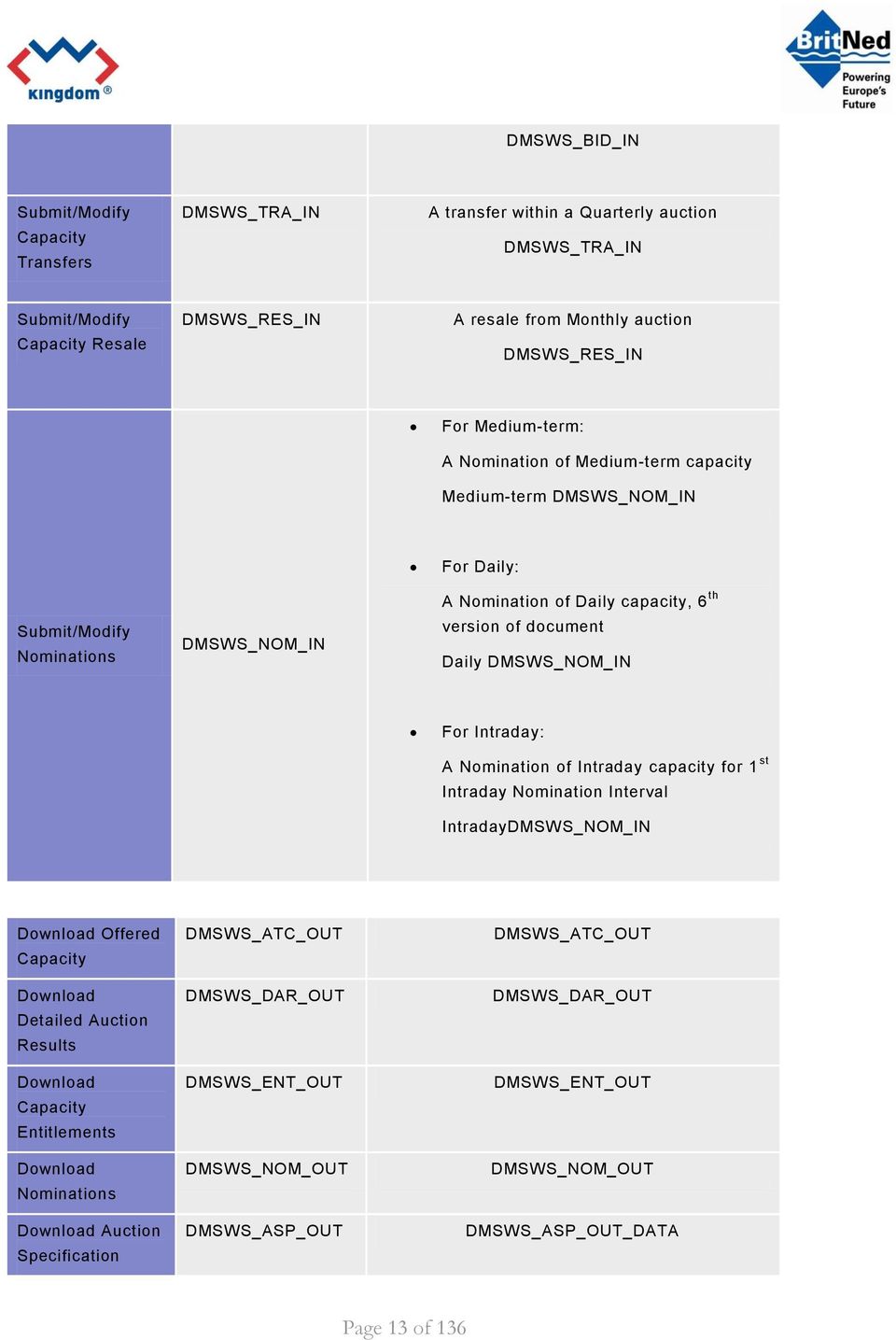
14 DMSWS_ASP_OUT Download Auction State DMSWS_STA_OUT DMSWS_STA_OUT_DATA DMSWS_STA_OUT Download Resales Compensations DMSWS_RWP_OUT DMSWS_RWP_OUT_DATA DMSWS_RWP_OUT Download UIOSI Compensations DMSWS_UWP_OUT DMSWS_UWP_OUT_DATA DMSWS_UWP_OUT Download Curtailment Compensations DMSWS_CWP_OUT DMSWS_CWP_OUT_DATA DMSWS_CWP_OUT Download Actual Date and Time Download Reserve Price GETDATETIME DMSWS_RPR_OUT DMSWS_GETDATETIME DMSWS_RPR_OUT_DATA DMSWS_RPR_OUT Download Medium-term POP DMSWS_POP_OUT DMSWS_POP_OUT_DATA DMSWS_POP_OUT Download Invoicing Data DMSWS_INV_OUT DMSWS_INV_OUT_DATA DMSWS_INV_OUT Download Nominations at GB end DMSWS_ANO_OUT DMSWS_ANO_OUT_GB Download Nominations at NL end (E-Program) DMSWS_ANO_OUT DMSWS_ANO_OUT_NL Page 14 of 136

15 2. 3. Replace sample username and password according to chapter Security 4. Modify the value in tag <wsu:expires> to be in future, otherwise the message would be rejected by server 5. Before any implementation try to send the message using some tool like SoaMoa (free tool used to send SOAP messages to WS, for details please see APPENDIX C Configuration of SOAMOA tool). This will ensure you have a valid SOAP message. After you have completed successfully the initial step ensuring you have valid request message you can continue with implementation of web service client providing the same type of message as created manually before. If this all has been done successfully, the authentication may be extended with client certificate see chapter Web Service Security. Then the HTTPS access using SSL is required. The next step is the implementation of additional necessary actions (i.e. sending bids or nominations, etc.) which are similar to the basic one. In case of need, you can implement also asynchronous call using actions RunAsychrous and CheckRQResult SOAP The structure of the SOAP message is implemented according to the SOAP 1.1 specification recommended by W3C ( /) SOAP Message The SOAP message implemented in the Kingdom system consists of the SOAP header and body. UTF-8 encoding is required for all SOAP messages passed into the Kingdom system. All outgoing messages are UTF-8 encoded as well. The SOAP header contains information that is essential for user authorization, such as the user's login name and password. <soap:header> <!-- WSS Security Header --> </soap:header> Page 15 of 136

16 WSS Security Header contains security tokens necessary to authenticate sender and check message integrity. These tokens are user credentials. For details of WSS Security see Chapter Web Services Security. The body of SOAP message includes the element, which contains the input/output parameter class. The element name is derived from the name of the web service that is used. <soap:body> <WebServiceName xmlns=" Input/Output Parameters </WebServiceName> </soap:body> For details of WSS Security, Header, see Chapter Web Services Security Input Parameters The parameter class defined for input parameters: <Input> <FID>FID</FID> <Parameters> <XXXParam Name="param_name1">param_val1</XXXParam> <XXXParam Name="param_name2">param_val2</XXXParam> <XXXParam Name="param_nameN">param_valN</XXXParam> </Parameters> </Input> The highlighted parameter shall be replaced by values according to the following rules: Parameter Type Description Note FID String Identification of dataflow. See chapter dataflows. XXXParam Element name of the parameter represents its data type. For overview of supported data types see table below. Unique for each data flow. Depends on the data flow. param_namex String Name of the data flow input parameter Depends on the data flow. param_valx String, Number, Date The list of input parameter data types: Value of the data flow input parameter Depends on the data flow. Page 16 of 136

17 Data type element name Corresponding XSD type Example BooleanParam xs:boolean True DateParam xs:date DateTimeParam xs:datetime T09:30:10Z DecimalParam xs:decimal IntParam xs:int 999 StringParam xs:string TEXT XmlParam Any XML node tree (corresponds to <xs:any> XSD element). Any XML node Elements with data flow input parameters (XXXParam) must be alphabetically ordered by their type names (that is <BooleanParam> elements come first, <DateParam> elements come second etc.) Output Parameters The parameter class defined for output parameters: <Output> <RQID>RQID</RQID> <Result>resultXML</Result> <RQState> <Code>RQState_Code</Code> <Description>RQState_Description</Description> </RQState> </Output> The highlighted parameter shall be replaced by values according to the following rules: Parameter Type Description Note RQID Number Unique identification of the asynchronous request in the Kingdom system resultxml String Contains the result of a request RQState_Code, String Code of state of the request. (For list of possible codes see Chapter SOAP CheckRQResultResponse). Depends on the data flow; see the data flows description For snychronous requests the RQState_Code value is always COMPLETED Page 17 of 136

18 RQState_Description String Description of state the request Error Handling Errors returned by the Kingdom web services interface are divided into two basic groups: Business errors These errors originate in business control algorithms and express that imported business data violates business rules. This applies only to input data flows (see Chapter Data Flows for Sending Data). These errors are returned in form of Acknowledgement as standard output of data flow (see Chapter Output Parameters) and therefore are not subject of this chapter. System errors These errors represent non-business faults. This includes user authentication errors, bad format of SOAP xml, input parameters etc. These errors should be handled by client applications. System errors are listed below. Errors are distributed to the client by using <soap:fault> element, as defined in SOAP/1.1 specification (see /#_Toc ). Detailed information about error is carried in the <Error> element (see example of SOAP fault below): <soap:fault> <faultcode>faultcode</faultcode> <faultstring>faultstring</faultstring> <detail> <e:error xmlns:e=" <ErrID>errID</ErrID> <ErrDescr>errDescr</ErrDescr> <ErrXML>errXML</ErrXML> </e:error> </detail> </soap:fault> The highlighted parameter shall be replaced by values according to the following rules: Parameter Type Description Note faultcode String The code of the error as specified in SOAP/1.1. faultstring String The description of the error as specified in SOAP/1.1. erred Number The identification number of the error. See List of Standard Errors Page 18 of 136

19 for more information. errdescr String The short description of the error. See List of Standard Errors for more information. errxml XML Additional debug information not intedned to process by client applications. The <e:error> element doesn t have to be present in the Fault message. It is present only for errors with faultcode of value soap:client or soap:server (see link for details on faultcode). Errors resulting from the sender's identity and message integrity checks are returned to the client application according to the WSS standard (see Chapter Error Handling). List of Standard Errors: Error ID Error Description Fault Code -130 User is not authorized for the requested data stream. soap:client -501 Date is invalid. soap:client -502 Unknown entity code. It concerns EIC codes describing parties soap:client -506 Unknown Control Area code. soap:client -507 Not existing auction with the specified code soap:client -508 Unknown or invalid capacity type code. soap:client -510 Data flow with requested FID does not exist. soap:client -512 Invalid XML format. soap:client Errors occurred during XSD validation of submitted data XML Invalid data flow input parameters soap:client -514 Internal server error soap:server -515 Requested data has not been published yet. soap:client -516 Requested date range is not valid soap:client -517 Asynchronous request does not exist soap:client -518 Requested operation is not permitted for this data flow soap:client -520 User is not authorized to access data of another entity. soap:client Page 19 of 136

20 -521 OutArea (InArea) must be existing code. soap:client -522 Specified aread do not specify a border direction or the border direction is invalid soap:client -523 Not existing or invalid nomination capacity type code soap:client -524 The final curtailment compensations are not available for all the selected delivery days. Please, note that the final curtailment compensations for any delivery day of a month (M) are evaluated in the subsequent month (M+1). soap:client 3.7. WSDL This part of document contains the description of all web services provided by the Kingdom system as an interface for automatic communication with other system Synchronous Request This web service ensures the synchronous exchange of commercial data with the Kingdom system SOAP RunSynchrous The SOAP request format for establishing a synchronous request in the Kingdom system POST /wse/damasservice.asmx HTTP/1.1 Host: kingdom-test.unicorn.eu or kingdom.unicorn.eu Content-Type: text/xml; charset=utf-8 Content-Length: length SOAPAction: " <?xml version="1.0" encoding="utf-8"?> <soap:envelope xmlns:xsi=" xmlns:xsd=" xmlns:soap=" xmlns:wsa=" > <soap:header> <!-- WSS Security Header --> </soap:header> <soap:body> <RunSynchrous xmlns=" <Input> <FID>FID</FID> <Parameters> <XXXParam Name="param_name1">param_val1</XXXParam> <XXXParam Name="param_name2">param_val2</XXXParam> Page 20 of 136
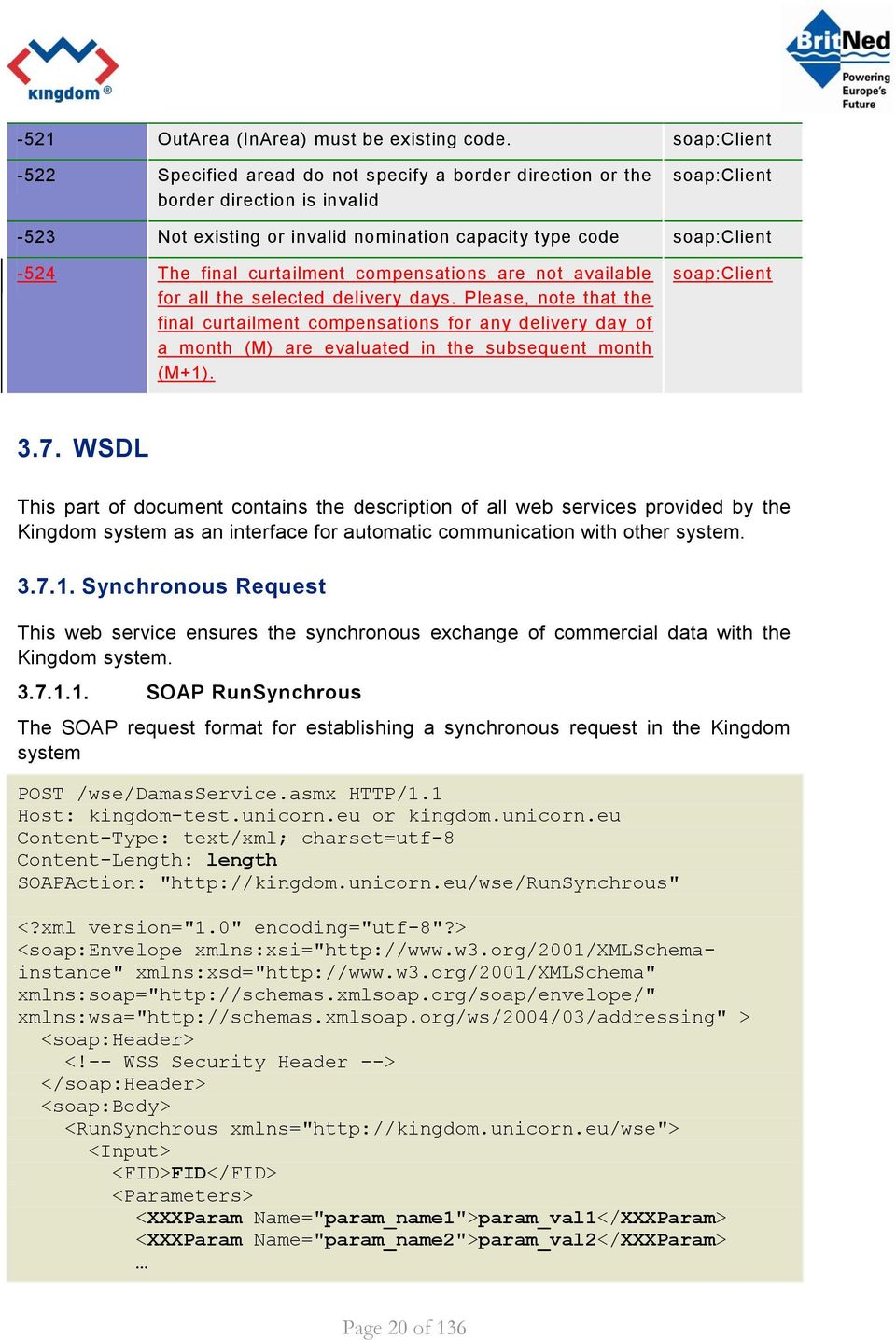
21 <XXXParam Name="param_nameN">param_valN</XXXParam> </Parameters> </Input> </RunSynchrous> </soap:body> </soap:envelope> SOAP RunSynchrousResponse The SOAP response format with the result of a synchronous request returned from the Kingdom system: HTTP/ OK Content-Type: text/xml; charset=utf-8 Content-Length: length <?xml version="1.0" encoding="utf-8"?> <soap:envelope xmlns:xsi=" xmlns:xsd=" xmlns:soap=" xmlns:wsa=" > <soap:header> <!-- WSS Security Header --> </soap:header> <soap:body> <RunSynchrousResponse xmlns=" <Output> <RQID>-1</RQID> <Result>resultXML</Result> <RQState> <Code> COMPLETED </Code> <Description> The request is completed. </Description> </RQState> </Output> </RunSynchrousResponse> </soap:body> </soap:envelope> For details of WSS Security, Header, see Chapter Web service security. Note that <RQID> element in this case contains -1 (id of request is not returned for synchronous requests). Page 21 of 136
22 Asynchronous Request This web service ensures the asynchronous exchange of commercial data with the Kingdom system. The methods RunSynchrous and RunAsynchrous use almost identical formats of the SOAP request and response. Asynchrounous call is used for uploading larger XML (more than 2 timeseries) SOAP RunAsynchrous The SOAP request format for establishing an asynchronous request in the Kingdom system POST /wse/damasservice.asmx HTTP/1.1 Host: kingdom-test.unicorn.eu or kingdom.unicorn.eu Content-Type: text/xml; charset=utf-8 Content-Length: length SOAPAction: " <?xml version="1.0" encoding="utf-8"?> <soap:envelope xmlns:xsi=" xmlns:xsd=" xmlns:soap=" xmlns:wsa=" > <soap:header> <!-- WSS Security Header --> </soap:header> <soap:body> <RunAsynchrous xmlns=" <Input> <FID>FID</FID> <Parameters> <XXXParam Name="param_name1">param_val1</XXXParam> <XXXParam Name="param_name2">param_val2</XXXParam> <XXXParam Name="param_nameN">param_valN</XXXParam> </Parameters> </Input> </RunAsynchrous> </soap:body> </soap:envelope> SOAP RunAsynchrousResponse The SOAP response format with the result of an asynchronous request returned from the Kingdom system HTTP/ OK Content-Type: text/xml; charset=utf-8 Content-Length: length <?xml version="1.0" encoding="utf-8"?> Page 22 of 136
23 <soap:envelope xmlns:xsi=" xmlns:xsd=" xmlns:soap=" xmlns:wsa=" > <soap:header> <!-- WSS Security Header --> </soap:header> <soap:body> <RunAsynchrousResponse xmlns=" <Output> <RQID>RQID</RQID> <Result/ > <RQState> <Code> REGISTERED </Code> <Description> The request is registered for execution. </Description> </RQState> </Output> </RunAsynchrousResponse> </soap:body> </soap:envelope> For details of WSS Security, Header, see Chapter Web service security. Note that <Result> element is in this case empty (or missing); the result is not available at this moment, only ID of asynchronous request is returned (RQID). You can check the request result later by calling CheckRQResult method (see Chapter Asynchronous Request State for details) Asynchronous Request State This web service returns the status of an asynchronous request that is being processed in the Kingdom system. The asynchronous request is identified by request id which can be obtained by calling RunAsynchrous method (see Chapter Asynchronous Request) SOAP CheckRQResult The SOAP request format for downloading the status of an asynchronous request from the Kingdom system POST /wse/damasservice.asmx HTTP/1.1 Host: kingdom-test.unicorn.eu or kingdom.unicorn.eu Content-Type: text/xml; charset=utf-8 Content-Length: length SOAPAction: " <?xml version="1.0" encoding="utf-8"?> Page 23 of 136
24 <soap:envelope xmlns:xsi=" xmlns:xsd=" xmlns:soap=" xmlns:wsa=" > <soap:header> <!-- WSS Security Header --> </soap:header> <soap:body> <CheckRQResult xmlns=" <RQID>RQID</RQID> </CheckRQResult> </soap:body> </soap:envelope> For details of WSS Security, Header, see Chapter Web service security. Note that highlighted item RQID must be replaced with ID of existing asynchronous request SOAP CheckRQResultResponse The SOAP response format with the status of an asynchronous request returned from the Kingdom system HTTP/ OK Content-Type: text/xml; charset=utf-8 Content-Length: length <?xml version="1.0" encoding="utf-8"?> <soap:envelope xmlns:xsi=" xmlns:xsd=" xmlns:soap=" xmlns:wsa=" > <soap:header> <!-- WSS Security Header --> </soap:header> <soap:body> <CheckRQResultResponse xmlns=" <Output> <RQID>RQID</RQID> <Result>resultXML</Result> <RQState> <Code>RQState_Code</Code> <Description>RQState_Description</Description> </RQState> </Output> </CheckRQResultResponse> </soap:body> </soap:envelope> Page 24 of 136
25 For details of WSS Security, Header, see Chapter Web service security. Element <RQState> contains information about state of asynchronous request. The following table contains overview of possible request states: Code Description Note REGISTERED The asynchronous request is registered for execution. COMPLETED The asynchronous request is completed. <Result> element is empty, you should check request state later. <Result> element is fil led with result of asynchronous request. RUNNING ERROR The asynchronous request is not completed. Error occurred while running an asynchronous request. <Result> element is empty, you should check request state later. Internal server error occurred, in this case you should contact the system administrator Current Date and Time This web service returns the current system date and time that is important for automatic operations carried out by the system. This service is also accessible via RunSynchrous web service as data flow with id GETDATETIME SOAP GetActualDateTime The SOAP request format for downloading the current date and time from the Kingdom system POST /wse/damasservice.asmx HTTP/1.1 Host: kingdom-test.unicorn.eu or kingdom.unicorn.eu Content-Type: text/xml; charset=utf-8 Content-Length: length SOAPAction: " <?xml version="1.0" encoding="utf-8"?> <soap:envelope xmlns:xsi=" xmlns:xsd=" xmlns:soap=" xmlns:wsa=" > <soap:header> <!-- WSS Security Header --> </soap:header> <soap:body> <GetActualDateTime xmlns=" /> </soap:body> </soap:envelope> Page 25 of 136
26 SOAP GetActualDateTimeResponse The SOAP response format with the current date and time returned from the Kingdom system HTTP/ OK Content-Type: text/xml; charset=utf-8 Content-Length: length <?xml version="1.0" encoding="utf-8"?> <soap:envelope xmlns:xsi=" xmlns:xsd=" xmlns:soap=" xmlns:wsa=" > <soap:header> <!-- WSS Security Header --> </soap:header> <soap:body> <GetActualDateTimeResponse xmlns=" <Output> <RQID>-1</RQID> <Result>resultXML</Result> <RQState> <Code> COMPLETED </Code> <Description> The request is completed. </Description> </RQState> </Output> </GetActualDateTimeResponse> </soap:body> </soap:envelope> Page 26 of 136
27 4. WEB SERVICE SECURITY 4.1. General Description Security Secure communication is an integral part of securing your distributed application to protect sensitive data, including credentials, passed to and from your application. Applications sharing sensitive business data among several different organizations across Internet bring up challenges associated with a robust mechanism for keeping confidentiality of exchanged information based on world-wide encryption standards PKI Infrastructure Encryption translates data from an intelligible format to an unintelligible one. Decryption is the process in reverse. Confidentiality is achieved if encrypted data can be decrypted only by the intended reader. To achieve this goal in a scenario covering many organizations, the most proper way is using asymmetric encryption. Asymmetric encryption uses public and private key pairs. Data becomes confidential when the sender encrypts it with the public key of the intended recipient and the receiver decrypts it with a private key. Rules and methods concerning working with public and private keys defines public key infrastructure (PKI) In the public key infrastructure, a subject (that is, an entity) whose identity is of significant value is assigned a pair of cryptographic keys. The public key is published to the general public. The private key is secret, known only to the assigned. The relationship between these two keys is such that data encrypted by one key can be decrypted only by the corresponding key. It is almost impossible to obtain the private key from the public key. Certificates are used to ensure the validity of public keys. Key management is simple as long as the public key is certifiable by a reputable certificate authority (CA) Digital Signature In a paper document, a signature ensures the integrity of the document and the authenticity of the author or signer. This is because a signature is unique to the signer. In essence, signature serves to ensure data integrity, authenticity, and nonrepudiation in the process of data exchange. Similarly, digital signature ensures authenticity, integrity, and non-repudiation for an electronic document. Digital signature relies on the public key infrastructure (PKI), in which an electronic document is uniquely bound to the signer by means of the encryption and decryption of a thumbprint (digest or hash) of the document. This encryption and decryption is accomplished using a pair of public and private keys. To sign data, the signer digests the data, encrypts it with a private key, and attaches the encrypted digest value to the data. To verify the signature, the verifier uses the Page 27 of 136
28 signer's public key to decrypt the encrypted digest value attached to the data. The verifier then compares this decrypted digest value with the digest value computed on the companion data. It is important that both the signer and the verifier use the same hash function to digest the data. Commonly used methods to produce digital signatures include RSA and DSA algorithms Kingdom Security Model The Kingdom security model is built upon a system of user accounts. For each user who wants to use system services, a user account must be created first, with the following security elements assigned: 1. Username and password; 2. X509 certificate required for signing messages sent to the system; 3. X509 certificate required for establishing the SSL communication. The certificate for establishing the SSL communication can (but does not have to) be the same as the certificate used to sign outgoing messages. These certificates are issued for a particular person.. All data sent to the Kingdom must be electronically signed using the certificate assigned to the user account. The Kingdom web service interface security is implemented in accordance with the Web Services Security standard (see Based on this standard, the following security issues are addressed: 1. Signing SOAP requirements/responses; 2. Transferring credentials (username and password) in SOAP requirements; 3. Encrypted communication is ensured by the HTTPS (HTTP over SSL) protocol. Because of this fact, SOAP requirements/responses are not encrypted further, using the procedures described in the WSS specification SOAP Request Preparation In addition to web service input parameters, the SOAP request also includes authentication data of the Kingdom user account SOAP Request Description The SOAP request format with the user authentication information: Page 28 of 136
29 <soap:envelope xmlns:xsi=" xmlns:xsd=" xmlns:soap=" xmlns:wsse=" wss-wssecurity-secext-1.0.xsd" xmlns:wsu=" wss-wssecurity-utility-1.0.xsd" xmlns:wsa=" <soap:header> <wsa:action>kingdom_soap_method </wsa:action> <wsa:to>http_addressing_url</wsa:to> <wsse:security soap:mustunderstand="1"> <wsse:usernametoken xmlns:wsu=" 1.0.xsd" wsu:id="username_token_id"> <wsse:username>username</wsse:username> <wsse:password Type=" open.org/wss/2004/01/oasis wss-username-token-profile- 1.0#PasswordText">password_hash</wsse:Password> <wsse:nonce>nonce_value</wsse:nonce> <wsu:created>utc_datetime</wsu:created> </wsse:usernametoken> </wsse:security> </soap:header> <soap:body wsu:id="soap_body_id"> <RunSynchrous xmlns=" <!-- Input parameters comes here --> </RunSynchrous> </soap:body> </soap:envelope> Description of <wsa:to> element This element contains addressing point in Kingdom infrastructure. XML Element To Description Testing environment: Production environment Description of <wsa:action> element This element defines SOAP action name. It contains name of SOAP method depends whether synchronous or asynchronous mode is used, if the user requests Page 29 of 136
30 the asynchronous request result or if the user is requesting for the actual date and time. XML Element Action Description Description of <wsse:security> element According to the WSS all security tokens are included in the wsse:security element. This element is a part of the SOAP header and consists of the following items: User authentication information (username and password) Description of <wsse:usernametoken> element This element contains the username and password assigned to the relevant Kingdom user account. XML Element Username Password Password/@Type Nonce Created Description Login name for Kingdom system user account Password for Kingdom system user account. Password is not transferred directly, but rather its MD5 hash is transferred encoded in BASE64 format. Type of used UsernameToken; must be always " open.org/wss/2004/01/oasis wss-username-token-profile- 1.0#PasswordText. This element must be filled with a random value. This value is used as countermeasure against replay attacks. Server maintains a cache of used nonces. When client tries to use the same nonce more than once, the server will raise SOAP fault. Nonce value must be BASE64 encoded. Date and time of Nonce creation. Nonces older than 10 minutes are automatically rejected. Date and time must be in UTC time. (Example: T09:30:10Z) SOAP Response Parsing The server SOAP response is not signed using the digital certificate. Unlike in the SOAP request, no authentication data of the Kingdom user account are transferred in this case. Page 30 of 136
31 SOAP Response Description The SOAP response format: <soap:envelope xmlns:xsi=" xmlns:xsd=" xmlns:soap=" xmlns:wsse=" wss-wssecurity-secext-1.0.xsd" xmlns:wsu=" wss-wssecurity-utility-1.0.xsd"> <soap:header> <wsse:security soap:mustunderstand="1"> </wsse:security> </soap:header> <soap:body wsu:id="soap_body_id"> <RunSynchrousResponse xmlns=" <!-- Output parameters come here --> </RunSynchrousResponse> </soap:body> </soap:envelope> The provided example is similar to the request example from Chapter SOAP Request Description. For detailed description of each element, see Chapter SOAP Request Description. SOAP response differs from SOAP request in following points: Credentials are not sent back to the client element <wsse:usernametoken> or the whole <soap:header> element is missing Error Handling Errors resulting from the sender's identity and message integrity checks are returned to the client application according to the WSS standard (see Chapter Error Handling). Page 31 of 136
32 5. DATA FLOWS This chapter provides description of all data flows for downloading and uploading data from/to the Kingdom system. The summary overview of input and output data flows is presented in the first part. The second part of the chapter deals with a detailed definition of data flows. Each data flow is described in detail, with input and output parameters explained List of Data Flows The following table shows the various data flows that are available for uploading data into the Kingdom system. The user types allowed to use the data flows are indicated in the User column in the overview below.. Sending data to the Kingdom system Data Flows FID Description User Submit/Modify Auction Bids DMSWS_BID_IN Enables uploading of mediumterm, daily and intraday bids. Bids are being uploaded per auction, and per Trader. Trader, Auction Manager XML Bid Document Submit/Modify Capacity Transfers DMSWS_TRA_IN Enables uploading of mediumterm, daily, and intraday capacity transfers. Trader, Auction Manager XML Rights Document Submit/Modify Capacity Resales DMSWS_RES_IN Enables uploading of explicit resales from medium-term auction to a subsequent medium-term auction. Trader, Auction Manager XML Rights Document Submit/Modify Nominations DMSWS_NOM_IN Sending medium-term, daily, intraday nominations for LT, D, or ID timescale, per Nominator. XML Schedule Message Nominator, Nomination Manager The following tables show various data flows available for downloading data from the Kingdom system. The user types allowed to use the data flows are indicated in the User column in the overview below. Page 32 of 136
33 Downloading data from the Kingdom system Data Flows FID Description User Download Actual Date and Time GETDATETIME Downloading the current date and time in the Kingdom system. ICO, Trader, Nominator, Auction Manager No particular XML system data flow. Download Offered Capacity DMSWS_ATC_OUT Enables Downloading the Offered Capacity values for a specific daily or intraday auction. ICO, Trader, Auction Manager Input parameters: Auction ID XML Capacity Document Download Detailed Auction Results DMSWS_DAR_OUT Enables downloading detailed auction results of individual auctions (mediumterm, daily, intraday) per auction and Trader. Trader, Auction Manager Input parameters: Auction ID Trader. XML Allocation Result Document Download Capacity Entitlements DMSWS_ENT_OUT Enables downloading capacity entitlements per delivery day, border direction, Nominator and Trader. Nominator is able to select some ICO, Auction Manager, Trader, Nominator Page 33 of 136
34 or all related Traders. Delivery Day OutArea InArea Nominator Trader XML Rights Document Download Nominations DMSWS_NOM_OUT Downloading nominations for a delivery day, a border and a Nominator. Data are not aggregated. Nominator, Nomination Manager Input parameters: Delivery Day OutArea InArea Nominator XML Schedule Message Download Auction Specification DMSWS_ASP_OUT Enables downloading the specifications of auctions corresponding to a certain delivery date, border direction and contract type. Trader, Auction Manager, ICO Download Auction State DMSWS_STA_OUT Enables downloading the status of the specified auction. Trader, Auction Manager, ICO Download Resale Compensations DMSWS_RWP_OUT Allows the user to get Resale compensation details for the resale auctions the product of which covers at Trader, Auction Manager, ICO Page 34 of 136
35 least part of the specified period, for a specific border direction (or both) and a capacity type. Download UIOSI Compensations DMSWS_UWP_OUT Allows the user to get UIOSI compensation details per day of a specified period, for a specific border direction (or both) and capacity type (daily or intraday). Trader, Auction Manager, ICO The UIOSI details will contain the compensations information for resold non-nominated capacity, as well as the information for compensated not resold non-nominated capacity (if any). Download Curtailment Compensations DMSWS_CWP_OUT Allows the user to get Curtailment compensation details for all curtailments of capacity or nominations that happened during delivery days included within a specified period for a specified border direction (or both) Trader, Auction Manager, ICO Download Reserve Price DMSWS_RPR_OUT Allows the user to download Reserve Price for Medium-term auction Trader, Auction Manager, ICO Input parameters: Auction ID Download Medium-term OC and Planned Outage DMSWS_POP_OUT Allows the user to download Medium-term Trader, Auction Page 35 of 136
36 Periods OC and Planned Outage Periods for Medium-term auction Input parameters: Auction ID Manager, ICO Download Invoicing Data DMSWS_INV_OUT Allows the user to download Invoices for invoicing period, a border direction and a Trader. Trader, Auction Manager, ICO Input parameters: InvPeriod Trader OutArea InArea 5.2. Data Flows for Sending Data Delivery of values to the Kingdom system is automatically confirmed and the sender is immediately informed about the processing result. The processing results are delivered as a single response message which includes an Acknowledgement to the request and the results from the processing of the request Submit/Modify Auction Bids It enables submitting/modifying bids for medium-term, daily, and intraday auctions into the Kingdom system Description This data flow enables uploading the XML Bid Document with medium-term, daily, and intraday auctions. The resolution P1D is used for medium-term auctions. For daily and intraday auctions is used PT60M. The XML file contains one or more capacity time series with appropriate number of values for every auction bid. Bids can be submitted to the medium-term, daily, and intraday auction before the gate closure for bids submitting on the given border Input Parameters The list of input parameters: Page 36 of 136
37 Name Type Description Note FID DMSWS_BID_IN XML XmlParam XML Bid Document with capacity timeseries. See Bid Document definition. It is possible to send medium-term, daily, intraday bids for one auction Output Parameters The user receives an Acknowledgement message as a response confirming the data delivery and describing processing results Business Validations The following business validations are performed when uploading Auction Bids: 1. Logged user must be authorized to send data (i.e. sending user must have an operator or manager role or in case of Trader the user s party must correspond to the SenderIdentification Element) 2. In case of updating existing bids, new version of bid document must contain all bids from the previous version (bids are identified by Bid ID) 3. The DocumentType must be A24 (Bids) 4. The document must contain bids only to one auction 5. The document must contain bids only for one participant 6. The provided document version must be higher than the last accepted document s version 7. The provided time interval must be in a correct format 8. The document must contain at least one timeseries 9. Only one period is allowed in time series 10. Auction participant must exist in the system 11. Auction participant must be allowed to send bids to the specified auction 12. In and Out Area elements must specify an existing border direction 13. Bids to only one border direction are allowed in the document 14. Specified auction must exist 15. Auction must be operated by Kingdom 16. Auction must be held for the given border direction 17. Auction must be in the state for submitting bids 18. There must be at least one non-zero capacity specified for new diagrams Page 37 of 136
38 19. Maximum number of bids for the auction participant must not be exceeded 20. Measurement unit quantity element s value must be MAW 21. Measurement unit price element s value must be MWH 22. Currency element s value must be EUR 23. Number of days/hours must correspond with the time interval specified 24. The resolution must be PT60M (for daily and intraday bids) or P1D for medium-term bids 25. The bids must be specified as divisible (i.e. the value of Divisible element must be A01) 26. The bids must not be specified as block (i.e. the value of BlockBid element must be A02) 27. The Time series identification must be unique in the document 28. The auction participant s credit limit must not be exceeded 29. The bid amount must be non-negative integer 30. The bid price must be non-negative decimal number with 2 decimal positions 31. Zero bid price must be used when bid amount is zero 32. The non-zero bid amount must be greater than the auction s minimum bid amount allowed 33. The bid amount must be lower than the auction s maximum bid amount allowed 34. The bid amount capacity must not exceed the auction s ATC Validations performed only for Daily and Intraday bids: 35. The bids are allowed only for one delivery day 36. Bids must match the block product defined for auction 37. Bids for the block product must have equal values Validations performed only for Medium-term bids: 38. The bids price and capacity must be the same for all days Submit/Modify Capacity Transfers It enables submitting/modifying the Capacity Transfers for Medium-term, Daily or Intraday auction for a delivery day and a border direction into the Kingdom system Description This data flow enables uploading of the XML Rights Document with Medium-term, Daily or Intraday capacity Transfers for one or more business days and a border Page 38 of 136
39 direction to Kingdom system. The resolution PT60M is used. The XML file contains one or more capacity timeseries with 24 (23, 25) values for every delivery day, and a border direction. In case there is a clock change day inside the Transfer Time Interval, the interval must be split into the multiple documents to define the clock change day independently. Capacity Transfers can be submitted relative to the Medium-term, Daily or Intraday auction for delivery day before the gate closure on the respective border Input Parameters The list of input parameters: Name Type Description Note FID DMSWS_TRA_IN XML XmlParam XML Rights Document with capacity (i.e. capacity to be transferred) timeseries. See Rights Document definition. It is possible to send capacity transfers for one or more delivery days, one border direction and one auction Output Parameters The user receives an Acknowledgement message as a response confirming the data delivery and describing processing results Business Validations The following business validations are performed when uploading Transfers: 1. The Document Type element must have the value A21 (transfers) 2. The provided document version must be higher than the last accepted document s version 3. Only one timeseries is allowed for the whole document. For Medium-Term Transfers the time interval may be longer than one delivery day. 4. If the document identification already exists in the system, it must contain the same time series as provided (i.e. the existing transfer update) 5. The rights holder and the transferee must exist in the system 6. In and Out Area elements must specify an existing border direction 7. The Business Type must be A32 capacity transfer notification 8. For daily and intraday transfers the time interval must specify only one delivery day 9. The time interval must be in the correct format 10. Number of values must correspond with the time interval specified Page 39 of 136
40 11. The user must be allowed to send data (i.e. having the correct system role or correspond to the Sender Identification element) 12. Transfer must be performed between two different subjects (i.e. Rights Holder must be different from the Transferee) 13. The system must be in state for entering transfers 14. The Rights Holder must be an auction participant (i.e. not the ICO user) 15. At least one of the values must be non-zero 16. Capacity curtailment must not be in progress 17. Transfer with the same time series identification (transfer ID) must not exist for the same Rights Holder unless the existing transfer ID belongs to the same document (i.e. transfer updating) 18. Existing Transfers in unconfirmed state may be updated. 19. The first part of the Contract Identification element s value must correspond to the Rights Holder (the second part specifies the source auction) 20. The specified auction must exist in the system 21. The transferred capacity must be a non-negative integer 22. The rights holder must have enough capacity to be transferred Submit/Modify Capacity Resales It enables submitting/modifying explicit Capacity Resales of a Medium-term capacity to a subsequent Medium-term auction into the Kingdom system Description This data flow allows sending of the XML Rights Document with explicit Capacity Resales of a medium-term capacity to a subsequent medium-term auction to Kingdom system. The resolution P1D is used. The XML file contains one capacity Timeseries with appropriate number of values for a given auction. Capacity Resales can be submitted relative to the Medium-term auction before gate closure on a given border Input Parameters The list of input parameters: Name Type Description Note FID DMSWS_RES_IN XML XmlParam XML Rights Document with capacity (i.e. capacity to be resold) timeseries. See Rights Document definition. It is possible to send explicit Capacity Resale for one border direction and one given source and target auction. Page 40 of 136
41 Output Parameters The user receives an Acknowledgement message as a response confirming the data delivery and describing processing results Business Validations The following business validations are performed when uploading Resales: 1. The Document Type element must have the value A19 (resales) 2. The provided document version must be higher than the last accepted document s version 3. Only one timeserie is allowed for the whole document 4. If the document identification already exists in the system, it must contain the same time series as provided (i.e. the existing transfer update) 5. The time intervals in the document must be in the correct format 6. The document s time interval must correspond with the time serie s time interval 7. The user must be allowed to send data (i.e. having the correct system role or correspond to the Sender Identification element) 8. The Business Type must be A32 capacity transfer notification 9. The rights holder must exist in the system 10. Out and In area must exist in the system and must specify an existing border direction 11. The specified Capacity Contract Type must exist in the system 12. The target auction (element Auction Identification) must exist 13. The source auction (its ID is parsed from the Contract Identification element) must exist 14. The subject EIC code parsed from the Contract Identification element must correspond with the Rights Holder 15. The specified contract type must correspond with the source auction type 16. The specified resolution must be P1D (one day) 17. The number of values must correspond with the time interval 18. All values must be the same for the whole time interval 19. Resale with the same time series identification (resale ID) must not exist for the same Rights Holder unless the existing resale ID belongs to the same document (i.e. resale updating) 20. The update of resale is allowed only for unconfirmed resale (ie. not cancelled or confirmed) 21. The source auction must have its results already published Page 41 of 136
42 22. Trader may submit resale until the target auction is in state Capacity Resale Opened. Auction Manager may do it before the Medium-term Auction and OC has been published. 23. The target auction interval must be contained in the source auction interval 24. The resales entering must be allowed for the source auction in the Auction Configuration Register 25. Capacity curtailment must not be in progress 26. Source and target auction products must be compatible 27. All values must be non-negative integers 28. The rights holder must have enough capacity to be resold Submit/modify Nominations It enables submitting/modifying the nominations into the Kingdom system Description This data flow enables sending of the XML Schedule Message with nominations for a delivery day and a border direction. The following resolutions, PT30M, PT60M, PT1H, are supported. The XML file contains Timeseries in case of PT60M or PT1H with 24 (23, 25) values or in case of PT30M with 48 (46, 50) values for every delivery day, border direction and nomination type. Nominators are allowed to submit nominations on border directions with explicit nominations. They can submit nomination on one or more counterparts according to market rules on particular border direction and capacity type. Nominations on Medium-term capacity are allowed before gate closure for Medium-term nominations. Nominations on Daily capacity are allowed before gate closure for Daily nominations. Nominations on Intraday capacity are allowed before the respective gate closures for Intraday nominations Input Parameters The list of input parameters: Name Type Description Note FID DMSWS_NOM_IN XML XmlParam XML Schedule Message with schedule time series. See Schedule Message definition Output Parameters The user receives an Acknowledgement message as a response confirming the data delivery and describing processing results. Page 42 of 136
43 Business Validations The following business validations are performed when uploading Nominations: 1. The system must be in state of entering or modifying nominations 2. The specified time interval must be in a correct format. 3. All used time intervals in the document must be the same 4. All days in the specified time interval must have the same number of hours 5. In and Out Area must specify an existing border direction 6. The user must be allowed to send data (i.e. having the correct system role or correspond to the Sender Identification element) 7. In case of a new nomination, any TimeSeriesIdentification can be used, provided it is unique. 8. In case of a new nomination, if the TimeSeriesIdentification value is -1, then a random ID is created by Kingdom and associated to the nomination. The TimeseriesIdentification generated by Kingdom will have to be used in case of update of the nomination. 9. The specified Capacity Contract Type must exist in the system 10. The In Party, Out Party and the CapacityAgreementIdentification (Trader) elements must contain existing EIC codes 11. The In and Out Party must form an existing Nomination Couple 12. In the document and in the system must not exist any nomination with the same configuration (delivery day, capacity type, border direction, N, counterpart and T) unless we are updating an existing nomination 13. The number of values must correspond with the specified Period and hours of the day 14. The values must be non-negative integers 15. The nominating user must have enough capacity to nominate 16. The capacity type and the border direction must correspond with the settings in the Nomination Configuration register 17. In case of an existing nomination update, the sender can revise the Nominated Capacity values (i.e. it is forbidden to change the border direction, any of the Parties, capacity type and the delivery day) 18. The values must be the same in one hour (e.g. when using the PT30M resolution) 19. It is not allowed to submit or modify nominations during curtailment process Page 43 of 136
44 5.3. Data Flows for Data Download Download Offered Capacity It enables downloading Offered Capacity values for daily and intraday auctions from Kingdom Description This data flow enables downloading of the XML Capacity Document containing hourly Offered Capacity values. The XML file contains offered capacity for the selected auction. The resolution PT60M is used for daily and intraday auctions. The XML file contains one schedule with appropriate number of values for a given auction. The web service is accessible to ICO users, Auction Managers and Traders. These users are entitled to download the same data. It is possible to download Offered Capacity after published Offered Capacity for the particular auctions. The Offered capacity of the Medium-term auctions is accessible using the Chyba! Nenalezen zdroj odkazů Input Parameters The list of input parameters: Name Type Description Note FID DMSWS_ATC_OUT parameter AuctionID StringParam Auction identification of the individual auction. parameter An example of input parameters: <Input> <FID>DMSWS_ATC_OUT</FID> <Parameters> <StringParam Name="AuctionID">NLGB-DH </StringParam> </Parameters> </Input> Input Validations The following validations are being performed for the input parameters: 1. The parameter AuctionID must contain Daily or Intraday Auction registered in Kingdom Page 44 of 136
45 Output Parameters The offered capacity is received in the XML Capacity Document (see Appendix B) Download Nominations Downloading nominations for a given delivery day, a Nominator, and a border direction from the Kingdom system Description Downloading the XML Schedule Message with nominations for a given delivery day, all border directions and all capacity types. The resolution PT30M is used. The XML file can contain 2 multiple time series with 48 (46, 50) values for each delivery day, Nominator, both border directions and capacity. The web service is accessible to Nomination Manager, and Nominators. A Nominator is entitled to download only nominations submitted by the Nominator Input Parameters The list of input parameters: Name Type Description Note FID DMSWS_NOM_OUT parameter Date DateParam Delivery day in format YYYY- MM-DD OutArea StringParam First Control Area defining the border in combination with InArea. This input must be 10YNL L InArea StringParam Second Control Area defining the border in combination with OutArea. This input must be 10Y1001A1001A58E Subject StringParam EIC code of one Nominator. Possibly all Nominators may be selected parameter parameter See List of Control Areas. parameter See List of Control Areas. parameter Nominations of all Nominators will be downloaded when the Subject parameter is empty (this feature is available only for Auction manager or ICO). An example of input parameters: <Input> Page 45 of 136
46 <FID>DMSWS_NOM_OUT</FID> <Parameters> <DateParam Name="Date"> </DateParam> <StringParam Name="OutArea">10YNL L</StringParam> <StringParam Name="InArea">10Y1001A1001A58E</StringParam> <StringParam Name="Subject">10X--TRADER01--- </StringParam> </Parameters> </Input> Input Validations The following validations are being performed for the input parameters: 1. The parameter Date must be in format YYYY-MM-DD 2. OutArea must contain valid EIC code from the list of Control Areas 3. InArea must contain valid EIC code from the list of Control Areas 4. The combination of OutArea and InArea must be valid Kingdom Border Direction (NL-GB) 5. Subject must contain EIC code of Nominator registered in Kingdom Output Parameters Capacity nominations are received in the XML Schedule Message (see Appendix B) Download Capacity Entitlements It enables downloading Medium-term, Daily and Intraday capacity entitlements for a delivery day, a border directions and a capacity type from the Kingdom system Description Downloading the XML Rights Document with hourly values of medium-term, daily and intraday capacity entitlements for given delivery day, border directions, Nominator and a Trader. The resolution PT60M is used. The XML file can contain multiple time series of 24 (23, 25) values for each Trader. The web service is accessible to Nominator and Trader users. A Nominator is allowed to download capacity entitlements of all related Traders. ICO is allowed to download data for relevant border. Auction Manager is allowed to download all capacity entitlements. A Trader is entitled to download only own capacity entitlements Input Parameters The list of input parameters: Page 46 of 136
47 Name Type Description Note FID DMSWS_ENT_OUT parameter Date DateParam Delivery day in format YYYY-MM-DD OutArea StringParam First Control Area defining the border in combination with InArea. InArea StringParam Second Control Area defining the border in combination with OutArea. parameter parameter See List of Control Areas. parameter See List of Control Areas. Nominator StringParam EIC of Nominator. parameter Entitlements of all Nominators will be downloaded when the Subject parameter is empty (this feature is available only for Auction manager or ICO). Trader StringParam EIC of Trader. parameter Entitlements of all Traders will be downloaded when the Subject parameter is empty (this feature is available only for Auction manager, ICO or Nominator). An example of input parameters: <Input> <FID>DMSWS_ENT_OUT</FID> <Parameters> <DateParam Name="Date"> </DateParam> <StringParam Name="OutArea">10YNL L</StringParam> <StringParam Name="InArea">10Y1001A1001A58E</StringParam> <StringParam Name="Nominator">10X--TRADER02--- </StringParam> <StringParam Name="Trader">10X--TRADER01--- </StringParam> </Parameters> </Input> Page 47 of 136
48 Input Validations The following validations are being performed for the input parameters: 1. The parameter Date must be in format YYYY-MM-DD 2. OutArea must contain valid EIC code from the list of Control Areas 3. InArea must contain valid EIC code from the list of Control Areas 4. The combination of OutArea and InArea must be valid Kingdom Border Direction (GB-NL or NL-GB) 5. Nominator must contain EIC code of Nominator registered in Kingdom 6. Trader must contain EIC code of Trader registered in Kingdom and assigned to Nominator Output Parameters The entitlements are received in the XML Rights Document (see Appendix B) Download Detailed Auction Results Download results of the individual Intraday, Daily and Medium-term auctions per Trader from the Kingdom system, Description Download the XML Allocation Result Document with hourly values of detailed auction results from a given auction. The resolution P1D is used for Medium-term auctions. For Daily and Intraday auctions is used PT60M. The XML file can contain multiple timeseries of an appropriate number of values for a given auction for each Trader. Planned Outage periods and Medium-term auction products are not reflected for Medium-term auctions. The web service is accessible to ICO users, Auction Manager and Trader. An ICO is allowed to download data for relevant border. A Trader is entitled to download the auction results from his/her participation in Auction. If a Trader has not participated in an Auction, the resulting XML file will contain no timeseries Input Parameters The list of input parameters: Name Type Description Note FID DMSWS_DAR_OUT parameter AuctionID StringParam AuctionID identification of the individual auction. parameter Trader StringParam EIC of Trader. parameter An example of input parameters: Page 48 of 136
49 <Input> <FID>DMSWS_DAR_OUT</FID> <Parameters> <StringParam Name="AuctionID">GBNL-A </StringParam> <StringParam Name="Trader">10X--TRADER01---</StringParam> </Parameters> </Input> Input Validations The following validations are being performed for the input parameters: 1. The parameter AuctionID must contain Auction registered in Kingdom 2. Trader must contain EIC code of Trader registered in Kingdom Output Parameters Transmission capacities are received in the XML Allocation Result Document (see Appendix B) Download Auction Specification Downloading the specification of auctions corresponding to the given set of input parameters Description Download the XML Auction Specification Document. The XML contains important information about auctions: Auction ID, Border direction, Auction Type, Auction Period and the capacity offered in the auction. For daily and intraday auctions the PT60M resolution is used, for medium-term auctions the resolution is P1D, P1M, P3M, P6M and P1Y for weekly, monthly, quarterly, seasonal and annual auctions respectively. The XML can contain as many Auction Time Series as many auctions correspond to the input parameters Input Parameters The list of input parameters: Name Type Description Note FID DMSWS_ASP_OUT parameter DateFrom DateParam Delivery day in format YYYY-MM-DD parameter Lower bound for the auction period. parameter Page 49 of 136
50 DateTo DateParam Delivery day in format YYYY-MM-DD OutArea StringParam First Control Area defining the border direction in combination with InArea. InArea StringParam Second Control Area defining the border in combination with OutArea. Periodicity StringParam ESS code of the required auction type parameter Upper bound for the auction period. parameter parameter See List of Control Areas. parameter parameter See List of Control Areas. parameter parameter See the list of Capacity Contract Types. parameter. An example of the input parameters: <Input> <FID>DMSWS_RWP_OUT</FID> <Parameters> <DateParam Name="DateFrom"> </DateParam> <DateParam Name="DateTo"> </DateParam> <StringParam Name="OutArea">10YNL L</StringParam> <StringParam Name="InArea">10Y1001A1001A58E</StringParam> <StringParam Name="Periodicity">A01</StringParam> </Parameters> </Input> Input Validations The following validations are being performed for the input parameters: 1. The parameter DateFrom must be in format YYYY-MM-DD 2. The parameter DateTo must be in format YYYY-MM-DD 3. OutArea must contain valid EIC code from the list of Control Areas 4. InArea must contain valid EIC code from the list of Control Areas 5. The combination of OutArea and InArea must be valid Kingdom Border Direction (GB-NL or NL-GB) 6. The Periodicity must contain valid ESS code from the list of Capacity Types Page 50 of 136
51 Output Parameters Auction specifications are received in the XML Auction Specification Document (see Appendix B) Download Auction State Description Download of the information about the current state of the specified auction. Possible auction states are as follows: State code Description Z01 Z02 Z03 Z04 Z05 Z06 Z07 Z08 Z09 Z10 Z11 Scheduled Capacity Resales Opened Capacity Resales Closed Entering of Intraday Offered Capacity Offered Capacity Published Auction Bids Opened Auction Bids Closed Preliminary Results Final Results Finished Cancelled Z12 Not available Note: Z12 is not a normal auction state. It serves for fallback purposes only and can appear only in case of some error or inconsistency Input Parameters The list of input parameters: Name Type Description Note FID DMSWS_STA_OUT parameter AuctionID StringParam Unique identification of the required auction. parameter An example of the input parameters: <Input> <FID>DMSWS_STA_OUT</FID> example: NLGB-A Page 51 of 136
52 <Parameters> <StringParam Name="AuctionID">NLGB-M </StringParam> </Parameters> </Input> Input Validations The following validations are being performed for the input parameters: 1. The parameter AuctionID must contain Auction registered in Kingdom Output Parameters The auction state is delivered in XML Auction Information (see Appendix B) Download Resale Compensations Downloading the resales compensation details for the resale auctions the product of which is (at least partially) covered by the specified time interval for the specified border direction and capacity type Description The XML can contain multiple time series for more capacity traders or more capacity types (depending on the parameters values). Each time serie contain information about the Rights Holder, Capacity Type, Source and Target auction. The capacity resolution is P1D, P1M, P3M, P6M and P1Y for weekly, monthly, quarterly, seasonal and annual auctions respectively. The returned Qty XML element value contains the value computed as a multiple of the total number of hours of the target auction and the resold capacity. The value of the Price XML element is the target auction price. The XML provides the similar functionality and information as the Resales Overview web form. The web service is accessible to ICO users, Auction Manager and Trader. A Trader is entitled to download only his own resales Input Parameters The list of input parameters: Name Type Description Note FID DMSWS_RWP_OUT parameter DateFrom DateParam Delivery day in format YYYY- MM-DD DateTo DateParam Delivery day in format YYYY- MM-DD Subject StringParam EIC code of the Rights Holder. Multiple Rights parameter parameter parameter Page 52 of 136
53 Holders may be selected Resales compensations information for all Rights Holders will be downloaded when the Subject parameter is empty (this feature is available only for Auction manager (AM) or ICO). AM or ICO may also specify a list of EIC codes separated by commas. Trader may use only his own EIC code OutArea StringParam First Control Area defining the border direction in combination with InArea. InArea StringParam Second Control Area defining the border in combination with OutArea. parameter See List of Control Areas. Optional parameter. Non-specified OutArea is declared using -1 or empty value. parameter See List of Control Areas. Optional parameter (mandatory if OutArea is used). Nonspecified InArea is declared using -1 or empty value. CapacityType StringParam ESS code of the required capacity type parameter See the list of Capacity Contract Types. The value Z06 (Medium-term) may be used to retreive all resale auction types. parameter. The data is considered intermediate and it is user s responsibility to ensure the timing of the request is relevant. In case the data are required only for one capacity trader (rights holder) the time interval is limited to 366 days otherwise the time interval is limited to 31 days. If no border direction is specified, data for both border directions will be provided. Page 53 of 136
54 An example of the input parameters: <Input> <FID>DMSWS_RWP_OUT</FID> <Parameters> <DateParam Name="DateFrom"> </DateParam> <DateParam Name="DateTo"> </DateParam> <StringParam Name="Subject">10X--TRADER01---</StringParam> <StringParam Name="OutArea">10YNL L</StringParam> <StringParam Name="InArea">10Y1001A1001A58E</StringParam> <StringParam Name="CapacityType">A04</StringParam> </Parameters> </Input> Input Validations The following validations are being performed for the input parameters: 1. The parameter DateFrom must be in format YYYY-MM-DD 2. The parameter DateTo must be in format YYYY-MM-DD 3. The parameter Subject must contain EIC code of the Trader registered in Kingdom 4. OutArea must contain valid EIC code from the list of Control Areas 5. InArea must contain valid EIC code from the list of Control Areas 6. The combination of OutArea and InArea must be valid Kingdom Border Direction (GB-NL or NL-GB) 7. The CapacityType must contain valid ESS code from the list of Capacity Types Output Parameters The Resales compensations are delivered in XML Rights Document (see Appendix B) Download UIOSI Compensations Downloading the UIOSI compensation details per day of a specified period, for a specified border direction (or both) and capacity type (Medium-term or Daily) Description The UIOSI details will contain the compensations information for resold nonnominated capacity, as well as the information for compensated not resold nonnominated capacity (if any). Every type of the UIOSI compensations is in one particular time serie The XML can contain multiple time series for more capacity traders, capacity types or delivery days. Page 54 of 136
55 Input Parameters The list of input parameters: Name Type Description Note FID DMSWS_UWP_OUT parameter DateFrom DateParam Delivery day in format YYYY- MM-DD DateTo DateParam Delivery day in format YYYY- MM-DD Subject StringParam EIC code of the Trader. Multiple Capacity traders may be selected parameter parameter parameter UIOSI compensations information for all Traders will be downloaded when the Subject parameter is empty (this feature is available only for Auction manager (AM) or ICO). AM or ICO may also specify a list of EIC codes separated by commas. Trader may use only own EIC code OutArea StringParam First Control Area defining the border direction in combination with InArea. InArea StringParam Second Control Area defining the border in combination with OutArea. parameter See List of Control Areas. Optional parameter. Non-specified OutArea is declared using -1 or empty value. parameter See List of Control Areas. Optional parameter (mandatory if OutArea is used). Nonspecified InArea is declared using -1 or empty value. CapacityType StringParam ESS code of the required parameter Page 55 of 136
56 capacity type Page 56 of 136 See the list of Capacity Contract Types. Only A01 (Daily) or Z06 (Medium-term) values are relevant. Optional parameter. Non-specified CapacityType is declared using -1 or empty value. The data is considered intermediate and it is user s responsibility to ensure the timing of the request is relevant. The time interval is limited to 31 days. If no border direction is specified, data for both border directions will be provided. If no CapacityType is specified, data for both relevant capacity types (i.e. Mediumterm and Daily) will be provided. An example of the input parameters: <Input> <FID>DMSWS_UWP_OUT</FID> <Parameters> <DateParam Name="DateFrom"> </DateParam> <DateParam Name="DateTo"> </DateParam> <StringParam Name="Subject">10X--TRADER01---</StringParam> <StringParam Name="OutArea">10YNL L</StringParam> <StringParam Name="InArea">10Y1001A1001A58E</StringParam> <StringParam Name="CapacityType">A01</StringParam> </Parameters> </Input> Input Validations The following validations are being performed for the input parameters: 1. The parameter DateFrom must be in format YYYY-MM-DD 2. The parameter DateTo must be in format YYYY-MM-DD 3. The parameter Subject must contain EIC code of the Trader registered in Kingdom 4. OutArea must contain valid EIC code from the list of Control Areas 5. InArea must contain valid EIC code from the list of Control Areas 6. The combination of OutArea and InArea must be valid Kingdom Border Direction (GB-NL or NL-GB) 7. The Periodicity must contain valid ESS code from the list of Capacity Types Output Parameters The UIOSI Compensations are delivered in XML Rights Document (see Appendix B).
57 Download Curtailment Compensations Downloading the Curtailment compensation details for all the curtailments of capacity/nominations that happened during delivery days included within a specified period for a specified border direction (or both) Description The Curtailment details will contain the compensations information for all types of curtailments. Every type of the Curtailment compensations is defined in separate Timeseries. The XML can contain multiple Timeseries for more capacity traders, capacity types or delivery days Input Parameters The list of input parameters: Name Type Description Note FID DMSWS_CWP_OUT parameter DateFrom DateParam Delivery day in format YYYY- MM-DD DateTo DateParam Delivery day in format YYYY- MM-DD Subject StringParam EIC code of the Trader. Multiple Capacity traders may be selected parameter parameter parameter Compensations information for all Traders will be downloaded when the Subject parameter is empty (this feature is available only for Auction manager (AM) or ICO). AM or ICO may also specify a list of EIC codes separated by commas. Trader may use only own EIC code OutArea StringParam First Control Area defining the border direction in combination with InArea. InArea StringParam Second Control Area defining the border in combination with parameter See List of Control Areas. Non-specified OutArea is declared using -1 or empty value. parameter See List of Control Areas. Page 57 of 136
58 OutArea. Non-specified InArea is declared using -1 or empty value. The data is considered intermediate and it is user s responsibility to ensure the timing of the request is relevant. An example of the input parameters: <Input> <FID>DMSWS_CWP_OUT</FID> <Parameters> <DateParam Name="DateFrom"> </DateParam> <DateParam Name="DateTo"> </DateParam> <StringParam Name="Subject">10X--TRADER01---</StringParam> <StringParam Name="OutArea">10YNL L</StringParam> <StringParam Name="InArea">10Y1001A1001A58E</StringParam> </Parameters> </Input> Input Validations The following validations are being performed for the input parameters: 1. The parameter DateFrom must be in format YYYY-MM-DD 2. The parameter DateTo must be in format YYYY-MM-DD 3. The parameter Subject must contain EIC code of the Trader registered in Kingdom 4. OutArea must contain valid EIC code from the list of Control Areas 5. InArea must contain valid EIC code from the list of Control Areas 6. The combination of OutArea and InArea must be valid Kingdom Border Direction (GB-NL or NL-GB) 7. The Periodicity must contain valid ESS code from the list of Capacity Types 8. The time interval is limited to 31 days. 9. If no border direction is specified, data for both border directions will be provided Output Parameters The Curtailment Compensations are delivered in XML Rights Document (see Appendix B) Download Current Date and Time Downloading the current date and time from the Kingdom system Page 58 of 136
59 Description Downloading the current date and time from the Kingdom system; this web service is accessible to all users Input Parameters The list of input parameters: Name Type Description Note FID GETDATETIME parameter An example of input parameters: <Input> <FID>GETDATETIME</FID> <Parameters/> </Input> Output Parameters The current date and time in the Kingdom system is received. Time is in form of Coordinated Universal Time (UTC) Download Reserve Price Description Download the information on Reserve Price for a given Auction, provided Reserver Price is available for the specified Auction Input Parameters The list of input parameters: Name Type Description Note FID DMSWS_RPR_OUT parameter AuctionID StringParam Unique identification of the required auction. parameter example: NLGB-A An example of the input parameters: <Input> <FID>DMSWS_RPR_OUT</FID> <Parameters> <StringParam Name="AuctionID">NLGB-M </StringParam> </Parameters> Page 59 of 136
60 </Input> Input Validations The following validations are being performed for the input parameters: 1. The parameter AuctionID must contain Auction registered in Kingdom Output Parameters The reserved price definition is delivered in XML Reserve Price Information (see Appendix B) Download Medium-term Offered Capacity and Planned Outage Periods Description Download the information on Offered Capacity and defined Planned Outage Periods (POP) for a given Medium-term auction Input Parameters The list of input parameters: Name Type Description Note FID DMSWS_POP_OUT parameter AuctionID StringParam Unique identification of the required Medium-term auction. parameter example: NLGB-A An example of the input parameters: <Input> <FID>DMSWS_POP_OUT</FID> <Parameters> <StringParam Name="AuctionID">NLGB-M </StringParam> </Parameters> </Input> Input Validations The following validations are being performed for the input parameters: 1. The parameter AuctionID must contain Auction registered in Kingdom Output Parameters The POP is delivered in XML POP Information (see Appendix B) Download Invoicing Data Download the Invoicing data details for a given Invoicing Period (calendar month). Page 60 of 136
61 Description The result will contain Invoicing Data for selected Invoicing Period, border direction and Trader for particular capacity and invoicing types Input Parameters The list of input parameters: Name Type Description Note FID DMSWS_INV_OUT parameter InvPeriod StringParam Format YYYYMM parameter Subject StringParam EIC code of the Trader. Multiple Capacity traders may be selected parameter Information for all Traders will be downloaded when the Subject parameter is empty (this feature is available only for Auction manager (AM) or ICO). AM or ICO may also specify a list of EIC codes separated by commas. Trader may use only own EIC code OutArea StringParam First Control Area defining the border direction in combination with InArea. InArea StringParam Second Control Area defining the border in combination with OutArea. parameter See List of Control Areas. Non-specified OutArea is declared using -1 or empty value. parameter See List of Control Areas. Non-specified InArea is declared using -1 or empty value. If no border direction is specified, data for both border directions will be provided. An example of the input parameters: <Input> <FID>DMSWS_INV_OUT</FID> <Parameters> <StringParam Name="InvPeriod">201005</StringParam> <StringParam Name="Subject">10X--TRADER01---</StringParam> <StringParam Name="OutArea">10YNL L</StringParam> <StringParam Name="InArea">10Y1001A1001A58E</StringParam> </Parameters> Page 61 of 136
62 </Input> Input Validations The following validations are being performed for the input parameters: 2. The parameter InvPeriod must be in format YYYYMM 3. The parameter Subject must contain EIC code of the Trader registered in Kingdom 4. OutArea must contain valid EIC code from the list of Control Areas 5. lnarea must contain valid EIC code from the list of Control Areas 6. The combination of OutArea and InArea must be valid Kingdom Border Direction (GB- NL or NL-GB) Output Parameters The Invoicing Data are delivered in XML Invoices Document (see Appendix B) Download Nominations at GB end Description The web service is accessible to Users, Admin and ICO. Users are entitled to download data, which are available for them on Aggregated Nominations Overview for transformation Nominations at GB end Input Parameters The list of input parameters: Name Type Description Note FID DMSWS_ANO_OUT parameter Subject StringParam EIC code of one Nominator. Possibly all Nominators may be selected Date DateParam Delivery day in format YYYY- MM-DD OutArea StringParam First Control Area defining the border in combination with InArea. parameter Nominations of all Nominators will be downloaded when the Subject parameter is empty (this feature is available only for Auction manager or ICO). parameter parameter Page 62 of 136
63 InArea StringParam Second Control Area defining the border in combination with OutArea. parameter Nomination Type StringParam It defines the capacity type. The possible values include: parameter Z06 - Medium-term A01 - Daily A07 - Intraday Z21 - Balancing Energy Z22 - Emergency program emergency assistance Z23 - Emergency program push-button Z24 - Emergency program intertripping Z25 - Other SO-SO Trades Transformation StringParam It defines what transformation is required to download. parameter Possible values for parameter (transformation) include: Z02 - Nominations at GB end An example of input parameters: <Input> <FID>DMSWS_ANO_OUT</FID> <Parameters> <DateParam Name="Date"> </DateParam> <StringParam Name="OutArea">10YNL L</StringParam> <StringParam Name="InArea">10Y1001A1001A58E</StringParam> <StringParam Name="Subject">10X--TRADER01---</StringParam> <StringParam Name="NominationType">A03</StringParam> <StringParam Name="Transformation">Z03</StringParam> </Parameters> </Input> Input Validations The following validations are being performed for the input parameters: 6. The parameter Date must be in format YYYY-MM-DD 7. OutArea must contain valid EIC code from the list of Control Areas Page 63 of 136
64 8. InArea must contain valid EIC code from the list of Control Areas 9. The combination of OutArea and InArea must be valid Kingdom Border Direction (GB- NL or NL-GB) 10. Subject must contain EIC code of Nominator registered in Kingdom 11. The parameter Nomination Type must be within possible values and User must have User Rights to choose it 12. Transformation must be within Z02 Z Output Parameters The Aggregated Nominations data are delivered in XML Schedule message in version V3R3. Note: See Example in Appendix B Download Nominations at NL end (E-Program) Description The web service is accessible to Users, Admin and ICO. Users are entitled to download data, which are available for them on Aggregated Nominations Overview for transformation Nominations at NL end (E-Program) Input Parameters The list of input parameters: Name Type Description Note FID DMSWS_ANO_OUT parameter Subject StringParam EIC code of one Nominator. Possibly all Nominators may be selected Date DateParam Delivery day in format YYYY- MM-DD OutArea StringParam First Control Area defining the border in combination with InArea. parameter Nominations of all Nominators will be downloaded when the Subject parameter is empty (this feature is available only for Auction manager or ICO). parameter parameter Page 64 of 136
65 InArea StringParam Second Control Area defining the border in combination with OutArea. parameter Nomination Type StringParam It defines the capacity type. The possible values include: parameter Z06 - Medium-term A01 - Daily A07 - Intraday Z21 - Balancing Energy Z22 - Emergency program emergency assistance Z23 - Emergency program push-button Z24 - Emergency program intertripping Z25 - Other SO-SO Trades Transformation StringParam It defines what transformation is required to download. parameter Possible values for parameter (transformation) include: Z03 - Nominations at NL end (E-Program) An example of input parameters: <Input> <FID>DMSWS_ANO_OUT</FID> <Parameters> <DateParam Name="Date"> </DateParam> <StringParam Name="OutArea">10YNL L</StringParam> <StringParam Name="InArea">10Y1001A1001A58E</StringParam> <StringParam Name="Subject">10X--TRADER01---</StringParam> <StringParam Name="NominationType">A03</StringParam> <StringParam Name="Transformation">Z03</StringParam> </Parameters> </Input> Input Validations The following validations are being performed for the input parameters: 1. The parameter Date must be in format YYYY-MM-DD 2. OutArea must contain valid EIC code from the list of Control Areas Page 65 of 136
66 3. InArea must contain valid EIC code from the list of Control Areas 4. The combination of OutArea and InArea must be valid Kingdom Border Direction (GB- NL or NL-GB) 5. Subject must contain EIC code of Nominator registered in Kingdom 6. The parameter Nomination Type must be within possible values and User must have User Rights to choose it 7. Transformation must be within Z02 Z Output Parameters The Aggregated Nominations data are delivered in XML Schedule message in version V3R3. Note: See Example in Appendix B. Page 66 of 136
67 6. XSD SCHEMAS This part of the document provides a detailed technical description of all XSD schemas used in the Kingdom system. Each XSD description contains a model of the XSD schema structure, a detailed description of the schema and an explanation of the meaning of all XSD elements. Examples of XML files are attached to the document List of XSD Schemas Entsoe XSD Schemas Web Service ID Description Name of XSD Schema DMSWS_ATC_OUT DMSWS_BIDS_IN DMSWS_DAR_OUT DMSWS_ENT_OUT DMSWS_TRA_IN DMSWS_RES_IN DMSWS_NOM_OUT DMSWS_NOM_IN Result of Input WS The Capacity Document is used for downloading Offered Capacity values. The Bid Document is used for sending bids into Medium-term, Daily and Intraday auctions. The Allocation Result Document is used for downloading Auction Results. The Rights Document is used for downloading Capacity Entitlements. The Rights Document is used for uploading Capacity Transfers. The Rights Document is used for uploading Capacity Resales. The Schedule Message is used for downloading Medium-term, Daily and Intraday Nominations. The Schedule Message is used for uploading Medium-term, Daily and Intraday Nominations. The acknowledgement document is used for acknowledging receptions of bids, transfers, resales and nominations. Capacity Document Bid Document Allocation Result Document Rights Document Rights Document Rights Document Schedule Message Schedule Message Acknowledgement Document DMSWS_RWP_OUT The Rights Document is used for Rights Document Page 67 of 136
68 DMSWS_UWP_OUT DMSWS_CWP_OUT downloading Resales Compensations. The Rights Document is used for downloading UIOSI Compensations. The Rights Document is used for downloading Curtailment Compensations. Rights Document Rights Document Kingdom specific XSD schemas Web Service ID Description Name of XSD Schema DMSWS_ASP_OUT DMSWS_STA_OUT DMSWS_RPR_OUT DMSWS_POP_OUT DMSWS_INV_OUT The Auction Specification document is used for downloading Auction Specification. The Auction Information document is used for downloading Auction State. The Reserve Price Information is used for downloading Reserve Price for MT Auction. The MT Information Document is used for downloading Medium-term OC and POP. The Invoicing Document is used for downloading Data. Auction Specification Document Auction Information Document Reserve Price Information Document MT Information Document Invoicing Document 6.2. Description of Entsoe XSD Schemas All XSD Schemas described below are based on the Entso standards Capacity Document Capacity Document Description The Capacity Document is used for transferring the Offered Capacity values. The structure of the XML file is divided into two parts. The header element of the Capacity Document contains primary information about the message, such as the message identification, message type and current time, and is used for storage of EIC codes of the sender and the recipient of the message. The OutArea and InArea elements are used for definition of the border direction. The Period element defines the time period where the Offered Capacity is valid. The period type is distinguished Page 68 of 136
69 by element Period Type as whole period of the auction. Offered Capacity values are stored in element Qty. The Period element defines the delivery day for which the values are entered and its time resolution.the XML file with resolution PT60M contains schedules with 24 values (23 when switching from winter time to summer time, 25 when switching from summer time to winter time). In case of 25, the addition hour is inserted in the right position inside of diagram and the remaining hourly values are shifted up. The XML file with resolution P1D contains schedules with an appropriate number of values for a given auction Specification of Capacity Document Elements The list of XML elements included in the Capacity Document element Element Description Values Applicability Document Identification The unique identification of the document for which the time series data is being supplied. The Naming convention is: <DocumentType>_ <AuctionID> Document Version The version of the document being sent. Version Number is always 1. Document Type The coded type of the document being sent. A31 (Agreed capacity) Used for Offered Capacity. Process Type The nature of the process that the document is directed at. A07 (Capacity Allocation) Used for Offered Capacity. Sender Identification Identification of the party who is sending the document. 10X1001A1001A58S A01 (ETSO) coding scheme. Sender Role Identification of the role that is played by the sender. A18 (Grid operator). Receiver Identification Identification of the party who is receiving the document. EIC code of the receiver. A01 (ETSO) coding scheme. Receiver Role Identification of the role played by the receiver. A29 (Trader) Used for downloading Offered Capacity. Creation Date Time And Date and time of the creation of the document. UTC coding. Format: Page 69 of 136
70 YYYY-MM-DDTHH:MM:SSZ Capacity Time Interval The beginning and ending date and time of the period covered by the document. One delivery day for CAS, CBS files. UTC coding. Format: YYYY-MM-DDTHH:MMZ/ YYYY-MM-DDTHH:MMZ For daily auction Interval contains one delivery day. On both border directions CET time zone is used. The schedule time interval must be from 22:00 to 22:00 UTC in summer time and 23:00 to 23:00 UTC in wintertime. Domain The identification of the domain that is covered in the Capacity Document. Domain identifies the ICO concerned in the time series. EIC code of Domain. A01 (ETSO) coding scheme. The used Domain is 10YDOM- 1001A0028 Capacity Time Series Time series containing schedule. Optional The list of XML elements included in the Capacity Time Series element: Element Description Values Applicability Time Series Identification Sender s identification of the time series instance that uniquely identifies the Capacity time series. String. Business Type Identifies the nature of the time series for which the product is handled. A31 (Offered Capacity) Product Identification of an energy product (Active power). In Area The identification of the destination area of the border direction. EIC code of destination control area. A01 (ETSO) coding scheme. Out Area The identification of the source area of the border direction. EIC code of source control area. A01 (ETSO) coding scheme. Measurement Unit The unit of measure which is applied to the quantities in which the time series is MAW (Mega watt). Page 70 of 136
71 expressed. Auction Identification The unique identification of the set of specifications that clearly identify the auction to which the capacity is addressed. String. Period The list of XML elements included in the Period element: Element Description Values Applicability Time Interval The start and end date and time of the time interval of the period. UTC coding. Format: The same rules as for Schedule Time Interval. YYYY-MM-DDTHH:MMZ/ YYYY-MM-DDTHH:MMZ Resolution The resolution defining the number of periods that the time interval is divided. P1D for Medium-term auctions PT60M for Daily and Intraday auctions Interval Time period interval. The list of XML elements included in the Interval element: Element Description Values Applicability Pos The relative position of a period within a time interval. Non-signed integer value. Qty The quantity of the product scheduled for the position within the time interval. Non-signed integer value. Capacity Document Example An example of Capacity Document with Offered Capacity for daily auction (downloaded by auction participant for and border direction GB-NL): <CapacityDocument xmlns=" DtdVersion="3" DtdRelease="1"> <DocumentIdentification v="a13_gbnl-dh "/> <DocumentVersion v="1"/> Page 71 of 136
72 <DocumentType v="a13"/> <ProcessType v="a07"/> <SenderIdentification v="10x1001a1001a58s" codingscheme="a01"/> <SenderRole v="a07"/> <ReceiverIdentification v="10x1001a1001a58s" codingscheme="a01"/> <ReceiverRole v="a29"/> <CreationDateTime v=" t10:59:47z"/> <CapacityTimeInterval v=" t22:00z/ T22:00Z"/> <Domain v="10ydom-1001a0028" codingscheme="a01"/> <CapacityTimeSeries> <TimeSeriesIdentification v="1"/> <BusinessType v="a26"/> <Product v=" "/> <InArea v="10ynl l" codingscheme="a01"/> <OutArea v="10y1001a1001a58e" codingscheme="a01"/> <MeasureUnit v="maw"/> <AuctionIdentification v="gbnl-dh "/> <Period> <TimeInterval v=" t22:00z/ T22:00Z"/> <Resolution v="pt60m"/> <Interval> <Pos v="1"/> <Qty v="60"/> </Interval>... <Interval> <Pos v="24"/> <Qty v="60"/> </Interval> </Period> </CapacityTimeSeries> </CapacityDocument> Bid Document Bid Document Description The Bid Document is used for submitting bids to medium-term (annual, seasonal, quarterly, monthly, weekly), daily and intraday auctions. The data format is compliant with ECAN v4r0 and CodeList v6r4. Bid Document Bid Document contains a set of all bids for one Trader and one auction. Bid is represented by a time series. Primary information on the bid document, such as the identification and version, the sender's and recipient's identification and the creation time, are included in the header of the message. Page 72 of 136
73 Each Trader may send only one such document for auction and modifies bids by uploading new versions of this document. This document must always contain all already submitted bids in previous version. For cancellation of the bid/bids, it is necessary to send given bid/bids with zero values of requested capacity. If capacity is not requested in some hour, the requested capacity and offered price will be equal to zero in this hour. Bid Time Series Each auction bid is stored in the BidTimeSeries element and is described by its unique identification, source and target area, auction identification and the auction participant for which the capacity is requested. The Bid Identification is the unique identification of the bid for a given auction identification. All bids are divisible. Linked bids and block bids are not used. The auction period and the resolution are specified in the Period element. There could be only one period class for a time series. The time interval covered with period class must be equal to the bid time interval. For submitting bids to the auction, the system elements Qty and Price must be populated with the bid amount and the bid price. The daily resolution is used for medium-term auction. The hourly resolution is used for daily and intraday auction; i.e. XML file with resolution PT60M containing 24 values (23 when switching from winter time to summer time, 25 when switching from summer time to winter time) is used for daily and intraday auction. Rules for Versions The version is defined for Auction Participant and auction. The rules for increasing version for medium-term auction bids: If the set of bids for Auction Participant is entered via Medium-term Auction Bid web form and all business validations Check of Medium-term Auction Bid are successful, the version is increased for set of bids for given auction and Auction Participant. If the set of bids for Auction Participant is uploaded as XML Bid Document via Medium-term Bid Upload (XML) web form or web services and all business validations Check of Medium-term Auction Bid and validations of XML Bid Document are successful, the version of document is stored as new version of bid set for given auction and Auction Participant. The rules for increasing version for daily auction bids: If one bid is entered via web form Daily Auction Bids and all business validations Check of Daily Auction Bid are successful, the version is increased for set of bids for given auction and Auction Participant. If the set of bids for Auction Participant is uploaded as XML Bid Document via Daily Bids Upload (XML) web form or web services and all business validations Check of Daily Auction Bid and validations of XML Bid Document Page 73 of 136
74 are successful, the version of document is stored as new version of bid set for given auction and Auction Participant. The rules for increasing version for intraday auction bids: If one bid is entered via web form Intraday Auction Bid and all business validations Check of Intraday Auction Bid are successful, the version is increased for set of bids for given auction and Auction Participant. If the set of bids for Auction Participant is uploaded as XML Bid Document via Intraday Bids Upload (XML) web form or web services and all business validations Check of Intraday Auction Bid and validations of XML Bid Document are successful, the version of document is stored as new version of bid set for given auction and Auction Participant Bid Elements Description The list of XML elements included in the Bid Document element: Element Description Values Applicability String with 35 characters. The recommended naming convention is: <DocumentType>_<Part yid>_<auctionid> <DocumentType> - A24. Document Identification The unique identification of the document for which the time series data is being supplied. The document name must be the same for all document transmission. <PartyID> - EIC of auction participants. <AuctionID> - The naming convention of auction is described in Medium-term Auction Module. Only last part with auction ID will be used (whole auction identification is too long). If the first bid is created via web form (before sending first XML document), the document identification will be automatically created by system. The Trader must use this document identification Page 74 of 136
75 in uploaded XML files. Document identification will be displayed in message attachment with processing results. Document Version The version of the document being sent. Each transmission being identified by a different version number that starts at 1 and increases sequentially. Non-signed integer value. If at least one bid is modified or added, the document version will be increased. The initial value is 1. Version of provided XML Bid Document for given Trader and auction must be higher than previous accepted version. Otherwise, document will be rejected. Document version will be displayed in message attachment with processing results. Document Type The coded type of the document being sent. A24 Bid document. Sender Identification Identification of the party who is sending the document. A01 (ETSO) coding scheme. EIC code of market participant. Sender Role Identification of the role that is played by the sender. A29 (Trader) For submitting bids. Receiver Identification Identification of the party who is receiving the document. 10X1001A1001A58S EIC code of the receiver. A01 (ETSO) coding scheme. Receiver Role Identification of the role played by the receiver. A18 (Transmission capacity allocator) For submitting bids. Creation Date Time Date and time of the creation of the document. UTC coding. Format: Actual date and time of the creation and providing of the document. YYYY-MM-DDTHH:MM:SSZ The date and time is updated with each Page 75 of 136
76 document transmission. For medium-term auction the BidTimeInterval is equal to auction period. For daily auction the BidTimeInterval contains one delivery day. Bid Time Interval The beginning and ending date and time of the period covered by the document. UTC coding. Format: YYYY-MM-DDTHH:MMZ/ YYYY-MM-DDTHH:MMZ The CET time zone is used on border. The schedule time interval for Daily and Medium-term bids must be from 22:00 to 22:00 UTC in summer time and 23:00 to 23:00 UTC in wintertime. For Intraday bids the interval must correspond with the auction interval i.e from 22:00 to 10:00 UTC in summertime, from 23:00 to 11:00 UTC in wintertime or 10:00 to 22:00 UTC in summertime, 11:00 to 23:00 in wintertime Domain The identification of the domain that is covered in the Capacity Document. EIC code of Domain. A01 (ETSO) coding scheme. The used Domain is 10YDOM- 1001A0028 Subject Party The Party is the Trader for whom the bids are being submitted. EIC code of Trader. A01 (ETSO) coding scheme. Subject Role The Role of the Subject Party. A29 (Trader) For submitting bids. Bid Time Series Time series containing schedule. Optional The list of XML elements included in the Bid Time Series element: Page 76 of 136
77 Element Description Values Applicability String. Non-signed integer value recommended. Indentification must be unique inside of whole document. If the bid is created via web form, the bid identification is generated and assigned by system and could not be changed. Market participant must use this identification. Bid Identification The identification attributed by the sender that uniquely identifies the bid. This must be unique for over time and guarantee the nonduplication of bid for the sender in future bids. If the bid is uploaded in XML document, the identification for new bids is assigned by bidder and stored in system. If the value -1 is entered, the bid identification will be assigned by system in the same way as via web form. The set of bids in XML Bid Document must always correspond with bids already stored in Kingdom, only new bids could be added. The key parameters of bids already stored in Kingdom (i.e. bid identificaiton, auction participant, border direction, auction ID) must remain unchanged in new version of XML Bid Document. Only values of requested capacity and offered price could be modified. Page 77 of 136
78 Auction Identification The unique identification of the set of specifications that clearly identify the auction to which the capacity is addressed. The naming convention of auction is described in Medium-term Auction Module. Business Type Identifies the nature of the time series for which the product is handled. A03 (External trade Explicit Capacity). In Area The identification of the destination area of the border direction. EIC code of destination area. A01 (ETSO) coding scheme. Out Area The identification of the source area of the border direction. EIC code of source area. A01 (ETSO) coding scheme. Measure Unit Quantity The unit of measure in which the quantities in the time series are expressed. MAW (Mega watt). Currency The currency in which the monetary amount is expressed. EUR (EURO; the European legal tender). Measure Unit Price The unit of measure in which the price in the time series is expressed per unit of currency. MWH (MWh per unit) is used for all auction types. Divisible An indication whether or not each element of the bid may be partially accepted or not. A01 (Yes) Used for all bids in daily and medium-term auctions. The indivisibility is not supported. Linked Bids Identification Unique identification associated with all linked bids. Not used. Element should not be included in Bid Document XML. Dependent Block Bid An indication that the values in the period constitute a block bid and that they cannot be changed. A02 (No) Used for all bids in intraday, daily and medium-term auctions. Block bids are not supported. Period Only one period class will be used for one time series. Page 78 of 136
79 The list of XML elements included in the Period element: Element Description Values Applicability Time Interval The start and end date and time of the time interval of the period. UTC coding. Format: YYYY-MM-DDTHH:MMZ/ YYYY-MM-DDTHH:MMZ The time interval must be equal to auction period, i.e. it contains the same value as BidTimeInterval element. Resolution The resolution defining the number of periods that the time interval is divided. PT60M Hourly resolution will be supported for daily auction and intraday only. PT1D Daily resolution will be supported for medium-term auction only. The resolution must be constant through the whole time series. Interval Time period interval. The list of XML elements included in the Interval element: Element Description Values Applicability Pos The relative position of a period within a bid interval. Non-signed integer value starting from 1. Qty The quantity that is bid for the interval in question. Non-signed integer value. Real numbers are not allowed. Price Amount The price expressed for each unit of quantity. Non-signed decimal value with two digits. The decimal mark that separates the digits shall always be a period (. ) Bid Examples Bid Document XSD schema Page 79 of 136
80 <?xml version="1.0" encoding="utf-8"?> <BidDocument xmlns:xsi=" xmlns=" DtdVersion="4" DtdRelease="0"> Medium-term Auction Bids The same XML structure will be used for submitting bids for annual, seasonal, quarterly, monthly and weekly auctions. Example is Bid Document for monthly auction for January 2010 and border direction NL-GB. Bids are submitted : <?xml version="1.0" encoding="utf-8"?> <BidDocument xmlns:xsi=" xmlns=" DtdVersion="4" DtdRelease="0"> <DocumentIdentification v="a24_10x--trader01---_00556"/> <DocumentVersion v="1"/> <DocumentType v="a24"/> <SenderIdentification v="10x--trader01---" codingscheme="a01"/> <SenderRole v="a29"/> <ReceiverIdentification v="10x1001a1001a58s" codingscheme="a01"/> <ReceiverRole v="a07"/> <CreationDateTime v=" t11:02:28z"/> <BidTimeInterval v=" t23:00z/ t23:00z"/> <Domain v="10ydom-1001a0028" codingscheme="a01"/> <SubjectParty v="10x--trader01---" codingscheme="a01"/> <SubjectRole v="a29"/> <BidTimeSeries> <BidIdentification v="1099"/> <AuctionIdentification v="nlgb-m "/> <BusinessType v="a03"/> <InArea v="10y1001a1001a58e" codingscheme="a01"/> <OutArea v="10ynl l" codingscheme="a01"/> <MeasureUnitQuantity v="maw"/> <Currency v="eur"/> <MeasureUnitPrice v="mwh"/> <Divisible v="a01"/> <BlockBid v="a02"/> <Period> <TimeInterval v=" t23:00z/ t23:00z"/> <Resolution v="p1d"/> <Interval> <Pos v="1"/> <Qty v="200"/> <PriceAmount v="50.00"/> </Interval> <Interval> Page 80 of 136
81 <Pos v="31"/> <Qty v="200"/> <PriceAmount v="50.00"/> </Interval> </Period> </BidTimeSeries> </BidDocument> Daily Auction Bids Example is Bid Document for daily auction for and border direction NL-GB. Bids are submitted : <?xml version="1.0" encoding="utf-8"?> <BidDocument xmlns:xsi=" xmlns=" DtdVersion="4" DtdRelease="0"> <DocumentIdentification v="a24_10x--trader01---_00666"/> <DocumentVersion v="3"/> <DocumentType v="a24"/> <SenderIdentification v="10x--trader01---" codingscheme="a01"/> <SenderRole v="a29"/> <ReceiverIdentification v="10x1001a1001a58s" codingscheme="a01"/> <ReceiverRole v="a07"/> <CreationDateTime v=" t11:10:30z"/> <BidTimeInterval v=" t23:00z/ t23:00z"/> <Domain v="10ydom-1001a0028" codingscheme="a01"/> <SubjectParty v="10x--trader01---" codingscheme="a01"/> <SubjectRole v="a29"/> <BidTimeSeries> <BidIdentification v="2001"/> <AuctionIdentification v="nlgb-dh "/> <BusinessType v="a03"/> <InArea v="10y1001a1001a58e" codingscheme="a01"/> <OutArea v="10ynl l" codingscheme="a01"/> <MeasureUnitQuantity v="maw"/> <Currency v="eur"/> <MeasureUnitPrice v="mwh"/> <Divisible v="a01"/> <BlockBid v="a02"/> <Period> <TimeInterval v=" t23:00z/ t23:00z"/> <Resolution v="pt60m"/> <Interval> <Pos v="1"/> <Qty v="10"/> <PriceAmount v="2.00"/> </Interval> <Interval> <Pos v="24"/> Page 81 of 136
82 <Qty v="10"/> <PriceAmount v="2.00"/> </Interval> </Period> </BidTimeSeries> </BidDocument> Intraday Auction Bids Example is Bid Document for intraday auction (first intraday interval) for and border direction NL-GB: <?xml version="1.0" encoding="utf-8"?> <BidDocument xmlns:xsi=" xmlns=" DtdVersion="4" DtdRelease="0"> <DocumentIdentification v="a24_10x--trader01---_00537"/> <DocumentVersion v="1"/> <DocumentType v="a24"/> <SenderIdentification v="10x--trader01---" codingscheme="a01"/> <SenderRole v="a29"/> <ReceiverIdentification v="10x1001a1001a58s" codingscheme="a01"/> <ReceiverRole v="a07"/> <CreationDateTime v=" t11:10:30z"/> <BidTimeInterval v=" t22:00z/ t12:00z"/> <Domain v="10ydom-1001a0028" codingscheme="a01"/> <SubjectParty v="10x--trader01---" codingscheme="a01"/> <SubjectRole v="a29"/> <BidTimeSeries> <BidIdentification v="1"/> <AuctionIdentification v="nlgb-i "/> <BusinessType v="a03"/> <InArea v="10y1001a1001a58e" codingscheme="a01"/> <OutArea v="10ynl l" codingscheme="a01"/> <MeasureUnitQuantity v="maw"/> <Currency v="eur"/> <MeasureUnitPrice v="mwh"/> <Divisible v="a01"/> <BlockBid v="a02"/> <Period> <TimeInterval v=" t22:00z/ t12:00z"/> <Resolution v="pt60m"/> <Interval> <Pos v="1"/> <Qty v="1"/> <PriceAmount v="1"/> </Interval>... <Interval> <Pos v="14"/> Page 82 of 136
83 <Qty v="0"/> <PriceAmount v="0"/> </Interval> </Period> </BidTimeSeries> </BidDocument> Allocation Result Document Document Description The Allocation Result Document is used for receiving detailed auction results medium-term (annual/monthly/weekly) and daily auctions. The results are available for each bid submitted to auction. The data format is compliant with ECAN v4r0 and CodeList v6r4. Only XSD schema is supported. Allocation Result Document Allocation Result Document contains a set of all bids for one Trader and one auction. Bid is represented by a time series. All bids submitted to auction for this Trader will be always included in document. For each bid there will be available information about allocated capacity (it could be equal to zero) and auction price. Only values for whole auction period will be available without information about Planned Outage Periods. Primary information on the allocation results document, such as the identification, link to relevant bid document and its version, the sender's and recipient's identification and the creation time, are included in the header of the message. Allocation Time Series Each auction bid is stored in the BidTimeSeries element and is described by its unique identification, source and target area, auction identification and the auction participant for which the capacity is requested / allocated. The same rules are valid for time series and period as in Bid Document specification. The daily resolution is used for medium-term auction. The hourly resolution is used for daily auction; i.e. XML file with resolution PT60M containing 24 values (23 when switching from winter time to summer time, 25 when switching from summer time to winter time) is used for daily auction. The Reason element will not be used. Rules for Versions The version is defined for Auction Participant and auction. The version will be increased after publishing of preliminary or final auction results of Medium-term, Daily and Intraday auction Allocation Result Elements Description The list of XML elements included in the AllocationResultDocument element: Page 83 of 136
84 Element Description Values Applicability String with 35 characters. Document Identification The unique identification of the document for which the time series data is being supplied. The document name must be the same for all document transmission. The recommended naming convention is: <DocumentType>_<PartyI D>_<AuctionID> <DocumentType> - A25. <PartyID> - EIC of auction participants. <AuctionID> - The naming convention of auction is described in Medium-term Auction Module. Only last part with auction ID will be used (whole auction identification is too long). Document Version The version of the document being sent. Each transmission being identified by a different version number that starts at 1 and increases sequentially. Non-signed integer value. If at least one bid is modified or added, the document version will be increased. The initial value is 1. Document Type The coded type of the document being sent. A25 Allocation results document. Sender Identification Identification of the party who is sending the document. 10X1001A1001A58S A01 (ETSO) coding scheme. EIC code of the sender. Sender Role Identification of the role that is played by the sender. A07 (Transmission capacity allocator) downloading auction results. Receiver Identification Identification of the party who is receiving the document. A01 (ETSO) coding scheme. EIC code of the market participant. Receiver Role Identification of the role played by the receiver. A29 (Trader) For downloading auction results. Creation Date and time of the The date and time is Page 84 of 136
85 Date Time creation of the document. UTC coding. Format: updated with each document transmission. YYYY-MM-DDTHH:MM:SSZ For medium-term auction the BidTimeInterval is equal to auction period. For daily auction the BidTimeInterval contains one delivery day. Bid Time Interval The beginning and ending date and time of the period covered by the document. UTC coding. Format: YYYY-MM-DDTHH:MMZ/ YYYY-MM-DDTHH:MMZ On Britned border, CET time zone is used. The schedule time interval must be from 22:00 to 22:00 UTC in summer time and 23:00 to 23:00 UTC in wintertime. For Intraday bids the interval corresponds with the auction interval i.e from 22:00 to 12:00 UTC in summertime, from 23:00 to 13:00 UTC in wintertime or 12:00 to 22:00 UTC in summertime, 13:00 to 23:00 in wintertime Domain The identification of the domain that is covered in the document. EIC code of Domain. A01 (ETSO) coding scheme. The used Domain is 10YDOM-1001A0028 Subject Party The Party is the Trader for whom the bids are being submitted. EIC code of Trader. A01 (ETSO) coding scheme. Subject Role The Role of the Subject Party. A29 (Trader) For submitting bids. Allocation Time Series Time series containing schedule. Optional The list of XML elements included in the Allocation Time Series element: Page 85 of 136
86 Element Description Values Applicability Time Series Identification The identification of times series instance. This must be a unique number that is assigned by the auction office for each time series in the document. String. Non-signed integer value recommended. Indentification must be unique inside of whole document. The value will be equal to BidIdentification element in respective Bid Document XML. Bid Document Identification The unique identification of the document for which the bids referenced are contained. The value will be equal to DocumentIdentification element in respective Bid Document XML. Bid Document Version Version of the bid document having been sent. The value will be equal to DocumentVersion element in respective Bid Document XML. Bid Identification The identification of the time series that was used in the original bid. The value will be equal to BidIdentification element in respective Bid Document XML. Auction Identification The unique identification of the set of specifications that clearly identify the auction to which the capacity is addressed. The value will be equal to AuctionIdentification element in respective Bid Document XML. Business Type Identifies the nature of the time series for which the product is handled. A03 (External trade Explicit Capacity). In Area The identification of the destination area of the border direction. EIC code of destination area. A01 (ETSO) coding scheme. Out Area The identification of the source area of the border direction. EIC code of source area. A01 (ETSO) coding scheme. Contract Type The contract type defines the conditions under which the capacity was allocated The following values are used: A07 Intraday Page 86 of 136
87 and handled. A01 Daily A02 Weekly A03 Monthly A08 Quarterly A09 Seasonal A04 Annual A10 Multi-Annual Z04 Financial Annual Z10 Financial Multi- Annual Z50 Multi-Day Contract Identification The contract identification of the time series instance. There is only one contract identification assigned by the Transmission Capacity Allocator per auction identification, bid period and subject party. The recommended naming convention is: <PartyID>_<AuctionID> <PartyID> - EIC of auction participants. <AuctionID> - The naming convention of auction is described in Medium-term Auction Module. Only last part with auction ID will be used (whole auction identification is too long). Measure Unit Quantity The unit of measure in which the quantities in the time series are expressed. MAW (Mega watt). Currency The currency in which the monetary amount is expressed. EUR (EURO; the European legal tender). Measure Unit Price The unit of measure in which the price in the time series is expressed per unit of currency. MWH (MWh per unit) is used for all auction types. Period Only one period class will be used for one time series. Page 87 of 136
88 The list of XML elements included in the Period element: Element Description Values Applicability Time Interval The start and end date and time of the time interval of the period. UTC coding. Format: YYYY-MM-DDTHH:MMZ/ YYYY-MM-DDTHH:MMZ The time interval must be equal to auction period, i.e. it contains the same value as BidTimeInterval element. Resolution The resolution defining the number of periods that the time interval is divided. PT60M Hourly resolution will be supported for daily auction and intraday only. P1D Daily resolution will be supported for medium-term auction only. The resolution must be constant through the whole time series. Interval Time period interval. The list of XML elements included in the Interval element: Element Description Values Applicability Pos The relative position of a period within a bid interval. Non-signed integer value starting from 1. Qty The quantity that has been allocated in the auction evaluation process. Non-signed integer value. Real numbers are not allowed. Price Amount The price that has been assigned in the auction evaluation process. Marginal price for marginal price algorithm. Non-signed decimal value with two digits. The decimal mark that separates the digits shall always be a period (. ). BidQty That quantity that was in the original bid document. Non-signed integer value. Real numbers are not allowed. Bid Price Amount The original price offered in the original bid document. Non-signed decimal value with two digits. Page 88 of 136
89 The decimal mark that separates the digits shall always be a period (. ) Allocation Result Examples Allocation Result Document XSD schema <?xml version="1.0" encoding="utf-8"?> <AllocationResultDocument xmlns:xsi=" xmlns=" DtdVersion="4" DtdRelease="0"> Medium-term Auction Results Example of Allocatin Results Document wit results for monthly auction for January 2010, border direction NL-GB and reservation subperiod defined for day Results published : <?xml version="1.0" encoding="utf-8"?> <AllocationResultDocument xmlns:xsi=" xmlns=" DtdVersion="4" DtdRelease="0"> <DocumentIdentification v="a25_10x--trader01---_00556"/> <DocumentVersion v="1"/> <DocumentType v="a25"/> <SenderIdentification v="10x1001a1001a58s" codingscheme="a01"/> <SenderRole v="a07"/> <ReceiverIdentification v="10x--trader01---" codingscheme="a01"/> <ReceiverRole v="a29"/> <CreationDateTime v=" t12:02:28z"/> <BidTimeInterval v=" t23:00z/ t23:00z"/> <Domain v="10ydom-1001a0028" codingscheme="a01"/> <SubjectParty v="10x--trader01---" codingscheme="a01"/> <SubjectRole v="a29"/> <AllocationTimeSeries> <TimeSeriesIdentification v="1099"/> <BidDocumentIdentification v="a24_10x--trader01---_00556"/> <BidDocumentVersion v="1"/> <BidIdentification v="1099"/> <AuctionIdentification v="nlgb-m "/> <BusinessType v="a03"/> <InArea v="10y1001a1001a58e" codingscheme="a01"/> <OutArea v="10ynl l" codingscheme="a01"/> <ContractType v="a03"/> <ContractIdentification v="10x--trader01---_00556"/> <MeasureUnitQuantity v="maw"/> Page 89 of 136
90 <Currency v="eur"/> <MeasureUnitPrice v="mwh"/> <Period> <TimeInterval v=" t23:00z/ t23:00z"/> <Resolution v="p1d"/> <Interval> <Pos v="1"/> <Qty v="0"/> <PriceAmount v="65.00"/> <BidQty v="200"/> <BidPriceAmount v="50.00"/> </Interval> <Interval> <Pos v="31"/> <Qty v="0"/> <PriceAmount v="65.00"/> <BidQty v="200"/> <BidPriceAmount v="50.00"/> </Interval> </Period> </AllocationTimeSeries> </AllocationResultDocument> Daily Auction Results Example is Allocation Result Document with daily auction results for and border direction NL-GB. Results published : <?xml version="1.0" encoding="utf-8"?> <AllocationResultDocument xmlns:xsi=" xmlns=" DtdVersion="4" DtdRelease="0"> <DocumentIdentification v="a25_10x--trader01---_00666"/> <DocumentVersion v="1"/> <DocumentType v="a25"/> <SenderIdentification v="10x1001a1001a58s" codingscheme="a01"/> <SenderRole v="a07"/> <ReceiverIdentification v="10x--trader01---" codingscheme="a01"/> <ReceiverRole v="a29"/> <CreationDateTime v=" t12:10:30z"/> <BidTimeInterval v=" t23:00z/ t23:00z"/> <Domain v="10ydom-1001a0028" codingscheme="a01"/> <SubjectParty v="10x--trader01---" codingscheme="a01"/> <SubjectRole v="a29"/> <BidTimeSeries> <TimeSeriesIdentification v="2001"/> <BidDocumentIdentification v="a24_10x--trader01---_00666"/> <BidDocumentVersion v="3"/> Page 90 of 136
91 <BidIdentification v="2001"/> <AuctionIdentification v="nlgb-dh "/> <BusinessType v="a03"/> <InArea v="10y1001a1001a58e" codingscheme="a01"/> <OutArea v="10ynl l" codingscheme="a01"/> <ContractType v="a01"/> <ContractIdentification v="10x--trader01---_00666"/> <MeasureUnitQuantity v="maw"/> <Currency v="eur"/> <MeasureUnitPrice v="mwh"/> <Period> <TimeInterval v=" t23:00z/ t23:00z"/> <Resolution v="pt60m"/> <Interval> <Pos v="1"/> <Qty v="10"/> <PriceAmount v="0.00"/> <BidQty v="10"/> <BidPriceAmount v="2.00"/> </Interval> <Interval> <Pos v="24"/> <Qty v="10"/> <PriceAmount v="0.00"/> <BidQty v="10"/> <BidPriceAmount v="2.00"/> </Interval> </Period> </AllocationTimeSeries> </AllocationResultDocument> Intraday Auction Results Example is Allocation Result Document with intraday auction (first intraday block) for and border direction NL-GB. <?xml version="1.0" encoding="utf-8"?> <AllocationResultDocument xmlns:xsi=" xmlns=" DtdVersion="4" DtdRelease="0"> <DocumentIdentification v="a25_10x--trader01--m_00018" /> <DocumentVersion v="1" /> <DocumentType v="a25" /> <SenderIdentification v="10x1001a1001a58s" codingscheme="a01" /> <SenderRole v="a07" /> <ReceiverIdentification v="10x1001a1001a58s" codingscheme="a01" /> Page 91 of 136
92 <ReceiverRole v="a07" /> <CreationDateTime v=" t13:21:11z" /> <BidTimeInterval v=" t22:00z/ t10:00z" /> <Domain v="10ydom-1001a0028" codingscheme="a01" /> <SubjectParty v="10x--trader01--m" codingscheme="a01" /> <SubjectRole v="a29" /> <AllocationTimeSeries> <TimeSeriesIdentification v=" " /> <BidDocumentIdentification v="a24_10x--trader01--m_00018" /> <BidDocumentVersion v="1" /> <BidIdentification v=" " /> <AuctionIdentification v="nlgb-i " /> <BusinessType v="a03" /> <InArea v="10y1001a1001a58e" codingscheme="a01" /> <OutArea v="10ynl l" codingscheme="a01" /> <ContractType v="a07" /> <ContractIdentification v="10x--trader01--m_00018" /> <MeasureUnitQuantity v="maw" /> <Currency v="eur" /> <MeasureUnitPrice v="mwh" /> <Period> <TimeInterval v=" t22:00z/ t10:00z" /> <Resolution v="pt60m" /> <Interval> <Pos v="1" /> <Qty v="0" /> <PriceAmount v="0.00" /> <BidQty v="0" /> <BidPriceAmount v="0.00" /> </Interval>... <Interval> <Pos v="14" /> <Qty v="40" /> <PriceAmount v="1.41" /> <BidQty v="60" /> <BidPriceAmount v="1.41" /> </Interval> </Period> </AllocationTimeSeries> </AllocationResultDocument> Rights Document Document Description The Rights Document is used for transferring of the Medium-term (Annual, Monthly, Weekly, Seasonal, etc.), Daily or Intraday capacity and reselling Medium-term capacity allocated on a given border. It also used for providing the information about Page 92 of 136
93 medium-term, daily and intraday entitlements. The data format is compliant with ECAN v4r0 and CodeList v6r4. Rights Document One XML Rights Document used for downloading capacity entitlements will contain capacity entitlements for one delivery day, border direction, Nominator, Trader and capacity type (all capacity types included - medium-term, daily and intraday). The resolution is always PT60M. One XML Right Document used for uploading capacity transfers or resale can contain only one time series with a capacity transfer or resale. Primary information on the rights document, such as the identification and version, the sender's and recipient's identification and the creation time are included in the header of the message. Each Trader may send only one such document for the given transfer or resale and modifies transfers and resales by uploading new versions of this document. For cancellation of the transfer or resale, it is necessary to send given transfer or resale with zero values of transferred or resold capacity. If capacity is not transferred or resold in some hour, the value will be equal to zero in this hour. Rights Timeseries There will be maximally one time-series for combination of delivery day, Trader, border direction and type (Medium-term, Daily or Intraday) for capacity entitlements. The capacity transfers, resales and possible curtailed capacity will be only included in sum with allocated capacity; these data will not be provided separately. Data will be provided in hourly resolution Each capacity diagram is stored in the RightsTimeSeries element and is described by its unique identification, source and target control area and the rights holder for which the capacity is allocated. The conditions under which the capacity was allocated are specified in element CapacityContractType. Document could include time series with zero allocated capacity in all hours. A transfer is stored in the RightsTimeSeries element and is described by its unique identification, source and target area, auction identification, the right holder, transferee party and capacity type for which the capacity is transferred. The Time Serie Identification is the unique identification of the transfer for the given rights holder. The transfer period and the resolution are specified in the Period element. There could be only one period class for a time series. The time interval covered with period class must be equal to the applicable time interval and cannot be longer than 31 days. For submitting transfers, the system elements Qty must be populated with the transfer amount. The resolution PT60M is used for capacity transfers. Page 93 of 136
94 A resale is stored in the RightsTimeSeries element and is described by its unique identification, source and target area, previous auction identification, auction identification, the right holder and capacity type for which the capacity is resold. The Time Serie Identification is the unique identification of the resale for the given rights holder. The resale period and the resolution are specified in the Period element. There could be only one period class for a time series. The time interval covered with period class must be equal to the applicable time interval. For submitting resales, the system elements Qty must be populated with the resold amount. The resolution P1D is used for capacity resales. Rules for Versions Capacity Entitlements Nominator will download capacity entitlements for the following parameters: Day Delivery day Border Direction One border direction. Capacity Type - One basic capacity type (Annual, Monthly, Weekly, Daily, Intraday) or Medium-term. Each combination of these parameters will have separate version that will be increased after each modification. Rules for increasing versions: If medium-term capacity entitlements will be reevaluated, the version will be increased for medium-term capacity entitlements. If daily capacity entitlements will be reevaluated, the version will be increased for daily capacity entitlements. If intraday capacity entitlements will be reevaluated, the version will be increased for intraday capacity entitlements. If Capacity Curtailment is performed, the version will be increased for the affected capacity entitlements. Data exchange will be limited to one delivery day. Rules for Versions Capacity Transfers If a capacity transfer is entered via web form Capacity Transfer Form and all business validations Capacity Transfer Validation are successful, the version is increased for given transferor, delivery day(s) and capacity transfer. If the capacity transfer for a transferor is uploaded as XML Rights Document via Transfer and Resale Upload (XML) web form or web services and all business validations Capacity Transfer Validation and validations of XML Rights Document are successful, the version of document is stored as new version of capacity transfer for given transferor, delivery day(s) and capacity transfer. Rules for Versions Capacity Resales Page 94 of 136
95 If a capacity resale is entered via web form Capacity Resale Form and all business validations Capacity Resale Validation are successful, the version is increased for given reseller, source and target auction and capacity resale. If the capacity resale for a reseller is uploaded as XML Rights Document via Transfer and Resale Upload (XML) web form or web services and all business validations Capacity Resale Validation and validations of XML Rights Document are successful, the version of document is stored as new version of capacity resale for given reseller, source and target auction Rights Document Elements Description The list of XML elements included in the Right Document element: Element Description Values Applicability String with at most 35 characters. Document identification used for the Capacity Entitlements: <BusinessType>_<Contr acttype>_<businessday >_<ReceiverEIC> Document Identification The unique identification of the document for which the time series data is being supplied. The document name must be the same for all document transmission. Elements used in Document Identifications of various documents: <BusinessType> - code of the business type. <ContractType> - code of the capacity contract type. <BusinessDay> - Delivery day in format YYYYMMDD. <Sender> - EIC code of message sender. The value of element Sender Identification. <Receiver> - EIC code of the receiver of the XML document <SenderTimeSerieIdentif ication> - unique Page 95 of 136
96 identification (for capacity trader) of submitted transfer or resale If the first capacity diagram is created via web form (before sending first XML document), the document identification will be automatically created by system. The Trader must use this document identification in uploaded XML files. Document identification will be displayed in message attachment with processing results. For Capacity Transfers and Resales dataflows the document identification is to be specified by sending party. No special form is required by Kingdom. But the similar form as used for Entitlements is recommended. Document Version The version of the document being sent. Each transmission being identified by a different version number that starts at 1 and increases sequentially. Non-signed integer value. If at least one bid is modified or added, the document version will be increased. The initial value is 1. Document version will be displayed in message attachment with processing results. Document Type The coded type of the document being sent. A19 (Capacity for Resale) Used for capacity resales. A21 (Capacity transfer notification) Used for Page 96 of 136
97 capacity transfers. A23 (Allocations) Used for distribution of capacity entitlements. Sender Identification Identification of the party who is sending the document. A01 (ETSO) coding scheme. EIC code of ICO or Trader. Sender Role Identification of the role that is played by the sender. A07 (Transmission capacity allocator) For downloading capacity entitlements. A29 (Trader) for submitting capacity transfers and resales. Receiver Identification Identification of the party who is receiving the document. EIC code of the receiver. A01 (ETSO) coding scheme. EIC code of ICO or Trader. Receiver Role Identification of the role played by the receiver. A07 (Transmission capacity allocator) for submitting capacity transfers and resales. A29 (Trader) For downloading capacity entitlements. Creation Date Time Date and time of the creation of the document. UTC coding. Format: YYYY-MM-DDTHH:MM:SSZ Actual date and time of the creation and providing of the document. The date and time is updated with each document transmission. The actual date and time will be used for data downloaded from system. Applicable Time Interval The beginning and ending date and time of the period covered by the document. UTC coding. Format: It contains always only one delivery day for capacity entitlements, interval of maximally 31 days for capacity Page 97 of 136
98 YYYY-MM-DDTHH:MMZ/ YYYY-MM-DDTHH:MMZ transfers and time interval of the target auction for capacity resales. On Britned border, CET time zone is used. The schedule time interval must be from 22:00 to 22:00 UTC in summer time and 23:00 to 23:00 UTC in wintertime. Domain The identification of the domain that is covered in the Rights Document. EIC code of Control Area that is responsible for capacity allocation on Britned border. A01 (ETSO) coding scheme. The used Domain is 10YDOM-1001A0028 Document Status The status for the rights document. A02 Final. Only final value will be used in this element. Rights Time Series Time series containing capacity diagram. Optional The list of XML elements included in the Rights Time Series element: Element Description Values Applicability Time Series Identification Sender s identification of the time series instance that uniquely identifies the capacity time series. String. Non-signed integer value recommended. Indentification must be unique inside of whole document. The identification must be also unique for given reseller or transferor. Identification must be unique inside of whole document. If the transfer or resale is created via web form, the transfer (resale) identification is generated and assigned by system and could not be changed. Trader must Page 98 of 136
99 use this time series identification. If the transfer or resale is uploaded in XML document, the identification for new transfer or resale is assigned by transferor (reseller) and stored in system. If the value -1 is entered, the transfer (resale) identification will be assigned by system in the same way as via web form. The transfer or resale in XML Rights Document must always correspond with transfer (resale) already stored in Kingdom system. The key parameters of a transfer (resale) already stored in Kingdom (i.e. transfer identificaiton, capacity trader, border direction, auction ID) must remain unchanged in new version of XML Rights Document. Only values of transferred capacity could be modified. The naming convention for capacity entitlements is: <OutArea><InArea>_<C ontracttype>_<partyid> <OutArea> - Country code of source control area on border direction. <InArea> - Country code of destination control Page 99 of 136
100 area on border direction. <ContractType> - The value of element Contract Type. <PartyID> - EIC code of Trader that is owner of capcity entitlements. Business Type Identifies the nature of the time series for which the product is handled. A32 (Capacity transfer notification) used for capacity transfers and resales. A33 (Authorised AAC) used for capacity entitlements. In Area The identification of the destination area of the border direction. EIC code of destination area. A01 (ETSO) coding scheme. Out Area The identification of the source area of the border direction. EIC code of source area. A01 (ETSO) coding scheme. Rights Holder Identification of the party who is owner of the transmission rights in question. The capacity owner. EIC code of Interconection Trade Responsible. A01 (ETSO) coding scheme. Dependent. Used for capacity rights and transfers. Transferee Party Identification of the party to whom the rights are being transferred or the Nominator designated by the transferor to use rights. EIC code of transferee of allocated capacity. A01 (ETSO) coding scheme. Dependent. Used for capacity transfers. It must be string with maximum 35 characters. Contract Identification The contract identification of the time series instance. An identification that uniquely identifies the allocation. For capacity entitlements: <PartyID> For capacity transfers and resales: <PartyID>_<AuctionID> Page 100 of 136
101 <PartyID> - EIC code of Trader that is owner of capacity. <AuctionID> - The Identification of the auction where the capacity was originally acquired. The naming convention of auction is described in Mediumterm Auction Module. Only last part with auction ID will be used (whole auction identification is too long). The following values are used: A01 Daily A02 Weekly A03 Monthly A04 Annual Contract Type The contract type defines the conditions under which the rights were allocated and handled. A05 Total A07 Intraday A08 Quarterly A09 Seasonal A10 Multi-Annual Z04 Financial Annual Z06 Medium-term Z10 Financial Multi- Annual Z50 MultiDay Previous Contract Identification The identification of a previous contract used to identify the transfer rights. Not used for capacity entitlements, resales and transfers. Not included in RightsDocument XML. Dependent Measure Unit Quantity The unit of measure that is applied to the quantities in which the time series is expressed. MAW (Mega watt). Page 101 of 136
102 Not used for capacity entitlements. Auction Identification The unique identification of the set of specifications that clearly identify the auction to which the capacity is addressed. The Identification of the auction where the capacity was originally acquired for capacity traders. The Identification of the target auction for capacity resales. Dependent The naming convention of auction is described in Medium-term Auction Module. Period Only one period class will be used for one time series. The list of XML elements included in the Period element: Element Description Values Applicability Time Interval The start and end date and time of the time interval of the period. UTC coding. Format: YYYY-MM-DDTHH:MMZ/ YYYY-MM-DDTHH:MMZ The time interval must be equal to auction period, i.e. it contains the same value as ApplicableTimeInterval element. Resolution The resolution defining the number of periods that the time interval is divided. PT60M Used for capacity entitlements and transfers. P1D Used for capacity resales. Interval Time period interval. Page 102 of 136
103 The list of XML elements included in the Interval element: Element Description Values Applicability Pos The relative position of a period within a bid interval. Non-signed integer value. Qty The quantity that has been assigned to the nominations party (state in element Transferor) for the interval in question. Non-negative integer value Rights Document Examples Rights Document XSD schema <?xml version="1.0" encoding="utf-8"?> <RightsDocument xmlns:xsi=" xmlns=" DtdVersion="4" DtdRelease="0"> Medium-term Capacity Entitlements An Example of Rights Document with medium-term capacity entitlements for delivery day , border direction NL-GB: <?xml version="1.0" encoding="utf-8"?> <RightsDocument xmlns:xsi=" xmlns=" DtdVersion="4" DtdRelease="0"> <DocumentIdentification v="a23_z06_ _10x--trader03---"/> <DocumentVersion v="1"/> <DocumentType v="a23"/> <SenderIdentification codingscheme="a01" v="10x1001a1001a58s"/> <SenderRole v="a07"/> <ReceiverIdentification codingscheme="a01" v="10x--trader03--- "/> <ReceiverRole v="a29"/> <CreationDateTime v=" t13:21:56z"/> <ApplicableTimeInterval v=" t23:00z/ T23:00Z"/> <Domain v="10ydom-1001a0028" codingscheme="a01"/> <DocumentStatus v="a02"/> <RightsTimeSeries> <TimeSeriesIdentification v="1"/> <BusinessType v="a33"/> <InArea v="10y1001a1001a58e" codingscheme="a01" /> <OutArea v="10ynl l" codingscheme="a01"/> <RightsHolder v="10x--trader03---" codingscheme="a01"/> <ContractIdentification v="10x--trader02---"/> Page 103 of 136
104 <ContractType v="z06"/> <MeasureUnitQuantity v="maw"/> <Period> <TimeInterval v=" t23:00z/ t23:00z"/> <Resolution v="pt60m"/> <Interval> <Pos v="1"/> <Qty v="135"/> </Interval> <Interval> <Pos v="24"/> <Qty v="135"/> </Interval> </Period> </RightsTimeSeries> </RightsDocument> Capacity Transfer An Example of Rights Document with capacity transfer for delivery day and auction GBNL-A <?xml version="1.0" encoding="utf-8"?> <RightsDocument xmlns:xsi=" xmlns=" DtdVersion="4" DtdRelease="0"> <DocumentIdentification v="a21_a04_10x--trader03---_1002"/> <DocumentVersion v="1"/> <DocumentType v="a21"/> <SenderIdentification v="10x--trader03---" codingscheme="a01"/> <SenderRole v="a29"/> <ReceiverIdentification v="10x1001a1001a58s" codingscheme="a01"/> <ReceiverRole v="a07"/> <CreationDateTime v=" t19:30:47z"/> <ApplicableTimeInterval v=" t22:00z/ T22:00Z"/> <Domain v="10ydom-1001a0028" codingscheme="a01"/> <DocumentStatus v="a02"/> <RightsTimeSeries> <TimeSeriesIdentification v="1002"/> <BusinessType v="a32"/> <InArea v="10ynl l" codingscheme="a01"/> <OutArea v="10y1001a1001a58e" codingscheme="a01"/> <RightsHolder v="10x--trader03---" codingscheme="a01"/> <TransfereeParty v="10x--trader02---" codingscheme="a01"/> <ContractIdentification v="10x--trader03---_01355"/> <ContractType v="a04"/> <MeasureUnitQuantity v="maw"/> <AuctionIdentification v="gbnl-a "/> Page 104 of 136
105 <Period> <TimeInterval v=" t22:00z/ t22:00z"/> <Resolution v="pt60m"/> <Interval> <Pos v="1"/> <Qty v="10"/> </Interval>... <Interval> <Pos v="24"/> <Qty v="10"/> </Interval> </Period> </RightsTimeSeries> </RightsDocument> Intraday Capacity Transfer An Example of Rights Document with capacity transfer for delivery day and auction NLGB-I <RightsDocument xmlns:xsi=" xmlns=" DtdVersion="4" DtdRelease="0"> <DocumentIdentification v=" A21_A07_10X--TRADER03---_01604"/> <DocumentVersion v="1"/> <DocumentType v="a21"/> <SenderIdentification v="10x--trader03---" codingscheme="a01"/> <SenderRole v="a29"/> <ReceiverIdentification v="10x1001a1001a58s" codingscheme="a01"/> <ReceiverRole v="a07"/> <CreationDateTime v=" t11:55:00z"/> <ApplicableTimeInterval v=" t22:00z/ T12:00Z"/> <Domain v="10ydom-1001a0028" codingscheme="a01"/> <DocumentStatus v="a02"/> <RightsTimeSeries> <TimeSeriesIdentification v="1001"/> <BusinessType v="a45"/> <InArea v="10ynl l" codingscheme="a01"/> <OutArea v="10y1001a1001a58e" codingscheme="a01"/> <RightsHolder v="10x--trader03---" codingscheme="a01"/> <TransfereeParty v="10x--trader01---" codingscheme="a01"/> <ContractIdentification v="10x--trader03---_01604"/> <ContractType v="a07"/> <MeasureUnitQuantity v="maw"/> <AuctionIdentification v="gbnl-q "/> <Period> <TimeInterval v=" t22:00z/ t12:00z"/> <Resolution v="pt60m"/> Page 105 of 136
106 <Interval> <Pos v="1"/> <Qty v="50"/> </Interval>... <Interval> <Pos v="14"/> <Qty v="50"/> </Interval> </Period> </RightsTimeSeries> </RightsDocument> Capacity Resale An Example of Rights Document with capacity resale for source auction GBNL-A , target auction GBNL-M <?xml version="1.0" encoding="utf-8"?> <RightsDocument xmlns:xsi=" xmlns=" DtdVersion="4" DtdRelease="0"> <DocumentIdentification v="a19_a04_10x--trader03---_10001"/> <DocumentVersion v="1"/> <DocumentType v="a19"/> <SenderIdentification v="10x--trader03---" codingscheme="a01"/> <SenderRole v="a29"/> <ReceiverIdentification v="10x1001a1001a58s" codingscheme="a01"/> <ReceiverRole v="a07"/> <CreationDateTime v=" t08:30:47z"/> <ApplicableTimeInterval v=" t22:00z/ T22:00Z"/> <Domain v="10ydom-1001a0028" codingscheme="a01"/> <DocumentStatus v="a02"/> <RightsTimeSeries> <TimeSeriesIdentification v="10001"/> <BusinessType v="a32"/> <InArea v="10ynl l" codingscheme="a01"/> <OutArea v="10y1001a1001a58e" codingscheme="a01"/> <RightsHolder v="10x--trader03---" codingscheme="a01"/> <ContractIdentification v="10x--trader03---_00124"/> <ContractType v="a04"/> <MeasureUnitQuantity v="maw"/> <AuctionIdentification v="gbnl-m "/> <Period> <TimeInterval v=" t22:00z/ t22:00z"/> <Resolution v="p1d"/> <Interval> <Pos v="1"/> <Qty v="80"/> Page 106 of 136
107 </Interval>... <Interval> <Pos v="30"/> <Qty v="80"/> </Interval> </Period> </RightsTimeSeries> </RightsDocument> Schedule Message Schedule Message Description The Schedule Message is used for submitting, modifying or downloading nominations to/from the Kingdom. All tags in the XML file are populated with data in accordance with ETSO rules. The PT30M resolution is used for nominations. Primary information about the message, such as the message identification and version, or identification of its sender and recipient, are stored in the message header. Each nomination is represented by the ScheduleTimeSeries element that contains all necessary information about the nomination, such as its unique identification number, the version number, identification of the source and destination Control Areas, identification of the Nominator and its Counterpart, and the nomination type. The Period element defines the delivery day for which the nomination is entered and its time resolution. Values for each hour of the delivery day are listed in the Interval element. The XML file with the PT30M resolution contains schedules with 48 values (46 when switching from winter time to summer time, 50 when switching from summer time to winter time). In case of 50 values, the additional hour is inserted into the right position inside the diagram and the remaining hourly values are shifted up. The special elements introduced in ESS v3r1 (Domain, Subject Party, Subject Role, Matching Period) are not used Specifications of Schedule Message Elements The list of XML elements included in the ScheduleMessage element: Element Description Values Applicability Message Identification Identification of the message. The Naming convention is: <BusinessDay>_<Capacity Contract Type>_<Party ID> Delivery day First day of the time interval for which Page 107 of 136
108 the schedule is submitted in format YYYYMMDD Capacity Contract Type code of capacity contract type Party ID Local operator EIC code. The identification of a schedule document may not exceed 35 characters. Only alphanumerical characters, dash and underscore are supported. Message Version The version number assigned to the message. This value must be incremented after each edit operation. Non-signed integer value starting from 1 A version number may not exceed 3 numeric characters. Message Type The coded type of message being sent. the A30 (Cross border schedule) Process Type The nature of the process that the message is directed at. A01 (Day ahead), A02 (Intraday day incremental) Schedule Classification Type The type that is used to classify the schedule by aggregation or classification. A01 (Exchange) Sender Identification Identification of the party sending the message. EIC code of the sender. A01 (ETSO) coding scheme. Sender Role Identification of the role played by the sender. A18 (Grid operator) For downloading schedules. A08 (Balance responsible party) Nominator For submitting schedules. Receiver Identification Identification of the party receiving the message. EIC code of the receiver. A01 (ETSO) coding scheme. Receiver Identification of the role A18 (Grid operator) For Page 108 of 136
109 Role played by the receiver. submitting schedules. A08 (Balance responsible party) Nominator For downloading schedules. Message Date Time Date and time of transmission of the message. UTC coding. Format: YYYY-MM- DDTHH:MM:SSZ The interval contains one delivery day. Schedule Time Interval The beginning and the ending date and time of the period covered by the message. One delivery day for CAS, CBS files. UTC coding. Format: YYYY-MM-DDTHH:MMZ/ YYYY-MM-DDTHH:MMZ The schedule time interval must always be from 22:00 to 22:00 UTC in summer time and 23:00 to 23:00 UTC in wintertime. For Intraday nominations the interval must correspond with the intraday nomination interval timing see the following table with the nomination intervals overview and examples below the table. Schedule Time Series Time series containing schedule. Optional Overview of the nomination intervals according to the last specification: Nomination interval (CET) Summer time hours (UTC) Winter time hours (UTC) 1. (0:00 16:00) 22:00 14:00 23:00 15:00 2. (04:00 16:00) 02:00 14:00 03:00 15:00 3. (08:00 16:00) 06:00 14:00 07:00 15:00 4. (16:00 00:00) 14:00 22:00 15:00 23:00 5. (18:00 00:00) 16:00 22:00 17:00 23:00 6. (20:00 00:00) 18:00 22:00 19:00 23:00 The list of XML elements included in the ScheduleTimeSeries element: Page 109 of 136
110 Element Description Values Applicability Senders Time Series Identification The sender s identification of the time series instance. A unique identification within the message assigned by the sender. String. It is recommended to use non-negative integer values. The identification of a schedule document may not exceed 35 characters. Only alphanumerical characters, dash and underscore are supported. Senders Time Series Version The version number assigned to the time series. Non-signed integer value. Always the same version as Message Version. A version number may not exceed 3 numeric characters. Business Type Identifies the trading nature of an energy product. A03 (External trade explicit capacity) Submitting schedules. Product Identification of an energy product (Active power). Object Aggregation This identifies the extent to which the object is aggregated. A01 (Area) Submitting schedules. In Area The identification of the destination area of the border direction. EIC code of destination area. A01 (ETSO) coding scheme. Out Area The identification of the source area of the border direction. EIC code of source area. A01 (ETSO) coding scheme. Metering Point Identification The identification of the location where one or more products are metered. String. Not used. In Party The identification of the destination party. EIC code of destination auction participant. A01 (ETSO) coding scheme. Page 110 of 136
111 Out Party The identification of the source party. EIC code of source auction participant. A01 (ETSO) coding scheme. Capacity Contract Type The contract type defines the conditions under which the capacity was allocated and handled. Values used for nominations: A01 (Daily) Z06 (Medium-term) A07 (Intraday) Capacity Agreement Identification The identification of an agreement for the allocation of capacity to a party. String. Code associated to the Capacity by Kingdom. Measuremen t Unit The unit of measure applied to the quantities in which the time series is expressed. MAW (Mega watt). Reason Reasons for the modifications performed on the time series. Not used. Period The element encapsulating the list of time intervals The list of XML elements included in the Period element: Element Description Values Applicability Time Interval The start and the end date and time of the time interval of the period. UTC coding. Format: The same rules as for Schedule Time Interval. YYYY-MM-DDTHH:MMZ/ YYYY-MM-DDTHH:MMZ Resolution The resolution defining the number of periods that the time interval is divided into. PT30M Submitting schedules. Interval Time period interval. The list of XML elements included in the Interval element: Element Description Values Applicability Pos The relative position of a period within the time Non-signed value. integer Page 111 of 136
112 interval. Qty The quantity of the product scheduled for the position within the time interval. Non-signed value. integer Intraday Schedule Message Example An example of Schedule Message for intraday schedule (first intraday nominations interval) (submitted by a Nominator for and for border direction NL-GB: <ScheduleMessage xmlns=" xmlns:xsi=" DtdVersion="3" DtdRelease="1"> <MessageIdentification v=" _a01_10x--trader05--6"/> <MessageVersion v="1"/> <MessageType v="a30"/> <ProcessType v="a02"/> <ScheduleClassificationType v="a01"/> <SenderIdentification v="10x--trader15--1" codingscheme="a01"/> <SenderRole v="a08"/> <ReceiverIdentification v="10x1001a1001a58s" codingscheme="a01"/> <ReceiverRole v="a18"/> <MessageDateTime v=" t13:53:28z"/> <ScheduleTimeInterval v=" t22:00z/ t14:00z"/> <Domain v="10ydom-1001a0028" codingscheme="a01"/> <ScheduleTimeSeries> <SendersTimeSeriesIdentification v="-1"/> <SendersTimeSeriesVersion v="1"/> <BusinessType v="a03" /> <Product v=" "/> <ObjectAggregation v="a01"/> <InArea v="10y1001a1001a58e" codingscheme="a01"/> <OutArea v="10ynl l" codingscheme="a01"/> <InParty v="10x--trader15--1" codingscheme="a01"/> <OutParty v="10x--trader15--1" codingscheme="a01"/> <CapacityContractType v="a07" /> <CapacityAgreementIdentification v="10x--trader05--6"/> <MeasurementUnit v="maw"/> <Period> <TimeInterval v=" t22:00z/ t14:00z"/> <Resolution v="pt30m"/> <Interval> <Pos v="1"/> <Qty v="200"/> </Interval>... <Interval> <Pos v="28"/> Page 112 of 136
113 <Qty v="200"/> </Interval> </Period> </ScheduleTimeSeries> </ScheduleMessage> Schedule Message Examples An example of Schedule Message for daily schedule (submitted by local operator for and for border direction NL-GB: <?xml version="1.0" encoding="utf-8"?> <ScheduleMessage xmlns=" xmlns:xsi=" DtdVersion="3" DtdRelease="1"> <MessageIdentification v=" _a01_10x--trader01---"/> <MessageVersion v="1"/> <MessageType v="a30"/> <ProcessType v="a01"/> <ScheduleClassificationType v="a01"/> <SenderIdentification v="10x--trader01---" codingscheme="a01"/> <SenderRole v="a08"/> <ReceiverIdentification v="10x1001a1001a58s" codingscheme="a01"/> <ReceiverRole v="a18"/> <MessageDateTime v=" t15:05:31z"/> <ScheduleTimeInterval v=" t22:00z/ t22:00z" /> <Domain v="10ydom-1001a0028" codingscheme="a01"/> <ScheduleTimeSeries <SendersTimeSeriesIdentification v=" "/> <SendersTimeSeriesVersion v="1"/> <BusinessType v="a03"/> <Product v=" "/> <ObjectAggregation v="a01"/> <InArea v="10y1001a1001a58e" codingscheme="a01"/> <OutArea v="10ynl l" codingscheme="a01"/> <InParty v="10x--trader01---" codingscheme="a01"/> <OutParty v="10x--trader01---" codingscheme="a01"/> <CapacityContractType v="a01"/> <CapacityAgreementIdentification v="10x--trader01---"/> <MeasurementUnit v="maw"/> <Period> <TimeInterval v=" t22:00z/ t22:00z"/> <Resolution v="pt30m"/> <Interval> <Pos v="1"/> <Qty v="2"/> </Interval> <Interval> Page 113 of 136
114 <Pos v="48"/> <Qty v="2"/> </Interval> </Period> </ScheduleTimeSeries> </ScheduleMessage> Acknowledgement Document Acknowledgement Document Description The acknowledgement document is sent to the sender to acknowledge the receipt of the document identified in the acknowledgement. This document is used to confirm each data flows for submitting or modifying data in the Kingdom system. The acknowledgement document notifies the document recipient of any errors identified when processing the document in the Kingdom system. If there are no problems identified in the document, the acknowledgement document will contain only a header. Acknowledgement message is generated according to ETSO Acknowledgement Document v5r0. The acknowledgement document header contains the document identification, current date and time, and identification of the document sender and recipient. Except for this, the received document identification and version are included in the ReceivingDocumentIdentification and ReceivingDocumentVersion elements. The TimeSeriesRejection element contains the identification and version of the time series in which some error appeared. The code and detailed description of the errors are stored in the Reason element. For each hour with wrong value, the element TimeIntervalError is listed with the time interval defining the hour and reference to the error description Specification of Acknowledgement Document Elements The list of XML elements included in the Acknowledgement Document element Element Description Values Applicability Document Identification Unique identification of the acknowledgement of a document that has been received. The naming convention is: ACK_<DocumentType>_ <ReceivingDocumentIde ntificaion>_<receivingd ocumentversion> Document Date and Time Date and time of transmission of the acknowledgement. The time must be expressed in UTC as YYYY-MM- DDTHH:MM:SSZ. Sender Identification Identification of the party that is the originator of the 10X1001A1001A58S EIC code of the sender. Page 114 of 136
115 acknowledgement. A01 (ETSO) coding scheme. Sender Role Identification of the role that is played by the sender. A18 (Grid operator) Receiver Identification Identification of the party who is the recipient of the acknowledgement. EIC code of the receiver. A01 (ETSO) coding scheme. Receiver Role Identification of the role played by the receiver. A29 (Trader) for auctions bids, capacity transfers and resales. A08 (Balance responsible party) for nominations Receiving Document Identification Unique identification of the document that has been received. String Receiving Document Version Version of the document received. Number equal or greater than 1. Receiving Document Type Type of the document received. String. Reason Description of errors discovered in the received document. Time Series Rejection Rejection of time series. Optional The list of XML elements included in the Time Series Rejection element: Element Description Values Applicability String. Senders Time Series Identification Sender s identification of the time series instance that uniquely identifies the Capacity time series. The identification of a schedule document may not exceed 35 characters. Only alphanumerical characters, dash and underscore are supported. Page 115 of 136
116 Reason Time Interval Error Identifies the nature of the time series for which the product is handled. Time interval containing errors. Optional Optional The list of XML elements included in the Time Interval Error element: Element Description Values Applicability Coded in UTC. Quantity Time Interval The start and end date and time of the time interval of the period. YYYY-MM-DDTHH:MMZ/ YYYY-MM-DDTHH:MMZ Reason The resolution defining the number of periods that the time interval is divided. The list of XML elements included in the Reason element: Element Description Values Applicability Reason Code A code providing the acknowledgement status. See Reason Code list. Reason Text Textual description of rejection. See Reason Code list. Acknowledgement Document Example An example of Capacity Document with Offered Capacity for daily auction (downloaded by auction participant for for border direction NL-GB): <?xml version="1.0" encoding="utf-8"?> <AcknowledgementDocument xmlns=" xmlns:xsi=" DtdVersion="3" DtdVersion="5" DtdRelease="0"> <DocumentIdentification v=" _ "/> <DocumentDateTime v=" t12:56:44z"/> <SenderIdentification v="10x1001a1001a58s" codingscheme="a01"/> <SenderRole v="a18"/> <ReceiverIdentification v="10x--trader01---" codingscheme="a01"/> <ReceiverRole v="a08"/> Page 116 of 136
117 <ReceivingDocumentIdentification v=" _a01_10x--trader01- --"/> <ReceivingDocumentVersion v="1"/> <Reason> <ReasonCode v="a02"/> <ReasonText v="message fully rejected"/> </Reason> <TimeSeriesRejection> <SendersTimeSeriesIdentification v="284"/> <SendersTimeSeriesVersion v="1"/> <Reason> <ReasonCode v="a20"/> <ReasonText v="time series fully rejected"/> </Reason> </TimeSeriesRejection> </AcknowledgementDocument> 6.3. Description of Kingdom specific XSD Schemas This section describes the XSD adapted specifically for Kingdom as the standard Entsoe XSDs could not be used as-is Auction Information Document Document Description The Auction Information document is a simple Kingdom specific document used to get the auction state. The Entsoe core components schema is used for specification of elements inside Auction Information Elements Description The list of XML elements included in the AuctionInformation element: Element Description Values Applicability Auction Identification The unique identification of the set of specifications that clearly identify the auction to which the capacity is addressed. For example: NLGB-A Auction Status The Auction Status Code See Code List Auction Status Auction Status Desc Description of the Auction Status See Code List Auction Status Optional Auction State Examples Auction Information Document XSD schema definition Page 117 of 136
118 <?xml version="1.0" encoding="utf-8"?> <AuctionInformation xmlns:xsi=" xmlns=" DtdVersion="1" DtdRelease="0"> Reserve Price Information Document Document Description The Reserve Price Information Document is a simple Kingdom specific document used to retrieve an auction state. The Entsoe core components schema is used for specification of elements defined inside Reserve Price Information Elements Description The list of XML elements included in the ReservePriceInformation element: Element Description Values Applicability The unique identification of the Auction Identification set of specifications that clearly identify the auction to which the capacity is addressed. For example: NLGB-A One or more interval elements Interval describing Reserve Price Interval Optional The list of XML elements included in the Interval element: Element Description Values Applicability Pos Interval position counter 1..n QtyMin Capacity From [MW] Integer number QtyMax Capacity To [MW] Integer Number Decimal Number PriceAmount Reserve Price [EUR] For example: Reserve Price Information Examples Reserve Price Information Document XSD schema definition <?xml version="1.0" encoding="utf-8"?> Page 118 of 136
119 <ReservePriceInformation xmlns:xsi=" xmlns=" xmlns:ecc="etso-core-cmpts.xsd" DtdVersion="1" DtdRelease="0"> Medium-term OC Information Document Document Description The Medium-term Offered Capacity (MTOC) Information Document is a simple Kingdom specific document used to retrieve information about offered capacity for the Medium -term auction. The Entsoe core components schema is used for specification of elements inside MT OC Information Elements Description The list of XML elements included in the MTOCInformation element: Element Description Values Applicability The unique identification of the Auction Identification set of specifications that clearly identify the auction to which the capacity is addressed. For example: NLGB-A Offered Capacity The Final Offered Capacity set for auction in general Integer Number One or more interval elements Interval describing Reserve Price Interval Optional The list of XML elements included in the Interval element: Element Description Values Applicability Coded in UTC. TimeInterval Planned Outage Period Time Interval YYYY-MM-DDTHH:MMZ/ YYYY-MM-DDTHH:MMZ Offered Capacity Offered Capacity for the defined Planned Outage Period Integer number Medium-term OC Information Examples Reserve Price Information Document XSD schema definition <?xml version="1.0" encoding="utf-8"?> Page 119 of 136
120 <MTOCInformation xmlns=" xmlns:xsi=" xmlns:ecc="etsocore-cmpts.xsd" DtdVersion="1" DtdRelease="0"> Invoicing Data Document Document Description The Invoicing Data Document is a Kingdom specific document used to retrieve information about Invoices generated in Kingdom system. The Entsoe core components schema is used for specification of elements inside Invoicing Data Document Elements Description The list of XML elements included in the InvoicingData element: Element Description Values Applicability Year The Invoicing Period Year For example: 2010 Month The Invoicing Period - Month 02 InvoiceItem Set One InvoiceItemSet per one Invoicing Period (year, month and border direction) Optional Element Description Values Applicability Trader EIC code of Trader OutArea First Control Area defining the border in combination with InArea. EIC code of Control Area InArea Second Control Area defining the border in combination with OutArea. EIC code of Control Area InvoiceItem One InvoiceItem per one generated Invoice Optional The list of XML elements included in the InvoiceItem element: Page 120 of 136
121 Element Description Values Applicability ItemNumber Invoice Item Number Integer Number Finance SystemID Finance System ID Example: NL- GB99X TRV1 Example: Finance SystemItemID Finance System Item ID NL- GBMAUC99X T RV1 InvDataType Invoicing Data Type Code See Invoicing Data Types Code List. ContractType Capacity/Nomination type Code See Contract Types Code List. Curtailment Type Curtailment type Code See Curtailment Types Code List. The unique identification of the Auction Identification set of specifications that clearly identify the auction to which the capacity is addressed. For example: NLGB-A Example: Currency Currency code GBP EUR Decimal number Payment Payment without VAT Example: Decimal number PaymentVAT Payment including VAT Example: State Invoice state See Invoice States Code list Invoicing Data Information Examples Invoicing Data Information Document XSD schema definition Page 121 of 136
122 <InvoicingData xmlns=" xmlns:ecc="etso-core-cmpts.xsd" xmlns:xsi=" DtdVersion="1" DtdRelease="0"> 6.4. Code List The Code Lists listed below are either original Entsoe standard lists (or extract from it), or Kingdom specific, or sometimes with mixed content. The detailed information about type of the Code List and the contents is described in particular Code List chapter Role Code list for role element is defined according to ETSO CodeList v6r4. Following codes are used in the Kingdom system: Code Role Name Description A04 System operator This code should be used by ICO. A07 Transmission capacity allocator This code should be used by auction office. A08 Balance responsible party This code should be used by Nominators. A18 Grid operator This code is used for BritNed A29 Trader This code should be used by Traders Product Code list for product element is defined according to ETSO CodeList v6r4. Following codes are used in the Kingdom system: Code Product Name Description Active power This code is used for schedules Capacity Contract Type Code list for capacity contract type element is extension of ETSO CodeList v6r4. The Code List contains also the Kingdom specific codes. Following codes are used in the Kingdom system: Page 122 of 136
123 Code Contract Type Name Description A01 Daily This code should be used for capacity allocated by daily auction or daily transmission procedures. A02 Weekly This code should be used for capacity allocated by weekly auction or weekly transmission procedures. A03 Monthly This code should be used for capacity allocated by monthly auction or monthly transmission procedures. A04 Annual This code should be used for capacity allocated by annual auction or annual transmission procedures. A05 Total This is the sum of all capacity contract types for the period covered. A07 Intraday contract The condition under which the capacity is allocated and handled is through an intraday auction and allocation process A08 Quarter annual The condition under which capacity is allocated and handled by quarter annual auction or a quarter annual transmission allocation procedure. A09 Seasonal The condition under which capacity is allocated and handled by seasonal auction or a seasonal transmission allocation procedure. A10 Multi-Annual This code should be used for capacity allocated by Multi-Annual auction. Z04 Financial Annual This code should be used for capacity allocated by Financial Annual auction. Z06 Medium-term contract This code should be used for capacity allocated by all Medium-term auctions Z10 Financial Multi-Annual This code should be used for capacity allocated by Financial Multi-Annual auction. Z50 Multi-Day This code should be used for capacity allocated by Multi-Day auction. Page 123 of 136
124 Measurement Unit Code list for measurement unit element is defined according to ETSO CodeList v6r4. Following codes are used in the Kingdom system: Code Measurement Unit Name Description MAW Mega watt A unit of bulk power flow, which can be defined as the rate of energy transfer/consumption where a current of 1000 amperes flows due to a potential of 1000 volts at unity power factor expressed in millions of a watt Message Type Code list for message type is extension of ETSO CodeList v6r4. Following codes are used in the Kingdom system: Code Message Type Name Description A01 Balance responsible schedule A schedule that has been prepared by a Nominator providing planned schedule information. This code should be used for schedules. A02 Allocated capacity schedule A schedule that has been prepared by a capacity allocator providing allocated capacity. A13 Interconnection Capacity Document for cross-border capacity exchanges. This code should be used for Offered Capacity files. A19 Capacity for Resale A document providing information about capacity for resale. A21 Capacity transfer notification A document notifying a capacity transfer. A23 Allocations A document providing the capacity allocations for a border. A24 Bid document A document providing bid information. A25 Allocation result document A document providing the allocation results of an auction. Page 124 of 136
125 Process Type Code list for process type is defined according to ETSO CodeList v6r4. Following codes are used in the Kingdom system: Code Process Type Name Description A01 Day ahead The information provided concerns a day ahead schedule. A02 Intra day incremental The information provided concerns an intra day schedule. A07 Capacity allocation The information provided concerns the capacity allocation process Classification Type Code list for process type is defined according to ETSO CodeList v6r4. Following codes are used in the Kingdom system: Code Classification Type Name Description A01 Exchange type The schedule is classified as providing the detailed trades between two entities (all external trades between two entities). It is used for data without aggregation Coding Scheme Code list for coding scheme is extension of ETSO CodeList v6r4. Following codes are used in the Kingdom system: Code Coding Scheme Name Description A01 ETSO The coding scheme for the preceding attribute is the ETSO Identification Coding Scheme (EIC), maintained by ETSO Business Type Code list for business type is extension of ETSO CodeList v6r4. Following codes are used in the Kingdom system: Code Business Type Description A03 External trade explicit capacity The nature of the business being described is external trade details between two areas with Page 125 of 136
126 limit capacity requiring allocation information. A26 Available Transfer Capacity (ATC) Available transfer capacity, resp. the Offered Capacity. A32 Capacity transfer notification The time series provides information concerning the notification of the transfer of capacity to another market participant, Object Aggregation Code list for object aggregation is extension of ETSO CodeList v6r4. Following codes are used in the Kingdom system: Code Role Name Description A01 Area The object being described concerns an area. A03 Party The object being described concerns a party Currency Code list for currency is defined according to ETSO CodeList v6r4. Following codes are used in the Kingdom system: Code Currency Name Description EUR EURO The European legal tender. GBP Pound Sterling The Legal tender of the United Kingdom Reason Codes Code list for Reason codes is defined according to ETSO CodeList v6r4. Following codes are used in the Kingdom system: Code Reason Code Name Acknowledgement Description A01 Message fully accepted Message The message has been fully accepted for application processing. A02 Message fully rejected A03 Message contains errors at the time series level Message Message No part of the message has been accepted for application processing. Part of the message contents (i.e. certain time series) has been accepted for application processing. It is necessary to look at the time Page 126 of 136
127 A04 Time interval incorrect Message/Period series level to determine the time series that have been rejected. The time series is excluded from the global position. The schedule time interval is not within the contractual agreement or the period does not agree with the schedule time interval. A05 Sender without valid contract Message The sender has no current valid contract with the TSO. The message consequently will be fully rejected A10 Credit limit exceeded Message The contractual credit limit has been exceeded and as such the message has been rejected. A20 Time series fully rejected TS The time series has been fully rejected. In the case of a confirmation report, this reason code is used in conjunction with either A26 or A30. A21 Time series accepted with specific time interval errors TS The time series has been accepted but some time interval quantities have been rectified or zeroed out A22 In party / Out party invalid TS There is no contract for the parties indicated or the rules for cross border nominations are not being respected. The time series has been rejected A23 Area invalid TS The area is unknown or not allowed. The time series has been rejected. A27 Cross border capacity exceeded TS The cross border capacity has been exceeded. The time series has been rejected or adjusted A41 Resolution inconsistency TS The resolution is not coherent with the time interval, or resolution not valid A42 Quantity inconsistency Interval The quantity is not coherent. For example a time period with the Page 127 of 136
128 same version number but different quantities or an non permitted number of digits after the decimal point, etc. A46 Quantities must not be signed values Interval The quantity proposed is illegal since signed values are only permitted in specific circumstances A49 Position inconsistency Interval A position is missing or too many. A50 Senders time series version conflict TS There is an error in the senders time series version. (i.e. it could be superior to the message version or is inconsistent with the existing data). The time series has been rejected. A51 Message identification or version conflict Message The message identification is already in the receiving system. Or a higher version already exists. Message rejected A52 Time series missing from new version of message Message A time series is not contained in a new version of the message. Message rejected A53 Receiving party incorrect Message The receiving party is incorrect. Message rejected A54 Global position not in balance Message The message does not balance out to zero. Market rules might require that the message is rejected. A55 Time series identification conflict A56 Corresponding Time series not netted A57 Deadline limit exceeded / Gate not open A58 One to one nomination inconsistency TS TS Message / TS TS The identification of the time series is duplicated or incorrect. Time series will be rejected All corresponding time series must be netted. Time series rejected. The deadline for receiving schedule messages has passed. Message or time series rejected. There is a one to one nomination inconstancy with the in/out parties or areas. Time series rejected A59 Not compliant to local Message / TS / The level in which this is identified is not in compliance with local Page 128 of 136
129 market rules Interval market rules. The level in question has been rejected. A60 Inter-area transit schedule exceeds nominated schedule Message The inter-area transit schedule exceeds the nominated schedule for the same time interval. The inter-area transit schedule is rejected. A61 Currency invalid TS The currency is not in compliance with ISO A62 Invalid business type TS The business type does not belong to the valid set of business types for the process in question. A64 Resource Object Invalid TS The Resource Object defined in the document is not valid A94 Document cannot be processed by receiving system The receiving system cannot process that document in question 999 Errors not specifically identified This code is used to identify errors that have not been specifically addressed in the Reason code list. It can be used at any level and refers to the level for which it has been identified Control Areas Code list for supported control areas defined in Kingdom Register Control Area: Code Name EIC Code Country Code GB_AREA GREAT BRITAIN 10Y1001A1001A58E GB NL AREA NETHERLANDS 10YNL L NL Note: When the Control Area is used in XML documents, the value must be always EIC Code, otherwise the Control Area is not recognized by Kingdom. The example for definition of the border direction NL-GB using pair of control areas: OutParty = 10YNL L InParty = 10Y1001A1001A58E Page 129 of 136
130 Auction Status The Kingdom specific Code List defining possible states of Kingdom Explicit Auctions Code Name Description Z01 Scheduled It is possible to enter offered capacity values in this auction state. The auction has not started yet. Z02 Capacity Resales Opened It allows the Traders to enter capacity resales in this state. Z03 Capacity Resales Closed It allows the Traders to enter capacity resales in this auction state. Z04 Offered Capacity Entering The offered capacity is being entered. Z05 Offered Capacity Published The offered capacity with Planned Outage periods for medium-term auction is published. Z06 Auction Open for Bids It is possible to enter medium-term auction bids in this state. Z07 Auction Closed for Bidding It is not possible to enter medium-term auction bids in this state. Z08 Preliminary Results Auction Results are published. Z09 Final Results Auction Results are published as final. Z10 Finished It is possible to access hourly allocated capacities. Z11 Cancelled The auction has been cancelled. This status is available only to the Auction Manager. The cancelled auctions are not displayed to Traders Z12 Unknown Unknown or not existing auction in Kingdom Invoicing Data Types The Kingdom specific Code List for Invoicing Data Types. Code Type Name Description A01 Auctions Invoices for capacity gained in auctions perfomed in Kingdom A02 Resales Resold Resales Compensations A03 UIOSI Resold UIOSI Compensations Page 130 of 136
131 A04 Curtailment Curtailment Compensations A05 TNUoS Transit Charges Curtailment Types The Kingdom specific Code List for Curtailment Types. Code Type Name Description A01 Capacity Curtailment Allocated capacity curtailed and compensated A02 Nomination Curtailment Nominated capacity curtailed and compensated A03 Resale Curtailment Resale Capacity curtailed and compensated A04 Transfer Curtailment Transfer Capacity curtailed and compensated A99 No Curtailment No Curtailment applied Invoice States The Kingdom specific Code List for Invoice States. Code Type Name Description A01 Unpaid Invoice has been generated, but not yet paid or overdue A02 Overdue Invoice is overdue A03 Paid Invoice has been paid Page 131 of 136
132 7. APPENDIX A EXAMPLES OF UPLOADING XMLS Data Flows FID XML Message Submit/Modify Auction Bids DMSWS_BID_IN For Medium-term auction: A Bid for NL-GB Weekly auction, Daily resolution Medium-term Bid Document For Daily auction: A Bid for GB-NL Daily auction, Hourly resolution Daily Bid Document For Intraday auction: A Bid for NL-GB, Intraday auction, first Intraday Auction Interval Intraday Bid Document Submit/Modify Capacity Transfers DMSWS_TRA_IN A Transfer from A-Trade to B-Trade for two days Transfer Document Submit/Modify Capacity Resale DMSWS_RES_IN A resale from Weekly auction Resale Document For Medium-term: Medium-term Nominations Document Submit/Modify Nominations DMSWS_NOM_IN For Daily: Daily Nominations Document For Intraday: IntradayNominationsDocument Page 132 of 136
133 8. APPENDIX B EXAMPLES OF REQUEST MESSAGES Below are examples on Request web-service messages from a user (sample username X).. Data Flows FID SOAP Message Submit/Modify Auction Bids DMSWS_BID_IN A new Bid for daily auction DMSWS_BID_IN Submit/Modify Capacity Transfers DMSWS_TRA_IN A transfer within a Quarterly auction DMSWS_TRA_IN Submit/Modify Capacity Resale DMSWS_RES_IN A resale from Monthly auction DMSWS_RES_IN For Medium-term: A Nomination of Medium-term capacity Medium-term DMSWS_NOM_IN For Daily: Submit/Modify Nominations DMSWS_NOM_IN A Nomination of Daily capacity, 6 th version of document Daily DMSWS_NOM_IN For Intraday: A Nomination of Intraday capacity for 1 st Intraday Nomination Interval IntradayDMSWS_NOM_IN Download Offered Capacity Download Detailed Auction DMSWS_ATC_OUT DMSWS_DAR_OUT DMSWS_ATC_OUT DMSWS_DAR_OUT Page 133 of 136
134 Results Download Capacity Entitlements Download Nominations Download Auction Specification DMSWS_ENT_OUT DMSWS_NOM_OUT DMSWS_ASP_OUT DMSWS_ENT_OUT DMSWS_NOM_OUT DMSWS_ASP_OUT_DATA DMSWS_ASP_OUT Download Auction State DMSWS_STA_OUT DMSWS_STA_OUT_DATA DMSWS_STA_OUT Download Resales Compensations DMSWS_RWP_OUT DMSWS_RWP_OUT_DATA DMSWS_RWP_OUT Download UIOSI Compensations DMSWS_UWP_OUT DMSWS_UWP_OUT_DATA DMSWS_UWP_OUT Download Curtailment Compensations DMSWS_CWP_OUT DMSWS_CWP_OUT_DATA DMSWS_CWP_OUT Download Actual Date and Time Download Reserve Price GETDATETIME DMSWS_RPR_OUT DMSWS_GETDATETIME DMSWS_RPR_OUT_DATA DMSWS_RPR_OUT Download Medium-term POP DMSWS_POP_OUT DMSWS_POP_OUT_DATA DMSWS_POP_OUT Download Invoicing Data DMSWS_INV_OUT DMSWS_INV_OUT_DATA DMSWS_INV_OUT Download DMSWS_ANO_OUT Page 134 of 136
135 Nominations at GB end DMSWS_ANO_OUT_GB Download Nominations at NL end (E-Program) DMSWS_ANO_OUT DMSWS_ANO_OUT_NL Page 135 of 136
136 9. APPENDIX C CONFIGURATION OF SOAMOA TOOL This tool may be used for initial phase when it is necessary to have a valid SOAP message for Kingdom WS interface. It doesn t support logon using certificates; therefore it can be used only on the test server which allows using just username and password for authentication. Configuration and usage of the tool SoaMoa: After installation run it and create new project, where you specify the location of WSDL file for Kingdom WS the wsdl needs to be saved into the file at first. Select action RunSynchrous and create new request. Double-click it and select tab xml Insert the contents of the previously created SOAP message getdatetime, ensure the message is compressed into one row, without any carriage return, otherwise the result is an error (The compression is supported for example in PSPad text editor) Check the address in combobox at the top of request window and then execute request you should get valid response information containing the current date and time of the server, otherwise there was a problem related either to connection, wrong authentication or formal validity of the request message Page 136 of 136
Message Containers and API Framework
 Message Containers and API Framework Notices Copyright 2009-2010 Motion Picture Laboratories, Inc. This work is licensed under the Creative Commons Attribution-No Derivative Works 3.0 United States License.
Secure Authentication and Session. State Management for Web Services
 Lehman 0 Secure Authentication and Session State Management for Web Services Clay Lehman CSC 499: Honors Thesis Supervised by: Dr. R. Michael Young Lehman 1 1. Introduction Web services are a relatively
Replacements TECHNICAL REFERENCE. DTCCSOLUTIONS Dec 2009. Copyright 2009 Depository Trust Clearing Corporation. All Rights Reserved.
 TECHNICAL REFERENCE Replacements Page 1 Table of Contents Table of Contents 1 Overview... 3 1.1 Replacements Features... 3 2 Roles and Responsibilities... 4 2.1 Sender (Receiving Carrier)... 4 2.2 Recipient
Using ilove SharePoint Web Services Workflow Action
 Using ilove SharePoint Web Services Workflow Action This guide describes the steps to create a workflow that will add some information to Contacts in CRM. As an example, we will use demonstration site
Integration of Hotel Property Management Systems (HPMS) with Global Internet Reservation Systems
 Integration of Hotel Property Management Systems (HPMS) with Global Internet Reservation Systems If company want to be competitive on global market nowadays, it have to be persistent on Internet. If we
Blue Cross Blue Shield of Michigan
 EDI Real Time SOAP/HTTPS Services: Trading Partner Guide (ANSI 270/271, ANSI 276/277,. Revision History Date Version Description Author 07/20/2012 1.0 Initial doc BCBSM 02/22/2013 1.1 Added SSL Client
000-284. Easy CramBible Lab DEMO ONLY VERSION 000-284. Test284,IBM WbS.DataPower SOA Appliances, Firmware V3.6.0
 Easy CramBible Lab 000-284 Test284,IBM WbS.DataPower SOA Appliances, Firmware V3.6.0 ** Single-user License ** This copy can be only used by yourself for educational purposes Web: http://www.crambible.com/
File Transfer Service (Batch SOAP) User Guide. A Guide to Submitting batches through emedny FTS
 File Transfer Service (Batch SOAP) User Guide A Guide to Submitting batches through emedny FTS June 1, 2013 TABLE OF CONTENTS TABLE OF CONTENTS 1 Introduction... 4 2 Requirements... 5 2.1 Exchange mailboxes...
Microsoft Active Directory Oracle Enterprise Gateway Integration Guide
 An Oracle White Paper May 2011 Microsoft Active Directory Oracle Enterprise Gateway Integration Guide 1/33 Disclaimer The following is intended to outline our general product direction. It is intended
Freight Tracking Web Service Implementation Guide
 www.peninsulatruck.com P.O. Box 587 (98071-0587) 1010 S 336 th, Suite 202 Federal Way, Washington 98003 Office (253) 929-2000 Fax (253) 929-2041 Toll Free (800) 942-9909 Freight Tracking Web Service Implementation
Penetration Testing Corporate Collaboration Portals. Giorgio Fedon, Co-Founder at Minded Security
 Penetration Testing Corporate Collaboration Portals Giorgio Fedon, Co-Founder at Minded Security Something About Me Security Researcher Owasp Italy Member Web Application Security and Malware Research
PowerCenter Real-Time Development
 PowerCenter Real-Time Development Brian Bunn, Project Manager Serco Jay Moles, Sr. Informatica Designer Serco Tom Bennett, Sr. Consultant Informatica 1 Agenda Overview of PowerCenter Web Services Error
DocuSign Connect Guide
 Information Guide 1 DocuSign Connect Guide 2 Copyright 2003-2014 DocuSign, Inc. All rights reserved. For information about DocuSign trademarks, copyrights and patents refer to the DocuSign Intellectual
Chapter 17. Transport-Level Security
 Chapter 17 Transport-Level Security Web Security Considerations The World Wide Web is fundamentally a client/server application running over the Internet and TCP/IP intranets The following characteristics
CS 356 Lecture 28 Internet Authentication. Spring 2013
 CS 356 Lecture 28 Internet Authentication Spring 2013 Review Chapter 1: Basic Concepts and Terminology Chapter 2: Basic Cryptographic Tools Chapter 3 User Authentication Chapter 4 Access Control Lists
Single Sign-On Implementation Guide
 Salesforce.com: Salesforce Winter '09 Single Sign-On Implementation Guide Copyright 2000-2008 salesforce.com, inc. All rights reserved. Salesforce.com and the no software logo are registered trademarks,
HireDesk API V1.0 Developer s Guide
 HireDesk API V1.0 Developer s Guide Revision 1.4 Talent Technology Corporation Page 1 Audience This document is intended for anyone who wants to understand, and use the Hiredesk API. If you just want to
Certificate Management. PAN-OS Administrator s Guide. Version 7.0
 Certificate Management PAN-OS Administrator s Guide Version 7.0 Contact Information Corporate Headquarters: Palo Alto Networks 4401 Great America Parkway Santa Clara, CA 95054 www.paloaltonetworks.com/company/contact-us
Real-Time Connectivity Specifications For. 270/271 and 276/277 Inquiry Transactions. United Concordia Dental (UCD)
 Real-Time Connectivity Specifications For 270/271 and 276/277 Inquiry Transactions United Concordia Dental (UCD) May 15, 2015 1 Contents 1. Overview 2. Trading Partner Requirements 3. Model SOAP Messages
02267: Software Development of Web Services
 02267: Software Development of Web Services Week 11 Hubert Baumeister [email protected] Department of Applied Mathematics and Computer Science Technical University of Denmark Fall 2015 1 Contents WS-Policy Web
United Concordia (UCD) Real Time Claim Submission & Adjudication Connectivity Specifications
 United Concordia (UCD) Real Time Claim Submission & Adjudication Connectivity Specifications May 15, 2015 Contents 1. Real Time Overview 2. Requirements 3. SOAP Messages 4. SOAP Faults 5. CORE-Compliant
Model User Guide for Implementing Online Insurance Verification
 Model User Guide for Implementing Online Insurance Verification Using Web services to verify auto insurance coverage Version 3.0 May 8, 2008 Executive Summary IICMVA s Model User Guide for Implementing
Email, SNMP, Securing the Web: SSL
 Email, SNMP, Securing the Web: SSL 4 January 2015 Lecture 12 4 Jan 2015 SE 428: Advanced Computer Networks 1 Topics for Today Email (SMTP, POP) Network Management (SNMP) ASN.1 Secure Sockets Layer 4 Jan
Security Digital Certificate Manager
 System i Security Digital Certificate Manager Version 5 Release 4 System i Security Digital Certificate Manager Version 5 Release 4 Note Before using this information and the product it supports, be sure
Security Digital Certificate Manager
 IBM i Security Digital Certificate Manager 7.1 IBM i Security Digital Certificate Manager 7.1 Note Before using this information and the product it supports, be sure to read the information in Notices,
Technik und Informatik. SOAP Security. Prof. Dr. Eric Dubuis Berner Fachhochschule Biel. Version April 11, 2012
 SOAP Security Prof. Dr. Eric Dubuis Berner Fachhochschule Biel Version April 11, 2012 Overview Motivation Transport security versus SOAP Security WS-Security stack overview Structure of secured SOAP messages
e-filing Secure Web Service User Manual
 e-filing Secure Web Service User Manual Page1 CONTENTS 1 BULK ITR... 6 2 BULK PAN VERIFICATION... 9 3 GET ITR-V BY TOKEN NUMBER... 13 4 GET ITR-V BY ACKNOWLEDGMENT NUMBER... 16 5 GET RETURN STATUS... 19
This Working Paper provides an introduction to the web services security standards.
 International Civil Aviation Organization ATNICG WG/8-WP/12 AERONAUTICAL TELECOMMUNICATION NETWORK IMPLEMENTATION COORDINATION GROUP EIGHTH WORKING GROUP MEETING (ATNICG WG/8) Christchurch New Zealand
NEMSIS v3 Web Services Guide
 NEMSIS TAC Whitepaper NEMSIS v3 Web Services Guide Date November 2, 2011 November 14, 2011 (FINAL) April 24, 2012 (Updated) May 09, 2012 (Updated) August 27, 2012 (updated) September 13, 2012 (updated)
Copyright 2012, Oracle and/or its affiliates. All rights reserved.
 1 OTM and SOA Mark Hagan Principal Software Engineer Oracle Product Development Content What is SOA? What is Web Services Security? Web Services Security in OTM Futures 3 PARADIGM 4 Content What is SOA?
Overview of CSS SSL. SSL Cryptography Overview CHAPTER
 CHAPTER 1 Secure Sockets Layer (SSL) is an application-level protocol that provides encryption technology for the Internet, ensuring secure transactions such as the transmission of credit card numbers
Secure Envelope specification
 Secure Envelope specification for Corporate Access File Transfer 2/13/2015 Version 1.0.3 This document defines how a file (e.g. a payment file) which will be sent to the bank is digitally signed by the
Web Service Facade for PHP5. Andreas Meyer, Sebastian Böttner, Stefan Marr
 Web Service Facade for PHP5 Andreas Meyer, Sebastian Böttner, Stefan Marr Agenda Objectives and Status Architecture Framework Features WSD Generator PHP5 eflection API Security Aspects used approach planned
Web Services Implementation: The Beta Phase of EPA Network Nodes
 Web Services Implementation: The Beta Phase of EPA Network Nodes Connie Dwyer and Chris Clark U.S. Environmental Protection Agency, 1200 Pennsylvania Avenue, N. W., Washington, D.C. [email protected]
Corporate Access File Transfer Service Description Version 1.0 01/05/2015
 Corporate Access File Transfer Service Description Version 1.0 01/05/2015 This document describes the characteristics and usage of the Corporate Access File Transfer service, which is for transferring
Secure XML API Integration Guide. (with FraudGuard add in)
 Secure XML API Integration Guide (with FraudGuard add in) Document Control This is a control document DESCRIPTION Secure XML API Integration Guide (with FraudGuard add in) CREATION DATE 02/04/2007 CREATED
Authentication and Single Sign On
 Contents 1. Introduction 2. Fronter Authentication 2.1 Passwords in Fronter 2.2 Secure Sockets Layer 2.3 Fronter remote authentication 3. External authentication through remote LDAP 3.1 Regular LDAP authentication
ADFS Integration Guidelines
 ADFS Integration Guidelines Version 1.6 updated March 13 th 2014 Table of contents About This Guide 3 Requirements 3 Part 1 Configure Marcombox in the ADFS Environment 4 Part 2 Add Relying Party in ADFS
Security Policy Revision Date: 23 April 2009
 Security Policy Revision Date: 23 April 2009 Remote Desktop Support Version 3.2.1 or later for Windows Version 3.1.2 or later for Linux and Mac 4 ISL Light Security Policy This section describes the procedure
Sync Security and Privacy Brief
 Introduction Security and privacy are two of the leading issues for users when transferring important files. Keeping data on-premises makes business and IT leaders feel more secure, but comes with technical
A Signing Proxy for Web Services Security
 A Signing Proxy for Web Services Security Ingo Melzer DaimlerChrysler AG [email protected] Mario Jeckle FH Furtwangen [email protected] Abstract: Web Services offer a way for very different systems to
Technical Interface Description
 Technical Interface Description Version 2.4.1 28.04.2015 Table of Contents 1 Introduction... 6 1.1 Preamble... 6 1.2 Structure of the Document... 6 1.3 Referenced Documents... 7 1.4 List of Abbreviations...
CONTRACT MODEL IPONZ DESIGN SERVICE VERSION 2. Author: Foster Moore Date: 20 September 2011 Document Version: 1.7
 CONTRACT MODEL IPONZ DESIGN SERVICE VERSION 2 Author: Foster Moore Date: 20 September 2011 Document Version: 1.7 Level 6, Durham House, 22 Durham Street West PO Box 106857, Auckland City Post Shop, Auckland
Diplomarbeit. Single Sign On In Web Service Scenarios
 Diplomarbeit Single Sign On In Web Service Scenarios Joachim Götze Juli 2004 Betreuer: Prof. Dr. Müller Dipl. Inform. Markus Hillenbrand Fachbereich Informatik AG Integrierte Kommunikationssysteme TU Kaiserslautern
Using etoken for SSL Web Authentication. SSL V3.0 Overview
 Using etoken for SSL Web Authentication Lesson 12 April 2004 etoken Certification Course SSL V3.0 Overview Secure Sockets Layer protocol, version 3.0 Provides communication privacy over the internet. Prevents
Axway API Gateway. Version 7.4.1
 O A U T H U S E R G U I D E Axway API Gateway Version 7.4.1 3 February 2016 Copyright 2016 Axway All rights reserved. This documentation describes the following Axway software: Axway API Gateway 7.4.1
CICS Web Service Security. Anthony Papageorgiou IBM CICS Development March 13, 2012 Session: 10282
 Web Service Security Anthony Papageorgiou IBM Development March 13, 2012 Session: 10282 Agenda Web Service Support Overview Security Basics and Terminology Pipeline Security Overview Identity Encryption
User Guide Supplement. S/MIME Support Package for BlackBerry Smartphones BlackBerry Pearl 8100 Series
 User Guide Supplement S/MIME Support Package for BlackBerry Smartphones BlackBerry Pearl 8100 Series SWD-292878-0324093908-001 Contents Certificates...3 Certificate basics...3 Certificate status...5 Certificate
The following is intended to outline our general product direction. It is intended for information purposes only, and may not be incorporated into
 The following is intended to outline our general product direction. It is intended for information purposes only, and may not be incorporated into any contract. It is not a commitment to deliver any material,
FileCloud Security FAQ
 is currently used by many large organizations including banks, health care organizations, educational institutions and government agencies. Thousands of organizations rely on File- Cloud for their file
Entrust Managed Services PKI. Getting started with digital certificates and Entrust Managed Services PKI. Document issue: 1.0
 Entrust Managed Services PKI Getting started with digital certificates and Entrust Managed Services PKI Document issue: 1.0 Date of issue: May 2009 Copyright 2009 Entrust. All rights reserved. Entrust
WEB SERVICES SECURITY
 WEB SERVICES SECURITY February 2008 The Government of the Hong Kong Special Administrative Region The contents of this document remain the property of, and may not be reproduced in whole or in part without
Clearswift Information Governance
 Clearswift Information Governance Implementing the CLEARSWIFT SECURE Encryption Portal on the CLEARSWIFT SECURE Email Gateway Version 1.10 02/09/13 Contents 1 Introduction... 3 2 How it Works... 4 3 Configuration
Quickstream Connectivity Options
 A division of Westpac Banking Corporation ABN 33 007 457 141 Quickstream Connectivity Options Document History Date 25-Jun-2003 1-Jul-2003 3-July-2003 18-July-2003 18-Aug-2003 8-Sep-2003 19-Sep-2003 31-Oct-2003
Network Security Protocols
 Network Security Protocols EE657 Parallel Processing Fall 2000 Peachawat Peachavanish Level of Implementation Internet Layer Security Ex. IP Security Protocol (IPSEC) Host-to-Host Basis, No Packets Discrimination
Recurring Payments Manual
 Recurring Payments Manual Version: 3.2 Contact details Simon Carmiggeltstraat 6-50 1011 DJ Amsterdam P.O. Box 10095 1001 EB Amsterdam The Netherlands T +31 20 240 1240 E [email protected] Table of Contents
Using etoken for Securing E-mails Using Outlook and Outlook Express
 Using etoken for Securing E-mails Using Outlook and Outlook Express Lesson 15 April 2004 etoken Certification Course Securing Email Using Certificates Unprotected emails can be easily read and/or altered
PUBLIC Connecting a Customer System to SAP HCI
 SAP HANA Cloud Integration for process integration 2015-05-10 PUBLIC Connecting a Customer System to SAP HCI Content 1 Introduction....4 2 Overview of Connection Setup, Tasks, and Roles.... 5 3 Operating
CIS 6930 Emerging Topics in Network Security. Topic 2. Network Security Primitives
 CIS 6930 Emerging Topics in Network Security Topic 2. Network Security Primitives 1 Outline Absolute basics Encryption/Decryption; Digital signatures; D-H key exchange; Hash functions; Application of hash
MiGS Virtual Payment Client Integration Guide. July 2011 Software version: MR 27
 MiGS Virtual Payment Client Integration Guide July 2011 Software version: MR 27 Copyright MasterCard and its vendors own the intellectual property in this Manual exclusively. You acknowledge that you must
Using Foundstone CookieDigger to Analyze Web Session Management
 Using Foundstone CookieDigger to Analyze Web Session Management Foundstone Professional Services May 2005 Web Session Management Managing web sessions has become a critical component of secure coding techniques.
Djigzo S/MIME setup guide
 Author: Martijn Brinkers Table of Contents...1 Introduction...3 Quick setup...4 Create a CA...4 Fill in the form:...5 Add certificates for internal users...5 Add certificates for external recipients...7
Exploring ADSS Server Signing Services
 ADSS Server is a multi-function server providing digital signature creation and signature verification services, as well as supporting other infrastructure services including Time Stamp Authority (TSA)
Unit IV: SOAP protocol, XML-RPC, HTTP, SOAP faults and SOAP attachments, Web services, UDDI, XML security
 Unit IV: SOAP protocol, XML-RPC, HTTP, SOAP faults and SOAP attachments, Web services, UDDI, XML security 1. RPC (Remote Procedure Call) It is often necessary to design distributed systems, where the code
This chapter describes how to use the Junos Pulse Secure Access Service in a SAML single sign-on deployment. It includes the following sections:
 CHAPTER 1 SAML Single Sign-On This chapter describes how to use the Junos Pulse Secure Access Service in a SAML single sign-on deployment. It includes the following sections: Junos Pulse Secure Access
Enabling SSL and Client Certificates on the SAP J2EE Engine
 Enabling SSL and Client Certificates on the SAP J2EE Engine Angel Dichev RIG, SAP Labs SAP AG 1 Learning Objectives As a result of this session, you will be able to: Understand the different SAP J2EE Engine
Table of Contents. Open-Xchange Authentication & Session Handling. 1.Introduction...3
 Open-Xchange Authentication & Session Handling Table of Contents 1.Introduction...3 2.System overview/implementation...4 2.1.Overview... 4 2.1.1.Access to IMAP back end services...4 2.1.2.Basic Implementation
igovt logon service Context Mapping Service (icms) Messaging Specification Release 9.6
 igovt logon service Context Mapping Service (icms) Messaging Specification Release 9.6 Subject Client Author Context Mapping Service Messaging Specification for the igovt logon service The Department of
GS1 Trade Sync Connectivity guide
 GS1 Trade Sync Connectivity guide Date: 2015-12-01 Version: v1.8 Page: 2/17 Revision history Version Date Description Author 1.0 2013-11-14 Initial version Fernando Pereira 1.1 2014-01-16 Added FTP and
Use Enterprise SSO as the Credential Server for Protected Sites
 Webthority HOW TO Use Enterprise SSO as the Credential Server for Protected Sites This document describes how to integrate Webthority with Enterprise SSO version 8.0.2 or 8.0.3. Webthority can be configured
Grandstream Networks, Inc.
 Grandstream Networks, Inc. XML Based Downloadable Phone Book Guide GXP21xx/GXP14xx/GXP116x IP Phone Version 2.0 XML Based Downloadable Phone Book Guide Index INTRODUCTION... 4 WHAT IS XML... 4 WHY XML...
Criteria for web application security check. Version 2015.1
 Criteria for web application security check Version 2015.1 i Content Introduction... iii ISC- P- 001 ISC- P- 001.1 ISC- P- 001.2 ISC- P- 001.3 ISC- P- 001.4 ISC- P- 001.5 ISC- P- 001.6 ISC- P- 001.7 ISC-
Secure Services withapache CXF
 Karlsruher Entwicklertag 2014 Secure Services withapache CXF Andrei Shakirin, Talend [email protected] ashakirin.blogspot.com/ Agenda Introduction in Apache CXF Security Requirements Apply security
StreamServe Persuasion SP4 Encryption and Authentication
 StreamServe Persuasion SP4 Encryption and Authentication User Guide Rev A StreamServe Persuasion SP4 Encryption and Authentication User Guide Rev A 2001-2009 STREAMSERVE, INC. ALL RIGHTS RESERVED United
Using Entrust certificates with Microsoft Office and Windows
 Entrust Managed Services PKI Using Entrust certificates with Microsoft Office and Windows Document issue: 1.0 Date of issue: May 2009 Copyright 2009 Entrust. All rights reserved. Entrust is a trademark
CHAPTER 4 DEPLOYMENT OF ESGC-PKC IN NON-COMMERCIAL E-COMMERCE APPLICATIONS
 70 CHAPTER 4 DEPLOYMENT OF ESGC-PKC IN NON-COMMERCIAL E-COMMERCE APPLICATIONS 4.1 INTRODUCTION In this research work, a new enhanced SGC-PKC has been proposed for improving the electronic commerce and
How encryption works to provide confidentiality. How hashing works to provide integrity. How digital signatures work to provide authenticity and
 How encryption works to provide confidentiality. How hashing works to provide integrity. How digital signatures work to provide authenticity and non-repudiation. How to obtain a digital certificate. Installing
StreamServe Persuasion SP5 Encryption and Authentication
 StreamServe Persuasion SP5 Encryption and Authentication User Guide Rev A StreamServe Persuasion SP5 Encryption and Authentication User Guide Rev A 2001-2010 STREAMSERVE, INC. ALL RIGHTS RESERVED United
Setup Guide Access Manager 3.2 SP3
 Setup Guide Access Manager 3.2 SP3 August 2014 www.netiq.com/documentation Legal Notice THIS DOCUMENT AND THE SOFTWARE DESCRIBED IN THIS DOCUMENT ARE FURNISHED UNDER AND ARE SUBJECT TO THE TERMS OF A LICENSE
Dev Guide for Encrypted Swipe
 Dev Guide for Encrypted Swipe Version 1.5 Last Updated: 20 th August 2014 Table of Contents 1 Introduction... 3 2 Important notes... 4 3 Concept Overview... 5 4 Encrypted Swipe Devices... 6 4.1 Magtek
Iowa Immunization Registry Information System (IRIS) Web Services Data Exchange Setup. Version 1.1 Last Updated: April 14, 2014
 Iowa Immunization Registry Information System (IRIS) Web Services Data Exchange Setup Version 1.1 Last Updated: April 14, 2014 Table of Contents SSL Certificate Creation... 3 Option 1: Complete the Provider
Digital Signing without the Headaches
 Digital Signing without the Headaches Nick Pope 1 Juan Carlos Cruellas 2 1 Security & Standards Associates Grays, Essex, United Kingdom [email protected] 2 Universitat Politècnica de Catalunya Barcelona,
Developer Guide to Authentication and Authorisation Web Services Secure and Public
 Government Gateway Developer Guide to Authentication and Authorisation Web Services Secure and Public Version 1.6.3 (17.04.03) - 1 - Table of Contents Government Gateway 1 Developer Guide to Authentication
POP3 Connector for Exchange - Configuration
 Eclarsys PopGrabber POP3 Connector for Exchange - Configuration PopGrabber is an excellent replacement for the POP3 connector included in Windows SBS 2000 and 2003. It also works, of course, with Exchange
Sage 100 ERP. ebusiness Web Services Installation and Reference Guide
 Sage 100 ERP ebusiness Web Services Installation and Reference Guide 2012 Sage Software, Inc. All rights reserved. Sage, the Sage logos, and the Sage product and service names mentioned herein are registered
Secure Sockets Layer (SSL ) / Transport Layer Security (TLS) Network Security Products S31213
 Secure Sockets Layer (SSL ) / Transport Layer Security (TLS) Network Security Products S31213 UNCLASSIFIED Example http ://www. greatstuf f. com Wants credit card number ^ Look at lock on browser Use https
CA Nimsoft Service Desk
 CA Nimsoft Service Desk Single Sign-On Configuration Guide 6.2.6 This Documentation, which includes embedded help systems and electronically distributed materials, (hereinafter referred to as the Documentation
7 Network Security. 7.1 Introduction 7.2 Improving the Security 7.3 Internet Security Framework. 7.5 Absolute Security?
 7 Network Security 7.1 Introduction 7.2 Improving the Security 7.3 Internet Security Framework 7.4 Firewalls 7.5 Absolute Security? 7.1 Introduction Security of Communications data transport e.g. risk
NetBrain Security Guidance
 NetBrain Security Guidance 1. User Authentication and Authorization 1.1. NetBrain Components NetBrain Enterprise Server includes five components: Customer License Server (CLS), Workspace Server (WSS),
AXL Troubleshooting. Overview. Architecture
 AXL Troubleshooting This chapter contains the following topics: Overview, page 35 Architecture, page 35 Postinstallation Checklist, page 36 Troubleshooting Tools, page 39 Error Codes, page 43 Overview
Integrating CRM On Demand with the E-Business Suite to Supercharge your Sales Team
 Integrating CRM On Demand with the E-Business Suite to Supercharge your Sales Team Presented by: Tom Connolly, Jason Lieberman Company: BizTech Session ID: #10351 Overview Introductions Background Web
ISM/ISC Middleware Module
 ISM/ISC Middleware Module Lecture 13: Security for Middleware Applications Dr Geoff Sharman Visiting Professor in Computer Science Birkbeck College Geoff Sharman Sept 07 Lecture 13 Aims to: 2 Show why
Client Server Registration Protocol
 Client Server Registration Protocol The Client-Server protocol involves these following steps: 1. Login 2. Discovery phase User (Alice or Bob) has K s Server (S) has hash[pw A ].The passwords hashes are
GravityLab Multimedia Inc. Windows Media Authentication Administration Guide
 GravityLab Multimedia Inc. Windows Media Authentication Administration Guide Token Auth Menu GravityLab Multimedia supports two types of authentication to accommodate customers with content that requires
Network-Enabled Devices, AOS v.5.x.x. Content and Purpose of This Guide...1 User Management...2 Types of user accounts2
 Contents Introduction--1 Content and Purpose of This Guide...........................1 User Management.........................................2 Types of user accounts2 Security--3 Security Features.........................................3
Setup Guide Access Manager Appliance 3.2 SP3
 Setup Guide Access Manager Appliance 3.2 SP3 August 2014 www.netiq.com/documentation Legal Notice THIS DOCUMENT AND THE SOFTWARE DESCRIBED IN THIS DOCUMENT ARE FURNISHED UNDER AND ARE SUBJECT TO THE TERMS