
MORTGAGE QUALIFIER PLUS
|
|
|
- Mariah Parker
- 10 years ago
- Views:
Transcription
1 MORTGAGE QUALIFIER PLUS Residential Mortgage Finance Calculator Model 3416 USER S GUIDE

2 Introducing the MORTGAGE QUALIFIER PLUS Mortgage Loan Calculator The MORTGAGE QUALIFIER PLUS was custom-designed for mortgage lenders and residential real estate professionals. With the push of a few buttons, it will pre-qualify prospective buyers instantly and solve hundreds of mortgage loan problems with ease! It s the most complete and easy-to-use real estate finance calculator on the market! New Features! Interest-Only Payments Interest-Only Loan Qualifying Interest-Only (2nd TD) Combo Loans Additional Features: Easy and Complete Buyer Qualifying Find Qualifying Loan Amount, Income Required and Maximum Allowable Debt Use 2 Qualifying Ratios at Once to Compare Different Loans (e.g., conventional vs. FHA/VA loans) Instant P&I, PITI and Total Payment Expanded Tax and Insurance Capabilities Built-in Sales Price and Down Payment Works in Annual or Periodic Term and Interest Flexible, what-if Loan or TVM Calculations Finds Loan Amount, Term, Interest or Payment Future Value and Appreciation Complete Amortization Remaining Balances/Balloon Payments Adjustable Rate Mortgages (ARMs) APR and Total Finance Charges (including Mortgage Insurance) Bi-Weekly Loans Trust Deeds (Investments) Date Math Solutions; also works as a Standard Math Calculator 1st and 2nd Trust Deeds (80:10:10, 80:20) or Combo Loans Income Tax Savings, Mortgage Interest Deduction Loan-to-Value (LTV) Odd-Days Interest (ODI) and Month Offset Rent vs. Buy
3 TABLE OF CONTENTS GETTING STARTED...1 KEY DEFINITIONS...1 Basic Operation Keys...1 Mortgage Loan (TVM) Keys...2 Tax, Insurance and Expense Keys...6 Tax Savings Function...7 Rent vs. Buy Keys...7 Qualifying Keys...8 1st and 2nd Trust Deeds (Combo Loan) Keys...11 BASIC ARITHMETIC EXAMPLES...13 Arithmetic...13 Percentage Calculations...13 Figuring Straight % Commission...13 Reduction in Listing Price (Discount %)...14 Simple, One-Year Home Appreciation (Add-on %)...14 Date Examples...15 CALCULATOR SETTINGS...16 Decimal Place Selection...16 Preference Settings...17 MEMORY...19 Accumulative Memory...19 Memory Storage Keys (M0-M6)...20 Additional Memory Storage Keys...21 EXAMPLES...22 MORTGAGE LOANS/TIME-VALUE-OF-MONEY (TVM)...22 Finding the Monthly Mortgage (P&I) Payment...23 Interest-Only Payment (Calculation)...23 Interest-Only Payment (Entry)...23 Finding the Interest Rate...24 Finding the Term of a Loan...24 Finding the Loan Amount...24 Paying Off a Mortgage Early (Making Larger Payments)...25 Simple Interest vs. Compound Interest...25 Future Value...26 Appreciation...26 Non-Monthly Loans...27 Finding a Quarterly Payment...27 Sales Price/Down Payment...28

4 Finding Loan Amount Based on Sales Price and Down Payment...28 Taxes and Insurance...29 Setting Tax and Insurance % Rates...30 Recalling Tax and Insurance % Rates...30 Setting Tax and Insurance $...30 Calculating Tax and Insurance % or $...31 PITI Payment (Tax and Insurance Entered as %)...32 Total Payment (Including Expenses) and Interest-Only Payment...32 Estimated Income Tax Savings and After-Tax Payment...33 Rent vs. Buy...34 Adjustable Rate Mortgages...35 ARM Payment Worst-Case Scenario...36 ARM Payment Using Lifetime Cap...37 Decreasing ARM Payment...38 Increasing and Decreasing ARM Payment...38 Amortization and Remaining Balance...39 Notes on Amortization...39 Total Principal and Interest for a 30-Year Loan...40 Amortization List for Individual Year(s) Using Next Feature...41 Amortization List for Individual Year(s) Using Month Offset...42 Amortization List for Individual Payment(s)...43 Amortization List for a Range of Payments or Years...44 APR and Total Finance Charges...45 Finding APR, Total Finance Charges (Excluding Mortgage Insurance)...45 Prepaid/Odd-Days Interest and APR...46 Balloon Payment/Remaining Balance Needed to Pay Off a Loan...47 Bi-Weekly Loans...47 Bi-Weekly Term Reduction and Payment...48 Trust Deeds and Discounted Notes...48 Purchase Price of a Note Fully Amortized...49 Finding the Yield on a Discounted Note...49 Finding the Value and Discount of a Trust Deed...50 BUYER QUALIFYING...51 QUALIFYING EXAMPLES...53 Recalling Income/Debt Qualifying Ratios...53 Storing New Income/Debt Qualifying Ratios...53
5 Finding Qualifying Loan Amount and Sales Price (Simple Example Excluding Tax/Insurance)...54 Qualifying Loan Amount and Sales Price (Complete Example Including Down Payment, Tax/Insurance, Monthly Association Dues)...55 Restricted Qualifying...56 Unrestricted Qualifying...56 Qualifying Comparison (Comparing 2 Different Loans or Ratios at Once)...57 Qualifying Loan Amount (Interest-Only Loan)...58 Finding Income Required and Allowable Monthly Debt...59 Solving for Actual Qualifying Ratios ST AND 2ND TRUST DEEDS (COMBO LOANS)...61 Combo Loan (80:10:10) vs. Fixed-Rate Loan with Mortgage Insurance...62 Combo Loan (Int-Only 2nd) vs. Fixed-Rate Loan with Mortgage Insurance...64 Combo Loan Entering a New LTV...66 Financed Mortgage Insurance Compared to a Combo Loan...68 APPENDIX...70 Default Settings...70 Reset...70 Error Codes...70 Auto Shut-Off...71 Batteries...71 Repair and Return...71 Warranty...72 Legal Notes...73 Looking For New Ideas...73 INDEX...73
6 GETTING STARTED KEY DEFINITIONS Basic Operation Keys O o Turns all power off. The memory and most financial registers are cleared. If off, turns power on. If on, a single press clears the last entry while a second press in succession clears all non-permanent registers.* *Clears Loan Amount, Payment, Price, Down Payment, Income, Debt, Expense, and Mortgage Insurance/MI (unless MI is set to hold; see Preference Settings). + x Arithmetic operation keys. = 0-9 Digits used for keying in numbers. ) Triple-zero key (saves time when entering 000 values). b Backspace key (deletes incorrect entries one digit at a time). Decimal point. % Percent Four-function (+,, x, ) percent key. See Basic Arithmetic Examples for examples. µ Memory Adds the displayed number to the cumulative memory. Pressing s µ (M-) will subtract the displayed value from memory. Pressing µ recalls and displays the memory contents. Pressing clears the memory. See Memory Section for details. Recall Recalls and displays the stored values in most keys/functions, such as the TVM keys, payments per year, etc. (e.g., ˆ). Also used for Memory functions. s Works with other keys to set or activate second functions (it will perform the function printed above the key on the calculator's face). Also used to set the number of displayed decimal places (see section on Decimal Place Selection). USER S GUIDE 1
7 s s x s = Change Sign (+/ ) Changes the sign of the displayed value from positive to negative or vice versa. Clear All Clears all entered values and returns any stored values to their default settings. Use this only with caution, as it will reset ratios, Periods per Year, etc. back to their defaults (see the Appendix for a list of these settings). Note: Clear All will not affect any changes made to Preference Settings (with the exception of Payments/Year and Decimal Places, which are returned to their defaults), unless you perform a Reset (see Appendix). Preferences (Prefs) Activates the Preference Mode, where you can select custom settings (see Preference Settings). Mortgage Loan (TVM) Keys The following keys let you solve Time-Value-of-Money (TVM) problems, such as finding a Loan Payment, Term, Interest or Future Value, Amortization or Bi-Weekly loans. Other useful keys, such as Price and Down Payment, are also included. These mortgage loan keys let you easily demonstrate various what if loan scenarios to your clients. l Loan Amount Enters or solves for the initial loan amount or present value of a financial problem. p P&I, PITI Payment, Total Payment, Interest-Only Payment Enters or solves for the periodic principal and interest (P&I) payment. Pressing p a second time in succession calculates the PITI payment (P&I plus property tax, property insurance and mortgage insurance, if entered). The third press of p computes the total payment (PITI plus any entered expenses, such as homeowner s association dues and other housing expenses). The fourth press calculates the interest-only payment. s p Interest-Only Payment (Int-Only Pmt) Enters or solves for the interest-only payment. T Enters or solves for the number of years. Second press displays the number of periods. You may enter a periodic term, if you prefer, by pressing the s b (periodic) keys (e.g., s b T instead of 3 0 T). An entered term greater than 45 will be classified as periodic, not annual. Note: Stored permanently, until you change it or perform a Clear All (s x). 2 MORTGAGE QUALIFIER PLUS
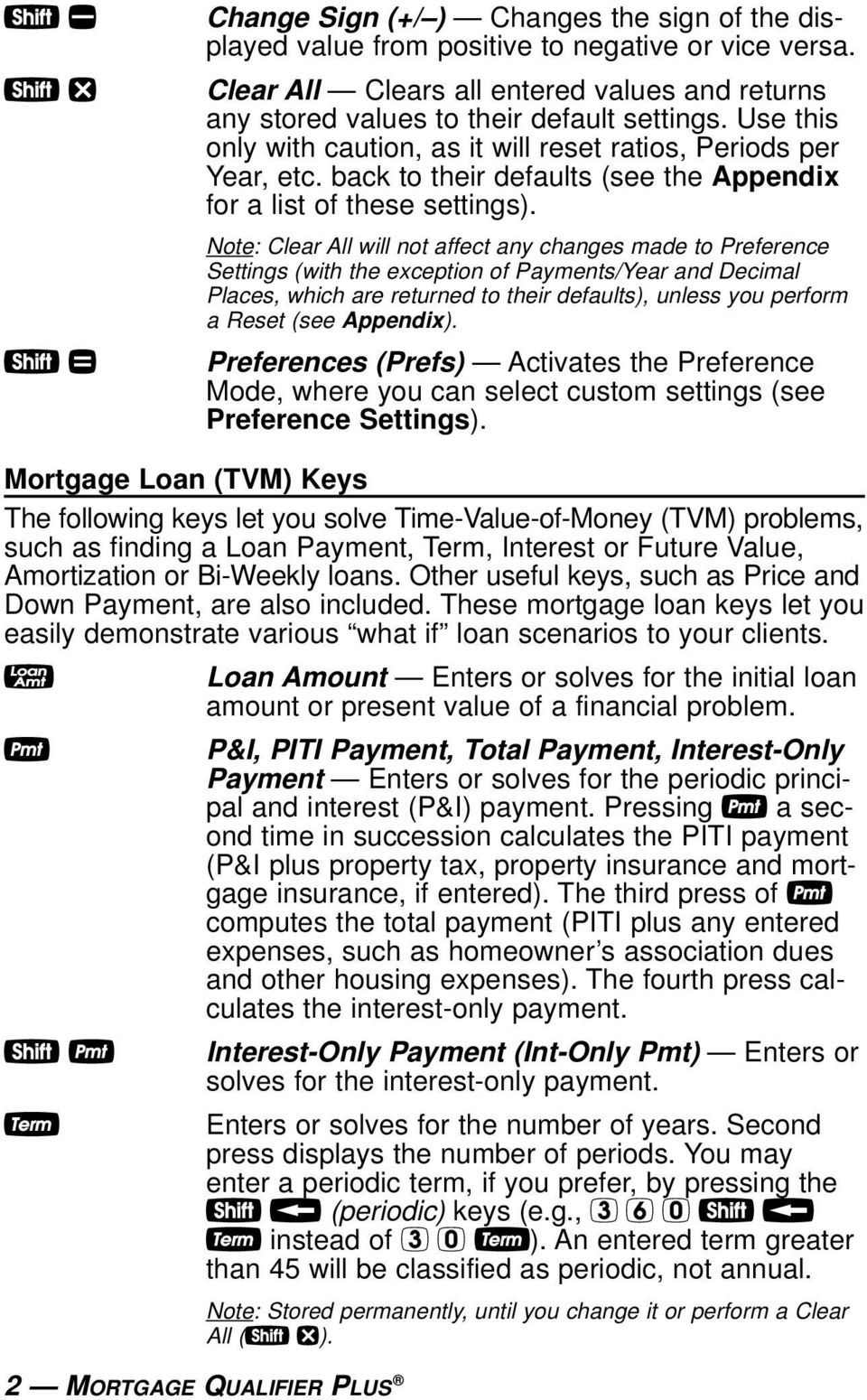
8 ˆ s l P d s d s ˆ s b Interest Enters or solves for the annual interest rate. Second press gives the periodic rate. Note: Stored permanently, until you change it or perform a Clear All (s x). Future Value (FV) Enters or solves for the future value of a financial problem. Sales Price Enters or calculates Sales Price based on the entries of Loan Amount (or equivalent mortgage components) and Down Payment. Down Payment Enters (in either percent or dollars) or calculates Down Payment, based on the entries of Loan Amount (or equivalent mortgage components) and Sales Price. A second press changes the entered down payment from a dollar figure to a percent, or vice versa. Note: Any number under 100 is assumed to be a percent down payment. You do not have to label the value as a percent. Loan-to-Value (LTV) Calculates the loan-to-value percent when a Down Payment and Sales Price, Loan Amount and Down Payment, or Loan Amount and Sales Price are entered. Also calculates the above dollar values if an LTV percent and one of the above values are entered (e.g., entered Sales Price and LTV% will calculate Down Payment and Loan Amount). Annual Percentage Rate (APR) Calculates APR (for fixed-rate loans only) based on the entry of points and/or non-recurring loan fees paid at initiation. It also calculates total finance charges, monthly mortgage insurance, and PIMI payment, based on the entry of mortgage insurance via the s I keys. Periodic Used to specify a mortgage component (Term or Interest), Income, or Amortization/Remaining Balance value as per period rather than per year. For example, s b T enters 360 periods, or months. USER S GUIDE 3
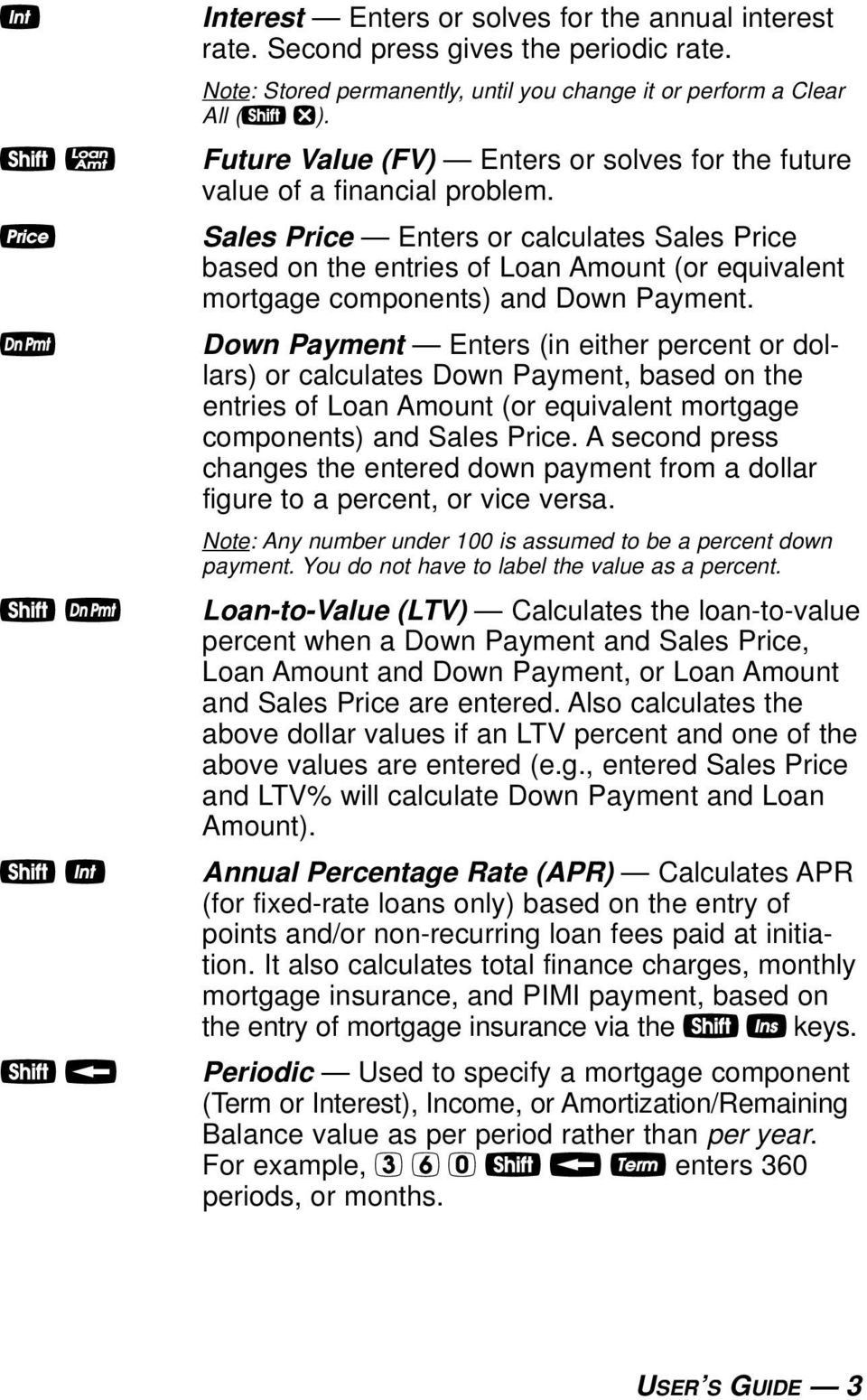
9 s Payments per Year (Pmt/Yr) Used to set the number of payment periods per year. Default value is 12, for monthly. Note: You can store the number of payments/year permanently or semi-permanently. See Preference Settings). a Amortization (Amort) Finds total interest, principal, remaining balance, remaining term and estimated mortgage interest tax deduction. The output of this key is as follows: Press Display or Calculation 1 Displays range of periods 2 Calculates total interest for period range 3 Displays total principal for range 4 Calculates total principal and interest 5 Calculates remaining balance 6 Calculates remaining term 7 Calculates estimated mortgage interest tax deduction for the specified period, based on the default tax bracket of 28%* *You may enter any tax bracket (e.g., 30%, press 30 s + and recalculate amortization values). Note: This is only for estimating a mortgage interest tax deduction it does not include property tax. See Tax Savings Function for income tax savings including property tax and mortgage interest. s a Remaining Balance (Bal) Displays the remaining balance when preceded by a single year or range of years (or individual payment or range of payments by using the s b keys). Note that you can also view the remaining balance as part of the Amortization display (see above a description). : Colon Separator (Date) Used as a separator for entering dates, ARM adjustments, qualifying ratios, Combo Loan (1st/2nd) interest and terms, and for entering amortization ranges. s ) Month Offset (Mo Offset) Used to set the first month of payment if other than January. s : Odd-Days Interest Calculates the prepaid interest, or simple interest accumulated (based on a 360-day year) during the days before the first loan payment is made using the interest rate stored in the Interest register. 4 MORTGAGE QUALIFIER PLUS
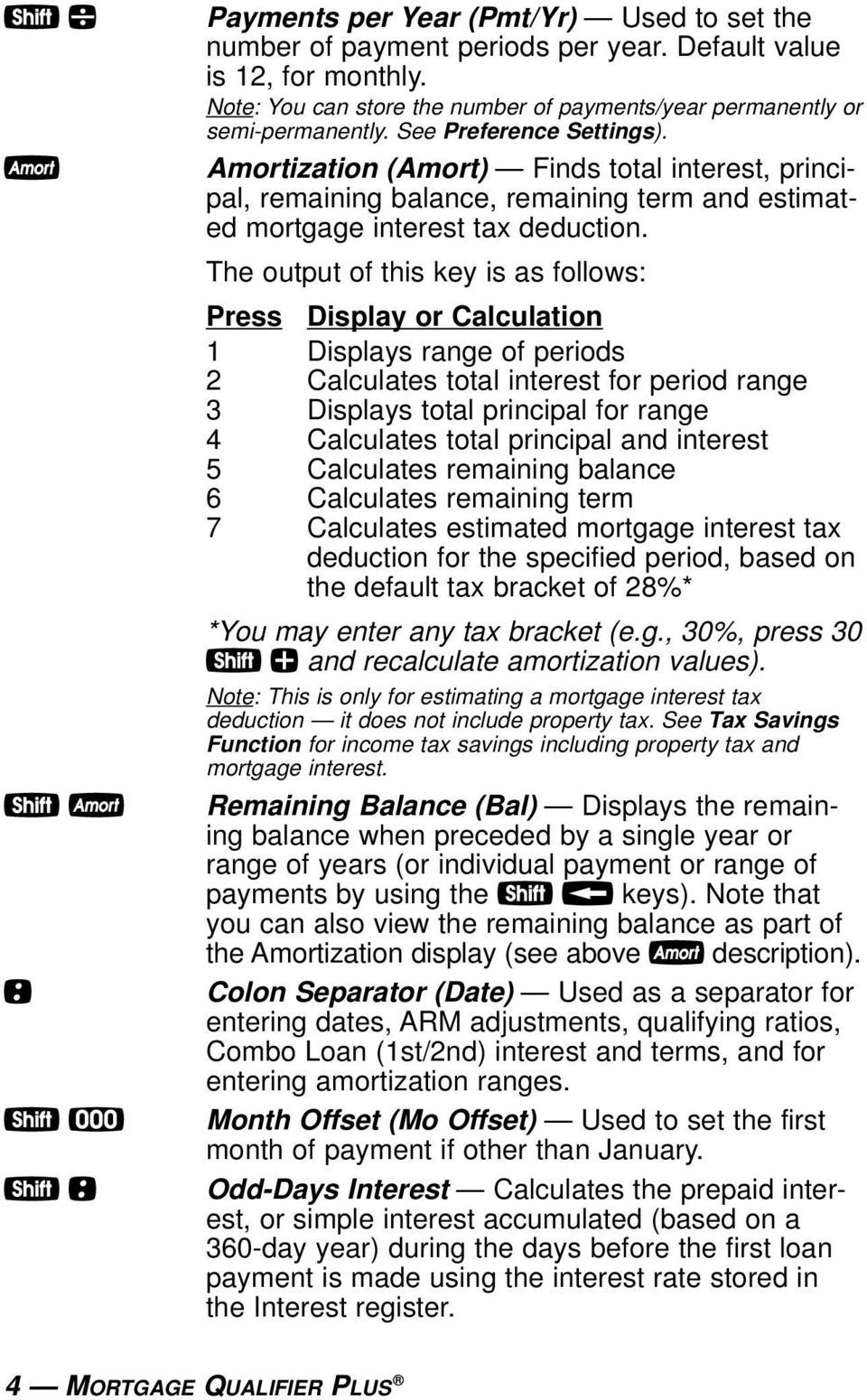
10 A s % s T Adjustable Rate Mortgage Calculates the payment and re-amortizes a fully or partially amortized Adjustable Rate Mortgage based on the inputs of both an Interest Adjustment and a Term Adjustment, which are entered using the Colon : key (Interest Adjustment : Term Adjustment). For example, an ARM which increases 1% every six months is entered 1 : 5 A; an ARM which decreases 1% every six months is entered 1 : 5 s A. (ARM rates are stored permanently.) Lifetime Interest Cap (ARMs) Sets the lifetime interest cap for ARMs by entering the maximum interest increase. This is a permanent setting. To clear, set the cap back to zero (0 s %). Bi-Weekly (Bi-Wkly) Converts a regular monthly loan to a Bi-Weekly loan, where the buyer may realize significant interest savings. After loan variables are entered, pressing s T displays the reduction in term. The second press of T shows the total interest savings; third press displays the total interest paid; fourth press displays the total principal; and fifth press displays the total principal and interest paid. Pressing p will calculate the bi-weekly payment. Pressing s T again will return and re-calculate to the original term, or pressing o twice will exit Bi-Weekly Mode. USER S GUIDE 5
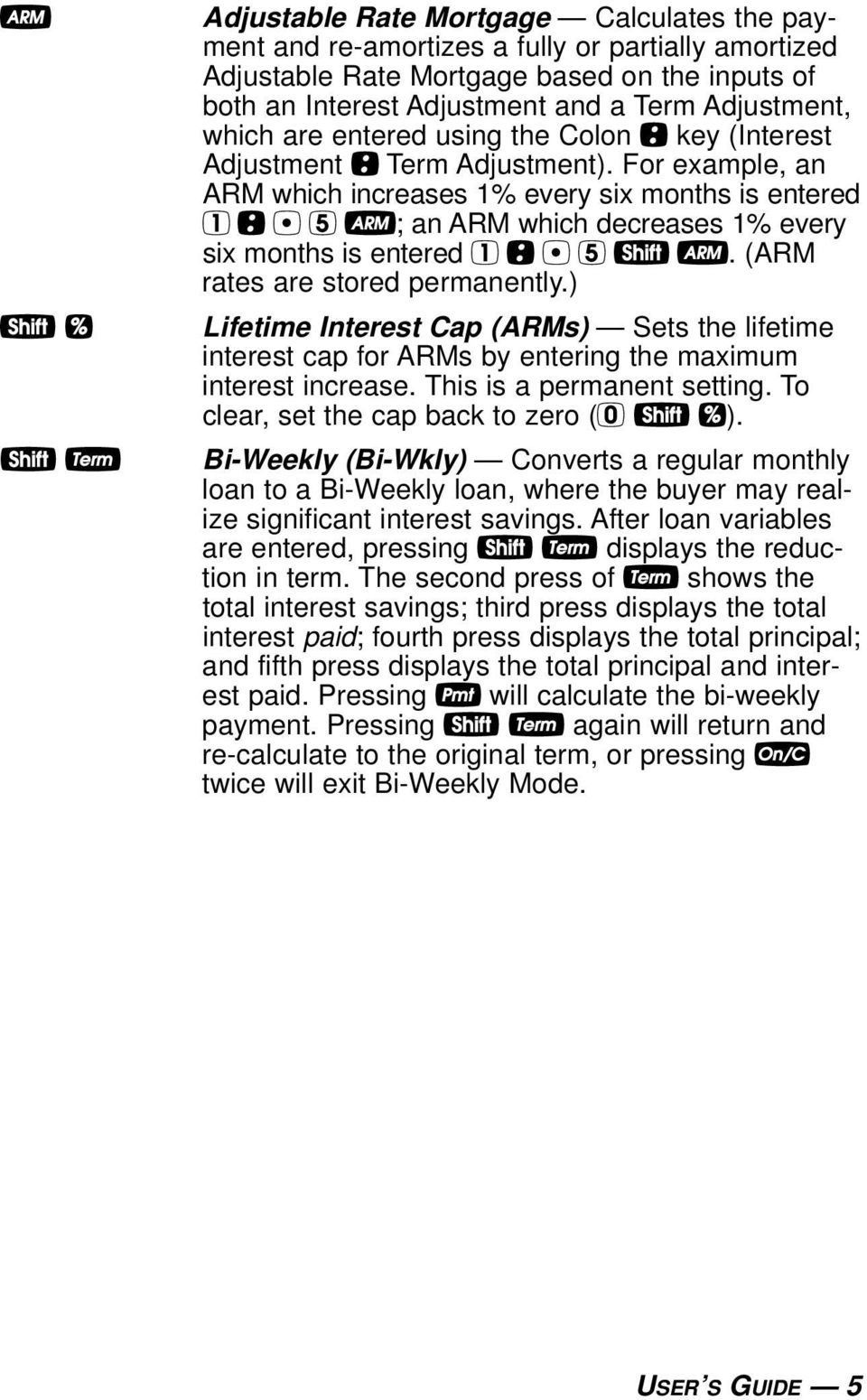
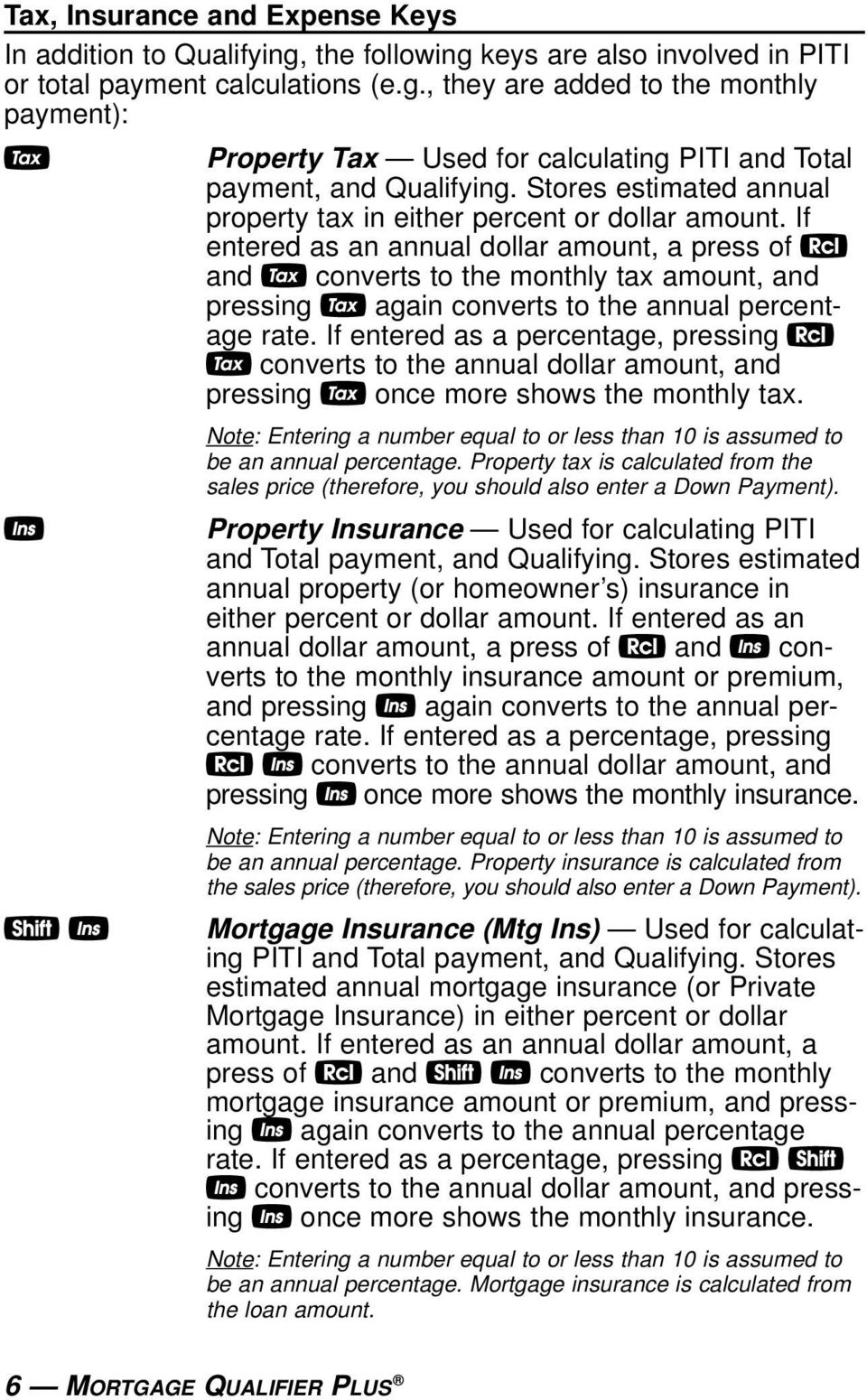
11 Tax, Insurance and Expense Keys In addition to Qualifying, the following keys are also involved in PITI or total payment calculations (e.g., they are added to the monthly payment): t Property Tax Used for calculating PITI and Total payment, and Qualifying. Stores estimated annual property tax in either percent or dollar amount. If entered as an annual dollar amount, a press of and t converts to the monthly tax amount, and pressing t again converts to the annual percentage rate. If entered as a percentage, pressing t converts to the annual dollar amount, and pressing t once more shows the monthly tax. I s I Note: Entering a number equal to or less than 10 is assumed to be an annual percentage. Property tax is calculated from the sales price (therefore, you should also enter a Down Payment). Property Insurance Used for calculating PITI and Total payment, and Qualifying. Stores estimated annual property (or homeowner s) insurance in either percent or dollar amount. If entered as an annual dollar amount, a press of and I converts to the monthly insurance amount or premium, and pressing I again converts to the annual percentage rate. If entered as a percentage, pressing I converts to the annual dollar amount, and pressing I once more shows the monthly insurance. Note: Entering a number equal to or less than 10 is assumed to be an annual percentage. Property insurance is calculated from the sales price (therefore, you should also enter a Down Payment). Mortgage Insurance (Mtg Ins) Used for calculating PITI and Total payment, and Qualifying. Stores estimated annual mortgage insurance (or Private Mortgage Insurance) in either percent or dollar amount. If entered as an annual dollar amount, a press of and s I converts to the monthly mortgage insurance amount or premium, and pressing I again converts to the annual percentage rate. If entered as a percentage, pressing s I converts to the annual dollar amount, and pressing I once more shows the monthly insurance. Note: Entering a number equal to or less than 10 is assumed to be an annual percentage. Mortgage insurance is calculated from the loan amount. 6 MORTGAGE QUALIFIER PLUS
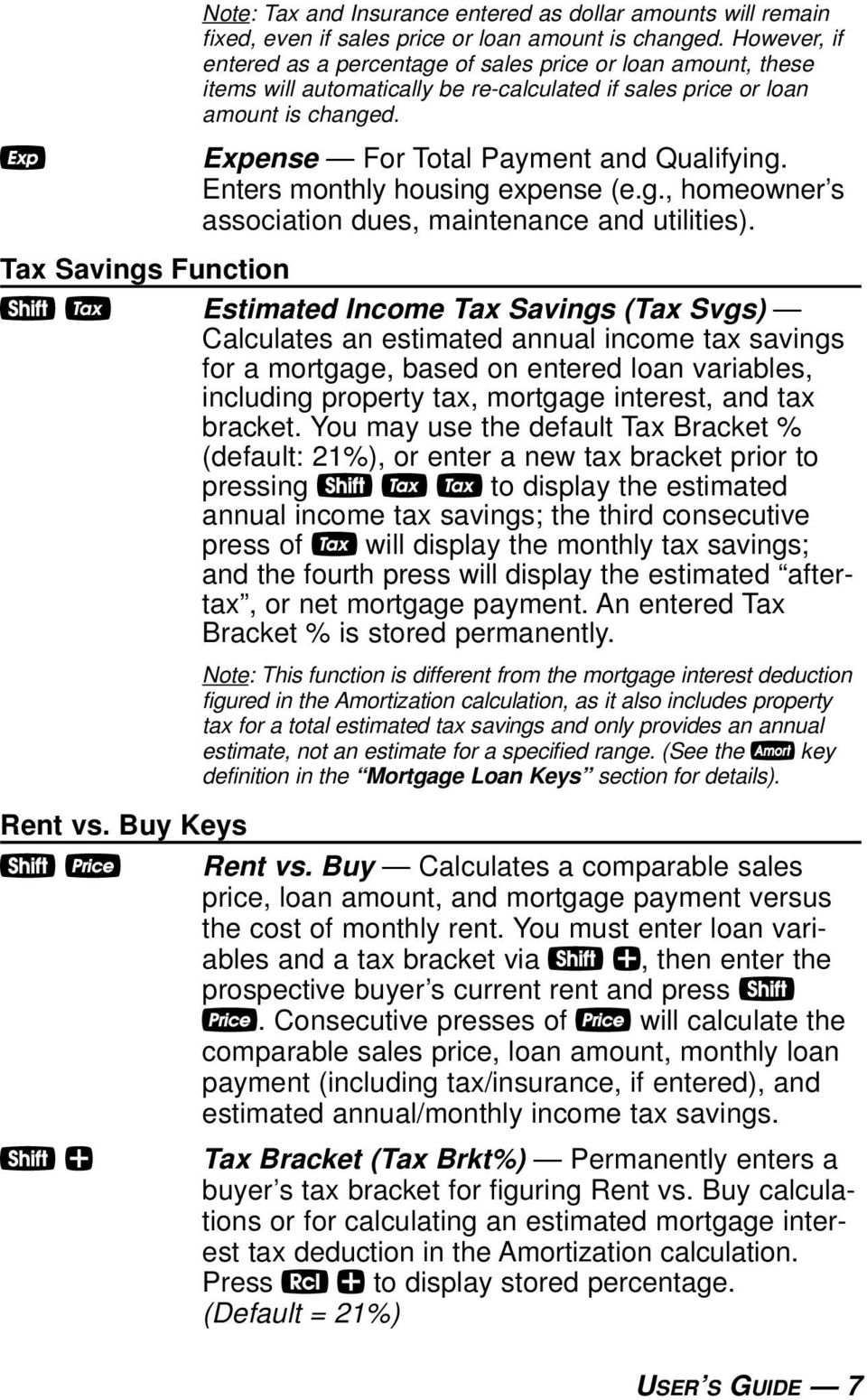
12 Note: Tax and Insurance entered as dollar amounts will remain fixed, even if sales price or loan amount is changed. However, if entered as a percentage of sales price or loan amount, these items will automatically be re-calculated if sales price or loan amount is changed. e Expense For Total Payment and Qualifying. Enters monthly housing expense (e.g., homeowner s association dues, maintenance and utilities). Tax Savings Function s t Estimated Income Tax Savings (Tax Svgs) Calculates an estimated annual income tax savings for a mortgage, based on entered loan variables, including property tax, mortgage interest, and tax bracket. You may use the default Tax Bracket % (default: 21%), or enter a new tax bracket prior to pressing s t t to display the estimated annual income tax savings; the third consecutive press of t will display the monthly tax savings; and the fourth press will display the estimated aftertax, or net mortgage payment. An entered Tax Bracket % is stored permanently. Note: This function is different from the mortgage interest deduction figured in the Amortization calculation, as it also includes property tax for a total estimated tax savings and only provides an annual estimate, not an estimate for a specified range. (See the a key definition in the Mortgage Loan Keys section for details). Rent vs. Buy Keys s P Rent vs. Buy Calculates a comparable sales price, loan amount, and mortgage payment versus the cost of monthly rent. You must enter loan variables and a tax bracket via s +, then enter the prospective buyer s current rent and press s P. Consecutive presses of P will calculate the comparable sales price, loan amount, monthly loan payment (including tax/insurance, if entered), and estimated annual/monthly income tax savings. s + Tax Bracket (Tax Brkt%) Permanently enters a buyer s tax bracket for figuring Rent vs. Buy calculations or for calculating an estimated mortgage interest tax deduction in the Amortization calculation. Press + to display stored percentage. (Default = 21%) USER S GUIDE 7
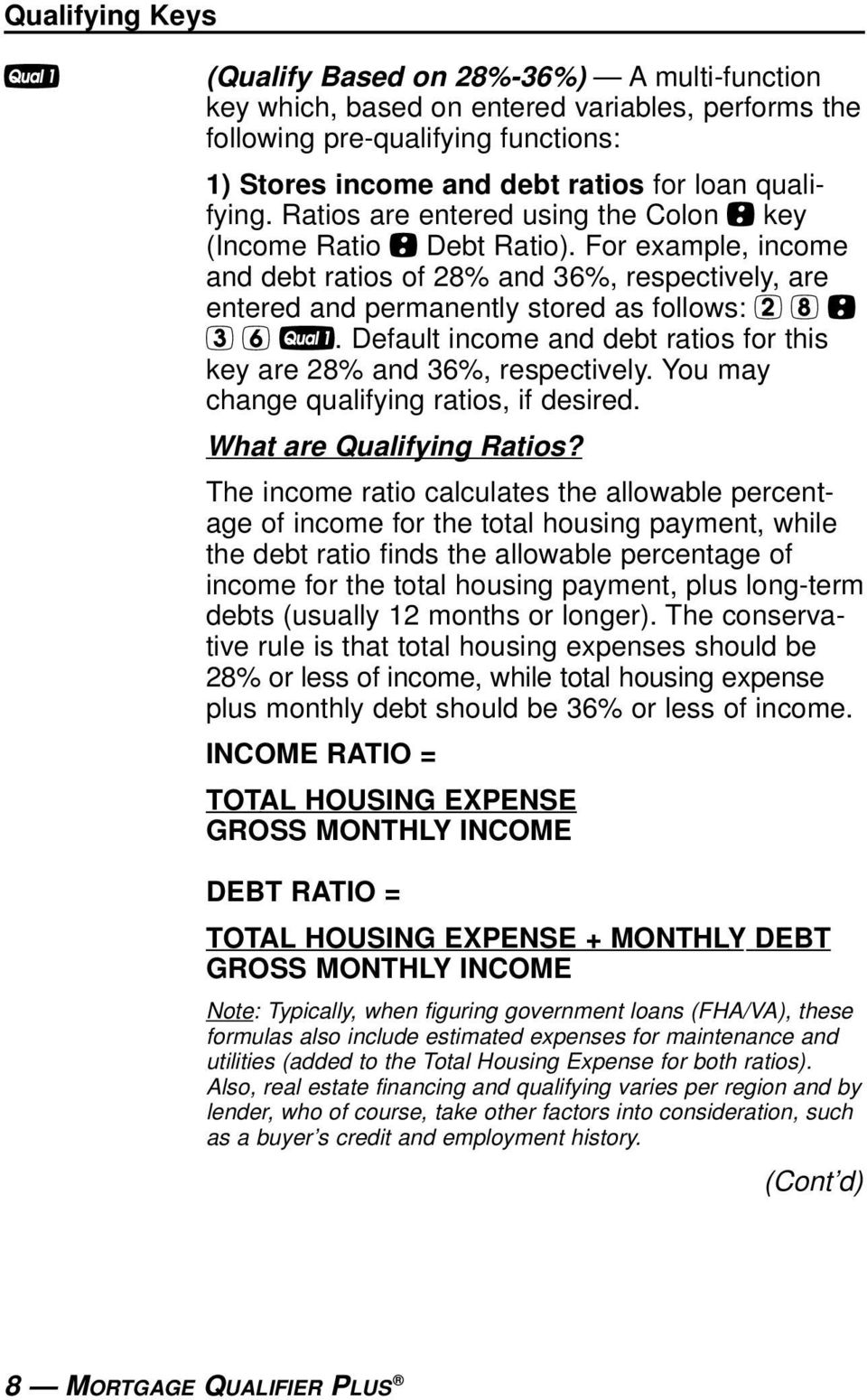
13 Qualifying Keys q (Qualify Based on 28%-36%) A multi-function key which, based on entered variables, performs the following pre-qualifying functions: 1) Stores income and debt ratios for loan qualifying. Ratios are entered using the Colon : key (Income Ratio : Debt Ratio). For example, income and debt ratios of 28% and 36%, respectively, are entered and permanently stored as follows: 2 8 : 3 6 q. Default income and debt ratios for this key are 28% and 36%, respectively. You may change qualifying ratios, if desired. What are Qualifying Ratios? The income ratio calculates the allowable percentage of income for the total housing payment, while the debt ratio finds the allowable percentage of income for the total housing payment, plus long-term debts (usually 12 months or longer). The conservative rule is that total housing expenses should be 28% or less of income, while total housing expense plus monthly debt should be 36% or less of income. INCOME RATIO = TOTAL HOUSING EXPENSE GROSS MONTHLY INCOME DEBT RATIO = TOTAL HOUSING EXPENSE + MONTHLY DEBT GROSS MONTHLY INCOME Note: Typically, when figuring government loans (FHA/VA), these formulas also include estimated expenses for maintenance and utilities (added to the Total Housing Expense for both ratios). Also, real estate financing and qualifying varies per region and by lender, who of course, take other factors into consideration, such as a buyer s credit and employment history. (Cont d) 8 MORTGAGE QUALIFIER PLUS
14 (Cont d) 2) Calculates the maximum loan amount for which a buyer may qualify, based on the stored income and debt qualifying ratios and the entered: Term Interest Annual Income Monthly Debt and optional Annual Property Tax and Insurance Annual Mortgage Insurance (Private Mortgage Insurance or PMI) other monthly housing expenses (e.g., homeowner s association dues) The output of this key is as follows: Press Calculation 1 Displays stored Qualifying Ratios (e.g., 28%-36%) 2 Restricted/Maximum Qualifying Loan Amount * 3 Buyer s Actual Ratios (Income%:Debt%) 4 Unrestricted Qualifying Loan Amount * 5 Maximum Allowable Debt *Note: The Maximum Qualifying Loan Amount is the restricted loan amount the buyer may qualify for. This loan amount is based on whichever of the two ratios income or debt limits the buyer the most. The Unrestricted Qualifying Loan Amount, however, is the higher loan amount. This loan amount is based on whichever of the two ratios income or debt limits the buyer the least. In other words, whichever ratio will give the buyer the highest qualifying loan amount. For this Unrestricted loan amount, the calculator will display the letters UNR (for unrestricted) in the display and the word INC or DEBT to indicate what ratio side this loan amount was based from (i.e., income or debt). This restricted/unrestricted qualifying loan comparison is useful to show clients what size loan they could qualify for if they paid off debt or increased income. (Cont d) USER S GUIDE 9

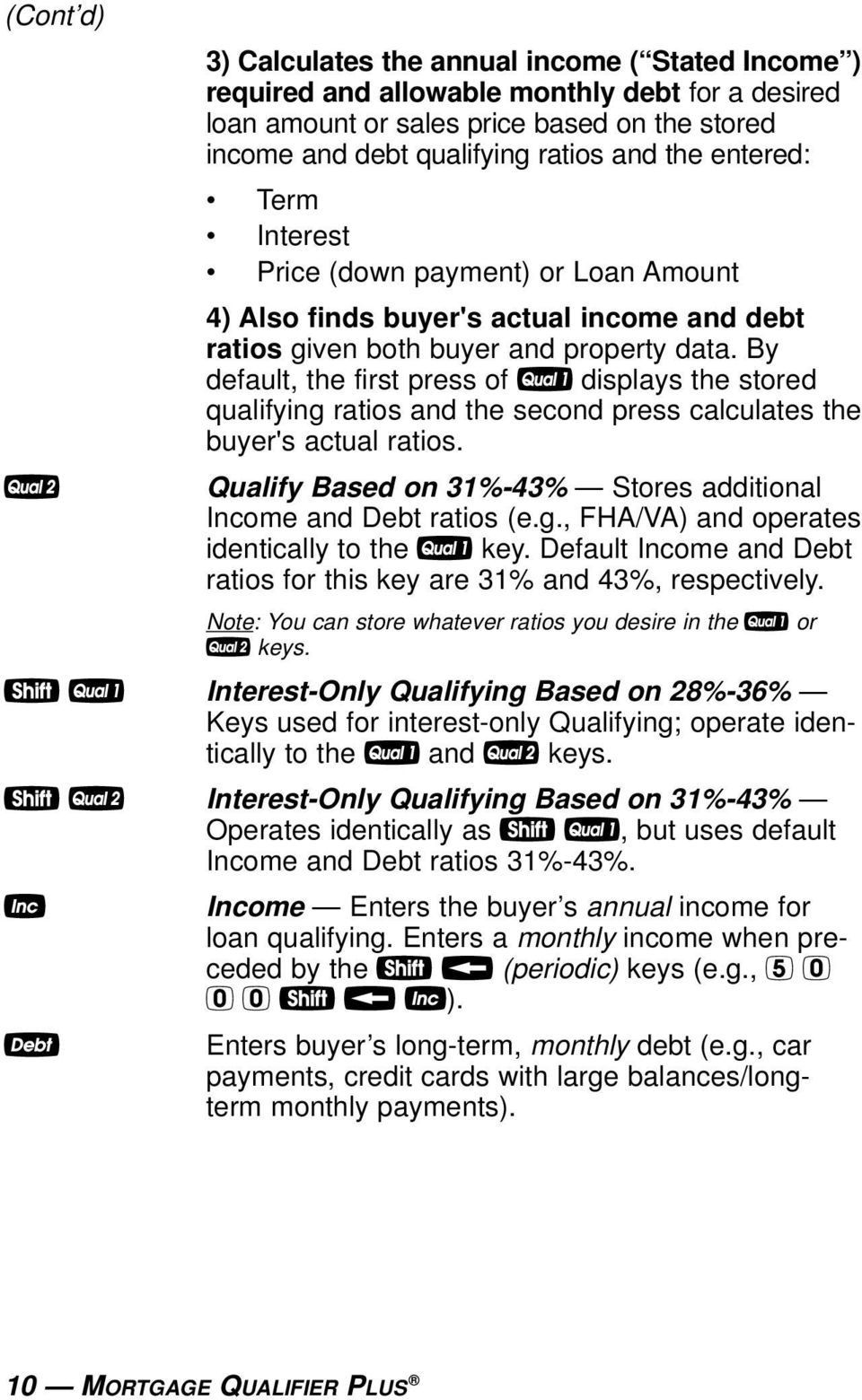
15 (Cont d) Q 3) Calculates the annual income ( Stated Income ) required and allowable monthly debt for a desired loan amount or sales price based on the stored income and debt qualifying ratios and the entered: Term Interest Price (down payment) or Loan Amount 4) Also finds buyer's actual income and debt ratios given both buyer and property data. By default, the first press of q displays the stored qualifying ratios and the second press calculates the buyer's actual ratios. Qualify Based on 31%-43% Stores additional Income and Debt ratios (e.g., FHA/VA) and operates identically to the q key. Default Income and Debt ratios for this key are 31% and 43%, respectively. Note: You can store whatever ratios you desire in the q or Q keys. s q Interest-Only Qualifying Based on 28%-36% Keys used for interest-only Qualifying; operate identically to the q and Q keys. s Q Interest-Only Qualifying Based on 31%-43% Operates identically as s q, but uses default Income and Debt ratios 31%-43%. i Income Enters the buyer s annual income for loan qualifying. Enters a monthly income when preceded by the s b (periodic) keys (e.g., s b i). D Enters buyer s long-term, monthly debt (e.g., car payments, credit cards with large balances/longterm monthly payments). 10 MORTGAGE QUALIFIER PLUS
16 1st and 2nd Trust Deeds (Combo Loan) Keys The Combo Loan keys show the savings of obtaining a 1st and 2nd trust deed (TD) loan over a single, fixed-rate loan where mortgage insurance, or private mortgage insurance (PMI), is required. This routine requires a fixed-rate loan to be entered using the standard l, p, ˆ and/or T keys so that a loan comparison can be made. * Loan-to-Value Combo Loan for 80:10:10 This key provides a loan comparison (see below key outputs*) of an 80:10:10 combo fixed-rate loan versus a single, fixed-rate loan requiring mortgage insurance. The stored values are a percentage of the sales price (e.g., 80:10 identifies that 80% of the price is covered by the 1st TD, 10% of the price is covered by the 2nd TD and the remaining 10% is covered by the down payment). s * Interest-Only Combo Loan (Int-Only 2nd) Operates similarly to the 80:10:10 Combo Loan, but for an 80:10:10 Combo Loan where the 2nd Trust Deed is Interest-Only (the 1st Trust Deed is a standard fixed-rate P&I loan). Note: You may also enter any LTV for either * or s *. For example, to enter an 80:20 LTV, enter 8 0 : 2 0 * or 8 0 : 2 0 s * and continue to press the * key to find the below values. (Cont d) USER S GUIDE 11

17 (Cont d) ** and s * (Int-Only 2nd) Key Output: For a comparison of a fixed-rate combo loan versus a fixed-rate loan with required mortgage insurance, each key press (once all other loan values are entered, including 1st:2nd Interest:Term) will calculate: Press Calculation 1 Combo Loan Combined (Blended) Interest Rate 2 Equivalent Interest Rate of Fixed Rate Mortgage with Mortgage Insurance 3 Combo Loan Combined (1st/2nd TD) Payment 4 Equivalent Payment of Fixed Rate Mortgage with Mortgage Insurance 5 Monthly Savings over Fixed-Rate Loan with Mortgage Insurance 6 Adjusted 2nd Term (if Savings Applied to 2nd TD) 7 1st Trust Deed Loan Amount 8 2nd Trust Deed Loan Amount 9 1st Trust Deed Payment 10 2nd Trust Deed Payment 11 Displays LTV! 1st TD Interest:Term Stores the annual interest and term for the 1st fixed-rate TD. These values are used when computing the 1st:2nd fixed Combo Loan. Entry is made using the : key (Interest : Term). Both interest and term values are required for a valid entry. Values will be retained until changed or reset. s! 2nd TD Interest:Term Stores the annual interest and term for the 2nd fixed-rate TD. Entry is made using the : key (Interest : Term). Both interest and term values are required for a valid entry. Values will be retained until changed or reset. 12 MORTGAGE QUALIFIER PLUS
18 BASIC ARITHMETIC EXAMPLES Arithmetic This calculator uses standard chaining logic, which simply means that you enter your first value, the operator (+,, x, ), the second value and then the equals sign (=). A = 5.00 B. 3 2 = 1.00 C. 3 x 2 = 6.00 D. 3 2 = 1.50 Percentage Calculations The Percent % key can be used for finding a given percent of a number or for working add-on, discount, or division percentage calculations. A x 2 5 % = B % = C % = D % = The Percent % function is a key that has special applications for real estate professionals especially when figuring a commission amount. Figuring Straight % Commission The commission for the listing office is 3%. If the property sells for $259,650, what is the listing office s commission? Enter sales price ,650. Multiply by commission % x 3 % = 7, DO NOT CLEAR CALCULATOR What if the listing agent works on a 50/50 split with his or her broker? What is the listing agent s share of this commission? Multiply by 50 percent x 5 0 % = 3, USER S GUIDE 13

19 Reduction in Listing Price (Discount %) A nervous seller has had her property on the market for just over four months listed at $175,500. Because she is anxious to move into a new home, she wishes to reduce the listing price by 5%. Calculate both the amount of reduction in dollars and the new, lowered listing price. Enter sales price ,500. Subtract 5% 5 % 8, Find new listing price = 166, Simple, One-Year Home Appreciation (Add-on %) Properties in your area have been going up in value about 6% per year. If you purchase a $275,000 home today, what will it be worth in one year, assuming the same rate of appreciation continues? Enter current value ) 275,000. Add 6% + 6 % 16, Find appreciated value = 291, Note: See Future Value or Appreciation section for more examples. 14 MORTGAGE QUALIFIER PLUS

20 Date Examples Using the : key, you can quickly solve common real estate date problems: escrow or closing dates, listing expiration dates, and the number of days prepaid interest, etc. You enter a date as follows: Numerical Month : Numerical Day : and two-digit Numerical Year. The date function lets you: 1) add a number of days to a date to find a second date (in the future), 2) subtract a number of days from a date to find a second date (in the past), and, 3) subtract one date from another date to find the number of days in between. For example, if a 45-day escrow begins April 26, 2004, what is the closing date and day? Enter month 4 : 4- Enter day 2 6 : Enter year Add 45 days = THU Find the number of days to calculate prepaid interest due at closing, if the escrow closing date is 10/14/03 and the first payment is due 11/1/03. Enter 1st payment date 1 1 : 1 : Subtract closing date to find number of days 1 0 : 1 4 : 0 3 = USER S GUIDE 15

21 CALCULATOR SETTINGS Decimal Place Selection With the s key, you have the option of selecting the number of decimal places you d like to display. The values are rounded using conventional 5/4 rounding. You can do this prior to finding an answer or afterwards. Press s followed by the number of decimal places you wish to display: s s s s s s s 0 0. s floating point To return to the standard two-decimal place setting, press s 2. Note: This setting will remain until you perform a Clear All (s x), perform a Full Reset* (press O, hold down x, and press o), or until you change it using the commands above. *Depressing the Reset located left of the O key will also perform a Full Reset. 16 MORTGAGE QUALIFIER PLUS
22 Preference Settings Your calculator has a Preference Mode, which allows you to program the calculator to various settings. For example, it lets you store certain values permanently, display certain values, or show values in a specific order. To access the Preference Mode, press s, then =, then keep pressing = to toggle through the settings listed below. Press the + key to advance through the sub-settings. Use the key to back up within the sub-settings. To return the calculator to its default, or factory-set, Preference Settings, perform a total Reset (see Reset section for details). After s, Keep Description Pressing (Press + to Advance =: Display within each category, to Back up): 1 Decimal Places - DEC HOLd EntrY Permanently sets number of decimal places. (Default) - DEC OFF 0.00 Clears decimal place setting/resets to 0.00 at O. 2 Payments Per Year - P/Y OFF ANN Resets to at O. (Default) - P/Y Hold Entry ANN Permanently sets pmts/year. 3 Property Tax/Insurance (T/I) - Clr OFF TAX INS Clears all T/I (% and $) values at O. (Default) - Hold Pct. TAX INS Holds only T/I percent (%) entries at O. - Hold All TAX INS Holds all T/I (% and $) values at O. - Clr-Clr TAX INS Clears all T/I (% and $) values at double press of o (or o o). (Cont d) USER S GUIDE 17
23 (Cont d) After s, Keep Description Pressing (Press + to Advance =: Display within each category, to Back up): 4 Mortgage Insurance (MI) - Clr-Clr M Ins Clears mortgage insurance (% and $) upon o o. (Default) - Clr OFF M Ins Clears mortgage insurance (% and $) at O. - HOLD Pct. M Ins Holds only percent (%) mortgage insurance entry at O. - HOLD ALL M Ins Holds (% or $) mortgage insurance entry at O. 5 Amortization/Single Entries - AMRT Ent-Ent Displays amortization for specified year only e.g., enter 5 a shows payments (Default) - AMRT 1-Ent Displays amortization from beginning to specified year e.g., enter 5 a shows payments Display Qualifying Ratios - Q-R PRESS 1 Displays ratio at beginning of sequence. (Default) - Q-R AT END Displays ratio at end of sequence. 18 MORTGAGE QUALIFIER PLUS
24 MEMORY Accumulative Memory Whenever the µ key is pressed, the displayed value will be added to cumulative memory. This value will remain in Memory until cleared or when the calculator is turned off. Other Memory functions: FUNCTION KEYSTROKES Recall total in Memory µ Display and clear Memory Subtract displayed value from Memory s µ Replace Memory with displayed value s µ The Memory is semi-permanent; that is, it will only be cleared when you: 1) turn off the calculator; 2) press ; and 3) press s x (Clear All). Examples: Store number into Memory µ Add number to Memory µ Recall total in Memory µ Subtract from Memory s µ Recall total in Memory µ Replace Memory 5 0 s µ Recall and clear Memory USER S GUIDE 19
25 Memory Storage Keys (M0-M6) In addition to the standard cumulative Memory (as described above), your calculator has six independent Storage Registers [M0] through [M6] that can be used to permanently store single, noncumulative values. These values will be held when your calculator is turned off, and will only clear when a Clear All is performed (via s x). You can replace a value in one of these Memory registers by storing a new value in place of the stored value. FUNCTION KEYSTROKES Store single value in M0 s 0 Store single value in M1 s 1 Store single value in M2-M6 s 2, 3, 4, 5 or 6 Clear register (e.g., M1) 0 s 1 Review stored value (e.g., M1) 1 Clear stored value* s x *Perform a s x (Clear All) with caution, as it will clear any stored values from your calculator s registers. Example: Store 175 into M1, recall the value, and then store a new value in place of the first stored value: KEYSTROKES DISPLAY s 1 M O o M s 1 M MORTGAGE QUALIFIER PLUS
26 Additional Memory Storage Keys (M10-M19) In addition to M0-M6 (as described previously), your calculator has ten additional independent Storage Registers M10 through M19 that can also be used to permanently store single, non-cumulative values. To access these storage registers, use the following keystrokes: s #, with # being digits 0-9. These storage registers operate identically to M0-M6. Examples: Store 250 into M10 and recall the value: KEYSTROKES DISPLAY s 0 M O o M Store 350 into M11 and recall the value: KEYSTROKES DISPLAY s 1 M O o M Note: Repeat the above procedure for registers 12-19, using digits 2 9. Note: To clear all above values stored in Memory, press s x. USER S GUIDE 21
27 EXAMPLES MORTGAGE LOANS/TIME-VALUE-OF-MONEY (TVM) 1. The basic loan keys l, p, T and ˆ work just like you would say them. For example, if you want to borrow $100,000 for 30 years at 10% interest, just enter those three known variables and press the key for the unknown fourth variable: p. 2. When computing future value problems, enter the present value into the l key. 3. Financial values may be entered in any order you want. 4. Entered values for Term and Interest are permanently stored (they do not clear when the calculator is turned off). 5. The calculator s default setting is 12 payments per year, for monthly loans. 6. It is good practice to press o twice after completing a financial problem to ensure that you have cleared the previous l and p registers. 7. When solving for a financial component, the calculator may display the word run in the display. Solving for interest may take several seconds (up to 15) while the word run displays. 8. Once you have calculated an answer, for example, a payment, you can go back and change any financial variable and recalculate your new answer without re-entering all the other data. This is handy for demonstrating various what if loan problems. 9. Successive presses of the p key will calculate: the principal and interest (P&I) payment; the PITI payment, which includes property tax, property insurance and mortgage insurance, if entered; the total payment (PITI plus any entered housing expenses); and the interest-only payment. 22 MORTGAGE QUALIFIER PLUS
28 Finding the Monthly Mortgage (P&I) Payment Find the monthly P&I (principal and interest) payment on a 30-year, fixed-rate mortgage of $265,000 at 6.75% annual interest. Enter loan amount ) l* 265, Enter term 3 0 T Enter interest ˆ 6.75 Find monthly P&I payment p run 1, *Note: Use the ) key to save keystrokes. What is the new payment, if the interest rate is lowered to 6.5%? Enter new interest rate 6 5 ˆ 6.50 Find monthly P&I payment p run 1, Interest-Only Payment (Calculation) Find the interest-only payment on a loan of $15,000 at 9% interest. Clear o o 0.00 Enter Loan 1 5 ) l 15, Enter Interest 9 ˆ 7.00 Find payment s p* *The fourth press of the p key also calculates the interest-only payment if you have a Term entered, but you may use the above keystrokes as a shortcut. Interest-Only Payment (Entry) How much can you borrow if the interest rate is 7% on a 30-year interest-only mortgage and you can afford to pay $1,000 each month? Clear o o 0.00 Enter Interest 7 ˆ 7.00 Enter Payment 1 ) s p Find Loan l 171, USER S GUIDE 23
29 Finding the Interest Rate Find the interest rate on a mortgage where the loan amount is $98,500, the term is 30 years, and the payment is $1,150 a month. Enter loan amount l 98, Enter term 3 0 T Enter monthly payment p 1, Find annual interest ˆ run Find periodic interest ˆ 1.15 Finding the Term of a Loan How long does it take to pay off a loan of $15,000 at 10% interest if you make payments of $200 each month? Enter loan amount 1 5 ) l 15, Enter interest 1 0 ˆ Enter monthly payment p Find term in years T run 9.85 Find periodic term T Finding the Loan Amount Approximately how much could you borrow if the interest rate was 7.8% on a 30-year loan and you could afford $1,500 in monthly payments? What if the interest rate was lowered to 7.5%? Enter interest 7 8 ˆ 7.80 Enter term 3 0 T Enter monthly payment p 1, Find loan amount l run 208, Enter new interest rate 7 5 ˆ 7.50 Find new loan amount l run 214, MORTGAGE QUALIFIER PLUS
30 Paying Off a Mortgage Early (Making Larger Payments) How long does it take to pay off a 30-year, fixed-rate mortgage of $150,000 at 8.5% interest if you add an extra $200 to the mortgage payment each month? Enter loan amount ) l 150, Enter interest 8 5 ˆ 8.50 Enter term 3 0 T Find monthly P&I payment p 1, Add additional payment amount = 1, Enter as new payment amount p 1, Find reduced loan term T run Simple Interest vs. Compound Interest If you borrow $5,000 at 6% simple interest, how much will you owe at the end of 5 years? *This is a simple math problem and does not require the use of TVM keys. Multiply loan amount by interest 5 ) x 6 % = Multiply by term x 5 = 1, Add original loan amount + 5 ) = 6, If the loan is compounded monthly, what will you owe? Enter loan amount 5 ) l 5, Enter term 5 T 5.00 Enter interest 6 ˆ 6.00 Find future value s l run 6, USER S GUIDE 25
31 Future Value Given any four components to a problem that includes a future value, you can calculate the fifth. Appreciation You purchased a home for $350,000 and want to know its value in 3 years, figuring an inflation or appreciation rate of 6%. (Set periods to one per year.) Set to 1 payment/year 1 s 1.00 Enter present value* ) l 350, Enter term in years 3 T 3.00 Enter appreciation rate 6 ˆ 6.00 Find future value** s l run 416, Return to 12 payments/year 1 2 s * Present Value (PV) = original purchase price; enter as l ** Future Value (FV) = s l 26 MORTGAGE QUALIFIER PLUS
32 Non-Monthly Loans Most residential real estate loans are based on a monthly payment schedule. However, if you have a non-monthly loan, you must change the number of payments per year using a two-key sequence: s. For example, here's how to set your calculator to four payments per year. Enter # of payments/year 4 s 4.00 To recall the currently stored number of payments: Recall # of payments/year 4.00 IMPORTANT: To return payments per year to the default value of 12, perform the following steps: Enter # of payments/year 1 2 s Finding a Quarterly Payment Find the quarterly payment on a 10-year loan of $15,000 with an annual interest rate of 12%. Set to 4 payments/year 4 s 4.00 Enter loan amount 1 5 ) l 15, Enter term in years 1 0 T Enter annual interest 1 2 ˆ Find quarterly payment p run Reset to 12 payments/year 1 2 s run USER S GUIDE 27
33 Sales Price/Down Payment One of the unique features of this calculator is its ability to work with not only Loan Amount, but with Sales Price and Down Payment. You can enter two values to find the third (e.g., enter Price and Down Payment to find Loan Amount). You may also enter the down payment in both percent or dollar format. For example, to enter 20%, enter 20 and press the d key (you do not have to label it as a percent). Or enter $20,000 (e.g., 2 0 ) d). Note: A number under 100 entered as the Down Payment is assumed to be a percentage. Note: When using P, d, and l keys, it's recommended that you always enter the two known values (Price and Down Payment), then solve for the third (Loan Amount), before calculating financial values. Finding Loan Amount Based on Sales Price and Down Payment Find both the down payment dollar amount and loan amount if the sales price is $250,000 and you're planning to put 20% down. Enter sales price ) P 250, Enter down payment % 2 0 d Find down payment $ d 50, Find loan amount l 200, Note: You can find Sales Price based on an entered Loan Amount and Down Payment, or find the Down Payment based on entered Sales Price and Loan Amount values. 28 MORTGAGE QUALIFIER PLUS
34 Taxes and Insurance This calculator has keys that store your estimated local annual Property Tax, Property Insurance, and Mortgage Insurance (if applicable) rates or dollar figures. This allows you to calculate the PITI (Principal, Interest, Tax, and Insurance) payment, in addition to the regular P&I payment. You may also enter monthly expenses, such as homeowner s association dues these are included in the calculation of the total payment (PITI plus expenses). By default, the Property Tax and Insurance values are cleared when the calculator is shut off, while the Mortgage Insurance value clears when you press o twice. However, you may use the Preference Settings (s =) to permanently store Tax and Insurance (% and $) values when the calculator is turned off (see Preference Settings section for details). Note: There s a separate Preference Setting for Mortgage Insurance. Tax and Insurance can be entered as dollar amounts or percentages. If entered as percentages, the Sales Price or Loan Amount can be changed and tax and insurance will be recalculated automatically. If entered as dollar amounts, however, they will need to be reentered for a change in Sales Price or Loan Amount to be correct. Entering values 10 or less are assumed to be annual percentage rates (you do not need to use the percent key). IMPORTANT Property Tax and Property Insurance rates are based on the Sales Price (therefore, a Down Payment or Sales Price should be entered). The Mortgage Insurance rate is based on the Loan Amount. If neither Sales Price nor Down Payment has been entered, the Sales Price is defaulted to equal the Loan Amount (basically assuming a 100% loan), in which case the Tax and Insurance rates will be based on the Loan Amount value entered. Note: If you are underwriting a loan, many lenders choose to use loan amount instead of price when figuring out Hazard Insurance. In this case, you will need to turn your Hazard Insurance into a dollar amount: Loan Amount x Hazard Insurance rate = Hazard Insurance dollar amount. By entering a lower amount into Insurance, it will improve the Buying Power of your client. However, the client will only be covered for the loan amount and not the complete value of the home. USER S GUIDE 29
35 Setting Tax and Insurance Percent Rates Enter an annual property tax rate of 1.5%, a property insurance rate of 0.25%, and a mortgage insurance rate of 0.50%: Set property tax rate 1 5 t 1.50 Set insurance rate 2 5 I 0.25 Set mortgage insurance rate 5 s I 0.50 Recalling Tax and Insurance Percent Rates Recall your stored rates: Recall tax rate t 1.50 Recall insurance rate I 0.25 Recall mortgage insurance rate s I 0.50 Note: To change these values, simply enter new ones. Or, turn the calculator off then on, and the values will be cleared, unless they are programmed to hold under Preference Settings (see page 20). Setting Tax and Insurance Dollar Amounts Enter annual property taxes estimated at $5,500, property insurance at $350 and mortgage insurance at $600: Set annual taxes t 5, Set annual property insurance I Set annual mortgage insurance s I Note: Again, to review stored values, press and the applicable key (e.g., t). 30 MORTGAGE QUALIFIER PLUS
36 Calculating Tax and Insurance Percent or Dollar Amounts If loan variables are entered in addition to tax and insurance percentage rates or dollar values, the respective dollar values or percentage rates can be computed by simply pressing the applicable keys a second time. For example, enter an annual property tax rate of 1.5%, a property insurance rate of 0.25% and a mortgage insurance rate of 0.50%. Then enter a sales price of $250,000, 10% down, a term of 30 years and an interest rate of 8%. Calculate the loan, payments, and annual tax and insurance dollar amounts, or premiums: Enter property tax rate 1 5 t 1.50 Enter insurance rate 2 5 I 0.25 Enter mortgage insurance rate 5 s I 0.50 Enter price ) P 250, Enter down payment % 1 0 d Enter term 3 0 T Enter interest 8 ˆ 8.00 Find loan amount l 225, Recall property tax % t 1.50 Calculate property tax $ t 3, Recall property insurance % I 0.25 Calculate property insurance $ I Recall mortgage insurance % s I 0.50 Calculate mortgage insurance $ I 1, Find P&I payment p 1, Find PITI payment p 2, Note: The same procedure can be performed to find the opposite that is, to find the % rates based on entered annual dollar amounts or insurance premiums. Simply enter the tax/ins. dollar amounts and loan variables first, and press and the tax/ins. key to calculate the percentage rate. USER S GUIDE 31
37 PITI Payment (Tax and Insurance Entered as Percent) Find the PITI payment on a 30-year, 6.5% mortgage if the home s selling price is $325,000 and the down payment is 5%. Annual property taxes are estimated at 1.3%, annual property insurance at 0.25%, and annual mortgage insurance at 0.45%. Enter term in years 3 0 T Enter annual interest 6 5 ˆ 6.50 Enter sales price ) P 325, Enter down payment 5 d 5.00 Set tax rate* 1 3 t 1.30 Set property insurance rate* 2 5 I 0.25 Set mortgage insurance rate* 4 5 s I 0.45 Find loan amount l 308, Find P&I payment p run 1, Find PITI payment p 2, * You may enter Tax, Insurance, or Mortgage Insurance as a percentage or dollar amount (i.e., ($)4225 t, ($)812.5 I, or ($) s I). Total Payment (Including Expenses) and Interest-Only Payment Find the total payment (including principal, interest, tax/insurance and mo. expenses) and the interest-only payment on a 30-year, 6% loan if the home s selling price is $330,000 and the down payment is 15%. (Local annual property taxes are estimated at $5,900, property insurance at $500, mortgage insurance at $1,200, and mo. expenses e.g., homeowner s assn dues plus utilities at $150.) Enter term in years 3 0 T Enter annual interest 6 ˆ 6.00 Enter sales price ) P 330, Enter down payment % 1 5 d Find dollar $ d 49, Enter property tax t 5, Enter property insurance I Enter mortgage insurance s I 1, Enter monthly expenses e Find loan amount l 280, MORTGAGE QUALIFIER PLUS (Cont d)
38 (Cont d) Find P&I payment p run 1, Find PITI payment p 2, Find total payment (PITI plus monthly expenses) p 2, Find interest-only payment p 1, Estimated Income Tax Savings and After-Tax Payment Important Note: This example estimates the annual tax savings (including property tax and mortgage interest). It is important to inform your clients to consult a tax advisor for an accurate income tax deduction computation for their particular tax situation. Buyers in a 28% income tax bracket are looking to finance a $150,000 mortgage for 30 years at 8% annual interest. If they will be paying approximately $1,500 in annual property taxes and $250 in annual property insurance, find their estimated annual tax savings (or mortgage interest/property tax savings) and after-tax monthly payment. Enter term in years 3 0 T Enter annual interest 8 ˆ 8.00 Enter annual property tax t 1, Enter annual property ins I Enter loan amount ) l 150, Find P&I payment p run 1, Find PITI payment p 1, Enter tax bracket 2 8 s Find annual income tax savings s t t 3, Find monthly tax savings t Find after-tax payment t DO NOT CLEAR CALCULATOR If the above loan starts in July, find the after-tax payment. Set Mo. 1 Offset to July 7 s ) 7.00 Enter tax bracket 2 8 s Find annual tax savings s t t 1, Find monthly tax savings t Find after-tax payment t Return Mo. Offset to Jan. 1 s ) 1.00 USER S GUIDE 33
39 Rent vs. Buy If your client is currently renting a home for $1,250/month, what is the comparable home sales price and loan amount that he or she could afford? What is the estimated annual and monthly income tax savings, if they were to finance this mortgage? The current rate is 7.5% on a 30-term Fixed-Rate Mortgage, and your client can afford to put 10% down. You estimate local taxes at 1.25% and property insurance at 0.35%. Your client is in the 21% tax bracket. Enter interest rate 7 5 ˆ 7.50 Enter term 3 0 T Enter down payment 1 0 d Enter tax bracket 2 1 s Enter property tax rate t 1.25 Enter insurance rate 3 5 I 0.35 Enter current monthly rent to find comparable home price s P 200, Find comparable loan amount P 180, Find PITI payment P 1, Find annual tax savings P 3, Find monthly tax savings P Re-display tax bracket P Re-display monthly rent P 1, MORTGAGE QUALIFIER PLUS
40 Adjustable Rate Mortgages Using the A key, you can quickly find the adjusted (increasing or decreasing) payments for future years on fully and partially amortized Adjustable Rate Mortgages. Here are some notes on Solving ARM loans using this calculator: 1. You solve the initial ARM payment just as you would for any standard, fixed-rate loan the ARM function is only used for adjusted periods. 2. The split Interest : Term Adjustment entry for ARMs should be entered on an annual basis (although you can also enter a 6- month adjustment term as.5). This value is permanently stored in memory. 3. After performing an ARM calculation, your permanently stored values for Term and Interest will be changed, since performing an ARM alters these values. 4. To calculate a decreasing ARM, enter the two ARM parameters, but press the s key before pressing A. 5. The calculator includes a lifetime cap (i.e., the maximum amount the interest rate may increase over the life of a loan). Prior to setting your ARM parameters, key in the maximum lifetime interest increase followed by s %. This permanently sets the lifetime cap. To restore the cap to 0 enter 0 s %. USER S GUIDE 35
41 ARM Payment Worst-Case Scenario Find the initial monthly payment on a 30-year, $176,000 mortgage at 8.25% annual interest rate, and then find the second and third year's worst-case adjusted payments if this ARM loan increases 0.5% at the end of each year. Then, find the remaining loan balance, current interest rate and term. Enter loan amount ) l 176, Enter term in years 3 0 T Enter annual interest ˆ 8.25 Find initial monthly payment (1st year) p run 1, Enter ARM parameters 5 : 1 A Find 1st adjusted (2nd year) ARM payment A 1 ARM 1, Find 2nd adjusted (3rd year) ARM payment A 2 ARM 1,444.72* Find principal at start of 3rd year l 173, Recall current interest rate ˆ 9.25 Recall remaining term T *Note: You may continue pressing A to find the 4th, 5th year, etc. increasing ARM payments. The display will show the payment number to the left. 36 MORTGAGE QUALIFIER PLUS
42 ARM Payment Using Lifetime Cap Using the previous mortgage, add a lifetime cap of 4% and find the adjusted payments through year ten. You will need to re-enter the loan amount, term and interest. Enter loan amount ) l 176, Enter term in years 3 0 T Enter annual interest ˆ 8.25 Find monthly payment (1st year) p run 1, Enter interest cap 4 s % CAP ARM 4.00% Enter ARM parameters 5 : 1 A Find 1st adjusted (2nd year) ARM payment A 1 ARM 1, Find 2nd adjusted (3rd year) ARM payment A 2 ARM 1, Find 3rd adjusted (4th year) ARM payment A 3 ARM 1, Find 4th adjusted (5th year) ARM payment A 4 ARM 1, Find 5th adjusted (6th year) ARM payment A 5 ARM 1, Find 6th adjusted (7th year) ARM payment A 6 ARM 1, Find 7th adjusted (8th year) ARM payment A 7 ARM 1, Find 8th adjusted (9th year) ARM payment* A 8 ARM 1, Find 9th adjusted (10th year) ARM payment* A 9 ARM 1, Find principal at start of 10th year l 163, Recall current interest rate ˆ Recall remaining term T Reset cap to zero 0 s % CAP ARM 0.00% *Note that the payment for 8th and 9th adjustments (corresponding to the 9th and 10th years) is the same because the lifetime cap was reached on the 8th adjustment. An M for maximum will appear at the bottom of the display once the Cap is reached. Be sure to set the Cap back to 0 by pressing 0 s % before starting a new ARM problem. USER S GUIDE 37
43 Decreasing ARM Payment Calculate the initial monthly payment on a 30-year, $250,000 ARM loan at 5% interest, and then find the second and third years' adjusted payments if the loan's interest rate decreases 1% at the end of each year. Enter loan amount ) l 250, Enter term in years 3 0 T Enter annual interest 5 ˆ 5.00 Find initial monthly payment p run 1, Enter ARM parameters 1 : 1 s A Find 1st lower ARM payment* A 1 ARM 1, Find 2nd lower ARM payment* A 2 ARM 1, *For second and third year payments. Increasing and Decreasing ARM Payment Find the ARM payments for a $300,000, 30-year ARM loan that starts out at 5% but increases 1% after six months and then decreases 1.5% after an additional 12 months. Enter loan amount ) l 300, Enter term in years 3 0 T Enter annual interest 5 ˆ 5.00 Find initial monthly payment p run 1, Enter 1st ARM adjustment 1 : 5 A Find higher ARM payment A 1 ARM 1, Enter 2nd ARM adjustment 1 5 : 1 s A Find lower ARM payment A run 1 ARM 1, MORTGAGE QUALIFIER PLUS
44 Amortization and Remaining Balance The amortization function is quick and simple. It allows you to find total interest, principal, and remaining balance for an entire loan, for an individual payment or individual year, or any range of payments or range of years, for fully or partially amortized loans. It also lets you quickly compute the mortgage interest deduction (as an estimate) for your clients. Notes on Amortization 1. When you enter a range of payments using the : key, you can find all three possible outputs Interest, Principal, and Remaining Balance without having to re-enter the range each time. Simply keep pressing the a key to find the values. 2. You can also find Remaining Balance using the s a key by specifying a year or range of years, period or range of periods. For example, to find the Remaining Balance after the 10th year, press 1 0 s a; to find the Remaining Balance after the 10th period, press 1 0 s b (periodic) s a. 3. Entered ranges are inclusive, so that a range of 1 to 5 would include both year 1 and year Entering a numerical value or performing a math operation on the keyboard will alter the values (including the default settings) for range of payments calculations. It is, therefore, best to specify a range of payments or an individual payment before you calculate any of the above. 5. In some cases, it is the practice to include a final, regular P&I payment with the "balloon payment." This calculator will not include that in the internal calculation of remaining balance; it will only display the actual principal balance remaining. (Cont d) USER S GUIDE 39
45 (Cont d) 6. If the first payment of a loan begins in a month other than January, you can use the Month Offset function. The default for this setting is 1 (for January). To change the start month from January, enter the month number (e.g., 2 for February), then the s and ) keys. This allows you to calculate the correct number of periods in the amortization range. As another example, if the first payment of a loan begins in April, the value stored in the month offset would be 4 (press 4 s )). If requesting amortization values for year 1 (press 1 a), the amortization of periods 1-9 would be displayed. Year 2 (press 2 a) would display values for periods Turning your calculator off and back on returns the Month Offset to 1 (January). Note: If you have changed your Month Offset, be sure to return it to 1 (i.e., 1 s )) before proceeding to the next problem. 7. A useful new feature is that your calculator will also display an estimated Mortgage Interest Tax Deduction at the end of the amortization value list (after remaining balance is displayed), if a tax bracket is also entered via s + (Tax Brkt%). Note: If a tax bracket % is not entered, the calculator will use the default of 28%, displayed upon Your calculator automatically advances to the Next Amortization Range or Period after the initial sequence is complete, upon repeated presses of a. This saves you from entering the next range or period each time. Total Principal and Interest for a 30-Year Loan How much total interest will you pay on a $300,000 loan at 7.5% interest over 30 years? What is the total principal and interest paid? Enter loan amount ) l 300, Enter interest 7 5 ˆ 7.50 Enter term 3 0 T Find monthly P&I payment p run 2, Find total # of payments a run Find total interest paid a 455, Find total principal paid a 300, Find total principal/interest a 755, MORTGAGE QUALIFIER PLUS
46 Amortization List for Individual Year(s) Using Next Feature How much total interest and principal will you pay on a 30-year, $90,000 loan at 8% interest during the first year? The second year? Third year, etc.? First, find monthly payment to set-up this loan. The calculator will automatically advance to the next year upon subsequent presses of a. Note: The mortgage interest tax deduction is based on the default tax bracket of 28% unless you have changed it via s +. Enter loan amount 9 0 ) l 90, Enter interest 8 ˆ 8.00 Enter term 3 0 T Find monthly P&I payment p run Enter Year 1 1 a run 1-12 Find total interest in Year 1 a 7, Find total principal in Year 1 a Find prin./interest in Year 1 a 7, Find remaining balance a 89, Find remaining term a Find mortgage interest tax deduction in Year 1 a 1, Display next year (Year 2) a run Find total interest in Year 2 a 7, Find total principal in Year 2 a Find principal/interest in Year 2 a 7, Find remaining balance a 88, Find remaining term a Find mortgage interest tax deduction in Year 2 a 1, Display next year (Year 3) a run (etc. sequence repeats for each year) USER S GUIDE 41
47 Amortization List for Individual Year(s) Using Month Offset The first payment of a loan begins in May. How much total interest and principal will you pay on a 30-year, $90,000 loan at 8% interest during the first year? The second year? Third year, etc.? (First find monthly payment to set-up this loan.) Note: The mortgage interest tax deduction is based on the default tax bracket of 28% unless you have changed it via s +. Calculator will automatically advance to the next year upon subsequent presses of a. Set Month Offset to May 5 s ) 5.00 Enter loan amount 9 0 ) l 90, Enter interest 8 ˆ 8.00 Enter term 3 0 T Find monthly P&I payment p run Enter Year 1 1 a run 1-8 Find total interest in Year 1 a 4, Find total principal in Year 1 a Find principal/interest in Year 1 a 5,283.10* Find remaining balance a 89, Find remaining term a Find mortgage interest tax deduction in Year 1 a 1, Display next year (Year 2) a run 9-20 (etc. sequence repeats for each year) Return Month Offset to 1** 1 s ) 1.00 *Note: Payments are rounded to the nearest whole cent; therefore, the penny difference. **Note: Remember to reset Month Offset to 1. Check this setting by pressing ). 42 MORTGAGE QUALIFIER PLUS
48 Amortization List for Individual Payment(s) For a $175,000 loan at 6.85% interest for 30 years, find out how much interest and how much principal you ll pay in the first and second payments. Note: Use the s b keys to label the payments. Enter loan amount ) l 175, Enter interest ˆ 6.85 Enter term 3 0 T Find monthly payment p run 1,146.70* Enter Payment #1 1 s b a run 1-1 Find interest in Payment #1 a Find principal in Payment #1 a Find principal/interest in Payment #1 a 1, Find remaining balance in Payment #1 a 174, Find remaining term in Payment #1 a Find mortgage interest deduction in Payment #1 a Display Payment #2 a run 2-2 (etc. sequence repeats for each payment) DO NOT CLEAR CALCULATOR For the same loan, find the amount of principal and interest paid in the 36th payment. Also, find the total payment, remaining balance and remaining term. Enter Payment # s b a run Find interest in Payment #36 a Find principal in Payment #36 a Find principal/interest Payment #36 a 1,146.70* Find remaining balance a 169, Find remaining term a *Note: Payments are rounded to the nearest whole cent; therefore, the penny difference. USER S GUIDE 43
49 Amortization List for a Range of Payments or Years For a $225,000, 30-year loan at 7.4% interest, find out how much interest and principal you'll pay in payments 1-9, and then for years Enter loan amount ) l 225, Enter interest 7 4 ˆ 7.40 Enter term 3 0 T Find monthly P&I payment p run 1, Enter Payments #1-9 1 : 9 s b a run 1-9 Find interest a 12, Find principal a 1, Total principal and interest a 14, Find remaining balance a 223, Find remaining term a Find mortgage interest deduction for Payments #1-9 a 2, Enter Years # : 1 0 a run Find interest a 156, Find principal a 30, Total principal and interest a 186, Find remaining balance a 194, Find remaining term a Find mortgage interest deduction for Years #1-10 a 32, MORTGAGE QUALIFIER PLUS
50 APR and Total Finance Charges Calculating the Annual Percentage Rate (APR) and Total Finance Charges (TFC) is performed in two steps: (1) you set up the loan just like any other problem (that is, enter three known variables and solve for the fourth) and (2) combine points and fees and press s ˆ (APR) to solve APR. If you continue to press ˆ, the calculator will also display the total finance charges, and a third press will display total finance charges plus principal (total cost of loan). If mortgage insurance is entered, as seen in the second example, your calculator will include that expense into APR and total finance charges, as well as calculate the periodic mortgage insurance dollar amount and PIMI (Principal, Interest, Mortgage Insurance) payment. Note: APR for non-real estate loans (such as for autos and boats) that compound interest based upon 365 days per year cannot not be solved using this function, as calculations are based on 360 days per year. Finding APR, Total Finance Charges (Excluding Mortgage Insurance) You are financing a mortgage of $250,000 for 30 years at a nominal or quoted rate of 8% interest. The cost of getting the loan is quoted as 1.5 points and $550 in fees. Mortgage insurance is not required. What is the APR and total finance charges when these costs are included? Enter loan amount ) l 250, Enter interest 8 ˆ 8.00 Enter term 3 0 T Find monthly P&I payment p run 1, Find Loan Costs: Recall loan amount l 250, Find point cost x 1 5 % = 3, Add fees and find total = 4, Find APR* s ˆ run 8.18 Find total finance charges ˆ 414, Find amount financed ˆ 245, Find total finance charges plus amount financed ˆ 660, *Note: Because APR is an interest calculation, it may take several seconds to calculate. APR includes mortgage insurance, if entered. Total finance charges include mortgage insurance over the life of the loan, to present a worst-case scenario; however, most people can eliminate MI once a certain LTV is met. USER S GUIDE 45
51 Prepaid/Odd-Days Interest and APR Find the monthly payment on a $100,000 loan at 8.25% annual interest and 30-year term. Then, find the amount of odd-days interest, or prepaid interest due, if the escrow closes on 7/21/03 and the first payment is due 8/1/03. Enter loan amount ) l 100, Enter interest ˆ 8.25 Enter term 3 0 T Find monthly P&I payment p run Find days between escrow closing and date of 1st payment 8 : 1 : : 2 1 : 0 3 = Find the prepaid interest due at closing s : * *Note: This is based on a 360-day year, as most banks use this method for computing prepaid interest. DO NOT CLEAR CALCULATOR Now, without clearing the calculator, add the prepaid interest to the loan's points and fees if they are equal to 1.5% and $500, respectively. Then find the Annual Percentage Rate (APR), based on these closing costs. Store the prepaid interest in memory µ Find Loan Costs: Recall loan amount l 100, Find point cost x 1 5 % = 1, Add fees = 2, Add prepaid interest stored in memory + µ = 2, Find APR for this loan s ˆ run 8.50 Clear All s x All Cleared MORTGAGE QUALIFIER PLUS
52 Balloon Payment/Remaining Balance Needed to Pay Off a Loan You re looking at a new home with the following financing available: Loan amount $225,000 at 6.75% amortized over 30 years but due and payable after 10 years. What is the balloon payment (remaining balance) after 10 years? Enter the loan amount ) l 225, Enter interest ˆ 6.75 Enter term 3 0 T Find monthly payment p run 1, Find balloon/remaining balance after 10 years 1 0 s a run 191, Bi-Weekly Loans Your calculator includes a Bi-Weekly loan function (s T) that allows you to convert established, fully amortized monthly loans into Bi-Weeklies (in which one-half the monthly payment is made every two weeks). Because you make two extra half-payments per year (i.e., 26 Bi-Weekly payments is like making 13 payments/year), these kinds of loans can amount to large interest savings and a substantial reduction in the time it takes to pay them off. You begin these problems by setting up the initial monthly loan and then pressing s T. The first press of T displays the Bi-Weekly term, the second press shows the total interest savings over the entire loan, a third press calculates the total interest paid, a fourth press shows the total principal paid, and a fifth press shows the total principal and interest. Press the p key to find the Bi-Weekly payment. USER S GUIDE 47
53 Bi-Weekly Term Reduction and Payment Find the monthly P&I payment on a 30-year, $275,000 mortgage at 5.88% annual interest. Then convert it to a Bi-Weekly and find out how many years it will take to pay off this loan, the total interest savings, the total interest and principal paid (as a comparison to the regular loan), and the Bi-Weekly payment. Enter loan amount ) l 275, Enter term in years 3 0 T Enter annual interest ˆ 5.88 Find monthly P&I payment p run 1, Display amortization period a Find total interest paid a 310, Re-display total principal a 275, Find total interest/principal paid a 585, Now Solve for the Bi-Weekly Loan and Compare Interest Savings and Total Interest/Principal Paid: Find Bi-Weekly term s T run Find total interest savings T 65,430.46* Find total interest paid T 245, Find total principal T 275, Find total principal and interest T 520, Find Bi-Weekly P&I payment p Clear calculator** o o 0.00 *Notice you save a significant amount (over $65K in this example) with a bi-weekly. **Note: Return to monthly payment mode by pressing o twice. Trust Deeds and Discounted Notes Your calculator easily handles trust deed purchase price and yield problems. Two things to remember are: (1) when entering or solving for yield or rate of return, use the ˆ key, and (2) when entering or solving for purchase price or present value, use the l key. 48 MORTGAGE QUALIFIER PLUS
54 Purchase Price of a Note Fully Amortized The mortgage you are thinking about buying has the following terms and conditions: 15 years remaining, $100 per month incoming payments, and you want a 25% yield or return on your investment. In this case you are paying for the income stream the incoming payments and not the future value. Enter desired yield 2 5 ˆ Enter term 1 5 T Enter payment amount p Find purchase price l run 4, DO NOT CLEAR CALCULATOR What if you want a 20% yield? Leave all of the above data and reenter the 20% interest over the old rate, then re-calculate the loan amount. Enter your new desired rate of return 2 0 ˆ Find purchase price l run 5, Finding the Yield on a Discounted Note An individual wants to sell you a note under the following terms: 60 months remaining in the term, a face amount when due of $7,500, 10% interest-only payments of $62.50 (incoming). He says he will sell this note to you for $6,500 if you buy today. If you buy it, what will be the yield on your investment? Enter future value of note when due s l 7, Enter purchase price l 6, Enter remaining term* 6 0 s b T Enter payment amount p Find your yield ˆ run *Note: Pressing s b identifies your entry as a periodic value. (Cont d) USER S GUIDE 49
55 (Cont d) DO NOT CLEAR CALCULATOR What should you pay for this trust deed if you want an 18% yield on your investment? Enter your desired yield 1 8 ˆ Find purchase price l run 5, Finding the Value and Discount of a Trust Deed Determine the value and discount required for a $75,000 mortgage, payable at $ per month, bearing interest at 11% per year, due in seven years. Store loan amt in Memory 7 5 ) l µ M 75, Enter monthly payment p Enter annual term 7 T 7.00 Enter annual interest rate 1 1 ˆ Compute remaining balance s l 43, DO NOT CLEAR CALCULATOR What should you pay for this trust deed if you want a 17% yield on your investment? Enter your desired yield 1 7 ˆ Compute value of mortgage l 59, Subtract from Memory s µ 59, Compute discount (recall Memory) µ M 15, Clear Memory* 15, *Note: Pressing or turning the calculator O will clear the value stored in Memory. 50 MORTGAGE QUALIFIER PLUS
56 BUYER QUALIFYING The Qualifying keys were designed specifically for mortgage lenders/brokers, for doing instant pre-qualifications on the phone or in front of clients. Real estate agents/brokers can also quickly pre-qualify clients so they can show them homes in their affordable price range. You can pre-qualify for a standard, fixed-rate P&I loan or an Interest- Only loan. The calculator gives you three types of qualifying answers for both standard P&I qualifying and Interest-Only qualifying: (1) Loan Amount available given buyer s income and debt, (2) Income required given loan amount (or price/down payment) and (3) Actual Ratios given both income/debt and property data. Here are some notes on qualifying using your calculator: 1. The q and Q keys are multi-function smart keys. In other words, they deliver a variety of answers based on what is input, and what is not. The calculator will figure out which qualifying solutions should be displayed, based on the qualifying variables you've input. 2. You can use both Qualifying keys q and Q to demonstrate various loan qualifying comparisons or scenarios (e.g., conventional vs. FHA loans). Simply store different income and debt qualifying ratios. For example, the q key defaults to 28% Income and 36% Debt, for conventional loan qualifying. The Q key defaults to 31% Income and 43% Debt. However, you may store any ratios you want into these keys, or change these ratios at any time. 3. A calculated Qualifying Loan Amount is automatically stored in the Loan Amount l register, replacing any existing Loan Amount value. This lets you instantly proceed to monthly payment calculations, etc. 4. When calculating Qualifying Loan Amount (based on entered buyer's data, term, interest and stored qualifying ratios), successive presses of the q or Q keys give the following results: the first press of q or Q will display your stored ratios; the second press in succession will display the restricted, maximum qualifying loan amount (used in loan approval); the third press in succession will show the buyer s actual income and debt ratios; the fourth press will display the higher, unrestricted qualifying loan amount; and the last press will display the allowable monthly debt. Note: You can set your Qualifying Ratios to display first or last via the Preference Settings. See Preference Settings section for details. (Cont d) USER S GUIDE 51
57 (Cont d) 5. When calculating Annual Income Required (based on entered loan amount or sales price, term, interest and stored qualifying ratios), the first press of q or Q will display your stored ratios, the second press in succession will display the Annual Income Required, and the third press in succession will show the Allowable Monthly Debt. 6. When calculating buyer's Actual Ratios based on entered borrower data (i.e., income and debt) and property data (i.e., loan amount, sales price, term, interest), the first press of q or Q will display the stored qualifying ratios, and the second press will calculate the buyer's actual ratios. 7. You can use the e Expense, t, I, and s I Mtg Ins keys as optional variables affecting buyer qualifying (and PITI payments). Tax and Insurance rates are calculated from the Sales Price. Mortgage Insurance is calculated from the Loan Amount. 52 MORTGAGE QUALIFIER PLUS
58 QUALIFYING EXAMPLES Most of the examples in this section will be based on the default Income and Debt Ratios of 28% and 36%, respectively, which are stored in the q key. Recalling Income/Debt Qualifying Ratios Recall stored 28%-36% and 29%-41%ratios: Recall qualifying ratios 1 q Recall qualifying ratios 2 Q Storing New Income/Debt Qualifying Ratios Enter and permanently store new qualifying ratios of 30% for Income and 38% for Debt in q: Set qualifying ratios 3 0 : 3 8 q Return ratios to 28:36* 2 8 : 3 6 q *Note: Your ratios will be permanently stored, and will remain even after your calculator is turned off. However, if you have changed the Qualifying Ratios from the default of 28:36 (Qual 1) or 31:43 (Qual 2), you can re-enter these ratios at any time. USER S GUIDE 53
59 Finding Qualifying Loan Amount and Sales Price (Simple Example Excluding Tax/Insurance) Given an interest rate of 7.5%, a term of 30 years, and the stored q 28%:36% qualifying ratios, for what size loan and what sales price can a buyer qualify for if he or she makes $75,000 annually and has $500 in long-term monthly debt? The buyer plans to put $35,000 down. Also, what is the monthly (P&I) payment? (Based on no Tax and Insurance*) Enter term in years 3 0 T Enter annual interest 7 5 ˆ 7.50 Clear tax rate* 0 t 0.00 Clear insurance rate* 0 I 0.00 Clear mortgage insurance rate* 0 s I 0.00 Enter annual income 7 5 ) i 75, Enter monthly debt D Enter down payment 3 5 ) d 35, Display qualifying ratios q Find qualifying loan amount q run 250, Find price P 285, Find monthly P&I payment p 1, *Note: Tax and Insurance will need to be cleared if you re continuing from a previous example where rates were stored. DO NOT CLEAR CALCULATOR Re-qualify this buyer assuming $200 per month in additional debt. Enter new monthly debt D Display qualifying ratios q Find lower qualifying loan amount q run 221, Find lower price P 256, Find monthly P&I payment p 1, MORTGAGE QUALIFIER PLUS
60 Qualifying Loan Amount and Sales Price (Complete Example Including Down Payment, Tax/Insurance, Monthly Association Dues) The same buyers as in the previous example (who make $75,000 annually and have $500 in long-term monthly debt) wish to buy a lower-priced home and can only put $5,000 down. If you include estimated annual property taxes and insurance of 1.5% and 0.25%, respectively, a mortgage insurance rate of 0.6% and monthly homeowner s association dues of $50, for what loan amount can they now qualify? What sales price can they afford? What s their total payment? (Again, use the previously stored 7.5% interest, 30-year term, and qualifying ratios of 28%:36%; if you ve cleared or changed these values, please re-enter them.) Enter annual income 7 5 ) i 75, Enter monthly debt D Enter down payment 5 ) d 5, Set annual property tax rate 1 5 t 1.50 Set annual property insurance rate 2 5 I 0.25 Set annual mortgage insurance rate 6 s I 0.60 Enter homeowner s dues 5 0 e Recall interest* ˆ 7.50 Recall term* T Display qualifying ratios q Find qualifying loan amount q run 189, Find price P 194, DO NOT CLEAR CALCULATOR Now find the monthly P&I payment, PITI payment, total payment, and interest-only payment: Find P&I payment p run 1, Find PITI payment p 1, Find total payment p 1, Find interest-only payment p 1, *If you re not continuing from the previous problem, you ll need to re-enter interest and term. USER S GUIDE 55
61 Restricted Qualifying Buyers who make $68,000 annually and have $750 in long-term monthly debt wish to buy a home offered at $175,000. They can only afford $5,000 for the down payment. For what maximum loan amount can they qualify? (Use previously stored 7.5% interest, 30- year term, Tax/Ins./Mtg. Ins. rates of 1.5%,.25% and 0.6%, respectively, and qualifying ratios of 28%:36%. Re-enter 0.6% mortgage insurance rate, $50 assn. dues and $5,000 down. Note: If these values aren t stored, you ll need to re-enter them.) Recall interest* ˆ 7.50 Recall term* T Recall annual prop. tax %* t 1.50 Recall annual prop. ins. %* I 0.25 Re-enter annual MI rate 6 s I 0.60 Enter homeowner s dues 5 0 e Enter down payment 5 ) d 5, Enter annual income 6 8 ) i 68, Enter monthly debt D Display qualifying ratios q Find restricted qualifying loan amount q run 137, DO NOT CLEAR CALCULATOR *Note: If you re not continuing from the previous problem, you ll need to re-enter interest, term, and in this case, property tax and insurance. Unrestricted Qualifying The amount calculated in the previous example is the loan they may qualify for, based on current income and debt and the standard 28%-36% qualifying ratios. What are the buyer's actual income and debt ratios? What does the unrestricted loan amount calculate to, and which side is it based on (i.e., buyer's income or debt)? What is the buyer s maximum allowable debt? Find actual ratios q run Find unrestricted loan amount q UNR 170, LA INC* Find allowable debt q ** *Note: The INC tells you this unrestricted Qualifying Loan Amount is based on the buyer s Income Ratio therefore, the restricted Qualifying Loan Amount is based on the buyer s Debt Ratio. This means that if they pay off their monthly debt to $453/mo. or lower (as seen in allowable debt calculation**), they may qualify for a mortgage of approx. $170,000 or more and that $175,000 home (putting approx. $4-$5K down). 56 MORTGAGE QUALIFIER PLUS
62 Qualifying Comparison (Comparing 2 Different Loans or Ratios at Once) Given a buyer's annual income of $60,000, $500 in long-term monthly debt, estimated monthly homeowner s association dues of $50, an interest rate of 6.25% and term of 30 years, what loan amounts can they qualify for based on both 28%:36% and higher 29%:41% ratios? Also, find the corresponding total monthly payment for each. Estimate property tax/insurance rates of 1.25% and.3%, respectively, and a mortgage insurance rate of.45%. Enter annual income 6 0 ) i 60, Enter monthly debt D Enter monthly association dues 5 0 e Enter interest ˆ 6.25 Enter term 3 0 T Enter property tax rate t 1.25 Enter property insurance rate 3 I 0.30 Enter mortgage insurance rate 4 5 s I 0.45 Display Qual 1 stored ratios q Find Qual 1 qualifying loan q run 159, Find P&I payment p Find PITI payment p 1, Find total payment p 1, Find interest-only payment p DO NOT CLEAR CALCULATOR Display Qual 2 stored ratios Q Find Qual 2 qualifying loan Q run 191,721.74* Find P&I payment p 1, Find PITI payment p 1, Find total payment p 1, Find interest-only pmt p *Notice that, of course, the qualifying loan amount is significantly higher using Qual 2 ratios. USER S GUIDE 57
63 Qualifying Loan Amount (Interest-Only Loan) Using the same values from the previous example, find qualifying loan amount, price, and total payment for an interest-only loan: Clear o o 0.00 Enter income 7 5 ) i 75, Enter debt D Enter down 5 ) d 5, Set tax% 1 5 t 1.50 Set ins% 2 5 I 0.25 Set MI% 6 s I 0.60 Enter association dues 5 0 e Enter interest ˆ 6.75 Enter term 3 0 T Display ratios s q Find qualifying loan amount q 223, Find price P 228, DO NOT CLEAR CALCULATOR Find the monthly P&I payment, PITI payment, total payment, and Interest-Only payment: I/O payment s p 1, P&I payment p 1, PITI payment p 1, Total payment p 1, MORTGAGE QUALIFIER PLUS
64 Finding Income Required and Allowable Monthly Debt Using the stored q 28%:36% ratios, how much income would a buyer need to finance a $250,000 home if they put 20% down? What is the maximum allowable debt? What is the dollar down payment and loan amount? What is the monthly payment? Use 6.75% interest for 30 years. Estimate property tax/insurance rates of 1.5% and 0.25%, respectively. Clear mortgage insurance rate to zero, as they are putting 20% down. Enter annual interest ˆ 6.75 Enter term in years 3 0 T Enter tax rate 1 5 t 1.50 Enter insurance rate 2 5 I 0.25 Delete mortgage insurance rate 0 s I 0.00 Enter sales price ) P 250, Enter down payment % 2 0 d Find dollar down payment d 50, Find loan amount l 200, Display qualifying ratios q Find income required q run 71,219.12* Find maximum allowable monthly debt q run Find P&I payment p 1, Find PITI payment p 1, *Many banks have a specified seasoned assets period for low-doc or stated income programs. For example, if the borrower needed 6-months of seasoned assets (reserves), you would divide the annual income by two for reserves of $35, USER S GUIDE 59
65 Solving for Actual Qualifying Ratios A buyer who makes $120,000 annually and has $550 in long-term monthly debt wants to borrow $275,000 to purchase a home. He has $68,750 for the down payment and the property tax/insurance rates are estimated at 1.4% and 0.2%, respectively; monthly homeowner s association dues are $65. Use 6.5% interest for 30 years. What are his actual ratios? What is the price of the home he can afford? What is the monthly payment? Enter interest 6 5 ˆ 6.50 Enter term 3 0 T Enter loan amount ) l 275, Enter down payment d 68, Enter annual income ) i 120, Enter monthly debt D Enter property tax rate 1 4 t 1.40 Enter property insurance rate 2 I 0.20 Clear mortgage insurance rate* 0 s I 0.00 Enter monthly association dues 6 5 e Display stored ratios q Calculate actual ratios q run Find sales price P 343, Find the P&I payment p 1, Find the PITI payment p 2, Find the total payment p 2, *Should be set to zero in this case, as the down payment is 20%; to check down payment percentage, press d again and it will read 20.00%. 60 MORTGAGE QUALIFIER PLUS
66 1ST AND 2ND TRUST DEEDS (COMBO LOANS) Your calculator figures Combo loans, or 1st and 2nd Trust Deeds, which are common financing options for clients with smaller down payments, who want to avoid mortgage insurance. The benefit of Combo loans over single, fixed-rate loans with mortgage insurance is that the buyer can actually save money obtaining two loans vs. a single, larger loan requiring monthly mortgage insurance. This calculator will find, after entry of appropriate loan variables (including 1st and 2nd TD interest and term), the following loan values for 80:10:10 or any LTV loans: Blended interest rate for 1st and 2nd TD and equivalent interest rate of fixed-rate loan w/mortgage insurance; Combined payment for 1st and 2nd TD and equivalent payment for fixed-rate loan w/mortgage insurance; Monthly savings of 1st and 2nd TD over fixed-rate loan w/mortgage insurance; Adjusted term if savings is applied to 2nd TD; and 1st and 2nd TD loan amounts and payments. Your calculator also provides combo loan solutions for combo loans with an Interest-Only 2nd Trust Deed (Int-only 2nd). You may enter any LTV (default is 80:10:10) in order to calculate the loan values listed above. This also allows for comparison between a standard P&I 1st and 2nd TD Combo Loan and an Interest-Only 2nd TD Combo Loan. See the following examples. Note the first examples are for 80:10:10 loans, and the last examples demonstrate how to enter any LTV and comparing Financed Mortgage Insurance to a combo loan. Note: In some cases a financed MI loan may benefit the borrower and out-perform a combo loan. USER S GUIDE 61
67 Combo Loan (80:10:10) vs. Fixed-Rate Loan with Mortgage Insurance You d like to show your client the savings of a fixed-rate Combo Loan (80:10:10) over that of a standard, fixed-rate loan with mortgage insurance, or MI. You have the following parameters: FIXED-RATE FIXED-RATE COMBO LOAN LOAN w/pmi (1st TD 2nd TD) Loan Amount 100, ,000 Interest 7% 8% 10% Term year 10 year PMI 2.5% -- LTV 90% 80% 10% 1. Enter Fixed-Rate Loan Values and Find Total Payment: Enter loan amount ) l 100, Enter down payment 1 0 d Enter interest 7 ˆ 7.00 Enter term 3 0 T Enter MI (mortgage insurance) value 2 5 s I 2.50 Clear Tax register 0 t 0.00 Clear Insurance register 0 I 0.00 Solve for price P 111, Solve for P&I payment p Solve for PITI payment (with MI) p Enter Combo Loan Values: Enter 1st TD Interest:Term 8 : 3 0! Enter 2nd TD Interest:Term 1 0 : 1 0 s! (Cont d) 62 MORTGAGE QUALIFIER PLUS
68 (Cont d) 3. Find 80:10:10 Combo Loan and Comparison Values (vs. Fixed- Rate Loan with Mortgage Insurance): Find 1st:2nd combined (blended) interest rate * 8.11 Find equivalent interest rate of single, fixed-rate loan with mortgage insurance * 9.95 Find total combined (1st/2nd) payment * Find equivalent payment of single, fixed-rate loan with mortgage insurance * Find monthly savings over fixed-rate loan with mortgage insurance * Find adjusted 2nd term (if savings applied to 2nd TD) * 5.44 Find 1st TD loan amount * 88, Find 2nd TD loan amount * 11, Find 1st TD monthly payment * Find 2nd TD monthly payment * Re-display LTV * USER S GUIDE 63
69 Combo Loan (Interest-Only 2nd TD) vs. Fixed-Rate Loan with Mortgage Insurance You d like to show your client the savings of a Combo Loan (fixedrate 1st TD and an Interest-Only 2nd TD) over that of a standard, fixed-rate loan with mortgage insurance. You have the following parameters: FIXED-RATE FIXED-RATE COMBO LOAN LOAN w/mi (1st TD 2nd TD) Loan Amount 100, ,000 Interest 7% 7% 9% Term year 30 year MI.5% -- LTV 90% 80% 10% 1. Enter Fixed-Rate Loan Values and Find Total Payment: Enter Loan Amount ) l 100, Enter Down Payment 1 0 d Enter annual Interest rate 7 ˆ 7.00 Enter Term in years 3 0 T Enter MI (mortgage insurance) rate 5 s I 0.50 Clear property tax rate 0 t 0.00 Clear property insurance rate 0 I 0.00 Solve for price P 111, Solve for monthly P&I Payment p run Solve for monthly PITI Payment (with MI) p Enter Combo Loan Values: Enter 1st TD Interest:Term 7 : 3 0! Enter 2nd TD Interest:Term 9 : 3 0 s! (Cont d) 64 MORTGAGE QUALIFIER PLUS
70 (Cont d) 3. Find 80:10:10 Combo Loan with an Interest-Only 2nd TD and Comparison Values (vs. Fixed-Rate Loan with Mortgage Insurance): Find 1st:2nd blended interest rate s * run 7.14 Find equivalent interest rate of single, fixed-rate loan with MI * run 7.61 Find total combined (1st/2nd) payment * Find equivalent payment of single, fixed-rate loan with MI * Find monthly savings over fixed-rate loan with MI * Find adjusted 2nd term (if savings applied to 2nd TD) * run Find 1st TD loan amount * 88, Find 2nd TD loan amount * 11, Find 1st TD monthly payment * Find 2nd TD monthly payment * Re-display LTV * Note: If you have an Interest-Only 1st TD (and a fixed-rate P&I 2nd TD) you may enter your values as shown above with the Interest-Only TD entered as the 2nd TD and the P&I TD as the 1st TD in order to calculate the combo loan. USER S GUIDE 65
71 Combo Loan Entering a New LTV You d like to show your client the savings of a fixed-rate Combo Loan (80:20) over that of a standard, fixed-rate loan with Mortgage Insurance. You have the following parameters: FIXED-RATE FIXED-RATE COMBO LOAN LOAN w/mi (1st TD 2nd TD) Loan Amount 100, ,000 Interest 7% 7% 9% Term year 30 year MI.5% -- LTV 100% 80% 20% 1. Enter Fixed-Rate Loan Values and Find Total Payment: Enter Loan Amount ) l 100, Enter annual Interest rate 7 ˆ 7.00 Enter Term in years 3 0 T Enter MI (mortgage insurance) rate 5 s I 0.50 Clear property tax rate 0 t 0.00 Clear property insurance rate 0 I 0.00 Solve for monthly P&I Payment p run Solve for monthly PITI Payment (with MI) p Enter Combo Loan Values: Enter 1st TD Interest:Term 7 : 3 0! Enter 2nd TD Interest:Term 9 : 3 0 s! (Cont d) 66 MORTGAGE QUALIFIER PLUS
72 (Cont d) 3. Find 80:20 Combo Loan and Comparison Values (vs. Fixed-Rate Loan with Mortgage Insurance): Enter LTV and find 1st:2nd blended interest rate 8 0 : 2 0 * run 7.41 Find equivalent interest rate of fixed-rate loan with MI * run 7.61 Find total combined (1st/2nd) payment * Find equivalent payment of fixed-rate loan with MI * Find monthly savings over fixed-rate loan with MI * Find adjusted 2nd term (if savings applied to 2nd TD) * run Find 1st TD loan amount * 80, Find 2nd TD loan amount * 20, Find 1st TD monthly payment * Find 2nd TD monthly payment * Re-display LTV * Note: an entered LTV is not stored; in order to re-calculate a Combo Loan based on a different LTV than 80:10:10, you will need to enter the LTV prior to pressing * (or s *). USER S GUIDE 67
73 Financed Mortgage Insurance compared to a Combo Loan Financed Mortgage Insurance loans allow for higher than 80% LTV on a straight first loan because the Mortgage Insurance added to the loan amount. Another benefit to the Financed MI loan is the interest is tax deductible. In some cases the Financed MI loan may be better than a combo loan. We will compare a Financed Mortgage Insurance loan to a Combo Loan, with a loan amount of $90,000. FIXED-RATE FINANCED COMBO LOAN MI LOAN (1st TD 2nd TD) Loan Amount 90,000 90,000 Interest 6% 6% 8% Term year 30 year MI.62% -- LTV 90% 80% 10% In order to compare a financed mortgage insurance loan to a combo loan, you must first calculate the monthly MI premium and enter it as mortgage insurance as you would a standard fixed-rate loan (do not add the Financed MI Premium to the loan amount in this comparison). 1. Find the Financed Mortgage Insurance premium: Multiply loan amount x MI 9 0 ) x 6 2 % = Find Monthly MI Premium and enter it into the Mortgage Insurance key: Enter financed MI into Loan Amount l Enter Term in years 3 0 T Enter annual Interest rate 6 ˆ 6.00 Calculate monthly MI premium p run 3.35 Enter monthly MI premium into mortgage insurance = s b s I 3.35 DO NOT CLEAR CALCULATOR 3. Enter loan values: Enter Loan Amount 9 0 ) l 90, Enter Term in years 3 0 T Enter annual Interest rate 6 ˆ 6.00 Calculate monthly P&I Payment with MI p p run (Cont d) 68 MORTGAGE QUALIFIER PLUS
74 (Cont d) 4. Enter Combo Loan Values: Enter 1st TD Interest:Term 6 : 3 0! Enter 2nd TD Interest:Term 8 : 3 0 s! Solve Combo Loan for comparison: Find 1st:2nd blended interest rate * run 6.23 Find equivalent interest rate of financed MI loan * run 6.06 Find total combined (1st/2nd TD) payment * Find equivalent payment of of financed MI loan * Find Combo monthly savings over financed MI loan * Note: the Financed MI is better when compared to the Combo loan with a monthly savings of $ DO NOT CLEAR CALCULATOR What happens if you compared to a 20 year 2nd Trust Deed at a rate of 8%? Typically, the monthly payment savings will be greater. 7. Enter new Interest:Term for 2nd TD 8 : 2 0 s! Solve Combo Loan for comparison: Find 1st:2nd blended interest rate * run 6.18 Find equivalent interest rate of financed MI loan * run 6.06 Find total combined (1st/2nd TD) payment * Find equivalent payment of of financed MI loan * Find Combo monthly savings over financed MI loan * Note: the Financed MI is still better when compared to the Combo loan with a monthly savings of $ USER S GUIDE 69
75 APPENDIX Default Settings Performing a total Reset (see below) will return the calculator to the following default settings: Two Fixed Decimal Places 12 Periods per Year = Reset to 12 Upon O Property Tax/Insurance = Values Cleared Upon O Mortgage Insurance. = Values Cleared Upon o o Amortization Range = Specified Year (Ent-Ent) Qualifying Ratios Displayed 1st Month Offset to January (1) Tax Bracket = 21% Qual 1 Ratios = 28%-36% Qual 2 Ratios = 31%-43% Combo Loan 1st:2nd LTV = 80%:10% Reset Manual Reset If your calculator s display should ever freeze or lock up, press Reset a small hole located to the left of the O key to perform a total reset. (It is recommended you use a straightened paper clip, as the hole is extremely small). Keystroke Reset Returning the Calculator to its Original Factory Settings You may at times want to reset your calculator to its factory settings (i.e., reset all registers and Preference Settings to their original default values). To do this, turn off the calculator, hold down the x key, and then turn it back on. Error Codes With an incorrect entry or answer beyond the range of the calculator, the display will show one of the following error messages. To clear an error, simply press any key. OFLO Number Too Large to Display DIV Error Attempted to Divide by Zero TVM Error Time-Value-of-Money Error ENT Error Invalid Entry PPY Error Payments Per Year Error QL Error Qualifying Error 70 MORTGAGE QUALIFIER PLUS
76 Auto Shut-Off Your calculator is designed to shut itself off after about 8-12 minutes of non-use. Batteries Should the display become very dim or erratic, replace the batteries. Batteries Included: Two LR44 (1.5V) batteries Battery-Life (Actual Use): 1,000 hours Note: Please use caution when disposing of your old batteries, as they contain hazardous chemicals. Replacing the Batteries: Slide open and remove the battery door (located on upper backside of calculator). Remove the old batteries. Insert two new LR44 button-cell batteries, making sure they re facing positive-side (+) up. Close the battery door. Note: Replacement batteries are available at most camera or electronics stores. You may also call Calculated Industries at Repair and Return Warranty, Repair and Return Information! Return Guidelines: 1. Please read the Warranty in this User s Guide to determine if your Calculated Industries calculator, measuring device or electronic tool remains under warranty before calling or returning any device for evaluation or repairs. 2. If your calculator won t turn on, try pressing the Reset Button first. If it still won t turn on, check the batteries as outlined in the User s Guide. 3. If there is a black spot on the LCD screen, THIS IS NOT A WARRANTY DEFECT. The unit can be repaired. Call for a repair quote before returning your unit. 4. If you need more assistance, please go to our website at and click on Support, then Repair Services FAQs. 5. If you believe you need to return your calculator, please speak to a Calculated Industries representative for additional information! Call Toll Free: USER S GUIDE 71
77 Warranty Warranty Repair Service U.S.A. Calculated Industries ( CI ) warrants this product against defects in materials and workmanship for a period of one (1) year from the date of original consumer purchase in the U.S. If a defect exists during the warranty period, CI at its option will either repair (using new or remanufactured parts) or replace (with a new or remanufactured calculator) the product at no charge. THE WARRANTY WILL NOT APPLY TO THE PRODUCT IF IT HAS BEEN DAMAGED BY MISUSE, ALTERATION, ACCIDENT, IMPROPER HANDLING OR OPERATION, OR IF UNAUTHORIZED REPAIRS ARE ATTEMPTED OR MADE. SOME EXAMPLES OF DAMAGES NOT COVERED BY WAR- RANTY INCLUDE, BUT ARE NOT LIMITED TO, BATTERY LEAKAGE, BENDING, OR VISIBLE CRACKING OF THE LCD, WHICH ARE PRE- SUMED TO BE DAMAGES RESULTING FROM MISUSE OR ABUSE. To obtain warranty service in the U.S., ship the product postage paid to Calculated Industries (address listed on the last page). Please provide an explanation of the service requirement, your name, address, day phone number and dated proof of purchase (typically a sales receipt). If the product is over 90 days old, include payment of $6.95 for return shipping and handling within the contiguous 48 states. (Outside the contiguous 48 states, please call CI for return shipping costs.) A repaired or replacement product assumes the remaining warranty of the original product or 90 days, whichever is longer. Non-Warranty Repair Service U.S.A. Non-warranty repair covers service beyond the warranty period, or service requested due to damage resulting from misuse or abuse. Contact Calculated Industries at the number listed above to obtain current product repair information and charges. Repairs are guaranteed for 90 days. Repair Service Outside the U.S.A. To obtain warranty or non-warranty repair service for goods purchased outside the U.S., contact the dealer through which you initially purchased the product. If you cannot reasonably have the product repaired in your area, you may contact CI to obtain current product repair information and charges, including freight and duties. 72 MORTGAGE QUALIFIER PLUS
78 Disclaimer CI MAKES NO WARRANTY OR REPRESENTATION, EITHER EXPRESS OR IMPLIED, WITH RESPECT TO THE PRODUCT S QUALITY, PERFOR- MANCE, MERCHANTABILITY, OR FITNESS FOR A PARTICULAR PUR- POSE. AS A RESULT, THIS PRODUCT, INCLUDING BUT NOT LIMITED TO, KEYSTROKE PROCEDURES, MATHEMATICAL ACCURACY AND PREPROGRAMMED MATERIAL, IS SOLD AS IS, AND YOU THE PUR- CHASER ASSUME THE ENTIRE RISK AS TO ITS QUALITY AND PER- FORMANCE. IN NO EVENT WILL CI BE LIABLE FOR DIRECT, INDIRECT, SPECIAL, INCIDENTAL, OR CONSEQUENTIAL DAMAGES RESULTING FROM ANY DEFECT IN THE PRODUCT OR ITS DOCUMENTATION. The warranty, disclaimer, and remedies set forth above are exclusive and replace all others, oral or written, expressed or implied. No CI dealer, agent, or employee is authorized to make any modification, extension, or addition to this warranty. Some states do not allow the exclusion or limitation of implied warranties or liability for incidental or consequential damages, so the above limitation or exclusion may not apply to you. This warranty gives you specific rights, and you may also have other rights, which vary from state to state. Legal Notes This equipment has been certified to comply with the limits for a Class B computing device, pursuant to Subpart J of Part 15 of FCC rules. Software copyrighted and licensed to Calculated Industries, Inc., by Real Estate Master Technologies, LLC, User's Guide copyrighted by Calculated Industries, Inc., QUALIFIER PLUS and CALCULATED INDUSTRIES are registered trademarks of Calculated Industries, Inc. ALL RIGHTS RESERVED Looking For New Ideas Calculated Industries, a leading manufacturer of special-function calculators and digital measuring instruments, is always looking for new product ideas in these areas. If you have an idea, or a suggestion for improving this product or User's Guide, please submit your comments online at under Contact Us, Product Idea. Thank you. USER S GUIDE 73
79 INDEX 1ST AND 2ND TRUST DEEDS (COMBO LOANS), 61 1st/2nd TD (Combo Loan) Keys, 11 Actual Qualifying Ratios, Solving for, 60 Adjustable Rate Mortgages, 35 Amortization and Remaining Balance, 39 Amortization List for a Range of Payments or Years, 44 Amortization List for Individual Payment(s), 43 Amortization List for Individual Year(s) Using Next Feature, 41 Amortization List for Individual Year(s) Using Month Offset, 42 Appendix, 70 Appreciation, 26 Appreciation for a Home (Add-on %), 14 ARM Payment Using Lifetime Cap, 37 ARM Payment Worst-Case Scenario, 36 Auto Shut-Off, 71 Balloon Payment, 47 BASIC ARITHMETIC EXAMPLES, 13 Basic Operation Keys, 1 Batteries, 71 Bi-Weekly Loans, 47 BUYER QUALIFYING, 51 CALCULATOR SETTINGS, 16 Combo Loan (80:10:10) vs. Fixed-Rate Loan with Mortgage Insurance, 62 Combo Loan (Interest-Only 2nd) vs. Fixed-Rate Loan with Mortgage Insurance, 64 Combo Loan Entering New LTV, 66 Date Examples, 15 Decimal Place Selection, 16 Decreasing ARM Payment, 38 Default Settings, 70 Error Codes, 70 Estimated Income Tax Savings and After-Tax Payment, 33 Examples, 22 Figuring Straight % Commission, 13 Finding APR, Total Finance Charges (Excluding Mortgage Insurance), 45 Finding Loan Amount Based on Sales Price and Down Payment, 28 Future Value, 26 Income Required and Allowable Monthly Debt, 59 Income/Debt Qualifying Ratios, Recalling, 53 Increasing and Decreasing ARM Payment, 38 Interest Rate, Finding an, 24 KEY DEFINITIONS, 1 Loan Amount, Finding, 24 MEMORY, 20 Memory Storage Keys (M0-M6), 21 Monthly Mortgage (P&I) Payment, MORTGAGE QUALIFIER PLUS
80 Mortgage Loan (TVM) Keys, 2 MORTGAGE LOANS/TIME-VALUE-OF-MONEY (TVM) EXAMPLES, 22 Non-Monthly Loans, 27 Odd-Days Interest and APR, 46 Paying Off a Loan Early (Making Larger Payments), 25 Percentage Calculations, 13 PITI Payment (Tax and Insurance Entered as %), 32 Preference Settings, 17 Qualifying Comparison, 57 QUALIFYING EXAMPLES, 53 Qualifying Keys, 8 Qualifying Loan Amount and Sales Price, Finding, 54 Qualifying Loan Amount and Sales Price--Complete Example, 55 Quarterly Payment, Finding a, 27 Reduction in Listing Price (Discount %), 14 Rent vs. Buy, 34 Rent vs. Buy Keys, 7 Repair and Return guidelines, 71 Reset, 70 Restricted Qualifying, 56 Sales Price/Down Payment, 28 Simple Interest vs. Compound Interest, 25 Storing New Income/Debt Qualifying Ratios, 53 Tax and Insurance $, Setting, 30 Tax and Insurance % or $, Calculating, 31 Tax and Insurance % Rates, Recalling, 30 Tax and Insurance % Rates, Setting, 30 Tax Savings Keys, 7 Tax, Insurance and Expense Keys, 6 Taxes and Insurance, 29 Term of a Loan, 24 Total Payment, 32 Total Principal/Total Interest for a 30-Year Loan, 40 Trust Deeds and Discounted Notes, 48 Unrestricted Qualifying, 56 Warranty, 72 USER S GUIDE 75
81 Designed in the United States of America Printed in China UG3416E-A 1/06
Paragon 5. Financial Calculators User Guide
 Paragon 5 Financial Calculators User Guide Table of Contents Financial Calculators... 3 Use of Calculators... 3 Mortgage Calculators... 4 15 Yr vs. 30 Year... 4 Adjustable Rate Amortizer... 4 Affordability...
BA-35 Solar Quick Reference Guide
 BA-35 Solar Quick Reference Guide Table of Contents General Information... 2 The Display... 4 Arithmetic Operations... 6 Correcting Errors... 7 Display Formats... 8 Memory Operations... 9 Math Operations...
BEST INTEREST RATE. To convert a nominal rate to an effective rate, press
 FINANCIAL COMPUTATIONS George A. Jahn Chairman, Dept. of Mathematics Palm Beach Community College Palm Beach Gardens Location http://www.pbcc.edu/faculty/jahng/ The TI-83 Plus and TI-84 Plus have a wonderful
The explanations below will make it easier for you to use the calculator. The ON/OFF key is used to turn the calculator on and off.
 USER GUIDE Texas Instrument BA II Plus Calculator April 2007 GENERAL INFORMATION The Texas Instrument BA II Plus financial calculator was designed to support the many possible applications in the areas
Introduction to the Hewlett-Packard (HP) 10BII Calculator and Review of Mortgage Finance Calculations
 Introduction to the Hewlett-Packard (HP) 10BII Calculator and Review of Mortgage Finance Calculations Real Estate Division Sauder School of Business University of British Columbia Introduction to the Hewlett-Packard
GLOSSARY COMMONLY USED REAL ESTATE TERMS
 GLOSSARY COMMONLY USED REAL ESTATE TERMS Adjustable-Rate Mortgage (ARM): a mortgage loan with an interest rate that is subject to change and is not fixed at the same level for the life of the loan. These
GENERAL MATH PROBLEM CATEGORIES AND ILLUSTRATED SOLUTIONS MEASUREMENT STANDARDS WHICH MUST BE MEMORIZED FOR THE BROKER TEST
 Chapter 17 Math Problem Solutions CHAPTER 17 GENERAL MATH PROBLEM CATEGORIES AND ILLUSTRATED SOLUTIONS MEASUREMENT STANDARDS WHICH MUST BE MEMORIZED FOR THE BROKER TEST Linear Measure 12 inches = 1 ft
Texas Instruments BAII Plus Tutorial for Use with Fundamentals 11/e and Concise 5/e
 Texas Instruments BAII Plus Tutorial for Use with Fundamentals 11/e and Concise 5/e This tutorial was developed for use with Brigham and Houston s Fundamentals of Financial Management, 11/e and Concise,
Adjustable Rate Mortgage (ARM) a mortgage with a variable interest rate, which adjusts monthly, biannually or annually.
 Glossary Adjustable Rate Mortgage (ARM) a mortgage with a variable interest rate, which adjusts monthly, biannually or annually. Amortization the way a loan is paid off over time in installments, detailing
Hewlett-Packard 10BII Tutorial
 This tutorial has been developed to be used in conjunction with Brigham and Houston s Fundamentals of Financial Management 11 th edition and Fundamentals of Financial Management: Concise Edition. In particular,
MAT116 Project 2 Chapters 8 & 9
 MAT116 Project 2 Chapters 8 & 9 1 8-1: The Project In Project 1 we made a loan workout decision based only on data from three banks that had merged into one. We did not consider issues like: What was the
Continue this process until you have cleared the stored memory positions that you wish to clear individually and keep those that you do not.
 Texas Instruments (TI) BA II PLUS Professional The TI BA II PLUS Professional functions similarly to the TI BA II PLUS model. Any exceptions are noted here. The TI BA II PLUS Professional can perform two
Module 5: Interest concepts of future and present value
 file:///f /Courses/2010-11/CGA/FA2/06course/m05intro.htm Module 5: Interest concepts of future and present value Overview In this module, you learn about the fundamental concepts of interest and present
The Adjustable Rate Loan, the Graduated Payment Loan, and Other Loan Arrangements
 Chapter 43 The Adjustable Rate Loan, the Graduated Payment Loan, and Other Loan Arrangements INTRODUCTION When interest rates are generally stable from year to year, the fixed-rate amortized loan works
Conventional Financing
 Chapter 6 Conventional Financing 1 Chapter Objectives Identify the characteristics of a conventional loan. Define amortization. Identify different types of conventional loans. Discuss the use of private
Introduction. Turning the Calculator On and Off
 Texas Instruments BAII PLUS Calculator Tutorial to accompany Cyr, et. al. Contemporary Financial Management, 1 st Canadian Edition, 2004 Version #6, May 5, 2004 By William F. Rentz and Alfred L. Kahl Introduction
HOME BUYING101. 701.255.0042 www.capcu.org i
 HOME BUYING101 701.255.0042 www.capcu.org i This book is intended as a general guide to the topics discussed, and it does not deliver accounting, personal finance, or legal advice. It is not intended,
Time-Value-of-Money and Amortization Worksheets
 2 Time-Value-of-Money and Amortization Worksheets The Time-Value-of-Money and Amortization worksheets are useful in applications where the cash flows are equal, evenly spaced, and either all inflows or
Mortgage Terms Glossary
 Mortgage Terms Glossary Adjustable-Rate Mortgage (ARM) A mortgage where the interest rate is not fixed, but changes during the life of the loan in line with movements in an index rate. You may also see
Fifth Third Home Buying Guide. A Guide to Residential Home Buying.
 Fifth Third Home Buying Guide A Guide to Residential Home Buying. Important Contacts and Numbers. Use this page to record important information as you move through the homebuying process. Realtor/Builder
HOMEOWNERSHIP: Understanding What You Can Afford, Mortgages, and Closing Costs. Illinois Association of REALTORS. Springfield, IL 62701
 Illinois Association of REALTORS 522 S. Fifth Street Springfield, IL 62701 www.illinoisrealtor.org www.yourillinoishome.com HOMEOWNERSHIP: Understanding What You Can Afford, Mortgages, and Closing Costs
Using Financial and Business Calculators. Daniel J. Borgia
 Using Financial and Business Calculators Daniel J. Borgia Table of Contents Texas Instruments (TI) BA-35 SOLAR......................................1 Texas Instruments (TI) BA II PLUS........................................11
Activity 3.1 Annuities & Installment Payments
 Activity 3.1 Annuities & Installment Payments A Tale of Twins Amy and Amanda are identical twins at least in their external appearance. They have very different investment plans to provide for their retirement.
Using Financial And Business Calculators. Daniel J. Borgia
 Using Financial And Business Calculators Daniel J. Borgia August 2000 Table of Contents I. Texas Instruments BA-35 SOLAR II. Texas Instruments BAII PLUS III. Hewlett Packard 12C IV. Hewlett Packard 17BII..
MORTGAGE TERMS. Assignment of Mortgage A document used to transfer ownership of a mortgage from one party to another.
 MORTGAGE TERMS Acceleration Clause This is a clause used in a mortgage that can be enforced to make the entire amount of the loan and any interest due immediately. This is usually stipulated if you default
5. Time value of money
 1 Simple interest 2 5. Time value of money With simple interest, the amount earned each period is always the same: i = rp o We will review some tools for discounting cash flows. where i = interest earned
brochure, you are entitled to a refund of any fee you may have already paid.
 HOME EQUITY EARLY DISCLOSURE IMPORTANT TERMS OF OUR HOME EQUITY LINE OF CREDIT PLAN This disclosure contains important information about our Home Equity Line of Credit Plan. You should read it carefully
Assumable mortgage: A mortgage that can be transferred from a seller to a buyer. The buyer then takes over payment of an existing loan.
 MORTGAGE GLOSSARY Adjustable Rate Mortgage (ARM): A mortgage loan with payments usually lower than a fixed rate initially, but is subject to changes in interest rates. There are a variety of ARMs that
How To Get A Home Equity Line Of Credit
 A GUIDE TO HOME EQUITY LINES OF CREDIT Call or visit one of our offices today to see what products in this guide we have to offer you! TABLE OF CONTENTS Introduction What is a home equity line of credit
Notes on the SHARP EL-738 calculator
 Chapter 1 Notes on the SHARP EL-738 calculator General The SHARP EL-738 calculator is recommended for this module. The advantage of this calculator is that it can do basic calculations, financial calculations
HOME FINANCING GUIDE
 HOME FINANCING GUIDE SECTION 1: Mortgage Loans Available Fixed Rate Mortgages A fixed rate mortgage is a home loan with a rate that remains the same over the entire term of the loan, regardless of how
TVM Applications Chapter
 Chapter 6 Time of Money UPS, Walgreens, Costco, American Air, Dreamworks Intel (note 10 page 28) TVM Applications Accounting issue Chapter Notes receivable (long-term receivables) 7 Long-term assets 10
The Mathematics of Financial Planning (supplementary lesson notes to accompany FMGT 2820)
 The Mathematics of Financial Planning (supplementary lesson notes to accompany FMGT 2820) Using the Sharp EL-738 Calculator Reference is made to the Appendix Tables A-1 to A-4 in the course textbook Investments:
Understanding Consumer and Mortgage Loans
 Personal Finance: Another Perspective Classroom Slides: Understanding Consumer and Mortgage Loans Updated 2014-02-04 1 Objectives A. Understand how consumer loans can keep you from your goals B. Understand
Home Buyers. from application to closing. Derek Haley, Senior Loan Officer SunTrust Mortgage, Inc. 919.426.5023 Derek.Haley@SunTrust.
 Information for First-time Home Buyers An overview of the mortgage process, from application to closing. Derek Haley, Senior Loan Officer SunTrust Mortgage, Inc. 919.426.5023 [email protected] NMLSR#
RESIDENTIAL MORTGAGE PRODUCT INFORMATION DISCLOSURE
 RESIDENTIAL MORTGAGE PRODUCT INFORMATION DISCLOSURE Whether you are buying a house or refinancing an existing mortgage, this information can help you decide what type of mortgage is right for you. You
HOME BUYING101 TM %*'9 [[[ EPXEREJGY SVK i
 HOME BUYING101 TM i This book is intended as a general guide to the topics discussed, and it does not deliver accounting, personal finance, or legal advice. It is not intended, and should not be used,
BA II PLUS Calculator
 BA II PLUS Calculator 1997, 2002 Texas Instruments Incorporated Important Texas Instruments makes no warranty, either expressed or implied, including but not limited to any implied warranties of merchantability
BA II PLUS Calculator
 BA II PLUS Calculator Important Information Texas Instruments makes no warranty, either express or implied, including but not limited to any implied warranties of merchantability and fitness for a particular
Chapter F: Finance. Section F.1-F.4
 Chapter F: Finance Section F.1-F.4 F.1 Simple Interest Suppose a sum of money P, called the principal or present value, is invested for t years at an annual simple interest rate of r, where r is given
Lesson 13: Applying for a Mortgage Loan
 1 Real Estate Principles of Georgia Lesson 13: Applying for a Mortgage Loan 2 Choosing a Lender Types of lenders Types of lenders include: savings and loans commercial banks savings banks credit unions
INTERACT WITH CAPITOL FEDERAL
 TALK with an Associate in Capitol Federal s Customer Service Center 888-8CAPFED. EMAIL your questions to Capitol Federal securely online at capfed.com/contact. VISIT any one of Capitol Federal s convenient
Course FM / Exam 2. Calculator advice
 Course FM / Exam 2 Introduction It wasn t very long ago that the square root key was the most advanced function of the only calculator approved by the SOA/CAS for use during an actuarial exam. Now students
In this section, the functions of a financial calculator will be reviewed and some sample problems will be demonstrated.
 Section 4: Using a Financial Calculator Tab 1: Introduction and Objectives Introduction In this section, the functions of a financial calculator will be reviewed and some sample problems will be demonstrated.
Purpose EL-773A HP-10B BA-II PLUS Clear memory 0 n registers
 D-How to Use a Financial Calculator* Most personal finance decisions involve calculations of the time value of money. Three methods are used to compute this value: time value of money tables (such as those
The Mathematics of Financial Planning (supplementary lesson notes to accompany FMGT 2820)
 The Mathematics of Financial Planning (supplementary lesson notes to accompany FMGT 2820) Using the Sharp EL-733A Calculator Reference is made to the Appendix Tables A-1 to A-4 in the course textbook Investments:
Chapter 2 Applying Time Value Concepts
 Chapter 2 Applying Time Value Concepts Chapter Overview Albert Einstein, the renowned physicist whose theories of relativity formed the theoretical base for the utilization of atomic energy, called the
hp calculators HP 12C Loan Amortizations Amortization The HP12C amortization approach Practice amortizing loans
 Amortization The HP12C amortization approach Practice amortizing loans Amortization The word 'amortization' comes from a Latin word meaning "about to die". When a loan earning interest has regular, fixed
Real Estate. Refinancing
 Introduction This Solutions Handbook has been designed to supplement the HP-2C Owner's Handbook by providing a variety of applications in the financial area. Programs and/or step-by-step keystroke procedures
Appraiser: a qualified individual who uses his or her experience and knowledge to prepare the appraisal estimate.
 Mortgage Glossary 203(b): FHA program which provides mortgage insurance to protect lenders from default; used to finance the purchase of new or existing one- to four family housing; characterized by low
Dick Schwanke Finite Math 111 Harford Community College Fall 2013
 Annuities and Amortization Finite Mathematics 111 Dick Schwanke Session #3 1 In the Previous Two Sessions Calculating Simple Interest Finding the Amount Owed Computing Discounted Loans Quick Review of
Chapter 4: Managing Your Money Lecture notes Math 1030 Section D
 Section D.1: Loan Basics Definition of loan principal For any loan, the principal is the amount of money owed at any particular time. Interest is charged on the loan principal. To pay off a loan, you must
Appraisal A written analysis prepared by a qualified appraiser and estimating the value of a property
 REAL ESTATE BASICS Affordability Analysis An analysis of a buyer s ability to afford the purchase of a home, reviews income, liabilities, and available funds, and considers the type of mortgage a buyer
BA II PLUS PROFESSIONAL Calculator
 BA II PLUS PROFESSIONAL Calculator Important Information Texas Instruments makes no warranty, either express or implied, including but not limited to any implied warranties of merchantability and fitness
Broker. Financing Real Estate. Chapter 12. Copyright Gold Coast Schools 1
 Broker Chapter 12 Financing Real Estate Copyright Gold Coast Schools 1 Learning Objectives Describe the difference between a note and a mortgage Explain the benefits of having the first recorded lien on
HOME BUYING MADE EASY. Live the dream of owning your own home.
 HOME BUYING MADE EASY Live the dream of owning your own home. sm Getting started For most of us, buying our first home is a dream come true. It s also a lengthy process where potential and sometimes very
Upon completion you will be able to:
 Agenda This training manual consists of three parts that will provide you with step-bystep instructions about how to complete the Closing Disclosure form required by the Integrated Disclosures Rule Upon
Matt 109 Business Mathematics Notes. Spring 2013
 1 To be used with: Title: Business Math (Without MyMathLab) Edition: 8 th Author: Cleaves and Hobbs Publisher: Pearson/Prentice Hall Copyright: 2009 ISBN #: 978-0-13-513687-4 Matt 109 Business Mathematics
Fin 5413 CHAPTER FOUR
 Slide 1 Interest Due Slide 2 Fin 5413 CHAPTER FOUR FIXED RATE MORTGAGE LOANS Interest Due is the mirror image of interest earned In previous finance course you learned that interest earned is: Interest
BUSI 121 Foundations of Real Estate Mathematics
 Real Estate Division BUSI 121 Foundations of Real Estate Mathematics SESSION 2 By Graham McIntosh Sauder School of Business University of British Columbia Outline Introduction Cash Flow Problems Cash Flow
Adjustment Date - The date on which the interest rate changes for an adjustable-rate mortgage (ARM).
 Glossary A Adjustable Rate Mortgage - An adjustable rate mortgage, commonly referred to as an ARM, is a loan type that allows the lender to adjust the interest rate during the term of the loan. Generally,
What You Should Know About Home Equity Lines of Credit and Important Terms of FlexEquity SM
 What You Should Know About Home Equity Lines of Credit and Important Terms of FlexEquity SM Effective March 1, 2008 The Housing Financial Discrimination Act of 1977 Fair Lending Notice It is illegal to
COMMON INVESTMENT TERMS EXPLAINED ALL ABOUT REAL ESTATE, MUTUAL FUNDS, RETIREMENT PLANNING, STOCKS, AND BONDS
 COMMON INVESTMENT TERMS EXPLAINED ALL ABOUT REAL ESTATE, MUTUAL FUNDS, RETIREMENT PLANNING, STOCKS, AND BONDS 1 TABLE OF CONTENTS Mutual Fund Terms... 3 Retirement and Education Terms... 7 Stock Market
Home Equity Lines of Credit
 The Federal Reserve Board What you should know about Home Equity Lines of Credit Board of Governors of the Federal Reserve System www.federalreserve.gov 0708 i What You Should Know about Home Equity Lines
Module 1: Corporate Finance and the Role of Venture Capital Financing TABLE OF CONTENTS
 1.0 ALTERNATIVE SOURCES OF FINANCE Module 1: Corporate Finance and the Role of Venture Capital Financing Alternative Sources of Finance TABLE OF CONTENTS 1.1 Short-Term Debt (Short-Term Loans, Line of
CONSUMER HANDBOOK ON ADJUSTABLE RATE MORTGAGES
 CONSUMER HANDBOOK ON ADJUSTABLE RATE MORTGAGES This booklet was originally prepared by the Federal Reserve Board and the Office of Thrift Supervision in consultation with the following organizations: American
CONSUMER HANDBOOK ON ADJUSTABLE RATE MORTGAGES Federal Reserve Board Office of Thrift Supervision
 CONSUMER HANDBOOK ON ADJUSTABLE RATE MORTGAGES Federal Reserve Board Office of Thrift Supervision This booklet was prepared in consultation with the following organizations: American Bankers Association
Finance Unit 8. Success Criteria. 1 U n i t 8 11U Date: Name: Tentative TEST date
 1 U n i t 8 11U Date: Name: Finance Unit 8 Tentative TEST date Big idea/learning Goals In this unit you will study the applications of linear and exponential relations within financing. You will understand
Definitions. In some cases a survey rather than an ILC is required.
 Definitions 1. What is the closing? The closing is a formal meeting at which both the buyer and seller meet to sign all the final documentation required for the buyer's mortgage loan. Once the closing
HOME EQUITY LINES OF CREDIT
 HOME EQUITY LINES OF CREDIT WHAT YOU SHOULD KNOW ABOUT HOME EQUITY LINES OF CREDIT: More and more lenders are offering home equity lines of credit. By using the equity in your home, you may qualify for
CALCULATOR TUTORIAL. Because most students that use Understanding Healthcare Financial Management will be conducting time
 CALCULATOR TUTORIAL INTRODUCTION Because most students that use Understanding Healthcare Financial Management will be conducting time value analyses on spreadsheets, most of the text discussion focuses
Welcome. 1. Agenda. 2. Ground Rules. 3. Introductions. Your Own Home 2
 Your Own Home Welcome 1. Agenda 2. Ground Rules 3. Introductions Your Own Home 2 Objectives If you are a pre-homebuyer: Explain the advantages and disadvantages of renting versus owning a home Identify
Home Mortgage Interest Deduction
 Department of the Treasury Internal Revenue Service Publication 936 Cat.. 10426G Home Mortgage Interest Deduction For use in preparing 1998 Returns Contents Introduction... 1 Part I: Home Mortgage Interest...
3. Time value of money. We will review some tools for discounting cash flows.
 1 3. Time value of money We will review some tools for discounting cash flows. Simple interest 2 With simple interest, the amount earned each period is always the same: i = rp o where i = interest earned
Module 5: Interest concepts of future and present value
 Page 1 of 23 Module 5: Interest concepts of future and present value Overview In this module, you learn about the fundamental concepts of interest and present and future values, as well as ordinary annuities
The Time Value of Money
 The following is a review of the Quantitative Methods: Basic Concepts principles designed to address the learning outcome statements set forth by CFA Institute. This topic is also covered in: The Time
Using Financial Calculators
 Chapter 4 Discounted Cash Flow Valuation 4B-1 Appendix 4B Using Financial Calculators This appendix is intended to help you use your Hewlett-Packard or Texas Instruments BA II Plus financial calculator
CONSUMER HANDBOOK ON ADJUSTABLE RATE MORTGAGES
 CONSUMER HANDBOOK ON ADJUSTABLE RATE MORTGAGES Federal Reserve Board Office of Thrift Supervision This booklet was originally prepared in consultation with the following organizations: American Bankers
Homebuyer Education: What You Need to Know
 Homebuyer Education: What You Need to Know Today s Objectives Prepare your finances for home ownership Steps to mortgage prequalification Shopping for a home- who are the major players? Choosing the correct
The Math Behind Loan Modification
 The Math Behind Loan Modification A Webinar for Housing Counselors and Loan Modification Specialists Presented by Bill Allen Deputy Director, HomeCorps Overview Types of loan modifications Estimating eligibility
First Time Home Buyer Glossary
 First Time Home Buyer Glossary For first time home buyers, knowing and understanding the following terms are very important when purchasing your first home. By understanding these terms, you will make
Estimated Purchaser Cost Form
 Buyer s Cost 1 Estimated Purchaser Cost Form When to use the form: 1. before showing property; 2. at the time of an offer and/or counteroffer; and, 3. prior to the closing. 2 Estimated Purchaser Cost Form
Mortgage Terms. Accrued interest Interest that is earned but not paid, adding to the amount owed.
 Mortgage Terms Accrued interest Interest that is earned but not paid, adding to the amount owed. Negative amortization A rise in the loan balance when the mortgage payment is less than the interest due.
Point Loma Credit Union - Mortgage Rates October 22, 2015
 Point Loma Credit Union - Mortgage Rates Home loans are available on residential zoned properties located in California. All applications are subject to lending criteria approval including, but not limited
HOME BUYING MADE EASY. Know what you need to get it right.
 HOME BUYING MADE EASY Know what you need to get it right. HOME BUYING MADE EASY PNC, PNC AgentView and Home Insight are registered service marks of The PNC Financial Services Group, Inc. ( PNC ). PNC has
HOME BUYING MADE EASY. Live the dream of owning your own home.
 HOME BUYING MADE EASY Live the dream of owning your own home. HOME buying Made Easy PNC, PNC AgentView and Home Insight are registered service marks of The PNC Financial Services Group, Inc. ( PNC ). PNC
DISCOUNTED CASH FLOW VALUATION and MULTIPLE CASH FLOWS
 Chapter 5 DISCOUNTED CASH FLOW VALUATION and MULTIPLE CASH FLOWS The basic PV and FV techniques can be extended to handle any number of cash flows. PV with multiple cash flows: Suppose you need $500 one
Consumer Handbook on Adjustable Rate Mortgages
 Consumer Handbook on Adjustable Rate Mortgages Federal Reserve Board Office of Thrift supervision EQUAL HOUSING OPPORTUNITY This booklet was prepared in consultation with the following organizations: American
Home Buying Seminar. A presentation by The Summit Federal Credit Union
 Summit Branches are located in Rochester (7), Seneca Falls (1), Buffalo (3), Syracuse (5) and Cortland (2) Home Buying Seminar A presentation by The Summit Federal Credit Union What We Will Cover Today
Your Guide To Home Financing
 Your Guide To Home Financing You re buying your first home. We have an easy mortgage solution. When buying a home, the world of mortgages can be intimidating and overwhelming. The key to feeling good about
Point Loma Credit Union - Mortgage Rates June 17, 2016
 Point Loma Credit Union - Mortgage Rates Home loans are available on residential zoned properties located in California. All applications are subject to lending criteria approval including, but not limited
Reverse Mortgage. by Jeffrey D. Smith
 There are finance companies that are offering the "Reverse Mortgage" to seniors (at least age 62). Seniors with a substantial amount of equity in their residence are targets of this aggressive predatory
Chapter 8. Present Value Mathematics for Real Estate
 Chapter 8 Present Value Mathematics for Real Estate Real estate deals almost always involve cash amounts at different points in time. Examples: Buy a property now, sell it later. Sign a lease now, pay
substantially more powerful. The internal rate of return feature is one of the most useful of the additions. Using the TI BA II Plus
 for Actuarial Finance Calculations Introduction. This manual is being written to help actuarial students become more efficient problem solvers for the Part II examination of the Casualty Actuarial Society
TIME VALUE OF MONEY. Hewlett-Packard HP-12C Calculator
 SECTION 1, CHAPTER 6 TIME VALUE OF MONEY CHAPTER OUTLINE Clues, Hints, and Tips Present Value Future Value Texas Instruments BA II+ Calculator Hewlett-Packard HP-12C Calculator CLUES, HINTS, AND TIPS Present
Home Finance Seminar. Presented by Commonwealth Credit Union Mortgage Department
 Home Finance Seminar Presented by Commonwealth Credit Union Mortgage Department Times have changed Then Any employee could provide mortgage loan information 100% financing was an option The disclosure