
SIMATIC PCS 7 Process Control System
|
|
|
- Jonas Goodman
- 10 years ago
- Views:
Transcription
1 SIMATIC PCS 7 Process Control System System components SIMATIC PCS 7 Catalog ST PCS 7 Edition 2014/15 Answers for industry.

2 Related catalogs SIMATIC SIMATIC PCS 7 Process Control System Technology components ST PCS 7 T SITRAIN Training for Industry Only available in German ITC E86060-K4678-A141-A E86060-K6850-A101-C4 SIMATIC Add-ons for the SIMATIC PCS 7 Process Control System E86060-K4678-A121-B ST PCS 7 AO Products for Automation and Drives CA 01 Interactive Catalog, DVD E86060-D4001-A510-D SIMATIC ST 70 Products for Totally Integrated Automation Industry Mall Information and Ordering Platform in the Internet: E86060-K4670-A101-B SIMATIC HMI / ST 80/ST PC PC-based Automation Human Machine Interface Systems PC-based Automation E86060-K4680-A101-C Industrial Communication SIMATIC NET IK PI E86060-K6710-A101-B Process Automation FI 01 Field Instruments for Process Automation E86060-K6201-A101-B6-7600

3 SIMATIC PCS 7 Process Control System System components SIMATIC PCS 7 Software Media and Logistics System Administration Industrial Workstation/IPC Engineering System Operator System Process Data Archiving and Reporting Catalog ST PCS /15 Plant Device Management SIMATIC PDM, SIMATIC PCS 7 Maintenance Station 7 Supersedes: Catalog ST PCS 7 June 2013 Refer to the Industry Mall for current updates of this catalog: Automation systems Compact systems 8 9 The products contained in this catalog can also be found in the Interactive Catalog CA 01. Article No.: E86060-D4001-A510-D Please contact your local Siemens branch. Siemens AG 2014 Communication Process I/O Batch automation SIMATIC BATCH 12 Route control SIMATIC Route Control 13 Printed on paper from sustainably managed forests and controlled sources. Safety Integrated for Process Automation IT Security Update/Upgrade Packages Appendix The products and systems described in this catalog are manufactured/distributed under application of a certified quality management system in accordance with DIN EN ISO 9001 (Certified Registration No QM). The certificate is recognized by all IQNet countries.

4 2 Siemens ST PCS /15 Siemens AG 2014

5 Answers for industry. Integrated technologies, vertical market expertise and services for greater productivity, energy efficiency, and flexibility. The Siemens Industry Sector is the world's leading supplier of innovative and environmentally friendly products and solutions for industrial companies. End-to-end automation technology and industrial software, solid market expertise, and technology-based services are the levers we use to increase our customers productivity, efficiency and flexibility. With a global workforce of more than employees, the Industry Sector comprises the Industry Automation, Drive Technologies, and Customer Services divisions, as well as the Metals Technologies Business Unit. We consistently rely on integrated technologies and, thanks to our bundled portfolio, we can respond more quickly and flexibly to our customers' wishes. With our globally unmatched range of automation technology, industrial control and drive technology as well as industrial software, we equip companies with exactly what they need over their entire value chain from product design and development to production, sales and service. Our industrial customers benefit from our comprehensive portfolio, which is tailored to their market and their needs. Market launch times can be reduced by up to 50% due to the combination of powerful automation technology and industrial software from Siemens Industry. At the same time, the costs for energy or waste water for a manufacturing company can be reduced significantly. In this way, we increase our customers competitive strength and make an important contribution to environmental protection with our energyefficient products and solutions. Siemens ST PCS /15 3

6 Efficient automation starts with efficient engineering. Totally Integrated Automation: Efficiency driving productivity. Efficient engineering is the first step toward better production that is faster, more flexible, and more intelligent. With all components interacting efficiently, Totally Integrated Automation (TIA) delivers enormous time savings right from the engineering phase. The result is lower costs, faster time-to-market, and greater flexibility. 4 Siemens ST PCS /15

7 A unique complete approach for all industries Totally Integrated Automation Efficient interoperability of all automation components As one of the world's leading automation suppliers, Siemens provides an integrated, comprehensive portfolio for all requirements in process and manufacturing industries. All components are mutually compatible and system-tested. This ensures that they reliably perform their tasks in industrial use and interact efficiently, and that each automation solution can be implemented with little time and effort based on standard products. The integration of many separate individual engineering tasks into a single engineering environment, for example, provides enormous time and cost savings. With its comprehensive technology and industry-specific expertise, Siemens is continuously driving progress in manufacturing industries and Totally Integrated Automation plays a key role. Totally Integrated Automation creates real value added in all automation tasks, especially for: Integrated engineering Consistent, comprehensive engineering throughout the entire product development and production process Industrial data management Access to all important data occurring in productive operation along the entire value chain and across all levels Industrial communication Integrated communication based on international cross-vendor standards that are mutually compatible Industrial security Systematic minimization of the risk of an internal or external attack on plants and networks Safety Integrated Reliable protection of personnel, machinery, and the environment thanks to seamless integration of safety technologies into the standard automation Making things right with Totally Integrated Automation Totally Integrated Automation, industrial automation from Siemens, stands for the efficient interoperability of all automation components. The open system architecture covers the entire production process and is based on end-to-end shared characteristics: consistent data management, global standards, and uniform hardware and software interfaces. Totally Integrated Automation lays the foundation for comprehensive optimization of the production process: Time and cost savings due to efficient engineering Minimized downtime due to integrated diagnostic functions Simplified implementation of automation solutions due to global standards Better performance due to interoperability of systemtested components Siemens ST PCS /15 5

8 Totally Integrated Power We bring power to the point safely and reliably. Efficient, reliable, safe: These are the demands placed on electrification and especially power distribution. And our answer for all application areas of the energy system is Totally Integrated Power (TIP). It s based on our comprehensive range of products, systems, and solutions for low and medium voltage, rounded out by our support throughout the entire lifecycle from planning with our own software tools to installation, operation, and services. Comprehensive answers for power distribution in complex energy systems from Siemens Smart interfaces allow linking to industrial or building automation, making it possible to fully exploit all the optimization potential of an integrated solution. This is how we provide our customers around the world with answers to their challenges. With highly efficient, reliable, and safe power distribution, we lay the foundation for sustainable infrastructure and cities, buildings, and industrial plants. We bring power to the point wherever and whenever it is needed. More information: 6 Siemens ST PCS /15

9 Totally Integrated Power offers more: Consistency: For simplified plant engineering and commissioning as well as smooth integration into automation solutions for building or production processes One-stop-shop: A reliable partner with a complete portfolio for the entire process and lifecycle from the initial idea to after-sales service Safety: A comprehensive range of protection components for personnel safety and line and fire protection, safety by means of type testing Reliability: A reliable partner who works with customers to develop long-lasting solutions that meet the highest quality standards Efficiency: Bringing power to the point means greater plant availability and maximum energy efficiency in power distribution Flexibility: End-to-end consistency and modular design of Totally Integrated Power for any desired expansions and adaptation to future requirements Advanced technology: Reliable power distribution especially for applications in which supply is critical, continuous refinement of the technology Challenges are our speciality Automation Process/ Industrial automation Operation & Monitoring Load curves Forecast Load management Maintenance Status reporting/ failure management Protocols Power Quality Cost center Building automation PROFINET PROFIBUS... Industrial Ethernet Modbus Electrification Renewables Storage technologies Medium-voltage switchgear and protection technology Transformer Low-voltage switchboard with protection and measuring technology Low-voltage distribution 110 kv Products, systems and solutions Consulting, planning Engineering Order, delivery Installation, commissioning Operation Service, modernization Siemens ST PCS /15 7

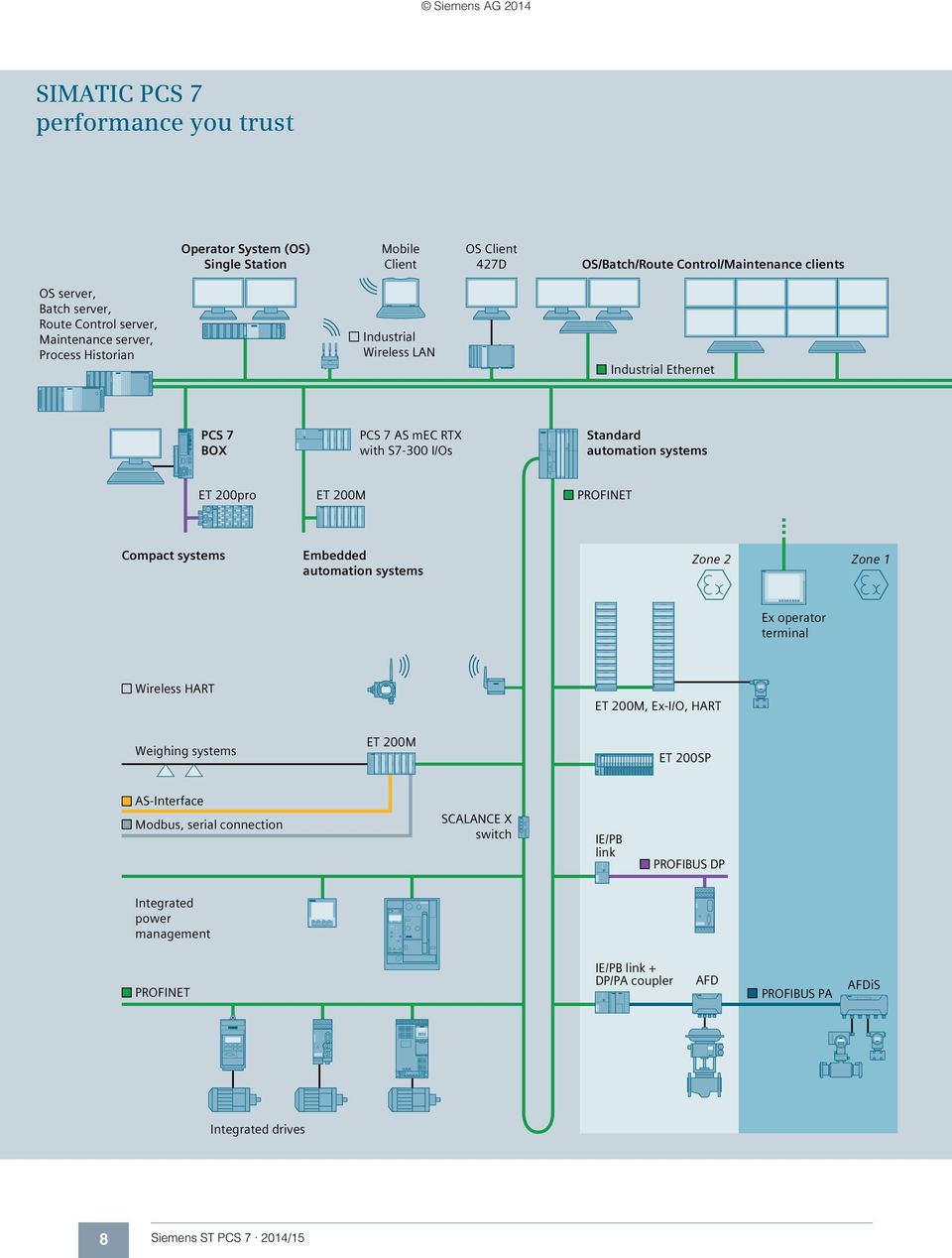
10 SIMATIC PCS 7 performance you trust Operator System (OS) Single Station Mobile Client OS Client 427D OS/Batch/Route Control/Maintenance clients OS server, Batch server, Route Control server, Maintenance server, Process Historian Industrial Wireless LAN Industrial Ethernet PCS 7 BOX PCS 7 AS mec RTX with S7-300 I/Os Standard automation systems ET 200pro ET 200M PROFINET Compact systems Embedded automation systems Zone 2 Zone 1 Ex operator terminal Wireless HART Weighing systems ET 200M ET 200M, Ex-I/O, HART ET 200SP AS-Interface Modbus, serial connection SCALANCE X switch IE/PB link PROFIBUS DP Integrated power management PROFINET IE/PB link + DP/PA coupler AFD PROFIBUS PA AFDiS Integrated drives 8 Siemens ST PCS /15
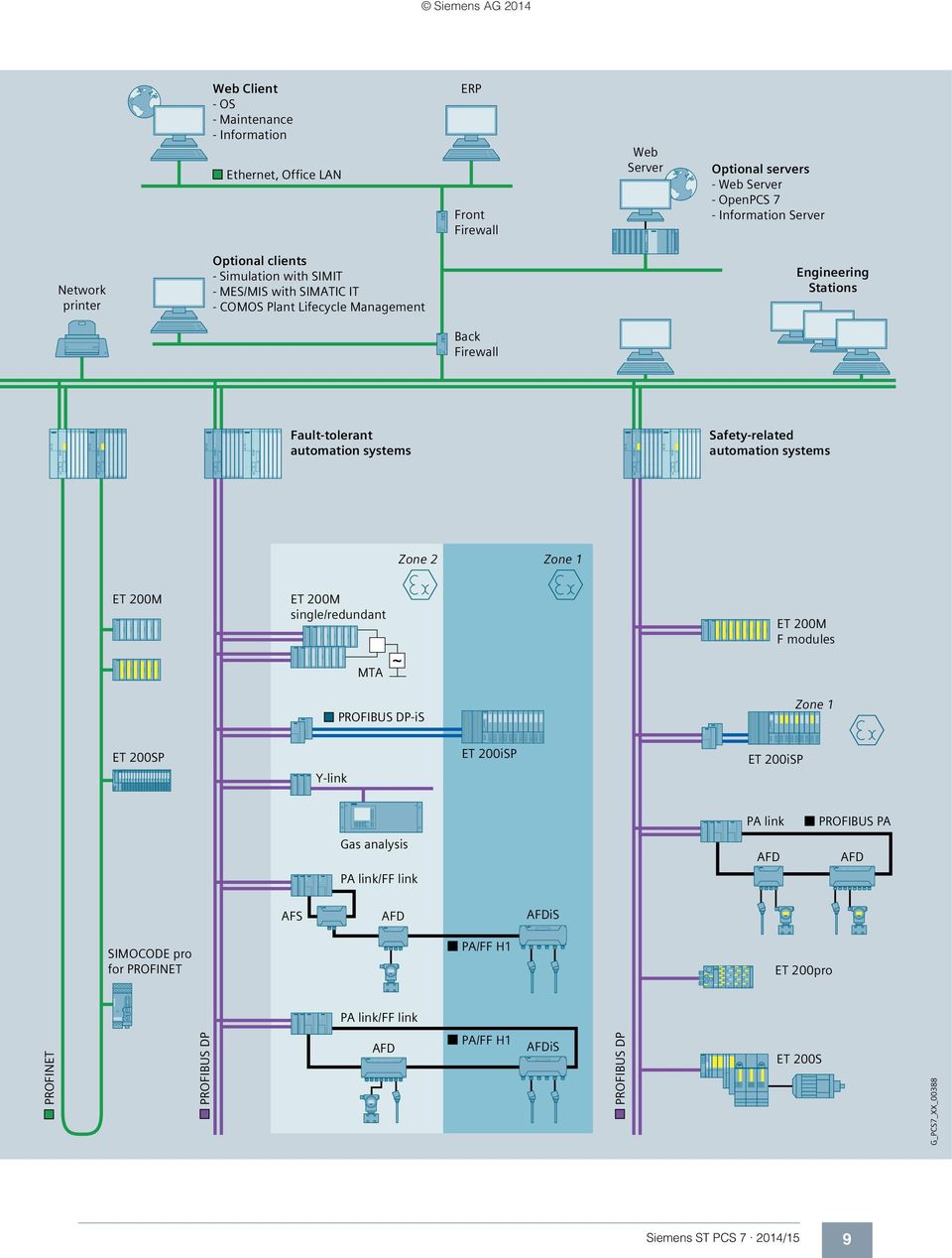
11 Web Client - OS - Maintenance - Information Ethernet, Office LAN ERP Front Firewall Web Server Optional servers - Web Server - OpenPCS 7 - Information Server Network printer Optional clients - Simulation with SIMIT - MES/MIS with SIMATIC IT - COMOS Plant Lifecycle Management Engineering Stations Back Firewall Fault-tolerant automation systems Safety-related automation systems Zone 2 Zone 1 ET 200M ET 200M single/redundant ET 200M F modules MTA PROFIBUS DP-iS Zone 1 ET 200SP Y-link ET 200iSP ET 200iSP Gas analysis PA link/ff link PA link AFD PROFIBUS PA AFD AFS AFD AFDiS SIMOCODE pro for PROFINET PA/FF H1 ET 200pro PA link/ff link PROFINET PROFIBUS DP AFD PA/FF H1 AFDiS PROFIBUS DP ET 200S G_PCS7_XX_00388 Siemens ST PCS /15 9
12 Totally Integrated Automation with SIMATIC PCS 7 SIMATIC PCS 7 is one of the international leaders in process control systems, and has the potential to implement innovative solutions for the special challenges associated with the process industry. The functional diversity, flexibility, and performance of the current version mean that SIMATIC PCS 7 pushes the limits of a typical process control system, and its technological enhancements offer many additional possibilities and new perspectives. SIMATIC PCS 7 benefits from its seamless integration in Siemens Totally Integrated Automation (TIA), a complete range of matched products, systems, and solutions for all hierarchy levels of industrial automation from the enterprise management level, to the control level, all the way down to the field level. This enables uniform, customer-specific automation in all sectors of manufacturing, process, and hybrid industry. An essential advantage of the consistency of the product and system spectrum and the solutions based upon this spectrum is that faster and more precise control sequences, as well as integrated security functions of shared hardware, engineering, and engineering tools can be used for automation of continuous and discontinuous processes. 10 Siemens ST PCS /15

13 Performance you trust In process engineering plants, the process control system is the starting point for optimal value added: All procedures and processes can be operated, monitored and influenced with the process control system. The more powerful the process control system, the more effectively this potential can be used. For this reason, performance is in the foreground with SIMATIC PCS 7, alongside scalability, flexibility, and integration. Starting with planning and engineering, the process control system offers powerful tools, functions and features for cost-effective and efficient plant operation through all phases of the plant life cycle. Performance through integration Integration is one of the special strengths of SIMATIC PCS 7. This has many aspects: Horizontal integration into TIA Vertical integration into hierarchical communication System-integrated tools for engineering tasks Integration of the field level, including drives, switchgear, etc. Integrated functions, e.g. for batch process automation, route control, process safety, energy management, telecontrol tasks, etc. Horizontal integration A system for integrated automation of the entire process chain, from incoming raw materials to outgoing goods this is one of the decisive advantages resulting from the seamless integration of SIMATIC PCS 7 into Totally Integrated Automation. The process control system is mainly responsible for automating the primary processes here, but it can do much more: All auxiliary facilities, as well as the electrical infrastructure in the form of low-voltage or medium-voltage switchgear and the building management system, can also be integrated into the system. Integration of selected SIMATIC standard components automation systems, industrial PCs, network components, or distributed process I/O into the process control system guarantees optimum interaction of individual components, and secures economic benefits such as simple selection, reduced stock keeping, and global support. Siemens ST PCS /15 11

14 Simulation FAT/OTS Life cycle and Remote services Integrated engineering Plant asset management APC Optimization Information management Integration of switchgears SIMATIC PCS 7 Energy management Batch automation Integration of package units Integrated field devices Safety Integrated Integrated telecontrol Material transport Vertical integration The hierarchal communication of a company encompasses the field level, the control level, and the process level, up to management and enterprise resource planning (ERP). Thanks to standardized interfaces based on international industry standards as well as internal interfaces SIMATIC PCS 7 is able to provide process data for analysis, planning, coordination, and optimization of plant sequences or production and business processes in real time, and at any location in the company. Central engineering SIMATIC PCS 7 convinces with graded functional diversity, consistent operator control philosophy, and uniformly structured engineering and management tools. A central engineering system with a coordinated range of tools for integrated system engineering and configuring of batch automation, safety functions, material transport or telecontrol systems creates value added over the entire life cycle. Reductions in configuring and training costs result in minimization of total cost of ownership (TCO) over the entire plant life cycle. Functional diversity Depending on the typical process automation or customer-specific requirements, SIMATIC PCS 7 can be functionally expanded for the following, for example: Batch process automation (SIMATIC BATCH) Functional safety and protection functions (Safety Integrated for Process Automation) Route control for material transport (SIMATIC Route Control) Telecontrol of remote units (SIMATIC PCS 7 TeleControl) Automation of electrical switchgear (SIMATIC PCS 7 PowerControl) Further additional functions that are also integrated, or can be integrated, seamlessly into the control system make optimization of processes and reductions in operating costs possible. SIMATIC PCS 7 has, for example, tools for energy and asset management, and it offers higher quality closed-loop control functions, as well as industryspecific automation solutions and libraries. 12 Siemens ST PCS /15

15 Customized performance Thanks to a unique scalable system architecture, SIMATIC PCS 7 creates the ideal basis for cost-effective implementation of individual automation solutions and economic operation of process plants. SIMATIC PCS 7 users derive sustained profit from a modular system platform based on standard SIMATIC components. Its uniformity enables flexible scaling of hardware and software, as well as perfect interaction both within the system and beyond system limits. The architecture of the SIMATIC PCS 7 Process Control System is designed in such a manner that instrumentation and control can be configured in accordance with customer requirements and optimally matched to the dimensions of the plant. The control system can be subsequently expanded or reconfigured at any time if there is an increase in capacity or a technological modification. When the plant grows, SIMATIC PCS 7 simply grows along with it without the provision of expensive reserve capacities. Performance in engineering With regard to planning and engineering, performance can be equated with minimizing time and costs. In conjunction with COMOS, SIMATIC PCS 7 offers a unique approach here: Integrated planning workflow from the description of the process to the automation program. A standardized system interface, strictly object-oriented working, and centralized data management mean data consistency across all planning steps, including automatically updated system documentation. Engineering using other planning tools is also mastered extremely efficiently by SIMATIC PCS 7 by means of the Advanced Engineering System. This can be used to import plant data from CAD/CAE tools without problems. It additionally allows automatic generation of the AS configuration thanks to simple multiplication of process tag types and model solutions, as well as parameter processing. Siemens ST PCS /15 13

16 Performance in operation Process control also becomes more complex due to the multi-layer nature of automation engineering and the increased merging with information technology. Intuitive and fault free operation is therefore more important than ever with regard to efficient working and the minimization of downtimes and servicing requirements. Using effective Advanced Process Control (APC) functions and an excellent operator system, SIMATIC PCS 7 supports optimization as well as userfriendly and safe control of the process. Monitoring of product quality and performance indicators additionally allows the process to be operated more economically. At the same time, SIMATIC PCS 7 convinces with high flexibility, plant availability, and investment security. Process control and maintenance SIMATIC PCS 7's operator system is used to monitor process operation using various views, and permits interventions when necessary. Its architecture is flexible and scalable from single-user systems up to multi-user systems with a redundant client/server architecture. The operator interface takes account of the current specifications of NAMUR (user association of automation technology in the process industries) and PI (Profibus International) and offers a high level of user-friendliness for simple, intuitive interaction with the plant. Ergonomic symbols, taskoriented faceplates, uniform representation of status information, and optimized alarm functions allow safe process control. The alarm management function integrated in SIMATIC PCS 7 is able to focus on essential alarms and to specifically guide the operator in exceptional circumstances. In this way, it systematically reduces the workload of operating staff. Preventive and predictive maintenance strategies reduce total cost of ownership. With the SIMATIC PCS 7 Maintenance Station, maintenance personnel always have a watchful eye on critical production equipment such as pumps, valves, distillation columns or motors, and can carry out the relevant maintenance measures in good time before servicing is required independent of the maintenance plan and without the risk of an unplanned plant standstill. Process optimization SIMATIC PCS 7 supports process optimization in many different manners, including: Control Performance Monitoring Advanced Process Control Process Historian The Control Performance Monitoring function monitors and signals the control quality of the closed-loop control block. If the performance declines, the controller can be optimized in good time or specific maintenance measures can be initiated. The integrated I&C libraries of SIMATIC PCS 7 also provide higher quality closed-loop control functions with which cost-effective Advanced Process Control applications can be implemented: multi-variable control, predictive control, or override control. It is thus possible to effectively improve profitability, product quality, safety, and environmental protection in small and medium-sized plants. Current and historic process data form the basis of all optimization. Secure and user-friendly real-time data storage and analysis is handled using the Process Historian. The process values, messages, and batch data managed in the database of the Process Historian can be called extremely rapidly. User-specific processing and visualization of this historic data are supported by the information server, which is a reporting system based on the Microsoft Reporting Services. 14 Siemens ST PCS /15

17 SIMATIC PCS 7 system and technology components With the rugged, high-performance SIMATIC PCS 7 system components from Catalog ST PCS 7, you already have a versatile platform for cost-effective implementation and economical operation of your process control systems. Perfect interplay of these system components makes it possible for you to sustain high-quality production and to establish new products significantly faster on the market. With SIMATIC PCS 7 technology components from Catalog ST PCS 7 T that can be seamlessly integrated into the process control system, you can expand the functional scope of the system components in a carefully targeted manner for specific automation tasks. This covers a wide spectrum, for example: Telecontrol for monitoring and controlling remote units Automation technology for electrical low-voltage or medium-voltage switchgear Industry-specific automation systems for the cement and mining industries, as well as for laboratory and training facilities Graphical objects for task-oriented optimization of process visualization Block libraries for technological functions, package unit and panel integration, monitoring and analyzing mechanical assets, as well as for building automation systems (heating, ventilation, air-conditioning FMCS/HVAC) Editors and function blocks for the efficient configuration of small or medium-sized automation systems with simple parameter control and materials management Process analytical technology for quality assurance through optimization of development and production processes based on up-to-date measurements, and critical quality and performance attributes Simulation system for testing and commissioning of plant-specific application software Flexible, high-performance Manufacturing Execution System (MES) System expansion for operator systems for the integration of third-party controllers, programmable logic controllers and package units Products for migration of the process control systems TELEPERM M, APACS+/QUADLOG or Bailey INFI 90/ NET 90 with SIMATIC PCS 7 SIMATIC PCS 7 technology components have been released for all versions and service packs of SIMATIC PCS 7 system components. Development and testing of SIMATIC PCS 7 technology components is dependent on the corresponding SIMATIC PCS 7 system components, so versioning and release is normally performed asynchronously, that is following a delay of between 3 and 6 months. Additional functionality can be integrated using add-on products Modularity, flexibility, scalability, and the openness of SIMATIC PCS 7 offer optimal prerequisites for integrating supplementary components and solutions in the process control system in an applicative manner and thus extend and round off its functionality. Many supplementary add-on products for SIMATIC PCS 7 have been developed by Siemens as well as by external partners (see Catalog ST PCS 7, Add-ons for the SIMATIC PCS 7 Process Control System). These software packages and hardware components authorized by the system manufacturer enable costeffective implementation of SIMATIC PCS 7 for special automation tasks. Siemens ST PCS /15 15

18 16 Siemens ST PCS /15 Siemens AG 2014

19 Software Media and Logistics Siemens AG /2 PCS 7 Software Packages 1/5 Software Update Service 1/8 System documentation Siemens ST PCS /15

20 Software Media and Logistics 1 PCS 7 Software Packages Design Product categories for SIMATIC PCS 7 software Generally, the SIMATIC PCS 7 and TIA software products offered in Catalog ST PCS 7 can be categorized as follows: Core products (single, floating or rental license) with: - Installation software - License key for software licensing Secondary products (single, floating or rental license) with: - License key for licensing of installation software is delivered with a core product or supplied separately Cumulative volume licenses (quantity options) with - License keys for a specific license volume in the form of process objects (POs), archive tags, TAGs, agents, clients, sources or units All software products categorized in this way are available as packages. As an alternative to this physical form of delivery, the installation software, software and volume licensing are often available online as well. The available forms of delivery for each product are explicitly specified in the ordering data and identified by different article numbers. Delivery form package The products are delivered in a form and package suitable for parcel shipping by conventional means of transportation (e.g. shipped by truck, rail or air) to the shipping address of the customer. Within the SIMATIC PCS 7 core products, the SIMATIC PCS 7 installation software (SIMATIC PCS 7 Software Media Package or SIMATIC PCS 7 Software Media Package ASIA) and the software license for the specific SIMATIC PCS 7 software product are separate packages. They are no longer sealed together in one product package. The SIMATIC PCS 7 Software Media Package or its regional ASIA version is supplied with the SIMATIC PCS 7 core products for each single order item. When ordering more than one item, you can influence the number of Software Media Packages using the order item. For example, if you order three SIMATIC PCS 7 OS Software Single Station V8.1 software products as a single order item, you will receive only one SIMATIC PCS 7 Software Media Package. However, if you distribute the order between three order items, you will receive a SIMATIC PCS 7 Software Media Package for each of the three software licenses. Additional SIMATIC PCS 7 Software Media Packages and volume licenses specified for the core product can be ordered separately depending on the requirement. The following table illustrates this ordering and delivery logistics: Order Product package Item No. Quantity Product name Article No. Quantity Components Ordering of 3 units with one order item SIMATIC PCS 7 OS Software Single Station V8.1 6ES7658-2AA18-0YA0 3 License key USB stick, certificate of license including 100 OS Runtime POs 1 SIMATIC PCS 7 Software Media Package Ordering of 3 units with three order items SIMATIC PCS 7 OS Software Single Station V8.1 6ES7658-2AA18-0YA0 1 License key USB stick, certificate of license including 100 OS Runtime POs 1 SIMATIC PCS 7 Software Media Package SIMATIC PCS 7 OS Software Single Station V8.1 6ES7658-2AA18-0YA0 1 License key USB stick, certificate of license including 100 OS Runtime POs 1 SIMATIC PCS 7 Software Media Package SIMATIC PCS 7 OS Software Single Station V8.1 6ES7658-2AA18-0YA0 1 License key USB stick, certificate of license including 100 OS Runtime POs 1 SIMATIC PCS 7 Software Media Package The following SIMATIC PCS 7 software products are supplied without the SIMATIC PCS 7 Software Media Package or its ASIA variant: Secondary products Core products with rental license Client software The ordering and delivery logistics described for the core products is therefore not relevant for these products. SIMATIC PCS 7 Software Media Packages and SIMATIC PCS 7 Software Media Packages ASIA can be ordered separately depending on requirements. 1/2 Siemens ST PCS /15

21 Software Media and Logistics Design (continued) Ordering data Delivery form online We offer online delivery for SIMATIC PCS 7 software and license keys via the Internet as an innovative alternative to the physical delivery of goods. The decisive advantage over the physical delivery of goods lies in the fact that the software and licenses are available immediately and can be easily managed. The software products and licenses that can be downloaded have different article numbers. They are ordered through the normal channels, e.g. the Industry Mall. When ordering via the Industry Mall, you can filter out the ordering data of those products that can be delivered online with reference to the selected branch of the product and offering license tree. This can be done by selecting the type of delivery "Online delivery" from a drop-down list on the right of the screen. In this manner you will achieve a better overview of the online offering. When ordering a product that can be delivered online, the address of the ship-to party must be provided. The recipient of the goods is informed by as soon as the ordered products are available for downloading. The message with the availability information also contains the login data. Parallel delivery on a data carrier does not take place. The software, license key and associated documents, e.g. the Certificate of License (CoL), are downloaded in the Automation License Manager (ALM). A license key can be downloaded once only. To log in, the login data received in the is required. As an alternative, the access data to the Industry Mall account can be used for logging in. Apart from the download, ALM also supports license management. You can, for example, get an overview of the available licenses or those obtained online, allocate licenses, and run a hardware-specific license analysis. In contrast to the delivery package, the SIMATIC PCS 7 Software Media Package with online delivery of core products is not included in the download. For online delivery, the downloadable SIMATIC PCS 7 Software Media Package must always be additionally ordered as a separate add-on. SIMATIC PCS 7 Software Support Package We offer you supplementary documentation and additive software (drivers, service packs, tools, etc.) for SIMATIC PCS 7 in the form of the SIMATIC PCS 7 Software Support Package. It is only authorized for use in combination with the corresponding SIMATIC PCS 7 Software Media Package/SIMATIC PCS 7 Software Media Package ASIA. Software licenses are not involved. If required, you can also obtain some of the software components in the SIMATIC PCS 7 Software Support Package directly from the respective manufacturer. SIMATIC PCS 7 Software Media Packages SIMATIC PCS 7 Software Media Package V8.1 1) Installation software and electronic documentation on DVD, 5 languages (English, German, French, Italian, Spanish), software class A, runs with Windows 7 Ultimate 32/ 64-bit or Windows Server 2008 R2 Standard 64-bit, including trial license for 14 days Delivery form package Software DVDs, certificate of Delivery form online Software download, online certificate of license Note: address required! SIMATIC PCS 7 Software Media Package ASIA V8.1 1) Installation software and electronic documentation on DVD, 2 languages (English, Chinese), software class A, runs with Windows 7 Ultimate 32/64-bit or Windows Server 2008 R2 Standard 64-bit, including trial license for 14 days Delivery form package Software DVDs, certificate of license SIMATIC PCS 7 Software Support Package V8.x 2) Add-on documentation and software (drivers, service packs, and tools, etc.) on DVD, 5 languages (English, German, French, Italian, Spanish), software class B, runs with Windows 7 Ultimate 32/64-bit or Windows Server 2008 R2 Standard 64-bit Delivery form package Software DVDs, certificate of license PCS 7 Software Packages Article No. 6ES7658-4XX18-0YT8 6ES7658-4XX18-0YG8 6ES7658-4XX18-0CT8 6ES7650-4XX08-0YT8 1) Permanent use of SIMATIC PCS 7 software requires valid software licenses. In addition to the SIMATIC PCS 7 software from the SIMATIC PCS 7 Software Media Package, you may require supplementary software (for details, see product information), which can be obtained directly from the manufacturers or in the form of the SIMATIC PCS 7 Software Support Package. 2) SIMATIC PCS 7 Software Support Package V8.x is authorized for use only in combination with the SIMATIC PCS 7 Software Media Package V8.1 or the SIMATIC PCS 7 Software Media Package ASIA V Siemens ST PCS /15 1/3
22 Software Media and Logistics 1 PCS 7 Software Packages More information Regional product versions Originally, all SIMATIC PCS 7 software products were designed for international use, i.e. there was only one product version for worldwide use, which was offered in up to 6 languages: English, German, French, Italian, Spanish and Chinese. However, the number of supported languages was not uniform; it varied depending on the product. This internationally usable product variant remains available for all SIMATIC PCS 7 software products. In addition, a regional "ASIA" product version will also be offered for the SIMATIC PCS 7 Software Media Package and specific SIMATIC PCS 7 software products of the "Engineering System" and "Operator System" system components. The ASIA products are currently available in two languages: English and Chinese (simplified). They are explicitly identified in the name by the suffix "ASIA". If a product listed in this catalog does not have the suffix "ASIA" in its name, it can always be used globally. However, the following restriction applies: If a regional ASIA product is offered, the pendant for international use does not support the Asian languages (currently Chinese simplified) present in the ASIA product. The products for international use, i.e. products without the suffix "ASIA", are not intended as the basis for runtime systems with fonts in Asian languages. The following special points must be observed as a result of the definition of separate products for installation software and licenses. The SIMATIC PCS 7 installation software is available in the form of two data medium packages: SIMATIC PCS 7 Software Media Package SIMATIC PCS 7 Software Media Package ASIA The specific ASIA software licenses harmonize exclusively with the SIMATIC PCS 7 Software Media Package ASIA. SIMATIC PCS 7 software licenses for which there is no ASIA pendant can be used with both SIMATIC PCS 7 Software Media Packages. 1/4 Siemens ST PCS /15
23 Software Media and Logistics Overview Software Update Service for SIMATIC PCS 7 Siemens offers a cost-effective Software Update Service (SUS) for international SIMATIC PCS 7 software products (except for specially marked regional versions, such products with the "ASIA" label). If you utilize this service, you participate in the further development of the SIMATIC PCS 7 software you are using, and are always in possession of the latest release versions. You can join the software update service for SIMATIC PCS 7 by purchasing SUS packages, and this is only possible on the basis of the current software versions at the time of purchase. The SUS packages represent a structural division of the SIMATIC PCS 7 software product range using functional and system-specific aspects. The number and composition of the package components identified as list elements are mainly characterized by license aspects (see "Design" for structure and contents, page 1/6). A list element can represent a single software product or also be a synonym for several products of the same type. When purchasing one SUS package, you automatically receive all upgrades and ServicePacks for the software referred to in this package for one year. Within this period of one year, you are therefore authorized to update one corresponding license from your stock for each list element in this package. The total number of SUS packages of one type which you require is therefore determined by the list element which includes most of the software licenses you use. An example of the SUS OS server package should make this clear once again based on a fictitious license inventory: Software products in inventory 3 PCS 7 OS Software Server, 1 PCS 7 Process Historian Redundancy 1 PCS 7 Information Server Basic Package License inventory PCS 7 SFC Visualization 3 3 License Number inventory of SUS per list item packages 5 5 For a list item that represents several products, existing licenses of these products are to be added in the inventory first. In the example, these are the licenses of the "PCS 7 OS Software Server" and "PCS 7 Process Historian Redundancy" for the first list element of the SUS OS server. Be aware that the "PCS 7 Process Historian Redundancy" product contains 2 licenses. The license inventory is defined by a single product for the other list items. The list item that combines the most licenses is ultimately decisive in determining the number of required SUS packages. Based on the example, you would therefore need to order 5 SUS OS server packages. Software Update Service Duration of subscription, cancellation Delivery is to the address entered in the order. An SUS is automatically extended for a further year unless canceled no later than 3 months prior to expiration. Cancellation must be made in writing, and must be sent to the dispatch center with reference to the contract number. SUS editions SUS packages are available as: SUS Standard Edition SUS Compact Edition SUS Download Edition The SUS Standard Edition is the most comprehensive package form. If you order this edition n-times, you will receive n number of packing units. Each of these packing units contains Initial delivery: 1 Certificate of Contract Upgrade delivery: 1 data carrier set, 1 license key USB stick with one license The SUS Compact Edition reduces the scope of the package for the Software Update Service for multiple workstations and simplifies the central management of licenses. If you order the SUS Compact Edition n-times, you will receive only one packing unit. This packing unit contains Initial delivery: n Certificates of Contract Upgrade delivery: 1 data carrier set, 1 license key USB stick with n licenses The SUS Compact Edition is offered for the following SIMATIC PCS 7 SUS packages: SUS OS Single Station SUS OS Server SUS OS Client, SFC Visualization SUS SIMATIC BATCH Server/Single Station SUS SIMATIC BATCH Client The SUS Download Edition delivered over the Internet has the advantage that software and licenses are available more rapidly than with the physical delivery, and can also be managed more easily. When delivering the SUS Download Edition, the address of the consignee is obligatory. An order item can only be assigned to a single address. The consignee is informed by as soon as the Certificates of Contract or the software and licenses are available for downloading. Downloading of software, license keys, and associated documents is carried out in the Automation License Manager (ALM). 1 Siemens ST PCS /15 1/5
24 Software Media and Logistics Software Update Service 1 Overview (continued) The following table uses an example to clarify the differences between the SUS editions: Edition SUS Standard Edition SUS Compact Edition SUS Download Edition Packaging Package Package Online delivery Order 25 SUS Standard Edition in one order item 25 SUS Compact Edition in one order item 25 SUS Download Edition in one order item First delivery Subsequent delivery of Service Packs Subsequent delivery of upgrades 25 packing units with: 1 Certificate of Contract (CoC) If a comparable product exists in a different edition for an existing SUS package, the existing SUS contract can be modified accordingly if required. 1 packing unit with: 25 Certificate of Contract (CoC) 1 message for 25 Online Certificate of Contract (ECoC) 25 Service Pack (data carrier set) 1 Service Pack (data carrier set) 1 Service Pack (download) 25 packing units with: 1 data carrier set 1 license key USB stick with 1 license 1 Certificate of License (CoL) 1 packing unit with: 1 data carrier set 1 license key USB stick with 25 licenses 25 Certificate of License (CoL) Billing 1 bill 1 bill 1 bill 1 message for Software download 25 license key download 25 Certificate of License online Software Update Service for TIA products In addition to the SUS for the SIMATIC PCS 7 process control system, there is also an SUS for SIMATIC PCS 7 products used in a different context (CFC, SIMATIC PDM) within the scope of Totally Integrated Automation (TIA). In the case of SIMATIC PDM, this is identical to the SUS PDM package for the Software Update Service for SIMATIC PCS 7. The SUS range is rounded-off by the SUS for SIMATIC S7 products used in the context of SIMATIC PCS 7, e.g. SUS S7-PLCSIM. Design Structure and content of the SUS packages for the SIMATIC PCS 7 Software Update Service Note: Each item of an SUS package (element in list) represents a software license. SUS Engineering AS/OS SUS PDM SUS OS single station (2 SUS packages are required for a redundant pair) PCS 7 Engineering AS/OS, PCS 7 Engineering AS PCS 7 ES Single Station (AS/OS: 250 POs) PCS 7 Management Console PCS 7 Import-Export Assistant Version Cross Manager Version Trail PCS 7 SFC Visualization PCS 7 BCE IE S7 license for communication via CP 1623/ CP 1613 A2 PDM Basic PDM Service PDM S7 PDM PCS 7 PDM PCS7-FF PDM PCS 7 Server PDM Integration in STEP 7/PCS 7 PDM Extended PDM Communication FOUNDATION Fieldbus PDM Routing PDM Server PDM HART Server PCS 7 OS Software Single Station, PCS 7 OS Software Single Station Redundancy (for one single station) PCS 7 OpenPCS 7/OS Client PCS 7 OpenPCS 7 PCS 7 SFC Visualization PCS 7 BCE IE S7 license for communication via CP 1623/ CP 1613 A2 SUS OS server (2 SUS packages are required for a redundant pair) SUS OS Client, SFC Visualization SUS Web Server SUS Maintenance Station SUS SIMATIC BATCH Server/ Single Station SUS SIMATIC BATCH Client SUS SIMATIC Route Control PCS 7 OS Software Server, PCS 7 OS Software Server Redundancy (for one server), PCS 7 Process Historian Basic Package, PCS 7 Process Historian Redundancy (for one server) PCS 7 Process Historian and Information Server Basic Package PCS 7 Process Historian Archive BATCH PCS 7 Process Historian OPC UA Server PCS 7 Information Server Basic Package PCS 7 OpenPCS 7/OS Client PCS 7 OpenPCS 7 PCS 7 SFC Visualization PCS 7 BCE IE S7 license for communication via CP 1623/ CP 1613 A2 PCS 7 OS Software Client PCS 7 SFC Visualization PCS 7 Web Server PCS 7 Web Diagnostics Server PCS 7 Web Diagnostics Client PCS 7 Maintenance Station Engineering PCS 7 Maintenance Station Runtime Basic Package PCS 7 OS Software Client PCS 7 SIMATIC BATCH Server PCS 7 SIMATIC BATCH Single Station Package PCS 7 SIMATIC BATCH Basic PCS 7 SIMATIC BATCH API PCS 7 BCE IE S7 license for communication via CP 1623/ CP 1613 A2 PCS 7 SIMATIC BATCH Client PCS 7 SIMATIC BATCH Recipe System PCS 7 SIMATIC Route Control Engineering PCS 7 SIMATIC Route Control Center PCS 7 SIMATIC Route Control Server PCS 7 BCE IE S7 license for communication via CP 1623/ CP 1613 A2 1/6 Siemens ST PCS /15
25 Software Media and Logistics Ordering data Article No. Article No. Software Update Service 1 SUS Standard Edition SUS Compact Edition SIMATIC PCS 7 Software Update Service, Standard Edition Subscription for 1 year with automatic extension; requirement: Current software version; form of delivery PCS 7 Software Update Service for Engineering AS/OS PCS 7 Software Update Service for OS Single Station PCS 7 Software Update Service for OS Server PCS 7 Software Update Service for OS Client, SFC Visualization PCS 7 Software Update Service for Web Server PCS 7 Software Update Service for Maintenance Station PCS 7 Software Update Service for SIMATIC BATCH Server/Single Station PCS 7 Software Update Service for SIMATIC BATCH Client PCS 7 Software Update Service for SIMATIC Route Control Software Update Service for TIA products, Standard Edition (SIMATIC PCS 7 products used in a different context, as well as SIMATIC S7 products used with SIMATIC PCS 7) Subscription for 1 year with automatic extension; requirement: current software version SIMATIC PDM Software Update Service S7-PLCSIM Software Update Service 6ES7658-1XX00-0YL8 6ES7658-2AX00-0YL8 6ES7658-2BX00-0YL8 6ES7658-2CX00-0YL8 6ES7658-2GX00-2YL8 6ES7658-7GX00-0YL8 6ES7657-0SA00-0YL8 6ES7657-0XX00-2YL8 6ES7658-7DX00-0YL8 6ES7658-3XX00-0YL8 6ES7841-0CA01-0YX2 SIMATIC PCS 7 Software Update Service, Compact Edition Subscription for 1 year with automatic extension; requirement: Current software version; form of delivery PCS 7 Software Update Service for OS Single Station PCS 7 Software Update Service for OS Server PCS 7 Software Update Service for OS Client, SFC Visualization PCS 7 Software Update Service for SIMATIC BATCH Server/Single Station PCS 7 Software Update Service for SIMATIC BATCH Client SUS Download Edition SIMATIC PCS 7 Software Update Service, Download Edition Subscription for 1 year with automatic extension; requirement: current software version; delivery form: online Note: address required! PCS 7 Software Update Service for Engineering AS/OS PCS 7 Software Update Service for OS Single Station PCS 7 Software Update Service for OS Server PCS 7 Software Update Service for OS Client, SFC Visualization PCS 7 Software Update Service for Web Server PCS 7 Software Update Service for Maintenance Station PCS 7 Software Update Service for SIMATIC BATCH Server/Single Station PCS 7 Software Update Service for SIMATIC BATCH Client PCS 7 Software Update Service for SIMATIC Route Control SIMATIC PDM Software Update Service 6ES7658-2AX00-0YM8 6ES7658-2BX00-0YM8 6ES7658-2CX00-0YM8 6ES7657-0SA00-0YM8 6ES7657-0XX00-2YM8 6ES7658-1XX00-0YV8 6ES7658-2AX00-0YV8 6ES7658-2BX00-0YV8 6ES7658-2CX00-0YV8 6ES7658-2GX00-2YV8 6ES7658-7GX00-0YV8 6ES7657-0SA00-0YV8 6ES7657-0XX00-2YV8 6ES7658-7DX00-0YV8 6ES7658-3XX00-0YV8 Siemens ST PCS /15 1/7
26 Software Media and Logistics 1 System documentation Overview More information PCS 7 online help is supplied with SIMATIC PCS 7. It can be called using the SIMATIC Manager. The help can be dynamically expanded with add-on help documents. The complete SIMATIC PCS 7 system documentation is provided as a free-of-charge, multilingual manual collection on the Internet via My Documentation Manager. My Documentation Manager not only enables you to view documents, you can also collect them in your own library and generate your own documents. Information about using these functions as well as FAQs are available in My Documentation Manager. The SIMATIC PCS 7 system documentation provides both beginners and experienced users with valuable information on all aspects of the process control system. The range extends from the system introduction, covers initial steps and cross-system topics, up to a description of individual system components. With the "Getting Started" documentation you can gain initial practical experience using example projects. In order to use this, select the manuals for your SIMATIC PCS 7 version on the website for SIMATIC PCS 7 technical documentation: You can open the available SIMATIC PCS 7 manuals directly in the My Documentation Manager, or first start the My Documentation Manager and then select the desired documentation in the integrated Siemens library. In addition to the SIMATIC PCS 7 system documentation, the Siemens library in the My Documentation Manager provides access to the technical documentation of other products and systems from the SIMATIC range of products. The "SIMATIC Technical Documentation" site on the Internet directs you straight to the complete range of technical documentation available for SIMATIC products and systems in English, German, French, Italian, Spanish and Chinese. If other languages are available, you can also find them there. You can select individual documents from this range for viewing or downloading. Additional information is available on the Internet at: 1/8 Siemens ST PCS /15
27 System Administration Siemens AG /2 Management Console2 Siemens ST PCS /15
28 System Administration 2 Management Console Overview A process control system includes numerous heterogeneous components with specific parameters and settings. It is also subject to a dynamic change process due to updates, upgrades as well as modernization measures and expansion. As the plant gets older, it becomes more difficult for you to keep track of the current state of hardware and software. What is more, establishing and maintaining transparency without system support is very time consuming. The SIMATIC PCS 7 Management Console enables you to reduce the work for managing your SIMATIC PCS 7 plant to a minimum. You also have the latest status of the installed hardware and software components immediately at hand. SIMATIC PCS 7 Management Console enables: Centralized, standardized administration of SIMATIC PCS 7 software Inventory of all installed hardware and software components of the SIMATIC PCS 7 plant SIMATIC Management Console: Overview of installed software status Design PCS 7 PH/IS PCS 7 clients PCS 7 engineering station PCS 7 management console Terminal bus PCS 7 server Plant bus AS 416 PCS 7 AS mec RTX PCS 7 AS RTX AS 417FH PROFIBUS DP ET 200M ET 200S ET 200iSP PA Link PROFIBUS PA FF Link AFD AFD AFDiS Y-Link G_PCS7_XX_00332 Example of a SIMATIC PCS 7 plant with a stand-alone SIMATIC PCS 7 Management Console 2/2 Siemens ST PCS /15
29 System Administration Management Console Design (continued) Function The SIMATIC PCS 7 Management Console enables you to Central administration of SIMATIC PCS 7 software manage either individual SIMATIC PCS 7 plants or multiple plants of a SIMATIC PCS 7 plant network. The central administration of the software versions of all stations in your SIMATIC PCS 7 plant significantly reduces your administrative work. SIMATIC PCS 7 installations, updates and service For small and medium-sized SIMATIC PCS 7 plants, the SIMATIC PCS 7 Management Console can be installed and packs are subject to administration. In addition to the latest operated on a PCS 7 engineering station. SIMATIC PCS 7 software V8.1, upgrades to V8.1 are also However, a stand-alone SIMATIC PCS 7 Management Console supported. The software can be installed on a single target is typically used for medium-sized and large SIMATIC PCS 7 station or in parallel on multiple target stations. The installation plant networks. For the single station or server versions of on the target station does not require active participation of the SIMATIC PCS 7 Industrial Workstation that are a suitable as user. Thanks to the upstream security mechanisms, unintended the basic hardware for such a dedicated SIMATIC PCS 7 adverse effects on runtime operation can be prevented. Management Console, see "SIMATIC Rack PC" in the section Setup management "Industrial Workstation/IPC", page 3/3. Provision of SIMATIC PCS 7 installation files on dedicated file SIMATIC PCS 7 Industrial Workstations of a SIMATIC PCS 7 servers or combined on the SIMATIC PCS 7 Management plant managed with the SIMATIC PCS 7 Management Console Console are licensed as Management Console agents. Addition/removal of SIMATIC PCS 7 setups in the central One Management Console Agent license is required for each setup management of the SIMATIC PCS 7 Management SIMATIC PCS 7 Industrial Workstation managed by the Management Console. The Management Console agents are available in Creation of pre-configured setup packages based on plant/ Console cumulative sets with 10, 50 and 100 licenses. user-specific aspects (e.g. OS client package) Rollout of pre-configured setup packages to target stations Status monitoring of the target stations Check of target stations for installation readiness by determining and displaying the operating state or role (e.g. OS runtime active/inactive, redundancy mode) Implicit, remote disabling of a station in preparation for the start of a SIMATIC PCS 7 update installation Status monitoring of the entire SIMATIC PCS 7 installation (e.g. resumption of the installation after restart or network interruption) Implicit, remote enabling of a station after completion of a SIMATIC PCS 7 update installation SIMATIC PCS 7 system inventory General inventory taking of installed hardware and software components from a central location offers the following advantages, for example: Quick analysis of the installed components as preparation for replacement actions or upgrades Simple creation of a detailed inventory report The SIMATIC PCS 7 system inventory spans all levels of a SIMATIC PCS 7 plant: company management level, control level, and field level. It covers all SIMATIC PCS 7 system components in these levels, e.g. SIMATIC PCS 7 workstations, Industrial Ethernet switches, automation systems (controllers), remote I/Os, links, field devices, drives, etc. SIMATIC PCS 7 system inventory implies: Central acquisition of inventory data by reading it from the database of the SIMATIC PCS 7 engineering system or directly from the components Generation of an inventory report in Microsoft Excel format Creation of a license certificate in the form of a list of installed and actually used software licenses 2 Siemens ST PCS /15 2/3
30 System Administration Management Console 2 Ordering data Article No. Article No. SIMATIC PCS 7 Management Console V8.1 5 languages (English, German, French, Italian, Spanish), software class A, runs with Windows 7 Ultimate 32/64-bit or Windows Server 2008/2008 R2 Standard 64-bit, floating license for 1 user Delivery form package (without SIMATIC PCS 7 Software Media Package) License key USB stick, certificate of license Delivery form online (without SIMATIC PCS 7 Software Media Package) License key download, online certificate of license Note: address required! 6ES7658-5BX18-2YB5 6ES7658-5BX18-2YH5 Management Console Agents 1) Independent of language, software class A, floating license for 1 user Delivery form package (without SIMATIC PCS 7 Software Media Package) License key USB stick, certificate of license -10agents 6ES7658-5BA00-2YB5-50agents 6ES7658-5BB00-2YB5-100 agents 6ES7658-5BC00-2YB5 Delivery form online (without SIMATIC PCS 7 Software Media Package) License key download, online certificate of license Note: address required! -10agents 6ES7658-5BA00-2YH5-50agents 6ES7658-5BB00-2YH5-100 agents 6ES7658-5BC00-2YH5 1) An agent is required for each SIMATIC PCS 7 Industrial Workstation managed by the Management Console. 2/4 Siemens ST PCS /15
31 Industrial Workstation/IPC Siemens AG /2 Introduction 3/3 SIMATIC Rack PC 3/12 IPC547E 3/20 IPC647D 3/28 IPC847D 3/35 SIMATIC BOX PC 3/42 SIMATIC Microbox PC 3/46 OS Client 427D 3/48 OS Client 477D 3/50 Expansion components 3/50 Mouse and keyboard 3/51 Multi-monitor mode 3/53 Smart Card Reader 3/54 Signal output Siemens ST PCS /15
32 Siemens AG 2015 Industrial Workstation/IPC Introduction 3 Overview We offer a select range of modern and powerful SIMATIC PCS 7 Industrial Workstations for the systems located above the controller level in the SIMATIC PCS 7 system architecture, e.g. for: Engineering Operating and monitoring (also via Internet/intranet) Asset management Batch automation Route control Remote control IT applications SIMATIC PCS 7 Industrial Workstations based on a SIMATIC Rack PC of type IPC547E, IPC647D or IPC 847D are optimized for use as single station, server or client, and can be expanded specific to the system. As a supplement to these, the SIMATIC Microbox PC in the version SIMATIC PCS 7 OS Client 427 as well as the SIMATIC Box PC in the version SIMATIC PCS 7 BOX OS Client 627 provide low-cost client alternatives for operator control and monitoring and for batch automation. Application Basic hardware for single station/server SIMATIC PCS 7 Industrial Workstations of type IPC547E, IPC647D or IPC 847D, which are available for use as single station or server, vary in their performance, features, expansion reserves, and length of the product lifecycle. A table compares the essential features of these types in the catalog section "SIMATIC Rack PC, introduction", allowing you to quickly narrow down the search for your specific application. You can then use the detailed technical data in the same catalog section to define this preselection in detail. Basic hardware for clients Compared to the more compact client versions SIMATIC PCS 7 OS Client 427 and SIMATIC PCS 7 BOX OS Client 627, clients based on a SIMATIC Rack PC have a larger number and greater variety of interfaces. They therefore offer more expansion options and can be used more universally. In multi-monitor mode, you can control up to four process monitors with equivalent quality. The main advantage of the SIMATIC PCS 7 OS Client 427 is its highly compact and rugged design which allows maintenancefree 24/7 operation without fans. The version with solid-state drive (SSD) is particularly resistant to vibration and shock since there are no rotating storage media. As a result of the design, however, the expansion options of the SIMATIC PCS 7 OS Client 427 are restricted. The compact and sturdy SIMATIC PCS 7 BOX OS Client 627 with a comparable interface configuration is slightly larger than a client on the basis of the SIMATIC Microbox PC. In return, it is additionally equipped with a DVD drive and two free slots for expansion modules. Furthermore, it can also be ordered as a design version with Panel Front (TFT Touch Panel). Options Notes on the use of other basic hardware and non-simatic software Siemens guarantees the compatibility of hardware and software for system configurations based on components in this catalog. The system test confirms that the system software of the SIMATIC PCS 7 process control system can be run on the basic hardware offered in this catalog. Despite comprehensive tests, it cannot be excluded that the function of a SIMATIC PCS 7 system could be disturbed or interfered with as a result of additional non-simatic software, i.e. software which has not been explicitly approved for SIMATIC PCS 7. If you use hardware other than the basic hardware offered in this catalog, or additional non-simatic software, this is at your own risk. If compatibility problems arise as a result of these hardware/ software components, the support provided for their elimination is not free of charge. The licenses for plant bus communication via Industrial Ethernet, i.e. for Basic Communication Ethernet (BCE) and CP 1613/1623/ 1628 communication (IE) are bound to the SIMATIC PCS 7 Industrial Workstations. Depending on the selected type of communication, the SIMATIC PCS 7 Industrial Workstations for single stations and servers are delivered as standard with a network adapter plus BCE license or a CP 1623 plus SIMATIC NET HARDNET IE S7 communications software. If you are using SIMATIC PCS 7 V8.1 on other computers (not SIMATIC PCS 7 Industrial Workstations), you additionally require a SIMATIC PCS 7 BCE V8.1 license (article number 6ES7650-1CD18-2YB5) for all single stations or servers which are connected to the plant bus via a standard network adapter and not via a CP 1623/CP 1613 A2/CP /2 Siemens ST PCS /15
33 Siemens AG 2015 Industrial Workstation/IPC SIMATIC Rack PC Overview Rack PC family IPC647, IPC847, IPC547 Application Features With the SIMATIC PCS 7 Industrial Workstation of type IPC547E, we offer you an excellent platform for the configuration of single stations, servers or clients for SIMATIC PCS 7 V8.1. With its allround capabilities it is ideal for numerous applications in process automation. The more powerful types, IPC647D and IPC847D, are excellent alternatives to meet higher requirements. Because the basic components such as chipset, processor or memory, are identical, many technical specifications of the IPC647D and IPC847D types are comparable. The essential differences result from the different overall heights. Since the IPC647D is only half as high as IPC847D, the number and variety of the free slots are reduced in this case. On the other hand, the more compact design requires significantly less space and enables higher packing densities in the control cabinet. This allows the realization of space-saving designs. The IPC847D is the most powerful and best equipped SIMATIC PCS 7 Industrial Workstation. Its numerous and varied slots provide a great deal of potential for expansion. The IPC847D is predestined for use as a server or single station. Since it would be over-dimensioned as a client, it is not offered in this version. SIMATIC PCS 7 Industrial Workstation IPC547E IPC647D IPC847D 3 Available SIMATIC PCS 7 pre-installations V8.1 n n n Available versions ES/OS Single Station n n n OS Server n n n OS Client n n Height 4 U 2 U 4 U ECC work memory n n Software RAID controller (onboard) RAID1 n n n Hard disks/ SATA n n n Solid State Drive (SSD) SSD n n n No. of slots PCIe x or 4 5 PCIe x8 1 PCIe x4 3 PCIe x1 PCI 4 0 or 2 3 Redundant power supply with diagnostics n n Without diagnostics n Lifecycle Marketing 1.5 to 2 years 5 years 5 years Spare parts/repair 3 years 5 years 5 years Siemens ST PCS /15 3/3
34 Siemens AG 2015 Industrial Workstation/IPC SIMATIC Rack PC 3 Application (continued) Specially optimized versions are available for operation as single stations, servers or clients. The operating system and the following ES/OS software of the SIMATIC PCS 7 process control system are factory installed: Single station: PCS 7 Engineering Software for AS/OS (including OS Runtime software) Server: PCS 7 OS Software Server Client: PCS 7 OS Software Client You only need the corresponding licenses in order to use the pre-installed SIMATIC PCS 7 software. Design Types of plant bus communication A SIMATIC PCS 7 workstation in the single station or server version can be used in a variety of ways on the Industrial Ethernet plant bus depending on the type and number of automation systems connected: Note: Please note the standard installation if you use the SIMATIC PCS 7 Industrial Workstations within the SIMATIC PCS 7 process control system for other tasks, e.g. as basic hardware for SIMATIC BATCH, SIMATIC Route Control, PCS 7 TeleControl, PCS 7 PowerControl, PCS 7 Process Historian, PCS 7 Information Server or PCS 7 Web Server. You can then expand or discard the existing SIMATIC PCS 7 pre-installation, or restore it using one of the supplied restore DVDs (for details, see section restore DVDs under IPC547E, IPC647D or IPC847D, page 3/14, page 3/22 and page 3/30). Interface Software for AS communication Communication module CP 1623/CP 1613 A2/CP 1628 SIMATIC NET HARDNET-IE S7 communication software, licensed for up to four CP 1623/CP 1613 A2/ CP 1628 (license for 4 units) SIMATIC NET HARDNET-IE S7-REDCONNECT communication software, licensed for up to four CP 1623/CP 1613 A2/CP 1628 (license for 4 units) with up to 64 AS single stations (not AS redundant stations) with redundant automation systems (redundant stations) Ethernet card BCE (Basic Communication Ethernet) license with up to 8 AS single stations The SIMATIC NET HARDNET-IE S7-REDCONNECT PowerPack is suitable for upgrading the SIMATIC NET HARDNET-IE S7 communication software (for ordering data, see section "Communication", section "Industrial Ethernet, System Connection of PCS 7 systems", page 10/46) The Industrial Ethernet versions of the SIMATIC PCS 7 Industrial Workstation for single stations and servers are equipped as standard with a CP 1623 communication module and SIMATIC NET HARDNET-IE S7 communications software. The BCE license is involved in the BCE versions of the SIMATIC PCS 7 Industrial Workstation. Upgrade from BCE to CP 1613/1623/1628 communication OS single stations and OS servers with BCE communication can also be upgraded at a later time for communication with CP 1613/1623/1628. Items required: Network card for connecting to Industrial Ethernet: - CP 1623 with PCI Express interface or - CP 1613 A2 with conventional PCI interface or - CP 1628 with PCIexpress interface and additional security functions S7 communications software for CP 1613/CP 1623/CP SIMATIC NET HARDNET-IE S7 for communication with AS single stations or - SIMATIC NET HARDNET-IE S7-REDCONNECT for communication with AS redundancy stations and AS single stations For additional information and ordering data for the components mentioned, see section "Communication", section "Industrial Ethernet, System Connection of PCS 7 systems", page 10/46. Expansion components The core component of the SIMATIC PCS 7 Industrial Workstation is a SIMATIC industrial PC without mouse, keyboard and monitor. This basic hardware can be expanded further with the following components from this catalog depending on the environment of use and customer requirements: Accessories -Memory modules - Country-specific power supply cable - Tower Kit (IPC547E and IPC847D only) Expansion components - Mouse and keyboard - Multi-monitor mode - Smart card reader - Signal output Multi-monitor mode is already supported as standard by two optional versions with two or up to four monitors. These can be selected when compiling the SIMATIC PCS 7 Industrial Workstation via selection table or configurator. Multi-monitor mode can also be installed subsequently. Information on multi-monitor mode as well as the ordering data required for retrofitting can be found in the section "Multi-monitor mode", page 3/41. 3/4 Siemens ST PCS /15
35 Siemens AG 2015 Industrial Workstation/IPC SIMATIC Rack PC Technical specifications Comparison of the workstation types for SIMATIC PCS 7 V8.1 Type SIMATIC IPC547E SIMATIC IPC647D SIMATIC IPC847D Design and equipment features Design 19" rack 4U 2U 4U Ready for telescopic rails? Yes Yes Yes Horizontal/vertical installation Yes/Yes Yes/No Yes/Yes 19" fixing bracket with handle; dismountable Yes Yes Yes from outside Tower kit (accessory) Yes No Yes Degree of protection IP30 at front (front door closed); IP41 at front (front door closed); IP20 IP41 at front (front door closed); IP20 IP20 at the rear according to EN at the rear according to EN at the rear according to EN Dust protection With closed front door in conformity with IEC Filter class G2 EN 779, particles > 0.5 mm are blocked by 99% With closed front door in conformity with IEC Filter class G2 EN 779, particles > 0.5 mm are blocked by 99% With closed front door in conformity with IEC Filter class G2 EN 779, particles > 0.5 mm are blocked by 99% Chipset Intel Q87 Intel C226 (DH82C226 PCH) Intel C226 (DH82C226 PCH) CPU Processor, clock Intel Core i7-4770s (4C/8T; 3.1 (3.9) GHz, 8 MB cache, iamt) Intel Core i5-4570s (4C/4T; 2.9 (3.6) GHz, 6 MB cache, iamt) Intel Pentium Dual Core G3420 (2C/ 2T; 3.2 GHz, 3 MB cache) Intel Xeon E3-1268L v3, 4 cores, 8 threads, 2.3 (3.3) GHz, GT2, 8 MB cache, Turbo Boost, VT-d, iamt Intel Core i5-4570te, 2 cores, 4 threads, 2.7 (3.3) GHz, GT2, 4 MB cache, Turbo Boost, VT-d, iamt Intel Core i3-4330te, 2 cores, 4 threads, 2.4 GHz, GT2, 4 MB cache Main memory (SDRAM) Type DDR SDRAM (PC ) DDR SDRAM (PC ), with or without ECC Maximum configuration 4 DIMM memory sockets in total; 4 DIMM memory sockets in total; together up to 32 GB together up to 32 GB Standard configuration Motherboard slots 4 GB DDR SDRAM (2 2.0 GB); dual channel 8 GB DDR SDRAM (2 4.0 GB); dual channel 16 GB DDR SDRAM (2 8.0 GB); dual channel 32 GB DDR SDRAM (4 8.0 GB); dual channel 8 GB or more can be selected for OS server or ES/OS single station 4 GB and more can be selected for OS client Total of 7 slots: 4 PCI 1 PCIe x8 (1 lane, Gen 2.0) 1 PCIe x16 (4 lanes, Gen 2.0) 1 PCIe x16; Gen 3.0 Modules up to 312 mm in length can be used 4GB DDR3 SDRAM (2 2.0GB); dual channel 4 GB DDR3 SDRAM (1 4.0 GB); single channel, ECC 8 GB DDR3 SDRAM (2 4.0 GB); dual channel (without/with ECC) 16 GB DDR3 SDRAM (2 8.0 GB); dual channel (without/with ECC) 32 GB DDR3 SDRAM (4 8.0 GB); dual channel (without/with ECC) 8 GB or more can be selected for OS server or ES/OS single station 4 GB and more can be selected for OS client Selectable bus modules with total of 4slots: 2 PCIe x16 (8 lanes, Gen 3.0) and 2 PCI 1 PCIe x16 (8 lanes, Gen 3.0), 1 PCIe x16 (4 lanes, Gen 2.0); 2 PCIe x16 (4 lanes, Gen 3.0) Modules up to 312 mm in length can be used Intel Xeon E3-1268L v3, 4 cores, 8 threads, 2.3 (3.3) GHz, GT2, 8 MB cache, Turbo Boost, VT-d, iamt Intel Core i5-4570te, 2 cores, 4 threads, 2.7 (3.3) GHz, GT2, 4 MB cache, Turbo Boost, VT-d, iamt Intel Core i3-4330te, 2 cores, 4 threads, 2.4 GHz, GT2, 4 MB cache DDR SDRAM (PC ), with or without ECC 4 DIMM memory sockets in total; together up to 32 GB 8 GB DDR3 SDRAM (2 4.0 GB); dual channel (without/with ECC) 16 GB DDR3 SDRAM (2 8.0 GB); dual channel (without/with ECC) 32 GB DDR3 SDRAM (4 8.0 GB); dual channel (without/with ECC) 8 GB or more can be selected for OS server or ES/OS single station Bus module with total of 11 slots: 1 PCIe x16 (8 lanes, Gen 3.0) 2 PCIe x16 (4 lanes, Gen 3.0) 2 PCIe x16 (4 lanes, Gen PCIe x4 (4 lanes, Gen 2.0) 3 PCI Modules up to 312 mm in length can be used 3 Siemens ST PCS /15 3/5
36 Siemens AG 2015 Industrial Workstation/IPC SIMATIC Rack PC Technical specifications (continued) 3 Type SIMATIC IPC547E SIMATIC IPC647D SIMATIC IPC847D Possible slots for SATA drives On the front Alternative for HDD/SSD: 2 slimline removable drive bay 3.5" for HDD/SSD ", " + 3 slimline removable drive bay 3.5" or 4 slimline removable drive bay 3.5" 1 3.5" (slimline) for DVD burner 1 3.5" (slimline) for DVD burner Indoors 2 3.5" for HDD/SSD 2 3.5" for HDD (in shock and vibration-damped drive cage; alternative to removable drive bay) RAID controller Drives Hard disk (HDD) Onboard: Intel PCH RAID controller with Intel Rapid Storage Technology 500 GB or 1 TB SATA 3.5" (6 Gbit/s) with NCQ technology Solid-State Drive (SSD) With ES/OS single station or OS server With OS client 160 GB, 240 GB or 480 GB SATA 2.5" (emlc) DVD burner DVD±R/RW 5.25" SATA Slimline Read: DVD-ROM: single layer 8x, dual layer 6x DVD-R/+R: single layer 8x, dual layer 6x DVD-RW/+RW 8x; DVD-RAM 5x CD-R 24x, CD-RW 24x Onboard: Mobile Intel 8 series SATA RAID controller 500 GB or 1 TB SATA 3.5" (6 Gbit/s) with NCQ technology 4 slimline removable drive bay 3.5" for HDD/SSD 1 3.5" (slimline) for DVD burner 2 3.5" for HDD in shock and vibration-damped drive cage 2 3.5" for HDD/SSD, integral Onboard: Mobile Intel 8 series SATA RAID controller 500 GB or 1 TB SATA 3.5" (6 Gbit/s) with NCQ technology 240 GB or 480 GB SATA 2.5" (emlc) 240 GB or 480 GB SATA 2.5" (emlc) 240 GB or 480 GB SATA 2.5" (emlc) Write: DVD+R 8x, DVD+RW 8x, DVD-R 8x, DVD-RW 6x DVD+R9 (DL) 6x, DVD-R DL 2x CD-R 24x, CD-RW 24x 160 GB, 240 GB or 480 GB SATA 2.5" (emlc) DVD±R/RW 5.25" SATA Slimline Read: DVD-ROM: single layer 8x, dual layer 6x DVD-R/+R: single layer 8x, dual layer 6x DVD-RW/+RW 8x; DVD-RAM 5x CD-R 24x, CD-RW 24x Write: DVD+R 8x, DVD+RW 8x, DVD-R 8x, DVD-RW 6x DVD+R9 (DL) 6x, DVD-R DL 2x CD-R 24x, CD-RW 24x Floppy disk drive No No No HDD/SSD configuration HDD (single station, server or client) 500 GB or 1 TB HDD SATA internal; 0.2 g vibration, 1 g shock 500 GB or 1 TB HDD SATA in removable drive bay; at the front HDD (single station, server or client) 500 GB or 1 TB HDD SATA internal; 0.5 g vibration, 5 g shock 500 GB or 1 TB HDD SATA in removable drive bay; at the front 1 TB RAID1 internal; 0.2 g vibration, 1 1 TB RAID1 internal; 0.5 g vibration, g shock (2 1 TB HDD SATA, data mirroring) 1 TB RAID1 in removable drive bay; for hot swapping; at the front (2 1 TB HDD SATA, data mirroring) 5 g shock (2 1 TB HDD SATA, data mirroring) 1 TB RAID1 in removable drive bay; for hot swapping; at the front (2 1 TB HDD SATA, data mirroring) 1 TB RAID1 (2 1 TB HDD SATA, data mirroring) plus 1 TB hot-spare HDD SATA; each in removable drive bay; for hot swapping; at the front SSD SSD SATA internal: GB or 480 GB (single station or server) GB, 240 GB or 480 GB (client) SSD SATA in removable drive bay; at the front GB or 480 GB (single station or server) GB, 240 GB or 480 GB (client) HDD+SSD (single station or server) 1 TB RAID1 (2 1 TB HDD SATA, data mirroring), for hot swapping plus 240 GB SSD, each in removable drive bay; at the front SSD SSD SATA internal: GB or 480 GB (single station or server) GB, 240 GB or 480 GB (client) SSD SATA in removable drive bay; at the front GB or 480 GB (single station or server) GB, 240 GB or 480 GB (client) HDD+SSD (single station or server) 1 TB RAID1 internal; 0.5 g vibration, 5 g shock (2 1 TB HDD SATA, data mirroring) plus 240 GB SSD, internal, in the DVD drive slot 1 TB RAID1 in removable drive bay; for hot swapping; at the front (2 1 TB HDD SATA, data mirroring) plus 240 GB SSD, internal, in the DVD drive slot DVD±R/RW 5.25" SATA Slimline Read: DVD-ROM: single layer 8x, dual layer 6x DVD-R/+R: single layer 8x, dual layer 6x DVD-RW/+RW 8x; DVD-RAM 5x CD-ROM/CD-R 24x, CD-RW 24x Write: DVD+R 8x, DVD+RW 8x, DVD-R 8x, DVD-RW 6x DVD+R (DL) 6x, DVD-R DL 2x CD-R 24x, CD-RW 24x HDD (single station or server) 500 GB or 1 TB HDD SATA internal; 0.5 g vibration, 5 g shock 500 GB or 1 TB HDD SATA in removable drive bay; at the front 1 TB RAID1 internal; 0.5 g vibration, 5 g shock (2 1 TB HDD SATA, data mirroring) 1 TB RAID1 in removable drive bay; for hot swapping; at the front (2 1 TB HDD SATA, data mirroring) 1 TB RAID1 (2 1 TB HDD SATA, data mirroring) plus 1 TB hot-spare HDD SATA; each in removable drive bay; for hot swapping; at the front SSD (single station or server) 240 GB or 480 GB SSD SATA internal 240 GB or 480 GB SSD SATA in removable drive bay; at the front HDD+SSD (single station or server) 1 TB RAID1 internal; 0.5 g vibration, 5 g shock (2 1 TB HDD SATA, data mirroring) plus 240 GB SSD in removable drive bay, at the front 1 TB RAID1 (2 1 TB HDD SATA, data mirroring), for hot swapping plus 240 GB SSD, each in removable drive bay; at the front 3/6 Siemens ST PCS /15
37 Siemens AG 2015 Industrial Workstation/IPC SIMATIC Rack PC Technical specifications (continued) Type SIMATIC IPC547E SIMATIC IPC647D SIMATIC IPC847D Graphics card Graphics memory Resolutions. frequencies, colors Interface modules, interfaces Onboard Intel graphics controller, integrated in processor; version depends HD Graphics P4600/P4700; 2-D and Onboard Intel graphics controller on processor, either HD Graphics D engine integrated in processor (i7-4770s and i5-4570s) or HD Graphics 4400 (G3420) Dynamic Video Memory Technology (uses between 32 MB and 1.7 GB RAM) DVI connection: up to at 60 Hz, 32-bit color depth (VGA via adapter cable) DisplayPort: up to at 60 Hz, 32-bit color depth (DVI-D or VGA via adapter cable) Terminal bus interface 2 Ethernet port (RJ45) 10/100/1000 Mbit/s, teaming-capable, two independent controllers: Intel Clarkville i217lm and Intel Springville i210-at Plant bus interface module (single station/server), alternatives BCE Ethernet network card RJ45 10/100/ 1000 Mbit/s (PCIe x1) IE CP 1623 communication module (PCIe x1) USB channels, 500 ma high current, super speed 2 at rear 2 at front USB 2.0 Serial (COM) 7 channels, 500 ma high current, high speed 6 at rear 1 internal, with mechanical locking, e.g. for USB dongle 1 COM1 (V.24), 9-pin sub-d connector Dynamic Video Memory Technology (uses between 32 MB and 1.7 GB RAM) VGA connection: up to at 120 Hz, 32-bit color depth (DVI-I to VGA or DisplayPort to VGA via adapter cable) DVI connection: up to at 60 Hz / 32-bit color depth DisplayPort: up to at 24 Hz / 32-bit color depth 2 Ethernet port (RJ45) 10/100/1000 Mbit/s, electrically isolated, teamingcapable, two independent controllers: Intel WGI217LM and Intel WGI210IT Ethernet network card RJ45 10/100/ 1000 Mbit/s (PCIe x1) CP 1623 communication module (PCIe x1) 4 channels, 500 ma high current, super speed 2 at rear 1 at front 1 internal, with mechanical locking, e.g. for USB dongle 3 channels, 500 ma high current, high speed 2 at rear 1 at front 1 COM1 (V.24), 9-pin sub-d connector Onboard Intel graphics controller HD Graphics P4600/P4700; 2-D and 3-D engine integrated in processor Dynamic Video Memory Technology (uses between 32 MB and 1.7 GB RAM) VGA connection: up to at 120 Hz, 32-bit color depth (DVI-I to VGA or DisplayPort to VGA via adapter cable) DVI connection: up to at 60 Hz / 32-bit color depth DisplayPort: up to at 24 Hz / 32-bit color depth 2 Ethernet port (RJ45) 10/100/1000 Mbit/s, electrically isolated, teamingcapable, two independent controllers: Intel WGI217LM and Intel WGI210IT Ethernet network card RJ45 10/100/ 1000Mbit/s (PCIex1) CP 1623 communication module (PCIe x1) 4 channels, 500 ma high current, super speed 2 at rear 1 at front 1 internal, with mechanical locking, e.g. for USB dongle 3 channels, 500 ma high current, high speed 2 at rear 1 at front 1 COM1 (V.24), 9-pin sub-d connector Parallel (LPT) No No No Audio Realtek ALC671, 6-channel DAC support; 1x Line In; 1x MicroIn; 1 Micro In; 1 Line Out/headphones (2 0.5 W/ 8 ); IDT 92HD81HD 1 Micro In; 1 Line Out/headphones (2 0.5 W/ 8 ); IDT 92HD81HD 1 x Line Out (2 W into 4 ) Display port Yes, 2 Yes, 2 Yes, 2 DVI Multi-monitor interface 1 DVI-I for digital connection of a monitor 2 monitors: Integral interfaces: 1 DVI and 1 DVI via DisplayPort DVI adapter 3 or 4 monitors: Multi-monitor graphics card "4 Screens" 1 DVI-I for digital connection of a monitor 2 monitors: Integral interfaces: 1 DVI and 1 DVI via DisplayPort DVI adapter 3 or 4 monitors: Multi-monitor graphics card "4 Screens" Keyboard 1 PS/2 1 PS/2 1 PS/2 Mouse 1 PS/2 1 PS/2 1 PS/2 1 DVI-I for digital connection of a monitor 2 monitors: Integral interfaces: 1 DVI and 1 DVI via DisplayPort DVI adapter 3 or 4 monitors: Multi-monitor graphics card "4 Screens" 3 Siemens ST PCS /15 3/7
38 Siemens AG 2015 Industrial Workstation/IPC SIMATIC Rack PC Technical specifications (continued) 3 Type SIMATIC IPC547E SIMATIC IPC647D SIMATIC IPC847D Operating systems and diagnostics software ES/OS single station/os client Windows 7 Ultimate 64-bit, multi-language (German, English, French, Italian, Spanish, Chinese) OS server Windows Server 2008 R2 Standard 64- bit including 5 CAL, multi-language (German, English, French, Italian, Spanish, Chinese) System tested SIMATIC Industrial Software Monitoring and diagnostics functions Watchdog Temperature Fans Battery Drives Indicators (front LEDs) Safety Protection class SIMATIC IPC DiagMonitor integrated in pre-installation Monitoring of program execution Monitoring time adjustable in the software Response to faults can be configured Exceeding the range of permitted operating temperatures Speed monitoring for Front fan Processor fan Power supply fan Two-stage monitoring; service life following first warning at least 1 month SMART messages of hard disks; RAID states "Normal", "Degraded" and "Rebuild" POWER (device switched on) TEMP (temperature status) FAN (fan/temperature monitoring) HDD (hard disk activity) HDD0/1/2/3 alarm (RAID status messages) Protection class I in accordance with IEC Safety directives IEC ; EN ; UL ; CSA C22.2 No Noise level Operation < 45 db(a) according to DIN (40 db(a) at 20 C, Windows idle mode) Windows 7 Ultimate 64-bit, multi-language (German, English, French, Italian, Spanish, Chinese) Windows Server 2008 R2 Standard 64- bit including 5 CAL, multi-language (German, English, French, Italian, Spanish, Chinese) SIMATIC IPC DiagMonitor integrated in pre-installation Monitoring of program execution Monitoring time adjustable in the software Restart can be configured for faults Violation of permissible operating temperature Speed monitoring for Front fan Processor fan Power supply fan Two-stage monitoring; service life following first warning at least 1 month SMART messages of hard disks; RAID states "Normal", "Degraded" and "Rebuild" POWER (device switched on) HDD (hard disk activity) ETHERNET 1, ETHERNET 2 (Ethernet status) WATCHDOG (ready/fault signal) TEMP (temperature status) FAN (fan/temperature monitoring) HDD0/1 ALARM (RAID status messages) Protection class I in accordance with IEC IEC ; EN ; UL ; CSA C22.2 No < 45 db(a) at 25 C according to EN ISO 7779 (without DVD drive) Windows 7 Ultimate 64-bit, multi-language (German, English, French, Italian, Spanish, Chinese) Windows Server 2008 R2 Standard 64- bit including 5 CAL, multi-language (German, English, French, Italian, Spanish, Chinese) SIMATIC IPC DiagMonitor integrated in pre-installation Monitoring of program execution Monitoring time adjustable in the software Restart can be configured for faults Violation of permissible operating temperature Speed monitoring for Front fan Processor fan Power supply fan Two-stage monitoring; service life following first warning at least 1 month SMART messages of hard disks; RAID states "Normal", "Degraded" and "Rebuild" POWER (device switched on) ETHERNET 1, ETHERNET 2 (Ethernet status) WATCHDOG (ready/fault signal) TEMP (temperature status) FAN (fan/temperature monitoring) HDD0/1/2 ALARM (RAID status messages) and HDD HDD3 ALARM (hard disk activity and RAID status message) Protection class I in accordance with IEC IEC EN UL CSA C22.2 No < 55 db(a) at 25 C according to EN ISO 7779 (all drives in operation; high CPU loading) < 45 db(a) at 25 C according to EN ISO 7779 (without DVD drive; low CPU loading) 3/8 Siemens ST PCS /15
39 Siemens AG 2015 Industrial Workstation/IPC SIMATIC Rack PC Technical specifications (continued) Type SIMATIC IPC547E SIMATIC IPC647D SIMATIC IPC847D Electromagnetic compatibility (EMC) Interference emission EN ; EN ; CISPR 22, EN Class B; FCC Class A / EN Class D; EN Immunity to conducted interference on the supply lines ±2 kv (to IEC , burst) ±1 kv (to IEC , symmetrical surge) ±2 kv (to IEC , asymmetrical surge) Immunity to interference on signal lines ±1 kv (to IEC ; burst; length < 30 m) ±2 kv (to IEC ; burst; length > 30 m) ±2 kv (to IEC ; length > 30 m) Immunity to static discharge ±4 kv contact discharge (according to IEC ) ±8 kv atmospheric discharge (according to IEC ) Immunity to radiofrequency radiation 1 V/m, 2 to 2.7 GHz, 80 % AM (according to IEC ) 3 V/m, 1.4 to 2 GHz, 80 % AM (according to IEC ) 10 V/m, 80 to MHz, 80 % AM (according to IEC ) 10 V, 150 khz to 80 MHz, 80 % AM (according to IEC ) Magnetic field 30 A/m, 50 Hz/60 Hz (according to IEC ) Climatic conditions Temperature Tested according to IEC , IEC , IEC Operation C (without restriction) C (no DVD burner operation) CPU up to 65 W power loss Gradient: max. 10 K/h, no condensation Storage/transport C Gradient: max. 20 K/h, no condensation Relative humidity Tested according to IEC , IEC Operation % at 25 C (no condensation) Gradient: max. 10 K/h, no condensation Storage/transport % at 25 C (no condensation) Gradient: max. 20 K/h, no condensation Atmospheric pressure Operation Storage/transport hpa (corresponds to a height of m) hpa (corresponds to a height of m) EN , FCC Class A; EN ; CISPR 22, EN Class B; EN Class D and EN ±2 kv (to IEC ; burst) ±1 kv (to IEC ; symmetrical surge) ±2 kv (to IEC ; asymmetrical surge) ±1 kv (to IEC ; burst; length < 30 m) ±2 kv (to IEC ; burst; length > 30 m) ±2 kv (to IEC ; length > 30 m) ±6 kv contact discharge (according to IEC ) ±8 kv atmospheric discharge (according to IEC ) 3 V/m, 2 to 2.7 GHz, 80 % AM (according to IEC ) 10 V/m, 80 to MHz and 1.4to2GHz, 80%AM (according to IEC ) 10 V, 10kHzto80MHz, 80%AM (according to IEC ) 100 A/m, 50 Hz/60 Hz (according to IEC ) EN , FCC Class A; EN ; CISPR 22, EN Class B; EN Class D and EN ±2 kv (to IEC ; burst) ±1 kv (to IEC ; symmetrical surge) ±2 kv (to IEC ; asymmetrical surge) ±1 kv (to IEC ; burst; length < 30 m) ±2 kv (to IEC ; burst; length > 30 m) ±2 kv (to IEC ; length > 30 m) ±6 kv contact discharge (according to IEC ) ±8 kv atmospheric discharge (according to IEC ) 3 V/m, 2 to 2.7 GHz, 80 % AM (according to IEC ) 10 V/m, 80 to MHz and 1.4to2GHz, 80%AM (according to IEC ) 10 V, 10 khz to 80 MHz, 80 % AM (according to IEC ) 100 A/m, 50 Hz/60 Hz (according to IEC ) Tested according to IEC , IEC , IEC Tested according to IEC , IEC , IEC C (without restriction) C 1) C (with DVD burner) 1) C (with DVD burner) 1) C (without DVD burner) 1) C (without DVD burner) 1) C (without DVD burner, C (without DVD burner, no HDD operation in removable drive max. 3 removable drive bays) 2) bay) 2) Gradient: max. 10 C/h, Gradient: max. 10 C/h, no condensation no condensation Power dissipation of the expansion 1) Power dissipation of the expansion modules in total max. 80 W modules in total < 55 W Power dissipation of the expansion 2) Power dissipation of the expansion modules in total < 30 W modules in total < 30 W C C Gradient: max. 20 C/h, Gradient: max. 20 C/h, no condensation no condensation Tested according to IEC , Tested according to IEC , IEC IEC % at 25 C (no condensation) % at 25 C (no condensation) Gradient: max. 10 C/h, Gradient: max. 10 C/h, no condensation no condensation % at 25 C (no condensation) % at 25 C (no condensation) Gradient: max. 20 C/h, Gradient: max. 20 C/h, no condensation no condensation hpa (corresponds to a height of m) hpa (corresponds to a height of m) hpa (corresponds to a height of m) hpa (corresponds to a height of m) 3 Siemens ST PCS /15 3/9
40 Siemens AG 2015 Industrial Workstation/IPC SIMATIC Rack PC Technical specifications (continued) 3 Type SIMATIC IPC547E SIMATIC IPC647D SIMATIC IPC847D Mechanical environmental conditions Vibrations Tested according to IEC , 10 cycles Operation Hz: Amplitude mm; Hz: 2 m/s² (approx. 0.2 g) Storage/transport Note: No mechanical loads when using hard disks in removable drive bay and during DVD burning process Hz: Amplitude 3.5 mm; Hz: 9.8 m/s² Tested according to IEC , Tested according to IEC , 10 cycles 10 cycles Hz: Amplitude mm; Hz: Amplitude mm 1) ; Hz: 4.9 m/s² (approx. 0.5 g) Hz: 4.9 m/s² (approx. 0.5 g) 1) Note: No mechanical loads when using hard disks in removable drive bay and during DVD burning process Hz: Amplitude 3.5 mm; Hz: 9.8 m/s² Shock resistance Tested according to IEC Tested according to IEC , IEC Operation Half sine: 9.8 m/s², 20 ms (approx. Half sine: 50 m/s², 30 ms (approx. 5 g), 1 g), 100 shocks per axis 100 shocks per axis Note: No mechanical loads can be tolerated when using hard disks in removable drive bay and during burning process with CD/DVD burners. Storage/transport Half sine: 250 m/s², 6 ms, shocks per axis Approvals, standards CE in conformity with 2004/108/EC, 2006/95/EC Note: No mechanical loads when using hard disks in removable drive bay and during DVD burning process. Half sine: 250 m/s², 6 ms, 1000 shocks per axis Yes Yes Yes Note: No mechanical loads when using hard disks in removable drive bay and during DVD burning process. 1) With HDD mounting on side panel and assembly of device using telescopic rails max mm at 10 to 58 Hz; max. 3 m/s² at 58 to 500 Hz Hz: Amplitude 3.5 mm; Hz: 9.8 m/s² Tested according to IEC , IEC Half sine: 50 m/s², 30 ms (approx. 5 g), 100 shocks per axis 1) Note: No mechanical loads when using hard disks in removable drive bay and during DVD burning process. 1) With HDD mounting on side panel and assembly of device using telescopic rails max mm at 10 to 58 Hz; max. 3 m/s² at 58 to 500 Hz Half sine: 250 m/s², 6 ms, 1000 shocks per axis Industrial area of application Interference emission EN : A1:2011 EN A1:2011 EN A1:2011 Noise immunity EN :2005 EN :2005 EN :2005 Application in apartment, business, trade, small enterprise Interference emission EN : A1:2011 EN : A1:2011 EN : A1:2011 Noise immunity EN :2007 EN :2007 EN :2007 culus: Yes Yes Yes , File No. E CAN/CSA-C22.2 No (I.T.E.) USA: FCC Rules, Part 15, Class A Yes Yes Yes Canada: ICES-003, Class B; Yes Yes Yes NMB-003, Class B Australia: EN :2007 Yes Yes Yes Korea: Korean Certification (KC Mark) Yes Yes Yes Special features Quality assurance according to ISO 9001:2008 Yes Yes Yes 3/10 Siemens ST PCS /15
41 Siemens AG 2015 Industrial Workstation/IPC SIMATIC Rack PC Technical specifications (continued) Type SIMATIC IPC547E SIMATIC IPC647D SIMATIC IPC847D Power supply Nominal supply voltage (U N ) Frequency Short-term voltage dip Power consumption at 230 W secondary (maximum configuration) Single power supply unit: 100 to 240 V AC (-15 %; +10 %) Redundant power supply unit: 2 100to240VAC (-15%; +10%) Hz (min. 47 Hz, max. 63 Hz, sinusoidal) 20 ms at 93 V (max. 10 events per hour; recovery time of at least 1 s) 290 W max. at 80 % efficiency with single or redundant power supply unit AC input current Continuous current up to 6 A at 100 V; up to 3 A at 240 V Up to 80 A for 3.6 ms during startup with single power supply unit Up to 210 A per module for 1.65 ms during startup with redundant power supply unit Max. current output (DC) +5 V: 26 A; +3.3 V: 24 A (in total up to 190 W) +12 V: 15 A; +12 V: 15 A -12 V: 0.2 A +5V aux : 2 A Total sum of all voltages max. 230 W Single power supply unit: 100to240VAC (-15%; +10%) Redundant power supply unit: to 240 V AC (-15 %; +10 %) Hz (minimum 47 Hz to maximum 63 Hz, sinusoidal) 20 ms at 93 V (max. 10 events per hour; recovery time of at least 1 s) 240 W max. at 80 % efficiency with single or redundant power supply unit Continuous current up to 6 A Up to 30 A for 5 ms during startup +5 V: 30 A; +3.3 V: 28 A (in total up to 160 W) +12 V: 15 A -12 V: 0.5 A -5 V: 0.5 A +5V aux : 2 A Single power supply unit: 100to240VAC(-15%; +10%) Redundant power supply unit: to 240 V AC (-15 %; +10 %) Hz (minimum 47 Hz to maximum 63 Hz, sinusoidal) 20 ms at 93 V (max. 10 events per hour; recovery time of at least 1 s) 270 W max. at 80 % efficiency with single power supply unit 300 W max. at 70 % efficiency with redundant power supply unit Continuous current up to 7 A Up to 30 A for 5 ms during startup +5 V: 26 A; +3.3 V: 24 A (in total up to 190 W) +12 V: 15 A; +12V:15A -12 V: 0.2 A +5V aux : 2 A Total sum of all voltages max. 210 W Total sum of all voltages max. 190 W Dimensions and weights Installation dimensions (W H D) in mm Weight kg kg kg 3 Siemens ST PCS /15 3/11
42 Siemens AG Industrial Workstation/IPC SIMATIC Rack PC IPC547E Overview The SIMATIC PCS 7 Industrial Workstations based on a SIMATIC Rack PC of type IPC547E are UL-certified and have the CE mark for use in industry as well as residential, business and commercial environments. With their innovative Intel PC architecture of 19" rack design, their high availability, flexibility and service friendliness they are highly suitable for the specific requirements associated with process control technology. SIMATIC Rack PC IPC547E Design Status displays Alarm acknowledgement button Power supply V AC, single or redundant Interfaces for keyboard, mouse, 1 DVI-I, 2 DisplayPort, 6 USB 2.0, 2 USB 3.0, audio, COM1, 2 Gigabit Ethernet Removable drive bay for hard disks and solid state drives On/off button 2 USB 3.0 Optical drive Extension slots: 4 PCI, 1 PCIe x16, 1 PCIe x8 (1 Lane) 1 PCIe x16 (4 Lanes) SIMATIC IPC547E, front with open front door (top) and rear G_PCS7_XX_00379 The SIMATIC PCS 7 Industrial Workstations of type IPC547E have an all-metal enclosure in 19" rack design (4 Us), which is particularly protected against dust by a filter and pressurized ventilation. This mechanically and electromechanically rugged enclosure has a service-friendly design. The SIMATIC PCS 7 Industrial Workstations of type IPC547E can be positioned and installed horizontally or vertically. Using an optional tower kit, the Rack PC can be converted into an industry tower. The compact dimensions also allow space-saving assembly in 500-mm deep 19" control cabinets. The SIMATIC PCS 7 Industrial Workstations of type IPC547E are suitable for reliable 24-hour continuous operation at ambient temperatures between 5 and 40 C. Shocks up to 1 g and vibrations up to 0.2 g can be tolerated during operation. Further essential features Powerful technology with modern processors and graphic controllers Motherboard based on the Intel chipset Q87 Main memory expansion with 4 to 32 GB (client) or 8 to 32 GB (server/single station) DDR SDRAM, without ECC (in dual-channel mode for optimum performance) Powerful and energy-saving Intel multi-core processors: i7, i5, or Pentium Dual Core Powerful Intel graphics controller onboard, integrated in the processor - Either HD Graphics 4600 (i7 and i5) or HD Graphics 4400 (Pentium Dual Core) version depending on the type of processor - 2 digital interfaces: DVI-I and DisplayPort (DVI-D via DisplayPort DVI adapter) - Analog VGA connection via DVI-I to VGA adapter or DisplayPort to VGA Optional graphics expansion for multi-monitor mode with up to 4 process monitors (up to 2 process monitors on the onboard graphics controller) Optimization to maximum performance with 160/240/480 GB solid-state drive 3/12 Siemens ST PCS /15
43 Siemens AG 2015 Design (continued) Expansion options and interfaces 2 10/100/1000 Mbit/s Ethernet RJ45 port integrated onboard Numerous slots for PCI/PCI-Express expansion modules (all for modules up to 312 mm in length) -4 PCI - 1 PCIe x8 (1 lane) - 1 PCIe x16-1 PCIe x16 (4 lanes) Total of 4 USB 3.0 ports - 2 on the rear of the device - 2 on the front Total of 7 USB 2.0 ports - 6 on the rear of the device - 1 internal, e.g. for software license dongle ASIA Serial COM interface (1 COM1) Further interfaces at the rear of the device: - 2 PS/2 for mouse and keyboard - Audio (1 Line In, 1 Line Out, 1 Micro In) Connections for SATA drives, occupied in accordance with preconfigured features: - HDD/SSD in slimline removable drive bay (up to 4) or in the 5.25" slot (at the front) - 1 slimline DVD burner (at the front) - Up to 2 HDD/SSD 3.5"/2.5" in the internal drive cage Slots for drives (occupied in accordance with configuration): - 3 slots 5.25" (at the front) for accommodating 4 slimline removable drive bays for HDD/SSD - 1 slot 3.5" (at the front) for slimline DVD burner - 2 slots 3.5" (internal) High system availability High-quality components with high MTBF values RAID1 configuration for data mirroring on 2 SATA hard disks (also in hot swap drive bay for replacement of a hard disk during operation) Faulty hard disk in a RAID configuration can be quickly identified via the HDD alarm LED RAID configuration optionally with hot-spare hard disk (reserve) for automatically taking over the function of a faulty hard disk Redundant 100 to 240 V AC power supply with hot swap functionality as a design variation Lockable front door provides access protection for removable media, USB ports, operator controls (on/off button), fan, and air filter on the front Diagnostics and monitoring functions for temperature, fan, and program execution (watchdog) as well as for battery and drives LEDs on front for power, hard disk activity, and status of RAID, temperature and fans Industrial Workstation/IPC SIMATIC Rack PC IPC547E Integration in SIMATIC PCS 7 system diagnostics Can be integrated into the system diagnostics with the SIMATIC PCS 7 Maintenance Station by means of the SIMATIC IPC DiagMonitor diagnostics software for monitoring the program execution (watchdog), temperature, fan speed, hard disk status and system failure Practical and service-friendly design for industrial use High EMC Degree of protection at front: IP30 (with front door closed), at rear: IP20 Dust protection through fan-controlled pressurized cooling via filter Filter can be replaced without tools Special hard disk holders and card retainers for protection against vibration and shock Fast replacement of hard disks by means of hot-swap frame (configuration option) Simple cabinet assembly possible using telescopic rails High investment protection System-tested with SIMATIC PCS 7 Marketing period 1.5 to 2 years, supply with replacement parts/repairs over 3 years Support for legacy interfaces (PS/2, COM) Certification for worldwide marketing (culus) Installation compatible across device generations Worldwide service and support 3 Siemens ST PCS /15 3/13
44 Siemens AG 2015 Industrial Workstation/IPC SIMATIC Rack PC IPC547E 3 Design (continued) Restore DVD The operating system and the SIMATIC PCS 7 software are already preinstalled on the SIMATIC PCS 7 Industrial Workstations. The supplied restore DVDs permit fast restoring of the delivered status or a new installation for a different application. SIMATIC PCS 7 V8.1 Industrial Workstation Single station SIMATIC PCS 7 ES/OS IPC547E W7 (IE or BCE) Server SIMATIC PCS 7 OS server IPC547E BCE SRV08 SIMATIC PCS 7 OS server IPC547E IE SRV08 Client SIMATIC PCS 7 OS client IPC547E W7 Included Restore DVDs The following table shows you the contents of the supplied restore DVDs and the preinstalled software for each version of the SIMATIC PCS 7 Industrial Workstation. Restore DVD 1: Windows 7 Ultimate 64-bit operating system with default settings for optimized SIMATIC PCS 7 operation Restore DVD 2: Windows 7 Ultimate 64-bit operating system plus software installation for operation as ES/OS single station Restore DVD 1: Windows Server 2008 R2 64-bit operating system with default settings for optimized SIMATIC PCS 7 operation Restore DVD 2: Windows Server 2008 R2 64-bit operating system plus software installation for operation as OS server Restore DVD 1: Windows Server 2008 R2 64-bit operating system with default settings for optimized SIMATIC PCS 7 operation Restore DVD 2: Windows Server 2008 R2 64-bit operating system plus software installation for operation as OS server Restore DVD 1: Windows 7 Ultimate 64-bit operating system with default settings for optimized SIMATIC PCS 7 operation Restore DVD 2: Windows 7 Ultimate 64-bit operating system plus software installation for operation as OS client Preinstalled on delivery n n n n Individual configuration of SIMATIC PCS 7 Industrial Workstations By selecting predefined equipment features, you can individually configure the SIMATIC PCS 7 Industrial Workstation and thus also its article number. Selection tables for single station, server and client are available for this in the Section "Selection and ordering data" (paper catalog). A further selection table enables you to order complete SIMATIC PCS 7 Industrial Workstations as replacement parts. The PCS 7 INDUSTRIAL WORKSTATION IPC547E configurator in the Industry Mall allows you to interactively select and order the SIMATIC PCS 7 Industrial Workstation in the single station, server or client version directly for the system or as a replacement part. Individually configured SIMATIC PCS 7 Industrial Workstations will be built to order. Therefore the average delivery time for such an order is 15 working days. Technical specifications Detailed technical specifications for the SIMATIC PCS 7 Industrial Workstation of type IPC547E is available under "Comparison of the workstation types" in the catalog section "SIMATIC Rack PC, Introduction", page 3/5. 3/14 Siemens ST PCS /15
45 Siemens AG 2015 Industrial Workstation/IPC SIMATIC Rack PC IPC547E Ordering data Individually configurable SIMATIC PCS 7 Industrial Workstations IPC547E SIMATIC PCS 7 Industrial Workstation for ES/OS single station SIMATIC IPC547E industrial PC Windows 7 Ultimate 64-bit operating system, multi-language (English, German, French, Italian, Spanish, Chinese), and SIMATIC PCS 7 V8.1 preinstalled Processor and system type Pentium Dual Core G3420 (2C/2T, 3.30 GHz, A 3 MB cache), ES/OS single station Core i5-4570s (4C/4T, 2.90 (3.60) GHz, D 6 MB cache, iamt), ES/OS single station Core i7-4770s (4C/8T, 3.10 (3.90) GHz, G 8 MB cache, iamt), ES/OS single station Hard disks and solid-state drives with SATA hard disk (HDD) 500 GB HDD SATA, 0.2 g vibration, 1 g shock; A internal 1 TB HDD SATA, 0.2 g vibration, 1 g shock; B internal RAID1, 1 TB (2 1 TB HDD SATA, data C mirroring); 0.2 g vibration, 1 g shock; internal 500 GB HDD SATA in removable drive bay; at D the front 1 TB HDD SATA in removable drive bay, at the E front RAID1, 1 TB (2 1 TB HDD SATA, data F mirroring); in removable drive bay, for hot swapping; at the front RAID1, 1 TB (2 x 1 TB HDD SATA, data G mirroring) + 1 TB HDD SATA as hot spare; in removable drive bay, for hot swapping; at the front HDD SATA + SSD RAID1, 1 TB (2 1 TB HDD SATA, data J mirroring), in removable drive bay, for hot swapping; at the front GB SSD (emlc) SATA, in removable drive bay, at the front SSD 240 GB SSD (emlc) SATA; internal L 480 GB SSD (emlc) SATA; internal M 240 GB SSD (emlc) SATA, in removable drive P bay; at the front 480 GB SSD (emlc) SATA, in removable drive Q bay; at the front Main memory 8 GB DDR3 SDRAM (2 4 GB), dual channel 1 16 GB DDR3 SDRAM (2 8 GB), dual channel 2 32 GB DDR3 SDRAM (4 8 GB), dual channel 3 Article No. 6ES A Communication with plant bus BCE 0 Industrial Ethernet (CP 1623) 1 Without additional communication modules 8 Article No. SIMATIC PCS 7 Industrial Workstation for ES/OS single station SIMATIC IPC547E industrial PC 6ES A Windows 7 Ultimate 64-bit operating system, multi-language (English, German, French, Italian, Spanish, Chinese), and SIMATIC PCS 7 V8.1 preinstalled Enclosure type/swap media/ multi-monitor option Unpainted enclosure Without optical drive - Without multi-monitor mode A - Multi-monitor mode for 2 screens 1) B - Multi-monitor mode for 4 screens 2) C With DVD±RW (slim) - Without multi-monitor mode D - Multi-monitor mode for 2 screens 1) E - Multi-monitor mode for 4 screens 2) F Painted enclosure Without optical drive - Without multi-monitor mode G - Multi-monitor mode for 2 screens 1) H - Multi-monitor mode for 4 screens 2) J With DVD±RW (slim) - Without multi-monitor mode K - Multi-monitor mode for 2 screens 1) L - Multi-monitor mode for 4 screens 2) M Power supply unit, country-specific version 100 to 240 V AC industrial power supply to NAMUR - Power cord for Europe 0 - Power cord for the UK 1 - Power cord for Switzerland 2 - Power cord for the USA 3 - Power cord for Italy 4 - Power cord for China to 240 V AC, redundant power supply; 6 without power cord 1) Incl. 1 adapter cable (DisplayPort to DVI-D) 2) Incl. PCIe x16 graphics card 3 Siemens ST PCS /15 3/15
46 Siemens AG Industrial Workstation/IPC SIMATIC Rack PC IPC547E Ordering data (continued) SIMATIC PCS 7 Industrial Workstation for OS server SIMATIC IPC547E industrial PC Windows Server 2008 R2 Standard Edition operating system, 64-bit, incl. 5 CAL, multi-language (English, German, French, Italian, Spanish, Chinese), and SIMATIC PCS 7 V8.1 pre-installed Processor and system type Pentium Dual Core G3420 (2C/2T, 3.30 GHz, 3 MB cache), OS server Core i5-4570s (4C/4T, 2.90 (3.60) GHz, 6 MB cache, iamt), OS server Core i7-4770s (4C/8T, 3.10 (3.90) GHz, 8 MB cache, iamt), OS server Hard disks and solid-state drives with SATA hard disk (HDD) 500 GB HDD SATA, 0.2 g vibration, 1 g shock; internal 1 TB HDD SATA, 0.2 g vibration, 1 g shock; internal RAID1, 1 TB (2 1 TB HDD SATA, data mirroring); 0.2 g vibration, 1 g shock; internal 500 GB HDD SATA in removable drive bay; at the front 1 TB HDD SATA in removable drive bay, at the front RAID1, 1 TB (2 1 TB HDD SATA, data F mirroring); in removable drive bay, for hot swapping; at the front RAID1, 1 TB (2 x 1 TB HDD SATA, data G mirroring) + 1 TB HDD SATA as hot spare; in removable drive bay, for hot swapping; at the front HDD SATA + SSD RAID1, 1 TB (2 1 TB HDD SATA, data J mirroring), in removable drive bay, for hot swapping; at the front GB SSD (emlc) SATA, in removable drive bay, at the front SSD 240 GB SSD (emlc) SATA; internal L 480 GB SSD (emlc) SATA; internal M 240 GB SSD (emlc) SATA, in removable drive P bay; at the front 480 GB SSD (emlc) SATA, in removable drive Q bay; at the front Main memory 8 GB DDR3 SDRAM (2 4 GB), dual channel 1 16 GB DDR3 SDRAM (2 8 GB), dual channel 2 32 GB DDR3 SDRAM (4 8 GB), dual channel 3 Article No. 6ES D Communication with plant bus BCE 0 Industrial Ethernet (CP 1623) 1 Without additional communication modules 8 B E H A B C D E Article No. SIMATIC PCS 7 Industrial Workstation for OS server SIMATIC IPC547E industrial PC 6ES D Windows Server 2008 R2 Standard Edition operating system, 64-bit, incl. 5 CAL, multi-language (English, German, French, Italian, Spanish, Chinese), and SIMATIC PCS 7 V8.1 pre-installed Enclosure type/swap media/ multi-monitor option Unpainted enclosure Without optical drive - Without multi-monitor mode A - Multi-monitor mode for 2 screens 1) B - Multi-monitor mode for 4 screens 2) C With DVD±RW (slim) - Without multi-monitor mode D - Multi-monitor mode for 2 screens 1) E - Multi-monitor mode for 4 screens 2) F Painted enclosure Without optical drive - Without multi-monitor mode G - Multi-monitor mode for 2 screens 1) H - Multi-monitor mode for 4 screens 2) J With DVD±RW (slim) - Without multi-monitor mode K - Multi-monitor mode for 2 screens 1) L - Multi-monitor mode for 4 screens 2) M Power supply unit, country-specific version 100 to 240 V AC industrial power supply to NAMUR - Power cord for Europe 0 - Power cord for the UK 1 - Power cord for Switzerland 2 - Power cord for the USA 3 - Power cord for Italy 4 - Power cord for China to 240 V AC, redundant power supply; 6 without power cord 1) Incl. 1 adapter cable (DisplayPort to DVI-D) 2) Incl. PCIe x16 graphics card 3/16 Siemens ST PCS /15
47 Siemens AG 2015 Industrial Workstation/IPC SIMATIC Rack PC IPC547E Ordering data (continued) SIMATIC PCS 7 Industrial Workstation for OS client SIMATIC IPC547E industrial PC Communication with plant bus Without additional communication modules 8 Windows 7 Ultimate 64-bit operating system, multi-language (English, German, French, Italian, Spanish, Chinese), and SIMATIC PCS 7 V8.1 preinstalled Processor and system type Pentium Dual Core G3420 (2C/2T, 3.30 GHz, C 3 MB cache), OS client Core i5-4570s (4C/4T, 2.90 (3.60) GHz, 6 MB F cache, iamt), OS client Core i7-4770s (4C/8T, 3.10 (3.90) GHz, 8 MB J cache, iamt), OS client Hard disks and solid-state drives with SATA hard disk (HDD) 500 GB HDD SATA, 0.2 g vibration, 1 g shock; A internal 1 TB HDD SATA, 0.2 g vibration, 1 g shock; B internal RAID1, 1 TB (2 1 TB HDD SATA, data C mirroring); 0.2 g vibration, 1 g shock; internal 500 GB HDD SATA in removable drive bay; at D the front 1 TB HDD SATA in removable drive bay, at the E front RAID1, 1 TB (2 1 TB HDD SATA, data F mirroring); in removable drive bay, for hot swapping; at the front RAID1, 1 TB (2 x 1 TB HDD SATA, data G mirroring) + 1 TB HDD SATA as hot spare; in removable drive bay, for hot swapping; at the front SSD 160 GB SSD (emlc) SATA; internal K 240 GB SSD (emlc) SATA; internal L 480 GB SSD (emlc) SATA; internal M 160 GB SSD (emlc) SATA, in removable drive N bay; at the front 240 GB SSD (emlc) SATA, in removable drive P bay; at the front 480 GB SSD (emlc) SATA, in removable drive Q bay; at the front Main memory 4 GB DDR3 SDRAM (2 2 GB), dual channel 0 8 GB DDR3 SDRAM (2 4 GB), dual channel 1 16 GB DDR3 SDRAM (2 8 GB), dual channel 2 32 GB DDR3 SDRAM (4 8 GB), dual channel 3 Article No. 6ES A Article No. SIMATIC PCS 7 Industrial Workstation for OS client SIMATIC IPC547E industrial PC 6ES A Windows 7 Ultimate 64-bit operating system, multi-language (English, German, French, Italian, Spanish, Chinese), and SIMATIC PCS 7 V8.1 preinstalled Enclosure type/swap media/ multi-monitor option Unpainted enclosure Without optical drive - Without multi-monitor mode A - Multi-monitor mode for 2 screens 1) B - Multi-monitor mode for 4 screens 2) C With DVD±RW (slim) - Without multi-monitor mode D - Multi-monitor mode for 2 screens 1) E - Multi-monitor mode for 4 screens 2) F Painted enclosure Without optical drive - Without multi-monitor mode G - Multi-monitor mode for 2 screens 1) H - Multi-monitor mode for 4 screens 2) J With DVD±RW (slim) - Without multi-monitor mode K - Multi-monitor mode for 2 screens 1) L - Multi-monitor mode for 4 screens 2) M Power supply unit, country-specific version 100 to 240 V AC industrial power supply to NAMUR - Power cord for Europe 0 - Power cord for the UK 1 - Power cord for Switzerland 2 - Power cord for the USA 3 - Power cord for Italy 4 - Power cord for China to 240 V AC, redundant power supply; 6 without power cord 1) Incl. 1 adapter cable (DisplayPort to DVI-D) 2) Incl. PCIe x16 graphics card 3 Siemens ST PCS /15 3/17
48 Siemens AG 2015 Industrial Workstation/IPC SIMATIC Rack PC IPC547E 3 Ordering data (continued) SIMATIC PCS 7 Industrial Workstations of type IPC547E as replacement part Without hardware expansions, software pre-installation, system software licenses, restore DVDs Replacement for ES/OS single station, OS server, or OS client of type IPC547E SIMATIC PCS 7 Industrial Workstation as replacement part SIMATIC IPC547E industrial PC Without SIMATIC PCS 7 restore DVDs, without pre-installation Processor and system type Pentium Dual Core G3420 (2C/2T, 3.30 GHz, 3 MB cache), replacement part Core i5-4570s (4C/4T, 2.90 (3.60) GHz, 6 MB cache, iamt), replacement part Core i7-4770s (4C/8T, 3.10 (3.90) GHz, 8 MB cache, iamt), replacement part Hard disks and solid-state drives with SATA hard disk (HDD) 500 GB HDD SATA, 0.2 g vibration, 1 g shock; internal 1 TB HDD SATA, 0.2 g vibration, 1 g shock; internal RAID1, 1 TB (2 1 TB HDD SATA, data mirroring); 0.2 g vibration, 1 g shock; internal 500 GB HDD SATA in removable drive bay; at the front 1 TB HDD SATA in removable drive bay, at the front RAID1, 1 TB (2 1 TB HDD SATA, data F mirroring); in removable drive bay, for hot swapping; at the front RAID1, 1 TB (2 x 1 TB HDD SATA, data G mirroring) + 1 TB HDD SATA as hot spare; in removable drive bay, for hot swapping; at the front HDD SATA + SSD RAID1, 1 TB (2 1 TB HDD SATA, data J mirroring), in removable drive bay, for hot swapping; at the front GB SSD (emlc) SATA, in removable drive bay, at the front SSD 160 GB SSD (emlc) SATA; internal K 240 GB SSD (emlc) SATA; internal L 480 GB SSD (emlc) SATA; internal M 160 GB SSD (emlc) SATA, in removable drive N bay; at the front 240 GB SSD (emlc) SATA, in removable drive P bay; at the front 480 GB SSD (emlc) SATA, in removable drive Q bay; at the front Main memory 4 GB DDR3 SDRAM (2 2 GB), dual channel 0 8 GB DDR3 SDRAM (2 4 GB), dual channel 1 16 GB DDR3 SDRAM (2 8 GB), dual channel 2 32 GB DDR3 SDRAM (4 8 GB), dual channel 3 Article No. 6ES Communication with plant bus BCE 0 Industrial Ethernet (CP 1623) 1 Without additional communication modules 8 W X Y A B C D E SIMATIC PCS 7 Industrial Workstation as replacement part SIMATIC IPC547E industrial PC Without SIMATIC PCS 7 restore DVDs, without pre-installation Operating system Windows 7 Ultimate, 64-bit, multi-language (English, German, French, Italian, Spanish, Chinese) Windows Server 2008 R2 Standard Edition, 64- bit, incl. 5 CAL, multi-language (English, German, French, Italian, Spanish, Chinese) Without operating system Article No. 6ES Enclosure type/swap media/ multi-monitor option Unpainted enclosure Without optical drive - Without multi-monitor mode A - Multi-monitor mode for 2 screens 1) B - Multi-monitor mode for 4 screens 2) C With DVD±RW (slim) - Without multi-monitor mode D - Multi-monitor mode for 2 screens 1) E - Multi-monitor mode for 4 screens 2) F Painted enclosure Without optical drive - Without multi-monitor mode G - Multi-monitor mode for 2 screens 1) H - Multi-monitor mode for 4 screens 2) J With DVD±RW (slim) - Without multi-monitor mode K - Multi-monitor mode for 2 screens 1) L - Multi-monitor mode for 4 screens 2) M Power supply unit, country-specific version 100 to 240 V AC industrial power supply to NAMUR - Power cord for Europe 0 - Power cord for the UK 1 - Power cord for Switzerland 2 - Power cord for the USA 3 - Power cord for Italy 4 - Power cord for China to 240 V AC, redundant power supply; 6 without power cord 1) Incl. 1 adapter cable (DisplayPort to DVI-D) 2) Incl. PCIe x16 graphics card A D X 3/18 Siemens ST PCS /15
49 Siemens AG 2015 Ordering data Article No. Article No. Additional and expansion components Industrial Workstation/IPC SIMATIC Rack PC IPC547E SIMATIC PC keyboard (USB connection) German/international key assignment SIMATIC HMI USB mouse Optical mouse with scroll wheel and USB connection, color: anthracite Memory expansion 2 GB DDR3 SDRAM (1 2 GB) 4 GB DDR3 SDRAM (1 4 GB) 8 GB DDR3 SDRAM (1 8 GB) Tower kit for SIMATIC PCS 7 Industrial Workstations Tower kit for conversion of a Rack PC into an industrial tower PC Retainer for locking of the internal USB port Tray for low-profile removable drive bay for 3.5" hard drive (SATA/SAS) or 2.5" SSD (SATA), without drive 6ES7648-0CB00-0YA0 6AV2181-8AT00-0AX0 6ES7648-2AJ50-0MA0 6ES7648-2AJ60-0MA0 6ES7648-2AJ70-0MA0 6ES7648-1AA00-0XC0 6ES7648-1AA00-0XK0 6ES7648-0EG01-1BA0 Adapter cable DisplayPort to DVI-D for onboard graphics DisplayPort to VGA for onboard graphics DVI-I to VGA for onboard graphics, 250 mm long 3 m power cord for Rack PC 1) Europe (for Austria, Belgium, Finland, France, Germany, Netherlands, Spain, Sweden) For UK For Switzerland For the USA For Italy For China SIMATIC NET HARDNET IE S7 REDCONNECT PowerPack For communication with faulttolerant AS systems, see section "Communication", section "Industrial Ethernet system connection of PCS 7 systems", page 10/46 6ES7648-3AF00-0XA0 6ES7648-3AG00-0XA0 6ES7648-3AB00-0XA0 6ES7900-0AA00-0XA0 6ES7900-0BA00-0XA0 6ES7900-0CA00-0XA0 6ES7900-0DA00-0XA0 6ES7900-0EA00-0XA0 6ES7900-0FA00-0XA0 3 1) The SIMATIC PCS 7 preferred types are delivered as standard with a "European power cable". The country-specific versions listed above are required for some countries. Accessories Power supply cord for Rack PC The SIMATIC PCS 7 preferred types are always delivered with a "European power supply cord". This can be used in Germany, France, Spain, Netherlands, Belgium, Sweden, Austria and Finland. The country-specific versions listed in the Ordering data are required for other countries. The following picture shows the design of a number of power supply plugs: Tower Kit for IPC547E The Tower Kit enables conversion of a SIMATIC PCS 7 Industrial Workstation with rack PC design to an industrial tower PC. A Tower Kit can be ordered as an accessory for the SIMATIC PCS 7 Industrial Workstation IPC547E. Europe USA Great Britain Italy Switzerland China Country-specific power supply cords for Rack PC Tower Kit for IPC547E Siemens ST PCS /15 3/19
50 Siemens AG Industrial Workstation/IPC SIMATIC Rack PC IPC647D Overview Based on a SIMATIC Rack PC of type IPC647D, SIMATIC PCS 7 Industrial Workstations in 19" format are extremely compact, rugged and powerful. They are UL-certified and have the CE mark for use in industry as well as residential, business and commercial environments. They are therefore ideally suited for use as a single station, server or client in the SIMATIC PCS 7 process control system. They enable high packing density in the control cabinet and save a significant amount of space in the control room due to their low overall height (2 Us). SIMATIC IPC647D Design Housing with anti-corrosion coating Power supply V AC, single or redundant Alarm acknowledgment button On/off button Reset switch Status displays Power switch 1 USB 2.0, 1 USB 3.0 Lock for front door and hot swap drive bay Expansion slots: 2 PCI and 2 PCIe x16 (8 Lanes) or 1 PCIe x16 (8 Lanes) and 3 PCIe x16 (4 Lanes) Interfaces for keyboard, mouse, 1 DVI-I, 2 DisplayPort, 2 USB 2.0, 2 USB 3.0, audio, COM1, 2 Gigabit Ethernet SIMATIC IPC647D, front with open front door (top) and rear Optical drive Removable drive bay for hard disks and solid state drives The SIMATIC PCS 7 Industrial Workstations of type IPC647D have a painted all-metal enclosure in 19" rack design (2 Us), which is particularly protected against dust by a filter and pressurized ventilation. This mechanically and electromechanically rugged enclosure has a service-friendly design. SIMATIC PCS 7 Industrial Workstations of type IPC647D are especially suited for space-saving mounting in 500-mm deep 19" control cabinets due to their compact dimensions. They can be installed or positioned horizontally. The SIMATIC PCS 7 Industrial Workstations of type IPC647D are suitable for reliable 24-hour continuous operation at ambient temperatures between 5 and 50 C. Shocks up to 5 g and vibrations up to 0.5 g can be tolerated during operation. Further essential features Powerful technology with modern processors and graphic controllers Motherboard based on an Intel C226 chipset (DH82C226 PCH) Main memory expansion with 4 to 32 GB (client) or 8 to 32 GB (server/single station) DDR SDRAM, with or without ECC (mainly in dual-channel mode for the optimum performance) Powerful and energy-saving Intel multi-core processors with virtualization technology: XEON E3, Core i5 or Core i3 Powerful Intel graphics controller HD Graphics 4600/4700 onboard, integrated in the processor: - 2 digital interfaces: DVI-I and DisplayPort (DVI-D via DisplayPort DVI adapter) - Analog VGA connection via DVI-I to VGA adapter or DisplayPort to VGA Optional graphics expansion for multi-monitor mode with up to 4 process monitors (up to 2 process monitors on the onboard graphics controller) Optimization to maximum performance with 160/240/480 GB solid-state drive 3/20 Siemens ST PCS /15
51 Siemens AG 2015 Design (continued) Expansion options and interfaces 2 10/100/1000 Mbit/s Ethernet RJ45 port integrated onboard Alternative bus modules with up to 4 slots for PCI/PCI-Express expansion modules (all for modules up to 312 mm long) - 2 PCIe x16 (8 lanes) and 2 PCI or - 1 PCIe x16 (8 lanes) and 3 PCIe x16 (4 lanes) Total of 4 USB 3.0 ports - 2 on the rear of the device - 1 on the front - 1 internal, e.g. for software license dongle ASIA Total of 3 USB 2.0 ports - 2 on the rear of the device - 1 on the front Serial COM interface (1 COM1) Further interfaces at the rear of the device: - 2 PS/2 for mouse and keyboard - Audio (1 Line Out, 1 Micro In) Connections for SATA drives, occupied in accordance with preconfigured features: - Up to 2 HDD/SSD in slimline removable drive bay (at the front) or alternatively - Up to 2 HDD in the vibration-damped drive cage (internal) - 1 slimline DVD burner (at the front) or alternatively - 1 SSD in the DVD drive slot High system availability and safety High-quality components with high MTBF values RAID1 configuration for data mirroring on 2 SATA hard disks (also in hot swap drive bay for replacement of a hard disk during operation) Faulty hard disk in a RAID network can be quickly identified via the HDD alarm LED Redundant power supply 100 to 240 V AC as design variation Efficient self-diagnostics via LEDs on front for power, watchdog (ready/fault signal), hard disk activity, and status of Ethernet, RAID, fans and temperature Closing of the front door prevents: - Access to drives, removable memory media, USB interface, operator controls (reset, power), front fan and filter mat - Opening of the enclosure cover Integration in SIMATIC PCS 7 system diagnostics Can be integrated into the system diagnostics with the SIMATIC PCS 7 Maintenance Station by means of the SIMATIC IPC DiagMonitor diagnostics software for monitoring the program execution (watchdog), temperature, fan speed, hard disk status and system failure Practical and service-friendly design for industrial use High EMC Degree of protection at front: IP41 (with door closed), at rear: IP20 Dust protection by means of pressurized ventilation with regulated front fan and dust filter Front fan and dust filter can be replaced without tools Special hard disk holders and card retainers for protection against vibration and shock Fast replacement of hard disks by means of hot-swap frame (configuration option) Simple cabinet assembly possible using telescopic rails Industrial Workstation/IPC SIMATIC Rack PC IPC647D High investment protection System-tested with SIMATIC PCS 7 Marketing period 5 years, supply with replacement parts/ repairs over further 5 years Support for legacy interfaces (PS/2, COM) Certification for worldwide marketing (culus) Worldwide service and support 3 Siemens ST PCS /15 3/21
52 Siemens AG 2015 Industrial Workstation/IPC SIMATIC Rack PC IPC647D 3 Design (continued) Restore DVD The operating system and the SIMATIC PCS 7 software are already preinstalled on the SIMATIC PCS 7 Industrial Workstations. The supplied restore DVDs permit fast restoring of the delivered status or a new installation for a different application. SIMATIC PCS 7 V8.1 Industrial Workstation Single station SIMATIC PCS 7 ES/OS IPC647D W7 (IE or BCE) Server SIMATIC PCS 7 OS server IPC647D BCE SRV08 SIMATIC PCS 7 OS server IPC647D IE SRV08 Client SIMATIC PCS 7 OS client IPC647D W7 Included Restore DVDs The following table shows you the contents of the supplied restore DVDs and the preinstalled software for each version of the SIMATIC PCS 7 Industrial Workstation. Restore DVD 1: Windows 7 Ultimate 64-bit operating system with default settings for optimized SIMATIC PCS 7 operation Restore DVD 2: Windows 7 Ultimate 64-bit operating system plus software installation for operation as ES/OS single station Restore DVD 1: Windows Server 2008 R2 64-bit operating system with default settings for optimized SIMATIC PCS 7 operation Restore DVD 2: Windows Server 2008 R2 64-bit operating system plus software installation for operation as OS server Windows Server 2008 R2 64-bit operating system plus software installation for operation as an engineering station Windows Server 2008 R2 64-bit operating system plus software installation for operation as SIMATIC PCS 7 Web Server Restore DVD 1: Windows Server 2008 R2 64-bit operating system with default settings for optimized SIMATIC PCS 7 operation Restore DVD 2: Windows Server 2008 R2 64-bit operating system plus software installation for operation as OS server Windows Server 2008 R2 64-bit operating system plus software installation for operation as engineering station Restore DVD 1: Windows 7 Ultimate 64-bit operating system with default settings for optimized SIMATIC PCS 7 operation Restore DVD 2: Windows 7 Ultimate 64-bit operating system plus software installation for operation as OS client Preinstalled on delivery n n n n Individual configuration of SIMATIC PCS 7 Industrial Workstations By selecting predefined equipment features, you can individually configure the SIMATIC PCS 7 Industrial Workstation and thus also its article number. Selection tables for single station, server and client are available for this in the Section "Selection and ordering data" (paper catalog). A further selection table enables you to order complete SIMATIC PCS 7 Industrial Workstations as replacement parts. The PCS 7 INDUSTRIAL WORKSTATION IPC647D configurator in the Industry Mall allows you to interactively select and order the SIMATIC PCS 7 Industrial Workstation in the single station, server or client version directly for the system or as a replacement part. Individually configured SIMATIC PCS 7 Industrial Workstations will be built to order. Therefore the average delivery time for such an order is 15 working days. Technical specifications Detailed technical specifications for the SIMATIC PCS 7 Industrial Workstation of type IPC647D is available under "Comparison of the workstation types" in the catalog section "SIMATIC Rack PC, Introduction", page 3/5. 3/22 Siemens ST PCS /15
53 Siemens AG 2015 Industrial Workstation/IPC SIMATIC Rack PC IPC647D Ordering data Individually configurable SIMATIC PCS 7 Industrial Workstations IPC647D SIMATIC PCS 7 Industrial Workstation for ES/OS single station SIMATIC Industrial PC IPC647D Windows 7 Ultimate 64-bit operating system, multi-language (English, German, French, Italian, Spanish, Chinese), and SIMATIC PCS 7 V8.1 preinstalled Processor and system type Core i3-4330te (2C/4T, 2.40 GHz, 4 MB cache), A ES/OS single station Core i5-4570te (2C/4T, 2.70 GHz, 4 MB cache, D TB, VT-d, AMT), ES/OS single station Xeon E3-1268L v3 (4C/8T, 2.30 GHz, 8 MB G cache, TB, VT-d, AMT), ES/OS single station Hard disks and solid-state drives with SATA hard disk (HDD) 500 GB HDD SATA, 0.5 g vibration, 5 g shock; A internal 1 TB HDD SATA, 0.5 g vibration, 5 g shock; B internal RAID1, 1 TB (2 1 TB HDD SATA, data C mirroring); 0.5 g vibration, 5 g shock; internal 500 GB HDD SATA, in removable drive bay; at D the front 1 TB HDD SATA, in removable drive bay, at the E front RAID1, 1 TB (2 1 TB HDD SATA, data F mirroring); in removable drive bay, for hot swapping; at the front HDD SATA + SSD RAID1, 1 TB (2 1 TB HDD SATA, data H mirroring); 0.5 g vibration, 5 g shock, internal GB SSD (emlc) SATA; internal in the DVD drive slot 1) RAID1, 1 TB (2 1 TB HDD SATA, data J mirroring); in removable drive bay, for hot swapping, at the front GB SSD (emlc) SATA; internal, in the DVD drive slot 1) SSD 240 GB SSD (emlc) SATA; internal Q 480 GB SSD (emlc) SATA; internal R 240 GB SSD (emlc) SATA, in removable drive T bay; at the front 480 GB SSD (emlc) SATA, in removable drive U bay; at the front Main memory 8 GB DDR3 SDRAM (2 4 GB), dual channel 1 16 GB DDR3 SDRAM (2 8 GB), dual channel 2 32 GB DDR3 SDRAM (4 8 GB), dual channel 3 8 GB DDR3 SDRAM (2 4 GB), ECC, dual 5 channel 16 GB DDR3 SDRAM (2 8 GB), ECC, dual 6 channel 32 GB DDR3 SDRAM (4 8 GB), ECC, dual 7 channel Communication with plant bus BCE 0 Industrial Ethernet (CP 1623) 1 Without additional communication modules 8 Article No. 6ES A Article No. SIMATIC PCS 7 Industrial Workstation for ES/OS single station SIMATIC Industrial PC IPC647D 6ES A Windows 7 Ultimate 64-bit operating system, multi-language (English, German, French, Italian, Spanish, Chinese), and SIMATIC PCS 7 V8.1 preinstalled Interfaces on bus module/swap media/ multi-monitor option Bus module with 2 PCI, 2 PCIe x16 (8 lanes) Without optical drive - Without multi-monitor mode A - Multi-monitor mode for 2 screens 2) B - Multi-monitor mode for 4 screens 3) C With DVD±RW (slim) 1) - Without multi-monitor mode D - Multi-monitor mode for 2 screens 2) E - Multi-monitor mode for 4 screens 3) F Bus module with 1 PCIe x16 (8 lanes), 3 PCIe x16 (4 lanes) Without optical drive - Without multi-monitor mode G - Multi-monitor mode for 2 screens 2) H - Multi-monitor mode for 4 screens 3) J With DVD±RW (slim) 1) - Without multi-monitor mode K - Multi-monitor mode for 2 screens 2) L - Multi-monitor mode for 4 screens 3) M Power supply unit, country-specific version 100 to 240 V AC industrial power supply to NAMUR - Power cord for Europe 0 - Power cord for the UK 1 - Power cord for Switzerland 2 - Power cord for the USA 3 - Power cord for Italy 4 - Power cord for China to 240 V AC, redundant power supply; 6 without power cord 1) The drive option RAID1 with SSD cannot be used together with a DVD drive since they use the same drive slot. 2) Incl. 1 adapter cable (DisplayPort to DVI-D) 3) Incl. PCIe x16 graphics card 3 Siemens ST PCS /15 3/23
54 Siemens AG Industrial Workstation/IPC SIMATIC Rack PC IPC647D Ordering data (continued) SIMATIC PCS 7 Industrial Workstation for OS server SIMATIC Industrial PC IPC647D Windows Server 2008 R2 Standard Edition operating system, 64-bit, incl. 5 CAL, multi-language (English, German, French, Italian, Spanish, Chinese), and SIMATIC PCS 7 V8.1 pre-installed Article No. 6ES D Processor and system type Core i3-4330te (2C/4T, 2.40 GHz, 4 MB cache), B OS server Core i5-4570te (2C/4T, 2.70 GHz, 4 MB cache, E TB, VT-d, AMT), OS server Xeon E3-1268L v3 (4C/8T, 2.30 GHz, H 8 MB cache, TB, VT-d, AMT), OS server Hard disks and solid-state drives with SATA hard disk (HDD) 500 GB HDD SATA, 0.5 g vibration, 5 g shock; A internal 1 TB HDD SATA, 0.5 g vibration, 5 g shock; B internal RAID1, 1 TB (2 1 TB HDD SATA, data C mirroring); 0.5 g vibration, 5 g shock; internal 500 GB HDD SATA, in removable drive bay; D at the front 1 TB HDD SATA, in removable drive bay, E at the front RAID1, 1 TB (2 1 TB HDD SATA, F data mirroring); in removable drive bay, for hot swapping; at the front HDD SATA + SSD RAID1, 1 TB (2 1 TB HDD SATA, data H mirroring); 0.5 g vibration, 5 g shock, internal GB SSD (emlc) SATA; internal in the DVD drive slot 1) RAID1, 1 TB (2 1 TB HDD SATA, J data mirroring); in removable drive bay, for hot swapping, at the front GB SSD (emlc) SATA; internal, in the DVD drive slot 1) SSD 240 GB SSD (emlc) SATA; internal Q 480 GB SSD (emlc) SATA; internal R 240 GB SSD (emlc) SATA, in removable drive T bay; at the front 480 GB SSD (emlc) SATA, in removable drive U bay; at the front Main memory 8 GB DDR3 SDRAM (2 4 GB), dual channel 1 16 GB DDR3 SDRAM (2 8 GB), dual channel 2 32 GB DDR3 SDRAM (4 8 GB), dual channel 3 8 GB DDR3 SDRAM (2 4 GB), ECC, 5 dual channel 16 GB DDR3 SDRAM (2 8 GB), ECC, 6 dual channel 32 GB DDR3 SDRAM (4 8 GB), ECC, 7 dual channel Communication with plant bus BCE 0 Industrial Ethernet (CP 1623) 1 Without additional communication modules 8 Article No. SIMATIC PCS 7 Industrial Workstation for OS server SIMATIC Industrial PC IPC647D 6ES D Windows Server 2008 R2 Standard Edition operating system, 64-bit, incl. 5 CAL, multi-language (English, German, French, Italian, Spanish, Chinese), and SIMATIC PCS 7 V8.1 pre-installed Interfaces on bus module/swap media/ multi-monitor option Bus module with 2 PCI, 2 PCIe x16 (8 lanes) Without optical drive - Without multi-monitor mode A - Multi-monitor mode for 2 screens 2) B - Multi-monitor mode for 4 screens 3) C With DVD±RW (slim) 1) - Without multi-monitor mode D - Multi-monitor mode for 2 screens 2) E - Multi-monitor mode for 4 screens 3) F Bus module with 1 PCIe x16 (8 lanes), 3 PCIe x16 (4 lanes) Without optical drive - Without multi-monitor mode G - Multi-monitor mode for 2 screens 2) H - Multi-monitor mode for 4 screens 3) J With DVD±RW (slim) 1) - Without multi-monitor mode K - Multi-monitor mode for 2 screens 2) L - Multi-monitor mode for 4 screens 3) M Power supply unit, country-specific version 100 to 240 V AC industrial power supply to NAMUR - Power cord for Europe 0 - Power cord for the UK 1 - Power cord for Switzerland 2 - Power cord for the USA 3 - Power cord for Italy 4 - Power cord for China to 240 V AC, redundant power supply; 6 without power cord 1) The drive option RAID1 with SSD cannot be used together with a DVD drive since they use the same drive slot. 2) Incl. 1 adapter cable (DisplayPort to DVI-D) 3) Incl. PCIe x16 graphics card 3/24 Siemens ST PCS /15
55 Siemens AG 2015 Industrial Workstation/IPC SIMATIC Rack PC IPC647D Ordering data (continued) SIMATIC PCS 7 Industrial Workstation for OS client SIMATIC Industrial PC IPC647D Windows 7 Ultimate 64-bit operating system, multi-language (English, German, French, Italian, Spanish, Chinese), and SIMATIC PCS 7 V8.1 preinstalled Processor and system type Core i3-4330te (2C/4T, 2.40 GHz, 4 MB cache), C OS client Core i5-4570te (2C/4T, 2.70 GHz, 4 MB cache, F TB, VT-d, AMT), OS client Xeon E3-1268L v3 (4C/8T, 2.30 GHz, 8 MB J cache, TB, VT-d, AMT), OS client Hard disks and solid-state drives with SATA hard disk (HDD) 500 GB HDD SATA, 0.5 g vibration, 5 g shock; A internal 1 TB HDD SATA, 0.5 g vibration, 5 g shock; B internal RAID1, 1 TB (2 1 TB HDD SATA, data C mirroring); 0.5 g vibration, 5 g shock; internal 500 GB HDD SATA, in removable drive bay; at D the front 1 TB HDD SATA, in removable drive bay, at the E front RAID1, 1 TB (2 1 TB HDD SATA, data F mirroring); in removable drive bay, for hot swapping; at the front SSD 160 GB SSD (emlc) SATA; internal P 240 GB SSD (emlc) SATA; internal Q 480 GB SSD (emlc) SATA; internal R 160 GB SSD (emlc) SATA, in removable drive S bay; at the front 240 GB SSD (emlc) SATA, in removable drive T bay; at the front 480 GB SSD (emlc) SATA, in removable drive U bay; at the front Main memory 4 GB DDR3 SDRAM (2 2 GB), dual channel 0 8 GB DDR3 SDRAM (2 4 GB), dual channel 1 16 GB DDR3 SDRAM (2 8 GB), dual channel 2 32 GB DDR3 SDRAM (4 8 GB), dual channel 3 4 GB DDR3 SDRAM (1 4 GB); ECC, single 4 channel 8 GB DDR3 SDRAM (2 4 GB), ECC, dual 5 channel 16 GB DDR3 SDRAM (2 8 GB), ECC, dual 6 channel 32 GB DDR3 SDRAM (4 8 GB), ECC, dual 7 channel Communication with plant bus Without additional communication modules 8 Article No. 6ES A Article No. SIMATIC PCS 7 Industrial Workstation for OS client SIMATIC Industrial PC IPC647D 6ES A Windows 7 Ultimate 64-bit operating system, multi-language (English, German, French, Italian, Spanish, Chinese), and SIMATIC PCS 7 V8.1 preinstalled Interfaces on bus module/swap media/ multi-monitor option Bus module with 2 PCI, 2 PCIe x16 (8 lanes) Without optical drive - Without multi-monitor mode A - Multi-monitor mode for 2 screens 2) B - Multi-monitor mode for 4 screens 3) C With DVD±RW (slim) - Without multi-monitor mode D - Multi-monitor mode for 2 screens 2) E - Multi-monitor mode for 4 screens 3) F Bus module with 1 PCIe x16 (8 lanes), 3 PCIe x16 (4 lanes) Without optical drive - Without multi-monitor mode G - Multi-monitor mode for 2 screens 2) H - Multi-monitor mode for 4 screens 3) J With DVD±RW (slim) - Without multi-monitor mode K - Multi-monitor mode for 2 screens 2) L - Multi-monitor mode for 4 screens 3) M Power supply unit, country-specific version 100 to 240 V AC industrial power supply to NAMUR - Power cord for Europe 0 - Power cord for the UK 1 - Power cord for Switzerland 2 - Power cord for the USA 3 - Power cord for Italy 4 - Power cord for China to 240 V AC, redundant power supply; 6 without power cord 2) Incl. 1 adapter cable (DisplayPort to DVI-D) 3) Incl. PCIe x16 graphics card 3 Siemens ST PCS /15 3/25
56 Siemens AG 2015 Industrial Workstation/IPC SIMATIC Rack PC IPC647D 3 Ordering data (continued) SIMATIC PCS 7 Industrial Workstations of the type IPC647D as replacement part Without hardware expansions, software pre-installation, system software licenses, restore DVDs Replacement for ES/OS single station, OS server, or OS client of type IPC647D SIMATIC PCS 7 Industrial Workstation as replacement part Industrial PC SIMATIC IPC647D without preinstallation, without SIMATIC PCS 7 restore DVDs Article No. 6ES Processor and system type Core i3-4330te (2C/4T, 2.40 GHz, 4 MB cache), W replacement part Core i5-4570te (2C/4T, 2.70 GHz, 4 MB cache, X TB, VT-d, AMT), replacement part Xeon E3-1268L v3 (4C/8T, 2.30 GHz, 8 MB Y cache, TB, VT-d, AMT), replacement part Hard disks and solid-state drives with SATA hard disk (HDD) 500 GB HDD SATA, 0.5 g vibration, 5 g shock; A internal 1 TB HDD SATA, 0.5 g vibration, 5 g shock; B internal RAID1, 1 TB (2 1 TB HDD SATA, data C mirroring); 0.5 g vibration, 5 g shock; internal 500 GB HDD SATA, in removable drive bay; at D the front 1 TB HDD SATA, in removable drive bay, at the E front RAID1, 1 TB (2 1 TB HDD SATA, data F mirroring); in removable drive bay, for hot swapping; at the front HDD SATA + SSD RAID1, 1 TB (2 1 TB HDD SATA, data H mirroring); 0.5 g vibration, 5 g shock, internal GB SSD (emlc) SATA; internal in the DVD drive slot 1) RAID1, 1 TB (2 1 TB HDD SATA, data J mirroring); in removable drive bay, for hot swapping, at the front GB SSD (emlc) SATA; internal, in the DVD drive slot 1) SSD 160 GB SSD (emlc) SATA; internal P 240 GB SSD (emlc) SATA; internal Q 480 GB SSD (emlc) SATA; internal R 160 GB SSD (emlc) SATA, in removable drive S bay; at the front 240 GB SSD (emlc) SATA, in removable drive T bay; at the front 480 GB SSD (emlc) SATA, in removable drive U bay; at the front Main memory 4 GB DDR3 SDRAM (2 2 GB), dual channel 0 8 GB DDR3 SDRAM (2 4 GB), dual channel 1 16 GB DDR3 SDRAM (2 8 GB), dual channel 2 32 GB DDR3 SDRAM (4 8 GB), dual channel 3 4 GB DDR3 SDRAM (1 4 GB); ECC, single 4 channel 8 GB DDR3 SDRAM (2 4 GB), ECC, dual 5 channel 16 GB DDR3 SDRAM (2 8 GB), ECC, dual 6 channel 32 GB DDR3 SDRAM (4 8 GB), ECC, dual 7 channel Communication with plant bus BCE 0 Industrial Ethernet (CP 1623) 1 Without additional communication modules 8 Article No. SIMATIC PCS 7 Industrial Workstation as replacement part Industrial PC SIMATIC IPC647D without preinstallation, 6ES without SIMATIC PCS 7 restore DVDs Operating system Windows 7 Ultimate, 64-bit, multi-language A (English, German, French, Italian, Spanish, Chinese) Windows Server 2008 R2 Standard Edition incl. D 5 CAL, 64-bit, multi-language (English, German, French, Italian, Spanish, Chinese) Without operating system X Interfaces on bus module/swap media/multimonitor option Bus module with 2 PCI, 2 PCIe x16 (8 lanes) Without optical drive - Without multi-monitor mode A - Multi-monitor mode for 2 screens 2) B - Multi-monitor mode for 4 screens 3) C With DVD±RW (slim) 1) - Without multi-monitor mode D - Multi-monitor mode for 2 screens 2) E - Multi-monitor mode for 4 screens 3) F Bus module with 1 PCIe x16 (8 lanes), 3 PCIe x16 (4 lanes) Without optical drive - Without multi-monitor mode G - Multi-monitor mode for 2 screens 2) H - Multi-monitor mode for 4 screens 3) J With DVD±RW (slim) 1) - Without multi-monitor mode K - Multi-monitor mode for 2 screens 2) L - Multi-monitor mode for 4 screens 3) M Power supply unit, country-specific version 100 to 240 V AC industrial power supply to NAMUR - Power cord for Europe 0 - Power cord for the UK 1 - Power cord for Switzerland 2 - Power cord for the USA 3 - Power cord for Italy 4 - Power cord for China to 240 V AC, redundant power supply; 6 without power cord 1) The drive option RAID1 with SSD cannot be used together with a DVD drive since they use the same drive slot. 2) Incl. 1 adapter cable (DisplayPort to DVI-D) 3) Incl. PCIe x16 graphics card 3/26 Siemens ST PCS /15
57 Siemens AG 2015 Ordering data Article No. Article No. Additional and expansion components Industrial Workstation/IPC SIMATIC Rack PC IPC647D SIMATIC PC keyboard (USB connection) German/international key assignment SIMATIC HMI USB mouse Optical mouse with scroll wheel and USB connection, color: anthracite Memory expansion 2 GB DDR3 SDRAM (1 2 GB) 4 GB DDR3 SDRAM (1 4 GB) 4 GB DDR3 SDRAM with ECC (1 4 GB) 8 GB DDR3 SDRAM (1 8 GB) 8 GB DDR3 SDRAM with ECC (1 8 GB) Retainer for locking of the internal USB port Rack unit for low-profile removable drive bay for 3.5" hard drive (SATA/SAS) or 2.5" SSD (SATA), without drive Filter mats for SIMATIC IPC647D (packing unit: 10 units) 6ES7648-0CB00-0YA0 6AV2181-8AT00-0AX0 6ES7648-2AJ50-0MA0 6ES7648-2AJ60-0MA0 6ES7648-2AJ60-1MA0 6ES7648-2AJ70-0MA0 6ES7648-2AJ70-1MA0 6ES7648-1AA00-0XK0 6ES7648-0EG01-1BA0 A5E Adapter cable DisplayPort to DVI-D for onboard graphics DisplayPort to VGA for onboard graphics DVI-I to VGA for onboard graphics, 250 mm long 3 m power cord for Rack PC 1) Europe (for Austria, Belgium, Finland, France, Germany, Netherlands, Spain, Sweden) For UK For Switzerland For the USA For Italy For China SIMATIC NET HARDNET IE S7 REDCONNECT PowerPack For communication with faulttolerant AS systems, see Chapter "Communication", Section "Industrial Ethernet system connection of PCS 7 systems", page 10/46 6ES7648-3AF00-0XA0 6ES7648-3AG00-0XA0 6ES7648-3AB00-0XA0 6ES7900-0AA00-0XA0 6ES7900-0BA00-0XA0 6ES7900-0CA00-0XA0 6ES7900-0DA00-0XA0 6ES7900-0EA00-0XA0 6ES7900-0FA00-0XA0 1) The SIMATIC PCS 7 preferred types are delivered as standard with a "European power cable". The country-specific versions listed above are required for some countries. 3 Accessories Power supply cord for Rack PC The SIMATIC PCS 7 preferred types are always delivered with a "European power supply cord". This can be used in Germany, France, Spain, Netherlands, Belgium, Sweden, Austria and Finland. The country-specific versions listed in the Ordering data are required for other countries. The following picture shows the design of a number of power supply plugs: Europe USA Great Britain Italy Switzerland China Country-specific power supply cords for Rack PC Siemens ST PCS /15 3/27
58 Siemens AG Industrial Workstation/IPC SIMATIC Rack PC IPC847D Overview The SIMATIC PCS 7 Industrial Workstation of type IPC847D is the most powerful and best equipped system platform. It satisfies all requirements for implementing complex server applications and for archiving process data. Many basic components, such as chipset, processor, memory, etc. are for the most part identical to those of type IPC647D. As a result of the double overall height, the SIMATIC PCS 7 Industrial Workstation of type IPC847D has more slots and therefore ample potential for expansions. Since it would be over-dimensioned as a client, it is only offered as a single station and server. SIMATIC IPC847D Design On/off button Housing with anti-corrosion coating Status displays 1 USB USB 3.0 Power supply V AC, single or redundant Removable drive bay for hard disks and solid state drives Reset switch SIMATIC IPC847D, front with open front door (top) and rear Lock for front door and hot swap drive bay Optical drive Expansion slots: 3 PCI, 3 PCIe x4, 1 PCIe x16 (8 Lanes), 4 PCIe x16 (8 Lanes) Interfaces for keyboard, mouse, 1 DVI-I, 2 DisplayPort, 2 USB 2.0, 2 USB 3.0, audio, COM1, 2 Gigabit Ethernet SIMATIC PCS 7 Industrial Workstations of type IPC847D are UL-certified and have the CE marking for use in industry as well as residential, business and commercial environments. The painted all-metal enclosure in 19" mounting format (4 HUs) is especially protected against dust by a filter and pressurized ventilation. It features a mechanically and electromagnetically rugged design and is very easy to service. The SIMATIC PCS 7 Industrial Workstations of type IPC847D can be positioned and installed horizontally or vertically. Using an optional tower kit, the Rack PC can be converted into an industry tower. The dimensions of the IPC847D also allow space-saving assembly in 500-mm deep 19" control cabinets. The SIMATIC PCS 7 Industrial Workstations of type IPC847D are suitable for reliable 24-hour continuous operation at ambient temperatures between 5 and 50 C. Shocks up to 5 g and vibrations up to 0.5 g can be tolerated during operation. Further essential features Powerful technology with modern processors and graphic controllers Motherboard based on an Intel C226 chipset (DH82C226 PCH) Main memory expansion with 4 to 8 GB DDR SDRAM, either with or without ECC (mainly in dual-channel mode for the best performance) Powerful and energy-saving Intel multi-core processors with virtualization technology: XEON E3, Core i5 or Core i3 Powerful Intel graphics controller HD Graphics 4600/4700 onboard, integrated in the processor: - 2 digital interfaces: DVI-I and DisplayPort (DVI-D via DisplayPort DVI adapter) - Analog VGA connection via DVI-I to VGA adapter or DisplayPort to VGA Optional graphics expansion for multi-monitor mode with up to 4 process monitors (up to 2 process monitors on the onboard graphics controller) Optimization to maximum performance with 240/480 GB solid-state drive 3/28 Siemens ST PCS /15
59 Siemens AG 2015 Design (continued) Expansion options and interfaces 2 10/100/1000 Mbit/s Ethernet RJ45 port integrated onboard Bus module with up to 11 slots for PCI/PCI-Express expansion modules (all for modules up to 312 mm long) - 1 PCIe x16 (8 lanes) - 4 PCIe x16 (4 lanes) - 3 PCIe x4 (4 lanes) -3 PCI Total of 4 USB 3.0 ports - 2 on the rear of the device - 1 on the front - 1 internal, e.g. for software license dongle ASIA Total of 3 USB 2.0 ports - 2 on the rear of the device - 1 on the front Serial COM interface (1 COM1) Further interfaces at the rear of the device: - 2 PS/2 for mouse and keyboard - Audio (1 Line Out, 1 Micro In) Connections for SATA drives, occupied in accordance with preconfigured features: - Up to 4 HDD/SSD in slimline removable drive bay (at the front) - 1 slimline DVD burner (at the front) - Up to 2 HDD/SSD 3.5"/2.5" in the internal drive cage - Up to 2 HDD in the rear drive cage (internal, vibrationdamped) High system availability and safety High-quality components with high MTBF values RAID 1 configuration for data mirroring on 2 SATA hard disks (also in hot swap drive bay for replacement of a hard disk during operation) Faulty hard disk in a RAID configuration can be quickly identified via the HDD alarm LED RAID configuration optionally with hot-spare hard disk (reserve) for automatically taking over the function of a faulty hard disk Redundant 100 to 240 V AC power supply with "hot swap" functionality (module replacement during operation) as design variation Efficient self-diagnostics via LEDs on front for power, watchdog (ready/fault signal), hard disk activity, and status of Ethernet, RAID, fans and temperature Closing of the front door prevents: - Access to drives, removable memory media, USB interface, operator controls (reset, power), front fan and filter mat - Opening of the enclosure cover Industrial Workstation/IPC SIMATIC Rack PC IPC847D Integration in SIMATIC PCS 7 system diagnostics Can be integrated into the system diagnostics with the SIMATIC PCS 7 Maintenance Station by means of the SIMATIC IPC DiagMonitor diagnostics software for monitoring the program execution (watchdog), temperature, fan speed, hard disk status and system failure Practical and service-friendly design for industrial use High EMC Degree of protection at front: IP41 (with door closed), at rear: IP20 Dust protection by means of pressurized ventilation with regulated front fan and dust filter Front fan and dust filter can be replaced without tools Special hard disk holders and card retainers for protection against vibration and shock Fast replacement of hard disks by means of hot-swap frame (configuration option) Simple cabinet assembly possible using telescopic rails High investment protection System-tested with SIMATIC PCS 7 Marketing period 5 years, supply with replacement parts/ repairs over further 5 years Support for legacy interfaces (PS/2, COM) Certification for worldwide marketing (culus) Installation compatible across device generations Worldwide service and support 3 Siemens ST PCS /15 3/29
60 Siemens AG 2015 Industrial Workstation/IPC SIMATIC Rack PC IPC847D 3 Design (continued) Restore DVD The operating system and the SIMATIC PCS 7 software are already preinstalled on the SIMATIC PCS 7 Industrial Workstations. The supplied restore DVDs permit fast restoring of the delivered status or a new installation for a different application. SIMATIC PCS 7 V8.1 Industrial Workstation Single station SIMATIC PCS 7 ES/OS IPC847D W7 (IE or BCE) Server SIMATIC PCS 7 OS server IPC847D BCE SRV08 SIMATIC PCS 7 OS server IPC847D IE SRV08 Included Restore DVDs The following table shows you the contents of the supplied restore DVDs and the preinstalled software for each version of the SIMATIC PCS 7 Industrial Workstation. Restore DVD 1: Windows 7 Ultimate 64-bit operating system with default settings for optimized SIMATIC PCS 7 operation Restore DVD 2: Windows 7 Ultimate 64-bit operating system plus software installation for operation as ES/OS single station Restore DVD 1: Windows Server 2008 R2 64-bit operating system with default settings for optimized SIMATIC PCS 7 operation Restore DVD 2: Windows Server 2008 R2 64-bit operating system plus software installation for operation as OS server Windows Server 2008 R2 64-bit operating system plus software installation for operation as engineering station Windows Server 2008 R2 64-bit operating system plus software installation for operation as SIMATIC PCS 7 Web Server Restore DVD 1: Windows Server 2008 R2 64-bit operating system with default settings for optimized SIMATIC PCS 7 operation Restore DVD 2: Windows Server 2008 R2 64-bit operating system plus software installation for operation as OS server Windows Server 2008 R2 64-bit operating system plus software installation for operation as engineering station Preinstalled on delivery n n n Individual configuration of SIMATIC PCS 7 Industrial Workstations By selecting predefined equipment features, you can individually configure the SIMATIC PCS 7 Industrial Workstation and thus also its article number. Selection tables for single station and server are available for this in the section "Selection and ordering data" (paper catalog). A further selection table enables you to order complete SIMATIC PCS 7 Industrial Workstations as replacement parts. The PCS 7 INDUSTRIAL WORKSTATION IPC847D configurator in the Industry Mall allows you to interactively select and order the SIMATIC PCS 7 Industrial Workstation in the single station or server version directly for the system or as a replacement part. Individually configured SIMATIC PCS 7 Industrial Workstations will be built to order. Therefore the average delivery time for such an order is 15 working days. Technical specifications Detailed technical specifications for the SIMATIC PCS 7 Industrial Workstation of type IPC847D is available under "Comparison of the workstation types" in the catalog section "SIMATIC Rack PC, Introduction", page 3/5. 3/30 Siemens ST PCS /15
61 Siemens AG 2015 Industrial Workstation/IPC SIMATIC Rack PC IPC847D Ordering data Individually configurable SIMATIC PCS 7 Industrial Workstations IPC847D SIMATIC PCS 7 Industrial Workstation for ES/OS single station SIMATIC IPC847D industrial PC Windows 7 Ultimate 64-bit operating system, multi-language (English, German, French, Italian, Spanish, Chinese), and SIMATIC PCS 7 V8.1 preinstalled Processor and system type Core i3-4330te (2C/4T, 2.40 GHz, 4 MB cache), A ES/OS single station Core i5-4570te (2C/4T, 2.70 GHz, 4 MB cache, D TB, VT-d, AMT), ES/OS single station Xeon E3-1268L v3 (4C/8T, 2.30 GHz, G 8 MB cache, TB, VT-d, AMT), ES/OS single station Hard disks and solid-state drives with SATA hard disk (HDD) 500 GB HDD SATA, 0.5 g vibration, 5 g shock; A internal 1 TB HDD SATA, 0.5 g vibration, 5 g shock; B internal RAID1, 1 TB (2 1 TB HDD SATA, data C mirroring); 0.5 g vibration, 5 g shock; internal 500 GB HDD SATA, in removable drive bay; D at the front 1 TB HDD SATA, in removable drive bay, at the E front RAID1, 1 TB (2 1 TB HDD SATA, F data mirroring); in removable drive bay, for hot swapping; at the front RAID1, 1 TB (2 x 1 TB HDD SATA, data G mirroring) + 1 TB HDD SATA as hot spare; in removable drive bay, for hot swapping; at the front HDD SATA + SSD RAID1, 1 TB (2 1 TB HDD SATA, data M mirroring); 0.5 g vibration, 5 g shock, internal GB SSD SATA; in removable drive bay, at the front RAID1, 1 TB (2 1 TB HDD SATA, data N mirroring), in removable drive bay, for hot swapping GB SSD (emlc) SATA, in removable drive bay, at the front SSD 240 GB SSD (emlc) SATA; internal R 480 GB SSD (emlc) SATA; internal S 240 GB SSD (emlc) SATA, in removable drive T bay; at the front 480 GB SSD (emlc) SATA, in removable drive U bay; at the front Main memory 8 GB DDR3 SDRAM (2 4 GB), dual channel 1 16 GB DDR3 SDRAM (2 8 GB), dual channel 2 32 GB DDR3 SDRAM (4 8 GB), dual channel 3 8 GB DDR3 SDRAM (2 4 GB), ECC, 5 dual channel 16 GB DDR3 SDRAM (2 8 GB), ECC, 6 dual channel 32 GB DDR3 SDRAM (4 8 GB), ECC, 7 dual channel Communication with plant bus BCE 0 Industrial Ethernet (CP 1623) 1 Without additional communication modules 8 Article No. 6ES A Article No. SIMATIC PCS 7 Industrial Workstation for ES/OS single station SIMATIC IPC847D industrial PC 6ES A Windows 7 Ultimate 64-bit operating system, multi-language (English, German, French, Italian, Spanish, Chinese), and SIMATIC PCS 7 V8.1 preinstalled Interfaces on bus module/swap media/ multi-monitor option Bus module with 3 PCI, 3 PCIe x4, 5 PCIe x16 Without optical drive - Without multi-monitor mode A - Multi-monitor mode for 2 screens 1) B - Multi-monitor mode for 4 screens 2) C With DVD±RW (slim) - Without multi-monitor mode D - Multi-monitor mode for 2 screens 1) E - Multi-monitor mode for 4 screens 2) F Power supply unit, country-specific version 100 to 240 V AC industrial power supply to NAMUR - Power cord for Europe 0 - Power cord for the UK 1 - Power cord for Switzerland 2 - Power cord for the USA 3 - Power cord for Italy 4 - Power cord for China to 240 V AC, redundant power supply; 6 without power cord 1) Incl. 1 adapter cable (DisplayPort to DVI-D) 2) Incl. PCIe x16 graphics card 3 Siemens ST PCS /15 3/31
62 Siemens AG Industrial Workstation/IPC SIMATIC Rack PC IPC847D Ordering data (continued) SIMATIC PCS 7 Industrial Workstation for OS server SIMATIC IPC847D industrial PC Windows Server 2008 R2 Standard Edition operating system, 64-bit, incl. 5 CAL, multi-language (English, German, French, Italian, Spanish, Chinese), and SIMATIC PCS 7 V8.1 pre-installed Article No. 6ES D Processor and system type Core i3-4330te (2C/4T, 2.40 GHz, 4 MB cache), B OS server Core i5-4570te (2C/4T, 2.70 GHz, 4 MB cache, E TB, VT-d, AMT), OS server Xeon E3-1268L v3 (4C/8T, 2.30 GHz, H 8 MB cache, TB, VT-d, AMT), OS server Hard disks and solid-state drives with SATA hard disk (HDD) 500 GB HDD SATA, 0.5 g vibration, 5 g shock; A internal 1 TB HDD SATA, 0.5 g vibration, 5 g shock; B internal RAID1, 1 TB (2 1 TB HDD SATA, data C mirroring); 0.5 g vibration, 5 g shock; internal 500 GB HDD SATA, in removable drive bay; D at the front 1 TB HDD SATA, in removable drive bay, E at the front RAID1, 1 TB (2 1 TB HDD SATA, F data mirroring); in removable drive bay, for hot swapping; at the front RAID1, 1 TB (2 x 1 TB HDD SATA, data mirroring) G + 1 TB HDD SATA as hot spare, in removable drive bay, for hot swapping; at the front HDD SATA + SSD RAID1, 1 TB (2 1 TB HDD SATA, M data mirroring); 0.5 g vibration, 5 g shock, internal GB SSD SATA, internal RAID1, 1 TB (2 1 TB HDD SATA, N data mirroring), in removable drive bay, for hot swapping GB SSD (emlc) SATA, in removable drive bay, at the front SSD 240 GB SSD (emlc) SATA; internal R 480 GB SSD (emlc) SATA; internal S 240 GB SSD (emlc) SATA, in removable drive T bay; at the front 480 GB SSD (emlc) SATA, in removable drive U bay; at the front Main memory 8 GB DDR3 SDRAM (2 4 GB), dual channel 1 16 GB DDR3 SDRAM (2 8 GB), dual channel 2 32 GB DDR3 SDRAM (4 8 GB), dual channel 3 8 GB DDR3 SDRAM (2 4 GB), ECC, 5 dual channel 16 GB DDR3 SDRAM (2 8 GB), ECC, 6 dual channel 32 GB DDR3 SDRAM (4 8 GB), ECC, 7 dual channel Communication with plant bus BCE 0 Industrial Ethernet (CP 1623) 1 Without additional communication modules 8 Article No. SIMATIC PCS 7 Industrial Workstation for OS server SIMATIC IPC847D industrial PC 6ES D Windows Server 2008 R2 Standard Edition operating system, 64-bit, incl. 5 CAL, multi-language (English, German, French, Italian, Spanish, Chinese), and SIMATIC PCS 7 V8.1 pre-installed Interfaces on bus module/swap media/ multi-monitor option Bus module with 3 PCI, 3 PCIe x4, 5 PCIe x16 Without optical drive - Without multi-monitor mode A - Multi-monitor mode for 2 screens 1) B - Multi-monitor mode for 4 screens 2) C With DVD±RW (slim) - Without multi-monitor mode D - Multi-monitor mode for 2 screens 1) E - Multi-monitor mode for 4 screens 2) F Power supply unit, country-specific version 100 to 240 V AC industrial power supply to NAMUR - Power cord for Europe 0 - Power cord for the UK 1 - Power cord for Switzerland 2 - Power cord for the USA 3 - Power cord for Italy 4 - Power cord for China to 240 V AC, redundant power supply; 6 without power cord 1) Incl. 1 adapter cable (DisplayPort to DVI-D) 2) Incl. PCIe x16 graphics card 3/32 Siemens ST PCS /15
63 Siemens AG 2015 Industrial Workstation/IPC SIMATIC Rack PC IPC847D Ordering data (continued) SIMATIC PCS 7 Industrial Workstations of the type IPC847D as replacement part Without hardware expansions, software pre-installation, system software licenses, restore DVDs Replacement for ES/OS single station or OS server of the type IPC847D SIMATIC PCS 7 Industrial Workstation as replacement part Industrial PC SIMATIC IPC847D without preinstallation, without SIMATIC PCS 7 restore DVDs Processor and system type Core i3-4330te (2C/4T, 2.40 GHz, 4 MB cache), W replacement part Core i5-4570te (2C/4T, 2.70 GHz, 4 MB cache, X TB, VT-d, AMT), replacement part Xeon E3-1268L v3 (4C/8T, 2.30 GHz, 8 MB Y cache, TB, VT-d, AMT), replacement part Hard disks and solid-state drives with SATA hard disk (HDD) 500 GB HDD SATA, 0.5 g vibration, 5 g shock; A internal 1 TB HDD SATA, 0.5 g vibration, 5 g shock; B internal RAID1, 1 TB (2 1 TB HDD SATA, data C mirroring); 0.5 g vibration, 5 g shock; internal 500 GB HDD SATA, in removable drive bay; D at the front 1 TB HDD SATA, in removable drive bay, E at the front RAID1, 1 TB (2 1 TB HDD SATA, F data mirroring); in removable drive bay, for hot swapping; at the front RAID1, 1 TB (2 x 1 TB HDD SATA, data mirroring) G + 1 TB HDD SATA as hot spare, in removable drive bay, for hot swapping; at the front HDD SATA + SSD RAID1, 1 TB (2 1 TB HDD SATA, M data mirroring); 0.5 g vibration, 5 g shock, internal GB SSD SATA, in removable drive bay, at the front RAID1, 1 TB (2 1 TB HDD SATA, N data mirroring), in removable drive bay, for hot swapping GB SSD (emlc) SATA, in removable drive bay, at the front SSD 240 GB SSD (emlc) SATA; internal R 480 GB SSD (emlc) SATA; internal S 240 GB SSD (emlc) SATA, in removable drive T bay; at the front 480 GB SSD (emlc) SATA, in removable drive U bay; at the front Main memory 8 GB DDR3 SDRAM (2 4 GB), dual channel 1 16 GB DDR3 SDRAM (2 8 GB), dual channel 2 32 GB DDR3 SDRAM (4 8 GB), dual channel 3 8 GB DDR3 SDRAM (2 4 GB), ECC, 5 dual channel 16 GB DDR3 SDRAM (2 8 GB), ECC, 6 dual channel 32 GB DDR3 SDRAM (4 8 GB), ECC, 7 dual channel Article No. 6ES Article No. SIMATIC PCS 7 Industrial Workstation as replacement part Industrial PC SIMATIC IPC847D without preinstallation, 6ES without SIMATIC PCS 7 restore DVDs Communication with plant bus BCE 0 Industrial Ethernet (CP 1623) 1 Without additional communication modules 8 Operating system Windows 7 Ultimate, 64-bit, multi-language (English, German, French, Italian, Spanish, Chinese) Windows Server 2008 R2 Standard Edition incl. 5 CAL, 64-bit, multi-language (English, German, French, Italian, Spanish, Chinese) Without operating system Interfaces on bus module/swap media/ multi-monitor option Bus module with 3 PCI, 3 PCIe x4, 5 PCIe x16 Without optical drive - Without multi-monitor mode A - Multi-monitor mode for 2 screens 1) B - Multi-monitor mode for 4 screens 2) C With DVD±RW (slim) - Without multi-monitor mode D - Multi-monitor mode for 2 screens 1) E - Multi-monitor mode for 4 screens 2) F Power supply unit, country-specific version 100 to 240 V AC industrial power supply to NAMUR - Power cord for Europe 0 - Power cord for the UK 1 - Power cord for Switzerland 2 - Power cord for the USA 3 - Power cord for Italy 4 - Power cord for China to 240 V AC, redundant power supply; 6 without power cord 1) Incl. 1 adapter cable (DisplayPort to DVI-D) 2) Incl. PCIe x16 graphics card A D X 3 Siemens ST PCS /15 3/33
64 Siemens AG 2015 Industrial Workstation/IPC SIMATIC Rack PC IPC847D Ordering data Article No. Article No. Additional and expansion components 3 SIMATIC PC keyboard (USB connection) German/international key assignment SIMATIC HMI USB mouse Optical mouse with scroll wheel and USB connection, color: anthracite Memory expansion 2 GB DDR3 SDRAM (1 2 GB) 4 GB DDR3 SDRAM (1 4 GB) 4 GB DDR3 SDRAM with ECC (1 4 GB) 8 GB DDR3 SDRAM (1 8 GB) 8 GB DDR3 SDRAM with ECC (1 8 GB) Tower kit for SIMATIC PCS 7 Industrial Workstations Tower kit for conversion of a Rack PC into an industrial tower PC Retainer for locking of the internal USB port Rack unit for low-profile removable drive bay for 3.5" hard drive (SATA/SAS) or 2.5" SSD (SATA), without drive Filter mats for SIMATIC IPC847D (packing unit: 10 units) 6ES7648-0CB00-0YA0 6AV2181-8AT00-0AX0 6ES7648-2AJ50-0MA0 6ES7648-2AJ60-0MA0 6ES7648-2AJ60-1MA0 6ES7648-2AJ70-0MA0 6ES7648-2AJ70-1MA0 6ES7648-1AA00-0XD0 6ES7648-1AA00-0XK0 6ES7648-0EG01-1BA0 A5E Adapter cable DisplayPort to DVI-D for onboard graphics DisplayPort to VGA for onboard graphics DVI-I to VGA for onboard graphics, 250 mm long 3 m power cord for Rack PC 1) Europe (for Austria, Belgium, Finland, France, Germany, Netherlands, Spain, Sweden) For UK For Switzerland For the USA For Italy For China SIMATIC NET HARDNET IE S7 REDCONNECT PowerPack For communication with faulttolerant AS systems, see Chapter "Communication", Section "Industrial Ethernet system connection of PCS 7 systems", page 10/46 6ES7648-3AF00-0XA0 6ES7648-3AG00-0XA0 6ES7648-3AB00-0XA0 6ES7900-0AA00-0XA0 6ES7900-0BA00-0XA0 6ES7900-0CA00-0XA0 6ES7900-0DA00-0XA0 6ES7900-0EA00-0XA0 6ES7900-0FA00-0XA0 1) The SIMATIC PCS 7 preferred types are delivered as standard with a "European power cable". The country-specific versions listed above are required for some countries. Accessories Power supply cord for Rack PC The SIMATIC PCS 7 preferred types are always delivered with a "European power supply cord". This can be used in Germany, France, Spain, Netherlands, Belgium, Sweden, Austria and Finland. The country-specific versions listed in the Ordering data are required for other countries. The following picture shows the design of a number of power supply plugs: Tower Kit for IPC847D The Tower Kit enables conversion of a SIMATIC PCS 7 Industrial Workstation with rack PC design to an industrial tower PC. A Tower Kit can be ordered as an accessory for the SIMATIC PCS 7 Industrial Workstation IPC847D. Europe USA Great Britain Italy Switzerland China Country-specific power supply cords for Rack PC Tower Kit for IPC847D 3/34 Siemens ST PCS /15
65 Siemens AG 2015 Overview Industrial Workstation/IPC SIMATIC BOX PC OS Client 627D The SIMATIC PCS 7 BOX OS Client 627D based on the SIMATIC Box PC of type SIMATIC IPC627D can be used within the SIMATIC PCS 7 process control system as OS Client or SIMATIC BATCH client. For these applications it is an alternative to clients based on a SIMATIC Microbox PC or SIMATIC Rack PC. With its compact and sturdy metal enclosure, the SIMATIC PCS 7 BOX OS Client 627D with a comparable interface configuration is slightly larger than a client on the basis of the SIMATIC Microbox PC. In return, it is additionally equipped with a DVD drive and two free slots for expansion modules. 3 Design The SIMATIC IPC627D Industrial PC serves as platform for the SIMATIC PCS 7 BOX OS Client 627D. In accordance with its CE marking it can be used in industrial environments as well as in domestic, business and commercial environments. The IPC627D based on Intel Core i3 or Xeon processor technology has the following particularly impressive properties and equipment features: Stable platform available for a period of about 5 years with embedded Intel components (spare parts supply and repairs for approx. 5 years) Rugged metal enclosure with IP20 degree of protection with high electromagnetic compatibility. Powerful and energy-saving Intel multi-core processors with XEON E3 or Core i3 Powerful Intel graphics controller HD Graphics 4600 onboard, integrated in the processor: - 2 digital interfaces DVI-I and DisplayPort (DVI-D via DisplayPort DVI adapter) - Analog VGA connection via DVI-I adapter to VGA or DisplayPort to VGA Support of multi-monitor mode with two process monitors via onboard graphics: - 1 process monitor at DVI-I connection - 1 process monitor at DisplayPort via DisplayPort to DVI-D adapter cable Alternative design version of panel front: SIMATIC PCS 7 BOX with fixed 22" TFT display with touch screen, resolution Flexible installation in various positions with mounting brackets or portrait installation kits High shock/vibration resistance in all possible mounting positions Variable power supply: 24 V DC or 110/230 V AC (100 to 240 V) Maximum processor performance up to an ambient temperature of 55 C Integrated drives: - 1 SATA 3.5" (HDD) hard disk or SATA 2.5" (SSD) solid-state drive - 1 optical drive SATA DVD±R/RW Certification for worldwide marketing (culus) Fast restoration of the delivery state with supplied restore DVD Interfaces 4 USB 3.0 (SuperSpeed) external 1 USB 3.0 (SuperSpeed) external, on front (Panel Front design version only) 1 USB 3.0 (SuperSpeed) internal, e.g. for ASIA license key, hardlock USB 1 COM1 (RS 232) 1 DVI-I interface (DVI/VGA combined; VGA via adapter cable) 1 DisplayPort (DVI-D or VGA via adapter cable) 2 Ethernet 10/100/1000 Mbps (RJ45) 1 PCI-Express x16 (185 mm) and 1 PCI (185 mm), vacant for expansions Siemens ST PCS , Update January /35
66 Siemens AG Industrial Workstation/IPC SIMATIC BOX PC OS Client 627D Design (continued) SIMATIC PCS 7 BOX with Panel Front, side and front views Design versions/expandability The SIMATIC PCS 7 BOX in standard design is a compact computing unit with HMI devices (mouse, keyboard, process monitor) that can be ordered separately and are connected by means of integrated ports/interfaces. The device is equipped with four USB 3.0 ports for mouse and keyboard as well as additional USB input/output devices, e.g. chip card reader USB. Two process monitors can be controlled in multi-monitor mode via the integrated digital graphic interfaces DVI-I and DVI-D (via adapter cable at the DisplayPort). The selection of the process monitors depends on the technical data of the integrated graphics as well as the image formats and resolutions which can be adjusted in the project editor of the OS software (see section "Operator System, OS Software, Introduction"). As an alternative to the SIMATIC PCS 7 BOX in standard design, we are offering a built-in unit with Panel Front according to SIMATIC IPC677D which can be mounted in mounting cutouts of control cabinets, enclosures or consoles as well as on swivel arms. With the built-in unit, a panel with 22" TFT display and touch screen is permanently connected with the computing unit. The 22" TFT display supports a resolution of pixels. An additional USB 3.0 port for connection of external I/O devices is available on the Panel Front on the left below the display. Diagnostics Integrated diagnostic displays (4 dual-color LEDs for status display of the operating state) Monitoring and diagnostics functions available in combination with the SIMATIC IPC DiagMonitor diagnostics software for: -Temperatures - Backup battery voltage - HDD/SSD status (S.M.A.R.T.) - System status (Watchdog) -Fan speed - Operating hours counter Pre-installed software The following software is pre-installed on the SIMATIC PCS 7 BOX OS Client 627C on delivery: Operating system Windows 7 Ultimate 64-bit, multi-language (English, German, French, Italian, Spanish, Chinese) SIMATIC PCS 7 OS Software Client V8.1 SIMATIC IPC DiagMonitor diagnostics software Note In contrast to usual practice, the license of the SIMATIC PCS 7 OS Software Client for the SIMATIC PCS 7 BOX OS Clients is no longer included in the scope of delivery. As with the SIMATIC PCS 7 Industrial Workstations in rack version, they must now be purchased separately. 3/36 Siemens ST PCS , Update January 2015
67 Siemens AG 2015 Industrial Workstation/IPC SIMATIC BOX PC OS Client 627D Technical specifications SIMATIC IPC627D, SIMATIC PCS 7 BOX OS Client 627D version Design and equipment features Design Standard design Rack-mountable device with sturdy metal enclosure, suitable for wall and portrait mounting Panel front design Rack-mounted device with rugged metal enclosure and Panel Front, suitable for mounting in control cabinets, enclosures, consoles and on swivel arms; max. mounting angle ±20 from the vertical Degree of protection IP20 Computer unit and rear of panel IP20; panel front: IP65 Processor (alternatively) Intel Xeon E3-1268L v3, 4 cores, 8 threads, 2.3 (3.3) GHz, GT2, 8 MB cache, Turbo Boost, VT-d, iamt Intel Core i3-4330te, 2 cores, 4 threads, 2.4 GHz, GT2, 4 MB cache VT-x Chipset Intel C226 (DH82C226 PCH) Main memory Type DDR SDRAM (PC ) DIMM Maximum configuration 16 GB DDR3 SDRAM (2 sockets) Standard configuration 8 GB DDR3 SDRAM Graphics Graphic controller Onboard Intel graphics controller HD Graphics P4600; 2-D and 3-D engine integrated in processor Graphics memory Dynamic Video Memory (uses up to 512 MB RAM) Resolutions, frequencies, colors of the onboard graphics -DVI at 60 Hz, 24-bit color depth - Display port at 130 Hz, 30-bit color depth Color display (panel front) 22" TFT display with touch screen - Resolution (W H in pixels) Luminance (cd/m²), up to Horizontal/vertical viewing angle 170 /170 - MTBF LED backlight h Free expansion slots 1 PCI (185 mm) 1 PCI Express x16 (185 mm) Drives Hard disk (HDD)/Solid State Drive (SSD) 1 HDD 3.5" SATA, 250 GB or 1 SSD 2.5" SATA, 240 GB Optical drive 1 Slimline SATA DVD±R/RW Interfaces Ethernet 2 10/100/1000 Mbps (RJ45), Intel WGI217LM (AMT interface) and Intel WGI210IT USB External 4 USB 3.0 (max. 2 high-current ports at the same time) 4 USB 3.0 (max. 2 high-current ports at the same time) 1 x USB 3.0 high-current port on the front panel Internal 1 USB 3.0 high current for internal USB stick/dongle Serial 1 COM1 (V.24), 9-pin sub-d connector Parallel Graphics connection 1 DVI-I (DVI/VGA combined) 1 DisplayPort Keyboard, mouse Connectable via USB (keyboard and mouse not included in scope of delivery) Operating system and diagnostics software Operating system Windows 7 Ultimate 64-bit operating system, multi-language (English, German, French, Italian, Spanish, Chinese), pre-installed on hard disk and enclosed on restore DVD, no activation required System-tested SIMATIC industrial software SIMATIC IPC DiagMonitor Monitoring and diagnostics functions Display elements 4 dual-color LEDs for status display of the operating state: PC ON/WD (Watchdog), RUN/STOP, ERROR, MAINT SIMATIC IPC DiagMonitor diagnostics software Temperature (overtemperature/undertemperature) Battery voltage Storage media Watchdog Fans Operating hours counter Processor temperature Temperature close to the RAM chips Temperature of the basic module Backup battery Monitoring of HDD /SSD with S.M.A.R.T functionality System monitoring; possible reactions: Hardware or software reset Monitoring of the fan speed Information about the total runtime 3 Siemens ST PCS , Update January /37
68 Siemens AG 2015 Industrial Workstation/IPC SIMATIC BOX PC OS Client 627D Technical specifications (continued) 3 SIMATIC IPC627D, SIMATIC PCS 7 BOX OS Client 627D version Standard design Panel front design Security Protection class Protection class I compliant with IEC Safety directives EN ; UL CAN/CSA C22.2 No UL508 EN UL508 CSA C22.2 No 142 CSA C22.2 No 142 Noise emission Operation < 55 db(a) according to EN ISO 7779 Electromagnetic compatibility (EMC) Interference emission EN EN CISPR22 Class B FCC Class A EN EN CISPR22 Class A FCC Class A Immunity to conducted interference on the supply ±2 kv (according to IEC ; burst) lines ±1 kv (according to IEC ; symmetrical surge) ±2 kv (according to IEC ; asymmetrical surge) Immunity to interference on signal lines ±1 kv (according to IEC ; burst; length < 3 m) ±2 kv (according to IEC ; burst; length > 3 m) ±2 kv (according to IEC ; surge; length > 30 m) Immunity to static discharge ±6 kv contact discharge (according to IEC ) ±8 kv air discharge (according to IEC ) Immunity to high-frequency radiation 10 V/m, MHz and GHz, 80% AM (to IEC ) 3 V/m, GHz, 80% AM (according to IEC ) 10 V/m, 10 khz MHz, 80% AM (according to IEC ) Immunity to magnetic fields 100 A/m, 50/60 Hz (according to IEC ) Climatic conditions Temperature Tested according to IEC , IEC , IEC Operation C (with DVD writer, only up to +40 C) C (power USB and PCI/PCIe expansions max. 20 W) C (power USB and PCI/PCIe expansions max. 10 W) Horizontal, vertical installation: C (with DVD writer, only up to +40 C) Horizontal, angled installation: C (power USB and PCI/PCIe expansions max. 30 W; no DVD operation) Vertical, vertical installation: C (power USB and PCI/PCIe expansions max. 30 W; no DVD operation) Storage/transport C Gradient -Operation Max. 10 C/h -Storage 20 C/h, no condensation Relative humidity Tested according to IEC , IEC Operation % at 25 C (no condensation) Storage/transport % at 25 C (no condensation) Atmospheric pressure Operation to 795 hpa (corresponds to an altitude of to m) Storage/transport to 660 hpa (corresponds to an altitude of to m) Mechanical environmental conditions Vibrations Tested according to IEC Operation Hz: mm, Hz: 9.8 m/s² - Limitation with DVD writer Hz: mm, Hz: 2.5 m/s² - Limitation with portrait assembly Hz: mm, Hz: 4.9 m/s² Storage/transport 5 9 Hz: 3.5 mm, Hz: 9.8 m/s² Shock resistance Tested according to IEC , IEC Operation 50 m/s², 30 ms - Limitation with portrait assembly 25 m/s², 30 ms Storage/transport 250 m/s², 6 ms 3/38 Siemens ST PCS , Update January 2015
69 Siemens AG 2015 Industrial Workstation/IPC SIMATIC BOX PC OS Client 627D SIMATIC IPC627D, SIMATIC PCS 7 BOX OS Client 627D version Standards, specifications CE - Residential, business and commercial operations, and small businesses Interference emission EN : A1:2011 Noise immunity EN : 2007 CE industrial environment Interference emission EN : A1:2011 EN : 2007 Noise immunity EN : 2005 EN : 2005 Certificates and approvals Quality assurance system according to ISO 9001:2008 According to DQS certificate QM08 culus Standard design Underwriters Laboratories (UL) complying with standard UL , CAN/CSA-C22.2 No (I.T.E), UL 508 and CAN/CSA-C22.2 No. 142 (IND.CONT.EQ) Panel front design Underwriters Laboratories (UL) complying with standard UL 508 and CAN/CSA-C22.2 No. 142 (IND.CONT.EQ) FCC USA FCC Rules, Part 15, Class A Canada ICES-003, Class B; NMB-003, Class B ICES-003, Class A; NMB-003, Class A Australia/New Zealand EN :2007 EN :2007 Korea Korean Certification (KC Mark) Power supply Supply voltage (AC) Nominal 100 to 240 V AC (-15%/+10%), wide range Supply voltage (DC) Nominal 24 V DC (-20 %/+20 %), SELV, isolated AC input current Continuous current up to 1.7 A (up to 50 A for 1 ms at startup) DC input current Continuous current up to 7.1 A (up to 14 A for 30 ms at startup) Brief voltage interruption according to NAMUR Max. 20 ms (at 0.85 rated voltage) (max. 10 events per hour; recovery time of at least 1 s) Max. power consumption Active power (AC/DC) 176 W Apparent power (AC) 190 VA Max. current output (DC + 12 V) 12.5 A Dimensions and weights External dimensions including DVD writer (148 incl. front USB port) (W H D in mm) Mounting cutout (W H in mm) Mounting depth including DVD writer (D in mm) 133 Weight Approx. 7 kg Approx. 16 kg System software and licenses (included in product package) SIMATIC PCS 7 BOX OS Client SIMATIC PCS 7 OS Software Client V8.1 Restore DVDs/preinstallation Restore DVD 1: Windows 7 Ultimate 64-bit operating system with default settings for optimized SIMATIC PCS 7 operation Restore DVD 2: Windows 7 Ultimate 64-bit operating system plus software installation for SIMATIC PCS 7 BOX operation (corresponds to preinstallation) 3 Siemens ST PCS , Update January /39
70 Siemens AG Industrial Workstation/IPC SIMATIC BOX PC OS Client 627D Ordering data SIMATIC PCS 7 BOX OS Client 627D SIMATIC PCS 7 BOX OS Client System Type: SIMATIC IPC627D, equipped with 2 10/100/1000 Mbps Ethernet RJ45; graphics onboard, 4 USB V3.0; 1 serial (COM1); 1 PCI, 1 PCIe (X16) SIMATIC PCS 7 Software V8.1 pre-installed Windows 7 Ultimate 64-bit operating system, multi-language (English, German, French, Italian, Spanish, Chinese) Without additional communications interfaces Processor and storage media Intel Core i3-4330te processor (2 cores/ 4 threads, 2.4 GHz, 4 MB cache, VT-x); main memory 8 GB, DDR3 1600, DIMM; 250 GB SATA; DVD±R/RW Xeon E3-1268Lv3 processor (4 cores/8 threads, 2.3 (3.3) GHz, 8 MB cache, VT-d, AMT); main memory 8 GB DDR3 1600, DIMM; 240 GB SSD; DVD±R/RW Panel Front without panel 22" single Touch, pixel Power supply, country-specific power supply cable 110/230 V AC industrial power supply to NAMUR - Power cord for Europe 0 - Power cord for the UK 1 - Power cord for Switzerland 2 - Power cord for the USA 3 - Power cord for Italy 4 - Power cord for China 5 24 V DC industrial power supply 6 A B A B SIMATIC PCS 7 BOX 627D as spare part The configuration table below for spare part systems is not only intended for the SIMATIC PCS 7 BOX OS Client 627D, but for all system variants of the SIMATIC PCS 7 BOX 627D. SIMATIC PCS 7 BOX System as a spare part Type: SIMATIC IPC627D without pre-installation, without SIMATIC PCS 7 restore DVDs, equipped with 2 10/100/1000 Mbps Ethernet RJ45; graphics onboard, 4 USB V3.0; 1 serial (COM1); 1 PCI, 1 PCIe (X16) Processor and storage media Intel Core i3-4330te processor (2 cores/ 4 threads, 2.4 GHz, 4 MB cache, VT-x); main memory 8 GB, DDR3 1600, DIMM; 250 GB SATA; DVD±R/RW Xeon E3-1268Lv3 processor (4 cores/8 threads, B 2.3 (3.3) GHz, 8 MB cache, VT-d, AMT); main memory 8GB DDR31600, DIMM; 240GB SSD; DVD±R/RW Xeon E3-1268Lv3 processor (4 cores/8 threads, C 2.3 (3.3) GHz, 8 MB cache, VT-d, AMT); main memory 8 GB DDR3 1600, DIMM, ECC; RAID1, GB SATA (2.5"); DVD±R/RW Communication modules PROFIBUS onboard (CP 5622 compatible) 0 Without additional communication modules 8 Operating system Windows 7 Ultimate 32-bit, multi-language 0 (English, German, French, Italian, Spanish, Chinese) Windows 7 Ultimate 64-bit, multi-language 1 (English, German, French, Italian, Spanish, Chinese) Without operating system 8 Panel Front without panel 22" single Touch, pixel Article No. 6ES B K Article No. 6ES B - 8 X Power supply, country-specific power supply cable 110/230 V AC industrial power supply to NAMUR - Power cord for Europe 0 - Power cord for the UK 1 - Power cord for Switzerland 2 - Power cord for the USA 3 - Power cord for Italy 4 - Power cord for China 5 24 V DC industrial power supply 6 A A B 3/40 Siemens ST PCS , Update January 2015
71 Siemens AG 2015 Ordering data (continued) Additional and expansion components Keyboard/mouse SIMATIC PC keyboard German/international with USB connection SIMATIC HMI USB mouse Optical mouse with scroll wheel and USB connection, Color: anthracite Memory expansion 2 GB DDR SDRAM, DIMM 4 GB DDR SDRAM, DIMM 8 GB DDR SDRAM, DIMM 8 GB DDR SDRAM, DIMM, ECC Adapter cable DisplayPort to DVI-D for onboard graphics DisplayPort to VGA for onboard graphics DVI-I to VGA for onboard graphics, 250 mm long SIMATIC IPC power cable for Box PC and Panel PC, 230 V AC, angled, 3 m for Germany, France, Spain, the Netherlands, Belgium, Sweden, Austria, Finland For UK For Switzerland For USA For Italy For China Accessories 6ES7648-0CB00-0YA0 6AV2181-8AT00-0AX0 6ES7648-2AJ50-0MA0 6ES7648-2AJ60-0MA0 6ES7648-2AJ70-0MA0 6ES7648-2AJ70-1MA0 6ES7648-3AF00-0XA0 6ES7648-3AG00-0XA0 6ES7648-3AB00-0XA0 6ES7900-1AA00-0XA0 6ES7900-1BA00-0XA0 6ES7900-1CA00-0XA0 6ES7900-1DA00-0XA0 6ES7900-1EA00-0XA0 6ES7900-1FA00-0XA0 Industrial Workstation/IPC SIMATIC BOX PC OS Client 627D Accessories Portrait installation kit As an alternative to installation with mounting brackets, the portrait assembly kit allows for space-saving installation of the SIMATIC PCS 7 BOX OS Client (standard design without Panel Front). The portrait assembly kit is available in two versions: Kit 1: Portrait assembly with interfaces to the front Kit 2: Portrait assembly with interfaces on top or bottom Together with the kit, the SIMATIC PCS 7 BOX OS Client occupies a mounting depth of 365 mm (Kit 1) or 279 mm (Kit 2) in the standard design. The limitations associated with portrait assembly regarding vibration and shock resistance are relatively small (see technical specifications). Since all interfaces are accessible from the front when using Kit 1, this type of assembly is particularly suitable for commissioning and servicing. Please observe the information on operation planning and device installation in the manual of the SIMATIC IPC627D in conjunction with the use of portrait assembly kits. 3 Portrait assembly kit Kit 1: Interfaces to the front Kit 2: Interfaces upward/downward 6ES7648-1AA10-1YB0 6ES7648-1AA10-1YA0 Siemens ST PCS , Update January /41
72 Siemens AG 2015 Industrial Workstation/IPC SIMATIC Microbox PC 3 Overview SIMATIC IPC427D and SIMATIC IPC477D family Clients based on the rugged SIMATIC Microbox PC can be used within the SIMATIC PCS 7 process control system in the operator system and in SIMATIC BATCH. With their compact design, they are a space-saving alternative to clients based on a SIMATIC BOX PC or SIMATIC Rack PC for these applications. However, the numbers of expansion options and interfaces are comparatively lower. Two designs are available: SIMATIC PCS 7 OS Client 427D computing unit (without monitor) in compact metal enclosure, suitable for mounting rail and wall mounting, optional installation with portrait mounting kit SIMATIC PCS 7 OS Client 477D built-in unit, consisting of 22" TFT Touch Panel with integrated computing unit, suitable for installation in mounting cutouts, e.g. in consoles or cabinets Both designs are available with hard disk as well as solid state drive. Due to their exceptional physical properties, both versions are suitable for maintenance-free 24/7 operation without the support of a fan. For the SIMATIC PCS 7 OS Client 427D, visualization of a project/ subproject can be distributed to two process monitors connected to the onboard interfaces in multi-monitor mode. For the SIMATIC PCS 7 OS Client 477D, process control takes place primarily via the integrated 22" display. 3/42 Siemens ST PCS , Update January 2015
73 Siemens AG 2015 Industrial Workstation/IPC SIMATIC Microbox PC Technical specifications Comparison of SIMATIC PCS 7 OS Clients 427D and 477D SIMATIC PCS7 OS Clients based on Microbox Types SIMATIC PCS 7 OS Client 427D SIMATIC PCS 7 OS Client 477D Design and equipment features Design Compact Microbox PC without panel Mounting rail or wall mounting; horizontal (preferred) or vertical Portrait mounting; vertical Compact Panel PC, consisting of 22" TFT Touch Panel with integrated computing unit Built-in unit for installation in mounting cutouts, e.g. in consoles or cabinets; in landscape format (vertical or max. ± 45 vertical incline) Fastening with mounting clips or mounting brackets Degree of protection in accordance with IP20 IP65 front; IP20 rear (enclosure) IEC CPU Processor Intel Core i7-3517ue 1.7 GHz Intel Core i7-3517ue 1.7 GHz Second Level Cache 4 MB 4 MB Main memory (module up to 8 GB operable without/with ECC) 4 GB DDR3-SDRAM 1066 (1 SO-DIMM module without ECC) 4 GB DDR3-SDRAM 1066 (1 SO-DIMM module without ECC) Graphic Graphic controller Intel HD4000 integrated in the chipset Intel HD4000 integrated in the chipset Graphics memory 32 to 512 MB shared memory 32 to 512 MB shared memory Resolutions/frequencies (digital) -DVI-I Up to , 60 Hz Up to , 60 Hz - DisplayPort (DPP) Up to , 60 Hz Up to , 60 Hz Color display 22" Touch Panel with LED backlight - Resolution , 24-bit colors - Half brightness lifetime h Storage media, alternative Hard disk 1 2.5" SATA-HDD 320 GB 1 2.5" SATA-HDD 320 GB Solid State Drive 1 2.5" SATA-SSD 160 GB (emlc) 1 2.5" SATA-SSD 160 GB (emlc) Storage media, additive CD-ROM/DVD-RW/diskette Interfaces Ethernet USB Connectable via USB (not included in scope of delivery) 2 Ethernet interfaces (RJ45) Intel 82579LM and Intel 82574L; 10/100/1000 Mbps, isolated, teamingcapable 4 USB 3.0 rear, max. 2 high-current can be operated simultaneously Connectable via USB (not included in scope of delivery) 2 Ethernet interfaces (RJ45) Intel 82579LM and Intel 82574L; 10/100/1000 Mbps, isolated, teamingcapable 4 USB 3.0 rear, max. 2 high-current can be operated simultaneously 1 USB 2.0 front, high current 1 COM1 RS 232, 115 Kbps max., 9-pin D-sub connector Serial 1 COM1 RS 232, 115 Kbps max., 9-pin D-sub connector Parallel Graphics connection 1 DVI-I (DVI/VGA combined) 1 DVI-I (DVI/VGA combined) 1 DisplayPort (DPP); DVI via DPP-to-DVI adapter 1 DisplayPort (DPP); DVI via DPP-to-DVI adapter Keyboard, mouse Connectable via USB (keyboard and mouse not Connectable via USB (keyboard and mouse not included in scope of delivery) included in scope of delivery) LED displays Operating system, basic software Operating system PC ON/WD for power supply and watchdog L1, L2 and L3 freely programmable by the user Windows 7 Ultimate SP1, 64-bit, multi-language (English, German, French, Italian, Spanish, Chinese) Windows 7 Ultimate SP1, 64-bit, multi-language (English, German, French, Italian, Spanish, Chinese) System-tested SIMATIC industrial software SIMATIC IPC DiagMonitor integrated in pre-installation SIMATIC IPC DiagMonitor integrated in pre-installation Monitoring and diagnostics functions Watchdog Monitoring of program execution Restart can be parameterized following faults Monitoring time adjustable in the software Monitoring of program execution Restart can be parameterized following faults Monitoring time adjustable in the software Temperature Processor Basic module Close to RAM (via SIMATIC IPC DiagMonitor and SIMATIC PCS 7 Asset Management) Processor Basic module Close to RAM (via SIMATIC IPC DiagMonitor and SIMATIC PCS 7 Asset Management) 3 Siemens ST PCS , Update January /43
74 Siemens AG 2015 Industrial Workstation/IPC SIMATIC Microbox PC Technical specifications (continued) 3 Storage media S.M.A.R.T. functionality S.M.A.R.T. functionality Battery monitoring Status readable via battery status register; remaining Status readable via battery status register; remaining life after reaching the warning level at least 1 month life after reaching the warning level at least 1 month Operating hours counter (via SIMATIC IPC DiagMonitor and SIMATIC PCS 7 Asset Management) Noise emission (via SIMATIC IPC DiagMonitor and SIMATIC PCS 7 Asset Management) Operating noise < 40 db (A) according to DIN < 40 db (A) according to DIN Electromagnetic compatibility (EMC) Interference emission EN , EN , CISPR220 Class B; FCC Class A EN ; CISPR 22 Class A; FCC Class A Immunity to conducted interference on the supply cables ±2 kv (according to IEC ; burst) ±2 kv (according to IEC ; burst) Noise immunity on signal cables Immunity to static discharge in accordance with IEC Immunity to radio frequency interference ±1 kv (according to IEC ; symmetrical surge) ±2 kv (according to IEC ; asymmetrical surge) ±1 kv (according to IEC ; burst; length < 3 m) ±2 kv (according to IEC ; burst; length > 3 m) ±2 kv (according to IEC ; surge; length > 30 m) ±6 kv contact discharge ±8 kv air discharge 10 V/m, MHz and GHz, 80% AM according to IEC V/m, GHz, 80% AM according to IEC V, 10 khz MHz, 80% AM according to IEC ±1 kv (according to IEC ; symmetrical surge) ±2 kv (according to IEC ; asymmetrical surge) ±1 kv (according to IEC ; burst; length < 3 m) ±2 kv (according to IEC ; burst; length > 3 m) ±2 kv (according to IEC ; surge; length > 30 m) ±6 kv contact discharge at front ±4 kv contact discharge at enclosure rear ±8 kv air discharge 10 V/m, MHz, 80% AM according to IEC V/m, GHz 3 V/m, GHz 10 V, 10 khz MHz according to IEC Immunity to magnetic fields 100 A/m, 50/60 Hz according to IEC A/m, 50/60 Hz according to IEC Climatic conditions Temperature Tested according to IEC , IEC , Tested according to IEC , IEC IEC Horizontal mounting, in operation (427D only) - Operation with hard disk and max C 1) 2 expansion modules (max. load 10 W) - Operation with SSD and max. 0 to +40 C 2 expansion modules (max. load 10 W) - Operation with SSD in RAL 2) and max C 1) 2 expansion modules (max. load 10 W) Vertical mounting/portrait mounting, in operation (427D only) - Operation with hard disk (without expansion C 1) module) - Operation with SSD (without expansion 0 to +40 C module) - Operation with SSD in RAL 2) and max C 1) 2 expansion modules (max. load 10 W) Mounting in landscape format, vertical (477D only) - Operation with hard disk C - Operation with SSD C Mounting in landscape format, vertical incline max. ±45 (477D only) - Operation with hard disk C - Operation with SSD 0 to +40 C Storage/transport - HDD C C - SSD C C Gradient -Operation Max. 10 C/h -Storage 20 C/h; no condensation 20 C/h; no condensation 3/44 Siemens ST PCS , Update January 2015
75 Siemens AG 2015 Industrial Workstation/IPC SIMATIC Microbox PC Technical specifications (continued) Relative humidity Tested according to IEC , IEC Tested according to IEC , IEC Operation % at 25 C (no condensation) % at 30 C (no condensation) Storage/transport % at 25 C (no condensation) % at 25 C (no condensation) Air pressure Tested according to IEC Tested according to IEC Operation hpa, corresponds to an altitude of m hpa, corresponds to an altitude of m Storage/transport hpa, corresponds to an altitude of m hpa, corresponds to an altitude of m Mechanical environmental conditions Vibrations Tested according to IEC Tested according to IEC Operation - With SSD Hz: 3.5 mm Hz: 9.8 m/s² Hz: 3.5 mm Hz: 9.8 m/s² - With hard disk and wall mounting (427D) or Hz: mm Hz: mm installation (477D) Hz: 4.9 m/s² Hz: 4.9 m/s² - With hard disk and mounting rail or vertical mounting (427D) Starting prohibited Storage/transport Hz: 3.5 mm, Hz: 9.8 m/s² Hz: 3.5 mm Hz: 9.8 m/s² Shock resistance Tested according to IEC Tested according to IEC , IEC Operation Without hard disk: 150 m/s², 11 ms; 50 m/s², 30 ms With hard disk: 50 m/s², 30 ms Storage/transport 250 m/s², 6 ms 250 m/s², 6 ms Standards, specifications, approvals CE according to 2004/108/EC, 2006/95/EC Yes Yes Industrial area of application Interference emission EN : 2007 EN : 2007 Immunity to interference EN : 2005 EN : 2005 Application in apartment, business, trade, small enterprise Interference emission EN : 2007 Immunity to interference EN : 2007 culus Underwriters Laboratories (UL) according to standard UL and UL 508 as well as Canadian National Standard CAN/CSA-C22.2 No (I.T.E) and Underwriters Laboratories (UL) according to standard UL 508 and Canadian National Standard CAN/CSA- C22.2 No. 142 (IND.CONT.EQ) CAN/CSA-C22.2 No. 142 (IND.CONT.EQ) USA: FCC Rules, Part 15, Class A Yes Yes Canada: ICES-003, Class A; Yes Yes NMB-003, Class A Australia/New Zealand: EN :2007 Yes Yes Korea: Korean Certification (KC Mark) Yes Yes Special features Quality assurance According to ISO 9001 According to ISO 9001 Power supply (electrically isolated) Supply voltage 24 V DC ( V) 24 V DC ( V) Short-term voltage interruption Min. 15 ms (at 20.4 V) Max. 10 events per hour; recovery time of at least 1 s Min. 20 ms Max. 10 events per hour; recovery time of at least 1 s Max. power consumption (at 24 V DC) 64.8 W 74 W Dimensions and weights External dimensions (W H D in mm) Mounting cutout (W H in mm) Mounting depth (D in mm) 75.5 Weight Approx. 2 kg Approx. 7 kg 3 1) If the "Turbo Mode Level" setting in the BIOS Setup "Power" menu is not set to "Temperature optimized", the maximum ambient temperature must be reduced by 5 C. 2) RAL = Restricted Access Location: Installation of device in operating environment with restricted access, e.g. a locked control cabinet 3) Operating hours after which the maximum brightness is reduced by half compared to the original value. Siemens ST PCS , Update January /45
76 Siemens AG Industrial Workstation/IPC SIMATIC Microbox PC OS Client 427D Overview The SIMATIC PCS 7 OS Client 427D is available in two versions which differ in terms of the data storage medium used: SIMATIC PCS 7 OS Client 427D (HDD) with a hard disk 2.5" SATA-HDD, 320 GB SIMATIC PCS 7 OS Client 427D (SSD) with a solid state drive 2.5" SATA-SSD, 160 GB (emlc) SIMATIC PCS 7 OS Client 427D Design Both versions of the SIMATIC PCS 7 OS Client 427D are You can use the DisplayPort as a second graphics interface to designed for maintenance-free 24/7 operation without the implement multi-monitor mode with two process monitors. The support of a fan. first monitor in this case is operated on the DVI-I interface, the second on the DisplayPort (directly or via a DPP-to-DVI adapter). The absence of rotating storage media means that the SSD version is particularly resistant to vibration and shock. When The following resolutions are possible in multi-monitor mode: operating in a restricted access location (RAL), e.g. in a lockable control cabinet, operating temperatures from 0 C to +50 C are permissible for this version in a horizontal mounting position The compact design of the SIMATIC PCS 7 OS Client 427D (HDD/SSD) and the flexible mounting options (mounting rail, wall or portrait mounting) in a horizontal or vertical orientation help to achieve a space-saving design Expansions/interfaces The SIMATIC PCS 7 OS Client 427D (HDD/SSD) has: Monitoring functions 4 USB 3.0 ports (max. 2 high-current ports can be used simultaneously) Configurable monitoring functions can be recorded and evaluated via SIMATIC IPC DiagMonitor and SIMATIC PCS 7 Maintenance Station. These monitoring functions include: 1 COM1 port (RS 232) 1 DVI-I port (combined DVI/VGA) Program execution (watchdog) 1 DisplayPort (DVI with DPP-to-DVI adapter); can be used for Processor and board temperatures multi-monitor operation with two monitors Enhanced diagnostics/messages, e.g. operating hours 2 Ethernet interfaces 10/100/1000 Mbps (RJ45) counter, hard disk status or system status, backup battery The two integrated Ethernet interfaces have a teaming capability status and are thus suitable for connection to a redundant terminal bus The "Power" and "Watchdog" signals are displayed on LEDs. (for details on implementation, refer to the function manual "Fault-tolerant process control systems", Section "Redundant, Pre-installed software fault-tolerant terminal bus"). The following software is pre-installed on the SIMATIC PCS 7 The SIMATIC PCS 7 OS Client 427D (HDD/SSD) is supplied OS Client 427D (HDD/SSD) on delivery: without input/output devices. In addition to mouse and Operating system Windows 7 Ultimate SP1, 64-bit, multilanguage (English, German, French, Italian, Spanish, keyboard, two other input/output devices can be externally connected via the provided USB ports, e.g. an optical drive Chinese) (DVD-ROM/DVD±RW) or smart card reader. SIMATIC PCS 7 OS Software Client V8.1 A process monitor with analog (VGA) or digital (DVI) connection SIMATIC IPC DiagMonitor diagnostics software can be operated at the DVI-I port. The adapter cable required for the analog VGA connection can be ordered as an option. Technical specifications For detailed technical specifications of the SIMATIC PCS 7 OS Client 427D, see "Comparison of SIMATIC PCS 7 OS Clients 427D and 477D" in the catalog section "SIMATIC Microbox PC". 3/46 Siemens ST PCS , Update January 2015
77 Siemens AG 2015 Industrial Workstation/IPC SIMATIC Microbox PC OS Client 427D Ordering data Article No. Accessories Portrait assembly kit The portrait assembly kit allows space-saving installation of the SIMATIC Microbox PC in the control cabinet. The technical specifications of the SIMATIC Microbox PC correspond in this design form to those with a vertical DIN rail assembly. As a result of the portrait assembly, the mounting area required (W H in mm) is reduced from to Together with the kit, the SIMATIC Microbox PC occupies a mounting depth of mm in the control cabinet. Since all interfaces of the SIMATIC Microbox PC are accessible from the front, this type of assembly is very convenient for commissioning. When using the portrait assembly kit for the SIMATIC Microbox PC, please also observe the information on operation planning and device installation in the "SIMATIC IPC427D industrial PC" manual. SIMATIC PCS 7 OS Client 427D based on SIMATIC IPC427D SIMATIC IPC427D for use as SIMATIC PCS 7 OS Client/Batch Client Intel Core I7-3517UE, GHz, 4 MB Second Level Cache; 4.0 GB DDR3 SDRAM 1066 (1 SO-DIMM module); 2 Ethernet 10/100/ 1000 Mbps (RJ45) onboard; 4 USB 3.0 (High Current); 24 V DC power supply SIMATIC IPC DiagMonitor diagnostics software and restore DVDs; SIMATIC PCS 7 OS Software Client V8.1 pre-installed Note: Product package without optical drive, mouse, keyboard or monitor Windows 7 Ultimate SP1 64-bit operating system, multi-language (English, German, French, Italian, Spanish, Chinese) SIMATIC PCS 7 OS Client 427D (HDD) version with 320 GB hard disk, HDD SATA SIMATIC PCS 7 OS Client 427D (SSD) version with 160 GB solid state drive, SSD SATA (emlc) 6ES7650-0UG18-0YX0 6ES7650-0UG18-0YX1 3 Additional and expansion components 8.0 GB DDR3-SDRAM (1 SO-DIMM module without ECC) SIMATIC IPC, graphics adapter cable, DVI-I to VGA Length 250 mm SIMATIC IPC, graphics adapter DPP to DVI Converts DisplayPort to DVI-D Keyboard/mouse SIMATIC IPC keyboard German/international with USB connection SIMATIC HMI USB mouse Optical mouse with scroll wheel and USB connection, Color: anthracite 6ES7648-2AH70-0KA0 6ES7648-3AB00-0XA0 A5E ES7648-0CB00-0YA0 6AV2181-8AT00-0AX0 Accessories Portrait mounting Portrait mounting kit For space-saving installation of the SIMATIC PCS 7 OS Client 427D (front) 6ES7648-1AA20-0YP0 Siemens ST PCS , Update January /47
78 Siemens AG Industrial Workstation/IPC SIMATIC Microbox PC OS Client 477D Overview The SIMATIC PCS 7 OS Client 477D consists of a 22" TFT Touch Panel with integrated computing unit. It is available in two versions which differ in terms of the data storage medium used: SIMATIC PCS 7 OS Client 477D (HDD) with a hard disk 2.5" SATA-HDD, 320 GB SIMATIC PCS 7 OS Client 477D (SSD) with a solid state drive 2.5" SATA-SSD, 160 GB (emlc) SIMATIC PCS 7 OS Client 477D Design The design of the SIMATIC PCS 7 OS Client 477D has been optimized for installation in mounting cutouts of cabinets, enclosures or consoles. Both versions of the SIMATIC PCS 7 OS Client 477D are suitable for maintenance-free 24/7 operation without the support of a fan. The more rugged SIMATIC PCS 7 OS Client 477D with SSD can bear greater mechanical loads. With vertical installation in landscape format, the SIMATIC PCS 7 OS Client 477D is approved for operating temperatures of 0 to +45 C. On/off switch Power supply 24 V DC DisplayPort IPC477D 22" side view with connections DVI-I 4 USB Ethernet COM1 Expansions/interfaces The SIMATIC PCS 7 OS Client 477D (HDD/SSD) has: 4 USB 3.0 ports, rear (max. 2 high-current ports can be used simultaneously) 1 USB 2.0 port, front, on TFT Panel (high current) 1 COM1 port (RS 232) 1 DVI-I port (combined DVI/VGA) 1 DisplayPort (DVI with DPP-to-DVI adapter) 2 Ethernet interfaces 10/100/1000 Mbps (RJ45) The two integrated Ethernet interfaces have a teaming capability and are thus suitable for connection to a redundant terminal bus (for details on implementation, refer to the function manual "Fault-tolerant process control systems", Section "Redundant, fault-tolerant terminal bus"). G_PCS7_XX_00398 The SIMATIC PCS 7 OS Client 477D (HDD/SSD) is supplied without input/output devices. In addition to mouse and keyboard, two other input/output devices can be externally connected via the provided USB ports, e.g. an optical drive (DVD-ROM/DVD±RW) or smart card reader. Monitoring functions Configurable monitoring functions can be recorded and evaluated via SIMATIC IPC DiagMonitor and SIMATIC PCS 7 Maintenance Station. These monitoring functions include: Program execution (watchdog) Processor and board temperatures Enhanced diagnostics/messages, e.g. operating hours counter, hard disk status or system status, backup battery status Pre-installed software The following software is pre-installed on the SIMATIC PCS 7 OS Client 477D (HDD/SSD) on delivery: Operating system Windows 7 Ultimate SP1, 64-bit, multilanguage (English, German, French, Italian, Spanish, Chinese) SIMATIC PCS 7 OS Software Client V8.1 SIMATIC IPC DiagMonitor diagnostics software 3/48 Siemens ST PCS , Update January 2015
79 Siemens AG 2015 Industrial Workstation/IPC SIMATIC Microbox PC OS Client 477D Technical specifications Ordering data For detailed technical specifications of the SIMATIC PCS 7 SIMATIC PCS 7 OS Client 477D OS Client 477D, see "Comparison of SIMATIC PCS 7 OS Clients based on SIMATIC IPC477D 427D and 477D" in the catalog section "SIMATIC Microbox PC". SIMATIC IPC477D for use as SIMATIC PCS 7 OS Client/ Batch Client Intel Core I7-3517UE, GHz, 4 MB Second Level Cache; 4.0 GB DDR3 SDRAM 1066 (1 SO-DIMM module); 2 Ethernet 10/100/ 1000 Mbps (RJ45) onboard; 4 USB 3.0 (High Current), 1 USB 2.0 (High Current); 24 V DC power supply SIMATIC IPC DiagMonitor diagnostics software and restore DVDs; SIMATIC PCS 7 OS Software Client V8.1 pre-installed Note: Product package without optical drive, mouse or keyboard Windows 7 Ultimate SP1 64-bit operating system, multi-language (English, German, French, Italian, Spanish, Chinese) SIMATIC PCS 7 OS Client 477D (HDD) version with 320 GB hard disk, HDD SATA SIMATIC PCS 7OS Client 477D (SSD) version with 160 GB solid state drive, SSD SATA (emlc) Article No. 6ES7650-0UG18-1YX0 6ES7650-0UG18-1YX1 3 Additional and expansion components 8.0 GB DDR3-SDRAM (1 SO-DIMM module without ECC) Keyboard/mouse SIMATIC IPC keyboard German/international with USB connection SIMATIC HMI USB mouse Optical mouse with scroll wheel and USB connection, Color: anthracite 6ES7648-2AH70-0KA0 6ES7648-0CB00-0YA0 6AV2181-8AT00-0AX0 Siemens ST PCS , Update January /49
80 Siemens AG 2015 Industrial Workstation/IPC Expansion components Mouse and keyboard 3 Design Mouse SIMATIC PCS 7 Industrial Workstations, SIMATIC PCS 7 compact systems as well as OS clients based on SIMATIC BOX/ Microbox PC are delivered without a mouse. The SIMATIC IPC mouse is recommended as the input device for the operator-controlled stations of a SIMATIC PCS 7 system. This is a robust mouse, suitable for everyday use in harsh environments on practically any surface. It has the following characteristics: Precise BlueTrack technology Pleasant coated, anti-slip surface Ergonomic, symmetrical design for right- and left-handed users Practical, large scroll wheel Three buttons (including scroll wheel button) Cable connection (USB) Keyboard Technical specifications Mouse SIMATIC PC mouse Designation SIMATIC IPC mouse, USB Color Anthracite or white Interfaces USB Dimensions (L x W x H) in mm 115 x 65.6 x 40.8 Weight, approx. 92 g Connecting cable Length 2 m, USB plug Approvals corresponding to office environment FCC Declaration of Conformity (USA) UL and cul Listed Accessory (USA and Canada) ICES-003 report on file (Canada) EIP Pollution Control Mark (China) CE Declaration of Conformity, Safety and EMC (EU) WEEE (EU) GOST Certificate (Russia) VCCI Certificate (Japan) ACA/MED Declaration of Conformity (Australia and New Zealand) BSMI Certificate (Taiwan) KCC Certificate (Korea) CB Scheme Certificate (International) Keyboard SIMATIC PC keyboard Designation SIMATIC PC keyboard, USB Layout MF2, 105 keys, German/international Interfaces USB; PS/2 via USB-PS/2 adapter Dimensions (L x W x H) in mm 470 x 195 x 44 Weight, approx. 1.4 kg Connecting cable 1.75 m long, USB plug Temperature Operation C Storage/transport C Approvals FCC, curus, GS, CE, c-tick, GOST-R SIMATIC PCS 7 industrial workstations, SIMATIC PCS 7 compact systems as well as OS Clients based on SIMATIC BOX and Microbox PC are delivered without a keyboard. A keyboard without additional special functions which is suitable for process operation with SIMATIC PCS 7 is e.g. the SIMATIC PC keyboard with USB connection and German/international key assignment. The SIMATIC PC keyboard is a stable, standard MF2 keyboard with 105 keys, and can also be used on a PS/2 interface together with the supplied USB-PS/2 adapter. It combines the convenience of an office keyboard with the rugged design of an industrial device. Ordering data SIMATIC IPC mouse Optical (BlueTrack) mouse with scroll wheel and USB connection Color: anthracite Color: white SIMATIC PC keyboard German/international key assignment, with USB connection and USB-PS/2 adapter Article No. 6ES7648-0BB00-0XA0 6ES7648-0BB00-0XA1 6ES7648-0CB00-0YA0 3/50 Siemens ST PCS /15
81 Siemens AG 2015 Industrial Workstation/IPC Expansion components Multi-monitor mode Overview 3 Using multi-monitor mode, the visualization of a project/ subproject when engineering or a plant/unit in process operation can be divided among up to 4 process monitors per operator station with application of different views. These project/plant sections can all be operated using just one keyboard and one mouse. Compared to single-channel mode, it is possible to enormously improve the efficiency, convenience and ergonomics of engineering and process control. The SIMATIC PCS 7 Industrial Workstations are already equipped with an onboard graphics interface which supports multi-monitor mode with 2 process monitors. One process monitor can be connected to the DVI-I port of the onboard graphics interface. The second one can be connected via an adapter cable (DisplayPort to DVI-D) to its DisplayPort. A separate multi-monitor graphics card "4 Screens" is available for controlling 3 or 4 process monitors. Both versions of the multi-monitor mode can be delivered factory-set with the SIMATIC PCS 7 Industrial Workstation (configuration option) or retrofitted. The desired configuration option can be selected using the online configurator of the SIMATIC PCS 7 Industrial Workstation or the ordering data tables of the single station, server or client versions. The multi-monitor graphics card "2 Screens" can be used as an alternative to the onboard graphics interface or for retrofitting. This graphics card must be ordered separately. Technical specifications Multi-monitor graphics cards Graphics card "2 Screens" Graphics card "4 Screens" Memory 512 MB DDR2 512 MB DDR2 Resolution Max. analog resolution per channel 2048 x x 1200 Max. digital resolution per channel 1920 x x 1200 Electromagnetic compatibility (EMC) Class B Class B Slot requirement 1 x PCIe (Express) x16 1 x PCIe (Express) x16 Low-profile format The format of the cards is "low profile" Scope of delivery: 2 retaining clamps for installation in systems with the "low-profile format" as well as in systems with the ATX format of full height Passive cooling and low current consumption Design without fan for silent operation and to improve product reliability Siemens ST PCS /15 3/51
82 Siemens AG 2015 Industrial Workstation/IPC Expansion components Multi-monitor mode Ordering data Article No. Article No. 3 Multi-monitor mode with two process monitors via onboard graphics interface Adapter cable DisplayPort to DVI-D for onboard graphics Multi-monitor mode with two process monitors via multi-monitor graphics card Multi-monitor graphics card "2 Screens" For operation of 2 process monitors on 1 station Delivery package: Dual graphics card, driver CD, 1 dual DVI cable for 2 digital outputs, 2 adapters for VGA outputs 6ES7648-3AF00-0XA0 6ES7652-0XX04-1XE0 Multi-monitor mode with three or four process monitors Multi-monitor graphics card "4 Screens" For operation of 4 process monitors on 1 station Delivery package: Quad graphics card, driver CD, 1 quad DVI cable for 4 digital outputs, 4 adapters for VGA outputs 6ES7652-0XX04-1XE1 3/52 Siemens ST PCS /15
83 Siemens AG 2015 Industrial Workstation/IPC Expansion components Smart Card Reader Overview A smart card reader can be used to check operator privileges on a single station or client. The smart card reader then works together with SIMATIC Logon, the user administration and access control function integrated in SIMATIC PCS 7 (see section "IT Security", under "SIMATIC Logon"), page 15/6. The smart card has the function of a "key" for the operator station. Inputs are only permissible as long as it is inserted in the reader. Such unambiguous identification is particularly necessary for plants having to comply with validation requirements. Technical specifications Type Interface Interface type Transmission rate Power supply Design and equipment Design USB smart card reader Material Color Status display Cable length Dimensions and weights Dimensions (LxWxD in mm) 80 x 67 x 28 Weight without foot 110 g Weight with foot 141 g USB 2.0 CCID (Chip Card Interface Device), USB 1.1 compatible 12 Mbit/s Via USB Desktop unit with foot for vertical positioning; adhesive pad at rear for optional mounting ABS Two shades of gray Two-color LED 1.8 m Ambient temperatures during operation Temperature 0 55 C Humidity % Service life/mtbf Insertion cycles MTBF (Mean Time Between Failures) h Test symbols / approvals Microsoft WHQL (Windows Hardware Quality Lab) ISO 7816 USB 2.0 (USB 1.1 compatible) CCID (Chip Card Interface Device) GSA Fips201 approved product list Safety/environmental standards CE WEEE FCC UL VCCI MIC RoHS 3 Ordering data USB smart card reader Desktop unit with USB cable SIMATIC PCS 7 TCOS 3.0 chip card for chip card reader Pack with 10 units; 1 card is required per user Article No. 6ES7652-0XX02-1XC0 6ES7652-0XX00-1XD2 Siemens ST PCS /15 3/53
84 Siemens AG 2015 Industrial Workstation/IPC Expansion components Signal output Overview Ordering data Article No. 3 Signal module Driver External circuit Acknowledgeable contact Acknowledgement input Contact channel 1 PCI Signal module 6DS1916-8RR PCI card for installation in an operator station Connecting cable For connection of an external horn to a signal module 3 m 6XV2175-8AH30 10 m 6XV2175-8AN10 32 m 6XV2175-8AN32 50 m 6XV2175-8AN50 Contact channel 2 Contact channel 3 G_PCS7_XX_00003 OS single station and OS client can be expanded by a signal module. These signal modules can control a horn and up to 3 different lamps or buzzer tones that represent a variety of message classes. Using a hardware timer (watchdog), the signal modules can detect and signal the failure of an operator station. A hardware acknowledgment button can also be connected. The signal modules are installed in a PCI slot in the operator station. They can be operated under the following operating systems: Windows 7 Ultimate 32/64-bit Windows Server 2008 R2 Standard 64-bit 3/54 Siemens ST PCS /15
85 Engineering System Siemens AG /2 Introduction 4/3 ES Software 4/4 Standard Engineering Software 4/13 Version Cross Manager 4/14 Version Trail 4/15 Advanced Engineering 4/17 Import/Export Assistant 4/18 Simulation 4/18 Simulation with S7-PLCSIM Siemens ST PCS /15
86 Engineering System Introduction 4 Overview Design The architecture of the engineering system depends on how the SIMATIC PCS 7 project is processed: Locally, on a central engineering station In the engineering network (concurrent engineering) Central engineering station Hardware platform for the central engineering station is the SIMATIC PCS 7 Industrial Workstation in the single station version. This is based on a SIMATIC IPC of Rack PC design which is prepared for installation in 19" rack systems. It is available in two versions which have different communication links to the Industrial Ethernet plant bus: SIMATIC PCS 7 ES/OS IPC 1) BCE W7 Connection to plant bus with 10/100/1000 Mbps RJ45 network adapter and Basic Communication Ethernet (BCE) for communication with up to 8 automation systems (not redundant stations) SIMATIC PCS 7 ES/OS IPC 1) IE W7 Connection to plant bus with CP 1613 A2/1623/1628 communication module for communication with max. 64 automation systems Two onboard 10/100/1000 Mbps Ethernet RJ45 ports are available for connecting to the terminal bus. The Windows 7 Ultimate 64-bit operating system and the SIMATIC PCS 7 engineering software for AS/OS are factory installed on the SIMATIC PCS 7 Industrial Workstation. The scope of performance of the pre-installed SIMATIC PCS 7 engineering software is defined by installation of the purchased software licenses. Engineering network With concurrent engineering in an engineering network, the project is localized on one of the participating Engineering Stations, the "Project server". The engineering stations working as "Project clients" can access the project server data via LAN/ WAN. Every engineering station in the network (project server/ client) is able to download configuration data to a SIMATIC PCS 7 subsystem provided it has the required communication connections. The engineering system of the SIMATIC PCS 7 process control system is based on the high-performance SIMATIC PCS7 Industrial Workstation, which can be used either in office applications or in industrial environments. The engineering software run on this hardware can be optimally matched to different customer requirements and tasks. The basic functionality defined by the standard engineering software can be optionally expanded depending on the project-specific task and its implementation. The software licenses provided for the engineering system can be used to configure two system variants for different applications areas: Classic, dedicated engineering station allows in addition to engineering a 2-hour OS test mode, but no productive operation as an operator station Combined engineering/operator station for small applications allows in addition to engineering also process control for small plants in productive operation With this architecture, it is appropriate to install the project server on a SIMATIC PCS 7 Industrial Workstation, server version. The Windows Server 2008 R2 Standard 64-bit operating system and the SIMATIC PCS 7 OS Software server are factory installed on this (adaptation/expansion of SIMATIC PCS 7 installation required). Like the single station version of the SIMATIC PCS 7 Industrial Workstation, the server version is also available in two versions which differ with regard to the plant bus communication: SIMATIC PCS 7 OS Server IPC 1) BCE SRV08 Connection to plant bus with 10/100/1000 Mbps RJ45 network adapter and Basic Communication Ethernet (BCE) for communication with up to 8 automation systems (not redundant stations) SIMATIC PCS 7 OS Server IPC 1) IE SRV08 Connection to plant bus with CP 1613 A2/1623/1628 communication module for communication with max. 64 automation systems With the SIMATIC PCS 7 Industrial Workstation, single station version, you can use the same hardware platform for the project clients as for the central engineering station. Configuration can be made easier by multi-monitor mode with up to 4 process monitors, both for a central engineering station and for individual stations in an engineering network. See section "Industrial Workstation/IPC" for ordering data and detailed information on the product package and technology of the SIMATIC PCS 7 Industrial Workstations, page 3/3. 1) IPC stands for one of the SIMATIC IPC types from the product range in the section "Industrial Workstation/IPC, SIMATIC Rack PC", which are authorized for SIMATIC PCS 7 V8.1. 4/2 Siemens ST PCS /15
87 Engineering System ES Software Overview The functionality of the engineering system is largely covered by the standard engineering software. The following software options are available in addition for special functions: SIMATIC Version Cross Manager SIMATIC Version Trail SIMATIC PCS 7 Advanced Engineering System (AdvES) SIMATIC PCS 7 Import/Export Assistant SIMATIC PDM Process Device Manager for SIMATIC PCS 7 Engineering Process Safety (see chapter 14 "Safety Integrated for Process Automation") Design SIMATIC PCS 7 Maintenance Station Engineering (see chapter 7 "Plant Device Management") SIMATIC Route Control Engineering (see chapter 13 "Route Control") SIMATIC PCS 7 TeleControl OS Engineering (see Technology components, section "Telecontrol technology" in Catalog ST PCS 7 T) SIMATIC PCS 7 PowerControl OS Engineering (see Technology components, section "Switchgear automation" in Catalog ST PCS 7 T) S7-PLCSIM for the functional testing of CFC/SFC programs 4 SIMATIC PCS 7 Engineering System with operating system Windows 7 Ultimate 64-bit or Windows Server 2008 R2 Standard 64-bit Versions Classic, exclusively engineering station Combined engineering/ operator station for small applications Productive operation as an operator station possible n Version Project server Project client Single station Single station BCE IE BCE IE BCE IE BCE IE SIMATIC PCS 7 Industrial Workstation including operating system BCE communication for up SIMATIC PCS 7 ES/OS IPC 1) BCE W7 n n n to 8 automation systems (no redundant systems) SIMATIC PCS 7 OS Server IPC 1) BCE SRV08 n IE communication SIMATIC PCS 7 ES/OS IPC 1) IE W7 n n n SIMATIC PCS 7 OS Server IPC 1) IE SRV08 n Additional Industrial Ethernet communications software SIMATIC NET HARDNET-IE S7 REDCONNECT PowerPack for n n n n IE communication with redundant automation systems (additive to SIMATIC NET HARDNET-IE S7) Standard engineering software, alternatives SIMATIC PCS 7 AS and OS, including 2-hour OS test mode n n n Engineering Software, unlimited POs AS n n n SIMATIC PCS 7 ES single station, with 250 AS/OS Runtime POs n Supplementary engineering software (optional) Version Cross Manager n n n n Version Trail n n n n Advanced Engineering System (AdvES) n n n n Import/Export Assistant n n n n Engineering Process S7 F Systems n n n n Safety Safety Matrix Tool n n n n PCS 7 Maintenance Station Engineering n n n n SIMATIC Route Control Engineering n n n n SIMATIC PDM n n n n SIMATIC PCS 7 TeleControl OS Engineering 2) n n n n SIMATIC PCS 7 PowerControl OS Engineering 2) n n n n Simulation with S7-PLCSIM n n n n Hardware and software components of the engineering system, as well as possible configurations 1) IPC stands for one of the SIMATIC IPC types from the product range in the section "Industrial Workstation/IPC, SIMATIC Rack PC", which are authorized for SIMATIC PCS 7 V8.1. 2) Products can be found in Catalog ST PCS 7 T, SIMATIC PCS 7 technology components Note on Microsoft SQL Server software The "SQL Server" software from Microsoft which is delivered together with SIMATIC PCS 7 is exclusively intended for this process control system. It must not be used in any other context without previous written approval by Siemens. Siemens ST PCS /15 4/3
88 4 Engineering System ES Software Standard Engineering Software Overview The standard engineering software provides the basic functionality for configuration of SIMATIC PCS 7 plants with: Automation systems Process I/O Communication networks Operator systems Maintenance station SIMATIC BATCH SIMATIC Route Control Licensing of the standard engineering software depends on use of the engineering station as: Classic, dedicated engineering station (not suitable for productive operation as an operator station) Combined engineering/operator station for small applications (suitable for productive operation as an operator station) Application Classic, exclusive engineering station with unlimited number of process objects for engineering (Engineering unlimited POs) Two software versions with unlimited engineering POs are available for the classical engineering station: AS/OS for engineering of automation systems (AS) and operator systems (OS) AS only for AS engineering With the AS/OS software version, the OS configuration can be tested in an OS test mode limited to 2 hours. This OS test mode is not suitable for productive operation. After 2 hours, the engineering station automatically switches to demonstration mode. Rental License A 30-day or 50-hour rental license for AS engineering (unlimited POs) gives you a cost-effective alternative for short-term projects or short-term capacity bottlenecks. The licenses for 30 days and 50 hours differ as follows with regard to runtime billing: With the 30-day license, the uninterruptible timer starts at the time of first usage. Time billing is thus independent of usage. With the 50-hour license, only the actual period of use is billed. The timer stops when the SIMATIC PCS 7 application is exited, and restarts when the application is opened again. Combined engineering/operator station for small applications The combined engineering/operator station is designed to support compact process control plants. This combines an unlimited AS/OS Engineering license (unlimited POs) with an AS/OS Runtime license for 250 POs. These licenses can only be used together on a station. It is not possible to separate the Engineering and Runtime licenses for use on different stations. The runtime POs can be expanded with cumulative Runtime licenses: SIMATIC PCS 7 AS Runtime license for 100, or POs, see section "Automation systems", "Modular AS 410 systems", page 8/4 SIMATIC PCS 7 OS Runtime license for 100, or POs, see section "Operator system", "OS software" under "OS standard software for single station / server / client", page 5/6 Division of work during engineering To enable engineering to be carried out in the shortest possible time, it is necessary to use resources optimally. The engineering system of the SIMATIC PCS 7 process control system not only supports uniform engineering of the project on an engineering station but also provides various options for dividing the work. Concurrent Engineering With Concurrent Engineering multiple project engineers can work concurrently on one project in CFC and SFC, without having to split the project up into sub-projects beforehand. During commissioning, for example, charts can be used in the online (debug) mode and at the same time changes can be made to the project. The Graphics Designer supports parallel working on a project even when creating process displays. The project is localized on one of the participating engineering stations, the "Project server". The engineering stations working as "Project clients" can access the project data via LAN/WAN. A specific chart can be found very quickly using a cross-project search function. CFC and SFC charts can be opened and viewed by several project engineers concurrently. However, the system rejects concurrent write accesses to the database. If the project engineer attempts to access a chart which is already being used, a corresponding warning is output in a dialog window. Every engineering station in the network (project server/client) is able to download configuration data to a SIMATIC PCS 7 subsystem provided it has the required communication connections. Multiproject Engineering Multi-project engineering permits division of a complex project into several subprojects in accordance with technological criteria in order to allow several teams to work on the project in parallel. To achieve this, a host "Multi-project" is defined in the SIMATIC Manager. The individual projects can be added or removed from a multiproject at any time. Similarly, projects can be divided or combined (Branch & Merge). The subprojects in a multiproject are stored on a central server and moved to the local engineering stations for editing. The engineering performance is then not affected by network access. Central configuration functions for multi-projects help to reduce the configuration overhead. For example, a hierarchy folder can be created in the current project and also automatically in all other projects. It cannot be modified there, but objects can be inserted. All block types used in a multi-project can also be updated centrally. 4/4 Siemens ST PCS /15
89 Engineering System ES Software Standard Engineering Software Function Essential tools of the standard engineering software and their functions: SIMATIC Logon SIMATIC Logon is a user administration and access control function integrated in the engineering system. Together with the detailed recording facilities provided by the change log, SIMATIC Logon offers plant owners exceptional system support when verifying changes. Using SIMATIC Logon, the administrator can assign specific access privileges to groups of users, thus controlling the possibilities for data access. Access rights for stations of the process control system and operator privileges for blocks can both be set up. Configurable change logs permit the recording of all access operations to the engineering system as well as all online changes concerning the automation systems, operator systems, SIMATIC BATCH or SIMATIC Route Control. If the modification reports are linked to the data of SIMATIC Logon during evaluation, it can be clearly proven who has carried out a specific modification and at what time. Such verifications are often the object of special sector-specific requirements, formulated, for example, in FDA 21 CFR Part 11 or GAMP. 4 OS engineering Technological function blocks SIMATIC PCS 7 engineering Libraries Advanced ES HW Config CFC/SFC Graphics Designer SIMATIC BATCH SIMATIC Route Control S7 F Systems SIMATIC PDM SIMATIC Manager / uniform database Engineering for network/ communication/hardware Engineering for automation Engineering for fail-safe systems Parameterization of field devices G_PCS7_XX_00114 SIMATIC Manager The SIMATIC Manager is the control center of the engineering system. It is the integration platform for the engineering toolset as well as the configuration basis for all engineering tasks of the SIMATIC PCS 7 process control system. All aspects of the SIMATIC PCS 7 project are created, managed, archived and documented here. The engineering toolset contains tools which are optimally matched to one another for system-wide project-oriented engineering, and which simultaneously provide the basis for asset management of the I&C equipment. These include tools for effective engineering of the following components: Control system hardware including distributed I/O and field devices Communication networks Automation functionality for continuous and batch processes (AS engineering) Operation and monitoring functionality (OS engineering) Mass data engineering and cooperation with CAD/CAE planning tools (Advanced Engineering System) Diagnostics and asset management functionality Batch processes, automated with SIMATIC BATCH Material transport, controlled by SIMATIC Route Control Safety applications (Safety Integrated for Process Automation) Technologists as well as process and production engineers can carry out planning and configuration in their familiar environments when using this range of tools as well as predefined blocks and charts. The hardware required for use in a SIMATIC project, such as automation systems, communications components and process I/O, is stored in an electronic catalog. The hardware can be configured and configured using the HW-Config tool. Creating hierarchy folders implements a project structure, the plant hierarchy (PH). By storing CFC and SFC charts for automation systems and pictures and reports for operator stations in a hierarchy folder along with additional documentation, the configuring engineer implicitly determines the hierarchical assignment. Function blocks (FBs) and functions (FCs) can be encrypted and decrypted with the S7-Block Privacy application to protect know-how. Following encryption, the blocks and their attributes can no longer be modified. Only the interfaces of the blocks are then visible. Siemens ST PCS /15 4/5
90 4 Engineering System ES Software Standard Engineering Software Function (continued) To implement the automation logic, standardized function blocks must be combined with other blocks in the graphic configuration tool CFC according to technological specifications. You can simply select predefined blocks or charts for this purpose from a catalog and then position, graphically interconnect and configure them in the working area. The process tag data relevant to operation and monitoring, such as messages and variables, are generated at the same time. Sequential controls permit control and selective processing of the basic automation functions created per CFC by means of changes in operating mode and status. Convenient editing functions for the graphic configuration of sequential controls as well as powerful test and commissioning functions are offered by the SFC editor. With the optional Advanced Engineering System, configuring and commissioning can be effectively rationalized, e.g. by means of automatic generation of the hardware configuration or multiple use of standardized software modules. The Advanced Engineering System can also exchange data with higher-level planning systems for this purpose (for additional information, refer to section "Advanced Engineering", page 4/15). Complete SIMATIC PCS 7 projects or all project modifications can be compiled in one working step and downloaded to the target systems involved, e.g. to automation systems, operator systems or SIMATIC BATCH. The engineering system automatically ensures that the sequence is correct. The procedure is displayed and controlled in a central dialog. A more effective method for less comprehensive changes to the standard automation, e.g. addition or modification of single process tags, is selective compilation and downloading at chart level. This can be started from the technological hierarchy, from the CFC, or from the chart folder. The project engineer can recognize all changes since the last download by their color, and the current chart states by means of the corresponding symbols. The project engineer can make a specific choice in a dialog form for selective downloading. In association with the Version Trail, each download is automatically followed by archiving. In the case of blocks being executed on the AS 410 automation system, it is even possible to change types during runtime by means of seamless copying (TCiR). The SIMATIC Manager can also be used to organize the project data for engineering of the operator systems. All the relevant process tag data relevant to operation and monitoring is generated when the automation function is defined. A powerful Graphics Designer is available for generation of the process displays. The basis for generating process displays is provided by static symbols and dynamic block icons and faceplates that are organized in libraries and linked to the parameters of the function blocks. Component view: hardware configuration in the SIMATIC Manager with HW-Config Process tags in the process object view 4/6 Siemens ST PCS /15
91 Function (continued) Project views The SIMATIC Manager supports the various tasks for creating a plant project by means of the following project views: Component view (HW-Config) for configuration of hardware such as automation systems, bus components or process I/O Process object view as the central development environment for all aspects of process tags/objects The process object view of the SIMATIC Manager supports the work of a process engineer by providing a universal view of the process tag. It shows the technological hierarchy of the plant (presented in tree form) in combination with a tabular view of all aspects of the process tag/object (general, charts, blocks, parameters, signals, messages, image objects, archive variables, hierarchy folders, equipment properties, and global declarations). This provides the technologist with fast orientation. All objects in the marked branch of the hierarchy are displayed in the table so that they can be directly processed with userfriendly edit, filter, replace, import and export functions. A special test mode offers the facility for testing process tags and CFCs online and for starting them up. The OS areas and the image hierarchy for process control, as well as the SIMATIC PCS 7 asset management, can be derived from the technological hierarchy. Furthermore, it also forms the basis for the plant-oriented identification of process objects. Common displays can be positioned in pictures by means of the image hierarchy, and automatically linked to lower-level images. The configuration engineer is only responsible for the correct positioning. Since the number of common display fields and their semantics can be configured, it is also possible to implement customized alarm configurations. I&C and process messages are already pre-configured in the function blocks, and operator input messages are already preconfigured in the faceplates. These are automatically generated when the triggering event occurs. If required, message texts can be modified or message priorities defined. Using the process object view, "Smart Alarm Hiding" can also be configured. This refers to the dynamic hiding of alarms that are of secondary importance to the safe and interference-free operation of the plant under certain plant conditions. Depending on the operating status of a plant unit (startup, service etc.), messages of the technological blocks grouped in this plant unit are shown or hidden in accordance with the previously set configuration. Alarms can be displayed or hidden separately for each of the maximum 32 operating states through selection of option boxes in the alarm matrix of the process object view. Although hidden alarms are not signaled visually and audibly, they are still logged and archived as before. Continuous function chart Engineering System ES Software Standard Engineering Software Continuous function chart (CFC) The CFC editor permits graphic configuration of the continuous automation functions. In addition to convenient editing functions, its scope of functions also includes powerful test and commissioning functions as well as individually configurable documentation functions. When creating a new CFC, a new runtime group with the same name as the chart is created. All the blocks that are subsequently entered in the chart are automatically added to this runtime group. Each block is therefore already assigned runtime properties when it is inserted, and configuration engineers can optimize these properties by means of modifications in the runtime editor or by using algorithms. The algorithm first determines the optimum block sequence separately for each runtime group, and then the optimum sequence of runtime groups. Instances of function block types can be positioned on CFCs, assigned parameters, and interconnected. Operator privilege levels can already be defined at block level for each block attribute so that finely granular operator privileges can be implemented. Additional potential for rationalization is offered by special configuration techniques such as chart-in-chart for implementing hierarchical charts, or the multiple use of chart block types (individual control unit types and process tag types) or SFC types (standardized sequence controls) in the form of instances. The CFC editor supports the following types of standardized software modules: Function block type The function block types supplied with I&C libraries are used for I&C modeling of engineering equipment such as valves or motors. The smallest standardized software modules for multiple usage have connections for actuating and control signals and for parameter assignment and monitoring functions. Some also contain interlocking functions for automatic transition to defined safety settings. Process tag type Process tag types implemented with function blocks each represent a standardized CFC for the basic automation of specific I&C functions, e.g. for a level controller. Their instances can be modified centrally by the type-instance concept, and also manually adapted and linked. 4 Siemens ST PCS /15 4/7
92 4 Engineering System ES Software Standard Engineering Software Function (continued) Control module type The control module type (CMT) marks a new type of standardized software module. In conjunction with the Advanced Engineering System, this offers even more efficient engineering than classic process tag types. A CMT can contain blocks, charts, control variables (block I/Os such as signals and parameters) and messages. Note: The CFC is not only a component in the standard engineering software of the SIMATIC PCS 7 process control system. It can also be used as a separate product in the context of Totally Integrated Automation (TIA) together with other SIMATIC products. This SIMATIC CFC is a component of Catalog ST 70, section "SIMATIC Software" (article number of the current SIMATIC CFC V8.1: 6ES7658-1EX18-0YA5). Sequential function chart Sequential function chart (SFC) The SFC editor is used for the graphical configuration and commissioning of sequential controls for batch production operations. It possesses convenient editing functions as well as powerful test and commissioning functions. Using a sequential control, basic automation functions usually created using CFC are controlled and selectively processed by means of changes in operating mode and status. Depending on the subsequent use, the sequential controls can be created either as a SFC plan or SFC type SFC plan The SFC can be used to implement sequence controls which can be applied once and which access several partial areas of the production plant. Each SFC plan contains standardized inputs and outputs for status information and for control by the user program or the user. The SFC plan can be positioned and linked as a block in the CFC. The required CFC block connections are selected by simple operations and connected to the steps or transitions of the step chains. A status management conforming to ISA 88 enables the configuration of up to 8 separate sequencers within a single SFC, e.g. for states such as RUNNING, HOLDING or ABORTING, or for different operating modes. SFC type SFC types are standardized sequential controls which can be applied repeatedly and which access one partial area of the production plant. They can be organized in libraries, and handled like normal function blocks, i.e. they can be selected from a catalog and positioned, interconnected and configured as an instance in a CFC plan. Changes to the original automatically result in corresponding changes in all instances. An SFC type may contain up to 32 sequences. Using the function "Create/update block symbols", a block symbol is automatically positioned and interconnected in the associated process display for all SFC instances with HMI features. I&C libraries The use of library elements plays a major role in minimizing the amount of engineering required and thus also the project costs. Two I&C libraries are integrated in the standard engineering software of SIMATIC PCS 7 V8.1: Advanced Process Library (current standard, pre-installed) PCS 7 Standard Library (former standard, can be installed subsequently if required) Pre-configured and tested blocks, faceplates and symbols are organized in these libraries and form the basic elements for the graphic configuration of automation solutions. The comprehensive range of blocks can be categorized as follows: Blocks for mathematical operations, analog and digital logic Interlocking blocks Technological function blocks with integral display, operation and signaling functions, e.g.: - Standard Control and Advanced Process Control blocks - Motor and valve blocks - Counter blocks - Dosing block Blocks for the integration of field devices Operator control and monitoring blocks Message and diagnostics blocks Furthermore, pre-configured process tag types for process equipment such as pumps, valves, dosing units and controllers (cascade, spit-range) etc. extend the scope of library elements. Starting with SIMATIC PCS 7 V8.1, several versions of a library can coexist next to each other. This results in advantages when adapting the user software in the event of a system upgrade. 4/8 Siemens ST PCS /15
93 Function (continued) Examples of OS standard faceplates from the SIMATIC PCS 7 Advanced Process Library, valves Advanced Process Library The Advanced Process Library (APL) based on many years of experience of project engineers and plant owners takes into consideration current NAMUR recommendations and PNO specifications. Proven functions as well as visually attractive GUIs for a high level of operator convenience facilitate and also force interaction of operators with the plant. Alternative, small versions of function blocks reduced to core functions, whose block icons and faceplates occupy less space in the process display, improve clarity in complex process displays. Other features worth mentioning are: Special operating modes: - "Local" for integration and application of local control options - "Shutdown" for deactivating a measuring point for maintenance and service Several faceplate views: - "Preview" with information on the I/O signal status, automatic control, and possible/permissible operator inputs; display of real value for simulation - "Memo view" for temporary operator information Convenient interlocking blocks with initial signal information, can be directly called from the technological function blocks, e.g. from a motor block Flexible adaptation of functions in the library blocks Commissioning support through direct simulation on the operator station Protection against operator errors as the result of detailed grading of user privileges Explicit enabling/disabling of operations for a process tag for individual operator stations of the plant using the function "Local operator enabling" Integration of any compact drives and switch/starter objects via standard PROFIBUS profiles Coordination of multiple access operations, e.g. of SFC/ SIMATIC BATCH, to equipment such as valves, dosing units or pumps Tacking of operator input windows facilitates repeated, successive operations Engineering System ES Software Standard Engineering Software Technology libraries The additional technology libraries "Industry Library" and "Condition Monitoring Library" offered in Catalog ST PCS 7 T (SIMATIC PCS 7 technology components) expand the standard functionality of the APL. All display icons, function blocks and faceplates of these libraries are designed in the style of the APL. The Industry Library contains blocks for: Building automation (heating, ventilation, air conditioning) Operator control and monitoring using touch panels Integration of SIMATIC S7 package units (optimized for S7-300) Interfacing of external Advanced Process Control systems Multiple control room concepts Other technological functions, e.g. for expanding measured value monitoring, or specifying a setpoint trend The Condition Monitoring Library contains blocks for: Monitoring of centrifugal pumps (PumpMon) Monitoring of control valves (VlvMon) Online valve test during operation (PST) Monitoring for pressure loss, and early detection of blockages (PressDropMon) Advanced Process Control (APC) functions In addition to numerous basic control functions, e.g. PID control, cascade control, split range control and ratio control, the I&C libraries of SIMATIC PCS 7 also provide function blocks and templates for advanced control functions at no extra cost. Gain scheduling The GainSched block allows continuous adjustment of the controller parameters in non-linear processes depending on the operating point. The block, which works in a similar manner to the polygon block, can derive three separate output values from one input value (measured variable X), which serve as regulating parameters for an interconnected controller block. Depending on the characteristic of the measured variable X, the GainSched changes the regulating parameters of the combined closed-loop controller in a sliding manner. Override control The outputs of two or more controllers are connected to a common final control element. The decision concerning which controller actually receives access to the final control element is made depending on the evaluation of the current process state. Lead-lag/feed-forward control A strong interference which can be measured is compensated in advance by feed-forward control. The control is thus limited to model uncertainties and non-measurable faults. 4 Siemens ST PCS /15 4/9
94 4 Engineering System ES Software Standard Engineering Software Function (continued) PID tuning The integrated PID Tuner is suitable for optimization of the CTRL_PID and CTRL_S software controllers in circuits with PID, PI, or P control. On the basis of an experimentally determined model of the controlled system, favorable controller parameters for an optimum disturbance response or an optimum control response of the controller can be determined according to the procedure of absolute value optimization. Optimization can be carried out in manual or automatic mode. The typical controller values (actual value, setpoint, manipulated variable) are recorded by a trend function. The transient response of the controllers with the determined parameters can be checked by defining jumps. The controller parameters can be saved, and recalled as required. Monitoring of the control quality The ConPerMon block determines the control quality of a controller block (e.g. PID controller) on the basis of the online data of the setpoint, actual value and manipulated variable. Depending on deviation of the comparison quality, e.g. the control quality at commissioning, it can trigger a warning or an alarm. The faceplates of all control quality monitoring of a plant or a plant unit can be summarized in OS screens, which enables problems to be detected early on, analyzed, and specifically corrected. Smith Predictor The Smith Predictor can significantly improve the control quality of processes with long and relatively constant dead times. By eliminating the dead time component using a process model running parallel to the actual process, the controller can be designed for a process free of dead time, and thus set more effectively. Model-based predictive multi-variable control Model-based predictive multi-variable controllers (MPC) separately analyze the behavior of several interdependent variables for complex processes over a longer period. The results are used for optimized control of these variables. They eliminate adverse interactions which occur with separate control of the interdependent variables. Using a mathematical model of the process dynamics, MPCs are able to predict the future process response over a defined period of time (prediction horizon) and optimize a quality criterion on this basis. The APL provides two multi-variable controllers with different functionalities and performance: MPC4x4 (ModPreCon) for up to 4 coupled manipulated variables and controlled variables MPC10x10 for up to 10 coupled manipulated variables and controlled variables and up to 4 measurable disturbance variables Note: Model-based multi-variable controllers make high demands on memory and processing time of the designated automation system. For that reason, please check the resources of the designated automation system before using them. Graphics Designer The project data for the engineering of the operator systems are organized with the SIMATIC Manager. All the data relevant to operation and monitoring of a process tag, such as messages and HMI variables, are generated automatically during definition of the automation function. A powerful graphics designer is available for the generation of process displays. DOCPRO DOCPRO is a tool for effective generation and management of plant documentation in accordance with defined standards. DOCPRO permits you to structure your project data in any manner, to process them in the form of standardized circuit manuals, and to print them in a uniform layout. You can incorporate your own cover sheets, layouts, graphics, logos or title block data. It is easy to control printing, i.e. you can specifically output individual parts of the project or all project data on the printer. 4/10 Siemens ST PCS /15
95 Ordering data Article No. Article No. Engineering System ES Software Standard Engineering Software Software for a classic, dedicated engineering station without scale limitation, not suitable for productive operation as an operator station SIMATIC PCS 7 AS/OS Engineering Software V8.1 Unlimited POs, activated for 2-hour OS test mode 5 languages (English, German, French, Italian, Spanish), software class A, runs with Windows 7 Ultimate 32/64-bit or Windows Server 2008 R2 Standard 64-bit, floating license for 1 user Delivery form package 6ES7658-5AX18-0YA5 (with SIMATIC PCS 7 Software Media Package) License key USB stick, certificate of license, software DVDs and certificate of license for SIMATIC PCS 7 Software Media Package V8.1 Delivery form online 6ES7658-5AX18-0YH5 (without SIMATIC PCS 7 Software Media Package) License key download, online certificate of license Note: address required! SIMATIC PCS 7 AS/OS Engineering Software ASIA V8.1 2 languages (English, Chinese), software class A, runs with Windows 7 Ultimate 32/64-bit or Windows Server 2008 R2 Standard 64-bit, floating license for 1 user Delivery form package 6ES7658-5AX18-0CA5 (with SIMATIC PCS 7 Software Media Package ASIA) ASIA license key USB hardlock, certificate of license, software DVDs and certificate of license for SIMATIC PCS 7 Software Media Package ASIA V8.1 SIMATIC PCS 7 AS Engineering Software V8.1 Unlimited POs 6 languages (English, German, French, Italian, Spanish, Chinese), software class A, runs with Windows 7 Ultimate 32/64-bit or Windows Server 2008 R2 Standard 64-bit Delivery form package (without SIMATIC PCS 7 Software Media Package) License key USB stick, certificate of license - Floating license for 1 user 6ES7658-1AX18-0YB5 - Rental license for 30 days (time 6ES7658-1AX18-0YA6 billing independent of use) - Rental license for 50 hours (time 6ES7658-1AX18-0YB6 billing dependent on use) Delivery form online (without SIMATIC PCS 7 Software Media Package) License key download, online certificate of license Note: address required! - Floating License for 1 user 6ES7658-1AX18-0YH5 - Rental license for 30 days (time 6ES7658-1AX18-0YH6 billing independent of use) Software for a combined engineering/operator station for small applications, suitable for productive operation as an operator station SIMATIC PCS 7 ES Single Station V8.1 Including 250 AS/OS Runtime POs Software class A, runs with Windows 7 Ultimate 32/64-bit or Windows Server 2008 R2 Standard 64-bit, single license for 1 installation 5 languages (English, German, French, Italian, Spanish) - Delivery form package (with SIMATIC PCS 7 Software Media Package) License key USB stick, certificate of license, software DVDs and certificate of license for SIMATIC PCS 7 Software Media Package V8.1 - Delivery form online (without SIMATIC PCS 7 Software Media Package) License key download, online certificate of license Note: address required! ASIA, 2 languages (English, Chinese) - Delivery form package (with SIMATIC PCS 7 Software Media Package ASIA) ASIA license key USB hardlock, certificate of license, software DVDs and certificate of license for SIMATIC PCS 7 Software Media Package ASIA V8.1 6ES7651-5AA18-0YA0 6ES7651-5AA18-0YH0 6ES7651-5AA18-0CA0 For additional information on the Software Media Package, see chapter "Software Media and Logistics", section "PCS 7 Software Packages", page 1/2. 4 Siemens ST PCS /15 4/11
96 4 Engineering System ES Software Standard Engineering Software More information Regional product versions Originally, all SIMATIC PCS 7 software products were designed for international use, i.e. there was only one product version for worldwide use, which was offered in up to 6 languages: English, German, French, Italian, Spanish and Chinese. However, the number of supported languages was not uniform; it varied depending on the product. This internationally usable product variant remains available for all SIMATIC PCS 7 software products. In addition, a regional "ASIA" product version will also be offered for the SIMATIC PCS 7 Software Media Package and specific SIMATIC PCS 7 software products of the "Engineering System" and "Operator System" system components. The ASIA products are currently available in two languages: English and Chinese (simplified). They are explicitly identified in the name by the suffix "ASIA". If a product listed in this catalog does not have the suffix "ASIA" in its name, it can always be used globally. However, the following restriction applies: If a regional ASIA product is offered, the pendant for international use does not support the Asian languages (currently Chinese simplified) present in the ASIA product. The products for international use, i.e. products without the suffix "ASIA", are not intended as the basis for runtime systems with fonts in Asian languages. The following special points must be observed as a result of the definition of separate products for installation software and licenses. The SIMATIC PCS 7 installation software is available in the form of two data medium packages: SIMATIC PCS 7 Software Media Package SIMATIC PCS 7 Software Media Package ASIA The specific ASIA software licenses harmonize exclusively with the SIMATIC PCS 7 Software Media Package ASIA. SIMATIC PCS 7 software licenses for which there is no ASIA pendant can be used with both SIMATIC PCS 7 Software Media Packages. 4/12 Siemens ST PCS /15
97 Overview Ordering data Engineering System ES Software Article No. Version Cross Manager The SIMATIC Version Cross Manager is a user-friendly tool for determining the differences between various versions of individual projects or multi-projects by: tracing missing, additional or differing objects by comparing hardware configuration, communication, plant hierarchy, CFC/SFC plans, SFC details, block types, messages, global tags, signals and run sequences Graphic display of comparison results in a combination of tree and tabular formats Clear hierarchical structuring according to the technological hierarchy of the plant Color-coded identification of the differences SIMATIC Version Cross Manager V7.1 Can be used with SIMATIC PCS 7 V7.1, V8.0 and V8.1 6 languages (English, German, French, Italian, Spanish, Chinese), software class A, runs with Windows XP Professional 32-bit, Windows 7 Ultimate 32/64-bit, Windows Server 2003 R2 Standard 32-bit or Windows Server 2008 R2 Standard 64-bit, floating license for 1 user Delivery form package (without SIMATIC PCS 7 Software Media Package) License key USB stick, certificate of license as well as TIA Engineering Toolset CD Delivery form online (without SIMATIC PCS 7 Software Media Package) License key download, online certificate of license Note: address required! 6ES7658-1CX17-2YA5 6ES7658-1CX17-2YH5 More information Upgrade You can upgrade SIMATIC PCS 7 engineering systems with Engineering Software V7.1/V8.0 to version 8.1 using the SIMATIC PCS 7 Engineering Upgrade Packages. However, the SIMATIC Version Cross Manager remains unchanged in the version 7.1, and can be used in both SIMATIC PCS 7 V7.1 and in SIMATIC PCS 7 V8.0 and V8.1. Since upgrading is not essential, it is therefore not part of the SIMATIC PCS 7 Engineering Upgrade Packages AS/OS V7.1/V8.0 to V8.1. For further information, see chapter 16 "Update/upgrade packages". TIA applications The Version Cross Manager is not only a software component of the SIMATIC PCS 7 Engineering System. As a separate product, it can also be used together with other SIMATIC products in the context of Totally Integrated Automation (TIA). This SIMATIC Version Cross Manager is a component of Catalog ST 70, section "SIMATIC software": SIMATIC Version Cross Manager V7.1, article number: - 6ES7658-1CX17-2YA5 (package) - 6ES7658-1CX17-2YH5 (online) 4 Siemens ST PCS /15 4/13
98 Engineering System ES Software Version Trail Overview Ordering data Article No. 4 Project Multi project Library Versioned project 1 Versioned project 2 SIMATIC Version Trail is a software option for engineering which, together with the SIMATIC Logon central user administration, can assign a version history to libraries, projects and multi-projects. Function SIMATIC Version Trail tags the with a version ID when archiving, and enters the following information in the version history: Version Version name Date and time User Comment Individual versions can be retrieved from the archive, and used further. SIMATIC Logon organizes the access protection. Archiving and retrieval procedures can be automated on a timedriven basis. Retrieval of block parameters from the automation system can be coupled with the archiving procedure, but it can also be performed independently of this on a time-driven basis and with version assignment. The version history managed by Version Trail can be displayed and printed. An already completed version cannot be modified at a later date. In conjunction with the Version Cross Manager, an archived version can be compared with an existing project or a second archived version. SIMATIC Version Trail V8.1 6 languages (English, German, French, Italian, Spanish, Chinese), software class A, runs with Windows 7 Ultimate 32/64-bit or Windows Server 2008 R2 Standard 64-bit, floating license for 1 user Delivery form package (without SIMATIC PCS 7 Software Media Package) License key USB stick, certificate of license as well as TIA Engineering Toolset CD Delivery form online (without SIMATIC PCS 7 Software Media Package) License key download, online certificate of license Note: address required! More information Upgrade 6ES7658-1FX18-2YA5 6ES7658-1FX18-2YH5 You can upgrade SIMATIC PCS 7 engineering systems with Engineering Software V7.1/V8.0 to version 8.1 using the SIMATIC PCS 7 Engineering Upgrade Packages AS/OS. A component of these upgrade packages is also the upgrade for SIMATIC Version Trail to V8.1. For further information, see chapter 16 "Update/upgrade packages". For application scenarios beyond SIMATIC PCS 7, a separate SIMATIC Version Trail upgrade can be obtained for upgrading SIMATIC Version Trail from V8.0 to V8.1. TIA applications SIMATIC Version Trail is not only a software component of the SIMATIC PCS 7 Engineering System. It is also a separate product which can be used in the context of Totally Integrated Automation (TIA) together with other SIMATIC products. As such it is a component of Catalog ST 70, section "SIMATIC software": SIMATIC Version Trail V8.1, article number 6ES7658-1FX18-2YA5 (package) or 6ES7658-1FX18-2YH5 (online) In the context of TIA, a separate SIMATIC Version Trail upgrade is available in each case: SIMATIC Version Trail Upgrade V7.1 to V8.0, article number 6ES7658-1FX08-2YE5 (package) SIMATIC Version Trail Upgrade V8.0 to V8.1, article number 6ES7658-1FX18-2YE5 (package) Note: Version Trail cannot be used as a stand-alone application; it only runs together with SIMATIC Logon (see section "IT security"), page 15/6. 4/14 Siemens ST PCS /15
99 Engineering System ES Software Advanced Engineering Overview External data Process tag lists Signal lists Import Import Advanced ES Data flow when using the Advanced Engineering System Manual input Import Import Export Export Export Export SIMATIC PCS 7 Tag types Hardware configuration Plant hierarchy Process tags Symbolic HW Config Using the Advanced Engineering System (AdvES), consulting engineers and planning offices as well as end customers can significantly reduce their configuration and commissioning costs while simultaneously improving the engineering quality. The SIMATIC PCS 7 Advanced Engineering System (AdvES) expands the functionality for plant configuration and can be started from a SIMATIC PCS 7 project in SIMATIC Manager. It acts as a link between Tools for basic and detailed planning, e.g. EPlan, ELCAD or SmartPlant, and Standard engineering tools from the SIMATIC PCS 7 engineering toolset, e.g. CFC, HW Config, plant hierarchy. AdvES uses various data import options in order to collect existing engineering data from the SIMATIC PCS 7 process control system and from process tag and signal lists in Microsoft Excel format and to prepare these for utilization in the SIMATIC PCS 7 engineering system. G_PCS7_XX_00312 Function Data from process tag and signal lists can be automatically imported into AdvES. Integrated change management supports the repeated importing of modified data from Microsoft Excel. AdvES recognizes process tags in Excel lists after the first assignment, automatically assigns them to process tag types of any PCS 7 project library, and then generates the following data: PCS 7 process tag instances with signal and parameter settings Plant hierarchy (PH) Hardware configuration Inconsistencies can be detected quickly by means of plausibility and data consistency checks, displayed in a log, and then eliminated in a targeted manner. Manual processing functions for editing plant hierarchies and process tags as well as for interconnection of signals between process tags allow completion of the imported data. Numerous filter functions support data selection. The AdvES rationalizes mass data engineering by means of multiplying standardized software modules. Both the individual control module types (CMTs) and the classic process tag types are supported. AdvES is optimized for working with the control module types. Special editors for mass data processing offload the project engineer from time-consuming routine work. With the support of integrated design templates, the different table views of the AdvES data can also be displayed as reports and printed. 4 Benefits Engineering and planning offices as well as end customers benefit from the use of SIMATIC PCS 7 Advanced Engineering System (AdvES) in particular through: Shorter configuration and commissioning times - Qualification is simplified due to standardized interfaces - Less coordination overhead with the planner - Short-term changes from bi-directional generation Increased quality - Errors are avoided due to standardized interfaces - Plausibility and data consistency can be checked - Changes to automation are reliably integrated in system planning No overhead for creating and maintaining proprietary tools and solutions Integrated workflow management with progress indicator in the header bar The user is supported in carrying out tasks by integrated workflow management. The sequence and progress of execution are displayed in a header. Siemens ST PCS /15 4/15
100 4 Engineering System ES Software Advanced Engineering Basic functions of the SIMATIC PCS 7 Advanced Engineering System (AdvES) Import of system planning data and SIMATIC PCS 7 engineering data Processing functions for the manual completion of imported data Simple interconnection of several process tags Generating of process tags from signal and process tag lists Generation of hardware configurations from signal lists Batch processing of process tags, signals, and parameters Automatic plausibility and consistency check Transfer of data into the SIMATIC PCS 7 Engineering System Reports on documentation updates Variant formation of individual SIMATIC PCS 7 control modules Ordering data SIMATIC PCS 7 Advanced Engineering System V8.0 (incl. SP1) for SIMATIC PCS 7 V8.0 and V8.1 Engineering software, 2 languages (English, German), software class A, runs on Windows XP Professional 32-bit, Windows 7 Ultimate 32/64- bit, Windows Server 2003 R2 Standard 32-bit or Windows Server 2008 R2 Standard 64-bit; floating license for 1 user Delivery form package (without SIMATIC PCS 7 Software Media Package) License key USB stick, certificate of license Delivery form online (without SIMATIC PCS 7 Software Media Package) License key download, online certificate of license Note: address required! Article No. 6ES7658-1GX08-2YA5 6ES7658-1GX08-2YH5 More information You can upgrade SIMATIC PCS 7 engineering systems with Engineering Software V7.1/V8.0 to version 8.1 using the SIMATIC PCS 7 Engineering Upgrade Packages AS/OS. However, the SIMATIC PCS 7 Advanced Engineering System Upgrade is not included in the SIMATIC PCS 7 Engineering Upgrade Package. It is offered as a separate product. Since the SIMATIC PCS 7 Advanced Engineering System V8.0 (incl. SP) can be used both in SIMATIC PCS 7 V8.0 and SIMATIC PCS 7 V8.1, only an upgrade from V7.1 to V8.0 (incl. SP) is currently available. For further information, see chapter 16 "Update/upgrade packages". 4/16 Siemens ST PCS /15
101 Engineering System ES Software Import/Export Assistant Overview Ordering data Article No. Import/export assistant Typical libraries: Example solutions and process object types (e.g. control, motor, valve) Process object plans OS display hierarchy SIMATIC PCS 7 Import-Export Assistant V8.1 6 languages (English, German, French, Italian, Spanish, Chinese), software class A, runs with Windows 7 Ultimate 32/64-bit or Windows Server 2008 R2 Standard 64-bit; floating license for 1 user Delivery form package (without SIMATIC PCS 7 Software Media Package) License key USB stick, certificate of license Delivery form online (without SIMATIC PCS 7 Software Media Package) License key download, online certificate of license Note: address required! 6ES7658-1DX18-2YB5 6ES7658-1DX18-2YH5 4 Technological hierarchy OS displays Efficient processing of mass data The import/export assistant (IEA) and the more sophisticated Advanced Engineering System (AdvES) can be used for rational engineering of mass data. The IEA is based on the principle of multiple application of process tag types and example solutions. It is particularly suitable for plants with numerous process tags of the same type or with multiple plant components of the same type. Following exporting of the PCS 7 project, the data can be modified, duplicated, adapted and also reimported using the IEA editor or a spreadsheet program such as Microsoft Excel. Comparison with the parameters optimized during commissioning is possible at a later point in time. Function Generation/modification of process tag types or example solutions Data import Data export Matching of process tags G_PCS7_XX_00115 More information You can upgrade SIMATIC PCS 7 engineering systems with Engineering Software V7.1/V8.0 to version 8.1 using the SIMATIC PCS 7 Engineering Upgrade Packages AS/OS. The upgrade for SIMATIC PCS 7 Import/Export Assistant to V8.1 is also part of these upgrade packages. For further information, see chapter 16 "Update/upgrade packages". Siemens ST PCS /15 4/17
102 Engineering System Simulation Simulation with S7-PLCSIM Overview Ordering data Article No. 4 AS simulation with S7-PLCSIM PROFIBUS DP OS clients / multi-clients OS server Automation systems G_PCS7_XX_00181 S7-PLCSIM V5.4 (including SP) Functional testing on PC/PG of programs created with CFC/SFC 5 languages (English, German, French, Italian, Spanish), runs with Windows XP Professional 32-bit, Windows 7 Ultimate 32/64-bit, Windows Server 2003/2003 R2 Standard 32-bit or Windows Server 2008 R2 Standard 64-bit, floating license for 1 user Delivery form package (without SIMATIC PCS 7 Software Media Package) Software and electronic documentation on CD, license key USB stick, certificate of license 6ES7841-0CC05-0YA5 Fieldbus simulation with SIMIT Dynamic plant simulation with SIMIT Field devices T2659 ET 200M Reactor Overview of simulation software for SIMATIC PCS 7 The S7-PLCSIM simulation software supports functional testing of the user programs generated with CFC/SFC on a programming device/pc, irrespective of the availability of the target hardware. Detection and elimination of programming errors is thereby shifted to an earlier development phase. This enables faster commissioning, reduces the costs and increases the program quality. Note: SIMATIC PCS 7 V8.1 is supported as of S7-PLCSIM V5.4 SP5 Update 1. LT WT LT More information Update/Upgrade S7-PLCSIM Versions 3.x, 4.x, 5.0, 5.2 or 5.3 can be upgraded to Version 5.4. In addition, a Software Update Service in the form of a subscription is offered for S7-PLCSIM. For additional information, see the subsections "Updates/ upgrades asynchronous to the PCS 7 version" and "Software Update Service" in the "Update/upgrade packages" section, page 16/31. Further test and simulation programs SIMIT Simulation Framework for testing and commissioning of the project-specific user software on a partially virtual plant, see Catalog ST PCS 7 T "SIMATIC PCS 7 Process Control System Technology components" section "Simulations and training systems". Function S7-PLCSIM simulates a SIMATIC S7 CPU with the associated process images. The program to be tested is loaded into the simulated S7 CPU in a manner identical to the procedure with real hardware, and is executed there. S7-PLCSIM is completely integrated in STEP 7. Process data can be exchanged between S7-PLCSIM and other Windows applications via an interface. 4/18 Siemens ST PCS /15
103 Operator system Siemens AG /2 Introduction 5/5 OS software 5/6 OS standard software for single station/server/client 5/12 SFC Visualization 5/13 Redundant operator systems 5/13 OS redundancy 5/19 Operator control and monitoring via Web 5/19 SIMATIC PCS 7 Web server Siemens ST PCS /15
104 Operator system Introduction 5 Overview The operator system of the SIMATIC PCS 7 process control system allows easy and safe control of the process by the operating personnel. The operator can observe the process sequence by means of various views and intervene to control the system when necessary. The operator system architecture is extremely variable and can be flexibly adapted to different plant architectures and customer requirements. The basis is formed by perfectly coordinated operator stations for single-user systems (OS single stations) and for multi-user systems with client/server architecture. The system software of the operator stations can be expanded by cumulative SIMATIC PCS 7 OS Runtime licenses for 100, and process objects (PO) up to following configuration limits: POs per OS Single Station POs per OS Server (with client/server architecture) Benefits Flexible, modular architecture with scalable hardware and software components for single-user and multiple station systems High-performance operator stations based on versatile and rugged SIMATIC PCS 7 Industrial Workstations, optimized for use in industrial environments Client/server multiple station systems with up to 18 OS servers/pairs of servers, each for process objects (PO) and up to 40 OS clients High-performance archiving system based on Microsoft SQL Server with short-term archives and integrated archive backup, can be optionally expanded for long-term archiving with the Process Historian Self-diagnostics (health check) for monitoring important OS server applications Integration of modifications without interrupting runtime operations, and online testing through selective loading of redundant servers Optimized AS/OS communication: data transmission only following change in data, independent of AS reply cycle; suppression of nuisance alarms User-friendly process control and high operational reliability with support of multi-screen technology Extended status displays through combination of status/ analog values with alarm information Highly effective alarm management provides support for operating personnel - Assignment of priorities with up to 16 message priorities as additional attribute to the message classes - Visual and audible suppression of messages which are irrelevant to a specific operating state (dynamic or manual) - Suppression of sensor/actuator alarms during startup or in event of malfunction Centralized user administration with access control and electronic signature Sign-of-life monitoring for subordinate systems connected to the plant bus System-wide time synchronization based on UTC (Universal Time Coordinated) 5/2 Siemens ST PCS /15
105 Operator system Introduction Design All operator stations are based on modern SIMATIC PCS 7 Industrial Workstations optimized for use as OS single station, OS client or OS server. The SIMATIC PCS 7 Industrial Workstations are optimized for use in harsh industrial environments and are characterized by powerful industrial PC technology combined with the Microsoft Windows 7 Ultimate 64-bit or Server 2008 R2 Standard 64-bit operating system. Standard components and interfaces from the PC world offer generous scope for system-, customer- or sector-specific options and expansions. The operating system and the following ES/OS software of the SIMATIC PCS 7 process control system are factory installed: Single station: PCS 7 Engineering Software for AS/OS including OS Runtime software Server: PCS 7 OS Software Server Client: PCS 7 OS Software Client You only need the corresponding software licenses in order to use the pre-installed SIMATIC PCS 7 software. Depending on the customer's particular requirements and whether used as OS single station, OS server or OS client, you can expand the SIMATIC PCS 7 Industrial Workstations with optional hardware components, e.g. with: Hardware and software components for redundant operation Signal module for audible and visual signaling of messages Smart card reader for access protection Multi-monitor graphics card for operation of up to 4 process monitors Process monitors for office and industrial environments See section "Industrial Workstation/IPC" for ordering data and detailed information on the product package and technology of the SIMATIC PCS 7 Industrial Workstations. Single-user system (OS single station) In a single station system architecture, all operation and monitoring functions for a complete project (plant/unit) are concentrated in one station. This OS single station can be operated on the plant bus together with other single-user systems or parallel to a multi-user system. Redundant operation of two OS single stations is also possible (SIMATIC PCS 7 single station redundancy). Depending on the version (IE or BCE), the OS single station can be connected to the Industrial Ethernet plant bus via one of the following network components: IE: CP 1623 communication module (pre-installed in SIMATIC PCS 7 Industrial Workstation), CP 1628 or CP 1613 A2 for communication with up to 64 automation systems BCE: Standard Ethernet network adapter (10/100/1000 Mbps) and Basic Communication Ethernet for communication with up to 8 automation systems (not redundancy stations) Two 10/100/1000 Mbps Ethernet RJ45 ports are always integrated onboard for use as desired. The OS engineering is located as standard in a separate engineering system Multi-user system with client/server architecture Archive Server Automation systems OS clients (max. 40 in multi-client mode) Industrial Ethernet Terminal bus OS servers (max. 18 redundant) A multiple station system consists of operator terminals (OS clients) which receive data (project data, process values, archive data, alarms and messages) from one or more OS servers over a terminal bus. The terminal bus can share the transmission medium with the plant bus or it can be designed as a separate bus (Industrial Ethernet with TCP/IP). In this architecture, redundant OS servers may be set up to meet higher availability requirements. Critical applications running on the OS server are monitored by Health Check for software faults. If a fault is detected, switchover to the redundant system is triggered. Synchronization of the redundant OS servers takes place automatically and at high speed. OS clients can access the data of not only one OS server/server pair, but from several OS servers/pairs of servers simultaneously (multi-client mode). This makes it possible to divide a plant into technological units and to distribute the data accordingly to several OS servers/pairs of servers. In addition to scalability, the advantage of distributed systems is the ability to decouple plant areas from each other, which results in higher availability. SIMATIC PCS 7 supports multi-user systems with up to 18 OS servers or 18 redundant OS pairs of servers. In multiclient mode, OS clients can access data from some or all of the 18 OS servers/pairs of servers in parallel (up to 40 OS clients with simultaneous access to all). The OS servers are designed in addition with client functions which permit them to access the data (archives, messages, tags, variables) from the other OS servers of the multi-user system. This means that process graphics on one OS server can also be linked with variables on other OS servers (area-independent displays). G_PCS7_XX_ Siemens ST PCS /15 5/3
106 Operator system Introduction 5 Design (continued) Technical specifications Like the OS single stations, the OS servers can be connected to Definitions the Industrial Ethernet plant bus using one of the following network components OS tag IE: CP 1623 communication module (pre-installed in SIMATIC PCS 7 Industrial Workstation), CP 1628 or CP 1613 A2 for communication with up to 64 automation systems Process object BCE: Standard Ethernet network adapter (10/100/1000 Mbps) (PO) and Basic Communication Ethernet for communication with up to 8 automation systems (not redundancy stations) Two 10/100/1000 Mbps Ethernet RJ45 ports onboard can be used to connect to the terminal bus. Licensing Data archiving The OS single stations and OS servers already include a highperformance archiving system, configurable at run-time, based on Microsoft SQL Server with cyclic archives for short-term archiving of process values (typically for 1 to 4 weeks) and messages/events (typically for 2 months). This may be combined with an external data archiving system for long-term data storage. The Process Historian offered in the chapter OS quantity framework "Process data archiving and reporting" is available for this Max. number of OS single stations 8 purpose. Max. number of OS servers/pairs of 18 The archive data can be saved on all storage media supported servers by the operating system. This requires additional hardware and Max. number of automation systems 64 software, e.g. a DVD writer with suitable burning software. per OS server/pair of servers Max. number of OS clients in multiclient mode 1) (per multi-user 40 system) An OS tag or parameter is a defined memory location required for operating and monitoring with the operator system; values can be written into it and read from it (e.g. setpoint, actual value etc.). A process object (PO) is synonymous with an operable and monitorable block. A PO usually has several OS tags (which can be operated and monitored). The number of OS tags differs depending on the block type. For example, motors or valves require fewer tags than closed-loop controls or dosing units. Licensing and license verification of the OS software for SIMATIC PCS 7 are based on the process objects. Every block fulfilling the following criteria is counted and calculated as a PO: The block is not a driver block. The block can be operated and monitored. This block can handle messages. The license verification also takes into account the sum of all OS tags used. Max. number of monitors per operator 4 station with multi-channel operation Max. number of monitors per system 60 Max. number of OS areas 64 Max. number of windows per monitor 1 to 16 (adjustable) Number of trends per trend window 10 Selection time for OS area display < 2 s (100 process symbols) Max. number of process objects: Per OS single station POs Per OS server POs Max. number of configurable messages per server/single station Number of process tags Per OS single station Approx Per OS server Approx Per multi-user system Approx Integral high-performance archive system (cyclic buffer), based on Microsoft SQL server, for: Process value archiving (per Approx /s OS server / single station) Message archiving (per OS server / single station) Steady-state load approx. 10/s Message peak approx / 4 s 1) If every OS client has access to all OS servers/pairs of servers 5/4 Siemens ST PCS /15
107 Operator system OS software Overview The SIMATIC PCS 7 Industrial Workstation, the operating system, and the OS software are matched to one another in accordance with the application as OS single station, OS server or OS client. Design The OS standard software is already pre-configured for the corresponding OS single station, OS server or OS client as the target system, and pre-installed on it. You only need the corresponding software licenses in order to use it. This basic level can be extended using additive software components and licenses. OS single stations and OS clients can be additionally equipped with SIMATIC PCS 7 SFC Visualization and Safety Matrix Viewer. You can also implement redundant system configurations with OS single stations and OS servers. See the subsection "OS redundancy" in the section "Operator system" for details (page 5/13). The following tables provide a selection aid for ordering an operator station. Depending on whether a redundant or nonredundant design is selected, the tables indicate the respectively required number of SIMATIC PCS 7 Industrial Workstations Licenses for OS standard software Volume licenses (quantity options) Licenses for optional supplementary OS software Single-user system OS Single Station with Windows 7 Ultimate 64-bit operating system Redundancy without with SIMATIC PCS 7 Industrial Workstation including operating system, alternatives SIMATIC PCS 7 ES/OS IPC 1) BCE W7 1 2 with BCE communication for up to 8 automation systems (no redundancy stations) SIMATIC PCS 7 ES/OS IPC 1) IE W7 1 2 with Industrial Ethernet communication Additional IE communications software for SIMATIC PCS 7 ES/OS IPC 1) IE W7 SIMATIC NET HARDNET IE S7 REDCONNECT 1 2 PowerPack OS standard software SIMATIC PCS 7 OS Software Single Station V8.1 1 SIMATIC PCS 7 Single Station Redundancy V8.1 incl. 1 RS 232 connecting cable, 10 m Volume licenses and supplementary OS software (optional) SIMATIC PCS 7 OS Runtime License for adding 1 2 OS Runtime POs SIMATIC PCS 7 OS Archive for expansion of short-term 1 2 cyclic buffer archive SIMATIC PCS 7 SFC Visualization V SIMATIC Safety Matrix Viewer V Multi-user system with client/server architecture OS Server Redundancy with Windows Server 2008 R2 Standard 64-bit operating system without with SIMATIC PCS 7 Industrial Workstation including operating system, alternatives SIMATIC PCS 7 OS Server IPC 1) BCE SRV with BCE communication for up to 8 automation systems (no redundancy stations) SIMATIC PCS 7 OS Server IPC 1) IE SRV with Industrial Ethernet communication Additional IE communications software for SIMATIC PCS 7 OS Server IPC 1) IE SRV08 SIMATIC NET HARDNET IE S7 REDCONNECT 1 2 PowerPack OS standard software SIMATIC PCS 7 OS Software Server V8.1 1 PCS 7 Server Redundancy V8.1, 1 incl. RS 232 connecting cable, 10 m Volume licenses (optional) SIMATIC PCS 7 OS Runtime License for adding 1 2 OS Runtime POs SIMATIC PCS 7 OS Archive for expansion of short-term 1 2 cyclic buffer archive OS client with Windows 7 Ultimate 32-bit operating system; connection for terminal bus onboard SIMATIC PCS 7 Industrial Workstation/IPC including operating system, alternatives SIMATIC PCS 7 OS Client IPC 1) W7, alternatively with 1 - Onboard standard graphics - Multi-monitor graphics card "2 screens" or "4 screens" SIMATIC PCS 7 BOX OS Client 627D, alternatively 1 - without panel - with front panel SIMATIC PCS 7 OS Client 427D (Microbox) 1 OS standard software SIMATIC PCS 7 OS Software Client V8.1 (software license for PCS 7 BOX OS Client 627D in scope of delivery) 1 (PCS 7 OS Client 427D) or 0 (PCS 7 OS Client 627D) Supplementary OS software (optional) SIMATIC PCS 7 SFC Visualization V8.1 1 SIMATIC Safety Matrix Viewer V ) IPC stands for one of the SIMATIC IPC types from the product range in the section "Industrial Workstation/IPC, Pre-configured bundles, SIMATIC Rack PC" which are authorized for SIMATIC PCS 7 V8.1. Note on Microsoft SQL Server software The "SQL Server" software from Microsoft which is delivered together with SIMATIC PCS 7 is exclusively intended for this process control system. It must not be used in any other context without previous written approval by Siemens. 5 Siemens ST PCS /15 5/5
108 Operator system OS software OS standard software for single station/server/client 5 Overview The OS standard software is adapted to the SIMATIC PCS 7 Industrial Workstations offered (OS single station, OS server and OS client). It can be adapted to plants of various sizes by adding cumulative SIMATIC PCS 7 OS Runtime licenses for sets of 100, and process objects (PO). The expansion limits are POs per OS Single Station POs per OS Server Function OS process control with freely-positionable windows Graphical user interface (GUI) The predefined user interface of the operator system has all the features typical of a control system. It is multilingual, clearly structured, ergonomic and easy to understand. Operators can survey the process extremely easily, and rapidly navigate between different views of the plant. The system supports them in this process with hierarchical display structures that can be configured as required. These facilitate the direct selection of lower-level areas during process control. The current position within the hierarchy can always be recognized in a window of the Picture Tree Manager. Process displays and process tags can also be called directly by their name, or by a "Loop-in-alarm" starting from a selected message An online language selector permits the user to change the display language during runtime. A standard view and a server view are available for the technological representation of a plant, each with variously designed area overviews. Features provided in both views include: Message line for the last received message, configurable for priority-based display of message with highest message class or priority Date, time and name of the operator Area overview; number of displayed areas depends on resolution: up to 36 (lowest/xga), up to 144 (highest/wqxga) Working area for plant displays and movable windows for faceplates, trends, messages etc. System function keys The high-performance circular buffer archiving system integrated in the OS standard software for OS single station and OS server for the temporary archiving of up to 512 tags can be expanded up to the expansion limit of tags with cumulative SIMATIC PCS 7 OS volume licenses. The OS standard software for a redundant pair of OS servers or two redundant OS single stations is combined in a package (SIMATIC PCS 7 Server Redundancy/SIMATIC PCS 7 Single Station Redundancy). See section "OS redundancy" for details (page 5/13). The project editor in the operator system offers a wide range of different image formats and resolutions for displaying process graphics: Graphic standard Format Resolution Support of multi-monitor mode XGA 4: Yes XGA+ 4: Yes SXGA 5: Yes UXGA 4: Yes WSXGA+ 16: Yes HD 1080 (Full HD) 16: Yes WUXGA 16: Yes WQXGA 16: Their use depends on how the graphics controller of the operator station and the process monitors controlled by it are designed. The representative and functional display of your plant is supported by a high-quality, modern design. The global appearance can be set using predefined or user-specific designs: color palette, colors, styles (fill patterns), optical effects (2D/3D, shading, transparency, colored identification of an image object when selected, etc.). These can be changed locally for each image object. In addition, the design is fundamentally influenced using a wide range of attractive elements provided by the Graphics Designer when configuring in the engineering system: Object palettes with styles, controls (applications for control and monitoring, e.g. for curve and message display), standard objects and smart objects Global symbol library with standardized display objects for plants and units Symbols and faceplates from the SIMATIC PCS 7 libraries, especially the Advanced Process Library (APL) 5/6 Siemens ST PCS /15
109 Function (continued) TrendControls function for table displays and curve displays Trend window on the operator station The TrendControls function permits operators to display archived values of archive tags from the process value archive as well as online values of process tags from the tag management in relation to time (table/trend window) or in relation to another value (function window). The time can be defined statically (absolute, as configured) or dynamically (in relation to the actual system time) as: Start and end times Start time and period Start time and number of measuring points All TrendControls have scrolling functions and a function for directly selecting the start or end. During runtime, operators can individually adapt the TrendControls functions which have already been predefined during plant configuration, and save the settings globally or user-specific. They are able to change the data link during runtime, and to access other data. It is also possible to integrate exported archive databases online. The displayed data can be processed further by: Exporting per CSV file Output in a predefined print job TrendControls functions can also be combined with a ruler window. Depending on the selection of a time or time range in the trend/table window using a ruler, it shows additional information in three views: Coordinate window with X and Y coordinates of the curve points at the points of intersection of the rulers Statistics range window with the values lying within a selected range Statistics window with statistical information on a selected range: minimum, maximum, average, standard deviation, integral Operator system OS software OS standard software for single station/server/client AlarmControl function for message display and processing Up to messages can be configured per OS single station/os server: Predefined system messages, triggered by a system event Individual or group messages, initiated by a change in process states Operator input messages, resulting from the manual operation of objects The message system integrated in the operator system records these process messages and local events, saves them in message archives, and displays them by means of the freelyconfigurable AlarmControl function (message view/window). Operators can use the toolbar to select various standardized lists with integral scrolling function: Entered state list: currently present, unacknowledged messages Acknowledged list: currently present, acknowledged messages Exited state list: not yet acknowledged, but already exited messages Operator list: current and archived operator input messages Process control list: current and archived I&C messages Chronicle: all currently present and archived messages arranged in chronological order List of manually or automatically suppressed messages List of messages to be suppressed when they occur The AlarmControl function displays: Each message in a separate message line Message state and color according to the configured message class (e.g. fault requiring acknowledgment) and message type (e.g. alarm or warning) Selected message blocks, each in a separate column: - System blocks: system data such as date and time, priority, triggering CPU/station, user name, loop-in-alarm, message state (UP/DOWN), acknowledgment status (acknowledged/not yet acknowledged, duration from UP to DOWN/acknowledged) - Process value blocks: current process value at time of message, e.g. temperature - User text blocks: 255 characters of text, e.g. message text with fault location and cause of malfunction Status and info text represented as symbol Parallel to the display, all messages recorded during runtime and their changes in state can be documented in chronological order in a message sequence log. Flexible setting options for audible output and priorities which can be defined using signal tags support the signaling of messages through a sound card or by controlling external horns via a signal module. 5 Siemens ST PCS /15 5/7
110 5 Operator system OS software OS standard software for single station/server/client Function (continued) Operators can individually adapt the AlarmControl function during runtime by filtering, selecting or sorting the display according to the contents of individual message blocks, e.g. chronologically according to message priority or fault location, and save the settings globally or user-specific. It is also possible to integrate exported archive databases online. The displayed data can be processed further by: Exporting per CSV file Output in a predefined print job After a power failure, the last messages (e.g. 60) can be reloaded from the message archive to the message window. Thus, when the system is restarted, the last message map prior to the power failure is reconstructed. With large quantity frameworks and a high number of messages, the following measures can be used to noticeably reduce the operator workload by reducing the relevant messages and improving the transparency: Visual and audible hiding of messages which are of reduced importance in certain situations for the safe and fault-free operation of the plant, e.g. process signals (logging and archiving are not influenced): - Dynamically, i.e. depending on pre-configured definition for up to 32 operating states (Smart Alarm Hiding) - Manually, for a limited period Assignment of priorities using up to 16 message priorities as additional attribute to the known message classes Intentional blocking and enabling of messages from an individual process tag or all process tags of the display/area by the operator in the event of faults on a sensor/actuator or during commissioning (recording of blocking and enabling in the operator activity log) The "Loop-in-alarm" and "Select display using process tag" functions support the quick evaluation and resolution of faults. Using "Loop-in-alarm", the operator can jump directly from a message selected in the message window to the process display with the object which caused the fault, and can then call up the associated faceplate (loop display) through the process tag whose block icon is colored (cyan). The faceplate window (loop display) can be anchored so that it remains visible even when the display is changed. Group displays visually signal the messages currently present in the process display. They also provide information on whether messages are disabled or not. The last message to have arrived or the message with the highest priority when alarm priorities are utilized is displayed at the top edge of the standard view. Using the button "Extended message line", the AlarmControl function can be displayed as a window with all received messages. A list of all messages currently present with maximum priority 16 can also be directly called using a button. Message window on the operator station Reporting and logging system Whereas the reporting system is provided to document the project during its configuration, the logging system is used to print out the data recorded during operation in a clear manner. Different types of predefined logs are available: Message sequence log Message and archive log Measured value log Operator activity log System message log User log However, a page layout editor can be used to create completely new page layouts or to individually adapt predefined ones. Log objects to be printed are simply selected from the editor's object palette, positioned and configured. The log objects are categorized as follows: Host log objects, e.g. - Static objects (circle, rectangle etc.) - Dynamic objects that are assigned current values during output - System objects (date/time, project name etc.) - Special runtime log objects OS-specific log objects, e.g.: - Control objects (windows for messages, tables, trends, functions, and user data) - Current value of a process tag - Contents of user archives - Embedded layout - Hardcopy Log objects for integration of external data, e.g.: - CSV provider (CSV data as table or curve) - ODBC data source (field as text or table) - COM provider (COM objects as text, table or image) The current data of the log defined in the page layout is output on the printer by means of a predefined or self-generated print job. Prior to output on the printer, the logs can be saved in EMF format and displayed as a preview on the screen. Print jobs can be started manually, time-controlled or event-controlled. Operators are able to scan the status of the print jobs online. 5/8 Siemens ST PCS /15
111 Function (continued) Data archiving The high-performance archiving system, configurable at runtime, in the OS standard software on OS Single Stations and OS Servers temporarily records process values and messages/ events (alarms) in cyclic archives. Intervals of approximately 1 to 4 weeks for process values and approximately 2 months for alarms are typical for this short-term archiving. Data from the cyclic archives can be exported time-controlled or eventcontrolled to the Process Historian for permanent archiving. See the "Process data archiving and reporting" section for information on this. Central user administration, access control and electronic signature With SIMATIC Logon, the operator system has central user administration with access control that complies with the validation requirements of 21 CFR Part 11. The administrator can divide the users into groups and assign differently defined access rights (roles) to these groups. The operator obtains the specific rights when logging on within the scope of the access control. Apart from the keyboard, an optional smart card reader, for example, can be used as the logon device. In addition, SIMATIC Logon offers the "electronic signature" function. SIMATIC Logon is fully integrated in SIMATIC PCS 7. In the context of SIMATIC PCS 7, no software licenses need be ordered for this. For additional information on SIMATIC Logon as well as ordering data for an optional smart card reader, see "Expansion components, smart card reader" in the section "Industrial Workstation/IPC", page 3/43. Sign-of-life monitoring With the "Sign-of-life monitoring" function, the operator system is able to monitor the correct operation of all lower-level systems connected to the plant bus. A graphical plant configuration display shows the operating state of each monitored component. Additional functionality in this respect is offered by the SIMATIC PCS 7 Maintenance Station (see section "Diagnostics and Maintenance"). Operator system OS software OS standard software for single station/server/client Time-of-day synchronization TC400 central plant clock Together with a SICLOCK time generator (see catalog "Add-ons for SIMATIC PCS 7"), the operator system of the SIMATIC PCS 7 process control system can implement the system-wide synchronization on the basis of UTC (Universal Time Coordinated). This feature is especially beneficial for widely distributed plants present in different time zones, e.g. pipelines. 5 Siemens ST PCS /15 5/9
112 Operator system OS software OS standard software for single station/server/client Ordering data Article No. Article No. 5 OS Software Single Station SIMATIC PCS 7 OS Software Single Station V8.1 including 100 OS Runtime POs 5 languages (English, German, French, Italian, Spanish), software class A, runs with Windows 7 Ultimate 32/64-bit; single license for 1 installation Delivery form package (with SIMATIC PCS 7 Software Media Package) License key USB stick, certificate of license, software DVDs and certificate of license for SIMATIC PCS 7 Software Media Package V8.1 Delivery form online (without SIMATIC PCS 7 Software Media Package) License key download, online certificate of license Note: address required! SIMATIC PCS 7 OS Software Single Station ASIA V8.1 including 100 OS Runtime POs 2 languages (English, Chinese), software class A, runs with Windows 7 Ultimate 32/64-bit; single license for 1 installation Delivery form package (with SIMATIC PCS 7 Software Media Package ASIA) ASIA license key USB hardlock, certificate of license, software DVDs and certificate of license for SIMATIC PCS 7 Software Media Package ASIA V8.1 OS Software Server SIMATIC PCS 7 OS Software Server V8.1 including 100 OS Runtime POs 5 languages (English, German, French, Italian, Spanish), software class A, runs with Windows Server 2008 R2 Standard 64-bit; single license for 1 installation Delivery form package (with SIMATIC PCS 7 Software Media Package) License key USB stick, certificate of license, software DVDs and certificate of license for SIMATIC PCS 7 Software Media Package V8.1 Delivery form online (without SIMATIC PCS 7 Software Media Package) License key download, online certificate of license Note: address required! SIMATIC PCS 7 OS Software Server ASIA V8.1 including 100 OS Runtime POs 2 languages (English, Chinese), software class A, runs with Windows Server 2008 R2 Standard 64- bit; single license for 1 installation Delivery form package (with SIMATIC PCS 7 Software Media Package ASIA) ASIA license key USB hardlock, certificate of license, software DVDs and certificate of license for SIMATIC PCS 7 Software Media Package ASIA V8.1 6ES7658-2AA18-0YA0 6ES7658-2AA18-0YH0 6ES7658-2AA18-0CA0 6ES7658-2BA18-0YA0 6ES7658-2BA18-0YH0 Volume licenses (quantity options) Runtime licenses for PO expansion for OS Software Single Station/ OS Software Server SIMATIC PCS 7 OS Runtime License For extending the OS Runtime POs, cumulative Independent of language, software class A, single license for 1 installation Delivery form package (without SIMATIC PCS 7 Software Media Package) License key USB stick, certificate of license POs 6ES7658-2XA00-0XB POs 6ES7658-2XB00-0XB POs 6ES7658-2XC00-0XB0 Delivery form online (without SIMATIC PCS 7 Software Media Package) License key download, online certificate of license Note: address required! POs 6ES7658-2XA00-0XH POs 6ES7658-2XB00-0XH POs 6ES7658-2XC00-0XH0 Expansion of integrated high-performance circular buffer archive (512 tags) of OS Single Station and OS Server SIMATIC PCS 7 OS Archive Cumulative archive licenses, independent of language, software class A, single license for 1 installation Delivery form package (without SIMATIC PCS 7 Software Media Package) License key USB stick, certificate of license tags 6ES7658-2EA00-2YB tags 6ES7658-2EB00-2YB tags 6ES7658-2EC00-2YB0 Delivery form online (without SIMATIC PCS 7 Software Media Package) License key download, online certificate of license Note: address required! tags 6ES7658-2EA00-2YH tags 6ES7658-2EB00-2YH tags 6ES7658-2EC00-2YH0 6ES7658-2BA18-0CA0 5/10 Siemens ST PCS /15
113 Ordering data Article No. Article No. Operator system OS software OS standard software for single station/server/client OS Software Client SIMATIC PCS 7 OS Software Client V8.1 5 languages (English, German, French, Italian, Spanish), software class A, runs with Windows 7 Ultimate 32/64-bit; floating license for 1 user Delivery form package (without SIMATIC PCS 7 Software Media Package) License key USB stick, certificate of license Delivery form online (without SIMATIC PCS 7 Software Media Package) License key download, online certificate of license Note: address required! SIMATIC PCS 7 OS Software Client ASIA V8.1 2 languages (English, Chinese), software class A, runs with Windows 7 Ultimate 32/64-bit; floating license for 1 user Delivery form package (without SIMATIC PCS 7 Software Media Package ASIA) ASIA license key USB hardlock, certificate of license 6ES7658-2CX18-0YB5 6ES7658-2CX18-0YH5 6ES7658-2CX18-0CB5 Conversion of the software license from OS Single Station to OS Server SIMATIC PCS 7 OS Software ConversionPack Single Station to Server V8.1 For conversion of an operator station from OS Single Station to OS Server Supports all languages of the OS Software Single Station, software class A, runs with Windows Server 2008 R2 Standard 64-bit; single license for 1 installation Delivery form package (without SIMATIC PCS 7 Software Media Package) License key USB stick, certificate of license Delivery form online (without SIMATIC PCS 7 Software Media Package) License key download, online certificate of license Note: address required! 6ES7658-2BA18-0YD0 6ES7658-2BA18-0YJ0 For additional information on the Software Media Package, see section "Software Media and Logistics", "Software Packages", page 1/2. 5 Options Subsequent conversion of the software license from OS Single Station to OS Server In practice, it is frequently the case that systems based on OS single stations are later expanded to client-server configurations. The SIMATIC PCS 7 OS Software ConversionPack Single Station to Server allows you to subsequently convert the software license of your existing OS single station to an OS server license. Siemens ST PCS /15 5/11
114 Operator system OS software SFC Visualization Overview Ordering data Article No. 5 SIMATIC PCS 7 SFC Visualization V8.1 For displaying and operating SFC sequence controls on an operator station 6 languages (English, German, French, Italian, Spanish, Chinese), software class A, runs with Windows 7 Ultimate 32/64-bit or Windows Server 2008 R2 Standard 64-bit, floating license for 1 user Delivery form package (without SIMATIC PCS 7 Software Media Package) License key USB stick, certificate of license Delivery form online (without SIMATIC PCS 7 Software Media Package) License key download, online certificate of license Note: address required! 6ES7652-0XD18-2YB5 6ES7652-0XD18-2YH5 The OS standard software can be expanded with the SIMATIC PCS 7 SFC Visualization. This allows you to display and operate configured sequential controls on the engineering system. No additional configuration work is necessary for this. In an overview display it is possible, for example, to open step and transition displays and to present step comments or dynamically supplied step enabling conditions. 5/12 Siemens ST PCS /15
115 Overview OS single stations and OS servers can have a redundant design if necessary: A SIMATIC PCS 7 Single Station Redundancy programming package is required to design redundant OS single stations. In addition to the OS software for the redundant operation of two stations, this contains an RS 232 connecting cable for optimization of internal communication between the two stations A SIMATIC PCS 7 Server Redundancy programming package is required to design redundant OS servers. It contains the OS software for a redundant server pair as well as an RS 232 connecting cable for optimization of internal server-server communication A separate Ethernet connection can be used instead of the serial RS 232 connection for optimization of internal communication between the two redundant stations (OS single stations/ OS servers). This is an alternative e.g. with larger distances between the stations or if the COM interface is required elsewhere. Design The following table provides an overview of which components are required for a redundant OS single station or OS pair of servers depending on certain criteria: Operator system Redundant operator systems OS redundancy An optical or electrical connection can be used depending on the environmental conditions and the distance between the redundant stations, e.g. up to 100 m per crossover network cable with RJ45 connectors. For further information, refer to the Manual "SIMATIC PCS 7 V8.1 Fault-Tolerant Process Control Systems"; for suitable cable material and further accessories, refer to Catalog IK PI (Industrial Communication). What further components are required depends on the plant architecture. The design of the plant bus and terminal bus is of particular importance, as well as the type and number of subordinate automation systems. The maximum requirements are determined by the redundant configuration shown in the figure with a fault-tolerant automation system and two redundant rings each for the plant bus and terminal bus. 5 Hardware and software components Up to 8 AS per single station or server pair 9 to 64 AS per single station or server pair SIMATIC PCS 7 Industrial Workstation, single station or server version, alternatives Including Ethernet network card 10/100/1000 Mbps and BCE 2 incl. CP 1613 A2/CP 1623/CP 1628 and SIMATIC NET HARDNET-IE S7 2 (alternative to BCE) 2 2 Software SIMATIC PCS 7 Single Station/Server Redundancy (including RS 232 cable) SIMATIC NET HARDNET-IE S7-REDCONNECT PowerPack 2 Connection to redundant plant bus (2 rings), alternatives BCE Desktop adapter network card 2 CP 1613 A2, CP 1623, Communication module 2 (alternative to BCE) 2 2 CP 1628 SIMATIC NET HARDNET-IE S7 2 (alternative to BCE) 2 2 SIMATIC NET HARDNET-IE S7 REDCONNECT 2 Connection to redundant terminal bus with PRP (2 rings) SOFTNET-IE RNA communication software 1 per PCS 7 station on the terminal bus 1 per PCS 7 station on the terminal bus Integration of non-prp-enabled devices in redundant terminal bus with PRP SCALANCE X204RNA 1 for 2 terminal devices 1 for 2 terminal devices Min. 1 redundant AS 1 per PCS 7 station on the terminal bus 1 for 2 terminal devices Siemens ST PCS /15 5/13
116 Operator system Redundant operator systems OS redundancy Design (continued) Connection to plant bus Redundant OS single stations / OS servers with BCE communication Redundant OS single stations / OS servers with CP 1623/CP 1628/CP 1613 A2 communication 5 FastEthernet card PCS 7 single station redundancy or PCS 7 server redundancy CP 1623/1628/1613 A2 SIMATIC NET HARDNET-IE S7 software PCS 7 single station redundancy or PCS 7 server redundancy CP 1623/1628/1613 A2 SIMATIC NET HARDNET-IE S7 software + SIMATIC NET HARDNET-IE S7-REDCONNECT PowerPack PCS 7 single station redundancy or PCS 7 server redundancy Plant bus Plant bus Plant bus Max. 8 automation systems per single station/pair of servers Max. 64 automation systems per single station/pair of servers Redundant automation systems G_PCS7_XX_00143 Components for connection of redundant OS single stations / OS servers on the plant bus Redundant Industrial Ethernet plant bus (double ring) Redundant plant bus Redundant automation system Redundant servers The operator systems (single stations or servers) communicate with the automation systems via the Industrial Ethernet plant bus. The following special points must be observed for redundant configurations: BCE communication via Ethernet network adapter 10/100/ 1000 Mbps is generally also sufficient for redundant operator stations. Up to 8 automation systems can be connected per pair of servers in this manner (only AS single stations, not AS redundant stations). The BCE license is included for the BCE versions of the SIMATIC PCS 7 Industrial Workstation. It is also valid for an additional desktop adapter network adapter. G_PCS7_XX_00334 Industrial Ethernet communication via CP 1623 (preinstalled in the IE version of the SIMATIC PCS 7 Industrial Workstation) or alternatively CP 1628 (with extra security functions) and CP 1613 A2 (with conventional PCI interface) is required in the following cases: - The number of automation systems per OS is larger than 8. - Redundant automation systems (AS redundant stations) are used. The IE versions of the SIMATIC PCS 7 Industrial Workstation are equipped with a CP 1623 and SIMATIC NET HARDNET-IE S7 communication software, licensed for up to four CP 1623/ CP 1628/CP 1613 A2 (license for 4 units). If subordinate automation systems (AS redundant stations) are to be connected, SIMATIC NET HARDNET-IE S7-REDCONNECT is required, however. The SIMATIC NET product HARDNET-IE S7REDCONNECT PowerPack (license for 4 units) can be used to upgrade features. If an operator station with BCE communication is to be upgraded for operation with redundant automation systems (AS redundancy stations), a CP 1623, CP 1628 or CP 1613 A2 communication module is required in addition to the SIMATIC NET HARDNET-IE S7-REDCONNECT (license for 4 units). If the plant bus is to be designed as a redundant dual ring, you require two interface modules (2 x Ethernet network cards 10/100/1000 Mbps or 2 x CP 1613 A2/CP 1623/CP 1628) per OS single station / OS server. The communication software for CP 1623, CP 1628 or CP 1613 A2 is always supplied with the SIMATIC PCS 7 software and is installed based on the operating system. In order to activate this communication software, you may need additional licenses for the SIMATIC NET HARDNET-IE S7, SIMATIC NET HARDNET-IE S7-REDCONNECT or SIMATIC NET HARDNET-IE S7 REDCONNECT PowerPack communication products. 5/14 Siemens ST PCS /15
117 Design (continued) Connection to terminal bus Client Redundant terminal bus Client Terminal bus, ring 1 Terminal bus, ring 2 Redundant servers SCALANCE X204RNA You can connect clients and servers to the terminal bus using integrated Industrial Ethernet interfaces or a desktop network adapter card. A configuration with two separate rings is recommended for the redundant, fault-tolerant terminal bus. Communication is performed in this case using the Parallel Redundancy Protocol (PRP) in accordance with IEC Each PCS 7 station should be connected to one of two Industrial Ethernet interfaces on each of the two separate rings. The SIMATIC NET SOFTNET-IE RNA communication software on the redundantly connected PCS 7 stations organizes communication processes based on the PRP. Therefore, SIMATIC NET SOFTNET-IE RNA communication software is required on each of the redundantly connected PCS 7 stations. G_PCS7_XX_00333 Operator system Redundant operator systems OS redundancy Connecting non-prp-enabled devices Up to 2 non-prp-enabled devices that have only one Industrial Ethernet port, such as SICLOCK TC 400, a WLAN access point or an infrastructure computer, such as DNS, WINS, DHCP or a file server, can be integrated into a redundant, fault-tolerant terminal bus with PRP via a SCALANCE X204RNA. Product versions of the SCALANCE X204RNA: SCALANCE X204RNA Router in plastic housing with 4 electrical ports for connecting up to two non-prp-enabled terminal devices to redundant networks SCALANCE X204RNA EEC Router in metal housing with two electric terminal device ports and two optical/electrical combo ports for network connection of up to two non-prp-enabled terminal devices to redundant networks SCALANCE X-200RNA is typically installed with the stations to be connected in a control cabinet. For information on configuration and accessories such as cable material, plug connectors and transceivers, see section Communication, Industrial Ethernet, System Connection PCS 7 Systems, page 10/46. For more information and technical specifications for the two SCALANCE X204RNA product versions, see Catalog IK PI. For details on redundant SIMATIC PCS 7 configurations, refer to the manual "Fault-tolerant Process Control Systems". 5 Siemens ST PCS /15 5/15
118 Operator system Redundant operator systems OS redundancy Ordering data Article No. Article No. Design of redundant OS single stations SIMATIC PCS 7 OS Software Single Station Redundancy V8.1, including 100 OS Runtime POs 5 languages (English, German, French, Italian, Spanish), software class A, runs with Windows 7 Ultimate 32/64-bit; single license for 2 installations Delivery form package (with SIMATIC PCS 7 Software Media Package) License key USB stick, certificate of license, RS 232 cable, 10 m, software DVDs and certificate of license for SIMATIC PCS 7 Software Media Package V8.1 Delivery form online (without SIMATIC PCS 7 Software Media Package) License key download, online certificate of license Note: address required! SIMATIC PCS 7 OS Software Single Station Redundancy ASIA V8.1, including 100 OS Runtime POs 2 languages (English, Chinese), software class A, runs with Windows 7 Ultimate 32/64-bit; single license for 2 installations Delivery form package (with SIMATIC PCS 7 Software Media Package ASIA) 2 x ASIA license key USB hardlock, certificate of license, RS 232 cable, 10 m, software DVDs and certificate of license for SIMATIC PCS 7 Software Media Package ASIA V8.1 Design of redundant OS servers SIMATIC PCS 7 OS Software Server Redundancy V8.1, including 100 OS Runtime POs 5 languages (English, German, French, Italian, Spanish), software class A, runs with Windows Server 2008 R2 Standard 64-bit; single license for 2 installations Delivery form package (with SIMATIC PCS 7 Software Media Package) License key USB stick, certificate of license, RS 232 cable, 10 m, software DVDs and certificate of license for SIMATIC PCS 7 Software Media Package V8.1 Delivery form online (without SIMATIC PCS 7 Software Media Package) License key download, online certificate of license Note: address required! SIMATIC PCS 7 OS Software Server Redundancy ASIA V8.1, including 100 OS Runtime POs 2 languages (English, Chinese), software class A, runs with Windows Server 2008 R2 Standard 64- bit; single license for 2 installations Delivery form package (with SIMATIC PCS 7 Software Media Package ASIA) 2 ASIA license key USB hardlock, certificate of license, RS 232 cable, 10 m, software DVDs and certificate of license for SIMATIC PCS 7 Software Media Package ASIA V8.1 Volume licenses (quantity options) Runtime licenses for PO expansion for SIMATIC PCS 7 OS Single Station/OS Server (cumulative); 2 required SIMATIC PCS 7 OS Runtime license For extending the OS Runtime POs, cumulative Independent of language, software class A, single license for 1 installation Delivery form package (without SIMATIC PCS 7 Software Media Package) License key USB stick, certificate of license POs 6ES7658-2XA00-0XB POs 6ES7658-2XB00-0XB POs 6ES7658-2XC00-0XB0 Delivery form online (without SIMATIC PCS 7 Software Media Package) License key download, online certificate of license Note: address required! POs 6ES7658-2XA00-0XH POs 6ES7658-2XB00-0XH POs 6ES7658-2XC00-0XH0 Expansion of integral high-performance circular buffer archive (512 tags) of OS Single Station and OS Server, 2 licenses required for each SIMATIC PCS 7 OS Archive Cumulative archive licenses, independent of language, software class A, single license for 1 installation Delivery form package (without SIMATIC PCS 7 Software Media Package) License key USB stick, certificate of license tags 6ES7658-2EA00-2YB tags 6ES7658-2EB00-2YB tags 6ES7658-2EC00-2YB0 Delivery form online (without SIMATIC PCS 7 Software Media Package) License key download, online certificate of license Note: address required! tags 6ES7658-2EA00-2YH tags 6ES7658-2EB00-2YH tags 6ES7658-2EC00-2YH0 5 6ES7652-3AA18-2YA0 6ES7652-3AA18-2YH0 6ES7652-3AA18-2CA0 6ES7652-3BA18-2YA0 6ES7652-3BA18-2YH0 6ES7652-3BA18-2CA0 5/16 Siemens ST PCS /15
119 Ordering data Article No. Article No. Operator system Redundant operator systems OS redundancy Conversion of two OS single stations to redundant OS single stations SIMATIC PCS 7 OS Software ConversionPack 2x Single Station to Single Station Redundancy V8.1 For conversion of two OS single stations to OS single station redundancy Supports all languages of the OS Software Single Station, software class A, runs with Windows 7 Ultimate 32/64-bit; single license for 2 installations Delivery form package (without SIMATIC PCS 7 Software Media Package) License key USB stick, certificate of license and RS 232 cable, 10 m Delivery form online (without SIMATIC PCS 7 Software Media Package) License key download, online certificate of license Note: address required! Conversion of two redundant OS single stations to redundant OS servers SIMATIC PCS 7 OS Software ConversionPack Single Station Redundancy to Server Redundancy V8.1 For the conversion of two redundant OS single stations from OS single station redundancy to OS server redundancy Supports all languages of the OS Software Single Station Redundancy, software class A, runs with Windows Server 2008 R2 Standard 64-bit; single license for 2 installations Delivery form package (without SIMATIC PCS 7 Software Media Package) License key USB stick, certificate of license and RS 232 cable, 10 m Delivery form online (without SIMATIC PCS 7 Software Media Package) License key download, online certificate of license Note: address required! 6ES7652-3AA18-2YD0 6ES7652-3AA18-2YJ0 6ES7652-3BA18-2YC0 6ES7652-3BA18-1YJ0 Conversion of two OS servers to redundant OSservers SIMATIC PCS 7 OS Software ConversionPack 2x Server to Server Redundancy V8.1 For the conversion of two OS servers to OS server redundancy Supports all languages of the OS Software Server, software class A, runs with Windows Server 2008 R2 Standard 64-bit; single license for 2 installations Delivery form package (without SIMATIC PCS 7 Software Media Package) License key USB stick, certificate of license and RS 232 cable, 10 m Delivery form online (without SIMATIC PCS 7 Software Media Package) License key download, online certificate of license Note: address required! Individual components RS 232 connecting cable, 10 m As a replacement part for redundant OS single stations/os servers Expansion components for OS single stations / OS servers For connection to redundant plant bus (BCE or CP 1613 A2/1623/ 1628), for upgrading from BCE to CP 1613 A2/1623/1628 including communication with redundant AS Desktop adapter network card for BCE and as spare part for redundant terminal bus INTEL PCI network adapter for connection to Industrial Ethernet (10/ 100/1000 Mbps), with RJ45 connection Note: License for the BCE communication with SIMATIC PCS 7 Industrial Workstations with BCE communication already included With conventional PCI interface With PCI Express interface CP 1613 A2 PCI card with one port (ITP or RJ45) for connecting to Industrial Ethernet (10/100 Mbps) CP 1623 PCI Express x1 card for connection to Industrial Ethernet (10/100/ 1000 Mbps), with 2-port switch (RJ45) CP 1628 PCI Express x1 card for connecting to Industrial Ethernet (10/100/ 1000 Mbps), with 2-port switch (RJ45) and integrated security functions (firewall, VPN) 6ES7652-3BA18-2YD0 6ES7652-3BA18-2YJ0 6ES7902-1AC00-0AA0 A5E A5E GK1161-3AA01 5 6GK1162-3AA00 6GK1162-8AA00 Siemens ST PCS /15 5/17
120 Operator system Redundant operator systems OS redundancy Ordering data Article No. Article No. 5 Licenses may be required for activating the functionality of the CP 1623, CP 1628 or CP 1613 A2 (Communications software is part of the SIMATIC PCS 7 software) Activation license if no redundant AS are used SIMATIC NET HARDNET-IE S7 V12 Runtime software, 2 languages (German/English), software class A License for up to 4 Industrial Ethernet CPs, single license for 1 installation Delivery form package (without SIMATIC PCS 7 Software Media Package) Software and electronic manual on CD, license key on USB stick Activation licenses when using redundant AS Alternative license for SIMATIC NET HARDNET-IE S7: SIMATIC NET HARDNET-IE S7-REDCONNECT V12 Runtime software, 2 languages (German/English), software class A License for up to 4 Industrial Ethernet CPs, single license for 1 installation Delivery form package (without SIMATIC PCS 7 Software Media Package) Software and electronic manual on CD, license key on USB stick Additive license for SIMATIC NET HARDNET-IE S7: SIMATIC NET HARDNET-IE S7-REDCONNECT PowerPack V12 Runtime software, 2 languages (German/English), software class A License for up to 4 Industrial Ethernet CPs, single license for 1 installation Delivery form package (without SIMATIC PCS 7 Software Media Package) Software and electronic manual on CD, license key on USB stick 6GK1716-1CB12-0AA0 6GK1716-0HB12-0AA0 6GK1716-0HB12-0AC0 Components for connecting SIMATIC PCS 7 stations to a redundant terminal bus with PRP SOFTNET-IE RNA V12 Software for linking of SIMATIC PCS 7 stations to PRP-enabled networks with integrated SNMP Runtime software, 2 languages (English, German), software class A, runs with Windows 7 Ultimate 32/ 64-bit or Windows Server 2008 R2 Standard 64-bit, single license for 1 installation Delivery form package (without SIMATIC PCS 7 Software Media Package) Software and electronic manual on CD, license key on USB stick SCALANCE X-204RNA Industrial Ethernet routers With integrated SNMP access, Web diagnostics and PROFINET diagnostics, for connecting to non-prpenabled terminal devices on PRP networks, with operating instructions, Industrial Ethernet network manual and configuration software on CD SCALANCE X204RNA with four 100 Mbps RJ45 ports SCALANCE X204RNA EEC with two 100 Mbps RJ45 ports and two RJ45/SFP combo ports Accessories such as cable material, plug connectors and transceivers 6GK1711-1EW12-0AA0 6GK5204-0BA00-2KB2 6GK5204-0BS00-3LA3 See section Communication, Industrial Ethernet, System Connection PCS 7 Systems, page 10/46 For additional information on the Software Media Package, see chapter "Software Media and Logistics", section "PCS 7 Software Packages", page 1/2. Options Subsequent conversions It is common practice to retroactively change or expand a plant. The following SIMATIC PCS 7 OS Software ConversionPacks support both retrofitting of the redundancy functionality, as well as the conversion from redundant OS single stations to redundant OS servers: SIMATIC PCS 7 OS Software ConversionPack 2x Single Station to Single Station Redundancy for converting two OS Single Stations to OS Single Station Redundancy SIMATIC PCS 7 OS Software ConversionPack 2x Server to Server Redundancy for converting two OS Servers to OS Server Redundancy SIMATIC PCS 7 OS Software ConversionPack Single Station Redundancy to Server Redundancy for converting two redundant OS Single Stations from OS Single Station Redundancy to OS Server Redundancy 5/18 Siemens ST PCS /15
121 Operator system Operator control and monitoring via Web SIMATIC PCS 7 Web server Overview Since there are no functional differences between the licensefree PCS 7 Web client and the PCS 7 Web client with SIMATIC PCS 7 Web Diagnostics license, mixed operation is possible. The SIMATIC PCS 7 OS server with Microsoft Windows Server 2008 R2 Standard 64-bit operating system offered in the section "Industrial Workstation/IPC" can be used as the basic hardware for the PCS 7 Web server. The OS Software Server of the SIMATIC PCS 7 V8.1 process control system is preinstalled on this basic device in addition to the operating system. For the configuration of the PCS 7 Web server, you additionally need the "OS Software Client" license for both the "Standard" application as well as for the "Diagnostics" application. Deviating from the specification in the ordering data, the license of the OS Software Client in this special application is enabled for the server operating system Windows Server 2008 R2 Standard 64-bit. Siemens Industry Automation provides protection against numerous threats to IT security with comprehensive SIMATIC PCS 7 security concept, professional services, products and solutions. See the IT Security chapter for more information on this. PCS 7 Web clients PCS 7 Web server LAN INTERNET LAN Front Firewall 5 Terminal bus Plant bus Back Firewall G_PCS7_XX_00116 Function The PCS 7 Web server makes available the project data of the OS servers for PCS 7 Web clients and thus enables worldwide operator control and monitoring of a plant via intranet/internet. It does this by accessing project-specific process data in the lower-level OS servers using the mechanisms of a multi-client. The integrated OS user management guarantees a high degree of security here. Application A differentiation is basically made between the following types of application when operating and monitoring SIMATIC PCS 7 systems via the Web: Standard: Up to 50 PCS 7 web clients access the data of one PCS 7 web server over intranet/internet. Diagnostics: One or only a few Web clients have access to several PCS 7 Web servers/single-user systems for remote operation, diagnostics or monitoring. Design The products offered in the context of SIMATIC PCS 7 for operation and monitoring via Web permit cost-optimized solutions for both types of task: Server-based licensing is recommended for the "Standard" type of application. The PCS 7 Web server requires a SIMATIC PCS 7 Web Server Basic license as well as at least one of the cumulative PCS 7 Web Server licenses which enable simultaneous access to 1, 5 or 10 PCS 7 Web clients. Licenses are not installed on the PCS 7 Web clients themselves. Diagnostics licenses are tailored for such types of application. The SIMATIC PCS 7 Web Diagnostics license available for the PCS 7 Web client enables the client to access the assigned PCS 7 Web server/single-station systems at all times. Each PCS 7 Web server/single-station system requires a SIMATIC PCS 7 Web Diagnostics Server license at the server end. The PCS 7 Web clients equipped with Internet Explorer and plug-ins which can be installed via intranet/internet, access the project data provided by the PCS 7 Web server. The process displays are converted by "Publishing" into a form suitable for presentation by the Internet Explorer. A plant can be operated and monitored via the PCS 7 Web clients in the same manner as via the OS clients. SFC Visualization is supported in addition to the standard OS functions. Trend displays can be configured online. The user must log on with the PCS 7 Web client similar to an OS client, and the rules for assigning of rights are also identical. Operator actions on the PCS 7 Web client are recorded in the OS operator activities report. Siemens ST PCS /15 5/19
122 Operator system Operator control and monitoring via Web SIMATIC PCS 7 Web server Ordering data Article No. Article No. 5 "Standard" application SIMATIC PCS 7 Web Server Basic V8.1 6 languages (English, German, French, Italian, Spanish, Chinese), software class A, runs with Windows Server 2008 R2 Standard 64-bit; single license for 1 installation Delivery form package 6ES7658-2GX18-2YB0 (without SIMATIC PCS 7 Software Media Package) License key USB stick, certificate of license Delivery form online 6ES7658-2GX18-2YH0 (without SIMATIC PCS 7 Software Media Package) License key download, online certificate of license Note: address required! SIMATIC PCS 7 Web Server license (cumulative) Independent of language, software class A, single license for 1 installation Delivery form package (without SIMATIC PCS 7 Software Media Package) License key USB stick, certificate of license - 1 client 6ES7658-2GE00-0XB0-5 clients 6ES7658-2GF00-0XB0-10 clients 6ES7658-2GG00-0XB0 Delivery form online (without SIMATIC PCS 7 Software Media Package) License key download, online certificate of license Note: address required! - 1 client 6ES7658-2GE00-0XH0-5 clients 6ES7658-2GF00-0XH0-10 clients 6ES7658-2GG00-0XH0 "Diagnostics" application SIMATIC PCS 7 Web Diagnostics Server V8.1 6 languages (English, German, French, Italian, Spanish, Chinese), software class A, runs with Windows Server 2008 R2 Standard 64- bit; single license for 1 installation Delivery form package 6ES7658-2HX18-2YB0 (without SIMATIC PCS 7 Software Media Package) License key USB stick, certificate of license Delivery form online 6ES7658-2HX18-2YH0 (without SIMATIC PCS 7 Software Media Package) License key download, online certificate of license Note: address required! SIMATIC PCS 7 Web Diagnostics Client V8.1 6 languages (English, German, French, Italian, Spanish, Chinese), software class A, runs with Windows 7 Ultimate 32/64-bit; single license for 1 installation Delivery form package (without SIMATIC PCS 7 Software Media Package) License key USB stick, certificate of license Delivery form online (without SIMATIC PCS 7 Software Media Package) License key download, online certificate of license Note: address required! Additive OS Software Client license for the "Standard" and "Diagnostics" applications (required on the PCS 7 Web Server in addition to SIMATIC PCS 7 Web Server license or SIMATIC PCS 7 Web Diagnostics Server license) SIMATIC PCS 7 OS Software Client V8.1 1) 5 languages (English, German, French, Italian, Spanish), software class A, runs with Windows 7 Ultimate 32/64-bit; floating license for 1 user Delivery form package (without SIMATIC PCS 7 Software Media Package) License key USB stick, certificate of license Delivery form online (without SIMATIC PCS 7 Software Media Package) License key download, online certificate of license Note: address required! SIMATIC PCS 7 OS Software Client ASIA V8.1 1) 2 languages (English, Chinese), software class A, runs with Windows 7 Ultimate 32/64-bit; floating license for 1 user Delivery form package (without SIMATIC PCS 7 Software Media Package ASIA) ASIA license key USB hardlock, certificate of license 6ES7658-2JX18-2YB0 6ES7658-2JX18-2YH0 6ES7658-2CX18-0YB5 6ES7658-2CX18-0YH5 6ES7658-2CX18-0CB5 1) Deviating from the specification in the ordering data, the license of the OS Software Client in these special applications is also enabled for the server operating system Windows Server 2008 R2 Standard 64-bit. More information To ensure safe operation of the plant, you need to take suitable security measures that also include IT security (e.g. network segmentation). For more information on the topic of industrial security, go to: 5/20 Siemens ST PCS /15
123 Process data archiving and reporting Siemens AG /2 Introduction 6/3 Process Historian and Information Server Siemens ST PCS /15
124 Process data archiving and reporting Introduction Overview Benefits OS server / OS single station: short-term archiving (cyclic) Process values Slow archiving cycle > 1 min e.g. 2 weeks 30 byte/ value Automatic saving e.g. daily Long-term archiving with Process Historian Process Historian Scalable high-performance archiving system Preferred variant for the higher performance range No restriction with respect to single stations, servers or server pairs that can be archived Single or redundant configuration possible May be combined with Information Server for the generation of reports 6 Fast archiving cycle 1 min e.g. 7 days Messages/events Max. 30 byte/ value Microsoft SQL server Saving on hard disk e.g. for 6 months Alarm archive e.g. 2 months 200 to byte/ message Automatic saving (applicative) e.g. weekly Database backup/ recovery Batch server Batch data On user request, transfer following end of a batch XML files Backup archiving on DVD G_PCS7_XX_00070 Short-term and long-term data archiving The operator system already includes a high-performance archiving system based on Microsoft SQL Server with cyclic logs for short-term archiving of process values (typically 1 to 4 weeks) and messages/events (typically 2 months). Data from the cyclic logs and batch data from SIMATIC BATCH can be exported time-controlled or event-controlled to the Process Historian for permanent archiving. The Process Historian can be expanded by an Information Server to work as a reporting system. The Information Server can access the archived data in the Process Historian and in the operator stations in parallel. Data managed in the Process Historian can be saved on commercially available storage media (e.g. DVD). This requires additional hardware and software which support the employed operating system, e.g. a DVD burner with appropriate burner software. 6/2 Siemens ST PCS /15
125 Process data archiving and reporting Process Historian and Information Server Overview Project A OS clients Project B Information server The Process Historian is used for long-term archiving of the following data from the SIMATIC PCS 7 process control system: OS archive data (process values and messages) Batch data The process values and messages exported from the OS archives, as well as the batch data from SIMATIC BATCH are managed by the Process Historian in a central database. They can be visualized on OS clients or OS single stations either directly or with the support of the information server. OS single station - OS server - Batch server Terminal bus Process Historian Plant bus Automation systems G_PCS7_XX_ Design The basic hardware for the Process Historian is the SIMATIC PCS 7 Industrial Workstation of type IPC847D, server version (see section "Industrial Workstation/IPC", page 3/28). With larger quantity frameworks (more than 3 OS servers in maximum archive configuration), it is recommendable to use the premium server from Catalog ST PCS 7 AO. If high availability is required, a Process Historian can be configured with a redundant server pair. The Information Server can be installed and operated on the Process Historian hardware or on separate hardware. When the Process Historian is configured redundantly, the separation of the Information Server is mandatory. When the Information Server is separate, any OS client version of the SIMATIC PCS 7 Industrial Workstation is suitable (see section "Industrial Workstation/IPC"). The Process Historian and Information Server run under the Windows Server 2008 R2 Standard 64-bit or Windows Server 2012 R2 Standard 64-bit operating system; the Information Server on separate hardware can also run under Windows 7 Ultimate 32/64-bit. The Process Historian and Information Server do not need a connection to the plant bus. They can be connected to the OS and batch servers of the SIMATIC PCS 7 system via terminal bus, e.g. via the integrated network connection (Ethernet RJ45 port onboard) of the server. Configuration of the Process Historian The licenses contained in the SIMATIC PCS 7 Process Historian Basic Package, SIMATIC PCS 7 Process Historian Server Redundancy or SIMATIC PCS 7 Process Historian and Information Server Basic Package are required for configuration of the Process Historian as the long-term archive of a SIMATIC PCS 7 system. These licenses must always be stored on the Process Historian server. The SIMATIC PCS 7 Process Historian Archive BATCH software product for archiving batch data from SIMATIC BATCH can be ordered optionally. Configuration of applicative couplings with the Process Historian Application 1 Application 2 Application 3 OPC UA Client OPC UA Client OPC UA Client PCS 7 Process Historian OPC UA Server (Software + License) Process Historian G_PCS7_XX_00383 Reading of Process Historian data via OPC UA As an OPC UA client, any applications can read the process values and messages archived in the database of the Process Historian. A SIMATIC PCS 7 Process Historian OPC UA Server is required for this on the Process Historian (software from SIMATIC PCS 7 Software Media Package plus single license for one installation). Siemens ST PCS /15 6/3
126 Process data archiving and reporting Process Historian and Information Server Design (continued) Configuration of the Information Server IS Client IS Client IS Client IS Client IS Client In addition to the SIMATIC PCS 7 Information Server Basic Package or the SIMATIC PCS 7 Process Historian and Information Server Basic Package, for configuration of the Information Server you require cumulative SIMATIC PCS 7 Information Server Client Access licenses corresponding to the number of clients that access the Information Server. 6 Client Access Licenses no licence required Process Historian Information Server Datasource Access License OS Server OS Single Station G_PCS7_XX_00337 The Information Server is able to access one or multiple data sources in parallel. In addition to the Process Historian, this might also include archive data from from operator stations (OS single station, OS server). In contrast to accessing the Process Historian, to read data from OS single stations and OS servers you need cumulative licenses for SIMATIC PCS 7 Information Server Data Source Access. The license volume depends on the number of sources. The installation of the SIMATIC PCS 7 Information Server Client Access and Data Source Access licenses is performed on the Information Server. Software products/licenses Single Server Server Redundancy Process Historian Information Server Process Historian Process Historian plus Information Server Basic hardware Premium Server or SIMATIC PCS 7 Industrial Workstation, OS Server version SIMATIC PCS 7 Industrial Workstation, 1 OS Client version Software products/licenses SIMATIC PCS 7 Process Historian and Information Server 1 Basic Package SIMATIC PCS 7 Information Server Basic Package 1 SIMATIC PCS 7 Process Historian Basic Package 1 SIMATIC PCS 7 Process Historian Server Redundancy 1 SIMATIC PCS 7 Process Historian Archive BATCH SIMATIC PCS 7 Process Historian OPC UA Server Quantity options/volume licenses SIMATIC PCS 7 Information Server Client Access licenses, cumulative (sets of 1, 3, 5, 10) Licenses for 1 server Licenses for 1server SIMATIC PCS 7 Information Server Data Source Access, cumulative source licenses (sets of 1, 3) Licenses for 1 server Configuration options The SIMATIC PCS 7 Process Historian Conversion Pack 2x Server to Server Redundancy enables you to convert two Process Historian (PH) servers with the Process Historian Basic Package to redundant PH servers with Process Historian redundancy. Licenses for 1server 6/4 Siemens ST PCS /15
127 Process data archiving and reporting Process Historian and Information Server Design (continued) Conversion of Central Archive Server (CAS) Change in product from CAS to Process Historian A change in product from CAS to Process Historian is possible with products from the SIMATIC PCS 7 V8.0 range. In the separate catalog section "Previous versions", the following conversion packages are available under "SIMATIC PCS 7 V8.0, Process data archiving and reporting": SIMATIC PCS 7 CAS Conversion Pack "Single CAS Software V7.1+SP4/V8.0 to Process Historian Basic Package V8.0" for conversion of a single CAS to a corresponding Process Historian SIMATIC PCS 7 CAS Conversion Pack "Redundant CAS Software V7.1+SP4/V8.0 to Process Historian Server Redundancy V8.0" for conversion of a redundant CAS to a redundant Process Historian Function Process Historian The Process Historian can archive process values, messages, and batch data from the SIMATIC PCS 7 process control system. It is configured in a SIMATIC PCS 7 project similar to other stations of the SIMATIC PCS 7 process control system (e.g. OS Server, Batch Server, Route Control Server, OpenPCS 7 Server or all clients). The process values and messages managed in the database of the Process Historian on the OS clients and OS single stations can be visualized in a clear and comprehensible manner. Data selection is supported by integrated filter functions. Messages and process values can be shown in table form, and process values also in graphic form. Tables of process values can be exported in CSV format for processing in other Windows applications, e.g. Microsoft Excel. Any application can access the archived process values and messages in the Process Historian via OPC UA. The data managed by Process Historian can be transferred to commercially available storage media (backup/restore). This requires additional hardware and software suitable for the operating system of the Process Historian, e.g. a DVD burner with appropriate burner software. The Process Historian also supports backup and restoring of the complete database both manually and automatically. The single or redundant Process Historian V8.0 can subsequently be upgraded to V8.1 (for further information, see "Update/upgrade packages, Upgrades from SIMATIC PCS 7 V7.1/V8.0 to V8.1, Upgrades for Process Historian and Information Server", page 16/8). Migration of CAS database The migration wizard of the Process Historian V8.1 supports the migration of CAS databases with SIMATIC PCS 7 V7.0 and higher. Archiving and visualization functions Real-time archiving of process values and messages from SIMATIC PCS 7 operator systems (OS Single Stations and OS Servers) Archiving the batch data of SIMATIC BATCH Conversion of runtime segments in archive segments: - Loss-free data compression - Reduction of segments in accordance with assignment and release of unused storage space Support of multiple SIMATIC PCS 7 projects Scaling relative to the basic hardware employed in respect to performance and quantity structure Swapping out of all data as well as cataloging onto external storage media Reading the swapped-out data and cataloging from external storage media Data visualization on the OS clients/os single stations: - Configuration of views (picture windows and masks) including the selection criteria for displaying the data - Visualizing of messages in table form dependent on filter functions - Displaying of process values in table or graphic form dependent on filter functions - Visualizing a batch overview (selecting the detailed log of a batch from the batch overview is possible) 6 Siemens ST PCS /15 6/5
128 Process data archiving and reporting Process Historian and Information Server Function (continued) Information Server The Information Server is the reporting system of the Process Historian. Based on the Microsoft Reporting Services, it offers web-based thin-client access to the historical data. Add-ins for Microsoft Word and Excel provide additional access to the database of the Process Historian. View in the Web browser 6 IS client Add-ins for Microsoft Word and Excel Process Historian and information server (IS) G_PCS7_XX_00298 Reporting functions Frequently used report templates for process values, messages and batches Open reporting system for creating any number of new report templates Storage of configured (parameterized) report templates for faster access Report export in common document formats Support of subscriptions for cyclic report generation including service Creation and storage of role-based dashboards Role management for Windows users; supports workgroups and Active Directory; user rights can be assigned for specific projects Generation of reports and inserting as graphics in Microsoft Office Word documents Creation of Microsoft Excel reports for historical process values and messages as well as storage of the Excel report templates on the Information Server Support of subscriptions for Excel report templates 6/6 Siemens ST PCS /15
129 Process data archiving and reporting Process Historian and Information Server Ordering data Article No. Article No. Process Historian and Information server on shared hardware SIMATIC PCS 7 Process Historian and Information Server Basic Package V8.1 For the shared installation of Process Historian and Information Server on an Industrial Workstation 5 languages (English, German, French, Italian, Spanish), software class A, runs with Windows Server 2008 R2 Standard 64-bit or Windows Server 2012 R2 Standard 64-bit; single license for 1 installation Delivery form package (without SIMATIC PCS 7 Software Media Package) License key USB stick, certificate of license Delivery form online (without SIMATIC PCS 7 Software Media Package) License key download, online certificate of license Note: address required! Process Historian and Information Server on separate hardware SIMATIC PCS 7 Information Server Basic Package V8.1 For installation of the Information Server on a single station or server version of the Industrial Workstation (separate from the Process Historian) 5 languages (German, English, French, Italian, Spanish), software class A, runs with Windows 7 Ultimate 32/64-bit, Windows Server 2008 R2 Standard 64-bit, or Windows Server 2012 R2 Standard 64-bit, single license for one installation Delivery form package (without SIMATIC PCS 7 Software Media Package) License key USB stick, certificate of license Delivery form online (without SIMATIC PCS 7 Software Media Package) License key download, online certificate of license Note: address required! 6ES7652-7AX18-2YB0 6ES7652-7AX18-2YH0 6ES7652-7EX18-2YB0 6ES7652-7EX18-2YH0 SIMATIC PCS 7 Process Historian Basic Package V8.1 For installation of the Process Historian on a server version of the Industrial Workstation (separate from the Information Server) 5 languages (English, German, French, Italian, Spanish), software class A, runs with Windows Server 2008 R2 Standard 64-bit or Windows Server 2012 R2 Standard 64-bit; single license for 1 installation Delivery form package (without SIMATIC PCS 7 Software Media Package) License key USB stick, certificate of license Delivery form online (without SIMATIC PCS 7 Software Media Package) License key download, online certificate of license Note: address required! SIMATIC PCS 7 Process Historian Server Redundancy V8.1 For installation of a redundant Process Historian on server versions of two Industrial Workstations 5 languages (English, German, French, Italian, Spanish), software class A, runs with Windows Server 2008 R2 Standard 64-bit or Windows Server 2012 R2 Standard 64-bit; single license for 2 installations Delivery form package (without SIMATIC PCS 7 Software Media Package) License key USB stick, certificate of license Delivery form online (without SIMATIC PCS 7 Software Media Package) License key download, online certificate of license Note: address required! 6ES7652-7BX18-2YB0 6ES7652-7BX18-2YH0 6ES7652-7CX18-2YB0 6ES7652-7CX18-2YH0 6 Siemens ST PCS /15 6/7
130 Process data archiving and reporting Process Historian and Information Server Ordering data Article No. Article No. 6 Functional option for Process Historian SIMATIC PCS 7 Process Historian Archive BATCH V8.1 5 languages (English, German, French, Italian, Spanish), software class A, runs with Windows Server 2008 R2 Standard 64-bit or Windows Server 2012 R2 Standard 64-bit; single license for 1 installation Delivery form package 6ES7652-7DX18-2YB0 (without SIMATIC PCS 7 Software Media Package) License key USB stick, certificate of license Delivery form online 6ES7652-7DX18-2YH0 (without SIMATIC PCS 7 Software Media Package) License key download, online certificate of license Note: address required! SIMATIC PCS 7 Process Historian OPC UA Server V8.1 for connection to third-party system 5 languages (English, German, French, Italian, Spanish), software class A, runs with Windows Server 2008 R2 Standard 64-bit or Windows Server 2012 R2 Standard 64-bit; single license for 1 installation Delivery form package 6ES7652-7FX18-2YB0 (without SIMATIC PCS 7 Software Media Package) License key USB stick, certificate of license Delivery form online 6ES7652-7FX18-2YH0 (without SIMATIC PCS 7 Software Media Package) License key download, online certificate of license Note: address required! Quantity options for Information Server SIMATIC PCS 7 Information Server Client Access Cumulative Client Access licenses, independent of language, software class A, single license for 1 installation Delivery form package (without SIMATIC PCS 7 Software Media Package) License key USB stick, certificate of license - 1 client 6ES7652-7YA00-2YB0-3 clients 6ES7652-7YB00-2YB0-5 clients 6ES7652-7YC00-2YB0-10 clients 6ES7652-7YD00-2YB0 Delivery form online (without SIMATIC PCS 7 Software Media Package) License key download, online certificate of license Note: address required! - 1 client 6ES7652-7YA00-2YH0-3 clients 6ES7652-7YB00-2YH0-5 clients 6ES7652-7YC00-2YH0-10 clients 6ES7652-7YD00-2YH0 SIMATIC PCS 7 Information Server Data Source Access License for direct access to the archive data of operator stations (sources) Cumulative source licenses, independent of language, software class A, single license for 1 installation Delivery form package (without SIMATIC PCS 7 Software Media Package) License key USB stick, certificate of license - 1 source 6ES7652-7YE00-2YB0-3 sources 6ES7652-7YF00-2YB0 Delivery form online (without SIMATIC PCS 7 Software Media Package) License key download, online certificate of license Note: address required! - 1 source 6ES7652-7YE00-2YH0-3 sources 6ES7652-7YF00-2YH0 Conversion of two Process Historian servers to redundant Process Historianservers SIMATIC PCS 7 Process Historian Conversion Pack 2x Server to Server Redundancy V8.1 For conversion of two Process Historian (PH) servers with Process Historian Basic Package to redundant PH servers with Process Historian Redundancy 5 languages (English, German, French, Italian, Spanish), software class A, runs with Windows Server 2008 R2 Standard 64-bit or Windows Server 2012 R2 Standard 64-bit; single license for 2 installations Delivery form package 6ES7652-7CX18-2YD0 (without SIMATIC PCS 7 Software Media Package) License key USB stick, certificate of license Delivery form online 6ES7652-7CX18-2YJ0 (without SIMATIC PCS 7 Software Media Package) License key download, online certificate of license Note: address required! 6/8 Siemens ST PCS /15
131 Plant Device Management Siemens AG /2 SIMATIC PDM 7/12 SIMATIC PCS 7 Maintenance Station Siemens ST PCS /15
132 Plant Device Management SIMATIC PDM Overview PDM Stand-alone SIMATIC PCS 7 engineering station with SIMATIC PDM SIMATIC PCS 7 maintenance station client with SIMATIC PDM Device on the workbench Industrial Ethernet S7-400 S7-400 PROFINET IE/PB Link PN IO + DP/PA coupler PROFIBUS PA ET 200M (also with HART modules) SIMOCODE PROFIBUS DP HART protocol 7 PROFIBUS PA PA link FF H1 FF link HART ET 200M SIMOCODE HART ET 200iSP RS 232/RS 485 HART multiplexer Field devices Possible connection point of a PG/PC with SIMATIC PDM (stand-alone operation) G_PCS7_XX_00386 Configuration options with SIMATIC PDM SIMATIC PDM (Process Device Manager) is a universal, vendorindependent tool for the configuration, parameter assignment, commissioning, diagnostics and servicing of intelligent field devices (sensors and actuators) and field components (remote I/Os, multiplexers, control-room devices, compact controllers), which in the following sections will be referred to simply as devices. Using one software, SIMATIC PDM enables the processing of more than devices from Siemens and over 200 vendors worldwide on one homogeneous user interface. The user interface satisfies the requirements of the VDI/ VDE GMA 2187 and IEC 65/349/CD directives. Parameters and functions for all supported devices are displayed in a consistent and uniform fashion independent of their communications interface. Even complex devices with several hundred parameters can be represented clearly and processed quickly. Using SIMATIC PDM it is very easy to navigate in highly complex stations such as remote I/Os and even connected field devices. From the viewpoint of device integration, SIMATIC PDM is the most powerful open device manager available in the world. Devices which previously were not supported can be integrated in SIMATIC PDM by importing their device descriptions (EDD). This provides security for your investment and saves you investment costs, training expenses and follow-up costs. SIMATIC PDM supports the operative system management in particular through: Uniform presentation and operation of devices Uniform representation of diagnostics information Indicators for preventive maintenance and servicing Detection of changes in the project and device Increasing the operational reliability Reducing the investment, operating and maintenance costs When used in SIMATIC PCS 7, SIMATIC PDM is integrated in the maintenance station of the process control system and transmits parameter data and diagnostics information. You can change directly to the SIMATIC PDM views from the diagnostics faceplates in the Maintenance Station. As an option, SIMATIC PDM can also be started on any SIMATIC PCS 7 maintenance station client (MS Client) in order to parameterize and diagnose the devices integrated per Electronic Device Description (EDD). In this context, SIMATIC PDM user administration based on SIMATIC Logon allows various roles with defined function privileges to be assigned to users. These function privileges refer to SIMATIC PDM system functions, e.g. writing to the device. For all devices described per Electronic Device Description (EDD), SIMATIC PDM delivers a range of information for display and further processing on the maintenance station, e.g.: Device type information (electronic rating plate) Detailed diagnostics information (manufacturer information, information on error diagnostics and troubleshooting, further documentation) Results of internal condition monitoring functions Status information (e.g. local configuration changes) Information on changes (audit trail report) Parameter information 7/2 Siemens ST PCS /15
133 Plant Device Management SIMATIC PDM Application Components SIMATIC PDM product structure Minimum configuration SIMATIC PDM Single Point n Product component is part of the product package SIMATIC PDM stand-alone Basic configuration SIMATIC PDM Basic o Optional product component for the product package; order additive Product component is not relevant for the product package or not available 1) For TAG definition, see "Design" section under "SIMATIC PDM TAGs", page 7/6 SIMATIC PDM Service Product packages SIMATIC PDM system-integrated Application-specific configurations SIMATIC PDM S7 SIMATIC PDM PCS 7 V8.2 V8.2 V8.2 V8.2 V8.2 Server V8.2 FF V8.2 SIMATIC PDM TAGs 1) in product package SIMATIC PDM expansion options Count Relevant - 10 TAGs cannot be o o o o o o Licenses (accumulative) TAGs TAGs expanded SIMATIC PDM Basic n n n n n n SIMATIC PDM Extended o o n n n n SIMATIC PDM integration in STEP 7/PCS 7 o o n n n n SIMATIC PDM routing o o o n n n SIMATIC PDM Server o o o o n o SIMATIC PDM Communication o o o o o n FOUNDATION Fieldbus SIMATIC PDM HART server o o o o o o SIMATIC PDM command interface 2) o o 7 2) Only for special applications, not envisaged for wide use: Programming knowledge is necessary. Customer-oriented product structure SIMATIC PDM is highly versatile in the context of Totally Integrated Automation (TIA): Stand-alone or system-integrated in a SIMATIC PCS 7 / SIMATIC S7 configuration environment. The customer-oriented products structure of SIMATIC PDM helps you to adapt the scope of functions and performance to your individual requirements. You have the following options: SIMATIC PDM stand-alone Product packages for operation on a mobile computer with local bus connection or with direct connection to the device, optionally as: - Minimal configuration SIMATIC PDM Single Point for processing of a single field device via point-to-point coupling - Application-specific configuration SIMATIC PDM Service for extended service tasks Product package SIMATIC PDM Basic as the basis for an individual SIMATIC PDM configuration with optional product components (see table) SIMATIC PDM system-integrated Product packages for integration of SIMATIC PDM in the engineering system (engineering toolset) and Maintenance Station of the SIMATIC PCS 7 process control system: - SIMATIC PDM PCS 7 - SIMATIC PDM PCS 7 Server (enables SIMATIC PDM to be started on any MS client) - SIMATIC PDM PCS 7-FF (also supports the FOUNDATION Fieldbus H1) Product package SIMATIC PDM S7 for integration in a SIMATIC S7 configuration environment In some circumstances, the various product packages can be expanded with optional product components (for details, see the Design section, page 7/6). Selection criteria In addition to considering the environment of use and the functional and performance features when selecting the product (see table in "Design" section, page 7/4), also observe the system requirements (see "Technical specifications" section, page 7/7). Siemens ST PCS /15 7/3
134 Plant Device Management SIMATIC PDM Design 7 Product range SIMATIC PDM Single Point SIMATIC PDM Basic SIMATIC PDM overview of functions and features n Product component is part of the product package o Optional product component for the product package; order additive Product component is not relevant for the product package or not available 1) Not in stand-alone mode SIMATIC PDM Service SIMATIC PDM S7 SIMATIC PDM PCS 7 V8.2 V8.2 V8.2 V8.2 V8.2 Server V8.2 FF V8.2 TAGs contained Project: Create offline n n n n n n n Project: Usable TAG extensions n n n n n n Project: Process device network view n n n n n n n Project: Process device plant view n n n n n n n Project: Export/import devices n Project: Export/import parameters o n n n n n Project: HW Config o o n n n n Project: Utilization of SIMATIC PDM options n n n n n n Project: Integration in STEP 7/PCS 7 o o n n n n Communication: HART modem n n n n n n n Communication: HART interface n n n n n n n Communication: PROFIBUS DP/PA n n n n n n n Communication: HART over PROFIBUS DP n n n n n n n Communication: FF H1 o 1) o 1) o o o n Communication: Modbus n n n n n n n Communication: Ethernet n n n n n n n Communication: PROFINET n n n n n n n Communication: HART over PROFINET n n n n n n n Devices: Export/import parameters o n n n n n Devices: Comparison of parameter values o n n n n n Devices: Saving parameters n n n n n n n Devices: Change log (Audit Trail) o n n n n n Devices: Calibration report o n n n n n Devices: Print function n o n n n n n Devices: Document manager o n n n n n Lifelist: Basic functionality n n n n n n n Lifelist: Expanded functionality (scan range, o n n n n n diagnostics, export, addressing) Communication: S7 routing o o o n n n Communication: HART multiplexer o o o o o o Communication: Wireless HART o o o o o o Function: HART SHC mode (increased communication n n n n n n n speed) Function: Device parameterization on PCS 7 maintenance station clients o o o o n o 7/4 Siemens ST PCS /15
135 Plant Device Management SIMATIC PDM Design (continued) SIMATIC PDM stand-alone product range SIMATIC PDM Single Point V8.2 This minimum configuration with handheld functionality is designed for processing exactly one field device via point-topoint coupling. Additional functions or SIMATIC PDM TAGs are not possible. Upgrading to a different product variant, e.g. SIMATIC PDM Basic, or a different product version is also not possible. The device functions are supported as defined in the device description. The following types of communication are possible: PROFIBUS DP/PA HART communication (modem, RS 232 and via PROFIBUS/ PROFINET) Modbus Ethernet PROFINET SIMATIC PDM Basic V8.2 Provided the system requirements are met, SIMATIC PDM Basic can be used for stand-alone operation on any computer (IPC/ notebook) with local connection to bus segments or direct connection to the device. The product package features all the basic functions required for operation and parameter assignment of the devices and is enabled for the following communication modes: PROFIBUS DP/PA HART communication (modem, RS 232 and via PROFIBUS/ PROFINET) Modbus Ethernet PROFINET As a basic block for individual configuration, SIMATIC PDM Basic can be upgraded with all functional SIMATIC PDM options as well as with cumulative sets of 10, 100 or SIMATIC PDM TAGs. Without TAG expansion, SIMATIC PDM Basic is suitable for projects with up to 4 TAGs. SIMATIC PDM Service V8.2 The product package for mobile servicing applications can be executed on any computer (IPC/notebook) with a local connection to a bus segment or direct connection to field devices. It comprises: SIMATIC PDM Basic (incl. 4 SIMATIC PDM TAGs) 100 SIMATIC PDM TAGs Similar to SIMATIC PDM Basic, SIMATIC PDM Service can be upgraded with all functional SIMATIC PDM options as well as with cumulative sets of 10, 100 or SIMATIC PDM TAGs. SIMATIC PDM system-integrated product range SIMATIC PDM S7 V8.2 The product package designed for use in a SIMATIC S7 configuration environment requires the installation of STEP 7 V5.5+SP4. It comprises: SIMATIC PDM Basic (incl. 4 SIMATIC PDM TAGs) SIMATIC PDM Extended SIMATIC PDM integration in STEP 7/PCS SIMATIC PDM TAGs SIMATIC PDM S7 can be expanded with the functional options SIMATIC PDM Routing, SIMATIC PDM Communication FOUN- DATION Fieldbus, SIMATIC PDM Server, and SIMATIC PDM HART Server as well as with cumulative sets of 10, 100 or SIMATIC PDM TAGs. SIMATIC PDM PCS 7 V8.2 The product package designed for use in a SIMATIC PCS 7 configuration environment requires the installation of SIMATIC PCS 7 V8.1. SIMATIC PDM can then be integrated in the engineering toolset of the SIMATIC PCS 7 Engineering System V8.1. It comprises: SIMATIC PDM Basic (incl. 4 SIMATIC PDM TAGs) SIMATIC PDM Extended SIMATIC PDM integration in STEP 7/PCS 7 SIMATIC PDM Routing 100 SIMATIC PDM TAGs SIMATIC PDM PCS 7 can be expanded with the functional options SIMATIC PDM Communication FOUNDATION Fieldbus, SIMATIC PDM Server, and SIMATIC PDM HART Server (see "Optional product components", page 7/6) as well as with cumulative sets of SIMATIC PDM TAGs (10, 100 or 1 000). SIMATIC PDM PCS 7 Server V8.2 The product package designed for use in a SIMATIC PCS 7 configuration environment requires the installation of SIMATIC PCS 7 V8.1. It expands the functionality of SIMATIC PDM PCS 7 by the SIMATIC PDM Server option. It is then possible to parameterize field devices integrated per Electronic Device Description (EDD) on any client of the SIMATIC PCS 7 Maintenance Station V8.1. SIMATIC PDM PCS 7 Server can be expanded with the functional options SIMATIC PDM Communication FOUNDATION Fieldbus and SIMATIC PDM HART Server (see "Optional product components", page 7/6) as well as with cumulative sets of SIMATIC PDM TAGs (10, 100 or 1 000). SIMATIC PDM PCS 7-FF V8.2 The product package designed for use in a SIMATIC PCS 7 configuration environment requires the installation of SIMATIC PCS 7 V8.1. It expands the functionality of SIMATIC PDM PCS 7 by the SIMATIC PDM Communication FOUNDATION Fieldbus option. SIMATIC PDM can then also parameterize field devices on the FOUNDATION Fieldbus H1. SIMATIC PDM PCS 7-FF can be expanded with the functional options SIMATIC PDM Server and SIMATIC PDM HART Server (see "Optional product components", page 7/6) as well as with cumulative sets of SIMATIC PDM TAGs (10, 100 or 1 000). 7 Siemens ST PCS /15 7/5
136 Plant Device Management SIMATIC PDM 7 Design (continued) Optional product components SIMATIC PDM Extended V8.2 option The SIMATIC PDM Extended option enables you to unlock other system functions for SIMATIC PDM Basic and SIMATIC PDM, for example: Change log Calibration report Extended information in the Lifelist Export and import functions Print functions Document manager Comparison function This functionality is already integrated in the product packages of category "SIMATIC PDM system-integrated" (SIMATIC PDM S7, SIMATIC PDM PCS 7, SIMATIC PDM PCS 7 Server, and SIMATIC PDM PCS 7-FF). SIMATIC PDM integration option in STEP 7/PCS 7 V8.2 This option is used for the integration of SIMATIC PDM in a SIMATIC S7 or SIMATIC PCS 7 configuration environment. SIMATIC PDM can then be started directly from the hardware configurator (HW Config) in STEP 7/SIMATIC PCS 7. This functionality is already integrated in the product packages of category "SIMATIC PDM system-integrated" (SIMATIC PDM S7, SIMATIC PDM PCS 7, SIMATIC PDM PCS 7 Server, and SIMATIC PDM PCS 7-FF). SIMATIC PDM Routing V8.2 option If SIMATIC PDM is used on an engineering station, the SIMATIC PDM Routing option enables handling of every device in the field that can be configured per EDD throughout the plant and across different bus systems and remote I/Os. SIMATIC PDM Routing is offered as an optional product component for SIMATIC PDM Basic, SIMATIC PDM Service, and SIMATIC PDM S7. Routing is already integrated in SIMATIC PDM PCS 7, SIMATIC PDM PCS 7 Server, and SIMATIC PDM PCS 7-FF. SIMATIC PDM Server V8.2 option This option is intended for use of SIMATIC PDM in the SIMATIC PCS 7 Maintenance Station V8.1. Selected field devices can then be handled using the SIMATIC PDM configuration GUI on each client of the SIMATIC PCS 7 Maintenance Station V8.1. SIMATIC PDM Communication FOUNDATION Fieldbus V8.2 option In a SIMATIC S7/PCS 7 configuration environment, using this option SIMATIC PDM can communicate with field devices on the FOUNDATION Fieldbus H1 via the FF link. This functionality is already integrated in the SIMATIC PDM PCS 7-FF product package. SIMATIC PDM HART Server V8.2 option This option permits the use of HART multiplexers from various vendors in SIMATIC PDM. Furthermore, wireless HART field devices can also be parameterized with SIMATIC PDM. SIMATIC PDM Command Interface V8.2 option SIMATIC PDM configurations for stand-alone operation, based on the SIMATIC PDM Basic or SIMATIC PDM Service product package, can be remote-controlled by this option with regard to configuration and field device operation. Note: The SIMATIC PDM Command Interface option can only be used specific to a project. It is not envisaged for wide use. Programming knowledge is necessary. SIMATIC PDM TAGs (version-independent) Depending on the project size, the SIMATIC PDM TAGs supplied with a product package (except SIMATIC PDM Single Point) can be cumulatively expanded with sets of 10, 100 or SIMATIC PDM TAGs. A SIMATIC PDM TAG corresponds to a SIMATIC PDM object, which represents individual field devices or components within a project, e.g. measuring instruments, positioners, switching devices or remote I/Os. SIMATIC PDM TAGs are also relevant for diagnostics with the lifelist of SIMATIC PDM. In this case, TAGs are considered to be all recognized devices with diagnostics capability, whose detailed diagnostics is effected through the device description (EDD). SIMATIC PDM Software Media Package V8.2 The current SIMATIC PDM installation software is offered without a license in the form of the SIMATIC PDM Software Media Package. Purchasing of corresponding software licenses is necessary to unlock the product-specific functionalities. With SIMATIC PDM product packages, type of delivery "Package" (not with optional product components), a SIMATIC PDM Software Media Package is supplied together with each ordering item. Further SIMATIC PDM Software Media Packages must be ordered separately as required. The software of the SIMATIC PDM Media Package without a license can be used for demonstration purposes in demo mode. The SIMATIC PDM functionality is limited as follows in demo mode: Stand-alone operation Storage functions disabled Export and import functions disabled Expanded functionality disabled Communication functions restricted 7/6 Siemens ST PCS /15
137 Plant Device Management SIMATIC PDM Function SIMATIC PDM, parameter view and trend window SIMATIC PDM core functions Creation of project-specific device libraries Adjustment and modification of device parameters Comparing (e.g. project and device data) Plausibility testing of data input Device identification and testing Device status indication (operating modes, interrupts, states) Simulation Diagnostics (standard, detailed) Export/import (parameter data, logs, documents) Management (e.g. networks and PCs) Commissioning functions, e.g. measuring circuit tests of device data Lifecycle management functions, e.g. for device replacement Global and device-specific modification logbook for user operations (audit trail) Device-specific calibration reports Graphic presentations of echo envelope curves, trend displays, valve diagnosis results etc. Presentation of incorporated manuals Document manager for integration of up to 10 multimedia files Integration Device integration SIMATIC PDM supports all devices described by EDD (Electronic Device Description). EDD is standardized to EN and IEC Internationally it is the most widely used standardized technology for device integration. At the same time, it is the guideline of the established organizations for PROFIBUS and PROFINET (PI PROFIBUS & PROFINET International) HART (HCF: HART Communication Foundation) FF (Fieldbus Foundation) The devices are integrated directly in SIMATIC PDM through a company-specific EDD or the current HCF or Fieldbus Foundation libraries. To achieve improved transparency, they can be managed in project-specific device libraries. Field devices are described in the EDD in terms of functionality and construction using the Electronic Device Description Language (EDDL). Using this description, SIMATIC PDM automatically creates its user interfaces with the specific device data. Existing devices can be updated, and further devices integrated into SIMATIC PDM, by simply importing the manufacturer's device-specific EDD. Fieldbus Foundation provides pre-defined device descriptions (standard DD) for the basic functions of specific field device types. The basic functions are implemented using various standard function and transmission blocks. Technical support If you wish to use devices which cannot be found in the SIMATIC PDM device description library, we would be pleased to help you integrate them. Support Request You can request support by service specialists at Technical Support by using a "Support Request" on the Internet: Contacts in the Region The Technical Support responsible for your Region can be found on the Internet at: Technical specifications SIMATIC PDM V8.2 Hardware Operating systems (alternative) PG/PC/notebook with processor corresponding to operating system requirements Windows 7 Professional/Ultimate/ Enterprise SP1 (32-bit/64-bit) Windows Server 2008 R2 SP1 Standard Edition (64-bit) Integration in STEP 7/PCS 7 SIMATIC PCS 7 V8.1 (incl. update 1) STEP 7 V5.5+SP4 7 Siemens ST PCS /15 7/7
138 Plant Device Management SIMATIC PDM Ordering data Article No. Article No. 7 SIMATIC PDM stand-alone product packages Minimum configuration SIMATIC PDM Single Point V8.2 including 1 TAG; product package for operation and configuration of one field device; communication via PROFIBUS DP/PA, HART (modem, RS 232, PROFIBUS/PROFINET), Modbus, Ethernet or PROFINET Additional functions or SIMATIC PDM TAGs are not possible 6 languages (English, German, French, Italian, Spanish, Chinese), software class A, runs with Windows 7 Ultimate 32/64-bit or Windows Server 2008 R2 Standard 64-bit, floating license for 1 user Delivery form package (without SIMATIC PCS 7 Software Media Package) License key USB stick and certificate of license, bundled with 1 SIMATIC PDM Software Media Package per ordering position Delivery form online (without SIMATIC PCS 7/SIMATIC PDM Software Media Package) License key download and online certificate of license Notes: address required; installation software also available separately as SIMATIC PDM Software Media Package. Basic configuration for individual product packages SIMATIC PDM Basic V8.2 including 4 TAGs; product package for operation and configuration of field devices and components; communication via PROFIBUS DP/ PA, HART (modem, RS 232, PROFI- BUS/PROFINET), Modbus, Ethernet or PROFINET 6 languages (English, German, French, Italian, Spanish, Chinese), software class A, runs with Windows 7 Ultimate 32/64-bit or Windows Server 2008 R2 Standard 64-bit, floating license for 1 user Delivery form package (without SIMATIC PCS 7 Software Media Package) License key USB stick and certificate of license, bundled with 1 SIMATIC PDM Software Media Package per ordering position Delivery form online (without SIMATIC PCS 7/SIMATIC PDM Software Media Package) License key download and online certificate of license Notes: address required; installation software also available separately as SIMATIC PDM Software Media Package. 6ES7658-3HA28-0YA5 6ES7658-3HA28-0YH5 6ES7658-3AB28-0YA5 6ES7658-3AB28-0YH5 Configuration for mobile service SIMATIC PDM Service V8.2 Product package for stand-alone user in service, with SIMATIC PDM Basic incl. 4 TAGs 100 TAGs 6 languages (English, German, French, Italian, Spanish, Chinese), software class A, runs with Windows 7 Ultimate 32/64-bit or Windows Server 2008 R2 Standard 64-bit, floating license for 1 user Delivery form package (without SIMATIC PCS 7 Software Media Package) License key USB stick and certificate of license, bundled with 1 SIMATIC PDM Software Media Package per ordering position Delivery form online (without SIMATIC PCS 7/SIMATIC PDM Software Media Package) License key download and online certificate of license Notes: address required; installation software also available separately as SIMATIC PDM Software Media Package. SIMATIC PDM system-integrated product packages Configuration for integration in SIMATIC S7 configuration environment SIMATIC PDM S7 V8.2 Product package for use in a SIMATIC S7 configuration environment, with - SIMATIC PDM Basic incl. 4 TAGs - SIMATIC PDM Extended - SIMATIC PDM integration in STEP 7/PCS TAGs 6 languages (English, German, French, Italian, Spanish, Chinese), software class A, runs with Windows 7 Ultimate 32/64-bit or Windows Server 2008 R2 Standard 64-bit, floating license for 1 user Note: STEP 7 V5.5+SP4 is required to use the full functionality of SIMATIC PDM S7 V8.2! Delivery form package (without SIMATIC PCS 7 Software Media Package) License key USB stick and certificate of license, bundled with 1 SIMATIC PDM Software Media Package per ordering position Delivery form online (without SIMATIC PCS 7/SIMATIC PDM Software Media Package) License key download and online certificate of license Notes: address required; installation software also available separately as SIMATIC PDM Software Media Package. 6ES7658-3JD28-0YA5 6ES7658-3JD28-0YH5 6ES7658-3KD28-0YA5 6ES7658-3KD28-0YH5 7/8 Siemens ST PCS /15
139 Plant Device Management SIMATIC PDM Ordering data Article No. Article No. Configuration for integration in SIMATIC PCS 7 configuration environment SIMATIC PDM PCS 7 V8.2 Product package for integration into the engineering toolset of the SIMATIC PCS 7 engineering system 6 languages (English, German, French, Italian, Spanish, Chinese), software class A, runs with Windows 7 Ultimate 32/64-bit or Windows Server 2008 R2 Standard 64-bit Floating license for 1 user, with - SIMATIC PDM Basic incl. 4 TAGs - SIMATIC PDM Extended - SIMATIC PDM integration in STEP 7/PCS 7 - SIMATIC PDM Routing TAGs Note: SIMATIC PCS 7 V8.1 is required to use the full functionality of SIMATIC PDM PCS 7 V8.2! Delivery form package (without SIMATIC PCS 7 Software Media Package) License key USB stick and certificate of license, bundled with 1 SIMATIC PDM Software Media Package per ordering position Delivery form online (without SIMATIC PCS 7/SIMATIC PDM Software Media Package) License key download and online certificate of license Notes: address required; installation software also available separately as SIMATIC PDM Software Media Package. SIMATIC PDM PCS 7-FF V8.2 Product package for integration into the engineering toolset of the SIMATIC PCS 7 engineering system 6 languages (English, German, French, Italian, Spanish, Chinese), software class A, runs with Windows 7 Ultimate 32/64-bit or Windows Server 2008 R2 Standard 64-bit Floating license for 1 user, with - SIMATIC PDM Basic incl. 4 TAGs - SIMATIC PDM Extended - SIMATIC PDM integration in STEP 7/PCS 7 - SIMATIC PDM Routing - SIMATIC PDM Communication FOUNDATION Fieldbus TAGs Note: SIMATIC PCS 7 V8.1 is required to use the full functionality of SIMATIC PDM PCS 7-FF V8.2! Delivery form package (without SIMATIC PCS 7 Software Media Package) License key USB stick and certificate of license, bundled with 1 SIMATIC PDM Software Media Package per ordering position Delivery form online (without SIMATIC PCS 7/SIMATIC PDM Software Media Package) License key download and online certificate of license Notes: address required; installation software also available separately as SIMATIC PDM Software Media Package. 6ES7658-3LD28-0YA5 6ES7658-3LD28-0YH5 SIMATIC PDM PCS 7 Server V8.2 Product package for integration into the engineering toolset of the SIMATIC PCS 7 engineering system 6 languages (English, German, French, Italian, Spanish, Chinese), software class A, runs with Windows 7 Ultimate 32/64-bit or Windows Server 2008 R2 Standard 64-bit Floating license for 1 user, with - SIMATIC PDM Basic incl. 4 TAGs - SIMATIC PDM Extended - SIMATIC PDM integration in STEP 7/PCS 7 - SIMATIC PDM Routing - SIMATIC PDM Server TAGs Note: SIMATIC PCS 7 V8.1 is required to use the full functionality of SIMATIC PDM PCS 7 Server V8.2! Delivery form package (without SIMATIC PCS 7 Software Media Package) License key USB stick and certificate of license, bundled with 1 SIMATIC PDM Software Media Package per ordering position Delivery form online (without SIMATIC PCS 7/SIMATIC PDM Software Media Package) License key download and online certificate of license Notes: address required; installation software also available separately as SIMATIC PDM Software Media Package. 6ES7658-3TD28-0YA5 6ES7658-3TD28-0YH5 7 6ES7658-3MD28-0YA5 6ES7658-3MD28-0YH5 Siemens ST PCS /15 7/9
140 Plant Device Management SIMATIC PDM Ordering data Article No. Article No. 7 Optional product components for SIMATIC PDM V8.2 SIMATIC PDM Extended V8.2 6 languages (English, German, French, Italian, Spanish, Chinese), software class A, runs with Windows 7 Ultimate 32/64-bit or Windows Server 2008 R2 Standard 64-bit, floating license for 1 user Delivery form package (without SIMATIC PCS 7/SIMATIC PDM Software Media Package) License key USB stick and certificate of license Delivery form online (without SIMATIC PCS 7/SIMATIC PDM Software Media Package) License key download and online certificate of license Note: address required! SIMATIC PDM Integration in STEP 7/SIMATIC PCS 7 V8.2 only required for integration of SIMATIC PDM into HW Config 6 languages (English, German, French, Italian, Spanish, Chinese), software class A, runs with Windows 7 Ultimate 32/64-bit or Windows Server 2008 R2 Standard 64-bit, floating license for 1 user Delivery form package (without SIMATIC PCS 7/SIMATIC PDM Software Media Package) License key USB stick and certificate of license Delivery form online (without SIMATIC PCS 7/SIMATIC PDM Software Media Package) License key download and online certificate of license Note: address required! SIMATIC PDM Routing V8.2 6 languages (English, German, French, Italian, Spanish, Chinese), software class A, runs with Windows 7 Ultimate 32/64-bit or Windows Server 2008 R2 Standard 64-bit, floating license for 1 user Delivery form package (without SIMATIC PCS 7/SIMATIC PDM Software Media Package) License key USB stick and certificate of license Delivery form online (without SIMATIC PCS 7/SIMATIC PDM Software Media Package) License key download, online certificate of license Note: address required! 6ES7658-3NX28-2YB5 6ES7658-3NX28-2YH5 6ES7658-3BX28-2YB5 6ES7658-3BX28-2YH5 6ES7658-3CX28-2YB5 6ES7658-3CX28-2YH5 SIMATIC PDM Server V8.2 6 languages (English, German, French, Italian, Spanish, Chinese), software class A, runs with Windows 7 Ultimate 32/64-bit or Windows Server 2008 R2 Standard 64-bit, floating license for 1 user Delivery form package (without SIMATIC PCS 7/SIMATIC PDM Software Media Package) License key USB stick, certificate of license Delivery form online (without SIMATIC PCS 7/SIMATIC PDM Software Media Package) License key download and online certificate of license Note: address required! SIMATIC PDM Communication FOUNDATION Fieldbus V8.2 6 languages (English, German, French, Italian, Spanish, Chinese), software class A, runs with Windows 7 Ultimate 32/64-bit or Windows Server 2008 R2 Standard 64-bit, floating license for 1 user Delivery form package (without SIMATIC PCS 7/SIMATIC PDM Software Media Package) License key USB stick and certificate of license Delivery form online (without SIMATIC PCS 7/SIMATIC PDM Software Media Package) License key download and online certificate of license Note: address required! SIMATIC PDM HART Server V8.2 6 languages (English, German, French, Italian, Spanish, Chinese), software class A, runs with Windows 7 Ultimate 32/64-bit or Windows Server 2008 R2 Standard 64-bit, floating license for 1 user Delivery form package (without SIMATIC PCS 7/SIMATIC PDM Software Media Package) License key USB stick and certificate of license Delivery form online (without SIMATIC PCS 7/SIMATIC PDM Software Media Package) License key download and online certificate of license Note: address required! 6ES7658-3TX28-2YB5 6ES7658-3TX28-2YH5 6ES7658-3QX28-2YB5 6ES7658-3QX28-2YH5 6ES7658-3EX28-2YB5 6ES7658-3EX28-2YH5 7/10 Siemens ST PCS /15
141 Plant Device Management SIMATIC PDM Ordering data Article No. Article No. SIMATIC PDM Command Interface V8.2 6 languages (English, German, French, Italian, Spanish, Chinese), software class A, runs with Windows 7 Ultimate 32/64-bit or Windows Server 2008 R2 Standard 64-bit, floating license for 1 user Delivery form package 6ES7658-3SX28-2YB5 (without SIMATIC PCS 7/SIMATIC PDM Software Media Package) License key USB stick and certificate of license SIMATIC PDM TAGs TAG licenses for expanding the available TAG volume, cumulative, software class A, floating license for 1 user Delivery form package License key on USB stick and certificate of license -10 TAGs 6ES7658-3XC00-2YB5-100 TAGs 6ES7658-3XD00-2YB TAGs 6ES7658-3XE00-2YB5 Delivery form online License key download and online certificate of license Note: address required! -10 TAGs 6ES7658-3XC00-2YH5-100 TAGs 6ES7658-3XD00-2YH TAGs 6ES7658-3XE00-2YH5 SIMATIC PDM Software Media Package SIMATIC PDM Software Media Package V8.2 Installation software without license, 6 languages (English, German, French, Italian, Spanish, Chinese), software class A, runs with Windows 7 Ultimate 32/64-bit or Windows Server 2008 R2 Standard 64-bit Note: Can only be used in conjunction with a valid license or in demo mode! Delivery form package (without SIMATIC PCS 7 Software Media Package) SIMATIC PDM and device library software on DVD Delivery form online (without SIMATIC PCS 7 Software Media Package) SIMATIC PDM and device library software download Note: address required! 6ES7658-3GX28-0YT8 6ES7658-3GX28-0YG8 7 More information Update/Upgrade Product packages and optional product components from the product range of SIMATIC PDM V6.0, V6.1, V8.0 or V8.1 (incl. service pack) can be directly upgraded to V8.2 using upgrade packages. Excepted from this are SIMATIC PDM Single Point and SIMATIC PDM Communication via standard HART multiplexer. Product packages and optional product components from the product range of SIMATIC PDM V7.0 can first be upgraded to V8.0 and then to V8.2. When upgrading to SIMATIC PDM V8.2, be aware of the compatible versions of SIMATIC PCS 7 and STEP 7. A Software Update Service in the form of a subscription is also offered for SIMATIC PDM. For additional information, see the subsections "Updates/ upgrades asynchronous to the PCS 7 version" and "Software Update Service" in the "Update/upgrade packages" section, page 16/29. Siemens ST PCS /15 7/11
142 Plant Device Management SIMATIC PCS 7 Maintenance Station Overview Automation Maintenance SIMATIC PCS 7 Maintenance Station Enterprise Resource Planning (ERP level) Enterprise Asset Management System Manufacturing Execution Systems (MES level) MES Maintenance Operations Controls (Process and field level) Plant Asset Management 7 The maintenance station is specialized for plant asset management (also known as plant-floor asset management), i.e. the management of company assets that are used as fixed assets for production. Its tasks include efficient administration and management of equipment in technological systems, in particular the I&C equipment, with the objective of maintaining and increasing the value. The following maintenance strategies are used for this purpose: Corrective maintenance Response to pending error and diagnostics messages - Failures are risked or minimized by redundant configurations - Maintenance in the form of repair or replacement Preventive maintenance Preventive diagnostics and maintenance - Initiation of appropriate maintenance measures before a fault actually occurs - Maintenance in the form of time-dependent or statusdependent maintenance (depending on degree of wear) Predictive maintenance Predictive diagnostics for timely detection of potential problems and determination of the remaining service life Using the maintenance station, the maintenance engineer can check the hardware of the automation system, evaluate its diagnostics messages and information and derive maintenance measures from them. He or she is thus in a position to plan, control and document the entire maintenance cycle - starting with the arrival of a diagnostics message, continuing with the evaluation of detailed diagnostics information and the planning, initiation and tracking of maintenance measures, all the way to their completion. The SIMATIC PCS 7 Maintenance Station is fully integrated into the SIMATIC PCS 7 process control system. It supplements the process control system with a valuable instrument for minimizing the total cost of ownership of a plant. Parallel to process control, the SIMATIC PCS 7 Maintenance Station provides consistent maintenance information and functions for the system components of the plant (assets): The plant operator receives all process-relevant information via the operator system, as well as an overview of the diagnostics status of the process control system. The maintenance engineer checks the hardware of the automation system using the SIMATIC PCS 7 Maintenance Station, and processes its diagnostics messages and maintenance requests. The SIMATIC PCS 7 Maintenance Station provides maintenance and service personnel access to: Components of the process control system, e.g. intelligent field devices and I/O modules, fieldbuses, controllers, network components and plant buses as well as single stations, servers and clients Assets that do not directly belong to the process control system, such as pumps, motors, centrifuges, heat exchangers (mechanical assets) or control loops. They are represented by proxy objects in which the diagnostics rules are stored. It is therefore no longer the case that maintenance functions and information are only available in a separate level independent of the production process. Additional hardware or software components for plant asset management are superfluous. 7/12 Siemens ST PCS /15
143 Plant Device Management SIMATIC PCS 7 Maintenance Station Design Architecture The SIMATIC PCS 7 Maintenance Station uses hardware and software components of the engineering system (ES) and operator system (OS) for asset management. Depending on the project-specific SIMATIC PCS 7 architecture, it can be implemented on the basis of a SIMATIC PCS 7 BOX (PCS 7 BOX RTX ES/OS system or PCS 7 BOX ES/OS system), a SIMATIC PCS 7 single station, or a client/server combination. As a result of the close interlacing, ES, OS, and asset management functions run on common hardware. Such a multi-functional station cannot only be used for asset management, but also for system engineering or HMI. The following table shows possible hardware/software configurations of the SIMATIC PCS 7 Maintenance Station (MS). 7 Required SIMATIC PCS 7 hardware/software Basic hardware PCS 7 BOX RTX ES/OS system or PCS 7 BOX ES/OS system (Windows 7 Ultimate 32-bit operating system) SIMATIC PCS 7 ES/OS IPC 1) BCE/IE W7 (Windows 7 Ultimate 64-bit operating system) SIMATIC PCS 7 OS Server IPC 1) BCE/IE SRV08 (Windows Server 2008 R2 Standard 64-bit operating system) 1) IPC stands for one of the SIMATIC IPC types from the product range in the section "Industrial Workstation/IPC, SIMATIC Rack PC", which are authorized for SIMATIC PCS 7. 2) Only when using intelligent field devices or AssetMon functionality 3) SIMATIC PDM-FF required for plants with FOUNDATION Fieldbus H1 4) Allows SIMATIC PDM to be started on every MS Client SIMATIC PCS 7 BOX SIMATIC PCS 7 ES single station MS/ES client MS server n n n n Required SIMATIC PCS 7 software corresponding to operating system or basic hardware (without taking into account the quantity frameworks) SIMATIC PCS 7 Engineering Software AS/OS n n Optional 2) : SIMATIC PDM PCS 7, SIMATIC PDM PCS 7-FF 3) n n n or SIMATIC PDM PCS 7 Server 4) SIMATIC PCS 7 OS Software Server n SIMATIC PCS 7 OS Software Client n SIMATIC PCS 7 Maintenance Station Engineering n n n SIMATIC PCS 7 Maintenance Station Runtime (basic package and additional asset TAGs) n n n The MS Server can even be operated as a redundant pair of servers. The redundant MS servers must be configured like redundant OS servers and expanded by the SIMATIC PCS 7 Maintenance Station Runtime software. The SIMATIC PCS 7 Maintenance Station Runtime basic package already contains 100 asset TAGs. These can be expanded by cumulative SIMATIC PCS 7 Maintenance Station Runtime licenses for 100 or asset TAGs (Count Relevant Licenses). Siemens ST PCS /15 7/13
144 Plant Device Management SIMATIC PCS 7 Maintenance Station 7 Design (continued) The signaling system, user interface, picture hierarchy and operator prompting are based on the HMI philosophy of the operator system. The diagnostics data of all assets are displayed on uniform faceplates whose contents depend on the intelligence of the respective component. This means that working with the SIMATIC PCS 7 Maintenance Station is simple and intuitive a time-consuming training period is not required. For all devices described per Electronic Device Description (EDD), SIMATIC PDM delivers a range of information for display and further processing on the maintenance station. When used in SIMATIC PCS 7, SIMATIC PDM is integrated in the SIMATIC PCS 7 Maintenance Station and transmits parameter data and diagnostics information to the maintenance station. SIMATIC PDM with the SIMATIC PDM Server option can also be opened from any SIMATIC PCS 7 Maintenance Station Client (MS Client) to allow diagnostics as well as parameterization of the devices integrated per Electronic Device Description (EDD). Opening is carried out directly from the faceplate views. To enable editing of devices, users are assigned the functional privileges corresponding to their role following identification. The diagnostics displays structured according to the plant hierarchy with the operating states of the SIMATIC PCS 7 components can be displayed both on single MS clients or on combined MS/OS clients. The faceplates of these stations can also display the enhanced diagnostics information determined by SIMATIC PDM. Furthermore, SIMATIC PDM can be opened specific to a device. However, enhanced online diagnostics functions in conjunction with HW-Config can only be called by a station which is both an MS client and engineering station for SIMATIC PCS 7 at the same time. User management and access control for the SIMATIC PCS 7 Maintenance Station is handled by SIMATIC Logon integrated in SIMATIC PCS 7. Configuration The SIMATIC PCS 7 Maintenance Station is based on the hardware and software project of the application which is generated during the standard configuration with the SIMATIC PCS 7 engineering system. With system support, all data relevant to the plant asset management are derived from the project data of the application, and the diagnostics screens are also generated, simply by pressing a button. The procedure is simple, and requires no additional configuration work: Generation of the hardware and software project of the application Parameter settings for optional functionalities System-supported generation of the diagnostics screens with all components present in the project, including the picture hierarchy based on the project's hardware structure Compilation of the configuration data, and downloading to the operator station and Maintenance Station with subsequent test and commissioning phase The names of imported pictures, icons, etc. can be permanently changed for further use in the maintenance project. Conformity to international standards, specifications, and recommendations Plant asset management with the SIMATIC PCS 7 Maintenance Station conforms to international standards, specifications, and recommendations. It is based on the NAMUR requirements (process control standards committee in the chemical and pharmaceutical industries) defined for systems for plant asset management and for status messages from field devices: NAMUR recommendation NE91 (requirements for systems for plant asset management) NAMUR recommendation NE 105 (requirements for the integration of fieldbus devices in engineering tools) NAMUR recommendation NE107 (status messages from field devices "Device failure", "Maintenance requirements", "Function check") In addition, it also observes IEC for describing devices by means of the Electronic Device Description Language (EDDL) and specifications made by the PROFIBUS & PROFINET International (PI) organization, e.g.: PROFIBUS Profile Guidelines Identification & Maintenance Functions PROFIBUS PA Profile for Process Control Devices 7/14 Siemens ST PCS /15
145 Plant Device Management SIMATIC PCS 7 Maintenance Station Function Diagnostics message of a component in the "Identity" faceplate view The SIMATIC PCS 7 Maintenance Station provides maintenance engineers with comprehensive maintenance information on the system components (assets) of the plant. Starting from the overview display, maintenance engineers can navigate to the diagnostics displays of the subordinate hardware levels to obtain information on the diagnostics status of individual plant areas or components. If a fault is signaled in the overview display, the "Loop in alarm" function permits rapid switching to the diagnostics faceplate of the associated component. The scope of information available depends on the individual possibilities of the asset, and is filtered according to the user's area of responsibility. The following information is available, for example: Display of diagnostics status detected by the system Information on the component, such as process tag name, manufacturer or serial number Display of diagnostics messages of an individual component Visualization of the type and current state of the initiated maintenance measure Information on mechanical assets For mechanical assets without self-diagnostics (pumps, motors, etc.), the AssetMon function block can determine inadmissible operating states from various measured values and their deviations from a defined normal status. These are displayed as maintenance alarms on the SIMATIC PCS 7 Maintenance Station. AssetMon is able to process up to 3 analog values and up to 16 binary values. In addition, AssetMon is suitable for implementation of: Individual diagnostics structures Project-specific diagnostics rules Condition monitoring functions Enhanced information for assets according to IEC Further information can be called for assets described by the electronic device description (EDD) according to IEC This information is automatically read out of the components and made available by SIMATIC PDM in the background. Device type information (electronic rating plate) Detailed diagnostics information - Device-specific information from the vendor - Information on fault diagnostics and troubleshooting - Additional documentation Results of internal condition monitoring functions Status information (e.g. local configuration changes) Information on changes (audit trail report) Parameter information Visualization of the maintenance information Good Simulation Change in configuration detected Maintenance requirement (low) Maintenance request (medium) Maintenance alarm (high) Maintenance job unknown/ not requested Maintenance job requested Maintenance job in progress Uniform symbols for visualization of the maintenance status as well as operator prompting The hierarchical structuring of information and the uniform symbols support the overview, facilitate orientation, and permit the maintenance engineer to rapidly access detailed information starting from the plant overview. The symbol set defined for the plant asset management contains symbols which identify the diagnostic status of the devices/ components, the relevance of the maintenance request, and the status of the maintenance measure. Group displays in the plant overview visualize the diagnostics status of the subordinate structures/components according to a type of traffic light with red, yellow or green. Appropriate to their significance, the components described per EDD can be marked as follows and also directly filtered using these features: Normal Important Safety Instrumented Function (SIF) Diagnostics screens display the status of components and subordinate devices/components through standardized symbols with the following elements: Bitmap of component TAG identification of component Maintenance state display Group display for diagnostics status of subordinate components Clicking an element in the symbol display either opens the subordinate hierarchy level or a component faceplate. The component faceplate offers various views of the associated component with additional device-specific information, e.g. an identification, message or maintenance view. G_PCS7_XX_ Siemens ST PCS /15 7/15
146 Plant Device Management SIMATIC PCS 7 Maintenance Station Ordering data Article No. Article No. 7 SIMATIC PCS 7 Maintenance Station Runtime Basic Package V8.1 including SNMP OPC server license and 100 asset TAGs 6 languages (English, German, French, Italian, Spanish, Chinese), software class A, runs with Windows 7 Ultimate 32/64-bit or Windows Server 2008 R2 Standard 64-bit, single license for 1 installation Delivery form package 6ES7658-7GB18-0YB0 (without SIMATIC PCS 7 Software Media Package) License key USB stick, certificate of license Delivery form online 6ES7658-7GB18-0YH0 (without SIMATIC PCS 7 Software Media Package) License key download, online certificate of license Note: address required! SIMATIC PCS 7 Maintenance Station Runtime Asset TAGs for adding asset TAGs, cumulative Independent of language, software class A, single license for 1 installation Delivery form package (without SIMATIC PCS 7 Software Media Package) License key USB stick, certificate of license asset TAGs 6ES7658-7GB00-2YB asset TAGs 6ES7658-7GC00-2YB0 Delivery form online (without SIMATIC PCS 7 Software Media Package) License key download, online certificate of license Note: address required! Asset TAGs 6ES7658-7GB00-2YH Asset TAGs 6ES7658-7GC00-2YH0 Maintenance Station Engineering SIMATIC PCS 7 Maintenance Station Engineering V8.1 6 languages (English, German, French, Italian, Spanish, Chinese), software class A, runs with Windows 7 Ultimate 32/64-bit or Windows Server 2008 R2 Standard 64-bit, single license for 1 installation Delivery form package (without SIMATIC PCS 7 Software Media Package) License key USB stick, certificate of license Delivery form online (without SIMATIC PCS 7 Software Media Package): License key download, online certificate of license Note: address required! 6ES7658-7GX18-0YB5 6ES7658-7GX18-0YH5 Asset TAGs Asset TAGs license the number of asset objects monitored in SIMATIC PCS 7. An asset object represents individual hardware components within a SIMATIC PCS 7 project, e.g. Measuring devices monitored per EDD, positioners, switching devices, or remote I/O stations Basic devices or Ethernet components monitored per OPC coupling in the Maintenance Station The asset TAGs of the SIMATIC PCS 7 Maintenance Station Runtime licenses (sets of 100 and 1 000) are cumulative (Count Relevant Licenses). 7/16 Siemens ST PCS /15
147 Automation systems Siemens AG /2 Introduction 8/4 S7-400 modular systems 8/4 AS 410 modular systems 8/7 Standard automation systems 8/10 Fault-tolerant automation systems 8/14 Safety-related automation systems 8/19 Complementary S7-400 systems 8/21 Standard automation systems 8/26 Fault-tolerant automation systems 8/32 Safety-related automation systems 8/38 SIPLUS automation systems 8/38 SIPLUS automation systems 8/39 Embedded systems 8/39 mec automation system 8/41 Microbox automation system Siemens ST PCS /15
148 Automation systems Introduction Overview 8 SIMATIC PCS 7 automation systems in various designs: Modular S7-400 systems as well as embedded systems (mec and Microbox system) Automation systems are available in three different designs for the SIMATIC PCS 7 process control system. The automation performance can therefore be finely scaled within wide limits. The automation systems offered can be classified as follows: Modular systems of the S7-400 series with hardware controller in the versions "Standard", "High availability" and "Safetyrelated" - AS 410 automation systems - Complementary S7-400 systems Embedded systems with software controller - mec automation system - Microbox automation system Application Automation system with APL AS 412H AS AS 414-3IE AS 414H Typical mixed configuration limits for SIMATIC PCS 7 automation systems, based on the SIMATIC PCS 7 Advanced Process Library (APL) Note: The values quoted here are not AS-specific maximum values for the particular item. Instead, they represent a typical distribution of the available total capacity of the AS during mixed operation of all the items of a contiguous block. The number of process objects is not an absolute value, but depends on the library used as well as on the number and type of blocks used in the application. AS AS AS 416-3IE AS 410 Analog value measurements Digital value measurements PID controls Motors Valves SFC Steps Dosing Digital inputs DI Digital outputs DO Analog inputs AI Analog outputs AO Process objects (PO) AS 416H AS AS 417H AS RTX AS mec 8/2 Siemens ST PCS /15
149 Automation systems Introduction Application (continued) Modular automation systems of the S7-400 range AS type CPU Interfaces PN/IE (2 ports) MPI/ DP DP DP module as optional plug-in Standard systems AS 410S CPU 410-5H 2 1 Process Automation AS CPU AS 414-3IE CPU PN/DP AS CPU AS CPU AS 416-3IE CPU PN/DP AS CPU High availability and safety-related systems AS 410H/F/FH CPU 410-5H 2 1 Process Automation (1 or 2 ) AS 412H/F/FH CPU 412-5H (1 or 2 ) AS 414H/F/FH CPU 414-5H (1 or 2 ) AS 416H/F/FH CPU 416-5H (1 or 2 ) AS 417H/F/FH CPU 417-5H (1 or 2 ) The rugged automation systems of the S7-400 series are suitable for universal use. They are characterized by high processing and communication performance. The product range offered basically differs in the following features: AS 410 automation systems - Preferred systems for new plants with SIMATIC PCS 7 V8.0 - Suitable for SIMATIC PCS 7 as of V8.0+SP1; for V8.0+SP1 including hardware upgrade package (HUP CPU 410-5H) - Standard systems, high availability systems, and safetyrelated systems are based on the very same CPU - Performance of the general purpose CPU scalable based on the number of process objects - Changes in the type of module during operation (TCiR) possible together with the SIMATIC PCS 7 Engineering System V8.1 and higher Complementary S7-400 systems - Can be used in plants with SIMATIC PCS 7 V8/V7 - As an alternative to AS 410, primarily in systems with SIMATIC PCS 7 V7 - Scalable based on types of CPU differing in performance The CPU for all automation systems of the S7-400 series is already equipped as standard with the PROFIBUS DP fieldbus connection. Depending on the type of CPU, one or two further PROFIBUS DP interfaces are possible directly on the CPU using additive IF 964 DP interface modules. If required, up to 10 PROFIBUS communication modules can be additionally operated on each CPU. Depending on the type, PROFINET IO connection is possible via the CPU interface or a CP communication module. Embedded automation systems The SIMATIC PCS 7 AS mec RTX and SIMATIC PCS 7 AS RTX embedded automation systems are low-price, compact systems for the lower and medium performance ranges. They are particularly suitable for small applications, especially at plant level and as OEM products, e.g. in package units. Both systems have exceptional physical properties, but differ with regard to design and expandability. SIMATIC PCS 7 AS mec RTX - S7-300 design - Centrally expandable with up to 8 S7-300 I/O modules - PROFINET IO interface, suitable for connection of distributed ET 200M/ET 200SP remote I/O stations SIMATIC PCS 7 AS RTX - Microbox design - PROFIBUS DP interface with routing capability More information Catalog information For detailed information and ordering data for AS 410 automation systems, refer to the following catalog section "Modular AS 410 systems", page 8/4. For information and ordering data for AS 412 to AS 417 automation systems (standard systems, high availability and safety-related systems), see "Complementary S7-400 systems" in the following, page 8/19. For detailed information and ordering data for the SIMATIC PCS 7 AS mec RTX automation system, see the section "Embedded systems", "mec automation system" below, page 8/39. For detailed information and ordering data for the SIMATIC PCS 7 AS RTX automation system, see the section "Embedded systems", "Microbox automation system" below, page 8/41. Online configurators Selected SIMATIC S7-400 components are combined as "AS bundles" according to the task involved for the modular SIMATIC PCS 7 automation systems. Configurators in the Industry Mall help you to assemble the AS bundles: Online configurators for AS 410 automation systems - SIMATIC PCS 7 AS 410 Single Station configurator - SIMATIC PCS 7 AS 410 Redundancy Station configurator Online configurators for complementary S7-400 systems - SIMATIC PCS 7 AS Single Station configurator - SIMATIC PCS 7 AS Redundancy Station configurator 8 Siemens ST PCS /15 8/3
150 Automation systems S7-400 modular systems AS 410 modular systems 8 Overview With the rugged all-round AS 410 system, the SIMATIC PCS 7 process control system offers an exclusive automation system from the SIMATIC S7-400 series, which can be used in all domains due to its versatility. For specific requirements, you can configure it as a: Standard AS 410S automation system Fault-tolerant AS 410H automation system Safety-related AS 410F/FH automation system With its high-performance hardware and optimized firmware, the innovative CPU 410-5H Process Automation of the AS 410 covers the entire spectrum of conventional AS 412 to AS 417 automation systems. Its automation performance can be flexibly scaled based on the number of SIMATIC PCS 7 process objects (POs). Design Similar to all SIMATIC PCS 7 automation systems of the S7-400 series, AS 410 automation systems are available as "AS bundles" as follows: Individual components bundled per system in one delivery Pre-assembled and tested complete systems (no extra charge compared to delivery of individual components) With a SIMATIC PCS 7 Industry Library Runtime license and a SIMATIC PCS 7 AS Runtime license, the AS bundles are equipped for 100 process objects (PO). Building on this, the number of process objects can be increased with cumulative AS Runtime licenses for 100, or POs. The configuration of the AS bundles as well as the Article No.'s can be defined by selecting pre-configured ordering units. Flexible and scalable availability System expansion cards are available for 100 PO 500 POs POs POs 2000POs (POs2k+) The type reduction to a single CPU offers numerous advantages. It significantly simplifies selection and configuration of the automation system as well as spare part inventory and plant expansion. System-specific ordering configurations are available in tabular form for this purpose in the sections "Standard automation systems", "Fault-tolerant automation systems" and "Safetyrelated automation systems". For interactive configuration of AS bundles, two online configurators are also available in the Industry Mall: SIMATIC PCS 7 AS 410 Single Station configurator SIMATIC PCS 7 AS 410 Redundancy Station configurator CPU, aluminum rack (except UR1), (optionally) redundant power supply modules and communication modules of the SIMATIC PCS 7 AS 410 bundles are provided with an additional coating (conformal coating). Single power supply Single plant bus communication Double power supply Single plant bus communication Single power supply Double plant bus communication Double power supply Double plant bus communication Redundancy Station (Dual Controller) Single Station (Single Controller) Double power supply Double plant bus communication Quadruple power supply Double plant bus communication Double power supply Quadruple plant bus communication Quadruple power supply Quadruple plant bus communication G_PCS7_XX_ /4 Siemens ST PCS /15
151 Design (continued) A particular characteristic of the modular S7-400 systems is the flexible and scalable availability of various components. For a SIMATIC PCS 7 AS Single Station of the AS 410 type, you have the option of specifically increasing the availability by implementing a redundant configuration of the power supply or the Industrial Ethernet communications module, and combining these measures. Even the AS Redundancy Station of the AS 410 type with its redundant CPUs offers significantly higher availability. It operates according to the 1oo2 principle, in which a switch is made from the active subsystem to the standby system in the event of a fault. Starting from here, you can double the power supply or the Industrial Ethernet communications module for each subsystem, and combine these measures. CPU 410-5H Process Automation PROFIBUS DP 2 slots for the sync module PROFINET IO (2-port switch) PROFINET IO (2-port switch) CPU 410-5H Process Automation The CPU 410-5H Process Automation is the heart of standard automation systems, as well as the fault-tolerant and safetyrelated AS 410 automation systems. Expansion cards for 100PO, 500PO, 1000PO, 1600PO and PO (PO 2k+) can be used to increase their performance in a user-defined manner to up to approximately PO. If the performance limit defined by the system expansion card is reached during configuration, commissioning or operation, a subsequent increase in performance is possible without replacing the hardware by using an appropriate number of CPU 410 Expansion Packs 100 POs/500 POs. As shown in the figure, CPU 410-5H Process Automation is equipped with two PROFINET IO interfaces (2-port switch in each case) for up to 250 I/O devices and a PROFIBUS DP interface for up to 96 PROFIBUS DP slaves. Two integrated slots allow the synchronization of two redundant subsystems via sync modules and sync cables (FOC). CPU 410-5H Process Automation supports NTP as well as S7 time synchronization. G_PCS7_XX_00376 Automation systems S7-400 modular systems AS 410 modular systems Other features include: Integrated 48 MB load memory and 16 MB RAM each for program and data Cycle time up to 10 ms/9 process tasks Total number of I/Os (on PROFIBUS DP and PROFINET IO) approx , 16 KB each for inputs and outputs Additional protection of the circuit board with coating (conformal coating) High-precision time stamping Recessed RESET button Preset hardware parameters (PCS 7 skinning) Changes in the type of module during operation (TCiR) in association with the SIMATIC PCS 7 Engineering System V8.1 and higher For detailed information about CPU 410-5H Process Automation, see "Technical specifications", page 8/6. I/O connection via PROFIBUS DP The distributed process I/O can be integrated into a PROFIBUS DP segment either directly or via a lower-level fieldbus (PROFIBUS PA or FOUNDATION Fieldbus H1). For details on this, see sections "PROFIBUS DP" (page 10/64), "PROFIBUS PA" (page 10/71) and "FOUNDATION Fieldbus H1" (page 10/84) in the "Communication" chapter. PROFIBUS DP segments with distributed process I/O can be operated on a PROFIBUS DP interface in the CPU and on additive CP Extended (conformal coating) PROFIBUS DP interfaces. You can configure up to 4 individual or redundant CP Extended PROFIBUS DP interfaces (conformal coating) for an automation system using the configurators for SIMATIC PCS 7 automation systems in the Industry Mall as well as in the catalog sections "Standard automation systems", "Faulttolerant automation systems" and "Safety-related automation systems". You can additionally implement further PROFIBUS interfaces using separately ordered CP Extended PROFIBUS DP interfaces (conformal coating). According to the manual, up to 10 CP Extended interfaces (conformal coating) can be operated in one automation system. I/O connection via PROFINET IO You can easily and efficiently connect AS 410 automation systems to remote I/O stations via the PROFINET IO interfaces integrated in the CPU 410-5H Process Automation, for example, to remote ET 200M or ET 200SP I/O stations (see also the "PROFINET" section in the "Communication" chapter, page 10/58). PROFINET IO interfaces made available by additive communication modules of the CP type (conformal coating) cannot be used. 8 Siemens ST PCS /15 8/5
152 8 Automation systems S7-400 modular systems AS 410 modular systems Technical specifications CPU 410-5H Process Automation General information Firmware version V8.0 Engineering with SIMATIC PCS 7 V8.1 Degree of protection IP20 Version with conformal coating (ISA-S71.04 severity level G1; G2; G3) Power supply Supply voltage 5 V DC from system power supply Input current From backplane bus, 5 V DC max. 1.7 A From interface 5 V DC, max. 90 ma Power loss, typical 7.5 W Memory RAM For program 16 MB For data 16 MB Load memory, integrated 48 MB Buffering with battery Yes, all data CPU performance Clock 450 MHz (multiprocessor system) Average processing time of Approx. 110 μs APL typicals PCS 7 process objects, can be set up to approx with system expansion card Process tasks Cyclic interrupts (can be set from 9 10 ms to 5 s) I/O Total number of I/Os Approx (16 KB inputs/outputs) Number of I/Os per DP interface Approx (8 KB inputs/outputs) Number of I/Os per PN interface Approx (8 KB inputs/outputs) Communication Number of S7 connections 120 Alarm_8P (max messages) Interfaces X1: PROFIBUS DP 1 up to 12 Mbit/s, 9-pin Sub-D socket X5: PROFINET IO with 2 ports 2 10/100 Mbit/s, RJ45 X8: PROFINET IO with 2 ports 2 10/100 Mbit/s, RJ45 IF1: Sync module slot (redundant Sync module 1 systems) IF2: Sync module slot (redundant Sync module 2 systems) Electromagnetic compatibility (EMC) Emission of radio interference acc. to EN Climatic conditions Limit class A, for use in industrial areas Temperature Operation C Relative humidity Operation 0 to 95%, without condensation Standards, specifications, approvals CE mark Yes culus Yes CSA approval Yes FM approval Yes ATEX approval Yes Dimensions and weights Dimensions (W x H x D in mm) Weight approx. 1.1 kg Accessories Backup batteries Lithium backup batteries of type AA with 2.3 Ah are used in the power supply modules of all SIMATIC PCS 7 automation systems of the S7-400 range (AS bundles). Since lithium batteries are easily inflammable, more rigorous transport and storage regulations apply to them. To avoid subjecting the AS bundles to these more rigorous transport and storage regulations, the backup batteries must be ordered and delivered separately (article no. 6ES7971-0BA00). The following backup batteries are required depending on the configuration of the AS bundles: SIMATIC PCS 7 AS Single Station with - 1 power supply module: 2 units - 2 redundant power supply modules: 4 units SIMATIC PCS 7 AS Redundancy Station with - 2 power supply modules: 4 units - 2 x 2 redundant power supply modules: 8 units 8/6 Siemens ST PCS /15
153 Automation systems S7-400 modular systems Standard automation systems Overview The AS 410S modular standard automation systems are suitable for general use. These are always your first choice if high availability through redundancy and safety-related functions are not relevant for the application. In the range from 100 to approx POs, their performance can be customized to meet the task at hand using system expansion cards (for more information, see the previous section of the catalog "Modular S7-400 systems", page 8/5). An AS 410S is also the base system for a fault-tolerant (AS 410H) or a safety-related automation system (AS 410F, AS 410FH). Your decision for the AS 410S is therefore not final, you can remain flexible. If the task changes, the automation system can be used differently at any time and the target system can be expanded accordingly. Standard AS 410S automation system Design Individual configuration of AS bundles The configuration of the standard automation systems as well as the Article No.'s can be defined by selecting pre-configured ordering units. Typical combinations can be selected from tables in the section "Selection and ordering data". The complete range is available to you via the SIMATIC PCS 7 AS 410 Single Station online configurator in the Industry Mall. Subsequent increase in performance If the performance limit defined by the ordered system expansion card is reached during configuration, commissioning or operation, a subsequent increase in performance is possible by using an appropriate number of CPU 410 Expansion Packs 100 POs/500 POs. Hardware modifications are not necessary. I/O connection via PROFIBUS DP Several PROFIBUS DP segments with distributed process I/Os can be operated on one standard automation system. A PROFIBUS DP interface is already integrated in the CPU 410-5H Process Automation. Using the configurator in the Industry Mall or in the selection and ordering data, up to four more PROFIBUS DP interfaces can be configured via additional CP PROFIBUS DP interfaces (conformal coating). I/O connection via PROFINET IO Standard AS 410S automation systems can only be connected to remote I/O stations, for example ET 200M/ ET 200SP, via the two PROFINET interfaces (2-port switch) integrated in CPU 410-5H Process Automation (see also chapter "Communications", section "PROFINET", page 10/58). The availability of the I/O devices can be increased by a ring topology with media redundancy (MRP). If the transmission link in the ring is interrupted at a given location, for example, due to a break in the ring cable or the failure of a station, the redundancy manager, e.g. the CPU, immediately activates the alternative communication path. ET 200M ET 200M SCALANCE X AS Single Station with PROFINET CPU ET 200M ET 200M Example for PROFINET IO communication with media redundancy Industrial Ethernet (IE) plant bus communication If the PROFINET interfaces integrated in the CPU are not used for PROFINET IO, they can then also be used for the connection to the Industrial Ethernet plant bus. Otherwise, the AS 410S standard automation system can be connected to the Industrial Ethernet plant bus via the CP communication module (conformal coating). If necessary, the availability of plant bus communication can be increased by using a second CP communication module (conformal coating). Redundant power supply If you have two separate power supply networks for your plant, you can increase the availability of the AS 410S standard automation systems by using two redundant power supplies. Runtime licenses With a SIMATIC PCS 7 Industry Library Runtime license and a SIMATIC PCS 7 AS Runtime license, the AS bundle is equipped for 100 process objects (PO). The number of process objects can be extended by additional Runtime licenses for 100, or POs. The process objects of additional Runtime licenses can be added to process objects which already exist. The number and type (e.g. 100 or 1000) of additional Runtime licenses are irrelevant with regard to the implementable quantity framework. G_PCS7_XX_ Siemens ST PCS /15 8/7
154 Siemens AG 2015 Automation systems S7-400 modular systems Standard automation systems 8 Ordering data Article No. Article No. AS 410S 6ES7654- CPU 410-5H with PROFIBUS DP and PROFINET IO interface C 0-32 MB RAM (16 MB each for program and data) with SIMATIC PCS 7 AS Runtime license for 100 PO and SIMATIC PCS 7 Industry Library Runtime license Type of delivery Individual components, not pre-assembled 5 Pre-assembled and tested 6 System expansion card System expansion card 100 PO System expansion card 500 PO System expansion card PO System expansion card PO System expansion card PO 2k+ ( 2000) Additive Industrial Ethernet interfaces 1) Without CP CP ) 3 2 CP ) 4 Racks UR2 (9 slots), aluminum 1)2) 3 UR2 (9 slots), steel 1) 4 UR1 (18 slots), aluminum 5 UR1 (18 slots), steel 6 Power supply (without backup batteries) 1 PS 407, 10 A for 120/230 V AC/DC 1 PS 407, 10 A for 120/230 V AC/DC, optional redundancy 2) 1 PS 407, 20 A for 120/230 V AC/DC 2 PS 407, 10 A for 120/230 V AC/DC, redundant 2) 1 PS 405, 10 A for 24 V DC 1 PS 405, 10 A for 24 V DC, optional redundancy 2) 1 PS 405, 20 A for 24 V DC 2 PS 405, 10 A for 24 V DC, redundant 2) F Additive PROFIBUS DP interfaces 1) Without CP Extended 0 1 CP Extended 2) 1 2 CP Extended 2) 2 3 CP Extended 2) 3 4 CP Extended 2) 4 1) Up to 5 CPs (Industrial Ethernet/PROFIBUS) can be plugged into the UR2 rack with a single power supply, or up to 3 with a redundant power supply. 2) Conformal coating J L N P Q B C D E G H J K Individual components Individual components for AS 410S standard automation systems CPU 410-5H Process Automation 6ES7410-5HX08-0AB0 (conformal coating) 32 MB RAM integrated (16 MB each for program and data); module occupies 2 slots Only for spare part supply; without system expansion card CPU 410-5H Process Automation 6ES7654-5CJ00-0XF0 100 PO Bundle CPU bundle, consisting of CPU 410-5H Process Automation and system expansion card for 100 PO CPU 410-5H Process Automation 6ES7654-5CL00-0XF0 500 PO Bundle CPU bundle, consisting of CPU 410-5H Process Automation and system expansion card for 500 PO CPU 410-5H Process Automation 6ES7654-5CN00-0XF PO Bundle CPU bundle, consisting of CPU 410-5H Process Automation and system expansion card for PO CPU 410-5H Process Automation 6ES7654-5CP00-0XF PO Bundle CPU bundle, consisting of CPU 410-5H Process Automation and system expansion card for PO CPU 410-5H Process Automation 6ES7654-5CQ00-0XF0 PO 2k+ Bundle CPU bundle, consisting of CPU 410-5H Process Automation and system expansion card for PO 2k+ ( 2 000) CPU 410 expansion pack For subsequent increase in performance of the CPU 410-5H Process Automation Upgrade option for 1 installation, independent of language Delivery form package (without SIMATIC PCS 7 Software Media Package) License key USB stick, certificate of license POs 6ES7653-2CA00-0XE0-500 POs 6ES7653-2CC00-0XE0 Delivery form online (without SIMATIC PCS 7 Software Media Package) License key download, online certificate of license Note: address required! POs 6ES7653-2CA00-0XK0-500 POs 6ES7653-2CC00-0XK0 8/8 Siemens ST PCS /15, Update January 2015
155 Ordering data Article No. Article No. Automation systems S7-400 modular systems Standard automation systems SIMATIC NET CP (conformal coating) Communication module for connecting SIMATIC S7-400 to Industrial Ethernet through TCP/IP, ISO, and UDP; PROFINET IO controller, MRP; integrated real-time switch ERTEC with two ports; 2 x RJ45 interface; S7 communication, open communication (SEND/RECEIVE) with FETCH/WRITE, with or without RFC 1006, DHCP, SNMP V2, diagnostics, multicast, access protection over IP access list, initialization over LAN 10/100 Mbit/s; with electronic manual on DVD SIMATIC NET CP Extended (conformal coating) Communications processor for connection of SIMATIC S7-400 to PROFIBUS as DP master or for S7 communication, for increasing the number of DP lines, for data set routing with SIMATIC PDM and for 10-ms time stamping, electronic manual on CD; module occupies 1slot PS 407 power supply module with battery compartment for 2 backup batteries, module occupies 2 slots 10 A 120/230 V AC/DC; 5 V DC/10 A, 24 V DC/1 A 10 A, optional redundancy (conformal coating), 120/ 230 V AC/DC; 5 V DC/10 A, 24 V DC/1 A 20 A 120/230 V AC/DC; 5 V DC/20 A, 24 V DC/1 A 6GK7443-1EX30-0XE1 6GK7443-5DX05-0XE1 6ES7407-0KA02-0AA0 6ES7407-0KR02-0AA1 6ES7407-0RA02-0AA0 Runtime licenses for SIMATIC PCS 7 automation systems (can be added to existing licenses) SIMATIC PCS 7 AS Runtime license Independent of language, floating license for 1 user Delivery form package (without SIMATIC PCS 7 Software Media Package) License key USB stick, certificate of license POs 6ES7653-2BA00-0XB PO 6ES7653-2BB00-0XB PO 6ES7653-2BC00-0XB5 Delivery form online (without SIMATIC PCS 7 Software Media Package) License key download, online certificate of license Note: address required! POs 6ES7653-2BA00-0XH POs 6ES7653-2BB00-0XH POs 6ES7653-2BC00-0XH5 8 PS 405 power supply module with battery compartment for 2 backup batteries, module occupies 2 slots 10 A 24 V DC; 5 V DC/10 A, 24 V DC/1 A 10 A, optional redundancy (conformal coating), 24 V DC; 5 V DC/10 A, 24 V DC/1 A 20 A 24 V DC; 5 V DC/20 A, 24 V DC/1 A; with battery compartment for 2 backup batteries, module occupies 2 slots 6ES7405-0KA02-0AA0 6ES7405-0KR02-0AA1 6ES7405-0RA02-0AA0 Backup battery Type AA, 2.3 Ah 6ES7971-0BA00 Aluminum rack UR1, 18 slots UR2, 9 slots (conformal coating) 6ES7400-1TA11-0AA0 6ES7400-1JA11-0AA1 Steel rack UR1, 18 slots UR2, 9 slots 6ES7400-1TA01-0AA0 6ES7400-1JA01-0AA0 Siemens ST PCS /15 8/9
156 Automation systems S7-400 modular systems Fault-tolerant automation systems Overview Fault-tolerant automation systems are used to reduce the risk of production failures. The higher investment costs for fault-tolerant automation systems are frequently negligible compared to the costs resulting from production failures. The higher the costs of a production failure, the more worthwhile it is to use a faulttolerant system. The SIMATIC PCS 7 fault-tolerant automation systems can be used on their own in a plant configuration, or together with standard and safety-related automation systems. Redundancy Station AS 410H 8 Design The AS 410H, which consists of two redundant, galvanically isolated subsystems, can be mounted on a UR2-H compact rack with a split backplane bus or on two separate racks (UR1 or UR2). The configuration in two racks has the advantage that the redundant subsystems are spatially separated (for example, by a fire-proof wall) and can be located far apart from each other. Depending on the sync modules used, distances from 10 m to 10 km are possible between the two subsystems. As a result of the electrical isolation, the system is also resistant to EMC interference. Individual configuration of AS bundles The configuration of the high availability automation systems and the Article No.'s can be defined by selecting pre-configured ordering units. Typical combinations can be selected from tables in the section "Selection and ordering data". The complete range for selection is available via the SIMATIC PCS 7 AS 410 Redundancy Station online configurator in the Industry Mall. Ordering information: For an AS 410H redundant configuration based on two AS Single Stations (AS 410S), you additionally require 4 sync modules (up to 10 m or up to 10 km) and 2 fiber-optic sync cables. The selection depends on the distance between the two AS Single Stations. FO sync cables longer than 1 m must always be ordered separately (2 cables required in each case). Subsequent increase in performance If the performance limit defined by the ordered system expansion card is reached during configuration, commissioning or operation, a subsequent increase in performance is possible by using an appropriate number of CPU 410 Expansion Packs 100 POs/500 POs. Hardware modifications are not necessary. I/O connection via PROFIBUS DP The distributed process I/O can be integrated into a PROFIBUS DP segment either directly or via a lower-level fieldbus (PROFIBUS PA or FOUNDATION Fieldbus H1). Several PROFIBUS DP segments with distributed process I/Os can be operated on an AS 410H high availability automation system. A PROFIBUS DP interface is integrated in each of the two CPUs 410-5H Process Automation. Using the online configurator in the Industry Mall or in the selection and ordering data, up to four more PROFIBUS DP interfaces can be configured for each redundant subsystem with add-on CP PROFIBUS DP interfaces (conformal coating). With redundant PROFIBUS DP lines, the process I/Os can be connected to an AS 410H as follows: ET 200M remote I/Os stations with two IM High Feature interface modules on a special bus module ET 200iSP remote I/Os stations with two IM on a special terminal module Field devices on the PROFIBUS PA over a PA link to two redundant IM High Feature interface modules Field devices on the FOUNDATION Fieldbus H1 via an FF link with two redundant IM FF interface modules Non-redundant PROFIBUS DP devices, e.g. ET 200S or ET 200pro remote I/O stations per Y-Link 8/10 Siemens ST PCS
157 Design (continued) I/O connection via PROFINET IO High availability AS 410H automation systems can be connected via PROFINET IO with remote I/O stations, for example, ET 200M or ET 200SP remote I/O stations. Only the PROFINET interfaces integrated in the CPUs can be used for this on the automation system. The maximum availability with minimum error reaction times is achieved by the AS 410H when used in conjunction with system redundancy of the I/O devices. System redundancy refers to a type of PROFINET IO communication in which each I/O device establishes a communication link to each of the two CPUs of an AS 410H over the topological network. Then, the failure of a CPU does not automatically lead to failure of the connected I/O devices. ET 200M SCALANCE X AS redundancy station with PROFINET CPU ET 200M Automation systems S7-400 modular systems Fault-tolerant automation systems Communication via the Industrial Ethernet (IE) plant bus If the PROFINET interfaces integrated in the CPUs of the AS 410H are not used for PROFINET IO, they can then also be used for the connection to the Industrial Ethernet plant bus. Otherwise, the two subsystems of the AS 410H can be connected to the plant bus using one CP communication module (conformal coating) each. The plant bus can be implemented in the form of a ring structure, which can also be configured with redundant architecture if the availability requirements are high. When there are two redundant rings it makes sense to configure two IE interface/communication modules in each case and to distribute their connections between the two rings (4-way connection). Double faults such as failure of the switch on ring 1 with simultaneous interruption of the bus cable on ring 2 can thus be tolerated. Runtime licenses With SIMATIC PCS 7 Industry Library Runtime and the SIMATIC PCS 7 AS Runtime license, the automation systems are equipped with 100 process objects (PO) on delivery. The number of process objects can be extended by additional Runtime licenses for 100, or POs. The process objects of additional Runtime licenses can be added to process objects which already exist. The number and type (e.g. 100 or 1000) of additional Runtime licenses are irrelevant. 8 ET 200M ET 200M G_PCS7_XX_00322 PROFINET IO communication with system redundancy Siemens ST PCS /11
158 Siemens AG 2015 Automation systems S7-400 modular systems Fault-tolerant automation systems 8 Ordering data Article No. Article No. AS 410H (Redundancy Station) 2 x CPU 410-5H with PROFIBUS DP and PROFINET IO interface 32 MB RAM (16 MB each for program and data) with SIMATIC PCS 7 AS Runtime license for 100 PO and SIMATIC PCS 7 Industry Library Runtime license Type of delivery Individual components, not pre-assembled 5 Pre-assembled and tested 6 System expansion card 2 system expansion card 100 POs 2 system expansion card 500 POs 2 system expansion card POs 2 system expansion card POs 2 system expansion card PO 2k+ ( 2 000) Article No. 6ES7656- C - F Sync modules and cables 2 2 sync module for distances up to 10 m and 3 2 FO sync cable, 1 m 2 2 sync module for up to 10 km and 4 2 FO sync cable, 1 m, for testing Additive Industrial Ethernet interfaces 1) Without CP CP ) CP ) 4 Racks 1 UR2-H (2 9 slots), aluminum 1)2) 1 1 UR2-H (2 9 slots), steel 1) 2 2 UR2 (9 slots), aluminum 1)2) 3 2 UR2 (9 slots), steel 1) 4 Power supply (without backup batteries) 2 PS 407, 10 A for 120/230 V AC/DC 2 PS 407, 10 A for 120/230 V AC/DC, optional redundancy 2) 2 PS 407, 20 A for 120/230 V AC/DC 2 2 PS 407, 10 A for 120/230 V AC/DC, redundant 2) 2 PS 405, 10 A for 24 V DC 2 PS 405, 10 A for 24 V DC, optional redundancy 2) 2 PS 405, 20 A for 24 V DC 2 2 PS 405, 10 A for 24 V DC, redundant 2) Additive PROFIBUS DP interfaces 1) Without CP Extended CP Extended 2) CP Extended 2) CP Extended 2) CP Extended 2) 4 1) In configurations with UR2/UR2-H racks, up to 5 CPs (Industrial Ethernet/ PROFIBUS) can be configured with a single power supply, or up to 3 CPs for each subsystem with a redundant power supply. 2) Conformal coating J L N P Q B C D E G H J K Individual components Individual components of the high availability SIMATIC PCS 7 AS 410H automation systems CPU 410-5H Process Automation 6ES7410-5HX08-0AB0 (conformal coating) 32 MB RAM integrated (16 MB each for program and data); module occupies 2 slots Only for spare part supply; without system expansion card CPU 410-5H Process Automation 6ES7654-5CJ00-0XF0 100 PO Bundle CPU bundle, consisting of CPU 410-5H Process Automation and system expansion card for 100 PO CPU 410-5H Process Automation 6ES7654-5CL00-0XF0 500 PO Bundle CPU bundle, consisting of CPU 410-5H Process Automation and system expansion card for 500 PO CPU 410-5H Process Automation 6ES7654-5CN00-0XF PO Bundle CPU bundle, consisting of CPU 410-5H Process Automation and system expansion card for PO CPU 410-5H Process Automation 6ES7654-5CP00-0XF PO Bundle CPU bundle, consisting of CPU 410-5H Process Automation and system expansion card for PO CPU 410-5H Process Automation 6ES7654-5CQ00-0XF0 PO 2k+ Bundle CPU bundle, consisting of CPU 410-5H Process Automation and system expansion card for PO 2k+ ( 2 000) CPU 410 expansion pack For subsequent increase in performance of the CPU 410-5H process automation Upgrade option for 1 installation, independent of language Delivery form package (without SIMATIC PCS 7 Software Media Package) License key USB stick, certificate of license POs 6ES7653-2CA00-0XE0-500 POs 6ES7653-2CC00-0XE0 Delivery form online (without SIMATIC PCS 7 Software Media Package) License key download, online certificate of license Note: address required! POs 6ES7653-2CA00-0XK0-500 POs 6ES7653-2CC00-0XK0 Sync set For coupling two redundant CPUs; for distances up to 10 m, consisting of 4 sync 6ES7656-7XX30-0XE0 modules for up to 10 m and 2 fiber-optic sync cables, 1 m each 10 km, consisting of 4 sync 6ES7656-7XX40-0XE0 modules for up to 10 km Note: please order fiber-optic sync cables (2 units) in the required length separately. 8/12 Siemens ST PCS /15, Update January 2015
159 Ordering data Article No. Article No. Automation systems S7-400 modular systems Fault-tolerant automation systems Sync module For coupling two redundant CPUs; 2 modules required for each CPU; for distances up to 10 m 6ES7960-1AA06-0XA0 10 km 6ES7960-1AB06-0XA0 Sync cable (fiber-optic cable) For connecting two redundant CPUs, 2 cables required for each redundant automation system 1 m 6ES7960-1AA04-5AA0 2 m 6ES7960-1AA04-5BA0 10 m 6ES7960-1AA04-5KA0 Other lengths On request SIMATIC NET CP GK7443-1EX30-0XE1 (conformal coating) Communication module for connecting SIMATIC S7-400 to Industrial Ethernet through TCP/IP, ISO and UDP; PROFINET IO controller, MRP; integrated real-time switch ERTEC with 2 ports; 2 x RJ45 interface; S7 communication, open communication (SEND/RECEIVE) with FETCH/WRITE, with or without RFC 1006, DHCP, SNMP V2, diagnostics, multicast, access protection over IP access list, initialization over LAN 10/100 Mbit/s; with electronic manual on DVD SIMATIC NET CP Extended 6GK7443-5DX05-0XE1 (conformal coating) Communication module for connection of SIMATIC S7-400 to PROFIBUS as DP master or for S7 communication, for increasing the number of DP lines, for data set routing with SIMATIC PDM and for 10-ms time stamp, electronic manual on CD; module occupies 1 slot PS 407 power supply module with battery compartment for 2 backup batteries, module occupies 2 slots 10 A 6ES7407-0KA02-0AA0 120/230 V AC/DC; 5 V DC/10 A, 24 V DC/1 A 10 A, optional redundancy 6ES7407-0KR02-0AA1 (conformal coating), 120/ 230 V AC/DC; 5 V DC/10 A, 24 V DC/1 A 20 A 6ES7407-0RA02-0AA0 120/230 V AC/DC; 5 V DC/20 A, 24 V DC/1 A PS 405 power supply module with battery compartment for 2 backup batteries, module occupies 2 slots 10 A 6ES7405-0KA02-0AA0 24 V DC; 5 V DC/10 A, 24 V DC/1 A 10 A, optional redundancy 6ES7405-0KR02-0AA1 (conformal coating), 24 V DC; 5 V DC/10 A, 24 V DC/1 A 20 A 6ES7405-0RA02-0AA0 24 V DC; 5 V DC/20 A, 24 V DC/1 A; with battery compartment for 2 backup batteries, module occupies 2 slots Backup battery 6ES7971-0BA00 Type AA, 2.3 Ah Aluminum rack UR1, 18 slots 6ES7400-1TA11-0AA0 UR2, 9 slots (conformal coating) 6ES7400-1JA11-0AA1 UR2-H, for divided central controllers; 2 9 slots (conformal 6ES7400-2JA10-0AA1 coating) Steel rack UR1, 18 slots 6ES7400-1TA01-0AA0 UR2, 9 slots 6ES7400-1JA01-0AA0 UR2-H, for divided central controllers; 2 9slots 6ES7400-2JA00-0AA0 Runtime licenses for SIMATIC PCS 7 automation systems (can be added to existing licenses) SIMATIC PCS 7 AS Runtime license Independent of language, floating license for 1 user Delivery form package (without SIMATIC PCS 7 Software Media Package) License key USB stick, certificate of license PO 6ES7653-2BA00-0XB PO 6ES7653-2BB00-0XB PO 6ES7653-2BC00-0XB5 Delivery form online (without SIMATIC PCS 7 Software Media Package) License key download, online certificate of license Note: address required! PO 6ES7653-2BA00-0XH PO 6ES7653-2BB00-0XH PO 6ES7653-2BC00-0XH5 Y-Link Y-Link 6ES7197-1LA11-0XA0 For connection of devices with only 1 PROFIBUS DP interface to a redundant automation system Options Y-Link Bus coupler for transition from a redundant PROFIBUS DP master system to a single-channel PROFIBUS DP master system For connection of devices with only one PROFIBUS DP interface to the redundant PROFIBUS DP master system The Y-link comprises: Two IM High Feature interface modules for extended temperature range One Y coupler including RS 485 repeater One BM IM157 (IM/IM) bus module for two IM High Feature modules, for extended temperature range One BM Y coupler bus module Evaluation of the Y-Link diagnostics (and hence indirectly of the connected DP standard slaves) is supported by driver blocks. 8 Siemens ST PCS /13
160 Automation systems S7-400 modular systems Safety-related automation systems Overview Safety-related automation systems are used for critical applications where a fault could endanger life or result in damage to the plant or the environment. These F/FH systems also referred to as "fail-safe automation systems" detect both faults in the process and their own internal faults in association with the safety-related F modules of the ET 200 distributed I/O systems or fail-safe transmitters connected directly via the fieldbus. They automatically transfer the plant to a safe state in the event of a fault. AS Single Station AS 410F 8 Design The PROFIsafe profile allows safety-related communication between the automation system (controller) and the process I/O via both PROFIBUS and PROFINET. The decision for choosing either PROFINET IO or the PROFIBUS DP/PA fieldbuses has a significant influence on the architecture of the safety-related system. For information on the safety-related design versions with PROFIBUS DP/PA and PROFINET IO, refer to the section "Introduction" in the "Safety Integrated for Process Automation" chapter, page 14/3. The safety-related SIMATIC PCS 7 automation systems are based either on the hardware of the AS 410S standard automation system (F systems) or the hardware of the AS 410H high availability automation system (FH systems), which have been supplemented with safety functions using S7 F systems. In accordance with the design variant, they are categorized as: AS Single Station AS 410F with only one CPU (safetyrelated) AS Redundancy Station AS 410FH with two redundant CPUs (safety-related and high availability) The availability can be flexibly increased with a redundant design for the power supply or the Industrial Ethernet communications module (for details, see the section "Modular S7-400 systems" under "Flexible and scalable availability", page 8/4). All AS 410F/FH systems are TÜV-certified and comply with the safety requirements up to SIL 3 according to IEC In these systems with multitasking capability, several programs can be executed simultaneously in one CPU basic process control (BPCS) applications or also safety-related applications. The programs are reaction-free, i.e. faults in BPCS applications have no effect on safety-related applications, and vice versa. Special tasks with very short response times can also be implemented. The redundant FH systems operating according to the 1-out-of- 2 principle consist of two subsystems of identical design. These are electrically isolated from each other to achieve optimum EMC, and are synchronized with each other via fiber-optic cables. A bumpless switchover is made from the active subsystem to the standby subsystem in the event of a fault. The two subsystems can be present in the same rack or separated by up to 10 km. The spatial separation provides additional security in the case of extreme influences in the environment of the active subsystem, e.g. resulting from a fire. The redundancy of the FH systems is only used to increase the availability. It is not relevant to processing of the safety functions and the associated fault detection. 8/14 Siemens ST PCS /15
161 Design (continued) Individual configuration of AS bundles Configuration of the safety-related automation systems as well as the Article No.'s can be defined by selecting pre-configured ordering units. Typical combinations for the respective system can be selected using tables in the section "Selection and ordering data". These are divided into: AS Single Station AS 410F with one CPU AS Redundancy Station AS 410FH with two redundant CPUs, mounted on one common rack (UR2-H) or two separate racks (UR2) The complete range for selection is available using two correspondingly structured online configurators in the Industry Mall: SIMATIC PCS 7 AS 410 Single Station configurator SIMATIC PCS 7 AS 410 Redundancy Station configurator System expansion cards including an S7 F systems Runtime license should be selected here for safety-related AS 410 F/FH automation systems. FO sync cables longer than 1 m must always be ordered separately (2 cables required in each case). The components suitable for engineering the safety-related applications can be ordered in the section "Safety Integrated for Process Automation": S7 F Systems F programming tool with F block library for programming safety-related user programs on the engineering system SIMATIC Safety Matrix Convenient safety lifecycle tool for configuration, operation and servicing Subsequent increase in performance If the performance limit defined by the ordered system expansion card is reached during configuration, commissioning or operation, a subsequent increase in performance is possible by using an appropriate number of CPU 410 Expansion Packs 100 POs/500 POs. Hardware modifications are not necessary. Automation systems S7-400 modular systems Safety-related automation systems I/O connection via PROFIBUS DP The distributed process I/O can be integrated into a PROFIBUS DP segment either directly or via a lower-level PROFIBUS PA fieldbus. Several PROFIBUS DP segments with distributed process I/Os can be operated on an AS 410F/FH automation system. A PROFIBUS DP interface is already integrated in each CPU 410-5H Process Automation. Using the online configurator in the Industry Mall or in the selection and ordering data, up to four additional PROFIBUS DP interfaces can be configured with additive CP PROFIBUS DP interfaces (conformal coating) for each AS 410F as well as for each subsystem of the AS 410FH. Connection of the process I/Os to two redundant PROFIBUS DP lines of an FH system (AS Redundancy Station) is carried out as described in the section "High availability automation systems". The FOUNDATION Fieldbus (FF) H1 and the FF devices are not supported by Safety Integrated for Process Automation. I/O connection via PROFINET IO Safety-related AS 410F/FH automation systems can be connected via PROFINET IO with remote I/O stations, for example, ET 200M or ET 200SP remote I/O stations. Only the two PROFINET interfaces (2-port switch) integrated in the CPU can be used for this on the automation system. For additional information, refer to section "Introduction" in the "Safety Integrated for Process Automation" chapter, page 14/3. Communication over the plant bus If the PROFINET interfaces integrated in the CPU of the safetyrelated automation systems are not used for PROFINET IO, they are then available for connection to the Industrial Ethernet plant bus. Otherwise, the AS 410F and the two subsystems of the AS 410FH can be connected to the plant bus via one CP (conformal coating) communication module each. The plant bus can be implemented in the form of a ring structure, which can also be configured with redundant architecture if the availability requirements are high. When there are two redundant rings, it makes sense to configure two IE interface/communication modules per AS (AS 410F) or AS subsystem (AS 410FH) and to distribute their connections over the two rings (4-way connection). Double faults such as failure of the switch on ring 1 with simultaneous interruption of the bus cable on ring 2 can thus be tolerated. Runtime licenses In the factory state, safety-related automation systems come with a SIMATIC PCS 7 AS Runtime license for 100 process objects (PO), SIMATIC PCS 7 Industry Library Runtime and the S7 F systems RT license. The 100 POs of the SIMATIC PCS 7 AS Runtime license can be expanded by additional Runtime licenses for 100, or POs. The process objects of additional Runtime licenses can be added to process objects which already exist. The number and type (e.g. 100 or 1000) of additional Runtime licenses are irrelevant. 8 Siemens ST PCS /15 8/15
162 Automation systems S7-400 modular systems Safety-related automation systems Ordering data Article No. Article No. AS 410F (Single Station) 6ES7654- CPU 410-5H with PROFIBUS DP and PROFINET IO interface C 0-32 MB RAM (16 MB each for program and data) with SIMATIC PCS 7 AS Runtime license for 100 PO and SIMATIC PCS 7 Industry Library Runtime license F AS 410FH (Redundancy Station) 6ES CPU 410-5H with PROFIBUS DP and PROFINET IO interface C - 32 MB RAM (16 MB each for program and data) with SIMATIC PCS 7 AS Runtime license for 100 PO and SIMATIC PCS 7 Industry Library Runtime license F Type of delivery Individual components, not pre-assembled 5 Type of delivery Individual components, not pre-assembled 5 Pre-assembled and tested 6 Pre-assembled and tested 6 8 System expansion card System expansion card 100 PO including A S7 F systems Runtime license System expansion card 500 PO including C S7 F systems Runtime license System expansion card PO including E S7 F systems Runtime license System expansion card PO including F S7 F systems Runtime license System expansion card PO 2k+ ( 2000) G including S7 F systems Runtime license Additive Industrial Ethernet interfaces 1) Without CP CP ) 3 2 CP ) 4 Racks UR2 (9 slots), aluminum 1)2) 3 UR2 (9 slots), steel 1) 4 UR1 (18 slots), aluminum 5 UR1 (18 slots), steel 6 Power supply (without backup batteries) 1 PS 407, 10 A for 120/230 V AC/DC 1 PS 407, 10 A for 120/230 V AC/DC, optional redundancy 2) 1 PS 407, 20 A for 120/230 V AC/DC 2 PS 407, 10 A for 120/230 V AC/DC, redundant 2) 1 PS 405, 10 A for 24 V DC 1 PS 405, 10 A for 24 V DC, optional redundancy 2) 1 PS 405, 20 A for 24 V DC 2 PS 405, 10 A for 24 V DC, redundant 2) Additive PROFIBUS DP interfaces 1) Without CP Extended 0 1 CP Extended 2) 1 2 CP Extended 2) 2 3 CP Extended 2) 3 4 CP Extended 2) 4 1) Up to 5 CPs (Industrial Ethernet/PROFIBUS) can be plugged into the UR2 rack with a single power supply, or up to 3 with a redundant power supply. 2) Conformal coating B C D E G H J K System expansion card 2 system expansion card 100 PO including A S7 F Systems Runtime license 2 system expansion card 500 PO including C S7 F Systems Runtime license 2 system expansion card PO including E S7 F Systems Runtime license 2 system expansion card PO including F S7 F Systems Runtime license 2 System expansion card PO 2k+ ( 2 000) G including S7 F Systems Runtime license Sync modules and cables 2 2 sync module for distances up to 10 m and 3 2 FO sync cable, 1 m 2 2 sync module for up to 10 km and 4 2 FO sync cable, 1 m, for testing Additive Industrial Ethernet interfaces 1) Without CP CP ) CP ) 4 Racks 1 UR2-H (2 9 slots), aluminum 1)2) 1 1 UR2-H (2 9 slots), steel 1) 2 2 UR2 (9 slots), aluminum 1)2) 3 2 UR2 (9 slots), steel 1) 4 Power supply (without backup batteries) 2 PS 407, 10 A for 120/230 V AC/DC 2 PS 407, 10 A for 120/230 V AC/DC, optional redundancy 2) 2 PS 407, 20 A for 120/230 V AC/DC 2 2 PS 407, 10 A for 120/230 V AC/DC, redundant 2) 2 PS 405, 10 A for 24 V DC 2 PS 405, 10 A for 24 V DC, optional redundancy 2) 2 PS 405, 20 A for 24 V DC 2 2 PS 405, 10 A for 24 V DC, redundant 2) Additive PROFIBUS DP interfaces 1) Without CP Extended CP Extended 2) CP Extended 2) CP Extended 2) CP Extended 2) 4 1) In configurations with UR2/UR2-H racks, up to 5 CPs (Industrial Ethernet/ PROFIBUS) can be configured with a single power supply, or up to 3 CPs for each subsystem with a redundant power supply. 2) Conformal coating B C D E G H J K 8/16 Siemens ST PCS /15
163 Siemens AG 2015 Ordering data Article No. Article No. Individual components Automation systems S7-400 modular systems Safety-related automation systems Individual components of the safety-related SIMATIC PCS 7 automation systems AS 410F and AS 410FH S7 F Systems RT License For processing safety-related application programs, for one AS 410F/ FH system each CPU 410-5H Process Automation (conformal coating) 32 MB RAM integrated (16 MB each for program and data); module occupies 2 slots Only for spare part supply; without system expansion card CPU 410-5H Process Automation 100 PO Bundle CPU bundle, consisting of CPU 410-5H Process Automation and system expansion card for 100 PO CPU 410-5H Process Automation 500 PO Bundle CPU bundle, consisting of CPU 410-5H Process Automation and system expansion card for 500 PO CPU 410-5H Process Automation PO Bundle CPU bundle, consisting of CPU 410-5H Process Automation and system expansion card for PO CPU 410-5H Process Automation PO Bundle CPU bundle, consisting of CPU 410-5H Process Automation and system expansion card for PO CPU 410-5H Process Automation PO 2k+ Bundle CPU bundle, consisting of CPU 410-5H Process Automation and system expansion card for PO 2k+ ( 2 000) CPU 410 expansion pack For subsequent increase in performance of the CPU 410-5H process automation Upgrade option for 1 installation, independent of language Delivery form package (without SIMATIC PCS 7 Software Media Package) License key USB stick, certificate of license -100POs -500POs Delivery form online (without SIMATIC PCS 7 Software Media Package) License key download, online certificate of license Note: address required! -100POs -500POs 6ES7833-1CC00-6YX0 6ES7410-5HX08-0AB0 6ES7654-5CJ00-0XF0 6ES7654-5CL00-0XF0 6ES7654-5CN00-0XF0 6ES7654-5CP00-0XF0 6ES7654-5CQ00-0XF0 6ES7653-2CA00-0XE0 6ES7653-2CC00-0XE0 6ES7653-2CA00-0XK0 6ES7653-2CC00-0XK0 Sync set For coupling two redundant CPUs; for distances up to 10 m, consisting of 4 sync 6ES7656-7XX30-0XE0 modules for up to 10 m and 2 fiber-optic sync cables, 1 m each 10 km, consisting of 4 sync 6ES7656-7XX40-0XE0 modules for up to 10 km Note: please order fiber-optic sync cables (2 units) in the required length separately. Sync module For coupling two redundant CPU; 2 modules required for each CPU, for distances up to 10 m 6ES7960-1AA06-0XA0 10 km 6ES7960-1AB06-0XA0 Sync cable (fiber-optic cable) For connecting two redundant CPUs, 2 cables required for each redundant automation system 1 m 6ES7960-1AA04-5AA0 2 m 6ES7960-1AA04-5BA0 10 m 6ES7960-1AA04-5KA0 Other lengths On request SIMATIC NET CP GK7443-1EX30-0XE1 (conformal coating) Communication module for connecting SIMATIC S7-400 to Industrial Ethernet through TCP/IP, ISO and UDP; PROFINET IO controller, MRP; integrated real-time switch ERTEC with 2 ports; 2 x RJ45 interface; S7 communication, open communication (SEND/ RECEIVE) with FETCH/WRITE, with or without RFC 1006, DHCP, SNMP V2, diagnostics, multicast, access protection over IP access list, initialization over LAN 10/100 Mbit/s; with electronic manual on DVD SIMATIC NET CP Extended 6GK7443-5DX05-0XE1 (conformal coating) Communication module for connection of SIMATIC S7-400 to PROFIBUS as DP master or for S7 communication, for increasing the number of DP lines, for data set routing with SIMATIC PDM and for 10-ms time stamp, electronic manual on CD; module occupies 1 slot 8 Siemens ST PCS /15, Update January /17
164 Automation systems S7-400 modular systems Safety-related automation systems Ordering data Article No. Article No. 8 PS 407 power supply module with battery compartment for 2 backup batteries, module occupies 2 slots 10 A 120/230 V AC/DC; 5 V DC/10 A, 24 V DC/1 A 10 A, optional redundancy (conformal coating), 120/230 V AC/DC; 5 V DC/10 A, 24 V DC/1 A 20 A 120/230 V AC/DC; 5 V DC/20 A, 24 V DC/1 A PS 405 power supply module with battery compartment for 2 backup batteries, module occupies 2 slots 10 A 24 V DC; 5 V DC/10 A, 24 V DC/1 A 10 A, optional redundancy (conformal coating), 24 V DC; 5 V DC/10 A, 24 V DC/1 A 20 A 24 V DC; 5 V DC/20 A, 24 V DC/1 A; with battery compartment for 2 backup batteries, module occupies 2 slots Backup battery Type AA, 2.3 Ah 6ES7407-0KA02-0AA0 6ES7407-0KR02-0AA1 6ES7407-0RA02-0AA0 6ES7405-0KA02-0AA0 6ES7405-0KR02-0AA1 6ES7405-0RA02-0AA0 6ES7971-0BA00 Runtime licenses for SIMATIC PCS 7 automation systems (can be added to existing licenses) SIMATIC PCS 7 AS Runtime license Independent of language, floating license for 1 user Delivery form package (without SIMATIC PCS 7 Software Media Package) License key USB stick, certificate of license POs 6ES7653-2BA00-0XB POs 6ES7653-2BB00-0XB POs 6ES7653-2BC00-0XB5 Delivery form online (without SIMATIC PCS 7 Software Media Package) License key download, online certificate of license Note: address required! POs 6ES7653-2BA00-0XH POs 6ES7653-2BB00-0XH POs 6ES7653-2BC00-0XH5 AS 410F/FH Engineering See section "Safety Integrated for Process Automation", S7 F Systems, page 14/5 Y-Link Aluminum rack UR1, 18 slots UR2, 9 slots (conformal coating) UR2-H, for divided central controllers; 2 x 9 slots (conformal coating) 6ES7400-1TA11-0AA0 6ES7400-1JA11-0AA1 6ES7400-2JA10-0AA1 Y-Link For connection of devices with only one PROFIBUS DP interface to a redundant automation system 6ES7197-1LA11-0XA0 Steel rack UR1, 18 slots UR2, 9 slots UR2-H, for divided central controllers; 2 9slots 6ES7400-1TA01-0AA0 6ES7400-1JA01-0AA0 6ES7400-2JA00-0AA0 8/18 Siemens ST PCS /15
165 Automation systems Complementary S7-400 systems Overview With the S7-400 automation systems, which are scalable via different types of CPU, you have an alternative to AS 410 automation systems. The systems that can be used in plants with SIMATIC PCS 7 V7/V8 can be classified as follows: Standard automation systems High availability automation systems Safety-related automation systems Standard automation systems The AS 414-3, AS 414-3IE, AS 416-2, AS 416-3, AS 416-3IE and AS standard automation systems are extremely robust and feature high processing and communication performance. The AS and AS 414-3IE are tailored for smaller-scale applications with smaller quantity structures, which allows for a low-cost starter solution with a modular and scalable system based on the S7-400 controller range. Larger quantity structures can be implemented using the AS 416-2, AS 416-3/416-3IE and AS automation systems. These systems are preferred for medium and large-sized plants. High availability automation systems The aim in using high availability automation systems is to minimize the risk of a production outage. In accordance with their basic design, these systems are categorized as: AS Single Stations: AS H, AS H, AS H, and AS H with only one CPU, e.g. for the following applications: - Subsequent expansion to a redundant system - Redundant configuration on UR1 racks, comprising 2 Single Stations, 4 sync modules, and 2 sync fiber-optic cables AS Redundancy Stations: AS H, AS H, AS H and AS H with two redundant CPUs, mounted on one common rack (UR2-H) or two separate racks (UR2) Design Racks Automation systems based on only one CPU (AS Single Station) can be mounted on a UR1 rack (18 slots) or UR2 rack (9 slots). The automation systems (AS Redundancy Station) consisting of two electrically isolated redundant subsystems can be mounted on a UR2-H compact rack with divided backplane bus or on two separate racks (UR1 or UR2). The design with two racks allows physical separation of the redundant subsystems, e.g. by a fireproof partition and over a distance of up to 10 km. As a result of the galvanic isolation, the system is insensitive to electromagnetic interferences. Redundant power supply If you have two separate power supplies for supplying your system, you can increase the availability of the automation systems with redundant power supplies (2 power supplies for one AS Single Station or 1 or 2 power supplies for each subsystem of an AS Redundancy Station). Safety-related automation systems Safety-related automation systems (F/FH systems) are available for safety-relevant applications in which an incident can result in danger to persons, plant damage or environmental pollution. These are based on the hardware of the high availability automation systems, which is expanded by safety functions with S7 F systems. In accordance with the design variant, they are categorized as: AS Single Stations AS 412F, AS 414F, AS 416F, and AS 417F with only one CPU (safety-related) AS Redundancy Stations AS 412FH, AS 414FH, AS 416FH, and AS 417FH with two redundant CPUs (safety-related and high availability) The safety-related F/FH systems collaborate with safety-related F modules of the ET 200 distributed I/O systems or fail-safe transmitters connected directly via the fieldbus to detect not only faults in the process, but also their own, internal faults. They automatically transfer the plant to a safe state in the event of a fault. The redundancy of the FH systems is only used to increase the availability. It is not relevant to processing of the safety functions and the associated fault detection. All F/FH systems are TÜV-certified and comply with the safety requirements up to SIL 3 according to IEC Communication via the Industrial Ethernet (IE) plant bus Each standard automation system is connected to the Industrial Ethernet plant bus by means of a CP communication module. If the PN/IE interface integrated in the CPUs of the high availability and safety-related automation systems is not used for PROFINET IO, it is available for the connection to the Industrial Ethernet plant bus. Otherwise, the 1H/F systems (AS Single Station) and the two subsystems of the 2H/FH systems (AS Redundancy Station) can be connected to the plant bus via one CP communication module each. I/O connection via PROFIBUS DP The distributed process I/O can be integrated into a PROFIBUS DP segment either directly or via a lower-level fieldbus (PROFIBUS PA or FOUNDATION Fieldbus H1). Several PROFIBUS DP segments with distributed process I/Os can be operated on a standard automation system, an 1H/F system (AS Single Station), or a 2H/FH system (AS Redundancy Station). The following table provides an overview of the number and type of configurable PROFIBUS DP interfaces. 8 Siemens ST PCS /15 8/19
166 Automation systems Complementary S7-400 systems 8 Design (continued) AS type AS H/ AS 412F AS H/ AS 412FH AS H/ AS 414F AS H/ AS 414FH AS H/ AS 416F AS H/ AS 416FH AS H/ AS 417F AS H/ AS 417FH PROFIBUS interfaces MPI/DP DP CP CP CP CP MPI/DP DP CP CP CP CP MPI/DP DP CP CP CP CP MPI/DP DP CP CP CP CP MPI/DP DP CP CP CP CP MPI/DP DP CP CP CP CP MPI/DP DP CP CP CP CP MPI/DP DP CP CP CP CP AS MPI/DP DP CP CP CP CP AS 414-3IE MPI/DP IF CP CP CP CP AS 416-3IE MPI/DP IF CP CP CP CP AS MPI/DP DP IF CP CP CP CP AS MPI/DP DP IF CP CP CP CP AS MPI/DP DP IF IF CP CP CP CP Overview of number and type of configurable PROFIBUS interfaces MPI/DP = integrated MPI/DP interface (for up to 32 PROFIBUS DP nodes) DP = integrated PROFIBUS DP interface IF = optional PROFIBUS DP interface module CP = additive PROFIBUS DP interface module CP Extended I/O connection via PROFINET (PN) Standard automation systems, high availability and safetyoriented automation systems (AS Single Stations and AS Redundancy Stations) can be networked simply and effectively with ET 200M remote I/O stations over PROFINET IO. If a PN/IE interface is integrated in the CPU of the automation system (AS 414-3IE, AS 416-3IE, and all H/F/FH systems), then it is to be used for connecting ET 200M remote I/O stations via PROFINET IO. In standard automation systems, the PN/IE interfaces of type CP communication modules can also be used for PROFINET IO. The maximum availability with minimum error handling times is achieved by the AS Redundancy Station (2 H/FH systems) in conjunction with the system redundancy of the I/O devices. System redundancy refers to a type of PROFINET IO communication where each I/O device establishes a communication connection to each of the two CPUs of an AS Redundancy Station over the topological network. Runtime licenses Each automation system is already provided as standard with the SIMATIC PCS 7 Industry Library Runtime and the SIMATIC PCS 7 AS Runtime license for 100 process objects (PO); safetyoriented automation systems additionally with the S7 F Systems RT license. The 100 POs of the SIMATIC PCS 7 AS Runtime license can be expanded by additional Runtime licenses for 100, or POs. The process objects of additional Runtime licenses can be added to process objects which already exist. The number and type (e.g. 100 or 1000) of additional Runtime licenses are irrelevant. Individual configuration of AS bundles The various versions of the SIMATIC PCS 7 automation systems AS 412 to AS 417 are available as AS bundles as follows: Individual components, combined per station in one consignment Preassembled and tested complete systems (no extra charge compared to delivery of individual components) Typical combinations can be selected from tables in the section "Selection and ordering data". The complete range is available to you via two configurators in the Industry Mall: SIMATIC PCS 7 AS Single Station configurator SIMATIC PCS 7 AS Redundancy Station configurator Ordering notes For a redundant configuration based on 2 AS Single Stations, you additionally require 4 sync modules (up to 10 m or 10 km) and 2 fiber-optic sync cables. The selection depends on the distance between the two AS Single Stations. FO sync cables longer than 1 m must always be ordered separately (2 cables required in each case). 8/20 Siemens ST PCS /15
167 Automation systems Complementary S7-400 systems Standard automation systems Ordering data Configuration tables for standard automation systems AS with SIMATIC PCS 7 AS Runtime license for 100 POs CPU with 3 interfaces (MPI/DP, DP and slot for IF module) 2.8 MB RAM (1.4 MB each for program and data) Type of delivery Individual components, not pre-assembled 7 Pre-assembled and tested 8 Memory card Memory card 2 MB RAM (up to approx. 100 POs) Memory card 4 MB RAM (up to approx. 210 POs) CPU type CPU (up to approx. 200 POs) Additive IF 964-DP interface module Without additive IF 964-DP 0 1 x IF 964-DP 1 Article No. 6ES F Interface to Industrial Ethernet/PROFINET plant bus 1 x CP 443-1EX x CP 443-1EX30 4 Racks UR2 (9 slots), aluminum 3 UR2 (9 slots), steel 4 UR1 (18 slots), aluminum 5 UR1 (18 slots), steel 6 Power supply (without backup batteries) 1 x PS 407, 10 A for 120/230 V AC/DC B 1 x PS 407, 10 A for 120/230 V AC/DC, optional C redundancy 1 x PS 407, 20 A for 120/230 V AC/DC D 2 x PS 407, 10 A for 120/230 V AC/DC, optional E redundancy 1 x PS 405, 10 A for 24 V DC G 1 x PS 405, 10 A for 24 V DC, optional redundancy H 1 x PS 405, 20 A for 24 V DC J 2 x PS 405, 10 A for 24 V DC, optional redundancy K Additive PROFIBUS DP interfaces Without CP Extended 0 1 x CP Extended 1 2 x CP Extended 2 3 x CP Extended 1) 3 4 x CP Extended 1) 4 1) With the UR2 rack in combination with a redundant power supply, the number of additive CP Extended is limited to 2. B C C AS with SIMATIC PCS 7 AS Runtime license for 100 POs CPU with 2 interfaces (MPI/DP and DP) 5.6 MB RAM (2.8 MB each for program and data) Type of delivery Individual components, not pre-assembled 7 Pre-assembled and tested 8 Memory card Memory card 4 MB RAM (up to approx. 210 POs) Memory card 8 MB RAM (up to approx. 800 POs) CPU type CPU (up to approx. 600 POs) Additive IF 964-DP interface module Without additive IF 964-DP 0 Article No. 6ES F Interface to Industrial Ethernet/PROFINET plant bus 1 x CP 443-1EX x CP 443-1EX30 4 Racks UR2 (9 slots), aluminum 3 UR2 (9 slots), steel 4 UR1 (18 slots), aluminum 5 UR1 (18 slots), steel 6 Power supply (without backup batteries) 1 x PS 407, 10 A for 120/230 V AC/DC B 1 x PS 407, 10 A for 120/230 V AC/DC, optional C redundancy 1 x PS 407, 20 A for 120/230 V AC/DC D 2 x PS 407, 10 A for 120/230 V AC/DC, optional E redundancy 1 x PS 405, 10 A for 24 V DC G 1 x PS 405, 10 A for 24 V DC, optional redundancy H 1 x PS 405, 20 A for 24 V DC J 2 x PS 405, 10 A for 24 V DC, optional redundancy K Additive PROFIBUS DP interfaces Without CP Extended 0 1 x CP Extended 1 2 x CP Extended 2 3 x CP Extended 3 4 x CP Extended 1) 4 1) With the UR2 rack in combination with a redundant power supply, the number of additive CP Extended is limited to 3. C D G 8 Siemens ST PCS /15 8/21
168 Automation systems Complementary S7-400 systems Standard automation systems Ordering data (continued) Article No. Article No. 8 AS ES7654- with SIMATIC PCS 7 AS Runtime license for 100 POs - CPU with 3 interfaces (MPI/DP, DP and slot for IF module) 11.2 MB RAM (5.6 MB each for program and data) Type of delivery Individual components, not pre-assembled 7 Pre-assembled and tested 8 Memory card Memory card 4 MB RAM (up to approx. 210 POs) Memory card 8 MB RAM (up to approx. 800 POs) Memory card 16 MB RAM (uptoapprox.2100pos) CPU type CPU (up to approx POs) Additive IF 964-DP interface module Without additive IF 964-DP 0 1 x IF 964-DP 1 Interface to Industrial Ethernet/PROFINET plant bus 1 x CP 443-1EX30 3 C D E H F AS ES7654- with SIMATIC PCS 7 AS Runtime license for 100 POs - CPU with 4 interfaces (MPI/DP, DP and 2 slots for IF modules) 30 MB RAM (15 MB each for program and data) Type of delivery Individual components, not pre-assembled 7 Pre-assembled and tested 8 Memory card Memory card 8 MB RAM (up to approx. 800 POs) Memory card 16 MB RAM (up to approx POs) Memory card 64 MB RAM (> POs) CPU type CPU (up to approx POs) Additive IF 964-DP interface module Without additive IF 964-DP 0 1 x IF 964-DP 1 2 x IF 964-DP 2 Interface to Industrial Ethernet/PROFINET plant bus 1 x CP 443-1EX30 3 D E G K F 2 x CP 443-1EX x CP 443-1EX30 4 Racks UR2 (9 slots), aluminum 3 UR2 (9 slots), steel 4 UR1 (18 slots), aluminum 5 UR1 (18 slots), steel 6 Power supply (without backup batteries) 1 x PS 407, 10 A for 120/230 V AC/DC B 1 x PS 407, 10 A for 120/230 V AC/DC, optional C redundancy 1 x PS 407, 20 A for 120/230 V AC/DC D 2 x PS 407, 10 A for 120/230 V AC/DC, optional E redundancy 1 x PS 405, 10 A for 24 V DC G 1 x PS 405, 10 A for 24 V DC, optional redundancy H 1 x PS 405, 20 A for 24 V DC J 2 x PS 405, 10 A for 24 V DC, optional redundancy K Additive PROFIBUS DP interfaces Without CP Extended 0 1 x CP Extended 1 2 x CP Extended 2 3 x CP Extended 1) 3 4 x CP Extended 1) 4 1) With the UR2 rack in combination with a redundant power supply, the number of additive CP Extended is limited to 2. Racks UR2 (9 slots), aluminum 3 UR2 (9 slots), steel 4 UR1 (18 slots), aluminum 5 UR1 (18 slots), steel 6 Power supply (without backup batteries) 1 x PS 407, 10 A for 120/230 V AC/DC B 1 x PS 407, 10 A for 120/230 V AC/DC, optional C redundancy 1 x PS 407, 20 A for 120/230 V AC/DC D 2 x PS 407, 10 A for 120/230 V AC/DC, optional E redundancy 1 x PS 405, 10 A for 24 V DC G 1 x PS 405, 10 A for 24 V DC, optional redundancy H 1 x PS 405, 20 A for 24 V DC J 2 x PS 405, 10 A for 24 V DC, optional redundancy K Additive PROFIBUS DP interfaces Without CP Extended 0 1 x CP Extended 1 2 x CP Extended 2 3 x CP Extended 1) 3 4 x CP Extended 1) 4 1) With the UR2 rack in combination with a redundant power supply, the number of additive CP Extended is limited to 2. 8/22 Siemens ST PCS /15
169 Automation systems Complementary S7-400 systems Standard automation systems Ordering data (continued) Article No. Article No. AS 414-3IE with SIMATIC PCS 7 AS Runtime license for 100 POs CPU with 2 DP interfaces (MPI/DP and slot for IF module) 4 MB RAM (2 MB each for program and data) 6ES F AS 416-3IE with SIMATIC PCS 7 AS Runtime license for 100 POs CPU with 2 DP interfaces (MPI/DP and slot for IF module) 16 MB RAM (8 MB each for program and data) 6ES F Type of delivery Individual components, not pre-assembled 7 Type of delivery Individual components, not pre-assembled 7 Pre-assembled and tested 8 Pre-assembled and tested 8 Memory card Memory card 2 MB RAM (up to approx. 100 POs) Memory card 4 MB RAM (up to approx. 210 POs) Memory card 8 MB RAM (up to approx. 800 POs) B C D Memory card Memory card 4 MB RAM (up to approx. 210 POs) Memory card 8 MB RAM (up to approx. 800 POs) Memory card 16 MB RAM (up to approx POs) C D E CPU type CPU PN/DP (up to approx. 350 POs) D CPU type CPU PN/DP (up to approx POs) J Additive IF 964-DP interface module Without additive IF 964-DP 0 1 x IF 964-DP 1 Interface to Industrial Ethernet/PROFINET plant bus Integrated, without CP x CP 443-1EX x CP 443-1EX30 4 Racks UR2 (9 slots), aluminum 3 UR2 (9 slots), steel 4 UR1 (18 slots), aluminum 5 UR1 (18 slots), steel 6 Power supply (without backup batteries) 1 x PS 407, 10 A for 120/230 V AC/DC B 1 x PS 407, 10 A for 120/230 V AC/DC, optional C redundancy 1 x PS 407, 20 A for 120/230 V AC/DC D 2 x PS 407, 10 A for 120/230 V AC/DC, optional E redundancy 1 x PS 405, 10 A for 24 V DC G 1 x PS 405, 10 A for 24 V DC, optional redundancy H 1 x PS 405, 20 A for 24 V DC J 2 x PS 405, 10 A for 24 V DC, optional redundancy K Additive PROFIBUS DP interfaces Without CP Extended 0 1 x CP Extended 1 2 x CP Extended 2 3 x CP Extended 3 4 x CP Extended 1) 4 1) With the UR2 rack in combination with a redundant power supply, the number of additive CP Extended is limited to 3. Additive IF 964-DP interface module Without additive IF 964-DP 0 1 x IF 964-DP 1 Interface to Industrial Ethernet/PROFINET plant bus Integrated, without CP x CP 443-1EX x CP 443-1EX30 4 Racks UR2 (9 slots), aluminum 3 UR2 (9 slots), steel 4 UR1 (18 slots), aluminum 5 UR1 (18 slots), steel 6 Power supply (without backup batteries) 1 x PS 407, 10 A for 120/230 V AC/DC B 1 x PS 407, 10 A for 120/230 V AC/DC, optional C redundancy 1 x PS 407, 20 A for 120/230 V AC/DC D 2 x PS 407, 10 A for 120/230 V AC/DC, optional E redundancy 1 x PS 405, 10 A for 24 V DC G 1 x PS 405, 10 A for 24 V DC, optional redundancy H 1 x PS 405, 20 A for 24 V DC J 2 x PS 405, 10 A for 24 V DC, optional redundancy K Additive PROFIBUS DP interfaces Without CP Extended 0 1 x CP Extended 1 2 x CP Extended 2 3 x CP Extended 3 4 x CP Extended 1) 4 1) With the UR2 rack in combination with a redundant power supply, the number of additive CP Extended is limited to 3. 8 Siemens ST PCS /15 8/23
170 Automation systems Complementary S7-400 systems Standard automation systems Ordering data Article No. Article No. Individual components of standard automation systems 8 CPU ES7414-3XM05-0AB0 RAM 2.8 MB (1.4 MB each for program and data); module occupies 2 slots CPU ES7416-2XN05-0AB0 RAM 5.6 MB (2.8 MB each for program and data); module occupies 1 slot CPU ES7416-3XR05-0AB0 RAM 11.2 MB (5.6 MB each for program and data); module occupies 2 slots CPU ES7417-4XT05-0AB0 RAM 30 MB (15 MB each for program and data); module occupies 2 slots CPU PN/DP 6ES7414-3EM06-0AB0 RAM 4 MB (2 MB each for program and data); module occupies 2 slots CPU PN/DP 6ES7416-3ES06-0AB0 RAM 16 MB (8 MB each for program and data); module occupies 2 slots Memory card RAM 2MB 6ES7952-1AL00-0AA0 4 MB 6ES7952-1AM00-0AA0 8 MB 6ES7952-1AP00-0AA0 16 MB 6ES7952-1AS00-0AA0 64 MB 6ES7952-1AY00-0AA0 Memory Card Flash-EPROM Only required to update firmware 16 MB 6ES7952-1KS00-0AA0 CP GK7443-1EX30-0XE0 Communication module for connecting SIMATIC S7-400 to Industrial Ethernet through TCP/IP, ISO, and UDP; PROFINET IO controller, MRP; integrated real-time switch ERTEC with two ports; 2 x RJ45 interface; S7 communication, open communication (SEND/RECEIVE) with FETCH/WRITE, with or without RFC 1006, DHCP, SNMP V2, diagnostics, multicast, access protection over IP access list, initialization over LAN 10/100 Mbit/s; with electronic manual on DVD CP Extended 6GK7443-5DX05-0XE0 Communications processor for connection of SIMATIC S7-400 to PRO- FIBUS as DP master or for S7 communication, for increasing the number of DP lines, for data set routing with SIMATIC PDM and for 10-ms time stamping, electronic manual on CD; module occupies 1slot IF 964-DP Interface module for connection of another PROFIBUS DP line, for plugging into a free DP module slot of the CPU PS 407 power supply module; 10 A 120/230 V AC/DC; 5 V DC/10 A, 24 V DC/1 A; with battery compartment for 2 backup batteries, module occupies 2 slots PS 407 power supply module; 10 A, optional redundancy 120/230 V AC/DC; 5 V DC/10 A, 24 V DC/1 A; with battery compartment for 2 backup batteries, module occupies 2 slots PS 407 power supply module; 20 A 120/230 V AC/DC; 5 V DC/20 A, 24 V DC/1 A; with battery compartment for 2 backup batteries, module occupies 2 slots PS 405 power supply module; 10 A 24 V DC; 5 V DC/10 A, 24 V DC/1 A; with battery compartment for 2 backup batteries, module occupies 2 slots PS 405 power supply module; 10 A, optional redundancy 24 V DC; 5 V DC/10 A, 24 V DC/1 A; with battery compartment for 2 backup batteries, module occupies 2 slots PS 405 power supply module; 20 A 24 V DC; 5 V DC/20 A, 24 V DC/1 A; with battery compartment for 2 backup batteries, module occupies 2 slots Backup battery Type AA, 2.3 Ah 6ES7964-2AA04-0AB0 6ES7407-0KA02-0AA0 6ES7407-0KR02-0AA0 6ES7407-0RA02-0AA0 6ES7405-0KA02-0AA0 6ES7405-0KR02-0AA0 6ES7405-0RA02-0AA0 6ES7971-0BA00 8/24 Siemens ST PCS /15
171 Ordering data Article No. Article No. Automation systems Complementary S7-400 systems Standard automation systems Aluminum UR1 rack 18 slots Aluminum UR2 rack 9 slots Aluminum CR3 rack 4 slots Steel UR1 rack 18 slots Steel UR2 rack 9 slots 6ES7400-1TA11-0AA0 6ES7400-1JA11-0AA0 6ES7401-1DA01-0AA0 6ES7400-1TA01-0AA0 6ES7400-1JA01-0AA0 Runtime licenses for SIMATIC PCS 7 automation systems (can be added to existing licenses) SIMATIC PCS 7 AS Runtime license Independent of language, floating license for 1 user Delivery form package (without SIMATIC PCS 7 Software Media Package) License key USB stick, certificate of license PO 6ES7653-2BA00-0XB PO 6ES7653-2BB00-0XB PO 6ES7653-2BC00-0XB5 Delivery form online (without SIMATIC PCS 7 Software Media Package) License key download, online certificate of license Note: address required! PO 6ES7653-2BA00-0XH PO 6ES7653-2BB00-0XH PO 6ES7653-2BC00-0XH5 8 Siemens ST PCS /15 8/25
172 8 Automation systems Complementary S7-400 systems Fault-tolerant automation systems Ordering data (continued) Configuration tables for fault-tolerant automation systems AS H (Single Station) with SIMATIC PCS 7 AS Runtime license for 100 POs CPU with 2 PROFIBUS interfaces (MPI/DP master and DP master) and 1 PN/IE interface (2 port switch) 1 MB RAM (512 KB each for program and data) Type of delivery Individual components, not pre-assembled 7 Pre-assembled and tested 8 Memory card Memory card 1 MB RAM (up to approx. 30 POs) Memory card 2 MB RAM (up to approx. 100 POs) CPU type CPU 412-5H (up to approx. 30 POs) Additive IF 964-DP interface module Without additive IF 964-DP 0 Article No. 6ES F Interface to Industrial Ethernet plant bus Without interface module 0 1 x CP 443-1EX30 1) 3 2 x CP 443-1EX30 for redundant connection 1) 4 Racks UR2 (9 slots), aluminum 3 UR2 (9 slots), steel 4 UR1 (18 slots), aluminum 5 UR1 (18 slots), steel 6 Power supply (without backup batteries) 1 x PS 407, 10 A for 120/230 V AC/DC 1 x PS 407, 10 A for 120/230 V AC/DC, optional redundancy 1 x PS 407, 20 A for 120/230 V AC/DC 2 x PS 407, 10 A for 120/230 V AC/DC (redundant) 1 x PS 405, 10 A for 24 V DC 1 x PS 405, 10 A for 24 V DC, optional redundancy 1 x PS 405, 20 A for 24 V DC 2 x PS 405, 10 A for 24 V DC (redundant) Additive PROFIBUS DP interfaces Without CP Extended 0 1 x CP Extended 1 2 x CP Extended 1) 2 3 x CP Extended 1) 3 4 x CP Extended 1) 4 1) Up to 5 CPs can be plugged into the UR2 rack with a single power supply or up to 3 with a redundant power supply. A B A B C D E G H J K AS H (Single Station) with SIMATIC PCS 7 AS Runtime license for 100 POs CPU with 2 PROFIBUS interfaces (MPI/DP master and DP master) and 1 PN/IE interface (2 port switch) 4 MB RAM (2 MB each for program and data) Type of delivery Individual components, not pre-assembled 7 Pre-assembled and tested 8 Memory card Memory card 2 MB RAM (up to approx. 100 POs) Memory card 4 MB RAM (up to approx. 210 POs) CPU type CPU 414-5H (up to approx. 350 POs) Additive IF 964-DP interface module Without additive IF 964-DP 0 Article No. 6ES F Interface to Industrial Ethernet plant bus Without interface module 0 1 x CP 443-1EX30 1) 3 2 x CP 443-1EX30 for redundant connection 1) 4 Racks UR2 (9 slots), aluminum 3 UR2 (9 slots), steel 4 UR1 (18 slots), aluminum 5 UR1 (18 slots), steel 6 Power supply (without backup batteries) 1 x PS 407, 10 A for 120/230 V AC/DC 1 x PS 407, 10 A for 120/230 V AC/DC, optional redundancy 1 x PS 407, 20 A for 120/230 V AC/DC 2 x PS 407, 10 A for 120/230 V AC/DC (redundant) 1 x PS 405, 10 A for 24 V DC 1 x PS 405, 10 A for 24 V DC, optional redundancy 1 x PS 405, 20 A for 24 V DC 2 x PS 405, 10 A for 24 V DC (redundant) Additive PROFIBUS DP interfaces Without CP Extended 0 1 x CP Extended 1 2 x CP Extended 1) 2 3 x CP Extended 1) 3 4 x CP Extended 1) 4 1) Up to 5 CPs can be plugged into the UR2 rack with a single power supply or up to 3 with a redundant power supply. B C E B C D E G H J K 8/26 Siemens ST PCS /15
173 Automation systems Complementary S7-400 systems Fault-tolerant automation systems Ordering data (continued) AS H (Single Station) with SIMATIC PCS 7 AS Runtime license for 100 POs CPU with 2 PROFIBUS interfaces (MPI/DP master and DP master) and 1 PN/IE interface (2 port switch) 16 MB RAM (6 MB for program and 10 MB for data) Type of delivery Individual components, not pre-assembled 7 Pre-assembled and tested 8 Memory card Memory card 4 MB RAM (up to approx. 210 POs) Memory card 8 MB RAM (up to approx. 800 POs) Memory card 16 MB RAM (uptoapprox.2100pos) CPU type CPU 416-5H (up to approx POs) Additive IF 964-DP interface module Without additive IF 964-DP 0 Article No. 6ES7654- F Interface to Industrial Ethernet plant bus Without interface module 0 1 x CP 443-1EX30 1) 3 2 x CP 443-1EX30 for redundant connection 1) 4 Racks UR2 (9 slots), aluminum 3 UR2 (9 slots), steel 4 UR1 (18 slots), aluminum 5 UR1 (18 slots), steel 6 Power supply (without backup batteries) 1 x PS 407, 10 A for 120/230 V AC/DC 1 x PS 407, 10 A for 120/230 V AC/DC, optional redundancy 1 x PS 407, 20 A for 120/230 V AC/DC 2 x PS 407, 10 A for 120/230 V AC/DC (redundant) 1 x PS 405, 10 A for 24 V DC 1 x PS 405, 10 A for 24 V DC, optional redundancy 1 x PS 405, 20 A for 24 V DC 2 x PS 405, 10 A for 24 V DC (redundant) Additive PROFIBUS DP interfaces Without CP Extended 0 1 x CP Extended 1 2 x CP Extended 1) 2 3 x CP Extended 1) 3 4 x CP Extended 1) 4 1) Up to 5 CPs can be plugged into the UR2 rack with a single power supply or up to 3 with a redundant power supply. C D E P B C D E G H J K AS H (Single Station) with SIMATIC PCS 7 AS Runtime license for 100 POs CPU with 2 PROFIBUS interfaces (MPI/DP master and DP master) and 1 PN/IE interface (2 port switch) 32 MB RAM (16 MB each for program and data) Type of delivery Individual components, not pre-assembled 7 Pre-assembled and tested 8 Memory card Memory card 4 MB RAM (up to approx. 210 POs) Memory card 8 MB RAM (up to approx. 800 POs) Memory card 16 MB RAM (up to approx POs) CPU type CPU 417-5H (up to approx POs) Additive IF 964-DP interface module Without additive IF 964-DP 0 Article No. 6ES F Interface to Industrial Ethernet plant bus Without interface module 0 1 x CP 443-1EX30 1) 3 2 x CP 443-1EX30 for redundant connection 1) 4 Racks UR2 (9 slots), aluminum 3 UR2 (9 slots), steel 4 UR1 (18 slots), aluminum 5 UR1 (18 slots), steel 6 Power supply (without backup batteries) 1 x PS 407, 10 A for 120/230 V AC/DC 1 x PS 407, 10 A for 120/230 V AC/DC, optional redundancy 1 x PS 407, 20 A for 120/230 V AC/DC 2 x PS 407, 10 A for 120/230 V AC/DC (redundant) 1 x PS 405, 10 A for 24 V DC 1 x PS 405, 10 A for 24 V DC, optional redundancy 1 x PS 405, 20 A for 24 V DC 2 x PS 405, 10 A for 24 V DC (redundant) Additive PROFIBUS DP interfaces Without CP Extended 0 1 x CP Extended 1 2 x CP Extended 1) 2 3 x CP Extended 1) 3 4 x CP Extended 1) 4 1) Up to 5 CPs can be plugged into the UR2 rack with a single power supply or up to 3 with a redundant power supply. C D E M B C D E G H J K 8 Siemens ST PCS /15 8/27
174 8 Automation systems Complementary S7-400 systems Fault-tolerant automation systems Ordering data (continued) AS H (Redundancy Station) with SIMATIC PCS 7 AS Runtime license for 100 POs 2 x CPU with 2 PROFIBUS interfaces each (MPI/DP master and DP master) and 1 PN/IE interface each (2 port switch) 2 x 1 MB RAM (512 KB each for program and data) Type of delivery Individual components, not pre-assembled 7 Pre-assembled and tested 8 Memory card 2 x memory card 1 MB RAM (uptoapprox.30pos) 2 x memory card 2 MB RAM (up to approx. 100 POs) CPU type 2 x CPU 412-5H (up to approx. 30 POs) Article No. 6ES F Sync modules and cables 2 x 2 sync modules for distances up to 10 m and 3 2 x FO sync cable, 1 m Interface to Industrial Ethernet plant bus Without interface module 0 2 x CP 443-1EX30 for redundant connection 1) 3 2 x 2 CP 443-1EX30 for 4-way connection 1) 4 Racks 1 x UR2-H (2 x 9 slots), aluminum 1 1 x UR2-H (2 x 9 slots), steel 2 2 x UR2 (9 slots), aluminum 3 2 x UR2 (9 slots), steel 4 Power supply (without backup batteries) 2 x PS 407, 10 A for 120/230 V AC/DC 2 x PS 407, 10 A for 120/230 V AC/DC, optional redundancy 2 x PS 407, 20 A for 120/230 V AC/DC 2 x 2 PS 407, 10 A for 120/230 V AC/DC (redundant) 2 x PS 405, 10 A for 24 V DC 2 x PS 405, 10 A for 24 V DC, optional redundancy 2 x PS 405, 20 A for 24 V DC 2 x 2 PS 405, 10 A for 24 V DC (redundant) Additive PROFIBUS DP interfaces Without CP Extended 0 2 x CP Extended 1 2 x 2 CP Extended 1) 2 2 x 3 CP Extended 1) 3 2 x 4 CP Extended 1) 4 1) Up to 5 CPs can be plugged in per subsystem with a single power supply or up to 3 with a redundant power supply. A B A B C D E G H J K AS H (Redundancy Station) with SIMATIC PCS 7 AS Runtime license for 100 POs 2 x CPU with 2 PROFIBUS interfaces each (MPI/DP master and DP master) and 1 PN/IE interface each (2 port switch) 2 x 4 MB RAM (2 MB each for program and data) Type of delivery Individual components, not pre-assembled 7 Pre-assembled and tested 8 Memory card 2 x memory card 2 MB RAM (up to approx. 100 POs) 2 x memory card 4 MB RAM (up to approx. 210 POs) CPU type 2 x CPU 414-5H (up to approx. 350 POs) Article No. 6ES F Sync modules and cables 2 x 2 sync modules for distances up to 10 m and 3 2 x FO sync cable, 1 m 2 x 2 sync modules for up to 10 km and 4 2 x FO sync cable, 1 m, for testing Interface to Industrial Ethernet plant bus Without interface module 0 2 x CP 443-1EX30 for redundant connection 1) 3 2 x 2 CP 443-1EX30 for 4-way connection 1) 4 Racks 1 x UR2-H (2 x 9 slots), aluminum 1 1 x UR2-H (2 x 9 slots), steel 2 2 x UR2 (9 slots), aluminum 3 2 x UR2 (9 slots), steel 4 Power supply (without backup batteries) 2 x PS 407, 10 A for 120/230 V AC/DC 2 x PS 407, 10 A for 120/230 V AC/DC, optional redundancy 2 x PS 407, 20 A for 120/230 V AC/DC 2 x 2 PS 407, 10 A for 120/230 V AC/DC (redundant) 2 x PS 405, 10 A for 24 V DC 2 x PS 405, 10 A for 24 V DC, optional redundancy 2 x PS 405, 20 A for 24 V DC 2 x 2 PS 405, 10 A for 24 V DC (redundant) Additive PROFIBUS DP interfaces Without CP Extended 0 2 x CP Extended 1 2 x 2 CP Extended 1) 2 2 x 3 CP Extended 1) 3 2 x 4 CP Extended 1) 4 1) Up to 5 CPs can be plugged in per subsystem with a single power supply or up to 3 with a redundant power supply. B C E B C D E G H J K 8/28 Siemens ST PCS /15
175 Automation systems Complementary S7-400 systems Fault-tolerant automation systems Ordering data (continued) Article No. Article No. AS H (Redundancy Station) with SIMATIC PCS 7 AS Runtime license for 100 POs 2 x CPU with 2 PROFIBUS interfaces each (MPI/DP master and DP master) and 1 PN/IE interface each (2 port switch) 2 x 16 MB RAM (6 MB each for program and 10 MB each for data) 6ES F AS H (Redundancy Station) with SIMATIC PCS 7 AS Runtime license for 100 POs 2 x CPU with 2 PROFIBUS interfaces each (MPI/DP master and DP master) and 1 PN/IE interface each (2 port switch) 2 x 32 MB RAM (16 MB each for program and data) 6ES F Type of delivery Individual components, not pre-assembled 7 Type of delivery Individual components, not pre-assembled 7 Pre-assembled and tested 8 Pre-assembled and tested 8 Memory card 2 x memory card 4 MB RAM (up to approx. 210 POs) 2 x memory card 8 MB RAM (up to approx. 800 POs) 2 x memory card 16 MB RAM (uptoapprox.2100pos) C D E Memory card 2 x memory card 4 MB RAM (up to approx. 210 POs) 2 x memory card 8 MB RAM (up to approx. 800 POs) 2 x memory card 16 MB RAM (up to approx POs) C D E CPU type 2 x CPU 416-5H (up to approx POs) P CPU type 2 x CPU 417-5H (up to approx POs) M Sync modules and cables 2 x 2 sync modules for distances up to 10 m and 3 2 x FO sync cable, 1 m 2 x 2 sync modules for up to 10 km and 4 2 x FO sync cable, 1 m, for testing Interface to Industrial Ethernet plant bus Without interface module 0 2 x CP 443-1EX30 for redundant connection 1) 3 2 x 2 CP 443-1EX30 for 4-way connection 1) 4 Racks 1 x UR2-H (2 x 9 slots), aluminum 1 1 x UR2-H (2 x 9 slots), steel 2 2 x UR2 (9 slots), aluminum 3 2 x UR2 (9 slots), steel 4 Sync modules and cables 2 x 2 sync modules for distances up to 10 m and 3 2 x FO sync cable, 1 m 2 x 2 sync modules for up to 10 km and 4 2 x FO sync cable, 1 m, for testing Interface to Industrial Ethernet plant bus Without interface module 0 2 x CP 443-1EX30 for redundant connection 1) 3 2 x 2 CP 443-1EX30 for 4-way connection 1) 4 Racks 1 x UR2-H (2 x 9 slots), aluminum 1 1 x UR2-H (2 x 9 slots), steel 2 2 x UR2 (9 slots), aluminum 3 2 x UR2 (9 slots), steel 4 8 Power supply (without backup batteries) 2 x PS 407, 10 A for 120/230 V AC/DC B Power supply (without backup batteries) 2 x PS 407, 10 A for 120/230 V AC/DC B 2 x PS 407, 10 A for 120/230 V AC/DC, optional redundancy 2 x PS 407, 20 A for 120/230 V AC/DC C D 2 x PS 407, 10 A for 120/230 V AC/DC, optional redundancy 2 x PS 407, 20 A for 120/230 V AC/DC C D 2 x 2 PS 407, 10 A for 120/230 V AC/DC (redundant) 2 x PS 405, 10 A for 24 V DC E G 2 x 2 PS 407, 10 A for 120/230 V AC/DC (redundant) 2 x PS 405, 10 A for 24 V DC E G 2 x PS 405, 10 A for 24 V DC, optional redundancy 2 x PS 405, 20 A for 24 V DC H J 2 x PS 405, 10 A for 24 V DC, optional redundancy 2 x PS 405, 20 A for 24 V DC H J 2 x 2 PS 405, 10 A for 24 V DC (redundant) K 2 x 2 PS 405, 10 A for 24 V DC (redundant) K Additive PROFIBUS DP interfaces Without CP Extended 0 2 x CP Extended 1 2 x 2 CP Extended 1) 2 2 x 3 CP Extended 1) 3 2 x 4 CP Extended 1) 4 1) Up to 5 CPs can be plugged in per subsystem with a single power supply or up to 3 with a redundant power supply. Additive PROFIBUS DP interfaces Without CP Extended 0 2 x CP Extended 1 2 x 2 CP Extended 1) 2 2 x 3 CP Extended 1) 3 2 x 4 CP Extended 1) 4 1) Up to 5 CPs can be plugged in per subsystem with a single power supply or up to 3 with a redundant power supply. Siemens ST PCS /15 8/29
176 Automation systems Complementary S7-400 systems Fault-tolerant automation systems Ordering data Article No. Article No. Individual components of fault-tolerant automation systems 8 Individual components of the fault-tolerant SIMATIC PCS 7 automation systems CPU 412-5H PN/DP 1 MB RAM (512 KB each for program and data) Module occupies 2 slots CPU 414-5H PN/DP 4 MB RAM (2 MB each for program and data) Module occupies 2 slots CPU 416-5H PN/DP 16 MB RAM (6 MB for program and 10 MB for data) Module occupies 2 slots CPU 417-5H PN/DP 32 MB RAM (16 MB each for program and data) Module occupies 2 slots Sync set For linking the two redundant 412-5H, 414-5H, 416-5H or 417-5H CPUs; for distances up to 10 m, consisting of 4 sync modules for up to 10 m and 2 fiber-optic sync cables, 1 m each 10 km, consisting of 4 sync modules for up to 10 km Note: please order fiber-optic sync cables (2 units) in the required length separately. 6ES7412-5HK06-0AB0 6ES7414-5HM06-0AB0 6ES7416-5HS06-0AB0 6ES7417-5HT06-0AB0 6ES7656-7XX30-0XE0 6ES7656-7XX40-0XE0 Sync module For linking the two 412-5H, 414-5H, 416-5H or 417-5H CPUs; 2 modules required per CPU For distances of up to 10 m 6ES7960-1AA06-0XA0 10 km 6ES7960-1AB06-0XA0 Sync cable (fiber-optic cable) For connecting the two 412-5H, 414-5H, 416-5H or 417-5H CPUs; each redundant automation system requires 2 cables 1 m 6ES7960-1AA04-5AA0 2 m 6ES7960-1AA04-5BA0 10 m 6ES7960-1AA04-5KA0 Other lengths On request Memory card RAM 1 MB 6ES7952-1AK00-0AA0 2MB 6ES7952-1AL00-0AA0 4 MB 6ES7952-1AM00-0AA0 8 MB 6ES7952-1AP00-0AA0 16 MB 6ES7952-1AS00-0AA0 64 MB 6ES7952-1AY00-0AA0 Memory Card Flash-EPROM Only required to update firmware. Alternative: firmware update via the engineering system 16 MB 6ES7952-1KS00-0AA0 CP Communication module for connecting SIMATIC S7-400 to Industrial Ethernet through TCP/IP, ISO and UDP; PROFINET IO controller, MRP; integrated real-time switch ERTEC with 2 ports; 2 x RJ45 interface; S7 communication, open communication (SEND/RECEIVE) with FETCH/WRITE, with or without RFC 1006, DHCP, SNMP V2, diagnostics, multicast, access protection over IP access list, initialization over LAN 10/100 Mbit/s; with electronic manual on DVD CP Extended Communication module for connection of SIMATIC S7-400 to PROFIBUS as DP master or for S7 communication, for increasing the number of DP lines, for data set routing with SIMATIC PDM and for 10-ms time stamp, electronic manual on CD; module occupies 1 slot PS 407 power supply module; 10 A 120/230 V AC/DC; 5 V DC/10 A, 24 V DC/1 A; with battery compartment for 2 backup batteries, module occupies 2 slots PS 407 power supply module; 10 A, optional redundancy 120/230 V AC/DC; 5 V DC/10 A, 24 V DC/1 A; with battery compartment for 2 backup batteries, module occupies 2 slots PS 407 power supply module; 20 A 120/230 V AC/DC; 5 V DC/20 A, 24 V DC/1 A; with battery compartment for 2 backup batteries, module occupies 2 slots PS 405 power supply module; 10 A 24 V DC; 5 V DC/10 A, 24 V DC/1 A; with battery compartment for 2 backup batteries, module occupies 2 slots PS 405 power supply module; 10 A, optional redundancy 24 V DC; 5 V DC/10 A, 24 V DC/1 A; with battery compartment for 2 backup batteries, module occupies 2 slots PS 405 power supply module; 20 A 24 V DC; 5 V DC/20 A, 24 V DC/1 A; with battery compartment for 2 backup batteries, module occupies 2 slots Backup battery Type AA, 2.3 Ah 6GK7443-1EX30-0XE0 6GK7443-5DX05-0XE0 6ES7407-0KA02-0AA0 6ES7407-0KR02-0AA0 6ES7407-0RA02-0AA0 6ES7405-0KA02-0AA0 6ES7405-0KR02-0AA0 6ES7405-0RA02-0AA0 6ES7971-0BA00 8/30 Siemens ST PCS /15
177 Ordering data Article No. Article No. Automation systems Complementary S7-400 systems Fault-tolerant automation systems Aluminum UR1 rack 18 slots Aluminum UR2 rack 9 slots 6ES7400-1TA11-0AA0 6ES7400-1JA11-0AA0 Runtime licenses for SIMATIC PCS 7 automation systems (can be added to existing licenses) See "Individual components of standard automation systems", page 8/25 Aluminum UR2-H rack For divided central controllers; 2 x 9 slots 6ES7400-2JA10-0AA0 Steel UR1 rack 18 slots 6ES7400-1TA01-0AA0 Steel UR2 rack 9 slots 6ES7400-1JA01-0AA0 Steel UR2-H rack For divided central controllers; 2 x 9 slots 6ES7400-2JA00-0AA0 8 Siemens ST PCS /15 8/31
178 Automation systems Complementary S7-400 systems Safety-related automation systems Ordering data (continued) Configuration tables for safety-related automation systems Article No. Article No. AS 412F (Single Station) with SIMATIC PCS 7 AS Runtime license for 100 POs CPU with 2 PROFIBUS interfaces (MPI/DP master and DP master) and 1 PN/IE interface (2 port switch) 1 MB RAM (512 KB each for program and data) 6ES F AS 414F (Single Station) with SIMATIC PCS 7 AS Runtime license for 100 POs CPU with 2 PROFIBUS interfaces (MPI/DP master and DP master) and 1 PN/IE interface (2 port switch) 4 MB RAM (2 MB each for program and data) 6ES F Type of delivery Individual components, not pre-assembled 7 Type of delivery Individual components, not pre-assembled 7 Pre-assembled and tested 8 Pre-assembled and tested 8 8 Memory card Memory card 1 MB RAM (up to approx. 30 POs) A Memory card 2 MB RAM B (up to approx. 100 POs) CPU type CPU 412-5H with S7 F Systems RT license B (uptoapprox.30pos) Additive interface modules Without additive interface module 0 Interface to Industrial Ethernet plant bus Without interface module 0 1 x CP 443-1EX30 1) 3 2 x CP 443-1EX30 for redundant connection 1) 4 Racks UR2 (9 slots), aluminum 3 UR2 (9 slots), steel 4 UR1 (18 slots), aluminum 5 UR1 (18 slots), steel 6 Power supply (without backup batteries) 1 x PS 407, 10 A for 120/230 V AC/DC 1 x PS 407, 10 A for 120/230 V AC/DC, optional redundancy 1 x PS 407, 20 A for 120/230 V AC/DC 2 x PS 407, 10 A for 120/230 V AC/DC (redundant) 1 x PS 405, 10 A for 24 V DC 1 x PS 405, 10 A for 24 V DC, optional redundancy 1 x PS 405, 20 A for 24 V DC 2 x PS 405, 10 A for 24 V DC (redundant) Additive PROFIBUS DP interfaces Without CP Extended 0 1 x CP Extended 1 2 x CP Extended 1) 2 3 x CP Extended 1) 3 4 x CP Extended 1) 4 1) Up to 5 CPs can be plugged into the UR2 rack with a single power supply or up to 3 with a redundant power supply. B C D E G H J K Memory card Memory card 2 MB RAM B (up to approx. 100 POs) Memory card 4 MB RAM C (up to approx. 210 POs) CPU type CPU 414-5H with S7 F Systems RT license F (up to approx. 350 POs) Additive interface modules Without additive interface module 0 Interface to Industrial Ethernet plant bus Without interface module 0 1 x CP 443-1EX30 1) 3 2 x CP 443-1EX30 for redundant connection 1) 4 Racks UR2 (9 slots), aluminum 3 UR2 (9 slots), steel 4 UR1 (18 slots), aluminum 5 UR1 (18 slots), steel 6 Power supply (without backup batteries) 1 x PS 407, 10 A for 120/230 V AC/DC 1 x PS 407, 10 A for 120/230 V AC/DC, optional redundancy 1 x PS 407, 20 A for 120/230 V AC/DC 2 x PS 407, 10 A for 120/230 V AC/DC (redundant) 1 x PS 405, 10 A for 24 V DC 1 x PS 405, 10 A for 24 V DC, optional redundancy 1 x PS 405, 20 A for 24 V DC 2 x PS 405, 10 A for 24 V DC (redundant) Additive PROFIBUS DP interfaces Without CP Extended 0 1 x CP Extended 1 2 x CP Extended 1) 2 3 x CP Extended 1) 3 4 x CP Extended 1) 4 1) Up to 5 CPs can be plugged into the UR2 rack with a single power supply or up to 3 with a redundant power supply. B C D E G H J K 8/32 Siemens ST PCS /15
179 Automation systems Complementary S7-400 systems Safety-related automation systems Ordering data (continued) AS 416F (Single Station) with SIMATIC PCS 7 AS Runtime license for 100 POs CPU with 2 PROFIBUS interfaces (MPI/DP master and DP master) and 1 PN/IE interface (2 port switch) 16 MB RAM (6 MB for program and 10 MB for data) Type of delivery Individual components, not pre-assembled 7 Pre-assembled and tested 8 Memory card Memory card 4 MB RAM C (up to approx. 210 POs) Memory card 8 MB RAM D (up to approx. 800 POs) Memory card 16 MB RAM E (uptoapprox.2100pos) CPU type CPU 416-5H with S7 F Systems RT license Q (uptoapprox.1200pos) Additive IF 964-DP interface module Without additive IF 964-DP 0 Article No. 6ES F Interface to Industrial Ethernet plant bus Without interface module 0 1 x CP 443-1EX30 1) 3 2 x CP 443-1EX30 for redundant connection 1) 4 Racks UR2 (9 slots), aluminum 3 UR2 (9 slots), steel 4 UR1 (18 slots), aluminum 5 UR1 (18 slots), steel 6 Power supply (without backup batteries) 1 x PS 407, 10 A for 120/230 V AC/DC 1 x PS 407, 10 A for 120/230 V AC/DC, optional redundancy 1 x PS 407, 20 A for 120/230 V AC/DC 2 x PS 407, 10 A for 120/230 V AC/DC (redundant) 1 x PS 405, 10 A for 24 V DC 1 x PS 405, 10 A for 24 V DC, optional redundancy 1 x PS 405, 20 A for 24 V DC 2 x PS 405, 10 A for 24 V DC (redundant) Additive PROFIBUS DP interfaces Without CP Extended 0 1 x CP Extended 1 2 x CP Extended 1) 2 3 x CP Extended 1) 3 4 x CP Extended 1) 4 1) Up to 5 CPs can be plugged into the UR2 rack with a single power supply or up to 3 with a redundant power supply. B C D E G H J K AS 417F (Single Station) with SIMATIC PCS 7 AS Runtime license for 100 POs CPU with 2 PROFIBUS interfaces (MPI/DP master and DP master) and 1 PN/IE interface (2 port switch) 32 MB RAM (16 MB each for program and data) Type of delivery Individual components, not pre-assembled 7 Pre-assembled and tested 8 Memory card Memory card 4 MB RAM C (up to approx. 210 POs) Memory card 8 MB RAM D (up to approx. 800 POs) Memory card 16 MB RAM E (up to approx POs) CPU type CPU 417-5H with S7 F Systems RT license N (up to approx POs) Additive interface modules Without additive interface module 0 Article No. 6ES F Interface to Industrial Ethernet plant bus Without interface module 0 1 x CP 443-1EX30 1) 3 2 x CP 443-1EX30 for redundant connection 1) 4 Racks UR2 (9 slots), aluminum 3 UR2 (9 slots), steel 4 UR1 (18 slots), aluminum 5 UR1 (18 slots), steel 6 Power supply (without backup batteries) 1 x PS 407, 10 A for 120/230 V AC/DC 1 x PS 407, 10 A for 120/230 V AC/DC, optional redundancy 1 x PS 407, 20 A for 120/230 V AC/DC 2 x PS 407, 10 A for 120/230 V AC/DC (redundant) 1 x PS 405, 10 A for 24 V DC 1 x PS 405, 10 A for 24 V DC, optional redundancy 1 x PS 405, 20 A for 24 V DC 2 x PS 405, 10 A for 24 V DC (redundant) Additive PROFIBUS DP interfaces Without CP Extended 0 1 x CP Extended 1 2 x CP Extended 1) 2 3 x CP Extended 1) 3 4 x CP Extended 1) 4 1) Up to 5 CPs can be plugged into the UR2 rack with a single power supply or up to 3 with a redundant power supply. B C D E G H J K 8 Siemens ST PCS /15 8/33
180 8 Automation systems Complementary S7-400 systems Safety-related automation systems Ordering data (continued) AS 412FH (Redundant Station) with SIMATIC PCS 7 AS Runtime license for 100 POs 2 x CPU with 2 PROFIBUS interfaces each (MPI/DP master and DP master) and 1 PN/IE interface each (2 port switch) 2 x 1 MB RAM (512 KB each for program and data) Type of delivery Individual components, not pre-assembled 7 Pre-assembled and tested 8 Article No. 6ES F Memory card 2 x memory card 1 MB RAM A (uptoapprox.30pos) 2 x memory card 2 MB RAM B (up to approx. 100 POs) CPU type 2 x CPU 412-5H with S7 F Systems RT license B (uptoapprox.30pos) Sync modules and cables 2 x 2 sync modules for distances up to 10 m and 3 2 x FO sync cable, 1 m Interface to Industrial Ethernet plant bus Without interface module 0 2 x CP 443-1EX30 for redundant connection 1) 3 2 x 2 CP 443-1EX30 for 4-way connection 1) 4 Racks 1 x UR2-H (2 x 9 slots), aluminum 1 1 x UR2-H (2 x 9 slots), steel 2 2 x UR2 (9 slots), aluminum 3 2 x UR2 (9 slots), steel 4 Power supply (without backup batteries) 2 x PS 407, 10 A for 120/230 V AC/DC 2 x PS 407, 10 A for 120/230 V AC/DC, optional redundancy 2 x PS 407, 20 A for 120/230 V AC/DC 2 x 2 PS 407, 10 A for 120/230 V AC/DC (redundant) 2 x PS 405, 10 A for 24 V DC 2 x PS 405, 10 A for 24 V DC, optional redundancy 2 x PS 405, 20 A for 24 V DC 2 x 2 PS 405, 10 A for 24 V DC (redundant) Additive PROFIBUS DP interfaces Without CP Extended 0 2 x CP Extended 1 2 x 2 CP Extended 1) 2 2 x 3 CP Extended 1) 3 2 x 4 CP Extended 1) 4 1) Up to 5 CPs can be plugged in per subsystem with a single power supply or up to 3 with a redundant power supply. B C D E G H J K AS 414FH (Redundant Station) with SIMATIC PCS 7 AS Runtime license for 100 POs 2 x CPU with 2 PROFIBUS interfaces each (MPI/DP master and DP master) and 1 PN/IE interface each (2 port switch) 2 x 4 MB RAM (2 MB each for program and data) Type of delivery Individual components, not pre-assembled 7 Pre-assembled and tested 8 Article No. 6ES F Memory card 2 x memory card 2 MB RAM B (up to approx. 100 POs) 2 x memory card 4 MB RAM C (up to approx. 210 POs) CPU type 2 x CPU 414-5H with S7 F Systems RT license F (up to approx. 350 POs) Sync modules and cables 2 x 2 sync modules for distances up to 10 m and 3 2 x FO sync cable, 1 m 2 x 2 sync modules for up to 10 km and 4 2 x FO sync cable, 1 m, for testing Interface to Industrial Ethernet plant bus Without interface module 0 2 x CP 443-1EX30 for redundant connection 1) 3 2 x 2 CP 443-1EX30 for 4-way connection 1) 4 Racks 1 x UR2-H (2 x 9 slots), aluminum 1 1 x UR2-H (2 x 9 slots), steel 2 2 x UR2 (9 slots), aluminum 3 2 x UR2 (9 slots), steel 4 Power supply (without backup batteries) 2 x PS 407, 10 A for 120/230 V AC/DC 2 x PS 407, 10 A for 120/230 V AC/DC, optional redundancy 2 x PS 407, 20 A for 120/230 V AC/DC 2 x 2 PS 407, 10 A for 120/230 V AC/DC (redundant) 2 x PS 405, 10 A for 24 V DC 2 x PS 405, 10 A for 24 V DC, optional redundancy 2 x PS 405, 20 A for 24 V DC 2 x 2 PS 405, 10 A for 24 V DC (redundant) Additive PROFIBUS DP interfaces Without CP Extended 0 2 x CP Extended 1 2 x 2 CP Extended 1) 2 2 x 3 CP Extended 1) 3 2 x 4 CP Extended 1) 4 1) Up to 5 CPs can be plugged in per subsystem with a single power supply or up to 3 with a redundant power supply. B C D E G H J K 8/34 Siemens ST PCS /15
181 Automation systems Complementary S7-400 systems Safety-related automation systems Ordering data (continued) Article No. Article No. AS 416FH (Redundancy Station) with SIMATIC PCS 7 AS Runtime license for 100 POs 2 x CPU with 2 PROFIBUS interfaces each (MPI/DP master and DP master) and 1 PN/IE interface each (2 port switch) 2 x 16 MB RAM (6 MB each for program and 10 MB each for data) 6ES F AS 417FH (Redundant Station) with SIMATIC PCS 7 AS Runtime license for 100 POs 2 x CPU with 2 PROFIBUS interfaces each (MPI/DP master and DP master) and 1 PN/IE interface each (2 port switch) 2 x 32 MB RAM (16 MB each for program and data) 6ES F Type of delivery Individual components, not pre-assembled 7 Type of delivery Individual components, not pre-assembled 7 Pre-assembled and tested 8 Pre-assembled and tested 8 Memory card 2 x memory card 4 MB RAM C (up to approx. 210 POs) 2 x memory card 8 MB RAM D (up to approx. 800 POs) 2 x memory card 16 MB RAM E (uptoapprox.2100pos) CPU type 2 x CPU 416-5H with S7 F Systems RT license Q (uptoapprox.1200pos) Sync modules and cables 2 x 2 sync modules for distances up to 10 m 3 and 2 x FO sync cable, 1 m 2 x 2 sync modules for up to 10 km and 4 2 x FO sync cable, 1 m, for testing Interface to Industrial Ethernet plant bus Without interface module 0 2 x CP 443-1EX30 for redundant connection 1) 3 2 x 2 CP 443-1EX30 for 4-way connection 1) 4 Racks 1 x UR2-H (2 x 9 slots), aluminum 1 1 x UR2-H (2 x 9 slots), steel 2 2 x UR2 (9 slots), aluminum 3 2 x UR2 (9 slots), steel 4 Power supply (without backup batteries) 2 x PS 407, 10 A for 120/230 V AC/DC 2 x PS 407, 10 A for 120/230 V AC/DC, optional redundancy 2 x PS 407, 20 A for 120/230 V AC/DC 2 x 2 PS 407, 10 A for 120/230 V AC/DC (redundant) 2 x PS 405, 10 A for 24 V DC 2 x PS 405, 10 A for 24 V DC, optional redundancy 2 x PS 405, 20 A for 24 V DC 2 x 2 PS 405, 10 A for 24 V DC (redundant) Additive PROFIBUS DP interfaces Without CP Extended 0 2 x CP Extended 1 2 x 2 CP Extended 1) 2 2 x 3 CP Extended 1) 3 2 x 4 CP Extended 1) 4 1) Up to 5 CPs can be plugged in per subsystem with a single power supply or up to 3 with a redundant power supply. B C D E G H J K Memory card 2 x memory card 4 MB RAM C (up to approx. 210 POs) 2 x memory card 8 MB RAM D (up to approx. 800 POs) 2 x memory card 16 MB RAM E (up to approx POs) CPU type 2 x CPU 417-5H with S7 F Systems RT license N (up to approx POs) Sync modules and cables 2 x 2 sync modules for distances up to 10 m 3 and 2 x FO sync cable, 1 m 2 x 2 sync modules for up to 10 km and 4 2 x FO sync cable, 1 m, for testing Interface to Industrial Ethernet plant bus Without interface module 0 2 x CP 443-1EX30 for redundant connection 1) 3 2 x 2 CP 443-1EX30 for 4-way connection 1) 4 Racks 1 x UR2-H (2 x 9 slots), aluminum 1 1 x UR2-H (2 x 9 slots), steel 2 2 x UR2 (9 slots), aluminum 3 2 x UR2 (9 slots), steel 4 Power supply (without backup batteries) 2 x PS 407, 10 A for 120/230 V AC/DC 2 x PS 407, 10 A for 120/230 V AC/DC, optional redundancy 2 x PS 407, 20 A for 120/230 V AC/DC 2 x 2 PS 407, 10 A for 120/230 V AC/DC (redundant) 2 x PS 405, 10 A for 24 V DC 2 x PS 405, 10 A for 24 V DC, optional redundancy 2 x PS 405, 20 A for 24 V DC 2 x 2 PS 405, 10 A for 24 V DC (redundant) Additive PROFIBUS DP interfaces 1) Without CP Extended 0 2 x CP Extended 1 2 x 2 CP Extended 1) 2 2 x 3 CP Extended 1) 3 2 x 4 CP Extended 1) 4 1) Up to 5 CPs can be plugged in per subsystem with a single power supply or up to 3 with a redundant power supply. B C D E G H J K 8 Siemens ST PCS /15 8/35
182 Automation systems Complementary S7-400 systems Safety-related automation systems Ordering data Article No. Article No. Individual components of safety-related automation systems 8 Individual components of the safety-related SIMATIC PCS 7 automation systems S7 F Systems RT License 6ES7833-1CC00-6YX0 For processing safety-related user programs, for one AS 412F/FH, AS 414F/FH, AS 416F/FH or AS 417F/FH system CPU 412-5H PN/DP 6ES7412-5HK06-0AB0 1 MB RAM (512 KB each for program and data) Module occupies 2 slots CPU 414-5H PN/DP 6ES7414-5HM06-0AB0 4 MB RAM (2 MB each for program and data) Module occupies 2 slots CPU 416-5H PN/DP 6ES7416-5HS06-0AB0 16 MB RAM (6 MB for program and 10 MB for data) Module occupies 2 slots CPU 417-5H PN/DP 6ES7417-5HT06-0AB0 32 MB RAM (16 MB each for program and data) Module occupies 2 slots Sync set For linking the two redundant 412-5H, 414-5H, 416-5H or 417-5H CPUs; for distances up to 10 m, consisting of 4 sync 6ES7656-7XX30-0XE0 modules for up to 10 m and 2 fiber-optic sync cables, 1 m each 10 km, consisting of 4 sync 6ES7656-7XX40-0XE0 modules for up to 10 km Note: please order fiber-optic sync cables (2 units) in the required length separately. Sync module For linking the two 412-5H, 414-5H, 416-5H or 417-5H CPUs; 2 modules required per CPU For distances of up to 10 m 6ES7960-1AA06-0XA0 10 km 6ES7960-1AB06-0XA0 Sync cable (fiber-optic cable) For connecting the two 412-5H, 414-5H, 416-5H or 417-5H CPUs; each redundant automation system requires 2 cables 1 m 6ES7960-1AA04-5AA0 2 m 6ES7960-1AA04-5BA0 10 m 6ES7960-1AA04-5KA0 Other lengths On request Memory card RAM 1 MB 6ES7952-1AK00-0AA0 2MB 6ES7952-1AL00-0AA0 4 MB 6ES7952-1AM00-0AA0 8 MB 6ES7952-1AP00-0AA0 16 MB 6ES7952-1AS00-0AA0 64 MB 6ES7952-1AY00-0AA0 Memory Card Flash-EPROM Only required to update firmware; alternative: firmware update via the engineering system 16 MB 6ES7952-1KS00-0AA0 CP Communication module for connecting SIMATIC S7-400 to Industrial Ethernet through TCP/IP, ISO and UDP; PROFINET IO controller, MRP; integrated real-time switch ERTEC with 2 ports; 2 x RJ45 interface; S7 communication, open communication (SEND/RECEIVE) with FETCH/WRITE, with or without RFC 1006, DHCP, SNMP V2, diagnostics, multicast, access protection over IP access list, initialization over LAN 10/100 Mbit/s; with electronic manual on DVD CP Extended Communication module for connection of SIMATIC S7-400 to PROFI- BUS as DP master or for S7 communication, for increasing the number of DP lines, for data set routing with SIMATIC PDM and for 10-ms time stamp, electronic manual on CD; module occupies 1 slot PS 407 power supply module with battery compartment for 2 backup batteries, module occupies 2 slots 10 A 120/230 V AC/DC; 5 V DC/10 A, 24 V DC/1 A 10 A, redundant 120/230 V AC/DC; 5 V DC/10 A, 24 V DC/1 A 20 A 120/230 V AC/DC; 5 V DC/20 A, 24 V DC/1 A PS 405 power supply module with battery compartment for 2 backup batteries, module occupies 2 slots 10 A 24 V DC; 5 V DC/10 A, 24 V DC/ 1A 10 A, redundant 24 V DC; 5 V DC/10 A, 24 V DC/ 1A 20 A 24 V DC; 5 V DC/20 A, 24 V DC/ 1A Backup battery Type AA, 2.3 Ah Aluminum rack UR1, 18 slots UR2, 9 slots UR2-H for divided central controllers; 2x9slots Steel rack UR1, 18 slots UR2, 9 slots UR2-H for divided central controllers; 2x9slots Runtime licenses for SIMATIC PCS 7 automation systems (can be added to existing licenses) 6GK7443-1EX30-0XE0 6GK7443-5DX05-0XE0 6ES7407-0KA02-0AA0 6ES7407-0KR02-0AA0 6ES7407-0RA02-0AA0 6ES7405-0KA02-0AA0 6ES7405-0KR02-0AA0 6ES7405-0RA02-0AA0 6ES7971-0BA00 6ES7400-1TA11-0AA0 6ES7400-1JA11-0AA0 6ES7400-2JA10-0AA0 6ES7400-1TA01-0AA0 6ES7400-1JA01-0AA0 6ES7400-2JA00-0AA0 See "Individual components of standard automation systems", page 8/25 8/36 Siemens ST PCS /15
183 Automation systems Complementary S7-400 systems Safety-related automation systems Accessories Backup batteries Lithium backup batteries of type AA with 2.3 Ah are used in the power supply modules of all SIMATIC PCS 7 automation systems AS 412 to AS 417. Since lithium batteries are easily inflammable, more rigorous transport and storage regulations apply to them. To avoid subjecting the AS bundles to these more rigorous transport and storage regulations, the backup batteries must be ordered and delivered separately (order no. 6ES7971-0BA00). The following backup batteries are required depending on the configuration of the AS bundles: SIMATIC PCS 7 AS Single Station: - With 1 power supply module: 2 units - With 2 redundant power supply modules: 4 units SIMATIC PCS 7 AS Redundancy Station: - With 2 power supply modules: 4 units - With 2 x 2 redundant power supply modules: 8 units 8 Siemens ST PCS /15 8/37
184 Automation systems SIPLUS automation systems SIPLUS automation systems Overview You can find an overview of the complete SIPLUS extreme range on the Internet at The SIPLUS extreme bundles available for SIMATIC PCS 7 are listed under the link "Automation technology for extreme requirements". If the bundle configuration you require is not listed, you can check its feasibility under consideration of technical and economical aspects using the "Application form for new products". 8 The SIMATIC PCS 7 automation systems are electrically and mechanically extremely rugged, but can only be used to a limited extent under extreme ambient conditions. The SIPLUS extreme bundles for SIMATIC PCS 7 are excellent alternatives if the environment of use is as follows: High humidity Condensation Chemically, mechanically or biologically active materials SIPLUS extreme bundles are appropriately refined AS bundles based on recommended preferred types. 8/38 Siemens ST PCS /15
185 Automation systems Embedded systems mec automation system Overview SIMATIC PCS 7 AS mec RTX The SIMATIC PCS 7 AS mec RTX equipped with a WinAC RTX software controller is a rugged automation system in compact S7-300 format, and is designed for the lower and medium performance ranges of SIMATIC PCS 7. The SIMATIC PCS 7 AS mec RTX is suitable for maintenancefree 24-hour continuous operation at ambient temperatures between 0 and 50 C. Since it works without fans or rotating storage media, it is relatively insensitive to vibration and shock. A particular advantage for users is the centralized expandability by means of adding up to eight S7-300 I/O modules on the same mounting rail. As a result, controller and I/Os are merged into a low-cost compact unit. Application As a result of its exceptional physical properties, small dimensions, and centralized expandability, the SIMATIC PCS 7 AS mec RTX automation system is particularly suitable for small applications at plant level and as OEM products, e.g. in package units. Design The SIMATIC PCS 7 AS mec RTX automation system is based on a system-specific SIMATIC S7 modular embedded controller EC31 with the following configuration: 1.2 GHz Intel Core Duo processor 1 GB RAM Integrated Ethernet interface 10/100 Mbps (1 port), can be used for connection to the SIMATIC PCS 7 plant bus Integral PROFINET interface 10/100 Mbit/s (2 ports) 2 USB interfaces 1 slot for multimedia card LEDs for status and error 4 GB flash memory with the following pre-installed software: - Windows Embedded Standard 2009 operating system - WinAC RTX 2010 controller software AS Runtime license for 100 POs SIMATIC PCS 7 AS mec RTX with S7-300 I/O modules The SIMATIC PCS 7 AS mec RTX can be mounted together with up to 8 S7-300 I/O modules on a horizontal DIN rail. The I/O modules are positioned on the right of the automation system. The following S7-300 I/O modules can be used together with the SIMATIC PCS 7 AS mec RTX: Name Article number SM 321 DI 16, 24 V DC 6ES7321-1BH02-0AA0 DI 32, 24 V DC 6ES7321-1BL00-0AA0 DI 16, 24 to 48 V DC 6ES7321-1CH00-0AA0 DI 16, 48 to 125 V DC 6ES7321-1CH20-0AA0 DI 8, 120/230 V AC 6ES7321-1FF01-0AA0 DI 16, 120/230 V AC 6ES7321-1FH00-0AA0 DI 16, 24 V DC, for isochronous mode; 6ES7321-7BH01-0AB0 diagnostics/hardware interrupt SM 322 DO 8, 24 V DC, 2 A 6ES7322-1BF01-0AA0 DO 16 x 24 V DC / 0.5 A 6ES7322-1BH01-0AA0 DO 32 x 24 V DC / 0.5 A 6ES7322-1BL00-0AA0 DO 16, 120/230 V AC, 1 A 6ES7322-1FH00-0AA0 DO 8, relay contacts, 2 A 6ES7322-1HF01-0AA0 DO 8, relay contacts, 5 A 6ES7322-1HF10-0AA0 DO 16, relay contacts 6ES7322-1HH01-0AA0 SM 323 DI 8 / DO 8 6ES7323-1BH01-0AA0 SM 331 AI 8; diagnostics/hardware interrupt 6ES7331-7KF02-0AB0 AI 8; enhanced resolution 16 bits 6ES7331-7NF00-0AB0 AI 8; enhanced resolution 16 bits, 4-6ES7331-7NF10-0AB0 channel mode AI 8, for thermal resistors 6ES7331-7PF01-0AB0 AI 8, for thermocouples 6ES7331-7PF11-0AB0 SM 332 AO 4; resolution 11/12 bits; diagnostics 6ES7332-5HD01-0AB0 interrupt AO 8 6ES7332-5HF00-0AB0 AO 4; resolution 16 bits 6ES7332-7ND02-0AB0 These I/O modules can be selected in the chapter "Process I/Os", section "ET 200M for SIMATIC PCS 7". Sensors/actuators integrated via distributed ET 200SP and ET 200M remote I/O stations can be connected via PROFINET IO. The SIMATIC PCS 7 AS mec RTX can only be operated with 24 V DC. For example, a PS 305 or PS 307 load power supply can be used (see chapter "Process I/Os", section "ET 200M for SIMATIC PCS 7, Power Supply", page 11/17). An additional uninterruptible power supply (UPS) permits data retentivity for all process values. 8 Siemens ST PCS /15 8/39
186 Automation systems Embedded systems mec automation system 8 Configuration Ordering data The SIMATIC PCS 7 AS mec RTX is configured using the SIMATIC PCS 7 AS mec RTX SIMATIC PCS 7 engineering system. The supplied AS Runtime Embedded automation system in license for 100 POs that can be expanded with additional cumulative S7-300 format with Windows AS Runtime licenses up to a maximum of POs. Embedded Standard 2009 operat- ing system and WinAC RTX 2010 controller software, preinstalled on Technical specifications 4 GB flash memory; can be used with SIMATIC PCS 7 V8.0 and SIMATIC PCS 7 AS mec RTX higher Design and equipment features SIMATIC PCS 7 AS Runtime License for 100 POs Design DIN rail mounting; horizontal Additional and Degree of protection IP20 expansion components Processor Intel Pentium Core Duo 1.2 GHz SIMATIC PCS 7 AS Runtime license Main memory 1 GB RAM (can be added to existing licenses) Flash memory 4GB Interfaces Ethernet 1 10/100 Mbit/s (RJ45) PROFINET 2 10/100 Mbit/s (RJ45) USB 2 USB 2.0/high-speed, 500 ma Monitoring and diagnostics functions LED displays Status Short-term voltage dip Up to 5 ms Preinstalled software Operating system Windows Embedded Standard 2009, preinstalled Controller software WinAC RTX 2010 Electromagnetic compatibility (EMC) Emission of radio interference acc. to EN Climatic conditions Limit class A, for use in industrial areas Temperature Operation 0 to +50 C Storage/transport -40 to +70 C Mechanical environmental conditions Vibrations Tested according to IEC Operation Yes Storage/transport Yes Shock resistance Tested according to IEC / IEC During operation Yes Storage/transport Yes Standards, specifications, approvals CE Mark Yes culus Yes CSA approval Yes, contained in culus FM approval Yes ATEX approval Yes Power supply Supply voltage 24 V DC (20.4 to 28.8 V) Short-term power and voltage failure 5ms backup Input current (rated value at 24 V DC) 800 ma (without backplane bus and USB supply) Power loss, typically 34 W Dimensions and weights Dimensions (W x H x D in mm) Weight Approx. 1.5 kg Article No. 6ES7654-0MC23-0XX0 Independent of language, floating license for 1 user Delivery form package (without SIMATIC PCS 7 Software Media Package) License key USB stick, certificate of license POs 6ES7653-2BA00-0XB POs 6ES7653-2BB00-0XB5 Delivery form online (without SIMATIC PCS 7 Software Media Package) License key download, online certificate of license Note: address required! POs 6ES7653-2BA00-0XH POs 6ES7653-2BB00-0XH5 For PS 305 and PS 307 load power supplies and I/O modules for centralized expansion of SIMATIC PCS 7 AS mec RTX, see Section "Process I/Os", section "ET 200M for SIMATIC PCS 7", page 11/16. 8/40 Siemens ST PCS /15
187 Automation systems Embedded systems Microbox automation system Overview Design Cooling slots 4 x USB x Gigabit Ethernet PROFIBUS 12 Mbit/s On/Off switch 24 V DC power supply DVI-I connection (DVI/VGA combined) G_PCS7_XX_00160 COM1 All-metal enclosure SIMATIC PCS 7 AS RTX With consideration of the scalable automation performance, the SIMATIC PCS 7 AS RTX Microbox automation system represents the starter system in the low to mid-performance range of SIMATIC PCS 7. Resistant to vibration and shock as result of: - Compact and robust design - Complete absence of fans and rotating storage media Maintenance-free 24-hour continuous operation at ambient temperatures up to 55 C It is therefore an excellent alternative particularly in small applications to standard automation systems of S7-400 design. Application As a result of its exceptional physical properties and small dimensions, the SIMATIC PCS 7 AS RTX Microbox automation system is exceptionally suitable for industrial use at plant level. Possible fields of application: Small production applications Package units Laboratory automation SIMATIC PCS 7 AS RTX can also be combined with SIMATIC PCS 7 BOX or automation systems of S7-400 design within a plant. Displays: Power Watchdog Interface inscriptions Design of the SIMATIC PCS 7 AS RTX The SIMATIC PCS 7 AS RTX Microbox automation system is based on a SIMATIC IPC427C with system-specific configuration. The following are pre-installed on the 4-GB CompactFlash card also supplied: Windows Embedded Standard 2009 operating system WinAC RTX 2010 controller software SIMATIC IPC DiagMonitor diagnostics software 8 Microbox automation system with CompactFlash card Siemens ST PCS /15 8/41
188 Automation systems Embedded systems Microbox automation system Design (continued) The SIMATIC PCS 7 AS RTX has an integral power supply with electrical isolation. Monitoring functions for parameter assignment (program execution/watchdog, processor and board temperatures) as well as enhanced diagnostics/messages (e.g. operating hours counter, system status) can be recorded via SIMATIC IPC DiagMonitor and SIMATIC PCS 7 Maintenance Station (PCS 7 Asset Management), and evaluated or signaled by LED (Power/Watchdog). Two Ethernet interfaces 10/100/1000 Mbit/s (RJ45) are integrated in the SIMATIC PCS 7 AS RTX for plant bus communication with SIMATIC PCS 7 subsystems such as operator system, engineering system or maintenance station. ET 200M, ET 200iSP, ET 200S and ET 200pro remote I/O stations can be linked over the integrated PROFIBUS DP interface to a comprehensive range of low-cost signal/function modules as well as intelligent field/process devices on the PROFIBUS PA. With this CP 5611-compatible interface, the SIMATIC PCS 7 AS RTX also supports routing from the engineering system up to the field devices connected via PROFIBUS. The SIMATIC PCS 7 AS RTX is configured using the engineering system of the SIMATIC PCS 7 process control system. The engineering system also administers the AS Runtime licenses of the SIMATIC PCS 7 AS RTX. The scope of delivery of the SIMATIC PCS 7 AS RTX already includes an AS Runtime license for 100 POs. This can be expanded by further AS Runtime licenses for 100 POs or POs up to the limit of POs. The process objects of additional AS Runtime licenses are then added to process objects which already exist. 8 Technical specifications SIMATIC IPC427C (Microbox), SIMATIC PCS 7 AS RTX version Design and equipment features Design DIN rail or wall mounting; horizontal (preferred) or vertical Portrait assembly; vertical Degree of protection to EN IP20 (front/rear) CPU Processor Intel Pentium Core 2 Duo 1.2 GHz Front Side Bus 800 MHz Second Level Cache 3MB Chipset Intel GM45/ICH9M Main memory 2 GB DDR3-SDRAM SO-DIMM modules Graphics Graphics controller Intel GMA4500 integrated in the chipset Graphics memory MB shared memory Resolutions, colors, frequencies -CRT Up to 1920 x 1200, 60 to 120 Hz -DVI Up to 1920 x 1200, 60 Hz Drives Flash drive For CompactFlash Card, 4 GB CD-ROM, DVD-RW, diskette Connectable via USB (not included in scope of delivery) Interfaces PROFIBUS/MPI Ethernet 1 x 12 Mbit/s (galvanically isolated, CP 5611-compatible), 9-contact Sub- D socket 2 x Ethernet port (RJ45) Intel 82574L 10/100/1000 Mbps, isolated, two independent controllers, teamingcapable 4 x USB 2.0/high-speed USB Serial 1 x COM1 RS 232, 115 Kbit/s max., 9- pin Sub-D connector Parallel - Graphics connection Keyboard, Mouse LED displays 1 x DVI-I (DVI/VGA combined) DVI: digital VGA: Analog Connectable via USB (not included in scope of delivery) Power Watchdog Preinstalled software Operating system Windows Embedded Standard 2009, preinstalled Controller software WinAC RTX 2010 Monitoring and diagnostics functions Watchdog Monitoring of program execution Restart can be configured following faults Monitoring time adjustable in the software Temperature Processor Motherboard (via SIMATIC IPC DiagMonitor and SIMATIC PCS 7 Maintenance Station) Operating hours counter (via SIMATIC IPC DiagMonitor and SIMATIC PCS 7 Maintenance Station) Safety Protection class Protection class I in accordance with IEC Safety directives EN ; UL 60950; CAN/ CSA-C22.2 No ; UL 508; CAN/CSA-C22.2 No. 142 or CAN/ CSA-C22.2 No Noise level Operation < 40 db (A) to DIN /42 Siemens ST PCS /15
189 Automation systems Embedded systems Microbox automation system Technical specifications (continued) Electromagnetic compatibility (EMC) Interference emission EN , EN , CISPR22:2004 Class B; FCC Class A Immunity to conducted interference on the supply lines Immunity to interference on signal lines Immunity to static discharge Immunity to high frequency radiation Immunity to magnetic fields ± 2 kv (according to IEC ; burst) ± 1 kv (according to IEC ; symmetrical surge) ± 2 kv (according to IEC ; asymmetrical surge) ± 1 kv (according to IEC ; burst; length < 3 m) ± 2 kv (according to IEC ; burst; length > 3 m) ± 2 kv (according to IEC ; surge; length > 30 m) ± 6 kv contact discharge (according to IEC ) ± 8 kv air discharge (according to IEC ) 10 V/m, 80 to MHz and 1.4to2GHz, 80%AM (according to IEC ) 1 V/m, 2 to 2.7 GHz, 80% AM (according to IEC ) 10 V, 10 khz to 80 MHz, 80% AM (according to IEC ) 100 A/m rms value 50/60 Hz according to IEC Climatic conditions Temperature Tested according to IEC , IEC , IEC in operation with Flash drive - Horizontal mounting (preferred position) Operation with max. 3 expansion modules (max. load 9 W): 0to+45 C Operation in RAL 1) with max. 3 expansion modules (max. load 9 W): 0 to +50 C Operation in RAL 1) without expansion modules 0 to +55 C - Vertical / portrait mounting position Operation without expansion modules: 0to+45 C Operation in RAL 1) with max. 3 expansion modules (max. load 9 W): 0 to +50 C - Horizontal mounting position Operation without expansion modules: 0to+40 C Storage/transport -40 to +70 C Gradient Operation: max. 10 C/h; storage: 20 C/h; no condensation Relative humidity Tested according to IEC , IEC Operation % at 25 C (no condensation) Storage/transport % at 25 C (no condensation) Mechanical environmental conditions Vibrations Tested according to IEC Operation Hz: 3.5 mm 9to500 Hz: 9.8m/s² Storage/transport Hz: 3.5 mm, 9 to 500 Hz: 9.8 m/s² Shock resistance Tested according to IEC Operation 150 m/s², 11 ms Storage/transport 250 m/s², 6 ms Standards, specifications, approvals Residential, business and commercial operations, and small businesses (CE) Interference emission EN : 2007 Noise immunity EN : 2007 Industrial environment (CE) Interference emission EN : 2007 Noise immunity EN : 2005 culus Underwriters Laboratories (UL) according to Standard UL , File E and Canadian National Standard CAN/CSA-C22.2 No (I.T.E.) or according to UL 508, File E85972 and Canadian National Standard CAN/CSA-C22.2 No. 142 (IND.CONT.EQ.) or according to Canadian National Standard CAN/CSA-C22.2 No Special features Quality assurance according to ISO 9001 Power supply (electrically isolated) Supply voltage 24 V DC (19.2 to 28.8 V) Short-term voltage dip Min. 15 ms (at 20.4 V) Max. 10 events per hour; recovery time of at least 1 s Max. current consumption 4 A (at 24 V DC) Dimensions and weights Dimensions (WxHxD) in mm 262 x 142 x 47 Weight approx. 2 kg 1) RAL = Restricted Access Location: Installation of device in operating environment with restricted access, e.g. a locked switchgear cabinet 8 Siemens ST PCS /15 8/43
190 Automation systems Embedded systems Microbox automation system 8 Ordering data Article No. Accessories SIMATIC PCS 7 AS RTX 6ES7654-0UE13-0XX0 Assembled and preinstalled automation system on the basis of the SIMATIC IPC427C with Windows Embedded Standard 2009 operating system, WinAC RTX 2010 controller software, and SIMATIC IPC DiagMonitor diagnostics software, pre-installed on a 4 GB Compact- Flash card; suitable for SIMATIC PCS 7 V7.1 SP2 or higher and SIMATIC PCS 7 V8.0/V8.1 SIMATIC PCS 7 AS Runtime License for 100 PO Additional and expansion components SIMATIC PCS 7 AS Runtime license (can be added to existing licenses) Independent of language, floating license for 1 user Delivery form package (without SIMATIC PCS 7 Software Media Package) License key USB stick, certificate of license -100POs 6ES7653-2BA00-0XB POs 6ES7653-2BB00-0XB5 Delivery form online (without SIMATIC PCS 7 Software Media Package) License key download, online certificate of license Note: address required! -100POs 6ES7653-2BA00-0XH POs 6ES7653-2BB00-0XH5 Portrait assembly Portrait assembly kit 6ES7648-1AA20-0YB0 for space-saving installation of the SIMATIC PCS 7 AS RTX (interfaces at front) Fieldbus connection PROFIBUS FastConnect 6GK1500-0FC10 bus connector RS 485 Plug 180 With 180 cable outlet, insulation displacement Individual components (included in product package of SIMATIC PCS 7 AS RTX) SIMATIC PC CompactFlash card 4GB 6ES7648-2BF02-0XG0 Portrait assembly kit SIMATIC PCS 7 AS RTX with portrait assembly kit, interfaces at front The portrait assembly kit allows space-saving installation of the SIMATIC PCS 7 AS RTX in the control cabinet. The technical specifications correspond to those of a SIMATIC PCS 7 AS RTX mounted vertically on a DIN rail. As a result of the portrait assembly, the mounting area required (WxH in mm) is reduced from 262 x 133 to 62 x 316. Together with the kit, the SIMATIC PCS 7 AS RTX occupies a mounting depth of 163 mm in the control cabinet. Since all interfaces of the SIMATIC PCS 7 AS RTX are accessible from the front, this type of assembly is very convenient for commissioning. When using the portrait assembly kit for the SIMATIC PCS 7 AS RTX, please also observe the information on operation planning and device installation in the "SIMATIC IPC427C industrial PC" manual. 8/44 Siemens ST PCS /15
191 Compact systems Siemens AG /2 SIMATIC PCS 7 BOX Siemens ST PCS /15
192 Siemens AG 2015 Compact systems SIMATIC PCS 7 BOX 9 Overview SIMATIC PCS 7 BOX are space-saving and at the same time very rugged industrial PC systems for economical entry into process automation with SIMATIC PCS 7. They are available as compact systems with SIMATIC PCS 7 functionality for engineering (ES), automation (AS), operator control and monitoring (OS), and also as OS Runtime systems without an engineering component. SIMATIC PCS 7 BOX for operation as a client in an operator system or in SIMATIC BATCH can be found in the section "Industrial Workstation/IPC" under "SIMATIC BOX PC". PCS 7 BOX RTX ES/OS system Product versions The first criterion for choosing the offered SIMATIC PCS 7 BOX product versions is the decision between integrated or swapped-out automation functionality (AS): AS integrated: SIMATIC PCS 7 BOX RTX with internal WinAC RTX software controller and Windows 7 Ultimate SP1 (32-bit) operating system AS separate: SIMATIC PCS 7 BOX RTX with external controller and Windows 7 Ultimate SP1 (64-bit) operating system - SIMATIC PCS 7 AS RTX Microbox automation system - SIMATIC PCS 7 AS mec RTX automation system - Modular automation system of the S7-400 series as AS single station or AS redundancy station This selection is associated with the decision for a specific controller type. It depends on the price/performance ratio as well as on the hardware and software functions that are possible with the various controller combinations (see table in the "Function section). Depending on the integration of the engineering component (ES) in the system functionality, there is then a further differentiation within the preselection: ES/OS system: - SIMATIC PCS 7 BOX RTX with ES + OS + AS functionality - SIMATIC PCS 7 BOX with ES + OS functionality OS Runtime system: - SIMATIC PCS 7 BOX RTX with OS + AS functionality - SIMATIC PCS 7 BOX with OS functionality PCS 7 BOX OS Runtime ES/OS system OS Runtime System functionality ES + OS + AS OS + AS ES + OS OS Possible controller combinations WinAC RTX controller integrated PCS 7 AS RTX (Microbox AS) as additional controller PCS 7 AS mec RTX as additional controller Modular AS 41x, AS 41xH or AS 41xF (AS Single or AS Redundancy Station) as additional controller System overview of SIMATIC PCS 7 BOX compact systems 9/2 Siemens ST PCS , Update January 2015
193 Siemens AG 2015 Compact systems SIMATIC PCS 7 BOX Overview (continued) Design A complete process control system for small applications can be implemented by expanding further with process I/O: Distributed process I/O at PROFIBUS: Remote I/O stations ET 200M, ET 200iSP, ET 200S and ET 200pro as well as directly connected field devices/process devices (with WinAC RTX and in combination with PCS 7 AS RTX or AS S7-400) Field devices/process devices at FOUNDATION Fieldbus (in combination with AS S7-400) Remote I/O stations ET 200M or ET 200SP at PROFINET IO (in combination with AS S7-400 or PCS 7 AS mec RTX) I/O modules S7-300 directly at AS (in combination with PCS 7 AS mec RTX) Application The SIMATIC PCS 7 BOX compact systems are ideally suitable for use at process level, especially for: Small production applications Enclosed subprocesses (package units) Automation of a laboratory or test center As fully-fledged members of the SIMATIC PCS 7 family, SIMATIC PCS 7 BOX systems work with the PCS 7 standard system software; they are scalable and can be extended without a break in compatibility. The application is limited to POs (process objects) in accordance with the Engineering and OS Runtime licenses. The max. number of POs of the AS Runtime licenses depends on the type of controller (for more information on this, see below under "Design", software and licenses). As an ES/OS system, expanded by software licenses that can be ordered separately for SIMATIC PDM and SIMATIC PCS 7 Maintenance Station, SIMATIC PCS 7 BOX can also be operated as a maintenance station. For additional information on this, please refer to the chapter "Plant Device Management". SIMATIC PCS 7 BOX systems with a separate, external controller are additionally suitable for SIMATIC BATCH (up to 10 units) or as a Web server (Windows 7 Ultimate 64-bit operating system) for up to two Web clients. On/Off switch V AC PCI/PCIe expansion slots PROFIBUS DP/ MPI 2 Ethernet 4 USB 3.0 COM1 DisplayPort DVI-I Status displays SIMATIC PCS 7 BOX RTX design System platform for all offered SIMATIC PCS 7 BOX product versions is the sturdy industrial SIMATIC IPC627D which can be used in accordance with its CE marking in industrial environments as well as in domestic, business and commercial environments. Special properties and equipment features The SIMATIC Box PC, based on Intel Core i3 or Xeon processor technology combines high performance with compact design. Additionally, it has the following features: Stable platform available for a period of about 5 years with embedded Intel components (spare parts supply and repairs for approx. 5 years) Rugged metal enclosure with IP20 degree of protection with high electromagnetic compatibility. Powerful and energy-saving Intel multi-core processors XEON E3 or Core i3 Powerful Intel graphics controller HD Graphics 4600 onboard, integrated in the processor: - 2 digital interfaces DVI-I and DisplayPort (DVI-D via DisplayPort DVI adapter) - Analog VGA connection via DVI-I adapter to VGA or DisplayPort to VGA Support of multi-monitor mode with two process monitors via onboard graphics: - 1 process monitor at DVI-I connection - 1 process monitor at DisplayPort via DisplayPort to DVI-D adapter cable Alternative design version of Panel Front: SIMATIC PCS 7 BOX with fixed 22" TFT display with touch screen, resolution Flexible installation in various positions with mounting brackets or portrait installation kits High shock/vibration resistance in all possible mounting positions Variable power supply: 24 V DC or 110/230 V AC ( V) Maximum processor performance up to an ambient temperature of 55 C Integrated drives: - 1 optical drive SATA DVD±R/RW or as alternative: - 1 hard disk SATA 3.5" (HDD), 250 GB - 1 Solid State Drive SATA 2.5" (SSD), 240 GB - 1 RAID 1, 320 GB (2 320 GB HDD, mirror disks) 9 Siemens ST PCS , Update January /3
194 Siemens AG 2015 Compact systems SIMATIC PCS 7 BOX 9 Design (continued) Numerous high-performance interfaces: - 4 USB 3.0 (SuperSpeed), external - 1 USB 3.0 (SuperSpeed), internal, e.g. for ASIA license key, hardlock USB - 1 USB 3.0 (SuperSpeed) external, on front (Panel Front design version only) - 1 serial (COM1) - 1 DVI-I interface (DVI/VGA combined; VGA via adapter cable) - 1 DisplayPort (DVI-D or VGA via adapter cable) - 2 Ethernet 10/100/1000 Mbps (RJ45) - 1 x PROFIBUS DP (CP 5622-compatible) - 1 PCI-Express x16 (185 mm) and 1 PCI (185 mm), vacant for expansions Integrated diagnostic displays (4 dual-color LEDs for status display of the operating state) Monitoring and diagnostics functions available in combination with the SIMATIC IPC DiagMonitor diagnostics software for: -Temperatures - Backup battery voltage - HDD/SSD status (S.M.A.R.T.) - System status (Watchdog) -Fan speed - Operating hours counter Certification for worldwide marketing (culus) Fast restoration of the delivery state with supplied restore DVD Product version SIMATIC PCS 7 BOX RTX A WinAC RTX 2010 software controller is already integrated in the SIMATIC PCS 7 BOX RTX. The SIMATIC PCS 7 BOX product version with integrated controller works with the Windows 7 Ultimate SP1 (32-bit) operating system. It is characterized by an exceptionally good price/performance ratio and very fast program processing. The controller generates only a low base load, and shows its strengths particularly with applications that involve real-time requirements and deterministic dynamic response. In a direct comparison, product versions with external controllers offer slightly more functionality, resulting in additional application possibilities (see table in the section "Function"). Design versions/expandability The SIMATIC PCS 7 BOX in standard design is a compact computing unit with HMI devices (mouse, keyboard, process monitor) that can be ordered separately and are connected by means of integrated ports/interfaces. The device is equipped with four USB 3.0 ports for mouse and keyboard as well as additional USB input/output devices, e.g. chip card reader USB. Two process monitors can be controlled in multi-monitor mode via the integrated digital graphic interfaces DVI-I and DVI-D (via adapter cable at the DisplayPort). The selection of the process monitors depends on the technical data of the integrated graphics as well as the image formats and resolutions which can be adjusted in the project editor of the OS software (see section: Operator System, OS Software, Introduction). As an alternative to the SIMATIC PCS 7 BOX in standard design, we are offering a built-in unit with Panel Front according to SIMATIC IPC677D which can be mounted in mounting cutouts of control cabinets, enclosures or consoles as well as on swivel arms. With the built-in unit, a panel with 22" TFT display and touch screen is permanently connected with the computing unit. The 22" TFT display has a resolution of pixels. An additional USB 3.0 port for connection of external I/O devices is available on the Panel Front on the left below the display. SIMATIC PCS 7 BOX with Panel Front, side and front views 9/4 Siemens ST PCS , Update January 2015
195 Siemens AG 2015 Compact systems SIMATIC PCS 7 BOX Design (continued) Stand-alone operation/plant network SIMATIC PCS 7 BOX SIMATIC PCS 7 BOX PROFIBUS DP/MPI DP/PA link PROFIBUS PA G_PCS7_XX_00065 PROFIBUS DP/MPI Plant bus Terminal bus OS clients OS server Engineering system SIMATIC PCS 7 BOX in stand-alone mode SIMATIC PCS 7 BOX systems can be operated in stand-alone mode and also in the system network with other SIMATIC PCS 7 system components. A system produced with the SIMATIC PCS 7 BOX can be expanded at any time with additional SIMATIC PCS 7 hardware and software components. It is just as easy to integrate SIMATIC PCS 7 BOX into existing SIMATIC PCS 7 systems. The connections to the plant bus and terminal bus are usually made via the integrated Ethernet interfaces. In association with the redundant AS 41xH modular controllers, however, an additional CP 1623, CP 1628 or CP 1613 A2 communication module with appropriate communications software is required for the Industrial Ethernet plant bus (see section Communication, Industrial Ethernet, System connection of PCS 7). This can be operated at an expansion slot of the appropriate interface type: PCI Express (CP 1623/1628) or PCI (CP 1613 A2). DP/PA link PROFIBUS PA Automation systems Example of SIMATIC PCS 7 BOX integration in a SIMATIC PCS 7 plant network Engineering The SIMATIC PCS 7 BOX can be configured by using either the engineering software integrated in the system or a central engineering system. OS-specific configuration changes can be loaded online, i.e. terminated without the OS process mode. Individual product configuration By selecting predefined equipment features, you can individually configure the SIMATIC PCS 7 BOX with the desired article numbers. To do so, selection tables are available in the "Ordering data" section of the PDF and in the printed edition of the catalog. A configurator in the Industry Mall allows you to interactively select and order SIMATIC PCS 7 BOX compact systems. G_PCS7_XX_ Siemens ST PCS , Update January /5
196 Siemens AG 2015 Compact systems SIMATIC PCS 7 BOX Design (continued) Software and licenses 9 PCS 7 BOX RTX PCS 7 BOX ES/OS system OS Runtime ES/OS system OS Runtime PC spare part Article No. 6ES7650-4B.00-1F.. 6ES7650-4B.00-1G.. 6ES7650-4B.81-1H.. 6ES7650-4B.81-1J.. 6ES7650-4B -8X.. System functionality ES + OS + AS OS + AS ES + OS OS None (without PCS 7 software/licenses) Supplied PCS 7 software/licenses SIMATIC PCS 7 Runtime license RTX, Article No. 6ES7650-1CL00-2XB5 n n SIMATIC WinAC RTX 2010, Article No. 6ES7671-0RC08-0YA0 n n SIMATIC PCS 7 ES Single Station V8.1 with 250 AS/OS Runtime POs, Article n n No. 6ES7651-5AA18-0YA0 SIMATIC PCS 7 OS Software Single Station V8.1 (250 OS Runtime PO), analog Article No. 6ES7658-2AA18-0YA0 but n n with 250 OS Runtime POs each SIMATIC PCS 7 AS Runtime license for 250 AS RT POs n SIMATIC PCS 7 BCE V8.1 Runtime license, Article No. 6ES7650-1CD18- n n 2YB5 SIMATIC PCS 7 V8.1 Software Media Package, Article No. 6ES7658-4XX18- n n n n 0YT8 Software types of delivery Preinstallation on system hard disk corresponds to content of restore DVD n n Set 1 Preinstallation on system hard disk corresponds to content of restore DVD n n Set 2 Restore DVD Set 1: Windows 7 Ultimate SP1 32-bit operating system with default settings for optimized PCS 7 operation incl. PCS 7 n n software installation for SIMATIC PCS 7 BOX operation Restore DVD Set 2: Windows 7 Ultimate 64-bit operating system with default settings for optimized PCS 7 operation incl. PCS 7 software n n installation for SIMATIC PCS 7 BOX operation Recovery CD Windows 7 Ultimate SP1 operating system, either 32-bit or 64-bit n Software and licenses of the SIMATIC PCS 7 BOX product versions On delivery, the individual SIMATIC PCS 7 BOX product versions are equipped as follows with process objects for process mode: Product version Engineering POs Runtime POs AS and OS AS OS SIMATIC PCS 7 BOX RTX ES/OS system unlimited SIMATIC PCS 7 BOX RTX OS Runtime unlimited SIMATIC PCS 7 BOX ES/OS System unlimited SIMATIC PCS 7 BOX OS Runtime unlimited 250 SIMATIC PCS 7 BOX spare part (without licenses, without preinstallation) 9/6 Siemens ST PCS , Update January 2015
197 Siemens AG 2015 Compact systems SIMATIC PCS 7 BOX Design (continued) The OS Runtime licenses of the SIMATIC PCS 7 BOX product versions are limited according to the envisaged field of application to POs (process objects). The limit for the AS Runtime PO is defined by the type of controller. Type-specific limit data can be found in the table "Typical mixed configuration limits" in Section "Automation systems", section "Introduction", in the selection tables of the AS ordering data, and in the SIMATIC PCS 7 AS Single Station and SIMATIC PCS 7 AS Redundancy Station configurators. The engineering license for AS and OS is always unlimited. The supplied OS Runtime POs can be extended by cumulative OS Runtime licenses for 100 and POs up to the upper limit of POs. Analogous to this, SIMATIC PCS 7 BOX product versions with integrated or separate automation functionality of the upper limit of the controller can be expanded by cumulative AS Runtime licenses for 100 and POs. Function System configuration PCS 7 BOX RTX PCS 7 BOX Integrated WinAC RTX Controller PCS 7 AS RTX (Microbox) as separate controller PCS 7 AS mec RTX as separate controller Modular AS 41x (AS Single Station) as separate controller Modular AS 41xH oder AS 41xF (AS Single Station or AS Redundancy Station) as separate controller Supported functions and limits Software AS/OS Engineering n n n n n OS Runtime Single Station n n n n n up to OS runtime POs PCS 7 APL n n n n n SIMATIC PDM PCS 7 n n n n n SIMATIC PCS 7 Maintenance n n n n n Station SIMATIC BATCH up to n n n n 10 units Web-Server, n n n n for up to 2 Web Clients OS Single Station Redundancy n n n n S7 F Systems n SIMATIC Safety Matrix n Hardware Controller (AS) independent n n n n of BOX PC system AS-AS Communication n n n n n Routing n 1) n 1) n 2) n n PROFIBUS DP/PA n n n n FOUNDATION Fieldbus (FF) n n PROFINET IO n n n Configuration in Run (CiR) n n High-Precision Time n n Stamping S7 Block Privacy n n Block type change in run n (AS 410) n (AS 410) (TCiR) Retentive AS Data only with UPS only with UPS only with UPS AS Configuration Limits 3) WinAC RTX 2010 up to AS runtime POs WinAC RTX 2010 up to AS runtime POs WinAC RTX 2010 up to AS runtime POs Depending on the AS 41x type, up to AS runtime POs Depending on the AS 41xH or AS 41xF type, up to AS runtime POs 9 1) The PROFIBUS routing functionality of WinAC RTX 2010 can only be used with the onboard CP 5622 of the SIMATIC IPC627D (PCS 7 BOX RTX) and CP 5611 of the IPC427C (PCS 7 AS RTX). 2) The PROFIBUS routing functionality of WinAC RTX 2010 can only be used with the onboard PROFINET interfeace (ERTEC 400, corresponds to X1 PN on the embedded controller) of the SIMATIC PCS 7 AS mec RTX. 3) Typical mixed configuration limits, based on the SIMATIC PCS 7 Avanced Process Library (APL) Supported hardware and software functionality depending on the system configuration Siemens ST PCS , Update January /7
198 Siemens AG 2015 Compact systems SIMATIC PCS 7 BOX Technical specifications 9 SIMATIC PCS 7 BOX basic hardware: SIMATIC IPC627D Design and equipment features Design Standard design Rack-mountable device with sturdy metal enclosure, suitable for wall and portrait mounting Panel front design Rack-mounted device with rugged metal enclosure and Panel Front, suitable for mounting in control cabinets, enclosures, consoles and on swivel arms; max. mounting angle ±20 from the vertical Degree of protection IP20 Computer unit and rear of panel IP20; panel front IP65 Processor Intel Xeon E3-1268L v3, 4 cores, 8 threads, 2.3 (3.3) GHz, GT2, 8 MB cache, Turbo Boost, VT-d, iamt Intel Core i3-4330te, 2 cores, 4 threads, 2.4 GHz, GT2, 4 MB cache, VT-x Chipset Intel C226 (DH82C226 PCH) Main memory Type DDR SDRAM (PC ) DIMM Maximum configuration 16 GB DDR3 SDRAM (2 sockets) Standard configuration Alternatives: 8 GB DDR3 SDRAM without ECC 8 GB DDR3 SDRAM with ECC Graphics Graphic controller Onboard Intel graphics controller HD Graphics P4600; 2-D and 3-D engine integrated in processor Graphics memory Dynamic Video Memory (uses up to 512 MB RAM) Resolutions, frequencies, colors of the onboard graphics -DVI at 60 Hz, 24-bit color depth - Display port at 130 Hz, 30-bit color depth Color display (panel front) 22" TFT display with touch screen - Resolution (W H in pixels) Luminance (cd/m²), up to Horizontal/vertical viewing angle 170 /170 - MTBF LED backlight h Free expansion slots 1 PCI (185 mm) 1 PCI Express x16 (185 mm) RAID controller Intel PCH RAID controller onboard with Intel Rapid Storage Technology Drives Hard disk (HDD)/ Solid State Drive (SSD), alternatives 1 3.5" HDD SATA, 250 GB 1 2.5" SSD SATA, 240 GB 320 GB RAID1 (2 320 GB HDD SATA, data mirroring) Optical drive 1 Slimline SATA DVD±R/RW Floppy disk drive No (can be connected with USB; not included in the scope of delivery) Interfaces PROFIBUS/MPI, isolated Version 1 9-pin D-sub socket, CP 5622-compatible Transmission rate 9.6 kbps to 12 Mbps Ethernet 2 10/100/1000 Mbps (RJ45), Intel WGI217LM (AMT interface) and Intel WGI210IT USB External 4 USB 2.0 (max. 2 high-current at the same time) 4 USB 2.0 (max. 2 high-current at the same time) 1 USB 3.0 high-current on Panel Front Internal 1 USB 3.0 high-current for internal USB stick/dongle Serial 1 COM1 (V.24), 9-pin D-sub connector Parallel Graphics connection 1 DVI-I (DVI/VGA combined) 1 DisplayPort Keyboard, mouse Connectable via USB (keyboard and mouse not included in scope of delivery) 9/8 Siemens ST PCS , Update January 2015
199 Siemens AG 2015 Compact systems SIMATIC PCS 7 BOX Technical specifications (continued) SIMATIC PCS 7 BOX basic hardware: SIMATIC IPC627D Operating system and diagnostics software Operating system SIMATIC PCS 7 BOX RTX SIMATIC PCS 7 BOX System-tested SIMATIC industrial software Monitoring and diagnostics functions Display elements SIMATIC IPC DiagMonitor diagnostics software Temperature (overtemperature/undertemperature) Standard design Windows 7 Ultimate SP1 (32-bit), multi-language (English, German, French, Italian, Spanish, Chinese), pre-installed on hard disk and enclosed on restore DVD, no activation required Windows 7 Ultimate SP1 (64-bit), multi-language (English, German, French, Italian, Spanish, Chinese), pre-installed on hard disk and enclosed on restore DVD, no activation required SIMATIC IPC DiagMonitor 4 dual-color LEDs for status display of the operating state: PC ON/WD (Watchdog) RUN/STOP ERROR MAINT Processor temperature Temperature close to the RAM chips Temperature of the basic module Battery voltage Backup battery Storage media Monitoring of HDD/SSD with S.M.A.R.T. functionality Watchdog System monitoring; possible reactions: Hardware or software reset Fans Monitoring of the fan speed Operating hours counter Information about the total runtime Safety Protection class Protection class I according to IEC Safety directives EN ; UL CAN/CSA C22.2 No UL508 EN UL508 CSA C22.2 No. 142 CSA C22.2 No. 142 Noise emission Operation < 55 db(a) according to EN ISO 7779 Electromagnetic compatibility (EMC) Interference emission EN EN CISPR22 class B FCC class A Immunity to conducted interference on the supply ±2 kv (according to IEC ; burst) lines Panel front design EN EN CISPR22 class A FCC class A ±1 kv (according to IEC ; symmetrical surge) ±2 kv (according to IEC ; asymmetrical surge) Immunity to interference on signal lines ±1 kv; (according to IEC ; burst; length < 3 m) ±2 kv; (according to IEC ; burst; length > 3 m) ±2 kv; (according to IEC ; surge; length > 30 m) Immunity to static discharge ±6 kv contact discharge (according to IEC ) ±8 kv air discharge (according to IEC ) Immunity to radio frequency interference 10 V/m, MHz and GHz, 80 % AM (according to IEC ) 3 V/m, GHz, 80 % AM (according to IEC ) 10 V/m, 10 khz MHz, 80 % AM (according to IEC ) Immunity to magnetic fields 100 A/m, 50/60 Hz (according to IEC ) 9 Siemens ST PCS , Update January /9
200 Siemens AG 2015 Compact systems SIMATIC PCS 7 BOX Technical specifications (continued) 9 SIMATIC PCS 7 BOX basic hardware: Standard design Panel front design SIMATIC IPC627D Climatic conditions Temperature Tested according to IEC , IEC , IEC Operation C (with DVD writer only up to +40 C) C (power USB and PCI/PCIe expansions max. 20 W) C (power USB and PCI/PCIe expansions max. 10 W) Horizontal, vertical installation: C (with DVD writer, only up to +40 C) Horizontal, angled installation: C (power USB and PCI/PCIe expansions max. 30 W; no DVD operation) Vertical, vertical installation: C (power USB and PCI/PCIe expansions max. 30 W; no DVD operation) Operation, with cabinet installation - External temperature 40 C Internal temperature max. +50 C (max. power of all slots 15 W) - External temperature 45 C Internal temperature max. +45 C with maximum configuration (power of all slots 30 W) Storage/transport C Gradient -Operation Max. 10 C/h -Storage 20 C/h, no condensation Relative humidity Tested according to IEC , IEC Operation % at 25 C (no condensation) Storage/transport % at 25 C (no condensation) Atmospheric pressure Operation to 795 hpa (corresponds to an altitude of to m) Storage/transport to 660 hpa (corresponds to an altitude of to m) Mechanical environmental conditions Vibrations Tested according to IEC Operation Hz: mm / Hz: 9.8 m/s² - Limitation with DVD writer Hz: mm / Hz: 2.5 m/s² - Limitation with portrait assembly Hz: mm / Hz: 4.9 m/s² Storage/transport 5 9 Hz: 3.5 mm, 9 to 500 Hz: 9.8 m/s² Shock resistance Tested according to IEC , IEC Operation 50 m/s², 30 ms - Limitation with portrait assembly 25 m/s², 30 ms Storage/transport 250 m/s², 6 ms Standards, specifications, approvals CE - Residential, business and commercial operations, and small businesses Interference emission EN : A1:2011 Noise immunity EN : 2007 CE industrial environment Interference emission EN : A1:2011 EN : 2007 Noise immunity EN : 2005 EN : 2005 Certificates and approvals Quality assurance system according to ISO 9001:2008 According to DQS certificate QM08 culus Underwriters Laboratories (UL) complying with standard UL , CAN/CSA-C22.2 No (I.T.E), UL 508 and CAN/CSA-C22.2 No. 142 (IND.CONT.EQ) Underwriters Laboratories (UL) complying with standard UL 508 and CAN/CSA-C22.2 No. 142 (IND.CONT.EQ) FCC USA FCC Rules, Part 15, Class A Canada ICES-003, Class B; NMB-003, Class B ICES-003, Class A; NMB-003, Class A Australia/New Zealand EN :2007 EN :2007 Korea Korean Certification (KC Mark) 9/10 Siemens ST PCS , Update January 2015
201 Siemens AG 2015 Compact systems SIMATIC PCS 7 BOX Technical specifications (continued) SIMATIC PCS 7 BOX basic hardware: Standard design Panel front design SIMATIC IPC627D Power supply Supply voltage (AC) Nominal V AC (-15%/+10 %), wide range Supply voltage (DC) Nominal 24 V DC (-20 %/+20 %), SELV, isolated AC input current Continuous current up to 1.7 A (up to 50 A for 1 ms at startup) DC input current Continuous current up to 7.1 A (up to 14 A for 30 ms at startup) Brief voltage interruption according to NAMUR max. 20 ms (at 0.85 rated voltage) (max. 10 events per hour; recovery time of at least 1 s) Max. power consumption Active power (AC/DC) 176 W Apparent power (AC) 190 VA Max. current output (+ 12 V DC) 12.5 A Dimensions and weights External dimensions including DVD writer (148 incl. front USB port) (W H D in mm) Mounting cutout (W H in mm) Mounting depth including DVD writer (D in mm) 133 Weight Approx. 7 kg Approx. 16 kg System software and licenses SIMATIC PCS 7 BOX RTX ES/OS system (WinAC RTX 2010 integrated) PCS 7 BOX RTX OS Runtime (WinAC RTX 2010 integrated) SIMATIC PCS 7 BOX ES/OS System SIMATIC PCS 7 BOX OS Runtime Restore DVDs/preinstallation Restore DVD Set 1: Restore DVD Set 2: SIMATIC PCS 7 ES Single Station V8.1 with 250 AS/OS Runtime POs WinAC RTX 2010 and PCS 7 RTX license on USB stick SIMATIC PCS 7 OS Software Single Station V8.1 (250 OS Runtime POs) SIMATIC PCS 7 AS Runtime license for 250 AS Runtime POs WinAC RTX 2010 and PCS 7 RTX license on USB stick SIMATIC PCS 7 ES Single Station V8.1 with 250 AS/OS Runtime POs SIMATIC PCS 7 BCE V8.1 Runtime License SIMATIC PCS 7 OS Software Single Station V8.1 (250 OS Runtime POs) SIMATIC PCS 7 BCE V8.1 Runtime License Windows 7 Ultimate SP1 32-bit operating system, multi-language (English, German, French, Italian, Spanish, Chinese), with default settings for optimized SIMATIC PCS 7 operation incl. PCS 7 software installation for SIMATIC PCS 7 BOX operation Windows 7 Ultimate SP1 64-bit operating system, multi-language (English, German, French, Italian, Spanish, Chinese), with default settings for optimized SIMATIC PCS 7 operation incl. PCS 7 software installation for SIMATIC PCS 7 BOX operation 9 Siemens ST PCS , Update January /11
202 Siemens AG 2015 Compact systems SIMATIC PCS 7 BOX 9 Ordering data SIMATIC PCS 7 BOX RTX (AS integrated) Windows 7 Ultimate 32-bit operating system, multi-language (English, German, French, Italian, Spanish, Chinese) Processor and storage media Intel Core i3-4330te processor (2 cores/ 4 threads, 2.4 GHz, 4 MB cache, VT-x); main memory 8 GB, DDR3 1600, DIMM; 250 GB HDD SATA; DVD±R/RW Xeon E3-1268Lv3 processor (4 cores/8 threads, 2.3 (3.3) GHz, 8 MB cache, VT-d, AMT); main memory 8 GB DDR3 1600, DIMM; 240 GB SSD; DVD±R/RW Xeon E3-1268Lv3 processor (4 cores/8 threads, 2.3 (3.3) GHz, 8 MB cache, VT-d, AMT); main memory 8 GB DDR3 1600, DIMM, ECC; RAID1, GB SATA (2.5"); DVD±R/RW System type PCS 7 BOX RTX ES/OS System (WinAC RTX 2010) PCS 7 BOX RTX OS Runtime (WinAC RTX 2010) Panel front Without panel 22" single Touch, pixels SIMATIC PCS 7 BOX System PC type: SIMATIC IPC627D 2 10/100/1000 Mbps Ethernet RJ45; graphics onboard, 4 USB V3.0; 1 serial (COM1); 1 PCI, 1 PCIe (X16); PROFIBUS onboard (CP compatible) SIMATIC PCS 7 software version V8.1 preinstalled Article No. 6ES B Power supply, country-specific power cord 110/230 V AC industrial power supply to NAMUR; - Power cord for Europe 0 - Power cord for UK 1 - Power cord for Switzerland 2 - Power cord for USA 3 - Power cord for Italy 4 - Power cord for China 5 24 V DC industrial power supply 6 A B C F G A B SIMATIC PCS 7 BOX without WinAC RTX (AS separate) Windows 7 Ultimate 64-bit operating system, multi-language (English, German, French, Italian, Spanish, Chinese) Without additional communications interfaces Processor and storage media Intel Core i3-4330te processor (2 cores/ 4 threads, 2.4 GHz, 4 MB cache, VT-x); main memory 8 GB, DDR3 1600, DIMM; 250 GB SATA; DVD±R/RW Xeon E3-1268Lv3 processor (4 cores/8 threads, 2.3 (3.3) GHz, 8 MB cache, VT-d, AMT); main memory 8GB DDR31600, DIMM; 240GB SSD; DVD±R/RW Xeon E3-1268Lv3 processor (4 cores/8 threads, 2.3 (3.3) GHz, 8 MB cache, VT-d, AMT); main memory 8 GB DDR3 1600, DIMM, ECC; RAID1, GB SATA (2.5"); DVD±R/RW System type PCS 7 BOX ES/OS System PCS 7 BOX OS Runtime Panel front Without panel 22" single Touch, pixels SIMATIC PCS 7 BOX System PC type: SIMATIC IPC627D 2 10/100/1000 Mbps Ethernet RJ45; graphics onboard, 4 USB V3.0; 1 serial (COM1); 1 PCI, 1 PCIe (X16) SIMATIC PCS 7 software version V8.1 preinstalled Article No. 6ES B Power supply, country-specific power supply cable 110/230 V AC industrial power supply to NAMUR; - Power supply cord for Europe 0 - Power supply cord for the UK 1 - Power supply cord for Switzerland 2 - Power supply cord for USA 3 - Power supply cord for Italy 4 - Power supply cord for China 5 24 V DC industrial power supply 6 A B C H J A B 9/12 Siemens ST PCS , Update January 2015
203 Siemens AG 2015 Compact systems SIMATIC PCS 7 BOX Ordering data (continued) SIMATIC PCS 7 BOX System as a spare part SIMATIC PCS 7 BOX PC spare part PC type: SIMATIC IPC627D 2 10/100/1000 Mbps Ethernet RJ45; graphics onboard, 4 USB V3.0; 1 serial (COM1); 1 PCI, 1 PCIe (X16) Without pre-installation, without SIMATIC PCS 7 restore DVDs Processor and storage media Intel Core i3-4330te processor (2 cores/ 4 threads, 2.4 GHz, 4 MB cache, VT-x); main memory 8 GB, DDR3 1600, DIMM; 250 GB SATA; DVD±R/RW Xeon E3-1268Lv3 processor (4 cores/8 threads, B 2.3 (3.3) GHz, 8 MB cache, VT-d, AMT); main memory 8 GB DDR3 1600, DIMM; 240 GB SSD; DVD±R/RW Xeon E3-1268Lv3 processor (4 cores/8 threads, C 2.3 (3.3) GHz, 8 MB cache, VT-d, AMT); main memory 8 GB DDR3 1600, DIMM, ECC; RAID1, GB SATA (2.5"); DVD±R/RW Communication processors PROFIBUS onboard (CP 5622 compatible) 0 Without additional communication modules 8 Operating system Windows 7 Ultimate 32-bit, multi-language 0 (English, German, French, Italian, Spanish, Chinese) Windows 7 Ultimate 64-bit, multi-language 1 (English, German, French, Italian, Spanish, Chinese) Without operating system 8 Panel front Without panel 22" single Touch, pixels Article No. 6ES B - 8 X Power supply, country-specific power supply cable 110/230 V AC industrial power supply to NAMUR; - Power supply cord for Europe 0 - Power supply cord for the UK 1 - Power supply cord for Switzerland 2 - Power supply cord for USA 3 - Power supply cord for Italy 4 - Power supply cord for China 5 24 V DC industrial power supply 6 A A B Additional and expansion components Additional and expansion components Runtime licenses for PO expansion SIMATIC PCS 7 OS Runtime license (cumulative) For extending the OS Runtime POs Language-neutral, software class A, single license for 1 installation Delivery form package (without SIMATIC PCS 7 Software Media Package) License key USB stick, certificate of license POs 6ES7658-2XA00-0XB POs 6ES7658-2XB00-0XB0 Delivery form online (without SIMATIC PCS 7 Software Media Package) License key download, online certificate of license Note: address required! POs 6ES7658-2XA00-0XH POs 6ES7658-2XB00-0XH0 SIMATIC PCS 7 AS Runtime license (cumulative) Language-neutral, floating license for 1 user Delivery form package (without SIMATIC PCS 7 Software Media Package) License key USB stick, certificate of license POs 6ES7653-2BA00-0XB POs 6ES7653-2BB00-0XB5 Delivery form online (without SIMATIC PCS 7 Software Media Package) License key download, online certificate of license Note: address required! POs 6ES7653-2BA00-0XH POs 6ES7653-2BB00-0XH5 Further SIMATIC PCS 7 system software SIMATIC PDM and SIMATIC PCS 7 Maintenance Station see "Plant Device Management" section Keyboard/mouse SIMATIC PC keyboard 6ES7648-0CB00-0YA0 German/international with USB connection SIMATIC IPC mouse Optical (BlueTrack) mouse with scroll wheel and USB connection Color: anthracite 6ES7648-0BB00-0XA0 Color: white 6ES7648-0BB00-0XA1 Fieldbus connection PROFIBUS FastConnect bus connector RS 485 Plug 180 6GK1500-0FC10 With 180 cable outlet, insulation displacement Accessories 9 Portrait mounting kit Kit 1: Interfaces to the front Kit 2: Interfaces point up/down 6ES7648-1AA10-1YB0 6ES7648-1AA10-1YA0 Siemens ST PCS , Update January /13
204 Siemens AG 2015 Compact systems SIMATIC PCS 7 BOX Accessories Portrait assembly kit As an alternative to installation with mounting brackets, the portrait mounting kit allows for space-saving installation of the SIMATIC PCS 7 BOX (standard design without Panel Front). It is available in two models: Kit 1: Portrait assembly with interfaces to the front Kit 2: Portrait assembly with interfaces on top or bottom Together with the kit, the SIMATIC PCS 7 BOX occupies a mounting depth of 365 mm (Kit 1) or 279 mm (Kit 2) in the control cabinet. The limitations associated with portrait assembly regarding vibration and shock resistance are relatively small (see technical specifications). Since all interfaces are accessible from the front when using Kit 1, this type of assembly is particularly suitable for commissioning and servicing. Please observe the information on operation planning and device installation in the manual of the SIMATIC IPC627D in conjunction with the use of portrait mounting kits for SIMATIC PCS 7 BOX. Uninterruptible DC power supply (DC UPS) You can bypass power failures by using a SITOP DC UPS uninterruptible power supply. For information and suitable products see the chapter "Process I/O", section "Power supplies" as well as catalog KT /14 Siemens ST PCS , Update January 2015
205 Communication Siemens AG /2 Introduction10 10/5 Industrial Ethernet 10/7 SCALANCE X Switches Product Overview 10/9 SCALANCE X-000 Switches 10/10 SCALANCE X-100 Switches 10/11 SCALANCE X-200 Switches 10/16 SCALANCE X-200 IRT Switches 10/20 SCALANCE X-300 Switches 10/28 SCALANCE X-400 Switches 10/30 SCALANCE XM-400 Switches 10/34 SCALANCE X-500 Switches 10/39 Industrial Ethernet Media Converter 10/40 Passive network components: 10/40 - FastConnect 10/44 - ITP cables and connectors 10/45 - Fiber-optic Cables 10/46 System connection PCS 7 systems 10/50 Industrial Wireless LAN 10/58 PROFINET 10/60 Architecture 10/63 PROFIBUS 10/64 PROFIBUS DP 10/65 Electrical networks 10/67 Optical networks 10/69 AS connection 10/70 Y-link 10/71 PROFIBUS PA 10/74 PA routers 10/78 Active field distributors 10/83 Passive PA components 10/84 FOUNDATION Fieldbus H1 10/86 FF routers 10/89 Active Field Distributors 10/94 Passive FF components 10/95 OpenPCS 7 10/97 Other communication 10/97 AS Interface 10/99 Modbus Siemens ST PCS /15
206 Communication Introduction Overview Through application of SIMATIC NET network components based on globally established standards, SIMATIC PCS 7 is provided with a powerful and rugged range of products for implementing integrated communications networks for reliable data exchange between all system components and levels of a plant. The SIMATIC NET products specially developed for industrial applications provide optimum suitability for plants in all sectors. They are matched to one another, and satisfy maximum demands, especially in areas subject to extreme influences, such as: Electromagnetic interfering fields Corrosive liquids and atmospheres Danger of explosion High mechanical stress The SIMATIC NET products guarantee expandability and the protection of investments as a result of compatible further developments, as well as uniformity from inbound logistics to outbound logistics and from field devices up to the management information system /2 Siemens ST PCS /15
207 Communication Introduction Design Incorporated in Totally Integrated Automation, the unique basis offered by Siemens for uniform automation of all sectors in the production, process or hybrid industries, the SIMATIC NET busses promote fast and reliable communication between the individual systems/applications of the SIMATIC PCS 7 process control systems such as: Automation systems, distributed I/Os and field components Engineering system, operator system and Maintenance Station SIMATIC BATCH and SIMATIC Route Control Web clients and Web servers for operator control and monitoring via Internet/Intranet as well as IT applications Industrial Ethernet plant bus Industrial Ethernet is used as the plant bus as well as terminal bus for multi-user systems with client/server architecture. For small systems, the "Basic Communication Ethernet" (BCE) integrated in the SIMATIC PCS 7 Industrial Workstations permits operation of single stations and servers on the plant bus even without a CP 1613/CP 1623/CP 1628 communications processor. In medium and large plants characterized by high requirements, SIMATIC PCS 7 applies modern Gigabit and FastEthernet technology which combines the high security provided by redundant optical rings with the scalable performance provided by switching technology and high transmission rates up to 1 Gbit/s. PROFINET PROFINET is based on the international standards IEC and IEC and combines the advantages of the open network standard, Ethernet, and the PROFIBUS fieldbus system. It stands for maximum transparency, open IT communication, network security and real-time communication down to the field level. This makes PROFINET the basis for uniform automation network in the plant, into which existing fieldbuses implemented with PROFIBUS can be easily integrated. Operator stations (OS server) Industrial Ethernet AS Redundancy Station with PROFINET CPU AS Single Station with PROFINET CPU 10 PROFINET ET 200M ET 200SP Zone 2 Zone 1 Weighing systems SIMOCODE pro IE/PB link PROFIBUS DP SENTRON PAC3200/PAC4200 SINAMICS PA/FF link PA or FF H1 G_PCS7_XX_00387 Example of PROFINET communication in the SIMATIC PCS 7 process control system In the context of the SIMATIC PCS 7 process control system, PROFINET mainly focuses on communication between the automation systems (controllers) and the process I/O. Siemens ST PCS /15 10/3
208 Communication Introduction Design (continued) Fieldbus systems PROFIBUS has become established as sturdy and reliable communications medium for connecting intelligent distributed I/O devices, transmitters and actuators to the controller level of the SIMATIC PCS 7 process control system. The universal, open fieldbus corresponds to the international standards IEC and IEC OS multi-clients Engineering station Maintenance/ OS server PROFIBUS DP SIMATIC PCS 7 automation system PA link FF link 10 Drives Remote I/O PROFIBUS PA FOUNDATION Fieldbus G_PCS7_XX_00247 Integration of PROFIBUS PA and FOUNDATION Fieldbus H1 PROFIBUS DP PROFIBUS DP is a system bus and simultaneously an open communications system, and it is designed for high data transmission rates and short response times. It is therefore optimally suitable for the control of the following devices: Directly connected field devices, e.g. drives, motor starters, analyzers, process controllers, or panels Distributed I/O devices such as the ET 200M, ET 200iSP, ET 200S or ET 200pro remote I/O stations Transmitters and actuators on a seamlessly integrated PROFIBUS PA fieldbus or FOUNDATION Fieldbus H1 Since it also supports the transmission of the HART protocol, HART field devices can also be integrated in a PROFIBUS DP communication network. PROFIBUS PA and FOUNDATION Fieldbus H1 In addition to the direct connection of transmitters and actuators including power supply via the communication medium, the high information content of the communication as well as the diagnostics facilities are also of importance for the automation of industrial processes that frequently take place in corrosive, harmful, and hazardous environments. Both the PROFIBUS PA fieldbus and the FOUNDATION Fieldbus H1 meet these requirements. Both are optimally suitable for directly integrating actuators and sensors in operating environments up to Ex zone 1/21 or 0/20 into the process system. Their physical bus characteristics are based on the MBP transmission technology (Manchester Coded; Bus Powered) and are largely identical according to IEC Both fieldbuses can be integrated seamlessly in the SIMATIC PCS 7 process control system using PROFIBUS DP as link. PROFIBUS PA and FOUNDATION Fieldbus H1 thus profit equally from the higher-level PROFIBUS architecture. 10/4 Siemens ST PCS /15
209 Communication Industrial Ethernet Overview SCALANCE X-400 OS clients Terminal bus (optical/electrical) SCALANCE X-300 Redundant OS servers Remote client IWLAN Access Point The plant bus and the terminal bus for multi-user systems with client/server architecture are implemented with Industrial Ethernet, a powerful area and cell network for industrial applications in line with the international IEEE standard (Ethernet). Bus structures with optical rings are particularly suitable for this because of their high noise immunity and high availability. In medium-sized and large plants characterized by high requirements, SIMATIC PCS 7 applies modern Gigabit and FastEthernet technology. This combines the high reliability of optical rings with the scalable performance of switching technology and high transmission rates up to 1 Gbps. Engineering station SCALANCE X-400 SCALANCE X-200/X-200 IRT SCALANCE X-300 Plant bus Industrial Ethernet (optical/electrical) SIMATIC PCS 7 BOX 10 AS Redundancy Station SCALANCE X-400 AS Single Station AS Redundancy Station G_PCS7_XX_00124 Industrial Ethernet, connection examples Benefits Ethernet presently has a market share of over 80 % with a tendency to rise further, thus placing it in pole position in the global LAN landscape. Ethernet offers important characteristics that can give you significant advantages for your application: 7 Fast commissioning through simple connections 7 High flexibility since existing networks can be extended without any adverse effects 7 High availability thanks to redundant network topologies 7 Almost unlimited communications performance because scalable performance is available through switching technology if required 7 Networking of different application areas such the office and production areas 7 Investment security through continuous compatible further development 7 Plant-wide clock system permits exact assignment of events within the complete plant Ethernet technology for industrial environment With Industrial Ethernet, SIMATIC NET expands the Ethernet technology by future-oriented network components with special properties and capabilities for use in industrial environments, e.g.: 7 Rugged design, suitable for harsh industrial environments 7 Fast local assembly using the FastConnect cabling system with RJ45 technology 7 High fault tolerance through redundancy and fast switchover to redundant system (max. 300 ms) 7 Continuous monitoring of network components through a simple yet effective signaling concept Siemens ST PCS /15 10/5
210 Communication Industrial Ethernet 10 Technical specifications Plant bus / terminal bus Industrial Ethernet Number of stations per network segment (IEEE standard) Number of switches Up to 50 Length of the network Local network Electrical up to approx. 5 km Optical up to approx. 150 km WAN Worldwide with TCP/IP Topology Line, tree, ring, star Design The following Ethernet communications interfaces are used in the various SIMATIC PCS 7 subsystems (ES, OS, AS etc.): Interfaces integrated onboard Simple network cards Special communication modules, e.g. CP 1613 A2, CP 1623, CP 1628 These are defined when selecting the respective system components depending on the requirements. For further information, see Section "System connection of PCS 7 systems", page 10/46. The communication stations can be integrated in the terminal bus and the plant bus using Industrial Ethernet Switches of the SCALANCE X product family. These switches offer scalable performance at an attractive price and support a wide variety of configuration options. Client Client Terminal bus, ring 1 Terminal bus, ring 2 Redundant servers Redundant Industrial Ethernet plant bus (double ring) Redundant automation system SCALANCE X204RNA G_PCS7_XX_00121 Terminal bus Client-server and server-server communication is carried out on a dedicated Ethernet LAN. The communication network identified as terminal bus can be implemented with standard SIMATIC NET components such as switches, onboard interfaces, network cards, communications processors (CP), cables etc. A ring design avoids communication failures if e.g. the line is damaged or opened at a particular point. To further increase the availability, it is also possible to distribute the communication over two redundant rings. Each PCS 7 station is connected to one of two Industrial Ethernet interfaces on both of the two separate rings. The SIMATIC NET SOFTNET-IE RNA communication software on the PCS 7 stations organizes communication processes based on the PRP. Non PRP-enabled devices that have only one Industrial Ethernet port, such as SICLOCK TC 400, can be integrated in the redundant terminal bus via SCALANCE X204RNA. The Parallel Redundancy Protocol (PRP) according to IEC is based on double transmission of message frames over two separate networks (Ring 1, Ring 2). At the sender, the SOFTNET-IE RNA software or the SCALANCE X-200RNA network access point duplicates the message frame arriving from the sender and feeds one message frame to Ring 1 and the other to Ring 2. At the receiver, the software or the network access point forwards the first incoming message frame to the recipient. The second message frame from the second LAN is discarded. Transmission of the message frame is thus always ensured without delay even when an error occurs. Industrial Ethernet plant bus The automation systems (AS) communicate with one another and with the engineering system and operator systems (servers/single stations) over the Industrial Ethernet plant bus. This can be designed analogous to the terminal bus with standard SIMATIC NET components such as switches, network cards, communications processors (CP), cables etc. In the case of small plants with up to 8 standard automation systems per operator system, single stations and servers can be operated cost-effectively on the plant bus using "Basic Communication Ethernet" (BCE) and a FastEthernet network card. The CP 1613 A2/CP 1623/CP 1628 communication module is always required if more than 8 automation systems or redundant automation systems are used. As far as availability is concerned, ring topologies are always the first choice for the plant bus. With particularly high availability requirements, the plant bus can also be configured as a redundant double ring (two CPs per AS CPU and OS server). Double faults such as a switch failure on ring 1 with a simultaneous interruption in the bus cable on ring 2 can then be tolerated. The two rings in such a configuration are physically separated. The coupling partners are linked together logically when configuring with NetPro over a fault-tolerant S7 connection (4-way redundancy). One switch each takes over the function of the redundancy manager for each ring. The current switches of the SCALANCE X-400, X-300, X-200 IRT and X-200 ranges can be used as the redundancy manager in a ring. Note: Detailed information on Industrial Ethernet and on the network components can be found in Catalog IK PI, in the Industry Mall, or in Catalog CA 01 under "Industrial Communication". Plant and terminal buses: Example configuration with two redundant rings 10/6 Siemens ST PCS /15
211 Communication Industrial Ethernet SCALANCE X Switches Product Overview Overview Switches are active network components that specifically distribute data to the relevant addressees. SCALANCE X is the modern range of Industrial Ethernet switches from SIMATIC NET. The SCALANCE X family comprises product lines that complement each other and are carefully tuned to the specific automation task. Design In the context of SIMATIC PCS 7, switches from the following SCALANCE X product lines can be used: SCALANCE X-000 SCALANCE X-100 SCALANCE X-200 SCALANCE X-200 IRT SCALANCE X-300 SCALANCE X-400/XM-400 SCALANCE X-500 Application areas / type of network / requirements High-performance backbone networks with very high emphasis on functionality/ X-500 port density/availability and interface to IT network High-performance plant network with high X-400/XM-400 emphasis on functionality and availability X-300 Large networks with high emphasis on functionality and availability These product lines are specifically suited for electrical and/or optical networks based on linear, star and ring topologies. They are characterized by the fact that the number of ports, modularity, flexibility and functionality increase with increasing numbers. The designs of the switches differ not only among individual product lines, but also within a product line, for example: Compact design or flat design in the ET 200S format for X-200 and X-200 IRT Compact design or rack design for X-300 Office incorporation Plant networking Industry-related applications X-300EEC/ XR-300EEC X-200 Networks with higher emphasis on functionality and availability X204RNA Energy generation and distribution X204RNA EEC X-100 Networks with low emphasis on functionality X-000 Networks with low emphasis on functionality and robustness applies Wind energy plants Machine building and plant engineering Plant subnetworking High-volume machine building Internal machine networking 10 Industrial Ethernet Switches SCALANCE X: Areas of application Siemens ST PCS /15 10/7
212 Communication Industrial Ethernet SCALANCE X Switches Product Overview Design (continued) Modular through media modules 19 design Support of Gigabit Ethernet Features X-500 X-400/XM-400 X-300 Power-over-Ethernet Can be used under Enhanced Environmental Conditions (EEC) X-300EEC/ XR-300EEC X-200 2) X204RNA X204RNA EEC X-100 X-000 1) applies 1) with Gigabit version 2) with IRT version Isochronous Real-Time (IRT) Layer 3 Office features (VLAN) Diagnosis PROFINET IO Device Time synchronization according to IEEE 1588 Industrial Ethernet Switches SCALANCE X: Function overview 10 More information The following catalog sections provide you with information and ordering data for the individual SCALANCE X product lines. For detailed information and technical specifications of the SCALANCE X Industrial Ethernet switches, see Catalog IK PI, section "PROFINET/Industrial Ethernet", subsection "Industrial Ethernet switches/media converters". The SIMATIC NET Selection Tool provides you with support for selecting the right Industrial Ethernet switches as well as during configuration of the modular versions: Online version: Offline version: 10/8 Siemens ST PCS /15
213 Overview Ordering data Communication Industrial Ethernet SCALANCE X-000 Switches Article No. SCALANCE XB004-1 The Industrial Ethernet SCALANCE X-000 switches that can be used in small SIMATIC PCS 7 plants are suitable for setting up low-cost line or star topologies with switching functionality. Special features Box design LED diagnostics (power, port status, data traffic) Electrical ports with auto-crossover function Product range for SIMATIC PCS 7 SCALANCE XB x 10/100 Mbps RJ45 ports, electrical 1 x 100 Mbps SC port, optical (multi-mode, glass), up to 5 km Design The box enclosure type is designed for space-saving installation on a standard DIN rail in the control cabinet. Wall mounting is possible. Boundary conditions for network configuration Length of the TP cable between two switches - max. 10 m via patch cables with TP Cord - Max. 100 m with Industrial Ethernet FastConnect products Length of the optical cables max. 5 km with Industrial Ethernet multi-mode FO cables Industrial Ethernet Switches SCALANCE X-000 for 10/100 Mbps, including operating instructions and Industrial Ethernet network manual on CD-ROM SCALANCE XB GK5004-1BD00-1AB2 4 x 10/100 Mbps RJ45 ports electrical 1x 100 Mbps SC port optical (multi-mode, glass), up to 5 km Accessories IE TP Cord RJ45/RJ45 TP cable 4 x 2 with 2 RJ45 connectors 0.5 m 6XV1870-3QE50 1 m 6XV1870-3QH10 2 m 6XV1870-3QH20 6 m 6XV1870-3QH60 10 m 6XV1870-3QN10 FO Standard Cable 6XV1873-2A GP 50/125/1400 1)2) Multi-mode cable, sold by the meter max. length m; minimum order 20 m SITOP compact 24 V/0.6 A 6EP1331-5BA00 1-phase power supply with widerange input V AC/ V DC, stabilized output voltage 24 V, rated output current value 0.6 A, slim design 1) Special fiber-optic cables, lengths and accessories available on request 2) Special tools and specially trained personnel are required for pre-assembling glass fiber-optic cables More information For detailed information and technical specifications on Industrial Ethernet switches and accessories (for example, cable material and connectors), as well as information about tools and materials for assembly, see Catalog IK PI. Selection tools The following tools will support you during the selection and configuration of Industrial Ethernet switches: SIMATIC NET Selection Tool Online version: Offline version: TIA Selection Tool 10 Siemens ST PCS /15 10/9
214 Communication Industrial Ethernet SCALANCE X-100 Switches Overview Ordering data Article No. Industrial Ethernet Switches SCALANCE X-100 for 10/100 Mbps, including operating instructions, Industrial Ethernet network manual and configuration software on CD-ROM SCALANCE X x 10/100 Mbps RJ45 ports, electrical 2 x BFOC ports, optical (multimode, glass) up to 5 km Accessories IE FC TP Standard Cable GP 2x2 (TypeA) 4-wire, shielded TP installation cable for connecting to IE FC RJ45 outlet/ie FC RJ45 plug; PROFINETcompliant; with UL approval; sold by the meter; max. quantity m, minimum order 20 m FO Standard Cable GP 50/125/1400 1)2) Multi-mode cable, sold by the meter; max. length m; minimum order 20 m FC FO Standard Cable GP 62.5/200/230 FC FO standard cable for fixed routing indoors with PVC sheath; sold by the meter, max. length m, minimum order 20 m IE FC RJ45 plug x 2 RJ45 plug connector for Industrial Ethernet with a rugged metal enclosure and integrated insulation displacement contacts for connecting Industrial Ethernet FC installation cables; with 180 cable outlet; for network components and CPs/ CPUs with Industrial Ethernet interface 1 pack = 1 unit 1 pack = 10 units 1 pack = 50 units FC BFOC Plug Screw connector for on-site assembly on FC fiber-optic cable; (1 pack = 20 units + cleaning cloths) IE FC Stripping Tool Pre-adjusted stripping tool for fast stripping of the Industrial Ethernet FC cables FC FO termination kit Assembly case for on-site assembly of FC SC and FC BFOC connectors to FC FO standard cable, comprising a stripping tool, Kevlar cutters, fiber breaking tool and microscope SITOP compact 24 V/0.6 A 1-phase power supply with widerange input V AC/ V DC, stabilized output voltage 24 V, rated output current value 0.6 A, slim design 6GK5104-2BB00-2AA3 6XV1840-2AH10 10 SCALANCE X104-2 The SCALANCE X-100 Industrial Ethernet switches can be used to set up low-cost line or star topologies with switching functionality. Special features Rugged compact enclosure (S7-300 format) LED diagnostics (power, port status, data traffic) Signaling contact can be configured locally using SET button Local display (SET button) Redundant power supply (2 x 24 V DC) Electrical ports with auto-crossover function Product range for SIMATIC PCS 7 SCALANCE X x 10/100 Mbps RJ45 ports, electrical 2 x 100 Mbps BFOC ports, optical (multi-mode, glass), up to 5km 6XV1873-2A 6XV1847-2A 6GK1901-1BB10-2AA0 6GK1901-1BB10-2AB0 6GK1901-1BB10-2AE0 6GK1900-1GB00-0AC0 Design The rugged metal housing is designed for space-saving installation on a standard DIN rail or an S7-300 mounting rail in control cabinets. Direct wall mounting in various positions is also possible. Boundary conditions for network configuration Length of the TP cable between two switches - Max. 100 m with Industrial Ethernet FastConnect products Length of the optical cables max. 5 km with Industrial Ethernet multi-mode FO cables 6GK1901-1GA00 6GK1900-1GL00-0AA0 6EP1331-5BA00 1) Special fiber-optic cables, lengths and accessories available on request 2) Special tools and specially trained personnel are required for pre-assembling glass fiber-optic cables 10/10 Siemens ST PCS /15
215 Communication Industrial Ethernet SCALANCE X-200 Switches Overview Switches with electrical ports for TP cables up to 100 m max. and optical ports for glass single-mode FOC up to 26 km: SCALANCE X204-2LD for optical line or ring topologies - 4 electrical RJ45 ports (10/100BaseTX) - 2 optical BFOC ports (100BaseFX) for glass single-mode FOC SCALANCE X206-1LD for star topologies as well as for line or ring topologies with electrical and optical transmission paths - 6 electrical RJ45 ports (10/100BaseTX) - 1 optical BFOC port (100BaseFX) for glass single-mode FOC SCALANCE X212-2LD for optical line or ring topologies - 12 electrical RJ45 ports (10/100BaseTX) - 2 optical BFOC ports (100BaseFX) for glass single-mode FOC Flat design SCALANCE X-200 switches in compact design You can implement line and star topologies with the switches of the SCALANCE X-200 product line; it is also possible to implement low-cost electrical or optical ring topologies with transmission rates up to 100 Mbps. The switches are available in two designs: Compact design X-200 Rugged compact enclosure with - IP30 degree of protection, for installation in control cabinets - IP65 degree of protection, for installation outside control cabinets (X208PRO) Flat design XF200 Flat enclosure in ET 200S format, IP20 degree of protection, for installation in control cabinets or small control boxes Product range for SIMATIC PCS 7 Compact design Switches with electrical ports for TP cables up to 100 M max. for line, star or ring topologies: SCALANCE X208-8 electrical RJ45 ports (10/100BaseTX) SCALANCE X208PRO (for use outside the control cabinet) - 8 electrical M12 ports (10/100BaseTX) SCALANCE X electrical RJ45 ports (10/100BaseTX) SCALANCE X electrical RJ45 ports (10/100BaseTX) Switches with electrical ports for TP cables up to 100 m max. and optical ports for glass multi-mode FOC up to 5 km: SCALANCE X204-2 for optical line or ring topologies - 4 electrical RJ45 ports (10/100BaseTX) - 2 optical BFOC ports (100BaseFX) for glass multi-mode FOC SCALANCE X206-1 for star topologies as well as for line or ring topologies with electrical and optical transmission paths - 6 electrical RJ45 ports (10/100BaseTX) - 1 optical BFOC port (100BaseFX) for glass multi-mode FOC SCALANCE X212-2 for optical line or ring topologies - 12 electrical RJ45 ports (10/100BaseTX) - 2 optical BFOC ports (100BaseFX) for glass multi-mode FOC Switches with electrical ports for TP cables up to 100 M max. for line, star or ring topologies SCALANCE XF204-4 electrical RJ45 ports (10/100BaseTX) SCALANCE XF208-8 electrical RJ45 ports (10/100BaseTX) Switches with electrical ports for TP cables up to 100 m max. and optical ports for glass multi-mode FOC up to 5 km SCALANCE XF204-2 for optical line or ring topologies - 4 electrical RJ45 ports (10/100BaseTX) - 2 optical BFOC ports (100BaseFX) for glass multi-mode FOC SCALANCE XF206-1 for star topologies as well as for line or ring topologies with electrical and optical transmission paths - 6 electrical RJ45 ports (10/100BaseTX) - 1 optical BFOC port (100BaseFX) for glass multi-mode FOC Note: Ordering data and information about the product versions SCALANCE X204RNA and SCALANCE X204RNA EEC for integration of non-prp-enabled devices on a redundant terminal bus is available in the catalog section "System Connection of PCS 7 Systems", page 10/ Siemens ST PCS /15 10/11
216 Communication Industrial Ethernet SCALANCE X-200 Switches Overview (continued) Special features Hardware 10 SCALANCE X-200 Type of device Connection to S7 backplane bus Format module S7 PC module Flat type of construction Box type of construction 19 type of construction Rugged, compact housing Modular design 10 Gigabit Ethernet Gigabit Ethernet PoE (Power over Ethernet) LED diagnosis SIMATIC environment Redundant power supply (2 x 24 V DC) External supply for integrated switch Signal contact Local display (SET pushbutton) C-PLUG slot X204-2 X204-2LD X206-1 X206-1LD X208 X208PRO X212-2 X212-2LD X216 X224 XF204 XF204-2 XF206-1 XF208 applies SCALANCE X-200 features, hardware 10/12 Siemens ST PCS /15
217 Communication Industrial Ethernet SCALANCE X-200 Switches Overview (continued) Software SCALANCE X-200 Type of device Security Integrated (Firewall/VPN) PROFINET diagnosis Topology support (LLDP) Command Line Interface/Telnet Web based Management Configuration with STEP 7 SNMP Ring redundancy incl. RM-functionality Standby redundancy IRT capability VLAN (Virtual Local Area Network) GVRP (Generic VLAN Registaration Protocol) STP/RSTP (Spanning Tree Protocol/ Rapid Spanning Tree Protocol) X204-2 X204-2LD X206-1 X206-1LD X208 X208PRO X212-2 X212-2LD X216 X224 XF204 XF204-2 XF206-1 XF208 applies Passive Listening IGMP Snooping/Querier (Internet Group Management Protocol) GMRP (Generic Multicast Protocol) Broadcast/Multicast/Unicast Limiter Broadcast blocking DHCP Option 82 (Dynamic Host Configuration Protocol) IP Access List Access Control List (MAC) IEEE 802.1x (Radius) Link Aggregation Static Routing RIPv2 (Dynamic Routing) OSPFv2 (Dynamic Routing) VRRP, Router Redundancy (Virtual Router Redundancy Protocol) 10 SCALANCE X-200 features, software Design Installation can performed on a standard DIN rail, on an S7-300 mounting rail or directly on the wall. The electrical ports support auto-crossover. Boundary conditions for network configuration Length of the TP cable between two SCALANCE X switches: - Max. 100 m with Industrial Ethernet FastConnect products (IE FC cable and IE FC RJ45 plug 180/IE FC M12 plug PRO) - Max. 10 m using patches with TP cord Length of the optical cables - Max. 5 km with Industrial Ethernet glass fiber-optic cables (multi-mode) - Max. 26 km with Industrial Ethernet glass fiber-optic cables (single-mode) Summary of interfaces Module type Type and number of ports Fast Ethernet 100 Mbps Electrical (TP) Optical (glass FOC) RJ45 M12 BFOC (ST socket) X (multimode) X204-2LD 4 2 (single-mode) X (multimode) X206-1LD 6 1 (single-mode) X208 8 X208PRO 8 X (multimode) X212-2LD 12 2 (single-mode) X X XF204 4 XF (multimode) XF (multimode) XF208 8 Siemens ST PCS /15 10/13
218 Communication Industrial Ethernet SCALANCE X-200 Switches Ordering data Article No. Article No. 10 Industrial Ethernet Switches SCALANCE X-200 for 10/100 Mbps, including operating instructions, Industrial Ethernet network manual and configuration software on CD-ROM Compact design With electrical ports SCALANCE X208 8 x 10/100 Mbps RJ45 ports (10/100BaseTX) SCALANCE X208PRO 8 x 10/100 Mbps M12 ports (10/100BaseTX), including 11 x M12 dust covers, IP65 degree of protection SCALANCE X x 10/100 Mbps RJ45 ports (10/100BaseTX) SCALANCE X x 10/100 Mbps RJ45 ports (10/100BaseTX) With electrical ports and optical ports for glass multi-mode FOC up to max. 5 km SCALANCE X x 10/100 Mbps RJ45 ports (10/100BaseTX) 2 x 100 Mbps multi-mode BFOC ports (100BaseFX) SCALANCE X x 10/100 Mbps RJ45 ports (10/100BaseTX) 1 x 100 Mbps multi-mode BFOC ports (100BaseFX) SCALANCE X x 10/100 Mbps RJ45 ports (10/100BaseTX) 2 x 100 Mbps multi-mode BFOC ports (100BaseFX) With electrical ports and optical ports for glass single-mode FOC up to max. 26 km SCALANCE X204-2LD 4 x 10/100 Mbps RJ45 ports (10/100BaseTX) 2 x 100 Mbps single-mode BFOC ports (100BaseFX) SCALANCE X206-1LD 6 x 10/100 Mbps RJ45 ports (10/100BaseTX) 1 x 100 Mbps single-mode BFOC ports (100BaseFX) SCALANCE X212-2LD 12 x 10/100 Mbps RJ45 ports (10/100BaseTX) 2 x 100 Mbps single-mode BFOC ports (100BaseFX) 6GK5208-0BA10-2AA3 6GK5208-0HA10-2AA6 6GK5216-0BA00-2AA3 6GK5224-0BA00-2AA3 6GK5204-2BB10-2AA3 6GK5206-1BB10-2AA3 6GK5212-2BB00-2AA3 6GK5204-2BC10-2AA3 6GK5206-1BC10-2AA3 6GK5212-2BC00-2AA3 Flat design With electrical ports SCALANCE XF204 4 x 10/100 Mbps RJ45 ports (10/100BaseTX) SCALANCE XF208 8 x 10/100 Mbps RJ45 ports (10/100BaseTX) With electrical ports and optical ports for glass multi-mode FOC up to max. 5 km SCALANCE XF x 10/100 Mbps RJ45 ports (10/100BaseTX) 2 x 100 Mbps multi-mode BFOC ports (100BaseFX) SCALANCE XF x 10/100 Mbps RJ45 ports (10/100BaseTX) 1 x 100 Mbps multi-mode BFOC ports (100BaseFX) Accessories IE FC TP Standard Cable GP 2x2 (type A) 4-core, shielded TP installation cable for connection to IE FC Outlet RJ45/IE FC RJ45 plug; PROFINET-compliant; with UL approval; sold by the meter; max. length m, minimum order 20 m FO Standard Cable GP 50/125/1400 1)2) Multi-mode cable, sold by the meter, max. length m; minimum order 20 m FO Robust Cable GP 4E9/125/90 1)2) Single-mode cable, sold by the meter, max. length m; minimum order 20 m FC FO Standard Cable GP 62.5/200/230 1)2) FC FO standard cable for fixed routing indoors with PVC sheath; sold by the meter, max. length m; minimum order 20 m IE FC RJ45 Plug 180 2x2 RJ45 plug connector for Industrial Ethernet with a sturdy metal enclosure and integrated insulation displacement contacts for connecting Industrial Ethernet FC installation cables; with 180 cable outlet; for network components and CPs/CPUs with Industrial Ethernet interface 1 pack = 1 unit 1 pack = 10 units 1 pack = 50 units 6GK5204-0BA00-2AF2 6GK5208-0BA00-2AF2 6GK5204-2BC00-2AF2 6GK5206-1BC00-2AF2 6XV1840-2AH10 6XV1873-2A 6XV1843-2R 6XV1847-2A 6GK1901-1BB10-2AA0 6GK1901-1BB10-2AB0 6GK1901-1BB10-2AE0 10/14 Siemens ST PCS /15
219 Ordering data Article No. Article No. Communication Industrial Ethernet SCALANCE X-200 Switches FC BFOC Plug Screw connector for on-site assembly on FC fiber-optic cable; (1 pack = 20 units + cleaning cloths) IE FC Stripping Tool Pre-adjusted stripping tool for fast stripping of the Industrial Ethernet FC cables FC FO termination kit Assembly case for on-site assembly of FC SC and FC BFOC connectors to FC FO standard cable; comprising a stripping tool, Kevlar cutters, fiber breaking tool and microscope IE FC M12 Plug PRO M12 plug connector for connection of Industrial Ethernet FC installation cables; 4-pin, D-coded, metal enclosure, IP65 degree of protection, pin insert; 180 cable outlet; for network components and Industrial Ethernet nodes with IP65/IP67 degree of protection 1 pack = 1 unit 1 pack = 8 units IE Connecting Cable M12-180/M Pre-assembled IE FC TP trailing cable GP 2 x 2 (PROFINET type C) with two 4-pin M12 plugs, 4-pin, D-coded, IP65/IP67 degree of protection; Length: 0.3 m 0.5 m 1.0 m 1.5 m 2.0 m 3.0 m 5.0 m 10 m 15 m IE M12 Panel Feedthrough Control cabinet feedthrough for transition from 4-pin, D-coded M12 interface (IP65IP67) to RJ45 socket (IP20) 1 pack = 5 units 6GK1900-1GB00-0AC0 6GK1901-1GA00 6GK1900-1GL00-0AA0 6GK1901-0DB20-6AA0 6GK1901-0DB20-6AA8 6XV1870-8AE30 6XV1870-8AE50 6XV1870-8AH10 6XV1870-8AH15 6XV1870-8AH20 6XV1870-8AH30 6XV1870-8AH50 6XV1870-8AN10 6XV1870-8AN15 6GK1901-0DM20-2AA5 IE Power M12 Cable Connector PRO Socket for connecting SCALANCE W-700/SCALANCE X208PRO for 24 V DC supply voltage; 4-pin, A- coded, with installation instructions Signaling Contact M12 Cable Connector PRO Socket for connecting SCALANCE X208PRO for signaling contact; 5-pin, B-coded, with installation instructions SITOP compact 24 V/0.6 A 1-phase power supply with wide-range input V AC/ V DC, stabilized output voltage 24 V, rated output current value 0.6 A, slim design PS791-1PRO power supply AC/DC power supply, 10 W, IP65 (-20 to +60 C) for SCALANCE X208PRO, input: 85 to 265 V AC, output: 24 V DC, metal housing, product package: AC power 3+PE cable connector, DC power cord M12, installation materials, manuals German/English C-PLUG Removable medium for simple replacement of devices in event of fault; for saving of configuration and application data, can be used in SIMATIC NET products with C-PLUG slot 6GK1907-0DC10-6AA3 6GK1908-0DC10-6AA3 6EP1331-5BA00 6GK5791-1PS00-0AA6 6GK1900-0AB00 1) Special fiber-optic cables, lengths and accessories available on request 2) Special tools and specially trained personnel are required for pre-assembling glass fiber-optic cables Note: For further components and accessories, especially cable material and connectors as well as tools and supplementary material for assembly, refer to the sections "FastConnect", "ITP cables and connectors" and "Fiber-optic cables" (from page 10/40) as well as to Catalog IK PI. 10 Siemens ST PCS /15 10/15
220 10 Communication Industrial Ethernet SCALANCE X-200 IRT Switches Overview SCALANCE X-200 IRT switches in compact design You can implement line and star topologies with the switches of the SCALANCE X-200 IRT product line; it is also possible to implement low-cost electrical or optical ring topologies with transmission rates up to 100 Mbps. The switches are available in two designs: Compact design X-200 IRT Rugged compact enclosure with - IP30 degree of protection, for installation in control cabinets - IP65/67 degree of protection, for installation outside control cabinets (PRO version) Flat design XF-200 IRT Flat enclosure in ET 200S format, IP20 degree of protection, for installation in control cabinets or small control boxes Product range for SIMATIC PCS 7 Compact design SCALANCE X204 IRT - 4 electrical RJ45 ports (10/100BaseTX) for TP cables up to 100 m max. SCALANCE X204 IRT PRO (for use outside the control cabinet) - 4 electrical push-pull RJ45 ports (10/100BaseTX) for TP cables up to 100 m max. SCALANCE X202-2 IRT - 2 electrical RJ45 ports (10/100BaseTX) for TP cables up to 100 m max. - 2 optical BFOC ports (100BaseFX) for the connection of glass multi-mode FOC (up to 5 km) SCALANCE X202-2P IRT - 2 electrical RJ45 ports (10/100BaseTX) for TP cables up to 100 m max. - 2 optical SC RJ ports (100BaseFX) for the connection of Ethernet POF FOC (up to 50 m) and PCF FOC (up to 100 m) using SC RJ plug connectors SCALANCE X202-2P IRT PRO - 2 electrical push-pull RJ45 ports (10/100BaseTX) for TP cables up to 100 m max - 2 optical push-pull SC RJ ports (100BaseFX) for the connection of Ethernet POF FOC (up to 50 m) and PCF FOC (up to 100 m) using SC RJ Plug PRO connectors SCALANCE X201-3P IRT - 1 electrical RJ45 port (10/100BaseTX) for TP cables up to 100 m max - 3 optical SC RJ ports (100BaseFX) for the connection of Ethernet POF FOC (up to 50 m) and PCF FOC (up to 100 m) using SC RJ plug connectors SCALANCE X200-4P IRT - 4 optical SC RJ ports (100BaseFX) for the connection of Ethernet POF FOC (up to 50 m) and PCF FOC (up to 100 m) using SC RJ plug connectors Flat design SCALANCE XF204 IRT - 4 electrical RJ45 ports (10/100BaseTX) for TP cables up to 100 m max. 10/16 Siemens ST PCS /15
221 Communication Industrial Ethernet SCALANCE X-200 IRT Switches Overview (continued) Special features Hardware SCALANCE X-200IRT Type of device Connection to S7 backplane bus Format module S7 PC module Flat type of construction Box type of construction 19 type of construction Rugged, compact housing Modular design 10 Gigabit Ethernet Gigabit Ethernet PoE (Power over Ethernet) LED diagnosis SIMATIC environment Redundant power supply (2 x 24 V DC) External supply for integrated switch Signal contact Local display (SET pushbutton) C-PLUG slot X200-4P IRT X201-3P IRT X202-2IRT X202-2P IRT X202-2P IRT PRO X204IRT X204IRT PRO XF204IRT applies SCALANCE X-200 IRT/XF-200 IRT features, hardware Software 10 SCALANCE X-200IRT Type of device Security Integrated (Firewall/VPN) PROFINET diagnosis Topology support (LLDP) Command Line Interface/Telnet Web based Management Configuration with STEP 7 SNMP Ring redundancy incl. RM-functionality Standby redundancy IRT capability VLAN (Virtual Local Area Network) GVRP (Generic VLAN Registaration Protocol) STP/RSTP (Spanning Tree Protocol/ Rapid Spanning Tree Protocol) X200-4P IRT X201-3P IRT X202-2IRT X202-2P IRT X202-2P IRT PRO X204IRT X204IRT PRO XF204IRT applies Passive Listening IGMP Snooping/Querier (Internet Group Management Protocol) GMRP (Generic Multicast Protocol) Broadcast/Multicast/Unicast Limiter Broadcast blocking DHCP Option 82 (Dynamic Host Configuration Protocol) IP Access List Access Control List (MAC) IEEE 802.1x (Radius) Link Aggregation Static Routing RIPv2 (Dynamic Routing) OSPFv2 (Dynamic Routing) VRRP, Router Redundancy (Virtual Router Redundancy Protocol) SCALANCE X-200 IRT/XF-200 IRT features, software Siemens ST PCS /15 10/17
222 Communication Industrial Ethernet SCALANCE X-200 IRT Switches Design Installation can performed on a standard DIN rail, on an S7-300 mounting rail or directly on the wall. The electrical ports support auto-crossover. Boundary conditions for network configuration Length of the TP cable between two SCALANCE X switches: - Max. 100 m with Industrial Ethernet FastConnect products (IE FC cable and IE FC RJ45 plug 180/IE FC RJ45 plug PRO) - Max. 10 m using patches with TP cord Length of the optical cables - Max. 4 km with Industrial Ethernet glass FOC (62.5/125 μm) - Max. 5 km with Industrial Ethernet glass FOC (50/125 μm) - Max. 100 m with Industrial Ethernet PCF FOC - Max. 50 m with Industrial Ethernet POF FOC Summary of interfaces Module type Type and number of ports Fast Ethernet 100 Mbps Electrical (TP) Optical (FO) RJ45 RJ45 pushpull Plastic FO: (POF/PCF) SC RJ SC RJ push-pull Glass fiberoptic cable BFOC (ST socket) X200-4P IRT 4 X201-3P IRT 1 3 X202-2 IRT 2 2 (multimode) X202-2P IRT 2 2 X202-2P IRT PRO 2 2 X204 IRT 4 X204 IRT PRO 4 XF204 IRT 4 Ordering data Article No. Article No. 10 Industrial Ethernet Switches SCALANCE X-200 IRT for 10/100 Mbps, including operating instructions, Industrial Ethernet network manual and configuration software on CD-ROM Compact design SCALANCE X204 IRT 4 x 10/100 Mbps RJ45 ports (10/ 100BaseTX) SCALANCE X204 IRT PRO 4 x 10/100 Mbps RJ45 push-pull ports (10/100BaseTX) SCALANCE X202-2 IRT 2 x 10/100 Mbps RJ45 ports (10/ 100BaseTX) 2 x 100 Mbps multi-mode BFOC ports (100BaseFX) SCALANCE X202-2P IRT 2 x 10/100 Mbps RJ45 ports (10/ 100BaseTX) 2 x 100 Mbps POF/PCF SC RJ ports (100BaseFX) SCALANCE X202-2P IRT PRO 2 x 10/100 Mbps RJ45 push-pull ports (10/100BaseTX) 2 x 100 Mbps POF/PCF SC RJ push-pull ports (100BaseFX) SCALANCE X201-3P IRT 1 x 10/100 Mbps RJ45 port (10/ 100BaseTX) 3 x 100 Mbps POF/PCF SC RJ ports (100BaseFX) SCALANCE X200-4P IRT 4 x 100 Mbps POF/PCF SC RJ ports (100BaseFX) 6GK5204-0BA00-2BA3 6GK5204-0JA00-2BA6 6GK5202-2BB00-2BA3 6GK5202-2BH00-2BA3 6GK5202-2JR00-2BA6 6GK5201-3BH00-2BA3 6GK5200-4AH00-2BA3 Accessories IE FC TP Standard Cable GP 2x2 (TypeA) 4-core, shielded TP installation cable for connection to IE FC Outlet RJ45/IE FC RJ45 Plug; PROFINET-compliant; with UL approval; sold by the meter, max. length m, minimum order 20 m FO Standard Cable 1) 2) GP 50/125/1400 Multi-mode cable, sold by the meter, max. length m; minimum order 20 m POF Standard Cable GP 980/1000 POF standard cable for fixed routing indoors with PVC sheath; sold by the meter, max. length m; minimum order 20 m PCF Standard Cable GP 200/230 Standard cable, may be split, sold by the meter, max. quantity m; minimum order 20 m IE FC RJ45 Plug x 2 RJ45 plug connector for Industrial Ethernet with a sturdy metal enclosure and integrated insulation displacement contacts for connecting Industrial Ethernet FC installation cables; with 180 cable outlet; for network components and CPs/ CPUs with Industrial Ethernet interface 1 pack = 1 unit 1 pack = 10 units 1 pack = 50 units 6XV1840-2AH10 6XV1873-2A 6XV1874-2A 6XV1861-2A 6GK1901-1BB10-2AA0 6GK1901-1BB10-2AB0 6GK1901-1BB10-2AE0 Flat design SCALANCE XF204 IRT 4 x 10/100 Mbps RJ45 ports (10/ 100BaseTX) 6GK5204-0BA00-2BF2 10/18 Siemens ST PCS /15
223 Ordering data Article No. Article No. Communication Industrial Ethernet SCALANCE X-200 IRT Switches IE FC Stripping Tool Pre-adjusted stripping tool for fast stripping of the Industrial Ethernet FC cables IE FC RJ45 Plug PRO Field assembly FastConnect RJ45 plug connector; plastic housing, insulation/displacement technology, for SCALANCE X-200IRT PRO switches and SIMATIC ET 200pro; 1 connector (IP65/67) suitable for on-site assembly SC RJ POF Plug 20 plugs for on-site assembly SC RJ POF Plug PRO 1 plug (IP65/67) for on-site assembly SC RJ PCF Plug 10 plugs for on-site assembly SC RJ PCF Plug PRO 1 plug (IP65/67) for on-site assembly FC FO termination kit Assembly case for on-site assembly of FC SC and FC BFOC connectors to FC FO standard cable; comprising a stripping tool, Kevlar cutters, fiber breaking tool and microscope Termination Kit SC RJ POF Plug Assembly case for on-site assembly of SC RJ POF connectors; consisting of stripping tool, Kevlar cutters, SC RJ grinding plate, grinding paper, grinding base and microscope Termination Kit SC RJ PCF Plug Assembly case for on-site assembly of SC RJ PCF connectors, comprising a stripping tool, buffer stripping tool, Kevlar cutters, fiber breaking tool and microscope 6GK1901-1GA00 6GK1901-1BB20-6AA0 6GK1900-0MB00-0AC0 6GK1900-0MB00-6AA0 6GK1900-0NB00-0AC0 6GK1900-0NB00-6AA0 6GK1900-1GL00-0AA0 6GK1900-0ML00-0AA0 6GK1900-0NL00-0AA0 Power Plug PRO 1 plug (IP65/67) for on-site assembly (5-core) SITOP compact 24 V/0.6 A 1-phase power supply with widerange input V AC/ V DC, stabilized output voltage 24 V, rated output current value 0.6 A, slim design C-PLUG Removable medium for simple replacement of devices in event of fault; for saving of configuration and application data, can be used in SIMATIC NET products with C-PLUG slot 6GK1907-0AB10-6AA0 6EP1331-5BA00 6GK1900-0AB00 1) Special fiber-optic cables, lengths and accessories available on request 2) Special tools and specially trained personnel are required for pre-assembling glass fiber-optic cables Note: For further components and accessories, especially cable material and connectors as well as tools and supplementary material for assembly, refer to the sections "FastConnect", "ITP cables and connectors" and "Fiber-optic cables" (from page 10/40) as well as to Catalog IK PI. 10 Siemens ST PCS /15 10/19
224 10 Communication Industrial Ethernet SCALANCE X-300 Switches Overview Switches of the SCALANCE X-300 product line with compact design, standard version Electrical and/or optical line, star or ring topologies can be implemented with the switches of the SCALANCE X-300 product line. Switches with Fast Ethernet and/or Gigabit Ethernet ports are available for this purpose. The switches of the SCALANCE X-300 product line are available in different designs: Compact design - Standard version X Partially modular version X-300 M Rack design: Modular rack for installation in 19" control cabinets - Standard version XR-300 M - PoE version XR-300 M PoE (Power over Ethernet) - EEC version XR-300 M EEC (Enhanced Environmental Conditions) Product range for SIMATIC PCS 7 Compact design, standard version Fast and Gigabit Ethernet ports SCALANCE X310-3 electrical Gigabit Ethernet RJ45 ports (1000BaseTX) - 7 electrical Fast Ethernet RJ45 ports (10/100BaseTX) SCALANCE X optical Gigabit Ethernet SC ports for glass multi-mode FOC (1000BaseSX) up to 750 m - 1 electrical Gigabit Ethernet RJ45 port (1000BaseTX) - 7 electrical Fast Ethernet RJ45 ports (10/100BaseTX) SCALANCE X308-2LD - 2 optical Gigabit Ethernet SC ports for glass single-mode FOC (1000BaseLX) up to 10 km - 1 electrical Gigabit Ethernet RJ45 port (1000BaseTX) - 7 electrical Fast Ethernet RJ45 ports (10/100BaseTX) SCALANCE X308-2LH - 2 optical Gigabit Ethernet SC ports for glass single-mode FOC (1000BaseLX) up to 40 km - 1 electrical Gigabit Ethernet RJ45 port (1000BaseTX) - 7 electrical Fast Ethernet RJ45 ports (10/100BaseTX) SCALANCE X308-2LH+ - 2 optical Gigabit Ethernet SC ports for glass single-mode FOC (1000BaseLX) up to 70 km - 1 electrical Gigabit Ethernet RJ45 port (1000BaseTX) - 7 electrical Fast Ethernet RJ45 ports (10/100BaseTX) SCALANCE X optical Gigabit Ethernet SC ports for glass multi-mode FOC (1000BaseSX) up to 750 m - 7 electrical Fast Ethernet RJ45 ports (10/100BaseTX) SCALANCE X307-3LD - 3 optical Gigabit Ethernet SC ports for glass single-mode FOC (1000BaseLX) up to 10 km - 7 electrical Fast Ethernet RJ45 ports (10/100BaseTX) Fast Ethernet ports SCALANCE X310FE - 10 electrical Fast Ethernet RJ45 ports (10/100BaseTX) SCALANCE X306-1LD FE - 6 electrical Fast Ethernet RJ45 ports (10/100BaseTX) - 1 optical Fast Ethernet SC port (100BaseFX) for glass singlemode FOC up to 26 km SCALANCE X320-1FE - 20 electrical Fast Ethernet RJ45 ports (10/100BaseTX) - 1 optical Fast Ethernet SC port (100BaseFX) for glass multimode FOC up to 5 km SCALANCE X320-3LD FE - 20 electrical Fast Ethernet RJ45 ports (10/100BaseTX) - 1 optical Fast Ethernet SC port (100BaseFX) for glass multimode FOC up to 5 km - 2 optical Fast Ethernet SC ports (100BaseFX) for glass single-mode FOC up to 26 km Compact design, semi-modular version Gigabit Ethernet ports SCALANCE X308-2M - 4 electrical Gigabit Ethernet RJ45 ports (1000BaseTX) - 2 slots for 2-port media modules 10/100/1000 Mbps, electrical or optical SCALANCE X308-2M Rack design, standard version SCALANCE XR324-12M (power supply connection and data cable outlet at front/back) with power supply unit 1 24 V DC or to 230 V AC - 12 slots for 2-port media modules 10/100/1000 Mbps, electrical or optical 10/20 Siemens ST PCS /15
225 Communication Industrial Ethernet SCALANCE X-300 Switches Overview (continued) SCALANCE XR324-12M Rack design, PoE version SCALANCE XR324-4M PoE (power supply connection and data cable outlet at front/back) with power supply unit 1 24 V DC - 16 electrical Gigabit Ethernet RJ45 ports (1000BaseTX) - 4 slots for 2-port media modules 10/100/1000 Mbps, electrical or optical Special features SCALANCE XR324-4M PoE Rack design, EEC version SCALANCE XR324-4M EEC (data cable outlet at front/back) with 24 V DC power supply or 100 to 240 V AC / 60 to 250 V DC, each single (1 ) or redundant (2 ) - 16 electrical Gigabit Ethernet RJ45 ports (1000BaseTX) - 4 slots for 2-port media modules 10/100/1000 Mbps, electrical or optical Hardware SCALANCE X-300 Type of device Connection to S7 backplane bus Format module S7 PC module Flat type of construction Box type of construction 19 type of construction Rugged, compact housing Modular design 10 Gigabit Ethernet Gigabit Ethernet PoE (Power over Ethernet) LED diagnosis SIMATIC environment Redundant power supply (2 x 24 V DC) External supply for integrated switch Signal contact Local display (SET pushbutton) C-PLUG slot X306-1LD FE X307-3 X307-3LD X308-2 X308-2LD X308-2LH X308-2LH+ X308-2M X310 X310FE X320-1FE X320-3LD FE XR324-12M XR324-4M PoE XR324-4M EEC applies 10 SCALANCE X-300 features, hardware Siemens ST PCS /15 10/21
226 Communication Industrial Ethernet SCALANCE X-300 Switches Overview (continued) Software 10 SCALANCE X-300 Type of device Security Integrated (Firewall/VPN) PROFINET diagnosis Topology support (LLDP) Command Line Interface/Telnet Web based Management Configuration with STEP 7 SNMP Ring redundancy incl. RM-functionality Standby redundancy IRT capability VLAN (Virtual Local Area Network) GVRP (Generic VLAN Registaration Protocol) STP/RSTP (Spanning Tree Protocol/ Rapid Spanning Tree Protocol) Passive Listening IGMP Snooping/Querier (Internet Group Management Protocol) GMRP (Generic Multicast Protocol) Broadcast/Multicast/Unicast Limiter Broadcast blocking DHCP Option 82 (Dynamic Host Configuration Protocol) IP Access List Access Control List (MAC) IEEE 802.1x (Radius) Link Aggregation Static Routing RIPv2 (Dynamic Routing) OSPFv2 (Dynamic Routing) X306-1LD FE X307-3 X307-3LD X308-2 X308-2LD X308-2LH X308-2LH+ X308-2M X310 X310FE X320-1FE X320-3LD FE XR324-12M XR324-4M PoE XR324-4M EEC applies VRRP, Router Redundancy (Virtual Router Redundancy Protocol) SCALANCE X-300 features, software 10/22 Siemens ST PCS /15
227 Communication Industrial Ethernet SCALANCE X-300 Switches Design Summary of interfaces Module type Integrated ports, type and number Number of media module ports (Port types, see table Overview of media modules) Gigabit Ethernet 1000 Mbps Fast Ethernet 100 Mbps Electrical (TP) Optical (FO) Electrical (TP) Optical (FO) RJ45 socket SC socket RJ45 socket SC socket X-300 compact design X320-1FE 20 1 (multi-mode) for up to 5 km X320-3LD FE 20 1 (multi-mode) for up to 5 km and 2 (single-mode) for up to 26 km X X310FE 10 X (multi-mode) for 7 up to 750 m X308-2LD 1 2 (singlemode) for 7 up to 10 km X308-2LH 1 2 (singlemode) for 7 up to 40 km X308-2LH+ 1 2 (singlemode) for 7 up to 70 km X (multi-mode) for 7 up to 750 m X307-3LD 3 (singlemode) for 7 up to 10 km X-306-1LD FE 6 1 (singlemode) for up to 26 km X-308-2M 4 4 (2 x 2) Rack design XR-300 XR324-12M 24 (12 x 2) XR324-4M PoE 16 (including 8 (4 x 2) 8PoE) XR324-4M EEC 16 8 (4 x 2) 10 Boundary conditions for network configuration Network configuration X-300 compact design Maximum line length between two modules for multi-mode fiber-optic cables: - 5 km at 100 Mbps m at 1 Gbps Maximum line length between two modules for single-mode fiber-optic cables: - 26 km at 100 Mbps - 10 to 70 km at 1 Gbps Maximum cable length of the TP cable between two SCALANCE X switches: - Max. 100 m with IE FC Cable 2 2 and IE FC RJ45 Plug Max. 100 m at 1 Gbps with IE FC Standard Cable 4 2 (90 m), IE FC RJ45 Modular Outlet and patch cable (10 m) - Max. 10 m using patches with TP cord Network configuration rack design XR-300 Maximum line length between two modules for multi-mode fiber-optic cables: - 5 km at 100 Mbps m at 1 Gbps Maximum line length between two modules for single-mode fiber-optic cables: - 26 km to 70 km at 100 Mbps - 10 to 120 km at 1 Gbps Maximum cable length of the TP cable between two SCALANCE X switches: - Max. 100 m with IE FC Cable 2 2 and IE FC RJ45 Plug Max. 100 m at 1 Gbps with IE FC Standard Cable 4 2 (90 m), IE FC RJ45 Modular Outlet and patch cable (10 m) - Max. 10 m using patches with TP cord Siemens ST PCS /15 10/23
228 Communication Industrial Ethernet SCALANCE X-300 Switches Design (continued) Media modules for SCALANCE X-300/XR-300 The use of 2-port media modules (electrical or optical) lets you: Expand the network by subsequent installation of additional media modules in free media module slots Change the cabling technology (e.g. conversion from copper to fiber-optic cables, or from multi-mode to single-mode FOC) Product versions of media modules and SFP plug-in transceivers Port-Typ Type and und quantity Anzahl of ports 10 Gigabit Ethernet Fast Ethernet 10 / 100 / 1000 Mbit/s 1000 Mbit/s 100 Mbit/s Entfernung Max. distance max. Elektrisch Electrical Optical Optisch Optical Optisch Type Modultyp of module Twisted Pair Multimode Singlemode Multimode Singlemode Media Medienmodule modules MM992-2CUC 2x RJ45 1) 100 m MM992-2CUC (C) 2x RJ45 1) 100 m MM992-2CU 2x RJ m MM992-2M12 (C) 2x M12 4) 100 m MM992-2VD 2x RJ45 abhängig von depending on cable * eingesetzer Leitung * MM x BFOC 5 km MM991-2LD 2x BFOC 26 km MM x SC 5 km MM991-2LD 2x SC 26 km MM991-2LH+ 2x SC 70 km MM x SC 750 m MM992-2 (C) 2x SC 750 m MM992-2LD 2x SC 10 km MM992-2LH 2x SC 40 km MM992-2LH+ 2x SC 70 km MM992-2ELH 2x SC 120 km MM992-2SFP 2x LC 2) 2x LC 2) 2x LC 2) 2x LC 2) SFP-Module modules 3) SFP x LC 5 km SFP991-1LD 1x LC 26 km SFP991-1LH+ 1x LC 70 km SFP991-1ELH200 1x LC 200 km SFP x LC 750 m SFP992-1LD 1x LC 10 km SFP992-1LH 1x LC 40 km SFP992-1LH+ 1x LC 70 km SFP992-1ELH 1x LC 120 km 1) mit with Haltekragen retaining collars 3) nur Can steckbar only be plugged in Kombination into an mit MM392-2SFP SFP- (C) Conformal Coating 2) das The SFP-Schachtmodul MM392-2SFP slot MM392-2SFP module can kann in Schachtmodul slot module MM392-2SFP * siehe see media Handbuch modules Medienmodule manual Summe accommodate max. 2x up 1-Port-SFP-Module to two 1-port modules aufnehmen 4) M12 X-kodiert X-coded G_IK10_XX_10277 Overview of media modules and SFP plug-in transceivers for SCALANCE X /24 Siemens ST PCS /15
229 Communication Industrial Ethernet SCALANCE X-300 Switches Design (continued) Optical 2-port media modules are inserted into the device Electrical 2-port media modules are inserted into the device Optical SFP pluggable transceivers (one port) are inserted into the SFP media module SFP media modules (two SFP slots) are inserted into the device G_IK10_XX_10282 Ordering data Article No. Article No. Industrial Ethernet Switches SCALANCE X-300, compact design Standard design with Fast Ethernet and Gigabit Ethernet ports SCALANCE X /100/1000 Mbit/s RJ45 ports (1000BaseTX) 7 10/100 Mbit/s RJ45 ports (10/100BaseTX) SCALANCE X Mbit/s multi-mode SC ports (1000BaseSX) 1 10/100/1000 Mbit/s RJ45 port (1000BaseTX) 7 10/100 Mbit/s RJ45 ports (10/100BaseTX) SCALANCE X308-2LD Mbit/s single-mode SC ports (1000BaseLX) for up to 10 km 1 10/100/1000 Mbit/s RJ45 port (1000BaseTX) 7 10/100 Mbit/s RJ45 ports (10/100BaseTX) SCALANCE X308-2LH Mbit/s single-mode SC ports (1000BaseLX) for up to 40 km 1 10/100/1000 Mbit/s RJ45 port (1000BaseTX) 7 10/100 Mbit/s RJ45 ports (10/100BaseTX) SCALANCE X308-2LH Mbit/s single-mode SC ports (1000BaseLX) for up to 70 km 1 10/100/1000 Mbit/s RJ45 port (1000BaseTX) 7 10/100 Mbit/s RJ45 ports (10/100BaseTX) 6GK5310-0FA10-2AA3 6GK5308-2FL10-2AA3 6GK5308-2FM10-2AA3 6GK5308-2FN10-2AA3 6GK5308-2FP10-2AA3 SCALANCE X Mbit/s multi-mode SC ports (1000BaseSX) 7 10/100 Mbit/s RJ45 ports (10/100BaseTX) SCALANCE X307-3LD Mbit/s single-mode SC ports (1000BaseLX) for up to 10 km 7 10/100 Mbit/s RJ45 ports (10/100BaseTX) Standard version with Fast Ethernet ports SCALANCE X310FE 10 10/100 Mbit/s RJ45 ports (10/100BaseTX) SCALANCE X306-1LD FE Mbit/s single-mode SC port (100BaseFX) for up to 26 km 6 10/100 Mbit/s RJ45 ports (10/100BaseTX) SCALANCE X320-1FE Mbit/s multi-mode SC port (100BaseFX) for up to 5 km 20 10/100 Mbit/s RJ45-Ports (10/100BaseTX) SCALANCE X320-3LD FE Mbit/s multi-mode SC port (100BaseFX) for up to 5 km Mbit/s single-mode SC port (100BaseFX) for up to 26 km 20 10/100 Mbit/s RJ45 ports (10/100BaseTX) Partially modular version with Gigabit Ethernet ports SCALANCE X308-2M 4 10/100/1000 Mbit/s RJ45 ports (1000BaseTX) 2 slots for 2-port media modules 10/100/1000 Mbit/s, electrical or optical 6GK5307-3BL10-2AA3 6GK5307-3BM10-2AA3 6GK5310-0BA10-2AA3 6GK5306-1BF00-2AA3 6GK5320-1BD00-2AA3 6GK5320-3BF00-2AA3 6GK5308-2GG00-2AA2 10 Siemens ST PCS /15 10/25
230 Communication Industrial Ethernet SCALANCE X-300 Switches Ordering data Article No. Article No. 10 Industrial Ethernet Switches SCALANCE X-300, rack design (modular) Standard version SCALANCE XR324-12M 12 slots for 2-port media modules 10/100/1000 Mbit/s, electrical or optical 24 V DC power supply Data cable outlet at front Data cable outlet at rear 110 to 230 V AC power supply Data cable outlet at front Data cable outlet at rear PoE version SCALANCE XR324-4M PoE 16 10/100/1000 Mbit/s RJ45 ports (1000BaseTX) of which eight support PoE 4 slots for 2-port media modules 10/100/1000 Mbit/s, electrical or optical 24 V DC power supply Data cable outlet at front Data cable outlet at rear EEC version SCALANCE XR324-4M EEC 16 10/100/1000 Mbps RJ45 ports (1000BaseTX) 4 slots for 2-port media modules 10/100/1000 Mbit/s, electrical or optical 1 24 V DC power supply Data cable outlet at front Data cable outlet at rear to 240 V AC/60 to 250 V DC power supply Data cable outlet at front Data cable outlet at rear 2 24 V DC power supply Data cable outlet at front Data cable outlet at rear to 240 V AC/60 to 250 V DC power supply Data cable outlet at front Data cable outlet at rear 6GK5324-0GG00-1AR2 6GK5324-0GG00-1HR2 6GK5324-0GG00-3AR2 6GK5324-0GG00-3HR2 6GK5324-4QG00-1AR2 6GK5324-4QG00-1HR2 6GK5324-4GG00-1ER2 6GK5324-4GG00-1JR2 6GK5324-4GG00-3ER2 6GK5324-4GG00-3JR2 6GK5324-4GG00-2ER2 6GK5324-4GG00-2JR2 6GK5324-4GG00-4ER2 6GK5324-4GG00-4JR2 Media modules Electrical media modules with 2 10/100/1000 Mbit/s RJ45 ports, electrical MM992-2CUC with retaining sleeve MM992-2CU without retaining sleeve Optical media modules with Mbit/s BFOC ports, optical MM991-2 multi-mode, glass, up to 5km MM991-2LD single-mode, glass, up to 26 km with Mbit/s SC ports, optical MM991-2 multi-mode, glass, up to 5km MM991-2LD single-mode, glass, up to 26 km MM991-2LH+ single-mode, glass, up to 70 km with Mbit/s SC ports, optical MM992-2 multi-mode, glass, up to 750 m MM992-2LD single-mode, glass, up to 10 km MM992-2LH single-mode, glass, up to 40 km MM992-2LH+ single-mode, glass, up to 70 km MM992-2ELH single-mode, glass, up to 120 km with 2 100/1000 Mbit/s for SFP plug-in transceiver, optical MM992-2SFP for SFP plug-in transceivers with Mbit/s or Mbit/s multi-mode or single-mode, glass SFP plug-in transceiver, optical with Mbit/s LC port, optical SFP991-1 multi-mode, glass, up to 5km SFP991-1LD single-mode, glass, up to 26 km SFP991-1LH+ single-mode, glass, up to 70 km 6GK5992-2GA00-8AA0 6GK5992-2SA00-8AA0 6GK5991-2AB00-8AA0 6GK5991-2AC00-8AA0 6GK5991-2AD00-8AA0 6GK5991-2AF00-8AA0 6GK5991-2AE00-8AA0 6GK5992-2AL00-8AA0 6GK5992-2AM00-8AA0 6GK5992-2AN00-8AA0 6GK5992-2AP00-8AA0 6GK5992-2AQ00-8AA0 6GK5992-2AS00-8AA0 6GK5991-1AD00-8AA0 6GK5991-1AF00-8AA0 6GK5991-1AE00-8AA0 with Mbit/s LC port, optical SFP992-1 multi-mode, glass, up to 750 m SFP992-1LD single-mode, glass, up to 10 km SFP992-1LH single-mode, glass, up to 40 km SFP992-1LH+ single-mode, glass, up to 70 km SFP992-1ELH single-mode, glass, up to 120 km 6GK5992-1AL00-8AA0 6GK5992-1AM00-8AA0 6GK5992-1AN00-8AA0 6GK5992-1AP00-8AA0 6GK5992-1AQ00-8AA0 10/26 Siemens ST PCS /15
231 Ordering data Article No. Article No. Communication Industrial Ethernet SCALANCE X-300 Switches Accessory for Industrial Ethernet switches SITOP compact 24 V/0.6 A 6EP1331-5BA00 For Industrial Ethernet switches in compact design 1-phase power supply with widerange input V AC/ V DC, stabilized output voltage 24 V, rated output current value 0.6 A, slim design SITOP compact, 2.5 A 6EP1332-5BA00 for SCALANCE XR324-12M 1-phase power supply with widerange input V AC, stablized output voltage 24 V, output current rated value 2.5 A SIPLUS PS modular 5 A 6AG1933-3BA00-2AA0 For SCALANCE XR324-4M PoE and SCALANCE XR324-4M EEC 1-phase and 2-phase power supply with wide-range input V AC/ V AC, stabilized output voltage 24 V, rated output current value 5 A, coating of the PCB and electronic components (conformal coating) IE FC TP Standard Cable 6XV1840-2AH10 GP 2 2 (type A) 4-core, shielded TP installation cable for connection to IE FC Outlet RJ45/IE FC RJ45 plug; PROFINET-compliant; with UL approval; sold by the meter, max. length m, minimum order 20 m IE FC TP Standard Cable GP 4 2 6XV1870-2E 8-core, shielded TP installation cable for connection to IE FC RJ45 Modular Outlet for universal application; with UL approval; sold by the meter, max. quantity m, minimum order 20 m IE TP Cord RJ45/RJ45 TP cable 4 2 with two RJ45 connectors 0.5 m 6XV1870-3QE50 1 m 6XV1870-3QH10 2 m 6XV1870-3QH20 6 m 6XV1870-3QH60 10 m 6XV1870-3QN10 FO Standard Cable 6XV1873-2A GP 50/125/1400 2) Multi-mode cable, sold by the meter, max. length m; minimum order 20 m FO Robust Cable GP 4E9/125/90 6XV1843-2R Single-mode cable, sold by the meter, max. length m; minimum order 20 m Glass fiber-optic cable, pre-assembled with 4 SC connectors 1) 80 m 6XV1873-6AN m 6XV1873-6AT m 6XV1873-6AT m 6XV1873-6AT m 6XV1873-6AT30 FC FO Standard Cable GP 62.5/200/230 FC FO standard cable for fixed routing indoors with PVC sheath; sold by the meter, max. length m; minimum order 20 m IE FC RJ45 Plug RJ45 plug connector for Industrial Ethernet with a sturdy metal enclosure and integrated insulation displacement contacts for connecting Industrial Ethernet FC installation cables; with 180 cable outlet; for network components and CPs/CPUs with Industrial Ethernet interface 1 pack = 1 unit 1 pack = 10 units 1 pack = 50 units IE FC RJ45 Plug 4 2 RJ-45 plug connector for Industrial Ethernet (10/100/1000 Mbps) with a sturdy metal enclosure and integrated insulation displacement contacts for connecting Industrial Ethernet FC installation cables; with 180 cable outlet; for network components and CPs/CPUs with Industrial Ethernet interface 1 pack = 1 unit 1 pack = 10 units 1 pack = 50 units FC SC plug Screw connector for on-site assembly on FC fiber-optic cable; (1 pack = 10 duplex plugs + cleaning cloths) IE FC RJ45 Modular Outlet FastConnect RJ45 Outlet for Industrial Ethernet with interface for insertion of a replaceable insert with 2FE insert; replaceable insert for Mbit/s interface with 1GE insert; replaceable insert for Mbit/s interface IE FC Stripping Tool Pre-adjusted stripping tool for fast stripping of the Industrial Ethernet FC cables FC FO termination kit Assembly case for on-site assembly of FC SC and FC BFOC connectors to FC FO standard cable, comprising a stripping tool, Kevlar cutters, fiber breaking tool and microscope 6XV1847-2A 6GK1901-1BB10-2AA0 6GK1901-1BB10-2AB0 6GK1901-1BB10-2AE0 6GK1901-1BB11-2AA0 6GK1901-1BB11-2AB0 6GK1901-1BB11-2AE0 6GK1900-1LB00-0AC0 6GK1901-1BE00-0AA1 6GK1901-1BE00-0AA2 6GK1901-1GA00 6GK1900-1GL00-0AA0 1) Special fiber-optic cables, lengths and accessories available on request 2) Special tools and specially trained personnel are required for pre-assembling glass fiber-optic cables 10 Siemens ST PCS /15 10/27
232 Communication Industrial Ethernet SCALANCE X-400 Switches Overview The switches of the SCALANCE X-400 range are discontinued products. For further information on these products, please refer to Catalog IK PI. Ordering data Article No. Article No. Industrial Ethernet Switches SCALANCE X-400 SCALANCE X414-3E /100/1000 Mbit/s RJ45 ports (1000BaseTX) /100 Mbit/s RJ45 ports (10/ 100BaseTX); 1 Gigabit Ethernet and 2 Fast Ethernet media module slots; 1 Extender interface 6GK5414-3FC10-2AA2 Accessories IE FC TP Standard Cable GP 2 2 (type A) 4-core, shielded TP installation cable for connection to IE FC Outlet RJ45/IE FC RJ45 Plug; PROFINET-compliant; with UL approval; sold by the meter, max. length m, minimum order 20 m 6XV1840-2AH10 SCALANCE X /100/1000 Mbit/s RJ45 ports (1000BaseTX) /100 Mbit/s RJ45 ports (10/ 100BaseTX); 2 Gigabit/Fast Ethernet media module slots 6GK5408-2FD00-2AA2 IE FC TP Standard Cable GP core, shielded TP installation cable for connection to IE FC RJ45 Modular Outlet for universal application; with UL approval; sold by the meter, max. quantity m, minimum order 20 m 6XV1870-2E 10 MM491/MM492 media modules Media modules with 2 ports; 1 Gbit/s, SC connection Media module MM BaseSX, multi-mode fiber-optic cable up to 750 m Media module MM492-2LD 1000BaseLX, single-mode fiberoptic cable up to 10 km Media module MM492-2LH 1000BaseLX, single-mode fiberoptic cable up to 40 km Media module MM492-2LH+ 1000BaseLX, single-mode fiberoptic cable up to 70 km Media module MM492-2ELH 1000BaseLX, single-mode fiberoptic cable up to 120 km Media modules with 2 ports; 100 Mbps, BFOC connection (ST sockets) or SC connection Media module MM BaseFX, BFOC interface, multimode fiber-optic cable up to 5 km 6GK5492-2AL00-8AA2 6GK5492-2AM00-8AA2 6GK5492-2AN00-8AA2 6GK5492-2AP00-8AA2 6GK5492-2AQ00-8AA2 6GK5491-2AB00-8AA2 IE TP Cord RJ45/RJ45 TP cable 4 2 with two RJ45 connectors 0.5 m 6XV1870-3QE50 1 m 6XV1870-3QH10 2 m 6XV1870-3QH20 6 m 6XV1870-3QH60 10 m 6XV1870-3QN10 FO Standard Cable 6XV1873-2A 1) 2) GP 50/125/1400 Multi-mode cable, sold by the meter, max. length m; minimum order 20 m FO Robust Cable GP 4E9/125/90 6XV1843-2R Single-mode cable, sold by the meter, max. length m; minimum order 20 m FC FO Standard Cable 6XV1847-2A GP 62.5/200/230FC FO standard cable for fixed routing indoors with PVC sheath; sold by the meter, max. length m; minimum order 20 m Media module MM491-2LD 100BaseFX, BFOC interface, single-mode fiber-optic cable up to 26 km 6GK5491-2AC00-8AA2 Media module MM491-2LH+ 100BaseFX, SC interface, singlemode fiber-optic cable up to 70 km 6GK5491-2AE00-8AA2 EM495/EM496 extender modules for SCALANCE X414-3E Extender module EM495-8 With 8 x 10/100 Mbps TP ports 6GK5495-8BA00-8AA2 Extender module EM496-4 With 4 slots for 100 Mbps media modules 6GK5496-4MA00-8AA2 10/28 Siemens ST PCS /15
233 Ordering data Article No. Article No. Communication Industrial Ethernet SCALANCE X-400 Switches IE FC RJ45 Plug RJ45 plug connector for Industrial Ethernet with a sturdy metal enclosure and integrated insulation displacement contacts for connecting Industrial Ethernet FC installation cables; with 180 cable outlet; for network components and CPs/ CPUs with Industrial Ethernet interface 1 pack = 1 unit 1 pack = 10 units 1 pack = 50 units IE FC RJ45 Plug 4 2 RJ45 plug connector for Industrial Ethernet (10/100/1000 Mbps) with a sturdy metal enclosure and integrated insulation displacement contacts for connecting Industrial Ethernet FC installation cables; 180 cable outlet; for network components and CPs/CPUs with Industrial Ethernet interface 1 pack = 1 unit 1 pack = 10 units 1 pack = 50 units FC BFOC Plug Screw connector for on-site assembly on FC fiber-optic cable; (1 pack = 20 units + cleaning cloths) FC SC plug Screw connector for on-site assembly on FC fiber-optic cable; (1 pack = 10 duplex plugs + cleaning cloths) IE FC Stripping Tool Pre-adjusted stripping tool for fast stripping of the Industrial Ethernet FC cables 6GK1901-1BB10-2AA0 6GK1901-1BB10-2AB0 6GK1901-1BB10-2AE0 6GK1901-1BB11-2AA0 6GK1901-1BB11-2AB0 6GK1901-1BB11-2AE0 6GK1900-1GB00-0AC0 6GK1900-1LB00-0AC0 6GK1901-1GA00 FC FO termination kit Assembly case for on-site assembly of FC SC and FC BFOC connectors to FC FO standard cable, comprising a stripping tool, Kevlar cutters, fiber breaking tool and microscope IE FC RJ45 Modular Outlet FastConnect RJ45 Outlet for Industrial Ethernet with interface for insertion of a replaceable insert With 2FE insert ; replaceable insert for Mbit/s interfaces With 1GE insert; replaceable insert for Mbit/s interfaces SITOP compact, 2.5 A 1-phase power supply with widerange input V AC, stablized output voltage 24 V, output current rated value 2.5 A C-PLUG Removable medium for simple replacement of devices in event of fault; for saving of configuration and application data, can be used in SIMATIC NET products with C-PLUG slot 6GK1900-1GL00-0AA0 6GK1901-1BE00-0AA1 6GK1901-1BE00-0AA2 6EP1332-5BA00 6GK1900-0AB00 1) Special fiber-optic cables, lengths and accessories available on request 2) Special tools and specially trained personnel are required for pre-assembling glass fiber-optic cables 10 Siemens ST PCS /15 10/29
234 Communication Industrial Ethernet SCALANCE XM-400 Switches Overview Product range for SIMATIC PCS 7 Basic devices with integrated Gigabit Ethernet twisted pair interfaces (10/100/1000 Mbit/s) - XM416-4C with 16 ports (of which 4 are combo ports) - XM408-8C with 8 combo ports - XM408-4C with 8 ports (of which 4 are combo ports) Port extender for flexible expansion of the basic device up to 24 ports (8 RJ45 ports, 8 RJ45 ports with Power over Ethernet or 8 slots for SFP plug-in transceiver) Note: A combo port consists of an electric port and a slot for a plug-in transceiver. Only one of the two can be active at any one time. Inserting a plug-in transceiver results in disabling of the electric port. 10 SCALANCE XM408-8C Industrial Ethernet switch The switches of the SCALANCE XM-400 product line allow for the flexible design of electrical or optical Industrial Ethernet networks with high availability. They are ideally suited for configuring the plant bus and the terminal bus of the SIMATIC PCS 7 process control system in electrical or optical Gigabit ring technology (non-redundant and redundant rings). Network topology, type and number of ports can be adapted easily to the structure of the plant. In the long-term, the SCALANCE XM-400 switches will supersede the switches of the SCALANCE X-400 range, SCALANCE X414-3E and X /30 Siemens ST PCS /15
235 Communication Industrial Ethernet SCALANCE XM-400 Switches Overview (continued) Special features Hardware SCALANCE X-400 Connection to S7 backplane bus Format module S7 PC module Flat type of construction Box type of construction 19 type of construction Rugged, compact housing Modular design 10 Gigabit Ethernet Gigabit Ethernet PoE (Power over Ethernet) LED diagnosis Type of device X408-2 X414-3E XM416-4C XM408-8C XM408-4C PE408 PE400-8SFP PE408 PoE Software Security Integrated (Firewall/VPN) PROFINET diagnosis Topology support (LLDP) Command Line Interface / Telnet Web based Management Configuration with STEP 7 / TIA SNMP Ring redundancy incl. RM-functionality Standby redundancy IRT capability VLAN (Virtual Local Area Network) GVRP (Generic VLAN Registaration Protocol) SIMATIC environment STP/ RSTP (Spanning Tree Protocol/ Rapid Spanning Tree Protocol) Redundant power supply (2 x 24 V DC) Passive Listening External supply for integrated switch IGMP Snooping/Querier (Internet Group Management Protocol) Signal contact Local display (SET pushbutton) PLUG slot GMRP (Generic Multicast Protocol) Broadcast/ Multicast/ Unicast Limiter Broadcast blocking DHCP Option 82 (Dynamic Host Configuration Protocol) Access Control List (IP) Access Control List (MAC) IEEE 802.1x (Radius) Link Aggregation Static Routing RIPv2 (Dynamic Routing) OSPFv2 (Dynamic Routing) X408-2 X414-3E XM416-4C XM408-8C XM408-4C applies VRRP, Router Redundancy (Virtual Router Redundancy Protocol) 10 SCALANCE X-400 and XM-400 features Siemens ST PCS /15 10/31
236 10 Communication Industrial Ethernet SCALANCE XM-400 Switches Design SCALANCE XM416-4C with PE400-8SFP port extender The modular SCALANCE XM-400 Industrial Ethernet switches consist of various basic devices (8 or 16 ports) which can be expanded by port extenders and plug-in transceivers up to 24 ports (10/100/1000 Mbit/s). Depending on the configuration, they support both electrical and optical transmission media. The rugged, industry-compatible enclosure with IP20 protection is suitable for mounting on rails. XM-400 basic devices XM416-4C with a total of 16 ports, of which /100/1000 Mbit/s RJ45 ports with retaining collar - 4 combo ports (4 10/100/1000 Mbit/s RJ45 ports with retaining collar and 4 SFP slots 100 or 1000 Mbit/s for alternative use) - 1 port extender with 8 ports can be connected XM408-8C with a total of 8 ports, of which - 8 combo ports (8 10/100/1000 Mbit/s RJ45 ports with retaining collar and 8 SFP slots 100 or 1000 Mbit/s for alternative use) - 2 port extenders with 8 ports each can be connected XM408-4C with a total of 8 ports, of which /100/1000 Mbit/s RJ45 ports with retaining collar - 4 combo ports (4 10/100/1000 Mbit/s RJ45 ports with retaining collar and 4 slots for ST plug-in transceiver 100 Mbit/s or SC plug-in transceiver 1000 Mbit/s for alternative use) - 2 port extenders with 8 ports each can be connected All SCALANCE XM-400 basic devices are additionally equipped with: Console port (serial interface RJ11) and management port (100 Mbit/s, RJ45) for on-site parameterization/diagnostics and firmware update Slot for C-PLUG swap medium for simple device exchange (included in scope of delivery) or KEY-PLUG XM-400 (optional) for additional activation of Layer 3 functions Freely-configurable, floating signal outputs LEDs and selector for display of mode and status information Grounding bolts for defined ground connection Two power supplies for protection against power failure Connection for a port extender on the right (tool-free installation) XM-400 port extender PE408 with 8 10/100/1000 Mbit/s RJ45 ports with retaining collar PE400-8SFP with 8 SFP slots 100 or 1000 Mbit/s PE408PoE with 8 10/100/1000 Mbit/s RJ45 ports, Power over Ethernet (PoE) according to IEEE 802.3at Type 2, and retaining collar; separate power supply required SFP plug-in transceiver The following SFP (Small Form-Factor Pluggable) transceivers can be used in the SFP slots: Optical SFP plug-in transceivers with Mbit/s LC port - SFP991-1, multi-mode, glass, up to 5 km - SFP991-1LD, single-mode, glass, up to 26 km - SFP991-1LH+, single-mode, glass, up to 70 km - SFP991-1ELH200, single-mode, glass, up to 200 km Optical SFP plug-in transceivers with 1 1 Gbit/s LC port - SFP992-1, multi-mode, glass, up to 750 m - SFP992-1LD, single-mode, glass, up to 10 km - SFP992-1LH, single-mode, glass, up to 40 km - SFP992-1LH+, single-mode, glass, up to 70 km - SFP992-1ELH, single-mode, glass, up to 120 km Plug-in transceiver for XM408-4C basic device ST plug-in transceiver, ST/BFOC connection, 100 Mbit/s - STP991-1, multi-mode FOC, up to 5 km - STP991-1LD, single-mode FOC, up to 26 km SC plug-in transceiver, SC connection, 1 Gbit/s - STP992-1, multi-mode FOC, up to 750 m - STP992-1LD, single-mode FOC, up to 10 km Boundary conditions for network configuration with SCALANCE XM-400 Maximum line length between 2 modules for multimode fiberoptic conductors: m at 100 Mbit/s m at 1 Gbit/s Maximum line length between 2 modules for single-mode fiber-optic conductors: km at 100 Mbit/s km at 1 Gbit/s Maximum length of installation cable: m at 100 Mbit/s with IE FC TP Cable 2 2 and IE FC Plug Max. 90 m at 1 Gbit/s with IE FC TP cable 4 2, IE FC RJ45 modular outlet and patch cable (10 m) m at 1 Gbit/s with IE FC TP Cable 4 2 and IE FC Plug /32 Siemens ST PCS /15
237 Ordering data Article No. Article No. Communication Industrial Ethernet SCALANCE XM-400 Switches SCALANCE XM-400 Industrial Ethernet switches Basic devices with 8 or 16 integrated Gigabit Ethernet twisted pair interfaces (10/100/ 1000 Mbit/s); can be expanded up to Mbit/s using port extenders Integrated redundancy manager, IT functions (RSTP, VLAN,..), PROFINET IO-Device, network management via SNMP and Web server; including operating instructions, Industrial Ethernet manual and configuration software on CD C-PLUG included in scope of supply SCALANCE XM416-4C Basic device with 16 10/100/ 1000 Mbit/s, of which 12 RJ45 ports and 4 RJ45/SFP combo ports IP routing in combination with KEY-PLUG IP routing integrated 6GK5416-4GS00-2AM2 6GK5416-4GR00-2AM2 Plug-in transceivers SFP plug-in transceivers for XM-400 with Mbit/s LC port, optical - SFP991-1 multi-mode, glass, up to 5 km - SFP991-1LD single-mode, glass, up to 26 km - SFP991-1LH+ single-mode, glass, up to 70 km - SFP991-1ELH200 single-mode, glass, up to 200 km max. with Mbit/s LC port, optical - SFP992-1 multi-mode, glass, up to 750 m - SFP992-1LD single-mode, glass, up to 10 km - SFP992-1LH single-mode, glass, up to 40 km - SFP992-1LH+ single-mode, glass, up to 70 km - SFP992-1ELH single-mode, glass, up to 120 km 6GK5991-1AD00-8AA0 6GK5991-1AF00-8AA0 6GK5991-1AE00-8AA0 6GK5991-1AE30-8AA0 6GK5992-1AL00-8AA0 6GK5992-1AM00-8AA0 6GK5992-1AN00-8AA0 6GK5992-1AP00-8AA0 6GK5992-1AQ00-8AA0 SCALANCE XM408-8C Basic device with 8 10/100/ 1000 Mbit/s, of which 8 RJ45/SFP combo ports IP routing in combination with KEY-PLUG IP routing integrated SCALANCE XM408-4C Basic device with 8 10/100/ 1000 Mbit/s, of which 4 RJ45 ports and 4 RJ45/STpluggable/SC-pluggable combo ports IP routing in combination with KEY-PLUG IP routing integrated 6GK5408-8GS00-2AM2 6GK5408-8GR00-2AM2 6GK5408-4GP00-2AM2 6GK5408-4GQ00-2AM2 ST and SC plug-in transceivers for XM408-4C basic device STP Mbit/s, ST/BFOC connection, multi-mode FOC up to 3 km STP991-1LD 100 Mbit/s, ST/BFOC connection, single-mode FOC up to 26 km SCP992-1; 1000 Mbit/s, SC connection, multimode FOC up to 750 m SCP992-1LD; 1000 Mbit/s, SC connection, single-mode FOC up to 10 km Power supply for SCALANCE XM-400 6GK5991-1AB00-8AA0 6GK5991-1AC00-8AA0 6GK5992-1AJ00-8AA0 6GK5992-1AK00-8AA0 10 Port extender for SCALANCE XM-400 Port extender for SCALANCE XM-400 basic devices PE408; with 8 10/100/1000 Mbit/s TP ports (RJ45) PE400-8SFP; with 8 slots for 100/1000 Mbit/s SFP plug-in transceivers PE408PoE; with 8 10/100/1000 Mbit/s TP ports Power over Ethernet according to 802.3at Type 1/2 6GK5408-0GA00-8AP2 6GK5400-8AS00-8AP2 6GK5408-0PA00-8AP2 SIMATIC PM 1507 Stabilized 24-V power supply for SIMATIC S Power supply S PM1507 SIMATIC PM V/3 A stabilized power supply for SIMATIC S7-1500; input: 120/230 V AC, output: 24 V DC/3 A Power supply S PM1507 SIMATIC PM V/8 A stabilized power supply for SIMATIC S7-1500; input: 120/230 V AC, output: 24 V DC/8 A Further accessories 6EP1332-4BA00 6EP1333-4BA00 KEY-PLUG XM-400 Swap medium for expansion of the device functions with IP routing (Layer 3), for integration of configuration data and for easy replacement of SCALANCE XM-400 in the event of a fault 6GK5904-0PA00 2-pin spring-loaded terminal block For connection of signaling contact (24 V DC) or for power supply with PoE (54 V DC); 5 units per pack 6GK5980-0BB10-0AA5 4-pin spring-loaded terminal block For connection of 24 V DC power supply; 5 units per pack 6GK5980-1DB10-0AA5 Siemens ST PCS /15 10/33
238 Communication Industrial Ethernet SCALANCE X-500 Switches Overview The high-performance, fully modular SCALANCE XR-500 Industrial Ethernet switches of the SCALANCE X-500 product line are suitable for designing electrical and optical line, ring and star topologies with high data transfer rates up to 10 Gbit/s. The devices are designed for high system availability, and are suitable for networking system components and distributed field devices in an industrial network as well as for integrating the industrial network in a corporate network. They have extensive diagnostics facilities. SCALANCE XR524-8C and SCALANCE XR552-12M Hardware 10 Type of device Connection to S7 backplane bus Format module S7 PC module Flat type of construction Box type of construction 19 type of construction Rugged, compact housing Modular design 10 Gigabit Ethernet Gigabit Ethernet PoE (Power over Ethernet) LED diagnosis SIMATIC environment Redundant power supply (2 x 24 V DC) External supply Signal contact Local display (SET pushbutton) PLUG slot SCALANCE X-500 XR552-12M/ XR528-6M XR524-8C Software Security Integrated (Firewall/VPN) PROFINET diagnosis Topology support (LLDP) Command Line Interface / Telnet Web based Management Configuration with STEP 7 / TIA SNMP Ring redundancy incl. RM-functionality Standby redundancy IRT capability VLAN (Virtual Local Area Network) GVRP (Generic VLAN Registaration Protocol) STP/ RSTP (Spanning Tree Protocol/ Rapid Spanning Tree Protocol) Passive Listening IGMP Snooping/Querier (Internet Group Management Protocol) GMRP (Generic Multicast Protocol) Broadcast/ Multicast/ Unicast Limiter Broadcast blocking DHCP Option 82 (Dynamic Host Configuration Protocol) Access Control List (IP) Access Control List (MAC) IEEE 802.1x (Radius) Link Aggregation Static Routing RIPv2 (Dynamic Routing) OSPFv2 (Dynamic Routing) VRRP, Router Redundancy (Virtual Router Redundancy Protocol) XR552-12M/ XR528-6M XR524-8C applies Functional overview of SCALANCE X /34 Siemens ST PCS /15
239 Communication Industrial Ethernet SCALANCE X-500 Switches Overview (continued) To increase network availability, as many as 50 X-200, X-300, X-400 or X-500 switches cascaded in line can be connected into a ring (Ethernet with fast media redundancy). Several rings can be redundantly linked through the standby function. Up to 52 nodes or subnets can be electrically connected together by means of a SCALANCE XR-500 as star point in a star topology. The modularity and scalability of the SCALANCE XR-500 enable application-specific adaptation and expansion of the device configuration. SCALANCE XR-500 product overview The basic types of SCALANCE XR-500 designed for installation in 19" control cabinets correspond to IP20 protection. The data ports are either at the front or rear depending on the device version. Further expansion of the ports is possible using SFP or SFP+ plug-in transceivers and 4-port media modules (electrical or optical). The SCALANCE XR-500 devices differ as follows with regard to the number and type of slots: SCALANCE XR552-12M (ports at front/rear) 4 integral SFP+ slots for optical SFP (1 Gbit/s) or SFP+ (10 Gbit/s) plug-in transceivers 12 slots for 4-port media modules 10/100/1000 Mbit/s, electrical or optical SCALANCE XR528-6M (ports at front/rear) 4 integral SFP+ slots for optical SFP (1 Gbit/s) or SFP+ (10 Gbit/s) plug-in transceivers 6 slots for 4-port media modules 10/100/1000 Mbit/s, electrical or optical The PS V DC power supply which is also optimized for the 19" control cabinet and provided with a wide-range input (85 to 264 V AC) can be used for single or redundant configuration. It can be mounted either directly on the rear of the SCALANCE XR-500 or connected via cables. Design Summary of interfaces Type and quantity of ports 10 Gigabit Ethernet Gigabit Ethernet Fast Ethernet Mbit/s 10 / 100 / 1000 Mbit/s 1000 Mbit/s 100 Mbit/s Optical Electrical Optical Optical Type of module Multimode Singlemode Twisted Pair Multimode Singlemode Multimode Singlemode Max. distance Media modules MM992-4CUC 4x RJ45 1) 100 m MM992-4CU 4x RJ m MM992-4PoEC 4x RJ45 1) 100 km MM992-4PoE 4x RJ km MM x BFOC 5 km MM991-4LD 4x BFOC 26 km MM x SC 5 km MM992-4LD 4x SC 10 km MM992-4SFP 4x LC 2) 4x LC 2) 4x LC 2) 4x LC 2) SFP-Module SFP ) 1x LC 5 km SFP991-1LD 3) 1x LC 26 km SFP991-1LH+ 3) 1x LC 70 km SFP991-1ELH200 3) 1x LC 200 km SFP ) 4) 1x LC 750 m SFP992-1LD 3) 4) 1x LC 10 km SFP992-1LH 3) 4) 1x LC 40 km SFP992-1LH+ 3) 4) 1x LC 70 km SFP992-1ELH 3) 4) 1x LC 120 km SFPplus-Module 4) SFP x LC 300 m SFP993-1LD 1x LC 10 km SFP993-1LH 1x LC 40 km G_IK10_XX_ ) With retaining collars 2) The MM992-4SFP SFP slot module can accommodate up to four 1-port SFP modules 3) Can only be plugged into an MM992-4SFP slot module 4) Puggable in XR-500 SFPplus slots only Siemens ST PCS /15 10/35
240 Communication Industrial Ethernet SCALANCE X-500 Switches Design (continued) When configuring the network, it is necessary to observe the following boundary conditions: Maximum line length between two modules for multi-mode fiber-optic conductors - 5 km at 100 Mbit/s m at 1 Gbit/s m at 10 Gbit/s Maximum line length between two modules for single-mode fiber-optic conductors - 26 to 200 km at 100 Mbit/s - 10 to 120 km at 1 Gbit/s - 10 to 40 km at 10 Gbit/s Maximum cable length of the TP cable between two SCALANCE X switches - Max. 100 m with IE FC Cable 2 2 and IE FC RJ45 Plug Max. 100 m at 1 Gbit/s with IE FC Standard Cable 4 2 (90 m), IE FC RJ45 Modular Outlet and patch cable (10 m) - Max. 10 m using patches with TP cord 10 Optical SFP+ pluggable transceivers (one port) are inserted into the device Optical 4-port media modules are inserted into the device SFP media modules (four SFP slots) are inserted into the device Optical SFP pluggable transceivers (one port) are inserted into the SFP media module Electrical 4-port media modules are inserted into the device G_IK10_XX_ port media modules plugged into media module slot and SFP/SFP+ plug-in transceivers in SFP+ slots Media modules for SCALANCE XR-500 The following types of media module are available for the SCALANCE XR-500 switches: Electrical media modules with 4 10/100/1000 Mbit/s RJ45 ports - MM992-4CUC with retaining collar - MM992-4CU without retaining collar Electrical media modules with 4 10/100/1000 Mbit/s RJ45 ports and PoE - MM992-4PoEC with retaining collar - MM992-4PoE without retaining collar Optical media modules with Mbit/s BFOC ports - MM991-4, multi-mode, glass, up to 5 km - MM991-4LD, single-mode, glass, up to 26 km Optical media modules with Mbit/s SC ports - MM992-4, multi-mode, glass, up to 750 m - MM992-4LD, single-mode, glass, up to 10 km Optical media modules with 4 100/1000 Mbit/s for SFP plugin transceiver - MM992-4SFP, for SFP plug-in transceivers with Mbit/ s or Mbit/s multi-mode or single-mode, glass Media modules for modular SCALANCE XR-500 managed 10/36 Siemens ST PCS /15
241 Communication Industrial Ethernet SCALANCE X-500 Switches Design (continued) Plug-in transceivers for SCALANCE XR-500 SFP product versions The SFP plug-in transceivers (Small Form-factor Pluggable) can be used together with the SFP media module MM992-4SFP, and in the integral SFP+ slots of the SCALANCE XR-500. Optical SFP plug-in transceivers with Mbit/s LC port - SFP991-1; multi-mode, glass, up to 5 km - SFP991-1LD; single-mode, glass, up to 26 km - SFP991-1LH+; single-mode, glass, up to 70 km - SFP991-1ELH200; single-mode, glass, up to 200 km Optical SFP plug-in transceivers with 1 1 Gbit/s LC port - SFP992-1; multi-mode, glass, up to 750 m - SFP992-1LD; single-mode, glass, up to 10 km - SFP992-1LH; single-mode, glass, up to 40 km - SFP992-1LH+; single-mode, glass, up to 70 km - SFP992-1ELH; single-mode, glass, up to 120 km SFP+ product versions The SFP+ plug-in transceivers (Small Form-factor Pluggable plus) can only be used in the integral SFP+ slots of the SCALANCE XR-500. Optical SFP+ plug-in transceivers with 1 10 Gbit/s LC port - SFP993-1; multi-mode, glass, up to 300 m - SFP993-1LD; single-mode, glass, up to 10 km - SFP993-1LH; single-mode, glass, up to 40 km The preassembled electric IE Connecting Cable SFP+/SFP+ with SFP+ connectors at both ends permits low-cost connection of SCALANCE XR-500 switches over short distances at 10 Gbit/ s. It is available in lengths of 1, 2 and 7 m. Ordering data Article No. Article No. SCALANCE XR-500 Industrial Ethernet switches SCALANCE XR552-12M 4 integral 1/10 Gbit/s SFP+ slots for SFP or SFP+ plug-in transceivers 12 10/100/1000 Mbit/s slots for 4-port media modules, electrical or optical Layer 2, upgrade to Layer 3 possible - Ports at front 6GK5552-0AA00-2AR2 - Ports at rear 6GK5552-0AA00-2HR2 Layer 3 - Ports at front 6GK5552-0AR00-2AR2 - Ports at rear 6GK5552-0AR00-2HR2 SCALANCE XR528-6M 4 integral 1/10 Gbit/s SFP+ slots for SFP or SFP+ plug-in transceivers 6 10/100/1000 Mbit/s slots for 4-port media modules, electrical or optical Layer 2, upgrade to Layer 3 possible - Ports at front 6GK5528-0AA00-2AR2 - Ports at rear 6GK5528-0AA00-2HR2 Layer 3 - Ports at front 6GK5528-0AR00-2AR2 - Ports at rear 6GK5528-0AR00-2HR2 Media modules Electrical media modules with 4 10/100/1000 Mbit/s RJ45 ports, electrical - MM992-4CuC 6GK5992-4GA00-8AA0 - MM992-4CU 6GK5992-4SA00-8AA0 with Power over Ethernet - MM992-4PoEC 6GK5992-4RA00-8AA0 - MM992-4PoE 6GK5992-4QA00-8AA0 Optical media modules with Mbit/s BFOC ports, optical - MM991-4; multi-mode, glass, 6GK5991-4AB00-8AA0 up to 5 km - MM991-4LD; single-mode, 6GK5991-4AC00-8AA0 glass, up to 26 km with Mbit/s SC ports, optical - MM992-4; multi-mode, glass, 6GK5992-4AL00-8AA0 up to 750 m - MM992-4LD; single-mode, 6GK5992-4AM00-8AA0 glass, up to 10 km with 4 100/1000 Mbit/s for SFP plug-in transceiver, optical - MM992-4SFP; for SFP plug-in 6GK5992-4AS00-8AA0 transceivers with Mbit/s or Mbit/s multi-mode or single-mode, glass 10 Siemens ST PCS /15 10/37
242 Communication Industrial Ethernet SCALANCE X-500 Switches Ordering data Article No. Article No. 10 Plug-in transceivers SFP plug-in transceiver with Mbit/s LC port, optical - SFP991-1; multi-mode, glass, up to 5 km - SFP991-1LD; single-mode, glass, up to 26 km - SFP991-1LH+; single-mode, glass, up to 70 km - SFP991-1ELH200; single-mode, glass, up to 200 km with 1 1 Gbit/s LC port, optical - SFP992-1; multi-mode, glass, up to 750 m - SFP992-1LD; single-mode, glass, up to 10 km - SFP992-1LH; single-mode, glass, up to 40 km - SFP992-1LH+; single-mode, glass, up to 70 km - SFP992-1ELH; single-mode, glass, up to 120 km SFP+ plug-in transceiver with 1 10 Gbit/s LC port, optical - SFP993-1; multi-mode, glass, up to 300 m - SFP993-1LD; single-mode, glass, up to 10 km - SFP993-1LH; single-mode, glass, up to 40 km Accessories PS598-1 power supply 24 V DC power supply designed for installation in 19" control cabinets or for direct mounting on SCALANCE X-500 Industrial Ethernet switches; degree of protection IP20; output power 300 W, input voltage range from 85 to 264 V AC, operating temperature from 0 to +60 C Appliance cable for PS598-1 Grounded Continental European plug, Region: D/F/NL/ESP/B/A/S/ FIN Grounded British plug; Region: UK Grounded Swiss plug; Region: Switzerland Grounded North American and Japanese plug; Region: USA Grounded Italian plug; Region: Italy Grounded Chinese plug; Region: China FAN597-1 Replacement fan slide-in unit for SCALANCE XR552-12M FAN597-2 Replacement fan slide-in unit for SCALANCE XR528-6M KEY-PLUG X-500 Swap medium for expansion of the device functions with IP routing (Layer 3), for integration of configuration data and for easy replacement of SCALANCE X-500 in the event of a fault 6GK5991-1AD00-8AA0 6GK5991-1AF00-8AA0 6GK5991-1AE00-8AA0 6GK5991-1AE30-8AA0 6GK5992-1AL00-8AA0 6GK5992-1AM00-8AA0 6GK5992-1AN00-8AA0 6GK5992-1AP00-8AA0 6GK5992-1AQ00-8AA0 6GK5993-1AT00-8AA0 6GK5993-1AU00-8AA0 6GK5993-1AV00-8AA0 6GK5598-1AA00-3AA0 6ES7900-0AA00-0XA0 6ES7900-0BA00-0XA0 6ES7900-0CA00-0XA0 6ES7900-0DA00-0XA0 6ES7900-0EA00-0XA0 6ES7900-0FA00-0XA0 6GK5597-1AA00-8AA0 6GK5597-2AA00-8AA0 6GK5905-0PA00 IE connecting cable SFP+/SFP+, electrical, 10 Gbit/s Twinax copper cables Length: 1 m 6GK5980-3CB00-0AA1 2 m 6GK5980-3CB00-0AA2 7 m 6GK5980-3CB00-0AA7 IE FC RJ45 Modular Outlet FastConnect RJ45 Outlet for Industrial Ethernet with interface for insertion of a replaceable insert with insert 2FE; replaceable insert 6GK1901-1BE00-0AA1 for Mbit/s interface with 1GE insert; replaceable insert 6GK1901-1BE00-0AA2 for Mbit/s interface IE FC TP Standard Cable 6XV1840-2AH10 GP 2 2 (Type A) 4-core, shielded TP installation cable for connection to IE FC Outlet RJ45/IE FC RJ45 Plug; PROFINET-compatible; with UL approval Sold by the meter, max. length m; minimum order 20 m IE FC TP standard cable GP 4 2 6XV1870-2E 8-core, shielded TP installation cable for connection to IE FC RJ45 Modular Outlet for universal application; with UL approval Sold by the meter; max. length m, minimum order 20 m IE TP Cord RJ45/RJ45 TP cable 4 2 with two RJ45 plugs 0.5 m 6XV1870-3QE50 1 m 6XV1870-3QH10 2 m 6XV1870-3QH20 6 m 6XV1870-3QH60 10 m 6XV1870-3QN10 IE FC RJ45 Plug 180 RJ45 plug connector for Industrial Ethernet with a rugged metal enclosure and integrated insulation displacement contacts for connecting Industrial Ethernet FC installation cables; with 180 cable outlet; for network components and CPs/ CPUs with Industrial Ethernet interface 1 pack = 1 unit 6GK1901-1BB10-2AA0 1 pack = 10 units 6GK1901-1BB10-2AB0 1 pack = 50 units 6GK1901-1BB10-2AE0 IE FC RJ45 Plug 4 2 RJ45 plug connector for Industrial Ethernet (10/100/1000 Mbit/s) with a rugged metal enclosure and integrated insulation displacement contacts for connecting Industrial Ethernet FC installation cables; 180 cable outlet; for network components and CPs/CPUs with Industrial Ethernet interface 1 pack = 1 unit 6GK1901-1BB11-2AA0 1 pack = 10 units 6GK1901-1BB11-2AB0 1 pack = 50 units 6GK1901-1BB11-2AE0 10/38 Siemens ST PCS /15
243 Overview Ordering data Communication Industrial Ethernet Industrial Ethernet Media Converter Article No. SCALANCE X101-1 Industrial Ethernet media converter The SCALANCE X101 Industrial Ethernet media converters are suitable for the implementation of various transmission media in Industrial Ethernet operating at 10/100 Mbit/s in line, star and ring topologies. Common features of all product versions: Rugged metal enclosure, suitable for space-saving installation in control cabinets on a DIN rail or an S7-300 mounting rail as well as for wall mounting 4-pin terminal block for redundant power supply (2 24 V DC) LED diagnostics on the device (power, link status, data communication) Error signaling contact with easy adjustment using the SET button Electrical RJ45 socket with collar for strain relief Product versions SCALANCE X101-1 An electric twisted-pair interface, 10/100BaseTX port type (10/100 Mbit/s, RJ45 socket), for connecting IE FC cables via IE FC RJ45 plugs over distances up to 100 m An optical interface, 100BaseFX port type (100 Mbit/s with BFOC connection technology), for connection to multimode glass fiber-optic cables up to 3 km SCALANCE X101-1LD An electric twisted-pair interface, 10/100BaseTX port type (10/100 Mbit/s, RJ45 socket), for connecting IE FC cables via IE FC RJ45 plugs over distances up to 100 m An optical interface, 100BaseFX port type (100 Mbit/s with BFOC connection technology), for connection to singlemode glass fiber-optic cables up to 26 km SCALANCE X101-1POF An electric twisted-pair interface, 10/100BaseTX port type (10/100 Mbit/s, RJ45 socket), for connecting IE FC cables via IE FC RJ45 plugs over distances up to 100 m An optical interface, 100BaseFX port type (100 Mbit/s with SC RJ connection technology), for connection to POF fiberoptic cables up to 50 m or PCF fiber-optic cables up to 100 m Note: For detailed information and further product variants, see Catalog IK PI, section "PROFINET/Industrial Ethernet, Industrial Ethernet Switches / Media Converters". SCALANCE X101-1 Industrial Ethernet Media Converter For conversion from RJ45 TP to multimode fiber-optic cable (BFOC) with 100 Mbit/s; 1 x 10/100 Mbit/s RJ45 port and 1 x 100 Mbit/s multimode BFOC; redundant 24 V DC supply and signaling contact SCALANCE X101-1LD Industrial Ethernet Media Converter For conversion from RJ45 TP to singlemode fiber optic cable (BFOC) with 100 Mbit/s; 1 x 10/100 Mbit/s RJ45 Port and 1 x 100 Mbit/s singlemode BFOC; redundant 24 V supply and signal contact SCALANCE X101-1POF Industrial Ethernet Media Converter For conversion from RJ45 TP to POF or PCF fiber-optic cable (SC RJ) with 100 Mbit/s; 1 x 10/100 Mbit/s RJ45 port and 1 x 100 Mbit/s POF SC RJ; redundant 24 V DC supply and signaling contact 6GK5101-1BB00-2AA3 6GK5101-1BC00-2AA3 6GK5101-1BH00-2AA3 10 Siemens ST PCS /15 10/39
244 Communication Industrial Ethernet Passive network components: FastConnect Overview Industrial Ethernet FastConnect (IE FC) is a fast assembly system with insulation displacement for easy assembly and wiring of 4-core and 8-core IE FC cables. Using the FC Stripping Tool it is possible to remove the outer casing and the woven shield of the IE FC cable accurately in a single step. The cable prepared in this manner is subsequently assembled on the contacts of the connection element. Application Linking elements The Linking elements which can be used depend on whether the transmission rate is 10/100 Mbit/s or Mbit/s: IE FC RJ45 Plug /180 (10/100 Mbit/s) in association with 4-core (2 2) IE FC cables IE FC RJ45 Plug (10/100/1000 Mbit/s) in association with 8-core (4 2) IE FC cables IE FC Outlet RJ45 (10/100 Mbit/s) in association with 4-core (2 2) IE FC cables IE FC RJ45 Modular Outlet (10/100/1000 Mbit/s) with 8-core (4 2) IE FC cables The following table provides an overview of the electric port types of the switches, the transmission rates they support, and the IE FC TP standard cables and IE FC linking elements which can be used. In addition to the IE FC TP standard cables, Catalog IK PI offers further IE FC TP cables with special properties. 10 Transmission rate 10/100 Mbit/s Mbit/s Port type 10/100BaseTX 1000BaseTX Max. cable length 100 m 90 m (+ total of 10 m for TP Cord Patch cables) Cable type IE FC TP Standard Cable 2 2 IE FC TP Standard Cable 4 2 IE FC TP Standard Cable 4 2 (AWG 24) Linking elements IE FC RJ45 Plug /180, alternative: IE FC Outlet RJ45 + TP Cord IE FC RJ45 Modular Outlet with insert 2FE + TP Cord 90 m 90 m (+ total of 10 m for TP Cord Patch cables) IE FC TP Standard Cable 4 2 (AWG 22) IE FC RJ45 Plug IE FC RJ45 Modular Outlet with insert 1GE + TP Cord Use of FastConnect cables 2 2 with IE FC RJ45 Plug 2 2 IE FC RJ45 Plug 2 2 The IE FC RJ45 Plugs 2 2 suitable for simple and fast on-site assembly of 4-core (2 2) twisted pair (TP) FastConnect installation cables are the ideal solution for Industrial Ethernet communication connections for transmission rates up to 100 Mbit/s. They can be used to implement point-to-point connections without patch technology between two terminal units/network components at distances up to 100 m. Since the IE FC RJ45 Plugs 2 2 have no parts which can be lost, assembly is also possible under difficult conditions. For alternatives to the IE FC TP Standard Cable according to the configuration graphics, see Catalog IK PI, section "Industrial Ethernet", subsection "Cabling systems". 10/40 Siemens ST PCS /15
245 Communication Industrial Ethernet Passive network components: FastConnect Application (continued) SIMATIC PCS 7 components SIMATIC PCS 7 components IE FC RJ45 Plug 4 2 IE FC RJ45 Plug 4 2 IE FC TP Cable 4 2 Network component If components that do not support autocrossing are used, an IE TP XP cord must be used between two network components or terminals. IE FC TP Standard Cable GP 4 2 (AWG 24) IE FC TP Flexible Cable GP 4 2 (AWG 24) Network component G_PCS7_XX_00234 Use of FastConnect cables 4 2 with IE FC RJ45 Plug 4 2 IE FC RJ45 Plug 4 2 The IE FC RJ45 Plugs 4 2 with 180 (straight) outgoing cable are exceptionally suitable for simple and fast on-site assembly of 8-core (4 2) twisted pair (TP) FastConnect installation cables (AWG 24) on network components or terminal equipment. When using the IE FC TP Standard Cable, uncrossed 10/100/ 1000 Mbit/s Ethernet connections can thus be made at distances up to 90 m without patch technology. Crossed cables can also be implemented by swapping the transmit and receive pairs in a plug. As an alternative to the IE FC TP Standard Cable according to the configuration graphics, an IE FC Flexible Cable is also available for distances up to 60 m (for details see Catalog IK PI, section "Industrial Ethernet", subsection "Cabling systems"). SCALANCE X-400 SIMATIC PCS 7 automation system IE FC Outlet RJ45 and IE FC RJ45 Modular Outlet Alternatives for conversion from RJ45 to the insulation displacement system: IE FC Outlet RJ45 for 4-core TP (2 2) IE FC cables and transmission rates up to 100 Mbit/s IE FC RJ45 Modular Outlet for 8-core TP (4 2) IE FC cables and transmission rates up to Mbit/s. The latter has the advantage that the existing wiring can still be used if the communication is converted from 100 Mbit/s to Mbit/s. It is only necessary to replace the 2FE insert by one of type 1GE. In contrast to the plugs, an RJ45 patch cable (TP Cord) is additionally required for each outlet which connects this to the network components or data terminal. Detailed information on the FastConnect Outlets and the available TP cords can be found in Catalog IK PI and in the Industry Mall or in CA 01 under "Industrial Communication". Further information on network structures is provided in the manual for TP and fiber-optic networks. 10 IE FC RJ45 Modular Outlet Insert 1GE IE FC Outlet RJ45 IE FC Outlet RJ45 IE FC Standard Cable Mbit/s connection IE FC Standard Cable Mbit/s connection IE TP Cord IE FC RJ45 Modular Outlet Insert 1GE IE TP Cord SIMATIC PCS 7 Industrial Workstation with CP 1623 G_PCS7_XX_00077 Configuration example with IE FC RJ45 Modular Outlet and IE FC Outlet RJ45 Siemens ST PCS /15 10/41
246 Communication Industrial Ethernet Passive network components: FastConnect Design IE FC RJ45 Plugs 4 2 and IE FC RJ45 Plug 2 2 with 90 outgoing cable (left) and with 180 outgoing cable (right) IE FC RJ modular outlet with insert 1GE IE FC RJ45 Modular Outlet The IE FC RJ45 Modular Outlet (Base Module) designed for transmission rates up to Mbit/s consists of a rugged metal housing with IP40 degree of protection which is suitable for both DIN rail and wall mounting. It has 8 barrel contacts for connecting 8-core Industrial Ethernet FC installation cables (AWG 22) and an interface for the replaceable insert, for example: IE FC RJ45 Modular Outlet Insert 2FE with 2 RJ45 sockets for 100 Mbit/s IE FC RJ45 Modular Outlet Insert 1GE with 1 RJ45 socket for Mbit/s IE FC RJ45 Modular Outlet Power Insert with 1 RJ45 socket for 100 Mbit/s and 1 24 V DC connection (for details on use and ordering, see Section "Industrial Wireless LAN", page 10/50) IE FC RJ45 Plug 4 2 with 180 outgoing cable In contrast to the IE FC RJ45 Plug 4 2 which is only offered with a 180 (straight) outgoing cable, the IE FC RJ45 Plug 2 2 is also available with a 90 (angled) outgoing cable. All IE FC RJ45 Plugs have a rugged, industry-compatible metal housing with integral strain relief that provides optimum protection for the data communication against EMC interferences. The integral insulation displacement contacts permit simple, faultfree contacting of the various types of FC cable. Following introduction of the stripped ends of the cables into the tipped-up barrel contacts, the latter are pressed down for secure contacting of the conductors. With the housing open, colored marks on the contact cover identify correct connection of the cable cores. The transparent plastic material of the contact element allows visual inspection of the contacts. Owing to their compact size, IE FC RJ45 Plugs can be used both on devices with individual jacks and on devices with multiple jacks (blocks). Matching retaining collars on terminal equipment, e.g. on devices from the SCALANCE X and SCALANCE S families, permits additional protection of the plug connection against tension and bending stresses. 10/42 Siemens ST PCS /15
247 Communication Industrial Ethernet Passive network components: FastConnect Ordering data Article No. Article No. Industrial Ethernet FC Standard Cable GP 2 2 For universal use, for connection to IE FC Outlet RJ45 or IE FC RJ45, 4-core (2 2), shielded Cut-to-length; max. delivery length m, minimum ordering length 20 m Preferred length m Industrial Ethernet FC Standard Cable GP core, shielded TP installation cable for universal applications; with UL approval; sold by the meter; max. length 1000 m, minimum order 20 m AWG 22, for connection to IE FC RJ45 Modular Outlet AWG 24, for connection to IE FC RJ45 Plug 4 2 Industrial Ethernet FC TP Robust Standard Cable GP 2 2 (PROFINET type A) TPE outer sheath, fixed installation, for connection to IE FC RJ45 or IE FC Outlet RJ45, for universal use, 4-core, shielded, Cat. 5e Sold by the meter, max. length m; minimum order 20 m Industrial Ethernet FC TP Robust Standard Cable GP 2 2 (PROFINET type B) TPE outer sheath, with flexible cores, for connection to IE FC RJ45 or IE FC Outlet RJ45, for universal use, 4-core, shielded, Cat. 5e Sold by the meter, max. length m; minimum order 20 m Industrial Ethernet FC Stripping Tool Preadjusted stripping tool for fast stripping of Industrial Ethernet FC cables Industrial Ethernet FC Blade Cassettes Replacement blade cassette for the Industrial Ethernet stripping tool, 5 units; for use with IE FC RJ45 Plugs and Modular Outlet 6XV1840-2AH10 6XV1840-2AU10 6XV1870-2E 6XV1878-2A 6XV1841-2A 6XV1841-2B 6GK1901-1GA00 6GK1901-1GB00 IE FC RJ45 Plug RJ45 plug connector for Industrial Ethernet with a rugged metal housing and integrated insulation displacement contacts for connecting Industrial Ethernet FC installation cables; with 180 cable outlet; for network components and CPs/ CPUs with Industrial Ethernet interface 1 pack = 1 unit 1 pack = 10 units 1 pack = 50 units Industrial Ethernet FC RJ45 Plug RJ45 plug connector for Industrial Ethernet with a rugged metal housing and integrated insulation displacement contacts for connecting Industrial Ethernet FC installation cables; with 90 cable outlet 1 pack = 1 unit 1 pack = 10 units 1 pack = 50 units Industrial Ethernet FC RJ45 Plug RJ45 plug connector for Industrial Ethernet (10/100/1000 Mbit/s) with a rugged metal enclosure and integrated insulation displacement contacts for connecting Industrial Ethernet FC installation cables; 180 cable outlet; for network components and CPs/CPUs with Industrial Ethernet interface 1 pack = 1 unit 1 pack = 10 units 1 pack = 50 units Industrial Ethernet FC Outlet RJ45 IE FC RJ45 Modular Outlet with Insert 1GE FastConnect RJ45 Outlet for Industrial Ethernet with a replaceable insert for Mbit/s interface IE FC RJ45 Modular Outlet with Insert 2FE FastConnect RJ45 Outlet for Industrial Ethernet with a replaceable insert for Mbit/s interface For further IE FC RJ45 Modular Outlet versions and replaceable inserts, see Catalog IK PI 6GK1901-1BB10-2AA0 6GK1901-1BB10-2AB0 6GK1901-1BB10-2AE0 6GK1901-1BB20-2AA0 6GK1901-1BB20-2AB0 6GK1901-1BB20-2AE0 6GK1901-1BB11-2AA0 6GK1901-1BB11-2AB0 6GK1901-1BB11-2AE0 6GK1901-1FC00-0AA0 6GK1901-1BE00-0AA2 6GK1901-1BE00-0AA1 10 Siemens ST PCS /15 10/43
248 Communication Industrial Ethernet Passive network components: ITP cables and connectors 10 Overview Electrical transmission media G_IK10_XX_10020 Industrial twisted pair cable Jacket Overall braided screen Foil shield around wire pair Core Pair 2 Core Pair 1 Dummy Elements Terminals can be connected through industrial twisted pairs (ITPs). The preassembled ITP standard cable with Sub-D connectors is available for connection between stations and network components. Line lengths of up to 100 m can be achieved while saving on patch technology. The ITP standard cable 9/15 is equipped with a 9-pin and a 15-pin connector. The cable is used for direct connection of terminals with ITP interface to Industrial Ethernet components with ITP interface. The ITP XP standard cable 9/9 is equipped with two 9-pin connectors. This cable is crossed for direct connection of two Industrial Ethernet network components with ITP interface. The ITP XP standard cable 15/15 is equipped with two 15-pin connectors. This cable is crossed for direct connection of two terminals with ITP interface. The Industrial Ethernet ITP connectors have Sub-D connectors made of metal and are available in two versions: 9-pin plug with straight cable outlet 15-pin plug with variable cable outlet, for connection to terminals with ITP interface Alternatively, the terminals can also be connected to twisted pair (TP cord) cables. Detailed information on the TP cords can be found in Catalog IK PI, in the Industry Mall, or in Catalog CA 01 under "Industrial Communication". Ordering data Article No. ITP Standard Cable for Industrial Ethernet Not preassembled, cut-to-length 2 x 2-core, without connectors 6XV1850-0AH10 For connection of a terminal; for self-assembly of connectors or for the connection between patch panel and socket ITP Standard Cable 9/15 ITP installation cable for direct connection of terminals with ITP interface to Industrial Ethernet network components with ITP interface; with a 9-pin and a 15-pin Sub-D plug 2 m 6XV1850-0BH20 5 m 6XV1850-0BH50 8 m 6XV1850-0BH80 12 m 6XV1850-0BN12 15 m 6XV1850-0BN15 20 m 6XV1850-0BN20 30 m 6XV1850-0BN30 40 m 6XV1850-0BN40 50 m 6XV1850-0BN50 60 m 6XV1850-0BN60 70 m 6XV1850-0BN70 80 m 6XV1850-0BN80 90 m 6XV1850-0BN m 6XV1850-0BT10 ITP XP Standard Cable 9/9 Crossed ITP installation cable for direct connection of two Industrial Ethernet network components with ITP interface; with two 9-pin Sub-D plugs 2 m 6XV1850-0CH20 5 m 6XV1850-0CH50 8 m 6XV1850-0CH80 12 m 6XV1850-0CN12 15 m 6XV1850-0CN15 20 m 6XV1850-0CN20 30 m 6XV1850-0CN30 40 m 6XV1850-0CN40 ITP XP Standard Cable 15/15 Crossed ITP installation cable for direct connection of two terminals with ITP interface; with two 15-pin sub-d plugs 2 m 6XV1850-0DH20 6 m 6XV1850-0DH60 10 m 6XV1850-0DN10 ITP Connector for Industrial Ethernet 9-pin 6GK1901-0CA00-0AA0 15-pin, for connection to terminals 6GK1901-0CA01-0AA0 with ITP interface 10/44 Siemens ST PCS /15
249 Communication Industrial Ethernet Passive Network Components: Fiber-optic Cables Overview Optical transmission media Ordering data FO Standard Cable Article No. 50/125 Glass fiber-optic cables are preferably used as the optical transmission medium. The two types of cable offered are suitable for Preferred lengths, pre-assembled with 2 x 2 SC connectors: above-ground routing indoors or outdoors. They are available in 1 m 6XV1873-6AH10 fixed lengths, precut/preassembled with 2 x 2 BFOC connectors 3 m 6XV1873-6AH30 (FIBER OPTIC standard cable) or 2 x 2 SC-connectors 5 m 6XV1873-6AH50 (FO Standard Cable). 10 m 6XV1873-6AN10 The FO Standard Cable with 2 x 2 SC connectors is required for optical networks in the Gigabit range. 20 m 50 m 100 m 6XV1873-6AN20 6XV1873-6AN50 6XV1873-6AT m 6XV1873-6AT m 6XV1873-6AT30 FIBER OPTIC CABLE standard cable Note: 62.5/125, may be split 1) You can order components supplementary to the SIMATIC NET cabling range from your local contact. For technical advice contact: Siemens AG, Industry Sector, Fürth J. Hertlein Tel.: [email protected] Preferred lengths, pre-assembled with 2 x 2 BFOC (ST) connectors: 1 m 3 m 5 m 10 m 20 m 6XV1820-5BH10 6XV1820-5BH30 6XV1820-5BH50 6XV1820-5BN10 6XV1820-5BN20 50 m 6XV1820-5BN50 Further information on assembly is provided in the manual for 100 m 6XV1820-5BT10 TP and fiber-optic networks. 200 m 6XV1820-5BT m 6XV1820-5BT30 BFOC (ST) connector set 6GK1901-0DA20-0AA0 For FIBER OPTIC CABLE standard cable, 20 units 1) Special tools and specially trained personnel are required for pre-assembling glass fiber-optic cables. Specifications, other cable lengths and other fiber-optic cables can be found in catalog IK PI. 10 More information Various versions of the optical connections for fiber-optic cables are available with the network components or terminal equipment: Design of optical connection BFOC connection = ST (stick and twist) Description BFOC connectors have a bayonet lock for glass fiber-optic cables. They are suitable for monomode and multimode fibers. SC connection SC connectors are standard connectors for glass fiber-optic cables. The SC connector is usually in the duplex version. However, it can also be used as a simplex connector by separating it from the isolating piece. SC-RJ connection SC RJ is the smallest SC duplex plug connection. Siemens ST PCS /15 10/45
250 10 Communication Industrial Ethernet System connection PCS 7 systems Design Connection of single stations, servers and clients SIMATIC PCS 7 subsystems for engineering, operation and monitoring (also via Internet/Intranet), batch control, route control, asset management or IT applications are distributed between various SIMATIC PCS 7 Industrial Workstations of single station, server or client design depending on the configurationverteilt. Depending on their task and the associated integration into the entire plant, these SIMATIC PCS 7 Industrial Workstations are connected either only on the plant bus, only on the terminal bus or on both buses of the Industrial Ethernet network. The connection can be redundant or non-redundant, and is made using: Interfaces integrated onboard Simple network adapters Special communication modules, e.g. CP 1623, CP 1613 A2, CP 1628 CP 1628 communication module Connection to plant bus A SIMATIC PCS 7 workstation, designed as single station or server, can be operated on the Industrial Ethernet plant bus per Ethernet network adapter (10/100/1000 Mbps) and BCE license or per CP 1623/CP 1613 A2/CP 1628 communication module and SIMATIC NET HARDNET-IE S7 or SIMATIC NET HARDNET-IE S7-REDCONNECT communication software. The IE versions of the SIMATIC PCS 7 Industrial Workstation for single stations and servers are factory equipped with a CP 1623 communication module and SIMATIC NET HARDNET-IE S7 communication software, licensed for up to four CP 1623/ CP 1613 A2/CP 1628 (license for 4 units). CP 1623 and CP 1628 both have a PCI Express port x1 as well as a 2-port switch (RJ45) for connecting to Industrial Ethernet (10/100/1000 Mbps). CP 1628 also features security functions such as Firewall, VPN. CP 1613 A2 which operates on a conventional PCI slot has only one port (ITP/RJ45) for connection to Industrial Ethernet (10/100 Mbps). An Ethernet card (10/100/1000 Mbps) with BCE license is integrated in the BCE versions of the SIMATIC PCS 7 Industrial Workstation. A separately available desktop adapter network adapter can also be used with this BCE license in a SIMATIC PCS 7 Industrial Workstation. If you use alternative hardware instead of the SIMATIC PCS 7 Industrial Workstation, you require an additional BCE license for each station which communicates over the plant bus via BCE (Basic Communication Ethernet). With BCE, AS communication is possible with up to 8 automation systems, with SIMATIC NET HARDNET-IE S7 communication via CP 1623/CP 1613 A2/CP 1628 with up to 64 automation systems (only AS single stations in each case, no AS redundancy stations). Only the SIMATIC PCS 7 workstation with CP 1623/CP 1613 A2/ CP 1628 can communicate with redundant automation systems. You require for this purpose SIMATIC NET HARDNET-IE S7-REDCONNECT (license for 4 units) communication software instead of the SIMATIC NET HARDNET-IE S7 communication software. SIMATIC NET HARDNET-IE S7-REDCONNECT Power- Pack (license for 4 units) can be used to upgrade the communications software. Single stations and servers with BCE can be retro-upgraded to CP 1613/1623/1628 communication. Depending on the criteria mentioned above, this requires SIMATIC NET HARDNET-IE S7 or SIMATIC NET HARDNET-IE S7-REDCONNECT in addition to the CP 1623, CP 1613 A2 or CP 1628 communication module. The communication software for CP 1623, CP 1613 A2 or CP 1628 is generally supplied with the SIMATIC PCS 7 software and is installed based on the operating system. In order to activate this communications software, you may need additional licenses for the SIMATIC NET HARDNET-IE S7, SIMATIC NET HARDNET-IE S7-REDCONNECT, or SIMATIC NET HARDNET-IE S7-REDCONNECT PowerPack communication products. Connection to terminal bus SIMATIC PCS 7 Industrial Workstations in client, server or single station configurations are usually connected to the terminal bus via the onboard Industrial Ethernet interfaces. In the case of servers or single stations without a connection to the plant bus, the network adapter envisaged for BCE can be used as an alternative. The terminal bus can also be configured redundantly. A configuration with two separate rings is recommended for the redundant, fault-tolerant terminal bus. The communication is performed in this case using the Parallel Redundancy Protocol (PRP) in accordance with IEC Each PCS 7 station should be connected to one of two Industrial Ethernet interfaces on each of the two separate rings. Industrial Ethernet interfaces are standard in all current SIMATIC PCS 7 Industrial Workstations. The SIMATIC NET SOFTNET-IE RNA communication software on the redundantly connected PCS 7 stations organizes communication processes based on the PRP. Therefore, SIMATIC NET SOFTNET-IE RNA communication software is required on each of the redundantly connected PCS 7 stations. 10/46 Siemens ST PCS /15
251 Design (continued) Connecting non-prp-enabled devices Up to 2 non-prp-enabled devices that have only one Industrial Ethernet port, such as SICLOCK TC 400, a WLAN Access Point or an infrastructure computer, such as DNS, WINS, DHCP or a file server, can be integrated into a redundant, fault-tolerant terminal bus with PRP via a SCALANCE X204RNA. SCALANCE X204RNA is available in two product versions: SCALANCE X204RNA Router in plastic housing with 4 electrical ports for connecting up to 2 non-prp-enabled devices to redundant networks SCALANCE X204RNA EEC Router in metal housing with 2 electric terminal device ports and 2 optical/electrical combo ports for network connection of up to 2 non-prp-enabled terminal devices to redundant networks The following constraints must be observed: Length of the TP cable between the network and SCALANCE X-200RNA: - Max. 100 m with IE FC cable and IE FC RJ45 Plug Max. 10 m using patches with TP cord Length of the optical cables between the network and SCALANCE X-200RNA - Max m with Industrial Ethernet glass fiber-optic cables (multi-mode) - Max m with Industrial Ethernet glass fiber-optic cables (singlemode) SCALANCE X-200RNA is typically installed with the stations to be connected in a control cabinet. For more information and technical specifications for the SCALANCE X204RNA, see Catalog IK PI. Communication Industrial Ethernet System connection PCS 7 systems Connection of automation systems The SIMATIC PCS 7 automation systems communicate with other subsystems of the process control system (e.g. operator system or engineering system) via the Industrial Ethernet plant bus. The automation systems are connected to the plant bus using the CP communications processor, also redundant in the case of fault-tolerant systems. Instead of the CP 443-1, the CP Advanced with integrated security function (firewall and VPN) can also be used. With the AS 410 modular automation systems, an additional layer is applied to the PCB of CPU 410-5H Process Automation (conformal coating). To match the AS 410, a CP in the conformal coating version is therefore preferred (component of the AS bundle configuration). 10 Siemens ST PCS /15 10/47
252 Communication Industrial Ethernet System connection PCS 7 systems Ordering data Article No. Article No. 10 System connection of single stations, servers and clients Desktop adapter network card for BCE and as spare part for redundant terminal bus Intel network adapter for connection to Industrial Ethernet (10/100/ 1000 Mbps), with RJ45 connection With conventional PCI interface With PCI Express interface CP 1613 A2 PCI card with one port (ITP or RJ45) for connecting to Industrial Ethernet (10/100 Mbps) CP 1623 PCI Express x1 card for connection to Industrial Ethernet (10/100/ 1000 Mbps), with 2-port switch (RJ45) CP 1628 PCI Express x1 card for connecting to Industrial Ethernet (10/100/ 1000 Mbps), with 2-port switch (RJ45) and integrated security functions (firewall, VPN) Licenses required in some cases for activating the functionality of the CP 1623, CP 1613 A2 or CP 1628 (communication software is part of the SIMATIC PCS 7 software) Activation license if no redundant AS are used SIMATIC NET HARDNET-IE S7 V12 S7 communication software with license for up to 4 Industrial Ethernet CPs Runtime software, 2 languages (English, German), software class A, runs with Windows 7 Ultimate 32/64-bit or Windows Server 2008 R2 Standard 64-bit, single license for 1 installation Delivery form package (without SIMATIC PCS 7 Software Media Package) Software and electronic manual on CD, license key on USB stick A5E A5E GK1161-3AA01 6GK1162-3AA00 6GK1162-8AA00 6GK1716-1CB12-0AA0 Activation licenses when using redundant AS Alternative license for SIMATIC NET HARDNET-IE S7: SIMATIC NET HARDNET-IE S7-REDCONNECT V12 S7 communication software for failsafe S7 communication over redundant networks with license for up to 4 Industrial Ethernet CPs Runtime software, 2 languages (English, German), software class A, runs with Windows 7 Ultimate 32/64-bit or Windows Server 2008 R2 Standard 64-bit, single license for 1 installation Delivery form package (without SIMATIC PCS 7 Software Media Package) Software and electronic manual on CD, license key on USB stick Additive license for SIMATIC NET HARDNET-IE S7 SIMATIC NET HARDNET-IE S7-REDCONNECT PowerPack V12 For expansion of HARDNET-IE S7 communication software to HARDNET-IE S7-REDCONNECT, with license for up to 4 Industrial Ethernet CPs Runtime software, 2 languages (English, German), software class A, runs with Windows 7 Ultimate 32/ 64-bit or Windows Server 2008 R2 Standard 64-bit, single license for 1 installation Delivery form package (without SIMATIC PCS 7 Software Media Package) Software and electronic manual on CD, license key on USB stick System connection for plant bus communication via standard network adapter and Basic Communication Ethernet for single stations and servers which are not based on a SIMATIC PCS 7 Industrial Workstation SIMATIC PCS 7 BCE V8.1 Runtime license for plant bus communication via standard network adapter and Basic Communication Ethernet; already integrated with SIMATIC PCS 7 Industrial Workstations 3 languages (English, German, French), software class A, runs with Windows 7 Ultimate 32/64-bit or Windows Server 2008 R2 Standard 64-bit, floating license for 1 user Delivery form package (without SIMATIC PCS 7 Software Media Package) License key USB stick, certificate of license Delivery form online (without SIMATIC PCS 7 Software Media Package) License key download, online certificate of license Note: address required! 6GK1716-0HB12-0AA0 6GK1716-0HB12-0AC0 6ES7650-1CD18-2YB5 6ES7650-1CD18-2YH5 10/48 Siemens ST PCS /15
253 Ordering data Article No. Article No. Communication Industrial Ethernet System connection PCS 7 systems Components for connecting SIMATIC PCS 7 stations to a redundant terminal bus with PRP SIMATIC NET SOFTNET-IE RNA V12 Software for linking of PCS 7 stations to PRP-enabled networks with integrated SNMP Runtime software, 2 languages (English, German), software class A, runs with Windows 7 Ultimate 32/64-bit or Windows Server 2008 R2 Standard 64-bit, single license for 1 installation Delivery form package (without SIMATIC PCS 7 Software Media Package) Software and electronic manual on CD, license key on USB stick Industrial Ethernet SCALANCE X204RNA router With integrated SNMP access, Web diagnostics and PROFINET diagnostics, for connecting to non- PRP-enabled terminal devices on PRP networks, with operating instructions, Industrial Ethernet network manual and configuration software on CD SCALANCE X204RNA with four 100 Mbps RJ45 ports SCALANCE X204RNA EEC with two 100 Mbps RJ45 ports and two RJ45/SFP combo ports Accessories for Industrial Ethernet SCALANCE X-204RNA routers IE FC TP Standard Cable GP 2 2 (type A) 4-wire, shielded TP installation cable for connecting to IE FC RJ45 outlet / IE FC RJ45 plug; PROFINETcompliant; with UL approval; sold by the meter; max. quantity 1000 m, minimum order 20 m IE FC RJ45 Plug RJ45 plug connector for Industrial Ethernet with a sturdy metal enclosure and integrated insulation displacement contacts for connecting Industrial Ethernet FC installation cables; with 180 cable outlet; for network components and CPs/ CPUs with Industrial Ethernet interface 1 pack = 1 unit 1 pack = 10 units 1 pack = 50 units SFP plug-in transceiver SFP991-1 (multi-mode, glass, up to 3 km) SFP991-1LH+ (singlemode, glass, up to 70 km, LH+) SFP991-1LD (singlemode, glass, up to 26 km) LC Plug MM 2) LC Plug SM 2) FO Robust Cable GP 50/125/900 1) FO Robust Cable GP 4x9/125/900 1) 6GK1711-1EW12-0AA0 6GK5204-0BA00-2KB2 6GK5204-0BS00-3LA3 6XV1840-2AH10 6GK1901-1BB10-2AA0 6GK1901-1BB10-2AB0 6GK1901-1BB10-2AE0 6GK5991-1AD00-8AA0 6GK5991-1AE00-8AA0 6GK5991-1AF00-8AA0 6GK1901-0RB10-2AB0 6GK1901-0SB10-2AB0 6XV1873-2R SITOP compact 24 V/0.6 A 1-phase power supply with widerange input V AC/ V DC, stabilized output voltage 24 V, rated output current value 0.6 A, slim-line design C-PLUG Swap medium for simple replacement of devices in the event of a fault; for storing configuration or engineering and application data; can be used for SIMATIC NET products with C-PLUG slot System connection of automation systems SIMATIC NET CP (conformal coating) for use in AS 410 Communication module for connecting SIMATIC S7-400 to Industrial Ethernet through TCP/IP, ISO, and UDP; PROFINET IO controller, MRP; integrated real-time switch ERTEC with two ports; 2 RJ45 interface; S7 communication, open communication (SEND/RECEIVE) with FETCH/WRITE, with or without RFC 1006, DHCP, SNMP V2, diagnostics, multicast, access protection over IP access list, initialization over LAN 10/100 Mbit/s; with electronic manual on DVD SIMATIC NET CP Communication module for connecting SIMATIC S7-400 to Industrial Ethernet through TCP/IP, ISO and UDP; PROFINET IO Controller, MRP; integrated real-time switch ERTEC with 2 ports; 2 RJ45 interface; S7 communication, open communication (SEND/RECEIVE) with FETCH/WRITE, with or without RFC 1006, DHCP, SNMP V2, diagnostics, multicast, access protection over IP access list, initialization over LAN 10/100 Mbps with electronic manual on DVD SIMATIC NET CP Advanced With security functionality (firewall and VPN) Communication module for connection of SIMATIC S7-400 to Industrial Ethernet: 1 10/100/1000 Mbps; 4 10/100 Mbps (IE SWITCH); RJ45 ports; ISO; TCP; UDP; PROFINET IO controller, S7 communication; open communication (SEND/RECEIVE); S7 routing; IP configuration via DHCP/block; IP Access Control List; time synchronization; expanded Web diagnostics; Fast Startup; PROFIenergy support; IP routing; FTP; Web server; ; PROFINET CBA 6EP1331-5BA00 6GK1900-0AB00 6GK7443-1EX30-0XE1 6GK7443-1EX30-0XE0 6GK7443-1GX30-0XE0 1) Special fiber-optic cables, lengths and accessories available on request 2) Special tools and specially trained personnel are required for pre-assembling glass fiber-optic cables 10 6XV1843-2R Siemens ST PCS /15 10/49
254 Communication Industrial Ethernet Industrial Wireless LAN Overview OS clients PCS 7 Web server The IWLAN client modules and the IWLAN access points of the SCALANCE W700 product family are very rugged, use state-ofthe-art authentication and encryption procedures, and ensure high wireless channel reliability. By means of link aggregation and parallel use of several antennas (MIMO technology) in accordance with the international standard IEEE n you can achieve gross data transfer rates of up to 450 Mbit/s. SCALANCE X414-3 Terminal bus SCALANCE X204-2/X208 Various designs are offered for the following operational environments: IWLAN client modules and access points for control cabinets IWLAN client modules and access points for indoor use IWLAN access points for outdoor use (also configurable as IWLAN client modules) 10 Engineering station Mobile remote client with WLAN interface Redundant OS server IWLAN Access point IWLAN Client module Stationary remote client SIMATIC PCS 7 provides the option for integrating mobile or stationary remote clients via an Industrial Wireless LAN (IWLAN) Access Point of the SCALANCE W760, W770 or W780 product ranges into the terminal bus. The following applications, for example, can be implemented in this manner: Configuration of additional remote OS clients (up to 2 on IWLAN) Linking of Web clients to a SIMATIC PCS 7 Web server (up to 2 Web clients on IWLAN) Remote access to an engineering station using the "RealVNC" software (Enterprise Edition), e.g., during commissioning Mobile remote clients (e.g. notebooks) equipped with a WLAN interface can use it to communicate with the IWLAN access point. Stationary remote clients in a desktop/tower housing (SIMATIC PCS 7 Industrial Workstations) require an IWLAN client module of the SCALANCE W720, W730 or W740 client range for communication with the IWLAN access point. G_PCS7_XX_00119 For outdoor use For indoor use For use in control cabinet W720 Client Modules W730 * ) also configurable as a client module SCALANCE W740 W760 Access Points W770 W780 SCALANCE W access points and clients according to IEEE n The C-PLUG swap medium for saving configuring data supports rapid exchange of equipment without specially trained personnel. In addition to this, the KEY-PLUG swap medium can enable additional functions for products of the SCALANCE W700 family. Note: Note that Industrial Wireless LAN is not approved as terminal bus or plant bus of SIMATIC PCS 7. * ) G_PCS7_XX_ /50 Siemens ST PCS /15
255 Communication Industrial Ethernet Industrial Wireless LAN Design Product categorization according to environment of use IWLAN products for control cabinets The IWLAN client modules and IWLAN access points intended for installation in control cabinets are a low-cost alternative for indoor areas with less harsh environmental conditions. They are particularly suited for setting up infrastructures in which great temperature differences and protection against dust and water are less important. IWLAN products for indoor use IWLAN client modules and IWLAN access points of this category can be installed at the location that is most favorable for the wireless link in indoor areas. The devices with IP65 protection offer exceptional protection against dust and water and tolerate large differences in temperature. The enclosure and the connectors are resistant to high levels of shock and vibration. IWLAN products for outdoor use The IWLAN access points designed for installation outdoors and in publicly accessible areas are extremely rugged devices for high climatic demands and can be installed at a location that is most favorable for the wireless link. They are resistant to condensation, UV radiation, and salt spray. IWLAN client modules for control cabinets SCALANCE W721-1 A wireless card permanently installed in the device RJ45 Compact design for space-saving installation in control cabinets or boxes on a standard mounting rail Implementation of simple and cost-effective wireless networking Degree of protection IP20 For use at ambient temperatures from 0 to +55 C Supports IEEE a/b/g/h/n; 2.4 GHz and 5 GHz frequency band; data transfer rate up to 150 Mbit/s 1 R-SMA socket for the connection of a remote antenna 1 RJ45 port for 10/100 Mbit/s 1 24 V DC connection Function LEDs for optical signaling of faults and operating states SIMATIC design matches existing components in the control cabinet (e.g. ET 200SP) SCALANCE W722-1 RJ45 A wireless card is permanently installed in the device; suitable for establishing wireless connections with ifeatures, e.g. cyclic real-time data transfer and very fast roaming (ipcf, ipcf MC) Further properties as described under SCALANCE W721-1 RJ45 IWLAN client modules for control cabinets SCALANCE W734-1 RJ45 SCALANCE W748-1 RJ45 A wireless card is permanently installed in the device; functional scope can be expanded by using a KEY-PLUG W740 ifeatures Low-profile, compact aluminum enclosure, shock and vibration-proof for high mechanical requirements Implementation of simple and cost-effective wireless networking Degree of protection IP20 For use at ambient temperatures from -20 to +60 C Supports IEEE a/b/g/h/n; 2.4 GHz and 5 GHz frequency band; data transfer rate up to 300 Mbit/s 2 R-SMA sockets for the connection of direct mountable and remote antennas Antenna placement optimized for the 2 2 MIMO technology; the antennas do not interfere with each other when they are mounted directly on the device 2 RJ45 connector for 10/100/1000 Mbit/s, of which one connector with Power-over-Ethernet according to IEEE 802.3at 2 24 V DC connection for redundant power infeed 1 PLUG compartment for KEY-PLUG/C-PLUG Function LEDs for optical signaling of faults and operating states Mounting on wall, S rail, S7-300 rail, or 35 mm standard rail SIMATIC design matches existing components in the control cabinet A wireless card is permanently installed in the device; functional scope can be expanded by using a KEY-PLUG W780 ifeatures Rugged aluminum enclosure, shock and vibrationproof, for high mechanical requirements Dust protection with IP30 degree of protection For use at ambient temperatures from -20 to +60 C Supports IEEE a/b/g/h/n; 2.4 GHz and 5 GHz frequency band; data transfer rate up to 450 Mbit/s 3 R-SMA sockets for the connection of directly mountable and remote antennas (6 R-SMA sockets for the variants with 2 wireless modules) Antenna placement optimized for the 3 3 MIMO technology; the antennas do not interfere with each other when they are mounted directly on the device 1 RJ45 connector for 10/100/1 000 Mbit/s with Power-over-Ethernet according to IEEE 802.3at 2 24 V DC connection for redundant power infeed 1 PLUG compartment for KEY-PLUG/C-PLUG Function LEDs for optical signaling of faults and operating states Digital input for feeding in a signal (e.g. from a sensor) to an SNMP-based network management system Digital output for converting a command received over SNMP into a signal and switching a hardware function Mounting on wall, S rail, S7-300 rail, or 35 mm standard rail 10 Siemens ST PCS /15 10/51
256 Communication Industrial Ethernet Industrial Wireless LAN 10 Design (continued) IWLAN access points for control cabinets SCALANCE W761-1 A wireless card permanently installed in the device RJ45 Compact design for space-saving installation in control cabinets or boxes on a standard mounting rail Implementation of simple and cost-effective wireless networking Degree of protection IP20 For use at ambient temperatures from C Supports IEEE a/b/g/h/n; 2.4 GHz and 5 GHz frequency band; data transfer rate up to 150 Mbit/s 1 R-SMA socket for the connection of a remote antenna 1 RJ45 port for 10/100 Mbit/s 1 24 V DC connection Function LEDs for optical signaling of faults and operating states SIMATIC design matches existing components in the control cabinet (e.g. ET 200SP) SCALANCE W774-1 RJ45 A wireless card is permanently installed in the device; functional scope can be expanded by using a KEY-PLUG W780 ifeatures Low-profile, compact aluminum enclosure, shock and vibration-proof for high mechanical requirements Implementation of simple and cost-effective wireless networking Degree of protection IP20 For use at ambient temperatures from C Supports IEEE a/b/g/h/n; 2.4 GHz and 5 GHz frequency band; data transfer rate up to 300 Mbit/s 2 R-SMA sockets for the connection of direct mountable and remote antennas Antenna placement optimized for the 2 2 MIMO technology; the antennas do not interfere with each other when they are mounted directly on the device 2 RJ45 connector for 10/100/1000 Mbit/s, of which one connector with Power-over-Ethernet according to IEEE 802.3at 2 24 V DC connection for redundant power infeed 1 PLUG compartment for KEY-PLUG/C-PLUG Function LEDs for optical signaling of faults and operating states Mounting on wall, S rail, S7-300 rail, or 35 mm standard rail SIMATIC design matches existing components in the control cabinet (e.g. ET 200SP) IWLAN access points for control cabinets SCALANCE W788 RJ45 IWLAN client modules for indoor use SCALANCE W748-1 M12 Two product versions; functional scope can be expanded by KEY-PLUG W780 ifeatures: - SCALANCE W788-1 RJ45 with one wireless card permanently installed - SCALANCE W788-2 RJ45 with two wireless cards permanently installed Rugged aluminum enclosure, shock and vibrationproof, for high mechanical requirements Dust protection with IP30 degree of protection For use at ambient temperatures from -20 to +60 C Supports IEEE a/b/g/h/n; 2.4 GHz and 5 GHz frequency band; data transfer rate up to 450 Mbit/s 3 R-SMA sockets for the connection of directly mountable and remote antennas (6 R-SMA sockets for the variants with 2 wireless modules) Antenna placement optimized for the 3 3 MIMO technology; the antennas do not interfere with each other when they are mounted directly on the device 1 RJ45 connector for 10/100/1 000 Mbit/s with Power-over-Ethernet according to IEEE 802.3at 2 24 V DC connection for redundant power infeed 1 PLUG compartment for KEY-PLUG/C-PLUG Function LEDs for optical signaling of faults and operating states Digital input for feeding in a signal from a sensor, for example, to an SNMP-based network management system Digital output for converting a command received over SNMP into a signal and switching a hardware function Mounting on wall, S rail, S7-300 rail, or 35 mm standard rail A wireless card is permanently installed in the device; functional scope can be expanded by using a KEY-PLUG W780 ifeatures Rugged aluminum enclosure, shock and vibrationproof, for high mechanical requirements High IP65 degree of protection against dust and water jets For use at ambient temperatures from -20 to +60 C Supports IEEE a/b/g/h/n; 2.4 GHz and 5 GHz frequency band; data transfer rate up to 450 Mbit/s 3 N-Connect sockets for the connection of directly mountable and remote antennas (6 N-Connect sockets for the variants with 2 wireless modules) Antenna placement optimized for the 3x3 MIMO technology; the antennas do not interfere with each other when they are mounted directly on the device 1 M12 connector for 10/100/1 000 Mbit/s with Power-over-Ethernet according to IEEE 802.3at 1 M12 socket for power supply (24 V DC) 1 PLUG compartment (KEY-PLUG/C-PLUG) Function LEDs for optical signaling of faults and operating states Mounting on wall, S rail, S7-300 rail, or 35 mm standard rail 10/52 Siemens ST PCS /15
257 Communication Industrial Ethernet Industrial Wireless LAN Design (continued) IWLAN access points for indoor use SCALANCE W788 M12 Two product versions; functional scope can be expanded by KEY-PLUG W780 ifeatures: - SCALANCE W788-1 M12 with one wireless card permanently installed - SCALANCE W788-2 M12 with two wireless cards permanently installed Rugged aluminum enclosure, shock and vibrationproof, for high mechanical requirements High IP65 degree of protection against dust and water jets For use at ambient temperatures from -20 to +60 C Supports IEEE a/b/g/h/n; 2.4 GHz and 5 GHz frequency band; data transfer rate up to 450 Mbit/s 3 N-Connect sockets for the connection of directly mountable and remote antennas (6 N-Connect sockets for the variants with 2 wireless modules) Antenna placement optimized for the 3 3 MIMO technology; the antennas do not interfere with each other when they are mounted directly on the device 1 M12 connector for 10/100/1 000 Mbit/s with Power-over-Ethernet according to IEEE 802.3at 1 M12 socket for power infeed (24 V DC) 1 PLUG compartment (KEY-PLUG/C-PLUG) Function LEDs for optical signaling of faults and operating states Mounting on wall, S rail, S7-300 rail, or 35 mm standard rail SCALANCE W788-2 M12 EEC for extended environmental conditions Main features like SCALANCE W788 M12. Deviating or additional features: Two wireless cards are permanently installed; functional scope can be expanded by KEY-PLUG W780 ifeatures For use at ambient temperatures from -40 to +70 C 6 N-Connect sockets for the connection of direct mountable and remote antennas Special coating of the printed circuit boards (conformal coating) Resistant to condensation Railroad approval in accordance with EN IWLAN access points for outdoor use SCALANCE W786 RJ45 Three product versions; functional scope can be expanded by KEY-PLUG W780 ifeatures: - SCALANCE W786-1 RJ45 with 1 wireless card permanently installed in the device; connections for 3 external antennas - SCALANCE W786-2 RJ45 with 2 radio cards permanently installed; connections for 6 external antennas - SCALANCE W786-2IA RJ45 with 2 radio cards permanently installed; 6 internal antennas Rugged, impact-resistant plastic enclosure, shock and vibration-proof for demanding mechanical requirements High IP65 degree of protection against dust and water jets For use at ambient temperatures from -40 to +60 C Supports IEEE a/b/g/h/n; 2.4 GHz and 5 GHz frequency band; data transfer rate up to 450 Mbit/s Resistant to condensation Resistant to UV radiation and salt spray 3 R-SMA sockets for the connection of remote antennas (6 R-SMA sockets or 6 internal antennas for the variants with 2 wireless modules) 1 RJ45 connector for 10/100/1 000 Mbit/s and Power-over-Ethernet according to IEEE 802.3at 1 24 V DC connection, optional operation with 12 to 24 V DC or 100 to 240 V AC with power supply integrated into device 1 PLUG compartment (KEY-PLUG/C-PLUG) Function LEDs for optical signaling of faults and operating states Resistant to destruction through connections within the device Mounting on wall, with optional mounting set on S7 rail, 35 mm standard rail, or on a pole Can also be configured as client modules (max. 1 wireless module) using the web-based management system SCALANCE W786-2 SFP Main features like SCALANCE W786 RJ45. Deviating or additional features: Two wireless cards permanently installed in the device; can be expanded to establish wireless connections with KEY-PLUG W780 ifeatures Two slots for SFP plug-in transceivers (optical 2-port switch) For use at ambient temperatures from -40 C to +60 C (depending on the SFP plug-in transceiver used) 6 R-SMA sockets for the connection of remote antennas 10 Siemens ST PCS /15 10/53
258 Communication Industrial Ethernet Industrial Wireless LAN Ordering data Article No. Article No. 10 IWLAN products for control cabinets Client modules for control cabinets SCALANCE W721-1 RJ45 IWLAN Ethernet client module with integrated wireless interface; wireless networks IEEE a/b/g/h/n at 2.4/5 GHz up to 150 Mbit/s; WPA2/AES; IP20 degree of protection ( C) Product package: Mounting hardware, 3-pin screw terminal for 24 V DC; manual on CD; English/ German For administration of the wireless connection of one device with Industrial Ethernet connection National approvals for operation outside the U.S. National approvals for operation within the U.S. 1) SCALANCE W722-1 RJ45 IWLAN Ethernet client module with ifeatures support and integrated wireless interface; wireless networks IEEE a/b/g/h/n at 2.4/ 5 GHz up to 150 Mbit/s; WPA2/AES; IP20 degree of protection ( C) Product package: Mounting hardware, 3-pin screw terminal for 24 V DC; manual on CD; English/ German For administration of the wireless connection of one device with Industrial Ethernet connection; with ifeatures National approvals for operation outside the U.S. National approvals for operation within the U.S. 1) SCALANCE W734-1 RJ45 IWLAN Ethernet client module with integrated wireless interface; wireless networks IEEE a/b/g/h/n at 2.4/5 GHz up to 300 Mbit/s; WPA2/AES; integrated 2-port switch; Power over Ethernet (PoE), IP30 degree of protection ( C) Product package: Mounting hardware, 4-pin screw terminal for 24 V DC; manual on CD; English/ German For managing the wireless connection of up to eight linked devices with Industrial Ethernet connection; National approvals for operation outside the U.S. National approvals for operation within the U.S. 1) 6GK5721-1FC00-0AA0 6GK5721-1FC00-0AB0 6GK5722-1FC00-0AA0 6GK5722-1FC00-0AB0 6GK5734-1FX00-0AA0 6GK5734-1FX00-0AB0 SCALANCE W748-1 RJ45 IWLAN Ethernet client module with integrated wireless interface; wireless networks IEEE a/b/g/h/n at 2.4/5 GHz up to 450 Mbit/s; WPA2/AES; Power over Ethernet (PoE), IP30 degree of protection ( C) Product package: Mounting hardware; 4-pin screw terminal for 24 V DC, 4-pin screw terminal for digital input and output; manual on CD, German/English For administration of the radio link of up to eight devices with Industrial Ethernet connection; IP30 degree of protection National approvals for operation outside the U.S. National approvals for operation within the U.S. 1) Access points for control cabinets SCALANCE W761-1 RJ45 IWLAN access point with integrated wireless interface; wireless networks IEEE a/b/g/h/n at 2.4/ 5 GHz up to 150 Mbit/s; WPA2/AES; IP20 degree of protection ( C) Product package: Mounting hardware, 3-pin screw terminal for 24 V DC; manual on CD; English/ German National approvals for operation outside the U.S. National approvals for operation within the U.S. 1) SCALANCE W774-1 RJ45 IWLAN access point with integrated wireless interface for establishing wireless connections with ifeatures; wireless networks IEEE a/b/ g/h/n at 2.4/5 GHz up to 300 Mbit/s; WPA2/AES; integrated 2-port switch; Power over Ethernet (PoE), IP30 degree of protection ( C) Product package: Mounting hardware, 4-pin screw terminal for 24 V DC; manual on CD; English/ German National approvals for operation outside the U.S. National approvals for operation within the U.S. 1) 6GK5748-1FC00-0AA0 6GK5748-1FC00-0AB0 6GK5761-1FC00-0AA0 6GK5761-1FC00-0AB0 6GK5774-1FX00-0AA0 6GK5774-1FX00-0AB0 10/54 Siemens ST PCS /15
259 Ordering data Article No. Article No. Communication Industrial Ethernet Industrial Wireless LAN SCALANCE W788 RJ45 IWLAN access points with integrated wireless interfaces; wireless networks IEEE a/b/g/h/n at 2.4/5 GHz up to 450 Mbit/s; WPA2/ AES; Power over Ethernet (PoE), IP30 degree of protection (-20 to +60 C) Product package: Mounting hardware; 4-pin screw terminal for 24 V DC, 4-pin screw terminal for digital input and output; manual on CD, German/English SCALANCE W788-1 RJ45 IWLAN access point with one integrated wireless interface - National approvals for operation outside the U.S. - National approvals for operation within the U.S. 1) SCALANCE W788-2 RJ45 IWLAN access point with two integrated wireless interfaces - National approvals for operation outside the U.S. - National approvals for operation within the U.S. 1) IWLAN products for indoor use Client modules for indoor use SCALANCE W748-1 M12 IWLAN Ethernet client module with integrated wireless interface; wireless networks IEEE a/b/g/h/n at 2.4/5 GHz up to 450 Mbit/s; WPA2/AES; Power over Ethernet (PoE), IP65 degree of protection ( C) Product package: Mounting hardware; manual on CD, German/English For managing the wireless connection of up to eight linked devices with Industrial Ethernet connection National approvals for operation outside the U.S. National approvals for operation within the U.S. 1) Access points for indoor use SCALANCE W788 M12 IWLAN access point with integrated wireless interfaces; wireless networks IEEE a/b/g/h/n at 2.4/ 5 GHz up to 450 Mbit/s; WPA2/AES; Power over Ethernet (PoE), IP65 degree of protection ( C) Product package: Mounting hardware; manual on CD, German/ English SCALANCE W788-1 M12 IWLAN access point with one integrated wireless interface - National approvals for operation outside the U.S. - National approvals for operation within the U.S. 1) SCALANCE W788-2 M12 IWLAN access point with two integrated wireless interfaces - National approvals for operation outside the U.S. - National approvals for operation within the U.S. 1) 6GK5788-1FC00-0AA0 6GK5788-1FC00-0AB0 6GK5788-2FC00-0AA0 6GK5788-2FC00-0AB0 6GK5748-1GD00-0AA0 6GK5748-1GD00-0AB0 6GK5788-1GD00-0AA0 6GK5788-1GD00-0AB0 6GK5788-2GD00-0AA0 6GK5788-2GD00-0AB0 SCALANCE W788 M12 EEC for extended environmental conditions IWLAN dual access point with two integrated wireless interfaces; wireless networks IEEE a/b/g/h/n at 2.4/5 GHz up to 450 Mbit/s; railway approval in accordance with EN 50155; conformal coating; WPA2/AES; Power over Ethernet (PoE), IP65 degree of protection Product package: Mounting hardware; manual on CD, German/English National approvals for operation outside the U.S. National approvals for operation within the U.S. 1) IWLAN products for outdoor use Access points for outdoor use SCALANCE W786 IWLAN access points with integrated wireless interfaces; wireless networks IEEE a/b/g/h/n at 2.4/5 GHz up to 450 Mbit/s; WPA2/ AES; Power over Ethernet (PoE), IP65 degree of protection (-40 to +60 C) Product package: Mounting hardware, 2-pin screw terminal for 24 V DC; manual on CD; English/ German SCALANCE W786-1 RJ45 IWLAN access point with one integrated wireless interface and RJ45 connection: Connections for three external antennas - National approvals for operation outside the U.S. - National approvals for operation within the U.S. 1) SCALANCE W786-2 RJ45 IWLAN access point with two integrated wireless interfaces and RJ45 connection: Six connections for external antennas - National approvals for operation outside the U.S. - National approvals for operation within the U.S. 1) SCALANCE W786-2IA RJ45 IWLAN access point with two integrated wireless interfaces and RJ45 connection: Six internal antennas - National approvals for operation outside the U.S. - National approvals for operation within the U.S. 1) SCALANCE W786-2 SFP IWLAN access point with two integrated wireless interfaces and RJ45 connection: Six external antennas - National approvals for operation outside the U.S. - National approvals for operation within the U.S. 1) 6GK5788-2GD00-0TA0 6GK5788-2GD00-0TB0 6GK5786-1FC00-0AA0 6GK5786-1FC00-0AB0 6GK5786-2FC00-0AA0 6GK5786-2FC00-0AB0 6GK5786-2HC00-0AA0 6GK5786-2HC00-0AB0 6GK5786-2FE00-0AA0 6GK5786-2FE00-0AB0 10 Siemens ST PCS /15 10/55
260 Communication Industrial Ethernet Industrial Wireless LAN Ordering data Article No. Article No. 10 Accessories KEY-PLUG W740 ifeatures Swap medium for enabling additional ifeatures, for simple device replacement if a fault occurs and for storage of configuration data; can be used in SCALANCE W client modules with PLUG compartment KEY-PLUG W780 ifeatures Swap medium for enabling additional ifeatures, for simple device replacement if a fault occurs and for storage of configuration data; can be used in SCALANCE W access points with PLUG compartment C-PLUG Swap medium for simple replacement of devices in the event of a fault; for storing configuration data; can be used in SIMATIC NET products with PLUG compartment DIN rail mounting adapter DIN rail mounting adapter for SCALANCE W788 M12 and SCALANCE W788 RJ45; screw fixing for mounting on a 35 mm DIN rail to EN Product package: 3 units per pack MS1 mounting set Mounting set for fixing the SCALANCE W786 products onto an S7-300 rail or a 35 mm DIN rail Power supply PS791-2DC power supply 24 V DC power supply for installation in SCALANCE W786 products; operating instructions in English/ German PS791-2AC power supply 110 to 230 V AC power supply for installation in SCALANCE W786 products; operating instructions in English/German Connection components SFP plug-in transceiver for SCALANCE W786-2 SFP SFP992-1 Gigabit, multimode, 750 m SFP992-1LD Gigabit, singlemode, 10 km SFP992-1LH Gigabit, singlemode, 40 km SFP992-1LH+ Gigabit, singlemode, 70 km Fiber-optic cables 6GK5907-4PA00 6GK5907-8PA00 6GK1900-0AB00 6GK5798-8ML00-0AB3 6GK5798-8MG00-0AA0 6GK5791-2DC00-0AA0 6GK5791-2AC00-0AA0 6GK5992-1AL00-8AA0 6GK5992-1AM00-8AA0 6GK5992-1AN00-8AA0 6GK5992-1AP00-8AA0 See Catalog IK PI, Industrial Ethernet, cabling systems, glass fiber-optic cables IE FC RJ45 Plug RJ45 plug connector for Industrial Ethernet with a rugged metal enclosure and integrated insulation-displacement contacts for connecting Industrial Ethernet FC installation cables; with a 180 cable outlet; for network components and CPs/ CPUs with Industrial Ethernet interface 1 pack = 1 unit 6GK1901-1BB10-2AA0 1 pack = 10 units 6GK1901-1BB10-2AB0 1 pack = 50 units 6GK1901-1BB10-2AE0 IE FC Standard Cable GP 2 2 6XV1840-2AH10 4-core, shielded TP installation cable for connection to IE FC outlet RJ45 plug / IE FC RJ45 plug; PROFINET-compliant; with UL approval; sold by the meter; max. quantity m, minimum order 20 m IE FC RJ45 Plug 4 2 RJ45 plug connector for Industrial Ethernet (10/100/1000 Mbit/s) with a rugged metal enclosure and integrated insulation displacement contacts for connecting Industrial Ethernet FC installation cables; 180 cable outlet; for network components and CPs/CPUs with Industrial Ethernet interface 1 pack = 1 unit 6GK1901-1BB11-2AA0 1 pack = 10 units 6GK1901-1BB11-2AB0 1 pack = 50 units 6GK1901-1BB11-2AE0 IE FC M12 Plug PRO 4 2 M12 plug-in connector suitable for on-site assembly (X-coded, IP65/ IP67), metal enclosure, insulation/ displacement fast connection method, for SCALANCE W 1 unit 6GK1901-0DB30-6AA0 8 units 6GK1901-0DB30-6AA8 IE FC Standard Cable GP 4 2 6XV1878-2A 8-core (4 2), shielded TP installation cable for connection to IE FC RJ45 Plug 4 2 and IE M12 Plug PRO 4 2; PROFINET-compliant; with UL approval; sold by the meter; max. length m, minimum order 20 m Power M12 Cable Connector PRO 6GK1907-0DC10-6AA3 Socket for connection of SCALANCE W-700 for 24 V DC supply; 4-pole, a-coded, with mounting instructions, 3 units Power cable XV1812-8A Connecting cable for Power M12 Cable Connector PRO, sold by the meter IE FC Stripping Tool 6GK1901-1GA00 Pre-adjusted stripping tool for fast stripping of the Industrial Ethernet FC cables Antennas and miscellaneous IWLAN accessories for IWLAN access points and IWLAN client modules See Catalog IK PI, Industrial Wireless LAN, accessories 1) Please note national approvals under 10/56 Siemens ST PCS /15
261 Communication Industrial Ethernet Industrial Wireless LAN More information For further information and detailed technical specifications on the IWLAN products for SIMATIC PCS 7, refer to Catalog IK PI, the Industry Mall or Catalog CA 01 under "Industrial Communication > Industrial Wireless Communication > Industrial Wireless LAN". Selection tools The following tools will help you to select your product: SIMATIC NET Selection Tool Online version: Offline version: TIA Selection Tool Radio approvals Current approvals can be found on the Internet: 10 Siemens ST PCS /15 10/57
262 Communication PROFINET Overview Network standard Ethernet High transmission rate Wireless Flexible topologies Fieldbus standard PROFIBUS Fast I/O communication Safety Diagnostics PROFINET Benefits 7 PROFINET is the open Industrial Ethernet standard for automation 7 PROFINET is based on Industrial Ethernet 7 PROFINET uses TCP/IP and IT standards 7 PROFINET is Real-Time Ethernet 7 PROFINET permits seamless integration of fieldbus systems 7 PROFINET supports fail-safe communication via PROFIsafe 7 PROFINET integrates HART communication for the configuration of HART field devices PROFINET The Ethernet standard for automation With currently more than 5.8 million nodes worldwide, PROFINET is the leading Industrial Ethernet Standard for automation (source: PROFIBUS & PROFINET International (PI) Edition 2013). Because it combines the advantages of the leading fieldbus PROFIBUS and of the Ethernet open network standard, it is characterized by very high flexibility, efficiency, and performance. These factors are essential for the acceleration of the information processes, increased plant availability, and increased productivity in a company. 10 Function Your advantages at a glance Flexibility Efficiency Performance Tailor-made plant concepts Optimal use of resources Increased productivity Industrial Wireless LAN One cable for all purposes Speed Safety Device/network diagnostics High precision Flexible topologies Energy efficiency Large quantity structures Open standard Easy cabling High transmission rate Web tools Expandability Fast device replacement Ruggedness/stability Redundancy Fast start-up G_IK10_XX_ /58 Siemens ST PCS /15
263 Communication PROFINET Function (continued) PROFINET aspects focused on process automation Open standard The open vendor-independent standard (IEC 61158/61784), PROFINET, is supported by PROFIBUS and PROFINET International (PI). It stands for maximum transparency, open IT communication, network security and real-time communication down to the field level. Due to its openness, PROFINET creates the basis for a uniform automation network in the plant to which all of the devices can be connected. Existing plant parts, for example those implemented with the PROFIBUS fieldbus, can be easily integrated. Flexible topologies In addition to a line topology, PROFINET also supports star, tree and ring topologies. This is made possible by switching technology, which is based on active network components (Industrial Ethernet switches and media converters) and field devices/ components with integrated switch functionality. This all results in more flexibility for plant planning as well as savings in cabling. The PROFINET network meets all the requirements relevant for the industrial sector. It can be installed without any specialist knowledge. A PROFINET "Cabling and Interconnection Technology" guideline provides network installation support for manufacturers and users. Symmetrical copper cables or fiberoptic cables resistant to electromagnetic interference are used depending on the application. Devices from various manufacturers are easily connected via rugged, standardized plug-in connectors (up to IP65/IP67). Expandability Integrating existing systems and networks is simple and requires little effort and expense. This enables you to protect your investments in plant units with communication via PROFIBUS and other fieldbuses (e.g. AS-Interface). Additional PROFINET stations can be integrated at any time as well. The use of additional network components allows both wired and wireless network infrastructures to be expanded. Safety The PROFIsafe safety profile, which has been tried and tested with PROFIBUS and which permits the transmission of standard and safety-related data on a single bus cable, can also be used with PROFINET. No special network components are required for fail-safe communication, standard switches and standard network transitions can be used without restrictions. Industrial Wireless LAN (IWLAN) PROFINET also supports wireless communication with Industrial Wireless LAN and thus opens up new application fields. Device and network diagnostics Retaining the proven PROFIBUS model makes the same diagnostic information available for PROFINET. In addition, device diagnostics also includes read-out of module-specific and channel-specific data from the devices. This enables simple and fast location of faults. In addition to the availability of device information, the top priority in network management is to achieve reliable network operation. PROFINET uses the Simple Network Management Protocol (SNMP) for maintenance and monitoring of the network components and their functions. Easy cabling Industry-standard networks require no specialist knowledge and can be configured without problems in the shortest possible time. At the same time, stringent demands are placed on the installation of cables in the industrial environment. Siemens offers the FastConnect assembly system, which meets these requirements. FastConnect is the standards-compliant, industry-standard cabling system for PROFINET networks consisting of cables, connectors, and assembly tools. The time required for connecting the terminal devices is minimized due to the easy installation using just one tool. The practical color coding helps avoid installation errors. Both copper cables and glass fiber-optic cables can be easily assembled onsite in this way. Ruggedness/stability An automation network must be extremely resistant to external sources of interference. Switched Ethernet prevents faults in one section of the network from influencing the entire plant network. Highly resistant fiber-optic cables can be used in particularly EMC-critical areas. Speed and precision PROFINET communication is fast, deterministic and precise. It is based on Real Time Ethernet (RT) with prioritization of the transmission and division of the bandwidth. With PROFIdrive, the standardized drive profile, vendor-independent communication between CPUs and drives can be implemented as well. Large quantity structures A SIMATIC PCS 7 controller (automation system) can manage up to 256 devices in the field via PROFINET. The number of nodes in a PROFINET network is practically unlimited since the entire IP address range is available. With 64 KB of user data per message frame, the transmittable volume of data on PROFINET is significantly greater than with PROFIBUS DP with 244 bytes. High transmission rate Based on Ethernet, PROFINET with 100 Mbit/s in full duplex mode achieves a significantly higher transmission rate than previous fieldbuses. The transmission of large volumes of data has no effect on the I/O data transfer. Media redundancy Higher plant availability can be achieved by means of a redundant installation (ring topology). Media redundancy can be implemented with both external switches and via integrated PROFINET interfaces. It prevents plant standstill should an interruption in the communication in part of the ring installation occur. Re-configuration times of 200 ms can be achieved. Required maintenance and repair work can thus be performed without time pressure. 10 Siemens ST PCS /15 10/59
264 10 Communication PROFINET Architecture Overview When configuring PROFINET communication, it is generally recommendable to separate the field communication from the plant communication. In the context of the SIMATIC PCS 7 process control system, PROFINET mainly focuses on PROFINET IO communication between the automation systems (controllers) and the process I/O. The integration of HART communication in PROFINET enables HART field devices on the PROFINET IO to be configured via SIMATIC PDM from a central engineering station. The following list shows those SIMATIC PCS 7 system components and their PROFINET IO interfaces which are suitable for PROFINET IO communication: S7-400 standard automation systems (AS Single Stations) with - PROFINET interface in the CPU or - CP communication module S7-400 fault-tolerant and safety-related automation systems (AS Single Stations/AS Redundancy Stations) with PROFINET interface in the CPU SIMATIC PCS 7 AS mec RTX with PROFINET interface in the EC31 embedded controller ET 200M remote I/O stations with IM PN High Feature interface module ET 200SP remote I/O stations with IM 155-6PN High Feature interface module Design Based on line, star, tree, and ring topologies, numerous network configurations can be implemented with PROFINET IO for the field communication of the SIMATIC PCS 7 process control system. The remote I/O stations can be connected directly via an interface module or using SCALANCE X switches. The configuration settings available depend on the version of the automation system. PROFINET architectures with SIMATIC PCS 7 AS mec RTX correspond to architectures with an S7-400 AS single station, in which the PROFINET IO-communication is performed via the CPU interface. PROFINET architectures for AS single stations and S7-400 AS redundant stations differ in principle. The ordering data for automation systems and their PROFINET components can be found in the sections "Modular AS 410 Systems", "Complementary S7-400 systems" and "Embedded Systems, mec Automation System" of the "Automation Systems" chapter. The ordering data for the PROFINET interface modules of the ET 200M and ET 200SP remote I/O stations can be found in the "Process I/O" chapter (section "ET 200M for SIMATIC PCS 7" under "Interface modules", page 11/18 or section "ET 200SP for SIMATIC PCS 7" under "Interface modules and bus adapters", page 11/76). In addition to specific PROFINET products, Industrial Ethernet products can also be used as network components, e.g. SCALANCE X switches and media converters, FastConnect connection elements, as well as electrical and optical transmission media (see the "Communication" chapter, section "Industrial Ethernet" or section "PROFINET/Industrial Ethernet" in the IK PI Catalog). In addition to the SIMATIC PCS 7 system components for PROFINET communication included in this catalog, the ST PCS 7 AO catalog includes add-on products for SIMATIC PCS 7 which support the integration of further PROFINET IO stations, e.g. SIMOCODE pro block library for integration of the SIMOCODE pro V PN motor management system via PROFINET IO Drive ES PCS 7 APL with function blocks and faceplates for integration of variable-speed SINAMICS drives via PROFINET IO AS-Interface block library for integration of AS-i slaves (sensors/actuators) via the IE/AS-i LINK PN IO (single or double master) on the PROFINET IO The following configuration examples are also applicable to safety-related PROFINET IO architectures. However, this requires the use of safety-related system components from the "Safety Integrated for Process Automation" product range as a communication partner (for more information, see the "Safety Integrated for Process Automation" chapter). The PROFIsafe profile for the transmission of safety-related data is integrated in PROFINET as standard. 10/60 Siemens ST PCS /15
265 Communication PROFINET Architecture Design (continued) Typical PROFINET configurations with S7-400 AS single stations Plant communication Operator stations SCALANCE X Plant communication Operator stations SCALANCE X AS single station AS single station with PROFINET CPU SCALANCE X SCALANCE X Field communication ET 200M ET 200M G_PCS7_XX_00300 Field communication ET 200M G_PCS7_XX_00301 Networking of PROFINET IO stations via SCALANCE X switches Direct networking of PROFINET IO stations via integrated interfaces When using AS single stations, PROFINET IO configurations with ring topology and media redundancy ensure higher availability of the I/O devices than other configurations. If the ring wire is interrupted or if a station fails, the redundancy manager immediately activates an alternative communication path, thus preventing failure of the entire segment. 10 Plant communication Operator stations SCALANCE X AS single station with PROFINET CPU AS single station with PROFINET CPU PROFINET PROFIBUS DP-iS ET 200iSP Field communication SCALANCE X ET 200M SCALANCE X IE/PB Link PN IO + DP/PA coupler PROFIBUS PA PROFIBUS DP PA Link/FF Link AFD AFD AFDiS ET 200M PA/FF H1 G_PCS7_XX_00302 Fieldbus integration via network transition or fieldbus interface in the automation system Siemens ST PCS /15 10/61
266 Communication PROFINET Architecture Design (continued) Ordering data PROFIBUS DP and PROFIBUS PA fieldbus types can be integrated via an IE/PB Link PN IO network transition in PROFINET. You can also integrate the PROFIBUS DP/PA or FOUNDATION Fieldbus H1 fieldbuses in the automation system via a PROFIBUS interface (for ordering data, see Automation systems chapter, Standard automation systems section, from page 8/7): PROFIBUS DP interface in the CPU CP communication module Typical PROFINET configurations with S7-400 AS single stations Network transition to fieldbus integration in PROFINET IE/PB LINK PN IO Network transition between Industrial Ethernet and PROFIBUS DP Article No. 6GK1411-5AB00 Plant communication Operator stations SCALANCE X AS redundancy station with PROFINET CPU 10 Field communication ET 200M ET 200M SCALANCE X ET 200M ET 200M G_PCS7_XX_00313 PROFINET IO ring configuration with AS redundancy station The maximum availability with minimum error handling times is achieved by AS redundancy stations in conjunction with the system redundancy of the I/O devices. System redundancy refers to a type of PROFINET IO communication where each I/O device establishes a communication connection to each of the two CPUs of an AS redundancy station over the topological network. In contrast to the single-sided I/O device connection to only one CPU, failure of a CPU in this case does not automatically lead to failure of the connected I/O devices. 10/62 Siemens ST PCS /15
267 Communication PROFIBUS Overview OLM PA link/ FF link Automation system Long distances with fiber-optic OLM AFD Industrial Ethernet PROFIBUS PA/ FOUNDATION Fieldbus H1 (MBP) PROFIBUS DP (RS 485) AFDiS Benefits SIMATIC PCS 7 utilizes the benefits of the PROFIBUS from start to finish: 7 Small planning and engineering overheads as well as low commissioning costs 7 Optimum distributed system structure with low hardware and space requirements 7 Significantly reduced overhead for wiring, jumpering, distribution, power supply and field mounting 7 High-speed communication with high measurement accuracy 7 Efficient engineering, interoperability and replaceability of devices through vendor-independent device description 7 Short commissioning times through short loop tests, easy parameterization and the elimination of calibration work 7 Bidirectional communication and high amounts of information permit enhanced diagnostics functions for fast fault locating and troubleshooting 7 Optimum life cycle management thanks to processing and evaluation of diagnostics and status information by the Maintenance Station Ex isolation + repeater PROFIBUS DP (RS 485-iS) RS 485-iS coupler Communication at field level with PROFIBUS Distributed peripherals such as remote I/O stations with their I/O modules, transmitters, drives, valves or operator terminals communicate with the automation systems (controllers) at field level through a powerful real-time bus system. This communication is characterized by: Cyclic transmission of process data Acyclic transfer of interrupts, parameters and diagnostics data PROFIBUS is predestined for these tasks because it enables high-speed communication with the intelligent distributed I/Os by means of a communications protocol (PROFIBUS DP) as well as communication and simultaneous power supply for transmitters and actuators (PROFIBUS PA). PROFIBUS is simple, rugged and reliable, can be expanded online by further distributed components, and can be used in both standard environments and hazardous areas. It supports the coexistence of field devices from different vendors on one line (interoperability) as well as the vendor-independent exchangeability of devices from one profile family. G_PCS7_XX_00125 Function Users have numerous facilities for communication and line diagnostics, as well as for diagnostics of the intelligent field devices connected. Furthermore, the PROFIBUS is fully integrated into the global asset management with the Maintenance Station of the SIMATIC PCS 7 process control system. For process automation, the following PROFIBUS functions are particularly relevant in addition: Integration of previously installed HART devices Redundancy Safety-related communication with PROFIsafe up to SIL 3 according to IEC Time-of-day synchronization Time tagging PROFIBUS transmission systems PROFIBUS DP RS 485 Simple and low-cost electrical transmission system based on shielded two-wire cable. RS 485-iS Intrinsically-safe electrical transmission system for hazardous areas up to Ex zone 1 or 21, implemented using a shielded two-wire cable with a transmission rate of 1.5 Mbps. Fiber-optic Optical transmission system with glass or plastic fiber-optic cables, for fast transmission of large quantities of data in environments with high interferences or for covering long distances. PROFIBUS PA MBP (Manchester coded; bus powered) Intrinsically-safe transmission system which permits simultaneous transmission of digital data and powering of the field devices by means of a two-wire cable. It is suitable for direct connection of devices in environments up to Ex zone 1 or 21 and associated sensors/actuators in environments up to Ex zone 0 or Siemens ST PCS /15 10/63
268 Communication PROFIBUS DP Application The PROFIBUS DP fieldbus enables the SIMATIC PCS 7 automation systems (controllers) to communicate with distributed I/Os from the ET 200 range (remote I/Os) as well as with field/ process devices, CPUs/CPs and operator terminals that have a PROFIBUS DP interface. With the aid of the fieldbus isolating transformer (RS 485-iS coupler) and the RS 485-iS transmission technology, PROFIBUS DP can be run as an intrinsically-safe fieldbus in all environments up to Ex zone 1 or 21. Controller communication with intelligent distributed devices on PROFIBUS PA, FOUNDATION Fieldbus H1 or HART I/Os is also implemented via PROFIBUS DP. In a SIMATIC PCS 7 automation system, PROFIBUS DP lines can be connected to distributed process I/O both via a PROFIBUS DP interface in the CPU and via a CP Extended communication module. On a PROFIBUS DP line it is possible to operate up to 125 devices, and on a bus segment up to 31 devices with PROFIBUS DP interface (32 stations). Electrical and optical transmission technologies offer many different configuration options for PROFIBUS DP networks. Electrical networks can span up to approx. 10 km. With optical transmission systems, the total size of the network is governed primarily by the cycle times as a result of the almost loss-free transmission. With SIMATIC PCS 7, PROFIBUS DP topologies are always implemented through the standard electrical PROFIBUS DP connection on the automation system in the form of electrical or mixed (electrical/optical) networks. In the case of mixed networks, the transition between the two media is implemented by an optical link module (OLM). As regards communication between the stations, there is no difference between electrical two-wire technology and fiber-optic technology. Electrical networks can be configured with a line or tree topology. Mixed electrical/optical networks with OLMs as routers can be configured with a line, ring or star topology. 10 Technical specifications PROFIBUS DP Data transmission RS 485 RS 485-iS Fiber-optic Transmission rate 9.6 kbit/s Mbit/s 9.6 kbit/s Mbit/s 9.6 kbit/s Mbit/s Cable 2-wire shielded 2-wire shielded Plastic as well as multi-mode and single-mode glass-fiber Type of protection EEx(ib) Topology Line, tree Line Ring, star, line Nodes per segment ) Nodes per network (with repeater) Cable length per segment dependent on transmission rate m at max kbit/s m at kbit/s m at kbit/s 1) 400 m at 500 kbit/s 1) Max. 80 m (plastic) km (multimode glass fiber) 400 m at 500 kbit/s 200 m at 1.5 Mbit/s 1) >15 km at 12 Mbit/s (single-mode 200 m at 1.5 Mbit/s glass-fiber) 100 m at 12 Mbit/s Repeater for signal refreshing with RS 485 networks Max. 9 Max. 9 1) Not relevant 1) According to PROFIBUS installation guideline /64 Siemens ST PCS /15
269 Overview The simple and cost-effective two-wire RS 485 transmission technology is exceptionally suitable for networks with a linear/ tree structure and high data transmission rates. Shielded, twisted pair cables are used as the transmission medium. The PROFIBUS DP nodes are connected to these bus cables using bus connectors. Design FastConnect Communication PROFIBUS DP Electrical networks Segment Segment 2 Segment 3 Segment Segment length m at max kbit/s m at kbit/s 400 m at 500 kbit/s 200 m at 1,5 Mbit/s 100 m at 12 Mbit/s 200 m at 1.5 Mbit/s Number of devices Max. 126 devices Max. 9 repeaters Max. 32 participiants per segment Termination Repeater 2 Address DP Master Address DP Slaves Configuration example of an electrical RS 485 network with linear/tree structure The network size with an electrical RS 485 network is in total smaller than that with an optical network. However, by using segmenting and signal regeneration with up to 9 repeaters, distances from 1 km (at 12 Mbps) up to 10 km (at kbit/s) can be achieved depending on the transmission rate. A segment can have up to 32 participants (master/slaves), and the total network up to 126 participants. The start and end of each segment must be terminated by an active bus resistor which is typically pre-integrated in the device (e.g. repeater) or is available as an active RS 485 termination element. The configuration example (figure at top right) shows a typical addressing scheme for a PROFIBUS DP network made up of multiple segments. Although repeaters are electrical participants on the PROFIBUS, they are not assigned a slave address since they are not directly addressed by the master. G_PCS7_XX_00094 FastConnect Stripping Tool PROFIBUS FastConnect is a system for fast and easy assembly of PROFIBUS copper cables. The system comprises compatible components: FastConnect Standard Cable for fast assembly FastConnect Stripping Tool with FastConnect Blade Cassettes (spare blade cassettes for the stripping tool) FastConnect bus connector for PROFIBUS Repeater for PROFIBUS A repeater links the individual bus segments with RS 485 technology. Main applications are: Increase in number of nodes and distances Electrical isolation of segments If diagnostics functions for physical cable diagnostics are desired in addition to the standard repeater functionality, a diagnostic repeater can be alternatively used. It monitors the copper bus cables in online mode. In the event of a fault it sends a diagnostic message with detailed information about the type and location of the fault to the DP master. Active RS 485 terminating element The active RS 485 terminating element is used to terminate bus segments. The component supplied with 24 V DC independent of the bus nodes provides a defined RS 485 signal level, and suppresses reflections on the line. Bus nodes (e.g. ET 200S) can be coupled and decoupled without feedback to/from PROFIBUS networks terminated by active RS 485 terminating elements. 10 Siemens ST PCS /15 10/65
270 Communication PROFIBUS DP Electrical networks Design (continued) RS 485-iS coupler The RS 485-iS coupler is an isolating transformer with which the PROFIBUS DP fieldbus can be routed intrinsically-safe into the hazardous area. The RS 485-iS coupler has the following functions: Connection of intrinsically-safe PROFIBUS DP stations, e.g. ET 200iSP or devices from other vendors with Ex i DP connection Conversion of the electrical PROFIBUS DP RS 485 transmission technology into the intrinsically-safe RS 485-iS transmission technology with a transmission rate of 1.5 Mbps Suitable as a safety barrier Additional use as a repeater in the hazardous area. The RS 485-iS coupler as an open resource can only be used in housings, cabinets or rooms for electrical equipment. It is assembled on a SIMATIC S7-300 rail which can be positioned horizontally or vertically. The RS 485-iS coupler is integrated into the PROFIBUS as follows: Connection to standard PROFIBUS DP via standard Sub-D socket (at the bottom on the RS 485-iS coupler, behind the right front door). Connection of PROFIBUS DP with RS 485-iS transmission technology via screw terminals (at the top of the RS 485-iS coupler, behind the right front door) The last bus node on the intrinsically-safe PROFIBUS DP segment (not further RS 485-iS couplers) must be terminated by a selectable terminating resistor using the connector, order no. 6ES7972-0DA60-0XA0. Ordering data Article No. Article No. 10 PROFIBUS FastConnect 6XV1830-0EH10 Standard Cable, violet Standard type with special design for fast mounting, 2-core, shielded, cut-to-length Specify length in m Max. delivery unit m, minimum order quantity 20 m Preferred lengths -20 m 6XV1830-0EN20-50 m 6XV1830-0EN m 6XV1830-0ET m 6XV1830-0ET m 6XV1830-0ET m 6XV1830-0EU10 PROFIBUS FastConnect 6XV1831-2A Standard Cable IS GP, blue Cable type for use in potentially explosive atmospheres, with special design for fast mounting, 2- core, shielded, cut-to-length Specify length in m Max. delivery unit m, minimum order quantity 20 m Further PROFIBUS cables with See Catalog IK PI associated specifications PROFIBUS FastConnect 6GK1905-6AA00 Stripping Tool Preadjusted stripping tool for fast stripping of PROFIBUS FastConnect bus cables PROFIBUS FastConnect 6GK1905-6AB00 Blade Cassettes Spare blade cassettes for PROFIBUS FastConnect stripping tool, 5 units PROFIBUS FastConnect bus connector RS 485 with 90 cable outlet With insulation displacement system 15.8 x 59 x 35.6 mm (W x H x D) max. transmission rate 12 Mbit/s No programming port 6ES7972-0BA52-0XA0 With programming port 6ES7972-0BB52-0XA0 PROFIBUS FastConnect 6GK1500-0FC10 bus connector RS 485 Plug 180 With 180 cable outlet, with insulation displacement system, for connection of PC, PG, OP Other bus connectors See Catalog IK PI RS 485 Repeater for PROFIBUS Data transfer rate max. 12 Mbit/s, 24 V DC, IP 20 housing RS 485 Diagnostic Repeater For connection of 1 or 2 segments to PROFIBUS DP; with online diagnostics functions for monitoring of bus cables Active RS 485 Terminating Element for PROFIBUS For terminating bus segments for data transfer rates from 9.6 kbit/s to 12 Mbit/s RS 485-IS Coupler Isolating transformer for connection of PROFIBUS DP segments with RS 485 and RS 485-iS transmission technologies PROFIBUS connector with selectable terminating resistor For connection of IM 152 to PROFIBUS DP with RS 485-iS transmission technology S7-300 rails Lengths: 160 mm 482 mm 530 mm 830 mm mm 6ES7972-0AA02-0XA0 6ES7972-0AB01-0XA0 6ES7972-0DA00-0AA0 6ES7972-0AC80-0XA0 6ES7972-0DA60-0XA0 6ES7390-1AB60-0AA0 6ES7390-1AE80-0AA0 6ES7390-1AF30-0AA0 6ES7390-1AJ30-0AA0 6ES7390-1BC00-0AA0 Note: For further information on electrical PROFIBUS networks as well as components and accessories, particularly cable material for special applications, refer to Catalog IK PI, Chapter "PROFIBUS", Section "Network components for PROFIBUS electrical networks". 10/66 Siemens ST PCS /15
271 Overview Optical networks are more expensive than electrical RS 485 networks, but are insensitive to electromagnetic interference. In addition to purely optical networks, the combination of electrical and optical networks has been established in practice, providing users with the advantages of the respective transmission technologies. Design optical electrical OLM Length between 2 OLMs Plastic: 80 m PCF: 400 m Glass: up to 3 km (singlemode: 15 km) Max. 12 Mbit/s Max. 15 km Cable Tray I Cable Tray II Number of devices Max. 32 electrical participiants per OLM Max. 122 OLMs per OLM Ring (depending on PROFIBUS DP bus parameters) Configuration example of an optical ring combined with an electrical network A ring structure of the optical network provides fault tolerance since communication is not interrupted in the event that the cable is damaged at one point or interrupted. Electrical bus segments are incorporated into the optical ring using up to 122 optical link modules (OLM). Depending on the version of the OLMs and the bus cable, the distance between two OLMs can be up to 15 km. A maximum of 32 electrical bus participants can be operated on one OLM. The configuration example shows a typical addressing scheme with mixed transmission technologies. Although OLMs are electrical participants within their respective segment, they are not assigned a PROFIBUS slave address. G_PCS7_XX_00095 Communication PROFIBUS DP Optical networks Optical Link Modules Optical Link Modules (OLM) permit the construction of optical and hybrid (electrical/optical) networks in line, ring or star topology. OLMs can be combined with each other and individual stations or complete electrical segments can be integrated into the optical PROFIBUS network through an electrical interface. OLMs are available with one (P11/G11) or two (P12/G12/G22) fiber-optic (FO) interfaces with BFOC connections. Depending on the version, they are suitable for the following distances when combined with the correspondingly specified plastic/glass fiberoptic cables: Distance Fiber-optic conductors OLM Up to 80 m POF-FOC OLM/P11 Up to 400 m PCF FOC or OLM/P12 Up to 3 km Glass multimode FOC Depending on ambient temperature C: OLM/G11, OLM/G12, or OLM/ G C: OLM/ G12-EEC Up to 10 km Glass multimode FOC OLM/G Up to 15 km Glass singlemode FOC or OLM/G We preferably recommend the OLM/G12 as the standard component for optical PROFIBUS networks indoors and outdoors. The OLMs have a compact metal housing suitable for DIN rail assembly. They automatically recognize all PROFIBUS data transfer rates. Faults can be rapidly located as follows: Display of module status via floating signaling contact Checking of FO link quality (loss per section) via test output for optical receivers for logging and plausibility checks. Further information and detailed technical specifications on the various OLM versions can be found in Catalog IK PI, chapter "PROFIBUS", section "Network components for PROFIBUS - Optical networks with OLM". Bus cables Suitable for the OLM/G12, fiber-optic cables (FOC) made of glass with 2 multi-mode fibers are preferably used for optical PROFIBUS networks indoors and outdoors. The standard FIBER OPTIC CABLE is available in fixed lengths up to m. It is preassembled with 4 BFOC connectors. A BFOC connector set with 20 connectors is available as an accessory. Further fiber-optic cables as well as detailed technical specifications can be found in the IK PI Catalog, chapter "PROFIBUS", section "Network components for PROFIBUS - Optical networks". 10 Optical Link Module OLM/G22 Siemens ST PCS /15 10/67
272 Communication PROFIBUS DP Optical networks Ordering data Article No. Article No. 10 FIBER OPTIC CABLE Standard glass FO cable, splittable Pre-assembled with 4 BFOC connectors Preferred lengths 1 m 6XV1820-5BH10 5 m 6XV1820-5BH50 10 m 6XV1820-5BN10 20 m 6XV1820-5BN20 50 m 6XV1820-5BN m 6XV1820-5BT10 Other lengths and cables See Catalog IK PI BFOC connector set 1) 6GK1901-0DA20-0AA0 For standard and trailing FIBER OPTIC CABLES, 20 units PROFIBUS OLM/P11 V4.0 6GK1503-2CA00 Optical link module with one RS 485 interface and one plastic fiber-optic interface (2 BFOC sockets), with signaling contact and measuring output, two BFOC plugs for plastic fiber-optic cables PROFIBUS OLM/P12 V4.0 6GK1503-3CA00 Optical link module with one RS 485 interface and two plastic fiber-optic interfaces (4 BFOC sockets), with signaling contact and measuring output, four BFOC plugs for plastic fiber-optic cables PROFIBUS OLM/G11 V4.0 6GK1503-2CB00 Optical link module with one RS 485 interface and one glass FOC interface (2 BFOC sockets), for standard distances up to m, with signaling contact and measuring output PROFIBUS OLM/G12 V4.0 6GK1503-3CB00 Optical link module with one RS 485 interface and two glass FOC interfaces (4 BFOC sockets), for standard distances up to 3 km, with signaling contact and measuring output PROFIBUS OLM/G22 V4.0 Optical link module with two RS 485 interfaces and two glass FOC interfaces (4 BFOC sockets), for standard distances up to 3 km, with signaling contact and measuring output PROFIBUS OLM/G12-EEC V4.0 Optical link module with one RS 485 interface and two glass FOC interfaces (4 BFOC sockets), for standard distances up to 3 km, suitable for extended temperature range from -25 C to +60 C, with signaling contact and measuring output PROFIBUS OLM/G V4.0 Optical link module with one RS 485 interface and one glass FOC interface (2 BFOC sockets), nm wavelength for long distances up to 15 km, with signaling contact and measuring output PROFIBUS OLM/G V4.0 Optical link module with one RS 485 interface and two glass FOC interfaces (4 BFOC sockets), nm wavelength for long distances up to 15 km, with signaling contact and measuring output 6GK1503-4CB00 6GK1503-3CD00 6GK1503-2CC00 6GK1503-3CC00 1) Additional components of the SIMATIC NET cabling range can be ordered from your local contact. For technical advice contact: Siemens AG, Industry Sector, Fürth J. Hertlein Tel.: [email protected] 10/68 Siemens ST PCS /15
273 Overview In a SIMATIC PCS 7 automation system, PROFIBUS DP lines can be connected to distributed process I/O both via a PROFIBUS DP interface in the CPU and via a CP Extended communication module. If a module slot provided in the CPU for the PROFIBUS connection is still empty, an IF 964-DP interface module is required in addition. With the AS 410 modular automation systems, an additional layer is applied to the PCB of CPU 410-5H Process Automation (conformal coating). A CP Extended in the conformal coating version is therefore also preferred for the AS 410 (component of the AS bundle configuration). For information on the type and number of configurable PROFIBUS DP interfaces, see chapter "Automation systems". Ordering data SIMATIC NET CP Extended (conformal coating) for use in AS 410 Communications processor for connection of SIMATIC S7-400 to PROFIBUS as DP master or for S7 communication, for increasing the number of DP lines, for data set routing with SIMATIC PDM and for 10-ms time stamping, electronic manual on CD; module occupies 1slot SIMATIC NET CP Extended Communications processor for connection of SIMATIC S7-400 to PROFIBUS as DP master or for S7 communication, for increasing the number of DP lines, for data set routing with SIMATIC PDM and for 10-ms time stamping, electronic manual on CD; module occupies 1slot IF 964-DP Interface module for connection of another PROFIBUS DP line, for plugging into a free DP module slot of the CPU Article No. 6GK7443-5DX05-0XE1 6GK7443-5DX05-0XE0 6ES7964-2AA04-0AB0 Communication PROFIBUS DP AS connection 10 Benefits Advantages of the CP Extended communications module: 7 Compact design; 9-contact Sub-D socket for connection to PROFIBUS DP 7 Simple installation Can be plugged into AS rack slot; connection to the other S7-400 modules via backplane bus 7 Operation without fan; backup battery or memory submodule are not required 7 With additional PBC coating option (conformal coating) Siemens ST PCS /15 10/69
274 Communication PROFIBUS DP Y-link Overview The Y-Link is a bus coupler for transition from a redundant PROFIBUS DP master system to a simple, single-channel PROFIBUS DP master system. It can be used to connect devices with only one PROFIBUS DP interface to the redundant PROFIBUS DP master system. Design Ordering data Y-Link For connection of devices with only one PROFIBUS DP interface to a redundant automation system, comprising: 2 IM High Feature interface modules 1 Y-coupler 1 BM IM 157 bus module (IM/IM) One BM Y-coupler bus module PS 307 Load Power Supply Including connecting comb; 120/230 V AC; 24 V DC 2 A; 40 mm wide 5 A; 60 mm wide 5 A, extended temperature range; 80 mm wide 10 A, 80 mm wide PS 305 Load Power Supply 24/48/60/110 V DC; 24 V DC 2 A, extended temperature range; 80 mm wide Article No. 6ES7197-1LA11-0XA0 6ES7307-1BA01-0AA0 6ES7307-1EA01-0AA0 6ES7307-1EA80-0AA0 6ES7307-1KA02-0AA0 6ES7305-1BA80-0AA0 10 Redundant automation system Y-Link redundant PROFIBUS DP Connection of non-redundant PROFIBUS DP devices to redundant PROFIBUS DP G_PCS7_XX_00127 The Y-link comprises: Two IM High Feature interface modules for extended temperature range One Y-coupler incl. RS 485 repeater 1 BM IM 157 (IM/IM) bus module for 2 IM High Feature modules, for extended temperature range One BM Y-coupler bus module Evaluation of the Y-Link diagnostics (and hence indirectly of the connected DP standard slaves) is supported by driver blocks. It is recommendable to have a redundant -24 V DC supply for the Y-Link, e.g. with two PS 307/PS 305 load power supplies. 10/70 Siemens ST PCS /15
275 Communication PROFIBUS PA Overview Redundant architectures You can define the degree of redundancy separately for the controller, fieldbus and I/O levels of your plant depending on the automation task and the derived safety requirements, and match them to the field instrumentation (Flexible Modular Redundancy, FMR). You can find an overview of the redundant architectures of PROFIBUS PA under "Design". Network transition PROFIBUS PA to PROFIBUS DP The PA link is preferred as the gateway from PROFIBUS PA to PROFIBUS DP. When using the PA link, the transmission rate on the PROFIBUS DP is independent of the lower-level PROFIBUS PA segments. The configuration of the PA link depends on the fieldbus architecture. The types of coupler described in the section "PA routers" can be used for the configuration. With a small volume of data (small quantity structure) and low time requirements, the DP/PA coupler can also be operated in standalone mode as a gateway. SIMATIC Fieldbus Calculator Direct interfacing of the devices in the field, especially in the hazardous area, together with the information content of the communication, are of significant importance in the process industry. PROFIBUS PA, which permits both digital data transmission and the power supply on a two-wire line with the intrinsically-safe MBP transmission technology (Manchester Coded; Bus Powered) is tailored to these requirements. It is optimally suitable for direct integration of solenoid valves, sensors, and pneumatic actuators positioned in operating environments up to Ex zone 1/21 or 0/20 into the process control system. The typical response time of a transmitter of approx. 10 ms indicates that short cycle times can be achieved with the PROFIBUS PA even in the case of a segment configuration with up to 31 devices. Practically all typical applications of the process industry can be implemented, both in small and large plants. Bidirectional communication and high information content allow enhanced diagnostics for fast and exact fault detection and elimination. The standardized communications services guarantee interoperability and replaceability between multi-vendor field devices and remote configuration of the field devices during operation. Safety communication with the PROFIsafe profile The PROFIsafe profile allows seamless integration of safety communication into the PROFIBUS PA. You need not configure a separate safety bus for your safety-related applications. The PROFIBUS PA with the PROFIsafe profile is incorporated in "Safety Integrated for Process Automation". This comprehensive range of products and services from Siemens for failsafe, faulttolerant applications in the process industry offers you attractive and cost-effective alternatives to separate safety systems. Benefits Advantages provided by distributed field automation with application of the PROFIBUS PA profile included low hardware overhead, cost-effective engineering, increased operational safety and problem-free maintenance. These advantages are underlined by the following features: Modularity and uniformity from the sensor up to the control level permit new plant concepts Implementation of intrinsically-safe applications through use of the fieldbus in hazardous areas Redundant PROFIBUS PA architectures (ring and line topologies with coupler redundancy) support Flexible Modular Redundancy (FMR) from the automation system (controller) down to a PA field device Safety-related and fault-tolerant applications with low device and cabling requirements Reduced configuration costs through simple, central engineering of the field devices (PROFIBUS PA and HART with SIMATIC PDM, also cross-vendor) Simple installation using two wire cable for common power supply and data transmission Reduced commissioning costs through simplified loop check Low servicing costs thanks to simple wiring and comprehensive diagnostics facilities 10 Siemens ST PCS /15 10/71
276 Communication PROFIBUS PA 10 Design PROFIBUS DP SIMATIC PCS 7 automation system PA link PROFIBUS PA PA link PROFIBUS PA AFS PA link PROFIBUS PA PA link PROFIBUS PA AFD Basic PROFIBUS PA design versions when using the PA link as the PA router Basic PROFIBUS PA design versions are shown at this point. The PA link is used as the PA router in these configuration examples. However, the PA router can only be implemented per DP/PA coupler. The PROFIBUS DP connection is then directly on the coupler instead of per interface module. The number of PROFIBUS PA devices is limited according to the specifications in section "Technical data". AFD AFD AFD AFD AFD AFDiS AFDiS AFDiS G_PCS7_XX_00146 Line architecture with single coupler Max. 5 PROFIBUS PA lines (line segments) can be operated via single couplers (max. 3 for mixed configurations with ring or coupler redundancy) on a PA link as PA router, equipped with up to 5 DP/PA couplers. In the line architecture with individual couplers, each line segment is connected to one DP/PA coupler of the PA router. The PA router can be connected to a single or redundant PROFIBUS DP. The FDC the first choice as the DP/PA coupler. When using this coupler, the PA devices can be integrated into the line segment via active field distributors AFD4 and AFD8 (approval for Ex zone 2/22) and AFDiS/AFDiSD (approval for Ex zone 1/ 21). The PA devices are connected to these field distributors via short-circuit-proof spur lines. Up to 8 field distributors of type AFD4/AFD8, 5 field distributors of type AFDiS/AFDiSD, or 5 field distributors of both AFDiS and AFD4/AFD8 types combined can be optionally operated in a line segment. The last field distributor at the end of the line leading away from the DP/PA coupler automatically activates its bus terminating resistor. Intrinsically-safe PA devices in hazardous areas in accordance with Ex zone 1/21 or 0/20 are primarily integrated into a bus segment by means of active field distributors AFDiS/AFDiSD. For PA devices in Ex zone 1/21, the connection via a line segment on the PA router with DP/PA coupler Ex [i] is a possible alternative. The devices are integrated separately into the line segment via SplitConnect Taps (via spur line or directly via SplitConnect M12 outlet). A SplitConnect terminator is required for the bus termination of the segment. By grouping individual devices in different line segments, Flexible Modular Redundancy is possible at device level. Line architecture with redundant coupler The PA link operable as a PA router on a single or redundant PROFIBUS DP can only be equipped with one redundant DP/PA coupler pair (up to 3 single couplers can also be optionally configured). The redundant DP/PA coupler pair can be used either for a line architecture with Active Field Splitter (AFS) or for a ring architecture. With a line architecture, the AFS is connected to the redundant DP/PA coupler pair (2 x FDC 157-0) in the PA router. It connects the line segment connected to it to the active of the two redundant DP/PA couplers. A DP/PA coupler can be replaced without interrupting the ongoing operation. The PA devices are integrated in the line segment as for a line architecture with single couplers via active field distributors AFD4, AFD8 or AFDiS/AFDiSD. The limits with respect to the number of field distributors are also identical (up to 8 AFD4/ AFD8, up to 5 AFDiS/AFDiSD or up to 5 AFDiS and AFD4/AFD8 in any combination). 10/72 Siemens ST PCS /15
277 Communication PROFIBUS PA Design (continued) Ring architecture with coupler and media redundancy With the redundant DP/PA coupler pair (2 x FDC 157-0) of a PA router, a ring segment with automatic bus termination can also be implemented instead of a line segment with AFS. Apart from the ring segment, only line segments with individual couplers can be configured on this PA router. The PA router can be connected to a single or a redundant PROFIBUS DP. Integration of the PA field devices into the ring segment is carried out via active field distributors AFD4, AFD8 or AFDiS/ AFDiSD, the number of which is limited as with the line architectures (up to 8 AFD4/AFD8, up to 5 AFDiS or up to 5 AFDiS/ AFDiSD and AFD4/AFD8 in any combination). These field distributors have electrically decoupled, short-circuit-proof spur line connections for connecting the PA devices. At the device level, flexible modular redundancy is possible by grouping individual devices on different field distributors. Special advantages of the ring architecture: High availability Transparent redundancy management of the intelligent DP/PA couplers FDC for the host system Active bus terminators for automatic bus termination in the DP/PA couplers FDC and the active field distributors AFD4, AFD8 and AFDiS/AFDiSD enable: - Automatic, smooth isolation of faulty subsegments in the event of a short-circuit or open-circuit - Modification of the ring configuration or instrumentation during operation, including the addition or removal of ring segments Safety-related and fault-tolerant applications with low device and cabling requirements Technical specifications PROFIBUS PA Data transmission MBP Transmission rate Kbps Cable 2-wire shielded Type of protection EEx(ia/ib) Topology Line, tree, ring Active field distributors per segment/ coupler AFD4/AFD8 8 AFDiS/AFDiSD or combinations of 5 AFDiS and AFD4/AFD8 PA devices per segment/coupler 31 PA devices per PA link 64 Max. current for all PA field devices of 1A a segment (for PA gateways with FDC coupler) Cable length per segment, dependent on transmission rate m: standard m: EEx(ib) m: EEx(ia) Cable lengths of bus segments and spur lines The PROFIBUS PA is based on electrical transmission components. A shielded two-wire cable is used for digital data transmission and for the power supply of the field devices. With line, tree and ring topologies, bus segments up to approx. 1.9 km can be configured. If AFD4/AFD8 active field distributors are used, the length of the spur lines for connecting devices and the quality of the cable used must also be considered when calculating the total length of the bus segment. Spur lines on the AFDiS are not relevant to the total length of the bus segment. For bus segments with active field distributors, the spur lines can have the following maximum lengths: Up to 120 m in accordance with IEC Up to 60 m in accordance with IEC (FISCO) With AFD4/AFD8 active field distributors, these maximum values may be reduced depending on the number of spur lines of the bus segment (for details, see section "Technical specification"). With the active field distributor AFDiS/AFDiSD, this reduction is canceled by the integrated repeater function. The SIMATIC Fieldbus Calculator provides help in calculating and designing fieldbus segments: Intrinsically-safe PA devices in hazardous areas are preferably integrated into a bus segment by means of active field distributors AFDiS/AFDiSD. For PA devices in Ex zone 1/21, the connection via a line segment on the PA router with DP/PA coupler Ex [i] is a possible alternative. In such a configuration the max. possible length per spur line is reduced to 30 m and per bus segment to 1 km. Bus segments are terminated either automatically (with architectures with active field distributors AFD4, AFD8, AFDiS) or with the passive terminating element for PROFIBUS PA (SpliTConnect terminator). Bus segments with AFD4/AFD8 Max. spur line length related to the total number of spur lines Number of spur lines (1 device per spur line) 1 to 12 spur lines 120 m 13 to 14 spur lines 90 m 15 to 18 spur lines 60 m 19 to 24 spur lines 30 m 25 to 31 spur lines 1m Bus segments with AFDiS/AFDiSD Max. spur line length independent of total number of spur lines Number of spur lines (1 device per spur line) 1 to 31 spur lines - Not intrinsically-safe 120 m - Intrinsically-safe acc. to FISCO 60 m 10 Siemens ST PCS /15 10/73
278 Communication PROFIBUS PA PA routers 10 Overview PA link, consisting here of IM High Feature and DP/PA coupler To create a smooth network transition between PROFIBUS DP and PROFIBUS PA, the SIMATIC product range offers two versions: the DP/PA coupler and the PA link. The following criteria can be applied when choosing the network transition: DP/PA coupler: For small quantity frameworks (volumes of data) and low timing requirements; data transfer rate on the PROFIBUS DP limited to kbit/s PA link: For large number of stations and high cycle time requirements; data transfer rate on the PROFIBUS DP up to 12 Mbit/s Application The two PA routers are based on two versions of the DP/PA coupler: Ex [i] DP/PA coupler (max. output current 110 ma) for implementation of PROFIBUS PA networks with a line or tree topology in environments up to Ex zone 1/21, not for redundant architectures (coupler redundancy, ring) FDC DP/PA coupler (max. output current ma) for implementation of PROFIBUS PA networks with a line, tree or ring topology in environments up to Ex zone 2/22; can be used for the redundant architectures "Ring" and "Coupler redundancy" DP/PA couplers are also integral components of the PA link (see design). The PA link connects PROFIBUS DP and PROFIBUS PA together, and decouples the transmission rates. In contrast to the DP/PA coupler which limits the data transmission rate on the PROFIBUS DP to kbit/s, the PA link does not influence the performance of the PROFIBUS DP. The PA link functions as a slave on the PROFIBUS DP and as a master on the PROFIBUS PA. From the viewpoint of the host PROFIBUS DP master, the PA link is a modular slave whose modules are the devices connected on the PROFIBUS PA. Addressing of these devices is carried out indirectly via the PA link that itself only requires one node address. The host PROFIBUS master can scan devices connected to the PA link all at once. If the router is a DP/PA coupler, the nodes on the PROFIBUS PA are directly addressed by the PROFIBUS DP master (controller). The DP/PA coupler is an electrical node, but is transparent for communication between the master and PA field devices; it therefore does not require setting of parameters or addresses (exception: FDC DP/PA coupler used as PROFIBUS diagnostics slave). PROFIBUS diagnostics with FDC DP/PA coupler, configured as PROFIBUS diagnostics slave FDC DP/PA couplers configured as PROFIBUS diagnostics slaves supply extensive diagnostic and status information via PROFIBUS for swift localization and correction of faults: I&M (Identification & Maintenance) data Current and voltage values on the main cable Redundancy status Wire breakage Short-circuit Signal level To this end, each of these DP/PA couplers FDC requires its own PROFIBUS address. This applies independent of use in a PA Link or as a PA router. The PA link and DP/PA coupler approved for an extended temperature range are available for use in environments up to Ex zone 2/22. Both are operated with 24 V DC. Assembly is on an S7-300 rail with horizontal or vertical alignment. 10/74 Siemens ST PCS /15
279 Communication PROFIBUS PA PA routers Design High Speed solution with PA link Low-cost solution with direct addressing PROFIBUS master 2 S up to 12 Mbit/s kbit/s PROFIBUS DP DP/PA coupler 3 PA link PROFIBUS PA 2 PROFIBUS PA kbit/s PA link IM interface module (single/redundant) DP/PA couplers (max. 5 per IM 153-2) Slave on DP side - master on PA side Max. 64 PA devices (244 bytes I/O data) DP/PA coupler transparent for communication Ex version 13.5 V, 110 ma Non-Ex version 31 V, ma G_PCS7_XX_00078 Configuration examples for PA link and DP/PA coupler PA link The PA link is a modular combination in S7-300 design consisting of the IM High Feature PROFIBUS DP interface module (with optional redundancy) and up to 5 DP/PA couplers (FDC or Ex [i]). All components of the PA link are interconnected through the S7 backplane bus. The use of active bus modules as backplane bus allows hot swapping of individual modules and redundancy of the IM High Feature PROFIBUS DP interface modules and the FDC DP/PA coupler. If redundancy and changes during operation are not required, passive bus connectors can be used instead of active bus modules. The PS 307 or PS 305 load power supply can be used for the 24 V DC. With a redundant IM High Feature interface module for PROFIBUS DP, it is also recommendable to have a redundant 24 V DC supply, e.g. with two PS 307/PS 305 load power supplies. The PROFIBUS PA bus segments designed with the DP/PA couplers are physically separated as regards current infeed, but form one bus system in communication terms. A PROFIBUS PA ring segment or a PROFIBUS PA line segment with coupler redundancy can be operated on a PA link. Further PROFIBUS PA line segments can be operated on this PA link using individual couplers. The FDC DP/PA couplers provided for the ring coupling or coupler redundancy must always be located at the right-hand end of a sequence of up to 5 couplers. The following basic components are available for configuring the PA link: IM High Feature interface module for extended temperature range DP/PA coupler (Ex [i] and FDC 157-0) Components for redundant design and for hot swapping - Mounting rail for hot swapping (as an alternative to the standard mounting rail) - BM PS/IM for 1 load power supply and 1 IM High Feature module, for extended temperature range - IM/IM (IM 157) bus module for two IM High Feature modules, for redundant and non-redundant design and for extended temperature range - BM FDC for 1 DP/PA coupler Ex [i] or FDC 157-0, for extended temperature range (up to 5 DP/PA couplers possible per PA link) - BM FDC/FDC for 2 DP/PA couplers FDC 157-0, for extended temperature range Additive option: PS 307 for 120/230 V AC; 24 V DC load power supply, version in 2, 5 or 10 A, or PS 305 load power supply for 24/48/60/110 V DC; 24 V DC, 2 A 10 Siemens ST PCS /15 10/75
280 10 Communication PROFIBUS PA PA routers Technical specifications DP/PA coupler Bus connection Connection for PROFIBUS PA DP/PA coupler Ex [i] 2 terminals of a 4-pole screw-type terminal, integrated terminating resistor DP/PA coupler FDC pole screw-type terminal for connection and looping through, selectable terminating resistor Connection for PROFIBUS DP 9-pin Sub-D plug, contact assignment as described in IEC 61158/EN Module-specific data Degree of protection IP20 Transmission rate on PROFIBUS DP Kbps Transmission rate on PROFIBUS PA Kbps Communication protocol PROFIBUS DP Voltages, currents, potentials Supply voltage 24 V DC ( V) Reverse polarity protection Yes Overvoltage protection Yes Voltage at coupler output (PA) DP/PA coupler Ex [i] V DC DP/PA coupler FDC ± 1 V DC Voltage monitoring 15.5 V Overvoltage monitoring U > 35 V; latching cutoff Voltage failure bridging Min. 5 ms Current at coupler output (PA) for supplying the PA field devices DP/PA coupler Ex [i] max. 110 ma DP/PA coupler FDC max. 1 A Galvanic isolation 24 V DC PROFIBUSDP/PROFIBUSPA Yes PROFIBUS DP/supply Yes PROFIBUS PA/supply Yes All electric circuits/functional Yes grounding Power consumption of modules (24 V DC) DP/PA coupler Ex [i] Max. 400 ma DP/PA coupler FDC max. 2.3 A Power loss of the module DP/PA coupler Ex [i] Typ. 7 W DP/PA coupler FDC Typ W Status, interrupts, diagnostics Diagnostics displays DP/PA coupler Ex [i] and DP/PA coupler FDC PROFIBUS DP bus monitoring Yellow LED "DP" PROFIBUS PA bus monitoring Yellow LED "PA" 24 V DC power supply monitoring Green "ON" LED Additive diagnostics displays of the DP/PA coupler FDC Group error Red LED "SF" Bus error Red LED "BF" Monitoring DP/PA coupler (active Yellow LED "ACT" coupler in redundant configuration) Climatic conditions Permissible operating temperature DP/PA coupler Ex [i] and DP/ PA coupler FDC Horizontal installation C Vertical installation C Dimensions and weight Dimensions (W H D) in mm Weight DP/PA coupler Ex [i] approx. 550 g DP/PA coupler FDC Approx. 515 g IM High Feature (for extended temperature range) Function Bus connection Connection for PROFIBUS DP Connectable lower-level components Number of couplers DP/PA coupler max. 5 Y coupler 1 Number of PA devices on PROFIBUS max. 64 PA Module-specific data Degree of protection IP20 Transmission rate of the higher level DP master system Communication protocol Frame length I/O data Configuration frame Diagnostics frame Parameter assignment frame Linking of PROFIBUS DP (9.6 Kbps to 12 Mbps, slave functionality) and PROFIBUS PA (master functionality) with support of the "Configuration in Run" function The DP/PA link function is only implemented by extending the IM High Feature with one or more DP/PA couplers. Stand-alone operation of the IM High Feature is not possible. 1 Y coupler, up to 5 DP/PA couplers or up to 64 slaves can be connected Isolation from the higher-level DP master system 9-pin Sub-D plug, contact assignment as described in IEC 61158/ EN 50170, Vol ; 19.2; 45.45; 93.75; 187.5; 500 Kbps; 1.5; 3; 6; 12 Mbps PROFIBUS DP Max. 244 bytes Max. 244 bytes Max. 244 bytes Max. 244 bytes 10/76 Siemens ST PCS /15
281 Communication PROFIBUS PA PA routers Technical specifications (continued) Voltages, currents, potentials Supply voltage 24 V DC ( V) Reverse polarity protection Voltage failure bridging Yes 20 ms Galvanic isolation to the higher-level DP master system Yes to the DP/PA coupler or Y coupler No Power consumption of modules (24 V DC) In the PA link Max. 200 ma (at 20.4 V) In the Y link Max. 400 ma (at 20.4 V) Power loss of the module In the PA link Max. 2.6 W (at 28.8 V) In the Y link Max. 3.6 W (at 28.8 V) Infeed, mechanical design 4-pin screw terminal, short-circuiting link between PE and M24; the shortcircuiting link must be removed for floating operation (independent of this, the DP interface is always floating) Status, interrupts, diagnostics Diagnostic displays Group error Red LED "SF" Bus error on higher level DP master Red LED "BF 1" system Bus error on underlying bus system Red LED "BF 2" Module is active in redundancy Yellow LED "ACT" mode 24 V DC power supply monitoring Green "ON" LED Climatic conditions Permissible operating temperature Horizontal installation C Vertical installation C Dimensions and weight Dimensions (W H D) in mm Weight approx. 360 g Ordering data Article No. Article No. DP/PA coupler For transition from RS 485 to MBP DP/PA coupler Ex [i] Fieldbus coupler between PROFIBUS DP and PROFIBUS PA, EEx(ia) version, max. output current 110 ma; degree of protection IP20; for extended temperature range, permissible operating temperature -25 to +60 C DP/PA coupler FDC Fieldbus coupler between PROFIBUS DP and PROFIBUS PA, with redundancy capability; integrated PROFIBUS diagnostics slave; max. output current 1 A; degree of protection IP20; for extended temperature range, permissible operating temperature -25 to +60 C IM High Feature Interface module for PA Link and Y-Link; with redundancy capability; degree of protection IP20; for extended temperature range, permissible operating temperature -25 to +60 C Accessories PS 307 Load Power Supply Including connecting comb; 120/ 230 V AC; 24 V DC 2 A; 40 mm wide 5 A; 60 mm wide 5 A, extended temperature range; 80 mm wide 10 A, 80 mm wide PS 305 Load Power Supply 24/48/60/110 V DC; 24 V DC 2 A, extended temperature range; 80 mm wide 6ES7157-0AD82-0XA0 6ES7157-0AC83-0XA0 6ES7153-2BA82-0XB0 6ES7307-1BA01-0AA0 6ES7307-1EA01-0AA0 6ES7307-1EA80-0AA0 6ES7307-1KA02-0AA0 6ES7305-1BA80-0AA0 Components for hot swapping and for redundant design Active bus modules for hot swapping BM PS/IM SIPLUS extreme for 1 load current supply and 1 IM High Feature module; for "hot swapping" function, for extended temperature range, permissible operating temperature -25to+70 C BM IM/IM for 2 IM High Feature modules, for redundant and nonredundant configuration, for "hot swapping" function, for extended temperature range, permissible operating temperature -25to+60 C BM FDC for 1 DP/PA coupler Ex [i] or FDC 157-0, for "hot swapping" function, for extended temperature range, permissible operating temperature -25to+60 C BM FDC/FDC for 2 DP/PA couplers FDC 157-0, for "hot swapping" function, for extended temperature range, permissible operating temperature -25to+60 C Mounting rail for hot swapping For max. 5 active bus modules 482 mm wide (19 inches) 530 mm wide 620 mm wide Covers 4 backplane bus covers and 1 cover for active bus module 6AG1195-7HA00-2XA0 6ES7195-7HD80-0XA0 6ES7195-7HF80-0XA0 6ES7195-7HG80-0XA0 6ES7195-1GA00-0XA0 6ES7195-1GF30-0XA0 6ES7195-1GG30-0XA0 6ES7195-1JA00-0XA0 10 Standard profile rails (without hot swapping function) 482 mm wide (19 inches) 530 mm wide 6ES7390-1AE80-0AA0 6ES7390-1AF30-0AA0 Siemens ST PCS /15 10/77
282 Communication PROFIBUS PA Active field distributors Overview Active field distributors AFDiS and AFDiSD Active field distributor AFD4 Active field distributors AFDiS/AFDiSD PROFIBUS DP PA link 10 Ex Zone 1 AFDiS AFDiS AFDiS Active field distributor AFD8 Active field distributor (AFD) Active field distributors (AFD) can be operated in environments in accordance with Ex zone 2/22. They are offered in two versions which differ as follows: AFD4 with 4 spur line connections for 1 field device each AFD8 with 8 spur line connections for 1 field device each An AFD4 can therefore connect up to 4 field devices, and an AFD8 can connect up to 8 field devices, via short-circuit proof spur line connections to a fieldbus segment (line/ring) with automatic bus termination. This applies to both PA (PROFIBUS PA) as well as FF (FOUNDATION Fieldbus H1) field devices. The fieldbus segment can be connected to a single or redundant PROFIBUS DP via a PA or FF router and can thus be seamlessly integrated into the SIMATIC PCS 7 process control system. Up to 8 active field distributors AFD4/AFD8 with a total of up to 31 connected field devices can be operated per fieldbus segment. The number of field devices is also limited by the current consumption of the field devices. A maximum of 60 ma per spur line and a maximum of 1 A per segment is available for the field devices. An AFD in a ring segment can be replaced during operation without resulting in failure of the segment. For compliance with IP66 protection, it is necessary to protect unused spur line connections using plugs. Ex Zone 0 Subsegment max. 500 m Bus terminating resistor 100 Ω The following active field distributors are available for use in environments in accordance with Ex zones 1/21 and 2/22: AFDiS: Active Field Distributor intrinsically Safe for PROFIBUS PA or FOUNDATION Fieldbus H1 AFDiSD: Active Field Distributor intrinsically Safe for PROFIBUS PA with enhanced fieldbus diagnostics (EFD) The spare parts of the AFDiSD are compatible with those of the AFDiS. The enhanced fieldbus diagnostics can be optionally activated in the AFDiSD. AFDiS and AFDiSD can integrate up to 6 intrinsically-safe field devices in each fieldbus segment (line/ring) via their intrinsicallysafe, short-circuit proof spur line connections. Instead of the spur line, it is also possible to use a subsegment for 3 to 4 devices with a max. length of 500 m at connection S1. The spur lines with Ex [ia] type of protection as well as the subsegment can be routed into Zone 0/20. G_PCS7_XX_ /78 Siemens ST PCS /15
283 Overview (continued) Up to 5 active field distributors AFDiS or AFDiSD with a total of up to 31 field devices can be operated in a fieldbus segment. The limitation of 5 active field distributors is also mandatory for mixed operation of AFD and AFDiS/AFDiSD (enhanced fieldbus diagnostics not activated). The number of field devices per segment additionally depends on the current consumption of the devices and the cable lengths used. A current of 1 A is available for all field devices and the active field distributors of the segment. With the integrated repeater function, the AFDiS and AFDiSD have the following advantages compared to the AFD: Spur line lengths are independent of the total number of spur lines in the bus segment Spur line lengths need not be be taken into account when determining the total length of the bus segment Under the following conditions, an AFDiS or AFDiSD in a ring segment can be replaced during operation without failure of the segment: Installation in Zone 2/22 or in a non-hazardous area. For compliance with IP66 protection, it is necessary to protect unused spur line connections using plugs. Enhanced fieldbus diagnostics with AFDiSD in PROFIBUS PA AFDiS diagnostics is limited to short-circuits, loss of redundancy, detection of chatter, and failure of field devices. On the other hand, the enhanced fieldbus diagnostics, which can be activated per mode switch, enables AFDiSD to carry out comprehensive diagnostics of the entire PROFIBUS PA segment. This includes, among others, the detection, recording and monitoring of: Topology (DP/PA coupler, AFDiSD) Voltage and currents on the main and spur lines Signal and noise levels Capacitive unbalance to shield of main line Configuration errors or defects can thus be rapidly detected and eliminated. However, a prerequisite for application of the enhanced fieldbus diagnostics is that all active field distributors of the segment as well as the components of the PA link support this functionality. The following components satisfy this requirement: Active field distributor AFDiSD, Article No. 6ES7655-5DX60-1BB0 Interface module IM High Feature, Article No. 6ES7153-2BA70-0XB0 DP/PA coupler FDC 157, Article No. 6ES7157-0AC85-0XA0 The interface module creates a topology model of the connected bus segment, and maps its status information. The DP/ PA coupler and the locally installed active field distributor AFDiSD provide the interface module with the physical data of the bus segment for this purpose, as well as information on the status of the connected lines. The information provided by the interface module can be displayed on the PCS 7 Maintenance Station and evaluated by SIMATIC PDM. When delivered from the factory, the enhanced fieldbus diagnostics is not activated in the AFDiSD. In this state, the functionality of the AFDiSD is equivalent to that of the AFDiS. Communication PROFIBUS PA Active field distributors Active field splitter AFS The active field splitter (AFS) connects a PA or FF line segment with a redundant coupler pair of a PA or FF router. The AFS interconnects the line segment with the respective active coupler. The PA or FF line segment can be connected to the AFS via one or two (center feed) identical Y-connectors out of a total of 4. For the center feed, the line segment is connected via the two Y- connectors (bus termination switch on both FDC 157 couplers set to "OFF"). For compliance with IP66 protection, it is necessary to protect unused connections using plugs. AFS: Active field distributor for PROFIBUS PA 10 Siemens ST PCS /15 10/79
284 10 Communication PROFIBUS PA Active field distributors Technical specifications Active field distributor (AFD) General data Connection of field devices Degree of protection Voltages, currents, potentials Power supply Rated supply voltage, permissible range Reverse polarity protection (together with FDC 157) Overvoltage protection Current consumption Current consumption at idle Current consumption with connected field devices Additional current consumption of the AFD at end of line (an open main line connection) Current consumption at max. power output per spur line Power loss Grounding Electrical isolation between main line and spur lines Standard-compliant field devices for PROFIBUS PA or FOUNDATION Fieldbus H1 Max. 4 per AFD4 Max. 8 per AFD8 Max. 31 per fieldbus segment Operating environment up to Zone 2 oder 22; Class I Zone 2/ Division 2 The max. current consumption of all fieldbus components of the fieldbus segment is 1 A IP66 Via bus, no auxiliary power necessary V DC Yes No AFD4: 24 ma AFD8: 34 ma AFD4: 24 ma + total current of all field devices AFD8: 34 ma + total current of all field devices 30 ma AFD4: 264 ma AFD8: 514 ma AFD4: Min. 384 mw; max. 3.2 W AFD8: Min. 544 mw; max. 4.1 W Direct, via grounding rail No Active field distributor (AFD) Connections, interfaces Main line Number of connections 2 Interfaces PROFIBUS PA and FOUNDATION Fieldbus H1 Automatic bus terminator Yes Spur cables Number of connections AFD4 4 AFD8 8 Short-circuit proof Yes Intrinsically-safe acc. to FISCO No Current I max (DC) on spur lines 1 to 4 60 ma (AFD4) or 1 to 8 (AFD8) Short-circuit current (test current) 6 ma Debounce logic Yes No-load voltage <30V Current output to field devices AFD4 Max. 240 ma AFD8 Max. 480 ma Status, interrupts, diagnostics Status indicator Yes Diagnostics function Yes Diagnostics LED Yes Interrupts No Climatic conditions Permissible operating temperature C Permissible storage/transport temperature C Relative humidity during operation Max. 95 % Approvals for potentially explosive atmospheres Gas Zone 2 Dust Zone 22 Dimensions and weight Dimensions (W H D) in mm (without screwed glands) AFD AFD Weight AFD g AFD g Active field distributors AFDiS/AFDiSD Active field distributors AFDiS/AFDiSD General data Voltages, currents, potentials Connection of field devices Degree of protection AFDiS: Standard-compliant field devices for PROFIBUS PA or FOUN- DATION Fieldbus H1 AFDiSD: Standard-compliant field devices for PROFIBUS PA Max. 6 per AFDiS/AFDiSD Max. 31 per fieldbus segment Operating environment up to Zone 1 or 21; Class I Zone 1 The max. current consumption of all fieldbus components of the fieldbus segment is 1 A IP66 Power supply Rated supply voltage, permissible range Reverse polarity protection (together with FDC 157) Overvoltage protection Current consumption At 28 V input voltage At 24 V input voltage At 20 V input voltage Via bus, no auxiliary power necessary V DC Yes; up to 1 A No 64 ma + (0.838 aggregate current of all field devices) 67 ma + (1.008 aggregate current of all field devices) 74 ma + (1.246 aggregate current of all field devices) 10/80 Siemens ST PCS /15
285 Communication PROFIBUS PA Active field distributors Technical specifications (continued) Active field distributors AFDiS/AFDiSD Power loss Grounding Electrical isolation between main line and spur lines Test voltage Connections, interfaces Main line Min. 1.4 W; max. 5.9 W Direct, via connecting bar Yes 2550 V DC, 2 s Number of connections 2 Interfaces AFDiS PROFIBUS PA and FOUNDATION Fieldbus H1 AFDiSD PROFIBUS PA Automatic bus terminator Yes Spur cables Number of connections 6 Short-circuit proof Yes Intrinsically-safe acc. to FISCO Yes Current I max on spur line S1 60 ma on spur lines S2 to S6 40 ma in total for all field devices 180 ma Short-circuit current (test current) 5 ma Debounce logic Yes No-load voltage Max V Current output to field devices Max. 260 ma Active field distributors AFDiS/AFDiSD Status, interrupts, diagnostics Status indicator Yes Diagnostics function Yes Diagnostics LED Yes Interrupts No Enhanced fieldbus diagnostics in AFDiS: No PROFIBUS PA (activation option) AFDiSD: Yes Climatic conditions Permissible operating temperature C Permissible storage/transport temperature C Relative humidity during operation Max. 95 % Approvals for potentially explosive atmospheres Gas Zone 1 and Zone 2 or Class I Zone 2/ Division 2 and Class I Zone 1 Dust Zone 21 and Zone 22 Dimensions and weight Dimensions (W H D) in mm, with screwed glands Weight g 10 Active field splitter AFS General data Connection of field devices 1 fieldbus segment with max. 31 field devices Operating environment up to Zone 2 oder 22; Class I Zone 2/ Division 2 The max. current consumption of all fieldbus components of the fieldbus segment is 1 A IP66 Degree of protection Voltages, currents, potentials Power supply Via bus, no auxiliary power necessary Rated supply voltage, permissible V DC range Reverse polarity protection (together Yes with FDC 157) Overvoltage protection No Current consumption at idle 54 ma Power loss Min. 864 mw; max W Output current for supplying all field 1 A devices of the fieldbus segment (for dimensioning the device configuration) Grounding Direct, via connecting bar Connections, interfaces Main lines to the FDC 157 couplers Number of connections 2 Automatic bus terminator No Maximum permissible continuous 1 A main line current Active field splitter AFS Y-connectors for fieldbus line segment Number of connections 1 or 2 (with center feed) Interfaces PROFIBUS PA and FOUNDATION Fieldbus H1 Short-circuit proof (together with Yes FDC 157) Intrinsically-safe acc. to FISCO No Current I max on Y (limited by FDC 157) 1 A Debounce logic No Continuous output voltage Max. 32 V Current output to field devices Max. 1 A Status, interrupts, diagnostics Status indicator Yes Diagnostics function Yes Diagnostics LED Yes Interrupts No Climatic conditions Permissible operating temperature C Permissible storage/transport temperature C Relative humidity during operation Max. 95 % Approvals for potentially explosive atmospheres Gas Zone 2 Dust Zone 22 Dimensions and weight Dimensions (W H D) in mm (without screwed glands) Weight g Siemens ST PCS /15 10/81
286 Communication PROFIBUS PA Active field distributors Ordering data Article No. Article No. Active field distributor (AFD) For integration of standard-compliant PA or FF field devices AFD4 with 4 short-circuit-proof spur line connections for 1 field device each AFD8 with 8 short-circuit-proof spur line connections for 1 field device each Active Field Distributor AFDiS (Active Field Distributor intrinsically Safe) with 6 short-circuit proof spur line connections for the integration of standard-compliant intrinsicallysafe PA or FF field devices Active Field Distributor AFDiSD (Active Field Distributor intrinsically Safe with enhanced fieldbus diagnostics) with 6 short-circuit-proof spur line connections for the integration of standard-compliant intrinsicallysafe PA field devices Active field splitter (AFS) For the interconnection of a bus line segment with the active coupler of a PA or FF network transition with redundant coupler pair 6ES7157-0AG81-0XA0 6ES7157-0AG82-0XA0 6ES7157-0AG83-0XA0 6ES7655-5DX60-1BB0 6ES7157-0AG80-0XA0 Accessories Sealing plugs for unused connections on AFS, AFD, AFDiS and AFDiSD 10 pcs. 6ES7157-0AG80-1XA1 50 pcs. 6ES7157-0AG80-1XA5 Supplementary components required for enhanced fieldbus diagnostics with AFDiSD IM High Feature interface 6ES7153-2BA70-0XB0 module For PA link DP/PA coupler FDC 157 6ES7157-0AC85-0XA /82 Siemens ST PCS /15
287 Overview Design The following cables in different colors are offered for setting up PROFIBUS PA networks in accordance with IEC (for detailed information, refer to the IK PI Catalog, Industry Mall, or CA 01 Offline Mall under Network components for PROFIBUS, Electrical networks (PROFIBUS PA)): PROFIBUS FC Process Cable, 2-wire, shielded, black sheath: for applications in non-intrinsically safe areas DP/PA link SpliTConnect coupler Communication PROFIBUS PA Passive PA components SpliTConnect terminator SpliTConnect taps FC Process cable SpliTConnect M12 Jack PROFIBUS FC Process Cable, 2-wire, shielded, blue sheath: for applications in intrinsically safe areas SpliTConnect M12 Outlet for direct connection of PA field devices to the SpliTConnect tap Connector on PA field device The FastConnect stripping tool can be used to strip the outer sheath and shield of the PROFIBUS FC Process Cables to the required lengths for PROFIBUS PA. SpliTConnect The SpliTConnect Tap enables the design of fieldbus segments according to IEC with field device connection points. The SpliTConnect Coupler can be used to construct a PROFIBUS PA hub by connecting SpliTConnect Taps in series. By replacing the contacting screw by the SpliTConnect Terminator, the SpliTConnect Tap can be used as a bus terminating element. Terminal equipment can be connected directly through the FC Process Cable. Using the SpliTConnect M12 Outlet, PA field devices can also be connected to the SpliTConnect Tap by means of an M12 connection. The SpliTConnect M12 Jack is a connecting element between an FC Process Cable and an M12 connector on the PROFIBUS PA field device. For details on SpliTConnect network components, see Catalog IK PI. 10 Ordering data Article No. Article No. PROFIBUS FC Process Cable 2-wire, shielded Blue sheath color; for intrinsically safe applications Black sheath color; for non-intrinsically safe applications Sold by the meter: max. length 1000 m, minimum order 20 m PROFIBUS FastConnect Stripping Tool Stripping tool for fast stripping of the PROFIBUS FastConnect bus cable PROFIBUS FastConnect Blade Cassettes Spare blade cassettes for PROFIBUS FastConnect Stripping Tool, 5 units SpliTConnect Tap for implementing PROFIBUS PA segments and attaching PA field devices, insulation displacement terminal, IP67, 10 units 6XV1830-5EH10 6XV1830-5FH10 6GK1905-6AA00 6GK1905-6AB00 6GK1905-0AA00 SpliTConnect M12 Outlet Element for direct attachment of PA field devices to the SpliTConnect Tap, 5 units SpliTConnect Coupler Connection element for cascading SpliTConnect Taps to create neutral points, 10 units SpliTConnect Terminator for connecting PROFIBUS PA segments, 5 units Terminator (Ex); can be used in hazardous areas Terminator (non-ex); cannot be used in hazardous areas SpliTConnect M12 Jack Connecting element between an FC Process Cable and M12 connector on the PROFIBUS PA field device, 5 units 6GK1905-0AB10 6GK1905-0AC00 6GK1905-0AD00 6GK1905-0AE00 6GK1905-0AF00 Siemens ST PCS /15 10/83
288 Communication FOUNDATION Fieldbus H1 10 Overview According to preference, FOUNDATION Fieldbus (FF) H1 can be used in addition to PROFIBUS PA as the fieldbus for the direct connection of transmitters and actuators to the SIMATIC PCS 7 process control system. Design SIMATIC PCS 7 automation system FF link FOUNDATION Fieldbus H1 FF link AFS AFD FOUNDATION Fieldbus H1 AFD FF link AFD FOUNDATION Fieldbus H1 AFDiS AFDiS Line architecture with single coupler The FF field devices are integrated into a line segment via active field distributors AFD4 and AFD8 (approval for Ex zone 2/22) as well as AFDiS (approval for Ex zone 1/21). Connection to these field distributors is made via short-circuit-proof spur lines. Up to 8 field distributors of type AFD4/AFD8, 5 field distributors of type AFDiS or 5 field distributors of both AFDiS and AFD4/ AFD8 types combined can be optionally operated in a line segment. The last field distributor at the end of the line leading away from the FF Link automatically activates its bus terminating resistor. The line segment can be connected to a single or redundant PROFIBUS DP via the FF Link. Line architecture with redundant coupler The active field splitter (AFS) is connected with a redundant coupler pair (2 FDC 157) in the FF Link. This connects the line segment connected to it to the respective active coupler. A coupler can be replaced without interrupting the ongoing operation. The FF field devices are integrated in the line segment as described in the section "Line architecture with single coupler". The limits with respect to the number of field distributors are also identical (up to 8 AFD4/AFD8, up to 5 AFDiS or up to 5 AFDiS and AFD4/AFD8 in any combination). The line segment on the AFS can be connected to a single or redundant PROFIBUS DP via the FF Link. Ring architecture with coupler and media redundancy Maximum availability can be achieved with a FOUNDATION Fieldbus H1 ring segment that is created by means of a redundant coupler pair (2 FDC 157) in the FF Link. The FF field devices are integrated into the ring segment via the short-circuit-proof spur lines of the active field distributors AFD or AFDiS. The number of field distributors is limited as with the line architectures (up to 8 AFD4/AFD8, up to 5 AFDiS or up to 5 AFDiS and AFD4/AFD8 in any combination). The bus is terminated automatically and is immediately adapted in the event of changes or faults on the bus. An extension on the fieldbus or replacement of a coupler during operation is possible. The ring segment can be connected to a single or redundant PROFIBUS DP via the FF Link. AFD AFD AFDiS PROFIBUS DP G_PCS7_XX_00284 Design versions of the FOUNDATION Fieldbus H1 An FF fieldbus segment can be operated on the FF Link for the gateway between PROFIBUS DP and the FOUNDATION Fieldbus H1, and can be configured as described below. 10/84 Siemens ST PCS /15
289 Communication FOUNDATION Fieldbus H1 Characteristic features at a glance Function Bus power supply to the field devices Properties of the FOUNDATION Fieldbus H1 Just like PROFIBUS PA, the FOUNDATION Fieldbus H1 is based on the IEC standard. Using the MBP (Manchester Topology: Line, tree, ring Integration of intrinsically safe field devices in hazardous areas with barriers Coded; Bus Powered) transmission method, digital data transmission and power supply of the bus nodes are combined on a Deterministic time response shielded two-wire cable. The constant transmission rate is Interoperability due to standardized bus interface and device Kbps. integration with standardized device descriptions Up to 32 bus nodes (1 coupler + field devices) can be operated Support of "Control in the field" on one fieldbus segment (typically 8 to 12 devices). The field devices are integrated into the fieldbus segment via active field Integration distributors AFD4 and AFD8 (approval for Ex zone 2/22) as well as AFDiS (approval for Ex zone 1/21). Intrinsically-safe FF Integration in SIMATIC PCS 7 devices connected via active field distributors AFDiS can be The FOUNDATION Fieldbus H1 can be integrated seamlessly in installed in hazardous areas in accordance with Ex zone 1/21 or the SIMATIC PCS 7 process control system using PROFIBUS DP 0/20. as link. A SIMATIC FF Link, which is equipped with one or two The total length of the fieldbus segment is restricted to m. couplers depending on the selected bus architecture (see Setup If AFD4/AFD8 are used, the length of the spur lines for section), serves as router between PROFIBUS DP and FOUNconnecting devices and the quality of the cable used must also DATION Fieldbus H1. be considered when calculating the total length of the bus Engineering of the FOUNDATION Fieldbus H1 segments is segment. Spur lines on the AFDiS are not relevant to the total implemented as for PROFIBUS PA. Diagnostic information and length of the bus segment. configured maintenance information for FF Link and FF devices The spur lines can have the following maximum lengths: are made available via the SIMATIC PCS 7 Maintenance Station. SIMATIC PCS 7 generates the diagnostics screens automatically. Up to 120 m in accordance with IEC Up to 60 m in accordance with IEC (FISCO) System requirements: With AFD4/AFD8 active field distributors, the maximum values System software SIMATIC PCS 7 V7.1+ SP2 or higher may be reduced depending on the number of spur lines of the bus segment (for details, see section "Technical specification"). SIMATIC PDM with SIMATIC PDM Communication With the active field distributor AFDiS, this reduction is canceled FOUNDATION Fieldbus by the integrated repeater function. Technical specifications The SIMATIC Fieldbus Calculator provides help in calculating and designing fieldbus segments: FOUNDATION Fieldbus H1 Data transmission MBP The FOUNDATION Fieldbus H1 combines cyclic and acyclic Transmission rate Kbps communication. Time-critical tasks such as the transfer of process data are executed cyclically according to an exact Cable 2-wire shielded processing schedule. On the other hand, non-time-critical information such as maintenance/diagnostics data, configuration or Topology Line, tree, ring FF devices per segment/ff Link 31 configuration data is transferred acyclically. Device management with EDD Active field distributors per segment/ FF Link AFD4/AFD8 8 The field device data for the following block types are distributed AFDiS or combinations of AFDiS and 5 according to the block model: AFD4/AFD8 Device block (device-specific information) Max. total current consumption of all 1A Function block (implemented functions) Transmission block (function for controlling input/output FF field devices Cable length per segment m variables of a function block) Bus segments with AFD4/AFD8 Max. spur line length related to the Fieldbus Foundation provides pre-defined device descriptions total number of spur lines (standard DD) for the basic functions of specific field device types. The basic functions of the devices (e.g. analog input, Number of spur lines (1 device per spur line) digital output, etc.) are implemented by means of various standard function and transmission blocks. 1 to 12 spur lines 120 m 13 to 14 spur lines 90 m The device descriptions are interpreted with SIMATIC PDM. 15 to 18 spur lines 60 m Control in the field 19 to 24 spur lines 30 m 25 to 31 spur lines 1m Function and transmission blocks can also be interconnected to Bus segments with AFDiS form control loops. Together with suitable field devices, such a Max. spur line length independent of control application operates independent of the controller (automation system) of the control system. total number of spur lines Number of spur lines (1 device per spur line) 1 to 31 spur lines - Not intrinsically-safe 120 m - Intrinsically-safe acc. to FISCO 60 m 10 Siemens ST PCS /15 10/85
290 Communication FOUNDATION Fieldbus H1 FF routers Overview OS Single Station SIMATIC PCS 7 Engineering/Maintenance Station with Process Device Manager SIMATIC PDM Plant bus SIMATIC PCS 7 automation system PROFIBUS DP IM 153-2FF FF Link FF Link FDC 157 FDC 157 FF segment AFD IM 153-2FF AFD FF segment AFD G_PCS7_XX_ Examples of DP/FF routers with FF Link With an FF Link as router between PROFIBUS DP and FOUNDATION Fieldbus H1 (FF), a fieldbus segment with up to 31 standard-compliant FF-H1 field devices can be integrated in the SIMATIC PCS 7 process control system. The modular FF Link can be configured differently depending on the design of PROFIBUS DP (single or redundant) and FOUNDATION Fieldbus H1 (for design versions, refer to the section FOUNDATION Fieldbus H1, introduction). One or two IM FF interface modules are combined with one coupler or an FDC 157 coupler pair. Design FF Link The FF Link is a modular combination in S7-300 design consisting of the IM FF PROFIBUS DP interface module and FDC 157 coupler (both either as single units or redundantly in pairs depending on the plant configuration). The following design versions are thus possible (also refer to FOUNDATION Fieldbus H1 section, introduction): One PROFIBUS DP interface module (1 x IM FF) - Line architecture with single coupler (1 x FDC 157) - Line architecture with coupler redundancy (2 x FDC 157) and AFS active field distributor - Ring architecture with coupler and media redundancy (2 x FDC 157) Redundant PROFIBUS DP interface modules (2 x IM FF) - Line architecture with single coupler (1 x FDC 157) - Line architecture with coupler redundancy (2 x FDC 157) and AFS active field distributor - Ring architecture with coupler and media redundancy (2 x FDC 157) In a minimum configuration consisting of one IM FF and one FDC 157 coupler, the components can be connected via the S7 backplane bus by means of passive bus connectors. The FF Link is simultaneously slave on the PROFIBUS DP and master on the FOUNDATION Fieldbus H1. It decouples the LAN characteristics, communications protocols, and the time response of both bus systems. An FF Link master is integrated in the IM FF. Typically the IM FF uses this to control the distributed communication of the FOUNDATION Fieldbus H1 segment as LAS (Link Active Scheduler). If it fails, the redundant M FF partner module or a field device with the "Backup Link Master" feature takes over control of communication. This permits the implementation of closed-loop control functions by FF field devices (Control in the Field), independent of the higher-level controller. For FF Link configurations with redundant components, active bus modules must be used for the backplane bus instead of passive bus connectors. Active bus modules permit "hot swapping" of individual modules. If a 24 V DC infeed from the plant's central power supply is not possible, the PS 307 or PS 305 load power supplies can be used. A redundant 24 V DC power supply, e.g. by means of two PS 307/PS 305 load power supplies, is recommended for FF Link configurations with redundant IM FF High Feature interface modules. One FF fieldbus segment each can be operated with an FF Link. This can be a simple line segment with single coupler, a line segment with coupler redundancy, or a ring segment with coupler and media redundancy. The following basic components are available for configuring the FF Link: IM FF interface module FDC 157 coupler 10/86 Siemens ST PCS /15
291 Design (continued) Components for redundant design and for hot swapping - Mounting rail for hot swapping (as an alternative to the standard mounting rail) - BM PS/IM for 1 load power supply and 1 IM FF module, for extended temperature range - BM IM/IM for 2 IM FF modules, for redundant and nonredundant design and for extended temperature range - BM FDC for 1 FDC 157 coupler, for extended temperature range - BM FDC/FDC for 2 FDC 157 couplers, for extended temperature range Additive option: PS 307 load power supply for 120/230 V AC; 24 V DC, version in 2, 5 or 10 A, or PS 305 load power supply for 24/48/60/110 V DC; 24 V DC, 2A Technical specifications FDC 157 coupler Bus connection Connection for FOUNDATION Fieldbus H1 4-pole screw-type terminal for connection and looping through, selectable terminating resistor Module-specific data Degree of protection IP20 Transmission rate on backplane bus Kbit/s Transmission rate on FOUNDATION Kbit/s Fieldbus H1 Communication protocol FOUNDATION Fieldbus H1 Voltages, currents, potentials Rated supply voltage 24 V DC (20.4 V to 28.8 V) Reverse polarity protection Yes Overvoltage protection Yes Voltage at coupler output (FF) 31 ± 1 V DC Voltage monitoring 15.5 V Overvoltage monitoring U > 35 V; latching cutoff Voltage failure bridging Min. 5 ms Current at coupler output (FF) 1A (for supplying all FF field devices) Galvanic isolation 24 V DC Backplane bus / FF Yes Backplane bus / supply Yes FF / supply Yes All electric circuits/functional Yes grounding Power consumption of modules max. 2.3 A (24 V DC) Power loss of the module Max W Status, interrupts, diagnostics Diagnostic displays Group error Red LED "SF" Backplane bus fault Red LED "BF" Ambient conditions Operating temperature Horizontal installation C Vertical installation C Dimensions and weight Dimensions (W x H x D) in mm 80 x 125 x 130 Weight approx. 550 g IM FF Function Communication FOUNDATION Fieldbus H1 FF routers Linking of PROFIBUS DP (slave functionality) and FOUNDATION Fieldbus H1 (link master functionality) with support of the "Configuration in Run" function The FF link function is only implemented by extending the IM FF with one coupler or one FDC 157 coupler pair. Stand-alone operation of the IM FF is not possible. Bus connection Connection for PROFIBUS DP 9-pin sub D connector Module-specific data Degree of protection IP20 Transmission rate of the higher level 9.6; 19.2; 45.45; 93.75; 187.5; DP master system 500 Kbit/s; 1.5; 3; 6; 12 Mbit/s Communication protocol PROFIBUS DP/FOUNDATION Fieldbus H1 Frame length I/O data Max. 244 bytes Configuration frame Max. 244 bytes Diagnostics frame Max. 244 bytes Parameter assignment frame Max. 244 bytes Voltages, currents, potentials Rated supply voltage 24 V DC (20.4 V to 28.8 V) Reverse polarity protection Yes Voltage failure bridging 20 ms Galvanic isolation to the higher-level DP master system Yes to the FDC 157 coupler No Power consumption of modules max. 100 ma (24 V DC) Power loss of the module Typ. 2 W Infeed, mechanical design 4-pole screw-type terminal, short-circuit bridge between PE and M24 For non-grounded operation, the short-circuit bridge must be removed (independent of this, the DP interface is always ungrounded) Status, interrupts, diagnostics Diagnostic displays Group error Red LED "SF" Bus error on higher-level DP master Red LED "BF 1" system Bus error on underlying bus system Red LED "BF 2" Module is active in redundancy Yellow LED "ACT" mode 24 V DC power supply monitoring Green "ON" LED Ambient conditions Operating temperature Horizontal installation C Vertical installation C Dimensions and weight Dimensions (W x H x D) in mm 40 x 125 x 130 Weight approx. 350 g 10 Siemens ST PCS /15 10/87
292 Communication FOUNDATION Fieldbus H1 FF routers Ordering data Article No. Article No. 10 IM FF Interface module for SIMATIC FF Link, with redundancy capability; FOUNDATION Fieldbus Link Master; degree of protection IP20; for extended temperature range, permissible operating temperature -25 to +60 C Field Device Coupler FDC 157 for SIMATIC FF Link, with redundancy capability; physical interface to the FOUNDATION Fieldbus H1 with integrated bus power supply up to 1 A and integrated diagnostics; degree of protection IP20; for extended temperature range, permissible operating temperature -25 to +60 C Accessories PS 307 load power supply Including connecting comb; 120/230 V AC; 24 V DC 2 A; 40 mm wide 5 A; 60 mm wide 5 A, extended temperature range; 80 mm wide 10 A, 80 mm wide PS 305 load power supply 24/48/60/110 V DC; 24 V DC 2 A, extended temperature range; 80 mm wide Standard profile rails (without hot swapping function) 482 mm wide (19 inches) 530 mm wide On request On request 6ES7307-1BA01-0AA0 6ES7307-1EA01-0AA0 6ES7307-1EA80-0AA0 6ES7307-1KA02-0AA0 6ES7305-1BA80-0AA0 6ES7390-1AE80-0AA0 6ES7390-1AF30-0AA0 Components for hot swapping and for redundant design Active bus modules for hot swapping BM PS/IM SIPLUS extreme for 1 load current supply and 1 IM FF module; for "hot swapping" function, for extended temperature range, permissible operating temperature -25to+70 C BM IM/IM for 2 IM FF modules; for redundant and non-redundant configuration, for "hot swapping" function, for extended temperature range, permissible operating temperature -25to+60 C BM FDC for 1 Field Device Coupler; for hot swapping function, for extended temperature range, permissible operating temperature -25to+60 C BM FDC/FDC for 2 Field Device Couplers; for redundant configuration; for hot swapping function, for extended temperature range, permissible operating temperature -25to+60 C Mounting rail for hot swapping For max. 5 active bus modules 482 mm wide (19 inches) 530 mm wide 620 mm wide mm wide 6AG1195-7HA00-2XA0 6ES7195-7HD80-0XA0 6ES7195-7HF80-0XA0 6ES7195-7HG80-0XA0 6ES7195-1GA00-0XA0 6ES7195-1GF30-0XA0 6ES7195-1GG30-0XA0 6ES7195-1GC00-0XA0 Covers 4 backplane bus covers and 1 cover for active bus module 6ES7195-1JA00-0XA0 10/88 Siemens ST PCS /15
293 Communication FOUNDATION Fieldbus H1 Active Field Distributors Overview Active field distributor AFDiS Active field distributor AFD4 Active field distributor AFDiS PROFIBUS DP PA link Ex Zone 1 AFDiS AFDiS AFDiS 10 Active field distributor AFD8 Active field distributor (AFD) Active field distributors (AFD) can be operated in environments in accordance with Ex zone 2/22. They are offered in two versions which differ as follows: AFD4 with 4 spur line connections for 1 field device each AFD8 with 8 spur line connections for 1 field device each An AFD4 can therefore connect up to 4 field devices, and an AFD8 can connect up to 8 field devices, via short-circuit proof spur line connections to a fieldbus segment (line/ring) with automatic bus termination. This applies to both PA (PROFIBUS PA) as well as FF (FOUNDATION Fieldbus H1) field devices. The fieldbus segment can be connected to a single or redundant PROFIBUS DP via a PA or FF router and can thus be seamlessly integrated into the SIMATIC PCS 7 process control system. Up to 8 active field distributors AFD4/AFD8 with a total of up to 31 connected field devices can be operated per fieldbus segment. The number of field devices is also limited by the current consumption of the field devices. A maximum of 60 ma per spur line and a maximum of 1 A per segment is available for the field devices. An AFD in a ring segment can be replaced during operation without failure of the segment. For compliance with IP66 protection, it is necessary to protect unused spur line connections using plugs. Ex Zone 0 Subsegment max. 500 m Bus terminating resistor 100 Ω The active field distributor AFDiS (Active Field Distributor intrinsically Safe) can be operated in environments in accordance with Ex zone 1/21 and 2/22. It can integrate up to 6 intrinsicallysafe PA or FF field devices into a fieldbus segment (line/ring) via its intrinsically-safe, short-circuit-proof spur line connections. Instead of the spur line, it is also possible to use a subsegment for 3 to 4 devices with a max. length of 500 m at connection S1 of the AFDiS. The spur lines with Ex [ia] type of protection as well as the subsegment can be routed into Zone 0/20. G_PCS7_XX_00285 Siemens ST PCS /15 10/89
294 Communication FOUNDATION Fieldbus H1 Active Field Distributors Overview (continued) Up to 5 field distributors AFDiS with a total of up to 31 field devices can be operated in a fieldbus segment. The limitation to 5 field distributors is also mandatory for mixed operation of AFD and AFDiS. The number of field devices per segment additionally depends on the current consumption of the devices. A current of 1 A is available for all field devices of the segment. With the integrated repeater function, the AFDiS has the following advantages compared to the AFD: Spur line lengths are independent of the total number of spur lines in the bus segment Spur line lengths need not be be taken into account when determining the total length of the bus segment Under the following conditions, an AFDiS in a ring segment can be replaced during operation without failure of the segment: Installation in Zone 2/22 or in a non-hazardous area. For compliance with IP66 protection, it is necessary to protect unused spur line connections using plugs. Active field splitter AFS The active field splitter (AFS) connects a PA or FF line segment with a redundant coupler pair of a PA or FF router. The AFS interconnects the line segment with the respective active coupler. The PA or FF line segment can be connected to the AFS via one or two (center feed) equivalent Y-connectors out of a total of 4. For the center feed, the line segment is connected via the two Y- connectors (bus termination switch on both FDC 157 couplers set to "OFF"). For compliance with IP66 protection, it is necessary to protect unused connections using plugs. 10 AFS: Active field distributor for FOUNDATION Fieldbus H1 10/90 Siemens ST PCS /15
295 Communication FOUNDATION Fieldbus H1 Active Field Distributors Technical specifications Active field distributor (AFD) General data Connection of field devices Degree of protection Voltages, currents, potentials Power supply Rated supply voltage, permissible range Reverse polarity protection (together with FDC 157) Overvoltage protection Current consumption Current consumption at idle Current consumption with connected field devices Additional current consumption of the AFD at end of line (an open main line connection) Current consumption at max. power output per spur line Power loss Grounding Electrical isolation between main line and spur lines Standard-compliant field devices for PROFIBUS PA or FOUNDATION Fieldbus H1 Max. 4 per AFD4 Max. 8 per AFD8 Max. 31 per fieldbus segment Operating environment up to Zone 2 oder 22; Class I Zone 2/ Division 2 The max. current consumption of all fieldbus components of the fieldbus segment is 1 A IP66 Via bus, no auxiliary power necessary V DC Yes No AFD4: 24 ma AFD8: 34 ma AFD4: 24 ma + total current of all field devices AFD8: 34 ma + total current of all field devices 30 ma AFD4: 264 ma AFD8: 514 ma AFD4: Min. 384 mw; max. 3.2 W AFD8: Min. 544 mw; max. 4.1 W Direct, via grounding rail No Active field distributor (AFD) Connections, interfaces Main line Number of connections 2 Interfaces PROFIBUS PA and FOUNDATION Fieldbus H1 Automatic bus terminator Yes Spur cables Number of connections AFD4 4 AFD8 8 Short-circuit-proof Yes Intrinsically-safe acc. to FISCO No Current I max (DC) on spur lines 1 to 4 60 ma (AFD4) or 1 to 8 (AFD8) Short-circuit current (test current) 6mA Debounce logic Yes No-load voltage <30V Current output to field devices AFD4 Max. 240 ma AFD8 Max. 480 ma Status, interrupts, diagnostics Status indicator Yes Diagnostics function Yes Diagnostics LED Yes Interrupts No Climatic conditions Permissible operating temperature C Permissible storage/transport temperature C Relative humidity during operation Max. 95% Approvals for potentially explosive atmospheres Gas Zone 2 Dust Zone 22 Dimensions and weight Dimensions (W H D) in mm (without screwed glands) AFD AFD Weight AFD g AFD g 10 Siemens ST PCS /15 10/91
296 10 Communication FOUNDATION Fieldbus H1 Active Field Distributors Technical specifications (continued) Active field distributor AFDiS General data Connection of field devices Standard-compliant field devices for PROFIBUS PA or FOUNDATION Fieldbus H1 Max. 6 per AFDiS Max. 31 per fieldbus segment Operating environment up to Zone 1 oder 21; Class I Zone 1 The max. current consumption of all fieldbus components of the fieldbus segment is 1 A IP66 Degree of protection Voltages, currents, potentials Power supply Via bus, no auxiliary power necessary Rated supply voltage, permissible V DC range Reverse polarity protection (together Yes; up to 1 A with FDC 157) Overvoltage protection No Current consumption At 28 V input voltage 64 ma + (0.838 aggregate current of all field devices) At 24 V input voltage 67 ma + (1.008 aggregate current of all field devices) At 20 V input voltage 74 ma + (1.246 aggregate current of all field devices) Power loss Min. 1.4 W; max. 5.9 W Grounding Direct, via connecting bar Electrical isolation between main line Yes and spur lines Test voltage 2550 V DC, 2 s Connections, interfaces Main line Number of connections 2 Interfaces PROFIBUS PA and FOUNDATION Fieldbus H1 Automatic bus terminator Yes Spur cables Number of connections 6 Short-circuit proof Yes Intrinsically-safe acc. to FISCO Yes Active field distributor AFDiS Status, interrupts, diagnostics Status indicator Yes Diagnostics function Yes Diagnostics LED Yes Interrupts No Climatic conditions Permissible operating temperature C Permissible storage/transport temperature C Relative humidity during operation Max. 95 % Approvals for potentially explosive atmospheres Gas Zone 1 and Zone 2 Dust Zone 21 and Zone 22 Dimensions and weight Dimensions (W H D) in mm Weight g Current I max on spur line S1 on spur line S2 to S6 in total for all field devices Short-circuit current (test current) Debounce logic No-load voltage Current output to field devices 60 ma 40 ma 180 ma 5mA Yes Max V Max. 260 ma 10/92 Siemens ST PCS /15
297 Communication FOUNDATION Fieldbus H1 Active Field Distributors Technical specifications (continued) Active field splitter AFS General data Connection of field devices 1 fieldbus segment with max. 31 field devices Operating environment up to Zone 2 oder 22; Class I Zone 2/ Division 2 The max. current consumption of all fieldbus components of the fieldbus segment is 1 A Degree of protection IP66 Voltages, currents, potentials Power supply Via bus, no auxiliary power necessary Rated supply voltage, permissible V DC range Reverse polarity protection (together Yes with FDC 157) Overvoltage protection No Current consumption at idle 54 ma Power loss Min. 864 mw; max W Output current for supplying all field 1A devices of the fieldbus segment (for dimensioning the device configuration) Grounding Direct, via connecting bar Connections, interfaces Main lines to the FDC 157 couplers Number of connections 2 Automatic bus terminator No Maximum permissible continuous 1 A main line current Active field splitter AFS Y-connectors for fieldbus line segment Number of connections Interfaces Short-circuit proof (together with FDC 157) Intrinsically-safe acc. to FISCO 1 or 2 (with center feed) PROFIBUS PA and FOUNDATION Fieldbus H1 Yes No Current I max on Y (limited by FDC 157) 1 A Debounce logic No Continuous output voltage Max. 32 V Current output to field devices Max. 1 A Status, interrupts, diagnostics Status indicator Yes Diagnostics function Yes Diagnostics LED Yes Interrupts No Climatic conditions Permissible operating temperature C Permissible storage/transport temperature C Relative humidity during operation Max. 95 % Approvals for potentially explosive atmospheres Gas Zone 2 Dust Zone 22 Dimensions and weight Dimensions (W H D) in mm (without screwed glands) Weight g 10 Ordering data Article No. Article No. Active field distributor (AFD) For integration of standard-compliant PA or FF field devices AFD4 with 4 short-circuit-proof spur line connections for 1 field device each AFD8 with 8 short-circuit-proof spur line connections for 1 field device each 6ES7157-0AG81-0XA0 6ES7157-0AG82-0XA0 Accessories Sealing plugs for unused connections on AFS, AFD and AFDiS (10 units) 6ES7157-0AG80-1XA1 Active Field Distributor AFDiS (Active Field Distributor intrinsically safe) with 6 short-circuit-proof spur line connections for the integration of standard-compliant intrinsicallysafe PA or FF field devices 6ES7157-0AG83-0XA0 Active field splitter (AFS) for the interconnection of a bus line segment with the active coupler of a PA or FF router with redundant coupler pair 6ES7157-0AG80-0XA0 Siemens ST PCS /15 10/93
298 Communication FOUNDATION Fieldbus H1 Passive FF components FOUNDATION Fieldbus Cable Bus cable according to IEC , 2-wire, shielded; stranded filler wires Yellow sheath color; for non-intrin- Overview Ordering data Depending on the field of application, cables in different colors are offered for setting up FOUNDATION Fieldbus H1 networks in accordance with IEC : FOUNDATION Fieldbus Cable, 2-wire, shielded, yellow sheath: sically safe applications for applications in a non-intrinsically safe area Blue sheath color; for intrinsically safe applications Sold by the meter: max. length 1000 m, minimum order 20 m Article No. 6XV1830-5HH10 6XV1830-5GH10 FOUNDATION Fieldbus Cable, 2-wire, shielded, blue sheath: for applications in an intrinsically safe area 10 10/94 Siemens ST PCS /15
299 Communication OpenPCS 7 Overview Terminal bus Plant bus OPC clients Office LAN Front Firewall Back Firewall OpenPCS 7 server Process Historian OS server Use the OpenPCS 7 interface to directly integrate the SIMATIC PCS 7 process control system into host systems for production planning, process data evaluation and management. These higher-level systems (OPC clients) can access SIMATIC PCS 7 process data by means of the OpenPCS 7 server. However, access to the SIMATIC BATCH data is not possible. The OpenPCS 7 server collects data for the OPC clients. Depending on the system configuration, these data may be distributed across different SIMATIC PCS 7 stations (OS server, central archive server). It covers the distribution of data with respect to period (OS1/OS2/ /CAS) location (OS1/OS2/...) redundancy (OS1 master/os1 standby ) Design The OpenPCS 7 server can be operated in two different configurations: Autonomous OpenPCS 7 server based on a SIMATIC PCS 7 Industrial Workstation in the client version (recommended preferred configuration) Multi-functional SIMATIC PCS 7 Industrial Workstation, client version, with OpenPCS 7 server and OS client functionalities (OpenPCS 7 server/os client) G_PCS7_XX_00144 Function The OpenPCS 7 interface is based on various OPC specifications (openness, productivity, collaboration). In addition to Microsoft's DCOM technology (Distributed Component Object Model), it also supports the more sophisticated OPC UA (Unified Architecture) protocol for communication between applications. Special features of OPC UA: Data transfer combined with machine-readable semantic data description Platform independence Access via firewalls and over the Internet Communication reliability Security implementation Access facilities of OPC clients OPC DA/OPC UA DA (data access server) For read and write access to process values As an OPC DA or OPC UA DA server, the OpenPCS 7 server provides other applications with current data from the OS data management. The OPC client can log itself onto ongoing changes and also write values. OPC HDA (historical data access server) For read access to archived process values As an OPC HDA server, the OpenPCS 7 server provides other applications with historical data from the OS archive system. The OPC client, e.g. a reporting tool, can specifically request the required data by defining the start and end of a time interval. Numerous aggregate functions, e.g. variance, mean value or integral, already permit preprocessing by the HDA server and thus contribute toward reduction of the communications load. OPC A&E (alarm & events server) For read access to messages, alarms and events As an OPC A&E server, the OpenPCS 7 server passes on OS messages together with all accompanying process values to the subscribers at the production and corporate management levels. They can of course also be acknowledged there. Filter mechanisms and subscriptions ensure that only selected, modified data are transmitted. OPC "H" A&E (Historical Alarm & Events Server) For read access to archived alarms and messages Thanks to a Siemens extension of the OPC standard interface, the OpenPCS 7 server is able to transmit historic alarms and messages from the archive to subscribers in the production control and corporate control level. OLE-DB Simple, standardized direct access to the archive data in the Microsoft SQL server database of the operator system is possible with the OLE-DB. It makes all OS archive data accessible with the accompanying process values, message and user texts. 10 Siemens ST PCS /15 10/95
300 Communication OpenPCS 7 Ordering data Article No. Article No. Multi-functional OpenPCS 7 Server/OS Client SIMATIC PCS 7 OpenPCS 7/OS Client V8.1 OpenPCS 7 software for expansion of an existing OS client with OpenPCS 7 server functionality 6 languages (English, German, French, Italian, Spanish, Chinese), software class A, runs with Windows 7 Ultimate 32/64-bit; single license for 1 installation Delivery form package (without SIMATIC PCS 7 Software Media Package) License key USB stick, certificate of license Delivery form online (without SIMATIC PCS 7 Software Media Package) License key download, online certificate of license Note: address required! Autonomous OpenPCS 7 server SIMATIC PCS 7 OpenPCS 7 V8.1 OpenPCS 7 software for a separate OpenPCS 7 server, based on the hardware of the SIMATIC PCS 7 Workstation, client version 6 languages (English, German, French, Italian, Spanish, Chinese), software class A, runs with Windows 7 Ultimate 32/64-bit; single license for 1 installation Delivery form package (without SIMATIC PCS 7 Software Media Package) License key USB stick, certificate of license Delivery form online (without SIMATIC PCS 7 Software Media Package) License key download, online certificate of license Note: address required! 6ES7658-0GX18-2YB0 6ES7658-0GX18-2YH0 6ES7658-0HX18-2YB0 6ES7658-0HX18-2YH0 10 More information To ensure safe operation of the plant, you need to take suitable security measures that also include IT security (e.g. network segmentation). For more information on the topic of industrial security, go to: 10/96 Siemens ST PCS /15
301 Communication Other communication AS Interface Overview Design The AS-Interface can be integrated into the SIMATIC PCS 7 process control system as follows: Direct connection on the PROFIBUS DP via DP/AS-i LINK Advanced (AS-i single or double master) Connection via a CP or CP 343-2P AS-i master module in an ET 200M remote I/O station on the PROFIBUS DP Direct connection on the PROFINET IO via IE/AS-i LINK PN IO (AS-i single or double master) SIMATIC PCS 7 automation systems PROFIBUS IE/AS-i LINK PN IO (single master and double master) The actuator/sensor interface (AS-Interface) is a heterogeneous bus system for networking simple, usually binary actuators and sensors at the lowest field level. It is then possible to replace a cable harness with parallel wiring by a simple two-wire cable for simultaneous transmission of data and power. The AS interface operates according to the master/slave principle. The AS-i master module (DP/AS-i Link Advanced, CP 343-2, CP 343-2P or IE/AS-i LINK PN IO) controls the slaves (sensors/actuators) connected per AS-i cable. Up to 62 AS-Interface slaves can be operated on an AS-Interface master module. Note: DP/AS-i LINK Advanced AS-Interface AS-i slave Standard AS-i slave A/B IM CP AS-Interface AS-i slave Standard AS-i integration in SIMATIC PCS 7 via PROFIBUS DP SIMATIC PCS 7 automation systems AS-i slave A/B G_PCS7_XX_ AS-Interface is integrated as a subordinatebus in SIMATIC PCS 7. For further information on the AS-Interface, see Catalogs IK PI and IC 10. PROFINET IE/AS-i LINK PN IO AS-Interface AS-i slave Standard AS-i slave A/B G_PCS7_XX_00385 AS-i integration in SIMATIC PCS 7 via PROFINET IO Siemens ST PCS /15 10/97
302 10 Communication Other communication AS Interface Design (continued) Ordering data System components DP/AS-i LINK Advanced The basic components of a system installation are: Network transition between PROFIBUS DP and AS-Interface; AS-Interface master (alternatives): master profiles M3 and M4, - DP/AS-i Link Advanced (AS-i single or double master) enhanced AS-Interface specification V3.0; IP20 degree of protection; - CP or CP 343-2P (both can be operated in an manual on CD (English, German, ET 200M remote I/O station) French, Spanish, Italian) - IE/AS-i LINK PN IO (AS-i single or double master) Single master with display AS-Interface block library for SIMATIC PCS 7 (add-on Dual master with display product, see catalog "Add-ons for SIMATIC PCS 7", section CP "Libraries/Blocks/Tools") Communications module for the AS-Interface shaped cable (use of round cable also possible connection of SIMATIC S7-300 and if preferred) ET 200M to AS-Interface; configuration of the AS-i network by means of Modules for connecting standard sensors/actuators SET key; including manual on CD (English, German, French, Spanish, Italian); without front panel con- Power supply unit for powering the slaves Actuators and sensors with an integrated slave ASIC nector Address programming device for setting the slave address CP 343-2P Communications module for the AS-i slaves connection of SIMATIC S7-300 and ET 200M to AS-Interface; configuration of the AS-i network by means of You can use all digital AS-i standard slaves as well as digital AS-i A/B slaves in accordance with the AS-i specification V3.0. SET key or HW-Config (STEP 7 V5.2 Analog AS-i slaves can also be integrated via the DP/AS-i Link and higher); including manual on CD (English, German, French, Advanced or the IE/AS-i LINK PN IO. Spanish, Italian); without front connector Front Connector 20-pin, with screw contacts IE/AS-i LINK PN IO Network transition between PROFINET/Industrial Ethernet and AS-Interface with IP20 degree of protection; including COMBICON plug-in screw-type terminals for connecting the AS-Interface cable Single master with display Dual master with display Further accessories For cable material, plugs, and further accessories, see Catalog IC 10 or Industry Mall/CA 01 under "Automation engineering Industrial Controls Industrial Communication AS-Interface" Article No. 6GK1415-2BA10 6GK1415-2BA20 6GK7343-2AH01-0XA0 6GK7343-2AH11-0XA0 6ES7392-1AJ00-0AA0 6GK1411-2AB10 6GK1411-2AB20 10/98 Siemens ST PCS /15
303 Overview Ordering data Communication Other communication Article No. Modbus CP 341 communication module Modbus is connected to PROFIBUS DP using an ET 200M with a CP 341 communication module. The latter enables the fast and efficient exchange of data through point-to-point coupling. The CP 341 communications module is available in 3 versions with different transmission physics: RS 232C (V.24) 20 ma (TTY) RS 422/RS 485 (X.27) The Modbus Master or Modbus Slave loadable drivers are needed for the Modbus coupling. CP 341 communication module 6ES7341-1AH02-0AE0 with one RS 232 C (V.24) interface RS 232 connecting cable for linking to SIMATIC S7 5 m 6ES7902-1AB00-0AA0 10 m 6ES7902-1AC00-0AA0 15 m 6ES7902-1AD00-0AA0 CP 341 communication module 6ES7341-1BH02-0AE0 with one 20 ma (TTY) interface 20 ma (TTY) connecting cable for linking to SIMATIC S7 5 m 6ES7902-2AB00-0AA0 10 m 6ES7902-2AC00-0AA0 50 m 6ES7902-2AG00-0AA0 CP 341 communication module 6ES7341-1CH02-0AE0 with one RS 422/485 (X.27) interface RS 422/485 connecting cable for linking to SIMATIC S7 5 m 6ES7902-3AB00-0AA0 10 m 6ES7902-3AC00-0AA0 50 m 6ES7902-3AG00-0AA0 Loadable drivers for CP 341 Modbus master (RTU format) Single license 6ES7870-1AA01-0YA0 Single license, without software or 6ES7870-1AA01-0YA1 documentation Modbus slave (RTU format) Single License 6ES7870-1AB01-0YA0 Single license, without software or 6ES7870-1AB01-0YA1 documentation 10 Siemens ST PCS /15 10/99
304 Communication Notes 10 10/100 Siemens ST PCS /15
305 Process I/O Siemens AG /2 Introduction 11/6 Central I/O for SIMATIC PCS 7 11/6 Central I/O modules 11/7 Expansion units for central I/O 11/8 Power Supplies 11/12 Terminal modules 11/12 MTA terminal modules 11/16 SIMATIC ET 200M for SIMATIC PCS 7 11/17 Power supply 11/18 Interface modules 11/19 Accessories 11/21 Bundles 11/22 Digital modules 11/25 Analog modules 11/28 Analog modules with HART 11/30 Ex digital/analog modules 11/31 F digital/analog modules 11/33 Control modules 11/35 Counter modules 11/36 SIMATIC ET 200iSP for SIMATIC PCS 7 11/38 Power supply unit 11/39 Interface Module 11/40 Digital electronics modules 11/42 Analog electronics modules 11/44 Safety-related electronics modules 11/46 Watchdog module 11/47 RS 485-IS coupler 11/48 Stainless steel wall enclosure 11/53 SIMATIC ET 200S for SIMATIC PCS 7 11/55 Terminal modules 11/57 Interface modules 11/58 Power modules 11/60 Digital electronics modules 11/63 Analog electronics modules 11/65 Technology modules 11/66 Motor starters 11/70 SIGUARD safety technology 11/73 SIMATIC ET 200SP for SIMATIC PCS 7 11/76 Interface modules and BusAdapters 11/78 BaseUnits and I/O modules 11/80 Digital I/O modules 11/82 Analog I/O modules 11/84 SIMATIC ET 200pro for SIMATIC PCS 7 11/86 IM DP High Feature interface module 11/87 Digital electronics modules EM 141, EM /88 Analog electronics modules EM 144, EM /90 Safety-related electronics modules 11/91 Power module PM-E 11/92 Power Supply for ET 200pro Siemens ST PCS /15
306 Process I/O Introduction Overview In practice, however, distributed process I/Os are mainly used which, depending on the type, also support redundant configurations or operation in explosive gas/dust atmospheres: SIMATIC ET 200 remote I/Os in conjunction with classic field/ process devices and HART field devices Intelligent field/process devices for direct fieldbus connection Especially convincing arguments for distributed process I/O include: 7 Modularity and consistency 7 Flexible adaptability to the plant structure 7 Minimum cabling and engineering requirements 7 Low commissioning, servicing and lifecycle costs 7 Wide technical bandwidth 11 SIMATIC ET 200 remote I/O stations for SIMATIC PCS 7 The SIMATIC PCS 7 process control system offers a variety of possibilities for detecting and outputting process signals via sensors and actuators as well as for connecting process I/O to the automation systems: Signal and function modules in remote I/O stations on the fieldbus - PROFIBUS DP (ET 200M, ET 200iSP, ET 200S, ET 200pro) - PROFINET IO (ET 200M, ET 200SP) Intelligent, distributed field/process devices and operator terminals directly on the PROFIBUS DP, PROFIBUS PA or FOUNDATION Fieldbus H1 Analog and digital I/O modules of the SIMATIC S7-400 operated centrally in the automation system SIMATIC S7-400 signal modules used centrally in the automation system are suitable for small applications or plants with few remote locations. 11/2 Siemens ST PCS /15
307 Process I/O Introduction Design Comparison of distributed I/O systems for SIMATIC PCS 7 I/O system ET 200M ET 200iSP ET 200SP ET 200S ET 200pro Design Degree of protection IP20 IP30 IP20 IP20 IP65/IP66/IP67 Design Modular Modular Discretely scalable Bit modular, expandable Modular block Assembly Mounting rail Mounting rail Standard mounting rail Standard mounting rail Mounting rail Connection system for sensors/actuators Single-wire connection Cage-clamp/screw-type connection, FastConnect, TopConnect Multi-wire connection Cage-clamp/screw-type connection Single/multi-conductor connection Push-in terminals Multi-wire connection M8, M12, M23 Cage-clamp/screw-type connection, FastConnect Special applications Safety engineering n n n n For use in hazardous Zones 2, 22 Zones 1, 21 Zones 2, 22 Zones 2, 22 areas Increased availability Switched, redundant Switched, redundant Temperature range C 1) C C 1) (horizontal) C 1) C Vibration resistance 1 g 1 g Up to 5 g 2 g 5 g (module-dependent) (continuous) Communication PROFIBUS (Cu/FO) n / (12 Mbit/s) n / (1.5 Mbit/s) / n / n (12 Mbit/s) n / n (12 Mbit/s) PROFINET (Cu/FO) n / / n / / / System functions Permanent wiring n (plugging and n n n removal) Hot swapping n (with active backplane n n n n bus) Expansion/ n / n n / n / n / / configuration during ongoing operation Diagnostics (moduledependent) Channel-discrete Channel-discrete Channel-discrete Channel-discrete Channel-discrete functions Digital channels n n n n n Analog channels n n n n n incl. HART n n Motor starters n Pneumatic interface n Technological functions Counting/measuring, controlling, weighing Counting, frequency measuring Counting/measuring 11 1) Also available as SIPLUS component for expanded temperature range -25/ /+70 C and corrosive atmosphere/condensation (exact details at Siemens ST PCS /15 11/3
308 Process I/O Introduction Design (continued) Integration of process I/O in the hazardous area Process control system Industrial Ethernet Gas FM/UL ATEX Class I Zone 2 Class I Zone 1 Class I Zone 0 Zone 2 Zone 1 Zone 0 Dust FM/UL ATEX Class II Zone 2 Class II Zone 1 Class II Zone 0 Zone 22 Zone 21 Zone 20 S ) PROFINET ET 200SP 1) Hazardous area Ex e, Ex d Actuators/ sensors S ) ET 200S 1) SIMOCODE pro 1) Ex e, Ex d Actuators/ sensors 11 ET 200M 1) Fieldbus Isolating Transformer 1) HART PROFIBUS DP-iS Ex i, Ex e, Ex d Actuators/ sensors 1) 3) ET 200iSP PROFIBUS PA link/ FF link 1) PROFIBUS PA/FF H1 Ex i, Ex e Ex i HART AFDiS Actuators/ sensors Actuators/ sensors G_PCS7_XX_ ) Dust atmospheres: installation of components always in an enclosure with IP6x degree of protection 2) With 10 A DC standard power supply 3) Also complies with FM/UL according to Class I Division 2 Process I/O in explosive gas and dust atmospheres The figure shows the possible applications for the SIMATIC PCS 7 process I/O with consideration of different environmental conditions. Field/process devices on the PROFIBUS PA or FOUNDATION Fieldbus H1 Actuators/sensors located in Ex zones 0, 1, 2, 20, 21 or 22 can be integrated in SIMATIC PCS 7 via various active field distributors on the PROFIBUS PA or FOUNDATION Fieldbus H1. The active field distributor AFDiS/AFDiSD is required for sensors/ actuators in Ex zones 0, 1, 20 or 21. ET 200iSP distributed I/O In accordance with ATEX directive 94/9/EC, ET 200iSP remote I/O stations suitable for gas/dust atmospheres can be installed directly in the Ex zones 1, 2, 21 or 22 as well as in non-hazardous areas. The intrinsically-safe sensors, actuators and HART field devices can also be located in zone 0 or 20 if necessary. ET 200M, ET 200SP and ET 200S distributed I/O ET 200M, ET 200SP and ET 200S remote I/O stations can be used in Ex zone 2 or 22 as well as in non-hazardous areas. The actuators/sensors can also be positioned in Ex zone 1 or 21. Special Ex I/O modules are available for this in the ET 200M product range. ET 200pro distributed I/O ET 200pro remote I/O stations are designed for use in nonhazardous areas. Intrinsically-safe operator panel An intrinsically-safe operator panel can be used in hazardous areas, zone 1, 2, 21 or 22, if required. For further information on this operator panel, see under SIMATIC HMI Thin Client Ex in the Catalog "Add-ons for the SIMATIC PCS 7 process control system", Section "Operator control and monitoring". 11/4 Siemens ST PCS /15
309 Process I/O Introduction Function Possible online modifications among the process I/Os ET 200M Adding of ET 200M stations Adding of I/O modules to the station Changing the parameter settings of I/O modules Parameterization of connected HART field devices with SIMATIC PDM ET 200iSP Adding of ET 200iSP stations Adding of modules for the station Re-configuration of modules Parameterization of connected HART field devices using SIMATIC PDM ET 200S Adding of ET 200S stations ET 200pro Adding of ET 200pro stations PROFIBUS DP, PROFIBUS PA, FOUNDATION Fieldbus H1 Adding of PROFIBUS DP stations Adding of PA links and PA field devices Parameterization of PA or FF field devices with SIMATIC PDM More information For special blocks and block libraries for integration of field/ process devices in SIMATIC PCS 7, e.g. devices from drive and weighing systems, see the Industry Mall as well as Catalog ST PCS 7 AO, "Add-ons for the SIMATIC PCS 7 Process Control System". For information and ordering data on field/process devices, drive and motor management systems from Siemens, see the Industry Mall as well as the PDF versions of the corresponding catalogs on the Internet. You will find the Industry Mall on the Internet at: The PDF versions of the catalogs are available on the Internet at: 11 Siemens ST PCS /15 11/5
310 Process I/O Central I/O for SIMATIC PCS 7 Central I/O modules Overview Ordering data Article No. SM 421 Digital Input Modules 32 inputs, 24 V DC 32 inputs, 120 V AC/DC 16 inputs, 24 V DC, with process/diagnostics interrupt 16 inputs, 24 to 60 V AC/DC, with process/diagnostics interrupt 16 inputs, 120/230 V AC/DC, inputs according to IEC Type 2 6ES7421-1BL01-0AA0 6ES7421-1EL00-0AA0 6ES7421-7BH01-0AB0 6ES7421-7DH00-0AB0 6ES7421-1FH20-0AA0 SM 422 Digital Output Modules 32 outputs; 24 V DC, 0.5 A 32 outputs; 24 V DC, 0.5 A; with diagnostics 16 outputs; 24 V DC, 2 A 16 outputs; relay contacts 16 outputs; 120/230 V AC, 2 A 6ES7422-1BL00-0AA0 6ES7422-7BL00-0AB0 6ES7422-1BH11-0AA0 6ES7422-1HH00-0AA0 6ES7422-1FH00-0AA0 11 Signal modules from the SIMATIC S7-400 range can be used in the SIMATIC PCS 7 automation system if necessary. These are primarily an alternative to use of distributed I/Os in the case of small applications or systems with a small distributed configuration. For SIMATIC PCS 7, the I/O modules listed in the Ordering data have been selected from the range of S7-400 signal modules. Notes: Apart from these selected modules it is also possible to use - with limitations in functions - all other I/O modules from the current range of S7-400 signal modules. All process data from the I/O are available for PCS 7 engineering in the CFC, and can be graphically interconnected to the signal name in the signal list. Diagnostics information is generated automatically when using the I/O modules listed here. When using other I/O modules, integration in SIMATIC PCS 7 is limited to the process data, i.e. the full scope of diagnostics functions is not automatically available. These modules can therefore only be used meaningfully in SIMATIC PCS 7 if the diagnostics capability can be omitted. SM 431 Analog Input Modules 16 inputs, non-floating, 13 bit 8 inputs, floating, 13 bit 8 inputs, floating, 14 bit, with linearization (RTD/TC) 8 inputs, floating, 14 bit 16 inputs, floating, 16 bit; hardware interrupt capability, with diagnostics interrupt 8 inputs, floating, 16 bit; hardware interrupt capability, for thermocouples, with diagnostics interrupt 8 inputs, floating, 16 bit; hardware interrupt capability, for thermal resistors, with diagnostics interrupt SM 432 Analog Output Modules 8 outputs, floating, 13 bit; for ± 10 V, 0 to 10 V, 1 to 5 V, ± 20 ma, 0 to 20 ma, 4 to 20 ma Front Connector (1 unit) With screw contacts With spring clamps With crimp contacts 6ES7431-0HH00-0AB0 6ES7431-1KF00-0AB0 6ES7431-1KF10-0AB0 6ES7431-1KF20-0AB0 6ES7431-7QH00-0AB0 6ES7431-7KF00-0AB0 6ES7431-7KF10-0AB0 6ES7432-1HF00-0AB0 6ES7492-1AL00-0AA0 6ES7492-1BL00-0AA0 6ES7492-1CL00-0AA0 Online modifications and redundancy are not supported by the central I/O. Technical specifications You can find the detailed technical data of the S7-400 modules at the following points: Catalog ST 70 or Industry Mall/CA 01 under "Automation engineering Automation systems SIMATIC industrial automation systems Controllers SIMATIC S7 modular controllers" 11/6 Siemens ST PCS /15
311 Overview Ordering data Process I/O Central I/O for SIMATIC PCS 7 Expansion units for central I/O Article No. IM 461-x IM 461-x IM 460-x Central controller Expansion units I/O modules, CP and FM Expansion units can be used for the distributed expansion of the SIMATIC S The IM 460-x interface modules are used as the interface for these expansion units. Restrictions compared to standard I/O modules from the ET 200M range No redundant interfacing of expansion units No configuration during operation Racks The universal racks (UR) are used for SIMATIC PCS 7. They can be used as central racks and as expansion racks. Other racks: see Catalog ST 70. G_P CS7_XX_00131 IM interface module 6ES7460-0AA01-0AB0 Transmitter module for central controller Without transmission of voltage to the expansion unit Cable up to 5 m long With K-bus for communication with CPs and FMs in the expansion unit For connecting as many as 8 expansion units IM Interface Module 6ES7461-0AA01-0AA0 Corresponding receiver module for the expansion unit IM Interface Module 6ES7460-1BA01-0AB0 Transmitter module for central controller With transmission of the 5 V supply for I/O modules Cable up to 1.5 m long Without transmission of the K-bus, hence solely for communication from I/O modules IM Interface Module 6ES7461-1BA01-0AA0 Corresponding receiver module for the expansion unit IM Interface Module 6ES7460-3AA01-0AB0 Transmitter module for central controller Without transmission of voltage to the expansion unit Cable up to 100 m long With K-bus for communication with CPs and FMs in the expansion unit For connecting as many as 8 expansion units IM Interface Module 6ES7461-3AA01-0AA0 Corresponding receiver module for the expansion unit UR1 rack 6ES7400-1TA01-0AA0 for central and expansion units 18 slots Suitable for redundant power supply UR2 rack 6ES7400-1JA01-0AA0 for central and expansion units 9 slots Suitable for redundant power supply Accessories Connecting Cable for connecting IM and IM 461-0; IM and IM m 6ES7468-1AH50-0AA0 1.5 m 6ES7468-1BB50-0AA0 5 m 6ES7468-1BF00-0AA0 Additional lengths for connecting IM and IM m 6ES7468-1CB00-0AA0 25 m 6ES7468-1CC50-0AA0 50 m 6ES7468-1CF00-0AA0 100 m 6ES7468-1DB00-0AA0 Terminator 6ES7461-0AA00-7AA0 for IM Connecting Cable for connecting IM and IM m 6ES7468-3AH50-0AA0 1.5 m 6ES7468-3BB50-0AA0 11 Siemens ST PCS /15 11/7
312 Process I/O Power Supplies Overview SITOP PSU100M and PSU300M Efficient operation of a process control system requires a reliable, constant power supply. With their compact, rugged design and high overload capability, the fanless 24 V DC power supplies of the SITOP modular series are ideally suited for industrial use. The wide voltage input range and the international approvals mean that it can be used in almost all networks worldwide. The high efficiency over the entire load range and low no-load loss are the best conditions for energy-efficient operation. Due to the precisely stablized output voltage, even sensitive consumers can be connected, for example, sensors. To increase availability, the 1-phase and 3-phase SITOP modular power supplies can be extended with expansion modules (message, redundancy, buffering and selectivity modules) or with an uninterruptible DC UPS power supply. Design Power Redundancy Power DC UPS supply module supply Selectivity module PLC HMI Actuators/ sensors + 24 V 24 V DC 24 V DC, buffered GND G_PCS7_XX_ V DC power supply with expansion modules and DC UPS Product overview Modules Versions Input Output 1-phase and 3-phase power supplies SITOP modular, 1-phase, 24 V DC 5A 120/ V AC 24 V DC, 5 A 10 A 120/ V AC 24 V DC, 10 A PSU100M, 20 A V AC/DC 24 V DC, 20 A 40 A 120/230 V AC 24 V DC, 40 A SITOP modular, 3-phase, 24 V DC PSU300M, 20 A V AC 24 V DC, 20 A PSU300M, 40 A V AC 24 V DC, 40 A Add-on modules SITOP modular signaling module /8 Siemens ST PCS /15
313 Process I/O Power Supplies Design (continued) Modules Versions Input Output SITOP redundancy module PSE202U 24 V DC, 40 A 24 V DC U e approx. 0.5 V SITOP modular buffer module V DC Ue - approx. 1 V SITOP selectivity module PSE200U, 4-channel, 4 x 3 A Adjustable output current: A SITOP selectivity module PSE200U, 4-channel, 4 x 10 A Adjustable output current: A Without single-channel signaling (common signaling contact) With single-channel signaling Without single-channel signaling (common signaling contact) With single-channel signaling 24 V DC Ue - approx. 0.2 V 24 V DC Ue - approx. 0.2 V Uninterruptible 24 V DC power supplies DC UPS with capacitor SITOP DC UPS basic device UPS500S with capacitor, 15 A SITOP DC UPS expansion module UPS501S, 7 A Power 2.5 KW 24 V DC 24 V DC Power 5 KW Power 5 KW 24 V DC 24 V DC 11 DC UPS for battery modules SITOP DC UPS module for battery modules, 6 A SITOP DC UPS module for battery modules, 15 A SITOP DC UPS module for battery modules, 40 A Serial interface 24 V DC 24 V DC USB interface Serial interface 24 V DC 24 V DC USB interface USB interface 24 V DC 24 V DC Battery modules Battery module for DC UPS module 6 A Battery module for DC UPS modules 6 A and 15 A Battery module for DC UPS modules 6 A, 15 A and 40 A 24 V DC, 1.2 Ah V DC 24 V DC, 3.2 Ah V DC 24 V DC, 7 Ah V DC 24 V DC, 12 Ah Siemens ST PCS /15 11/9
314 Process I/O Power Supplies 11 Design (continued) 1-phase and 3-phase power supply SITOP modular Stabilized; with wide-range input for connection to 1-phase or 3-phase networks worldwide Output currents 24 V DC with 5 to 40 A Efficiency up to 93%; 50% extra power for up to 5 s Settings for operational overload: - Constant current with automatic restart - Latching shutdown "Soft characteristic curve" for optimal load distribution with parallel connection Power boost for short-term 3x rated current for tripping protective devices Signaling of operating status via 3 LEDs and signaling contact Add-on modules Signaling module Provision of alarm signals for the operating status of the power supply Can be combined with SITOP modular power supply, 6EP1x3x3-3BA00 Redundancy module Decoupling of two power supplies in parallel operation via diodes 24 DC power supply is maintained in the event of power failure Message display via LED and floating relay contact Back-up module Buffering the load current during brief power interruptions Wiring parallel to the output of the power supply Buffer time of 200 ms with 40 A, up to 1.6 s with 5 A load current Selectivity module Distribution of the load current over up to 4 current circuits Monitoring of individual partial currents Selective cutoff of all circuit currents at overload or shortcircuit Signaling via LEDs (channel-by-channel) and, depending on the version, common signaling contact or single-channel message Selectivity modules with single-channel message output the status of the 4 current circuits by means of a code that can be read by a digital controller input and evaluated with function blocks. For more information and to download function blocks, see: Uninterruptible 24 V DC power supplies SITOP DC UPS with capacitor Buffering of 24 V DC up to 15 A Buffering of power failures for up to several minutes enables data backup and controlled shutdown Status messages via LEDs and floating signaling contacts Communication with controller/ipc via USB Extension of the backup time with up to 3 expansion modules SITOP DC UPS with battery modules Buffering of 24 V DC up to 40 A with battery modules (1.2 Ah, 3.2 Ah, 7 Ah, 12 Ah) Buffering of power failures for up to several hours enables uninterrupted continuation of the process Permanent monitoring of operational readiness, battery feed, battery charge level and battery aging Signaling of operational status via LEDs and floating signaling contacts Integrated battery management for optimal charge and discharge protection Communication with controller/ipc via USB or RS 232 interface SITOP DC UPS software tool Free software for the integration of SITOP DC UPS in PCbased systems; download at: Supports further processing of status messages, safe shutdown, correct restart, and execution of a customized power failure program 11/10 Siemens ST PCS /15
315 Process I/O Power Supplies Ordering data Article No. Article No. 1-phase and 3-phase power supplies Uninterruptible 24 V DC power supplies SITOP modular, 1-phase, 24 V DC, 5A Stabilized power supply Input: 120/ V AC Output: 24 V DC/5 A SITOP modular, 1-phase, 24 V DC, 10 A Stabilized power supply Input: 120/ V AC Output: 24 V DC/10 A SITOP modular PSU100M, 1-phase, 24 V DC, 20 A Stabilized power supply Input: V AC/DC Output: 24 V DC/20 A SITOP modular, 1-phase, 24 V DC, 40 A Stabilized power supply Input: 120/230 V AC Output: 24 V DC/40 A SITOP modular PSU300M, 3-phase, 24 V DC, 20 A Stabilized power supply Input: 3 AC V Output: 24 V DC/20 A SITOP modular PSU300M, 3-phase, 24 V DC, 40 A Stabilized power supply Input: 3 AC V Output: 24 V DC/40 A Add-on modules SITOP modular signaling module For SITOP modular, 1-phase, 24 V DC, 5A, 10 A and 40 A (6EP1XXX-3BA00) Signaling contacts: Output voltage OK, operational availability OK, remote ON/OFF Redundancy module SITOP PSE202U, 24 V DC/40 A Suitable for decoupling two SITOP power supplies each with a maximum of 20 A output current Input: 24 V DC Output: Ue - approx. 0.5 V SITOP modular buffer module For 6EP1X3X-3BAX0 Backup time 100 ms up to 10 s, depending on load current Input: 24 V DC Output: Ue - approx. 1 V Selectivity module SITOP PSE200U, 4-channel, 4x3A Input: 24 V DC Output: Ue approx. 0.2 V Adjustable output current 0.5 to 3 A Without single-channel signaling (common signaling contact) With single-channel signaling Selectivity module SITOP PSE200U, 4-channel, 4 x 10 A Input: 24 V DC Output: Ue approx. 0.2 V Adjustable output current 3 to 10 A Without single-channel signaling (common signaling contact) With single-channel signaling 6EP1333-3BA00 6EP1334-3BA00 6EP1336-3BA10 6EP1337-3BA00 6EP1436-3BA10 6EP1437-3BA10 6EP1961-3BA10 6EP1961-3BA21 6EP1961-3BA01 6EP1961-2BA11 6EP1961-2BA31 6EP1961-2BA21 6EP1961-2BA41 DC UPS with capacitor DC UPS basic device SITOP UPS500S with capacitor, 15 A Input: 24 V DC; Output: 24 V DC Power 2.5 KW Power 5 KW DC UPS expansion module SITOP UPS501S, 7 A For connection to the basic device; Input: 24 V DC; Output: 24 V DC; power 5 KW DC UPS for battery modules SITOP DC UPS module for battery modules, 6 A Input: 24 V DC; Output: 24 V DC With serial interface With USB interface SITOP DC UPS module for battery modules, 15 A Input: 24 V DC; Output: 24 V DC With serial interface With USB interface SITOP DC UPS module for battery modules, 40 A Input: 24 V DC; Output: 24 V DC With USB interface Battery modules Battery module 24 V/1.2 Ah for DC UPS module 6 A Battery module 24 V/3.2 Ah for DC UPS module 6 A and 15 A Battery module 24 V/7 Ah for DC UPS module 6 A, 15 A and 40 A Battery module 24 V/12 Ah for DC UPS module 6 A, 15 A and 40 A 6EP1933-2EC41 6EP1933-2EC51 6EP1935-5PG01 6EP1931-2DC31 6EP1931-2DC42 6EP1931-2EC31 6EP1931-2EC42 6EP1931-2FC42 6EP1935-6MC01 6EP1935-6MD11 6EP1935-6ME21 6EP1935-6MF01 More information You can find detailed information and technical specifications for the 1-phase and 3-phase SITOP modular power supplies, for the expansion modules such as message, redundancy, buffer and selectivity modules as well as for appropriate 24 V DC uninterruptible power supplies in the Catalog KT Additional information is available via the Internet at: SITOP power supplies: CAx data (2D, 3D, circuit diagram macros): Operating instructions: SITOP Selection Tool The SITOP Selection Tool helps you select the right power supply easily and quickly: 11 Siemens ST PCS /15 11/11
316 Process I/O Terminal modules MTA terminal modules Overview MTA AI HART terminal module, 8-channel MTA terminal modules (Marshalled Termination Assemblies) can be used to connect field devices, sensors and actuators to the I/O modules of the ET 200M remote I/O stations simply, rapidly and reliably. They can be used to significantly reduce the costs and required work for cabling and commissioning, and prevent wiring errors. The individual MTA terminal modules are each tailored to specific I/O modules from the ET 200M range (see design for assignment table, page 11/13). MTA versions are available for standard I/O modules as well as for redundant and safetyrelated I/O modules. The MTA terminal modules are connected to the I/O modules using 3 m or 8 m long preassembled cables. The MTA terminal module for 24 V DC power supply features sixteen 24 V DC, 0.5 A outputs protected against short-circuit for redundant power supply of field devices that are no longer supplied via signal cables from a number of new MTAs (see product overview table), e.g. 4-wire transmitters. If 0.5 A is insufficient, you can also connect two or more outputs in parallel. Design 11 ET 200M redundant MTA ET 200M single MTA Preassembled cable with front connector G_PCS7_XX_00136 MTA terminal modules in versions for standard, redundant and safety-related I/O modules of the ET 200M distributed I/O system Redundant 24 V DC supply Power Monitor Board for diagnostics of the redundant power supply (partially integrated or can be ordered as option) 3 or 8 m long preassembled cables for connecting MTA terminal module and ET 200M module, in each case with: - 50/25-contact Sub-D socket or 25-contact Sub-D plug, for connection to MTA terminal - 40/20-pole Siemens front connector, female version, for connection to ET 200M module Screw terminals for the 1:1 connection of field devices, sensors and actuators Protection of channels frequently by fuse or electronic current limitation, partially with LED display Test and release as SIMATIC PCS 7 system component with corresponding approvals (FM, UL, CE, ATEX, TÜV) 11/12 Siemens ST PCS /15
317 Process I/O Terminal modules MTA terminal modules Design (continued) Product overview with information on combinable ET 200M modules and connection cables MTA type Input/output area Article No. of MTA and accessories 8 channels, AI V; ± 5 V; ± 10 V; 6ES AA52-2XX0 1) ma; ma; ±20mA 8 channels, AI V; ± 5 V; ± 10 V; 6ES AA52-2XX0 1) ma; ma; ±20mA Article No. of ET 200M module 6ES NF00-0AB0 (from product version 5) 6ES NF10-0AB0 (from product version 8) 8 channels, AO ma; ma 6ES AB51-2XX0 6ES HF00-0AB0 (from product version 3) 8 channels, AI HART ma (without use of HART) ma (with/without use of HART) 8 channels, AO HART ma (with/without use of HART) ma (with/without use of HART) 8 channels, AI TC Thermocouple types B, C, N, E, R, S, J, L, T, K, U 8 channels, AI RTD Resistance thermometers Pt100, Pt200, Pt500, Pt1000, Ni100, Ni120, Ni200, Ni500, Ni1000, Cu10 Article No. of connecting cable 6ES BD00-0BA0 (3 m) 6ES BJ00-0BA0 (8 m) 6ES BD00-0BB0 (3 m) 6ES BJ00-0BB0 (8 m) 6ES BD00-0AS0 (3 m) 6ES BJ00-0AS0 (8 m) 6ES AA61-2XX0 1) 6ES TF01-0AB0 6ES BD01-0AM0 (3 m) 6ES BJ01-0AM0 (8 m) 6ES AB61-2XX0 6ES TF01-0AB0 6ES BD01-0AM0 (3 m) 6ES BJ01-0AM0 (8 m) 6ES AF51-2XX0 6ES AG51-2XX0 6ES PF10-0AB0 (from product version 4) or 6ES PF11-0AB0 6ES PF00-0AB0 (from product version 8) or 6ES PF01-0AB0 6ES BD00-0AS0 (3 m) 6ES BJ00-0AS0 (8 m) 6ES BD00-0AS0 (3 m) 6ES BJ00-0AS0 (8 m) 16 channels, DO 24 V DC, 0.5 A 6ES AD11-2XX0 6ES BH10-0AB0 6ES BD00-0AT0 (3 m) 6ES BJ00-0AT0 (8 m) 6 channels F-AI ma (without use of 6ES AH62-5XX0 1) 6ES GE00-0AB0 6ES BD00-0AU0 (3 m) HART (safetyrelated) ma (with/without use of HART); 6ES BJ00-0AU0 (8 m) HART) 16 channels, DI 24 V DC 6ES AC11-3XX0 6ES BH01-0AB0 6ES BD01-0AM0 (3 m) (from product version 2) 6ES BJ01-0AM0 (8 m) 24 channels F-DI (safety-related) 10 channels F-DO (safety-related) 16 channels DO relay 10 channels F DO relays (safetyrelated) 24 V DC 6ES AK11-7XX0 6ES BK00-0AB0, 6ES BK01-0AB0 or 6ES BK02-0AB0 24 V DC, 2 A 6ES AL11-6XX0 6ES BF01-0AB0 (from product version 2) or 6ES BF10-0AB V AC, 5 A; 6ES AM30-3XX0 6ES BH01-0AB0 24 V DC, 5 A or 6ES BH10-0AB V AC, 5 A; 6ES AM31-6XX0 6ES BF01-0AB0 24 V DC, 5 A (from product version 2) or 6ES BF10-0AB0 6ES BD00-0AS0 (3 m) 6ES BJ00-0AS0 (8 m) 6ES BD00-0AN0 (3 m) 6ES BJ00-0AN0 (8 m) 6ES BD00-0AS0 (3 m) 6ES BJ00-0AS0 (8 m) 6ES BD00-0AS0 (3 m) 6ES BJ00-0AS0 (8 m) I/O redundancy Yes Yes Yes Yes Yes No No Yes Yes Yes Yes Yes Yes Yes 11 1) These new terminal modules can no longer deliver a 24 V DC current for feeding 4-wire transmitters. You require an additive terminal module MTA power supply 24 V DC (Order No. 6ES BE10-3XX0) if you wish to continue supplying 4-wire transmitters centrally per MTA and redundant with 24 V DC. Siemens ST PCS /15 11/13
318 Process I/O Terminal modules MTA terminal modules Ordering data Article No. Article No. 11 MTA terminal modules for SIMATIC PCS 7 MTA AI terminal module, 8-channel Terminal module for connection of field devices/sensors to a single or two redundant ET 200M analog input modules 6ES7331-7NF00-0AB0 or 6ES7331-7NF10-0AB0 Input range: 1 to 5 V; ± 5 V; ± 10 V und 0/ ma; ± 20 ma Note: 4-wire devices must be supplied separately with current. MTA AO terminal module, 8-channel Terminal module for connection of field devices/actuators to a single or two redundant ET 200M analog output modules 6ES7332-5HF00-0AB0 Output range: 0/ ma MTA AI HART terminal module, 8-channel Terminal module for connection of field devices/sensors to a single or two redundant ET 200M analog input modules 6ES7331-7TF01-0AB0 Input range: ma (without use of HART), ma (with/without use of HART) Note: 4-wire devices must be supplied separately with current. MTA AO HART terminal module, 8-channel Terminal module for connection of field devices/actuators to a single or two redundant ET 200M analog output modules 6ES7332-8TF01-0AB0 Output range: 0 to 20 ma (with/without use of HART), ma (with/ without use of HART) MTA AI TC terminal module, 8-channel Terminal module for connection of field devices/sensors to a single ET 200M analog input module 6ES7331-7PF10-0AB0 or 6ES7331-7PF11-0AB0 Input range: Thermocouple types B, C, N, E, R, S, J, L, T, K, U MTA AI RTD terminal module, 8-channel Terminal module for connection of field devices/sensors to a single ET 200M analog input module 6ES7331-7PF00-0AB0 or 6ES7331-7PF01-0AB0 Measuring range: Resistance thermometers Pt100, Pt200, Pt500, Pt1000, Ni100, Ni120, Ni200, Ni500, Ni1000, Cu10 MTA DO terminal module, 16-channel Terminal module for connection of field devices/actuators to a single or two redundant ET 200M digital output modules 6ES7322-8BH10-0AB0 Output range: 24 V DC, 0.5 A 6ES7650-1AA52-2XX0 6ES7650-1AB51-2XX0 6ES7650-1AA61-2XX0 6ES7650-1AB61-2XX0 6ES7650-1AF51-2XX0 6ES7650-1AG51-2XX0 MTA F-AI HART terminal module, 6-channel Terminal module for connection of field devices/sensors to a single or two redundant safety-related ET 200M analog input modules 6ES7336-4GE00-0AB0 Input range: ma (without use of HART), ma (with/without use of HART) Note: 4-wire devices must be supplied separately with current. MTA DI terminal module, 16-channel Terminal module for connection of field devices/sensors to a single or two redundant ET 200M digital input modules 6ES7321-7BH01-0AB0 Input range: 24 V DC MTA F-DI terminal module, 24-channel Terminal module for connection of field devices/sensors to a single or two redundant safety-related ET 200M digital input modules 6ES7326-1BK00-0AB0, 6ES7326-1BK01-0AB0 or 6ES7326-1BK02-0AB0 Input range: 24 V DC MTA F-DO terminal module, 10-channel Terminal module for connection of field devices/actuators to a single or two redundant safety-related ET 200M digital output modules 6ES7326-2BF01-0AB0 or 6ES7326-2BF10-0AB0 Output range: 24 V DC, 2A MTA DO Relay terminal module, 16-channel Terminal module for connection of field devices/actuators to a single or two redundant ET 200M digital output modules 6ES7322-8BH01-0AB0 or 6ES7322-8BH10-0AB0 Output range: 120 to 230 V AC, 5A; 24VDC, 5A MTA F-DO Relay terminal module, 10-channel Terminal module for connection of field devices/actuators to a single or two redundant safety-related ET 200M digital output modules 6ES7326-2BF01-0AB0 or 6ES7326-2BF10-0AB0 Output range: 120 to 230 V AC, 5A; 24VDC, 5A 6ES7650-1AH62-5XX0 6ES7650-1AC11-3XX0 6ES7650-1AK11-7XX0 6ES7650-1AL11-6XX0 6ES7650-1AM30-3XX0 6ES7650-1AM31-6XX0 6ES7650-1AD11-2XX0 11/14 Siemens ST PCS /15
319 Process I/O Terminal modules MTA terminal modules Ordering data Article No. Article No. Separate power supply for field devices, for example 4-wire transmitter MTA terminal module 24 V DC 6ES7650-1BE10-3XX0 power supply, 16-channel Terminal module for the redundant power supply of field devices separated from the signal transmission Output range: 24 V DC, 0.5 A Pre-assembled cable for connection of ET 200 module and MTA terminal module Connecting cable with 40-pin front connector for ET 200M and 50-pin Sub-D socket for MTA Lengths: 3 m 6ES7922-3BD00-0AS0 8 m 6ES7922-3BJ00-0AS0 Connecting cable with 40-pin front connector for ET 200M and 25-pin Sub-D socket for MTA Lengths: 3 m 6ES7922-3BD00-0BA0 8 m 6ES7922-3BJ00-0BA0 Connecting cable with 40-pin front connector for ET 200M and 25-pin Sub-D socket for MTA Lengths: 3 m 6ES7922-3BD00-0BB0 8 m 6ES7922-3BJ00-0BB0 Connecting cable with 40-pin front connector for ET 200M and 25-pin Sub-D plug for MTA Lengths: 3 m 6ES7922-3BD00-0AT0 8 m 6ES7922-3BJ00-0AT0 Connecting cable with 40-pin front connector for ET 200M and 25-pin Sub-D socket for MTA Lengths: 3 m 6ES7922-3BD00-0AN0 8 m 6ES7922-3BJ00-0AN0 Connecting cable with 20-pin front connector for ET 200M and 25-pin Sub-D socket for MTA Lengths: 3 m 6ES7922-3BD01-0AM0 8 m 6ES7922-3BJ01-0AM0 Connecting cable with 20-pin front connector for ET 200M and 50-pin Sub-D socket for MTA Lengths: 3 m 6ES7922-3BD00-0AU0 8 m 6ES7922-3BJ00-0AU0 Accessories Power monitor board (PMB) 6ES7650-1BA02-0XX0 for display of status of redundant MTA power supply 11 More information Detailed information on the MTA terminal modules can be found in the manual "ET 200M Marshalled Termination Assemblies Remote I/O Modules". Siemens ST PCS /15 11/15
320 Process I/O SIMATIC ET 200M for SIMATIC PCS 7 11 Overview Within the SIMATIC ET 200 range, ET 200M represents the main series of distributed I/O systems for process control applications with SIMATIC PCS 7. The ET 200M I/O system offers a comprehensive range of I/O modules of S7-300 design, including ones with special I&C functions: Standard analog and digital modules Redundant I/O modules I/O modules with enhanced diagnostics capability Ex I/O modules Controller and counter modules HART modules F-modules for safety-related applications When using active bus modules, faulty I/O modules can be replaced while the plant is in operation (RUN) without influencing adjacent modules (hot swapping function). The following actions are possible with the automation system in RUN: Adding new modules to the station Re-configuration of modules Addition of ET 200M stations Configuration of connected HART field devices with SIMATIC PDM Note: Apart from these selected modules, it is also possible to use - with limitations in functions - all other I/O modules from the current range of S7-300 signal modules. Design An ET 200M remote I/O station comprises: 1 or 2 (redundant) power supply modules (can be omitted in the case of a central 24 V DC supply for the plant) Up to 2 interface modules: - 1 or 2 (redundant) IM High Feature for PROFIBUS DP connection or - 1 IM PN High Feature for PROFINET connection Up to 12 I/O modules for connection of sensors/actuators All I/O modules have optical electrical isolation from the backplane bus. Up to 12 I/O modules can connected to an IM High Feature or IM PN High Feature interface module. The IM High Feature interface modules can also be configured redundantly. In addition to the standard SIMATIC S7 I/O modules, special I/O modules with diagnostics capability offer the following functions, among others: Channel-based diagnostics, e.g. open-circuit, short-circuit, limit violations Internal module monitoring, e.g. configuration error, RAM error, tripped fuse Flatter monitoring for sensors Pulse stretching Output of a selectable substitute value on failure of the central processing unit In the event of a fault, the modules with diagnostics capability automatically pass on the corresponding message to the operator station, permitting fast and simple troubleshooting. The ET 200M stations can be used in standard environments and also in Ex zone 2/22. The actuators/sensors can be positioned in Ex zone 1/21 when suitable Ex input/output modules are used. Hot swapping of I/O modules within Ex zone 2 is allowed with the right permit (e.g. fire certificate). Technical specifications You can find detailed technical data on the ET 200M and S7-300 I/O modules in the following places: Catalog ST 70 or Industry Mall/CA 01 under "Automation engineering Automation systems SIMATIC industrial automation systems SIMATIC ET 200 distributed I/O" Options SIPLUS extreme range for extended temperature ranges and corrosive environments The "standard" properties of an individual device or system are often insufficient for harsh environmental conditions, applications in corrosive environments or extreme temperature ranges. Depending on the location of use, the result could be limitations in functionality or operational safety or even total failure of the plant. The SIPLUS extreme range offers individually adapted standard products which permit retention of the functionality of your plant or process even under extreme conditions of use. These include: Ambient temperature range from -25 to +60/+70 C Condensation, high humidity Increased mechanical stress Extreme loading by media, e.g. toxic atmospheres Voltage ranges deviating from the standard Increased degree of protection (dust, water) You can find a summary of the available range of products classified according to their special properties on the Internet. The corresponding SIPLUS product is assigned there to the standard product: Note: SIPLUS products are also included in the ST 70 Catalog. 11/16 Siemens ST PCS /15
321 Process I/O SIMATIC ET 200M for SIMATIC PCS 7 Power supply Overview Ordering data Article No. PS 307 load power supply with power connector 120/230 V AC; 24 V DC - 2 A; 40 mm wide 6ES7307-1BA01-0AA0-5 A; 60 mm wide 6ES7307-1EA01-0AA0-5 A, extended temperature 6ES7307-1EA80-0AA0 range; 80 mm wide - 10 A, 80 mm wide 6ES7307-1KA02-0AA0 PS 305 load power supply with power connector 24/48/60/110 V DC; 24 V DC - 2 A, extended temperature 6ES7305-1BA80-0AA0 range; 80 mm wide You can use the PS 307 or PS 305 load power supplies as the power supply module for the ET 200M. You can select different input voltages and output currents (120/230 V AC with 2 A, 5 A or 10 A or 24 to 110 V DC with 2 A) depending on the application. With a redundant ET 200M configuration, it is also recommendable to have a redundant 24 V DC supply, e.g. with two PS 307 / PS 305 load power supplies. 11 Siemens ST PCS /15 11/17
322 Process I/O SIMATIC ET 200M for SIMATIC PCS 7 Interface modules Overview IM High Feature interface module for PROFIBUS connection Interface module for the PROFIBUS connection The IM High Feature interface module (electrical PROFIBUS DP transmission mode) is available for connecting the ET 200M remote I/O station to the PROFIBUS DP fieldbus. Depending on the fieldbus configuration (single/redundant), the ET 200M remote I/O station can be connected via one single or two redundant interface modules. Function IM High Feature The IM High Feature supports the following functions: HART configuring of intelligent field devices Configuration of ET 200M I/Os in RUN mode of the automation system Connection to redundant automation systems Use of ET 200M function modules (controller and counter modules) Operation of up to 12 I/O modules per remote I/O station Time stamping (SOE) with the safety-related SM 326F digital input module (F-DI24) Transmission of additional values with HART secondary variables of the HART SM 331 and SM 332 analog modules (up to 4 per channel or up to 8 per module) IM PN High Feature Integrated 2-port switch Baud rate 10 Mbps / 100 Mbps (Autonegotiation/Full Duplex) Operation of up to 12 I/O modules per remote I/O station I&M functions in accordance with PROFIBUS International Guidelines, order no , version V1.1 Note: In order to be able to use the hot swapping function, use of the active bus module and the mounting rail for hot swapping is necessary (see under the following section "Accessories", page 11/19). 11 IM High Feature interface module for PROFINET connection Interface module for PROFINET connection The IM PN High Feature interface module is used to connect the ET 200M remote I/O station to PROFINET via copper cables (RJ45). It autonomously handles communication between the I/O modules and the higher-level PROFINET I/O controller. Ordering data Interface module for the PROFIBUS connection IM High Feature Slave interface module for connection of an ET 200M station to PROFIBUS DP, with time stamp (accuracy 1 ms), support of HART functionality, F modules, FM modules, "Configuration in RUN" function; also for use in redundant systems Interface module for PROFINET connection IM PN High Feature Interface for connecting an ET 200M station to PROFINET Article No. 6ES7153-2BA02-0XB0 6ES7153-4BA00-0XB0 11/18 Siemens ST PCS /15
323 Overview Design Following components are available as accessories for the ET 200M: Redundant connection Bus modules for connection/disconnection of modules during operation (hot swapping) DIN rail for connection and disconnection of modules during operation Covers for backplane bus and bus modules Front connectors Ex partition for ET 200M LK 393 cable duct DM 370 dummy module Ex partition A mechanical isolation is required between the IM 153 interface module and the first Ex I/O module. For the hot swapping function, an Ex partition is installed which guarantees the prescribed isolation distance between non-intrinsically-safe and intrinsically-safe areas of an ET 200M remote I/O station. Singular connection LK 393 cable duct The LK 393 cable duct provides the prescribed isolation IM between the load voltage input and the intrinsically safe inputs/ High Feature outputs. The cable duct is easy to fit following insertion of the load voltage inputs L+. Process I/O SIMATIC ET 200M for SIMATIC PCS 7 Redundant IM High Feature ET 200M standard modules Accessories Special modules, 80 mm wide, e.g. FM 355 Bus module BM 1 x 80 Bus module BM 2 x 40 Bus module IM 153/IM 153 ET 200M standard modules Bus module BM 2 x 40 Bus module PS/IM G_PCS7_XX_00134 The figure shows the use of the various bus modules for hot swapping modules - at the top for a redundant connection, at the bottom for a non-redundant connection. 11 DM 370 dummy module DM 370 dummy module Reservation of slots for unconfigured I/O modules Retention of design and address assignment when replacing by I/O module Siemens ST PCS /15 11/19
324 Process I/O SIMATIC ET 200M for SIMATIC PCS 7 Accessories Ordering data Article No. Article No. Bus modules for hot swapping BM PS/IM for load power supply and IM 153, incl. 1 bus module cover BM 2x40 for 2 modules, each 40 mm wide BM 1x80 for 1 module, 80 mm wide BM IM/IM for two IM 153-2/-2 FOs for design of redundant systems DIN rail for hot swapping 482 mm long (19 inches) 530 mm long 620 mm long mm long, for vertical installation Covers Pack with 4 backplane bus covers and 1 bus module cover Front connector (1 unit) 20-pin, with screw contacts 20-pin, with spring contacts 40-pin, with screw contacts 40-pin, with spring contacts 6ES7195-7HA00-0XA0 6ES7195-7HB00-0XA0 6ES7195-7HC00-0XA0 6ES7195-7HD10-0XA0 6ES7195-1GA00-0XA0 6ES7195-1GF30-0XA0 6ES7195-1GG30-0XA0 6ES7195-1GC00-0XA0 6ES7195-1JA00-0XA0 6ES7392-1AJ00-0AA0 6ES7392-1BJ00-0AA0 6ES7392-1AM00-0AA0 6ES7392-1BM01-0AA0 Front connector for Ex analog input module 6ES7331-7SF00-0AB0 (1 unit) 20-pin, with screw contacts Enables an accuracy of ± 1.5 K for the internal cold junction temperature when taking thermocouple temperature measurements in the measuring mode "internal compensation" at ambient temperatures of 0to60 C Ex partition for ET 200M Separation of IM 153 and downstream Ex modules within an ET 200M line Mixed operation of non-ex and Ex modules within an ET 200M line For supporting the Insert and Remove function in connection with IM LK 393 cable duct [EEx ib] IIC-conform routing of load voltage cable in front plug, 5 units DM 370 dummy module including bus connector, labeling strips 6ES7392-1AJ20-0AA0 6ES7195-1KA00-0XA0 6ES7393-4AA00-0AA0 6ES7370-0AA01-0AA /20 Siemens ST PCS /15
325 Process I/O SIMATIC ET 200M for SIMATIC PCS 7 Bundles Overview Ordering data The following pre-assembled bundles are available for the ET 200M: I/O subsystem for ET 200M stations with up to 8 I/O modules suitable for hot swapping, comprising: - DIN rail for active bus modules, 482 mm long (19 inches) - PS/IM bus module PS/IM bus module - PROFIBUS DP IM High Feature interface module I/O subsystem extended for ET 200M stations with up to 12 I/O modules suitable for hot swapping, comprising: - DIN rail for active bus modules, 620 mm long - PS/IM bus module - PROFIBUS DP IM High Feature interface module IM 153 redundancy bundle for operation of the ET 200M on a fault-tolerant automation system, comprising - 2 PROFIBUS DP IM High Feature interface modules - 1 IM/IM active bus module I/O subsystem for ET 200M for ET 200M stations with up to 8 I/O modules, suitable for hot swapping, comprising: DIN rail for active bus modules, 482 mm long (19 inches) PROFIBUS DP IM High Feature interface module I/O subsystem extended for ET 200M for ET 200M stations with up to 12 I/O modules, suitable for hot swapping, comprising: DIN rail for active bus modules, 620 mm long PS/IM bus module PROFIBUS DP IM High Feature interface module IM 153 redundancy bundle for operation of an ET 200M station on the AS 412H, AS 414H, AS 416H or AS 417H fault-tolerant automation system, comprising: 2 PROFIBUS DP IM High Feature interface modules 1 IM/IM active bus module Article No. 6ES7654-0XX08-1XA0 6ES7654-0XX08-1XB0 6ES7153-2AR03-0XA0 11 Siemens ST PCS /15 11/21
326 Process I/O SIMATIC ET 200M for SIMATIC PCS 7 Digital modules Overview Digital input modules Simple signal modules for DC and AC voltage Modules with diagnostics capability that automatically output a corresponding message to the operator system in the event of a fault Digital output modules Simple signal modules for DC and AC voltage with different output currents per channel, where various relay modules are available for larger output currents and voltages Modules with diagnostics capability which provide information for fault diagnosis and also permit parameterizable reactions to failure of the automation system Digital input/output modules Standard signal module for DC voltage (24 V DC) with 8 digital inputs and 8 digital outputs For connection of switches, 2-wire proximity switches (BERO), solenoid valves, contactors, signal lamps Ordering data Article No. Article No. Digital input modules SM 321 for floating contacts (supply with DC voltage) SM 321 for floating contacts (supply with DC/AC voltage) inputs, 24 V DC Redundancy optional (module-granular redundancy) Isolated in groups of 16 Front connector required: 20-pin 16 inputs, 24 V DC Isolated in groups of 16; active low Front connector required: 20-pin 16 inputs, 24 V DC, high-speed Isolated in groups of ms input delay Front connector required: 20-pin 32 inputs, 24 V DC Redundancy optional (module-granular redundancy) Isolated in groups of 16 Front connector required: 40-pin 16 inputs, V DC Isolated in groups of 8 Front connector required: 20-pin 64 inputs, 24 V DC Isolated in groups of 16; active high/low Note: 2 connection cables 6ES7392-4B..0-0AA0 and 2 terminal blocks 6ES N00-0AA0 required per module. 6ES7321-1BH02-0AA0 6ES7321-1BH50-0AA0 6ES7321-1BH10-0AA0 6ES7321-1BL00-0AA0 6ES7321-1CH20-0AA0 6ES7321-1BP00-0AA0 16 inputs, V AC/DC Isolated in groups of 1 Front connector required: 40-pin SM 321 for floating contacts (supply with AC voltage) 32 inputs, 120 V AC Isolated in groups of 8 Front connector required: 40-pin 8 inputs, 120/230 V AC Redundancy optional (module-granular redundancy) Isolated in groups of 2 Front connector required: 20-pin 16 inputs, 120/230 V AC Isolated in groups of 4 Front connector required: 20-pin SM 321 for non-floating contacts (supply with AC voltage) 8 inputs, 120/230 V AC Isolated in groups of 1 Front connector required: 40-pin 6ES7321-1CH00-0AA0 6ES7321-1EL00-0AA0 6ES7321-1FF01-0AA0 6ES7321-1FH00-0AA0 6ES7321-1FF10-0AA0 S7-300 cable for 64-channel modules; 2 units 1 m 6ES7392-4BB00-0AA0 2.5 m 6ES7392-4BC50-0AA0 5 m 6ES7392-4BF00-0AA0 Terminal block for 64-channel modules; 2 units With screw contacts With spring-loaded contacts 6ES7392-1AN00-0AA0 6ES7392-1BN00-0AA0 11/22 Siemens ST PCS /15
327 Process I/O SIMATIC ET 200M for SIMATIC PCS 7 Digital modules Ordering data Article No. Article No. SM 321 modules with diagnostics capability (IM High Feature interface module required) for isolated contacts (supplied with DC voltage) 16 inputs, 24 V DC Redundancy optional (channel-granular redundancy) Isolated in groups of 16 Time stamping in association with IM High Feature, accuracy 1 ms, rising or falling edge, can be configured channel-granular Two short-circuit-proof sensor supplies for 8 channels each Sensor supply by the module, additional external redundant sensor supply possible Diagnostics of missing sensor supply for channel group (8 channels) Diagnostics inside module Channel-granular wire break monitoring Front connector required: 20-pin 16 inputs, NAMUR Redundancy optional (channel-granular redundancy) Isolated in groups of 8 Time stamping in association with IM High Feature, accuracy 10 ms, rising or falling edge, can be configured channel-granular Two sensor supplies (8.2 V DC or 18 V DC each) Connection of NAMUR sensors or contacts with resistor circuit Pulse stretching Channel-granular diagnostics (short-circuit, open-circuit, chatter monitoring, discrepancy with changeover contacts) Diagnostics inside module Front connector required: 40-pin 16 inputs, 24 to 125 V DC Isolated in groups of 16 Time stamping in association with IM High Feature, accuracy 1 ms, rising or falling edge, can be configured channel-granular Diagnostics inside module Channel-granular wire break monitoring Front connector required: 40-pin 6ES7321-7BH01-0AB0 6ES7321-7TH00-0AB0 6ES7321-7EH00-0AB0 Digital output modules SM 322 for DC voltage Suitable for solenoid valves, contactors, indicator lights, etc. 8 outputs, 24 V DC / 2 A 6ES7322-1BF01-0AA0 Redundancy optional (channel-granular redundancy) Isolated in groups of 4 Front connector required: 20-pin 16 outputs, 24 V DC, 0.5 A 6ES7322-1BH01-0AA0 Isolated in groups of 8 Front connector required: 20-pin 16 outputs, 24 V DC / 0.5 A, 6ES7322-1BH10-0AA0 high speed Isolated in groups of 8 Output delay max. 0.2 ms Front connector required: 20-pin 32 outputs, 24 V DC / 0.5 A 6ES7322-1BL00-0AA0 Redundancy optional (module-granular redundancy) Isolated in groups of 8 Front connector required: 40-pin 8 outputs, V DC / 1.5 A 6ES7322-1CF00-0AA0 Isolated in groups of 4 Front connector required: 20-pin 64 outputs, 24 V DC, 0.3 A, 6ES7322-1BP00-0AA0 source output Isolated in groups of 16 Note: 2 connection cables 6ES7392-4B..0-0AA0 and 2 terminal blocks 6ES N00-0AA0 required per module. 64 outputs, 24 V DC, 0.3 A, 6ES7322-1BP50-0AA0 sink output Isolated in groups of 16 Note: 2 connection cables 6ES AA0 and 2 terminal blocks 6ES N00-0AA0 required per module. S7-300 cable for 64-channel modules; 2 units 1 m 6ES7392-4BB00-0AA0 2.5 m 6ES7392-4BC50-0AA0 5 m 6ES7392-4BF00-0AA0 Terminal block for 64-channel modules; 2 units With screw contacts 6ES7392-1AN00-0AA0 With spring-loaded contacts 6ES7392-1BN00-0AA0 11 Siemens ST PCS /15 11/23
328 Process I/O SIMATIC ET 200M for SIMATIC PCS 7 Digital modules Ordering data Article No. Article No. SM 322 for AC voltage Suitable for AC solenoid valves, contactors, motor starters, smallpower motors and indicator lights 8 outputs, 120/230 V AC / 2 A Redundancy optional (module-granular redundancy) Isolated in groups of 4 Front connector required: 20-pin 16 outputs, 120/230 V AC, 1 A Isolated in groups of 8 Front connector required: 20-pin 32 outputs, 120/230 V AC, 1 A Isolated in groups of 8 Front connector required: 2 x 20-pin SM 322 for relay output Suitable for AC/DC solenoid valves, contactors, motor starters, smallpower motors, and indicator lights 8 outputs, V DC, V AC, max. 2 A Isolated in groups of 2 Front connector required: 20-pin 8 outputs, V DC, V AC, max. 5 A Isolated in groups of 1 Front connector required: 40-pin 16 outputs, V DC, V AC, max. 2 A Isolated in groups of 8 Front connector required: 20-pin SM 322 modules with diagnostics capability (with channel and module diagnostics) for DC voltage Suitable for solenoid valves, DC contactors and indicator lights 8 outputs, 24 V DC / 0.5 A Redundancy optional (module-granular redundancy) Isolated in groups of 8 2 connections per output (with and without series diode) Connection of a default value per channel in the event of CPU stop (configurable) Wire break monitoring per channel Load voltage monitoring per channel Short-circuit monitoring to M/L+ per channel Module-internal diagnostics functions Front connector required: 20-pin 16 outputs, 24 V DC / 0.5 A Redundancy optional (module-granular redundancy) Isolated in groups of 4 Connection of a default value per channel in the event of CPU stop (configurable) Wire break monitoring per channel (with 0 and 1 signals) Signaling of output overload Discrepancy error monitoring Load voltage monitoring or ground monitoring per channel group Short-circuit monitoring to M/L+ per channel group Module-internal diagnostics functions Front connector required: 40-pin For AC voltage Suitable for AC solenoid valves, contactors, motor starters, smallpower motors and indicator lights 8 outputs, 120/230 V AC, 2 A Isolated in groups of 1 Connection of a default value per channel in the event of CPU stop (configurable) Module-internal diagnostics functions Front connector required: 40-pin 16 outputs, 24/48 V DC, 0.5 A Isolated in groups of 1 Connection of a default value per channel in the event of CPU stop (configurable) Module-internal diagnostics functions Front connector required: 40-pin For relay output Suitable for AC/DC solenoid valves, contactors, motor starters, smallpower motors and indicator lights 8 outputs, V DC, V AC / max. 5 A Isolated in groups of 1 With RC suppressor element for protection of contacts per channel Connection of a default value per channel in the event of CPU stop (configurable) Module-internal diagnostics functions Front connector required: 40-pin 11 6ES7322-1FF01-0AA0 6ES7322-1FH00-0AA0 6ES7322-1FL00-0AA0 6ES7322-1HF01-0AA0 6ES7322-1HF10-0AA0 6ES7322-1HH01-0AA0 6ES7322-8BF00-0AB0 Digital input/output modules SM 323 for DC voltage Suitable for switches, BERO proximity switches, solenoid valves, contactors, indicator lights, etc. 8 inputs 24 V DC - Suitable for connection of 2-wire proximity switches (BERO) as sensors 8 outputs, 24 V DC, 0.5 A Inputs and outputs electrically isolated in groups of 8 Front connector required: 20-pin 6ES7322-5FF00-0AB0 6ES7322-5GH00-0AB0 6ES7322-5HF00-0AB0 6ES7323-1BH01-0AA0 6ES7322-8BH10-0AB0 11/24 Siemens ST PCS /15
329 Process I/O SIMATIC ET 200M for SIMATIC PCS 7 Analog modules Overview Analog input modules Multi-function modules for current, voltage and temperature measurements Special, highly accurate modules for current and voltage measurements or temperature measurements All modules automatically supply channel-specific and moduleinternal diagnostics data, except module 6ES KF02-0AB0. With this module, a channel failure is detected by the SIMATIC PCS 7 analog driver block. The channels of the analog input modules can be parameterized in groups independent of each other. Analog output modules Modules with 12-bit resolution and different numbers of channels Highly accurate module with 15-bit resolution The analog output modules can be parameterized in groups independent of each other, and automatically provide all channel-specific and module-internal diagnostics information. Ordering data Article No. Article No. Analog input modules SM 331 modules for current, voltage and temperature measurements 8 inputs, individually configurable Resolution 12 bit + sign Current measurement (8 channels) 0/ ma, ±20 ma (2 wires with external supply or 4 wires) Voltage measurement (8 channels) V, V, ±50 mv, ±500 mv, ±1 V, ±5 V, ±10 V Resistance thermometer Pt100, Ni100, Ni1000, LG-Ni1000 (8 channels; 2, 3 or 4 wires) Front connector required: 40-pin 8 inputs in 4 channel groups Redundancy optional (module-granular redundancy) Changeover of measurement type by range module per channel group Resolution 14 bit + sign Current measurement (8 channels) ma, ±3.2 ma, ±10 ma, ±20 ma (4 wires) or ma (2 or 4 wires) Voltage measurement (8 channels) V, V, ±50 mv, ±500 mv, ±1 V, ±5 V, ±10 V Resistance thermometer Pt100, Ni100 (4 channels, 2 or 4 wires) Thermocouples type E, N, J, K, L (8 channels), internal compensation or external compensation with compensating box or 0 C cold junction Wire break monitoring Internal module diagnostics Front connector required: 20-pin 6ES7331-1KF02-0AB0 6ES7331-7KF02-0AB0 2 inputs in 1 channel group Changeover of measurement type by range module Adjustable resolution per channel group: 9/12/14 bits + sign Current measurement (2 channels) ma, ±3.2 ma, ±10 ma, ±20 ma (4 wires) or ma (2 or 4 wires) Voltage measurement (2 channels) V, ±80 mv, ±250 mv, ±500 mv, ±1 V, ±2.5 V, ±5 V, ±10 V Resistance thermometer Pt100, Ni100 (1 channel, 2 or 4 wires) Thermocouples type E, N, J, K, L (2 channels), internal compensation or external compensation with compensating box or 0 C cold junction Wire break monitoring Internal module diagnostics Front connector required: 20-pin 6ES7331-7KB02-0AB0 11 Siemens ST PCS /15 11/25
330 Process I/O SIMATIC ET 200M for SIMATIC PCS 7 Analog modules Ordering data Article No. Article No. SM 331 modules for current and voltage measurements 8 inputs in 4 channel groups, high speed Resolution 13 bit + sign Measurement type and range selection adjustable per channel group Current measurement ma, ±20 ma (4 wires) or ma (2 or 4 wires) Voltage measurement V, ±1 V, ±5 V, ±10 V Limit monitoring adjustable for 2 channels Fast updating of measured value Supporting of isochronous mode Internal module diagnostics Front connector required: 20-pin 8 inputs in 4 channel groups Redundancy optional (channel-granular redundancy) Resolution 15 bit + sign Current measurement 0/ ma, ±20 ma (8 channels; 2or 4wires) Voltage measurement V, ±5 V, ±10 V (8 channels) Wire break monitoring with ma and V Internal module diagnostics Front connector required: 40-pin 8 inputs in 4 channel groups Redundancy optional (channel-granular redundancy) Resolution 15 bit + sign Fast module cycle (min. 10 ms for 4 channels) Current measurement 0/ ma, ±20 ma (8 channels, 2 wires with external supply or 4wires) Voltage measurement V, ±5 V, ±10 V (8 channels) Wire break monitoring with ma and V, ±5 V, ±10 V Short-circuit-proof Electrical isolation between channel groups Internal module diagnostics Front connector required: 40-pin SM 331 modules for temperature measurement 8 inputs in 4 channel groups Resolution 15 bit + sign Resistance thermometer Pt , Ni , Cu10 (8 channels; 2, 3 or 4 wires) Resistance measurement 150, 300, 600 Measuring mode (temperature or resistance) and measuring range adjustable per channel group Short-circuit-proof Wire break monitoring Internal module diagnostics Front connector required: 40-pin 8 inputs in 4 channel groups Resolution 15 bit + sign Thermocouples type B, C, N, E, R, S, J, L, T, K, U (8 channels), internal compensation; external compensation with Pt100 through separate inputs possible Measuring range adjustable per channel group Fast module cycle (10 ms for 4 channels) Short-circuit-proof Wire break monitoring Internal module diagnostics Front connector required: 40-pin 6 inputs in 6 channel groups Redundancy optional (channel-granular redundancy) Resolution 15 bit + sign Electrical isolation up to 250V AC between the channels Measuring mode (temperature or voltage) and measuring range adjustable per channel Temperature measurement with thermocouple type B, C, N, E, R, S, J, L, T, K, U, TxK/ XK (L); internal compensation; external compensation possible with Pt100 Voltage measurement 25 mv, ±50mV, ±80mV, ±250mV, ±500 mv, ±1 V Input impedance 10 M each Programmable diagnostics and diagnostics alarm Programmable process alarm on limit violation Calibration possible using SIMATIC PDM Front connector required: 40-pin 11 6ES7331-7HF01-0AB0 6ES7331-7NF00-0AB0 6ES7331-7NF10-0AB0 6ES7331-7PF01-0AB0 6ES7331-7PF11-0AB0 6ES7331-7PE10-0AB0 11/26 Siemens ST PCS /15
331 Process I/O SIMATIC ET 200M for SIMATIC PCS 7 Ordering data Article No. Article No. Analog output modules Analog modules SM 332 modules for current and voltage outputs 2 outputs in 2 channel groups Resolution 12 bit/11 bit + sign Voltage 1...5V, V; ±10V (2 channels; 2 or 4 wires) Current 0/ ma; ±20 ma (2 channels; 2 wires) Configurable substitute value output in case of CPU stop Wire break monitoring (only for current) Short circuit monitoring (only for voltage) Internal module diagnostics Front connector required: 20-pin 4 outputs in 4 channel groups Redundancy optional (channel-granular redundancy) Resolution 12 bit/11 bit + sign Voltage 1...5V, V; ±10V (4 channels; 4 wires) Current 0/ ma; ±20 ma (4 channels; 2 wires) Configurable substitute value output in case of CPU stop Wire break monitoring (only for current) Short circuit monitoring (only for voltage) Internal module diagnostics Front connector required: 20-pin 6ES7332-5HB01-0AB0 6ES7332-5HD01-0AB0 8 outputs in 8 channel groups Redundancy optional (channel-granular redundancy) Resolution 12 bit/11 bit + sign Voltage V, V; ±10 V (8 channels; 4 wires) Current 0/ ma; ±20 ma (8 channels; 2 wires) Configurable substitute value output in case of CPU stop Wire break monitoring (only for current) Short circuit monitoring (only for voltage) Internal module diagnostics Front connector required: 40-pin 4 outputs in 4 channel groups Resolution 14/15/16 bit Voltage V, V; ±10 V (4 channels; 4 wires) Current 0/ ma; ±20 ma (4 channels; 2 wires) Configurable substitute value output in case of CPU stop Isolated by channel Internal module diagnostics Front connector required: 20-pin 6ES7332-5HF00-0AB0 6ES7332-7ND02-0AB0 11 Siemens ST PCS /15 11/27
332 Process I/O SIMATIC ET 200M for SIMATIC PCS 7 Analog modules with HART 11 Overview The modules with HART (Highway Addressable Remote Transducer) which can be used in ET 200M remote I/O stations (with IM High Feature interface module) permit connection of HART devices to the SIMATIC PCS 7 automation system. Transmitters and HART actuators that are certified for digital communication with the HART protocol can be connected through these modules. With 0/4 to 20 ma technology, conventional transmitters/actuators without HART protocol can also be connected. All modules with HART come with diagnostics capability (channel and module diagnostics). The diagnostics and monitoring functions are directly available in SIMATIC PCS 7. They require no additional engineering. Plain text messages output on the operator station provide information on faults or changes in the HART parameter settings. Homogenous integration in the SIMATIC Process Device Manager (PDM) and the PCS 7 Asset Management permit intuitive online diagnostics and parameterization of all connected field devices from a central position. Function HART is a serial transmission procedure with which additional parameter data such as measuring ranges, attenuation etc. can be sent to transmitters and actuators over a 4 to 20-mA current loop. The HART jobs for each channel can be remotely initiated over the PROFIBUS DP. This usually takes place from the central engineering system of the SIMATIC PCS 7 process control system per SIMATIC PDM. The modules with HART have the following features: Connections compatible with the conventional analog modules of the ET 200M Additional communications possibility over the current loop Up to 8 analog channels per module (2 analog channels with Ex modules; 6 analog channels with safety-related SM 336 F-AI HART module) Each channel is a primary master of the HART protocol Selectable input range per channel (AI): - 0 to 20 ma (without HART function) - ± 20 ma (without HART function, not with Ex module or SM 336 F-AI HART module) - 4 to 20 ma (with/without HART function) Selectable output range per channel (AO): - 0 to 20 ma (with/without HART function; in the case of Ex module, only without HART function) - 4 to 20 ma (with/without HART function) Additional functions of the HART analog modules 6ES7331-7TF01-0AB0 and 6ES7332-8TF01-0AB0: Supplementary HART variables (up to 4 per channel, up to 8 per module) allow the transmission of additional values from/ to the HART devices Modules can be used redundant (channel-granular redundancy) Additional functions of the SM 336 F-AI HART module: Modules can be used redundant (channel-granular redundancy) HART communication can be activated safety-related in online mode, or switched off Parameterization For the analog input modules (AI), it is possible to parameterize e.g. conversion time, input range, limits, alarms, smoothing of measured values For the analog output modules (AO), it is possible to parameterize e.g. output range, response on stoppage of AS (CPU), diagnostics Remote parameterization (per PROFIBUS DP) of the HART transmitters and actuators with SIMATIC PDM It is still possible to parameterize the HART devices using an operator terminal (handheld). 11/28 Siemens ST PCS /15
333 Process I/O SIMATIC ET 200M for SIMATIC PCS 7 Analog modules with HART Ordering data Article No. Article No. Analog input module SM 331 HART Redundancy optional (channel-granular redundancy) 8 inputs, 0/ ma or ±20 ma Resolution: 15 bit + sign Connection of 2-wire or 4-wire transmitters possible HART (2-wire or 4-wire) Wire break monitoring Short-circuit-proof Front connector required: 20-pin Analog output module SM 332 HART Redundancy optional (channel-granular redundancy) 8 outputs, 0/ ma Resolution: 15 bit + sign For 2-wire actuators HART (2-wire) Wire break monitoring Front connector required: 20-pin 6ES7331-7TF01-0AB0 6ES7332-8TF01-0AB0 SM 331 HART Ex analog input module [EEx ib] 2 inputs, 0/ ma in 2 channel groups Individual electrically isolated channels Resolution: 15 bit + sign Connection of 2-wire or 4-wire transmitters possible Wire break monitoring Short-circuit-proof HART (2-wire or 4-wire) Front connector required: 20-pin SM 332 HART Ex analog output module [EEx ib] 2 outputs, 0/ ma in 2 channel groups Individual electrically isolated channels Resolution: 12 bit + sign For 2-wire actuators Wire break monitoring HART Front connector required: 20-pin SM 336 F-AI HART safety-related analog input module Redundancy optional (channel-granular redundancy) 6 inputs, 0/ ma 6ES7331-7TB00-0AB0 6ES7332-5TB00-0AB0 For detailed ordering data, see the section "F digital/analog modules", page 11/32 11 Siemens ST PCS /15 11/29
334 Process I/O SIMATIC ET 200M for SIMATIC PCS 7 Ex digital/analog modules Overview The following analog and digital input and output modules are suitable for use in hazardous plants. They separate the nonintrinsically safe electrical circuits of the automation system and the intrinsically safe electrical circuits of the process. Sensors and actuators suitable for placing in zone 1 or 21 and 2 or 22 hazardous areas as well as intrinsically safe equipment compliant with DIN and [EEx ib] IIC can be operated on these modules. All Ex modules come with diagnostics capability (channel and module diagnostics). Ex modules identified by "redundant design possible" (6ES7321-7RD00-0AB0, 6ES7322-5SD00-0AB0, 6ES7331-7RD00-0AB0, 6ES7332-5RD00-0AB0) can also be configured redundant when used in non-hazardous plants. Ordering data Article No. Article No. Ex digital input modules 4 NAMUR inputs in 4 channel groups Redundancy optional (channel-granular redundancy) Voltage supply to sensors 8.2 V Individual electrically isolated channels Time stamping in association with IM High Feature, accuracy 10 ms, rising or falling edge, can be configured channel-granular Wire break and short-circuit monitoring (directly at the contact for contacts with external resistor circuit) Internal module diagnostics Front connector required: 20-pin Ex digital output modules 4 outputs, 24 V DC, 10 ma in 4 channel groups Redundancy optional (channel-granular redundancy) Individual electrically isolated channels Wire break monitoring Short-circuit monitoring Internal module diagnostics Front connector required: 20-pin 4 outputs, 15 V DC / 20 ma in 4 channel groups Individual electrically isolated channels Wire break monitoring Short-circuit monitoring Internal module diagnostics Front connector required: 20-pin Ex analog input modules 4 inputs, 0/ ma in 4 channel groups Redundancy optional (channel-granular redundancy) Individual electrically isolated channels Resolution 15 bit + sign Connection of 2-wire or 4-wire transmitters possible Wire break monitoring Measurement range monitoring Short-circuit-proof Internal module diagnostics Front connector required: 20-pin 8 inputs in 4 channel groups Resolution 15 bit + sign Thermocouples type T, U, E, J, L, K, N, R, S, B (8 channels) Internal compensation; external compensation with Pt100 (2 channels), compensating box or 0/50 C cold junction Resistance thermometer Pt100, Pt200, Ni100 (4 channels; 2-wire or 4-wire, 3-wire Pt100 on request) Wire break monitoring Internal module diagnostics Front connector required: 20-pin Note: A special front connector for the Ex analog input module 6ES7331-7SF00-0AB0 enables greater accuracy when making thermocouple temperature measurements in "Internal compensation" measuring mode (see the section "Accessories", page 11/20). Ex analog output modules 4 outputs, 0/ ma in 4 channel groups Redundancy optional (channel-granular redundancy) Individual electrically isolated channels Resolution 15 bit For 2-wire transmitters Wire break monitoring Internal module diagnostics Front connector required: 20-pin 11 6ES7321-7RD00-0AB0 6ES7322-5SD00-0AB0 6ES7322-5RD00-0AB0 6ES7331-7RD00-0AB0 6ES7331-7SF00-0AB0 6ES7332-5RD00-0AB0 For additional Ex modules, refer to the "Analog modules with HART" section, page 11/28. 11/30 Siemens ST PCS /15
335 Process I/O SIMATIC ET 200M for SIMATIC PCS 7 F digital/analog modules Overview Options IM Isolating module F-modules ET 200 rack only for SIL 3 operation, SIL 2 also possible without isolating module PROFIBUS copper cable Isolating bus submodule for active backplane bus IM ET 200 rack The safety functions of the safety-related automation systems are matched to the safety-related I/O modules (F-modules) of the ET 200M distributed I/O system. The F-signal modules (DI/DO/AI) in the ET 200M remote I/O stations comply with safety requirements up to SIL 3 (IEC 61508). They can diagnose both internal and external faults. To this end, they carry out self-tests, e.g. for short-circuit or open-circuit, and automatically monitor the discrepancy time defined in the parameter settings. They are able to guarantee plant safety even if there is a CPU failure in the automation system. Depending on the version, the input modules support 1oo1 and 1oo2 evaluation on the module. 2oo3 evaluation of three sensors is possible using the corresponding voter block (component of the S7 F block library) within the safety program. In the event of a faulty output, the digital output modules allow a safe shutdown via a second shutdown path. Note: The SM 326 F-DI NAMUR safety-related digital input module, article no. 6ES7326-1RF00-0AB0, is not PROFINET-enabled. Design SM 336 F-AI HART analog input module The safety-related SM 336 F-AI HART analog input module has 6 inputs for current measurements in the range from 0 to 20 ma or 4 to 20 ma, all of which are designed for SIL 3. The compact width of 40 mm means that a relatively high packing density can be achieved for F modules, allowing a design which saves space and costs. The module can also handle HART communication with appropriate HART field devices. HART communication can be activated safety-related in online mode, or switched off. Digital output module SM 326 F-DO The 40-mm wide safety-related SM 326 F-DO digital output module with 10 outputs (24 V DC, 2 A) and parameterizable redundancy extends the range of compact F-modules commenced with the SM 336 F-AI HART. The module features short response times, and can be used in SIL 3 applications even without an isolating module. It supports the "Keep last valid value" function as well as channel-selective passivation. PROFIBUS copper cable or fiber-optic cable Isolating module for isolation of standard and F-modules Isolating module The following components are available as accessories for the F modules: Isolating module - Isolation of F and standard modules in an ET 200M remote I/O station - Signal isolation when using a copper bus connection (only F modules in an ET 200M remote I/O station with IM 153-2) Isolating bus submodule for isolating module, when using an active backplane bus The isolating module is required in SIL 3 applications with F signal modules SM 326; AI 6 x 13 bit, SM 326; DI 8 x NAMUR and SM 326; DO 10 x DC 24 V/2 A (width 80 mm) in the following cases: Design of PROFIBUS DP with copper cables Design of PROFIBUS DP with fiber-optic cables and joint operation of the mentioned F signal modules with standard modules in an ET 200M station Note: The isolating module for F modules and the isolating bus submodule can only be used together. The 40-mm wide gap cannot be used for other modules. G_PCS7_XX_ Siemens ST PCS /15 11/31
336 Process I/O SIMATIC ET 200M for SIMATIC PCS 7 F digital/analog modules Ordering data Article No. Article No. SM 326 F-DI safety-related digital input module, for floating contacts 24 inputs, 24 V DC 80 mm wide Isolated in groups of 12 Redundancy optional (channel-granular redundancy) 4 short-circuit-proof sensor power supplies, each for 6 channels, isolated in groups of 3 External sensor power supply possible SIL 2: 1oo1 evaluation, 24 channels SIL 3: 1oo2 evaluation on the module, 12 channels (adjustable discrepancy time) SIL 3 achievable without isolating module Short-circuit monitoring to L+ Discrepancy monitoring Supports 20 ms time stamping (SOE) Module internal diagnostics PROFIsafe telegram Front connector required: 40-pin 8 inputs, NAMUR [EEx ib] 1) 80 mm wide Isolated by channel Redundancy optional (channel-granular redundancy) 8 short-circuit-resistant sensor power supplies, each for 1 channel, mutually isolated SIL 2: 1oo1 evaluation, 8 channels SIL 3: 1oo2 evaluation on the module, 4 channels (adjustable discrepancy time) Wire break and short-circuit monitoring (for contacts with external resistor circuit) Discrepancy monitoring Module internal diagnostics PROFIsafe telegram Front connector required: 40-pin Safety-related digital output module SM 326 F-DO Suitable for solenoid valves, DC contactors and indicator lights 10 outputs, 24 V DC, 2 A 40 mm wide Isolated in groups of 5 (outputs with internal diode) Redundancy optional (channel-granular redundancy) 10 outputs, isolated in groups of 5 SIL 3 achievable without isolating module P/P-switching (for non-floating loads; ground and earth connected together) Wire break and short-circuit monitoring Configurable diagnostics "Keep last valid value" parameter Channel-selective passivation PROFIsafe telegram Front connector required: 40-pin 8 outputs, 24 V DC, 2 A 80 mm wide Electrically isolated in groups of 4 SIL 2, SIL 3 configurable (8 channels) SIL 3 achievable without isolating module P/M-switching (for floating loads; ground and earth separate) Wire break and short-circuit monitoring Module internal diagnostics PROFIsafe telegram Front connector required: 40-pin SM 336 F-AI HART safety-related analog input module 6 inputs, ma or ma 40 mm wide Electrically isolated in groups of 3 Redundancy optional (channel-granular redundancy) Resolution: 15 bits + sign 2-wire or 4-wire connection 6 short-circuit-proof sensor supplies for 1 channel each External sensor power supply possible SIL 3: 1oo1 evaluation (6 channels) and 1oo2 evaluation (3 channels) on the module SIL 3 achievable without isolating module Discrepancy monitoring with 1oo2 evaluation (adjustable discrepancy time) Wire break monitoring Module and channel diagnostics HART communication in measuring range ma (can be switched on/off online) HART status display PROFIsafe telegram Front connector required: 20-pin Options Isolating module For F modules, 40 mm wide For isolation of F and standard modules in an ET 200M rack For signal isolation when using a copper bus connection (only F modules in a rack with IM 153-2) Isolating bus module 80 mm wide, for isolating module, when using an active backplane bus 11 6ES7326-1BK02-0AB0 6ES7326-1RF01-0AB0 1) Module is not PROFINET-enabled 6ES7336-4GE00-0AB0 6ES7195-7KF00-0XA0 6ES7195-7HG00-0XA0 6ES7326-2BF10-0AB0 6ES7326-2BF41-0AB0 11/32 Siemens ST PCS /15
337 Process I/O SIMATIC ET 200M for SIMATIC PCS 7 Control modules Overview The FM 355 is an intelligent 4-channel controller module for universal control tasks. It can be used to control temperature, pressure and flow. The following versions of the FM 355 are available: FM 355 C Continuous-action controller with 4 analog outputs for controlling analog actuators FM 355 S Step or pulse controller with 8 digital outputs for controlling motor-driven (integrating) actuators or binary controlled actuators (e.g. electrical heating strips and cartridges) FM C/S Specially optimized for temperature controls with user-friendly online self-optimization integrated Function The FM 355 and FM modules have four separate control channels. The controllers have the following features: Predefined controller structures for - Fixed setpoint control - Cascade controller - Ratio control - 3-component control Different operating modes - Automatic mode - Manual mode -Safety mode - Follow-up mode - Backup mode Sampling time (depending on the resolution of the analog inputs and the compensation input): - At 12 bits: 20 ms to 100 ms (FM only) - At 14 bits: 100 ms to 500 ms (depending on the number of released analog inputs) 2 control algorithms: - Self-optimizing temperature control algorithm - PID algorithm Integrated online self-optimization without configuration (FM only) - Faster adjustment to the operating point Convenient controller optimization Backup mode The controller can continue to control independently in the event of CPU failure or CPU stop. To this end, configurable safety setpoints or safety manipulated variables are set. Feed forward control The analog inputs can optionally be used for feed forward control in addition to actual value recording. 11 Siemens ST PCS /15 11/33
338 Process I/O SIMATIC ET 200M for SIMATIC PCS 7 Control modules Integration Ordering data Article No. 11 OP IM Standard modules Automation system FM-355 module (80 mm wide) ET 200 Rack Use in SIMATIC PCS 7 The FM 355/FM modules can be used to implement control tasks outside the SIMATIC PCS 7 automation system. The modules have not only controller structures but also analog and digital channels, thus eliminating the need for additional modules to detect the setpoint/actual value or to control the actuator. On the one hand this reduces the work load for the CPU, on the other hand it enables backup mode with which the control system continues to work even if the CPU fails. In this case the FM 355 module can be operated further with an OP operator panel (does not apply to FM 355-2). The operator panel is connected to the PROFIBUS DP fieldbus for this purpose. The CPU of the automation system can surrender input privilege to the operator panel in normal operation as well. The parameters that can be accessed with the operator panel are the setpoint and manipulated variable. If the FM 355 module is operated from the operator panel, the automation system reads back the values accessible from the operator panel after the input privilege is withdrawn or recovered again. Bumpless continuation of the operations is thus assured. IM High Feature interface modules are needed for the PROFIBUS DP connection when the FM 355/FM controller modules are used in ET 200M. SIMATIC PCS 7 blocks CFC blocks with OS faceplates for all FM 355 modules are included in the scope of supply of the standard SIMATIC PCS 7 library (part of engineering software). These blocks are integrated into the SIMATIC PCS 7 driver concept. This guarantees homogenous system integration (including automatic diagnostics messages). Parameterization in HW-Config A configuration package containing all parameterization masks required for configuring, parameterizing and commissioning is included in the scope of supply of the FM 355 controller modules. G_PCS7_XX_00135G FM 355 C controller module With 4 analog outputs for 4 continuous-action controllers Front connector required: 2 x 20-pin Incl. multi-lingual configuration package, manual and Getting Started (English, German, French, Italian) on CD-ROM FM 355 S controller module With 8 digital outputs for 4 step or pulse controllers Front connector required: 2 x 20-pin Incl. multi-lingual configuration package, manual and Getting Started (English, German, French, Italian) on CD-ROM FM C temperature controller module with 4 analog outputs for 4 continuous-action controllers Front connector required: 2 x 20-pin Incl. multi-lingual configuration package, manual and Getting Started (English, German, French, Italian) on CD-ROM FM S temperature controller module With 8 digital outputs for 4 step or pulse controllers Front connector required: 2 x 20-pin Incl. multi-lingual configuration package, manual and Getting Started (English, German, French, Italian) on CD-ROM 6ES7355-0VH10-0AE0 6ES7355-1VH10-0AE0 6ES7355-2CH00-0AE0 6ES7355-2SH00-0AE0 Note: In the case of the FM 355 C and FM 355 S controller modules, the channels are not electrically isolated from one another 11/34 Siemens ST PCS /15
339 Process I/O SIMATIC ET 200M for SIMATIC PCS 7 Counter modules Overview Ordering data FM counter module Counting functions up to 500 khz 1 channel for the connection of 5 V and 24 V incremental encoders Front connector required: 1 x 20-pin incl. configuration package on CD FM counter module 8 channels with maximum 20 khz counting frequency; for 24 V encoders, for the following tasks: counting, frequency measurement, speed measurement, period measurement, dosing Front connector required: 1 x 40-pin incl. configuration package on CD Article No. 6ES7350-1AH03-0AE0 6ES7350-2AH01-0AE0 The FM counter module is a single-channel intelligent counter module for simple counting tasks, suitable for the direct connection of incremental encoders. It provides a comparison function with 2 preselectable reference values, as well as integrated digital outputs for outputting a reaction upon reaching the reference value. The FM counter module is an eight-channel intelligent counter module for universal counting and measuring tasks, as well as for simple positioning jobs (max. 4 axes). 11 Siemens ST PCS /15 11/35
340 Process I/O SIMATIC ET 200iSP for SIMATIC PCS 7 Overview Design Power Supply EEx d Terminal module for Power Supply Interface module Electronics module EEx ib Terminal modules for electronics module 11 The ET 200iSP is a modular, intrinsically-safe I/O system with IP30 degree of protection which can be operated in gas and dust atmospheres at ambient temperatures from -20 to +70 C. In accordance with ATEX directive 94/9/EC, the ET 200iSP remote I/Os stations can be installed directly in the Ex zones 1, 2, 21 or 22 as well as in non-hazardous areas. The intrinsicallysafe sensors, actuators and HART field devices can also be located in zone 0 or 20 if necessary. The modular design of the ET 200iSP makes it possible to optimally adapt the remote I/O stations to the respective automation task through individual configuration and flexible expansion. To increase plant availability, the pressure-encapsulated power supply and the intrinsically-safe PROFIBUS DP connection (RS 485-iS) of the stations can also be of redundant design. The modern architecture with independent wiring and automatic slot coding supports simple and reliable hot swapping of individual modules without a fire certificate. In addition to analog and digital I/O modules for the automation of the technological functions of the process (Basic Process Control), the range of electronics modules also includes safetyrelated F-I/O modules for implementing safety applications. The various types of electronics module can be arranged mixed within a station. 24 V DC PA-ground PROFIBUS DP connection EEx ib intrinsically safe Terminal module for interface module Connection terminal EEx ia/ib Main components of the ET 200iSP distributed I/O system: Terminal modules mounted on an S7-300 rail; for connecting power supply, interface, electronics, watchdog and reserve modules and for prewiring - with blue screw-type or spring-loaded terminals for hazardous environments - with black screw-type terminals for non-hazardous environments Power supply unit 1 or 2 (redundant) power supply modules PS with pressurized enclosure for feeding 24 V DC or 120/230 V AC Interface module 1 or 2 (redundant) IM 152 interface modules for connecting the station to the PROFIBUS DP Electronics modules (2/4/8 channels): Up to 32 in any combination - Digital electronics modules (DI, DO) - Analog electronics modules (AI, AO) - Safety-related electronics modules (F-DI, F-DO and F-AI) - Watchdog module Accessories - Reserve module for reserving a slot for any electronics module - Terminating module (included in scope of delivery of terminal modules for the PROFIBUS interface) - Labeling sheets with printable labeling strips - Inscription labels for slot numbering Assembly Assembly is quick and easy: Latching of terminal modules onto the S7-300 rail Prewiring of process signal cables on the terminal modules using spring-loaded or screw-type connections Plugging-in of power supply, interface and electronics modules without the need for additional tools 11/36 Siemens ST PCS /15
341 Process I/O SIMATIC ET 200iSP for SIMATIC PCS 7 Design (continued) Technical specifications Expansion limits ET 200iSP general The station width is 107 cm in the maximum configuration with Degree of protection IP30 32 electronic modules. Ambient temperature The maximum number of electronics modules which can be Horizontal mounting -20 to +70 C used per station may be limited depending on the current position consumption of the modules required to solve the automation Other mounting positions -20 to +50 C task. However, up to 16 electronics modules can be used without limitation. Loading of media According to ISA-S71.04 severity level G1; G2; Stainless steel wall enclosure G3 (except for NH3, only level G2 in this case) EMC Electromagnetic compatibility according to NE21 If the ET 200iSP is used in a hazardous area, it must be installed in an appropriate Ex housing which at least corresponds to the Vibration resistance 0.5 g continuously, 1 g periodically IP54 degree of protection. Appropriate versions of an IP65 Approvals, standards housing are offered in the Section "Stainless steel wall housings". ATEX II 2 G (1) GD Ex de [ia/ib] IIC T4 Outstanding design features I M2 Ex de [ia/ib] I IECEx Zone 1 Ex de [ia/ib] IIC T4 Installation and testing of the wiring is possible in advance INMETRO Zone 1 BR-Ex de [ia/ib] IIC T4 without the electronics module (independent wiring). cfmus Class I, II, III NI Division 2, Groups A, B, C, D, E, F, G T4 Isolation of the mechanical and electronic systems, in AIS Division 1, conjunction with the independent process wiring, permits fast Groups A, B, C, D, E, F, G and easy replacement of the electronics modules Class I Zone 1, AEx de [ia/ib] IIC T4 Mechanical coding which is carried out when an electronics culus Class I, II, III Division 2, module is plugged onto a terminal module for the first time Groups A, B, C, D, E, F, G T4 prevents the connection of incorrect replacement modules providing int. safe circuits for Division 1, Hot swapping of the power supply modules and electronics Groups A, B, C, D, E, F, G modules is possible without a fire certificate. Class I Zone 1, AEx de [ia/ib] IIC T4 NEPSI Ex de ib[ia] IIC T4 Integration Ex de [ia/ib] IIC T4 PROFIBUS EN 50170, Volume 2 IEC IEC 61131, Part 2 Distributed ET 200iSP stations are connected to the SIMATIC PCS 7 automation systems (controllers) via the PROFIBUS DP, which can be routed intrinsically-safe into Ex zone 1 using an isolating transformer (RS485-iS coupler) as barrier. Data transfer rates of up to 1.5 Mbit/s are possible. The ET 200iSP is integrated into SIMATIC PCS 7 using standard driver blocks. You can therefore configure the ET 200iSP in the SIMATIC Manager of the engineering system extremely simply using HW-Config. The system function CiR (Configuration in Run) is also supported, and permits the following changes to be made to the configuration during runtime: Adding ET 200iSP stations Adding modules to the ET 200iSP station Re-configuration of modules Parameterization of connected HART field devices with SIMATIC PDM Vendor-specific information and maintenance data are saved powerfail-proof on the electronics modules. The existing standard diagnostics drivers preprocess the diagnostics messages generated by internal or external faults (e.g. wire breakage or short-circuit) as well as status messages of the connected HART field devices for the host operator system and the Maintenance Station of the PCS 7 asset management. The ET 200iSP and the HART field devices can also be configured using SIMATIC PDM (process device manager). With SIMATIC PDM you can directly access the HART field devices on the ET 200iSP by routing via PROFIBUS DP. CE KCC Marine approval According to 94/9/EC (previously ATEX 100a), 2004/108/EC and 2006/95/EC Korea Certification Classification companies ABS (American Bureau of Shipping) BV (Bureau Veritas) DNV (Det Norske Veritas) GL (Germanischer Lloyd) LRS (Lloyds Register of Shipping) Class NK (Nippon Kaiji Kyokai) For detailed technical specifications, especially on individual components such as power supply module, interface module or electronics modules, see: ST 70 catalog, section "SIMATIC ET 200 Distributed I/O" Industry Mall/CA 01 under "Automation engineering - Automation systems - SIMATIC industrial automation systems - SIMATIC ET 200 Distributed I/O" 11 Siemens ST PCS /15 11/37
342 Process I/O SIMATIC ET 200iSP for SIMATIC PCS 7 Power supply unit 11 Overview An ET 200iSP power supply unit consists of a TM-PS terminal module (A or B) and a PS power supply module which is plugged onto this. Terminal modules and power supply modules can be ordered separately. The power supply modules are suitable for both individual operation (standard) and redundant operation. Depending on the operating mode, they must be combined with the terminal modules as follows: Standard: 1 x PS on TM-PS-A Redundancy: 1 x PS on TM-PS-A (left) plus 1 x PS on TM-PS-B (right) Power supply modules are available for supplies of 24 V DC and 120/230 V AC. These can only be used together with the matching terminal module versions. The operating state of the power supply modules is indicated by two LEDs on the IM 152 interface module (one for each module). Application Functions of the power supply modules Supply of ET 200iSP with safely isolated operating voltages for - Power bus - Backplane bus - Interface module (IM 152-1) Safety-related limiting of output voltages Design Depending on the operating mode (standard or redundant), one or two power supply modules are plugged onto the corresponding terminal modules. In standard mode, a PS power supply module is combined with a TM-PS-A terminal module. In redundant mode, a second power supply unit is provided on the right of the first one. This consists of a PS power supply module and a TM-PS-B terminal module. The power supply modules can also be used in hazardous areas. The explosion protection is guaranteed by an explosionproof metal enclosure (explosion protection EEx d). The power source (24 V DC or 120/230 V AC) may be used in the safe area. It is connected to the terminal module of the power supply unit via EX e terminals. The power source must not be connected or disconnected in the hazardous area, but only in a safe environment. The power supply module is moved into its working position by means of a slide system, and manually fixed there by means of a mechanical lock. Replacement through disconnection of the existing power supply module and insertion of a new module is also permissible in the hazardous area. To replace the module, the mechanical lock must first be released to remove the module from its working position using the slide. Ordering data Power supply units for 24 V DC supply PS 24 V DC power supply module for ET 200iSP TM-PS-A terminal module for standard operation TM-PS-B terminal module Additional terminal module for redundant operation Power supply units for 120/230 V AC supply PS 120/230 V AC power supply module for ET 200iSP TM-PS-A UC terminal module For standard operation TM-PS-B UC terminal module Additional terminal module for redundant operation Article No. 6ES7138-7EA01-0AA0 6ES7193-7DA10-0AA0 6ES7193-7DB10-0AA0 6ES7138-7EC00-0AA0 6ES7193-7DA20-0AA0 6ES7193-7DB20-0AA0 11/38 Siemens ST PCS /15
343 Process I/O SIMATIC ET 200iSP for SIMATIC PCS 7 Interface Module Overview The IM 152 interface module connects the ET 200iSP to the PROFIBUS DP with intrinsically-safe RS 485-iS transmission technology with transmission rates up to 1.5 Mbit/s. A redundant connection is also possible. In this case the ET 200iSP is connected via two interface modules to two redundant PROFIBUS DP segments of a fault-tolerant automation system. The IM 152 is plugged onto a special terminal module (to be ordered separately). The following terminal modules are available: TM-IM/IM terminal module for two interface modules (for redundant PROFIBUS DP connection) TM-IM/EM60 terminal module for one interface module and one watchdog, reserve or electronics module (except 2 DO relay) - with blue screw-type or spring-loaded terminals for hazardous environments - with black screw-type terminals for non-hazardous environments Tasks of the IM 152 interface module Connection of ET 200iSP to the intrinsically-safe PROFIBUS DP Autonomous communication with the host automation system Preparation of data for the fitted electronic modules Saving of parameters of the electronics modules Time stamping of digital process signals with an accuracy of 20 ms The maximum address space of the interface module is 244 bytes for inputs, and 244 bytes for outputs. Design The terminal module of the IM 152 (TM-IM/EM or TM-IM/IM) is connected directly next to the power supply unit on the DIN rail. The PROFIBUS DP connection of the IM 152 is made using the standard Sub-D socket on the terminal module. The matching connection element we provide is a special terminating plug with selectable terminating resistance. The terminating resistance must be activated on the last ET 200iSP station of each PROFIBUS DP segment. Hot swapping of the IM 152 and the PROFIBUS connector is permissible under hazardous conditions. A terminating module is provided together with the IM 152, and must be fitted at the right end of each ET 200iSP station following the last electronics module. The IM 152 has a slot for micro memory cards (MMC). The firmware can therefore be updated either via the PROFIBUS DP or using MMCs. The PROFIBUS addresses can be set using DIL switches at the front which are protected by a cover. LEDs on the front of the IM 152 signal the supply voltage, group faults, bus faults, the active IM with redundant operation, and the operating state of the fitted power supply modules. Ordering data ET 200iSP interface module IM ET 200iSP terminal module TM-IM/EM60 for an IM 152 and a watchdog, reserve or electronic module (except 2 DO relay), including terminating module for hazardous environments - TM-IM/EM60S (blue screw-type terminals) - TM-IM/EM60C (blue springloaded terminals) for non-hazardous environments - TM-IM/EM60S (black screwtype terminals) ET 200iSP terminal module TM-IM/IM for two IM 152 modules (redundant operation), including terminating module Accessories PROFIBUS connector with selectable terminating resistor for connection of IM 152 to PROFIBUS DP with RS 485-iS transmission technology RS 485-IS coupler Isolating transformer for connection of PROFIBUS DP segments with RS 485 and RS 485-iS transmission technologies S7-300 rails 585 mm long, suitable for assembly of ET 200iSP in a 650 mm wide wall box 885 mm long, suitable for assembly of ET 200iSP in a 950 mm wide wall box Article No. 6ES7152-1AA00-0AB0 6ES7193-7AA00-0AA0 6ES7193-7AA10-0AA0 6ES7193-7AA20-0AA0 6ES7193-7AB00-0AA0 6ES7972-0DA60-0XA0 6ES7972-0AC80-0XA0 6ES7390-1AF85-0AA0 6ES7390-1AJ85-0AA0 For additional accessories such as labeling strips or plates, see Industry Mall/CA 01 under "Automation engineering - Automation systems - SIMATIC industrial automation systems - SIMATIC ET 200iSP distributed I/O" or Catalog ST Siemens ST PCS /15 11/39
344 Process I/O SIMATIC ET 200iSP for SIMATIC PCS 7 Digital electronics modules 11 Overview Digital input modules 8-channel digital input module DI NAMUR EEx i, for evaluation of NAMUR sensors, connected and non-connected contacts, as well as for use as counter or frequency meter Parameterizable connections: - NAMUR sensor on/off - NAMUR changeover contact - Single contact connected (mechanical NO contact) - Changeover contact connected (mechanical changeover contact) - Single contact non-connected (mechanical NO contact with single contact) - Changeover contact non-connected (mechanical changeover contact) - Counting function: optional use of 2 channels for recording counter pulses or for frequency measurement - Short-circuit and wire break monitoring Digital output modules 4-channel digital output modules DO EEx i, 23.1 V DC/20 ma, 17.4 V DC/27 ma, 17.4 V DC/40 ma or 25.5 V DC/22 ma, with external actuator switch-off via High or Low signal (H/L switch-off) - Load-free switching of outputs via external intrinsically-safe signal - Power boosting through parallel connection of two outputs for one actuator with 4 DO 17.4 V DC/27 ma or 4 DO 17.4 V DC/40 ma - Short-circuit and wire break monitoring 2-channel digital output module DO Relay EEx e, e.g. for switching solenoid valves, DC contactors or signaling lamps - Can be plugged onto TM-RM/RM terminal module - Output current up to 2 A with 60 V AC/DC for each of the two relay outputs - Installation up to Ex zone 1 - Intrinsically-safe and non-intrinsically-safe signals can be mixed in a station Extra functions Actuator switch-off function of the 4-DO EEx i modules The 4-DO EEx i modules are equipped with a switch-off function. This permits implementation of an external switch-off independent of the automation system (controller). As soon as the intrinsically-safe switch-off signal (High or Low) is present at the actuator switch-off input of the electronics module, its outputs are deactivated. You can also combine several DO modules into a switch-off group. The intrinsically-safe power supply for the switch-off device is either via the watchdog module or a separate intrinsically-safe source. Design The digital electronics modules are installed on terminal modules which must be ordered separately. - TM-IM/EM60 terminal modules for one interface module and one watchdog, reserve or electronics module (for versions, see section Interface module, page 11/39) - TM-EM/EM60 terminal modules with two slots for watchdog module, reserve module or electronics module (except 2 DO relay), with blue screw-type or spring-loaded terminals for hazardous environments or with black screw-type terminals for non-hazardous environments - TM-RM/RM 60 terminal modules with two slots for relay or reserve modules The digital electronics module 2 DO Relays must be plugged onto the terminal module TM-RM/RM 60S (screwtype connection system). All other digital electronics modules are plugged as planned onto terminal modules using screwtype systems (TM-EM/EM60S) or spring-loaded systems (TM-EM/EM60C). Using a spare module plugged onto a terminal module TM-EM/EM60S, TM-EM/EM60C or TM-RM/RM 60S, you can reserve a slot for a digital electronics module or close a gap resulting from the design. The spare module can be simply replaced by the envisaged electronics module at a later point in time. The mechanical coding of the terminal module which is carried out when an electronics module is plugged on for the first time prevents the connection of incorrect replacement modules. Hot swapping of individual modules is possible under hazardous conditions. The process signals are connected to the terminals of the terminal modules assigned according to the plan, using either conventional screw-type or spring-loaded systems (conductor cross-sections 0.14 mm² to max. 2.5 mm²) depending on the type of module. 11/40 Siemens ST PCS /15
345 Process I/O SIMATIC ET 200iSP for SIMATIC PCS 7 Ordering data Article No. Article No. Digital electronics modules Digital input modules Digital input modules EEx i 8 DI NAMUR For evaluation of NAMUR sensors, connected/non-connected contacts, as well as for recording counter pulses or measuring frequencies 8 x NAMUR (NAMUR sensor on/off, NAMUR changeover contact) or connected/non-connected inputs (single/changeover contact) 2 channels optionally usable as counters (max. 5 khz) or frequency meters (1 Hz... 5 khz) Time tagging 20 ms, rising or falling edge Wire break monitoring Short-circuit monitoring Sensor power supply monitoring Flutter monitoring Digital output modules Digital output modules EEx i with H switch-off (external actuator switch-off via H-signal); for switching of solenoid valves, DC relays, signal lamps, actuators 4 DO DC 23.1 V/20 ma 4 channels with 20 ma each Short-circuit monitoring Wire break monitoring Configurable connection of substitute value in the event of CPU failure Load-free switching of outputs via external intrinsically-safe signal 4 DO DC 17.4 V/27 ma 4 channels with 27 ma each or 2 outputs connected in parallel with 54 ma each Short-circuit monitoring Wire break monitoring Configurable connection of substitute value in the event of CPU failure Load-free switching of outputs via external intrinsically-safe signal 4 DO DC 17.4 V/40 ma 4 channels with 40 ma each or 2 outputs connected in parallel with 80 ma each Short-circuit monitoring Wire break monitoring Configurable connection of substitute value in the event of CPU failure Load-free switching of outputs via external intrinsically-safe signal Digital output modules EEx i with L switch-off (external actuator switch-off via L-signal); for switching of solenoid valves, DC relays, signal lamps, actuators 4 DO DC 23.1 V/20 ma 4 channels with 20 ma each Short-circuit monitoring Wire break monitoring Configurable connection of substitute value in the event of CPU failure Load-free switching of outputs via external intrinsically-safe signal 4 DO DC 17.4 V/27 ma 4 channels with 27 ma each or 2 outputs connected in parallel with 54 ma each Short-circuit monitoring Wire break monitoring Configurable connection of substitute value in the event of CPU failure Load-free switching of outputs via external intrinsically-safe signal 6ES7131-7RF00-0AB0 6ES7132-7RD01-0AB0 6ES7132-7RD11-0AB0 6ES7132-7RD22-0AB0 6ES7132-7GD00-0AB0 6ES7132-7GD10-0AB0 4 DO DC 17.4 V/40 ma 4 channels with 40 ma each or 2 outputs connected in parallel with 80 ma each Short-circuit monitoring Wire break monitoring Configurable connection of substitute value in the event of CPU failure Load-free switching of outputs via external intrinsically-safe signal 4 DO DC 25.5 V/22 ma 1) 4 channels with 22 ma each Short-circuit monitoring Wire break monitoring Configurable connection of substitute value in the event of CPU failure Load-free switching of outputs via external intrinsically-safe signal Digital output module EEx e For switching of solenoid valves, DC contactors or indicator lights 2 DO Relay, 60 V AC/DC, 2 A Can be plugged onto TM-RM/RM terminal module Output current up to 2 A with 60 V AC/DC for each of the two relay outputs Installation up to Ex zone 1 Configurable connection of substitute value in the event of CPU failure Terminal modules ET 200iSP terminal module TM-EM/EM60 For two modules (reserve module, watchdog module and all electronics modules except 2 DO Relay can be plugged in) For hazardous environments - TM-EM/EM60S (blue screw-type terminals) - TM-EM/EM60C (blue springloaded terminals) For non-hazardous environments - TM-EM/EM60S (black screwtype terminals) ET 200iSP terminal module TM-RM/RM 60 For two modules (electronics module 2 DO Relay and reserve module can be plugged-in) TM-RM/RM 60S (screw-type terminals) Accessories Reserve module For any electronics module S7-300 rails 585 mm long, suitable for assembly of ET 200iSP in a 650 mm wide wall box 885 mm long, suitable for assembly of ET 200iSP in a 950 mm wide wall box 6ES7132-7GD21-0AB0 6ES7132-7GD30-0AB0 6ES7132-7HB00-0AB0 6ES7193-7CA00-0AA0 6ES7193-7CA10-0AA0 6ES7193-7CA20-0AA0 6ES7193-7CB00-0AA0 6ES7138-7AA00-0AA0 6ES7390-1AF85-0AA0 6ES7390-1AJ85-0AA0 1) Can be used with SIMATIC PCS 7 V7.1+SP2 or higher For additional accessories such as labeling strips or plates, see Industry Mall/CA 01 under "Automation engineering - Automation systems - SIMATIC industrial automation systems - SIMATIC ET 200 distributed I/O" or Catalog ST Siemens ST PCS /15 11/41
346 Process I/O SIMATIC ET 200iSP for SIMATIC PCS 7 Analog electronics modules 11 Overview Analog input modules 4-channel analog input module AI 2 WIRE HART EEx i for current measurement in the range 4 to 20 ma, suitable for connection of two-wire transmitters (with/without HART functionality) - Resolution 12 bit + sign - Max. load of transmitter Short-circuit and wire break monitoring 4-channel analog input module AI 4 WIRE HART EEx i for current measurement in the range 0/4 to 20 ma, suitable for connection of 4-wire transmitters (with/without HART functionality) - Resolution 12 bit + sign - Max. load of transmitter Wire break monitoring 4-channel analog input module AI RTD EEx i for resistance measurement and for temperature measurement per Pt100/ Ni100 resistance thermometer - Resolution 15 bit + sign - 2-wire, 3-wire or 4-wire connection possible - Resistance measurements 600 absolute and absolute - Wire break monitoring 4-channel analog input module AI TC EEx i for thermoelectric EMF measurements and for temperature measurement per thermocouple, type B, E, N, J, K, L, S, R, T, U - Resolution 15 bit + sign - Internal temperature compensation possible using TC sensor module (included in scope of delivery of module) - External temperature compensation by means of a temperature value acquired at an analog module of the same ET 200iSP station - Wire break monitoring Analog output modules 4-channel analog output module AO I HART EEx i for output of current signals in the range 0/4 to 20 ma to field devices (with/ without HART functionality) - Resolution 14 bit - Parameterizable substitute value in case of CPU failure - Short-circuit and wire break monitoring Extra functions Temperature compensation A TC sensor module for internal temperature compensation is provided with the 4 AI TC module, and is fitted on the corresponding terminals of the associated terminal module. External temperature compensation is possible via a Pt100 on a 4-AI-RTD module. Design The analog electronics modules are installed on terminal modules which must be ordered separately: - TM-IM/EM60 terminal modules for one interface module and one watchdog, reserve or electronics module (for versions, see section Interface module, page 11/39) - TM-EM/EM60 terminal modules with two slots for watchdog module, reserve module or electronics module (except 2 DO relay), with blue screw-type or spring-loaded terminals for hazardous environments or with black screw-type terminals for non-hazardous environments The analog electronics modules are plugged as planned onto terminal modules using screw-type systems (TM-EM/EM60S) or spring-loaded systems (TM-EM/EM60C). Using a spare module plugged onto a terminal module TM-EM/EM60S or TM-EM/EM60C, you can reserve a slot for an analog electronics module or close a gap resulting from how the modules were placed. The spare module can be simply replaced by the envisaged electronics module at a later point in time. The mechanical coding of the terminal module which is carried out when an electronics module is plugged on for the first time prevents the connection of incorrect replacement modules. Hot swapping of individual modules is possible under hazardous conditions. The process signals are connected to the terminals of the terminal modules assigned according to the plan, using either conventional screw-type or spring-loaded systems (conductor cross-sections 0.14 mm² to max. 2.5 mm²) depending on the type of module. 11/42 Siemens ST PCS /15
347 Process I/O SIMATIC ET 200iSP for SIMATIC PCS 7 Ordering data Article No. Article No. Analog electronics modules Analog input modules Analog input modules EEx i 4 AI I 2 WIRE HART For measuring currents with 2-wire transmitters with/without HART functionality 4 x ma, HART, 2-wire transmitter Transmitter load: max. 750 Resolution 12 bit + sign Short-circuit monitoring Wire break monitoring 4 AI I 4 WIRE HART For measuring currents with 4-wire transmitters with/without HART functionality 4 x 0/ ma, HART, 4-wire transmitter Transmitter load: max. 750 Resolution 12 bit + sign Wire break monitoring 4 AI RTD For measuring resistances as well as for temperature measurements with resistance thermometers 4 x RTD, resistance thermometer Pt100/Ni100 2-, 3-, 4-wire Resolution 15 bit + sign Short-circuit monitoring Wire break monitoring 4 AI TC For measuring thermal e.m.f. as well as for temperature measurements with thermocouples 4 x TC (thermocouples) Type B [PtRh-PtRh] Type N [NiCrSi-NiSi] Type E [NiCr-CuNi] Type R [PtRh-Pt] Type S [PtPh-Pt] Type J [Fe-CuNi] Type L [Fe-CuNi] Type T [Cu-CuNi] Type K [NiCr-Ni] Type U [Cu-CuNi] Resolution 15 bit + sign Internal compensation of cold junction temperature possible using TC sensor module (included in scope of delivery of module) External temperature compensation via Pt100, connected to RTD module of same ET 200iSP station Wire break monitoring Analog output modules Analog output modules EEx i 4 AO I HART For output of currents to field devices with/without HART functionality 4 x 0/ ma, HART (max. load 750 ) Resolution 14 bit Short-circuit monitoring Wire break monitoring Parameterizable substitute value in case of CPU failure Terminal modules ET 200iSP terminal module TM-EM/EM60 For two modules (reserve module, watchdog module and all electronics modules except 2 DO Relay can be plugged in) For hazardous environments - TM-EM/EM60S (blue screw-type terminals) - TM-EM/EM60C (blue springloaded terminals) For non-hazardous environments - TM-EM/EM60S (black screwtype terminals) Accessories Reserve module For any electronics module S7-300 mounting rails 585 mm long, suitable for assembly of ET 200iSP in a 650 mm wide wall box 885 mm long, suitable for assembly of ET 200iSP in a 950 mm wide wall box 6ES7134-7TD00-0AB0 6ES7134-7TD50-0AB0 6ES7134-7SD51-0AB0 6ES7134-7SD00-0AB0 6ES7135-7TD00-0AB0 6ES7193-7CA00-0AA0 6ES7193-7CA10-0AA0 6ES7193-7CA20-0AA0 6ES7138-7AA00-0AA0 6ES7390-1AF85-0AA0 6ES7390-1AJ85-0AA0 For additional accessories such as labeling strips or plates, see Industry Mall/CA 01 under "Automation engineering - Automation systems - SIMATIC industrial automation systems - SIMATIC ET 200 distributed I/O" or Catalog ST Siemens ST PCS /15 11/43

348 11 Process I/O SIMATIC ET 200iSP for SIMATIC PCS 7 Safety-related electronics modules Overview The electronics modules of the SIMATIC ET 200iSP distributed I/O system equipped with safety functions can be used together with the safety-related automation systems of the SIMATIC PCS 7 process control system for the implementation of safety applications. The input modules record the process signals, evaluate them, and prepare them for addional processing by the automation system. The output modules convert the safetyrelated signals output by the automation systems so that they are suitable for controlling the connected actuators. F digital input modules 8 F-DI Ex NAMUR Safety-related digital input module for evaluating the signals from IEC /NAMUR sensors and connected/nonconnected mechanical contacts in hazardous and nonhazardous areas - SIL 3/Cat. 3/PLe with 8 inputs (1-channel/1oo1 evaluation) or 4 inputs (2-channel/1oo2 evaluation) - 8 short-circuit-proof sensor supplies (8 V DC) for 1 channel each - Inputs and sensor supplies electrically isolated from power bus and backplane bus - Diagnostics evaluation (deactivated for non-connected mechanical contacts) - Internal diagnostics buffer - Programmable diagnostics interrupt - Support of time stamping - Channel-selective passivation - Firmware update using HW Config possible - Exclusively for safety mode - LED displays for safety mode, group errors and channel status/fault F digital output modules 4 F-DO Ex DC 17.4 V/40 ma Safety-related digital output module for controlling actuators in hazardous and non-hazardous areas, e.g. solenoid valves, DC current relays or indicator lamps - SIL 3/Cat. 3/PLe with 4 outputs, P/P-switching - Electrical isolation from power bus and backplane bus - Rated load voltage 17.4 V DC - Max. output current 40 ma - Performance enhancement through parallel connection of two digital outputs for one actuator - Short-circuit, overload and wire-break monitoring - Configurable diagnostics - Internal diagnostics buffer - Programmable diagnostics interrupt - Channel-selective passivation - Firmware update using HW Config possible - Exclusively for safety mode - LED displays for safety mode, group errors and channel status/fault F analog input modules 4 F-AI Ex HART ( ma or ma) Safety-related digital input module for evaluating the signals from current sensors in hazardous and non-hazardous areas, e.g. 2-wire transmitters and HART field devices - SIL 3/Cat. 3/PLe with 4 inputs of one module (1-channel/ 1oo1 evaluation) or 4 inputs of two modules (2-channel/ 1oo2 evaluation) - Measuring ranges: ma or ma - Resolution 15 bit + sign - HART communication in measuring range ma - 4 short-circuit-proof sensor supplies (min. 12 V DC; max. 26 V DC) for 1 channel each - Inputs and sensor supplies electrically isolated from backplane bus - Configurable diagnostics - Programmable diagnostics interrupt - Internal diagnostics buffer - Firmware update using HW Config possible - Exclusively for safety mode - LED displays for safety mode, group errors, channel faults and HART status per channel 11/44 Siemens ST PCS /15
349 Process I/O SIMATIC ET 200iSP for SIMATIC PCS 7 Safety-related electronics modules Design The safety-related electronics modules are installed on terminal modules which must be ordered separately: - TM-IM/EM60 terminal modules for one interface module and one watchdog, reserve or electronics module (for versions, see section Interface module, page 11/39) - TM-EM/EM60 terminal modules with two slots for watchdog module, reserve module or electronics module (except 2 DO relay), with blue screw-type or spring-loaded terminals for hazardous environments or with black screw-type terminals for non-hazardous environments The safety-related electronics modules are plugged as planned onto terminal modules using screw-type systems (TM-EM/EM60S) or spring-loaded systems (TM-EM/EM60C). Using a spare module plugged onto a terminal module TM-EM/EM60S or TM-EM/EM60C, you can reserve a slot for an safety-related electronics module or close a gap resulting from the design. The spare module can be simply replaced by the envisaged electronics module at a later point in time. The mechanical coding of the terminal module which is carried out when an electronics module is plugged on for the first time prevents the connection of incorrect replacement modules. Hot swapping of individual modules is possible under hazardous conditions. The process signals are connected to the terminals of the terminal modules assigned according to the plan, using either conventional screw-type or spring-loaded systems (conductor cross-sections 0.14 mm² to max. 2.5 mm²) depending on the type of module. Ordering data Safety-related electronics modules F digital input modules 8 F-DI Ex NAMUR For evaluating the signals from IEC /NAMUR sensors and connected/non-connected mechanical contacts in hazardous and non-hazardous areas SIL3/Cat.3/PLe with 8 inputs (1-channel/1oo1 evaluation) or 4 inputs (2-channel/1oo2 evaluation) F digital output modules 4 F-DO Ex 17.4 V DC/40 ma For controlling actuators in hazardous and non-hazardous areas, e.g. solenoid valves, DC current relays or indicator lamps SIL 3/Cat. 3/PLe with 4 outputs, P/P-switching F analog input modules 4 F-AI Ex HART ( ma or ma) For evaluating the signals from current sensors in hazardous and nonhazardous areas, e.g. 2-wire transmitters and HART field devices SIL 3/Cat. 3/PLe with 4 inputs of one module (1-channel/1oo1 evaluation) or 4 inputs of two modules (2-channel/1oo2 evaluation) Resolution 15 bit + sign HART communication in measuring range ma Terminal modules ET 200iSP terminal module TM-EM/EM60 For two modules (reserve module, watchdog module and all electronics modules except 2 DO Relay can be plugged in) For hazardous environments - TM-EM/EM60S (blue screw-type terminals) - TM-EM/EM60C (blue springloaded terminals) For non-hazardous environments - TM-EM/EM60S (black screwtype terminals) Accessories Reserve module For any electronics module S7-300 mounting rails 585 mm long, suitable for assembly of ET 200iSP in a 650 mm wide wall box 885 mm long, suitable for assembly of ET 200iSP in a 950 mm wide wall box Article No. 6ES7138-7FN00-0AB0 6ES7138-7FD00-0AB0 6ES7138-7FA00-0AB0 6ES7193-7CA00-0AA0 6ES7193-7CA10-0AA0 6ES7193-7CA20-0AA0 6ES7138-7AA00-0AA0 6ES7390-1AF85-0AA0 6ES7390-1AJ85-0AA0 For additional accessories such as labeling strips or plates, see Industry Mall/CA 01 under "Automation engineering - Automation systems - SIMATIC industrial automation systems - SIMATIC ET 200 distributed I/O" or Catalog ST Siemens ST PCS /15 11/45
350 11 Process I/O SIMATIC ET 200iSP for SIMATIC PCS 7 Watchdog module Overview The watchdog module has two fundamental functions: Monitoring of the ET 200iSP remote I/O station for hardware failures (hardware lifebeat); external, applicative failure monitoring is also possible via an I/O address area of the module Intrinsically-safe power supply for external actuator switch-off The watchdog module must be plugged onto a terminal module (order separately). The following terminal modules are suitable for this: TM-IM/EM60 terminal modules for one interface module and one watchdog, reserve or electronics module (for versions, see section Interface module, page 11/39) TM-EM/EM60 terminal modules with two slots for watchdog module, reserve module or electronics modules (except 2 DO relay): - with blue screw-type or spring-loaded terminals for hazardous environments - with black screw-type terminals for non-hazardous environments The first slot directly next to the interface module is provided for the watchdog module. Ordering data Watchdog module Watchdog module For failure monitoring and for the intrinsically-safe power supply of an external actuator switch-off Terminal modules ET 200iSP terminal module TM-EM/EM60 For two modules (reserve module, watchdog module and all electronics modules except 2 DO Relay can be plugged in) For hazardous environments - TM-EM/EM60S (blue screw-type terminals) - TM-EM/EM60C (blue springloaded terminals) For non-hazardous environments - TM-EM/EM60S (black screwtype terminals) Article No. 6ES7138-7BB00-0AB0 6ES7193-7CA00-0AA0 6ES7193-7CA10-0AA0 6ES7193-7CA20-0AA0 11/46 Siemens ST PCS /15
351 Process I/O SIMATIC ET 200iSP for SIMATIC PCS 7 RS 485-IS coupler Overview Tasks of the RS 485-iS coupler Conversion of the electrical PROFIBUS DP RS 485 transmission technology into the intrinsically-safe RS 485-iS transmission technology with a transmission rate of 1.5 Mbit/s Required to connect intrinsically-safe PROFIBUS DP stations, e.g. ET 200iSP or devices from other vendors with Ex i DP connection Functionality as a safety barrier Additional use as a repeater in the hazardous area Passive bus station (no configuration necessary) Certified according to ATEX 100a Ordering data RS 485-IS coupler Isolating transformer for connection of PROFIBUS DP segments with RS 485 and RS 485-iS transmission technologies Accessories PROFIBUS connector with selectable terminating resistor For connection of IM 152 to PROFIBUS DP with RS 485-iS transmission technology S7-300 rails Lengths: 160 mm 482 mm 530 mm 830 mm mm PROFIBUS Fast Connect bus cable Standard type with special design for fast mounting, 2-core, shielded, cut-to-length; max. delivery unit m, minimum ordering quantity 20 m Article No. 6ES7972-0AC80-0XA0 6ES7972-0DA60-0XA0 6ES7390-1AB60-0AA0 6ES7390-1AE80-0AA0 6ES7390-1AF30-0AA0 6ES7390-1AJ30-0AA0 6ES7390-1BC00-0AA0 6XV1830-0EH10 Design The RS 485-iS coupler is an open unit; assembly is only permissible in housings, cabinets or rooms for electrical equipment. The RS 485-iS coupler is approved for use in Zone 2 hazardous areas. For this purpose, it must be fitted in an enclosure complying at least with degree of protection IP54. A manufacturer's declaration for zone 2 (according to EN 50021) is required for the housing and the necessary cable glands. The RS 485-iS coupler can be used in a horizontal or vertical position. Installation is on a SIMATIC S7-300 rail. Diagnostics LEDs on the front panel signal the operating status. Connection to PROFIBUS DP Connection to standard PROFIBUS DP via standard Sub-D socket (at the bottom on the RS 485-iS coupler, behind the right front door). Integrated bus connection for PROFIBUS DP with RS 485-iS transmission technology Connection of PROFIBUS DP with RS 485-iS transmission technology via screw terminals (at the top of the RS 485-iS coupler, behind the right front door) The last bus station on the intrinsically-safe PROFIBUS DP segment (not further RS 485-iS couplers) must be terminated by a selectable resistance using the connector, Order no. 6ES DA60-0XA0. 11 Siemens ST PCS /15 11/47
352 Process I/O SIMATIC ET 200iSP for SIMATIC PCS 7 Stainless steel wall enclosure Design ET 200iSP modules can also be installed in stainless steel wall housings designed to meet more exacting protection requirements. The enclosures are available in various sizes. They comply with degree of protection IP65 and can be used in Ex zones 1 and 21. Delivery is possible as an empty enclosure (6DL ) or including components (6DL or 6DL ), depending on the order. The ET 200iSP components and AirLINE Ex components (see Catalog "Add-ons for SIMATIC PCS 7") envisaged for installation must be ordered separately and delivered to the following address with reference to the enclosure order: Siemens AG I IA CE SE MF_PLAN _CEN Ms. Vala (please enter a project name at this position) Siemensallee 84 D Karlsruhe, Germany Ordering data Article No. Article No. 11 Stainless steel enclosure IP65, protection class Ex e, suitable for Ex zones 1 and 21 Empty enclosure without installation of modules, for use in gas area (zones 1 and 2), IP65 Enclosure with hinged cover For the installation of max. 15 ET 200iSP modules, for use in gas area, for temperature range C, with equipotential bonding rail and cable inlets: 2 M32 for infeed, 4 M20 for bus cables, 39 M16 (3 rows) for signal lines and 2 rows of blanking plugs, all cable inlets of black plastic 2 M32 for infeed, 4 M20 for bus cables, 39 M16 (3 rows) for signal lines, and 2 rows of blanking plugs, all cable inlets of metal, for extended temperature range -40 to +70 C 2 M32 for infeed, 4 M20 for bus cables, 39 M16 (3 rows) for signal lines and 2 rows of blanking plugs, cable inlets M20 and M16 of blue plastic, M32 of black plastic 2 M32 for infeed, 4 M20 for bus cables, 36 M20 (3 rows) for signal lines and 2 rows of blanking plugs, cable inlets M20 of blue plastic, M32 of black plastic 2 M32 for infeed, 4 M20 for bus cables, 65 M16 (5 rows) for signal lines, all cable inlets of black plastic 2 M32 for infeed, 4 M20 for bus cables, 65 M16 (5 rows) for signal lines, all cable inlets of metal, for extended temperature range C 6DL2804-0AD30 6DL2804-0AD31 6DL2804-0AD32 6DL2804-0AD42 6DL2804-0AD50 6DL2804-0AD51 2 M32 for infeed, 4 M20 for bus cables, 65 M16 (5 rows) for signal lines, cable inlets M20 and M16 of blue plastic, M32 of black plastic 2 M32 for infeed, 4 M20 for bus cables, 60 M20 (5 rows) for signal lines, cable inlets M20 of blue plastic, M32 of black plastic Enclosure with hinged cover For the installation of max. 25 ET 200iSP modules, for use in gas area, for temperature range C, with equipotential bonding rail and cable inlets: 2 M32 for infeed, 4 M20 for bus cables, 66 M16 (3 rows) for signal lines and 2 rows of blanking plugs, all cable inlets of black plastic 2 M32 for infeed, 4 M20 for bus cables, 66 M16 (3 rows) for signal lines, and 2 rows of blanking plugs, all cable inlets of metal, for extended temperature range -40 to +70 C 2 M32 for infeed, 4 M20 for bus cables, 66 M16 (3 rows) for signal lines and 2 rows of blanking plugs, cable inlets M20 and M16 of blue plastic, M32 of black plastic 2 M32 for infeed, 4 M20 for bus cables, 57 M20 (3 rows) for signal lines and 2 rows of blanking plugs, cable inlets M20 of blue plastic, M32 of black plastic 2 M32 for infeed, 4 M20 for bus cables, 110 M16 (5 rows) for signal lines, all cable inlets of black plastic 2 M32 for infeed, 4 M20 for bus cables, 110 M16 (5 rows) for signal lines, all cable inlets of metal, for extended temperature range C 6DL2804-0AD52 6DL2804-0AD62 6DL2804-0AE30 6DL2804-0AE31 6DL2804-0AE32 6DL2804-0AE42 6DL2804-0AE50 6DL2804-0AE51 11/48 Siemens ST PCS /15
353 Process I/O SIMATIC ET 200iSP for SIMATIC PCS 7 Ordering data Article No. Article No. Stainless steel wall enclosure 2 M32 for infeed, 4 M20 for bus cables, 110 M16 (5 rows) for signal lines, cable inlets M20 and M16 of blue plastic, M32 of black plastic 2 M32 for infeed, 4 M20 for bus cables, 90 M20 (5 rows) for signal lines, cable inlets M20 of blue plastic, M32 of black plastic Empty enclosure without installation of modules, for use in dust area (zones 21 and 22), IP65 Enclosure with hinged cover For the installation of max. 15 ET 200iSP modules, for use in dust area, for temperature range C, with equipotential bonding rail and cable inlets: 2 M32 for infeed, 4 M20 for bus cables, 39 M16 (3 rows) for signal lines and 2 rows of blanking plugs, all cable inlets of black plastic 2 M32 for infeed, 4 M20 for bus cables, 39 M16 (3 rows) for signal lines and 2 rows of blanking plugs, cable inlets M20 and M16 of blue plastic, M32 of black plastic 2 M32 for infeed, 4 M20 for bus cables, 36 M20 (3 rows) for signal lines and 2 rows of blanking plugs, cable inlets M20 of blue plastic, M32 of black plastic 2 M32 for infeed, 4 M20 for bus cables, 65 M16 (5 rows) for signal lines, all cable inlets of black plastic 2 M32 for infeed, 4 M20 for bus cables, 65 M16 (5 rows) for signal lines, cable inlets M20 and M16 of blue plastic, M32 of black plastic 2 M32 for infeed, 4 M20 for bus cables, 60 M20 (5 rows) for signal lines, cable inlets M20 of blue plastic, M32 of black plastic 6DL2804-0AE52 6DL2804-0AE62 6DL2804-0DD30 6DL2804-0DD32 6DL2804-0DD42 6DL2804-0DD50 6DL2804-0DD52 6DL2804-0DD62 Enclosure with hinged cover For the installation of max. 25 ET 200iSP modules, for use in dust area, for temperature range C, with equipotential bonding rail and cable inlets: 2 M32 for infeed, 4 M20 for bus cables, 66 M16 (3 rows) for signal lines and 2 rows of blanking plugs, all cable inlets of black plastic 2 M32 for infeed, 4 M20 for bus cables, 66 M16 (3 rows) for signal lines and 2 rows of blanking plugs, cable inlets M20 and M16 of blue plastic, M32 of black plastic 2 M32 for infeed, 4 M20 for bus cables, 57 M20 (3 rows) for signal lines and 2 rows of blanking plugs, cable inlets M20 of blue plastic, M32 of black plastic 2 M32 for infeed, 4 M20 for bus cables, 110 M16 (5 rows) for signal lines, all cable inlets of black plastic 2 M32 for infeed, 4 M20 for bus cables, 110 M16 (5 rows) for signal lines, cable inlets M20 and M16 of blue plastic, M32 of black plastic 2 M32 for infeed, 4 M20 for bus cables, 95 M20 (5 rows) for signal lines, cable inlets M20 of blue plastic, M32 of black plastic Empty enclosure without installation of modules, for use in mining (Cat. M2), IP65 Enclosure with hinged cover For the installation of max. 15 ET 200iSP modules, for use in mining (Cat. M2), for temperature range -20 to +70 C, with equipotential bonding rail and cable inlets: 6 M25 for infeed, 6 M32 (1 row) for signal lines, all cable inlets of metal 6 M25 for infeed, 12 M32 (2 rows) for signal lines, all cable inlets of metal Enclosure with hinged cover For the installation of max. 25 ET 200iSP modules, for use in mining (Cat. M2), for temperature range -20 to +70 C, with equipotential bonding rail and cable inlets: 6 M25 for infeed, 9 M32 (1 row) for signal lines, all cable inlets of metal 6 M25 for infeed, 18 M32 (2 rows) for signal lines, all cable inlets of metal 6DL2804-0DE30 6DL2804-0DE32 6DL2804-0DE42 6DL2804-0DE50 6DL2804-0DE52 6DL2804-0DE62 6DL2804-0MD16 6DL2804-0MD DL2804-0ME16 6DL2804-0ME26 Siemens ST PCS /15 11/49
354 Process I/O SIMATIC ET 200iSP for SIMATIC PCS 7 Stainless steel wall enclosure Ordering data Article No. Article No. 11 Enclosure with installation of ET 200iSP modules, for use in gas area (zones 1 and 2), IP65 1) Enclosure with hinged cover For installation of max. 15 ET 200iSP modules, for use in gas area, for temperature range C, with equipotential bonding rail and cable inlets: 2 M32 for infeed, 4 M20 for bus cables, 39 M16 (3 rows) for signal lines and 2 rows of blanking plugs, all cable inlets of black plastic 2 M32 for infeed, 4 M20 for bus cables, 39 M16 (3 rows) for signal lines, and 2 rows of blanking plugs, all cable inlets of metal, minimum ambient operating temperature -30 C (heater must be ordered separately) 2 M32 for infeed, 4 M20 for bus cables, 39 M16 (3 rows) for signal lines and 2 rows of blanking plugs, cable inlets M20 and M16 of blue plastic, M32 of black plastic 2 M32 for infeed, 4 M20 for bus cables, 36 M20 (3 rows) for signal lines and 2 rows of blanking plugs, cable inlets M20 of blue plastic, M32 of black plastic 2 M32 for infeed, 4 M20 for bus cables, 65 M16 (5 rows) for signal lines, all cable inlets of black plastic 2 M32 for infeed, 4 M20 for bus cables, 65 M16 (5 rows) for signal lines, all cable inlets of metal, minimum ambient operating temperature -30 C (heater must be ordered separately) 2 M32 for infeed, 4 M20 for bus cables, 65 M16 (5 rows) for signal lines, cable inlets M20 and M16 of blue plastic, M32 of black plastic 2 M32 for infeed, 4 M20 for bus cables, 60 M20 (5 rows) for signal lines, cable inlets M20 of blue plastic, M32 of black plastic 6DL2804-1AD30 6DL2804-1AD31 6DL2804-1AD32 6DL2804-1AD42 6DL2804-1AD50 6DL2804-1AD51 6DL2804-1AD52 6DL2804-1AD62 Enclosure with hinged cover For the installation of max. 25 ET 200iSP modules, for use in gas area, for temperature range C, with equipotential bonding rail and cable inlets: 2 M32 for infeed, 4 M20 for bus cables, 66 M16 (3 rows) for signal lines and 2 rows of blanking plugs, all cable inlets of black plastic 2 M32 for infeed, 4 M20 for bus cables, 66 M16 (3 rows) for signal lines, and 2 rows of blanking plugs, all cable inlets of metal, minimum ambient operating temperature -30 C (heater must be ordered separately) 2 M32 for infeed, 4 M20 for bus cables, 66 M16 (3 rows) for signal lines and 2 rows of blanking plugs, cable inlets M20 and M16 of blue plastic, M32 of black plastic 2 M32 for infeed, 4 M20 for bus cables, 57 M20 (3 rows) for signal lines, and 2 rows of blanking plugs, all cable inlets of metal, minimum ambient operating temperature -30 C (heater must be ordered separately) 2 M32 for infeed, 4 M20 for bus cables, 57 M20 (3 rows) for signal lines and 2 rows of blanking plugs, cable inlets M20 of blue plastic, M32 of black plastic 2 M32 for infeed, 4 M20 for bus cables, 110 M16 (5 rows) for signal lines, all cable inlets of black plastic 2 M32 for infeed, 4 M20 for bus cables, 110 M16 (5 rows) for signal lines, all cable inlets of metal, minimum ambient operating temperature -30 C (heater must be ordered separately) 2 M32 for infeed, 4 M20 for bus cables, 110 M16 (5 rows) for signal lines, cable inlets M20 and M16 of blue plastic, M32 of black plastic 2 M32 for infeed, 4 M20 for bus cables, 95 M20 (5 rows) for signal lines, all cable inlets of metal, minimum ambient operating temperature -30 C (heater must be ordered separately) 2 M32 for infeed, 4 M20 for bus cables, 90 M20 (5 rows) for signal lines, cable inlets M20 of blue plastic, M32 of black plastic 6DL2804-1AE30 6DL2804-1AE31 6DL2804-1AE32 6DL2804-1AE41 6DL2804-1AE42 6DL2804-1AE50 6DL2804-1AE51 6DL2804-1AE52 6DL2804-1AE61 6DL2804-1AE62 11/50 Siemens ST PCS /15
355 Process I/O SIMATIC ET 200iSP for SIMATIC PCS 7 Ordering data Article No. Article No. Stainless steel wall enclosure Enclosure with installation of ET 200iSP modules, for use in dust area (zones 21 and 22), IP65 1) Enclosure with hinged cover For the installation of max. 15 ET 200iSP modules, for use in dust area, for temperature range C, with equipotential bonding rail and cable inlets: 2 M32 for infeed, 4 M20 for bus cables, 39 M16 (3 rows) for signal lines and 2 rows of blanking plugs, all cable inlets of black plastic 2 M32 for infeed, 4 M20 for bus cables, 39 M16 (3 rows) for signal lines and 2 rows of blanking plugs, cable inlets M20 and M16 of blue plastic, M32 of black plastic 2 M32 for infeed, 4 M20 for bus cables, 36 M20 (3 rows) for signal lines and 2 rows of blanking plugs, cable inlets M20 of blue plastic, M32 of black plastic 2 M32 for infeed, 4 M20 for bus cables, 65 M16 (5 rows) for signal lines, all cable inlets of black plastic 2 M32 for infeed, 4 M20 for bus cables, 65 M16 (5 rows) for signal lines, all cable inlets of metal, minimum ambient operating temperature -30 C (heater must be ordered separately) 2 M32 for infeed, 4 M20 for bus cables, 65 M16 (5 rows) for signal lines, cable inlets M20 and M16 of blue plastic, M32 of black plastic 2 M32 for infeed, 4 M20 for bus cables, 60 M20 (5 rows) for signal lines, cable inlets M20 of blue plastic, M32 of black plastic 6DL2804-1DD30 6DL2804-1DD32 6DL2804-1DD42 6DL2804-1DD50 6DL2804-1DD51 6DL2804-1DD52 6DL2804-1DD62 Enclostrure with hinged cover For the installation of max. 25 ET 200iSP modules, for use in dust area, for temperature range C, with equipotential bonding rail and cable inlets: 2 M32 for infeed, 4 M20 for bus cables, 66 M16 (3 rows) for signal lines and 2 rows of blanking plugs, all cable inlets of black plastic 2 M32 for infeed, 4 M20 for bus cables, 66 M16 (3 rows) for signal lines and 2 rows of blanking plugs, cable inlets M20 and M16 of blue plastic, M32 of black plastic 2 M32 for infeed, 4 M20 for bus cables, 57 M20 (3 rows) for signal lines and 2 rows of blanking plugs, cable inlets M20 of blue plastic, M32 of black plastic 2 M32 for infeed, 4 M20 for bus cables, 110 M16 (5 rows) for signal lines, all cable inlets of black plastic 2 M32 for infeed, 4 M20 for bus cables, 110 M16 (5 rows) for signal lines, cable inlets M20 and M16 of blue plastic, M32 of black plastic 2 M32 for infeed, 4 M20 for bus cables, 95 M20 (5 rows) for signal lines, cable inlets M20 of blue plastic, M32 of black plastic Enclosure with installation of ET 200iSP modules, for use in mining (Cat. M2), IP65 Enclosure with hinged cover For the installation of max. 15 ET 200iSP modules, for use in mining (Cat. M2), for temperature range -20 to +70 C, with equipotential bonding rail and cable inlets: 6 M25 for infeed, 6 M32 (1 row) for signal lines, all cable inlets of metal 6 M25 for infeed, 12 M32 (2 rows) for signal lines, all cable inlets of metal Enclosure with hinged cover For the installation of max. 25 ET 200iSP modules, for use in mining (Cat. M2), for temperature range -20 to +70 C, with equipotential bonding rail and cable inlets: 6 M25 for infeed, 9 M32 (1 row) for signal lines, all cable inlets of metal 6 M25 for infeed, 18 M32 (2 rows) for signal lines, all cable inlets of metal 6DL2804-1DE30 6DL2804-1DE32 6DL2804-1DE42 6DL2804-1DE50 6DL2804-1DE52 6DL2804-1DE62 6DL2804-1MD16 6DL2804-1MD DL2804-1ME16 6DL2804-1ME26 Siemens ST PCS /15 11/51
356 Process I/O SIMATIC ET 200iSP for SIMATIC PCS 7 Stainless steel wall enclosure Ordering data Article No. Article No. Enclosure with installation of ET 200iSP and AirLINE Ex modules, for use in gaseous area (zones 1 and 2), IP65 2) Enclosure with hinged cover For the installation of max. 15 ET 200iSP modules, for use in gas area, for temperature range C, with equipotential bonding rail and cable inlets: 2 M32 for infeed, 4 M20 for bus cables, 39 M16 (3 rows) for signal lines and 2 rows of blanking plugs, all cable inlets of black plastic 2 M32 for infeed, 4 M20 for bus cables, 65 M16 (5 rows) for signal lines, all cable inlets of black plastic 2 M32 for infeed, 4 M20 for bus cables, 60 M20 (5 rows) for signal lines, cable inlets M20 of blue plastic, M32 of black plastic Enclosure with hinged cover For the installation of max. 25 ET 200iSP modules, for use in gas area, for temperature range C, with equipotential bonding rail and cable inlets: 2 M32 for infeed, 4 M20 for bus cables, 66 M16 (3 rows) for signal lines and 2 rows of blanking plugs, all cable inlets of black plastic 2 M32 for infeed, 4 M20 for bus cables, 110 M16 (5 rows) for signal lines, all cable inlets of black plastic 2 M32 for infeed, 4 M20 for bus cables, 95 M20 (5 rows) for signal lines, cable inlets M20 of blue plastic, M32 of black plastic Enclosure with installation of ET 200iSP and AirLINE Ex modules, for use in dusty area (zones 21 and 22), IP65 2) Enclosure with hinged cover For the installation of max. 15 ET 200iSP modules, for use in dust area, for temperature range -20 to +70 C, with equipotential bonding rail and cable inlets: 2 M32 for infeed, 4 M20 for bus cables, 36 M20 (3 rows) for signal lines and 2 rows of blanking plugs, all cable inlets of black plastic Enclosure with hinged cover For installation of max. 25 ET 200iSP modules, for use in dust area, for temperature range C, with equipotential bonding rail and cable inlets: 2 M32 for infeed, 4 M20 for bus cables, 57 M20 (3 rows) for signal lines and 2 rows of blanking plugs, all cable inlets of black plastic 2 M32 for infeed, 4 M20 for bus cables, 110 M16 (5 rows) for signal lines, all cable inlets of black plastic Special configurations See the section "Options". 11 6DL2804-2AD30 6DL2804-2AD50 6DL2804-2AD62 6DL2804-2AE30 6DL2804-2AE50 6DL2804-2AE62 6DL2804-2DD40 6DL2804-2DE40 6DL2804-2DE50 1) The ET 200iSP components must be ordered separately. 2) The AirLINE Ex components (see catalog "Add-ons for SIMATIC PCS 7") and the ET 200iSP components must be ordered separately. Options Special configurations For all configurations which deviate from the described standard configurations the order no. 6DL AB must be listed as an additional order number alongside one of the specified basic order numbers. The following additional information must be appended to the order number: Specification/description of the supplementary service and/or Reference to an offer 11/52 Siemens ST PCS /15
357 Process I/O SIMATIC ET 200S for SIMATIC PCS 7 Overview Design Power module PM-E Electronic module Power module PM-D Motor starter Interface module IM 151 Terminal modules Bus termination module Terminal module TM-D with integrated energy bus PE/N module G_PCS7_XX_00197 SIMATIC ET 200S with safety-related and standard I/O The SIMATIC ET 200S is a bit-modular distributed I/O system in IP 20 degree of protection and is approved for operation in Ex zone 2 or 22 (except for operation with motor starters). It is designed with independent wiring that supports the hot swapping of I/O modules (with fire certificate). The range of I/Os that can be used with SIMATIC PCS 7 includes power modules for electronics modules and motor starters, analog and digital signal modules, and motor starters up to 7.5 kw. The implementation of safety engineering applications is supported by: Safety-related F-components which are integrated in the SIMATIC Safety Integrated System, e.g. terminal, power and electronics modules as well as motor starters SIGUARD safety engineering for motor starter applications with conventional safety logic in plants of safety categories 2 to 4 (EN 954-1) Note: In addition to the selected modules, all other current ET 200S electronics modules can be used, but with limited functionality. Use of components from the SIPLUS extreme range in extended temperature ranges and under medial loading on request. Main components of the ET 200S distributed I/O system: Terminal modules enable the electrical and mechanical connection of the I/O modules and they house the terminals for the process wiring - TM-P terminal modules for power modules - TM-E terminal modules for electronics modules - TM-DS/TM-RS terminal modules for motor starters and TM-xB expansion modules IM 151 interface module for connecting the PROFIBUS DP to the ET 200S station. The terminal module is included in the scope of delivery. Power modules for PM-E electronics modules and PM-D motor starters - Individual grouping of load and sensor supply voltages and their monitoring, as well as for the safe shutting down of digital output modules - Supplying and monitoring the auxiliary voltages for motor starters, as well as for the shutting down of a complete group of motor starters Electronic modules for process data exchange - Digital electronics modules for connecting digital sensors and actuators - Analog electronics modules for connecting analog sensors and actuators Technology modules - 1 COUNT 24 V/100 khz counter module Motor starter modules for switching and protecting any three-phase loads Accessories - Reserve module for reserving a slot for any electronics module - Label sheets for printing ID labels on a laser printer - Shield connection: shield connecting element, shield terminal, ground terminal, copper voltage bus 3 10 mm; components for the low-impedance connection of cable shielding with low installation costs 11 Siemens ST PCS /15 11/53
358 Process I/O SIMATIC ET 200S for SIMATIC PCS 7 11 Design (continued) Technical specifications Assembly For detailed technical specifications on ET 200S refer to: The terminal modules that can be mounted on a DIN rail ST 70 catalog, section "SIMATIC ET 200 Distributed I/O" ( or 15 mm) form the carrier system for the Industry Mall/CA 01 under "Automation engineering I/O modules. They are used for the process wiring and enable Automation systems SIMATIC industrial automation systems the electrical and mechanical connection of the I/O modules. SIMATIC ET 200 Distributed I/O" The terminal modules can be prewired and tested without the I/O modules. The I/O modules are simply plugged in place later. Terminal modules are available with screw connections, springloaded terminals or FastConnect design for fast mounting. The automatic coding of the I/O modules reliably prevents the risk of injury to persons and/or destruction of modules through accidental mounting of the wrong module. Expansion limits Depending on the IM 151 interface module used, the expansion of an ET 200S station is subject to the following limits: A maximum total of 63 I/O modules per station can be inserted between interface module and terminating module The maximum permissible width of an ET 200S station is 2 m The maximum address volume of all the inserted I/O modules is 244 byte for input data and 244 byte for output data The maximum number of parameters is restricted to 244 byte per station ET 200S configuration The SIMATIC ET 200 configurator can be used to compile an ET 200S station rapidly and simply. It knows the configuration rules, and supports selection of all components and associated accessories in interactive mode. The SIMATIC ET 200 configurator is available in the current interactive Catalog CA 01 and on the Internet. Additional information is available on the Internet at: 11/54 Siemens ST PCS /15
359 Overview Ordering data Process I/O SIMATIC ET 200S for SIMATIC PCS 7 Article No. Terminal modules TM-P terminal modules for power modules TM-P15S23-A1 terminal module 2 x 3 terminals, terminal access to AUX1 bus, AUX1 interconnected to the left, screw-type terminals 6ES7193-4CC20-0AA0 Ordering unit 1 item TM-P15C23-A1 terminal module 2 x 3 terminals, terminal access to AUX1 bus, AUX1 interconnected to the left, spring-loaded terminals 6ES7193-4CC30-0AA0 Ordering unit 1 item TM-P15N23-A1 terminal module 2 x 3 terminals, terminal access to AUX1 bus, AUX1 interconnected to the left, Fast Connect 6ES7193-4CC70-0AA0 Ordering unit 1 item Terminal modules are mechanical modules for integrating the power and electronics modules as well as the motor starters and expansion modules (order data for the terminal modules for motor starters and expansion modules can be found under "Motor starters", page 11/66) For constructing the independent wiring using self-assembling voltage buses Alternatively with screw-type or spring-loaded terminals and Fast Connect design Replaceable terminal box Automatic coding of the electronics modules Self-assembling shielding of the backplane bus for high data security Optional plug-in shield connection Color coding facility for the terminals and for identifying the slot numbers TM-P15S23-A0 terminal module 2 x 3 terminals, terminal access to AUX1 bus, AUX1 interrupted to the left, screw-type terminals Ordering unit 1 item TM-P15C23-A0 terminal module 2 x 3 terminals, terminal access to AUX1 bus, AUX1 interrupted to the left, spring-loaded terminals Ordering unit 1 item TM-P15N23-A0 terminal module 2 x 3 terminals, terminal access to AUX1 bus, AUX1 interrupted to the left, Fast Connect Ordering unit 1 item TM-P15S22-01 terminal module 2 x 2 terminals, no terminal access to AUX1 bus, AUX1 interconnected to the left, screw-type terminals Ordering unit 1 item 6ES7193-4CD20-0AA0 6ES7193-4CD30-0AA0 6ES7193-4CD70-0AA0 6ES7193-4CE00-0AA0 11 TM-P15C22-01 terminal module 2 x 2 terminals, no terminal access to AUX1 bus, AUX1 interconnected to the left, spring-loaded terminals 6ES7193-4CE10-0AA0 Ordering unit 1 item TM-P15N22-01 terminal module 2 x 2 terminals, no terminal access to AUX1 bus, AUX1 interconnected to the left, Fast Connect 6ES7193-4CE60-0AA0 Ordering unit 1 item TM-P30S44-A0 terminal module 7 x 2 terminals, terminal access to AUX1 bus, AUX1 interrupted to the left, screw-type terminals for PM-E F PROFIsafe 6ES7193-4CK20-0AA0 Ordering unit 1 item TM-P30C44-A0 terminal module 7 x 2 terminals, terminal access to AUX1 bus, AUX1 interrupted to the left, spring-loaded terminals for PM- E F PROFIsafe 6ES7193-4CK30-0AA0 Ordering unit 1 item Siemens ST PCS /15 11/55
360 Process I/O SIMATIC ET 200S for SIMATIC PCS 7 Terminal modules Ordering data Article No. Article No. 11 TM-E terminal modules for electronic modules TM-E15S24-A1 terminal module 2 x 4 terminals, terminal access to AUX1 bus, AUX1 interconnected to the left, screw-type terminals Ordering unit 5 items TM-E15C24-A1 terminal module 2 x 4 terminals, terminal access to AUX1 bus, AUX1 interconnected to the left, spring-loaded terminals Ordering unit 5 items TM-E15N24-A1 terminal module 2 x 4 terminals, terminal access to AUX1 bus, AUX1 interconnected to the left, Fast Connect Ordering unit 5 items TM-E15S24-01 terminal module 2 x 4 terminals, no terminal access to AUX1 bus, AUX1 interconnected to the left, screw-type terminals Ordering unit 5 items TM-E15C24-01 terminal module 2 x 4 terminals, no terminal access to AUX1 bus, AUX1 interconnected to the left, spring-loaded terminals Ordering unit 5 items TM-E15N24-01 terminal module 2 x 4 terminals, no terminal access to AUX1 bus, AUX1 interconnected to the left, Fast Connect Ordering unit 5 items TM-E15S23-01 terminal module 2 x 3 terminals, no terminal access to AUX1 bus, AUX1 interconnected to the left, screw-type terminals Ordering unit 5 items TM-E15C23-01 terminal module 2 x 3 terminals, no terminal access to AUX1 bus, AUX1 interconnected to the left, spring-loaded terminals Ordering unit 5 items 6ES7193-4CA20-0AA0 6ES7193-4CA30-0AA0 6ES7193-4CA70-0AA0 6ES7193-4CB20-0AA0 6ES7193-4CB30-0AA0 6ES7193-4CB70-0AA0 6ES7193-4CB00-0AA0 6ES7193-4CB10-0AA0 TM-E30S44-01 terminal module 4 x 4 terminals, no terminal access to AUX1 bus, AUX1 interconnected to the left, screw-type terminals Ordering unit 1 item TM-E30C44-01 terminal module 4 x 4 terminals, no terminal access to AUX1 bus, AUX1 interconnected to the left, spring-loaded terminals Ordering unit 1 item TM-E30S46-A1 terminal module 4 x 6 terminals, terminal access to AUX1 bus, AUX1 interconnected to the left, screw-type terminals Ordering unit 1 item TM-E30C46-A1 terminal module 4 x 6 terminals, terminal access to AUX1 bus, AUX1 interconnected to the left, spring-loaded terminals Ordering unit 1 item TM-E15S24-AT terminal module For internal temperature compensation with 2AI TC High Feature, screw-type terminals Ordering unit 1 item TM-E15C24-AT terminal module For internal temperature compensation with 2AI TC High Feature, spring-loaded terminals Ordering unit 1 item 6ES7193-4CG20-0AA0 6ES7193-4CG30-0AA0 6ES7193-4CF40-0AA0 6ES7193-4CF50-0AA0 6ES7193-4CL20-0AA0 6ES7193-4CL30-0AA0 For accessories for the terminal modules, see Catalog ST 70, Industry Mall/CA 01 under "Automation engineering Automation systems SIMATIC industrial automation systems SIMATIC ET 200 distributed I/O" TM-E15N23-01 terminal module 2 x 3 terminals, no terminal access to AUX1 bus, AUX1 interconnected to the left, Fast Connect 6ES7193-4CB60-0AA0 Ordering unit 5 items TM-E15N26-A1 terminal module 2 x 6 terminals, terminal access to AUX1 bus, AUX1 interconnected to the left, Fast Connect 6ES7193-4CA80-0AA0 Ordering unit 5 items TM-E15S26-A1 terminal module 2 x 6 terminals, terminal access to AUX1 bus, AUX1 interconnected to the left, screw-type terminals 6ES7193-4CA40-0AA0 Ordering unit 5 items TM-E15C26-A1 terminal module 2 x 6 terminals, terminal access to AUX1 bus, AUX1 interconnected to the left, spring-loaded terminals 6ES7193-4CA50-0AA0 Ordering unit 5 items 11/56 Siemens ST PCS /15
361 Overview Ordering data Process I/O SIMATIC ET 200S for SIMATIC PCS 7 Article No. Interface modules IM151-1 interface module for ET 200S, High Feature 6ES7151-1BA02-0AB0 IM High Feature (RS 485) Interface module for electrical connection of the ET 200S to PROFIBUS DP using copper bus cables Handles all data exchange with the PROFIBUS DP master Delivery including terminating module 11 Siemens ST PCS /15 11/57
362 11 Process I/O SIMATIC ET 200S for SIMATIC PCS 7 Power modules Overview PM-E power module For all types of electronics modules (including safety-related electronics modules); limitations resulting from the supply voltage for PM-E DC 24 V For monitoring and depending on the version fusing the power supply for electronics modules provided via the TM-P terminal module (load and sensor power supply) Diagnostics signals for voltage and blown fuse (can be switched off in the configuration) Three versions with different supply voltages: - PM-E 24 V DC (not for 2 DI 120 V AC Standard, 2 DI 230 V AC Standard, and 2 DO 24 to 230 V AC) - PM-E 24 V DC High Feature with extended status information (not for 2 DI 120 V AC Standard, 2 DI 230 V AC Standard, and 2 DO 24 to 230 V AC) - PM-E DC 24 to 48 V; AC 24 to 230 V; with additional fuse PM-E F power module For all non-safety-related types of electronics modules with 24 V DC power supply For monitoring the power supply for electronics modules provided via the TM-P terminal module (load and sensor power supply) For safe switching off of series-connected digital output modules 24 V DC (up to 10 A; not safety-related) via relay contacts (up to Cat. 3 in accordance with EN 954 or SIL 2 in accordance with IEC 61508); released output modules are specified on the Internet at: Design PM-E F pm DC 24 V PROFIsafe for floating loads (ground and earth separated); with two additional safetyrelated digital outputs (switching to high/low, up to SIL 3) Diagnostics functions: - Channel: short-circuit, overload, wire break, safety-related shutdown - Module: overtemperature, internal fault, parameter assignment error, sensor/load voltage missing, communication fault Design PM-E F pp DC 24 V PROFIsafe for non-floating loads (ground and earth connected), e.g. actuators for connection to a central ground (switching to high/high, up to SIL 3) Diagnostics functions: - Channel: short-circuit, safety-related shutdown - Module: overtemperature, internal fault, parameter assignment error, sensor/load voltage missing, communication fault 11/58 Siemens ST PCS /15
363 Design Depending on the possible combinations listed in the table, the power modules are plugged onto corresponding TM-P terminal modules. Power modules are suitable for dividing the ET 200S into potential groups. A power module must be plugged in at the beginning of each potential group. In addition, the first module following the IM High Feature interface module must always be a power module. Possible combinations of the TM-P terminal modules and PM-E power modules Process I/O SIMATIC ET 200S for SIMATIC PCS 7 Power modules The TM-P terminal module of the power module interrupts the voltage buses (P1/P2) and therefore opens up a new potential group. All sensor and load supplies of the downstream electronics modules are fed from the TM-P and monitored by the power module. The total current of all modules of a potential group is limited by the maximum current carrying capacity of the power module, which is up to 10 A, depending on the voltage and temperature range; for details, refer to the technical specifications of the power modules in the ST 70 Catalog. TM-P terminal modules for power modules Screw terminal TM-P15S23-A1 TM-P15S23-A0 TM-P15S22-01 TM-P30S44-A0 6ES CC20-0AA0...4CD20-0AA0...4CE00-0AA0...4CK20-0AA0 Spring terminal TM-P15C23-A1 TM-P15C23-A0 TM-P15C22-01 TM-P30C44-A0 6ES CC30-0AA0...4CD30-0AA0...4CE10-0AA0...4CK30-0AA0 Fast Connect TM-P15N23-A1 TM-P15N23-A0 TM-P15N ES CC70-0AA0...4CD70-0AA0...4CE60-0AA0 Power modules PM-E 24 V DC n n n PM-E 24 V DC High Feature n n n PM-E V DC, V AC n n n PM-E F 24 V DC PROFIsafe n Ordering data Article No. Article No. PM-E power module for electronics modules PM-E power module 24 V DC / 10 A - Monitoring of the load voltage 24 V DC/10 A High Feature - Monitoring of the load voltage - Additional status information about voltage and reverse polarity voltage V DC; V AC - Monitoring of the fuse - Monitoring of the load voltage 6ES7138-4CA01-0AA0 6ES7138-4CA60-0AB0 6ES7138-4CB11-0AB0 PM-E F power module PM-E F pm DC 24 V PROFIsafe - 1 relay 24 V DC/10 A, switching to high/low, for switching off series-connected standard digital output modules (up to SIL 3) V DC/2 A, switching to high/low - Safe monitoring of communication with PROFIsafe - Channel-specific diagnostics: short-circuit, overload, wire break, safety-related shutdown - Module diagnostics: overtemperature, internal fault, parameter assignment error, sensor/ load voltage missing, communication fault PM-E F pp DC 24 V PROFIsafe - 1 relay 24 V DC/10 A, switching to high/high, for switching off series-connected standard digital output modules (up to SIL 3) - Safe monitoring of communication with PROFIsafe - Channel-specific diagnostics: short-circuit, safety-related shutdown - Module diagnostics: overtemperature, internal fault, parameter assignment error, sensor/ load voltage missing, communication fault 6ES7138-4CF03-0AB0 6ES7138-4CF42-0AB0 11 Siemens ST PCS /15 11/59
364 Process I/O SIMATIC ET 200S for SIMATIC PCS 7 Digital electronics modules Overview 2, 4 and 8-channel digital inputs and outputs for the ET 200S Can be plugged onto TM-E terminal modules with automatic coding. High-feature versions for enhanced plant availability, additional functions and comprehensive diagnostics Hot swapping of modules possible Safety-related digital input module 4/8 F-DI PROFIsafe Safety-related digital output module 4 F-DO PROFIsafe 24 V DC/2 A Isolated from the backplane bus Design Possible combinations of the TM-E terminal modules and digital modules 11 TM-E terminal modules for electronic modules Screw terminal Article No. 6ES7193- TM-E15S26-A1 4CA40-0AA0 TM-E15S24-A1 4CA20-0AA0 TM-E15S CB20-0AA0 TM-E15S CB00-0AA0 TM-E15S24-AT 4CL20-0AA0 TM-E30S CG20-0AA0 TM-E30S46-A1 4CF40-0AA0 Spring terminal Article No. 6ES7193- TM-E15C26-A1 4CA50-0AA0 TM-E15C24-A1 4CA30-0AA0 TM-E15C CB30-0AA0 TM-E15C CB10-0AA0 TM-E15C24-AT 4CL30-0AA0 TM-E30C CG30-0AA0 TM-E30C46-A1 4CF50-0AA0 Fast Connect TM-E15N26-A1 TM-E15N24-A1 TM-E15N24-01 TM-E15N Article No. 6ES7193-4CA80-0AA0 4CA70-0AA0 4CB70-0AA0 4CB60-0AA0 Electronics modules 2 DI 24 V DC Standard n n n n 2 DI 24 V DC High Feature 4 DI 24 V DC Standard 4 DI 24 V DC High Feature 4 DI V AC/DC n n n n High Feature 4 DI NAMUR n n n n 8 DI 24 V DC Standard n n n n 2 DI 120 V AC Standard n n n n 2 DI 230 V AC Standard n n n n 2 DO 24 V DC/0.5 A Standard n n n n 2 DO 24 V DC/0.5 A High Feature 4 DO 24 V DC/0.5 A Standard 4 DO 24 V DC/0.5 A High Feature 8 DO 24 V DC/0.5 A Standard n n 8 DO 24 V DC/0.5 A High Feature 2 DO 24 V DC/2 A Standard n n n n 2 DO 24 V DC/2 A High Feature 4 DO 24 V DC/2 A Standard 4 DO 24 V DC/2 A High Feature 2 DO V AC/2 A n n n n 2 RO, V DC/5 A, n n n n V AC/5 A 2 RO, V DC/5 A, V AC/5 A 4/8 failsafe DI 24 V DC 1) n n 4 failsafe DO 24 V DC/2 A 1) n n Reserve (width 15 mm) n n n n n Reserve (width 30 mm) n n 1) See Manual "ET 200S Failsafe Modules" in the documentation packages "S7 F Systems" and "S7 Distributed Safety" 11/60 Siemens ST PCS /15
365 Process I/O SIMATIC ET 200S for SIMATIC PCS 7 Digital electronics modules Ordering data Article No. Article No. Digital inputs for floating contacts DI 2 24 V DC, Standard Ordering unit 5 items DI 4 24 V DC, Standard Ordering unit 5 items DI 2 24 V DC, High Feature; with diagnostics Short-circuit monitoring Ordering unit 5 items DI 4 24 V DC, High Feature; with diagnostics Short-circuit monitoring Ordering unit 5 items DI V AC/DC, High Feature; with configurable diagnostics Wire break monitoring (external resistance circuit required) Monitoring of the fuse Monitoring of the load voltage Ordering unit 5 items DI 4 24 V DC, NAMUR, with diagnostics Adjustable diagnostics interrupt Ordering unit 1 item 6ES7131-4BB01-0AA0 6ES7131-4BD01-0AA0 6ES7131-4BB01-0AB0 6ES7131-4BD01-0AB0 6ES7131-4CD02-0AB0 6ES7131-4RD02-0AB0 Digital outputs for DC voltage (suitable for solenoid valves, DC contactors, indicator lights etc.) DO 2 24 V DC/0.5 A, Standard Ordering unit 5 items DO 2 24 V DC/2 A, Standard Ordering unit 5 items DO 2 24 V DC/0.5 A, High Feature, with diagnostics Connection of a default value per channel in the event of CPU failure (configurable) Short-circuit monitoring by channel Broken wire monitoring by channel (when "1" signal) Ordering unit 5 items DO 2 24 V DC/2 A, High Feature, with diagnostics Connection of a default value per channel in the event of CPU failure (configurable) Short-circuit monitoring by channel Broken wire monitoring by channel (when "1" signal) Ordering unit 5 items 6ES7132-4BB01-0AA0 6ES7132-4BB31-0AA0 6ES7132-4BB01-0AB0 6ES7132-4BB31-0AB0 DI 8 24 V DC, High Speed Ordering unit 1 item 6ES7131-4BF00-0AA0 DO 4 24 V DC/0.5 A, Standard Ordering unit 5 items 6ES7132-4BD02-0AA0 DI V AC, Standard Ordering unit 5 items DI V AC, Standard Ordering unit 5 items Safety-related digital input 4/8 F-DI 24 V DC PROFIsafe 8 DI safety-related SIL 2 (1oo1) or 4 DI safety-related SIL 3 (1oo2), with diagnostics Cyclic short-circuit test Discrepancy monitoring of 2 channels for SIL 3 (adjustable discrepancy time) Safe monitoring of communication with PROFIsafe Ordering unit 1 item 6ES7131-4EB00-0AB0 6ES7131-4FB00-0AB0 6ES7138-4FA05-0AB0 DO 4 24 V DC/0.5 A, High Feature Diagnostics: Short-circuit Ordering unit 5 items DO 8 24 V DC/0.5 A, Standard Ordering unit 1 item DO 8 24 V DC/0.5 A, High Feature Connection of a default value per channel in the event of CPU failure (configurable) Diagnostics: Short-circuit Ordering unit 1 item DO 4 24 V DC/2 A, Standard Ordering unit 5 items DO 4 24 V DC/2 A, High Feature Diagnostics: Short-circuit Ordering unit 5 items 6ES7132-4BD00-0AB0 6ES7132-4BF00-0AA0 6ES7132-4BF00-0AB0 6ES7132-4BD32-0AA0 6ES7132-4BD30-0AB0 11 Siemens ST PCS /15 11/61
366 Process I/O SIMATIC ET 200S for SIMATIC PCS 7 Digital electronics modules Ordering data Article No. Article No. Digital output for AC voltage (suitable for solenoid valves, AC contactors, indicator lights etc.) DO V AC, 2 A Connection of a default value per channel in the event of CPU failure (configurable) Ordering unit 5 items Relay output (suitable for solenoid valves, contactors, motor starters, miniature motors and indicator lights) 2 RO, NO contact V DC/5 A V AC/5 A Connection of a default value per channel in the event of CPU failure (configurable) Ordering unit 5 items 2 RO, changeover contact V DC/5 A V AC/5 A Connection of a default value per channel in the event of CPU failure (configurable) Ordering unit 5 items 6ES7132-4FB01-0AB0 6ES7132-4HB01-0AB0 6ES7132-4HB12-0AB0 Safety-related digital output 4 F-DO 24 V DC/2 A PROFIsafe Safety-related up to SIL 3, with diagnostics, switching to low/high Channel-specific diagnostics: short-circuit, overload, wire break (with "1" signal), safety-related shutdown Module diagnostics: overtemperature, internal fault, parameterization error, sensor/load voltage missing, communication fault Safe monitoring of communication with PROFIsafe Ordering unit 1 item Accessories Reserve modules for ET 200S for reserving unused slots for any electronics module 15 mm wide (Ordering unit 5items) 30 mm wide (Ordering unit 1 item) Further accessories, e.g. for inscription 6ES7138-4FB04-0AB0 6ES7138-4AA01-0AA0 6ES7138-4AA11-0AA0 See Catalog ST /62 Siemens ST PCS /15
367 Process I/O SIMATIC ET 200S for SIMATIC PCS 7 Analog electronics modules Overview Analog inputs and outputs for the ET 200S Can be plugged onto TM-E terminal modules with automatic coding. High-feature variants with enhanced accuracy and resolution Hot swapping of modules possible Design Possible combinations of the TM-E terminal modules and analog modules TM-E terminal modules for electronic modules Screw terminal Article number 6ES7 193 TM-E15S26-A1 4CA40-0AA0 TM-E15S24-A1 4CA20-0AA0 TM-E15S CB20-0AA0 TM-E15S CB00-0AA0 TM-E15S24-AT 4CL20-0AA0 Spring terminal Article number 6ES7 193 TM-E15C26-A1 4CA50-0AA0 TM-E15C24-A1 4CA30-0AA0 TM-E15C CB30-0AA0 TM-E15C CB10-0AA0 TM-E15C24-AT 4CL30-0AA0 Fast Connect TM-E15N26-A1 TM-E15N24-A1 TM-E15N24-01 TM-E15N Article number 6ES CA80-0AA0 4CA70-0AA0 4CB70-0AA0 4CB60-0AA0 Electronic modules 2AI U Standard n n n n 2AI U High Feature 2AI I 2WIRE Standard n n n n 2AI I 2/4WIRE High Feature n n 2 AI I 4WIRE Standard n n 2AI RTD Standard n n 2AI RTD High Feature n n n n 2 AI TC Standard n n n n 2 AI TC High Feature n 2AO U Standard n n 2AO U High Feature 2 AO I Standard n n n n 2AO I High Feature Reserve (width 15 mm) n n n n n 11 Siemens ST PCS /15 11/63
368 Process I/O SIMATIC ET 200S for SIMATIC PCS 7 Analog electronics modules Ordering data Article No. Article No. Analog input AI 2 x U (±5V, 1...5V, ±10V) / 13 bit, standard - Diagnostics inside module - Overflow/underflow diagnostics AI 2 x I, 2-wire transmitter ( ma) / 13 bit, standard - Diagnostics inside module - Overflow/underflow diagnostics - Wire break monitoring AI 2 x I, 4-wire transmitter (± 20 ma, ma) / 13 bit, standard - Diagnostics inside module - Overflow/underflow diagnostics - Wire break monitoring AI 2 x TC standard for thermocouple or voltage measurement - Resolution 15 bit + sign - Temperature measurement with thermocouple type E, N, J, K, L, S, R, B, T - Voltage measurement ± 80 mv - Module diagnostics: Overflow/ underflow, internal faults, parameterization errors - Wire break monitoring per channel for measurement with thermocouple - Compensation through external Pt100 in the same station with AI 2/4 x RTD standard - Extended temperature range from 0 to 50 C when installed vertically AI 2/4 x RTD standard for resistance thermometer or resistance measurement - 2 inputs (3-wire and 4-wire connection)/4 inputs (2-wire connection) - Max. resolution 15 bits + sign - Resistance thermometer Pt100, Ni100 - Module diagnostics: Overflow/ underflow, internal faults, parameterization errors - Wire break monitoring per channel AI 2 x U ( V, ± 5 V, ± 10 V) / 15 bit, High Feature - Diagnostics inside module - Overflow/underflow diagnostics AI 2 x I, 2/4-wire transmitter (± 20 ma, ma) / 15 bit, High Feature - Diagnostics inside module - Overflow/underflow diagnostics - Wire break monitoring AI 2 x TC / 15 bit, High Feature - Diagnostics inside module - Overflow/underflow diagnostics - Wire break monitoring - Internal temperature compensation with TM-E15S24-AT or TM-E15C24-AT terminal module AI 2 x RTD / 15 bit, High Feature - Diagnostics inside module - Overflow/underflow diagnostics - Wire break monitoring - Resistance thermometer Pt100/ 200/500/1 000, Ni100/1 000 (2, 3 or 4 wires) - Temperature in Celsius or Fahrenheit Analog output AO 2 x U (1 to 5 V / 12 bit, ±10 V / 13 bit), standard - Diagnostics inside module - Connection of substitute value in event of CPU stop (parameterizable) - Short-circuit monitoring AO 2 x I (± 20 ma, ma) / 13 bit, standard - Diagnostics inside module - Connection of substitute value in event of CPU stop (parameterizable) - Wire break monitoring AO 2 x U ( V, ± 10 V) / 15 bit, High Feature - Diagnostics inside module - Connection of substitute value in event of CPU stop (parameterizable) - Short-circuit monitoring AO 2 x I (± 20 ma, ma) / 15 bit, High Feature - Diagnostics inside module - Connection of substitute value in event of CPU stop (parameterizable) - Wire break monitoring Accessories Reserve module for ET 200S for reserving unused slots for any electronics module 15 mm wide (5 units) For further accessories, e.g. for labeling, see Catalog ST ES7134-4FB01-0AB0 6ES7134-4GB01-0AB0 6ES7134-4GB11-0AB0 6ES7134-4JB01-0AB0 6ES7134-4JB51-0AB0 6ES7134-4LB02-0AB0 6ES7134-4MB02-0AB0 6ES7134-4NB01-0AB0 6ES7134-4NB51-0AB0 6ES7135-4FB01-0AB0 6ES7135-4GB01-0AB0 6ES7135-4LB02-0AB0 6ES7135-4MB02-0AB0 6ES7138-4AA01-0AA0 11/64 Siemens ST PCS /15
369 Process I/O SIMATIC ET 200S for SIMATIC PCS 7 Technology modules Overview 1 COUNT 24 V/100 khz counter module Single-channel, intelligent 32 bit counter module for universal counting and time-based measuring tasks (frequency, speed and period measurements) For direct connection of 24 V DC incremental encoders or initiators Comparison functions with definable comparison values Integrated digital output for output of the response on reaching the comparison value Can be plugged onto TM-E terminal modules with automatic coding Hot swapping of modules possible Simple parameterization without additional software Design Possible combinations of the TM-E terminal modules and technology modules TM-E terminal modules for electronic modules Screw terminal Article number 6ES7193 TM-E15S26-A1 4CA40-0AA0 TM-E15S CB20-0AA0 Spring terminal Article number 6ES7193 TM-E15C26-A1 4CA50-0AA0 TM-E15C CB30-0AA0 Fast Connect Article number 6ES7193 TM-E15N26-A1 4CA80-0AA0 TM-E15N CB70-0AA0 Technology modules 1 COUNT 24 V/100 khz n n Function 1 COUNT 24 V/100 khz counter module 1 channel for counting up and down; counting range ± 31 bits Counting frequency up to 100 khz 6 different operating modes: - Continuous counting - Single counting - Periodic count - Frequency measurement - Speed measurement - Period measurement Gate control via level at digital input (HW gate) as well as software control (SW gate) 1-, 2- or 4-fold evaluation Response on reaching a comparison value or on exceeding a range Loading of counter with defined starting value Once-only or periodic synchronization Latch function: saving of current counter values through setting of digital input Parameterizable response in case of CPU failure: abort, continue, connection of substitute value, holding of last value Ordering data Article No. 1 COUNT 24 V/100 khz counter module For universal counting and measuring tasks with ET 200S Accessories For SIMODRIVE sensor incremental encoders, signal lines, shield clamps and connections as well as further accessories, e.g. labeling sheets, see "Automation engineering Automation systems SIMATIC industrial automation systems SIMATIC ET 200S distributed I/O" in the Industry Mall or in the Catalogs ST 70 and CA 01. 6ES7138-4DA04-0AB0 11 Siemens ST PCS /15 11/65
370 11 Process I/O SIMATIC ET 200S for SIMATIC PCS 7 Motor starters Overview Completely factory-wired motor starters for switching and protecting any three-phase loads High Feature motor starter with a combination comprising starter circuit-breaker, solid-state overload protection and contactor or soft starter up to 7.5 kw Safety-related motor starters based on the High Feature motor starters (direct-on-line and reversing starters) with integral redundancy function for shutdown reliability up to Category 4 (EN 954-1) With self-assembling 50 A power bus, i.e. the load current is only supplied once for a group of motor starters Hot swapping is permissible Inputs and outputs for activating and signaling the states have been integrated Diagnostics capability for active monitoring of the switching and protection functions Can be combined with brake control module for controlling electromechanical brakes in three-phase motors Design Power modules and motor starters are operated on the terminal modules which are assigned to them in the tables in the sections "High Feature motor starters" and "Safety-related motor starters". The terminal modules form a carrier system which is simultaneously used for the power supply to the motor starters (electronics: 24 V DC and load: 400 V AC). 24 V DC for the electronics is provided by the power module inserted to the left of the first motor starter. The power module and the downstream motor starters constitute a potential group whose scope is limited by the current carrying capacity of the power module. When this limit is reached, a new potential group must be established with a further power module. The load current is applied to the first (left) TM-xxxxS32 motor starter terminal module, and reaches the other motor starters via the power bus of the adjacent TM-xxxxS31 terminal modules. The power bus is designed for loads up to 50 A. When this limit is reached, a new load group must be started with a further TM-xxxxS32 terminal module, and provided with load current. Brake control modules for motor starters High Feature and safety-related motor starters can be expanded by a brake control module for controlling electromechanical brakes in three-phase motors. The following modules are available: For brakes with external supply 24 V DC/4 A: - xb3 (with two optional inputs for special functions) -xb1 For brakes with internal supply 500 V DC/0.7 A: - xb4 (with two optional inputs for special functions) -xb2 The externally supplied 24 V DC brakes can be released independently of the switching status of the motor starter. The 500 V DC brakes, on the other hand, are generally supplied directly from the junction plate of the motor via a rectifier module and cannot be released if the motor starter is switched off. These brakes cannot be used in conjunction with the DSS1e-x motor starter (direct soft starter). The outputs of the brake control modules can also be used for other purposes e.g. for controlling DC valves. Autonomous special functions can be implemented with the help of two optional inputs each on a brake control module xb3 or xb4 and a control module 2DI of the High Feature motor starter. These operate independently of the bus and higher-level control, e.g. to implement rapid stop functions for slide controls. Brake control modules are operated on different terminal modules depending on the design: Brake control module xb1 or xb2 Terminal modules for Brake Control Module TM-xB15S RK1903-0AG00 xb3 or xb4 -- TM-xB215S RK1903-0AG01 High Feature motor starters The High Feature motor starters are used together with the PM-D power module. Combined with a terminal module according to the table, a PM-D power module opens up a new potential group. The scope of the group is limited in that the value specified for the current carrying capacity of the power module (10 A for PM-D) must not be exceeded by the aggregate current of all modules in a potential group. The PM-D handles the following tasks for the motor starters of a potential group: Supply of voltages for the electronics via the voltage buses of the terminal modules Monitoring of voltages for the electronics and contactors 11/66 Siemens ST PCS /15
371 Design (continued) With power bus supply for one load group, including 3 caps for termination of power bus With power bus bushing Terminal modules for motor starters and power modules TM-DS65-S32 3RK1903-0AK00 TM-DS65-S31 3RK1903-0AK10 TM-RS130- S32 3RK1903-0AL00 TM-RS130- S31 3RK1903-0AL10 with screw-type terminals TM-P15-S RK1903-0AA00 Power module PM-D 24 V DC n Motor starters DSS1e-x n High Feature direct soft starter RS1e-x High Feature reversing starter n Safety-related motor starters In EMERGENCY STOP applications, safety-related motor starters can be shut down selectively by means of the upstream PM-D F PROFIsafe power module. Up to 6 shutdown groups can be formed per power module. The PM-D F PROFIsafe obtains the shutdown signal from the F/FH automation system via the interface module of the ET 200S. Combined with a terminal module according to the table, a PM-D F PROFIsafe power module opens up a new potential group. The scope of the group is limited in that the total current of all modules in a potential group must not exceed the current carrying capacity of the power module (with PM-D F PROFIsafe: inrush current 10 A; continuous current 5 A). With power bus supply for one load group, including 3 caps for termination of power bus With power bus bushing Terminal modules for motor starters, power modules and supplementary/expansion modules TM-FD65-S32 3RK1903-3AC00 TM-FD65-S31 3RK1903-3AC10 TM-FRS130- S32 3RK1903-3AD00 TM-FRS130- S31 3RK1903-3AD10 with screw-type terminals TM-PF30S47- F0 3RK1903-3AA00 Power module PM-D F PROFIsafe n Motor starters F-DS1e-x n High Feature direct starter F-RS1e-x High Feature reversing starter n Process I/O SIMATIC ET 200S for SIMATIC PCS 7 Motor starters Supplementary/expansion modules for safety-related motor starter applications The PM-D F X1 power/expansion module permits selective shutdown of 1 to 6 shutdown groups through external safety devices (e.g. safety relay or AS-i safety monitor). The PM-D F X1 uses the safety-related shutdown signals connected to the module to trigger the downstream failsafe motor starters which then safely switch off the assigned motors. In addition, external safety devices can also be powered by a safe 24 V DC voltage V 1 via the safety-related PM-D F X1 power/ expansion module. The F-CM contact multiplier equipped with four safe floating contacts (NO contacts) can be used together with the PM-D F PROFIsafe or the PM-D F X1 as an interface to plants with conventional safety engineering. It has internal diagnostics functions and can be set to one of 6 shutdown groups. Without supply from left (as power module) With supply from left (for expansion) Additional/expansion modules PM-D F X1 safety-related power/expansion module F-CM safety-related contact multiplier Terminal modules for supplementary/expansion modules TM-PFX30 S47-G1 -- 3RK1903-3AE00 TM-PFX30 S47-G0 -- 3RK1903-3AE10 -- TM-FCM30-S47 3RK1903-3AB10 n n 11 Siemens ST PCS /15 11/67
372 Process I/O SIMATIC ET 200S for SIMATIC PCS 7 Motor starters Ordering data Article No. Article No. 11 High Feature motor starters With diagnostics, expandable with brake control module DSS1e-x soft starters Electronic switching, electronic overload protection Up to 1.1 kw/400 V; A RS1e-x reversing starters Mechanical switching, electronic overload protection Up to 3.0 kw/400 V; A Accessories Terminal modules for motor starters TM-DS65-S32 for DS1e-x, DSS1e-x direct starters with supply connection for power bus, incl. 3 caps for terminating the power bus TM-DS65-S31 for DS1e-x, DSS1e-x direct starters without supply connection for power bus TM-RS130-S32 for RS1e-x reversing starter with supply connection for power bus, incl. 3 caps for connecting the power bus TM-RS130-S31 for RS1e-x reversing starter without supply connection for power bus PM-D power module for direct and reversing starters; 24 V DC, with diagnostics Terminal module for PM-D power module TM-P15-S RK1301-0AB20-0AA4 3RK1301-0BB10-1AA4 3RK1903-0AK00 3RK1903-0AK10 3RK1903-0AL00 3RK1903-0AL10 3RK1903-0BA00 3RK1903-0AA00 Jumper modules M15-PEN Terminal block PE/N, for jumpering a gap in the PE/N bus, 15 mm wide M30-PEN Terminal block PE/N, for jumpering a gap in the PE/N bus, 30 mm wide M15-L123 Terminal block L1/L2/L3, for jumpering a gap in the power bus, 15 mm wide M30-L123 Terminal block L1/L2/L3, for jumpering a gap in the power bus, 30 mm wide Control modules Control module 2DI COM DC 24 V Digital input module with two inputs for parameterizable motor starters, for mounting on front of motor starter, with PC connection (LOGO! PC cable 6ED1057-1AA00-0AB0 required) Control module 2DI LC COM DC 24 V Like control module 2DI COM, plus input for switching to manual local mode M65-PEN-F infeed module 65 mm wide, incl. two caps, in combination with TM-DS65-32/ TM-RS130-S32 M65-PEN-S connection module 65 mm wide, in combination with TM-DS65-31/TM-RS130-S31 Brake control expansion module For motors with mechanical brake xb1 24 V DC/4 A xb2 500V DC / 0.7A xb3 24 V DC / 4 A, DI 2 x 24 V DC with two optional inputs xb4 500 V DC / 0.7 A, DI 2 x 24 V DC with two optional inputs 3RK1903-0AH00 3RK1903-0AJ00 3RK1903-0AE00 3RK1903-0AF00 3RK1903-0CH10 3RK1903-0CH20 3RK1903-2AC00 3RK1903-2AC10 3RK1903-0CB00 3RK1903-0CC00 3RK1903-0CE00 3RK1903-0CF00 Terminal modules for brake control expansion module TM-xB15S24-01 for xb1 or xb2 TM-xB215S24-01 for xb3 or xb4 3RK1903-0AG00 3RK1903-0AG01 11/68 Siemens ST PCS /15
373 Process I/O SIMATIC ET 200S for SIMATIC PCS 7 Ordering data Article No. Article No. Motor starters Safety-related motor starters With diagnostics, expandable with brake control module F-DS1e-x safety-related direct starter Mechanical switching, electronic overload protection Up to 1.1 kw/400 V; A Up to 3.0 kw/400 V; A Up to 7.5 kw/400 V; A F-RS1e-x safety-related reversing starter Mechanical switching, electronic overload protection Up to 1.1 kw/400 V; A Up to 3.0 kw/400 V; A Up to 7.5 kw/400 V; A Accessories Terminal modules for safetyrelated motor starters For F-DS1e-x direct starter, with coding - TM-FDS65-S32 with supply connection for power bus - TM-FDS65-S31 without supply connection for power bus For F-RS1e-x reversing starter, with coding - TM-FRS130-S32 with supply connection for power bus - TM-FRS130-S31 without supply connection for power bus PM-D F PROFIsafe power module for direct and reversing starters; 24 V DC, with diagnostics Terminal module for PM-D F PROFIsafe power module TM PF30 S47-F0 Jumper modules and control modules See under High Feature motor starters, page 11/68 M65-PEN-F infeed module 65 mm wide, incl. two caps, in combination with TM-DS65-32 / TM-RS130-S32 M65-PEN-S connection module 65 mm wide, in combination with TM-DS65-31 / TM-RS130-S31 3RK1301-0AB13-0AA4 3RK1301-0BB13-0AA4 3RK1301-0CB13-0AA4 3RK1301-0AB13-1AA4 3RK1301-0BB13-1AA4 3RK1301-0CB13-1AA4 3RK1903-3AC00 3RK1903-3AC10 3RK1903-3AD00 3RK1903-3AD10 3RK1903-3BA02 3RK1903-3AA00 3RK1903-2AC00 3RK1903-2AC10 Brake control expansion module For motors with mechanical brake xb3 24 V DC / 4 A, DI 2 x 24 V DC with two optional inputs xb4 500 V DC / 0.7 A, DI 2 x 24 V DC with two optional inputs Terminal modules for brake control expansion module TM-xB215S24-01 for xb3 or xb4 PM-D F X1 power module For power supply of emergency stop signals of external safety units; for 6 switch-off groups, 24 V DC Terminal module for PM-D F X1 power module TM-PFX30 S47-G0 with infeed on left TM-PFX30 S47-G1 without infeed on left F-CM contact multiplexer With 4 safe floating contacts Terminal module for F-CM contact multiplexer TM-FCM30 S47-F01 Note: 3RK1903-0CE00 3RK1903-0CF00 3RK1903-0AG01 3RK1903-3DA00 3RK1903-3AE10 3RK1903-3AE00 3RK1903-3CA00 3RK1903-3AB10 For color-coded labels and further accessories for ET 200S configurations with High Feature motor starters and for ET 200S configurations with safety-related motor starters, refer to "Automation engineering automation systems SIMATIC industrial automation systems SIMATIC ET 200 distributed I/O" in Industry Mall/Catalog CA 01 or Catalog ST Siemens ST PCS /15 11/69
374 Process I/O SIMATIC ET 200S for SIMATIC PCS 7 SIGUARD safety technology Overview Application The following ET 200S motor starters can be combined with the safety modules of the SIGUARD safety system: Standard motor starter (see Catalog ST 70) with additive failsafe kit 1 or 2 High Feature motor starters This results in versatile options for use. Several safety circuits can be designed without problem. Typical application examples are presented in the manual "SIMATIC ET 200S motor starters". AS 41x PM-D F1 PM-D F2 PM-X PM-X 11 The SIGUARD safety system based on the PM-D F1, F2, F3, F4, F5 and PM-X safety modules can be combined with ET 200S motor starters to enable local safety applications up to category 4 in accordance with EN 954-1, independent of the safety-related control carried out by the PLC. The costs involved in the configuration and wiring of conventional safety systems are no longer incurred. The safety sensors are directly connected to the safety modules. Instead of the safety relays which are otherwise essential, the safety modules available with functions for evaluating emergency stop circuits, for monitoring protective doors or for implementation of time-delayed shut-downs safely switch off downstream motor starters. In addition, they monitor their auxiliary voltages. Design Components required in relation to safety requirement Components required Safety category acc. to EN PM-D F1...5 n n n 1) TM-PF30 S47-.. n n n F kit 1/2 n 2) n 2) n 2) PM-X n n n TM-X15 S27-01 n n n Redundantly switching, n n external infeed contactor 1) PM-D F3 power module only approved up to Category 3 2) F kit required for Standard motor starter only; already integrated into High Feature motor starter PROFIBUS EMERGENCY-STOP ET 200S Motor 1 Motor 2 Motor 3 Bowden wire Motor 4 Motor 5 Example of safety application with 2 safety circuits (switch-off groups) Possible combinations of safety and terminal modules PM-D F1 PM-D F2 PM-D F3 PM-D F4 TM-PF30 S47-B1 3) n n TM-PF30 S47-B0 4) n n TM-PF30 S47-C1 5) n n TM-PF30 S47-C0 6) n n TM-PF30 S47-D0 TM-X15 S27-01 PM-D F5 3) For F1 or F2 in higher-level or individual safety group (potential group) 4) For F1 or F2 in lower-level cascaded safety group (partial potential group) 5) For expansion with F3 or F4 in separate ET 200S station (potential group) 6) For expansion with F3 or F4 in the same ET 200S station (partial potential group) n G_PCS7_XX_00198 PM-X n 11/70 Siemens ST PCS /15
375 Design (continued) Safety modules PM-D F1/F2/F3/F4/F5 In the case of safety applications with SIGUARD systems, the following safety modules are used individually or combined instead of the PM-D standard power module: PM-D F1 for evaluating emergency stop circuits with the function "Monitored start" PM-D F2 for monitoring of protective doors with the function "Automatic start" PM-D F3 as expansion for PM-D F1/F2 for time-delayed tripping PM-D F4 for expanding safety circuits with other ET 200S motor starters, e.g. in a different tier (station) PM-D F5 for transmitting the status of PM-D F1...4 over four floating relay circuits to external safety devices (contact multipliers) These serve as safety relays for downstream ET 200S motor starters. The PM-D F1 and PM-D F2 safety modules can be combined with the PM-D F3 or PM-D F4 modules. A PM-D F5 can be arranged in any position between a PM-D F1...4 and a PM-X. Every safety circuit starting with a PM-D F must be terminated by a PM-X. An additional PM-D power module is not required. The PM-D F1... F4 safety modules monitor the auxiliary voltages U 1 and U 2. A voltage failure is communicated in the form of a diagnostics message via bus. Failsafe kit Every standard motor starter in a safety segment has to be supplemented by the failsafe kit (F-kit) in order to monitor the switching function. F-Kit 1 supplements the DS1-x direct-on-line starter, F-Kit 2 the RS1-x reversing starter. The F-kits comprise: Contact carriers for the terminal modules 1 or 2 auxiliary switch blocks for the contactor(s) of the motor starter Connecting lines High Feature motor starters and their terminal modules come equipped with the F-Kit functions. Process I/O SIMATIC ET 200S for SIMATIC PCS 7 SIGUARD safety technology TM-PF30 terminal modules for PM-D F1... F5 safety modules The TM-PF30 terminal modules are used to accommodate the PM-D F1... F5 safety modules (see table for possible combinations, page 11/70). Depending on the version, they are suitable for: Supply of 24 V DC for the electronics (U 1 ) and the contactors of the motor starters (U 2 ) Sensor connection: connection of 2-channel sensor circuit (e.g. emergency stop button) and a reset button Design of separate safety circuits Cascading of safety circuits Summary of product range with important differences in features: TM-PF30 S47-B1 - Carrier for PM-D F1 or PM-D F2 safety module - Creates a safety circuit - Supply of U 1 and U 2 - Sensor connection TM-PF30 S47-B0 - Carrier for PM-D F1 or PM-D F2 safety module - Creates a subordinate (cascaded) safety circuit -No separate supply of U 1 and U 2 ; (U 1 and U 2 are present on the voltage buses) - Sensor connection TM-PF30 S47-C1 - Carrier for PM-D F3 or PM-D F4 safety module - Creates the expansion of a safety circuit in a new station - Supply of U 1 and U 2 - Control input IN+/IN- - No sensor connection TM-PF30 S47-C0 - Carrier for PM-D F3 or PM-D F4 safety module - Creates a subordinate (cascaded) safety circuit - Separate supply of U 2 (U 1 is present on the voltage buses) - No sensor connection TM-PF30 S47-D0 - Carrier for PM-D F5 safety module - Arrangement between a TM-PF30 S47-B0, B1, C0 or C1 and a TM-X - No sensor connection TM-X terminal module for PM-X safety module The TM-X 15 S27-01 terminal module (TM-X) is a carrier for the PM-X safety module. It must be positioned on the right next to the last motor starter of a safety circuit. The TM-X is suitable for connecting an external supply contactor (second switch-off possibility). It has terminals for connecting the contactor coil and the feedback contact. 11 Siemens ST PCS /15 11/71
376 Process I/O SIMATIC ET 200S for SIMATIC PCS 7 SIGUARD safety technology Ordering data Article No. Article No. SIGUARD safety modules SIGUARD terminal modules PM-D F1 Safety module with diagnostics; for emergency stop applications with the function "Monitored start"; 2-channel PM-D F2 Safety module with diagnostics; for protective door monitoring with the function "Automatic start"; 2-channel PM-D F3 Safety module with diagnostics; for expansion of PM-D F1/2 for an additional potential group; time delay 0to 15s PM-D F4 Safety module with diagnostics; for expansion of PM-D F1/2 for an additional potential group PM-D F5 Expansion to PM-D F1 up to PM-D F4, contact multiplier 3RK1903-1BA00 3RK1903-1BB00 3RK1903-1BD00 3RK1903-1BC00 3RK1903-1BE00 TM-PF30 S47-B1 terminal module For PM-D F1/2 safety modules; with incoming supply U1/U2 and sensor connection TM-PF30 S47-B0 terminal module For PM-D F1/2 safety modules; with sensor connection TM-PF30 S47-C1 terminal module For PM-D F3/4 safety modules; with incoming supply U1/U2 and control input IN+/IN- TM-PF30 S47-C0 terminal module For PM-D F3/4 safety modules; with incoming supply U2 TM-PF30 S47-D0 terminal module For PM-D F5 safety module TM-X15 S27-01 terminal module For PM-X safety module 3RK1903-1AA00 3RK1903-1AA10 3RK1903-1AC00 3RK1903-1AC10 3RK1903-1AD10 3RK1903-1AB00 Accessories PM-X Safety module with diagnostics; for connecting a safety group and for connecting an external incomingfeeder contactor or for connecting an external safety circuit 3RK1903-1CB00 F-Kit 1 Failsafe kit for DS1-x standard motor starter (not necessary for High Feature motor starter) 3RK1903-1CA00 11 F-Kit 2 Failsafe kit for RS1-x standard motor starter (not necessary for High Feature motor starter) 3RK1903-1CA01 11/72 Siemens ST PCS /15
377 Process I/O SIMATIC ET 200SP for SIMATIC PCS 7 Overview Design Standard mounting rail IM 155-6PN interface module with BusAdapter I/O modules BaseUnit Server module G_PCS7_XX_00371 SIMATIC ET 200SP is a highly flexible and scalable I/O system with IP20 protection which can communicate with SIMATIC PCS 7 automation systems (controllers) via PROFINET IO. Designed for installation in enclosures or control cabinets, it convinces with a particularly compact design, exceptional usability, and impressive performance. The comprehensive, channel-specific and easy-to-program diagnostics with plain text messages means that faults can be located and eliminated in an extremely short time. Summary of main features Remote I/O stations with IP20 protection, can be networked via PROFINET IO Free selection of PROFINET connection system using bus adapters (BA 2xRJ45 or BA 2xFC) Up to 64 I/O modules (digital/analog); up to 1024 signals Compact, rugged, and easy-to-service design with permanent wiring: - Shielded backplane bus, designed as module rack using BaseUnits - Push-in terminals for quick, one-handed wiring without the use of tools - Excellent accessibility of terminals arranged in rows - I/O module and terminal box can be replaced during operation (hot swapping) - Automatic coding of the I/O modules prevents destruction of the electronics due to faulty equipping - Simple retrofitting of modules at the station end without reconfiguration - Unambiguous inscription and color concept helps avoid faults - Consistent shielding of conductor via terminal box and backplane bus to the PROFINET cable - Low space requirement allows high packing density in the control cabinet Significant system functions - Self-assembling potential groups without external wiring or jumpers - Individual load groups can be formed without extra power modules - Partial commissioning: Tolerating of gaps in the design through reservation of slots for further configuration - Electronic rating plate (I&M data 0...3) - Extensive diagnostics, channel-specific ET 200SP for SIMATIC PCS 7, design Main components of the SIMATIC ET 200SP distributed I/O system IM 155-6PN High Feature interface module with BusAdapter (removable part for definition of connection system: BA 2xRJ45 or BA 2xFC) for communication with the SIMATIC PCS 7 automation system (controller) via PROFINET IO I/O modules 4, 8 or 16 digital channels (DI, DQ, RQ) and 4 analog channels (AI, AQ); up to 64 I/O modules can be plugged in any combination onto passive BaseUnits BaseUnits Supports for the plug-in I/O modules and the terminal box; for construction of the backplane bus and for the mechanical/ electrical connections Server module for connection of ET 200SP station Standard mounting rail for latching-in of interface module, BaseUnits and server module; for installation of ET 200SP station in control cabinet The extremely compact design allows a high packing density. With a depth of approx. 75 mm, the overall height is e.g.: 117 mm with 16 channels and 1-wire connection (without AUX terminals) 141 mm with 8 channels and 3-wire connection and AUX terminals Replaceable bus adapters enable free selection of the PROFINET connection system from the following versions: BA 2xRJ45: Connection via standard RJ45 connectors BA 2xFC: Large-area shielded connection of bus cables; resistant to vibrations and high EMC loads 11 Siemens ST PCS /15 11/73
378 Process I/O SIMATIC ET 200SP for SIMATIC PCS 7 Design (continued) The BaseUnits mounted on a standard rail can already be wired and tested prior to connection of the I/O modules (permanent wiring). Hot swapping of the I/O modules and terminal boxes plugged onto the BaseUnits is possible. Mechanical coding prevents the use of an incorrect slot and the resulting destruction of the module electronics. A BU cover is available for reserved, unequipped slots (BaseUnit without I/O module) as protection for the BaseUnit connectors. It can be provided with a reference ID label. For the connection of cable shields that is both space-saving as well as optimized in terms of EMC, a shield connection is available that is quick and easy to mount. This consists of a shield connection element that can be plugged onto the BaseUnit and a shield terminal. An inscription and color identification system with the following components facilitates orientation: Labeling strips for insertion in interface and I/O modules Color-coded labels for cable assignment and identification of the potentials of an I/O module Reference ID labels for identification of system components Installation Installation of an ET 200SP station is quick and easy: Latching-in of interface module, BaseUnits and server module on a standard mounting rail (35x15x7.5 mm or 35x15x15 mm) Connection of the cables for the 24 V DC power supply on the interface module Plugging-on and screwing tight of the bus adapter Prewiring of the 24 V DC power supply and process signal cables on the BaseUnits Plugging-on of the I/O modules The ET 200SP station can be installed in any orientation. However, the first choice is horizontal installation in enclosures or control cabinets. Configuration limits and guidelines Up to 64 I/O modules (digital/analog) with a data volume of up to 1440 bytes; up to 1024 signals A light BaseUnit must always be configured as the first BaseUnit of an ET 200SP station. The thermal continuous current for the load or encoder supply can be a maximum of 10 A per potential group. The I/O modules can be mixed in any manner within a load group. 11 Technical specifications Selected technical specifications of the ET 200SP in the context of SIMATIC PCS 7: Design Degree of protection Design Installation Connection system for sensors/actuators Power supply Rated voltage IP20 Discretely scalable DIN rail (standard mounting rail) Single-conductor or multi-conductor connection; push-in terminals 24 V DC; tolerance range: V DC (static); V DC (dynamic) Relevant properties Safety engineering No For use in hazardous areas Zones 2, 22 Increased availability No Temperature range Horizontal installation C 1) Vertical installation C 1) Resistance to vibration Up to 1 g with BA 2 RJ45; up to 5 g with BA 2 FC Electromagnetic compatibility (EMC) In accordance with NAMUR directive NE21 Communications PROFIBUS (Cu/FO) No/No PROFINET (Cu/FO) Yes/No System functions Permanent wiring Yes Hot swapping Yes Expansion/configuration during ongoing No operation Diagnostics (module-dependent) Channel-discrete Functions Digital channels Analog channels HART Motor starters Pneumatic interface Technological functions Approvals, standards CE for industrial applications Interference emission Noise immunity ATEX in accordance with EN and EN IECEx in accordance with EN and EN AS/NZS for Australia and New Zealand culus in accordance with UL 508, CSA C22.2 No. 142 and No. 213, ANSI/ISA Yes Yes No No No No According to 94/9/EC, 2004/108/EC and 2006/95/EC EN :2007 EN :2005 II 3 G Ex na IIC Tx Gc DEKRA 12ATEX0038X Ex na IIC Tx Gc IECEx DEK X AS/NZS CISPR 16 Class I, Division 2, Groups A, B, C, D, Tx Class I, Zone 2, Group IIC Tx PROFIBUS IEC :2010 Ed3 CP 3/1 IEC IEC CE According to 94/9/EC, 2004/108/EC and 2006/95/EC KCC Korean Certification KCC-REM-S49-ET200SP Shipbuilding approval Classification companies ABS (American Bureau of Shipping) BV (Bureau Veritas) DNV (Det Norske Veritas) GL (Germanischer Lloyd) LRS (Lloyds Register of Shipping) Class NK (Nippon Kaiji Kyokai) 1) Also available in SIPLUS version for extended temperature range (up to C) and corrosive atmosphere/condensation (for details, see and in the Catalog ST 70). 11/74 Siemens ST PCS /15
379 Process I/O SIMATIC ET 200SP for SIMATIC PCS 7 Technical specifications (continued) More information For detailed technical specifications, especially on individual General information components such as interface module, BaseUnits or I/O modules, see: Catalog ST 70, Section "SIMATIC ET 200 Distributed I/O" - TIA Selection Tool "ET 200SP" Note: Industry Mall/CA 01 under "Automation engineering - Automation systems - SIMATIC industrial automation systems Please note when working with the TIA Selection Tool that the - SIMATIC ET 200 Distributed I/O" - "ET 200 systems for control applications and product range of ET 200SP are limited in the cabinets" "ET 200SP" context of SIMATIC PCS 7! SIMATIC ET 200SP system manual Brochures Information material for downloading can be found on the Internet: 11 Siemens ST PCS /15 11/75
380 Process I/O SIMATIC ET 200SP for SIMATIC PCS 7 Interface modules and BusAdapters Overview 11 IM 155-6PN High Feature interface module, with reference ID label IM 155-6PN HF interface module (High Feature) Interface module for linking the ET 200SP station to PROFINET IO 24 V DC supply for interface module and backplane bus Integrated 2-port switch for line configuration Handling of complete data transfer with the controller Data exchange with the I/O modules via the backplane bus Support of identification data I&M0 to I&M4 Delivery including server module Bus adapters for individual selection of the PROFINET IO connection system can be ordered separately BusAdapter BA 2xRJ45 BusAdapter BA 2xFC BusAdapter (BA) A bus adapter can be used to adapt the universal PROFINET IO interface of the interface module to the specific requirements of the environment of use. The following bus adapters are available: BA 2xRJ45 with two sockets for commercially available RJ45 plugs; suitable for standard applications with moderate mechanical and EMC loading BA 2xFC with two FastConnect terminals for direct connection of the bus cables; suitable for applications with higher mechanical and/or EMC loading (5-times higher loading through vibrations and EMC interferences) It is only necessary to replace the bus adapter if a connection socket is faulty or when subsequently changing the connection system. 11/76 Siemens ST PCS /15
381 Design The IM 155-6PN High Feature interface module is snapped directly onto the standard mounting rail. Device features: Diagnostics displays for errors (ERROR and MAINT), operation (RUN) and power supply (PWR) as well as 1 link LED per port Optional inscription with labeling strips (light gray), available as: - Foil and roll with 500 strips, for thermal transfer roll printer - DIN A4 paper sheet (280 g/m 2 ) with 100 strips each, for laser printer Optional equipping with a reference ID label The selected bus adapter is simply plugged onto the interface module and secured with a screw. It can be equipped with a reference ID label. Ordering data Process I/O SIMATIC ET 200SP for SIMATIC PCS 7 Interface modules and BusAdapters Article No. IM 155-6PN High Feature 6ES7155-6AU00-0CN0 interface module including server module, without bus adapter Accessories BusAdapter BA 2xRJ45 6ES7193-6AR00-0AA0 BusAdapter BA 2xFC 6ES7193-6AF00-0AA0 Reference ID labels 6ES7193-6LF30-0AW0 10 sheets of 16 labels Labeling strips 500 labeling strips on roll, 6ES7193-6LR10-0AA0 light gray labeling strips DIN A4, 6ES7193-6LA10-0AA0 light gray IE FC RJ45 plugs RJ45 plug connector for Industrial Ethernet with a rugged metal enclosure and integrated insulation displacement contacts for connecting Industrial Ethernet FC installation cables IE FC RJ45 Plug 180, 180 cable outlet - 1 unit 6GK1901-1BB10-2AA0-10 units 6GK1901-1BB10-2AB0-50 units 6GK1901-1BB10-2AE0 DIN rail 35 mm Length: 483 mm for 19" cabinets 6ES5710-8MA11 Length: 530 mm for 600 mm cabinets 6ES5710-8MA21 Length: 830 mm for 900 mm cabinets 6ES5710-8MA31 2 m long 6ES5710-8MA41 Spare parts Server module 6ES7193-6PA00-0AA0 Power supply connector for interface module For 24 V DC supply with push-in terminals (10 units) 6ES7193-4JB00-0AA0 with screw-type terminals 6ES7193-4JB50-0AA0 (10 units) 11 Siemens ST PCS /15 11/77
382 11 Process I/O SIMATIC ET 200SP for SIMATIC PCS 7 BaseUnits and I/O modules Overview BaseUnits Type A0 BaseUnits with 16 process terminals - Terminal box light - Terminal box light, with 10 additional AUX terminals (internally jumpered) - Terminal box dark - Terminal box dark, with 10 additional AUX terminals (internally jumpered) Type A1 BaseUnits for analog modules for temperature detection with 16 process terminals - Terminal box light - Terminal box light, with 2 x 5 internally jumpered additional terminals - Terminal box dark - Terminal box dark, with 2 x 5 internally jumpered additional terminals Type B0 BaseUnit for digital output module with relays, terminal box dark; 12 process terminals and 4 internally jumpered AUX terminals I/O modules Digital I/O modules - Digital input modules, 8 or 16 channels - Digital output modules, 4, 8 or 16 channels, including relay module Analog I/O modules - Analog input modules, 4 channels - Analog output module, 4 channels Supplementary material BU cover Labeling strips Reference ID labels Color-coding labels Shield connection Design ET 200SP BaseUnit BaseUnits The I/O modules are plugged onto BaseUnits (BU). All BaseUnit versions are suitable for this which correspond to the BU type (A0/A1/B0) of the selected I/O module. The BaseUnits provide electrical and mechanical connections between the I/O modules. To this end, the BaseUnits are mounted on a standard rail and latched into each other from the side. The module slot also has a position for a coding element. The coding element defines the type of I/O module when the latter is inserted for the first time, and prevents connection of a different type of module. Each BaseUnit has a replaceable terminal box. In addition to the process terminals, this has two terminals (L+ and M) for the 24 V DC supply for the I/O modules and sensors. The plug-in terminals are designed to be space-saving and easy to fit. BaseUnits are available with light or dark terminal boxes. BaseUnits with a light terminal block (light BUs) separate the self-assembling voltage buses (P1, P2, and AUX) from the adjacent module on the left and thus open up a new load group. The 24 V DC supply for the I/O modules and sensors of this load group (max. thermal continuous load 10 A) is connected to P1 (+) and P2 (-) via the terminals at the bottom with red and blue spring NC contacts. The first BaseUnit next to the interface module must always be a light BU. BaseUnits with dark terminal box (dark BUs) are connected onto the right of a light BU. Contrary to the light BUs, they link the voltage buses P1, P2 and AUX to the adjacent module on the left and thus extend the voltage group. A new power supply is therefore only necessary at the next light BU. Certain BaseUnits additionally have internally jumpered AUX terminals. Potentials of up to 24 V DC or protective earth (PE) conductors can be connected to the AUX rails. The BaseUnits of type A1 which can be connected to analog modules for temperature detection enable recording of the terminal temperature using an integrated sensor for automatic temperature compensation, e.g. when connecting thermocouples. These BaseUnits are also available with 2 x 5 additional terminals (internally jumpered). 11/78 Siemens ST PCS /15
383 Process I/O SIMATIC ET 200SP for SIMATIC PCS 7 BaseUnits and I/O modules Design (continued) Ordering data Supplementary material for I/O modules and BaseUnits Refer to the I/O modules for ordering data of the BaseUnits, BU cover page 11/80 and page 11/82 Unequipped BaseUnit slots reserved for later use can be protected by a BU cover. A 15 or 20 mm wide BU cover must be selected depending on the type of BaseUnit. It can be provided with a reference ID label. Labeling strips Appropriate light gray labeling strips for insertion in I/O modules are available in two different materials: Foil and roll with 500 strips, for thermal transfer roll printer DIN A4 paper sheet (280 g/m 2 ) with 100 strips each, for laser printer Reference ID labels The reference ID labels delivered as a package comprising 10 sheets with 16 strips each are used to identify bus adapters and BaseUnits as well as interface and I/O modules. The labels suitable for printing with commercially available thermal transfer printers can be simply inserted into the corresponding module. Color-coding labels To prevent wiring faults, the potentials at the terminals of the BaseUnits can be coded using color-coded labels. The colorcoded labels are simply attached to the terminal box. The following versions are available: Module-specific color-coded labels for process terminals. Selection is made depending on the color code (CCxx) printed on the front of the I/O module. The color code CC00 means that a color-coded label is not available for the process terminals of this I/O module. Color-coded labels for the 10 AUX terminals of BaseUnit type A0 in red, blue, and yellow/green. Color-coded labels for the 2 x 5 additional terminals of the BaseUnit type A1 in red/blue. Color-coded labels for the 4 AUX terminals of BaseUnits type B0 in red, blue, and yellow/green. Shield connection A shield connection that is quick and easy to mount, comprising a shield connection element (can be plugged into the BaseUnit) and a shield terminal, permit the connection of cable shields that is both space-saving as well as optimized in terms of EMC. The shielded cable is fixed to the shield connecting element by means of the shield terminal. The low-impedance connection to the functional ground (standard mounting rail) does not require any additional wiring by the user. The shield connection is delivered as a package with 5 shield connection elements and 5 shield terminals. 11 Siemens ST PCS /15 11/79
384 Process I/O SIMATIC ET 200SP for SIMATIC PCS 7 Digital I/O modules Overview Ordering data Article No. Digital input modules Digital input modules DI 8x24 V DC Standard, BU type A0, color code CC01 DI 16x24 V DC Standard, BU type A0, color code CC00 DI 8x24 V DC High Feature, BU type A0, color code CC01 Usable BaseUnits BU15-P16+A0+2D BU type A0; BaseUnit (light), 15 mm wide, with 16 process terminals to the module; for starting a new load group (max. 10 A) BU15-P16+A0+2B BU type A0; BaseUnit (dark), 15 mm wide, with 16 process terminals to the module; for continuing the load group BU15-P16+A10+2D BU type A0; BaseUnit (light), 15 mm wide, with 16 process terminals (1...16) to the module and an additional 10 internally jumpered AUX terminals (1A to 10 A); for starting a new load group (max. 10 A) BU15-P16+A10+2B BU type A0; BaseUnit (dark), 15 mm wide, with 16 process terminals (1...16) to the module and an additional 10 internally jumpered AUX terminals (1A to 10 A); for continuing the load group Accessories Reference ID labels 10 sheets with 16 strips each Labeling strips 500 labeling strips on roll, light gray labeling strips DIN A4, light gray BU cover for covering empty slots (gaps), 15 mm wide; 5 units Shield connection Pack with 5 shield supports and 5 shield terminals Color-coded labels, 15 mm wide Color code CC01, modulespecific, for 16 push-in terminals; for BaseUnit type A0, A1; 10 units Color code CC71, for 10 AUX terminals 1A to 10A, yellow/green; for BU type A0 with push-in terminals; 10 units Color code CC72, for 10 AUX terminals 1A to 10A, red; for BU type A0 with push-in terminals; 10 units Color code CC73, for 10 AUX terminals 1A to 10A, blue; for BU type A0 with push-in terminals; 10 units 6ES7131-6BF00-0BA0 6ES7131-6BH00-0BA0 6ES7131-6BF00-0CA0 6ES7193-6BP00-0DA0 11 ET 200SP I/O module Can be plugged into type A0 BaseUnits (BU) with automatic coding LED display for error, operation, power, and status Clear labeling on front of module - Plain text identification of the module type and function class - 2D matrix code (article and serial number) - Connection diagram - Hardware and firmware version - Color code CC for module-specific color coding of the potentials at the BU terminals - Complete Article No. Optional labeling accessories - Labeling strips - Reference identification label Optional module-specific color identification of the terminals according to the color code CC Design Digital input modules 8 or 16 channels Color coding of the module type DI: White Usable types: - DI 8x24 V DC Standard for BU type A0, color code CC01 - DI 8x24 V DC High Feature for BU type A0, color code CC01 - DI 16x24 V DC Standard for BU type A0, color code CC00 Digital output modules 4, 8 or 16 channels Color coding of module types DQ and RQ: Black Usable types: - DQ 4x24VDC/ 2A Standard for BU type A0, color code CC02 - DQ 8x24 V DC / 0.5A Standard for BU type A0, color code CC02 - DQ 8x24 V DC / 0.5A High Feature for BU type A0, color code CC02 - DQ 16x24 V DC / 0.5A Standard for BU type A0, color code CC00 - RQ NO 4x120 V DC V AC / 5A Standard, BU type B0, color code CC00 6ES7193-6BP00-0BA0 6ES7193-6BP20-0DA0 6ES7193-6BP20-0BA0 6ES7193-6LF30-0AW0 6ES7193-6LR10-0AA0 6ES7193-6LA10-0AA0 6ES7133-6CV15-1AM0 6ES7193-6SC00-1AM0 6ES7193-6CP01-2MA0 6ES7193-6CP71-2AA0 6ES7193-6CP72-2AA0 6ES7193-6CP73-2AA0 11/80 Siemens ST PCS /15
385 Process I/O SIMATIC ET 200SP for SIMATIC PCS 7 Ordering data Article No. Article No. Digital output modules Digital I/O modules Digital output modules DQ 4x24VDC/2A Standard, BU type A0, color code CC02 DQ 8x24VDC/0.5A Standard, BU type A0, color code CC02 DQ 8x24 V DC/0.5 A High Feature, BU type A0, color code CC02 DQ 16x24 V DC/0.5 A Standard, BU type A0, color code CC00 Relay module RQ NO 4x120 V DC V AC/5A Standard, normallyopen, BU type B0, color code CC00 Usable BaseUnits 6ES7132-6BD20-0BA0 6ES7132-6BF00-0BA0 6ES7132-6BF00-0CA0 6ES7132-6BH00-0BA0 6ES7132-6HD00-0BB0 Accessories Reference ID labels 10 sheets with 16 strips each Labeling strips 500 labeling strips on roll, light gray labeling strips DIN A4, light gray BU cover for covering empty slots (gaps); 5 units 15 mm wide 20 mm wide 6ES7193-6LF30-0AW0 6ES7193-6LR10-0AA0 6ES7193-6LA10-0AA0 6ES7133-6CV15-1AM0 6ES7133-6CV20-1AM0 BU15-P16+A0+2D BU type A0; BaseUnit (light), 15 mm wide, with 16 process terminals to the module; for starting a new load group (max. 10 A) BU15-P16+A0+2B BU type A0; BaseUnit (dark), 15 mm wide, with 16 process terminals to the module; for continuing the load group BU15-P16+A10+2D BU type A0; BaseUnit (light), 15 mm wide, with 16 process terminals (1...16) to the module and an additional 10 internally jumpered AUX terminals (1A to 10 A); for starting a new load group (max. 10 A) BU15-P16+A10+2B BU type A0; BaseUnit (dark), 15 mm wide, with 16 process terminals (1...16) to the module and an additional 10 internally jumpered AUX terminals (1A to 10 A); for continuing the load group BU20-P12+A4+0B BU type B0; BaseUnit (dark), 20 mm wide, with 12 process terminals (1...12) to the module and an additional 4 internally jumpered AUX terminals (1A to 4A); for continuing the load group 6ES7193-6BP00-0DA0 6ES7193-6BP00-0BA0 6ES7193-6BP20-0DA0 6ES7193-6BP20-0BA0 6ES7193-6BP20-0BB0 Shield connection Pack with 5 shield supports and 5 shield terminals Color-coding labels 15 mm wide - Color code CC02, for 16 push-in terminals; for BU type A0, A1; terminals 1 to 8 gray, terminals 9 to 16 blue, 10 units - Color code CC71, for 10 AUX terminals 1A to 10A, yellow/ green; for BU type A0 with pushin terminals; 10 units - Color code CC72, for 10 AUX terminals 1A to 10A, red; for BU type A0 with push-in terminals; 10 units - Color code CC73, for 10 AUX terminals 1A to 10A, blue; for BU type A0 with push-in terminals; 10 units 20 mm wide - Color code CC81, for 4 AUX terminals 1A to 4A, yellow/green, for BU type B0; 10 units - Color code CC82, for 4 AUX terminals 1A to 4A, red, for BU type B0; 10 units - Color code CC83, for 4 AUX terminals 1A to 4A, blue, for BU type B0; 10 units 6ES7193-6SC00-1AM0 6ES7193-6CP02-2MA0 6ES7193-6CP71-2AA0 6ES7193-6CP72-2AA0 6ES7193-6CP73-2AA0 6ES7193-6CP81-2AB0 6ES7193-6CP82-2AB0 6ES7193-6CP83-2AB0 11 Siemens ST PCS /15 11/81
386 Process I/O SIMATIC ET 200SP for SIMATIC PCS 7 Analog I/O modules Overview Ordering data Analog input modules Article No. Analog input modules AI 4xU/I 2-wire Standard, BU type A0 or A1, color code CC03, 16 bit, ± 0.3% AI 4xI 2-, 4-wire Standard, BU type A0 or A1, color code CC03, 16 bit, ± 0.3% AI 4xRTD/TC 2-, 3-, 4-wire High Feature BU type A0 or A1, color code CC00, 16 bit, ± 0.1% AI Energy Meter Standard, BU type D0, color code CC00 Usable type A0 BaseUnits BU15-P16+A0+2D BU type A0; BaseUnit (light), 15 mm wide, with 16 process terminals to the module; for starting a new load group (max. 10 A) BU15-P16+A0+2B BU type A0; BaseUnit (dark), 15 mm wide, with 16 process terminals to the module; for continuing the load group BU15-P16+A10+2D BU type A0; BaseUnit (light), 15 mm wide, with 16 process terminals (1...16) to the module and an additional 10 internally jumpered AUX terminals (1A to 10 A); for starting a new load group (max. 10 A) BU15-P16+A10+2B BU type A0; BaseUnit (dark), 15 mm wide, with 16 process terminals (1...16) to the module and an additional 10 internally jumpered AUX terminals (1A to 10 A); for continuing the load group Usable type A1 BaseUnits (temperature detection) BU15-P16+A0+2D/T BU type A1; BaseUnit (light), 15 mm wide, with 16 process terminals to the module; for starting a new load group (max. 10 A) BU15-P16+A0+2B/T BU type A1; BaseUnit (dark), 15 mm wide, with 16 process terminals to the module; for continuing the load group BU15-P16+A0+12D/T BU type A1; BaseUnit (light), 15 mm wide, with 16 process terminals (1...16) to the module and an additional 2 x 5 internally jumpered additional terminals (1B to 5B and 1C to 5C); for starting a new load group (max. 10 A) BU15-P16+A0+12B/T BU type A1; BaseUnit (dark), 15 mm wide, with 16 process terminals (1...16) to the module and an additional 2 x 5 internally jumpered additional terminals (1B to 5B and 1C to 5C); for continuing the load group Usable type D0 BaseUnits BU20-P12+A0+0B BU type D0; BaseUnit with 12 pushin terminals, without AUX terminals, bridged to the left 6ES7134-6HD00-0BA1 6ES7134-6GD00-0BA1 6ES7134-6JD00-0CA1 6ES7134-6PA00-0BD0 6ES7193-6BP00-0DA0 11 ET 200SP I/O module Can be plugged into type A0 or A1 BaseUnits (BU) with automatic coding LED display for error, operation, power, and status Clear labeling on front of module - Plain text identification of the module type and function class - 2D matrix code (article and serial number) - Connection diagram - Hardware and firmware version - Color code CC for module-specific color coding of the potentials at the terminals of the BU - Complete Article No. Optional labeling accessories - Labeling strips - Reference identification label Optional module-specific color identification of the terminals according to the color code CC Design Analog input modules Color coding of the module type AI: Light blue Usable types: - AI 4xU/I 2-wire Standard for BU type A0 or A1, color code CC03 - AI 4xI 2-, 4-wire Standard for BU type A0 or A1, color code CC03 - AI RTD/TC 2-, 3-, 4-wire High Feature for BU type A0 or A1, color code CC00 - AI Energy Meter Standard for BU type D0, color code CC00 Analog output modules Color coding of the module type AQ: Dark blue Usable types: - AQ 4xU/I Standard for BU type A0 or A1, color code CC00 6ES7193-6BP00-0BA0 6ES7193-6BP20-0DA0 6ES7193-6BP20-0BA0 6ES7193-6BP00-0DA1 6ES7193-6BP00-0BA1 6ES7193-6BP40-0DA1 6ES7193-6BP40-0BA1 6ES7193-6BP00-0BD0 11/82 Siemens ST PCS /15
387 Process I/O SIMATIC ET 200SP for SIMATIC PCS 7 Ordering data Article No. Article No. Analog I/O modules Accessories Reference ID labels 10 sheets with 16 strips each Labeling strips 500 labeling strips on roll, light gray labeling strips DIN A4, light gray BU cover for covering empty slots (gaps), 15 mm wide; 5 units Shield connection Pack with 5 shield supports and 5 shield terminals Color-coded labels, 15 mm wide Color code CC03, modulespecific, for 16 push-in terminals; for BaseUnit type A0, A1; 10 units Color code CC71, for 10 AUX terminals 1A to 10A, yellow/green; for BU type A0 with push-in terminals; 10 units Color code CC72, for 10 AUX terminals 1A to 10A, red; for BU type A0 with push-in terminals; 10 units Color code CC73, for 10 AUX terminals 1A to 10A, blue; for BU type A0 with push-in terminals; 10 units Color code CC74, for 2 x 5 additional terminals, 5 x red, 5 x blue; for BU type A1, with push-in terminals; 10 units Analog output modules 6ES7193-6LF30-0AW0 6ES7193-6LR10-0AA0 6ES7193-6LA10-0AA0 6ES7193-6SC00-1AM0 6ES7193-6CP03-2MA0 6ES7193-6CP71-2AA0 6ES7193-6CP72-2AA0 6ES7193-6CP73-2AA0 6ES7193-6CP74-2AA0 Usable type A1 BaseUnits (temperature detection) BU15-P16+A0+2D/T BU type A1; BaseUnit (light), 15 mm wide, with 16 process terminals to the module; for starting a new load group (max. 10 A) BU15-P16+A0+2B/T BU type A1; BaseUnit (dark), 15 mm wide, with 16 process terminals to the module; for continuing the load group BU15-P16+A0+12D/T BU type A1; BaseUnit (light), 15 mm wide, with 16 process terminals (1...16) to the module and an additional 2 x 5 internally jumpered additional terminals (1B to 5B and 1C to 5C); for starting a new load group (max. 10 A) BU15-P16+A0+12B/T BU type A1; BaseUnit (dark), 15 mm wide, with 16 process terminals (1...16) to the module and an additional 2 x 5 internally jumpered additional terminals (1B to 5B and 1C to 5C); for continuing the load group Accessories Reference ID labels 10 sheets with 16 strips each Labeling strips 500 labeling strips on roll, light gray labeling strips DIN A4, light gray 6ES7193-6BP00-0DA1 6ES7193-6BP00-0BA1 6ES7193-6BP40-0DA1 6ES7193-6BP40-0BA1 6ES7193-6LF30-0AW0 6ES7193-6LR10-0AA0 6ES7193-6LA10-0AA0 Analog output modules AQ 4xU/I Standard, BU type A0 or A1, color code CC00, 16 bit, ±0.3% Usable type A0 BaseUnits BU15-P16+A0+2D BU type A0; BaseUnit (light), 15 mm wide, with 16 process terminals to the module; for starting a new load group (max. 10 A) BU15-P16+A0+2B BU type A0; BaseUnit (dark), 15 mm wide, with 16 process terminals to the module; for continuing the load group BU15-P16+A10+2D BU type A0; BaseUnit (light), 15 mm wide, with 16 process terminals (1...16) to the module and an additional 10 internally jumpered AUX terminals (1A to 10 A); for starting a new load group (max. 10 A) 6ES7135-6HD00-0BA1 6ES7193-6BP00-0DA0 6ES7193-6BP00-0BA0 6ES7193-6BP20-0DA0 BU cover for covering empty slots (gaps), 15 mm wide; 5 units Shield connection Pack with 5 shield supports and 5 shield terminals Color-coded labels, 15 mm wide Color code CC71, for 10 AUX terminals 1A to 10A, yellow/green; for BU type A0 with push-in terminals; 10 units Color code CC72, for 10 AUX terminals 1A to 10A, red; for BU type A0 with push-in terminals; 10 units Color code CC73, for 10 AUX terminals 1A to 10A, blue; for BU type A0 with push-in terminals; 10 units Color code CC74, for 2 x 5 additional terminals, 5 x red, 5 x blue; for BU type A1, with push-in terminals; 10 units 6ES7193-6SC00-1AM0 6ES7193-6CP71-2AA0 6ES7193-6CP72-2AA0 6ES7193-6CP73-2AA0 6ES7193-6CP74-2AA0 11 BU15-P16+A10+2B BU type A0; BaseUnit (dark), 15 mm wide, with 16 process terminals (1...16) to the module and an additional 10 internally jumpered AUX terminals (1A to 10 A); for continuing the load group 6ES7193-6BP20-0BA0 Siemens ST PCS /15 11/83
388 Process I/O SIMATIC ET 200pro for SIMATIC PCS 7 11 Overview SIMATIC ET 200pro is a modular I/O system with high IP65/66/67 protection suitable for use at machine level outside the control cabinet. As a result of the innovative design, the ET 200pro has a relatively small size and can be flexibly adapted to the requirements of the respective automation task with regard to the connection system and I/Os. Summary of the most important features of the SIMATIC ET 200pro: Distributed I/O system with IP65/67 protection for use without a control cabinet at machine level Small, multi-functional complete solution: analog and digital I/O modules as well as safety-related digital I/O modules Communication over PROFIBUS DP, transmission rate up to 12 Mbit/s Mixed arrangement of safety-oriented and standard modules in the same station possible Free selection of connection system: direct, ECOFAST or M12 7/8" Power module for simple implementation of load groups Hot swapping of modules Simple assembly and independent wiring Comprehensive diagnostics: exact to the module or channel Design The architecture of the ET 200pro is based on the proven separation of modules from the bus/power supply connection system. This permits the T functionality for bus and 24 V DC power supply for the interface module, and prewiring of sensor/actuator connections for the electronics modules (independent wiring). When servicing, the independent wiring permits hot swapping of an electronics module without having to switch off the remaining station. This can continue without interruption during the replacement. When replacing an electronics module, the complete I/O wiring remains on the connection module, and need be neither labeled nor removed. Up to 16 electronics modules can be arranged in any order between the interface module (left) and the terminating module (right limit). Modules of an ET 200pro station The ET 200pro modules are usually designed in two or three parts. Interface and power modules as well as digital and analog electronics modules comprise: Bus module as mechanical and electrical connection element of the individual ET 200pro modules (they form the backplane bus of the system) Electronics or interface module Connection module The ET 200pro modules are fitted when delivered on the associated bus module. An ET 200pro station comprises: Module support Interface module for PROFIBUS DP Connection module for the PROFIBUS DP interface module - CM IM DP direct with up to 6 M20 cable glands - CM IM DP ECOFAST Cu - CM IM DP M12 7/8" Max. 16 electronics modules with associated connection modules which may be assembled up to a station width of 1 m Terminating module (included in scope of delivery of interface module) Expansion modules The following expansion modules are available: Digital electronics modules Analog electronics modules Safety-related electronics modules I/O connection modules - CM IO 4 x M12 for digital or analog electronics modules - CM IO 8 x M12 for digital electronics modules - CM IO 12 x M12 for 4/8 F-DI/4 F-DO - CM IO 16 x M12 for 8/16 F-DI Power module electronics PM-E Connection modules for power module - CM PM-E direct with up to 2 M20 cable glands -CM PM-E ECOFAST Cu - CM PM-E 7/8" 11/84 Siemens ST PCS /15
389 Process I/O SIMATIC ET 200pro for SIMATIC PCS 7 Design (continued) Module support Various module fervsupports are available for mounting the ET 200pro: Narrow module support The narrow module support permits complete preassembly on a workbench as a result of two mounting flanges outside the ET 200pro station. Integration The distributed ET 200pro system is connected to SIMATIC PCS 7 automation systems (controllers) over PROFIBUS DP. Data transfer rates of up to 12 Mbit/s are possible. The ET 200pro is integrated into SIMATIC PCS 7 using standard driver blocks. You can therefore configure and parameterize the ET 200pro in the SIMATIC Manager of the engineering system extremely simply using HW-Config. Compact-narrow module support The compact-narrow module support permits the most spacesaving design. Expansion limits Number of electronics modules per station (between interface module and terminating module): up to 16 Max. width (without module support): 1 m Electronics/sensor supply 1L+ max. 5 A per ET 200pro station Load voltage supply 2L+ max. 10 A per potential group Maximum address range of an ET 200pro station: 244 bytes for inputs and 244 bytes for outputs ET 200pro configuration The SIMATIC ET 200 configurator can be used to compile an ET 200pro station quickly and simply. It knows the configuration rules, and supports selection of all components and associated accessories in interactive mode. The SIMATIC ET 200 is available in the current Catalog CA 01 and on the Internet: Technical specifications General technical specifications Electronics modules Connection system for actuator/sensor Data transfer rate, max. Supply voltage Current consumption of an ET 200pro (internal and sensor supply, nonswitched voltage), up to 55 C, max. Digital inputs/outputs Analog inputs/outputs Safety-related digital inputs/outputs M12 round plug connection with standard assignments for actuator/sensor 12 Mbit/s (PROFIBUS DP) 24 V DC 5 A Load current for ET 200pro per incoming supply (IM, PM, switched voltage), 10 A up to 55 C, max. For total configuration with looping 16 A (with direct connection module) through (several ET 200pro), up to 55 C, max. Degree of protection IP65/66/IP67 for interface, digital and analog modules Material Thermoplast (glass-fiber reinforced) Ambient conditions Temperature C (-25 C on request) Relative humidity % Atmospheric pressure hpa Mechanical stress Vibrations Vibration test according to IEC 60068, Part 2-6 (sinusoidal) Constant acceleration 5 g, occasionally 10 g, for interface, digital and analog modules 2 g for motor starters Shock Shock test according to IEC Part 2-27, half-sine, 30 g, 18 ms duration, for interface, digital and analog modules 15 g, 11 ms duration for motor starters Approvals UL, CSA and culus For detailed technical specifications, especially for individual components such as interface module, power module and electronics modules, see: ST 70 catalog, section "SIMATIC ET 200 Distributed I/O" Industry Mall/CA 01 under "Automation engineering Automation systems SIMATIC industrial automation systems SIMATIC ET 200 Distributed I/O" 11 Siemens ST PCS /15 11/85
390 Process I/O SIMATIC ET 200pro for SIMATIC PCS 7 IM DP High Feature interface module Overview Ordering data Article No. 11 The IM DP High Feature interface module is responsible for PROFIBUS communication between the ET 200pro station and the host automation system (controller) as PROFIBUS DP master. The scope of delivery of the interface module also includes a terminating module which is plugged in following the last electronics module of the station. Function Features of the IM DP High Feature interface module Mounted on delivery on the bus module Connects the ET 200pro station to the PROFIBUS DP via the connection module Prepares the data for the connected electronics modules Max. 16 electronics modules can be operated on an interface module - also safety-related PROFIBUS DP address of the ET 200pro station can be set on the connection module Terminating resistor of the PROFIBUS DP can be switched on and off on the connection module Maximum address range: 244 bytes for inputs and 244 bytes for outputs Powers the ET 200pro station via the connection module with the sensor/electronics supply 1L+ and the load power supply 2L+ Integral power module for the load power supply 2L+ Can be operated as DP-V1 slave on Y link IM154-2 High Feature interface 6ES7154-2AA01-0AB0 module for ET 200pro; for communication between ET 200pro and host masters over PROFIBUS DP; support of PROFIsafe Connection module for IM154-2 High Feature interface module CM IM DP ECOFAST connection 6ES7194-4AA00-0AA0 module for connection of PROFIBUS DP and 24 V DC power supply to PROFIBUS interface modules, 2 ECOFAST Cu connections CM IM DP direct connection 6ES7194-4AC00-0AA0 module for direct connection of PROFIBUS DP and 24 V DC power supply to PROFIBUS interface modules, up to six M20 cable glands CM IM DP M12 7/8" connection 6ES7194-4AD00-0AA0 module for connection of PROFIBUS DP and 24 V DC power supply to PROFIBUS interface modules, 2 x M12 and 2 x 7/8" Cables and further accessories For cables and further accessories for CM IM DP ECOFAST, CM IM DP direct and CM IM DP M12 7/8" connection modules, see Catalog ST 70 or Industry Mall/CA 01 under "Automation engineering Automation systems SIMATIC industrial automation systems SIMATIC ET 200 distributed I/O" General accessories ET 200pro module support Narrow, for interface, electronics and power modules mm 6ES7194-4GA00-0AA mm 6ES7194-4GA60-0AA mm, can be cut to length 6ES7194-4GA20-0AA0 Compact-narrow, for interface, electronics and power modules mm 6ES7194-4GC70-0AA mm 6ES7194-4GC60-0AA mm, can be cut to length 6ES7194-4GC20-0AA0 Spare fuse 6ES7194-4HB00-0AA A fast-blow, for interface and power modules, 10 units per pack Accessories Connection modules The connection module for the IM DP High Feature interface module (to be ordered separately) is available in three different connection versions: CM IM DP direct CM IM DP ECOFAST Cu CM IM DP M12 7/8" The PROFIBUS address can be set on the connection module per DIL switch. The segmenting terminating resistor can be connected using a further DIL switch. 11/86 Siemens ST PCS /15
391 Process I/O SIMATIC ET 200pro for SIMATIC PCS 7 Digital electronics modules EM 141, EM 142 Overview Ordering data The following digital electronics modules can be used for connecting actuators/sensors in the context of SIMATIC PCS 7: Digital input modules EM 8 DI DC 24 V High Feature - Digital electronics module with eight inputs - Suitable for standard switches and proximity switches (BEROs) - Rated input voltage 24 V DC - Diagnostics "Short-circuit of sensor supply to ground" per channel - Diagnostics "Open-circuit" per channel - Process alarm - Parameterizable input delay Digital output modules EM 4 DO DC 24 V; 2 High Feature - Digital electronics module with four outputs - Suitable for solenoid valves, DC contactors and indicator lights - Output current 2 A per output - Rated load voltage 24 V DC - Diagnostics "Short-circuit of outputs to ground" per channel - Diagnostics "Short-circuit of outputs to P" per channel - Diagnostics "Open-circuit in outputs" per channel - Diagnostics "Load voltage missing" per module - Parameterizable substitute value Digital electronics modules Digital input modules Digital input module 8 DI High Feature 24 V DC, with channel diagnostics, including bus module. Connection module must be ordered separately Digital output modules Digital output module 4 DO High Feature 24 V DC, 2 A, with channel diagnostics, including bus module. Connection module must be ordered separately Accessories Connection module CM IO 4xM12 4 M12 sockets for connecting digital or analog sensors/actuators to ET 200pro Connection module CM IO 8xM12 8 M12 sockets for connecting digital sensors/actuators to ET 200pro Module labels for color-coded identification of the CM IOs in white, red, blue and green; pack with 100 units of each color Further accessories For plugs, cables and further accessories, see Catalog ST 70 or Industry Mall/CA 01 under "Automation engineering Automation systems SIMATIC industrial automation systems SIMATIC ET 200 distributed I/O" 6ES7141-4BF00-0AB0 6ES7142-4BD00-0AB0 6ES7194-4CA00-0AA0 6ES7194-4CB00-0AA0 6ES7194-4HA00-0AA0 Accessories Connection modules Actuators and sensors are connected using commerciallyavailable 5-contact M12 plugs on the connection module. The connection module is plugged onto the electronics module, and screwed to the latter. The following connection modules (to be ordered separately) are available for the above-mentioned electronics modules: CM IO 4x M12 (for EM DI and EM DO) CM IO 8x M12 (for EM DI) Depending on the selected connection module, each plug for the 8-channel digital input module has one or two channels: 4 x M12 round plug connections with 2 channels per plug (double assignment) 8 x M12 round plug connections with 1 channel per plug (single assignment) 11 Siemens ST PCS /15 11/87
392 11 Process I/O SIMATIC ET 200pro for SIMATIC PCS 7 Analog electronics modules EM 144, EM 145 Overview The following analog electronics modules can be used for connecting actuators/sensors in the context of SIMATIC PCS 7: Analog input modules EM 4 AI U High Feature 4 inputs for voltage measurements Input ranges: - ± 10 V, resolution 15 bit + sign - ± 5 V, resolution 15 bit + sign - 0 to 10 V, resolution 15 bit - 1 to 5 V, resolution 15 bit Electrically isolated from load voltage 2L+ Diagnostics "Short-circuit of sensor supply to M" per module Diagnostics "Short-circuit, open-circuit" per channel (depending on measuring range) Hardware interrupt with limit violation on channel 0 Permissible common mode voltage 5 V AC pp EM 4 AI I High Feature 4 inputs for current measurements Input ranges: - ± 20 ma, resolution 15 bit + sign - 0 to 20 ma, resolution 15 bit - 4 to 20 ma, resolution 15 bit Two-wire and four-wire transmitters can be connected Electrically isolated from load voltage 2L+ Diagnostics "Short-circuit of sensor supply to M" per module Diagnostics "Short-circuit, open-circuit" per channel (depending on measuring range) Hardware interrupt with limit violation on channel 0 Permissible common mode voltage 5 V AC pp EM 4 AI RTD High Feature 4 inputs for isolated (floating) resistance measurements or resistance thermometers with 2-, 3- and 4-wire connections Input ranges: - Resistance measurement: 150 ; 300 ; 600 ; 3000 ; resolution 15 bit - Resistance thermometer: Pt100; Ni100; Ni120; Pt200; Ni200; Pt500; Ni500; Pt1000; Ni1000; resolution 15 bit + sign Automatic compensation of line resistances with 3-wire and 4-wire connections Parameterizable temperature coefficient with resistance-type sensors Electrically isolated from load voltage supply 1L+ and 2L+ Linearization of sensor characteristics Diagnostics "Open-circuit" per channel (terminals 1 and 3 are monitored for open-circuit) Permissible common mode voltage 10 V AC pp EM 4 AI TC High Feature 4 inputs for isolated/non-isolated thermocouples or voltage measurement; resolution 15 bits + sign Input ranges: - Voltage measurement ± 80 mv - Thermocouples: Type B, E, J, K, L, N, R, S, T Inputs are isolated from the encoder voltage supply 1L+ and load voltage supply 2L+ Linearization of the voltage characteristic (conversion of the thermoelectric voltage to a temperature value) Smoothing Interference frequency suppression Various options to compensate for the reference temperature Overflow and underflow diagnostics Analog output modules EM 4 AO U High Feature 4 outputs for voltage output Output ranges: - ± 10 V, resolution 15 bits + sign - 1 to 5 V, resolution 14 bit - 0 to 10 V, resolution 15 bit Electrically isolated from sensor supply voltage 1L+ Diagnostics "Short-circuit of sensor supply to M" per module Diagnostics "Open-circuit in outputs" per channel Substitute value output EM 4 AO I High Feature 4 outputs for current output Output ranges: - ± 20 ma, resolution 15 bit + sign - 4 to 20 ma, resolution 14 bit - 0 to 20 ma, resolution 15 bit Electrically isolated from sensor supply voltage 1L+ Diagnostics "Short-circuit of sensor supply to M" per module Diagnostics "Open-circuit" per channel Substitute value output 11/88 Siemens ST PCS /15
393 Process I/O SIMATIC ET 200pro for SIMATIC PCS 7 Analog electronics modules EM 144, EM 145 Ordering data Article No. Accessories Analog electronics modules Analog input modules Analog input module 4 AI U High Feature, ±10 V; ±5 V; 0 to 10 V; 1 to 5 V, channel diagnostics, including bus module. The connection module must be ordered separately. Analog input module 4 AI I High Feature, ±20 ma; 0 to 20 ma; 4 to 20 ma, channel diagnostics, including bus module. The connection module must be ordered separately. Analog input module 4 AI RTD High Feature; resistances: 150, 300, 600 and Ohm; resistance thermometers: Pt100, 200, 500, 1000, Ni100, 120, 200, 500 and 1000; channel diagnostics, including bus module. The connection module must be ordered separately. Analog input module 4 AI TC High Feature; thermocouples: Type B, E, J, K, L, N, R, S, T; voltage measurement ± 80 mv; channel diagnostics, includes bus module. The connection module must be ordered separately. Analog output modules Analog output module 4 AO U High Feature, ±10 V; 0 to 10 V; 1 to 5 V, channel diagnostics, including bus module. The connection module must be ordered separately. Analog output module 4 AO I High Feature, ±20 ma; 0 to 20 ma; 4 to 20 ma, channel diagnostics, including bus module. The connection module must be ordered separately. Accessories Connection module CM IO 4xM12 4 M12 sockets for connecting digital or analog sensors/actuators to ET 200pro Module labels for color-coded identification of the CM IOs (white, red, blue, green); pack with 100 units of each color Further accessories For plugs, cables and further accessories, see Catalog ST 70 or Industry Mall/CA 01 under "Automation engineering Automation systems SIMATIC industrial automation systems SIMATIC ET 200 distributed I/O" 6ES7144-4FF01-0AB0 6ES7144-4GF01-0AB0 6ES7144-4JF00-0AB0 6ES7144-4PF00-0AB0 6ES7145-4FF00-0AB0 6ES7145-4GF00-0AB0 6ES7194-4CA00-0AA0 6ES7194-4HA00-0AA0 Connection modules Actuators and sensors are connected using commercially-available 5-contact M12 plugs on the connection module. The connection module is plugged onto the electronics module, and screwed to the latter. The connection module CM IO 4 x M12 (to be ordered separately) is available for the electronics modules. 11 Siemens ST PCS /15 11/89
394 Process I/O SIMATIC ET 200pro for SIMATIC PCS 7 Safety-related electronics modules Overview Group fault display (SF; red LED) Fault display for each sensor power supply (Vs1F to Vs2F) is output on the VsF LED and the associated channels Status and fault displays per input/output (dual-color green/ red LED) Identification data Configurable diagnostics Achievable safety class SIL 3 Can only be operated in safety mode Ordering data Article No. 11 In combination with the safety-related automation systems of the SIMATIC PCS 7 process control system, the safety-related electronics modules of SIMATIC ET 200pro can be used to implement safety applications. The safety-related digital inputs record the signal statuses from safety-related sensors, and generate corresponding safety telegrams for the automation system. Depending on the safety telegrams of the automation system, the safety-related digital outputs trigger safe shut-down procedures. They are also responsible for monitoring short-circuits and cross-circuits up to the actuator. The safe communication with the automation systems is carried out over PROFIBUS with PROFIsafe. All modules are certified up to SIL 3 (IEC 61508) and Cat. 4 (EN954-1). Safety-related electronics modules Safety-related digital input module Safety-related digital input module 8/16 F-DI PROFIsafe 24 V DC, including bus module. Connection module must be ordered separately Safety-related digital input/output module Safety-related digital input/output module 4/8 F-DI, 4 F-DO 2 A 24 V DC, including bus module. Connection module must be ordered separately Accessories Connection module CM IO 16 x M12 for the electronics module 8/16 F-DI, 24 V DC/2 A CM IO 12 x M12 for the electronics module 4/8 F-DI/4 F-DO, 24 V DC/2 A Design Further accessories The following modules are available: Safety-related digital input module EM 8/16 F-DI PROFIsafe 16 inputs (SIL2/Cat.3) or 8 inputs (SIL3/Cat.3 or Cat.4) Suitable for standard switches and 3/4-wire proximity switches (BEROs) Rated input voltage 24 V DC Accessories 4 short-circuit-proof sensor supplies for 4 inputs each External sensor power supply possible Connection modules Group fault display (SF; red LED) Fault display for each sensor power supply (Vs1F to Vs4F) is output on the VsF LED and the associated channels Status and fault displays per input (dual-color green/red LED) Identification data Configurable diagnostics Can only be operated in safety mode Safety-related digital input/output module EM 4/8 F-DI, 4 F-DO 2 A Inputs - 8 inputs (SIL 2/Cat. 3) or 4 inputs (SIL 3/Cat. 3 or Cat. 4) - Suitable for standard switches and 3/4-wire proximity switches (BEROs) - Rated input voltage 24 V DC - 2 short-circuit-proof sensor supplies for 4 inputs each - External sensor power supply possible Outputs - 4 outputs, current sourcing/sinking - Output current 2 A - Rated load voltage 24 V DC - Suitable for solenoid valves, DC contactors and indicator lights For plugs, cables and further accessories, see Catalog ST 70 or Industry Mall/CA 01 under "Automation engineering Automation systems SIMATIC industrial automation systems SIMATIC ET 200 distributed I/O" 6ES7148-4FA00-0AB0 6ES7148-4FC00-0AB0 6ES7194-4DD00-0AA0 6ES7194-4DC00-0AA0 Actuators and sensors are connected using commercially available 5-pin M12 plugs on the connection module. The connection module is plugged onto the electronics module, and screwed to the latter. One of the following connection modules (to be ordered separately) is required for each of the above-mentioned electronics modules: Connection module CM IO 16 x M12 for the electronics module 8/16 F-DI, 24 V DC/2 A Connection module CM IO 12 x M12 for the electronics module 4/8 F-DI/4 F-DO, 24 V DC/2 A 11/90 Siemens ST PCS /15
395 Process I/O SIMATIC ET 200pro for SIMATIC PCS 7 Power module PM-E Overview Ordering data Article No. The power module PM-E DC 24 V is used within an ET 200pro station when generating 24 V DC load voltage groups for electronics modules. You can position power modules in an ET 200pro station anywhere to the right of the interface module. The first power module is already integrated in the interface module. Each power module which you install in the ET 200pro station interrupts the load voltage busbar, and opens up a new potential group (common potential) for the load voltage supply 2L+. All subsequent load voltages of the electronics modules are fed from this power module. Each power module has a replaceable fuse for protecting the device. Only line protection according to DIN VDE 0100 need be provided externally in addition. The electronics/sensor supply 1L+ is not interrupted by the power module, it is looped through. The power module is fitted on the associated bus module when delivered. Power module Power module PM-E DC 24 V For generating 24 V DC load voltage groups for electronics modules within an ET 200pro station. Accessories Connection modules for power module Connection module CM PM-E ECOFAST for supply of 24 V DC load voltage, 1 ECOFAST Cu connection Connection module CM PM-E direct for supply of 24 V DC load voltage, up to two M20 cable glands Connection module CM PM-E 7/8" for supply of 24 V DC load voltage, 1 x 7/8" Spare fuse 12.5 A fast-blow, for interface and power modules, 10 units per pack Further accessories For plugs, cables and further accessories, see Catalog ST 70 or Industry Mall/CA 01 under "Automation engineering Automation systems SIMATIC industrial automation systems SIMATIC ET 200 distributed I/O" Accessories Connection module 6ES7148-4CA00-0AA0 6ES7194-4BA00-0AA0 6ES7194-4BC00-0AA0 6ES7194-4BD00-0AA0 6ES7194-4HB00-0AA0 The connection module for the power module PM-E is used to connect the load voltage 2L+. It is fitted on the power module. The module must be ordered separately, and is available with the following types of connection: CM PM-E direct CM PM-E ECOFAST CM PM-E 7/8" 11 Siemens ST PCS /15 11/91
396 Process I/O SIMATIC ET 200pro for SIMATIC PCS 7 Power Supply for ET 200pro Overview Ordering data Article No. 11 SIMATIC ET 200pro PS, 8 A Stabilized power supply in the technology and design of the ET 200pro distributed I/O system, permitting the loop-through of energy to further modules; with degree of protection IP67 Input: V AC Output: 24 V DC, 8 A Accessories Cable connectors for power connection For X1 (power input); Socket insert HAN Q4/2, angled, with screw; 5 contact sockets 6 mm², 2 auxiliary contacts 0.5 mm² For X2 (looping mains voltage) Pin insert HAN Q4/2, angled, with screw; 4 contact pins 4 mm² SIMATIC ET 200pro PS, 24 V, 8 A Sealing cap For 9-pole power sockets The SIMATIC ET 200pro PS is a power supply with IP67 degree X2(1 unit) of protection which features the same technology and design as X2 (10 units) the ET 200pro distributed I/O system. It is suitable for single-line installation on the ET 200pro module rack, but can also be mounted directly on a mounting plate. More information Locating the power supply away from the electronics cabinet/ enclosure reduces the thermal load and the required size for the cabinet/enclosure. The power is supplied at connector X1. The X2 connector allows the mains voltage to be looped to other modules. The cable for the 24 V DC supply of the ET 200pro is connected via ECOFAST standard connectors to the SIMATIC ET 200pro PS. The other cable end is left open, enabling it to be fitted with an ECOFAST connector, 7/8" round connector or a programming device screw connector and individually adapted to the various connection systems of power module terminal modules of the ET 200pro. SIMATIC ET 200pro PS reports its status via signaling contacts for "24 V DC OK" and "Overtemperature". 6ES7148-4PC00-0HA0 3RK1911-2BE30 3RK1911-2BF10 3RK1902-0CJ00 3RK1902-0CK00 For more information and technical specifications of the SIMATIC ET 200pro PS power supply, see "SITOP Power Supplies in SIMATIC Design" in the Catalog KT Additional information is available via the Internet at: 7 SITOP power supplies: 7 CAx data (2D, 3D, circuit diagram macros): 7 Operating instructions: 7 SITOP Selection Tool for selecting power supplies: 11/92 Siemens ST PCS /15
397 Batch automation Siemens AG /2 SIMATIC BATCH 12/5 SIMATIC BATCH software Siemens ST PCS /15
398 Batch automation SIMATIC BATCH Overview Design SIMATIC PCS 7 operator station with SIMATIC BATCH SIMATIC BATCH clients and OS clients Engineering System Terminal bus Batch server OS server Plant bus only on AS mode Automation systems G_PCS7_XX_ In the process industry, discontinuous processes so-called batch processes are of great significance. Permanently shorter product lifecycles as well as the versatility required by consumers are two of the reasons for this. Product quality that stays the same even in the umpteenth batch, quick response to changed market conditions, traceability for production (FDA compliance), fulfillment of legal standards, as well as the economic and technical necessity to utilize production plants flexibly and optimally all of this places high demands on plant automation. The SIMATIC PCS 7 process control system with the SIMATIC BATCH software package offers the right solution for low-cost and effective automation of batch processes. SIMATIC BATCH is completely integrated in SIMATIC PCS 7, both in the visualization and in the engineering system. Thanks to the modular design and the flexible scaling, it can be used in small test centers as well as in production plants of any size. SIMATIC BATCH, scalable from single-user up to client/server system Scalability SIMATIC BATCH is configured as a single station system or as a client/server system and can be used in plants of any size due to its modular architecture and scalability in cumulative SIMATIC BATCH UNITs (sets of 1, 10 and 50 plant unit instances). Single-user system for small applications For small batch applications, SIMATIC BATCH can be installed together with the OS software on a single station system. Both the SIMATIC PCS 7 ES/OS Single Station and the SIMATIC PCS 7 BOX are suitable as a single station. Both can be combined with modular automation systems from the S7-400 series as well as with compact SIMATIC PCS 7 AS RTX and SIMATIC PCS 7 AS mec RTX. Client/server configuration However, characteristic for the automation of batch processes using SIMATIC BATCH are client/server architectures with which one Batch server and multiple Batch clients running a plant project in unison. The batch server in such a configuration can also be configured with redundancy in order to increase availability. BATCH clients and OS clients can run on separate or common basic hardware. In addition to the SIMATIC PCS 7 Industrial Workstations, the more compact SIMATIC PCS 7 OS clients 627D and 427D can be used as batch clients. The Batch server software provided for configuration of a Batch server (SIMATIC BATCH Basic or SIMATIC BATCH server ) usually runs on dedicated server hardware (Batch server). Depending on the load on the operator system, the OS Server and Batch Server software can also be run on shared server hardware (OS/Batch Server). 12/2 Siemens ST PCS /15
399 Batch automation SIMATIC BATCH Design (continued) The hardware configuration of the batch server depends on the SIMATIC BATCH operating mode: In PC mode, the complete recipe logic is executed in the Batch server. If SIMATIC BATCH is only executed in PC mode, the Batch server does not require a connection to the plant bus. Communication with the automation system is via the operator system. In AS mode, the recipe unit logic is executed in the automation system. Mixed operation with PC operating mode is also possible within a batch where recipe units are run on both the batch server and on the automation system. In AS mode, the batch server requires a connection to the plant bus for communication with the automation system. System connection Batch Single Station and Batch Server can be connected to the Industrial Ethernet plant bus via a CP 1623/CP 1628/ CP 1613 A2 communication module or via a simple Fast Ethernet network adapter with BCE (suitable for communication with up to 8 automation systems; not redundant systems). The IE versions of the SIMATIC PCS 7 Workstation for single stations and servers are equipped with a CP 1623 communication module with the SIMATIC NET HARDNET-IE S7 communications software. When using redundant automation systems, the SIMATIC PCS 7 workstation requires SIMATIC NET HARDNET-IE S7-REDCONNECT communications software instead of the SIMATIC NET HARDNET-IE S7 communication software. The SIMATIC NET HARDNET-IE S7-REDCONNECT PowerPack is suitable for upgrading the communications software (for ordering data, see section "Communication", section "Industrial Ethernet, System Connection of PCS 7 systems", page 10/46). The 10/100/1000 Mbps Ethernet RJ45 port is already onboard and can be used for connecting to the terminal bus. Redundancy SIMATIC BATCH supports the Batch server redundancy. The two batch servers in a redundant pair of servers have identical configurations. A separate redundant connection between these servers is used to optimize the internal communication. This must always be provided as an Ethernet connection. This also applies if SIMATIC BATCH software and SIMATIC PCS 7 OS software are installed together on the redundant pair of servers. The serial RS 232 connection described in the section "OS redundancy" is not possible in this case. A redundant optical or electrical connection can be used depending on the environmental conditions and the distance between the two batch servers, e.g. up to 100 m per crossover network cable (RJ45 connectors). For details, refer to Manual "Fault-tolerant process control systems"; for appropriate cable material and further accessories, refer to Catalog IK PI. For information and components for the redundant bus connection (plant bus and terminal bus), see "Communication, Industrial Ethernet" in the Sections "Introduction", page 10/6, and "System connection of PCS 7 systems", page 10/46. Basic hardware The modularity and flexibility of SIMATIC BATCH are optimally supported by the hardware available. The basic hardware from the section "Industrial Workstation/IPC" as well as the SIMATIC PCS 7 BOX from the section "Compact systems" can be used for SIMATIC BATCH. Please note that the operating system and the ES/OS software of the SIMATIC PCS 7 process control system are pre-installed as standard on the SIMATIC PCS 7 Industrial Workstations of version Single Station, Server and Client. If these basic devices are used for SIMATIC BATCH, it is possible to extend or reject the existing SIMATIC PCS 7 installation, and restore it for the operating system using the restore DVD. Expansion options OS/Batch Single Station and OS/Batch Client are expandable for multi-monitor mode with up to 4 monitors. Using the multi-monitor mode, the visualization of the plant/unit can be divided among 2 to 4 process monitors per operator station by using different views. These plant sections can all be operated using just one keyboard and one mouse. Note: Since all messages from SIMATIC BATCH are processed in the operator system's message system, the use of a signal module is only recommendable with multi-function OS/batch stations (clients, single stations). 12 Siemens ST PCS /15 12/3
400 Batch automation SIMATIC BATCH 12 Integration Process display with integrated OS Control Integration in SIMATIC PCS 7 SIMATIC BATCH is fully integrated in SIMATIC PCS 7. Connection to the production control level is supported by direct communication with SIMATIC IT or by an open interface to any manufacturing execution systems (MES). The plant data can be configured entirely using the engineering system. The engineering system transfers all data required for creating recipes to the batch server. It is therefore possible to edit recipes separate from the engineering system. Changes to the configuration which are made on the engineering system can be transferred to the batch server using an update function (online/offline). SIMATIC BATCH supports the operation and monitoring of batch processes by means of standard faceplates (faceplates and OS controls integrated in the process picture). The SIMATIC Logon integrated in SIMATIC PCS 7 uses SIMATIC BATCH for the following functions: Central user administration with access control "Electronic Signature" function This means that actions cannot be performed until enabled by authorized users/user groups. A smart card reader suitable as a logon device is offered in section "Industrial Workstation/IPC", under "Expansion components, smart card reader". Operating modes for recipe processing PC mode: Processing of the recipe logic in the batch server AS mode: Execution of recipe logic in the automation system Mixed operation: Parallel application of PC and AS modes in one batch (unit recipe-granular) SIMATIC BATCH works as standard in PC mode. The complete control recipe is executed in the batch server. In the alternative AS operating mode, the control recipe logic can be executed in the automation system unit recipe-granular. Advantages of AS mode are: Very fast step changing times Improved deterministics during execution of a batch Enhanced availability Communication with the automation systems Depending on the operating mode, SIMATIC BATCH communicates with the automation systems via the operator system or directly via S7-DOS. SFC instances derived from a SFC type template are generally used as the interface to the subordinate automation level. The properties of the SFC type can be defined in a properties dialog, including: Control strategies Setpoint/actual value Instance parameters Timers In addition to the SFC instances, individual unit parameters can be described by parameter steps of the recipe. 12/4 Siemens ST PCS /15
401 Batch automation SIMATIC BATCH SIMATIC BATCH software Overview The product structure of the SIMATIC BATCH software is optimized for configuration of client-server systems and single station systems. SIMATIC BATCH Basic and SIMATIC BATCH Server are two alternative software products for the server installation and differ in their functional scope. Additional functions of SIMATIC BATCH Server compared to SIMATIC BATCH Basic are, for example: ROP Library Separation Procedures/Formulas Electronic signature MES High Level Synchronization Route Control Integration In exceptional cases, the SIMATIC BATCH client software can also be operated on the Batch server. However, the preferred target system for the SIMATIC BATCH client software is the standalone Batch client. The SIMATIC BATCH Single Station package is intended for the Batch single station. The SIMATIC BATCH recipe system already integrated in the SIMATIC BATCH Single Station package must be ordered separately for the stations of the client/server system. The SIMATIC BATCH API can be optionally used in both the Batch Single Station and in batch servers. The SIMATIC BATCH project can be matched quantitatively to the plant size using SIMATIC BATCH UNITs (cumulative quantity options for instances of plant units). Software products/licenses Batch Batch Redundant pair of batch servers Batch Single Station Server Server A Server B Client Basic software SIMATIC BATCH Single Station Package n SIMATIC BATCH Basic 1) n n n SIMATIC BATCH Server 1) n n n SIMATIC BATCH Client o o o n SIMATIC BATCH Recipe System o o o o 2) SIMATIC BATCH API o o o o Quantity options: Cumulative SIMATIC BATCH UNITs 3) 1 UNIT o o o o 10 UNITs o o o o 50 UNITs o o o o SIMATIC BATCH software products/licenses for Batch Single Station, Batch Server and BATCH Client 1) Alternative Batch Server software: SIMATIC BATCH Server with full functionality or SIMATIC BATCH Basic with reduced range of functions 2) A client/server system is required on at least one client. 3) Instances of units; at least one SIMATIC BATCH UNIT license is required per project. n Software product/license required o Software product/license optional Software product/license not required or not available 12 Siemens ST PCS /15 12/5
402 Batch automation SIMATIC BATCH SIMATIC BATCH software Function Recipe editor The recipe editor is integrated in the SIMATIC BATCH Single Station Package and can be installed as a functional expansion component of the SIMATIC BATCH Recipe System on a batch client and batch server. It is used for easy, intuitive creation and modification of master recipes and library operations. The basis for recipe creation are the batch objects created from the plant configuration using the SIMATIC PCS 7 Engineering System, e.g. units and equipment phases. Hierarchical recipes according to ISA The Batch Recipe Editor can be started individually, but can also be launched from the Batch Control Center (BatchCC). It possesses a GUI, processing functions typical to Microsoft Windows for individual and grouped objects, and a structural syntax check. The recipe editor offers powerful functions for the following tasks: Creation of new master recipes and library operations Definition of user interface in the project settings Modification of existing master recipes and library operations (changes in structure or parameters) Querying the states of recipe objects and process values in transition conditions Assignment of route control locations as transfer parameters (source, target, via) to the transport phases, in order to direct products of one batch to other units (local or external) Configuration of arithmetic expressions for calculating setpoints for transitions and recipe parameters from recipe variables and constants Documentation of master recipes and library operations Validation under inclusion of user-specific plausibility checks Selection of unit candidates via a class-based view or limitation of the equipment properties Releasing master recipes and library operations for test or production Plant Recipe procedure 12 Unit Partial recipe procedure Technical Equipment Recipe operation Individual control unit Recipe function G_PCS7_XX_00102 Hierarchical recipes according to ISA /6 Siemens ST PCS /15
403 Function (continued) SIMATIC BATCH supports hierarchical recipes in accordance with the ISA standard. SIMATIC BATCH and SIMATIC PCS 7 form a functional unit that fully covers the models described in the standard. The hierarchical recipe structure is mapped on the plant module as follows: Recipe procedure for controlling the process or the production in a plant Recipe unit procedure for controlling a process step in a plant unit Recipe operation/function for the process engineering task/ function in an equipment module Recipe elements for handling of exceptions Monitoring of process states is possible during runtime by marking freely selectable recipe sections. It is then possible to automatically react to evaluated events or faults using a command block or jump function in a special container. ROP Library Recipe operations managed in a user library (ROP library) can be installed in the recipe procedures of hierarchical recipes as a reference and thus modified centrally. This reduces the requirements for engineering and validation. If the reference link is broken, the recipe operation becomes a fixed component of the recipe procedure, and is thus independent of further central modifications. Separation Procedures/Formulas Quantity Temperature Time Salt Pepper Sugar Master Recipe #1 Formula kg 90 C 10 min Yes No 100 g Formula kg 80 C 15 min Yes No 150 g Formula kg 95 C 12 min No Yes 50 g Master Recipe #2 Master Recipe #3 The flexibility achieved by recipes which are independent of specific units can be increased even further if the procedure and parameter sets (formulas) are separated from one another. Various master recipes can be created by linking several formulas using a recipe procedure. This enables central modification of procedures. The formula structure is determined by the formula category defined by the user. G_PCS7_XX_00064 Batch Control Center (BatchCC) Batch automation SIMATIC BATCH SIMATIC BATCH software The SIMATIC BATCH Batch Control Center (BatchCC) is the "command center" for monitoring and controlling batch processes with SIMATIC BATCH. Using BatchCC you can manage all data relevant to SIMATIC BATCH through a graphical user interface. BatchCC also has a viewer for batches archived in XML format. This allows either local batch data or batch data saved on a network drive or central archive server (Process Historian) to be displayed again as a control recipe. It is insignificant whether the connected batches originate from a single SIMATIC BATCH plant or from several plants. BatchCC offers powerful functions for the following tasks: Reading in and updating the plant data of the basic automation Definition of user privileges for all functions, for clients, or for plant units of SIMATIC BATCH Definition of material names and codes Management of master recipes Management of libraries with recipe elements (library operations) Editing of formula categories and management of associated formulas (parameter sets) Creation of master recipes from control recipe Exporting and importing of master recipes, formulas and library objects Creation of batches with master recipes Starting of batch processing and controlling of batches Monitoring and diagnostics of batch processing Allocation strategy for recipe creation and unit allocation at batch runtime Online modification, deletion or insertion of objects (RPH, ROP, RUP) and structure elements (loops, transitions, etc.) of the recipe (special privileges and explicit authorization required) Recording and archiving of recipes and batch data Calling of SFC visualization directly from the control recipe 12 Siemens ST PCS /15 12/7
404 Batch automation SIMATIC BATCH SIMATIC BATCH software Function (continued) Batch OS Control Batch planning 12 BATCH OS Control OS Controls which can be directly superimposed on the process display provide you with a practical alternative to BatchCC for the operation and monitoring of batch processes. Batch Control Center enables the creation of individual production orders and batches. However, Batch Planning offers significantly more planning functions. The batches for a large number of production orders can then be planned in advance. The functional scope not only includes planning, but also modification, cancellation, deletion and release of batches. Creation and distribution of the batches for a production order are possible manually, but can also be carried out automatically depending on the definition of the batch number or production quantity. The following batch properties can be set and changed: Quantity Start mode (immediately, following operator input, or timedriven) Unit allocation Formula (parameter set) Run sequence (chaining to previous or subsequent batch) Displaying the runtime of a batch Definition of minimum time interval for batch chaining Batch planning and control are supported in a user-friendly manner and simplified, thanks to special displays such as the order category list, production order list, batch planning list, batch status list, or batch results list. All batches including their unit allocation can be clearly presented in a combination of Gantt diagram and table. Time conflicts or those resulting from multiple allocation of units are identified by symbols. Time conflicts can be eliminated simply by shifting the associated batches in the Gantt diagram. SIMATIC Batch API The SIMATIC BATCH API Application Programming Interface, which is offered as an expansion component, is an open interface for customer-specific extensions. It provides users with access to data and functions of SIMATIC BATCH and enables programming of special applications for specific sectors or projects. 12/8 Siemens ST PCS /15
405 Ordering data Article No. Article No. Batch automation SIMATIC BATCH SIMATIC BATCH software Basic software for Batch Single Station, Batch Server and Batch Client SIMATIC BATCH Single Station Package V8.1 6 languages (English, German, French, Italian, Spanish, Chinese), software class A, runs with Windows 7 Ultimate 64-bit or Windows Server 2008 R2 Standard 64-bit, single license for 1 installation Delivery form package (without SIMATIC PCS 7 Software Media Package) License key USB stick, certificate of license Delivery form online (without SIMATIC PCS 7 Software Media Package) License key download, online certificate of license Note: address required! SIMATIC BATCH Basic V8.1 Batch server software with reduced functionality 6 languages (English, German, French, Italian, Spanish, Chinese), software class A, runs with Windows 7 Ultimate 64-bit or Windows Server 2008 R2 Standard 64-bit, single license for 1 installation Delivery form package (without SIMATIC PCS 7 Software Media Package) License key USB stick, certificate of license Delivery form online (without SIMATIC PCS 7 Software Media Package) License key download, online certificate of license Note: address required! 6ES7657-0UX18-0YB0 6ES7657-0UX18-0YH0 6ES7657-0YX18-0YB0 6ES7657-0YX18-0YH0 SIMATIC BATCH Server V8.1 6 languages (English, German, French, Italian, Spanish, Chinese), software class A, runs with Windows 7 Ultimate 64-bit or Windows Server 2008 R2 Standard 64-bit, single license for 1 installation Delivery form package (without SIMATIC PCS 7 Software Media Package) License key USB stick, certificate of license Delivery form online (without SIMATIC PCS 7 Software Media Package) License key download, online certificate of license Note: address required! SIMATIC BATCH Client V8.1 6 languages (English, German, French, Italian, Spanish, Chinese), software class A, runs with Windows 7 Ultimate 32/64-bit or Windows Server 2008 R2 Standard 64-bit, floating license for 1 user Delivery form package (without SIMATIC PCS 7 Software Media Package) License key USB stick, certificate of license Delivery form online (without SIMATIC PCS 7 Software Media Package) License key download, online certificate of license Note: address required! 6ES7657-0TX18-0YB0 6ES7657-0TX18-0YH0 6ES7657-0VX18-0YB5 6ES7657-0VX18-0YH5 12 Siemens ST PCS /15 12/9
406 Batch automation SIMATIC BATCH SIMATIC BATCH software Ordering data Article No. Article No. 12 Functional add-on components SIMATIC BATCH Recipe System V8.1 For recipe creation; installation on at least one client of a client/server system (alone or in combination with the SIMATIC BATCH Client software) 6 languages (English, German, French, Italian, Spanish, Chinese), software class A, runs with Windows 7 Ultimate 32/64-bit or Windows Server 2008 R2 Standard 64-bit, floating license for 1 user Delivery form package (without SIMATIC PCS 7 Software Media Package) License key USB stick, certificate of license Delivery form online (without SIMATIC PCS 7 Software Media Package) License key download, online certificate of license Note: address required! SIMATIC BATCH API V8.1 1 language (English), software class A, runs with Windows 7 Ultimate 32/64-bit or Windows Server 2008 R2 Standard 64-bit, single license for 1 installation Delivery form package (without SIMATIC PCS 7 Software Media Package) License key USB stick, certificate of license Delivery form online (without SIMATIC PCS 7 Software Media Package) License key download, online certificate of license Note: address required! 6ES7657-0AX18-0YB5 6ES7657-0AX18-0YH5 6ES7657-0MX18-2YB0 6ES7657-0MX18-2YH0 Quantity options for Batch Single Station and Batch Server (cumulative) SIMATIC BATCH UNITs 1) For SIMATIC BATCH Single Station Package/SIMATIC BATCH Server software Independent of language, software class A, single license for 1 installation Delivery form package (without SIMATIC PCS 7 Software Media Package) License key USB stick, certificate of license - 1 UNIT 6ES7657-0XA00-0YB0-10 UNITs 6ES7657-0XB00-0YB0-50 UNITs 6ES7657-0XC00-0YB0 Delivery form online (without SIMATIC PCS 7 Software Media Package) License key download, online certificate of license Note: address required! - 1 UNIT 6ES7657-0XA00-0YH0-10 UNITs 6ES7657-0XB00-0YH0-50 UNITs 6ES7657-0XC00-0YH0 1) Instances of plant units 12/10 Siemens ST PCS /15
407 Route control Siemens AG /2 SIMATIC Route Control 13/5 Route Control runtime software 13/7 Route Control engineering software Siemens ST PCS /15
408 Route control SIMATIC Route Control Overview Design SIMATIC Route Control clients and OS clients Engineering System Terminal bus Route Control server OS server Plant bus Automation systems G_PCS7_XX_ SIMATIC Route Control expands the SIMATIC PCS 7 process control system with a sector-independent tool for the configuration, control, monitoring and diagnostics of material transport in pipeline networks or on conveyor belts. With this integrated route control, SIMATIC PCS 7 can also automate the connecting material transports in addition to the production processes and the associated stores. In this case SIMATIC Route Control can also be combined with SIMATIC BATCH. In particular SIMATIC Route Control is perfect for plants with a multitude of complex route combinations or extensive tank farms such as are found above all in the chemical, petrochemical and food and drinks industries. Application The possible applications of SIMATIC Route Control extend from small plants with simple/static lines up to plants in the medium and upper performance range which have an extensive network of routes/pipes. SIMATIC Route Control is particularly predestined for the following requirements: Frequent conversions and extensions of the transport network including actuators and sensors Transport routes with high flexibility, characterized by: - Regularly changing materials - Dynamic selection of the origin and destination of the material transport (including reversal of direction on bidirectional transport routes) Numerous simultaneous material transports Plant projects in combination with SIMATIC BATCH When transporting solid materials on conveyor belts, the sequence for switching actuators on and off can be cascaded using WAIT elements. The modularity and flexibility of SIMATIC Route Control are optimally supported by the hardware available. The SIMATIC PCS 7 Industrial Workstations from the "Industrial Workstation/IPC" section can be used for SIMATIC Route Control. Hardware for small plants For small plants, SIMATIC Route Control can be installed either alone or together with the OS software on a single station system. You can select the hardware for this OS/RC single station from the section "Industrial Workstation/IPC", subsection "SIMATIC Rack PC". Client/server configuration Distributed multi-user systems with client-server architecture, expandable with up to 32 clients per server, are typical for the automation of material transports with SIMATIC Route Control. Basically it is possible to operate an RC Server, Batch Server and OS Server on shared basic hardware. However, availability will be higher and performance better if each component has its own server hardware. The availability of the RC server can be increased further by a redundant design of the server hardware. SIMATIC PCS 7 supports a Route Control server or pair of Route Control servers in the multiuser system which is limited to 12 servers/pairs of servers. The Route Control client (RC Client) is represented by the Route Control Center (RCC). The RCC can be installed on an OS Client, a Batch Client or separate client hardware. 13/2 Siemens ST PCS /15
409 Route control SIMATIC Route Control Design (continued) Configuration System connection RC server and OS/RC single stations can be connected to the Industrial Ethernet plant bus via a CP 1613 A2/1623/1628 communication module or via a simple Fast Ethernet network adapter with BCE (suitable for communication with up to 8 automation systems; not redundant systems). The IE versions of the SIMATIC PCS 7 Workstation for single stations and servers are equipped with a CP 1623 communication module with the SIMATIC NET HARDNET-IE S7 communications software. When using redundant automation systems, the Route Control in the engineering system SIMATIC PCS 7 workstation requires SIMATIC NET HARDNET-IE S7-REDCONNECT communications software instead of the SIMATIC NET HARDNET-IE S7 communication software. The SIMATIC NET HARDNET-IE S7-REDCONNECT PowerPack is suitable for upgrading the communications software (for ordering data, see section "Communication", section "Industrial Ethernet, System Connection of PCS 7 systems"). Redundancy The SIMATIC Route Control Server software supports the RC server redundancy. Further software components or a separate connection between the two servers as is the case with the OS server redundancy or batch server redundancy are not required. With the assistance of the SIMATIC Route Control Server software, the two redundant RC servers carry out mutual monitoring during operation. If the active RC server fails, the redundant partner immediately becomes the master and takes over operation. The RC clients are automatically switched over to the new master in this case. Following the return of the failed RC server, data matching is carried out with the active RC server with the latter remaining the master. Route Control wizard For information and components for the redundant bus connection (plant bus and terminal bus), see "Communication, Industrial Ethernet" in the Sections "Introduction" and "System connection of PCS 7 systems". Expansion options OS/RC Single Station and RC Clients are expandable for multimonitor mode with p to 4 monitors. Using the multi-monitor mode, the visualization of the plant/unit can be divided among 2 to 4 process monitors per operator station by using different views. These plant sections can all be operated using just one keyboard and one mouse. Note: Since all messages from SIMATIC Route Control are processed in the operator system's message system, it is not necessary to use a signal module. Requirements for selection of the automation systems SIMATIC Route Control supports standard automation systems, fault-tolerant and safety-related automation systems of the S7-400 range based on to the following CPU types: CPU (up to 30 simultaneous material transports) CPU 410-5H, CPU and CPU 417-4H (up to 300 simultaneous material transports) SIMATIC Route Control, which is fully integrated in SIMATIC PCS 7, is modular and scalable. It can be flexibly adapted to various sizes of plants by cumulatively adding SIMATIC Route Control routes (in sets of 10 and 50 for the number of simultaneous material transports) up to a project limit of 300 routes. SIMATIC Route Control provides graded user privileges for engineering, operating and maintenance personnel who are integrated into the user administration with SIMATIC logon. SIMATIC Logon is an integral component of SIMATIC PCS 7. The Route Control Engineering tool, the Route Control Library and the Route Control Wizard are concentrated together with the other engineering tools of the SIMATIC PCS 7 process control system in the central engineering system. In SIMATIC PCS 7, blocks from a SIMATIC PCS 7 library are inserted into CFC plans and connected to plant control blocks in accordance with the technological requirements in order to control and monitor the elements of a plant. These individual connections are omitted with SIMATIC Route Control (RC). You adapt the standard blocks of the technological elements relevant to RC (RC elements) using standardized interface blocks from the RC library, and allow RC to control and monitor the elements during operation. This is of course also possible with existing plantswithout an increased overhead. The blocks of the RC library support redundancy at the controller level, i.e. they can be used with standard automation systems or even with fault-tolerant automation systems or mixed configurations. The changes in the engineering system can be recorded (Change log), both in the SIMATIC PCS 7 project and in the RC project. The Route Control Assistant functions as the interface between the PCS 7 basic configuration expanded by RC components and the RC engineering tool. It analyzes the hardware and software configuration of the SIMATIC PCS 7 (multi-)project, and generates a database which serves as the basis for further, RC-specific configuration with the RC engineering tool. During the RC-specific configuration, the elements imported from the SIMATIC PCS 7 project by the Route Control Assistant must be inserted into a sub-route structure. These sub-routes divide the plant. The complete routes will be subsequently "joined together" from them during the automatic route searching. The response of the sub-routes in a particular function are already defined when inserting the elements into them. Functions represent the technological requirements when operating the plant (e.g. "Open source", "Pumps" etc.). As a rule: the more finely divided the sub-route structure, the more flexible the subsequent automatic route searching. With purely static routes, a sub-route can already be a complete route. 13 Siemens ST PCS /15 13/3
410 Route control SIMATIC Route Control Configuration (continued) Route Control Server/Route Control Center Following configuration of the route network and testing of the material transport versions, the Route Control configuration data is transferred to the Route Control server. There they can be activated via the Route Control Center at a suitable point in time from the process engineering viewpoint. From this time onwards, the new data are included in route searches. If a material transport is pending during operation, a route (material transport) is requested by the controller (e.g. using an adapted RC SFC type) or by the operator on the Route Control Center. In addition to selection of the origin and destination as well as up to 10 intermediate plant points (synonyms: nodes, locations), this also includes the application of a start signal on the route control block RC_IF_ROUTE in the automation system (AS). The AS "informs" the RC Server which then starts searching for the route and if possible combines the statically defined sub-routes into a complete transport route. From this point onward, the Route Control takes over control and monitoring of all RC elements involved in the transport route. If faults occur, detailed diagnostics information is provided concerning the cause, e.g. why the search for a suitable transport route was unsuccessful. The plant control program only switches the individual technological functions, everything else is handled by the Route Control. The Route Control Server (RC Server) supplies the Route Control Clients (Route Control Center) with the necessary data and transfers their operations to the automation systems. For maintenance purposes, an automation system can be specifically set to "in maintenance" (out of service). The material transports being carried out by this automation system are still continued until finished. However, new material transports are no longer permitted. RC block symbols and faceplates In the process displays of the SIMATIC PCS 7 operator systems, each route block is represented by an RC block symbol and an RC faceplate. Through a route block's RC block symbol it is possible to select its RC faceplate, and through a route block's RC faceplate it is possible to select the Route Control Center /4 Siemens ST PCS /15
411 Route control SIMATIC Route Control Route Control runtime software Overview The Route Control Software is structured such that SIMATIC Route Control can be flexibly adapted to different plant sizes and architectures (single/multi-user systems): Route Control Engineering (component of the SIMATIC PCS 7 Engineering System) Route Control Server Route Control Center (RCC) SIMATIC Route Control works closely with the operator system, hence where small plants are concerned it is possible for the Route Control Center and Route Control Server to be installed not only on their own but also together with the OS software on a single station. The ordering data for the OS software can be found in the section "Operator system". In the case of multi-user systems with small quantity frameworks it is also possible to operate the Route Control Server, Batch Server and OS Server on shared basic hardware. However, availability will be higher and performance better if they are installed on separate server hardware. The Route Control Center (RCC) can be installed on an OS client, a batch client, or on separate RC client hardware. Function Route Control Server The Route Control Server supplies the RC Clients (Route Control Center) with the necessary data and transfers their operations to the automation systems. When a material transport is requested through the Route Control Center, it is the job of the RC Server to dynamically compile a suitable transport route from the partial routes which were configured using a map of the automation systems on the basis of the selected parameters (source, destination and intermediate locations) and with due consideration of other parameters (e.g. function catalogs, function IDs or material IDs). Configuration changes can be taken immediately into account in the determination of a suitable transport route after transfer from the Route Control Engineering Tool to the Route Control Server and subsequent activation through the Route Control Center (online loading). Route Control Center Software components (runtime) RC single station RC server single RC server redundant Server A Server B RC client SIMATIC Route n n n n Control Server SIMATIC Route n n Control Center Quantity options: cumulative SIMATIC Route Control Routes 1) 10 routes 1) o o o o 50 routes 1) o o o o SIMATIC Route Control software for RC single station, RC server, and RC client 1) Number of simultaneous material transports; at least one "SIMATIC Route Control Routes" license (for sets of 10/50) is required per project, total project limit: 300 routes n Software product/license required o Software product/license optional Software product/license not required or not available In addition to the SIMATIC Route Control Server and SIMATIC Route Control Center runtime software, for a Route Control project you require separately available SIMATIC Route Control Routes (cumulative sets of 10 and 50 for the number of simultaneous material transports). Several sets of 10 and 50 SIMATIC Route Control Routes licenses can be combined up to a total project limit of 300 routes. Route Control Center (RCC) The RCC can be called either from the faceplate of a route block or from the keyset on the operator station. It displays all of a material transport's relevant route data and error information in several coordinated views Key functional features are: Overview of all RC elements, partial routes and request details Operation of the selected material transport: - Selection of operating mode: Manual/automatic - Request, start, stop, continue and terminate material transport in manual mode - Set/modify request parameters (origin, destination, intermediate points) as well as general properties (function catalog, function ID, material ID and "ignore fault") in manual mode - Enable/disable sequence functions in manual mode Diagnostics of material transport request errors caused by locked RC elements, locked partial routes, inconsistent actuations or prohibited sequential material Diagnostics of currently running material transports: color and text display of transport route status in the route view of the RCC; detailed analyses by evaluation of feedback signals from RC elements Server functions: select RC Server, display RC Server status, update view (read in data again from the RC Server) Display of the operator who has logged on Definition of route parameters (source, destination, material, function ID etc.), and saving and loading these settings with names Switchover between "AS in maintenance" and "AS in operation" 13 Siemens ST PCS /15 13/5
412 Route control SIMATIC Route Control Route Control runtime software Ordering data Article No. Article No. SIMATIC Route Control Server V8.1 for single station or client-server configuration 6 languages (English, German, French, Italian, Spanish, Chinese), software class A, runs with Windows 7 Ultimate 32/64-bit or Windows Server 2008 R2 Standard 64-bit, single license for 1 installation Delivery form package (without SIMATIC PCS 7 Software Media Package) License key USB stick, certificate of license Delivery form online (without SIMATIC PCS 7 Software Media Package) License key download, online certificate of license Note: address required! 6ES7658-7FX18-0YB0 6ES7658-7FX18-0YH0 Quantity options for single station/server (cumulative) SIMATIC Route Control Routes 1) For expansion of the SIMATIC Route Control Server software for single station or client/server configuration, cumulative Independent of language, software class A, single license for 1 installation Delivery form package (without SIMATIC PCS 7 Software Media Package) License key USB stick, certificate of license - 10 routes 1) 6ES7658-7FF00-0XB0-50 routes 1) 6ES7658-7FG00-0XB0 Delivery form online (without SIMATIC PCS 7 Software Media Package) License key download, online certificate of license Note: address required! - 10 routes 1) 6ES7658-7FF00-0XH0-50 routes 1) 6ES7658-7FG00-0XH0 SIMATIC Route Control Center V8.1 6 languages (English, German, French, Italian, Spanish, Chinese), software class A, runs with Windows 7 Ultimate 32/64-bit or Windows Server 2008 R2 Standard 64-bit, floating license for 1 user Delivery form package 6ES7658-7EX18-0YB5 (without SIMATIC PCS 7 Software Media Package) License key USB stick, certificate of license Delivery form online 6ES7658-7EX18-0YH5 (without SIMATIC PCS 7 Software Media Package) License key download, online certificate of license Note: E -mail address required! 13 1) Number of simultaneous material transports; total project limit: 300 routes 13/6 Siemens ST PCS /15
413 Route control SIMATIC Route Control Route Control engineering software Overview The Route Control (RC) configuration supplements the basic SIMATIC PCS 7 plant configuration with blocks from the PCS 7 standard library. Existing plants are then also easy to upgrade with SIMATIC Route Control. Technological elements of relevance for control of the material transport (RC elements) are adapted in the CFC Editor using uniform interface blocks from the Route Control Library. The RC elements include: Control elements (actuators) Sensor elements (sensors) Parameter elements (setpoints) Connection elements (material information related to partial route) Function Locations (synonym: nodes) of partial or complete routes are configured in the SIMATIC Manager as "Equipment properties of plant units" and transferred to the RC project together with the other RC-relevant basic data of the SIMATIC PCS 7 project. The configuration requirements caused by many repeated sequences can be minimized by exporting locations in CSV format, duplicating and modifying them using a spreadsheet program, and then importing them again. Nodes are parameters for requesting a material transport (source, destination, intermediate locations/via) and which mark the start and end of each partial route, and thus also the source and destination of a material transport. In addition to the basic tools (SIMATIC Manager, CFC, etc.) of the SIMATIC PCS 7 engineering system, the following configuration components of the SIMATIC Route Control Engineering program package are available for configuration of the route control applications: Route Control library The Route Control library contains blocks for RC and transport route configuration and interface blocks for RC elements. It is provided in the catalog of the CFC editor. Route Control wizard The Route Control wizard is the interface between the SIMATIC PCS 7 basic configuration supplemented with RC interface blocks and the actual RC configuration in the RC engineering tool. The wizard, which can be called up from the SIMATIC Manager menu, accepts the RC-specific configuration data of the SIMATIC PCS 7 project into the Route Control engineering. In doing so, it carries out plausibility checks, defines the AS-OS and AS-AS communication connections (NetPro and CFC), and configures the RC server signals. Route Control Engineering tool Following importing of the RC-relevant data of a SIMATIC PCS 7 project into an RC project, the RC-specific objects are configured using the Route Control Engineering tool: Partial routes: division of the transport paths into partial routes is used to increase the flexibility and minimize the configuring overhead by means of repeated application. Relevant partial route parameters: "bidirectional" and "priority" (lowest total of partial route priorities is decisive when searching for the overall route). Interconnections: Through inclusion in a partial route, the RC elements receive additional properties depending on the type, and these can be edited using configuration dialogs (e.g. in the basic setting: "close valve"). Function catalogs: The partial routes can be assigned to function catalogs depending on technological and product-specific aspects, e.g. "cleaning" or "product transport". In the route search, function catalogs permit restriction of the resulting quantity to the type of material transport. Function steps/sequence functions: Function catalogs contain as many as 32 configurable technological sequence functions which define the sequence of material transport by means of the RC elements connected in the partial routes, e.g. base position of the control elements, open transport valves, open origin valve, switch on pump). Configuration of the partial routes and assignment of the RC elements to the partial routes are performed in a matrix of the Route Control Engineering tool. With the aid of generic elements, objects or blocks generated on a user-specific basis can be integrated into the RC project and handled like RC elements. 13 Siemens ST PCS /15 13/7
414 13 Route control SIMATIC Route Control Route Control engineering software Function (continued) Graphical offline route search Graphical offline route search to determine all possible route combinations Similarly to a navigation system, the graphically visualized offline route search determines all possible route combinations. Errors in the route network or undesired routes can be detected in advance. A preferred route can be selected from the results of the offline route search, and saved as a static route. An active route can also be saved for re-use via the Route Control Center. A saved route takes priority in a route request. Special configuration functions Special configuration functions make it easier to perform repetitive routine work and extend the range of options for controlling material transport, e.g.: Exporting configuration data in the form of CSV files to Microsoft Excel, copying and editing the data there, and then re-importing the files into Route Control Controlling the joint use of partial routes by configurable function IDs Checking material compatibilities and interlocking partial routes in case of incompatible material sequences based on the material ID saved in the connection element of the partial route Injection of dynamic (external) setpoints coming from the process at runtime into the route block (e.g. weighed quantity) Ordering data SIMATIC Route Control Engineering V8.1 6 languages (English, German, French, Italian, Spanish, Chinese), software class A, runs with Windows 7 Ultimate 32/64-bit or Windows Server 2008 R2 Standard 64-bit, floating license for 1 user Delivery form package (without SIMATIC PCS 7 Software Media Package) License key USB stick, certificate of license Delivery form online (without SIMATIC PCS 7 Software Media Package) License key download, online certificate of license Note: address required! Article No. 6ES7658-7DX18-0YB5 6ES7658-7DX18-0YH5 13/8 Siemens ST PCS /15
415 Safety Integrated for Process Automation Siemens AG /2 Introduction14 14/5 SIMATIC Safety Integrated 14/5 S7 F Systems 14/6 SIMATIC Safety Matrix Siemens ST PCS /15
416 Safety Integrated for Process Automation Introduction Overview 14 The process industry frequently features complex technological sequences with high safety demands, and faults and failures in the process automation could have fatal consequences for personnel, machines, plants and the environment. The safety technology used must reliably detect dangerous states in the process and also its own internal errors, and automatically set the plant/application to a safe state. Safety Integrated for Process Automation is the comprehensive range of products and services from Siemens for safe, faulttolerant applications in the process industry. This is characterized by: Safety-related F/FH automation systems of the S7-400 series (see Chapter "Automation systems") Failsafe communication with the PROFIsafe profile via PROFIBUS (see Section "Communication", PROFIBUS) or PROFINET (see Section "Communication", PROFINET) Failsafe transmitters (SITRANS P DS III) on the PROFIBUS PA with PROFIsafe (see Catalog FI 01, Field devices for process automation) ET 200M, ET 200iSP, ET 200S and ET 200pro distributed I/O systems with safety-oriented F-I/O modules/submodules (see section "Process I/O") Failsafe process instruments/devices for connection to ET 200 distributed I/O systems (see Catalog FI 01, Field devices for process automation) SIMATIC Safety Integrated software for implementation and operation of safety applications, with additional components for the engineering system and the operator systems: S7 F Systems, SIMATIC Safety Matrix Special applications, for example, Partial Stroke Test Safety lifecycle management with support by highly qualified solution partners: services for all phases in the lifecycle of a safety instrumented system (analysis, implementation, and operation) 14/2 Siemens ST PCS
417 Safety Integrated for Process Automation Introduction Benefits Safety Integrated for Process Automation enables full integration of safety engineering into the SIMATIC PCS 7 process control system. The Basic Process Control System (BPCS) and Safety Instrumented System (SIS) combine seamlessly to form a uniform and innovative complete system. The advantages of this fusion are quite clear: 7 One common controller platform 7 One common engineering system 7 No separate safety bus standard and safety-related communication take place on the same fieldbus (PROFIBUS/ PROFINET with PROFIsafe) 7 Mixed operation of standard and safety-related I/O modules in ET 200M, ET 200iSP, ET 200S and ET 200pro remote I/O stations Design The PROFIsafe profile allows safety-related communication between the automation system (controller) and the process I/O via either PROFIBUS or PROFINET. The decision for choosing either PROFINET IO or the PROFIBUS DP/PA fieldbuses has a significant influence on the architecture of the safety-related system. 7 Integrated data management no complex data exchange between BPCS and SIS 7 Integration of safety-related applications into process visualization on the operator station 7 Automatic integration of safety-related fault messages with time tagging into the process control system 7 Integration of safety-related hardware into the asset management with the SIMATIC PCS 7 Maintenance Station for diagnostics and preventive maintenance Safety-related design versions with PROFIBUS In the case of a safety-related system with PROFIBUS communication integrated into SIMATIC PCS 7, a distinction is made across all architecture levels between two design versions: Single-channel, non-redundant design Redundant, fault-tolerant design Both design versions are extremely variable, and offer a large scope for different customer requirements. Standard automation (basic process control) and safety-related functions can be combined flexibly, not only in the area of distributed I/O. Even at the controller level, they can be combined in one system or separated. In addition, there are numerous possibilities arising from the use of flexible modular redundancy. Single-channel, non-redundant configuration Redundant, high-availability and fault-tolerant configuration Flexible Modular Redundancy at module or device level Distributed I/O and direct fieldbus interfacing Distributed I/O Direct fieldbus interfacing AS Single Station AS Redundancy Station AS Redundancy Station F-modules ET 200M F- and standard modules ET 200M ET 200iSP F- and standard modules ET 200S F- and standard modules PA Link PROFIBUS PA F-modules ET 200M F- and standard modules F- and standard modules F- and standard modules ET 200M ET 200iSP ET 200M Module or channel redundancy over several separate stations Active field splitter PA Link PROFIBUS PA PA Link with redundant PA couplers PA Link with redundant PA couplers Active field distributors 14 ET 200pro F- and standard modules Y-Link ET 200S PROFIBUS DP PROFIBUS PA G_PCS7_XX_00130 Safety-related design versions with PROFIBUS Siemens ST PCS /3
418 Safety Integrated for Process Automation Introduction Design (continued) At the individual architectural levels (controller, fieldbus, distributed I/O), the configuration alternatives shown in the figure are available depending on the distributed I/O used (ET 200M, ET 200iSP, ET 200S, ET 200pro remote I/O stations or PROFIBUS PA devices with PA-Profile 3.0 or higher). Safety-related design versions with PROFINET Safety-related AS Single Stations (F systems) and AS Redundancy Stations (FH systems) from the S7-400 range can be networked simply and effectively with ET 200M remote I/O stations via PROFINET IO. The PN/IE interface integrated in the CPU is available for this on the side of the automation systems, and the IM PN High Feature interface module in the ET 200M remote I/O stations. The availability of the I/O devices on an AS Single Station (F systems) can be increased by a ring topology with media redundancy. If the transmission link in the ring is interrupted at one point, for example, due to a break in the ring cable or the failure of a station, the redundancy manager then immediately activates the alternative communication path. The maximum availability with minimum error handling times is achieved by the AS Redundancy Station (FH system) in conjunction with the system redundancy of the I/O devices. System redundancy refers to a type of PROFINET IO communication where each I/O device establishes a communication connection to each of the two CPUs of an AS Redundancy Station over the topological network. In contrast to the singlesided I/O device connection to only one CPU, failure of a CPU in this case does not automatically lead to failure of the connected I/O devices. ET 200M SCALANCE X AS redundancy station with PROFINET CPU ET 200M AS Single Station with PROFINET CPU ET 200M ET 200M G_PCS7_XX_00324 ET 200M SCALANCE X ET 200M Safety-related PROFINET IO communication with system redundancy ET 200M ET 200M G_PCS7_XX_00325 Safety-related PROFINET IO communication with media redundancy 14 14/4 Siemens ST PCS
419 Safety Integrated for Process Automation SIMATIC Safety Integrated S7 F Systems Overview Ordering data Article No. SIMATIC S7 F Systems S7 F Systems V6.1 Programming and configuration environment for creating and using safety-related STEP 7 programs 2 languages (German, English), software class A, runs with Windows XP Professional 32-bit, Windows Server bit, Windows 7 Ultimate 32/64-bit or Windows Server 2008 R2 Standard 64-bit, floating license for 1 user Delivery form package (without SIMATIC PCS 7 Software Media Package) License key USB stick and certificate of license, bundled with 1 SIMATIC S7 F Systems Software Media Package per ordering position Delivery form online (without SIMATIC PCS 7 Software Media Package and SIMATIC S7 F Systems Software Media Package) License key download and online certificate of license Notes: address required; installation software also available separately as SIMATIC S7 F Systems Software Media Package. SIMATIC S7 F Systems Software Media Package SIMATIC S7 F Systems Software Media Package V6.1 (incl. SP) Installation software without license, 2 languages (German, English), software class A, runs with Windows XP Professional 32-bit, Windows Server bit, Windows 7 Ultimate 32/64-bit or Windows Server 2008 R2 Standard 64-bit Note: Can only be used in conjunction with a valid license. Delivery form package (without SIMATIC PCS 7 Software Media Package) Software on DVD Delivery form online (without SIMATIC PCS 7 Software Media Package) Software download Note: address required. Upgrades for S7 F Systems See "Upgrades Process Safety Software" in Chapter "Update/upgrade packages", Section "Updates/ upgrades asynchronous to the PCS 7 version", page 16/30. Note: With a S7 F Systems Upgrade from V5.x to V6.0/V6.1, the type of S7 F Systems license changes from single license to floating license. The S7 F Systems engineering tool for configuration of safetyrelated SIMATIC PCS 7 automation systems and safety-related F-modules from the ET 200 range is integrated in the SIMATIC Manager. The following functions are available with S7 F Systems based on preconfigured and TÜV-approved blocks: Parameterization of CPU and F signal modules Creation of safety-related applications in the CFC Configuration S7 F Systems supports configuration by means of functions for: Comparison of safety-related F-programs Recognition of changes in the F-program using the checksum Separation of safety-related and standard functions. Access to the F functions can be password-protected. The F-block library integrated in S7 F Systems contains predefined function blocks for generation of safety-related applications with the CFC or the SIMATIC Safety Matrix based on it. The certified F-blocks are extremely robust and intercept programming errors such as division by zero or out-of-range values. They avoid the need for diverse programming tasks for detecting and reacting to errors. Notes: Depending on the software requirements of the SIMATIC PCS 7 version, S7 F systems can be operated under the Microsoft Windows operating systems Windows XP Professional 32-bit (SP2/SP3), Windows Server bit (SP2), Windows 7 Ultimate 32/64-bit or Windows Server 2008 R2 Standard 64-bit. The SIMATIC S7 F Systems RT license for processing safety-related user programs is already integrated in the "AS bundles" of the safety-related automation systems. The article number for ordering further licenses can be found in the section "Automation systems" under "Modular AS 410 systems", "Safety-related automation systems" (page 8/14) and under "Complementary S7-400 systems" (from page 8/19). 6ES7833-1CC02-0YA5 6ES7833-1CC02-0YH5 6ES7833-4CC16-0YT8 6ES7833-4CC16-0YG8 14 Options S7 F ConfigurationPack When using the ET 200 safety-related I/O modules, an S7 F ConfigurationPack is required for engineering. This is included in S7 F Systems, and is also available on the Internet for downloading: Siemens ST PCS /5
420 Safety Integrated for Process Automation SIMATIC Safety Integrated SIMATIC Safety Matrix Overview Operating phase 7 Complete integration in SIMATIC PCS 7 7 All relevant information can be seen at a glance in the template 7 Cause & Effect-dependent matrix and alarm display 7 Tag display in the alarm 7 Sequence of event display and saving 7 First-up alarm display and saving 7 Integral operating functions such as reset, override, and parameter modification 7 Automatic saving of operating interventions for the safety lifecycle management 7 Integral maintenance functions such as bypass and simulation 7 Display of all relevant process values, also during maintenance 7 Automatic version tracking 7 Automatic documentation of modifications 14 Design Process image of an operator station with Safety Matrix Viewer displayed The SIMATIC Safety Matrix which can be used in addition to the CFC is an innovative safety lifecycle tool from Siemens that can be used not only for user-friendly configuration of safety applications, but also for their operation and service. The tool, which is Safety Matrix Tool based on the proven principle of a cause & effect matrix, is ideally suited to processes where defined statuses require specific safety reactions. The SIMATIC Safety Matrix not only means that programming of the safety logic is significantly simpler and more convenient, but also much faster than in the conventional manner. During the risk analysis of a plant, the configuration engineer can assign exactly Safety Matrix Editor defined reactions (effects) to events (causes) which may occur during a process. Benefits Advantages of the Safety Matrix in the implementation and operation phase Implementation phase 7 Direct further processing of safety specification possible 7 Simple programming using Cause&Effect method 7 No programming knowledge required 7 Preprocessing of input values 7 Alarm generation and provision of diagnostic information for each individual cause and effect 7 Prealarm for analog values 7 Free color selection for alarms and messages 7 Automatic generation of CFCs including driver blocks 7 Matrix comparison on basis of created CFC charts 7 Automatic version tracking 7 integrated change tracking 7 1-to-1 printout of Cause&Effect matrix In the context of SIMATIC PCS 7, the following individual products are offered for the SIMATIC Safety Matrix: For the SIMATIC PCS 7 engineering system; for creating, configuring and compiling the Safety Matrix as well as for loading, operator control and monitoring of the safety-related CFC program. The application covers the complete safety lifecycle from analysis through implementation up to operation and maintenance. For creating, configuring, testing and documenting the Safety Matrix logic on an external computer independent of the SIMATIC PCS 7 engineering system (can optionally be used together with the Safety Matrix Tool). The application is focused on planning and configuring in the analysis and implementation phases. The Safety Matrix Editor runs on a computer with Windows XP Professional 32-bit (from SP2), Windows Server 2003/2003 R2 32-bit (SP1 and higher), Windows 7 Ultimate 32/64-bit or Windows Server 2008 R2 Standard 64-bit operating systems. It also enables the Safety Matrix to be set up, configured, checked for plausibility and documented, independently of the engineering system of the SIMATIC PCS 7 process control system. However, generation of the safety-related CFC program, the compilation and downloading to the automation system and the procedural test are only possible with the Safety Matrix Tool on the SIMATIC PCS 7 Engineering System. Safety Matrix Viewer for SIMATIC PCS 7 For the SIMATIC PCS 7 operator system; for operator control and monitoring of the SIMATIC Safety Matrix in the operational phase. With the Safety Matrix Viewer that can be installed on the SIMATIC PCS 7 Operator Station, single station or client version, the safety application can be operated and monitored simply and intuitively during operation. 14/6 Siemens ST PCS
421 Safety Integrated for Process Automation SIMATIC Safety Integrated SIMATIC Safety Matrix Function In addition to the alarms derived from process values, alarms can also be generated and diagnostics information can be provided for each individual cause and effect. Priorities and response behavior can be defined in various profiles here. The color scheme for the alarms and messages can be adapted on a customer- or country-specific basis. For the Safety Life-cycle Management, functions are integrated for the version management and for the documentation of program changes and operator interventions. During plant operation, the operator has direct access to the relevant data with the viewer of the SIMATIC Safety Matrix. From the overall view it can change directly to cause or effect related detailed views and return from there. In the detailed views, alarm indications corresponding with the respective cause or effect can be called up. Safety Matrix: intersections define the linking of causes and effects The matrix table is comparable with a spreadsheet program, and the configuration engineer first enters the possible process events (inputs) in the horizontal lines, and then configures their type and number, logical links, possible delays and interlocks, and any tolerable faults. The reactions (outputs) to a particular event are then defined in the vertical columns. The events and reactions are linked by simply clicking the cell at the intersection of the row and column. Using these data, the SIMATIC Safety Matrix automatically generates complex, safetyrelated CFC programs. No special programming knowledge is required of the configuration engineer, and he can completely concentrate on the safety requirements of the plant. Tag display in online mode with process value, simulation value and active value The signal status is indicated online in the Cause&Effect matrix. The process value, simulation value and active value are indicated on the tag display in each case. The Safety Matrix viewer enables the operator to display and save first value messages as well as to record safety-relevant events. Changes in parameters are supported, as are bypass, reset and override functions. 14 Input window for configuration of analog "causes" with process value preprocessing Each input value can be combined with a freely configurable preprocessing if necessary without giving up the simulation option. The alarm management is supported by collective alarms, alarm prioritization and individually adjustable acknowledgement. Siemens ST PCS /7
422 Safety Integrated for Process Automation SIMATIC Safety Integrated SIMATIC Safety Matrix Technical specifications Safety Matrix Tool Safety Matrix Editor Safety Matrix Viewer Safety lifecycle support Operating modes Hardware requirements Software requirements Complete lifecycle: Offline, online SIMATIC PCS 7 with safety-related Alternative SIMATIC PCS 7 versions: Analysis phase automation systems (S7 F systems RT V7.0 SP3 and higher/v7.1 HF1 and license integrated) Implementation phase higher Installation basis: SIMATIC PCS 7 Operation and maintenance V8.0/V8.1 Engineering Station phase Microsoft Windows operating system (depending on the software requirements of the SIMATIC PCS 7 version): Windows XP Professional 32-bit (SP2/ SP3) Windows Server 2003 or 2003 R2, each 32-bit (SP1/SP2) Windows 7 Ultimate 32/64-bit Windows Server 2008 R2 Standard 64- bit For offline testing: S7-PLCSIM, depending on the installed S7 F System version S7 F Systems as of V5.2+SP1 with F-library "Failsafe Blocks" V1_2 or "S7 F Systems Lib" V1_3 (depending on S7 F Systems version); S7 F Lib V1_3 in combination with SIMATIC PCS 7 as of V6.1+SP2 Analysis phase Offline Partial implementation phase (planning and configuration of a Safety Matrix only, no program generation and commissioning) Operating phase (control and monitoring) Online PC, independent from SIMATIC PCS 7 Operating system alternatives: Windows XP Professional 32-bit (SP2/ SP3) Windows Server 2003 or 2003 R2, each 32-bit (SP1/SP2) Windows 7 Ultimate 32/64-bit Windows Server 2008 R2 Standard 64-bit SIMATIC PCS 7 with safety-related automation systems (S7 F systems RT license integrated) Installation basis: SIMATIC PCS 7 Operator Station, single station or client version Alternative SIMATIC PCS 7 versions: V7.0 SP3 and higher/v7.1 HF1 and higher V8.0/V8.1 Microsoft Windows operating system (depending on the software requirements of the SIMATIC PCS 7 version): Windows XP Professional 32-bit (SP2/ SP3) Windows Server 2003 or 2003 R2, each 32-bit (SP1/SP2) Windows 7 Ultimate 32/64-bit Windows Server 2008 R2 Standard 64-bit System requirements 14 14/8 Siemens ST PCS
423 Safety Integrated for Process Automation SIMATIC Safety Integrated Ordering data Article No. Article No. SIMATIC Safety Matrix SIMATIC S7 Safety Matrix Safety Matrix Tool V6.2 Creation, configuration, compilation and loading of the Safety Matrix as well as operator control and monitoring in a SIMATIC PCS 7 environment 2 languages (German, English), software class A, runs with Windows XP Professional 32-bit, Windows Server 2003/2003 R2 Standard 32-bit, Windows 7 Ultimate 32/64-bit or Windows Server 2008 R2 Standard 64-bit, floating license for 1 user Delivery form package (without SIMATIC PCS 7 Software Media Package) License key USB stick and certificate of license, packaged with 1 SIMATIC S7 Safety Matrix Software Media Package per ordering position Delivery form online (without SIMATIC PCS 7 Software Media Package and SIMATIC S7 Safety Matrix Software Media Package) License key download and online certificate of license Notes: address required; installation software also available separately as SIMATIC S7 Safety Matrix Software Media Package. Safety Matrix Editor V6.2 Creation, configuration, debugging and documentation of the Safety Matrix logic on an external computer without a SIMATIC PCS 7 / STEP 7 environment 2 languages (German, English), software class A, runs with Windows XP Professional 32-bit, Windows Server 2003/2003 R2 Standard 32-bit, Windows 7 Ultimate 32/64-bit or Windows Server 2008 R2 Standard 64-bit, single license for 1 installation Delivery form package (without SIMATIC PCS 7 Software Media Package) License key USB stick and certificate of license, packaged with 1 SIMATIC S7 Safety Matrix Software Media Package per ordering position Delivery form online (without SIMATIC PCS 7 Software Media Package and SIMATIC S7 Safety Matrix Software Media Package) License key download and online certificate of license Notes: address required; installation software also available separately as SIMATIC S7 Safety Matrix Software Media Package. 6ES7833-1SM02-0YA5 6ES7833-1SM02-0YH5 6ES7833-1SM42-0YA5 6ES7833-1SM42-0YH5 Safety Matrix Viewer V6.2 Operator control and monitoring of the SIMATIC Safety Matrix per OS single station/os client Runtime software, 2 languages (German, English), software class A, runs with Windows XP Professional 32-bit, Windows Server 2003/2003 R2 Standard 32-bit, Windows 7 Ultimate 32/64-bit or Windows Server 2008 R2 Standard 64-bit, floating license for 1 user Delivery form package (without SIMATIC PCS 7 Software Media Package) License key USB stick and certificate of license, bundled with 1 SIMATIC S7 Safety Matrix Software Media Package per ordering position Delivery form online (without SIMATIC PCS 7 Software Media Package and SIMATIC S7 Safety Matrix Software Media Package) License key download and online certificate of license Note: address required; installation software also available separately as SIMATIC S7 Safety Matrix Software Media Package. SIMATIC S7 Safety Matrix Software Media Package SIMATIC S7 Safety Matrix Software Media Package V6.2 (incl. SP) Installation software without license, 2 languages (English, German), software class A, runs with Windows XP Professional 32-bit, Windows Server 2003/2003 R2 Standard 32-bit, Windows 7 Ultimate 32/64-bit or Windows Server 2008 R2 Standard 64-bit Note: Can only be used in conjunction with a valid license. Delivery form package (without SIMATIC PCS 7 Software Media Package) Software on DVD Delivery form online (without SIMATIC PCS 7 Software Media Package) Software download Note: address required! Upgrades for Safety Matrix Tool and Safety Matrix Viewer See "Upgrades Process Safety Software" in chapter "Update/upgrade packages", section "Updates/ upgrades asynchronous to the PCS 7 version", page 16/30 6ES7833-1SM62-0YA5 6ES7833-1SM62-0YH5 6ES7833-4SM26-0YT8 6ES7833-4SM26-0YG8 14 Siemens ST PCS /9
424 Safety Integrated for Process Automation Notes 14 14/10 Siemens ST PCS
425 IT Security Siemens AG /2 Introduction15 15/3 Industrial Security 15/6 SIMATIC Logon Siemens ST PCS /15
426 IT security Introduction Overview Web client - OS - Maintenance - Information ERP Domain controller Virus scan server WSUS server Ethernet, office LAN Domain controller MES/MIS SIMATIC IT COMOS plant lifecycle management Front-end firewall Back-end firewall Web server OpenPCS 7 Central archive server OS clients Domain controller Engineering station Terminal bus Plant bus G_PCS7_XX_ Example of a staggered security architecture The progressive standardization, opening and networking of control systems has been accompanied by an enormous increase in security risks. The potential dangers arising from destructive programs such as computer viruses, worms or trojans or from access by unauthorized personnel range from Function With its pioneering security concept, SIMATIC PCS 7 offers comprehensive solutions for protecting a process engineering plant which are based on a staggered security architecture (defense in depth). The speciality of this concept is to be found in its holistic approach. It is not just limited to the application of individual security methods (e.g. encryption) or devices (e.g. firewalls). Its strengths are rather to be found in the interaction of a wide variety of security measures in the plant network. The SIMATIC PCS 7 security concept provides information and recommendations (best practices) on topics which are described in detail in the manual "PCS 7 & WinCC security concept, basic document" and the further detailed documents: Generation of a network architecture with staggered security (defense in depth), combined with segmenting of the plant into security cells Network administration, assignment of IP addresses, and division into subnetworks Operation of plants in Windows domains (active directory) Administration of Windows operator privileges and SIMATIC PCS 7 operator privileges; integration of SIMATIC PCS 7 operator privileges into the Windows administration network overloads or failures, theft of passwords and data, to unauthorized access to the process automation. Apart from material damage, specifically targeted sabotage can also have dangerous consequences for personnel and the environment. Reliable control of time synchronization Management of security patches for Microsoft products Use of virus scanners, whitelisting software, and firewalls Establishment and operation of support and remote access (VPN, IPSec) The manual "PCS 7 & WinCC security concept, basic document" is accessible on the Internet under "SIMATIC Technical Documentation" - "SIMATIC PCS 7 Manuals" - "SIMATIC PCS 7 V8.1 Manuals". 15/2 Siemens ST PCS /15
427 IT security Industrial Security Overview On the system side, SIMATIC PCS 7 supports implementation of guidelines and recommendations of the security concept by means of: Compatibility with the current versions of the following virus scanners: Trend Micro OfficeScan, Symantec Norton AntiVirus and McAfee Virusscan Use of the local Windows firewall Automatic setting of safety-related parameters during the setup, e.g. in DCOM, registry and Windows firewall Operator administration and authentication using SIMATIC Logon (for details, see Section "SIMATIC Logon", page 15/6) CP 1628 communication module with integrated security features (firewall, VPN) as alternative to the Industrial Ethernet connection of SIMATIC PCS 7 Industrial Workstations Integration of Industrial Security Modules SCALANCE S602, S612, S623 and S627-2M Automation firewall Application whitelisting Design CP 1628 communication module CP 1628 communication module The CP 1628 is a PCI Express card (PCIe x1) with its own microprocessor and integrated 2-port switch (2 x RJ45 connection, 10/100/1000 Mbps) for the connection of SIMATIC PCS 7 workstations to Industrial Ethernet. In contrast to the comparable CP 1623, it has additional security features: Stateful Inspection Firewall for filtering communication based on their IP/port addresses Limiting bandwidth to avoid communication overload Secure communication through virtual private network (VPN) over IPsec tunnel Secure transmission of network analysis information to the network management system (SNMP V3) Secure transfer of the time (NTP V3) Monitoring through log files and their analysis using a syslog server With the built-in security mechanisms, the CP 1628 can protect PCS 7 stations as well as their data communication within an automation network and remote access over the Internet. It enables secure access to individual stations or entire automation cells that are protected by security modules. Different security measures, such as firewall and VPN over IPsec tunnel, can also be combined. For more information and technical specifications for the CP 1628 communication module, refer to the Catalog IK PI, section Industrial Ethernet, under System Utilities, System connection for PG/PC/IPC. SCALANCE S industrial security modules SCALANCE S industrial security modules The SCALANCE S industrial security modules provide scalable security features, such as firewall, port filter, NAT and NAPT address translation, DHCP server (S602, S612 and S623) as well as authentication and data encryption with virtual private network (VPN) over IPsec tunnel (S612 and S623). They can be used, for example, to safeguard the cross-cell data exchange between components of automation and process control systems. Since they can be operated in bridge mode as well as router mode, they can therefore also be used directly at IP subnet boundaries. The SCALANCE S industrial security modules have a rugged industrial design. For connection to Industrial Ethernet, they have 2 (S602 and S612) or 3 (S623) 10/100/1000 Mbps ports (RJ45). The following SCALANCE S industrial security modules can be used: SCALANCE S602 industrial security module protects against unauthorized access with a Stateful Inspection Firewall SCALANCE S612 industrial security module protects against unauthorized access, data manipulation and spying with Stateful Inspection Firewall and VPN (Virtual Private Network) for up to 128 simultaneous IPsec tunnels SCALANCE S623 industrial security module protects against unauthorized access, data manipulation and spying with Stateful Inspection Firewall and VPN (Virtual Private Network) for up to 128 simultaneous IPsec tunnels; suitable for setting up a "Demilitarized Zone" (DMZ) Note: Using the supplied Security Configurations Tool (SCT), it is easy to create and configure the security modules that can communicate securely with one another. You do not require any special IT knowledge. The complete configuration can be saved on the optional swap medium C-PLUG (order separately) and transmitted to another security module. This permits easy and fast replacement of modules in the event of a fault. For detailed information and technical specifications of the SCALANCE S security modules, see Catalog IK PI, section "Industrial Ethernet", "Industrial Ethernet Security". 15 Siemens ST PCS /15 15/3
428 IT security Industrial Security Design (continued) Automation firewall The automation firewall (see Catalog ST PCS 7 AO, section "Architecture and Configuration") features Stateful Inspection packet filter, application layer firewall, VPN gateway functionality, URL filtering, Web proxy, virus scanning, and intrusion prevention. Depending on the plant size, it can be used as a front and back firewall or in a three-homed configuration. It thus protects the access point to the production environment, e.g. from the office or intranet networks. The automation firewall is supplied preinstalled. The value of the Automation Firewall is increased even further by integrated services, e.g.: Hotline support Replacement service Software Update Service Additive services complete the offerings, for example, customized firewall solutions or integration of firewalls in customer systems. Application whitelisting Whitelisting protection mechanisms guarantee that only trustworthy applications and programs are executed on a station of the SIMATIC PCS 7 process control systems. They prevent the execution of illegal software and the modification of installed applications, and thus offer additional protection against malware (malicious software). This protection can be implemented by means of additionally installed security applications, e.g. the McAfee Application Control V5.1. Industrial security services Operation and Maintenance Review to assure the effectiveness of the security architectures Modernization and Optimization Security Management without disturbances into the availability of the plant Awareness Workshop Tools, Methods, SOPs, Standardized Solutions, Best Practices Implementation and Acceptance Test Installation and Commissioning Planning and Conception Analysis and assessment of threats and risks Siemens Industry Automation not only offers products and systems but also professional services and solutions for protection of industrial plants against the manifold threats to IT security. These industrial security services are not only oriented according to individual phases but are provided for the complete lifecycle of the plant. The "Awareness Workshop" and "Assessment" services can be used to identify spheres of activity for an holistic security program. Specific consulting concerning secure plant configurations and concepts support customers in the individual planning of their I&C plant. Services for implementing and acceptance test support the protective measures. These also include the service for setting up and updating the automation firewall as well as for implementation of the application whitelisting concept. See here for further information on industrial security services: : [email protected] Internet: Engineering and Development Design and development of security architectures G_PCS7_XX_ /4 Siemens ST PCS /15
429 IT security Industrial Security Ordering data SCALANCE S industrial security modules SCALANCE S602 1) Industrial Security module with Stateful Inspection Firewall; 2 ports 10/100/1000 Mbps SCALANCE S612 1) Industrial Security module with Stateful Inspection Firewall and VPN (Virtual Private Network); up to 128 simultaneous IPsec tunnels; 2 ports 10/100/1000 Mbps SCALANCE S623 1) Industrial Security module with Stateful Inspection Firewall and VPN (Virtual Private Network); up to 128 simultaneous IPsec tunnels; 3 ports 10/100/1000 Mbps of which 1 is a DMZ port SCALANCE S627-2M 1) up to 128 VPN tunnels simultaneously; additional RJ45 DMZ port; two additional slots for one 2-port media module each Communication module CP 1628 PCI Express x1 card for connecting to Industrial Ethernet (10/100/ 1000 Mbps), with 2-port switch (RJ45) and integrated security functions (firewall, VPN) Accessories C-PLUG Swap medium for simple replacement of devices in event of fault; for saving of configuration and application data, can be used in SIMATIC NET products with C-PLUG slot SITOP compact 24 V / 0.6 A 1-phase power supply with widerange input 85 to 264 V AC; 110 to 300 V DC; stabilized output voltage 24 V, rated output current value 0.6 A, slim design Article No. 6GK5602-0BA10-2AA3 6GK5612-0BA10-2AA3 6GK5623-0BA10-2AA3 6GK5627-2BA10-2AA3 6GK1162-8AA00 6GK1900-0AB00 6EP1331-5BA00 More information Siemens provides automation and drive products with industrial security functions that support the secure operation of plants or machines. They are an important component in a holistic industrial security concept. With this in mind, our products undergo continuous development. We therefore recommend that you keep yourself informed with respect to our product updates. Please find further information and newsletters on this subject at: To ensure the secure operation of a plant or machine it is also necessary to take suitable preventive action (e.g. cell protection concept) and to integrate the automation and drive components into a state-of-the-art holistic industrial security concept for the entire plant or machine. Any third-party products that may be in use must also be taken into account. Please find further information at: 1) Shipment without individual export license is restricted to certain countries. Export to other countries requires an individual export license that must be obtained from BIS (Bureau of Industry and Security). Note: Check the current country list: Note: For further components and accessories, especially cable material and connectors as well as tools and supplementary material for assembly, see "Communication - Industrial Ethernet - Passive network components" in the Sections "FastConnect", "ITP cables and connectors" and "Fiber-optic cables" (from page 10/40) as well as Catalog IK PI. 15 Siemens ST PCS /15 15/5
430 IT security SIMATIC Logon Overview Centralized user administration with access control and electronic signature SIMATIC Logon is a centralized user administration system with access control that also supports an electronic signature. It is in a position to work with applications in which roles have already been created or can be defined. SIMATIC Logon facilitates the validation of plants in compliance with FDA 21 CFR Part 11. Design Logon devices The following logon devices are supported by SIMATIC Logon: Keyboard Smart card reader (see "Industrial Workstation/IPC" chapter under "Expansion components", page 3/43) Logon devices which can be operated with a Microsoft device driver for the respective operating system, e.g. logon devices on a USB interface The "Device Manager for SIMATIC Logon" supports low-cost connection of devices which support various identification technologies, e.g.: Biometric features Smart card Electronic key The Device Manager for SIMATIC Logon can be found in the ST PCS 7 AO (Add-ons for SIMATIC PCS 7) catalog, "Operator control and monitoring" section. Number of licenses If SIMATIC Logon is not integrated on the system side, you require the same number of SIMATIC Logon licenses as the number of clients/single stations accessing the application for which the SIMATIC Logon is used as access protection. SIMATIC Logon Upgrade All previous versions can be upgraded to the current version. 15 Application SIMATIC Logon V1.5 incl. SP is already integrated in the following systems: SIMATIC PCS 7 process control system V8.0 and V8.1 SIMATIC WinCC V7.0+SP3, V7.2 and V7.3 SIMATIC WinCC Runtime Professional Edition V13 Further application examples in the SIMATIC environment include: SIMATIC STEP 7 V5.5+SP4 SIMATIC WinCC flexible from Version 2007 in conjunction with Logon Remote Access SIMATIC WinCC Runtime Advanced Edition V13 in conjunction with Logon Remote Access SIMATIC Logon V1.5 incl. SP can also easily be integrated in other applications based on a programming example (Development Kit). Note: The products listed here in the ordering data are not relevant for SIMATIC PCS 7. SIMATIC Logon V1.5 incl. SP software and licenses are already integrated in the SIMATIC PCS 7 process control system V8.0 and V8.1 system software. 15/6 Siemens ST PCS /15
431 IT security SIMATIC Logon Function Access management A logon dialog is opened to verify access authorization when applications managed with SIMATIC Logon are launched. The user receives their specific privileges after correctly entering the user name, password and domain. The user is rejected if the input is incorrect. Dialogs for logging off, changing user or password may be opened from the application. Role management The users, classified into groups at the operating system level, are associated by groups with the roles defined in the application and are assigned authorizations. Event display The Event Log Viewer records and displays the events for an application. Electronic signature The electronic signature means that operations cannot be performed until enabled by a previously authorized user. Authorization is assigned in the application by linking the users grouped at operating system level via the group with operations. Note: At the moment this function is implemented as a system function only on SIMATIC BATCH. The electronic signature can, however, also be flexibly implemented for specific applications. Development Kit The Development Kit uses an example to show the programmer how to embed SIMATIC Logon into a customer application. Ordering data Article No. Article No. Only for TIA applications SIMATIC Logon V1.5 (incl. SP) Single license for 1 installation 7 languages (English, German, French, Italian, Spanish, Chinese, Japanese), software class A, runs with Windows XP Professional SP2/SP3 32-bit Windows Server 2003 SP1/SP2 32-bit Windows Server 2003 R2/2003 R2 SP2 32-bit Windows Vista (Business/Enterprise/Ultimate) up to to SP2 32/ 64-bit Windows 7 (Professional/Enterprise/Ultimate) up to SP1 32/64-bit Windows Server 2008 (Standard/ Enterprise/Datacenter) up to SP2 32/64-bit Windows Server 2008 R2 (Standard/Enterprise/Datacenter) up to SP1 64-bit Delivery form: Software and electronic documentation on CD, license key on USB stick, certificate of license Note: This product is not for SIMATIC PCS 7 applications! 6ES7658-7BX51-0YA0 SIMATIC Logon Upgrade to V1.5 (incl. SP) Single license for 1 installation 7 languages (English, German, French, Italian, Spanish, Chinese, Japanese), software class A, runs with Windows XP Professional SP2/SP3 32-bit Windows Server 2003 SP1/SP2 32-bit Windows Server 2003 R2/2003 R2 SP2 32-bit Windows Vista (Business/Enterprise/Ultimate) up to to SP2 32/ 64-bit Windows 7 (Professional/Enterprise/Ultimate) up to SP1 32/64-bit Windows Server 2008 (Standard/ Enterprise/Datacenter) up to SP2 32/64-bit Windows Server 2008 R2 (Standard/Enterprise/Datacenter) up to SP1 64-bit Delivery form package: Software and electronic documentation on CD, license key on USB stick, certificate of license Note: This product is not for SIMATIC PCS 7 applications! Supplementary components for SIMATIC Logon with SIMATIC WinCC flexible SIMATIC Logon Remote Access (3 clients) Remote access for 3 WinCC flexible clients starting with version 2007, single license for 1 installation Delivery form: License key on USB stick, certificate of license SIMATIC Logon Remote Access (10 clients) Remote access for 10 WinCC flexible clients starting with version 2007, single license for 1 installation Delivery form: License key on USB stick, certificate of license 6ES7658-7BX51-0YE0 6ES7658-7BA00-2YB0 15 6ES7658-7BB00-2YB0 Siemens ST PCS /15 15/7
432 IT security Notes 15 15/8 Siemens ST PCS /15
433 Update/upgrade packages Siemens AG /2 Upgrades from SIMATIC PCS 7 V7.1/V8.0 to V8.1 16/2 Upgrades for Engineering System 16/4 Upgrades for Operator System incl. OpenPCS 7 and Web Option for OS 16/8 Upgrades for Process Historian and Information Server 16/9 Upgrades for Maintenance Station 16/10 Upgrades for SIMATIC BATCH 16/11 Upgrades for SIMATIC Route Control 16/12 Upgrades from SIMATIC PCS 7 V7.1 to V8.0 16/12 Upgrades for engineering system 16/13 Upgrades for operator system 16/16 Upgrades for maintenance station 16/16 Upgrades for SIMATIC BATCH 16/17 Upgrades for SIMATIC Route Control 16/16 Upgrades for SIMATIC PCS 7 TeleControl 16/18 Upgrades from SIMATIC PCS 7 V6.x/V7.0 to V7.1 16/18 Upgrades for engineering system 16/19 Upgrades for operator system 16/22 Upgrades for SIMATIC BATCH 16/23 Upgrades for SIMATIC Route Control 16/24 Upgrades for Maintenance Station 16/25 SIMATIC PCS 7 upgrades V6.x to V7.0 16/25 Upgrades for engineering system 16/26 Upgrades for operator system 16/27 Upgrades for SIMATIC BATCH and Asset Management 16/28 Updates/upgrades asynchronous to the PCS 7 version 16/28 Upgrades for SIMATIC Logon 16/29 Upgrades for SIMATIC PDM 16/30 Upgrades for Process Safety Software 16/31 Upgrades for S7-PLCSIM Simulation Software 16/32 System communication via Industrial Ethernet Siemens ST PCS /15
434 Update/upgrade packages Upgrades from SIMATIC PCS 7 V7.1/V8.0 to V8.1 Upgrades for Engineering System Overview Engineering Upgrade Package V8.0 to V8.1 SIMATIC PCS 7 engineering systems with Engineering Software V8.0 can be upgraded to Version 8.1 using the SIMATIC PCS 7 Engineering Upgrade Package. The licenses included in the Engineering Upgrade Package V8.0 to V8.1 apply to the following software products of SIMATIC PCS 7 Version 8.0: PCS 7 ES Single Station, PCS 7 AS Engineering Software, PCS 7 AS/OS Engineering Software PCS 7 Import-Export Assistant SIMATIC Version Trail PCS 7 SFC Visualization PCS 7 BCE PCS 7 Management Console Industrial Ethernet communication software for CP Engineering Upgrade Package V7.1 to V8.1 SIMATIC PCS 7 engineering systems with Engineering Software V7.1 can be upgraded in two steps, initially to V8.0 and then to V8.1. Depending on the starting point, one of the two following versions of the SIMATIC PCS 7 Engineering Upgrade Package can be used: SIMATIC PCS 7 Engineering Upgrade Package AS/OS, unlimited POs (with OS Runtime license for productive operation), for classic engineering station without limitation of engineering. SIMATIC PCS 7 Engineering Upgrade Package AS/OS, 250 to POs (with OS Runtime license for productive operation), for combined engineering/operator station in small applications Any existing OS Runtime license is converted to a cumulative "Count Relevant License" during the course of the upgrade from V7.1 to V8.0. The number of OS Runtime POs is retained. The licenses included in the Engineering Upgrade Package V7.1 to V8.1 apply to the following software products of SIMATIC PCS 7 Version 7.1: PCS 7 Engineering AS, OS, AS/OS (250 POs to POs) or PCS 7 Engineering AS, OS, AS/OS (unlimited POs), each including redundancy PCS 7 Import-Export Assistant SIMATIC Version Trail PCS 7 SFC Visualization PCS 7 BCE Industrial Ethernet communication software for CP SIMATIC Version Cross Manager Upgrade The SIMATIC Version Cross Manager remains available in the version 7.1, and can be used in both SIMATIC PCS 7 V7.1 and in SIMATIC PCS 7 V8.0 and V8.1. Since upgrading is not essential, it is not included in the SIMATIC PCS 7 Engineering Upgrade Packages AS/OS V7.1/V8.0 to V8.1. Advanced Engineering System Upgrade The SIMATIC PCS 7 Advanced Engineering System Upgrade is offered as a separate product in addition to the SIMATIC PCS 7 Engineering Upgrade Package. Since the SIMATIC PCS 7 Advanced Engineering System V8.0 (incl. SP1) can be used both in SIMATIC PCS 7 V8.0 and SIMATIC PCS 7 V8.1, only an upgrade from V7.1 to V8.0 (incl. SP1) is available /2 Siemens ST PCS /15
435 Update/upgrade packages Upgrades from SIMATIC PCS 7 V7.1/V8.0 to V8.1 Ordering data Article No. Article No. Engineering software Upgrades for Engineering System Engineering Software Upgrade from V8.0 auf V8.1, based on the existing number of POs SIMATIC PCS 7 Engineering Upgrade Package AS/OS V8.0 to V8.1 Software class A, runs with Windows 7 Ultimate 32/64-bit or Windows Server 2008 R2 Standard 64-bit, floating license for 1 user 5 languages (English, German, French, Italian, Spanish) Delivery form package (with SIMATIC PCS 7 Software Media Package) License key USB stick, certificate of license, software DVDs and certificate of license for SIMATIC PCS 7 Software Media Package V8.1 Delivery form online (without SIMATIC PCS 7 Software Media Package) License key download, online certificate of license Note: address required! ASIA, 2 languages (English, Chinese) Delivery form package (with SIMATIC PCS 7 Software Media Package ASIA): ASIA license key USB hardlock, certificate of license, software DVDs and certificate of license for SIMATIC PCS 7 Software Media Package ASIA V8.1 6ES7651-5AX18-0YE5 6ES7651-5AX18-0YK5 6ES7651-5AX18-0CE5 Engineering Software Upgrade from V7.1 to V8.1 SIMATIC PCS 7 Engineering Upgrade Package AS/OS V7.1 to V8.1 Software class A, runs with Windows 7 Ultimate 32/64-bit or Windows Server 2008 R2 Standard 64-bit, floating license for 1 user; comprising: SIMATIC PCS 7 Engineering Upgrade Package AS/OS V7.1 to V8.0 SIMATIC PCS 7 Engineering Upgrade Package AS/OS V8.0 to V8.1 5 languages (English, German, French, Italian, Spanish) Delivery form package (with SIMATIC PCS 7 Software Media Package) License key USB stick, certificate of license, software DVDs and certificate of license for SIMATIC PCS 7 Software Media Package V to POs (with OS Runtime license for productive operation) - Unlimited POs (without OS Runtime license for productive operation) Delivery form online (without SIMATIC PCS 7 Software Media Package) License key download, online certificate of license Note: address required! to POs (with OS Runtime license for productive operation) - Unlimited POs (without OS Runtime license for productive operation) 6ES7651-7AC18-0YE5 6ES7651-7AF18-0YE5 6ES7651-7AC18-0YK5 6ES7651-7AF18-0YK5 Advanced Engineering SIMATIC PCS 7 Advanced Engineering System Upgrade V7.1 to V8.0 (incl. SP) 2 languages (English, German), software class A, runs with Windows XP Professional 32-bit, Windows 7 Ultimate 32/64-bit, Windows Server 2003 R2 Standard 32-bit, or Windows Server 2008 R2 Standard 64-bit, floating license for 1 user Delivery form package (without SIMATIC PCS 7 Software Media Package) License key USB stick, certificate of license Delivery form online (without SIMATIC PCS 7 Software Media Package) License key download, online certificate of license Note: address required! 6ES7658-1GX08-2YE5 6ES7658-1GX08-2YK5 16 Siemens ST PCS /15 16/3
436 Update/upgrade packages Upgrades from SIMATIC PCS 7 V7.1/V8.0 to V8.1 Upgrades for Operator System incl. OpenPCS 7 and Web Option for OS Overview Upgrades combined in packages enable upgrading of existing Operator Systems V7.1/V8.0 to V8.1 with consideration of the number of existing process objects and archive variables. OS Software Upgrades V8.0 from V8.1 The following Upgrade Packages for upgrading to V8.1 are offered for SIMATIC PCS 7 operator stations with OS Software V8.0: SIMATIC PCS 7 OS Single Station Upgrade Package SIMATIC PCS 7 OS Server Upgrade Package SIMATIC PCS 7 OS Client/SFC Visualization Upgrade Package Two Upgrade Packages of type OS Single Station or OS Server are required in each case for redundant SIMATIC PCS 7 operator stations. OS Software Upgrades V7.1 from V8.1 SIMATIC PCS 7 operator stations with OS Software V7.1 can be upgraded in two steps, initially to V8.0 and then to V8.1. Depending on the starting point, the following Upgrade Packages are available: SIMATIC PCS 7 OS Single Station Upgrade Package SIMATIC PCS 7 OS Single Station Redundancy Upgrade Package SIMATIC PCS 7 OS Server Upgrade Package SIMATIC PCS 7 OS Server Redundancy Upgrade Package SIMATIC PCS 7 OS Client/SFC Visualization Upgrade Package The OS Runtime licenses are converted to cumulative "Count Relevant Licenses" during the upgrade. The number of existing OS Runtime POs is retained. The following table shows the number of Upgrade Packages required for upgrading the individual types of station. Upgrade Package Version OS Single Station OS server OS Client Separate Redundant Separate Redundant PCS 7 OS Single Station V8.0 to V V7.1 to V8.1 1 PCS 7 OS Single Station Redundancy V7.1 to V8.1 1 PCS 7 OS Server V8.0 to V V7.1 to V8.1 1 PCS 7 OS Server Redundancy V7.1 to V8.1 1 PCS 7 OS Client/SFC Visualization V8.0 to V8.1 1 V7.1 to V8.1 1 In addition to the licenses for the PCS 7 OS Software Single Station or Server, the Upgrade Packages for OS Single Station and OS Server include upgrade licenses for: SIMATIC PCS 7 SFC Visualization SIMATIC PCS 7 BCE Industrial Ethernet communication software for CP SIMATIC PCS 7 OpenPCS 7 and SIMATIC PCS 7 OpenPCS 7/ OS Client The upgrade license for SIMATIC PCS 7 SFC Visualization is furthermore part of the Upgrade Package SIMATIC PCS 7 OS Client/SFC Visualization. Upgrade of the Web Option for OS Using the SIMATIC PCS 7 OS Web Server Upgrade Package, you can upgrade the SIMATIC PCS 7 Web server, SIMATIC PCS 7 Web diagnostics server and SIMATIC PCS 7 Web diagnostics clients from V7.1 or V8.0 to V8.1. When upgrading from V7.1 to V8.1 it is first necessary to upgrade to V8.0 and subsequently to V /4 Siemens ST PCS /15
437 Update/upgrade packages Upgrades from SIMATIC PCS 7 V7.1/V8.0 to V8.1 Upgrades for Operator System incl. OpenPCS 7 and Web Option for OS Ordering data Article No. Article No. OS Software OS Software Upgrade from V8.0 auf V8.1, based on the existing number of POs SIMATIC PCS 7 OS Single Station Upgrade Package V8.0 to V8.1 For OS Single Station, software class A, runs with Windows 7 Ultimate 32/64-bit; single license for 1 installation 5 languages (English, German, French, Italian, Spanish) Delivery form package (with SIMATIC PCS 7 Software Media Package) License key USB stick, certificate of license, software DVDs and certificate of license for SIMATIC PCS 7 Software Media Package V8.1 Delivery form online (without SIMATIC PCS 7 Software Media Package) License key download, online certificate of license Note: address required! ASIA, 2 languages (English, Chinese) Delivery form package (with SIMATIC PCS 7 Software Media Package ASIA) ASIA license key USB hardlock, certificate of license, software DVDs and certificate of license for SIMATIC PCS 7 Software Media Package ASIA V8.1 SIMATIC PCS 7 OS Server Upgrade Package V8.0 to V8.1 For OS Server, software class A, runs with Windows Server 2008 R2 Standard 64-bit; single license for 1 installation 5 languages (English, German, French, Italian, Spanish) Delivery form package (with SIMATIC PCS 7 Software Media Package) License key USB stick, certificate of license, software DVDs and certificate of license for SIMATIC PCS 7 Software Media Package V8.1 Delivery form online (without SIMATIC PCS 7 Software Media Package) License key download, online certificate of license Note: address required! ASIA, 2 languages (English, Chinese) Delivery form package (with SIMATIC PCS 7 Software Media Package ASIA) ASIA license key USB hardlock, certificate of license, software DVDs and certificate of license for SIMATIC PCS 7 Software Media Package ASIA V8.1 6ES7652-5AX18-0YE0 6ES7652-5AX18-0YK0 6ES7652-5AX18-0CE0 6ES7652-5BX18-0YE0 6ES7652-5BX18-0YK0 6ES7652-5BX18-0CE0 SIMATIC PCS 7 OS Client/ SFC Visualization Upgrade Package V8.0 to V8.1 Software class A, runs with Windows 7 Ultimate 32/64-bit or Windows Server 2008 R2 Standard 64-bit, floating license for 1 user 5 languages (English, German, French, Italian, Spanish) Delivery form package (without SIMATIC PCS 7 Software Media Package) License key USB stick, certificate of license Delivery form online (without SIMATIC PCS 7 Software Media Package) License key download, online certificate of license Note: address required! ASIA, 2 languages (English, Chinese) Delivery form package (without SIMATIC PCS 7 Software Media Package ASIA) ASIA license key USB hardlock, certificate of license OS Software Upgrade from V7.1 auf V8.1, based on the existing number of POs SIMATIC PCS 7 OS Single Station Upgrade Package V7.1 to V8.1 For OS Single Station, software class A, runs with Windows 7 Ultimate 32/64-bit; single license for 1 installation; comprising: SIMATIC PCS 7 OS Single Station Upgrade Package V7.1 to V8.0 SIMATIC PCS 7 OS Single Station Upgrade Package V8.0 to V8.1 5 languages (English, German, French, Italian, Spanish) Delivery form package (with SIMATIC PCS 7 Software Media Package) License key USB stick, certificate of license, software DVDs and certificate of license for SIMATIC PCS 7 Software Media Package V8.1 Delivery form online (without SIMATIC PCS 7 Software Media Package) License key download, online certificate of license Note: address required! 6ES7652-5CX18-0YF5 6ES7652-5CX18-0YK5 6ES7652-5CX18-0CF5 6ES7652-8AX18-0YE0 6ES7652-8AX18-0YK0 16 Siemens ST PCS /15 16/5
438 Update/upgrade packages Upgrades from SIMATIC PCS 7 V7.1/V8.0 to V8.1 Upgrades for Operator System incl. OpenPCS 7 and Web Option for OS Ordering data Article No. Article No. SIMATIC PCS 7 OS Single Station Redundancy Upgrade Package V7.1 to V8.1 For OS Single Station Redundancy, software class A, runs with Windows 7 Ultimate 32/64-bit; single license for 2 installations; comprising: SIMATIC PCS 7 OS Single Station Redundancy Upgrade Package V7.1 to V8.0 2 x SIMATIC PCS 7 OS Single Station Upgrade Package V8.0 to V8.1 5 languages (English, German, French, Italian, Spanish) Delivery form package (with SIMATIC PCS 7 Software Media Package) License key USB stick, certificate of license, software DVDs and certificate of license for SIMATIC PCS 7 Software Media Package V8.1 Delivery form online (without SIMATIC PCS 7 Software Media Package) License key download, online certificate of license Note: address required! SIMATIC PCS 7 OS Server Upgrade Package V7.1 to V8.1 For OS Server, software class A, runs with Windows Server 2008 R2 Standard 64-bit; single license for 1 installation; comprising: SIMATIC PCS 7 OS Server Upgrade Package V7.1 to V8.0 SIMATIC PCS 7 OS Server Upgrade Package V8.0 to V8.1 5 languages (English, German, French, Italian, Spanish) Delivery form package (with SIMATIC PCS 7 Software Media Package) License key USB stick, certificate of license, software DVDs and certificate of license for SIMATIC PCS 7 Software Media Package V8.1 Delivery form online (without SIMATIC PCS 7 Software Media Package) License key download, online certificate of license Note: address required! 6ES7652-3AX18-2YE0 6ES7652-3AX18-2YK0 6ES7652-8BX18-0YE0 6ES7652-8BX18-0YK0 SIMATIC PCS 7 OS Server Redundancy Upgrade Package V7.1 to V8.1 For OS Redundancy Server, software class A, runs with Windows Server 2008 R2 Standard 64-bit; single license for 2 installations; comprising: SIMATIC PCS 7 OS Server Redundancy Upgrade Package V7.1 to V8.0 2 x SIMATIC PCS 7 OS Server Upgrade Package V8.0 to V8.1 5 languages (English, German, French, Italian, Spanish) Delivery form package (with SIMATIC PCS 7 Software Media Package) License key USB stick, certificate of license, software DVDs and certificate of license for SIMATIC PCS 7 Software Media Package V8.1 Delivery form online (without SIMATIC PCS 7 Software Media Package) License key download, online certificate of license Note: address required! SIMATIC PCS 7 OS Client/ SFC Visualization Upgrade Package V7.1 to V8.1 Software class A, runs with Windows 7 Ultimate 32/64-bit or Windows Server 2008 R2 Standard 64-bit, floating license for 1 user; comprising: SIMATIC PCS 7 OS Client/ SFC Visualization Upgrade Package V7.1 to V8.0 SIMATIC PCS 7 OS Client/ SFC Visualization Upgrade Package V8.0 to V8.1 5 languages (English, German, French, Italian, Spanish) Delivery form package (without SIMATIC PCS 7 Software Media Package) License key USB stick, certificate of license Delivery form online (without SIMATIC PCS 7 Software Media Package) License key download, online certificate of license Note: address required! 6ES7652-3BX18-2YE0 6ES7652-3BX18-2YK0 6ES7652-8CX18-0YF5 6ES7652-8CX18-0YK /6 Siemens ST PCS /15
439 Update/upgrade packages Upgrades from SIMATIC PCS 7 V7.1/V8.0 to V8.1 Upgrades for Operator System incl. OpenPCS 7 and Web Option for OS Ordering data Article No. Article No. Web option for OS PCS 7 Web Server Upgrade from V8.0 to V8.1 SIMATIC PCS 7 Web Server Upgrade Package V8.0 to V8.1 For SIMATIC PCS 7 Web Server, SIMATIC PCS 7 Web Diagnostics Server, SIMATIC PCS 7 Web Diagnostics Client, 6 languages (English, German, French, Italian, Spanish, Chinese), software class A, runs with Windows Server 2008 R2 Standard 64-bit (Web Server/Web Diagnostics Server) or Windows 7 Ultimate 32/64-bit (Web Diagnostics Client), single license for 1 installation Delivery form package (without SIMATIC PCS 7 Software Media Package) License key USB stick, certificate of license Delivery form online (without SIMATIC PCS 7 Software Media Package) License key download, online certificate of license Note: address required! PCS 7 Web Server Upgrade from V7.1 to V8.1 SIMATIC PCS 7 Web Server Upgrade Package V7.1 to V8.1 For SIMATIC PCS 7 Web Server, SIMATIC PCS 7 Web Diagnostics Server, SIMATIC PCS 7 Web Diagnostics Client, 6 languages (English, German, French, Italian, Spanish, Chinese), software class A, runs with Windows Server 2008 R2 Standard 64-bit (Web Server/Web Diagnostics Server) or Windows 7 Ultimate 32/64-bit (Web Diagnostics Client), single license for 1 installation; comprising: SIMATIC PCS 7 Web Server Upgrade Package V7.1 to V8.0 SIMATIC PCS 7 Web Server Upgrade Package V8.0 to V8.1 - Delivery form package (without SIMATIC PCS 7 Software Media Package) License key USB stick, certificate of license - Delivery form online (without SIMATIC PCS 7 Software Media Package) License key download, online certificate of license Note: address required! 6ES7652-5DX18-0YF0 6ES7652-5DX18-0YK0 6ES7652-8DX18-0YF0 6ES7652-8DX18-0YK0 16 Siemens ST PCS /15 16/7
440 Update/upgrade packages Upgrades from SIMATIC PCS 7 V7.1/V8.0 to V8.1 Upgrades for Process Historian and Information Server Overview The upgrade licenses for Process Historian and Information Server are embedded in the SIMATIC PCS 7 OS Server Upgrade Package V8.0 to V8.1. The following table shows the number of SIMATIC PCS 7 OS Server Upgrade Packages V8.0 to V8.1 required for upgrading the various types of station. A separate upgrade package is not required for a separate information server. Upgrade Package Single Server Server Redundancy PCS 7 OS Server Upgrade Package V8.0 to V8.1 Process Historian plus Information Server Information Server Process Historian Process Historian /8 Siemens ST PCS /15
441 Update/upgrade packages Upgrades from SIMATIC PCS 7 V7.1/V8.0 to V8.1 Upgrades for Maintenance Station Overview Ordering data Maintenance Station Upgrade Package Using the SIMATIC PCS 7 Maintenance Station Upgrade Packages, you can upgrade the SIMATIC PCS 7 Maintenance Station Runtime Basic Package as well as the SIMATIC PCS 7 Maintenance Station Engineering from V7.1 or V8.0 to V8.1. The SNMP OPC Server license is also involved. When upgrading from V7.1 to V8.1 it is first necessary to upgrade to V8.0 and subsequently to V8.1. The cumulative SIMATIC PCS 7 Maintenance Station Runtime licenses are independent of the version. Existing asset TAGs of these licenses are therefore completely available following the upgrade. PCS 7 Maintenance Station Upgrade from V8.0 to V8.1 SIMATIC PCS 7 Maintenance Station Upgrade Package V8.0 to V8.1 For installation on SIMATIC PCS 7 BOX, single station or server 6 languages (English, German, French, Italian, Spanish, Chinese), software class A, runs with Windows 7 Ultimate 32/64-bit or Windows Server 2008 R2 Standard 64-bit, single license for 1 installation Delivery form package (without SIMATIC PCS 7 Software Media Package) License key USB stick, certificate of license Delivery form online (without SIMATIC PCS 7 Software Media Package) License key download, online certificate of license Note: address required! PCS 7 Maintenance Station Upgrade from V7.1 to V8.1 SIMATIC PCS 7 Maintenance Station Upgrade Package V7.1 to V8.1 For installation on SIMATIC PCS 7 BOX, single station or server 6 languages (English, German, French, Italian, Spanish, Chinese), software class A, runs with Windows 7 Ultimate 32/64-bit or Windows Server 2008 R2 Standard 64-bit, single license for 1 installation Delivery form package (without SIMATIC PCS 7 Software Media Package) License key USB stick, certificate of license Delivery form online (without SIMATIC PCS 7 Software Media Package) License key download, online certificate of license Note: address required! Article No. 6ES7652-5FX18-0YF0 6ES7652-5FX18-0YK0 6ES7652-8FX18-0YF0 6ES7652-8FX18-0YK0 16 Siemens ST PCS /15 16/9
442 Update/upgrade packages Upgrades from SIMATIC PCS 7 V7.1/V8.0 to V8.1 Upgrades for SIMATIC BATCH Overview SIMATIC BATCH Upgrade Packages Upgrades combined in packages enable upgrading of existing SIMATIC BATCH systems from V7.x or V8.0 to V8.1: SIMATIC BATCH Server Upgrade Package With upgrade licenses for: SIMATIC BATCH Server SIMATIC BATCH Basic SIMATIC BATCH Single Station User SIMATIC BATCH Single Station System SIMATIC BATCH API PCS 7 BCE Industrial Ethernet communication software for CP SIMATIC BATCH Client upgrade package With upgrade licenses for: SIMATIC BATCH Client SIMATIC BATCH Recipe System SIMATIC BATCH V7.0 and SIMATIC BATCH V7.1 are identical in their functions. When upgrading from V7.0/V7.1 to V8.1 it is first necessary to upgrade to V8.0 and subsequently to V8.1. The cumulative SIMATIC BATCH UNITs are independent of the version. Existing UNITs are completely available following the upgrade. Ordering data Article No. Article No. SIMATIC BATCH Upgrade from V8.0 to V8.1 SIMATIC BATCH Server Upgrade Package V8.0 to V8.1 6 languages (English, German, French, Italian, Spanish, Chinese), software class A, runs with Windows 7 Ultimate 64-bit or Windows Server 2008 R2 Standard 64-bit, single license for 1 installation Delivery form package (without SIMATIC PCS 7 Software Media Package) License key USB stick, certificate of license Delivery form online (without SIMATIC PCS 7 Software Media Package) License key download, online certificate of license Note: address required! SIMATIC BATCH Client Upgrade Package V8.0 to V8.1 6 languages (English, German, French, Italian, Spanish, Chinese), software class A, runs with Windows 7 Ultimate 32/64-bit or Windows Server 2008 R2 Standard 64-bit, floating license for 1 user Delivery form package (without SIMATIC PCS 7 Software Media Package) License key USB stick, certificate of license Delivery form online (without SIMATIC PCS 7 Software Media Package) License key download, online certificate of license Note: address required! SIMATIC BATCH Upgrade from V7.0 or V7.1 to V8.1 SIMATIC BATCH Server Upgrade Package V7.x to V8.1 6 languages (English, German, French, Italian, Spanish, Chinese), software class A, runs with Windows 7 Ultimate 64-bit or Windows Server 2008 R2 Standard 64-bit, single license for 1 installation Delivery form package (without SIMATIC PCS 7 Software Media Package) License key USB stick, certificate of license Delivery form online (without SIMATIC PCS 7 Software Media Package) License key download, online certificate of license Note: address required! SIMATIC BATCH Client Upgrade Package V7.x to V8.1 6 languages (English, German, French, Italian, Spanish, Chinese), software class A, runs with Windows 7 Ultimate 32/64-bit or Windows Server 2008 R2 Standard 64-bit, floating license for 1 user Delivery form package (without SIMATIC PCS 7 Software Media Package) License key USB stick, certificate of license Delivery form online (without SIMATIC PCS 7 Software Media Package) License key download, online certificate of license Note: address required! 6ES7657-5XX18-0YF0 6ES7657-5XX18-0YK0 6ES7657-8XX18-0YF0 6ES7657-8XX18-0YK0 16 6ES7657-5XX18-0YF5 6ES7657-5XX18-0YK5 6ES7657-8XX18-0YF5 6ES7657-8XX18-0YK5 16/10 Siemens ST PCS /15
443 Update/upgrade packages Upgrades from SIMATIC PCS 7 V7.1/V8.0 to V8.1 Upgrades for SIMATIC Route Control Overview SIMATIC Route Control Upgrade Package With SIMATIC Route Control Upgrade Packages you can upgrade Route Control Engineering, Route Control Server and Route Control Center from V7.x or V8.0 to V8.1. The number of existing "Routes" (quantity option for number of simultaneous material transports) is retained when upgrading. SIMATIC Route Control V7.0 and SIMATIC Route Control V7.1 are identical in their functions. When upgrading from V7.0/V7.1 to V8.1 it is first necessary to upgrade to V8.0 and subsequently to V8.1. When upgrading to V8.0, the "Routes" are converted into cumulative "Count Relevant Licenses". SIMATIC Route Control Center Upgrades which are only available online allow separate upgrading of the Route Control Center software from V7.0 or V7.1 to V8.0 and V8.0 to V8.1. Ordering data Article No. Article No. SIMATIC Route Control Upgrade from V8.0 to V8.1 SIMATIC Route Control Upgrade Package V8.0 to V8.1 6 languages (English, German, French, Italian, Spanish, Chinese), software class A, runs with Windows 7 Ultimate 32/64-bit or Windows Server 2008 R2 Standard 64-bit, single license for 1 installation Delivery form package (without SIMATIC PCS 7 Software Media Package) License key USB stick, certificate of license Delivery form online (without SIMATIC PCS 7 Software Media Package) License key download, online certificate of license Note: address required! SIMATIC Route Control Center Upgrade V8.0 to V8.1 6 languages (English, German, French, Italian, Spanish, Chinese), software class A, runs with Windows 7 Ultimate 32/64-bit or Windows Server 2008 R2 Standard 64-bit, floating license for 1 user Delivery form online (without SIMATIC PCS 7 Software Media Package) License key download, online certificate of license Note: address required! SIMATIC Route Control Upgrade from V7.0 or V7.1 to V8.1 SIMATIC Route Control Upgrade Package V7.x to V8.1 6 languages (English, German, French, Italian, Spanish, Chinese), software class A, runs with Windows 7 Ultimate 32/64-bit or Windows Server 2008 R2 Standard 64-bit, single license for 1 installation Delivery form package (without SIMATIC PCS 7 Software Media Package) License key USB stick, certificate of license Delivery form online (without SIMATIC PCS 7 Software Media Package) License key download, online certificate of license Note: address required! SIMATIC Route Control Center Upgrade 6 languages (English, German, French, Italian, Spanish, Chinese), software class A, runs with Windows 7 Ultimate 32/64-bit or Windows Server 2008 R2 Standard 64-bit, floating license for 1 user V7.x to V8.0, delivery form online (without SIMATIC PCS 7 Software Media Package) License key download, online certificate of license Note: address required! V8.0 to V8.1, delivery form online (without SIMATIC PCS 7 Software Media Package) License key download, online certificate of license Note: address required! 6ES7652-5XX18-0YF0 6ES7652-5XX18-0YK0 6ES7652-8XX18-0YF0 6ES7652-8XX18-0YK0 6ES7658-7EX18-0YK0 6ES7658-7EX08-0YK5 6ES7658-7EX18-0YK0 16 Siemens ST PCS /15 16/11
444 Update/upgrade packages Upgrades from SIMATIC PCS 7 V7.1 to V8.0 Upgrades for engineering system Overview Engineering Upgrade Package SIMATIC PCS 7 engineering systems with Engineering Software V7.1 can be upgraded to Version 8.0 using the SIMATIC PCS 7 Engineering Upgrade Package. One of the following two versions of the SIMATIC PCS 7 Engineering Upgrade Packages can be used depending on the starting configuration: SIMATIC PCS 7 Engineering Upgrade Package AS/OS, unlimited POs (with OS Runtime license for productive operation), for classic engineering station without limitation of engineering. SIMATIC PCS 7 Engineering Upgrade Package AS/OS, 250 to POs (with OS Runtime license for productive operation), for combined engineering/operator station in small applications Any existing OS Runtime license is converted to a cumulative "Count Relevant License" during the course of upgrade. The number of OS Runtime POs is retained. The licenses included in the Engineering Upgrade Package V7.1 to V8.0 apply to the following software products of SIMATIC PCS 7 Version 7.1: PCS 7 Engineering AS, OS, AS/OS (250 POs to POs) or PCS 7 Engineering AS, OS, AS/OS (unlimited POs), each including redundancy PCS 7 Import-Export Assistant Version Cross Manager Version Trail PCS 7 SFC Visualization PCS 7 BCE SIMATIC HARDNET-IE S7 Advanced Engineering Upgrade Additive to the SIMATIC PCS 7 Engineering Upgrade Package AS/OS, a separate upgrade for V8.0 is available for the SIMATIC PCS 7 Advanced Engineering System V7.1. Ordering data Article No. Article No. Engineering software 16 Engineering Software Upgrade from V7.1 to V8.0 SIMATIC PCS 7 Engineering Upgrade Package AS/OS V7.1 to V8.0 Software class A, runs with Windows XP Professional 32-bit, Windows 7 Ultimate 32/64-bit, Windows Server 2003 R2 Standard 32-bit, Windows Server 2008 Standard 32- bit, or Windows Server 2008 R2 Standard 64-bit, floating license for 1 user 5 languages (English, German, French, Italian, Spanish) Delivery form package (with SIMATIC PCS 7 Software Media Package) License key USB stick, certificate of license, software DVDs and certificate of license for SIMATIC PCS 7 Software Media Package V to POs (with OS Runtime license for productive operation) -Unlimited POs (without OS Runtime license for productive operation) Delivery form online (without SIMATIC PCS 7 Software Media Package) License key download, online certificate of license Note: address required! to POs (with OS Runtime license for productive operation) -Unlimited POs (without OS Runtime license for productive operation) 6ES7651-5AC08-0YE5 6ES7651-5AF08-0YE5 6ES7651-5AC08-0YK5 6ES7651-5AF08-0YK5 ASIA, 2 languages (English, Chinese) Delivery form package (with SIMATIC PCS 7 Software Media Package ASIA): ASIA license key USB hardlock, certificate of license, software DVDs and certificate of license for SIMATIC PCS 7 Software Media Package ASIA V to POs (with OS Runtime license for productive operation) - Unlimited POs (without OS Runtime license for productive operation) Advanced Engineering SIMATIC PCS 7 Advanced Engineering System Upgrade V7.1 to V8.0 2 languages (English, German), software class A, runs with Windows XP Professional 32-bit, Windows 7 Ultimate 32/64-bit, Windows Server 2003 R2 Standard 32-bit or Windows Server 2008 R2 Standard 64-bit, floating license for 1 user Delivery form package (without SIMATIC PCS 7 Software Media Package) License key USB stick, certificate of license Delivery form online (without SIMATIC PCS 7 Software Media Package) License key download, online certificate of license Note: address required! 6ES7651-5AC08-0CE5 6ES7651-5AF08-0CE5 6ES7658-1GX08-2YE5 6ES7658-1GX08-2YK5 16/12 Siemens ST PCS /15
445 Update/upgrade packages Upgrades from SIMATIC PCS 7 V7.1 to V8.0 Upgrades for operator system Overview Upgrades combined in packages enables upgrading of existing V7.1 operator systems to V8.0. Upgrades of OS software The upgrade of the SIMATIC PCS 7 OS Software V7.1 to V8.0 is included on the following OS Software Upgrade Packages: SIMATIC PCS 7 OS Single Station Upgrade Package SIMATIC PCS 7 OS Single Station Redundancy Upgrade Package SIMATIC PCS 7 OS Server Upgrade Package SIMATIC PCS 7 OS Server Redundancy Upgrade Package SIMATIC PCS 7 OS Client/SFC Visualization Upgrade Package This permits archiving according to the number of existing process objects and archive variables. The OS Runtime licenses are converted to cumulative "Count Relevant Licenses" during the upgrade. The number of existing OS Runtime POs is retained. The following table shows which and how many products are upgraded with the various upgrade packages. OS Single Stations OS Server OS Clients Separate Redundant Separate Redundant Upgrade Package OS Single Station OS Single Station Redundancy OS Server OS Server Redundancy OS Client/ SFC Visualization PCS 7 OS Software Single Station (all PO versions) 1 PCS 7 OS Software Single Station with WinCC Redundancy 2 (all PO variants) PCS 7 OS Software Server 1 (all PO versions) PCS 7 OS Software Server with WinCC Redundancy 2 (all PO variants) PCS 7 OS Software Client 1 Central Archive Server (CAS) 0 0 PCS 7 StoragePlus PCS 7 SFC Visualization PCS 7 BCE SIMATIC NET S for Industrial Ethernet PCS 7 OpenPCS 7 Server/OS Client (multi-functional) PCS 7 OpenPCS 7 Server (stand-alone) OS Archiving Upgrades StoragePlus Upgrade The SIMATIC PCS 7 StoragePlus Upgrade from StoragePlus V7.1 to V8.0 is part of the following OS software upgrade packages: SIMATIC PCS 7 OS Single Station Upgrade Package SIMATIC PCS 7 OS Single Station Redundancy Upgrade Package SIMATIC PCS 7 OS Server Upgrade Package SIMATIC PCS 7 OS Server Redundancy Upgrade Package Central Archive Server (CAS) Upgrade A separate Central Archive Server Basic Upgrade Package enables the upgrade of the Central Archive Server (CAS) from V7.1 to V8.0. If the CAS has a redundant configuration, two Central Archive Server Basic Upgrade Packages are required for the upgrade. Upgrade of the Web Option for OS Using the SIMATIC PCS 7 OS Web Server Upgrade Package, you can upgrade the SIMATIC PCS 7 Web server, SIMATIC PCS 7 Web diagnostics server and SIMATIC PCS 7 Web diagnostics clients from V7.1 to V Siemens ST PCS /15 16/13
446 Update/upgrade packages Upgrades from SIMATIC PCS 7 V7.1 to V8.0 Upgrades for operator system Ordering data Article No. Article No. OS software 16 OS software upgrade from V7.1 to V8.0, based on the existing number of POs SIMATIC PCS 7 OS Single Station Upgrade Package V7.1 to V8.0 For OS Single Station, software class A, runs with Windows XP Professional 32-bit, Windows 7 Ultimate 32/64-bit, single license for 1 installation 5 languages (English, German, French, Italian, Spanish) - Delivery form package (with SIMATIC PCS 7 Software Media Package) License key USB stick, certificate of license, software DVDs and certificate of license for SIMATIC PCS 7 Software Media Package V8.0 - Delivery form online (without SIMATIC PCS 7 Software Media Package) License key download, online certificate of license Note: address required! ASIA, 2 languages (English, Chinese) - Delivery form package (with SIMATIC PCS 7 Software Media Package ASIA) ASIA license key USB hardlock, certificate of license, software DVDs and certificate of license for SIMATIC PCS 7 Software Media Package ASIA V8.0 SIMATIC PCS 7 OS Single Station Redundancy Upgrade Package V7.1 to V8.0 For OS Single Station Redundancy, software class A, runs with Windows XP Professional 32-bit, Windows 7 Ultimate 32/64-bit, single license for 2 installations 5 languages (English, German, French, Italian, Spanish) - Delivery form package (with SIMATIC PCS 7 Software Media Package) License key USB stick, certificate of license, software DVDs and certificate of license for SIMATIC PCS 7 Software Media Package V8.0 - Delivery form online (without SIMATIC PCS 7 Software Media Package) License key download, online certificate of license Note: address required! ASIA, 2 languages (English, Chinese) - Delivery form package (with SIMATIC PCS 7 Software Media Package ASIA) 2 x ASIA license key USB hardlock, certificate of license, software DVDs and certificate of license for SIMATIC PCS 7 Software Media Package ASIA V8.0 6ES7658-2AX08-0YE0 6ES7658-2AX08-0YK0 6ES7658-2AX08-0CE0 6ES7652-3AX08-2YE0 6ES7652-3AX08-2YK0 6ES7652-3AX08-2CE0 SIMATIC PCS 7 OS Server Upgrade Package V7.1 to V8.0 For OS Server, software class A, runs with Windows Server 2003 R2 Standard 32-bit, Windows Server 2008 Standard 32-bit, or Windows Server 2008 R2 Standard 64-bit, single license for 1 installation 5 languages (English, German, French, Italian, Spanish) - Delivery form package (with SIMATIC PCS 7 Software Media Package) License key USB stick, certificate of license, software DVDs and certificate of license for SIMATIC PCS 7 Software Media Package V8.0 - Delivery form online (without SIMATIC PCS 7 Software Media Package) License key download, online certificate of license Note: address required! ASIA, 2 languages (English, Chinese) - Delivery form package (with SIMATIC PCS 7 Software Media Package ASIA) ASIA license key USB hardlock, certificate of license, software DVDs and certificate of license for SIMATIC PCS 7 Software Media Package ASIA V8.0 SIMATIC PCS 7 OS Server Redundancy Upgrade Package V7.1 to V8.0 For OS Server Redundancy, software class A, runs with Windows Server 2003 R2 Standard 32-bit, Windows Server 2008 Standard 32-bit, or Windows Server 2008 R2 Standard 64-bit, single license for 2installations 5 languages (English, German, French, Italian, Spanish) - Delivery form package (with SIMATIC PCS 7 Software Media Package) License key USB stick, certificate of license, software DVDs and certificate of license for SIMATIC PCS 7 Software Media Package V8.0 - Delivery form online (without SIMATIC PCS 7 Software Media Package) License key download, online certificate of license Note: address required! ASIA, 2 languages (English, Chinese) - Delivery form package (with SIMATIC PCS 7 Software Media Package ASIA) 2 x ASIA license key USB hardlock, certificate of license, software DVDs and certificate of license for SIMATIC PCS 7 Software Media Package ASIA V8.0 6ES7658-2BX08-0YE0 6ES7658-2BX08-0YK0 6ES7658-2BX08-0CE0 6ES7652-3BX08-2YE0 6ES7652-3BX08-2YK0 6ES7652-3BX08-2CE0 16/14 Siemens ST PCS /15
447 Update/upgrade packages Upgrades from SIMATIC PCS 7 V7.1 to V8.0 Ordering data Article No. Article No. SIMATIC PCS 7 OS Client/ SFC Visualization Upgrade Package V7.1 to V8.0 Software class A, runs with Windows XP Professional 32-bit, Windows 7 Ultimate 32/64-bit, Windows Server 2003 R2 Standard 32-bit, Windows Server 2008 Standard 32-bit, or Windows Server 2008 R2 Standard 64-bit, floating license for 1 user 5 languages (English, German, French, Italian, Spanish) - Delivery form package (without SIMATIC PCS 7 Software Media Package) License key USB stick, certificate of license - Delivery form online (without SIMATIC PCS 7 Software Media Package) License key download, online certificate of license Note: address required! ASIA, 2 languages (English, Chinese) - Delivery form package (without SIMATIC PCS 7 Software Media Package ASIA) ASIA license key USB hardlock, certificate of license 6ES7652-5CX08-0YF5 6ES7652-5CX08-0YK5 6ES7652-5CX08-0CF5 OS archiving StoragePlus Note: The SIMATIC PCS 7 StoragePlus Upgrade from StoragePlus V7.1 to V8.0 is part of the following upgrade packages: SIMATIC PCS 7 OS Single Station Upgrade Package V7.1 to V8.0 SIMATIC PCS 7 OS Single Station Redundancy Upgrade Package V7.1 to V8.0 SIMATIC PCS 7 OS Server Upgrade Package V7.1 to V8.0 SIMATIC PCS 7 OS Server Redundancy Upgrade Package V7.1 to V8.0 Central Archive Server (CAS) SIMATIC PCS 7 Central Archive Server Basic Upgrade Package V7.1 to V8.0 Software class A, runs with Windows Server 2003 R2 Standard 32-bit, single license for 1 installation 5 languages (English, German, French, Italian, Spanish) - Delivery form package (without SIMATIC PCS 7 Software Media Package) License key USB stick, certificate of license - Delivery form online (without SIMATIC PCS 7 Software Media Package) License key download, online certificate of license Note: address required! ASIA, 2 languages (English, Chinese) - Delivery form package (without SIMATIC PCS 7 Software Media Package ASIA) ASIA license key USB hardlock, certificate of license Web option for OS Upgrades for operator system 6ES7658-2FX08-2YF0 6ES7658-2FX08-2YK0 6ES7658-2FX08-2CF0 SIMATIC PCS 7 Web Server Upgrade Package V7.1 to V8.0 For SIMATIC PCS 7 Web Server, SIMATIC PCS 7 Web Diagnostics Server, SIMATIC PCS 7 Web Diagnostics Client, 6 languages (English, German, French, Italian, Spanish, Chinese), software class A, runs with Windows Server 2003 R2 Standard 32-bit, Windows Server 2008 Standard 32-bit or Windows Server 2008 R2 Standard 64-bit (Web Server/Web Diagnostics Server) or Windows XP Professional 32-bit or Windows 7 Ultimate 32/64-bit (Web Diagnostics Client), single license for 1 installation Delivery form package (without SIMATIC PCS 7 Software Media Package) License key USB stick, certificate of license Delivery form online (without SIMATIC PCS 7 Software Media Package) License key download, online certificate of license Note: address required! 6ES7652-5DX08-0YF0 6ES7652-5DX08-0YK0 16 Siemens ST PCS /15 16/15
448 Update/upgrade packages Upgrades from SIMATIC PCS 7 V7.1 to V8.0 Upgrades for maintenance station, upgrades for SIMATIC BATCH Overview Ordering data Maintenance Station Upgrade Package Using the SIMATIC PCS 7 Maintenance Station Upgrade Package, you can upgrade the SIMATIC PCS 7 Maintenance Station Runtime Basic Package as well as the SIMATIC PCS 7 Maintenance Station Engineering from V7.1 to V8.0. The SNMP OPC Server license is also involved. The SIMATIC PCS 7 Maintenance Station Runtime licenses introduced with SIMATIC PCS 7 V7.1 are no longer associated with a specific SIMATIC PCS 7 version. The cumulative asset TAGs of existing SIMATIC PCS 7 Maintenance Station Runtime licenses therefore continue to be available following the upgrade. SIMATIC PCS 7 Maintenance Station Upgrade Package V7.1 to V8.0 For installation on SIMATIC PCS 7 BOX, single station or server 6 languages (English, German, French, Italian, Spanish, Chinese), software class A, runs with Windows XP Professional 32-bit, Windows 7 Ultimate 32/64-bit, Windows Server 2003 R2 Standard 32-bit, Windows Server 2008 Standard 32- bit, or Windows Server 2008 R2 Standard 64-bit, single license for 1 installation Delivery form package (without SIMATIC PCS 7 Software Media Package) License key USB stick, certificate of license Delivery form online (without SIMATIC PCS 7 Software Media Package) License key download, online certificate of license Note: address required! Article No. 6ES7652-5FX08-0YF0 6ES7652-5FX08-0YK0 Overview SIMATIC BATCH Upgrade Packages Upgrades combined in two packages enable upgrading of existing SIMATIC BATCH systems from V7.0 or V7.1 to V8.0. Ordering data Article No. 16 Note: SIMATIC BATCH V7.0 and SIMATIC BATCH V7.1 are identical in their functions. Therefore, both versions can be upgraded with the following upgrade packages. SIMATIC BATCH Server Upgrade Package The SIMATIC BATCH Server Upgrade Package contains upgrade licenses for SIMATIC BATCH Server (including all UNIT options and PowerPacks) SIMATIC BATCH Recipe System SIMATIC BATCH Hierarchical Recipe SIMATIC BATCH Separation Procedures/Formulas SIMATIC BATCH ROP Library SIMATIC BATCH BatchCC SIMATIC BATCH API SIMATIC BATCH Client Upgrade Package The SIMATIC BATCH Client Upgrade Package contains upgrade licenses for: SIMATIC BATCH Recipe System SIMATIC BATCH Batch Planning SIMATIC BATCH BatchCC The SIMATIC BATCH UNITs (instances of plant units) are converted to cumulative "Count Relevant Licenses" during the upgrade. The number of the existing UNITs is retained in this case. SIMATIC BATCH Server Upgrade Package V7.x to V8.0 6 languages (English, German, French, Italian, Spanish, Chinese), software class A, runs with Windows XP Professional 32-bit, Windows 7 Ultimate 32/64-bit, Windows Server 2003 R2 Standard 32-bit, Windows Server 2008 Standard 32-bit, or Windows Server 2008 R2 Standard 64-bit, single license for 1 installation Delivery form package (without SIMATIC PCS 7 Software Media Package) License key USB stick, certificate of license Delivery form online (without SIMATIC PCS 7 Software Media Package) License key download, online certificate of license Note: address required! SIMATIC BATCH Client Upgrade Package V7.x to V8.0 6 languages (English, German, French, Italian, Spanish, Chinese), software class A, runs with Windows XP Professional 32-bit, Windows 7 Ultimate 32/64-bit, Windows Server 2003 R2 Standard 32-bit, Windows Server 2008 Standard 32-bit, or Windows Server 2008 R2 Standard 64-bit, floating license for 1 user Delivery form package (without SIMATIC PCS 7 Software Media Package) License key USB stick, certificate of license Delivery form online (without SIMATIC PCS 7 Software Media Package) License key download, online certificate of license Note: address required! 6ES7657-5XX08-0YF0 6ES7657-5XX08-0YK0 6ES7657-5XX08-0YF5 6ES7657-5XX08-0YK5 16/16 Siemens ST PCS /15
449 Update/upgrade packages Upgrades from SIMATIC PCS 7 V7.1 to V8.0 Upgrades for SIMATIC Route Control, upgrades for SIMATIC PCS 7 TeleControl Overview Ordering data SIMATIC Route Control Upgrade Package You can use the SIMATIC Route Control Upgrade Package V7.x to V8.0 to upgrade the Route Control Engineering, Route Control Server and Route Control Center from V7.0 or V7.1 to V8.0. The SIMATIC Route Control Center Upgrade V7.x to V8.0 (only available online) allows separate upgrading of the Route Control Center software from V7.0 or V7.1 to V8.0. Note: Since SIMATIC Route Control V7.0 and SIMATIC Route Control V7.1 are functionally identical, the SIMATIC Route Control Upgrade Package V7.x to V8.0 and SIMATIC Route Control Center Upgrade V7.x to V8.0 can be used for both versions. certificate of license During the upgrade, the "Routes" (quantity option for the number of simultaneous material transports) are converted in cumulative "Count Relevant Licenses". The number of the existing "Routes" is retained in this case. SIMATIC Route Control Upgrade Package V7.x to V8.0 6 languages (English, German, French, Italian, Spanish, Chinese), software class A, runs with Windows XP Professional 32-bit, Windows 7 Ultimate 32/64-bit, Windows Server 2003 R2 Standard 32-bit, Windows Server 2008 Standard 32-bit, or Windows Server 2008 R2 Standard 64-bit, single license for 1 installation Delivery form package (without SIMATIC PCS 7 Software Media Package) License key USB stick, Delivery form online (without SIMATIC PCS 7 Software Media Package) License key download, online certificate of license Note: address required! SIMATIC Route Control Center Upgrade V7.x to V8.0 6 languages (English, German, French, Italian, Spanish, Chinese), software class A, runs with Windows XP Professional 32-bit, Windows 7 Ultimate 32/64-bit, Windows Server 2003 R2 Standard 32-bit, Windows Server 2008 Standard 32-bit or Windows Server 2008 R2 Standard 64-bit, floating license for 1 user Delivery form online (without SIMATIC PCS 7 Software Media Package) License key download, online certificate of license Note: address required! 6ES7652-5BX08-0YF0 6ES7652-5BX08-0YK0 6ES7658-7EX08-0YK5 Overview Ordering data SIMATIC PCS 7 TeleControl Upgrade Package You can use the SIMATIC PCS 7 TeleControl Upgrade Package V7.1 to V8.0 to upgrade the SIMATIC PCS 7 TeleControl software included in the software products of the SIMATIC PCS 7 TeleControl V7.1 product range to V8.0. The SIMATIC PCS 7 ES and OS Software V7.1 combined in certain software products can be upgraded separately to V8.0 using the upgrade packages in the chapters "Upgrades for engineering system" and "Upgrades for operator system". SIMATIC PCS 7 TeleControl Upgrade Package V7.1 to V8.0 Software package without SIMATIC PCS 7 ES/OS Software V8.0 2 languages (English, German), software class A, runs with Windows XP Professional 32-bit, Windows 7 Ultimate 32/64-bit, Windows Server 2003 R2 Standard 32-bit or Windows Server 2008 R2 Standard 64-bit; single license for 1 installation Note: SIMATIC PCS 7 ES and OS software V7.1 included in certain software packages must be upgraded to V8.0 using separate upgrade packages. Delivery form package (without SIMATIC PCS 7 Software Media Package) DVD PCS 7 TeleControl V8.0, license key on USB stick, certificate of license and product information 6ES7652-5GX08-0YE0 16 Siemens ST PCS /15 16/17
450 16 Update/upgrade packages Upgrades from SIMATIC PCS 7 V6.x/V7.0 to V7.1 Upgrades for engineering system Overview Ordering data SIMATIC PCS 7 engineering systems with Engineering Software Engineering software V6.x or V7.0 can be upgraded to Version 7.1 using the SIMATIC PCS 7 Engineering Upgrade Package. The SIMATIC PCS 7 Engineering software upgrade Engineering Upgrade Packages V6.x to V7.1 and V7.0 to V7.1 from V7.0 to V7.1 are each available in two versions: SIMATIC PCS 7 Engineering Upgrade Package AS/OS SIMATIC PCS 7 Engineering Upgrade Package AS/OS, 250 to V7.0 to V POs (with OS Runtime license for productive operation) Software class A, runs with Windows XP Professional, floating SIMATIC PCS 7 Engineering Upgrade Package AS/OS, license for 1 user unlimited POs (with OS Runtime license for productive operation) 5 languages (English, German, French, Italian, Spanish) Delivery form package (with SIMATIC PCS 7 Software Media Package): License key on USB stick, certificate of license as well as SIMATIC PCS 7 Software Media Package V to POs 1) (with OS Runtime license for productive operation) Engineering Upgrade Package V7.0 to V7.1 The licenses included in the Engineering Upgrade Package V7.0 to V7.1 apply to the following software components of SIMATIC PCS 7 version 7.0: PCS 7 Engineering AS, OS, AS/OS (250 POs to POs) 1) or PCS 7 Engineering AS, OS, AS/OS (POs unlimited) 1) PCS 7 Import/Export Assistant Version Cross Manager Version Trail PCS 7 SFC Visualization WinCC Redundancy PCS 7 AS Runtime License (AS Runtime PO) PCS 7 BCE SIMATIC NET S for Industrial Ethernet Engineering Upgrade Package V6.x to V7.1 The licenses included in the Engineering Upgrade Package V6.x to V7.1 apply to the following software components of SIMATIC PCS 7 version 6.0/6.1: PCS 7 Engineering AS, OS, AS/OS (250 POs to POs) or PCS 7 Engineering AS, OS, AS/OS (unlimited POs) PCS 7 Import/Export Assistant Version Cross Checker Version Trail PCS 7 PID-Tuner PCS 7 SFC Visualization WinCC Redundancy PCS 7 BCE SIMATIC NET S for Industrial Ethernet Note: The PO Upgrade licenses included in the SIMATIC PCS 7 Engineering Upgrade Package V6.x to V7.1 convert the POs of the CFC licenses counted in SIMATIC PCS 7 V6.x into AS Runtime licenses. Corresponding to the scope of the CFC license of your PCS 7 Engineering Software V6.x (250 POs, POs, POs, POs, POs or POs), you have the identical number of AS Runtime POs in each case for AS Runtime operation following the upgrade to V7.1. 1) The SIMATIC PCS 7 engineering upgrade packages AS/OS V7.0 to V7.1, order no. 6ES7651-5AC17-0YH5 and 6ES7651-5AF17-0YH5, require that the licenses of the existing AS runtime POs have already been updated in accordance with SIMATIC PCS 7 V7.0+SP1. If this requirement is not met, you can order a "License Upgrade Package" for upgrading your AS runtime PO using Order no. S79220-A9438-P: AS Runtime POs corresponding with SIMATIC PCS 7 V7.0+SP1 are also valid for SIMATIC PCS 7 V7.1. These AS Runtime POs can be used in SIMATIC PCS 7 V7.1 without a license upgrade. Unlimited POs 1) (without OS Runtime license for productive operation) ASIA, 2 languages (English, Chinese) Delivery form package (with SIMATIC PCS 7 Software Media Package ASIA): ASIA license key USB hardlock, certificate of license as well as SIMATIC PCS 7 Software Media Package ASIA V to POs (with OS Runtime license for productive operation) Unlimited POs (without OS Runtime license for productive operation) Upgrade of engineering software from V6.0/V6.1 to V7.1 SIMATIC PCS 7 Engineering Upgrade Package AS/OS V6.x to V7.1 Software class A, runs with Windows XP Professional, floating license for 1 user 5 languages (English, German, French, Italian, Spanish) Delivery form package (with SIMATIC PCS 7 Software Media Package): License key on USB stick, certificate of license as well as SIMATIC PCS 7 Software Media Package V to POs (with OS Runtime license for productive operation) Unlimited POs (without OS Runtime license for productive operation) ASIA, 2 languages (English, Chinese) Delivery form package (with SIMATIC PCS 7 Software Media Package ASIA): ASIA license key USB hardlock, certificate of license as well as SIMATIC PCS 7 Software Media Package ASIA V to POs (with OS Runtime license for productive operation) Unlimited POs (without OS Runtime license for productive operation) Article No. 6ES7651-5AC17-0YH5 6ES7651-5AF17-0YH5 6ES7651-5AC17-0CH5 6ES7651-5AF17-0CH5 6ES7651-5AC17-0YE5 6ES7651-5AF17-0YE5 6ES7651-5AC17-0CE5 6ES7651-5AF17-0CE5 16/18 Siemens ST PCS /15
451 Update/upgrade packages Upgrades from SIMATIC PCS 7 V6.x/V7.0 to V7.1 Upgrades for operator system Overview Upgrades combined in packages permit upgrading of existing operator systems V6.x or V7.0 to V7.1. Upgrades of OS software The upgrade of the SIMATIC PCS 7 OS Software V6.x to V7.1 and V7.0 to V7.1 is divided on the following OS Upgrade Packages in each case: SIMATIC PCS 7 OS Single Station Upgrade Package SIMATIC PCS 7 OS Server Upgrade Package SIMATIC PCS 7 OS Client/SFC Visualization Upgrade Package This permits archiving according to the number of existing process objects and archive variables. Upgrade packages SIMATIC PCS 7 OS Single Station Upgrade Package SIMATIC PCS 7 OS Server Upgrade Package Content for OS Single Stations for OS Server and central archive server PCS 7 OS Software Single Station (all PO versions) n PCS 7 OS Software Server n (all PO versions) PCS 7 OS Software Client Central archive server basic package n PCS 7 Archive (archive TAGs) n n PCS 7 StoragePlus n n SIMATIC PCS 7 OS Client/ SFC Visualization Upgrade Package for OS clients PCS 7 SFC Visualization n n n WinCC Redundancy n n PCS 7 BCE n n SIMATIC NET S for Industrial Ethernet n n PCS 7 OpenPCS 7 Server/OS Client (multi-functional) n n PCS 7 OpenPCS 7 Server (stand-alone) n n n Upgrade of OS long-term archiving SIMATIC PCS 7 Upgrade StoragePlus The SIMATIC PCS 7 Upgrade StoragePlus V1.0/V1.1 to V1.3 is part of the SIMATIC PCS 7 OS Single Station Upgrade Package V6.x to V7.1 and the SIMATIC PCS 7 OS Server Upgrade Package V6.x to V7.1. The SIMATIC PCS 7 Upgrade StoragePlus V1.2 to V1.3 is part of the SIMATIC PCS 7 OS Single Station Upgrade Package V7.0 to V7.1 and the SIMATIC PCS 7 OS Server Upgrade Package V7.0 to V7.1. Central Archive Server (CAS) Upgrade The upgrade of the central archive server (CAS) based on OS software servers and additive PCS 7 archive licenses (archive variables) is, depending on the initial version, part of the SIMATIC PCS 7 OS Server Upgrade Package V6.x to V7.1 or V7.0 to V7.1. SIMATIC PCS 7 OS Web upgrade Using the SIMATIC PCS 7 OS Web Server Upgrade Package, you can upgrade the SIMATIC PCS 7 Web server, SIMATIC PCS 7 Web diagnostics server and SIMATIC PCS 7 Web diagnostics clients from V6.1 to V7.1 or from V7.0 to V Siemens ST PCS /15 16/19
452 Update/upgrade packages Upgrades from SIMATIC PCS 7 V6.x/V7.0 to V7.1 Upgrades for operator system Ordering data Article No. Article No. OS software OS Software Upgrade from V7.0 to V7.1, based on the existing number of POs SIMATIC PCS 7 OS Single Station Upgrade Package V7.0 to V7.1 for OS Single Station, software class A, runs with Windows XP Professional, single license for 1 installation 5 languages (English, German, French, Italian, Spanish) Delivery form package (with SIMATIC PCS 7 Software Media Package): License key on USB stick, certificate of license as well as SIMATIC PCS 7 Software Media Package V7.1 ASIA, 2 languages (English, Chinese) Delivery form package (with SIMATIC PCS 7 Software Media Package ASIA): ASIA license key USB hardlock, certificate of license as well as SIMATIC PCS 7 Software Media Package ASIA V7.1 SIMATIC PCS 7 OS Server Upgrade Package V7.0 to V7.1 for OS Server and archive server, software class A, runs with Windows Server 2003, single license for 1 installation 5 languages (English, German, French, Italian, Spanish) Delivery form package (with SIMATIC PCS 7 Software Media Package): License key on USB stick, certificate of license as well as SIMATIC PCS 7 Software Media Package V7.1 ASIA, 2 languages (English, Chinese) Delivery form package (with SIMATIC PCS 7 Software Media Package ASIA): ASIA license key USB hardlock, certificate of license as well as SIMATIC PCS 7 Software Media Package ASIA V7.1 SIMATIC PCS 7 OS Client/ SFC Visualization Upgrade Package V7.0 to V7.1 Software class A, runs with Windows XP Professional, floating license for 1 user 5 languages (English, German, French, Italian, Spanish) Delivery form package (without SIMATIC PCS 7 Software Media Package): License key on USB stick, certificate of license ASIA, 2 languages (English, Chinese) Delivery form package (without SIMATIC PCS 7 Software Media Package ASIA): ASIA license key USB hardlock, certificate of license OS Software Upgrade from V6.0/ V6.1 to V7.1, based on the existing number of POs SIMATIC PCS 7 OS Single Station Upgrade Package V6.x to V7.1 for OS Single Station, software class A, runs with Windows XP Professional, single license for 1 installation 5 languages (English, German, French, Italian, Spanish) Delivery form package (with SIMATIC PCS 7 Software Media Package): License key on USB stick, certificate of license as well as SIMATIC PCS 7 Software Media Package V7.1 ASIA, 2 languages (English, Chinese) Delivery form package (with SIMATIC PCS 7 Software Media Package ASIA): ASIA license key USB hardlock, certificate of license as well as SIMATIC PCS 7 Software Media Package ASIA V7.1 SIMATIC PCS 7 OS Server Upgrade Package V6.x to V7.1 for OS Server and archive server, software class A, runs with Windows Server 2003, single license for 1 installation 5 languages (English, German, French, Italian, Spanish) Delivery form package (with SIMATIC PCS 7 Software Media Package): License key on USB stick, certificate of license as well as SIMATIC PCS 7 Software Media Package V7.1 ASIA, 2 languages (English, Chinese) Delivery form package (with SIMATIC PCS 7 Software Media Package ASIA): ASIA license key USB hardlock, certificate of license as well as SIMATIC PCS 7 Software Media Package ASIA V7.1 SIMATIC PCS 7 OS Client/ SFC Visualization Upgrade Package V6.x to V7.1 6 languages (English, German, French, Italian, Spanish, Chinese), software class A, runs with Windows XP Professional, floating license for 1 user 5 languages (English, German, French, Italian, Spanish) Delivery form package (without SIMATIC PCS 7 Software Media Package): License key on USB stick, certificate of license ASIA, 2 languages (English, Chinese) Delivery form package (without SIMATIC PCS 7 Software Media Package ASIA): ASIA license key USB hardlock, certificate of license 6ES7658-2AX17-0YH0 6ES7658-2AX17-0CH0 6ES7658-2AX17-0YE0 6ES7658-2AX17-0CE0 6ES7658-2BX17-0YH0 6ES7658-2BX17-0CH0 6ES7658-2BX17-0YE0 6ES7658-2BX17-0CE0 16 6ES7652-5CX17-0YH5 6ES7652-5CX17-0CH5 6ES7652-5CX17-0YE5 6ES7652-5CX17-0CE5 16/20 Siemens ST PCS /15
453 Update/upgrade packages Upgrades from SIMATIC PCS 7 V6.x/V7.0 to V7.1 Ordering data Article No. Article No. OS long-term archiving OS Web Upgrade Package Upgrades for operator system SIMATIC PCS 7 Upgrade StoragePlus Note: The SIMATIC PCS 7 Upgrade StoragePlus V1.0/V1.1 to V1.3 is part of the SIMATIC PCS 7 OS Single Station Upgrade Package V6.x to V7.1 and the SIMATIC PCS 7 OS Server Upgrade Package V6.x to V7.1. The SIMATIC PCS 7 Upgrade StoragePlus V1.2 to V1.3 is part of the SIMATIC PCS 7 OS Single Station Upgrade Package V7.0 to V7.1 and the SIMATIC PCS 7 OS Server Upgrade Package V7.0 to V7.1. Upgrade of Central Archive Server (CAS) Note: The upgrade of the central archive server (CAS) from V6.0/V6.1 to V7.1 is part of the SIMATIC PCS 7 OS Server Upgrade Package V6.x to V7.1. The upgrade of the central archive server (CAS) from V7.0 to V7.1 is part of the SIMATIC PCS 7 OS Server Upgrade Package V7.0 to V7.1. OS Web Upgrade Package V7.0 to V7.1 SIMATIC PCS 7 OS Web Server Upgrade Package V7.0 to V7.1 for SIMATIC PCS 7 Web server, SIMATIC PCS 7 Web diagnostics server, SIMATIC PCS 7 Web diagnostics client, 6 languages (English, German, French, Italian, Spanish, Chinese), software class A, runs with Windows Server 2003 or Windows XP Professional (web diagnostics client), single license for 1 installation Delivery form package (without SIMATIC PCS 7 Software Media Package): License key on USB stick, certificate of license OS Web Upgrade Package V6.1 to V7.1 SIMATIC PCS 7 OS Web Server Upgrade Package V6.1 to V7.1 for SIMATIC PCS 7 Web server, SIMATIC PCS 7 Web diagnostics server, SIMATIC PCS 7 Web diagnostics client, 6 languages (English, German, French, Italian, Spanish, Chinese), software class A, runs with Windows Server 2003 or Windows XP Professional (web diagnostics client), single license for 1 installation Delivery form package (without SIMATIC PCS 7 Software Media Package): License key on USB stick, certificate of license 6ES7652-5DX17-0YJ0 6ES7652-5DX17-0YF0 16 Siemens ST PCS /15 16/21
454 Update/upgrade packages Upgrades from SIMATIC PCS 7 V6.x/V7.0 to V7.1 Upgrades for SIMATIC BATCH Overview Ordering data SIMATIC BATCH Upgrade from V6.x to V7.1 The following two SIMATIC BATCH Upgrade Packages permit upgrading of the SIMATIC BATCH Software V6.x to V7.1 depending on the number of existing batch process objects (Batch POs): SIMATIC BATCH Client Upgrade Package The SIMATIC BATCH Client Upgrade Package contains upgrade licenses for: SIMATIC BATCH Recipe System SIMATIC BATCH Batch Planning SIMATIC BATCH BatchCC SIMATIC BATCH Server Upgrade Package The SIMATIC BATCH Server Upgrade Package contains upgrade licenses for SIMATIC BATCH Server (including all PO options and Power- Packs) SIMATIC BATCH Hierarchical Recipe SIMATIC BATCH ROP Library SIMATIC BATCH Separation Procedures/Formulas SIMATIC BATCH API When upgrading, the existing Batch POs are converted into UNITs (instances of plant units). One UNIT corresponds to 15 Batch POs. SIMATIC BATCH Upgrade from V7.0 to V7.1 You do not require any special upgrade packages for upgrading from SIMATIC BATCH V7.0 to V7.1. Since SIMATIC BATCH is completely integrated in SIMATIC PCS 7, the SIMATIC BATCH V7.1 software is available anyway with the SIMATIC PCS 7 Software Media Packages of the ES/OS upgrade packages. In addition to the V7.1 licenses, the existing V7.0 licenses are also authorized for licensing of the SIMATIC BATCH V7.1 software. The Certificate of License for SIMATIC BATCH V7.0 is also valid for SIMATIC BATCH V7.1. SIMATIC BATCH Upgrades V7.0 to V7.1 No special upgrade packages are required for upgrading from SIMATIC BATCH V7.0 to V7.1. The SIMATIC BATCH V7.1 software is available with the SIMATIC PCS 7 Software Media Packages of the ES/OS upgrade packages. The existing V7.0 licenses are authorized for licensing. SIMATIC BATCH Upgrade Packages V6.0/V6.1 to V7.1, based on the existing number of POs SIMATIC BATCH Client Upgrade Package V6.x to V7.1 6 languages (English, German, French, Italian, Spanish, Chinese), software class A, runs with Windows XP Professional or Windows Server 2003, floating license for 1 user Delivery form package (without SIMATIC PCS 7 Software Media Package): License key on USB stick, certificate of license SIMATIC BATCH Server Upgrade Package V6.x to V7.1 6 languages (English, German, French, Italian, Spanish, Chinese), software class A, runs with Windows XP Professional or Windows Server 2003, single license for 1 installation Delivery form package (without SIMATIC PCS 7 Software Media Package): License key on USB stick, certificate of license Article No. 6ES7657-5XX17-0YF5 6ES7657-5XX17-0YF /22 Siemens ST PCS /15
455 Update/upgrade packages Upgrades from SIMATIC PCS 7 V6.x/V7.0 to V7.1 Upgrades for SIMATIC Route Control Overview Ordering data SIMATIC Route Control Upgrade from V6.x to V7.1 You can use the SIMATIC Route Control Upgrade Package V6.x to V7.1 to upgrade the Route Control Engineering, Route Control Server and Route Control Client software components from V6.0 or V6.1 to V7.1. The BCE license PCS 7 BCE and SIMATIC NET S for Industrial Ethernet are also involved in the Upgrade Package. SIMATIC Route Control Upgrade from V7.0 to V7.1 You do not require any special upgrade packages for upgrading from SIMATIC Route Control V7.0 to V7.1. Since SIMATIC Route Control is completely integrated in SIMATIC PCS 7, the SIMATIC Route Control V7.1 software is available anyway with the SIMATIC PCS 7 Software Media Packages of the ES/OS upgrade packages. In addition to the V7.1 licenses, the existing V7.0 licenses are also authorized for licensing of the SIMATIC Route Control V7.1 software. The Certificate of License for SIMATIC Route Control V7.0 is also valid for SIMATIC Route Control V7.1. SIMATIC Route Control Upgrade Package V7.0 to V7.1 No special upgrade packages are required for upgrading from SIMATIC Route Control V7.0 to V7.1. The SIMATIC Route Control V7.1 software is available with the SIMATIC PCS 7 Software Media Packages of the ES/OS upgrade packages. The existing V7.0 licenses are authorized for licensing. SIMATIC Route Control Upgrade Package V6.0/6.1 to V7.1 SIMATIC Route Control Upgrade Package V6.x to V7.1 for Route Control Engineering, Route Control Server and Route Control Center, suitable for single station and client/server configuration 6 languages (English, German, French, Italian, Spanish, Chinese), software class A, runs with Windows XP Professional or Windows Server 2003, single license for 1 installation Delivery form package (without SIMATIC PCS 7 Software Media Package) License key on USB stick, certificate of license Article No. 6ES7652-5BX17-0YF0 16 Siemens ST PCS /15 16/23
456 Update/upgrade packages Upgrades from SIMATIC PCS 7 V6.x/V7.0 to V7.1 Upgrades for Maintenance Station Overview Ordering data SIMATIC PCS 7 Maintenance Station Upgrade SIMATIC PCS 7 Maintenance Station With a SIMATIC PCS 7 Maintenance Station Upgrade Package Upgrade V7.0 to V7.1 matching the initial version, you can upgrade SIMATIC PCS 7 Asset Engineering as well as all TAG versions of SIMATIC PCS 7 Asset Runtime from V6.1 or V7.0 to V7.1. The respective SNMP OPC server license is also involved. SIMATIC PCS 7 Maintenance Station Upgrade V7.0 to V7.1 The SIMATIC PCS 7 Maintenance Station Runtime licenses introduced with SIMATIC PCS 7 V7.1 are no longer associated with a specific SIMATIC PCS 7 version. However, they cannot be used retrospectively with SIMATIC PCS 7 V6.1 and V7.0. In the case of a Maintenance Station upgrade from V7.0 to V7.1, you must convert the Runtime licenses for 10/100/1000 asset TAGs (Count Relevant Licenses) purchased with the "SIMATIC PCS 7 Asset Runtime Basic Package V7.0" and "SIMATIC PCS 7 Asset Runtime V7.0" products into corresponding SIMATIC PCS 7 Maintenance Station Runtime licenses. We offer the Maintenance Station RT update package, order no. S79220-B1454-P, for this conversion. With a Maintenance Station RT update package, you can convert 10 x 10, 10 x 100 and 10 x asset TAGs respectively. SIMATIC PCS 7 Maintenance Station Upgrade V6.1 to V7.1 The Update Package Maintenance Station RT, Order no. S79220-B1454-P, is not relevant to the Maintenance Station Upgrade from V6.1 to V7.1. Since the runtime licenses of SIMATIC PCS 7 Asset Runtime V6.1 are not of the Count Relevant License type, their conversion can be carried out using the "SIMATIC PCS 7 Maintenance Station Upgrade Package V6.1 to V7.1". SIMATIC PCS 7 Maintenance Station Upgrade Package V7.0 to V7.1 for Asset Engineering and Asset Runtime, 6 languages (English, German, French, Italian, Spanish, Chinese), software class A, runs on Windows XP Professional or Windows Server 2003, single license for 1 installation Delivery form package (without SIMATIC PCS 7 Software Media Package) License key on USB stick, certificate of license SIMATIC PCS 7 Maintenance Station Update Package RT For converting the runtime licenses for 10/100/1000 asset TAGs (Count Relevant Licenses) supplied with the SIMATIC PCS 7 Asset Runtime Basic Package V7.0 and SIMATIC PCS 7 Asset Runtime V7.0 products, 6 languages (English, German, French, Italian, Spanish, Chinese), software class A, runs on Windows XP Professional or Windows Server 2003, single license for 1 installation Delivery form package (without SIMATIC PCS 7 Software Media Package) License key on USB stick, certificate of license SIMATIC PCS 7 Maintenance Station Upgrade V6.1 to V7.1 SIMATIC PCS 7 Maintenance Station Upgrade Package V6.1 to V7.1 for Asset Engineering and Asset Runtime, 6 languages (English, German, French, Italian, Spanish, Chinese), software class A, runs on Windows XP Professional or Windows Server 2003, single license for 1 installation Delivery form package (without SIMATIC PCS 7 Software Media Package) License key on USB stick, certificate of license Article No. 6ES7652-5FX17-0YJ0 S79220-B1454-P 6ES7652-5FX17-0YF /24 Siemens ST PCS /15
457 Update/upgrade packages SIMATIC PCS 7 upgrades V6.x to V7.0 Upgrades for engineering system Overview Ordering data SIMATIC PCS 7 engineering systems with Engineering Software V6.0 or V6.1 can be upgraded to Version 7.0 using the SIMATIC PCS 7 Engineering Upgrade Package. Engineering Upgrade Package V6.x to V7.0 The licenses included in the Engineering Upgrade Package V6.x to V7.0 apply to the following software components of SIMATIC PCS 7 version 6.0/6.1: PCS 7 Engineering AS (all PO versions) PCS 7 Engineering OS (all PO versions) Version Cross Checker Version Trail Import/Export Assistant PCS 7 PID-Tuner WinCC Redundancy SFC Visualization BCE License SIMATIC NET S for Industrial Ethernet Upgrade of engineering software from V6.0/V6.1 to V7.0 SIMATIC PCS 7 Engineering Upgrade Package V6.x to V7.0 for AS/OS engineering 3 languages (English, German, French), software class A, runs with Windows XP Professional, floating license for 1 user Delivery form package: License key disks, certificate of license with terms and conditions; PCS 7 V7.0 Toolset DVDs, Microsoft SQL Server 2005 including EULA and supplementary CDs/DVDs (e.g. Microsoft ServicePacks and Tools) Article No. 6ES7651-5AX07-0YE5 Note: The PO Upgrade licenses included in the SIMATIC PCS 7 Engineering Upgrade Package V6.x to V7.0 convert the POs of the CFC licenses counted in SIMATIC PCS 7 V6.x into AS Runtime licenses. Corresponding to the scope of the CFC license of your PCS 7 Engineering Software V6.x (250 POs, POs, POs, POs, POs or POs), you thus have the identical number of AS RT POs in each case for AS Runtime operation following the upgrade to V Siemens ST PCS /15 16/25
458 Update/upgrade packages SIMATIC PCS 7 upgrades V6.x to V7.0 Upgrades for operator system Overview Ordering data Upgrades combined in packages permit upgrading of existing OS Software operator systems V6.0 or V6.1 to V7.0. Upgrades of OS software from Upgrades of OS software V6.0/V6.1 to V7.0 The upgrades for all PO versions of the OS software from OS upgrade packages V6.0/V6.1 to V7.0 are distributed between the following two for upgrading all PO versions from V6.0/V6.1 to V7.0 OS upgrade packages: SIMATIC PCS 7 OS Runtime SIMATIC PCS 7 OS Runtime Upgrade Package V6.0/V6.1 to V7.0 Upgrade Package V6.0/V6.1 to V7.0 for OS single stations/os servers (including archive servers), for OS single station, OS server with: and archive server, 5 languages (English, German, French, Italian, PCS 7 OS Software Single Station (all PO versions) Spanish), software class A, PCS 7 OS Software Server (all PO versions as well as archives) executes under Windows XP Professional or Windows PCS 7 SFC Visualization Server 2003, single license for StoragePlus 1 installation Delivery form package: WinCC Redundancy License key disk, certificate of PCS 7 BCE license, with terms and conditions; PCS 7 V7.0 Toolset DVDs, Microsoft SIMATIC NET S for Industrial Ethernet SQL Server 2005 with EULA and supplementary CDs/DVDs (e.g. SIMATIC PCS 7 OS Client / SFC Visualization Microsoft ServicePacks and Tools) Upgrade Package V6.0/V6.1 to V7.0 SIMATIC PCS 7 OS Client/ for OS Clients, with: SFC Visualization Upgrade Package V6.0/V6.1 to V7.0 PCS 7 OS Software Client 5 languages (English, German, PCS 7 SFC Visualization French, Italian, Spanish), software class A, runs under Windows Upgrade of OS long-term archiving XP Professional, floating license for 1 user SIMATIC Upgrade StoragePlus V1.0/V1.1 to V1.2 Delivery form package: License key disks, certificate of The SIMATIC Upgrade StoragePlus V1.0/V1.1 to V1.2 is part of license with terms and conditions; the SIMATIC PCS 7 OS Runtime Upgrade Package V6.0/V6.1 to PCS 7 V7.0 Toolset DVDs, Microsoft V7.0 SQL Server 2005 including EULA and supplementary CDs/DVDs (e.g. Central Archive Server (CAS) Upgrade V6.0/V6.1 to V7.0 Microsoft ServicePacks and Tools) The upgrade of the central archive server (CAS) based on OS long-term archiving OS software servers and additive OS Archive PowerPacks from V6.0/V6.1 to V7.0 is part of the SIMATIC PCS 7 OS Runtime SIMATIC Upgrade StoragePlus Upgrade Package V6.0/V6.1 to V7.0 V1.0/V1.1 to V1.2 Note: SIMATIC PCS 7 OS Web upgrade The SIMATIC Upgrade StoragePlus V1.1 to V1.2 is part of the SIMATIC Using the SIMATIC PCS 7 OS Web Server Upgrade Package, PCS 7 OS Runtime Upgrade you can upgrade the SIMATIC PCS 7 Web server, SIMATIC Package V6.0/V6.1 to V7.0 PCS 7 Web diagnostics server and SIMATIC PCS 7 Web diagnostics clients from V6.1 to V7.0. Upgrade V6.0/V6.1 to V7.0 Central Archive Server (CAS) Note: The upgrade of the central archive server (CAS) from V6.0/V6.1 to V7.0 is part of the SIMATIC PCS 7 OS Runtime Upgrade Package V6.0/V6.1 to V7.0 Article No. 6ES7652-5AX07-0YE0 6ES7652-5CX07-0YE5 16 OS Web Upgrade Package SIMATIC PCS 7 OS Web Server Upgrade Package V6.1 to V7.0 For SIMATIC PCS 7 Web server, SIMATIC PCS 7 Web diagnostics server, SIMATIC PCS 7 Web diagnostics client, 3 languages (English, German, French), software class A, runs with Windows Server 2003, single license for 1 installation Delivery form package: License key disk, certificate of license with terms and conditions 6ES7652-5DX07-0YF0 16/26 Siemens ST PCS /15
459 Update/upgrade packages SIMATIC PCS 7 upgrades V6.x to V7.0 Upgrades for SIMATIC BATCH and Asset Management Overview Ordering data SIMATIC BATCH packages for upgrading SIMATIC BATCH from V6.0/V6.1 to V7.0 Upgrade Packages The upgrades for all PO versions of the SIMATIC BATCH software from V6.0/V6.1 to V7.0 are distributed between the SIMATIC BATCH Client Upgrade Package V6.0/V6.1 to V7.0 following two SIMATIC BATCH upgrade packages: 3 languages (English, German, French), software class A, runs with SIMATIC BATCH Client upgrade package Windows XP Professional or Windows Server 2003, The SIMATIC BATCH Client upgrade package contains upgrade floating license for 1 user licenses for: Delivery form package: SIMATIC BATCH Recipe System License key disk, certificate of SIMATIC BATCH Batch Planning license with terms and conditions SIMATIC BATCH BatchCC SIMATIC BATCH Server Upgrade Package SIMATIC BATCH Server Upgrade Package V6.0/V6.1 to V7.0 3 languages (English, German, The SIMATIC BATCH Server Upgrade Package contains French), software class A, runs with upgrade licenses for Windows XP Professional or Windows Server 2003, SIMATIC BATCH Server (including all PO options and single license for 1 installation PowerPacks) Delivery form package: SIMATIC BATCH Hierarchical Recipe License key disk, certificate of license with terms and conditions SIMATIC BATCH ROP Library SIMATIC PCS 7 Asset Upgrade SIMATIC BATCH Separation Procedures/Formulas SIMATIC PCS 7 Asset SIMATIC BATCH API Upgrade Package V6.1 to V7.0 For Asset Engineering and Asset SIMATIC PCS 7 Maintenance Station Upgrade Runtime, 3 languages (English, German, French), software class A, With the SIMATIC PCS 7 Asset upgrade package you can runs with Windows XP Professional upgrade SIMATIC PCS 7 Asset Engineering as well as all TAG or Windows Server 2003; single versions of SIMATIC PCS 7 Asset Runtime from V6.1 to V7.0. The license for 1 installation SNMP OPC server license is also involved. Delivery form package: License key disk, certificate of license with terms and conditions Article No. 6ES7657-5XX07-0YF5 6ES7657-5XX07-0YF0 6ES7652-5FX07-0YF0 16 Siemens ST PCS /15 16/27
460 Update/upgrade packages Updates/upgrades asynchronous to the PCS 7 version Upgrades for SIMATIC Logon Overview Ordering data SIMATIC Logon is a central user administration system with SIMATIC Logon Upgrade to V1.5 access control which was introduced into the process control 7 languages (English, German, system as of SIMATIC PCS 7 V6.0. Up to and including V6.1, French, Italian, Spanish, Chinese SIMATIC Logon was offered in the form of separate products and Japanese), software class A, whose version cycle was asynchronous to the version cycle of runs on Windows XP Professional SIMATIC PCS 7. SP2/SP3 32-bit operating system, Windows Server 2003 SP1/SP2 32- As of SIMATIC PCS 7 V7.0, the SIMATIC Logon software and bit, Windows Server 2003 R2/ licenses are fully integrated in the process control system. Since 2003 R2 SP2 32-bit, Windows Vista (Business/Enterprise/Ultimate) up to then, updating is carried out synchronous with SIMATIC PCS 7. SP2 32/64-bit, Windows 7 (Professional/Enterprise/Ultimate) up to System-specific compatibility lists on the Internet show the SP1 32/64-bit, Windows Server SIMATIC Logon versions that are suitable for the various 2008 (Standard/Enterprise/Datacenter) up to SP2 32/64-bit, Win- SIMATIC PCS 7 versions: dows Server 2008 R2 (Standard/ Enterprise/Datacenter) up to SP1 64-bit; Single license for 1 installation Delivery form package: License key USB stick, certificate of license, software and electronic documentation on CD SIMATIC Logon Upgrade to V1.4 7 languages (English, German, French, Italian, Spanish, Chinese, Japanese), software class A, runs with Windows 2000 Professional, Windows 2000 Server, Windows XP Professional, Windows Server 2003, single license for 1 installation Delivery form package: License key USB stick, certificate of license with terms and conditions; software and electronic documentation on CD Article No. 6ES7658-7BX51-0YE0 6ES7658-7BX41-2YE /28 Siemens ST PCS /15
461 Update/upgrade packages Updates/upgrades asynchronous to the PCS 7 version Upgrades for SIMATIC PDM Overview SIMATIC PDM can be integrated in the engineering system, i.e. in the configuration environment of SIMATIC PCS 7, or operated in stand-alone mode. The version cycle of SIMATIC PDM is asynchronous to the version cycle of SIMATIC PCS 7. The SIMATIC PDM versions currently offered are compatible with the following SIMATIC PCS 7 versions: SIMATIC PDM Compatible SIMATIC PCS 7 version version V8.2 V8.x V8.1 V8.0, including PROFINET Communication V8.0+SP1 V6.1 V6.1, V7.1 and V8.0 System-specific compatibility lists on the Internet provide detailed information on how the various SIMATIC PCS 7 versions correlate to the versions of SIMATIC PDM: Ordering data Article No. Article No. SIMATIC PDM upgrade/update service SIMATIC PDM upgrade from V6.x to V8.2 for product packages and optional product components of SIMATIC PDM V6.0/V6.1 with the exception of SIMATIC PDM Single Point and SIMATIC PDM via standard HART multiplexer 6 languages (English, German, French, Italian, Spanish, Chinese), software class A, runs with Windows 7 Ultimate 32/64-bit or Windows Server 2008 R2 Standard 64-bit, floating license for 1 user Delivery form package (without SIMATIC PCS 7 Software Media Package) License key USB stick and certificate of license, bundled with 1 SIMATIC PDM Software Media Package per ordering position Delivery form online (without SIMATIC PCS 7/SIMATIC PDM Software Media Package) License key download and online certificate of license Notes: address required; installation software also available separately as SIMATIC PDM Software Media Package. SIMATIC PDM upgrade from V8.x to V8.2 6 languages (English, German, French, Italian, Spanish, Chinese), software class A, runs with Windows 7 Ultimate 32/64-bit or Windows Server 2008 R2 Standard 64-bit, floating license for 1 user Delivery form package (without SIMATIC PCS 7 Software Media Package) License key USB stick and certificate of license, bundled with 1 SIMATIC PDM Software Media Package per ordering position Delivery form online (without SIMATIC PCS 7/SIMATIC PDM Software Media Package) License key download and online certificate of license Notes: address required; installation software also available separately as SIMATIC PDM Software Media Package. 6ES7651-5CX28-0YE5 6ES7651-5CX28-0YK5 6ES7651-5EX28-0YE5 6ES7651-5EX28-0YK5 SIMATIC PDM upgrade from V7.0 to V8.0 For product configurations based on SIMATIC PDM PCS 7, SIMATIC PDM PCS 7-FF or SIMATIC PDM S7 6 languages (English, German, French, Italian, Spanish, Chinese), software class A, runs with Windows XP Professional 32-bit, Windows 7 Ultimate 32/64-bit, Windows Server 2003 R2 Standard 32-bit, or Windows Server 2008 R2 Standard 64-bit, floating license for 1 user Delivery form package (without SIMATIC PCS 7 Software Media Package) SIMATIC PDM Software V8.0 and device library on DVD, license key USB stick, certificate of license Delivery form online (without SIMATIC PCS 7 Software Media Package) Software image download (SIMATIC PDM and device library), license key download, online certificate of license Note: address required! SIMATIC PDM Software Update Service Subscription delivery form package for 1 year with automatic renewal Requirement: current software version 6ES7651-5DX08-0YE5 6ES7651-5DX08-0YK5 6ES7658-3XX00-0YL8 16 Siemens ST PCS /15 16/29
462 Update/upgrade packages Updates/upgrades asynchronous to the PCS 7 version Upgrades for Process Safety Software Overview S7 F Systems and SIMATIC Safety Matrix software products can be optionally integrated in the process control system for the implementation and operation of safety applications. The version cycle of these software components is not synchronous with that of SIMATIC PCS 7, however. S7 F Systems and SIMATIC Safety Matrix are compatible with SIMATIC PCS 7 V8.1 as follows: S7 F Systems as of V6.1+SP2 Safety Matrix Tool and Safety Matrix Viewer as of V6.2+SP2 System-specific compatibility lists on the Internet provide additional information about the versions of S7 F Systems und SIMATIC Safety Matrix that are suitable for the various previous versions of SIMATIC PCS 7: Ordering data Article No. Article No. 16 S7 F Systems S7 F Systems V6.1 Upgrade S7 F Systems upgrade from V5.x/ V6.0 to V6.1 (incl. SP) 2 languages (German, English), software class A, runs with Windows XP Professional 32-bit, Windows Server bit, Windows 7 Ultimate 32/64-bit or Windows Server 2008 R2 Standard 64-bit, floating license for 1 user Note: In the case of an S7 F Systems upgrade from V5.x to V6.1, the type of S7 F Systems license changes from single license to floating license. Delivery form package (without SIMATIC PCS 7 Software Media Package) License key USB stick and certificate of license, bundled with 1 SIMATIC S7 F Systems Software Media Package per ordering position Delivery form online (without SIMATIC PCS 7 Software Media Package and SIMATIC S7 F Systems Software Media Package) License key download and online certificate of license Note: address required; installation software also available separately as SIMATIC S7 F Systems Software Media Package. Safety Matrix Tool Safety Matrix Tool, upgrade from V5.x/V6.1 to V6.2 (including SP) 2 languages (German, English), software class A, runs with Windows XP Professional 32-bit, Windows Server 2003/2003 R2 Standard 32-bit, Windows 7 Ultimate 32/64-bit or Windows Server 2008 R2 Standard 64-bit, floating license for 1 user Delivery form package (without SIMATIC PCS 7 Software Media Package) License key USB stick and certificate of license, packaged with 1 SIMATIC S7 Safety Matrix Software Media Package per ordering position Delivery form online (without SIMATIC PCS 7 Software Media Package and SIMATIC S7 Safety Matrix Software Media Package) License key download and online certificate of license Notes: address required; installation software also available separately as SIMATIC S7 Safety Matrix Software Media Package. 6ES7833-1CC02-0YE5 6ES7833-1CC02-0YK5 6ES7833-1SM02-0YE5 6ES7833-1SM02-0YK5 Safety Matrix Tool, upgrade from V5.x to V6.1 Engineering and runtime software, 2 languages (English, German), software class A, runs with Windows XP Professional/Server 2003 or Windows 2000 Professional/2000 Server, floating license for 1 user Delivery form package (without SIMATIC PCS 7 Software Media Package) Certificate of license as well as software and electronic documentation on CD Safety Matrix Viewer Safety Matrix Viewer for SIMATIC PCS 7, upgrade from V6.x to V6.2 (including SP) 2 languages (German, English), software class A, runs with Windows XP Professional 32-bit, Windows Server 2003/2003 R2 Standard 32-bit, Windows 7 Ultimate 32/64-bit or Windows Server 2008 R2 Standard 64-bit, floating license for 1 user Delivery form package (without SIMATIC PCS 7 Software Media Package) License key USB stick and certificate of license, bundled with 1 SIMATIC S7 Safety Matrix Software Media Package per ordering position Delivery form online (without SIMATIC PCS 7 Software Media Package and SIMATIC S7 Safety Matrix Software Media Package) License key download and online certificate of license Notes: address required; installation software also available separately as SIMATIC S7 Safety Matrix Software Media Package. Safety Matrix Viewer for SIMATIC PCS 7, upgrade from V6.0 to V6.1 Runtime software, 2 languages (English, German), software class A, runs with Windows XP Professional/Server 2003 or Windows 2000 Professional/2000 Server, floating license for 1 user Delivery form package (without SIMATIC PCS 7 Software Media Package) Certificate of license as well as software and electronic documentation on CD 6ES7833-1SM01-0YE5 6ES7833-1SM62-0YE5 6ES7833-1SM62-0YK5 6ES7833-1SM61-0YE5 16/30 Siemens ST PCS /15
463 Update/upgrade packages Updates/upgrades asynchronous to the PCS 7 version Upgrades for S7-PLCSIM Simulation Software Overview Ordering data The S7-PLCSIM software used for simulation of SIMATIC PCS 7 automation systems when debugging CFC/SFC user programs can be integrated into the engineering system, i.e. into the configuration environment of SIMATIC PCS 7. The version cycle of S7-PLCSIM is asynchronous to the version cycle of SIMATIC PCS 7. S7-PLCSIM as of V5.4+SP5 is compatible with SIMATIC PCS 7 V8.1 System-specific compatibility lists on the Internet provide additional information about the versions of S7-PLCSIM that are suitable for the various previous versions of SIMATIC PCS 7: S7-PLCSIM upgrade from V3.x, V4.x, V5.0, V5.2 or V5.3 to V5.4 5 languages (English, German, French, Italian, Spanish), software class A, runs with Windows XP Professional 32-bit, Windows 7 Ultimate 32/64-bit, Windows Server 2003 R2 Standard 32-bit or Windows Server 2008 R2 Standard 64-bit, floating license for 1 user Delivery form (without SIMATIC PCS 7 Software Media Package) License key USB stick, certificate of license; software and electronic documentation on CD S7-PLCSIM Upgrade from V3.x, V4.x, V5.0 or V5.2 to V5.3 5 languages (English, German, French, Italian, Spanish), software class A, runs with Windows 2000 Professional or Windows XP Professional, floating license for 1user Delivery form package Authorization diskette, certificate of license with terms and conditions; software and electronic documentation on CD S7-PLCSIM Software Update Service Subscription for 1 year with automatic extension; requirement: current software version Article No. 6ES7841-0CC05-0YE5 6ES7841-0CC04-0YE5 6ES7841-0CA01-0YX2 16 Siemens ST PCS /15 16/31
464 Update/upgrade packages Updates/upgrades asynchronous to the PCS 7 version System communication via Industrial Ethernet Overview With SIMATIC PCS 7, communications software and licenses of SIMATIC NET are used for the system communication via Industrial Ethernet. Their version cycle is not usually synchronous with that of SIMATIC PCS 7. The SIMATIC PCS 7 versions correspond to the SIMATIC NET products as follows: SIMATIC PCS 7 V8.1 with SIMATIC NET products V12 SIMATIC PCS 7 V8.0 with SIMATIC NET products: - V8.1 (operating system Windows 7 Ultimate 32/64-bit or Windows Server 2008 R2 Standard 64-bit) - V7.1 (Windows XP Professional 32-bit or Windows Server 2003 R2 Standard 32-bit operating system) SIMATIC PCS 7 V7.1 with SIMATIC NET products V7.1 (2008 edition) SIMATIC PCS 7 V7.0 with SIMATIC NET products V6.4 (2006 edition) When upgrading SIMATIC PCS 7, a separate upgrade is only required for the S7-REDCONNECT and SOFTNET-IE RNA communications software. For the other SIMATIC NET products, the version upgrade is implemented during the SIMATIC PCS 7 upgrade with SIMATIC PCS 7 Upgrade Packages. Ordering data Article No. Article No. 16 Communication products for SIMATIC PCS 7 V8.1 SIMATIC NET HARDNET-IE S7 V12 S7 communication software with license for up to 4 Industrial Ethernet CPs, e.g. CP 1613 A2/CP 1623/ CP 1628 Runtime software, 2 languages (English, German), software class A, runs with Windows 7 Ultimate 32/ 64-bit or Windows Server 2008 R2 Standard 64-bit, single license for 1 installation Delivery form package (without SIMATIC PCS 7 Software Media Package) Software and electronic manual on CD, license key on USB stick SIMATIC NET HARDNET-IE S7-REDCONNECT V12 S7 communication software for failsafe S7 communication over redundant networks with license for up to 4 Industrial Ethernet CPs, e.g. CP 1613 A2/CP 1623/CP 1628 Runtime software, 2 languages (English, German), software class A, runs with Windows 7 Ultimate 32/ 64-bit or Windows Server 2008 R2 Standard 64-bit, single license for 1 installation Delivery form package (without SIMATIC PCS 7 Software Media Package) Software and electronic manual on CD, license key on USB stick SIMATIC NET HARDNET-IE S7-REDCONNECT PowerPack V12 For expansion of HARDNET-IE S7 communication software to HARD- NET-IE S7-REDCONNECT, with license for up to 4 Industrial Ethernet CPs, e.g. CP 1613 A2/CP 1623/ CP 1628 Runtime software, 2 languages (English, German), software class A, runs with Windows 7 Ultimate 32/ 64-bit or Windows Server 2008 R2 Standard 64-bit, single license for 1 installation Delivery form package (without SIMATIC PCS 7 Software Media Package) Software and electronic manual on CD, license key on USB stick 6GK1716-1CB12-0AA0 6GK1716-0HB12-0AA0 6GK1716-0HB12-0AC0 SIMATIC NET SOFTNET-IE RNA V12 Software for linking of PCS 7 stations to PRP-enabled networks with integrated SNMP Runtime software, 2 languages (English, German), software class A, runs with Windows 7 Ultimate 32/ 64-bit or Windows Server 2008 R2 Standard 64-bit, single license for 1 installation Delivery form package (without SIMATIC PCS 7 Software Media Package) Software and electronic manual on CD, license key on USB stick Upgrades for communication software SIMATIC NET HARDNET-IE S7-REDCONNECT Upgrade Software Upgrade for S7-REDCONNECT Runtime software, 2 languages (English, German), software class A, runs with Windows 7 Ultimate 32/ 64-bit or Windows Server 2008 R2 Standard 64-bit, single license for 1 installation Delivery form package (without SIMATIC PCS 7 Software Media Package) Software and electronic manual on CD, license key on USB stick As of 2006 edition (V6.4) For V6.0, V6.1, V6.2, and 2005 edition (V6.3) SIMATIC NET SOFTNET-IE RNA Upgrade Upgrade for SIMATIC NET SOFTNET-IE RNA as of V8.1 Runtime software, 2 languages (English, German), software class A, runs with Windows 7 Ultimate 32/ 64-bit or Windows Server 2008 R2 Standard 64-bit, single license for 1 installation Delivery form package (without SIMATIC PCS 7 Software Media Package) Software and electronic manual on CD, license key on USB stick 6GK1711-1EW12-0AA0 6GK1716-0HB00-3AE0 6GK1716-0HB00-3AE1 6GK1711-1EW00-3AE0 16/32 Siemens ST PCS /15
465 Update/upgrade packages Updates/upgrades asynchronous to the PCS 7 version System communication via Industrial Ethernet Ordering data Article No. Article No. BCE license SIMATIC PCS 7 BCE V8.1 Runtime license for plant bus communication via standard network adapter and Basic Communication Ethernet; already integrated in SIMATIC PCS 7 Industrial Workstations 3 languages (English, German, French), software class A, runs with Windows 7 Ultimate 32/64-bit or Windows Server 2008 R2 Standard 64-bit, floating license for 1 user Delivery form package (without SIMATIC PCS 7 Software Media Package) License key USB stick, certificate of license Delivery form online (without SIMATIC PCS 7 Software Media Package) License key download, online certificate of license Note: address required! Communication products for SIMATIC PCS 7 V8.0 SIMATIC NET HARDNET-IE S7 V8.1 S7 communication software for CP 1613 A2/CP 1623/CP 1628, runtime software 2 languages (English, German), software class A, runs with Windows 7 Ultimate 32/64-bit or Windows Server 2008 R2 Standard 64-bit; single license for 1 installation Delivery form package (without SIMATIC PCS 7 Software Media Package) Software and electronic manual on CD, license key on USB stick SIMATIC NET HARDNET-IE S7- REDCONNECT V8.1 Software for fail-safe S7 communication via redundant networks, for CP 1613 A2/CP 1623/CP 1628, runtime software 2 languages (English, German), software class A, runs with Windows 7 Ultimate 32/64-bit or Windows Server 2008 R2 Standard 64-bit, single license for 1 installation Delivery form package (without SIMATIC PCS 7 Software Media Package) Software and electronic manual on CD, license key on USB stick 6ES7650-1CD18-2YB5 6ES7650-1CD18-2YH5 6GK1716-1CB08-1AA0 6GK1716-0HB08-1AA0 SIMATIC NET HARDNET-IE S7-REDCONNECT PowerPack V8.1 For expansion of HARDNET-IE S7 communication software to HARD- NET-IE S7-REDCONNECT, runtime software 2 languages (English, German), software class A, runs with Windows 7 Ultimate 32/64-bit or Windows Server 2008 R2 Standard 64-bit, single license for 1 installation Delivery form package (without SIMATIC PCS 7 Software Media Package) Software and electronic manual on CD, license key on USB stick Upgrade of S7-REDCONNECT communication software SIMATIC NET HARDNET-IE S7-REDCONNECT Upgrade Software upgrade for S7-REDCONNECT, runtime software 2 languages (English, German), single license for 1 installation Delivery form package (without SIMATIC PCS 7 Software Media Package) Software and electronic manual on CD, license key on USB stick As of 2006 edition (V6.4) For V6.0, V6.1, V6.2, and 2005 edition (V6.3) BCE license PCS 7 BCE V8.0 Runtime license for plant bus communication via standard network adapter and Basic Communication Ethernet; already integrated in SIMATIC PCS 7 Industrial Workstations 3 languages (English, German, French), software class A, runs with Windows XP Professional 32-bit, Windows 7 Ultimate 32/64-bit, Windows Server 2003 R2 Standard 32- bit or Windows Server 2008 R2 Standard 64-bit; floating license for 1 user Delivery form package (without SIMATIC PCS 7 Software Media Package) License key USB stick, certificate of license Delivery form online (without SIMATIC PCS 7 Software Media Package) License key download, online certificate of license Note: address required! 6GK1716-0HB08-1AC0 6GK1716-0HB00-3AE0 6GK1716-0HB00-3AE1 6ES7650-1CD08-2YB5 6ES7650-1CD08-2YH5 16 Siemens ST PCS /15 16/33
466 Update/upgrade packages Updates/upgrades asynchronous to the PCS 7 version System communication via Industrial Ethernet Ordering data Article No. Article No. 16 Communication products for SIMATIC PCS 7 V7.1 SIMATIC NET S7-1613/2008 (V7.1) for Industrial Ethernet S7 communication software for CP 1613 A2/CP 1623, runtime software 2 languages (English, German), software class A, runs with Windows XP Professional or Windows Server 2003; single license for 1 installation Delivery form package (without SIMATIC PCS 7 Software Media Package) Software and electronic manual on CD, license key on USB stick SIMATIC NET S7-REDCONNECT/ 2008 (V7.1) Software for fail-safe S7 communication via redundant networks, for CP 1613 A2/CP 1623, runtime software 2 languages (English, German), software class A, runs with Windows XP Professional or Windows Server 2003, single license for 1 installation Delivery form package (without SIMATIC PCS 7 Software Media Package) Software and electronic manual on CD, license key on USB stick SIMATIC NET PowerPack S7-RED- CONNECT/2008 (V7.1) Software for expansion of S to S7-REDCONNECT, runtime software 2 languages (English, German), software class A, runs with Windows XP Professional or Windows Server 2003, single license for 1 installation Delivery form package (without SIMATIC PCS 7 Software Media Package) Software and electronic manual on CD, license key on USB stick Upgrade of S7-REDCONNECT communication software SIMATIC NET HARDNET-IE S7-REDCONNECT Upgrade Software upgrade for S7-REDCON- NECT, runtime software 2 languages (English, German), single license for 1 installation Delivery form package (without SIMATIC PCS 7 Software Media Package) Software and electronic manual on CD, license key on USB stick As of 2006 edition (V6.4) For V6.0, V6.1, V6.2, and 2005 edition (V6.3) 6GK1716-1CB71-3AA0 6GK1716-0HB71-3AA0 6GK1716-0HB71-3AC0 6GK1716-0HB00-3AE0 6GK1716-0HB00-3AE1 BCE license PCS 7 BCE V7.1 (for SIMATIC PCS 7 V7.1) Runtime license for plant bus communication via standard network adapter and Basic Communication Ethernet; already integrated in SIMATIC PCS 7 Industrial Workstations, 3 languages (English, German, French), software class A, runs with Windows XP Professional or Windows Server 2003, floating license for 1 user Delivery form package (without SIMATIC PCS 7 Software Media Package) License key on USB stick, certificate of license Communication products for SIMATIC PCS 7 V7.0 SIMATIC NET S7-1613/2006 (V6.4) for Industrial Ethernet S7 communication software for CP 1613, runtime software 2 languages (English, German), runs with Windows 2000 Professional, 2000 Server, XP Professional, Server 2003; single license for 1 installation Delivery form package Software and electronic manual on CD, license key diskette SIMATIC NET S7-REDCONNECT/ 2006 (V6.4) Software for fail-safe S7 communication via redundant networks, for CP 1613, runtime software 2 languages (English, German), software class A, runs with Windows 2000 Professional/ 2000 Server/ XP Professional/ Server 2003, single license for 1 installation Delivery form package Software and electronic manual on CD, license key diskette SIMATIC NET S7-REDCONNECT/ 2006 (V6.4) Upgrade Software for expansion of S to S7-REDCONNECT, runtime software 2 languages (English, German), software class A, runs with Windows 2000 Professional, 2000 Server, XP Professional, Server 2003; single license for 1 installation Delivery form package Software and electronic manual on CD, license key diskette 6ES7650-1CD17-2YB5 6GK1716-1CB64-3AA0 6GK1716-0HB64-3AA0 6GK1716-0HB64-3AC0 16/34 Siemens ST PCS /15
467 Update/upgrade packages Updates/upgrades asynchronous to the PCS 7 version System communication via Industrial Ethernet Ordering data Article No. Article No. Upgrade of S7-REDCONNECT communication software V6.3 (2005 edition) to V6.4 (2006 edition) SIMATIC NET S7-REDCONNECT Upgrade from V6.3 to V6.4 Software for upgrade of S7-REDCONNECT, runtime software, 2 languages (English, German), software class A, runs with Windows 2000 Professional, 2000 Server, XP Professional, Server 2003; single license for 1 installation Delivery form package Software and electronic manual on CD, license key diskette 6GK1716-0HB64-3AE0 BCE license PCS 7 BCE V7.0 Runtime license for plant bus communication via standard network adapter and Basic Communication Ethernet; already integrated with SIMATIC PCS 7 Industrial Workstations 3 languages (English, German, French), software class A, runs with Windows XP Professional or Windows Server 2003; floating license for 1 user Delivery form package License key disk, certificate of license with terms and conditions 6ES7650-1CD07-2YB5 16 Siemens ST PCS /15 16/35
468 Update/upgrade packages Notes 16 16/36 Siemens ST PCS /15
469 Appendix Siemens AG /2 Siemens Industry Training 17/3 Partner at Industry 17/4 Siemens Solution Partner Automation Drives 17/5 Siemens Automation Cooperates with Education 17/7 Online Services 17/7 Information and Ordering in the Internet and on DVD 17/8 Information and Download Center, Social Media, Mobile Media 17/9 Industry Services 17/9 Your machines and plant can do more with Industry Services. 17/10 Industry Services for the entire life cycle 17/14 Services 17/14 Life cycle services 17/15 Functional Safety Services 17/17 SIMATIC Remote Support Services 17/18 Software Licenses 17/20 Conditions of sale and delivery Siemens ST PCS /15
470 Appendix Siemens Industry Training Faster and more applicable know-how: Hands-on training from the manufacturer Siemens Industry Training provides you with comprehensive support in solving your tasks. Training by the market leader in the industry enables you to make independent decisions with confidence. Especially where the optimum and efficient use of products and plants are concerned. You can eliminate deficiencies in existing plants, and exclude expensive faulty planning right from the beginning. First-class know-how directly pays for itself: In shorter startup times, high-quality end products, faster troubleshooting and reduced downtimes. In other words, increased profits and lower costs. Achieve more with Siemens Industry Training Shorter times for startup, maintenance and servicing Optimized production operations Reliable configuration and startup Minimization of plant downtimes Flexible plant adaptation to market requirements Compliance with quality standards in production Increased employee satisfaction and motivation Shorter familiarization times following changes in technology and staff Highlights Siemens Industry Training Top trainers Our trainers are skilled teachers with direct practical experience. Course developers have close contact with product development, and directly pass on their knowledge to the trainers. Practical experience The practical experience of our trainers enables them to teach theory effectively. But since theory can be pretty drab, we attach great importance to practical exercises which can comprise up to half of of the course time. You can therefore immediately implement your new knowledge in practice. We train you on stateof-the-art methodically/didactically designed training equipment. This training approach will give you all the confidence you need. Wide variety With a total of about 300 local attendance courses, we train the complete range of Siemens Industry products as well as interaction of the products in systems. Tailor-made training We are only a short distance away. You can find us at more than 50 locations in Germany, and in 62 countries worldwide. You wish to have individual training instead of one of our 300 courses? Our solution: We will provide a program tailored exactly to your personal requirements. Training can be carried out in our Training Centers or at your company. The right mixture: Blended learning "Blended learning" is a combination of various training media and sequences. For example, a local attendance course in a Training Center can be optimally supplemented by a teach-yourself program as preparation or follow-up. Additional effect: Reduced traveling costs and periods of absence. 17 Contact Visit our site on the Internet at: or let us advise you personally. Siemens Industry Training Customer Support Germany: Phone: Fax: [email protected] 17/2 Siemens ST PCS /15
471 Appendix Partner at Industry At Siemens Industry we are resolutely pursuing the same goal: long-term improvement of your competitive ability. We are committed to this goal. Thanks to our commitment, we continue to set new standards in automation and drive technology. In all industries worldwide. At your service locally, around the globe for consulting, sales, training, service, support, spare parts... on the entire Industry Automation and Drive Technologies range. Your personal contact can be found in our Contacts Database at: You start by selecting a Product group, Country, City, Service. 17 Siemens ST PCS /15 17/3
472 Appendix Partner at Industry Siemens Solution Partner Automation Drives Overview Siemens Solution Partner Automation Drives Partner Finder Solution Partner: Highest quality - guaranteed The products and systems from Siemens Industry Automation and Drive Technologies offer the ideal platform for all automation applications. Under the name of Siemens Solution Partner Automation Drives, selected system integrators around the world act as uniformly qualified solution providers for the Siemens range of products and services in the fields of automation and drives. Day after day, they utilize their qualified product and system know-how as well as their excellent industry expertise to your advantage for all requirements. The partner emblem is the guarantee and indicator of proven quality. The basis for this are defined quality features that identify Solution Partners as reliable and competent solution providers: Solution quality Always a good result with tried and tested solutions expertise. Expert quality Certified technical competence ensures maximum efficiency. Project quality With proven project experience straight to the target. Portfolio quality Comprehensive portfolio for state-of-the-art solutions from a single source. The Siemens Solution Partner Program helps you to find the optimum partner for your specific requirements. Support is provided by the Partner Finder, a comprehensive online platform that showcases the profiles of all our solution partners. You can convince yourself of the competence of the respective Solution Partner by means of the references provided. Various search criteria are available for this purpose. Once you have located a partner, you are only one small step away from contacting them. Find the right partner here for your specific task and convince yourself of the solution competence provided: Additional information on the Siemens Solution Partner Program is available online at: /4 Siemens ST PCS /15
473 Appendix Siemens Automation Cooperates with Education Applicable practical know-how Comprehensive teaching support for educational institutions The new TIA Portal training materials for SIMATIC S are available in English, German, French, Italian, Spanish and Chinese for download. Trainer packages for hands-on learning Siemens Automation Cooperates with Education (SCE) offers a global system for sustained support of technical skills. SCE supports educational institutions in their teaching assignment in the industrial automation sector and offers added value in the form of partnerships, technical expertise, and know-how. As the technological leader, our comprehensive range of services can support you in the knowledge transfer for Industry 4.0. Our services at a glance Training curriculums for your lessons Trainer packages for hands-on learning Courses convey up-to-date, specialist knowledge Support for your projects/textbooks Complete didactic solutions from our partners Personal contact for individual support Training curriculums for your lessons Use our profound industrial know-how for practice-oriented and individual design of your course. We offer you more than 100 didactically prepared training curriculums on the topics of automation and drives technology free of charge. These materials are perfectly matched to your curricula and syllabuses, and optimally suited for use with our trainer packages. This takes into account all aspects of a modern industrial solution: installation, configuration, programming, and commissioning. All documents, including projects, can be individually matched to your specific requirements. Particular highlights: With the new SIMATIC PCS 7 curriculums and trainer packages, you can pass on basic, practice-oriented PCS 7 knowledge at universities within about 60 hours (= 1 semester), using plant simulation. Our SCE trainer packages offer a specific combination of original industrial components which are perfectly matched to your requirements and can be conveniently used in your course. These price reduced bundles available exclusively to schools include innovative and flexible hardware and software packages. SCE can currently offers more than 90 SCE trainer packages including related equipment. These cover both the factory and process automation sectors. You can use them to impart the complete course contents on industrial automation at a very low cost. Trainer packages are available for: Introduction to automation technology with LOGO! logic module and SIMATIC S compact controller PLC engineering with SIMATIC S7 hardware and STEP 7 software (S7-300, S and TIA Portal) Operator control and monitoring with SIMATIC HMI Industrial networking over bus systems with SIMATIC NET (PROFINET, PROFIBUS, IO-Link) Sensor systems with VISION, RFID and SIWAREX Process automation with SIMATIC PCS 7 Power Monitoring Devices SENTRON PAC 4200 Motor Management SIMOCODE Networked drive and motion technologies with SINAMICS/ SIMOTION CNC programming with SinuTrain Important ordering notes: Only the following institutions are authorized to obtain trainer packages: vocational schools, Colleges and Universities, in-house vocational training departments, non commercial research institutions and non commercial training departments. To purchase a trainer package, you require a specific end-use certificate, which you can obtain from your regional sales office Siemens ST PCS /15 17/5
474 Appendix Siemens Automation Cooperates with Education Applicable practical know-how Comprehensive teaching support for educational institutions (continued) Courses convey up-to-date specialist knowledge We can provide you with consulting for selected projects and support from your personal SCE contact as well as our web based and regional Customer Support. As a particular service, SCE supports technical authors with our know-how as well as with intensive technical consulting. Siemens library of special textbooks covering the industrial automation sector provides an additional resource for you and your students. These can be found at the SCE web site. Complete didactic solutions 17 Profit from our excellent know-how as the leader in industrial technologies. We offer you specific courses for automation and drive technology worldwide. These support you in the practiceoriented transferring of product and system know-how, are in conformance with curriculums, and derived from the training fields. Compact technical courses especially for use at universities are also available. Our range of courses comprises a wide variety of training modules based on the principle of Totally Integrated Automation (TIA). The focus is on the same subject areas as with the SCE trainer packages. Every PLC and drive course is oriented on state-of-the-art technology. Your graduates can thus be prepared optimally for their future professional life. In some countries we are offering classes based on our training curriculums. Please inquire with your SCE contact partner. Support for your projects/textbooks Automation and drive technology is characterized by continuous and rapid developments. Service and Support therefore play an important role. Our partners for learning systems offer a wide range of training systems and solutions for use in your courses or laboratory. These models have been designed based on our trainer packages and thus save you the time and cost of selfconstruction of individual components. The Partner systems provide you with simple and effective help in the fulfillment of your teaching assignment. Contact for individual support You can find your personal SCE contact on our Internet site. Your local SCE Promoter will answer all your questions concerning the complete SCE offering, and provide you with timely and competent information about innovations. When you encounter challenges, you can profit from our global team of excellence. If a direct SCE contact is not listed for your country, please contact your local Siemens office. SCE Support Finder for your Internet request You are an educator and need support on the topic of industry automation? Send us your request: 17/6 Siemens ST PCS /15
475 Siemens Industry Automation and Drive Technologies in the WWW Appendix Online Services Information and Ordering in the Internet and on DVD A detailed knowledge of the range of products and services available is essential when planning and configuring automation systems. It goes without saying that this information must always be fully up-to-date. Siemens Industry Automation and Drive Technologies has therefore built up a comprehensive range of information in the World Wide Web, which offers quick and easy access to all data required. Under the address you will find everything you need to know about products, systems and services. Product Selection Using the Interactive Catalog CA 01 of Industry Detailed information together with convenient interactive functions: The interactive catalog CA 01 covers more than products and thus provides a full summary of the Siemens Industry Automation and Drive Technologies product base. Here you will find everything that you need to solve tasks in the fields of automation, switchgear, installation and drives. All information is linked into a user interface which is easy to work with and intuitive. After selecting the product of your choice you can order at the press of a button, by fax or by online link. Information on the interactive catalog CA 01 can be found in the Internet under or on DVD. Easy Shopping with the Industry Mall The Industry Mall is the electronic ordering platform of Siemens AG on the Internet. Here you have online access to a huge range of products presented in an informative and attractive way. Data transfer via EDIFACT allows the whole procedure from selection through ordering to tracking and tracing of the order to be carried out. Availability checks, customer-specific discounts and preparation of quotes are also possible. Numerous additional functions are available to support you. For example, powerful search functions make it easy to select the required products. Configurators enable you to configure complex product and system components quickly and easily. CAx data types are also provided here. Please visit the Industry Mall on the Internet under: 17 Siemens ST PCS /15 17/7
476 Appendix Online Services Information and Download Center, Social Media, Mobile Media Downloading Catalogs In addition to numerous other useful documents, you can also find the catalogs listed on the back inside cover of this catalog in the Information and Download Center. Without having to register, you can download these catalogs in PDF format or increasingly as digital page-turning e-books. The filter dialog box above the first catalog displayed makes it possible to carry out targeted searches. If you enter MD 3 for example, you will find both the MD 30.1 and MD 31.1 catalogs. If you enter ST 70 both the ST 70 catalog and the associated news or add-ons are displayed. Visit us on the web at: 17 Social Media Mobile Media Connect with Siemens through social media: visit our social networking sites for a wealth of useful information, demos on products and services, the opportunity to provide feedback, to exchange information and ideas with customers and other Siemens employees, and much, much more. Stay in the know and follow us on the ever-expanding global network of social media. Connect with Siemens Industry at our central access point: Or via our product pages at: or To find out more about Siemens' current social media activities visit us at: Discover the world of Siemens. We are also constantly expanding our offering of cross-platform apps for smartphones and tablets. You will find the current Siemens apps at the app store (ios) or at Google Play (Android). The Siemens app, for example, tells you all about the history, latest developments and future plans of the company with informative pictures, fascinating reports and the most recent press releases. 17/8 Siemens ST PCS /15
477 Appendix Industry Services Your machines and plant can do more with Industry Services. Whether it is production or process industry - in view of rising cost pressure, growing energy costs, and increasingly stringent environmental regulations, services for industry are a crucial competitive factor in manufacturing as well as in process industries. All over the world Siemens supports its customers with product, system, and application-related services throughout the entire life cycle of a plant. Right from the earliest stages of planning, engineering, and building, all the way to operation and modernization. These services enable customers to benefit from the Siemens experts unique technological and product knowledge and industry expertise. Thus downtimes are reduced and the utilization of resources is optimized. The bottom line: increased plant productivity, flexibility, and efficiency, plus reduced overall costs. Discover all advantages of our service portfolio: Planning Modernization Online Support Technical Support Spare Parts Repair Services Field Services Training Engineer & Build Operation Siemens supports its clients with technology based Services across a plants entire life cycle. G_DA65_EN_ Siemens ST PCS /15 17/9
478 Appendix Industry Services Industry Services for the entire life cycle Online Support Online support is a comprehensive information system for all questions relating to products, systems, and solutions that Siemens has developed for industry over time. With more than 300,000 documents, examples and tools, it offers users of automation and drive technology a way to quickly find up-to-date information. The 24-hour service enables direct, central access to detailed product information as well as numerous solution examples for programming, configuration and application. The content, in six languages, is increasingly multimediabased and now also available as a mobile app. Online support s Technical Forum offers users the opportunity to share information with each other. The Support Request option can be used to contact Siemens technical support experts. The latest content, software updates, and news via newsletters and Twitter ensure that industry users are always up to date. Online Support App Using the Online Support app, you can access over 300,000 documents covering all Siemens industrial products - anywhere, any time. Regardless of whether you need help implementing your project, fault-finding, expanding your system or are planning a new machine. You have access to FAQs, manuals, certificates, characteristics curves, application examples, product notices (e.g. announcements of new products) and information on successor products in the event that a product is discontinued. Just scan the product code printed on the product directly using the camera of your mobile device to immediately see all technical information available on this product at a glance. The graphical CAx information (3D model, circuit diagrams or EPLAN macros) is also displayed. You can forward this information to your workplace using the function. The search function retrieves product information and articles and supports you with a personalized suggestion list. You can find your favorite pages articles you need frequently under mysupport. You also receive selected news on new functions, important articles or events in the News section. Scan the QR code for information on our Online Support app. The app is available free of charge from the Apple App Store (ios) or from Google Play (Android) Technical Support The ability to quickly analyze system and error messages and take appropriate action are key factors in ensuring that plants run safely and efficiently. Questions can arise at any time and in any industry, whether it s an individual product or a complete automation solution. Siemens technical support offers individual technical assistance in matters related to functionality, how to operate, applications, and fault clearance in industrial products and systems at any time and globally, over the phone, by e- mail, or via remote access. Experienced experts from Siemens answer incoming questions promptly. Depending on the requirements, they first consult specialists in the areas of development, on-site services, and sales. Technical support is also available for discontinued products that are no longer available. Using the support request number, any inquiry can be clearly identified and systematically tracked. 17/10 Siemens ST PCS /15
479 Appendix Industry Services Spare Parts Drive and automation systems must be available at all times. Even a single missing spare part can bring the entire plant to a standstill and result in substantial financial losses for the operator. The spare parts services from Siemens protects against such losses with the aid of quickly available, original spare parts that ensure smooth interaction with all other system components. Spare parts are kept on hand for up to ten years; defective parts can be returned. For many products and solutions, individual spare parts packages ensure a preventive stock of spare parts on-site. The spare parts services is available around the world and around the clock. Optimum supply chain logistics ensure that replacement components reach their destination as quickly as possible. Siemens logistics experts take care of planning and management as well as procurement, transportation, customs handling, warehousing, and complete order management for spare parts. Industry Services for the entire life cycle Repair Services Reliable electrical and electronic equipment is crucial for operating continuous processes. That is why it is essential that motors and converters always undergo highly specialized repair and maintenance. Siemens offers complete customer and repair services on site and in repair centers as well as technical emergency services worldwide. The repair services include all measures necessary to quickly restore the functionality of defective units. In addition, services such as spare parts logistics, spare parts storage and rapid manufacturing are available to plant operators in all verticals. With a global network of certified repair shops operated by Siemens as well as third parties, Siemens handles the maintenance and overhaul of motors, converters, and other devices as an authorized service partner. Field Services It s a top priority in all industries: the availability of plants and equipment. Siemens offers specialized maintenance services such as inspection and upkeep as well as rapid fault clearance in industrial plants worldwide, continuously, and even with emergency services as needed. The services include startup as well as maintenance and fault clearance during operation. The startup service includes checking the installation, function tests, parameterization, integration tests for machines and plants, trial operation, final acceptance, and employee training. All services, including remote maintenance of drives, are also available as elements of customized service contracts. 17 Siemens ST PCS /15 17/11
480 Appendix Industry Services Industry Services for the entire life cycle Training Increasingly, up-to-date knowledge is becoming a determining factor in success. One of the key resources of any company is well-trained staff that can make the right decision at the right moment and take full advantage of the potential. With SITRAIN Training for Industry, Siemens offers comprehensive advanced training programs. The technical training courses convey expertise and practical knowledge directly from the manufacturer. SITRAIN covers Siemens entire product and system portfolio in the field of automation and drives. Together with the customer, Siemens determines the company s individual training needs and then develops an advanced training program tailored to the desired requirements. Additional services guarantee that the knowledge of all Siemens partners and their employees is always up-to-date. Technical Consulting & Engineering Support The efficiency of plants and processes leads to sustainable economic success. Individual services from Siemens help save substantial time and money while also guaranteeing maximum safety. Technical consulting covers the selection of products and systems for efficient industrial plants. The services include planning, consulting, and conceptual design as well as product training, application support, and configuration verification in all phases of a plant s lifecycle and in all questions related to product safety. Engineering support offers competent assistance throughout the entire project, from developing a precise structure for startup to product-specific preparation for implementation as well as support services in areas such as prototype development, testing and acceptance. 17 Energy & Environmental Services Efficient energy use and resource conservation these top sustainability concerns pay off both for the environment and for companies. Siemens offers integrated solutions that unlock all technical and organizational potential for successful environmental management. Customized consulting services are aimed at sustainably lowering the cost of energy and environmental protection and thus increasing plant efficiency and availability. The experts provide support in the conceptual design and implementation of systematic solutions in energy and environmental management, enabling maximum energy efficiency and optimized water consumption throughout the entire company. Improved data transparency makes it possible to identify savings potential, reduce emissions, optimize production processes, and thereby noticeably cut costs. 17/12 Siemens ST PCS /15
481 Appendix Industry Services Modernization & Optimization Services High machine availability, expanded functionality and selective energy savings in all industries, these are decisive factors for increasing productivity and lowering costs. Whether a company wants to modernize individual machines, optimize drive systems, or upgrade entire plants, Siemens experts support the projects from planning to commissioning. Expert consulting and project management with solution responsibility lead to security and make it possible to specifically identify savings potential in production. This secures investments over the long term and increases economic efficiency in operation. Industry Services for the entire life cycle Plant Maintenance & Condition Monitoring Modern industrial plants are complex and highly automated. They must operate efficiently in order to ensure the company s competitive strength. In addition, the steadily increasing networking of machines and plants require consistent security concepts. Maintenance and status monitoring as well as the implementation of integrated security concepts by Siemens experts support optimum plant use and avoid downtime. The services include maintenance management as well as consulting on maintenance concepts, including the complete handling and execution of the necessary measures. Complete solutions also cover remote services, including analysis, remote diagnosis, and remote monitoring. These are based on the Siemens Remote Services platform with certified IT security. Service Contracts Making maintenance costs calculable, reducing interfaces, speeding up response times, and unburdening the company s resources the reduced downtimes that these measures achieve increase the productivity of a plant. Service contracts from Siemens make maintenance and repairs more cost-effective and efficient. The service packages include local and remote maintenance for a system or product group in automation and drive technology. Whether you need extended service periods, defined response times, or special maintenance intervals, the services are compiled individually and according to need. They can be adjusted flexibly at any time and used independently of each other. The expertise of Siemens specialists and the capabilities of remote maintenance thus ensure reliable and fast maintenance processes throughout a plant s entire lifecycle. 17 Siemens ST PCS /15 17/13
482 Appendix Services Life cycle services Overview SIMATIC PCS 7 Life Cycle Services Contract modules which build upon each other Standard service Standby service repair Basic services Options Maintenance service Extended service time 24/7 Software update services Extended exchange option Tailored life cycle service packages Basic Life Cycle Service Inspection and maintenance Extended Life Cycle Service Software Update Service Spare parts inventory (option) Obsolescence management (information service) Asset optimization Agreed technical support Remote services Modernization, updates/upgrades Service program SIMATIC PCS 7 Life Cycle Services Service requirements are just as specific as the uniqueness of each process engineering plant. Based on many years of experience, the service specialists from Siemens have identified four fundamental requirement profiles and developed appropriate service modules which build upon each other: Standard service: Service and support, standby service, repair Maintenance service: Inspection and maintenance Basis life cycle service: Spare parts supply plus obsolescence management Expanded life cycle service: Update and upgrade service These service modules can be expanded flexibly, e.g. by: Extended service times, e.g. 24/7 servicing Software Update Service Asset optimization Prioritized technical support Remote service The scope of services agreed individually on the basis of service modules and additive supplementary services is stipulated in a contract. The contracts are flexible enough to allow adaptation in the event of plant modifications. The service contract management includes documentation, planning of measures, and performance controlling. More information For detailed information on our service program SIMATIC PCS 7 Life Cycle Services please contact: Tel.: /14 Siemens ST PCS /15
483 Appendix Services Functional Safety Services Overview Hazard and Risk Assessment Allocation of Safety Functions to Protection Layers Analysis Management of Functional Safety and Functional Safety Assessment and Auditing Safety Lifecycle Structure and Planning Safety Requirements Specification (SRS) for the Safety Instrumented System (SIS) Design and Engineering of Safety Instrumented System (SIS) Installation, Commissioning and Validation Operation and Maintenance Design and Development of other means of Risk Reduction Verification Realization Modification Decommissioning Operation G_PCS7_XX_00223 Simplified representation of the safety lifecycle (IEC 61511) Safety Life Cycle Service for the process industry (IEC 61511) The functional safety topic covers much more than the Installation SIL-certified hardware and software components. It requires expert knowledge, always aware of latest directives and technologies. Plant operators, PLT protective devices for risk reduction - this includes operators of almost all chemical plants, refineries, distillation and combustion plants - must implement a system for management of functional safety. Operators are obliged to verify sufficient risk reduction. In addition to the correct hardware and software, applied planning, operating, and change processes are decisive in ensuring that these systems effectively maintain their intended function throughout the complete lifecycle of the plant. The basis for these processes are: Safety Life Cycle (SLC) Safety Integrity Level (SIL) The safety lifecycle reflects the lifecycle of process plants and is divided into separate phases: Risk assessment, specification of the safety requirements, planning, installation and commissioning, operation, change as well as decommissioning. Errors in the early stages of the project can be often only be correct later at great effort and cost. We systematically prevent errors in all project phases using our standardized engineering guidelines and verification templates. 17 Siemens ST PCS /15 17/15
484 Appendix Services Functional Safety Services Benefits Design 7 Standardized processes for faster and safer project implementation and commissioning 7 Uniform verification and validation documents 7 Reduction of development time and costs through interdisciplinary team of experts with process and automation expertise 7 Acceleration of the acceptance of plants by means of customized safety concepts Application Plant operators that use PLT protective equipment to reduce risks - this includes the operators of almost all chemical plants, all refineries, distillation and combustion plants. SIMATIC PCS 7 plants with integrated safety technology using S7 F systems and SIMATIC Safety Matrix, in which processing must be performed according to IEC or a specific safety integrity level (SIL). The following service modules are offered as a service: Management, evaluation of "functional safety" and audits Configuration and planning of the SLC (Safety Plan) Hazard and safety assessment Assignment of the safety functions to the protection levels Safety Requirement Specification (SRS) Verification and validation (e.g. SIL verification, hardware/ software audit) Modification Training More information Siemens AG Industry Sector Engineering & Consulting [email protected] Tel.: +49 (69) Additional information is available on the Internet at: /16 Siemens ST PCS /15
485 Appendix Services SIMATIC Remote Support Services Overview Design Customer DMZ Customer Web Portal Web Portal Siemens Service Package Support Level Content Preventive Module System Reports & Status Preventive Maintenance Business Partner Customer Site Internet (VPN) DMZ crsp Access Server Access Gateway Web Portal Comprehensive Enhanced Starter Managed Services Reactive Support Support Manager System Diagnostics Remote Corrections Remote Desktop Support Siemens Remote Service platform IT-System Administration Fast, reliable and expert support is extremely important both during commissioning as well as in active operation. Using modern IT structures and secure Internet connections, SIMATIC Remote Support Services offer preventative, systemspecific support, which is high efficient, flexible and profitable. The service is based on the high-performance, highly secure Siemens Remote Service (SRS) platform, which enables secure remote access to the automation system - both by Siemens experts as well as by your own system specialists or system integrators. Features of the SRS platform Ultramodern, scalable security and access concept, compatible with the Industrial Security concept Reaction-free due to separation of the networks Collaboration & Customer Web portal for simple and userfriendly integration of your own service personnel or external partners Central monitoring, logging and reporting Transparent access and notification Certification according to TÜV and CERT Benefits 7 Excellent support from experts who can connect directly to the automation system anywhere in the world - without startup or travel time 7 Secure remote connection of the automation system with the Siemens Remote Service platform 7 Provision of the remote infrastructure in combination with support and maintenance 7 SIMATIC Remote Support Services can be adapted step-bystep to meet the actual need The modularity of the SIMATIC Remote Support Services allows you to tailor the scope of services exactly to your specific requirements and subsequently expand them. Service modules in overview Starter Package (Reactive Support) Cost-effective introduction to modern, efficient Remote Desktop Support for a fast correction of faults on the basis of the SRS platform Enhanced Package (Reactive Support + Managed Services) Assignment of a dedicated representative who is familiar with the automation system, i.e., the technology, the installed products as well as the networks and their topologies. The use of special diagnostic tools increases the service efficiency Comprehensive Package (Reactive Support + Managed Services + Preventive Module) Inspection services in accordance with DIN 31051, including preventive check of the the system status for transparent representation of the system status and derivation of preventive measures More information Your local Siemens representative would be pleased to provide detailed information on SIMATIC Remote Support Services: Or use the central access to our technical support with the Web form for the Support Request By phone: +49 (0) or fax: +49 (0) Siemens ST PCS /15 17/17
486 Appendix Software Licenses 17 Overview Software types Software requiring a license is categorized into types. The following software types have been defined: Engineering software Runtime software Engineering software This includes all software products for creating (engineering) user software, e.g. for configuring, programming, parameterizing, testing, commissioning or servicing. Data generated with engineering software and executable programs can be duplicated for your own use or for use by thirdparties free-of-charge. Runtime software This includes all software products required for plant/machine operation, e.g. operating system, basic system, system expansions, drivers, etc. The duplication of the runtime software and executable programs created with the runtime software for your own use or for use by third-parties is subject to a charge. You can find information about license fees according to use in the ordering data (e.g. in the catalog). Examples of categories of use include per CPU, per installation, per channel, per instance, per axis, per control loop, per variable, etc. Information about extended rights of use for parameterization/configuration tools supplied as integral components of the scope of delivery can be found in the readme file supplied with the relevant product(s). License types Siemens Industry Automation & Drive Technologies offers various types of software license: Floating license Single license Rental license Rental floating license Trial license Demo license Demo floating license Floating license The software may be installed for internal use on any number of devices by the licensee. Only the concurrent user is licensed. The concurrent user is the person using the program. Use begins when the software is started. A license is required for each concurrent user. Single license Unlike the floating license, a single license permits only one installation of the software per license. The type of use licensed is specified in the ordering data and in the Certificate of License (CoL). Types of use include for example per instance, per axis, per channel, etc. One single license is required for each type of use defined. Rental license A rental license supports the "sporadic use" of engineering software. Once the license key has been installed, the software can be used for a specific period of time (the operating hours do not have to be consecutive). One license is required for each installation of the software. Rental floating license The rental floating license corresponds to the rental license, except that a license is not required for each installation of the software. Rather, one license is required per object (for example, user or device). Trial license A trial license supports "short-term use" of the software in a nonproductive context, e.g. for testing and evaluation purposes. It can be transferred to another license. Demo license The demo license support the "sporadic use" of engineering software in a non-productive context, for example, use for testing and evaluation purposes. It can be transferred to another license. After the installation of the license key, the software can be operated for a specific period of time, whereby usage can be interrupted as often as required. One license is required per installation of the software. Demo floating license The demo floating license corresponds to the demo license, except that a license is not required for each installation of the software. Rather, one license is required per object (for example, user or device). Certificate of license (CoL) The CoL is the licensee's proof that the use of the software has been licensed by Siemens. A CoL is required for every type of use and must be kept in a safe place. Downgrading The licensee is permitted to use the software or an earlier version/release of the software, provided that the licensee owns such a version/release and its use is technically feasible. Delivery versions Software is constantly being updated. The following delivery versions PowerPack Upgrade can be used to access updates. Existing bug fixes are supplied with the ServicePack version. PowerPack PowerPacks can be used to upgrade to more powerful software. The licensee receives a new license agreement and CoL (Certificate of License) with the PowerPack. This CoL, together with the CoL for the original product, proves that the new software is licensed. A separate PowerPack must be purchased for each original license of the software to be replaced. Upgrade An upgrade permits the use of a new version of the software on the condition that a license for a previous version of the product is already held. The licensee receives a new license agreement and CoL with the upgrade. This CoL, together with the CoL for the previous product, proves that the new version is licensed. A separate upgrade must be purchased for each original license of the software to be upgraded. 17/18 Siemens ST PCS /15
487 Appendix Software Licenses Overview ServicePack ServicePacks are used to debug existing products. ServicePacks may be duplicated for use as prescribed according to the number of existing original licenses. License key Siemens Industry Automation & Drive Technologies supplies software products with and without license keys. The license key serves as an electronic license stamp and is also the "switch" for activating the software (floating license, rental license, etc.). The complete installation of software products requiring license keys includes the program to be licensed (the software) and the license key (which represents the license). Software Update Service (SUS) As part of the SUS contract, all software updates for the respective product are made available to you free of charge for a period of one year from the invoice date. The contract will automatically be extended for one year if it is not canceled three months before it expires. The possession of the current version of the respective software is a basic condition for entering into an SUS contract. You can download explanations concerning license conditions from terms_of_trade_en.pdf 17 Siemens ST PCS /15 17/19
488 Appendix Conditions of sale and delivery General Provisions By using this catalog you can acquire hardware and software products described therein from Siemens AG subject to the following Terms and Conditions of Sale and Delivery (hereinafter referred to as "T&C"). Please note that the scope, the quality and the conditions for supplies and services, including software products, by any Siemens entity having a registered office outside Germany, shall be subject exclusively to the General Terms and Conditions of the respective Siemens entity. The following T&C apply exclusively for orders placed with Siemens Aktiengesellschaft, Germany. 1.1 For customers with a seat or registered office in Germany For customers with a seat or registered office in Germany, the following applies subordinate to the T&C: the "General Terms of Payment" 1) and, for software products, the "General License Conditions for Software Products for Automation and Drives for Customers with a Seat or Registered Office in Germany" 1) and, for other supplies and services, the "General Conditions for the Supply of Products and Services of the Electrical and Electronics Industry" 1). 1.2 For customers with a seat or registered office outside Germany For customers with a seat or registered office outside Germany, the following applies subordinate to the T&C: the "General Terms of Payment" 1) and, for software products, the "General License Conditions for Software Products for Automation and Drives for Customers with a Seat or Registered Office outside of Germany" 1) and for other supplies and/or services, the "General Conditions for Supplies of Siemens Industry for Customers with a Seat or Registered Office outside of Germany" 1). 2. Prices The prices are in (Euro) ex point of delivery, exclusive of packaging. The sales tax (value added tax) is not included in the prices. It shall be charged separately at the respective rate according to the applicable statutory legal regulations. Prices are subject to change without prior notice. We will charget the prices valid at the time of delivery. To compensate for variations in the price of raw materials (e.g. silver, copper, aluminum, lead, gold, dysprosium and neodym), surcharges are calculated on a daily basis using the so-called metal factor for products containing these raw materials. A surcharge for the respective raw material is calculated as a supplement to the price of a product if the basic official price of the raw material in question is exceeded. The metal factor of a product indicates the basic official price (for those raw materials concerned) as of which the surcharges on the price of the product are applied, and with what method of calculation. An exact explanation of the metal factor can be downloaded at: terms_of_trade_en.pdf To calculate the surcharge (except in the cases of dysprosium and neodym), the official price from the day prior to that on which the order was received or the release order was effected is used. To calculate the surcharge applicable to dysprosium and neodym ("rare earths"), the corresponding three-month basic average price in the quarter prior to that in which the order was received or the release order was effected is used with a onemonth buffer (details on the calculation can be found in the explanation of the metal factor). 3. Additional Terms and Conditions The dimensions are in mm. In Germany, according to the German law on units in measuring technology, data in inches apply only to devices for export. Illustrations are not binding. Insofar as there are no remarks on the individual pages of this catalog - especially with regard to data, dimensions and weights given - these are subject to change without prior notice. 4. Export regulations We shall not be obligated to fulfill any agreement if such fulfillment is prevented by any impediments arising out of national or international foreign trade or customs requirements or any embargoes and/or other sanctions. Export of goods listed in this catalog may be subject to licensing requirements. We will indicate in the delivery details whether licenses are required under German, European and US export lists. Goods labeled with "AL" not equal to "N" are subject to European or German export authorization when being exported out of the EU. Goods labeled with "ECCN" not equal to "N" are subject to US re-export authorization. The export indications can be viewed in advance in the description of the respective goods on the Industry Mall, our online catalog system. Only the export labels "AL" and "ECCN" indicated on order confirmations, delivery notes and invoices are authoritative. Even without a label, or with label "AL:N" or "ECCN:N", authorization may be required i.a. due to the final disposition and intended use of goods. If you transfer goods (hardware and/or software and/or technology as well as corresponding documentation, regardless of the mode of provision) delivered by us or works and services (including all kinds of technical support) performed by us to a third party worldwide, you must comply with all applicable national and international (re-)export control regulations. If required for the purpose of conducting export control checks, you (upon request by us) shall promptly provide us with all information pertaining to the particular end customer, final disposition and intended use of goods delivered by us respectively works and services provided by us, as well as to any export control restrictions existing in this relation. The products listed in this catalog may be subject to European/German and/or US export regulations. Any export requiring approval is therefore subject to authorization by the relevant authorities. Errors excepted and subject to change without prior notice. 1) The text of the Terms and Conditions of Siemens AG can be downloaded at terms_of_trade_en.pdf 17/20 Siemens ST PCS /15
489 Catalogs Industry Automation, Drive Technologies and Low-Voltage Power Distribution Further information can be obtained from our branch offices listed at System Solutions for Industry Interactive Catalog on DVD Products for Automation and Drives, Low-Voltage Power Distribution and Electrical Installation Technology Building Control GAMMA Building Control Catalog CA 01 ET G1 Drive Systems SINAMICS G130 Drive Converter Chassis Units D11 SINAMICS G150 Drive Converter Cabinet Units SINAMICS GM150, SINAMICS SM150 D12 Medium-Voltage Converters SINAMICS PERFECT HARMONY GH180 D15.1 Medium-Voltage Air-Cooled Drives Germany Edition SINAMICS G180 D18.1 Converters Compact Units, Cabinet Systems, Cabinet Units Air-Cooled and Liquid-Cooled SINAMICS S120 Chassis Format Units and D21.3 Cabinet Modules SINAMICS S150 Converter Cabinet Units SINAMICS DCM DC Converter, Control Module D23.1 SINAMICS DCM Cabinet D23.2 SINAMICS and Motors for Single-Axis Drives D31 SINAMICS G120P and SINAMICS G120P Cabinet D35 pump, fan, compressor converters Three-Phase Induction Motors SIMOTICS HV, D84.1 SIMOTICS TN Series H-compact Series H-compact PLUS Asynchronous Motors Standardline D86.1 Synchronous Motors with Permanent-Magnet D86.2 Technology, HT-direct DC Motors DA 12 SIMOREG DC MASTER 6RA70 Digital Chassis DA 21.1 Converters SIMOREG K 6RA22 Analog Chassis Converters DA 21.2 Digital: SIMOREG DC MASTER 6RM70 Digital DA 22 Converter Cabinet Units SIMOVERT PM Modular Converter Systems DA 45 SIEMOSYN Motors DA 48 MICROMASTER 420/430/440 Inverters DA 51.2 MICROMASTER 411/COMBIMASTER 411 DA 51.3 SIMODRIVE 611 universal and POSMO DA 65.4 Note: Additional catalogs on SIMODRIVE or SINAMICS drive systems and SIMOTICS motors with SINUMERIK and SIMOTION can be found under Motion Control Low-Voltage Three-Phase-Motors SIMOTICS Low-Voltage Motors D81.1 SIMOTICS FD Flexible Duty Motors D81.8 MOTOX Geared Motors D87.1 SIMOGEAR Geared Motors MD 50.1 SIMOGEAR Gearboxes with adapter MD Mechanical Driving Machines FLENDER Standard Couplings MD 10.1 FLENDER High Performance Couplings MD 10.2 FLENDER SIG Standard industrial gear unit MD 30.1 FLENDER SIP Standard industrial planetary gear units MD 31.1 Process Instrumentation and Analytics Field Instruments for Process Automation FI 01 Digital: SIPART Controllers and Software MP 31 Products for Weighing Technology WT 10 Digital: Process Analytical Instruments PA 01 Digital: Process Analytics, PA 11 Components for the System Integration Digital: These catalogs are only available as a PDF. Low-Voltage Power Distribution and Catalog Electrical Installation Technology SENTRON SIVACON ALPHA LV 10 Protection, Switching, Measuring and Monitoring Devices, Switchboards and Distribution Systems Standards-Compliant Components for LV 11 Photovoltaic Plants 3WT Air Circuit Breakers up to 4000 A LV 35 3VT Molded Case Circuit Breakers up to 1600 A LV 36 Digital: SIVACON System Cubicles, System Lighting LV 50 and System Air-Conditioning Digital: ALPHA Distribution Systems LV 51 ALPHA FIX Terminal Blocks LV 52 SIVACON S4 Power Distribution Boards LV 56 Digital: SIVACON 8PS Busbar Trunking Systems LV 70 Digital: DELTA Switches and Socket Outlets ET D1 Motion Control SINUMERIK & SIMODRIVE NC 60 Automation Systems for Machine Tools SINUMERIK & SINAMICS NC 61 Equipment for Machine Tools SINUMERIK 840D sl Type 1B NC 62 Equipment for Machine Tools SINUMERIK 808 NC 81.1 Equipment for Machine Tools SINUMERIK 828 NC 82 Equipment for Machine Tools SIMOTION, SINAMICS S120 & SIMOTICS PM 21 Equipment for Production Machines Drive and Control Components for Cranes CR 1 Power Supply Power supply SITOP KT 10.1 Safety Integrated Safety Technology for Factory Automation SI 10 SIMATIC HMI/PC-based Automation Human Machine Interface Systems/ PC-based Automation ST 80/ ST PC SIMATIC Ident Industrial Identification Systems ID 10 SIMATIC Industrial Automation Systems Products for Totally Integrated Automation ST 70 SIMATIC PCS 7 Process Control System ST PCS 7 System components SIMATIC PCS 7 Process Control System ST PCS 7 T Technology components Add-ons for the SIMATIC PCS 7 ST PCS 7 AO Process Control System SIMATIC NET Industrial Communication IK PI SIRIUS Industrial Controls SIRIUS Industrial Controls IC 10 Information and Download Center Digital versions of the catalogs are available on the Internet at: There you ll find additional catalogs in other languages. Please note the section Downloading catalogs on page Online services in the appendix of this catalog.
490 Industrial Security Siemens provides automation and drive products with industrial security functions that support the secure operation of plants or machines. They are an important component in a holistic industrial security concept. With this in mind, our products undergo continuous development. We therefore recommend that you keep yourself informed with respect to our product updates. Please find further information and newsletters on this subject at: Get more information Comprehensive information concerning the SIMATIC PCS 7 process control system: To ensure the secure operation of a plant or machine it is also necessary to take suitable preventive action (e.g. cell protection concept) and to integrate the automation and drive components into a state-of-the-art holistic industrial security concept for the entire plant or machine. Any third-party products that may be in use must also be taken into account. Please find further information at: Siemens AG Industry Sector Industrial Automation Systems Postfach NÜRNBERG GERMANY Subject to change without prior notice Order No. E86060-K4678-A111-C DR.PN.AS.14.XXKG / Dispo KG AUM 480 En Printed in Germany Siemens AG 2014 The information provided in this catalog contains descriptions or characteristics of performance which in case of actual use do not always apply as described or which may change as a result of further development of the products. An obligation to provide the respective characteristics shall only exist if expressly agreed in the terms of contract. Availability and technical specifications are subject to change without notice. All product designations may be trademarks or product names of Siemens AG or supplier companies whose use by third parties for their own purposes could violate the rights of the owners.
The SIMATIC PCS 7 Process Control System
 The SIMATIC PCS 7 Process Control System SIMATIC PCS 7 Brochure April 2013 Answers for industry. Totally Integrated Automation As one of the leading international process control systems, SIMATIC PCS 7
Siemens AG 2012. The SIMATIC PCS 7 Process Control System. Brochure February 2012 SIMATIC PCS 7. Answers for industry.
 The SIMATIC PCS 7 Process Control System Brochure February 2012 SIMATIC PCS 7 Answers for industry. Totally Integrated Automation As one of the leading international process control systems, SIMATIC PCS
New Perspectives with SIMATIC PCS 7 Process Control System SIMATIC PCS 7. Answers for industry.
 New Perspectives with SIMATIC PCS 7 Process Control System SIMATIC PCS 7 Answers for industry. SIMATIC PCS 7 more than just a process control system Design and Engineering Installation and Commissioning
Parameterization, Configuration and Visualization with SIRIUS
 Parameterization, Configuration and Visualization with SIRIUS Price groups 200, 346, 42B, 42C, 42D, 42H, 42J, 4N1 /2 Introduction /5 Soft Starter ES /9 SIRIUS 3RW44 soft starter block library for SIMATIC
The SIMATIC PCS 7 Process Control System
 The SIMATIC PCS 7 Process Control System SIMATIC PCS 7 Brochure October 2014 Answers for industry. Totally Integrated Automation Totally Integrated Automation: Start efficiently. Increase productivity.
Realize your full potential with the new version of SIMATIC PCS 7
 Version 8.1 Realize your full potential with the new version of SIMATIC PCS 7 Performance you trust siemens.com/simatic-pcs7 Answers for industry. More than 70 new features, new possibilities: SIMATIC
SIMATIC PDM Process Device Manager
 SIMATIC PDM Process Device Manager SIMATIC PCS 7 Brochure Edition 2015 siemens.com/simatic-pdm SIMATIC PDM Process Device Manager Overview Central service station SIMATIC PCS 7 engineering station with
SIMATIC PDM Process Device Manager
 SIMATIC PDM Process Device Manager SIMATIC PCS 7 Brochure November 2012 Answers for industry. SIMATIC PDM Process Device Manager Overview SIMATIC PCS 7 engineering station with SIMATIC PDM Device on the
Non-Stop Manufacturing Excellence. Automotive. Answers for industry.
 Non-Stop Manufacturing Excellence. Automotive Answers for industry. Answers to your challenges How can the potential of emerging markets be best economically tapped? What possibilities are there of reducing
How can I manage all automation software tasks in one engineering environment?
 How can I manage all automation software tasks in one engineering environment? With Totally Integrated Automation Portal: One integrated engineering framework for all your automation tasks. Answers for
Siemens AG 2010. Fieldbus solutions with the SIMATIC PCS 7 distributed control system. Brochure April 2010 SIMATIC PCS 7. Answers for industry.
 Fieldbus solutions with the SIMATIC PCS 7 distributed control system Brochure April 2010 SIMATIC PCS 7 Answers for industry. Fieldbus solutions with SIMATIC PCS 7 OS multi-clients Engineering station Maintenance/
SIMATIC PDM software. Siemens FI 01 2001 7/1
 software 7 Application...7/2 Graphical user interface...7/2 Communication...7/3 Diagnostics...7/4 Technical data...7/5 Ordering data...7/5 Siemens FI 01 2001 7/1 Application, graphical user interface Application
Increase efficiency. Improve quality. Reduce energy consumption.
 Increase efficiency. Improve quality. Reduce energy consumption. With the tailored products and solutions for the pulp and paper industry siemens.com/forestfiber We ve Improved our Competitiveness. Thanks
Engineering efficiency in automation for offshore applications
 Engineering efficiency in automation for offshore applications Reduce engineering time, costs and system maintenance requirements through integrated engineering Introduction Jeff Jensen Oil & Gas Application
Siemens. Partner for the petrochemical industry. chemicals
 Siemens. Partner for the petrochemical industry. chemicals The challenges petrochemical plants are facing today The quality must be right. Safety is the top priority. No matter what your plant produces,
How can you optimize your processes in the beverage industry?
 How can you optimize your processes in the beverage industry? Totally Integrated Automation: The portfolio for integrated automation Answers for industry. Perfectly matched: Our offer for the beverage
Industrial IT Ó Melody Composer
 Overview Industrial IT Ó Melody Composer Features and Benefits Support of concurrent engineering for Control Systems Operation on Windows NT and Windows 2000 Multiple client/server architecture Off-Line
SIMATIC IT Production Suite Answers for industry.
 Driving Manufacturing Performance SIMATIC IT Production Suite Answers for industry. SIMATIC IT at the intersection of value creation processes With SIMATIC IT, Siemens is broadening the scope of MES. Plant
Workshop PROFINET in Process Automation. Intern / Siemens AG 2014. Alle Rechte vorbehalten.
 Workshop PROFINET in Process Automation siemens.com/answers Workshop: PROFINET in Process Automation Agenda PROFINET in Process Automation Requirements of the Process Industrie PROFINET - One solution
Extend and optimize the life of your plant the modular Life Cycle Service portfolio
 Extend and optimize the life of your plant the modular Life Cycle Service portfolio SIMATIC PCS 7 process control system www.siemens.com/simatic-pcs7 For planning security and availability: your plant
SIMATIC HMI. WinCC flexible 2008 Compact / Standard / Advanced. Preface Introduction to WinCC flexible. WinCC flexible Engineering System
 SIMATIC HMI WinCC flexible 2008 SIMATIC HMI WinCC flexible 2008 Compact / Standard / Advanced User's Manual This manual is part of the documentation package with the order number 6AV6691-1AB01-3AB0. 07/2008
SIMATIC IT Historian. Increase your efficiency. SIMATIC IT Historian. Answers for industry.
 SIMATIC IT Historian Increase your efficiency SIMATIC IT Historian Answers for industry. SIMATIC IT Historian: Clear Information at every level Supporting Decisions and Monitoring Efficiency Today s business
SIMATIC PCS 7. Performance you trust. What is new with SIMATIC PCS 7? Version 8.0 SP1 and more March 2013
 SIMATIC PCS 7 Performance you trust What is new with SIMATIC PCS 7? Version 8.0 SP1 and more March 2013 SIMATIC PCS 7 Overview Technologies PCS 7 Upgrades & Migration Life Cycle & Remote Services Integrated
Press Presse Press Presse
 Press Presse Press Presse Industry Sector Industry Automation Division Background Continuously improving the competitive edge of industries Industrial automation looks back on a long tradition at Siemens,
MM8000 safety and security with smart danger management. A scalable and flexible management station for any requirement. Answers for infrastructure.
 MM8000 safety and security with smart danger management A scalable and flexible management station for any requirement Answers for infrastructure. Sophisticated technology for comprehensive safety Safety
Software solutions from Integrated Engineering to Integrated Operations
 siemens.com/comos Software solutions from Integrated Engineering to Integrated Operations COMOS Making data work. Answers for industry. Basic Engineering First choice for comprehensive plant project COMOS
IndustrialIT System 800xA AC 870P/Melody Engineering
 IndustrialIT System 800xA AC 870P/Melody Engineering Overview Features and Benefits Scalable System Architecture: The system architecture can range from a single station to complex client/server architecture.
SIMATIC Route Control Configuration, Control and Diagnostics of Material Transports. Product Brief February 2004
 SIMATIC Route Control Configuration, Control and Diagnostics of Material Transports Product Brief February 2004 Application Area, Configuration Application Area SIMATIC Route Control adds a tool for the
Siemens AG 2013. 4/51 Software for energy management 4/52 SIMATIC B.Data 4/56 SIMATIC powerrate
 /2 Introduction /5 HMI Software in the TIA Portal /6 SIMATIC WinCC (TIA Portal) Engineering /12 SIMATIC WinCC (TIA Portal) Runtime /1 WinCC Runtime Advanced /19 WinCC Runtime Professional /25 WinCC Runtime
DANGER indicates that death or severe personal injury will result if proper precautions are not taken.
 SIMATIC Process Control System PCS 7 V7.0 SP1 SIMATIC Process Control System PCS 7 V7.0 SP1 Preface 1 PC components of a PCS 7 system 2 Hardware for PC stations 3 Installing PC stations 4 Appendix 5 Operating
PROFINET IO Diagnostics 1
 PROFINET IO is a very cost effective and reliable technology. However, extensive installations can have thousands of PROFINET IO devices operating on many networks. The reliable operation of these networks
Safety Integrated. SIMATIC Safety Matrix. The Management Tool for all Phases of the Safety Lifecycle. Brochure September 2010. Answers for industry.
 SIMATIC Safety Matrix The Management Tool for all Phases of the Safety Lifecycle Brochure September 2010 Safety Integrated Answers for industry. Functional safety and Safety Lifecycle Management Hazard
Integrated engineering with COMOS and SIMATIC PCS 7
 siemens.com/comos-pcs7 Integrated engineering with COMOS and SIMATIC PCS 7 Added value throughout the entire plant lifecycle: Maximum data consistency from planning through automation up to operation.
Efficient remote access to machines and plants with SIMATIC
 Efficient remote access to machines and plants with SIMATIC Telecontrol and teleservice solutions modular, flexible and secure SIMATIC NET siemens.com/industrial-remote-access Industrial remote access
siemens.com/simatic-energy-management Energy Management with SIMATIC From data acquisition to company-wide energy management Answers for industry.
 siemens.com/simatic-energy-management Energy Management with SIMATIC From data acquisition to company-wide energy management Answers for industry. Utilized energy potentials, increased competitiveness
Solution business process automation
 Thank you for your attention! Solution business process automation SPACe 2012 Siemens Process Automation Conference 11. 04.2012 Hyderabad, India Axel Lorenz Vice President Process Automation Siemens AG,
Visualization SIMATIC. Visualization. Present sample project. HMI configuration. Insert HMI device from libraries 3. Configuring HMI connection 4
 Present sample project 1 HMI configuration 2 SIMATIC Getting Started Insert HMI device from libraries 3 Configuring HMI connection 4 Configuring system diagnostics 5 Simulating an HMI device 6 05/2014
GE Intelligent Platforms. PACSystems High Availability Solutions
 GE Intelligent Platforms PACSystems Solutions Minimizing the high cost of downtime To keep your essential systems running, PACSystems ensures continuous, efficient operations with superior performance
Background Information
 Industry Sector Background Information Nuremberg, January 7, 2014 Energy-efficient, profitable water and wastewater treatment facilities Supplying the population with drinking water and wastewater treatment
Security all around. Industrial security for your plant at all levels. siemens.com/industrialsecurity. Answers for industry.
 Security all around Industrial security for your plant at all levels siemens.com/industrialsecurity Answers for industry. A systematic approach to minimize threats With the increased use of Ethernet connections
SIMATIC STEP 7 in the Totally Integrated Automation Portal
 SIMATIC STEP 7 in the Totally Integrated Automation Portal Intuitive and efficient engineering from the microcontroller to the PC-based controller SIMATIC Software Brochure Edition November 2012 Answers
Symphony Plus S+ Engineering: Composer Harmony
 Symphony Plus S+ Engineering: Composer Harmony Symphony Plus S+ Engineering: Composer Harmony Symphony TM Plus includes a comprehensive suite of engineering tools. S+ Engineering s Composer tools provide
PLCs and SCADA Systems
 Hands-On Programmable Logic Controllers and Supervisory Control / Data Acquisition Course Description This extensive course covers the essentials of SCADA and PLC systems, which are often used in close
Compact Product Suite Control products for process automation
 Compact Product Suite Control products for process automation Compact Product Suite Intuitive automation products for the process industry The Compact Product Suite is a comprehensive family of automation
ProfessionalPLUS Station Software Suite
 Feb-07 Page 1 All you need to configure, control, and diagnose your plant is available on the ProfessionalPLUS Station. Global database, architectured for flexibility and scalability Powerful engineering
SIMATIC The Process Device Manager Manual Edition 12/2004 A5E00325944-01
 s SIMATIC Manual Preface, Contents Product Introduction and Installation 1 Starting SIMATIC PDM 2 Configuring Networks and Devices 3 SIMATIC PDM Integrated 4 Working with SIMATIC PDM 5 Loading of Data
C o v e r. Thin Client Application Options. SIMATIC Thin Client s FAQ h April 2009 e et. Service & Support. Answers for industry.
 C o v e r SIMATIC Thin Client s FAQ h April 2009 e et Service & Support Answers for industry. Question This entry originates from the Service & Support Portal of Siemens AG, Sector Industry, Industry Automation
GEA Process Automation Solutions: Diversity A natural advantage also in process control engineering.
 GEA Process Automation Solutions: Diversity A natural advantage also in process control engineering. engineering for a better world GEA Process Engineering Automation and process control systems for breweries.
SIMATIC PCS 7. SIMATIC Maintenance Station PDM A stand-alone Solution. Siemens AG 2011. All Rights Reserved.
 SIMATIC PCS 7 SIMATIC Maintenance Station PDM A stand-alone Solution SIMATIC Maintenance Station PDM Use Independent Maintenance Station of a used Distributed Control System (DCS) or Process Logic Controller
Service and Training. Practical know-how Straight from the manufacturer. Service & Training for Industry Automation and Drive Technologies
 Practical know-how Straight from the manufacturer Service & Training for Industry Automation and Drive Technologies Service and Training Industry Automation and Drive Technologies Qualifications at first
More efficiency and transparency? You can get there. Optimized Packaging Line. Answers for Industry.
 More efficiency and transparency? You can get there. Optimized Packaging Line Answers for Industry. When it comes to packaging lines, the name of the game is to connect machines from various manufacturers.
Process Control. Industrial IT solutions for the cement industry
 Process Industrial IT solutions for the cement industry ABB: Automation for the Cement Industry Engineering Supply Construction Management Process We ensure results in cement manufacturing through constant
ProfessionalPLUS Station Software Suite
 January 2013 Page 1 All you need to configure, control, and diagnose your plant is available on the ProfessionalPLUS Station Global database, architected for flexibility and scalability Powerful, graphical
DANGER indicates that death or severe personal injury will result if proper precautions are not taken.
 Multi-User Systems 1 ArchiveServer 2 SIMATIC HMI WinCC V7.0 SP1 File Server 3 WinCC ServiceMode 4 Redundant Systems 5 System Manual Print of the Online Help 11/2008 Legal information Warning notice system
SIMATIC PCS 7 The process control system for all sectors. Brochure June 2006
 SIMATIC PCS 7 The process control system for all sectors Brochure June 2006 Ready for all tasks the modern SIMATIC PCS 7 process control system "Two of Siemens key differentiators are its ability to bring
Technical Support. Industry Services. www.siemens.com/industry/lifecycle-services
 Industry Services Technology-based services for a greater competitive edge Minimum downtime and the optimum use of staff and resources are key to sustainable success in industry. Siemens provides the basis
Building Integration System Your platform for customized security and safety management
 Building Integration System Your platform for customized security and safety management 2 One platform for everything Efficient building management is becoming not only more important, but also a more
Concentrating on the essentials: the new Basic Panels SIMATIC HMI. Answers for industry.
 Concentrating on the essentials: the new Basic Panels SIMATIC HMI Answers for industry. Number 1 in operator control and monitoring From simple operator keypads and mobile devices to flexible Multi Panels:
SIMATIC PCS 7 takes you beyond the limits. SIMATIC PCS 7. Answers for industry.
 SIMATIC PCS 7 takes you beyond the limits. SIMATIC PCS 7 Answers for industry. Your benefits Performance Scalability Integration Safety & Security Innovation Modernization Global Network of Experts 2 The
Easy. Modular. Universal. Laboratory automation with SIMATIC PCS 7 LAB SIMATIC PCS 7. Answers for industry.
 Easy. Modular. Universal. Laboratory automation with SIMATIC PCS 7 LAB SIMATIC PCS 7 Answers for industry. Greater efficiency in the laboratory SIMATIC ET 200pro I/O module Considerably less overhead Whether
Building Integration System Your platform for customized security and safety management
 A Tradition of Quality and Innovation For 12 years, the Bosch name stands for quality and reliability. Bosch is the global supplier of choice for innovative technology, backed by the highest standards
Backup and Recovery FAQs
 May 2013 Page 1 This document answers frequently asked questions regarding the Emerson system Backup and Recovery application. www.deltav.com May 2013 Page 2 Table of Contents Introduction... 6 General
Simply follow the sun. up to 0.0003. www.siemens.com/solar-industry. Maximize the yields of solar power plants with solar tracking control
 up to 0.0003 accuracy with an astronomical algorithm and SIMATIC S7-1200 www.siemens.com/solar-industry Simply follow the sun Maximize the yields of solar power plants with solar tracking control Answers
Making Things Right IFAT Media Dialog
 Towards Smart Water : Efficient, smart automation solutions from Siemens Making Things Right IFAT Media Dialog Answers for industry. Continuing a tradition of industry-specific expertise over many years:
Intelligent Terminal Automation System
 Intelligent Terminal Automation System. Rockwell Automation intelligent Terminal Automation Systems provide a complete automation solution for tank terminals beyond your expectations The Rockwell Automation
DeltaV Remote Client. DeltaV Remote Client. Introduction. DeltaV Product Data Sheet. Remote engineering and operator consoles
 January 2013 Page 1 DeltaV Remote Client Remote engineering and operator consoles View Multiple DeltaV Systems from a single workstation Remote Operator Station over low speed and dial up communications
Software. Process Device Manager SIMATIC PDM 8/11. Overview
 Communication and Process Device Manager SIMATIC PDM Overview SIMATIC PCS 7 engineering station with SIMATIC PDM Device on the workbench Plant bus S7-400 S7-400 Stand-alone computer with SIMATIC PDM SITRANS
Siemens ENEAS solutions for substation automation and protection
 Siemens ENEAS solutions for substation automation and protection System solutions for energy automation Answers for energy. An integrated approach for the entire spectrum of energy automation New challenges
GE Healthcare Life Sciences UNICORN 5.31. Administration and Technical Manual
 GE Healthcare Life Sciences UNICORN 5.31 Administration and Technical Manual Table of Contents Table of Contents 1 Network setup... 1.1 Network terms and concepts... 1.2 Network environment... 1.3 UNICORN
Cut down your costs, increase your productions efficiently with the knowledge of PLC s Siemens technology. SITRAIN TM THAILAND Page 1 of 14
 Training Center Digital Factory and Process Industries & Drives 1. Introduction 2. Course content 3. Course Schedule 4. Terms and Condition 5. Registration Channel Page 1 of 14 1. Introduction SITRAIN
On the Way to Industrie 4.0 The Digital Enterprise Siemens AG 2015 siemens.com
 Klaus Helmrich Member of the Managing Board of Siemens AG On the Way to Industrie 4.0 The Digital Enterprise siemens.com Siemens focuses on electrification, automation and digitalization and is actively
The Advanced Process Data Historian Solution
 > overview Understand information - Predict outcomes... The Advanced Process Data Historian Solution As engineering and manufacturing firms endeavor to effectively manage internal processes, control overheads
Applications & Tools. SIMATIC PCS 7 PowerControl Integration of Medium Voltage Switchgear according to IEC 61850. SIMATIC PCS 7 PowerControl
 Cover Integration of Medium Voltage Switchgear according to IEC 61850 Application Description February 2013 Applications & Tools Answers for industry. Siemens Industry Online Support This entry is taken
NEW GENERATION PROGRAMMABLE AUTOMATION CONTROLLER
 NEW GENERATION PROGRAMMABLE AUTOMATION CONTROLLER NEW GENERATION PROGRAMMABLE AUTOMATION CONTROLLER Understanding what a PAC is starts from the understanding of PLC. A PLC is a Programmable Logic while
Freelance Version 2016 Distributed control system for process applications
 No Filter 81.6 % Auto 249.1 m3/h 250.0 m3/h Auto 91.3 m3/h 92.0 m3/h Auto Auto 99.7 m3/h 100.0 m3/h 40.0 m3/h 7.23 MW Auto 50.7 m3/h 50.0 m3/h 7.2 % Auto 44.6 % 45.0 % Freelance Version 2016 Distributed
The SIMATIC PCS 7 Process Control System
 The SIMATIC PCS 7 Process Control System SIMATIC PCS 7 Brochure 2016 siemens.com/simatic-pcs7 Totally Integrated Automation Totally Integrated Automation: Start efficiently. Increase productivity. In the
Industry Software from Siemens
 Industry Software from Siemens The future has already begun: virtual planning, real production. siemens.com/industry-software Answers for industry. 2 Production planning 1 Product design Digitalization
Sus tain.ability. 2012 Honeywell Users Group Asia Pacific. Annemarie Diepenbroek, Greg Belcher Experion Overview and New Solutions
 Sus tain.ability. 2012 Honeywell Users Group Asia Pacific Annemarie Diepenbroek, Greg Belcher Experion Overview and New Solutions 2 Experion PKS Orion: Reshaping Automation Process knowledge in the field
Industrial IT System 800xA Satt Products and Systems
 Industrial IT System 800xA Satt Products and Systems Overview Features and Benefits Reducing Time to Decision and Action: System 800xA Process Portal delivers the exact information, filters out noise to
Continuous Availability for Power Plant Automation. Dr. Rainer M. Speh. Chief Technology Officer
 Continuous Availability for Power Plant Automation Dr. Rainer M. Speh Chief Technology Officer Instrumentation & Controls Division Siemens Power Generation 1 Introduction If you ask power producers just
Industry Software Driving the Digital Enterprise. siemens.com/industry-software
 Industry Software Driving the Digital Enterprise siemens.com/industry-software Digitalization is revolutionizing our economy Business is becoming more and more impacted by digitalization. Customers are
Five Essential Components for Highly Reliable Data Centers
 GE Intelligent Platforms Five Essential Components for Highly Reliable Data Centers Ensuring continuous operations with an integrated, holistic technology strategy that provides high availability, increased
UNICORN 7.0. Administration and Technical Manual
 UNICORN 7.0 Administration and Technical Manual Page intentionally left blank Table of Contents Table of Contents 1 Introduction... 1.1 Administrator functions overview... 1.2 Network terms and concepts...
SIMATIC S7-1200. It s the interplay that makes the difference. SIMATIC Controller. Answers for industry.
 SIMATIC S7-1200 It s the interplay that makes the difference SIMATIC Controller Answers for industry. Modular. Powerful. Easy to use. It s the common interfaces, communication, and one easy-to-use integrated
Maximizing return on plant assets
 Maximizing return on plant assets Manufacturers in nearly every process industry face the need to improve their return on large asset investments. Effectively managing assets, however, requires a wealth
Modernize your Monitor Pro software with less risk, less cost and less effort
 Modernize your Monitor Pro software with less risk, less cost and less effort Schneider Electric announces end of life for Monitor Pro With the release of Monitor Pro version 7.6, Schneider Electric has
WinCC Runtime Professional Readme SIMATIC HMI. WinCC V11 SP1. Readme WinCC Runtime Professional. Special considerations for Windows 7.
 WinCC Runtime Professional Readme SIMATIC HMI WinCC V11 SP1 Special considerations for Windows 7 1 Installation 2 Runtime 3 Options 4 HMI devices 5 Readme WinCC Runtime Professional System Manual Online
FDI Meets Plant's Device Integration Needs
 FDI Meets Plant's Device Integration Needs Jonas Berge, Terry Blevins Emerson Process Management Stephen Mitschke Fieldbus Foundation Ludwig Winkel Siemens Keywords: FDI, FDT/DTM, EDDL, NE105 ABSTRACT
A Real Time, Object Oriented Fieldbus Management System
 A Real Time, Object Oriented Fieldbus Management System Mr. Ole Cramer Nielsen Managing Director PROCES-DATA Supervisor International P-NET User Organisation Navervej 8 8600 Silkeborg Denmark [email protected]
Siemens AG 2008. The SIMATIC PCS 7 Process Control System. Technical Brochure April 2008 SIMATIC PCS 7. www.siemens.
 The SIMATIC PCS 7 Process Control System Technical Brochure April 2008 SIMATIC PCS 7 www.siemens.com/simatic-pcs7 SIMATIC PCS 7 Takes you beyond the limits! ERP Enterprise Resource Planning Ethernet Management
Symphony Plus Cyber security for the power and water industries
 Symphony Plus Cyber security for the power and water industries Symphony Plus Cyber Security_3BUS095402_(Oct12)US Letter.indd 1 01/10/12 10:15 Symphony Plus Cyber security for the power and water industries
Configuration Instruction
 Configuration Instruction SIMATIC PCS 7 SIMATIC IT Integration SIMATIC PCS 7 / SIMATIC IT Integration Pack 2007 Data exchange between SIMATIC IT Production Modeler/ SIMATIC IT Historian and SIMATIC PCS
Patch management and security. updates SIMATIC. Process Control System PCS 7 Patch management and security updates. Preface 1
 Patch management and security updates SIMATIC Preface 1 Patch management and security updates 2 Practical information 3 Process Control System PCS 7 Patch management and security updates Commissioning
Add-ons for the SIMATIC PCS 7 Process Control System
 Add-ons for the SIMATIC PCS 7 Process Control System SIMATIC PCS 7 Catalog ST PCS 7 AO Edition 2013 Answers for industry. Related catalogs SIMATIC ST PCS 7 SIMATIC PCS 7 Process Control System Process
WinCC. Configuration Manual. Manual Volume 3
 WinCC Configuration Manual Manual Volume 3 This manual is part of the documentation package with the order number: 6AV6392-1CA05-0AB0 Release: September 1999 WinCC, SIMATIC, SINEC, STEP are trademarks
Your advantages at a glance
 Your advantages at a glance SIMATIC Inventory Baseline Services as the basis for additional services Plant Inventory Available inventory data Project data & inventory data SIMATIC System Assessment/ Audit
Enterprise resource planning Product life-cycle management Information systems in industry ELEC-E8113
 Enterprise resource planning Product life-cycle management Information systems in industry ELEC-E8113 Contents Enterprise resource planning (ERP) Product data management (PDM) Product lifecycle management