
APPLICATION VIRTUALIZATION COMPARISON
|
|
|
- Elijah Sullivan
- 10 years ago
- Views:
Transcription
1 APPLICATION VIRTUALIZATION COMPARISON It s important to understand the comparing features are the last step in the decision tree. Vision, Strategy and Technology are the former steps. Each Application virtualization product has its own functionality and feature-set. This chapter describes the features in a very detailed way. We did our best to be truthful and accurate in investigating and writing-down the different features. When you see improvements please let us know. PRODUCT VERSION This detailed feature compare matrix is developed with the following products and versions: Product Version Citrix Application Streaming, XenApp 6.7; Streaming Profiler and offline plugin 6.7 Application Jukebox Microsoft App-V 4.6 Service Pack 2 Microsoft App-V , Server: Virtual Application Studio: Sandbox Manager 3.32 Workspace Virtualization 6.1 SP SCOPE The scope of the feature compare matrix is to have focus on the application virtualization solution. Integration with Microsoft SCCM or other Client Management Solutions or integration with workspace aggregators such as VMware Horizon or VDI solutions such as VMware View which will add valuable functionality to the solution in general is out the scope of this whitepaper. From a perspective the focus of the feature compare matrix is to use both Workspace Streaming (SWS) and Workspace Virtualization. It s out of scope for this whitepaper to explain the It depends remarks. FEATURE COMPARE MATRIX Goal: Requirements: Result: Method of Execution: Legenda: Application virtualization solutions and features Detailed description of virtualization features Hands-on-experience, vendor involvement Whitepaper Hands-on experience, read articles, communicate with vendors and discuss with colleagues = Applicable; X = Not applicable; ~= It depends; # = under development by PQR A green or red X has nothing to do with advantage or disadvantage of a solution. It just present the availability of the functionality. February 2013 Page 1/12

2 Virtualization Characteristics The Solution is capable to fully virtualize/isolate Applications The Solution is capable to fully integrate Applications with local Operating System X X X X X X Configurable virtualization and integration X X X X Solution allows multiple layers of integration(isolated/virtualized or non-isolated X X X X X Applications will operate without any chance of conflicts ~ ~ Isolation mode = Applications integrates and communicates seamless with the OS X X X X X X App-V only Office 2010/2013 Manageability Central management platform for application delivery X X The solution is usable in SaaS scenario. SPLA licensing is available; applications are on-demand X X streamed and delivered as a service, pay per-use. Application is delivered in a very efficient way, quick up-and running. Stream only data which is needed to start application. Application specific license metering, track application usage X X X Application virtualization Solution license usage tracking X ~ X X Role based administration X X X X X X Application rollback Application has to be shut down for upgrade Application upgrade, centrally managed X Application upgrade while in use February 2013 Page 2/12

3 Application upgrade using deltas X The Communication between server and client can be secured without additional solutions X X ~ Native integration with 2+ Client Management solutions; No difference in manageability, support, X X X X deployment scenario s and inventory between installed and virtualized applications. Pre-launch and post-exit scripting Pre-launch and post-exit scripting, centrally managed via GUI X X X X Determine virtual application pre-requirements X Determine virtual application pre-requirements, centrally managed X X X Determine virtual application pre-requirements, centrally managed via GUI X X X X Limit application usage based on AD security groups, Controlled from AV solution X X Limit application usage based on AD computer objects, Controlled from AV solution X X X X X X Limit application usage based on AD OU's, Controlled from AV solution X X X X X X X Machine targeting, centrally managed X ~ ~ X X X SCCM Machine targeting, application runs dependent of target OS, centrally managed X X X ~ Machine targeting, application runs dependent of target OS/language/service pack, centrally X X X X X X ~ managed Application streaming source can be based on client IP-subnet X X ~ X X X Group Policy Preferences + ASR Application streaming source can be centrally managed X X Offline application usage can be time limited X File Type Association (FTA) centrally and standalone managed X X X February 2013 Page 3/12

4 File Type Association (FTA) locally managed ~ X X Only with Citrix Receiver Support for the protocol handler MAILTO:// X X Support for the protocol handlers MAILTO://, FTP://, FILE:// X X Manageable by scripting; command-line Manageable by API/ WMI X X Manageable by PowerShell - Client X X X X X X Manageable by PowerShell - Server X X X X X X X Software development kit(sdk) available X X Integration with Add or Remove programs X X Group policies can never, from a security point of view, be omitted X X Interoperate with roaming user profiles; Event logging on client X X X Event logging on management server X X X X Application advanced debugging option part of the solution X X X Windows Class isolation X X X X X X X Requires short file name support to be enabled X X X X X X X X Pre-packaging diagnostics to check if packaging machine is configured correctly X X X X X X Post-packaging diagnostics to check for issues and/or unsupported technology X # # X # # Support for application templates for a higher packaging success ratio X X X X Compatible with software protection and/or 3 rd party DRM solutions X X X X X X February 2013 Page 4/12

5 Usability Desktop and/or Laptop Online Desktop and/or Laptop Offline Microsoft RDSH (Remote Desktop Services) supported Applications can run anonymous, without authentication with a directory service No Microsoft Active Directory or NT4.0 domain required for management platform X (management is key) Usable and supported in a Novell NDS environment X X Usable and supported in a Novell edirectory environment X X Application can run from removable storage without installing a client/agent component X X X X X Application and user preferences can run from removable storage without installing a client/agent X X X X X X component Application package is portable and can be stored on and imported from removable storage ~ Official Support for EN localized Windows client operating systems Official Support for EN/DE/FR/ES localized Windows client operating systems Official Support for JP/Simple Chinese localized Windows client operating systems X URL redirection to Virtualized Internet Explorer(s); locally configured X X X X X X URL redirection to Virtualized Internet Explorer(s); centrally managed X X X X X X Application Characteristics Compression of virtual application package February 2013 Page 5/12

6 Dynamic path relocation X Possible to package and deliver application with build-in kernel mode drivers X X X X X X Virtualization of applications with user mode services Virtualization of applications with boot time services X X X X Virtualization of services that require privilege X Application package can be digitally signed with a certificate X X X ~ X ~ Files and Registry virtualization COM virtualization COM+ virtualization X X X X X X X X DCOM virtualization X SWV Single DCO instance Named Pipes isolation X X Side by Side(SxS) support for virtualized applications X ~ Virtualization of fonts on desktops ~ Virtualization of fonts on terminal server ~ Communication between different application virtualization environments ~ Performance impact when virtualized applications communicate with each other # # # # # # # # Run application with elevated privileges(runas) Compatible with Windows User Account Control Windows long filename support Microsoft.NET framework virtualization X X ~ ~ Not all.net versions February 2013 Page 6/12

7 (Virtual) reboot during packaging supported Terminal Server drive remapping supported ~ X Windows Dynamic disks support No maximum application package file size limitation X X 4GB DOS applications support on x32 platform X X X X X Win16 application support on x32 platform X Win16 application support on x64 platform (Windows limitation) X X X X X X X X Win32 application support on x64 platform Win64 application support on x64 platform X VMware support soon MSI to virtual application package conversion wise package studio X X X MSI to virtual application package conversion build-in X X X X ~ X ~ Simple MSI apps ThinApp Factory Support for virtual drive letters X X X X X X X Support for virtual Printer drivers X X X X X X X X Support for virtualized internationalization and code pages X X X Support for virtual drive serial numbers X X X X X X X Different versions of Internet Explorer can run simultaneous on the same client X X X X Internet Explorer 6, 7 and 9 can be virtualized and run on Win7 X X X X Run application in Windows compatibility mode. (eg. can use various shims in VE) X X X X Apps are packaged and virtualized by user, User Installed Applications X X X X X X X X February 2013 Page 7/12

8 Microsoft Office 2010 deployment without physically installed requirements # # X X X X E.g. Microsoft Office 2010 Deployment Kit for App-V or Visual C++ for EVS Architecture Management platform is included X X Application delivery using (streaming) HTTP/S protocol X X Application updates delivered using (streaming) HTTP/S protocol X Application delivery using proprietary protocol (RTSP/s) X X X X X X X Application delivery using SMB / fileshare No need for client/agent installation X X X X X Virtualization with client-code in user-mode X X X X Virtualization with client code in kernel-mode X X X Original Microsoft Windows APIs are used by application ~ ~ ~ Multiple concurrent client or agent versions on the same platform X X X X Memory sharing in multi-user environment X # # # # # No need for a license service X X No need for a file share Only needed for console No need for dedicated server ~ ~ MSI wrapper to deploy virtualized applications with ESD X X X Virtual Apps only; not streaming No need for ESD infrastructure for enterprise wide deployment ~ February 2013 Page 8/12

9 Data store can be on: Microsoft SQL Express Edition X X X X Data store can be on: Microsoft SQL X X Data store can be on: Oracle X # X X X X X Data store can be on: IBM DB2 X # X X X X X X Data store can be on: MySQL X X X X X X X Data store is XML based X X X X X X X X The Application package format is open and documented X X X X X The Application package format can be encrypted; native tools available X X X X X X X Client-side persistent cache, X Centralized shared cache X X X X X X Support for journaling # # # # # # # Support for application white listing (Applocker Windows 7) X X X X Block Caching by network WAN acceleration devices X # # Solution can integrated with Content Delivery Networks such as Akamai X # # X # End user experience Full Windows Explorer context menu integration X X X X X X User driven application repair; repair via normal UI/GUI X X X X Application behaves in essence the same as an installed application, apps are fully integrated X X X ~ X X with other applications and local OS User settings are preserved between application launches February 2013 Page 9/12
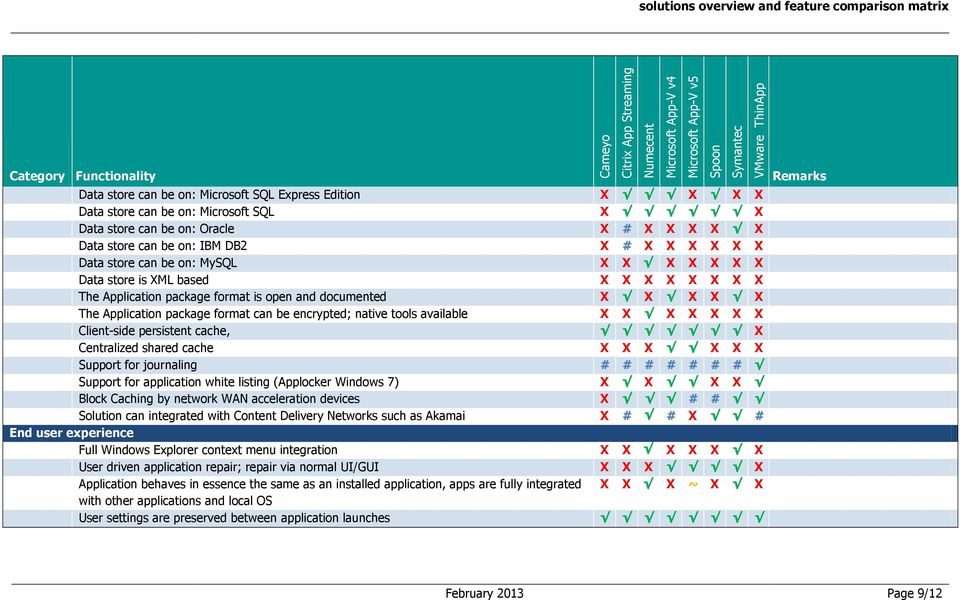
10 User settings can be redirected and stored on the network X User settings can be streamed between user and server X X X X X X X Localized client interface available, 4+ languages (EN/DE/FR/ES) X X X User Self Provisioning web portal X X X X X ThinApp Factory Allow EULA/Message to be displayed at virtual application startup X X X X X Allow user to easily terminate virtual environment (incl. running child processes) X X X Supported Client Platforms Windows NT 4 Workstation X X X X X X X X Windows NT 4 - Terminal Server Edition X X X X X X X X Windows Pro X X X X X X Windows XP - Pro (SP2 and up) X Windows XP - Embedded X X X Windows Server X X X X X Windows RDSH X X X X X Windows Server X Windows RDSH X Windows Vista X Windows Server Server X Windows Server RDSH / Remote Desktop Session Host X Windows Server 2008R2 - RDSH / Remote Desktop Session Host February 2013 Page 10/12

11 Windows Server RDSH / Remote Desktop Session Host X Windows 7 Windows 7 x64 Windows 8 RT X X X X X X X X Windows 8 x86 X X Windows 8 x64 X X MacOS, deliver and execute Win32 applications on MacOS X X X X X X X ~ Wine (limited) Linux, deliver and execute Win32 applications on Linux X X X X X X X ~ CrossOver (limited) Licensing Model of Solution Concurrent X X X Device X X Unlimited X Per named user X ~ Free for personal usage (FFPU) X X X X X SPLA X X X X X Solution in general Proven technology, the solution is being used for 2+ years in enterprise production environments. X X ~ Packaged different apps, various deployment scenarios Varity (10+) of public available enterprise references in Europe X ~ X ~ ~ Not public available Varity (10+) of public available enterprise references in US X ~ X ~ ~ Not public available February 2013 Page 11/12

12 Doesn t require a clean OS during packaging process X X X X ~ X Packager can capture only installer process X X X X X X X Packager can capture all processes Possibility of creating a High Available platform; additional services needed X Load Balancing is part of the solution X X X X X X X Official application virtualization training classes available X Official Certification program, VUE or Prometric X X X X X X Company website for delivering (demo) 25+ applications to community X X X Company website for delivering (demo) 50+ applications to community X X X X Large community resource, share recipes, FAQ, discussion X X February 2013 Page 12/12

Citrix XenApp The need for a Citrix server will still be required so no integration with our future SCCM environment will be available.
 Decision Matrix Integration with current infrastructure (SMS): SMS can deliver the virtual application as effectively as a traditionally packaged application with no customizations or modifications to
Virtual Application Management with Microsoft Application Virtualization 4.6 and System Center 2012 Configuration Manager
 Virtual Application Management with Microsoft Application Virtualization 4.6 and System Center 2012 Configuration Manager This whitepaper describes the virtual application management capabilities provided
Implementing and Managing Microsoft Desktop Virtualization 10324 en
 Implementing and Managing Microsoft Desktop Virtualization 10324 en Course Outline Module 1: Overview of Desktop Virtualization Scenarios Many organizations are exploring the use of virtualization to optimize
How To Compare Application Virtualization To Other Software On A Computer Or Network (For A Free)
 2009 Application Virtualization Comparison Chart September 2009 Authors: Sven Huisman Matthijs Haverink Technical Consultant Technical Consultant E: [email protected] E: [email protected]
PAf KTl enterprise^ Virtualization Advanced Guide. Microsoft Application. optimize your application virtualization p'atform.
 Microsoft Application Virtualization Advanced Guide Master Microsoft App-V by taking a deep dive into advanced topics and acquire all the necessary skills to optimize your application virtualization p'atform
Trusteer Rapport Virtual Implementation Scenarios
 Trusteer Rapport Virtual Implementation Scenarios Technical White Paper Version 1.0 October 2012 new threats, new thinking Contents About this Document 1 1. Overview of Virtual Desktop/Machine Environments
VMware ThinApp Application Virtualization Made Simple
 VMware ThinApp Application Virtualization Made Simple Rob Groenhuis Senior Systems Engineer VMware Netherlands BV 2009 VMware Inc. All rights reserved Agenda VMware s Vision Why Application Virtualization?
Benefit. Allows you to integrate RES PowerFuse with application virtualization technologies other than SoftGrid (e.g. Citrix XenApp, VMWare Thinapp).
 Core (1/2) Access Control Access to settings and applications can be based on Organizational Units in Directory Services like (Active Directory and Novell) or through users and groups in the domain. This
SNOW LICENSE MANAGER (7.X)... 3
 SYSTEM REQUIREMENTS Products Snow License Manager Snow Inventory Server, IDR, IDP Client for Windows Client for Linux Client for Unix Client for OS X Oracle Scanner External Data Provider Snow Distribution
Citrix Application Streaming. Universal Application Packaging and Delivery Breaking Away from Traditional IT
 Citrix Application Streaming Universal Application Packaging and Delivery Breaking Away from Traditional IT Application Packaging Application Delivery to Endpoint Devices Application Isolation Mode Automatic
Microsoft Windows Apple Mac OS X
 Products Snow License Manager Snow Inventory Server, IDP, IDR Client for Windows Client for OS X Client for Linux Client for Unix Oracle Scanner External Data Provider Snow Distribution Date 2014-04-02
INTEGRATING APP-V WITH MICROSOFT VDI
 INTEGRATING APP-V WITH MICROSOFT VDI 2013 Microsoft Corporation. All rights reserved. This document is provided "as-is." Information and views expressed in this document, including URL and other Internet
Microsoft Windows Apple Mac OS X
 Products Snow License Manager Snow Inventory Server, IDP, IDR Client for Windows Client for OSX Client for Linux Client for Unix Oracle Scanner External Data Provider Snow Distribution Date 2014-02-12
RES PowerFuse Version Comparison Chart (1/9)
 RES PowerFuse Version Comparison Chart (1/9) Alerting Allows you to set up notifications of specific events, which can consist of sending e-mails to one or more recipients, sending SNMP notifications (
AdminStudio 2013. Installation Guide. Version 2013
 AdminStudio 2013 Installation Guide Version 2013 Legal Information Book Name: AdminStudio 2013 Installation Guide / Full and Limited Editions Part Number: ADS-2013-IG03 Product Release Date: July 16, 2013
SNOW LICENSE MANAGER (7.X)... 3
 SYSTEM REQUIREMENTS Products Snow License Manager Software Store Option Snow Inventory Server, IDR, IDP Client for Windows Client for Linux Client for Unix Client for OS X Oracle Scanner Snow Integration
50331D Windows 7, Enterprise Desktop Support Technician (Windows 10 Curriculum)
 This course can be purchased by authorized Microsoft Learning Centers at the Courseware Marketplace web-site. Microsoft Certified Trainers (MCTs) can get a free copy at the same website. About the Course
AdminStudio 2013. Release Notes. 16 July 2013. Introduction... 3. New Features... 6
 AdminStudio 2013 Release Notes 16 July 2013 Introduction... 3 New Features... 6 Microsoft App-V 5.0 Support... 6 Support for Conversion to App-V 5.0 Virtual Packages... 7 Automated Application Converter
Endpoint Virtualization. Workspace Management: Simplify IT Organizations. Data Sheet Symantec TM Workspace Streaming 6.1
 Data Sheet Symantec TM Workspace Streaming 6.1 Workspace Management: Simplify IT Organizations Overview As IT organizations today face the reality of managing an increasingly complex mix of desktops, laptops,
MS_10324 Implementing and Managing Microsoft Desktop Virtualization
 Implementing and Managing Microsoft Desktop Virtualization www.ked.com.mx Av. Revolución No. 374 Col. San Pedro de los Pinos, C.P. 03800, México, D.F. Tel/Fax: 52785560 About this Course This course provides
APPLICATION VIRTUALIZATION TECHNOLOGIES WHITEPAPER
 APPLICATION VIRTUALIZATION TECHNOLOGIES WHITEPAPER Oct 2013 INTRODUCTION TWO TECHNOLOGY CATEGORIES Application virtualization technologies can be divided into two main categories: those that require an
Virtualizing Enterprise Desktops and Apps
 Course 20694B: Virtualizing Enterprise Desktops and Apps Page 1 of 6 Virtualizing Enterprise Desktops and Apps Course 20694B: 4 days; Instructor-Led Introduction This four-day, hands-on training course
Implementing and Managing Microsoft Desktop Virtualization
 Implementing and Managing Microsoft Desktop Virtualization Course 10324: 5 days, Instructor-led Course Description This five-day, instructor-led course provides you with the knowledge and skills to implement
Symantec Workspace Streaming 6.1
 Workspace Management: Simplify IT Organizations Data Sheet: Endpoint Virtualization Overview As IT organizations today face the reality of managing an increasingly complex mix of desktops, laptops, and
VMware ThinApp Agentless Application Virtualization Overview W HITE P APER
 VMware ThinApp Agentless Application W HITE P APER VMware defines application virtualization as the ability to deploy software without modifying the host computer or making any changes to the local operating
MOC 10324A: Implementing and Managing Microsoft Desktop Virtualization
 MOC 10324A: Implementing and Managing Microsoft Desktop Virtualization Course Overview This course provides students with the knowledge and skills to implement and manage desktop virtualization solutions.
Course MS20694A Virtualizing Enterprise Desktops and Apps. Length: 5 Days
 3 Riverchase Office Plaza Hoover, Alabama 35244 Phone: 205.989.4944 Fax: 855.317.2187 E-Mail: [email protected] Web: www.discoveritt.com Course MS20694A Virtualizing Enterprise Desktops and Apps
Basic Administration for Citrix XenApp 6.5 Course CXA206; 5 Days, Instructor-led
 Basic Administration for Citrix XenApp 6.5 Course CXA206; 5 Days, Instructor-led Course Description Basic Administration for Citrix XenApp 6.5 training course provides the foundation necessary for administrators
Windows 7, Enterprise Desktop Support Technician
 Course 50331D: Windows 7, Enterprise Desktop Support Technician Page 1 of 11 Windows 7, Enterprise Desktop Support Technician Course 50331D: 4 days; Instructor-Led Introduction This four-day instructor-ledcourse
Comparing Application and Desktop Virtualization Technologies. Comparing Application and Desktop Virtualization Technologies
 Presented by: James Engelhard mindshift Technologies, Inc. Ben Di Marco Heenan Blaikie LLP Table of Contents Application Virtualization What is Application Virtualization? Advantages of Application Virtualization
THE COMPLETE VIEWER FOR MS PROJECT. Deployment White Paper
 THE COMPLETE VIEWER FOR MS PROJECT Seavus DOOEL 2010 2 TABLE OF CONTENTS 1 DEPLOYMENT OPTIONS... 3 1.1 SINGLE USER INSTALLATION... 3 1.2 CONCURRENT USER INSTALLATION... 4 1.3 SINGLE COMPANY KEY INSTALLATION...
Windows 7, Enterprise Desktop Support Technician Course 50331: 5 days; Instructor-led
 Lincoln Land Community College Capital City Training Center 130 West Mason Springfield, IL 62702 217-782-7436 www.llcc.edu/cctc Windows 7, Enterprise Desktop Support Technician Course 50331: 5 days; Instructor-led
System Requirements Table of contents
 Table of contents 1 Introduction... 2 2 Knoa Agent... 2 2.1 System Requirements...2 2.2 Environment Requirements...4 3 Knoa Server Architecture...4 3.1 Knoa Server Components... 4 3.2 Server Hardware Setup...5
Course Description. Course Audience. Course Outline. Course Page - Page 1 of 12
 Course Page - Page 1 of 12 Windows 7 Enterprise Desktop Support Technician M-50331 Length: 5 days Price: $2,795.00 Course Description This five-day instructor-led course provides students with the knowledge
Thin Client & Virtual Desktop White Paper
 Thin Client & Virtual Desktop White Paper TABLE OF CONTENTS Overview 2 Compatible Thin Client Products 2 Thin Client Implementation Basics 2 Content Creation and Targeting... 2 Content Display... 3 Increase
Microsoft 20694 - Virtualizing Enterprise Desktops and Apps
 1800 ULEARN (853 276) www.ddls.com.au Microsoft 20694 - Virtualizing Enterprise Desktops and Apps Length 5 days Price $4169.00 (inc GST) Version B Overview This five-day, hands-on training course is designed
"Charting the Course... ... to Your Success!" MOC 50331 D Windows 7 Enterprise Desktop Support Technician Course Summary
 Description Course Summary This course provides students with the knowledge and skills needed to isolate, document and resolve problems on a Windows 7 desktop or laptop computer. It will also help test
This chapter includes the following topics: User's and Administrator's Guides. Symantec Workspace Virtualization build: 6.4.0.1711
 Chapter 1 Symantec Endpoint Virtualization 6.1 SP8 MP1 Release Notes This chapter includes the following topics: About Symantec Endpoint Virtualization 6.1 SP8 MP1 What's new in 6.1 SP8 MP1 Supported Platforms
Introducing. Markus Erlacher Technical Solution Professional Microsoft Switzerland
 Introducing Markus Erlacher Technical Solution Professional Microsoft Switzerland Overarching Release Principles Strong emphasis on hardware, driver and application compatibility Goal to support Windows
Virtualization and Windows 7
 9 Chapter Virtualization and Windows 7 Information in this Chapter Windows XP Mode Many Forms of Virtualization Summary Windows Virtual PC is an optional component of Windows 7 Professional, Enterprise,
Before taking this course, Citrix recommends that learners have the following:
 Course CXA-206 Citrix XenApp 6.5 Administration Overview Citrix XenApp 6.5 Administration training course provides the foundation necessary for administrators to effectively centralize and manage applications
Enterprise Solution for Remote Desktop Services... 2. System Administration... 3. Server Management... 4. Server Management (Continued)...
 CONTENTS Enterprise Solution for Remote Desktop Services... 2 System Administration... 3 Server Management... 4 Server Management (Continued)... 5 Application Management... 6 Application Management (Continued)...
Virtualization in Enterprise Environment. Krisztian Egi
 Virtualization in Enterprise Environment Krisztian Egi Session Outline Virtualization technology overview Challenges in enterprise environment Q & A 2 Virtualization technology overview What s virtualization
Networking Best Practices Guide. Version 6.5
 Networking Best Practices Guide Version 6.5 Summer 2010 Copyright: 2010, CCH, a Wolters Kluwer business. All rights reserved. Material in this publication may not be reproduced or transmitted in any form
Citrix XenApp-7.6 Administration Training. Course
 Citrix XenApp-7.6 Administration Training Course Course Duration : 20 Working Days Class Duration : 3 hours per day Fast Track: - Course duration 10days (Per day 8 hours) Get Fee Details Module 1: Citrix
MAPILab Reports for Hardware and Software Inventory Installation Guide. Document version 1.0
 MAPILab Reports for Hardware and Software Inventory Installation Guide Document version 1.0 MAPILab Ltd., January 2010 Table of Contents Introduction... 3 1. Product architecture and general explanations...
CTX-1259BI Citrix Presentation Server 4.5 and XenApp 5.0 for Windows Server 2003: Administration
 CTX-1259BI Citrix Presentation Server 4.5 and XenApp 5.0 for Windows Server 2003: Administration This course provides the foundation necessary to effectively deploy and administer Citrix Presentation Server
CMB-207-1I Citrix Desktop Virtualization Fast Track
 CMB-207-1I Citrix Desktop Virtualization Fast Track Description This fast-paced course provides the foundation necessary for students to effectively centralize and manage desktops and applications in the
Streaming Smackdown 2009. Ruben Spruijt
 Streaming Smackdown 2009 Ruben Spruijt Opbouw Advanced ICT Infrastructuur: Eenvoud in ICT Application and Desktop delivery solutions overview Application Virtualization Smackdown: Citrix, Microsoft en
Citrix XenApp 6.5 Administration
 Presentation Style: Duration: Tutor-led Classroom 5 Days Course Start Time: 09:30hrs Course End Time: 16:30hrs Citrix XenApp 6.5 Basic Administration training course provides the foundation necessary for
How To Install Ass Software On A Computer Or A Hard Drive
 Paper 105-2014 So Much Software, So Little Time: Deploying SAS onto Oodles of Machines Mark Schneider, SAS Institute Inc., Cary, NC ABSTRACT Distributing SAS software to a large number of machines can
Contents. Platform Compatibility. Directory Connector SonicWALL Directory Services Connector 3.1.7
 Directory Connector SonicWALL Directory Services Connector 3.1.7 Contents Platform Compatibility... 1 New Features... 2 Known Issues... 3 Resolved Issues... 4 Overview... 7 About SonicWALL Single Sign-On
Citrix Desktop Virtualization Fast Track
 Citrix Desktop Virtualization Fast Track Description: Days: 5 Prerequisites: This fast-paced course provides the foundation necessary for students to effectively centralize and manage desktops and applications
XenDesktop Implementation Guide
 Consulting Solutions WHITE PAPER Citrix XenDesktop XenDesktop Implementation Guide Pooled Desktops (Local and Remote) www.citrix.com Contents Contents... 2 Overview... 4 Initial Architecture... 5 Installation
MEGA Web Application Architecture Overview MEGA 2009 SP4
 Revised: September 2, 2010 Created: March 31, 2010 Author: Jérôme Horber CONTENTS Summary This document describes the system requirements and possible deployment architectures for MEGA Web Application.
PROPALMS TSE 6.0 March 2008
 PROPALMS March 2008 An Analysis of and Terminal Services: Contents System Administration... 2 Server Management... 3 Application Management... 5 Security... 7 End User Experience... 8 Monitoring and Reporting...
Simplify Suite in a VDI Environment
 Simplify Suite in a VDI Environment Before jumping onto the VDI bandwagon, ensure a smooth transition. tricerat solves the problems you may face when transitioning to VDI. Andrew Parlette, VP of Product
Microsoft.Test-inside.70-669.v2013-11-28.by.ROD.239q
 Microsoft.Test-inside.70-669.v2013-11-28.by.ROD.239q Number: 70-669 Passing Score: 800 Time Limit: 120 min File Version: 16.5 http://www.gratisexam.com/ Exam Code: 70-669 Exam Name: TS: Windows Server
LEARNING SOLUTIONS website milner.com/learning email [email protected] phone 800 875 5042
 Course 6451B: Planning, Deploying and Managing Microsoft System Center Configuration Manager 2007 Length: 3 Days Published: June 29, 2012 Language(s): English Audience(s): IT Professionals Level: 300 Technology:
Module 3: Resolve Software Failure This module explains how to fix problems with applications that have problems after being installed.
 CÔNG TY CỔ PHẦN TRƯỜNG CNTT TÂN ĐỨC TAN DUC INFORMATION TECHNOLOGY SCHOOL JSC LEARN MORE WITH LESS! 50331 - Windows 7, Enterprise Desktop Support Technician Duration: 5 days About this Course This five-day
App-V Deploy and Publish
 App-V Deploy and Publish Tools from TMurgent Technologies Updated Aug 5, 2010 Version 1.8 Introduction: The deployment of Virtual Applications in the simplest way possible, without the need for complicated
Integration with Software Delivery Vendors... 4
 Contents About this Guide... 4 Integration with Software Delivery Vendors... 4 Getting Started... 4 Supported Operating Systems and Application Platforms... 4 Non-supported Applications and Operating Systems...
Windows 7, Enterprise Desktop Support Technician
 MS50331 Längd: 5 dagar Windows 7, Enterprise Desktop Support Technician Detta är den bredaste, mest djuplodande kursen för dig som arbetar som Supporttekniker och behöver vara champion på Windows när frågorna
Table Of Contents. - Microsoft Windows - WINDOWS XP - IMPLEMENTING & SUPPORTING MICROSOFT WINDOWS XP PROFESSIONAL...10
 Table Of Contents - - WINDOWS SERVER 2003 MAINTAINING AND MANAGING ENVIRONMENT...1 WINDOWS SERVER 2003 IMPLEMENTING, MANAGING & MAINTAINING...6 WINDOWS XP - IMPLEMENTING & SUPPORTING MICROSOFT WINDOWS
CA ARCserve Replication and High Availability
 CA ARCserve Replication and High Availability Installation Guide r16 This documentation, which includes embedded help systems and electronically distributed materials, (hereinafter referred to as the Documentation
CMB 207 1I Citrix XenApp and XenDesktop Fast Track
 CMB 207 1I Citrix XenApp and XenDesktop Fast Track This fast paced course provides the foundation necessary for students to effectively centralize and manage desktops and applications in the datacenter
CXA-201-2I Implementing Citrix XenApp 5.0 for Windows Server 2008
 SSO122 CXA-201-2I Implementing Citrix XenApp 5.0 for Windows Server 2008 Implementing Citrix XenApp 5.0 for Windows Server 2008 provides the foundation necessary to effectively deploy and administer Citrix
SNOW LICENSE MANAGER (7.X)... 3
 SYSTEM REQUIREMENTS Products Snow License Manager Snow Automation Platform Snow Device Manager Snow Inventory Server, IDR, IDP Mobile Information Server Client for Windows Client for Linux Client for Unix
Implementing and Supporting Microsoft Windows XP Professional
 Implementing and Supporting Microsoft Windows XP Professional Key Data Course #: 2272C Number of Days: 5 Format: Instructor-led The purpose of this course is to address the implementation and desktop support
Implementing and Managing Microsoft Server Virtualization
 Implementing and Managing Microsoft Server At the end of the course the delegate will be able to complete the following: COMPUTER TRAINING The key to a better future WINDOWS Course No. 10215 5 Days Target
System Planning, Deployment, and Best Practices Guide
 www.novell.com/documentation System Planning, Deployment, and Best Practices Guide ZENworks Application Virtualization 9.0 February 22, 2012 Legal Notices Novell, Inc., makes no representations or warranties
INTEGRATING VIRTUAL APPLICATION MANAGEMENT WITH APP-V 5 AND CONFIGURATION MANAGER 2012 SP1
 INTEGRATING VIRTUAL APPLICATION MANAGEMENT WITH APP-V 5 AND CONFIGURATION MANAGER 2012 SP1 Introduction 2013 Microsoft Corporation. All rights reserved. This document is provided "as-is." Information and
An Analysis of Propalms TSE and Microsoft Remote Desktop Services
 An Analysis of TSE and Remote Desktop Services JULY 2010 This document illustrates how TSE can extend your Remote Desktop Services environment providing you with the simplified and consolidated management
Sage ERP Accpac. Compatibility Guide Versions 5.5 and 5.6. Revised: November 18, 2010. Compatibility Guide for Supported Versions
 Sage ERP Accpac Compatibility Guide Versions 5.5 and 5.6 Revised: November 18, 2010 Compatibility Guide for Supported Versions iii Contents Overview... 1 Version 5.6 Compatibility... 2 All Environments...
RES Workspace Manager 2012 SR2 Release Notes Fixpack 9.7.2.6
 RES Workspace Manager 2012 SR2 Release Notes Fixpack 9.7.2.6 Contents 1. Enhancements and Improvements 6 Citrix XenApp 6: Registry value to make Citrix XenApp server act as Session Host Only server6 Workspace
Simplify the Deployment and Management of Desktop Virtualization & VDI Technologies. Terry Lewis Solutions Architect
 Simplify the Deployment and Management of Desktop Virtualization & VDI Technologies Terry Lewis Solutions Architect Today s discussion Technology Drivers Desktop and Application Delivery Complexity Which
Citrix XenApp 6.5 Administration
 Citrix XenApp 6.5 Administration CTX-XA65 DESCRIZIONE: Citrix XenApp 6.5 Basic Administration provides the foundation necessary for administrators to effectively centralize and manage applications in the
for Networks Installation Guide for the application on the server July 2014 (GUIDE 2) Lucid Rapid Version 6.05-N and later
 for Networks Installation Guide for the application on the server July 2014 (GUIDE 2) Lucid Rapid Version 6.05-N and later Copyright 2014, Lucid Innovations Limited. All Rights Reserved Lucid Research
CTX-4100BI Citrix Presentation Server 4.5 and XenApp 5.0 for Windows Server 2003: Skills Update
 CTX-4100BI Citrix Presentation Server 4.5 and XenApp 5.0 for Windows Server 2003: Skills Update Designed for experienced XenApp users, this course provides the foundation necessary to effectively deploy
Pearl Echo Installation Checklist
 Pearl Echo Installation Checklist Use this checklist to enter critical installation and setup information that will be required to install Pearl Echo in your network. For detailed deployment instructions
Managing and Maintaining Windows 8
 Microsoft Official Academic Course Managing and Maintaining Windows 8 Exam 70-688 Richard Watson Wiley Contents Lesson 1: Designing an Operating System Installation Strategy 1 Creating A Windows To Go
Goverlan Remote Control
 Goverlan Remote Control Feature Overview Goverlan Remote Control Powerful IT remote control, made easy Support, control and manage multiple users anywhere securely and seamlessly. With its powerful broadscope
ICT Professional Optional Programmes
 ICT Professional Optional Programmes Skills Team are a Microsoft Academy with new training rooms and IT labs in our purpose built training centre in Ealing, West London. We offer a range of year-long qualifications
Citrix MetaFrame Presentation Server 3.0 and Microsoft Windows Server 2003 Value Add Feature Guide
 Citrix MetaFrame Presentation Server 3.0 and Microsoft Windows Server 2003 Value Add Feature Guide Advanced Functionality Basic Functionality Feature MANAGEMENT Microsoft Management Console Enhanced Connection
Accelerating Microsoft Windows 7 migrations with Citrix XenApp
 Citrix XenApp and Microsoft Windows 7 White Paper Accelerating Microsoft Windows 7 migrations with Citrix XenApp XenApp will accelerate your Windows 7 migration, save money and resources, minimize disruption
Installation Guide. . All right reserved. For more information about Specops Deploy and other Specops products, visit www.specopssoft.
 . All right reserved. For more information about Specops Deploy and other Specops products, visit www.specopssoft.com Copyright and Trademarks Specops Deploy is a trademark owned by Specops Software. All
Novell ZENworks Asset Management 7.5
 Novell ZENworks Asset Management 7.5 w w w. n o v e l l. c o m October 2006 INSTALLATION GUIDE Table Of Contents 1. Installation Overview... 1 If you are upgrading... 1 Installation Choices... 1 ZENworks
Remote Application Server Version 14. Last updated: 25-02-15
 Remote Application Server Version 14 Last updated: 25-02-15 Information in this document is subject to change without notice. Companies, names, and data used in examples herein are fictitious unless otherwise
vcloud Automation Center Support Matrix vcloud Automation Center 5.2
 vcloud Automation Center Support Matrix vcloud Automation Center 5.2 This document supports the version of each product listed and supports all subsequent versions until the document is replaced by a new
How to Migrate Citrix XenApp to VMware Horizon 6 TECHNICAL WHITE PAPER
 How to Migrate Citrix XenApp to VMware Horizon 6 TECHNICAL WHITE PAPER Table of Contents Introduction... 3 Horizon and XenApp Components Comparison.... 4 Preparing for the Migration.... 5 Three Approaches
Evento Assyrus Microsoft 2009
 Remote Services Panoramica delle nuove funzionalità Andrea Mauro Direttore Tecnico 20 novembre 2009 Assyrus Srl Microsoft Virtualization User State Virtualization Server Virtualization Presentation Virtualization
CXA 204 1I Basic Administration for Citrix XenApp 6
 COURSE DESCRIPTION CXA 204 1I Basic Administration for Citrix XenApp 6 Basic Administration for Citrix XenApp 6 training course provides the foundation necessary for administrators to effectively centralize
Remote Application Server Version 14. Last updated: 06-02-15
 Remote Application Server Version 14 Last updated: 06-02-15 Information in this document is subject to change without notice. Companies, names, and data used in examples herein are fictitious unless otherwise
VMware End User Computing Horizon Suite
 VMware End User Computing Horizon Suite Luc Gallet [email protected] 2010 VMware Inc. All rights reserved The pace and rate of technology change is faster than ever Devices 66 % use 2+ devices for work