
QuickSpecs. Overview. HP Data Protector software. Overview
|
|
|
- Brian French
- 10 years ago
- Views:
Transcription
1 Overview Overview HP Data Protector is the industry's first unified backup and recovery solution that utilizes an intelligent approach to data management. With HP Data Protector, you can seamlessly protect and harness data from edge of the network to the datacenter and the disaster recovery site - and across physical, virtual and cloud environments. Designed to support the world's largest and heterogeneous enterprise environments, a single Data Protector instance can protect thousands of clients, 100s of billions of files, and run 100 thousand sessions per day. With unique capabilities such as HP StoreOnce federated deduplication, Integrated Cloud Backup, Enhanced Automated Disaster Recovery, Zero Downtime Backup, Instant Recovery, and Down-to-the-second application recovery, HP Data Protector allows you to maximize storage efficiency and backup and recovery performance, instantly recover your mission-critical applications, and turn your backup data repository into an information advantage. HP Data Protector is helping more than 45,000 customers worldwide, including nearly half the Global 500, to safeguard their information. From a single pane of glass, HP Data Protector allows you to fully leverage your data asset investment - across premise, hybrid, and cloud infrastructure - to minimize backup and recovery windows and optimize business application performance. Fullyautomated, policy-driven integration through VMware's vcloud Director protects mission critical applications in a multi-tenant cloud environment. Simple yet powerful snapshot functionality frees you from restrictive backup windows while Instant Recovery capability enables flexible down to the second recovery through a simple to use graphical user interface. One touch setup for off-site backup on the cloud protects data on the world's largest and most secure private cloud providing enterprise-class edge to cloud protection while reducing CAPEX and OPEX. Key Product Highlights HP StoreOnce Federated Deduplication HP StoreOnce is a patented, deduplication technology that is deployed in as well as HP Storage systems. Today, only HP can deliver the same deduplication algorithm that scales from a software-only footprint to a scale-out, purpose built appliance enabling efficient data replication & storage. Cloud Based Backup Through integrated cloud protection, HP Data Protector extends backup to the cloud blending the two worlds of on-premise and secure hosted backup into one offering. The integrated cloud capability brings power and simplicity of cloud based backup to the traditional data center. This integration leverages Autonomy's 14 global cloud data centers, managing over 50 PBs of customer information worldwide. Enhanced Disaster Recovery delivers centralized system recovery (bare metal recovery) to virtual or physical servers (from p2v or v2p) from a single backup-at no additional cost-to streamline the disaster recovery process. Unique to HP Data Protector, customers can create a disaster recovery image from any existing file system or image backup including object copies without needing to create a separate special backup for system recovery. With a single click, you can initiate the disaster recovery process and automatically rebuild your entire system and the partitioning. Advanced Application Protection DP offers advanced functionality to simplify and automate application protection and recovery. DP automates the entire recovery process by rolling forward the application transaction logs and recovering applications to an exact point in time. DP's advanced snapshot functionality protects mission-critical application without impacting application performance, and provides automated recovery for applications and data in seconds to meet even the most demanding recovery objectives. Comprehensive virtualization support HP Data Protector provides comprehensive virtual server protection by supporting all hypervisors. With VMware and Hyper-V, Data Protector offers advanced hypervisor integration and array snapshot management for the most demanding virtualized applications. DA Worldwide Version 48 May 9, 2014 Page 1

2 Overview For VMware, Data Protector also offers One-Touch protection, automatic protection of new VMs, single item recovery, and native bestin-class integration for vcloud Director environments. Centralized Management HP Data Protector offers a single console to centrally manage data protection for physical and virtual servers across on-premises, hybrid, and cloud infrastructure. It offers best-in-class integration with HP Storage from tape automation to array snapshots and replication from a centralized console without scripting to support any RPO/RTO What's New in HP Data Protector Highlights HP Data Protector 8.1 release upends the traditional backup and recovery models by leveraging application and infrastructure awareness and operational analytics to improve business resiliency, continuity and uptime within IT environment. SAP HANA integration - provides comprehensive backup and recovery to SAP HANA in-memory databases, recreates logs while the database is online, and restores data and performs database recovery to a state at the specific point in time or the most recent restorable state. The integration empowers application owners to drive backup and recovery decisions and controls by enabling backup and recovery through SAP HANA administrative console. This integration is done via SAP HANA Backint APIs. Disaster Recovery Enhancements - augments Enhanced Automated Disaster Recovery (EADR) solution with new object selection methods, restore options, and new wizard pages that further simplify and automate the disaster recovery process. With DP 8.1 administrators will be able to inject additional drivers in the image during backup which will reduce the system recovery time. HP StoreOnce Enhancements - introduces HP StoreOnce encryption support at the target and delivers superior storage efficiency with improved object compression. Instant Recovery support for HP 3PAR StoreServ - HP Data Protector can orchestrate snapshot creation, management, and backup for 3PAR StoreServ array on Windows, Linux, and HP-UX platforms. Data Protector 8.1 extends Instant Recovery support to HPUX and Linux platforms via native agent completing the Snapshot and Instant Recovery support for filesystems, Oracles, SAP, and Microsoft applications running on Windows, HPUX, and Linux platforms on HP 3PAR StoreServ. Priority-based scheduler release also introduces a new Advanced Scheduler that includes flexible, more granular options to create a backup policy. The Advanced Scheduler also empowers backup administrators to specify priority of different backup data based on an organization's unique business requirements. This feature ensures that mission-critical applications are protected before less important data in resource constraint environments. Extensive platform integration - Data Protector 8.1 includes new integration with Microsoft Active Directory and VMware vcenter 5.5 for Single Item Recovery, and certification of both VMware vsphere 5.5 and vcloud Director 5.5. HP Data Protector 8.1 also features many new platform certifications, such as application agent support for Microsoft SharePoint 2013 and IBM DB2 10.5, disk agent support for Debian 7.0 and AIX 64 bit, and media agent support for AIX 64 bit and Solaris DA Worldwide Version 48 May 9, 2014 Page 2

3 Hardware Support and Software Pre-Requisites Hardware Support Broad coverage of HP-UX, Windows, Solaris, Tru64, OpenVMS, NetWare, Linux, AIX, and other operating environments ZDB/IR support for HP P9000/P6000/P4000/3Par, and ZDB support for EMC Symmetrix disk array Built in SW Backup to disk such as file library and SW dedup storage supports any direct connected storage that the server's operating system supports Disk based backup appliances from HP, EMC, Quantum, HP Tape libraries, StorageTek, ADIC, IBM etc. For detailed information on HP Data Protector support matrices please visit: Software Pre-Requisites Cell Manager Requirements The Data Protector Session Manager does not support the IDB on a file system that is mounted as NFS type. On Systems Running HP-UX (IA64) The Cell Manager must meet the following minimum requirements: The Soft File Limit per Process on the Cell Manager should be at least GBRAM (For recovery of the Internal Database, twice as much total RAM is required.) For each parallel backup session 40 MB of RAM are required and 5-8 MB per data segment size. For example, if you want to run 60 parallel backup sessions 3 GB of RAM plus 512 MB for data segments are needed. 1.5 GB of free disk space + approximately up to 2% of planned data to be backed up (for use by the IDB).It is recommended to modify the kernel parameters as follows: Set the kernel parameter shmmax (maximum size of a shared memory segment) to at least 2.5 GB. To check the configuration, execute: kcusage shmmax For recovery of the Internal Database, the parameter should be set to twice the above value. Set the kernel parameter maxdsiz_64 (max data segment size) to at least bytes (128 MB), and the kernel parameter semmnu (number of semaphore undo structures) to at least 256. After committing these changes, recompile the kernel and reboot the machine. DA Worldwide Version 48 May 9, 2014 Page 3

4 Hardware Support and Software Pre-Requisites On Systems Running Windows 2008 & 2008-R2 (64-bit x86_64) The Cell Manager must meet the following minimum requirements: 4 GB of total RAM. For recovery of the Internal Database, twice as much total RAM is required. Each parallel backup session requires 40 MB of RAM. For example, 60 parallel backup sessions requires 3 GB of RAM. 1.5 GB of free disk space + approximately up to 2% of planned data to be backed up (for use by the IDB)2 size_of_the_biggest_package_to_be_installed + 10 MB of disk space needed on the system driveon Windows Server 2008 systems, the firewall must also be configured to accept "Remote Service Administration" (NP) connections (port 445). On Windows Server 2008 systems, administrative privileges are required to install Data Protector For viewing online Help on the Data Protector Cell Manager, Internet Explorer 8.0 or later is required. Compatibility view should be disabled for locally stored websites. Mozilla Firefox (Extended Support Release) or later. Other Web browsers may fulfill this requirement as well, but have not been tested. On Linux Systems The Cell Manager must meet the following minimum requirements: 4 GB of total RAM. For recovery of the Internal Database, twice as much total RAM is required.for each parallel backup session 40 MB of RAM are required and 5-8 MB per data segment size. This means that, for example, if you want to run 60 parallel backup sessions 3 GB of RAM plus 512 MB for data segments are needed. 1.5GB of free disk space + approximately up to 2% of planned data to be backed up (for use by the IDB).If the version of libstdc++ on the system is not 5 (for example libstdc++.so.6 instead of libstdc++.so.5) you need to install the compatibility package compat-2004 or compat-libstdc++. To install the Java GUI Server on Red Hat Enterprise Linux 4.0, the libstdc fc4.x86_64.rpm package is required. If yours system does not already contain a 64-bit version of libstdc++. so. 5 then you must install it with libstdc x86_64.rpm. Requirements for viewing online Help on the Data Protector Cell Manager are the same as on Data Protector clients. DA Worldwide Version 48 May 9, 2014 Page 4

5 Installation Server and Client System Requirements Installation Server Requirements On Systems Running HP-UX The Installation Server must meet the following minimum requirements: 512 MB of available RAM 1.5 GB of free disk space The inetd daemon must be installed and running On Systems Running Windows Server 2008 & 2008 R2 The Installation Server must meet the following minimum requirements: 512 MB of available RAM 2 GB of disk space On Windows Server 2008 systems, administrative privileges are required to install Data Protector On Windows Server 2008 systems, you must configure the user whose credentials will be used during remote installation. For viewing online Help on the Data Protector Installation Server, Microsoft Internet Explorer 8.0 or later. Compatibility view should be disabled for locally stored websites.? Mozilla Firefox (Extended Support Release) or later. Other Web browsers may fulfill this requirement as well, but have not been tested. On Systems Running Linux The Installation Server must meet the following minimum requirements: 512 MB RAM 1.5 GB of disk space The inetd or xinetd daemon must be installed and running Deduplication Server Requirements It is recommended to have a dedicated Deduplication Server CPU speed (GHz) / Number of cores Physical memory dedicated to the StoreOnce Software Minimum requirements 2.8 / 2 core 4 GB RAM 1 Number of disks (dedicated to the store) Recommended requirements 2.8 / 4-6 cores 6 GB RAM 4 or more using RAID 5 Client System Requirements On Systems Running UNIX The prerequisite for remote installation of the Data Protector client is the following: The inetd or xinetd (on Linux) daemon must be up and running on the remote client system. The prerequisite for viewing online Help on the Data Protector client is the following: Disk space and RAM requirements of Data Protector UNIX clients The following table shows the minimum disk space and RAM requirements for the various Data Protector clients: DA Worldwide Version 48 May 9, 2014 Page 5

6 Installation Server and Client System Requirements Client System RAM (MB) Disk Space (MB) Disk Agent 64 (recommended 128) 20 Media Agent 64 (recommended 128) 20 Integration modules 64 (recommended 128) 20 English Documentation & Help N/A 100 NOTE: The figures indicate requirements for the components only. For example the "disk space" figure does not include space allocation for the operating system, page file or other applications. HP-UX Systems When installing or upgrading remotely, the minimal available disk space in the folder /tmp should be the same size as the biggest package being installed. For HP-UX 11.11, the IPv6NCF11i bundle or TOUR/IPv6 support is required to enable the Internet Protocol version 6 (IPv6). Solaris Systems When installing a Media Agent, make sure that the following entry is in the file /etc/system: set semsys:seminfo semmni=100 When installing or upgrading remotely, the minimal available disk space in folders /tmp and /var/tmp should be the size of the biggest package being installed. On Systems Running Windows The prerequisites for Windows user interface installation and remote installation on the client are: On Microsoft Windows XP Professional systems, Service Pack 3 must be installed. On Microsoft Windows Server 2003 systems, Service Pack 2 must be installed. For viewing the Help, you need a Web browser that is able to run under the same account as the Data Protector GUI process. JavaScript must be enabled in the Web browser. The following Web browsers are supported: Windows Internet Explorer 8.0 or later. Compatibility view should be disabled for locally stored websites. Mozilla Firefox (Extended Support Release) or later Other Web browsers may fulfill this requirement as well, but have not been tested. The following table presents the minimum available RAM and disk space requirements for different Data Protector Windows client components: Client System RAM (MB) Disk Space (MB) User Interface Disk Agent 64 (recommended 128) 20 Media Agent 64 (recommended 128) 20 Integration modules 64 (recommended 128) 20 English Documentation & Help N/A 85 DA Worldwide Version 48 May 9, 2014 Page 6

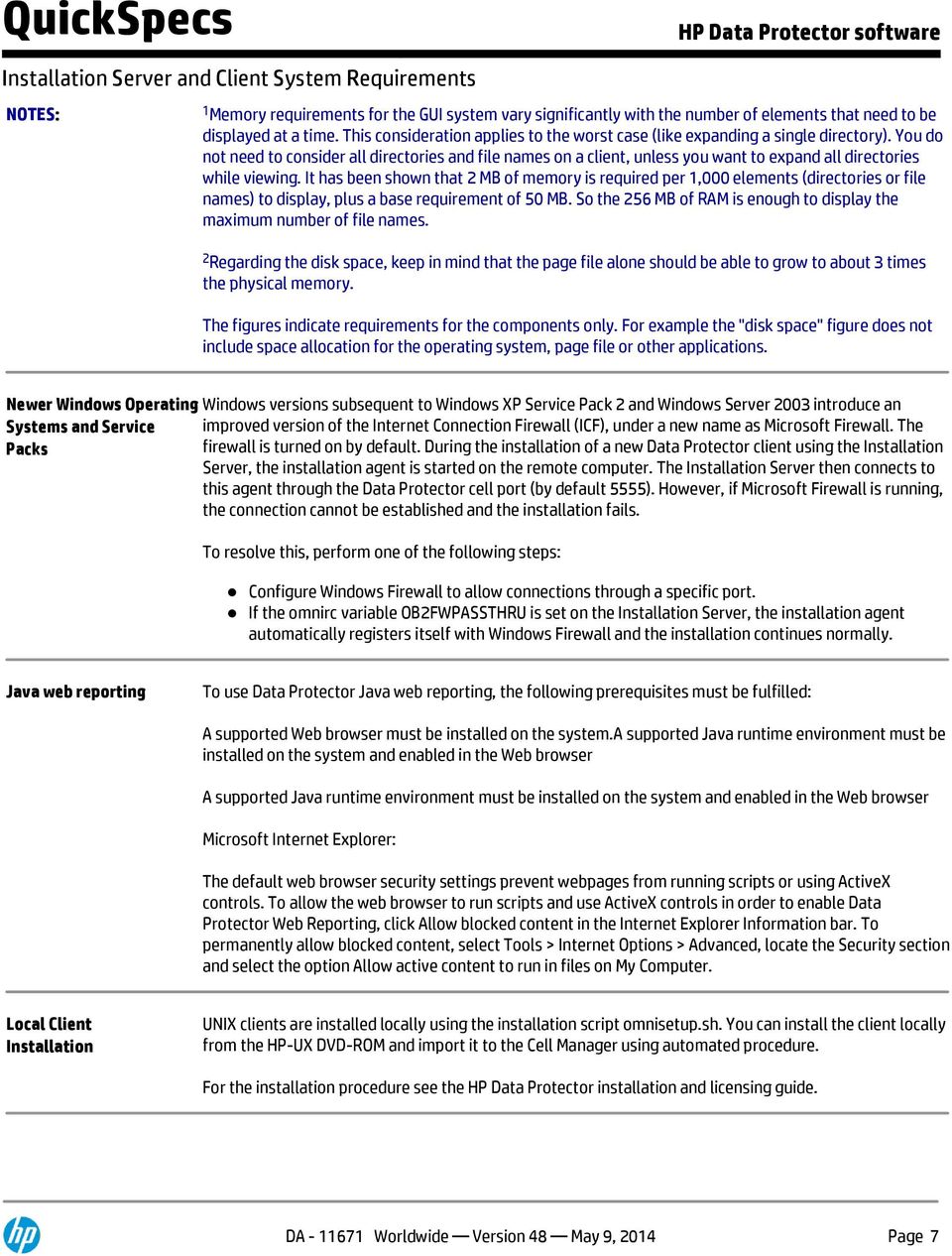
7 Installation Server and Client System Requirements NOTES: 1 Memory requirements for the GUI system vary significantly with the number of elements that need to be displayed at a time. This consideration applies to the worst case (like expanding a single directory). You do not need to consider all directories and file names on a client, unless you want to expand all directories while viewing. It has been shown that 2 MB of memory is required per 1,000 elements (directories or file names) to display, plus a base requirement of 50 MB. So the 256 MB of RAM is enough to display the maximum number of file names. 2 Regarding the disk space, keep in mind that the page file alone should be able to grow to about 3 times the physical memory. The figures indicate requirements for the components only. For example the "disk space" figure does not include space allocation for the operating system, page file or other applications. Newer Windows Operating Windows versions subsequent to Windows XP Service Pack 2 and Windows Server 2003 introduce an Systems and Service improved version of the Internet Connection Firewall (ICF), under a new name as Microsoft Firewall. The Packs firewall is turned on by default. During the installation of a new Data Protector client using the Installation Server, the installation agent is started on the remote computer. The Installation Server then connects to this agent through the Data Protector cell port (by default 5555). However, if Microsoft Firewall is running, the connection cannot be established and the installation fails. To resolve this, perform one of the following steps: Configure Windows Firewall to allow connections through a specific port. If the omnirc variable OB2FWPASSTHRU is set on the Installation Server, the installation agent automatically registers itself with Windows Firewall and the installation continues normally. Java web reporting To use Data Protector Java web reporting, the following prerequisites must be fulfilled: A supported Web browser must be installed on the system.a supported Java runtime environment must be installed on the system and enabled in the Web browser A supported Java runtime environment must be installed on the system and enabled in the Web browser Microsoft Internet Explorer: The default web browser security settings prevent webpages from running scripts or using ActiveX controls. To allow the web browser to run scripts and use ActiveX controls in order to enable Data Protector Web Reporting, click Allow blocked content in the Internet Explorer Information bar. To permanently allow blocked content, select Tools > Internet Options > Advanced, locate the Security section and select the option Allow active content to run in files on My Computer. Local Client Installation UNIX clients are installed locally using the installation script omnisetup.sh. You can install the client locally from the HP-UX DVD-ROM and import it to the Cell Manager using automated procedure. For the installation procedure see the HP Data Protector installation and licensing guide. DA Worldwide Version 48 May 9, 2014 Page 7
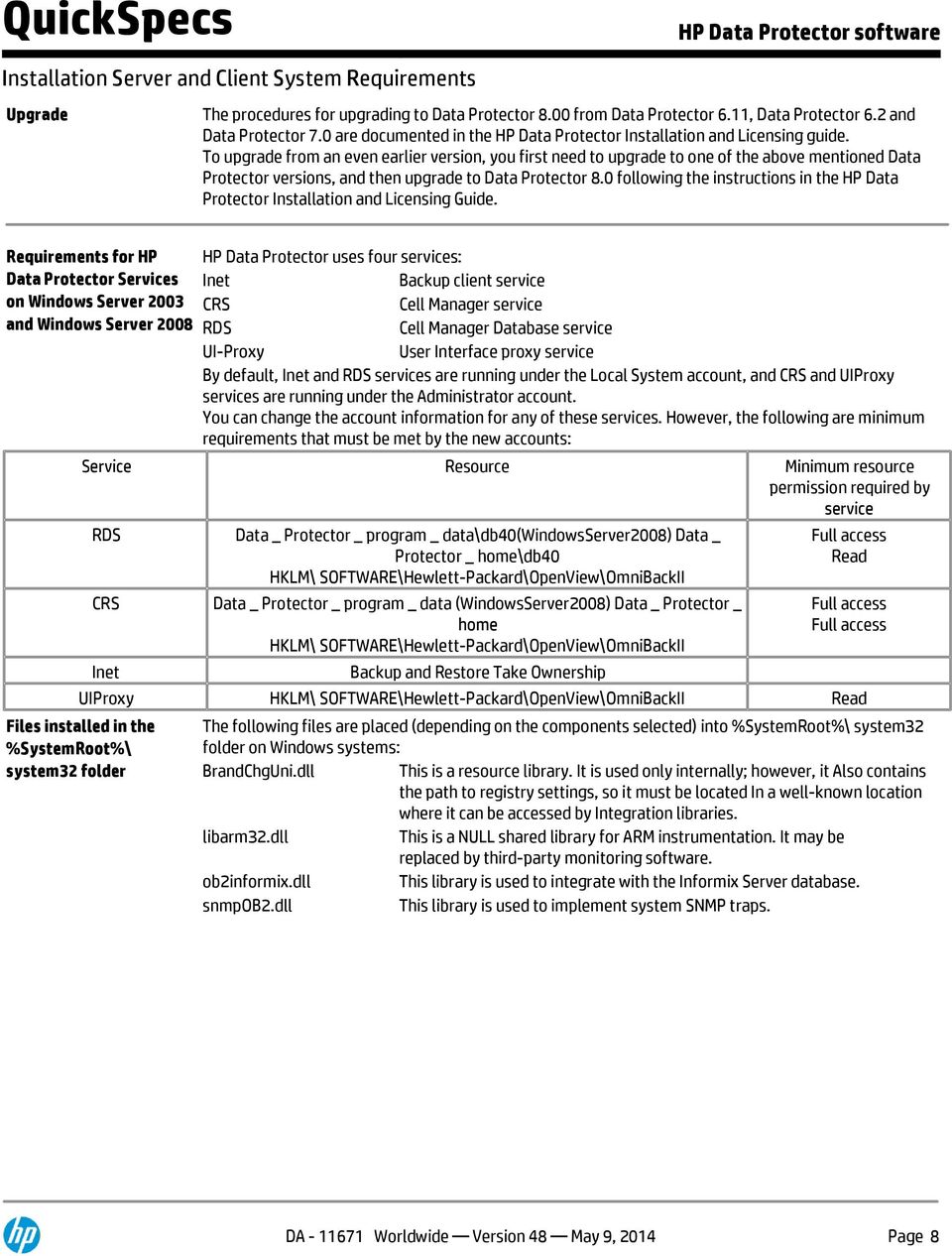
8 Installation Server and Client System Requirements Upgrade The procedures for upgrading to Data Protector 8.00 from Data Protector 6.11, Data Protector 6.2 and Data Protector 7.0 are documented in the HP Data Protector Installation and Licensing guide. To upgrade from an even earlier version, you first need to upgrade to one of the above mentioned Data Protector versions, and then upgrade to Data Protector 8.0 following the instructions in the HP Data Protector Installation and Licensing Guide. Requirements for HP Data Protector Services on Windows Server 2003 and Windows Server 2008 HP Data Protector uses four services: Inet Backup client service CRS Cell Manager service RDS Cell Manager Database service UI-Proxy User Interface proxy service By default, Inet and RDS services are running under the Local System account, and CRS and UIProxy services are running under the Administrator account. You can change the account information for any of these services. However, the following are minimum requirements that must be met by the new accounts: Service Resource Minimum resource permission required by service RDS CRS Inet Data _ Protector _ program _ data\db40(windowsserver2008) Data _ Protector _ home\db40 HKLM\ SOFTWARE\Hewlett-Packard\OpenView\OmniBackII Data _ Protector _ program _ data (WindowsServer2008) Data _ Protector _ home HKLM\ SOFTWARE\Hewlett-Packard\OpenView\OmniBackII Backup and Restore Take Ownership Full access Read Full access Full access UIProxy HKLM\ SOFTWARE\Hewlett-Packard\OpenView\OmniBackII Read Files installed in the %SystemRoot%\ system32 folder The following files are placed (depending on the components selected) into %SystemRoot%\ system32 folder on Windows systems: BrandChgUni.dll This is a resource library. It is used only internally; however, it Also contains the path to registry settings, so it must be located In a well-known location where it can be accessed by Integration libraries. libarm32.dll This is a NULL shared library for ARM instrumentation. It may be replaced by third-party monitoring software. ob2informix.dll This library is used to integrate with the Informix Server database. snmpob2.dll This library is used to implement system SNMP traps. DA Worldwide Version 48 May 9, 2014 Page 8
9 Application Platforms Backup Agents Windows /XP/2003/2008/Vista/7/2008 R2; Novell OES; HP-UX; Sun Solaris; Linux Red Hat/SUSE/Debian/OEL/CentOS,; IBM AIX; SGI IRIX;; SCO OpenServer,; OpenVMS; MacOS Additional operating systems supported via: NFS/shared disk, CIFS NDMP NAS filer: HP X9000 HP NAS 8000 HP Storage Server NAS Network Appliance filers EMC Celerra Hitachi BluArc Application Agents Oracle, Informix, Sybase, MS SQL Server, MS SQL, MS Exchange, MS SharePoint, MS DPM, SAP, SAP DB/MaxDB, Baan IV, Lotus Notes, Lotus Domino, DB2, Autonomy LiveVault and Autonomy Connector Framework Server Full virtual platform integration with VMware vsphere, ESXi and ESXI server using vstorage API for Data Protection (VADP) and VMware Consolidated BackupVM-level support for Citrix XenServer, HP Integrity Virtual Machine, MS Virtual Server, MS Windows 2008/2008R2 Hyper-V Backup device servers - with robotic control (for control of tape drives and tape library systems, including shared tape libraries) Windows XP/2003/2008/2008 R2, HP-UX, Sun Solaris, Novell NetWare OES, Linux Red Hat/SUSE/Debian, OpenVMS, IBM Aix Granular Recovery agent for SharePoint 2007 & 2010; VMware vsphere, Exchange 2010 High Availability Applications Clusters: RH & SLES Clusters, Microsoft Cluster Server, HP MC/Serviceguard, VERITAS Cluster, Tru64 Cluster, Novell Netware Cluster, OpenVMS Cluster and HP EFS Clustered Gateway Zero-downtime backup: HP Business Copy XP/P9000 and Continuous Access XP/P9000, HP Business Copy EVA HP Continuous Access EVA, HP SAN/iQ Snapshots, HP 3PAR Virtual Copy, HP P2000 Snapshots, EMC TimeFinder and EMC SRDF, EMC CLARiiON SnapView-Snapshots and NetApp snapshots Instant recovery: HP Disk Array XP/P9000, EVA and P4000 Management Platforms Management Systems Manager-of-Managers Windows HP-UX Linux Windows HP-UX Linux DA Worldwide Version 48 May 9, 2014 Page 9

10 Application Platforms Supported Backup Devices Supported Technologies Data Protector supports a wide range of HP and non-hp disk and tape devices. For a full list, check the compatibility matrices on hp.com/go/dataprotector. DDS, DLT, DLT1, Super DLT, QIC/Travan, Magneto-Optical, Mammoth M2, Eliant, IBM 3590 (Magstar), STK 9840, STK 9940, AIT and LTO Ultrium. Supported range of standalone backup devices, auto changers, library systems and silos from Hewlett-Packard, StorageTek, Sony, Dell, Seagate, ADIC, ATL, Spectralogical, Exabyte, Quantum, Breece Hill, Overland Data and others. Supported range of disk devices from Hewlett-Packard, EMC, IBM, Quantum, Sepaton, FalconSttor, and Exagrid One Button Disaster Recovery Support for StoreOnce Software Deduplication Support for Backup device server (Media Agent) with Deduplication. Storage Networking Supported Technologies Storage configurations in SAN iscsi (SCSI over TCP/IP), FCIP (FC over IP) and ifcp (Internet FC Protocol) For the latest platform, integration, cluster and device support information and other details, please consult: DA Worldwide Version 48 May 9, 2014 Page 10

11 Licenses, Services and Warranties Distribution Media DVD (physical), download (electronic) Documentation Data Protector software manuals are available in PDF format. Install the PDF files during the Data Protector software setup procedure by selecting the English Documentation (Guides, Help) component on Windows or the OB2-DOCS component on UNIX. Once installed, the manuals reside in the <Data_Protector_home>\docs directory on Windows and in the /opt/omni/doc/c/ directory on UNIX. Data Protector software support matrices can be found at the above mentioned locations in the support_matrices sub-directory. You can also find the manuals in PDF format at Data Protector software also provides Help topics and context-sensitive (F1) Help for Windows and UNIX platforms. You can access the Help from the top-level directory of any installation DVD-ROM without installing Data Protector: Open DP_help.chm (on Windows) Unpack the zipped tar file DP_help.tar.gz, and access the Help system through DP_help.htm (on UNIX) The latest version of the Acrobat Reader software is available at: Documentation The HP Data Protector documentation set consists of the following guides: HP Data Protector Getting Started Guide This guide provides an overview of the basic Data Protector functionality and is designed to help you get started with the product HP Data Protector Concepts Guide This guide describes Data Protector concepts and provides background information on how Data Protector works. It is intended to be used with the task-oriented online Help. HP Data Protector Installation and Licensing Guide This guide describes how to install the Data Protector software, taking into account the operating system and architecture of your environment. This guide also gives details on how to upgrade Data Protector, as well as how to obtain the proper licenses for your environment. HP Data Protector Troubleshooting Guide This guide describes how to troubleshoot problems you may encounter when using Data Protector. HP Data Protector Disaster Recovery Guide This guide describes how to plan, prepare for, test, and perform a disaster recovery. HP Data Protector Integration Guides These guides describe how to configure and use Data Protector to back up and restore various databases and applications. They are intended for backup administrators or operators. There are six guides: HP Data Protector Integration Guide for Microsoft Applications: SQL Server, SharePoint Server, and Exchange Server This guide describes the integrations of Data Protector with the following Microsoft applications: Microsoft SQL Server, Microsoft SharePoint Server, and Microsoft Exchange Server. DA Worldwide Version 48 May 9, 2014 Page 11

12 Licenses, Services and Warranties HP Data Protector Integration Guide for Oracle and SAP This guide describes the integrations of Data Protector with Oracle Server, SAP R/3, and SAP MaxDB. HP Data Protector Integration Guide for IBM Applications: Informix, DB2, and Lotus Notes/Domino This guide describes the integrations of Data Protector with the following IBM applications: Informix Server, IBM DB2 UDB, and Lotus Notes/Domino Server. HP Data Protector Integration Guide for Sybase, Network Node Manager, and Network Data Management Protocol Server This guide describes the integrations of Data Protector with Sybase Server, HP Network Node Manager, and Network Data Management Protocol Server. HP Data Protector Integration Guide for Virtualization Environments This guide describes the integrations of Data Protector with virtualization environments: VMware Virtual Infrastructure and VMware vsphere, Microsoft Hyper-V, and Citrix XenServer. HP Data Protector Integration Guide for Microsoft Volume Shadow Copy Service This guide describes the integration of Data Protector with the Microsoft Volume Shadow Copy Service. This guide also documents application writer specifics. HP Data Protector Zero Downtime Backup Concepts Guide This guide describes Data Protector zero downtime backup and instant recovery concepts and provides background information on how Data Protector works in a zero downtime backup environment. It is intended to be used with the task-oriented HP Data Protector Zero Downtime Backup Administrator's Guide and the HP Data Protector Zero Downtime Backup Integration Guide. HP Data Protector Zero Downtime Backup Administrator's Guide This guide describes how to configure and use the integration of Data Protector with HP P6000 EVA Disk Array Family, HP P9000 XP Disk Array Family, HP P4000 SAN Solutions, and EMC Symmetrix Remote Data Facility and TimeFinder. It is intended for backup administrators or operators. It covers the zero downtime backup, instant recovery, and the restore of file systems and disk images. HP Data Protector Zero Downtime Backup Integration Guide This guide describes how to configure and use Data Protector to perform zero downtime backup, instant recovery, and standard restore of Oracle Server, SAP R/3, Microsoft Exchange Server, and Microsoft SQL Server databases. HP Data Protector Granular Recovery Extension User Guide for Microsoft Exchange Server This guide describes how to configure and use the Granular Recovery Extension for Microsoft Exchange Server 2010 environments. Graphical user interface of the Data Protector Granular Recovery Extension for Microsoft Exchange Server is integrated into the Microsoft Management Console. This guide is intended for Microsoft Exchange Server administrators and Data Protector backup administrators. HP Data Protector Granular Recovery Extension User Guide for Microsoft SharePoint Server This guide describes how to configure and use the Data Protector Granular Recovery Extension for Microsoft SharePoint Server. The Data Protector Granular Recovery Extension is integrated into Microsoft SharePoint Server Central Installation and Licensing Guide 21 Administration and enables you to recover individual items. This guide is intended for Microsoft SharePoint Server administrators and Data Protector backup administrators. HP Data Protector Granular Recovery Extension User Guide for VMware vsphere This guide describes how to configure and use the Data Protector Granular Recovery Extension for VMware vsphere. The Data Protector Granular Recovery Extension is integrated into VMware vcenter Server and enables you to recover individual items. This guide is intended for VMware vcenter Server users and Data DA Worldwide Version 48 May 9, 2014 Page 12

13 Licenses, Services and Warranties Protector backup administrators. HP Data Protector Deduplication White Paper This technical white paper describes how Data Protector integrates with Backup to Disk devices introducing support for deduplication. By supporting deduplication, several new concepts are added to Data Protector, including a new device type, the Backup to Disk device, and two interface types - the StoreOnce Software deduplication and the StoreOnce Backup System. Backup to Disk devices and deduplication are both discussed in detail in this document. HP Data Protector Integration with Autonomy IDOL Server White Paper This technical white paper describes the integration of Data Protector with Autonomy IDOL Server, which introduces e-discovery for enterprise environments where Data Protector is used as the data protection application. The white paper guides you through all usage aspects of the Data Protector IDOL Server integration: installation and configuration, indexing Data Protector backup images, restoring on a basis of full content search, and troubleshooting. Where needed, cross-references point to Data Protector and IDOL Server documentation. HP Data Protector Integration with Autonomy LiveVault White Paper This technical white paper describes the integration of Data Protector with Autonomy LiveVault, which introduces cloud backup for enterprise environments where Data Protector is used as the data protection application. The white paper guides you through all usage aspects of the Data Protector LiveVault integration: installation and configuration, backup policy management, cloud backup, restore of data from the LiveVault cloud to a system in the Data Protector cell (cloud restore) and troubleshooting. Where needed, cross-references point to Data Protector and LiveVault documentation. HP Data Protector Product Announcements, Software Notes, and References This guide gives a description of new features of the latest release of. It also provides information on installation requirements, required patches, and limitations, as well as known issues and workarounds. HP Data Protector Command Line Interface Reference This guide describes the Data Protector command-line interface, command options and their usage as well as providing some basic command-line examples. Software Licensing NOTE: Beginning with Data Protector 8.10, new license key passwords will be issued. All old passwords (issued for DP versions prior to 8.10) are no longer valid and not recognized by HP Data Protector For newly purchased licenses, you need to select the product version (7.00 or earlier, 8.00 or 8.10) when requesting a password. A password generated for HP Data Protector 8.10 will not work with any previous version of Data Protector. Existing Data Protector customers need to have a valid active support agreement in place, covering the quantity and types of licenses eligible to upgrade their license passwords. HP Data Protector supports 2 licensing schemes: Traditional licensing based on features and backup targets - available for all versions of HP Data Protector software Capacity Based Licensing - available with HP Data Protector 7.01 and above Traditional Licensing Data Protector supports essentially 3 different backup targets (snapshot, disk and tape). Depending on which one used the customer would license one or all targets as they also can be combined. In addition the DA Worldwide Version 48 May 9, 2014 Page 13

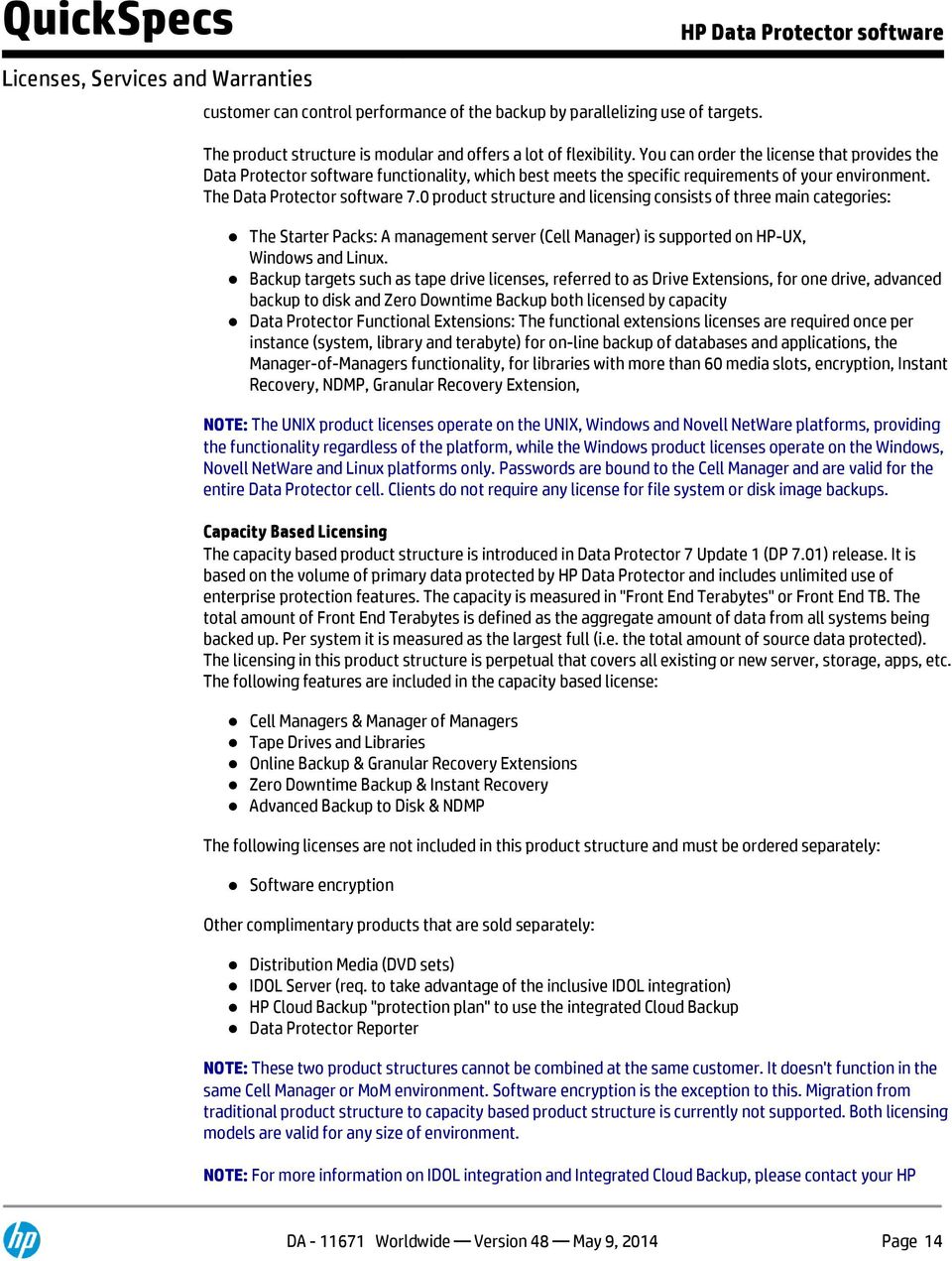
14 Licenses, Services and Warranties customer can control performance of the backup by parallelizing use of targets. The product structure is modular and offers a lot of flexibility. You can order the license that provides the Data Protector software functionality, which best meets the specific requirements of your environment. The Data Protector software 7.0 product structure and licensing consists of three main categories: The Starter Packs: A management server (Cell Manager) is supported on HP-UX, Windows and Linux. Backup targets such as tape drive licenses, referred to as Drive Extensions, for one drive, advanced backup to disk and Zero Downtime Backup both licensed by capacity Data Protector Functional Extensions: The functional extensions licenses are required once per instance (system, library and terabyte) for on-line backup of databases and applications, the Manager-of-Managers functionality, for libraries with more than 60 media slots, encryption, Instant Recovery, NDMP, Granular Recovery Extension, NOTE: The UNIX product licenses operate on the UNIX, Windows and Novell NetWare platforms, providing the functionality regardless of the platform, while the Windows product licenses operate on the Windows, Novell NetWare and Linux platforms only. Passwords are bound to the Cell Manager and are valid for the entire Data Protector cell. Clients do not require any license for file system or disk image backups. Capacity Based Licensing The capacity based product structure is introduced in Data Protector 7 Update 1 (DP 7.01) release. It is based on the volume of primary data protected by HP Data Protector and includes unlimited use of enterprise protection features. The capacity is measured in "Front End Terabytes" or Front End TB. The total amount of Front End Terabytes is defined as the aggregate amount of data from all systems being backed up. Per system it is measured as the largest full (i.e. the total amount of source data protected). The licensing in this product structure is perpetual that covers all existing or new server, storage, apps, etc. The following features are included in the capacity based license: Cell Managers & Manager of Managers Tape Drives and Libraries Online Backup & Granular Recovery Extensions Zero Downtime Backup & Instant Recovery Advanced Backup to Disk & NDMP The following licenses are not included in this product structure and must be ordered separately: Software encryption Other complimentary products that are sold separately: Distribution Media (DVD sets) IDOL Server (req. to take advantage of the inclusive IDOL integration) HP Cloud Backup "protection plan" to use the integrated Cloud Backup Data Protector Reporter NOTE: These two product structures cannot be combined at the same customer. It doesn't function in the same Cell Manager or MoM environment. Software encryption is the exception to this. Migration from traditional product structure to capacity based product structure is currently not supported. Both licensing models are valid for any size of environment. NOTE: For more information on IDOL integration and Integrated Cloud Backup, please contact your HP DA Worldwide Version 48 May 9, 2014 Page 14
15 Licenses, Services and Warranties sales representative. Additional license authorizations and restrictions applicable to your software product are found at: Software Warranty HP warrants only that the software media will be free of physical defects for a period of ninety (90) days from delivery. For more information about HP Global Limited Warranty and Technical Support, visit: HP Software Support HP Foundation Care 24x7 Service HP Foundation Care 24x7 connects you to HP 24 hours a day, seven days a week for assistance on resolving issues - hardware onsite response within four hours and software call back within two hours after opening your case. Make HP your first call for hardware or software questions; Collaborative Support is included in all Foundation Care Services for this product and provides troubleshooting assistance on software such as Microsoft Server, Red Hat Linux, VMware and more. Three years' coverage recommended with HP Care Pack Service. HP Foundation Care Next Business Day Service HP Foundation Care Next Business Day connects you to HP during business hours for assistance on resolving issues - features next business day hardware onsite response and software call back within two hours after opening your case. Make HP your first call for hardware or software questions; Collaborative Support is included in all Foundation Care Services for this product and provides troubleshooting assistance on software such as Microsoft Server, Red Hat Linux, VMware and more. Three years' coverage recommended with HP Care Pack Service. PLEASE NOTE: Support is NOT bundled with the software license and must be ordered separately. Orders that do not include a minimum of a 1-year support contract will be rejected. For more information on these support offerings, please see: HP Services: Scalable, Flexible and Reliable The HP QuickStart Services provide customers with improved speed and confidence in IT infrastructure deployment, and prepare their IT staff and processes for operational success. These services are a suite of scalable, clearly defined service engagements that provide product and solution deployment consistent with HP specifications. QuickStart Services help ensure a successful implementation, improve the productivity of your technical staff and allow your IT resources to stay focused on their core tasks and business priorities. For more information contact your HP sales representative or authorized business partner. DA Worldwide Version 48 May 9, 2014 Page 15

16 Licenses, Services and Warranties HP Autonomy Education Autonomy Education is a well-established training department that strives at all times to deliver the best possible learning experience. With a team of experienced trainers and subject matter experts from around the world, our department offers you well designed training courses that range from Infrastructure Technologies, Pan-Enterprise Search, ediscovery, Content Management, Customer Interactions through to Business Process Management, Records Management and ecommerce. To learn more about Autonomy's training offerings, including course detail, please visit Course Training Schedule page: CType=Archiving+%26+Records+Management&PType=Power HP Financial Services HP Financial Services provides innovative financing and financial asset management programs to help customers cost-effectively acquire, manage, and ultimately retire their HP solutions. For more information on these services, please contact your HP sales representative or visit: DA Worldwide Version 48 May 9, 2014 Page 16

17 Configuration Information Traditional Licensing All UNIX Licenses-To-Use (LTU) can be used for Microsoft Windows, NetWare, Linux systems if applicable Step 1 - Starter Packs Product Name HP Data Protector Starter License Only Packs for HP-UX B6951BA for Windows B6961BA for Linux B6961CA E-Delivery for HP-UX B6951BAE E-Delivery for Windows B6961BAE E-Delivery for Linux B6961CAE Media Only (DP 8.1) English TD586DA Media Only (DP 8.1) E-Delivery English TD586DAE Media Only (DP 8.0) English TD586CA French TD586CF Japanese TD586CJ Simplified Chinese TD586CS Media Only (DP 8.0 E-Delivery English TD586CAE French TD586CFE Japanese TD586CJE Simplified Chinese TD586CSE NOTE: Please, make sure that latest patches are applied, in order to have access to the latest functionality and level of localization. Patches can be found at The Starter Pack license is the foundation of a Data Protector backup environment and is required in all installations. It includes the license-to-use (LTU) for: one management server (cell manager) on the specified platform unlimited number of backup clients (agents) on any platform one drive license (B6951xx contains 1xB6953AA, and B6961xx contains 1xB6963AA) built in media management libraries up to 60 slots System Disaster Recovery options sophisticated reporting (in Data Protector GUI and via the web) service-centric management through integrations into HP software. This license is obligatory. Individual licenses are required for additional drives and additional functionality All UNIX Starter Pack licenses can also be used as a substitute for a Windows, NetWare, and or Linux Starter Pack. The base Data Protector media kit consists of 3 DVDs, including HP Data Protector for all platforms, all integrations into other HP software, and electronic manuals. DA Worldwide Version 48 May 9, 2014 Page 17

18 Configuration Information NOTES: In case the Cell Manager is running in a cluster using the same virtual IP address for all nodes in the cluster, only one starter pack is required. In case the Cell Manager is running in a virtual machine environment one starter pack is required for each individual Cell Manager IP Address. Step 2 - Drive and Library Extensions HP Data Protector Backup Drive HP Data Protector Backup Drive for UNIX, NAS, SAN B6953AA E-Delivery for UNIX, NAS, SAN B6953AAE for Windows, NetWare, Linux (Intel)) B6963AA E-Delivery for Windows, NetWare, Linux (Intel) B6963AAE For SAN, UNIX, NAS: Includes the license-to-use (LTU) for one drive, directly attached to a UNIX, OpenVMS system, a NAS device or used in a SAN. A drive can be a tape drive, a file device, or Magneto Optical drive. You need as many licenses as there are drives in use at any point in time. This is typically the total number of configured drives to allow all drives to be used simultaneously. Drive licenses cannot be shared between multiple Cells. This license can also be used as a substitute for the Windows, NetWare, and Linux license. However, if the drive is not used in a SAN, it is more affordable to use B6963AA. This license is required for NAS systems managed via NDMP (for example Network Appliance Filers and EMC Celerra File Servers), or NAS systems requiring a Data Protector proprietary Device Server (Media Agent), (for example HP NAS 8000). NAS systems powered by Windows, NetWare, or standard Linux, which can run a standard Data Protector Device Server (Media Agent), require only the Data Protector drive extensions for Windows, NetWare, Linux (B6963AA). For Windows, NetWare, Linux: Includes the license-to-use (LTU) for one drive directly attached to a Windows, NetWare, or Linux (Intel) system. A drive can be a tape drive, a file device), or Magneto Optical drive. You need as many licenses as there are drives in use at any point in time. This is typically the total number of configured drives to allow all drives to be used simultaneously. Drive licenses cannot be shared between multiple Cells. In case that multiple systems access the drive in a SAN, the drive extension for UNIX, NAS, SAN (B6953AA) is required. A Fiber Channel point-to-point connection is not considered a SAN. This license is valid for drives attached to NAS devices powered by Windows, NetWare or Linux, which can run a standard Data Protector Device Server (Media Agent). For supported drives please refer to the Data Protector support matrixes at the following web link: HP Data Protector Library extension with slots E-Delivery B6957BA DA Worldwide Version 48 May 9, 2014 Page 18

19 Configuration Information with unlimited slots B6958BA upgrade to unlimited slots library B6958CA E-Delivery with slots B6957BAE E-Delivery with unlimited slots B6958BAE E-Delivery upgrade to unlimited slots library B6958CAE Includes the license-to-use (LTU) for managing tape libraries with the number of physically available slots within one Data Protector Cell. Required once per library. STK silos using ACSLS and GRAU/EMASS library systems using DAS require the unlimited slots license. This license is based on the physical slots inside the library, not logical slots. For example Data Protector allows partitioning a physical 120 slots library into two logical 60 slots libraries. Still one slots library extension is required Libraries with the capability to create virtual partitions also require the license based on the number of physically available slots once per physical library. In case of library sharing between multiple Cells, the Manager-of-Managers LTU is required for each Cell to license the library across all Cells with one license. Otherwise, one license is required for each Cell. For supported libraries please refer to the Data Protector support matrixes under: Step 3 - Functional Extensions HP Data Protector On-line extension E-Delivery B6955BA B6965BA for UNIX for Windows, Linux E-Delivery for UNIX B6955BAE E-Delivery for Windows, Linux B6965BAE Includes the license-to-use (LTU) to perform on-line backup of databases and applications running on the specified platform. Required per server, it does not matter how many databases are running on the system. Even if databases of different types are running on the same system, only one license is required. As a general rule, every system responsible for storing application data to be protected in an online state requires a Data Protector online backup LTU. If a system runs multiple partitions, this LTU is required for each partition. In a cluster environment, each system participating in the cluster requires a LTU. In an Oracle RAC (Real Application Cluster) each cluster node with an installed Application Agent requires one Online Backup LTU. Online Backup LTUs are required when using Zero Downtime Backup to protect applications. Open file backup and restore using the Windows file system snapshot feature VSS (Volume Shadow copy Service) does not require the Online Backup LTU. However, Online Backup of databases, which are not part of the operating system, requires this Online Backup extension. System configuration backup does not requires the Online Backup LTU. Required for MS Exchange Single Mailbox backup Each node with a configured Oracle DataGuard standby database in Data Protector requires this license. Not required for HP Network Node Manager Online Backup Not required for HP Systems Insight Manager Online Backup. For supported databases please refer to the Data Protector support matrixes at: DA Worldwide Version 48 May 9, 2014 Page 19

20 Configuration Information Online Backup Licensing in Virtual Environments vstorage API for data protection (VADP) and VMware ESX/ESXi Server backup require one Online Backup LTU for Windows, Linux license per ESX/ESXi server NOTE: VCB-host, vcenter Server and the VMware vcloud Director integration doesn't require a separate license as it is covered by the license per ESX host Microsoft Hyper-V environments require one Online Backup LTU for Windows, Linux license per physical Hyper-V server. Additional Online Backup LTU is highly recommended for each virtual machine that contains application-specific agents. For virtual environments, the same licensing requirements apply for array assisted snapshots - see ZDB&IR licensing description for more details. Online backup of an application/database on a VMware Virtual Machine requires one license per virtual machine. Previous script-based solutions can continue to be used without additional licensing, but those scripts are no longer supported by HP and need to be maintained by the customer on versions Data Protector 6.1 and beyond. Online Backup Licensing for Microsoft SharePoint For SharePoint environments, an Online Backup LTU is required for each physical system that contains persistent data, such as content databases or index servers. HP Data Protector Granular Recovery Extension for 1-server TB737AA E-Delivery for 1-server TB737AAE Includes the license to restore single items from a backup done on a single server with a Data Protector Online Backup extension (in this case the DP Online Backup LTU is required). For other backup sources like offline backups or 3rd party backup of the GRE supported applications, one GRE license is needed per target server to which items will be recovered with GRE. The GRE license is locked to that server for 1 year; afterwards it can be used for a different server Granular Recovery Extension Licensing for Microsoft SharePoint For SharePoint environments, a Granular Recovery Extension is required for each physical server that contains a content database which backup acts as a source for recovering a single document, a directory or an entire site. Granular Recovery Extension Licensing for VMware For VMware, a Granular Recovery Extension (GRE) license is required for each ESX server that hosts one or multiple VM virtual machines during backup and which files are recovered using GRE. One DP Online Backup LTU is required per system to perform a backup that can be used for Granular Recovery. Granular Recovery Extension Licensing for Exchange The Granular Recovery Extension (GRE) for Microsoft Exchange 2010 requires a GRE license for each Exchange server that hosts one or multiple databases that needs to be backed up. DA Worldwide Version 48 May 9, 2014 Page 20

21 Configuration Information HP Data Protector Encryption extension for 1-server/workstation BB618AA for 10-servers/workstations BB618BA E-Delivery for 1-server/workstation BB618AAE E-Delivery for 10-servers/workstations BB618BAE Includes the license-to-use (LTU) and media to encrypt all backup data of one HP Data Protector client server or workstation with the HP Data Protector AES 256 bit encryption software. Required once for each HP Data Protector client (Agent / Application Agent) with encryption configured. Tape drive based encryption is free of charge and does not require this license. In a cluster environment, each system participating in the cluster requires a LTU. HP Data Protector Manager-of-Managers extension for UNIX B6956AA for Windows B6966AA E-Delivery for UNIX B6956AAE E-Delivery for Windows B6966AAE Includes the license-to-use (LTU) for each Data Protector management server (Cell Manager), running on the specified platform, to be part of a Manager-of-Managers environment. Required to share tape libraries between multiple Data Protector cells. Required in addition to the Cell Manager license. Ideal solution for central backup management of branch offices. B6956AA (Unix MoM) can also be used for a Windows management server (Cell Manager) if required HP Data Protector Advanced Backup to Disk extension E-Delivery for 1 TB B7038AA for 10 TB B7038BA for 100 TB B7038CA E-Delivery for 1 TB B7038AAE E-Delivery for 10 TB B7038BAE E-Delivery for 100 TB B7038CAE Includes the license-to-use (LTU) for 1 TB of backup disk storage. Required once per terabyte (TB) usable native capacity of backup disk storage. - The "Advanced Backup to Disk" license is required to backup to a Data Protector file library and to a Data Protector StoreOnce library, and can be used instead of drive licenses to backup to a Virtual Tape Library. - Usable native capacity of a HP Data Protector file library is the available size on disk for the file library, as reported by the file system. HP Data Protector synthetic full and virtual full backup: Virtual full backups and the incremental backups to be consolidated into a synthetic / virtual full backup must be stored in the HP Data Protector file library, which requires this license. Usable native capacity of a Virtual Tape Library (VTL) is the size on disk of the virtual tape library consumed by all protected HP Data Protector backups as reported by the VTL. For each VTL you can choose whether to use the backup to disk or tape drive licensing model. Within one VTL, both concepts cannot be mixed. DA Worldwide Version 48 May 9, 2014 Page 21
22 Configuration Information By default, HP Data Protector treats VTL devices as ordinary libraries (such as SCSI II libraries). To utilize the advanced backup to disk licenses, the device must be marked as a VTL during the device configuration. See the online Help index entry: "virtual tape library" for more information. If the VTL has a built-in capability to migrate backup data to cheaper disk or tape, the migrated storage capacity must also be fully licensed. No drive and library licenses are required for the tape library exclusively controlled by the VTL, but the used capacity of all tapes in the physical tape library must be licensed. In some cases it may be more cost-effective to use the tape drive licensing model instead (B6953AA and B6963AA). This requirement does not apply when HP Data Protector object copy is used to migrate the backup data to another disk or tape. Licensing for HP VLS Automigration - Automigration is a VLS media copy feature in Data Protector and can free up additional capacity on a VLS device by migrating data. Therefore, licensing for the migrated data is required, and the capacity of the media used for migration needs to be added to the total disk capacity of the VLS. In some cases it may be more cost effective to switch to drive licensing completely, as described above. Licensing for VTL Replication: In cases where Data Protector is actively managing source and target devices in a replication set-up, licensing is required for both devices. In cases where Data Protector is not actively managing the target device, only the source device needs to be licensed. This includes the VLS Echo Copy feature, which is treated as replication. If HP Data Protector is using the VTL exclusively, it is recommended to license a quantity matching the capacity of the VTL. HP calls the physical VTL capacity "usable native capacity". Other vendors call it "raw capacity" If Advanced Backup to Disk licensing was purchased before July 1st, 2008, HP is fully committed to protect customers' investments. This means you can choose to use this license for the VTL under the previous licensing terms: "Usable native capacity of a VTL is the space occupied by protected backups and protected backup copies and mirrors according to the Data Protector internal database. To keep virtual tape library licensing stress free and simple a compression rate of 2:1 is assumed for VTLs with no extra charge." Please note that using the previous model only makes sense if you do not use compression or deduplication technology. Otherwise, a better value is provided through the new licensing model. Due to this size on disk licensing concept, compression rates and deduplication rates do not need to be considered. The RAID configuration also does not need to be considered. 1 TB = 1024 GB, 1 GB = 1024 MB, 1 MB = 1024 KB, 1 KB = 1024 bytes In case of central licensing with MoM, at minimum 1 TB needs to be assigned to each Cell using the Advanced Backup to Disk functionality. HP Data Protector Zero Downtime Backup (ZDB) extension for UNIX 1TB B7025CA for UNIX 10 TB B7025DA for Linux 1 TB TD588AA for Linux 10TB TD589AA for Windows 1TB TD590AA for Windows 10TB TD591AA E-Delivery for UNIX 1TB B7025CAE E-Delivery for UNIX 10 TB B7025DAE E-Delivery for Linux 1 TB TD588AAE E-Delivery for Linux 10TB TD589AAE E-Delivery for Windows 1TB TD590AAE E-Delivery for Windows 10TB TD591AAE Includes the license-to-use (LTU) for one terabyte (TB) of "used primary disk space capacity" of UNIX, DA Worldwide Version 48 May 9, 2014 Page 22
23 Configuration Information Linux, or Windows based backup, utilizing the snapshot capabilities of any disk array supported by Data Protector Used primary disk space capacity" is the total capacity of all primary disks on the disk array used by of UNIX, Linux, or Windows systems The primary disks contain the application data and are protected by Data Protector. In the case of the ZDB for Windows: via VSS disk array hardware provider or via Data Protector disk array native agents The total capacity of primary disks represents the total true usable capacity of these disks; independent of the total size of the application data. Data Protector does not require licenses for the capacity consumed by the secondary volumes, mirrors, and snapshots that are used for data protection. Used capacity differs from raw capacity in that RAID overhead is excluded. This means the RAID configuration does not need to be considered. Please, be aware that the ZDB licenses for UNIX or Linux can also be used for Linux and Windows systems NOTE: A Data Protector Online Backup LTU (B6955BA, B6965BA) is additionally required per system to protect all applications using ZDB. For supported applications please refer to the Data Protector support matrixes available at: HP Data Protector Instant Recovery extension for UNIX 1TB B7028AA for UNIX 10 TB B7028DA for Linux 1 TB TD592AA for Linux 10TB TD593AA for Windows 1TB TD594AA for Windows 10TB TD595AA E-Delivery for UNIX 1TB B7028AAE E-Delivery for UNIX 10 TB B7028DAE E-Delivery for Linux 1 TB TD592AAE E-Delivery for Linux 10TB TD593AAE E-Delivery for Windows 1TB TD594AAE E-Delivery for Windows 10TB TD595AAE Includes the license-to-use (LTU) for one terabyte (TB) of "used primary disk space capacity" of UNIX, Linux, or Windows based backup utilizing the snapshot capabilities of any disk array supported by Data Protector. "Used primary disk space capacity" is the total capacity of all primary disks on the disk array that are used by UNIX, Linux, or Windows systems. The primary disks contain the application data and are protected by Data Protector In the case of the IR for Windows: via VSS disk array hardware provider DA Worldwide Version 48 May 9, 2014 Page 23
24 Configuration Information or via Data Protector disk array native agents The total capacity of primary disks represents the total true usable capacity of these disks; independent of the total size of the application data. Data Protector does not require licenses for the capacity consumed by the secondary volumes, mirrors, and snapshots that are used for data protection. Used capacity differs from raw capacity in that RAID overhead is excluded. This means the RAID configuration does not need to be considered. Please, be aware that these IR licenses for UNIX can also be used for Linux and Windows systems. NOTE: Requires an equivalent licensing of Zero Downtime Backup. HP Data Protector Direct Backup using NDMP E-Delivery Direct Backup for NDMP, 1TB LTU B7022BA Direct Backup for NDMP, 10TB LTU B7022DA Direct Backup for NDMP, 100TB LTU TD186AA E-Delivery Direct Backup for NDMP, 1TB LTU B7022BAE E-Delivery Direct Backup for NDMP, 10TB LTU B7022DAE E-Delivery Direct Backup for NDMP, 100TB LTU TD186AAE Includes the license-to-use (LTU) to backup 1 TB, 10 TB or 100 TB of 1 NDMP Server. Required once per terabyte (TB) used disk space, for each file server being backed up via NDMP (e.g. Network Appliance Filers or EMC Celerra File Servers). - Used disk space capacity is the total capacity of all volumes of the file server being backed up via NDMP. This amount represents the total usable capacity of these volumes, and matches with their configured LDEV sizes HP Data Protector Media Operations Entry Level B7100AA Enterprise B7101AA Unlimited media B7102AA Media TD587BA E-Delivery Entry Level B7100AAE E-Delivery Enterprise B7101AAE E-Delivery Unlimited media B7102AAE E-Delivery Media TD587BAE NOTE: HP Data Protector Media Operations is only available for DP version 7.0x or prior. The Entry Level includes the license-to-use (LTU) for 2000 media, one management server and unlimited clients. The Enterprise includes the license-to-use (LTU) for media, one management server and unlimited clients. The unlimited includes the license-to-use (LTU) for unlimited media, one management server and unlimited clients. DA Worldwide Version 48 May 9, 2014 Page 24
25 Configuration Information Media refers to the total number of tape media to be tracked in the Data Protector Media Operations internal database. The entry level and enterprise level licenses can be used in any combination to match the customer's total number of tape media to be tracked. - Data Protector Media Operations is not included in the Data Protector starter packs DVDs and has to be ordered separately via TD587BA or TD587BAE. NOTE: Media Operations doesn't work with DP 8.x versions. This applies to DP 7.0.x and prior versions only. HP Data Protector, Capacity License Tiers LTU Only HP DP per TB, 1-9 TB LTU TF521AA DP per TB, 10-49TB LTU TF542AA DP per TB, TB LTU TF543AA DP per TB, TB LTU TF544AA DP per TB, TB LTU TF558AA DP per TB, TB LTU TF561AA DP per TB, >1000TB TF582AA E-Delivery DP per TB, 1-9 TB LTU TF521AAE E-Delivery DP per TB, 10-49TB LTU TF542AAE E-Delivery DP per TB, TB LTU TF543AAE E-Delivery DP per TB, TB LTU TF544AAE E-Delivery DP per TB, TB LTU TF558AAE E-Delivery DP per TB, 500TB-1 PB LTU TF561AAE E-Delivery DP per TB, >1PB TF582AAE Media Only (DP 8.1) English TD586DA Media Only (DP 8.1) E-Delivery English TD586DAE Media Only (DP 8.0) English TD586CA French TD586CF Japanese TD586CJ Simplified Chinese TD586CS Media Only (DP 8.0) E-Delivery English TD586CAE French TD586CFE Japanese TD586CJE Simplified Chinese TD586CSE It is based on the volume of primary data protected by HP Data Protector and includes unlimited use of enterprise protection features. The capacity is measured in "Front End Terabytes" or Front End TB. The total amount of Front End Terabytes is defined as the aggregate amount of data from all systems being backed up. Per system it is measured as the largest full (i.e. the total amount of source data protected). For example: For a full & incremental backup concept, only full are considered For an incremental forever, a "synthetic" full is taken as base NOTE: 1 PB = 1024 TB, 1 TB = 1024 GB, 1 GB = 1024 MB, 1 MB = 1024 KB, 1 KB = 1024 bytes DA Worldwide Version 48 May 9, 2014 Page 25
26 Configuration Information The capacity purchase tier in Data Protector capacity based license scheme is determined by the total TB of DP capacity license owned by the customer. Here is an example scenario where a customer purchases an 8 TB of DP capacity first and then makes subsequent purchases of a 5TB and a 50 TB of DP capacity. Here is what each order will include: An initial purchase of an 8 TB capacity will be at the HP DP per TB, 1-9 TB tier: 8X TF521AA The second purchase of 5 more TB will be at HP DP per TB, TB tier: 5X TF542AA The next purchase of 50 TB will be HP DP per TB, TB tier: 50X TF543AA The capacity based license includes the following features of : Cell Managers & Manager of Managers Tape Drives and Libraries Online Backup & Granular Recovery Extensions Zero Downtime Backup & Instant Recovery Advanced Backup to Disk & NDMP NOTE: Software encryption is NOT included and must be ordered separately The complimentary products that are sold separately are: Distribution Media (DVD sets) Media Operations* IDOL Server (req. to take advantage of the inclusive IDOL integration) HP Cloud Backup "protection plan" to use the integrated Cloud Backup Data Protector Reporter * HP Data Protector Media Operations is only available for DP version 7.0x or prior. NOTE: For more information on IDOL integration and Integrated Cloud Backup, please contact your HP sales representative. Here are some example scenarios for Capacity Based licensing: If a customer has 200 TB of data to protect and backs up to a dedupe store that only uses 20 TB they would still need 200 TB capacity license If a customer has 100 TB of data but only protects 10 TB of this data they would only need a 10 TB capacity license If a customer backs up the same 10 TB multiple times, only a 10 TB capacity license is needed Single Server Editions HP Data Protector, Single Server Edition E-Delivery LTU Only for HP-UX B7020BA for Windows B7030BA E-Delivery for HP-UX B7020BAE E-Delivery for Windows B7030BAE Migration To Starter Pack DA Worldwide Version 48 May 9, 2014 Page 26
27 Configuration Information for HP-UX B7021AA for Windows B7031AA E-Delivery for HP-UX B7021AAE E-Delivery for Windows B7031AAE Media Only (DP 8.1) English TD586DA Media Only (DP 8.1) E-Delivery English TD586DAE Media Only (DP 8.0) English TD586CA French TD586CF Japanese TD586CJ Simplified Chinese TD586CS Media Only (DP 8.0) E-Delivery English TD586CAE French TD586CFE Japanese TD586CJE Simplified Chinese TD586CSE Includes the license to backup one single server on the specified platform with an unlimited number of UNIX and/or Windows workstations, one backup drive; and the ability to manage one autochanger/library with up to 10 slots. The Single Server Edition for Windows can only manage Windows workstations To obtain the following functionality the Single Server Edition has to be migrated to the Starter Pack via the migration LTU: additional backup clients (agents) on any platform additional backup drives the ability to manage autoloaders/libraries with more than 10 slots systems disaster recovery sophisticated reporting (in the Data Protector GUI and via the web) SAN support (with the management server for HP-UX) service-centric management through integrations into HP Software Once migrated, additional drives as well as further additional functionality can be ordered via separate LTUs. To order the migration LTU, a single server edition LTU is required. NOTE: An upgrade from Single Server edition to Capacity Based license model is not supported. For more information on General web page: (NOTE: The latest support matrices can be found by clicking "Support Matrices" from this page) Direct link to QuickSpecs with detailed product specifications, ordering information and more: DA Worldwide Version 48 May 9, 2014 Page 27
28 Configuration Information To learn more about HP's Information solutions, visit Copyright 2014 Hewlett-Packard Development Company, L.P. The information contained herein is subject to change without notice. Microsoft and Windows NT are US registered trademarks of Microsoft Corporation. Intel is a US registered trademark of Intel Corporation. Unix is a registered trademark of The Open Group. The only warranties for HP products and services are set forth in the express warranty statements accompanying such products and services. Nothing herein should be construed as constituting an additional warranty. HP shall not be liable for technical or editorial errors or omissions contained herein. DA Worldwide Version 48 May 9, 2014 Page 28
QuickSpecs. Overview. HP Data Protector software. Overview
 Overview Overview HP Data Protector is the industry's first unified data protection solution that utilizes an intelligent approach to data management. HP Data Protector seamlessly protect and harness data
QuickSpecs. HP Data Protector software. Overview
 Overview An intelligent approach to data protection HP Data Protector is the industry's first Adaptive Backup and Recovery solution that uses an intelligent approach to data protection and management.
Breakthrough Scalability - Data Protector 8.0 takes the scalability and performance of backup and recovery
 Overview Overview HP Data Protector is the industry's first unified data protection solution that utilizes an intelligent approach to data management. HP Data Protector seamlessly protect and harness data
How To Use An Hp Data Protector For Your Data Center
 Overview An intelligent approach to data protection HP Data Protector is the industry's first Adaptive Backup and Recovery solution that uses an intelligent approach to data protection and management.
QuickSpecs. HP Data Protector Software. Overview
 Overview An intelligent approach to data protection HP Data Protector is the industry's first Adaptive Backup and Recovery solution that uses an intelligent approach to data protection and management.
HP OpenView Storage Data Protector
 For the streaming audio link, click the blue icon in the lower right corner HP OpenView Storage Data Protector 2005 Hewlett-Packard Development Company, L.P. The information contained herein is subject
QuickSpecs. HP Data Protector Reporter Software Overview. Powerful enterprise reporting with point and click simplicity
 Overview Introduction HP Data Protector software, used by more than 41,000 customers around the world, simplifies application protection in virtual and physical environments through unified recovery and
VERITAS NetBackup 6.0 Enterprise Server INNOVATIVE DATA PROTECTION DATASHEET. Product Highlights
 VERITAS NetBackup 6.0 Enterprise Server INNOVATIVE DATA PROTECTION As the recognized leader for enterprise-class backup and recovery, VERITAS NetBackup Enterprise Server software is designed to help provide
STRATEGIC PLANNING ASSUMPTION(S)
 STRATEGIC PLANNING ASSUMPTION(S) By 2016, one-third of organizations will change backup vendors due to frustration over cost, complexity and/or capability. By 2014, 80% of the industry will choose disk-based
Brochure. Data Protector 9: Nine reasons to upgrade
 Brochure Data Protector 9: Nine reasons to upgrade Data Protector 9: Nine reasons to upgrade Shifting data center requirements are forcing IT organizations to reassess backup and recovery processes, strategies,
EMC AVAMAR. Deduplication backup software and system. Copyright 2012 EMC Corporation. All rights reserved.
 EMC AVAMAR Deduplication backup software and system 1 IT Pressures 2009 2020 0.8 zettabytes 35.2 zettabytes DATA DELUGE BUDGET DILEMMA Transformation INFRASTRUCTURE SHIFT COMPLIANCE and DISCOVERY 2 EMC
Integrated Data Protection for VMware infrastructure
 Brochureochure, Solution brief, or Business white paper Integrated Data Protection for VMware infrastructure Fast, efficient, and reliable protection for mission-critical information in vsphere and vcloud
Symantec NetBackup 7 Clients and Agents
 Complete protection for your information-driven enterprise Overview Symantec NetBackup provides a simple yet comprehensive selection of innovative clients and agents to optimize the performance and efficiency
HP Data Protector 7.00 Integration Guide for Oracle and SAP
 HP Data Protector 7.00 Integration Guide for Oracle and SAP HP Part Number: N/A Published: March 2012 Edition: First Copyright 2004, 2012 Hewlett-Packard Development Company, L.P. Confidential computer
Data Sheet: Data Protection Veritas NetBackup 6.5 NetBackup Enterprise Server- Next Generation Data Protection
 NetBackup Enterprise Server- Next Generation Data Protection Overview As an established market leader in enterprise backup and recovery, Veritas NetBackup provides unparalleled data protection for enterprise
QuickSpecs. HPE Data Protector software. Overview. HPE Data Protector software. Key product highlights
 Overview An intelligent approach to data protection Built on a unified architecture that leverages analytics and automation, HPE Data Protector delivers comprehensive protection, real-time intelligence,
Release Notes. LiveVault. Contents. Version 7.65. Revision 0
 R E L E A S E N O T E S LiveVault Version 7.65 Release Notes Revision 0 This document describes new features and resolved issues for LiveVault 7.65. You can retrieve the latest available product documentation
VERITAS NetBackup 6.0 Database and Application Protection
 VERITAS NetBackup 6.0 Database and Application Protection INNOVATIVE DATA PROTECTION When it comes to database and application recovery, VERITAS Software has a clear goal in mind simplify the complexity
Pricing & Licensing Guide
 Pricing & Licensing Guide arcserve Unified Data v5 Welcome to the Pricing & Licensing Overview for arcserve Unified Data. in this guide, you will find a high level product overview, understand the product
Backup Exec 15 Agents and Options
 DATA PROTECTION Backup Exec 15 Agents and Options Enhance and extend Backup Exec features, capabilities, and platform support Overview enhance and extend Backup Exec features, capabilities, and platform
OPTIONS / AGENTS DESCRIPTION BENEFITS
 All Backup Exec 12 Agents and Options Backup Exec 12 Agents and Option enhance and extend platform and feature support for Backup Exec Environments. Whether you need to protect critical Microsoft applications
CA ARCserve Family r15
 CA ARCserve Family r15 Rami Nasser EMEA Principal Consultant, Technical Sales [email protected] The ARCserve Family More than Backup The only solution that: Gives customers control over their changing
Symantec NetBackup Getting Started Guide. Release 7.1
 Symantec NetBackup Getting Started Guide Release 7.1 21159722 Contents NetBackup Getting Started Guide... 5 About NetBackup... 5 How a NetBackup system works... 6 How to make a NetBackup system work for
Veritas NetBackup 6.0 Database and Application Protection
 Veritas NetBackup 6.0 Database and Application Protection Innovative data protection When it comes to database and application recovery, Symantec has a clear goal in mind simplify the complexity of database
Veritas NetBackup 6.0 Server Now from Symantec
 Veritas NetBackup 6.0 Server Now from Symantec Innovative data protection As the recognized leader for enterprise-class backup and recovery, Veritas NetBackup Server software is designed to help provide
ACCELERATE YOUR VIRTUALIZATON JOURNEY WITH BACKUP BUILT FOR VMWARE
 ACCELERATE YOUR VIRTUALIZATON JOURNEY WITH BACKUP BUILT FOR VMWARE and more... Opher Bettan director of Engineering 1 Agenda Virtualization trend and benefits Must-have list Deduplication Avamar is optimized
Symantec NetBackup 7.1 What s New and Version Comparison Matrix
 Symantec 7.1 What s New and Version Comparison Matrix Symantec 7 allows customers to standardize backup and recovery operations across physical and virtual environments with fewer resources and less risk
Access to easy-to-use tools that reduce management time with Arcserve Backup
 Access to easy-to-use tools that reduce management time with Arcserve Backup In business, evolution is constant. Staff grows. New offices spring up. New applications are being implemented, and typically,
Symantec Backup Exec 2014 Agents and Options
 Symantec Backup Exec 2014 Agents and Options Data Sheet: Data Protection Overview enhance and extend Backup Exec features, capabilities, and platform support. Whether you need to protect VMware vsphere,
Symantec Backup Exec 2010
 Reliable Backup and Recovery Designed for Your Growing Business Overview delivers market leading backup and recovery protection from server to desktop. Easily protect more data while you reduce storage
What s New. Avamar 7. Madis Pärn Senior System Engineer EMC [email protected]. Copyright 2013 EMC Corporation. All rights reserved.
 What s New Avamar 7 Madis Pärn Senior System Engineer EMC [email protected] 1 Agenda ware VDP(A) and Avamar Advanced Integration with Data Domain Systems Virtualization Enhancements Application Integration
Veritas Cluster Server from Symantec
 Delivers high availability and disaster recovery for your critical applications Data Sheet: High Availability Overview protects your most important applications from planned and unplanned downtime. Cluster
Acronis Backup & Recovery 11.5
 Acronis Backup & Recovery 11.5 Update 2 Installation Guide Applies to the following editions: Advanced Server Server for Windows Virtual Edition Server for Linux Advanced Server SBS Edition Workstation
Name Description Included in
 1 s and s Table s and s Table Agents s Backup Exec agents and options enhance and extend platform and feature support for Backup Exec environments. Whether you need to protect critical Microsoft applications
Licensing Guide for CA ARCserve & CA XOsoft Products
 Licensing Guide for CA ARCserve & CA XOsoft Products CA ARCserve and CA XOsoft Product Pricing Models CA ARCserve and CA XOsoft products offer a multi-layered data protection solution that combines highperformance
QuickSpecs. HP Data Protector software for PCs. Overview
 Overview Introduction is an expansion of HP's high performance backup and recovery software that is designed specifically for notebooks and desktops. This solution ensures the availability of business
SEP Disaster Recovery and Backup Restore: Best Practices
 SEP Disaster Recovery and Backup Restore: Best Practices Shane Brown Snr. Technical Support Manager (USA) SEP Software Inc. / [email protected] Lanai Bayne VP of Business Development SEP Software Inc. / [email protected]
Backup Exec 2014 Software Compatibility List (SCL)
 Backup Exec 2014 Software Compatibility List (SCL) Updated on January 28, 2015 Copyright 2015 Symantec Corporation. All rights reserved. Symantec, the Symantec Logo, and Backup Exec are trademarks or registered
HP Data Protector software. Assuring Business Continuity in Virtualised Environments
 HP Data Protector software Assuring Business Continuity in Virtualised Environments Would not it be great if your virtual server environment actually translated to a better reality? One where you could
SAN TECHNICAL - DETAILS/ SPECIFICATIONS
 SAN TECHNICAL - DETAILS/ SPECIFICATIONS Technical Details / Specifications for 25 -TB Usable capacity SAN Solution Item 1) SAN STORAGE HARDWARE : One No. S.N. Features Description Technical Compliance
HP Data Protector A.06.10. Integration guide for HP Operations Manager for Windows B6960-96049
 HP Data Protector A.06.10 Integration guide for HP Operations Manager for Windows B6960-96049 Part number: B6960 96049 First edition: November 2008 Legal and notice information Copyright 2004, 2008 Hewlett-Packard
RED HAT ENTERPRISE VIRTUALIZATION FOR SERVERS: COMPETITIVE FEATURES
 RED HAT ENTERPRISE VIRTUALIZATION FOR SERVERS: COMPETITIVE FEATURES RED HAT ENTERPRISE VIRTUALIZATION FOR SERVERS Server virtualization offers tremendous benefits for enterprise IT organizations server
BACKUP BEST PRACTICES FOR A XENSERVER & XENDESKTOP ENVIRONMENT
 BACKUP BEST PRACTICES FOR A XENSERVER & XENDESKTOP ENVIRONMENT WHO WE ARE Who we are Established, HW Development Development of Logistics SW Logistic Software Relag Develop Backup and Data Protection Software
Maximize Your Virtual Environment Investment with EMC Avamar. Rob Emsley Senior Director, Product Marketing
 1 Maximize Your Virtual Environment Investment with EMC Avamar Rob Emsley Senior Director, Product Marketing 2 Private Cloud is the Vision Virtualized Data Center Internal Cloud Trusted Flexible Control
VMware VDR and Cloud Storage: A Winning Backup/DR Combination
 VMware VDR and Cloud Storage: A Winning Backup/DR Combination 7/29/2010 CloudArray, from TwinStrata, and VMware Data Recovery combine to provide simple, fast and secure backup: On-site and Off-site The
CA ARCserve Backup Agents and Options
 PRODUCT SUMMARY: CA ARCSERVE BACKUP R12.5 AGENTS AND OPTIONS CA ARCserve Backup r12.5 Agents and Options خدةش شدزذ ءشءء خءحزدءز ذ باةب سسءج -ءجزدط سز ءءد ١٢.٥ ز ذصث ء ظ ضز س زء ء زصدس ز اءزدشس جصءز طدذ
Optimized data protection through one console for physical and virtual systems, including VMware and Hyper-V virtual systems
 Symantec Backup Exec 12.5 for Windows Small Business Server Premium and Standard Editions Comprehensive data protection and system recovery for Microsoft Windows Small Business Server Overview Symantec
Backup Exec 15 Software Compatibility List (SCL)
 Backup Exec 15 Software Compatibility List (SCL) Updated on September 03, 2015 Copyright 2015 Symantec Corporation. All rights reserved. Symantec, the Symantec Logo, and Backup Exec are trademarks or registered
VERITAS Backup Exec 10 for Windows Servers AGENTS & OPTIONS MEDIA SERVER OPTIONS KEY BENEFITS AGENT AND OPTION GROUPS
 DATASHEET VERITAS Backup Exec 10 for Windows Servers AGENTS & OPTIONS VERITAS Backup Exec for Windows Servers is the Gold Standard in Windows data protection providing comprehensive, cost effective, certified
SEP Software. About SEP. Key Features ONE BACKUP & DISASTER RECOVERY SOLUTION FOR THE ENTIRE ENTERPRISE
 SEP Software ONE BACKUP & DISASTER RECOVERY SOLUTION FOR THE ENTIRE ENTERPRISE About SEP SEP is an enterprise backup and disaster recovery solution for today s discerning computer environments. Supporting
QuickSpecs HP Data Protector Express 4.0 Service Pack 1
 Overview HP Data Protector Express is easy to install, easy to use and easy to manage backup and recovery software designed specifically for smaller organizations. It robustly, yet simply, protects single
Quick Start - Virtual Server idataagent (Microsoft/Hyper-V)
 Page 1 of 31 Quick Start - Virtual Server idataagent (Microsoft/Hyper-V) TABLE OF CONTENTS OVERVIEW Introduction Key Features Complete Virtual Machine Protection Granular Recovery of Virtual Machine Data
QuickSpecs. HP Integrity Virtual Machines (Integrity VM) Overview. Currently shipping versions:
 Currently shipping versions: HP Integrity VM (HP-UX 11i v2 VM Host) v3.5 HP Integrity VM (HP-UX 11i v3 VM Host) v4.1 Integrity Virtual Machines (Integrity VM) is a soft partitioning and virtualization
EMC Information Protection Software Compatibility Guide - Last Updated: June 30, 2008
 EMC Information Protection Software Compatibility Guide - Q208 Page 1 of 150 EMC Information Protection Software Compatibility Guide - Last Updated: June 30, 2008 WARNING: To get the latest version of
Business Application Continuity CA ARCserve Backup CA ARCserve D2D CA ARCserve Replication and High Availability
 Business Application Continuity CA ARCserve Backup CA ARCserve D2D CA ARCserve Replication and High Availability [email protected] CEE RMDM Technical Sales CA Recovery Management R 15 Total protection
Turbo Charge Your Data Protection Strategy
 Turbo Charge Your Data Protection Strategy Data protection for the hybrid cloud 1 WAVES OF CHANGE! Data GROWTH User EXPECTATIONS Do It YOURSELF Can t Keep Up Reliability and Visibility New Choices and
CA ARCserve Backup. UNIX and Linux Data Mover Guide. r16
 CA ARCserve Backup UNIX and Linux Data Mover Guide r16 This Documentation, which includes embedded help systems and electronically distributed materials, (hereinafter referred to as the Documentation )
Платформа NetBackup 7.6. What's new in NetBackup 7.6? 1
 Платформа NetBackup 7.6 What's new in NetBackup 7.6? 1 Building the NetBackup Platform 3 Key Investment Areas 1. Optimize for Source Workloads Physical Virtual Arrays Big Data Accelerator V-Ray Replication
SEP Disaster Recovery and Backup Restore: Best
 SEP Disaster Recovery and Backup Restore: Best Practices Who We Are Established, HW Development Development of Logistics SW Logistic Software Relag Develop Backup and Data Protection Software -- VMS (92)
QuickSpecs HP Data Protector Express 4.0 Service Pack 1
 Overview HP Data Protector Express is easy to install, easy to use and easy to manage backup and recovery software designed specifically for smaller organizations. It robustly, yet simply, protects single
Brian LaGoe, Systems Administrator Benjamin Jellema, Systems Administrator Eastern Michigan University
 Brian LaGoe, Systems Administrator Benjamin Jellema, Systems Administrator Eastern Michigan University 1 Backup & Recovery Goals and Challenges Traditional/EMU s Old Environment Avamar Key Features EMU
Evaluation of Enterprise Data Protection using SEP Software
 Test Validation Test Validation - SEP sesam Enterprise Backup Software Evaluation of Enterprise Data Protection using SEP Software Author:... Enabling you to make the best technology decisions Backup &
Acronis Backup & Recovery 10 Advanced Server Virtual Edition. Quick Start Guide
 Acronis Backup & Recovery 10 Advanced Server Virtual Edition Quick Start Guide Table of contents 1 Main components...3 2 License server...3 3 Supported operating systems...3 3.1 Agents... 3 3.2 License
Acronis Backup Product Line
 New Generation Data Protection Powered by Acronis AnyData Technology Acronis Backup Product Line Speaker name Introducing Acronis Backup Acronis Backup Target: Smaller environments, home office, remote
EMC Software Release and Service Dates for NetWorker and NetWorker Modules Last Updated on February 21, 2013
 EMC Software Release and Service Dates for NetWorker and NetWorker Modules Last Updated on February 21, 2013 This report provides information about software releases, including release dates, any announced
SEP sesam Backup & Disaster Recovery Overview
 SEP sesam Backup & Disaster Recovery Overview Lanai Bayne VP of Business Development SEP Software Corp. [email protected] Christian Ruoff Sr. Technical Support Manager SEP Software Corp. [email protected] Why SEP
FOR SERVERS 2.2: FEATURE matrix
 RED hat ENTERPRISE VIRTUALIZATION FOR SERVERS 2.2: FEATURE matrix Red hat enterprise virtualization for servers Server virtualization offers tremendous benefits for enterprise IT organizations server consolidation,
Data Sheet: Backup & Recovery Symantec Backup Exec 12.5 for Windows Servers The gold standard in Windows data protection
 The gold standard in Windows data protection Overview Symantec Backup Exec 12.5 delivers market-leading backup and recovery protection from server to desktop, providing complete data protection for the
Availability for your modern datacenter
 Availability for your modern datacenter - Agentless backup and replication for VMware and Hyper-V - Scalable, powerful, easy-to-use, affordable Veeam Availability protection for the Always-On Business
EMC Backup and Recovery for Microsoft SQL Server
 EMC Backup and Recovery for Microsoft SQL Server Enabled by Quest LiteSpeed Copyright 2010 EMC Corporation. All rights reserved. Published February, 2010 EMC believes the information in this publication
Protecting your Data in a New Generation Virtual and Physical Environment
 Protecting your Data in a New Generation Virtual and Physical Environment Read this white paper to learn how you can easily and safely protect your data in a new generation virtual and physical IT environment,
EMC Integrated Infrastructure for VMware
 EMC Integrated Infrastructure for VMware Enabled by EMC Celerra NS-120 Reference Architecture EMC Global Solutions Centers EMC Corporation Corporate Headquarters Hopkinton MA 01748-9103 1.508.435.1000
VMware vsphere Data Protection 6.0
 VMware vsphere Data Protection 6.0 TECHNICAL OVERVIEW REVISED FEBRUARY 2015 Table of Contents Introduction.... 3 Architectural Overview... 4 Deployment and Configuration.... 5 Backup.... 6 Application
Daymark DPS Enterprise - Agentless Cloud Backup and Recovery Software
 Daymark DPS Enterprise - Agentless Cloud Backup and Recovery Software Your company s single most valuable asset may be its data. Customer data, product data, financial data, employee data this is the lifeblood
Getting Started with ESXi Embedded
 ESXi 4.1 Embedded vcenter Server 4.1 This document supports the version of each product listed and supports all subsequent versions until the document is replaced by a new edition. To check for more recent
System Requirements TABLE OF CONTENTS. System Requirements. Page 1 of 196. COMMSERVE Enterprise Version Express Version
 Page 1 of 196 System Requirements TABLE OF CONTENTS COMMSERVE Enterprise Version Express Version MEDIA AGENTS COMMCELL CONSOLE CommCell Console as a Stand-Alone Application CommCell Console as a Remote
Symantec NetBackup Enterprise Server and Server 7.0-7.6.x Hardware Compatibility List
 Symantec NetBackup Server and Server 7.0-7.6.x Hardware Compatibility List Created on April 03, 2015 Copyright 2015 Symantec Corporation. All rights reserved. Symantec, the Symantec Logo, and NetBackup
Dell Backup & Disaster Recovery Suite. Resiliency without compromise.
 Dell Backup & Disaster Recovery Suite Resiliency without compromise. Resiliency without compromise Dell Backup & Disaster Recovery Suite 1 suite, 3 types of data protection: AppAssure, NetVault Backup,
Optimizing Backup & Recovery Performance with Distributed Deduplication
 Optimizing Backup & Recovery Performance with Distributed Deduplication Using NetVault Backup with EMC DD Boost Written by: Shad Nelson Product Manager Dell Software Executive Summary Backup applications
HP Integration with Veeam Backup and Replication. Mark Hambelton Veeam EMEA Alliances SE
 HP Integration with Veeam Backup and Replication Mark Hambelton Veeam EMEA Alliances SE Agenda Overview of Veeam Backup and Replication v8 Veeam Explorer for Storage Snapshots Veeam Backup off Storage
COMMVAULT SIMPANA SOFTWARE SOLUTION SETS FOR MODERN INFORMATION INFRASTRUCTURE AND CLOUD ENVIRONMENTS
 FACT SHEET: COMMVAULT SIMPANA SOFTWARE SOLUTION SETS FOR MODERN INFORMATION INFRASTRUCTURE AND CLOUD ENVIRONMENTS CommVault has introduced new Simpana software solution sets that are purpose-built to modernize
Symantec NetBackup 7.5 Clients and Agents
 Complete protection for your information-driven enterprise Data Sheet: Data Protection Overviewview Symantec NetBackup provides a simple yet comprehensive selection of innovative clients and agents to
HP Data Protector software Zero Downtime Backup and Instant Recovery. Data sheet
 HP Data Protector software Zero Downtime Backup and Instant Recovery Data sheet Business uninterrupted with HP Data Protector Zero Downtime Backup and Instant Recovery software With today s increasing
Cloud Optimize Your IT
 Cloud Optimize Your IT Windows Server 2012 The information contained in this presentation relates to a pre-release product which may be substantially modified before it is commercially released. This pre-release
How To Write An Emma Document On A Microsoft Server On A Windows Server On An Ubuntu 2.5 (Windows) Or Windows 2 (Windows 8) On A Pc Or Macbook (Windows 2) On An Unidenor
 EMC Avamar 7.0 for Windows Server User Guide P/N 300-015-229 REV 04 Copyright 2001-2014 EMC Corporation. All rights reserved. Published in the USA. Published May, 2014 EMC believes the information in this
Installing and Administering VMware vsphere Update Manager
 Installing and Administering VMware vsphere Update Manager Update 1 vsphere Update Manager 5.1 This document supports the version of each product listed and supports all subsequent versions until the document
Unitrends Recovery-Series: Addressing Enterprise-Class Data Protection
 Solution Brief Unitrends Recovery-Series: Addressing Enterprise-Class Data Protection 2 Unitrends has leveraged over 20 years of experience in understanding ever-changing data protection challenges in
EMC Backup and Recovery for Microsoft SQL Server 2008 Enabled by EMC Celerra Unified Storage
 EMC Backup and Recovery for Microsoft SQL Server 2008 Enabled by EMC Celerra Unified Storage Applied Technology Abstract This white paper describes various backup and recovery solutions available for SQL
IBM Tivoli Storage Manager Suite for Unified Recovery
 IBM Tivoli Storage Manager Suite for Unified Recovery Comprehensive data protection software with a broad choice of licensing plans Highlights Optimize data protection for virtual servers, core applications
Zero downtime backup administrator's guide
 HP Data Protector A.06.10 Zero downtime backup administrator's guide [Build 500] TBD Part number: TBD First edition: TBD Month 2008 Legal and notice information Copyright 2004, 2008 Hewlett-Packard Development
Features - Media Management
 Page 1 of 14 Features - Media Management TABLE OF CONTENTS OVERVIEW SYSTEM REQUIREMENTS - MEDIAAGENT INSTALLATION Install the MediaAgent - Windows Install the MediaAgent - Solaris Install the MediaAgent
Redefining Microsoft SQL Server Data Management. PAS Specification
 Redefining Microsoft SQL Server Data Management APRIL Actifio 11, 2013 PAS Specification Table of Contents Introduction.... 3 Background.... 3 Virtualizing Microsoft SQL Server Data Management.... 4 Virtualizing
Symantec Cluster Server powered by Veritas
 Delivers high availability and disaster recovery for your critical applications Data Sheet: High Availability Overview protects your most important applications from planned and unplanned downtime. Cluster
VMware Data Recovery. Administrator's Guide EN-000193-00
 Administrator's Guide EN-000193-00 You can find the most up-to-date technical documentation on the VMware Web site at: http://www.vmware.com/support/ The VMware Web site also provides the latest product
How to Backup and Restore a VM using Veeam
 How to Backup and Restore a VM using Veeam Table of Contents Introduction... 3 Assumptions... 3 Add ESXi Server... 4 Backup a VM... 6 Restore Full VM... 12 Appendix A: Install Veeam Backup & Replication