
How To Design A Network For A Small Business
|
|
|
- Gyles Porter
- 5 years ago
- Views:
Transcription
1 CHAPTER 1 LAN Design Objectives Upon completion of this chapter, you will be able to answer the following questions: How does a hierarchical network support the voice, video, and data needs of a small- or medium-sized business? What are the functions of each of the three layers of the hierarchical network design model? What are common examples of the effect of voice and video over IP on network design? What devices are recommended at each layer of the hierarchical design model? How are Cisco Catalyst switch product lines best positioned in the hierarchical design model? Key Terms This chapter uses the following key terms. You can find the definitions in the Glossary. access layer page 2 distribution layer page 3 core layer page 3 scalability page 4 redundancy page 4 performance page 4 security page 4 manageability page 4 maintainability page 4 voice over IP (VoIP) page 10 convergence page 10 quality of service (QoS) page 10 private branch exchange (PBX) page 11 enterprise network page 24 Power over Ethernet (PoE) page 26 multilayer switch page 27
2 2 LAN Switching and Wireless, CCNA Exploration Companion Guide For small- and medium-sized businesses, digital communication with data, voice, and video is critical to performing day-to-day business functions. Consequently, a properly designed LAN is a fundamental requirement for doing business. You must understand what a welldesigned LAN is and be able to select appropriate devices to support the network specifications of a small- or medium-sized business. In this chapter, you begin exploring the switched LAN architecture and some of the principles that are used to design a hierarchical network. You learn about converged networks. You also learn how to select the correct switch for a hierarchical network and which Cisco switches are best suited for each hierarchical layer of the network. Switched LAN Architecture When building a switched LAN architecture that satisfies the needs of a small- or mediumsized business, your plan is more likely to be successful if a hierarchical design model is used. Compared to other network designs, a hierarchical network is easier to manage and expand, and problems are solved more quickly. Hierarchical network design involves dividing the network into discrete layers. Each layer provides specific functions that define its role within the overall network. By separating the various functions that exist on a network, the network design becomes modular, which facilitates scalability and performance. The typical hierarchical design model is broken into three layers: Access Distribution Core An example of a three-layer hierarchical network design is displayed in Figure 1-1. The Hierarchical Network Model This section describes the access, distribution, and core layers in more detail. Following the introduction of the three-layer model, we explore the hierarchical model in medium-sized businesses. Finally, we delve into the benefits of hierarchical network design. Access Layer The access layer interfaces with end devices, such as PCs, printers, and IP phones, to provide access to the rest of the network. The access layer can include routers, switches, bridges, hubs, and wireless access points. The main purpose of the access layer is to provide a means of connecting devices to the network and controlling which devices are allowed to communicate on the network.
3 Chapter 1: LAN Design 3 Figure 1-1 The Hierarchical Network Model R1 C1 C2 R2 Core D1 D2 D3 D4 Distribution Access S1 S2 S3 S4 S5 S6 PC1 PC2 PC3 Distribution Layer The distribution layer aggregates the data received from the access layer switches before it is transmitted to the core layer for routing to its final destination. The distribution layer controls the flow of network traffic using policies and delineates broadcast domains by performing routing functions between virtual LANs (VLANs) defined at the access layer. VLANs allow you to segment the traffic on a switch into separate subnetworks. For example, in a university you might separate traffic according to faculty, students, and guests. Distribution layer switches are typically high-performance devices that have high availability and redundancy to ensure reliability. You will learn more about VLANs, broadcast domains, and inter-vlan routing later in this book. Core Layer The core layer of the hierarchical design is the high-speed backbone of the internetwork. The core layer is critical for interconnectivity between distribution layer devices, so it is important for the core to be highly available and redundant. The core area can also connect to Internet resources. The core aggregates the traffic from all the distribution layer devices, so it must be capable of forwarding large amounts of data quickly. Note In small networks, it is not unusual to implement a collapsed core model, where the distribution layer and core layer are combined into one layer.

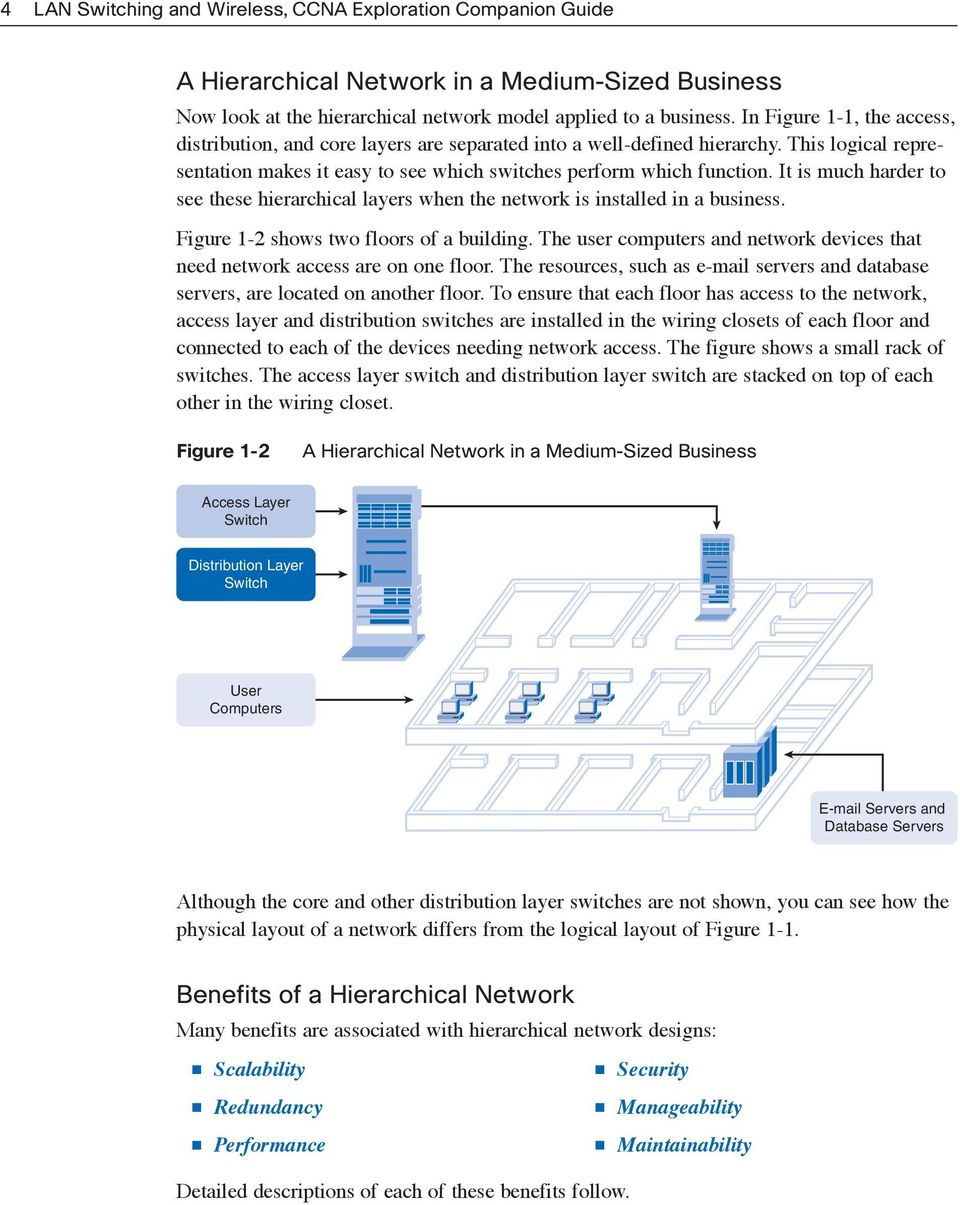
4 4 LAN Switching and Wireless, CCNA Exploration Companion Guide A Hierarchical Network in a Medium-Sized Business Now look at the hierarchical network model applied to a business. In Figure 1-1, the access, distribution, and core layers are separated into a well-defined hierarchy. This logical representation makes it easy to see which switches perform which function. It is much harder to see these hierarchical layers when the network is installed in a business. Figure 1-2 shows two floors of a building. The user computers and network devices that need network access are on one floor. The resources, such as servers and database servers, are located on another floor. To ensure that each floor has access to the network, access layer and distribution switches are installed in the wiring closets of each floor and connected to each of the devices needing network access. The figure shows a small rack of switches. The access layer switch and distribution layer switch are stacked on top of each other in the wiring closet. Figure 1-2 A Hierarchical Network in a Medium-Sized Business Access Layer Switch Distribution Layer Switch User Computers Servers and Database Servers Although the core and other distribution layer switches are not shown, you can see how the physical layout of a network differs from the logical layout of Figure 1-1. Benefits of a Hierarchical Network Many benefits are associated with hierarchical network designs: Scalability Redundancy Performance Detailed descriptions of each of these benefits follow. Security Manageability Maintainability
5 Chapter 1: LAN Design 5 Scalability Hierarchical networks scale very well. The modularity of the design allows you to replicate design elements as the network grows. Because each instance of the module is consistent, expansion is easy to plan and implement. For example, if your design model consists of two distribution layer switches for every 10 access layer switches, you can continue to add access layer switches until you have 10 access layer switches cross-connected to the two distribution layer switches before you need to add additional distribution layer switches to the network topology. Also, as you add more distribution layer switches to accommodate the load from the access layer switches, you can add additional core layer switches to handle the additional load on the core. Redundancy As a network grows, availability becomes more important. You can dramatically increase availability through easy redundant implementations with hierarchical networks. Access layer switches are connected to two different distribution layer switches to ensure path redundancy. If one of the distribution layer switches fails, the access layer switch can switch to the other distribution layer switch. Additionally, distribution layer switches are connected to two or more core layer switches to ensure path availability if a core switch fails. The only layer where redundancy is limited is at the access layer. Typically, end node devices, such as PCs, printers, and IP phones, do not have the capability to connect to multiple access layer switches for redundancy. If an access layer switch fails, just the devices connected to that one switch would be affected by the outage. The rest of the network would continue to function unaffected. Performance Communication performance is enhanced by avoiding the transmission of data through lowperforming, intermediary switches. Data is sent through aggregated switch port links from the access layer to the distribution layer at near wire speed in most cases. The distribution layer then uses its high-performance switching capabilities to forward the traffic up to the core, where it is routed to its final destination. Because the core and distribution layers perform their operations at very high speeds, no contention for network bandwidth occurs. As a result, properly designed hierarchical networks can achieve near wire speed between all devices. Security Security is improved and easier to manage. Access layer switches can be configured with various port security options that provide control over which devices are allowed to connect to the network. You also have the flexibility to use more advanced security policies at the distribution layer. You may apply access control policies that define which communication protocols are deployed on your network and where they are permitted to go. For example, if you want to limit the use of HTTP to a specific user community connected at the access

6 6 LAN Switching and Wireless, CCNA Exploration Companion Guide layer, you could apply a policy that blocks HTTP traffic at the distribution layer. Restricting traffic based on higher layer protocols, such as IP and HTTP, requires that your switches are able to process policies at that layer. Some access layer switches support Layer 3 functionality, but it is usually the job of the distribution layer switches to process Layer 3 data because they can process it much more efficiently. Manageability Manageability is relatively simple on a hierarchical network. Each layer of the hierarchical design performs specific functions that are consistent throughout that layer. Therefore, if you need to change the functionality of an access layer switch, you could repeat that change across all access layer switches in the network because they presumably perform the same functions at their layer. Deployment of new switches is also simplified because switch configurations can be copied between devices with very few modifications. Consistency between the switches at each layer allows for rapid recovery and simplified troubleshooting. In some special situations, configuration inconsistencies could exist between devices, so you should ensure that configurations are well documented so that you can compare them before deployment. Maintainability Because hierarchical networks are modular in nature and scale very easily, they are easy to maintain. With other network topology designs, maintainability becomes increasingly complicated as the network grows. Also, in some network design models, there is a finite limit to how large the network can grow before it becomes too complicated and expensive to maintain. In the hierarchical design model, switch functions are defined at each layer, making the selection of the correct switch easier. Adding switches to one layer does not necessarily mean there will not be a bottleneck or other limitation at another layer. For a full mesh network topology to achieve maximum performance, all switches need to be high-performance switches because each switch needs to be capable of performing all the functions on the network. In the hierarchical model, switch functions are different at each layer. You can save money by using less-expensive access layer switches at the lowest layer, and spend more on the distribution and core layer switches to achieve high performance on the network. Principles of Hierarchical Network Design Just because a network seems to have a hierarchical design does not mean that the network is well designed. These simple guidelines will help you differentiate between well-designed and poorly designed hierarchical networks. This section is not intended to provide you with all the skills and knowledge you need to design a hierarchical network, but it offers you an opportunity to begin to practice your skills by transforming a flat network topology into a hierarchical network topology.

7 Chapter 1: LAN Design 7 Network Diameter When designing a hierarchical network topology, the first thing to consider is network diameter, as depicted in Figure 1-3. Diameter is traditionally a measure of distance, but in the case of networking, we are using the term to measure the number of devices. Network diameter is the number of devices that a packet has to cross before it reaches its destination. Keeping the network diameter low ensures low and predictable latency between devices. Figure 1-3 Network Diameter 3 C1 C2 4 2 D1 D2 D3 D4 5 1 S1 S2 S3 S4 S5 S6 6 PC1 PC2 PC3 In Figure 1-3, PC1 communicates with PC3. Up to six interconnected switches could be between PC1 and PC3. In this case, the network diameter is six. Each switch in the path introduces some degree of latency. Network device latency is the time spent by a device as it processes a packet or frame. Each switch has to determine the destination MAC address of the frame, check its MAC address table, and forward the frame out the appropriate port. Even though that entire process happens in a fraction of a second, the time adds up when the frame has to cross many switches. In the three-layer hierarchical model, Layer 2 segmentation at the distribution layer practically eliminates network diameter as an issue. In a hierarchical network, network diameter is always going to be a predictable number of hops between the source and destination devices.

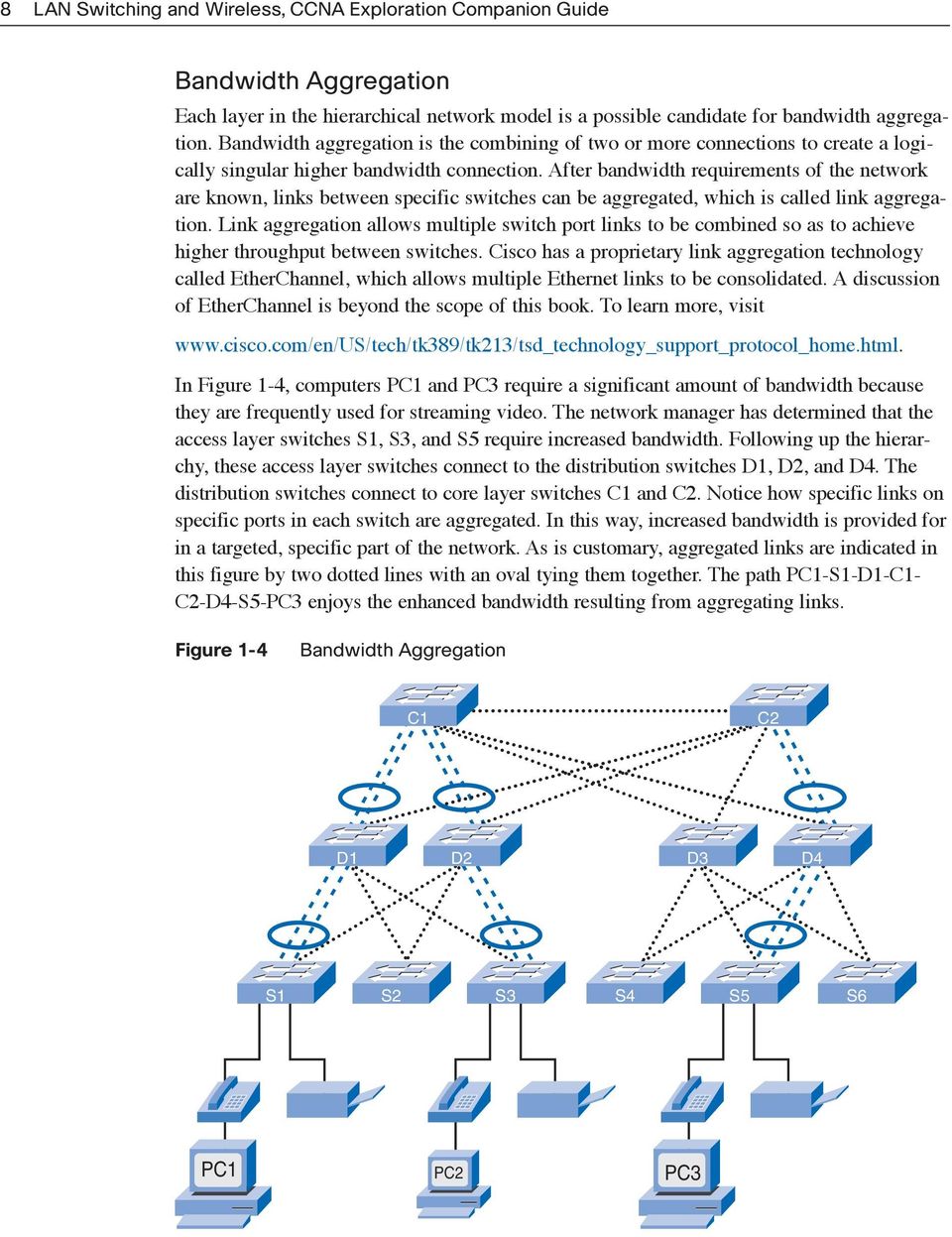
8 8 LAN Switching and Wireless, CCNA Exploration Companion Guide Bandwidth Aggregation Each layer in the hierarchical network model is a possible candidate for bandwidth aggregation. Bandwidth aggregation is the combining of two or more connections to create a logically singular higher bandwidth connection. After bandwidth requirements of the network are known, links between specific switches can be aggregated, which is called link aggregation. Link aggregation allows multiple switch port links to be combined so as to achieve higher throughput between switches. Cisco has a proprietary link aggregation technology called EtherChannel, which allows multiple Ethernet links to be consolidated. A discussion of EtherChannel is beyond the scope of this book. To learn more, visit In Figure 1-4, computers PC1 and PC3 require a significant amount of bandwidth because they are frequently used for streaming video. The network manager has determined that the access layer switches S1, S3, and S5 require increased bandwidth. Following up the hierarchy, these access layer switches connect to the distribution switches D1, D2, and D4. The distribution switches connect to core layer switches C1 and C2. Notice how specific links on specific ports in each switch are aggregated. In this way, increased bandwidth is provided for in a targeted, specific part of the network. As is customary, aggregated links are indicated in this figure by two dotted lines with an oval tying them together. The path PC1-S1-D1-C1- C2-D4-S5-PC3 enjoys the enhanced bandwidth resulting from aggregating links. Figure 1-4 Bandwidth Aggregation C1 C2 D1 D2 D3 D4 S1 S2 S3 S4 S5 S6 PC1 PC2 PC3
9 Chapter 1: LAN Design 9 Redundancy Redundancy is one part of creating a highly available network. Redundancy can be provided in a number of ways. For example, you can double up the network connections between devices, or you can double the devices themselves. This chapter explores how to employ redundant network paths between switches. A discussion on doubling up network devices and employing special network protocols to ensure high availability is beyond the scope of this book. For an interesting discussion on high availability, visit Implementing redundant links can be expensive. Imagine if every switch in each layer of the network hierarchy had a connection to every switch at the next layer. It is unlikely that you will be able to implement redundancy at the access layer because of the cost and limited features in the end devices, but you can build redundancy into the distribution and core layers of the network. In Figure 1-5, redundant links are shown at the distribution layer and core layer. At the distribution layer are four distribution layer switches; two distribution layer switches is the minimum required to support redundancy at this layer. The access layer switches, S1, S3, S4, and S6, are cross-connected to the distribution layer switches. The bolder dotted lines here indicate the secondary redundant uplinks. This protects your network if one of the distribution switches fails. In case of a failure, the access layer switch adjusts its transmission path and forwards the traffic through the other distribution switch. Figure 1-5 Redundancy C1 C2 D1 D2 D3 D4 S1 S2 S3 S4 S5 S6 PC1 PC2 PC3

10 10 LAN Switching and Wireless, CCNA Exploration Companion Guide Some network failure scenarios can never be prevented for example, if the power goes out in the entire city, or the entire building is demolished because of an earthquake. Redundancy does not attempt to address these types of disasters. To learn more about how a business can continue to work and recover from a disaster, visit Imagine that a new network design is required. Design requirements, such as the level of performance or redundancy necessary, are determined by the business goals of the organization. After the design requirements are documented, the designer can begin selecting the equipment and infrastructure to implement the design. When you start the equipment selection at the access layer, you can ensure that you accommodate all network devices needing access to the network. After you have all end devices accounted for, you have a better idea of how many access layer switches you need. The number of access layer switches, and the estimated traffic that each generates, helps you to determine how many distribution layer switches are required to achieve the performance and redundancy needed for the network. After you have determined the number of distribution layer switches, you can identify how many core switches are required to maintain the performance of the network. A thorough discussion on how to determine which switch to select based on traffic flow analysis and how many core switches are required to maintain performance is beyond the scope of this book. For a good introduction to network design, an excellent reference is Top-Down Network Design, by Priscilla Oppenheimer, available at ciscopress.com. What Is a Converged Network? Small- and medium-sized businesses are embracing the idea of running voice and video services on their data networks. Let us look at how voice over IP (VoIP) and video over IP affect a hierarchical network. Legacy Equipment Convergence is the process of combining voice and video communications on a data network. Converged networks have existed for a while now, but were feasible only in large enterprise organizations because of the network infrastructure requirements and complex management that was involved to make them work seamlessly. High network costs were associated with convergence because more expensive switch hardware was required to support the additional bandwidth requirements. Converged networks also required extensive management in relation to quality of service (QoS), because voice and video data traffic needed to be classified and prioritized on the network. Few individuals had the expertise in voice, video, and data networks to make convergence feasible and functional. In addition, legacy equipment hinders the process. Figure 1-6 shows legacy telephone company switches and a legacy wiring closet. Also, many offices still use analog phones, so they still have

11 Chapter 1: LAN Design 11 existing analog telephone wiring closets. Because analog phones have not yet been replaced, you will see equipment that has to support both legacy private branch exchange (PBX) telephone systems and IP-based phones. This sort of equipment will slowly be migrated to modern IP-based phone switches. IP phones replace analog phones and IP PBXs, such as Cisco CallManager, replace PBXs. Figure 1-6 Legacy Equipment Large Telephone Switches Small PBX Systems Wiring Closet Infrastructure Advanced Technology Converging voice, video, and data networks has become more popular recently in the smallto medium-sized business market because of advancements in technology. Convergence is now easier to implement and manage, and less expensive to purchase. Figure 1-7 shows a high-end IP phone and switch combination suitable for a medium-sized business of 250 to 400 employees. The figure also shows a Cisco Catalyst Express 500 switch and a Cisco 7906G phone suitable for small- to medium-sized businesses. This VoIP technology used to be affordable only to enterprises and governments. Moving to a converged network can be a difficult decision if the business already invested in separate voice, video, and data networks. It is difficult to abandon an investment that still works, but there are several advantages to converging voice, video, and data on a single network infrastructure.

12 12 LAN Switching and Wireless, CCNA Exploration Companion Guide Figure 1-7 VoIP Equipment Cisco 7906G Phone Catalyst 6500 and IP Phone Catalyst Express 500 Switches One benefit of a converged network is that there is just one network to manage. With separate voice, video, and data networks, changes to the network have to be coordinated across networks. Also, additional costs result from using three sets of network cabling. Using a single network means you have to manage just one wired infrastructure. Other benefits are lower implementation and management costs. It is less expensive to implement a single network infrastructure than three distinct network infrastructures. Managing a single network is also less expensive. Traditionally, if a business has a separate voice and data network, it has one group of people managing the voice network and another group managing the data network. With a converged network, you have one group managing both the voice and data networks. New Options Converged networks give you options that had not existed previously. You can now tie voice and video communications directly into an employee s personal computer system, as shown in Figure 1-8.

13 Chapter 1: LAN Design 13 Figure 1-8 Advanced Voice and Video Communications There is no need for an expensive handset phone or videoconferencing equipment. You can accomplish the same function using special software integrated with a personal computer. Softphones, such as the Cisco Unified Personal Communicator for PC or Mac, offer a lot of flexibility for businesses. The person in the top left of Figure 1-8 is using a softphone on the computer. When software is used in place of a physical phone, a business can quickly convert to converged networks because there is no capital expense in purchasing IP phones and the switches needed to power the phones. With the addition of inexpensive webcams, videoconferencing can be added to a softphone. These are just a few examples provided by a broader communications solution portfolio that redefine business processes today. Separate Voice, Video, and Data Networks The new options for software and hardware for the purpose of integrating voice, video, and data, force the issue of redesigning existing networks to support these devices. It is no longer feasible to separate out the voice, video, and data networks. As you see in Figure 1-9, a legacy voice network contains isolated phone lines running to a PBX switch to allow phone connectivity to the Public Switched Telephone Network (PSTN). When a new phone is added, a new line has to be run back to the PBX. The PBX switch is typically located in a Telco wiring closet, separate from the data and video wiring closets. The wiring closets are usually separated because different support personnel require access to each system. However, using a properly designed hierarchical network and implementing QoS policies that prioritize the audio data, voice data can be converged onto an existing data network with little to no impact on audio quality.

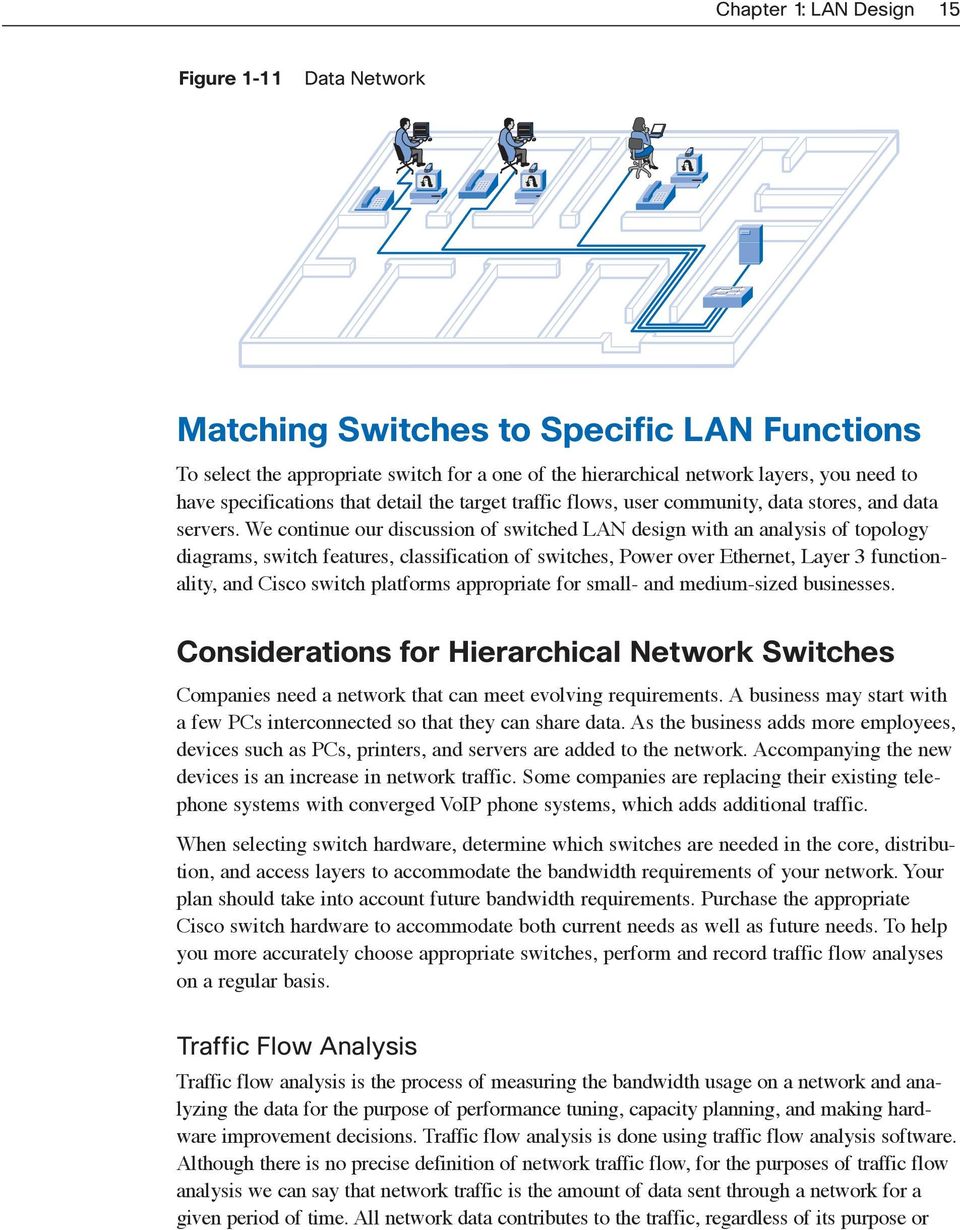
14 14 LAN Switching and Wireless, CCNA Exploration Companion Guide Figure 1-9 Voice Network In Figure 1-10, videoconferencing equipment is wired separately from the voice and data networks. Videoconferencing data can consume significant bandwidth on a network. As a result, video networks were maintained separately to allow the videoconferencing equipment to operate at full speed without competing for bandwidth with voice and data streams. Using a properly designed hierarchical network and implementing QoS policies that prioritize the video data, video can be converged onto an existing data network with little to no impact on video quality. Figure 1-10 Video Network The data network, shown in Figure 1-11, interconnects the workstations and servers on a network to facilitate resource sharing. Data networks can consume significant data bandwidth, which is why voice, video, and data networks were kept separated for such a long time. Now that properly designed hierarchical networks can accommodate the bandwidth requirements of voice, video, and data communications at the same time, it makes sense to converge them all onto a single hierarchical network.

15 Chapter 1: LAN Design 15 Figure 1-11 Data Network Matching Switches to Specific LAN Functions To select the appropriate switch for a one of the hierarchical network layers, you need to have specifications that detail the target traffic flows, user community, data stores, and data servers. We continue our discussion of switched LAN design with an analysis of topology diagrams, switch features, classification of switches, Power over Ethernet, Layer 3 functionality, and Cisco switch platforms appropriate for small- and medium-sized businesses. Considerations for Hierarchical Network Switches Companies need a network that can meet evolving requirements. A business may start with a few PCs interconnected so that they can share data. As the business adds more employees, devices such as PCs, printers, and servers are added to the network. Accompanying the new devices is an increase in network traffic. Some companies are replacing their existing telephone systems with converged VoIP phone systems, which adds additional traffic. When selecting switch hardware, determine which switches are needed in the core, distribution, and access layers to accommodate the bandwidth requirements of your network. Your plan should take into account future bandwidth requirements. Purchase the appropriate Cisco switch hardware to accommodate both current needs as well as future needs. To help you more accurately choose appropriate switches, perform and record traffic flow analyses on a regular basis. Traffic Flow Analysis Traffic flow analysis is the process of measuring the bandwidth usage on a network and analyzing the data for the purpose of performance tuning, capacity planning, and making hardware improvement decisions. Traffic flow analysis is done using traffic flow analysis software. Although there is no precise definition of network traffic flow, for the purposes of traffic flow analysis we can say that network traffic is the amount of data sent through a network for a given period of time. All network data contributes to the traffic, regardless of its purpose or
16 16 LAN Switching and Wireless, CCNA Exploration Companion Guide source. Analyzing the various traffic sources and their impact on the network allows you to more accurately tune and upgrade the network to achieve the best possible performance. Traffic flow data can be used to help determine just how long you can continue using existing network hardware before it makes sense to upgrade to accommodate additional bandwidth requirements. When you are making your decisions about which hardware to purchase, you should consider port densities and switch forwarding rates to ensure adequate growth capability. Port density is the number of ports per switch. You can monitor traffic flow on a network in many ways. You can manually monitor individual switch ports to get the bandwidth utilization over time. When analyzing the traffic flow data, you want to determine future traffic flow requirements based on the capacity at certain times of the day and where most of the data is generated and sent. However, to obtain accurate results, you need to record enough data. Manual recording of traffic data is a tedious process that requires a lot of time and diligence. Fortunately, there are some automated solutions. Analysis Tools Many traffic flow analysis tools that automatically record traffic flow data to a database and perform a trend analysis are available. In large networks, software collection solutions are the only effective method for performing traffic flow analysis. Figure 1-12 displays sample output from Solarwinds Orion 8.1 NetFlow Analysis, which monitors traffic flow on a network. Using the included charts, you can identify traffic flow problems visually. This is much easier than having to interpret the numbers in a column of traffic flow data. Figure 1-12 Traffic Flow Analysis

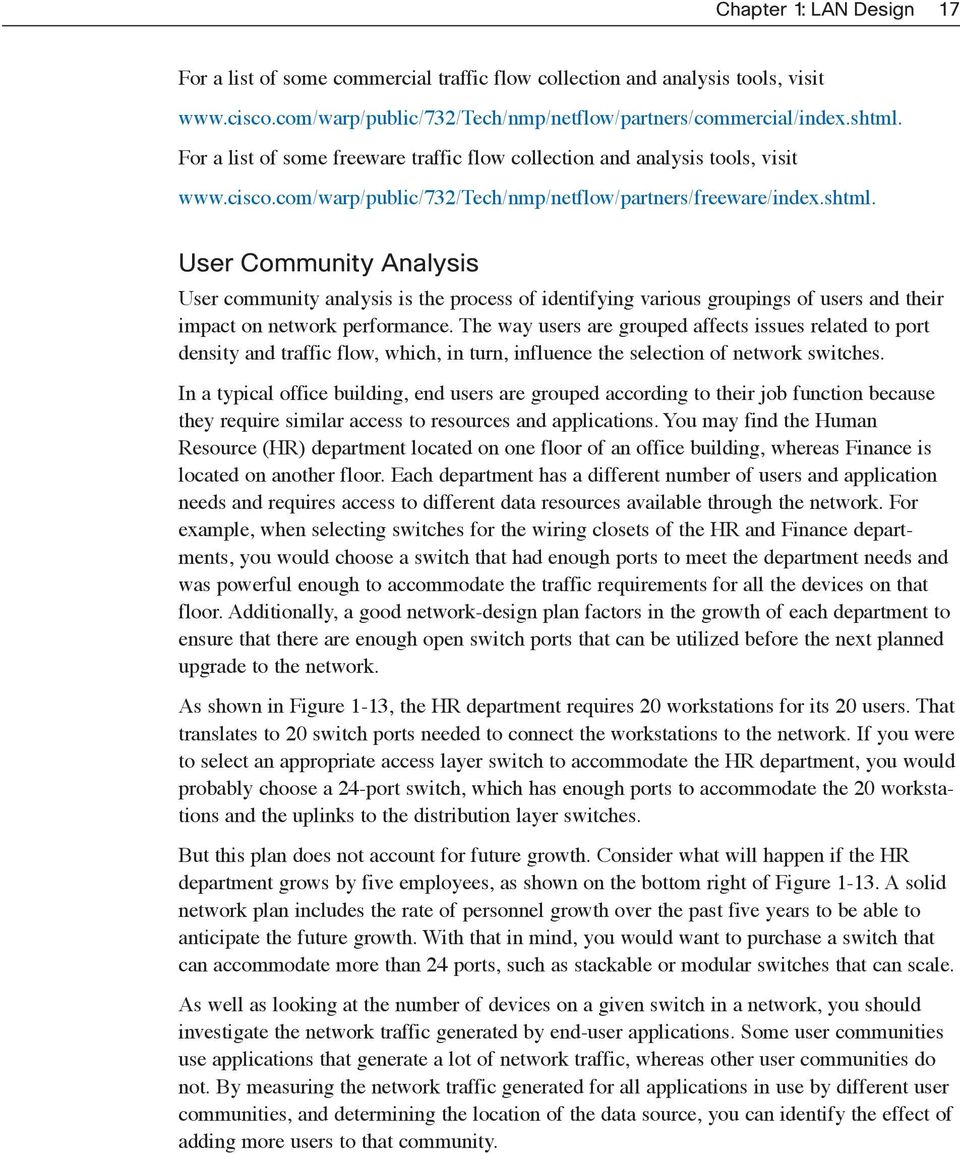
17 Chapter 1: LAN Design 17 For a list of some commercial traffic flow collection and analysis tools, visit For a list of some freeware traffic flow collection and analysis tools, visit User Community Analysis User community analysis is the process of identifying various groupings of users and their impact on network performance. The way users are grouped affects issues related to port density and traffic flow, which, in turn, influence the selection of network switches. In a typical office building, end users are grouped according to their job function because they require similar access to resources and applications. You may find the Human Resource (HR) department located on one floor of an office building, whereas Finance is located on another floor. Each department has a different number of users and application needs and requires access to different data resources available through the network. For example, when selecting switches for the wiring closets of the HR and Finance departments, you would choose a switch that had enough ports to meet the department needs and was powerful enough to accommodate the traffic requirements for all the devices on that floor. Additionally, a good network-design plan factors in the growth of each department to ensure that there are enough open switch ports that can be utilized before the next planned upgrade to the network. As shown in Figure 1-13, the HR department requires 20 workstations for its 20 users. That translates to 20 switch ports needed to connect the workstations to the network. If you were to select an appropriate access layer switch to accommodate the HR department, you would probably choose a 24-port switch, which has enough ports to accommodate the 20 workstations and the uplinks to the distribution layer switches. But this plan does not account for future growth. Consider what will happen if the HR department grows by five employees, as shown on the bottom right of Figure A solid network plan includes the rate of personnel growth over the past five years to be able to anticipate the future growth. With that in mind, you would want to purchase a switch that can accommodate more than 24 ports, such as stackable or modular switches that can scale. As well as looking at the number of devices on a given switch in a network, you should investigate the network traffic generated by end-user applications. Some user communities use applications that generate a lot of network traffic, whereas other user communities do not. By measuring the network traffic generated for all applications in use by different user communities, and determining the location of the data source, you can identify the effect of adding more users to that community.
18 18 LAN Switching and Wireless, CCNA Exploration Companion Guide Figure 1-13 HR Department Analysis C1 Redundant Uplinks to Distribution Level Switches D1 D2 24-Port Switch S1 S2 S3 Twenty computers are in the HR department. Cannot accommodate the addition of five more computers! A workgroup-sized user community in a small business is supported by a couple of switches and is typically connected to the same switch as the server. In medium-sized businesses or enterprises, user communities are supported by many switches. The resources that medium-sized business or enterprise user communities need could be located in geographically separate areas. Consequently, the location of the user communities influences where data stores and server farms are located. If the Finance users are using a network-intensive application that exchanges data with a specific server on the network, as shown in Figure 1-14, it may make sense to locate the Finance user community close to that server. By locating users close to their servers and data stores, you can reduce the network diameter for their communications, thereby reducing the impact of their traffic across the rest of the network. Note that spanning-tree protocol (STP), discussed in Chapter 5, is a determining factor in the displayed network diameters. One complication of analyzing application usage by user communities is that usage is not always bound by department or physical location. You may have to analyze the impact of the application across many network switches to determine its overall impact.

19 Chapter 1: LAN Design 19 Figure 1-14 Finance Department Analysis C1 D1 D2 Larger Diameter for Finance Dept. S1 S2 S3 Finance Computers Running Financial Software Smaller Diameter for Finance Dept. Data Stores and Data Servers Analysis When analyzing traffic on a network, consider where the data stores and servers are located so that you can determine the impact of traffic on the network. Data stores can be servers, storage area networks (SANs), network-attached storage (NAS), tape backup units, or any other device or component where large quantities of data are stored. When considering the traffic for data stores and servers, consider both client/server traffic and server/server traffic. As you can see in Figure 1-15, client/server traffic is the traffic generated when a client device accesses data from data stores or servers. Client/server traffic typically traverses multiple switches to reach its destination. Bandwidth aggregation and switch forwarding rates are important factors to consider when attempting to eliminate bottlenecks for this type of traffic.

20 20 LAN Switching and Wireless, CCNA Exploration Companion Guide Figure 1-15 Client/Server Communication C1 D1 D2 S1 S2 S3 Server/server traffic, shown in Figure 1-16, is the traffic generated between data storage devices on the network. Some server applications generate very high volumes of traffic between data stores and other servers. To optimize server/server traffic, servers needing frequent access to certain resources should be located in close proximity to each other so that the traffic they generate does not affect the performance of the rest of the network. Servers and data stores are typically located in data centers within a business. A data center is a secured area of the building where servers, data stores, and other network equipment are located. A device can be physically located in the data center but represented in quite a different location in the logical topology. Traffic across data center switches is typically very high because of the server/server and client/server traffic that traverses the switches. As a result, switches selected for data centers should be higher-performing switches than the switches you would find in the wiring closets at the access layer. By examining the data paths for various applications used by different user communities, you can identify potential bottlenecks where performance of the application can be affected by inadequate bandwidth. To improve the performance, you could aggregate links to accommodate the bandwidth, or replace the slower switches with faster switches capable of handling the traffic load. Topology Diagrams A topology diagram is a graphical representation of a network infrastructure. A topology diagram shows how all switches are interconnected, detailed down to which switch port interconnects the devices. A topology diagram graphically displays any redundant paths or

21 Chapter 1: LAN Design 21 aggregated ports between switches that provide for resiliency and performance. It shows where and how many switches are in use on your network, and identifies their configuration. Topology diagrams can also contain information about device densities and user communities. Having a topology diagram allows you to visually identify potential bottlenecks in network traffic so that you can focus your traffic analysis data collection on areas where improvements can have the most impact on performance. Figure 1-16 Server/Server Communication C1 D1 D2 S1 S2 S3 Server Server Data Store A network topology can be very difficult to piece together after the fact if you were not part of the design process. Network cables in the wiring closets disappear into the floors and ceilings, making it difficult to trace their destinations. And because devices are spread throughout the building, it is difficult to know how all the pieces are connected together. Constructing a topology diagram from the physical layout of the network becomes a tedious and time-consuming exercise; however, this is an important piece of network documentation that significantly enhances the maintenance and troubleshooting of the network and should be done regardless of the current health of the network. Figure 1-17 displays a simple network topology diagram. Notice how many switches are present in the network, as well as how each switch is interconnected. The topology diagram identifies each switch port used for interswitch communications and redundant paths between access layer switches and distribution layer switches. The topology diagram also displays where different user communities are located on the network and the location of the servers and data stores.
22 22 LAN Switching and Wireless, CCNA Exploration Companion Guide Figure 1-17 Topology Diagrams GI0/1 C1 GI0/2 GI0/4 GI0/4 D1 GI0/3 D2 GI0/1 GI0/2 GI0/3 GI0/2 GI0/1 HR Department GI0/1 GI0/1 GI0/2 GI0/2 GI0/2 S1 S2 GI0/10 GI0/11 GI0/12 S3 GI0/1 Finance Department Data Center Switch Features What are the key features of switches that are used in hierarchical networks? When you look up the specifications for a switch, what do all the acronyms and word phrases mean? What does PoE mean and what is forwarding rate? In this section, you will learn about these features. Switch Form Factors When you are selecting a switch, you need to decide between fixed configuration or modular configuration, and stackable or nonstackable. Another consideration is the thickness of the switch expressed in number of rack units. For example, the fixed configuration switches shown in Figure 1-18 are all 1 rack unit (1U). The physical size of the switches can be an important consideration when selecting switches to be deployed. Networking equipment in a hierarchical design is placed into central locations, such as the wiring closets; oftentimes, the space in these areas is limited, and switch form factors (physical configuration) becomes a significant issue. Fixed Configuration Switches Fixed configuration switches are just as you might expect, fixed in their configuration. What that means is that you cannot add features or options to the switch beyond those that
23 Chapter 1: LAN Design 23 originally came with the switch. The particular model you purchase determines the features and options available. For example, if you purchase a 24-port gigabit fixed switch, you cannot add additional ports when you need them. Typically, different configuration choices vary in how many and what types of ports are included. Figure 1-18 Switch Form Factors Fixed Configuration Switches Modular Configuration Switches Stackable Configuration Switches Modular Switches Modular switches offer more flexibility in their configuration. Modular switches come with different sized chassis that allow for the installation of different numbers of modular line cards. The line cards contain the ports. The line card fits into the switch chassis like expansion cards fit into a PC. The larger the chassis, the more modules it can support. As you can see in Figure 1-18, you can choose from many chassis sizes. If you bought a modular switch with a 24-port line card, you could easily add an additional 24-port line card to bring the total number of ports up to 48. Stackable Switches Stackable switches can be interconnected using a special backplane cable that provides high-bandwidth throughput between the switches. Cisco introduced StackWise technology in one of its switch product lines. StackWise allows you to interconnect up to nine switches using fully redundant backplane connections. As you can see in Figure 1-18, switches are stacked one atop of the other, and cables connect the switches in daisy-chain fashion. The stacked switches effectively operate as a single larger switch. Stackable switches are desirable where fault tolerance and bandwidth availability are critical and a modular switch is too costly to implement. Using cross-connected connections, the network can recover quickly if a single switch fails. Stackable switches use a special port for interconnections and do not use line ports for interswitch connections. The speeds are also typically faster than using line ports for connection switches.
24 24 LAN Switching and Wireless, CCNA Exploration Companion Guide Switch Performance When selecting a switch for the access, distribution, or core layers, consider the capability of the switch to support the port density, forwarding rates, and bandwidth aggregation requirements of your network. Port Density Port density is the number of ports available on a single switch. Fixed configuration switches typically support up to 48 ports on a single device, with options for up to four additional ports for small form-factor pluggable (SFP) devices, as shown in the 48-port switch in Figure High port densities allow for better use of space and power when both are in limited supply. If you have two switches that each contain 24 ports, you would be able to support up to 46 devices because you lose at least one port per switch to connect each switch to the rest of the network. In addition, two power outlets are required. On the other hand, if you have a single 48-port switch, 47 devices can be supported, with only one port used to connect the switch to the rest of the network, and only one power outlet needed to accommodate the single switch. Figure 1-19 Port Density 24-Port Switch 48-Port Switch Modular Switch with up to Ports Modular switches can support very high port densities through the addition of multiple switch port line cards, as shown in Figure For example, the Catalyst 6500 switch can support in excess of 1000 switch ports on a single device. Large enterprise networks that support many thousands of network devices require high density, modular switches to make the best use of space and power. Without using a highdensity modular switch, the network would need many fixed configuration switches to accommodate the number of devices that need network access. This approach can consume many power outlets and a lot of closet space.
25 Chapter 1: LAN Design 25 You must also address the issue of uplink bottlenecks. A series of fixed configuration switches may consume many additional ports for bandwidth aggregation between switches for the purpose of achieving target performance. With a single modular switch, bandwidth aggregation is less of an issue because the backplane of the chassis can provide the necessary bandwidth to accommodate the devices connected to the switch port line cards. Forwarding Rates As illustrated in Figure 1-20, forwarding rates define the processing capabilities of a switch by rating how much data the switch can process per second. Switch product lines are classified by forwarding rates. Entry-layer switches have lower forwarding rates than enterpriselayer switches. Forwarding rates are important to consider when selecting a switch. If the switch forwarding rate is too low, it cannot accommodate full wire-speed communication across all its switch ports. Wire speed is the data rate that each port on the switch is capable of attaining either 100 Mbps Fast Ethernet or 1000 Mbps Gigabit Ethernet. For example, a 48-port gigabit switch operating at full wire speed generates 48 Gbps of traffic. If the switch supports a forwarding rate of only 32 Gbps, it cannot run at full wire speed across all ports simultaneously. Fortunately, access layer switches typically do not need to operate at full wire speed because they are physically limited by their uplinks to the distribution layer. This allows you to use less expensive, lower-performing switches at the access layer, and use the more expensive, higher-performing switches at the distribution and core layers, where the forwarding rate makes a bigger difference. Figure 1-20 Forwarding Rates 24-Port Gigabit Ethernet Switch 48-Port Gigabit Ethernet Switch Capable of Generating 24 Gbps of Traffic Capable of Generating 48 Gbps of Traffic Link Aggregation As part of bandwidth aggregation, you should determine if there are enough ports on a switch to aggregate to support the required bandwidth. For example, consider a Gigabit Ethernet port, which carries up to 1 Gbps of traffic. If you have a 24-port switch, with all ports capable of running at gigabit speeds, you could generate up to 24 Gbps of network traffic. If the switch is connected to the rest of the network by a single network cable, it can forward only 1 Gbps of the data to the rest of the network. Due to the contention for bandwidth, the data would forward more slowly. That results in 1/24th wire speed available to each of the 24 devices connected to the switch. Wire speed describes the theoretical maximum data transmission rate of a connection. Link aggregation helps to reduce these bottlenecks of traffic by allowing up to eight switch ports to be bound together for data communications, providing up to 16 Gbps of data
26 26 LAN Switching and Wireless, CCNA Exploration Companion Guide throughput when Gigabit Ethernet ports are used. With the addition of multiple 10 Gigabit Ethernet uplinks on some enterprise-layer switches, 160 Gbps throughput rates can be achieved. Cisco uses the term EtherChannel when describing aggregated switch ports. Keep in mind that EtherChannel reduces the number of available ports to connect network devices. As you can see in Figure 1-21, four separate ports on switches C1 and D1 are used to create a 4-port EtherChannel. EtherChannel technology allows a group of physical Ethernet links to create one logical Ethernet link for the purpose of providing fault tolerance and highspeed links between switches, routers, and servers. In this example, there is four times the throughput when compared to the single port connection between switches C1 and D2. Figure 1-21 Link Aggregation Aggregated Ports for Improved Performance C1 Single Port D1 D2 Power over Ethernet and Layer 3 Functionality Two other characteristics you want to consider when selecting a switch are Power over Ethernet (PoE) and Layer 3 functionality. Power over Ethernet Power over Ethernet (PoE) allows the switch to deliver power to a device over the existing Ethernet cabling. As you can see in Figure 1-22, this feature can be used by IP phones and some wireless access points. PoE ports on a switch, IP phone, access point, and wireless LAN controller look the same as any switch port, as shown in Figure Check the model of the networking device to determine whether the port supports PoE. PoE allows you more flexibility when installing wireless access points and IP phones because you can install them anywhere you can run an Ethernet cable. You do not need to consider how to run ordinary power to the device. You should select a switch that supports PoE only if you are actually going to take advantage of the feature because it adds considerable cost to the switch.
27 Chapter 1: LAN Design 27 Figure 1-22 Power over Ethernet IP Phone receives power through the Ethernet cable. V Wireless Access Point receives power through the Ethernet cable. IP LWAPP Figure 1-23 Appearance of Power over Ethernet Ports Layer 3 Functionality Typically, switches operate at Layer 2 of the OSI reference model, where they deal primarily with the MAC addresses of devices connected to switch ports. Layer 3 switches offer advanced functionality that will be discussed in greater detail in the later chapters of this book. Layer 3 switches are also known as multilayer switches. Figure 1-24 illustrates some functions of Layer 3 switches.
28 28 LAN Switching and Wireless, CCNA Exploration Companion Guide Figure 1-24 Layer 3 Switch Functionality C1 Multilayer Switch Security policies prevent access to the servers. D1 D2 Layer 3 routing performed by the switch to route traffic to server subnet. S1 S2 S / / /24 Switch Features in a Hierarchical Network Now that you know which factors to consider when choosing a switch, let us examine which features are required at each layer in a hierarchical network. You will then be able to match the switch specification with its capability to function as an access, distribution, or core layer switch. Access Layer Switch Features Access layer switches facilitate the connection of end node devices to the network. For this reason, they need to support features such as port security, VLANs, Fast Ethernet/Gigabit Ethernet, PoE, and link aggregation, as shown in Figure Port security allows the switch to decide how many or what specific devices are allowed to connect to the switch. All Cisco switches support port layer security. Port security is applied at the access. Consequently, it is an important first line of defense for a network. You will learn about port security in Chapter 2, Basic Switch Concepts and Configuration. VLANs are an important component of a converged network. Voice traffic is typically given a separate VLAN. In this way, voice traffic can be supported with more bandwidth, more redundant connections, and improved security. Access layer switches allow you to set the VLANs for the end node devices on your network. Port speed is also a characteristic you need to consider for your access layer switches. Depending on the performance requirements for your network, you must choose between Fast Ethernet and Gigabit Ethernet switch ports. Fast Ethernet allows up to 100 Mbps of traffic per switch port. Fast Ethernet is adequate for IP telephony and data traffic on most business
29 Chapter 1: LAN Design 29 networks; however, performance is slower than Gigabit Ethernet ports. Gigabit Ethernet allows up to 1000 Mbps of traffic per switch port. Most modern devices, such as workstations, notebooks, and IP phones, support Gigabit Ethernet. This allows for much more efficient data transfers, enabling users to be more productive. Gigabit Ethernet does have a drawback switches supporting Gigabit Ethernet are more expensive. Figure 1-25 Access Layer Switch Features Port Security VLANs Fast Ethernet/Gigabit Ethernet Power over Ethernet (PoE) Link Aggregation Quality of Service (QoS) C1 C2 D1 D2 S1 S2 S3 Access Layer Another feature requirement for some access layer switches is PoE. PoE dramatically increases the overall price of the switch across all Cisco Catalyst switch product lines, so it should be considered only when voice convergence is required or wireless access points are being implemented, and power is difficult or expensive to run to the desired location. Link aggregation is another feature that is common to most access layer switches. Link aggregation allows the switch to operate multiple links simultaneously as a logically singular high bandwidth link. Access layer switches take advantage of link aggregation when aggregating bandwidth up to distribution layer switches. Although the uplink connection between the access layer and distribution layer switches can become a bottleneck, it does not present a significant bottleneck to the entire network, because the effect is localized to the devices connected to the switch. The uplink from the distribution layer to the core presents a much more significant bottleneck to the entire network because distribution layer switches collect the traffic of multiple network segments. Bottlenecks present a much more significant quality of service issue for voice and video data than they do for data; this is because voice and video cannot afford gaps and delays in transmissions for obvious reasons. In a converged network supporting voice, video, and data network traffic, access layer switches need to support QoS to maintain the prioritization of traffic. Cisco IP phones are types of equipment that are found at the access layer. When a Cisco IP phone is plugged into an access layer switch port configured to support voice traffic, that switch port tells the IP phone how to send its voice traffic. QoS needs to be enabled on access layer switches so that voice traffic from the IP phone has priority over, for example, data traffic.
30 30 LAN Switching and Wireless, CCNA Exploration Companion Guide Distribution Layer Switch Features Distribution layer switches have a very important role on the network. Features of distribution layer switches are illustrated in Figure Figure 1-26 Distribution Layer Switch Features Layer 3 Support High Forwarding Rate Gigabit Ethernet/10 Gigabit Ethernet Redundant Components Security Policies/Access Control Lists Link Aggregation Quality of Service (QoS) D1 C1 D2 C2 Distribution Layer S1 S2 S3 Distribution layer switches receive the data from all the access layer switches and forward it to the core layer switches. As you will learn later in this book, traffic that is generated at Layer 2 on a switched network needs to be managed, or segmented into VLANs, so it does not needlessly consume bandwidth throughout the network. Distribution layer switches provide the inter-vlan routing functions so that one VLAN can communicate with another on the network. This routing typically takes place at the distribution layer because distribution layer switches have higher processing capabilities than the access layer switches. Distribution layer switches alleviate the core switches from needing to perform that task, because the core is busy handling the forwarding of very high volumes of traffic. Because inter-vlan routing is performed at the distribution layer, the switches at this layer need to support Layer 3 functions. Another reason why Layer 3 functionality is required for distribution layer switches is because of the advanced security policies that can be applied to network traffic. Access lists are used to control how traffic flows through the network. An access control list (ACL) allows the switch to prevent certain types of traffic and permit others. ACLs also allow you to control which network devices can communicate on the network. Using ACLs is processingintensive because the switch needs to inspect every packet to see if it matches one of the ACL rules defined on the switch. This inspection is performed at the distribution layer because the switches at this layer typically have the processing capability to handle the additional load, and it also simplifies the use of ACLs. Instead of using ACLs for every access layer switch in the network, they are defined on the fewer distribution layer switches, making management of the ACLs much easier. The distribution layer switches are under high demand on the network because of the functions that they provide. It is important that distribution switches support redundancy for adequate
31 Chapter 1: LAN Design 31 availability. Loss of a distribution layer switch could have a significant impact on the rest of the network because all access layer traffic passes through the distribution layer switches. Distribution layer switches are typically implemented in pairs to ensure availability. It is also recommended that distribution layer switches support multiple, hot-swappable power supplies. Having more than one power supply allows the switch to continue operating even if one of the power supplies failed during operation. Having hot-swappable power supplies allows you to change a failed power supply while the switch is still running. This allows you to repair the failed component without impacting the functionality of the network. Also, distribution layer switches need to support link aggregation. Typically, access layer switches use multiple links to connect to a distribution layer switch to ensure adequate bandwidth to accommodate the traffic generated on the access layer and provide fault tolerance in case a link is lost. Because distribution layer switches accept incoming traffic from multiple access layer switches, they need to be able to forward all that traffic as fast as possible to the core layer switches. As a result, distribution layer switches also need high-bandwidth aggregated links back to the core layer switches. Newer distribution layer switches support aggregated 10 Gigabit Ethernet (10GbE) uplinks to the core layer switches. Finally, distribution layer switches need to support QoS to maintain the prioritization of traffic coming from the access layer switches that have implemented QoS. Priority policies ensure that audio and video communications are guaranteed adequate bandwidth to maintain an acceptable quality of service. To maintain the priority of the voice data throughout the network, all the switches that forward voice data must support QoS; if not all the network devices support QoS, the benefits of QoS will be reduced. This results in poor performance and quality for audio and video communications. Core Layer Switch Features Core layer switches are responsible for handling the majority of data on a switched LAN. Core layer switch features are illustrated in Figure Figure 1-27 Core Layer Switch Features Layer 3 Support Very High Forwarding Rate Gigabit Ethernet/10 Gigabit Ethernet Redundant Components Link Aggregation Quality of Service (QoS) C1 C2 Core Layer D1 D2 S1 S2 S3
32 32 LAN Switching and Wireless, CCNA Exploration Companion Guide The core layer of a hierarchical topology is the high-speed backbone of the network and requires switches that can handle very high forwarding rates. The required forwarding rate is largely dependent on the number of devices participating in the network. You determine the necessary forwarding rate by conducting and examining various traffic flow reports and user community analyses. Based on your results, you can identify an appropriate switch to support the network. Take care to evaluate your needs for the present and near future. If you choose an inadequate switch to run in the core of the network, you face potential bottleneck issues in the core, slowing down all communications on the network. The availability of the core layer is also critical, so you should build in as much redundancy as you can. Layer 3 redundancy typically has faster convergence than Layer 2 redundancy in the event of hardware failure. Convergence in this context refers to the time it takes for the network to adapt to a change, not to be confused with a converged network that supports data, audio, and video communications. With that in mind, you want to ensure that your core layer switches support Layer 3 functions. A complete discussion on the implications of Layer 3 redundancy is beyond the scope of this book. It remains an open question about the need for Layer 2 redundancy in this context. Layer 2 redundancy is examined in Chapter 5 when we discuss the spanning-tree protocol. Also, look for core layer switches that support additional hardware redundancy features, such as redundant power supplies that can be swapped while the switch continues to operate. Because of the high workload carried by core layer switches, they tend to operate hotter than access or distribution layer switches, so they should have more sophisticated cooling options. Many true core-layercapable switches have the capability to swap cooling fans without having to turn the switch off. For example, it would be disruptive to shut down a core layer switch to change a power supply or a fan in the middle of the day when the network usage is at its highest. To perform a hardware replacement, you could expect to have at least a 5-minute network outage, and that is if you are very fast at performing the maintenance. In a more realistic situation, the switch could be down for 30 minutes or more, which most likely is not acceptable. With hot-swappable hardware, there is no downtime during switch maintenance. The core layer also needs to support link aggregation to ensure adequate bandwidth coming into the core from the distribution layer switches. Core layer switches should have support for aggregated 10 Gigabit Ethernet connections, which is currently the fastest available Ethernet connectivity option. This allows corresponding distribution layer switches to deliver traffic as efficiently as possible to the core. QoS is an important part of the services provided by core layer switches. For example, service providers (who provide IP, data storage, , and other services) and enterprise widearea networks (WANs) are adding more voice and video traffic to an already growing amount of data traffic. At the core and network edge, mission-critical and time-sensitive traffic such as voice should receive higher QoS guarantees than less time-sensitive traffic such as file transfers or . Because high-speed WAN access is often prohibitively expensive, adding bandwidth at the core layer is not an option. Because QoS provides a
33 Chapter 1: LAN Design 33 software-based solution to prioritize traffic, core layer switches can provide a cost-effective way of supporting optimal and differentiated use of existing bandwidth. Switches for Small and Medium Sized Business (SMB) Now that you know which switch features are used at which layer in a hierarchical network, you will learn about the Cisco switches that are applicable for each layer in the hierarchical network model. Today, you cannot simply select a Cisco switch by considering the size of a business. A small business with 12 employees might be integrated into the network of a large multinational enterprise and require all the advanced LAN services available at the corporate head office. The following classification of Cisco switches within the hierarchical network model represents a starting point for your deliberations on which switch is best for a given application. The classification presented reflects how you might see the range of Cisco switches if you were a multinational enterprise. For example, the port densities of the Cisco 6500 switch make sense as an access layer switch only where there are many hundreds of users in one area, such as the floor of a stock exchange. If you think of the needs of a medium-sized business, a switch that is typically known as an access layer switch, such as the Cisco 3560 switch, could be used as a distribution layer switch if it met the criteria determined by the network designer for that application. Cisco currently has seven switch product lines. Each product line offers different characteristics and features, allowing you to find the right switch to meet the functional requirements of your network. The Cisco switch product lines are as follows: Catalyst Express 500 Catalyst 2960 Catalyst 3560 Catalyst 3750 Catalyst 4500 Catalyst 4900 Catalyst 6500 Catalyst Express 500 The Catalyst Express 500, shown in Figure 1-28, is the Cisco entry-layer switch. The Catalyst Express 500 offers the following: Forwarding rates from 8.8 Gbps to 24 Gbps Layer 2 port security Web-based management Converged data/ip communications support
34 34 LAN Switching and Wireless, CCNA Exploration Companion Guide Figure 1-28 Catalyst Express 500 This switch series is appropriate for access layer implementations where high port density is not required. The Cisco Catalyst Express 500 series switches are scaled for small business environments ranging from 20 to 250 employees. The Catalyst Express 500 series switches are available in different fixed configurations: Fast Ethernet and Gigabit Ethernet connectivity Up to 24 10/100 ports with optional PoE or 12 10/100/1000 ports Catalyst Express 500 series switches do not allow management through the Cisco IOS CLI. They are managed using a built-in web management interface, the Cisco Network Assistant or the new Cisco Configuration Manager developed specifically for the Catalyst Express 500 series switches. The Catalyst Express does not support console access. To learn more about the Cisco Express 500 series of switches, go to Catalyst 2960 The Catalyst 2960 series switches enable entry-layer enterprise, medium-sized, and branch office networks to provide enhanced LAN services. The Catalyst 2960 series switches, shown in Figure 1-29, are appropriate for access layer implementations where access to power and space is limited. The CCNA Exploration 3 LAN Switching and Wireless labs are based on the features of the Cisco 2960 switch. Figure 1-29 Catalyst 2960
35 Chapter 1: LAN Design 35 The Catalyst 2960 series switches offer the following: Forwarding rates from 16 Gbps to 32 Gbps Multilayered switching QoS features to support IP communications Access control lists Fast Ethernet and Gigabit Ethernet connectivity Up to 48 10/100 ports or 10/100/1000 ports with additional dual purpose gigabit uplinks The Catalyst 2960 series of switches does not support PoE. The Catalyst 2960 series supports the Cisco IOS CLI, integrated web management interface, and Cisco Network Assistant. This switch series supports console and auxiliary access to the switch. To learn more about the Catalyst 2960 series of switches, visit Catalyst 3560 The Cisco Catalyst 3560 series is a line of enterprise-class switches that include support for PoE, QoS, and advanced security features such as ACLs. These switches, shown in Figure 1-30, are ideal access layer switches for small enterprise LAN access or branch-office converged network environments. Figure 1-30 Catalyst 3560 The Cisco Catalyst 3560 series supports forwarding rates of 32 Gbps to 128 Gbps (Catalyst 3560-E switch series). The Catalyst 3560 series switches are available in different fixed configurations: Fast Ethernet and Gigabit Ethernet connectivity Up to 48 10/100/1000 ports, plus four small form-factor pluggable ports
36 36 LAN Switching and Wireless, CCNA Exploration Companion Guide Optional 10 Gigabit Ethernet connectivity in the Catalyst 3560-E models Optional integrated PoE (Cisco prestandard and IEEE 802.3af); up to 24 ports with 15.4 watts or 48 ports with 7.3 watts To learn more about the Catalyst 3560 series of switches, visit Catalyst 3750 The Cisco Catalyst 3750 series of switches, shown in Figure 1-31, is ideal for access layer switches in midsize organizations and enterprise branch offices. This series offers forwarding rates from 32 Gbps to 128 Gbps (Catalyst 3750-E switch series). The Catalyst 3750 series supports Cisco StackWise technology. StackWise technology allows you to interconnect up to nine physical Catalyst 3750 switches into one logical switch using a highperformance (32 Gbps), redundant, backplane connection. Figure 1-31 Catalyst 3750 The Catalyst 3750 series switches are available in different stackable fixed configurations: Fast Ethernet and Gigabit Ethernet connectivity Up to 48 10/100/1000 ports, plus four SFP ports Optional 10 Gigabit Ethernet connectivity in the Catalyst 3750-E models Optional integrated PoE (Cisco prestandard and IEEE 802.3af); up to 24 ports with 15.4 watts or 48 ports with 7.3 watts To learn more about the Catalyst 3750 series of switches, visit Catalyst 4500 The Catalyst 4500, shown in Figure 1-32, is the first midrange modular switching platform offering multilayer switching for enterprises, small- to medium-sized businesses, and service providers.
37 Chapter 1: LAN Design 37 Figure 1-32 Catalyst 4500 With forwarding rates up to 136 Gbps, the Catalyst 4500 series is capable of managing traffic at the distribution layer. The modular capability of the Catalyst 4500 series allows for very high port densities through the addition of switch port line cards to its modular chassis. The Catalyst 4500 series offers multilayer QoS and sophisticated routing functions. The Catalyst 4500 series switches are available in different modular configurations: Modular 3, 6, 7, and 10 slot chassis offering different layers of scalability High port density: up to 384 Fast Ethernet or Gigabit Ethernet ports available in copper or fiber with 10 Gigabit uplinks PoE (Cisco prestandard and IEEE 802.3af) Dual, hot-swappable internal AC or DC power supplies Advanced hardware-assisted IP routing capabilities To learn more about the Catalyst 4500 series of switches, visit Catalyst 4900 The Catalyst 4900 series switches, shown in Figure 1-33, are designed and optimized for server switching by allowing very high forwarding rates. The Cisco Catalyst 4900 is not a typical access layer switch. It is a specialty access layer switch designed for data center deployments where many servers may exist in close proximity. This switch series supports dual, redundant power supplies and fans that can be swapped out while the switch is still running. This allows the switches to achieve higher availability, which is critical in data center deployments. Figure 1-33 Catalyst 4900
38 38 LAN Switching and Wireless, CCNA Exploration Companion Guide The Catalyst 4900 series switches support advanced QoS features, making them ideal candidates for the back-end IP telephony hardware. Catalyst 4900 series switches do not support the StackWise feature of the Catalyst 3750 series, nor do they support PoE. The Catalyst 4900 series switches are available in different fixed configurations: Up to 48 10/100/1000 ports with four SFP ports or 48 10/100/1000 ports with two 10 Gigabit Ethernet ports Dual, hot-swappable internal AC or DC power supplies Hot-swappable fan trays To learn more about the Catalyst 4900 series of switches, visit Catalyst 6500 The Catalyst 6500 series modular switch, shown in Figure 1-34, is optimized for secure, converged voice, video, and data networks. The Catalyst 6500 is capable of managing traffic at the distribution and core layers. The Catalyst 6500 series is the highest-performing Cisco switch, supporting forwarding rates up to 720 Gbps. The Catalyst 6500 is ideal for very large network environments found in enterprises, medium-sized businesses, and service providers. Figure 1-34 Catalyst 6500 The Catalyst 6500 series switches are available in different modular configurations: Modular 3, 4, 6, 9, and 13 slot chassis LAN/WAN service modules PoE up to 420 IEEE 802.3af Class 3 (15.4W) PoE devices Up to /100 ports, /100/1000 ports, 410 SFP Gigabit Ethernet ports, or Gigabit Ethernet ports Dual, hot-swappable internal AC or DC power supplies Advanced hardware-assisted IP routing capabilities
39 Chapter 1: LAN Design 39 To learn more about the Catalyst 6500 series of switches, visit Comparing Switches The following tool can help identify the correct switch for an implementation: Last, the following guide provides a detailed comparison of current switch offerings from Cisco: 55.pdf. Packet Tracer Activity Build a Hierarchical Topology (1.2.4) Use the Packet Tracer Activity to build a topology representative of the switched LANs discussed in the book. You will add all the necessary devices and connect them with the correct cabling. Use file e pka on the CD-ROM that accompanies this book to perform this activity using Packet Tracer.
40 40 LAN Switching and Wireless, CCNA Exploration Companion Guide Summary In this chapter, we discussed the hierarchical design model. Implementing this model improves the performance, scalability, availability, manageability, and maintainability of the network. Hierarchical network topologies facilitate network convergence by enhancing the performance necessary for voice and video data to be combined onto the existing data network. The traffic flow, user community, data store and data server locations, and topology diagram analysis are used to help identify network bottlenecks. The bottlenecks can then be addressed to improve the performance of the network and accurately determine appropriate hardware requirements to satisfy the desired performance of the network. We surveyed the different switch features, such as form factor, performance, PoE, and Layer 3 support, and how they relate to the different layers of the hierarchical network design. An array of Cisco Catalyst switch product lines are available to support any application or business size. Labs The labs available in the companion LAN Switching and Wireless, CCNA Exploration Labs and Study Guide (ISBN ) provide hands-on practice with the following topics introduced in this chapter: Lab 1-1: Review of Concepts from Exploration 1 (1.3.1) In this lab, you will design and configure a small routed network and verify connectivity across multiple network devices. This requires creating and assigning two subnetwork blocks, connecting hosts and network devices, and configuring host computers and one Cisco router for basic network connectivity. You will use common commands to test and document the network. Lab 1-2: Review of Concepts from Exploration 1 Challenge (1.3.2) In this lab, you will repeat the procedures in Lab without the guidance provided therein. You are given only the set of objectives to complete. Lab 1-3: Troubleshooting a Small Network (1.3.3) In this lab, you are given a completed configuration for a small routed network. The configuration contains design and configuration errors that conflict with stated requirements and prevent end-to-end communication. You examine the given design and identify and correct any design errors. You then cable the network, configure the hosts, and load configurations
41 Chapter 1: LAN Design 41 onto the router. Finally, you wil troubleshoot the connectivity problems to determine where the errors are occurring and correct them using the appropriate commands. When all errors have been corrected, each host should be able to communicate with all other configured network elements and with the other host. Packet Tracer Companion Many of the hands-on labs include Packet Tracer Companion Activities, where you can use Packet Tracer to complete a simulation of the lab. Look for this icon in LAN Switching and Wireless, CCNA Exploration Labs and Study Guide (ISBN ) for hands-on labs that have a Packet Tracer Companion. Check Your Understanding Complete all the review questions listed here to test your understanding of the topics and concepts in this chapter. Answers are listed in the appendix, Check Your Understanding and Challenge Questions Answer Key. 1. Which three options correctly associate a layer of the hierarchical design model with its function? (Choose three.) A. Core interface for end devices B. Distribution traffic control and security policies C. Access interface for end devices D. Distribution high-speed backbone E. Core high-speed backbone F. Access implementation of security policies 2. With respect to network design, what is convergence? A. Implementation of standard equipment sets for LAN design B. Implementation of a core-distribution-access design model for all sites in an enterprise C. A point in the network where all traffic converges before transmission to the destination, normally the core switch D. Combining conventional data with voice and video on a common network
42 42 LAN Switching and Wireless, CCNA Exploration Companion Guide 3. Which three options are potential benefits of a converged network? (Choose three.) A. Simplified data network configuration B. Combines voice and data network staffs C. Combines voice, video, and applications in one computer D. Simpler maintenance than hierarchical networks E. Simplified network changes F. Lower quality of service configuration requirements 4. Which four options describe data store and data server analysis actions? (Choose four.) A. Workstation ports required for a department B. Amount of server-to-server traffic C. Intensity of use of a department application server D. Amount of traffic for a SAN E. Anticipated department port growth F. Data backed up to tape G. Network attached storage 5. What factor may complicate user community analysis? A. Application changes may radically affect predicted data growth. B. Server-to-server traffic may skew user port usage data. C. Application usage is not always bound by department or physical location. D. Different organization applications may share data stores. 6. Which two of the following pairings are accurate? (Choose two.) A. Port density capability to use multiple switch ports concurrently for higher throughput data communication B. Forwarding rates processing capabilities of a switch by quantifying performance of the switch by how much data it can process per second C. Link aggregation number of ports available on a single switch D. Wire speed data rate that each port on the switch is capable of attaining 7. What would be the port capacity of a single port on a 48-port Gigabit Ethernet switch? A. 48 Gbps B. 10 Mbps C Mbps D. 100 Mbps
43 Chapter 1: LAN Design A switch that uses MAC addresses to forward frames operates at which layer of the OSI model? A. Layer 1 B. Layer 2 C. Layer 3 D. Layer 4 9. What is a feature offered by all stackable switches? A. Predetermined number of ports B. Fully redundant backplane C. Support for Gigabit connectivity D. Low bandwidth for interswitch communications E. PoE capability 10. What function is performed by a Cisco Catalyst access layer switch? A. Inter-VLAN support B. Routing C. Providing PoE D. Link aggregation 11. Which three features are associated with the core layer of the hierarchical design model? (Choose three.) A. Port security B. Layer 3 support C. Redundant components D. VLANs E. 10 Gigabit Ethernet F. PoE 12. Which two characteristics describe the core layer of the hierarchical network model? (Choose two.) A. Redundant paths B. High-level policy enforcement C. PoE D. Controls access of end devices to network E. Rapid forwarding of traffic
44 44 LAN Switching and Wireless, CCNA Exploration Companion Guide Packet Tracer Challenge Challenge Questions and Activities These questions require a deeper application of the concepts covered in this chapter. You can find the answers in the appendix, Check Your Understanding and Challenge Questions Answer Key. 1. List and describe the three layers of the hierarchical network model. 2. Match the terms with the correct descriptions. Fixed Configuration Switch Forwarding Rate Quality of Service Power over Ethernet Modular Switch Link Aggregation Port Density Stackable Switch Redundancy A. Ratio of number of ports to number of switches. B. Ratio of quantity of data to time. C. Capable of interconnection via a special backplane cable. D. Ports cannot be added to the device. E. Binding together of distinct links for enhanced throughput. F. Allows for the installation of line cards or modules. G. Capability of a device to power another device using Ethernet. H. Capability to recover connectivity after a network failure. I. Prioritization of network traffic. Look for this icon in LAN Switching and Wireless, CCNA Exploration Labs and Study Guide (ISBN ) for instructions on how to perform the Packet Tracer Skills Integration Challenge for this chapter.
Chapter 1 Reading Organizer
 Chapter 1 Reading Organizer After completion of this chapter, you should be able to: Describe convergence of data, voice and video in the context of switched networks Describe a switched network in a small
Exhibit n.2: The layers of a hierarchical network
 3. Advanced Secure Network Design 3.1 Introduction You already know that routers are probably the most critical equipment piece in today s networking. Without routers, internetwork communication would
Chapter 1. LAN Design
 Chapter 1 LAN Design CCNA3-1 Chapter 1 Note for Instrctors These presentations are the reslt of a collaboration among the instrctors at St. Clair College in Windsor, Ontario. Thanks mst go ot to Rick Graziani
Addressing Scaling Challenges in the Data Center
 Addressing Scaling Challenges in the Data Center DELL PowerConnect J-Series Virtual Chassis Solution A Dell Technical White Paper Dell Juniper THIS WHITE PAPER IS FOR INFORMATIONAL PURPOSES ONLY, AND MAY
Auspex Support for Cisco Fast EtherChannel TM
 Auspex Support for Cisco Fast EtherChannel TM Technical Report 21 Version 1.0 March 1998 Document 300-TC049, V1.0, 980310 Auspex Systems, Inc. 2300 Central Expressway Santa Clara, California 95050-2516
Disaster Recovery Design Ehab Ashary University of Colorado at Colorado Springs
 Disaster Recovery Design Ehab Ashary University of Colorado at Colorado Springs As a head of the campus network department in the Deanship of Information Technology at King Abdulaziz University for more
NEWT Managed PBX A Secure VoIP Architecture Providing Carrier Grade Service
 NEWT Managed PBX A Secure VoIP Architecture Providing Carrier Grade Service This document describes the benefits of the NEWT Digital PBX solution with respect to features, hardware partners, architecture,
This chapter covers four comprehensive scenarios that draw on several design topics covered in this book:
 This chapter covers four comprehensive scenarios that draw on several design topics covered in this book: Scenario One: Pearland Hospital Scenario Two: Big Oil and Gas Scenario Three: Beauty Things Store
Local-Area Network -LAN
 Computer Networks A group of two or more computer systems linked together. There are many [types] of computer networks: Peer To Peer (workgroups) The computers are connected by a network, however, there
Chapter 3. Enterprise Campus Network Design
 Chapter 3 Enterprise Campus Network Design 1 Overview The network foundation hosting these technologies for an emerging enterprise should be efficient, highly available, scalable, and manageable. This
Network Design. Yiannos Mylonas
 Network Design Yiannos Mylonas Physical Topologies There are two parts to the topology definition: the physical topology, which is the actual layout of the wire (media), and the logical topology, which
Improving Quality of Service
 Improving Quality of Service Using Dell PowerConnect 6024/6024F Switches Quality of service (QoS) mechanisms classify and prioritize network traffic to improve throughput. This article explains the basic
Top-Down Network Design
 Top-Down Network Design Chapter Five Designing a Network Topology Copyright 2010 Cisco Press & Priscilla Oppenheimer Topology A map of an internetwork that indicates network segments, interconnection points,
TÓPICOS AVANÇADOS EM REDES ADVANCED TOPICS IN NETWORKS
 Mestrado em Engenharia de Redes de Comunicações TÓPICOS AVANÇADOS EM REDES ADVANCED TOPICS IN NETWORKS 2008-2009 Exemplos de Projecto - Network Design Examples 1 Hierarchical Network Design 2 Hierarchical
APPLICATION NOTE. Benefits of MPLS in the Enterprise Network
 APPLICATION NOTE Benefits of MPLS in the Enterprise Network Abstract As enterprises evolve to keep pace with the ever-changing business climate, enterprises networking needs are becoming more dynamic.
SummitStack in the Data Center
 SummitStack in the Data Center Abstract: This white paper describes the challenges in the virtualized server environment and the solution Extreme Networks offers a highly virtualized, centrally manageable
Overview of Routing between Virtual LANs
 Overview of Routing between Virtual LANs This chapter provides an overview of virtual LANs (VLANs). It describes the encapsulation protocols used for routing between VLANs and provides some basic information
alcatel-lucent converged network solution The cost-effective, application fluent approach to network convergence
 alcatel-lucent converged network solution The cost-effective, application fluent approach to network convergence the corporate network is under pressure Today, corporate networks are facing unprecedented
hp ProLiant network adapter teaming
 hp networking june 2003 hp ProLiant network adapter teaming technical white paper table of contents introduction 2 executive summary 2 overview of network addressing 2 layer 2 vs. layer 3 addressing 2
LAN Switching and VLANs
 26 CHAPTER Chapter Goals Understand the relationship of LAN switching to legacy internetworking devices such as bridges and routers. Understand the advantages of VLANs. Know the difference between access
July, 2006. Figure 1. Intuitive, user-friendly web-based (HTML) interface.
 Smart Switches The Value-Oriented Alternative for Managed Switching White Paper September, 2005 Abstract This White Paper provides a short introduction to Web Smart switches and their importance in a local
Expert Reference Series of White Papers. Planning for the Redeployment of Technical Personnel in the Modern Data Center
 Expert Reference Series of White Papers Planning for the Redeployment of Technical Personnel in the Modern Data Center [email protected] www.globalknowledge.net Planning for the Redeployment of
SummitStack in the Data Center
 SummitStack in the Data Center Abstract: This white paper describes the challenges in the virtualized server environment and the solution that Extreme Networks offers a highly virtualized, centrally manageable
Network Virtualization and Data Center Networks 263-3825-00 Data Center Virtualization - Basics. Qin Yin Fall Semester 2013
 Network Virtualization and Data Center Networks 263-3825-00 Data Center Virtualization - Basics Qin Yin Fall Semester 2013 1 Walmart s Data Center 2 Amadeus Data Center 3 Google s Data Center 4 Data Center
Virtual Stacking. White Paper
 White Paper Virtual Stacking November 2012 This document describes the benefits of Meraki s Virtual Stacking technology and how you can use it to manage a distributed network. In addition, this document
Small Business Stackable Switch White Paper January 16, 2001
 4500 Great America Parkway Santa Clara, CA 95054 Small Business Stackable Switch White Paper January 16, 2001 Today s fast-paced global business arena, spurred by the Internet and World Wide Web (WWW),
ADVANCED NETWORK CONFIGURATION GUIDE
 White Paper ADVANCED NETWORK CONFIGURATION GUIDE CONTENTS Introduction 1 Terminology 1 VLAN configuration 2 NIC Bonding configuration 3 Jumbo frame configuration 4 Other I/O high availability options 4
Figure 1. Traditional PBX system based on TDM (Time Division Multiplexing).
 Introduction to IP Telephony In today s competitive marketplace, small businesses need a network infrastructure that will not only save their business money, but also enable them to be more efficient and
TÓPICOS AVANÇADOS EM REDES ADVANCED TOPICS IN NETWORKS
 Mestrado em Engenharia de Redes de Comunicações TÓPICOS AVANÇADOS EM REDES ADVANCED TOPICS IN NETWORKS 2009-2010 Projecto de Rede / Sistema - Network / System Design 1 Hierarchical Network Design 2 Hierarchical
IP SAN Best Practices
 IP SAN Best Practices A Dell Technical White Paper PowerVault MD3200i Storage Arrays THIS WHITE PAPER IS FOR INFORMATIONAL PURPOSES ONLY, AND MAY CONTAIN TYPOGRAPHICAL ERRORS AND TECHNICAL INACCURACIES.
Migrate from Cisco Catalyst 6500 Series Switches to Cisco Nexus 9000 Series Switches
 Migration Guide Migrate from Cisco Catalyst 6500 Series Switches to Cisco Nexus 9000 Series Switches Migration Guide November 2013 2013 Cisco and/or its affiliates. All rights reserved. This document is
Cisco EtherSwitch Network Modules
 Cisco EtherSwitch Network Modules 16- and 36-Port 10/100 Ethernet Modules for Cisco 2600/2800/3600/3700/3800 Series Routers Figure 1. Cisco 16-Port and 36-Port EtherSwitch Network Modules The Cisco 16-
Region 10 Videoconference Network (R10VN)
 Region 10 Videoconference Network (R10VN) Network Considerations & Guidelines 1 What Causes A Poor Video Call? There are several factors that can affect a videoconference call. The two biggest culprits
Voice Over IP. MultiFlow 5048. IP Phone # 3071 Subnet # 10.100.24.0 Subnet Mask 255.255.255.0 IP address 10.100.24.171. Telephone.
 Anritsu Network Solutions Voice Over IP Application Note MultiFlow 5048 CALL Manager Serv # 10.100.27 255.255.2 IP address 10.100.27.4 OC-48 Link 255 255 25 IP add Introduction Voice communications over
Brocade Solution for EMC VSPEX Server Virtualization
 Reference Architecture Brocade Solution Blueprint Brocade Solution for EMC VSPEX Server Virtualization Microsoft Hyper-V for 50 & 100 Virtual Machines Enabled by Microsoft Hyper-V, Brocade ICX series switch,
network infrastructure: getting started with VoIP
 hp procurve networking business may 2003 network infrastructure: getting started with VoIP technical brief table of contents introduction 2 network optimization for VoIP 2 bandwidth provisioning 3 end-to-end
Optimizing Data Center Networks for Cloud Computing
 PRAMAK 1 Optimizing Data Center Networks for Cloud Computing Data Center networks have evolved over time as the nature of computing changed. They evolved to handle the computing models based on main-frames,
Solutions Guide. Resilient Networking with EPSR
 Solutions Guide Resilient Networking with EPSR Introduction IP over Ethernet is now a well-proven technology in the delivery of converged services. Ethernet-based Triple-Play services have become an established
Juniper Networks QFabric: Scaling for the Modern Data Center
 Juniper Networks QFabric: Scaling for the Modern Data Center Executive Summary The modern data center has undergone a series of changes that have significantly impacted business operations. Applications
Cisco Configuration Assistant
 Cisco Configuration Assistant Configuring a Small Business s Entire Routing, Switching, Wireless, Security, and Voice Network with a Single, Easy-to-Use Tool. Today s businesses depend more than ever on
Gigabit to the edge. HP ProCurve Networking Solutions
 Gigabit to the edge HP ProCurve Networking Solutions Performance to the edge taking high-speed Gigabit to the edge of your network When it comes to your network, the faster you want something, the slower
WAN Optimization Integrated with Cisco Branch Office Routers Improves Application Performance and Lowers TCO
 WAN Optimization Integrated with Cisco Branch Office Routers Improves Application Performance and Lowers TCO The number of branch-office work sites is increasing, so network administrators need tools to
Planeamento e Gestão de Redes. Análise de Requisitos
 Planeamento 1 Planeamento e Gestão de Redes Análise de Requisitos Manuel P. Ricardo Faculdade de Engenharia da Universidade do Porto Planeamento 2 Book Top-Down Network Design, Second Edition Priscilla
LAYER3 HELPS BUILD NEXT GENERATION, HIGH-SPEED, LOW LATENCY, DATA CENTER SOLUTION FOR A LEADING FINANCIAL INSTITUTION IN AFRICA.
 - LAYER3 HELPS BUILD NEXT GENERATION, HIGH-SPEED, LOW LATENCY, DATA CENTER SOLUTION FOR A LEADING FINANCIAL INSTITUTION IN AFRICA. Summary Industry: Financial Institution Challenges: Provide a reliable,
White Paper. Network Simplification with Juniper Networks Virtual Chassis Technology
 Network Simplification with Juniper Networks Technology 1 Network Simplification with Juniper Networks Technology Table of Contents Executive Summary... 3 Introduction... 3 Data Center Network Challenges...
Application Note Gigabit Ethernet Port Modes
 Application Note Gigabit Ethernet Port Modes Application Note Gigabit Ethernet Port Modes Table of Contents Description... 3 Benefits... 4 Theory of Operation... 4 Interaction with Other Features... 7
LANs and VLANs A Simplified Tutorial
 Application Note LANs and VLANs A Simplified Tutorial Version 3.0 May 2002 COMPAS ID 90947 Avaya Labs 1 Companion document IP Addressing: A Simplified Tutorial COMPAS ID 92962 2 Introduction As the name
Data Center Networking Designing Today s Data Center
 Data Center Networking Designing Today s Data Center There is nothing more important than our customers. Data Center Networking Designing Today s Data Center Executive Summary Demand for application availability
SDN CENTRALIZED NETWORK COMMAND AND CONTROL
 SDN CENTRALIZED NETWORK COMMAND AND CONTROL Software Defined Networking (SDN) is a hot topic in the data center and cloud community. The geniuses over at IDC predict a $2 billion market by 2016
Networking Topology For Your System
 This chapter describes the different networking topologies supported for this product, including the advantages and disadvantages of each. Select the one that best meets your needs and your network deployment.
Contents. Foreword. Acknowledgments
 Foreword Preface Acknowledgments xv xvii xviii CHAPTER 1 Introduction 1 1.1 What Is Mission Critical? 1 1.2 Purpose of the Book 2 1.3 Network Continuity Versus Disaster Recovery 2 1.4 The Case for Mission-Critical
Jameson Mbale. Core Layer. Distribution - Layer. Access- Layer
 1 2 3 4 5 6 7 8 9 * 8 # imac International Journal of Computer Science and Telecommunications [Volume 4, Issue 3, March 2013] 20 ISSN 2047-3338 The Hierarchical Network Design Model (SHiNDiM): A Mechanism
Jive Core: Platform, Infrastructure, and Installation
 Jive Core: Platform, Infrastructure, and Installation Jive Communications, Inc. 888-850-3009 www.getjive.com 1 Overview Jive hosted services are run on Jive Core, a proprietary, cloud-based platform. Jive
WHITE PAPER. Copyright 2011, Juniper Networks, Inc. 1
 WHITE PAPER Network Simplification with Juniper Networks Technology Copyright 2011, Juniper Networks, Inc. 1 WHITE PAPER - Network Simplification with Juniper Networks Technology Table of Contents Executive
How To Build A Clustered Storage Area Network (Csan) From Power All Networks
 Power-All Networks Clustered Storage Area Network: A scalable, fault-tolerant, high-performance storage system. Power-All Networks Ltd Abstract: Today's network-oriented computing environments require
CCNP SWITCH: Implementing High Availability and Redundancy in a Campus Network
 CCNP SWITCH: Implementing High Availability and Redundancy in a Campus Network Olga Torstensson SWITCHv6 1 Components of High Availability Redundancy Technology (including hardware and software features)
Protocol Data Units and Encapsulation
 Chapter 2: Communicating over the 51 Protocol Units and Encapsulation For application data to travel uncorrupted from one host to another, header (or control data), which contains control and addressing
The changing face of global data network traffic
 The changing face of global data network traffic Around the turn of the 21st century, MPLS very rapidly became the networking protocol of choice for large national and international institutions. This
ControlLogix and CompactLogix 5370 Segmentation Methods for Plant-wide/ Site-wide Networks with OEM Convergence-ready Solutions
 Network Segmentation Methodology Application Guide ControlLogix and CompactLogix 5370 Segmentation Methods for Plant-wide/ Site-wide Networks with OEM Convergence-ready Solutions By Josh Matson and Gregory
VoIP Solutions Guide Everything You Need to Know
 VoIP Solutions Guide Everything You Need to Know Simplify, Save, Scale VoIP: The Next Generation Phone Service Ready to Adopt VoIP? 10 Things You Need to Know 1. What are my phone system options? Simplify,
Leased Line + Remote Dial-in connectivity
 Leased Line + Remote Dial-in connectivity Client: One of the TELCO offices in a Southern state. The customer wanted to establish WAN Connectivity between central location and 10 remote locations. The customer
Cisco SLM248P 48-Port 10/100 + 2-Port Gigabit Smart Switch: SFPs/PoE
 Cisco SLM248P 48-Port 10/100 + 2-Port Gigabit Smart Switch: SFPs/PoE Cisco Small Business Smart Switches Cost-Effective, Secure Switching with Simplified Management and PoE for Your Growing Business Highlights
Walmart s Data Center. Amadeus Data Center. Google s Data Center. Data Center Evolution 1.0. Data Center Evolution 2.0
 Walmart s Data Center Network Virtualization and Data Center Networks 263-3825-00 Data Center Virtualization - Basics Qin Yin Fall emester 2013 1 2 Amadeus Data Center Google s Data Center 3 4 Data Center
Cisco Configuration Assistant
 Cisco Configuration Assistant Configuring Your Business Entire Routing, Switching, Wireless, Security and Voice Network with a Single, Easy-to-Use Tool Today s businesses depend on network-based applications
Best Effort gets Better with MPLS. Superior network flexibility and resiliency at a lower cost with support for voice, video and future applications
 Best Effort gets Better with MPLS Superior network flexibility and resiliency at a lower cost with support for voice, video and future applications A White Paper on Multiprotocol Label Switching October,
Making the Case for Satellite: Ensuring Business Continuity and Beyond. July 2008
 Making the Case for Satellite: Ensuring Business Continuity and Beyond July 2008 Ensuring Business Continuity and Beyond Ensuring business continuity is a major concern of any company in today s technology
This document describes how the Meraki Cloud Controller system enables the construction of large-scale, cost-effective wireless networks.
 This document describes how the Meraki Cloud Controller system enables the construction of large-scale, cost-effective wireless networks. Copyright 2009 Meraki, Inc. All rights reserved. Trademarks Meraki
Layer 3 Network + Dedicated Internet Connectivity
 Layer 3 Network + Dedicated Internet Connectivity Client: One of the IT Departments in a Northern State Customer's requirement: The customer wanted to establish CAN connectivity (Campus Area Network) for
NComputing L-Series LAN Deployment
 NComputing L-Series LAN Deployment Best Practices for Local Area Network Infrastructure Scope: NComputing s L-Series terminals connect to a host computer through an Ethernet interface and IP protocol.
IP Telephony Basics. Part of The Technology Overview Series for Small and Medium Businesses
 IP Telephony Basics Part of The Technology Overview Series for Small and Medium Businesses What is IP Telephony? IP Telephony uses the Internet Protocol (IP) to transmit voice or FAX traffic over a public
Convergence: The Foundation for Unified Communications
 Convergence: The Foundation for Unified Communications Authored by: Anthony Cimorelli, Senior Product Marketing Manager Onofrio Norm Schillaci, Principal Sales Engineer Michelle Soltesz, Director, Marketing
Network Virtualization Network Admission Control Deployment Guide
 Network Virtualization Network Admission Control Deployment Guide This document provides guidance for enterprises that want to deploy the Cisco Network Admission Control (NAC) Appliance for their campus
RESILIENT NETWORK DESIGN
 Matěj Grégr RESILIENT NETWORK DESIGN 1/36 2011 Brno University of Technology, Faculty of Information Technology, Matěj Grégr, [email protected] Campus Best Practices - Resilient network design Campus
Fibre Channel over Ethernet in the Data Center: An Introduction
 Fibre Channel over Ethernet in the Data Center: An Introduction Introduction Fibre Channel over Ethernet (FCoE) is a newly proposed standard that is being developed by INCITS T11. The FCoE protocol specification
IP Networking. Overview. Networks Impact Daily Life. IP Networking - Part 1. How Networks Impact Daily Life. How Networks Impact Daily Life
 Overview Dipl.-Ing. Peter Schrotter Institute of Communication Networks and Satellite Communications Graz University of Technology, Austria Fundamentals of Communicating over the Network Application Layer
MPLS: Key Factors to Consider When Selecting Your MPLS Provider Whitepaper
 MPLS: Key Factors to Consider When Selecting Your MPLS Provider Whitepaper 2006-20011 EarthLink Business Page 1 EXECUTIVE SUMMARY Multiprotocol Label Switching (MPLS), once the sole domain of major corporations
UPPER LAYER SWITCHING
 52-20-40 DATA COMMUNICATIONS MANAGEMENT UPPER LAYER SWITCHING Gilbert Held INSIDE Upper Layer Operations; Address Translation; Layer 3 Switching; Layer 4 Switching OVERVIEW The first series of LAN switches
CHAPTER 6 DESIGNING A NETWORK TOPOLOGY
 CHAPTER 6 DESIGNING A NETWORK TOPOLOGY Expected Outcomes Able to identify terminology that will help student discuss technical goals with customer. Able to introduce a checklist that can be used to determine
White paper. Business Applications of Wide Area Ethernet
 White paper Business Applications of Wide Area Ethernet 1 Introduction When enterprises use Ethernet as a wide area networking solution, they have the potential to realize significant gains in network
FatPipe Networks www.fatpipeinc.com
 XTREME WHITE PAPERS Overview The growing popularity of wide area networks (WANs), as a means by which companies transact vital information with clients, partners, and colleagues, is indisputable. The business
Hierarchical Network Design
 CHAPTER 1 Hierarchical Network Design Objectives Upon completion of this chapter What are the structured engineering principles of network design? How do you apply the three hierarchical network layers
Allied Telesis provide virtual customer networks
 Solutions Network Virtualization Allied Telesis provide virtual customer networks over shared Ethernet infrastructure Solutions Network Virtualization Today s building management companies can derive revenue
Cisco Smart Business Communications System: A New Way for Small Business to Communicate
 Cisco Smart Business Communications System: A New Way for Small Business to Communicate Cisco Smart Business Communications System (SBCS) is a complete system of voice, data, video, and wireless networking
Implementation of Virtual Local Area Network using network simulator
 1060 Implementation of Virtual Local Area Network using network simulator Sarah Yahia Ali Department of Computer Engineering Techniques, Dijlah University College, Iraq ABSTRACT Large corporate environments,
HP ProCurve Networking. Networking solutions for small and growing businesses
 HP ProCurve Networking Networking solutions for small and growing businesses Contents A network you can depend on....................................1 Essential network connectivity....................................2
WHITEPAPER. VPLS for Any-to-Any Ethernet Connectivity: When Simplicity & Control Matter
 WHITEPAPER VPLS for Any-to-Any Ethernet Connectivity: When Simplicity & Control Matter The Holy Grail: Achieving Simplicity and Control in the IT Infrastructure Today s Information Technology decision-makers
MERAKI WHITE PAPER Cloud + Wireless LAN = Easier + Affordable
 MERAKI WHITE PAPER Cloud + Wireless LAN = Easier + Affordable Version 1.0, August 2009 This white paper discusses how a cloud-based architecture makes wireless LAN easier and more affordable for organizations
Cloud Networking: A Novel Network Approach for Cloud Computing Models CQ1 2009
 Cloud Networking: A Novel Network Approach for Cloud Computing Models CQ1 2009 1 Arista s Cloud Networking The advent of Cloud Computing changes the approach to datacenters networks in terms of throughput
WAN and VPN Solutions:
 WAN and VPN Solutions: Choosing the Best Type for Your Organization xo.com WAN and VPN Solutions: Choosing the Best Type for Your Organization WAN and VPN Solutions: Choosing the Best Type for Your Organization
Lecture 1. Lecture Overview. Intro to Networking. Intro to Networking. Motivation behind Networking. Computer / Data Networks
 Lecture 1 An Introduction to Networking Chapter 1, pages 1-22 Dave Novak BSAD 146, Introduction to Networking School of Business Administration University of Vermont Lecture Overview Brief introduction
Truffle Broadband Bonding Network Appliance
 Truffle Broadband Bonding Network Appliance Reliable high throughput data connections with low-cost & diverse transport technologies PART I Truffle in standalone installation for a single office. Executive
IP Telephony Deployment Models
 CHAPTER 2 Sections in this chapter address the following topics: Single Site, page 2-1 Multisite Implementation with Distributed Call Processing, page 2-3 Design Considerations for Section 508 Conformance,
COMSATS Institute of Information Technology, Abbottabad Department of Computer Science
 COMSATS Institute of Information Technology, Abbottabad Department of Computer Science Course: CSC 432 Telecom Network Design (3,0) (Spring 2015) Office: Instructor: Office hours: Email: Z-Block (Z-359)
Gigabit Ethernet. Abstract. 1. Introduction. 2. Benefits of Gigabit Ethernet
 Table of Contents Abstract... 2 1. Introduction... 2 2. Benefits of Gigabit Ethernet... 2 2.1 Easy Migration to Higher Performance Levels... 3 2.2 Decreased Overall Costs Over Time... 3 2.3 Supports for
Solutions Guide. High Availability IPv6
 Solutions Guide High Availability IPv6 Introduction The Internet has forever changed contemporary society, with online access an integral part of our 21st century lifestyles. Finding out what movie is
Voice over IP Networks: Ensuring quality through proactive link management
 White Paper Voice over IP Networks: Ensuring quality through proactive link management Build Smarter Networks Table of Contents 1. Executive summary... 3 2. Overview of the problem... 3 3. Connectivity
ENTERPRISE CONVERGED NETWORK SOLUTION. Deliver a quality user experience, streamline operations and reduce costs
 ENTERPRISE CONVERGED NETWORK SOLUTION Deliver a quality user experience, streamline operations and reduce costs THE NEW CHALLENGES IN DELIVERING A HIGH-QUALITY USER EXPERIENCE Key trends are driving new
Computer Networking Networks
 Page 1 of 8 Computer Networking Networks 9.1 Local area network A local area network (LAN) is a network that connects computers and devices in a limited geographical area such as a home, school, office
Hosted Voice. Best Practice Recommendations for VoIP Deployments
 Hosted Voice Best Practice Recommendations for VoIP Deployments Thank you for choosing EarthLink! EarthLinks best in class Hosted Voice phone service allows you to deploy phones anywhere with a Broadband