
Nonprofit Technology Collaboration. Web Analytics
|
|
|
- Kerry Snow
- 10 years ago
- Views:
Transcription
1 Web Analytics Contents What is Web Analytics?... 2 Why is Web Analytics Important?... 2 Google Analytics... 3 Using Major Metrics in Google Analytics... 6 Traffic Sources... 6 Visitor Loyalty... 9 Top Landing Pages Goals and Goal Values Keyword Reports Google Dashboard Creating a Starter Dashboard Last Updated: 11/8/2013 Web Analytics 1
2 What is Web Analytics? Web analytics allow an organization to measure, collect, and analyze data from the visitors of an organization s website. Web analytics is used primarily for marketing research. You can view the effectiveness of your website and exactly where the traffic is coming from. You can also screen the results of different types of advertising. After launching an advertising campaign, you can compare the popularity of the website before and after the ad campaign. Why is Web Analytics Important? Web analytics is used to boost your nonprofit organization s brand. It is a way to analyze your website s usage statistics in order to better reach your target audience, and customize web content to their needs. By knowing the effectiveness of each of your webpages, it can help you improve the quality of your content, which increases website interaction by your audience. Ultimately, it can increase audience recognition of your organization s impact. According to Avinash Kaushik ( important metrics to track in web analytics include: Traffic sources where your website visitors are coming from Visitor Loyalty how many times the same person has accessed the website Top Landing Pages how much each page is used as the first page of your website visitors access Goals and Goal Values what your visitors to your site are doing that has value to your organization Keyword Tag Clouds how much each word used to search to find your website However before you start with web analytics, consider these questions: What are the objectives for your website? Why does your website exist? Your website should bring value to your organization, and you should identify what type of value you expect. How will you measure these objectives? Identify key, specific metrics and goals for each metric. What are some actionable events that can be identified to meet these objectives? For example, in order to measure your website s objectives, do you need to collect additional information about your website s visitors? Once you have some direction by considering the above questions, you are ready to begin collecting and analyzing website statistics. The rest of this document discusses the use of Google Analytics to do this. Last Updated: 11/8/2013 Web Analytics 2
3 Google Analytics Google Analytics is an easy to use and free web analytics tool. Using this tool, you can see where the traffic you are getting is coming from and glean insights into how to get more traffic to your website. Note: If you use WordPress as a content management system, there is an add-on for adding Google Analytics to your website. This makes it simpler to add Google Analytics capabilities to your website. How to Create a Google Analytics Account and Link to Your Website 1. Go to 2. Sign up for a Google account (if you do not have one), or use your Google account to sign up for Google Analytics. 3. To start the account creation process, you decide which website you are going to analyze. You could also choose to analyze a mobile application. Choose whether the site you are analyzing is a mobile application or a website. In the example, a website is being tracked. 4. You must give your website a title that will be used as a reference of it within the Google Analytics website. In the example below, the website s name is My personal site. This should be easy to remember, especially if you want to track more than one websites. Last Updated: 11/8/2013 Web Analytics 3
4 5. Enter the web site URL. This will be the actual website that you type in when you open an Internet application. In the example below, the web site URL is blogs.baylor.edu/monicaricks 6. Once you have created an account, then you will receive both a tracking identification number and code to place in your website s HTML code on each page that you want to track. Last Updated: 11/8/2013 Web Analytics 4
5 7. If you are using a WordPress website, add the tracking identification number to your Word Press website by clicking on the Google Analytics add-on button and entering your tracking identification number in the site tracking code textbox. Last Updated: 11/8/2013 Web Analytics 5
6 Using Major Metrics in Google Analytics To make efficient use of your Google Analytics account, you can track all of the key measurements that Kaushik mentions (see page 1). Traffic Sources Identifying traffic sources tells you where your visitors are coming from. This can help you focus on a different source if needed. 1. Click on the Traffic Sources tab on the left side of the Google Analytics dashboard page. Then click on Sources tab to view the different sources. When you click the Sources tab, tabs will appear that tell you if visitors are visiting your website by: Directly entering the URL (Direct) Clicking on a link from another site (Referrals) Searching keywords in a search engine (Search) Clicking on campaigns (Campaign) There are tabs in the navigation area for each of these ways to access your organization s website. Last Updated: 11/8/2013 Web Analytics 6

7 2. You can click on each of these tabs to find exactly what percentage of your website s visitors is coming from each source. Below is the page on direct traffic. 3. You can view the percentages of how much of your traffic is coming from each source by clicking on the Overview tab in the Traffic Sources section. Notice the pie graph in the middle of the page that illustrates how much traffic is coming from search, referral, and direct traffic. Last Updated: 11/8/2013 Web Analytics 7
8 Things to Consider: It is a sign of a healthy organization if you have a diversified customer acquisition strategy. Ideally, you would have: 20% Direct traffic If you have low direct traffic, you might have to worry that you are not very good at customer service and retention % Referring sites Since this type of traffic is free to you, you want to have as much as possible. 10% Campaigns You want some of your traffic to be coming from people that you invited to your site deliberately 40-50% Search If this number is too large, it indicates an overexposure to search rankings. If it is too low, you are not attracting enough people through search engines. If the traffic sources for your Google Analytics account do not match the percentages above, you might need to reevaluate how you are gaining visitors to your website. If you are missing traffic from campaigns, you may need to improve your campaign. In some cases, you can simply add more s to your campaign, but the presentation or the content may also need to be better to motivate people to respond. You can test the campaign ahead of time with a small focus group to see if it captures people s attention. If you are missing direct traffic, then you will have to work on customer retention through keeping relevant and current information on your website, such as having a blog that people can subscribe to. URLs with high return rates suggest webpages that have been favorites or included in . If your referring sites are low, you may want to encourage organizations that sponsor, donate, or volunteer to include a link from their organization s website to your website. Social media campaigns can also help you promote your website. If your traffic from search engines is low, having other organizations put links to your website on their websites also increases the likelihood that search engines will list your website higher in the results. Also, you can incorporate more meta tags in order to include more key words that when searched for in a search engine will bring up your website. Last Updated: 11/8/2013 Web Analytics 8

9 Visitor Loyalty You can also view how many of your visitors are returning to your website after a previous visit. 1. Click on the Traffic Sources tab on the left side. 2. Click on the All Traffic tab. Notice the percentage of new visitors in the middle of the page. Things to Consider: If the percentage of new visitors is high, then you might have a problem with customer retention, which could impact the long term sustainability of your organization s business model. In order to increase visitor loyalty, you can perform a few simple steps found at this website which includes: Ensure your website contains frequently updated information. Allow visitors to subscribe to your newsletter which will regularly drive them to your website. Add a blog to which people can subscribe to via an RSS feed. Ensure you are serving good, current content that meets your audiences needs. Last Updated: 11/8/2013 Web Analytics 9
10 Top Landing Pages You can find out which web pages are the most and least visited by doing a search for the top landing pages. 1. Choose the Content tab on the left side of the page, and then choose the Overview tab. If you want to see a time line of a specific page, choose that page from the list. Notice the pages of your organization s website at the bottom. This section will tell you the amount of page views, what the bounce rate is, and the average time that visitors spend on each page of your organization s website. The list of pages is listed from the page with the highest number of views to the page with the lowest number of views. The amount of unique page views is different than visits that you saw on the dashboard home page of Google Analytics. Visits count each time a visitor goes to any page on your website. Unique page views, however, eliminate multiple views of the same page. The average time on page is the amount of time visitors spend on each page of your website. Do not dwell on the average page time for Google Analytics when the bounce rate is 100%. For an explanation of why, please visit this website. The bounce rate is the amount of visitors that go only to one page before exiting the website. Last Updated: 11/8/2013 Web Analytics 10
11 Things to Consider: If you are able to identify which pages are effectively drawing visitors into your site (i.e., high page views), you can take best practices from a page that is working well and apply them to other pages. Be sure to look at both page views and bounce rate. You may have high page view numbers, but if bounce rate are also high, this may mean that the content may not meet expectations of the audience. For example, maybe you have a great homepage, but if most of your visitors are landing on your site by way of your blog, you may want to include easily accessible information about your organization on the blog pages, so blog readers will know more about your mission. Ideally, we want a bounce rate of less than 100% because we want new and recurring visitors to remain on your organization s website. In order to keep people on the website, Kristie Hines claims you should ( Ensure pages of your website contain frequently updated information. Add links to more pages within your website in your content. Improve your content. Your content may not provide the information a visitor is looking for, so you will need to carefully consider what type of content would be most important for your visitors. Also, consider using a small focus group to see if the content is effective. Make your pages have some sort of clear call-to-action that lets your audience actively interact with your website. Some call-to-action operations are subscribe, register, donate, event registration, surveys, polls, etc. Goals and Goal Values With Goals, you can track more complicated data patterns. A goal value tells you how much money that someone getting to this page might generate (could be event attendance pages, donations pages, volunteer interest pages, etc.). There are four types of Goals: URL Destination keeps track of specific web addresses for your website. Each time someone goes to that web page, they trigger the goal. These are ideal for confirmation pages, PDFs, and thank you pages because these types of pages are a signal that a visitor has interacted with your website. You can now tell if a person is interacting with your website the way you want them to. Visit Duration tracks how many people stay on your site for a certain amount of time. You can also use this goal to track how many visits are below a certain amount of time. Pages/visit tracks the number of pages each visitor sees before they leave the website. Events tracks different types of events or specific actions including: External links clicked on Downloads Time spent watching videos Social media buttons clicked Last Updated: 11/8/2013 Web Analytics 11
12 A goal value places a monetary value on a goal being completed or a visitor taking a certain type of action while on your organization s website (i.e. visiting a certain webpage). Goal values should be determined by how much value that part of the website brings in to the organization ( If your average donation is $100 and approximately 5% of visitors that subscribe to your blog make a donation, then you can set the goal value for each person subscribing to the blog at $5. Goal values are also used to calculate the index metric value. 1. To set up goals, click Admin and then click on Goal from the third column. 2. Click CREATE A GOAL. 3. Enter a Goal Name in the textbox under Name, and then choose Type (discussed on page 11). In this example, we chose Duration. Click Next Step when you re done. Last Updated: 11/8/2013 Web Analytics 12
13 4. Enter the duration time. Then you may turn on Value to set a goal for how much money you want to make from the website. For the example below, we used 5 minutes for duration and $10 USD for value. Click Create Goal to finish. 5. After goal are setup, to see how often your goals are completed, click on the Conversions tab, then the Goals tab. Notice the numbers in the middle of the page. Goal completions refers to the amount of times that visitors completed your goal (i.e. visited a confirmation webpage). Goal value multiplies the amount of goal completions by the amount of each goal value is worth. Last Updated: 11/8/2013 Web Analytics 13
14 Things to Consider: Low numbers mean people aren t interacting with your organization via your website. You can adjust your practices based on the type of goal you are setting: URL Destination Visitors not going to the confirmation pages and other similar pages could signal the fact that people aren t interacting to your organization s website in a way that you would like them to. One way to get more people to interact more with your website would be to make the page that you want visitors to find more accessible. Visit Duration The visit duration being low could mean that visitors are not finding what they need or the content isn t useful. You may need to adjust your content to be more informative. Pages/visit If your user is not visiting enough pages each time, you have a problem that deals with bounce rate of visits. You need to more frequently update your content. Events If there are social media buttons that no one s clicking on, that could mean that your audience isn t interested in social media and that social media is not an effective way to reach your audience. You should find more ways to get the word out about your organization. Last Updated: 11/8/2013 Web Analytics 14

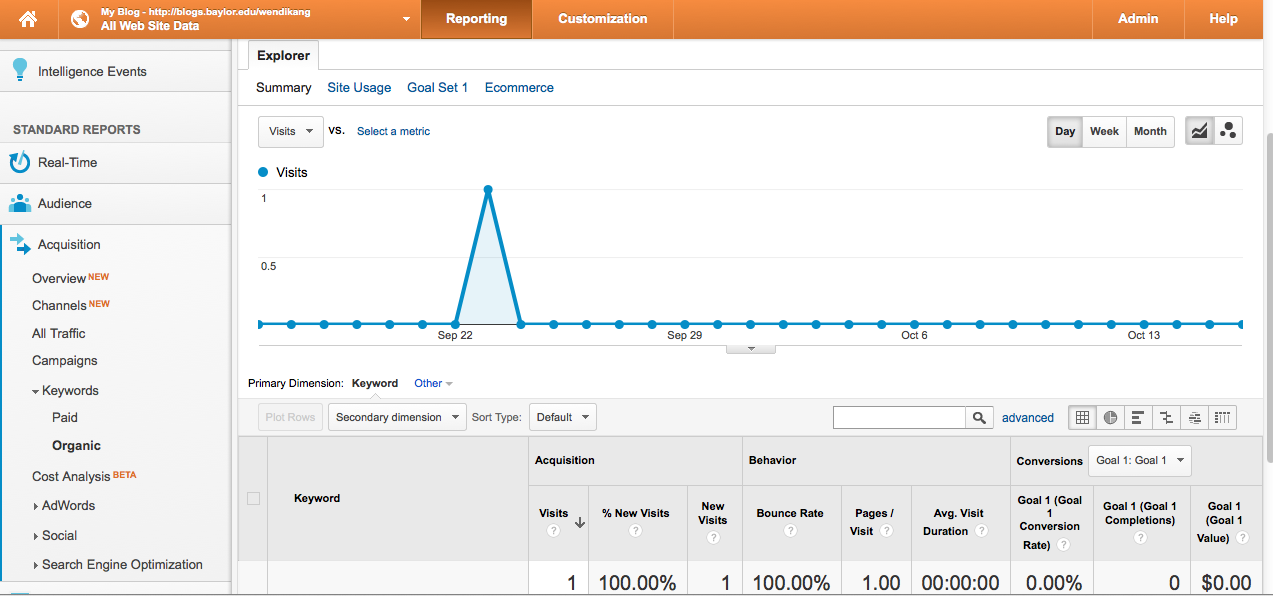
15 Keyword Reports Keyword reports allows you to look at the top keywords viewers use to search your website. 1. From the navigation menu, choose Traffic Sources, then Overview. 2. When you scroll down, Keyword is on the right. When you click on a keyword, it ll show you metric overview for that keyword, such as number of new visits, bounce rate, etc. Last Updated: 11/8/2013 Web Analytics 15
16 Things to Consider: Search Engine Optimization (SEO) ensures that a website will show up in as high a position as possible during search engine keyword searches. Thus ensures more people can find your website when searching for information. Google claims small modifications to your website can be made in order to make a large impact on SEO ( asters/docs/search-engine-optimization-starter-guide.pdf). To improve on SEO: Make sure you know how your viewers found your website and what types words or phrases your clients use most often to describe your organization. If you know these two things, it is easier to adjust keywords, so viewers can easily find your website. Utilize more meta tags. These are words that you place in the website s HTML code that people will search for in search engines and be directed to your website. Through meta tags, you will accurately summarize the page s content and use unique descriptions for each page. Include a unique title for each webpage on your organization s website that accurately represents the content for that page. You should use brief, but descriptive titles; if the title is too long, Google will show only a portion of it in the search result. Consider using the most searched keywords on your homepage in the page title, page description, header, and first content paragraph, prioritizing placement respectively. This will increase page view by keywords. Promote your website in the right ways. Utilize social media to build a stronger online community for your organization. Ask your sponsors to include a link to your organization s website on their website. Last Updated: 11/8/2013 Web Analytics 16
17 Google Dashboard Google Dashboard is a tool that allows you to look at different, customized data of your website in one location, which means it is easier to access important data. It allows you to grab bits and pieces of data from various reports, and collect them all into one overview. You can have up to 20 dashboards per website. The reason you want to create a dashboard is so you can have all the important metrics in one location, rather than going to find them from different places. Most importantly, you can customize the dashboard to suit the unique needs of your company. Creating a Starter Dashboard 1. To set up a dashboard, choose Dashboards from the navigation menu on the left, and then, in the dropdown, choose +New Dashboard 2. You have the option of Blank Canvas or Starter Dashboard. Let us start by choosing Starter Dashboard. Name the dashboard, and then choose Create Dashboard. Last Updated: 11/8/2013 Web Analytics 17
18 3. Choosing Starter Dashboard automatically display the following metrics on your Google Dashboard. Many of these metrics can also be found individually using the steps described in previous sections. 4. In order to see your dashboard when logging into Google Analytics, in the Navigation menu under Dashboards, expand Private then choose the dashboard you want to see (for example, Starter). Last Updated: 11/8/2013 Web Analytics 18
ANALYZING YOUR RESULTS
 ANALYZING YOUR RESULTS Kelley Jarrett, Market Manager Design Billy Stephens, Account Manager Design Measuring performance and learning from your audiences behaviors and feedback. REVISIT BENCHMARKS
Google Analytics. Google Analytics Glossary of terms
 Google Analytics Google Analytics is a service offered by Google that generates detailed statistics about a website's traffic and traffic sources and measures set goals. Google Analytics isn't a magical
Getting Started with Google Analytics 7 Easy but comprehensive steps
 Getting Started with Google Analytics Right, so you have a shiny new website or you have a site that has been up and running for a while now that s great. The hard work is done and the leads and sales
VIDEO TRANSCRIPT: Content Marketing Analyzing Your Efforts 1. Content Marketing - Analyzing Your Efforts:
 VIDEO TRANSCRIPT: Content Marketing Analyzing Your Efforts 1 Content Marketing - Analyzing Your Efforts: This is a transcript of a presentation originally given live at the Growth Powered by Risdall Fall
GOOGLE ANALYTICS 101
 GOOGLE ANALYTICS 101 Presented By Adrienne C. Dupree Please feel free to share this report with anyone who is interested in the topic of building a profitable online business. Simply forward it to them
Google Analytics workbook
 Google Analytics workbook Sub-title here Google Analytics workbook Overview Google Analytics is just one of many tools available for tracking activity on a website or mobile application. It provides users
A quick guide to. Social Media
 A quick guide to Social Media In this guide... Learn how to integrate your email marketing with social media to get the most out of online buzz! Use Twitter and Facebook integrations to enable readers
Impressive Analytics
 Impressive Analytics and Insight on a Shoestring Lisa Ikariyama & Tracy Anderson Cabbage Tree Creative www.cabbagetree.co.nz Getting Started Before you design a page on your website or get started with
Google Analytics Guide. for BUSINESS OWNERS. By David Weichel & Chris Pezzoli. Presented By
 Google Analytics Guide for BUSINESS OWNERS By David Weichel & Chris Pezzoli Presented By Google Analytics Guide for Ecommerce Business Owners Contents Introduction... 3 Overview of Google Analytics...
Google Analytics. Web Skills Programme
 Google Analytics Web Skills Programme Google - some facts Google search handles over 1 billion searches per day 7.2 billion daily page views 87.8 billion monthly worldwide searches conducted on Google
Nonprofit Technology Collaboration. Email Marketing
 Email Marketing What is Email Marketing? Email marketing is when an organization sends out an electronic message using email. It is one of the easiest and least expensive ways for nonprofit organizations
Startup Guide. Version 2.3.9
 Startup Guide Version 2.3.9 Installation and initial setup Your welcome email included a link to download the ORBTR plugin. Save the software to your hard drive and log into the admin panel of your WordPress
Create Beautiful Reports with AWR Cloud and Prove the Value of Your SEO Efforts
 Create Beautiful Reports with AWR Cloud and Prove the Value of Your SEO Efforts It can be difficult sometimes to show your clients the value that they get from your service. Your job, as an SEO, is to
Simple SEO Success. Google Analytics & Google Webmaster Tools
 Google Analytics & Google Webmaster Tools In this module we are going to be looking at 2 free tools and why they are essential when running any online business website. First of all you need to ensure
Your No-Nonsense Guide to Facebook Ads
 Your No-Nonsense Guide to Facebook Ads If you are in business, Facebook can play an important role in your marketing your business. It helps you connect and build relationships through updated posts. In
Google Analytics Guide
 Google Analytics Guide 1 We re excited that you re implementing Google Analytics to help you make the most of your website and convert more visitors. This deck will go through how to create and configure
Marketing Online: How to Get Found, Generate Leads, and Convert Customers
 Marketing Online: How to Get Found, Generate Leads, and Convert Customers July 21, 2010 NFIB Webinar About Web.com at: www.nfib.com/webdotcom 2 What We Will Cover In This Webinar 1. How to Claim A Google
Top 3 Marketing Metrics You Should Measure in Google Analytics
 Top 3 Marketing Metrics You Should Measure in Google Analytics Presented By Table of Contents Overview 3 How to Use This Knowledge Brief 3 Metric to Measure: Traffic 4 Direct (Acquisition > All Traffic
FACEBOOK FOR NONPROFITS
 SOCIAL MEDIA TIPS & TRICKS FACEBOOK FOR NONPROFITS 10 Tips to Get the Most Out of Facebook 1. Be helpful. If someone asks a question on your Facebook page, respond. If someone shares feedback, thank them
Business A guide to the Pinterest Ads Manager
 Business A guide to the Pinterest Ads Manager Use Promoted Pins to reach new customers and grow your business Version 10.29.2015 Business What s inside 1 Getting started 2 Creating & editing Promoted Pins
an introduction to Google Analytics for ecommerce Thomas Holmes
 an introduction to Google Analytics for ecommerce Thomas Holmes An introduction to Google Analytics for ecommerce by Thomas Holmes Published in 2013 by Thomas Holmes 5 rue St. Côme, 34000 Montpellier,
Planning a Responsive Website
 Planning a Responsive Website Planning a website is important for both web designers and website owners. Planning your website before you start building it can save you time, keep your site code more accurate
Inbound Marketing: Best Practices
 423-797-6388 www.nektur.com [email protected] Inbound Marketing: Best Practices We believe in empowering brands with the tools to achieve sustainable growth. Outline 1. 10 Suprising Facts 2. Email Marketing
A quick guide to setting up your new website
 A quick guide to setting up your new website Hi there. Welcome to MrSite we re really happy you chose to build your brand new website with us and look forward to seeing what you create! We re sure you
Website analytics / statistics Monitoring and analysing the impact of web marketing
 Website analytics / statistics Monitoring and analysing the impact of web marketing What are website analytics / statistics? Web analytics is the measurement, collection, analysis and reporting of website
6 Ways You're Not Using Google Analytics (But Should Be)
 6 Ways You're Not Using Google Analytics (But Should Be) Tom Bowen, President Web Site Optimizers [email protected] 214-891-9423 @WSOMarketing www.websiteoptimizers.com About Me Founder/CEO
Contents. 1. Why set up Goals? 3. 2. How to set up Goals 4. 3. Destination Goals 6. 4. Duration Goals 8. 5. Pages & Screen Goals 10. 6.
 Contents 1. Why set up Goals? 3 2. How to set up Goals 4 3. Destination Goals 6 4. Duration Goals 8 5. Pages & Screen Goals 10 6. Event Goals 11 About ThoughtShift 12 2 1. Why set up Goals? Setting up
The Marketing Manager s Ultimate Cheat Sheet for Google Analytics
 The Marketing Manager s Ultimate Cheat Sheet for Google Analytics The 10 Numbers You Need to Know So You Can Understand Your Web Traffic At A Glance. Why are we writing this guide? significant percentage
A Quick Start Guide On How To Promote Your Site Using Do It Myself SEO
 A Quick Start Guide On How To Promote Your Site Using Do It Myself SEO Introduction Welcome to Do It Myself SEO, a set of tools for SEO, Social Media Analytics and Competitive Analysis. This platform boasts
WordPress SEO Secrets Revealed
 1 WordPress SEO Secrets Revealed By Matt Bush 2 TABLE OF CONTENTS What Is SEO?... 4 Why You Should Optimize Your WordPress Blog... 4 The Basics of On-Page Optimization... 5 WordPress Plugins You Will Need...
Introduction. Regards, Lee Chadwick Managing Director
 User Guide Contents Introduction.. 2 Step 1: Creating your account...3 Step 2: Installing the tracking code.. 3 Step 3: Assigning scores to your pages.....4 Step 4: Customising your lead bands..5 Step
Google Analytics: Connecting the Digital Marketing Dots. Becky Vardaman, Converge Consulting Jay Kelly, Converge Consulting
 Google Analytics: Connecting the Digital Marketing Dots Becky Vardaman, Converge Consulting Jay Kelly, Converge Consulting 1 Has This Ever Happened To You? I have a meeting with my VP in two hours. I need
Attract traffic to your website. Convert traffic into leads. Convert leads into customers
 The 4 Step Guideline To Online Marketing Success Intermediate Understanding and Winning with Online Marketing is as Simple as Understanding the Following Four Areas Attract traffic to your website Convert
Using Google Analytics
 Using Google Analytics Overview Google Analytics is a free tracking application used to monitor visitors to your website in order to provide site designers with a fuller knowledge of their audience. At
MONITORING YOUR WEBSITE WITH GOOGLE ANALYTICS
 MONITORING YOUR WEBSITE WITH GOOGLE ANALYTICS How to use Google Analytics to track activity on your website and help get the most out of your website 2 April 2012 Version 1.0 Contents Contents 2 Introduction
We all need to be able to capture our profit generating keywords and understand what it is that is adding the most value to our business in 2014.
 Running a business that uses the internet means that you need to understand and capture the information that drives traffic to your website and most importantly sales and Google Analytics provides this
Online & Offline Correlation Conclusions I - Emerging Markets
 Lead Generation in Emerging Markets White paper Summary I II III IV V VI VII Which are the emerging markets? Why emerging markets? How does the online help? Seasonality Do we know when to profit on what
understanding media metrics WEB METRICS Basics for Journalists FIRST IN A SERIES
 understanding media metrics WEB METRICS Basics for Journalists FIRST IN A SERIES Contents p 1 p 3 p 3 Introduction Basic Questions about Your Website Getting Started: Overall, how is our website doing?
Marketing Analytics What needs to Be Measured
 Marketing Analytics What needs to Be Measured A Xander Marketing Guide T: 03302232770 E: [email protected] W: www.xandermarketing.com Marketing Analytics What Needs to Be Measured Introduction
A quick guide to... Social Media
 A quick guide to... Social Media In this guide... Learn how to integrate your email marketing with social media to get the most out of online buzz! Use Twitter and Facebook integrations to enable readers
1. Layout and Navigation
 Success online whether measured in visits, ad revenue or ecommerce transactions requires compelling content and intuitive design. It all starts with the fundamentals: the key building blocks to create
GUIDE TO GOOGLE ADWORDS
 GUIDE TO GOOGLE ADWORDS How to use Google Adwords to drive relevant traffic to your website 2 April 2012 Version 1.0 Contents Contents 2 Introduction 4 Skill Level 4 Terminology 4 Video Tutorials 5 What
How to make internal links in a Word document
 White Paper July 2014 How to make internal links in a Word document Making internal links in a Word document Usually a link is designed to go to another web page to your website or to a landing page or
WEB ANALYTICS Where to Begin
 WEB ANALYTICS Where to Begin e-book SPOILER ALERT! People love the Internet. A lot. In fact, 92% of online adults rely on search engines when looking for information 1. That means your audience s first
SmallBiz Dynamic Theme User Guide
 SmallBiz Dynamic Theme User Guide Table of Contents Introduction... 3 Create Your Website in Just 5 Minutes... 3 Before Your Installation Begins... 4 Installing the Small Biz Theme... 4 Customizing the
Tracking Campaigns for Local Authorities. Lucian Glenny Web Analyst
 Tracking Campaigns for Local Authorities Lucian Glenny Web Analyst Overview 1. Creating a measurement plan 2. Identifying users from your campaign in Google Analytics 3. Analysing the pages viewed by campaign
Introduction to Google Analytics
 Introduction to Google Analytics Introduction to Google Analytics This guide is designed to give you the basic overview on Google Analytics and information on: How many people are visiting your website
Video Ad Exam. 01 Types of Video Ads. 02 Using Video Ads. 03 Making a Video. 04 Creating a Campaign. 05 Campaign Settings. 06 Companion Banner
 Video Ad Exam 01 Types of Video Ads 02 Using Video Ads 03 Making a Video 04 Creating a Campaign 05 Campaign Settings 06 Companion Banner 07 Mastheads 08 Optimized Rotations 09 Call to Action Overlay 10
Google Analytics 101
 American Marketing Association San Antonio Chapter presents Google Analytics 101 Instructor: Maria Haase Workshop Objectives Learn how to create an effective Measurement Plan for your organization Learn
That You Should Be Able to Answer using Google Analytics
 5 Basic Marketing Questions That You Should Be Able to Answer using Google Analytics Question 1. How much traffic comes to my site on a monthly basis? Key Performance Indicator (KPI) # Visits (how many
A SIMPLE GUIDE TO PAID SEARCH (PPC)
 A SIMPLE GUIDE TO PAID SEARCH (PPC) A jargon-busting introduction to how paid search can help you to achieve your business goals ebook 1 Contents 1 // What is paid search? 03 2 // Business goals 05 3 //
Disclaimer. The author in no case shall be responsible for any personal or commercial damage that results due to misinterpretation of information.
 1 Disclaimer 2013 Solutions From Paradise, LLC No part of this ebook can be reproduced, stored, or transmitted by any means including recording, scanning, photocopying, electronic or print without written
Creating a Landing Page to Achieve Maximum Results
 Creating a Landing Page to Achieve Maximum Results Landing Page? By now most of us will know what a landing page is and what it aims to achieve, but for those of you who do not, we can simply define it
Online Donor Acquisition and Retention Course
 Online Donor Acquisition and Retention Course Beginner Donor Acquisition Module 1a-c Introduction to Donor Acquisition What happens when someone shows up at your website? Key Performance Indicators: What
THE EVENT PLANNER S COOKBOOK PROVIDING EVENT PLANNERS WITH THE RECIPE FOR SUCCESS
 THE EVENT PLANNER S COOKBOOK PROVIDING EVENT PLANNERS WITH THE RECIPE FOR SUCCESS THE EVENT PLANNER S COOKBOOK HAS BEEN CREATED TO HELP EVENT ORGANISERS BUILD STRONGER FOUNDATIONS FOR THEIR EVENTS. THE
Mark E. Pruzansky MD. Local SEO Action Plan for. About your Local SEO Action Plan. Technical SEO. 301 Redirects. XML Sitemap. Robots.
 Local SEO Action Plan for Mark E. Pruzansky MD Action Plan generated on 5 May 2013 About your Local SEO Action Plan This report contains a number of recommendations for correcting the issues and taking
!!!!!!!! Startup Guide. Version 2.7
 Startup Guide Version 2.7 Installation and initial setup Your welcome email included a link to download the ORBTR plugin. Save the software to your hard drive and log into the admin panel of your WordPress
Three Free Tools to Benchmark and Boost your Traffic
 Three Free Tools to Benchmark and Boost your Traffic Step-by-Step Guide to Using Google Trends, Google Keyword Planner and Google Analytics ClickInsight Corporation 1 TABLE OF CONTENTS 1. Introduction
TOP 10 things. In Google Analytics. Your Association Should Measure. weblinkinternational.com
 TOP 10 things Your Association Should Measure In Google Analytics 1 weblinkinternational.com TABLE OF CONTENTS Welcome.... 3 Metric 1 «Audience Location.... 4 Metric 2 «Audience Engagement....... 6 Metric
2015 SEO AND Beyond. Enter the Search Engines for Business. www.thinkbigengine.com
 2015 SEO AND Beyond Enter the Search Engines for Business www.thinkbigengine.com Including SEO Into Your 2015 Marketing Campaign SEO in 2015 is tremendously different than it was just a few years ago.
Using Google Analytics to Become a Better Marketer
 Using Google Analytics to Become a Better Marketer Agenda The Five Stages of Travel (The Buying Process) Importance of Google Analytics Audience Reports Acquisition Reports Behavior Reports Analytics in
Findability Consulting Services
 Findability Consulting Services In 2012, after twelve years of running the Findability Group, I was delighted to merge my firm with industry innovators Volume 9 Inc., who are now my exclusive referral
Grow your Business with our advanced Call Tracking services
 Grow your Business with our advanced Call Tracking services Track the effectiveness of your numbers in real time Being able to see when calls are coming in and who they re from can be vital to a business
[Ramit Solutions] www.ramitsolutions.com SEO SMO- SEM - PPC. [Internet / Online Marketing Concepts] SEO Training Concepts SEO TEAM Ramit Solutions
![[Ramit Solutions] www.ramitsolutions.com SEO SMO- SEM - PPC. [Internet / Online Marketing Concepts] SEO Training Concepts SEO TEAM Ramit Solutions](/thumbs/34/16963414.jpg "[Ramit Solutions] www.ramitsolutions.com SEO SMO- SEM - PPC. [Internet / Online Marketing Concepts] SEO Training Concepts SEO TEAM Ramit Solutions") [Ramit Solutions] www.ramitsolutions.com SEO SMO- SEM - PPC [Internet / Online Marketing Concepts] SEO Training Concepts SEO TEAM Ramit Solutions [2014-2016] By Lathish Difference between Offline Marketing
[Ramit Solutions] www.ramitsolutions.com SEO SMO- SEM - PPC [Internet / Online Marketing Concepts] SEO Training Concepts SEO TEAM Ramit Solutions [2014-2016] By Lathish Difference between Offline Marketing
Social Media, How To Guide for American Express Merchants
 Social Media, How To Guide for American Express Merchants americanexpress.com.au/merchant How to use Social Media successfully for small independent businesses 1 Contents Introduction - Page 3 1. What
1. Link Building 2. Site Content 3. Advertising 4. Email Marketing 5. Viral Marketing 6. Affiliate Marketing 7. Search Engine Optimization 8.
 1. Link Building 2. Site Content 3. Advertising 4. Email Marketing 5. Viral Marketing 6. Affiliate Marketing 7. Search Engine Optimization 8. Landing Page Optimization LINK BUILDING & SITE CONTENT I m
Evaluating the impact of research online with Google Analytics
 Public Engagement with Research Online Evaluating the impact of research online with Google Analytics The web provides extensive opportunities for raising awareness and discussion of research findings
Table Of Contents READ THIS FIRST! 3 How To Create Your Very First YouTube Video Ad In Less Than 30 Minutes! 4
 Table Of Contents READ THIS FIRST! 3 How To Create Your Very First YouTube Video Ad In Less Than 30 Minutes! 4 Step 1: Find The Perfect Target Audience For Your Ads 4 Step 2: Refine Your Target Lists 7
Amazon Marketing Services User Guide
 Amazon Pages are customized landing pages for presenting your brand s products at Amazon.com customized by you, using simple yet professional templates. Amazon Posts lets you publish content to your Amazon
Getting the most from your Google Analytics
 Session 2 Exploration main reports in more detail Real-Time reports Real-Time reports Use Real-Time to monitor user activity as it happens see each pageview being reported seconds after it occurs how many
APP ANALYTICS PLUGIN
 [email protected] Phone: 084.4.8585.4587 APP ANALYTICS PLUGIN USER GUIDE Table of Contents 1. INTRODUCTION 2. HOW TO INSTALL 3. HOW TO SET UP YOUR GOOGLE ANALYTICS ACCOUNT 4. HOW TO CONFIGURE IN MAGENTO
How to: Audit Your Google Analytics Installation
 How to: Audit Your Google Analytics Installation Your site seems to be working perfectly and you re trying to track the results in Google Analytics. But something is missing. You think you re receiving
Website Promotion for Voice Actors: How to get the Search Engines to give you Top Billing! By Jodi Krangle http://www.voiceoversandvocals.
 Website Promotion for Voice Actors: How to get the Search Engines to give you Top Billing! By Jodi Krangle http://www.voiceoversandvocals.com Why have a website? If you re busier than you d like to be
First Page Google Results Through Blogging
 First Page Google Results Through Blogging Get First Page Google Ranks by simply Writing and Posting a Blog Article Copyright Randombyte. All Rights Reserved. Writing blog articles that land on Google
In This Seminar You Will Learn.
 In This Seminar You Will Learn. The Difference Between Inbound And Outbound Marketing Steps To A Successful Internet Marketing Campaign The Dos And Don ts Of Effective Web Design How To Drive Traffic To
How to Use Google AdWords
 Web News Apps Videos Images More Search Tools How to Use Google AdWords A Beginner s Guide to PPC Advertising How to Use Google AdWords offers.hubspot.com/google-adwords-ppc Learn how to use Google AdWords
SEO AND META TAGS. DOCUMENT Here is a guide to SEO on your Webdadi website. WEBDADI Updated Nov 2015
 DOCUMENT Here is a guide to SEO on your Webdadi website SEO AND META WEBDADI Updated Nov 2015 TAGS How to make sure your SEO is updated on your Webdadi pages for individual pages, Meta tags, Window titles,
Integrated Search Engine Marketing. Merge your marketing efforts for a commanding online presence
 Integrated Search Engine Marketing Merge your marketing efforts for a commanding online presence Table of Contents Introduction...3 Successful Integration...4 Search Engine Optimization...5 Pay Per Click
Inbound Marketing Driving Results
 Inbound Marketing Driving Results TABLE OF CONTENTS: Introduction.... 3 Chapter 1 Getting Started.. 5 Chapter 2 Conversions Path..8 Chapter 3 Attract.....11 Chapter 4 Convert... 22 Chapter 5 Close......
Digital marketing services
 Digital marketing services Experience. Capability. Technology A website must be supported with marketing and advertising if it is to become a true business channel. Sam Saltis, Managing Director, bwired
Executive Dashboard Cookbook
 Executive Dashboard Cookbook Rev: 2011-08-16 Sitecore CMS 6.5 Executive Dashboard Cookbook A Marketers Guide to the Executive Insight Dashboard Table of Contents Chapter 1 Introduction... 3 1.1 Overview...
Is your business reaching its digital marketing potential?
 10 WAYS YOU CAN HELP YOUR SMALL BUSINESS REACH ITS MARKETING POTENTIAL Some small business owners believe that their budgets limit their ability to play with the big guys. This is not always true. In fact,
Search Engine Optimization Checklist
 Search Engine Optimization Checklist Complete the following checklist to ensure that your website is optimized for the various internet search engines. 1. Include the strongest keyword in your title tag.
Search Engine Optimisation Managed Service
 SEO Managed Service Search Engine Optimisation Managed Service Every day over 350 million searches are performed across the internet so it s imperative that your website stands out from the competition
WordPress SEO 101 http://philacsinclair.com
 WordPress SEO 101 http://philacsinclair.com Copyright All rights reserved worldwide. YOUR RIGHTS: This book is restricted to your personal use only. It does not come with any other rights. LEGAL DISCLAIMER:
DomainSherpa.com: The Domain Name Authority. Google AdWords Keyword Planner for Domain Name Investors
 Google AdWords Keyword Planner for Domain Name Investors Watch the full video at: http://www.domainsherpa.com/google-adwords-keyword-planner/ The Google Adwords Keyword Tool is dead. Long live the Google
Google Analytics Basics
 Google Analytics Basics Contents Google Analytics: An Introduction...3 Google Analytics Features... 3 Google Analytics Interface... Changing the Date Range... 8 Graphs... 9 Put Stats into Context... 10
8 STEPS TO AN EFFECTIVE CONTENT MARKETING SYSTEM
 8 STEPS TO AN EFFECTIVE CONTENT MARKETING SYSTEM Produced by Katie Wilson Aspire Internet Design www.aspireid.com @aspireid Overview... 2 1: Set Goals and Create a Set of Metrics for Your Content Marketing