
Symphony Plus S+ Engineering for Harmony
|
|
|
- Judith Porter
- 10 years ago
- Views:
Transcription
1 Symphony Plus S+ Engineering for Harmony

2 Symphony Plus S+ Engineering for Harmony Over the last decade, new technologies have influenced immense changes in the process industries. These changes have led to significant advances in instrumentation, protection, controllers, IO modules and other plant automation components. Integrated control systems make it essential that engineers have a unified platform to engineer and manage all these subsystems. The Symphony Plus S+ Engineering tool brings together these various automation aspects into one environment. It provides a single platform to manage data from multiple sources. Changes made at one point in the system are reflected throughout the system. This goes a long way in reducing the time spent in engineering and commissioning the control systems of today and the future. Simultaneously, the industry has seen a sizable shift in the demographics of plant operators and engineers. Engineers in this age of everything mobile, need and expect intuitive navigation features for interacting with the system. Designed with such a futuristic user base in mind, S+ Engineering offers an ergonomic platform that engineers expect. Market competitiveness in the process industries has squeezed delivery schedules tighter and tighter, changing the way projects are executed, and with it, the demands on the engineering tools. With the decentralization of engineering and project tasks, productivity features like streamlied work flows, multi-user access and flexibility to make changes during start-up and commissioning are critical to the successful execution of today s projects. S+ Engineering, with its unified engineering workbench, provides the ultimate flexibility in efficient engineering, empowering EPC (Engineering, Procurement, and Construction) contractors and end users alike with the tools and methods to reduce project design cycles, shorten commission and start-up times, and minimize operational maintenance costs. In summary, S+ Engineering offers all the necessary functionality needed to engineer, configure, administrate, secure, commission and maintain every component in your Symphony Plus Control System - from control and I/O, field instrumentation and electrical devices to network architecture, and operations, engineering, and advanced system applications. 1 Collaboration at every stage of the project 2 Flexible remote engineering 1 2 Symphony Plus 2

3 3 Reuse Common User Interface Common database S+ Engineering s seamless tool integration, powerful workflow automation and comprehensive bulk import/export functions improve overall engineering efficiency. Integrated version control, version comparison and rollback framework offer progress tracking and significantly reduce commissioning time. Using intelligent bulk interfaces, S+ Engineering allows for full control of engineering data consistency in each phase of the project life cycle. Efficient engineering S+ Engineering Lifecycle Management 3 Building blocks of an efficient engineering platform Security Management Robust Efficient Comprehensive S+ Engineering applications use client/server technology to support multiple users operating in a networked environment. The configuration server hosts/manages the configuration information. It can support up to ten simultaneous client connections and provide users with shared access to a system s configuration information and real-time plant data (via separate or combined communication server). This configuration server stores the data in a single database per system. Providing a single source of truth for all data within the system, S+ Engineering eliminates duplication of data entry, simplifies database management and automates configuration tasks. Information can be imported and exported in many of the commonly used file formats. Changes in the runtime environment are deployed smoothly and securely. The strict separation of engineering and runtime enables offline engineering, makes the engineering workflow flexible, and integrates externally delivered lots without process interruption. During commissioning, S+ Engineering s multi-user and remote access capabilities are critical to on-time delivery. Especially during hot commissioning and project finalization, the ability of the engineer to commission and de-bug from loop level down to controller base functionality through a common tool ensures timely and on-budget startup. S+ Engineering allows for easy reuse and upgrade of previous generation Symphony, INFI 90 OPEN, INFI 90, and Network 90 control applications. In addition, the extensive reuse concept of S+ Engineering allows users to optimize plant design with field-proven solutions based on ABB s in-depth experience in the power and water industries. Intuitive engineering interface for today and tomorrow S+ Engineering s comprehensive workbench provides a comprehensive range of engineering tools. These tools provide a visual environment for easy configuration of control system strategies and global configuration databases. Management of system libraries of reusable software components as well as integration and management of intelligent field devices is also readily accomplished through a single, unified platform. User management S+ Engineering workbench s simple and intuitive interface allows engineers to configure user information for the Windows and Engineering databases. It allows for creation of user profiles along with their roles and project access permissions. In cases of multiple projects, entire or partial list of users along with their roles can be copied over from an existing project to steamline the workflow. This is accomplished by automatically assigning individuals to one or more specific user groups for administration, engineering, measuring, setting parameters, simulation, releasing, loading, maintenance and viewing only. With S+ Engineering s granular authorization management, one user may have edit rights but cannot put anything in operation, while another user may set parameters and simulate values but cannot make changes to function diagrams. When a user is logged in the engineering environment, the roles are automatically switched based on his/her activity and role assignments. This user authentication feature also makes S+ Engineering very secure. Symphony Plus 3

4 Symphony Plus S+ Engineering for Harmony Project administration The newly integrated S+ Engineering tool allows a very simplistic way of managing automation projects. Users with their project administration privileges can perform the following activities in just few clicks. - One shot project creation of System, Control, Device & Electrical engineering - User assignments to projects - Offline and online back-up of projects - Project database maintenance - Upgrade of projects from previous versions Multi-user engineering Multi-user engineering provides high level of flexibility and efficiency in system configuration, documentation, commissioning and maintenance. Engineering tasks can be accessed by multiple users at the same time. Engineers can reserve a complete application or parts of it for their exclusive access, enabling multiple users to work on the same project at the same time without interfering with each other s work. All engineering tasks can be performed concurrently in S+ Engineering; from definition of process points and loops to function design, system and cabinet layout and all the way to service, diagnostics and library processing. This enables different users to complete their engineering tasks without having to wait for others to complete theirs. 4 4 System Topology Audit trail Effective change management enables users to meet evolving business needs in a safe and secure manner. Within the automation system, changes to system configurations must be carefully controlled to ensure all modifications are traceable and accountable. S+ Engineering provides complete audit trail support for those industries that require regulatory compliance. When deployed, S+ Engineering s audit trail functionality tracks and archives user actions including system changes made at any engineering workstation onto a central database. These events can also be archived in the system s historian for long term security audit purposes. Intuitive navigation The workbench s graphical user interface, object-related context menus, navigator windows and many help functions provide intuitive user guidance. Within the engineering environment, users can freely navigate from a tag to its associated control logic diagrams (CLD). Cross navigation with S+ Operations Human Machine Interface (HMI) is also seamless. Users can right click CLDs to call-up a faceplate and operators in the S+ Operations environment can right click on graphic to go to the associated logic document. Links to 3 rd party documentation like PDF user manuals, excel reports, etc. are also easily established. System Topology Engineering S+ Engineering Workbench s System Topology builder (Figure 4) allows users to visually build the control project through simple drag and drop. Some of the features that make this a very valuable tool are: - Drawing of logical and detailed network architectures - Automatic configuration of the communication ports based on connected network - Publish network address to reachable PC nodes - Share topology information to Install & Update tool to trigger central installation - Shares topology information to S+ Operations - Effortless documentation and report generation 4 Symphony Plus

5 35 5 Single-click access to system documentation Integrated control engineering S+ Engineering for Harmony (Composer Harmony) contains all the functionality necessary to develop and maintain Symphony Plus control system configurations. It is fully compatible with Symphony Plus Harmony Rack control & IO as well as the new Symphony Plus SD Series control & IO. Support for the 800 series Turbine Control modules is also built in. S+ Engineering for Harmony reduces the burden on engineers by making them more efficient. The ergonomic design is extremely valuable in day-to-day engineering environment. Online documentation Thanks to consistent forward documentation together with modification and version management, the system s documentation is always up-to-date. Technical product documentation is readily accessible online. Explorer Intuitive means of organizing, navigating and locating system configuration information Automation Architect Visual creation, editing, monitoring and tuning of control logic S+ Engineering provides users with standard Windows help. In addition to this, all S+ Engineering documentation is provided in electronic form. The instruction manuals for the software are provided on the Symphony Plus software DVD in PDF format along with an enhanced version of Adobe Acrobat Reader that supports a sophisticated search engine. Third-party documentation is managed by S+ Engineering s object navigation and can be accessed by just a single right click of the mouse. It combines documents in user-defined hierarchical folders. Integration of document viewers is also supported (Figure 5). International language support S+ Engineering applications have been developed to support various languages. Configuration documents developed using S+ Engineering tools/applications will accept and preserve user inputs in any language supported by Windows operating system that is hosting the software. When a user creates a project, S+ Engineering s configuration server sets the default language for the project to match the default language of the user creating the project. Users that require international language support for specific applications that are add-ons to the base S+ Engineering software should contact their local ABB office. Microsoft Explorer style left pane menu provides hierarchical view of your S+ System Drag & drop Function Codes from libraries into the control logic document (CLD) - Select an object from the left pane to bring up detailed information. - Document view will show the associated configuration documents like CLDs, P&IDs, wiring diagrams, cabinet drawings etc. Simply double-click to launch the appropriate application to view/edit the document. - Data Browser view shows all the associated tag data. From here, you can view, define and modify tag data for entire system. Changes are saved in the S+ configuration server. - Save your control strategy as a macro. Next time you need it, simply drag & drop the macro rather than reengineering the logic again. - Connect multiple function blocks to specify the signal flow of your control strategy and see a visual representation (instead of lines of code). - Multiple control logic sheets can be grouped into a single CLD. For example, every control logic sheet associated with the control strategy of a boiler can be grouped together into one CLD. Symphony Plus 5

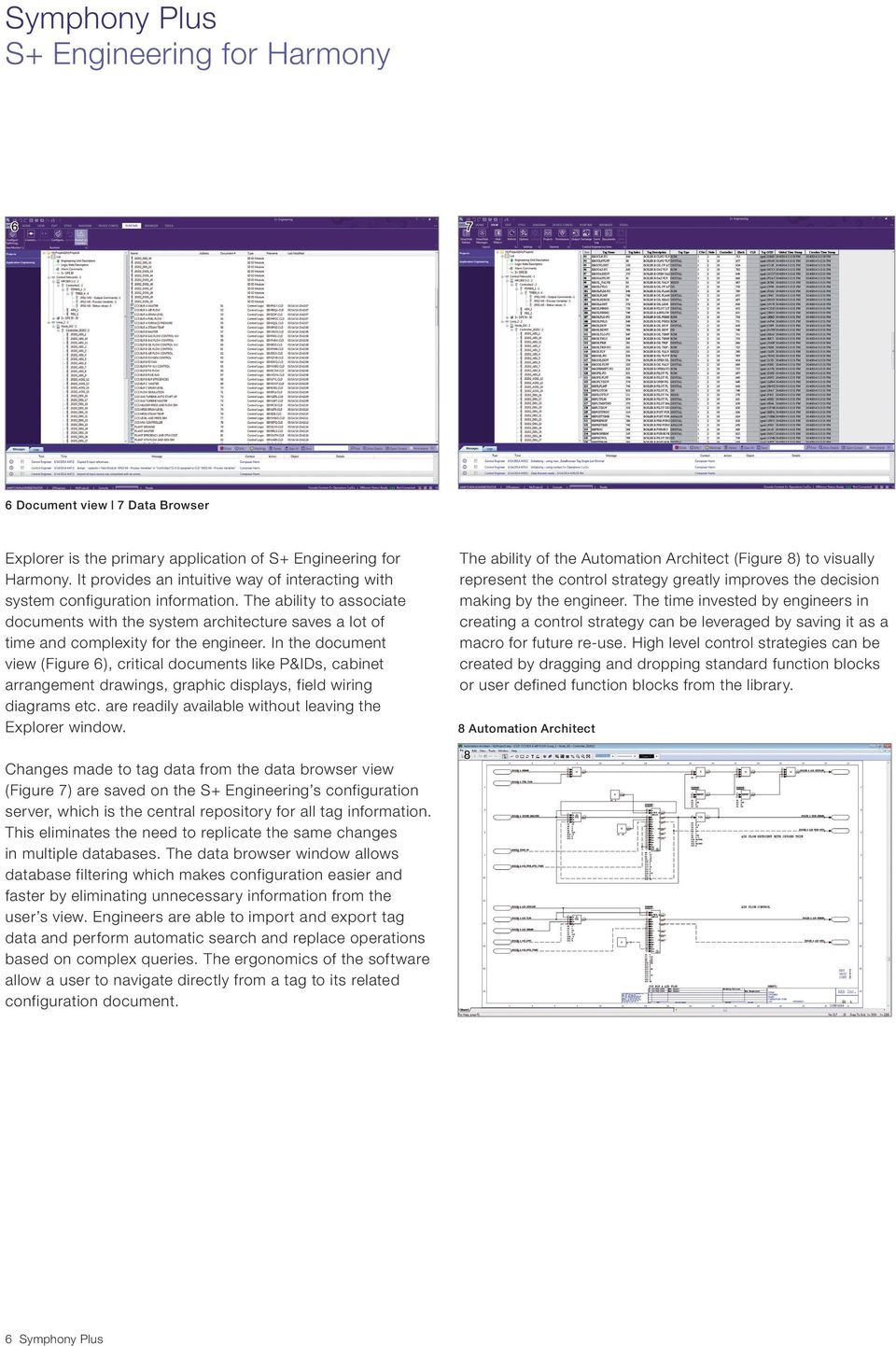
6 Symphony Plus S+ Engineering for Harmony Document view 7 Data Browser Explorer is the primary application of S+ Engineering for Harmony. It provides an intuitive way of interacting with system configuration information. The ability to associate documents with the system architecture saves a lot of time and complexity for the engineer. In the document view (Figure 6), critical documents like P&IDs, cabinet arrangement drawings, graphic displays, field wiring diagrams etc. are readily available without leaving the Explorer window. The ability of the Automation Architect (Figure 8) to visually represent the control strategy greatly improves the decision making by the engineer. The time invested by engineers in creating a control strategy can be leveraged by saving it as a macro for future re-use. High level control strategies can be created by dragging and dropping standard function blocks or user defined function blocks from the library. 8 Automation Architect 8 Changes made to tag data from the data browser view (Figure 7) are saved on the S+ Engineering s configuration server, which is the central repository for all tag information. This eliminates the need to replicate the same changes in multiple databases. The data browser window allows database filtering which makes configuration easier and faster by eliminating unnecessary information from the user s view. Engineers are able to import and export tag data and perform automatic search and replace operations based on complex queries. The ergonomics of the software allow a user to navigate directly from a tag to its related configuration document. 6 Symphony Plus
7 Object Exchange The control logic template linking functionality allows users to defi ne logic that is controlled by the template or that can be modifi ed on each confi gured instance. Any subsequent changes can then be spread to all linked instances. When a template updates its linked instances, it will preserve instance-specifi c confi guration. This template management feature allows effi cient maintenance and utilization of reusable standard control logic. 9 Control Logic templates Control Logic Templates (CLTs) Every engineer can affi rm that being able to start from a reliable and proven template can dramatically reduce the time and cost associated with implementing a control strategy. It also improves the quality of control strategy software by minimizing the risk of errors of starting from scratch. S+ Engineering for Harmony allows users to defi ne and maintain Control Logic Templates (Figure 9). Control Logic Templates (CLTs) defi ne reusable standard control strategies that are typically used to develop a process automation system. They can be thought of as blueprints that defi ne the structure of a control strategy. They are maintained by object exchange and can be used to quickly defi ne control logic documents. Libraries Engineering libraries are the basis for all S+ Engineering for Harmony applications. All components, devices, P&I diagrams, symbols, operation and control processing function blocks, I/O configuration, coding and dimensions are included in these libraries. The object exchange (object library, Figure 10) window presents the user with a view of re-useable components (called objects) that can be used to create control system configurations. The standard ABB library consists of some pre-defined function codes and standard shapes/symbols. Users can use these objects in their control strategy but cannot delete them. However, users can also define their own objects such as function codes, macro logic, shapes/ symbols or even control logic templates (CLTs) and save them in a separate folder. To support re-use of the standard objects and the intellectual investment in the user defined objects, the library supports cut-copy-paste functionality. Users can share objects between different projects within the S+ Engineering system to save time, reduce errors and for best practice sharing. Symphony Plus 7

8 Symphony Plus S+ Engineering for Harmony Bulk engineering 12 PROFIBUS/HART device integration Bulk engineering The ability to efficiently manage large amounts of data is a crucial part of any automation system. S+ Engineering provides intuitive ways of bulk data handling. Users can import process point or I/O spread sheet from which they can configure: - Signal list and properties - Control hardware - I/O assignment as well as I/O template instantiation - Control Logic Template instantiation Multiple revisions of Signal and I/O lists are handled by logical update of the engineering database to avoid re-importing of the entire list for every change made to the list. This allows the user to perform bulk confi guration changes and editing in the familiar MS Excel environment and then import it into the confi guration server seamlessly (Figure 11). Mapping of the columns in excel fi le to the fi elds in the I/O list management is done by dimple drag-and-drop of fi eld names. This one-time mapping can be saved for use in subsequent lists for other areas of the plant or future use. S+ Engineering also includes a drag-and-drop I/O assignment capability. This is especially useful during commissioning stages when the users need to modify few signal assignments in a short amount of time without affecting the rest of the database. PROFIBUS/HART device integration S+ Engineering for Harmony fully supports confi guration, commissioning, maintenance and management of intelligent fi eld and electrical devices (transmitters, actuators, motor control centers etc.) using PROFIBUS and HART communication protocols. The data or variables inside intelligent devices can be accessed by function blocks in a S+ Controller in a similar way as traditional IO channels data is accessed. This smart device data can be used in real-time control strategies. The functionality extends beyond the function block access. The Field Device Tool (FDT) provides a graphical environment to configure and manage intelligent devices using device type manager (DTM) technology, in a similar way of configuring a printer by its Windows driver (Figure 12). Users can use the DTM to check basic information of device, set device parameters and characteristics, change device internal calculation mechanism, perform simulations for testing etc. all of this can be done in real time and within a user friendly graphical presentation environment. For conventional device description fi les (GSD), a basic PROFIBUS DTM is available to allow standardized offl ine confi guration. HART devices are confi gured and parameterized via standard HART protocols without the need for additional tools by using a standard HART DTM. The device integration feature also includes automatic net calculation and loading of process items by using the device-specifi c channel confi guration generated from DTM. 8 Symphony Plus

9 Modbus TCP integration 14 Electrical device integration Modbus TCP Interface S+ Engineering includes built-in functionality of the Harmony Gateway Software (HGS) to configure S+ controllers with an Ethernet port (BRC410 and HPC800) to have bi-directional, real-time communication to Modbus TCP devices, such as third-party PLCs, electrical devices, process panel, or HART wireless transmitters (figure 13). This also allows users to map Modbus points to function blocks in the controller enabling complete integration of the data within the control application. From HGS, the controller can be configured to receive data from Modbus TCP devices and present real-time data and generate alarms on S+ Operations, It can also be configured to accept control commands from S+ Operations or other computer nodes in the system and send command or data to Modbus TCP devices. The plant operator can monitor and operate 3rd-party system/device in an integrated way as native DCS I/O or data. HGS can configure the S+ controller to act as a client, server or client/server concurrently on the Modbus TCP network. This capability provides ultimate flexibility with regard to the Modbus TCP devices connected to the Symphony Plus system. Beside offline point data configuration, HGS also provides online utilities for realtime communication status monitoring and diagnostic. Electrical (IEC61850) Integration The Symphony Plus system supports the control and supervision of intelligent electronic deivces (IEDs) through the use of IEC61850 communication protocol. Configuration and maintenance of this interface is performed from S+ Engineering (figure 14). S+ Engineering supports configuration for both horizontal and vertical communication to the automation system. Horizontal communication to controller is supported through Generic Object Oriented Substation Event (GOOSE) and Manufacturing Message Specification (MMS) while Vertical communication to S+ Operations is by MMS. Re-import of SCD is possible and the changes in the configuration are handled safely. Symphony Plus 9

10 Symphony Plus S+ Engineering for Harmony Batch sequence (BSEQ) function code 16 User-defined function code Batch Data Manager Batch Data Manager (BDM) is a family of engineering tools for creating, editing, managing, downloading and debugging batch, sequential and user-defined function code configurations. It enables the engineer to create batch and sequential control applications using clear and concise natural syntax control statements. BDM programs can be used to change controller set points, turn discrete devices on and off, change modes and perform a host of other supervisory operations. In effect, function codes execute base regulatory and discrete device control while the BDM program performs supervisory control and process operation. One of the components of BDM is Batch Tools for Batch Sequencing. Batch tools for batch sequencing include a full-featured text editor to create and compile batch programs that are downloaded to the batch sequence (BSEQ) function code (figure 15 ). The unit procedure editor and the master recipe editor allow users to create unit procedures and master recipes in a graphical format. Recipes are created and downloaded to the controller in their entirety before the batch begins. This execution model provides high system integrity, as all the information needed to execute the batch is self-contained in the controller. It is especially useful when a limited number of products is produced or for sequence control applications where the sequence is rarely modified. Another key component is the User-Defined Function code (UDF) capability (figure 16). UDF codes also include a full featured text editor to create and compile UDF programs using natural syntax control statements. UDF programs can be downloaded to UDF-specific function codes and incorporated into control strategies in the same manner as any other function code. The UDF program does not require a recipe or an operator s input; it begins executing when the controller begins executing. This feature is especially useful for users who need to create function codes unique to their process, or for sequence control applications that execute continuously and do not require a recipe. Troubleshooting for Batch 90 and UDF programs is made easy by the Dynamic Debugger tool. Dynamic debugger enables engineers to: - Observe process data such as variables and set points, as well as intermediate computational values from the program including timers, ramps and integrators. - Override normal operation of pumps, valves and control loops, and direct their activities from the debugger - Stop normal program operation and single-step the program to analyze data without affecting other programs or function block execution. - Assign breakpoints. The program can be designed to run to a certain point and then stop execution, allowing engineers to systematically analyze logic. - Perform online recipe parameter editing when used with the unit procedure editor or the master recipe editor. 10 Symphony Plus

11 Operations engineering S+ Engineering is functionally integrated with S+ Operations. Deploying this application enables the user to view relevant alarms and events, faceplates and graphic symbols to operate and supervise the process in S+ Operations; without leaving the engineering environment. Quick and direct cross-navigation provides operators and engineers with seamless access to the operational displays as well as to the engineering layers. With the correct authorization and role assignments, an engineer can execute operational tasks and an operator can change engineering values, without traveling through the system. For example, right clicking on a tag in control logic document allows the user to open a faceplate related to that tag. Audit trail logs and events are stored in central database within S+ Operations and for long term archiving, these events and logs are stored in the historian server. This information is then easily accessed when preparing reports or troubleshooting. Evolution without obsolescence A DCS is a significant capital investment. Plant engineers add to this investment by enhancing the control system components, tuning and refining control application code and developing knowledgeable staff who operate and maintain the plant and control system. One of the results of these initial investments is the creation of site-specific control strategies and procdures that enable the plant to maintain high availability and excellent operational performance. S+ Engineering enables users to retain all this intellectual property built over years of experience and which is unique to the plant s operations. S+ Engineering allows controller configurations from any Symphony Harmony, INFI 90 TM, INFI 90 TM Open, or Network 90 controller to be re-used with some modifications. Users can leverage the years of knowledge and time spent by their engineers instead of starting from scratch! S+ Engineering s Automation Architecture functions in the same way as in previous versions of Composer. This eliminates the cost of re-training plant personnel. Automation Sentinel, ABB s control system software management and support program supports S+ Engineering throughout its life cycle. With this software users can keep their control software up-to-date and maintain a flexible path forward to new system software technologies. It lowers support costs and provides users with predictable software management costs for annual budget planning. Automation Sentinel also provides users with access to the most current system documentation and the latest software updates. In summary, S+ Engineering reduces deployment costs and reduces total life cycle costs associated with system evolution. It preserves decades of intellectual know-how specific to the plant by allowing the existing configuration to be re-used. 18 Evolution without obsolescence Operations engineering 17 S+ Engineering 2011 Composer 2000s Wintools 1990s 1980s DOS Tools Symphony Plus 11

12 Contact us ABB Inc. Power Generation Wickliffe, Ohio, USA Phone: ABB S.p.A. Power Generation Genova, Italy Phone: Copyright 2014 ABB All rights reserved. Specifi cations subject to change without notice. Pictures, schematics, and other graphics contained herein are published for illustration purposes only and do not represent product confi gurations or functionality. User documentation accompanying the product is the exclusive source for functionality descriptions. Symphony is a registered or pending trademark of ABB S.p.A. 2VAA EN A4 Power Generation 0514 ABB AG Power Generation Mannheim, Germany Phone: [email protected] ABB Pte. Ltd. Power Generation Singapore Phone: [email protected]

Symphony Plus S+ Engineering: Composer Harmony
 Symphony Plus S+ Engineering: Composer Harmony Symphony Plus S+ Engineering: Composer Harmony Symphony TM Plus includes a comprehensive suite of engineering tools. S+ Engineering s Composer tools provide
IndustrialIT System 800xA AC 870P/Melody Engineering
 IndustrialIT System 800xA AC 870P/Melody Engineering Overview Features and Benefits Scalable System Architecture: The system architecture can range from a single station to complex client/server architecture.
Industrial IT Ó Melody Composer
 Overview Industrial IT Ó Melody Composer Features and Benefits Support of concurrent engineering for Control Systems Operation on Windows NT and Windows 2000 Multiple client/server architecture Off-Line
IndustrialIT System 800xA Engineering
 IndustrialIT System 800xA Engineering Overview Features and Benefits Integrated Engineering Environment: Supports the engineering of the entire extended automation system from field devices to plant management
Kevin Kochirka, ABB Turbine Automation, June 29, 2016. Flexible turbine control retrofits Webinar
 Kevin Kochirka, ABB Turbine Automation, June 29, 2016 Flexible turbine control retrofits Webinar Welcome Speaker introduction Kevin Kochirka Sr. Applications Engineer with ABB Inc. [email protected]
Symphony Plus Cyber security for the power and water industries
 Symphony Plus Cyber security for the power and water industries Symphony Plus Cyber Security_3BUS095402_(Oct12)US Letter.indd 1 01/10/12 10:15 Symphony Plus Cyber security for the power and water industries
ProfessionalPLUS Station Software Suite
 January 2013 Page 1 All you need to configure, control, and diagnose your plant is available on the ProfessionalPLUS Station Global database, architected for flexibility and scalability Powerful, graphical
Ovation Operator Workstation for Microsoft Windows Operating System Data Sheet
 Ovation Operator Workstation for Microsoft Windows Operating System Features Delivers full multi-tasking operation Accesses up to 200,000 dynamic points Secure standard operating desktop environment Intuitive
Industrial IT System 800xA Satt Products and Systems
 Industrial IT System 800xA Satt Products and Systems Overview Features and Benefits Reducing Time to Decision and Action: System 800xA Process Portal delivers the exact information, filters out noise to
D800002X122 March 2006. Getting Started With Your DeltaV Digital Automation System
 D800002X122 March 2006 Getting Started With Your DeltaV Digital Automation System TM 1996-2006 Fisher-Rosemount Systems, Inc. All rights reserved. Unauthorized duplication, in whole or in part, is prohibited.
Accelerating your engineering workflow. Engineering solutions for industry
 Accelerating your engineering workflow Engineering solutions for industry PlantStruxure TM is a collaborative system that allows industrial and infrastructure companies meet their automation needs and
SPPA-T3000 Control System The Benchmark in Controls
 Instrumentation, Controls & Electrical SPPA-T3000 Control System The Benchmark in Controls Siemens Power & Process Automation Answers for energy. The benchmark for Distributed Control Systems Developed
ProfessionalPLUS Station Software Suite
 Feb-07 Page 1 All you need to configure, control, and diagnose your plant is available on the ProfessionalPLUS Station. Global database, architectured for flexibility and scalability Powerful engineering
How To Use Safety System Software (S3)
 SPECIFICATION DATA Safety System Software (S3) APPLICATION Safety System Software (S 3 ) is a robust, full featured configuration, diagnostic, programming and real-time monitoring package for integrators
How can I manage all automation software tasks in one engineering environment?
 How can I manage all automation software tasks in one engineering environment? With Totally Integrated Automation Portal: One integrated engineering framework for all your automation tasks. Answers for
Alain Nifenecker - General Electric Manager Controls Engineering
 GE Energy Benefits of Integrating a Single Plant-Wide Control System Into a Standard Plant Design Philosophy Authors: Luis Cerrada Duque - Empresarios Agrupados Director of I&C Department Charles Weidner
Visualization SIMATIC. Visualization. Present sample project. HMI configuration. Insert HMI device from libraries 3. Configuring HMI connection 4
 Present sample project 1 HMI configuration 2 SIMATIC Getting Started Insert HMI device from libraries 3 Configuring HMI connection 4 Configuring system diagnostics 5 Simulating an HMI device 6 05/2014
MOD 300 Enhanced with Industrial IT. The Enterprise Management & Control System for Optimizing Process & Business Operations
 MOD 300 Enhanced with Industrial IT The Enterprise Management & Control System for Optimizing Process & Business Operations Reaching New Levels of Productivity Within ABB s new family of integrated software
Inform IT. Features and Benefits. Overview. Process Information Web Server Version 3.2/1
 Overview Inform IT Process Information Web Server Version 3.2/1 Features and Benefits Real-time and historical process monitoring: Process Information Web Server (PIWS) allows web based querying, monitoring
Managing Relion IEDs Protection and control IED manager PCM600
 Managing Relion IEDs Protection and control IED manager PCM600 Efficient management of Relion protection and control IEDs The protection and control IED manager PCM600 tool provides versatile functionalities
Symphony Plus HR Series control and I/O
 Symphony Plus HR Series control and I/O Symphony Plus HR Series control and I/O Achieving total plant automation with a single control and I/O platform. Symphony Plus is the new generation of ABB s highly
Enterprise Historian Information Security and Accessibility
 Control Engineering 1999 Editors Choice Award Enterprise Historian Information Security and Accessibility ABB Automation Increase Productivity Decision Support With Enterprise Historian, you can increase
 Station Automation Series COM600 Protection and control from ABB Future-proof Concept: Extensive Substation System Integration and Interoperability The Station Automation Series COM600 is a dedicated system
FDI Meets Plant's Device Integration Needs
 FDI Meets Plant's Device Integration Needs Jonas Berge, Terry Blevins Emerson Process Management Stephen Mitschke Fieldbus Foundation Ludwig Winkel Siemens Keywords: FDI, FDT/DTM, EDDL, NE105 ABSTRACT
Product Overview. Dream Report. OCEAN DATA SYSTEMS The Art of Industrial Intelligence. User Friendly & Programming Free Reporting.
 Dream Report OCEAN DATA SYSTEMS The Art of Industrial Intelligence User Friendly & Programming Free Reporting. Dream Report for Trihedral s VTScada Dream Report Product Overview Applications Compliance
Professional Station Software Suite
 January 2013 Page 1 You can easily engineer and operate your process automation system from the Professional Station Powerful, graphical engineering capabilities Robust and secure plant operations Integrated
800xA Smart Client Frequently Asked Questions
 800xA Smart Client Frequently Asked Questions Table of Contents Click section title to jump to topic area General information and licensing requirements Security Applications PC and operating system requirements
Agile Project Execution
 ebook Agile Project Execution The future of Industrial Process Automation projects v1.4 EMK(VDS)-TR-EB-01 APEX ebook Table of Contents Intro Agile Project Execution Page 2. Chapter 1 Conventional Project
New Perspectives with SIMATIC PCS 7 Process Control System SIMATIC PCS 7. Answers for industry.
 New Perspectives with SIMATIC PCS 7 Process Control System SIMATIC PCS 7 Answers for industry. SIMATIC PCS 7 more than just a process control system Design and Engineering Installation and Commissioning
VantagePoint Getting Results Guide
 VantagePoint Getting Results Guide FactoryTalk VantagePoint provides dashboards, trends and reports against a broad range of real time and historian data sources. To start using FactoryTalk VantagePoint
DeltaV Event Chronicle
 January 2013 Page 1 This document provides information on how to configure, use, and manage the. www.deltav.com January 2013 Page 2 Table of Contents Introduction... 3 Database Technology... 3 Database
Work Process Management
 GE Intelligent Platforms Work Process Management Achieving Operational Excellence through Consistent and Repeatable Plant Operations With Work Process Management, organizations can drive the right actions
The Benefits of Component Object- Based SCADA and Supervisory System Application Development
 The Benefits of Component Object- Based SCADA and Supervisory System Application Development By Steven D. Garbrecht, Marketing Program Manager for Infrastructure and Platforms Table of Contents 1. Overview...
PowerLogic ION Enterprise 5.6
 PowerLogic ION Enterprise 5.6 Power Management Software User Guide April 2007 Notices This section describes the symbols used in this guide. Danger This alerts you to things that may cause serious injury
The Interact Xpress User Guide
 The Interact Xpress User Guide July 2008 Parker-CTC Automation 50 W. TechneCenter Drive, Milford, Ohio 45150 Part #: GA-84018-102 Copyright and Trademark Notice Product Warranty Information Copyright 2008
Technical Training Module ( 30 Days)
 Annexure - I Technical Training Module ( 30 Days) Section 1 : Programmable Logic Controller (PLC) 1. Introduction to Programmable Logic Controller - A Brief History, Need and advantages of PLC, PLC configuration,
ISA CERTIFIED AUTOMATION PROFESSIONAL (CAP ) CLASSIFICATION SYSTEM
 ISA CERTIFIED AUTOMATION PROFESSIONAL (CAP ) CLASSIFICATION SYSTEM Domain I: Feasibility Study - identify, scope and justify the automation project Task 1: Define the preliminary scope through currently
Compaq Batch Scheduler for Windows NT
 Compaq Batch Scheduler for Windows NT Mainframe-Caliber Automated Job Scheduling Software for Windows NT This white paper addresses extending the capabilities of Windows NT to include automated job scheduling
Measurement Products. Scalable device management Productivity enhancement that grows with your business
 Measurement Products Scalable device management Productivity enhancement that grows with your business Scalable device management Enabling productivity enhancement ABB s scalable device management offering
Field Products. Experion LX. Proven, Easy to Use and Purpose-built Distributed Control System
 Field Products Experion LX Proven, Easy to Use and Purpose-built Distributed Control System A DCS to control and optimize continuous and batch applications. The specialty chemicals, biofuels, industrial
Sage ERP MAS 90 Sage ERP MAS 200 Sage ERP MAS 200 SQL. Installation and System Administrator's Guide 4MASIN450-08
 Sage ERP MAS 90 Sage ERP MAS 200 Sage ERP MAS 200 SQL Installation and System Administrator's Guide 4MASIN450-08 2011 Sage Software, Inc. All rights reserved. Sage, the Sage logos and the Sage product
Frequently Asked Questions Sage Pastel Intelligence Reporting
 Frequently Asked Questions Sage Pastel Intelligence Reporting The software described in this document is protected by copyright, and may not be copied on any medium except as specifically authorized in
Software Development Kit
 Open EMS Suite by Nokia Software Development Kit Functional Overview Version 1.3 Nokia Siemens Networks 1 (21) Software Development Kit The information in this document is subject to change without notice
Solimar Print Director Enterprise
 Enterprise Output Management Solimar Systems, Inc. Solimar Print Director Enterprise Enterprise Output Management Solution The Solimar Print Director Enterprise is a client-server-based enterprise print
SECTION 16926 CONTROL SOFTWARE
 SECTION 16926 CONTROL SOFTWARE PART 1 GENERAL 1.01 SUMMARY: A. Contractor shall furnish a complete control software package for the Red River Wastewater Treatment Plant and the Northeast Wastewater Treatment
SPPA-D3000 Plant Monitor Technical Description
 SPPA-D3000 Plant Monitor Technical Description Model-based monitoring and early fault detection for components and processes May 2008 Answers for energy. 1 Siemens AG 2008. All Rights Reserved Contents
PowerLogic ION Enterprise 6.0
 70002-0298-00 06/2009 PowerLogic ION Enterprise 6.0 Power management software User guide Notices This section describes the symbols used in this guide. Danger This alerts you to things that may cause
Maximizing return on plant assets
 Maximizing return on plant assets Manufacturers in nearly every process industry face the need to improve their return on large asset investments. Effectively managing assets, however, requires a wealth
Recent Technologies in Nuclear Power Plant Supervisory and Control Systems
 Hitachi Review Vol. 49 (2000), No. 2 61 Recent Technologies in Nuclear Power Plant Supervisory and Control Systems Toshiharu Yamamori Takashi Ichikawa Satoshi Kawaguchi Hiroyuki Honma OVERVIEW: Supervisory
SIMATIC IT Historian. Increase your efficiency. SIMATIC IT Historian. Answers for industry.
 SIMATIC IT Historian Increase your efficiency SIMATIC IT Historian Answers for industry. SIMATIC IT Historian: Clear Information at every level Supporting Decisions and Monitoring Efficiency Today s business
Portfolio of Products. Integrated Engineering Environment. Overview
 Portfolio of Products Integrated Engineering Environment Overview Automation Studio is an all-in-one easy-to-use software that provides an open, productive and flexible engineering environment for the
Remote Access Platform. Architecture and Security Overview
 Remote Access Platform Architecture and Security Overview NOTICE This document contains information about one or more ABB products and may include a description of or a reference to one or more standards
Information Server Documentation SIMATIC. Information Server V8.0 Update 1 Information Server Documentation. Introduction 1. Web application basics 2
 Introduction 1 Web application basics 2 SIMATIC Information Server V8.0 Update 1 System Manual Office add-ins basics 3 Time specifications 4 Report templates 5 Working with the Web application 6 Working
The Recipe for Sarbanes-Oxley Compliance using Microsoft s SharePoint 2010 platform
 The Recipe for Sarbanes-Oxley Compliance using Microsoft s SharePoint 2010 platform Technical Discussion David Churchill CEO DraftPoint Inc. The information contained in this document represents the current
Snapshot Reports for 800xA User Guide
 Snapshot Reports for 800xA User Guide System Version 5.1 Power and productivity for a better world TM Snapshot Reports for 800xA User Guide System Version 5.1 NOTICE This document contains information
INTRODUCTION TO ATRIUM... 2 SYSTEM REQUIREMENTS... 2 TECHNICAL DETAILS... 2 LOGGING INTO ATRIUM... 3 SETTINGS... 4 NAVIGATION PANEL...
 INTRODUCTION TO ATRIUM... 2 SYSTEM REQUIREMENTS... 2 TECHNICAL DETAILS... 2 LOGGING INTO ATRIUM... 3 SETTINGS... 4 CONTROL PANEL... 4 ADDING GROUPS... 6 APPEARANCE... 7 BANNER URL:... 7 NAVIGATION... 8
SCADE System 17.0. Technical Data Sheet. System Requirements Analysis. Technical Data Sheet SCADE System 17.0 1
 SCADE System 17.0 SCADE System is the product line of the ANSYS Embedded software family of products and solutions that empowers users with a systems design environment for use on systems with high dependability
The integrated HMI-PLC
 Industry Application IA05003001E The integrated HMI-PLC Rich Harwell, Eaton Corporation The heart of a lean automation solution Lean manufacturing is a proven, powerful tool that boosts efficiencies in
StruxureWare Power Monitoring 7.0.1
 StruxureWare Power Monitoring 7.0.1 Installation Guide 7EN02-0308-01 07/2012 Contents Safety information 5 Introduction 7 Summary of topics in this guide 7 Supported operating systems and SQL Server editions
Sage 100 ERP. Installation and System Administrator s Guide
 Sage 100 ERP Installation and System Administrator s Guide This is a publication of Sage Software, Inc. Version 2014 Copyright 2013 Sage Software, Inc. All rights reserved. Sage, the Sage logos, and the
OpenText Information Hub (ihub) 3.1 and 3.1.1
 OpenText Information Hub (ihub) 3.1 and 3.1.1 OpenText Information Hub (ihub) 3.1.1 meets the growing demand for analytics-powered applications that deliver data and empower employees and customers to
Asset Managers Guide. LANDesk Asset Lifecycle Manager
 Asset Managers Guide LANDesk Asset Lifecycle Manager ASSET MANAGER'S GUIDE Copyright 2011 LANDesk Software, Inc. and its affiliates. All rights reserved. LANDesk and its logos are registered trademarks
Sus tain.ability. 2012 Honeywell Users Group Asia Pacific. Annemarie Diepenbroek, Greg Belcher Experion Overview and New Solutions
 Sus tain.ability. 2012 Honeywell Users Group Asia Pacific Annemarie Diepenbroek, Greg Belcher Experion Overview and New Solutions 2 Experion PKS Orion: Reshaping Automation Process knowledge in the field
SOA REFERENCE ARCHITECTURE: WEB TIER
 SOA REFERENCE ARCHITECTURE: WEB TIER SOA Blueprint A structured blog by Yogish Pai Web Application Tier The primary requirement for this tier is that all the business systems and solutions be accessible
Operator Station Software Suite
 February 2016 Page 1 Operate your automation system at the DeltaV Operator Station. Robust and secure plant operations Real-time and historical-trend display Integrated system and device diagnostics Introduction
Symantec Enterprise Vault.cloud Overview
 Fact Sheet: Archiving and ediscovery Introduction The data explosion that has burdened corporations and governments across the globe for the past decade has become increasingly expensive and difficult
Business Insight Report Authoring Getting Started Guide
 Business Insight Report Authoring Getting Started Guide Version: 6.6 Written by: Product Documentation, R&D Date: February 2011 ImageNow and CaptureNow are registered trademarks of Perceptive Software,
Freelance Version 2016 Distributed control system for process applications
 No Filter 81.6 % Auto 249.1 m3/h 250.0 m3/h Auto 91.3 m3/h 92.0 m3/h Auto Auto 99.7 m3/h 100.0 m3/h 40.0 m3/h 7.23 MW Auto 50.7 m3/h 50.0 m3/h 7.2 % Auto 44.6 % 45.0 % Freelance Version 2016 Distributed
Intelligent Device Management with DCS, PLC, and RTU
 wp_dcs PLC RTU ra 2015-07-04 12:47:00 Intelligent Device Management with DCS, PLC, and RTU EDDL-based Intelligent Device Management (IDM) software part of the Asset Management System (AMS) can be used
integrated lights-out in the ProLiant BL p-class system
 hp industry standard servers august 2002 integrated lights-out in the ProLiant BL p-class system technology brief table of contents executive summary 2 introduction 2 management processor architectures
MM8000 safety and security with smart danger management. A scalable and flexible management station for any requirement. Answers for infrastructure.
 MM8000 safety and security with smart danger management A scalable and flexible management station for any requirement Answers for infrastructure. Sophisticated technology for comprehensive safety Safety
Compact Control Builder AC 800M
 Compact Control Builder AC 800M Getting Started Version 5.1.1 Power and productivity for a better world TM Compact Control Builder AC 800M Getting Started Version 5.1.1 NOTICE This document contains information
abc Operations Viewer and Server Product Data MODELSOpsF,OpsS,OpsW
 MODELSOpsF,OpsS,OpsW Operations Viewer and Server Product Data CONTROLS DATA MANAGEMENT PROCESS AUTOMATION Pre-engineering operator interface System wide information available Open connectivity Integrated
Network-based Control System STARDOM. Network-based Control System. http://stardom.biz. Bulletin 34P02A00-11E. Versatile Data Server Software
 Network-based Control System STARDOM Network-based Control System Versatile Data Server Software Bulletin 34P02A00-11E http://stardom.biz Network Based Control System Simple, Secure Operation Site status
A Real Time, Object Oriented Fieldbus Management System
 A Real Time, Object Oriented Fieldbus Management System Mr. Ole Cramer Nielsen Managing Director PROCES-DATA Supervisor International P-NET User Organisation Navervej 8 8600 Silkeborg Denmark [email protected]
Wonderware InBatch. Flexible batch management
 Flexible batch management Wonderware InBatch is control system independent software that can be used for the most complex batching processes that require a high level of flexibility. Sophisticated equipment
Safety Integrated. SIMATIC Safety Matrix. The Management Tool for all Phases of the Safety Lifecycle. Brochure September 2010. Answers for industry.
 SIMATIC Safety Matrix The Management Tool for all Phases of the Safety Lifecycle Brochure September 2010 Safety Integrated Answers for industry. Functional safety and Safety Lifecycle Management Hazard
EnterpriseLink Benefits
 EnterpriseLink Benefits GGY AXIS 5001 Yonge Street Suite 1300 Toronto, ON M2N 6P6 Phone: 416-250-6777 Toll free: 1-877-GGY-AXIS Fax: 416-250-6776 Email: [email protected] Web: www.ggy.com Table of Contents
NMS300 Network Management System
 NMS300 Network Management System User Manual June 2013 202-11289-01 350 East Plumeria Drive San Jose, CA 95134 USA Support Thank you for purchasing this NETGEAR product. After installing your device, locate
WEB-8000 Series and WEBs-N4. Our newest products are open 4 innovation.
 WEB-8000 Series and WEBs-N4 Our newest products are open 4 innovation. For more than 15 years, the Niagara Framework has fundamentally changed the way devices and systems connect to people and the ways
BusinessObjects Enterprise InfoView User's Guide
 BusinessObjects Enterprise InfoView User's Guide BusinessObjects Enterprise XI 3.1 Copyright 2009 SAP BusinessObjects. All rights reserved. SAP BusinessObjects and its logos, BusinessObjects, Crystal Reports,
CA IT Client Manager. Desktop Migration
 DATA SHEET: DESKTOP MIGRATION CA IT Client Manager Desktop Migration CA IT CLIENT MANAGER HELPS YOU INCREASE TECHNICIAN AND USER PRODUCTIVITY BY MANAGING AND PRESERVING USER DATA, SETTINGS AND PREFERENCES
Dream Report vs MS SQL Reporting. 10 Key Advantages for Dream Report
 Dream Report vs MS SQL Reporting 10 Key Advantages for Dream Report Page 2 of 15 Table of Contents INTRODUCTION 3 PROFESSIONAL SOFTWARE FOR NON-PROGRAMMING USERS 4 CONSIDERABLE DIFFERENCE IN ENGINEERING
AssetCentre. Asset Management GETTING RESULTS GUIDE INTEGRATED PRODUCTION & PERFORMANCE SUITE
 INTEGRATED PRODUCTION & PERFORMANCE SUITE AssetCentre Asset Management GETTING RESULTS GUIDE PUBLICATION FTAC-GR002A-EN-E May 2008 Supersedes Publication FTAC-GR001A-EN-E Contact Rockwell Customer Support
Handshake.Logic 4.02 Server
 Picture may vary from actual product Handshake.Logic 4.02 Server The core element of the installation and an essential component of the Handshake.Logic system. Your requirements our solution Tailored solution:
S m a r t M a s t e B T E C O R P O R A T I O N USER MANUAL
 S m a r t M a s t e rtm 2014 B T E C O R P O R A T I O N USER MANUAL S m a r t M a s t e r T M 2 0 1 4 U s e r M a n u a l P a g e 1 o f 2 3 Contents Contents...1 Introduction...2 Audience...2 SmartMaster
Maintenance Station Software Suite
 January 2013 Page 1 You can easily engineer and operate your process automation system from the Maintenance Station, Graphical view and annunciation of intelligent device alerts Fieldbus and HART Powerful
Base Station. Base Station. Introduction. DeltaV Product Data Sheet. Adaptable work environment. Scalable to suit your needs. Dedicated functional use
 September 2013 Page 1 Use the to build a custom DeltaV workstation to meet your needs. Adaptable work environment Scalable to suit your needs Dedicated functional use Introduction Are you looking for process
Secure Networks for Process Control
 Secure Networks for Process Control Leveraging a Simple Yet Effective Policy Framework to Secure the Modern Process Control Network An Enterasys Networks White Paper There is nothing more important than
EPICenter Network Management Software
 EPICenter Network Management Software EPICenter management suite from Extreme Networks is a scalable full-featured network management tool that simplifies configuration, troubleshooting and status monitoring
S7 for Windows S7-300/400
 S7 for Windows S7-300/400 A Programming System for the Siemens S7 300 / 400 PLC s IBHsoftec has an efficient and straight-forward programming system for the Simatic S7-300 and ern controller concept can
Document ID. Cyber security for substation automation products and systems
 Document ID Cyber security for substation automation products and systems 2 Cyber security for substation automation systems by ABB ABB addresses all aspects of cyber security The electric power grid has
<Insert Picture Here> Oracle SQL Developer 3.0: Overview and New Features
 1 Oracle SQL Developer 3.0: Overview and New Features Sue Harper Senior Principal Product Manager The following is intended to outline our general product direction. It is intended
Utility Communications FOXMAN-UN Network Management System for ABB Communication Equipment
 Utility Communications FOXMAN-UN Network Management System for ABB Communication Equipment A reliable & flexible communication network lies at the heart of successful electrical grid operations. A comprehensive
ERserver. iseries. Work management
 ERserver iseries Work management ERserver iseries Work management Copyright International Business Machines Corporation 1998, 2002. All rights reserved. US Government Users Restricted Rights Use, duplication
straton Universal control and strong connections. embedded field bus controller soft-plc scada logic
 straton Universal control and strong connections. embedded field bus controller soft-plc scada logic SCADA Logic, Soft-PLC, embedded field bus controller: straton is the universal perfect solution, with
SCADA Questions and Answers
 SCADA Questions and Answers By Dr. Jay Park SCADA System Evaluation Questions Revision 4, October 1, 2007 Table of Contents SCADA System Evaluation Questions... 1 Revision 4, October 1, 2007... 1 Architecture...
MODULE 2: SMARTLIST, REPORTS AND INQUIRIES
 MODULE 2: SMARTLIST, REPORTS AND INQUIRIES Module Overview SmartLists are used to access accounting data. Information, such as customer and vendor records can be accessed from key tables. The SmartList