
Instructions for Connecting PETROSMART EZ Control Systems To Wayne Electronic Dispensers With/Without CAT CREDIT CARD MODULES
|
|
|
- Winfred Carpenter
- 10 years ago
- Views:
Transcription

1 Installation Instructions Instructions for Connecting PETROSMART EZ Control Systems To Wayne Electronic Dispensers With/Without CAT CREDIT CARD MODULES Read This Book This book has important information for safe installation and operation of this equipment. Read and understand this book before applying power. Keep this book and tell all service personnel to read this book. If you do not follow the instructions, you can cause damage to the equipment, injury, or death. Triangle MicroSystems Inc Discovery Drive Raleigh, N.C (919)

2 Table of Contents 1. Dangers Warnings and Precautions... Pg System Requirements... Pg System Description... Pg PetroSmart EZ System Diagram... Pg Wayne Dispenser Control Interconnect Box... Pg Connection of Dispenser Control Data Wires... Pg Wayne CAT Credit Card Module IC Box... Pg Wayne CAT Credit Card Module Data Wires... Pg PetroSmart EZ Converter Board... Pg Power Requirements... Pg Cable Connections... Pg Important Notes... Pg Specifications... Pg TMS Service and Warranty Information... Pg. 16
3 I. Dangers, Warnings and Precautions FOR THE SAFE INSTALLATION, MAINTENANCE, AND OPERATION OF THIS CONSOLE AND RELATED EQUIPMENT, READ AND UNDERSTAND ALL WARNINGS AND CAUTIONS. "DANGER": means: If you do not follow the instructions, severe injury or death will occur. WARNING": means: If you do not follow the instructions, severe injury or death can occur. "CAUTION": means: If you do not follow the instructions, damage can occur to the equipment. DANGER : Disconnect all power to this equipment and associated dispensers equipment during installation, service or any maintenance. Failure to do so can cause injury or damage equipment. WARNING : Maintenance and repairs must be done by QUALIFIED/TRAINED personnel. WARNING : To prevent electric shock, keep the electrical parts of the console dry. WARNING : You must have training in the installation and service of fuel dispensing equipment before working on this system. WARNING : Make sure this equipment is correctly grounded. Failure to do so can cause injury or damage equipment. CAUTION : Electronic components are static sensitive. Use proper static precautions (static straps) before working on the equipment. WARNING : Failure to properly ground all equipment can cause injury or damage equipment. WARNING : Installation must comply with National Code (NFPA #70), Automotive and Marine Service Code (NFPA #30A), Federal, State and local codes. CAUTION : CAUTION : CAUTION : This equipment generates and uses radio frequency energy. If not installed and used properly, i.e., in strict accordance with the instructions in this manual, it may cause interference to radio communications. The console was tested and found to comply with the limits for a Class A computing device in accordance with Sub-part J of Part 15 of the FCC Rules. A Class A computing device is designed to provide reasonable protection against interference when operated in commercial environment. Follow proper grounding procedures to reduce radio frequency interference (RFI). Ground each piece of equipment connected to, or controlled by, the console to the electrical service panel ground. Each dispenser must have a 12 gauge or larger green stranded ground wire connected from the grounding lug of the junction box to the main electrical service panel ground. (National Electrical Code, Article 514-7). It is unacceptable to rely on the conduit for this grounding requirement. 3

4 2. System Requirements In developing the Triangle MicroSystems control system for Wayne dispensers with CAT credit card module, Wayne provided the communication protocols that required separate data wires for the CAT credit card modules and the dispensers. This is Wayne standard policy for third party control systems. Secondly, the TMS control system does not require the Wayne PIB board to interface with the dispensers. The CAT credit card module and dispenser control data wires coming directly from the equipment are connected to separate TMS interface boxes. Therefore, to install the TMS PetroSmart control system and operate the CAT credit card modules a single pair of data wires must be run to each Wayne CAT credit card module. The cable required must be a shielded, single twisted pair conductor. Installations will vary from site to site in terms of the electrical interference induced into the CAT credit card module data wires. The cable shield when connected to the ground screw on the TMS PetroSmart interface power supply will significantly reduce the electrical interference. WAYNE MPD Dispenser Dispenser Control IC Box Credit Card IC Box To the PetroSmart Control Console Credit Card Module Data Wires Dispenser control data wires Fig. 1, PetroSmart Data Wire Diagram 4

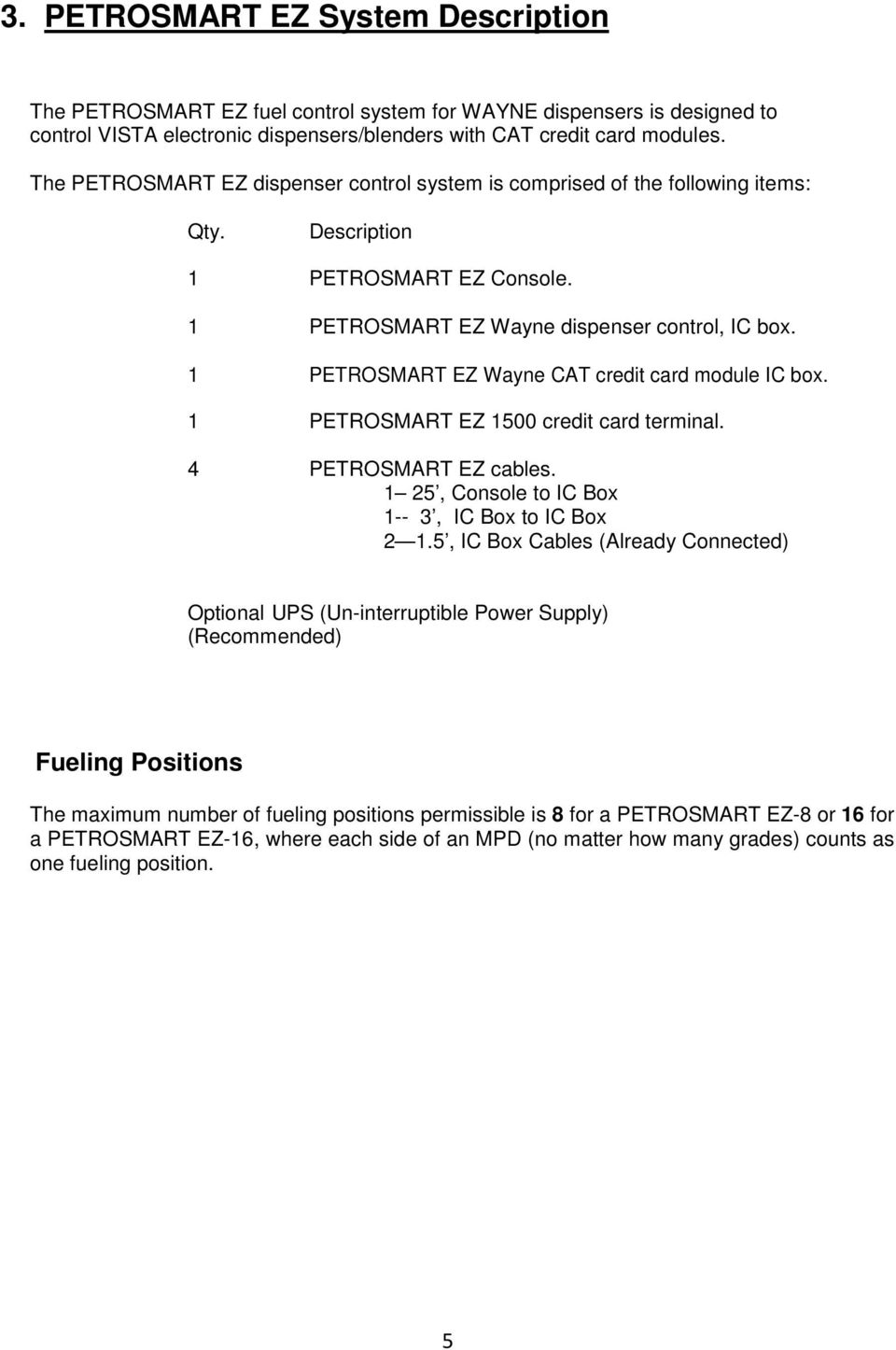
5 3. PETROSMART EZ System Description The PETROSMART EZ fuel control system for WAYNE dispensers is designed to control VISTA electronic dispensers/blenders with CAT credit card modules. The PETROSMART EZ dispenser control system is comprised of the following items: Qty. Description 1 PETROSMART EZ Console. 1 PETROSMART EZ Wayne dispenser control, IC box. 1 PETROSMART EZ Wayne CAT credit card module IC box. 1 PETROSMART EZ 1500 credit card terminal. 4 PETROSMART EZ cables. 1 25, Console to IC Box 1-- 3, IC Box to IC Box 2 1.5, IC Box Cables (Already Connected) Optional UPS (Un-interruptible Power Supply) (Recommended) Fueling Positions The maximum number of fueling positions permissible is 8 for a PETROSMART EZ-8 or 16 for a PETROSMART EZ-16, where each side of an MPD (no matter how many grades) counts as one fueling position. 5
6 6

7 5. WAYNE Dispenser Control Interconnect Box Conduit for 115 VAC 60 Hz, Power DISPENSER CONTROL Note: All IC boxes come with the 24" cable connected. To EZ Console To Card Reader IC Box Fig. 3, Typical PetroSmart EZ IC Box. Front Cover Back Panel BB EZ CONV Converter Bd. t e m MPC -TM95 BOARD IC Box Slide Switch Fig. 4, The PetroSmart EZ Wayne Dispenser Control Box with the Door Open. 7
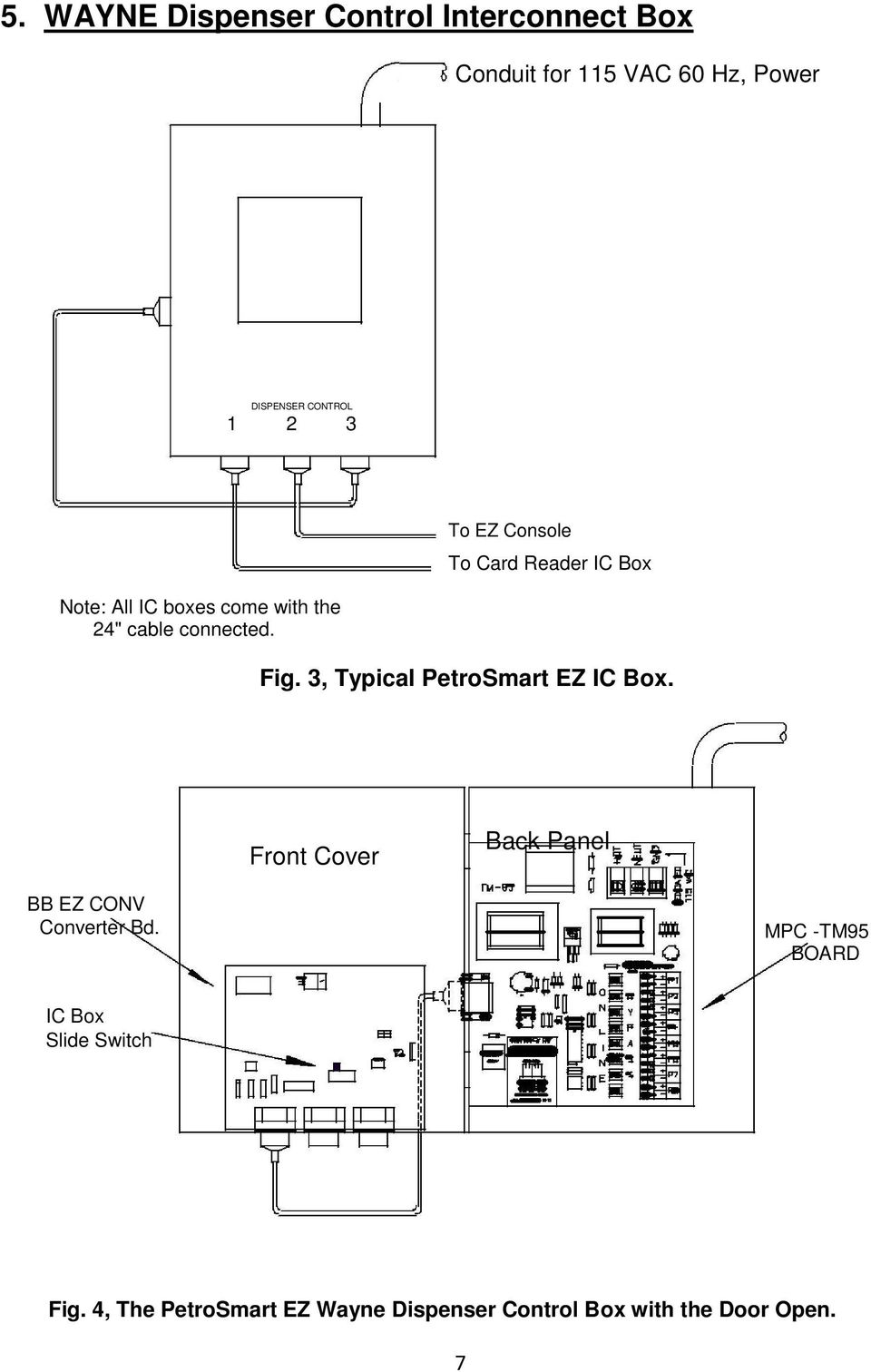
8 The PETROSMART EZ Wayne dispenser IC box includes the MPC-TM95 communication board and the EZ-E-CONV converter board. The MPC-TM95 communication board/power supply receives the incoming line voltage (120 VAC), supplies the operating system with DC voltage. The dispenser IC box transmits data signals between the console and the dispenser. 6. Connection of Dispenser Control, Data Wires Dispenser Control Data Wires DATA WIRES FROM DISPENSER OR CREDIT CARD MOD Figur e1 Wiring Diagr am for a PETROSM ART EZ for Gilbarco System Fig. 5, Dispenser Control MPC-TM95 Board The PETROSMART EZ-16 console can control up to 16 fueling positions. It is possible that more than four sets of dispenser data wires might be connected to the PETROSMART MPC- TM95 terminal strip. In this case, two sets of data wires can be connected to any position as shown in Fig. 6, below. Data Wire Pair 1 Data Wire Pair 2 Fig. 6, How to Connect More than Eight, Dispenser Control Data wires 8

9 7. WAYNE CAT, Credit Card Module Interconnect Box Front Cover Back Panel BB EZ CONV Converter Bd. MPC -TM95 BOARD IC Box Slide Switch Fig. 7, PetroSmart EZ, Cat IC Box NE U GN D 115 VAC 85 E From Credit Card Dispenser Modules WHI WHI WHI WHI T/R- T/R+ T/R- T/R+ T/R- T/R+ T/R- T/R+ #1 #2 #3 #4 PUMP CONTROL RELAY T/R+ WHITE T/R- T/R - BLACK WHI T/R+ GND T/R- RxD+ WHI T/R+ RxD- T/R- EMERGENCY OFF WHI T/R+ CONTACTS IN T/R- "NORMAL" CONDITION #5 #6 #7 DURING EMERGENCY OFF NO NCCOM WHI T/R+ #8 PILOT DUTY ONLY 115 VAC MAX.) Fig. 8, PetroSmart Cat Interface MPC-TM84E Board 9

10 C9 IC9 R8 8. CAT CREDIT CARD MODULE Data Wires The PETROSMART EZ-16 console can interact with up to 16 CAT credit card module positions. However if more than eight sets of CAT credit card module data wires are required then they should be connected to the PETROSMART MPC-TM84E terminal strip as shown in Fig. 9, below. MPD #1 WHI - (MINUS) CAT Data Wire T/R- Pair 1 T/R+ T/R- #1 #2 + (PLUS) WHI T/R+ + (PLUS) WHI T/R- T/R+ #3 - (MINUS) CAT Data Wire Pair 2 Fig. 9, How to Connect More than Eight, Dispenser Control Data wires 9. PETROSMART EZ Converter Board + VR 1 GAS PUMP CARD READER SW2 LED2 IC8 GAS CARD PUMP READER C10 D1 R4 R5 R 6 CONN1 CONN2 CONN3 Fig. 10, PETROSMART EZ Converter Board The converter board is located on the inside cover of both the dispenser control IC box and the credit card control IC box, refer to Fig. 4, pg. 7 and Fig.7, pg
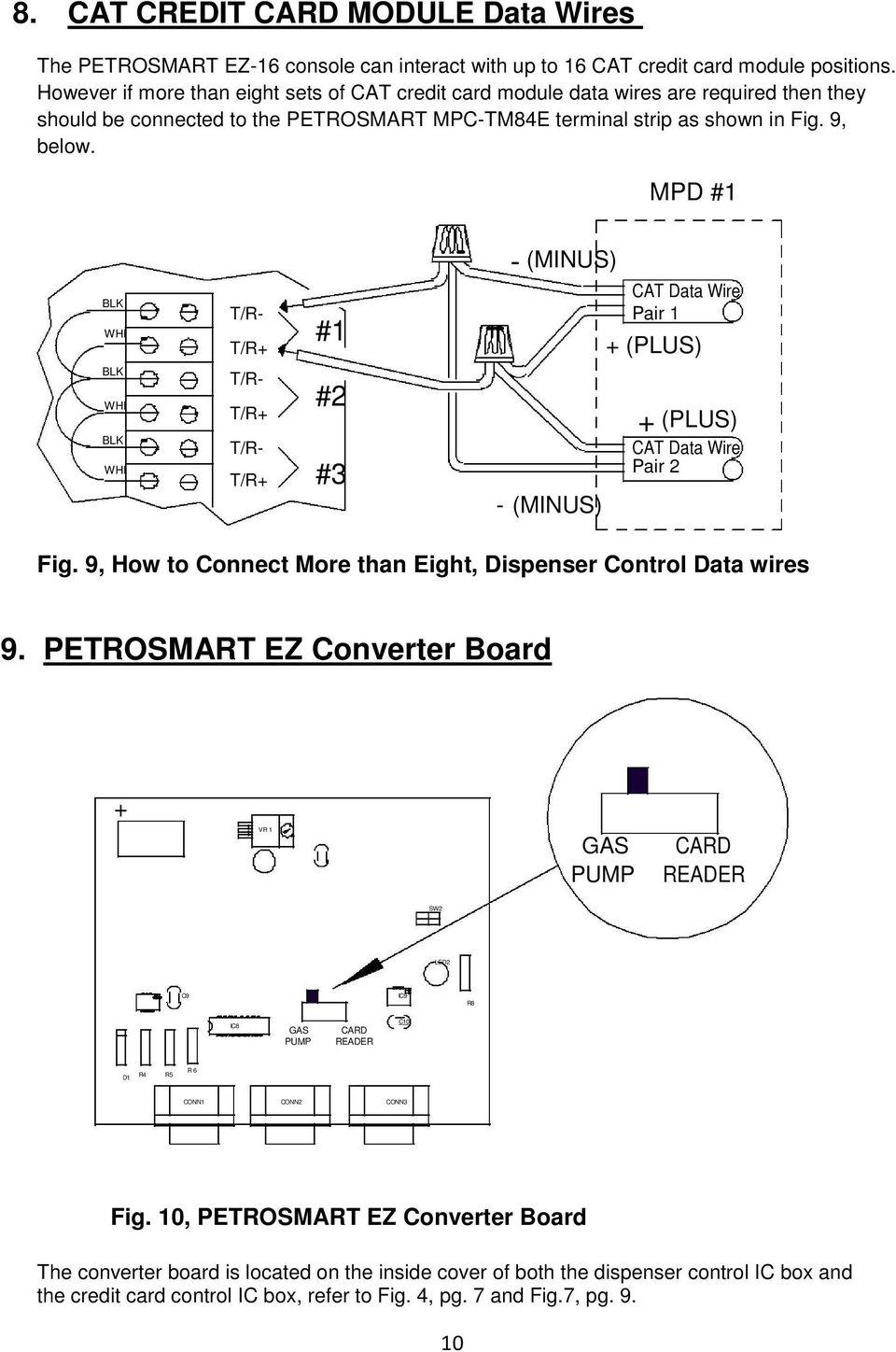
11 IMPORTANT -After installation of both IC boxes check the slide switch on the converter board (Refer to Fig. 10) for the proper switch position. In the IC box that is connected to the dispenser data wires the slide switch must be positioned on the end marked GAS PUMP. The IC box that is attached to the CAT credit card module data wires must have the slide switch positioned on the end marked CARD READER. NOTE: Do not mix the dispenser control and credit card control data wires. 10. Power Requirements CONNECTION INSTRUCTIONS FOR THE SYSTEM POWER SUPPLY, DISPENSER, MOTOR, AND ELECTRICAL GROUND CIRCUITS. A.C. POWER REQUIREMENTS 1. Breaker Panel: A 125 Amp breaker is the minimal allowable electrical service for the pump motor and interface boxes, dispensers, canopy lights and advertising signs. Figur e1 Wiring Diagr am for a PETROSM ART EZ for Gilbarco System DATA WIRES FROM DISPENSER OR CREDIT CARD MOD 2. The PETROSMART EZ, Wayne Dispenser and CAT credit card module IC box, both require a 115VAC, 15 Amp DEDICATED breaker (with no other devices or outlets connected to it) for connection to the MPC-TM84E board. Make sure the correct voltage and frequency are present. All AC wires must be 14 gauge (min.), and in conduit. Do not put wiring from other sources in this conduit. 3. PETROSMART EZ Console: The console is powered by a standard plug-in AC Adaptor power module. The Adaptor can be inserted into a standard electrical outlet that supplies, 115VAC, 60Hz, 15W power. The Adaptor converts the input to 15 VDC, 600mA which it supplies to the EZ console. A UPS is supplied with then system to minimize disruption in the event of a general power failure. 4. Dispensers: The dispensers' installation guide shows all requirements including, but not limited to breakers, wires to supply data signals to the electronics, green wire for Earth Ground, and wires to power the dispenser and fluorescent lighting. Refer to the installation manual for the dispenser being installed for complete installation requirements. 5. Pump Motor: Use auxiliary relays, correct gauge wires, and 115/230VAC breakers to supply power to the pump motors. Refer to the installation manual of the equipment being used for complete installation requirements, drawings, and special notes for proper installation. 11

12 11. Cable Connections The connection between the PETROSMART EZ console and the interconnect box marked DISPENSER CONTROL is made via a 25 foot round cable having 15-conductors and DB-15 type connectors. The connection to the CARD READER CONTROL box is via a 3 foot, 15-conductor, DB-15 cable which connects the CARD READER CONTROL box to the DISPENSER CONTROL interconnect box. Refer to Fig. 2, page 6, of this manual. Longer cables are available to fit the particular needs of the installation site. The maximum recommended distance between the PETROSMART EZ Console and the PETROSMART EZ, DISPENSER CONTROL interconnect box is 150 feet. Note: A 24 cable comes already attached to each interconnect box, which provides system integration of the dispenser control and credit card control communications. This cable, which comes already attached to each respective IC box, should not be removed during the installation of the PETROSMART EZ system. INSTALLING THE PETROSMART EZ CONSOLE 1. Make sure that all system component connections and cables are properly assembled before turning on the power to any of the components. 2. Mount all interconnect boxes near the wire trough, or where the conduit from the pumps/dispensers enters the building. 3. Place the console in a location that allows an unobstructed view of all fueling positions at the site. Triangle MicroSystems Inc., Raleigh, N.C. Made in the U. S. A. PetroSmart EZ Control Console Serial # XXXXX PUMP DC COM 1 PRINTER CONTROL COM 2 MODEM POWER Fig. 12, Back View of the PetroSmart EZ Console 12

13 4. Connecting the Console to the Dispenser IC BOX - Connect the data cable from the PUMP CONTROL connector on the PETROSMART EZ console to the connector marked (#3) on the dispenser interconnect box. Refer to Fig Connecting the Dispenser IC Box to the CAT CREDIT CARD MODULE IC Box - Connect the data cable from the(#1) connector on the Dispenser IC Box to the (#1) connector on the CAT CREDIT CARD MODULE IC box. Refer to Fig The console is powered by a separate plug-in, AC Adaptor, power supply. With the PetroSmart EZ Console turned off, connect the power module to the UPS (Uninterruptible Power Supply) which is supplied with each system. Refer to the PetroSmart EZ console, programming/operators guide on how to program the console. 13

14 12. Important Notes: 1. TURNING THE SYSTEM OFF: It is not recommended or necessary to turn OFF the dedicated system breaker that supplies power to the PETROSMART EZ-TM95 board during the time the store/station is closed. Simply turning the console OFF/ON key to the OFF position after all hoses have been de-authorized, along with following the dispenser power down sequence, will prevent fuel from being dispensed. 2. All + and - wire connections between the PETROSMART EZ, MPC-TM95 IC board, the MPC-TM84E board and the dispensers must be 18 gauge or larger. 3. All AC wires must be 14 gauge or larger. 4. Use cable ties to keep the data cable in place from the console to the interconnect box if conduit is not used. 5. If the PETROSMART EZ cable is put through a conduit, use 2" minimum to allow room for the connectors on the cable. Do not cut connectors from the PETROSMART EZ cable to use a smaller conduit. Do not put PETROSMART EZ cable conduit underground. PETROSMART EZ data cables are not designed to operate under these conditions and will not be covered under warranty. 6. Do not use wire nuts on any grounding connections. Make all connections with compression connectors (crimp or split lug). 7. If the console or dispenser power comes from a sub-panel, all ground wires must end at the main electrical service panel ground. 8. There must be no more than 1 ohm resistance between Neutral and Earth Ground. 9. Do not use old or used wire for dispenser wire connections. 10. Use rigid metal conduit only. Do not use PVC conduit. 11. Do not route mercury vapor, canopy light wiring, or other unrelated wiring through the dispenser wiring conduit. 12. Auxiliary relays or contactors MUST BE used in the motor circuit! Refer to the installation manual of the dispenser for complete installation requirements, drawings, and special notes. 13. Wiring for dispensers, PETROSMART EZ for WAYNE IC box, and other control boxes should all be on the same phase from the service panel, or erratic operation/communication could result. 14. In the interest of everyone's safety, all persons involved in the operation of this system should be made aware of a proper power-down sequence for all components used to dispense flammable products. 14

15 13. Specifications DIMENSIONS WEIGHTS PETROSMART EZ Console...8" W x 4-1/2" H x 9-3/4" D PETROSMART EZ Dispenser IC Box for...10" W x 11-1/2" H x 4-3/4" D PETROSMART EZ CAT credit card module IC Box...10" W x 11-1/2" H x 4-3/4"D PETROSMART EZ Console... 7 lbs. PETROSMART EZ IC Box for WAYNE... 8 lbs. PETROSMART EZ Cable (25 ft.)... 2 lbs. NOTE: The above weights do not include shipping cartons or packing materials. PERIPHERAL INTERFACE INSTALLATION In compliance with the UL regulations and standards that apply to the Petroleum Industry, the following information establishes installation parameters for the use of peripheral equipment with the PETROSMART EZ Control Console. 1. Any peripheral equipment must be UL listed. 2. Any peripheral equipment must have an Electronics Industry Association (EIA) Standard RS-232C or RS-422A communications interface (whichever is appropriate for the application). 3. Any peripheral equipment must not be installed in or above a hazardous location. 4. The peripheral interconnection cable must be either UL Style 1061 or 2462 suitable for interconnection of electronic equipment. 15

16 14. TMS Service and Warranty Information The PETROSMART EZ systems are designed to be serviced by unit substitution. The substitution units for PETROSMART EZ electronic systems are: CONSOLE, CABLE, and the PETROSMART MPC-TM84E board and the EZ-E-CONV converter board. TMS encourages that all service vehicles carry spare parts for installation and service work TO ELIMINATE THE NEED FOR RETURN TRIPS TO INSTALL REPLACEMENT PARTS. All components manufactured by TMS have a one year FACTORY SERVICE WARRANTY plus a 24 month grace period for distributors to cover shelf time or exchanges with their customers for repairs. This warranty does not apply to printers, power supplies, pulser/totalizers, or time delay relays, which are not manufactured by TMS (these components are warranted for 90 days). The warranty starts from the date of shipment from TMS. During the factory service warranty period, these units may be returned to Triangle MicroSystems, Inc., freight prepaid. They will be repaired and returned freight prepaid, at no charge. Exceptions to free factory warranty service are: Lightning damage Obvious physical damage Damage due to connecting/mis-connecting "HOT" (115 VAC) wires to the A019 +, and the A09 - data signal inputs. Damage due to connecting/mis-connecting line voltage other than specified in this book to AC INPUT connections. Damage due to connecting/mis-connecting line voltage or loads rated other than specified at the EMERGENCY OFF terminal of the PETROSMART EZ-TM95 IC board. The TMS FACTORY SERVICE WARRANTY DOES NOT COVER TRAVEL AND LABOR CHARGES. Our service policy is to repair and return, or exchange for remanufactured components. We do not send out new parts and take back old ones at no charge. To help reduce service costs, TMS is willing to drop-ship parts anywhere UPS delivers. Serial numbers with date codes are required when ordering exchange units. 16

17 TRIANGLE MICROSYSTEMS, INC. WARRANTY AND LIMITATIONS OF REMEDIES 1. Seller warrants that the equipment shall be free of defective parts and workmanship for a period of two (2) years commencing on the day of the invoice from Seller. Sellers, salesman, distributors, representatives or agents may have made oral statements about the equipment described herein. Such statements do not constitute warranties, shall not be relied on by the buyer and are not part of this contract of sale. EXCEPT AS SET FORTH ABOVE, SELLER MAKES NO WARRANTY, EXPRESS OR IMPLIED, TO BUYER OR ANY OTHER PERSON AS TO THE EQUIPMENT'S FITNESS FOR A PARTICULAR PURPOSE, MERCHANTABILITY, DESIGN, CONDITION OR ANY OTHER ASPECT OF THE EQUIPMENT WHICH IS THE SUBJECT OF THIS CONTRACT OF SALE, ITS COMPONENTS, WORKMANSHIP AND MATERIALS, BUYER TAKES AND ACCEPTS THE EQUIPMENT AS IS. By reason of his acceptance of delivery of the equipment, Buyer agrees that the equipment is in proper operating order, conforms to the Buyers specifications and the terms and conditions of the contract of sale, and has accepted the equipment in its condition on delivery as the equipment described herein. 2. Buyer's remedies for damages due to breach of the warranty set forth herein shall be limited to repair or replacement of non-conforming goods or parts within the aforesaid time period of two (2) years. LABOR, TRANSPORTATION, AND TRAVEL ARE NOT COVERED BY THE WARRANTY. The parties agree that the Buyer's sole and exclusive remedy against the Seller shall be for the repair or replacement of defective parts or goods as provided herein. Buyer agrees that no other remedy, including but not limited to incidental or consequential damages for lost profits, lost sales, injury to persons or property, or any other incidental or consequential loss, shall be available to it. Seller further disclaims liability for any loss, damage or injury to any person as a result of any defects, latent or otherwise, in the equipment whether arising from Sellers negligence, application of the law of strict liability, or breach of warranty. 3. This warranty is automatically void and of no effect in the event of defect, damage, injury or failure of the equipment due to any of the following causes: Acts of God; improper installation; failure to maintain the equipment in accordance with the Seller's instructions; use of the equipment in any manner other than the use for which the Seller has designed and intended the equipment; attempt to install, repair or replace the equipment by any person other than Seller's authorized employees or agents; modifications or changes to the equipment of any kind or nature; excessive or improper usage and electrical burnouts or surges. 4. This writing contains the final expression of the parties' warranty agreement and is a complete and exclusive statement of the terms of the agreement. Parole evidence shall not be admissible to supplement, modify or add to the terms hereof for any purpose. 17

Advantium 2 Plus Alarm
 ADI 9510-B Advantium 2 Plus Alarm INSTALLATION AND OPERATING INSTRUCTIONS Carefully Read These Instructions Before Operating Carefully Read These Controls Corporation of America 1501 Harpers Road Virginia
BroadBand PowerShield. User Manual
 BroadBand PowerShield User Manual 990-0375G 12/2006 Chapter 1 General Information The PowerShield provides a power source for broadband telephony and other DC applications. Safety This Safety Guide contains
Installation and Operation Guide for PD5100 Automatic Transfer Switch
 Installation and Operation Guide for PD5100 Automatic Transfer Switch Member P r o gr e ssive Dynamics, Inc. 507 Industrial Rd Marshall, MI 49068 www.progressivedyn.com 2012 Progressive Dynamics, Inc.
ATS Overhead Table Shelf System INSTRUCTION MANUAL
 ATS Overhead Table Shelf System INSTRUCTION MANUAL ATS Overhead Table Shelf System Instruction Manual Warranty Newport Corporation warrants this product to be free of defects in material and workmanship
ADA COMPLIANT BOX STYLE TELEPHONE INSTALLATION, PROGRAMMING AND OPERATING INSTRUCTIONS FOR MODEL PBX
 ADA COMPLIANT BOX STYLE TELEPHONE INSTALLATION, PROGRAMMING AND OPERATING INSTRUCTIONS FOR MODEL PBX INSTALLATION INSTRUCTIONS Step 1. Determine the position for the Hands-free phone in the elevator phone
INSTRUCTION MANUAL MODEL PCD-88
 INSTRUCTION MANUAL MODEL PCD-88 CLOSED CAPTION DECODER LINK ELECTRONICS, INC. 2137 Rust Avenue Cape Girardeau, Missouri 63703 Phone: 573-334-4433 Fax: 573-334-9255 e-mail: sales @ linkelectronics.com website:
USER MANUAL. Model 6103 3U ForeFront Alarm Card SALES OFFICE (301) 975-1000 TECHNICAL SUPPORT (301) 975-1007. An ISO-9001 Certified Company
 USER MANUAL Model 6103 3U ForeFront Alarm Card An ISO-9001 Certified Company Part# 07M6103 Doc# 123011U Rev. A Revised 7/15/03 SALES OFFICE (301) 975-1000 TECHNICAL SUPPORT (301) 975-1007 CONTENTS 1.0
Single Station Remote Alarm
 ADI 5106G Certified ISO 9001:2000 Single Station Remote Alarm 529 5106-01-120 529 5106-01-220 INSTALLATION AND OPERATING INSTRUCTIONS Carefully Read These Instructions Before Operating Controls Corporation
Powerware Relay-Serial Card User s Guide
 Powerware Relay-Serial Card User s Guide Special Symbols The following are examples of symbols used on the UPS and accessories to alert you to important information: This symbol indicates that you should
Commercial Cardiovascular Equipment
 Commercial Cardiovascular Equipment Limited Warranty Limited Warranty. PLEASE READ THESE WARRANTY TERMS AND CONDITIONS CAREFULLY BEFORE USING YOUR PRECOR INCORPORATED PRODUCT. BY USING THE EQUIPMENT, YOU
Kramer Electronics, Ltd. USER MANUAL. Rack Adapter Models: RK-1T2PT RK-2T1PT RK-3T RK-6T RK-9T RK-3TR RK-4PT RK-T2B RK-T2SB
 Kramer Electronics, Ltd. USER MANUAL Rack Adapter Models: RK-1T2PT RK-2T1PT RK-3T RK-6T RK-9T RK-3TR RK-4PT RK-T2B RK-T2SB Contents Contents 1 Introduction 1 2 Getting Started 1 3 Overview 2 4 Your Kramer
How To Size A Stenner Pump
 Metering Pumps Manufactured Since 1957 PCM Series Pump Control Module INSTALLATION AND MAINTENANCE MANUAL Table of Contents WarrantyandServicePolicy...3 Safety Information...............................................
BIS Automation Engine
 BIS Automation Engine Installation manual en English BIS Automation Engine en Table of Contents Legal 5. Trademarks 5. Software License Agreement 5.. Limited Warranty 5.. Remedy 6 Introduction 7. About
On/Off Relay Switch and 3-Way Switch Kit
 45637/45638 Wireless Lighting Control On/Off Relay Switch and 3-Way Switch Kit marthome Control the On/Off status of permanently installed lighting, fans and more! www.lowes.com/iris 2012 JASCO Made in
This equipment has been tested and found to comply with the limits for a Class B digital device, pursuant to part 15 of the FCC Rules.
 Power Max Level 2 Charging Station en Installation and Operating Instructions This equipment has been tested and found to comply with the limits for a Class B digital device, pursuant to part 15 of the
BLACK BOX. T1/E1 Link Extenders OCTOBER 2007 MT195A-T1 MT196A-E1
 BLACK BOX NETWORK SERVICES OCTOBER 2007 MT195A-T1 MT196A-E1 T1/E1 Link Extenders Important This is a Class A device and is intended for use in a light industrial environment. It is not intended nor approved
About this Manual. Support for Your Product
 About this Manual We ve added this manual to the Agilent website in an effort to help you support your product. This manual is the best copy we could find; it may be incomplete or contain dated information.
BACnet Automation Interface Module (Network Version)
 Sense +V Tx Rx LAN LINK Over ARCNET KBaud BACnet Rx BACnet Tx Archive Valid Port S Tx Port S Rx Low Battery Network- Enhanced Access Default MSTP PTP = Download Required on Rnet and Port S IP Address IP
Water Leak Detection System
 Water Leak Detection System Installation and Operating Manual 505-334-5865 ph 505-334-5867 fax www.rodisystems.com email:[email protected] 936 Highway 516 Aztec, NM 87410-2828 Manual Revisions and Copyright
Nest Learning Thermostat Installation Guide. Installation step-by-step
 Nest Learning Thermostat Installation Guide Installation step-by-step Contents Compatibility. 3 In the box. 4 Before you start. 5 Choose an installation method. 6 Replacing an existing wired thermostat.
About the HotWire 7900 10-Slot Standalone Shelf
 TM HotWire Model 7900 10-Slot Standalone Shelf Installation Instructions Document Number 7900-A2-GN10-10 About the HotWire 7900 10-Slot Standalone Shelf The HotWire 7900 10-Slot Standalone Shelf is designed
LCD5500Z / PKP-LCD v3.x Installation Instructions
 LCD5500Z / PKP-LCD v3.x Installation Instructions TM Introduction The LCD5500Z / PKP-LCD keypad displays system status using an LCD screen. The keypad can be used on PowerSeries security systems with up
HM-W536 Install Guide
 HM-W536 Install Guide 9/13/2013 IMPORTANT SAFETY INSTRUCTIONS Warning - When using electrical devices, basic safety precautions should be followed to reduce the risk of fire, electrical shock or injury.
SERIES 12-600 VOLT ELECTRIC INSTANTANEOUS WATER HEATER FOR EMERGENCY SAFTEY EQUIPMENT INSTALLATION AND OWNERS MANUAL REQUIRED MANTENANCE
 Eemax Inc., 353 Christian Street, Oxford, CT 06478 1 E ema X SERIES 12-600 VOLT ELECTRIC INSTANTANEOUS WATER HEATER FOR EMERGENCY SAFTEY EQUIPMENT INSTALLATION AND OWNERS MANUAL REQUIRED MANTENANCE WARNING
Leak Detection System
 Instructions - Parts List Leak Detection System 311200A For detecting leaks in your diaphragm pump system. Not for use in explosive atmospheres. Part No. 234576 120 psi (0.8 MPa, 8 bar) Maximum Air Input
SDX Submersible Depth Transmitter User Manual
 SDX Submersible Depth Transmitter User Manual January 2011 USER INFORMATION Stevens makes no warranty as to the information furnished in these instructions and the reader assumes all risk in the use thereof.
Dual-Cool Notebook Cooler Pad. User s Manual
 Dual-Cool Notebook Cooler Pad Model #: CF4500U User s Manual Rev. 060801 User s Record: To provide quality customer service and technical support, it is suggested that you keep the following information
AT&T. PARTNER Plus Door Phone. Installation and Operation Manual
 AT&T PARTNER Plus Door Phone Installation and Operation Manual Copyright 1990 AT&T All Rights Reserved Printed in U.S.A. CIC# 999-500-317 OII722050-051 Issue 1 October 1990 PARTNER Plus Door Phone is a
DC400 Dispensing Cutoff System
 DC400 Dispensing Cutoff System DC404 and DC406 Installation Instructions Franklin Fueling Systems 3760 Marsh Rd. Madison, WI 53718 USA Tel: +1 608 838 8786 800 225 9787 Fax: +1 608 838 6433 www.franklinfueling.com
For Models #6-5001, #6-7501, #10-7501 & #10-12K1
 EmerGen Switch Manual Transfer Switch Manufactured by CONNECTICUT ELECTRIC SWITCH MFG. CO. 1-800-730-2557 OWNER S MANUAL & INSTALLATION INSTRUCTIONS For Models #6-5001, #6-7501, #10-7501 & #10-12K1 PLEASE
Name of Equipment Silver King Model SKMCD1P/C1. This equipment chapter is to be inserted in the appropriate section of the Equipment Manual.
 Name of Equipment Silver King Model SKMCD1P/C1 This equipment chapter is to be inserted in the appropriate section of the Equipment Manual. Manufactured exclusively for McDonald s By Silver King Refrigeration,
MODEL MAC-3 MULTIPLE APPLIANCE CONTROL
 TJERNLUND PRODUCTS, INC. 1601 Ninth Street White Bear Lake, MN 55110-6794 PHONE (800) 255-4208 (651) 426-2993 FAX (651) 426-9547 Visit our web site www.tjernlund.com REV. A 5/99 MODEL MAC-3 MULTIPLE APPLIANCE
Seaward Products OWNER S MANUAL WATER HEATERS. Serial Number:
 Seaward Products WATER HEATERS OWNER S MANUAL Serial Number: IMPORTANT SAFETY INSTRUCTIONS WARNING When using electrical appliances, basic safety precautions to reduce the risk of fire, electrical shock,
Instructions A622 100 Amp AC/DC Current Probe 070-8883-03
 Instructions A622 100 Amp AC/DC Current Probe 070-8883-03 Revision A www.tektronix.com 070888303 Copyright Tektronix, Inc. All rights reserved. Tektronix products are covered by U.S. and foreign patents,
TTL to RS232 Adapter User Guide
 TTL to RS232 Adapter User Guide Revision D March 28, 2011 Document Part Number GC-800-313d Copyright and Trademark Copyright 2006-2011, Grid Connect, Inc. All rights reserved. No part of this manual may
ECR Shelf System Installation Guide Centralized Rack Mount Call Recording
 Hardware & Installation Guide Algo Communication Products Ltd. Customer Support and Sales Tel: 1.877.884.2546 Fax: 604.437.5726 Email: [email protected] [email protected] www.algosolutions.com
MCR1900 Media Converter 19-Slot Chassis
 MCR1900 Media Converter 19-Slot Chassis Installation Guide Part #5500304-11 Copyright Statement This document must not be reproduced in any way whatsoever, either printed or electronically, without the
Installation and Operation Guide PD4600 Series Converter Replacement
 Installation and Operation Guide PD4600 Series Converter Replacement Extended warranties are available for purchase at www.progressivedyn.com Member Thank you for selecting Progressive Dynamics as your
EPM3. Phase Sequence and Motor Rotation Tester. Users Manual
 EPM3 Phase Sequence and Motor Rotation Tester Users Manual 1 L1 L2 L3 2 3 A B C CAT 600V 3-PHASE TESTER 5 TEST M1 M2 BATT M3 EPM3 MOTOR ROTATION TESTER EPM3 MOTOR ROTATION DETERMINED WHILE FACING MOTOR
VAQ. Built-in V-series Miniature Basic Switch for Compatibility with Business and Consumer Equipment. Pushbutton Switch (Cylindrical 10.5-dia.
 Pushbutton Switch (Cylindrical 10.5-dia.) CSM DS_E_4_4 Built-in V-series Miniature Basic Switch for Compatibility with Business and Consumer Equipment Momentary operation and lock. available in six colors.
Bennett Pump Company
 Bennett Pump Company Debit / Credit Terminal 2300/2400 Horizon 1 and 2 Series Or 3000 Series with Debit/Credit Terminal Installation, Service, & Parts Manual Only Trained Personnel May Work on This Equipment
XC120 XC180. Owner's Guide Conforms to / Conforme à UL std. 458, Toll Free 1 866 295 6775. www.powerbright.com
 WARNING: This Unit employs Components that tend to produce arcs or sparks To prevent fire or explosion, do not install in compartments containing batteries or flammable materials - SHOCK HAZARD. DO NOT
Owner's Manual [ S/N LABEL HERE ] Document # BW-BCU5DOC
![Owner's Manual [ S/N LABEL HERE ] Document # BW-BCU5DOC](/thumbs/39/18146231.jpg "Owner's Manual [ S/N LABEL HERE ] Document # BW-BCU5DOC") Owner's Manual [ S/N LABEL HERE ] Document # BW-BCU5DOC BAYweb Remote Model BW-BCU5 Owner's Manual Copyright 2009-2010 Bay Controls, LLC Part Number: BW-BCU5DOC Revision: 0.2 April 18, 2010 BAYweb is a
Owner's Manual [ S/N LABEL HERE ] Document # BW-BCU5DOC BAYweb Remote Model BW-BCU5 Owner's Manual Copyright 2009-2010 Bay Controls, LLC Part Number: BW-BCU5DOC Revision: 0.2 April 18, 2010 BAYweb is a
MTV-FS1 / FS1T / FSB375
 MTV-FS1 / FS1T / FSB375 MYE Entertainment Freestanding LCD TV Floor Stand with Base Assembly Instructions man_mtvfs1_b3 www.myeclubtv.com Table of Contents Parts List 3 Parts Identification......3 Hardware
PagePac PAGEPAL V-5335700
 PagePac Issue 3 by PAGEPAL V-5335700 INTRODUCTION The PagePal unit interfaces most telephone systems (PBX, KTS, Centrex) to virtually any public address audio system. In addition, PagePal furnishes inputs
PT-6000 Power Tower INSTALLATION MANUAL SPECIFICATIONS
 PT-6000 Power Tower INSTALLATION MANUAL 10.5 9.75 12 22.75 10.75 MAXIMUM SOIL HEIGHT: DO NOT ALLOW FILL TO EXCEED THIS LEVEL! 11.5 4 4 13 Optional PT-BASE for new installations or when previous 2000/6000
INSTALLATION GUIDE. Card Reader & Controller with KIM Swipe Reader for Solitaire 850 / 950 / 850L Learnlok PK2930
 INSTALLATION GUIDE Card Reader & Controller with KIM Swipe Reader for Solitaire 850 / 950 / 850L Learnlok PK2930 Card Reader and Controller Model 3.5 with KIM Swipe Reader Table of Contents 1. Features..................................
SP4-LOC SAFEPATH4 REMOTE MICROPHONE AND LOCAL OPERATOR CONSOLE
 SP4LOC SAFEPATH4 REMOTE MICROPHONE AND LOCAL OPERATOR CONSOLE INSTALLATION AND OPERATION MANUAL MASS NOTIFICATION SYSTEM Part Number: P84767 Rev. A Copyright 2006 Cooper Wheelock, Inc. All rights reserved.
www.iconnectivity.com
 www.iconnectivity.com USER GUIDE WARRANTY INFORMATION iconnectivity warrants to the original purchaser that this unit is free of defects in materials and workmanship under normal use and maintenance for
KVM - DVI, USB 2.0, Cat 5 Extender
 KVM - DVI, USB 2.0, Cat 5 Extender 330 feet (100 meters) EL5100 User Guide Powered by Thank you for purchasing the KVM - DVI, USB 2.0, Cat 5 Extender 330 feet (100 meters) Please read this guide thoroughly.
CQM1-SF200/CS1W-SF200
 Safety Relay Unit ( I/O Unit Type) CQM1-SF200/CS1W-SF200 CSM_CQM1-SF200_CS1W-SF200_DS_E_2_1 A Safety Relay Unit That Functions as a I/O Unit. Less Installation Space and Wiring Required. Safety Relay Unit
CABLE MODEM QUICK START
 CABLE MODEM QUICK START This Quick Start describes how to connect your Zoom cable modem to a cable modem service. This lets your cable modem provide Internet access to a computer or other device connected
WINEGARD MOTORIZED SENSAR ANTENNA Models MA1055W & MA1055G MADE IN U.S.A. U.S. Patents D500,496 and 7,358,909 INSTALLATION MANUAL
 WINEGARD MOTORIZED SENSAR ANTENNA Models MA1055W & MA1055G MADE IN U.S.A. U.S. Patents D500,496 and 7,358,909 INSTALLATION MANUAL CAUTION: This system is not for use with antenna in raised position while
Architect/Contractor Information Package
 Architect/Contractor Information Package 3M SelfCheck System C-Series C1 Model 877 This package provides architects and contractors with the information necessary for the successful installation of the
03-07 Ford 6.0 Powerstroke Installation Instructions and Manual P/N: 10401
 03-07 Ford 6.0 Powerstroke Installation Instructions and Manual P/N: 10401 2007 Edge Products Incorporated All rights reserved. Edge Products 1080 South Depot Dr. Ogden, UT 84404 1-888-360-3343 www.edgeproducts.com
AGS. Owner's Manual. Xantrex Automatic Generator Start Control System
 AGS Owner's Manual Xantrex Automatic Generator Start Control System TABLE OF CONTENTS INTRODUCTION...3 Main Features...3 Safety Summary...3 THINGS YOU SHOULD KNOW...4 THEORY OF OPERATION...5 System...5
USB Rover 2850. 2-port USB 1.1 40m Cat 5 Extender. User Guide
 USB Rover 2850 2-port USB 1.1 40m Cat 5 Extender User Guide Thank you for purchasing the USB Rover 2850, 2-port USB 1.1 40 m (131 ft) Cat 5 Extender Please read this guide thoroughly. FCC Radio Frequency
Model 3000-51 20 SPDT Relays 90401460
 Model 3000-51 20 SPDT Relays 90401460 Page 1 All technical data and specifications in this publication are subject to change without prior notice and do not represent a commitment on the part of Giga-tronics,
USER GUIDE TURBOCORD TM PORTABLE CHARGER 120V/240V: DUAL VOLTAGE. AeroVironment EV Solutions
 USER GUIDE TURBOCORD TM PORTABLE CHARGER 120V/240V: DUAL VOLTAGE AeroVironment EV Solutions 2013 AeroVironment, Inc. All rights reserved. AeroVironment, EV Solutions, and the AeroVironment logo are trademarks
ScreenLogic Wireless Connection Kit. Installation Guide. pool/spa control system
 pool/spa control system ScreenLogic Wireless Connection Kit Installation Guide P/N 520663 - Rev B 8 Technical Support Contact Technical Support at: Sanford, North Carolina (8 A.M. to 5 P.M.) Phone: (800)
Electric Panel Pump Control System. Operation, Maintenance and Installation Manual
 Manual No. 5EP-OM1-1 Electric Panel Pump Control System Operation, Maintenance and Installation Manual INTRODUCTION... 1 RECEIVING AND STORAGE... 1 DESCRIPTION OF OPERATION... 1 INSTALLATION... 2 SEQUENCE
How To Install A Power Supply (Uplast) With A Battery Pack
 APC Smart-UPS RT SURTA48XLBP/SURTA48XLBPJ External Battery Pack User Manual Introduction/Before Installation About this Manual The APC Smart-UPS RT external battery pack (SURTA48XLBP or SURTA48XLBPJ) connects
Installation instructions for Series NRX INCOM communications adapter module
 4000 NRX RF DRAWOUT SUBTITLE IMAGE (12/15/2010) Effective July 2015 Supersedes October 2010 IL01301033EH04 Installation instructions for Series NRX INCOM communications adapter module Instructions apply
16/32 Channel 1U Rack Mount CCTV Power Supply
 16/32 Channel 1U Rack Mount CCTV Power Supply Manual PH-A3224-GUQ Shown 16-Channel 32-Channel PTC PH-A1612-PUQ PH-A3224-PUQ Glass Fuse PH-A1612-GUQ PH-A3224-GUQ Industrial design 12 Amp 3 Amps per channel
543-0032-00, 943-0032-00. User s Manual
 543-0032-00, 943-0032-00 User s Manual 1 Comfort Alert Diagnostics Faster Service And Improved Accuracy The Comfort Alert diagnostics module is a breakthrough innovation for troubleshooting heat pump and
Installation Instructions
 H5HK Series Installation Instructions 3 Phase Electric Heater Kits 7.5 and 0 TON Package A/C Systems Description Installation of 08/40V and 480V H5HK 3 Phase Heater Kits in 7.5 and 0 TON Packaged Air Conditioners.
Video Splitter VS-104 / VS-108 User's Manual
 Video Splitter VS-104 / VS-108 User's Manual VS-1048 07-11-02 Page 1 of 6 Packing Checklist 1 VS-104/VS-108 Video Splitter 1 DC 9V 300mA (min.) Power Adapter 1 User's Manual Please read this manual thoroughly
TAC1 Telephone Entry System Installation and Programming Manual
 TAC Telephone Entry System 4 7 3 6 8 9 Installation and Programming Manual The Chamberlain Group 84 Larch Ave. Elmhurst, IL 66-96 www.liftmaster.com TABLE OF CONTENTS SPECIFICATIONS 3 Cable Requirements
Alarm Clock USER GUIDE
 Alarm Clock USER GUIDE Jazwares, Inc. 2012 CONTENTS Please read the instructions along with the Alarm Clock carefully before you use it, so that you can operate it conveniently. WELCOME & Warnings Page
9,'(2 #6(3$5$725 8VHU V#0DQXDO 96043;
 9,'(2 #6(3$5$725 8VHU V#0DQXDO 96043; Introduction 3 Features 3 Specifications 4 Installation 4 Stand-Alone Installation 4 Daisy-Chain Installation 5 Preventing Radio & TV Interference 6 Limited Warranty
Triple Expansion Chassis
 Triple Expansion Chassis AP9604 Installation Manual Contents Introduction............................. 1 Installation.............................. 2 Power Considerations...................... 5 Operations..............................
OPL BASIC. Dosing System for Professional Laundry machines. Contents
 OPL BASIC Dosing System for Professional Laundry machines Contents 1 Getting Started. Page 2 2 Installation. Page 4 3 Set Up & Operation. Page 8 4 Maintenance & Accessories. Page 10 5 Troubleshooting Page
2-3 SAS/SATA II HDD Canister USER S MANUAL XC-23D1-SA10-0-R. Document number: MAN-00076-A
 2-3 SAS/SATA II HDD Canister XC-23D1-SA10-0-R USER S MANUAL Document number: MAN-00076-A ii Preface Important Information Warranty Our product is warranted against defects in materials and workmanship
Utility Distribution Systems
 Utility Distribution Systems 6/2012 A0011037 1 WARRANTY This equipment is warranted to be free from defects in materials and workmanship, under normal use and service, for a period of 12 months from date
USB 2.0 4-Port Hub with USB Power Cable. User s Manual
 USB 2.0 4-Port Hub with USB Power Cable Model: UH2500 User s Manual 251104-109159 Rev. 061107 User s Record: To provide quality customer service and technical support, it is suggested that you keep the
FTW 175 VERIZON Wireless Monitoring System Reference Manual Part Number 7911751VERIZON
 FTW 175 VERIZON Wireless Monitoring System Reference Manual Part Number 7911751VERIZON SERIAL NUMBER Flash Technology, 332 Nichol Mill Lane, Franklin, TN 37067 (615) 261-2000 Front Matter Abstract This
MS900AC-B-LS User Information
 MS900AC-B-LS User Information MS900-R-AC-B-LS systems equipped with MR900 Micro Receiver are Receive-Only. MS900-X-AC-B-LS systems equipped with MX900 Micro Transceiver will Send and Receive. The model
Installation and Operation Guide for PD4000 Series Power Control Center
 Extended warranties are available for purchase at www.progressivedyn.com Installation and Operation Guide for PD4000 Series Power Control Center Member Thank you for selecting Progressive Dynamics as your
Usage, Installation, Warranty and Service Information
 T13C Table Updater for Seating Management U S E R M A N UA L Usage, Installation, Warranty and Service Information Long Range Systems, LLC 4550 Excel Parkway, Suite 200 Addison, TX 75001 800.437.4996 www.lrsus.com
VK-250 WARRANTY REGISTRATION FORM
 VK-250 WARRANTY REGISTRATION FORM Unit Serial Number: Customer Name: Address: Date of Purchase: Purchased From: Dealer Name: Address: IMPORTANT NOTE: In order to receive the full five year product warranty,
u-traq autopro GPS Vehicle Tracking System Product # 1020-PRO User s Guide Installation and Operating Instructions
 u-traq autopro GPS Vehicle Tracking System Product # 1020-PRO User s Guide Installation and Operating Instructions Table of Contents Before Installing 2 GPS Fundamentals 3 Checking the Contents of the
PC Tab Security System INSTRUCTION MANUAL
 PC Tab Security System INSTRUCTION MANUAL This manual is intended as a Quick Start manual covering the basic functions that have been enabled on the alarm panel. The alarm panel is capable of extensive
INSTALLATION AND OPERATIONS GUIDE. Qt 100. www.csmqt.com 800.219.8199 SOUND MASKING PAGING MUSIC
 INSTALLATION AND OPERATIONS GUIDE Qt 100 TM www.csmqt.com 800.219.8199 SOUND MASKING PAGING MUSIC Contents Qt 100 Introduction 3 Hardware Installation 4 Installing the Control Module 4 Wall Mount (back
ITC-BTTN Cellular Bluetooth Gateway. Owner s Manual 1
 ITC-BTTN Cellular Bluetooth Gateway Owner s Manual 1 2 Table of Contents Introduction...3 Package Contents...3 XLink Connections Diagram...4 Setup...5 Pairing your Bluetooth Cell Phone to the XLink...6
u-traq autopro GPS Vehicle Tracking System Product # 1020-PRO User s Guide Installation and Operating Instructions
 u-traq autopro GPS Vehicle Tracking System Product # 1020-PRO User s Guide Installation and Operating Instructions Before Installing Table of Contents Before Installing 2 GPS Fundamentals 3 Checking the
DORMA MODEL PS-406BB POWER SUPPLY INSTALLATION INSTRUCTIONS
 Features: INSTALLATION Install in accordance with NFPA 70. DORMA MODEL PS-406BB POWER SUPPLY INSTALLATION INSTRUCTIONS Up to 1.95 Amps Load Capacity Class 2 Rated Outputs Overload, Over Voltage, and Short
GeekDesk Max Instructions for Assembly & Use
 GeekDesk Max Instructions for Assembly & Use Work Sitting OR Standing! With the touch of a button... Elevate Your Work Instructions release 1.5, 2012-08-09 WELCOME! Thank you for purchasing a GeekDesk!
Installation & Operation Manual for EC-8 Phone Line Consolidator
 Installation & Operation Manual for EC-8 Phone Line Consolidator For Use With Talk-A-Phone Hands-Free Emergency Phones Section Page Getting Started 2 Hardware Installation 3 Software Programming 5 Operation
SAVARD PLUMBING COMPANY
 Now includes our LEAD FREE * product offering SAVARD PLUMBING COMPANY PRICE LIST Effective March 30, 2015 Braided Stainless Steel and PVC Faucet Washing Machine Dishwasher Water Heater Toilet Ice Maker
Modular I/O System Analog and Digital Interface Modules
 OPERATING INSTRUCTIONS Modular I/O System Analog and Digital Interface Modules Installation Operation Maintenance Document Information Document ID Title: Operating Instructions Modular I/O System Part
Zebra RW 420 Mobile Battery Eliminator Kits
 Zebra Technologies Corporation 475 Half Day Road, Suite 500 Lincolnshire, IL 60069 USA Zebra RW 420 Mobile Battery Eliminator Kits Installation Instructions September, 2010 RW 420 Mobile Battery Eliminator
DRM75A 230V 20/100A DIN rail single phase two wire energy meter
 DRM75A 230V 20/100A DIN rail single phase two wire energy meter 1.1 Safety instruction 1.2 Foreword 1.3 Performance criteria 1.4 Specifications 1.5 Basic errors 1.6 Description 1.7 Dimensions 1.8 Installation
OPERATING INSTRUCTIONS Model ST-888 DTMF ANI/ENI Display Decoder
 P R O D U C T G R O U P OPERATING INSTRUCTIONS Model ST-888 DTMF ANI/ENI Display Decoder Manual # 600-0901 November 30, 1999 Rev. D - 99068 DESCRIPTION The ST-888 Mobilecall Display Decoder is a desktop
Solar Power Systems Models: PVS220W-24 and PVS220W-48 Installation Manual
 Solar Power Systems Models: PVS220W-24 and PVS220W-48 Installation Manual 255379 Rev. D0 1015 Printed in U.S.A. Copyright 2015 Federal Signal Corporation Limited Warranty The Alerting and Notification
How To Test A Power Distribution Unit
 PDUAC3U SERIES AC POWER DISTRIBUTIO UITS www.unipowerco.com Manual o. PDUAC3U-1 pduac3u-man-rev1-1015.indd 2015 UIPOWER LLC All Rights Reserved ORTH AMERICA 3900 Coral Ridge Drive, Coral Springs, Florida
RI-215A Operator s Manual. Part Number: 71-0045RK Revision 0 Released: 10/3/05
 RI-215A Operator s Manual Part Number: 71-0045RK Revision 0 Released: 10/3/05 Warranty RKI Instruments, Inc., warrants gas alarm equipment sold by us to be free from defects in materials and workmanship,
Master Time Clock MTC-200 MTC-400 MTC-600. Users Manual
 Master Time Clock MTC-200 MTC-400 MTC-600 Users Manual Toll Free (888)713-0373 Phone (972)987-4408 FAX (877)720-9291 www.midwest-time.com [email protected] TABLE OF CONTENTS TOPIC PAGE GENERAL DESCRIPTION
Safety Manual BT50(T) Safety relay / Expansion relay
 Safety Manual BT50(T) Safety relay / Expansion relay ABB Jokab Safety Varlabergsvägen 11, SE-434 39, Sweden www.abb.com/jokabsafety Read and understand this document Please read and understand this document
SCREENLOGIC INTERFACE WIRELESS CONNECTION KIT
 SCREENLOGIC INTERFACE WIRELESS CONNECTION KIT FOR INTELLITOUCH AND EASYTOUCH CONTROL SYSTEMS INSTALLATION GUIDE IMPORTANT SAFETY INSTRUCTIONS READ AND FOLLOW ALL INSTRUCTIONS SAVE THESE INSTRUCTIONS Technical