
How To Improve Your Business Software
|
|
|
- Charleen Bell
- 5 years ago
- Views:
Transcription
1 A first look at the next exciting release of award-winning software from Open Systems, Inc. v 10.5

2 v 10.5 Information presented here describes the intended features of TRAVERSE version 10.5 as of September, Future features and functions are subject to change, and there is no guarantee that a particular function described in this document will be present in subsequent versions of TRAVERSE. v 10.5
3 This booklet and the accompanying CD will give you your first look at some of the enhancements and new features that will be included in the next release of the TRAVERSE suite of software from Open Systems, Inc. You can review the forthcoming changes and work with your software provider to plan your implementation of these exciting new features. Michael Bertini CEO Open Systems, Inc.

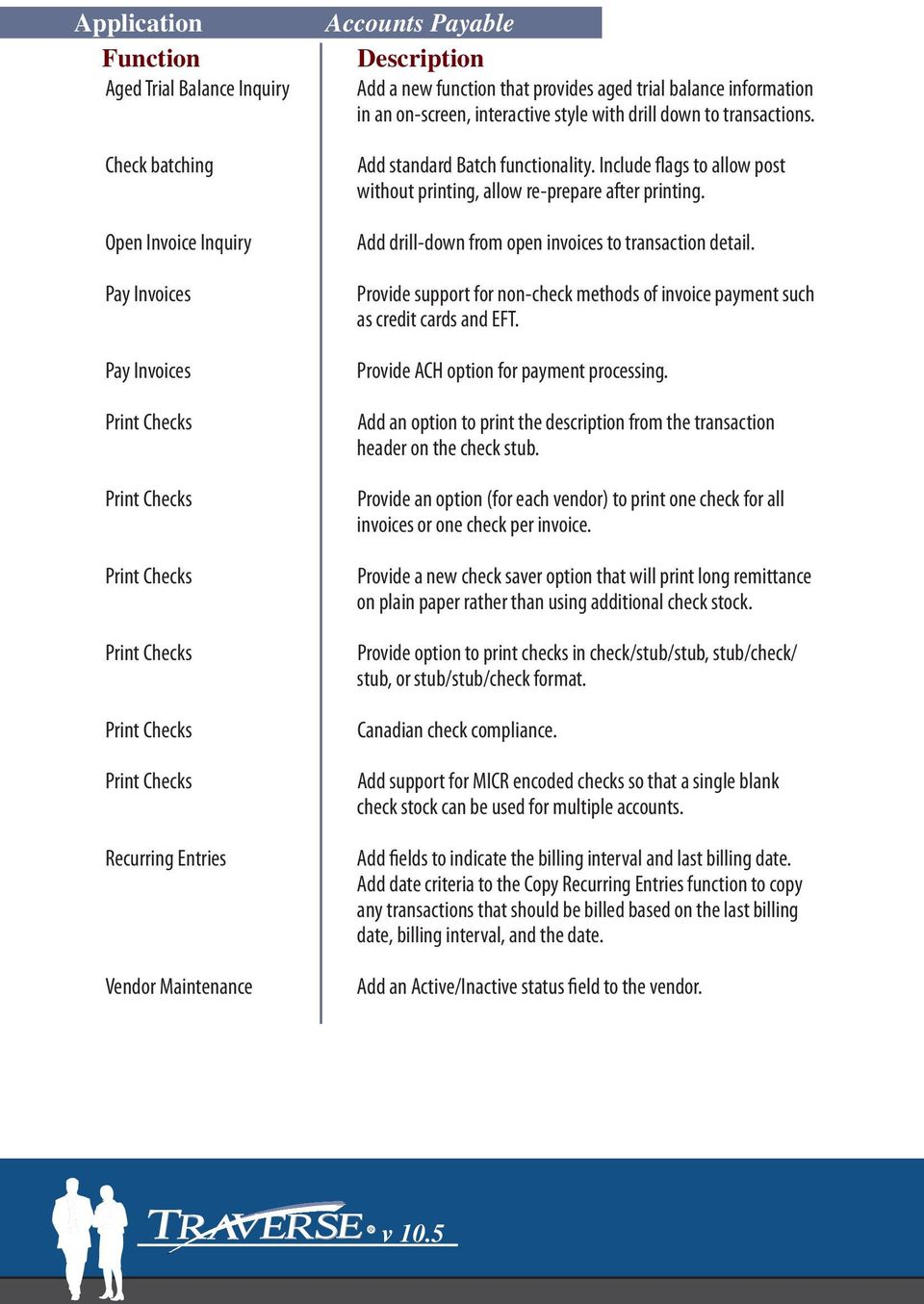
4 Aged Trial Balance Inquiry Check batching Open Invoice Inquiry Pay Invoices Pay Invoices Print Checks Print Checks Print Checks Print Checks Print Checks Print Checks Recurring Entries Vendor Maintenance Accounts Payable Add a new function that provides aged trial balance information in an on-screen, interactive style with drill down to transactions. Add standard Batch functionality. Include flags to allow post without printing, allow re-prepare after printing. Add drill-down from open invoices to transaction detail. Provide support for non-check methods of invoice payment such as credit cards and EFT. Provide ACH option for payment processing. Add an option to print the description from the transaction header on the check stub. Provide an option (for each vendor) to print one check for all invoices or one check per invoice. Provide a new check saver option that will print long remittance on plain paper rather than using additional check stock. Provide option to print checks in check/stub/stub, stub/check/ stub, or stub/stub/check format. Canadian check compliance. Add support for MICR encoded checks so that a single blank check stock can be used for multiple accounts. Add fields to indicate the billing interval and last billing date. Add date criteria to the Copy Recurring Entries function to copy any transactions that should be billed based on the last billing date, billing interval, and the date. Add an Active/Inactive status field to the vendor. v 10.5
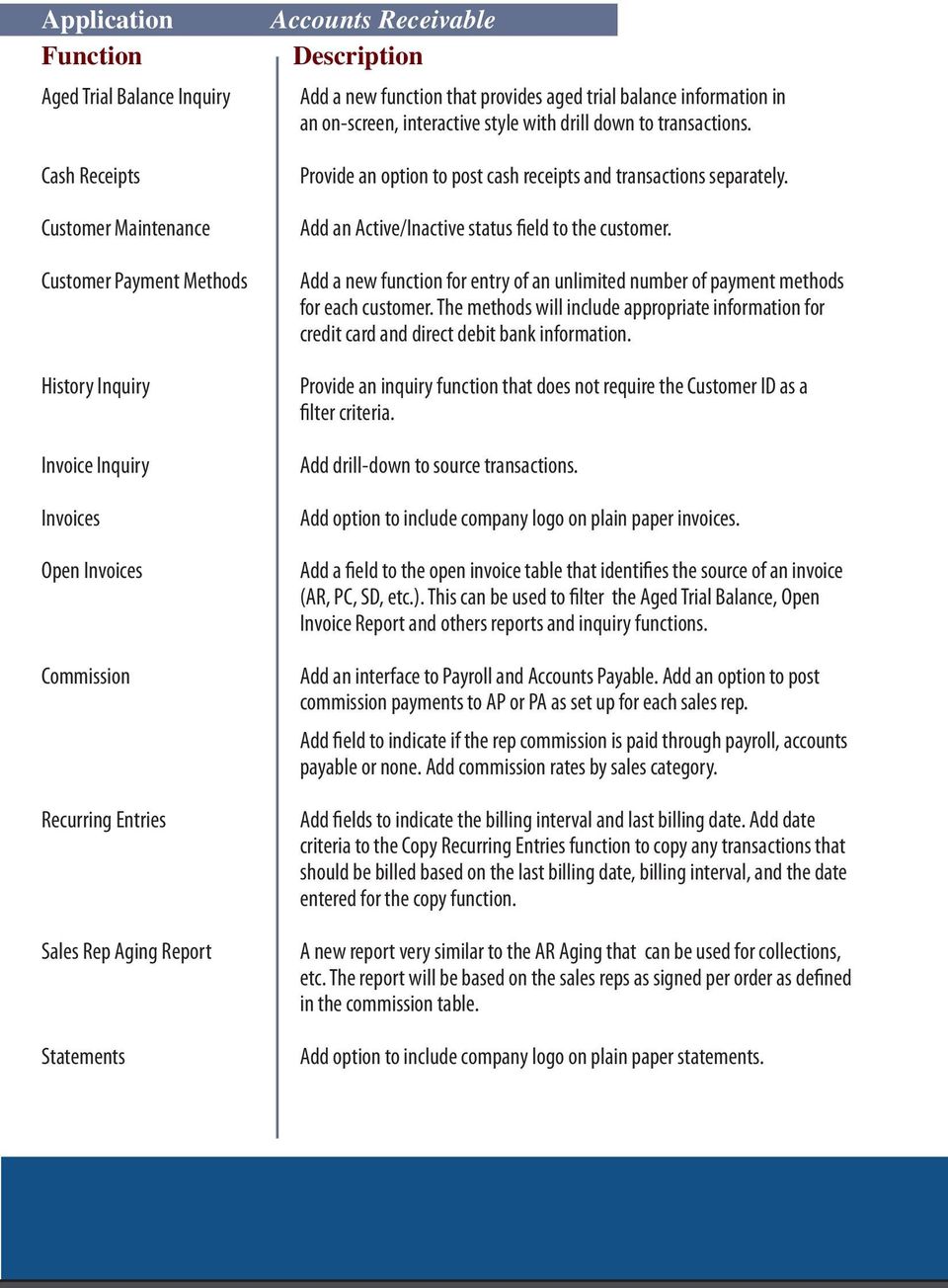
5 Aged Trial Balance Inquiry Cash Receipts Customer Maintenance Customer Payment Methods History Inquiry Invoice Inquiry Invoices Open Invoices Commission Recurring Entries Sales Rep Aging Report Statements Accounts Receivable Add a new function that provides aged trial balance information in an on-screen, interactive style with drill down to transactions. Provide an option to post cash receipts and transactions separately. Add an Active/Inactive status field to the customer. Add a new function for entry of an unlimited number of payment methods for each customer. The methods will include appropriate information for credit card and direct debit bank information. Provide an inquiry function that does not require the Customer ID as a filter criteria. Add drill-down to source transactions. Add option to include company logo on plain paper invoices. Add a field to the open invoice table that identifies the source of an invoice (AR, PC, SD, etc.). This can be used to filter the Aged Trial Balance, Open Invoice Report and others reports and inquiry functions. Add an interface to Payroll and Accounts Payable. Add an option to post commission payments to AP or PA as set up for each sales rep. Add field to indicate if the rep commission is paid through payroll, accounts payable or none. Add commission rates by sales category. Add fields to indicate the billing interval and last billing date. Add date criteria to the Copy Recurring Entries function to copy any transactions that should be billed based on the last billing date, billing interval, and the date entered for the copy function. A new report very similar to the AR Aging that can be used for collections, etc. The report will be based on the sales reps as signed per order as defined in the commission table. Add option to include company logo on plain paper statements.
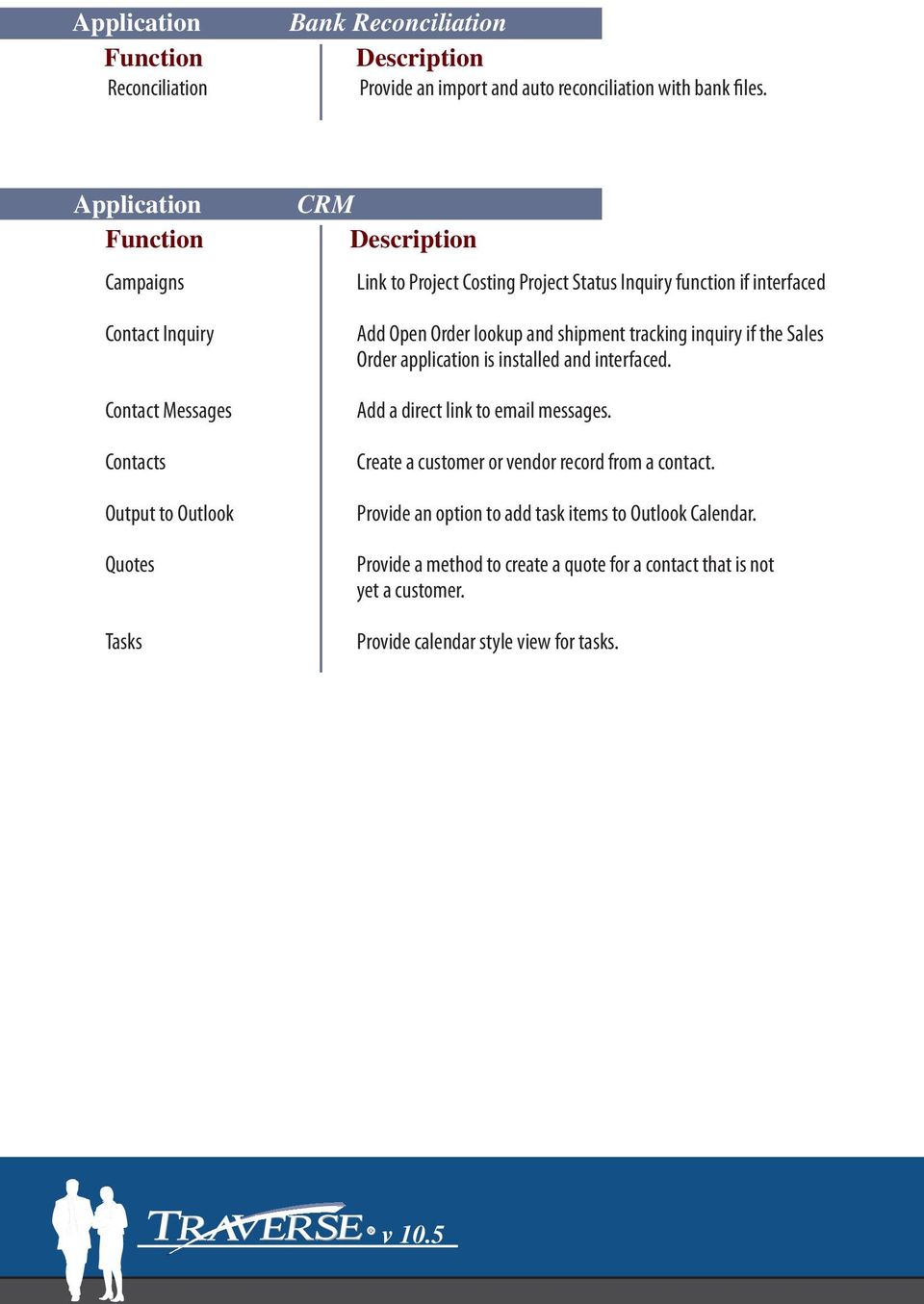
6 Reconciliation Bank Reconciliation Provide an import and auto reconciliation with bank files. Application Campaigns Contact Inquiry Contact Messages Contacts Output to Outlook Quotes Tasks CRM Link to Project Costing Project Status Inquiry function if interfaced Add Open Order lookup and shipment tracking inquiry if the Sales Order application is installed and interfaced. Add a direct link to messages. Create a customer or vendor record from a contact. Provide an option to add task items to Outlook Calendar. Provide a method to create a quote for a contact that is not yet a customer. Provide calendar style view for tasks. v 10.5
7 Blanket Sales Orders Distribution Requirements Planning Provide a maintenance and transaction system to support blanket orders to be processed through the Sales Order application. Application Budgets Intercompany Accounts Statement Layout Trial Balance General Ledger Allow an unlimited number of budgets and forecasts. Allow allocations to different account segments within the same company. Add print-time variables for column headings. Add an option to not allow editing of transactions. Provide a Reverse button to create a reversing entry. Add a tab to the selection screen to enable selection of account segment filter criteria for report.

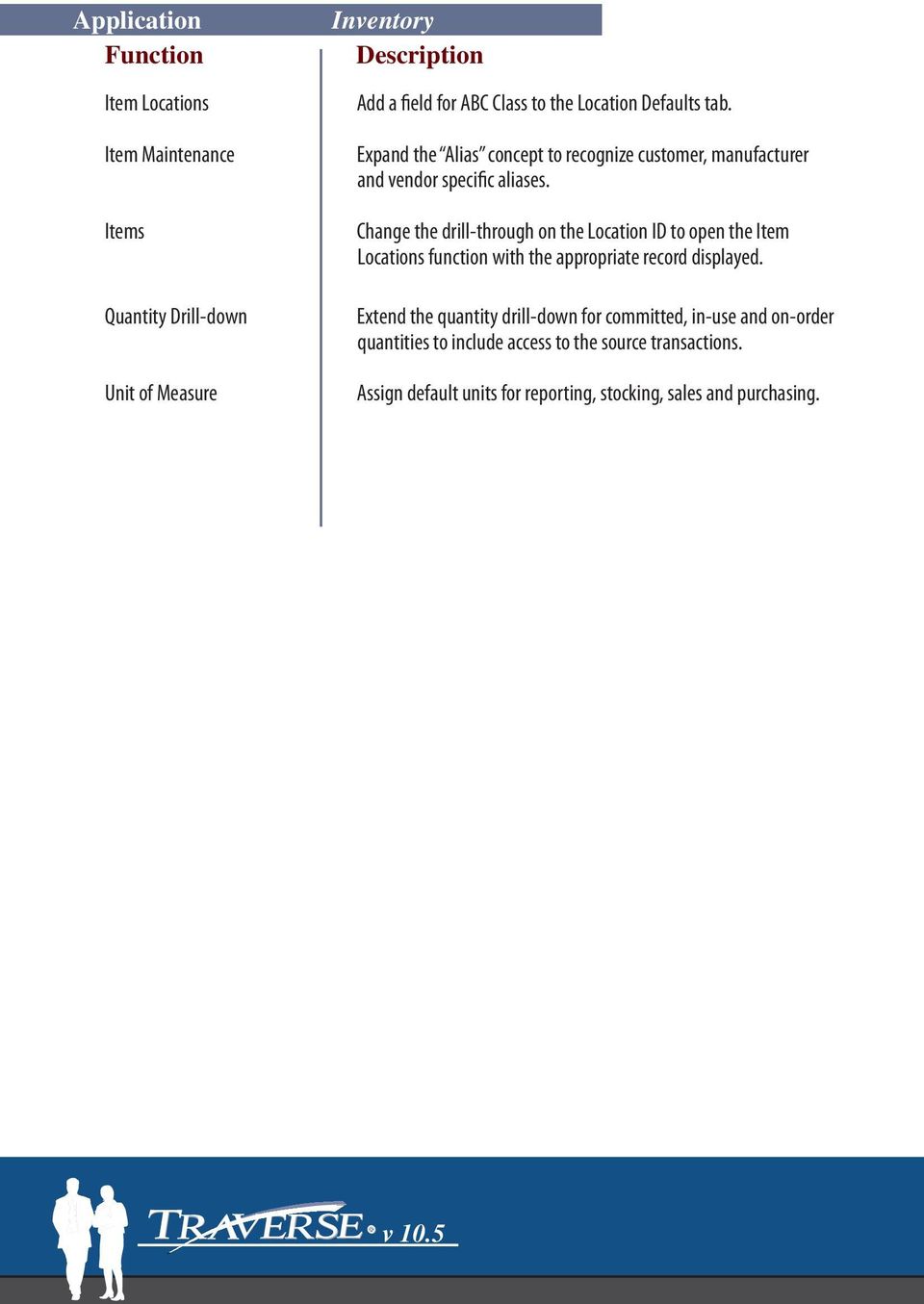
8 Item Locations Item Maintenance Items Quantity Drill-down Unit of Measure Inventory Add a field for ABC Class to the Location Defaults tab. Expand the Alias concept to recognize customer, manufacturer and vendor specific aliases. Change the drill-through on the Location ID to open the Item Locations function with the appropriate record displayed. Extend the quantity drill-down for committed, in-use and on-order quantities to include access to the source transactions. Assign default units for reporting, stocking, sales and purchasing. v 10.5
9 Bill of Materials ECO Tracking MFG - Bills of Material Provide an option to recurse through sub-assemblies to build cost breakdown on right hand panel of the general tab. Provide a maintenance function to set up engineering change orders. Allow for the tracking of changes to the bills of material to be logged to an ECO number. Application Standard MRP Report Summarized Locations MFG - MPS/MRP Add a print time option that excludes items from the report if they do not require action. Provide a method for users to see the MRP data in a view with all locations summarized.

10 Alternate Routing Order Traveler Production Orders Production Pick List Subcontract Status Report MFG - Production Provide an option for each release of a production order to use either the BOM primary or secondary routing. Add the instructions for the BOM on the Order Traveler. Add a transactional log of changes that are made to production orders, including user, date, time and changes made to the order. Add the quantity to be built to the header area of the report. Also add the description for the assembly and component items. Provide a new report that documents items that are off-site for sub-contracted operations. Application Global Replace functions MFG - Routing and Resources Provide an option to update the standard cost when replacing items. v 10.5

11 Check History Inquiry Employee History Employee Information Import Manual Checks Manual Checks Payroll Add an inquiry screen to view the Check History information. Add a tab to this function called Checks. The screen will list (by date, most recent at the top) the checks that have been paid to the employee for the year. Provide drill down to detail using the same detail view as the PA Check History. Validate the entry of a Social Security Number. Warn user if the SS# already exists. This validation should check not only current employees, but also check historical information that may contain the SS#. Add a function to import time entry (from time clock, PDA, etc.) into the PA transactions tables. Add an optional pop-up window that displays the remaining sick and vacation time available during transaction entry. Add the user Options button found in other transaction entry screens allowing the user to define which fields are active in the tab order. Add an optional pop-up window that displays the remaining sick and vacation time available during transaction entry. Add the user Options button found in other transaction entry screens allowing the user to define which fields are active in the tab order. W-2 Forms Add an option to print the W3 form (totals for W-2). Application Estimates Projects Project Costing Add Item ID detail section to specify individual items and quantities that are needed for a project/phase/task. Provide a method to commit the items at some stage (based on status or date) of the project. Relieve committed items with IN/WM Material Requisitions functions. Add a transactional log of changes that are made to projects, including user, date, time and changes made to the project, phase or task.

12 History Analysis Report History Inquiry Landed Cost PO History Print Orders Requisitions Purchase Order New, general format report based on the information stored in the PO history tables. Information will include comparisons of requested and actual quantities and dates. Add a new function to access information stored in the PO history tables. Add parameter-driven system to accommodate the need to distribute indirect cost to inventory items. Add a set of tables to track PO history. These will be separate from the current AP transaction history and will provide a better set of data to monitor the performance of vendor deliveries. Add an option to include company logo on plain paper purchase orders. Add a purchase history lookup based on the Item ID entered in line items. Add Copy From functionality to copy (replicate) an order from history. Add a purchase history lookup based on the Item ID entered in line items. Add the ability to insert/sequence/reorder line items to retain the ability to match originating document. Add the ability to receive items to sales orders, manufacturing orders and service work orders directly, without impacting inventory cost/status. Add support for direct drop shipments. Add a transactional log of changes that are made to purchase orders, including user, date, time and changes made to the order. v 10.5

13 Bill of Lading Commission Recurring Entries Sales Order This new form will be based on standard shipping documents. Provide commission assignment by line item. Add fields to indicate the billing interval and last billing date. Add date criteria to the Copy Recurring Entries function to copy any transactions that should be billed based on the last billing date, billing interval, and the date Add support for a transaction type of RMA. This will precede a Credit Memo like a Quote precedes a transaction in the current system. An RMA number will be issued, and the trans action will be held until product is received against the RMA. Add new entry points dedicated to the entry of quotes and credit memos. Add the ability to enter a Bill-To Customer ID that is different than the Sold-To ID. Add Copy From functionality to copy (replicate) an order from history. Retain completed line items from partially shipped orders. Completed lines get flagged, but are retained for proper audit and sequence. Add the ability to insert/sequence/reorder line items to retain the ability to match originating document. Add a transactional log of changes that are made to sales orders, including user, date, time and changes made to the order. Provide line item discount functionality.

14 Graphical Scheduler Recurring Billing Scheduled Maintenance Technicians Work Orders Application Business Rules Forms Control System Data Audit Tax Locations Tax Locations Service Director Provide a graphical scheduler with drag-and-drop functionality to schedule service orders. Add functionality to the Contracts to copy billing for them to AR based on frequency criteria. Add functionality to templates to copy them as scheduled maintenance orders to the schedule based on frequency criteria. Assign multiple Labor Codes and Skill Levels to each technician. Add a transactional log of changes that are made to work orders, including user, date, time and changes made to the order. System Manager Add a new function that consolidates the current Options and Interfaces functionality from each application to a centralized function. Also add additional process rules and provide a method to have rules unique to each role. Provide options for , fax and file output. Create a new System Manager function for presenting Audit information for various subsets of TRAVERSE data. Add additional sales tax calculation methods to TRAVERSE. These include maximum tax amounts and up to taxable sales amounts. Add drill down from summary totals to source transactions. Application Print RFID Tags Warehouse Management Create a configurable function to generate RFID tag information. v 10.5

15

16 4301 Dean Lakes Blvd. Shakopee, MN Fax

TRAVERSE Distribution solutions from Open Systems, Inc. improve efficiency and productivity regardless of the size & scope of your channel.
 TRAVERSE Distribution solutions from Open Systems, Inc. improve efficiency and productivity regardless of the size & scope of your channel. Your industry is continuously moving and changing. Competition
TRAVERSE Manufacturing
 Manufacturing TRAVERSE Manufacturing from Open Systems, Inc. is the perfect solution for smaller growing to larger progressive manufacturers Managing profitability, cost control, inventory control, purchasing
BUSINESS ESSENTIALS AND ADVANCED MANAGEMENT
 Introduction People drive business results; amplify their impact and you can achieve greater success. At Microsoft, we believe that when people are equipped with the right tools, they can surmount even
PRMS Accounts Payable. Version 8.4. RMS/Present. Master Production Schedule. Material Requirements Plan. Soft Bill Maintenance.
 PRMS Accounts Payable Version 8.4 RMS/Present SHOP FLOOR CONTROL Work Order/ FPO Maintenance Auto Allocation to Lots Pick Slip Print Master Production Schedule Material Requirements Plan Soft Bill Maintenance
for Sage 100 ERP Purchase Order Overview Document
 for Sage 100 ERP Purchase Order Document 2012 Sage Software, Inc. All rights reserved. Sage Software, Sage Software logos, and the Sage Software product and service names mentioned herein are registered
Feature List. Freight.Ware for Brokers. Included Features: 1 P a g e. 5501 NE 109 th Court Suite H Vancouver, Wa 98662 * (360) 896-6699 *
 Freight.Ware for Brokers Included Features: Explorer Style menu system Menu-Level Security SQL Server 2005 / 2008 based Full-charge integrated Accounting Management Information Center Optional Mileage
Sales. PowerERP e Business Solutions. RMA and Customer Returns. Order Entry. Contact Management. Estimating and Quoting. Sales Commissions.
 Overview Off the shelf accounting programs like QuickBooks & Peachtree dominate very small businesses, but as those businesses get larger, these accounting programsʹ capacities and features can be stretched
Business Process Sample as used by existing Create!form customers
 Process Pick Slip, Pack Slip, Labels Customer: US Based distribution company Pick slips are generated through their ERP system. These are done either on demand or via a scheduled job that runs every 10
1 - ACCOUNTS RECEIVABLE
 1 - ACCOUNTS RECEIVABLE ACCOUNTS RECEIVABLE 1.01 User defined GL posting dates for receivables documents (e.g. orders, invoices, etc.) to be either the Transaction Date or the System Date. 1.02 User configuration
for Sage 100 ERP Sales Order Overview Document
 for Sage 100 ERP Sales Order Document 2012 Sage Software, Inc. All rights reserved. Sage Software, Sage Software logos, and the Sage Software product and service names mentioned herein are registered trademarks
6A. RMA Processing. How does an RMA work?
 6A. RMA Processing 6A. RMA Processing RMA (Returned Merchandise Authorization) processing is a common requirement among manufacturing companies. An RMA system should be able to do the following: RMA entry
Copyright 2011 Business Management Systems. Web Based ERP/CRM Software
 Web Based ERP/CRM Software INTRODUCTION... 7 Features... 8 Services... 9 INSTALLATION... 10 CUSTOMER FILE... 11 Add Customer... 11 Modify Customer... 13 Add Ship To... 14 Modify Ship To... 15 Reports...
Version 7.40 Customer Upgrade Guide. Sage ERP MAS 500
 Version 7.40 Customer Upgrade Guide Sage ERP MAS 500 2005-2011 Sage Software, Inc. All rights reserved. Sage, the Sage logos, and the Sage product and service names mentioned herein are registered trademarks
Application Programming Interface (API)
 Integration to Salesforce CRM Create a Recurring Billing Contract from an Opportunity in one click. Create a Sales Order from an Opportunity in one click. Create a Project from a list of pre- defined templates
Inform Upgrade Version 20.0.77.77. New Features Improved Google Calendar Synchronization
 **The latest Inform upgrade includes features and fixes from all previous upgrades. Please review the upgrade notes for any additional versions that fall between your current version and this upgrade.**
Dynamics GP 50 Tips in 50 Minutes
 Tip #1 Speed Up GL Distribution Entry Account Alias Financials Assign an Alias to Accounts. In any GL Distribution Entry window, click the arrow next to the Account Lookup button or type Ctrl+Q. 1 Enter
for Sage 100 ERP Accounts Payable Overview Document
 for Sage 100 ERP Accounts Payable Document 2012 Sage Software, Inc. All rights reserved. Sage Software, Sage Software logos, and the Sage Software product and service names mentioned herein are registered
Copyright 2006 Business Management Systems. Web Based ERP/CRM Software
 Web Based ERP/CRM Software INTRODUCTION...8 Features... 9 Services... 10 INSTALLATION...11 CUSTOMER FILE...12 Add Customer... 12 Modify Customer... 14 Add Ship To... 15 Modify Ship To... 16 Reports...
Distribution Training Guide. D110 Sales Order Management: Basic
 Distribution Training Guide D110 Sales Order Management: Basic Certification Course Prerequisites The combined D110 Sales Order Management certification course consists of a hands- on guide that will walk
SalesPad for Dynamics GP Security Settings
 SalesPad for Dynamics GP Security Settings A software product created by SalesPad Solutions Copyright 2004-2012 www.salespad.net SalesPad Solutions, LLC. 3200 Eagle Park Drive, Suite 100 Grand Rapids,
S U M M A R Y O F T R A D E P O I N T E N T E R P R I S E F O R W I N D O W S C O R E F U N C T I O N A L I T Y
 S U M M A R Y O F T R A D E P O I N T E N T E R P R I S E F O R W I N D O W S C O R E F U N C T I O N A L I T Y C U S T O M E R R E L A T I O N S H I P M A N A G E M E N T O V E R V I E W CRM: Contact
WHAT S NEW IN SAGE 100 2015. Colleen A. Gutirrez, Senior Consultant II, BKD Technologies
 WHAT S NEW IN SAGE 100 2015 Colleen A. Gutirrez, Senior Consultant II, BKD Technologies WELCOME/INTRODUCTIONS Colleen Gutirrez 19 years of experience in technology consulting Primarily distribution & manufacturing
Accounts Payable. Highlights
 Accounts Payable With Blackbaud s Accounts Payable, paying bills is now easier and more efficient. Make payments any way you want by system-generated or handwritten check, bank draft or electronic funds
Info Net LAMAR SOFTWARE, INC. Enterprise Resource Planning. www.lamarsoftware.com. Efficiency. Productivity. Flexibility
 Efficiency LAMAR SOFTWARE, INC. Productivity Flexibility Connect your suppliers, vendors and business partners in real-time over the Internet with LAMAR Software s proven web-enabled ERP suite. Info Net
Bill of Manufacturing Guide
 Note: To change the product logo for your ow n print manual or PDF, click "Tools > Manual Designer" and modify the print manual template. Contents 3 Table of Contents 1 Introduction 4 2 Why You Need a
Feature List. Freight.Ware for Truckload Carriers. Included Features: 1 P a g e
 Freight.Ware for Truckload Carriers Included Features: Explorer Style menu system Menu-Level Security SQL Server based Full-charge integrated Accounting Management Information Center with Bulletins, Reminders
PREVIOUS USER TYPES FOR CONTRACTS BASED ON THE FORMER PRICELISTS (BEFORE MAY 1st, 2008)
 LICENSE COMPARISON CHART FOR SAP BUSINESS ONE LICENSE USER TYPES PREVIOUS USER TYPES FOR CONTRACTS BASED ON THE FORMER PRICELISTS (BEFORE MAY 1st, 2008) Module Functionality Professional CRM Logistics
Microsoft Dynamics GP 2013. Packaging of Functionality & Product Capabilities in Microsoft Dynamics GP 2013
 Microsoft Dynamics GP 2013 Packaging of Functionality & Product Capabilities in Microsoft Dynamics GP 2013 Date: November, 2012 Contents Become a Dynamic Business with Microsoft Dynamics GP 3 How to Buy
for Sage 100 ERP Accounts Receivable Overview Document
 for Sage 100 ERP Accounts Receivable Document 2012 Sage Software, Inc. All rights reserved. Sage Software, Sage Software logos, and the Sage Software product and service names mentioned herein are registered
Sophisticated Yet Simple
 Sophisticated Yet Simple A SALESFORCE ADD-ON FOR ORDER FULFILLMENT AND INVENTORY MANAGEMENT You started with, it changed the way you conduct business, in fact, you now have more customers, more employees,
Version 10 ACCOUNTS RECEIVABLE
 Version 10 ACCOUNTS RECEIVABLE Accounts Receivable Manual Version 10 ACCOUNTS PAYABLE ACCOUNTS RECEIVABLE BILLING CONTROL FILES FIXED ASSETS GENERAL LEDGER INVENTORY PAYROLL PERSONNEL ii N/Compass Hotline
for Sage 100 ERP General Ledger Overview Document
 for Sage 100 ERP General Ledger Document 2012 Sage Software, Inc. All rights reserved. Sage Software, Sage Software logos, and the Sage Software product and service names mentioned herein are registered
What s New In v2013. Accounts Payable:
 What s New In v2013 Availability Download from Sage Software website, they are no longer shipping CD s. We will provide the CD if user has an active Sage Maintenance plan. Accounts Payable: Expanded Invoice
for Sage 100 ERP Job Cost Overview Document
 for Sage 100 ERP Job Cost Document 2012 Sage Software, Inc. All rights reserved. Sage Software, Sage Software logos, and the Sage Software product and service names mentioned herein are registered trademarks
Sage Accpac ERP 5.6A. SageCRM 6.2 I Integration Update Notice
 Sage Accpac ERP 5.6A SageCRM 6.2 I Integration Update Notice 2009 Sage Software, Inc. All rights reserved. Sage, the Sage logos, and all Sage Accpac product and service names mentioned herein are registered
Dynamics GP 50 More Tips in 50 Minutes
 Financial Tip #1 Use Keyboard Shortcuts for Marking Cleared Transactions in Bank Rec Transactions >> Financial >> Reconcile Bank Statement Select the first transaction, then type CTRL+B (Begin Range).
; ; ; ; MICROSOFT BUSINESS SOLUTIONS NAVISION STANDARD
 ; ; ; ; MICROSOFT BUSINESS SOLUTIONS NAVISION STANDARD MICROSOFT BUSINESS SOLUTIONS NAVISION STANDARD Microsoft Navision Standard is an integrated business management solution designed for organizations
Distribution Training Guide. D100 Inventory Management: Basic
 Distribution Training Guide D100 Inventory Management: Basic Certification Course Prerequisites The course consists of a hands- on guide that will walk you through the specifics of Acumatica s Inventory
BUSINESS SYSTEM SOFTWARE
 BUSINESS SYSTEM SOFTWARE For Distribution & Wholesale Engineering Fabrication & Jobbing Service & Repair Preventative Maintenance Manufacturing Custom Product Manufacturing Counter POS SOFTWARE SOLUTIONS
Invoice Matching User Guide
 Invoice Matching User Guide Version 8.1 November 2004 Document Number MAUG-81UW-04 Procurement Lawson does not warrant the content of this document or the results of its use. Lawson may change this document
Microsoft Dynamics GP. Project Accounting Accounting Control Guide
 Microsoft Dynamics GP Project Accounting Accounting Control Guide Copyright Copyright 2007 Microsoft Corporation. All rights reserved. Complying with all applicable copyright laws is the responsibility
General Accounting Applications (As featured in this pdf document) Licensing Applications. Additional Applications
 SOFTWARE PRODUCTS LIST General Accounting Applications (As featured in this pdf document) MSI-Accounts Payable...pg 2,3 MSI-Accounts Receivable...pg 4,5 MSI-Budget Planning...pg 6,7 MSI-Cash Register...pg
Business System Software
 Business System Software BUSINESS SYSTEM SOFTWARE For Custom Product Manufacturing Engineering Fabrication & Jobbing Food & Chemical Process Industries Distribution & Wholesale Sales, Service & Repair
Course Topics: Course Name: Oracle Purchasing. Duration 5 Days. Procure To Pay Lifecycle Overview. Oracle Purchasing Overview
 Course Name: Oracle Purchasing Duration 5 Days Course Topics: Procure To Pay Lifecycle Overview Understanding Procure to Pay Lifecycle Understanding Oracle Procure to Pay Process Oracle Purchasing Overview
Sage 100 ERP 2015 Customer Upgrade Guide
 Sage 100 ERP 2015 Customer Upgrade Guide This is a publication of Sage Software, Inc. Copyright 2015 Sage Software, Inc. All rights reserved. Sage, the Sage logos, and the Sage product and service names
204 Reports Included with Version 7.0!
 204 Reports Included with Version 7.0! Accounts Payable Aged A/P summary by name Aged A/P summary by number Detailed A/P activity by name Detailed A/P activity by number Detailed aged A/P by name Detailed
MODULE 4: PURCHASE ORDER MANAGEMENT
 MODULE 4: PURCHASE ORDER MANAGEMENT Module Overview Timely purchases that are made at the best price improve a company s inventory management, reduce costs, and have a direct effect on the company s ability
New Features in Sage BusinessVision 2013 (version 7.6)
 New Features in Sage BusinessVision 2013 (version 7.6) 2012 Sage Software, Inc. All rights reserved. Sage Software, Sage Software logos, and the Sage Software product and service names mentioned herein
Module 6 Business Process and ADempeire
 Module 6 Business Process and ADempeire By Wipawii Jaruswarapan Business Consultant, ecosoft [email protected] ADempiere ERP 1 2 Module Objectives Overall ADempiere Go through sale cycle Sale module Finance
Sage 300 ERP 2014. Sage CRM 7.2 Integration Upgrade Guide
 Sage 300 ERP 2014 Sage CRM 7.2 Integration Upgrade Guide This is a publication of Sage Software, Inc. Version 2014 Copyright 2013. Sage Software, Inc. All rights reserved. Sage, the Sage logos, and the
Solar Eclipse Accounts Payable. Release 8.7.2
 Solar Eclipse Accounts Payable Release 8.7.2 Legal Notices 2011 Epicor Software Corporation. All rights reserved. Unauthorized reproduction is a violation of applicable laws. Epicor and the Epicor logo
Microsoft Dynamics GP. Project Accounting Cost Management Guide
 Microsoft Dynamics GP Project Accounting Cost Management Guide Copyright Copyright 2010 Microsoft. All rights reserved. Limitation of liability This document is provided as-is. Information and views expressed
Invoice-PO-Receipt Mat h c i hing
 Invoice-PO-Receipt Matching Agenda Overview Creation & Setup Invoice Custom Columns PO and Vendor Information Invoice Items Tab Invoice Credits Tab Invoice Subcontractors Tab Invoice Amounts Optional Tabs
AWARE ENTERPRISE SYSTEM
 AWARE ENTERPRISE SYSTEM The Aware Enterprise System from Aware Business Systems Pty Ltd is a remarkable software package designed for Australian manufacturers and distributors. Designed and developed in
Table of Contents. Bibliografische Informationen http://d-nb.info/98771483x. digitalisiert durch
 1 What is Microsoft Dynamics AX? 1 1.1 Axapta and the History of Dynamics AX 1 1.2 Dynamics AX 2009 Product Overview 2 1.3 Technology and System Architecture 4 1.4 Application Components 8 2 Getting Started:
System Management and Customization Manager
 System Management and Customization Manager About Sage Software Sage Software supports the needs, challenges, and dreams of more than 2.6 million small and midsized business customers in North America
TheFinancialEdge. Sample Reports Guide
 TheFinancialEdge Sample Reports Guide 091708 2008 Blackbaud, Inc. This publication, or any part thereof, may not be reproduced or transmitted in any form or by any means, electronic, or mechanical, including
General. Sage Evolution ERP Version 7
 Version 7 B Sage Evolution ERP Version 7 Sage Evolution Version 7 is here. It s time to get serious about greater flexibility, efficiency and control within your business. Our continuous investment in
Microsoft Dynamics GP. Project Accounting Billing Guide
 Microsoft Dynamics GP Project Accounting Billing Guide Copyright Copyright 2010 Microsoft. All rights reserved. Limitation of liability This document is provided as-is. Information and views expressed
FUEL DISTRIBUTION SYSTEM
 Software developed by fuel people for fuel people Modules and Interfaces Table of Contents Continued Training E-Commerce Web Services Dashboard Mapping and Routing Electronic Payment Processing ArchiveXpress
Overview of Procure to Pay
 This segment from our 427+ page JD Edwards Accounts Payable manual is being made available as a sample of our training manuals. Please contact [email protected] if you have any JDE training needs,
Oak Street The Complete Solution
 Oak Street The Complete Solution Eight years ago, I.S.S. set out to create a new, more powerful software package. We began with our 18 years of experience serving wholesalers. Then, we looked at the best
Best Practices for Inventory Control Using Dynamics GP
 Best Practices for Inventory Control Using Dynamics GP Inventory Humor Agenda Sales Inventory Valuation Methods Reason Code Troubleshooting Cost Issues Taking Physical Inventory Counts Landed Cost Review
ERP Areas and Modules / Trading
 ERP Areas and Modules / Trading These modules reflect the multi national character of the SoftBASE Business Suite. They support multiple languages, currencies, and adapt easily to cultural differences.
Oracle Payables Implementation Overview with screenshots Compilation of Oracle Payables Implementation notes by Ranu Srivastava ...
 Compilation of Oracle Payables Implementation notes by Ranu Srivastava... Setting up Banks... Defining Internal Bank... Payables Options... Defining Payment Documents... Creating Suppliers... Overview
Microsoft Dynamics GP. Field Service Service Call Management
 Microsoft Dynamics GP Field Service Service Call Management Copyright Copyright 2011 Microsoft. All rights reserved. Limitation of liability This document is provided as-is. Information and views expressed
Microsoft Dynamics GP. Project Accounting Billing Guide
 Microsoft Dynamics GP Project Accounting Billing Guide Copyright Copyright 2007 Microsoft Corporation. All rights reserved. Complying with all applicable copyright laws is the responsibility of the user.
Accounting I & Accounting II
 Accounting I & Accounting II 2011 User Conference Convergence: Better Together Configuring the Tigerpaw Accounting Interface The Configure Accounting dialog box is one of the main areas setup in Tigerpaw
Accounts Receivable Reference Guide
 Last Updated: March 7, 2009 About this Guide This Guide is for use by SedonaOffice customers only. This guide is not meant to serve as an operating or training manual, its purpose is to provide an overview
Accounts Receivable. Features. Parameterized. Multiple Divisions
 Accounts Receivable Solution-IV Accounts Receivable is a flexible and complete accounting software package designed to help you manage your customer base and incoming cash flow. Your sales and profit information,
Guide to Accounts Payable Accruals alio
 Guide to Accounts Payable Accruals alio Copyright 2011 Weidenhammer Systems Corporation Released May 2011 This edition applies to Release 12.0 of the Accounts Payable Accruals software solution and to
8.0.0.0.0 Accounts Receivable. I. Overview Definitions and Abbreviations. Equipment and Supplies Required
 8.0.0.0.0 Accounts Receivable I. Overview Definitions and Abbreviations Equipment and Supplies Required Page 1 of 36 Revised October 2015 Version 4 II. Job Position(s) Accounts Receivable Clerk Page 2
Accounts Receivable User s Guide. Version 7.6 2210.AR76
 Accounts Receivable User s Guide Version 7.6 2210.AR76 2010 Open Systems Holdings Corp. All rights reserved. No part of this manual may be reproduced by any means without the written permission of Open
Project Tracking 2015
 Project Tracking 2015 Build Notes ENCORE BUSINESS SOLUTIONS www.encorebusiness.com twitter.com/encorebusiness.com [email protected] Copyright Build Notes copyright 2015 Encore Business Solutions,
DBA Classic Conversion Guide
 Note: To change the product logo for your ow n print manual or PDF, click "Tools > Manual Designer" and modify the print manual template. Contents 3 Table of Contents 1 Introduction 4 2 Classic Features
Product. Prologue Accounts Payable Automate Your Accounts Payable Processing
 Product Prologue Accounts Payable Automate Your Accounts Payable Processing Product The foundation of effective enterprise performance management is sound business intelligence intelligence that requires
MODULE 1: SALES ORDER MANAGEMENT. Module Overview
 MODULE 1: SALES ORDER MANAGEMENT Module Overview For companies to survive, they must keep customers satisfied. Therefore, a quick and accurate response to inquiries, such as the price of a product or the
EMAS EXECUTIVE MANAGEMENT ACCOUNTING SYSTEM Financial and Distribution application solutions PRODUCT OVERVIEW
 EXECUTIVE MANAGEMENT ACCOUNTING SYSTEM Financial and Distribution application solutions INDEX GENERAL INFORMATION Common Features Page 3 Technical Information Page 3 Product Objectives.. Page 3 MODULE
County Accounting Manual. Accounts Receivables and Sales Receipts - Deposits
 County Accounting Manual Accounts Receivables and Sales Receipts - Deposits Contents: Preferences Create Item Create Invoice Customize Invoice Template Customer Payments Apply Customer Discount Add Payment
Sage MAS 500 Year-End Processing. Michael Schmitt, BKD December 2011
 Sage MAS 500 Year-End Processing Michael Schmitt, BKD December 2011 Welcome / Introductions Michael Schmitt Senior Consultant [email protected] Agenda Welcome / Introductions Order of closing Helpful hints
Microsoft Dynamics GP. Project Accounting Cost Management Guide
 Microsoft Dynamics GP Project Accounting Cost Management Guide Copyright Copyright 2008 Microsoft Corporation. All rights reserved. Complying with all applicable copyright laws is the responsibility of
Accounts Payable User s Guide. Version 7.6 2210.AP76
 Accounts Payable User s Guide Version 7.6 2210.AP76 1995, 1997, 2000, 2003 2010 by Open Systems Holdings Corp. All rights reserved. No part of this manual may be reproduced by any means without the written
How To Use The New Version Of The Powerpoint V2.2.1.1
 Infor10 ERP Express (VISUAL) 7.1.0 Release Notes Copyright 2012 Infor All rights reserved. The word and design marks set forth herein are trademarks and/or registered trademarks of Infor and/or related
Using Microsoft Dynamics AX 2012
 Exercise Guide Andreas Luszczak Using Microsoft Dynamics AX 2012 Springer Vieweg, 2nd Edition 2012 ISBN 978-3-8348-1742-6 September 2012 VI Exercise Guide Registered and/or industrial names, trade names,
Receivables & Payables
 Receivables & Payables Microsoft Dynamics NAV RECEIVABLES AND PAYABLES MANAGEMENT Microsoft DynamicsTM NAV gives you an efficient vendor and customer management system that helps you strengthen business
Sage 300 2014 Product Update 4 Release Notes
 Sage 300 2014 Product Update 4 Release Notes Product Update 4 contains a modified version of one or more Sage 300 program components. It is not a full upgrade or a product replacement. It is valid only
Portfolio Based Enterprise Property Management System allows you to manage hundreds of properties from your virtual desktop.
 AP Cash GL Portfolio Based Enterprise Property Management System allows you to manage hundreds of properties from your virtual desktop. User friendly interface allows most actions to be completed in one
Sage MAS 500 Version 7.4 Sneak Peak
 Sage MAS 500 Version 7.4 Sneak Peak What s New in 7.4 and Why it s Important Productivity Enhancements Landed Cost Improvements Unit of Measure Improvements Manufacturing & Distribution Platform & Performance
Accounting & Finance. Guidebook
 Accounting & Finance Guidebook January 2012 TABLE OF CONTENTS Table of Contents... 2 Preface... 6 Getting Started... 8 Accounting... 10 Accounting Welcome... 10 Sales Quotes... 11 New Sales Quote... 11
Reference Document Month-End Closing
 Overview Each individual company according to their own business practices establishes month end closing procedures. Typically, a company will create a monthly accounting calendar, which sets the dates
Sage 100 ERP. Customer Upgrade Guide
 Sage 100 ERP Customer Upgrade Guide 2012 Sage Software, Inc. All rights reserved. Sage, the Sage logos, and the Sage product and service names mentioned herein are registered trademarks or trademarks of
Sage 100 ERP. Streamline Your Workflows. What's New in Sage 100 ERP 2013 BENEFITS
 Sage 100 ERP What's New in Sage 100 ERP 2013 The newest release of Sage 100 ERP (formerly Sage ERP MAS 90 and 200) continues to be the most comprehensive business management suite by Sage for mid-sized
What s new in Sage Evolution Version 6.81
 What s new in Sage Evolution Version 6.81 Sage Sage s continuous investment in research and development ensures that you are kept up-to-date with the latest and most cutting-edge business management software.
Sage 300 ERP 2012. What's New
 Sage 300 ERP 2012 What's New This is a publication of Sage Software, Inc. Version 2012 Copyright 2012. Sage Software, Inc. All rights reserved. Sage, the Sage logos, and the Sage product and service names
pc/mrp RELEASES 8.60 VERSION
 pc/mrp NEWS pc/mrp RELEASES 8.60 VERSION July 2011 e-mail address: [email protected] Internet: www.pcmrp.com Automatic Credit Card Processing pc/mrp Version 8.56 and higher allow credit cards to be processed
Training Guide. Accounts Payable Training. Mover s Suite users training on the Accounts Payable functionality within Microsoft Dynamics GP
 Training Guide Accounts Payable Training Mover s Suite users training on the Accounts Payable functionality within Microsoft Dynamics GP Version 3.7 (Fall 2008) Accounts Payable Training Copyright Copyright