
Oracle Fusion Applications Marketing Leads Guide. 11g Release 1 (11.1.3) Part Number E
|
|
|
- Oswald Craig
- 10 years ago
- Views:
Transcription
1 Oracle Fusion Applications Marketing Leads Guide 11g Release 1 (11.1.3) Part Number E November 2011

2 Oracle Fusion Applications Marketing Leads Guide Part Number E Copyright 2011, Oracle and/or its affiliates. All rights reserved. Authors: Brian Casey, Peggy Larson, Sheila Black This software and related documentation are provided under a license agreement containing restrictions on use and disclosure and are protected by intellectual property laws. Except as expressly permitted in your license agreement or allowed by law, you may not use, copy, reproduce, translate, broadcast, modify, license, transmit, distribute, exhibit, perform, publish, or display any part, in any form, or by any means. Reverse engineering, disassembly, or decompilation of this software, unless required by law for interoperability, is prohibited. The information contained herein is subject to change without notice and is not warranted to be error-free. If you find any errors, please report them to us in writing. If this is software or related documentation that is delivered to the U.S. Government or anyone licensing it on behalf of the U.S. Government, the following notice is applicable: U.S. GOVERNMENT RIGHTS Programs, software, databases, and related documentation and technical data delivered to U.S. Government customers are "commercial computer software" or "commercial technical data" pursuant to the applicable Federal Acquisition Regulation and agency-specific supplemental regulations. As such, the use, duplication, disclosure, modification, and adaptation shall be subject to the restrictions and license terms set forth in the applicable Government contract, and, to the extent applicable by the terms of the Government contract, the additional rights set forth in FAR , Commercial Computer Software License (December 2007). Oracle America, Inc., 500 Oracle Parkway, Redwood City, CA This software or hardware is developed for general use in a variety of information management applications. It is not developed or intended for use in any inherently dangerous applications, including applications that may create a risk of personal injury. If you use this software or hardware in dangerous applications, then you shall be responsible to take all appropriate fail-safe, backup, redundancy, and other measures to ensure its safe use. Oracle Corporation and its affiliates disclaim any liability for any damages caused by use of this software or hardware in dangerous applications. Oracle and Java are registered trademarks of Oracle Corporation and/or its affiliates. Other names may be trademarks of their respective owners. Intel and Intel Xeon are trademarks or registered trademarks of Intel Corporation. All SPARC trademarks are used under license and are trademarks or registered trademarks of SPARC International, Inc. AMD, Opteron, the AMD logo, and the AMD Opteron logo are trademarks or registered trademarks of Advanced Micro Devices. UNIX is a registered trademark of The Open Group. This software or hardware and documentation may provide access to or information on content, products and services from third parties. Oracle Corporation and its affiliates are not responsible for and expressly disclaim all warranties of any kind with respect to third-party content, products, and services. Oracle Corporation and its affiliates will not be responsible for any loss, costs, or damages incurred due to your access to or use of third-party content, products, or services.

3 Contents 1 Process Leads Import Leads Import Activity Attachment Options: Explained Import Activity Import Options: Explained Import Activity Field Mapping: Explained File-Based Import Monitoring: Explained Managing File-Based Import Exceptions: Worked Example FAQs for Import Leads Submit Lead Processing Lead Ranking: Explained Lead Ranking: Examples Lead Status: How it Automatically Gets Set Lead Assignment: How It Is Processed FAQs for Monitoring Leads Identify Sales Prospects and Target Products Sales Targeting Data Visibility: Explained Sales Targeting Navigation Hints: Explained Sales Targeting Customer Criteria: Explained Sales Targeting Product Criteria: Explained Sales Targeting Lead Criteria: Explained Exploring Short Term, High Revenue Leads: Worked Example FAQs for Identify Sales Prospects and Target Products Follow Up Leads How Lead Components Fit Together Lead Actions: Explained Lead Statuses: Explained Lead Qualification: Explained Qualifying Leads: Examples Lead Ownership and Sales Team Resources: Explained Sales Team Examples Lead Assessments: Explained FAQs for Follow Up Leads Register and Approve Leads Lead Registration: How It Works

4 Lead Registration: Explained FAQs for Register and Approve Leads...4-4

5 Preface This Preface introduces the guides, online help, and other information sources available to help you more effectively use Oracle Fusion Applications. Oracle Fusion Applications Help You can access Oracle Fusion Applications Help for the current page, section, activity, or task by clicking the help icon. The following figure depicts the help icon. With a local installation of help, you can add custom help files to replace or supplement the provided content. Help content patches are regularly made available to ensure you have access to the latest information. Patching does not affect your custom content. Oracle Fusion Applications Guides Oracle Fusion Applications guides are a structured collection of the help topics, examples, and FAQs from the help system packaged for easy download and offline reference, and sequenced to facilitate learning. You can access the guides from the Guides menu in the global area at the top of Oracle Fusion Applications Help pages. Note The Guides menu also provides access to the business process models on which Oracle Fusion Applications is based. Guides are designed for specific audiences: User Guides address the tasks in one or more business processes. They are intended for users who perform these tasks, and managers looking for an overview of the business processes. They are organized by the business process activities and tasks. Implementation Guides address the tasks required to set up an offering, or selected features of an offering. They are intended for implementors. They are organized to follow the task list sequence of the offerings, as displayed within the Setup and Maintenance work area provided by Oracle Fusion Functional Setup Manager. Concept Guides explain the key concepts and decisions for a specific area of functionality. They are intended for decision makers, such as chief financial officers, financial analysts, and implementation consultants. They are organized by the logical flow of features and functions.
6 Security Reference Manuals describe the predefined data that is included in the security reference implementation for one offering. They are intended for implementors, security administrators, and auditors. They are organized by role. To supplement these guides, which cover specific business processes and offerings, the following guides address common areas: Guide Intended Audience Purpose Common User Guide All users Explains tasks performed by most users. Common Implementation Guide Implementors Explains tasks within the Define Common Applications Configuration task list, which is included in all offerings. Information Technology Management, Implement Applications Guide Technical Guides Implementors System administrators, application developers, and technical members of implementation teams Explains how to use Oracle Fusion Functional Setup Manager to plan, manage, and track your implementation projects, migrate setup data, and validate implementations. Explain how to install, patch, administer, and customize Oracle Fusion Applications. For guides that are not available from the Guides menu, go to Oracle Technology Network at Other Information Sources My Oracle Support Oracle customers have access to electronic support through My Oracle Support. For information, visit ctx=acc&id=info or visit ctx=acc&id=trs if you are hearing impaired. Use the My Oracle Support Knowledge Browser to find documents for a product area. You can search for release-specific information, such as patches, alerts, white papers, and troubleshooting tips. Other services include health checks, guided lifecycle advice, and direct contact with industry experts through the My Oracle Support Community. Oracle Enterprise Repository for Oracle Fusion Applications Oracle Enterprise Repository for Oracle Fusion Applications provides visibility into service-oriented architecture assets to help you manage the lifecycle of your software from planning through implementation, testing, production,

7 and changes. In Oracle Fusion Applications, you can use the Oracle Enterprise Repository for Oracle Fusion Applications for: Technical information about integrating with other applications, including services, operations, composites, events, and integration tables. The classification scheme shows the scenarios in which you use the assets, and includes diagrams, schematics, and links to other technical documentation. Publishing other technical information such as reusable components, policies, architecture diagrams, and topology diagrams. The Oracle Fusion Applications information is provided as a solution pack that you can upload to your own deployment of Oracle Enterprise Repository for Oracle Fusion Applications. You can document and govern integration interface assets provided by Oracle with other assets in your environment in a common repository. Documentation Accessibility For information about Oracle's commitment to accessibility, visit the Oracle Accessibility Program website at accessibility/index.html. Comments and Suggestions Your comments are important to us. We encourage you to send us feedback about Oracle Fusion Applications Help and guides. Please send your suggestions to [email protected]. You can use the Send Feedback to Oracle link in the footer of Oracle Fusion Applications Help.
8

9 1 Process Leads Import Leads Import Activity Source File Options: Explained The Import Activity consists of a step by step guided process to assist you with creating an import activity for a given object. This topic describes the source file options defined in the Import Activity that are used by the import process to locate and parse the source file data. Source File Data Enter attribute details pertaining to the source file as follows: Option File Type Data Type, Delimiter, and Header Row Included Import Mapping Description Source file must be either Text or XML. A Text file type can further be defined based on how the data is delimited and if the source file is expected to include a row of headings for each column. Displays a list of predefined mappings for the object selected for this import activity. The selected mapping will be used as the basis for mapping your source file in the next Import Activity step. Source File Location The following outlines the options that are available to you when locating your source file for import. Process Leads 1-1
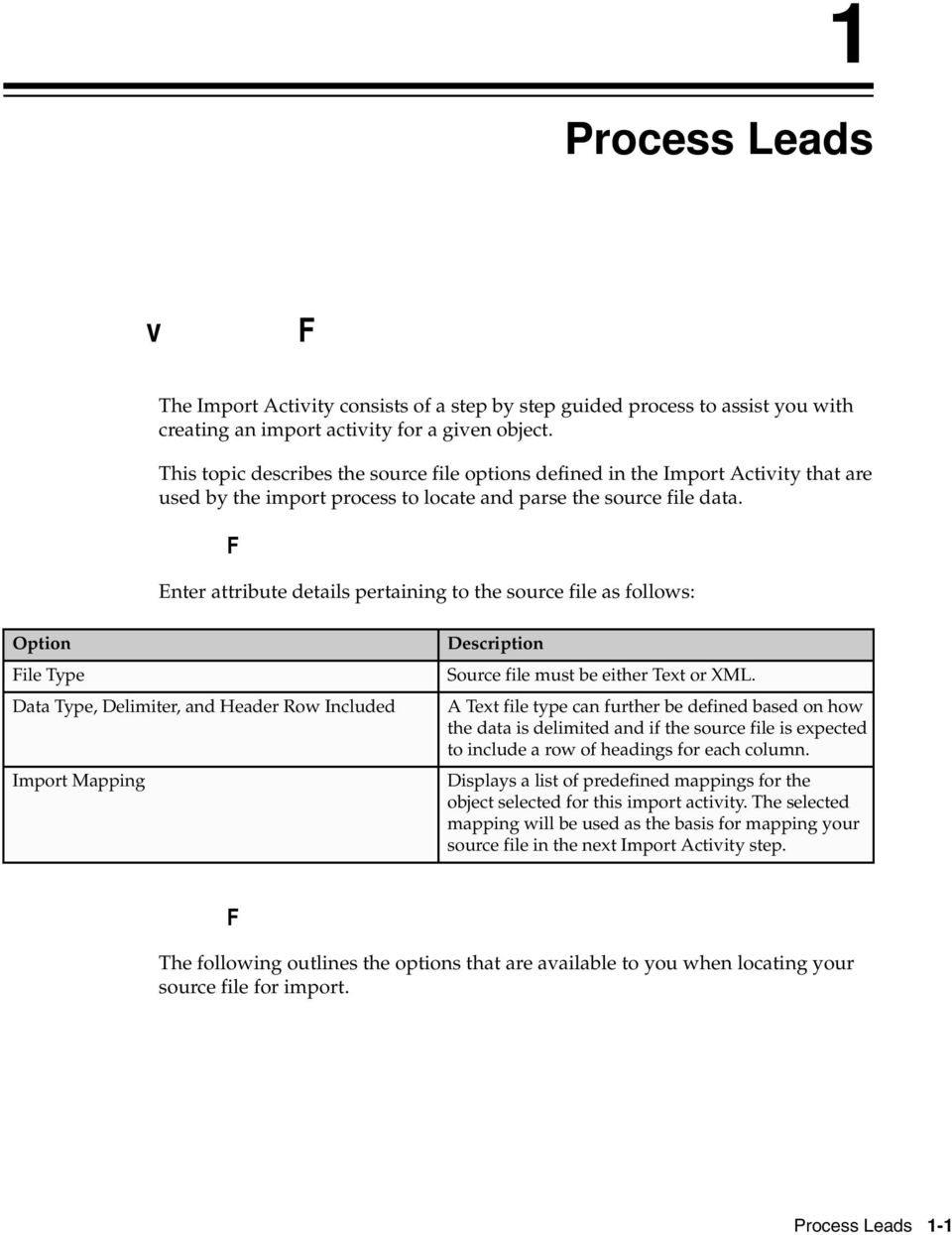
10 Option File Selection Description Select from the following file selections: Specific file Enables you to upload a specific source file from a local file system, such as your desktop, a URL address, or from a network path. A file name is required for this option. Most recent file Enables you to schedule repeating import activities without having to select a new file every time. This selection is only available when you select Network from the Upload From options. Upload From You need to copy the new file to the specified network path for repeating import activities. You do not need to enter a file name for this option and can only upload your source file from a network path. The asterisk wildcard is supported for multiple characters. The question mark wildcard is supported for a single character. You can upload the source file from three locations: Desktop URL Network If you select Desktop, a File Name field with an associated Update button is displayed. Click Update and browse to search for and select the file you want to upload. If you select URL, enter the address location as in the following example format: If you select Network, enter the file name path as in the following example format: \ComputerName \SharedFolder\Resource\ Note If you selected the Specific File as your file selection option, then you will have to include the file name for both URL and Network file path locations. Import Activity Attachment Options: Explained Many objects can have multiple documents attached to it. The File Import Activity process allows you to import the documents attached to a specific object. 1-2 Oracle Fusion Applications Marketing Leads Guide

11 In the Summary section enter an import activity name and description and the primary object for which you want to import data from a source file. The list of objects displayed is controlled by your data security privileges. This topic describes how to define the attachment options pertaining to the import activity. Attachments As part of the file attachment import process setup, you must: Provide the relationship between the attachment file or files and the object in the source file with multiple columns each referencing a file name pertaining to the attachment. Provide file names in the source file columns for attachment corresponding to each object record (row) Select all the files associated with all the objects targeted in the current file import activity process Map the columns related to file names to specific object and attribute pertaining to the common attachment interface such as category, file name, file title and file description Monitor the process for uploading attachments that is activated as part of the file import activity process Selecting Documents You define the parameters for the import activity to include the primary object for which the data is included in the source file. If the object being imported has attachments, you will need perform an additional step of selecting documents that serve as attachments for each record being imported in the Attachments section. Select the Multiple Files option and then click on Browse to display the Universal Content Manager (UCM). From here you can select individual documents that serve as attachments or a single file that contains all these documents as follows: Select a pre-configured compressed file in Zip or Jar format that contains all the individual attachment documents. If the compressed file contains hierarchy of folders then the attachment import process will traverse through the hierarchy to search for specific file name. Select individual attachment documents which UCM automatically compresses into a Zip format. In this case, the individual document cannot be a compressed file. Browse through the file system and select multiples files from across various folders. You must select all attachments in one operation. For example, you cannot select a few files now and then return later to select more attachments files. Import Activity Import Options: Explained The File Import Activity consists of a step by step guided process to assist you with creating an import activity for a given object. This topic describes the import options defined in the Import Activity that are used by the import process to interpret source file data and import interface table data into the target application tables. Source File Data Transformation The following options are used to identify the formatting of source file data so the data can be correctly interpreted and transformed by the import process: Process Leads 1-3

12 Option Decimal Separator Date Format Time Stamp Format File Encoding Description The format of the fractional portion of numerical values in columns mapped to attributes with a decimal attribute type. The format for values in columns mapped to attributes with a date attribute type. The format for values in columns mapped to attributes with a time stamp attribute type. The overall encoding of the characters within the file. Interface to Target Import Options The following options are used when importing the interface table information to the target application tables: Option Import Mode Description Determines if the Import Activity process should create new records or update existing records. If updating existing records, the record IDs must be provided in the source file. If an existing record is not found, a new record is created. Update mode is not supported for all import objects. Consequently, the Import Mode is set to Create and is not updatable for those objects. Allowable Error Count If creating new records, the import process evaluates the data in the interface tables with existing objects in the target application tables for possible duplicates. Customer Data Management objects are evaluated using the rules defined in the set of Matching Configurations. All other objects are evaluated using the combination of attributes selected for duplicate validation in the predefined Import Mapping. An error count above the threshold will stop the import process for all records. If the error count is below the threshold, records without errors are imported. In either case, records with errors will be reported in the Error and Exception files. Validation errors include: Missing required values Values that exceed the attribute length Invalid identifiers and lookup codes Duplicates to existing records in the destination tables based on the combination of attributes selected for duplicate validation in the predefined Import Mapping Duplicates found using matching configurations for Customer Data Management objects do not contribute to the error count. 1-4 Oracle Fusion Applications Marketing Leads Guide

13 Notification Customer Data Management Duplicates The of the intended recipient of import processing notifications. Consumer, customer, and legal entity objects imported by themselves or as components of another object are subject to duplicate verification. The duplicates are determined using the following matching configurations: Batch Location Basic Duplicate Identification Batch Person Basic Duplicate Identification Batch Organization Basic Duplicate Identification You can select from one of the following: Do Not Import Duplicate Records If the main object of the Import Activity is a consumer, customer, or a legal entity object, rows that are matched to existing records will not be imported. These duplicates records are reported in the Exception and Error reports. If the Customer Data Management objects are components of another object and one or more matches are found, the existing duplicate records are evaluated to determine the most recent record. The most recent record will be associated with the main object being imported. For example, when importing a marketing response object, the consumer object is also a component of the response. If the consumer is matched to an existing record, the consumer in the interface tables is not imported. However, the response object will import and the most recent existing consumer record will be associated to the response. Import Duplicate Records The Customer Data Management objects will be imported even if matched records exist. Import Duplicate Records and Create Resolution Request The Customer Data Management objects will be imported even if matched records exist. In addition, a duplicate resolution request is created and displayed in the Customer Data Management, Duplicate Resolution work area. Process Leads 1-5

14 Duplicate Look Back Days This option applies only to the Lead import object. Only existing leads created within the period determined by the look back days value are evaluated for duplicates based on the attributes selected for duplicate validation in the predefined import mapping. If a duplicate is found, the lead will not be imported and the duplicate record will be reported on the Exception report. Duplicate leads are included in the calculation of the allowable error count threshold. Import Activity Field Mapping: Explained After entering your import options, the second step of the import activity process is to map fields in the source file to the corresponding target attributes. This topic explains: Map Fields Saving the Import Mapping Constant Values Map Fields The Map Fields section can be subdivided into source file columns and target attribute columns. The source column header value is derived from one of the following: Predefined mapping, if one is selected The source file, if the Header Row Included option is selected in the first step of the Import Activity definition (for Text file type only) Generic values of Column A, Column B, and so on, if the Header Row Included option is not selected (for Text file type only) XML tagging structure (for XML file type only) The following table outlines the source columns: Source Column Column Header Example Value Ignore Description Represents the column header for Text file types and the tagging structure for XML file types. Values are derived from the first source file saved with the predefined mapping. If you did not select a predefined mapping, the example values are taken from the first data row in the source file selected in the first step of the Import Activity definition. Select this option if you do not want to import the source file data in that column. The following table outlines the target columns: 1-6 Oracle Fusion Applications Marketing Leads Guide
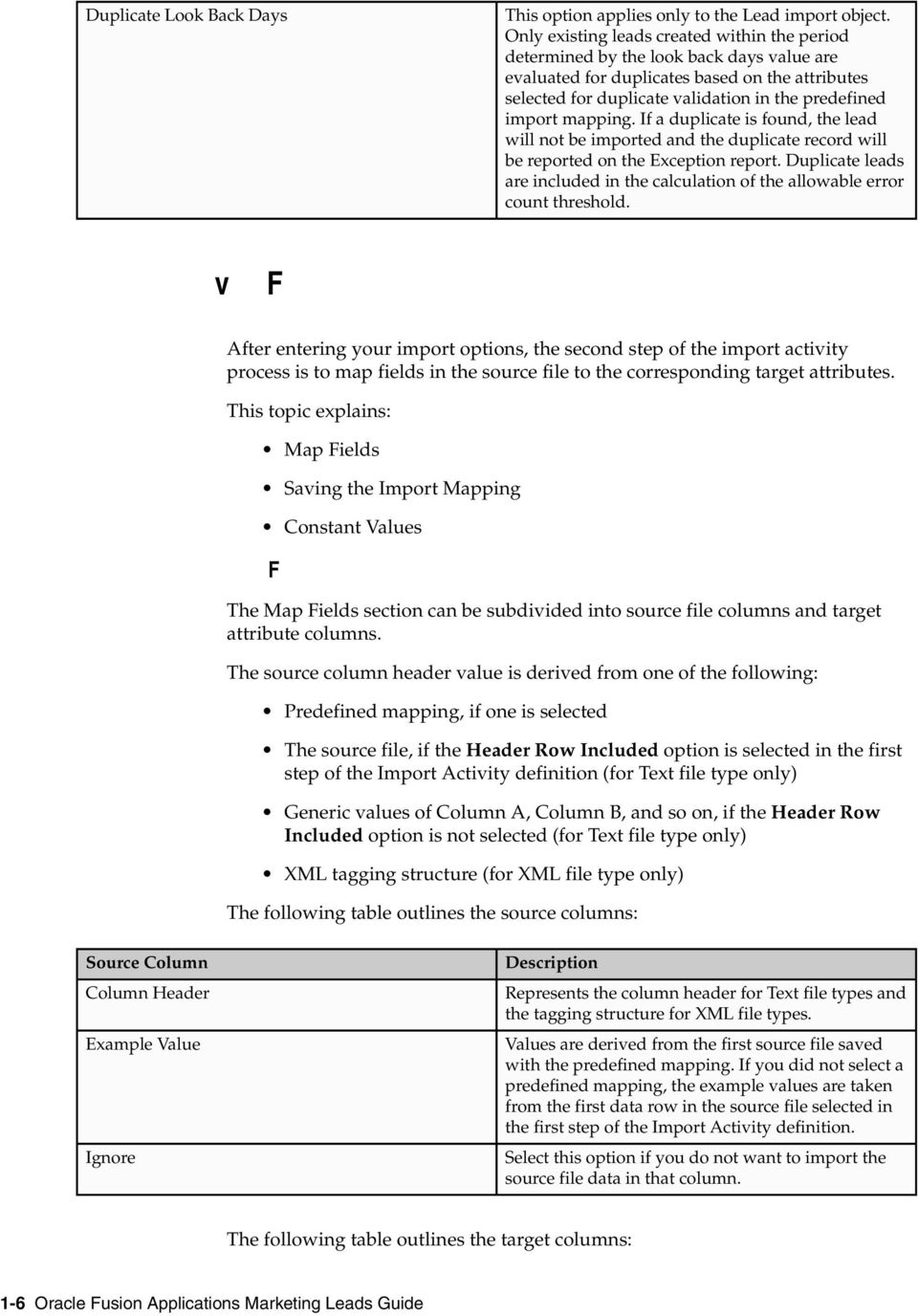
15 Target Column Object Attribute Description The group of import objects that represent the components of the business object being imported. The attribute name that represents the corresponding interface table column for the object. Saving the Import Mapping The mapping between source file information and target attributes is saved as a reusable mapping when the Import Activity is saved, using the import activity name and date to derive a mapping name. If you selected a predefined mapping, modifications made in the Import Activity to an unlocked mapping will update and save to the predefined mapping. If the predefined mapping is locked, a modified mapping will be saved as a new mapping. To specify a mapping name for new mappings, select the Save As option from the Map Fields Actions menu. Constant Values Constant values provide a way to specify a value for a target attribute that all imported objects will inherit. For example, if a source file does not contain a column for business unit and all of the objects in the file belong to the same business unit, enter a constant value for the object and business unit attribute. File-Based Import Monitoring: Explained You can monitor all file import activities that are currently scheduled to run, have completed successfully, or failed with errors. For each import activity, you can view the details pertaining to each underlying process and make necessary updates for any failed records to import again. You can view the list of import activities from the Manage Import Activities page. Select the import activity that you want to monitor by clicking on the hyperlink in the corresponding Status column. The View Import Status results page is displayed which contains the following sections: Files Processed Import Processes Files Processed The Files Processed section displays a row for each source file that is processed. The import processing details are summarized and displayed for each source file and include the following: File Processing Summary Information Records Read From File Format Errors Description The number of records read from the source file. The number of errors found when processing data to insert into the interface tables from the source file, Import Activity constants, and Import Object value default values. View the error details in the Exception and Error files attached to the process. Process Leads 1-7
16 Load Errors Successfully Loaded Attachments The number of errors found when importing data from the interface tables to the destination application tables. View the error details in the Exception and Error files attached to the process. The number of import objects imported to the application destination tables. If the import object is made up of multiple components, each component is counted as successfully loaded. Consequently the Successfully Loaded count may be larger than the Records Read From File count. View the successful record details in the Log file attached to the process. Once an Import Activity process has completed, processing reports are included in the Attachments column. The Log file includes the records that were successfully imported plus the unique destination application table identifiers for the objects. The Exception file includes the records that were not imported plus a reference to one of the errors for each record that failed. The Error file includes all the errors for each record that failed validation. Import Processes From the Import Processes section, you can view details pertaining to each process involved in importing the objects in the source file. A listing of brief messages provides information on processing steps within each underlying process. Managing File-Based Import Exceptions: Worked Example This example demonstrates how to resolve errors found in source file data used for importing into interface tables and destination application tables. The following table summarizes key decisions for this scenario: Decisions to Consider Should the errors be corrected and submitted again for import? Is the Import Activity processing source files on a repeating schedule? In This Example Yes, for an invalid value error. No, for a duplicate record found. Yes. An Import Activity is defined to process a new source file weekly. A second Import Activity is defined to process corrections to errors in the weekly file. Task Preview 1. Review the Import Activity status and reports. 2. Correct the exception file data and save to your desktop. 3. Import the file with the corrected data. 1-8 Oracle Fusion Applications Marketing Leads Guide

17 Prerequisites 1. Create a mapping between the source file columns and the import object attributes by navigating to the Import Mappings page from the Manage File Import Mappings task in Functional Setup Manager. The mapping includes a combination of fields with Duplicate Validation selected to compare source file records and existing records for duplicates during import processing. 2. Create an Import Activity using the mapping. Since you expect a source file on a weekly basis, you select Latest File for the File Selection and URL for the Upload From choice. Specify a URL value. Define a repeating schedule to repeat once a week. Click Activate to save and activate the Import Activity. 3. Create a second Import Activity to use when importing exceptions found in the weekly import file. All settings are the same as the weekly Import Activity with the exception of the Source File Import Options and the Schedule. Since this is only for exception handling, you select Specific File for the File Selection and Desktop for the Upload From choice. Click Save to save the Import Activity but not to activate it. Review the Import Activity status and reports 1. Navigate to the Manage Import Activities page from the Tasks region of your work area or Functional Setup Manager task to view the import status. 2. Click on the Status hyperlink for the import activity to navigate to the View Import Status page. 3. Open the exception and error files by navigating to the Files Processed section, Attachment column, and clicking on the file names. 4. Review the errors file for details on each error and determine the action to take. In this example, a record in the source file failed the duplicate validation. You verify that the source file record is a duplicate to an existing record and determine the source file record should not be imported. A second record failed due to an invalid date and should be corrected and imported. Correct the exception file data and save to your desktop 1. With the exception file still open, locate the record with the invalid date and delete all other records. Locate and correct the invalid date value. Save the file to your desktop. Import the file with the corrected data 1. From the View Import Status page click Cancel to return to the Manage Import Activities page. 2. Select the Import Activity that you defined for exception handling and click the Edit icon. Process Leads 1-9

18 FAQs for Import Leads 3. Navigate to the File Name in the Import Options, Source File region and click Update, and then click Browse to search and select the file with the corrected data that you saved to your desktop. 4. Click Next until you are viewing the Review and Activate page. Click Activate to save and activate the Import Activity. What happens if I inactivate an Import Activity? The Import Activity will not stop the currently running process. However, it will stop the next process that has not started plus any future repeating file import activities. You can always activate the process at a later stage. What happens if I add a marketing list in the Import Activity definition? File-based data import enables you to record consumers and organization contacts in a marketing list when importing consumer, lead, and response import objects. Select an existing list or create a new one. A marketing list is assigned the list type value of Imported if created while defining an import activity. After the objects are imported successfully, the consumers and contacts are added as members of the marketing list. Submit Lead Processing Lead Scoring: Example A lead score is used only when the lead is easily quantified. The score may be used to calculate the lead rank. You can schedule when and how often to process lead scoring through Assignment Manager. How Lead Score is Determined Lead scoring capability requires the rules engine to determine a numerical score based on the value of the lead attribute participating in the rule. For example, consider the following rule. If a lead contact is a high level Executive, then add a score of 100. If the lead contact is an Operations Manager, then add a score of 50. When this rule evaluates, it determines the score of the lead based on job title of the lead contact. Once the rules engine evaluates all such rules, the end result of the scoring process is the aggregate score, which is then recorded in the Lead Score attribute. Data Points for Lead Scoring The following data points form part of the overall score evaluation: All data included on the lead and Primary product 1-10 Oracle Fusion Applications Marketing Leads Guide

19 Lead Ranking: Explained Lead source data such as campaign attributes All customer profile data including industry All contact profile data During lead management setup, you can predefine criteria to rank leads and automate the assignment of leads to the appropriate resource in your organization. You can define lead rank to categorize leads into buckets such as Hot, Warm, or Cool. The following data points are available to help evaluate lead ranking rules: All data included on the lead and lead primary product data All customer profile data including industry and customer size classifications All contact profile data All lead qualification data Although lead rank and lead score are not the same, they serve a very similar purpose. Score is often used only when the lead is easily quantified, and then may be used to calculate the lead rank. Setting Up Lead Ranking The following summarizes the lead ranking process for predefined lead work objects, rank candidates and associations: Note Select predefined lead work object in Assignment Manager. Select predefined ranking candidate object in Assignment Manager. Associate ranking candidate objects to lead work object. There is no seeded mapping for the rank candidate object in the Assignment Objects. Mapping is only for territory-based assignment. Use the predefined objects during the creation of assignment rules (rulebased assignment). Assign rules to determine the appropriate classification of a work object that will provide a rank value for the lead. Creating Ranking Rules Create a rule set with a rule set type of Classification Rule. Set the work object as lead and the candidate object as lead rank. Create a rule with conditions that match the attribute settings you want a lead to have in order to give it a rank Process Leads 1-11
20 value. For example, you might choose the "Decision Maker Identified" attribute name and then select the equal (=) operator. Finally, enter the value of True. Create your remaining conditions, and then enter the action for your rule, such as "Return the candidate value as Hot". Calculating Lead Rank Based On Score You can schedule when and how often to process lead ranking where the lead rank value or score is calculated and displayed on screen. Ranking rules, used by Assignment manager, determine what rank to assign to a lead. You can also create ranking rules that use the lead score as the criteria to name each range of scores with a specific rank. For example, if lead score is between a value range of 0 and 39, create a rule to rank the lead as low priority. If the lead score is between a value of 40 and a value of 60, then you might want to create a ranking rule that assigns a medium rank to the lead. Assignment Manager passes the rank value to the Lead Management application and is presented in the user interface as a list. You can choose to override the value by select a different predefined rank code or value from the list. You can also choose the Rank option from the Actions menu to automatically assign a rank for your selected lead. Lead Ranking: Examples You can define lead rank to categorize leads into buckets such as Hot, Warm, or Cool leads. Such categorization of leads enables a salesperson to quickly prioritize leads for follow-up activities. Creating a Lead Rank Rule Your organization wants to assign a rank of Hot to those leads that have a set time frame and a decision maker identified. Assignment Manager for leads has predefined the lead work object and lead candidate object and you will set up an assignment rule to determine the appropriate classification to apply a rank to all leads for your organization. 1. From the Manage Sales Lead Assignment Rules page, create a new rule set. 2. Select the classification rule type, Sales Lead work object, and Lead Rank as the candidate object. 3. From the Associated Rule Set Groups tab, create a rule set group and name it Ranking. You can search and select another rule set group (if one exists), to associate to the classification rule type. 4. Set the conditions for each rule that the rules engine checks during assignment processing. For example, enter the following rule conditions: Object: Sales Lead Work Object Attribute: Time Frame Operator: Equals Value: Three months 5. Click Add Row icon in Conditions and enter the following details: 1-12 Oracle Fusion Applications Marketing Leads Guide
21 Object: Sales Lead Work Object Attribute: Decision Maker Identified Operator: Equals Value: True Action: Return the candidate value as Hot 6. Click Save and Close. Assignment Manager will: Find the matching leads Execute the rules Assign the rank value Pass the rank value onto the lead Lead Status: How it Automatically Gets Set Lead quality is assessed as soon as a lead is generated. Lead quality of a newly created lead is mainly determined based on the characteristics of the customer contact on the lead, the type of response which caused the lead to get generated, and the nature of the campaign. Lead quality is further assessed based on the added qualification data such as customer need, urgency or time frame for the project, and whether the customer has set aside a budget for this product. Settings That Affect Lead Qualification Status Leads can get their qualification status from: Assignment Manager rules Rules-based leads qualification process helps standardize the lead qualification process. Based on the positive results to conditional rules, the value of the Lead Status attribute is set to Qualified. For example, a rule can be defined to update the lead as qualified if the customer's budget status is approved, the project time frame is three months, a decision maker is identified, and the response type is that they attended an event. A specified value in the campaign lead generation stage A multistage campaign design can include lead generation stages. Lead options include the ability to designate a value for the qualification status. When the campaign is executed, the leads will be created with the value provided. An imported value Leads imported through file import can include a designated lead qualification status. Process Leads 1-13
22 How Lead Qualification Status Is Calculated In some companies, the lead qualification data gathered by lead qualifiers is considered in the scheduled automated process that calculates lead score or lead rank as well as assigning sales team territories. For such companies, a simple rule to move leads to a Qualified status when the lead score reaches a specific threshold is sufficient. Lead Assignment: How It Is Processed Once lead data is cleansed, created, enriched, and scored, the leads need to be assigned. Leads can be assigned based on several criteria. For example, you can configure Assignment Manager to assign leads based on the lead source, geography, named accounts, (such as the top 20), industry, product, partner (for working with a partner organization), and primary sales channel associated with the lead or associated marketing campaign that generated the lead. Components That Affect Lead Assignment The following lists the components that influence the assignment of leads: Lead work objects Lead candidate objects Attributes How Leads Are Assigned Mapping and rule conditions Lead Assignment process evaluates both rules as well as territories for lead assignment. Since leads on sales prospects cannot be distributed based on territory definition, they are assigned based on simple rules evaluation. Territory-based evaluation can be supplemented by adding filtering rules to further refine the lead assignment. The territory-based evaluation component uses the lead work object and territory candidate object data, and the mappings between the territory dimensions and lead dimensional attributes to execute the assignment processing. Set up the following for assigning leads: Note Set up the necessary lead work objects, and associated candidate objects to be assigned by Assignment Manager. A default set of lead work objects and associated candidate objects are seeded. Set up rules and rules set specific to your business requirements. For example, set up an assignment rule to assign leads with deal size less that a certain amount to partners Oracle Fusion Applications Marketing Leads Guide
23 Set up object mappings for territory-based assignment. For example, assign a lead to those territories where Territory dimensional attributes are mapped to corresponding Lead attributes. Territory-based assignment relies on an association between attributes on the lead work object and attributes on the lead territory candidate object to match the candidates to the work object. Set up rules to filter territories that match the lead based on additional information on the lead. For example, set up rules to exclude prime sales territories that match leads which are unqualified. For territory-based assignment, the lead work object and lead candidate object must have attributes that share the same domain of values. The mapped attributes are used for matching appropriate candidates for a work object. For example, a sales lead (work object) has a geographic location attribute. The lead candidate object (territory) has also a geographic location attribute. These two attributes are mapped to each other. FAQs for Monitoring Leads What happens if I delete a lead? The Marketing operations manager reviews retired leads periodically and deletes them from the application. From the Overview page, select the retired leads that you want to delete, then select Delete from the Actions menu. Deleted leads are removed from the marketing application and are no longer available to lead qualifiers or salespersons for lead follow-up. Note Deleting a lead does not have any effect on the customer or response associated with the lead. Deleting a lead does not affect list membership of the customer associated with the lead. Process Leads 1-15
24 1-16 Oracle Fusion Applications Marketing Leads Guide
25 2 Identify Sales Prospects and Target Products Sales Targeting Data Visibility: Explained The Opportunity Landscape application is used by salespersons to identify sales targets and to help them achieve both short and long term sales goals. Sales targeting enables visual analysis for leads and supporting information for your top customers and products. This topic discusses information sources and what impacts the data available for viewing. Data Sources The Transactional Business Intelligence repository stores information displayed for sales targeting including data from the following sources: Leads generated by Sales Prediction Engine Marketing leads Sales accounts References and competitors Sales catalog products and product groups Customer install base products Updates to the information stored in the repository typically occur at regular intervals scheduled by your administrator. If enabled, data warehousing information is also used for some analysis criteria filtering options. Available Data The data available for viewing and analysis in sales targeting is impacted by the following areas: Area Base Set by Territories and Profiles Overview The set of products and customers you have access to is defined by your territories and the eight profile option settings that include the minimum and maximum range for a specified attribute and the top product and sales account thresholds. If the base set of products and customer sales accounts is still above the count threshold, you are prompted to enter further criteria to reduce the amount of customers and products to display for your analysis. Identify Sales Prospects and Target Products 2-1
26 Leads Sales Prediction Engine recommends possible leads based on predictive modeling and rules. Each recommended lead is for one combination of customer sales account and product or product group. Marketing leads include open, direct sales channel leads. The estimated revenue amount corresponds to the primary product or product group associated with the lead. Note If the Estimated Revenue Display analysis criterion is set to view both Recommended and Marketing leads, it is possible that the combination of customer and product or product group exists for both sources resulting in the double counting of that particular deal. Product Hierarchy Analysis Criteria The heat maps display a product hierarchy that can be expanded and collapsed. The top level node in the hierarchy is determined by starting with the base set of products and traversing up the sales catalog hierarchy to the highest common category. For example, a base set of products belong to the printers, servers, computers, and business software product categories. These four categories are grouped in the sales catalog under the hardware and software categories. The hardware and software categories are further grouped under the technology category. As the highest common category, technology is the top level node displayed in the heat maps. In this same example, the software category has two other product lines that include games and consumer software. Since products in the games and consumer software categories are not part of the base set of products, these two categories will not appear when expanding the software category. Customer and Product analysis filtering refocuses the base set of leads displayed in the heat maps and sales targeting list to only those customers and products that meet the specified filtering criteria. For example, if there is only one lead recommending a printer for customer ABC and the Product analysis criteria is adjusted in a way that excludes the printer product, the column in the heat maps identifying the printer will no longer display. If the printer was the only product displayed for a product category, the category will no longer display. In the same example, if the lead recommending the printer was the only lead displayed for the customer, the customer row will also be removed from the heat maps. 2-2 Oracle Fusion Applications Marketing Leads Guide
27 Competitive Landscape The competitive count is based on the product and customer selection and determines the top five competitive names individually listed in the legend. Competitors that are not part of the top five are grouped into the Other category. You can view the heat map by various combinations of competitors by selecting or deselecting the legend values. Sales Targeting Navigation Hints: Explained Opportunity Landscape is an interactive tool that assists with identifying and initiating the pursuit of sales leads. While analyzing sales targets, you can view and refocus three heat maps, view an overall sales targeting list and multiple varieties of prospecting summaries, accept recommended leads, and create sales campaigns. This topic discusses some navigation hints for using: Heat maps Search Sales Targeting List and Prospecting Summaries Heat Maps Heat maps respond to the analysis criteria filtering selections you make. You can also interact with heat maps by using your mouse to collapse and expand icons and right-click to view action menus. Heat Map Elements Product Hierarchy Customers Navigation The heat maps display a product hierarchy that supports up to ten levels. Each level can be expanded and collapsed. Expand to the final level, right-click on the product column, and select the View Detail menu to navigate to the Product prospecting summary. Right-click on a single customer from any heat map and select the View Details action to navigate to the Customer prospecting summary. This summary also includes supporting install base and competitor information. Identify Sales Prospects and Target Products 2-3
28 Estimated Revenue Heat Map Cells Right-click on a single cell to navigate to the View Detail menu. If the cell is associated with a product category, the View Detail action navigates to the Customer and Product Category prospecting summary. This summary provides a list of leads for the set of products within the category. If the selected cell is associated with a single product, the View Detail action navigates to the Customer and Product prospecting summary. This summary provides a list of potential customer references by customer size and industry, and recommendation rational for leads originating from the Sales Prediction Engine application. If the single cell that you right-click represents an unaccepted lead, then an Accept action updates you as the lead owner and places the lead in your queue for follow up. Competitive Landscape Select one or multiple cells, using the keyboard short cut of Ctrl plus left-click or Shift plus leftclick. Once selected, right-click and select the Create Sales Campaign action to take you to the Sales Campaign page. Customer contacts and products for the leads associated with the selected cells are already available from here. To view the heat map results by various combinations of competitors, deselect or select the legend values at the top of the heat map. Heat map cells that contain a number indicate that the customer has more than one competitor listed. Using you mouse, hover over the number to view a break down based on the selected legend values. Note Expanding and collapsing the product hierarchy can change the relative competitive presence. This causes the top competitors to be determined again. After changing the focus in the product hierarchy, review the heat map legend to identify the competitors and corresponding heat map colors. Search You can expand your search options to: Search for a single customer account to navigate to the Customer prospecting summary Search for a single product to navigate to the Product prospecting summary Search for both customer account and product and navigate to the Customer and Product summary Sales Targeting List and Processing Summaries The Sales Targeting List and various prospecting summaries provide links, an Actions menu, and a Details column with corresponding icon that navigates to Customer and Product prospecting summary. Select one or more rows and the 2-4 Oracle Fusion Applications Marketing Leads Guide
29 Accept Leads or Create Sales Campaigns Action menu to accept leads or create a sales campaign in any of the following: Sales Targeting List tab Customer prospecting summary, Leads view Product prospecting summary Customer and Product Category prospecting summary Customer and Product prospecting summary The customer and product names in the Sales Targeting List include links to navigate to the corresponding prospecting summaries. The Customer Details link in several prospecting summary overview sections navigates to the Customer Center view for the specific customer. The following table provides the navigation options to the prospecting summaries: Navigation Customer Product Customer and Product Search: Customer Search: Product Search: Customer and Product Heat Maps: Customer rightclick, View Detail Heat Maps: Product right-click, View Detail Estimated Revenue heat map: Customer and Product cell rightclick, View Detail Estimated Revenue heat map: Customer and Product Category cell right-click, View Detail Sales Targeting List: Customer column, Customer link Sales Targeting List: Product column, Product link Sales Targeting List: Details column, Details icon Customer prospecting summary: Details column, Details icon Y Y Y Y Y Y Y Y Y Y Customer and Product Category Y Identify Sales Prospects and Target Products 2-5
30 Product prospecting summary: Details column, Details icon Customer and Product prospecting summary: Details column, Details icon Y Y Sales Targeting Customer Criteria: Explained Sales account analysis filtering refocuses the base set of recommended leads displayed in the heat maps and sales targeting list to only those accounts that meet the specified filtering criteria. Use customer analysis criteria to see what affect filtering various customer sales accounts have on the sales targeting analysis. Base set of customer sales accounts Analysis criteria filter a base set of sales accounts collected using the following: Territories: The set of sales accounts that you have access to as defined by your territories. Profile values: The set of sales accounts that you have access to is limited by profile options that can be set for the minimum and maximum range for a specified attribute, and the top sales accounts for sales targeting threshold. If the customer count is still above the threshold, you are prompted to enter further criteria to reduce the number of sales accounts used in your analysis. Customer filters With the exception of company size, customer size category, and customer industry, the customer criteria filter data is stored in the Transactional Business Intelligence repository. For product-related filters, all installed products are considered, unlimited by territories. If the Data Warehouse profile option is not enabled, then only a subset of the customer filtering options are available. Filter Name Company Size (Annual Revenue) Company Size (Employees) Number of Open Service Requests Description For viewing accounts with an annual revenue within a specified range, as entered on the sales account. For viewing customers with a number of employees value within a specified range, as entered on the sales account. For viewing sales accounts with a number of open service requests within a specified range. 2-6 Oracle Fusion Applications Marketing Leads Guide
31 Installed Base Total Lead Deal Size Number of Contacts Number of Times Contacted Last Month Number of Products Owned Days Since Last Purchase Days Since Last Contacted Competitor Product Purchased Customer Industry Products Owned Last Purchased Product Customer Size Category For viewing customers with a total amount of existing products and services in the installed base within a specified range. For viewing customers with a sum of primary product values for open leads within a specified range. For viewing customers with a number of contacts within a specified range. Hint: To include a customer in a sales campaign, the customer must have at least one contact. For viewing customers with the number of recorded outbound interactions in the past month within a specified range. For viewing customers with a total number of existing products and services in the installed base within a specified range. For viewing customers where the most recent product added to the installed base is within a specified number of days range. For viewing customers where the most recent outbound interaction with a contact associated with that sales account occurred within a specified number of days range. For viewing only those customers which have at least one known competitor product purchase. For viewing customers defined with a primary industry included in the selected industries. For viewing customers which have an existing installed base that includes one or more of the selected products. For viewing customers where the most recent product added to the installed base is the specified product. For viewing customers with a customer size that falls within the selected category. Customer filter impact Filtering customers removes or adds back customers in the heat map rows, sales target lead list, and customers in the detailed product view. If a sales account no longer meets the filtering criteria, the customer is removed along with the leads for that sales account. Sales Targeting Product Criteria: Explained Product analysis filtering refocuses the base set of recommended leads displayed in the heat maps and sales targeting list to only those products and product groups that meet the specified filtering criteria. Use product analysis criteria to see what affects filtering various products have on the sales targeting analysis. Identify Sales Prospects and Target Products 2-7
32 Base set of products Analysis criteria filter a base set of products collected by using the following: Territories: The set of products that you have access to as defined by your territories. Sales Catalog: The set of products that you have access to as defined by your territories and that are included in your sales catalog. Profile values: The set of sales catalog products that you have access to limited by the four profile option settings for the minimum and maximum range for a specified attribute and the top sales products for sales targeting threshold. If the product count is still above the threshold, you are prompted to enter further criteria to reduce the number of products used in your analysis. Product filters With the exception of the product group, the product criteria filter data is stored in the Transactional Business Intelligence repository. The stored data is at a per product level. Amounts, last purchase, and counts are across all owning customers, unlimited by territories. If the Data Warehouse profile option is not enabled, then only a subset of the product filtering options are available. Filter Name Number of References Number of Customers Owning Product Installed Base Total Lead Deal Size Days Since Product was Last Purchased Product Group Description For viewing products for which there are a total number of unique potential customer references within a specified range. For viewing products for which the number of customer accounts owning the product is within a specified range. For viewing products with a total amount for the existing customer base within a specified range. For viewing products with a sum of primary product values for leads within a specified range. For viewing products for which the most recent product added to the existing customer base is within a specified numbers of days range. For viewing product groups included in the selected product groups. Product filter impact Filtering products removes or adds back products in the heat map columns, sales target lead list, and products in the detailed customer view. If a product no longer meets the filtering criteria, the product is removed along with the leads for that product. When viewing heat maps at a product category level in the hierarchy displayed in the heat maps, adjusting a product attribute filter can change the darkness of various cells and potentially reorder the customer rows depending upon the sorting criterion in place. 2-8 Oracle Fusion Applications Marketing Leads Guide
33 Sales Targeting Lead Criteria: Explained Lead analysis filtering refocuses the base set of recommended and marketing leads displayed in the heat maps and sales targeting list to only those leads that meet the specified filtering criteria. Use lead analysis criteria to see what affects filtering various leads have on the sales targeting analysis. Base set of leads Analysis criteria filter the recommended and open marketing, direct sales channel leads for the base set of products and customers. The base set of products and customers are collected using the following: Territories: The set of products and customers you have access to as defined by your territories. Sales Catalog: The set of products that you have access to as defined by your territories and that are included in your sales catalog. Profile values: The set of products and customer that you have access to limited by the four profile option settings for the minimum and maximum range for a specified attribute and the top sales products and top sale accounts for sales targeting thresholds. If the product and customer counts are still above the threshold, you are prompted to enter further criteria to reduce the number of used in your analysis. Lead filters If the Data Warehouse profile option is not enabled, then only a subset of the lead filtering options are available. Filter Name Recommendation Lead Type Likelihood to Buy Estimated Sales Cycle Estimated Revenue Recommendation Lead Date Range Estimated Revenue Display Description For viewing leads by comparing the lead product with the list of products in the customer's installed base to evaluate new product opportunity and upgrade potential choices. For viewing recommended leads with an estimated Likelihood to Buy and marketing leads with a Purchase Confidence value within a specified range. For viewing recommended leads with an estimated sales cycle and marketing leads with days to close value within a specified number of days range. For viewing leads with an estimated average product total amount within a specified range. For viewing leads created within a specified date range. For viewing a choice of leads recommended by Sales Prediction Engine model or rule-based predictions, leads generated from marketing related sources, or both. Identify Sales Prospects and Target Products 2-9
34 Marketing Lead Status Marketing Lead Accepted Marketing Lead Rank Marketing Lead Score For viewing a choice of marketing leads with a lead status value of qualified, unqualified, or both. For viewing a choice of marketing leads by an ownership indicator of accepted, unaccepted, or both. For viewing marketing leads with a rank value included in the selected rank values. The lead rank indicates a measure of lead quality and prioritization. For viewing marketing lead, score assignments within a specified range. Lead filter impact Filtering leads removes or adds back leads to the sales targeting lead list, detailed customer view, detailed product view, and combined detailed customer and product view. Depending on what sorting criterion is in place in the estimated revenue heat map, any adjustment in a lead filter can change the darkness of various cells and potentially reorder the customer rows. Exploring Short Term, High Revenue Leads: Worked Example Acme Technologies is a global high tech company that manufactures and sells computers, printers, servers and related software and services. It is the start of a new fiscal year and the company is releasing a new line of eco-friendly servers that enable customers to reduce energy consumption, improve operational efficiency, and reduce the size of their server footprint in the data center. The goal is to explore the revenue potential of their new servers in the marketplace using predictive modeling to identify the overall potential and to leverage the experience of their sales team to determine which customer accounts to sell the product to. The marketing department has prepared a sales kit which includes the names of marketing content templates and product brochures that can be used when creating sales campaigns. John is a salesperson and uses Sales Targeting to analyze the leads recommended by Sales Prediction Engine for his territory. He wants to determine: Which accounts he should pursue in the short term with the highest revenue potential and lowest risk? How can he most efficiently leverage the sales kits to meet his short term goals? John will review and adjust the filtering criteria for the estimated revenue heat map to identify customers with the largest revenue potential. He will use the competitive landscape heat maps to help him understand existing competitor challenges. He will create sales campaigns using the materials provided in the sales kits. Analyze Overall Potential by Product Group 1. John navigates to the Identify Sales Targets page Oracle Fusion Applications Marketing Leads Guide
35 Analyze Short Term Potential Analyze Competition 2. He clicks the expand icon for the sales catalog in the Estimated Revenue heat map to display the five main product categories. 3. He continues to drill down the server sales catalog hierarchy using the expand icon until he locates the new product line. 4. He reviews the overall recommended potential for the new products. Now that John is familiar with where the new product line fits within the overall sales catalog, the next time he returns to analyze this product line, he will navigate to the product analysis criteria and select the specific product group to have the heat map automatically refocus for that group of products. To focus on short term potential: 1. John adjusts the following lead analysis criteria: Decreases maximum estimated sales cycle Increases minimum likelihood to buy Increases minimum estimated revenue 2. The Estimated Revenue heat map refocuses to list the accounts predicted to purchases the new products in the shortest amount of time with top revenue potential. 1. To help John understand his competition, he reviews the Competitive Landscape heat map. In John's experience, he has been able to win deals when competing against Advanced Services company, plus his marketing department has included a marketing message template that compares the new server line with similar products sold by Advanced Services. 2. John deselects the other competitors and discovers 6 customers that are known to have an Advanced Services product. Accept Leads and Create Sales Campaigns 1. John navigates to the Lists tab which displays the leads meeting his specific analysis filtering criteria. 2. He selects the 6 rows for the leads where the customers had at least one known Advanced Services product. 3. He selects the Accept Leads action to indicate he will be pursuing these leads, followed by the Create Sales Campaign action. 4. He completes the steps to create the sales campaign, including choosing the template indicated in the sales kit that details how the new set of products measure up against the competition and attaching product related brochures. Identify Sales Prospects and Target Products 2-11
36 John returns to the List tab to select all other rows, accepts the leads and creates a second sales campaign. 1. John completes the steps to create the sales campaign using another marketing content template and attaches the product brochures. John remembers speaking to Carol, a customer contact, about the upcoming release of the new server product line. 2. He enters a personalized text merge field followed by a personalized message for Carol that will be included in her sales campaign He adds a follow-up action that will notify him every time a customer contact responds to the campaign and he schedules the campaign for immediate delivery. FAQs for Identify Sales Prospects and Target Products What's the difference between sales targeting and source application data? Most of the information displayed for sales targeting is based on data stored in the Transactional Business Intelligence repository. Updates to the repository typically occur at regular intervals scheduled by your administrator. Changes made in the source applications will not be reflected in Sales Targeting until after the update to the repository has completed. For example, changes to products in the sales catalog are reflected once the sales catalog information has been updated in the Transactional Business Intelligence repository. Similarly, the action to accept leads in Sales Targeting immediately updates the leads in the Lead Management application. The leads will still appear as unaccepted in Sales Targeting until the next scheduled repository update occurs for Lead Management Oracle Fusion Applications Marketing Leads Guide
37 3 Follow Up Leads How Lead Components Fit Together A lead follows a path which ends either with converting the lead to an opportunity, or retiring the lead when no possibility exists of converting the lead to a sales opportunity. The lead lifecycle includes an automated process to first capture the leads, then prioritize the leads for sales engagement through a scoring and ranking process. Leads are then distributed to appropriate sales resources for further lead qualification, follow-up and conversion. Leads Lifecycle Leads are monitored, reassigned as appropriate and the lead quality is continuously reviewed and adjusted as the lead progresses through its lifecycle. Marketing and Sales departments both share the ownership of leads, where the focus on the leads shifts from Marketing to Sales and back to Marketing based on the lead status. The lead lifecycle is captured in the following topics: Lead Generation Lead Qualification Lead Distribution Lead Assessment Lead Conversion Lead Generation Leads are generated and captured from many different sources such as: Campaign responses Campaign stages handled by telemarketing Third-party lead sources Sales prediction application through the creation of new leads Flexible lead import, customer and contact creation, and de-duplication ensure marketing lead generation efforts are optimized. For example, the lead import process checks whether leads represent new or existing customers. For new customers, data needs to be created for the lead. If the lead is an existing customer, part of the lead import process checks to ensure customer and lead information is not duplicated. Lead Qualification Marketing departments help with the lead qualification process to ensure that only qualified leads are handed over to sales. Leads are typically ranked as Hot, Warm, or Cool. Leads are further qualified by the use of company specific Follow Up Leads 3-1
38 standard questions to score a lead. Lead scores are numeric values typically ranging from 1 to 100, where a high score represents high quality. It is not good practice to let stale leads build up. Standardized criteria for lead qualification ensure that quality leads reach the salesperson and help maximize the conversion rate from leads to opportunities. For example, your organization has criteria and processes for ensuring that leads are either developed or retired within 30 days. When the lead age is greater than 30 days and the rank is A or B, Marketing reassigns the leads for follow-up by an internal telemarketing group. If the leads cannot be qualified or further developed to revenue opportunities, the rejected leads can be reassigned or can be retired manually. Lead Distribution As the qualification of leads progresses into real potential prospects, assignment manager uses expression-based rules to associate one or more internal salespersons with each lead. If the lead is associated with an existing Sales Account, then assignment manager uses territory definitions to associate (typically one) internal territory with each lead. The salesperson newly assigned to the lead may be related to the lead record directly through the lead team or indirectly through a territory associated with the lead. They can view and update those leads to which they are assigned in the lead work area and can claim ownership of the lead by using the Accept Lead action. Other assigned resources can view and update the lead, but cannot make themselves the owner. As the lead is qualified further, for example, if a sales prospect changes to a sales account by adding an address, assignment manager is automatically invoked during the next automated assignment cycle. Depending on the assignment logic, the lead may be reassigned to a different territory or sales resource. If the assigned salesperson takes no action on a lead for several days, then the lead can be manually reassigned to another salesperson. Lead Assessment The salesperson must evaluate the quality of information they have received for the lead. They determine if the details are sufficient to reach out to the customer and assess whether a lead is worth pursuing with the help of preconfigured assessment templates. Assessment templates can further qualify the lead by: Reviewing the content shared with the customer during a campaign Framing the lead in the context of the campaign Ensuring the salesperson understands the information that has already been sent to the customer Lead Assessment enables leads to be further assessed through predefined questions that help determine the likelihood of the lead being accepted by Sales. In this scenario, a salesperson named Mike begins asking the customer a series of questions created by Marketing and Sales to assess the quality of the lead. As each question is asked, Mike records the answer and the lead assessment tool automatically factors the answer into the assessment score of the lead. At the end of the call, Mike notes that the assessment lead score is high. He requests the lead be assigned to the direct sales team for that customer. If the lead score was low, then Mike could retire the lead, or if the lead needed further qualifying, he could leave it in his list of leads for follow-up at a later date. If the lead is good, but the potential revenue opportunity is less than a predetermined monetary amount, for example, twenty-five thousand dollars, then Mike can convert the lead to an opportunity that he works himself. 3-2 Oracle Fusion Applications Marketing Leads Guide
39 Lead Conversion A lead's life cycle ends either when a lead is converted to a sales opportunity, or when the lead is retired. Conversion to an opportunity stage allows the salesperson to pursue the account in the sales cycle. After establishing that the lead has potential, the salesperson converts the lead to an opportunity. Contact is established and meetings and presentations are scheduled to move the opportunity along the sales pipeline. To track the progress, contact notes are captured as interactions and associated with the contact and opportunity. As the lead progresses through its life cycle, decisions to retire the lead are based on the following. Lead Actions: Explained You cannot verify customer and lead details The customer is not interested in pursuing the lead any further Use the lead actions to manage the lead. Lead actions are generally grouped into the following categories: Standard create, edit, delete, and export functions Ranking, scoring, and qualifying actions to assist in prioritizing leads Accepting, rejecting, reassigning, and retiring actions to ensure leads are in the right queue for pursuing Converting leads to opportunities to continue sales pursuits and include in sales forecasting Requesting approval for Sales Partner lead registrations The ability to perform each action is dependent on the privileges assigned to your role, your access level as a lead sales team member, and the current status of the lead. Lead Actions The following table describes the lead actions that are distinctive to the lead. Action Rank Score Qualify Description Submits the Request Sales Lead Assignments process to automatically assign a lead rank value based on the predefined rules that are grouped and specified on the Assignment Rule for Ranking Leads profile option. A rank represents the priority of the lead, such as Hot, Medium, and Cool. Submits the Request Sales Lead Assignments process to automatically assign a lead score value based on the predefined rules that are grouped and specified on the Assignment Rule for Scoring Leads profile option. Different from the qualification and assessment scores, this score value can be used as a source for predefined rules for the automated assignment of lead rank, qualification status, territories, and resources. The assignment of these other objects are separate actions. Updates the lead status to Qualified, by-passing the automated sales lead classification process. Follow Up Leads 3-3
40 Reassign Provides two choices for when the sales lead assignment process will evaluate the lead to automatically reassign sales team members and territories to the lead: Automatic assignment The lead is eligible for reassignment when the next scheduled Sales Lead Processing Activity submits the Request Sales Lead Assignments process and the lead meets the processing activity's selection criteria. Immediate automatic assignment The Request Sales Lead Assignments process is immediately submitted to re-evaluate the lead. Retire Reject Accept Lead Convert To Opportunity Submit for Approval The manual assignment option updates the lead owner to the specific resource selected from a list. The Reassign action is available for leads with a status of Qualified or Unqualified. Updates the lead status to a retired lead indicating the lead is no longer one that needs pursuing. Removes you as the lead owner. The accepted indicator and assignment status are also updated to reflect that the lead is no longer accepted. The lead is eligible for reassignment when the next scheduled Sales Lead Processing Activity submits the Request Sales Lead Assignments process and the lead meets the processing activity's selection criteria, excluding the last lead owner when assigning new team resources. The reject reason and number of times the lead is rejected are available for searching leads and is displayed in the Overview page for analysis and possible indicators that the lead should be retired. Updates the lead with you as the owner. The Request Sales Lead Assignments process is submitted to automatically assign sales team territories and resources based on the predefined rules that are grouped and specified on the Assignment Rule for Ranking Leads profile option. Creates an opportunity based on lead information. The lead status is updated to converted. Submits the partner lead for registration approval processing. A notification is sent to the designated internal resource for review. Updates to the lead by the partner are limited to notes until the lead is approved, returned for more information, or rejected. Lead Statuses: Explained This topic describes the status of the lead. 3-4 Oracle Fusion Applications Marketing Leads Guide
41 Once leads have been assigned to lead qualifiers or related sales roles, lead follow-up activities begin. As specific actions are performed on a lead, the status of the lead changes accordingly. Lead Status The following table describes the status of leads: Status Unqualified Qualified Converted Retired Description A lead with a status of unqualified signifies that the lead requires additional information and qualification activities by the lead team. A qualified lead signifies that the lead is ready for sales attention. Leads can have a status of qualified based on many factors including the status of the budget and the time frame of the project. When a lead is converted to an opportunity, then the status is set to Converted. If a lead is rejected and is no longer followed up by Sales and not evaluated by Marketing over a certain period of time, the status is set to Retired. When the Reject reason is reviewed, many of these leads might need to be moved to the Retired status. Marketing keeps track of how many times the lead is rejected through the Lead Monitoring process to accurately discard the rejected leads. A retired lead cannot be converted to an opportunity. Marketing users can review retired leads and then delete them as required. Lead Qualification: Explained Qualifying leads is an important first step in bringing the sales lead to a conclusion. At the end of the lead qualification process, the lead can either be classified as a qualified lead which is ready for conversion to an opportunity, or can be retired if purchase interest for the lead cannot be validated. Lead qualification process can either be performed by internal marketing or internal sales groups. What constitutes a qualified lead varies from company to company. Basic Lead Qualification In some companies, the basic lead qualification data, including customer budget status and time frame, gathered by lead qualifiers is considered in the scheduled automated process that determines the lead qualification status value based on rules. Additional Lead Qualification In other companies, a lead qualification questionnaire score is a factor used by the lead qualifier or salesperson to decide to manually set the lead to a Qualified status using the lead actions menu. Your application administrator assigns the questionnaire to your Lead Qualification Template profile. The answers entered Follow Up Leads 3-5
42 are assessed using a weighted scoring model with instant feedback available via a status bar. Qualifying Leads: Examples The lead qualification process is an important first step in bringing the lead to a conclusion. At the end of this process, the lead can be classified as a qualified lead which is ready for conversion to a sale, or can be retired if purchase interest for the lead cannot be validated. The lead qualification process can either be performed by internal marketing, internal sales groups, or external third-parties. Lead quality is assessed as soon as a lead is generated. Lead quality of a newly created lead is mainly determined based on the characteristics of the customer contact on the lead, the type of response which caused the lead to get generated, and the nature of the campaign. As leads are enriched further, typically by means of pre-qualification telemarketing activities, lead quality is assessed again based on the added qualification data such as customer need, urgency or time frame for the project, and whether the customer has set aside budget for this product. The following scenarios illustrate some of the lead qualification processes: Rule-Based Lead Qualification Rule-based leads qualification process requires that the value of the Lead Status attribute be set to Qualified if qualification rules evaluate to a positive answer. For example, consider the rule: IF budget status is approved AND timeframe is 3 months AND decision maker has been identified AND response type is attended event THEN rule is passed ELSE rule is failed. If this rule evaluates to TRUE, the value of Lead Status should be set to Qualified. Internal Marketing Qualification Internal lead qualifiers or inside salespersons conduct phone conversations to gather qualification data about leads. Qualification templates are used to define consistent and specific qualification criteria for similar leads. These qualification questions are tailored to specific product, industry, and source of the lead. Before updating the lead status to qualified, the lead must have a valid primary product associated with it. Users can select multiple leads and choose the qualify action. Leads meeting the requirements for lead qualification are processed. As the qualification data is gathered using the leads management user interface, the lead qualifier or salesperson can decide to manually set the lead to Qualified status. In some companies, the lead qualification data gathered by lead qualifiers is considered in the scheduled automated process that calculates lead score or lead rank as well as assigning sales team territories. For such companies, a simple rule to move leads to a Qualified status when the lead score reaches a specific threshold is sufficient. A lead can be qualified when the basic attributes of the lead indicate interest in the purchase of a product. For example, basic attributes might include: Contact attended a product event 3-6 Oracle Fusion Applications Marketing Leads Guide
43 Budget is approved Purchase time frame is less than a year Additional qualification provides the Qualification template with questions where you can enter the answers on the same page. Most of the data needed to qualify the lead is available in the Lead Qualification tab, and the supporting data is included in the Contextual area for easy reference. Internal Sales Group Qualification Leads are generated and captured from many different sources including the sales prediction system through the creation of new customers and for leads that already exist. Once the salesperson accepts those leads generated by the sales prediction system, they can evaluate the quality and information they have received for the lead. They determine if the details are sufficient to reach out to the customer and assess whether a lead is worth pursuing with the help of preconfigured assessment templates. If they can establish that the lead has potential and can be marked as qualified, the salesperson converts the lead to an opportunity. Contact is established and meetings and presentations are scheduled to move the opportunity along the sales pipeline. External Third-Party Qualification Your company has obtained a list of contacts that purchased a new car in the last 90 days. You have hired a telemarketing company to call each contact to determine if there is interest in your company's auto security products. The third-party telemarketer provides weekly files. Using the lead import feature and qualification rules configured using Assignment Manager, the interactions resulting from the telemarketer's activities are imported as leads. Third-party qualification activity occurs on a periodic basis to provide qualification data. The marketing operations manager schedules the rules based qualification process to occur as soon as the enriched lead data is imported to the lead management system. If the rules evaluation is successful, the result sets the lead status as Qualified. Lead Ownership and Sales Team Resources: Explained The market is typically organized into territories that comprise customers and prospects. Marketing is closely aligned with sales, and marketing activities are launched to generate leads and maintain the strength of the sales pipeline. Resources who access leads have different roles as follows: Operations support for an automated process to capture leads, prioritize leads for sales engagement, and distribute the leads to appropriate sales or territory team resources. Marketing and the lead qualifier role involves lead monitoring, lead reassignment, and continuous review and adjustment of lead quality. Sales and territory teams enable lead qualification, perform follow-up lead activities, and convert leads to opportunities. This topic explains: Lead, Sales, and Territory Resources Assignment of Leads to Marketing and Sales Resources Follow Up Leads 3-7
44 Sales Resource Role Resource Privileges and Access Levels Lead, Sales, and Territory Resources Sales resources are organized into flexible teams and are associated with the sales territories. These sales territories are then assigned to customers, leads, and opportunities to carry out the sales process. The lead follow-up process includes a lead team comprised of individual sales resources who are predominantly active during the lead qualification stage. A lead is then assigned to the appropriate sales team, and a territory team is created for the lead. All sales resources who are assigned to the territory team can view and follow up the lead. Assignment of Leads to Marketing and Sales Resources Qualified leads are assigned to a sales team based on sales territories. Unqualified leads are assigned to individual lead qualifiers either manually or based on rules defined in Assignment Manager. Sales Resource Role The sales resource performs the following activities: Review quality leads which are augmented with sales collateral, marketing content, customer contact interactions, and references. Qualify and assess the lead quality further with the help of customized assessment templates. Use the resource picker to manually select a resource to add to the team. Include a description to indicate what role the resource has on the sales team. Many sales team members can access each lead, and each team member is identified as either an internal (sales force), or an external (channel partner sales force) resource. Each sales team member can be associated with a specific resource role to indicate what capacity the member has on the lead. Add additional contacts and products to the lead as the lead moves further down the sales cycle. Resource Privileges and Access Levels Leads have three levels of access as follows: Access Full View Only Privilege Read and update the lead and all child objects of the lead. Full access level allows you to update the sales lead team by adding or removing individual resources, or by updating the access level for any member. View the lead and add lead notes. View the sales account associated with the lead, but no other leads or opportunities associated with the sales account. The View Only privilege also allows you to view most of the lead tabs. 3-8 Oracle Fusion Applications Marketing Leads Guide
45 Edit Update all data on the lead except for Lead Team membership data and Lead Owner data. Sales Team Examples When the lead does not have any owner, you must Accept the lead which makes you the lead owner. Only the lead owner and the management chain of the lead owner can change the lead owner. Territory team members inherit the access level of the territory. All members of the sales territories assigned to the lead have full access to the lead. Owners of ancestor territories of all sales territories assigned the lead also have full access to the lead. A lead sales team comprises assigned territories and individual team members. The following examples illustrate some of the features available for the lead sales team: Automate assignment of territories to lead territory team Automate assignment of individual salespersons to sales team Add ad hoc members to sales team Update access rights based on the resource Change the lead owner Automate assignment of territories to lead territory team A lead exists with XYZ Company to purchase 50 large wind generator units in several Western Region states. To ensure that Western Region salespersons get assigned to the lead, the administrator has set up Assignment Manager to automatically add the Western Region territory to the lead territory team. Sales departments arrange the sales force based on sales territories. Sales resources are organized into flexible teams and are associated with the sales territories. These sales territories are then assigned to customers, leads, and opportunities to carry out the sales process. A territory is the range of responsibility of salespersons over a set of sales accounts. Territories are assigned to sales accounts when the sales accounts are created. The lead sales team comprises the assigned territories and special resources who are manually assigned to the team on an ad hoc basis. Automate assignment of individual salespersons to sales team The lead sales team for XYX company want to add a support person to the lead. Typically, support people are not part of any sales territory. There is a rule set group which assigns support team members as individual resources based on rules which match the lead product with the specific support team members. Add ad hoc members to sales team Generally, sales team resources are automatically assigned to leads based on configured assignment rules. The following scenarios provide examples for when you may want to manually add additional team members to assist with the lead. Follow Up Leads 3-9
46 The lead owner, who has full access to the XYZ lead, wants to add one of his company's contractual experts to his team to help pursue the lead. The lead owner manually invokes a resource picker and selects the ad hoc resource that he wants to add to his team. When pursuing a lead for an insurance policy, the customer contact requests a unique and complex combination of policy components that require an expert in the company to review. The lead owner adds the expert resource to the lead with full access so they can update the lead with valid combinations of products and services, and, if required, add more team members to the team. Finally, a salesperson is pursuing a lead that requires the export of products outside the country. The salesperson wants to ensure there are no legal issues with exporting the products and adds a member of their company's legal counsel to the lead to review the details before contacting the customer again. Update access rights based on the resource When a resource is initially added to the lead sales team through rules-based assignment, a profile option setting determines the member's default access level. Resources in the management hierarchy of a newly added team member have the same level of access to the sales leads as the team member. All members of the sales territories assigned to the lead have full access to the lead. Owners of ancestor territories of all sales territories assigned the lead also have full access to the lead. Change the lead owner Only the lead owner or the resources in the management hierarchy of the lead owner can change the lead owner. Lead Assessments: Explained Lead assessment templates enable a uniform assessment implementation across leads and provide guidance to sales resources to move the leads further along the sales cycle. Using lead assessments, you can: Define Lead Assessments Templates Associate Task Templates to Assessment Templates Assess Leads Define Lead Assessments Templates Assessment templates can be defined with assessment questions representing industry best practices, sales methodologies, or a combination of both. As you enter the different responses to the questions, an assessment progress bar provides immediate rating and feedback based on the assessment definition. You can also use assessment templates to standardize lead follow-up procedures. Lead Assessment Templates enable consistent and predictable assessment for all leads in the business unit Oracle Fusion Applications Marketing Leads Guide
47 Associate Task Templates to Assessment Templates An additional component to the assessment is the ability to recommend additional tasks based on the assessment results. If task templates are associated to the assessment, a list of recommended task templates is presented to you based on the assessment's overall score. If applied, the tasks are added to the lead to support collaborative lead follow-up activities. Assess Leads Lead assessment is typically done as part of a lead follow-up activity where the lead continues to be progressed after the lead is qualified. The Lead Assessment Enabled profile option must be set by your administrator to display the Assessments tab in the Edit Lead user interface. If enabled, you can view the sets of predefined questions and answers collected to assist in evaluating the lead and perform the following actions from the lead's Assessment tab: Note Perform New Assessments Edit Assessments Remove Incomplete Assessments Reassess View Historical Performance FAQs for Follow Up Leads What's the difference between response, lead, and opportunity? The following table describes the main differences between a response, a lead, and an opportunity. A response is... A lead is... An opportunity is... An interaction initiated by the customer in response to a marketing stimulus. Every outbound marketing activity is a marketing stimulus. An inquiry, referral, or other information, obtained through marketing campaigns or other means, that identifies a potential contact or prospect and specific purchase interest. Note A lead can also be created even if the specific purchase interest is not known at the time of lead creation. However, for this lead to get qualified, it is necessary to record a primary purchase interest. A pending sale of a product or service that can be forecasted and tracked using summary data such as potential revenue, sales stage, win probability, and expected close date. Follow Up Leads 3-11
48 Created from interest recorded from responders in response to marketing activities. Responses include providing answers to phone survey questions, subscribing to a list, replying to an response form request, and so on. As interest for the product or service matures, responders are elevated as leads. Mostly created by automated lead capture or lead import processes which periodically create qualified responders as sales leads. Sometimes created from the response data of a contact or prospect who has expressed a need or interest in a product or service offered by the business. Created by salespersons when they have identified a qualified lead with a potential revenue opportunity. Leads are converted to opportunities when significant sales investment is foreseen to close the deal. Note A salesperson can create opportunities from scratch, without previously having a response or lead created. Solely owned by Marketing. Not included as part of the sales forecast. Transferred between Marketing and Sales departments based on how the lead progresses through its lifecycle. Not included as part of the sales forecast. Solely owned by Sales who have complete responsibility for managing the lifecycle of an opportunity. Included in the sales forecast at the discretion of the salesperson. Not all opportunities get included in the sales forecast and the decision to include them in the forecast may depend on your company's requirements. Why did the deal size change? The deal size is automatically determined by the products entered for the lead. Adding or removing products causes the deal size to be recalculated. You can override the calculated amount after all products have been entered. For example, if the lead is eligible for a discount, you can manually change the total of the deal size to apply the discount. However, if you add or remove a product from the lead after having manually adjusted the deal size, the application overrides the deal size total and you have to reapply the manual change. What happens if I manually change a lead rank that was automatically assigned? Lead rank suggests a priority to help you select leads for follow up. When the lead is created, a lead rank is first calculated by Assignment Manager based on ranking rules. You can select a different lead rank code or value from the list in the user interface, but when the lead is further processed, a different rank may be assigned based on enriched lead data, or the rules may cause the lead to revert to its original rank. How can I add lead contacts to my sales campaign? From the Overview list of leads, select the lead you want. From the Lead Details, click the Contacts tab. Select the contacts that you want to add to your sales 3-12 Oracle Fusion Applications Marketing Leads Guide
49 campaign. From the Actions menu, select Add to Sales Campaigns to view and select from your saved campaigns. Your contacts are notified either when you launch your sales campaign or at the next scheduled mailing if you scheduled your sales campaign to repeat. What's the difference between lead qualification and lead assessment? Lead qualification determines whether a lead has a budget and project timeline defined, and indicates if someone with purchasing authority is identified. Company specific standard questions and the associated scoring mechanism help to capture the additional data critical to qualifying leads. A lead is typically considered qualified when the need and purchase interest are confirmed. Lead assessment helps in the lead follow-up process, where the salesperson continues to assess the lead quality and lead conversion potential through preconfigured assessment templates. From the Assessment tab, the salesperson can conduct a new assessment, view completed assessments, and view the responses to the questions. Assessment templates provide the mechanism for the salesperson to analyze the lead and suggest appropriate next steps based on the overall assessment score and feedback for the lead. When does an interaction display for my lead? An interaction displays in the lead's Interaction tab when the lead is identified as a related object on the interaction. The Interaction tab also displays all customer interactions. When creating an interaction within a lead, the lead reference type and reference is automatically set as a related object. However, you can also identify additional related objects. For example, you can create an interaction within a lead and add another lead and an opportunity to the same interaction. The Interaction tab also shows all customer interactions which may not be associated with that specific lead. Interactions for all object types for a particular customer can be viewed in Customer Center. Why did customer reference display for my lead? A customer reference is based on the customer industry and associated lead product or product group related to the specific lead. For example, a customer reference displays for your lead if a customer has purchased a similar product or service. As a salesperson, you can leverage the reference details for effective lead follow up. The leads user interface is designed to ensure that you are more productive as a salesperson and that you can readily access related lead information with as few clicks as possible. Supporting data related to each lead is included in the contextual area for easy reference. Lead contextual areas include references, all open leads and open opportunities for the lead customer, as well as supporting collateral. This information is useful to the lead sales team to facilitate the effective lead follow up. What happens if I convert a lead to an opportunity? You convert a lead to an opportunity when the lead is qualified and is ready for sales engagement. A lead must be associated with a sales account and must have Follow Up Leads 3-13
50 a primary product associated with it before you can convert it to an opportunity. Once the conversion is successfully completed, you can review the newly created opportunity in Oracle Fusion Opportunity Management. During your review, you might need to retain only a select few lead product lines to pursue as opportunity revenue line items. Since the conversion process automatically creates the revenue lines from all lead lines, you can remove unwanted revenue lines from the Opportunity details page. When you convert a lead to an opportunity, the following rules may apply depending on the setup criteria for your company: The person converting the lead becomes the primary sales team member for the opportunity. The reference for the original lead is maintained for the opportunity. The associated lead team members are copied with the same primary team member. The newly created opportunity is assigned to the appropriate sales territories. Opportunities that are associated with leads from the Opportunity Management area are displayed as a list from the Lead - Opportunities tab. Can I create more than one opportunity from a single lead? Yes, you can convert the same lead again into another opportunity and then delete unwanted revenue lines. For example, during your review of an opportunity that was created from a lead conversion, you might need to retain only a select few lead product lines to pursue as opportunity revenue line items. Since the conversion process automatically creates the revenue lines from all lead lines, you can remove unwanted revenue lines from the Opportunity details page. You can, at a later stage, create another opportunity from the removed lead revenue lines by converting the lead to an opportunity again and then by keeping only those revenue lines on the new opportunity. Why can't I see converted leads in my list of opportunities? If, after conversion, you do not see the lead in your list of opportunities, this means that the opportunity is assigned to a different territory Oracle Fusion Applications Marketing Leads Guide
51 4 Register and Approve Leads Lead Registration: How It Works A sales lead that has Sales Channel set to Partner and is submitted for approval is considered a lead registration and goes through an approval process. Lead Registration Process Flow The following table outlines the lead registration process flow, user actions, and what settings are automatically set. Task User Action What gets set? Partner creates lead Select a customer from a list of existing customers within the lead details page or create a new customer. Select a product, product group or item from the list of products in the partner user's territory. The application updates the lead as accepted and the Sales Channel defaults to Partner. Partner user is automatically associated to the lead as owner. Partner submits lead for approval Enter name, description, type (resale, referral, co-sell) and other details into the lead registration fields. Click Submit for Approval from the Actions menu. Once a lead registration is submitted for approval, the application updates the lead as registered and generates a registration number. The assignment process is invoked implicitly and assigns the channel manager and other matching territories to the lead. Registration Status is set to Submitted. Register and Approve Leads 4-1
52 Lead registration is routed to an approver The lead registration approver, typically the Channel Account Manager, reviews the Lead Registration in the Lead work area If there are more than one internal channel resources assigned to the lead, the approval request is routed to all resources who have one of the following roles assigned to them: Channel Account Manager Channel Sales Manager Channel Sales Director Verify that the partner's contract entitles them to pursue the lead registration. Review potential duplicate opportunities for the customer named in the lead registration to determine if the lead registration is unique. Lead Registration Approver approves, rejects, or request more information for the lead registration approval request. A task pertaining to the approval request is displayed in the approvers worklist. The lead is read-only. Registration Status is set to Pending Approval during the approval process. Approval Process Actions Lead Management provides a framework for approvals processing. Lead registrations submitted by partners appear as work list items for the approver to take action. The approval framework provides the infrastructure for channel account managers to include notes and attachments. The approver can either approve, reject, or request more information as shown in the following table: Note Depending on the partner organization requirements, an notification can be sent to the Sales Team members and administrators when: Partner representative submits the lead registration for approval Aprover approves, rejects or requests more information for the lead Lead is 30 days from the expiration date Action Approve Result Lead is converted to an opportunity. The expiration date for the lead registration defaults to the profile value set by your administrator. Lead registration status is updated to Approved and is not available for update. 4-2 Oracle Fusion Applications Marketing Leads Guide
53 Reject Request More Information Rejects the lead registration if a duplicate opportunity is found. Once rejected, the lead registration becomes available for update and may be resubmitted by the partner for approval. Requests more information for the lead registration. This action generates a task for the user who submitted the lead registration for approval. The approval requestor edits the lead notes to provide the necessary information and clicks Submit Information in the approval task. Lead Registration: Explained Registering a lead is a process by which a partner informs the supplier about a sales opportunity to gain exclusive rights over it. When exclusivity is in force, other partners and the supplier's sales force are not permitted to bid on the lead. A sales lead that has Sales Channel set to Partner and is submitted for approval is considered a lead registration and goes through an approval process. Lead registrations coexist with internal sales leads. The lead work area lists the sales leads and lead registrations for which you have access to. You can quickly search to identify lead registrations. When a lead registration is submitted for approval, the approval request gets routed to users on the Lead Sales Team or Territory team who have one of the following job roles: Channel Account Manager Channel Sales Manager Channel Sales Director The following sections briefly describe the lead registration process: Create a lead registration Submit a lead registration for approval Review and approve lead registrations Create a Lead Registration When a partner creates a lead registration, the Accepted check mark is set to yes and the Sales Channel defaults to Partner. You, as the partner user, are automatically associated to the lead as a resource (owner). Select a customer from a list of existing customers within the lead details page or create a new customer. Select a product group or item from the list of products in your territory. In addition, you enter a name and description for the lead registration as well as selecting the type of registration such as resale, referral, or co-sell. Based on the registration type you select, you might be eligible for discounts and compensation. Lead registrations can also be created for leads generated from multistage campaigns and leads created manually by channel account managers. Register and Approve Leads 4-3
54 The following sales team changes occur for the partner user accepting the lead: Resources from your organization stay on the sales team. External resources from other partners are removed from the sales team. Internal resources stay on the sales team. The following territory team changes occur for the partner user accepting the lead: Partner territories associated with the resources from your organization stay on the lead territory team. Partner territories not associated with the resources from your organization are removed from the lead territory team. Internal and channel account manager territories stay on the lead territory team Submit a Lead Registration for Approval You are now ready to register this lead and submit it for the approval of a channel account manager. Click Submit for Approval from the Actions menu. Once a lead registration is submitted for approval, the application sets the Registered check mark to yes, generates a registration number, and an expiration date defaults to the profile value set by your administrator. The registration will have a status of Submitted until the territory-based assignment completes after which the status is updated to Pending Approval. Assignment Manager and Fusion Approvals Framework assigns the lead registration for approval to the lowest level channel account manager in the territory hierarchy that matches the lead registration customer, program, and product dimensions. The lead registration is read-only while pending approval. However, the channel account manager can update notes. Review and Approve Lead Registrations Channel account managers review the lead registration in the lead work area and verify that the partner's contract entitles them to pursue the lead registration. They review potential duplicate opportunities for the customer named in the lead registration to determine if the lead registration is unique. The channel account manager can approve or reject the lead registration or can request more information before making a final decision. If the channel account manager approves the lead registration, the registered lead becomes an opportunity and the lead status is updated to Converted. Both you and your partner contact are assigned to the opportunity on the external sales team. The channel account manager is also assigned to the internal sales team for the opportunity. If the lead registration is rejected, you can resubmit the lead registration again with the required details. FAQs for Register and Approve Leads What happens when I submit a partner lead for registration? A lead is considered a lead registration if you select Partner as the sales channel when creating or editing a lead. You must enter Customer, Primary Product, Partner Type, Partner Program, Primary Partner and Registration Type prior to 4-4 Oracle Fusion Applications Marketing Leads Guide
55 submitting the lead registration for approval from the Actions menu. Depending on your organization's policies, the lead registration is automatically routed to a resource with Channel Account Manager, Channel Sales Manager, or Channel Sales Director role assigned to them, for approval. There are three types of lead registration, namely Co-Sell, Referral, and Resale. Once you submit the partner lead for approval action, Assignment Manager is called immediately only if assignment has not already happened (last assignment date is blank) or if there are no territories on lead. Assignment includes a rule-based assignment to assign resources to the partner lead and territory-based assignment to assign partner and channel account manager territories. The channel account manager reviews the lead registration to verify your contract entitlement to pursue the lead registration and to determine if the lead registration is unique. The status of a lead registration may change as it goes through the approval process and can be marked to any one of the following statuses: Submitted Pending Approval Approved Rejected You cannot update the lead registration once you submit the lead registration for approval. You can create notes to communicate during the lead registration approval process. If the lead registration is rejected, you can resubmit for approval after reviewing the rejection comments and making the necessary changes. If the lead registration is approved, the lead registration is considered a partner lead and is converted to an opportunity. How can I check for duplicate opportunities? Click the Duplicate Opportunities tab and view existing similar opportunities listed for comparison, if any, against the current lead registration details. The default data displayed is based on the sales account and the primary product or product group of the lead registration. You can also search for duplicate opportunities by customer, primary contact, and product. What happens when a lead registration expires? The expiration date is the date that a lead registration reaches expiry. This means that the specific sales team was not able to close the opportunity by the specified expiration date. The expiration date gets set when the lead registration is set to Approved. The default value is 90 days. The lead registration is read-only while pending approval but the channel account manager can update and override the expiration date after the lead registration is Approved. Your administrator can adjust the profile option default value or assign a different value for the expiration date for the lead registration. What's the difference between an accepted lead and a registered lead? Leads that are created and assigned to multiple resources or partners can be manually accepted by using the Accept option from the Actions menu. Sales Register and Approve Leads 4-5
56 leads created with Partner as the Sales Channel are marked as Accepted by default. When a partner submits a lead registration for approval processing, the lead is considered registered and has a corresponding registration status. The application marks the lead as Registered. A lead is also automatically accepted when a user perform any of the available options from the Actions menu on the lead. As the logged in user, you automatically becomes the owner. If an unaccepted lead already has an owner, then the existing owner remains a sales team member, and the logged in user is listed as the owner. An accepted lead cannot be accepted again. If a partner accepts a lead created, for example, by a channel account manager, or a lead created from a response to a multistage campaign, then the Primary Partner field is populated with the partner user. Resources from the primary partner's organization remain on the sales team while resources from other partners are removed. In addition, partner territories associated with the primary partner stay on the lead territory team while other resources are removed. 4-6 Oracle Fusion Applications Marketing Leads Guide
57 co-sell Glossary Working together with a sales partner to pursue a sale. deal size Total monetary amount the customer is expected to spend. heat map A graphical representation of data where the values taken by a variable in a twodimensional map are represented as colors. Darker color shades indicate highest potential revenue based on analysis criteria. interaction A record of contact or communication between internal and external contacts. lead rank A configurable set of values such as hot, warm, or cool used to prioritize leads for lead qualification and sales engagement. lead registration A process by which a partner informs a supplier about a sales lead and gains exclusive rights over it. When the lead registration request is approved, other partners are not permitted to bid on the lead. Also known as Deal Registration. marketing list A static selection of contacts for the purpose of communicating a marketing message by , direct mail or phone. qualified lead A qualified lead is one where the lead qualification status has been updated to qualified. Generally, a lead is considered qualified and ready for conversion to a sale when the need, purchase interest, and budget are confirmed and a sales account and primary product are associated with the lead. registered Indicates a process where a partner registers a lead in order to gain exclusive rights to pursue the lead. response A recorded reaction of a prospect or customer to a marketing activity. Glossary-1
58 sales campaign A sales campaign enables a salesperson to target customer contacts by in a personalized campaign, using marketing generated collateral. Glossary-2
Oracle Global Human Resources Cloud Using Reputation Management
 Oracle Global Human Resources Cloud Using Reputation Management Release 9 This guide also applies to on-premise implementations Oracle Global Human Resources Cloud Part Number E55735-01 Copyright 2011-2014,
Oracle Enterprise Manager
 Oracle Enterprise Manager System Monitoring Plug-in Installation Guide for Microsoft Active Directory Release 12.1.0.1.0 E28548-04 February 2014 Microsoft Active Directory, which is included with Microsoft
Oracle Enterprise Manager
 Oracle Enterprise Manager System Monitoring Plug-in Installation Guide for Microsoft Internet Information Services Release 12.1.0.2.0 E28547-05 February 2014 This document provides a brief description
Oracle Fusion Applications Compensation Management, Compensation Guide. 11g Release 1 (11.1.4) Part Number E22776-04
 Oracle Fusion Applications Compensation Management, Compensation Guide 11g Release 1 (11.1.4) Part Number E22776-04 March 2012 Oracle Fusion Applications Compensation Management, Compensation Guide Part
Oracle Fusion Applications Order Fulfillment, Receivables, Payments, Cash, and Collections Guide. 11g Release 1 (11.1.3) Part Number E22896-03
 Oracle Fusion Applications Order Fulfillment, Receivables, Payments, Cash, and Collections Guide 11g Release 1 (11.1.3) Part Number E22896-03 November 2011 Oracle Fusion Applications Order Fulfillment,
Oracle Fusion Applications Workforce Deployment, Expenses Guide. 11g Release 1 (11.1.4) Part Number E22898-04
 Oracle Fusion Applications Workforce Deployment, Expenses Guide 11g Release 1 (11.1.4) Part Number E22898-04 March 2012 Oracle Fusion Applications Workforce Deployment, Expenses Guide Part Number E22898-04
NetFlow Collection and Processing Cartridge Pack User Guide Release 6.0
 [1]Oracle Communications Offline Mediation Controller NetFlow Collection and Processing Cartridge Pack User Guide Release 6.0 E39478-01 June 2015 Oracle Communications Offline Mediation Controller NetFlow
Oracle Fusion Middleware. 1 Oracle Identity Management Templates
 Oracle Fusion Middleware Domain Reference for Oracle Identity and Access Management 11g Release 2 (11.1.2) E35961-01 July 2012 This chapter describes the WebLogic domain and extension templates that are
P R O V I S I O N I N G O R A C L E H Y P E R I O N F I N A N C I A L M A N A G E M E N T
 O R A C L E H Y P E R I O N F I N A N C I A L M A N A G E M E N T, F U S I O N E D I T I O N R E L E A S E 1 1. 1. 1.x P R O V I S I O N I N G O R A C L E H Y P E R I O N F I N A N C I A L M A N A G E
Oracle Human Capital Management Cloud Securing Oracle HCM Cloud. Release 10
 Oracle Human Capital Management Cloud Release 10 Oracle Human Capital Management Cloud Part Number E61339-03 Copyright 2011-2015, Oracle and/or its affiliates. All rights reserved. Authors: Suzanne Kinkead,
JD Edwards EnterpriseOne Tools. 1 Understanding JD Edwards EnterpriseOne Business Intelligence Integration. 1.1 Oracle Business Intelligence
 JD Edwards EnterpriseOne Tools Embedded Business Intelligence for JD Edwards EnterpriseOne Release 8.98 Update 4 E21426-02 March 2011 This document provides instructions for using Form Design Aid to create
Oracle Sales Cloud Using Customer Data Management. Release 10
 Oracle Sales Cloud Using Customer Data Management Release 10 Oracle Sales Cloud Part Number E61249-03 Copyright 2011-2015, Oracle /or its affiliates. All rights reserved. Authors: Vijay Tiwary, Vimmika
Oracle Audit Vault Administrator s Guide Oracle Audit Vault Auditor s Guide Oracle Enterprise Manager Cloud Control Administrator s Guide
 Oracle Enterprise Manager System Monitoring Plug-in Installation Guide for Oracle Audit Vault Release 12.1 (12.1.0.2.0) E26595-02 September 2012 Oracle Audit Vault is used to transparently collect and
Integrating Oracle Sales Cloud, Release 9 with JD Edwards EnterpriseOne release 9.1 Implementation Guide
 December 2014 Integrating Oracle Sales Cloud, Release 9 with JD Edwards EnterpriseOne release 9.1 Implementation Guide Doc version 1.0 Copyright 2005, 2014 Oracle and/or its affiliates. All rights reserved.
Reviewing Employee History
 COPYRIGHT & TRADEMARKS Copyright 1998, 2009, Oracle and/or its affiliates. All rights reserved. Oracle is a registered trademark of Oracle Corporation and/or its affiliates. Other names may be trademarks
Oracle Sales Cloud Reporting and Analytics Overview. Release 13.2 Part Number E51666-02 January 2014
 Oracle Sales Cloud Reporting and Analytics Overview Release 13.2 Part Number E51666-02 January 2014 Copyright 2005, 2014 Oracle and/or its affiliates. All rights reserved. This software and related documentation
Oracle Field Service Cloud SmartCollaboration Administration Panel. Release 4.5
 Oracle Field Service Cloud SmartCollaboration Administration Panel Release 4.5 Copyright 2015 Oracle and/or its affiliates. All rights reserved. Part Number E62377-02. This software and related documentation
Oracle Enterprise Manager Ops Center. Introduction. Tuning Monitoring Rules and Policies 12c Release 1 (12.1.1.0.0)
 Oracle Enterprise Manager Ops Center Tuning Monitoring Rules and Policies 12c Release 1 (12.1.1.0.0) E27340-01 August 2012 This guide provides an end-to-end example for how to use Oracle Enterprise Manager
Oracle Cloud E66330-01
 Oracle Cloud Known Issues for Oracle Data Visualization Cloud Service E66330-01 November 2015 Describes information about known software issues and their workarounds for this release of Oracle Data Visualization
Oracle Cloud. Creating a Business Intelligence Cloud Extract 11.1.1.10.1 E59934 01
 Oracle Cloud Creating a Business Intelligence Cloud Extract 11.1.1.10.1 E59934 01 June 2015 Oracle Cloud Creating a Business Intelligence Cloud Extract, 11.1.1.10.1 E59934 01 Copyright 2014, 2015, Oracle
PeopleSoft Enterprise Campus Solutions 9.0 Enrollment Web Services
 PeopleSoft Enterprise Campus Solutions 9.0 Enrollment Web Services DEVELOPER'S GUIDE July 2011 ORACLE PROPRIETARY AND C ONFIDENTIAL P AGE 1 OF 26 Enrollment Web Services Developer s Guide for PeopleSoft
Oracle Taleo Enterprise Scheduling Center Configuration Guide
 Oracle Taleo Enterprise Scheduling Center Configuration Guide Feature Pack 15A Part Number: E64232-01 June 19, 2015 Scheduling Center Configuration Guide Part Number: E64232-01 Copyright 2015, Oracle and/or
Note : It may be possible to run Test or Development instances on 32-bit systems with less memory.
 Oracle Enterprise Data Quality Customer Data Services Pack Installation Guide Release 11g R1 (11.1.1.7) E40736-01 October 2013 1 Installation This guide explains how to install Oracle Enterprise Data Quality
Oracle Fusion Middleware
 Oracle Fusion Middleware Getting Started with Oracle Business Intelligence Publisher 11g Release 1 (11.1.1) E28374-02 September 2013 Welcome to Getting Started with Oracle Business Intelligence Publisher.
Oracle Retail MICROS Stores2 Functional Document Tax Free - Manual Receipt Number Assignment Release 1.35. September 2015
 Oracle Retail MICROS Stores2 Functional Document Tax Free - Manual Receipt Number Assignment Release 1.35 September 2015 Oracle Retail MICROS Stores2 Functional Document Tax Free - Manual Receipt Number
Siebel Application Deployment Manager Guide. Siebel Innovation Pack 2013 Version 8.1/8.2 September 2013
 Siebel Application Deployment Manager Guide Siebel Innovation Pack 2013 Version 8.1/8.2 September 2013 Copyright 2005, 2013 Oracle and/or its affiliates. All rights reserved. This software and related
About Contract Management
 Contract Management System Architecture Data Sheet June 2015 About Contract Management Oracle Primavera Contract Management is a multi-user, multi-project Web-based application that manages all aspects
Review Employee Leave Balances
 COPYRIGHT & TRADEMARKS Copyright 1998, 2009, Oracle and/or its affiliates. All rights reserved. Oracle is a registered trademark of Oracle Corporation and/or its affiliates. Other names may be trademarks
Customer Order Portal Created on 9/24/2009 12:45 PM
 Created on 9/24/2009 12:45 PM COPYRIGHT & TRADEMARKS Copyright 1998, 2009, Oracle and/or its affiliates. All rights reserved. Oracle is a registered trademark of Oracle Corporation and/or its affiliates.
Oracle Cloud E37404-05
 Oracle Cloud Known Issues for Oracle Business Intelligence Cloud Service E37404-05 November 2015 Describes information about known software issues and their workarounds for this release of Oracle Business
ORACLE USER PRODUCTIVITY KIT USAGE TRACKING ADMINISTRATION & REPORTING RELEASE 3.6 PART NO. E17087-01
 ORACLE USER PRODUCTIVITY KIT USAGE TRACKING ADMINISTRATION & REPORTING RELEASE 3.6 PART NO. E17087-01 FEBRUARY 2010 COPYRIGHT Copyright 1998, 2009, Oracle and/or its affiliates. All rights reserved. Part
Oracle Utilities Meter Data Management Business Intelligence
 Oracle Utilities Meter Data Management Business Intelligence Metric Reference Guide Release 2.3.2 E22567-01 May 2011 Oracle Utilities Meter Data Management Business Intelligence Metric Reference Guide
Oracle Retail MICROS Stores2 Functional Document Sales - Reasons Release 1.34. September 2015
 Oracle Retail MICROS Stores2 Functional Document Sales - Reasons Release 1.34 September 2015 Oracle Retail MICROS Stores2 Functional Document, Sales - Reasons, Release 1.34 Copyright 2015, Oracle and/or
Revenue/Expenses Balance by Fund
 COPYRIGHT & TRADEMARKS Copyright 1998, 2009, Oracle and/or its affiliates. All rights reserved. Oracle is a registered trademark of Oracle Corporation and/or its affiliates. Other names may be trademarks
Oracle Utilities Work and Asset Management
 Oracle Utilities Work and Asset Management User Guide Release 2.1.0 E61870-01 May 2015 Oracle Utilities Work and Asset Management User Guide Release 2.1.0 E61870-01 May 2015 Documentation build: 4.30.2015
JD Edwards EnterpriseOne Applications
 JD Edwards EnterpriseOne Applications Customer Relationship Management Fundamentals Implementation Guide Release 9.1 E15092-03 November 2012 JD Edwards EnterpriseOne Applications Customer Relationship
Oracle Communications Network Charging and Control. Release: 4.4
 Oracle Communications Network Charging and Control SMS Email Interface Release: 4.4 June 2011 Copyright Copyright 2011, Oracle and/or its affiliates. All rights reserved. This software and related documentation
Oracle Fusion Applications Security Guide. 11g Release 5 (11.1.5) Part Number E16689-05
 Oracle Fusion Applications Security Guide 11g Release 5 (11.1.5) Part Number E16689-05 June 2012 Oracle Fusion Applications Security Guide Part Number E16689-05 Copyright 2011-2012, Oracle and/or its affiliates.
Introduction to Virtual Datacenter
 Oracle Enterprise Manager Ops Center Configuring a Virtual Datacenter 12c Release 1 (12.1.1.0.0) E27347-01 June 2012 This guide provides an end-to-end example for how to use Oracle Enterprise Manager Ops
Version 15.5. Using Oracle Commerce Cloud Service Agent Console
 Version 15.5 Using Oracle Commerce Cloud Service Agent Console Using Oracle Commerce Cloud Service Agent Console Product version: 15.5 Release date: 10-28-15 Document identifier: UsingCCAgent1511110401
StorageTek Library Attach for Window Servers
 StorageTek Library Attach for Window Servers Release Notes Version 1.4.3 Part Number: 316138001 May 2010, Revision AA Submit comments about this document by clicking the Feedback [+] link at: http://docs.sun.com
http://support.oracle.com/
 Contract Management System Architecture Data Sheet October 2012 Legal Notices Copyright 1997, 2012, Oracle and/or its affiliates. All rights reserved. Oracle and Java are registered trademarks of Oracle
Oracle Retail MICROS Stores2 Functional Document General - License Control Release 1.37.1. September 2015
 Oracle Retail MICROS Stores2 Functional Document General - License Control Release 1.37.1 September 2015 Oracle Retail MICROS Stores2 Functional Document General - License Control, Release 1.37.1 Copyright
Oracle Fusion Applications Information Technology Management, Implement Applications Developer Guide
 Oracle Fusion Applications Information Technology Management, Implement Applications Developer Guide 11g Release 1 (11.1.4) Part Number E23515-04 March 2012 Oracle Fusion Applications Information Technology
Oracle Enterprise Manager. Introduction to the Oracle Virtual Networking Plug-in. Requirements. Supported Versions
 Oracle Enterprise Manager System Monitoring Plug-in Installation Guide for Oracle Virtual Networking Release 12.1.0.2.0 E40873-02 October 2013 This document describes how to install and use the System
Siebel Social Media Guide. Siebel Innovation Pack 2013 Version 8.1/8.2 September 2013
 Siebel Social Media Guide Siebel Innovation Pack 2013 Version 8.1/8.2 September 2013 Copyright 2005, 2013 Oracle and/or its affiliates. All rights reserved. This software and related documentation are
Siebel Correspondence, Proposals, and Presentations Guide. Siebel Innovation Pack 2013 Version 8.1/8.2 September 2013
 Siebel Correspondence, Proposals, and Presentations Guide Siebel Innovation Pack 2013 Version 8.1/8.2 September 2013 Copyright 2005, 2013 Oracle and/or its affiliates. All rights reserved. This software
Oracle Retail MICROS Stores2 Functional Document Customers - Online Centralized Customer Management Release 1.34.1. September 2015
 Oracle Retail MICROS Stores2 Functional Document Customers - Online Centralized Customer Management Release 1.34.1 September 2015 Oracle Retail MICROS Stores2 Functional Document, Customers - Online Centralized
New Features in Primavera Contract Management 14.1
 New Features in Primavera Contract Management 14.1 July 2014 COPYRIGHT & TRADEMARKS Copyright 2014 Oracle and/or its affiliates. All rights reserved. Oracle is a registered trademark of Oracle Corporation
Crystal Access Guide HCM 9.1 All Sites
 Crystal Access Guide HCM 9.1 Version Date: April 2013 COPYRIGHT & TRADEMARKS Copyright 1998, 2011, Oracle and/or its affiliates. All rights reserved. Oracle is a registered trademark of Oracle Corporation
Oracle Utilities Integration for Device Operations
 Oracle Utilities Integration for Device Operations Release Notes Oracle Utilities Meter Data Management v2.0.1.8 Oracle Utilities Operational Device Management v2.0.1 E36211-01 October 2012 Oracle Utilities
Pre-Installation Instructions
 Agile Product Lifecycle Management PLM Mobile Release Notes Release 2.0 E49504-02 October 2014 These Release Notes provide technical information about Oracle Product Lifecycle Management (PLM) Mobile 2.0.
PeopleSoft Candidate Gateway 9.1 PeopleBook
 PeopleSoft Candidate Gateway 9.1 PeopleBook March 2012 PeopleSoft Candidate Gateway 9.1 PeopleBook SKU hcm91fp2hert-b0312 Copyright 1988, 2012, Oracle and/or its affiliates. All rights reserved. Trademark
Oracle Virtual Desktop Client for ipad. User Guide for Version 1.0
 Oracle Virtual Desktop Client for ipad User Guide for Version 1.0 Oracle Virtual Desktop Client for ipad: User Guide for Version 1.0 Published June 2011 Abstract Part Number: E23350-01 This manual describes
Agile Product Lifecycle Management for Process
 Document Reference Library User Guide Release 6.0.0.3.0 Part No. E18528-01 September 2010 Copyrights and Trademarks Agile Product Lifecycle Management for Process, Release 6.0.0.3.0 E18528-01 Copyright
Oracle CRM On Demand Connected Mobile Sales Administration Guide. Version 1.0.3 March 2012
 Oracle CRM On Demand Connected Mobile Sales Administration Guide March 2012 Copyright 2005, 2012 Oracle and/or its affiliates. All rights reserved. This software and related documentation are provided
IBM WebSphere Portal Reference Guide Release 9.2
 [1]JD Edwards EnterpriseOne IBM WebSphere Portal Reference Guide Release 9.2 E53620-03 March 2016 Describes how to use this guide to supplement the use of the IBM WebSphere Portal with Oracle JD Edwards
Siebel Installation Guide for UNIX. Siebel Innovation Pack 2013 Version 8.1/8.2, Rev. A April 2014
 Siebel Installation Guide for UNIX Siebel Innovation Pack 2013 Version 8.1/8.2, Rev. A April 2014 Copyright 2005, 2014 Oracle and/or its affiliates. All rights reserved. This software and related documentation
Oracle Beehive. Using iphone or ipad with Oracle Beehive Release 2 (2.0.1.6)
 Oracle Beehive Using iphone or ipad with Oracle Beehive Release 2 (2.0.1.6) November 2011 Document updated November 4, 2011 This page contains instructions on how to access Oracle Beehive from your iphone
Siebel Installation Guide for Microsoft Windows. Siebel Innovation Pack 2013 Version 8.1/8.2, Rev. A April 2014
 Siebel Installation Guide for Microsoft Windows Siebel Innovation Pack 2013 Version 8.1/8.2, Rev. A April 2014 Copyright 2005, 2014 Oracle and/or its affiliates. All rights reserved. This software and
Approve or Reject Purchase Requistions, Contracts, and Purchase Orders
 Contracts, and Purchase Orders COPYRIGHT & TRADEMARKS Copyright 1998, 2009, Oracle and/or its affiliates. All rights reserved. Oracle is a registered trademark of Oracle Corporation and/or its affiliates.
Oracle Agile Product Lifecycle Management for Process
 Oracle Agile Product Lifecycle Management for Process Document Reference Library User Guide Release 6.1.0.1 E27854-01 March 2012 Oracle Agile Product Lifecycle Management for Process Document Reference
Oracle Virtual Desktop Client. Release Notes for Version 3.0
 Oracle Virtual Desktop Client Release s for Version 3.0 Oracle Virtual Desktop Client: Release s for Version 3.0 Published August 2011 Abstract Part Number: E23537-01 This manual provides information about
Oracle WebCenter Content Service for Microsoft Exchange
 Oracle WebCenter Content Service for Microsoft Exchange Installation and Upgrade Guide 10g Release 3 (10.3) November 2008 Oracle WebCenter Content Service for Microsoft Exchange Installation and Upgrade
Oracle Sales Cloud Securing Oracle Sales Cloud. Release 10
 Oracle Sales Cloud Securing Release 10 Oracle Sales Cloud Securing Part Number E61255-03 Copyright 2011-2015, Oracle and/or its affiliates. All rights reserved. Authors: Shannon Connaire, Scott Dunn, David
Oracle Project Portfolio Management Integration Pack for Primavera P6 and Oracle E-Business Suite 3.1 - Implementation Guide
 Oracle Project Portfolio Management Integration Pack for Primavera P6 and Oracle E-Business Suite 3.1 - Implementation Guide Release 3.1 Part No. E20507-02 June 2011 Oracle Project Portfolio Management
Human Resources 9.1 Basic Navigation Guide
 Human Resources 9.1 Version Date: July 2012 COPYRIGHT & TRADEMARKS Copyright 1998, 2011, Oracle and/or its affiliates. All rights reserved. Oracle is a registered trademark of Oracle Corporation and/or
COPYRIGHT & TRADEMARKS
 COPYRIGHT & TRADEMARKS Copyright 1998, 2009, Oracle and/or its affiliates. All rights reserved. Oracle is a registered trademark of Oracle Corporation and/or its affiliates. Other names may be trademarks
Application Interface Services Server for Mobile Enterprise Applications Configuration Guide Tools Release 9.2
 [1]JD Edwards EnterpriseOne Application Interface Services Server for Mobile Enterprise Applications Configuration Guide Tools Release 9.2 E61545-01 October 2015 Describes the configuration of the Application
Oracle Enterprise Manager
 Oracle Enterprise Manager System Monitoring Plug-in Installation Guide for Apache Tomcat Release 12.1.0.1.0 E28545-04 February 2014 This document provides installation instructions and configuration information
Third Party System Management Integration Solution
 Third Party System Management Integration Solution Oracle Hardware Management Connector Update Catalog 1.1 for Microsoft System Center Configuration Manager 2007 A complete list of currently supported
Oracle Fusion Transactional Business Intelligence 11.1.1.8.0
 Oracle Fusion Transactional Business Intelligence 11.1.1.8.0 Payroll Payroll Run Results Real Time Subject Area November 2014 Contents Payroll Payroll Run Results Real Time... 3 Description... 3 This subject
Introduction. Document Conventions. Administration. In This Section
 MS Project Integration Guide March 2014 Contents Introduction... 5 Document Conventions... 5 Administration... 5 MS Project Template... 6 MS Project Template Usage... 6 Project Metadata... 6 Project WBS/Assignments...
Oracle Enterprise Manager
 Oracle Enterprise Manager System Monitoring Plug-in Installation Guide for EMC Symmetrix DMX System Release 12.1.0.2.0 E27543-03 February 2014 This document provides installation and configuration instructions
Oracle Fusion Applications Cloud Service and Cloud Service Options Licensing Information
 Oracle Fusion Applications Cloud Service and Cloud Service Options Licensing Information 11g Release 1 (11.1.2.0.0) Oracle Fusion Applications Cloud Service and Cloud Service Options Licensing Information
Oracle Cloud E54561-04
 Oracle Cloud Known Issues for Trial and Paid Subscriptions Release 15.3 E54561-04 August 2015 Documentation for Oracle Cloud administrators that lists the known issues related to subscription of Oracle
Oracle Banking Digital Experience
 Oracle Banking Digital Experience Merchant Payments User Manual Release 16.1.0.0.0 Part No. E71761-01 March 2016 Merchant Payments User Manual March 2016 Oracle Financial Services Software Limited Oracle
Oracle Java Micro Edition Software Development Kit
 Oracle Java Micro Edition Software Development Kit Release Notes Release 3.0.5 for Windows E25309-04 April 2012 Contents Release Highlights Prerequisites Installation Installation and Runtime Security
Vendor Performance Summary Report
 COPYRIGHT & TRADEMARKS Copyright 1998, 2009, Oracle and/or its affiliates. All rights reserved. Oracle is a registered trademark of Oracle Corporation and/or its affiliates. Other names may be trademarks
Agile Product Lifecycle Management
 Agile Product Lifecycle Management Agile PLM Variant Management User Guide V 9.3.0.1 E15464-03 January 2010 Agile PLM Variant Management User Guide Oracle Copyright Copyright 1995, 2010, Oracle and/or
Oracle Virtual Desktop Client for Android. Release Notes for Release 1.2
 Oracle Virtual Desktop Client for Android Release Notes for Release 1.2 E35974-01 February 2013 Oracle Virtual Desktop Client for Android: Release Notes for Release 1.2 Copyright 2013, Oracle and/or its
Oracle Transactional Business Intelligence Enterprise for Human Capital Management Cloud Service 11.1.1.10
 Oracle Transactional Business Intelligence Enterprise for Human Capital Management Cloud Service 11.1.1.10 Human Resources Workforce Learning Enrollment and Completion July 2015 Contents Human Resources
Oracle Retail Customer Engagement Cloud Service (Relate) Release Notes Release 11.4. March 2015
 Oracle Retail Customer Engagement Cloud Service (Relate) Release Notes Release 11.4 March 2015 Oracle Retail Customer Engagement Cloud Service (Relate), Release Notes, Release 11.4 Copyright 2015, Oracle
NEW FEATURES ORACLE ESSBASE STUDIO
 ORACLE ESSBASE STUDIO RELEASE 11.1.1 NEW FEATURES CONTENTS IN BRIEF Introducing Essbase Studio... 2 From Integration Services to Essbase Studio... 2 Essbase Studio Features... 4 Installation and Configuration...
Oracle Fusion Applications Asset Lifecycle Management, Assets Guide. 11g Release 1 (11.1.3) Part Number E22894-03
 Oracle Fusion Applications Asset Lifecycle Management, Assets Guide 11g Release 1 (11.1.3) Part Number E22894-03 December 2011 Oracle Fusion Applications Asset Lifecycle Management, Assets Guide Part Number
Oracle VM. Paravirtual Drivers Installation Guide for Microsoft Windows for Release 3.1.1. E27311-02 May 2012
 Paravirtual Drivers Installation Guide for Microsoft Windows for Release 3.1.1 E27311-02 May 2012 Copyright 2011, 2012, Oracle and/or its affiliates. All rights reserved. Oracle and Java are registered
Oracle Fusion Middleware
 Oracle Fusion Middleware Getting Started with Oracle Data Integrator 12c Virtual Machine Installation Guide December 2014 Oracle Fusion Middleware Getting Started with Oracle Data Integrator, 12c Copyright
Oracle Fusion Middleware. 1 Oracle Team Productivity Center Server System Requirements. 2 Installing the Oracle Team Productivity Center Server
 Oracle Fusion Middleware Installation Guide for Oracle Team Productivity Center Server 11g Release 2 (11.1.2.1.0) E17075-02 September 2011 This document provides information on: Section 1, "Oracle Team
Siebel CRM Desktop for Microsoft Outlook Administration Guide. Version 8.0, Rev A June 2011
 Siebel CRM Desktop for Microsoft Outlook Administration Guide Version 8.0, June 2011 Copyright 2005, 2011 Oracle and/or its affiliates. All rights reserved. This software and related documentation are
Oracle Enterprise Manager. Description. Versions Supported
 Oracle Enterprise Manager System Monitoring Plug-in Installation Guide for Microsoft Active Directory 10g Release 2 (10.2.0.2) B28044-02 June 2006 This document provides a brief description about the Oracle
Contents Legal Notices... 2 Preface... 5 Introduction... 7 Installation Instructions... 8
 Unifier File Transfer Utility Instructions Release 9.13.0.0 August 2013 Legal Notices Oracle Primavera Unifier File Transfer Utility Instructions Copyright 1998, 2013, Oracle and/or its affiliates. All
How To Customize An Orgsync App On Anorus Mobile Security Suite On A Microsoft Ipad Oracle 2.5 (Ios) On A Pc Orca 2.2 (Iphone) On An Android Orca2 (Ip
 Oracle Fusion Middleware Customization and Branding Guide for Oracle Mobile Security Suite Release 3.0 E51967-01 February 2014 Oracle Mobile Security Suite enhances employee productivity by allowing secure
Oracle Virtual Desktop Client. Release Notes for Release 3.2
 Oracle Virtual Desktop Client Release s for Release 3.2 E36350-03 January 2013 Oracle Virtual Desktop Client: Release s for Release 3.2 Copyright 2013, Oracle and/or its affiliates. All rights reserved.
Oracle WebCenter Sites. Backup and Recovery Guide 11g Release 1 (11.1.1)
 Oracle WebCenter Sites Backup and Recovery Guide 11g Release 1 (11.1.1) April 2012 Oracle WebCenter Sites Backup and Recovery Guide, 11g Release 1 (11.1.1) Copyright 2012 Oracle and/or its affiliates.
Oracle Transactional Business Intelligence Enterprise for Human Capital Management Cloud Service 11.1.1.10
 Oracle Transactional Business Intelligence Enterprise for Human Capital Management Cloud Service 11.1.1.10 Human Resources Talent Profile Subject Area July 2015 Contents Human Resources Talent Profile
Oracle Taleo Enterprise Onboarding (Transitions) User Guide
 Oracle Taleo Enterprise Onboarding (Transitions) User Guide Feature Pack 15A Part Number: E64229-01 June 26, 2015 Onboarding (Transitions) User Guide Part Number: E64229-01 Copyright 2015, Oracle and/or
Oracle Enterprise Manager. Description. Versions Supported
 Oracle Enterprise Manager System Monitoring Plug-in Installation Guide for Microsoft SQL Server Release 10 (4.0.3.1.0) E14811-03 June 2009 This document provides a brief description about the Oracle System
Reference Process Models User's Guide for Oracle Application Integration Architecture Foundation Pack 11g Release 1 (11.1.1.9.0)
 [1]Oracle Fusion Middleware Reference Process Models User's Guide for Oracle Application Integration Architecture Foundation Pack 11g Release 1 (11.1.1.9.0) E17368-09 December 2014 Describes the modeling
Oracle Banking Current Accounts and Savings Accounts
 Oracle Banking Current Accounts and Savings Accounts Functional Overview Release 2.2.0.0.0 E51323-01 December 2013 Oracle Banking Current Accounts and Savings Accounts Functional Overview, Release 2.2.0.0.0