
MultiMode Electronic Motor Controller
|
|
|
- Karin Wilson
- 10 years ago
- Views:
Transcription
1 Manual Model 1207B MultiMode Electronic Motor Controller Curtis Instruments, Inc. 200 Kisco Avenue Mt. Kisco, NY Read Instructions Carefully! Specifications are subject to change without notice Curtis Instruments, Inc. Curtis is a registered trademark of Curtis Instruments, Inc. The design and appearance of the products depicted herein are the copyright of Curtis Instruments, Inc Rev A 6/12

2

3 CONTENTS CONTENTS 1. OVERVIEW INSTALLATION AND WIRING...3 Mounting...3 Connections: Low Current...4 Connections: High Current...5 Wiring: Standard Configuration (Series Motor)...6 Wiring: Compound Motor Configuration...8 Wiring: Throttle kΩ 0 throttle ( Type 1 ) V, 3-wire potentiometer, and electronic throttles ( Type 2 ) kΩ throttle ( Type 3 )...13 Wiring: Emergency Reverse Check...13 Switches and Other Hardware...14 Keyswitch...14 Main contactor...14 Forward/reverse contactors...14 F/R and emergency reverse switches...14 Circuitry protection devices...14 Installation Checkout ADJUSTMENT OF PARAMETERS...17 Changing Parameter Values...17 Cloning Controllers MAINTENANCE...18 Cleaning...18 Fault History...18 Testing the Fault Detection Circuitry DIAGNOSTICS AND TROUBLESHOOTING...20 LED Diagnostics...20 Programmer Diagnostics HANDHELD PROGRAMMER...23 Programmer Operation...24 Progammer Menus...26 Program Menu...26 Monitor Menu...27 Fault Menu...27 APPENDIX A Glossary of Features and Functions APPENDIX B Specifications Curtis 1207B Manual iii

4 FIGURES / TABLES FIGURES fig. 1: Curtis 1207B motor controller and 1311 handheld programmer...1 fig. 2: Mounting dimensions, Curtis 1207B controller... 3 fig. 3: Standard wiring diagram (series motors)...6 fig. 4: Compound motor wiring diagram...8 fig. 5: Wiring for 5kΩ 0 throttle...10 fig. 6: Wiring for 20kΩ potentiometer used as a wigwag-style throttle...10 fig. 7: Wiring for 0 5V throttle...11 fig. 8: Wiring for 3-wire pot throttle...12 fig. 9: Wiring for Curtis ET-XXX electronic throttle fig. 10: Wiring for 0 5kΩ throttle...13 fig. 11: Alternative wiring for emergency reverse check fig. A-1: Ramp shape, with max speed = 100% and creep speed = 0%... A-7 fig. A-2: Ramp shape, with max speed = 100% and creep speed = 10%... A-7 fig. A-3: Ramp shape, with max speed = 60% and creep speed = 10%... A-8 TABLES table 1: LED codes...20 table 2: Troubleshooting chart...22 iv Curtis 1207B Manual

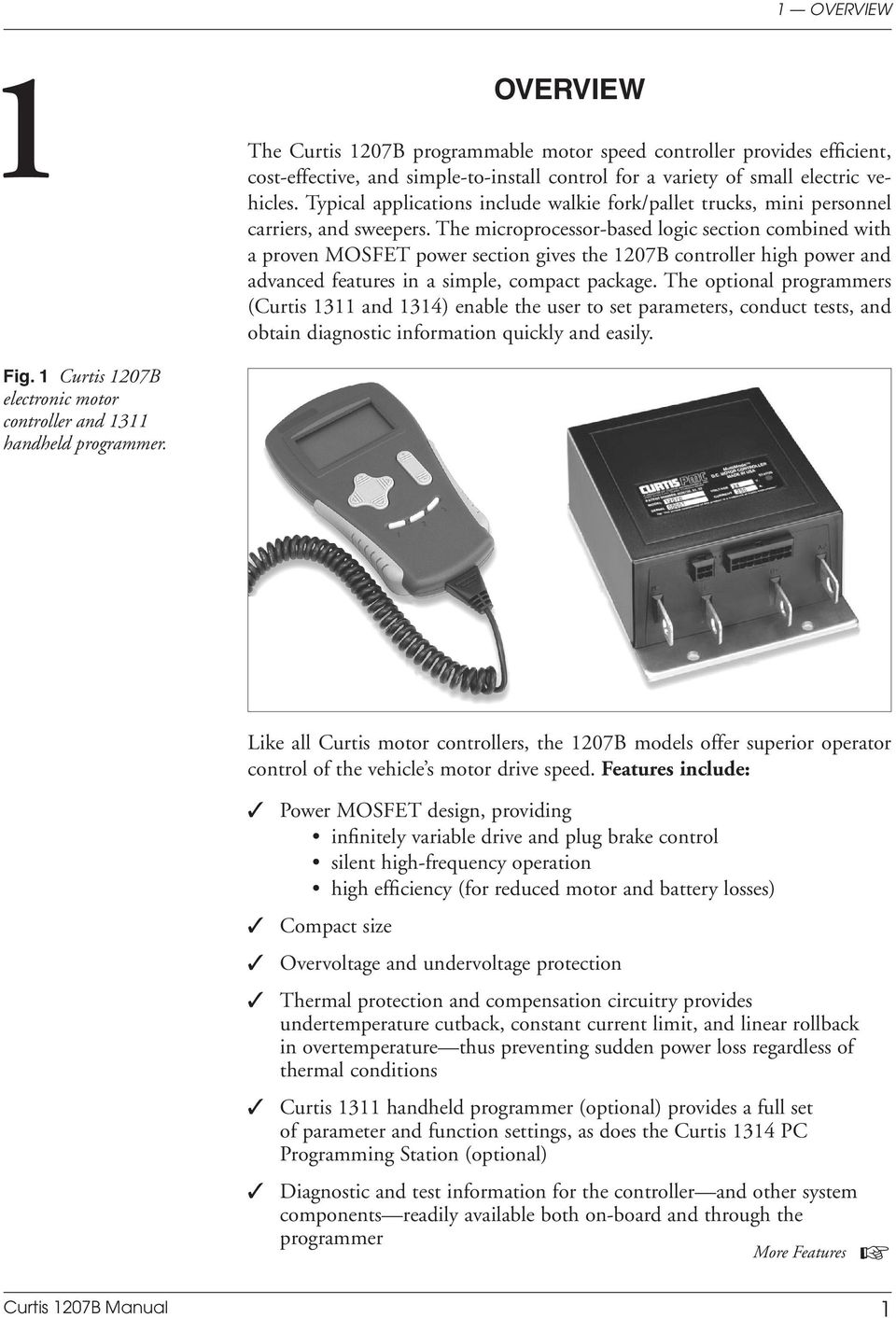
5 1 OVERVIEW 1 OVERVIEW The Curtis 1207B programmable motor speed controller provides efficient, cost-effective, and simple-to-install control for a variety of small electric vehicles. Typical applications include walkie fork/pallet trucks, mini personnel carriers, and sweepers. The microprocessor-based logic section combined with a proven MOSFET power section gives the 1207B controller high power and advanced features in a simple, compact package. The optional programmers (Curtis 1311 and 1314) enable the user to set parameters, conduct tests, and obtain diagnostic information quickly and easily. Fig. 1 Curtis 1207B electronic motor controller and 1311 handheld programmer. Like all Curtis motor controllers, the 1207B models offer superior operator control of the vehicle s motor drive speed. Features include: Power MOSFET design, providing infinitely variable drive and plug brake control silent high-frequency operation high efficiency (for reduced motor and battery losses) Compact size Overvoltage and undervoltage protection Thermal protection and compensation circuitry provides undertemperature cutback, constant current limit, and linear rollback in overtemperature thus preventing sudden power loss regardless of thermal conditions Curtis 1311 handheld programmer (optional) provides a full set of parameter and function settings, as does the Curtis 1314 PC Programming Station (optional) Diagnostic and test information for the controller and other system components readily available both on-board and through the programmer More Features Curtis 1207B Manual 1
6 1 OVERVIEW Circuitry and software detects faults in the throttle circuit, MOSFET drive circuit, MOSFET transistors, contactor drivers, and contactors ensuring that the controller meets EEC fault detect requirements Input sequencing options include neutral start and static return to off (SRO) Microprocessor-controlled contactor sequencing provides true arcless contactor switching Smooth, controlled plug braking with either variable (throttledependent) or fixed plug current limit Neutral braking option provides automatic plug braking in neutral MultiMode input selects between two different operating modes, thus allowing optimization of vehicle characteristics for different driving conditions Emergency reverse (belly-button switch) with a single input Ramp-start feature provides full power for starting on ramps Simple contactor and switch wiring, with coil drivers monitored for faults thus ensuring fail-safe operation Flexible throttle circuitry accommodates a variety of throttle types Programmable ramp shape (static throttle map) provides flexibility in selecting throttle response feel Connections made by solid copper power busses with a polarized Molex connector for control signals Solid, well-protected construction with an aluminum mounting plate and injection-molded cover. Familiarity with your Curtis controller will help you install and operate it properly. We encourage you to read this manual carefully. If you have questions, please contact the Curtis office nearest you. 2 Curtis 1207B Manual

7 2 INSTALLATION & WIRING 2 INSTALLATION AND WIRING MOUNTING The 1207B controller can be oriented in any position, but the location should be carefully chosen to keep the controller as clean and dry as possible. If a clean mounting location cannot be found, a cover must be used to shield the controller from water and contaminants. To ensure full rated output power, the controller should be fastened to a clean, flat metal surface with three screws. The case outline and mounting hole dimensions are shown in Figure 2. Although not usually necessary, a thermal joint compound can be used to improve heat conduction from the case to the mounting surface. Fig. 2 Mounting dimensions, Curtis 1207B controller. 165 (6.50) 127 (5.00) 22 (0.85) Status LED 28 (1.1) 122 (4.80) C L 66 (2.6) 6.7 (0.265) dia., 3 plcs 152 (6.00) 6.3 (0.25) ( ); 8.4 (0.33) dia. hole thru 66 (2.60) 4.8 (0.19) Dimensions in millimeters and (inches) Curtis 1207B Manual 3

8 2 INSTALLATION & WIRING CONNECTIONS: Low Current An integrated 16-pin low power connector molded into the front of the controller provides the low power logic control connections (see pin list below). The mating connector is Molex Mini-Fit Jr., part number (5557) Contact Molex regarding compatible pins for various wire sizes Pin 1 shunt field driver output; n/c for series motors Pin 2 reverse contactor driver output Pin 3 forward contactor driver output Pin 4 main contactor driver output Pin 5 throttle: 3-wire pot high Pin 6 throttle: 3-wire pot wiper or 0 5V Pin 7 throttle: pot low Pin 8 throttle: 2-wire 5kΩ 0 or 0 5kΩ input Pin 9 Pin 10 Pin 11 Pin 12 Pin 13 Pin 14 Pin 15 Pin 16 n/c emergency reverse (BB) check output [optional] reverse input forward input emergency reverse input mode selection input brake input keyswitch input (KSI) 4 Curtis 1207B Manual

9 2 INSTALLATION & WIRING Programmer Connector A 4-pin Molex connector is provided for the 1311 handheld programmer or the 1314 PC Programming Station. A mating cable is supplied with the 1311 handheld programmer. Status LED The Status LED, located on top of the controller, displays flashing codes to indicate controller status; the codes are listed in Section 5. CONNECTIONS: High Current Four tin-plated copper bus bars are provided for the high current connections to the battery and motor: M- A2 B- B+ M- output to motor armature B- negative connection to battery B+ positive connection to battery/field A2 plug diode to motor armature Cables are fastened to the bus bars by M8 ( 5 16") bolts. When tightening the bolts, two opposing wrenches should be used to prevent bending the bus bars and putting undue strain on the internal connections. Curtis 1207B Manual 5

10 2 INSTALLATION & WIRING WIRING: Standard Configuration (Series Motor) The basic wiring for series motors with field reversing is shown in Figure 3. Fig. 3 Standard wiring diagram (series motor), Curtis 1207B controller. BRAKE MULTI MODE SWITCHES EMERGENCY REVERSE FORWARD REVERSE REVERSE CONTACTORS FORWARD MAIN KEYSWITCH THROTTLE 5kΩ 0 (TYPICAL) CONTROL FUSE POLARITY PROTECTION DIODE M- A2 B- B+ POWER FUSE B+ MAIN CONTACTOR PRECHARGE RESISTOR (250 Ω, 5 W) FORWARD CONTACTOR S2 S1 REVERSE CONTACTOR B- A1 A A2 The configuration shown in Figure 3 is a typical arrangement for a series motor. Curtis controllers are designed for use in a wide range of applications, and accordingly can be installed in a variety of ways to best meet customer needs. Note: The emergency reverse check feature (wiring shown by dashed line) is a factory option. 6 Curtis 1207B Manual
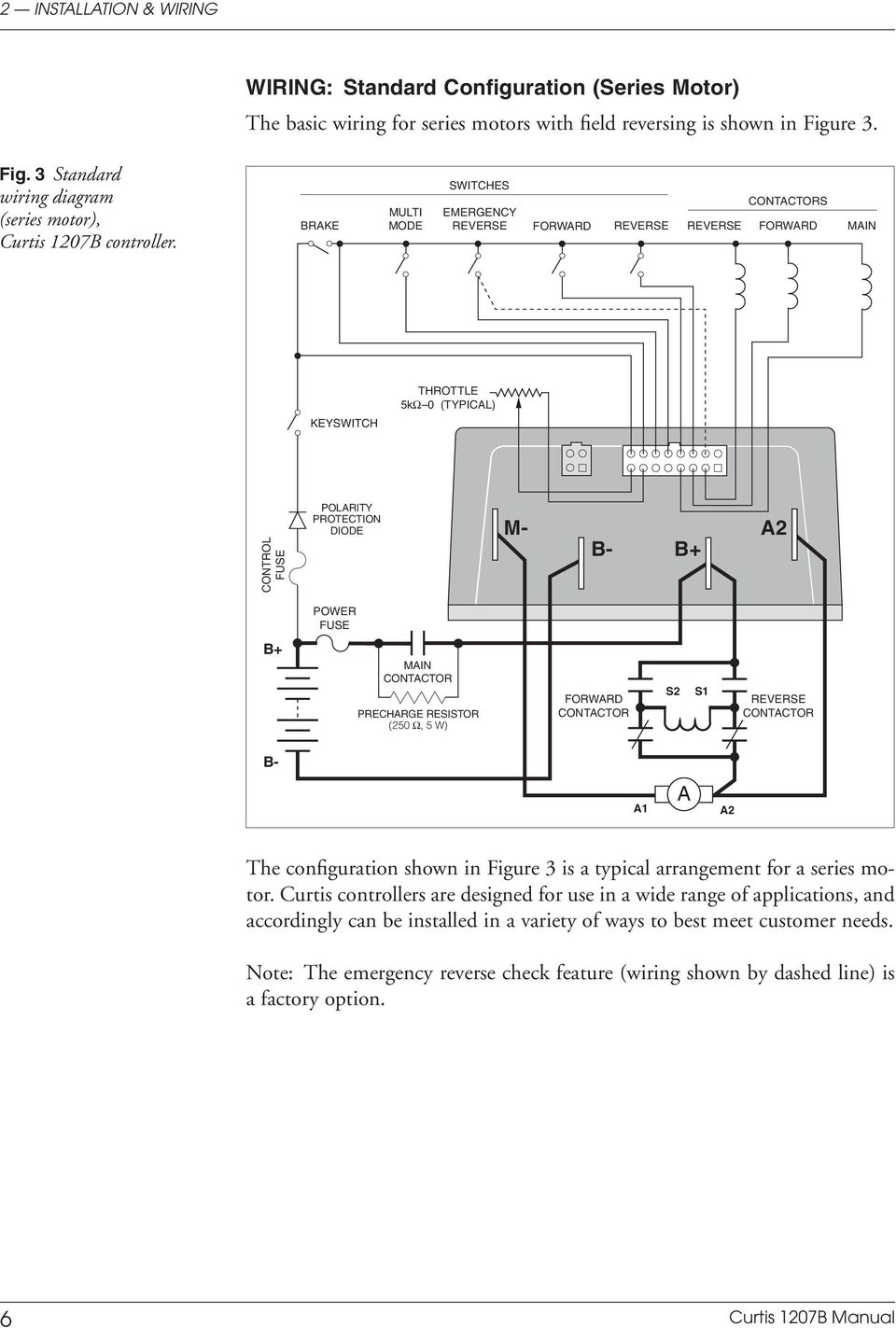
11 2 INSTALLATION & WIRING Power Wiring for Series Motor In every wiring configuration, it is imperative that the field be wired between the controller s B+ and A2 terminals and that the armature be wired between the M- and A2 terminals. The internal plug diode used in the 1207B is connected between M- and A2. Therefore, the armature and field positions cannot be interchanged. Reversing contactors can be used to switch either the armature or the field. Control Wiring for Series Motor Wiring for the input switches and contactors is shown in Figure 3 (see detail below). The main contactor, if one is used, is normally connected directly to the controller. Optionally, the main contactor can be switched directly by the keyswitch or brake, leaving Pin 4 unconnected. 16-pin 16-pin detail detail (see (see Fig. Fig. 3): 3): KEYSWITCH BRAKE MULTI MODE EMERGENCY REVERSE FORWARD REVERSE EMERGENCY REVERSE CHECK OUTPUT POT LOW FORWARD CONTACTOR 2-WIRE POT (5 kω) MAIN CONTACTOR REVERSE CONTACTOR The throttle shown in Figure 3 is a 5kΩ 0 type. Various other throttles can also be accommodated, and are discussed in the throttle wiring section. Curtis 1207B Manual 7

12 2 INSTALLATION & WIRING WIRING: Compound Motor Configuration A specially configured controller is available for compound motor applications. In this controller, the MOSFET output driver is used to drive the shunt field. The wiring for a compound wound motor with armature reversing is shown in Figure 4. Fig. 4 Compound motor wiring diagram, Curtis 1207B controller. BRAKE MULTI MODE SWITCHES EMERGENCY REVERSE FORWARD REVERSE SHUNT CONTACTORS REV FWD MAIN THROTTLE 5kΩ 0 (TYPICAL) B- KEYSWITCH CONTROL FUSE POLARITY PROTECTION DIODE M- A2 B- B+ B+ POWER FUSE MAIN CONTACTOR S2 S1 B- PRECHARGE RESISTOR (250 Ω, 5 W) FORWARD CONTACTOR A1 A A2 REVERSE CONTACTOR The configuration shown in Figure 4 requires the use of a compound wound motor. Pure shunt motors cannot be used with 1207B controllers. Although the configuration shown is typical, various other configurations are possible. Note: The emergency reverse check feature (wiring shown by dashed line) is a factory option. 8 Curtis 1207B Manual
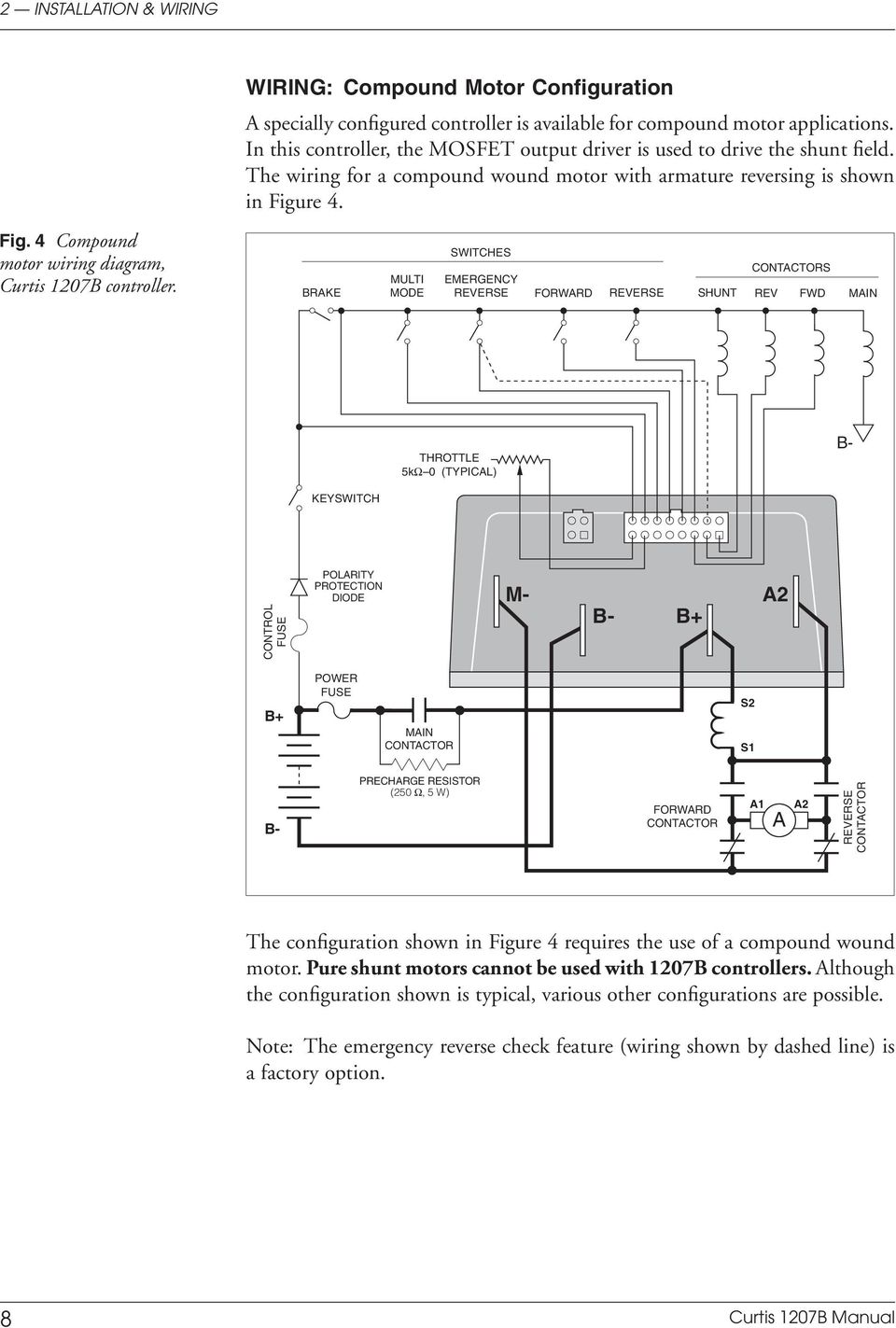
13 2 INSTALLATION & WIRING Power Wiring for Compound Motor The field must be wired between B+ and A2 and the armature between M- and A2. The internal plug diode in the 1207B is connected between M- and A2; therefore, the armature and field positions cannot be interchanged. If the shunt is rated for under 2 amperes, it can be connected directly to the controller as shown in Figure 4. If the shunt is rated for higher than 2 amperes, a contactor must be used to control the shunt field. Control Wiring for Compound Motor Control wiring for the compound motor application is like that for the standard (series motor) wiring. The main contactor, if one is used, is normally connected directly to B-. 16-pin detail (see (see Fig. Fig. 4): 4): KEYSWITCH BRAKE MULTI MODE EMERGENCY REVERSE FORWARD REVERSE EMERGENCY REVERSE CHECK OUTPUT POT LOW FORWARD CONTACTOR SHUNT 2-WIRE POT (5 kω) REVERSE CONTACTOR The throttle shown in Figure 4 is a 5kΩ 0 type. Various other throttles can also be accommodated, and are discussed in the throttle wiring section. Polarity protection diodes and control fuses must be sized appropriately to handle the increased current from the shunt field. Curtis 1207B Manual 9

14 2 INSTALLATION & WIRING WIRING: Throttle Wiring for various throttles is described below. They are characterized as Type 1, Type 2, and Type 3 throttles in the programming menu of the handheld programmer. Note: In the text, throttles are identified by their nominal range and not by their actual active range. If the throttle you are planning to use is not covered, please contact the Curtis office nearest you. 5kΩ 0 Throttle ( Type 1 ) The 5kΩ 0 throttle (called a Type 1 throttle in the programming menu of the handheld programmer) is a 2-wire resistive throttle that connects between the 5kΩ 0/0 5kΩ pin (Pin 8) and the Pot Low pin (Pin 7), as shown in Figure 5. It doesn t matter which wire goes on which pin. Zero speed corresponds to 5kΩ and full speed corresponds to 0Ω. Fig. 5 Wiring for 5kΩ 0 throttle ( Type 1 ). 5kΩ POT FASTER Pin 8 Pin 7 PIN KEY 5kΩ 0 Pot Low In addition to accommodating the basic 5kΩ 0 throttle, the Type 1 throttle is the easiest with which to implement a wigwag-style throttle. Using a 20kΩ potentiometer wired as shown in Figure 6, the pot wiper can be set such that the controller has 5kΩ between Pins 7 and 8 when the throttle is in the neutral position (i.e., at the center of the pot). The throttle mechanism can then be designed such that rotating it either forward or back decreases the resistance between Pins 7 and 8, which increases the controller output. The Fig. 6 Wiring for 20kΩ potentiometer used as a wigwag-style throttle ( Type 1 ). 20kΩ POT FASTER FASTER Pin 8 Pin 7 PIN KEY 5kΩ 0 Pot Low 10 Curtis 1207B Manual

15 2 INSTALLATION & WIRING throttle mechanism must provide signals to the controller s forward and reverse inputs independent of the throttle pot resistance. The controller will not sense direction from the pot resistance. 0 5V, 3-Wire Potentiometer, and Electronic Throttles ( Type 2 ) With these throttles ( Type 2 in the programming menu), the controller looks for a voltage signal at the pot wiper/0 5V input of the controller (Pin 6). Zero speed corresponds to 0V and full speed corresponds to 5V. Pot Low is the current return path for all Type 2 throttles. 0 5V Throttle Two ways of wiring the 0 5V throttle are shown in Figure 7. If a throttle sensor is used, the sensor s ground return current must be less than 10 ma. If the 0 5V throttle input (Pin 6) exceeds 8 volts, the controller will shut down. Fig. 7 Wiring for 0 5V throttle ( Type 2 ). (a) 0 5V throttle sensor V SENSOR SENSOR OUTPUT SENSOR GROUND Pin 7 Pin 6 PIN KEY Pot Low 0 5V Input (b) Ground-referenced 0 5V throttle (Shunt impedance 150 kω to ground) B- 4.7 kω PIN KEY Pin 7 Pot Low Pin 6 0 5V Input Pin 5 Pot High Curtis 1207B Manual 11

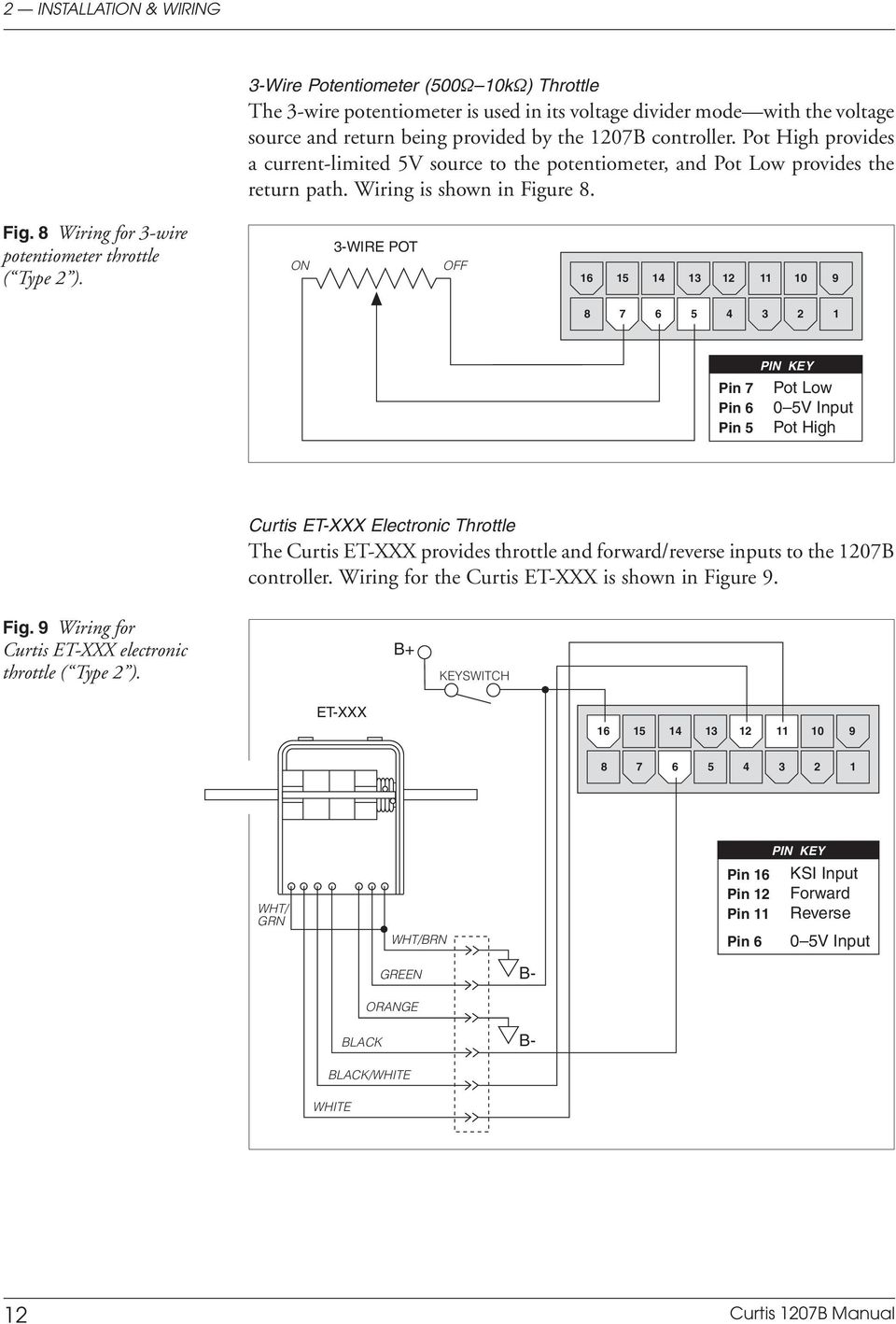
16 2 INSTALLATION & WIRING 3-Wire Potentiometer (500Ω 10kΩ) Throttle The 3-wire potentiometer is used in its voltage divider mode with the voltage source and return being provided by the 1207B controller. Pot High provides a current-limited 5V source to the potentiometer, and Pot Low provides the return path. Wiring is shown in Figure 8. Fig. 8 Wiring for 3-wire potentiometer throttle ( Type 2 ). ON 3-WIRE POT OFF PIN KEY Pin 7 Pot Low Pin 6 0 5V Input Pin 5 Pot High Curtis ET-XXX Electronic Throttle The Curtis ET-XXX provides throttle and forward/reverse inputs to the 1207B controller. Wiring for the Curtis ET-XXX is shown in Figure 9. Fig. 9 Wiring for Curtis ET-XXX electronic throttle ( Type 2 ). B+ KEYSWITCH ET-XXX WHT/ GRN WHT/BRN Pin 16 Pin 12 Pin 11 Pin 6 PIN KEY KSI Input Forward Reverse 0 5V Input GREEN B- ORANGE BLACK B- BLACK/WHITE WHITE 12 Curtis 1207B Manual
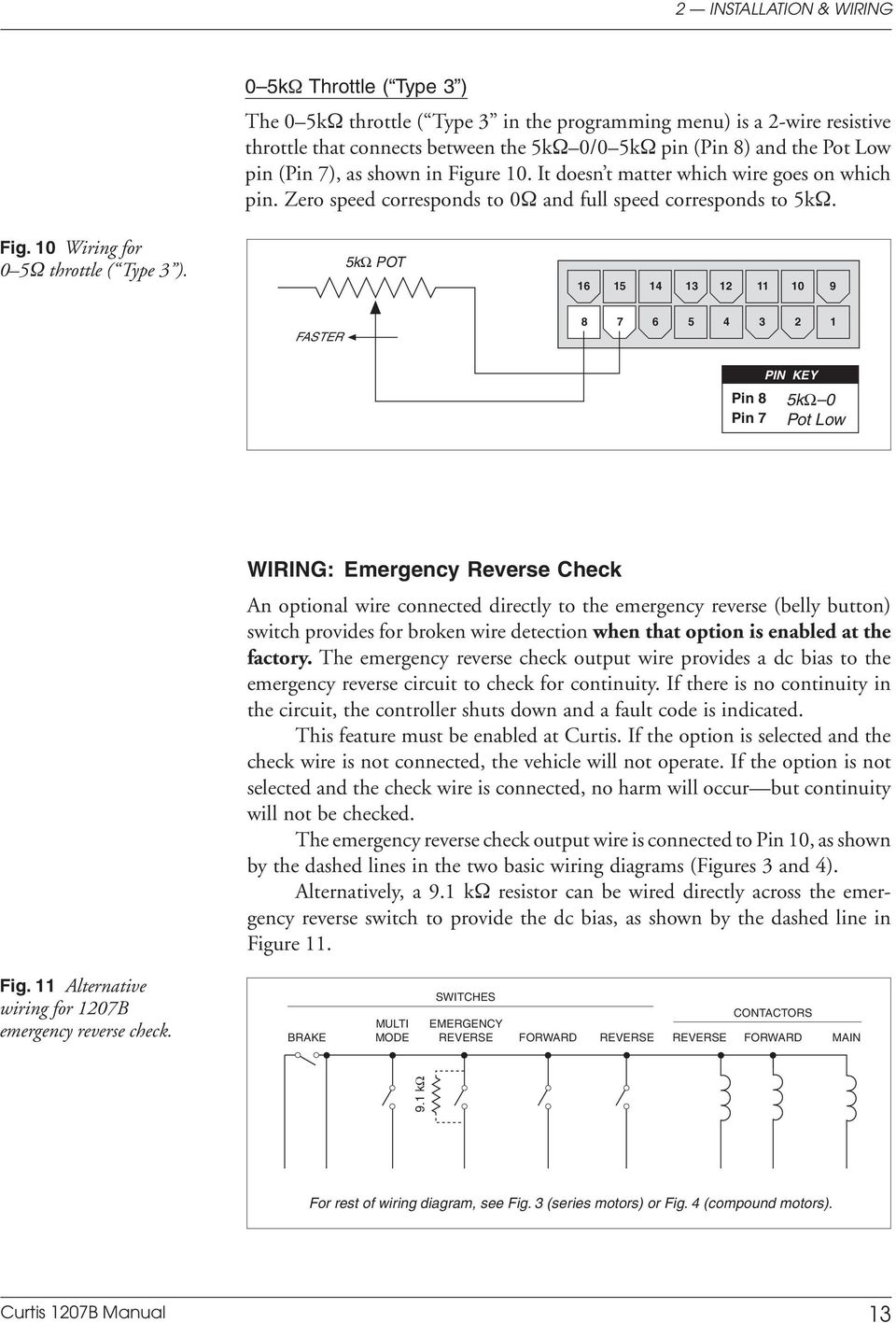
17 2 INSTALLATION & WIRING 0 5kΩ Throttle ( Type 3 ) The 0 5kΩ throttle ( Type 3 in the programming menu) is a 2-wire resistive throttle that connects between the 5kΩ 0/0 5kΩ pin (Pin 8) and the Pot Low pin (Pin 7), as shown in Figure 10. It doesn t matter which wire goes on which pin. Zero speed corresponds to 0Ω and full speed corresponds to 5kΩ. Fig. 10 Wiring for 0 5Ω throttle ( Type 3 ). 5kΩ POT FASTER Pin 8 Pin 7 PIN KEY 5kΩ 0 Pot Low WIRING: Emergency Reverse Check An optional wire connected directly to the emergency reverse (belly button) switch provides for broken wire detection when that option is enabled at the factory. The emergency reverse check output wire provides a dc bias to the emergency reverse circuit to check for continuity. If there is no continuity in the circuit, the controller shuts down and a fault code is indicated. This feature must be enabled at Curtis. If the option is selected and the check wire is not connected, the vehicle will not operate. If the option is not selected and the check wire is connected, no harm will occur but continuity will not be checked. The emergency reverse check output wire is connected to Pin 10, as shown by the dashed lines in the two basic wiring diagrams (Figures 3 and 4). Alternatively, a 9.1 kω resistor can be wired directly across the emergency reverse switch to provide the dc bias, as shown by the dashed line in Figure 11. Fig. 11 Alternative wiring for 1207B emergency reverse check. BRAKE MULTI MODE SWITCHES EMERGENCY REVERSE FORWARD REVERSE REVERSE CONTACTORS FORWARD MAIN 9.1 kω For rest of wiring diagram, see Fig. 3 (series motors) or Fig. 4 (compound motors). Curtis 1207B Manual 13
18 2 INSTALLATION & WIRING SWITCHES AND OTHER HARDWARE Keyswitch The vehicle should have a master on/off switch to turn the system off when not in use. The keyswitch provides logic power for the 1207B controller, coil current for the contactors, and shunt current (in compound motor applications). The keyswitch must be capable of carrying these currents. Main Contactor A main contactor allows the 1207B controller to be disconnected from the battery. A heavy-duty single-pole, single-throw (SPST) contactor with silver-alloy contacts is recommended, such as an Albright SW80 or SW180. After initial closing of the contacts, inrush currents flow as the controller s internal filter capacitors are charged. A 250Ω, 5W resistor (such as Curtis p/n MP-2) can be used across the contactor to precharge the capacitors and reduce the inrush current through the contacts. In compound motor applications, the main contactor driver is used to drive the shunt field. The main contactor if one is used is normally connected directly to B- in this configuration. Forward/Reverse Contactors For forward/reverse, a paired single-pole, double-throw (2 SPDT) contactor is recommended, such as an Albright DC88 or DC182. With 4-terminal split field motors, two single-pole, single-throw (SPST) contactors are typically used. The coil voltage should match the vehicle voltage. The maximum allowed coil current is 1 ampere. Forward/Reverse, Emergency Reverse, and Mode Switches These input switches can be any type of single-pole, single-throw (SPST) switch capable of switching the battery voltage at 10 ma. Circuitry Protection Devices For reverse polarity protection, a diode should be added to the control circuit. It must be sized appropriately for the maximum contactor coil currents (and shunt current, in compound motor applications). To protect the control wiring from accidental shorts, a low current fuse (appropriate for the maximum current draw) should be connected in series with the battery feed. These devices are both shown in the wiring diagrams. 14 Curtis 1207B Manual

19 2 INSTALLATION & WIRING INSTALLATION CHECKOUT Before operating the vehicle, carefully complete the following checkout procedure. If you find a problem during the checkout, refer to the diagnostics and troubleshooting section (Section 5) for further information. The installation checkout can be conducted with or without the handheld programmer. The checkout procedure is easier with a programmer. Otherwise, observe the Status LED for codes. C A U T I O N Put the vehicle up on blocks to get the drive wheel(s) off the ground before beginning these tests. Turn the keyswitch off and make sure that the brake is applied (brake switch open), the throttle is in neutral, and the forward/reverse switches are open. Do not stand, or allow anyone else to stand, directly in front of or behind the vehicle during the tests. 1. If a programmer is available, connect it to the programmer connector. 2. Turn the keyswitch on. The programmer should power up with an initial display, and the controller s Status LED should begin steadily blinking a single flash. If neither happens, check for continuity in the keyswitch circuit and controller ground. 3. If you are using a programmer, put it into the fault mode by entering the System Faults menu (Fault» System Faults). The display should indicate Currently no faults. Release the brake (close the brake switch). To do this on a walkie, pull the tiller down to the operating position. The LED should continue blinking a single flash and the programmer should continue to indicate no faults. If there is a problem, the LED will flash a diagnostic code and the programmer will display a diagnostic message. If you are conducting the checkout without a programmer, look up the LED diagnostic code in Section 5: Diagnostics and Troubleshooting. When the problem has been corrected, it may be necessary to cycle the brake in order to clear the fault code. 4. With the brake released, select a direction and operate the throttle. The motor should begin to turn in the selected direction. If it does not, verify the wiring to the forward/reverse switches, forward/reverse contactors, and motor. The motor should run proportionally faster with increasing throttle. If not, refer to Section 5. Curtis 1207B Manual 15

20 2 INSTALLATION & WIRING 5. If you are using a programmer, put it into monitor mode by entering the Monitor menu. Scroll down the Monitor menu to observe the status of the forward, reverse, brake, emergency reverse, and mode switches. Cycle each switch in turn, observing the programmer. Each input should show the correct state on the programmer. 6. Specific material handling directives, such as pren1175, require testing of the controller s fault detection circuitry. This can be done as follows: a) Disconnect the battery and make sure the keyswitch is off. b) Using an inline fuse holder fitted with a 10-amp fuse and alligator clips, connect the controller s M- and B- terminals. c) Turn the keyswitch on, release the brake, and apply the throttle. The motor should not operate, and the direction contactors should not pull in. d) Leave the keyswitch on and remove the inline fuse wire. The vehicle status should continue to remain off. e) Cycle the keyswitch off and on, release the brake, and apply the throttle. The vehicle should now operate normally. 7. Take the vehicle off the blocks and drive it in a clear area. It should have smooth acceleration and good top speed. 8. Test the plug braking of the vehicle. Verify that the plug braking option is as desired (variable or fixed). 9. Verify that all options, such as high pedal disable (HPD), static return to off (SRO), and anti-tiedown, are as desired. 10. Check to see whether the emergency reverse (belly button) feature is working correctly. If you have the optional emergency reverse check wiring, verify that the circuit is operational by momentarily disconnecting one of the emergency reverse wires. The vehicle should be disabled and a fault indicated. 16 Curtis 1207B Manual
21 3 ADJUSTMENT OF PARAMETERS 3 ADJUSTMENT OF PARAMETERS A number of controller parameters can be adjusted electronically via the optional programmers: either the 1311 handheld programmer or the 1314 PC Programming Station.* For a complete list of the adjustments that can be made, see Section 6: Handheld Programmer. CHANGING PARAMETER VALUES To change a parameter using the programmer, enter the Program menu and scroll through the Program menu to select the desired parameter. Press the appropriate Data Inc/Dec key ( up or down ) until the desired value is reached. The parameter is now set at the desired value. All programming occurs in real time. That is, the parameters can be changed while the vehicle is in operation. The upper and lower limits of parameters are set at the factory. Some parameters have dependencies on other parameters. When the programmer is being used to adjust a parameter and a limit is reached, the display will stop changing. Use of the programmer is described more fully in Section 6. CONTROLLER CLONING The optional handheld programmer also allows you to clone controllers, via options in its Functions menu. You program one controller to the desired settings, save these settings in the programmer, and then load them into other similar (same model number) controllers, thus creating a family of controllers with identical settings. * Instructions for using the 1314 PC Programming Station are included in that programmer s software. In this 1207B controller manual, only the 1311 handheld programmer is described. However, the 1314 has all the capabilities and features of the Curtis 1207B Manual 17
22 4 MAINTENANCE 4 MAINTENANCE There are no user-serviceable parts inside the Curtis 1207B controller. No attempt should be made to open the controller. Opening the controller may damage it and will void the warranty. However, it is recommended that the controller exterior be cleaned periodically, and if a handheld programmer is available this periodic cleaning provides a good opportunity to check the controller s fault history file. It is also recommended that the controller s fault detection circuitry be checked whenever the vehicle is serviced. C A U T I O N The 1207B controller is inherently a high power device. When working around any battery powered vehicle, proper safety precautions should be taken. These include, but are not limited to: proper training, wearing eye protection, avoiding loose clothing and jewelry, and using insulated wrenches. CLEANING Although the 1207B controller requires virtually no maintenance if properly installed, the following minor maintenance is recommended in certain applications. 1. Remove power by disconnecting the battery. 2. Discharge the capacitors in the controller by connecting a load (such as a contactor coil or a horn) across the controller s B+ and B- terminals. 3. Remove and dirt or corrosion from the bus bar area. The controller should be wiped clean with a moist rag. Allow it to dry before reconnecting the battery. 4. Make sure the connections to the bus bars are tight. Use two well insulated wrenches for this task in order to avoid stressing the bus bars. FAULT HISTORY The handheld programmer can be used to access the controller s fault history file. Connect the programmer, and select the Fault History menu (Fault» Fault History). The programmer will read out all the faults the controller has experienced since the last time the fault history file was cleared. The faults may be intermittent faults, faults caused by loose wires, or faults caused by operator errors. Faults such as contactor faults may be the result of loose wires; contactor wiring should be carefully checked out. Faults such as HPD or overtemperature may be caused by operator habits or by overloading. 18 Curtis 1207B Manual
23 4 MAINTENANCE After a problem has been diagnosed and corrected, clearing the fault history file is advisable. This allows the controller to accumulate a new file of faults. By checking the new fault history file at a later date, you can readily determine whether the problem was indeed completely fixed. To clear the fault history file, select the Clear Fault History menu (Fault» Clear Fault History). The programmer will prompt you to acknowledge or cancel. See Section 6 for more detail on programmer operation. TESTING THE FAULT DETECTION CIRCUITRY Specific material handling directives, such as pren1175, require periodic testing of the controller s fault detection circuitry. It is recommended that each time the vehicle is serviced, the M- fault detection circuitry be checked as follows: 1. Put the vehicle up on blocks to get the drive wheel(s) off the ground, disconnect the battery, and make sure the keyswitch is off. 2. Using an inline fuse holder fitted with a 10 A fuse and alligator clips, connect the controller s M- and B- terminals. 3. Turn the keyswitch on, release the brake, and apply the throttle. The motor should not operate, and the direction contactors should not pull in. 4. Leave the keyswitch on and remove the inline fuse wire. The vehicle status should continue to remain off. 5. Cycle the keyswitch off and on, release the brake, and apply the throttle. The vehicle should now operate normally. Curtis 1207B Manual 19
24 5 DIAGNOSTICS & TROUBLESHOOTING 5 DIAGNOSTICS AND TROUBLESHOOTING The 1207B controller provides diagnostics information to assist technicians in troubleshooting drive system problems. The diagnostics information can be obtained in two ways: reading the appropriate display on the programmer or observing the fault codes issued by the Status LED. The Status LED is located on top of the controller. LED DIAGNOSTICS During normal operation, with no faults present, the Status LED flashes a single flash at approximately 1 flash/second. If the controller detects a fault, a 2-digit fault identification code is flashed continuously until the fault is corrected. For example, code 3,2 welded direction contactor appears as: ( 3, 2 ) ( 3, 2 ) ( 3, 2 ) The codes are listed in Table 1. For suggestions about possible causes of the various faults, refer to the troubleshooting chart (Table 2). LED CODE Table 1 LED CODES EXPLANATION LED off no power or defective controller solid on defective controller single flash controller operational; no faults 1,2 hardware fail-safe error 1,3 M- fault or motor output short 1,4 sequencing fault (SRO) 2,1 5kΩ 0 or throttle wiper input fault 2,2 emerg. rev. circuit check fault (BB wiring) 2,3 high-pedal-disable fault (HPD) 2,4 Throttle Type setting changed 3,1 contactor or shunt driver overcurrent 3,2 welded direction contactor 3,3 incorrect main driver feedback signal 3,4 missing contactor or shunt 4,1 low battery voltage 4,2 overvoltage 4,3 thermal cutback 4,4 [reserved for future use] Note: Only one fault is indicated at a time, and faults are not queued up. 20 Curtis 1207B Manual
25 5 DIAGNOSTICS & TROUBLESHOOTING PROGRAMMER DIAGNOSTICS With a programmer, diagnostics and troubleshooting is more direct than with the LED alone. The programmer presents complete diagnostic information in plain language no codes to decipher. Faults are displayed in the Fault menu, and the status of the controller inputs/outputs is displayed in the Monitor menu. The following 4-step process is generally used for diagnosing and troubleshooting an inoperative vehicle: (1) visually inspect the vehicle for obvious problems; (2) diagnose the problem, using the programmer; (3) test the circuitry with the programmer; and (4) correct the problem. Repeat the last three steps as necessary until the vehicle is operational. Example: A vehicle that does not operate in forward is brought in for repair. step 1: Examine the vehicle and its wiring for any obvious problems, such as broken wires or loose connections. step 2: Connect the programmer, enter System Faults menu (Fault» System Faults), and read the displayed fault information. In this example, the display shows Currently no faults, indicating the controller has not detected anything out of the norm. step 3: Enter the Monitor menu, and observe the status of the inputs and outputs in the forward direction. In this example, the display shows that the forward switch did not close when forward was selected, which means the problem is either in the forward switch or the switch wiring. step 4: Check or replace the forward switch and wiring and repeat the test. If the programmer shows the forward switch closing and the vehicle now drives normally, the problem has been corrected. Refer to the troubleshooting chart (Table 2) for suggestions covering a wide range of possible faults. Curtis 1207B Manual 21
26 5 DIAGNOSTICS & TROUBLESHOOTING LED CODE PROGRAMMER LCD DISPLAY Table 2 TROUBLESHOOTING CHART EXPLANATION POSSIBLE CAUSE 1,2 HW Failsafe hardware fail-safe error 1. Controller defective. 1,3 M- Shor ted M- output shorted 1. M- output shorted to ground. 2. Direction contactor not closing. 3. Direction contactor not closing fast enough. 4. Internal motor short to ground. 1,4 SRO SRO fault 1. Improper sequence of KSI, brake, and direction inputs. 2. Wrong SRO type selected. 3. Brake or direction switch circuit open. 4. Sequencing delay too short. 2,1 Throttle Fault 1 5kΩ 0 or wiper fault 1. Throttle input wire open. 2. Throttle input wire shorted to ground or B+. 3. Throttle pot defective. 4. Wrong throttle type selected. 2,2 BB Wiring Check emerg. reverse wiring fault 1. BB wire open. 2. BB check wire open. 2,3 HPD HPD sequencing fault 1. Improper seq. of KSI, brake, throttle inputs. 2. Wrong HPD type selected. 3. Misadjusted throttle pot. 2,4 Throttle Fault 2 Throttle Type setting changed 1. Throttle Type setting was changed without cycling KSI. 3,1 CONT DRVR OC driver output overcurrent 1. Direction contactor coil shorted. 2. Shunt field shorted. 3,2 DIR CONT Welded welded direction contactor 1. Direction contactor stuck closed. 3,3 Contactor Driver Fault incorrect main driver feedback 1. Main contactor driver circuit failed. signal (when shunt driver function is disabled) 3,4 Missing Contactor missing contactor or shunt 1. Direction contactor coil open. 2. Direction contactor missing. 3. Shunt field open. 4. Wire to shunt or direction contactor open. 4,1 Low Batter y Voltage low battery voltage 1. Battery voltage <16 volts. 2. Corroded battery terminal. 3. Loose battery or controller terminal. 4,2 Over Voltage overvoltage 1. Battery voltage >33V. 2. Vehicle operating with charger attached. 4,3 Thermal Cutback over-/under-temp. cutback 1. Temperature >85 C or <-25 C. 2. Excessive load on vehicle. 3. Improper mounting of controller. 4. Operation in extreme environments. 22 Curtis 1207B Manual
27 6 HANDHELD PROGRAMMER 6 HANDHELD PROGRAMMER The universal Curtis 1311 handheld programmer (optional) allows you to program, test, and diagnose Curtis programmable controllers. The programmer is powered by the host 1207B controller, via a 4-pin Molex connector on the front panel. The Menu Navigation Key is used to scroll up and down, and move right and left, within menus. The Data Inc/Dec Key is used to increase (+) and decrease (-) values. The three Bookmark Keys allow you to jump to frequently used parameters or monitor variables. To set a bookmark, select the item and press one of the bookmark keys for more than 2 seconds. To jump to the bookmarked location, press the appropriate bookmark key quickly (for less than 2 seconds). The bookmark keys also have another function: when adjusting the value of a parameter, you can use these keys to increase the increments by which the value changes; with Bookmark 1 pressed, for example, values change in 10-digit increments. Curtis 1207B Manual 23
28 6 HANDHELD PROGRAMMER PROGRAMMER OPERATION Menu structure When the programmer is first plugged into the controller, it uploads information from the controller and then displays the Main Menu: Program Monitor Fault Functions Information System Settings You scroll up and down the Main Menu by using the up and down arrows on the Navigation Key. A blinking square (shown here as solid black) indicates the selected item. You can go deeper into the Main Menu by using the right arrow of the Navigation Key; you return to the Main Menu by using the left arrow. Pressing the right arrow when the Program menu is selected will bring you to the list of programmable parameters, displayed in a second column to the right. The LCD on the programmer can show seven lines of text at a time. Program EMR Rev C/ L 250A Throttle Type 2 Ramp Shape 30 Creep Speed 5% EMR Rev Speed 90% Sequencing DLY 1. 0s Selecting a parameter (in this example, Creep Speed) and then pressing the right arrow of the Navigation Key will display a screen with additional information, which in this example is a bar graph. Program Creep Speed 5% min 0 max 25 To return to the list of parameters, press the left arrow. To return to the Main Menu, press the left arrow again. 24 Curtis 1207B Manual
29 6 HANDHELD PROGRAMMER Changing parameter values When the programmer is first connected to a 1207B controller, that controller s parameter list is uploaded to the programmer along with the present settings. You can scroll through this list and adjust parameter settings and test the results. Select Program (the top item in the Main Menu), and then press the right arrow on the Navigation Key to see the list of parameters. Use the down arrow to scroll down to the parameter you wish to adjust. The present value of the parameter, and its units, will be displayed. Use the Data Inc/Dec Key to change the parameter s value. Alternatively, before adjusting the parameter value from this screen, you can press the right arrow key. This will cause a bar graph of that parameter to appear, showing its present value and also the minimum and maximum allowed values. You can change the value of the parameter from this screen, as well, using the Data Inc/Dec Key. The programmer automatically sends the change to the controller. The new value is set when the Data Inc/Dec Key is released. Use the left arrow on the Navigation Key to return to the previous screen. Real-time monitoring The programmer can request and display real-time data from the 1207B controller. Select Monitor in the Main Menu, and use the right arrow on the Navigation Key to display the list of Monitor variables. The values are periodically updated in this list view. To view a single variable at a faster rate, select that variable in the list view and press the right arrow to show a detail screen. The update rate will be faster on this screen, because only one variable is being updated. Use the left arrow on the Navigation Key to return to the previous screen. Faults and fault history The programmer allows access to the present and past status of the 1207B controller. The controller runs continuous self-diagnostics and will record and log each error event in non-volatile memory. When the programmer is connected to the controller, this log file is automatically uploaded into the programmer. To see the present status of the controller, use the Navigation Key to select Fault and then System Faults. To see the log file, select Fault and then Fault History. It is useful to clear the fault history file after reading it. To do this, use the Navigation Key to select Fault and then Clear Fault History. When asked to confirm your action, use Data Inc/Dec Key. The + arrow means Yes and the - arrow means No (that is, it cancels clearing the fault history). Curtis 1207B Manual 25
30 6 HANDHELD PROGRAMMER PROGRAMMER MENUS Items are listed for each menu in the order they appear in the actual menus displayed by the handheld programmer. Program Menu (not all items available on all controllers) EMR Rev C/L Emergency reverse current limit Throttle Type Throttle type * Ramp Shape Throttle map Creep Speed Creep speed, as percent PWM duty cycle EMR Rev Speed Emerg. reverse speed, as % PWM duty cycle Sequencing DLY Sequencing delay, in seconds Variable Plug Throttle-variable plug braking: on (variable plug) or off (fixed plug) High Pedal Dis High pedal disable (HPD): type SRO Static return to off (SRO): type Anti-T iedown Anti-tiedown: on or off BB Check BB wiring check: on or off Quick Star t Quick-start throttle factor M1 Main C/L Mode 1 main current limit M1 Plug C/L Mode 1 plug current limit M1 Ramp C/L Mode 1 ramp start current limit M1 Accel Rate Mode 1 acceleration rate, in seconds M1 Max Speed Mode 1 maximum speed, as % PWM output M2 Main C/L Mode 2 main current limit M2 Plug C/L Mode 2 plug current limit M2 Ramp C/L Mode 2 ramp start current limit M2 Accel Rate Mode 2 acceleration rate, in seconds M2 Max Speed Mode 2 maximum speed, as % PWM output Neut Brake C/L Neutral brake current limit Neutral Brake Neutral brake: on or off * Throttle types: Type 1 = 5kΩ 0 Type 2 = 0 5V, 3-wire pot, and electronic throttles Type 3 = 0 5kΩ throttles HPD types: Type 0 = no HPD Type 1 = HPD on brake input Type 2 = HPD on KSI SRO types: Type 0 = no SRO Type 1 = SRO on brake input Type 2 = SRO on KSI plus brake input plus a direction input Type 3 = SRO on KSI plus brake input plus forward input (For more detail on these options, see Appendix A: Glossary of Features and Functions.) 26 Curtis 1207B Manual
31 6 HANDHELD PROGRAMMER Monitor Menu (not all items available on all controllers) Throttle Batt Voltage Heatsink Temp Throttle reading, as percent of full throttle Battery voltage Heatsink temperature Max Temp Maximum temperature seen * Min Temp Minimum temperature seen * Brake Input Brake switch: on/off Speed Input Mode switch: on (Mode 1) / off (Mode 2) EMR Rev Input For ward Input Reverse Input Fwd Cont Rev Cont * Maximum/minimum temperatures recorded since the Fault History was last cleared. Emergency reverse switch: on/off Forward switch: on/off Reverse switch: on/off Forward contactor: on/off Reverse contactor: on/off Fault List This is not a menu as such, but simply a list of the possible messages you may see displayed in the Fault» System Faults menu or the Fault» Fault History menu. The messages are listed here in alphabetical order. BB W iring Check Contactor Driver Fault BB wiring check failed Incorrect main driver feedback signal (when shunt function is disabled) CONT DRVR OC Contactor driver overcurrent Currently no faults No known faults DIR CONT Welded Direction contactor welded HPD High-pedal-disable (HPD) activated HW Failsafe Hardware failsafe activated Low Batter y Voltage Low battery voltage (<16V) M- Shor ted M- output fault Missing Contactor Missing contactor Over Voltage Overvoltage (>33V) SRO Static-return-to-off (SRO) activated Thermal Cutback Cutback, due to over/under temp Throttle Fault 1 Throttle input fault Throttle Fault 2 Throttle Type changed without cycling KSI Curtis 1207B Manual 27
32
33 APPENDIX A: GLOSSARY APPENDIX A GLOSSARY OF FEATURES AND FUNCTIONS Acceleration/deceleration rate The acceleration rate is the time required for the controller to increase from 0% to 100% duty factor. The shape of the acceleration curve is controlled by the dynamic throttle response, which is linear. The acceleration rates in Mode 1 and in Mode 2 are independently adjustable via the handheld programmer. Anti-tiedown Before enabling Mode 1 operation, the anti-tiedown function checks that the mode selection switch has been released after the last cycling of the brake switch. This feature discourages operators from taping or otherwise tying down the mode switch. If Mode 1 is already selected before the brake is released, the controller remains in Mode 2 until the mode switch is released and pressed again. Arcless contactor switching The controller output duty factor is quickly reduced to zero any time a direction is de-selected, so that the controller current will be reduced to zero before the direction contactor drops out. BB (see Emergency reverse) Brake The brake must be released (brake input high ) for the controller to operate. This is a safety interlock used on most material handling vehicles. Cycling the brake or KSI clears most faults and enables operation. Contactor drivers and circuits The1207B controller can accommodate up to four external contactors: forward, reverse, main, and shunt. Some vehicles may have no main contactor, or the main contactor may be wired directly to the KSI or brake signal, bypassing the controller. Various protections provided for the contactor drivers ensure that the contactors operate correctly; see Fault detection. Curtis 1207B Manual A-1
34 APPENDIX A: GLOSSARY The shunt winding of a compound motor can be wired directly to the shunt driver, provided that the maximum current does not exceed the driver s current rating. Creep speed at first throttle Creep speed is activated when a direction is first selected. The output maintains creep speed until the throttle is rotated out of the throttle deadband (typically 10% of throttle). Creep speed is adjustable from 0 to 25% of the controller duty factor; the adjustment can be made via the handheld programmer. Current limiting Curtis controllers limit the motor current to a preset maximum. This feature protects the controller from damage that might result if the current were limited only by motor demand. PWM output to the power section is reduced smoothly until the motor current falls below the set limit level. In addition to protecting the controller, the current limit feature also protects the rest of the system. By eliminating high current surges during vehicle acceleration, stress on the motor and batteries is reduced and their efficiency enhanced. Similarly, there is less wear and tear on the vehicle drivetrain, as well as on the ground on which the vehicle rides (an important consideration with golf courses and tennis courts, for example). The main current limit, plug current limit, and ramp start current limit in Mode 1 and in Mode 2 are independently adjustable via the handheld programmer, as is the emergency reverse current limit. Current multiplication During acceleration and during reduced speed operation, the Curtis controller allows more current to flow into the motor than flows out of the battery. The controller acts like a dc transformer, taking in low current and high voltage (the full battery voltage) and putting out high current and low voltage. The battery needs to supply only a fraction of the current that would be required by a conventional controller (in which the battery current and motor current are always equal). The current multiplication feature gives vehicles using Curtis controllers dramatically greater driving range per battery charge. Deceleration rate The deceleration rate is the time required for the controller to decrease from 100% duty factor to zero. The deceleration rate is fixed, and cannot be adjusted. The shape of the deceleration curve is controlled by the dynamic throttle response, which is linear. A-2 Curtis 1207B Manual
35 APPENDIX A: GLOSSARY Emergency reverse Emergency reverse is activated when the brake is released, KSI is activated, and the emergency reverse switch (the BB, or belly button switch) is pressed. After the BB switch is released, normal controller operation is not resumed until neutral (no direction) is selected or until the brake is cycled (brake, then brake release). However, repeatedly pressing the BB switch will reactivate the emergency reverse function each time. Because emergency reverse immediately powers the reverse contactor, some arcing may occur. Fault detection An internal microcontroller automatically maintains surveillance over the functioning of the controller. When a fault is detected, the appropriate fault code is signalled via the LED, externally visible on top of the controller. The diagnostic codes flashed by the LED are listed in Section 5, Troubleshooting. If the fault is critical, the controller is disabled. More typically, the fault is a remediable condition and temporary for example, an undervoltage fault is cleared when the condition is removed. The automatic fault detection system includes: contactor coil open / shorted driver (F/R and shunt contactors) contactor driver overcurrent / contactor coil short contactor welded emergency reverse circuit check M- output fault memory checks upon start-up overvoltage cutoff power supply out of range (internal) throttle fault undervoltage cutback watchdog (external and internal) watchdog (internal) Fault recording Fault events are recorded in the controller s memory. Multiple occurrences of the same fault are recorded as one occurrence. The fault event list can be loaded into the programmer for readout. The Fault» Fault History menu provides access to the controller s diagnostic history file the entire fault event list created since the diagnostic history file was last cleared. The Fault» System Faults menu, on the other hand, provides information about only the currently active faults. Curtis 1207B Manual A-3
36 APPENDIX A: GLOSSARY Fault recovery (including recovery from disable) Almost all faults require a cycling of the KSI or brake input to reset the controller and enable operation. The only exceptions are these: fault recovery anti-tiedown release and re-select Mode 1 emergency reverse BB re-applied or brake cycled HPD lower throttle to below HPD threshold overvoltage when battery voltage drops below overvoltage SRO when proper sequence is followed thermal cutback when temperature comes within range throttle fault 1 clears when condition gone undervoltage when battery voltage rises above undervoltage High-pedal-disable (HPD) The HPD feature prevents the vehicle from being started while the throttle is applied. The controller can be programmed to have HPD based on either brake input or KSI. Brake-type HPD To start the vehicle, the controller must receive a brake input (brake released) before receiving a throttle input. Controller operation will be disabled immediately if pedal demand (throttle input) is greater than 25% duty factor at the time the brake is released (brake input high ). Normal controller operation is regained by reducing the throttle demand to less than 25%. Sequencing delay, which can be set with the handheld programmer, provides a variable delay before disabling the controller. If the brake is applied while the throttle is above the HPD threshold (25%), HPD is not activated if the brake is then released before the delay time elapses. KSI-type HPD The HPD feature can be activated by KSI input instead of brake input, if preferred. To start the vehicle, the controller must receive a KSI input before receiving a throttle input. KSI KSI (Key Switch Input) provides power to the logic board, and initializes and starts diagnostics. In combination with the brake input, KSI enables all logic functions. Some vehicles may have no keyswitch (KSI simply tied to B+) or may have the key permanently turned on. A-4 Curtis 1207B Manual
37 APPENDIX A: GLOSSARY LED A Status LED located on top of the controller flashes a fault identification code if a fault is detected by the controller. The fault codes are listed in Table 1. The code will continue to flash until the fault condition has been cleared during active fault detection. This will typically happen after cycling KSI for power-up fault conditions, and cycling the brake for faults detected during operation. MOSFET A MOSFET (Metal Oxide Semiconductor Field Effect Transistor) is a type of transistor characterized by its fast switching speeds and very low losses. MultiMode The MultiMode feature of these controllers allows the vehicle to be operated with two distinct sets of characteristics. The two modes can be programmed to be suitable for operation under different conditions, such as slow precise maneuvering in Mode 2 and faster, long distance travel in Mode 1. The following parameters can be set independently in the two modes: main current limit plug current limit ramp start current limit acceleration rate maximum speed The operating mode is selected by means of the mode selection switch. If Mode 1 is not selected, the controller operates by default in Mode 2. When the controller returns to Mode 2 from Mode 1, it automatically changes the main current limit, the plug current limit, the ramp start current limit, the acceleration rate, and the maximum speed to their Mode 2 values. If the anti-tiedown feature is active, Mode 1 must be re-selected each time the brake is released. Neutral brake The optional neutral brake feature provides automatic plug braking in neutral. If this option is not selected, the vehicle is free to coast in neutral. The neutral brake plug current limit is programmable. Overtemperature At overtemperature (from 85 C to 95 C), the drive current limit is linearly decreased from full set current down to zero. (Plug current, however, is not reduced in order to provide full vehicle braking under all thermal conditions.) Curtis 1207B Manual A-5
38 APPENDIX A: GLOSSARY The operating PWM frequency is shifted to 1.5 khz when the controller is operating in the overtemperature range. Overvoltage protection Overvoltage resets the microprocessor, inhibits PWM, and opens the contactors, thereby shutting down the controller. Overvoltage can result during battery charging or from an improperly wired controller. Controller operation resumes when the voltage is brought within the acceptable range. The cutoff voltage and re-enable voltage are percentages of the battery voltage, and are set at the factory. Plug braking Plug braking takes place when a series motor is driven electrically in a direction opposite from the direction it is turning. The 1207B controls the field current to obtain smooth and controlled plug braking torque. During plug braking, the maximum current limit is automatically changed to the plug current limit, and the PWM frequency is changed to 1.5 khz. Note: Plug current limit on the 1207B controls the field current. The armature current in plug mode will be higher than the field current. There are two types of plug braking control fixed and variable. The fixed plug current limit is set to a fixed level. The variable plug current limit varies the current limit to correspond to the throttle position. The plug current limits in Mode 1 and in Mode 2 are independently adjustable via the handheld programmer. PWM Pulse width modulation (PWM), also called chopping, is a technique that switches battery voltage to the motor on and off very quickly, thereby controlling the speed of the motor. Curtis 1200 series controllers use high frequency PWM 15 khz which permits silent, efficient operation. Quick-start Upon receiving a quick throttle demand from neutral, the controller will exceed normal acceleration momentarily in order to overcome inertia. The quickstart algorithm is applied each time the vehicle passes through neutral and is not in plug mode. If the vehicle is in plug, the quick-start function is disabled, allowing normal plug braking to occur. The quick-start throttle factor is adjustable via the handheld programmer. A-6 Curtis 1207B Manual
39 APPENDIX A: GLOSSARY Ramp shape (throttle map) Ramp shape is a programmable parameter that determines the static throttle map of the 1207B controller. Eleven preprogrammed ramp shapes are available, in 5% steps between 20% and 70% (20, 25, 30, 35, 40, 45, 50, 55, 60, 65, and 70%). The ramp shape number refers to the PWM output at half throttle, as a percentage of its full range. For example, if maximum speed is set at 100% and creep speed is set at 0, a ramp shape of 50% will give 50% output at half throttle. The 50% ramp shape corresponds to a linear response. The six even number ramp shapes for maximum and creep speeds set at 100% and 0 are shown in Figure A-1. Fig. A-1 Ramp shape (throttle map) for controller with maximum speed set at 100% and creep speed set at 0. PWM (percent) MAXIMUM SPEED (100%) RAMP SHAPE 70% 60% 50% 40% 30% 20% CREEP SPEED (0) THROTTLE (percent) Changing either the maximum speed setting or the creep speed setting changes the output range of the controller. Ramp shape output is always a percentage of that range. Ramp shapes with the creep speed setting raised to 10% are shown in Figure A-2. Fig. A-2 Ramp shape (throttle map) for controller with maximum speed set at 100% and creep speed set at 10%. PWM (percent) MAXIMUM SPEED (100%) RAMP SHAPE 70% 60% 50% 40% 30% 20% CREEP SPEED (10%) THROTTLE (percent) Curtis 1207B Manual A-7
40 APPENDIX A: GLOSSARY In Figure A-3, the creep speed is kept at 10% and the maximum speed setting dropped to 60%. Fig. A-3 Ramp shape (throttle map) for controller with maximum speed set at 60% and creep speed set at 10%. PWM (percent) CREEP SPEED (10%) MAXIMUM SPEED (60%) RAMP SHAPE 70% 60% 50% 40% 30% 20% THROTTLE (percent) In all cases, the ramp shape number is the PWM output at half throttle, as a percentage of its full range. So, for example, in Figure A-3, a 50% ramp shape gives 35% PWM output at half throttle (halfway between 10% and 60%). A 30% ramp shape gives 25% PWM at half throttle (30% of the range {which is 50%, from 10% to 60%}, starting at 10% output, or {[.30 x 50%] + 10%} = 25%). Ramp start The ramp start feature allows the vehicle to be started with a higher plug current limit to prevent rolling downhill. Ramp start increases the plug current limit for the selected direction only. When the opposite direction is selected, ramp start will be canceled and a 3-step sequence must be followed to re-activate it: step 1. select a direction for more than 1 second, step 2. return to neutral, and step 3. re-select the same direction. Once the vehicle is operating in ramp start mode, it will continue to do so until the opposite direction is selected for more than one second. When the brake is first released, the ramp start current limit level will be obtained when either direction is selected in plug braking mode. In ramp start mode, either direction selected will allow the ramp start current limit level. This condition remains until the other direction is selected for more than one second. The new direction then becomes the decision direction, and the 3-step ramp start sequence is required to regain the ramp start current limit level in plug. The ramp start current limit is adjustable via the handheld programmer. The Mode 1 and Mode 2 ramp start current limits can be set independently. A-8 Curtis 1207B Manual
41 APPENDIX A: GLOSSARY Reset Almost all faults require a cycling of the KSI or brake input to reset the controller and enable operation; see Fault recovery for exceptions. Sequencing delay Sequencing delay allows the brake to be cycled within a set time (the sequencing delay), in order to prevent inadvertent activation of HPD or SRO. This feature is useful in applications where the brake switch may bounce or be momentarily cycled during operation. The delay can be set with the handheld programmer from 0 to 3 seconds, where 0 corresponds to no delay. Shunt field control The shunt field of a compound motor can be directly controlled by using the shunt winding driver (if the current requirement meets the contactor driver specifications). The shunt is activated while a direction is selected, as long as the controller is not in plug braking mode. A programmable delay is available for the shunt drive. This delays the shunt turn-on until some time after the reversing contactors have shuttled. The delay can be set with the handheld programmer from 0 to 0.5 seconds, where 0 corresponds to no delay. Smooth, stepless operation Like all Curtis 1200 Series controllers, the 1207B allows superior operator control of the vehicle s drive motor speed. The amount of current delivered to the motor is set by varying the on time (duty cycle) of the controller s power MOSFET transistors. This technique pulse width modulation (PWM) permits silent, stepless operation. Speed settings The maximum speed setting defines the upper-limit speed as a percentage of PWM output at full throttle. The maximum speed settings in Mode 1 and in Mode 2 are independently adjustable via the handheld programmer; the maximum creep speed and the maximum emergency reverse speed are similarly adjustable. Static-return-to-off (SRO) The SRO feature prevents the vehicle from being started when in gear. SRO checks the sequencing of brake input or of KSI and brake input relative to a direction input. The brake input must come on before a direction is selected. If Curtis 1207B Manual A-9
42 APPENDIX A: GLOSSARY a direction is selected before or simultaneously (within 50 msec) with the brake input, the controller is disabled. There are three types of SRO: SRO relative to brake input alone (Type 1 in the programming menu); SRO relative to both KSI and brake input (Type 2 ); and SRO relative to KSI, brake, and forward inputs (Type 3 ). The handheld programmer can be used to set the controller to operate with any of these types of SRO, or with no SRO (SRO Type 0 ). If your controller is programmed so that both KSI and brake input are required (SRO Type 2 ), the following sequence must be followed to enable the controller: step 1. KSI on, step 2. brake released (brake input high ), and step 3. direction selected. The interval between steps 1 and 2 is the same as between steps 2 and 3; that is, KSI input must precede brake input by at least 50 msec. Once the controller is operational, turning off either KSI or the brake causes the controller to turn off; re-enabling the controller requires the 3-step sequence. Similarly, if your controller is programmed so that KSI, brake, and forward inputs are all required (SRO Type 3 ), they must be provided in that sequence in order to enable the controller. Note, however, that operation is allowed if a reverse input precedes the brake input; this can be useful when operating a walkie on ramps. Sequencing delay, which can be set with the handheld programmer, provides a variable delay before disabling the controller. If the brake is applied while direction is selected, SRO is not activated if the brake is then released before the delay time elapses. Temperature compensation for current limits Full temperature compensation provides constant current limits throughout the normal operating range (heatsink temperatures of -25 C to +85 C). The temperature sensor is also used to calculate and display the heatsink temperature on the handheld programmer. Temperature extreme current-limit cutback (see Overtemperature, Undertemperature) Temperature extreme data storage The maximum and minimum temperatures read at the heatsink at any time during powering of the controller are stored in the controller s memory. These values (which can be accessed via the programmer s Monitor menu) are cleared each time the controller s diagnostic history file is cleared. A-10 Curtis 1207B Manual
43 APPENDIX A: GLOSSARY Throttle map The throttle map (duty factor as a function of throttle position) is adjustable, so that you can provide the proper feel for the many types of vehicles that use the 1207B controller. The throttle map parameter is called ramp shape ; see Ramp shape for more information. Throttle response The dynamic throttle response (duty factor as a function of time) is shaped by the acceleration rate setting. Dynamic throttle response is linear. The newest throttle input is mapped to the throttle map, and the controller then automatically accelerates (or decelerates) through a straight line until the new throttle demand is obtained. Throttle types The 1207B controller accepts a variety of throttle inputs, through various combinations of its four throttle input pins. The most commonly used throttles can all be hooked up directly: 5kΩ 0 and 0 5kΩ 2-wire rheostats, 3-wire pots, 0 5V throttles, and the Curtis ET-XXX electronic throttle. Throttle full range produces 0 100% duty factor at the controller output (unless limited by other conditions). Throttle fault detect is performed on the throttle input signals and virtually eliminates the possibility of runaway operation. Adjustments and settings are independent of throttle type. However, throttle fault conditions will vary by throttle type. Undertemperature When the controller is operating at less than -25 C, the current limit is cut back to approximately one-half of the set current. The operating PWM frequency is shifted to 1.5 khz when the controller is operating at undertemperature. Undervoltage protection Undervoltage protection automatically disables the controller output if battery voltage is detected below the undervoltage point at start-up, or when the battery voltage is pulled below the undervoltage point by an external load. The undervoltage cutback point is set in ROM, and is not adjustable. During normal operation, the controller duty factor will be reduced when the batteries discharge down to less than the undervoltage level. If the motor current is such that the batteries are being pulled below the minimum point, the duty factor will be reduced until the battery voltage recovers to the minimum level. In this way the controller servos the duty factor around the point which maintains the minimum allowed battery voltage. Curtis 1207B Manual A-11
44 APPENDIX A: GLOSSARY If the voltage continues to drop below the undervoltage level to a severe undervoltage condition (due to battery drain or external load), the controller continues to behave in a predictable fashion, with its output disabled. Watchdog (external, internal) The external watchdog timer guards against a complete failure of the microprocessor, which would incapacitate the internal watchdog timer. This independent system check on the microprocessor meets the EEC s requirement for backup fault detection. The external watchdog timer safety circuit shuts down the controller (and the microprocessor) if the software fails to generate a periodic external pulse train. This pulse train can only be created if the microprocessor is operating. If not periodically reset, the watchdog timer times out after 150 msec and turns off the controller. The external watchdog also directly disengages all contactors and directly shuts down the PWM drive to the MOSFETs. It can only be reset by cycling KSI. The internal watchdog timer must be reset periodically by correct sequential execution of the software. If not reset, the internal timer times out and the microprocessor is warm booted. This causes the microprocessor to shut down its outputs (thus shutting down the controller) and attempt to restart. A-12 Curtis 1207B Manual
45 APPENDIX APPENDIX B: SPECIFICATIONS A: GLOSSARY SPECIFICATIONS: 1207B CONTROLLERS Nominal input voltage 24 V Maximum operating voltage 30 V Overvoltage point 33 V Minimum operating voltage 16 V (= undervoltage point) Electrical isolation to heatsink 500 V ac (minimum) PWM operating frequency 15 khz Output current * 1207B-41XX 1207B-51XX 250 amps for 1 minute 300 amps for 30 seconds 200 amps for 2 minutes 210 amps for 2 minutes 150 amps for 5 minutes 160 amps for 5 minutes 100 amps for 1 hour 110 amps for 1 hour Contactor voltage Contactor current (maximum) Contactor coil spike protection Shunt driver current (maximum) Shunt driver spike protection 24 V 1 amp (current limit at 2 amps) internal diode to brake; internal diode from brake to KSI 2 amps active clamp at 47 V KSI input voltage KSI input current (typical) Logic input current (typical) Logic input threshold V 80 ma without programmer; 130 ma with programmer 10 ma at 24 V 8 V Ambient operating temperature range -25 C to 50 C Heatsink overtemperature cutback 85 C Heatsink undertemperature cutback -25 C Package splash resistant Weight 1.1 kg (2.5 lbs) Dimensions mm (4.8" 6.5" 2.6") * Output current rating test conditions: 1. Controller cover installed 2. Controller mounted to mm (9" 12" 0.125") aluminum plate heatsink 3. Airflow at 4.8 km/h (3 mph) perpendicular to bottom of aluminum plate 4. Duty factor held at 60% 5. Initial heatsink temperature at 20 C 6. Ambient temperature at 20 C 7. Current held at tested rating for 120% of time before thermal cutback. Curtis 1207B Manual A-13 B-1
46
Generation 2 CURTIS INSTRUMENTS, INC. MultiMode MOTOR CONTROLLER
 M O D E L 1243 Generation 2 MultiMode MOTOR CONTROLLER 2011 CURTIS INSTRUMENTS, INC. 1243GEN2 Manual, p/n 37044 Rev. E: February 2011 CURTIS INSTRUMENTS, INC. 200 Kisco Avenue Mt. Kisco, New York 10549
Kelly KBS-L Brushless Motor Controller User s Manual
 Kelly KBS-L Brushless Motor Controller User s Manual Devices Supported: KBS24051L KBS24101L KBS24121L KBS36051L KBS36101L KBS48051L KBS48101L KBS48121L KBS72051L KBS72101L KBS72121L Rev.4.1 Jan. 2014 Chapter
MANUAL 1204/5 MOTOR CONTROLLERS CURTIS PMC
 MANUAL 1204/5 MOTOR CONTROLLERS MODEL 1999 CURTIS INSTRUMENTS, INC. DESIGN OF CURTIS 1200 SERIES CONTROLLERS PROTECTED BY U.S. PATENT NO. 4626750. CURTIS PMC 235 East Airway Boulevard Livermore, California
LS1024B / LS2024B/ LS3024B. Solar Charge Controller USER MANUAL
 EPSOLAR LS1024B / LS2024B/ LS3024B Solar Charge Controller USER MANUAL Thank you very much for selecting our product! This manual offers important information and suggestions with respect to installation,
EET272 Worksheet Week 9
 EET272 Worksheet Week 9 answer questions 1-5 in preparation for discussion for the quiz on Monday. Finish the rest of the questions for discussion in class on Wednesday. Question 1 Questions AC s are becoming
CAUTION! THE 7I29 USES VOLTAGE AND POWER LEVELS THAT REPRESENT A HAZARD TO LIFE AND LIMB.
 7I29 MANUAL Rev 1.5 CAUTION! THE 7I29 USES VOLTAGE AND POWER LEVELS THAT REPRESENT A HAZARD TO LIFE AND LIMB. THE 7I29 IS INTENDED FOR USE BY OEMS THAT WILL INTEGRATE IT INTO A SYSTEM WITH INTERLOCKS AND
Analog Servo Drive 25A8
 Description Power Range NOTE: This product has been replaced by the AxCent family of servo drives. Please visit our website at www.a-m-c.com or contact us for replacement model information and retrofit
DCX300 - DCX400 - DCX600
 Ph: 541-476-3565 Fax: 541-476-3566 DCX300 - DCX400 - DCX SEPARATELY EXCITED DC MOTOR CONROLLERS Alltrax motor controllers are designed to work with various golf cars from different manufacturers. Use the
MILLIPAK SBPM CONTROLLER MANUAL FOR SYSTEM VERSION UK0157
 MILLIPAK SBPM CONTROLLER MANUAL FOR SYSTEM VERSION UK0157 Document History Document History Author Reviewer Initials Date Initials Date Version Reason for Modification PG 31 Oct 05 - - UK0157 Original.
IQ SYSTEM DISPLAY MODULE (IQDM-P) OWNER S MANUAL
 IQ SYSTEM MODULE (IQDM-P) OWNER S MANUAL The IQDM is a handheld programming and diagnostic tool for use with Club Car IQ System vehicles. This owner s manual includes all information required to operate
GPD 506/P5 Start-up Procedure and Checklist
 GPD 506/P5 Start-up Procedure and Checklist Preparation for GPD506/P5 Drive Start-Up...2 HVAC Start-Up Procedure for GPD 506/P5 WITH Bypass Option:...4 HVAC Start-Up Procedure for GPD 506/P5 WITHOUT Bypass
EPSOLAR LS0512R / LS0524R. Solar Light Controller INSTRUCTION MANUAL. Please read this manual carefully before using the product!
 EPSOLAR LS0512R / LS0524R Solar Light Controller INSTRUCTION MANUAL Please read this manual carefully before using the product! LandStar LS0512R / LS0524R Solar Light Controller Nominal system voltage
Manual for Fire Suppression & Methane Detection System
 Manual for Fire Suppression & Methane Detection System Fogmaker North America Post address: 150 Gordon Dr Exton, PA 19341 Delivery address: 150 Gordon Dr Exton, PA 19341 Tel: 610-265-3610 Fax: 610-265-8327
543-0032-00, 943-0032-00. User s Manual
 543-0032-00, 943-0032-00 User s Manual 1 Comfort Alert Diagnostics Faster Service And Improved Accuracy The Comfort Alert diagnostics module is a breakthrough innovation for troubleshooting heat pump and
www.curtisinstruments.com
 CANBUS I/O EXPANSION MODULE MODELS 56 / 56P FEATURES Eighteen multi-purpose I/O pins provide simple, flexible vehicle control system expansion. Two high-frequency (A, A) PWM driver outputs support a variety
DC Motor control Reversing
 January 2013 DC Motor control Reversing and a "Rotor" which is the rotating part. Basically there are three types of DC Motor available: - Brushed Motor - Brushless Motor - Stepper Motor DC motors Electrical
NX Series Inverters. HVAC Pocket Programming Guide
 NX Series Inverters HVAC Pocket Programming Guide HVAC Pocket Programming Guide HVAC Pocket Programming Guide / Contents This guide provides a single reference document for the user of NXL HVAC (product
DMX-K-DRV. Integrated Step Motor Driver + (Basic Controller) Manual
 DMX-K-DRV Integrated Step Motor Driver + (Basic Controller) Manual DMX-K-DRV Manual page 1 rev 1.33 COPYRIGHT 2007 ARCUS, ALL RIGHTS RESERVED First edition, June 2007 ARCUS TECHNOLOGY copyrights this document.
SERVICE MANUAL FOR 6535 SERIES TWO TON HIGH EFFICIENCY PACKAGED HEAT PUMPS
 SERVICE MANUAL FOR 6535 SERIES TWO TON HIGH EFFICIENCY PACKAGED HEAT PUMPS TABLE OF CONTENTS 1. Warnings...2 2. Accessibility Of Appliance...3 3. Unit Dimensions And Specifications...3 4. Unit Specifications
A1000 Cheat Sheet (Open Loop Vector)
 A1000 Cheat Sheet (Open Loop Vector) The following procedure is a supplement to supplied with this equipment and will guide the user in properly wiring the A1000 and. It will also show the user how to
Section 7. Evaporator thermistor. Under-and-over pressure safety switches. Connections to the ECU
 Automatic Temperature Control Diagnosis and Repair Diagnosis of Automatic A/C Systems The most common automatic A/C system malfunctions tend to be the result of basic air conditioning problems. These problems
INSTALLATION MANUAL 3RP / 5RP 4-BUTTON SERIES VEHICLE SECURITY SYSTEMS
 3RP / 5RP 4-BUTTON SERIES VEHICLE SECURITY SYSTEMS INSTALLATION MANUAL Before you begin the installation Read the INSTRUCTIONS! Always use a multi-meter when verifying vehicle wiring. Before mounting the
EVBIKE LCD Display Control User Guide. EVBIKE LCD Display Control User Guide WWW.EVBIKE.CZ - 1 -
 EVBIKE LCD Display Control User Guide WWW.EVBIKE.CZ - 1 - Table of Contents: 1) Description of the individual components and installation 2) Description of the measured quantities and user control display
Multi-Protocol decoder 76 200 with Load regulation
 Multi-Protocol decoder 76 2 with Load regulation For locomotives with universal motors on digital layouts operating in the DCC and Motorola data format. Features 76 2 Load regulated multi-protocol decoder
HYDRA HV OPERATION MANUAL. 2.0 Making Connections on your HYDRA speed control. Rosin core electrical solder
 HYDRA HV OPERATION MANUAL Starting Power Safe power on arming program helps prevent motor from accidentally turning on. Always use extreme care with high power systems. Auto shut down when signal is lost
Mobile Data Power Model: MDP-25
 Mobile Data Power Model: MDP-25 Topic Section Features... 2 Operational Features Summary... 2 Back-up Battery Power Internal Charger Voltage Spike Protection RF Noise Filtering Warning of Imminent Loss
INSTRUMENT PANEL. 1995 Volvo 850 DESCRIPTION & OPERATION. 1995-96 ACCESSORIES & EQUIPMENT Volvo Instrument Panels
 INSTRUMENT PANEL 1995 Volvo 850 1995-96 ACCESSORIES & EQUIPMENT Volvo Instrument Panels 850 WARNING: When working around steering column and before performing repairs, disconnect and shield battery ground
Sierra Dual 24 Volt Brushless DC Motor Controller Product Specification
 Sierra Dual 24 Volt Brushless DC Motor Controller Product Specification Assembly 025A0215 600A0942 Rev. A May 14, 2012 025A0215 Brushless DC Motor Controller Page 1 Revision History ECN # Date Rev Description
with Electronic Assistant
 TECHNICAL DATASHEET #TDAX100200 BLDC Motor Drive Drives a 12V, 24V or 48V BLDC motor Bidirectional, up to 25A Smooth speed control using Hall Sensors CAN (SAE J1939) with Electronic Assistant Features:
VEHICLE SPEED CONTROL SYSTEM
 PL VEHICLE SPEED CONTROL SYSTEM 8H - 1 VEHICLE SPEED CONTROL SYSTEM TABLE OF CONTENTS page DESCRIPTION AND SPEED CONTROL SYSTEM...1 SPEED CONTROL SERVO-PCM OUTPUT....2 SPEED CONTROL SWITCHES PCM INPUT...2
Three Channel Optical Incremental Encoder Modules Technical Data
 Three Channel Optical Incremental Encoder Modules Technical Data HEDS-9040 HEDS-9140 Features Two Channel Quadrature Output with Index Pulse Resolution Up to 2000 CPR Counts Per Revolution Low Cost Easy
Talon and Talon SR User Manual
 Talon and Talon SR User Manual Brushed DC motor controller Version 1.3 Cross the Road Electronics, LLC www.crosstheroadelectronics.com Cross The Road Electronics, LLC Page 1 4/2/2013 Device Overview Clear,
The Starting System. Section 4. Starting System Overview. Starter. The starting system:
 The Starting System Starter The starter motor drives the engine through a pinion gear that engages the ring gear on the flywheel. Fig. 4-01 TL623f401c Starting System Overview The starting system: Uses
SENSORED BRUSHLESS MOTOR & SPEED CONTROLLER COMBOS
 SENSORED BRUSHLESS MOTOR & SPEED CONTROLLER COMBOS OPERATING INSTRUCTIONS Please keep for future reference Thank you for purchasing this Exceed brushless motor and speed controller combo. We are sure you
Chapter 9 N.C. C. N.O. Single-Pole Double-Throw
 rather than providing multiple choices. The sensor modules used may only be suitable for use with the matching controller so it is wise to read the specifications to make sure the unit suits your application.
Whale 3. User Manual and Installation Guide. DC Servo drive. Contents. 1. Safety, policy and warranty. 1.1. Safety notes. 1.2. Policy. 1.3. Warranty.
 Whale 3 DC Servo drive User Manual and Installation Guide Contents 1. Safety, policy and warranty. 1.1. Safety notes. 1.2. Policy. 1.3. Warranty. 2. Electric specifications. 2.1.Operation ranges. 3. Connections
FlexPak 3000 Digital DC Drive Software Reference Manual Version 4.3
 FlexPak 3000 Digital DC Drive Software Reference Manual Version 4.3 Instruction Manual D2-3405-2 The information in this manual is subject to change without notice. Throughout this manual, the following
OPL BASIC. Dosing System for Professional Laundry machines. Contents
 OPL BASIC Dosing System for Professional Laundry machines Contents 1 Getting Started. Page 2 2 Installation. Page 4 3 Set Up & Operation. Page 8 4 Maintenance & Accessories. Page 10 5 Troubleshooting Page
R22. K Control. Indoor Unit. Nomenclature. Compatibility PL H 3 G K H B. Unit style Heat Pump Horse Power
 R22. K Control. Indoor Unit. Nomenclature. PL H 3 G K H B Compatibility Unit style Heat Pump Horse Power Control Boost Heaters R22. K Control. Outdoor Unit. Nomenclature. PU H 3 Y K A Compatibility Outdoor
1R / 4-BUTTON SERIES
 Button 1 1R / 4-BUTTON SERIES VEHICLE SECURITY SYSTEM Standard Features: Two 4-Button Remote Transmitters Status indicator (LED) Valet / override switch Multi-tone siren Dual stage impact detector Remote
PRO PLM Installation Instructions
 PRO PLM Installation Instructions PROFESSIONAL INSTALLATION STRONGLY RECOMMENDED Installation Precautions: Roll down window to avoid locking keys in vehicle during installation Avoid mounting components
SECTION 26 29 23 VARIABLE FREQUENCY DRIVES
 SECTION 26 29 23 VARIABLE FREQUENCY DRIVES PART 1 GENERAL 1.01 SCOPE A. Furnish and install individual freestanding variable frequency AC drives (VFD) as shown on the Drawings and specified herein. 1.02
Electronically Controlled Air Suspension (ECAS) for Trucks
 $2.50 Electronically Controlled Air Suspension (ECAS) for Trucks Maintenance Manual No. 36 Issued 7-99 ECAS System for 6 x 2 and 6 x 4 Vehicles with Rear Air Suspensions Service Notes Service Notes This
Digital Controllers ACTUATOR COMPATABILITY
 Product Specification 36502B DESCRIPTION APECS DPG-21XX-00X Digital Controllers The DPG-21XX-00X digital controller is used primarily to govern diesel or gas fueled engines of generator sets. This microprocessor-based,
DORMA MODEL PS-406BB POWER SUPPLY INSTALLATION INSTRUCTIONS
 Features: INSTALLATION Install in accordance with NFPA 70. DORMA MODEL PS-406BB POWER SUPPLY INSTALLATION INSTRUCTIONS Up to 1.95 Amps Load Capacity Class 2 Rated Outputs Overload, Over Voltage, and Short
Brushless DC Motor Controller Product Specification Assembly 025F0129
 Brushless DC Motor Controller Product Specification Assembly 025F0129 September 16, 2009 025F0129 ST B Brushless DC Motor Controller Data Sheet Page 1 Revision History ECN # Date Rev Description By 07058
MAKING MODERN LIVING POSSIBLE. UniLynx Indoor User Manual. ULX 1800i ULX 3000i ULX 3600i ULX 5400i SOLAR INVERTERS
 MAKING MODERN LIVING POSSIBLE UniLynx Indoor User Manual ULX 1800i ULX 3000i ULX 3600i ULX 5400i SOLAR INVERTERS Contents Contents 1. Introduction 2 Introduction 2 2. Function Description 3 Definition
12 Volt 30 Amp Digital Solar Charge Controller
 12 Volt 30 Amp Digital Solar Charge Controller User s Manual WARNING Read carefully and understand all INSTRUCTIONS before operating. Failure to follow the safety rules and other basic safety precautions
Standard WIRED Installation Guide
 Standard WIRED Installation Guide Version 1.0.1 1 Installing the STANDARD WIRED DEVICE The installation of the STANDARD WIRED DEVICE and its antennas can have a major impact on the STANDARD WIRED DEVICE
Multi Function, User Configurable Remote Vehicle Security System with 4 Button Replaceable Membrane Remote Transmitter
 MODEL PRO-9744 INSTALLATION MANUAL Multi Function, User Configurable Remote Vehicle Security System with 4 Button Replaceable Membrane Remote Transmitter This System Allows The Transmitter Buttons To Be
INSTALLATION & SERVICE MANUAL. Display Panel
 INSTALLATION & SERVICE MANUAL Display Panel The PowerLine EMS TM is a specialized power distribution and energy management system intended to be used in recreational vehicles. The Control Module is housed
How to read this guide
 How to read this guide The following shows the symbols used in this Quick start guide with descriptions and examples. Symbol Description Example P oint Reference Caution [ ] This symbol explains information
KBIC Solid State SCR DC Motor Speed Controls See table 2 page 4 for KBIC models covered by this manual
 KBIC Solid State SCR DC Motor Speed Controls See table 2 page 4 for KBIC models covered by this manual Patented Ultra Fast CL Circuit Prevents Demagnetization in PM Motors Installation and Operating Instructions
* DISCLAIMER: Contents. How to Use This Guide: COMMERCIAL INSTALL GUIDE 2
 COMMERCIAL INSTALL GUIDE 2 Contents How to Use This Guide: The first section of this guide is designed to assist you with the installation of your DECK Monitoring hardware. The revenue grade meter and
AMFA-27 AMFA-29. Operator s Manual & Installation Instructions. Rev. 2.5
 AMFA-27 AMFA-29 Operator s Manual & Installation Instructions Rev. 2.5 Date: 17 July, 2010 Permanently-connected, utility Interactive, single-phase, inverters Model AMFA-27 WIND TURBINE INVERTER (240 VAC
Electronic Power Control
 Service. Self-Study Programme 210 Electronic Power Control Design and Function With the Electronic Power Control system, the throttle valve is actuated only by an electric motor. This eliminates the need
Networkfleet 3500 Product Line Installation Guide
 Networkfleet 3500 Product Line Installation Guide Light/Medium Duty (L3500) Heavy Duty (H3500) Universal (U3500) www.networkcar.com/fleet Customer Care: (866) 227-7323 [email protected] Table
Vansco Multiplexing Module VMM1615. User Guide HY33-5008-IB/US UG-VMM1615-154200-201309-003
 Vansco Multiplexing Module VMM1615 User Guide HY33-5008-IB/US UG-VMM1615-154200-201309-003 Parker Hannifin Corporation Electronic Controls Division 1305 Clarence Avenue Winnipeg, MB R3T 1T4 Canada office
TECHNICAL SERVICE DEPARTMENT Technical Service Bulletin 1-800-432-8373. 2 Inch PowerVent LED Indicator Explanations & Troubleshooting Table
 New Robertshaw control valve was introduced in May 2008 as a replacement part. See last page for troubleshooting this replacement part. All voltage inputs are 120V. All electrical connectors are Molex
MODEL 2202IQ (1991-MSRP $549.00)
 F O R T H E L O V E O F M U S I C F O R T H E L O V E O F M U S I C MODEL 2202IQ (1991-MSRP $549.00) OWNER'S MANUAL AND INSTALLATION GUIDE INTRODUCTION Congratulations on your decision to purchase a LINEAR
IQAN MDM Operation Manual
 IQAN MDM Operation Manual Purpose The primary purpose of this document is to inform a user of the IQAN system on the ease of adjustments of the system. A person can create a much smoother machine control
OPENUPS. 6-30V Intelligent Uninterruptible Power Supply. Installation Guide. Version 1.0f P/N OPENUPS-06
 OPENUPS 6-30V Intelligent Uninterruptible Power Supply Installation Guide Version 1.0f P/N OPENUPS-06 Before you start Please take a moment and read this manual before you install the OPENUPS. Often times,
conventional system operation
 conventional system operation detection line operation Conventional detection systems normally operate on a 24VDC line. In the standby condition, the detectors will draw a low current, typically less than
The ACD pro replaces any resistance based controller and is suitable for nearly any motor within the current rating.
 1. Main Features Non contact trigger. Minimal maintenance. Microcontroller- based PWM control. New braking behavior and high acceleration. Adjustable brake sensitivity and choke. Suitable for all motors
How To Control A Battery Cell Phone With A Battery Power Control System
 Wind/Solar Hybrid Street Light Controller User Manual Model: HY-WSC04-12AWM, HY-WSC04-12/24AWM, HY-WSC06-24AWM, HY-WSC06-48AWM 1. Product Introduction The wind/solar hybrid street light controller is an
Automation System TROVIS 6400 TROVIS 6493 Compact Controller
 Automation System TROVIS 6400 TROVIS 6493 Compact Controller For panel mounting (front frame 48 x 96 mm/1.89 x 3.78 inch) Application Digital controller to automate industrial and process plants for general
VEHICLE THEFT/SECURITY SYSTEMS
 DN VEHICLE THEFT/SECURITY SYSTEMS 8Q - 1 VEHICLE THEFT/SECURITY SYSTEMS TABLE OF CONTENTS page GENERAL INFORMATION INTRODUCTION...1 VEHICLE THEFT SECURITY SYSTEM....1 ENABLING...1 ARMING...1 DISARMING...2
ADVANCED SCOOTER CONTROL SYSTEMS PG DRIVES TECHNOLOGY
 ADVANCED SCOOTER CONTROL SYSTEMS PG DRIVES TECHNOLOGY THE S-DRIVE FAMILY The S-Drive scooter controller family is the most advanced and cost-effective controller available to date, offering major enhancements
The quadrature signals and the index pulse are accessed through five 0.025 inch square pins located on 0.1 inch centers.
 Quick Assembly Two and Three Channel Optical Encoders Technical Data HEDM-550x/560x HEDS-550x/554x HEDS-560x/564x Features Two Channel Quadrature Output with Optional Index Pulse Quick and Easy Assembly
Fan Coil EC Motor Control
 Fan Coil EC Motor Control G3 PWM BARD The Enviro-Tec Generation 3 PWM (G3 PWM) board provides a pulse-width modulated (PWM) signal to the EC motor to control fan speed. The board is factory programmed
AGS. Owner's Manual. Xantrex Automatic Generator Start Control System
 AGS Owner's Manual Xantrex Automatic Generator Start Control System TABLE OF CONTENTS INTRODUCTION...3 Main Features...3 Safety Summary...3 THINGS YOU SHOULD KNOW...4 THEORY OF OPERATION...5 System...5
Digi-Motor Installation Guide
 Digi-Motor Installation Guide Installation Video...located at marsdelivers.com Digi-Motor Installation Guide Digi-Motor For technical assistance with your Azure Digi-Motor, call the MARS technical support
TECHNICAL DATASHEET #TD1404AX PWM CONTROLLED SOLENOID DRIVER
 TECHNICAL DATASHEET #TD1404AX PWM CONTROLLED SOLENOID DRIVER (PWM Input, 1.2A or 2A Output, Metal Box or PCB) PCB Board - P/N: PWMC-PCB-2A, PWMC-PCB-1.2A Packaged Driver (metal box with 1.5 m (5 ft.) cable)
HERZ-Thermal Actuators
 HERZ-Thermal Actuators Data Sheet 7708-7990, Issue 1011 Dimensions in mm 1 7710 00 1 7710 01 1 7711 18 1 7710 80 1 7710 81 1 7711 80 1 7711 81 1 7990 00 1 7980 00 1 7708 11 1 7708 10 1 7708 23 1 7709 01
Solid-State Relays (SSRs) vs Electromechanical Relays (EMRs)
 Oct 2010 Solid-State Relays (SSRs) vs Electromechanical Relays (EMRs) A study on worldwide relays market found the market size of solid state relays to be between $200M and $600M, which represent 17% of
What Is Regeneration?
 What Is Regeneration? Braking / Regeneration Manual Regeneration Overview Revision 1.0 When the rotor of an induction motor turns slower than the speed set by the applied frequency, the motor is transforming
PUSH BUTTON START INSTALLATION MANUAL
 PUSH BUTTON START INSTALLATION MANUAL ALTHOUGH THIS PRODUCT HAS BEEN THOROUGHLY TESTED KPIERSON TECHNOLOGIES ASSUMES NO RESPONSIBILITY FOR ANY DAMAGE THAT MAY RESULT BY THE INSTALLATION OF THIS PRODUCT.
CONNECTOR AMPLIFIER FOR PROPORTIONAL VALVES (4-20 ma Input Version)
 TECHNICAL DATASHEET #TD1102AX CONNECTOR AMPLIFIER FOR PROPORTIONAL VALVES (4-20 ma Input Version) Part Number: Connector Amplifier CAPV-H-4-20MA-x complete with cable CAPV-4C-yM Where: x = current output
GAUGEMASTER PRODIGY EXPRESS
 GAUGEMASTER PRODIGY EXPRESS DCC01 USER MANUAL Version 1.1 2011 T A B L E O F C O N T E N T S 1 Getting Started Introduction Specifications and Features Quick Start Connecting to Your Layout Running a Loco
SYSTEM 4C. C R H Electronics Design
 SYSTEM 4C C R H Electronics Design SYSTEM 4C All in one modular 4 axis CNC drive board By C R Harding Specifications Main PCB & Input PCB Available with up to 4 Axis X, Y, Z, A outputs. Independent 25
TECHNICAL DATASHEET #TD1000AX DUAL SOLENOID MULTIFUNCTION VALVE DRIVER With Joystick, Potentiometer and Control System Interface P/N: DSDA-SMB Series
 TECHNICAL DATASHEET #TD1000AX DUAL SOLENOID MULTIFUNCTION VALVE DRIVER With Joystick, Potentiometer and Control System Interface P/N: DSDA-SMB Series Description: The Dual Solenoid Multifunction Valve
3FBD DC Motor Drive User Manual
 3FBD DC Motor Drive User Manual Via I. Alpi 6 - zona industriale - Lonato (BS) Tel. +39 30 9913491 r.a. Fax. +39 30 9913504 http://www.re-elettronica.it [email protected] Pag. 1 Index Index... pag.1
Troubleshooting accelerometer installations
 Troubleshooting accelerometer installations Accelerometer based monitoring systems can be tested to verify proper installation and operation. Testing ensures data integrity and can identify most problems.
New High Current MOSFET Module Offers 177 µω R DS(on)
 ew High Current Offers 177 µω R D(on) By William C. Kephart, Eric R. Motto Application Engineering owerex Incorporated Abstract This paper describes a new family of high current modules optimized for industrial
Brake module AX5021. Documentation. Please read this document carefully before installing and commissioning the brake module!
 Documentation Brake module AX5021 Please read this document carefully before installing and commissioning the brake module! Version : 1.2 : 2012.03.05 Date Article-no. : TDmlAX-5021-0000-0200 Page 2/8
Tracer-1206RN / 1210RN / 1215RN. Maximum Power Point Tracking Solar Charge Controller INSTRUCTION MANUAL
 Tracer-1206RN / 1210RN / 1215RN Maximum Power Point Tracking Solar Charge Controller INSTRUCTION MANUAL Thank you very much for selecting our product! This manual offers important information and suggestions
OUTPUT CABLE CONNECTIONS:
 Tender Plus: Models: 12V1.25A and 6V1.25A The Tender Plus 12 Volt, 1.25 Amp 6 Volt, 1.25 Amp GENERAL DESCRIPTION: The Tender Plus battery charger is a desktop, portable, linear power converter that has
GENERATOR START CONTROL MODULE - MINI (2 Wire to 3 Wire)
 FEATURES & APPLICATIONS Inexpensive 2 wire to 3 wire start controller for electric start high speed gas generators. Optimized for use with Outback Invertors. Supports three types of 3 wire generator control
Water Leak Detection System
 Water Leak Detection System Installation and Operating Manual 505-334-5865 ph 505-334-5867 fax www.rodisystems.com email:[email protected] 936 Highway 516 Aztec, NM 87410-2828 Manual Revisions and Copyright
Targus Wireless RF Mouse USER S GUIDE. Making Your Mobile Life Easier.
 Targus Wireless RF Mouse Visit our Web site at: www.targus.com Features and specifications are subject to change without notice. 2004 Targus Group International and Targus, Inc.. 400-0111-001B USER S GUIDE
http://waterheatertimer.org/how-to-troubleshoot-gas-water-heater.html
 http://waterheatertimer.org/how-to-troubleshoot-gas-water-heater.html TECHNICAL SERVICE DEPARTMENT Effective October 2007, we transitioned to the White Rodgers (Intelli-Vent TM )Thermostat Control for
SYSTEM 45. C R H Electronics Design
 SYSTEM 45 C R H Electronics Design SYSTEM 45 All in one modular 4 axis CNC drive board By C R Harding Specifications Main PCB & Input PCB Available with up to 4 Axis X, Y, Z, & A outputs. Independent 25
Operational Overview and Controls Guide
 DOCUMENT: ECSEQ2-1 EFFECTIVE: 02/14/07 SUPERSEDES: 02/26/03 Operational Overview and Controls Guide Standard Two or Three Pump Type VFD Booster Controls 6700 Best Friend Road. Norcross, GA 30071. (770)
TLI4946. Datasheet TLI4946K, TLI4946-2K, TLI4946-2L. Sense and Control. May 2009
 May 2009 TLI4946 High Precision Hall Effect Latches for Industrial and Consumer Applications TLI4946K, TLI4946-2K, TLI4946-2L Datasheet Rev. 1.0 Sense and Control Edition 2009-05-04 Published by Infineon
ILISC515-A Shift Interlock (Manual Lift Door) 2015 Ford Transit, 3.7L and 3.5L
 An ISO 9001:2008 Registered Company ILISC515-A Shift Interlock (Manual Lift Door) 2015 Ford Transit, 3.7L and 3.5L Introduction The ILISC515-A is a microprocessor driven system for controlling wheelchair
Transfer Equipment Controls
 Control Types Manual Transfer Switches Nonautomatic Transfer Switches Automatic Transfer Switches The type of control system for the transfer switch will vary depending on the type of switching equipment
SERVICE BULLETIN No.1103
 SERVICE BULLETIN No.1103 Circulate to listed addressees COACH MODEL BULLETIN TYPE MANUAL & SECTION PARTS BOOK REVISION : T 2100 and C2000 Series : Service Information : Maintenance Manual: Chapter 3 Drive
Table of Contents. The Basics of Electricity 2. Using a Digital Multimeter 4. Testing Voltage 8. Testing Current 10. Testing Resistance 12
 Table of Contents The Basics of Electricity 2 Using a Digital Multimeter 4 IDEAL Digital Multimeters An Introduction The Basics of Digital Multimeters is designed to give you a fundamental knowledge of
FL ballasts Electronic dimming. PCA T5 BASIC lp Y II, 14 80 W BASIC T5
 T5 TC-L PCA T5 BASIC lp Y II, 1 80 W BASIC T5 Product description Processor-controlled ballast with y II inside Highest possible energy class CELMA EEI = A1 BAT 1 Noise-free precise control via DSI signal,