
Deployment Guide AX Series for Palo Alto Networks SSL Intercept and Firewall Load Balancing
|
|
|
- Jack May
- 10 years ago
- Views:
Transcription
1 Deployment Guide AX Series for Palo Alto Networks SSL Intercept and Firewall Load Balancing DG_PA-SSL_Intercept_

2 Table of Contents 1 Overview Deployment Prerequisites Architecture Overview SSL Intercept Firewall Load Balancing (FWLB) Configuration Overview Access Credentials AX Series Load Balancer Configuration Overview L2/L3 and High Availability SSL Intercept Firewall Load Balancing Configuration Overview Palo Alto Networks Firewall Configuration Steps for AX Series Load Balancer L2/L3 and High Availability on the AX Series Load Balancers SSL Intercept Configuration on the AX Series Load Balancers Internal AX Series Load Balancer External AX Series Load Balancer FWLB Configuration on the AX Series ADC Internal AX Series Load Balancer External AX Series Load Balancer Configuration Steps for Palo Alto Networks Firewall Zone Configuration VLAN Interface Configuration Policy Configuration

3 7 Summary Appendix A. Complete Configuration File for the AX Device Appendix B. Detailed Walkthrough of SSL Intercept Packet Flow Appendix C. Alternate Design for vwire Mode Firewalls Appendix D. Design and Configuration for Adding a DMZ

4 1 Overview Firewall or IPS/IDS (Intrusion Prevention System/ Intrusion Detection System) devices usually have difficulties inspecting SSL traffic because the content is encrypted. Some devices offer internal SSL decryption/encryption support but usually the performance requirements are not satisfied. To alleviate this problem, A10 Networks has introduced the SSL Forward Proxy feature, also known as SSL Intercept. When configured for SSL Intercept, the AX Series Application Deliver Controller (ADC/Load Balancer) intercepts SSL encrypted traffic, decrypts it and forwards it through a firewall or Intrusion Prevention System (IPS). Another AX Series Load Balancer then takes this traffic and encrypts it again, and sends it to the remote destination. 2 Deployment Prerequisites Here are the deployment requirements for SSL Intercept and Firewall Load Balancing (FWLB): AX Series ADC/Load Balancer with Release or later Palo Alto Networks Firewall Appliance with Release or later 3 Architecture Overview This section illustrates a joint solution of A10 Networks AX Series Application Delivery Controller/Load Balancers and Palo Alto Networks PA Series firewalls providing SSL Intercept and FWLB capabilities. This is a highly available solution, using VRRP-A for failover for the AX Series Load Balancers, and on multiple redundant paths for the Palo Alto PA series firewalls. The SSL Intercept services are provided by the A10 Load Balancers while the traffic inspection and monitoring services are provided by the Palo Alto PA Series firewalls. Notes: The firewalls are set up in Layer 2 (L2) mode. The solution can work with firewalls in vwire mode as well; a sample for such a design is given in Appendix B. Be aware that the number of ports required on the AX device increases significantly while the firewall is in a vwire mode. VRRP-A is an AX Series high availability protocol optimized for Server Load Balancing (SLB), and differs significantly from the industry-standard implementation of Virtual Router Redundancy Protocol (VRRP). For purposes of operational familiarity, VRRP-A borrows concepts from VRRP, but is not VRRP. VRRP-A will not inter-operate with VRRP. SSL Intercept feature is only supported on AX devices that have hardware-based SSL cards. The SSL Intercept feature is not supported on SoftAX with software-based SSL. AX-V with hardware the standard SSL card can support up to 5 SoftAX instances which will be capable of supporting the SSL Intercept feature. 4

5 Remote Server eth20 vlan- 20 vrid- default vlan- 20 vrid- default eth20 AX Series ADC VRID- 5 (Green) eth1 eth2 eth18 eth18 eth eth AX Series ADC VRID- 6 (Red) vlan- 15 vrid- 5 vlan- 15 vrid- 5 vlan- 16 vrid- 6 vlan- 16 vrid- 6 External Firewall eth1 eth2 eth1 eth2 Firewall External Internal eth3 eth4 eth3 eth4 Internal vlan- 15 vrid- 15 vlan- 15 vrid- 15 vlan- 16 vrid- 16 vlan- 16 vrid VRID- 16 (Red) VRID- 15 (Green) eth1 eth2 eth1 eth2 AX Series ADC eth20 eth vlan- 20 vrid- default eth vlan- 20 vrid- default eth20 AX Series ADC Clients Figure 1. SSL Intercept and Firewall Load Balancing (FWLB) topology example 5

6 3.1 SSL Intercept The objective of the SSL Intercept feature is to transparently intercept SSL traffic, decrypt it and send it through the firewall. After the firewall has inspected the clear-text traffic, it is encrypted again in SSL and sent to the destination. Server There are three distinct stages for traffic in such a solution, depicted in Figure 2: SSL Encrypted Connection 1) From client to the internal AX Series Load Balancer, where traffic is encrypted 2) From the internal AX Series Load Balancer to the external AX Series Load Balancer, through the firewall. Traffic is in clear text in this segment 3) Traffic from external AX Series Load Balancer to the remote server, where traffic is encrypted again Note: Please refer to the user documentation for ACOS Release 2.7 for additional details on the SSL Intercept feature. Unencrypted Traffic Flow SSL Encrypted Connection AX Series ADC Firewall Appliance AX Series ADC Clients Figure 2. SSL Intercept overview 6

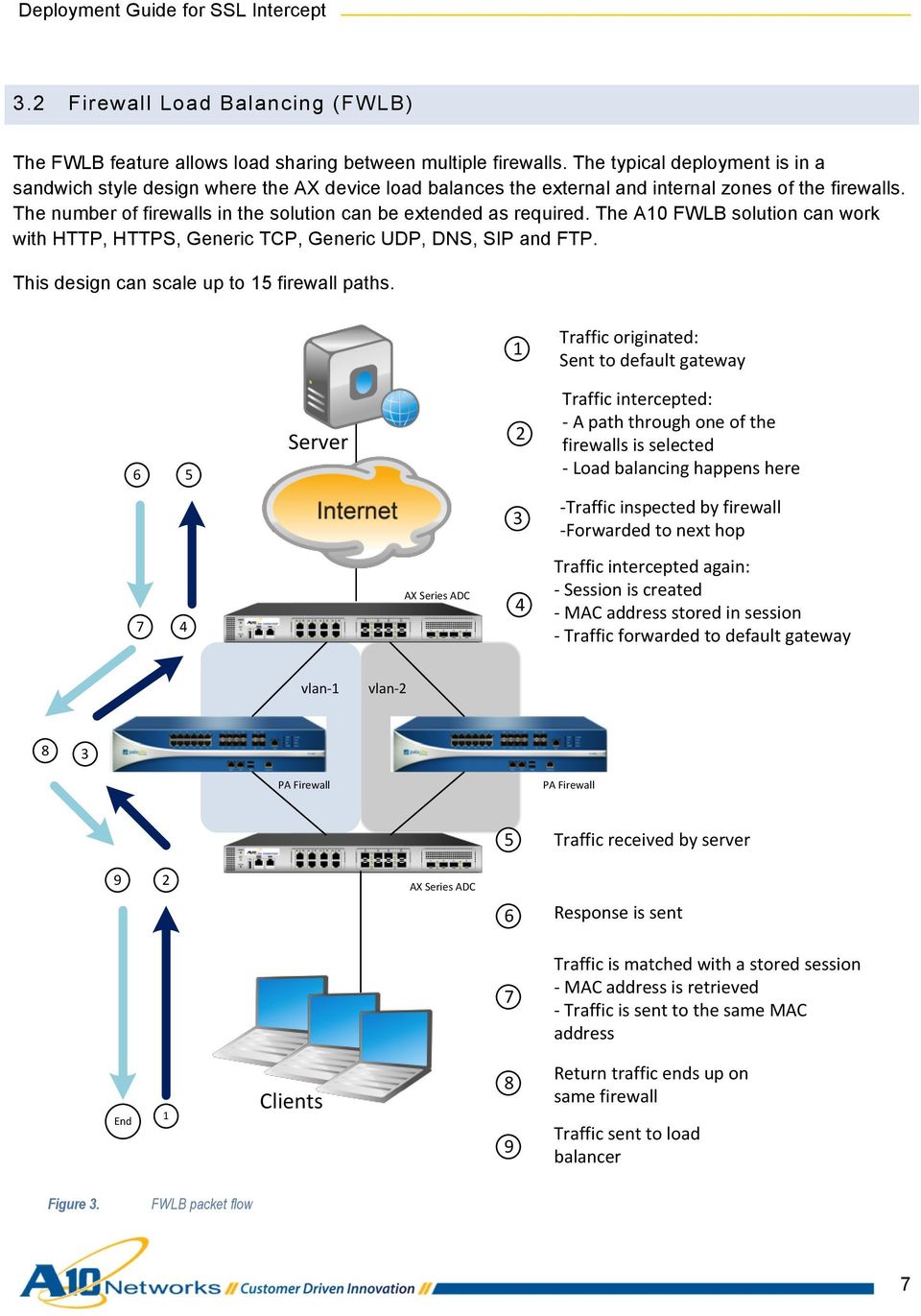
7 3.2 Firewall Load Balancing (FWLB) The FWLB feature allows load sharing between multiple firewalls. The typical deployment is in a sandwich style design where the AX device load balances the external and internal zones of the firewalls. The number of firewalls in the solution can be extended as required. The A10 FWLB solution can work with HTTP, HTTPS, Generic TCP, Generic UDP, DNS, SIP and FTP. This design can scale up to 15 firewall paths. 1 Traffic originated: Sent to default gateway 6 5 Server 2 Traffic intercepted: - A path through one of the firewalls is selected - Load balancing happens here 3 - Traffic inspected by firewall - Forwarded to next hop 7 4 AX Series ADC 4 Traffic intercepted again: - Session is created - MAC address stored in session - Traffic forwarded to default gateway vlan- 1 vlan PA Firewall PA Firewall 5 Traffic received by server 9 2 AX Series ADC 6 Response is sent 7 Traffic is matched with a stored session - MAC address is retrieved - Traffic is sent to the same MAC address End 1 Clients 8 9 Return traffic ends up on same firewall Traffic sent to load balancer Figure 3. FWLB packet flow 7
8 4 Configuration Overview The configuration for the SSL Intercept solution can be divided into the following portions: 1. Layer 2/3 (L2/L3) and High Availability on the AX Series Load Balancer 2. SSL Intercept configuration on the AX Series Load Balancer 3. FWLB configuration on the AX Series Load Balancer 4. Firewall rules and policy configuration on the PA firewalls 4.1 Access Credentials The access credentials listed below are the default settings on the AX Series and Palo Alto Networks appliances. A10 Networks AX Series access defaults: Default username is admin. Default password is a10. Default management IP address of the device is Palo Alto Networks PA Series access defaults: Default username is admin. Default password is admin. Default management IP address of the device is Note: Both the AX Series and PA Series appliances support a Graphical User Interface (GUI) and Command Line User Interface (CLI).To access the CLI interfaces for both AX Series and PA Series, you will be required to use an SSH client such as putty.exe. 8

9 4.2 AX Series Load Balancer Configuration Overview The following sections provide more information about the AX configuration items listed above L2/L3 and High Availability The solution has a pair of AX Series Load Balancers in the external zone of the firewalls and another pair in the internal zone of the firewalls. Each pair is running VRRP-A to provide redundancy. A key requirement of this solution is to have each firewall in a separate VLAN. The topology shown in Figure 1 has a Red VLAN and a Green VLAN. There is one firewall in the Red VLAN and one in the Green VLAN. Each firewall is tied to one VRRP-A instance on the external load balancer pair, and one VRRP-A instance on the internal load balancer pair. The VRIDs must be unique on either side of the firewall to avoid MAC address conflicts. Each VRRP-A instance is attached to a single VLAN and tracks the member interface and the upstream interface that connects to the gateway. This ensures that a failover occurs under any of the following circumstances: An interface goes down A cable is disconnected The entire device goes down SSL Intercept The SSL Intercept configuration is slightly different on the external AX Series Load Balancer compared to the internal AX Series Load Balancer. Additionally, the configuration is identical on both devices of the same high availability pair, except for the VRRP-A priority. This guide discusses the configuration of only one external AX Series Load Balancer and one internal AX Series Load Balancer. SSL Intercept Configuration on Internal AX Load Balancer A prerequisite for configuring the SSL Intercept feature is a CA certificate with a known private key. This CA certificate must be pushed to all client machines on the internal network. If the CA certificate is not pushed, the internal hosts will get an SSL untrusted root error whenever they try to connect to a site with SSL enabled. The following two commands generate and initialize a CA Certificate on a Linux system with an OpenSSL package installed. Once generated, the certificate can be imported onto the AX device using FTP or SCP. openssl genrsa -out ca.key openssl req -new -x509 -days key ca.key -out ca.crt 9

10 The root certificate must be imported onto the client machines. This can be done manually, or using an automated service such as Microsoft Group Policy Manager. Automated login scripts can achieve the same result for organizations that use Linux or Unix clients. Note: Further details for Group Policy Manager can be found at: The configuration of SSL Intercept on the internal AX Series Load Balancer has the following key elements: SSL traffic entering on port 443 is intercepted. Port 443 is defined under a wildcard VIP to achieve this. The SSL server certificate is captured during the SSL handshake; all X.509 DN attributes are duplicated, except for the issuer and base64 encoded public key. Client-SSL template is used for this. The Client-SSL template includes the required command forward-proxy-enabled, along with the local CA certificate and its private key used for signing dynamically forged certificates. The incoming SSL traffic is intercepted and decrypted, and is then forwarded in clear text over HTTP through the firewall. Along with the protocol (HTTPS to HTTP), the destination port also gets changed from 443 to However, the destination IP remains unchanged (the server on the Internet). The command port-translation achieves this. The remote VRRP-A address of each VLAN is added as an SLB server. Each firewall is associated with a single VLAN and thus traffic from the internal AX potentially will traverse each firewall. Port 8080 is defined for each remote host The command slb server defines a remote host and port number 8080 is added. 10

11 SSL Intercept Configuration on External AX Load Balancer The configuration of SSL Intercept on the external AX Series Load Balancer is simpler than on the internal AX Series Load Balancer; it has the following characteristics: Clear-Text HTTP traffic entering on port 8080 is intercepted. Port 8080 is defined on a wildcard VIP to achieve this. Incoming HTTP traffic is converted into SSL traffic and sent out on port 443. A server-ssl template is defined and applied to the VIP port. The template includes the command forward-proxy-enable. The next-hop IP address of the default router is defined as an SLB server. Optionally, a root CA certificate store file also may be applied to the server- SSL template. Along with the protocol (HTTP to HTTPS), the destination port also gets changed from 8080 to 443. Service group is defined with port 443 and bound to the virtual port. The destination IP is not changed. The command port-translation achieves this. The source MAC of the incoming traffic is preserved so that the response traffic can be sent to the same address. The command use-rcv-hop-for-resp is used for this. Client-SSL template helps achieve this Firewall Load Balancing Configuration Overview The FWLB configuration has many similarities to the SSL Intercept configuration. The primary difference is that no client-ssl or server-ssl templates are required for the client side or server side, respectively. Additionally, instead of intercepting traffic on a single port, all TCP and UDP traffic is intercepted. Just as with SSL Intercept, the configuration on the two devices in each pair is identical, except for the VRRP-A priorities. This guide discusses the configuration of one external AX and one internal AX. FWLB Configuration on Internal AX Series Load Balancer All TCP and UDP traffic is intercepted. Access Control List (ACL) is created to define traffic of interest. Wildcard VIP is defined, and uses this ACL. 11

12 TCP port 0, UDP port 0 and others port 0 are defined on the wildcard VIP. Next-hop gateways are defined and added to a service group. The command slb server is used to define next-hop gateways. These are the VRRP-A addresses on the remote side, one VRRP-A address per VLAN. Once traffic is intercepted, it is routed to one of the firewalls based on the configured algorithm (in this case, round-robin). Destination-NAT is disabled for this traffic. The commands and help achieve this. The command helps achieve this. FWLB Configuration on External AX Series Load Balancer Another wildcard VIP is configured on the external AX. This wildcard VIP intercepts all incoming traffic and sends it to the default router. However, while doing so, the AX device also creates internal sessions. The MAC address of the host from which the traffic was received is also stored in this session. This step is to ensure that the return traffic belonging to this session will be sent to the same firewall through which it was received. All TCP, UDP and IP traffic is intercepted. ACL is created to define traffic of interest. Wildcard VIP is defined with this ACL. TCP port 0, UDP port 0 and others port 0 are defined on the wildcard VIP. Next-hop gateway (default router) is defined and added to a service group. The command slb server is used to define the next-hop gateway. The default router address is the next hop in this case. The incoming HTTP traffic is converted to SSL traffic and sent on port 443. A server-ssl template is defined and applied to the VIP port. The template includes command forward-proxy-enable. The next-hop IP address is defined as an SLB server. Along with the protocol (HTTP to HTTPS), the destination port also gets changed from 8080 to 443. Service group is defined with port 443 and bound to the virtual port. The destination IP is not changed. The command port-translation achieves this. 12

13 The source MAC address of the incoming traffic is preserved so that the response traffic can be sent to the same address. The command use-rcv-hop-for-resp is used for this. 4.3 Palo Alto Networks Firewall The firewall should be configured according to the institutional security policy. Here are the key requirements for this solution to work: ARP packets should be allowed for VRRP-A packets on both internal and external AX Series Load Balancers. Health-check packets should be allowed from internal AX Series Load Balancers to the VRRP-A addresses on the external AX Series Load Balancers, since the firewalls are configured as SLB servers. 5 Configuration Steps for AX Series Load Balancer This section provides detailed steps for configuring the AX Series Load Balancer for SSL Intercept. 5.1 L2/L3 and High Availability on the AX Series Load Balancers The steps in this section configure the following L2/L3 parameters: VLANs and their router interfaces Virtual Ethernet (VE) interfaces, which are IP addresses assigned to VLAN router interfaces VRRP-A for high availability Configure the VLANs and add Ethernet and Router Interfaces Configure the following VLAN parameters: VLAN-10: This is the uplink to the internal network. Add router-interface ve 10 along with the Ethernet interface. VLAN-15: This is the path to the external AX Series Load Balancers through firewall-1. Add routerinterface ve 15 along with the Ethernet interface. 13

14 VLAN-16: This is the path to the external AX Series Load Balancers through firewall-2. Add routerinterface ve 16 along with the Ethernet interface. VLAN-99: This is the VLAN for VRRP-A sync messages. Add router-interface ve 99 along with the Ethernet interface. Using the CLI: AX(config)#vlan 10 AX(config-vlan:10)#router-interface ve 10 AX(config-vlan:10)#untagged ethernet 20 AX(config-vlan:10)#exit AX(config)#vlan 15 AX(config-vlan:15)#router-interface ve 15 AX(config-vlan:15)#untagged ethernet 1 AX(config-vlan:15)#exit AX(config)#vlan 16 AX(config-vlan:16)#router-interface ve 16 AX(config-vlan:16)#untagged ethernet 2 AX(config-vlan:16)#exit AX(config)#vlan 99 AX(config-vlan:99)#router-interface ve 99 AX(config-vlan:99)#tagged ethernet 18 AX(config-vlan:99)#exit Using the GUI: 1. Navigate to Config Mode > Network > VLAN > VLAN. 2. Click Add. 3. Enter the VLAN ID, select the interfaces, and enter the VE ID (same as the VLAN number). 4. Click OK. 5. Repeat for each VLAN. 14

15 Figure 4. VLAN configuration The VLAN configuration should be similar to the following after all four VLANs have been added. Figure 5. VLAN settings 15

16 Configure IP Addresses on the VLAN Router Interfaces Make sure to enable the promiscuous VIP option. Using the CLI: AX(config)#interface ve 10 AX(config-if:ve10)#ip address AX(config-if:ve10)#ip allow-promiscuous-vip AX(config-if:ve10)#exit AX(config)#interface ve 15 AX(config-if:ve15)#ip address AX(config-if:ve15)#exit AX(config)#interface ve 16 AX(config-if:ve16)#ip address AX(config-if:ve15)#exit Using the GUI: 1. Navigate to Config Mode > Interface > Virtual. The interfaces configured above should be visible. 2. Click on ve-10 and configure the IPv4 address. 3. Click on VIP to display the configuration options. 4. Select Allow Promiscuous VIP. 5. Click OK when done. 6. Repeat for each VE. 16

17 Figure 6. Virtual Ethernet (VE) interface configuration Configure VRRP-A on the Internal AX Series Load Balancers 1. Set unique VRRP-A device IDs on both AX Series Load Balancers. 2. Configure the same set ID on both AX Series Load Balancers. 3. Configure VRIDs and assign floating IPs. In this step, the following VRIDs are configured: VRID-Default: This VRID will be used for the enterprise switch, floating IP VRID-15: This VRID will be used for VLAN-15, floating IP VRID-16: This VRID will be used for VLAN-16, floating IP Configure and enable a VRRP-A interface. 5. Repeat the steps above on the external AX Series Load Balancer pair. Note: The VRIDs must be unique on the internal and external AX Series Load Balancers. 17

18 Using the CLI: AX(config)#vrrpa device-id 1 AX(config)#vrrpa set-id 1 AX(config)#vrrpa vrid default AX(config-vrid-default)#floating-ip AX(config-vrid-default)#priority 200 AX(config-vrid-default)#exit AX(config)#vrrpa vrid 15 AX(config-vrid)#floating-ip AX(config-vrid)#priority 200 AX(config-vrid)#exit AX(config)#vrrpa vrid 16 AX(config-vrid)#floating-ip AX(config-vrid)#priority 200 AX(config-vrid)#exit AX(config)#vrrpa interface ethernet 18 vlan 99 Repeat on the external AX Series Load Balancer pair. Make sure to use unique IP addresses. Using the GUI: 1. Navigate to Config Mode > VRRP-A > Setting > VRRP-A Global. 2. Select the Device ID. Each device in the VRRP-A set must have a unique VRRP-A device ID. 3. In the Set ID field, enter 1. Figure 7. VRRP-A global configuration 18

19 4. Click on VRID to display the options. a. Select default from the VRID drop-down list. b. Enter priority 200. c. Click Add. d. Repeat for VRIDs 15 and 16. Figure 8. VRRP-A global configuration - VRIDs 5. Click Float IP Address to display floating IP address options. a. Select default from the VRID drop-down list. b. Add IPv4 address c. Click Add. d. Repeat for VRIDs 15 and

20 Figure 9. VRRP-A global configuration - floating IP 6. Navigate to Config Mode > VRRP-A > VRRP-A Interface. a. Click on Ethernet 18. b. Configure VLAN 99. c. Enable all options: Status, VRRP-A Status, Type, and Heartbeat. d. Click OK. Figure 10. VRRP-A interface configuration 20

21 7. Repeat the steps above on the external AX Series Load Balancer pair. Make sure to use unique IP addresses. 5.2 SSL Intercept Configuration on the AX Series Load Balancers The following steps configure the SSL Intercept options Internal AX Series Load Balancer Use the following steps to configure SSL Intercept parameters in the internal AX Series Load Balancer. Configure Servers for VLAN-10 and VLAN-15 These steps configure a remote server with port 8080, and with the VRRP-A address of the first VLAN. Then a second server is configured, with the VRRP-A address of the second VLAN. Using the CLI: AX(config)#slb server FW1_Path AX(config-real server)#port 8080 tcp AX(config-real server-node port)# AX(config-real server-node port)#exit AX(config-real server)#exit AX(config)#slb server FW2_Path AX(config-real server)#port 8080 tcp AX(config-real server-node port)# AX(config-real server-node port)#exit AX(config-real server)#exit Using the GUI: 1. Navigate to Config Mode > Service > SLB > Server. 2. Click Add. 3. Enter the following settings: Name: FW1_Path IP Address:
22 4. Enter Port parameters: Port: "8080" Protocol: "TCP" Health Monitor: Select blank (disabled). Click Add. 5. Click OK. 6. Repeat for the second VLAN, using a unique IP address. Figure 11. Server configuration (internal) Figure 12. Server port configuration (internal) 22
23 Configure a Service Group These steps add the servers to a service group. Using the CLI: AX(config)#slb service-group SSLfp tcp AX(config-slb svc group)#slb service-group SSLfp tcp AX(config-slb svc group)#member FW1_Path:8080 AX(config-slb svc group)#member FW2_Path:8080 AX(config-slb svc group)#exit Using the GUI: 1. Navigate to Config Mode > Service > SLB > Service Group. 2. Click Add. 3. Enter the following parameters: Name: "SSLfp" Type: "TCP" 4. Click on Server. 5. Select the Server, "FW1_Path", from the drop-down list. 6. Select the Port, "80". 7. Click Add. 8. Repeat for the second server, "FW2_Path" 9. Click OK. 23
24 Figure 13. Service group configuration (internal) Figure 14. Servers (internal) 24
25 Configure the ACL These steps configure an extended ACL to intercept incoming traffic on VLAN-10. This ACL will be used as part of the wildcard VIP configuration, below. Using the CLI: AX(config)#access-list 100 permit ip any any vlan 10 Using the GUI: 1. Navigate to Config Mode > Network > ACL > Extended. 2. Click Add. 3. Enter or select the following settings: ID: "100" Action: "Permit" Protocol: "IP" Source Address: "Any" Destination Address: "Any" VLAN ID: "10" 4. Click OK. 25
26 Figure 15. Extended ACL configuration (internal) Configure the Client-SSL Template These steps configure the client-ssl template. Note: These steps assume that the CA certificate and the private key have been uploaded to the AX device. Using the CLI: AX(config)#slb template client-ssl SSLIntercept_ClientSide AX(config-client ssl)#forward-proxy-enable AX(config-client ssl)#forward-proxy-ca-cert ca.cert AX(config-client ssl)#forward-proxy-ca-key ca.key AX(config-client ssl)#exit Using the GUI: 1. Navigate to Config Mode > Service > Template > SSL > Client SSL. 2. Click Add. 3. Enter a Name, "SSLIntercept_ClientSide". 26
27 4. Select Enabled next to SSL Forward Proxy. 5. Select the CA certificate from the CA Certificate drop-down list. 6. Select the private key from the CA Private Key drop-down list. 7. Click OK. Figure 16. Client-SSL configuration (internal) 27
28 Configure a wildcard VIP These steps configure the wildcard VIP. Using the CLI: AX(config)#slb virtual-server outbound_wildcard AX(config-slb vserver)#port 443 https AX(config-slb vserver-vport)#service-group SSLfp AX(config-slb vserver-vport)#template client-ssl SSLIntercept_ClientSide AX(config-slb vserver-vport)# port-translation AX(config-slb vserver-vport)#exit AX(config-slb vserver)#exit Using the GUI: 1. Navigate to Config Mode > Service > SLB > Virtual Server. 2. Click Add. 3. Enter or select the following settings: Name: outbound_wildcard Wildcard: Select the checkbox. Access List: "100" 4. Click Add in the Port section. 5. Enter or select the following settings: Type: "HTTPS" Port: "443" Service Group: "SSLfp" Direct Server Return: Select Enabled, and select the Port Translation checkbox. Client-SSL Template: SSLIntercept_ClientSide 6. Click OK to exit the Virtual Server Port configuration page. 7. Click OK to exit the Virtual Server configuration page. 28
29 Figure 17. Virtual server configuration (internal) 29
30 Figure 18. Virtual server port configuration (internal) 30
31 5.2.2 External AX Series Load Balancer Use the following steps to configure SSL Intercept parameters in the external AX Series Load Balancer. Create an SLB Server Configuration for the Default Gateway These steps create a server configuration for the default gateway, for HTTPS traffic (port 443). Using the CLI: AX(config)#slb server server-gateway AX(config-real server)#port 443 tcp AX(config-real server-node port)# AX(config-real server-node port)#exit AX(config-real server)#exit Using the GUI: 1. Navigate to Config Mode > Service > SLB > Server. 2. Click Add. 3. Enter the following settings: Name: server-gateway IP Address: Enter Port parameters: Port: " 443" Protocol: "TCP" Health Monitor: Select blank (disabled). Click Add. 5. Click OK. 31
32 Figure 19. Server configuration (external) Figure 20. Server port configuration (external) Add the Server Configuration to a Service Group These steps add the server to a service group. Using the CLI: AX(config)#slb service-group SG_443 tcp AX(config-slb svc group)#member server-gateway:443 AX(config-slb svc group)#exit Using the GUI: 1. Navigate to Config Mode > Service > SLB > Service Group. 2. Click Add. 3. Enter the following parameters: Name: "SG_443" Type: "TCP" 4. Click on Server. 5. Select the Server, "server-gateway", from the drop-down list. 6. Select the Port, " 443". 32
33 7. Click Add. 8. Click OK. Figure 21. Service group configuration (external) Figure 22. Servers (external) Configure an ACL to intercept incoming traffic on VLAN-15 and VLAN-16 for the wildcard VIP These steps configure an extended ACL to intercept traffic on VLAN-15 and VLAN-16. This ACL will be used as part of the wildcard VIP configuration, below. Using the CLI: AX(config)#access-list 100 permit ip any any vlan 15 AX(config)#access-list 100 permit ip any any vlan 16 Using the GUI: 1. Navigate to Config Mode > Network > ACL > Extended. 2. Click Add. 33
34 3. Enter or select the following settings: ID: "100" Action: "Permit" Protocol: "IP" Source Address: "Any" Destination Address: "Any" VLAN ID: "15" 4. Click OK. 5. Repeat to create a similar ACL rule for VLAN-16. Figure 23. Extended ACL configuration (external) 34
35 Configure the Server-SSL Template These steps configure the server-ssl template. Using the CLI: AX(config)#slb template server-ssl external-intercept AX(config-server ssl)#forward-proxy-enable AX(config-server ssl)#exit Using the GUI: 1. Navigate to Config Mode > Service > Template > SSL > Server SSL. 2. Click Add. 3. Enter a Name, "external-intercept". 4. Select Enabled next to SSL Forward Proxy. 5. Leave other fields blank. 6. Click OK. Figure 24. Server-SSL configuration (external) Configure the wildcard VIP These steps configure the wildcard VIP. Using the CLI: AX(config)#slb virtual-server external_in_to_out AX(config-slb vserver)#port 80 http 35
36 AX(config-slb vserver-vport)#name ReverseProxy_Wildcard AX(config-slb vserver-vport)#service-group SG_443 AX(config-slb vserver-vport)#template server-ssl external-intercept AX(config-slb vserver-vport)# port-translation AX(config-slb vserver-vport)#use-rcv-hop-for-resp AX(config-slb vserver-vport)#exit AX(config-slb vserver)#exit AX(config)#exit Using the GUI: 1. Navigate to Config Mode > Service > SLB > Virtual Server. 2. Click Add. 3. Enter or select the following settings: Name: outbound_wildcard Wildcard: Select the checkbox. Access List: "100" 4. Click Add in the Port section. 5. Enter or select the following settings: Type: "HTTPS" Port: "443" Service Group: "SG_443" Use received hop for response: Select the checkbox. Direct Server Return: Select Enabled, and select the Port Translation checkbox. Client-SSL Template: SSLIntercept_ClientSide 6. Click OK to exit the Virtual Server Port configuration page. 7. Click OK to exit the Virtual Server configuration page. 36
37 Figure 25. Virtual server configuration (external) Figure 26. Virtual server port configuration (external) 37
38 5.3 FWLB Configuration on the AX Series ADC FWLB configuration is very similar to SSL Intercept configuration, with the following difference: FWLB will intercept traffic on TCP port 0 and UDP port 0, and send the traffic out on the same ports to the remote hosts. The same ACL wildcard VIPs used for SSL Intercept can be used for FWLB. Note: For brevity, only the CLI commands are shown in this section Internal AX Series Load Balancer The steps in this section configure FWLB parameters on the internal AX Series Load Balancer. Add TCP Port 0 and UDP Port 0 to the Firewall Paths AX(config)#slb server FW1_Path AX(config-real server)# AX(config-real server-node port)# AX(config-real server-node port)#exit AX(config-real server)# AX(config-real server-node port)# AX(config-real server-node port)#exit AX(config-real server)#exit AX(config)#slb server FW2_Path AX(config-real server)# AX(config-real server-node port)# AX(config-real server-node port)#exit AX(config-real server)# AX(config-real server-node port)# AX(config-real server-node port)#exit AX(config-real server)#exit Add the Firewall Paths to TCP and UDP Service Groups AX(config)#slb service-group LB_Paths_UDP udp AX(config-slb svc group)#member FW1_Path:0 AX(config-slb svc group)#member FW2_Path:0 38
39 AX(config-slb svc group)#exit AX(config)#slb service-group LB_Paths_TCP tcp AX(config-slb svc group)#member FW1_Path:0 AX(config-slb svc group)#member FW2_Path:0 AX(config-slb svc group)#exit Add UDP port 0, TCP port 0 and Others Port 0 to the wildcard VIP These commands add the service group to the UDP, TCP, and others wildcard ports. The port-translation command is used to convert incoming 8080 traffic to 443, while preserving the destination IP address. The command use-rcv-hop-for-resp is used so that response traffic goes back through the same path through which the request traffic arrives. The others wildcard port can take an already defined TCP service group or UDP service group. In this example, the TCP service group is used. AX(config)#slb virtual-server outbound_wildcard acl 100 AX(config-slb vserver)# AX(config-slb vserver-vport)#name internal1_in_to_out AX(config-slb vserver-vport)#service-group LB_Paths_TCP AX(config-slb vserver-vport)# AX(config-slb vserver-vport)#exit AX(config-slb vserver)# AX(config-slb vserver-vport)#name internal1_in_to_out_udp AX(config-slb vserver-vport)#service-group LB_Paths_UDP AX(config-slb vserver-vport)# AX(config-slb vserver-vport)#exit AX(config-slb vserver)#port 0 others AX(config-slb vserver-vport)#name internal1_in_to_out_others AX(config-slb vserver-vport)#service-group LB_Paths_TCP AX(config-slb vserver-vport)# AX(config-slb vserver-vport)#exit AX(config-slb vserver)#exit 39
40 5.3.2 External AX Series Load Balancer The steps in this section configure FWLB parameters on the external AX Series Load Balancer. Add TCP Port 0 and UDP Port 0 to the Gateway Path AX(config)#slb server server-gateway AX(config-real server)# AX(config-real server-node port)# AX(config-real server-node port)#exit AX(config-real server)# AX(config-real server-node port)# AX(config-real server-node port)#exit AX(config-real server)#exit Add the TCP and UDP Gateway Paths to the Service Groups AX(config)#slb service-group SG_TCP tcp AX(config-slb svc group)#member server-gateway:0 AX(config-slb svc group)#exit AX(config)#slb service-group SG_UDP udp AX(config-slb svc group)#member server-gateway:0 AX(config-slb svc group)#exit Add UDP port 0, TCP port 0 and Others Port 0 to the wildcard VIP These commands add the service group to the UDP, TCP, and others wildcard ports. The port-translation command is used to preserve the destination IP address. The command use-rcv-hop-for-resp is used so that response traffic goes back through the same path through which the request traffic arrives. AX(config)#slb virtual-server external_in_to_out acl 100 AX(config-slb vserver)# AX(config-slb vserver-vport)#name _wildcard_v4_tcp_65535 AX(config-slb vserver-vport)#service-group SG_TCP AX(config-slb vserver-vport)#use-rcv-hop-for-resp AX(config-slb vserver-vport)# AX(config-slb vserver-vport)#exit AX(config-slb vserver)# AX(config-slb vserver-vport)#name _wildcard_v4_udp_
41 Deployment Guide for SSL Intercept AX(config-slb vserver-vport)#service-group SG_UDP AX(config-slb vserver-vport)#use-rcv-hop-for-resp AX(config-slb vserver-vport)# AX(config-slb vserver-vport)#exit AX(config-slb vserver)#port 0 others AX(config-slb vserver-vport)#name _wildcard_v4_udp_65535 AX(config-slb vserver-vport)#service-group SG_UDP AX(config-slb vserver-vport)#use-rcv-hop-for-resp AX(config-slb vserver-vport)# AX(config-slb vserver-vport)#exit AX(config-slb vserver)#exit 6 Configuration Steps for Palo Alto Networks Firewall This section provides detailed steps for configuring Palo Alto Networks Firewall for SSL Intercept. 6.1 Zone Configuration On the Palo Alto Networks appliance: 1. Navigate to Network > Zone. 2. Click Add. 3. Create the following configurations for Names, Locations and Type: Diagram 27: Trusted and untrusted zone requirements for Palo Alto Networks Appliance Note: The "Trusted" network segment is located in the internal section of the network topology. The "Untrusted" network segment of the topology is in the external section of the network topology. (See Figure 1.) A vsys is equivalent to an AX Series Application Delivery Partition (ADP). On the Palo Alto Networks Appliance, partitions such as vsys1 or vsys2 from the example above can be created dynamically. 41
42 Diagram 28: Palo Alto interface configuration 4. Click OK and save configuration. 6.2 VLAN Interface Configuration To configure the interface VLAN: 1. Navigate to Network > VLAN. 2. Click Add. 3. Enter the Name of the VLAN: From the drop-down menu, select vlan. 5. Click Add and select the interface you wish to add from the VLAN. 42
43 Diagram 29: VLAN interface configuration 6. Click OK and save configuration. 6.3 Policy Configuration This section is to configure the security policy rules of the firewall. 1. Navigate to the Policies and click Add. 2. Enter the following configuration you wish to allow or deny. The following policy information will be required: General Source User Destination Application 43
44 Service/URL Category Actions Diagram 30: Palo Alto Networks policy configuration Note: Every network will have its own policy so the configuration within the Palo Alto Networks appliance will be used as a reference configuration. 7 Summary The sections above show how to deploy the AX device with the Palo Alto Networks device for SSL Intercept. By using the AX device for SSL Intercept, the following key advantages are achieved: SSL traffic inspection: AX Series ADC/Load Balancer decrypts incoming packets before they pass to the firewall, then re-encrypts them before sending them to the destination/target server. Real-time traffic validation, dynamic traffic flow regulation and enhanced security checks. Seamless distribution of client traffic across multiple firewalls for site scalability. Improved site security performance and availability to end users. For more information about AX Series products:
45 Appendix A. Complete Configuration File for the AX Device internal Primary unit Configuration VRRP-A device-id 1 VRRP-A set-id 1 hostname vlan 10 untagged ethernet 20 router-interface ve 10 vlan 15 untagged ethernet 1 router-interface ve 15 vlan 16 untagged ethernet 2 router-interface ve 16 vlan 99 tagged ethernet 18 router-interface ve 99 access-list 100 permit ip any any vlan 10 interface management ip address ip default-gateway interface ve 10 ip address ip allow-promiscuous-vip interface ve 15 ip address interface ve 16 ip address interface ve 99 ip address ip route / VRRP-A enable VRRP-A vrid default floating-ip priority 200 internal Standby unit Configuration VRRP-A device-id 2 VRRP-A set-id 1 hostname vlan 10 untagged ethernet 20 router-interface ve 10 vlan 15 untagged ethernet 1 router-interface ve 15 vlan 16 untagged ethernet 2 router-interface ve 16 vlan 99 tagged ethernet 18 router-interface ve 99 access-list 100 permit ip any any vlan 10 interface management ip address ip default-gateway interface ve 10 ip address ip allow-promiscuous-vip interface ve 15 ip address interface ve 16 ip address interface ve 99 ip address ip route / VRRP-A enable VRRP-A vrid default floating-ip priority
46 internal Primary unit Configuration tracking-options interface ethernet 1 priority-cost 60 interface ethernet 2 priority-cost 60 interface ethernet 20 priority-cost 60 VRRP-A vrid 15 floating-ip priority 200 tracking-options interface ethernet 1 priority-cost 60 interface ethernet 2 priority-cost 60 interface ethernet 20 priority-cost 60 VRRP-A vrid 16 floating-ip priority 200 tracking-options interface ethernet 1 priority-cost 60 interface ethernet 2 priority-cost 60 interface ethernet 20 priority-cost 60 VRRP-A interface ethernet 18 vlan 99 tftp blksize slb server FW1_Path port 8080 tcp slb server FW2_Path port 8080 tcp slb service-group LB_Paths_UDP udp member FW1_Path:0 member FW2_Path:0 slb service-group LB_Paths_TCP tcp member FW1_Path:0 member FW2_Path:0 internal Standby unit Configuration tracking-options interface ethernet 1 priority-cost 60 interface ethernet 2 priority-cost 60 interface ethernet 20 priority-cost 60 VRRP-A vrid 15 floating-ip priority 180 tracking-options interface ethernet 1 priority-cost 60 interface ethernet 2 priority-cost 60 interface ethernet 20 priority-cost 60 VRRP-A vrid 16 floating-ip priority 180 tracking-options interface ethernet 1 priority-cost 60 interface ethernet 2 priority-cost 60 interface ethernet 20 priority-cost 60 VRRP-A interface ethernet 18 vlan 99 tftp blksize slb server FW1_Path port 8080 tcp slb server FW2_Path port 8080 tcp slb service-group LB_Paths_UDP udp member FW1_Path:0 member FW2_Path:0 slb service-group LB_Paths_TCP tcp member FW1_Path:0 member FW2_Path:0 46
47 internal Primary unit Configuration slb service-group SSLfp tcp member FW1_Path:8080 member FW2_Path:8080 slb template client-ssl SSLIntercept_ClientSide forward-proxy-enable forward-proxy-ca-cert ca.cert forward-proxy-ca-key ca.key slb virtual-server outbound_wildcard acl 100 name internal1_in_to_out service-group LB_Paths_TCP name internal1_in_to_out_udp service-group LB_Paths_UDP port 0 others name internal1_in_to_out_others service-group LB_Paths_TCP port 443 https name internal1_ssl_intercept_443 service-group SSLfp template client-ssl SSLIntercept_ClientSide port-translation End internal Standby unit Configuration slb service-group SSLfp tcp member FW1_Path:8080 member FW2_Path:8080 slb template client-ssl SSLIntercept_ClientSide forward-proxy-enable forward-proxy-ca-cert ca.cert forward-proxy-ca-key ca.key slb virtual-server outbound_wildcard acl 100 name internal2_in_to_out service-group LB_Paths_TCP name internal2_in_to_out_udp service-group LB_Paths_UDP port 0 others name internal2_in_to_out_others service-group LB_Paths_TCP port 443 https name internal2_ssl_intercept_443 service-group SSLfp template client-ssl SSLIntercept_ClientSide port-translation end 47
48 Appendix B. Detailed Walkthrough of SSL Intercept Packet FLow Clients AX AX Firewall Server Encrypted Zone Clear Text Zone Encrypted Zone SYN SYN/ACK ACK Client- Hello Server- Hello (Server Cert + Local Public Key + Signed by Local CA) SSL- Handshake Messages + Finished 1 2 SYN SYN/ACK ACK Client- Hello Server- Hello (Server Cert Public Key Signed by well known CA) SSL- Handshake Messages + Finished RST Encrypted Application Data 3 Clear Text Application Data 4 SYN SYN/ACK ACK Client- Hello SSL Handshake messages + Finished Encrypted Application Data Encrypted Application Response 6 Clear Text Application Response 5 Encrypted Application Response 1 2 If the certificate exists in cache, send it to client and move to (2). Otherwise, establish SSL connection with the remote server and get the certificate from the remote server Extract header information from server certificate. Change Issuer and the Public Key as exist in Client- SSL- Template. Reassign the new certificate using the CA- Certificate as exist in the Client- SSL- Template. Send the reconstructed Server- Hello to client 3 4 Data decrypted and sent in clear text through firewall SSL- Reverse- Proxy: New SSL session initiated with remote server. Data encrypted and sent to remote server 5 Response is decrypted and sent through firewall 6 Response is encrypted again and sent to the client 48
49 Appendix C. Alternate Design for vwire Mode Firewalls Server SSL Intercept and Firewall Load balancing (Firewalls in vwire mode) eth eth20 eth18 eth18 eth1 eth2 eth3 eth4 eth1 eth2 eth3 eth4 VRID- 5 (Green) VRID- 6 (Red) External Internal eth1 eth2 eth3 eth4 eth1 eth2 eth3 eth4 Firewall / IPS Firewall / IPS eth5 eth6 eth7 eth8 eth5 eth6 eth7 eth8 Firewall / IPS External Internal VRID- 6 (Red) VRID- 5 (Green) eth1 eth2 eth3 eth4 eth1 eth2 eth3 eth4 eth18 eth18 eth eth20 Clients 49
50 Appendix D. Design and Configuration for Adding a DMZ A DMZ can be added to the main design. The basic concepts are the same except that a new wildcard VIP is configured on the external and internal AX Series Load Balancers. This new wildcard VIP will intercept incoming traffic from the external network and send it to either to the DMZ or to the internal network. The configuration on the DMZ AX Series Load Balancers generally will be similar to what was configured on the external AX Series Load Balancers. In essence, there will be one wildcard VIP listening for traffic entering from the firewalls on both VLANs with the required command use-rcv-hop-for-resp. An additional wildcard VIP, optionally, can be configured to intercept traffic moving from the DMZ to either the external or internal networks. Attention should be paid to the ACL definitions, as traffic now must be classified based on the destination. In particular, the ACL on the internal AX Series Load Balancer is modified and the AX device chooses the appropriate next-hop address. Firewall policies should be updated in accordance with enterprise security policies. 50
51 Remote Server Outside (Untrust) Zone vlan- 20 vrid- default vlan- 20 vrid- default eth eth20 AX Series ADC eth18 eth18 vlan- 99 eth1 eth2 eth1 eth2 VRID- 5 (Green) VRID- 6 (Red) AX Series ADC vlan- 16 vrid- 6 vlan- 15 vrid- 5 vlan- 15 vrid- 5 vlan- 16 vrid- 6 eth1 eth2 eth1 eth2 External External Internal eth3 eth4 Internal eth3 eth vlan- 16 vrid- 16 vlan- 15 vrid- 15 vlan- 15 vrid- 15 vlan- 16 vrid- 16 VRID- 15 (Green) eth1 eth2 eth VRID- 16 (Red) vlan- 99 eth18 eth18 eth eth20 eth vlan- 16 vrid- 26 eth1 eth2 eth1 eth2 vlan- 15 vrid- 25 vlan- 16 vrid- 26 vlan- 15 vrid- 25 vlan- 20 vrid- default eth7 vlan eth7 vlan- 20 vrid- default AX Series ADC AX Series ADC vlan- 10 vrid- default vlan- 10 vrid- default Laptop Inside (Trust) Zone DMZ DMZ Server AX Series ADC 51
52 Internal - Primary VRRP-A device-id 1 VRRP-A set-id 1 hostname clock timezone America/New_York vlan 10 untagged ethernet 20 router-interface ve 10 vlan 15 untagged ethernet 1 router-interface ve 15 vlan 16 untagged ethernet 2 router-interface ve 16 vlan 99 tagged ethernet 18 router-interface ve 99 access-list 100 deny ip any vlan 10 access-list 100 permit ip any any vlan 10 access-list 105 permit ip any vlan 10 access-list 106 permit ip any any vlan 15 access-list 106 permit ip any any vlan 16 interface management ip address ip default-gateway interface ve 10 ip address ip allow-promiscuous-vip interface ve 15 ip address interface ve 16 ip address interface ve 99 ip address ip route / ip route / VRRP-A enable VRRP-A vrid default floating-ip priority 200 tracking-options interface ethernet 1 priority-cost 60 interface ethernet 2 priority-cost 60 interface ethernet 20 priority-cost 60 VRRP-A vrid 15 Internal - Standby VRRP-A device-id 2 VRRP-A set-id 1 hostname clock timezone America/New_York vlan 10 untagged ethernet 20 router-interface ve 10 vlan 15 untagged ethernet 1 router-interface ve 15 vlan 16 untagged ethernet 2 router-interface ve 16 vlan 99 tagged ethernet 18 router-interface ve 99 access-list 100 deny ip any vlan 10 access-list 100 permit ip any any vlan 10 access-list 105 permit ip any vlan 10 access-list 106 permit ip any any vlan 15 access-list 106 permit ip any any vlan 16 interface management ip address ip default-gateway interface ve 10 ip address ip allow-promiscuous-vip interface ve 15 ip address interface ve 16 ip address interface ve 99 ip address ip route / ip route / VRRP-A enable VRRP-A vrid default floating-ip priority 180 tracking-options interface ethernet 1 priority-cost 60 interface ethernet 2 priority-cost 60 interface ethernet 20 priority-cost 60 VRRP-A vrid 15 52
53 Internal - Primary floating-ip priority 200 tracking-options interface ethernet 1 priority-cost 60 interface ethernet 2 priority-cost 60 interface ethernet 20 priority-cost 60 VRRP-A vrid 16 floating-ip priority 200 tracking-options interface ethernet 1 priority-cost 60 interface ethernet 2 priority-cost 60 interface ethernet 20 priority-cost 60 VRRP-A interface ethernet 18 vlan 99 slb server FW1_Path port 8080 tcp slb server FW2_Path port 8080 tcp slb server FW1_Path_ToDMZ port 8080 tcp slb server FW2_Path_ToDMZ port 8080 tcp slb server internal_gw port 8080 tcp slb service-group LB_Paths_UDP udp member FW1_Path:0 member FW2_Path:0 Internal - Standby floating-ip priority 180 tracking-options interface ethernet 1 priority-cost 60 interface ethernet 2 priority-cost 60 interface ethernet 20 priority-cost 60 VRRP-A vrid 16 floating-ip priority 180 tracking-options interface ethernet 1 priority-cost 60 interface ethernet 2 priority-cost 60 interface ethernet 20 priority-cost 60 VRRP-A interface ethernet 18 vlan 99 slb server FW1_Path port 8080 tcp slb server FW2_Path port 8080 tcp slb server FW1_Path_ToDMZ port 8080 tcp slb server FW2_Path_ToDMZ port 8080 tcp slb server internal_gw port 8080 tcp slb service-group LB_Paths_UDP udp member FW1_Path:0 member FW2_Path:0 53
54 Internal - Primary slb service-group LB_Paths_TCP tcp member FW1_Path:0 member FW2_Path:0 slb service-group SSLfp tcp member FW1_Path:8080 member FW2_Path:8080 slb service-group LB_Paths_ToDMZ_UDP udp member FW2_Path_ToDMZ:0 member FW1_Path_ToDMZ:0 slb service-group LB_Paths_ToDMZ_TCP tcp member FW2_Path_ToDMZ:0 member FW1_Path_ToDMZ:0 slb service-group internal_gw_udp udp member internal_gw:0 slb service-group internal_gw_tcp tcp member internal_gw:0 slb template client-ssl SSLIntercept_ClientSide forward-proxy-enable forward-proxy-ca-cert ca.cert forward-proxy-ca-key ca.key slb virtual-server outbound_wildcard acl 100 name internal1_in_to_out service-group LB_Paths_TCP name internal1_in_to_out_udp service-group LB_Paths_UDP port 443 https name internal1_in_to_out_443 service-group SSLfp template client-ssl SSLIntercept_ClientSide port-translation port 0 others name internal1_in_to_out_others service-group LB_Paths_UDP slb virtual-server ToDMZ_wildcard acl 105 name internal1_in_to_dmz_tcp service-group LB_Paths_ToDMZ_TCP name internal1_in_to_dmz_udp service-group LB_Paths_ToDMZ_UDP port 0 others name internal1_in_to_dmz_udp service-group LB_Paths_ToDMZ_TCP Internal - Standby slb service-group LB_Paths_TCP tcp member FW1_Path:0 member FW2_Path:0 slb service-group SSLfp tcp member FW1_Path:8080 member FW2_Path:8080 slb service-group LB_Paths_ToDMZ_UDP udp member FW2_Path_ToDMZ:0 member FW1_Path_ToDMZ:0 slb service-group LB_Paths_ToDMZ_TCP tcp member FW2_Path_ToDMZ:0 member FW1_Path_ToDMZ:0 slb service-group internal_gw_udp udp member internal_gw:0 slb service-group internal_gw_tcp tcp member internal_gw:0 slb template client-ssl SSLIntercept_ClientSide forward-proxy-enable forward-proxy-ca-cert ca.cert forward-proxy-ca-key ca.key slb virtual-server outbound_wildcard acl 100 name internal2_in_to_out service-group LB_Paths_TCP name internal2_in_to_out_udp service-group LB_Paths_UDP port 443 https name internal2_in_to_out_443 service-group SSLfp template client-ssl SSLIntercept_ClientSide port-translation port 0 others name internal2_in_to_out_others service-group LB_Paths_UDP slb virtual-server ToDMZ_wildcard acl 105 name internal2_in_to_dmz_tcp service-group LB_Paths_ToDMZ_TCP name internal2_in_to_dmz_udp service-group LB_Paths_ToDMZ_UDP port 0 others name internal2_in_to_dmz_udp service-group LB_Paths_ToDMZ_TCP 54
55 Internal - Primary slb virtual-server TointernalGW_wildcard acl 106 name internal_out_to_in_tcp service-group internal_gw_tcp use-rcv-hop-for-resp name internal_out_to_in_udp service-group internal_gw_udp use-rcv-hop-for-resp end Internal - Standby slb virtual-server TointernalGW_wildcard acl 106 name internal_out_to_in_tcp service-group internal_gw_tcp use-rcv-hop-for-resp name internal_out_to_in_udp service-group internal_gw_udp use-rcv-hop-for-resp end External - Primary VRRP-A device-id 3 VRRP-A set-id 2 hostname clock timezone America/Los_Angeles vlan 15 untagged ethernet 1 router-interface ve 15 vlan 16 untagged ethernet 2 router-interface ve 16 vlan 20 untagged ethernet 20 router-interface ve 20 vlan 99 tagged ethernet 18 router-interface ve 99 access-list 100 deny ip any /24 access-list 100 deny ip any /24 access-list 100 permit ip any any vlan 15 access-list 100 permit ip any any vlan 16 access-list 105 permit ip any vlan 20 access-list 106 deny ip any vlan 20 access-list 106 permit ip any any vlan 20 interface management ip address ip default-gateway interface ve 15 ip address ip allow-promiscuous-vip External - Standby VRRP-A device-id 4 VRRP-A set-id 2 hostname clock timezone America/Los_Angeles vlan 15 untagged ethernet 1 router-interface ve 15 vlan 16 untagged ethernet 2 router-interface ve 16 vlan 20 untagged ethernet 20 router-interface ve 20 vlan 99 tagged ethernet 18 router-interface ve 99 access-list 100 deny ip any /24 access-list 100 deny ip any /24 access-list 100 permit ip any any vlan 15 access-list 100 permit ip any any vlan 16 access-list 105 permit ip any vlan 20 access-list 106 deny ip any vlan 20 access-list 106 permit ip any any vlan 20 interface management ip address ip default-gateway interface ve 15 ip address ip allow-promiscuous-vip 55
56 External - Primary interface ve 16 ip address ip allow-promiscuous-vip interface ve 20 ip address ip allow-promiscuous-vip interface ve 99 ip address ip route / ip route / VRRP-A enable VRRP-A vrid default floating-ip priority 200 tracking-options interface ethernet 1 priority-cost 60 interface ethernet 2 priority-cost 60 interface ethernet 20 priority-cost 60 VRRP-A vrid 5 floating-ip priority 200 tracking-options interface ethernet 1 priority-cost 60 interface ethernet 2 priority-cost 60 interface ethernet 20 priority-cost 60 VRRP-A vrid 6 floating-ip priority 200 tracking-options interface ethernet 1 priority-cost 60 interface ethernet 2 priority-cost 60 interface ethernet 20 priority-cost 60 VRRP-A interface ethernet 18 vlan 99 slb template server-ssl external-intercept forward-proxy-enable slb server server-gateway port 443 tcp slb server FW1_Path_Tointernal slb server FW2_Path_Tointernal External - Standby interface ve 16 ip address ip allow-promiscuous-vip interface ve 20 ip address ip allow-promiscuous-vip interface ve 99 ip address ip route / ip route / VRRP-A enable VRRP-A vrid default floating-ip priority 180 tracking-options interface ethernet 1 priority-cost 60 interface ethernet 2 priority-cost 60 interface ethernet 20 priority-cost 60 VRRP-A vrid 5 floating-ip priority 180 tracking-options interface ethernet 1 priority-cost 60 interface ethernet 2 priority-cost 60 interface ethernet 20 priority-cost 60 VRRP-A vrid 6 floating-ip priority 180 tracking-options interface ethernet 1 priority-cost 60 interface ethernet 2 priority-cost 60 interface ethernet 20 priority-cost 60 VRRP-A interface ethernet 18 vlan 99 slb template server-ssl external-intercept forward-proxy-enable slb server server-gateway port 443 tcp slb server FW1_Path_Tointernal slb server FW2_Path_Tointernal
57 External - Primary slb server FW1_Path_ToDMZ slb server FW2_Path_ToDMZ slb service-group SG_TCP tcp member server-gateway:0 slb service-group SG_UDP udp member server-gateway:0 slb service-group SG_443 tcp member server-gateway:443 slb service-group LB_Paths_Tointernal_UDP udp member FW1_Path_Tointernal:0 member FW2_Path_Tointernal:0 slb service-group LB_Paths_Tointernal_TCP tcp member FW1_Path_Tointernal:0 member FW2_Path_Tointernal:0 slb service-group LB_Paths_ToDMZ_UDP udp member FW1_Path_ToDMZ:0 member FW2_Path_ToDMZ:0 slb service-group LB_Paths_ToDMZ_TCP tcp member FW1_Path_ToDMZ:0 member FW2_Path_ToDMZ:0 slb virtual-server external_in_to_out acl 100 name _wildcard_v4_tcp_65535 service-group SG_TCP use-rcv-hop-for-resp name _wildcard_v4_udp_65535 service-group SG_UDP use-rcv-hop-for-resp port 0 others name _wildcard_v4_udp_65535 service-group SG_UDP use-rcv-hop-for-resp port 8080 http name ReverseProxy_Wildcard service-group SG_443 use-rcv-hop-for-resp External - Standby slb server FW1_Path_ToDMZ slb server FW2_Path_ToDMZ slb service-group SG_TCP tcp member server-gateway:0 slb service-group SG_UDP udp member server-gateway:0 slb service-group SG_443 tcp member server-gateway:443 slb service-group LB_Paths_Tointernal_UDP udp member FW1_Path_Tointernal:0 member FW2_Path_Tointernal:0 slb service-group LB_Paths_Tointernal_TCP tcp member FW1_Path_Tointernal:0 member FW2_Path_Tointernal:0 slb service-group LB_Paths_ToDMZ_UDP udp member FW1_Path_ToDMZ:0 member FW2_Path_ToDMZ:0 slb service-group LB_Paths_ToDMZ_TCP tcp member FW1_Path_ToDMZ:0 member FW2_Path_ToDMZ:0 slb virtual-server external_in_to_out acl 100 name _wildcard_v4_tcp_65535 service-group SG_TCP use-rcv-hop-for-resp name _wildcard_v4_udp_65535 service-group SG_UDP use-rcv-hop-for-resp port 0 others name _wildcard_v4_udp_65535 service-group SG_UDP use-rcv-hop-for-resp port 8080 http name ReverseProxy_Wildcard service-group SG_443 use-rcv-hop-for-resp 57
58 External - Primary template server-ssl external-intercept port-translation slb virtual-server Inbound_ToDMZ_Wildcard acl 105 name _wildcard_v4_106_tcp_0 service-group LB_Paths_ToDMZ_TCP name _wildcard_v4_106_udp_0 service-group LB_Paths_ToDMZ_UDP slb virtual-server Inbound_Tointernal_Wildcard acl 106 name external1_out_to_in service-group LB_Paths_Tointernal_TCP name internal1_out_to_in service-group LB_Paths_Tointernal_UDP end External - Standby template server-ssl external-intercept port-translation slb virtual-server Inbound_Tointernal_Wildcard acl 106 name external1_out_to_in service-group LB_Paths_Tointernal_TCP name internal1_out_to_in service-group LB_Paths_Tointernal_UDP slb virtual-server Inbound_ToDMZ_Wildcard acl 105 name _wildcard_v4_106_tcp_0 service-group LB_Paths_ToDMZ_TCP name _wildcard_v4_106_udp_0 service-group LB_Paths_ToDMZ_UDP end DMZ - Primary VRRP-A device-id 5 VRRP-A set-id 3 hostname clock timezone Europe/Dublin vlan 15 untagged ethernet 1 router-interface ve 15 vlan 16 untagged ethernet 2 router-interface ve 16 vlan 20 untagged ethernet 3 ethernet 7 router-interface ve 20 vlan 99 untagged ethernet 8 router-interface ve 99 access-list 100 deny ip any /24 access-list 100 deny ip any /24 access-list 100 permit ip any any vlan 15 access-list 100 permit ip any any vlan 16 access-list 105 permit ip any vlan 20 access-list 106 deny ip any vlan 20 access-list 106 permit ip any any vlan 20 DMZ - Standby VRRP-A device-id 6 VRRP-A set-id 3 hostname clock timezone Europe/Dublin vlan 15 untagged ethernet 1 router-interface ve 15 vlan 16 untagged ethernet 2 router-interface ve 16 vlan 20 untagged ethernet 3 ethernet 7 router-interface ve 20 vlan 99 untagged ethernet 8 router-interface ve 99 access-list 100 deny ip any /24 access-list 100 deny ip any /24 access-list 100 permit ip any any vlan 15 access-list 100 permit ip any any vlan 16 access-list 105 permit ip any vlan 20 access-list 106 deny ip any vlan 20 access-list 106 permit ip any any vlan 20 58
59 DMZ - Primary interface management ip address ip default-gateway interface ve 15 ip address ip allow-promiscuous-vip interface ve 16 ip address ip allow-promiscuous-vip interface ve 20 ip address ip allow-promiscuous-vip interface ve 99 ip address ip route / ip route / VRRP-A enable VRRP-A vrid default floating-ip priority 200 tracking-options interface ethernet 1 priority-cost 60 interface ethernet 2 priority-cost 60 interface ethernet 3 priority-cost 60 VRRP-A vrid 25 floating-ip priority 200 tracking-options interface ethernet 1 priority-cost 60 interface ethernet 2 priority-cost 60 interface ethernet 3 priority-cost 60 VRRP-A vrid 26 floating-ip priority 200 tracking-options interface ethernet 1 priority-cost 60 interface ethernet 2 priority-cost 60 interface ethernet 3 priority-cost 60 VRRP-A interface ethernet 8 vlan 99 slb server DMZ-gateway slb server FW1_Path_Tointernal DMZ - Standby interface management ip address ip default-gateway interface ve 15 ip address ip allow-promiscuous-vip interface ve 16 ip address ip allow-promiscuous-vip interface ve 20 ip address ip allow-promiscuous-vip interface ve 99 ip address ip route / ip route / VRRP-A enable VRRP-A vrid default floating-ip priority 180 tracking-options interface ethernet 1 priority-cost 60 interface ethernet 2 priority-cost 60 interface ethernet 3 priority-cost 60 VRRP-A vrid 25 floating-ip priority 180 tracking-options interface ethernet 1 priority-cost 60 interface ethernet 2 priority-cost 60 interface ethernet 3 priority-cost 60 VRRP-A vrid 26 floating-ip priority 180 tracking-options interface ethernet 1 priority-cost 60 interface ethernet 2 priority-cost 60 interface ethernet 3 priority-cost 60 VRRP-A interface ethernet 8 vlan 99 slb server DMZ-gateway slb server FW1_Path_Tointernal
60 DMZ - Primary slb server FW2_Path_Tointernal slb server FW1_Path_Toexternal slb server FW2_Path_Toexternal slb service-group DMZ_SG_TCP tcp member DMZ-gateway:0 slb service-group DMZ_SG_UDP udp member DMZ-gateway:0 slb service-group LB_Paths_Tointernal_UDP udp member FW1_Path_Tointernal:0 member FW2_Path_Tointernal:0 slb service-group LB_Paths_Tointernal_TCP tcp member FW1_Path_Tointernal:0 member FW2_Path_Tointernal:0 slb service-group LB_Paths_Toexternal_UDP udp member FW1_Path_Toexternal:0 member FW2_Path_Toexternal:0 slb service-group LB_Paths_Toexternal_TCP tcp member FW1_Path_Toexternal:0 member FW2_Path_Toexternal:0 slb virtual-server Inbound_ToDMZ acl 100 name DMZ_Wildcard_TCP service-group DMZ_SG_TCP use-rcv-hop-for-resp name DMZ_Wildcard_UDP service-group DMZ_SG_UDP use-rcv-hop-for-resp slb virtual-server DMZ_To_internal acl 105 name Inbound service-group LB_Paths_Tointernal_TCP DMZ - Standby slb server FW2_Path_Tointernal slb server FW1_Path_Toexternal slb server FW2_Path_Toexternal slb service-group DMZ_SG_TCP tcp member DMZ-gateway:0 slb service-group DMZ_SG_UDP udp member DMZ-gateway:0 slb service-group LB_Paths_Tointernal_UDP udp member FW1_Path_Tointernal:0 member FW2_Path_Tointernal:0 slb service-group LB_Paths_Tointernal_TCP tcp member FW1_Path_Tointernal:0 member FW2_Path_Tointernal:0 slb service-group LB_Paths_Toexternal_UDP udp member FW1_Path_Toexternal:0 member FW2_Path_Toexternal:0 slb service-group LB_Paths_Toexternal_TCP tcp member FW1_Path_Toexternal:0 member FW2_Path_Toexternal:0 slb virtual-server Inbound_ToDMZ acl 100 name DMZ_Wildcard_TCP service-group DMZ_SG_TCP use-rcv-hop-for-resp name DMZ_Wildcard_UDP service-group DMZ_SG_UDP use-rcv-hop-for-resp slb virtual-server DMZ_To_internal acl 105 name Inbound service-group LB_Paths_Tointernal_TCP 60
61 DMZ - Primary name internal1_out_to_in service-group LB_Paths_Tointernal_UDP slb virtual-server DMZ_To_external acl 106 name _wildcard_v4_106_tcp_0 service-group LB_Paths_Toexternal_TCP name _wildcard_v4_106_udp_0 service-group LB_Paths_Toexternal_UDP end DMZ - Standby name internal1_out_to_in service-group LB_Paths_Tointernal_UDP slb virtual-server DMZ_To_external acl 106 name _wildcard_v4_106_tcp_0 service-group LB_Paths_Toexternal_TCP name _wildcard_v4_106_udp_0 service-group LB_Paths_Toexternal_UDP end 61
Thunder ADC for SSL Insight and Load Balancing DEPLOYMENT GUIDE
 Thunder ADC for SSL Insight and Load Balancing DEPLOYMENT GUIDE Table of Contents 1 Overview...3 2 Deployment Prerequisites...3 3 Architecture Overview...3 3.1 SSL Insight with an Inline Security Deployment...4
Deployment Guide AX Series for Palo Alto Networks Firewall Load Balancing
 Deployment Guide AX Series for Palo Alto Networks Firewall Load Balancing DG_PAFWLB_120718.1 TABLE OF CONTENTS 1 Overview... 4 2 Deployment Prerequisites... 4 3 Architecture Overview... 5 4 Access Credentials...
SSL Insight Deployment for Thunder ADC DEPLOYMENT GUIDE
 SSL Insight Deployment for Thunder ADC DEPLOYMENT GUIDE Table of Contents 1 Overview...4 2 Deployment Prerequisites...4 3 Architecture Overview...4 3.1 SSL Insight with an Inline Security Deployment...5
Deployment Guide Microsoft IIS 7.0
 Deployment Guide Microsoft IIS 7.0 DG_IIS_022012.1 TABLE OF CONTENTS 1 Introduction... 4 2 Deployment Guide Overview... 4 3 Deployment Guide Prerequisites... 4 4 Accessing the AX Series Load Balancer...
SSL Insight and Cisco FirePOWER Deployment Guide DEPLOYMENT GUIDE
 SSL Insight and Cisco FirePOWER Deployment Guide DEPLOYMENT GUIDE Table of Contents Overview...3 SSL Insight Technology...3 Deployment Requirements...3 Deployment Mode...4 Accessing Thunder ADC...4 How
Deployment Guide AX Series with Active Directory Federation Services 2.0 and Office 365
 Deployment Guide AX Series with Active Directory Federation Services 2.0 and Office 365 DG_ADFS20_120907.1 TABLE OF CONTENTS 1 Overview... 4 2 Deployment Guide Overview... 4 3 Deployment Guide Prerequisites...
Deployment Guide MobileIron Sentry
 Deployment Guide MobileIron Sentry DG_MIS_052013.1 TABLE OF CONTENTS 1 Introduction... 3 2 Deployment Guide Overview... 3 3 Deployment Guide Prerequisites... 3 4 Accessing the AX Series Load Balancer...
Deployment Guide AX Series with Citrix XenApp 6.5
 Deployment Guide AX Series with Citrix XenApp 6.5 DG_XenApp_052012.1 TABLE OF CONTENTS 1 Introduction... 4 1 Deployment Guide Overview... 4 2 Deployment Guide Prerequisites... 4 3 Accessing the AX Series
Deployment Guide Microsoft Exchange 2013
 Deployment Guide Microsoft Exchange 2013 DG_MIS_072013.1 TABLE OF CONTENTS 1 Introduction... 4 2 Deployment Guide Prerequisites... 4 3 Exchange Server 2010 Roles... 5 4 Accessing the ACOS Device... 5 5
Deployment Guide Oracle Siebel CRM
 Deployment Guide Oracle Siebel CRM DG_ OrSCRM_032013.1 TABLE OF CONTENTS 1 Introduction...4 2 Deployment Topology...4 2.1 Deployment Prerequisites...6 2.2 Siebel CRM Server Roles...7 3 Accessing the AX
AX Series with Microsoft Exchange Server 2010
 Deployment Guide AX Series with Microsoft Exchange Server 2010 v.1.1 DEPLOYMENT GUIDE AX Series with Microsoft Exchange Server 2010 Table of Contents 1. Introduction... 4 1.1 Prerequisites and Assumptions...4
AX Series with Microsoft Exchange Server 2010
 Deployment Guide AX Series with Microsoft Exchange Server 2010 v.1.2 DG_0512.1 DEPLOYMENT GUIDE AX Series with Microsoft Exchange Server 2010 Table of Contents 1. Introduction... 4 1.1 Prerequisites and
Thunder Series for SAP BusinessObjects (BOE)
 DEPLOYMENT GUIDE Thunder Series for SAP BusinessObjects (BOE) Table of Contents Introduction... 2 Deployment Guide Prerequisites... 2 Application Specific Deployment Notes... 2 Accessing the Thunder Series
SSL Insight Certificate Installation Guide
 SSL Insight Certificate Installation Guide For A10 Thunder Application Delivery Controllers DEPLOYMENT GUIDE Table of Contents Introduction...3 Generating a CA Certificate...3 Exporting a Certificate from
VMware View 5.0 and Horizon View 6.0 DEPLOYMENT GUIDE
 VMware View 5.0 and Horizon View 6.0 DEPLOYMENT GUIDE Table of Contents 1 Introduction... 2 2 ACOS Deployment for VMware View... 2 3 Lab Presentation... 2 4 Configuration... 3 4.1 VMware View Administration
Thunder Series for SAP Customer Relationship Management (CRM)
 DEPLOYMENT GUIDE Thunder Series for SAP Customer Relationship Management (CRM) Table of Contents Introduction...2 Deployment Guide Prerequisites...2 Application Specific Deployment Notes...2 Accessing
DATA CENTER. Best Practices for High Availability Deployment for the Brocade ADX Switch
 DATA CENTER Best Practices for High Availability Deployment for the Brocade ADX Switch CONTENTS Contents... 2 Executive Summary... 3 Introduction... 3 Brocade ADX HA Overview... 3 Hot-Standby HA... 4 Active-Standby
Set Up a VM-Series Firewall on the Citrix SDX Server
 Set Up a VM-Series Firewall on the Citrix SDX Server Palo Alto Networks VM-Series Deployment Guide PAN-OS 6.1 Contact Information Corporate Headquarters: Palo Alto Networks 4401 Great America Parkway Santa
Configuring PA Firewalls for a Layer 3 Deployment
 Configuring PA Firewalls for a Layer 3 Deployment Configuring PAN Firewalls for a Layer 3 Deployment Configuration Guide January 2009 Introduction The following document provides detailed step-by-step
Deployment Guide. AX Series for Microsoft Lync Server 2010
 Deployment Guide AX Series for Microsoft Lync Server 2010 TABLE OF CONTENTS Introduction... 3 Deployment Guide Overview... 5 Deployment Prerequisites and Assumptions... 7 AX Deployment for Lync Server
APPLICATION NOTES High-Availability Load Balancing with the Brocade ServerIron ADX and McAfee Firewall Enterprise (Sidewinder)
 High-Availability Load Balancing with the Brocade ServerIron ADX and McAfee Firewall Enterprise (Sidewinder) This solution leverages interoperable and best-of-breed networking and security products, tailored
Transparent Cache Switching Using Brocade ServerIron and Blue Coat ProxySG
 Transparent Cache Switching Using Brocade ServerIron and Blue Coat ProxySG This document provides best-practice guidance for Brocade ServerIron ADC deployments using Transparent Cache Switching (TCS) with
Firewall Load Balancing
 CHAPTER 6 This chapter describes the (FWLB) feature. It includes the following sections: FWLB Overview, page 6-1 FWLB Features, page 6-2 FWLB Configuration Tasks, page 6-3 Monitoring and Maintaining FWLB,
Microsoft Exchange 2013 DEPLOYMENT GUIDE
 Microsoft Exchange 2013 DEPLOYMENT GUIDE Table of Contents Introduction... 2 Deployment Guide Prerequisites... 2 Deployment Notes and Updates... 2 Exchange Server Roles... 2 Accessing the Thunder ADC Device...
SAML 2.0 SSO Deployment with Okta
 SAML 2.0 SSO Deployment with Okta Simplify Network Authentication by Using Thunder ADC as an Authentication Proxy DEPLOYMENT GUIDE Table of Contents Overview...3 The A10 Networks SAML 2.0 SSO Deployment
Deployment Guide A10 Networks/Infoblox Joint DNS64 and NAT64 Solution
 Deployment Guide A10 Networks/Infoblox Joint DNS64 and NAT64 Solution DG_ACC_062011.1 TABLE OF CONTENTS 1 Introduction... 3 2 Deployment Guide Overview... 3 3 Lab Setup Requirements... 3 4 Architecture
Thunder ADC for Epic Systems
 DEPLOYMENT GUIDE Thunder ADC for Epic Systems Table of Contents Introduction... 2 Deployment Guide Overview... 2 Deployment Guide Prerequisites... 2 Accessing the Thunder Series ADC... 2 Architecture Overview...
Thunder ADC for SAP Business Suite DEPLOYMENT GUIDE
 Thunder ADC for SAP Business Suite DEPLOYMENT GUIDE Table of Contents Introduction...3 Deployment Guide Prerequisites...3 Application Specific Deployment Notes...3 Accessing the Thunder ADC Load Balancer...4
A host-based firewall can be used in addition to a network-based firewall to provide multiple layers of protection.
 A firewall is a software- or hardware-based network security system that allows or denies network traffic according to a set of rules. Firewalls can be categorized by their location on the network: A network-based
Unifying Information Security. Implementing TLS on the CLEARSWIFT SECURE Email Gateway
 Unifying Information Security Implementing TLS on the CLEARSWIFT SECURE Email Gateway Contents 1 Introduction... 3 2 Understanding TLS... 4 3 Clearswift s Application of TLS... 5 3.1 Opportunistic TLS...
SSL-VPN 200 Getting Started Guide
 Secure Remote Access Solutions APPLIANCES SonicWALL SSL-VPN Series SSL-VPN 200 Getting Started Guide SonicWALL SSL-VPN 200 Appliance Getting Started Guide Thank you for your purchase of the SonicWALL SSL-VPN
DEPLOYMENT GUIDE Version 1.0. Deploying the BIG-IP Edge Gateway for Layered Security and Acceleration Services
 DEPLOYMENT GUIDE Version 1.0 Deploying the BIG-IP Edge Gateway for Layered Security and Acceleration Services Table of Contents Table of Contents Using the BIG-IP Edge Gateway for layered security and
Configuring Global Protect SSL VPN with a user-defined port
 Configuring Global Protect SSL VPN with a user-defined port Version 1.0 PAN-OS 5.0.1 Johan Loos [email protected] Global Protect SSL VPN Overview This document gives you an overview on how to configure
ServerIron TrafficWorks Firewall Load Balancing Guide
 ServerIron TrafficWorks Firewall Load Balancing Guide ServerIron 4G Series ServerIronGT C Series ServerIronGT E Series ServerIron 350 & 350-PLUS ServerIron 350 & 350-PLUS ServerIron 450 & 450-PLUS Release
Load Balancing 101: Firewall Sandwiches
 F5 White Paper Load Balancing 101: Firewall Sandwiches There are many advantages to deploying firewalls, in particular, behind Application Delivery Controllers. This white paper will show how you can implement
Security Overview and Cisco ACE Replacement
 Security Days Geneva 2015 Security Overview and Cisco ACE Replacement March, 2014 Tobias Kull [email protected] A10 Corporate Introduction Headquarters in San Jose 800+ Employees Offices in 32 countries
INSTALLATION GUIDE. A10 Thunder TM Series vthunder for AWS
 INSTALLATION GUIDE A10 Thunder TM Series vthunder for AWS 2/18/2014 A10 Networks, Inc. - All Rights Reserved Information in this document is subject to change without notice. Patents Protection A10 Network
Deployment Guide AX Series with Microsoft Windows Server 2008 Terminal Services
 Deployment Guide AX Series with Microsoft Windows Server 2008 Terminal Services Version: 1.0.1 DEPLOYMENT GUIDE Table of Contents AX Series with Microsoft Windows Server 2008 Terminal Services Introduction...
Configuration Guide. BES12 Cloud
 Configuration Guide BES12 Cloud Published: 2016-04-08 SWD-20160408113328879 Contents About this guide... 6 Getting started... 7 Configuring BES12 for the first time...7 Administrator permissions you need
Load Balancing McAfee Web Gateway. Deployment Guide
 Load Balancing McAfee Web Gateway Deployment Guide rev. 1.1.4 Copyright 2015 Loadbalancer.org, Inc. 1 Table of Contents About this Guide... 3 Loadbalancer.org Appliances Supported...3 Loadbalancer.org
Introduction to Mobile Access Gateway Installation
 Introduction to Mobile Access Gateway Installation This document describes the installation process for the Mobile Access Gateway (MAG), which is an enterprise integration component that provides a secure
Server Iron Hands-on Training
 Server Iron Hands-on Training Training Session Agenda Server Iron L4 Solutions Server Iron L7 Solutions Server Iron Security Solutions High Availability Server Iron Designs 2 Four Key Reasons for Server
SOA Software API Gateway Appliance 7.1.x Administration Guide
 SOA Software API Gateway Appliance 7.1.x Administration Guide Trademarks SOA Software and the SOA Software logo are either trademarks or registered trademarks of SOA Software, Inc. Other product names,
NEFSIS DEDICATED SERVER
 NEFSIS TRAINING SERIES Nefsis Dedicated Server version 5.2.0.XXX (DRAFT Document) Requirements and Implementation Guide (Rev5-113009) REQUIREMENTS AND INSTALLATION OF THE NEFSIS DEDICATED SERVER Nefsis
F-Secure Messaging Security Gateway. Deployment Guide
 F-Secure Messaging Security Gateway Deployment Guide TOC F-Secure Messaging Security Gateway Contents Chapter 1: Deploying F-Secure Messaging Security Gateway...3 1.1 The typical product deployment model...4
Deployment Guide. AX Series with Microsoft Office SharePoint Server
 Deployment Guide AX Series with Microsoft Office SharePoint Server Table of Contents DEPLOYMENT GUIDE AX Series with Microsoft Office SharePoint Server Introduction... 1 Prerequisites & Assumptions...
Installation of the On Site Server (OSS)
 Installation of the On Site Server (OSS) rev 1.1 Step #1 - Initial Connection to the OSS Having plugged in power and an ethernet cable in the eth0 interface (see diagram below) you can connect to the unit
Load Balancing Trend Micro InterScan Web Gateway
 Load Balancing Trend Micro InterScan Web Gateway Deployment Guide rev. 1.1.7 Copyright 2002 2015 Loadbalancer.org, Inc. 1 Table of Contents About this Guide... 3 Loadbalancer.org Appliances Supported...
Deployment Guide. AX Series with Juniper Networks SA Series SSL-VPN Appliances Solution
 Deployment Guide AX Series with Juniper Networks SA Series SSL-VPN Appliances Solution DEPLOYMENT GUIDE Table of Contents AX Series with Juniper Networks SA Series SSL-VPN Appliances Solution Introduction...
SuperLumin Nemesis. Administration Guide. February 2011
 SuperLumin Nemesis Administration Guide February 2011 SuperLumin Nemesis Legal Notices Information contained in this document is believed to be accurate and reliable. However, SuperLumin assumes no responsibility
Deployment Guide. AX Series with Microsoft Exchange Server
 Deployment Guide AX Series with Microsoft Exchange Server DEPLOYMENT GUIDE AX Series with Microsoft Exchange Server Table of Contents Introduction... 1 Prerequisites & Assumptions...1 Configuring AX for
REQUIREMENTS AND INSTALLATION OF THE NEFSIS DEDICATED SERVER
 NEFSIS TRAINING SERIES Nefsis Dedicated Server version 5.1.0.XXX Requirements and Implementation Guide (Rev 4-10209) REQUIREMENTS AND INSTALLATION OF THE NEFSIS DEDICATED SERVER Nefsis Training Series
Decryption. Palo Alto Networks. PAN-OS Administrator s Guide Version 6.0. Copyright 2007-2015 Palo Alto Networks
 Decryption Palo Alto Networks PAN-OS Administrator s Guide Version 6.0 Contact Information Corporate Headquarters: Palo Alto Networks 4401 Great America Parkway Santa Clara, CA 95054 www.paloaltonetworks.com/company/contact-us
Microsoft SharePoint 2010 Deployment with Coyote Point Equalizer
 The recognized leader in proven and affordable load balancing and application delivery solutions Deployment Guide Microsoft SharePoint 2010 Deployment with Coyote Point Equalizer Coyote Point Systems,
Smart Tips. Enabling WAN Load Balancing. Key Features. Network Diagram. Overview. Featured Products. WAN Failover. Enabling WAN Load Balancing Page 1
 Smart Tips Enabling WAN Load Balancing Overview Many small businesses today use broadband links such as DSL or Cable, favoring them over the traditional link such as T1/E1 or leased lines because of the
About the VM-Series Firewall
 About the VM-Series Firewall Palo Alto Networks VM-Series Deployment Guide PAN-OS 6.0 Contact Information Corporate Headquarters: Palo Alto Networks 4401 Great America Parkway Santa Clara, CA 95054 http://www.paloaltonetworks.com/contact/contact/
Networking and High Availability
 TECHNICAL BRIEF Networking and High Availability Deployment Note Imperva appliances support a broad array of deployment options, enabling seamless integration into any data center environment. can be configured
1 Data information is sent onto the network cable using which of the following? A Communication protocol B Data packet
 Review questions 1 Data information is sent onto the network cable using which of the following? A Communication protocol B Data packet C Media access method D Packages 2 To which TCP/IP architecture layer
Deploying the BIG-IP LTM v10 with Microsoft Lync Server 2010 and 2013
 Deployment Guide Document version:.6 What's inside: Prerequisites and configuration notes 4 Configuration Flow 5 Configuring the BIG-IP system for Lync Server 00 and 0 8 Creating the irules Appendix A:
Introduction to Network Security Lab 1 - Wireshark
 Introduction to Network Security Lab 1 - Wireshark Bridges To Computing 1 Introduction: In our last lecture we discussed the Internet the World Wide Web and the Protocols that are used to facilitate communication
Clearswift Information Governance
 Clearswift Information Governance Implementing the CLEARSWIFT SECURE Encryption Portal on the CLEARSWIFT SECURE Email Gateway Version 1.10 02/09/13 Contents 1 Introduction... 3 2 How it Works... 4 3 Configuration
Deployment Guide. AX Series with Microsoft Office Communications Server
 Deployment Guide AX Series with Microsoft Office Communications Server DEPLOYMENT GUIDE Table of Contents AX Series with Microsoft Office Communications Server Introduction... 1 Prerequisites & Assumptions...
Network Agent Quick Start
 Network Agent Quick Start Topic 50500 Network Agent Quick Start Updated 17-Sep-2013 Applies To: Web Filter, Web Security, Web Security Gateway, and Web Security Gateway Anywhere, v7.7 and 7.8 Websense
Microsoft Exchange 2016 DEPLOYMENT GUIDE
 Microsoft Exchange 2016 DEPLOYMENT GUIDE Table of Contents Introduction...3 Deployment Prerequisites...3 Accessing the Thunder ADC Device...3 Architecture Overview...3 Validating Exchange 2016 Configuration...4
Snapt Redundancy Manual
 Snapt Redundancy Manual Version 2.0 p. 1 Contents Chapter 1: Introduction... 3 Installation... 3 Chapter 2: Settings... 4 Chapter 3: Server Management... 6 Chapter 4: Virtual IP Management... 7 Chapter
High Availability. PAN-OS Administrator s Guide. Version 7.0
 High Availability PAN-OS Administrator s Guide Version 7.0 Contact Information Corporate Headquarters: Palo Alto Networks 4401 Great America Parkway Santa Clara, CA 95054 www.paloaltonetworks.com/company/contact-us
Accelerating SaaS Applications with F5 AAM and SSL Forward Proxy
 Deployment Guide Accelerating Applications with F5 AAM and SSL Forward Proxy Welcome to the F5 deployment guide for Software as a Service (). This guide shows administrators how to configure the BIG-IP
Chapter 6 Configuring the SSL VPN Tunnel Client and Port Forwarding
 Chapter 6 Configuring the SSL VPN Tunnel Client and Port Forwarding This chapter describes the configuration for the SSL VPN Tunnel Client and for Port Forwarding. When a remote user accesses the SSL VPN
Apache CloudStack 4.x (incubating) Network Setup: excerpt from Installation Guide. Revised February 28, 2013 2:32 pm Pacific
 Apache CloudStack 4.x (incubating) Network Setup: excerpt from Installation Guide Revised February 28, 2013 2:32 pm Pacific Apache CloudStack 4.x (incubating) Network Setup: excerpt from Installation Guide
Availability Digest. www.availabilitydigest.com. Redundant Load Balancing for High Availability July 2013
 the Availability Digest Redundant Load Balancing for High Availability July 2013 A large data center can comprise hundreds or thousands of servers. These servers must not only be interconnected, but they
Layer 2-7 High Availability
 Deployment Guide Layer 2-7 High Availability Deployment Guide A Technical Guide for Business Continuity Deployment Guide Notice: The information in this publication is subject to change without notice.
Configuring the Edgewater 4550 for use with the Bluestone Hosted PBX
 Configuring the Edgewater 4550 for use with the Bluestone Hosted PBX NOTE: This is an advisory document to be used as an aid to resellers and IT staff looking to use the Edgewater 4550 in conjunction with
150-420. Brocade Certified Layer 4-7 Professional 2010. Version: Demo. Page <<1/8>>
 150-420 Brocade Certified Layer 4-7 Professional 2010 Version: Demo Page QUESTION NO: 1 Given the command shown below, which statement is true? aaa authentication enable default radius local A.
How To Load Balance On A Libl Card On A S7503E With A Network Switch On A Server On A Network With A Pnet 2.5V2.5 (Vlan) On A Pbnet 2 (Vnet
 H3C SecBlade LB Card Configuration Examples Keyword: LB Abstract: This document describes the configuration examples for the H3C SecBlade LB service cards in various applications. Acronyms: Acronym Full
Networking and High Availability
 yeah SecureSphere Deployment Note Networking and High Availability Imperva SecureSphere appliances support a broad array of deployment options, enabling seamless integration into any data center environment.
LifeSize Video Communications Systems Administrator Guide
 LifeSize Video Communications Systems Administrator Guide November 2009 Copyright Notice 2005-2009 LifeSize Communications Inc, and its licensors. All rights reserved. LifeSize Communications has made
Palo Alto Networks User-ID Services. Unified Visitor Management
 Palo Alto Networks User-ID Services Unified Visitor Management Copyright 2011 Aruba Networks, Inc. Aruba Networks trademarks include Airwave, Aruba Networks, Aruba Wireless Networks, the registered Aruba
Introduction to the EIS Guide
 Introduction to the EIS Guide The AirWatch Enterprise Integration Service (EIS) provides organizations the ability to securely integrate with back-end enterprise systems from either the AirWatch SaaS environment
GlobalSCAPE DMZ Gateway, v1. User Guide
 GlobalSCAPE DMZ Gateway, v1 User Guide GlobalSCAPE, Inc. (GSB) Address: 4500 Lockhill-Selma Road, Suite 150 San Antonio, TX (USA) 78249 Sales: (210) 308-8267 Sales (Toll Free): (800) 290-5054 Technical
Firewall Introduction Several Types of Firewall. Cisco PIX Firewall
 Firewall Introduction Several Types of Firewall. Cisco PIX Firewall What is a Firewall? Non-computer industries: a wall that controls the spreading of a fire. Networks: a designed device that controls
Achieve Single Sign-on (SSO) for Microsoft ADFS
 DEPLOYMENT GUIDE Achieve Single Sign-on (SSO) for Microsoft ADFS Leverage A10 Thunder ADC Application Access Manager (AAM) Table of Contents Overview...3 SAML Overview...3 Integration Topology...4 Deployment
Load Balancing Bloxx Web Filter. Deployment Guide
 Load Balancing Bloxx Web Filter Deployment Guide rev. 1.1.8 Copyright 2002 2016 Loadbalancer.org, Inc. 1 Table of Contents About this Guide...4 Loadbalancer.org Appliances Supported...4 Loadbalancer.org
Guide to the LBaaS plugin ver. 1.0.2 for Fuel
 Guide to the LBaaS plugin ver. 1.0.2 for Fuel Load Balancing plugin for Fuel LBaaS (Load Balancing as a Service) is currently an advanced service of Neutron that provides load balancing for Neutron multi
Driving Down the Cost and Complexity of Application Networking with Multi-tenancy
 White Paper AX Series Driving Down the Cost and Complexity of Application Networking with Multi-tenancy February 2013 WP_ADC_ADP_012013.1 Table of Contents 1 Introduction... 3 2 Application Delivery Partition
ClusterLoad ESX Virtual Appliance quick start guide v6.3
 ClusterLoad ESX Virtual Appliance quick start guide v6.3 ClusterLoad terminology...2 What are your objectives?...3 What is the difference between a one-arm and a two-arm configuration?...3 What are the
Load Balancing Web Proxies Load Balancing Web Filters Load Balancing Web Gateways. Deployment Guide
 Load Balancing Web Proxies Load Balancing Web Filters Load Balancing Web Gateways Deployment Guide rev. 1.4.9 Copyright 2015 Loadbalancer.org, Inc. 1 Table of Contents About this Guide... 3 Appliances
Policy Based Forwarding
 Policy Based Forwarding Tech Note PAN-OS 4.1 Revision A 2012, Palo Alto Networks, Inc. www.paloaltonetworks.com Contents Overview... 3 Security... 3 Performance... 3 Symmetric Routing... 3 Service Versus
ENTERPRISE DATA CENTER CSS HARDWARE LOAD BALANCING POLICY
 CSS HARDWARE LOAD BALANCING POLICY Version 2.5 Date: 04/11/2014 SECURITY WARNING The information contained herein is proprietary to the Commonwealth of Pennsylvania and must not be disclosed to un-authorized
Configuring the Transparent or Routed Firewall
 5 CHAPTER This chapter describes how to set the firewall mode to routed or transparent, as well as how the firewall works in each firewall mode. This chapter also includes information about customizing
Exam : EE0-511. : F5 BIG-IP V9 Local traffic Management. Title. Ver : 12.19.05
 Exam : EE0-511 Title : F5 BIG-IP V9 Local traffic Management Ver : 12.19.05 QUESTION 1 Which three methods can be used for initial access to a BIG-IP system? (Choose three.) A. serial console access B.
CASHNet Secure File Transfer Instructions
 CASHNet Secure File Transfer Instructions Copyright 2009, 2010 Higher One Payments, Inc. CASHNet, CASHNet Business Office, CASHNet Commerce Center, CASHNet SMARTPAY and all related logos and designs are
Load Balancing Sophos Web Gateway. Deployment Guide
 Load Balancing Sophos Web Gateway Deployment Guide rev. 1.0.9 Copyright 2002 2015 Loadbalancer.org, Inc. 1 Table of Contents About this Guide...3 Loadbalancer.org Appliances Supported...3 Loadbalancer.org
Firewall Load Balancing
 Firewall Load Balancing 2015-04-28 17:50:12 UTC 2015 Citrix Systems, Inc. All rights reserved. Terms of Use Trademarks Privacy Statement Contents Firewall Load Balancing... 3 Firewall Load Balancing...
Installing and Configuring vcloud Connector
 Installing and Configuring vcloud Connector vcloud Connector 2.7.0 This document supports the version of each product listed and supports all subsequent versions until the document is replaced by a new
Setting Up a Kerberos Relay for the Microsoft Exchange 2013 Server DEPLOYMENT GUIDE
 Setting Up a Kerberos Relay for the Microsoft Exchange 2013 Server DEPLOYMENT GUIDE Disclaimer This document does not create any express or implied warranty about A10 Networks or about its products or
TESTING & INTEGRATION GROUP SOLUTION GUIDE
 TESTING & INTEGRATION GROUP SOLUTION GUIDE AppDirecor optimizing the delivery of VMware View 4.5 Contents INTRODUCTION... 2 RADWARE APPDIRECTOR... 2 VMWARE VIEW... 2 RADWARE APPDIRECTOR AND VMWARE VIEW
Configuring IP Load Sharing in AOS Quick Configuration Guide
 Configuring IP Load Sharing in AOS Quick Configuration Guide ADTRAN Operating System (AOS) includes IP Load Sharing for balancing outbound IP traffic across multiple interfaces. This feature can be used
Load Balancing VMware Horizon View. Deployment Guide
 Load Balancing VMware Horizon View Deployment Guide rev. 1.2.6 Copyright 2002 2015 Loadbalancer.org, Inc. 1 Table of Contents About this Guide...4 Loadbalancer.org Appliances Supported...4 Loadbalancer.org
How to Configure Captive Portal
 How to Configure Captive Portal Captive portal is one of the user identification methods available on the Palo Alto Networks firewall. Unknown users sending HTTP or HTTPS 1 traffic will be authenticated,
Deploying Blue Coat and FireEye Inline with Gigamon
 Deploying Blue Coat and FireEye Inline with Gigamon COPYRIGHT Copyright 2015 Gigamon. All Rights Reserved. No part of this publication may be reproduced, transmitted, transcribed, stored in a retrieval