
Call Center Reports Customization Guide
|
|
|
- Jesse Fields
- 10 years ago
- Views:
Transcription
1 Call Center Reports Customization Guide Release 17.0 Document Version Washingtonian Boulevard, Suite 350 Gaithersburg, MD Tel

2 BroadWorks Guide Copyright Notice Trademarks Copyright 2011 BroadSoft, Inc. All rights reserved. Any technical documentation that is made available by BroadSoft, Inc. is proprietary and confidential and is considered the copyrighted work of BroadSoft, Inc. This publication is for distribution under BroadSoft non-disclosure agreement only. No part of this publication may be duplicated without the express written permission of BroadSoft, Inc Washingtonian Boulevard, Gaithersburg, MD BroadSoft reserves the right to make changes without prior notice. BroadWorks and BroadWorks Assistant Enterprise, BroadWorks Call Center, BroadWorks Communicator, BroadWorks Receptionist, and BroadWorks Deployment Studio are trademarks of BroadSoft, Inc. Microsoft, MSN, Windows, and the Windows logo are registered trademarks of Microsoft Corporation. Other product names mentioned in this document may be trademarks or registered trademarks of their respective companies and are hereby acknowledged. This document is printed in the United States of America BROADSOFT, INC. PAGE II

3 Document Revision History Release Version Reason for Change Date Author Created document. April 27, 2011 Goska Auerbach Updated document with comments from review. May 18, 2011 Goska Auerbach Edited and published document. June 3, 2011 Andrea Fitzwilliam 2011 BROADSOFT, INC. PAGE III

4 Table of Contents 1 Summary of Changes Changes for Release 17.0, Document Version About This Document Audience Additional Resources Overview Enhanced Reporting Report Types Report Template Data Template XML Data Source Style Template Branding Template Oracle Tools Report Template Creation Process Step 1 Select Data Template Step 2 Design Style Template Step 3 Define Report Template on BroadWorks Use Template Builder with BroadWorks Templates Title Table Header and Footer Data Fields Form Fields Tables Charts Non-structural Elements Prerequisites Template Data Available from BroadSoft XML Data Files Style Template Files Branding Template Files Step-by-Step Procedures Select Data Template Design Style Template Prepare Your Environment Create Template using Template Builder Test Style Template Define Report Template Software Upgrades BROADSOFT, INC. PAGE IV

5 7 Appendix A: Reference Information Example of Modifying BroadWorks Style Template Input Parameters Canned Reports Templates Data Templates Agent Data Templates Call Center Data Templates Appendix B: BI Publisher Simplified Syntax and XSL Equivalents Index BROADSOFT, INC. PAGE V

6 Table of Figures Figure 1 Functional View of Report Generation... 3 Figure 2 Report Template... 5 Figure 3 Default Branding Template Report Header... 7 Figure 4 Default Branding Template Report Footer... 7 Figure 5 Oracle BI Publisher Download Page... 8 Figure 6 Custom Template Creation Process... 8 Figure 7 Agent Activity Report Style Template First Page Figure 8 Agent Activity Report Style Template Third Page Figure 9 BI Publisher Properties Dialog Box XSL-FO Code for Title Table Figure 10 Style Template Header Information Figure 11 Style Template Footer Information Figure 12 BI Publisher Properties Dialog Box Advanced Tab Figure 13 BI Publisher Properties Dialog Box Properties Tab Figure 14 Form Fields Tags Figure 15 Code for the numcols Tag Figure 16 Code for Beginning of a When Loop Figure 17 Code for End of a When Loop Figure 18 Field Browser Button Figure 19 Field Browser with Fragment of Code for Agent Table Figure 20 Viewing Chart Information Figure 21 Size Dialog Box Chart XSL Code Figure 22 Unpacked Style Template Figure 23 Style Template Directory Structure with Branding Template Figure 24 BI Publisher Add-in Figure 25 Select XML Data Dialog Box Figure 26 Exporting Style Template as XSL-FO Style Sheet Figure 27 BI Publisher Report Viewer Figure 28 System Report Template Add Page Figure 29 Call Center Activity Table for Call Centers Figure 30 BI Publisher Properties Dialog Box Properties Tab Figure 31 BI Publisher Properties Dialog Box Advanced Tab Figure 32 Field Browser Displaying numcols Data Field Figure 33 Title of Column Being Added Data Field Code Figure 34 Borders and Shading Dialog Box Figure 35 Call Center Activity Table for Call Centers (Fragment) with Green Title Row Figure 36 Call Center Report Call Center Activity Table for Multiple Call Centers BROADSOFT, INC. PAGE VI

7 1 Summary of Changes This section describes the changes to this document for each release and document version. 1.1 Changes for Release 17.0, Document Version 1 This is a new document for Release BROADSOFT, INC. PAGE 1

8 2 About This Document 2.1 Audience This guide describes the process of creating custom Call Center reports on BroadWorks Release 17.sp2 as part of the Enhanced Call Center Reporting feature. This document is intended as a resource for carrier personnel who customize Call Center reports and provide information to their customers who want to customize Call Center reports. 2.2 Additional Resources For more information, see the following documents: For information on managing system-level report templates on BroadWorks, see the BroadWorks Application Server System Provider Web Interface Administration Guide. For information on managing enterprise-level report templates, see the BroadWorks Application Server Enterprise Web Interface Administration Guide. For information on managing group-level report templates on BroadWorks, see the BroadWorks Application Server Group Web Interface Administration Guide Part 2. For information about the Call Center Enhanced Reporting solution, see the BroadWorks Call Center Solution Guide. For information about the canned Call Center report templates available on BroadWorks for report generation, see the BroadWorks Call Center Reports Guide BROADSOFT, INC. PAGE 2

9 3 Overview BroadWorks Enhanced Call Center Reporting solution allows system providers and authorized company (enterprise or group) personnel to create custom report templates and make them available for report generation in addition to the canned report templates available from BroadWorks. Custom report templates can be defined at the system, enterprise, and group levels and can be enabled or disabled on an individual basis. An enabled system-level report template is available to administrators, Call Center supervisors, and where applicable, agents in the system, while an enabled company-level report template is available to administrators, Call Center supervisors, and where applicable, agents within the company. 3.1 Enhanced Reporting Enhanced Reporting allows users to run reports or schedule reports to be run in the future. Figure 1 provides an overview of report generation and introduces the terminology that is used throughout this document. Figure 1 Functional View of Report Generation When requesting a report, the user selects a report template and provides a set of input parameters. The reporting engine uses the report template, input parameters, and branding template to retrieve required data from the reporting database and generate the report. The report template defines the layout and contents of the report. The input parameters determine the scope of data retrieved from the database. The branding template defines the layout and contents of the report s header and footer. The XML data source contains report data extracted from the reporting database based on the report template and input parameters BROADSOFT, INC. PAGE 3

10 3.2 Report Types Reports can be of one of two types: Agent or Call Center. An Agent report includes statistics related to one or more agents. A Call Center report includes statistics related to one or more call centers, or one or more Dialed Number Identification Services (DNISs) for a given call center. In addition, reports can be real-time or historical and they can be interval-based or not interval-based. A real-time report includes statistics for a period that has a start date and time, but no end date and time. A historical report includes statistics for a specified time period in the past. An interval-based report includes interval statistics. Report templates follow the same categorization and determine the types of reports that they can generate. The template type determines the type of reports that they can generate. Agent report templates are used to generate Agent reports and Call Center report templates are used to generate Call Center reports. Real-time report templates can be used to generate real-time and historical reports, whereas historical report templates can only be used to generate historical reports. Interval-based report templates are used to generate interval-based reports. 3.3 Report Template A report template is an entity defined on BroadWorks that ties together the elements of the report, such as a data template and a style template. It also fine-tunes the content of the reports generated using that template by specifying some filtering of data retrieved from the database and/or input parameters that the user must provide. The data template used in the report template drives the content of the report and generates an extensible Markup Language (XML) data source, as illustrated in Figure 1. Data templates are described in section 3.4 Data Template and the XML data source is described in section 3.5 XML Data Source. The style template used in the report template specifies the layout of the report. The style template is described in section 3.6 Style Template. Once the report template is defined and enabled, it can be used to generate reports BROADSOFT, INC. PAGE 4

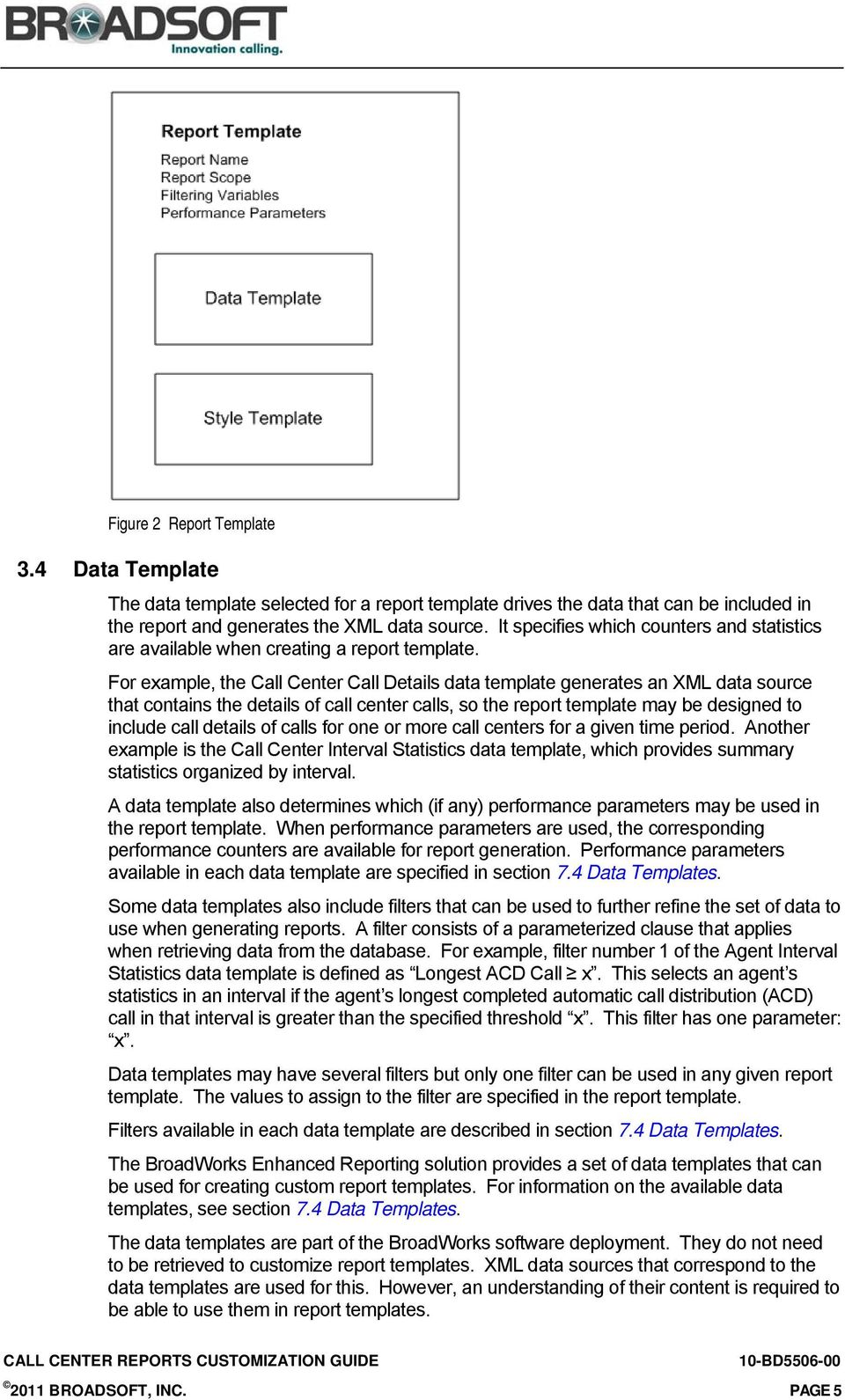
11 Figure 2 Report Template 3.4 Data Template The data template selected for a report template drives the data that can be included in the report and generates the XML data source. It specifies which counters and statistics are available when creating a report template. For example, the Call Center Call Details data template generates an XML data source that contains the details of call center calls, so the report template may be designed to include call details of calls for one or more call centers for a given time period. Another example is the Call Center Interval Statistics data template, which provides summary statistics organized by interval. A data template also determines which (if any) performance parameters may be used in the report template. When performance parameters are used, the corresponding performance counters are available for report generation. Performance parameters available in each data template are specified in section 7.4 Data Templates. Some data templates also include filters that can be used to further refine the set of data to use when generating reports. A filter consists of a parameterized clause that applies when retrieving data from the database. For example, filter number 1 of the Agent Interval Statistics data template is defined as Longest ACD Call x. This selects an agent s statistics in an interval if the agent s longest completed automatic call distribution (ACD) call in that interval is greater than the specified threshold x. This filter has one parameter: x. Data templates may have several filters but only one filter can be used in any given report template. The values to assign to the filter are specified in the report template. Filters available in each data template are described in section 7.4 Data Templates. The BroadWorks Enhanced Reporting solution provides a set of data templates that can be used for creating custom report templates. For information on the available data templates, see section 7.4 Data Templates. The data templates are part of the BroadWorks software deployment. They do not need to be retrieved to customize report templates. XML data sources that correspond to the data templates are used for this. However, an understanding of their content is required to be able to use them in report templates BROADSOFT, INC. PAGE 5
12 3.5 XML Data Source An XML data source contains report data extracted from the reporting database. Each time a report is run, an XML data source is generated based on the data template and the input parameters provided by the user (if applicable). A sample XML data source is required when designing and testing style templates with Oracle tools. Sample XML data sources for the existing data templates are available from Xchange. For information, see section 4.1 Template Data Available from BroadSoft. 3.6 Style Template A style template defines the layout of the report and to some extent its content. It specifies which data counters from the data template are included in the report, which aggregation functions are used, and how the information is presented on the page. Style templates can be customized using the Oracle Business Intelligence (BI) Publisher Add-in for Microsoft Word. For more information about the Oracle tools, see section 3.8 Oracle Tools. Style templates are saved in two formats: The Rich Text Format (RTF) file that is maintained by the template designer and used only to modify the style template The extensible Style-sheet Language Formatting Objects (XSL-FO) format that is uploaded to BroadWorks and used in the report template More precisely, the XSL-FO file is bundled together with other extensible Stylesheet Language (XSL) files that contain common style template definitions and are uploaded to BroadWorks as a ZIP file. The common files contain information used by many style templates, for example, the definition of the title table displayed at the top of each report, chart formatting information (such as axis format and color scheme), calculation formulas, time display formatting, translation of the agent or call center ID into their/its name, and so on. Style templates for the canned report templates are available from Xchange, in both RTF and zipped XLS-FO formats. For information, see section 4.1 Template Data Available from BroadSoft. 3.7 Branding Template The branding template defines the layout and contents of a report s header and footer. A default branding template is defined at the system level and is installed on BroadWorks at installation. The branding template can be customized at the system level and at the individual company level. For information, see the BroadWorks Call Center Solution Guide. Reports generated in the Hypertext Markup Language (HTML) and Excel File Format (XLS) formats are single-page reports. The header and footer appear once in the generated report. Reports generated in the Portable Document Format (PDF) consist of multiple pages. In these cases, the same header and footer are repeated on every page. NOTE: For proper interworking with the branding template, the style template must be designed with a single header and footer for all pages of the document BROADSOFT, INC. PAGE 6

13 Figure 3 shows the default report header, as defined in the default branding template. Figure 3 Default Branding Template Report Header Figure 4 shows the default report footer, as defined in the default branding template. Figure 4 Default Branding Template Report Footer The default branding template is available from Xchange. For information, see section 4.1 Template Data Available from BroadSoft. 3.8 Oracle Tools The following tools are required to customize report templates: Template Builder Oracle Business Intelligence Publisher Add-in for Microsoft Word (also called Template Builder) is an authoring tool that allows you to use native formatting features of Microsoft Word to design and validate the layout of your reports. It creates style templates in RTF, which can then be exported as an XSL-FO file and used on BroadWorks. (The Template Builder cannot use XSL-FO files as input.) During design time, data fields and other markup information are added to the RTF template using BI Publisher's simplified tags for XSL expressions. These tags associate the XML report data to the report layout. For more information, see Appendix B: BI Publisher Simplified Syntax and XSL Equivalents. BI Publisher also supports the use of pure XSL elements in the template. Template Viewer The Oracle BI Publisher Template Viewer is a tool you can use to preview the results of style template customization. NOTE: The Template Viewer does not display the actual HH:MM:SS data for charts so this part cannot be tested until the report template is created on BroadWorks. The Oracle Business Intelligence (BI) Publisher Add-in for Microsoft Word is referred to as Template Builder and the Oracle BI Publisher Template Viewer is referred to as Template Viewer in the remainder of this document. Both tools are packaged together under Oracle BI Publisher Desktop and can be downloaded from the Oracle website at: BROADSOFT, INC. PAGE 7
14 Figure 5 Oracle BI Publisher Download Page 3.9 Report Template Creation Process This section provides an overview of the process of creating a custom report template and making it available on BroadWorks for generating and scheduling reports. For detailed procedures, see section 5 Step-by-Step Procedures. At the high level, the process consists of the following steps: Step 1 Select Data Template Step 2 Design Style Template Step 3 Define Report Template on BroadWorks The following figure illustrates the process. Figure 6 Custom Template Creation Process If you need help, BroadSoft Professional Services is available to assist you in creating custom report templates. This is done outside of the regular BroadWorks release process Step 1 Select Data Template The first step in creating a custom report template consists of identifying the data requirements for the report and selecting the appropriate data template. You may also do this by looking at the existing reports templates, deciding which one most closely resembles the template you want to create, and then verifying which data template it uses. For example, the Call Center Call Detail report uses the Call Center Call Details data template, which contains all call center call detail statistics. Therefore, the report template may be designed to include call details of calls for one or more call centers for a given time period BROADSOFT, INC. PAGE 8

15 For information about the data template used by each canned report, see section 7.3 Canned Reports Templates. For a detailed description of the existing data templates, see section 7.4 Data Templates Step 2 Design Style Template The second step in building a custom report template consists of designing the report layout. You do this by creating a style template or by modifying an existing style template (in RTF format) using the Oracle Template Builder. It is assumed in this document that you will create a custom style template by modifying an existing one. When designing the report layout, you associate report data with the elements of the layout. The Template Builder uses a sample XML data file that corresponds to the selected data template for information about report data. NOTE: Do not define the header and footer of the report in the style template. The branding template is used for this. In particular, the style template document must not have a different header and footer for the first page or different headers or footers for odd and even pages. Otherwise, the interworking with the branding template does not work properly. You save the style template as an RTF file, which you keep. You export the template as an XSL-FO document to be uploaded to BroadWorks and included in the report template you are creating, as shown in the next step. You can test your design using the Oracle Template Viewer Step 3 Define Report Template on BroadWorks The third step in creating a custom report template consists of defining the report template on BroadWorks and making it available for on-demand and scheduled report requests. The following table describes the attributes you set when defining a report template. These attributes may be subsequently modified, unless stated otherwise. Attribute Name and Description Data Template Style Template Enabled Scope Interval Scope Description This is the name and description of the report. This is used as a reference to the report template. This allows you to select a data template. The data template selection cannot be modified. This allows you to download the style template you created for the report. The style template may be modified by uploading a new file. This is used to make the template available for report generation. This applies only to agent report templates. It allows you to specify whether the template should be available to Call Center agents or only to supervisors. The template is always available to administrators at the appropriate level. This attribute determines whether the report template is a real-time or historical report template. The attribute can only be set if you select a real-time data template. Otherwise, the report template is defined as a historical report template BROADSOFT, INC. PAGE 9

16 Attribute Filtering Variables Input Parameters Description The filtering variables further refine the set of data used when generating reports. The filtering variables depend on the selected data template. For each data template, 0 or more filters are defined, which in turn, can require up to 5 filtering values. For example, filter number 2 in the Call Center Call Details data template is defined as Wait Time in Queue x. It has one filtering variable, namely x, which specifies a time threshold in seconds. Only one filter can be selected for a given report template. You can also decide not to use a filter even if filters are available. The attributes in this section determine whether performance parameters are required for the report template. The type and number of performance parameters depends on the data template. For each applicable performance parameter, you must specify whether the parameter is required. If a parameter is required, the user is prompted to enter a value for it when requesting a report. If the parameter is not required, it is not used in the report. The performance parameters are not modifiable. Once the report template is defined and enabled, it can be used to generate reports Use Template Builder with BroadWorks Templates This section provides some general rules about using Template Builder with BroadWorks style templates. For more information about the Template Builder, refer to the Template Builder documentation. A BroadWorks style template includes a title table, a header and a footer, display text, data fields, form fields, tables, charts, and non-structural elements such as plain text, or text and table formatting. These elements are described in the following subsections. The code behind the elements is a mix of the simplified BI Publisher syntax and XSL. NOTE: BroadWorks style templates are very complex structures. Make sure that you understand them well before making any changes BROADSOFT, INC. PAGE 10
17 The following figure shows the first and third page of the Agent Activity report style template. Figure 7 Agent Activity Report Style Template First Page Title Table Figure 8 Agent Activity Report Style Template Third Page The title table is defined in the common style template that is included in all reports and cannot be changed in the style template for a specific report template. When you click on the Title Table data field on the first page of a BroadWorks style template, a dialog box appears displaying the code for the title table BROADSOFT, INC. PAGE 11

18 Figure 9 BI Publisher Properties Dialog Box XSL-FO Code for Title Table The dialog box in Figure 8 includes the following text: <?call-template@lines:bsir:createagenttitletable?> The bsir part of this text is the prefix to the XML namespace that defines BroadWorks specific customizations Header and Footer Each page of a style template includes a header and a footer area. Figure 10 Style Template Header Information Data Fields Figure 11 Style Template Footer Information Do not format the header or the footer of the style template. This is done using the branding template. The bsir part references a sub-template in the branding template. Data fields are placeholders for data and must be tied to a data element in the data template. The data related to data fields is actually in the XML file. This is highlighted in grey in the data template. To change a single data field, double click on the field. A BI Publisher Properties dialog box appears, allowing you to view and modify the data field. All data fields allow you to modify the code associated with the field. This is done in the Advanced tab BROADSOFT, INC. PAGE 12

19 Figure 12 BI Publisher Properties Dialog Box Advanced Tab In addition, some data fields allow you to modify the data element associated with the data field by selecting a new element from the list. This depends on the type of data element associated with the data field. If applicable, you can also apply an aggregation function to the data, such as sum or average, and change the text that is displayed in the field in the style template Form Fields Figure 13 BI Publisher Properties Dialog Box Properties Tab After you make changes, always use the Advanced tab to verify the result. Form fields are used to design structural elements such as loops, conditions, function calls, and so on. They are represented by a tag highlighted in grey in the RTF document. When the tag is clicked, the corresponding code is displayed in a dialog window. Figure 14 Form Fields Tags 2011 BROADSOFT, INC. PAGE 13

20 Figure 14 shows tags for three form fields. The code associated with the numcols tag is displayed in Figure 15. It represents the number of columns in the Call Center Activity table. Figure 15 Code for the numcols Tag Form fields for structural elements such as loops have the beginning and corresponding end form fields. For example, the w tag in Figure 14 represents the beginning of a when loop, which has a corresponding end, as illustrated in the following figures. Figure 16 Code for Beginning of a When Loop Figure 17 Code for End of a When Loop 2011 BROADSOFT, INC. PAGE 14

21 To view the entire loop, use the Field Browser, which allows you to see the code for a selected area of the style template. To view the code for a specific element or area, select the element/area and click the Field Browser button. To view the code for the entire template, click the Field Browser button without selecting anything Tables Figure 18 Field Browser Button BroadWorks style templates include definitions of tables. Tables are complex structures that cannot be viewed by editing a single data field. To view the code for a table, use the Field Browser. The following figure shows the code for the Agent Activity table. Figure 19 Field Browser with Fragment of Code for Agent Table The numcols data field specifies the number of columns in the table and needs to be modified if the number of columns in the table is changed. NOTE: The width of columns in a table should not be changed Charts BroadWorks style templates also include definitions of charts. A chart is represented by a dummy image and related code. Chart information cannot be viewed using the Field Browser. To view chart information, right-click the chart image and select Size from the menu BROADSOFT, INC. PAGE 15
22 Figure 20 Viewing Chart Information The Size dialog box for the chart appears. The Alternative Text box on the Alt Text tab displays the code for the chart and can be modified there. NOTE: Only pure XML is allowed in the code for charts and the first line must be chart:. Figure 21 Size Dialog Box Chart XSL Code Non-structural Elements Non-structural elements, such as display text, text, and table formatting can be modified using standard Word functionality. Charts are an exception. Their presentation elements, such as the color scheme and axis formatting, are defined in a common style template and cannot be changed in an individual style template BROADSOFT, INC. PAGE 16
23 4 Prerequisites To customize a report template you need to: Be familiar with the existing BroadWorks templates Have working knowledge of XSL Have some understanding of how the Oracle Template Builder works Have the Oracle tools installed on your computer Have administrative access to BroadWorks at the appropriate level (system, enterprise, or service provider group) You also need the following data: Sample XML data files that correspond to the data templates you want to use Style templates in RTF and zipped XSL-FO format that you modify to create custom style templates A branding template For exact file names and location where the files are available, refer to the next section. 4.1 Template Data Available from BroadSoft All the files you need to customize report templates are available from Xchange. The files are available in the Rel_17.sp2_CallCenterReports.zip. This includes: XML Data Files Style Template Files Branding Template File XML Data Files The following table lists the XML data files available in the Rel_17.sp2_CallCenterReports.zip and specifies the data template used to generate each file. XML Data File Name agentcalldetailstatistics.xml agentintervaldispositioncodestatistics.xml agentintervalstatistics.xml agentintervalunavailablecodestatistics.xml agentsigninsignoutstatistics.xml callcenterintervalstatistics.xml or dnisintervalstatistics.xml callcentercalldetailstatistics.xml or dniscalldetailstatistics.xml Corresponding Data Template Agent Call Details Agent Disposition Codes Agent Interval Statistics Agent Unavailable Codes Agent Sign in Sign Out Call Center Interval Statistics Call Center Call Details 2011 BROADSOFT, INC. PAGE 17
24 XML Data File Name callcenterintervaldispositioncodestatistics.xml or dnisintervaldispositioncodestatistics.xml callcenterintervaloverflowmatrixstatistics.xml Corresponding Data Template Call Center Disposition Codes Call Center Overflow Matrix Style Template Files The following table lists the style template files available in the Rel_17.sp2_CallCenterReports.zip and specifies the XML data file that must be used with each style template during customization. Style Template in Zipped XSL-FO Format Style Template in RTF Format XML Data Source File to Use with the Style Template callcenterabandonedcallstyletemplate.zip CallCenterAbandonedCallStyleTemplate.rtf callcenterintervalstatistics.xml agentactivitystyletemplate.zip AgentActivityStyleTemplate.rtf agentintervalstatistics.xml agentcalldetailstyletemplate.zip AgentCallDetailStyleTemplate.rtf agentcalldetailstatistics.xml agentcallstyletemplate.zip AgentCallStyleTemplate.rtf agentintervalstatistics.xml agentdispositioncodestyletemplate.zip AgentDispositionCodeStyleTemplate.rtf agentintervaldispositioncodestatistics.x ml agentcalldurationstyletemplate.zip AgentDurationReport.rtf agentintervalstatistics.xml agentsigninsignoutstyletemplate.zip AgentSignInSignOutReportTemplate.rtf agentsigninsignoutstatistics.xml agentsummarystyletemplate.zip AgentSummaryReport.rtf agentintervalstatistics.xml agentunavailablecodestyletemplate.zip AgentUnavailableCodeReportTemplate.rtf agentintervalunavailablecodestatistics. xml callcentercalldetailstyletemplate.zip CallCenterCallDetailReport.rtf callcentercalldetailstatistics.xml callcenterdispositionstyletemplate.zip CallCenterDispositionCodeReport.rtf callcenterintervaldispositioncodestatist ics.xml callcenterincomingcallsstyletemplate.zip CallCenterIncomingCallsReport.rtf callcenterintervalstatistics.xml callcenteroverflowmatrixstyletemplate.zip CallCenterOverflowMatrixReport.rtf callcenterintervaloverflowmatrixstatisti cs.xml callcenterpresentedcallsstyletemplate.zip CallCenterPresentedCallsReport.rtf callcenterintervalstatistics.xml callcenterstyletemplate.zip CallCenterReport.rtf callcenterintervalstatistics.xml 2011 BROADSOFT, INC. PAGE 18
25 Style Template in Zipped XSL-FO Format Style Template in RTF Format XML Data Source File to Use with the Style Template callcentersummarystyletemplate.zip CallCenterSummaryReport.rtf callcenterintervalstatistics.xml callcenterservicelevelstyletemplate.zip CallCenterServiceLevelReport.rtf callcenterintervalstatistics.xml Branding Template Files BroadSoft makes the default branding template used in Call Center reports available on Xchange. The XSL-FO file (branding.xsl) and the corresponding RTF file (DefaultBranding.rtf) are available BROADSOFT, INC. PAGE 19
26 5 Step-by-Step Procedures This section provides the following step-by-step procedures for creating custom reports: Select Data Template Design Style Template Define Report Template These procedures show how to create a custom template by modifying an existing template. It is assumed that you have already downloaded and installed the Oracle tools. For information about the required Oracle tools, see section 3.8 Oracle Tools. 5.1 Select Data Template 1) Decide which data template you want to use for your custom template. This is an important step, since it determines which statistical data can be included in the reports. For information about the available data templates, see section 7.4 Data Templates. 2) From the report templates that use the selected data template, select the template that most closely resembles the template you want to create and determine which style template it uses. You use this template as the basis for creating the custom style template. For a description of the canned templates available from BroadWorks, see the BroadWorks Call Center Reports Guide. For information about the data and style template used in each canned report template, see section 7.3 Canned Reports Templates. 5.2 Design Style Template To design a style template, first locate and install all the necessary information. Then design the template using the Template Builder, test the template, and finally save/export the template in required formats. NOTE: It is recommended and assumed here that you do not build the style template from scratch, but modify an existing style template Prepare Your Environment 1) From Xchange, download the sample XML data file that corresponds to the selected data template and the zip file that contains the style template. 2) On your computer, create a folder that you use to customize the template. 3) Unpack the zip file into the newly created folder. This creates a directory structure similar to the one displayed in the following figure. The structure varies slightly depending on the template. For Call Center data templates, the top folder is called callcenter. Figure 22 Unpacked Style Template 2011 BROADSOFT, INC. PAGE 20
27 4) Copy the XML data file to the main folder. 5) Create a folder named branding at the same level as the agent (or callcenter) folder. 6) Either download the default branding template from Xchange or obtain your custom branding template. 7) Copy the branding template to the branding folder. Figure 23 Style Template Directory Structure with Branding Template Create Template using Template Builder 1) Obtain the RTF file for the template to modify. If you are using a canned template as the basis for customization, download the RTF file from Xchange. Otherwise, locate the custom RTF file that you previously saved on your computer. 2) Open the RTF file in Microsoft Word. 3) On the menu bar, click the BI Publisher tab. The following menu appears: Figure 24 BI Publisher Add-in 4) In the Load Data group, click Sample XML to download the sample XML data file. 5) In the dialog box that appears, select the XML file to download and click Open. This is the file you stored in the main folder BROADSOFT, INC. PAGE 21
28 Figure 25 Select XML Data Dialog Box 6) Using the features of the Template Builder and the data elements available in the sample XML data file, modify the style template as required. You can also apply functions to the data such as average or sum. For an example, see section 7.1 Example of Modifying BroadWorks Style Template. For an overview of using the Template Builder with BroadWorks style templates, see section 3.10 Use Template Builder with BroadWorks Templates. WARNING 1: BroadWorks templates are very complex. To make sure you do not inadvertently make changes you do not want to make, always check the code of the template after making any changes. WARNING 2: Do not modify the header and footer. Use the branding template for this. For the proper interworking with the branding template, the style template must be designed with a single header and footer for all pages of the document. For information on customizing the branding template, see the BroadWorks Call Center Solution Guide. 7) Validate the changes. In the Tools group, click Validate template. This checks whether there are any syntax errors in your design. 8) If necessary, fix the errors and validate the template again. 9) To test the template, first export it in the XSL-FO format and save it in the main folder. To do this: In the Tools group of BI Publisher tab, click Export and select XSL-FO Stylesheet from the list. The file opens in your default web browser. From the menu bar, select File and then the option to save a file (Save Page As in Firefox or Save As in Internet Explorer). In the dialog box that appears, enter the name of the new file, select the XSL file type, and save it in the main folder for that template BROADSOFT, INC. PAGE 22
29 Figure 26 Exporting Style Template as XSL-FO Style Sheet 10) Using the Template Viewer, preview your report template. Follow the procedure in section Test Style Template. Do not use the Preview features of the Template Builder as they do not work with BroadWorks templates because of the way the templates are structured. 11) Make any required adjustments. 12) Once you are satisfied with the changes, export the style template as an XSL-FO document: In the Tools group of BI Publisher tab, click Export and select XSL-FO Stylesheet from the list. The file opens in your default web browser. From the menu bar, select File and then the option to save a file (Save Page As in Firefox or Save As in Internet Explorer). In the dialog box that appears, enter the name of the new file, select the XSL file type, and save it in the main folder for that template. 13) Save the template as an RTF file in a different folder on your computer and keep it for later use. You will need it if you want to modify the template in the future. 14) From the folder structure you created, delete the branding folder and the XSL data file. 15) Zip the remaining folders and files to create the same structure you originally unpacked. This now contains your modified template; therefore, you may want to give it a different name BROADSOFT, INC. PAGE 23
30 5.2.3 Test Style Template 1) Open the Report Viewer. From the Start menu, select All Programs, Oracle BI Publisher Desktop, and then Template Viewer. The Report Viewer dialog box appears. Figure 27 BI Publisher Report Viewer 2) Set the working directory to main. Click Browse next to Working Directory and navigate the main folder for the style template you want to preview. 3) Select All Formats or XSL Templates (FO). 4) In the Data and Template columns, select the style template to view and the sample XML data file. 5) Select the Output Format, for example, HTML, and click Start Processing. If you selected HTML, your report template is displayed in your default internet browser. NOTE: Enhanced Call Center Reporting supports PDF, HTML, and Excel formats for reports. It is recommended to test the template in all the supported formats BROADSOFT, INC. PAGE 24
31 5.3 Define Report Template Report templates can be created at the system, enterprise, and service provider group level. You create a new template using the Report Template Add page on the system provider, enterprise, or group CommPilot web portal. The following figure shows the Report Template Add page for the system provider; however, the page is the same for other administrative levels. Depending on the level on which the template is created, the template is available to all authorized users in the system, enterprise, or service provider group. NOTE: You must create the template on all Application Server clusters. Figure 28 System Report Template Add Page To create a custom template: 1) Log in to your web portal on BroadWorks. 2) From the Options menu, select Call Center. The Call Center menu page appears. 3) Click Report Templates. The Report Templates page appears. 4) Click Add. The Report Template Add page appears. 5) Enter the name and the description for the report template. 6) From the Data Template drop-down list, select the data template you used to create the style template for this report template BROADSOFT, INC. PAGE 25
32 7) Click the Browse button to the right of Style Template and select and upload the zipped style template you created. 8) To make this report template available for report generation, check Enable for Report Generation. 9) For an Agent report template, define the scope of the template, that is, specify who can use the template in addition to administrators: To make it available only to supervisors, select Supervisors only. To make it available to supervisors and agents, select Supervisors and Agents. NOTE: Once the template is created, the template scope cannot be modified. 10) For Interval Scope, select Real Time to use the template for real-time reports or select Historical to use the template for historical reports. NOTE: This option can only be set if you selected a real-time data template. Otherwise, the report template is defined as historical and the interval scope cannot be changed. 11) If applicable, for Filtering Variables, enter the filter number and the required filtering values. Filter Number is an index that references a specific filter for the selected data template. Value 1 through Value 5 are the filtering values used in the selected filter during report generation. NOTE: Currently, all filters require only zero or one value to be provided. Value 2 through Value 4 are designed to allow future changes. For example, filter number 2 of the Call Center Call Details data template is defined as Wait Time in Queue x. This selects a call center or DNIS call if the time the call waited in queue is greater than a specified threshold <x>, which can be 1 through 7200 seconds. Filter number 5 of the Call Center Call Details data template is an example of a filter that does not require any filtering values. It is defined as Disposition Codes NOT NULL and selects a call center or DNIS call if at least one disposition code has been applied to it. 12) Specify which optional parameters to include in the report. In the Input Parameters section, select Required for each optional parameter you want to include in the report and Hidden for the remaining optional parameters. When a parameter is set to Required, a value must be supplied when generating reports. The input parameters depend on the data template you selected and some templates may have no optional input parameters. The optional input parameters are called performance parameters BROADSOFT, INC. PAGE 26
33 For the list and description of all input parameters that may appear in Call Center reports, see selection 7.2 Input Parameters. For the list of performance parameters defined in each data template, see section 7.4 Data Templates. 13) To save your changes, click OK BROADSOFT, INC. PAGE 27
34 6 Software Upgrades A data template may occasionally be deprecated in a future BroadWorks release. If this is the case, the template will no longer be available for the creation of new report templates. Existing custom report templates that use that data template will continue to be supported for next two major releases after the data template is marked as deprecated BROADSOFT, INC. PAGE 28
35 7 Appendix A: Reference Information 7.1 Example of Modifying BroadWorks Style Template This example shows how to change a table column in the Call Center style template (CallCenterReport.rtf). Let us assume that in the Call Center Activity table, you want to: Replace the Calls Escaped column by Calls Offered to Agents Add a column for calls answered in the second threshold level (which is a performance parameter provided by the user when generating a report, and a report can have up to five threshold levels), and Change the color of the table. Figure 29 Call Center Activity Table for Call Centers 1) Open the CallCenterReport.rtf document in Word. 2) On the BI Publisher tab, click Sample XML, and locate and load the callcenterintervalstatistics.xml file. This is the XML data file you downloaded from Xchange that corresponds to the selected data template. 3) Modify the column title. In the Call Center Activity table for call centers, select the text in the title row of the Calls Escaped column and replace it by Calls Offered to Agents. This is plain text, so you change it as you would do in any Word document. 4) In the same column, double-click the field in the first row. The BI Publisher Properties dialog box appears BROADSOFT, INC. PAGE 29
36 Figure 30 BI Publisher Properties Dialog Box Properties Tab 5) From the Data Field list, select CALLS_OFFERED_TO_AGENTS and click OK. 6) Click the Advanced tab to verify the code. 7) Repeat for rows two, three, and four. If a data field does not allow you to select from the list, which is the case for the third row, replace CALLS_ESCAPED by CALLS_OFFERED_TO_AGENTS in the code in the Advanced tab. Figure 31 BI Publisher Properties Dialog Box Advanced Tab 8) Insert a column to the right of the % Answered Calls Answered In 7200 secs column. Right-click the column and select Insert and then Insert Columns to the Left. Do not change the column size. 9) Select the numcols data field above the table. 10) In Field Browser that appears, change the number of columns. Remember that for Call Center templates, it specifies the number of columns in two tables, that is, one for call centers and one for DNISs BROADSOFT, INC. PAGE 30
37 Figure 32 Field Browser Displaying numcols Data Field 11) Select and copy the contents of column Calls Answered In 7200 secs. 12) Edit the data field in each row, including the title row, and replace the index [1] by [2] in the code of each field to reference the second threshold level. Figure 33 Title of Column Being Added Data Field Code 13) To change the color of the table title row: Select the row, right-click and select Table Properties from the menu. In the Table Properties dialog box, click Borders and Shading. In the Borders and Shading dialog box, click Shading, and select the new color from the drop-down list BROADSOFT, INC. PAGE 31
38 Figure 34 Borders and Shading Dialog Box 14) The color changes to the one you selected in the template and in the reports generated using the template. Figure 35 Call Center Activity Table for Call Centers (Fragment) with Green Title Row 15) To validate your changes, click Validate Template. NOTE: The definition of the Call Center Activity table actually consists of two table definitions, one for reports about the call center and one for reports about the DNIS numbers. Therefore, you need to repeat what you just did for the second table. 16) If there are no errors, export the template in XSL-FO format. From the BI Publisher tab, select Export and then XSL-FO Stylesheet. The file opens in your default web browser. 17) From the menu bar, select File and then the option to save a file (Save Page As in Firefox or Save As in Internet Explorer). 18) In the dialog box that appears, enter the name of the new file, select the XSL file type, and save it in the main folder for that template. 19) Preview the template using the Template Viewer. For more information, see section Test Style Template. The result of your changes should look similar to the table in the following figure BROADSOFT, INC. PAGE 32
39 Figure 36 Call Center Report Call Center Activity Table for Multiple Call Centers 7.2 Input Parameters Input parameters specify the information that the user must provide when requesting a report; they define the scope of data retrieved from the database for the report. The input parameters that the user must provide depend on the selected data template. When defining a custom report template, the administrator selects a data template that specifies all mandatory and optional parameters for the template. The administrator decides which optional parameters (called performance parameters) to include in the report template. However, once a parameter is included, it becomes mandatory and the user must provide input for it when generating a report. The following table lists all input parameters that may appear in reports. The performance parameters are listed in the following table. Input Parameter List of Agents List of Call Centers/DNISs Date Format Time Format Time Frame Sampling Period Start Day of Week Description This parameter applies to all Agent report templates. When requesting a report, the user is required to select the agents to include in the report. The agent selection is an explicit list of agents or an implicit list of all agents in the scope of the user issuing the report request. This parameter is mandatory in all Call Center report templates. When requesting a report, the user is required to select the call centers or DNIS numbers to include in the report. The call center or DNIS selection is an explicit list of call centers or DNISs for a given call center, or an implicit list of all call centers or DNISs in the scope of the user issuing the report request. This is the selection of mm/dd/yyyy or dd-mm-yyyy. The format is used for all dates that are included in the generated report. This is the selection of AM/PM or 24 Hour. The format is used for all times that are included in the generated report. Note that this setting does not impact time durations, which are always reported in the hh:mm:ss format in the generated reports. The time frame specifies the time period for which the report is requested. It consists of a start date and start time, and optionally, an end date and end time, depending on whether the report template is a real-time report template or a historical report template. For a historical report template, the end date and end time are mandatory. For an interval-based report template, if the start time does not align with a sampling period boundary, then it is adjusted to the previous sampling period boundary. The sampling period is only applicable to interval-based report templates and specifies the length of the intervals. The start day of week is only applicable to interval-based report templates when the sampling period selected is weekly. It can be set to any day of the week BROADSOFT, INC. PAGE 33
40 Input Parameter Time Zone File/Report Format Description This is the time zone of the report. This is only for scheduled reports requested by an administrator. Otherwise, the user s configured time zone is used. This is the format in which the report is generated, and can be XLS, PDF, or HTML (for on-demand reports). Performance Parameter Call Completion Short Duration Service Level Thresholds Service Level Inclusions Service Level Objective Abandoned Call Description This counts the number of automatic call distribution (ACD) calls an agent has completed within a service level during an interval. Service level: 1 through 7200 seconds This counts the number of ACD short duration calls completed by an agent during an interval in which a short call is defined by a threshold. Threshold: 1 through 7200 seconds The user may request up to five service-level calculations for each call center or DNIS per interval service-level threshold, which may be from 1 through 7200 seconds. A call is said to be within a service level if it is answered within the provided time threshold and the percent (%) in service level is usually calculated as the number of calls answered within the provided threshold value divided by the number of answered calls. Other types of calls may (optionally) be included in the calculation: Transfers due to time overflow (calls removed from the queue according to the Overflow-Time policy) Other transfers (calls removed from the queue according to the Bounced or Stranded Calls policy, because of a supervisor transfer, or because of a caller escape) Abandoned calls Choice between: Ignore all abandoned calls Include all abandoned calls Include calls abandoned after the entrance message has finished playing Include calls abandoned after the specified time interval: 1 through 7200 seconds. This provides an indicator for the service-level objective, which can be used in report templates. It is a percentage value. This counts the number of calls abandoned within a specified time. Up to four thresholds can be specified, resulting in up to four different counts. Threshold: 1 through 7200 seconds 7.3 Canned Reports Templates This section lists the canned report templates available on BroadWorks. For each report template, the corresponding style and data templates are listed as well as the corresponding RTF files and XML data files made available for reference on Xchange. You can use this information as input when creating your custom style templates. Canned Template Abandoned Call Report Style Template callcenterabandonedcallstyletemplate.zip (CallCenterAbandonedCallReport.rtf) Data Template Call Center Interval Statistics (callcenterintervalstatistics.xml or dnisintervalstatistics.xml) 2011 BROADSOFT, INC. PAGE 34
41 Canned Template Agent Activity Report Agent Call Detail Report Agent Call Report Agent Disposition Code Report Agent Duration Report Style Template agentactivitystyletemplate.zip (AgentActivityReport.rtf) agentcalldetailstyletemplate.zip (AgentCallDetailReport.rtf) agentcallstyletemplate.zip (AgentCallReport.rtf) agentdispositioncodestyletemplate.zip (AgentDispositionCodeReportTemplate.rtf) agentcalldurationstyletemplate.zip (AgentDurationReport.rtf) Data Template Agent Interval Statistics (agentintervalstatistics.xml) Agent Call Details (agentcalldetailstatistics.xml) Agent Interval Statistics (agentintervalstatistics.xml) Agent Disposition Codes (agentintervaldispositioncodesta tistics.xml) Agent Interval Statistics (agentintervalstatistics.xml) Agent Sign In Sign Out Report Agent Summary Report Agent Unavailability Report Call Center Call Detail Report Call Center Disposition Code Report Call Center Incoming Calls Report Call Center Overflow Matrix Report Call Center Presented Calls Report Call Center Report Call Center Summary Report Service Level Report agentsigninsignoutstyletemplate.zip (AgentSignInSignOutReportTemplate.rtf) agentsummarystyletemplate.zip (AgentSummaryReport.rtf) agentunavailablecodestyletemplate.zip (AgentUnavailableCodeReportTemplate.rtf) callcentercalldetailstyletemplate.zip (CallCenterCallDetailReport.rtf) callcenterdispositionstyletemplate.zip (CallCenterDispositionCodeReport.rtf) callcenterincomingcallsstyletemplate.zip (CallCenterIncomingCallsReport.rtf) callcenteroverflowmatrixstyletemplate.zip (CallCenterOverflowMatrixReport.rtf) callcenterpresentedcallsstyletemplate.zip (CallCenterPresentedCallsReport.rtf) callcenterstyletemplate.zip (CallCenterReport.rtf) callcentersummarystyletemplate.zip (CallCenterSummaryReport.rtf) callcenterservicelevelstyletemplate.zip (CallCenterServiceLevelReport.rtf) Agent Sign in Sign Out (agentsigninsignoutstatistics.xm l) Agent Interval Statistics (agentintervalstatistics.xml) Agent Unavailable Codes (agentintervalunavailablecodest atistics.xml) Call Center Call Details (callcentercalldetailstatistics.xml or dniscalldetailsstatistics.xml) Call Center Disposition Codes (callcenterintervaldispositioncod estatistics.xml or dnisintervaldispositioncodestatis tics.xml) Call Center Interval Statistics (callcenterintervalstatistics.xml or dnisintervalstatistics.xml) Call Center Overflow Matrix (callcenterintervaloverflowmatrix Statistics.xml) Call Center Interval Statistics (callcenterintervalstatistics.xml or dnisintervalstatistics.xml) Call Center Interval Statistics (callcenterintervalstatistics.xml or dnisintervalstatistics.xml) Call Center Interval Statistics (callcenterintervalstatistics.xml or dnisintervalstatistics.xml) Call Center Interval Statistics (callcenterintervalstatistics.xml or dnisintervalstatistics.xml) 2011 BROADSOFT, INC. PAGE 35
42 7.4 Data Templates A data template defines the data used for generating reports. It provides a set of counters and statistics that are available for use when creating a custom report template. It can also include performance counters and filters. This section describes the data templates that are available on BroadWorks as part of the Call Center Reporting solution in the current release. They are used in canned reports and they can also be used to create custom report templates. Data templates are divided into two categories: Agent Data Templates Call Center Data Templates In addition, they can be real-time or historical, and they can be interval-based or not interval-based. The type of data template determines the type of custom report template that can be created from it. In particular: An Agent data template can be used to create Agent report templates. A Call Center data template can be used to create Call Center report templates. A real-time data template can be used to create real-time report templates. A historical report template can be used to create historical report templates. An interval-based data template is a template that is used to create interval-based report templates Agent Data Templates The following table provides a summary of agent data templates, that is, data templates used to generate statistics for reports about one or more agents. The following subsections describe each agent data template in greater detail. The performance parameters and filters for each data template are listed within the specific section for that data template. Template Name Real- Time Interval- Based Statistics Agent Call Details Agent Disposition Codes Agent Interval Statistics Agent Unavailable Codes No No These are details of calls placed or received by agents. No Yes These are statistics about calls tagged with disposition codes by selected agents, grouped into quarter-hourly, half-hourly, hourly, daily, weekly, or monthly sampling periods. Yes Yes This data template defines agent statistics, grouped into either quarter-hourly, half-hourly, hourly, daily, weekly, or monthly sampling periods that include: Call Counters State Counters Additional Counters Agent High Water Marks Agent Timers Agent Performance Counters No Yes This is the number of times unavailable codes were used by selected agents and for how long, grouped into either quarter-hourly, half-hourly, hourly, daily, weekly, or monthly sampling periods BROADSOFT, INC. PAGE 36
43 Template Name Real- Time Interval- Based Statistics Agent Sign In Sign Out No No These are details regarding when agents signed in to or out of call centers Agent Interval Statistics Data Template The Agent Interval Statistics data template is a real-time data template and an intervalbased data template. It supports the following two performance parameters: Call Completion and Short Duration. This data template supports the filters shown in the following table. Filter Number Filter Name Description Filter Value 1 Longest ACD Call x This selects an agent s statistics in an interval if the agent s longest completed ACD call in that interval is greater than a specified threshold. 2 Longest Outbound ACD Call x This selects an agent s statistics in an interval if the agent s longest completed outbound ACD call in that interval is greater than a specified threshold. 3 Longest Inbound Call x This selects an agent s statistics in an interval if the agent s longest completed (non-acd) call in that interval is greater than a specified threshold. 4 Longest Outbound Call x This selects an agent s statistics in an interval if the agent s longest completed outbound (non-acd) call in that interval is greater than a specified threshold. 5 Longest Internal Call x This selects an agent s statistics in an interval if the agent s longest internal (inbound or outbound) call in that interval is greater than a specified threshold. 6 Total ACD Call Time x This selects an agent s statistics in an interval if the agent s total ACD call time in that interval is less than a specified threshold. 7 Total ACD Call Time! = 0 This selects an agent s statistics in an interval if the agent s total ACD call time in that interval is not equal to zero. Any value greater than 0 (seconds) Any value greater than 0 (seconds) Any value greater than 0 (seconds) Any value greater than 0 (seconds) Any value greater than 0 (seconds) Any value greater than 0 (seconds) This is not applicable BROADSOFT, INC. PAGE 37
44 Filter Filter Name Description Number 8 Total ACD Call Time x This selects an agent s statistics in an interval if the agent s total ACD call time in that interval is less than a specified threshold. Filter Value Any value greater than 0 (seconds) 9 Total ACD Outbound Call Time x 10 Total ACD Outbound Call Time!= 0 11 Total ACD Outbound Call Time x This selects an agent s statistics in an interval if the agent s total outbound ACD call time in that interval is less than a specified threshold. This selects an agent s statistics in an interval if the agent s total outbound ACD call time in that interval is not equal to zero. This selects an agent s statistics in an interval if the agent s total outbound ACD call time in that interval is less than a specified threshold. Any value greater than 0 (seconds) This is not applicable. Any value greater than 0 (seconds) 12 Total Hold Time x This selects an agent s statistics in an interval if the agent s total hold time in that interval is greater than a specified threshold. Any value greater than 0 (seconds) 13 Total Available Signed-In Time! = 0 This selects an agent s statistics in an interval if the agent s total available time in that interval is not equal to zero. This is not applicable. 14 Total Unavailable Time x This selects an agent s statistics in an interval if the agent s total unavailable time in that interval is greater than a specified threshold. Any value greater than 0 (seconds) The agent high water marks statistics are available in addition to the performance counters listed in the following table. Performance Counter Description XML Tag Calls Completed in Service Level Short Duration Calls This counts the number of ACD calls an agent has completed within a service level during an interval. This counts the number of ACD short duration calls completed by an agent during an interval where a short call is defined by a threshold. CALLS_COMPLETE D_IN_SVC_LEVEL SHORT_DURATION _CALLS The statistics available in this data template are listed in the following subsections BROADSOFT, INC. PAGE 38
45 Interval and Agent Data Columns Agent Data Description XML Tag (Data Template) or Column Name (Database View) Interval Start Time This is the start time for a sampling period. START_TIME Agent User ID This is the agent s user ID. AGENT_USERID Agent Deleted This is the date the agent was deleted from the call center. If the user is still active, this is Nil. DELETED_TIME Agent First Name This is the first name of agent. AGENT_NAME_FIRST Agent Last Name This is the last name of agent. AGENT_NAME_LAST Agent Phone Number This is the phone number of agent. AGENT_NUMBER Agent Extension This is the agent s phone extension. AGENT_EXTENSION Call Counter Columns Statistic Description XML Tag (Data Template) or Column Name (Database View) ACD Calls Presented ACD Calls Answered ACD Calls Bounced Outbound Call Center Calls Route Point Calls Answered Outbound Route Point Calls Inbound Calls Outbound Calls This is the number of ACD calls that were presented to the agent. A presented call is a call that is routed from a queue to an agent (rings the agent or attempts to ring the agent). This is the number of ACD calls that were answered by the agent. This is the number of ACD calls presented to the agent that were bounced. This is the number of outbound calls made by the agent as a call center. The call only counts if answered. This is the number of route point calls that were answered by the agent. This is the number of outbound calls made by the agent as a route point. The call only counts if answered. This is the number of inbound calls (excluding ACD/route point calls and internal calls) that were answered by the agent. This is the number of outbound calls (excluding ACD/route point calls and internal calls) made by the agent. The call only counts if answered. CC_CALLS_PRESENTED CC_CALLS_ANSWERED CC_CALLS_BOUNCED CC_OUTBOUND_CALLS RP_CALLS_ANSWERED RP_OUTBOUND_CALLS INBOUND_CALLS OUTBOUND_CALLS 2011 BROADSOFT, INC. PAGE 39
46 Statistic Description XML Tag (Data Template) or Column Name (Database View) Internal Calls This is the number of internal calls (calls within the group or enterprise, excluding ACD/route point calls) made or received by the agent. The call only counts if answered. INTERNAL_CALLS State Counter Columns Statistic Description XML Tag (Data Template) or Column Name (Database View) Num Unavailable Num Wrap-Up Num Sign In This is the number of times the agent was unavailable. This is the number of times the agent was in wrap-up on ACD calls. This is the number of times the agent signed in. NUM_UNAVAILABLE NUM_WRAPUP NUM_SIGNIN Additional Counter Columns Statistic Description XML Tag (Data Template) or Column Name (Database View) ACD Held Calls ACD Transfer Calls Num Escalate Num Emergency This is the number of inbound ACD calls the agent put on hold. Note that an ACD call that was put on hold twice should still only count as one held call. This is the number of inbound ACD calls the agent transferred. This is the number of times the agent escalated to a supervisor. This is the number of times the agent initiated an emergency call to a supervisor. CC_CALLS_HELD CC_CALLS_TRANSFERRED NUM_STD_ESCALATIONS NUM_EMG_ESCALATIONS Agent High Water Mark Columns NOTE: These statistics are only provided for intervals that have completed; therefore, they can only be used for historical reports. Statistic Description XML Tag (Data Template) or Column Name (Database View) Longest ACD Call This is the longest ACD call an agent is involved in. This statistic is only updated after the call is complete. LONGEST_CC_CALL 2011 BROADSOFT, INC. PAGE 40
47 Statistic Description XML Tag (Data Template) or Column Name (Database View) Longest Outbound ACD Call Longest Route Point Call Longest Outbound Route Point Call Longest Inbound Call Longest Outbound Call Longest Internal Call This is the longest outbound call an agent is involved in when made as an ACD. This statistic is only updated after the call is complete. This is the longest route point call an agent is involved in. This statistic is only updated after the call is complete. This is the longest outbound call an agent is involved in when made as a route point. This statistic is only updated after the call is complete. This is the longest inbound call an agent is involved in. This statistic is only updated after the call is complete. This is the longest outbound call an agent is involved in. This statistic is only updated after the call is complete. This is the longest internal call an agent is involved in. This statistic is only updated after the call is complete. LONGEST_OUTBOUND_CC_C ALL LONGEST_RP_CALL LONGEST_OUTBOUND_RP_C ALL LONGEST_INBOUND_CALL LONGEST_OUTBOUND_CALL LONGEST_INTERNAL_CALL Agent Timer Columns Statistic Description XML Tag (Data Template) or Column Name (Database View) Total ACD Call Time Total Outbound ACD Call Time Total Route Point Call Time Total Outbound Route Point Call Time Total Inbound Call Time Total Outbound Call Time Total Internal Call Time Total Talk Time This is the total length of this agent s ACD calls during the reporting period. This is the total length of this agent s outbound calls acting as an ACD during the reporting period. This is the total length of this agent s route point calls during the reporting period. This is the total length of this agent s outbound calls acting as a route point during the reporting period. This is the total length of this agent s inbound calls during the reporting period. This is the total length of this agent s outbound calls during the reporting period. This is the total length of this agent s internal calls during the reporting period. This is the total length of time that the agent spent talking for ACD calls. This does not include hold time or ring time. TOTAL_CC_CALL_TIME TOTAL_OUTBOUND_ACD_CA LL_TIME TOTAL_RP_CALL_TIME TOTAL_OUTBOUND_RP_CALL _TIME TOTAL_INBOUND_CALL_TIME TOTAL_OUTBOUND_CALL_TI ME TOTAL_INTERNAL_CALL_TIM E TOTAL_CC_TALK_TIME 2011 BROADSOFT, INC. PAGE 41
48 Statistic Description XML Tag (Data Template) or Column Name (Database View) Total Hold Time Total Idle Time Total Wrap-Up Time Total Staffed Time Total Available Time Total Unavailable Time This is the total length of time that the agent put incoming ACD calls on hold during the reporting period. This is the time during the collection interval that the agent was in the available state and not on a call. This is the time that the agent spent in wrap-up state on ACD calls during the reporting period. This is the time that the agent was signed in during the reporting period. This includes time spent in all agent states except sign-out. This is the time that the agent was in the available state during the reporting period. This is the time that the agent was in the unavailable state during the reporting period. TOTAL_CC_HOLD_TIME TOTAL_IDLE_TIME TOTAL_WRAPUP_TIME TOTAL_SIGNEDIN_TIME TOTAL_AVAILABLE_TIME TOTAL_UNAVAILABLE_TIME Agent Call Details Data Template The Agent Call Details data template is a historical data template. This data template has no performance parameters. This data template supports the filters listed in the following table. Filter Number Filter Name Description Filter Value 1 Calling Number = x This selects an agent s calls where the calling number equals the one specified. 2 Call Type in List This selects an agent s calls where the call type is on the list provided. Calling Number in E.164 format. If there is an enterprise call from a user without a phone number, the number can be matched against a location code + extension or extension. Call Type List: List of call types where a call type is one of: Inbound ACD Outbound ACD Inbound Outbound Internal 3 Wait Time In Queue x This selects an agent s calls where the calls queue wait time is greater than a threshold. Threshold: 1 through 7200 seconds 4 Talk Time x This selects an agent s calls where the call talk time is greater than a threshold. Threshold: 1 through 7200 seconds 5 Transfer Number NOT NULL This selects an agent s calls where the transfer number is not null. None 2011 BROADSOFT, INC. PAGE 42
49 Filter Filter Name Description Number Filter Value 6 Disposition Codes NOT NULL This selects an agent s calls where the list of disposition codes applied to the call is not null. None This data template exposes the statistics described in the following subsections Agent Data Columns Agent Data Description XML Tag (Data Template) or Column Name (Database View) Agent User ID This is the agent s user ID. AGENT_USERID Agent Deleted This is the date the agent was deleted from the call center. If the user is still active, this is Nil. DELETED_TIME Agent First Name This is the first name of the agent. AGENT_NAME_FIRST Agent Last Name This is the last name of the agent. AGENT_NAME_LAST Agent Phone Number This is the phone number of the agent. AGENT_NUMBER Agent Extension This is the agent s phone extension. AGENT_EXTENSION Call Detail Columns Statistic Description XML Tag (Data Template) or Column Name (Database View) Call Start Time Call End Time Call Type Callers/Called Number Number Called Network Call ID Local Call ID Sign-In This is the time the agent answered the call. This is the time the agent ended the call. This is: Inbound ACD, Outbound ACD, Inbound Route Point, Outbound Route Point, Inbound, Outbound, Internal This is the number calling the agent or the number the agent called. This is the DNIS or call center number the caller used ( nil if not an incoming ACD call). This is the NetworkCallId as reported in the CDR (in data; not in report). This is the LocalCallId as reported in the CDR (in data; not in report). This is indicates whether the agent was signed in when receiving or making the call. Sign-in is any state except for Sign-out. CALL_START_TIME CALL_END_TIME CALL_TYPE CALLERS_OR_CALLED_NUM BER NUMBER_CALLED NETWORK_CALL_ID LOCAL_CALL_ID SIGNED_IN 2011 BROADSOFT, INC. PAGE 43
50 Statistic Description XML Tag (Data Template) or Column Name (Database View) Wait Time in Queue Talk Time Hold Time Wrap-Up Time Transfer Number Transfer to Queue Transfer within Enterprise Transfer outside Enterprise Disposition Codes This is the call s wait time in the queue. (It is nil if it is not an incoming ACD call.) Note that this should be the total wait time including any preserved wait time at the time the agent answered. It does not include wait time from subsequent queues (for times when the agent transfers it to a different queue after talking). This does not include ringing time prior to answer. In addition, the time during which the whisper message is playing is accounted for as ring time, and is not included. This is the time the answering agent spends talking on a call. This does not include the time the caller is on hold. This is the total time the call was put on hold by the answering agent, in seconds. This is the time spent, in seconds, in After Call Work (ACW) related to this call by the answering agent. Wrap-up time always applies to the last received ACD call or the last outgoing ACD call. (It is nil if it is not an incoming or outgoing ACD call, but 0 if it is an incoming or outgoing ACD call without wrap-up). This should be populated if the agent transferred the call. This is a Boolean to indicate that the transfer was to another queue in the enterprise. This is a Boolean to indicate that the transfer was within the enterprise. Note that the system must be configured appropriately or calls that are within the enterprise can be reported as outside the enterprise. This is a Boolean to indicate that the transfer was outside the enterprise. This is a list of disposition codes that were applied to the call by the answering agent or in the subsequent wrap-up period. QUEUE_WAIT_TIME TALK_TIME HOLD_TIME WRAP_UP_TIME TRANSFER_NUMBER TRANSFER_TO _QUEUE TRANSFER_WITHIN_ENTERP RISE TRANSFER_OUTSIDE_ENTER PRISE DISPOSITION_CODES Agent Unavailable Codes Data Template The Agent Unavailable Codes data template is a historical data template and an intervalbased data template. This data template has no filters and no performance parameters BROADSOFT, INC. PAGE 44
51 This data template exposes the statistics described in the following subsections Interval and Agent Data Columns Statistics Description XML Tag (Data Template) or Column Name (Database View) Interval Start Time This is the start time of a sampling period. START_TIME Agent User ID This is the agent s user ID. AGENT_USERID Agent Deleted This is the date the agent was deleted from the call center. If the user is still active, this is Nil. DELETED_TIME Agent First Name This is the first name of the agent. AGENT_NAME_FIRST Agent Last Name This is the last name of the agent. AGENT_NAME_LAST Agent Phone Number This is the phone number of the agent. AGENT_NUMBER Agent Extension This is the agent s phone extension. AGENT_EXTENSION Unavailable Code Columns Statistics Description XML Tag (Data Template) or Column Name (Database View) Code Call End Time Number of Times This is the unavailable code used by the agent. This is the time the agent ended the call. This is the number of times the agent used the code during the reporting period. UNAVAILABLE_CODE CALL_END_TIME NUM_USED Agent Disposition Codes Data Template The Agent Disposition Codes data template is a historical data template and an intervalbased data template. This data template has no filters and no performance parameters. This data template exposes the statistics described in the following subsections Interval and Agent Data Columns Statistics Description XML Tag (Data Template) or Column Name (Database View) Interval Start Time This is the start time of a sampling period. START_TIME Agent User ID This is the agent s user ID. AGENT_USERID 2011 BROADSOFT, INC. PAGE 45
52 Statistics Description XML Tag (Data Template) or Column Name (Database View) Agent Deleted This is the date the agent was deleted from the call center. It is Nil if the user is still active. DELETED_TIME Agent First Name This is the first name of the agent. AGENT_NAME_FIRST Agent Last Name This is the last name of the agent. AGENT_NAME_LAST Agent Phone Number This is the phone number of the agent. AGENT_NUMBER Agent Extension This is the agent s phone extension. AGENT_EXTENSION Disposition Code Columns Statistics Description XML Tag (Data Template) or Column Name (Database View) Code Disposition Num Used This is the disposition code used by the agent. This is the number of the disposition code that was used during the reporting period. Note that if a call is tagged twice with the same disposition code, it counts as two uses. This statistic is updated at the time that the disposition code is entered. DISPOSITION_CODE DISP_CODE_NUM_USED Agent Sign In/Sign Out Data Template The Agent Interval Statistics data template is a historical data template. This data template has no filters and no performance parameters. This data template exposes the statistics described in the following subsections Agent Data Columns Statistics Description XML Tag (Data Template) or Column Name (Database View) Agent User ID This is the agent user ID. AGENT_USERID Agent First Name This is the first name of the agent. AGENT_NAME_FIRST Agent Last Name This is the last name of the agent. AGENT_NAME_LAST Agent Phone Number This is the phone number of the agent. AGENT_NUMBER Agent Extension This is the agent s phone extension. AGENT_EXTENSION 2011 BROADSOFT, INC. PAGE 46
53 Sign-in/Sign-out Columns Statistics Description XML Tag (Data Template) or Column Name (Database View) Sign-In This is the time the agent signed in. SIGNIN_TIME Sign-Out This is the time the agent signed out or nil if agent has not signed out. SIGNOUT_TIME Call Center Data Templates The following table provides a summary of Call Center data templates, that is, data templates used to generate statistics for reports about one or more call centers or DNISs for a selected data center. The following subsections describe each call center data template in greater detail. The performance parameters and filters for each data template are listed in the specific section for that data template. Template Name Real-Time Interval-based Statistics Call Center Interval Statistics Call Center Call Details Call Center Disposition Codes Call Center Overflow Matrix Yes Yes These are call center statistics grouped into either quarterhourly, half-hourly, hourly, daily, weekly, or monthly sampling periods that include: Deflected Counters Counters High Water Marks Period Timers No No These are details of calls received by or placed from selected call centers. No Yes These are statistics on calls tagged with disposition codes in selected call centers grouped into either quarter-hourly, halfhourly, hourly, daily, or monthly sampling periods. No No This is a matrix showing how many calls overflowed from one call center into each of the other call centers. It can be grouped into quarterhourly, half-hourly, hourly, daily, weekly, or monthly sampling periods Call Center Interval Statistics Data Template The Call Center Interval Statistics data template is a real-time data template and an interval-based data template. The High Water Marks statistics are only available for historical reports: In addition, the following performance parameters can be used in a report template: Service Level Thresholds Service Level Inclusions 2011 BROADSOFT, INC. PAGE 47
54 Service Level Objective Abandoned Calls This data template supports the filters listed in the following table. Filter Number Filter Name Description Filter Value 1 Calls to Queue x This selects call center or DNIS statistics in an interval if the number of calls sent to the queue is greater than a specified threshold. 2 Calls Bounced x This selects call center or DNIS statistics in an interval if the number of calls bounced is greater than a specified threshold. 3 Calls Abandoned x This selects call center or DNIS statistics in an interval if the number of calls abandoned is greater than a specified threshold. Threshold: 1 through 999,999 calls Threshold: 1 through 999,999 calls Threshold: 1 through 500,000 calls 4 Longest Waiting Time x This selects call center or DNIS statistics in an interval if the longest waiting time is greater than a specified threshold. Threshold: 1 through 7200 seconds 5 StaffTime x This selects call center or DNIS statistics in an interval if the staff time is greater than a specified threshold. 6 StaffTime x This selects call center or DNIS statistics in an interval if the staff time is less than a specified threshold. Threshold: 1 through 999,999 seconds Threshold: 1 through 999,999 seconds This data template provides the performance counters listed in the following table in addition to the exposed statistics, described in the following subsections. Statistic Description XML Tag Service-level Performance Calls Abandoned Within X This performs up to five service-level calculations for each call center or DNIS per interval. This counts the number of calls abandoned within a specified time. Up to four thresholds can be specified, resulting in up to four different counts. SVC_LEVEL_PERFOR MANCE (up to five occurrences) CALLS_ABANDONED_ WITHIN (up to four occurrences) 2011 BROADSOFT, INC. PAGE 48
55 Interval and Call Center/DNIS Columns Call Center Data Interval Start Time Call Center User ID Call Center Deleted Time Call Center Name DNIS Name DNIS Deleted Time DNIS Number Description This is the start time of a sampling period. This is the call center user ID. It is Nil if a DNIS list is provided as input. This is the time the call center was deleted from the enterprise/group. It is Nil if the call center is still active or if a DNIS list was provided as input. This is the name of the call center. It is Nil if a DNIS list was provided as input. This is the DNIS name. It is Nil if a call center list was provided as input. This is the time the DNIS was deleted from the call center. It is Nil if the DNIS is still active or if a call center list was provided as input. This is the DNIS phone number. It is Nil if a call center list was provided as input. XML Tag (Data Template) or Column Name (Database View) START_TIME CC_USERID CC_DELETED_TIME CC_NAME DNIS_NAME DNIS_DELETED_TIME DNIS_NUMBER Deflected Call Counter Columns Statistic Description XML Tag (Data Template) or Column Name (Database View) Calls Overflowed (by size) from other Queues Calls Overflowed (by time) from other Queues Calls Overflowed Number Calls Forced Forwarded Calls to Night Service Calls to Holiday Service This is the number of calls received by this destination that were transferred because of overflow size. This is the number of calls received by this destination that were transferred because of overflow time. This is the number of calls that had overflow processing applied because of the maximum queue size. This is the number of calls that had the Forced Forwarding policy applied. This is the number of calls that had the Night Service policy applied. This is the number of calls that had the Holiday Service policy applied. OVERFLOW_FROM_O THER_CC_BY_SIZE OVERFLOW_FROM_O THER_CC_BY_TIME OVERFLOW_BY_SIZE CALLS_FORCE_FORW ARDED CALLS_TO_NIGHT_SE RVICE CALLS_TO_HOLIDAY_ SERVICE 2011 BROADSOFT, INC. PAGE 49
56 Counter Columns Statistic Description XML Tag (Data Template) or Column Name (Database View) Calls to Queue This is the number of calls placed into the queue. CALLS_TO_QUEUE Calls Presented Calls Overflowed Time Calls Bounced Calls Bounced Left Queue Calls Stranded Calls Transferred Calls Escaped Calls Abandoned Calls Abandoned before Entrance Message Complete Calls Answered This is the number of calls presented to agents. This is the number of calls that had overflow processing applied because of the maximum wait time. This is the number of calls bounced while being presented to an agent. This is the number of calls transferred out of the queue because of bounced processing. Note that this number is included in the total bounced calls (Calls Bounced). This is the number of calls that had stranded processing applied. This is the number of calls transferred out of the queue by a supervisor. This is the number of calls that were removed from the queue via the ESCAPE key. This is the number of calls that are abandoned by the caller when calls are in queue or when calls are ringing for an agent. This is the number of calls that are abandoned by the caller when calls are in queue and being played the entrance message. This is the number of calls answered. It should be noted that the calls bounced = calls presented calls answered. CALLS_OFFERED_TO_ AGENTS OVERFLOW_BY_TIME CALLS_BOUNCED CALLS_BOUNCED_OU T_OF_QUEUE CALLS_STRANDED CALLS_TRANSFERRE D CALLS_ESCAPED CALLS_ABANDONDED CALLS_ABANDONDED _AT_ENTRANCE CALLS_ANSWERED High Water Mark Columns Statistic Description XML Tag (Data Template) or Column Name (Database View) Longest Waiting Time This is the maximum amount of time a caller waited in the queue (including any preserved wait time from other queues). For an answered call, the wait time does not include ringing time prior to answer. If the call was previously offered to an agent and bounced, then the ringing time associated with that call is accounted for as wait time, and is included. The time during which the whisper message (if applicable) is playing is accounted for as ring time, and is not included. LONGEST_WAITING_TI ME 2011 BROADSOFT, INC. PAGE 50
57 Statistic Description XML Tag (Data Template) or Column Name (Database View) Longest Answered Time Longest Wait Abandoned This is the maximum amount of time a caller waited before the call was answered for this reporting period. This is the waiting time (above) plus the ringing time before answer. The time during which the whisper message (if applicable) is playing is accounted for as ring time, and is included. This is the maximum amount of time a caller waited (including any preserved wait time from other queues) before abandoning the call for this reporting period. LONGEST_ANSWERED _TIME LONGEST_WAIT_ABAN DONED Period Timer Columns Statistic Description XML Tag (Data Template) or Column Name (Database View) Total Queue Time Total Wait Time Total Ring Time Total Abandonment Wait Time Staff Time This is the total amount of time that calls were in queue (includes offer time to agent) during the reporting period. This is the sum of all times that calls waited before being answered by an agent during the reporting period. The total wait time does not include the ring time. The total wait time does not include the ring time for the calls that are actually answered by the agent. If the call was previously offered to an agent and bounced, then the ringing time associated with that call is accounted for as wait time, and is included. In addition, the time during which the whisper message is playing is accounted for as ring time, and is not included. This is the sum of all times that calls were being presented to an agent during the reporting period. The call whisper time shall count as ring time and the answer timer shall be started when the two parties are connected. The total ring time includes only the ring time for the calls that are actually answered by the agent. If the call was previously offered to an agent and bounced, then the ringing time associated with that call is accounted for as wait time, and is not included. In addition, the time during which the whisper message is playing is accounted for as ring time, and is included. This is the sum of all times that calls waited before abandoning the queue during the reporting period. This is the total length of time during which agents were joined to the queue and not signed out during the reporting period. TOTAL_QUEUE_TIME TOTAL_WAIT_TIME TOTAL_RING_TIME TOTAL_WAIT_ABANDO NED TOTAL_STAFF_TIME 2011 BROADSOFT, INC. PAGE 51
58 Call Center Call Details Data Template The Call Center Call Details data template is a historical data template. This template has no performance parameters. This data template supports the filters in the following table. Filter Number Filter Name Description Filter Value 1 Calling Number = x This selects a call center or DNIS call if the number of the calling number equals the one provided. 2 Wait Time in Queue x This selects a call center or DNIS call if the call s wait time in queue is greater than a specified threshold. 3 Call Abandoned? This selects a call center or DNIS call based on whether or not it has been abandoned. Number in E.164 format. If there is an enterprise call from a user without a phone number, the number can be matched against a location code + extension or extension. Threshold: 1 through 7200 seconds T, TRUE, F, or FALSE (case-insensitive) 4 Call Overflowed from Other Call Center? 5 Disposition Codes NOT NULL This selects a call center or DNIS call based on whether it has overflowed from another call center. This selects a call center or DNIS call if at least one disposition code has been applied. T, TRUE, F, or FALSE (case-insensitive) None This data template exposes the statistics described in the following subsections Call Center/DNIS Columns Call Center Data Call Center User ID Call Center Deleted Time Call Center Name DNIS Name DNIS Deleted Time Description This is the call center user ID. It is Nil if a DNIS list is provided as input. This is the time the call center was deleted from the enterprise/group. It is Nil if the call center is still active or if a DNIS list was provided as input. This is the name of call center. It is Nil if a DNIS list was provided as input. This is the DNIS name. It is Nil if a call center list was provided as input. This is the time the DNIS was deleted from the call center. It is Nil if the DNIS is still active or if a call center list was provided as input. XML Tag (Data Template) or Column Name (Database View) CC_USERID CC_DELETED_TIME CC_NAME DNIS_NAME DNIS_DELETED_TIME 2011 BROADSOFT, INC. PAGE 52
59 Call Center Data DNIS Number Description This is the DNIS phone number. It is Nil if a call center list was provided as input. XML Tag (Data Template) or Column Name (Database View) DNIS_NUMBER Call Details Columns Statistics Description XML Tag (Data Template) or Column Name (Database View) Call Start Time Call End Time Call Center Name This is the time the agent answered the call. This is the time the agent ended the call. This is the call center name. START_TIME END_TIME CALL_CENTER_NAME DNIS Name This is the DNIS name. DNIS_NAME DNIS Number This is the DNIS number. DNIS_NUMBER Calling Number Number Called NetworkCallId LocalCallId Policy Applied Call Result Wait Time in Queue This is the number calling the queue. This is the DNIS or call center number the caller used (empty if not an incoming ACD call). This is the NetworkCallId as reported in the CDR (in data; not in report). This is the LocalCallId as reported in the CDR (in data; not in report). This indicates whether a policy was applied prior to the call being queued. This indicates the result of the call once it has been queued. This is the call s wait time in queue (empty, if forwarded by Night/Holiday/Forced Forwarding/Overflow). This wait time includes any preserved wait time if the call was in other queues. For answered calls, this does not include the ring time for the call that is actually answered by the agent. If the call was previously offered to an agent and bounced, then the ringing time associated with that call is accounted for as wait time, and is included. In addition, the time during which the whisper message is playing is accounted for as ring time, and is not included. CALLING_NUMBER NUMBER_CALLED NETWORK_CALLID LOCAL_CALLID POLICY_APPLIED CALL_RESULT WAIT_TIME_IN_QUEUE 2011 BROADSOFT, INC. PAGE 53
60 Statistics Description XML Tag (Data Template) or Column Name (Database View) Transfer Number Bounced Count Bounced Call Transfer Number Talk Time Hold Time Wrap-Up Time Transfer Number Disposition Codes If the call was transferred from the queue by a supervisor, the transfer number is shown here. This is the number of times the call was bounced and the transfer number if it was transferred. This is the transfer number if the call was transferred as a result of being bounced. This is the time an agent spends talking on a call. This does not include the time the caller is on hold. Note that this does not include the time after the call has been transferred by the agent. This is the total time the call was put on hold by the answering agent, in seconds. Note that this does not include time after the call has been transferred by the agent. This is the time spent, in seconds, in after-call work ( ACW ) related to this call by the answering agent. (It is empty if the call is not answered by an agent, but 0 if it is answered by an agent and does not go to wrap-up). This is the number of the transfer of the agent who transferred the call. This is a list of disposition codes that were applied to the call or in the subsequent wrap-up period. TRANSFER NUMBER BOUNCED_COUNT BOUNCED_TRANSFER_NUMBER TALK_TIME HOLD_TIME WRAPUP_TIME TRANSFER_AGENT DISPOSITION_CODES Call Center Disposition Codes Data Template The Call Center Interval Statistics data template is a historical data template and an interval-based data template. This data template has no filters and no performance parameters. This data template exposes the statistics described in following subsections Interval and Call Center/DNIS Columns Call Center Data Interval Start Time Call Center User ID Call Center Deleted Time Description This is the start time of a sampling period. This is the call center user ID. It is Nil if a DNIS list is provided as input. This is the time the call center was deleted from the enterprise/group. It is Nil if the call center is still active or if a DNIS list was provided as input. XML Tag (Data Template) or Column Name (Database View) START_TIME CC_USERID CC_DELETED_TIME 2011 BROADSOFT, INC. PAGE 54
61 Call Center Data Call Center Name DNIS Name DNIS Deleted Time DNIS Number Description This is the name of call center. It is Nil if a DNIS list was provided as input. This is the DNIS name. It is Nil if a call center list was provided as input. This is the time the DNIS was deleted from the call center. It is Nil if the DNIS is still active or if a call center list was provided as input. This is the DNIS phone number. It is Nil if a call center list was provided as input. XML Tag (Data Template) or Column Name (Database View) CC_NAME DNIS_NAME DNIS_DELETED_TIME DNIS_NUMBER Disposition Code Columns Statistics Description XML Tag (Data Template) or Column Name (Database View) Code Disposition Num Calls This is the disposition code used by the agent. This is the number of calls tagged with the disposition code and completed during the reporting period. Note that if a call is tagged twice with the same disposition code, it counts as two calls. This statistic is updated at the time that the disposition code is entered. DISPOSITION_CODE NUM_CALLS_USED Call Center Overflow Matrix Data Template The Call Center Interval Statistics data template is a historical data template. This data template has no filters and no performance parameters. This data template exposes the statistics described in the following subsection Matrix Columns Call Center Data Call Center Name Description This is the name of the call center. XML Tag (Data Template) or Column Name (Database View) CC_NAME. One for each call center provided as input BROADSOFT, INC. PAGE 55
62 8 Appendix B: BI Publisher Simplified Syntax and XSL Equivalents The information included in this appendix is intended as a quick reference. For more information, consult Oracle BI Publisher Documentation. When designing an RTF style template using BI Publisher, data fields and other markup information are added to the template using BI Publisher s simplified tags for XSL expressions. These tags associate the XML report data with the report layout. The following table lists the popular BI Publisher simplified syntax elements used in BroadWorks templates and their XSL equivalents. Supported XSL Elements Description BI Publisher Syntax <xsl:value-of select= "name"> This is a placeholder. <?name?> <xsl:copy-of select="name"> <xsl:call-template name="name"> <xsl:sort select="name"> <xsl:for-each select="name"> <xsl:choose> <xsl:when test="exp"> <xsl:otherwise> <xsl:if test="exp"> This creates a copy of the current node. This calls a named template to be inserted into/applied to the current template. This sorts a group of data based on an element in the dataset. This loops through the rows of data of a group, used to generate tabular output. This is used in conjunction with when and otherwise, to express multiple conditional tests. This is used in conjunction with choose and otherwise, to express multiple conditional tests. This is used in conjunction with choose and when to express multiple conditional tests. This is used for conditional formatting. <?copy-of:name?> <?call:name?> <?sort:name?> <?for-each:name?> <?choose?> <?when:expression?> <?otherwise?> <?if:expression?> <xsl:template name="name"> This is for template declaration. <?template:name?> <xsl:variable name="name"> <xsl:import href="url"> <xsl:include href="url"> <xsl:stylesheet xmlns:x="url"> This is for local or global variable declaration. This is used to import the contents of one style sheet into another. This includes one style sheet in another. This defines the root element of a style sheet. <?variable:name?> <?import:url?> <?include:url?> <?namespace:x=url?> 2011 BROADSOFT, INC. PAGE 56
63 Index Add-in for Microsoft Word, 7 Agent data templates, 36 Audience, 2 BI Publisher Simplified Syntax, 56 XSL Equivalents, 56 Branding template, 6 Files available from Xchange, 19 Header and footer, 12 BroadWorks style template Charts, 15 Data fields, 12 Display text, 16 Form fields, 13 Header and footer, 12 Tables, 15 Title table, 11 Business Intelligence Publisher, 7 Call Center data templates, 47 Canned report templates, 34 Charts in BroadWorks reports, 15 Creating Custom report template Designing style template, 20 On BroadWorks, 25 Overview, 8 Procedures, 20 Selecting data template, 20 Testing style template, 24 Style template, 20 Custom report template Overview of creating, 8 Support on upgrades, 28 Custom reports overview, 3 Data fields in BroadWorks reports, 12 Data source, XML, 6 Data template, 5, 36 Agent, 36 Call center, 47 Selecting for report template, 20 Define Template, report, 25 Designing style template, 20 Display text in BroadWorks reports, 16 Enhanced reporting, 3 Example of modifying style template, 29 Files available from Xchange, 17 Branding template, 19 For style templates, 18 For XML data, 17 Form fields in BroadWorks reports, 13 Header and footer in BroadWorks reports, 12 Input parameters, in BroadWorks reports, 33 Non-structural elements, 16 Oracle Tools, 7 Overview, 3 Parameters, input in reports, 33 Prerequisites, 17 Procedures Creating custom report, 20 Step-by-step, 20 Reference Information, 29 Report Custom, overview of, 3 Enhanced, 3 Overview of creating custom template, 8 Templates, 4 Canned, 34 Creating on BroadWorks, 25 Types, 4 Resources,additional, 2 Selecting data template, 20 Software Upgrades, 28 Source of XML data, 6 Style template, 6 Creating template using Template Builder, 21 Designing, 20 Example of modifying, 29 Files available from Xchange, 18 Preparing environment, 20 Testing, 24 Support, custom templates on upgrades, 28 Tables in BroadWorks reports, 15 Template Branding, 6 Data, 5, 36 Selecting for reports, 20 Report, 4 Creation process, 8 Custom, creating on BroadWorks, 25 Style, 6 Creating template using Template Builder, 21 Designing for reports, 20 Preparing environment, 20 Testing, 24 Template Builder, 7, 10 BroadWorks templates, 10 Template Viewer, 7 Testing style template, 24 Title table in BroadWorks reports, 11 Tools, Oracle, 7 Types of reports, 4 Xchange Branding template file available from, 19 Style template files available from, BROADSOFT, INC. PAGE 57
64 XML data files available from, 17 Xchange file location, 17 XML data Files available from Xchange, 17 Source, BROADSOFT, INC. PAGE 58
CALL CENTER REPORTS GUIDE
 CALL CENTER REPORTS GUIDE RELEASE 18.0 DOCUMENT VERSION 2 BroadWorks Guide Copyright Notice Copyright 2011 BroadSoft, Inc. All rights reserved. Any technical documentation that is made available by BroadSoft,
BroadWorks Hosted Thin Call Center Agent/Supervisor
 BroadWorks Hosted Thin Call Center Agent/Supervisor User Guide Release 17.sp2 Document Version 8 9737 Washingtonian Boulevard, Suite 350 Gaithersburg, MD 20878 Tel +1 301.977.9440 WWW.BROADSOFT.COM BroadWorks
BroadWorks Hosted Thin Call Center Agent/Supervisor
 BroadWorks Hosted Thin Call Center Agent/Supervisor User Guide Release 19.0 Document Version 4 9737 Washingtonian Boulevard, Suite 350 Gaithersburg, MD 20878 Tel +1 301.977.9440 WWW.BROADSOFT.COM BroadWorks
TELSTRA IP TELEPHONY STANDARD CALL CENTRE
 TELSTRA IP TELEPHONY STANDARD CALL CENTRE REPORTING GUIDE Copyright Telstra Corporation Limited (ABN 33 051 775 556) 2014. All rights reserved. No part of this publication may be reproduced, stored in
BroadWorks Call Center Guide
 BroadWorks Call Center Guide Table of Contents Log into Call Center Configuration Settings Page 3 Change Your Password... Page 3 Dashboard... Page 4 Agent View and Status... Page 5 Change Agent ACD State...
Release 2.1 of SAS Add-In for Microsoft Office Bringing Microsoft PowerPoint into the Mix ABSTRACT INTRODUCTION Data Access
 Release 2.1 of SAS Add-In for Microsoft Office Bringing Microsoft PowerPoint into the Mix Jennifer Clegg, SAS Institute Inc., Cary, NC Eric Hill, SAS Institute Inc., Cary, NC ABSTRACT Release 2.1 of SAS
Assistant Enterprise. User Guide. www.lumosnetworks.com 3-27-08
 Assistant Enterprise User Guide www.lumosnetworks.com 3-27-08 Assistant Enterprise (Toolbar) Guide Copyright Notice Trademarks Copyright 2007 BroadSoft, Inc. All rights reserved. Any technical documentation
An Oracle White Paper May 2013. Creating Custom PDF Reports with Oracle Application Express and the APEX Listener
 An Oracle White Paper May 2013 Creating Custom PDF Reports with Oracle Application Express and the APEX Listener Disclaimer The following is intended to outline our general product direction. It is intended
Information Server Documentation SIMATIC. Information Server V8.0 Update 1 Information Server Documentation. Introduction 1. Web application basics 2
 Introduction 1 Web application basics 2 SIMATIC Information Server V8.0 Update 1 System Manual Office add-ins basics 3 Time specifications 4 Report templates 5 Working with the Web application 6 Working
Decision Support AITS University Administration. Web Intelligence Rich Client 4.1 User Guide
 Decision Support AITS University Administration Web Intelligence Rich Client 4.1 User Guide 2 P age Web Intelligence 4.1 User Guide Web Intelligence 4.1 User Guide Contents Getting Started in Web Intelligence
UNITY CALL CENTER REPORTING. Version 1.0
 UNITY CALL CENTER REPORTING Version 1.0 Contents Introduction... 3 Accessing the Reports... 3 Abandoned Call Report... 4 Settings:... 4 Report:... 5 Agent Activity Detail Report... 6 Settings:... 6 Report:...
BroadWorks Receptionist
 BroadWorks Receptionist Administration Guide Release 14.sp2 Document Version 1 220 Perry Parkway Gaithersburg, MD USA 20877 Tel +1 301.977.9440 Fax +1 301.977.8846 WWW.BROADSOFT.COM BroadWorks Guide Copyright
Business Insight Report Authoring Getting Started Guide
 Business Insight Report Authoring Getting Started Guide Version: 6.6 Written by: Product Documentation, R&D Date: February 2011 ImageNow and CaptureNow are registered trademarks of Perceptive Software,
Telephony Toolbar Corporate. User Guide
 Telephony Toolbar Corporate User Guide Release 7.1 March 2011 Table of Contents 1 About This Guide...7 1.1 Open Telephony Toolbar - Corporate... 7 1.2 First Time Login... 8 1.3 Subsequent Use... 11 2 Using
ORACLE BUSINESS INTELLIGENCE WORKSHOP
 ORACLE BUSINESS INTELLIGENCE WORKSHOP Integration of Oracle BI Publisher with Oracle Business Intelligence Enterprise Edition Purpose This tutorial mainly covers how Oracle BI Publisher is integrated with
Oracle Business Intelligence Publisher: Create Reports and Data Models. Part 1 - Layout Editor
 Oracle Business Intelligence Publisher: Create Reports and Data Models Part 1 - Layout Editor Pradeep Kumar Sharma Senior Principal Product Manager, Oracle Business Intelligence Kasturi Shekhar Director,
ImageNow User. Getting Started Guide. ImageNow Version: 6.7. x
 ImageNow User Getting Started Guide ImageNow Version: 6.7. x Written by: Product Documentation, R&D Date: June 2012 2012 Perceptive Software. All rights reserved CaptureNow, ImageNow, Interact, and WebNow
BID2WIN Workshop. Advanced Report Writing
 BID2WIN Workshop Advanced Report Writing Please Note: Please feel free to take this workbook home with you! Electronic copies of all lab documentation are available for download at http://www.bid2win.com/userconf/2011/labs/
Building A Very Simple Web Site
 Sitecore CMS 6.2 Building A Very Simple Web Site Rev 100601 Sitecore CMS 6. 2 Building A Very Simple Web Site A Self-Study Guide for Developers Table of Contents Chapter 1 Introduction... 3 Chapter 2 Building
BroadWorks Receptionist
 BroadWorks Receptionist Administration Guide Release 14.sp6 Document Version 1 220 Perry Parkway Gaithersburg, MD USA 20877 Tel +1 301.977.9440 Fax +1 301.977.8846 WWW.BROADSOFT.COM BroadWorks Guide Copyright
Business Objects Enterprise version 4.1. Report Viewing
 Business Objects Enterprise version 4.1 Note about Java: With earlier versions, the Java run-time was not needed for report viewing; but was needed for report writing. The default behavior in version 4.1
Microsoft Expression Web
 Microsoft Expression Web Microsoft Expression Web is the new program from Microsoft to replace Frontpage as a website editing program. While the layout has changed, it still functions much the same as
Work with the MiniBase App
 Work with the MiniBase App Trademark Notice Blackboard, the Blackboard logos, and the unique trade dress of Blackboard are the trademarks, service marks, trade dress and logos of Blackboard, Inc. All other
How To Create A Powerpoint Intelligence Report In A Pivot Table In A Powerpoints.Com
 Sage 500 ERP Intelligence Reporting Getting Started Guide 27.11.2012 Table of Contents 1.0 Getting started 3 2.0 Managing your reports 10 3.0 Defining report properties 18 4.0 Creating a simple PivotTable
Using SQL Reporting Services with Amicus
 Using SQL Reporting Services with Amicus Applies to: Amicus Attorney Premium Edition 2011 SP1 Amicus Premium Billing 2011 Contents About SQL Server Reporting Services...2 What you need 2 Setting up SQL
Jet Data Manager 2012 User Guide
 Jet Data Manager 2012 User Guide Welcome This documentation provides descriptions of the concepts and features of the Jet Data Manager and how to use with them. With the Jet Data Manager you can transform
User Guide for TASKE Desktop
 User Guide for TASKE Desktop For Avaya Aura Communication Manager with Aura Application Enablement Services Version: 8.9 Date: 2013-03 This document is provided to you for informational purposes only.
Note: With v3.2, the DocuSign Fetch application was renamed DocuSign Retrieve.
 Quick Start Guide DocuSign Retrieve 3.2.2 Published April 2015 Overview DocuSign Retrieve is a windows-based tool that "retrieves" envelopes, documents, and data from DocuSign for use in external systems.
Bridging People and Process. Bridging People and Process. Bridging People and Process. Bridging People and Process
 USER MANUAL DATAMOTION SECUREMAIL SERVER Bridging People and Process APPLICATION VERSION 1.1 Bridging People and Process Bridging People and Process Bridging People and Process Published By: DataMotion,
Enterprise Toolbar User s Guide. Revised March 2015
 Revised March 2015 Copyright Notice Trademarks Copyright 2007 DSCI, LLC All rights reserved. Any technical documentation that is made available by DSCI, LLC is proprietary and confidential and is considered
Salesforce Customer Portal Implementation Guide
 Salesforce Customer Portal Implementation Guide Salesforce, Winter 16 @salesforcedocs Last updated: December 10, 2015 Copyright 2000 2015 salesforce.com, inc. All rights reserved. Salesforce is a registered
Ad-hoc Reporting Report Designer
 Ad-hoc Reporting Report Designer AD- H O C R E P O R T D E S I G N E R M A N U A L 2012 NonProfit Technologies, Inc. All Rights Reserved. This document contains proprietary information which is protected
BusinessObjects Enterprise InfoView User's Guide
 BusinessObjects Enterprise InfoView User's Guide BusinessObjects Enterprise XI 3.1 Copyright 2009 SAP BusinessObjects. All rights reserved. SAP BusinessObjects and its logos, BusinessObjects, Crystal Reports,
REUTERS/TIM WIMBORNE SCHOLARONE MANUSCRIPTS COGNOS REPORTS
 REUTERS/TIM WIMBORNE SCHOLARONE MANUSCRIPTS COGNOS REPORTS 28-APRIL-2015 TABLE OF CONTENTS Select an item in the table of contents to go to that topic in the document. USE GET HELP NOW & FAQS... 1 SYSTEM
Corporate Telephony Toolbar User Guide
 Corporate Telephony Toolbar User Guide 1 Table of Contents 1 Introduction...6 1.1 About Corporate Telephony Toolbar... 6 1.2 About This Guide... 6 1.3 Accessing The Toolbar... 6 1.4 First Time Login...
Change Management for Rational DOORS User s Guide
 Change Management for Rational DOORS User s Guide Before using this information, read the general information under Appendix: Notices on page 58. This edition applies to Change Management for Rational
REP200 Using Query Manager to Create Ad Hoc Queries
 Using Query Manager to Create Ad Hoc Queries June 2013 Table of Contents USING QUERY MANAGER TO CREATE AD HOC QUERIES... 1 COURSE AUDIENCES AND PREREQUISITES...ERROR! BOOKMARK NOT DEFINED. LESSON 1: BASIC
Microsoft Office System Tip Sheet
 The 2007 Microsoft Office System The 2007 Microsoft Office system is a complete set of desktop and server software that can help streamline the way you and your people do business. This latest release
How to Schedule Report Execution and Mailing
 SAP Business One How-To Guide PUBLIC How to Schedule Report Execution and Mailing Release Family 8.8 Applicable Releases: SAP Business One 8.81 PL10 and PL11 SAP Business One 8.82 PL01 and later All Countries
Silect Software s MP Author
 Silect MP Author for Microsoft System Center Operations Manager Silect Software s MP Author User Guide September 2, 2015 Disclaimer The information in this document is furnished for informational use only,
Richmond SupportDesk Web Reports Module For Richmond SupportDesk v6.72. User Guide
 Richmond SupportDesk Web Reports Module For Richmond SupportDesk v6.72 User Guide Contents 1 Introduction... 4 2 Requirements... 5 3 Important Note for Customers Upgrading... 5 4 Installing the Web Reports
SAS BI Dashboard 4.3. User's Guide. SAS Documentation
 SAS BI Dashboard 4.3 User's Guide SAS Documentation The correct bibliographic citation for this manual is as follows: SAS Institute Inc. 2010. SAS BI Dashboard 4.3: User s Guide. Cary, NC: SAS Institute
Email Marketing. User Guide. July 2012. Welcome to AT&T Website Solutions SM
 July 2012 Email Marketing User Guide Welcome to AT&T Website Solutions SM We are focused on providing you the very best web hosting service including all the tools necessary to establish and maintain a
Contact Center. Admin and Subscriber User Guide
 Contact Center Admin and Subscriber User Guide 11/12/2014 Table of Contents Configure Contact Center... 1 Queue Profile Setup... 1 Group Policies...1 Configure Basic Contact Center Settings... 6 Configure
MAS 500 Intelligence Tips and Tricks Booklet Vol. 1
 MAS 500 Intelligence Tips and Tricks Booklet Vol. 1 1 Contents Accessing the Sage MAS Intelligence Reports... 3 Copying, Pasting and Renaming Reports... 4 To create a new report from an existing report...
Self-Service Portal Implementation Guide
 Self-Service Portal Implementation Guide Salesforce, Winter 6 @salesforcedocs Last updated: October 0, 05 Copyright 000 05 salesforce.com, inc. All rights reserved. Salesforce is a registered trademark
COGNOS 8 Business Intelligence
 COGNOS 8 Business Intelligence QUERY STUDIO USER GUIDE Query Studio is the reporting tool for creating simple queries and reports in Cognos 8, the Web-based reporting solution. In Query Studio, you can
ImageNow User Getting Started Guide
 ImageNow User Getting Started Guide Version: 6.6.x Written by: Product Documentation, R&D Date: February 2011 ImageNow and CaptureNow are registered trademarks of Perceptive Software, Inc. All other products
ACCESS 2007. Importing and Exporting Data Files. Information Technology. MS Access 2007 Users Guide. IT Training & Development (818) 677-1700
 Information Technology MS Access 2007 Users Guide ACCESS 2007 Importing and Exporting Data Files IT Training & Development (818) 677-1700 [email protected] TABLE OF CONTENTS Introduction... 1 Import Excel
SAP BusinessObjects Business Intelligence Platform Document Version: 4.1 Support Package 5-2014-11-06. Business Intelligence Launch Pad User Guide
 SAP BusinessObjects Business Intelligence Platform Document Version: 4.1 Support Package 5-2014-11-06 Business Intelligence Launch Pad User Guide Table of Contents 1 Document history....7 2 Getting started
SAP BusinessObjects Financial Consolidation Web User Guide
 SAP BusinessObjects Financial Consolidation Document Version: 10.0 Support Package 18 2016-02-19 SAP BusinessObjects Financial Consolidation Web User Guide Content 1 General user functions....12 1.1 To
ewebextra OfficeMate Integration User s Guide
 ewebextra OfficeMate Integration User s Guide September 2013 2013 Eyefinity, Inc. All rights reserved. Eyefinity, OfficeMate, ewebextra, and ExamWRITER are registered trademarks of Eyefinity, Inc. All
Datasharp Optimum Connect Toolbar
 Datasharp Optimum Connect Toolbar User Guide Release 17 Document Version 1 WWW.DATASHARP.CO.UK Table of Contents 1 About This Guide...6 1.1 Open Datasharp Optimum Connect Toolbar... 6 1.2 First Time Login...
Handout: Creating Forms in Word 2010
 Creating Forms in Word 2010 Table of Contents ABOUT PRINTED FORMS AND FORMS FOR USE IN WORD... 1 KINDS OF FORMS... 2 DESIGNING A FORM... 2 CREATE FORMS THAT USERS COMPLETE IN WORD... 2 STEP 1: SHOW THE
COGNOS Query Studio Ad Hoc Reporting
 COGNOS Query Studio Ad Hoc Reporting Copyright 2008, the California Institute of Technology. All rights reserved. This documentation contains proprietary information of the California Institute of Technology
Easy Scan Complete. Administrator User Guide. HealthStream Competency Cent. HealthStream, Inc. 209 10th Ave. South Suite 450 Nashville, TN 37203
 Easy Scan Complete Administrator User Guide HealthStream, Inc. 209 10th Ave. South Suite 450 Nashville, TN 37203 HealthStream Competency Cent Table of Contents Easy Scan Overview... 3 Gathering Data for
How to Use Swiftpage for Microsoft Outlook
 How to Use Swiftpage for Microsoft Outlook 1 Table of Contents Basics of the Swiftpage for Microsoft Outlook Integration.. 3 How to Install Swiftpage for Microsoft Outlook and Set Up Your Account...4 The
How to Use Swiftpage for Microsoft Excel
 How to Use Swiftpage for Microsoft Excel 1 Table of Contents Basics of the Swiftpage for Microsoft Excel Integration....3 How to Install Swiftpage for Microsoft Excel and Set Up Your Account...4 Creating
BroadTouch Business Communicator for Desktop
 BroadTouch Business Communicator for Desktop User Guide Release 10.0.2 Document Version 1 9737 Washingtonian Boulevard, Suite 350 Gaithersburg, MD 20878 Tel +1 301.977.9440 WWW.BROADSOFT.COM BroadTouch
Excel Reports User Guide
 Excel Reports User Guide Copyright 2000-2006, E-Z Data, Inc. All Rights Reserved. No part of this documentation may be copied, reproduced, or translated in any form without the prior written consent of
Abstract. For notes detailing the changes in each release, see the MySQL for Excel Release Notes. For legal information, see the Legal Notices.
 MySQL for Excel Abstract This is the MySQL for Excel Reference Manual. It documents MySQL for Excel 1.3 through 1.3.6. Much of the documentation also applies to the previous 1.2 series. For notes detailing
Custom Reporting System User Guide
 Citibank Custom Reporting System User Guide April 2012 Version 8.1.1 Transaction Services Citibank Custom Reporting System User Guide Table of Contents Table of Contents User Guide Overview...2 Subscribe
SQL Server 2005: Report Builder
 SQL Server 2005: Report Builder Table of Contents SQL Server 2005: Report Builder...3 Lab Setup...4 Exercise 1 Report Model Projects...5 Exercise 2 Create a Report using Report Builder...9 SQL Server 2005:
SPHOL326: Designing a SharePoint 2013 Site. Hands-On Lab. Lab Manual
 2013 SPHOL326: Designing a SharePoint 2013 Site Hands-On Lab Lab Manual This document is provided as-is. Information and views expressed in this document, including URL and other Internet Web site references,
17. The Contact Center
 17. The Contact Center Avaya provides Customer Contact solutions that meet the needs of the small to mid-size business. From the smallest company that requires basic system performance reporting to the
Audit Management Reference
 www.novell.com/documentation Audit Management Reference ZENworks 11 Support Pack 3 February 2014 Legal Notices Novell, Inc., makes no representations or warranties with respect to the contents or use of
WatchDox for Mac User Guide
 WatchDox for Mac User Guide Version 2.3.0 Confidentiality This document contains confidential material that is proprietary to WatchDox. The information and ideas herein may not be disclosed to any unauthorized
Taleo Enterprise. Taleo Reporting Getting Started with Business Objects XI3.1 - User Guide
 Taleo Enterprise Taleo Reporting XI3.1 - User Guide Feature Pack 12A January 27, 2012 Confidential Information and Notices Confidential Information The recipient of this document (hereafter referred to
Sharperlight Web Interface
 Sharperlight Web Interface www.sharperlight.com [email protected] Sharperlight Web Interface Published by philight Software International Pty Ltd All other copyrights and trademarks are the property
FOR WINDOWS FILE SERVERS
 Quest ChangeAuditor FOR WINDOWS FILE SERVERS 5.1 User Guide Copyright Quest Software, Inc. 2010. All rights reserved. This guide contains proprietary information protected by copyright. The software described
Texas Woman s University RedDot Webspinner s Manual Revised 7/23/2015. [email protected]
 Texas Woman s University RedDot Webspinner s Manual Revised 7/23/2015 [email protected] 1 Contents CONNECTING TO YOUR SITE... 3 MAIN MENU... 4 REPEATED CONTENT AREAS... 4 OPENING PAGE LAYOUTS AND EXISTING
Recruiter s Resource Guide
 Recruiter s Resource Guide First Edition 1.29.2015 Contents Section One Recruiting... 3 Accessing Team Georgia Careers... 4 My Setup Preferences... 5 Creating a Requisition... 6 Approving a Requisition...
ewebextra OfficeMate Integration User s Guide
 ewebextra OfficeMate Integration User s Guide April 2014 2014 Eyefinity, Inc. All rights reserved. Eyefinity, OfficeMate, ewebextra, and ExamWRITER are registered trademarks of Eyefinity, Inc. All other
Beginner s Guide to AIA Contract Documents Online Service for Single-Seat Users
 Beginner s Guide to AIA Contract Documents Online Service for Single-Seat Users Table of Contents Getting Started - Introducing ACD5- AIA Contract Documents New Online Service System Requirements Transitioning
Build Your First Web-based Report Using the SAS 9.2 Business Intelligence Clients
 Technical Paper Build Your First Web-based Report Using the SAS 9.2 Business Intelligence Clients A practical introduction to SAS Information Map Studio and SAS Web Report Studio for new and experienced
Load testing with. WAPT Cloud. Quick Start Guide
 Load testing with WAPT Cloud Quick Start Guide This document describes step by step how to create a simple typical test for a web application, execute it and interpret the results. 2007-2015 SoftLogica
for Sage 100 ERP Business Insights Overview Document
 for Sage 100 ERP Business Insights Document 2012 Sage Software, Inc. All rights reserved. Sage Software, Sage Software logos, and the Sage Software product and service names mentioned herein are registered
Cloud Administration Guide for Service Cloud. August 2015 E65820-01
 Cloud Administration Guide for Service Cloud August 2015 E65820-01 Table of Contents Introduction 4 How does Policy Automation work with Oracle Service Cloud? 4 For Customers 4 For Employees 4 Prerequisites
How To Use Cleanersmate Software On A Pc Or Mac Or Macbook Or Macintosh (For Pc Or Pc) With A Computer Or Mac (For Mac) With An Ipa Or Mac Xp (For A Mac) On A Computer With
 User Guide Installation... 2 Using CleanersMate... 3 Initial Settings... 3 Clients... 3 Clients Summary Screen... 4 Adding a New Client... 4 Deleting an Existing Client... 4 Editing an Existing Client...
Converting an Excel Spreadsheet Into an Access Database
 Converting an Excel Spreadsheet Into an Access Database Tracey L. Fisher Personal Computer and Software Instructor Butler County Community College - Adult and Community Education Exceeding Your Expectations..
Colligo Contributor File Manager 4.6. User Guide
 Colligo Contributor File Manager 4.6 User Guide Contents Colligo Contributor File Manager Introduction... 2 Benefits... 2 Features... 2 Platforms Supported... 2 Installing and Activating Contributor File
NETWRIX EVENT LOG MANAGER
 NETWRIX EVENT LOG MANAGER ADMINISTRATOR S GUIDE Product Version: 4.0 July/2012. Legal Notice The information in this publication is furnished for information use only, and does not constitute a commitment
Crystal Reports Payroll Exercise
 Crystal Reports Payroll Exercise Objective This document provides step-by-step instructions on how to build a basic report on Crystal Reports XI on the MUNIS System supported by MAISD. The exercise will
Creating Online Surveys with Qualtrics Survey Tool
 Creating Online Surveys with Qualtrics Survey Tool Copyright 2015, Faculty and Staff Training, West Chester University. A member of the Pennsylvania State System of Higher Education. No portion of this
How to Build a SharePoint Website
 How to Build a SharePoint Website Beginners Guide to SharePoint Overview: 1. Introduction 2. Access your SharePoint Site 3. Edit Your Home Page 4. Working With Text 5. Inserting Pictures 6. Making Tables
Google Docs Basics Website: http://etc.usf.edu/te/
 Website: http://etc.usf.edu/te/ Google Docs is a free web-based office suite that allows you to store documents online so you can access them from any computer with an internet connection. With Google
Lab 05: Deploying Microsoft Office Web Apps Server
 Lab 05: Deploying Microsoft Office Web Apps Server DISCLAIMER 2013 Microsoft Corporation. All rights reserved. Microsoft, Active Directory, Hyper-V, Internet Explorer, Lync, PowerPoint, Silverlight, SQL
2/24/2010 ClassApps.com
 SelectSurvey.NET Training Manual This document is intended to be a simple visual guide for non technical users to help with basic survey creation, management and deployment. 2/24/2010 ClassApps.com Getting
Learn About Analysis, Interactive Reports, and Dashboards
 Learn About Analysis, Interactive Reports, and Dashboards This document supports Pentaho Business Analytics Suite 5.0 GA and Pentaho Data Integration 5.0 GA, documentation revision February 3, 2014, copyright
How to Use Swiftpage for SageCRM
 How to Use Swiftpage for SageCRM 1 Table of Contents Basics of the Swiftpage for SageCRM Integration 3 How to Install Swiftpage for SageCRM and Set Up Your Account...4 Accessing Swiftpage s Online Editor
SUCCESSFACTORS LEARNING USER OVERVIEW REFERENCE GUIDE
 SUCCESSFACTORS LEARNING USER OVERVIEW REFERENCE GUIDE SuccessFactors, Inc. 4401 Wilson Boulevard, Suite 400 Arlington, VA 22203 Tel: (703) 678-0000 www.successfactors.com Confidential and Proprietary For
Empowered by Innovation. Setting Up and Using Fax Mail. P/N 1770087 July 2006 Printed in U.S.A.
 Empowered by Innovation Setting Up and Using Fax Mail P/N 1770087 July 2006 Printed in U.S.A. This manual has been developed by NEC Unified Solutions, Inc. It is intended for the use of its customers and
One of the fundamental kinds of Web sites that SharePoint 2010 allows
 Chapter 1 Getting to Know Your Team Site In This Chapter Requesting a new team site and opening it in the browser Participating in a team site Changing your team site s home page One of the fundamental
Call Center Solution Guide
 Call Center Solution Guide Release 17.0 Document Version 1 9737 Washingtonian Boulevard, Suite 350 Gaithersburg, MD 20878 Tel +1 301.977.9440 WWW.BROADSOFT.COM BroadWorks Guide Copyright Notice Trademarks
WebSphere Business Monitor V7.0 Business space dashboards
 Copyright IBM Corporation 2010 All rights reserved IBM WEBSPHERE BUSINESS MONITOR 7.0 LAB EXERCISE WebSphere Business Monitor V7.0 What this exercise is about... 2 Lab requirements... 2 What you should
Auditing manual. Archive Manager. Publication Date: November, 2015
 Archive Manager Publication Date: November, 2015 All Rights Reserved. This software is protected by copyright law and international treaties. Unauthorized reproduction or distribution of this software,
MegaPath Call Center Agent/Supervisor
 MegaPath Call Center Agent/Supervisor User Guide Table of Contents 1 Introduction to Call Center...9 1.1 Call Center Agent... 9 1.2 Call Center Supervisor... 10 2 Getting Started... 12 2.1 Launch Call
NAIP Consortium Strengthening Statistical Computing for NARS www.iasri.res.in/sscnars SAS Enterprise Business Intelligence
 NAIP Consortium Strengthening Statistical Computing for NARS www.iasri.res.in/sscnars SAS Enterprise Business Intelligence BY Rajender Parsad, Neeraj Monga, Satyajit Dwivedi, RS Tomar, RK Saini Contents
Vector HelpDesk - Administrator s Guide
 Vector HelpDesk - Administrator s Guide Vector HelpDesk - Administrator s Guide Configuring and Maintaining Vector HelpDesk version 5.6 Vector HelpDesk - Administrator s Guide Copyright Vector Networks