
Advanced Techniques and Optimization of HDR VDR Color Pipelines. Timothy Lottes [AMD]
|
|
|
- Melvin Mathews
- 9 years ago
- Views:
Transcription
1 Advanced Techniques and Optimization of HDR VDR Color Pipelines Timothy Lottes [AMD]
2 Contents Part 1: Variable Dynamic Range (VDR) Part 2: Tonemapping for VDR Part 3: Transfer Functions and Dithering Goal: Better quality for LDR through HDR

3 Graphics Pipeline Application Also applicable to LDR (reduced banding) Ideal for HDR on OLED VR HMDs Linear Color HDR Render Output After Auto-Exposure Adjustment Tonemap Linear Color HDR To Linear In Range of Display Grain and Conversion via Display Transfer Function Talk Details Improving This Part of the Pipeline
4 Part 1 VDR Variable Dynamic Range Dynamic Range is a function of display capability and viewing environment

5 Terms ANSI Contrast = Measure this Contrast Ratio = Dynamic Range APL = Average Picture Level Nits = Measure of Luminance (cd/m^2) Stop = A doubling of Luminance
6 Display Capability Understanding display capability through measured examples From past through current display
7 Desktop CRT Example 18 year old CRT % APL CRT contrast varies based on content 265:1 430:1 1800:1
8 HD CRT TV Example 720p/1080i HD-ready TV % APL CRT contrast varies based on content 158:1 2500: :1
9 Average PC LCD Post CRTs with LCDs ~300 nits (with white ~6500 K) srgb/rec.709 gamut ~1000:1 ANSI contrast (~10 stops) More uniform contrast (no CRT blooming) But often higher black levels
10 Plasma Example Plasma TV from 2007 Large HDTV 172 nits Around srgb/rec.709 gamut 3542:1 ANSI contrast (11.8 stops)
11 High-End Gaming LCD Example LCD from nits (white at 6364 K) 257 nits in low-persistence mode srgb/rec.709 gamut 5214:1 ANSI contrast (12.3 stops) 4602:1 in low-persistence mode
12 LED LCD HDR TV Example 419 nits (with K white) No global dimming at 100% APL 104% DCI-P3 gamut 2.2% ambient, 3.1% specular reflection 3844:1 ANSI contrast ratio (11.9 stops)
13 LED LCD and Local Dimming Backlight = array of LEDs (called zones) Joint scaling of {black level, peak brightness} non-uniformly across screen +1 stop peak results in +1 stop in black level Spatially limited to gradual changes Otherwise small bright pixels cause halos

14 OLED CRT LCD LCD With LED Local Dimming
15 OLED HDR TV Example % APL (11695 K) % APL, % APL 93% DCI-P3 gamut 1.2% ambient, 2.1% specular reflection ANSI contrast limited by reflection And panel uniformity
16 APL and Global Dimming Large TVs are often power limited Screen dimmed to stay in power limit Example OLED 452 nits when not dimming [X] 151 nits on full white screen [Y] LG dimming starts between 25-50% APL Want in-game auto-exposure under 25% APL
17 X Y
18 Takeaways Consumer space filled with displays of varying amounts of Dynamic Range Displays with High Dynamic Range have existed for some time Going brighter limited by power Most advantages from better darks
19 Viewing Environment Viewing environment has a larger magnitude of effects on the ability to display HDR, than the range of display capabilities
20 Actual Black Level Sum of light contribution from 1. Display s native black 2. Screen reflection
21 Screen Reflection Room lighting reflecting off screen Places practical limit on contrast ratio Example display screen reflectance OLED: 1.2% ambient, 2.1% specular LCD: 2.2% ambient, 3.1% specular Older LCD: 6.5% ambient, 8.5% specular
22 Example Measured Rooms Different room ambient levels Easily 15 stop difference in contrast limit Sampled 18% reflector (grey card) Contrast limit as limited by reflection
23 Display Facing Covered Patio 1000 nit ambient 400 nit screen contrast limit 1% reflectance = 5.3 stops 2% reflectance = 4.3 stops 4% reflectance = 3.3 stops 8% reflectance = 2.3 stops
24 Display Facing Closed Blinds 200 nit ambient 400 nit screen contrast limit 1% reflectance = 7.6 stops 2% reflectance = 6.6 stops 4% reflectance = 5.6 stops 8% reflectance = 4.6 stops
25 Display Facing Closed Curtain 5 nit ambient 400 nit screen contrast limit 1% reflectance = 13.0 stops 2% reflectance = 12.0 stops 4% reflectance = 11.0 stops 8% reflectance = 10.0 stops
26 In Next Room With No Windows 0.25 nit ambient 400 nit screen contrast limit 1% reflectance = 17.3 stops 2% reflectance = 16.3 stops 4% reflectance = 15.3 stops 8% reflectance = 14.3 stops


27 100 nit Display Lighting Room 0.05 nit ambient 400 nit contrast limit 1% reflectance = 19.6 stops 2% reflectance = 18.6 stops 4% reflectance = 17.6 stops 8% reflectance = 16.6 stops
28 Takeaways Player views game in a Variable Dynamic Range environment Bright room / day = low dynamic range Dark room / night = higher dynamic range HDR ready = good ANSI contrast display + dark room
29 Part 2 Tonemapping Adjusting game display settings and optimizing tonemapping for VDR

30 Eye Adaption to Room Ambient Eye Adapts to Room Ambient Level Establishing Comfortable Mid-Level Display Peak Video Image Mid-Level Near Comfortable Mid-Level Feels Right Venture Too Far Away And Video Image Seems Too Dark or Too Bright Display Black + Reflection

31 Dark Ambient Enables HDR Display Peak Darker Room Enables Lower Mid-Level Lower Mid-Level Enables More Contrast Between Mid and Highlights Lower Reflection Drops Black Display Black + Reflection
32 Tonemapping Goals Adaption viewing condition for VDR Want believably real images Effects can be subtle (little details) Want {saturation, contrast, hue} changes fully decoupled from changes in tonality Same content with different mid-level mapping should look consistent
33 Tonemapping Goals Part 2 Built in contrast & saturation control Existing in-game auto-exposure Driving input mid-level Stable settings No retune as output mid-level changes
34 Conventions for VDR Traditional display calibration/viewing convention is to drop peak brightness to comfortable level Instead keep peak for HDR and drop ingame mid-level to comfortable level Also drop in-game GUI white level

35 Transfer Functions Suggest Repurposing Existing In-Game Video Controls
36 Brightness or Contrast Knob Sometimes traditionally a power function Often done after tonemapping, simultaneously changing {mid-level mapping, constrast, and saturation} Suggest using Knob to drive mid-level mapping for tonemapping Adjusting visible dynamic range
37 Tonemapper Mapping Display Peak Output Output Dynamic Range Above Mid-Level Mid-Level Output Brightness Knob Sets This Display Black Mid-Level in the Virtual Scene Input Peak Value in Virtual Scene
38 Building a Tonemapper Showing how to construct and control a high quality tonemapper working from base mathematical constructs
39 Building a Tonemapper: Part 1 y=pow(x,a); Contrast Sets toe of curve Toe
40 Building a Tonemapper: Part 2.0 y=x/(x+1); Highlight compression Sets shoulder of curve Smoothly limits output Shoulder
41 Building a Tonemapper: Part 2.1 y=x/(x+c); Add c term Speed of compression
42 Building a Tonemapper: Part 2.2 y=x/(x*b+c); Add b term Sets clipping point Sets peak of input dynamic range
43 Building a Tonemapper: Part 2.3 y=x/(pow(x,d)*b+c); Add d power Adjusts compression speed in the shoulder region of the curve
44 Building a Tonemapper: Part 3.0 z=pow(x,a); y=z/(pow(z,d)*b+c); Combine both parts to build tonemapper
45 Controlling The Tonemapper z=pow(x,contrast); y=z/(pow(z,shoulder)*b+c); {contrast,shoulder} shapes curve {b,c} anchors curve
46 Mid-Level Anchor to Set {b,c} Use 18% grey mid-level as anchor point Output Mid-Level Input Mid-Level
47 (* Mathematica source for solving for {b,c} *) tonemap[x_]:=(x^a) / (((x^a)^d) * b + c) Solve[{tonemap[midIn] == midout, tonemap[hdrmax] == 1}, {b,c}, Reals] (* output *) b -> (-midin^a + hdrmax^a * midout) / (((hdrmax^a)^d (midin^a)^d) * midout) c -> ((hdrmax^a)^d * midin^a hdrmax^a * (midin^a)^d * midout) / (((hdrmax^a)^d (midin^a)^d) * midout)
48 Apply to a Real HDR Scene HDR image built from 16 exposures Challenging content for tonemapper Shot includes the sun Using 10 stops of data above 18% mid-level for base exposure in comparison shots
49 Raw Photos, No Tonemapping 16 Stops of a Real HDR Scene
50 Raw Data (Clipped) Tonemapped (No Clipping) Clipped Highlights
51 Raw Data (-3 Stop Mid-Level) Tonemapped (-3 Stop Mid-Level) Clipped Highlights
52 Eye Adaption 1st image and 2nd image of prior series Represents a practical difference between lights off and lights on viewing conditions for VDR when display has good ANSI Contrast Next side by side but with larger contrast setting in tonemapper
53 Higher Contrast (-3 Stop Mid-Level) Higher Contrast (Base Mid-Level)
54 Knob Differences Using mid-level mapping to adjust brightness pre-tonemapping keeps contrast and saturation consistent Post-tonemapping gamma adjustment increases contrast+saturation when darkening, and decreases contrast+saturation when lightening mid-level (want to avoid this)
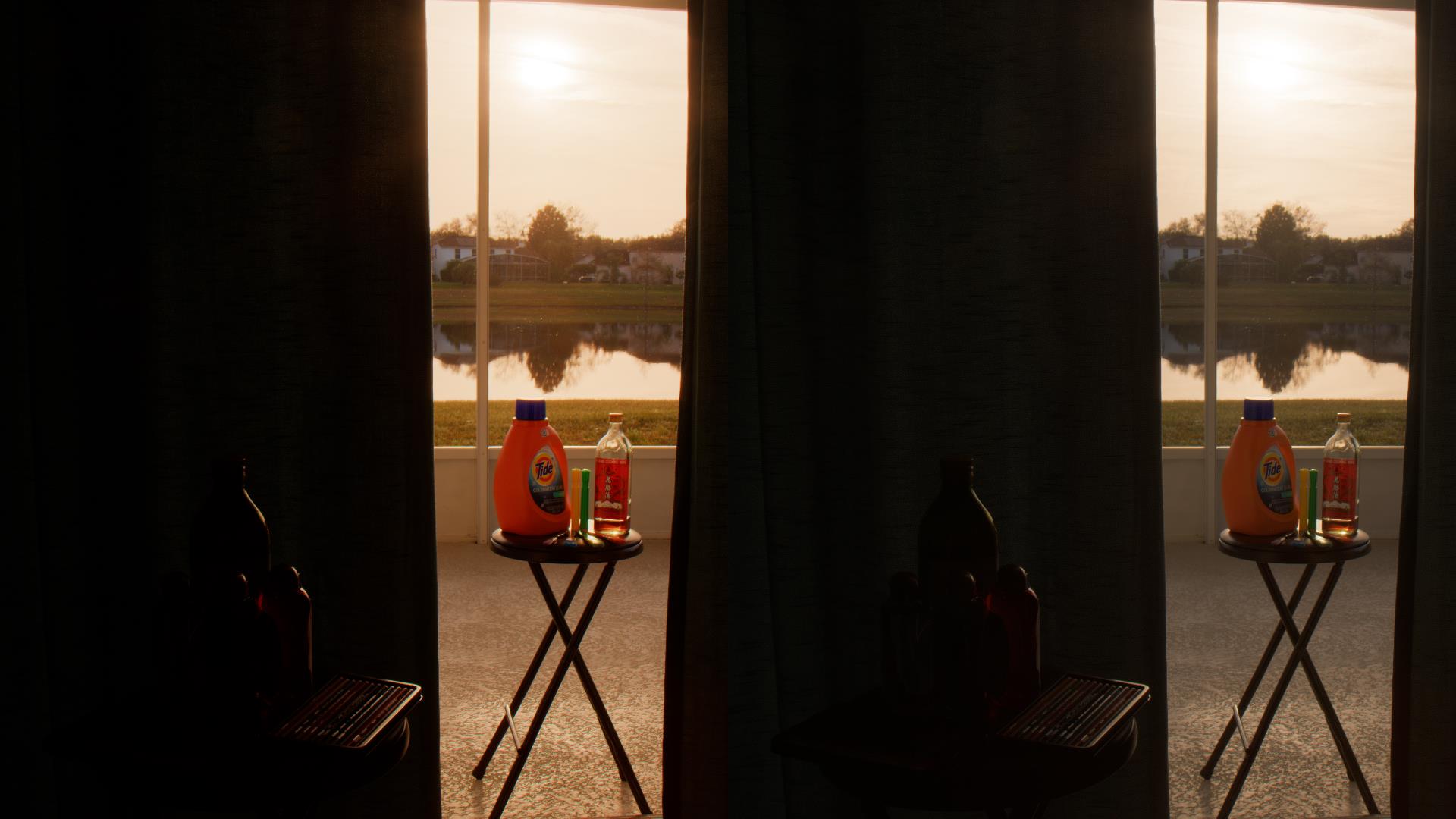

55 Brightness Knob Post-Tonemapping Via Gamma (-3 Stop Mid-Level) Brightness Knob Pre-Tonemapping Via Mid-Level (-3 Stop Mid-Level) Contrast Changes Saturation Changes
56 Separation of Max and RGB Ratio Tonemapping is applied to max of {r,g,b} peak = max3(rgb); ratio = rgb/peak; peak = tonemap(peak); output = peak*ratio; Color processing is done separately (adjusting ratio done separately) Has advantages in over-exposure cases

57 Tonemapping RGB Channels Separately (Overexposure) Desaturation Tonemapping Max RGB (Overexposure) Same Tonemapping Parameters Distorted Color
58 Processing of Color Ratio Channel Crosstalk Works similar in concept to real-world film Move colors towards white as they overexpose maintaining perception of brightness
59 Path to White Path colors take to white is important Direct path desaturates fast Indirect path which moves brighter channels faster maintains more saturation Apply crosstalk non-linearly


60 Tonemap Max RGB, with Direct Path to White (Desaturates) Tonemapping RGB Separately With no added Crosstalk (Saturated Colors Clamp to Pure Hues) (Desaturated Colors Desaturate More) Both show nonlinear plot of highlights (exp2(rgb*16384)-1)/(exp2(16384)-1) processed through tonemapper
61 Tonemapping RGB Separately With no added Crosstalk (Saturated Colors Clamp to Pure Hues) (Desaturated Colors Desaturate More) Tonemap Max RGB, with Indirect Path to White (Maintains Saturation)


62 Tonemapping RGB Separately With no added Crosstalk (Saturated Colors Clamp to Pure Hues) (Desaturated Colors Desaturate More) Can use same control to also increase Saturation globally (Important when increasing Contrast globally using Tonemapper)
63 // improved crosstalk maintaining saturation float tonemappedmaximum; // max(color.r, color.g, color.b) float3 ratio; // color / tonemappedmaximum float crosstalk; // controls amount of channel crosstalk float saturation; // full tonal range saturation control float crosssaturation; // crosstalk saturation // wrap crosstalk in transform ratio = pow(ratio, saturation / crosssaturation); ratio = lerp(ratio, white, pow(tonemappedmaximum, crosstalk)); ratio = pow(ratio, crosssaturation); // final color color = ratio * tonemappedmaximum;
64 Tonemapping Optimization If tonemapping is applied in texture or bandwidth bound situation, or used to build LUTs dynamically at run-time Will be using shader based implementation Most parameters can be factored out to constants changed per frame
65 Optimizing for LUT (3D Lookup) If tonemapping applied in an ALU limited situation or if doing {color grading, tonemapping, final transfer function} with LUT simultaneously Often a 3D texture will be used Large dynamic range is a challenge
66 Looking at LUT Error Plots For the first plots Using x/(x+1) as proxy for tonemapper 8-bit output for srgb Using 6 stops of range above x32x32 LUT But showing one dimension in the plot
67 First Plot = Worst Case Using linear input directly output = LUT.Sample(s, linearcolor/64.0); Providing orientation for understanding the error plots
68 Log Plot of Error Focusing on Darks Where the Most Error Is First LUT Texel White Ideal Output Higher Precision (Good) LUT Output Best Case Precision (Filled Dark Orange) Black One 8-bit Step Lower Precision (Bad) LUT Precision (Filled Dark Purple)

69 Linear Input (Worst Case) Can See Precision Increase Around LUT Texels Higher Precision (Good) This LUT Has Tremendous Error Lower Precision (Bad)
70 2nd Plot = Wrap in Sqrt() output = LUT.Sample(s, sqrt(linearcolor/64.0)).rgb; Pre-shaping input for better LUT texel distribution to the signal
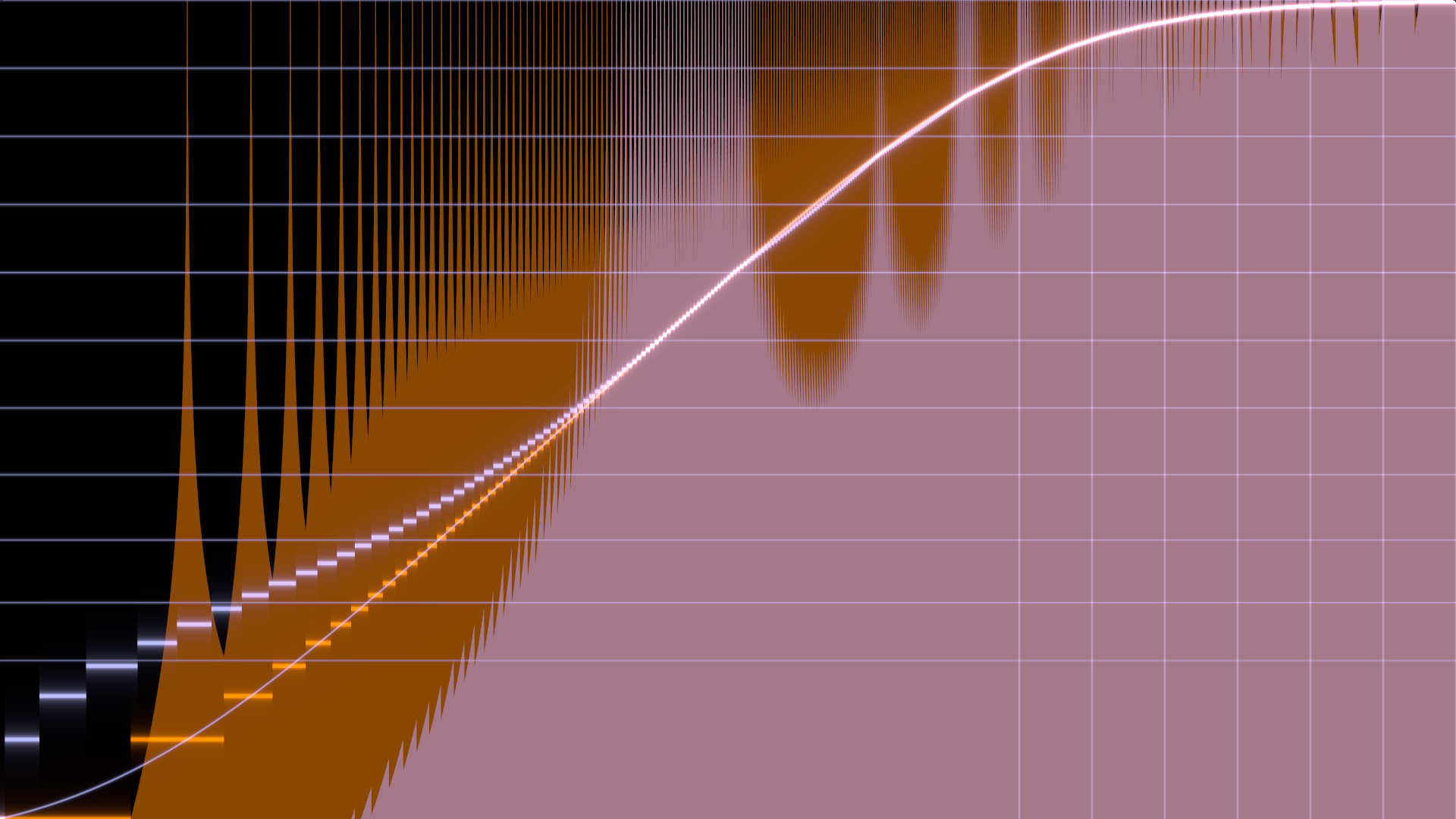
71 Shape Input by Sqrt() Higher Precision (Good) Improved Precision (But Not Good Enough) Lower Precision (Bad) srgb s Linear Segment is a Problem
72 3rd Plot = Wrap by PQ() output = LUT.Sample(s, PQ(linearColor/64.0)).rgb; Using SMPTE ST s Perceptual Quantizer (used for new HDR Video standard)
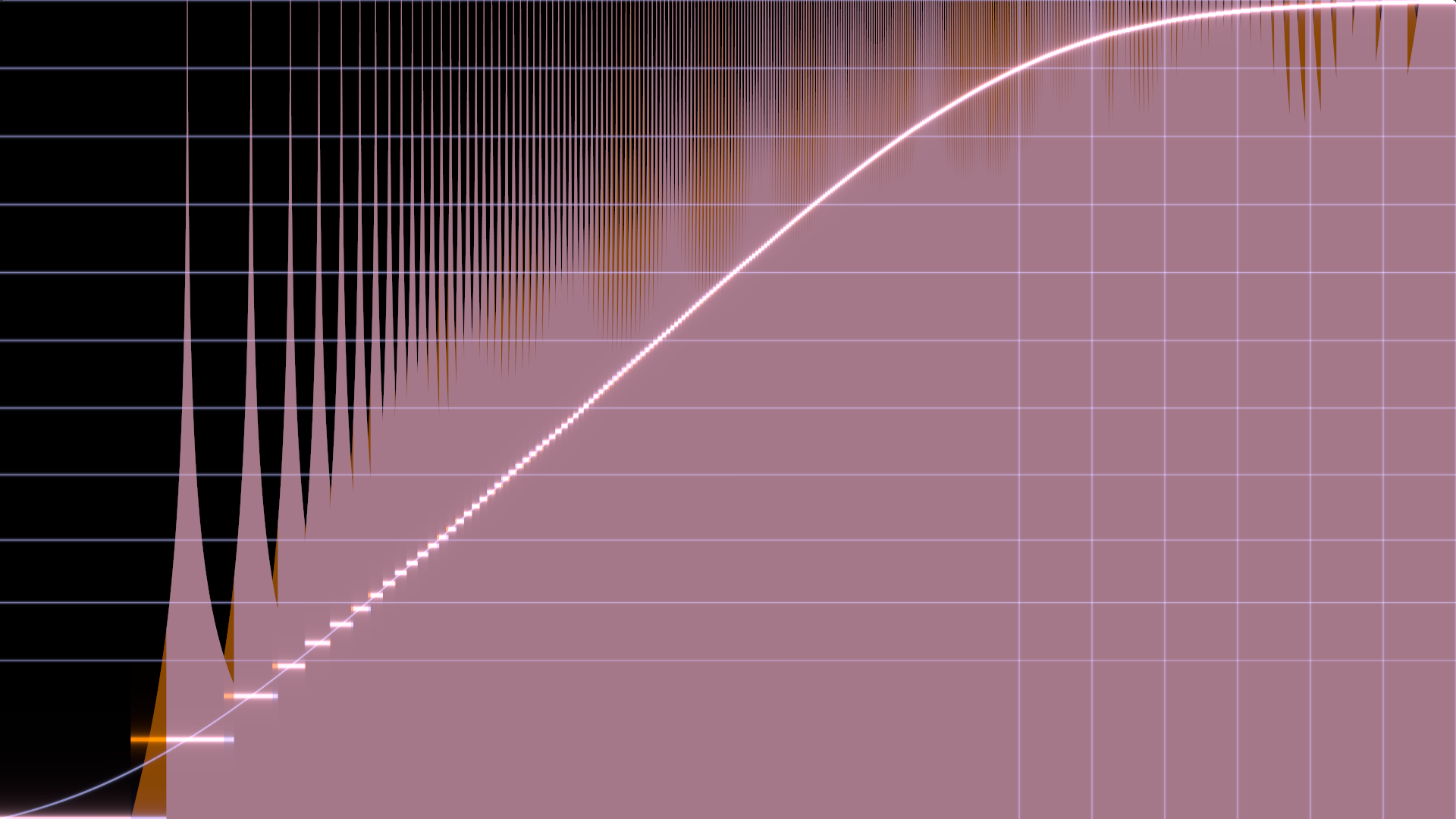
73 Shape Input by PQ() Higher Precision (Good) Greatly Improved Quality Lower Precision (Bad)
74 // pq from linear // based on implementation in aces 1.0 (see url) // float pq(float x) { float m1 = ; float m2 = ; float c1 = ; float c2 = ; float c3 = ; float p = pow(x, m1); return pow((c1 + c2 * p) / (1.0 + c3 * p), m2); }
75 4rd Plot = Wrap by Log2() PQ(rgb) requires 15 transcendental ops More than the tonemapper uses Want something faster, wrap by log2(rgb * c + 1.0) * (1.0 / log2(c + 1.0)) Choose c constant to reduce error
76 Shape Input by Log2() Higher Precision (Good) Error Plot Similar To PQ Lower Precision (Bad)
77 More Complex Cases Showing a mix of different options Using tonemapper from this presentation 10-bit output instead of 8-bit Gamma 2.2 output instead of srgb Unable to get 10-bit precision with 32^3

78 LUT Shows 2-3 Bits of Error Shaper: pq(x) Output: 10-bit for Gamma 2.2 Tonemapper Params MidIn: 0.18 MidOut: 0.18 HdrMax: 64.0 Contrast: 1.3 Shoulder: 0.995
79 Shaper: log2(x*exp2(20.0)+1.0) Output: 10-bit for Gamma 2.2 Tonemapper Params MidIn: 0.18 MidOut: 0.18 HdrMax: 64.0 Contrast: 1.3 Shoulder: 0.995
80 -3 Stop Mid-Level Shaper: log2(x*exp2(20.0)+1.0) Output: 10-bit for Gamma 2.2 Tonemapper Params MidIn: 0.18 MidOut: 0.18 / exp2(3.0) HdrMax: 64.0 Contrast: 1.3 Shoulder: 0.995
81 Now 64^3 (Was 32^3) Shaper: log2(x*exp2(19.0)+1.0) Output: 10-bit for Gamma 2.2 Tonemapper Params MidIn: 0.18 MidOut: 0.18 / exp2(3.0) HdrMax: 64.0 Contrast: 1.3 Shoulder: 0.995
82 LUT Error Plot Takeaways Various options to customize to goals Log2() input shaper Can run LUT after ALU based tonemapping and after application of transfer function Could also try 32x64x32 (RxGxB) LUT Green more perceptually noticeable
83 Part 3 Transfer Functions & Quantization Techniques to get high quality output on any display
84 Quantization Goals Enable high quality blacks at any bit depth! Energy-preserving (won t change tone/color) Can be applied and work for different transfer functions even if app can not query transfer function OS is using Can be artistically controlled to serve same purposes as film grain
85 Quantization Example Next slide shows an example of what is possible with static high quality quantization techniques described in this presentation Uses a high quality grain texture Looks even better temporally
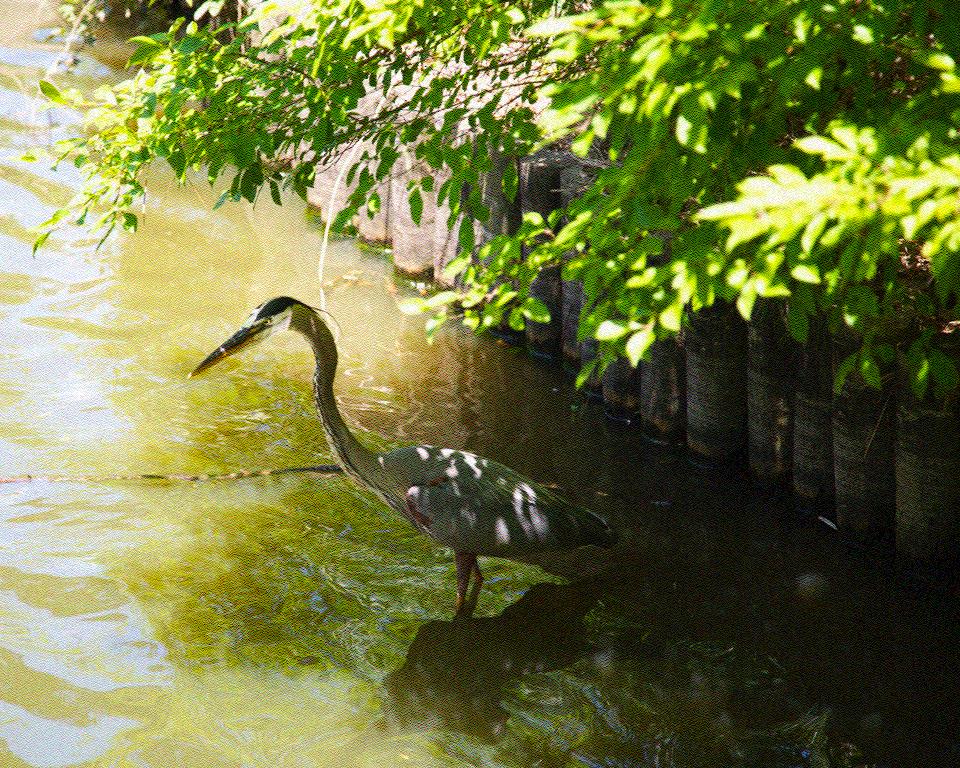
86 Both Shots Are 3-Bits/Channel
87 Transfer Function? Often impossible to query or know on PC Useful to have user selection Via in-game video settings
88 PQ Transfer Function HDR TVs add Perceptual Quantizer [PQ] SMPTE ST Peak = absolute 10,000 nits Not display relative like other standards Displays variably tonemap content PQ allocates more bits to darks
89 HD+HDR TV Transfer Functions TVs set to Game Mode and Input Renamed PC : unofficial convention for Reducing input latency Getting less random color transforms Drive HDR TVs like classic monitors (use gamma transfer function without PQ s bundled tonemapping)


90 Gamma 4.0 Transfer Functions PQ to 400 nits (if TV didn t tonemap) Gamma 2.2 srgb Rec.709 Linear
91 Transfer Functions At 3-Bits Showing linear nearest quantization At 3-bits/channel to visualize differences Blue line provides quantization center Log display (like prior slide) PQ shown with different display peaks (values near or above peak get tonemapped)
92 Transfer Functions PQ 400 nit PQ 800 nit Rec.709 Gamma 4.0 PQ 1600 nit srgb Gamma 2.2 PQ 3200 nit
93 Dithering At 3-Bits Simple energy-preserving dither Add constant amount of grain in linear Done before transform and quantization Blacks corrected, peaks not (error at top) HDR Transfer Functions show banding Because of symmetrical (-/+) grain
94 largest linear step (peak used for dither) Transfer Functions Linear View of Swatches largest linear step extends up off screen (a constant amount of grain must be sized to dither this step) PQ 400 nit PQ 800 nit Rec.709 Gamma 4.0 PQ 1600 nit srgb Gamma 2.2 PQ 3200 nit
95 Peaks Not Energy Preserving Not correcting for lack of values above 1.0 in this example Not important as bit/pixel increases Correcting blacks Important as bit/pixel increases
96 // simple energy-preserving dither float3 color; // input color in linear float3 grain; // input {-1 to 1} grain value // constant, step size in non-linear space float rcpstep = 1.0 / (steps 1.0); // constant, amount negative which still quantizes to zero float black = 0.5 * OutputToLinear(rcpStep); // constant, biggest linear step size * overlap float biggest = 0.75 * (OutputToLinear(1.0 + rcpstep) 1.0); // add grain (3 adds, 3 mins, 3 mads) return color + grain * min(color + black, biggest);
97 Grain Texture Note Using low-quality grain Simple ALU based grain in Shadertoy Easier to see banding problems
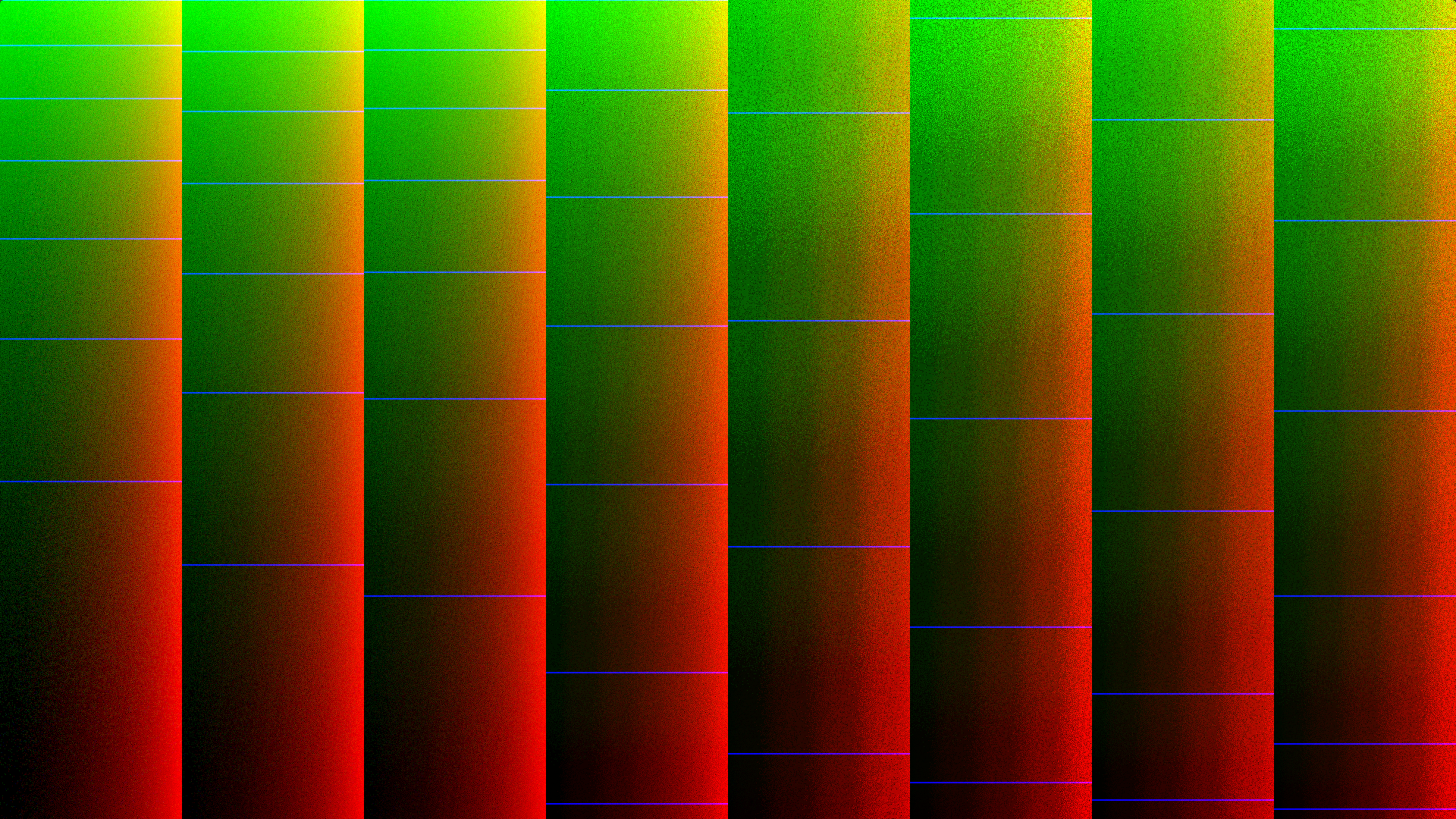
98 Transfer Functions PQ 400 nit Banding Gamma 4.0 Rec.709 srgb PQ 800 nit PQ 1600 nit PQ 3200 nit Gamma 2.2

99 Asymmetrical Grain Distribution Required with HDR Transfer Functions Shift so negative side gets more grains Shift so positive side gets higher values Offset and scale to maintain equal area (-/+) - +
100 Asymmetrical Grain No Banding Transfer Functions PQ 400 nit PQ 800 nit Rec.709 Gamma 4.0 PQ 1600 nit srgb Gamma 2.2 PQ 3200 nit
101 Now at 5-Bits HDR Transfer Functions Need higher amounts of constant grain because they have a larger max linear step size (located in towards the peak) PQ examples take peak step at display peak nits (instead of at 10,000 nit encoding peak)
102 5-bits Per Channel Transfer Functions PQ 400 nit PQ 800 nit Rec.709 Gamma 4.0 PQ 1600 nit srgb Gamma 2.2 PQ 3200 nit
103 Adaptive Grain at 5-Bits Adapting the grain to the step size Requires computing step size per channel More GPU work Workaround for constant grain with PQ Might not be required at high bit depths
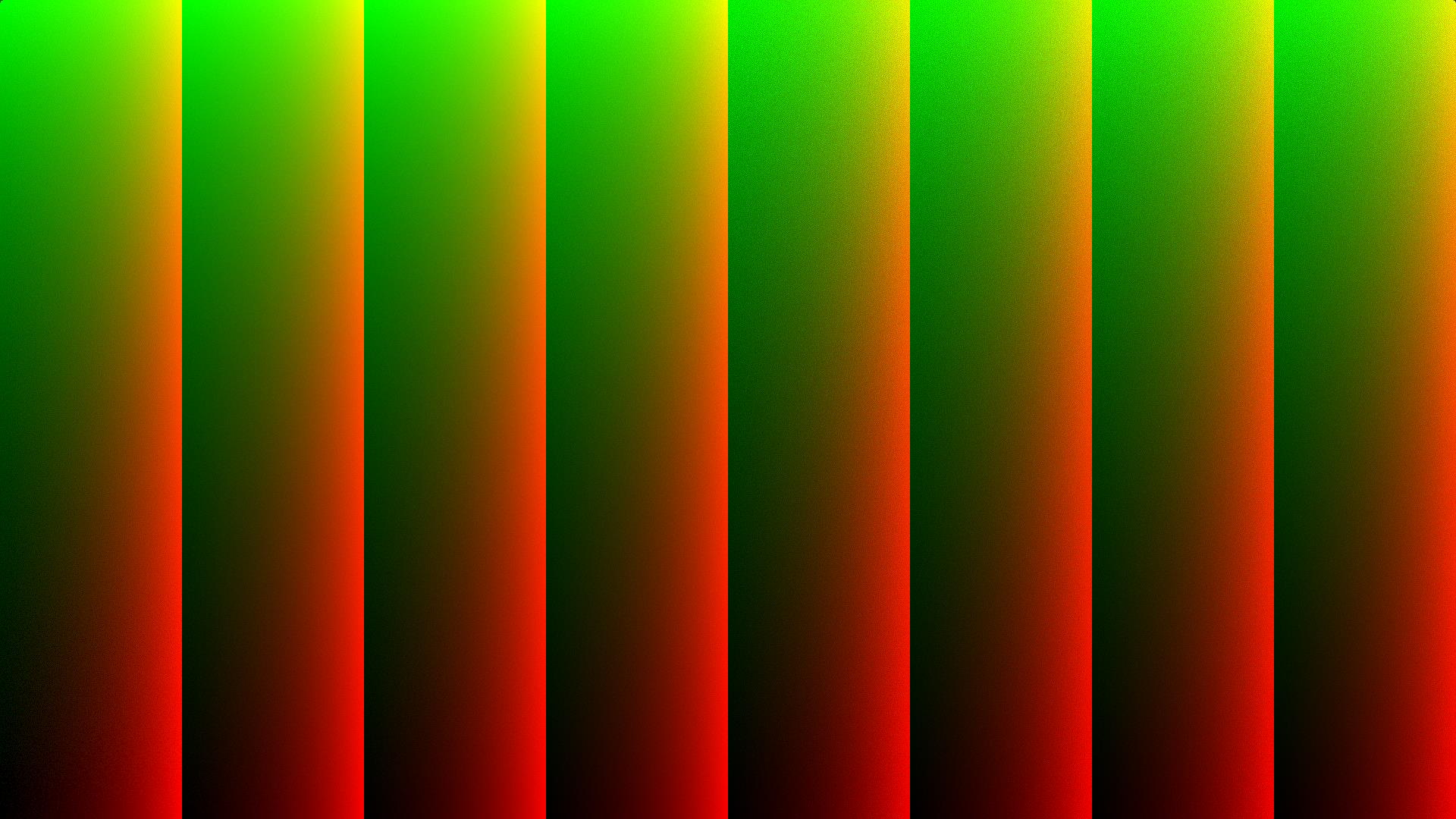
104 Adaptive Grain Has No Effect in Brights Transfer Functions PQ 400 nit Reduces Gain Here PQ 800 nit Rec.709 Gamma 4.0 PQ 1600 nit srgb Gamma 2.2 PQ 3200 nit
105 Takeaway Use high quality quantization to get high quality output for any bit depth and transfer function Great solution to remove banding for traditional LDR games as well
106 Part 4 Choose Your Own Adventure Thanks for watching For questions or discussion, [email protected]
Calibration Best Practices
 Calibration Best Practices for Manufacturers SpectraCal, Inc. 17544 Midvale Avenue N., Suite 100 Shoreline, WA 98133 (206) 420-7514 [email protected] http://studio.spectracal.com Calibration Best Practices
Philips HDR technology White paper
 Philips HDR technology White paper Philips International B.V. Version 1.0 2015-08-21 1. Introduction Current video formats are still based upon the display capabilities of CRT monitors. They cannot capture
Dolby Vision for the Home
 Dolby Vision for the Home 1 WHAT IS DOLBY VISION? Dolby Vision transforms the way you experience movies, TV shows, and games with incredible brightness, contrast, and color that bring entertainment to
Outline. Quantizing Intensities. Achromatic Light. Optical Illusion. Quantizing Intensities. CS 430/585 Computer Graphics I
 CS 430/585 Computer Graphics I Week 8, Lecture 15 Outline Light Physical Properties of Light and Color Eye Mechanism for Color Systems to Define Light and Color David Breen, William Regli and Maxim Peysakhov
Technical Paper DISPLAY PROFILING SOLUTIONS
 Technical Paper DISPLAY PROFILING SOLUTIONS A REPORT ON 3D LUT CREATION By Joel Barsotti and Tom Schulte A number of display profiling solutions have been developed to correct image rendering errors in
Overview. Raster Graphics and Color. Overview. Display Hardware. Liquid Crystal Display (LCD) Cathode Ray Tube (CRT)
 Raster Graphics and Color Greg Humphreys CS445: Intro Graphics University of Virginia, Fall 2004 Color models Color models Display Hardware Video display devices Cathode Ray Tube (CRT) Liquid Crystal Display
The Digital Dog. Exposing for raw (original published in Digital Photo Pro) Exposing for Raw
 Exposing for raw (original published in Digital Photo Pro) The Digital Dog Exposing for Raw You wouldn t think changing image capture from film to digital photography would require a new way to think about
A Proposal for OpenEXR Color Management
 A Proposal for OpenEXR Color Management Florian Kainz, Industrial Light & Magic Revision 5, 08/05/2004 Abstract We propose a practical color management scheme for the OpenEXR image file format as used
High Dynamic Range Video The Future of TV Viewing Experience
 The Future of TV Viewing Experience - White Paper - www.keepixo.com Introduction The video industry has always worked to improve the TV viewing experience. More than a decade ago, the transition from SD
Outline. srgb DX9, DX10, XBox 360. Tone Mapping. Motion Blur
 Outline srgb DX9, DX10, XBox 360 Tone Mapping Motion Blur srgb Outline srgb & gamma review Alpha Blending: DX9 vs. DX10 & XBox 360 srgb curve: PC vs. XBox 360 srgb Review Terminology: Color textures are
S-Log: A new LUT for digital production mastering and interchange applications
 S-Log: A new LUT for digital production mastering and interchange applications Hugo Gaggioni, Patel Dhanendra, Jin Yamashita (Sony Broadcast and Production Systems) N. Kawada, K. Endo ( Sony B2B Company)
Color management workflow in Adobe After Effects CS4
 Color management workflow in Adobe After Effects CS4 Technical paper Table of contents 1 Getting started 3 High-definition video workflow 7 Digital cinema workflow 14 Animation/Flash export workflow 19
S-Log and ACES workflow in Vegas Pro 12.0
 Workflow Paper S-Log and ACES workflow in Vegas Pro 12.0 Revised August 8, 2012 Vegas Pro 12.0 supports the expanded dynamic range of cameras using S-Log encoding, such as the Sony PMW-F3 camera. S-Log
Real-Time BC6H Compression on GPU. Krzysztof Narkowicz Lead Engine Programmer Flying Wild Hog
 Real-Time BC6H Compression on GPU Krzysztof Narkowicz Lead Engine Programmer Flying Wild Hog Introduction BC6H is lossy block based compression designed for FP16 HDR textures Hardware supported since DX11
An Introduction to High Dynamic Range (HDR) and Its Support within the H.265/HEVC Standard Extensions
 White Paper An Introduction to High Dynamic Range (HDR) and Its Support within the H.265/HEVC Standard Extensions By Raul Diaz, Vanguard Video CEO December 17, 2014 Vanguard Video, LLC. 974 Commercial
Technical Paper DENTAL MONITOR CALIBRATION
 Technical Paper DENTAL MONITOR CALIBRATION A REPORT ON DENTAL IMAGE PRESENTATION By Tom Schulte Dental radiographs and oral photographs are often both viewed on the same dental workstation monitor. The
RGB Color Managed Workflow Example
 White Paper 23 Level: Basic Date: May 2008 RGB Color Managed Workflow Example Overview Today s abundance of RGB source art such as digital illustrations, photos, and digital art are routinely repurposed
Contrast ratio what does it really mean? Introduction...1 High contrast vs. low contrast...2 Dynamic contrast ratio...4 Conclusion...
 Contrast ratio what does it really mean? Introduction...1 High contrast vs. low contrast...2 Dynamic contrast ratio...4 Conclusion...5 Introduction Contrast, along with brightness, size, and "resolution"
Research & Development. White Paper WHP 283. Non-linear Opto-Electrical Transfer Functions for High Dynamic Range Television
 Research & Development White Paper WHP 283 July 2014 Non-linear Opto-Electrical Transfer Functions for High Dynamic Range Television Tim Borer BRITISH BROADCASTING CORPORATION White Paper WHP 283 Non-linear
Otis Photo Lab Inkjet Printing Demo
 Otis Photo Lab Inkjet Printing Demo Otis Photography Lab Adam Ferriss Lab Manager [email protected] 310.665.6971 Soft Proofing and Pre press Before you begin printing, it is a good idea to set the proof
Aperture, Shutter speed and iso
 Aperture, Shutter speed and iso These are the building blocks of good photography and making good choices on the combination of these 3 controls will give superior results than you will get by using the
CALIBRATION AND OPERATION OF PANASONIC PLASMA MONITORS JULY 2009
 CALIBRATION AND OPERATION OF PANASONIC PLASMA MONITORS JULY 2009 Overview Plasma video monitors provide high resolution images with excellent contrast and dynamic range, low black levels, and saturated
Introduction to Digital Resolution
 Introduction to Digital Resolution 2011 Copyright Les Walkling 2011 Adobe Photoshop screen shots reprinted with permission from Adobe Systems Incorporated. Version 2011:02 CONTENTS Pixels of Resolution
USING PROFESSIONAL PLASMA DISPLAYS AS EVALUATION GRADE VIDEO MONITORS. Peter H. Putman, CTS ROAM Consulting L.L.C. Doylestown, PA
 USING PROFESSIONAL PLASMA DISPLAYS AS EVALUATION GRADE VIDEO MONITORS Peter H. Putman, CTS ROAM Consulting L.L.C. Doylestown, PA Nearly a decade into the 21 st century, we re seeing a paradigm shift in
Using the HP DreamColor LP2480zx Display and AJA Mini-Converters for Professional Video Applications
 Using the HP DreamColor LP2480zx Display and AJA Mini-Converters for Professional Video Applications Introduction While the original target market for the HP DreamColor LP2480zx Professional Display was
Calibrating Computer Monitors for Accurate Image Rendering
 Calibrating Computer Monitors for Accurate Image Rendering SpectraCal, Inc. 17544 Midvale Avenue N. Shoreline, WA 98133 (206) 420-7514 [email protected] http://color.spectracal.com Executive Summary
Color Balancing Techniques
 Written by Jonathan Sachs Copyright 1996-1999 Digital Light & Color Introduction Color balancing refers to the process of removing an overall color bias from an image. For example, if an image appears
22 (21.5 viewable), 16:9 FHD LED monitor with SuperClear VA technology and HDMI input. VA2265Sh
 22 (21.5 viewable), 16:9 FHD LED monitor with SuperClear VA technology and HDMI input VA2265Sh The ViewSonic VA2265Sh is a 22 (21.5 viewable) widescreen monitor with an LED backlight and glossy, thinbezel
Technical Article. Markus Luidolt and David Gamperl
 Technical How to comply with the Energy Star 6.0 standard for LED TVs: a demonstration of reduced power consumption with improved picture quality Markus Luidolt and David Gamperl How to comply with the
Important. Please read this User s Manual carefully to familiarize yourself with safe and effective usage.
 Important Please read this User s Manual carefully to familiarize yourself with safe and effective usage. About ScreenManager Pro for LCD... 3 1. Setting Up... 4 1-1. System Requirements...4 1-2. Installing
e-4 AWT07MLED 7 Q TFT LCD MONITOR (LED Backlighted) USER MANUAL
 Thank you for purchasing our product. Please read this User s Manual before using the product. Change without Notice AWT07MLED 7 Q TFT LCD MONITOR (LED Backlighted) USER MANUAL e-4 SAFETY PRECAUTIONS Federal
Sony B2B. Sony Corporation. S-Log White Paper. S-Log within Digital Intermediate workflow designed for cinema release. Version 1.12.
 Sony Corporation S-Log within Digital Intermediate workflow designed for cinema release Version 1.12.3 1/16 Index 1 S-Log Characteristics... 3 1.1 CHANGING THE SENSITIVITY (PUSH/PULL PROCESS)... 7 1.1.1
Expert Color Choices for Presenting Data
 Expert Color Choices for Presenting Data Maureen Stone, StoneSoup Consulting The problem of choosing colors for data visualization is expressed by this quote from information visualization guru Edward
EIZO Monitor CalMAN Setup Guide
 EIZO Monitor CalMAN Setup Guide CalMAN Display Calibration Software can automatically create optimized calibration 1D or 3D LUTs for EIZO monitors equipped with a self-calibration sensor. CalMAN controls
22 (21.5 viewable), 16:9 FHD LED multimedia monitor with SuperClear VA technology. VA2265Sm-3
 22 (21.5 viewable), 16:9 FHD LED multimedia monitor with SuperClear VA technology VA2265Sm-3 The ViewSonic VA2265Sm-3 is a 22 (21.5 viewable) widescreen monitor with an LED backlight and glossy, thin-bezel
Technical Paper SPECTRACAL C6 HDR
 Technical Paper SPECTRACAL C6 HDR HIGH LUMINANCE COLORIMETER By Tom Schulte and Darrell Bird High Dynamic Range (HDR) and Ultra HD TV (UHD) have been big news items in the entertainment industry lately
AN ALTERNATIVE GREEN SCREEN KEYING METHOD FOR FILM VISUAL EFFECTS
 AN ALTERNATIVE GREEN SCREEN KEYING METHOD FOR FILM VISUAL EFFECTS ABSTRACT Jin Zhi Department of Creative Professions & Digital Arts, University of Greenwich, United Kingdom This study focuses on a green
Adobe Certified Expert Program
 Adobe Certified Expert Program Product Proficiency Exam Bulletin Adobe Photoshop CS4 Exam # 9A0-094 ACE Certification Checklist The checklist below will help guide you through the process of obtaining
A Adobe RGB Color Space
 Adobe RGB Color Space Specification Version DRAFT October 2, 2004 Please send comments to mailto:[email protected] This publication and the information herein are subject to change without notice, and
Choosing Colors for Data Visualization Maureen Stone January 17, 2006
 Choosing Colors for Data Visualization Maureen Stone January 17, 2006 The problem of choosing colors for data visualization is expressed by this quote from information visualization guru Edward Tufte:
Doppler. Doppler. Doppler shift. Doppler Frequency. Doppler shift. Doppler shift. Chapter 19
 Doppler Doppler Chapter 19 A moving train with a trumpet player holding the same tone for a very long time travels from your left to your right. The tone changes relative the motion of you (receiver) and
Hitting the Moving Target of 4K. The 4K Video Signal What You Need to Know Now...2. Resolution 4K and UHD...2. Color Bit Depth...3. Frame Rate...
 Hitting the Moving Target of 4K Table of Contents The 4K Video Signal What You Need to Know Now...2 Resolution 4K and UHD...2 Color Bit Depth...3 Frame Rate...4 Color Sampling...5 Bandwidth Data Rate...6
WHITE PAPER. Methods for Measuring Flat Panel Display Defects and Mura as Correlated to Human Visual Perception
 Methods for Measuring Flat Panel Display Defects and Mura as Correlated to Human Visual Perception Methods for Measuring Flat Panel Display Defects and Mura as Correlated to Human Visual Perception Abstract
Plasma TV Buying Guide
 Plasma TV Buying Guide Plasma TVs are flat, super high-contrast TV sets that are offered in very large sizes, which at the extreme end exceeds 60-inches to provide the one of the most immersive theater-like
The role of working spaces in Adobe applications
 Technical paper The role of working spaces in Adobe applications Table of contents 1 It s all a numbers game 1 Color models 2 Color spaces 4 Classes of color spaces 4 Design and benefits of RGB workspaces
22" Widescreen LED Monitor VA2261-2
 22" Widescreen LED Monitor VA2261-2 The ViewSonic VA2261-2 is an eye-care and environmentally friendly 22" (21.5" viewable) widescreen monitor that features Flicker-Free and Blue Light technology, eliminating
Understanding HD: Frame Rates, Color & Compression
 Understanding HD: Frame Rates, Color & Compression HD Format Breakdown An HD Format Describes (in no particular order) Resolution Frame Rate Bit Rate Color Space Bit Depth Color Model / Color Gamut Color
www.blackmagic-design.com > Blackmagic DeckLink Leading the creative video revolution
 www.blackmagic-design.com > Blackmagic DeckLink Leading the creative video revolution Blackmagic DeckLink The world s highest quality broadcast video cards with real time effects. Blackmagic DeckLink is
Multi-Zone Adjustment
 Written by Jonathan Sachs Copyright 2008 Digital Light & Color Introduction Picture Window s 2-Zone Adjustment and3-zone Adjustment transformations are powerful image enhancement tools designed for images
User s Guide. Version 1.2.00
 User s Guide Version 1.2.00 2 MULTIPROFILER - USER S GUIDE Software Updates Occasionally updates and enhancements to the MultiProfiler software will be made available. Visit the MultiProfiler section of
HSI BASED COLOUR IMAGE EQUALIZATION USING ITERATIVE n th ROOT AND n th POWER
 HSI BASED COLOUR IMAGE EQUALIZATION USING ITERATIVE n th ROOT AND n th POWER Gholamreza Anbarjafari icv Group, IMS Lab, Institute of Technology, University of Tartu, Tartu 50411, Estonia [email protected]
CBIR: Colour Representation. COMPSCI.708.S1.C A/P Georgy Gimel farb
 CBIR: Colour Representation COMPSCI.708.S1.C A/P Georgy Gimel farb Colour Representation Colour is the most widely used visual feature in multimedia context CBIR systems are not aware of the difference
RECOMMENDATION ITU-R BO.786 *
 Rec. ITU-R BO.786 RECOMMENDATION ITU-R BO.786 * MUSE ** system for HDTV broadcasting-satellite services (Question ITU-R /) (992) The ITU Radiocommunication Assembly, considering a) that the MUSE system
Spyder 5EXPRESS Hobbyist photographers seeking a simple monitor color calibration solution.
 Spyder5 User s Guide Spyder 5EXPRESS Hobbyist photographers seeking a simple monitor color calibration solution. Next Generation Spyder5 colorimeter with dual purpose lens cap and counterweight, improved
Image Processing and Computer Graphics. Rendering Pipeline. Matthias Teschner. Computer Science Department University of Freiburg
 Image Processing and Computer Graphics Rendering Pipeline Matthias Teschner Computer Science Department University of Freiburg Outline introduction rendering pipeline vertex processing primitive processing
Digital Color Workflows and the HP DreamColor LP2480zx Professional LCD Display
 Digital Color Workflows and the HP DreamColor LP2480zx Professional LCD Display Improving accuracy and predictability in color processing at the designer s desk can increase productivity and improve quality
Filters for Black & White Photography
 Filters for Black & White Photography Panchromatic Film How it works. Panchromatic film records all colors of light in the same tones of grey. Light Intensity (the number of photons per square inch) is
Perception of Light and Color
 Perception of Light and Color Theory and Practice Trichromacy Three cones types in retina a b G+B +R Cone sensitivity functions 100 80 60 40 20 400 500 600 700 Wavelength (nm) Short wavelength sensitive
SENSITOMETRIC CHARACTERISTICS OF THE EOS C300 DIGITAL CINE CAMERA
 WHITE PAPER SENSITOMETRIC CHARACTERISTICS OF THE EOS C300 DIGITAL CINE CAMERA Updated June 19, 2012 Written by Larry Thorpe Professional Engineering & Solutions Division, Canon U.S.A., Inc. For more info:
Introduction to Imagery and Raster Data in ArcGIS
 Esri International User Conference San Diego, California Technical Workshops July 25, 2012 Introduction to Imagery and Raster Data in ArcGIS Simon Woo slides Cody Benkelman - demos Overview of Presentation
Primeview Indoor LED Display
 Primeview Indoor LED Display Unique by Design Large Venue Retail Broadcast Financial Primeview Indoor LED Display Unique by Design Primeview s Indoor LED Video Wall solutions are the most ideal system
Implementing ISO12646 standards for soft proofing in a standardized printing workflow
 Implementing ISO12646 standards for soft proofing in a standardized printing workflow Aditya Sole Implementing ISO12646 standards for soft proofing in a standardized Gjøvik University College, The Norwegian
INTRODUCTION IMAGE PROCESSING >INTRODUCTION & HUMAN VISION UTRECHT UNIVERSITY RONALD POPPE
 INTRODUCTION IMAGE PROCESSING >INTRODUCTION & HUMAN VISION UTRECHT UNIVERSITY RONALD POPPE OUTLINE Course info Image processing Definition Applications Digital images Human visual system Human eye Reflectivity
Histograms& Light Meters HOW THEY WORK TOGETHER
 Histograms& Light Meters HOW THEY WORK TOGETHER WHAT IS A HISTOGRAM? Frequency* 0 Darker to Lighter Steps 255 Shadow Midtones Highlights Figure 1 Anatomy of a Photographic Histogram *Frequency indicates
The Information Processing model
 The Information Processing model A model for understanding human cognition. 1 from: Wickens, Lee, Liu, & Becker (2004) An Introduction to Human Factors Engineering. p. 122 Assumptions in the IP model Each
Solomon Systech Image Processor for Car Entertainment Application
 Company: Author: Piony Yeung Title: Technical Marketing Engineer Introduction Mobile video has taken off recently as a fun, viable, and even necessary addition to in-car entertainment. Several new SUV
Analysis of Color Visualization in High Dynamic Range Image
 in High Dynamic Range Image Yong-Hwan Lee 1 and Youngseop Kim 2 1 Far East University, Chungbuk, Korea [email protected] 2 Dankook University, Chungnam, Korea [email protected] Abstract Tone mapping
Characterizing Digital Cameras with the Photon Transfer Curve
 Characterizing Digital Cameras with the Photon Transfer Curve By: David Gardner Summit Imaging (All rights reserved) Introduction Purchasing a camera for high performance imaging applications is frequently
Seeing in black and white
 1 Adobe Photoshop CS One sees differently with color photography than black and white...in short, visualization must be modified by the specific nature of the equipment and materials being used Ansel Adams
Lecture 16: A Camera s Image Processing Pipeline Part 1. Kayvon Fatahalian CMU 15-869: Graphics and Imaging Architectures (Fall 2011)
 Lecture 16: A Camera s Image Processing Pipeline Part 1 Kayvon Fatahalian CMU 15-869: Graphics and Imaging Architectures (Fall 2011) Today (actually all week) Operations that take photons to an image Processing
Guidance on Using Scanning Software: Part 2. VueScan
 Guidance on Using Scanning Software: Part 2. VueScan Version of 12/22/2013 VueScan can be used with virtually any scanner and multiple scanners can be used with the license for one copy of the program.
4K End-to-End. Hugo GAGGIONI. Yasuhiko MIKAMI. Senior Manager Product Planning B2B Solution Business Group
 4K End-to-End HPA Technology Retreat 2010 Yasuhiko MIKAMI Hugo GAGGIONI Senior Manager Product Planning B2B Solution Business Group Sony Corporation CTO Broadcast & Professional Division Sony Electronics
Color correction in 3D environments Nicholas Blackhawk
 Color correction in 3D environments Nicholas Blackhawk Abstract In 3D display technologies, as reviewers will say, color quality is often a factor. Depending on the type of display, either professional
Using Microsoft Picture Manager
 Using Microsoft Picture Manager Storing Your Photos It is suggested that a county store all photos for use in the County CMS program in the same folder for easy access. For the County CMS Web Project it
Experience true colors. Philips VIDI lighting technology
 Experience true colors : A breakthrough in reaching astonishing color performance Digital front projectors are well accepted and widely used in many applications for front projection. Picture performance
Computer Graphics Hardware An Overview
 Computer Graphics Hardware An Overview Graphics System Monitor Input devices CPU/Memory GPU Raster Graphics System Raster: An array of picture elements Based on raster-scan TV technology The screen (and
A Adobe RGB (1998) Color Image Encoding. Version 2005-05 May 2005
 Adobe RGB (1998) Color Image Encoding Version 2005-05 May 2005 ADOBE SYSTEMS INCORPORATED Corporate Headquarters 345 Park Avenue San Jose, CA 95110-2704 (408) 536-6000 http://www.adobe.com Copyright 2005
Beyond 2D Monitor NVIDIA 3D Stereo
 Beyond 2D Monitor NVIDIA 3D Stereo Agenda Basics of 3D Stereo on a PC NVIDIA GeForce 3D Stereo Drivers Maximizing 3D Stereo in Your Game 3D Stereoscopic Has Gone Mainstream Agenda Basics of 3D Stereo on
1. Three-Color Light. Introduction to Three-Color Light. Chapter 1. Adding Color Pigments. Difference Between Pigments and Light. Adding Color Light
 1. Three-Color Light Chapter 1 Introduction to Three-Color Light Many of us were taught at a young age that the primary colors are red, yellow, and blue. Our early experiences with color mixing were blending
The Texture Mill User Guide
 Version 1.0 The Texture Mill User Guide User Guide Table of Contents Introduction... 3 1 Getting Started... 3 1.1 Registration... 3 1.2 Installation... 3 1.3 Enable / Disable plug-in for Blender... 4 1.4
SHARP S PICTURE QUALITY LEGACY CONTINUES: 2016 TELEVISION LINE-UP UNVEILED TODAY AT INTERNATIONAL CES 2016
 SHARP S PICTURE QUALITY LEGACY CONTINUES: 2016 TELEVISION LINE-UP UNVEILED TODAY AT INTERNATIONAL CES 2016 For the First Time, Sharp AQUOS 4K Line-Up Includes Quantum Dot Technology and a Curved Screen
The Limits of Human Vision
 The Limits of Human Vision Michael F. Deering Sun Microsystems ABSTRACT A model of the perception s of the human visual system is presented, resulting in an estimate of approximately 15 million variable
OpenEXR Image Viewing Software
 OpenEXR Image Viewing Software Florian Kainz, Industrial Light & Magic updated 07/26/2007 This document describes two OpenEXR image viewing software programs, exrdisplay and playexr. It briefly explains
CS 325 Computer Graphics
 CS 325 Computer Graphics 01 / 25 / 2016 Instructor: Michael Eckmann Today s Topics Review the syllabus Review course policies Color CIE system chromaticity diagram color gamut, complementary colors, dominant
The Ad Hoc Group on television evaluation materials
 SPECIAL REPORT FROM THE AD HOC GROUP Mastering and Archiving Uncompressed Digital Video Test Materials By Charles Fenimore This is a report on the status of the SMPTE Ad Hoc Group (AHG) charged with creating
Chapter 2. Point transformation. Look up Table (LUT) Fundamentals of Image processing
 Chapter 2 Fundamentals of Image processing Point transformation Look up Table (LUT) 1 Introduction (1/2) 3 Types of operations in Image Processing - m: rows index - n: column index Point to point transformation
Understanding ultra high definition television
 ericsson White paper Uen 284 23-3266 November 2015 Understanding ultra high definition television TECHNOLOGIES FOR ENHANCED VIEWING EXPERIENCES Consumer demand for ultra high definition television (UHDTV)
CULTURAL HERITAGE USER GUIDE
 Capture One CULTURAL HERITAGE USER GUIDE Capture One Cultural Heritage edition is a Raw work-flow application based on the Capture One DB solution and features exclusive new tools expressly designed to
Chapter 2 Printing... 2-1 Printing Procedure...2-1
 imageprograf HDI Driver Guide Contents Before You Begin...ii Compatible Printers...ii Applicable AutoCAD Versions...ii How to Use This Guide...ii Conventions...ii Button Notations...ii Trademarks...ii
Klaus Goelker. GIMP 2.8 for Photographers. Image Editing with Open Source Software. rocky
 Klaus Goelker GIMP 2.8 for Photographers Image Editing with Open Source Software rocky Table of Contents Chapter 1 Basics 3 1.1 Preface....4 1.2 Introduction 5 1.2.1 Using GIMP 2.8 About This Book 5 1.2.2
Illuminating With HDRI
 Illuminating With HDRI H DRI (High Dynamic Range Image) rendering is a method of illuminating a CG scene with a special type of bitmapped image that allows a far greater dynamic range of exposures (i.e.
ICC Profiles Guide. English Version 1.0
 English Version.0 Dedicated ICC Profile Types Dedicated ICC profiles are provided for the following three media types: Photo Paper Pro Photo Paper Plus Glossy Matte Photo Paper Compatible Printers A00II
Visualization and Feature Extraction, FLOW Spring School 2016 Prof. Dr. Tino Weinkauf. Flow Visualization. Image-Based Methods (integration-based)
 Visualization and Feature Extraction, FLOW Spring School 2016 Prof. Dr. Tino Weinkauf Flow Visualization Image-Based Methods (integration-based) Spot Noise (Jarke van Wijk, Siggraph 1991) Flow Visualization:
Maxwell Render 1.5 complete list of new and enhanced features
 Maxwell Render 1.5 complete list of new and enhanced features Multiprocessor Maxwell Render can exploit all of the processors available on your system and can make them work simultaneously on the same
Silverlight for Windows Embedded Graphics and Rendering Pipeline 1
 Silverlight for Windows Embedded Graphics and Rendering Pipeline 1 Silverlight for Windows Embedded Graphics and Rendering Pipeline Windows Embedded Compact 7 Technical Article Writers: David Franklin,
Computer Vision. Color image processing. 25 August 2014
 Computer Vision Color image processing 25 August 2014 Copyright 2001 2014 by NHL Hogeschool and Van de Loosdrecht Machine Vision BV All rights reserved [email protected], [email protected] Color image
How to Prepare Images for Electronic Presentation * by Thomas Field (rev. 2013-08)
 How to Prepare Images for Electronic Presentation * by Thomas Field (rev. 2013-08) Purpose: optimize your images for display on computer monitors or digital projectors. Introduction Electronic presentation