
DEVS/SOA: A Cross-Platform Framework for Net-centric Modeling & Simulation in DEVS Unified Process
|
|
|
- Alice Sparks
- 9 years ago
- Views:
Transcription
1 DEVS/SOA: A Cross-Platform Framework for Net-centric Modeling & Simulation in DEVS Unified Process Saurabh Mittal, Ph.D. *José L. Risco-Martín, Ph.D. Bernard P. Zeigler, Ph.D. Arizona Center for Integrative Modeling and Simulation Electrical and Computer Engineering, University of Arizona Tucson, AZ *Departamento de Arquitectura de Computadores y Automática Facultad de Informática Universidad Complutense de Madrid Madrid, Spain Section borrowed from paper (titled above) submitted to SIMULATION: Transactions of SCS, under review Distributed Simulation using DEVS/SOA Web-based simulation requires the convergence of simulation methodology and WWW technology (mainly Web Service technology). The fundamental concept of web services is to integrate software application as services. Web services allow the applications to communicate with other applications using open standards. We are offering DEVS-based simulators as a web service, and they must have these standard technologies: communication protocol (Simple Object Access Protocol, SOAP), service description (Web Service Description Language, WSDL), and service discovery (Universal Description Discovery and Integration, UDDI). Figure 7 shows the framework of the proposed distributed simulation using SOA. The complete setup requires one or more servers that are capable of running DEVS Simulation Service. The capability to run the simulation service is provided by the server side design of DEVS Simulation protocol supported by the latest DEVSJAVA Version 3.1. d The Simulation Service framework is two layered framework. The top-layer is the user coordination layer that oversees the lower layer. The lower layer is the true simulation service layer that executes the DEVS simulation protocol as a Service. The lower layer is transparent to the modeler and only the top-level is provided to the user. The top-level has four main services: Upload DEVS model Compile DEVS model Simulate DEVS model (centralized) Simulate DEVS model (distributed) The second lower layer provides the DEVS Simulation protocol services: Initialize simulator i Run transition in simulator i Run lambda function in simulator i Inject message to simulator i Get time of next event from simulator i Get time advance from simulator i Get console log from all the simulators Finalize simulation service


2 Figure 7: DEVS/SOA distributed architecture The explicit transition functions, namely, the internal transition function, the external transition function, and the confluent transition function, are abstracted to a single transition function that is made available as a Service. The transition function that needs to be executed depends on the simulator implementation and is decided at the runtime. For example, if the simulator implements the Parallel DEVS (P-DEVS) formalism, it will choose among internal transition, external transition or confluent transition 1. The client is provided a list of servers hosting DEVS Service. He selects some servers to distribute the simulation of his model. Then, the model is uploaded and compiled in all the servers. The main server selected creates a coordinator that creates simulators in the server where the coordinator resides and/or over the other servers selected. Summarizing from a user s perspective, the simulation process is done through three steps (Figure 8): 1. Write a DEVS model (currently DEVSJAVA is only supported). 2. Provide a list of DEVS servers (through UDDI, for example). Since we are testing the application, these services have not been published using UDDI by now. Select N number of servers from the list available. 3. Run the simulation (upload, compile and simulate) and wait for the results. 1 The difference between P-DEVS and classic DEVS is the handling of confluent function. The DEVS/SOA framework could have been built using other simulation formalisms. In fact, our simulation services could store any kind of simulator -as long as the service updates the simulation cycle according to the simulator engine selected. The service is independent in the sense of transition functions. 2
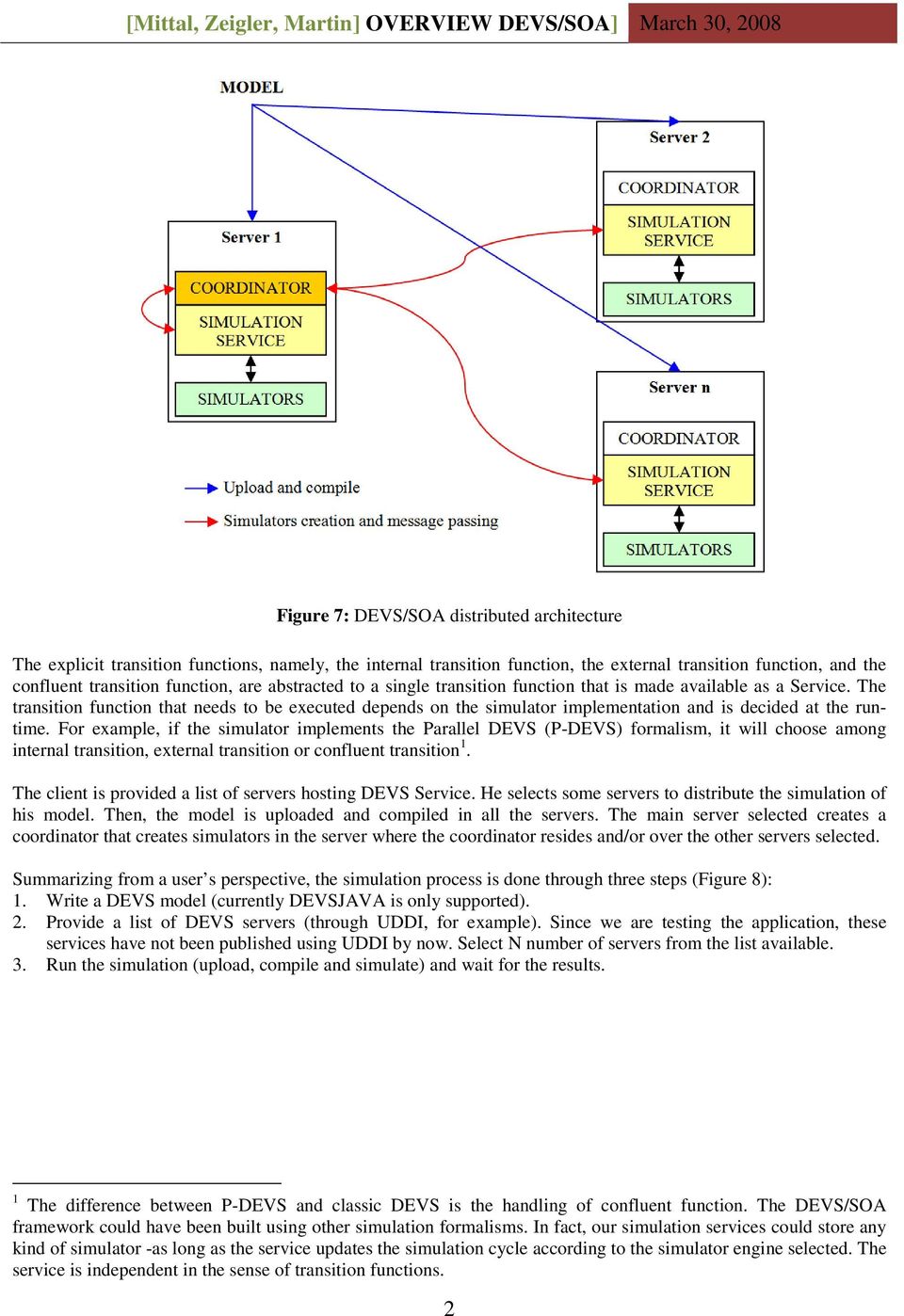
3 Figure 8: Execution of DEVS SOA-Based M&S 5.1 Symmetrical Services Architecture The Web Service framework is essentially a client-server framework wherein a Server on requested by a client provides services. These services are nothing but computational code that is executed at the server s end with a valid return value. The mode of communication between the client and the server is done using standards like XML, HTTP, and SOAP. This standardized mode of communication provides interoperability between various services as the data, expressed in XML, is machine-readable. In order to implement our DEVS/SOA framework, we have to beyond this client-server paradigm for this paradigm is not distributed in nature. Even though it operates on a Network (Internet), it is not distributed. We needed to implement a distributed framework to have the capability of distributed modeling and simulation. The distributed DEVS protocol has two types of components i.e. Coordinator and the Simulator that corresponds to a coupled model and an atomic model respectively. These components need to deploy at remote nodes so that distributed execution can take place. In the current SOA framework, the Server can only acts as a provider of service and the Client only acts as a consumer of service. Contrary to this functionality, the DEVS simulation components mentioned above can be placed anywhere on the network. It is unavoidable that the same Server can act as a provider and a consumer while executing DEVS simulation protocol. Consequently, the SOA that executes the DEVS simulation protocol is constructed such that the servers that provide DEVS Service can play the role of both the Coordinator and the Simulator. As shown in Figure 8, Step 2 provides a list of resources (servers) available on the Internet that provides DEVS simulation services. Once the list of servers is available to the User, he assigns the role of Coordinator to one of the servers and rests of them become Simulators. More details on this assignment is provided in Section 5.3. During the execution of DEVS simulation protocol, each of the Simulators makes calls to other Simulator. Such calls are executed using the SOA framework. These Simulators also coordinate with the Coordinator using the same transport mechanism. As a result, the same Simulator is invoking services from other Simulators while providing services to other Simulators or Coordinator. This has resulted in an architecture that is symmetrical by default i.e. it acts as both a service provider and a service consumer. The temporal role of a remote node is guided by the DEVS simulation protocol. The DEVS simulation layer services are defined in a separate WSDL that implements this symmetrical execution. Further, in addition to the roles of Simulator consumer and provider, the architecture allows the remote node to act as either Coordinator or Simulator. This assignment is made at Step 3 in Figure 8, and is elaborated in Section
4 The next few sections give detailed account of the symmetrical server and client designs that implements symmetrical services architecture. 5.2 Server Design Conceptual Design Abstraction of a Coupled Model with an Atomic Model with DEVS State Machine One of the significant development steps we undertook in this effort is the masking of coupled model as an atomic model. Due to closure under coupling of the DEVS formalism, we have an abstraction mechanism by which a coupled model can be executed like an atomic model. In contrast to the DEVS hierarchical modeling, where a coupled model is merely a container and has corresponding coupled-simulators (Figure 9), now it is considered an atomic model with lowest level atomic simulator (Figure 10). This has been accomplished by implementing an adapter as shown in Figure 10. The adapter Digraph2Atomic takes each coupled component of the model and uses it as an atomic model. The number of simulators created depends on the number of components of the model at the top-level and the number of servers selected by the user. If the model contains 10 top-level components (including the contained digraphs) and the user select 5 servers, then 2 simulators are created in each server. After the whole simulation process, each simulation service sends a report back to the user containing information related to IP addresses and simulator assignment. Figure 9: Hierarchical simulator assignment for a hierarchical model Figure 10: Hierarchical simulator assignment with Digraph2Atomic adapter Message Serialization The issue of message passing and models upload is done through serialization and SOA technologies. Figure 7 illustrates the message serialization process. When a component makes an external transition or executes the output function, the message received or emitted is serialized and then sent to the coordinator through the simulation service. The coordinator stores the location of each simulation service, so he is able to request all the messages after each iteration. All the communication between the coordinator and simulation services is done through SOA protocol. The serialization is done through Java serialization utilities. In a newly developed real-time version, each simulator knows each simulation service at its end (from coupling information). So the communication can be solved by passing messages from simulation services to simulation services directly, without using the coordinator Centralized Simulation The centralized simulation is done through a central coordinator which is located at the main server. The coordinator creates n simulation services over Internet. Each simulation service creates m simulators in order to simulation components of the model. Figure 11 shows the process. Once the simulation starts, the coordinator executes the output function of the simulation services (in Figure 11: point 0 and 1). After that, the output is propagated and 4


5 internal transitions occur. Propagating an output means that once the coordinator takes the serialized output from the simulation services (2 and 3), it is sent to other simulation services by means of coupling information (4 and 5). This information is known by the coordinator and no others as all messages must flow through the coordinator. Figure 11: Centralized communication among services Figure 12: Real-time communication among services As it appears, the coordinator participates in all message-passing and is the bottleneck. We designed distributed DEVS SOA protocol where the coupling information is downloaded to each of the models and coordinator is relieved of message-passing. It is described as follows Real-time Simulation Real-time (RT) DEVS simulation is defined as the execution of DEVS simulation protocol in wall-clock time rather than logical time. For the real-time (RT) simulation we have incorporated one additional service to our SOA framework: the RT simulation service. This service extends the previous simulation service by means of two functions: Modify external output function Start simulation The design is similar in many aspects, but instead of a central coordinator, all the simulation is observed by an RT coordinator without any intervention. Furthermore, the RT simulation service creates RT simulators. Each RT simulation service knows the coupling information, so the message passing is made directly from simulation service to simulation service at the other end. The RT coordinator is located at the main server. This coordinator creates n RT simulation services over the Internet. Each simulation service creates m RT simulators in order to simulate the components of the model. After that the coupling information is broken down (on a per-model basis) and sent to the corresponding RT simulation service. Figure 12 illustrates the process. Once the simulation starts, the coordinator executes the simulate service and nothing else. The simulate service waits for internal or external transitions using real time (0). If an internal transition happens (1), the output is generated and propagated using the coupling information serializing and de-serializing messages (2,3 and 4) Package Design The global design of the whole architecture at server s end is as follows, as shown in Figure. The modeling package constitutes the DEVS modeling library. Once a DEVS model is received by the servers, it is rebuilt using an adapter pattern. Presently, only DEVSJAVA models are allowed. But, since this framework follows an adapter pattern, other Java-based models will be allowed in future. Figure 14 depicts the classes contained in this package, such as Digraph2Atomic, RTCoupling for real-time simulation purposes and Message and Atomic classes. Both Message and Atomic classes are inherited from Entity which allows serialization and deserialization. Atomic encapsulates a DEVS atomic model and Message encapsulates a DEVS message or event. 5

6 Figure 13: Server s package structure for DEVS SOA Figure 14: Modeling package for DEVS SOA The simulation.api package contains the interface for our DEVS/SOA simulators. The simulation package contains simulators and coordinators, that is, Simulator, Coordinator, RTSimulator and RTCoordinator classes as shown in Figure. The RT prefix indicates that the class is designed for real-time simulation. The main difference with other simulators platforms starts here. In both centralized and real-time simulations, the Coordinator is executed at the first server selected by the user. This coordinator is called through a MainService class published as a Web service. The Coordinator receives the user IP, the name of the root coupled model, and a list of IPs. Such list of IPs is used to invoke simulation services in other remote servers. In this way, the components of the model are shared among N servers, where N is the length of that list. The Coordinator also stores the user IP, the DEVSJAVA model and a list of simulation services activated. In the case of centralized simulation, this list is used to propagate and to receive messages through the coupling protocol stored in the root coupled model. In addition, the Coordinator stores the last event time and the next event time. In the case of real-time simulations, instead of event times, the RTCoordinator only knows the time in which the simulation must be stopped. 6

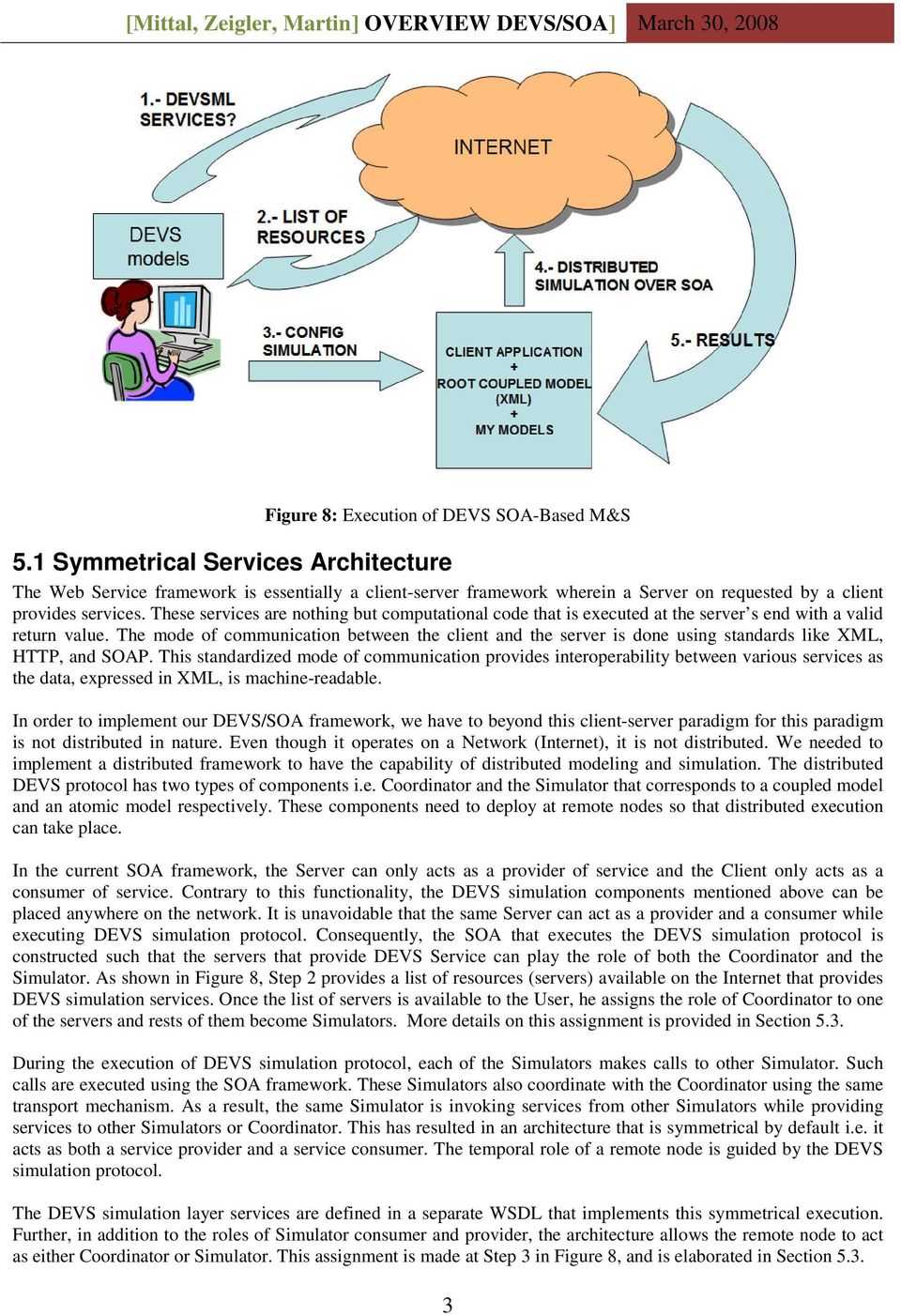
7 Figure 15: Simulation package in DEVS SOA The service package contains the services offered. It contains MainService, Simulation and RTSimulation classes as shown in Figure 16. MainService is designed to allow upload, compile and start the simulation process creating the coordinator. Simulation services are used to store the simulators used and to establish a communication between the DEVS simulators stored at this server and other coordinators, if any, hosted in other servers. One server could be executing more than one simulator. It depends on the number of components that the root coupled model contains and the number of servers selected by the user. This is the reason because there is not a unique relation between simulation service and simulator. The assignment of simulators corresponding to the models at the top-level is done by default through round-robin mechanism that takes care of model-simulator number mismatch. In certain applications, it is important that the user or a higher level program be able to direct any specific model to any particular IP server. For example, we are developing applications where DEVS models act as observers of co-hosted clients of other services. Clearly, ability to assign models to servers is critical in such an application. 7

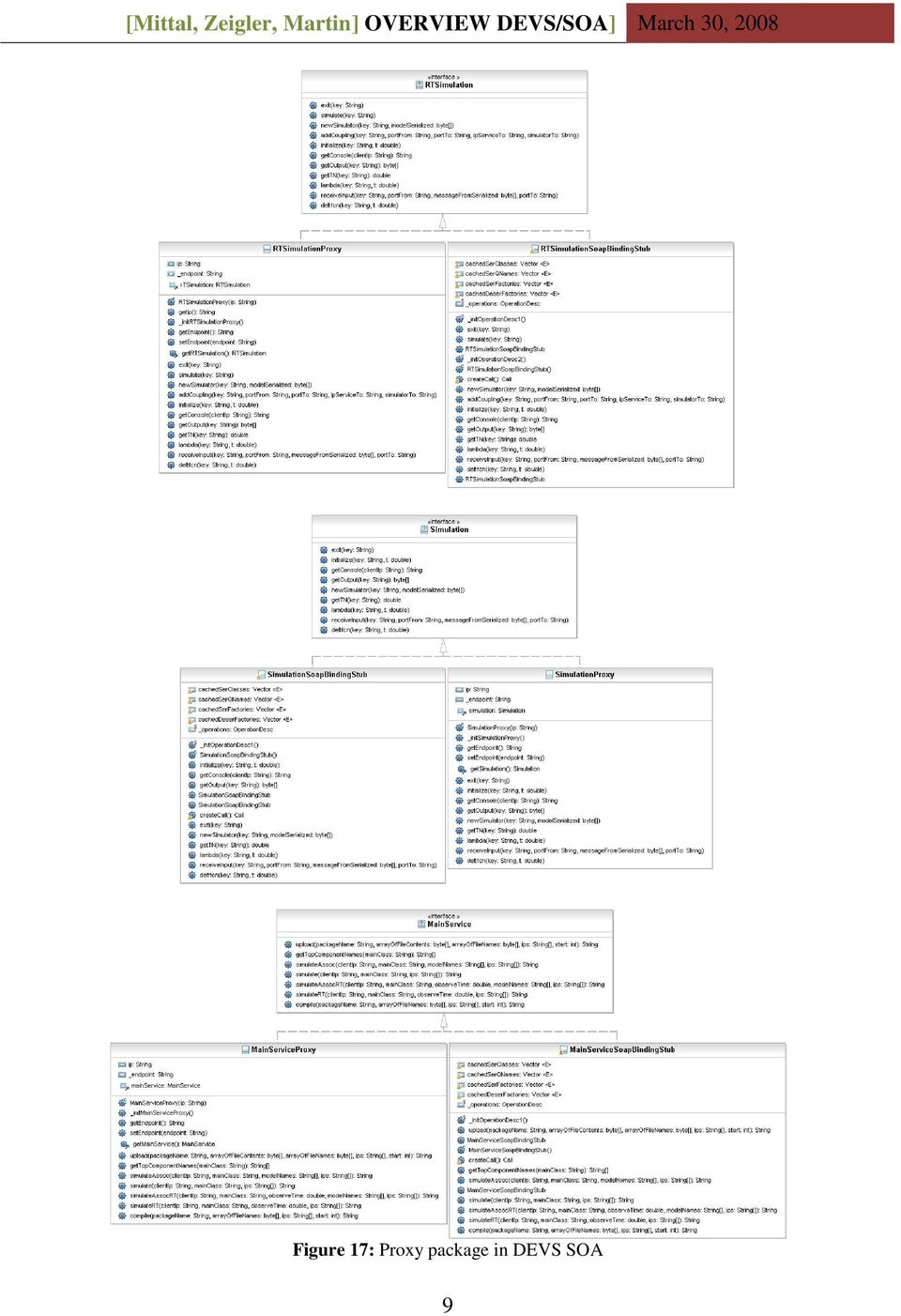
8 Figure 16: Service package in DEVS SOA The proxy package (Figure 17) contains the proxies of the services. All these classes are automatically generated from the WSDL files that are generated from the service package using Apache Axis framework. The user only needs the MainService proxy. The server needs this service and other Simulation services. MainService acts like a coordinator for all the lower-level services through interfaces. It assigns and initializes the coordinator that starts other simulators, after distributing the simulators at respective IPs and initializing the simulator services. Once the simulators are active, the MainService waits for them to complete the execution to receive the logs and simulation outputs Symmetrical Service Design The simulation engine is implemented in two different ways. The first is the centralized version with logical time execution and the other is a real-time version. The details below cater to the centralized version. The operations of real-time version are almost the same except that instead of just the coordinator controlling the simulation clock, each of the simulators maintains its own thread in real-time and exchange messages independently without the intervention from coordinator. As described earlier, this framework is a layered framework containing two layers: 1. User Layer 2. Simulation Layer The User layer is called as MainService layer and it interfaces with the Simulation layer underneath. The user can freely consider both the centralized and distributed version of the simulation algorithm. This facility is provided at the second layer of services described in later sections. However, the centralized mode performs much slower than the real-time distributed simulation due to obvious reasons of coordinator loading. In developing DEVS/SOA client, we considered real-time simulation as the default option. Detailed performance analysis of both of these implementations is in process and will be reported in our forthcoming publication. 8
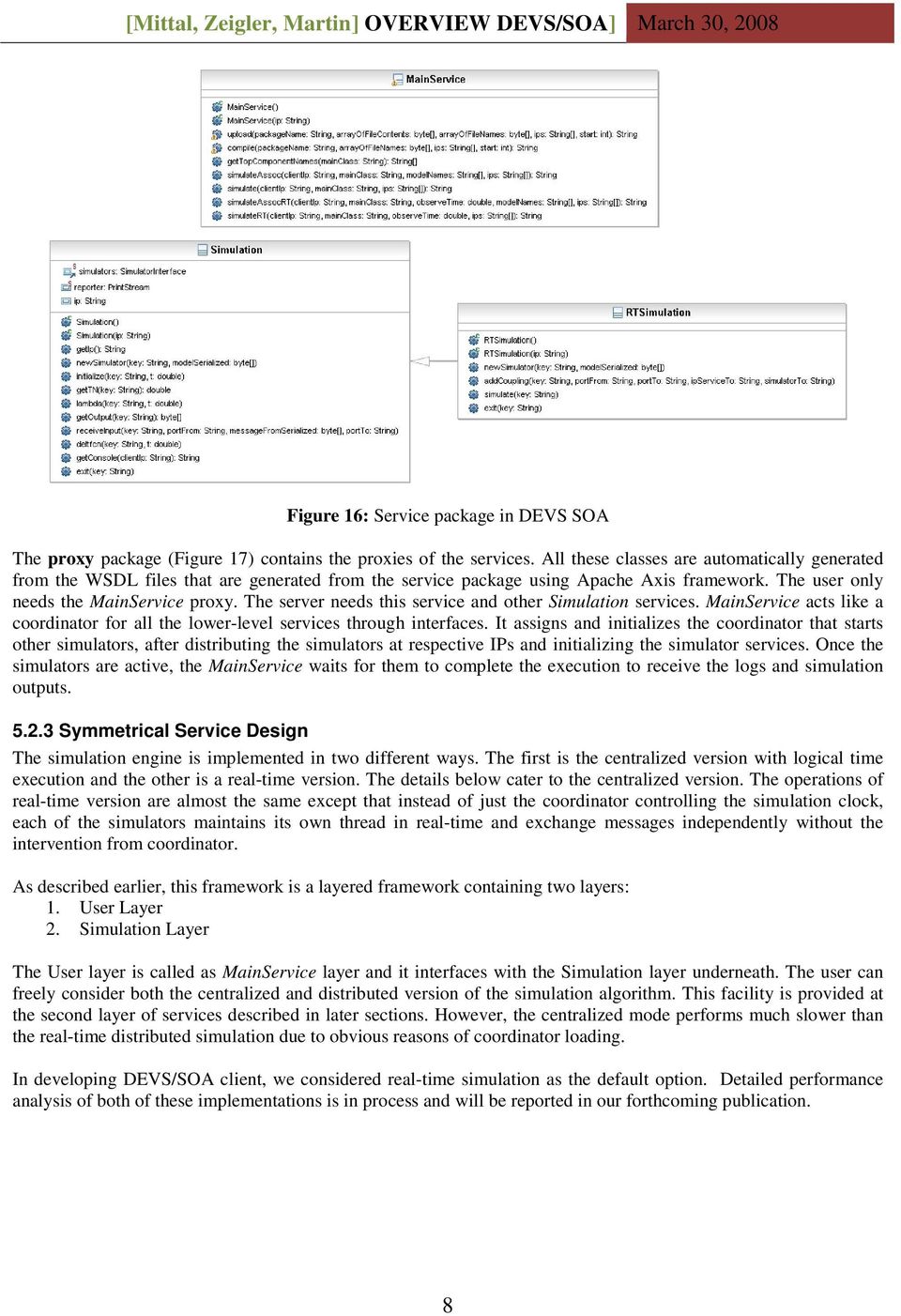
9 Figure 17: Proxy package in DEVS SOA 9
10 MainService composition: The MainService layer provides the set of services that are available to the user (as a client). The MainService.wsdl is provided in the appendix that the user can use to implement its own client. For better usability, we have implemented the Client as well and it is described in the following sections. The MainService layer provides the following services: upload: It is used to upload the model to the different servers. This service enables the user to take their DEVS models and upload the code physically from their machines to the designated DEVS/SOA server farm. This service receives (1) the package name, which is the folder where the model is saved at the server side, (2) the content of the java files, which is in fact the DEVS model implementation, (3) the name of the java files, and (4) the list of IP addresses where the model is being uploaded. Once the model is uploaded to the first server of the list, the server application executes this service in the next server of the list. compile: This service is used to compile the uploaded model files at the Servers and make them ready to execute the simulation. It receives (1) the package name, which is the folder where the model was previously uploaded, (2) the file names of the DEVS model implementation, and (3) the list of IP addresses that are selected by the user and where the model is simulated. In the client application we have developed, the first argument is dynamically generated at the client s end and is important because if the model is uploaded with the same package name repeatedly, the server class loader does not instantiates the last one compiled. To overcome this issue, the model files do not contain any package declaration and a package name is assigned at run-time compilation. Once the model is compiled at the first server s end, the server application executes this service in the next server of the list of IP addresses. gettopcomponentnames: This service is used to obtain the name of the top-level DEVS model. It receives the name of the root coordinator and returns the array of names. This service may be used to associate an IP server address with each of the top-level DEVS components. simulate, simulateassoc, simulatert and simulateassocrt: The simulation services create a Coordinator which runs its simulate function. The RT suffix indicates that a real-time simulation service is required by the user. The Assoc suffix indicates that the user is passing relations (IP address, model s name), that is, in which server the corresponding model is executed. The non-assoc functions apply a round-robin algorithm. The main difference among these functions is the coordinator created. A Coordinator in the case of centralized simulation and an RTCoordinator in the case of real-time simulations (see Figure 11,12). In all cases, such services receive: (1) the IP address of the client running the service, (2) the name of the rootcoordinator in the DEVS model, and (3) the relation between model names and IP addresses (if it is provided by the user). In the case of real-time simulation, the service also receives the time to observe the simulation. Finally, the service returns the simulation results Simulation service composition: This is the bottom layer of the two-layer architecture and its functionalities are used by the MainSevice layer. Its operations are transparent to the user. Once the user demands a simulation via the MainService class, the coordinator (at the coordinator server or main server) requires as many simulation services as IP addresses provided by the user. After that, the DEVS model is partitioned and the coordinator sends every part to its corresponding service. Then the simulation starts, each simulation service creates a DEVS simulator for its models and executes the corresponding output and transition functions (see Figure 11). It is possible for one simulation service to store more than one simulator for different component of the same DEVS model, or to store more than one simulator for different components of different DEVS models. This issue is solved as follows. After the main coordinator obtains a simulation service at a certain IP address, a new simulator is created there, identified by the component name plus the IP address of the user s machine and containing the DEVS component itself. For example, if the coordinator must send a DEVS component named Processor to a server located at and coming from a user located at , then a simulation service is required from and a new simulator is created there, identified by Processor@ and containing the model named Processor. Another issue is how to store the simulators created, because web services do not have memory. To this end, we are using the server s memory by means of static variables or attributes. Hence, the simulation services include a static 10

11 table, which associates simulator names with simulator instances. Figure 15 shows this attribute in the Simulation service class, called simulators. There is other information stored by the Simulation services in the server memory, such as the IP address where the services reside and a reporter, which logs all the information while the simulation is running. The services provided by the Simulation service are enumerated below: newsimulator: This service receives a DEVS component and a identifier. It creates a new DEVS simulator identified by the name described above and containing the DEVS component received. initialize: This service receives the name of the simulator required and the current time. It takes the corresponding simulator from its table (using the name received) and initializes it. receiveinput: This service receives four arguments: (1) the name of the simulator required, (2) the name of the port where the message is coming from, (3) the message and (4) the name of the port where the message is going to. The simulation service takes the simulator from its table and executes the same function called receiveinput, which stores the message received at the input of the model. lambda: It receives the name of the simulator required and the current time. This service takes the simulator required and executes the output function (also called lambda) of the DEVS model deltfnc: This service receives the name of the simulator required and the current simulation time. The service takes the simulator and executes an internal or external or confluent transition function. The abstracted deltfn is provides in Figure 18. This allows both the classical DEVS and P-DEVS models work seamlessly with DEVS/SOA simulation framework. getoutput: This service receives the name of the simulator required and returns the output stored in its DEVS model. gettn: It receives the name of the simulator for which the time of the next event is returned. exit: It receives the name of the simulator to be removed from the table. getconsole: This service receives the IP address of the user s machine, and return the content of the log file related to this address. getip: It returns the IP address of the simulation service. function deltfcn(double t) { Message x = input; if(x==null) { System.out.println( "ERROR RECEIVED NULL INPUT " + model.tostring()); return; } if (x.isempty() && t!=tn) { return; } else if((!x.isempty()) && t==tn) { double e = t - tl; model.deltcon(e,x); } else if(t==tn) { model.deltint(); } else if(!x.isempty()) { double e = t - tl; model.deltext(e,x); } tl = t; tn = tl + model.ta(); input = new Message(); } Figure 18: Abstract deltfun in Simulation service Having described the services available in the DEVS/SOA architecture, following is the design of DEVS/SOA coordinator and simulator that utilize these DEVS services. The coordinator and the simulator are implemented in the devsoa.simulation package. This simulator is called as DEVSV/SOA simulator and it acts as an adapter for any 11
12 DEVS simulation engine that executes the DEVS simulation protocol. Currently, it adapts to the DEVSJAVA Version 3.0 as available from ACIMS. DEVSV/SOA Coordinator: Equivalent to the Simulation service storing the simulators in a static way, the coordinator also stores the simulators of the DEVS model in a static hash table, using the same nomenclature as was stated above (DEVS component name plus client IP address identifying the simulator). Therefore, such table contains pairs {simulator name, simulator service}, associating each simulator created with the simulation service where it resides. The task of the coordinator is to execute a typical DEVS loop over the distributed simulators. Figure 19 shows the algorithm executed by the simulate function. In such Table, iterations is the number of cycles of the simulation, t is the current time, tl is the last time event, tn is the next time event, simulationservices is the table of simulation services created by the coordinator and where the simulators are located. Then, for a number of cycles, the output function is called through each of the simulation services. It should be noted that the first argument of lambda function is a key, which is the simulator identifier, since different simulators could be located at the same simulation service, this key must be provided. After the output function is executed, the outputs of the components are ready to be propagated. To this end, the propagateoutput function is called, which propagates the messages generated from the outports to its corresponding inports. Next, the transition function is applied and finally the time is updated. function simulate(long iterations) t = tn; for (i=0; i<iterations; i++) for each ({key,simservice} in simulationservices) simservice.lambda(key, t); propagateoutput(); for each ({key,simservice} in simulationservices) simservice.deltfcn(key, t); tl = t; tn = min(simulationservices.gettn()); t = tn; Figure 19: DEVS simulation From the instant in which the coordinator is created, it stores at any moment the DEVS model (currently DEVSJAVA), the last timed event, the next time event and the IP address of the user s machine. It should be noted that the Coordinator is not a service. It is a class, which is used by the MainService service. The functions implemented in the Coordinator are enumerated below: gettopcomponentnames: This function receives the name of the DEVS root-coupled model and returns a list containing the top-component names of the DEVS model. Constructor: The constructor receives the client IP address, the name of the DEVS model, and the list of IP addresses where the model is going to be simulated. Hence, it creates as many simulators as top-level components, created by the simulation services located at the IP addresses given in the list. initialize: This function receives the initial time of simulation. It initializes the simulators. propagateoutput: As it was stated above, this function takes the output from the simulators and sends them to its corresponding inputs. lamda: It receives the current time, and executes the output function in each of the simulators stored. deltfcn: This function receives the current time and executes the internal or external transition functions in the simulators stored. ta: It is the time advance function and receives the current time. It takes the minimum next time event from the simulators stored. exit: This function calls the exit function of all the simulation services stored and clean the table of simulators. simulate: This function receives the number of cycles of the simulation, and executes the simulation as was described before (Figure 19). 12
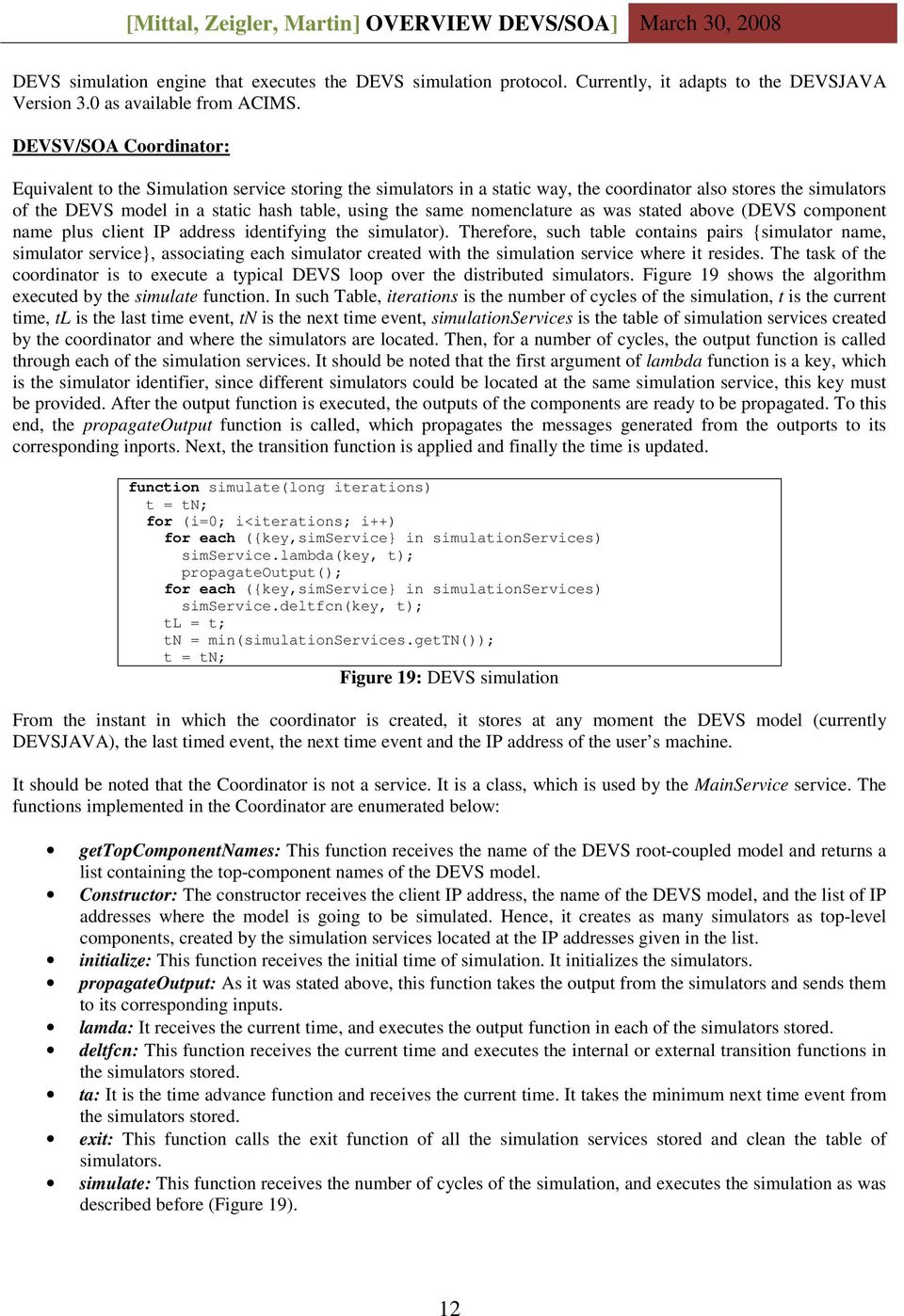
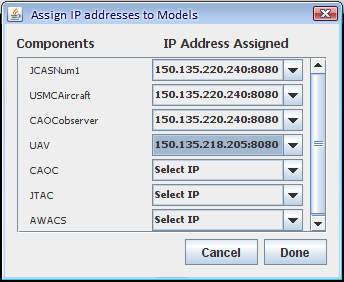
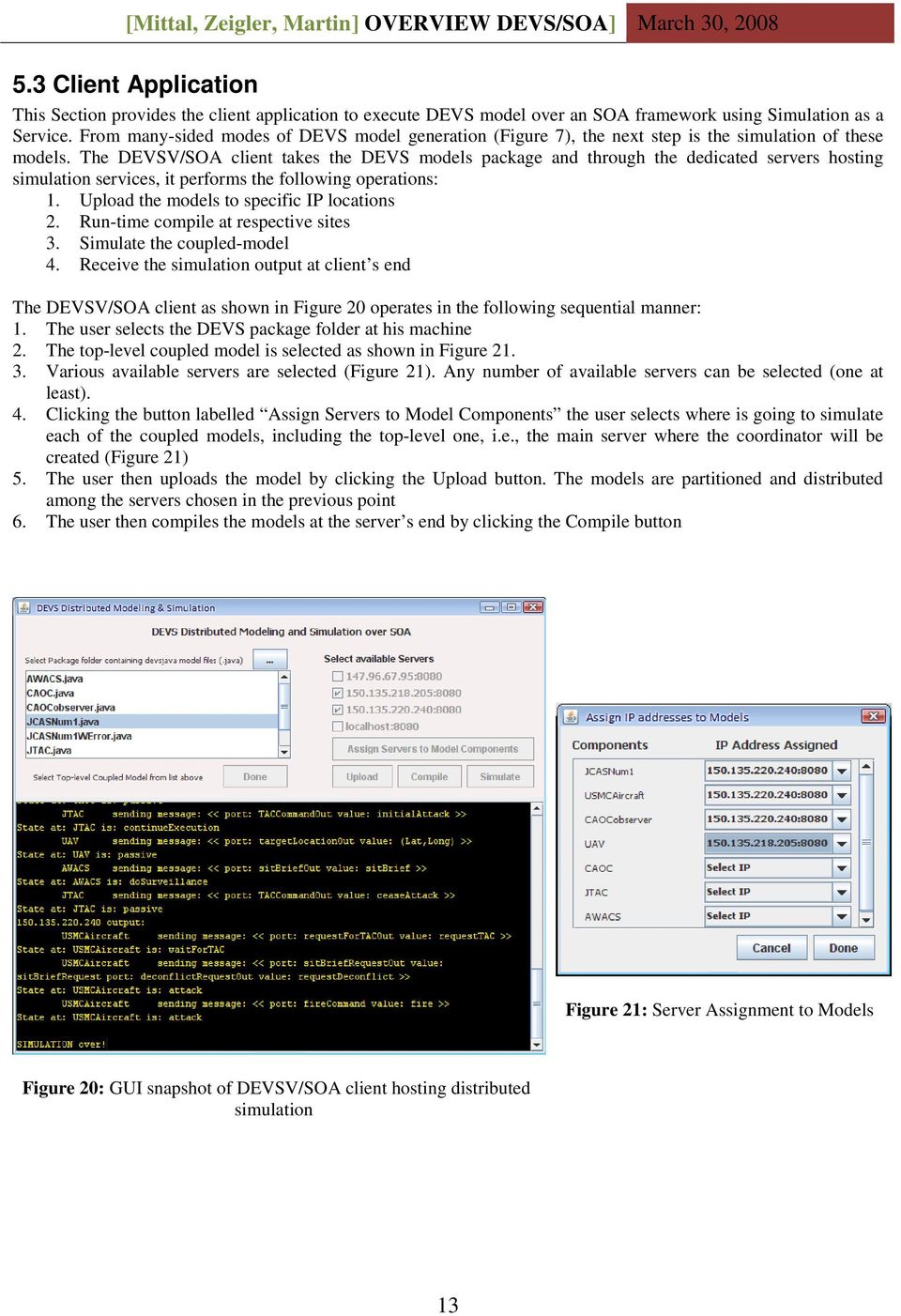
13 5.3 Client Application This Section provides the client application to execute DEVS model over an SOA framework using Simulation as a Service. From many-sided modes of DEVS model generation (Figure 7), the next step is the simulation of these models. The DEVSV/SOA client takes the DEVS models package and through the dedicated servers hosting simulation services, it performs the following operations: 1. Upload the models to specific IP locations 2. Run-time compile at respective sites 3. Simulate the coupled-model 4. Receive the simulation output at client s end The DEVSV/SOA client as shown in Figure 20 operates in the following sequential manner: 1. The user selects the DEVS package folder at his machine 2. The top-level coupled model is selected as shown in Figure Various available servers are selected (Figure 21). Any number of available servers can be selected (one at least). 4. Clicking the button labelled Assign Servers to Model Components the user selects where is going to simulate each of the coupled models, including the top-level one, i.e., the main server where the coordinator will be created (Figure 21) 5. The user then uploads the model by clicking the Upload button. The models are partitioned and distributed among the servers chosen in the previous point 6. The user then compiles the models at the server s end by clicking the Compile button Figure 21: Server Assignment to Models Figure 20: GUI snapshot of DEVSV/SOA client hosting distributed simulation 13
Automating the DEVS Modeling and Simulation Interface to Web Services
 Automating the DEVS Modeling and Simulation Interface to Web Services Chungman Seo Bernard P. Zeigler Arizona Center for Integrative Modeling and Simulation The University of Arizona Tucson, AZ cseo, [email protected]
Author: Gennaro Frazzingaro Universidad Rey Juan Carlos campus de Mostòles (Madrid) GIA Grupo de Inteligencia Artificial
 Simple Implementation of a WebService using Eclipse Author: Gennaro Frazzingaro Universidad Rey Juan Carlos campus de Mostòles (Madrid) GIA Grupo de Inteligencia Artificial Contents Web Services introduction
DiskPulse DISK CHANGE MONITOR
 DiskPulse DISK CHANGE MONITOR User Manual Version 7.9 Oct 2015 www.diskpulse.com [email protected] 1 1 DiskPulse Overview...3 2 DiskPulse Product Versions...5 3 Using Desktop Product Version...6 3.1 Product
Avalanche Site Edition
 Avalanche Site Edition Version 4.8 avse ug 48 20090325 Revised 03/20/2009 ii Copyright 2008 by Wavelink Corporation All rights reserved. Wavelink Corporation 6985 South Union Park Avenue, Suite 335 Midvale,
Oracle Service Bus Examples and Tutorials
 March 2011 Contents 1 Oracle Service Bus Examples... 2 2 Introduction to the Oracle Service Bus Tutorials... 5 3 Getting Started with the Oracle Service Bus Tutorials... 12 4 Tutorial 1. Routing a Loan
Lesson 4 Web Service Interface Definition (Part I)
 Lesson 4 Web Service Interface Definition (Part I) Service Oriented Architectures Module 1 - Basic technologies Unit 3 WSDL Ernesto Damiani Università di Milano Interface Definition Languages (1) IDLs
T320 E-business technologies: foundations and practice
 T320 E-business technologies: foundations and practice Block 3 Part 2 Activity 2: Generating a client from WSDL Prepared for the course team by Neil Simpkins Introduction 1 WSDL for client access 2 Static
Chapter 4. Architecture. Table of Contents. J2EE Technology Application Servers. Application Models
 Table of Contents J2EE Technology Application Servers... 1 ArchitecturalOverview...2 Server Process Interactions... 4 JDBC Support and Connection Pooling... 4 CMPSupport...5 JMSSupport...6 CORBA ORB Support...
GETTING STARTED WITH ANDROID DEVELOPMENT FOR EMBEDDED SYSTEMS
 Embedded Systems White Paper GETTING STARTED WITH ANDROID DEVELOPMENT FOR EMBEDDED SYSTEMS September 2009 ABSTRACT Android is an open source platform built by Google that includes an operating system,
IP Interface for the Somfy Digital Network (SDN) & RS485 URTSII
 IP Interface for the Somfy Digital Network (SDN) & RS485 URTSII Internet Protocol (IP) Interface Product Options Cat # 1810815 IP Interface Only Cat # 1810870: Interface and DB9/RJ45 Adapter (9015028)
FileNet System Manager Dashboard Help
 FileNet System Manager Dashboard Help Release 3.5.0 June 2005 FileNet is a registered trademark of FileNet Corporation. All other products and brand names are trademarks or registered trademarks of their
CHAPTER 10: WEB SERVICES
 Chapter 10: Web Services CHAPTER 10: WEB SERVICES Objectives Introduction The objectives are: Provide an overview on how Microsoft Dynamics NAV supports Web services. Discuss historical integration options,
VHDL Test Bench Tutorial
 University of Pennsylvania Department of Electrical and Systems Engineering ESE171 - Digital Design Laboratory VHDL Test Bench Tutorial Purpose The goal of this tutorial is to demonstrate how to automate
CHAPTER 2 MODELLING FOR DISTRIBUTED NETWORK SYSTEMS: THE CLIENT- SERVER MODEL
 CHAPTER 2 MODELLING FOR DISTRIBUTED NETWORK SYSTEMS: THE CLIENT- SERVER MODEL This chapter is to introduce the client-server model and its role in the development of distributed network systems. The chapter
Secure Messaging Server Console... 2
 Secure Messaging Server Console... 2 Upgrading your PEN Server Console:... 2 Server Console Installation Guide... 2 Prerequisites:... 2 General preparation:... 2 Installing the Server Console... 2 Activating
www.progress.com DEPLOYMENT ARCHITECTURE FOR JAVA ENVIRONMENTS
 DEPLOYMENT ARCHITECTURE FOR JAVA ENVIRONMENTS TABLE OF CONTENTS Introduction 1 Progress Corticon Product Architecture 1 Deployment Options 2 Invoking Corticon Decision Services 4 Corticon Rule Engine 5
Middleware Lou Somers
 Middleware Lou Somers April 18, 2002 1 Contents Overview Definition, goals, requirements Four categories of middleware Transactional, message oriented, procedural, object Middleware examples XML-RPC, SOAP,
Clustering with Tomcat. Introduction. O'Reilly Network: Clustering with Tomcat. by Shyam Kumar Doddavula 07/17/2002
 Page 1 of 9 Published on The O'Reilly Network (http://www.oreillynet.com/) http://www.oreillynet.com/pub/a/onjava/2002/07/17/tomcluster.html See this if you're having trouble printing code examples Clustering
Service Oriented Architecture
 Service Oriented Architecture Charlie Abela Department of Artificial Intelligence [email protected] Last Lecture Web Ontology Language Problems? CSA 3210 Service Oriented Architecture 2 Lecture Outline
Remote Support. User Guide 7.23
 Remote Support User Guide 7.23 Copyright 1997 2011 Cisco and/or its affiliates. All rights reserved. WEBEX, CISCO, Cisco WebEx, the CISCO logo, and the Cisco WebEx logo are trademarks or registered trademarks
S y s t e m A r c h i t e c t u r e
 S y s t e m A r c h i t e c t u r e V e r s i o n 5. 0 Page 1 Enterprise etime automates and streamlines the management, collection, and distribution of employee hours, and eliminates the use of manual
SSL VPN Technology White Paper
 SSL VPN Technology White Paper Keywords: SSL VPN, HTTPS, Web access, TCP access, IP access Abstract: SSL VPN is an emerging VPN technology based on HTTPS. This document describes its implementation and
Using the JNIOR with the GDC Digital Cinema Server. Last Updated November 30, 2012
 Using the JNIOR with the GDC Digital Cinema Server Last Updated November 30, 2012 The following is an explanation of how to utilize the JNIOR with the GDC Digital Cinema Server. Please contact INTEG via
PCVITA Express Migrator for SharePoint(Exchange Public Folder) 2011. Table of Contents
 Table of Contents Chapter-1 ------------------------------------------------------------- Page No (2) What is Express Migrator for Exchange Public Folder to SharePoint? Migration Supported The Prominent
Introduction to the EIS Guide
 Introduction to the EIS Guide The AirWatch Enterprise Integration Service (EIS) provides organizations the ability to securely integrate with back-end enterprise systems from either the AirWatch SaaS environment
OmniServer UA Interface Tutorial. A Guide to Configuring the OmniServer OPC UA Server Settings
 OmniServer UA Interface Tutorial A Guide to Configuring the OmniServer OPC UA Server Settings Page 2 of 14 Table of Contents INTRODUCTION 3 Introduction to OPC UA 3 Introduction to OmniServer 4 Intended
Network Licensing. White Paper 0-15Apr014ks(WP02_Network) Network Licensing with the CRYPTO-BOX. White Paper
 WP2 Subject: with the CRYPTO-BOX Version: Smarx OS PPK 5.90 and higher 0-15Apr014ks(WP02_Network).odt Last Update: 28 April 2014 Target Operating Systems: Windows 8/7/Vista (32 & 64 bit), XP, Linux, OS
DB2 Connect for NT and the Microsoft Windows NT Load Balancing Service
 DB2 Connect for NT and the Microsoft Windows NT Load Balancing Service Achieving Scalability and High Availability Abstract DB2 Connect Enterprise Edition for Windows NT provides fast and robust connectivity
The Java Series. Java Essentials I What is Java? Basic Language Constructs. Java Essentials I. What is Java?. Basic Language Constructs Slide 1
 The Java Series Java Essentials I What is Java? Basic Language Constructs Slide 1 What is Java? A general purpose Object Oriented programming language. Created by Sun Microsystems. It s a general purpose
LinuxWorld Conference & Expo Server Farms and XML Web Services
 LinuxWorld Conference & Expo Server Farms and XML Web Services Jorgen Thelin, CapeConnect Chief Architect PJ Murray, Product Manager Cape Clear Software Objectives What aspects must a developer be aware
Introduction to Network Operating Systems
 As mentioned earlier, different layers of the protocol stack use different kinds of addresses. We can now see that the Transport Layer (TCP) uses port addresses to route data to the correct process, the
Getting Started with Amazon EC2 Management in Eclipse
 Getting Started with Amazon EC2 Management in Eclipse Table of Contents Introduction... 4 Installation... 4 Prerequisites... 4 Installing the AWS Toolkit for Eclipse... 4 Retrieving your AWS Credentials...
WA2087 Programming Java SOAP and REST Web Services - WebSphere 8.0 / RAD 8.0. Student Labs. Web Age Solutions Inc.
 WA2087 Programming Java SOAP and REST Web Services - WebSphere 8.0 / RAD 8.0 Student Labs Web Age Solutions Inc. 1 Table of Contents Lab 1 - WebSphere Workspace Configuration...3 Lab 2 - Introduction To
How to Setup and Connect to an FTP Server Using FileZilla. Part I: Setting up the server
 How to Setup and Connect to an FTP Server Using FileZilla The ability to store data on a server and being able to access the data from anywhere in the world has allowed us to get rid of external flash
Business Process Management IBM Business Process Manager V7.5
 Business Process Management IBM Business Process Manager V7.5 Federated task management for BPEL processes and human tasks This presentation introduces the federated task management feature for BPEL processes
JMC Next Generation Web-based Server Install and Setup
 JMC Next Generation Web-based Server Install and Setup This document will discuss the process to install and setup a JMC Next Generation Web-based Windows Server 2008 R2. These instructions also work for
Deployment Guide: Transparent Mode
 Deployment Guide: Transparent Mode March 15, 2007 Deployment and Task Overview Description Follow the tasks in this guide to deploy the appliance as a transparent-firewall device on your network. This
Client/Server Computing Distributed Processing, Client/Server, and Clusters
 Client/Server Computing Distributed Processing, Client/Server, and Clusters Chapter 13 Client machines are generally single-user PCs or workstations that provide a highly userfriendly interface to the
Exam Name: IBM InfoSphere MDM Server v9.0
 Vendor: IBM Exam Code: 000-420 Exam Name: IBM InfoSphere MDM Server v9.0 Version: DEMO 1. As part of a maintenance team for an InfoSphere MDM Server implementation, you are investigating the "EndDate must
Accessing Data with ADOBE FLEX 4.6
 Accessing Data with ADOBE FLEX 4.6 Legal notices Legal notices For legal notices, see http://help.adobe.com/en_us/legalnotices/index.html. iii Contents Chapter 1: Accessing data services overview Data
A standards-based approach to application integration
 A standards-based approach to application integration An introduction to IBM s WebSphere ESB product Jim MacNair Senior Consulting IT Specialist [email protected] Copyright IBM Corporation 2005. All rights
Secret Server Installation Windows Server 2012
 Table of Contents Introduction... 2 ASP.NET Website... 2 SQL Server Database... 2 Administrative Access... 2 Prerequisites... 2 System Requirements Overview... 2 Additional Recommendations... 3 Beginning
Middleware support for the Internet of Things
 Middleware support for the Internet of Things Karl Aberer, Manfred Hauswirth, Ali Salehi School of Computer and Communication Sciences Ecole Polytechnique Fédérale de Lausanne (EPFL) CH-1015 Lausanne,
MD Link Integration. 2013 2015 MDI Solutions Limited
 MD Link Integration 2013 2015 MDI Solutions Limited Table of Contents THE MD LINK INTEGRATION STRATEGY...3 JAVA TECHNOLOGY FOR PORTABILITY, COMPATIBILITY AND SECURITY...3 LEVERAGE XML TECHNOLOGY FOR INDUSTRY
User's Guide - Beta 1 Draft
 IBM Tivoli Composite Application Manager for Microsoft Applications: Microsoft Hyper-V Server Agent vnext User's Guide - Beta 1 Draft SC27-2319-05 IBM Tivoli Composite Application Manager for Microsoft
This section will focus on basic operation of the interface including pan/tilt, video, audio, etc.
 Catalogue Basic Operation... 2 For Internet Explorer... 2 For Other Non-IE Web Browsers... 5 Camera Settings... 6 System... 6 About... 6 PT Setting... 7 Backup and Restore Setup... 8 NTP Setting... 8 System
2.0. Quick Start Guide
 2.0 Quick Start Guide Copyright Quest Software, Inc. 2007. All rights reserved. This guide contains proprietary information, which is protected by copyright. The software described in this guide is furnished
Using J-ISIS in a Local Network
 23 December 2012 Author: Jean-Claude Dauphin [email protected] Status:draft Using J-ISIS in a Local Network 1. Introduction J-ISIS uses TCP/IP protocol to communicate between computers. TCP/IP like
Installing Globodox Web Client on Windows Server 2012
 Installing Globodox Web Client on Windows Server 2012 Make sure that the Globodox Desktop Client is installed. Make sure it is not running. Note: Please click on Allow or Continue for all required UAC
Getting started with API testing
 Technical white paper Getting started with API testing Test all layers of your composite applications, not just the GUI Table of contents Executive summary... 3 Introduction... 3 Who should read this document?...
A Middleware-Based Approach to Mobile Web Services
 Abstract A Middleware-Based Approach to Mobile Web Services Pampa Sadhukhan, Pradip K Das, Rijurekha Sen, Niladrish Chatterjee and Arijit Das Centre for Mobile Computing and Communication (CMCC), Jadavpur
Optimization in a Secure Windows Environment
 WHITE PAPER Optimization in a Secure Windows Environment A guide to the preparation, configuration and troubleshooting of Riverbed Steelhead appliances for Signed SMB and Encrypted MAPI September 2013
CREATING AND DEPLOYING ABL WEB SERVICES
 CREATING AND DEPLOYING ABL WEB SERVICES Fellow and OpenEdge Evangelist Document Version 1.0 August 2010 September, 2010 Page 1 of 21 DISCLAIMER Certain portions of this document contain information about
Introduction to Testing Webservices
 Introduction to Testing Webservices Author: Vinod R Patil Abstract Internet revolutionized the way information/data is made available to general public or business partners. Web services complement this
Objectives. Chapter 2: Operating-System Structures. Operating System Services (Cont.) Operating System Services. Operating System Services (Cont.
 Objectives To describe the services an operating system provides to users, processes, and other systems To discuss the various ways of structuring an operating system Chapter 2: Operating-System Structures
The full setup includes the server itself, the server control panel, Firebird Database Server, and three sample applications with source code.
 Content Introduction... 2 Data Access Server Control Panel... 2 Running the Sample Client Applications... 4 Sample Applications Code... 7 Server Side Objects... 8 Sample Usage of Server Side Objects...
HP Insight Management Agents architecture for Windows servers
 HP Insight Management Agents architecture for Windows servers Technology brief, 2 nd edition Introduction... 3 A first look at the Insight Management Agents architecture... 3 HP Insight Management agents...
Chapter 2: OS Overview
 Chapter 2: OS Overview CmSc 335 Operating Systems 1. Operating system objectives and functions Operating systems control and support the usage of computer systems. a. usage users of a computer system:
HOW TO CONFIGURE PASS-THRU PROXY FOR ORACLE APPLICATIONS
 HOW TO CONFIGURE PASS-THRU PROXY FOR ORACLE APPLICATIONS Overview of Oracle JInitiator Oracle JInitiator enables users to run Oracle Forms applications using Netscape Navigator or Internet Explorer. It
Configuring Network Load Balancing with Cerberus FTP Server
 Configuring Network Load Balancing with Cerberus FTP Server May 2016 Version 1.0 1 Introduction Purpose This guide will discuss how to install and configure Network Load Balancing on Windows Server 2012
OpenScape Voice V8 Application Developers Manual. Programming Guide A31003-H8080-R100-2-7620
 OpenScape Voice V8 Application Developers Manual Programming Guide A31003-H8080-R100-2-7620 Our Quality and Environmental Management Systems are implemented according to the requirements of the ISO9001
UBS KeyLink Quick reference WEB Installation Guide
 ab UBS KeyLink Quick reference WEB Installation Guide Table of contents 1. Introduction 3 1.1. Why is an Installation needed? 3 1.2. Is UBS KeyLink secure? 3 1.3. Information about Secure Sockets Layer
Tutorial: Packaging your server build
 Tutorial: Packaging your server build This tutorial walks you through the steps to prepare a game server folder or package containing all the files necessary for your game server to run in Amazon GameLift.
Symantec Virtual Machine Management 7.1 User Guide
 Symantec Virtual Machine Management 7.1 User Guide Symantec Virtual Machine Management 7.1 User Guide The software described in this book is furnished under a license agreement and may be used only in
Progress Report Aspect Oriented Programming meets Design Patterns. Academic Programme MSc in Advanced Computer Science. Guillermo Antonio Toro Bayona
 Progress Report Aspect Oriented Programming meets Design Patterns Academic Programme MSc in Advanced Computer Science Guillermo Antonio Toro Bayona Supervisor Dr. John Sargeant The University of Manchester
Practice Fusion API Client Installation Guide for Windows
 Practice Fusion API Client Installation Guide for Windows Quickly and easily connect your Results Information System with Practice Fusion s Electronic Health Record (EHR) System Table of Contents Introduction
CACHÉ: FLEXIBLE, HIGH-PERFORMANCE PERSISTENCE FOR JAVA APPLICATIONS
 CACHÉ: FLEXIBLE, HIGH-PERFORMANCE PERSISTENCE FOR JAVA APPLICATIONS A technical white paper by: InterSystems Corporation Introduction Java is indisputably one of the workhorse technologies for application
StreamServe Persuasion SP4 StreamServe Connect for SAP - Business Processes
 StreamServe Persuasion SP4 StreamServe Connect for SAP - Business Processes User Guide Rev A StreamServe Persuasion SP4StreamServe Connect for SAP - Business Processes User Guide Rev A SAP, mysap.com,
Introduction to Service Oriented Architectures (SOA)
 Introduction to Service Oriented Architectures (SOA) Responsible Institutions: ETHZ (Concept) ETHZ (Overall) ETHZ (Revision) http://www.eu-orchestra.org - Version from: 26.10.2007 1 Content 1. Introduction
Stellar Phoenix Exchange Server Backup
 Stellar Phoenix Exchange Server Backup Version 1.0 Installation Guide Introduction This is the first release of Stellar Phoenix Exchange Server Backup tool documentation. The contents will be updated periodically
JMeter Testing. Identify Preformance acceptance criteria: Identfy throughput,response time and resource utilization goals and constraints.
 JMeter Testing Introduction: This document provides an overview of performance testing which mainly focuses on Web application performance testing. The different types of tests involved are performance
CDH installation & Application Test Report
 CDH installation & Application Test Report He Shouchun (SCUID: 00001008350, Email: [email protected]) Chapter 1. Prepare the virtual machine... 2 1.1 Download virtual machine software... 2 1.2 Plan the guest
NetApp SANtricity Management Pack for Microsoft System Center Operations Manager 3.0
 NetApp SANtricity Management Pack for Microsoft System Center Operations Manager 3.0 User Guide NetApp, Inc. Telephone: +1 (408) 822-6000 Part number: 215-10033_A0 495 East Java Drive Fax: +1 (408) 822-4501
USER GUIDE. Ethernet Configuration Guide (Lantronix) P/N: 2900-300321 Rev 6
 KRAMER ELECTRONICS LTD. USER GUIDE Ethernet Configuration Guide (Lantronix) P/N: 2900-300321 Rev 6 Contents 1 Connecting to the Kramer Device via the Ethernet Port 1 1.1 Connecting the Ethernet Port Directly
Service Oriented Architecture (SOA) Implementation Framework for Satellite Mission Control System Software Design
 Service Oriented Architecture (SOA) Implementation Framework for Satellite Mission Control System Software Design GSAW2006 28 th March 2006 Soon Hie Tan K I Thimothy Nanyang Technological University Singapore
Emerging Technologies Shaping the Future of Data Warehouses & Business Intelligence
 Emerging Technologies Shaping the Future of Data Warehouses & Business Intelligence Service Oriented Architecture SOA and Web Services John O Brien President and Executive Architect Zukeran Technologies
Sentral servers provide a wide range of services to school networks.
 Wazza s QuickStart Publishing iweb Sites to a Sentral Server Background Mac OS X, Sentral, iweb 09 Sentral servers provide a wide range of services to school networks. A Sentral server provides a publishing
Sample copy. Introduction To WebLogic Server Property of Web 10.3 Age Solutions Inc.
 Introduction To WebLogic Server Property of Web 10.3 Age Solutions Inc. Objectives At the end of this chapter, participants should be able to: Understand basic WebLogic Server architecture Understand the
Division of Informatics, University of Edinburgh
 CS1Bh Lecture Note 20 Client/server computing A modern computing environment consists of not just one computer, but several. When designing such an arrangement of computers it might at first seem that
Management Software. Web Browser User s Guide AT-S106. For the AT-GS950/48 Gigabit Ethernet Smart Switch. Version 1.0.0. 613-001339 Rev.
 Management Software AT-S106 Web Browser User s Guide For the AT-GS950/48 Gigabit Ethernet Smart Switch Version 1.0.0 613-001339 Rev. A Copyright 2010 Allied Telesis, Inc. All rights reserved. No part of
Gigabyte Management Console User s Guide (For ASPEED AST 2400 Chipset)
 Gigabyte Management Console User s Guide (For ASPEED AST 2400 Chipset) Version: 1.4 Table of Contents Using Your Gigabyte Management Console... 3 Gigabyte Management Console Key Features and Functions...
JReport Server Deployment Scenarios
 JReport Server Deployment Scenarios Contents Introduction... 3 JReport Architecture... 4 JReport Server Integrated with a Web Application... 5 Scenario 1: Single Java EE Server with a Single Instance of
Applying 4+1 View Architecture with UML 2. White Paper
 Applying 4+1 View Architecture with UML 2 White Paper Copyright 2007 FCGSS, all rights reserved. www.fcgss.com Introduction Unified Modeling Language (UML) has been available since 1997, and UML 2 was
Grid Computing. Web Services. Explanation (2) Explanation. Grid Computing Fall 2006 Paul A. Farrell 9/12/2006
 Grid Computing Web s Fall 2006 The Grid: Core Technologies Maozhen Li, Mark Baker John Wiley & Sons; 2005, ISBN 0-470-09417-6 Web s Based on Oriented Architecture (SOA) Clients : requestors Servers : s
Cisco Expressway Basic Configuration
 Cisco Expressway Basic Configuration Deployment Guide Cisco Expressway X8.1 D15060.03 August 2014 Contents Introduction 4 Example network deployment 5 Network elements 6 Internal network elements 6 DMZ
Laptop Backup - Administrator Guide (Windows)
 Laptop Backup - Administrator Guide (Windows) Page 1 of 86 Page 2 of 86 Laptop Backup - Administrator Guide (Windows) TABLE OF CONTENTS OVERVIEW PREPARE COMMCELL SETUP FIREWALL USING PROXY SETUP FIREWALL
SAP Predictive Analysis Installation
 SAP Predictive Analysis Installation SAP Predictive Analysis is the latest addition to the SAP BusinessObjects suite and introduces entirely new functionality to the existing Business Objects toolbox.
Motivation Definitions EAI Architectures Elements Integration Technologies. Part I. EAI: Foundations, Concepts, and Architectures
 Part I EAI: Foundations, Concepts, and Architectures 5 Example: Mail-order Company Mail order Company IS Invoicing Windows, standard software IS Order Processing Linux, C++, Oracle IS Accounts Receivable