
NOTES ON XER EXPORT AND IMPORT BETWEEN ASTA POWERPROJECT AND IMPORT TO PRIMAVERA VERSION 5.0 PAUL E HARRIS EASTWOOD HARRIS
|
|
|
- Silvester Warner
- 9 years ago
- Views:
Transcription
1 P.O. Box 4032 EASTWOOD HARRIS PTY LTD Tel 61 (0) Doncaster Heights ACN Fax 61 (0) Victoria 3109 Project Management Systems Australia Software and Solutions Web: NOTES ON XER EXPORT AND IMPORT BETWEEN ASTA POWERPROJECT AND IMPORT TO PRIMAVERA VERSION 5.0 BY PAUL E HARRIS OF EASTWOOD HARRIS
2 TABLE OF CONTENTS 1 BACKGROUND 3 2 UNIQUE ID USE 3 3 LOGIC LINKS, START DATE AND RECALCULATION SAMPLE EXPORTS FIRST EXAMPLE SECOND EXAMPLE THIRD EXAMPLE 7 4 CALENDARS 8 5 RESOURCES 9 6 CODE LIBRARIES 9 7 GUIDELINES FOR EXPORTING TO PRIMAVERA VERSION GUIDELINES FOR IMPORTING INTO PRIMAVERA VERSION INTRODUCTION CALENDARS IMPORT PROCEDURE 13 2

3 1 Background These note were developed for a client and may provide some additional information for users to transfer of data to and from Asta PowerProject and Primaver Version 5.0 Some guidelines must be followed if it is important to see the schedule in Primavera Version 5.0 in a similar layout and with the same logic as the Asta Powerproject schedule. 2 Unique ID Use The Power Project Unique ID is used to generate the Primavera Version 5.0 Activity ID. The Unique ID should be set in the Asta Powerproject schedule before saving as a XER file to assist in communication with a person who imports the schedule and to assist in the ordering of the imported schedule. If the Unique ID is blank then Asta Powerproject creates one automatically and schedule it may be difficult to identify the same task in both schedules when the are many activities. 3 Logic Links, Start Date and Recalculation Sample Exports 3.1 First Example The schedule below has links between Summary Tasks and no Asta Projects were imported into Primavera Version 5.0. The summary task links are not exported: 3
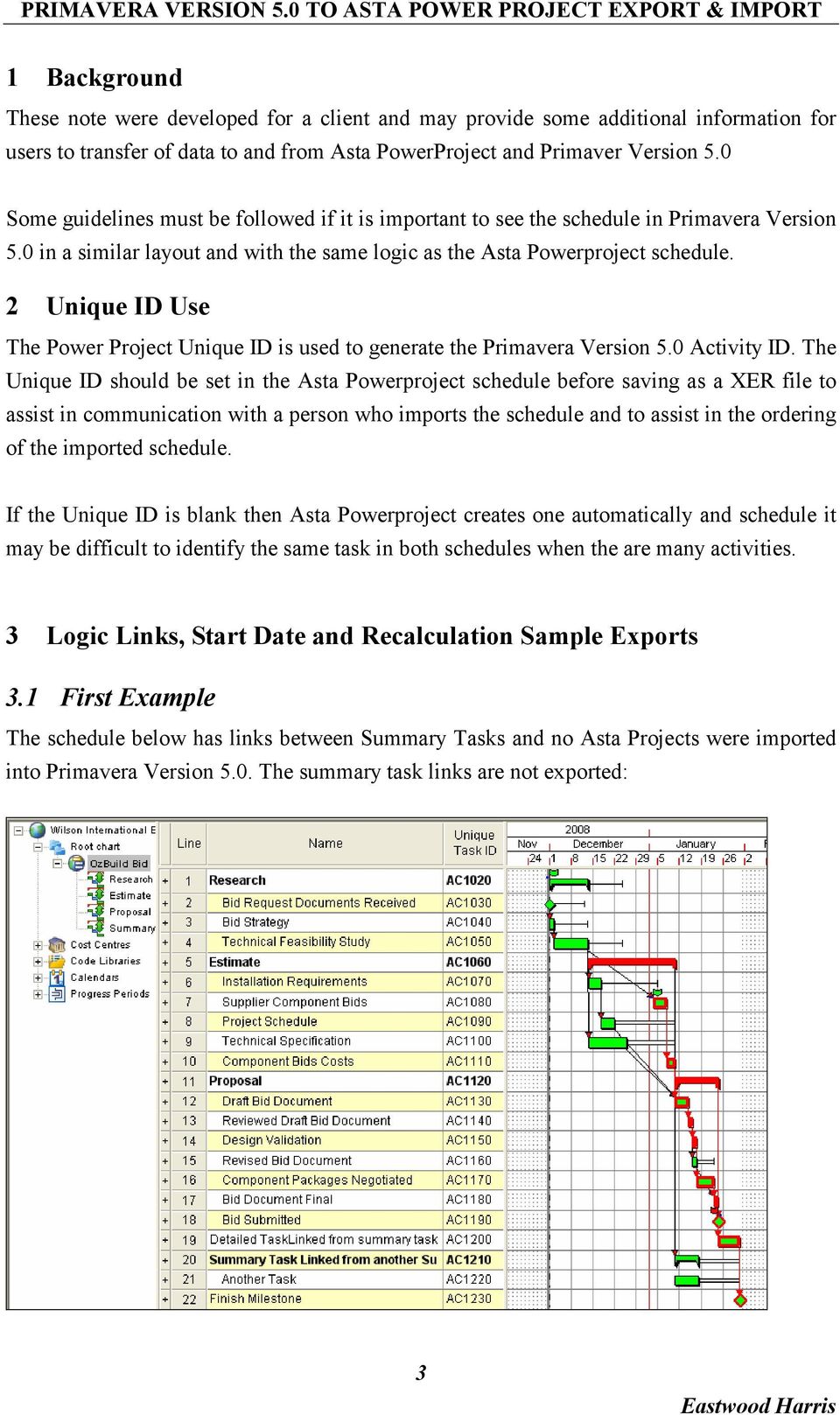
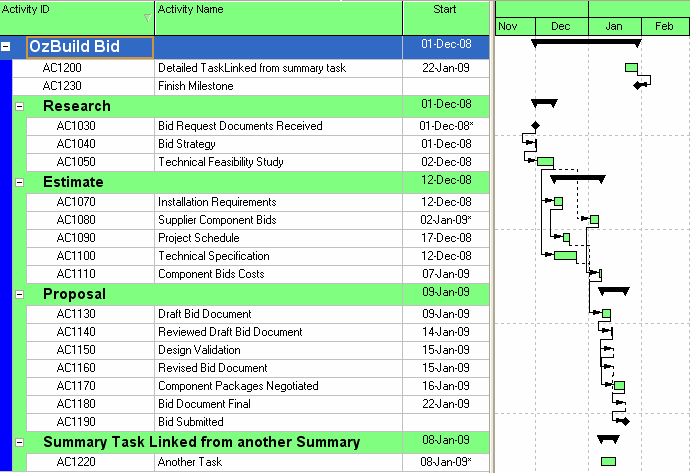
4 The following error message was received on export identifying links not exported: Copy and paste the contents into MS Word to obtain the full text. Working periods will have start or end time rounded to a half-hour boundary for calendar Default Links to/from WBS item Proposal-Detailed TaskLinked from summary task were not exported Links to/from WBS item Estimate-Summary Task Linked from another Summary were not exported The project imported as per below: 4


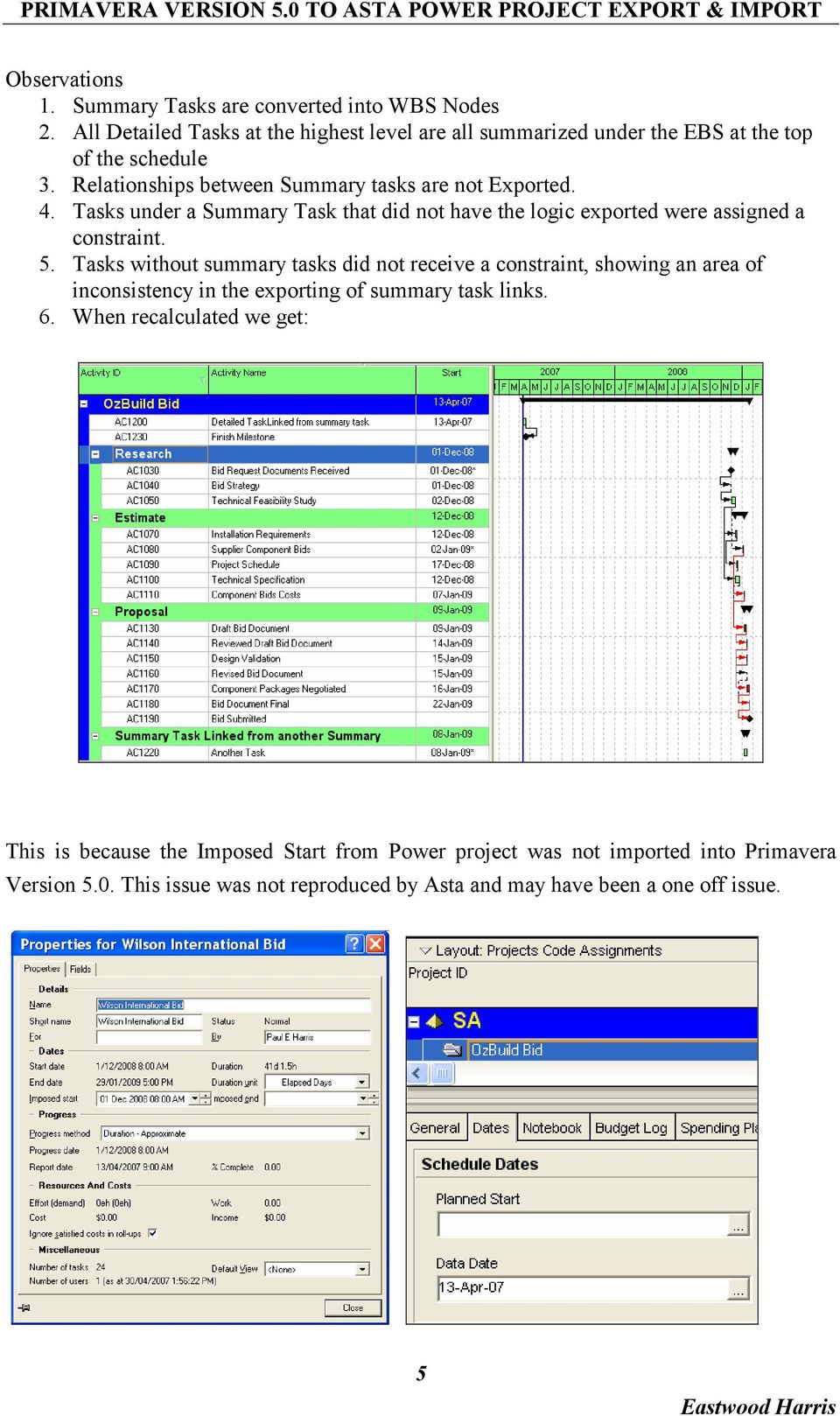
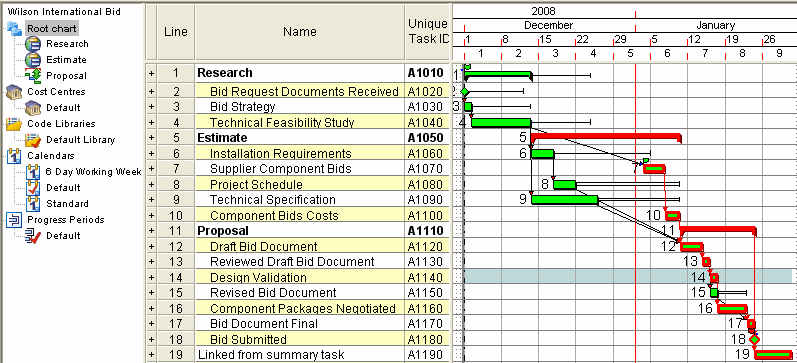
5 Observations 1. Summary Tasks are converted into WBS Nodes 2. All Detailed Tasks at the highest level are all summarized under the EBS at the top of the schedule 3. Relationships between Summary tasks are not Exported. 4. Tasks under a Summary Task that did not have the logic exported were assigned a constraint. 5. Tasks without summary tasks did not receive a constraint, showing an area of inconsistency in the exporting of summary task links. 6. When recalculated we get: This is because the Imposed Start from Power project was not imported into Primavera Version 5.0. This issue was not reproduced by Asta and may have been a one off issue. 5
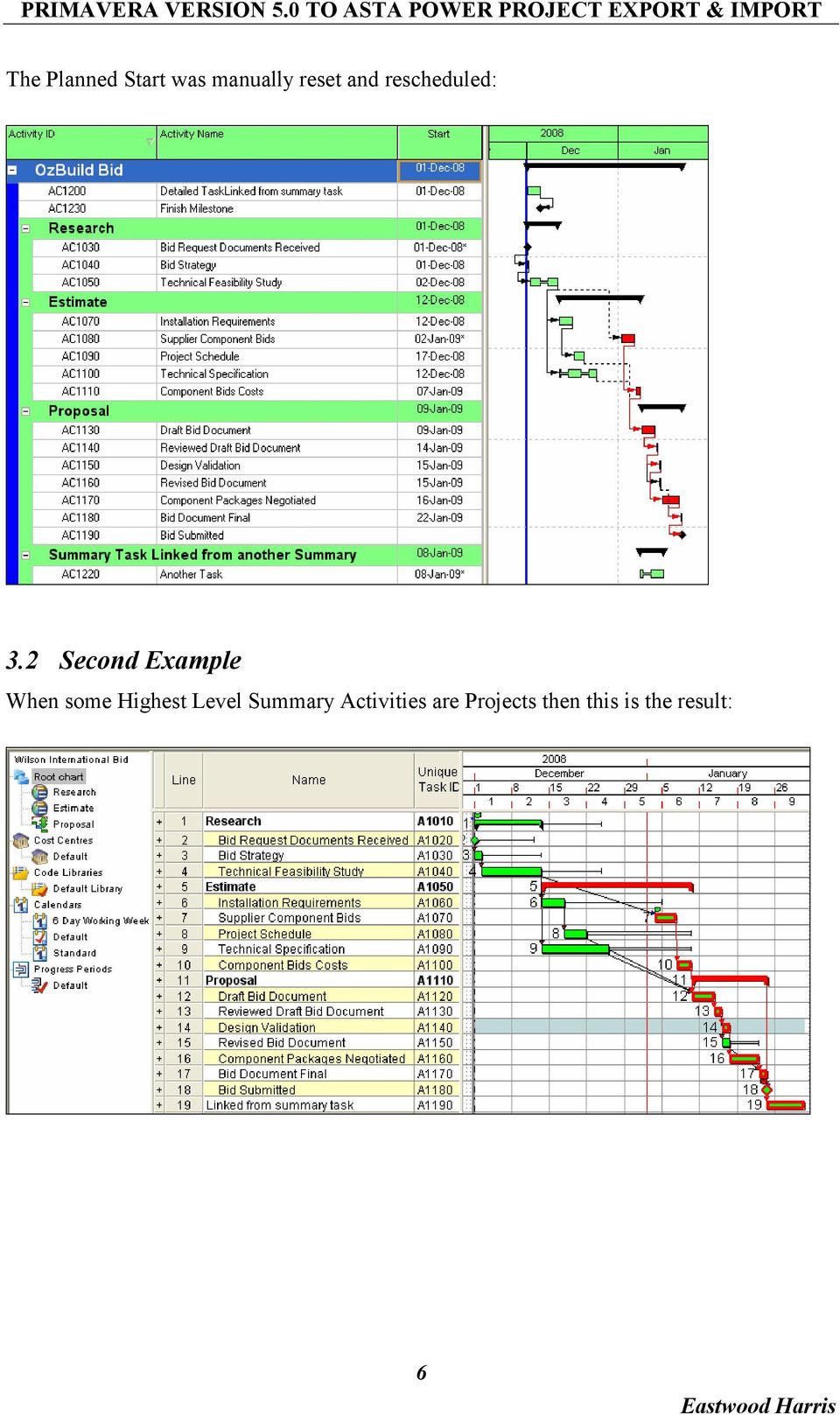
6 The Planned Start was manually reset and rescheduled: 3.2 Second Example When some Highest Level Summary Activities are Projects then this is the result: 6
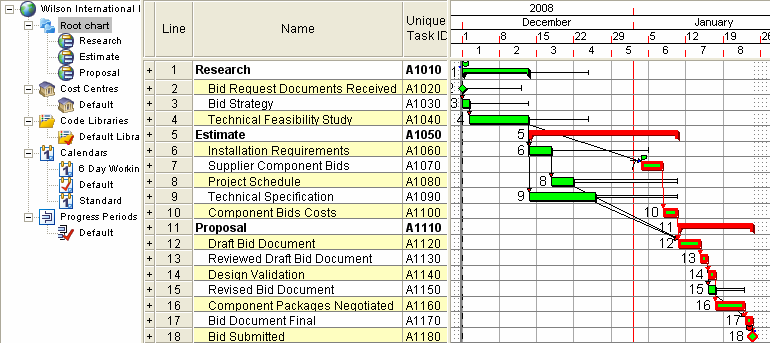
7 Projects are imported as projects and the remainder are placed in a project titled with the same name as the root chart. 3.3 Third Example When all First Level are projects and no detailed tasks at first level: 7
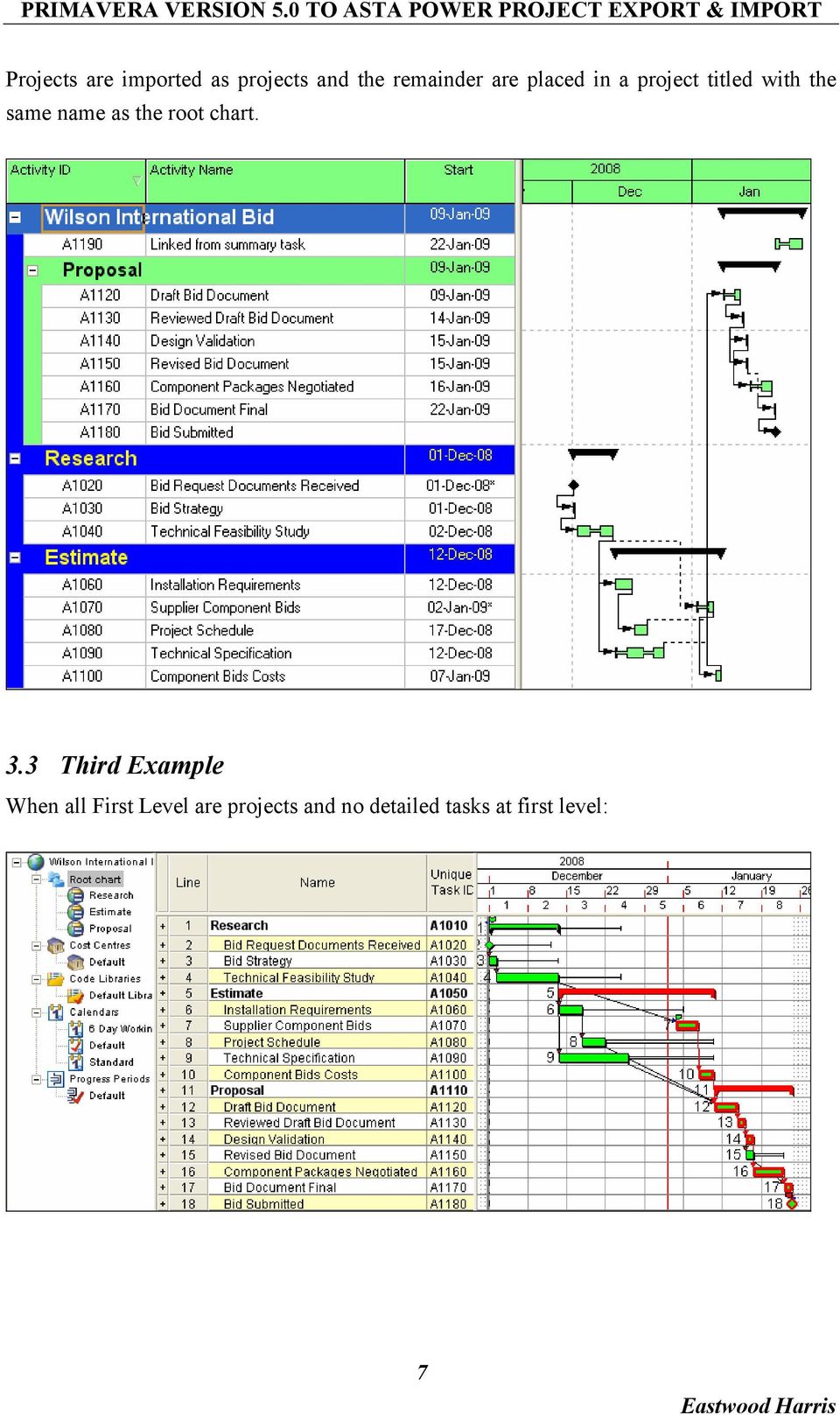
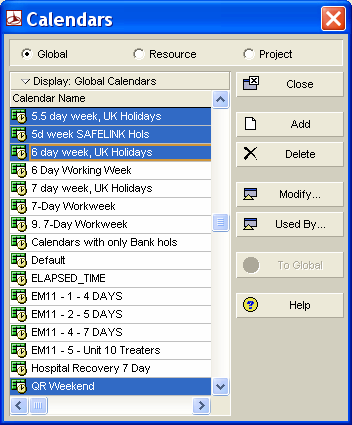
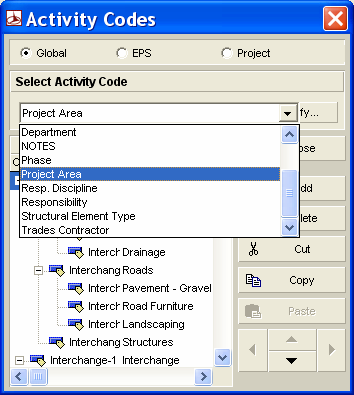
8 Then these will Import each as a Project in Primavera Version 5.0: 4 Calendars All calendars are exported and are not held in a linear format as in Power Project: Power Project Work Patterns are incorporated in the Primavera Version 5.0 calendars. 8

9 5 Resources All Resources are exported to the root of the Primavera Version 5.0 Resource Table: \ 6 Code Libraries These are exported maintaining their hierarchical structure: 9

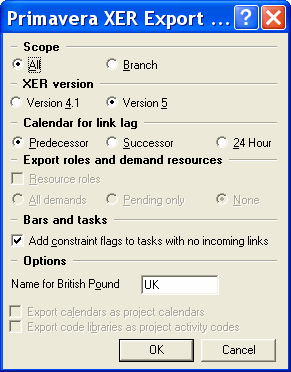
10 7 Guidelines for Exporting to Primavera Version 5.0 Based on the examples above the following guidelines should be considered when exporting to Primavera Version Either all tasks should be under Summary Tasks or all under Projects, but not a mixture. 2. There should be no summary task relationships. 3. It is best if there are no detailed tasks at the root level, all detailed tasks should be either: Under a Summary task, or Part of a Sub Project Any tasks under the root will be grouped at the top of a Primavera Version 5.0 project. 4. All Resources are exported therefore Unused resources should be deleted and Uniquely named so they may be identified in the Primavera Database. 5. All Calendars are exported as Global Calendars when Asta Projects (sub-projects) are used, so it is best to: Delete unused calendars are deleted and Calendars are uniquely identified. 6. All Codes are exported maintaining their Structure. Unused Codes should be deleted and Codes could be uniquely identified. 7. Select File, Save As to export as a XER file. 8. The Primavera Version 5.0 User must inform the Primavera Version 5.0 user of the option for the Calendar for link lag. 10

11 8 Guidelines for Importing into Primavera Version Introduction To be able to export successfully to Primavera Version 5.0 some functions in Asta should not be used. The importation of the Asta Powerproject project file into Primavera Version 5.0 has been considered in the construction of this schedule and the functions available in Asta that are not supported by Primavera Version 5.0 are not being utilise in this schedule. The file format used by Primavera Version 5.0 for file transfer between to databases is a format titled XER. This file format is used to export a schedule from one Primavera database to another and may saved to and opened by Asta Powerproject. When the Asta Powerproject Projects facility is used the XER then file created by Asta Powerproject when imported into Primavera Version 5.0 will result in the projects being created in Primavera Version Calendars When the Asta schedule uses two or more calendars, for example: 1. A 5 d week which is based on an 8 hour working day and 2. A 5 d week which is based on an 11 hour working day. Th summary durations displayed in days will be incorrect for one of the calendars. The default in Primavera is 8 hours per day so all the 12 hour calendar durations will be displayed incorrectly. In this situation the durations could be displayed in hours or a Custom Field and Global change used to display the correct durations in days in the Custom Field. There are several options to display the durations in days correctly in Primavera Version 5.0 when the project has one calendar that does not have the default number hours per day as the database which is normally 8 hours per day. 11

12 1. Create a stand alone database and to display the correct summary durations it is recommended that the Hours/day in the Admin, Admin Preferences, click on the Time Periods tab and set them to the values below. 2. If the project is to be imported into an existing multi project database where the default number of hours per day is 8 and your project has 11 hours per day then the user may change their Edit, User Preferences, Time Units tab to the values below to display the correct summary durations for this project and for them only: For a user to be able to edit these values the Allow users to specify the number of work hours for each time period check box in the Admin, Admin Preferences, the Time Periods tab must be checked. 12

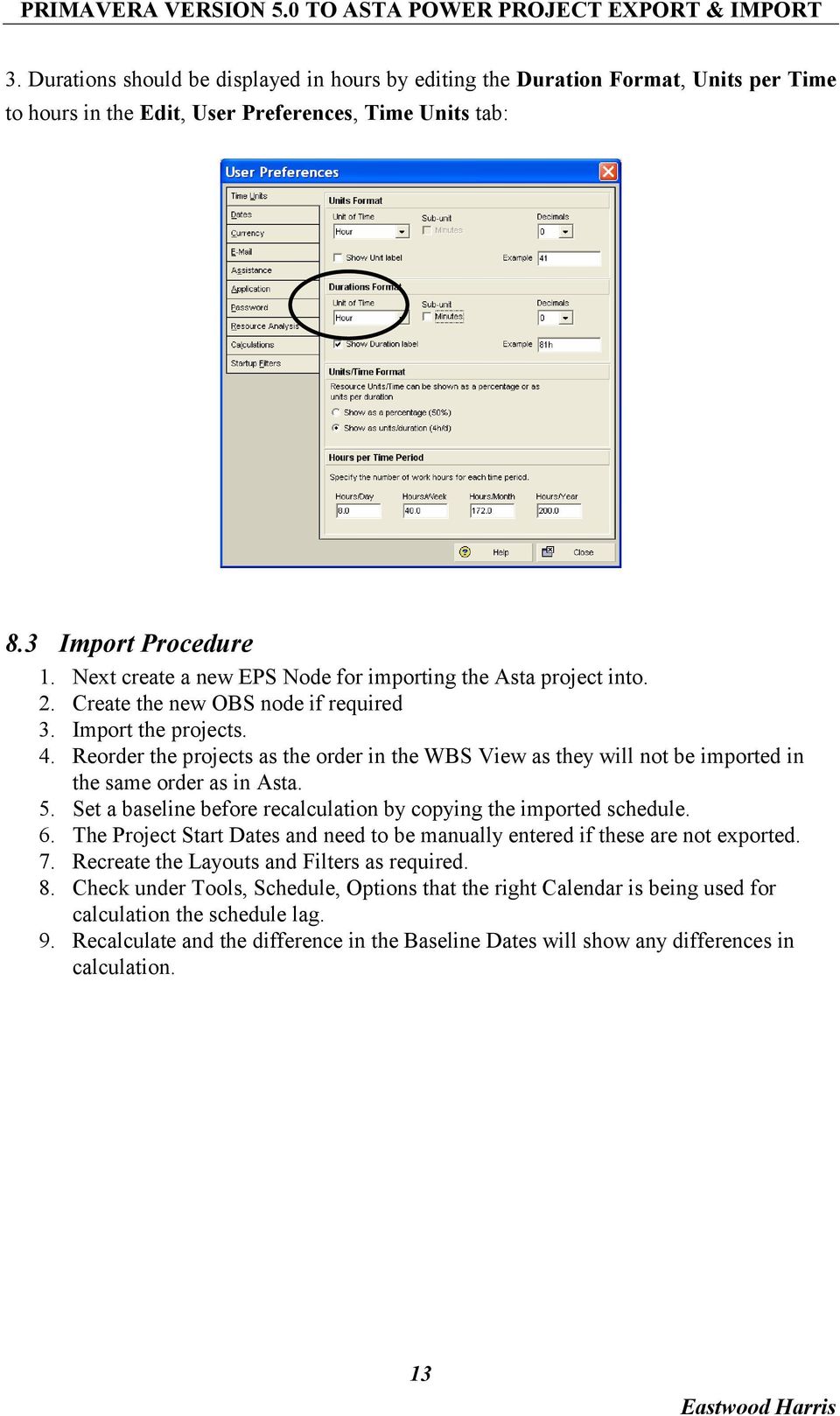
13 3. Durations should be displayed in hours by editing the Duration Format, Units per Time to hours in the Edit, User Preferences, Time Units tab: 8.3 Import Procedure 1. Next create a new EPS Node for importing the Asta project into. 2. Create the new OBS node if required 3. Import the projects. 4. Reorder the projects as the order in the WBS View as they will not be imported in the same order as in Asta. 5. Set a baseline before recalculation by copying the imported schedule. 6. The Project Start Dates and need to be manually entered if these are not exported. 7. Recreate the Layouts and Filters as required. 8. Check under Tools, Schedule, Options that the right Calendar is being used for calculation the schedule lag. 9. Recalculate and the difference in the Baseline Dates will show any differences in calculation. 13
USER CONVERSION P3, SURETRAK AND MICROSOFT PROJECT ASTA POWERPROJECT PAUL E HARRIS EASTWOOD HARRIS
 P.O. Box 4032 EASTWOOD HARRIS PTY LTD Tel 61 (0)4 1118 7701 Doncaster Heights ACN 085 065 872 Fax 61 (0)3 9846 7700 Victoria 3109 Project Management Systems Email: [email protected] Australia Software
TRICKS AND TRAPS PRESENTATION
 Welcome to the Eastwood Harris Pty Ltd Primavera P6 Version 7 TRICKS AND TRAPS PRESENTATION Copyright of Eastwood Harris Pty Ltd Page 1 Purpose of the Presentation To demonstrate the P6 Version 7 bars
USING P3 VERSION 3.1 IMPORT AND EXPORT FUNCTIONS WITH THE DBF FILE FORMAT AND EXCEL PAUL E HARRIS EASTWOOD HARRIS
 P.O. Box 4032 EASTWOOD HARRIS PTY LTD Tel 61 (0)4 1118 7701 Doncaster Heights ACN 085 065 872 Fax 61 (0)3 9846 7700 Victoria 3109 Project Management Systems Email: [email protected] Australia Software
Sample book with only two chapters
 PLANNING AND CONTROL USING ORACLE PRIMAVERA P6 Versions 8.2 to 15.1 EPPM WEB Enterprise Portfolio Project Management Planning and Progressing Project Schedules With and Without Roles and Resources in an
CONVERTING TO AND FROM PRIMAVERA SURETRAK AND P3 TO MICROSOFT PROJECT MPX & MPP FORMAT PAUL E HARRIS EASTWOOD HARRIS. REVISED 4 August 2003
 P.O. Box 4032 EASTWOOD HARRIS PTY LTD Tel 61 (0)4 1118 7701 Doncaster Heights ACN 085 065 872 Fax 61 (0)3 9846 7700 Victoria 3109 Project Management Systems Email: [email protected] Australia Software
CALCULATION DIFFERENCES WHEN IMPORTING FROM INTO ORACLE PRIMAVERA P6 VERSION 7 PAUL E HARRIS EASTWOOD HARRIS
 CALCULATION DIFFERENCES WHEN IMPORTING FROM MICROSOFT PROJECT 2003-2010 INTO ORACLE PRIMAVERA P6 VERSION 7 BY PAUL E HARRIS OF EASTWOOD HARRIS TABLE OF CONTENTS 1 INTRODUCTION 3 2 AIM 3 3 SUMMARY 3 4 LEVELS
TECHNIQUES FOR MANAGING COMPLEX PROJECTS WITH PLANNING AND SCHEDULING SOFTWARE PAUL E HARRIS EASTWOOD HARRIS
 P.O. Box 4032 EASTWOOD HARRIS PTY LTD Tel 61 (0)4 1118 7701 Doncaster Heights ACN 085 065 872 Fax 61 (0)3 9846 7700 Victoria 3109 Project Management Systems Email: [email protected] Australia Software
PROJECT PLANNING & SCHEDULING USING PRIMAVERA ENTERPRISE. In An. Established Project Environment PAUL EASTWOOD HARRIS
 PROJECT PLANNING & SCHEDULING USING PRIMAVERA ENTERPRISE Planning and Progressing a Single Project Schedule With and Without Resources In An Established Project Environment BY PAUL EASTWOOD HARRIS Eastwood
Oracle Primavera P6 Enterprise Project Portfolio management Overview Programme Reference # 201A
 Oracle Primavera P6 Enterprise Project Portfolio management Overview Programme Reference # 201A Programme Description: Dedicated one full day training module in a structured and professional manner to
PROJECT PLANNING & SCHEDULING USING PRIMAVERA P6 TM. in an PAUL EASTWOOD HARRIS
 PROJECT PLANNING & SCHEDULING USING PRIMAVERA P6 TM For all industries including Versions 4 to 6 Planning and Progressing Project Schedules With and Without Roles and Resources in an Established Enterprise
Guidelines for Accessing and Using the VDOT Scheduling Application (Primavera P6)
 Guidelines for Accessing and Using the VDOT Scheduling Application (Primavera P6) CONSTRUCTION DIVISION (SCHEDULING & CONTRACTS) 1. INTRODUCTION To establish standards and consistent scheduling practices
COST MANAGEMENT WITH EXPENSES
 Welcome to the Eastwood Harris Pty Ltd Primavera P6 Version 7 COST MANAGEMENT WITH EXPENSES Copyright of Eastwood Harris Pty Ltd Page 1 Purpose of the Presentation To demonstrate the Use of Expenses and
LINKING P3 DATABASE WITH ACCESS DATABASE OR EXCEL BY PAUL E HARRIS EASTWOOD HARRIS
 P.O. Box 4032 EASTWOOD HARRIS PTY LTD Tel 61 (0)4 1118 7701 Doncaster Heights ACN 085 065 872 Fax 61 (0)3 9846 7700 Victoria 3109 Project Management Systems Email: [email protected] Australia Software
Primavera P6 Enterprise Project Portfolio Management 8 Essentials (1Z0-567) Exam Study Guide
 Primavera P6 Enterprise Project Portfolio Management 8 Essentials (1Z0-567) Exam Study Guide Margy Girdzius Director, Partner Enablement WWA&C Objective & Audience Objective Help you prepare to take the
Applied Project Management ( APM )
 Applied Project Management Applied Project Management ( APM ) TRAINING PROGRAM Page 1 Of 7 APPLIED PROJECT MANAGEMENT PRO PROGRAM OVERVIEW This course provides in-depth Project Management Training and
Primavera P6 102 Training Manual. Prepared by. Bill Pepoon, Managing Partner Construction Science, LLC
 Primavera P6 102 Training Manual Prepared by Bill Pepoon, Managing Partner Construction Science, LLC 1 Day I Introduction Setting up a new Project Activities Activity Types Activity Durations Work Breakdown
The Amazing History of Primavera Software
 The Amazing History of Primavera Software (as told by a Complete Outsider) By Ron Winter, PSP Schedule Analyzer Software History? There is nothing new in the world except the history you do not know. Harry
PLANNING AND SCHEDULING USING MICROSOFT PROJECT 2010 PAUL EASTWOOD HARRIS
 PLANNING AND SCHEDULING USING MICROSOFT PROJECT 2010 BY PAUL EASTWOOD HARRIS Eastwood Harris Pty Ltd i Copyright 1999 2010 by Eastwood Harris Pty Ltd. No part of this publication may be reproduced or used
COMPARISON OF ORACLE P6 RELEASE 8 EPPM AND PMM
 COMPARISON OF ORACLE P6 RELEASE 8 EPPM AND PMM INTRODUCTION The release of P6 Release 8 introduced two versions of Primavera P6 database and as a result changed the fundamental method that is used to administer
PRINCE2 PLANNING AND CONTROL USING MICROSOFT PROJECT UPDATED FOR MICROSOFT OFFICE PROJECT 2007 PAUL EASTWOOD HARRIS
 PRINCE2 PLANNING AND CONTROL USING MICROSOFT PROJECT UPDATED FOR MICROSOFT OFFICE PROJECT 2007 BY PAUL EASTWOOD HARRIS Eastwood Harris Pty Ltd i Copyright 1999-2004 by Eastwood Harris Pty Ltd. No part
Welcome to the Eastwood Harris Pty Ltd Primavera P6 Version 7 COST MANAGEMENT WITH EXPENSES
 Welcome to the Eastwood Harris Pty Ltd Primavera P6 Version 7 COST MANAGEMENT WITH EXPENSES Copyright of Eastwood Harris Pty Ltd Update 18 September 2011 Page 1 Purpose of the Presentation Companies often
PROJECT MANAGEMENT IN PRIMAVERA P6 WEB ACCESS REL 7
 PROJECT MANAGEMENT IN PRIMAVERA P6 WEB ACCESS REL 7 Duration: 03 days INTRODUCTION This course provides hands-on training for Primavera s web-based solution. Participants will create a project, add activities
Asta Powerproject GETTING STARTED WITH ASTA POWERPROJECT VERSION 14. astapowerproject.com. Asta Powerproject: The power behind successful projects
 Asta Powerproject GETTING STARTED WITH ASTA POWERPROJECT VERSION 14 astapowerproject.com Asta Powerproject: The power behind successful projects Asta Powerproject GETTING STARTED WITH ASTA POWERPROJECT
CPM Scheduling with Primavera Unifier
 CPM Scheduling with Primavera Unifier Don McNatty, PSP March 26, 2014 2014 Technical Webinar Series Thank you for joining today s technical webinar Mute all call in phones are automatically muted in order
LECTURE -08 INTRODUCTION TO PRIMAVERA PROJECT PLANNER (P6)
 LECTURE -08 INTRODUCTION TO PRIMAVERA PROJECT PLANNER (P6) GOAL In this lecture, we ll learn: Background of Primavera Project Planner (P6) Getting Started P6 Interface Basic Navigation and Operation Setting
Project Initiation and Revision Training Manual. Table of Contents
 for Engineering and Construction v.4.1 Project Initiation and Revision Training Class Conducted by Evans Technology June 2005 Table of Contents Introduction to Primavera... 3 Project Management (P3eC)...
Primavera Project Manager for the Enterprise Version 6.1 Custom Training Manual
 Primavera Project Manager for the Enterprise Version 6.1 Custom Training Manual Course Contents June 27, 2003 This publication is produced as a custom training document for The University of North Carolina.
Microsoft Project Dissected
 Microsoft Project Dissected by Ron Winter, PSP Schedule Analyzer Software Copyright 2012 Third Annual Construction CPM Conference Introduction Although Oracle/Primavera P6 is dominant Many contracts specify/allow
Administration. Welcome to the Eastwood Harris Pty Ltd MICROSOFT PROJECT 2010 AND PMBOK GUIDE FOURTH EDITION training course presented by
 Welcome to the Eastwood Harris Pty Ltd MICROSOFT PROJECT 2010 AND PMBOK GUIDE FOURTH EDITION training course presented by Paul E Harris Administration Evacuation Timings, meals and facilities Mobile phones
ESKIPM3 Project management software
 Overview This is the ability to use a software application that plans, organises and monitors completion of the component tasks within a project in logical sequence, given constraints of people and resource
Welcome to the Eastwood Harris Pty Ltd Introduction to PRINCE2 TM Revised 2009 and Microsoft Office Project. Page 1
 Welcome to the Eastwood Harris Pty Ltd Introduction to PRINCE2 TM Revised 2009 and Microsoft Office Project Page 1 Purpose of the Presentation Present an overview of the changes to the PRINCE2 methodology
Asta Powerproject GETTING STARTED WITH ASTA POWERPROJECT VERSION 12. www.astadev.com
 Asta Powerproject GETTING STARTED WITH ASTA POWERPROJECT VERSION 12 www.astadev.com Asta Powerproject GETTING STARTED WITH ASTA POWERPROJECT Thank you for purchasing Asta Powerproject, a powerful, easyto-use
1. Introduction. P2O is automatically loaded when you open Ms Project (2010 or 2013). The add-in can be found under the M5 Tools menu. 2.
 1. Introduction Project 2 Outlook (P2O) will help Microsoft Project users to improve project communication by exporting MS Project tasks and information to MS Outlook Task or Appointments. Users don t
IDENTIFY ACTIVITIES STEP 2 By: Charlie Jackson (Hill International) & Hannah E. Schumacher (Kitchell Contractors)
 IDENTIFY ACTIVITIES STEP 2 By: Charlie Jackson (Hill International) & Hannah E. Schumacher (Kitchell Contractors) Abstract: Many Contract Documents are now requiring the use of the latest version of Primavera
Steven Wood Software, 2 Harksome Hill, West Hunsbury Northampton. NN4 9YF. United Kingdom
 The Time Location Chart originates from a project management system known as Line of Balance or Elemental Trend Analysis, which is used on projects which are repetitive and require strict trade sequencing,
TILOS GETTING STARTED & EXERCISES
 TILOS GETTING STARTED & EXERCISES 1. Release 2010-03 TILOS 7.0 Created by Linear project GmbH Training Support Software Development For further information please contact: ----------------------------------------------------------------------------------------------
MS PROJECT FOR CONSTRUCTION SCHEDULERS
 MS PROJECT FOR CONSTRUCTION SCHEDULERS Copyright January 25, 2011 by Ron Winter, PSP F. Burak Evrenosoglu, PE CCE PSP Presented at The AACE International 55 th Annual Meeting June 22, 2011 Disneyland Hotel,
Primavera P6 Enterprise Project Portfolio Management Certified Implementation Specialist
 Oracle 1z0-535 Primavera P6 Enterprise Project Portfolio Management Certified Implementation Specialist Version: 6.0 QUESTION NO: 1 Select the true statement regarding Global Preferences in Primavera P6
New Features in Primavera P6 EPPM 16.1
 New Features in Primavera P6 EPPM 16.1 COPYRIGHT & TRADEMARKS Copyright 2016, Oracle and/or its affiliates. All rights reserved. Oracle is a registered trademark of Oracle Corporation and/or its affiliates.
Chapter 9 Computer Scheduling Projects should be scheduled one byte at a time
 Chapter 9 Computer Scheduling Projects should be scheduled one byte at a time Computer Scheduling Critical path method (CPM) requires numerous computations to determine activity start and finish dates,
Welcome to the Eastwood Harris Pty Ltd Primavera P6 How Resource Driven Activities Calculate
 Welcome to the Eastwood Harris Pty Ltd Primavera P6 How Resource Driven Activities Calculate Copyright of Eastwood Harris Pty Ltd Page 1 Aim The aim of this presentation shows how a P6 Resources Driven
Agenda. CPM Scheduling at CDOT Laura Zamora, P.E. February 24, 2016
 CPM Scheduling at CDOT Laura Zamora, P.E. February 24, 2016 Agenda Revision of 108.03 Schedule How CDOT Uses Construction Schedules Critical Path Method Scheduling Microsoft Project Overview 1 Revision
Section 8 Scheduler. Alcatel-Lucent OmniVista 4760 Network Management System
 Alcatel-Lucent OmniVista 4760 Network Management System Section 8 Scheduler Alcatel-Lucent OmniVista 4760 Network Management System All Rights Reserved Alcatel-Lucent 2011 Legal notice: Alcatel, Lucent,
Members Online User guide
 Members Online User guide Members Online login To log into Members Online, follow the steps below: On the Members Online Login page, enter your Member number and Password. Click the Login button. Note
ECDL / ICDL Project Planning Syllabus Version 1.0
 ECDL / ICDL Project Planning Syllabus Version 1.0 Purpose This document details the syllabus for ECDL / ICDL Project Planning. The syllabus describes, through learning outcomes, the knowledge and skills
MICROSOFT PROJECT 2013 INTRODUCTION
 Phone:08092595489 / 08168510709 Email: [email protected] MICROSOFT PROJECT 2013 INTRODUCTION Generate a group quote today or register now for the next public course date COURSE LENGTH: 1.0 DAYS
Test Generator. Creating Tests
 Test Generator Creating Tests Table of Contents# Cognero Overview... 1 Cognero Basic Terminology... 2 Logging On to Cognero... 3 Test Generator Organization... 4 Question Sets Versus Tests... 4 Editing
Linear Planning in Pipeline Construction
 Linear Planning in Pipeline Construction A case study how to use TILOS in pipeline industry for scheduling and controlling construction works. Pipeline construction, as with other linear projects; presents
CowCalf5. for Dummies. Quick Reference. D ate: 3/26 / 2 0 10
 CowCalf5 for Dummies Quick Reference D ate: 3/26 / 2 0 10 Page 2 Email: [email protected] Page 3 Table of Contents System Requirement and Installing CowCalf5 4 Creating a New Herd 5 Start Entering Records
OVERVIEW. Microsoft Project terms and definitions
 PROJECT 2003 DISCLAIMER: This reference guide is meant for experienced Microsoft Project users. It provides a list of quick tips and shortcuts for familiar features. This guide does NOT replace training
Microsoft Office 2007 Orientation Objective 1: Become acquainted with the Microsoft Office Suite 2007 Layout
 Microsoft Office 2007 Orientation Objective 1: Become acquainted with the Microsoft Office Suite 2007 Layout Microsoft Suite 2007 offers a new user interface. The top portion of the window has a new structure
Accounts Receivable Module Customer Invoice
 Accounts Receivable Module Customer Invoice Contents Overview... 1 Document Layout... 2 Organization Tab... 3 Recurrence Details Tab... 3 General Tab... 4 Customer Information Section... 4 Detail Information
Online Banking User Guide
 Online Banking User Guide Page 1 of 14 Set Up and Access to Online Banking How do I set up Online Banking? To enroll in Online Banking, complete the following: 1. Go to https://www.cobnks.com. 2. Under
ESKIPM2(SQA Unit Code- F9CX 04) Project management software
 Overview This is the ability to use a software application that plans, organises and monitors completion of the component tasks within a project in logical sequence, given constraints of people and resource
EmployeeConnect s HR/Payroll Intranet Solution Highlights
 EmployeeConnect s HR/Payroll Intranet Solution Highlights White Paper EmployeeConnect is a registered trademark of EmployeeConnect Pty. Ltd. Copyright 1999-2001, EmployeeConnect Pty. Ltd. All Rights Reserved
Scheduling Document Creation
 Scheduling Document Creation What is a Schedule in epm? Schedules The epm Schedule application is an integral part of the Portfolio Management suite of applications. Start and end dates for each summary
Step by Step guide and best practice methods for working with Consolidations
 Step by Step guide and best practice methods for working with Consolidations A. Setting up a Consolidation structure and the layout thereof in CaseWare Key to icons in a CaseWare Consolidation Structure:
SmartLink for Outlook User Guide
 SmartLink for Outlook User Guide Copyright 1998-2006 E-Z Data, Inc. All Rights Reserved No part of this documentation may be copied, reproduced, or translated in any form without the prior written consent
PROMASTAR Instructor-led Professional Training Services
 PROMASTAR Instructor-led Professional Training Services Primavera P6 Professional Fundamentals Rel 8.3 Primavera P6 Professional Fundamentals Rel 8.3 Page 1 Oracle Primavera Learning Experience Learning
NTTCT Mail Hosting Service Account Management
 NTTCT Mail Hosting Service Account Management (Mail Hosting: NTT Communications (Thailand) Co., Ltd.) About This Document This document is intended to be a quick reference guide to follow for administrator
Auditing UML Models. This booklet explains the Auditing feature of Enterprise Architect. Copyright 1998-2010 Sparx Systems Pty Ltd
 Auditing UML Models Enterprise Architect is an intuitive, flexible and powerful UML analysis and design tool for building robust and maintainable software. This booklet explains the Auditing feature of
Project Management Courses
 "A well planned project will give results exactly as planned." Project Management Courses Professional Development Training has a specialised division of Project Management experts that will tailor the
What's New in ADP Reporting?
 What's New in ADP Reporting? Welcome to the latest version of ADP Reporting! This release includes the following new features and enhancements. Use the links below to learn more about each one. What's
Customer admin guide. UC Management Centre
 Customer admin guide UC Management Centre June 2013 Contents 1. Introduction 1.1 Logging into the UC Management Centre 1.2 Language Options 1.3 Navigating Around the UC Management Centre 4 4 5 5 2. Customers
Time Matters and Billing Matters 15.1. Release Notes. Obtaining the Software. Before You Install. LexisNexis Time Matters and Billing Matters 15.
 Time Matters and Billing Matters 15.1 Obtaining the Software Time Matters is available via the download link that appears in your product key email. For assistance, please visit the Time Matters Support
CONVERSION GUIDE Financial Statement Files from CSA to Accounting CS
 CONVERSION GUIDE Financial Statement Files from CSA to Accounting CS Introduction and conversion program overview... 1 Conversion considerations and recommendations... 1 Conversion procedures... 2 Data
MS Project 2007 Quick Guide
 MS Project 2007 Quick Guide 1. Setup your project Add project information Determine project start date Check / Edit the standard/base calendar Check / Edit calendar calculation options Fine-tune your configuration
Abila Fundraising Online. Reports Guide
 Abila Fundraising Online 2014 Abila, Inc. and its affiliated entities. All rights reserved. Abila, the Abila logos, and the Abila product and service names mentioned herein are registered trademarks or
IBM Case Manager Solution Assistant using admin client for Case Manager
 IBM Case Manager Solution Assistant using admin client for Case Manager Technical Note by Mr. Sheikh N Iqbal & Ms. Lannie Troung IBM August 2013 Abstract: The administrative tasks required for IBM case
MS Project Tips and Tricks
 MS Project Tips and Tricks ELLEN LEHNERT, MVP, PMP, MCT, MCITP CONSULTANT/INSTRUCTOR LEHNERTCS, LLC WWW.LEHNERTCS.COM [email protected] Ellen Lehnert, MVP, PMP, MCT, MCITP Background in teaching, Business
McAfee Endpoint Encryption Reporting Tool
 McAfee Endpoint Encryption Reporting Tool User Guide Version 5.2.13 McAfee, Inc. McAfee, Inc. 3965 Freedom Circle, Santa Clara, CA 95054, USA Tel: (+1) 888.847.8766 For more information regarding local
Creating Cost Recovery Layouts
 Contents About Creating Cost Recovery Layouts Creating New Layouts Defining Record Selection Rules Testing Layouts Processing Status Creating Cost Recovery Layouts About Creating Cost Recovery Layouts
Out of Balance Statement of Financial Position or Balance Sheet. Methods to solve an out of balance situation
 HandiLedger Out of Balance Statement of Financial Position or Balance Sheet Out of Balance Statement of Financial Position or Balance Sheet An out of balance situation can be caused by a number of issues.
ECDL / ICDL Project Planning Project Management Software Level 2. Syllabus Version 1.0 (UK)
 ECDL / ICDL Project Planning Project Management Software Level 2 Syllabus Version 1.0 (UK) Purpose This document details the syllabus for ECDL / ICDL Project Planning. The syllabus describes, through learning
The Inner Workings of Oracle/Primavera P6. by Ron Winter, PSP Fellow of AACE International
 The Inner Workings of Oracle/Primavera P6 by Ron Winter, PSP Fellow of AACE International Copyright April 4, 2016 ABSTRACT Oracle Primavera P6 scheduling software is noted for its diverse and extensive
Company Setup Payroll Groups Tab
 Reference Sheet Company Setup Payroll Groups Tab Use the Payroll Groups tab to create groups of employees that are associated with payroll functions. Specifically, you can use payroll groups to determine
TRAINING GUIDE. Timesheet Administration
 TRAINING GUIDE Timesheet Administration Timesheet Administration The Timesheet allows you to track the hours you work and edit hours worked by yourself and the employees you supervise. In addition, you
Planning and Scheduling. Railway Maintenance Work. with TILOS
 Planning and Scheduling of Railway Maintenance Work with TILOS Linear Scheduling Software High Output System Traditional Technique The best practise to plan and manage Railway Repair and Maintenance works
At the top of the page there are links and sub-links which allow you to perform tasks or view information in different display options.
 APPOINTMENTS TAB P r a c t i c e M a t e M a n u a l 38 OVERVIEW The Appointments Tab is used to set up appointments, reschedule or edit existing appointment information, check patients in and out, and
IJSRD - International Journal for Scientific Research & Development Vol. 3, Issue 10, 2015 ISSN (online): 2321-0613
 IJSRD - International Journal for Scientific Research & Development Vol. 3, Issue 10, 2015 ISSN (online): 2321-0613 Planning, Scheduling and Resource Optimization for A Villa by using Ms-Project 2010 Mr.
Oracle Primavera P6 Pro R8 Tips & Tricks
 PROJECT MANAGEMENT SOLUTIONS THAT SIMPLY WORK. Oracle Primavera P6 Pro R8 Tips & Tricks Don McNatty, PSP Certified P6 Trainer/Implementation Specialist Monthly Technical Webinar Series February 2013 1
The History of Primavera Scheduling Software Copyright February 10, 2013 by Ron Winter, PSP
 The History of Primavera Scheduling Software Copyright February 10, 2013 by Ron Winter, PSP Please Note: This is paper is the result of an independent project by Ron Winter Consulting LLC. The information
Government of Saskatchewan Executive Council. Oracle Sourcing isupplier User Guide
 Executive Council Oracle Sourcing isupplier User Guide Contents 1 Introduction to Oracle Sourcing and isupplier...6 1.0 Oracle isupplier...6 1.1 Oracle Sourcing...6 2 Customer Support...8 2.0 Communications
BOOKING CONFERENCES IN TMS
 BOOKING CONFERENCES IN TMS Introduction The purpose of this document is to guide a person through the process of scheduling a video conference using TMS. Endpoints The endpoint listings in TMS are connections
powerproject 24 REASONS TO USE ASTA POWERPROJECT RATHER THAN PRIMAVERA FOR MANAGING CONSTRUCTION PROJECTS www.astadev.com
 powerproject 24 REASONS TO USE ASTA POWERPROJECT RATHER THAN PRIMAVERA FOR MANAGING CONSTRUCTION PROJECTS www.astadev.com 1 FAMILIAR, powerproject 24 REASONS TO USE ASTA POWERPROJECT RATHER THAN PRIMAVERA
Mind Mapping to Gantt Charts
 International Journal of Scientific and Research Publications, Volume 5, Issue 8, August 2015 1 Mind Mapping to Gantt Charts Devina Rastogi Syscom Corporation Ltd Abstract- In this paper starting with
From the Start Page click on Create New Client. Alternatively, you can click on New Client within the Browse window on the left hand side
 Lead Management The purpose of this User Guide is to provide users with guidance on how to create and manage leads. The guide has been split into a number of sections for ease of reference: Creating a
AUTOCUE IVR. User Guide Updated: 06/18/15 Document Number: 36UG3101535
 AUTOCUE IVR User Guide Updated: 06/18/15 Document Number: 36UG3101535 Copyright 2015 SEDC All rights reserved. No part of this document may be copied or reproduced in any form or by any means without the
Open Workbench. User Guide. v2.0.00
 Open Workbench User Guide v2.0.00 This documentation, which includes embedded help systems and electronically distributed materials, (hereinafter referred to as the Documentation ) is for your informational
MS Project Tutorial for Senior Design Using Microsoft Project to manage projects
 MS Project Tutorial for Senior Design Using Microsoft Project to manage projects Overview: Project management is an important part of the senior design process. For the most part, teams manage projects
Release Notes Assistance PSA 2015 Summer Release
 Release Notes Assistance PSA 2015 Summer Release (August 2015) Advanced Opportunity Management The Microsoft Dynamics CRM Opportunity functionality has been extended with Assistance PSA functionality.
Omni Getting Started Manual. switched on accounting
 Omni Getting Started Manual switched on accounting Omni Getting Started Table of Contents Install & Register... 3 Install and Register... 3 Omni Programs... 3 Users... 4 Creating Companies... 5 Create
StrataJazz 2016.2 Release Notes
 StrataJazz 2016.2 Release Notes This document describes the enhancements for the StrataJazz 2016.2 release. The document also describes several defects that were fixed for this release. General General