
UM1974 User manual. STM32 Nucleo-144 board. Introduction
|
|
|
- Veronica Barber
- 9 years ago
- Views:
Transcription
1 UM1974 User manual STM32 Nucleo144 board Introduction The STM32 Nucleo144 board (NUCLEOF207ZG, NUCLEOF303ZE, NUCLEOF412ZG, NUCLEOF429ZI, NUCLEOF446ZE, NUCLEOF746ZG, NUCLEOF767ZI) provides an affordable and flexible way for users to try out new ideas and build prototypes with the STM32 microcontroller, choosing from the various combinations of performance, power consumption and features. The ST Zio connector, which extends the Arduino Uno connectivity, and the ST morpho headers provide access to a wider range of peripherals and make it easy to expand the functionality of the Nucleo open development platform with a large choice of specialized shields. The STM32 Nucleo144 board does not require any separate probe as it integrates the STLINK/V21 debugger/programmer. The STM32 Nucleo144 board comes with the STM32 comprehensive software HAL library, together with various packaged software examples, as well as the direct access to the ARM mbed online resources at Figure 1. Nucleo 144 board (top view) Figure 2. Nucleo 144 board (bottom view) 1. Pictures not contractual. July 2016 DocID Rev 3 1/70 1

2 Contents UM1974 Contents 1 Features Product marking Ordering information Conventions Quick start Getting started System requirements Development toolchains Hardware layout and configuration Mechanical drawing Cuttable PCB Embedded STLINK/V Drivers STLINK/V21 firmware upgrade Using the STLINK/V21 to program and debug the onboard STM Using STLINK/V21 to program and debug an external STM32 application Power supply and power selection Power supply input from STLINK/V21 USB connector External power supply inputs External power supply output LEDs Pushbuttons JP5 (IDD) OSC clock OSC clock supply OSC 32 KHz clock supply USART communication USB FS OTG or device /70 DocID Rev 3

3 UM1974 Contents 6.11 Ethernet Solder bridges Extension connectors ST Zio connectors ST morpho connector Appendix A Electrical schematics Revision history DocID Rev 3 3/70 3

4 List of tables UM1974 List of tables Table 1. Ordering information Table 2. ON/OFF conventions Table 3. CN4 states of the jumpers Table 4. Debug connector CN6 (SWD) Table 5. JP1 configuration table Table 6. External power sources Table 7. Power related jumper Table 8. USART3 pins Table 9. USB pin configuration Table 10. Ethernet pins Table 11. Solder bridges Table 12. NUCLEOF746ZG and NUCLEOF767ZI pin assignments Table 13. NUCLEOF446ZE pin assignments Table 14. NUCLEOF303ZE pin assignments Table 15. NUCLEOF207ZG pin assignments Table 16. NUCLEOF429ZI pin assignments Table 17. NUCLEOF412ZG pin assignments Table 18. ST morpho connector for NUCLEOF207ZG, NUCLEOF412ZG, NUCLEOF429ZI, NUCLEOF446ZE, NUCLEOF746ZG, NUCLEOF767ZI Table 19. ST morpho connector for NUCLEOF303ZE Table 20. Document revision history /70 DocID Rev 3

5 UM1974 List of figures List of figures Figure 1. Nucleo 144 board (top view) Figure 2. Nucleo 144 board (bottom view) Figure 3. Hardware block diagram Figure 4. Top layout Figure 5. Bottom layout Figure 6. Nucleo144 board mechanical drawing in millimeter Figure 7. Nucleo144 board mechanical drawing in mil Figure 8. USB composite device Figure 9. Connecting the STM32 Nucleo144 board to program the onboard STM Figure 10. Using STLINK/V21 to program the STM32 on an external application Figure 11. NUCLEOF767ZI, NUCLEOF746ZG, NUCLEOF429ZI, NUCLEOF207ZG Figure 12. NUCLEOF303ZE Figure 13. NUCLEOF412ZG Figure 14. NUCLEOF446ZE Figure 15. Top and power Figure 16. MCU Figure 17. STLINK/V Figure 18. USB Figure 19. Ethernet PHY with RJ45 connector Figure 20. Extension connectors DocID Rev 3 5/70 5

6 Features UM Features The STM32 Nucleo144 board offers the following features: STM32 microcontroller in LQFP144 package Two types of extension resources: ST Zio connector including: Support for Arduino Uno Revision 3 connectivity (A0 to A5, D0 to D15) Additional signals exposing a wide range of peripherals (A6 to A8, D16 to D72) ST morpho extension pin header footprints for full access to all STM32 I/Os ARM mbed enabled (see Onboard STLINK/V21 debugger/programmer with SWD connector: Selectionmode switch to use the kit as a standalone STLINK/V21 USB reenumeration capability. Three different interfaces supported on USB: Virtual COM port Mass storage Debug port Flexible board power supply: 5 V from STLINK/V21 USB VBUS (U5V) External power sources: 3.3 V and 7 12 V on ST Zio or ST morpho connectors 5 V on ST morpho connector USB OTG or device full speed with MicroAB connector (depending on STM32 support) IEEE compliant Ethernet connector (depending on STM32 support) Three user LEDs Two pushbuttons: USER and RESET LSE crystal: KHz crystal oscillator HAL library of comprehensive free software including a variety of software examples Supported by wide choice of Integrated Development Environments (IDEs) including IAR, Keil, GCCbased IDEs, ARM mbed 6/70 DocID Rev 3

7 UM1974 Product marking 2 Product marking Evaluation tools marked as ES or E are not yet qualified and therefore not ready to be used as reference design or in production. Any consequences deriving from such usage will not be at ST charge. In no event, ST will be liable for any customer usage of these engineering sample tools as reference design or in production. E or ES marking examples of location: On the targeted STM32 that is soldered on the board (for illustration of STM32 marking, refer to the STM32 datasheet Package information paragraph at the website). Next to the evaluation tool ordering part number that is stuck or silkscreen printed on the board. 3 Ordering information To order the Nucleo144 board corresponding to the targeted STM32, use the order code given below in the Table 1: Table 1. Ordering information Target STM32 STM32F207ZGT6 STM32F303ZET6 STM32F412ZGT6 STM32F429ZIT6 STM32F446ZET6 STM32F746ZGT6 STM32F767ZIT6 Order code NUCLEOF207ZG NUCLEOF303ZE NUCLEOF412ZG NUCLEOF429ZI NUCLEOF446ZE NUCLEOF746ZG NUCLEOF767ZI Order code codification NUCLEOTXXXZY meaning: T describes the STM32 family (F or L) XXX describes the silicon special features Z describes the pin count (Z for 144 pins) Y describes the Flash memory size (E for 512K, G for 1MB, I for 2MB) This order code is mentioned on a sticker placed on top side of the board. DocID Rev 3 7/70 69

8 Conventions UM Conventions Table 2 provides the conventions used for the ON and OFF settings in the present document. Table 2. ON/OFF conventions Convention Jumper JPx ON Jumper JPx OFF Solder bridge SBx ON Solder bridge SBx OFF Definition Jumper fitted Jumper not fitted SBx connections closed by solder or 0 ohm resistor SBx connections left open In this document the references for all information, that is common to all sale types, are STM32 Nucleo144 board and STM32 Nucleo144 boards. 5 Quick start The STM32 Nucleo144 board is a lowcost and easytouse development kit, used to evaluate and start a development quickly with an STM32 microcontroller in LQFP144 package. Before installing and using the product, accept the Evaluation Product License Agreement from the webpage. For more information on the STM32 Nucleo144 and for demonstration software, visit the webpage. 5.1 Getting started Follow the sequence below to configure the Nucleo144 board and launch the demonstration application (for components location refer to Figure 4: Top layout): 1. Check jumper position on the board: JP1 OFF (PWREXT) selected (see Section 6.4.1: Power supply input from ST LINK/V21 USB connector for more details) JP3 on U5V (Power source) selected (for more details see Table 6: External power sources) JP5 ON (IDD) selected (for more details see Section 6.7: JP5 (IDD)) CN4 ON selected (for more details see Table 3: CN4 states of the jumpers) 2. For the correct identification of the device interfaces from the host PC and before connecting the board, install the Nucleo USB driver available on the website. 3. To power the board connect the STM32 Nucleo144 board to a PC with a USB cable TypeA to MicroB through the USB connector CN1 on the STLINK. As a result, the green LED LD6 (PWR) and LD4 (COM) light up and the red LED LD3 blinks. 8/70 DocID Rev 3

9 UM1974 Quick start 4. Press button B1 (left button). 5. Observe the blinking frequency of the three LEDs LD1 to LD3 changes, by clicking on the button B1. 6. The software demonstration and the several software examples, that allow the user to use the Nucleo features, are available at the webpage. 7. Develop an application, using the available examples. 5.2 System requirements Windows OS (XP, 7, 8) or Linux 64bit or OS X USB TypeA to MicroB USB cable 5.3 Development toolchains Keil : MDKARM (a) IAR : EWARM (a) GCCbased IDEs (free AC6: SW4STM32, Atollic TrueSTUDIO (a),...) ARM mbed online a. On Windows only. DocID Rev 3 9/70 69

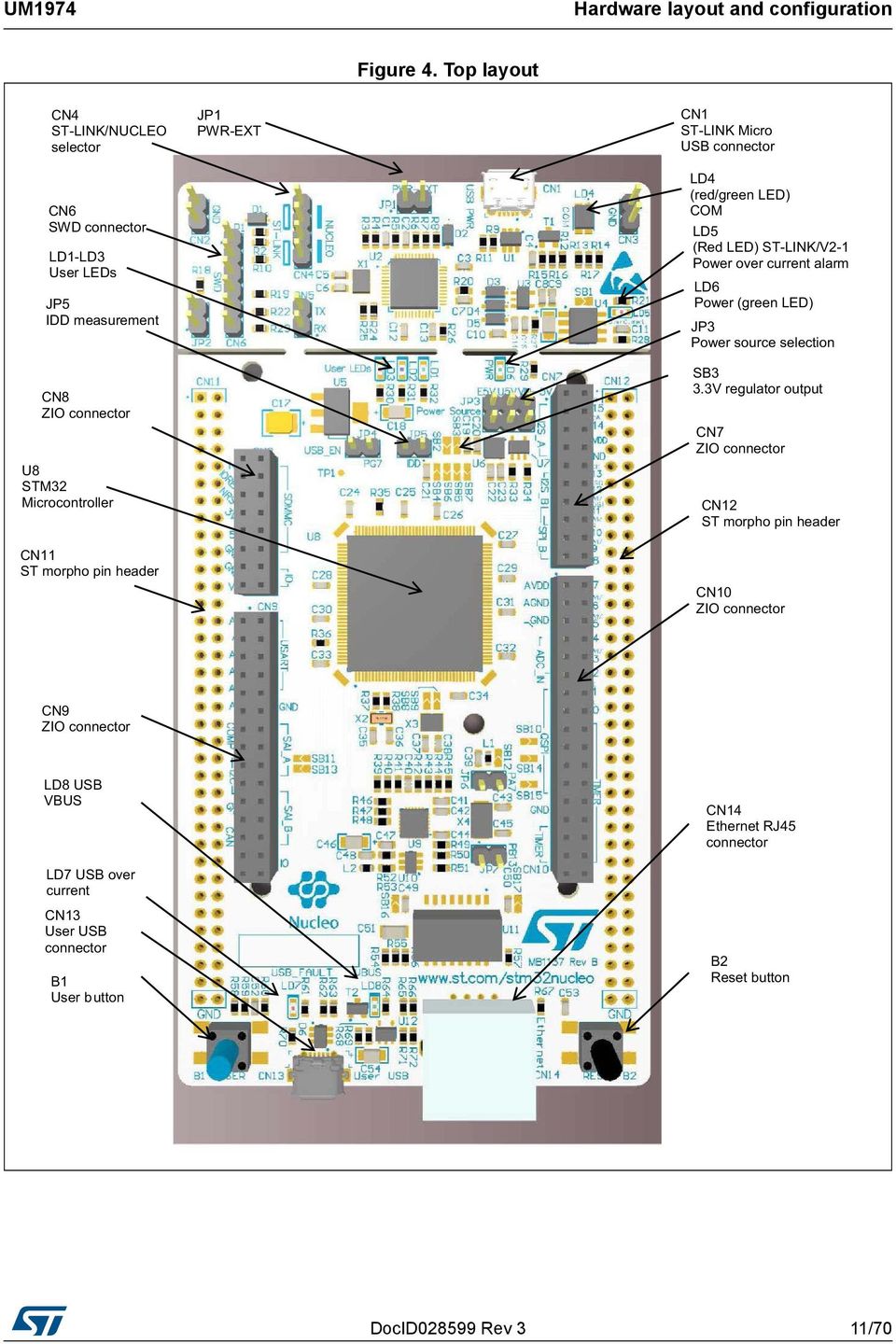
10 Hardware layout and configuration UM Hardware layout and configuration The STM32 Nucleo144 board is designed around the STM32 microcontrollers in a 144pin LQFP package. Figure 3 shows the connections between the STM32 and its peripherals (STLINK/V21, pushbuttons, LEDs, USB, Ethernet, ST Zio connectors and ST morpho headers). Figure 4 and Figure 5 show the location of these features on the STM32 Nucleo144 board. The mechanical dimensions of the board are showed in Figure 6 and Figure 7. Figure 3. Hardware block diagram 10/70 DocID Rev 3

11 UM1974 Hardware layout and configuration Figure 4. Top layout DocID Rev 3 11/70 69
12 Hardware layout and configuration UM1974 Figure 5. Bottom layout 12/70 DocID Rev 3

13 UM1974 Hardware layout and configuration 6.1 Mechanical drawing Figure 6. Nucleo144 board mechanical drawing in millimeter DocID Rev 3 13/70 69

14 Hardware layout and configuration UM1974 Figure 7. Nucleo144 board mechanical drawing in mil 14/70 DocID Rev 3

15 UM1974 Hardware layout and configuration 6.2 Cuttable PCB The STM32 Nucleo144 board is divided into two parts: STLINK and target STM32. The STLINK part of the PCB can be cut out to reduce the board size. In this case the remaining target STM32 part can only be powered by VIN, E5V and 3.3 V on ST morpho connector CN11, or VIN and 3.3 V on ST Zio connector CN8. It is still possible to use the STLINK part to program the STM32, using wires between CN6 and SWD available signals on the ST morpho connector (SWCLK CN11 pin 15, SWDIO CN11 pin 13 and NRST CN11 pin 14). 6.3 Embedded STLINK/V21 The STLINK/V21 programming and debugging tool is integrated in the STM32 Nucleo144 board. The STLINK/V21 makes the STM32 Nucleo144 board mbed enabled. The embedded STLINK/V21 supports only SWD for STM32 devices. For information about debugging and programming features refer to STLINK/V2 incircuit debugger/programmer for STM8 and STM32, User manual (UM1075), which describes in details all the ST LINK/V2 features. The changes versus STLINK/V2 version are listed below. New features supported on STLINK/V21: USB software reenumeration Virtual com port interface on USB Mass storage interface on USB USB power management request for more than 100 ma power on USB Features not supported on STLINK/V21: SWIM interface Minimum supported application voltage limited to 3 V There are two different ways to use the embedded STLINK/V21, depending on the jumper state (see Table 3): Program/debug the STM32 on board Program/debug the STM32 in an external application board, using a cable connected to SWD connector CN6 Table 3. CN4 states of the jumpers Jumper state Both CN4 jumpers ON Both CN4 jumpers OFF Description STLINK/V21 functions enabled for onboard programming (default). See Section STLINK/V21 functions enabled for external CN6 connector (SWD supported). See Section Drivers Before connecting the Nucleo144 board to a Windows 7, Windows 8 or Windows XP PC via USB, a driver for STLINK/V21 must be installed. It can be downloaded from the website. DocID Rev 3 15/70 69

16 Hardware layout and configuration UM1974 In case the STM32 Nucleo144 board is connected to the PC before installing the driver, the PC device manager may report some Nucleo interfaces as Unknown. To recover from this situation, after installing the dedicated driver, the association of Unknown USB devices found on the STM32 Nucleo144 board to this dedicated driver, must be updated in the device manager manually. Note: It is recommended to proceed using USB Composite Device, as shown in Figure 8. Figure 8. USB composite device STLINK/V21 firmware upgrade The STLINK/V21 embeds a firmware upgrade mechanism for insitu upgrade through the USB port. As the firmware may evolve during the lifetime of the STLINK/V21 product (for example new functionalities, bug fixes, support for new microcontroller families), it is recommended to keep the STLINK/V21 firmware up to date before starting to use the STM32 Nucleo144 board. The latest version of this firmware is available from the website Using the STLINK/V21 to program and debug the onboard STM32 To program the onboard STM32, place the two jumpers marked in red on the connector CN4, as shown in Figure 9. The CN6 connector must not be used, since it could disturb the communication with the STM32 microcontroller of the Nucleo144 board. 16/70 DocID Rev 3

17 UM1974 Hardware layout and configuration Figure 9. Connecting the STM32 Nucleo144 board to program the onboard STM32 DocID Rev 3 17/70 69

18 Hardware layout and configuration UM Using STLINK/V21 to program and debug an external STM32 application Note: It is very easy to use the STLINK/V21 to program the STM32 on an external application. Simply remove the two jumpers from CN4, as shown in Figure 10 and connect the application to the CN6 debug connector according to Table 4. SB111 NRST (target STM32 RESET) must be OFF when CN6 pin 5 is used in an external application. Table 4. Debug connector CN6 (SWD) CN6 Designation 1 VDD_TARGET VDD from application 2 SWCLK SWD clock 3 GND Ground 4 SWDIO SWD data input/output 5 NRST RESET of target STM32 6 SWO Reserved 18/70 DocID Rev 3

19 UM1974 Hardware layout and configuration Figure 10. Using STLINK/V21 to program the STM32 on an external application DocID Rev 3 19/70 69

20 Hardware layout and configuration UM Power supply and power selection The power supply is provided either by the host PC through the USB cable or by an external source: VIN (7V12V), E5V (5 V) or +3V3 power supply pins on CN8 or CN11. In case VIN, E5V or +3V3 is used to power the Nucleo144 board, this power source must comply with the standard EN609501: 2006+A11/2009 and must be Safety Extra Low Voltage (SELV) with limited power capability. In case the power supply is +3V3, the STLINK is not powered and cannot be used Power supply input from STLINK/V21 USB connector The STM32 Nucleo144 board and shield can be powered from the STLINK USB connector CN1 (U5V), by placing a jumper between the pins 3 and 4 of JP3, as shown in Table 7: Power related jumper. Note that only the STLINK part is power supplied before the USB enumeration, as the host PC only provides 100 ma to the board at that time. During the USB enumeration, the STM32 Nucleo144 board requires 300 ma of current to the host PC. If the host is able to provide the required power, the targeted STM32 microcontroller is powered and the green LED LD6 is turned ON, thus the STM32 Nucleo144 board and its shield can consume a maximum of 300 ma current, not more. If the host is not able to provide the required current, the targeted STM32 microcontroller and the extension boards are not power supplied. As a consequence the green LED LD6 stays turned OFF. In such case it is mandatory to use an external power supply as explained in the next section. After the USB enumeration succeeds, the STLINK U5V power is enabled, by asserting the PWR_EN pin. This pin is connected to a power switch (ST890), which powers the board. This power switch features also a current limitation to protect the PC in case of shortcircuit on board. If an overcurrent (more than 500 ma) happens on board, the red LED LD5 is lit. JP1 is configured according to the maximum current consumption of the board when powered by USB (U5V). JP1 jumper can be set ON to inform the host PC that the maximum current consumption does not exceed 100 ma (including potential extension board or ST Zio shield). In such condition USB enumeration will always succeed, since no more than 100 ma is requested to the PC. Possible configurations of JP1 are summarized in Table 5. Table 5. JP1 configuration table Jumper state Power supply Allowed current JP1 jumper OFF JP1 jumper ON USB power through CN1 300 ma max 100 ma max JP1 jumper (do not care) VIN, +3V3, +5 V power For current limitation refer to Table 7 Warning: In case the maximum current consumption of the STM32 Nucleo144 board and its shield boards exceed 300 ma, it is mandatory to power the STM32 Nucleo144 board, using an external power supply connected to E5V, VIN or +3V3. Note: In case the board is powered by a USB charger, there is no USB enumeration, so the green LED LD6 stays in OFF state permanently and the target STM32 is not powered. In this 20/70 DocID Rev 3

21 UM1974 Hardware layout and configuration specific case the jumper JP1 has to be set to ON, to allow the board to be powered anyway. But in any cases the current will be limited to 500 ma by U4 (ST890) External power supply inputs The Nucleo144 board and its shield boards can be powered in three different ways from an external power supply, depending on the voltage used. The three power sources are summarized in the Table 6. When STM32 Nucleo144 board is power supplied by VIN or E5V, the jumper configuration must be the following: Jumper JP3 on pin 1 and pin 2 for E5V or jumper JP3 on pin 5 and pin 6 for VIN Jumper JP1 OFF Table 6. External power sources Input power name Connector pins Voltage range Max current Limitation VIN CN8 pin 15 CN11 pin 24 7V to 12V 800mA From 7V to 12V only and input current capability is linked to input voltage: 800 ma input current when VIN=7V 450 ma input current when 7V<VIN<9V 250 ma input current when 9V<VIN<12V E5V CN11 pin V to 5.25V 500mA +3V3 CN8 pin 7 CN11 pin 16 3V to 3.6V Two possibilities: STLINK PCB is cut SB3 and SB111 OFF (STLINK not powered) The 5 V power source is selected by the jumper JP3 as shown in Table 7. DocID Rev 3 21/70 69
22 Hardware layout and configuration UM1974 Table 7. Power related jumper Jumper Description U5V (STLINK VBUS) is used as power source when JP3 is set as shown to the right (Default setting) E5V is used as power source when JP3 is set as shown to the right: JP3 VIN is used as power source when JP3 is set as shown to the right: Using VIN or E5V as an external power supply When powered by VIN or E5V, it is still possible to use the STLINK for programming or debugging only, but it is mandatory to power the board first using VIN or E5V, then to connect the USB cable to the PC. In this way the enumeration will succeed, thanks to the external power source. The following powersequence procedure must be respected: 1. Connect jumper JP3 between pin 1 and pin 2 for E5V or between pin 5 and pin 6 for VIN 2. Check that JP1 is removed 3. Connect the external power source to VIN or E5V 4. Power on the external power supply 7V< VIN < 12V to VIN, or 5 V for E5V 5. Check that the green LED LD6 is turned ON 6. Connect the PC to the USB connector CN1 If this order is not respected, the board may be powered by USB (U5V) first, then by VIN or E5V as the following risks may be encountered: 1. If more than 300 ma current is needed by the board, the PC may be damaged or the current supplied can be limited by the PC. As a consequence the board is not powered correctly ma is requested at enumeration (since JP1 must be OFF) so there is risk that the request is rejected and the enumeration does not succeed if the PC cannot provide such current. Consequently the board is not power supplied (LED LD6 remains OFF). 22/70 DocID Rev 3
23 UM1974 Hardware layout and configuration External power supply input: + 3V3 Using the +3V3 (CN8 pin 7 or CN11 pin 16) directly as power input, can be interesting, in case the 3.3 V is provided by a shield board. In this case, the STLINK is not powered thus the programming and debugging features are not available. When the board is powered with +3V3, two different configurations are possible: STLINK is removed (PCB cut) SB3 (3V3 regulator) and SB111 (NRST) are OFF External power supply output When powered by USB, VIN or E5V, the +5 V (CN8 pin 9 or CN11 pin 18) can be used as output power supply for an ST Zio shield or an extension board. In this case, the maximum current of the power source specified in Table 6: External power sources must be respected. The +3.3 V (CN8 pin 7 or CN11 pin 16) can be used also as power supply output. The current is limited by the maximum current capability of the regulator U6 (500 ma max). 6.5 LEDs User LD1: a green user LED is connected to the STM32 I/O PB0 (SB120 ON and SB119 OFF) or PA5 (SB119 ON and SB120 OFF) corresponding to the ST Zio D13. User LD2: a blue user LED is connected to PB7. User LD3: a red user LED is connected to PB14. These user LEDs are on when the I/O is HIGH value, and are off when the I/O is LOW. LD4 COM: the tricolor LED LD4 (green, orange, red) provides information about STLINK communication status. LD4 default color is red. LD4 turns to green to indicate that communication is in progress between the PC and the STLINK/V21, with the following setup: Slow blinking red/off: at poweron before USB initialization Fast blinking red/off: after the first correct communication between PC and STLINK/V21 (enumeration) Red LED on: when the initialization between the PC and STLINK/V21 is complete Green LED on: after a successful target communication initialization Blinking red/green: during communication with target Green on: communication finished and successful Orange on: communication failure LD5 USB power fault: LD5 indicates that the board power consumption on USB exceeds 500 ma, consequently the user must power the board using an external power supply. LD6 PWR: the green LED indicates that the STM32 part is powered and +5 V power is available on CN8 pin 9 and CN11 pin 18. LD7 and LD8 USB FS: refer to Section 6.10: USB FS OTG or device. DocID Rev 3 23/70 69
24 Hardware layout and configuration UM Pushbuttons B1 USER: the user button is connected to the I/O PC13 by default (Tamper support, SB173 ON and SB180 OFF) or PA0 (Wakeup support, SB180 ON and SB173 OFF) of the STM32 microcontroller. B2 RESET: this pushbutton is connected to NRST and is used to RESET the STM32 microcontroller. 6.7 JP5 (IDD) Jumper JP5, labeled IDD, is used to measure the STM32 microcontroller consumption by removing the jumper and by connecting an ammeter: JP5 ON: STM32 is powered (default) JP5 OFF: an ammeter must be connected to measure the STM32 current. If there is no ammeter, the STM32 is not powered To get a correct current consumption, the Ethernet PHY should be set in powerdown mode or SB13 should be removed. Refer to Section 6.11: Ethernet for details. 6.8 OSC clock OSC clock supply There are four ways to configure the pins corresponding to the external highspeed clock (HSE): MCO from STLINK (Default): MCO output of STLINK is used as input clock. This frequency cannot be changed, it is fixed at 8 MHz and connected to the PF0/PH0OSC_IN of STM32 microcontroller. The configuration must be: SB148 OFF SB112 and SB149 ON SB8 and SB9 OFF HSE onboard oscillator from X3 crystal (not provided): for typical frequencies and its capacitors and resistors, refer to the STM32 microcontroller datasheet and to the Oscillator design guide for STM8S, STM8A and STM32 microcontrollers Application note (AN2867) for the oscillator design guide. The X3 crystal has the following characteristics: 8 MHz, 8 pf, 20 ppm. It is recommended to use NX3225GD8.000M EXS00ACG04874 manufactured by NIHON DEMPA KOGYO CO., LTD. The configuration must be: SB148 and SB163 OFF SB8 and SB9 soldered C37 and C38 soldered with 4.3 pf capacitors SB112 and SB149 OFF Oscillator from external PF0/PH0: from an external oscillator through the pin 29 of the CN11 connector. The configuration must be: SB148 ON SB112 and SB149 OFF SB8 and SB9 removed 24/70 DocID Rev 3
25 UM1974 Hardware layout and configuration HSE not used: PF0/PH1 and PF1/PH1 are used as GPIOs instead of as clock. The configuration must be: SB148 and SB163 ON SB112 and SB149 (MCO) OFF SB8 and SB9 removed OSC 32 KHz clock supply Note: There are three ways to configure the pins corresponding to lowspeed clock (LSE): Onboard oscillator (Default): X2 crystal. Refer to the Oscillator design guide for STM8S, STM8A and STM32 microcontrollers Application note (AN2867) for oscillator design guide for STM32 microcontrollers. It is recommended to use NX3214SA KHZEXS00AMU00525 ( KHz, 6 pf load capacitance, 200 ppm) from Nihon Dempa Kogyo CO, LTD. For STM32F0 and STM32F3 series it is recommended to use the lowdrivemode configuration of the LSE (lowdrive capability in LSEDRV register), due to the 6 pf load capacitance of the crystal on the board. Oscillator from external PC14: from external oscillator through the pin 25 of CN11 connector. The configuration must be: SB144 and SB145 ON R37 and R38 removed LSE not used: PC14 and PC15 are used as GPIOs instead of lowspeed clock. The configuration must be: SB144 and SB145 ON R37 and R38 removed 6.9 USART communication The USART3 interface available on PD8 and PD9 of the STM32 can be connected to ST LINK or to ST morpho connector. The choice can be changed by setting the related solder bridges. By default the USART3 communication between the target STM32 and the ST LINK is enabled, to support the virtual COM port for the mbed (SB5 and SB6 ON). Table 8. USART3 pins name Function Virtual COM port (default configuration) ST morpho connection PD8 USART3 TX SB5 ON and SB7 OFF SB5 OFF and SB7 ON PD9 USART3 RX SB6 ON and SB4 OFF SB6 OFF and SB4 ON DocID Rev 3 25/70 69
26 Hardware layout and configuration UM USB FS OTG or device The STM32 Nucleo144 board supports USB OTG or devicefullspeed communication via a USB MicroAB connector (CN13) and USB power switch (U12) connected to VBUS. Note: The NUCLEOF303ZE board supports the USB device FS only. All the other STM32 Nucleo144 boards support the USB OTG. Warning: USB Micro AB connector (CN13) cannot power the Nucleo 144 board. In order to avoid damaging the STM32, it is mandatory to power the Nucleo144 before connecting a USB cable on CN13. Otherwise there is a risk of current injection on STM32 I/Os. Note: A green LED LD8 will be lit in one of these cases: Power switch (U12) is ON and STM32 Nucleo144 board works as a USB host VBUS is powered by another USB host when the STM32 Nucleo144 board works as a USB device. The red LED LD7 will be lit if overcurrent occurs when +5 V is enabled on VBUS in USB host mode. 1. It is recommended to power Nucleo144 board by an external power supply when using USB OTG or host function. 2. JP4 must be closed when using USB OTG FS. The NUCLEOF303ZE board does not support the OTG function but it supports USB 2.0 fullspeed, devicemode communication via a USB MicroAB connector (CN13). USB disconnection simulation is implemented by PG6, which controls 1.5 K pullup resistor (R70) on USB D+ line. Detection of 5 V power on USB connector (CN13) is available on PG7 thanks to a bridge between R62 and R63 resistors. Table 9. USB pin configuration name Function Configuration when using USB connector Configuration when using ST morpho connector Remark PA8 USB SOF Test point TP1 PA9 USB VBUS SB127 ON SB127 OFF Not on NUCLEOF303ZE PA10 USB ID SB125 ON SB125 OFF Not on NUCLEOF303ZE PA11 USB DM SB133 ON SB133 OFF PA12 USB DP SB132 ON SB132 OFF PG6 USB GPIO OUT NUCLEOF303ZE: SB186 ON, SB187 OFF All others Nucleo: SB186 OFF, SB187 ON NUCLEOF303ZE: SB186 OFF All others Nucleo: SB187 OFF NUCLEOF303ZE: D+ pull up control All others Nucleo: USB power switch control 26/70 DocID Rev 3
27 UM1974 Hardware layout and configuration Table 9. USB pins configuration (continued) name Function Configuration when using USB connector Configuration when using ST morpho connector Remark NUCLEOF303ZE: JP4 ON, SB184 ON, SB185 OFF NUCLEOF303ZE: VBUS detection PG7 USB GPIO IN All other Nucleo boards: JP4 ON, SB184 OFF SB185 ON JP4 OFF All other Nucleo boards: USB overcurrent alarm Note: ESD protection part ESDA6V1BC6 is implemented on USB port because all USB pins on STM32 can be used as VBUS or GPIO on the STM32 Nucleo144 board. If these pins are dedicated to USB port only, the USBLC64SC6 protection part is more suitable to protect USB port. If USB pin ID is not used, USBLC62SC6 can be used Ethernet Note: The STM32 Nucleo144 board supports 10 M/100 M Ethernet communication by a PHY LAN8742ACZTR (U9) and RJ45 connector (CN14). Ethernet PHY is connected to the STM32 microcontroller via the RMII interface. 50 MHz clock for the STM32 microcontroller is generated by the PHY RMII_REF_CLK. 1. NUCLEOF303ZE, NUCLEOF412ZG and NUCLEOF446ZE do not support the Ethernet function. 2. JP6 and JP7 must be closed when using Ethernet. 3. Ethernet PHY LAN8742A should be set in powerdown mode (Ethernet PHY ref clock will be turned off in this mode) to achieve the expected lowpower mode current. This is done by configuring Ethernet PHY LAN8742A Basic Control Register (at address 0x00) Bit 11 (Power Down) to '1'. SB13 can be also removed to get the same effect. Table 10. Ethernet pins name Function Conflict with ST Zio connector signal Configuration when using Ethernet Configuration when using ST Zio or ST morpho connector PA1 RMII Reference Clock SB13 ON SB13 OFF PA2 RMII MDIO SB160 ON SB160 OFF PC1 RMII MDC SB164 ON SB164 OFF PA7 RMII RX Data Valid D11 JP6 ON JP6 OFF PC4 RMII RXD0 SB178 ON SB178 OFF PC5 RMII RXD1 SB181 ON SB181 OFF PG11 RMII TX Enable SB183 ON SB183 OFF DocID Rev 3 27/70 69
28 Hardware layout and configuration UM1974 Table 10. Ethernet pins (continued) name Function Conflict with ST Zio connector signal Configuration when using Ethernet Configuration when using ST Zio or ST morpho connector PG13 RXII TXD0 SB182 ON SB182 OFF PB13 RMII TXD1 I2S_A_CK JP7 ON JP7 OFF 6.12 Solder bridges SBxx can be found on top layer and SB1xx can be found on bottom layer. Table 11. Solder bridges Bridge State (1) Description SB2 (+3V3_PER) SB3 (3.3V) SB7, SB4 (GPIO) SB5, SB6 (STLINKUSART) SB12 (VDDA) SB101,103,105,108 (DEFAULT) SB102,104,106,109 (RESERVED) SB107 (STM_RST) SB110 (SWO) ON OFF Peripheral power +3V3_PER is connected to +3V3. Peripheral power +3V3_PER is not connected. ON Output of voltage regulator LD39050PU33R is connected to 3.3 V. OFF ON OFF ON OFF ON OFF ON OFF OFF ON ON OFF Output of voltage regulator LD39050PU33R is not connected. PD8 and PD9 on STM32 are connected to ST morpho connectors CN11 and CN12. If these pins are used on ST morpho connectors, SB5 and SB6 should be OFF. PD8 and PD9 on STM32 are disconnected to ST morpho connectors CN11 and CN12. PA2 and PA3 on STLINK STM32F103CBT6 are connected to PD8 and PD9 to enable Virtual Com Port for mbed support. Thus PD8 and PD9 on ST morpho connectors cannot be used. PA2 and PA3 on STLINK STM32F103CBT6 are disconnected to PD8 and PD9 on STM32. VDDA & VREF+ on STM32 MCU is connected to VDD. VDDA & VREF+ on STM32 MCU is not connected to VDD and can be provided from pin 6 of CN7 (Used for external VREF+ provided by Arduino shield). Reserved, do not modify. Reserved, do not modify. No incidence on STLINK STM32F103CBT6 NRST signal. STLINK STM32F103CBT6 NRST signal is connected to GND (STLINK reset to reduce power consumption). SWO signal of the STM32 (PB3) is connected to STLINK SWO input. SWO signal of STM32 is not connected. 28/70 DocID Rev 3
29 UM1974 Hardware layout and configuration Table 11. Solder bridges (continued) Bridge State (1) Description SB111 (NRST) SB113, SB114 (IOREF) SB116 (SDMMC_D0), SB117 (SDMMC_D1) SB120, SB119 (LD1LED) SB139 (LD2LED) SB118 (LD3LED) SB121, SB122 (D11) SB144,145 (X2 crystal) SB148 (PF0/PH0), SB163 (PF1/PH1) (Main clock) ON OFF Board RESET signal (NRST) is connected to STLINK reset control I/O (T_NRST). Board RESET signal (NRST) is not connected to STLINK reset control I/O (T_NRST). OFF, ON IOREF is connected to +3V3. ON, OFF ON OFF IOREF is connected to +3V3_PER. These pins are connected to ST morpho connector CN12. These pins are disconnected from ST morpho connector CN12 to avoid stub of SDMMC data signals on PCB. ON, Green user LED LD1 is connected to PB0. OFF OFF,ON Green user LED LD1 is connected to D13 of Arduino signal (PA5). OFF, OFF ON,ON ON OFF ON OFF ON, OFF OFF,ON OFF ON OFF, ON OFF, OFF ON, ON Green user LED LD1 is not connected. Forbidden Blue user LED LD2 is connected to PB7. Blue user LED LD2 is not connected. Red user LED LD3 is connected to PB14. Red user LED LD3 is not connected. D11 ( 14 of CN7) is connected to STM32 PA7 (SPI_A_MOSI/TIM_E_PWM1). D11 ( 14 of CN7) is connected to STM32 PB5 (SPI_A_MOSI/TIM_D_PWM2). PC14, PC15 are not connected to ST morpho connector CN11. (X2 used to generate 32 KHz clock). PC14, PC15 are connected to ST morpho connector CN11. (R37 and R38 should be removed). PF0/PH0 is not connected to ST morpho PF1/PH1 is connected to ST morpho connector CN11 (MCO is used as main clock for STM32 on PF0/PH0). PF0/PH0, PF1/PH1 are not connected to ST morpho connector CN11 (X3, C37, C38, SB8 and SB9 provide a clock as shown in Section Appendix A: Electrical schematics. In this case SB149 must be removed). PF0/PH0 and PF1/PH1 are connected to ST morpho connector CN11. (SB8, SB9 and SB149 must be removed). DocID Rev 3 29/70 69
30 Hardware layout and configuration UM1974 Table 11. Solder bridges (continued) Bridge State (1) Description SB112, SB149 (MCO) SB8, SB9 (external 8M crystal) SB156 (VBAT) SB173, SB180 (B1USER) SB179 (PA0) SB142, SB152 (BOOT1, Only for F2 and F4 series) SB147,SB157 (A4 and A5) Or SB167, SB171 (only for NUCLEOF303ZE) Or SB140,SB150 (only for NUCLEOF412ZG) SB138,SB143 (I2C on A4 and A5) RMII Signals SB13 (PA1), SB164 (PC1), SB160 (PA2), SB178 (PC4), SB181 (PC5), SB182 (PG13), SB183 (PG11) SB177 (Ethernet nrst) ON OFF MCO of STLINK (STM32F103CBT6) is connected to PF0/PH0 of STM32. MCO of STLINK (STM32F103CBT6) is not connected to PF0/PH0 of STM32. OFF PF0/PH0 and PF1/PH1 are not connected to external 8 MHz crystal X3. ON PF0/PH0 and PF1/PH1 are connected to external 8 MHz crystal X3. ON OFF ON, OFF OFF,ON OFF,OF F ON OFF OFF, OFF ON, OFF OFF,ON ON, ON ON OFF OFF ON ON OFF ON OFF VBAT pin of STM32 is connected to VDD. VBAT pin of STM32 is not connected to VDD. B1 pushbutton is connected to PC13. B1 pushbutton is connected to PA0 (Set SB179 OFF if ST Zio connector is used). B1 pushbutton is not connected. PA0 is connected to ST Zio connector ( 29 of CN10) PA0 is not connected to ST Zio connector ( 29 of CN10) BOOT1 (PB2) function is not used. BOOT1 (PB2) is pulled up. BOOT1 (PB2) is pulled down. Forbidden ADC_IN are connected to A4 and A5 (pin 9 and 11) on ST Zio connector CN9. Thus SB138 and SB143 must be OFF. ADC_IN are not connected to A4 and A5 (pin 9 and 11) on ST Zio connector CN9. PB9 and PB8 (I2C) are not connected to A4 and A5 (pin 9 and 11) on ST Zio connector CN9. PB9 and PB8 (I2C) are connected to A4 and A5 (pin 9 and 11) on ST Zio connector CN9. Thus SB147 and SB157 (or SB167 and SB171 for NUCLEOF303ZE or SB140 and SB150 for NUCLEOF412ZG) must be OFF. These pins are used as RMII signals and connected to Ethernet PHY. These port must not be used on ST morpho or ST Zio connectors. These pins are used as GPIOs on ST morpho connectors and not connected to Ethernet PHY. NRST of STM32 is connected to Ethernet PHY (U9). NRST of STM32 is not connected to Ethernet PHY (U9). 30/70 DocID Rev 3
31 UM1974 Hardware layout and configuration Table 11. Solder bridges (continued) Bridge State (1) Description USB signals: SB186 (NUCLEOF303ZE) or SB187 (all others Nucleo) (PG6) SB132 (PA12), SB133 (PA11) ON OFF ON OFF PG6 is connected to R70 to control USB D+ pull up (NUCLEOF303ZE) PG6 is connected to 5V switch Enable (U12) to control VBUS or CN13 (All other NUCLEO). This pin is used as GPIO on ST morpho connectors. These pins are used as D+ and D on USB connector CN13. These pins are used as GPIOs on ST morpho connectors. 1. Default SBx state is shown in bold. All the other solder bridges present on the STM32 Nucleo144 board are used to configure several I/Os and power supply pins for compatibility of features and pinout with the target STM32 supported. The STM32 Nucleo144 board is delivered with the solder bridges configured according to the target STM32 supported. DocID Rev 3 31/70 69
32 Hardware layout and configuration UM Extension connectors For each STM32 Nucleo144 board the following figures show the signals connected by default to the ST Zio connectors (CN7, CN8, CN9, CN10), including the support for Arduino Uno Revision 3. Figure 11. NUCLEOF767ZI, NUCLEOF746ZG, NUCLEOF429ZI, NUCLEOF207ZG 32/70 DocID Rev 3
33 DocID Rev 3 33/70 UM1974 Hardware layout and configuration 69 Figure 12. NUCLEOF303ZE
34 Hardware layout and configuration UM /70 DocID Rev 3 Figure 13. NUCLEOF412ZG
35 UM1974 Hardware layout and configuration Figure 14. NUCLEOF446ZE 6.14 ST Zio connectors Caution:1 Caution:2 CN7, CN8, CN9 and CN10 are female on top side and male on bottom side connectors. They include support for Arduino Uno Revision 3. Most shields designed for Arduino Uno can fit to the STM32 Nucleo144 board. To cope with Arduino Uno Revision 3, apply the following modifications: SB138 and SB143 should be ON SB140/147/150/157/167/171 should be OFF to connect I 2 C on A4 (pin 5) and A5 (pin 6 of CN9). The I/Os of STM32 are 3.3 V compatible while on Arduino Uno they are 5 V compatible. SB12 should be removed before implementing Arduino shield with VREF+ power being provided on CN7 pin 6. Refer to Table 11: Solder bridges for details on SB12. Table 12 to Table 16 show the pin assignment for each STM32 microcontroller on the ST Zio connectors. DocID Rev 3 35/70 69
36 Hardware layout and configuration UM1974 Table 12. NUCLEOF746ZG and NUCLEOF767ZI pin assignments Connector name Signal name STM32 pin Function Remark Left connectors CN8 CN9 1 NC NC 3 IOREF IOREF 3.3V Ref 5 RESET RESET NRST RESET 7 +3V3 +3V3 3.3V input/output 9 +5V +5V 5V output 11 GND GND Ground 13 GND GND Ground 15 VIN VIN Power input 2 D43 SDMMC_D0 PC8 4 D44 SDMMC_D1/ I2S_A_CKIN PC9 6 D45 SDMMC_D2 PC10 8 D46 SDMMC_D3 PC11 10 D47 SDMMC_CK PC12 12 D48 SDMMC_CMD PD2 14 D49 I/O PG2 16 D50 I/O PG3 SDMMC/I2S_A 1 A0 ADC PA3 ADC123_IN3 3 A1 ADC PC0 ADC123_IN10 5 A2 ADC PC3 ADC123_IN13 7 A3 ADC PF3 ADC3_IN9 9 A4 ADC 11 A5 ADC PF5 or PB9 (1) PF10 or PB8 (1) I/O ADC3_IN15 (PF5) or I2C1_SDA (PB9) ADC3_IN8 (PF10) or I2C1_SCL (PB8) 13 D72 NC 15 D71 I/O PA7 (2) I/O 17 D70 I2C_B_SMBA PF2 19 D69 I2C_B_SCL PF1 21 D68 I2C_B_SDA PF0 I2C_2 23 GND GND Ground 25 D67 CAN_RX PD0 CAN_1 Arduino support Arduino support 36/70 DocID Rev 3
37 UM1974 Hardware layout and configuration Table 12. NUCLEOF746ZG and NUCLEOF767ZI pin assignments (continued) Connector name Signal name STM32 pin Function Remark CN9 CN7 27 D66 CAN_TX PD1 CAN_1 29 D65 I/O PG0 I/O 2 D51 USART_B_SCLK PD7 4 D52 USART_B_RX PD6 6 D53 USART_B_TX PD5 8 D54 USART_B_RTS PD4 10 D55 USART_B_CTS PD3 USART_2 12 GND GND Ground 14 D56 SAI_A_MCLK PE2 (3) 16 D57 SAI_A_FS PE4 18 D58 SAI_A_SCK PE5 20 D59 SAI_A_SD PE6 22 D60 SAI_B_SD PE3 24 D61 SAI_B_SCK PF8 26 D62 SAI_B_MCLK PF7 28 D63 SAI_B_FS PF9 SAI_1_A SAI_1_B 30 D64 I/O PG1 I/O Right Connectors 1 D16 I2S_A_MCK PC6 3 D17 I2S_A_SD PB15 5 D18 I2S_A_CK PB13 (4) 7 D19 I2S_A_WS PB12 9 D20 I2S_B_WS PA15 11 D21 I2S_B_MCK PC7 13 D22 I2S_B_SD/ SPI_B_MOSI PB5 15 D23 I2S_B_CK/ SPI_B_SCK PB3 17 D24 SPI_B_NSS PA4 19 D25 SPI_B_MISO PB4 I2S_2 I2S_3 / SPI3 2 D15 I2C_A_SCL PB8 I2C1_SCL 4 D14 I2C_A_SDA PB9 I2C1_SDA 6 AREF AREF AVDD/VREF+ 8 GND GND Ground Arduino support DocID Rev 3 37/70 69
38 Hardware layout and configuration UM1974 Table 12. NUCLEOF746ZG and NUCLEOF767ZI pin assignments (continued) Connector name Signal name STM32 pin Function Remark CN7 CN10 10 D13 SPI_A_SCK PA5 SPI1_SCK 12 D12 SPI_A_MISO PA6 SPI1_MISO 14 D11 16 D10 SPI_A_MOSI/ TIM_E_PWM1 SPI_A_CS/ TIM_B_PWM3 PA7 (1)(2) or PB5 (1) PD14 SPI1_MOSI/ TIM14_CH1 SPI1_CS/ TIM4_CH3 18 D9 TIMER_B_PWM2 PD15 TIM4_CH4 20 D8 I/O PF12 1 AVDD AVDD Analog VDD 3 AGND AGND Analog Ground 5 GND GND Ground 7 A6 ADC_A_IN PB1 ADC12_IN9 9 A7 ADC_B_IN PC2 ADC123_IN12 11 A8 ADC_C_IN PF4 ADC3_IN14 13 D26 QSPI_CS PB6 QSPI_BK1 15 D27 QSPI_CLK PB2 QSPI_CLK 17 GND GND Ground 19 D28 QSPI_BK1_IO3 PD13 21 D29 QSPI_BK1_IO1 PD12 23 D30 QSPI_BK1_IO0 PD11 25 D31 QSPI_BK1_IO2 PE2 (3) QSPI_BK1 27 GND GND Ground 29 D32 TIMER_C_PWM1 PA0 TIM2_CH1 31 D33 TIMER_D_PWM1 PB0 TIM3_CH3 33 D34 TIMER_B_ETR PE0 TIM4_ETR 2 D7 I/O PF13 4 D6 TIMER_A_PWM1 PE9 TIM1_CH1 6 D5 TIMER_A_PWM2 PE11 TIM1_CH2 8 D4 I/O PF14 10 D3 TIMER_A_PWM3 PE13 TIM1_CH3 12 D2 I/O PF15 14 D1 USART_A_TX PG14 16 D0 USART_A_RX PG9 USART6 18 D42 TIMER_A_PWM1N PE8 TIM1_CH1N 20 D41 TIMER_A_ETR PE7 TIM1_ETR Arduino support 38/70 DocID Rev 3
39 UM1974 Hardware layout and configuration Table 12. NUCLEOF746ZG and NUCLEOF767ZI pin assignments (continued) Connector name Signal name STM32 pin Function Remark CN10 22 GND GND Ground 24 D40 TIMER_A_PWM2N PE10 TIM1_CH2N 26 D39 TIMER_A_PWM3N PE12 TIM1_CH3N 28 D38 I/O PE14 I/O 30 D37 TIMER_A_BKIN1 PE15 TIM1_BKIN1 32 D36 TIMER_C_PWM2 PB10 TIM2_CH3 34 D35 TIMER_C_PWM3 PB11 TIM2_CH4 1. For more details refer to Table 11: Solder bridges. 2. PA7 is used as D11 and connected to CN7 pin 14 by default, if JP6 is ON, it is also connected to both Ethernet PHY as RMII_DV and CN9 pin 15. In this case only one function of the Ethernet or D11 must be used. 3. PE2 is connected to both CN9 pin 14 (SAI_A_MCLK) and CN10 pin 25 (QSPI_BK1_IO2). Only one function must be used at one time. 4. PB13 is used as I2S_A_CK and connected to CN7 pin 5 by default, if JP7 is ON, it is also connected to Ethernet PHY as RMII_TXD1. In this case only one function of the Ethernet or I2S_A must be used. DocID Rev 3 39/70 69
40 Hardware layout and configuration UM1974 Table 13. NUCLEOF446ZE pin assignments Connector name Signal name STM32 pin Function Remark CN8 CN9 Left connectors 1 NC NC 3 IOREF IOREF 3.3V Ref 5 RESET RESET NRST RESET 7 +3V3 +3V3 3.3V input/output 9 +5V +5V 5V output 11 GND GND Ground 13 GND GND Ground 15 VIN VIN Power input 2 D43 SDMMC_D0 PC8 4 D44 SDMMC_D1/ I2S_A_CKIN PC9 6 D45 SDMMC_D2 PC10 8 D46 SDMMC_D3 PC11 10 D47 SDMMC_CK PC12 12 D48 SDMMC_CMD PD2 14 D49 I/O PG2 16 D50 I/O PG3 SDMMC/I2S_A 1 A0 ADC PA3 ADC123_IN3 3 A1 ADC PC0 ADC123_IN10 5 A2 ADC PC3 ADC123_IN13 7 A3 ADC PF3 ADC3_IN9 9 A4 ADC 11 A5 ADC PF5 or PB9 (1) PF10 or PB8 (1) I/O ADC3_IN15 (PF5) or I2C1_SDA (PB9) ADC3_IN8 (PF10) or I2C1_SCL (PB8) 13 D72 NC 15 D71 NC 17 D70 I2C_B_SMBA PF2 19 D69 I2C_B_SCL PF1 21 D68 I2C_B_SDA PF0 I2C_2 23 GND GND Ground 25 D67 CAN_RX PD0 CAN_1 Arduino support Arduino support 40/70 DocID Rev 3
41 UM1974 Hardware layout and configuration Table 13. NUCLEOF446ZE pin assignments (continued) Connector name Signal name STM32 pin Function Remark CN9 CN7 27 D66 CAN_TX PD1 CAN_1 29 D65 I/O PG0 I/O 2 D51 USART_B_SCLK PD7 4 D52 USART_B_RX PD6 6 D53 USART_B_TX PD5 8 D54 USART_B_RTS PD4 10 D55 USART_B_CTS PD3 USART_2 12 GND GND Ground 14 D56 SAI_A_MCLK PE2 (2) 16 D57 SAI_A_FS PE4 18 D58 SAI_A_SCK PE5 20 D59 SAI_A_SD PE6 22 D60 SAI_B_SD PE3 24 D61 SAI_B_SCK PF8 26 D62 SAI_B_MCLK PF7 28 D63 SAI_B_FS PF9 SAI_1_A SAI_1_B 30 D64 I/O PG1 I/O Right Connectors 1 D16 I2S_A_MCK PC6 3 D17 I2S_A_SD PB15 3 D17 I2S_A_SD PB15 5 D18 I2S_A_CK PB13 7 D19 I2S_A_WS PB12 9 D20 I2S_B_WS PA15 11 D21 I2S_B_MCK PC7 13 D22 I2S_B_SD/ SPI_B_MOSI PB5 15 D23 I2S_B_CK/ SPI_B_SCK PB3 17 D24 SPI_B_NSS PA4 19 D25 SPI_B_MISO PB4 I2S_2 I2S_3 / SPI3 2 D15 I2C_A_SCL PB8 I2C1_SCL 4 D14 I2C_A_SDA PB9 I2C1_SDA 6 AREF AREF AVDD/VREF+ 8 GND GND Ground Arduino support DocID Rev 3 41/70 69
42 Hardware layout and configuration UM1974 Table 13. NUCLEOF446ZE pin assignments (continued) Connector name Signal name STM32 pin Function Remark CN7 CN10 10 D13 SPI_A_SCK PA5 SPI1_SCK 12 D12 SPI_A_MISO PA6 SPI1_MISO 14 D11 16 D10 SPI_A_MOSI/ TIM_E_PWM1 SPI_A_CS/ TIM_B_PWM3 PA7 (1) or PB5 (1) PD14 SPI1_MOSI/ TIM14_CH1 SPI1_CS/ TIM4_CH3 18 D9 TIMER_B_PWM2 PD15 TIM4_CH4 20 D8 I/O PF12 1 AVDD AVDD Analog VDD 3 AGND AGND Analog Ground 5 GND GND Ground 7 A6 ADC_A_IN PB1 ADC12_IN9 9 A7 ADC_B_IN PC2 ADC123_IN12 11 A8 ADC_C_IN PF4 ADC3_IN14 13 D26 QSPI_CS PB6 QSPI_BK1 15 D27 QSPI_CLK PB2 QSPI_CLK 17 GND GND Ground 19 D28 QSPI_BK1_IO3 PD13 QSPI_BK1 21 D29 QSPI_BK1_IO1 PD12 23 D30 QSPI_BK1_IO0 PD11 25 D31 QSPI_BK1_IO2 PE2 (2) 27 GND GND Ground 29 D32 TIMER_C_PWM1 PA0 TIM2_CH1 31 D33 TIMER_D_PWM1 PB0 TIM3_CH3 33 D34 TIMER_B_ETR PE0 TIM4_ETR 2 D7 I/O PF13 4 D6 TIMER_A_PWM1 PE9 TIM1_CH1 6 D5 TIMER_A_PWM2 PE11 TIM1_CH2 8 D4 I/O PF14 10 D3 TIMER_A_PWM3 PE13 TIM1_CH3 12 D2 I/O PF15 14 D1 USART_A_TX PG14 16 D0 USART_A_RX PG9 USART6 Arduino support Arduino support 42/70 DocID Rev 3
43 UM1974 Hardware layout and configuration Table 13. NUCLEOF446ZE pin assignments (continued) Connector name Signal name STM32 pin Function Remark CN10 18 D42 TIMER_A_PWM1N PE8 TIM1_CH1N 20 D41 TIMER_A_ETR PE7 TIM1_ETR 22 GND GND Ground 24 D40 TIMER_A_PWM2N PE10 TIM1_CH2N 26 D39 TIMER_A_PWM3N PE12 TIM1_CH3N 28 D38 I/O PE14 I/O 30 D37 TIMER_A_BKIN1 PE15 TIM1_BKIN1 32 D36 TIMER_C_PWM2 PB10 TIM2_CH3 34 D35 TIMER_C_PWM3 PB11 TIM2_CH4 1. For more details refer to Table 11: Solder bridges. 2. PE2 is connected to both CN9 pin 14 (SAI_A_MCLK) and CN10 pin 25 (QSPI_BK1_IO2). Only one function must be used at one time. DocID Rev 3 43/70 69
44 Hardware layout and configuration UM1974 Table 14. NUCLEOF303ZE pin assignments Connector name Signal name STM32 pin Function Remark CN8 CN9 Left connectors 1 NC NC 3 IOREF IOREF 3.3V Ref 5 RESET RESET NRST RESET 7 +3V3 +3V3 3.3V input/output 9 +5V +5V 5V output 11 GND GND Ground 13 GND GND Ground 15 VIN VIN Power input 2 D43 I/O PC8 I/O 4 D44 I2S_A_CKIN PC9 I2S_A 6 D45 I/O PC10 8 D46 I/O PC11 10 D47 I/O PC12 12 D48 I/O PD2 14 D49 I/O PG2 16 D50 I/O PG3 1 A0 ADC PA3 ADC1_IN4 3 A1 ADC PC0 ADC12_IN6 5 A2 ADC PC3 ADC12_IN9 7 A3 ADC PD11 ADC34_IN8 9 A4 ADC 11 A5 ADC PD12 or PB9 (1) PD13 or PB8 (1) I/O ADC34_IN9 (PD12) or I2C1_SDA (PB9) ADC34_IN10 (PD13) or I2C1_SCL (PB8) 13 D72 COMP1_INP PA1 COMP 15 D71 COMP2_INP PA7 (2) 17 D70 I2C_B_SMBA PA8 19 D69 I2C_B_SCL PA9 21 D68 I2C_B_SDA PA10 I2C_2 23 GND GND Ground 25 D67 CAN_RX PD0 27 D66 CAN_TX PD1 CAN_1 Arduino support Arduino support 44/70 DocID Rev 3
45 UM1974 Hardware layout and configuration Table 14. NUCLEOF303ZE pin assignments (continued) Connector name Signal name STM32 pin Function Remark CN9 CN7 29 D65 I/O PG0 I/O 2 D51 USART_B_SCLK PD7 4 D52 USART_B_RX PD6 6 D53 USART_B_TX PD5 8 D54 USART_B_RTS PD4 10 D55 USART_B_CTS PD3 USART_2 12 GND GND Ground 14 D56 I/O PE2 (3) 16 D57 I/O PE4 18 D58 I/O PE5 20 D59 I/O PE6 22 D60 I/O PE3 24 D61 I/O PF8 26 D62 I/O PF7 28 D63 I/O PF9 30 D64 I/O PG1 Right Connectors 1 D16 I2S_A_MCK PC6 I2S_2 3 D17 I2S_A_SD PB15 5 D18 I2S_A_CK PB13 7 D19 I2S_A_WS PB12 9 D20 I2S_B_WS PA15 11 D21 I2S_B_MCK PC7 13 D22 I2S_B_SD/ SPI_B_MOSI PB5 15 D23 I2S_B_CK/ SPI_B_SCK PB3 17 D24 SPI_B_NSS PA4 19 D25 SPI_B_MISO PB4 I/O I2S_3 / SPI3 2 D15 I2C_A_SCL PB8 I2C1_SCL 4 D14 I2C_A_SDA PB9 I2C1_SDA 6 AREF AREF AVDD/VREF+ 8 GND GND Ground 10 D13 SPI_A_SCK PA5 SPI1_SCK 12 D12 SPI_A_MISO PA6 SPI1_MISO Arduino support DocID Rev 3 45/70 69
46 Hardware layout and configuration UM1974 Connector CN7 CN10 Table 14. NUCLEOF303ZE pin assignments (continued) name 14 D11 16 D10 Signal name SPI_A_MOSI/ TIM_E_PWM1 SPI_A_CS/ TIM_B_PWM3 STM32 pin PA7 (1)(2) or PB5 (1) PD14 SPI1_MOSI/ TIM14_CH1 SPI1_CS/ TIM4_CH3 18 D9 TIMER_B_PWM2 PD15 TIM4_CH4 20 D8 I/O PF12 1 AVDD AVDD Analog VDD 3 AGND AGND Analog Ground 5 GND GND Ground 7 A6 ADC_A_IN PB1 ADC3_IN1 9 A7 ADC_B_IN PC2 ADC12_IN8 11 A8 ADC_C_IN PF4 ADC3_IN14 13 D26 I/O PB6 15 D27 I/O PB2 17 GND GND Ground 19 D28 I/O PF10 21 D29 I/O PF5 23 D30 I/O PF3 25 D31 I/O PE2 (3) 27 GND GND Ground 29 D32 TIMER_C_PWM1 PA0 TIM2_CH1 31 D33 TIMER_D_PWM1 PB0 TIM3_CH3 33 D34 TIMER_B_ETR PE0 TIM4_ETR 2 D7 I/O PF13 4 D6 TIMER_A_PWM1 PE9 TIM1_CH1 6 D5 TIMER_A_PWM2 PE11 TIM1_CH2 8 D4 I/O PF14 10 D3 TIMER_A_PWM3 PE13 TIM1_CH3 12 D2 I/O PF15 14 D1 USART_A_TX PC4 16 D0 USART_A_RX PC5 Function I/O I/O USART1 18 D42 TIMER_A_PWM1N PE8 TIM1_CH1N 20 D41 TIMER_A_ETR PE7 TIM1_ETR 22 GND GND Ground Remark Arduino support Arduino support 46/70 DocID Rev 3
47 UM1974 Hardware layout and configuration Table 14. NUCLEOF303ZE pin assignments (continued) Connector name Signal name STM32 pin Function Remark CN10 24 D40 TIMER_A_PWM2N PE10 TIM1_CH2N 26 D39 TIMER_A_PWM3N PE12 TIM1_CH3N 28 D38 TIMER_A_BKIN2 PE14 TIM1_BKIN2 30 D37 TIMER_A_BKIN1 PE15 TIM1_BKIN1 32 D36 TIMER_C_PWM2 PB10 TIM2_CH3 34 D35 TIMER_C_PWM3 PB11 TIM2_CH4 1. For more details refer to Table 11: Solder bridges. 2. PA7 is used as D11 and connected to CN7 pin 14 by default, if JP6 is ON, it is also connected to CN9 pin 15 as COMP2_INP. In this case only one function of the Comparator input or D11 must be used. 3. PE2 is connected to both CN9 pin 14 (I/O) and CN10 pin 25 (I/O). Only one connector pin must be used at one time. DocID Rev 3 47/70 69
48 Hardware layout and configuration UM1974 Table 15. NUCLEOF207ZG pin assignments Connector name Signal name STM32 pin Function Remark CN8 CN9 Left connectors 1 NC NC 3 IOREF IOREF 3.3V Ref 5 RESET RESET NRST RESET 7 +3V3 +3V3 3.3V input/output 9 +5V +5V 5V output 11 GND GND Ground 13 GND GND 15 VIN VIN Power input 2 D43 SDMMC_D0 PC8 4 D44 SDMMC_D1/ I2S_A_CKIN PC9 6 D45 SDMMC_D2 PC10 8 D46 SDMMC_D3 PC11 10 D47 SDMMC_CK PC12 12 D48 SDMMC_CMD PD2 14 D49 I/O PG2 16 D50 I/O PG3 SDMMC/I2S_A 1 A0 ADC PA3 ADC123_IN3 3 A1 ADC PC0 ADC123_IN10 5 A2 ADC PC3 ADC123_IN13 7 A3 ADC PF3 ADC3_IN9 9 A4 ADC 11 A5 ADC PF5 or PB9 (1) PF10 or PB8 (1) I/O ADC3_IN15 (PF5) or I2C1_SDA (PB9) ADC3_IN8 (PF10) or I2C1_SCL (PB8) 13 D72 NC 15 D71 I/O PA7 (2) I/O 17 D70 I2C_B_SMBA PF2 19 D69 I2C_B_SCL PF1 21 D68 I2C_B_SDA PF0 I2C_2 23 GND GND Ground Arduino support Arduino support 48/70 DocID Rev 3
49 UM1974 Hardware layout and configuration Table 15. NUCLEOF207ZG pin assignments (continued) Connector name Signal name STM32 pin Function Remark CN9 CN7 25 D67 CAN_RX PD0 27 D66 CAN_TX PD1 CAN_1 29 D65 I/O PG0 I/O 2 D51 USART_B_SCLK PD7 4 D52 USART_B_RX PD6 6 D53 USART_B_TX PD5 8 D54 USART_B_RTS PD4 10 D55 USART_B_CTS PD3 USART_2 12 GND GND Ground 14 D56 I/O PE2 (3) 16 D57 I/O PE4 18 D58 I/O PE5 20 D59 I/O PE6 22 D60 I/O PE3 24 D61 I/O PF8 26 D62 I/O PF7 28 D63 I/O PF9 30 D64 I/O PG1 Right Connectors 1 D16 I2S_A_MCK PC6 3 D17 I2S_A_SD PB15 5 D18 I2S_A_CK PB13 (4) 7 D19 I2S_A_WS PB12 9 D20 I2S_B_WS PA15 11 D21 I2S_B_MCK PC7 13 D22 I2S_B_SD/ SPI_B_MOSI PB5 15 D23 I2S_B_CK/ SPI_B_SCK PB3 17 D24 SPI_B_NSS PA4 19 D25 SPI_B_MISO PB4 I/O I2S_2 I2S_3 / SPI3 2 D15 I2C_A_SCL PB8 I2C1_SCL 4 D14 I2C_A_SDA PB9 I2C1_SDA 6 AREF AREF AVDD/VREF+ 8 GND GND Ground Arduino support DocID Rev 3 49/70 69
50 Hardware layout and configuration UM1974 Table 15. NUCLEOF207ZG pin assignments (continued) Connector name Signal name STM32 pin Function Remark 10 D13 SPI_A_SCK PA5 SPI1_SCK CN7 CN10 12 D12 SPI_A_MISO PA6 SPI1_MISO 14 D11 16 D10 SPI_A_MOSI/ TIM_E_PWM1 SPI_A_CS/ TIM_B_PWM3 PA7 (1)(2) or PB5 (1) PD14 SPI1_MOSI/ TIM14_CH1 SPI1_CS/ TIM4_CH3 18 D9 TIMER_B_PWM2 PD15 TIM4_CH4 20 D8 I/O PF12 1 AVDD AVDD Analog VDD 3 AGND AGND Analog Ground 5 GND GND Ground 7 A6 ADC_A_IN PB1 ADC12_IN9 9 A7 ADC_B_IN PC2 ADC123_IN12 11 A8 ADC_C_IN PF4 ADC3_IN14 13 D26 I/O PB6 I/O 15 D27 I/O PB2 17 GND GND Ground 19 D28 I/O PD13 21 D29 I/O PD12 23 D30 I/O PD11 25 D31 I/O PE2 (3) 27 GND GND Ground 29 D32 TIMER_C_PWM1 PA0 TIM2_CH1 31 D33 TIMER_D_PWM1 PB0 TIM3_CH3 33 D34 TIMER_B_ETR PE0 TIM4_ETR 2 D7 I/O PF13 4 D6 TIMER_A_PWM1 PE9 TIM1_CH1 6 D5 TIMER_A_PWM2 PE11 TIM1_CH2 8 D4 I/O PF14 10 D3 TIMER_A_PWM3 PE13 TIM1_CH3 12 D2 I/O PF15 14 D1 USART_A_TX PG14 USART6 16 D0 USART_A_RX PG9 I/O Arduino support Arduino support 18 D42 TIMER_A_PWM1N PE8 TIM1_CH1N 50/70 DocID Rev 3
51 UM1974 Hardware layout and configuration Table 15. NUCLEOF207ZG pin assignments (continued) Connector name Signal name STM32 pin Function Remark CN10 20 D41 TIMER_A_ETR PE7 TIM1_ETR 22 GND GND Ground 24 D40 TIMER_A_PWM2N PE10 TIM1_CH2N 26 D39 TIMER_A_PWM3N PE12 TIM1_CH3N 28 D38 I/O PE14 I/O 30 D37 TIMER_A_BKIN1 PE15 TIM1_BKIN1 32 D36 TIMER_C_PWM2 PB10 TIM2_CH3 34 D35 TIMER_C_PWM3 PB11 TIM2_CH4 1. For more details refer to Table 11: Solder bridges. 2. PA7 is used as D11 and connected to CN7 pin 14 by default, if JP6 is ON, it is also connected to both Ethernet PHY as RMII_DV and CN9 pin 15. In this case only one function of the Ethernet or D11 must be used. 3. PE2 is connected to both CN9 pin 14 (I/O) and CN10 pin 25 (I/O). Only one connector pin must be used at one time. 4. PB13 is used as I2S_A_CK and connected to CN7 pin 5 by default, if JP7 is ON, it is also connected to Ethernet PHY as RMII_TXD1. In this case only one function of Ethernet or I2S_A must be used. DocID Rev 3 51/70 69
52 Hardware layout and configuration UM1974 Table 16. NUCLEOF429ZI pin assignments Connector name Signal name STM32 pin Function Remark CN8 CN9 Left connectors 1 NC NC 3 IOREF IOREF 3.3V Ref 5 RESET RESET NRST RESET 7 +3V3 +3V3 3.3V input/output 9 +5V +5V 5V output 11 GND GND 13 GND GND Ground 15 VIN VIN Power input 2 D43 SDMMC_D0 PC8 SDMMC/I2S_A 4 D44 SDMMC_D1/ I2S_A_CKIN PC9 6 D45 SDMMC_D2 PC10 8 D46 SDMMC_D3 PC11 10 D47 SDMMC_CK PC12 12 D48 SDMMC_CMD PD2 14 D49 I/O PG2 16 D50 I/O PG3 1 A0 ADC PA3 ADC123_IN3 3 A1 ADC PC0 ADC123_IN10 5 A2 ADC PC3 ADC123_IN13 7 A3 ADC PF3 ADC3_IN9 9 A4 ADC 11 A5 ADC PF5 or PB9 (1) PF10 or PB8 (1) I/O ADC3_IN15 (PF5) or I2C1_SDA (PB9) ADC3_IN8 (PF10) or I2C1_SCL (PB8) 13 D72 NC 15 D71 I/O PA7 (2) I/O 17 D70 I2C_B_SMBA PF2 19 D69 I2C_B_SCL PF1 I2C_2 Arduino support Arduino support 52/70 DocID Rev 3
53 UM1974 Hardware layout and configuration Table 16. NUCLEOF429ZI pin assignments (continued) Connector name Signal name STM32 pin Function Remark CN9 CN7 21 D68 I2C_B_SDA PF0 I2C_2 23 GND GND Ground 25 D67 CAN_RX PD0 27 D66 CAN_TX PD1 CAN_1 29 D65 I/O PG0 I/O 2 D51 USART_B_SCLK PD7 4 D52 USART_B_RX PD6 6 D53 USART_B_TX PD5 8 D54 USART_B_RTS PD4 10 D55 USART_B_CTS PD3 USART_2 12 GND GND Ground 14 D56 SAI_A_MCLK PE2 (3) 16 D57 SAI_A_FS PE4 18 D58 SAI_A_SCK PE5 20 D59 SAI_A_SD PE6 22 D60 SAI_B_SD PE3 24 D61 SAI_B_SCK PF8 26 D62 SAI_B_MCLK PF7 28 D63 SAI_B_FS PF9 SAI_1_A SAI_1_B 30 D64 I/O PG1 I/O Right Connectors 1 D16 I2S_A_MCK PC6 3 D17 I2S_A_SD PB15 5 D18 I2S_A_CK PB13 (4) 7 D19 I2S_A_WS PB12 9 D20 I2S_B_WS PA15 11 D21 I2S_B_MCK PC7 13 D22 I2S_B_SD/ SPI_B_MOSI PB5 15 D23 I2S_B_CK/ SPI_B_SCK PB3 17 D24 SPI_B_NSS PA4 I2S_2 I2S_3 / SPI3 DocID Rev 3 53/70 69
54 Hardware layout and configuration UM1974 Table 16. NUCLEOF429ZI pin assignments (continued) Connector name Signal name STM32 pin Function Remark 19 D25 SPI_B_MISO PB4 I2S_3 / SPI3 2 D15 I2C_A_SCL PB8 I2C1_SCL 4 D14 I2C_A_SDA PB9 I2C1_SDA CN7 CN10 6 AREF AREF AVDD/VREF+ 8 GND GND Ground 10 D13 SPI_A_SCK PA5 SPI1_SCK 12 D12 SPI_A_MISO PA6 SPI1_MISO 14 D11 16 D10 SPI_A_MOSI/ TIM_E_PWM1 SPI_A_CS/ TIM_B_PWM3 PA7 (1)(2) or PB5 (1) PD14 SPI1_MOSI/ TIM14_CH1 SPI1_CS/ TIM4_CH3 18 D9 TIMER_B_PWM2 PD15 TIM4_CH4 20 D8 I/O PF12 1 AVDD AVDD Analog VDD 3 AGND AGND Analog Ground 5 GND GND Ground 7 A6 ADC_A_IN PB1 ADC12_IN9 9 A7 ADC_B_IN PC2 ADC123_IN12 11 A8 ADC_C_IN PF4 ADC3_IN14 13 D26 I/O PB6 15 D27 I/O PB2 17 GND GND Ground 19 D28 I/O PD13 21 D29 I/O PD12 23 D30 I/O PD11 25 D31 I/O PE2 (3) 27 GND GND Ground 29 D32 TIMER_C_PWM1 PA0 TIM2_CH1 31 D33 TIMER_D_PWM1 PB0 TIM3_CH3 33 D34 TIMER_B_ETR PE0 TIM4_ETR 2 D7 I/O PF13 I/O I/O Arduino support Arduino support 54/70 DocID Rev 3
55 UM1974 Hardware layout and configuration Table 16. NUCLEOF429ZI pin assignments (continued) Connector name Signal name STM32 pin Function Remark CN10 4 D6 TIMER_A_PWM1 PE9 TIM1_CH1 6 D5 TIMER_A_PWM2 PE11 TIM1_CH2 8 D4 I/O PF14 10 D3 TIMER_A_PWM3 PE13 TIM1_CH3 12 D2 I/O PF15 14 D1 USART_A_TX PG14 16 D0 USART_A_RX PG9 USART6 18 D42 TIMER_A_PWM1N PE8 TIM1_CH1N 20 D41 TIMER_A_ETR PE7 TIM1_ETR 22 GND GND Ground 24 D40 TIMER_A_PWM2N PE10 TIM1_CH2N 26 D39 TIMER_A_PWM3N PE12 TIM1_CH3N 28 D38 I/O PE14 I/O 30 D37 TIMER_A_BKIN1 PE15 TIM1_BKIN1 32 D36 TIMER_C_PWM2 PB10 TIM2_CH3 34 D35 TIMER_C_PWM3 PB11 TIM2_CH4 Arduino support 1. For more details refer to Table 11: Solder bridges. 2. PA7 is used as D11 and connected to CN7 pin 14 by default. If JP6 is ON, it is also connected to both Ethernet PHY as RMII_DV and CN9 pin 15. In this case only one function of the Ethernet or D11 must be used. 3. PE2 is connected to both CN9 pin 14 (SAI_A_MCLK) and CN10 pin 25 (I/O). Only one function must be used at one time. 4. PB13 is used as I2S_A_CK and connected to CN7 pin 5 by default. If JP7 is ON, it is also connected to the Ethernet PHY as RMII_TXD1. In this case only one function of the Ethernet or I2S_A must be used. DocID Rev 3 55/70 69
56 Hardware layout and configuration UM1974 Table 17. NUCLEOF412ZG pin assignments Connector name Signal name STM32 pin Function Remark CN8 CN9 Left connectors 1 NC NC 3 IOREF IOREF 3.3V Ref 5 RESET RESET NRST RESET 7 +3V3 +3V3 3.3V input/output 9 +5V +5V 5V output 11 GND GND Ground 13 GND GND Ground 15 VIN VIN Power input 2 D43 SDMMC_D0 PC8 4 D44 SDMMC_D1/ I2S_A_CKIN PC9 6 D45 SDMMC_D2 PC10 8 D46 SDMMC_D3 PC11 10 D47 SDMMC_CK PC12 12 D48 SDMMC_CMD PD2 14 D49 I/O PG2 16 D50 I/O PG3 SDMMC/I2S_A 1 A0 ADC PA3 ADC1_IN3 3 A1 ADC PC0 ADC1_IN10 5 A2 ADC PC3 ADC1_IN13 7 A3 ADC PC1 ADC1_IN11 9 A4 ADC 11 A5 ADC PC4 or PB9 (1) PC5 or PB8 (1) I/O ADC1_IN14 (PC4) or I2C1_SDA (PB9) ADC1_IN15 (PC5) or I2C1_SCL (PB8) 13 D72 NC 15 D71 NC 17 D70 I2C_B_SMBA PF2 19 D69 I2C_B_SCL PF1 21 D68 I2C_B_SDA PF0 I2C_2 23 GND GND Ground 25 D67 CAN_RX PD0 CAN_1 Arduino compatible Arduino compatible 56/70 DocID Rev 3
57 UM1974 Hardware layout and configuration Table 17. NUCLEOF412ZG pin assignments (continued) Connector name Signal name STM32 pin Function Remark CN9 CN7 27 D66 CAN_TX PD1 CAN_1 29 D65 I/O PG0 I/O 2 D51 USART_B_SCLK PD7 4 D52 USART_B_RX PD6 6 D53 USART_B_TX PD5 8 D54 USART_B_RTS PD4 10 D55 USART_B_CTS PD3 USART_2 12 GND GND Ground 14 D56 I/O PE2 (2) 16 D57 I/O PE4 18 D58 I/O PE5 20 D59 I/O PE6 22 D60 I/O PE3 24 D61 I/O PF8 26 D62 I/O PF7 28 D63 I/O PF9 30 D64 I/O PG1 I/O Right Connectors 1 D16 I2S_A_MCK PC6 3 D17 I2S_A_SD PB15 5 D18 I2S_A_CK PB13 7 D19 I2S_A_WS PB12 9 D20 I2S_B_WS PA15 11 D21 I2S_B_MCK PC7 13 D22 I2S_B_SD/ SPI_B_MOSI PB5 15 D23 I2S_B_CK/ SPI_B_SCK PB3 17 D24 SPI_B_NSS PA4 19 D25 SPI_B_MISO PB4 I/O I/O I2S_2 I2S_3 / SPI3 2 D15 I2C_A_SCL PB8 I2C1_SCL 4 D14 I2C_A_SDA PB9 I2C1_SDA 6 AREF AREF AVDD/VREF+ 8 GND GND Ground 10 D13 SPI_A_SCK PA5 SPI1_SCK Arduino compatible DocID Rev 3 57/70 69
58 Hardware layout and configuration UM1974 Table 17. NUCLEOF412ZG pin assignments (continued) Connector name Signal name STM32 pin Function Remark CN7 CN10 12 D12 SPI_A_MISO PA6 SPI1_MISO 14 D11 16 D10 SPI_A_MOSI/ TIM_E_PWM1 SPI_A_CS/ TIM_B_PWM3 PA7 (1) or PB5 (1) PD14 SPI1_MOSI/ TIM14_CH1 SPI1_CS/ TIM4_CH3 18 D9 TIMER_B_PWM2 PD15 TIM4_CH4 20 D8 I/O PF12 1 AVDD AVDD Analog VDD 3 AGND AGND Analog Ground 5 GND GND Ground 7 A6 ADC_A_IN PB1 ADC1_IN9 9 A7 ADC_B_IN PC2 ADC1_IN12 11 A8 ADC_C_IN PA2 ADC1_IN2 13 D26 QSPI_CS PB6 QSPI_BK1 15 D27 QSPI_CLK PB2 QSPI_CLK 17 GND GND Ground 19 D28 QSPI_BK1_IO3 PD13 21 D29 QSPI_BK1_IO1 PD12 23 D30 QSPI_BK1_IO0 PD11 25 D31 QSPI_BK1_IO2 PE2 (2) QSPI_BK1 27 GND GND Ground 29 D32 TIMER_C_PWM1 PA0 TIM2_CH1 31 D33 TIMER_D_PWM1 PB0 TIM3_CH3 33 D34 TIMER_B_ETR PE0 TIM4_ETR 2 D7 I/O PF13 4 D6 TIMER_A_PWM1 PE9 TIM1_CH1 6 D5 TIMER_A_PWM2 PE11 TIM1_CH2 8 D4 I/O PF14 10 D3 TIMER_A_PWM3 PE13 TIM1_CH3 12 D2 I/O PF15 14 D1 USART_A_TX PG14 16 D0 USART_A_RX PG9 USART6 18 D42 TIMER_A_PWM1N PE8 TIM1_CH1N 20 D41 TIMER_A_ETR PE7 TIM1_ETR 22 GND GND Ground Arduino compatible Arduino compatible 58/70 DocID Rev 3
59 UM1974 Hardware layout and configuration Table 17. NUCLEOF412ZG pin assignments (continued) Connector name Signal name STM32 pin Function Remark CN10 24 D40 TIMER_A_PWM2N PE10 TIM1_CH2N 26 D39 TIMER_A_PWM3N PE12 TIM1_CH3N 28 D38 I/O PE14 I/O 30 D37 TIMER_A_BKIN1 PE15 TIM1_BKIN1 32 D36 TIMER_C_PWM2 PB10 TIM2_CH3 34 D35 TIMER_C_PWM3 PB11 TIM2_CH4 1. For more details refer to Table 11: Solder bridges. 2. PE2 is connected to both CN9 pin 14 (I/O) and CN10 pin 25 (QSPI_BK1_IO2). Only one pin must be used at one time ST morpho connector The ST morpho connector consists in male pin header footprints CN11 and CN12 (not soldered by default). They can be used to connect the STM32 Nucleo144 board to an extension board or a prototype/wrapping board placed on top of the STM32 Nucleo144 board. All signals and power pins of the STM32 are available on the ST morpho connector. This connector can also be probed by an oscilloscope, logical analyzer or voltmeter. Table 18 and Table 19 show the pin assignments of each STM32 on the ST morpho connector. DocID Rev 3 59/70 69
60 Hardware layout and configuration UM1974 Table 18. ST morpho connector for NUCLEOF207ZG, NUCLEOF412ZG, NUCLEOF429ZI, NUCLEOF446ZE, NUCLEOF746ZG, NUCLEOF767ZI CN11 odd pins CN11 even pins CN12 odd pins CN12 even pins name name name name 1 PC10 2 PC11 1 PC9 2 PC8 3 PC12 4 PD2 3 PB8 4 PC6 5 VDD 6 E5V 5 PB9 6 PC5 7 BOOT0 (1) 8 GND 7 AVDD 8 U5V (2) 9 PF GND 10 PD8 11 PF7 12 IOREF 11 PA5 12 PA12 13 PA13 (3) 14 RESET 13 PA6 14 PA11 15 PA14 (3) 16 +3V3 15 PA7 16 PB12 17 PA V 17 PB6 18 PB11 19 GND 20 GND 19 PC7 20 GND 21 PB7 22 GND 21 PA9 22 PB2 23 PC13 24 VIN 23 PA8 24 PB1 25 PC PB10 26 PB15 27 PC15 28 PA0 27 PB4 28 PB14 29 PH0 30 PA1 29 PB5 30 PB13 31 PH1 32 PA4 31 PB3 32 AGND 33 VBAT 34 PB0 33 PA10 34 PC4 35 PC2 36 PC1 35 PA2 36 PF5 37 PC3 38 PC0 37 PA3 38 PF4 39 PD4 40 PD3 39 GND 40 PE8 41 PD5 42 PG2 41 PD13 42 PF10 43 PD6 44 PG3 43 PD12 44 PE7 45 PD7 46 PE2 45 PD11 46 PD14 47 PE3 48 PE4 47 PE10 48 PD15 49 GND 50 PE5 49 PE12 50 PF14 51 PF1 52 PF2 51 PE14 52 PE9 53 PF0 54 PF8 53 PE15 54 GND 55 PD1 56 PF9 55 PE13 56 PE11 57 PD0 58 PG1 57 PF13 58 PF3 59 PG0 60 GND 59 PF12 60 PF15 61 PE1 62 PE6 61 PG14 62 PF11 63 PG9 64 PG15 63 GND 64 PE0 65 PG12 66 PG10 65 PD10 66 PG8 60/70 DocID Rev 3
61 UM1974 Hardware layout and configuration Table 18. ST morpho connector for NUCLEOF207ZG, NUCLEOF412ZG, NUCLEOF429ZI, NUCLEOF446ZE, NUCLEOF746ZG, NUCLEOF767ZI (continued) CN11 odd pins CN11 even pins CN12 odd pins CN12 even pins name name name name PG13 67 PG7 68 PG5 69 PD9 70 PG11 69 PG4 70 PG6 1. Default state of BOOT0 is 0. It can be set to 1 when a jumper is plugged on the pins 57 of CN U5V is the 5 V power coming from the STLINKV21 USB connector that rises before and it rises before the +5V rising on the board. 3. PA13 and PA14 are shared with SWD signals connected to STLINK/V21. If STLINK part is not cut, it is not recommended to use them as I/O pins. Table 19. ST morpho connector for NUCLEOF303ZE CN11 odd pins CN11 even pins CN12 odd pins CN12 even pins Name Name Name Name 1 PC10 2 PC11 1 PC9 2 PC8 3 PC12 4 PD2 3 PB8 4 PC6 5 VDD 6 E5V 5 PB9 6 PC5 7 BOOT0 (1) 8 GND 7 AVDD 8 U5V (2) 9 PF GND 10 PD8 11 PF7 12 IOREF 11 PA5 12 PA12 13 PA13 (3) 14 RESET 13 PA6 14 PA11 15 PA14 (3) 16 +3V3 15 PA7 16 PB12 17 PA V 17 PB6 18 PB11 19 GND 20 GND 19 PC7 20 GND 21 PB7 22 GND 21 PA9 22 PB2 23 PC13 24 VIN 23 PA8 24 PB1 25 PC PB10 26 PB15 27 PC15 28 PA0 27 PB4 28 PB14 29 PF0 30 PA1 29 PB5 30 PB13 31 PF1 32 PA4 31 PB3 32 AGND 33 VBAT 34 PB0 33 PA10 34 PC4 35 PC2 36 PC1 35 PA2 36 PF5 37 PC3 38 PC0 37 PA3 38 PF4 39 PD4 40 PD3 39 GND 40 PE8 41 PD5 42 PG2 41 PD13 42 PF10 43 PD6 44 PG3 43 PD12 44 PE7 45 PD7 46 PE2 45 PD11 46 PD14 DocID Rev 3 61/70 69
62 Hardware layout and configuration UM1974 Table 19. ST morpho connector for NUCLEOF303ZE (continued) CN11 odd pins CN11 even pins CN12 odd pins CN12 even pins Name Name Name Name 47 PE3 48 PE4 47 PE10 48 PD15 49 GND 50 PE5 49 PE12 50 PF14 51 PH1 52 PF2 51 PE14 52 PE9 53 PH0 54 PF8 53 PE15 54 GND 55 PD1 56 PF9 55 PE13 56 PE11 57 PD0 58 PG1 57 PF13 58 PF3 59 PG0 60 GND 59 PF12 60 PF15 61 PE1 62 PE6 61 PG14 62 PF11 63 PG9 64 PG15 63 GND 64 PE0 65 PG12 66 PG10 65 PD10 66 PG8 67 PH2 68 PG13 67 PG7 68 PG5 69 PD9 70 PG11 69 PG4 70 PG6 1. Default state of BOOT0 is 0. It can be set to 1 when a jumper is plugged on the pins 57 of CN U5V is the 5 V power coming from the STLINK/V21 USB connector that rises before and it rises before the +5V rising on the board. 3. PA13 and PA14 are shared with the SWD signals connected to STLINK/V21. If STLINK part is not cut, it is not recommended to use them as I/O pins. 62/70 DocID Rev 3
63 DocID Rev 3 63/70 Appendix A U_Connectors Connectors.SchDoc PA[0..15] PB[0..15] PC[0..15] PD[0..15] PE[0..15] PF[0..15] PG[0..15] PH[0..2] COMP2_INP BOOT0 NRST U_ST_LINK_V21 ST_LINK_V21.SCHDOC NRST TCK TMS SWO STLK_RX STLK_TX MCO PWR_ENn Electrical schematics R27 10K R21 1K C16 4.7uF 3 VIN C17 10uF(25V) U5V 1 2 LD5 Red U4 1 IN 2 IN 8 3 SB1 FAULT ON ST890CDR Vin Figure 15. Top and power U_MCU_144 MCU_144.SchDoc PA[0..15] PB[0..15] PC[0..15] PD[0..15] PE[0..15] PF[0..15] PG[0..15] PH[0..2] COMP2_INP BOOT0 U5 LD1117S50TR Open NRST TCK TMS SWO STLK_RX STLK_TX MCO 1 OUT OUT SET GND Power Switch to supply +5V from STLINK USB Vout Tab C18 10uF E5V C11 100nF R28 2K7 USB_DP USB_DM USB_VBUS USB_ID USB_GPIO_OUT USB_GPIO_IN RMII_TX_EN RMII_TXD0 RMII_TXD1 RMII_RXD0 RMII_RXD1 RMII_CRS_DV RMII_MDC RMII_MDIO RMII_REF_CLK VIN_5V JP Header 3X2 LD6 Green +5V 1 2 R29 1K U_USB USB.SchDoc USB_DP USB_DM USB_VBUS USB_ID U_Ethernet Ethernet.SchDoc 1 C23 1uF_X5R_0603 USB_Disconnect USB_PowerSwitchOn USB_OverCurrent VBUS_DET RMII_TX_EN RMII_TXD0 RMII_TXD1 RMII_RXD0 RMII_RXD1 RMII_CRS_DV RMII_MDC RMII_MDIO RMII_REF_CLK NRST U6 6 VI C22 100nF EN GND 2 LD39050PU33R GND 0 PG VO NC Note1: Text in italic placed on a wire does not correspond to net name. It just helps to identify rapidly Arduino's signal related to this wire. 2. Add C58 4.7uF ceramic capacitor on VDD from A01 to B01 3. R33's value changed to 200Kohm from A01 to B01 4. Add pullup & pulldown resistors on PB2 for BOOT1 (F4 series) from A01 to B01 5. All peripherals' power changed to +3V3_PER from A01 to B01 6. C36 & C37's value changed to 2pF from A01 to B01 7. Add R76 1.5K pullup circuit to USB_DP for F303ZE only from A01 to B01 8. LD1 can be controlled by PB0 from A01 to B01 9. D11 on CN7 can be set to PB5 from A01 to B01 Title: TOP & POWER Project: NUCLEOXXXXZX Size: A SB3 C20 1uF_X5R_0603 C19 100nF +3V3 Closed SB2 Reference: MB1137 Revision: B01 Date: 12/2/2015 Sheet: 1 of 6 JP5 Closed VDD +3V3_PER UM1974 Electrical schematics
64 64/70 DocID Rev 3 Figure 16. MCU Electrical schematics UM1974
65 DocID Rev 3 65/70 Figure 17. STLINK/V21 UM1974 Electrical schematics
66 66/70 DocID Rev 3 Figure 18. USB Electrical schematics UM1974
67 DocID Rev 3 67/70 Figure 19. Ethernet PHY with RJ45 connector UM1974 Electrical schematics
68 68/70 DocID Rev 3 Figure 20. Extension connectors Electrical schematics UM1974
69 UM1974 Revision history Revision history Table 20. Document revision history Date Revision Changes 21Dec Initial version. 20May Jul Updated Introduction, Section 6.13: Extension connectors,section 6.14: ST Zio connectors to add NUCLEO F767ZI. Updated Introduction, Section 3: Ordering information, Section 6.11: Ethernet, Section 6.12: Solder bridges, Section 6.13: Extension connectors, Section 6.14: ST Zio connectors, Section 6.15: ST morpho connector to add NUCLEOF412ZG. DocID Rev 3 69/70 69
70 UM1974 IMPORTANT NOTICE PLEASE READ CAREFULLY STMicroelectronics NV and its subsidiaries ( ST ) reserve the right to make changes, corrections, enhancements, modifications, and improvements to ST products and/or to this document at any time without notice. Purchasers should obtain the latest relevant information on ST products before placing orders. ST products are sold pursuant to ST s terms and conditions of sale in place at the time of order acknowledgement. Purchasers are solely responsible for the choice, selection, and use of ST products and ST assumes no liability for application assistance or the design of Purchasers products. No license, express or implied, to any intellectual property right is granted by ST herein. Resale of ST products with provisions different from the information set forth herein shall void any warranty granted by ST for such product. ST and the ST logo are trademarks of ST. All other product or service names are the property of their respective owners. Information in this document supersedes and replaces information previously supplied in any prior versions of this document STMicroelectronics All rights reserved 70/70 DocID Rev 3
UM1724 User manual. STM32 Nucleo boards. Introduction
 User manual STM32 Nucleo boards Introduction The STM32 Nucleo board (NUCLEO-F030R8, NUCLEO-F072RB, NUCLEO-F103RB, NUCLEO-F302R8, NUCLEO-F334R8, NUCLEO-F401RE, NUCLEO-F411RE, NUCLEO- L053R8, NUCLEO-L152RE)
UM1724 User manual. STM32 Nucleo-64 boards. Introduction
 User manual STM32 Nucleo-64 boards Introduction The STM32 Nucleo-64 board (NUCLEO-F030R8, NUCLEO-F070RB, NUCLEO-F072RB, NUCLEO-F091RC, NUCLEO-F103RB, NUCLEO-F302R8, NUCLEO-F303RE, NUCLEO-F334R8, NUCLEO-F401RE,
STM32F4DISCOVERY. Discovery kit with STM32F407VG MCU. Features. Description
 Discovery kit with STM32F407VG MCU Data brief Features STM32F407VGT6 microcontroller featuring 32-bit ARM Cortex -M4 with FPU core, 1-Mbyte Flash memory, 192-Kbyte RAM in an LQFP100 package On-board ST-LINK/V2
UM1075 User manual. ST-LINK/V2 in-circuit debugger/programmer for STM8 and STM32. Introduction
 User manual ST-LINK/V2 in-circuit debugger/programmer for STM8 and STM32 Introduction The ST-LINK/V2 is an in-circuit debugger/programmer for the STM8 and STM32 microcontroller families. The single wire
32F769IDISCOVERY. Discovery kit with STM32F769NI MCU. Features
 Discovery kit with STM32F769NI MCU Data brief Features STM32F769NIH6 microcontroller featuring 2 Mbytes of Flash memory and 512+16+4 Kbytes of RAM, in BGA216 package On-board ST-LINK/V2-1 supporting USB
32F072BDISCOVERY. Discovery kit for STM32F072xx microcontrollers. Features. Description
 Discovery kit for STM32F072xx microcontrollers Data brief Features STM32F072RBT6 microcontroller featuring 128 KB of Flash memory, 16 KB of SRAM in an LQFP64 package On-board ST-LINK/V2 with switch to
UM1075 User manual. ST-LINK/V2 in-circuit debugger/programmer for STM8 and STM32. Introduction
 User manual ST-LINK/V2 in-circuit debugger/programmer for STM8 and STM32 Introduction The ST-LINK/V2 is an in-circuit debugger/programmer for the STM8 and STM32 microcontroller families. The single wire
Figure 1. STM32F429 Discovery board: STM32F429I-DISCO
 User manual Getting started with the STM32F429 Discovery kit Introduction This document describes the software, firmware and hardware environments and development recommendations required to build an application
UM1570 User manual. Discovery kit with STM32F303VC MCU. Introduction
 UM570 User manual Discovery kit with STM3F303VC MCU Introduction The STM3F3DISCOVERY discovery kit is a complete demonstration and development platform for STMicroelectronics ARM Cortex -M4 core-based
UM1727 User manual. Getting started with STM32 Nucleo board software development tools. Introduction
 User manual Getting started with STM32 Nucleo board software development tools Introduction The STM32 Nucleo board is a low-cost and easy-to-use development platform used to quickly evaluate and start
Arduino Due Back. Warning: Unlike other Arduino boards, the Arduino Due board runs at 3.3V. The maximum. Overview
 R Arduino Due Arduino Due Front Arduino Due Back Overview The Arduino Due is a microcontroller board based on the Atmel SAM3X8E ARM Cortex-M3 CPU (datasheet). It is the first Arduino board based on a 32-bit
MX PIC24F Educational Module User Manual
 MX PIC24F Educational Module User Manual Revision History Date Description Initial release. Table of Contents 1. Introduction... 3 1.1. Package Contents... 3 1.2. Key Hardware Features... 4 2. Hardware
SMARTCARD XPRO. Preface. SMART ARM-based Microcontrollers USER GUIDE
 SMART ARM-based Microcontrollers SMARTCARD XPRO USER GUIDE Preface Atmel SMARTCARD Xplained Pro is an extension board to the Atmel Xplained Pro evaluation platform. Atmel SMARTCARD Xplained Pro is designed
Data Sheet. Adaptive Design ltd. Arduino Dual L6470 Stepper Motor Shield V1.0. 20 th November 2012. L6470 Stepper Motor Shield
 Arduino Dual L6470 Stepper Motor Shield Data Sheet Adaptive Design ltd V1.0 20 th November 2012 Adaptive Design ltd. Page 1 General Description The Arduino stepper motor shield is based on L6470 microstepping
M68EVB908QL4 Development Board for Motorola MC68HC908QL4
 M68EVB908QL4 Development Board for Motorola MC68HC908QL4! Axiom Manufacturing 2813 Industrial Lane Garland, TX 75041 Email: [email protected] Web: http://www.axman.com! CONTENTS CAUTIONARY NOTES...3 TERMINOLOGY...3
Nuvoton Nu-Link Debug Adapter User Manual
 Nuvoton Nu-Link Debug Adapter User Manual The information described in this document is the exclusive intellectual property of Nuvoton Technology Corporation and shall not be reproduced without permission
UM1525 User manual. STM32F0DISCOVERY Discovery kit for STM32 F0 microcontrollers. Introduction
 User manual STM32F0DISCOVERY Discovery kit for STM32 F0 microcontrollers Introduction The STM32F0DISCOVERY helps you to discover the STM32 F0 Cortex -M0 features and to develop your applications easily.
Discovery kit for STM32F030 Value Line microcontrollers
 User manual Discovery kit for STM32F030 Value Line microcontrollers Introduction The STM32F030 Value Line Discovery kit (32F0308DISCOVERY) helps you to discover the device features and to develop your
Bluetooth low energy expansion board based on BlueNRG for STM32 Nucleo
 User manual Bluetooth low energy expansion board based on BlueNRG for STM32 Nucleo Introduction This document provides detailed hardware requirements and board connections for the X- NUCLEO-IDB04A1 Bluetooth
Designing VM2 Application Boards
 Designing VM2 Application Boards This document lists some things to consider when designing a custom application board for the VM2 embedded controller. It is intended to complement the VM2 Datasheet. A
UM0817 User Manual STM8S-DISCOVERY. Introduction. Features
 UM087 User Manual STM8S-DISCOVERY Introduction The STM8S-DISCOVERY is a quick start evaluation board which helps you to discover the STM8 features, and to develop and share your own application. It is
Arduino ADK Back. For information on using the board with the Android OS, see Google's ADK documentation.
 Arduino ADK Arduino ADK R3 Front Arduino ADK R3 Back Arduino ADK Front Arduino ADK Back Overview The Arduino ADK is a microcontroller board based on the ATmega2560 (datasheet). It has a USB host interface
UniPi technical documentation REV 1.1
 technical documentation REV 1.1 Contents Overview... 2 Description... 3 GPIO port map... 4 Power Requirements... 5 Connecting Raspberry Pi to UniPi... 5 Building blocks... 5 Relays... 5 Digital Inputs...
PCAN-MicroMod Universal I/O Module with CAN Interface. User Manual. Document version 2.1.0 (2014-01-16)
 PCAN-MicroMod Universal I/O Module with CAN Interface User Manual Document version 2.1.0 (2014-01-16) Products taken into account Product Name Part number Model PCAN-MicroMod IPEH-002080 with firmware
FLYPORT Wi-Fi 802.11G
 FLYPORT Wi-Fi 802.11G System on module 802.11g WIFI - Infrastructure mode - softap mode - Ad hoc mode Microchip PIC 24F 16 bit processor Microchip MRF24WG0MA/MB - Native WiFi 802.11g transceiver - PCB
ET-BASE AVR ATmega64/128
 ET-BASE AVR ATmega64/128 ET-BASE AVR ATmega64/128 which is a Board Microcontroller AVR family from ATMEL uses MCU No.ATmega64 and ATmega128 64PIN. Board ET-BASE AVR ATmega64/128 uses MCU s resources on
USER GUIDE EDBG. Description
 USER GUIDE EDBG Description The Atmel Embedded Debugger (EDBG) is an onboard debugger for integration into development kits with Atmel MCUs. In addition to programming and debugging support through Atmel
QT1 Xplained Pro. Preface. Atmel QTouch USER GUIDE
 Atmel QTouch QT1 Xplained Pro USER GUIDE Preface Atmel QT1 Xplained Pro kit is a set of two extension boards that enables evaluation of self- and mutual capacitance mode touch using the Peripheral Touch
PCAN-MicroMod Evaluation Test and Development Environment for the PCAN-MicroMod. User Manual. Document version 2.0.1 (2013-08-06)
 PCAN-MicroMod Evaluation Test and Development Environment for the PCAN-MicroMod User Manual Document version.0. (0-0-0) Products taken into account Product Name Part number Model PCAN-MicroMod Evaluation
PolyBot Board. User's Guide V1.11 9/20/08
 PolyBot Board User's Guide V1.11 9/20/08 PolyBot Board v1.1 16 pin LCD connector 4-pin SPI port (can be used as digital I/O) 10 Analog inputs +5V GND GND JP_PWR 3-pin logic power jumper (short top 2 pins
STM-P103 development board user's manual
 STM-P103 development board user's manual Rev.B, September 2013 Copyright(c) 2013, OLIMEX Ltd, Some rights reserved INTRODUCTION: STM32-P103 board is development board which allow exploring the complete
W7200-EVB User s Guide
 Version 1.1 2011 WIZnet Co., Inc. All Rights Reserved. For more information, visit our website at http://www.wiznet.co.kr Copyright 2011 WIZnet Co., Inc. All rights reserved. Ver. 1.1 1 Table of Contents
AN2586 Application note
 AN2586 Application note STM32F10xxx hardware development: getting started Introduction This application note is intended for system designers who require a hardware implementation overview of the development
Hello, and welcome to this presentation of the STM32L4 reset and clock controller.
 Hello, and welcome to this presentation of the STM32L4 reset and clock controller. 1 The STM32L4 reset and clock controller manages system and peripheral clocks. STM32L4 devices embed three internal oscillators,
ARDUINO SEVERINO SERIAL SINGLE SIDED VERSION 3 S3v3 (REVISION 2) USER MANUAL
 ARDUINO SEVERINO SERIAL SINGLE SIDED VERSION 3 S3v3 (REVISION 2) USER MANUAL X1: DE-9 serial connector Used to connect computer (or other devices) using RS-232 standard. Needs a serial cable, with at least
MFRD52x. Mifare Contactless Smart Card Reader Reference Design. Document information
 Rev. 2.1 17. April 2007 Preliminary Data Sheet Document information Info Keywords Content MFRC522, MFRC523, MFRC52x, MFRD522, MFRD523, Mifare Contactless Smart Card Reader Reference Design, Mifare Reader
USBSPYDER08 Discovery Kit for Freescale MC9RS08KA, MC9S08QD and MC9S08QG Microcontrollers User s Manual
 USBSPYDER08 Discovery Kit for Freescale MC9RS08KA, MC9S08QD and MC9S08QG Microcontrollers User s Manual Copyright 2007 SofTec Microsystems DC01197 We want your feedback! SofTec Microsystems is always on
SAM D21 Xplained Pro. Preface. SMART ARM-based Microcontrollers USER GUIDE
 SMART ARM-based Microcontrollers SAM D21 Xplained Pro USER GUIDE Preface The Atmel SAM D21 Xplained Pro evaluation kit is a hardware platform to evaluate the ATSAMD21J18A microcontroller. Supported by
Android Controlled Based Interface
 Android Controlled Based Interface Objective Fix Foba Build Rofi (Fifth Generation Robot) Develop, Build, and Implement a Dynamic Balanced Biped Robot Table of Contents Objective... 1 Android Controlled
In-System Programmer USER MANUAL RN-ISP-UM RN-WIFLYCR-UM-.01. www.rovingnetworks.com 1
 RN-WIFLYCR-UM-.01 RN-ISP-UM In-System Programmer 2012 Roving Networks. All rights reserved. Version 1.1 1/19/2012 USER MANUAL www.rovingnetworks.com 1 OVERVIEW You use Roving Networks In-System-Programmer
UM1727 User manual. Getting started with STM32 Nucleo board software development tools. Introduction
 User manual Getting started with STM32 Nucleo board software development tools Introduction The STM32 Nucleo board (NUCLEO-F030R8, NUCLEO-F072RB, NUCLEO-F103RB, NUCLEO-F302R8, NUCLEO-F401RE, NUCLEO-L152RE)
SAM G55 Xplained Pro. Preface. SMART ARM-based Microcontrollers USER GUIDE
 SMART ARM-based Microcontrollers SAM G55 Xplained Pro USER GUIDE Preface The Atmel SAM G55 Xplained Pro evaluation kit is a hardware platform to evaluate the ATSAMG55J19 microcontroller. This kit is supported
HARDWARE MANUAL. BrightSign HD120, HD220, HD1020. BrightSign, LLC. 16795 Lark Ave., Suite 200 Los Gatos, CA 95032 408-852-9263 www.brightsign.
 HARDWARE MANUAL BrightSign HD120, HD220, HD1020 BrightSign, LLC. 16795 Lark Ave., Suite 200 Los Gatos, CA 95032 408-852-9263 www.brightsign.biz TABLE OF CONTENTS OVERVIEW... 1 Block Diagram... 2 Ports...
Atmel AVR ATxmega384C3 microcontroller OLED display with 128 32 pixels resolution Analog sensors. Ambient light sensor Temperature sensor
 APPLICATION NOTE AVR1925: XMEGA-C3 Xplained Hardware User s Guide Features Atmel AVR ATxmega384C3 microcontroller OLED display with 128 32 pixels resolution Analog sensors Ambient light sensor Temperature
AN4646 Application note
 Application note Peripheral interconnections on STM32F401 and STM32F411 lines Introduction On top of the highest performance and the lowest power consumption of the STM32F4 family, STM32F401/411 peripherals
DKWF121 WF121-A 802.11 B/G/N MODULE EVALUATION BOARD
 DKWF121 WF121-A 802.11 B/G/N MODULE EVALUATION BOARD PRELIMINARY DATA SHEET Wednesday, 16 May 2012 Version 0.5 Copyright 2000-2012 Bluegiga Technologies All rights reserved. Bluegiga Technologies assumes
Introduction. Getting familiar with chipkit Pi
 Overview: chipkit Pi Introduction chipkit Pi (Designed for Raspberry Pi) is the latest Arduino compatible chipkit platform from Microchip and element14. It features a 32 bit PIC32 microcontroller in a
Introducing AVR Dragon
 Introducing AVR Dragon ' Front Side Back Side With the AVR Dragon, Atmel has set a new standard for low cost development tools. AVR Dragon supports all programming modes for the Atmel AVR device family.
Web Site: www.parallax.com Forums: forums.parallax.com Sales: [email protected] Technical: [email protected]
 Web Site: www.parallax.com Forums: forums.parallax.com Sales: [email protected] Technical: [email protected] Office: (916) 624-8333 Fax: (916) 624-8003 Sales: (888) 512-1024 Tech Support: (888) 997-8267
Two mechanical buttons Two user LEDs Four expansion headers. Board controller with USB interface. One power LED and one status LED
 APPLICATION NOTE Features Atmel AT02667: XMEGA-E5 Xplained Hardware User s Guide Atmel AVR ATxmega32E5 microcontroller OLED display with 128 32 pixels resolution Ambient light sensor Analog filter Rotary
PICNet 1. PICNet 1 PIC18 Network & SD/MMC Development Board. Features. Applications. Description
 Features PICNet 1 PIC18 Network & SD/MMC Development Board IC Sockets for 28 or 40-pin Microchip PIC18F Microcontrollers IC Socket for 8-pin serial EEPROM Multiple MCU Oscillator sources Full 10BaseT IEEE
User s Manual of Board Microcontroller ET-MEGA2560-ADK ET-MEGA2560-ADK
 User s Manual of Board Microcontroller ET-MEGA2560-ADK ET-MEGA2560-ADK Because Arduino that is the development project on AVR MCU as Open Source has been published, it is popular and widespread shortly.
EZmoto V2. Product description Rev. 6 10/01/2014. EZmoto V2 Product description Rev.6 10/01/2014
 EZmoto V2 Product description Rev. 6 10/01/2014 1 Contents 1. Overview... 3 2. Hardware Interface Description... 3 2.1 Main features of the EZmoto... 3 2.2 Hardware block diagram... 4 2.3 Internal Hardware
SAM D20 Xplained Pro. Preface. SMART ARM-based Microcontrollers USER GUIDE
 SMART ARM-based Microcontrollers SAM D20 Xplained Pro USER GUIDE Preface The Atmel SAM D20 Xplained Pro evaluation kit is a hardware platform to evaluate the ATSAMD20J18A microcontroller. Supported by
SKP16C62P Tutorial 1 Software Development Process using HEW. Renesas Technology America Inc.
 SKP16C62P Tutorial 1 Software Development Process using HEW Renesas Technology America Inc. 1 Overview The following tutorial is a brief introduction on how to develop and debug programs using HEW (Highperformance
Lab Experiment 1: The LPC 2148 Education Board
 Lab Experiment 1: The LPC 2148 Education Board 1 Introduction The aim of this course ECE 425L is to help you understand and utilize the functionalities of ARM7TDMI LPC2148 microcontroller. To do that,
Advanced Data Capture and Control Systems
 Advanced Data Capture and Control Systems Tronisoft Limited Email: [email protected] Web: www.tronisoft.com RS232 To 3.3V TTL User Guide RS232 to 3.3V TTL Signal Converter Modules P/N: 9651 Document
UPS PIco. to be used with. Raspberry Pi B+, A+, B, and A. HAT Compliant. Raspberry Pi is a trademark of the Raspberry Pi Foundation
 UPS PIco Uninterruptible Power Supply with Peripherals and I 2 C control Interface to be used with Raspberry Pi B+, A+, B, and A HAT Compliant Raspberry Pi is a trademark of the Raspberry Pi Foundation
Yun Shield User Manual VERSION: 1.0. Yun Shield User Manual 1 / 22. www.dragino.com
 Yun Shield User Manual VERSION: 1.0 Version Description Date 0.1 Initiate 2014-Jun-21 1.0 Release 2014-Jul-08 Yun Shield User Manual 1 / 22 Index: 1 Introduction... 3 1.1 What is Yun Shield... 3 1.2 Specifications...
AN4488 Application note
 Application note Getting started with STM32F4xxxx MCU hardware development Introduction This application note is intended for system designers who require an overview of the hardware implementation of
BrightSign Expander Hardware Guide
 Hardware Guide PCBA: Rev C Version: 0.1 Saratoga, CA, USA 1 Table of Contents OVERVIEW... 3 EXPANDER BLOCK DIAGRAM... 4 PORTS... 6 POWER CONNECTOR... 6 OPTICAL SPDIF CONNECTOR... 6 DB25 SWITCH/LED CONNECTOR...
MediaTek LinkIt Smart 7688 FAQ
 Version: 1.0 Release date: 1 st December 2015 Specifications are subject to change without notice. 2015 MediaTek Inc. Unauthorized reproduction of this information in whole or in part is strictly prohibited.
UM1969 User manual. Getting started with STM32F746G discovery software development tools. Introduction
 UM1969 User manual Getting started with STM32F746G discovery software development tools Introduction This document describes the software environment recommendations, required to build an application using
Vinco Development Module. Datasheet
 Future Technology Devices International Ltd. Vinco Development Module Datasheet The Vinco module is a Vinculum based development platform inspired by Arduino projects. Document Reference No.: FT_000327
RC2200DK Demonstration Kit User Manual
 Demonstration Kit User Manual Table of contents TABLE OF CONTENTS... 1 QUICK INTRODUCTION... 2 INTRODUCTION... 3 DEMONSTRATION BOARD... 4 POWER SUPPLY SECTION... 5 RS-232 INTERFACE... 6 CONNECTORS... 7
XPort Universal Demo Board User Guide
 XPort Universal Demo Board User Guide Part Number 900-563 Revision A September 2009 Copyright and Trademark Contacts 2009 Lantronix. All rights reserved. No part of the contents of this book may be transmitted
AN3252 Application note
 Application note Building a wave generator using STM8L-DISCOVERY Application overview This application note provides a short description of how to use the STM8L-DISCOVERY as a basic wave generator for
STK500... User Guide
 STK500... User Guide Table of Contents Section 1 Introduction... 1-1 1.1 Starter Kit Features...1-1 1.2 Device Support...1-2 Section 2 Getting Started... 2-1 2.1 Unpacking the System...2-1 2.2 System
WIZ-Embedded WebServer User s Manual (Ver. 1.0)
 [텍스트 입력] WIZ-Embedded WebServer User s Manual (Ver. 1.0) 2007 WIZnet Inc. All Rights Reserved. For more information, visit our website at www.wiznet.co.kr Document History Information Revision Data Description
UM1680 User manual. Getting started with STM32F429 Discovery software development tools. Introduction
 User manual Getting started with STM32F429 Discovery software development tools Introduction This document describes the software environment and development recommendations required to build an application
Getting started with the X-CUBE-SOUNDTER1 sound terminal software expansion for STM32Cube
 User manual Getting started with the X-CUBE-SOUNDTER1 sound terminal software expansion for STM32Cube Introduction This document describes how to get started with the X-CUBE-SOUNDTER1 software expansion
JTAG-HS2 Programming Cable for Xilinx FPGAs. Overview. Revised January 22, 2015 This manual applies to the HTAG-HS2 rev. A
 1300 Henley Court Pullman, WA 99163 509.334.6306 www.digilentinc.com Programming Cable for Xilinx FPGAs Revised January 22, 2015 This manual applies to the HTAG-HS2 rev. A Overview The Joint Test Action
GPS/GLONASS SiRFstarV Evaluation Kit EVA5100-A
 GPS/GLONASS SiRFstarV Evaluation Kit EVA5100-A A Description of the Evaluation Board for Maestro s GPS/GLONASS Receiver Module A5100-A User s Manual Version 0.1 Revision History Rev. Date Description 0.1
SM1231 USER GUIDE SM1231 RF MODULE USER GUIDE
 SM1231 RF MODULE Revision 1.0 11/2009 Page 1 of 8 www.semtech.com Table of Contents Table of Contents...2 Index of Figures...2 Index of Tables...2 1 Introduction...3 2 Reference Design...3 3 PCB Layout...6
Quick Start Guide for High Voltage Solar Inverter DC-AC Board EVM. Version 1.3
 Quick Start Guide for High Voltage Solar Inverter DC-AC Board EVM Version 1.3 Introduction This document talks about the quick start principles for the high voltage solar inverter DC-AC board. From this
Hardware. NetDCUA5. Documentation. PRELIMINARY This document is subject to change without notice. Version 0.01 (2013-02-22)
 Hardware Documentation Version 0.01 (2013-02-22) PRELIMINARY This document is subject to change without notice. NetDCUA5 About This Document This document describes the hardware of the NetDCUA5. The latest
RN-WIFLY-EVAL-UM. WiFly Evaluation Kit. 2012 Roving Networks. All rights reserved. RN-WIFLY-EVAL-UM Version 1.32r 10/9/2012 USER MANUAL
 WiFly Evaluation Kit 2012 Roving Networks. All rights reserved. Version 1.32r 10/9/2012 USER MANUAL OVERVIEW This document describes the hardware and software setup for Roving Networks evaluation kits,
PCS0100en 02.2008. Persy Control Services B.V. Netherlands
 P-Bus Gateway PBGW2.128 Universal gateway between the P-bus protocol and open standard protocols. The variety of available electrical interfaces on the gateway offers a wide range of possibilities for
Bluetooth + USB 16 Servo Controller [RKI-1005 & RKI-1205]
![Bluetooth + USB 16 Servo Controller [RKI-1005 & RKI-1205]](/thumbs/40/21161302.jpg "Bluetooth + USB 16 Servo Controller [RKI-1005 & RKI-1205]") Bluetooth + USB 16 Servo Controller [RKI-1005 & RKI-1205] Users Manual Robokits India [email protected] http://www.robokitsworld.com Page 1 Bluetooth + USB 16 Servo Controller is used to control up to
Bluetooth + USB 16 Servo Controller [RKI-1005 & RKI-1205] Users Manual Robokits India [email protected] http://www.robokitsworld.com Page 1 Bluetooth + USB 16 Servo Controller is used to control up to
DSO138 oscilloscope program upgrade method
 DSO138 oscilloscope program upgrade method Applicable models: 13801K, 13802K Program upgrade Principle The DSO138 is a SCM STM32F103C8 internal oscilloscope that is preinstalled with a flash bootloader,
CP2110-EK CP2110 EVALUATION KIT USER S GUIDE. 1. Kit Contents. 2. Relevant Documentation. 3. Software Setup
 CP2110 EVALUATION KIT USER S GUIDE 1. Kit Contents The CP2110 Evaluation Kit contains the following items: CP2110 Evaluation Board RS232 Serial Cable USB Cable DVD Quick Start Guide 2. Relevant Documentation
USB to RS-422/485 Serial Adapter
 USB to RS-422/485 Serial Adapter User Manual Ver. 2.00 All brand names and trademarks are properties of their respective owners. Contents: Chapter 1: Introduction... 3 1.1 Product Introduction... 3 1.2
TURBO PROGRAMMER USB, MMC, SIM DEVELOPMENT KIT
 TURBO PROGRAMMER USB, MMC, SIM DEVELOPMENT KIT HARDWARE GUIDE This document is part of Turbo Programmer documentation. For Developer Documentation, Applications and Examples, see http:/// PRELIMINARY (C)
UPiS - Uninterruptible Power intelligent Supply
 UPiS - Uninterruptible Power intelligent Supply www.pimodules.com Introduction The UPiS is an Advanced Powering add-on Module for the RaspberryPi that adds a wealth of additional features to the powering
MANUAL FOR RX700 LR and NR
 MANUAL FOR RX700 LR and NR 2013, November 11 Revision/ updates Date, updates, and person Revision 1.2 03-12-2013, By Patrick M Affected pages, ETC ALL Content Revision/ updates... 1 Preface... 2 Technical
Z8 Encore! XP F082A Series Development Kit
 ZF0A00KITG Z Encore! XP F0A Series Development Kit UM00-009 Copyright 009 by Zilog, Inc. All rights reserved. www.zilog.com Z Encore! XP F0A Series Development Kit ii Revision History Each instance in
Figure 1. 8-Bit USB Debug Adapter
 8-BIT USB DEBUG ADAPTER USER S GUIDE 1. Introduction The 8-bit USB Debug Adapter (UDA) provides the interface between the PC s USB port and the Silicon Labs 8-bit target device s in-system debug/programming
EasyPIC4 User s Manual
 SOFTWARE AND HARDWARE SOLUTIONS FOR THE EMBEDDED WORLD MikroElektronika - Books - Compilers User s Manual PIC MICROCHIP DEVELOPMENT BOARD 3in1 mikro IN-CIRCUIT DEBUGGER USB 2.0 IN-CIRCUIT PROGRAMMER With
UM1790 User manual. Getting started with STM32L053 discovery kit software development tools. Introduction
 User manual Getting started with STM32L053 discovery kit software development tools Introduction This document describes the software environment recommendations required to build an application using
RTS5401. USB 3.0 Super-Speed HUB Controller DATASHEET. Doc Rev. 0.90 11 th Apr 2012. i Rev 0.90
 USB 3.0 Super-Speed HUB Controller DATASHEET Doc Rev. 0.90 11 th Apr 2012 i Rev 0.90 TRADEMARKS Realtek is a trademark of Realtek Semiconductor Corporation. All other names mentioned in this document are
STM32F103x8 STM32F103xB
 STM32F103x8 STM32F103xB Medium-density performance line ARM -based 32-bit MCU with 64 or 128 KB Flash, USB, CAN, 7 timers, 2 ADCs, 9 com. interfaces Features Datasheet - production data ARM 32-bit Cortex
HARDWARE MANUAL HD222, HD1022. BrightSign, LLC. 16780 Lark Ave., Suite B Los Gatos, CA 95032 408-852-9263 www.brightsign.biz
 HARDWARE MANUAL HD222, HD1022 BrightSign, LLC. 16780 Lark Ave., Suite B Los Gatos, CA 95032 408-852-9263 www.brightsign.biz 1 TABLE OF CONTENTS Overview... 1 Block Diagram... 2 HD222... 3 HD1022... 4 Hardware
SAM4L Xplained Pro. Preface. SMART ARM-based MCUs USER GUIDE
 SMART ARM-based MCUs SAM4L Xplained Pro USER GUIDE Preface The Atmel SAM4L Xplained Pro evaluation kit is a hardware platform to evaluate the ATSAM4LC4C microcontroller. Supported by the Atmel Studio integrated
M52233DEMO Demonstration Board for Freescale MCF52233
 DOC-0384-010, REV C M52233DEMO Demonstration Board for Freescale MCF52233 Axiom Manufacturing 2813 Industrial Lane Garland, TX 75041 Email: [email protected] Web: http://www.axman.com CONTENTS CAUTIONARY
Pololu DRV8835 Dual Motor Driver Shield for Arduino
 Pololu DRV8835 Dual Motor Driver Shield for Arduino Pololu DRV8835 Dual Motor Driver Shield for Arduino, bottom view with dimensions. Overview This motor driver shield and its corresponding Arduino library
MAX17061A Evaluation Kit/Evaluation System
 19-4654; Rev 0; 5/09 MAX17061A Evaluation Kit/Evaluation System General Description The MAX17061A evaluation system (EV system) consists of the MAX17061A evaluation kit (EV kit) and the Maxim CMAXQUSB+
Future Technology Devices International Ltd
 Future Technology Devices International Ltd Datasheet UMFT200XD Breakout Modules 1 Introduction UMFT200XD is a USB to I 2 C breakout module The UMFT200XD breakout module utilizes FTDI s FT200XQ IC to convert
User Manual. AS-Interface Programmer
 AS-Interface Programmer Notice: RESTRICTIONS THE ZMD AS-INTERFACE PROGRAMMER HARDWARE AND ZMD AS-INTERFACE PROGRAMMER SOFTWARE IS DESIGNED FOR IC EVALUATION, LABORATORY SETUP AND MODULE DEVELOPMENT ONLY.
UM1686 User manual. BlueNRG development kits. Introduction
 User manual BlueNRG development kits Introduction This document describes the BlueNRG development kits and related hardware and software components. The BlueNRG is a very low power Bluetooth low energy
Getting started with software and firmware environments for the STM32F0DISCOVERY kit
 User manual Getting started with software and firmware environments for the STM32F0DISCOVERY kit Introduction This document describes the software, firmware environment and development recommendations