
UM1570 User manual. Discovery kit with STM32F303VC MCU. Introduction
|
|
|
- Silas Flynn
- 9 years ago
- Views:
Transcription
1 UM570 User manual Discovery kit with STM3F303VC MCU Introduction The STM3F3DISCOVERY discovery kit is a complete demonstration and development platform for STMicroelectronics ARM Cortex -M4 core-based STM3F303VCT6 microcontroller. It includes an ST-LINK/V (or V-B) embedded debug tool interface, an ST MEMS gyroscope, an ST MEMS E-compass, LEDs, push-buttons and an USB Mini-B connector. Figure. STM3F3DISCOVERY July 06 DocID03594 Rev 4 /37

2 Contents UM570 Contents Features Product marking Ordering information Conventions Quick start Getting started System requirements Development toolchains supporting the STM3F3DISCOVERY Hardware layout and configuration The STM3F3DISCOVERY discovery board mechanical drawing Embedded ST-LINK/V (or V-B) Drivers ST-LINK/V (or V-B) firmware upgrade VCP configuration Using ST-LINK/V (or V-B) to program/debug the STM3F303VCT6 on board Using ST-LINK/V (or V-B) to program/debug an external STM3 application Power supply and power selection LEDs Push-buttons USB device supported ST MEMS E-compass (ST MEMS LSM303DLHC) ST MEMS Gyroscope (ST MEMS L3GD0) JP3 (Idd) OSC clock OSC clock supply OSC 3 khz clock supply Solder bridges /37 DocID03594 Rev 4

3 UM570 Contents 6. Extension connectors STM3F3DISCOVERY electrical schematics Revision history DocID03594 Rev 4 3/37 3

4 List of tables UM570 List of tables Table. List of the order codes Table. ON/OFF conventions Table 3. Jumper states Table 4. Debug connector CN3 (SWD) Table 5. Solder bridges Table 6. STM3F303VCT6 MCU pin description versus board function Table 7. Document revision history /37 DocID03594 Rev 4

5 UM570 List of figures List of figures Figure. STM3F3DISCOVERY Figure. Hardware block diagram Figure 3. Board layout (top view) Figure 4. Board layout (bottom view) Figure 5. STM3F3DISCOVERY mechanical drawing Figure 6. USB composite device Figure 7. STM3F3DISCOVERY connections Figure 8. ST-LINK/V connections Figure 9. STM3F3DISCOVERY top level Figure 0. STM3F3DISCOVERY ST-LINK/V (SWD only) Figure. STM3F3DISCOVERY STM3F303VCT6 MCU Figure. STM3F3DISCOVERY Peripherals DocID03594 Rev 4 5/37 5

6 Features UM570 Features The STM3F3DISCOVERY board offers the following features. STM3F303VCT6 microcontroller featuring 56 Kbytes of Flash memory, 48 Kbytes of RAM in an LQFP00 package On-board ST-LINK/V for PCB Version A or B or ST-LINK/V-B for PCB Version C and newer USB ST-LINK functions: Debug port Virtual COM port with ST-LINK/V-B only Mass storage with ST-LINK/V-B only Board power supply: through the USB bus or from an external 3 V or 5 V supply voltage External application power supply: 3 V and 5 V L3GD0, ST MEMS motion sensor, 3-axis digital output gyroscope LSM303DLHC, ST MEMS system-in-package featuring a 3D digital linear acceleration sensor and a 3D digital magnetic sensor Ten LEDs: LD (red) for 3.3 V power-on. LD (red/green) for USB communication. Eight user LEDs, LD3/0 (red), LD4/9 (blue), LD5/8 (orange) and LD6/7 (green). Two pushbuttons (user and reset) USB USER with Mini-B connector Extension header for LQFP00 I/Os for quick connection to prototyping board and easy probing Comprehensive free software including a variety of examples, part of STM3CubeF3 package or STSW-STM38 for legacy Standard Library usage A large number of free ready-to-run application firmware examples are available at to support a quick evaluation and development. 6/37 DocID03594 Rev 4

7 UM570 Product marking Product marking Evaluation tools marked as "ES" or "E" are not yet qualified and therefore they are not ready to be used as reference design or in production. Any consequences deriving from such usage will not be at ST charge. In no event, ST will be liable for any customer usage of these engineering sample tools as reference design or in production. "E" or "ES" marking examples of location: On the targeted STM3 that is soldered on the board (for illustration of STM3 marking, refer to the section "Package information" of the STM3 datasheet available at Next to the evaluation tool ordering part number, that is stuck or silk-screen printed on the board. 3 Ordering information To order the Discovery kit for the STM3F303 line of microcontrollers, refer to Table. Table. List of the order codes Order code STM3F3DISCOVERY ST-LINK version ST-LINK/V for PCB version A or B ST-LINK/V-B for PCB version C and newer DocID03594 Rev 4 7/37 36

8 Conventions UM570 4 Conventions Table provides the definition of some conventions used in the present document. Table. ON/OFF conventions Convention Definition Jumper JP ON Jumper JP OFF Solder bridge SBx ON Jumper fitted Jumper not fitted SBx connections closed by solder Solder bridge SBx OFF SBx connections left open 5 Quick start The STM3F3DISCOVERY board is a low-cost and easy-to-use development kit to quickly evaluate and start development with an STM3 F3 Series microcontroller. Before installing and using the product, accept the Evaluation Product License Agreement from the webpage. For more information on the STM3F3DISCOVERY board and for demonstration software, visit the webpage. 5. Getting started Follow the sequence below to configure the STM3F3DISCOVERY board and launch the DISCOVER application:. Check the jumper positions on the board, JP3 ON, CN4 ON (DISCOVERY selected).. Connect the STM3F3DISCOVERY board to a PC with a USB cable Type-A to Mini-B through the USB ST-LINK or USB USER connector to power the board. The red LEDs LD (PWR) and LD (COM) light up. 3. The eight LED indicators blink sequentially. 4. Press the USER button to enable the ST MEMS gyroscope sensor. 5. Observe how the blinking of the LEDs indicates the gyroscope movements. 6. Press the USER button again to enable the ST MEMS E-compass sensor. 7. Keep the board in a horizontal position. One of the eight LEDs lights up to indicate the direction to North. 8. Tilt the board and the eight LEDs blink again 9. To examine or modify the DISCOVER project related to this demo, visit the webpage and follow the tutorial. Discover the STM3F303xx MCU features, download and execute programs proposed in the list of projects. 0. Develop applications using the available examples. 8/37 DocID03594 Rev 4

9 UM570 Quick start 5. System requirements Windows PC (XP, 7, 8) USB Type-A to Mini-B USB cable 5.3 Development toolchains supporting the STM3F3DISCOVERY IAR EWARM (IAR Embedded Workbench ) Keil MDK-ARM GCC-based IDEs (free AC6: SW4STM3, Atollic TrueSTUDIO,...) DocID03594 Rev 4 9/37 36

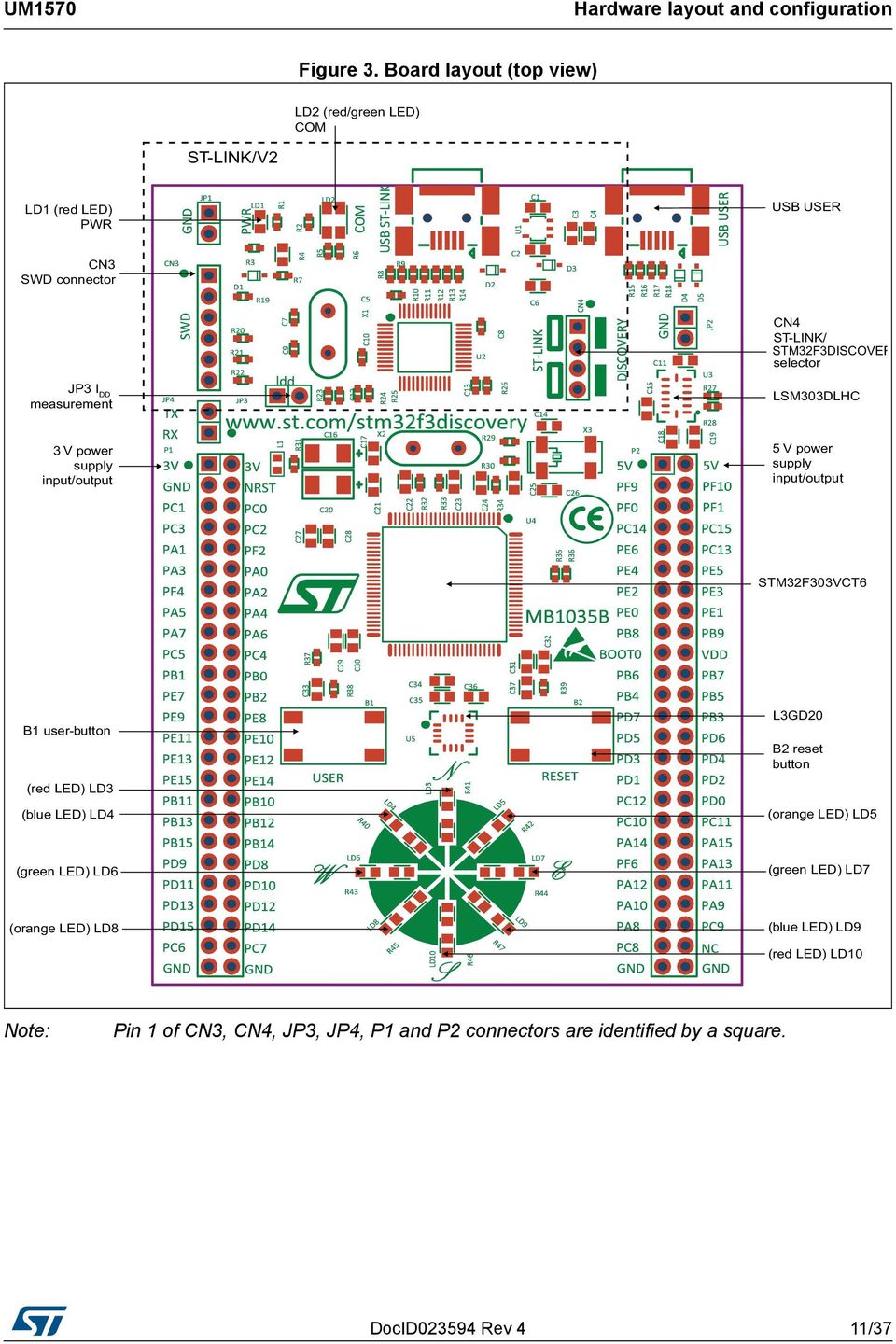
10 Hardware layout and configuration UM570 6 Hardware layout and configuration The STM3F3DISCOVERY board is designed around the STM3F303VCT6 microcontroller in a 00-pin LQFP package. Figure illustrates the connections between the STM3F303VCT6 and its peripherals (ST-LINK/V, push-buttons, LEDs, USB, ST MEMS Gyroscope, ST MEMS E-compass, and connectors). Figure and Figure 3 help the user to locate these features on the STM3F3DISCOVERY board. Figure. Hardware block diagram 0/37 DocID03594 Rev 4

11 UM570 Hardware layout and configuration Figure 3. Board layout (top view) Note: Pin of CN3, CN4, JP3, JP4, P and P connectors are identified by a square. DocID03594 Rev 4 /37 36
12 Hardware layout and configuration UM570 Figure 4. Board layout (bottom view) Note: If SB is ON, SB7 must be OFF and R33 removed to provide the clock source from MCO correctly. /37 DocID03594 Rev 4

13 UM570 Hardware layout and configuration 6. The STM3F3DISCOVERY discovery board mechanical drawing Figure 5. STM3F3DISCOVERY mechanical drawing 66.00mm 6.33mm 53.34mm 6.33mm.mm 97.00mm 33.8mm 5.08mm 3.34mm 5.4mm 6.04mm 33.8mm.54mm.54mm 6.33mm 53.34mm 6.33mm DocID03594 Rev 4 3/37 36

14 Hardware layout and configuration UM Embedded ST-LINK/V (or V-B) The ST-LINK/V on PCB version A or B or the ST-LINK/V-B on PCB version C is embedded as programming and debugging tool. Virtual COM port and USB mass storage features are supported by the ST-LINK/V-B only. The embedded ST-LINK/V (or V-B) supports only SWD for STM3 devices. For information about debugging and programming features refer to ST-LINK/V in-circuit debugger/programmer for STM8 and STM3, User manual (UM075), which describes in detail all the ST-LINK/V features. The changes on ST-LINK/V-B versus ST-LINK/V version are listed below. New features supported on ST-LINK/V-B are: Virtual Com port interface on USB Mass storage interface on USB The embedded-on-board features not supported either on ST-LINK/V or on ST-STLINK/V-B are: SWIM interface Minimum supported application voltage limited to 3 V USB power management request for more than 00 ma power on USB Known limitation: activating the readout protection on the STM3 target, prevents the target application from running afterwards. The readout protection must be kept disabled on the STM3 target. There are two different ways to use the embedded ST-LINK/V (or V-B), depending on the jumper states (see Table 3): Programming/debugging the STM3 on board (refer to Section 6..4: Using ST- LINK/V (or V-B) to program/debug the STM3F303VCT6 on board) Programming/debugging the STM3 in an external application board, using a cable connected to SWD connector CN (refer to Section 6..5: Using ST-LINK/V (or V-B) to program/debug an external STM3 application) Table 3. Jumper states Jumper state Both CN4 jumpers ON Both CN4 jumpers OFF Description ST-LINK/V (or V-B) functions enabled for on-board programming (default) ST-LINK/V (or V-B) functions enabled for application through external CN3 connector (SWD supported) 6.. Drivers The ST-LINK/V (or V-B) requires a dedicated USB driver, which, for Windows XP, 7, 8, can be found at the website. In case the STM3 Discovery is connected to the PC before the driver is installed, some Discovery interfaces may be declared as "Unknown" in the PC device manager. In this case the user must install the driver files, and from the device manager he must update the driver of the connected device (see Figure 6). Note: Prefer using the "USB Composite Device" handle for a full recovery. 4/37 DocID03594 Rev 4

15 UM570 Hardware layout and configuration Figure 6. USB composite device 6.. ST-LINK/V (or V-B) firmware upgrade The ST-LINK/V (or V-B) embeds a firmware upgrade mechanism for in-situ upgrade through the USB port. As the firmware may evolve during the life time of the ST-LINK/V (or V-B) product (for example new functionalities, bug fixes, support for new microcontroller families), it is recommended to visit the website, before starting to use the Discovery board and periodically, to stay up-to-date with the latest firmware version VCP configuration The ST-LINK/V-B on STM3F3DISCOVERY supports virtual Com port (VCP) on U pin (ST-LINK_TX) and U pin 3 (ST-LINK_RX), which are connected to the STM3F303 MCU target STM3 USART (PA9, PA0), thanks to SB and SB5 solder bridges. The SB (PA9) and SB5 (PA0) default configurations for STM3F3DISCOVERY are given in Table 5: Solder bridges Using ST-LINK/V (or V-B) to program/debug the STM3F303VCT6 on board To program the STM3F303VCT6 MCU on the board, simply plug in the two jumpers marked in red on CN4, as shown in Figure 7: STM3F3DISCOVERY connections, but do not use the CN3 connector as that could disturb the communication with the STM3F303VCT6 of the STM3F3DISCOVERY. DocID03594 Rev 4 5/37 36

16 Hardware layout and configuration UM570 Figure 7. STM3F3DISCOVERY connections 6..5 Using ST-LINK/V (or V-B) to program/debug an external STM3 application Note: It is very easy to use the ST-LINK/V (or V-B) to program the STM3 on an external application. Simply remove the two jumpers from CN4 as shown in Figure 8: ST-LINK/V connections, and connect the application to the CN3 debug connector according to Table 4. SB7 must be OFF if the CN3 pin 5 is used in an external application. Table 4. Debug connector CN3 (SWD) Pin CN3 Designation VDD_TARGET VDD from application SWCLK SWD clock 3 GND Ground 4 SWDIO SWD data input/output 5 NRST RESET of target MCU 6 SWO Reserved 6/37 DocID03594 Rev 4

17 UM570 Hardware layout and configuration Figure 8. ST-LINK/V connections DocID03594 Rev 4 7/37 36

18 Hardware layout and configuration UM Power supply and power selection The power supply is provided either by the host PC through the USB cable, or by an external 5 V power supply. Note: The D and D diodes protect the 5 V and 3 V pins from external power supplies. 5 V and 3 V can be used as output power supplies when another application board is connected to pins P and P. In this case, the 5 V and 3 V pins deliver a 5 V or 3 V power supply and power consumption must be lower than 00 ma. 5 V and 3 V can also be used as input power supplies, for example when the USB connectors are not connected to the PC. In this case, the STM3F3DISCOVERY board must be powered by a power supply unit or by auxiliary equipment complying with the standard EN : 006+A/009, and must be Safety Extra Low Voltage (SELV) with limited power capability. The board can be also powered through the USB USER connector and it is protected by D4 and D5 diodes when both USBs are connected (in which case, the 5 V power is around 4.4 volts). 6.4 LEDs LD PWR: red LED indicates that the board is powered. LD COM: LD default status is red. LD turns to green to indicate that communications are in progress between the PC and the ST-LINK/V. User LD3: red LED is a user LED connected to the I/O PE9 of the STM3F303VCT6. User LD4: blue LED is a user LED connected to the I/O PE8 of the STM3F303VCT6. User LD5: orange LED is a user LED connected to the I/O PE0 of the STM3F303VCT6. User LD6: green LED is a user LED connected to the I/O PE5 of the STM3F303VCT6. User LD7: green LED is a user LED connected to the I/O PE of the STM3F303VCT6. User LD8: orange LED is a user LED connected to the I/O PE4 of the STM3F303VCT6. User LD9: blue LED is a user LED connected to the I/O PE of the STM3F303VCT6. User LD0: red LED is a user LED connected to the I/O PE3 of the STM3F303VCT Push-buttons B USER: user and wake-up button connected to the I/O PA0 of the STM3F303VCT6. B RESET: push-button connected to NRST is used to RESET the STM3F303VCT6. 8/37 DocID03594 Rev 4

19 UM570 Hardware layout and configuration 6.6 USB device supported The STM3F303VCT6 MCU is also used to drive the second USB Mini-B connector (USB USER), which allows the board to be used as a USB Device. The STM3F3DISCOVERY can then act as a USB joystick, mouse, or other similar device. If both USBs are connected, diodes D4 and D5 protect the board and use the power from the USB ST-LINK. The board can be powered through this USB USER connector, then LED PWR lights, LED COM blinks and it can run an application in standalone mode. 6.7 ST MEMS E-compass (ST MEMS LSM303DLHC) The LSM303DLHC is an ultra-compact low-power system-in-package featuring a 3D digital linear acceleration sensor and a 3D digital magnetic sensor. It includes a sensing element and an IC interface able to provide the measured acceleration to the external world through an I C serial interface. The LSM303DLHC has dynamically user-selectable full scales of ±g/±8g and is capable of measuring acceleration, and a magnetic field full scale from ±.3g to 8.g with an output data rate of 00 Hz or 400 Hz. The STM3F303VCT6 MCU controls this motion sensor through the I C interface. 6.8 ST MEMS Gyroscope (ST MEMS L3GD0) The L3GD0 is an ultra-compact, low-power, three-axis-angular-rate sensor. It includes a sensing element and an IC interface able to provide the measured angular rate to the external world through the I C/SPI serial interface. The L3GD0 has dynamically user-selectable full scales of ±50 dps/±500 dps/±000 dps and is capable of measuring rates. The STM3F303VCT6 MCU controls this motion sensor through the SPI interface. 6.9 JP3 (Idd) Jumper JP3, labeled Idd, allows the measurement of the consumption of the STM3F303VCT6 by removing the jumper and connecting an ammeter. Jumper on: STM3F303VCT6 is powered (default). Jumper off: an ammeter must be connected to measure the STM3F303VCT6 current. If there is no ammeter, the STM3F303VCT6 is not powered. DocID03594 Rev 4 9/37 36

20 Hardware layout and configuration UM OSC clock 6.0. OSC clock supply The following information indicates all configurations for clock supply selection: MCO from ST-LINK. From MCO of the STM3F03C8T6. This frequency cannot be changed, it is fixed at 8 MHz and connected to PF0-OSC_IN of the STM3F303VCT6. Configuration needed: SB closed, SB7 open, R33 removed SB8, R3, C, C3, X = do not care Oscillator on board. From X crystal (not provided). For typical frequencies and its capacitors and resistors, refer to the STM3F303VCT6 Datasheet. Configuration needed: SB, SB7, SB8 open R3, R33, C, C3, X soldered Oscillator from external PF0. From external oscillator through pin 5 of the P connector. Configuration needed: SB open, SB7 closed, R33 removed SB8, R3, C, C3, X = do not care No external oscillator. From Internal oscillator HSI only. PF0 and PF can be used as GPIO. Configuration needed: SB open, SB7 closed, SB8 closed, R3 removed, R33 removed C, C3, X = do not care 6.0. OSC 3 khz clock supply The following information indicates all the configurations for the 3 khz clock supply selection: Oscillator on board. From X3 Crystal (not provided). Configuration needed: SB4 open, SB6 open. R9, R30, C4, C6, X3 soldered. Oscillator from external PC4. From external oscillator through the pin 7 of P connector. Configuration needed: SB4 open, R9 removed SB6, R30, C4, C6, X3 = do not care No external oscillator. PC4 and PC5 can be used as GPIO. Configuration needed: SB4 closed, SB6 closed, R9 removed, R30 removed. C4, C6, X3 = do not care. 0/37 DocID03594 Rev 4

21 UM570 Hardware layout and configuration 6. Solder bridges Table 5. Solder bridges Bridge State () Description SB7,8 OFF X, C, C3, R3 and R33 provide a clock. PF0, PF are disconnected from P. (X crystal) () ON PF0, PF are connected to P (R3 and R33 must not be fitted). SB,3,5,8 (default) ON Reserved, do not modify SB,4,6,9 (reserved) OFF Reserved, do not modify SB4,6 (X3 crystal) SB3 (B-RESET) SB0 (B-USER) SB3,5 (RX,TX) SB7 (NRST) SB0 (SWO) SB (STM_RST) SB9 (BOOT0) SB, (USB USER) SB (MCO) () OFF ON ON OFF ON OFF OFF ON ON OFF ON OFF OFF ON ON OFF OFF X3, C4, C6, R9 and R30 deliver a 3 KHz clock. PC4, PC5 are not connected to P. PC4, PC5 are only connected to P. Remove only R6, R9 B push-button is connected to NRST of STM3F303VCT6 B push-button is not connected to NRST of STM3F303VCT6 B push-button is connected to PA0 B push-button is not connected to PA0 STM3F303VCT6 USART is not connected to ST-LINK, so VCP is disabled (Default configuration on PCB version A or B). STM3F303VCT6 USART is connected to ST-LINK, so VCP is enabled (default configuration on PCB version C and newer). NRST signal of connector CN3 is connected to NRST of STM3F303VCT6 NRST signal is not connected SWO signal of connector CN3 is connected to PB3 SWO signal is not connected No incidence on NRST signal of STM3F03C8T6 NRST signal of STM3F03C8T6 is connected to GND BOOT0 signal of STM3F303VCT6 is at level "0" through 50 ohm pull-down BOOT0 signal of STM3F303VCT6 is at level "" through 0K ohm pull-up (not provided). PA and PA are only used for USB USER and not connected to P to avoid noise. ON PA and PA are connected to P. OFF ON MCO signal of STM3F03C8T6 is not used. MCO clock signal from STM3F03C8T6 is connected to OSC_IN of STM3F303VCT6.. Default state is shown in bold.. If SB is ON, SB7 must be OFF and R33 removed to provide the clock source from the MCO correctly. DocID03594 Rev 4 /37 36
22 Hardware layout and configuration UM Extension connectors The male headers P and P can connect the STM3F3DISCOVERY to a standard prototyping/wrapping board. STM3F303VCT6 GPIOs are available on these connectors. P and P can also be probed by an oscilloscope, logical analyzer or voltmeter. Table 6. STM3F303VCT6 MCU pin description versus board function () MCU pin Board function Main function Alternate function LQFP00 pin number VCP LSM303DLHC L3GD0 Push-button LED SWD USB OSC Free I/O Power supply CN3 P P BOOT NRST RESET - NRST PA0 TIM_CH_ETR, G_IO, USART_CTS, COMP_OUT, TIM8_BKIN, TM8_ETR USER PA PA PA3 PA4 TIM_CH, G_IO, USART_RTS, TIM5_CHN TIM_CH3, G_IO3, USART_TX, COMP_OUT, TIM5_CH, AOP_OUT TIM_CH4, G_IO4, USART_RX, TIM5_CH TIM3_CH, G_IO, SPI_NSS, SPI3_NSS/IS3_WS, USART_CK PA5 TIM_CH_ETR, G_IO, SPI_SCK SCL/SPC /37 DocID03594 Rev 4
23 UM570 Hardware layout and configuration Table 6. STM3F303VCT6 MCU pin description versus board function (continued) () MCU pin Board function Main function Alternate function LQFP00 pin number VCP LSM303DLHC L3GD0 Push-button LED SWD USB OSC Free I/O Power supply CN3 P P PA6 TIM6_CH, TIM3_CH, G_IO3, TIM8_BKIN, SPI_MISO, TIM_BKIN, AOP_OUT, COMP_OUT SAO/SDO PA7 TIM7_CH, TIM3_CH, G_IO4, TIM8_CHN, SPI_MOSI, TIM_CHN, COMP_OUT SDA/SDI/SDO PA8 MCO, IC_SMBAL, IS_MCK, TIM_CH, USART_CK, COMP3_OUT, TIM4_ETR PA9 G4_IO, IC_SCL, IS3_MCK, TIM_CH, USART_TX, COMP5_OUT, TIM5_BKIN, TIM_CH3 68 USART_TX PA0 TIM7_BKIN, G4_IO, IC_SDA, TIM_CH3, USART_RX, COMP6_OUT, TIM_CH4, TIM8_BKIN 69 USART_RX DocID03594 Rev 4 3/37 36
24 Hardware layout and configuration UM570 Table 6. STM3F303VCT6 MCU pin description versus board function (continued) () MCU pin Board function Main function Alternate function LQFP00 pin number VCP LSM303DLHC L3GD0 Push-button LED SWD USB OSC Free I/O Power supply CN3 P P PA PA TIM_CHN, USART_CTS, COMP_OUT, CAN_RX, TIM4_CH, TIM_CH4_BKIN, USBDM TIM6_CH, TIM_CHN, USART_RTS, COMP_OUT, CAN_TX, TIM4_CH, TIM_ETR, USBDP DM DP PA3 JTMS-SWDAT, TIM6_CHN, G4_IO3, IR-Out, USART3_CTS, TIM4_CH SWDIO PA4 JTCK-SWCLK, G4_IO4, IC_SDA, TIM8_CH, TIM_BKIN, USART_TX SWCLK PA5 PB0 JTDI, TIM_CH_ETR, TIM8_CH, IC_SCL, SPI_NSS, SPI3_NSS/IS3_WS, USART_RX, TIM_BKIN TIM3_CH3, G3_IO, TIM8_CHN, TIM_CHN /37 DocID03594 Rev 4
25 UM570 Hardware layout and configuration Table 6. STM3F303VCT6 MCU pin description versus board function (continued) () MCU pin Board function Main function Alternate function LQFP00 pin number VCP LSM303DLHC L3GD0 Push-button LED SWD USB OSC Free I/O Power supply CN3 P P PB TIM3_CH4, G3_IO3, TIM8_CH3N, TIM_CH3N, COMP4_OUT, AOP3_OUT PB G3_IO PB3 JTDO/TRACESWO, TIM_CH, TIM4_ETR, G5_IO, TIM8_CHN, SPI_SCK, SPI3_SCK/IS3_CK, USART_TX, TIM3_ETR SWO PB4 PB5 NJTRST, TIM6_CH, TIM3_CH, G5_IO, TIM8_CHN, SPI_MISO, SPI3_MISO/IS3_DI N,USART_RX, TIM7_BKIN TIM6_BKIN, TIM3_CH, TIM8_CH3N, IC_SMBAL, SPI_MOSI, SPI3_MOSI/IS3_D OUT, USART_CK, TIM7_CH PB6 TIM6_CHN, TIM4_CH, G5_IO3, IC_SCL, TIM8_CH, TIM8_ETR_BKIN, USART_TX 9 - SCL DocID03594 Rev 4 5/37 36
26 Hardware layout and configuration UM570 Table 6. STM3F303VCT6 MCU pin description versus board function (continued) () MCU pin Board function Main function Alternate function LQFP00 pin number VCP LSM303DLHC L3GD0 Push-button LED SWD USB OSC Free I/O Power supply CN3 P P PB7 TIM7_CHN, TIM4_CH, G5_IO4, IC_SDA, TIM8_BKIN, USART_RX, TIM3_CH SDA PB8 PB9 PB0 PB PB PB3 TIM6_CH, TIM4_CH3, SYNCH, IC_SCL, COMP_OUT, CAN_RX, TIM8_CH, TIM_BKIN TIM7_CH, TIM4_CH4, IC_SDA, IR-OUT, CAN_TX, TIM8_CH3 TIM_CH3, SYNCH, USART3_TX TIM_CH4, G6_IO, USART3_RX, COMP_OUT G6_IO, IC_SMBAL, SPI_NSS/IS_WS, TIM_BKIN, USART3_CK, AOP4_OUT G6_IO3, SPI_SCK/IS_CK, TIM_CHN, USART3_CTS /37 DocID03594 Rev 4
27 UM570 Hardware layout and configuration Table 6. STM3F303VCT6 MCU pin description versus board function (continued) () MCU pin Board function Main function Alternate function LQFP00 pin number VCP LSM303DLHC L3GD0 Push-button LED SWD USB OSC Free I/O Power supply CN3 P P PB4 PB5 TIM5_CH, G6_IO4, SPI_MISO/IS_DI N,TIM_CHN, USART3_RTS TIM5_CH, TIM5_CHN, TIM_CH3N, SPI_MOSI/ IS_DOUT PC PC PC COMP7_OUT PC3 TIM_BKIN PC4 USART_TX PC5 PC6 PC7 PC8 PC9 G3_IO, USART_RX TIM3_CH, TIM8_CH, IS_MCK, COMP6_OUT TIM3_CH, TIM8_CH, IS3_MCK, COMP5_OUT TIM3_CH3, TIM8_CH3, COMP3_OUT TIM3_CH4, TIM8_CH4_BKIN, COMP3_OUT DocID03594 Rev 4 7/37 36
28 Hardware layout and configuration UM570 Table 6. STM3F303VCT6 MCU pin description versus board function (continued) () MCU pin Board function Main function Alternate function LQFP00 pin number VCP LSM303DLHC L3GD0 Push-button LED SWD USB OSC Free I/O Power supply CN3 P P PC0 PC PC TIM8_CHN, UART4_TX, SPI3_SCK/IS3_CK, USART3_TX TIM8_CHN, UART4_RX, SPI3_MISO/IS3_DI N,USART3_RX TIM8_CH3N, UART5_TX, SPI3_MOSI/ IS3_DOUT, USART3_CK PC3 TIM_CHN PC4 OSC3_IN PC5 OSC3_OUT OSC3_IN OSC3_OUT PD0 CAN_RX PD PD PD3 PD4 TIM8_CH4_BKIN, CAN_TX TIM3_ETR, TIM8_BKIN, UART5 RX TIM_CH_ETR, USART_CTS TIM_CH, USART_RTS /37 DocID03594 Rev 4
29 UM570 Hardware layout and configuration Table 6. STM3F303VCT6 MCU pin description versus board function (continued) () MCU pin Board function Main function Alternate function LQFP00 pin number VCP LSM303DLHC L3GD0 Push-button LED SWD USB OSC Free I/O Power supply CN3 P P PD5 USRT_TX PD6 TIM_CH4, USART_RX PD7 TIM_CH3, USART_CK PD8 USART3_TX PD9 USART3_RX PD0 USART3_CK PD USART3_CTS PD TIM4_CH, G8_IO, USART3_RTS PD3 TIM4_CH, G8_IO PD4 TIM4_CH3, G8_IO PD5 PE0 TIM4_CH4, G8_IO4, SPI_NSS TIM4_ETR, TIM6_CH, USART_TX INT PE TIM7_CH, USART_RX DRDY/INT PE TRACECK, TIM3_CH, G7_IO - DRDY PE3 TRACED0, TIM3_CH, G7_IO - - CS_IC/SPI PE4 TRACED, TIM3_CH3, G7_IO3 3 - INT DocID03594 Rev 4 9/37 36
30 Hardware layout and configuration UM570 Table 6. STM3F303VCT6 MCU pin description versus board function (continued) () MCU pin Board function Main function Alternate function LQFP00 pin number VCP LSM303DLHC L3GD0 Push-button LED SWD USB OSC Free I/O Power supply CN3 P P PE5 TRACED, TIM3_CH4, G7_IO PE6 TRACED INT - PE7 TIM_ETR PE8 TIM_CHN PE9 TIM_CH LD4/ BLUE LD3/ RED PE0 TIM_CHN LD5/ ORANGE PE TIM_CH LD7/ GREEN PE TIM_CH3N LD9/ BLUE PE3 TIM_CH LD0/ RED PE4 TIM_CH4_BKIN LD8/ ORANGE PE5 TIM_BKIN, USART3_RX LD6/ GREEN PF0 OSC_IN, IC_SDA, TIM_CH3N OSC_IN PF OSC_OUT, IC_SCL OSC_OUT /37 DocID03594 Rev 4
31 UM570 Hardware layout and configuration Table 6. STM3F303VCT6 MCU pin description versus board function (continued) () MCU pin Board function Main function Alternate function LQFP00 pin number VCP LSM303DLHC L3GD0 Push-button LED SWD USB OSC Free I/O Power supply CN3 P P PF PF4 COMP_OUT PF6 TIM4_CH4, IC_SCL, USART3_RTS PF9 PF0 TIM5_CH, SPI_SCK TIM5_CH, SPI_SCK V V V V The cells marked in grey identify connections between MCU pin function and the board function. GND GND GND VDD DocID03594 Rev 4 3/37 36
32 3/37 DocID03594 Rev 4 7 STM3F3DISCOVERY electrical schematics A B C D STM3F3_USART_RX STM3F3_USART_TX 3V 3V PC PC3 PA PA3 PF4 PA5 PA7 PC5 PB PE7 PE9 PE PE3 PE5 PB PB3 PB5 PD9 PD PD3 PD5 PC6 PC5 PC4 ST_LINK_V.SCHDOC U_ST_LINK PC5 PC4 P Header 5X MCO PA4 PA3 PB3 NRST 3V NRST PC0 PC PF PA0 PA PA4 PA6 PC4 PB0 PB PE8 PE0 PE PE4 PB0 PB PB4 PD8 PD0 PD PD4 PC7 MCO PA4 PA3 PB3 NRST 3V TCK/SWCLK TMS/SWDIO T_SWO T_NRST Figure 9. STM3F3DISCOVERY top level PA0 PA PA PA3 PA4 PA5 PA6 PA7 PA8 PA9 PA0 PA PA PA3 PA4 PA5 PB0 PB PB PB3 PB4 PB5 PB6 PB7 PB8 PB9 PB0 PB PB PB3 PB4 PB5 PC0 PC PC PC3 PC4 PC5 PC6 PC7 PC8 PC9 PC0 PC PC PC3 PC4 PC5 BOOT0 NRST U_STM3Fx STM3Fx.SchDoc PA0 PA PA PA3 PA4 PA5 PA6 PA7 PA8 PA9 PA0 PA PA PA3 PA4 PA5 PB0 PB PB PB3 PB4 PB5 PB6 PB7 PB8 PB9 PB0 PB PB PB3 PB4 PB5 PC0 PC PC PC3 PC4 PC5 PC6 PC7 PC8 PC9 PC0 PC PC PC3 PC4 PC5 BOOT0 NRST PE0 PE PE PE3 PE4 PE5 PE6 PE7 PE8 PE9 PE0 PE PE PE3 PE4 PE5 PD0 PD PD PD3 PD4 PD5 PD6 PD7 PD8 PD9 PD0 PD PD PD3 PD4 PD5 PF0 PF PF PF4 PF6 PF9 PF0 MCO 3 PE0 PE PE PE3 PE4 PE5 PE6 PE7 PE8 PE9 PE0 PE PE PE3 PE4 PE5 PD0 PD PD PD3 PD4 PD5 PD6 PD7 PD8 PD9 PD0 PD PD PD3 PD4 PD5 PF0 PF PF PF4 PF6 PF9 PF0 MCO 3 PA STMicroelectronics Title: 5V SB PE0 PE PE PE3 PE4 PE5 PE8 PE9 PE0 PE PE PE3 PE4 PE5 5V PF9 PF0 PC4 PE6 PE4 PE PE0 PB8 BOOT0 PB6 PB4 PD7 PD5 PD3 PD PC PC0 PA4 PF6 PA0 PA8 PC8 U_IO Peripherals IO Peripherals.SchDoc PE0 PE PE PE3 PE4 PE5 PE8 PE9 PE0 PE PE PE3 PE4 PE5 P Header 5X STM3F3DISCOVERY 5V PF0 PF PC5 PC3 PE5 PE3 PE PB9 PB7 PB5 PB3 PD6 PD4 PD PD0 PC PA5 PA3 PA9 PC9 Number: MB035 Rev: D.(PCB.SCH) Date:6/8/06 Sheet of NRST PA0 PA5 PA6 PA7 PA PA PB6 PB7 VDD NRST PA0 PA5 PA6 PA7 Rev D. --> PCB label MB035 D-0, only silkscreen modification STM3F303C-DISC replaced by STM3F3DISCOVERY Rev C. --> PCB label MB035 C-0, SB3 and SB5 closed, STM3F03C8T6 replaced by STM3F03CBT6, ST-LINK/V-B Rev B. --> PCB B-00, reverse LEDs Colors Red/Blue on sheet 4, only a picture modification Rev B.0 --> PCB B-00, added SB to isolate USB USER Rev A.0 --> First Version 5V SB PA PA PB6 PB7 PA A B C D STM3F3DISCOVERY electrical schematics UM570
33 DocID03594 Rev 4 33/37 A B C D Board Ident: PC3=0 R3 00K Not Fitted C9 0pF 3V C 3V 00nF SB U5V R9 R8 X 8MHz STM3F3_USART_RX PC5 PC4 STM3F3_USART_TX D R4 R5 EXT_5V, Input or Output 0K 0K C7 0pF OSC_IN OSC_OUT STM_RST 4K7 4K7 BAT60JFILM SB3 TX RX SB5 AIN_ STLINK_TX 5V JP V VBAT PC3 PC4 PC5 OSCIN OSCOUT NRST VSSA VDDA PA0 PA PA STLINK_RX Not Fitted R0 00K SWIM_IN SWIM Figure 0. STM3F3DISCOVERY ST-LINK/V (SWD only) SWIM_IN SWIM_RST SWIM_RST_IN T_JTCK T_JTDO T_JTDI T_NRST T_JRST SWIM_IN SWIM STM_JTCK 3V USB ST-LINK U5V CN R K5 VCC 3V R4 0 USB_DM D- 3 R3 0 USB_DP D+ 4 R 00K ID 5 GND 0 SHELL 5075BMR-05-SM VDD_3 VSS_3 PB9 PB8 BOOT0 PB7 PB6 PB5 PB4/JNTRST PB3/JTDO PA5/JTDI JTCK/SWCLK PA3 PA4 PA5 PA6 PA7 PB0 PB PB/BOOT PB0 PB VSS_ VDD_ VDD_ VSS_ JTMS/SWDIO PA PA PA0 PA9 PA8 PB5 PB4 PB3 PB U STM3F03CBT6 3V STM_JTMS USB_DP USB_DM T_SWO LED_STLINK T_JTMS T_JTCK 3V R K T_SWDIO_IN LD RED Idd JP3 3V VDD C0 00nF SWD CN Header 6 C5 00nF R3 0K C8 00nF R9 R0 R R 3 Wired on Solder Side C3 00nF 3 JP JP Not Fitted D R7 AIN_ 00 BAT60JFILM T_JTCK T_JTMS T_NRST T_SWO RC Must be very close to STM3F03 pin 9 R48 MCO MCO 00 C38 0pF R6 00 Not Fitted 5V U Vin TCK/SWCLK TMS/SWDIO COM PWR DEFAULT SB SB3 SB5 SB8 LED_STLINK 3 INH C3 GND BYPASS μf_x5r_0603 LD3985M33R C4 00nF 4 CN4 Jumpers ON --> DISCOVERY Selected Jumpers OFF --> ST-LINK Selected Vout T_SWO R6 00 R5 00 C 0nF_X7R_0603 T_NRST STMicroelectronics 5 SB0 Title: STM3F3DISCOVERY ST-LINK/V-B (SWD only) 3 4 RESERVED Number: MB035 Rev: D.(PCB.SCH) Date:6/8/06 Sheet of 4 SB SB4 SB6 SB9 SB7 4 3V STM_JTCK SWCLK STM_JTMS LD Red R 0 _Green LD_BICOLOR_CMS D3 BAT60JFILM C6 μf_x5r_0603 C 00nF PA4 PA3 NRST PB3 SWDIO 3V 3V SWD EXT_3V, Input or Output A B C D UM570 STM3F3DISCOVERY electrical schematics
34 STM3F3DISCOVERY electrical schematics UM570 34/37 DocID03594 Rev 4 Figure. STM3F3DISCOVERY STM3F303VCT6 MCU D D C C B B A A STMicroelectronics Title: Number: Rev: Sheet of D.(PCB.SCH) Date:6/8/06 C 0pF C3 0pF 4 3 X3 MC306-G-06Q C4 6.8pF C6 6.8pF MB STM3F3DISCOVERY - STM3F303VCT6 MCU PB5 PB6 PB7 PA4 PA5 PA6 PA7 R36 0K VDD PA PA PA9 PA0 PB PB3 PB4 PB5 PB0 PB PB8 PA0 PB9 PA PB PB PA5 PB3 PB0 PA3 PA3 PA4 PB4 PA PA8 BOOT0 MCO PF-OSC_OUT PA0 NRST PB0 PC5 PC4 BOOT0 PF PF0 Must be close to the Crystal SB9 SB8 SB7 C30 00nF C3 00nF C8 00nF C7 00nF C4 uf NRST C 00nF MCO X 8MHz Not Fitted L fcm C0 uf VDD R3 0 C7 00nF C6 uf C5 00nF C3 00nF C9 00nF PC0 PC0 PC PC PC3 PC4 PC5 PC6 PC7 PC8 PC9 PC0 PC PC PC3 PE0 PE0 PE PE PE3 PE4 PE5 PE6 PE7 PE8 PE9 PE0 PE PE PE3 PE4 PE5 PD0 PD0 PD PD PD3 PD4 PD5 PD6 PD7 PD8 PD9 PD0 PD PD PD3 PD4 PD5 PC4-OSC3_IN PC5-OSC3_OUT SB6 SB4 R34 0 R35 50 PC4-OSC3_IN PC5-OSC3_OUT SB PF0-OSC_IN R33 0 R3 0 R9 0 R30 0 PF-OSC_OUT PF0-OSC_IN PF PF PF4 PF4 PF6 PF6 PF9 PF9 PF0 PF0 PA PA PA3 PA4 PA5 PA6 PA7 PA8 PA9 PA0 PA PA PA3 PA4 PA5 PB PB PB3 PB4 PB5 PB6 PB7 PB8 PB9 PB0 PB PB PB3 PB4 PB5 PE PE PE3 PE4 PE5 PE6 PE7 PE8 PE9 PE0 PE PE PE3 PE4 PE5 PD PD PD3 PD4 PD5 PD6 PD7 PD8 PD9 PD0 PD PD PD3 PD4 PD5 PC PC PC3 PC4 PC5 PC6 PC7 PC8 PC9 PC0 PC PC PC3 Not Fitted VSSadc/VREF- 0 VREF+ VDDadc VSS3 74 VSSA_VSS 99 VBAT 6 VDD4 8 VDD 50 VDD3 75 VDDA_VDD 00 VSS 49 U4B STM3F303VCT6 PF0-OSC_IN PF-OSC_OUT 3 NRST 4 PA0 3 PA 4 PA 5 PA3 6 PA4 9 PA5 30 PA6 3 PA7 3 PB0 35 PB 36 PB 37 PB0 47 PB4 53 PB5 54 PA8 67 PA9 68 PA0 69 PA 70 PA 7 PA3 7 PF6 73 PA4 76 PA5 77 PB3 89 PB4 90 PB5 9 PB6 9 PB7 93 BOOT0 94 PB8 95 PB9 96 PE PE3 PE4 3 PE5 4 PE6-WKUP3 5 PC3-WKUP 7 PC4-OSC3_IN 8 PC5-OSC3_OUT 9 PC0 5 PC 6 PC 7 PC3 8 PC4 33 PC5 34 PE7 38 PE8 39 PE9 40 PE0 4 PE 4 PE 43 PE3 44 PE4 45 PE5 46 PD8 55 PD9 56 PD0 57 PD 58 PD 59 PD3 60 PD4 6 PD5 6 PC6 63 PC7 64 PC8 65 PC9 66 PC0 78 PC 79 PC 80 PD0 8 PD 8 PD 83 PD3 84 PD4 85 PD5 86 PD6 87 PD7 88 PE0 97 PE 98 PF9 0 PF0 PF 9 PF4 7 PB 48 PB 5 PB3 5 U4A STM3F303VCT6 Not Fitted
35 DocID03594 Rev 4 35/37 A B C D PE5 PE4 PE3 PE PE PE0 PE9 PE8 USB User CN VCC D- D+ ID GND SHELL LD6 Green PE5 R43 50 LD8 Orange PE4 R LD0 Red PE3 R LD9 Blue PE R LD7 Green PE PE0 R44 50 R4 680 LD5 Orange LD3 Red PE9 R4 680 LD4 Blue PE8 R LEDs BMR-05-SM D4 R6 K5 R8 R7 R5 00K D5 BAT60JFILM BAT60JFILM 3V W PA PA G 5V B O Figure. STM3F3DISCOVERY Peripherals USB_DM USB_DP N R R S PA0 PA0 SB0 C33 00nF R USER & WAKE-UP Button Silkscreen for Gyroscope and E-compass with accelerometer O B G E PB6 PB7 PE5 PE4 SPI_SCK SPI_MOSI SPI_MISO CS_IC/SPI MEMS_INT MEMS_INT 3 VDD R37 00 PB6 PB7 PE5 PE4 PA5 PA7 PA6 PE3 PE PE R8 0K R4 0K C 4.7uF PA5 PA7 PA6 PE3 PE PE0 SW-PUSH-CMS B R7 0K U3 VDD_IO SCL 3 SDA 4 INT 5 INT 6 C 7 GND U5 VDD_IO SCL/SPC 3 SDA/SDI/SDO 4 SA0/SDO 5 CS_IC/SPI 6 DRDY/INT 7 INT 8 GND STMicroelectronics Title: LSM303DLHC L3GD0 NRST VDD SETC SETP GND GND DRDY NC MEMS NRST RESET Button VDD VDD C GND GND GND GND GND 3V Not Fitted C5 3V PE SB3 C37 00nF 0nF C36 0nF/5V STM3F3DISCOVERY Peripherals Number: MB035 Rev: D.(PCB.SCH) Date:6/8/06 Sheet 4 of 4 PE 4 4 VDD R39 00K 3 4 C35 00nF SW-PUSH-CMS B C9 00nF C34 0uF C8 0uF A B C D UM570 STM3F3DISCOVERY electrical schematics
36 Revision history UM570 8 Revision history Table 7. Document revision history Date Revision Changes 0-Sep-0 Initial release. 0-Sep-0 Added Figure 7 on page and updated Figure on page Feb Jul-06 4 Updated Section 6.: Embedded ST-LINK/V (or V-B): removed WLCSP package, Sigma Delta ADC, CEC, updated timers and SPI/I²Ss. To introduce the information that boards come with ST-LINK/V or ST-LINK/V-B: Updated Section : Features, Section 3: Ordering information, Section 6..4: Using ST-LINK/V (or V-B) to program/debug the STM3F303VCT6 on board, Section 6..5: Using ST-LINK/V (or V-B) to program/debug an external STM3 application, Table 5: Solder bridges, Table 6: STM3F303VCT6 MCU pin description versus board function. Added Section : Product marking, Section 6..: Drivers, Section 6..: ST-LINK/V (or V-B) firmware upgrade, Section 6..3: VCP configuration. 36/37 DocID03594 Rev 4
37 UM570 IMPORTANT NOTICE PLEASE READ CAREFULLY STMicroelectronics NV and its subsidiaries ( ST ) reserve the right to make changes, corrections, enhancements, modifications, and improvements to ST products and/or to this document at any time without notice. Purchasers should obtain the latest relevant information on ST products before placing orders. ST products are sold pursuant to ST s terms and conditions of sale in place at the time of order acknowledgement. Purchasers are solely responsible for the choice, selection, and use of ST products and ST assumes no liability for application assistance or the design of Purchasers products. No license, express or implied, to any intellectual property right is granted by ST herein. Resale of ST products with provisions different from the information set forth herein shall void any warranty granted by ST for such product. ST and the ST logo are trademarks of ST. All other product or service names are the property of their respective owners. Information in this document supersedes and replaces information previously supplied in any prior versions of this document. 06 STMicroelectronics All rights reserved DocID03594 Rev 4 37/37 37
UM1724 User manual. STM32 Nucleo boards. Introduction
 User manual STM32 Nucleo boards Introduction The STM32 Nucleo board (NUCLEO-F030R8, NUCLEO-F072RB, NUCLEO-F103RB, NUCLEO-F302R8, NUCLEO-F334R8, NUCLEO-F401RE, NUCLEO-F411RE, NUCLEO- L053R8, NUCLEO-L152RE)
UM1525 User manual. STM32F0DISCOVERY Discovery kit for STM32 F0 microcontrollers. Introduction
 User manual STM32F0DISCOVERY Discovery kit for STM32 F0 microcontrollers Introduction The STM32F0DISCOVERY helps you to discover the STM32 F0 Cortex -M0 features and to develop your applications easily.
STM32F4DISCOVERY. Discovery kit with STM32F407VG MCU. Features. Description
 Discovery kit with STM32F407VG MCU Data brief Features STM32F407VGT6 microcontroller featuring 32-bit ARM Cortex -M4 with FPU core, 1-Mbyte Flash memory, 192-Kbyte RAM in an LQFP100 package On-board ST-LINK/V2
Discovery kit for STM32F030 Value Line microcontrollers
 User manual Discovery kit for STM32F030 Value Line microcontrollers Introduction The STM32F030 Value Line Discovery kit (32F0308DISCOVERY) helps you to discover the device features and to develop your
32F072BDISCOVERY. Discovery kit for STM32F072xx microcontrollers. Features. Description
 Discovery kit for STM32F072xx microcontrollers Data brief Features STM32F072RBT6 microcontroller featuring 128 KB of Flash memory, 16 KB of SRAM in an LQFP64 package On-board ST-LINK/V2 with switch to
UM1724 User manual. STM32 Nucleo-64 boards. Introduction
 User manual STM32 Nucleo-64 boards Introduction The STM32 Nucleo-64 board (NUCLEO-F030R8, NUCLEO-F070RB, NUCLEO-F072RB, NUCLEO-F091RC, NUCLEO-F103RB, NUCLEO-F302R8, NUCLEO-F303RE, NUCLEO-F334R8, NUCLEO-F401RE,
UM1075 User manual. ST-LINK/V2 in-circuit debugger/programmer for STM8 and STM32. Introduction
 User manual ST-LINK/V2 in-circuit debugger/programmer for STM8 and STM32 Introduction The ST-LINK/V2 is an in-circuit debugger/programmer for the STM8 and STM32 microcontroller families. The single wire
UM0817 User Manual STM8S-DISCOVERY. Introduction. Features
 UM087 User Manual STM8S-DISCOVERY Introduction The STM8S-DISCOVERY is a quick start evaluation board which helps you to discover the STM8 features, and to develop and share your own application. It is
UM1075 User manual. ST-LINK/V2 in-circuit debugger/programmer for STM8 and STM32. Introduction
 User manual ST-LINK/V2 in-circuit debugger/programmer for STM8 and STM32 Introduction The ST-LINK/V2 is an in-circuit debugger/programmer for the STM8 and STM32 microcontroller families. The single wire
Figure 1. STM32F429 Discovery board: STM32F429I-DISCO
 User manual Getting started with the STM32F429 Discovery kit Introduction This document describes the software, firmware and hardware environments and development recommendations required to build an application
UM1472 User manual. Discovery kit with STM32F407VG MCU. Introduction
 UM7 User manual Discovery kit with STMF07VG MCU Introduction The STMFDISCOVERY Discovery kit allows users to easily develop applications with the STMF07 high performance microcontroller with ARM Cortex
UM1574 User manual. STM8A-DISCOVERY Discovery kit for STM8A microcontrollers. Introduction
 UM7 User manual STM8A-DISCOVERY Discovery kit for STM8A microcontrollers Introduction The STM8A-DISCOVERY helps you discover the STM8AF and STM8AL automotive microcontroller family features and develop
32F769IDISCOVERY. Discovery kit with STM32F769NI MCU. Features
 Discovery kit with STM32F769NI MCU Data brief Features STM32F769NIH6 microcontroller featuring 2 Mbytes of Flash memory and 512+16+4 Kbytes of RAM, in BGA216 package On-board ST-LINK/V2-1 supporting USB
UM1727 User manual. Getting started with STM32 Nucleo board software development tools. Introduction
 User manual Getting started with STM32 Nucleo board software development tools Introduction The STM32 Nucleo board is a low-cost and easy-to-use development platform used to quickly evaluate and start
UM1969 User manual. Getting started with STM32F746G discovery software development tools. Introduction
 UM1969 User manual Getting started with STM32F746G discovery software development tools Introduction This document describes the software environment recommendations, required to build an application using
UM1680 User manual. Getting started with STM32F429 Discovery software development tools. Introduction
 User manual Getting started with STM32F429 Discovery software development tools Introduction This document describes the software environment and development recommendations required to build an application
UM1727 User manual. Getting started with STM32 Nucleo board software development tools. Introduction
 User manual Getting started with STM32 Nucleo board software development tools Introduction The STM32 Nucleo board (NUCLEO-F030R8, NUCLEO-F072RB, NUCLEO-F103RB, NUCLEO-F302R8, NUCLEO-F401RE, NUCLEO-L152RE)
AN2586 Application note
 AN2586 Application note STM32F10xxx hardware development: getting started Introduction This application note is intended for system designers who require a hardware implementation overview of the development
AN3265 Application note
 Application note Handling hardware and software failures with the STM8S-DISCOVERY Application overview This application is based on the STM8S-DISCOVERY. It demonstrates how to use the STM8S window watchdog
UM1790 User manual. Getting started with STM32L053 discovery kit software development tools. Introduction
 User manual Getting started with STM32L053 discovery kit software development tools Introduction This document describes the software environment recommendations required to build an application using
AN3990 Application note
 Application note Upgrading STM32F4DISCOVERY board firmware using a USB key Introduction An important requirement for most Flash memory-based systems is the ability to update the firmware installed in the
W7200-EVB User s Guide
 Version 1.1 2011 WIZnet Co., Inc. All Rights Reserved. For more information, visit our website at http://www.wiznet.co.kr Copyright 2011 WIZnet Co., Inc. All rights reserved. Ver. 1.1 1 Table of Contents
Obsolete Product(s) - Obsolete Product(s)
 STEVAL-IEGV Smart vehicle tracking system Data brief Features Real-time vehicle tracking system based on GPRS/GSM/GNSS. The vehicle location coordinates are acquired using FASTRAX GPS/GLONASS module and
AN3252 Application note
 Application note Building a wave generator using STM8L-DISCOVERY Application overview This application note provides a short description of how to use the STM8L-DISCOVERY as a basic wave generator for
UM1974 User manual. STM32 Nucleo-144 board. Introduction
 UM1974 User manual STM32 Nucleo144 board Introduction The STM32 Nucleo144 board (NUCLEOF207ZG, NUCLEOF303ZE, NUCLEOF412ZG, NUCLEOF429ZI, NUCLEOF446ZE, NUCLEOF746ZG, NUCLEOF767ZI) provides an affordable
MX PIC24F Educational Module User Manual
 MX PIC24F Educational Module User Manual Revision History Date Description Initial release. Table of Contents 1. Introduction... 3 1.1. Package Contents... 3 1.2. Key Hardware Features... 4 2. Hardware
SMARTCARD XPRO. Preface. SMART ARM-based Microcontrollers USER GUIDE
 SMART ARM-based Microcontrollers SMARTCARD XPRO USER GUIDE Preface Atmel SMARTCARD Xplained Pro is an extension board to the Atmel Xplained Pro evaluation platform. Atmel SMARTCARD Xplained Pro is designed
Bluetooth low energy expansion board based on BlueNRG for STM32 Nucleo
 User manual Bluetooth low energy expansion board based on BlueNRG for STM32 Nucleo Introduction This document provides detailed hardware requirements and board connections for the X- NUCLEO-IDB04A1 Bluetooth
AN3997 Application note
 Application note Audio playback and recording using the STM32F4DISCOVERY 1 Introduction This application note describes the audio (wave) playback and recording application based on the STM32F4xx microcontroller
Getting started with software and firmware environments for the STM32F0DISCOVERY kit
 User manual Getting started with software and firmware environments for the STM32F0DISCOVERY kit Introduction This document describes the software, firmware environment and development recommendations
STM-P103 development board user's manual
 STM-P103 development board user's manual Rev.B, September 2013 Copyright(c) 2013, OLIMEX Ltd, Some rights reserved INTRODUCTION: STM32-P103 board is development board which allow exploring the complete
M68EVB908QL4 Development Board for Motorola MC68HC908QL4
 M68EVB908QL4 Development Board for Motorola MC68HC908QL4! Axiom Manufacturing 2813 Industrial Lane Garland, TX 75041 Email: [email protected] Web: http://www.axman.com! CONTENTS CAUTIONARY NOTES...3 TERMINOLOGY...3
STM32F100x4 STM32F100x6 STM32F100x8 STM32F100xB
 STM32F100x4 STM32F100x6 STM32F100x8 STM32F100xB Low & medium-density value line, advanced ARM -based 32-bit MCU with 16 to 128 KB Flash, 12 timers, ADC, DAC & 8 comm interfaces Datasheet - production data
MFRD52x. Mifare Contactless Smart Card Reader Reference Design. Document information
 Rev. 2.1 17. April 2007 Preliminary Data Sheet Document information Info Keywords Content MFRC522, MFRC523, MFRC52x, MFRD522, MFRD523, Mifare Contactless Smart Card Reader Reference Design, Mifare Reader
UM1686 User manual. BlueNRG development kits. Introduction
 User manual BlueNRG development kits Introduction This document describes the BlueNRG development kits and related hardware and software components. The BlueNRG is a very low power Bluetooth low energy
UM1613 User manual. 16-pin smartcard interface ST8034P demonstration board. Introduction
 User manual 16-pin smartcard interface ST8034P demonstration board Introduction The purpose of this document is to describe, and provide information on, how to efficiently use the ST8034P smartcard interface
AN3332 Application note
 Application note Generating PWM signals using STM8S-DISCOVERY Application overview This application user manual provides a short description of how to use the Timer 2 peripheral (TIM2) to generate three
AN4646 Application note
 Application note Peripheral interconnections on STM32F401 and STM32F411 lines Introduction On top of the highest performance and the lowest power consumption of the STM32F4 family, STM32F401/411 peripherals
AN3354 Application note
 Application note STM32F105/107 in-application programming using a USB host 1 Introduction An important requirement for most Flash-memory-based systems is the ability to update firmware installed in the
Lab Experiment 1: The LPC 2148 Education Board
 Lab Experiment 1: The LPC 2148 Education Board 1 Introduction The aim of this course ECE 425L is to help you understand and utilize the functionalities of ARM7TDMI LPC2148 microcontroller. To do that,
UM1676 User manual. Getting started with.net Micro Framework on the STM32F429 Discovery kit. Introduction
 User manual Getting started with.net Micro Framework on the STM32F429 Discovery kit Introduction This document describes how to get started using the.net Micro Framework (alias NETMF) on the STM32F429
TURBO PROGRAMMER USB, MMC, SIM DEVELOPMENT KIT
 TURBO PROGRAMMER USB, MMC, SIM DEVELOPMENT KIT HARDWARE GUIDE This document is part of Turbo Programmer documentation. For Developer Documentation, Applications and Examples, see http:/// PRELIMINARY (C)
Thermostat Application Module Kit
 Thermostat Application Module Kit PUG0040-00 Product User Guide Kit Contents Overview Thermostat Application Module CD-ROM: Software Examples and Documentation The Thermostat Application Module provides
STM32F103x8 STM32F103xB
 STM32F103x8 STM32F103xB Medium-density performance line ARM -based 32-bit MCU with 64 or 128 KB Flash, USB, CAN, 7 timers, 2 ADCs, 9 com. interfaces Features Datasheet - production data ARM 32-bit Cortex
STM32F103x4 STM32F103x6
 STM32F103x4 STM32F103x6 Low-density performance line, ARM-based 32-bit MCU with 16 or 32 KB Flash, USB, CAN, 6 timers, 2 ADCs, 6 com. interfaces Features Datasheet production data ARM 32-bit Cortex -M3
SAM D21 Xplained Pro. Preface. SMART ARM-based Microcontrollers USER GUIDE
 SMART ARM-based Microcontrollers SAM D21 Xplained Pro USER GUIDE Preface The Atmel SAM D21 Xplained Pro evaluation kit is a hardware platform to evaluate the ATSAMD21J18A microcontroller. Supported by
USER GUIDE EDBG. Description
 USER GUIDE EDBG Description The Atmel Embedded Debugger (EDBG) is an onboard debugger for integration into development kits with Atmel MCUs. In addition to programming and debugging support through Atmel
Getting Started Guide
 Getting Started Guide IAR KickStart Kit for STMicroelectronics STM32F103ZE This guide briefly describes how to get started using IAR Embedded Workbench with IAR J-Link OB (on board) debug interface to
STM32F031x4 STM32F031x6
 Features ARM -based 32-bit MCU with up to 32 Kbyte Flash, timers, ADC and communication interfaces, 2.0-3.6 V Datasheet - production data Core: ARM 32-bit Cortex -M0 CPU, frequency up to 48 MHz Memories
UM0834 User manual. Developing and debugging your STM8S-DISCOVERY application code. Introduction. Reference documents
 User manual Developing and debugging your STM8S-DISCOVERY application code Introduction This document complements the information in the STM8S datasheets by describing the software environment and development
UniPi technical documentation REV 1.1
 technical documentation REV 1.1 Contents Overview... 2 Description... 3 GPIO port map... 4 Power Requirements... 5 Connecting Raspberry Pi to UniPi... 5 Building blocks... 5 Relays... 5 Digital Inputs...
DKWF121 WF121-A 802.11 B/G/N MODULE EVALUATION BOARD
 DKWF121 WF121-A 802.11 B/G/N MODULE EVALUATION BOARD PRELIMINARY DATA SHEET Wednesday, 16 May 2012 Version 0.5 Copyright 2000-2012 Bluegiga Technologies All rights reserved. Bluegiga Technologies assumes
PolyBot Board. User's Guide V1.11 9/20/08
 PolyBot Board User's Guide V1.11 9/20/08 PolyBot Board v1.1 16 pin LCD connector 4-pin SPI port (can be used as digital I/O) 10 Analog inputs +5V GND GND JP_PWR 3-pin logic power jumper (short top 2 pins
AN4488 Application note
 Application note Getting started with STM32F4xxxx MCU hardware development Introduction This application note is intended for system designers who require an overview of the hardware implementation of
AN2680 Application note
 Application note Fan speed controller based on STDS75 or STLM75 digital temperature sensor and ST72651AR6 MCU Introduction This application note describes the method of defining the system for regulating
Nuvoton Nu-Link Debug Adapter User Manual
 Nuvoton Nu-Link Debug Adapter User Manual The information described in this document is the exclusive intellectual property of Nuvoton Technology Corporation and shall not be reproduced without permission
UM0985 User manual. Developing your STM32VLDISCOVERY application using the IAR Embedded Workbench software. Introduction
 User manual Developing your STM32VLDISCOVERY application using the IAR Embedded Workbench software Introduction This document provides an introduction on how to use IAR Embedded Workbench for ARM software
In-System Programmer USER MANUAL RN-ISP-UM RN-WIFLYCR-UM-.01. www.rovingnetworks.com 1
 RN-WIFLYCR-UM-.01 RN-ISP-UM In-System Programmer 2012 Roving Networks. All rights reserved. Version 1.1 1/19/2012 USER MANUAL www.rovingnetworks.com 1 OVERVIEW You use Roving Networks In-System-Programmer
Develop a Dallas 1-Wire Master Using the Z8F1680 Series of MCUs
 Develop a Dallas 1-Wire Master Using the Z8F1680 Series of MCUs AN033101-0412 Abstract This describes how to interface the Dallas 1-Wire bus with Zilog s Z8F1680 Series of MCUs as master devices. The Z8F0880,
Arduino Due Back. Warning: Unlike other Arduino boards, the Arduino Due board runs at 3.3V. The maximum. Overview
 R Arduino Due Arduino Due Front Arduino Due Back Overview The Arduino Due is a microcontroller board based on the Atmel SAM3X8E ARM Cortex-M3 CPU (datasheet). It is the first Arduino board based on a 32-bit
HVP-KV31F120M Quick Start Guide
 HVP-KV31F120M Quick Start Guide Freescale Controller Card High Voltage Development Platform Quick Start Guide Get to Know the HVP-KV31F120M USB Mini for Communication, Debugging and Power Supply Isolated
ic-mq EVAL MQ1D EVALUATION BOARD DESCRIPTION
 Rev A3, Page 1/7 ORDERING INFORMATION Type Order Designation Description and Options Evaluation Board ic-mq EVAL MQ1D ic-mq Evaluation Board ready to operate, accessible through GUI via PC adapter Software
USB / Data-Acquisition Module NOW LEAD-FREE
 USB / Data-Acquisition Module NOW LEAD-FREE DLP-TEMP-G Features: Digital I/Os, Analog Inputs (0- Volts) or any combination USB. and.0 Compatible Interface th Generation Silicon from FTDI Supports Up To
SAM G55 Xplained Pro. Preface. SMART ARM-based Microcontrollers USER GUIDE
 SMART ARM-based Microcontrollers SAM G55 Xplained Pro USER GUIDE Preface The Atmel SAM G55 Xplained Pro evaluation kit is a hardware platform to evaluate the ATSAMG55J19 microcontroller. This kit is supported
AN4128 Application note
 Application note Demonstration board for Bluetooth module class 1 SBT2632C1A.AT2 Introduction This document describes the STEVAL-SPBT4ATV3 demonstration board (dongle) for the Bluetooth class 1 SPBT2632C1A.AT2
QT1 Xplained Pro. Preface. Atmel QTouch USER GUIDE
 Atmel QTouch QT1 Xplained Pro USER GUIDE Preface Atmel QT1 Xplained Pro kit is a set of two extension boards that enables evaluation of self- and mutual capacitance mode touch using the Peripheral Touch
Atmel AVR ATxmega384C3 microcontroller OLED display with 128 32 pixels resolution Analog sensors. Ambient light sensor Temperature sensor
 APPLICATION NOTE AVR1925: XMEGA-C3 Xplained Hardware User s Guide Features Atmel AVR ATxmega384C3 microcontroller OLED display with 128 32 pixels resolution Analog sensors Ambient light sensor Temperature
Z8 Encore! XP F082A Series Development Kit
 ZF0A00KITG Z Encore! XP F0A Series Development Kit UM00-009 Copyright 009 by Zilog, Inc. All rights reserved. www.zilog.com Z Encore! XP F0A Series Development Kit ii Revision History Each instance in
ARDUINO SEVERINO SERIAL SINGLE SIDED VERSION 3 S3v3 (REVISION 2) USER MANUAL
 ARDUINO SEVERINO SERIAL SINGLE SIDED VERSION 3 S3v3 (REVISION 2) USER MANUAL X1: DE-9 serial connector Used to connect computer (or other devices) using RS-232 standard. Needs a serial cable, with at least
RC2200DK Demonstration Kit User Manual
 Demonstration Kit User Manual Table of contents TABLE OF CONTENTS... 1 QUICK INTRODUCTION... 2 INTRODUCTION... 3 DEMONSTRATION BOARD... 4 POWER SUPPLY SECTION... 5 RS-232 INTERFACE... 6 CONNECTORS... 7
PCAN-MicroMod Evaluation Test and Development Environment for the PCAN-MicroMod. User Manual. Document version 2.0.1 (2013-08-06)
 PCAN-MicroMod Evaluation Test and Development Environment for the PCAN-MicroMod User Manual Document version.0. (0-0-0) Products taken into account Product Name Part number Model PCAN-MicroMod Evaluation
Data Sheet. Adaptive Design ltd. Arduino Dual L6470 Stepper Motor Shield V1.0. 20 th November 2012. L6470 Stepper Motor Shield
 Arduino Dual L6470 Stepper Motor Shield Data Sheet Adaptive Design ltd V1.0 20 th November 2012 Adaptive Design ltd. Page 1 General Description The Arduino stepper motor shield is based on L6470 microstepping
Designing VM2 Application Boards
 Designing VM2 Application Boards This document lists some things to consider when designing a custom application board for the VM2 embedded controller. It is intended to complement the VM2 Datasheet. A
CryptoAuth Xplained Pro
 CryptoAuth Xplained Pro CryptoAuthentication Xplained Pro Extension Board HARDWARE USER GUIDE Atmel CryptoAuth Xplained Pro Extension Board Introduction The Atmel CryptoAuth Xplained Pro (CAXPro) Evaluation
SAM D20 Xplained Pro. Preface. SMART ARM-based Microcontrollers USER GUIDE
 SMART ARM-based Microcontrollers SAM D20 Xplained Pro USER GUIDE Preface The Atmel SAM D20 Xplained Pro evaluation kit is a hardware platform to evaluate the ATSAMD20J18A microcontroller. Supported by
SKP16C62P Tutorial 1 Software Development Process using HEW. Renesas Technology America Inc.
 SKP16C62P Tutorial 1 Software Development Process using HEW Renesas Technology America Inc. 1 Overview The following tutorial is a brief introduction on how to develop and debug programs using HEW (Highperformance
AN2586 Application note
 Application note Getting started with STM32F10xxx hardware development Introduction This application note is intended for system designers who require a hardware implementation overview of the development
EasyPIC4 User s Manual
 SOFTWARE AND HARDWARE SOLUTIONS FOR THE EMBEDDED WORLD MikroElektronika - Books - Compilers User s Manual PIC MICROCHIP DEVELOPMENT BOARD 3in1 mikro IN-CIRCUIT DEBUGGER USB 2.0 IN-CIRCUIT PROGRAMMER With
Getting started with the X-CUBE-SOUNDTER1 sound terminal software expansion for STM32Cube
 User manual Getting started with the X-CUBE-SOUNDTER1 sound terminal software expansion for STM32Cube Introduction This document describes how to get started with the X-CUBE-SOUNDTER1 software expansion
SM1231 USER GUIDE SM1231 RF MODULE USER GUIDE
 SM1231 RF MODULE Revision 1.0 11/2009 Page 1 of 8 www.semtech.com Table of Contents Table of Contents...2 Index of Figures...2 Index of Tables...2 1 Introduction...3 2 Reference Design...3 3 PCB Layout...6
Real Time Clock USB Evaluation Board V3.0
 Real Time Clock USB Evaluation Board V.0 Application Note February 9, 008 RTC EVB Intersil RTC Devices Supported Introduction This evaluation board provides a platform for testing Intersil Real Time Clock
Bluetooth + USB 16 Servo Controller [RKI-1005 & RKI-1205]
![Bluetooth + USB 16 Servo Controller [RKI-1005 & RKI-1205]](/thumbs/40/21161302.jpg "Bluetooth + USB 16 Servo Controller [RKI-1005 & RKI-1205]") Bluetooth + USB 16 Servo Controller [RKI-1005 & RKI-1205] Users Manual Robokits India [email protected] http://www.robokitsworld.com Page 1 Bluetooth + USB 16 Servo Controller is used to control up to
Bluetooth + USB 16 Servo Controller [RKI-1005 & RKI-1205] Users Manual Robokits India [email protected] http://www.robokitsworld.com Page 1 Bluetooth + USB 16 Servo Controller is used to control up to
Two mechanical buttons Two user LEDs Four expansion headers. Board controller with USB interface. One power LED and one status LED
 APPLICATION NOTE Features Atmel AT02667: XMEGA-E5 Xplained Hardware User s Guide Atmel AVR ATxmega32E5 microcontroller OLED display with 128 32 pixels resolution Ambient light sensor Analog filter Rotary
USBSPYDER08 Discovery Kit for Freescale MC9RS08KA, MC9S08QD and MC9S08QG Microcontrollers User s Manual
 USBSPYDER08 Discovery Kit for Freescale MC9RS08KA, MC9S08QD and MC9S08QG Microcontrollers User s Manual Copyright 2007 SofTec Microsystems DC01197 We want your feedback! SofTec Microsystems is always on
HANDLING SUSPEND MODE ON A USB MOUSE
 APPLICATION NOTE HANDLING SUSPEND MODE ON A USB MOUSE by Microcontroller Division Application Team INTRODUCTION All USB devices must support Suspend mode. Suspend mode enables the devices to enter low-power
Web Site: www.parallax.com Forums: forums.parallax.com Sales: [email protected] Technical: [email protected]
 Web Site: www.parallax.com Forums: forums.parallax.com Sales: [email protected] Technical: [email protected] Office: (916) 624-8333 Fax: (916) 624-8003 Sales: (888) 512-1024 Tech Support: (888) 997-8267
STM-103STK development board Users Manual
 STM-103STK development board Users Manual Rev.A, April 2008 Copyright(c) 2008, OLIMEX Ltd, All rights reserved INTRODUCTION: The ARM Cortex-M3 processor is the latest generation of ARM processors for embedded
NOW LEAD-FREE! VCCIO VCCIO RXLED TXLED DTR# 10K FTDI FT232R
 DLP--G USB / SERIAL ADAPTER NOW LEAD-FREE! DLP- USB Type 'B' Mini connector to Host PC/ Linux/Mac V VCC USBDP USBDM LED LED DTR# IO Voltage Select Jumper 0K User uc, up, DSP, FPGA Reset External VCC.0
RN-WIFLY-EVAL-UM. WiFly Evaluation Kit. 2012 Roving Networks. All rights reserved. RN-WIFLY-EVAL-UM Version 1.32r 10/9/2012 USER MANUAL
 WiFly Evaluation Kit 2012 Roving Networks. All rights reserved. Version 1.32r 10/9/2012 USER MANUAL OVERVIEW This document describes the hardware and software setup for Roving Networks evaluation kits,
Introduction. Getting familiar with chipkit Pi
 Overview: chipkit Pi Introduction chipkit Pi (Designed for Raspberry Pi) is the latest Arduino compatible chipkit platform from Microchip and element14. It features a 32 bit PIC32 microcontroller in a
LED light control using DMX512 control method
 LED light control using DMX512 control method June 2011 Why intelligent control? Different needs for control Energy saving Dimming according to natural light, on-off according to room occupancy, for example
ET-BASE AVR ATmega64/128
 ET-BASE AVR ATmega64/128 ET-BASE AVR ATmega64/128 which is a Board Microcontroller AVR family from ATMEL uses MCU No.ATmega64 and ATmega128 64PIN. Board ET-BASE AVR ATmega64/128 uses MCU s resources on
AN4032 Application note
 Application note Interfacing an HD44780 2-line LCD display with the STM8SVLDISCOVERY Introduction This application note describes how to use a firmware example that drives a standard HD44780 2-line LCD
STLQ015. 150 ma, ultra low quiescent current linear voltage regulator. Description. Features. Application
 150 ma, ultra low quiescent current linear voltage regulator Description Datasheet - production data Features SOT23-5L Input voltage from 1.5 to 5.5 V Very low quiescent current: 1.0 µa (typ.) at no load
User s Manual of Board Microcontroller ET-MEGA2560-ADK ET-MEGA2560-ADK
 User s Manual of Board Microcontroller ET-MEGA2560-ADK ET-MEGA2560-ADK Because Arduino that is the development project on AVR MCU as Open Source has been published, it is popular and widespread shortly.
RN-41/RN-41-N Class 1 Bluetooth Module
 RN-41/RN-41-N Class 1 Bluetooth Module Features Fully qualified Bluetooth version 2.1 module, supports version 2.1 + Enhanced Data Rate (EDR) Backwards-compatible with Bluetooth version 2.0, 1.2, and 1.1
XPort Universal Demo Board User Guide
 XPort Universal Demo Board User Guide Part Number 900-563 Revision A September 2009 Copyright and Trademark Contacts 2009 Lantronix. All rights reserved. No part of the contents of this book may be transmitted
AN3998 Application note
 Application note PDM audio software decoding on STM32 microcontrollers 1 Introduction This application note presents the algorithms and architecture of an optimized software implementation for PDM signal
Figure 1. 8-Bit USB Debug Adapter
 8-BIT USB DEBUG ADAPTER USER S GUIDE 1. Introduction The 8-bit USB Debug Adapter (UDA) provides the interface between the PC s USB port and the Silicon Labs 8-bit target device s in-system debug/programming
Quick Start Guide. MRB-KW01 Development Platform Radio Utility Application Demo MODULAR REFERENCE BOARD
 Quick Start Guide MRB-KW01 Development Platform Radio Utility Application Demo MODULAR REFERENCE BOARD Quick Start Guide Get to Know the MRB-KW01x Module UART Selector ANT 1 RFIO (TX/RX) USB 2.0 Serial